Module slack.trigger

ballerinax/slack.trigger Ballerina library
Overview
The Slack Trigger module allows you to listen to Slack Events API events, for example:
- Messages in channels, private channels, direct messages and the app's home (
message) - Mentions of your app (
app_mention), App Home opens and installs - Channel, file, reaction, pin, user group, team and user changes
- Shared channel invites, assistant threads and workflow function executions
This module receives Slack's event deliveries directly - it does not call Slack's Web API on your
behalf. Use the ballerinax/slack
connector for that, for example to reply to a message.
Key features
- Receives 84 Slack Events API events across 27 service types, including messages, mentions, reactions and channel changes
- Verifies every request with the app's signing secret (
X-Slack-Signature) and rejects requests older than five minutes - Answers Slack's
url_verificationchallenge itself, so the Request URL verifies without any code - Acknowledges each delivery before running your handler, so a slow or failing handler doesn't cause retries
- Services can be attached on their own path, so several triggers and HTTP services can share one port
- Trigger services are listed by
bal build --export-endpoints(Ballerina 2201.13.6 or later)
Setup guide
Before using this trigger in your Ballerina application, you need a Slack workspace where you can install apps, a Slack app, and a Ballerina service that Slack can reach over the internet to deliver events to. The two sections below cover both a quick local test setup and a production deployment.
Try it out locally
Use this flow to test your event handling logic on your own machine before deploying anywhere, using ngrok to expose your local listener to the internet.
-
Go to api.slack.com/apps, click Create New App, choose Blank app (or From scratch), give it a name and pick your workspace.
-
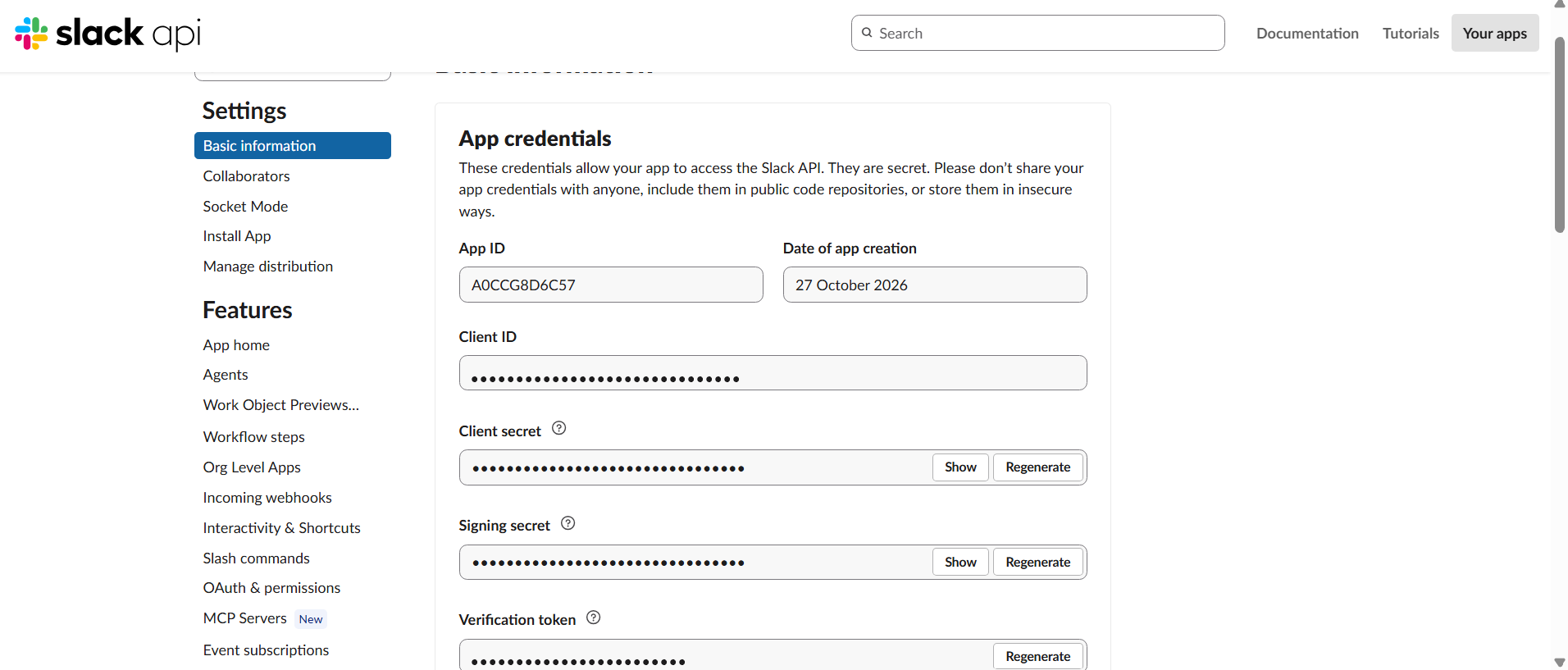
On the app's Basic Information page, under App Credentials, click Show next to Signing Secret and copy it. Slack signs every request with this secret, and the listener uses it to reject requests that did not come from Slack.
-
Write your service (see Quickstart below) with the signing secret as
webhookSecret, and run it locally withbal run. Note the port it's listening on (8090by default). -
Expose that port with ngrok:
ngrok http 8090Copy the
ForwardingURL ngrok prints out - this is your temporary public Request URL.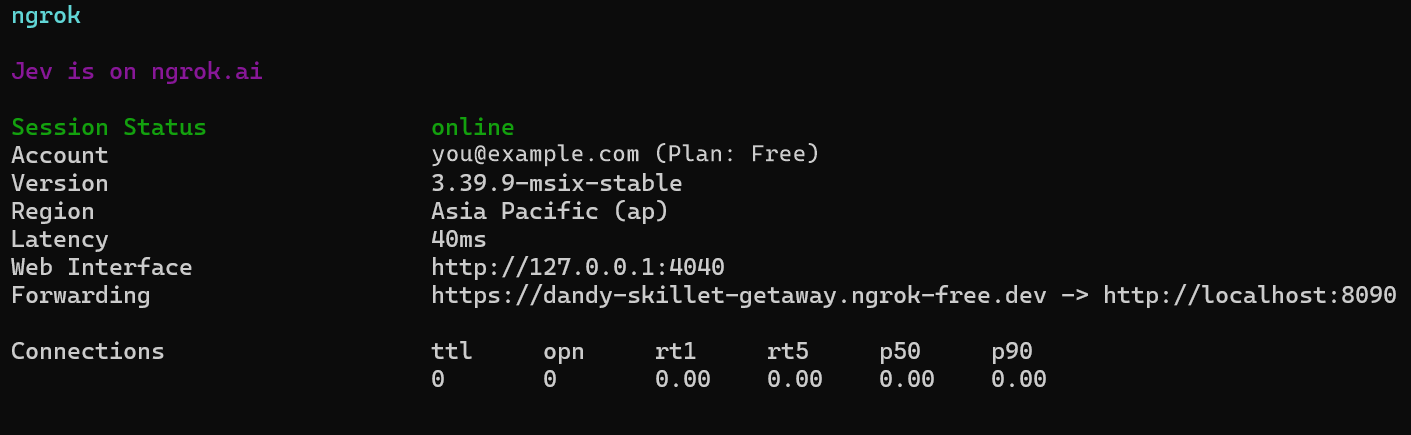
-
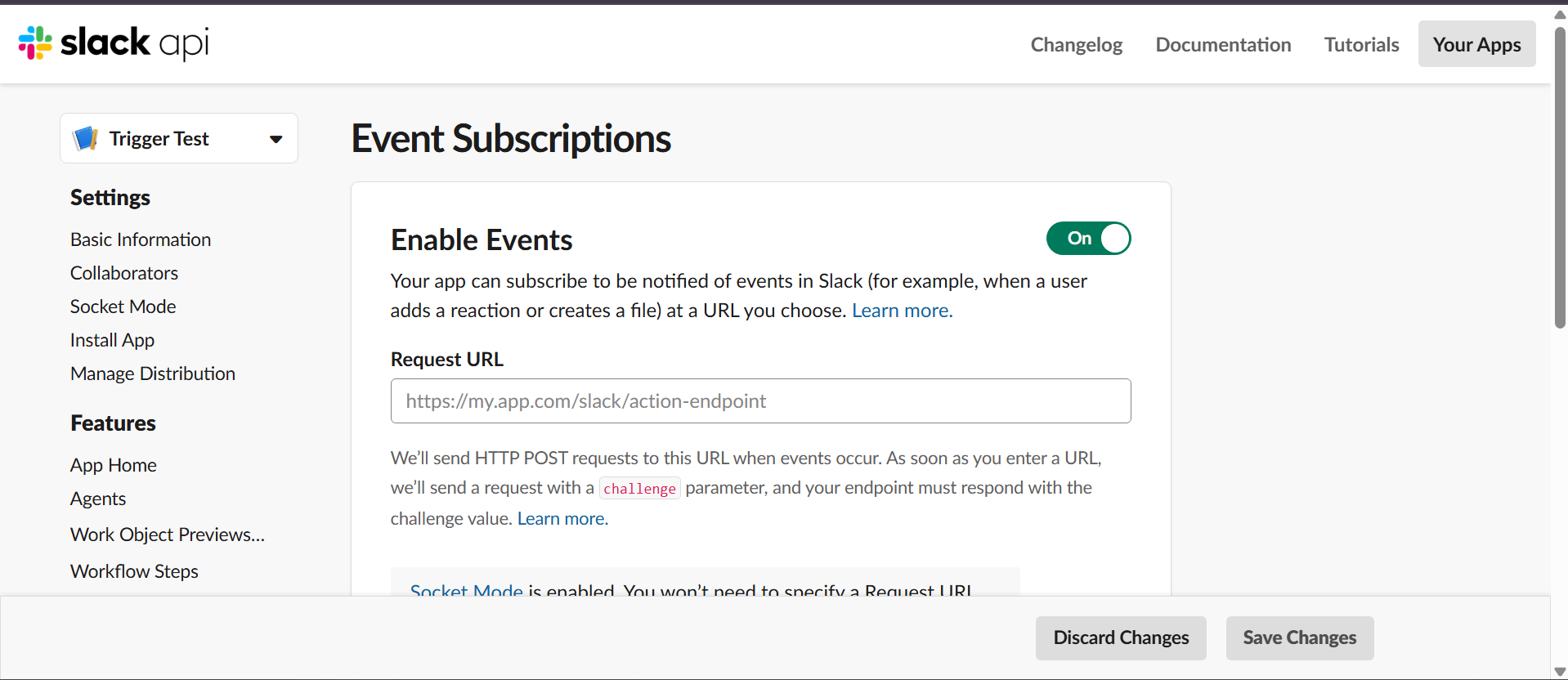
Make sure Settings > Socket Mode is turned off. With Socket Mode on, Slack sends events over a WebSocket instead of to your Request URL, and the listener never receives them.
-
Open Features > Event Subscriptions and turn Enable Events on.
-
Paste the ngrok forwarding URL into Request URL. Slack immediately sends a
url_verificationrequest with achallenge, and the listener answers it for you, so the field shows Verified as long as your service is running.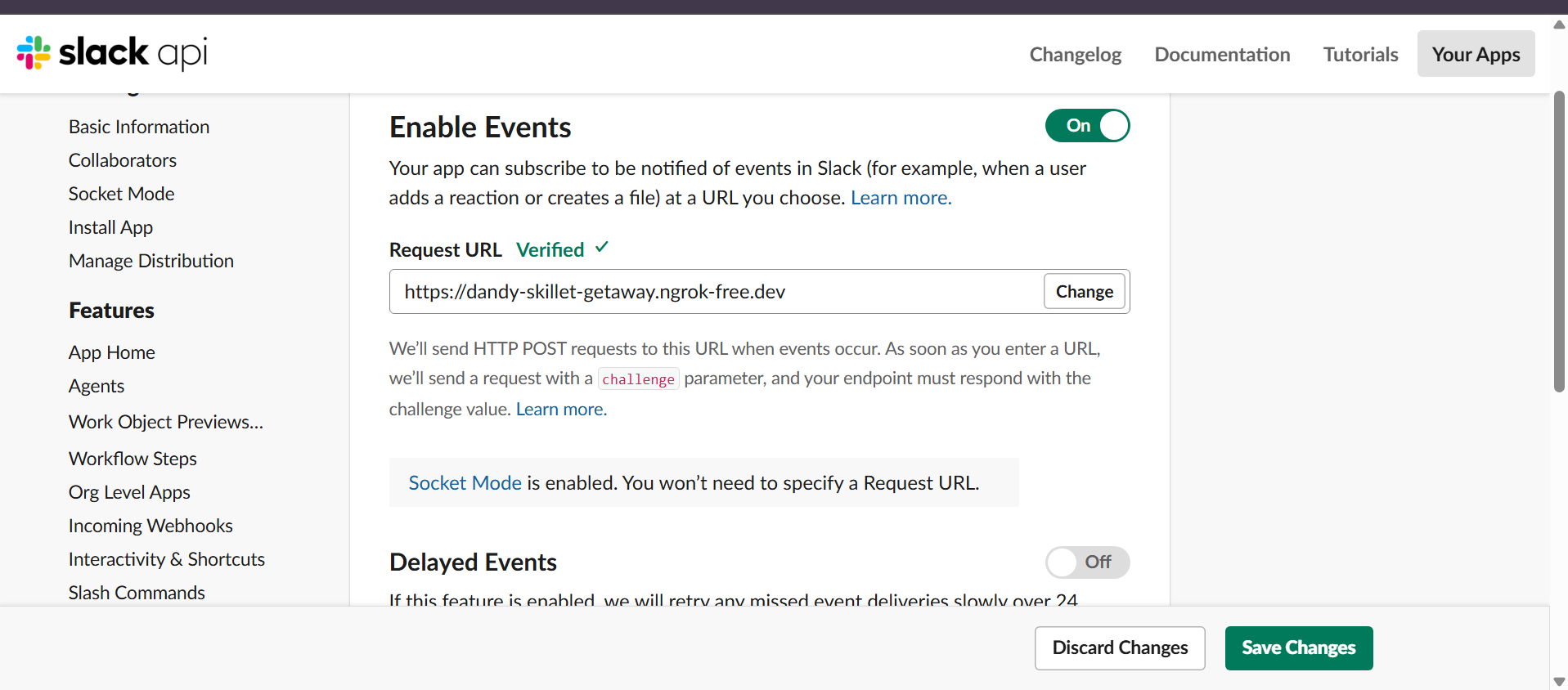
-
Under Subscribe to bot events, click Add Bot User Event and add the events your service handles, for example
message.channelsandapp_mention. Slack adds the OAuth scopes each event needs. Click Save Changes, then reinstall the app to your workspace when Slack asks, so the new scopes take effect.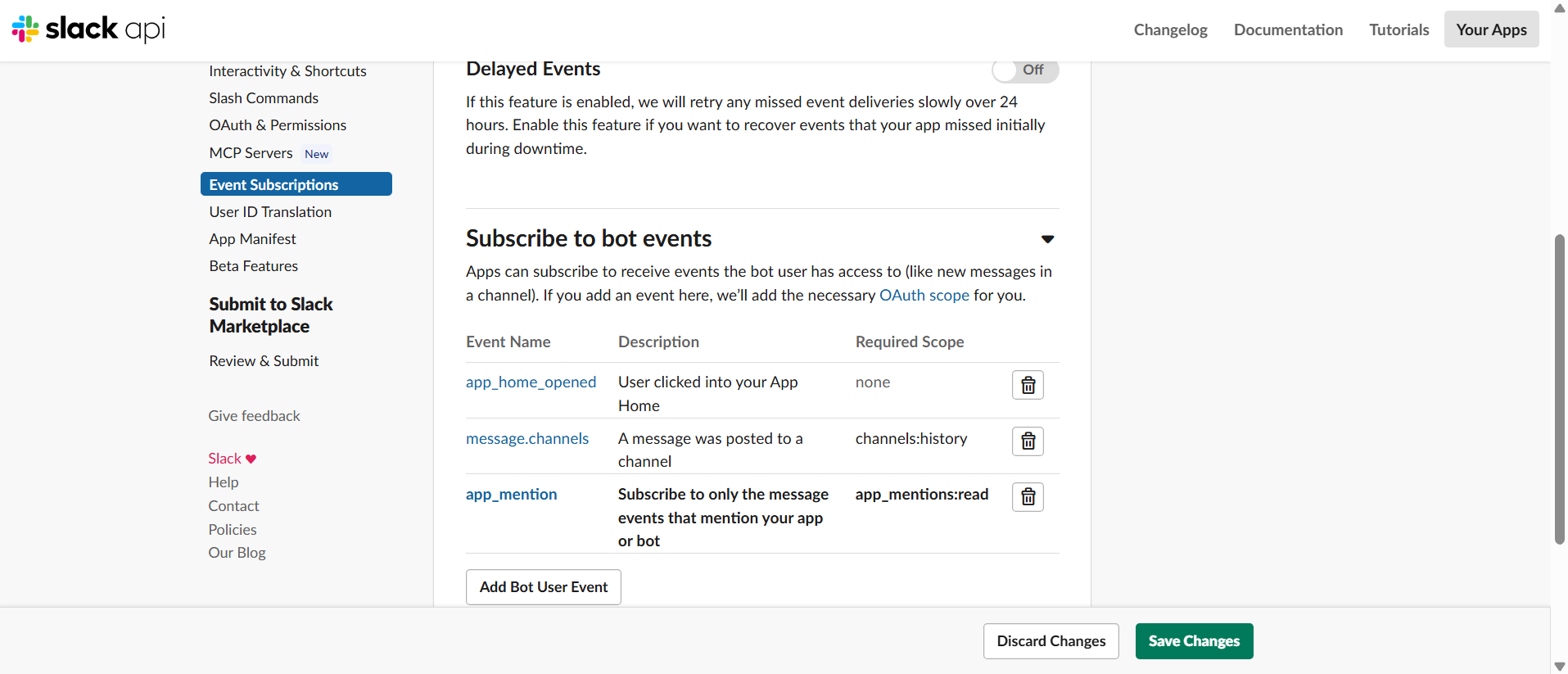
-
Invite the app to a channel (type
/invite @<your app>in the channel) and post a message. Each delivery shows up in the ngrok console with200 OK, and your handler runs.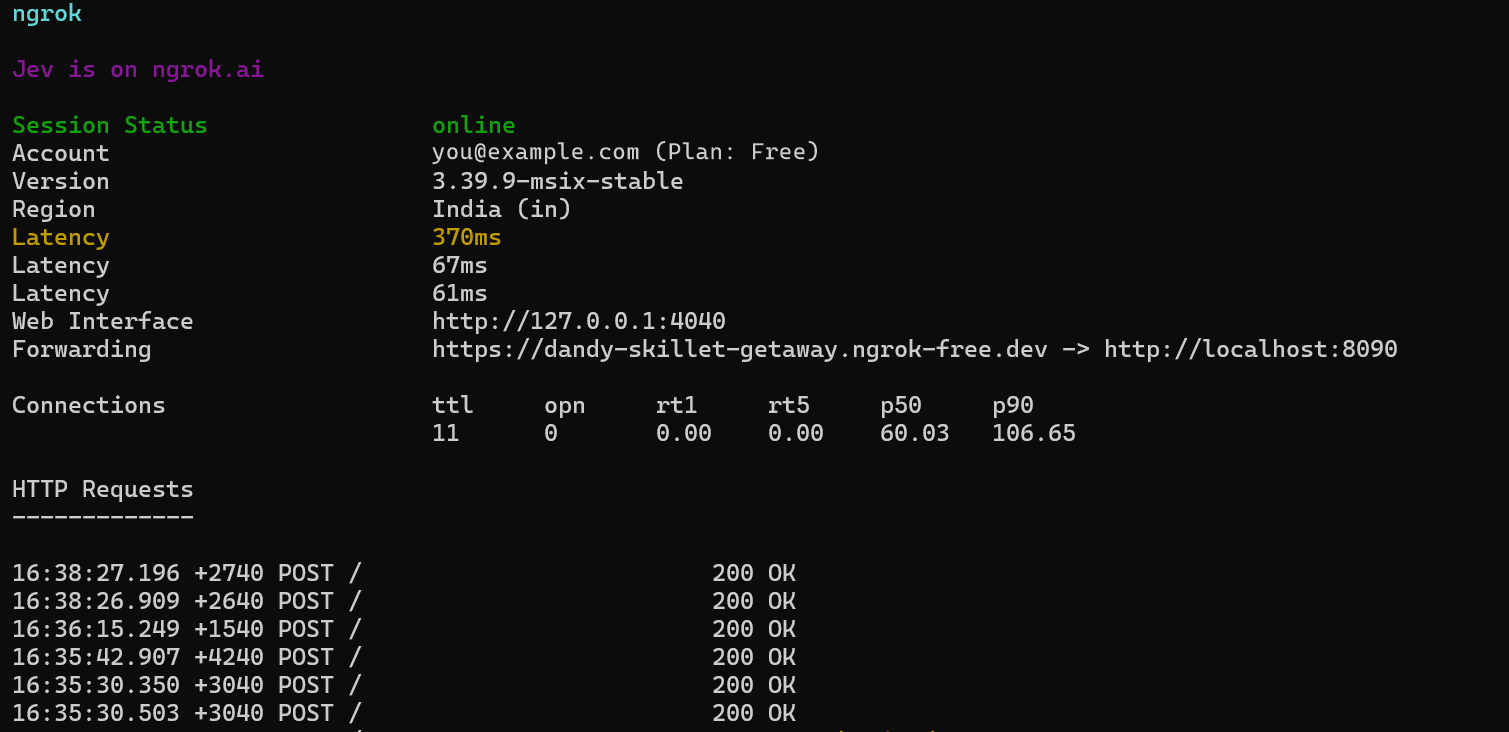
message.channels, message.groups, message.im, message.mpim and message.app_home are
subscription names, not separate events: Slack delivers all of them as a message event, so they
all arrive at MessageService.onMessage. Use event.channelType (channel, group, im,
mpim or app_home) to tell them apart.
Production / business integration
For production use, deploy your Ballerina service somewhere with a stable, internet-reachable HTTPS URL. Ballerina doesn't require any specific hosting platform - containers, a VM, a managed PaaS, or anything else that gives you a stable HTTPS endpoint all work equally well.
Rather than hardcoding webhookSecret as shown in the Quickstart, inject it via Config.toml (or
your platform's equivalent configuration/secret mechanism), since it's a configurable value:
[<your_org>.<your_module_name>.userInput] webhookSecret = "<your app's signing secret>"
Then set your production URL as the Request URL on the Event Subscriptions page.
Slack expects a response within three seconds and retries a delivery up to three times
otherwise. The listener responds before it runs your handler, so slow handlers don't cause
retries, but a retry can still arrive after a network problem. Use eventId to skip events you
have already handled.
Compatibility
| Version | |
|---|---|
| Ballerina Language | Ballerina Swan Lake 2201.13.0 |
Quickstart
To use the Slack Trigger in your Ballerina application, update the .bal file as follows:
Step 1: Import the Slack Trigger Ballerina library
import ballerinax/slack.trigger as slack;
Step 2: Initialize the Slack Listener
Initialize the trigger by providing the listener config and a port number/http:Listener object.
configurable slack:ListenerConfig userInput = { webhookSecret: "xxxxxx" }; listener slack:Listener slackListener = new (userInput, 8090);
webhookSecret should always be set to your Slack app's signing secret - this is what the trigger
uses to verify incoming requests actually came from Slack. Without it, the listener rejects every request with 401 Unauthorized.
If you don't provide a port it will use the default port, which is 8090 - webhookSecret should
still always be set.
listener slack:Listener slackListener = new (userInput);
Step 3: Use the correct service type to implement the service
Use the correct service type for the corresponding channel when implementing the service. For
example, if you need to listen to reaction events, use the ReactionService service type as
follows. Every remote function declared on a service type must be implemented - Ballerina requires
a complete implementation, not just the ones you care about.
service slack:ReactionService on slackListener { remote function onReactionAdded(slack:GenericEventWrapper payload) returns error? { return; } remote function onReactionRemoved(slack:GenericEventWrapper payload) returns error? { return; } }
Step 4: Provide remote functions corresponding to the events you're interested in
Remote functions must be implemented inside a service, on the matching service type for the
channel you're listening to - for example, slack:MessageService for messages.
import ballerina/log; service slack:MessageService on slackListener { remote function onMessage(slack:MessageEventWrapper payload) returns error? { log:printInfo("Message received", channel = payload.event.'channel, user = payload.event.user, text = payload.event.text); } remote function onMessageMetadataDeleted(slack:GenericEventWrapper payload) returns error? { } remote function onMessageMetadataPosted(slack:GenericEventWrapper payload) returns error? { } remote function onMessageMetadataUpdated(slack:GenericEventWrapper payload) returns error? { } }
Step 5: Run the service
Use the bal run command to compile and run the Ballerina program.
Step 6: Point your Slack app at your service
See Setup guide above for the full walkthrough (with screenshots) of exposing your service and setting the Request URL, for both local testing and production use.
Examples
The slack.trigger module provides practical examples illustrating usage in various scenarios.
Explore these examples,
covering common event handling use cases.
Report issues
To report bugs, request new features, start new discussions, etc., go to the Ballerina Library repository.
Useful links
- For more information go to the
slack.triggerpackage. - If you're moving from the older
trigger.slackpackage, see the migration notes. - For example demonstrations of the usage, go to Ballerina By Examples.
- Chat live with us via our Discord server.
- Post all technical questions on Stack Overflow with the #ballerina tag.
Service types
slack.trigger: AppService
Attachable service type exposing the AppService family of webhook events.
onAppMention
function onAppMention(GenericEventWrapper payload) returns error?Triggered on App mention.
Parameters
- payload GenericEventWrapper - the GenericEventWrapper webhook payload
Return Type
- error? - an error if handling the event fails
onAppUninstalled
function onAppUninstalled(GenericEventWrapper payload) returns error?Triggered on App uninstalled.
Parameters
- payload GenericEventWrapper - the GenericEventWrapper webhook payload
Return Type
- error? - an error if handling the event fails
onAppContextChanged
function onAppContextChanged(GenericEventWrapper payload) returns error?Triggered on App context changed.
Parameters
- payload GenericEventWrapper - the GenericEventWrapper webhook payload
Return Type
- error? - an error if handling the event fails
onAppDeleted
function onAppDeleted(GenericEventWrapper payload) returns error?Triggered on App deleted.
Parameters
- payload GenericEventWrapper - the GenericEventWrapper webhook payload
Return Type
- error? - an error if handling the event fails
onAppHomeOpened
function onAppHomeOpened(GenericEventWrapper payload) returns error?Triggered on App home opened.
Parameters
- payload GenericEventWrapper - the GenericEventWrapper webhook payload
Return Type
- error? - an error if handling the event fails
onAppInstalled
function onAppInstalled(GenericEventWrapper payload) returns error?Triggered on App installed.
Parameters
- payload GenericEventWrapper - the GenericEventWrapper webhook payload
Return Type
- error? - an error if handling the event fails
onAppRequested
function onAppRequested(GenericEventWrapper payload) returns error?Triggered on App requested.
Parameters
- payload GenericEventWrapper - the GenericEventWrapper webhook payload
Return Type
- error? - an error if handling the event fails
onAppUninstalledTeam
function onAppUninstalledTeam(GenericEventWrapper payload) returns error?Triggered on App uninstalled team.
Parameters
- payload GenericEventWrapper - the GenericEventWrapper webhook payload
Return Type
- error? - an error if handling the event fails
slack.trigger: ChannelService
Attachable service type exposing the ChannelService family of webhook events.
onChannelArchive
function onChannelArchive(GenericEventWrapper payload) returns error?Triggered on Channel archive.
Parameters
- payload GenericEventWrapper - the GenericEventWrapper webhook payload
Return Type
- error? - an error if handling the event fails
onChannelCreated
function onChannelCreated(GenericEventWrapper payload) returns error?Triggered on Channel created.
Parameters
- payload GenericEventWrapper - the GenericEventWrapper webhook payload
Return Type
- error? - an error if handling the event fails
onChannelDeleted
function onChannelDeleted(GenericEventWrapper payload) returns error?Triggered on Channel deleted.
Parameters
- payload GenericEventWrapper - the GenericEventWrapper webhook payload
Return Type
- error? - an error if handling the event fails
onChannelHistoryChanged
function onChannelHistoryChanged(GenericEventWrapper payload) returns error?Triggered on Channel history changed.
Parameters
- payload GenericEventWrapper - the GenericEventWrapper webhook payload
Return Type
- error? - an error if handling the event fails
onChannelLeft
function onChannelLeft(GenericEventWrapper payload) returns error?Triggered on Channel left.
Parameters
- payload GenericEventWrapper - the GenericEventWrapper webhook payload
Return Type
- error? - an error if handling the event fails
onChannelRename
function onChannelRename(GenericEventWrapper payload) returns error?Triggered on Channel rename.
Parameters
- payload GenericEventWrapper - the GenericEventWrapper webhook payload
Return Type
- error? - an error if handling the event fails
onChannelIdChanged
function onChannelIdChanged(GenericEventWrapper payload) returns error?Triggered on Channel id changed.
Parameters
- payload GenericEventWrapper - the GenericEventWrapper webhook payload
Return Type
- error? - an error if handling the event fails
onChannelShared
function onChannelShared(GenericEventWrapper payload) returns error?Triggered on Channel shared.
Parameters
- payload GenericEventWrapper - the GenericEventWrapper webhook payload
Return Type
- error? - an error if handling the event fails
onChannelUnshared
function onChannelUnshared(GenericEventWrapper payload) returns error?Triggered on Channel unshared.
Parameters
- payload GenericEventWrapper - the GenericEventWrapper webhook payload
Return Type
- error? - an error if handling the event fails
slack.trigger: DndService
Attachable service type exposing the DndService family of webhook events.
onDndUpdated
function onDndUpdated(GenericEventWrapper payload) returns error?Triggered on Dnd updated.
Parameters
- payload GenericEventWrapper - the GenericEventWrapper webhook payload
Return Type
- error? - an error if handling the event fails
onDndUpdatedUser
function onDndUpdatedUser(GenericEventWrapper payload) returns error?Triggered on Dnd updated user.
Parameters
- payload GenericEventWrapper - the GenericEventWrapper webhook payload
Return Type
- error? - an error if handling the event fails
slack.trigger: EmailDomainChangedService
Attachable service type exposing the EmailDomainChangedService family of webhook events.
onEmailDomainChanged
function onEmailDomainChanged(GenericEventWrapper payload) returns error?Triggered on Email domain changed.
Parameters
- payload GenericEventWrapper - the GenericEventWrapper webhook payload
Return Type
- error? - an error if handling the event fails
slack.trigger: EmojiChangedService
Attachable service type exposing the EmojiChangedService family of webhook events.
onEmojiChanged
function onEmojiChanged(GenericEventWrapper payload) returns error?Triggered on Emoji changed.
Parameters
- payload GenericEventWrapper - the GenericEventWrapper webhook payload
Return Type
- error? - an error if handling the event fails
slack.trigger: FileService
Attachable service type exposing the FileService family of webhook events.
onFileChange
function onFileChange(GenericEventWrapper payload) returns error?Triggered on File change.
Parameters
- payload GenericEventWrapper - the GenericEventWrapper webhook payload
Return Type
- error? - an error if handling the event fails
onFileCommentDeleted
function onFileCommentDeleted(GenericEventWrapper payload) returns error?Triggered on File comment deleted.
Parameters
- payload GenericEventWrapper - the GenericEventWrapper webhook payload
Return Type
- error? - an error if handling the event fails
onFileCreated
function onFileCreated(GenericEventWrapper payload) returns error?Triggered on File created.
Parameters
- payload GenericEventWrapper - the GenericEventWrapper webhook payload
Return Type
- error? - an error if handling the event fails
onFileDeleted
function onFileDeleted(GenericEventWrapper payload) returns error?Triggered on File deleted.
Parameters
- payload GenericEventWrapper - the GenericEventWrapper webhook payload
Return Type
- error? - an error if handling the event fails
onFilePublic
function onFilePublic(GenericEventWrapper payload) returns error?Triggered on File public.
Parameters
- payload GenericEventWrapper - the GenericEventWrapper webhook payload
Return Type
- error? - an error if handling the event fails
onFileShared
function onFileShared(GenericEventWrapper payload) returns error?Triggered on File shared.
Parameters
- payload GenericEventWrapper - the GenericEventWrapper webhook payload
Return Type
- error? - an error if handling the event fails
onFileUnshared
function onFileUnshared(GenericEventWrapper payload) returns error?Triggered on File unshared.
Parameters
- payload GenericEventWrapper - the GenericEventWrapper webhook payload
Return Type
- error? - an error if handling the event fails
slack.trigger: GridMigrationService
Attachable service type exposing the GridMigrationService family of webhook events.
onGridMigrationFinished
function onGridMigrationFinished(GenericEventWrapper payload) returns error?Triggered on Grid migration finished.
Parameters
- payload GenericEventWrapper - the GenericEventWrapper webhook payload
Return Type
- error? - an error if handling the event fails
onGridMigrationStarted
function onGridMigrationStarted(GenericEventWrapper payload) returns error?Triggered on Grid migration started.
Parameters
- payload GenericEventWrapper - the GenericEventWrapper webhook payload
Return Type
- error? - an error if handling the event fails
slack.trigger: GroupService
Attachable service type exposing the GroupService family of webhook events.
onGroupClose
function onGroupClose(GenericEventWrapper payload) returns error?Triggered on Group close.
Parameters
- payload GenericEventWrapper - the GenericEventWrapper webhook payload
Return Type
- error? - an error if handling the event fails
onGroupHistoryChanged
function onGroupHistoryChanged(GenericEventWrapper payload) returns error?Triggered on Group history changed.
Parameters
- payload GenericEventWrapper - the GenericEventWrapper webhook payload
Return Type
- error? - an error if handling the event fails
onGroupLeft
function onGroupLeft(GenericEventWrapper payload) returns error?Triggered on Group left.
Parameters
- payload GenericEventWrapper - the GenericEventWrapper webhook payload
Return Type
- error? - an error if handling the event fails
onGroupOpen
function onGroupOpen(GenericEventWrapper payload) returns error?Triggered on Group open.
Parameters
- payload GenericEventWrapper - the GenericEventWrapper webhook payload
Return Type
- error? - an error if handling the event fails
onGroupRename
function onGroupRename(GenericEventWrapper payload) returns error?Triggered on Group rename.
Parameters
- payload GenericEventWrapper - the GenericEventWrapper webhook payload
Return Type
- error? - an error if handling the event fails
onGroupDeleted
function onGroupDeleted(GenericEventWrapper payload) returns error?Triggered on Group deleted.
Parameters
- payload GenericEventWrapper - the GenericEventWrapper webhook payload
Return Type
- error? - an error if handling the event fails
slack.trigger: ImService
Attachable service type exposing the ImService family of webhook events.
onImClose
function onImClose(GenericEventWrapper payload) returns error?Triggered on Im close.
Parameters
- payload GenericEventWrapper - the GenericEventWrapper webhook payload
Return Type
- error? - an error if handling the event fails
onImCreated
function onImCreated(GenericEventWrapper payload) returns error?Triggered on Im created.
Parameters
- payload GenericEventWrapper - the GenericEventWrapper webhook payload
Return Type
- error? - an error if handling the event fails
onImHistoryChanged
function onImHistoryChanged(GenericEventWrapper payload) returns error?Triggered on Im history changed.
Parameters
- payload GenericEventWrapper - the GenericEventWrapper webhook payload
Return Type
- error? - an error if handling the event fails
onImOpen
function onImOpen(GenericEventWrapper payload) returns error?Triggered on Im open.
Parameters
- payload GenericEventWrapper - the GenericEventWrapper webhook payload
Return Type
- error? - an error if handling the event fails
slack.trigger: LinkSharedService
Attachable service type exposing the LinkSharedService family of webhook events.
onLinkShared
function onLinkShared(GenericEventWrapper payload) returns error?Triggered on Link shared.
Parameters
- payload GenericEventWrapper - the GenericEventWrapper webhook payload
Return Type
- error? - an error if handling the event fails
slack.trigger: MemberService
Attachable service type exposing the MemberService family of webhook events.
onMemberJoinedChannel
function onMemberJoinedChannel(GenericEventWrapper payload) returns error?Triggered on Member joined channel.
Parameters
- payload GenericEventWrapper - the GenericEventWrapper webhook payload
Return Type
- error? - an error if handling the event fails
onMemberLeftChannel
function onMemberLeftChannel(GenericEventWrapper payload) returns error?Triggered on Member left channel.
Parameters
- payload GenericEventWrapper - the GenericEventWrapper webhook payload
Return Type
- error? - an error if handling the event fails
slack.trigger: MessageService
Attachable service type exposing the MessageService family of webhook events.
onMessage
function onMessage(MessageEventWrapper payload) returns error?Triggered on Message.
Parameters
- payload MessageEventWrapper - the MessageEventWrapper webhook payload
Return Type
- error? - an error if handling the event fails
onMessageMetadataDeleted
function onMessageMetadataDeleted(GenericEventWrapper payload) returns error?Triggered on Message metadata deleted.
Parameters
- payload GenericEventWrapper - the GenericEventWrapper webhook payload
Return Type
- error? - an error if handling the event fails
onMessageMetadataPosted
function onMessageMetadataPosted(GenericEventWrapper payload) returns error?Triggered on Message metadata posted.
Parameters
- payload GenericEventWrapper - the GenericEventWrapper webhook payload
Return Type
- error? - an error if handling the event fails
onMessageMetadataUpdated
function onMessageMetadataUpdated(GenericEventWrapper payload) returns error?Triggered on Message metadata updated.
Parameters
- payload GenericEventWrapper - the GenericEventWrapper webhook payload
Return Type
- error? - an error if handling the event fails
slack.trigger: PinService
Attachable service type exposing the PinService family of webhook events.
onPinAdded
function onPinAdded(GenericEventWrapper payload) returns error?Triggered on Pin added.
Parameters
- payload GenericEventWrapper - the GenericEventWrapper webhook payload
Return Type
- error? - an error if handling the event fails
onPinRemoved
function onPinRemoved(GenericEventWrapper payload) returns error?Triggered on Pin removed.
Parameters
- payload GenericEventWrapper - the GenericEventWrapper webhook payload
Return Type
- error? - an error if handling the event fails
slack.trigger: ReactionService
Attachable service type exposing the ReactionService family of webhook events.
onReactionAdded
function onReactionAdded(GenericEventWrapper payload) returns error?Triggered on Reaction added.
Parameters
- payload GenericEventWrapper - the GenericEventWrapper webhook payload
Return Type
- error? - an error if handling the event fails
onReactionRemoved
function onReactionRemoved(GenericEventWrapper payload) returns error?Triggered on Reaction removed.
Parameters
- payload GenericEventWrapper - the GenericEventWrapper webhook payload
Return Type
- error? - an error if handling the event fails
slack.trigger: StarService
Attachable service type exposing the StarService family of webhook events.
onStarAdded
function onStarAdded(GenericEventWrapper payload) returns error?Triggered on Star added.
Parameters
- payload GenericEventWrapper - the GenericEventWrapper webhook payload
Return Type
- error? - an error if handling the event fails
onStarRemoved
function onStarRemoved(GenericEventWrapper payload) returns error?Triggered on Star removed.
Parameters
- payload GenericEventWrapper - the GenericEventWrapper webhook payload
Return Type
- error? - an error if handling the event fails
slack.trigger: SubteamService
Attachable service type exposing the SubteamService family of webhook events.
onSubteamCreated
function onSubteamCreated(GenericEventWrapper payload) returns error?Triggered on Subteam created.
Parameters
- payload GenericEventWrapper - the GenericEventWrapper webhook payload
Return Type
- error? - an error if handling the event fails
onSubteamMembersChanged
function onSubteamMembersChanged(GenericEventWrapper payload) returns error?Triggered on Subteam members changed.
Parameters
- payload GenericEventWrapper - the GenericEventWrapper webhook payload
Return Type
- error? - an error if handling the event fails
onSubteamSelfAdded
function onSubteamSelfAdded(GenericEventWrapper payload) returns error?Triggered on Subteam self added.
Parameters
- payload GenericEventWrapper - the GenericEventWrapper webhook payload
Return Type
- error? - an error if handling the event fails
onSubteamSelfRemoved
function onSubteamSelfRemoved(GenericEventWrapper payload) returns error?Triggered on Subteam self removed.
Parameters
- payload GenericEventWrapper - the GenericEventWrapper webhook payload
Return Type
- error? - an error if handling the event fails
onSubteamUpdated
function onSubteamUpdated(GenericEventWrapper payload) returns error?Triggered on Subteam updated.
Parameters
- payload GenericEventWrapper - the GenericEventWrapper webhook payload
Return Type
- error? - an error if handling the event fails
slack.trigger: TeamService
Attachable service type exposing the TeamService family of webhook events.
onTeamDomainChange
function onTeamDomainChange(GenericEventWrapper payload) returns error?Triggered on Team domain change.
Parameters
- payload GenericEventWrapper - the GenericEventWrapper webhook payload
Return Type
- error? - an error if handling the event fails
onTeamJoin
function onTeamJoin(GenericEventWrapper payload) returns error?Triggered on Team join.
Parameters
- payload GenericEventWrapper - the GenericEventWrapper webhook payload
Return Type
- error? - an error if handling the event fails
onTeamRename
function onTeamRename(GenericEventWrapper payload) returns error?Triggered on Team rename.
Parameters
- payload GenericEventWrapper - the GenericEventWrapper webhook payload
Return Type
- error? - an error if handling the event fails
onTeamAccessGranted
function onTeamAccessGranted(GenericEventWrapper payload) returns error?Triggered on Team access granted.
Parameters
- payload GenericEventWrapper - the GenericEventWrapper webhook payload
Return Type
- error? - an error if handling the event fails
onTeamAccessRevoked
function onTeamAccessRevoked(GenericEventWrapper payload) returns error?Triggered on Team access revoked.
Parameters
- payload GenericEventWrapper - the GenericEventWrapper webhook payload
Return Type
- error? - an error if handling the event fails
slack.trigger: TokensRevokedService
Attachable service type exposing the TokensRevokedService family of webhook events.
onTokensRevoked
function onTokensRevoked(GenericEventWrapper payload) returns error?Triggered on Tokens revoked.
Parameters
- payload GenericEventWrapper - the GenericEventWrapper webhook payload
Return Type
- error? - an error if handling the event fails
slack.trigger: UserChangeService
Attachable service type exposing the UserChangeService family of webhook events.
onUserChange
function onUserChange(GenericEventWrapper payload) returns error?Triggered on User change.
Parameters
- payload GenericEventWrapper - the GenericEventWrapper webhook payload
Return Type
- error? - an error if handling the event fails
slack.trigger: AssistantService
Attachable service type exposing the AssistantService family of webhook events.
onAssistantThreadContextChanged
function onAssistantThreadContextChanged(GenericEventWrapper payload) returns error?Triggered on Assistant thread context changed.
Parameters
- payload GenericEventWrapper - the GenericEventWrapper webhook payload
Return Type
- error? - an error if handling the event fails
onAssistantThreadStarted
function onAssistantThreadStarted(GenericEventWrapper payload) returns error?Triggered on Assistant thread started.
Parameters
- payload GenericEventWrapper - the GenericEventWrapper webhook payload
Return Type
- error? - an error if handling the event fails
slack.trigger: CallService
Attachable service type exposing the CallService family of webhook events.
onCallRejected
function onCallRejected(GenericEventWrapper payload) returns error?Triggered on Call rejected.
Parameters
- payload GenericEventWrapper - the GenericEventWrapper webhook payload
Return Type
- error? - an error if handling the event fails
slack.trigger: EntityService
Attachable service type exposing the EntityService family of webhook events.
onEntityCommentsRequested
function onEntityCommentsRequested(GenericEventWrapper payload) returns error?Triggered on Entity comments requested.
Parameters
- payload GenericEventWrapper - the GenericEventWrapper webhook payload
Return Type
- error? - an error if handling the event fails
onEntityDetailsRequested
function onEntityDetailsRequested(GenericEventWrapper payload) returns error?Triggered on Entity details requested.
Parameters
- payload GenericEventWrapper - the GenericEventWrapper webhook payload
Return Type
- error? - an error if handling the event fails
slack.trigger: FunctionService
Attachable service type exposing the FunctionService family of webhook events.
onFunctionExecuted
function onFunctionExecuted(GenericEventWrapper payload) returns error?Triggered on Function executed.
Parameters
- payload GenericEventWrapper - the GenericEventWrapper webhook payload
Return Type
- error? - an error if handling the event fails
slack.trigger: InviteService
Attachable service type exposing the InviteService family of webhook events.
onInviteRequested
function onInviteRequested(GenericEventWrapper payload) returns error?Triggered on Invite requested.
Parameters
- payload GenericEventWrapper - the GenericEventWrapper webhook payload
Return Type
- error? - an error if handling the event fails
slack.trigger: SharedChannelService
Attachable service type exposing the SharedChannelService family of webhook events.
onSharedChannelInviteAccepted
function onSharedChannelInviteAccepted(GenericEventWrapper payload) returns error?Triggered on Shared channel invite accepted.
Parameters
- payload GenericEventWrapper - the GenericEventWrapper webhook payload
Return Type
- error? - an error if handling the event fails
onSharedChannelInviteApproved
function onSharedChannelInviteApproved(GenericEventWrapper payload) returns error?Triggered on Shared channel invite approved.
Parameters
- payload GenericEventWrapper - the GenericEventWrapper webhook payload
Return Type
- error? - an error if handling the event fails
onSharedChannelInviteDeclined
function onSharedChannelInviteDeclined(GenericEventWrapper payload) returns error?Triggered on Shared channel invite declined.
Parameters
- payload GenericEventWrapper - the GenericEventWrapper webhook payload
Return Type
- error? - an error if handling the event fails
onSharedChannelInviteReceived
function onSharedChannelInviteReceived(GenericEventWrapper payload) returns error?Triggered on Shared channel invite received.
Parameters
- payload GenericEventWrapper - the GenericEventWrapper webhook payload
Return Type
- error? - an error if handling the event fails
onSharedChannelInviteRequested
function onSharedChannelInviteRequested(GenericEventWrapper payload) returns error?Triggered on Shared channel invite requested.
Parameters
- payload GenericEventWrapper - the GenericEventWrapper webhook payload
Return Type
- error? - an error if handling the event fails
slack.trigger: UserService
Attachable service type exposing the UserService family of webhook events.
onUserHuddleChanged
function onUserHuddleChanged(GenericEventWrapper payload) returns error?Triggered on User huddle changed.
Parameters
- payload GenericEventWrapper - the GenericEventWrapper webhook payload
Return Type
- error? - an error if handling the event fails
onUserProfileChanged
function onUserProfileChanged(GenericEventWrapper payload) returns error?Triggered on User profile changed.
Parameters
- payload GenericEventWrapper - the GenericEventWrapper webhook payload
Return Type
- error? - an error if handling the event fails
onUserStatusChanged
function onUserStatusChanged(GenericEventWrapper payload) returns error?Triggered on User status changed.
Parameters
- payload GenericEventWrapper - the GenericEventWrapper webhook payload
Return Type
- error? - an error if handling the event fails
onUserConnection
function onUserConnection(GenericEventWrapper payload) returns error?Triggered on User connection.
Parameters
- payload GenericEventWrapper - the GenericEventWrapper webhook payload
Return Type
- error? - an error if handling the event fails
onUserGuestStatusChanged
function onUserGuestStatusChanged(GenericEventWrapper payload) returns error?Triggered on User guest status changed.
Parameters
- payload GenericEventWrapper - the GenericEventWrapper webhook payload
Return Type
- error? - an error if handling the event fails
slack.trigger: AgentService
Attachable service type exposing the AgentService family of webhook events.
onAgentSessionStopped
function onAgentSessionStopped(GenericEventWrapper payload) returns error?Triggered on Agent session stopped.
Parameters
- payload GenericEventWrapper - the GenericEventWrapper webhook payload
Return Type
- error? - an error if handling the event fails
onAgentSessionTitleChanged
function onAgentSessionTitleChanged(GenericEventWrapper payload) returns error?Triggered on Agent session title changed.
Parameters
- payload GenericEventWrapper - the GenericEventWrapper webhook payload
Return Type
- error? - an error if handling the event fails
Listeners
slack.trigger: Listener
attach
function attach(GenericServiceType serviceRef, string[]|string? attachPoint) returns error?detach
function detach(GenericServiceType serviceRef) returns error?Parameters
- serviceRef GenericServiceType -
'start
function 'start() returns error?gracefulStop
function gracefulStop() returns error?immediateStop
function immediateStop() returns error?Records
slack.trigger: Edited
Who edited the message and when, for an edited message.
Fields
- user? string - The ID of the user who edited the message.
- ts? string - When the message was edited.
- json... - Rest field
slack.trigger: Event
The actual event, an object, that happened
Fields
- eventTs? string - When the event was dispatched
- 'type string - The specific name of the event
- text? string - The message content
- json... - Rest field
slack.trigger: EventAuthorization
An installation of your app that can see the event
Fields
- enterpriseId? string? - The organization the installation belongs to, or null outside Enterprise Grid.
- teamId? string? - The workspace the installation belongs to, or null for an organization-wide installation.
- userId? string - The user the installation acts as.
- isBot? boolean - Whether the installation is a bot user.
- isEnterpriseInstall? boolean - Whether the app is installed across the whole Enterprise Grid organization.
- json... - Rest field
slack.trigger: GenericEventWrapper
Standard event wrapper for the Events API
Fields
- apiAppId string - The unique identifier your installed Slack application.
- event Event - The actual event, an object, that happened
- eventId string - A unique identifier for this specific event, globally unique across all workspaces.
- eventTime int - The epoch timestamp in seconds indicating when this event was dispatched.
- teamId string - The unique identifier of the workspace where the event occurred
- token string - A verification token to validate the event originated from Slack
- 'type string - Indicates which kind of event dispatch this is, usually
event_callback
- eventContext? string - An identifier for this specific event, used with apps.event.authorizations.list
- contextTeamId? string - The workspace the event happened in
- contextEnterpriseId? string? - The organization the event happened in, or null outside Enterprise Grid
- authedUsers? string[] - Users the event is visible to. Deprecated; Slack sends
authorizationsnow
- json... - Rest field
slack.trigger: ListenerConfig
Configuration for the webhook listener, including the secret used to verify incoming requests.
Fields
- webhookSecret? string - The secret used to verify incoming webhook signatures.
slack.trigger: MessageEvent
A message posted to a channel, private channel, DM, group DM or the app's home. channel_type tells them apart
(channel, group, im, mpim, app_home), and subtype marks special messages such as message_changed,
message_deleted or bot_message.
Fields
- 'type string - Always
message.
- subtype? string - The kind of special message, absent for an ordinary message.
- 'channel string - The ID of the conversation the message was posted in.
- channelType? string - The type of conversation,
channel,group,im,mpimorapp_home.
- user? string - The ID of the user who sent the message. Absent for some subtypes.
- botId? string - The ID of the bot that sent the message, for bot messages.
- text? string - The text of the message.
- ts string - The message's unique timestamp within the conversation.
- threadTs? string - The timestamp of the thread's parent message, for a message in a thread.
- eventTs? string - When the event was dispatched.
- deletedTs? string - The timestamp of the deleted message, for
message_deleted.
- edited? Edited - Who edited the message and when, for an edited message.
- message? map<json> - The message after the change, for
message_changed.
- previousMessage? map<json> - The message before the change, for
message_changedandmessage_deleted.
- json... - Rest field
slack.trigger: MessageEventWrapper
Message event wrapper
Fields
- apiAppId string - The unique identifier your installed Slack application.
- event MessageEvent - A message posted to a channel, private channel, DM, group DM or the app's home.
channel_typetells them apart (channel,group,im,mpim,app_home), andsubtypemarks special messages such asmessage_changed,message_deletedorbot_message.
- eventId string - A unique identifier for this specific event, globally unique across all workspaces.
- eventTime int - The epoch timestamp in seconds indicating when this event was dispatched.
- teamId string - The unique identifier of the workspace where the event occurred
- token string - A verification token to validate the event originated from Slack
- 'type string - Indicates which kind of event dispatch this is, usually
event_callback
- eventContext? string - An identifier for this specific event, used with apps.event.authorizations.list
- contextTeamId? string - The workspace the event happened in
- contextEnterpriseId? string? - The organization the event happened in, or null outside Enterprise Grid
- authedUsers? string[] - Users the event is visible to. Deprecated; Slack sends
authorizationsnow
- json... - Rest field
Union types
slack.trigger: GenericServiceType
GenericServiceType
The union of every service type that can be attached to this listener.
Import
import ballerinax/slack.trigger;Other versions
0.9.0