Module aws.redshiftdata

ballerinax/aws.redshiftdata Ballerina library
Overview
Amazon Redshift is a powerful and fully-managed data warehouse service provided by Amazon Web Services (AWS), designed to efficiently analyze large datasets with high performance and scalability.
The Amazon Redshift Data connector allows developers to interact with Amazon Redshift Data API seamlessly. The Redshift Data API simplifies data access by eliminating the need for managing persistent database connections or the Redshift JDBC driver.
Key Features
- Simplifies data access by using the Redshift Data API
- Eliminates the need for managing persistent database connections
- Support for executing SQL statements and retrieving results as a stream
- Support for both Cluster and WorkGroup (Serverless mode) configurations
- GraalVM compatible for native image builds
Setup guide
Set up a Redshift cluster
To use the Ballerina AWS Redshift data connector, follow these steps to set up an Amazon Redshift cluster:
Step 1: Navigate to Amazon Redshift and create a cluster
-
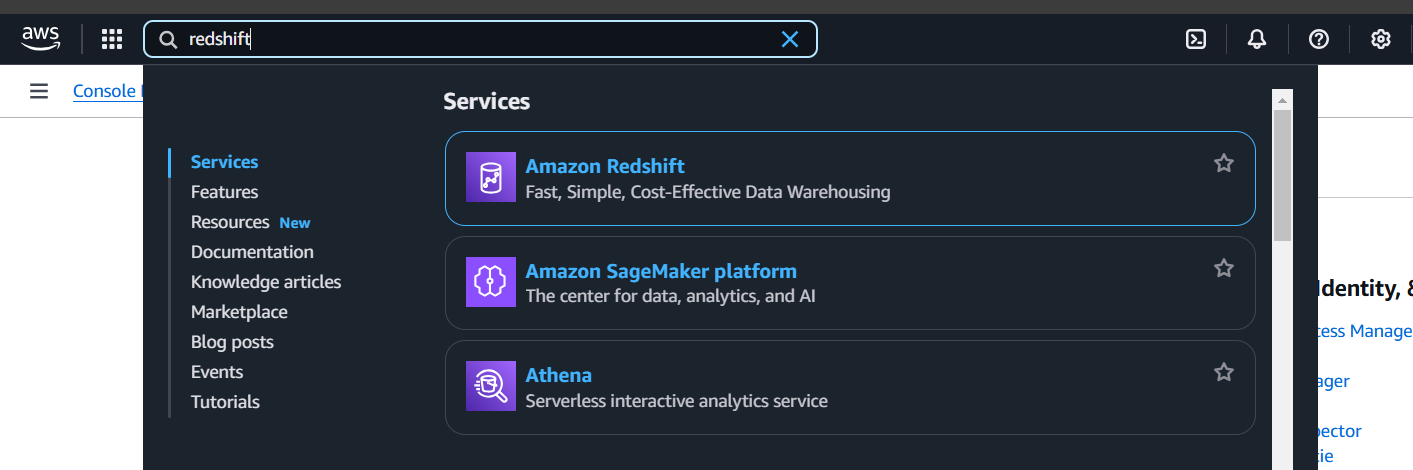
In the AWS Management Console, search for Redshift in the services search bar.
-
Click on Amazon Redshift.
-
Click on the
Create clusterbutton to initiate the process of creating a new Amazon Redshift cluster.
Step 2: Configure cluster settings
-
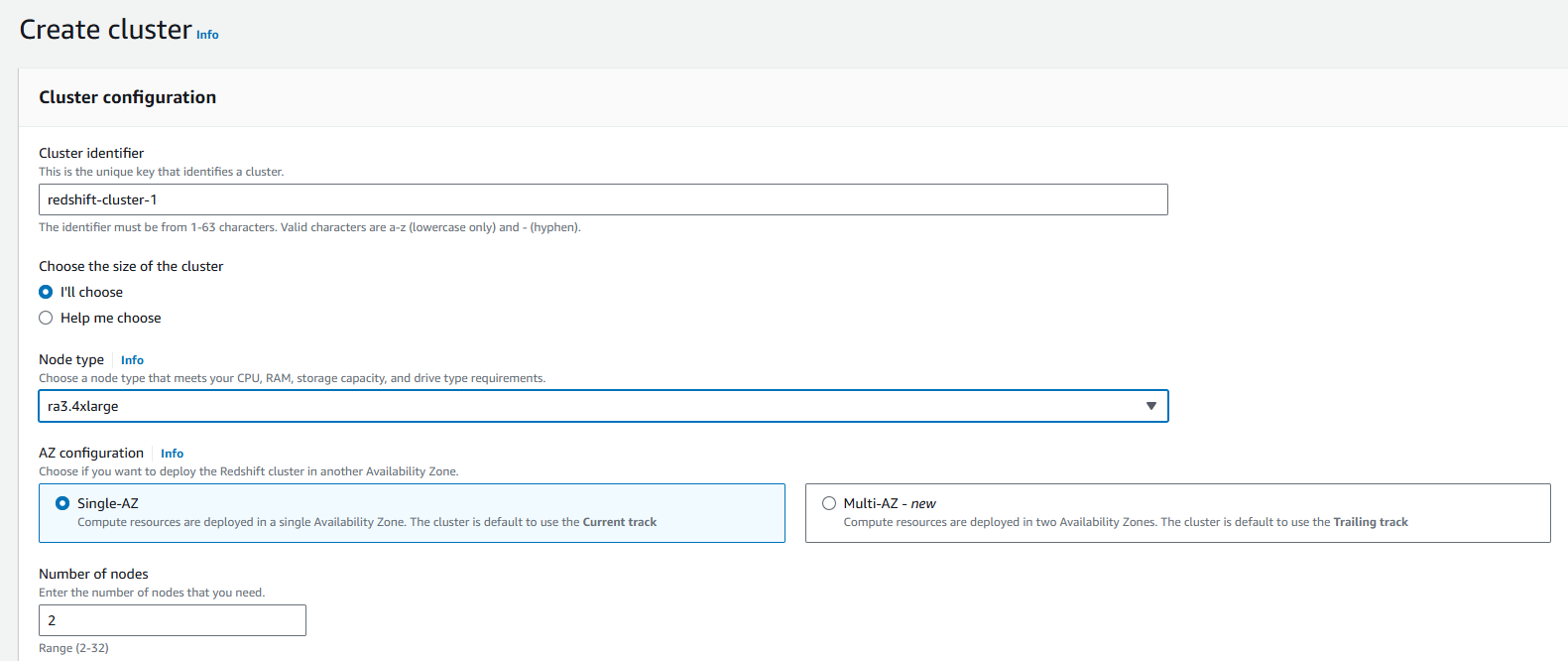
Configure your Redshift cluster settings, including cluster identifier, database name, credentials, and other relevant parameters.
-
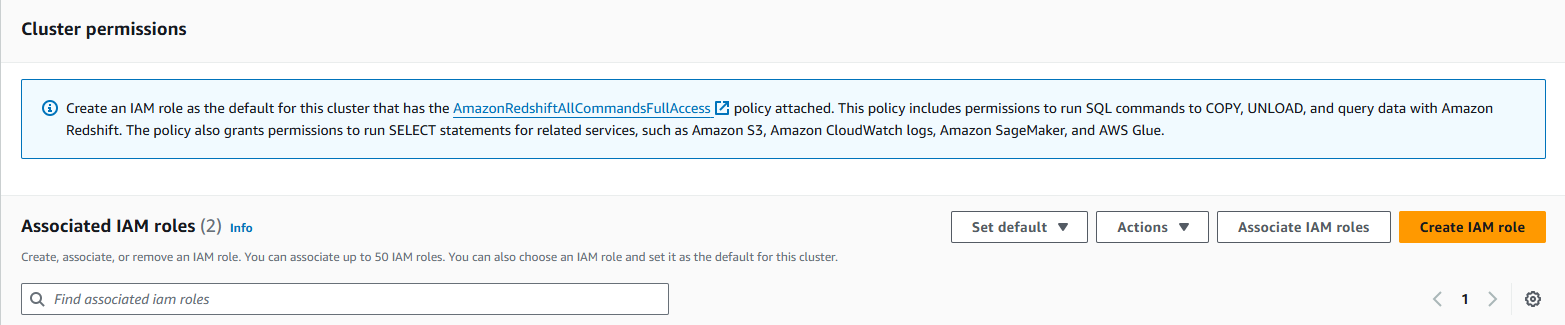
Configure security groups to control inbound and outbound traffic to your Redshift cluster. Ensure that your Ballerina application will have the necessary permissions to access the cluster.
-
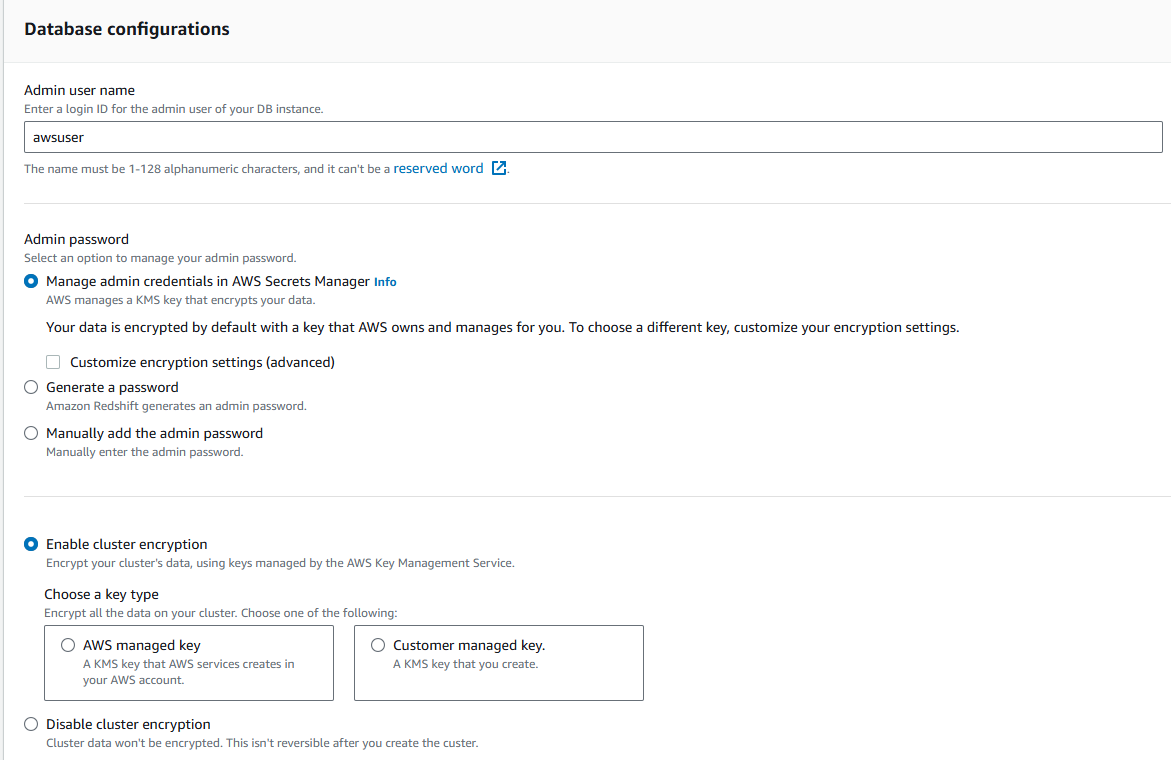
Record the username during the cluster configuration. This will be used to authenticate your Ballerina application with the Redshift cluster.
-
Finally, review your configuration settings, and once satisfied, click
Create clusterto launch your Amazon Redshift cluster.
Step 3: Wait for cluster availability
-
It may take some time for your Redshift cluster to be available. Monitor the cluster status in the AWS Console until it shows as "Available".

Obtain IAM user credentials
To create an IAM user and generate an access key, follow the obtaining IAM user credentials guide.
Attach the Redshift Data API permissions your application needs to the user — the AWS managed AmazonRedshiftDataFullAccess policy grants full access, or scope a custom policy to only the redshift-data actions you call.
The redshift-data actions alone are not sufficient: the user also needs permission to obtain the database credential.
| Database Access Config | Additional action required |
|---|---|
Cluster with dbUser | redshift:GetClusterCredentials |
WorkGroup (serverless) | redshift-serverless:GetCredentials |
either one, with secretArn | secretsmanager:GetSecretValue |
Quickstart
To use the aws.redshiftdata connector in your Ballerina project, modify the .bal file as follows:
Step 1: Import the module
import ballerinax/aws; import ballerinax/aws.redshiftdata;
Step 2: Instantiate a new connector
Create a new redshiftdata:Client by providing the region, authentication configurations and dbAccessConfig.
The dbAccessConfig in the ConnectionConfig record defines the database access configuration for connecting to the Redshift Data API. It can be set to either a Cluster or a WorkGroup (Serverless mode). Additionally, users can override this configuration for specific requests by providing it in individual calls to methods like execute or batchExecute, allowing for more granular control over database access per execution.
configurable string accessKeyId = ?; configurable string secretAccessKey = ?; configurable redshiftdata:Cluster dbAccessConfig = ?; redshiftdata:Client redshiftdata = check new ({ region: aws:US_EAST_2, auth: { accessKeyId, secretAccessKey }, dbAccessConfig });
Alternative authentication methods
Profile-based authentication
You can use AWS profile-based authentication as an alternative to static credentials.
redshiftdata:Client redshiftdata = check new ({ region: aws:US_EAST_1, auth: { profileName: "myAwsProfile", credentialsFilePath: "/path/to/custom/credentials" } });
Default credential provider chain
The standard default credential provider chain, trying each of the following in order and taking the first source that yields credentials:
- Environment variables (
AWS_ACCESS_KEY_ID/AWS_SECRET_ACCESS_KEY, andAWS_WEB_IDENTITY_TOKEN_FILEif set) - The shared config/credentials file's active profile (
AWS_PROFILE, ordefaultif unset) — which may itself resolve via SSO, an external process, or a chainedAssumeRolecall, depending on that profile's configuration - Container credentials (ECS/EKS)
- EC2 instance profile (IMDS)
redshiftdata:Client redshiftdata = check new ({ region: aws:US_EAST_1, auth: auth:DEFAULT_CREDENTIALS });
Note: Beyond the three options above, the
authfield also acceptsauth:AssumeRoleConfig(STS assume-role),auth:WebIdentityConfig(web identity / OIDC),auth:SsoAuthConfig(IAM Identity Center), andauth:ProcessAuthConfig(external credential process). See theBallerina AWSdocumentation for details.
Step 3: Invoke the connector operations
Now, utilize the available connector operations.
redshiftdata:ExecutionResponse response = check redshiftdata->execute(`SELECT * FROM Users`); redshiftdata:DescriptionResponse descriptionResponse = check redshiftdata->describe(response.statementId); stream<User, redshiftdata:Error?> statementResult = check redshiftdata->getResultAsStream(response.statementId);
Step 4: Run the Ballerina application
Use the following command to compile and run the Ballerina program.
bal run
Examples
The aws.redshiftdata connector provides practical examples illustrating usage in various scenarios. Explore these examples.
-
Manage users - This example demonstrates how to use the Ballerina Redshift Data connector to perform SQL operations on an AWS Redshift cluster. It includes creating a table, inserting data, and querying data.
-
Music store - This example illustrates the process of creating an HTTP RESTful API with Ballerina to perform basic CRUD operations on a database, specifically AWS Redshift, involving setup, configuration, and running examples.
Clients
aws.redshiftdata: Client
The AWS Redshift Data API client.
Constructor
Initialize AWS Redshift Data API client.
redshiftdata:Client redshift = check new (region = aws:US_EAST_2,
   auth = {
       accessKeyId: "<aws-access-key>",
       secretAccessKey: "<aws-secret-key>"
   },
   dbAccessConfig = {
       id: "<cluster-id>",
       database: "<database-name>",
       dbUser: "<db-user>"
   }
);
init (*ConnectionConfig connectionConfig)- connectionConfig *ConnectionConfig - The Redshift Data API client configurations
If a
dbAccessConfigis provided, it will be used for the statement executions It can be overridden using thedbAccessConfigat the API level
execute
function execute(ParameterizedQuery statement, *ExecutionConfig executionConfig) returns ExecutionResponse|ErrorRuns an SQL statement, which can be data manipulation language (DML) or data definition language (DDL).
redshiftdata:ExecutionResponse response = check redshift->execute(`SELECT * FROM Users`);
Parameters
- statement ParameterizedQuery - The SQL statement to be executed
- executionConfig *ExecutionConfig - The configurations related to the execution of the statement
Return Type
- ExecutionResponse|Error - The
redshiftdata:ExecutionResponseor aredshiftdata:Errorif the execution fails
batchExecute
function batchExecute(ParameterizedQuery[] statements, *ExecutionConfig executionConfig) returns ExecutionResponse|ErrorRuns one or more SQL statements, which can be data manipulation language (DML) or data definition language (DDL). The batch size should not exceed 40.
redshiftdata:ExecutionResponse response = check redshift->batchExecute([`<statement>`, `<statement>`]);
Parameters
- statements ParameterizedQuery[] - The SQL statements to be executed
- executionConfig *ExecutionConfig - The configurations related to the execution of the statements
Return Type
- ExecutionResponse|Error - The
redshiftdata:ExecutionResponseor aredshiftdata:Errorif the execution fails
getResultAsStream
function getResultAsStream(StatementId statementId, typedesc<record {}> rowTypes) returns stream<rowTypes, Error?>|ErrorRetrieves the results for a previously executed SQL statement.
stream<User, Error?> response = check redshift->getResultAsStream("<statement-id>");
Parameters
- statementId StatementId - The identifier of the SQL statement
- rowTypes typedesc<record {}> (default <>) - The typedesc of the record to which the result needs to be returned
Return Type
describe
function describe(StatementId statementId) returns DescriptionResponse|ErrorRetrieves the execution status for a previously executed SQL statement.
redshiftdata:DescriptionResponse response = check redshift->describe("<statement-id>");
Parameters
- statementId StatementId - The identifier of the SQL statement
Return Type
- DescriptionResponse|Error - The
redshiftdata:DescriptionResponseor aredshiftdata:Errorif the execution fails
close
function close() returns Error?Gracefully closes AWS Redshift Data API client resources.
check redshift.close();
Return Type
- Error? - A
redshiftdata:Errorif there is an error while closing the client resources or else nil
Enums
aws.redshiftdata: Status
The status of the SQL statement being described.
Members
Records
aws.redshiftdata: Cluster
Represents the configuration details required for connecting to an Amazon Redshift cluster.
Fields
- id string - The cluster identifier
- database string - The name of the database
- dbUser? string - The database user name
- secretArn? string - The name or ARN of the secret that enables access to the database
- sessionKeepAliveSeconds? int - The number of seconds to keep the session alive after the query finishes
aws.redshiftdata: ConnectionConfig
Represents connection configurations related to Redshift Data API.
Fields
- auth AuthConfig - Authentication configuration: any standard credential source supported by AWS — static credentials, an AWS profile, STS assume-role, web identity (OIDC), IAM Identity Center (SSO), an external credential process, or the default credential provider chain
- endpoint? EndpointConfig - Optional endpoint options: FIPS/dualstack variants, or a custom endpoint override (e.g. LocalStack, VPC interface endpoints)
aws.redshiftdata: DescriptionResponse
Describes the details about a specific instance when a query was run by the Amazon Redshift Data API.
Fields
- Fields Included from *StatementData
- subStatements? StatementData[] - The SQL statements from a multiple statement run
- redshiftPid int - The process identifier from Amazon Redshift
- sessionId? SessionId - The session identifier of the query
aws.redshiftdata: ErrorDetails
The error details type for the AWS Redshift Data module.
Fields
- httpStatusCode? int - The HTTP status code for the error
- httpStatusText? string - The HTTP status text returned from the service
- errorCode? string - The error code associated with the response
- errorMessage? string - The human-readable error message provided by the service
aws.redshiftdata: ExecutionConfig
Represents the configuration details required for execute method.
Fields
- clientToken? string - A unique, case-sensitive identifier that you provide to ensure the idempotency of the request
- statementName? string - The name of the SQL statement
- withEvent? boolean - Flag which indicates to send an event after the SQL statement execution to an event bus instance running in Amazon EventBridge
aws.redshiftdata: ExecutionResponse
The response from the execute method.
Fields
- createdAt Utc - The date and time (UTC) the statement was created
- dbGroups? string[] - A list of colon (:) separated names of database groups
- statementId StatementId - The identifier of the SQL statement whose results are to be fetched
- sessionId? SessionId - The session identifier of the query
aws.redshiftdata: StatementData
Information about an SQL statement.
Fields
- statementId StatementId - The identifier of the SQL statement described
- createdAt Utc - The date and time (UTC) when the SQL statement was submitted to run
- duration decimal - The amount of time in seconds that the statement ran
- 'error? string - The error message from the cluster if the SQL statement encountered an error while running
- hasResultSet boolean - A value that indicates whether the statement has a result set
- queryString? string - The SQL statement text
- redshiftQueryId int - The identifier of the query generated by Amazon Redshift
- resultRows int - Either the number of rows returned from the SQL statement or the number of rows affected
- resultSize int - The size in bytes of the returned results
- status Status - The status of the SQL statement being described
- updatedAt Utc - The date and time (UTC) that the statement metadata was last updated
aws.redshiftdata: WorkGroup
Represents the configuration details required for connecting to an Amazon Redshift serverless workgroup.
Fields
- name string - The serverless workgroup name or Amazon Resource Name (ARN)
- database string - The name of the database
- secretArn? string - The name or ARN of the secret that enables access to the database
- sessionKeepAliveSeconds? int - The number of seconds to keep the session alive after the query finishes
Errors
aws.redshiftdata: Error
Represents a AWS Redshift Data distinct error.