Module aws

ballerinax/aws Ballerina library
Overview
AWS is a comprehensive cloud computing platform offering over 200 services, all authenticated through a common scheme: IAM credentials and AWS Signature Version 4 request signing. This library implements that scheme once, so it does not need to be re-implemented per AWS service.
The library has two modules: the root module (ballerinax/aws) with the Region type and region-based endpoint resolution, and the auth submodule (ballerinax/aws.auth) with credential resolution across all standardized AWS credential sources and AWS Signature Version 4 request signing. It is the authentication foundation used by the ballerinax/aws.* connectors, and can also be used directly to call AWS services that do not have a dedicated connector yet.
Credential resolution
The auth:CredentialProvider class resolves AWS credentials from a configured source and caches them, refreshing expiring temporary credentials (STS, SSO, instance-profile) automatically. Create one per configured source, at initialization, and reuse it for the lifetime of the application:
import ballerinax/aws.auth; auth:CredentialProvider credProvider = check new (auth:DEFAULT_CREDENTIALS);
Fetch credentials per request; expiring temporary credentials are renewed transparently:
auth:Credentials credentials = check credProvider.getCredentials();
Release the provider's resources (background refresh threads, HTTP connections for STS/SSO) when it is no longer needed:
check credProvider.close();
Credential sources
auth:CredentialProvider accepts any of the following configurations as its AuthConfig.
Default credential provider chain
Resolves credentials automatically from the AWS SDK's default chain (environment variables, ~/.aws/credentials, an EC2/ECS/EKS instance role, etc.) — no configuration needed. This is the preferred source when running on AWS infrastructure.
auth:CredentialProvider credProvider = check new (auth:DEFAULT_CREDENTIALS);
Static credentials
The least preferred source for production use; prefer one of the sources below when possible.
auth:CredentialProvider credProvider = check new ({ accessKeyId: "AKIA...", secretAccessKey: "..." });
Note: See Obtaining IAM user credentials below for a step-by-step walkthrough of creating an IAM user and its access keys in the AWS Console.
Profile-based authentication
Reads credentials from a named profile in a local AWS credentials file (as created by aws configure).
auth:CredentialProvider credProvider = check new ({ profileName: "dev" });
STS assume-role
Obtains temporary credentials by assuming an IAM role via AWS STS.
auth:CredentialProvider credProvider = check new ({ roleArn: "arn:aws:iam::123456789012:role/reporting-read-only", sourceCredentials: auth:DEFAULT_CREDENTIALS });
Web identity (EKS IRSA, CI/CD OIDC)
Exchanges a web identity (OIDC) token for temporary credentials via AWS STS.
auth:CredentialProvider credProvider = check new ({ roleArn: "arn:aws:iam::123456789012:role/order-service", webIdentityTokenFile: "/var/run/secrets/eks.amazonaws.com/serviceaccount/token" });
IAM Identity Center (SSO)
Requires an active session created with aws sso login.
auth:CredentialProvider credProvider = check new ({ ssoStartUrl: "https://myorg.awsapps.com/start", ssoRegion: "us-east-1", accountId: "123456789012", roleName: "DeveloperAccess" });
External credential process
Executes an external command implementing the AWS credential_process contract, which must print a JSON credential document to stdout.
auth:CredentialProvider credProvider = check new ({ command: ["/usr/local/bin/aws_signing_helper", "credential-process", "--certificate", "/path/to/cert.pem"] });
Security note: the configured command runs with the privileges of the running program. Prefer declaring it in
~/.aws/config(credential_process) and using profile-based authentication or the default credential provider chain where possible.
Region and endpoint resolution
aws:Region is a typed enum of all AWS regions. Endpoints are resolved using the AWS SDK's own endpoint metadata, covering all partitions and the FIPS/dualstack variants, with a standard-pattern fallback for regions newer than the bundled SDK:
import ballerinax/aws; string url = aws:resolveEndpoint("events", aws:US_EAST_1); // "https://events.us-east-1.amazonaws.com" string host = aws:resolveEndpointHost("events", aws:US_EAST_1); // "events.us-east-1.amazonaws.com"
EndpointConfig selects the FIPS or dualstack variant, or overrides the endpoint entirely — useful for local testing against LocalStack or similar:
string testUrl = aws:resolveEndpoint("events", aws:US_EAST_1, {customEndpoint: "http://localhost:4566"}); // "http://localhost:4566" string fipsUrl = aws:resolveEndpoint("events", aws:US_EAST_1, {fips: true}); // "https://events-fips.us-east-1.amazonaws.com"
Request signing
auth:getSignedHeaders signs a request with AWS Signature Version 4 and returns the headers to set on the outbound request. Use it to call any AWS service, including ones without a dedicated Ballerina connector.
The following example calls Amazon EventBridge's PutEvents over a plain http:Client:
import ballerina/http; import ballerinax/aws; import ballerinax/aws.auth; public function main() returns error? { auth:CredentialProvider credProvider = check new (auth:DEFAULT_CREDENTIALS); string host = aws:resolveEndpointHost("events", aws:US_EAST_1); http:Client eventBridge = check new ("https://" + host); json putEventsRequest = { "Entries": [ { "Source": "com.mycompany.orders", "DetailType": "OrderPlaced", "Detail": {"orderId": "o-1234"}.toJsonString() } ] }; byte[] payload = putEventsRequest.toJsonString().toBytes(); auth:Credentials credentials = check credProvider.getCredentials(); map<string> signedHeaders = check auth:getSignedHeaders({ method: "POST", host, headers: { "content-type": "application/x-amz-json-1.1", "x-amz-target": "AWSEvents.PutEvents" }, payload }, credentials, aws:US_EAST_1, "events"); http:Request request = new; request.setBinaryPayload(payload); foreach [string, string] [name, value] in signedHeaders.entries() { request.setHeader(name, value); } http:Response response = check eventBridge->execute("POST", "/", request); }
Errors
auth:Error is the base error type for the auth module. auth:CredentialResolutionError is returned when a configured credential source cannot supply credentials — its ErrorDetails are populated when the failure originates from an AWS service call (e.g. STS or SSO). auth:SigningError is returned when signing a request fails.
Obtaining IAM user credentials
IAM user access keys remain useful for local development, for CI systems without OIDC, and for the sourceCredentials of an assume-role chain. The steps below create such a user and its keys.
Login to AWS Console
Log into the AWS Management Console. If you don't have an AWS account yet, you can create one by visiting the AWS sign-up page. Sign up is free, and you can explore many services under the Free Tier.
Create a user
-
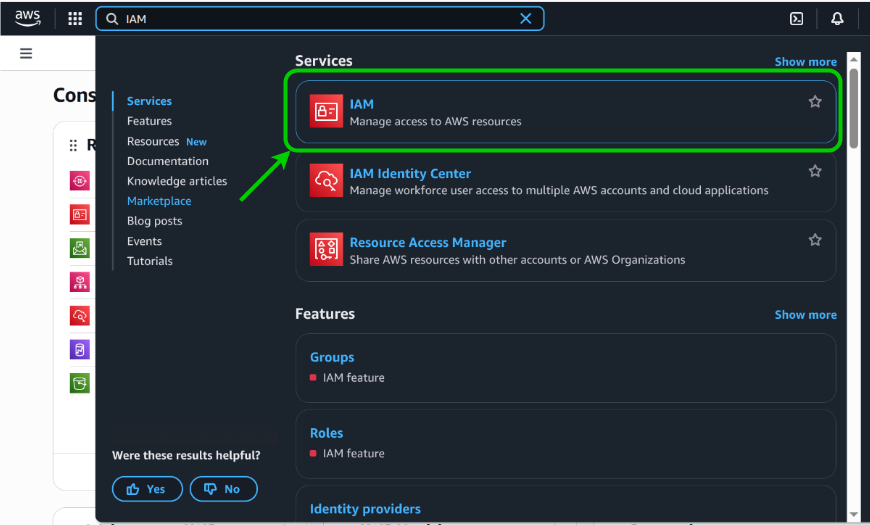
In the AWS Management Console, search for IAM in the services search bar.
-
Click on IAM
-
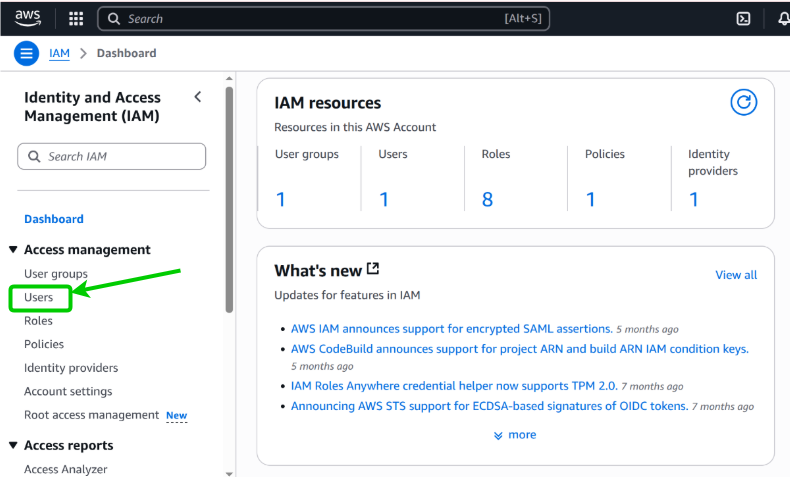
Click Users
-
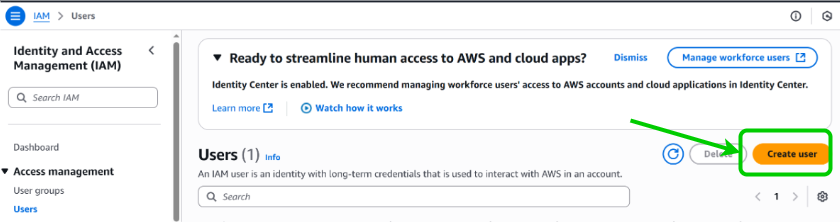
Click Create User
-
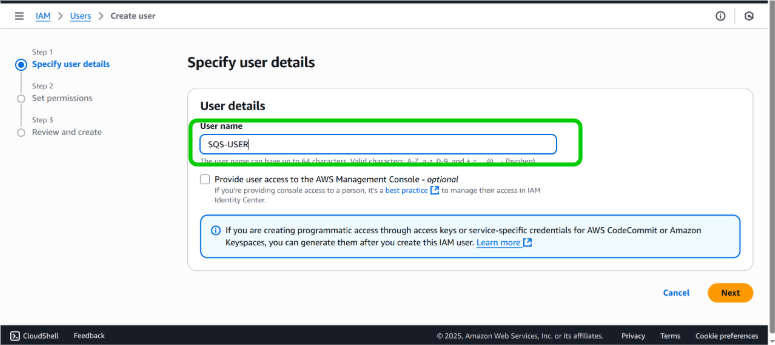
Provide a suitable name for the user and continue
-
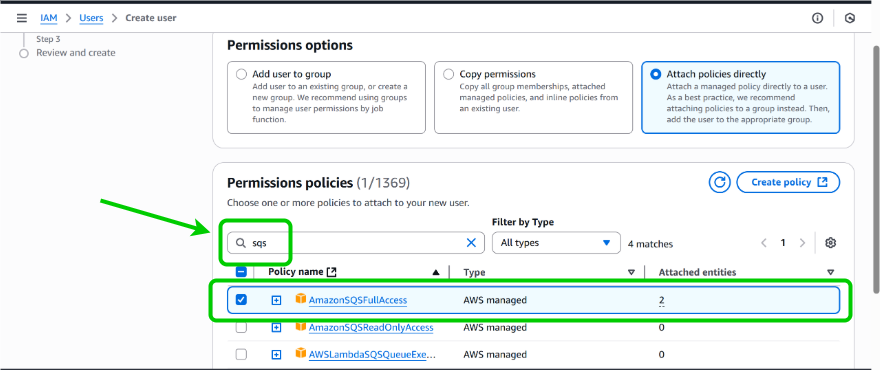
Attach the permissions the application needs — by adding the user to a group, copying permissions from another user, or attaching policies directly — and click next. Grant only the actions your application calls.
-
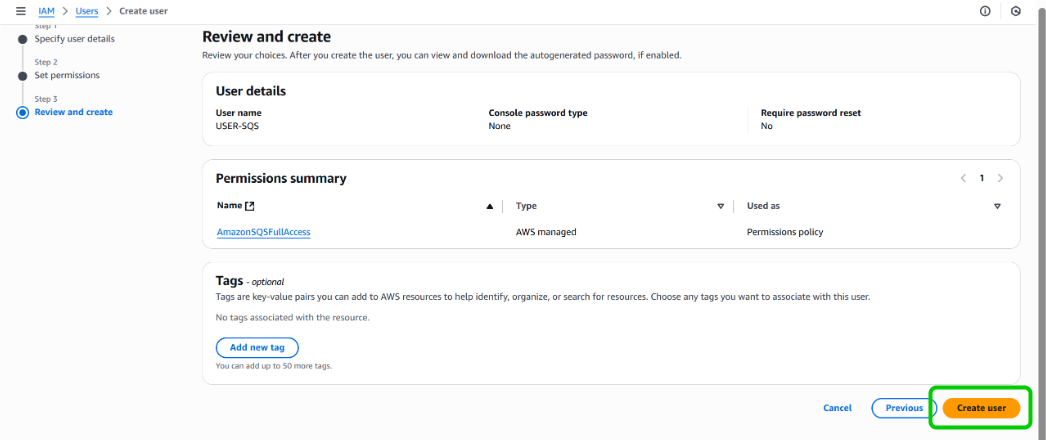
Review and create the user
Get user access keys
-
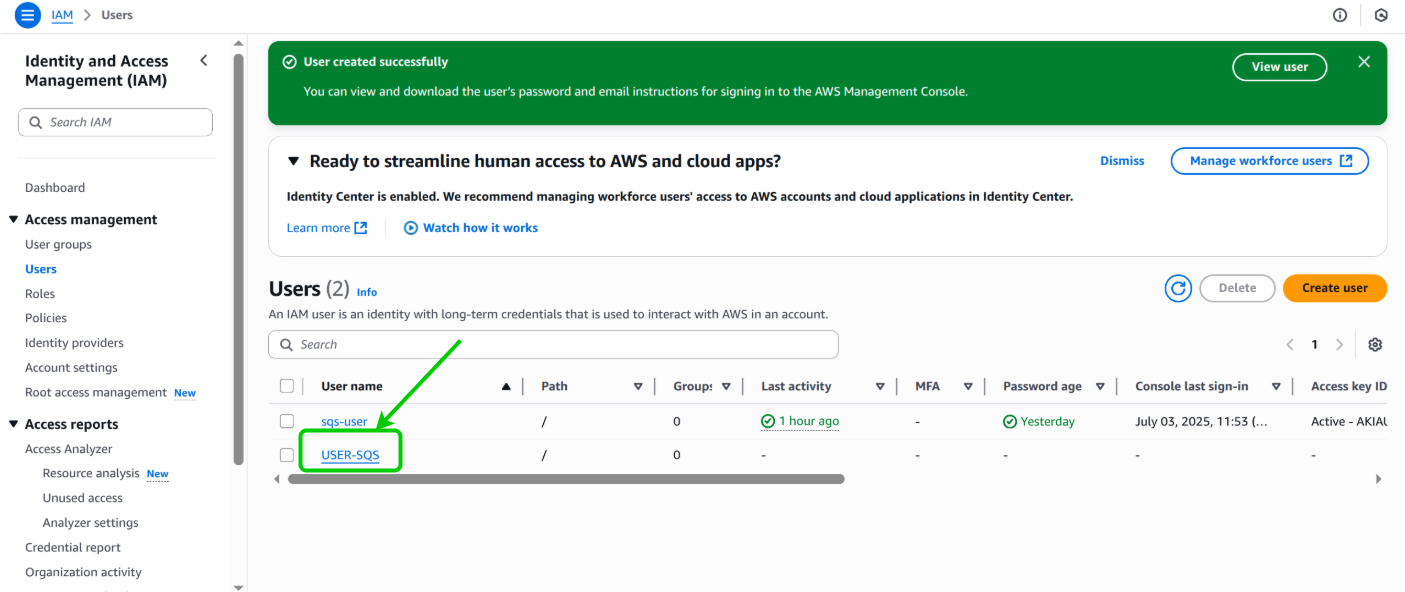
Click the user that was created
-
Click
Create access key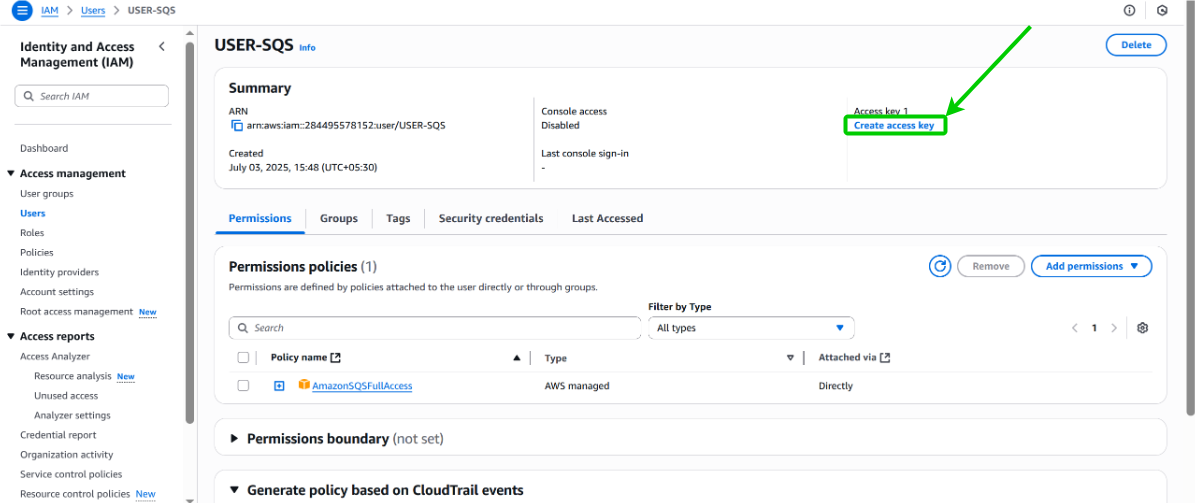
-
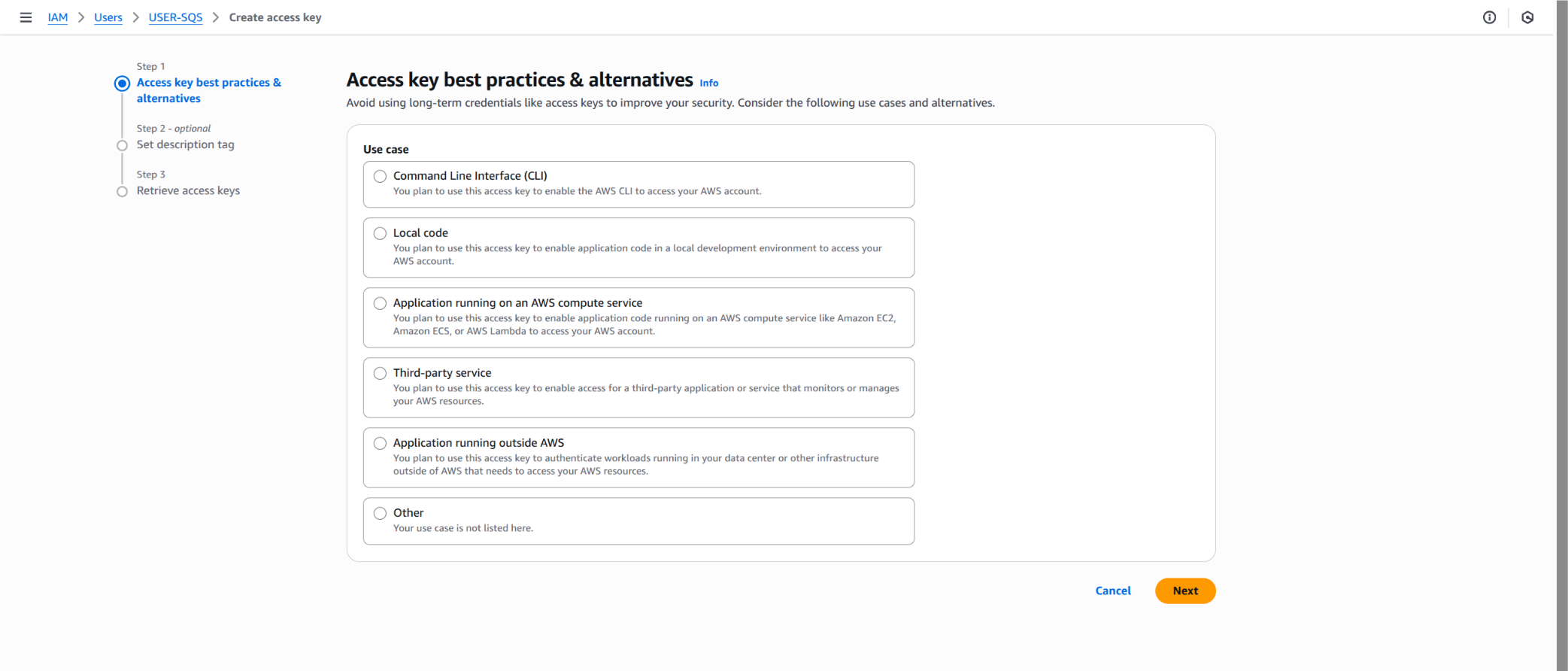
Click your use case and click next.
-
Record the access key ID and secret access key. The secret access key is shown only once — store it in a secret manager or a
Config.tomlthat is excluded from version control, never in source.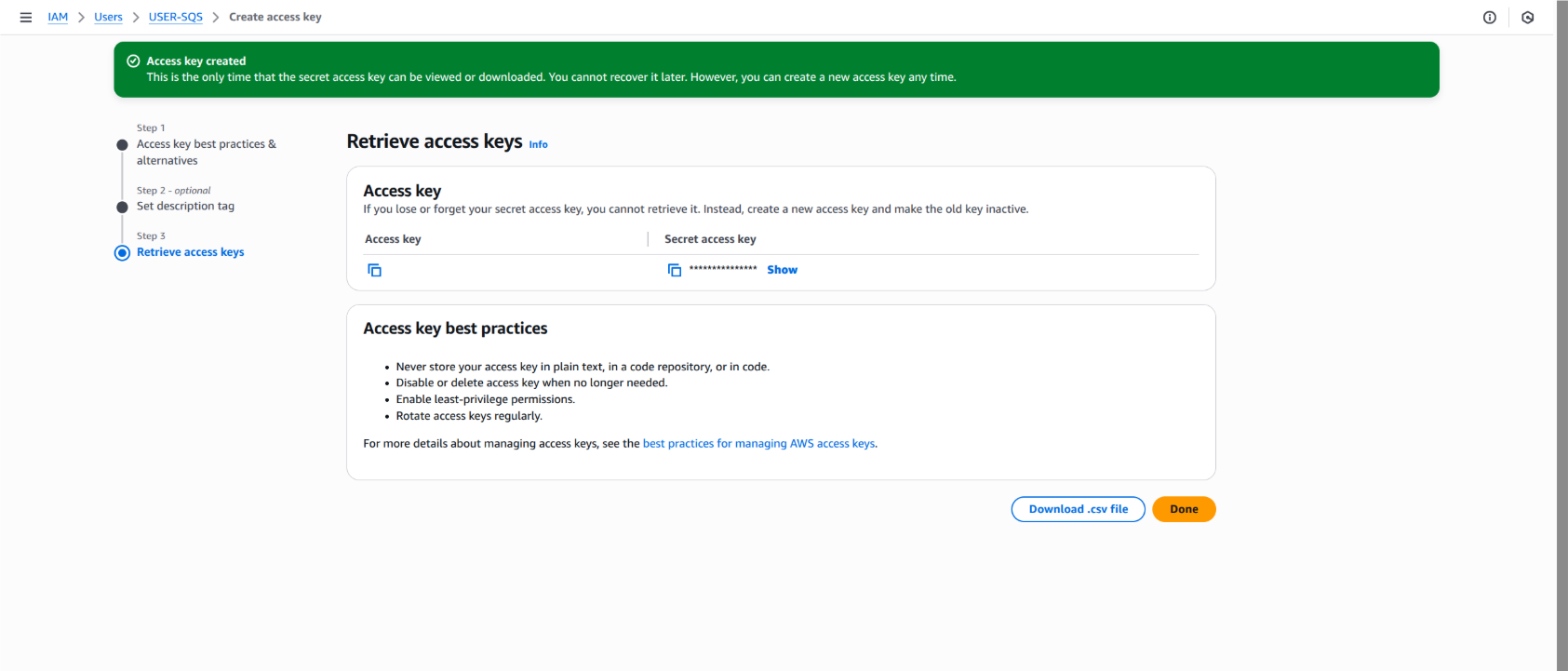
Functions
resolveEndpoint
function resolveEndpoint(string serviceName, Region|string region, EndpointConfig config) returns stringResolves the HTTPS endpoint URL for an AWS service in a region, using the
AWS SDK's endpoint metadata (all partitions, FIPS/dualstack variants,
per-service exceptions), with a standard-pattern fallback for regions newer
than the bundled SDK. A customEndpoint overrides both.
string url = auth:resolveEndpoint("sns", auth:US_EAST_1); // "https://sns.us-east-1.amazonaws.com" string testUrl = auth:resolveEndpoint("sqs", auth:US_EAST_1, {customEndpoint: "http://localhost:4566"}); // "http://localhost:4566"
Parameters
- serviceName string - The service's endpoint prefix (e.g.
sns,dynamodb)
- config EndpointConfig (default {}) - Endpoint options
Return Type
- string - The endpoint URL (e.g.
https://sns.us-east-1.amazonaws.com)
resolveEndpointHost
function resolveEndpointHost(string serviceName, Region|string region, EndpointConfig config) returns stringResolves only the host part of the endpoint.
string host = auth:resolveEndpointHost("sns", auth:US_EAST_1); // "sns.us-east-1.amazonaws.com"
Parameters
- serviceName string - The service's endpoint prefix (e.g.
sns,dynamodb)
- config EndpointConfig (default {}) - Endpoint options; a
customEndpointis returned with its scheme stripped
Return Type
- string - The endpoint host (e.g.
sns.us-east-1.amazonaws.com)
Enums
aws: Region
AWS regions.
Members
Records
aws: EndpointConfig
Endpoint resolution options.
Fields
- fips boolean(default false) - Use the FIPS 140-validated endpoint variant (
{service}-fips.{region}...)
- dualstack boolean(default false) - Use the dualstack (IPv4/IPv6) endpoint variant (
...api.aws)
- customEndpoint? string - Full endpoint URL override (e.g.
http://localhost:4566). When set, all other options are ignored and the value is returned as given
aws: ErrorDetails
The shared error details record connectors. The fields are populated when the failure originates from an AWS service call, and are left unset when the failure occurs before a response is received (e.g. an invalid configuration).
Fields
- httpStatusCode? int - The HTTP status code for the error
- httpStatusText? string - The HTTP status text returned from the service
- errorCode? string - The error code associated with the response
- errorMessage? string - The human-readable error message provided by the service
- requestId? string - The unique identifier for the request, as assigned by AWS