Module zoom.meetings

ballerinax/zoom.meetings Ballerina library
Overview
Zoom is a video conferencing platform from Zoom Video Communications that lets people host and join online meetings and webinars from any device.
The Zoom Meetings connector lets Ballerina applications work with version 2 of the Zoom Meetings API. It covers the full lifecycle of meetings and webinars, from scheduling and registration through in-meeting controls to recordings, transcripts, summaries and usage reports.
Key features
- Schedule, update, end and cancel meetings and webinars, including recurring ones
- Manage registrants, panelists, polls and surveys
- Retrieve cloud recordings, transcripts and AI Companion meeting summaries
- Generate usage, participant, billing and activity reports for an account
- Manage devices, SIP phones, tracking fields and TSP audio settings
- Authenticate with OAuth 2.0 refresh tokens or a bearer access token
Setup guide
To use the Zoom meetings connector, you must have access to the Zoom API through Zoom Marketplace and a project under it. If you do not have a Zoom account, you can sign up for one here.
Step 1: Create a new app
-
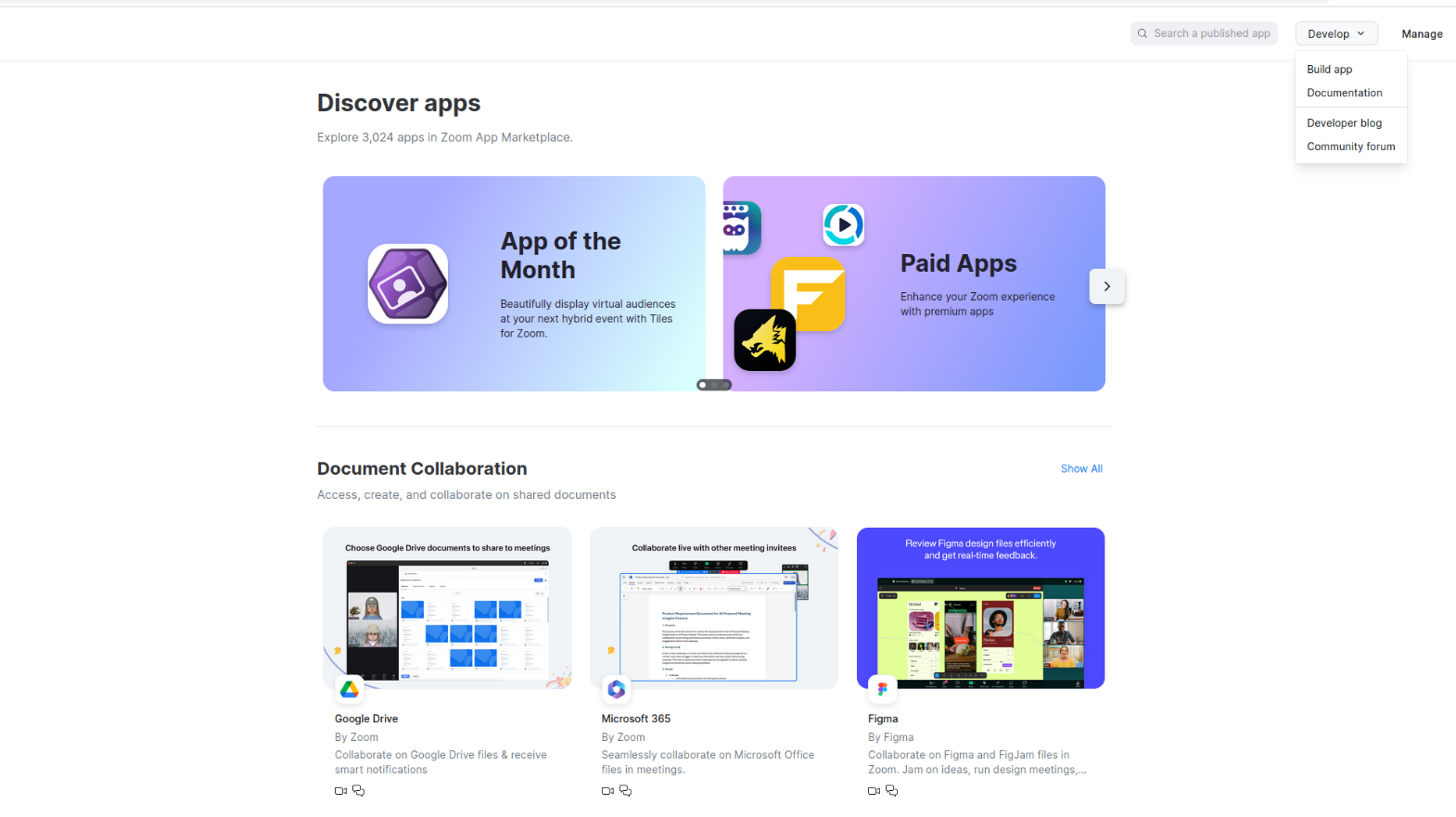
Open the Zoom Marketplace.
-
Click "Develop" → "Build App"
-
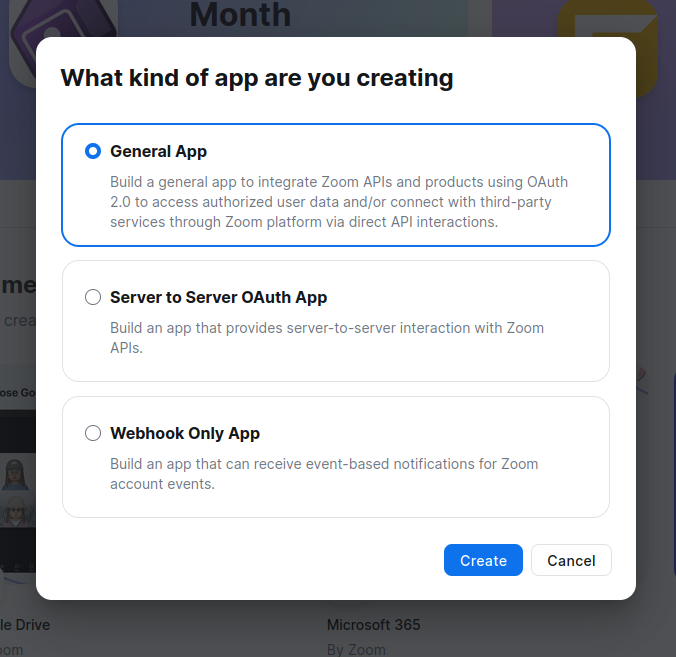
Choose "General App" app type (for user authorization with refresh tokens)
-
Fill in Basic Information, choose Admin-managed option.
Step 2: Configure OAuth settings
-
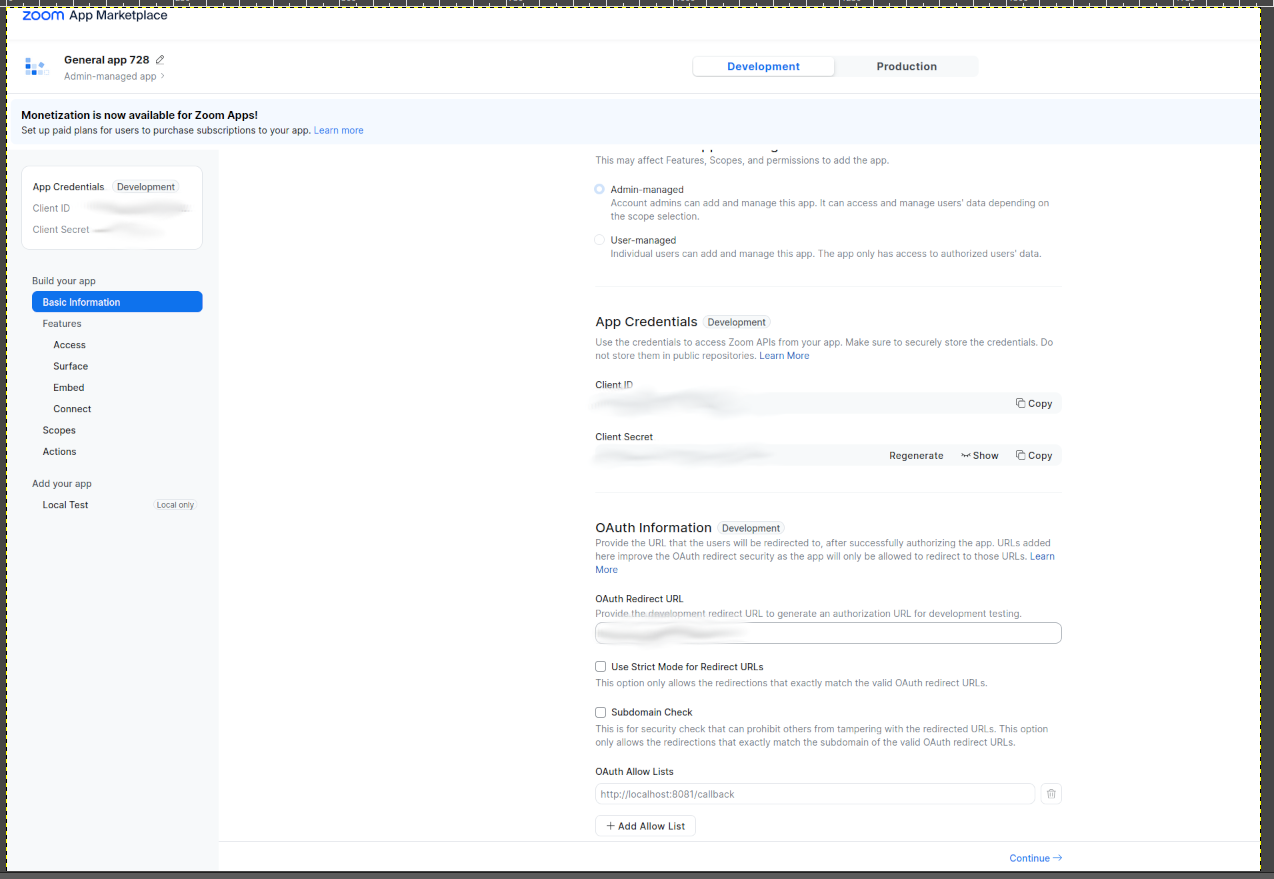
Note down your credentials:
- Client ID
- Client Secret
-
Set Redirect URI: Add your application's redirect URI
-
Add scopes: Add the scopes for the operations your application calls. Each operation lists the scopes it accepts in the API reference; for example, scheduling and listing meetings needs
meeting:write:meetingandmeeting:read:list_meetings, and looking up the user ID below needsuser:read:user.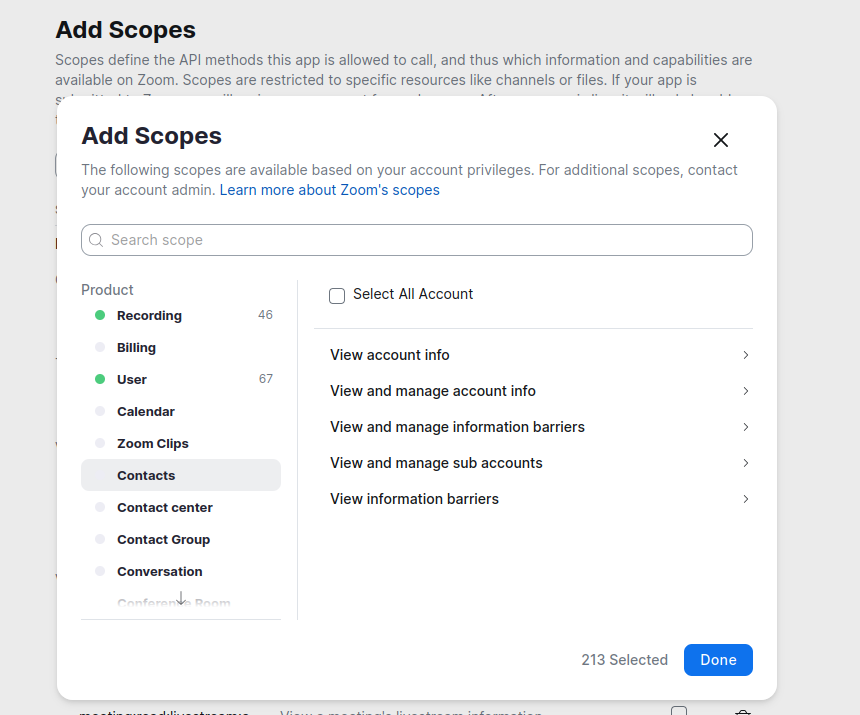
Step 3: Activate the app
-
Complete all necessary information fields.
-
Once, the necessary fields are correctly filled, app will be activated.
Step 4: Get user authorization
-
Direct users to authorization URL (replace
YOUR_CLIENT_IDandYOUR_REDIRECT_URI):https://zoom.us/oauth/authorize?response_type=code&client_id=YOUR_CLIENT_ID&redirect_uri=YOUR_REDIRECT_URI -
User authorizes the app and gets redirected to your callback URL with an authorization code
-
Exchange authorization code for tokens:
curl -X POST https://zoom.us/oauth/token \ -H "Authorization: Basic $(echo -n 'CLIENT_ID:CLIENT_SECRET' | base64)" \ -d "grant_type=authorization_code&code=AUTHORIZATION_CODE&redirect_uri=YOUR_REDIRECT_URI"This returns both
access_tokenandrefresh_token.Replace:
CLIENT_IDwith your app's Client IDCLIENT_SECRETwith your app's Client SecretAUTHORIZATION_CODEwith the code received from the callbackYOUR_REDIRECT_URIwith your configured redirect URI
Step 5: Verify your setup
curl -X GET "https://api.zoom.us/v2/users/me" \ -H "Authorization: Bearer YOUR_ACCESS_TOKEN"
This will give you the user ID needed for API calls.
Quickstart
To use the Zoom Meetings connector in your Ballerina application, update the .bal file as follows:
Step 1: Import the module
Import the zoom.meetings module.
import ballerinax/zoom.meetings;
Step 2: Instantiate a new connector
-
Create a
Config.tomlfile and configure the credentials obtained in the setup guide:clientId = "<CLIENT_ID>" clientSecret = "<CLIENT_SECRET>" refreshToken = "<REFRESH_TOKEN>" userId = "<USER_ID>"Zoom issues a new refresh token each time the access token is refreshed and invalidates the old one. The client keeps the latest token in memory while the application runs, but it does not write it back to
Config.toml. Before you restart the application, updaterefreshTokeninConfig.tomlwith the latest token, or it will fail to authenticate. -
Create a
meetings:Clientwith the credentials. The connector refreshes the access token againsthttps://zoom.us/oauth/tokenas needed.configurable string clientId = ?; configurable string clientSecret = ?; configurable string refreshToken = ?; configurable string userId = ?; final meetings:Client zoom = check new ({ auth: {clientId, clientSecret, refreshToken} });
Step 3: Invoke the connector operation
Now, utilize the available connector operations. For example, schedule a meeting for the user:
public function main() returns error? { meetings:CreateMeetingResponse _ = check zoom->createMeeting(userId, { topic: "Team sync", 'type: 2, // Replace with a future date-time in UTC. startTime: "2026-10-01T15:00:00Z", duration: 30 }); }
Step 4: Run the Ballerina application
bal run
Examples
The Zoom Meetings connector provides practical examples illustrating usage in various scenarios. Explore these examples, covering the following use cases:
-
Schedule a team meeting - Create a meeting with a waiting room, attach a poll, and print the invitation to share with attendees.
-
Cancel meetings by topic - Find every upcoming meeting whose topic contains a phrase and cancel them, with a dry run by default.
Clients
zoom.meetings: Client
The Zoom Meeting APIs allow developers to interface with Zoom Meetings and Webinars programmatically.
Constructor
Gets invoked to initialize the connector.
init (ConnectionConfig config, string serviceUrl)- config ConnectionConfig - The configurations to be used when initializing the
connector
- serviceUrl string "https://api.zoom.us/v2" - URL of the target service
listArchivedFiles
function listArchivedFiles(map<string|string[]> headers, *ListArchivedFilesQueries queries) returns ListArchivedFilesResponse|errorList archived files
Parameters
- queries *ListArchivedFilesQueries - Queries to be sent with the request
Return Type
- ListArchivedFilesResponse|error - HTTP Status Code:
200Archived files returned
listArchivedFileDownloadAudits
function listArchivedFileDownloadAudits(map<string|string[]> headers, *ListArchivedFileDownloadAuditsQueries queries) returns ListArchivedFileDownloadAuditsResponse|errorList archived file download audit logs
Parameters
- queries *ListArchivedFileDownloadAuditsQueries - Queries to be sent with the request
Return Type
- ListArchivedFileDownloadAuditsResponse|error - HTTP Status Code:
200Archived file download audit logs returned
getArchivedFileStatistics
function getArchivedFileStatistics(map<string|string[]> headers, *GetArchivedFileStatisticsQueries queries) returns GetArchivedFileStatisticsResponse|errorGet archived file statistics
Parameters
- queries *GetArchivedFileStatisticsQueries - Queries to be sent with the request
Return Type
- GetArchivedFileStatisticsResponse|error - HTTP Status Code:
200The statistics of Archived files returned
updateArchivedFile
function updateArchivedFile(string fileId, UpdateArchivedFileRequest payload, map<string|string[]> headers) returns error?Update an archived file's auto-delete status
Parameters
- fileId string - Archived file ID
- payload UpdateArchivedFileRequest - Auto-delete setting to apply to the archived file
Return Type
- error? - HTTP Status Code:
204<br> auto-delete status updated
getMeetingLocalArchivingToken
function getMeetingLocalArchivingToken(int meetingId, map<string|string[]> headers) returns GetMeetingLocalArchivingTokenResponse|errorGet a meeting's archive token for local archiving
Parameters
- meetingId int - The meeting's ID. When storing this value in your database, you must store it as a long format integer and not an integer. Meeting IDs can exceed 10 digits
Return Type
- GetMeetingLocalArchivingTokenResponse|error - HTTP Status Code:
200Meeting local archiving token returned
getMeetingArchivedFiles
function getMeetingArchivedFiles(string meetingUUID, map<string|string[]> headers) returns GetMeetingArchivedFilesResponse|errorGet a meeting's archived files
Parameters
- meetingUUID string - The meeting's universally unique identifier (UUID). Each meeting instance generates a UUID. After a meeting ends, a new UUID is generated for the next meeting instance.
If the meeting UUID begins with a
/character or contains a//character, you must double encode the meeting UUID when using the meeting UUID for other API calls
Return Type
- GetMeetingArchivedFilesResponse|error - HTTP Status Code:
200Meeting archived files returned
deleteMeetingArchivedFiles
function deleteMeetingArchivedFiles(string meetingUUID, map<string|string[]> headers) returns error?Delete a meeting's archived files
Parameters
- meetingUUID string - The meeting's universally unique identifier (UUID). Each meeting instance generates a UUID. For example, after a meeting ends, a new UUID is generated for the next meeting instance.
If the meeting UUID begins with a
/character or contains a//character, you must double-encode the meeting UUID when using the meeting UUID for other API calls
Return Type
- error? - HTTP Status Code:
204Meeting archived file deleted
getMeetingRecordings
function getMeetingRecordings(string meetingId, map<string|string[]> headers, *GetMeetingRecordingsQueries queries) returns GetMeetingRecordingsResponse|errorGet meeting recordings
Parameters
- meetingId string - To get a meeting's cloud recordings, provide the meeting ID or UUID. If providing the meeting ID instead of UUID, the response will be for the latest meeting instance.
To get a webinar's cloud recordings, provide the webinar's ID or UUID. If providing the webinar ID instead of UUID, the response will be for the latest webinar instance.
If a UUID starts with
/or contains//(example:/ajXp112QmuoKj4854875==), double encode the UUID before making an API request.
- queries *GetMeetingRecordingsQueries - Queries to be sent with the request
Return Type
- GetMeetingRecordingsResponse|error - HTTP Status Code:
200Recording object returned. Error Code:200You do not have the right permissions
deleteMeetingRecordings
function deleteMeetingRecordings(string meetingId, map<string|string[]> headers, *DeleteMeetingRecordingsQueries queries) returns error?Delete meeting or webinar recordings
Parameters
- meetingId string - To get a meeting's cloud recordings, provide the meeting ID or meeting UUID. If the meeting ID is provided instead of UUID, the response will be for the latest meeting instance.
To get a webinar's cloud recordings, provide the webinar ID or the webinar UUID. If the webinar ID is provided instead of UUID, the response will be for the latest webinar instance.
If a UUID starts with
/or contains//, like/ajXp112QmuoKj4854875==, you must double encode the UUID before making an API request.
- queries *DeleteMeetingRecordingsQueries - Queries to be sent with the request
Return Type
- error? - The recording was successfully deleted
getRecordingAnalyticsDetails
function getRecordingAnalyticsDetails(string meetingId, map<string|string[]> headers, *GetRecordingAnalyticsDetailsQueries queries) returns GetRecordingAnalyticsDetailsResponse|errorGet a meeting or webinar recording's analytics details
Parameters
- meetingId string - To get a meeting's cloud recordings, provide the meeting ID or meeting UUID. If the meeting ID is provided instead of UUID, the response will be for the latest meeting instance.
To get a webinar's cloud recordings, provide the webinar ID or the webinar UUID. If the webinar ID is provided instead of UUID, the response will be for the latest webinar instance.
If a UUID starts with
/or contains//, like/ajXp112QmuoKj4854875==, you must double encode the UUID before making an API request.
- queries *GetRecordingAnalyticsDetailsQueries - Queries to be sent with the request
Return Type
- GetRecordingAnalyticsDetailsResponse|error - HTTP Status Code:
200Analytics Detail listed successfully
getRecordingAnalyticsSummary
function getRecordingAnalyticsSummary(string meetingId, map<string|string[]> headers, *GetRecordingAnalyticsSummaryQueries queries) returns GetRecordingAnalyticsSummaryResponse|errorGet a meeting or webinar recording's analytics summary
Parameters
- meetingId string - To get a meeting's cloud recordings, provide the meeting ID or meeting UUID. If the meeting ID is provided instead of UUID, the response will be for the latest meeting instance.
To get a webinar's cloud recordings, provide the webinar ID or the webinar UUID. If the webinar ID is provided instead of UUID, the response will be for the latest webinar instance.
If a UUID starts with
/or contains//, like/ajXp112QmuoKj4854875==, you must double encode the UUID before making an API request.
- queries *GetRecordingAnalyticsSummaryQueries - Queries to be sent with the request
Return Type
- GetRecordingAnalyticsSummaryResponse|error - HTTP Status Code:
200Analytics Summary listed successfully
listRecordingRegistrants
function listRecordingRegistrants(int meetingId, map<string|string[]> headers, *ListRecordingRegistrantsQueries queries) returns ListRecordingRegistrantsResponse|errorList recording registrants
Parameters
- meetingId int - The meeting's ID. When storing this value in your database, you must store it as a long format integer and not an integer. Meeting IDs can exceed 10 digits
- queries *ListRecordingRegistrantsQueries - Queries to be sent with the request
Return Type
- ListRecordingRegistrantsResponse|error - HTTP Status Code:
200Registrants returned
createRecordingRegistrant
function createRecordingRegistrant(int meetingId, CreateRecordingRegistrantRequest payload, map<string|string[]> headers) returns CreateRecordingRegistrantResponse|errorCreate a recording registrant
Parameters
- meetingId int - The meeting's ID. When storing this value in your database, you must store it as a long format integer and not an integer. Meeting IDs can exceed 10 digits
- payload CreateRecordingRegistrantRequest - Registrant details for access to the meeting's on-demand cloud recordings
Return Type
- CreateRecordingRegistrantResponse|error - HTTP Status Code:
201Registration submitted
getRecordingRegistrationQuestions
function getRecordingRegistrationQuestions(string meetingId, map<string|string[]> headers) returns GetRecordingRegistrationQuestionsResponse|errorGet registration questions
Parameters
- meetingId string - To get a meeting's cloud recordings, provide the meeting ID or meeting UUID. If the meeting ID is provided instead of UUID, the response will be for the latest meeting instance.
To get a webinar's cloud recordings, provide the webinar ID or the webinar UUID. If the webinar ID is provided instead of UUID, the response will be for the latest webinar instance.
If a UUID starts with
/or contains//, like/ajXp112QmuoKj4854875==, you must double encode the UUID before making an API request.
Return Type
- GetRecordingRegistrationQuestionsResponse|error - HTTP Status Code:
200Recording registrant question object returned
updateRecordingRegistrationQuestions
function updateRecordingRegistrationQuestions(string meetingId, UpdateRecordingRegistrationQuestionsRequest payload, map<string|string[]> headers) returns error?Update registration questions
Parameters
- meetingId string - To get a meeting's cloud recordings, provide the meeting ID or meeting UUID. If the meeting ID is provided instead of UUID, the response will be for the latest meeting instance.
To get a webinar's cloud recordings, provide the webinar ID or the webinar UUID. If the webinar ID is provided instead of UUID,the response will be for the latest webinar instance.
If a UUID starts with
/or contains//, like/ajXp112QmuoKj4854875==, you must double encode the UUID before making an API request. Learn more about enabling cloud recordings and managing cloud recording settings
- payload UpdateRecordingRegistrationQuestionsRequest - Recording registrant questions
Return Type
- error? - HTTP Status Code:
200Recording registrant questions updated
updateRecordingRegistrantStatus
function updateRecordingRegistrantStatus(int meetingId, UpdateRecordingRegistrantStatusRequest payload, map<string|string[]> headers) returns error?Update a registrant's status
Parameters
- meetingId int - The meeting's ID. When storing this value in your database, you must store it as a long format integer and not an integer. Meeting IDs can exceed 10 digits
- payload UpdateRecordingRegistrantStatusRequest - Status action and the recording registrants it applies to
Return Type
- error? - HTTP Status Code:
204Registrant status updated
getRecordingSettings
function getRecordingSettings(string meetingId, map<string|string[]> headers) returns GetRecordingSettingsResponse|errorGet meeting recording settings
Parameters
- meetingId string - The meeting ID lets you get cloud recording of a meeting or webinar.
- Meeting - Provide the meeting ID or meeting UUID. If the meeting ID is provided instead of UUID, the response is for the latest meeting instance.
- Webinar - Provide the webinar ID or the webinar UUID. If the webinar ID is provided instead of UUID, the response is for the latest webinar instance.
If a UUID starts with
/or contains//(example:/ajXp112QmuoKj4854875==), you must double encode the UUID before making an API request.
Return Type
- GetRecordingSettingsResponse|error - HTTP Status Code:
200Meeting recording settings returned
updateRecordingSettings
function updateRecordingSettings(string meetingId, UpdateRecordingSettingsRequest payload, map<string|string[]> headers) returns error?Update meeting recording settings
Parameters
- meetingId string - To get cloud recordings of a meeting, provide the meeting ID or meeting UUID. If the meeting ID is provided instead of UUID, the response is for the latest meeting instance.
To get cloud recordings of a webinar, provide the webinar ID or the webinar UUID. If the webinar ID is provided instead of UUID, the response is for the latest webinar instance.
If a UUID starts with
/or contains//(example: "/ajXp112QmuoKj4854875=="), you must double encode the UUID before making an API request.
- payload UpdateRecordingSettingsRequest - Recording settings to update for the meeting
Return Type
- error? - HTTP Status Code:
204Meeting recording setting's updated
deleteRecordingFile
function deleteRecordingFile(string meetingId, string recordingId, map<string|string[]> headers, *DeleteRecordingFileQueries queries) returns error?Delete a recording file for a meeting or webinar
Parameters
- meetingId string - To get a meeting's cloud recordings, provide the meeting ID or meeting UUID. If the meeting ID is provided instead of UUID, the response will be for the latest meeting instance.
To get a webinar's cloud recordings, provide the webinar ID or the webinar UUID. If the webinar ID is provided instead of UUID, the response will be for the latest webinar instance.
If a UUID starts with
/or contains//, like/ajXp112QmuoKj4854875==, you must double encode the UUID before making an API request.
- recordingId string - The recording ID
- queries *DeleteRecordingFileQueries - Queries to be sent with the request
Return Type
- error? - The recording file was successfully deleted
recoverRecordingFile
function recoverRecordingFile(string meetingId, string recordingId, RecoverRecordingsRequest payload, map<string|string[]> headers) returns error?Recover a single recording
Parameters
- meetingId string - To get a meeting's cloud recordings, provide the meeting ID or meeting UUID. If the meeting ID is provided instead of UUID, the response will be for the latest meeting instance.
To get a webinar's cloud recordings, provide the webinar ID or the webinar UUID. If the webinar ID is provided instead of UUID, the response will be for the latest webinar instance.
If a UUID starts with
/or contains//, like/ajXp112QmuoKj4854875==, you must double encode the UUID before making an API request.
- recordingId string - The recording ID
- payload RecoverRecordingsRequest - Recovery action for the single recording file
Return Type
- error? - HTTP Status Code:
204Meeting recording recovered.
getMeetingTranscript
function getMeetingTranscript(string meetingId, map<string|string[]> headers) returns GetMeetingTranscriptResponse|errorGet a meeting transcript
Parameters
- meetingId string - To get a meeting's transcript, provide the meeting ID or meeting UUID. If the meeting ID is provided instead of UUID, the response will be for the latest meeting instance.
To get a webinar's transcript, provide the webinar ID or the webinar UUID. If the webinar ID is provided instead of UUID, the response will be for the latest webinar instance.
If a UUID starts with
/or contains//, like/ajXp112QmuoKj4854875==, you must double encode the UUID before making an API request.
Return Type
- GetMeetingTranscriptResponse|error - HTTP Status Code: 200 Transcript object returned
deleteMeetingTranscript
Delete a meeting or webinar transcript
Parameters
- meetingId string - To delete a meeting's transcript, provide the meeting ID or meeting's unique universal identifier (UUID). If the meeting ID is provided instead of UUID, the response will be for the latest meeting instance.
To delete a webinar's transcript, provide the webinar ID or the webinar's UUID. If the webinar ID is provided instead of UUID, the response will be for the latest webinar instance.
If a UUID starts with
/or contains//, like/ajXp112QmuoKj4854875==, you must double encode the UUID before making an API request.
Return Type
- error? - HTTP Status Code:
204Meeting transcript has been deleted
recoverMeetingRecordings
function recoverMeetingRecordings(string meetingUUID, RecoverRecordingsRequest payload, map<string|string[]> headers) returns error?Recover meeting recordings
Parameters
- meetingUUID string - The meeting's universally unique identifier (UUID). Each meeting instance generates a UUID. For example, after a meeting ends, a new UUID is generated for the next meeting instance.
If the meeting UUID begins with a
/character or contains a//character, you must double-encode the meeting UUID when using the meeting UUID for other API calls
- payload RecoverRecordingsRequest - Recovery action for all recordings of the meeting
Return Type
- error? - HTTP Status Code:
200Recordings recovered. Error Code:200You do not have the right permissions
listUserRecordings
function listUserRecordings(string userId, map<string|string[]> headers, *ListUserRecordingsQueries queries) returns ListUserRecordingsResponse|errorList all recordings
Parameters
- userId string - The user's ID or email address. For user-level apps, pass the
mevalue
- queries *ListUserRecordingsQueries - Queries to be sent with the request
Return Type
- ListUserRecordingsResponse|error - HTTP Status Code:
200List of recording objects returned
listDevices
function listDevices(map<string|string[]> headers, *ListDevicesQueries queries) returns ListDevicesResponse|errorList devices
Parameters
- queries *ListDevicesQueries - Queries to be sent with the request
Return Type
- ListDevicesResponse|error - HTTP Status Code:
200OK Device detail returned successfully
addDevice
function addDevice(AddDeviceRequest payload, map<string|string[]> headers) returns error?Add a new device
Parameters
- payload AddDeviceRequest - Details of the device to add
Return Type
- error? - HTTP Status:
202Accepted Request processed successfully
listZdmGroups
function listZdmGroups(map<string|string[]> headers, *ListZdmGroupsQueries queries) returns ListZdmGroupsResponse|errorGet ZDM group info
Parameters
- queries *ListZdmGroupsQueries - Queries to be sent with the request
Return Type
- ListZdmGroupsResponse|error - HTTP Status Code:
200OK Version detail returned successfully
assignZpaDevice
function assignZpaDevice(AssignZpaDeviceRequest payload, map<string|string[]> headers) returns error?Assign a device to a user or commonarea
Parameters
- payload AssignZpaDeviceRequest - Device and the user or common area to assign it to
Return Type
- error? - HTTP Status Code:
204No Content Request processed successfully
getZpaDeviceSettings
function getZpaDeviceSettings(map<string|string[]> headers, *GetZpaDeviceSettingsQueries queries) returns GetZpaDeviceSettingsResponse|errorGet Zoom Phone Appliance settings by user ID
Parameters
- queries *GetZpaDeviceSettingsQueries - Queries to be sent with the request
Return Type
- GetZpaDeviceSettingsResponse|error - HTTP Status Code:
200OK Version detail returned successfully
upgradeZpaDevices
function upgradeZpaDevices(UpgradeZpaDevicesRequest payload, map<string|string[]> headers) returns error?Upgrade ZPA firmware or app
Parameters
- payload UpgradeZpaDevicesRequest - ZPA firmware or app upgrade to apply and its target devices
Return Type
- error? - The upgrade request has been accepted and is currently being processed
deleteZpaDeviceByMacAddress
function deleteZpaDeviceByMacAddress(string vendor, string macAddress, map<string|string[]> headers) returns error?Delete ZPA device by vendor and mac address
Return Type
- error? - HTTP Status Code:
204No Content Device deleted successfully
listZpaVersions
function listZpaVersions(string zdmGroupId, map<string|string[]> headers) returns ListZpaVersionsResponse|errorGet ZPA version info
Parameters
- zdmGroupId string - The Zoom Device Management (ZDM) group ID
Return Type
- ListZpaVersionsResponse|error - HTTP Status Code:
200OK Version detail returned successfully
getDevice
Get device detail
Parameters
- deviceId string - The device's unique identifier
Return Type
- GetDeviceResponse|error - HTTP Status Code:
200OK Device detail returned successfully
deleteDevice
Delete device
Parameters
- deviceId string - Unique identifier of the device
Return Type
- error? - HTTP Status Code:
204No Content Device deleted successfully
updateDevice
function updateDevice(string deviceId, UpdateDeviceRequest payload, map<string|string[]> headers) returns error?Change device
Parameters
- deviceId string - Unique identifier of the device
- payload UpdateDeviceRequest - New name for the device
Return Type
- error? - HTTP Status Code:
204No Content Request processed successfully
assignDeviceGroup
function assignDeviceGroup(string deviceId, map<string|string[]> headers, *AssignDeviceGroupQueries queries) returns error?Assign a device to a group
Parameters
- deviceId string - The device ID
- queries *AssignDeviceGroupQueries - Queries to be sent with the request
Return Type
- error? - Request processed successfully
updateDeviceAssignment
function updateDeviceAssignment(string deviceId, UpdateDeviceAssignmentRequest payload, map<string|string[]> headers) returns error?Change device association
Parameters
- deviceId string - The device's unique identifier
- payload UpdateDeviceAssignmentRequest - Room or user to associate the device with
Return Type
- error? - HTTP Status Code:
204No Content Request processed successfully
listH323Devices
function listH323Devices(map<string|string[]> headers, *ListH323DevicesQueries queries) returns ListH323DevicesResponse|errorList H.323/SIP devices
Parameters
- queries *ListH323DevicesQueries - Queries to be sent with the request
Return Type
- ListH323DevicesResponse|error - HTTP Status Code:
200List of H.323/SIP devices returned. Error Code:200No permission
createH323Device
function createH323Device(CreateH323DeviceRequest payload, map<string|string[]> headers) returns CreateH323DeviceResponse|errorCreate a H.323/SIP device
Parameters
- payload CreateH323DeviceRequest - H.323/SIP device
Return Type
- CreateH323DeviceResponse|error - HTTP Status Code:
201H.323/SIP device created
deleteH323Device
Delete a H.323/SIP device
Parameters
- deviceId string - The device ID
Return Type
- error? - You do not have the permission to delete this device
updateH323Device
function updateH323Device(string deviceId, UpdateH323DeviceRequest payload, map<string|string[]> headers) returns error?Update a H.323/SIP device
Parameters
- deviceId string - The device ID
- payload UpdateH323DeviceRequest - H.323/SIP device fields to update
Return Type
- error? - HTTP Status Code:
204H.323/SIP device updated
addMeetingApp
function addMeetingApp(int meetingId, AddMeetingAppRequest payload, map<string|string[]> headers) returns AddMeetingAppResponse|errorAdd a meeting app
Parameters
- meetingId int - The meeting's ID. When storing this value in your database, you must store it as a long format integer and not an integer. Meeting IDs can exceed 10 digits
- payload AddMeetingAppRequest - Who the app is automatically shared with. All fields are optional. Omit the body to share the app with the meeting owner only
Return Type
- AddMeetingAppResponse|error - HTTP Status Code:
201App added
deleteMeetingApp
Delete a meeting app
Parameters
- meetingId int - The meeting's ID. When storing this value in your database, you must store it as a long format integer and not an integer. Meeting IDs can exceed 10 digits
Return Type
- error? - HTTP Status Code:
201App deleted
deleteMeetingChatMessage
function deleteMeetingChatMessage(int meetingId, string messageId, map<string|string[]> headers, *DeleteMeetingChatMessageQueries queries) returns error?Delete a live meeting message
Parameters
- meetingId int - The meeting's ID. When storing this value in your database, store it as a long-format integer and not an integer. Meeting IDs can be more than 10 digits
- messageId string - The live meeting chat message's unique identifier (UUID), in base64-encoded format
- queries *DeleteMeetingChatMessageQueries - Queries to be sent with the request
Return Type
- error? - HTTP Status Code:
204Meeting chat message deleted
updateMeetingChatMessage
function updateMeetingChatMessage(int meetingId, string messageId, UpdateMeetingChatMessageRequest payload, map<string|string[]> headers) returns error?Update a live meeting message
Parameters
- meetingId int - The meeting's ID. When storing this value in your database, store it as a long-format integer and not an integer. Meeting IDs can exceed 10 digits
- messageId string - The live meeting chat message's unique identifier (UUID), in base64-encoded format
- payload UpdateMeetingChatMessageRequest - Updated content of the live meeting chat message
Return Type
- error? - HTTP Status Code:
204<br> Meeting chat message updated
controlLiveMeeting
function controlLiveMeeting(string meetingId, ControlLiveMeetingRequest payload, map<string|string[]> headers) returns error?In-meeting controls
Parameters
- meetingId string - The live meeting's ID
- payload ControlLiveMeetingRequest - In-meeting control method and its parameters
Return Type
- error? - HTTP Status:
202Accepted Request processed successfully
getMeetingLocalRecordingToken
function getMeetingLocalRecordingToken(int meetingId, map<string|string[]> headers, *GetMeetingLocalRecordingTokenQueries queries) returns GetMeetingLocalRecordingTokenResponse|errorGet a meeting's join token for local recording
Parameters
- meetingId int - The meeting's ID. When storing this value in your database, you must store it as a long format integer and not an integer. Meeting IDs can exceed 10 digits
- queries *GetMeetingLocalRecordingTokenQueries - Queries to be sent with the request
Return Type
- GetMeetingLocalRecordingTokenResponse|error - HTTP Status Code:
200Meeting local recording token returned
getMeetingToken
function getMeetingToken(int meetingId, map<string|string[]> headers, *GetMeetingTokenQueries queries) returns GetMeetingTokenResponse|errorGet meeting's token
Parameters
- meetingId int - The meeting's ID. When storing this value in your database, you must store it as a long format integer and not an integer. Meeting IDs can exceed 10 digits
- queries *GetMeetingTokenQueries - Queries to be sent with the request
Return Type
- GetMeetingTokenResponse|error - HTTP Status Code:
200Meeting token returned
addMeetingBatchRegistrants
function addMeetingBatchRegistrants(string meetingId, AddMeetingBatchRegistrantsRequest payload, map<string|string[]> headers) returns AddMeetingBatchRegistrantsResponse|errorPerform batch registration
Parameters
- meetingId string - Unique identifier of the meeting (Meeting Number)
- payload AddMeetingBatchRegistrantsRequest - Registrants to register for the meeting in one batch
Return Type
- AddMeetingBatchRegistrantsResponse|error - HTTP Status Code:
200OK Registrants added
getMeetingInvitation
function getMeetingInvitation(int meetingId, map<string|string[]> headers) returns GetMeetingInvitationResponse|errorGet meeting invitation
Parameters
- meetingId int - The meeting's ID. When storing this value in your database, you must store it as a long format integer, not a simple integer. Meeting IDs can exceed 10 digits
Return Type
- GetMeetingInvitationResponse|error - HTTP Status Code:
200Meeting invitation returned
createMeetingInviteLinks
function createMeetingInviteLinks(int meetingId, CreateMeetingInviteLinksRequest payload, map<string|string[]> headers) returns InviteLinksResponse|errorCreate a meeting's invite links
Parameters
- meetingId int - The meeting's ID. When storing this value in your database, you must store it as a long format integer and not an integer. Meeting IDs can exceed 10 digits
- payload CreateMeetingInviteLinksRequest - Attendees and time-to-live for the meeting invite links
Return Type
- InviteLinksResponse|error - HTTP Status Code:
201Meeting invitation links created
listMeetingRegistrants
function listMeetingRegistrants(int meetingId, map<string|string[]> headers, *ListMeetingRegistrantsQueries queries) returns ListMeetingRegistrantsResponse|errorList meeting registrants
Parameters
- meetingId int - The meeting's ID. When storing this value in your database, store it as a long format integer, not an integer. Meeting IDs can exceed 10 digits
- queries *ListMeetingRegistrantsQueries - Queries to be sent with the request
Return Type
- ListMeetingRegistrantsResponse|error - HTTP Status Code:
200Successfully listed meeting registrants
addMeetingRegistrant
function addMeetingRegistrant(int meetingId, AddMeetingRegistrantRequest payload, map<string|string[]> headers, *AddMeetingRegistrantQueries queries) returns AddMeetingRegistrantResponse|errorAdd a meeting registrant
Parameters
- meetingId int - The meeting's ID. When storing this value in your database, you must store it as a long format integer and not an integer. Meeting IDs can exceed 10 digits
- payload AddMeetingRegistrantRequest - Details of the registrant to add to the meeting
- queries *AddMeetingRegistrantQueries - Queries to be sent with the request
Return Type
- AddMeetingRegistrantResponse|error - HTTP Status Code:
201Meeting registration created
getMeetingRegistrationQuestions
function getMeetingRegistrationQuestions(int meetingId, map<string|string[]> headers) returns GetMeetingRegistrationQuestionsResponse|errorList registration questions
Parameters
- meetingId int - The meeting's ID. When storing this value in your database, store it as a long format integer, not a simple integer. Meeting IDs can exceed 10 digits
Return Type
- GetMeetingRegistrationQuestionsResponse|error - HTTP Status Code:
200Meeting Registrant Question object returned
updateMeetingRegistrationQuestions
function updateMeetingRegistrationQuestions(int meetingId, UpdateMeetingRegistrationQuestionsRequest payload, map<string|string[]> headers) returns error?Update registration questions
Parameters
- meetingId int - The meeting's ID. When storing this value in your database, you must store it as a long format integer and not an integer. Meeting IDs can exceed 10 digits
- payload UpdateMeetingRegistrationQuestionsRequest - Meeting Registrant Questions
Return Type
- error? - HTTP Status Code:
204Meeting Registrant Questions Updated
updateMeetingRegistrantStatus
function updateMeetingRegistrantStatus(int meetingId, UpdateMeetingRegistrantStatusRequest payload, map<string|string[]> headers, *UpdateMeetingRegistrantStatusQueries queries) returns error?Update registrant's status
Parameters
- meetingId int - The meeting's ID.
When storing this value in your database, store it as a
longformat integer, not as a simple integer. Meeting IDs can exceed 10 digits
- payload UpdateMeetingRegistrantStatusRequest - Status action and the meeting registrants it applies to
- queries *UpdateMeetingRegistrantStatusQueries - Queries to be sent with the request
Return Type
- error? - HTTP Status Code:
204Registrant status updated
getMeetingRegistrant
function getMeetingRegistrant(int meetingId, string registrantId, map<string|string[]> headers) returns GetMeetingRegistrantResponse|errorGet a meeting registrant
Parameters
- meetingId int - The meeting's ID. When storing this value in your database, you must store it as a long format integer and not an integer. Meeting IDs can exceed 10 digits
- registrantId string - The registrant ID
Return Type
- GetMeetingRegistrantResponse|error - The retrieved meeting registrant
deleteMeetingRegistrant
function deleteMeetingRegistrant(int meetingId, string registrantId, map<string|string[]> headers, *DeleteMeetingRegistrantQueries queries) returns error?Delete a meeting registrant
Parameters
- meetingId int - The meeting ID
- registrantId string - The meeting registrant ID
- queries *DeleteMeetingRegistrantQueries - Queries to be sent with the request
Return Type
- error? - HTTP status code:
204OK
getMeetingLiveStreamingToken
function getMeetingLiveStreamingToken(int meetingId, map<string|string[]> headers) returns GetMeetingLiveStreamingTokenResponse|errorGet a meeting's join token for live streaming
Parameters
- meetingId int - The meeting's ID. When storing this value in your database, you must store it as a long format integer and not an integer. Meeting IDs can exceed 10 digits
Return Type
- GetMeetingLiveStreamingTokenResponse|error - HTTP Status Code:
200Meeting live streaming token returned
getMeetingLivestream
function getMeetingLivestream(string meetingId, map<string|string[]> headers) returns GetMeetingLivestreamResponse|errorGet livestream details
Parameters
- meetingId string - Unique identifier of the meeting
Return Type
- GetMeetingLivestreamResponse|error - HTTP Status Code:
200OK Live Stream details returned.
updateMeetingLivestream
function updateMeetingLivestream(int meetingId, UpdateMeetingLivestreamRequest payload, map<string|string[]> headers) returns error?Update a livestream
Parameters
- meetingId int - The meeting's ID. When storing this value in your database, you must store it as a long format integer and not an integer. Meeting IDs can exceed 10 digits
- payload UpdateMeetingLivestreamRequest - Meeting
Return Type
- error? - HTTP Status Code:
204Meeting livestream updated
updateMeetingLivestreamStatus
function updateMeetingLivestreamStatus(int meetingId, UpdateMeetingLivestreamStatusRequest payload, map<string|string[]> headers) returns error?Update livestream status
Parameters
- meetingId int - The meeting's ID. When storing this value in your database, you must store it as a long format integer and not an integer. Meeting IDs can exceed 10 digits
- payload UpdateMeetingLivestreamStatusRequest - Meeting
Return Type
- error? - HTTP Status Code:
204<br> Meeting livestream updated
updateMeetingRtmsAppStatus
function updateMeetingRtmsAppStatus(int meetingId, UpdateMeetingRtmsAppStatusRequest payload, map<string|string[]> headers) returns error?Update participant Real-Time Media Streams (RTMS) app status
Parameters
- meetingId int - The meeting's ID. When storing this value in your database, store it as a long format integer and not an integer. Meeting IDs can exceed 10 digits
- payload UpdateMeetingRtmsAppStatusRequest - Meeting
Return Type
- error? - HTTP Status Code:
204Participant's RTMS app status updated
getMeeting
function getMeeting(int meetingId, map<string|string[]> headers, *GetMeetingQueries queries) returns GetMeetingResponse|errorGet a meeting
Parameters
- meetingId int - The meeting's ID. When storing this value in your database, store it as a long format integer and not an integer. Meeting IDs can be more than 10 digits
- queries *GetMeetingQueries - Queries to be sent with the request
Return Type
- GetMeetingResponse|error - HTTP Status Code:
200Meeting object returned
deleteMeeting
function deleteMeeting(int meetingId, map<string|string[]> headers, *DeleteMeetingQueries queries) returns error?Delete a meeting
Parameters
- meetingId int - The meeting's ID. When storing this value in your database, you must store it as a long format integer and not an integer. Meeting IDs can exceed 10 digits
- queries *DeleteMeetingQueries - Queries to be sent with the request
Return Type
- error? - HTTP Status Code:
204Meeting deleted
updateMeeting
function updateMeeting(int meetingId, UpdateMeetingRequest payload, map<string|string[]> headers, *UpdateMeetingQueries queries) returns error?Update a meeting
Parameters
- meetingId int - The meeting's ID. When storing this value in your database, store it as a long format integer and not an integer. Meeting IDs can be greater than 10 digits
- payload UpdateMeetingRequest - Meeting
- queries *UpdateMeetingQueries - Queries to be sent with the request
Return Type
- error? - HTTP Status Code:
204Meeting updated
getMeetingSipUri
function getMeetingSipUri(int meetingId, GetMeetingSipUriRequest payload, map<string|string[]> headers) returns GetMeetingSipUriResponse|errorGet a meeting SIP URI with passcode
Parameters
- meetingId int - The meeting's ID. When storing this value in your database, you must store it as a long format integer and not an integer. Meeting IDs can exceed 10 digits
- payload GetMeetingSipUriRequest - Passcode to embed in the meeting SIP URI
Return Type
- GetMeetingSipUriResponse|error - HTTP Status Code:
200Meeting's encoded SIP URI returned
updateMeetingStatus
function updateMeetingStatus(int meetingId, UpdateMeetingStatusRequest payload, map<string|string[]> headers) returns error?Update meeting status
Parameters
- meetingId int - The meeting's ID.
When storing this value in your database, you must store it as a
longformat integer and not an integer. Meeting IDs can exceed 10 digits
- payload UpdateMeetingStatusRequest - Status action to apply to the meeting
Return Type
- error? - HTTP Status Code:
204Meeting updated
getPastMeeting
function getPastMeeting(string meetingId, map<string|string[]> headers) returns GetPastMeetingResponse|errorGet past meeting details
Parameters
- meetingId string - The meeting's ID or universally unique ID (UUID).
- If you provide a meeting ID, the API will return a response for the latest meeting instance.
- If you provide a meeting UUID that begins with a
/character or contains the//characters, you must double encode the meeting UUID before making an API request
Return Type
- GetPastMeetingResponse|error - HTTP Status Code:
200Meeting information returned
listPastMeetingInstances
function listPastMeetingInstances(int meetingId, map<string|string[]> headers, *ListPastMeetingInstancesQueries queries) returns ListPastMeetingInstancesResponse|errorList past meeting instances
Parameters
- meetingId int - The past meeting's ID
- queries *ListPastMeetingInstancesQueries - Queries to be sent with the request
Return Type
- ListPastMeetingInstancesResponse|error - HTTP Status Code:
200List of ended meeting instances returned
listPastMeetingParticipants
function listPastMeetingParticipants(string meetingId, map<string|string[]> headers, *ListPastMeetingParticipantsQueries queries) returns ListPastMeetingParticipantsResponse|errorGet past meeting participants
Parameters
- meetingId string - The meeting's ID or universally unique ID (UUID).
- If you provide a meeting ID, the API will return a response for the latest meeting instance.
- If you provide a meeting UUID that begins with a
/character or contains the//characters, you must double-encode the meeting UUID before making an API request
- queries *ListPastMeetingParticipantsQueries - Queries to be sent with the request
Return Type
- ListPastMeetingParticipantsResponse|error - HTTP Status Code:
200Past meeting participants returned
listPastMeetingQa
function listPastMeetingQa(string meetingId, map<string|string[]> headers) returns ListPastMeetingQaResponse|errorList past meetings' Q&A
Parameters
- meetingId string - The meeting's ID or universally unique ID (UUID).
- If you provide a meeting ID, the API will return a response for the latest meeting instance.
- If you provide a meeting UUID that begins with a
/character or contains the//characters, you must double-encode the meeting UUID before making an API request
Return Type
- ListPastMeetingQaResponse|error - HTTP Status Code:
200OK Q&A returned successfully
listMeetings
function listMeetings(string userId, map<string|string[]> headers, *ListMeetingsQueries queries) returns ListMeetingsResponse|errorList meetings
Parameters
- userId string - The user's user ID or email address. For user-level apps, pass the
mevalue
- queries *ListMeetingsQueries - Queries to be sent with the request
Return Type
- ListMeetingsResponse|error - HTTP Status Code:
200List of meeting objects returned
createMeeting
function createMeeting(string userId, CreateMeetingRequest payload, map<string|string[]> headers) returns CreateMeetingResponse|errorCreate a meeting
Parameters
- userId string - The user's user ID or email address. For user-level apps, pass the
mevalue
- payload CreateMeetingRequest - The meeting object
Return Type
- CreateMeetingResponse|error - HTTP Status Code:
201Meeting created
listUpcomingMeetings
function listUpcomingMeetings(string userId, map<string|string[]> headers) returns ListUpcomingMeetingsResponse|errorList upcoming meetings
Parameters
- userId string - The user's user ID or email address. For user-level apps, pass the
mevalue
Return Type
- ListUpcomingMeetingsResponse|error - HTTP Status Code:
200List of upcoming meeting objects returned
listUserPacAccounts
function listUserPacAccounts(string userId, map<string|string[]> headers) returns ListUserPacAccountsResponse|errorList a user's PAC accounts
Parameters
- userId string - The user's user ID or email address. For user-level apps, pass the
mevalue
Return Type
- ListUserPacAccountsResponse|error - HTTP Status Code:
200PAC account list returned
createMeetingBatchPolls
function createMeetingBatchPolls(string meetingId, CreateMeetingBatchPollsRequest payload, map<string|string[]> headers) returns CreateMeetingBatchPollsResponse|errorPerform batch poll creation
Parameters
- meetingId string - The meeting's ID
- payload CreateMeetingBatchPollsRequest - The batch meeting poll object
Return Type
- CreateMeetingBatchPollsResponse|error - HTTP Status Code:
201Meeting Poll Created
listMeetingPolls
function listMeetingPolls(int meetingId, map<string|string[]> headers, *ListMeetingPollsQueries queries) returns ListMeetingPollsResponse|errorList meeting polls
Parameters
- meetingId int - The meeting's ID. When storing this value in your database, you must store it as a long format integer and not an integer. Meeting IDs can exceed 10 digits
- queries *ListMeetingPollsQueries - Queries to be sent with the request
Return Type
- ListMeetingPollsResponse|error - HTTP Status Code: List polls of a Meeting returned
createMeetingPoll
function createMeetingPoll(int meetingId, CreateMeetingPollRequest payload, map<string|string[]> headers) returns CreateMeetingPollResponse|errorCreate a meeting poll
Parameters
- meetingId int - The meeting's ID. When storing this value in your database, you must store it as a long format integer and not an integer. Meeting IDs can exceed 10 digits
- payload CreateMeetingPollRequest - The meeting poll object
Return Type
- CreateMeetingPollResponse|error - HTTP Status Code:
201Meeting Poll Created
getMeetingPoll
function getMeetingPoll(int meetingId, string pollId, map<string|string[]> headers) returns GetMeetingPollResponse|errorGet a meeting poll
Parameters
- meetingId int - The meeting's ID.
When storing this value in your database, store it as a
longformat integer, not a simple integer. Meeting IDs can exceed 10 digits
- pollId string - The poll ID
Return Type
- GetMeetingPollResponse|error - HTTP Status Code:
200Meeting Poll object returned
updateMeetingPoll
function updateMeetingPoll(int meetingId, string pollId, UpdateMeetingPollRequest payload, map<string|string[]> headers) returns error?Update a meeting poll
Parameters
- meetingId int - The meeting's ID. When storing this value in your database, you must store it as a long format integer and not an integer. Meeting IDs can exceed 10 digits
- pollId string - The poll ID
- payload UpdateMeetingPollRequest - The meeting poll
Return Type
- error? - HTTP Status Code:
204Meeting Poll Updated
deleteMeetingPoll
function deleteMeetingPoll(int meetingId, string pollId, map<string|string[]> headers) returns error?Delete a meeting poll
Parameters
- meetingId int - The meeting's ID. When storing this value in your database, you must store it as a long format integer and not an integer. Meeting IDs can exceed 10 digits
- pollId string - The poll ID
Return Type
- error? - HTTP Status Code:
204Meeting Poll deleted
listPastMeetingPolls
function listPastMeetingPolls(string meetingId, map<string|string[]> headers) returns ListPastMeetingPollsResponse|errorList past meeting's poll results
Parameters
- meetingId string - The meeting's ID or universally unique ID (UUID).
- If you provide a meeting ID, the API will return a response for the latest meeting instance.
- If you provide a meeting UUID that begins with a
/character or contains the//characters, you must double-encode the meeting UUID before making an API request
Return Type
- ListPastMeetingPollsResponse|error - HTTP Status Code:
200OK Polls returned successfully
getSignInActivityReport
function getSignInActivityReport(map<string|string[]> headers, *GetSignInActivityReportQueries queries) returns GetSignInActivityReportResponse|errorGet sign In / sign out activity report
Parameters
- queries *GetSignInActivityReportQueries - Queries to be sent with the request
Return Type
- GetSignInActivityReportResponse|error - HTTP Status Code:
200Success
getBillingReport
function getBillingReport(map<string|string[]> headers) returns GetBillingReportResponse|errorGet billing reports
Return Type
- GetBillingReportResponse|error - HTTP Status Code:
200OK Billing report returned
getBillingInvoiceReport
function getBillingInvoiceReport(map<string|string[]> headers, *GetBillingInvoiceReportQueries queries) returns GetBillingInvoiceReportResponse|errorGet billing invoice reports
Parameters
- queries *GetBillingInvoiceReportQueries - Queries to be sent with the request
Return Type
- GetBillingInvoiceReportResponse|error - HTTP Status Code:
200OK Billing Invoice reports returned
getCloudRecordingReport
function getCloudRecordingReport(map<string|string[]> headers, *GetCloudRecordingReportQueries queries) returns GetCloudRecordingReportResponse|errorGet cloud recording usage report
Parameters
- queries *GetCloudRecordingReportQueries - Queries to be sent with the request
Return Type
- GetCloudRecordingReportResponse|error - HTTP Status Code:
200Cloud Recording Report Returned
getDailyUsageReport
function getDailyUsageReport(map<string|string[]> headers, *GetDailyUsageReportQueries queries) returns GetDailyUsageReportResponse|errorGet daily usage report
Parameters
- queries *GetDailyUsageReportQueries - Queries to be sent with the request
Return Type
- GetDailyUsageReportResponse|error - HTTP Status Code:
200Daily report retrieved. This is only available for paid accounts:{accountId}
getDisclaimerReport
function getDisclaimerReport(map<string|string[]> headers, *GetDisclaimerReportQueries queries) returns GetDisclaimerReportResponse|errorGet disclaimer report
Parameters
- queries *GetDisclaimerReportQueries - Queries to be sent with the request
Return Type
- GetDisclaimerReportResponse|error - Disclaimer records list
getHistoryMeetingsReport
function getHistoryMeetingsReport(map<string|string[]> headers, *GetHistoryMeetingsReportQueries queries) returns GetHistoryMeetingsReportResponse|errorGet history meeting and webinar list
Parameters
- queries *GetHistoryMeetingsReportQueries - Queries to be sent with the request
Return Type
- GetHistoryMeetingsReportResponse|error - HTTP Status Code: 200 Success
getMeetingActivitiesReport
function getMeetingActivitiesReport(map<string|string[]> headers, *GetMeetingActivitiesReportQueries queries) returns GetMeetingActivitiesReportResponse|errorGet a meeting activities report
Parameters
- queries *GetMeetingActivitiesReportQueries - Queries to be sent with the request
Return Type
- GetMeetingActivitiesReportResponse|error - HTTP Status Code:
200Success. Only available for Paid or ZMP account {accountId}
getMeetingReport
function getMeetingReport(string meetingId, map<string|string[]> headers) returns GetMeetingReportResponse|errorGet meeting detail reports
Parameters
- meetingId string - The meeting's ID or universally unique ID (UUID).
- If you provide a meeting ID, the API returns a response for the latest meeting instance.
- If you provide a meeting UUID that begins with a
/character or contains the//characters, you must double encode the meeting UUID before making an API request
Return Type
- GetMeetingReportResponse|error - HTTP Status Code:
200Meeting details returned. This is only available for paid account
getMeetingParticipantsReport
function getMeetingParticipantsReport(string meetingId, map<string|string[]> headers, *GetMeetingParticipantsReportQueries queries) returns GetMeetingParticipantsReportResponse|errorGet meeting participant reports
Parameters
- meetingId string - The meeting's ID or universally unique ID (UUID).
- If you provide a meeting ID, the API will return a response for the latest meeting instance.
- If you provide a meeting UUID that begins with a
/character or contains the//characters, you must double-encode the meeting UUID before making an API request
- queries *GetMeetingParticipantsReportQueries - Queries to be sent with the request
Return Type
- GetMeetingParticipantsReportResponse|error - HTTP Status Code:
200Meeting participants report returned. Only available for Paid or ZMP account: {accountId}
getMeetingPollsReport
function getMeetingPollsReport(MeetingIdentifier meetingId, map<string|string[]> headers) returns GetMeetingPollsReportResponse|errorGet meeting poll reports
Parameters
- meetingId MeetingIdentifier - The meeting's ID or universally unique ID (UUID).
- If you provide a meeting ID, the API will return a response for the latest meeting instance.
- If you provide a meeting UUID that begins with a
/character or contains the//characters, you must double encode the meeting UUID before making an API request
Return Type
- GetMeetingPollsReportResponse|error - HTTP Status Code:
200* Meeting polls report returned. * This is only available for paid account: {accountId}
getMeetingQaReport
function getMeetingQaReport(string meetingId, map<string|string[]> headers) returns GetMeetingQaReportResponse|errorGet meeting Q&A report
Parameters
- meetingId string - The meeting's ID or universally unique ID (UUID).
- If you provide a meeting ID, the API will return a response for the latest meeting instance.
- If you provide a meeting UUID that begins with a
/character or contains the//characters, you must double-encode the meeting UUID before making an API request
Return Type
- GetMeetingQaReportResponse|error - HTTP Status Code:
200Meeting Q&A report returned. Only available for Paid or ZMP account: {accountId}
getMeetingSurveyReport
function getMeetingSurveyReport(string meetingId, map<string|string[]> headers) returns GetMeetingSurveyReportResponse|errorGet meeting survey report
Parameters
- meetingId string - The meeting's ID or universally unique ID (UUID).
- If you provide a meeting ID, the API will return a response for the latest meeting instance.
- If you provide a meeting UUID that begins with a
/character or contains the//characters, you must double-encode the meeting UUID before making an API request
Return Type
- GetMeetingSurveyReportResponse|error - HTTP Status Code:
200Meeting survey report returned. Only available for Paid or ZMP account: {accountId}
getOperationLogsReport
function getOperationLogsReport(map<string|string[]> headers, *GetOperationLogsReportQueries queries) returns GetOperationLogsReportResponse|errorGet operation logs report
Parameters
- queries *GetOperationLogsReportQueries - Queries to be sent with the request
Return Type
- GetOperationLogsReportResponse|error - HTTP Status Code:
200Operation Logs Report Returned
getRemoteSupportReport
function getRemoteSupportReport(map<string|string[]> headers, *GetRemoteSupportReportQueries queries) returns GetRemoteSupportReportResponse|errorGet remote support report
Parameters
- queries *GetRemoteSupportReportQueries - Queries to be sent with the request
Return Type
- GetRemoteSupportReportResponse|error - Remote support records list
getTelephoneReport
function getTelephoneReport(map<string|string[]> headers, *GetTelephoneReportQueries queries) returns GetTelephoneReportResponse|errorGet telephone reports
Parameters
- queries *GetTelephoneReportQueries - Queries to be sent with the request
Return Type
- GetTelephoneReportResponse|error - HTTP Status Code:
200Telephone report returned. This is only available for paid account: {accountId}. The requested report cannot be generated for this account because this account has not subscribed to toll-free audio conference plan. Enable the Toll Report feature to perform this action. Contact the Zoom Support team for help
getUpcomingEventsReport
function getUpcomingEventsReport(map<string|string[]> headers, *GetUpcomingEventsReportQueries queries) returns GetUpcomingEventsReportResponse|errorGet upcoming events report
Parameters
- queries *GetUpcomingEventsReportQueries - Queries to be sent with the request
Return Type
- GetUpcomingEventsReportResponse|error - HTTP Status Code:
200Upcoming events report returned.
getActiveHostsReport
function getActiveHostsReport(map<string|string[]> headers, *GetActiveHostsReportQueries queries) returns GetActiveHostsReportResponse|errorGet active or inactive host reports
Parameters
- queries *GetActiveHostsReportQueries - Queries to be sent with the request
Return Type
- GetActiveHostsReportResponse|error - HTTP Status Code:
200Active or inactive hosts report returned. Only available for Paid or ZMP account: {accountId}
getUserMeetingsReport
function getUserMeetingsReport(string userId, map<string|string[]> headers, *GetUserMeetingsReportQueries queries) returns GetUserMeetingsReportResponse|errorGet meeting reports
Parameters
- userId string - The user ID or email address of the user. For user-level apps, pass the
mevalue
- queries *GetUserMeetingsReportQueries - Queries to be sent with the request
Return Type
- GetUserMeetingsReportResponse|error - HTTP Status Code:
200Active or inactive hosts report returned.
getWebinarReport
function getWebinarReport(string webinarId, map<string|string[]> headers) returns GetWebinarReportResponse|errorGet webinar detail reports
Parameters
- webinarId string - The webinar's ID or universally unique ID (UUID).
- If you provide a webinar ID, the API will return a response for the latest webinar instance.
- If you provide a webinar UUID that begins with a
/character or contains the//characters, you must double encode the webinar UUID before making an API request
Return Type
- GetWebinarReportResponse|error - HTTP Status Code:
200Webinar details returned. This is only available for paid account:{accountId}
getWebinarParticipantsReport
function getWebinarParticipantsReport(string webinarId, map<string|string[]> headers, *GetWebinarParticipantsReportQueries queries) returns GetWebinarParticipantsReportResponse|errorGet webinar participant reports
Parameters
- webinarId string - The webinar's ID or universally unique ID (UUID).
- If you provide a webinar ID, the API will return a response for the latest webinar instance.
- If you provide a webinar UUID that begins with a
/character or contains the//characters, you must double-encode the webinar UUID before making an API request
- queries *GetWebinarParticipantsReportQueries - Queries to be sent with the request
Return Type
- GetWebinarParticipantsReportResponse|error - HTTP Status Code:
200* Meeting participants report returned. Only available for Paid or ZMP account: {accountId}
getWebinarPollsReport
function getWebinarPollsReport(string webinarId, map<string|string[]> headers) returns GetWebinarPollsReportResponse|errorGet webinar poll reports
Parameters
- webinarId string - The webinar's ID or universally unique ID (UUID).
- If you provide a webinar ID, the API will return a response for the latest webinar instance.
- If you provide a webinar UUID that begins with a
/character or contains the//characters, you must double-encode the webinar UUID before making an API request
Return Type
- GetWebinarPollsReportResponse|error - HTTP Status Code:
200Webinar polls report returned. Missing webinar subscription plan. Only available for Paid or ZMP account: {accountId}
getWebinarQaReport
function getWebinarQaReport(string webinarId, map<string|string[]> headers) returns GetWebinarQaReportResponse|errorGet webinar Q&A report
Parameters
- webinarId string - The webinar's ID or universally unique ID (UUID).
- If you provide a webinar ID, the API will return a response for the latest webinar instance.
- If you provide a webinar UUID that begins with a
/character or contains the//characters, you must double-encode the webinar UUID before making an API request
Return Type
- GetWebinarQaReportResponse|error - HTTP Status Code:
200Webinar Q&A report returned. Only available for Paid or ZMP account: {accountId}. A report can't be generated for this account because this account is not subscribed to a webinar plan
getWebinarSurveyReport
function getWebinarSurveyReport(string webinarId, map<string|string[]> headers) returns GetWebinarSurveyReportResponse|errorGet webinar survey report
Parameters
- webinarId string - The webinar's ID or universally unique ID (UUID).
- If you provide a webinar ID, the API returns a response for the latest webinar instance.
- If you provide a webinar UUID that begins with a
/character or contains the//characters, you must double-encode the webinar UUID before making an API request
Return Type
- GetWebinarSurveyReportResponse|error - HTTP Status Code:
200Webinar survey report returned. Missing webinar subscription plan. Only available for Paid or ZMP account: {accountId}
listSipPhones
function listSipPhones(map<string|string[]> headers, *ListSipPhonesQueries queries) returns ListSipPhonesResponse|errorList SIP phones
Parameters
- queries *ListSipPhonesQueries - Queries to be sent with the request
Return Type
- ListSipPhonesResponse|error - HTTP Status Code:
200SIP phones listed successfully. Error Code:200Permission missing. Enable SIP phone integration by contacting a Zoom admin first
enableSipPhone
function enableSipPhone(EnableSipPhoneRequest payload, map<string|string[]> headers) returns EnableSipPhoneResponse|errorEnable SIP phone
Parameters
- payload EnableSipPhoneRequest - SIP phone configuration to enable for a user
Return Type
- EnableSipPhoneResponse|error - HTTP Status Code:
201SIP phone created
deleteSipPhone
Delete SIP phone
Parameters
- phoneId string - The SIP phone ID. It can be retrieved from the List SIP phones API
Return Type
- error? - HTTP Status Code:
204SIP phone deleted
updateSipPhone
function updateSipPhone(string phoneId, UpdateSipPhoneRequest payload, map<string|string[]> headers) returns error?Update SIP phone
Parameters
- phoneId string - The SIP phone ID. Retrieve this with the List SIP phones API
- payload UpdateSipPhoneRequest - SIP phone configuration fields to update
Return Type
- error? - Status Code:
204SIP phone updated
listMeetingSummaries
function listMeetingSummaries(map<string|string[]> headers, *ListMeetingSummariesQueries queries) returns ListMeetingSummariesResponse|errorList an account's meeting or webinar summaries
Parameters
- queries *ListMeetingSummariesQueries - Queries to be sent with the request
Return Type
- ListMeetingSummariesResponse|error - HTTP Status Code:
200Successfully listed meeting summaries of an account
getMeetingSummary
function getMeetingSummary(string meetingId, map<string|string[]> headers) returns GetMeetingSummaryResponse|errorGet a meeting or webinar summary
Parameters
- meetingId string - The meeting's universally unique ID (UUID). When you provide a meeting UUID that begins with a
/character or contains the//characters, you must double-encode the meeting UUID before making an API request
Return Type
- GetMeetingSummaryResponse|error - HTTP Status Code:
200Meeting summary object returned
deleteMeetingSummary
Delete a meeting or webinar summary
Parameters
- meetingId string - The meeting's universally unique ID (UUID). When you provide a meeting UUID that begins with a
/character or contains the//characters, you must double-encode the meeting UUID before making an API request
Return Type
- error? - HTTP Status Code:
204Meeting summary deleted
listUserMeetingSummaries
function listUserMeetingSummaries(string userId, map<string|string[]> headers, *ListUserMeetingSummariesQueries queries) returns ListUserMeetingSummariesResponse|errorList a user's meeting or webinar summaries
Parameters
- userId string - The user's user ID or email address. For user-level apps, pass the
mevalue
- queries *ListUserMeetingSummariesQueries - Queries to be sent with the request
Return Type
- ListUserMeetingSummariesResponse|error - HTTP Status Code:
200Successfully listed meeting summaries for the specified user
getMeetingSurvey
function getMeetingSurvey(int meetingId, map<string|string[]> headers) returns GetMeetingSurveyResponse|errorGet a meeting survey
Parameters
- meetingId int - The meeting's ID. When storing this value in your database, store it as a long-format integer and not a simple integer. Meeting IDs can be more than 10 digits
Return Type
- GetMeetingSurveyResponse|error - HTTP Status Code:
200Meeting survey object returned
deleteMeetingSurvey
Delete a meeting survey
Parameters
- meetingId int - The meeting's ID. When storing this value in your database, you must store it as a long format integer and not an integer. Meeting IDs can exceed 10 digits
Return Type
- error? - HTTP Status Code:
204Meeting survey deleted
updateMeetingSurvey
function updateMeetingSurvey(int meetingId, UpdateMeetingSurveyRequest payload, map<string|string[]> headers) returns error?Update a meeting survey
Parameters
- meetingId int - The meeting's ID. When storing this value in your database, store it as a long-format integer and not a simple integer. Meeting IDs can be over 10 digits
- payload UpdateMeetingSurveyRequest - Meeting survey questions and settings to update
Return Type
- error? - HTTP Status Code:
204Meeting survey updated
getAccountTsp
function getAccountTsp(map<string|string[]> headers) returns GetAccountTspResponse|errorGet account's TSP information
Return Type
- GetAccountTspResponse|error - HTTP Status Code:
200TSP account detail returned successfully
updateAccountTsp
function updateAccountTsp(UpdateAccountTspRequest payload, map<string|string[]> headers) returns error?Update an account's TSP information
Parameters
- payload UpdateAccountTspRequest - TSP Account
Return Type
- error? - HTTP Status Code:
204No Content TSP Account updated
listUserTspAccounts
function listUserTspAccounts(string userId, map<string|string[]> headers) returns ListUserTspAccountsResponse|errorList user's TSP accounts
Parameters
- userId string - The user ID or email address of the user. For user-level apps, pass the
mevalue
Return Type
- ListUserTspAccountsResponse|error - HTTP Status Code:
200OK TSP account list returned successfully
addUserTspAccount
function addUserTspAccount(string userId, AddUserTspAccountRequest payload, map<string|string[]> headers) returns AddUserTspAccountResponse|errorAdd a user's TSP account
Parameters
- userId string - The user's user ID or email address. For user-level apps, pass the
mevalue
- payload AddUserTspAccountRequest - TSP account details to add for the user
Return Type
- AddUserTspAccountResponse|error - HTTP Status Code:
201TSP account added
updateUserTspDialInUrl
function updateUserTspDialInUrl(string userId, UpdateUserTspDialInUrlRequest payload, map<string|string[]> headers) returns error?Set global dial-in URL for a TSP user
Parameters
- userId string - The user's user ID or email address
- payload UpdateUserTspDialInUrlRequest - The user's global dial-in URL
Return Type
- error? - Status Code:
204No Content URL set successfully
getUserTspAccount
function getUserTspAccount(string userId, "1"|"2" tspId, map<string|string[]> headers) returns GetUserTspAccountResponse|errorGet a user's TSP account
Parameters
- userId string - The user ID or email address of the user. For user-level apps, pass the
mevalue
- tspId "1"|"2" - TSP account ID
Return Type
- GetUserTspAccountResponse|error - HTTP Status Code:
200TSP account retrieved successfully
deleteUserTspAccount
function deleteUserTspAccount(string userId, "1"|"2" tspId, map<string|string[]> headers) returns error?Delete a user's TSP account
Parameters
- userId string - The user's user ID or email address. For user-level apps, pass the
mevalue
- tspId "1"|"2" - TSP account ID
Return Type
- error? - Status Code:
204No Content TSP account deleted
updateUserTspAccount
function updateUserTspAccount(string userId, "1"|"2" tspId, UpdateUserTspAccountRequest payload, map<string|string[]> headers) returns error?Update a TSP account
Parameters
- userId string - The user ID or email address of the user. For user-level apps, pass the
mevalue
- tspId "1"|"2" - TSP account ID
- payload UpdateUserTspAccountRequest - TSP account
Return Type
- error? - HTTP Status Code:
204No Content TSP account updated
listMeetingTemplates
function listMeetingTemplates(string userId, map<string|string[]> headers) returns ListMeetingTemplatesResponse|errorList meeting templates
Parameters
- userId string - The user ID retrievable from the List users API
Return Type
- ListMeetingTemplatesResponse|error - HTTP Status Code:
200OK
createMeetingTemplate
function createMeetingTemplate(string userId, CreateMeetingTemplateRequest payload, map<string|string[]> headers) returns CreateMeetingTemplateResponse|errorCreate a meeting template from an existing meeting
Parameters
- userId string - The user ID retrievable from the List users API
- payload CreateMeetingTemplateRequest - Source meeting and name for the new meeting template
Return Type
- CreateMeetingTemplateResponse|error - HTTP Status Code:
201Meeting template created
listTrackingFields
function listTrackingFields(map<string|string[]> headers) returns ListTrackingFieldsResponse|errorList tracking fields
Return Type
- ListTrackingFieldsResponse|error - HTTP Status Code:
200List of Tracking Fields returned
createTrackingField
function createTrackingField(CreateTrackingFieldRequest payload, map<string|string[]> headers) returns CreateTrackingFieldResponse|errorCreate a tracking field
Parameters
- payload CreateTrackingFieldRequest - Tracking Field
Return Type
- CreateTrackingFieldResponse|error - HTTP Status Code:
201Tracking Field created
getTrackingField
function getTrackingField(string fieldId, map<string|string[]> headers) returns GetTrackingFieldResponse|errorGet a tracking field
Parameters
- fieldId string - The tracking field ID
Return Type
- GetTrackingFieldResponse|error - HTTP Status Code:
200Tracking field object returned
deleteTrackingField
Delete a tracking field
Parameters
- fieldId string - The tracking field ID
Return Type
- error? - HTTP Status Code:
204Tracking Field deleted
updateTrackingField
function updateTrackingField(string fieldId, UpdateTrackingFieldRequest payload, map<string|string[]> headers) returns error?Update a tracking field
Parameters
- fieldId string - The tracking field ID
- payload UpdateTrackingFieldRequest - Tracking field attributes to update
Return Type
- error? - HTTP Status Code:
204Tracking field updated
deleteWebinarChatMessage
function deleteWebinarChatMessage(int webinarId, string messageId, map<string|string[]> headers, *DeleteWebinarChatMessageQueries queries) returns error?Delete a live webinar message
Parameters
- webinarId int - The webinar's ID
- messageId string - The live webinar chat message's unique identifier (UUID), in base64-encoded format
- queries *DeleteWebinarChatMessageQueries - Queries to be sent with the request
Return Type
- error? - HTTP Status Code:
204Webinar chat message deleted
listWebinarAbsentees
function listWebinarAbsentees(string webinarId, map<string|string[]> headers, *ListWebinarAbsenteesQueries queries) returns ListWebinarAbsenteesResponse|errorGet webinar absentees
Parameters
- webinarId string - The webinar's ID or universally unique ID (UUID).
- If you provide a webinar ID, the API will return a response for the latest webinar instance.
- If you provide a webinar UUID that begins with a
/character or contains the//characters, you must double encode the webinar UUID before making an API request
- queries *ListWebinarAbsenteesQueries - Queries to be sent with the request
Return Type
- ListWebinarAbsenteesResponse|error - HTTP Status Code:
200Success. Error Code:200Webinar plan subscription is missing. Enable webinar for this user once the subscription is added:{userId}
listPastWebinarInstances
function listPastWebinarInstances(int webinarId, map<string|string[]> headers) returns ListPastWebinarInstancesResponse|errorList past webinar instances
Parameters
- webinarId int - The webinar's ID
Return Type
- ListPastWebinarInstancesResponse|error - HTTP Status Code:
200List of past webinar instances returned
listPastWebinarParticipants
function listPastWebinarParticipants(string webinarId, map<string|string[]> headers, *ListPastWebinarParticipantsQueries queries) returns ListPastWebinarParticipantsResponse|errorList webinar participants
Parameters
- webinarId string - The webinar's ID or universally unique ID (UUID).
- If you provide a webinar ID, the API returns a response for the latest webinar instance.
- If you provide a webinar UUID that begins with a
/character or contains the//characters, you must double encode the webinar UUID before making an API request
- queries *ListPastWebinarParticipantsQueries - Queries to be sent with the request
Return Type
- ListPastWebinarParticipantsResponse|error - HTTP Status Code:
200OK Participants list returned
listPastWebinarPolls
function listPastWebinarPolls(string webinarId, map<string|string[]> headers) returns ListPastWebinarPollsResponse|errorList past webinar poll results
Parameters
- webinarId string - The webinar's ID or universally unique ID (UUID).
- If you provide a webinar ID, the API returns a response for the latest webinar instance.
- If you provide a webinar UUID that begins with a
/character or contains the//characters, you must double encode the webinar UUID before making an API request
Return Type
- ListPastWebinarPollsResponse|error - HTTP Status Code:
200OK Polls returned successfully
listPastWebinarQa
function listPastWebinarQa(string webinarId, map<string|string[]> headers) returns ListPastWebinarQaResponse|errorList Q&As of a past webinar
Parameters
- webinarId string - The webinar's ID or universally unique ID (UUID).
- If you provide a webinar ID, the API returns a response for the latest webinar instance.
- If you provide a webinar UUID that begins with a
/character or contains the//characters, you must double encode the webinar UUID before making an API request
Return Type
- ListPastWebinarQaResponse|error - HTTP Status Code:
200OK Q&A returned successfully
listWebinarTemplates
function listWebinarTemplates(string userId, map<string|string[]> headers) returns ListWebinarTemplatesResponse|errorList webinar templates
Parameters
- userId string - The user's ID. To get a user's ID, use the List users API. For user-level apps, pass the
mevalue instead of the user ID value
Return Type
- ListWebinarTemplatesResponse|error - HTTP Status Code:
200OK List of existing templates returned
createWebinarTemplate
function createWebinarTemplate(string userId, CreateWebinarTemplateRequest payload, map<string|string[]> headers) returns CreateWebinarTemplateResponse|errorCreate a webinar template
Parameters
- userId string - The user ID retrievable from the List users API
- payload CreateWebinarTemplateRequest - Source webinar and name for the new webinar template
Return Type
- CreateWebinarTemplateResponse|error - HTTP Status Code:
201Webinar template created
listWebinars
function listWebinars(string userId, map<string|string[]> headers, *ListWebinarsQueries queries) returns ListWebinarsResponse|errorList webinars
Parameters
- userId string - The user's user ID or email address. For user-level apps, pass the
mevalue
- queries *ListWebinarsQueries - Queries to be sent with the request
Return Type
- ListWebinarsResponse|error - HTTP Status Code:
200List of webinar objects returned
createWebinar
function createWebinar(string userId, CreateWebinarRequest payload, map<string|string[]> headers) returns CreateWebinarResponse|errorCreate a webinar
Parameters
- userId string - The user ID or email address of the user. For user-level apps, pass the
mevalue
- payload CreateWebinarRequest - Details of the webinar to create
Return Type
- CreateWebinarResponse|error - HTTP Status Code:
201Webinar created
getWebinar
function getWebinar(string webinarId, map<string|string[]> headers, *GetWebinarQueries queries) returns GetWebinarResponse|errorGet a webinar
Parameters
- webinarId string - The webinar's ID or universally unique ID (UUID)
- queries *GetWebinarQueries - Queries to be sent with the request
Return Type
- GetWebinarResponse|error - HTTP Status Code:
200Success
deleteWebinar
function deleteWebinar(int webinarId, map<string|string[]> headers, *DeleteWebinarQueries queries) returns error?Delete a webinar
Parameters
- webinarId int - The webinar's ID
- queries *DeleteWebinarQueries - Queries to be sent with the request
Return Type
- error? - HTTP Status Code:
204<br> Webinar deleted
updateWebinar
function updateWebinar(int webinarId, UpdateWebinarRequest payload, map<string|string[]> headers, *UpdateWebinarQueries queries) returns error?Update a webinar
Parameters
- webinarId int - The webinar's ID
- payload UpdateWebinarRequest - Webinar
- queries *UpdateWebinarQueries - Queries to be sent with the request
Return Type
- error? - HTTP Status Code:
204Webinar updated
addWebinarBatchRegistrants
function addWebinarBatchRegistrants(string webinarId, AddWebinarBatchRegistrantsRequest payload, map<string|string[]> headers) returns AddWebinarBatchRegistrantsResponse|errorPerform batch registration
Parameters
- webinarId string - The webinar's unique identifier
- payload AddWebinarBatchRegistrantsRequest - Registrants to register for the webinar in one batch
Return Type
- AddWebinarBatchRegistrantsResponse|error - HTTP Status Code:
200OK Registrants added
getWebinarBranding
function getWebinarBranding(int webinarId, map<string|string[]> headers) returns GetWebinarBrandingResponse|errorGet webinar's session branding
Parameters
- webinarId int - The webinar's ID
Return Type
- GetWebinarBrandingResponse|error - HTTP Status Code:
200Webinar session branding returned
createWebinarNameTag
function createWebinarNameTag(int webinarId, CreateWebinarNameTagRequest payload, map<string|string[]> headers) returns CreateWebinarNameTagResponse|errorCreate a webinar's branding name tag
Parameters
- webinarId int - The webinar's ID
- payload CreateWebinarNameTagRequest - Name tag design to create for the webinar
Return Type
- CreateWebinarNameTagResponse|error - HTTP Status Code:
201Name tag created
deleteWebinarNameTags
function deleteWebinarNameTags(int webinarId, map<string|string[]> headers, *DeleteWebinarNameTagsQueries queries) returns error?Delete a webinar's branding name tag
Parameters
- webinarId int - The webinar's ID
- queries *DeleteWebinarNameTagsQueries - Queries to be sent with the request
Return Type
- error? - HTTP Status Code:
204* No content. * Name tag(s) deleted
updateWebinarNameTag
function updateWebinarNameTag(int webinarId, string nameTagId, UpdateWebinarNameTagRequest payload, map<string|string[]> headers) returns error?Update a webinar's branding name tag
Parameters
- webinarId int - The webinar's ID
- nameTagId string - The name tag's ID
- payload UpdateWebinarNameTagRequest - Name tag design fields to update
Return Type
- error? - HTTP Status Code:
204* No content. * Name tag updated
uploadWebinarVirtualBackground
function uploadWebinarVirtualBackground(int webinarId, UploadWebinarVirtualBackgroundRequest payload, map<string|string[]> headers) returns UploadWebinarVirtualBackgroundResponse|errorUpload a webinar's branding virtual background
Parameters
- webinarId int - The webinar's ID
- payload UploadWebinarVirtualBackgroundRequest - Virtual background image file to upload for the webinar
Return Type
- UploadWebinarVirtualBackgroundResponse|error - HTTP Status Code:
201Virtual background uploaded
deleteWebinarVirtualBackgrounds
function deleteWebinarVirtualBackgrounds(int webinarId, map<string|string[]> headers, *DeleteWebinarVirtualBackgroundsQueries queries) returns error?Delete a webinar's branding virtual backgrounds
Parameters
- webinarId int - The webinar's ID
- queries *DeleteWebinarVirtualBackgroundsQueries - Queries to be sent with the request
Return Type
- error? - HTTP Status Code:
204* No content. * Virtual background file(s) deleted
setWebinarVirtualBackground
function setWebinarVirtualBackground(int webinarId, map<string|string[]> headers, *SetWebinarVirtualBackgroundQueries queries) returns error?Set webinar's default branding virtual background
Parameters
- webinarId int - The webinar's ID
- queries *SetWebinarVirtualBackgroundQueries - Queries to be sent with the request
Return Type
- error? - HTTP Status Code:
204* No content. * Virtual background updated
uploadWebinarWallpaper
function uploadWebinarWallpaper(int webinarId, UploadWebinarWallpaperRequest payload, map<string|string[]> headers) returns UploadWebinarWallpaperResponse|errorUpload a webinar's branding wallpaper
Parameters
- webinarId int - The webinar's ID
- payload UploadWebinarWallpaperRequest - Wallpaper image file to upload for the webinar
Return Type
- UploadWebinarWallpaperResponse|error - HTTP Status Code:
201Webinar wallpaper uploaded
deleteWebinarWallpaper
Delete a webinar's branding wallpaper
Parameters
- webinarId int - The webinar's ID
Return Type
- error? - HTTP Status Code:
204* No content. * Webinar wallpaper deleted
createWebinarInviteLinks
function createWebinarInviteLinks(int webinarId, CreateWebinarInviteLinksRequest payload, map<string|string[]> headers) returns InviteLinksResponse|errorCreate webinar's invite links
Parameters
- webinarId int - The webinar's ID
- payload CreateWebinarInviteLinksRequest - Webinar invite link object
Return Type
- InviteLinksResponse|error - HTTP Status Code:
201Webinar Invite Links Created
getWebinarLiveStreamingToken
function getWebinarLiveStreamingToken(int webinarId, map<string|string[]> headers) returns GetWebinarLiveStreamingTokenResponse|errorGet a webinar's join token for live streaming
Parameters
- webinarId int - The webinar's ID
Return Type
- GetWebinarLiveStreamingTokenResponse|error - HTTP Status Code:
200Webinar live streaming token returned
getWebinarLocalArchivingToken
function getWebinarLocalArchivingToken(int webinarId, map<string|string[]> headers) returns GetWebinarLocalArchivingTokenResponse|errorGet a webinar's archive token for local archiving
Parameters
- webinarId int - The webinar's ID
Return Type
- GetWebinarLocalArchivingTokenResponse|error - HTTP Status Code:
200Webinar local archiving token returned
getWebinarLocalRecordingToken
function getWebinarLocalRecordingToken(int webinarId, map<string|string[]> headers) returns GetWebinarLocalRecordingTokenResponse|errorGet a webinar's join token for local recording
Parameters
- webinarId int - The webinar's ID
Return Type
- GetWebinarLocalRecordingTokenResponse|error - HTTP Status Code:
200Webinar local recording token returned
getWebinarLivestream
function getWebinarLivestream(string webinarId, map<string|string[]> headers) returns GetWebinarLivestreamResponse|errorGet live stream details
Parameters
- webinarId string - The webinar's unique ID
Return Type
- GetWebinarLivestreamResponse|error - HTTP Status Code:
200OK Live stream details returned
updateWebinarLivestream
function updateWebinarLivestream(int webinarId, UpdateWebinarLivestreamRequest payload, map<string|string[]> headers) returns error?Update a live stream
Return Type
- error? - HTTP Status Code:
204Meeting live stream updated
updateWebinarLivestreamStatus
function updateWebinarLivestreamStatus(int webinarId, UpdateWebinarLivestreamStatusRequest payload, map<string|string[]> headers) returns error?Update live stream status
Return Type
- error? - HTTP Status Code:
204Meeting live stream updated
listWebinarPanelists
function listWebinarPanelists(int webinarId, map<string|string[]> headers) returns ListWebinarPanelistsResponse|errorList panelists
Parameters
- webinarId int - The webinar's ID
Return Type
- ListWebinarPanelistsResponse|error - HTTP Status Code:
200Webinar plan subscription missing. Enable webinar for this user once the subscription is added
addWebinarPanelists
function addWebinarPanelists(int webinarId, AddWebinarPanelistsRequest payload, map<string|string[]> headers) returns AddWebinarPanelistsResponse|errorAdd panelists
Parameters
- webinarId int - The webinar's ID
- payload AddWebinarPanelistsRequest - Panelists to add to the webinar
Return Type
- AddWebinarPanelistsResponse|error - HTTP Status Code:
201Panelist created
deleteWebinarPanelists
Remove all panelists
Parameters
- webinarId int - The webinar's ID
Return Type
- error? - HTTP Status Code:
204Panelists removed
deleteWebinarPanelist
function deleteWebinarPanelist(int webinarId, string panelistId, map<string|string[]> headers) returns error?Remove a panelist
Return Type
- error? - HTTP Status Code:
204Panelist removed
listWebinarPolls
function listWebinarPolls(int webinarId, map<string|string[]> headers, *ListWebinarPollsQueries queries) returns ListWebinarPollsResponse|errorList a webinar's polls
Parameters
- webinarId int - The webinar's ID
- queries *ListWebinarPollsQueries - Queries to be sent with the request
Return Type
- ListWebinarPollsResponse|error - HTTP Status Code:
200List polls of a Webinar returned
createWebinarPoll
function createWebinarPoll(int webinarId, CreateWebinarPollRequest payload, map<string|string[]> headers) returns CreateWebinarPollResponse|errorCreate a webinar's poll
Parameters
- webinarId int - The webinar's ID
- payload CreateWebinarPollRequest - The Webinar poll object
Return Type
- CreateWebinarPollResponse|error - HTTP Status Code:
201Webinar Poll Created
getWebinarPoll
function getWebinarPoll(int webinarId, string pollId, map<string|string[]> headers) returns GetWebinarPollResponse|errorGet a webinar poll
Return Type
- GetWebinarPollResponse|error - HTTP Status Code:
200Webinar Poll object returned
updateWebinarPoll
function updateWebinarPoll(int webinarId, string pollId, UpdateWebinarPollRequest payload, map<string|string[]> headers) returns error?Update a webinar poll
Parameters
- webinarId int - The webinar's ID
- pollId string - The poll ID
- payload UpdateWebinarPollRequest - The webinar poll
Return Type
- error? - HTTP Status Code:
204Webinar Poll Updated
deleteWebinarPoll
function deleteWebinarPoll(int webinarId, string pollId, map<string|string[]> headers) returns error?Delete a webinar poll
Return Type
- error? - HTTP Status Code:
204Webinar Poll deleted
listWebinarRegistrants
function listWebinarRegistrants(int webinarId, map<string|string[]> headers, *ListWebinarRegistrantsQueries queries) returns ListWebinarRegistrantsResponse|errorList webinar registrants
Parameters
- webinarId int - The webinar's ID
- queries *ListWebinarRegistrantsQueries - Queries to be sent with the request
Return Type
- ListWebinarRegistrantsResponse|error - HTTP Status Code:
200Webinar plan subscription is missing. Enable webinar for this user once the subscription is added:{userId}
addWebinarRegistrant
function addWebinarRegistrant(int webinarId, AddWebinarRegistrantRequest payload, map<string|string[]> headers, *AddWebinarRegistrantQueries queries) returns AddWebinarRegistrantResponse|errorAdd a webinar registrant
Parameters
- webinarId int - The webinar's ID
- payload AddWebinarRegistrantRequest - Details of the registrant to add to the webinar
- queries *AddWebinarRegistrantQueries - Queries to be sent with the request
Return Type
- AddWebinarRegistrantResponse|error - HTTP Status Code:
201Webinar registration created
getWebinarRegistrationQuestions
function getWebinarRegistrationQuestions(int webinarId, map<string|string[]> headers) returns GetWebinarRegistrationQuestionsResponse|errorList registration questions
Parameters
- webinarId int - The webinar's ID
Return Type
- GetWebinarRegistrationQuestionsResponse|error - HTTP Status Code:
200Webinar registrant question object returned
updateWebinarRegistrationQuestions
function updateWebinarRegistrationQuestions(int webinarId, UpdateWebinarRegistrationQuestionsRequest payload, map<string|string[]> headers) returns error?Update registration questions
Parameters
- webinarId int - The webinar's ID
- payload UpdateWebinarRegistrationQuestionsRequest - Webinar registrant questions
Return Type
- error? - HTTP Status Code:
204Webinar registrant questions updated
updateWebinarRegistrantStatus
function updateWebinarRegistrantStatus(int webinarId, UpdateWebinarRegistrantStatusRequest payload, map<string|string[]> headers, *UpdateWebinarRegistrantStatusQueries queries) returns error?Update registrant's status
Parameters
- webinarId int - The webinar's ID
- payload UpdateWebinarRegistrantStatusRequest - Status action and the webinar registrants it applies to
- queries *UpdateWebinarRegistrantStatusQueries - Queries to be sent with the request
Return Type
- error? - HTTP Status Code:
204<br> Registrant status updated
getWebinarRegistrant
function getWebinarRegistrant(int webinarId, string registrantId, map<string|string[]> headers, *GetWebinarRegistrantQueries queries) returns GetWebinarRegistrantResponse|errorGet a webinar registrant
Parameters
- webinarId int - The webinar's ID
- registrantId string - The registrant ID
- queries *GetWebinarRegistrantQueries - Queries to be sent with the request
Return Type
- GetWebinarRegistrantResponse|error - The retrieved webinar registrant
deleteWebinarRegistrant
function deleteWebinarRegistrant(int webinarId, string registrantId, map<string|string[]> headers, *DeleteWebinarRegistrantQueries queries) returns error?Delete a webinar registrant
Parameters
- webinarId int - The webinar ID
- registrantId string - The registrant ID
- queries *DeleteWebinarRegistrantQueries - Queries to be sent with the request
Return Type
- error? - HTTP status code:
204OK
getWebinarSipUri
function getWebinarSipUri(int webinarId, GetWebinarSipUriRequest payload, map<string|string[]> headers) returns GetWebinarSipUriResponse|errorGet a webinar SIP URI with passcode
Parameters
- webinarId int - The webinar's ID. When storing this value in your database, store it as a long format integer and not an integer. Webinar IDs can exceed 10 digits
- payload GetWebinarSipUriRequest - Passcode to embed in the webinar SIP URI
Return Type
- GetWebinarSipUriResponse|error - HTTP Status Code:
201Webinar's encoded SIP URI returned
updateWebinarStatus
function updateWebinarStatus(int webinarId, UpdateWebinarStatusRequest payload, map<string|string[]> headers) returns error?Update webinar status
Parameters
- webinarId int - The webinar's ID
- payload UpdateWebinarStatusRequest - Status action to apply to the webinar
Return Type
- error? - Webinar plan subscription is missing. Enable webinar for this user once the subscription is added: {userId}
getWebinarSurvey
function getWebinarSurvey(int webinarId, map<string|string[]> headers) returns GetWebinarSurveyResponse|errorGet a webinar survey
Parameters
- webinarId int - The webinar's ID
Return Type
- GetWebinarSurveyResponse|error - HTTP Status Code:
200Webinar survey object returned
deleteWebinarSurvey
Delete a webinar survey
Parameters
- webinarId int - The webinar's ID
Return Type
- error? - HTTP Status Code:
204Webinar survey deleted
updateWebinarSurvey
function updateWebinarSurvey(int webinarId, UpdateWebinarSurveyRequest payload, map<string|string[]> headers) returns error?Update a webinar survey
Parameters
- webinarId int - The webinar's ID
- payload UpdateWebinarSurveyRequest - Webinar survey questions and settings to update
Return Type
- error? - HTTP Status Code:
204Webinar survey updated
getWebinarToken
function getWebinarToken(int webinarId, map<string|string[]> headers, *GetWebinarTokenQueries queries) returns GetWebinarTokenResponse|errorGet webinar's token
Parameters
- webinarId int - The webinar's ID
- queries *GetWebinarTokenQueries - Queries to be sent with the request
Return Type
- GetWebinarTokenResponse|error - HTTP Status Code:
200Webinar token returned
listWebinarTrackingSources
function listWebinarTrackingSources(int webinarId, map<string|string[]> headers) returns ListWebinarTrackingSourcesResponse|errorGet webinar tracking sources
Parameters
- webinarId int - The webinar's ID
Return Type
- ListWebinarTrackingSourcesResponse|error - HTTP Status Code:
200
Records
zoom.meetings: AddDeviceRequest
Fields
- roomId? string - The Zoom Room's ID. Only for Zoom Room devices
- zdmGroupId? string - The ZDM group ID
- deviceName string - The device's name
- userEmail? string - User email for assigning the Zoom Phone device. Only for Zoom Phone devices
- macAddress string - The device's mac address
- vendor string - The device's manufacturer
- extensionNumber? string - The extension number
- serialNumber string - The device's serial number
- model string - The device's model
- deviceType 0|1|5 - Device type.
0- Zoom Rooms computer.
1- Zoom Rooms controller.
5- Zoom Phone appliance
- tag? string - The name of the tag
zoom.meetings: AddMeetingAppRequest
Fields
- userIds? AddMeetingAppRequestUseridsItemsString[] - The user IDs of the participants to share the app with. The
share_withfilter still applies
- target? "participants" - Who the app is shared with.
participants- Share the app with the meeting's participants
zoom.meetings: AddMeetingAppResponse
Fields
- startTime? string - For scheduled meetings only. Meeting start date-time in UTC/GMT, such as
2020-03-31T12:02:00Z
- userIds? AddMeetingAppResponseUseridsItemsString[] - The user IDs of the participants to share the app with. The
share_withfilter still applies
- id? int - The meeting ID: Unique identifier of the meeting in long format(represented as int64 data type in JSON), also known as the meeting number
- appId? string - The app's ID
- target? "participants" - Who the app is shared with.
participants- Share the app with the meeting's participants
zoom.meetings: AddMeetingBatchRegistrantsRequest
Fields
- registrants? AddMeetingBatchRegistrantsRequestRegistrant[] -
- registrantsConfirmationEmail? boolean - Send confirmation Email to Registrants
- autoApprove? boolean - If a meeting was scheduled with approval_type
1(manual approval), but you would like to automatically approve the registrants that are added via this API, you can set the value of this field totrue. You cannot use this field to change approval setting for a meeting that was originally scheduled with approval_type0(automatic approval)
zoom.meetings: AddMeetingBatchRegistrantsRequestRegistrant
Fields
- lastName? string - Last name of the registrant
- firstName string - First name of the registrant
- email string - Email address of the registrant
zoom.meetings: AddMeetingBatchRegistrantsResponse
Fields
- registrants? AddMeetingBatchRegistrantsResponseRegistrant[] -
zoom.meetings: AddMeetingBatchRegistrantsResponseRegistrant
Fields
- joinUrl? string - Unique URL using which registrant can join the meeting
- participantPinCode? int - The participant PIN code is used to authenticate audio participants before they join the meeting
- registrantId? string - Unique identifier of the registrant
- email? string - Email address of the registrant
zoom.meetings: AddMeetingRegistrantQueries
Represents the Queries record for the operation: addMeetingRegistrant
Fields
- occurrenceIds? string - A comma-separated list of meeting occurrence IDs. You can get this value with the Get a meeting API
zoom.meetings: AddMeetingRegistrantRequest
Information about the meeting registrant
Fields
- Fields Included from *AddMeetingRegistrantRequestBase
- zip string
- country string
- customQuestions RegistrantCustomQuestion[]
- purchasingTimeFrame ""|"Within a month"|"1-3 months"|"4-6 months"|"More than 6 months"|"No timeframe"
- address string
- comments string
- city string
- org string
- lastName string
- noOfEmployees ""|"1-20"|"21-50"|"51-100"|"101-500"|"500-1,000"|"1,001-5,000"|"5,001-10,000"|"More than 10,000"
- industry string
- phone string
- roleInPurchaseProcess ""|"Decision Maker"|"Evaluator/Recommender"|"Influencer"|"Not involved"
- state string
- firstName string
- jobTitle string
- email string
- anydata...
- Fields Included from *AddMeetingRegistrantRequestDetails
- language "en-US"|"de-DE"|"es-ES"|"fr-FR"|"jp-JP"|"pt-PT"|"ru-RU"|"zh-CN"|"zh-TW"|"ko-KO"|"it-IT"|"vi-VN"|"pl-PL"|"Tr-TR"
- anydata...
- Fields Included from *AddMeetingRegistrantRequestExtension
- autoApprove boolean
- anydata...
zoom.meetings: AddMeetingRegistrantRequestBase
Information about the registrant
Fields
- zip? string - The registrant's ZIP or postal code
- country? string - The registrant's two-letter country code
- customQuestions? RegistrantCustomQuestion[] - Information about custom questions
- purchasingTimeFrame? ""|"Within a month"|"1-3 months"|"4-6 months"|"More than 6 months"|"No timeframe" - The registrant's purchasing time frame:
Within a month1-3 months4-6 monthsMore than 6 monthsNo timeframe
- address? string - The registrant's address
- comments? string - The registrant's questions and comments
- city? string - The registrant's city
- org? string - The registrant's organization
- lastName? string - The registrant's last name
- noOfEmployees? ""|"1-20"|"21-50"|"51-100"|"101-500"|"500-1,000"|"1,001-5,000"|"5,001-10,000"|"More than 10,000" - The registrant's number of employees:
1-2021-5051-100101-500500-1,0001,001-5,0005,001-10,000More than 10,000
- industry? string - The registrant's industry
- phone? string - The registrant's phone number
- roleInPurchaseProcess? ""|"Decision Maker"|"Evaluator/Recommender"|"Influencer"|"Not involved" - The registrant's role in the purchase process:
Decision MakerEvaluator/RecommenderInfluencerNot involved
- state? string - The registrant's state or province
- firstName string - The registrant's first name
- jobTitle? string - The registrant's job title
- email string - The registrant's email address
zoom.meetings: AddMeetingRegistrantRequestDetails
Fields
- language? "en-US"|"de-DE"|"es-ES"|"fr-FR"|"jp-JP"|"pt-PT"|"ru-RU"|"zh-CN"|"zh-TW"|"ko-KO"|"it-IT"|"vi-VN"|"pl-PL"|"Tr-TR" - The registrant's language preference for confirmation emails:
en-US— English (US)de-DE— German (Germany)es-ES— Spanish (Spain)fr-FR— French (France)jp-JP— Japanesept-PT— Portuguese (Portugal)ru-RU— Russianzh-CN— Chinese (PRC)zh-TW— Chinese (Taiwan)ko-KO— Koreanit-IT— Italian (Italy)vi-VN— Vietnamesepl-PL— PolishTr-TR— Turkish
zoom.meetings: AddMeetingRegistrantRequestExtension
Fields
- autoApprove? boolean - If a meeting was scheduled with the
approval_typefield value of1(manual approval) but you want to automatically approve meeting registrants, set the value of this field totrue. Note: You cannot use this field to change approval setting for a meeting originally scheduled with theapproval_typefield value of0(automatic approval)
zoom.meetings: AddMeetingRegistrantResponse
Fields
- occurrences? AddMeetingRegistrantResponseOccurrence[] - Array of occurrence objects
- startTime? string - The meeting's start time
- participantPinCode? int - The participant PIN code is used to authenticate audio participants before they join the meeting
- registrantId? string - The registrant's ID
- topic? string - The meeting's topic
- id? int - The meeting ID
zoom.meetings: AddMeetingRegistrantResponseOccurrence
Occurrence object. This object is only returned for Recurring Webinars
Fields
- duration? int - Duration
- startTime? string - Start time
- occurrenceId? string - Occurrence ID: Unique Identifier that identifies an occurrence of a recurring webinar. Recurring webinars can have a maximum of 50 occurrences
- status? string - Occurrence status
zoom.meetings: AddUserTspAccountRequest
List of TSP accounts
Fields
- dialInNumbers? TspDialInNumber[] - List of dial in numbers
- conferenceCode string - Conference code. A numeric value, with a length less than 16
- leaderPin string - Leader PIN: numeric value, length is less than 16
- tspBridge? "US_TSP_TB"|"EU_TSP_TB" - Telephony bridge
zoom.meetings: AddUserTspAccountResponse
Fields
- Fields Included from *AddUserTspAccountResponseBase
- id string
- anydata...
- Fields Included from *AddUserTspAccountResponseDetails
- dialInNumbers TspDialInNumber[]
- conferenceCode string
- leaderPin string
- tspBridge "US_TSP_TB"|"EU_TSP_TB"
- anydata...
zoom.meetings: AddUserTspAccountResponseBase
Fields
- id? string - The ID of the TSP account
zoom.meetings: AddUserTspAccountResponseDetails
List of TSP accounts
Fields
- dialInNumbers? TspDialInNumber[] - List of dial in numbers
- conferenceCode string - Conference code: numeric value, length is less than 16
- leaderPin string - Leader PIN: numeric value, length is less than 16
- tspBridge? "US_TSP_TB"|"EU_TSP_TB" - Telephony bridge
zoom.meetings: AddWebinarBatchRegistrantsRequest
Fields
- registrants? AddWebinarBatchRegistrantsRequestRegistrant[] -
- autoApprove? boolean - If a meeting was scheduled with approval_type
1(manual approval), but you want to automatically approve registrants added via this API, set the value of this field totrue. You cannot use this field to change approval setting for a meeting that was originally scheduled with approval_type0(automatic approval)
zoom.meetings: AddWebinarBatchRegistrantsRequestRegistrant
Fields
- lastName? string - The registrant's last name
- firstName string - The registrant's first name
- email string - The registrant's email address
zoom.meetings: AddWebinarBatchRegistrantsResponse
Fields
- registrants? AddWebinarBatchRegistrantsResponseRegistrant[] -
zoom.meetings: AddWebinarBatchRegistrantsResponseRegistrant
Fields
- joinUrl? string - Unique URL using which registrant can join the webinar
- registrantId? string - The registrant's unique identifier
- email? string - The registrant's email address
zoom.meetings: AddWebinarPanelistsRequest
Webinar panelist
Fields
- panelists? AddWebinarPanelistsRequestPanelist[] - List of panelist objects
zoom.meetings: AddWebinarPanelistsRequestPanelist
Fields
- Fields Included from *AddWebinarPanelistsRequestPanelistBase
- Fields Included from *AddWebinarPanelistsRequestPanelistDetails
zoom.meetings: AddWebinarPanelistsRequestPanelistBase
Panelist base object
Fields
- name? string - The panelist's full name. Note: This value cannot exceed more than 12 Chinese characters
- email? string - Panelist's email. See the email address display rules for return value details
zoom.meetings: AddWebinarPanelistsRequestPanelistDetails
Fields
- nameTagName? string - The panelist's name to display in the name tag
- nameTagPronouns? string - The pronouns to display in the name tag
- nameTagDescription? string - The description for the name tag, such the person's title
- virtualBackgroundId? string - The virtual background ID to bind
- nameTagId? string - The name tag ID to bind
zoom.meetings: AddWebinarPanelistsResponse
Fields
- updatedAt? string - The time when the panelist was added
- id? string - Webinar ID
zoom.meetings: AddWebinarRegistrantQueries
Represents the Queries record for the operation: addWebinarRegistrant
Fields
- occurrenceIds? string - A comma-separated list of webinar occurrence IDs. Get this value with the Get a webinar API. Make sure the
registration_typeis 3 if updating multiple occurrences with this API
zoom.meetings: AddWebinarRegistrantRequest
Information about the webinar registrant
Fields
- zip? string - The registrant's ZIP or postal code
- country? string - The registrant's two-letter country code
- customQuestions? AddWebinarRegistrantRequestCustomQuestion[] - Information about custom questions
- purchasingTimeFrame? ""|"Within a month"|"1-3 months"|"4-6 months"|"More than 6 months"|"No timeframe" - The registrant's purchasing time frame:
Within a month1-3 months4-6 monthsMore than 6 monthsNo timeframe
- address? string - The registrant's address
- comments? string - The registrant's questions and comments
- city? string - The registrant's city
- org? string - The registrant's organization
- lastName? string - The registrant's last name
- noOfEmployees? ""|"1-20"|"21-50"|"51-100"|"101-500"|"500-1,000"|"1,001-5,000"|"5,001-10,000"|"More than 10,000" - The registrant's number of employees:
1-2021-5051-100101-500500-1,0001,001-5,0005,001-10,000More than 10,000
- industry? string - The registrant's industry
- language? "en-US"|"de-DE"|"es-ES"|"fr-FR"|"jp-JP"|"pt-PT"|"ru-RU"|"zh-CN"|"zh-TW"|"ko-KO"|"it-IT"|"vi-VN"|"pl-PL"|"Tr-TR" - Specifies the registrant's preferred language for the confirmation email sent upon successful registration.
Note This field is only effective if the webinar's 'Select Email Language' setting is set to 'Same as recipients' default language' in the Zoom web portal. If a fixed language is selected, this value will be ignored.
Supported values
en-US- English (US)de-DE- German (Germany)es-ES- Spanish (Spain)fr-FR- French (France)jp-JP- Japanesept-PT- Portuguese (Portugal)ru-RU- Russianzh-CN- Chinese (PRC)zh-TW- Chinese (Taiwan)ko-KO- Koreanit-IT- Italian (Italy)vi-VN- Vietnamesepl-PL- PolishTr-TR- Turkish
- phone? string - The registrant's phone number
- roleInPurchaseProcess? ""|"Decision Maker"|"Evaluator/Recommender"|"Influencer"|"Not involved" - The registrant's role in the purchase process:
Decision MakerEvaluator/RecommenderInfluencerNot involved
- state? string - The registrant's state or province
- sourceId? string - The tracking source's unique identifier
- firstName string - The registrant's first name
- jobTitle? string - The registrant's job title
- email string - The registrant's email address
zoom.meetings: AddWebinarRegistrantRequestCustomQuestion
Information about custom questions
Fields
- title? string - The custom question's title
- value? string - The custom question's response value. This has a limit of 128 characters
zoom.meetings: AddWebinarRegistrantResponse
Fields
- occurrences? AddWebinarRegistrantResponseOccurrence[] - Array of occurrence objects
- startTime? string - The webinar's start time
- joinUrl? string - The URL the registrant can use to join the webinar
- registrantId? string - The registrant's ID
- topic? string - The webinar's topic
- id? int - The webinar's ID
- status? "approved"|"pending" - The registrant's approval status.
approved— The registrant is approved and can access the webinar or on-demand recording.pending— The registrant is waiting for host approval
zoom.meetings: AddWebinarRegistrantResponseOccurrence
Occurrence object. This object is only returned for recurring webinars
Fields
- duration? int - Duration
- startTime? string - Start time
- occurrenceId? string - Occurrence ID: Unique identifier that identifies an occurrence of a recurring webinar. Recurring webinars can have a maximum of 50 occurrences
- status? string - Occurrence status
zoom.meetings: ApiKeysConfig
Provides API key configurations needed when communicating with a remote HTTP endpoint.
Fields
zoom.meetings: AssignDeviceGroupQueries
Represents the Queries record for the operation: assignDeviceGroup
Fields
- groupId string - The group's ID
zoom.meetings: AssignZpaDeviceRequest
Fields
- macAddress string - The device's mac address
- vendor string - The device's manufacturer
- extensionNumber? string - The extension number
zoom.meetings: ConnectionConfig
Provides a set of configurations for controlling the behaviours when communicating with a remote HTTP endpoint.
Fields
- auth BearerTokenConfig|OAuth2RefreshTokenGrantConfig|ApiKeysConfig - Provides Auth configurations needed when communicating with a remote HTTP endpoint.
- httpVersion HttpVersion(default http:HTTP_2_0) - The HTTP version understood by the client
- http1Settings ClientHttp1Settings(default {}) - Configurations related to HTTP/1.x protocol
- http2Settings ClientHttp2Settings(default {}) - Configurations related to HTTP/2 protocol
- timeout decimal(default 30) - The maximum time to wait (in seconds) for a response before closing the connection
- forwarded string(default "disable") - The choice of setting
forwarded/x-forwardedheader
- followRedirects? FollowRedirects - Configurations associated with Redirection
- poolConfig? PoolConfiguration - Configurations associated with request pooling
- cache CacheConfig(default {}) - HTTP caching related configurations
- compression Compression(default http:COMPRESSION_AUTO) - Specifies the way of handling compression (
accept-encoding) header
- circuitBreaker? CircuitBreakerConfig - Configurations associated with the behaviour of the Circuit Breaker
- retryConfig? RetryConfig - Configurations associated with retrying
- responseLimits ResponseLimitConfigs(default {}) - Configurations associated with inbound response size limits
- secureSocket? ClientSecureSocket - SSL/TLS-related options
- proxy? ProxyConfig - Proxy server related options
- socketConfig ClientSocketConfig(default {}) - Provides settings related to client socket configuration
- validation boolean(default true) - Enables the inbound payload validation functionality which provided by the constraint package. Enabled by default
- laxDataBinding boolean(default true) - Enables relaxed data binding on the client side. When enabled,
nilvalues are treated as optional, and absent fields are handled asnilabletypes. Enabled by default.
zoom.meetings: ControlLiveMeetingRequest
Fields
- method? "recording.start"|"recording.stop"|"recording.pause"|"recording.resume"|"participant.invite"|"participant.invite.callout"|"participant.invite.room_system_callout"|"waiting_room.update"|"ai_companion.start"|"ai_companion.stop"|"ai_companion.disable"|"participant.remove" - The method that you would like to control. The value of this field can be one of the following:
recording.start— Start the recording.recording.stop— Stop the recording.recording.pause— Pause the recording.recording.resume— Resume a paused recording.participant.invite— Invite a participant to the meeting.participant.invite.callout— Invite a participant to the meeting through call out (phone).participant.invite.room_system_callout— Invite a participant to the meeting through call out (room system).waiting_room.update— Update the waiting room with a custom message.ai_companion.start— Start Zoom AI.ai_companion.stop— Stop Zoom AI.ai_companion.disable— Disable Zoom AI.
participant.remove— Remove a participant from the meeting
- params? ControlLiveMeetingRequestParams - The in-meeting parameters
zoom.meetings: ControlLiveMeetingRequestParams
The in-meeting parameters
Fields
- sipHeaders? ControlLiveMeetingRequestParamsSipHeaders -
- waitingRoomTitle? string - The title displayed in the waiting room. Use this field if you pass the
waiting_room.updatevalue for themethodfield
- waitingRoomDescription? string - The description shown in the waiting room. Use this field if you pass the
waiting_room.updatevalue for themethodfield
- deleteMeetingAssets boolean(default false) - Whether to delete all meeting assets, such as transcripts and summaries, when stopping Zoom AI. Use this field only if you pass the
ai_companion.stopvalue for themethodfield and theai_companion_modefield is set toall
- deviceIp? string - The user's device IP address or URI. Use this field if you pass the
participant.invite.room_system_calloutvalue for themethodfield
- retainMeetingTranscript? boolean - Whether to retain the meeting transcript when starting or stopping the meeting summary.
This field applies only when both of these conditions are met:
- The
methodisai_companion.startorai_companion.stop. - The
ai_companion_modeissummaryorall.
- The
- inviteOptions? ControlLiveMeetingRequestParamsInviteOptions -
- phoneNumber? string - The user's phone number. Use this field if you pass the
participant.invite.calloutvalue for themethodfield. As a best practice, ensure this includes a country code and area code. If you are dialing a phone number that includes an extension, type a hyphen '-' after the phone number and enter the extension. For example, 6032331333-156 dials the extension 156
- inviteeName? string - The user's name to display in the meeting. Use this field if you pass the
participant.invite.calloutvalue for themethodfield
- aiCompanionMode "questions"|"summary"|"all" (default "all") - The Zoom AI mode to start or stop. Use this field if you pass the
ai_companion.startorai_companion.stopvalue for themethodfield.questions— The Zoom AI mode for answering questions.summary— The Zoom AI mode for generating meeting summaries.all— Both modes.
allis used by default
- callType? string - The type of call out. Use a value of
h323orsip. Use this field if you pass theparticipant.invite.room_system_calloutvalue for themethodfield
- contacts? ControlLiveMeetingRequestParamsContact[] - The users to invite, including Zoom Rooms. Each user must belong to the meeting host's account. You can specify each user by email address or user ID. If both
emailandidare provided, the API usesidand ignoresemail
- h323Headers? ControlLiveMeetingRequestParamsH323Headers -
- participantUuid? string - The participant's UUID. This value is assigned to a participant upon joining a meeting and is only valid for the duration of the meeting. Use this field if you pass the
participant.removevalue for themethodfield
zoom.meetings: ControlLiveMeetingRequestParamsContact
Fields
- id? string - The user's ID
- email? string - The user's email address. Use this field if you do not have the user's ID
zoom.meetings: ControlLiveMeetingRequestParamsH323Headers
Enable customers to leverage services that require customization of the FROM header to identify the caller. Use this field if you pass the participant.invite.room_system_callout value for the method field and the h323 value for the call_type field
Fields
- fromDisplayName? string - Custom name that will be used within the h323 Header
- toDisplayName? string - Custom remote name that will be used within the meeting
zoom.meetings: ControlLiveMeetingRequestParamsInviteOptions
Information about the participant.invite.callout settings
Fields
- requirePressingOne boolean(default true) - Whether to require pressing 1 before being connected. Use this field if you pass the
participant.invite.calloutvalue for themethodfield
- requireGreeting boolean(default true) - Whether to require a greeting before being connected. Use this field if you pass the
participant.invite.calloutvalue for themethodfield
zoom.meetings: ControlLiveMeetingRequestParamsSipHeaders
Enable customers to leverage services that require customization of the FROM header to identify the caller. Use this field if you pass the participant.invite.room_system_callout value for the method field and the sip value for the call_type field
Fields
- fromUri? string - Custom URI that will be used within the SIP Header. The URI must start with 'sip:' or 'sips:' as a valid URI based on parameters defined by the platform
- additionalHeaders? ControlLiveMeetingRequestParamsSipHeadersAdditionalHeader[] - Ability to add 1 to 10 custom headers, each of which has a maximum length of 256 bytes to comply with SIP standards. Custom headers would leverage header names starting with 'X-' per SIP guidelines
- fromDisplayName? string - Custom name that will be used within the SIP Header
- toDisplayName? string - Custom remote name that will be used within the meeting
zoom.meetings: ControlLiveMeetingRequestParamsSipHeadersAdditionalHeader
Fields
- value? string - Additional custom SIP header's value
- 'key? string - Additional custom SIP header's key
zoom.meetings: CreateH323DeviceRequest
The H.323/SIP device object
Fields
- protocol "H.323"|"SIP" - Device protocol:
H.323- H.323.
SIP- SIP
- encryption "auto"|"yes"|"no" - Device encryption:
auto- auto.
yes- yes.
no- no
- ip string - Device IP
- name string - Device name
zoom.meetings: CreateH323DeviceResponse
Fields
- Fields Included from *CreateH323DeviceResponseBase
- id string
- anydata...
- Fields Included from *CreateH323DeviceResponseDetails
zoom.meetings: CreateH323DeviceResponseBase
Fields
- id? string - Device ID
zoom.meetings: CreateH323DeviceResponseDetails
The H.323/SIP device object
Fields
- protocol "H.323"|"SIP" - Device protocol:
H.323- H.323.
SIP- SIP
- encryption "auto"|"yes"|"no" - Device encryption:
auto- auto.
yes- yes.
no- no
- ip string - Device IP
- name string - Device name
zoom.meetings: CreateMeetingBatchPollsRequest
Fields
- polls? CreateMeetingBatchPollsRequestPoll[] - The information about the meeting's polls
zoom.meetings: CreateMeetingBatchPollsRequestPoll
Fields
- questions? CreateMeetingBatchPollsRequestPollQuestion[] - The information about the poll's questions
- anonymous boolean(default false) - Whether to allow meeting participants to answer poll questions anonymously:
true— Anonymous polls enabled.false— Participants cannot answer poll questions anonymously.
false
- pollType 1|2|3 (default 1) - The type of poll:
1— Poll.2— Advanced Poll. This feature must be enabled in your Zoom account.3— Quiz. This feature must be enabled in your Zoom account.
1
- title? string - The poll's title, up to 64 characters
zoom.meetings: CreateMeetingBatchPollsRequestPollQuestion
Fields
- answerRequired boolean(default false) - Whether participants must answer the question:
true— The participant must answer the question.false— The participant does not need to answer the question.
- When the poll's
typevalue is1(Poll), this value defaults totrue. - When the poll's
typevalue is the2(Advanced Poll) or3(Quiz) values, this value defaults tofalse
- answerMinCharacter? int - The allowed minimum number of characters. This field only applies to
short_answerandlong_answerpolls. You must provide at least a one character minimum value
- ratingMinValue? int - The rating scale's minimum value. This value cannot be less than zero.
This field only applies to the
rating_scalepoll
- answers? string[] - The poll question's available answers. This field requires a minimum of two answers.
- For
singleandmultiplepolls, you can only provide a maximum of 10 answers. - For
matchingpolls, you can only provide a maximum of 16 answers. - For
rank_orderpolls, you can only provide a maximum of seven answers
- For
- 'type? "single"|"multiple"|"matching"|"rank_order"|"short_answer"|"long_answer"|"fill_in_the_blank"|"rating_scale" - The poll's question and answer type:
single— Single choice.multiple— Multiple choice.matching— Matching.rank_order— Rank order.short_answer— Short answer.long_answer— Long answer.fill_in_the_blank— Fill in the blank.rating_scale— Rating scale
- answerMaxCharacter? int - The allowed maximum number of characters. This field only applies to
short_answerandlong_answerpolls:- For
short_answerpolls, a maximum of 500 characters. - For
long_answerpolls, a maximum of 2,000 characters
- For
- ratingMaxValue? int - The rating scale's maximum value, up to a maximum value of 10.
This field only applies to the
rating_scalepoll
- rightAnswers? string[] - The poll question's correct answer(s). This field is required if the poll's
typevalue is3(Quiz). Forsingleandmatchingpolls, this field only accepts one answer
- showAsDropdown boolean(default false) - Whether to display the radio selection as a drop-down box:
true— Show as a drop-down box.false— Do not show as a drop-down box.
false
- ratingMinLabel? string - The low score label for the
rating_min_valuefield. This field only applies to therating_scalepoll
- caseSensitive boolean(default false) - Whether the correct answer is case sensitive. This field only applies to
fill_in_the_blankpolls:true— The answer is case-sensitive.false— The answer is not case-sensitive.
false
- name? string - The poll question's title, up to 1024 characters.
For
fill_in_the_blankpolls, this field is the poll's question. For each value that the user must fill in, ensure that there are the same number ofright_answersvalues
- ratingMaxLabel? string - The high score label for the
rating_max_valuefield. This field only applies to therating_scalepoll
- prompts? PollQuestionPrompt[] - The information about the prompt questions. This field only applies to
matchingandrank_orderpolls. You must provide a minimum of two prompts, up to a maximum of 10 prompts
zoom.meetings: CreateMeetingBatchPollsResponse
Fields
- polls? CreateMeetingBatchPollsResponsePoll[] -
zoom.meetings: CreateMeetingBatchPollsResponsePoll
Fields
- questions? CreateMeetingBatchPollsResponsePollQuestion[] - The information about the poll's questions
- anonymous? boolean - Whether to allow meeting participants to answer poll questions anonymously:
true— Anonymous polls enabled.false— Participants cannot answer poll questions anonymously
- pollType? 1|2|3 - The type of poll:
1— Poll.2— Advanced Poll. This feature must be enabled in your Zoom account.3— Quiz. This feature must be enabled in your Zoom account
- id? string - Meeting Poll ID
- title? string - The title for the poll
- status? "notstart"|"started"|"ended"|"sharing" - The status of the meeting poll:
notstart- Poll not started
started- Poll started
ended- Poll ended
sharing- Sharing poll results
zoom.meetings: CreateMeetingBatchPollsResponsePollQuestion
Fields
- answerRequired? boolean - Whether participants must answer the question:
true— The participant must answer the question.false— The participant does not need to answer the question
- answerMinCharacter? int - The allowed minimum number of characters. This field only returns for
short_answerandlong_answerpolls
- ratingMinValue? int - The rating scale's minimum value. This field only returns for
rating_scalepolls
- answers? string[] - The poll question's available answers
- 'type? "single"|"multiple"|"matching"|"rank_order"|"short_answer"|"long_answer"|"fill_in_the_blank"|"rating_scale" - The poll's question and answer type:
single— Single choice.multiple— Multiple choice.matching— Matching.rank_order— Rank order.short_answer— Short answer.long_answer— Long answer.fill_in_the_blank— Fill in the blank.rating_scale— Rating scale
- answerMaxCharacter? int - The allowed maximum number of characters. This field only returns for
short_answerandlong_answerpolls
- ratingMaxValue? int - The rating scale's maximum value. This field only returns for
rating_scalepolls
- rightAnswers? string[] - The poll question's correct answer(s)
- showAsDropdown? boolean - Whether to display the radio selection as a drop-down box:
true— Show as a drop-down box.false— Do not show as a drop-down box
- ratingMinLabel? string - The low score label for the
rating_min_valuefield. This field only returns forrating_scalepolls
- caseSensitive boolean(default false) - Whether the correct answer is case sensitive. This field only returns for
fill_in_the_blankpolls:true— The answer is case-sensitive.false— The answer is not case-sensitive
- name? string - The poll question's title. For
fill_in_the_blankpolls, this field is the poll's question
- ratingMaxLabel? string - The high score label for the
rating_max_valuefield. This field only returns forrating_scalepolls
- prompts? CreateMeetingBatchPollsResponsePollQuestionPrompt[] - The information about the prompt questions. This object only returns for
matchingandrank_orderpolls
zoom.meetings: CreateMeetingBatchPollsResponsePollQuestionPrompt
Fields
- promptQuestion? string - The question prompt's title
- promptRightAnswers? string[] - The question prompt's correct answers
zoom.meetings: CreateMeetingInviteLinksRequest
Invite links
Fields
- attendees? InviteLinksAttendee[] - The attendees list
- ttl int(default 7200) - The invite link's expiration time, in seconds.
This value defaults to
7200
zoom.meetings: CreateMeetingPollRequest
The information about meeting and webinar polling
Fields
- questions? MeetingPollQuestion[] - The information about the poll's questions
- anonymous boolean(default false) - Whether meeting participants answer poll questions anonymously.
This value defaults to
false
- pollType? 1|2|3 - The type of poll:
1— Poll.2— Advanced Poll. This feature must be enabled in your Zoom account.3— Quiz. This feature must be enabled in your Zoom account.
1
- title? string - The poll's title, up to 64 characters
zoom.meetings: CreateMeetingPollResponse
Fields
- Fields Included from *CreateMeetingPollResponseBase
- id string
- status "notstart"|"started"|"ended"|"sharing"
- anydata...
- Fields Included from *CreateMeetingPollResponseDetails
- questions MeetingPollQuestion[]
- anonymous boolean
- pollType 1|2|3
- title string
- anydata...
zoom.meetings: CreateMeetingPollResponseBase
Fields
- id? string - The meeting poll ID
- status? "notstart"|"started"|"ended"|"sharing" - The status of the meeting poll:
notstart- Poll not started
started- Poll started
ended- Poll ended
sharing- Sharing poll results
zoom.meetings: CreateMeetingPollResponseDetails
The information about meeting and webinar polling
Fields
- questions? MeetingPollQuestion[] - The information about the poll's questions
- anonymous boolean(default false) - Whether meeting participants answer poll questions anonymously.
This value defaults to
false
- pollType? 1|2|3 - The type of poll:
1— Poll.2— Advanced Poll. This feature must be enabled in your Zoom account.3— Quiz. This feature must be enabled in your Zoom account.
1
- title? string - The poll's title, up to 64 characters
zoom.meetings: CreateMeetingRequest
The base meeting object
Fields
- settings? CreateMeetingRequestSettings - Information about the meeting's settings
- preSchedule boolean(default false) - Whether to create a prescheduled meeting via the GSuite app. This only supports the meeting
typevalue of2scheduled meetings and3recurring meetings with no fixed time.true- Create a prescheduled meeting.false- Create a regular meeting
- timezone? string - The timezone to assign to the
start_timevalue. This field is only used for scheduled or recurring meetings with a fixed time. For a list of supported timezones and their formats, see our timezone list
- defaultPassword boolean(default true) - Whether to automatically generate a passcode for the meeting when no passcode is provided and the user's Require a passcode when scheduling new meetings setting is enabled. Defaults to
true. When set tofalse, meetings will only have a passcode if one is explicitly provided
- scheduleFor? string - The email address or user ID of the user to schedule a meeting for
- 'type 1|2|3|8|10 (default 2) - The type of meeting.
1- An instant meeting.2- A scheduled meeting.3- A recurring meeting with no fixed time.8- A recurring meeting with fixed time.10- A screen share only meeting
- agenda? string - The meeting's agenda. This value has a maximum length of 2,000 characters
- duration int(default 60) - The meeting's scheduled duration, in minutes. This field is used for
2scheduled meetings and8recurring meetings with a fixed time. The value must be between 1 and 1440 minutes, which is equivalent to 24 hours
- recurrence? CreateMeetingRequestRecurrence - The recurrence object. Use this object only for a meeting with type
8, a recurring meeting with a fixed time.
- startTime? string - The meeting's start time. This field is only used for scheduled or recurring meetings with a fixed time. This supports local time and GMT formats.
- To set a meeting's start time in GMT, use the
yyyy-MM-ddTHH:mm:ssZdate-time format, such as2020-03-31T12:02:00Z. - To set a meeting's start time using a specific timezone, use the
yyyy-MM-ddTHH:mm:ssdate-time format and specify the timezone ID in thetimezonefield. If you do not specify a timezone, thetimezonevalue defaults to your Zoom account's timezone. You can also useUTCfor thetimezonevalue.
start_timeis not specified or is set to a past value, it defaults to the current time - To set a meeting's start time in GMT, use the
- password? string - The meeting passcode. By default, it can be up to 10 characters in length and may contain alphanumeric characters as well as special characters such as !, @, #, etc.
Note:
- If the account owner or administrator has configured Passcode Requirement, the passcode must meet those requirements. You can retrieve the requirements using the Get user settings API or the Get account settings API.
- If the Require a passcode when scheduling new meetings user setting is enabled and
default_passwordis not explicitly set tofalse, a passcode will be automatically generated when one is not provided. - If the Require a passcode when scheduling new meetings setting is enabled and locked for the user, a passcode will be automatically generated when one is not provided
- trackingFields? CreateMeetingRequestTrackingField[] - Information about the meeting's tracking fields
- topic? string - The meeting's topic
- templateId? string - The account admin meeting template ID used to schedule a meeting using a meeting template. For a list of account admin-provided meeting templates, use the List meeting templates API.
- At this time, this field only accepts account admin meeting template IDs.
- To enable the account admin meeting templates feature, contact Zoom support
- sensitivityLabelId? string - The sensitivity label ID used to apply a sensitivity label to the meeting. To enable this feature for your account, please contact Zoom Support
zoom.meetings: CreateMeetingRequestRecurrence
The recurrence object. Use this object only for a meeting with type 8, a recurring meeting with a fixed time.
Fields
- endDateTime? string - This field selects the final date when the meeting will recur before it is canceled. Should be in UTC time, such as 2017-11-25T12:00:00Z. Cannot be used with
end_times
- endTimes int(default 1) - This field selects how many times the meeting should recur before it is canceled. If
end_timesis set to 0, it means there is no end time. The maximum number of recurring is 60. Cannot be used withend_date_time
- monthlyWeek? -1|1|2|3|4 - This field is only if for scheduling a recurring meeting of type
3. It states the week of the month when the meeting should recur. If you use this field, you must also use themonthly_week_dayfield to state the day of the week when the meeting should recur.
-1- Last week of the month.
1- First week of the month.
2- Second week of the month.
3- Third week of the month.
4- Fourth week of the month
- monthlyWeekDay? 1|2|3|4|5|6|7 - This field is only if for scheduling a recurring meeting of type
3. It states a specific day in a week when the monthly meeting should recur. To use this field, you must also use themonthly_weekfield.1- Sunday.
2- Monday.
3- Tuesday.
4- Wednesday.
5- Thursday.
6- Friday.
7- Saturday
- repeatInterval? int - This field defines the interval when the meeting should recur. For instance, to schedule a meeting that recurs every two months, set this field's value as
2and the value of thetypeparameter as3. For a daily meeting, the maximum number of recurrences is99days. For a weekly meeting, the maximum is50weeks. For a monthly meeting, the maximum is10months.
- monthlyDay int(default 1) - This field is only for scheduling a recurring meeting of type
3. It states the day in a month when the meeting should recur. The value range is from1to31. For the meeting to recur on 23rd of each month, provide23as this field's value and1as therepeat_intervalfield's value. To have the meeting recur every three months on 23rd of the month, change therepeat_intervalfield value to3
- 'type 1|2|3 - The recurrence meeting types.
1- Daily.
2- Weekly.
3- Monthly
- weeklyDays "1"|"2"|"3"|"4"|"5"|"6"|"7" (default "1") - This field is required if you're scheduling a recurring meeting of type
2. It states the days of the week when the meeting should repeat. This field's value could be a number between1to7in string format. For instance, if the meeting should recur on Sunday, provide1as this field's value. Note: To set the meeting to occur on multiple days of a week, provide comma separated values for this field. For instance, if the meeting should recur on Sundays and Tuesdays, provide1,3as this field's value.1- Sunday.
2- Monday.
3- Tuesday.
4- Wednesday.
5- Thursday.
6- Friday.
7- Saturday
zoom.meetings: CreateMeetingRequestSettings
Information about the meeting's settings
Fields
- breakoutRoom? CreateMeetingRequestSettingsBreakoutRoom -
- allowHostControlParticipantMuteState? boolean - Whether to allow the host and co-hosts to fully control the mute state of participants. If not provided, the default value will be based on the user's setting. This option cannot be used together with
request_permission_to_unmute_participants, only one of the two can be enabled at a time
- summaryTemplateId? string - The summary template ID used to generate a meeting summary based on a predefined template. To get available summary templates, use the Get user summary templates API. If not provided, the default value will be based on the user's setting. To enable this feature for your account, please contact Zoom Support
- additionalDataCenterRegions? string[] - This field adds additional meeting data center regions. Provide this value as an array of country codes for the countries available as data center regions in the Account Profile interface but have been opted out of in the user settings.
For example, the data center regions selected in your Account Profile are
Europe,Hong Kong SAR,Australia,India,Japan,China,United States, andCanada. However, in the My Profile settings, you did not selectIndiaandJapanfor meeting and webinar traffic routing. To includeIndiaandJapanas additional data centers, use the[IN, TY]value for this field
- waitingRoomOptions? MeetingSettingsWaitingRoomOptions -
- registrantsConfirmationEmail? boolean - Whether to send registrants an email confirmation.
true- Send a confirmation email.false- Do not send a confirmation email
- approvedOrDeniedCountriesOrRegions? CreateMeetingRequestSettingsApprovedOrDeniedCountriesOrRegions -
- continuousMeetingChat? CreateMeetingRequestSettingsContinuousMeetingChat -
- allowMultipleDevices? boolean - Whether to allow attendees to join a meeting from multiple devices. This setting is only applied to meetings with registration enabled
- meetingAuthentication? boolean - If true, only authenticated users can join the meeting
- alternativeHosts? string - A semicolon-separated list of the meeting's alternative hosts' email addresses or IDs
- alternativeHostUpdatePolls? boolean - Whether the Allow alternative hosts to add or edit polls feature is enabled. This requires Zoom version 5.8.0 or higher
- deviceTesting boolean(default false) - Enable the device testing
- participantVideo? boolean - Whether to start meetings with the participant video on
- calendarType? 1|2 - The type of calendar integration used to schedule the meeting.
Works with the
private_meetingfield to determine whether to share details of meetings or not
- showJoinInfo? boolean - Whether to show the meeting's join information on the registration confirmation page. This setting is only applied to meetings with registration enabled
- autoAddRecordingToVideoManagement? CreateMeetingSettingsAutoAddRecordingToVideoManagement -
- inMeeting boolean(default false) - Whether to host the meeting in India (IN). This value defaults to
false
- muteUponEntry boolean(default false) - Whether to mute participants upon entry
- globalDialInCountries? string[] - A list of available global dial-in countries
- questionAndAnswer? CreateMeetingRequestSettingsQuestionAndAnswer -
- joinBeforeHost boolean(default false) - Whether participants can join the meeting before its host. This field is only used for scheduled meetings (
2) or recurring meetings (3and8). This value defaults tofalse. If the Waiting Room feature is enabled, this setting is disabled
- hostSaveVideoOrder? boolean - Whether the Allow host to save video order feature is enabled
- watermark? boolean - Whether to add a watermark when viewing a shared screen. If not provided, the default value will be based on the user's setting
- approvalType 0|1|2 (default 2) - Enable meeting registration approval.
0- Automatically approve registration.1- Manually approve registration.2- No registration required.
2
- closeRegistration boolean(default false) - Whether to close registration after the event date. This value defaults to
false
- pushChangeToCalendar boolean(default false) - Whether to push meeting changes to the calendar.
To enable this feature, configure the Configure Calendar and Contacts Service in the user's profile page of the Zoom web portal and enable the Automatically sync Zoom calendar events information bi-directionally between Zoom and integrated calendars. setting in the Settings page of the Zoom web portal.
true- Push meeting changes to the calendar.false- Do not push meeting changes to the calendar
- internalMeeting boolean(default false) - Whether to set the meeting as an internal meeting
- preventScreenCapture? boolean - Whether to prevent participants from capturing Zoom meeting windows, which may include shared meeting content and chat messages. If not provided, the default value will be based on the user's setting
- authenticationException? CreateMeetingRequestSettingsAuthenticationException[] - A list of participants who can bypass meeting authentication. These participants will receive a unique meeting invite
- jbhTime? 0|5|10|15 - If the value of the
join_before_hostfield istrue, this field indicates the time limits when a participant can join a meeting before the meeting's host.0- Allow the participant to join the meeting at anytime.5- Allow the participant to join 5 minutes before the meeting's start time.10- Allow the participant to join 10 minutes before the meeting's start time.15- Allow the participant to join 15 minutes before the meeting's start time
- audioConferenceInfo? string - Third party audio conference information
- authenticationDomains? string - The meeting's authenticated domains. Only Zoom users whose email address contains an authenticated domain can join the meeting. Comma-separate multiple domains or use a wildcard for listing domains
- whoWillReceiveSummary? 1|2|3|4 - Defines who will receive a summary after this meeting. This field is applicable only when
auto_start_meeting_summaryis set totrue.-
1- Only meeting host. -
2- Only meeting host, co-hosts, and alternative hosts. -
3- Only meeting host and meeting invitees in our organization. -
4- All meeting invitees including those outside of our organization. If not provided, the default value will be based on the user's setting
-
- meetingInvitees? MeetingInvitee[] - A list of the meeting's invitees
- disableRecordingControl "none"|"all" (default "none") - Which recording options are unavailable to the in-meeting host through the Zoom client.
none- All recording options are available to the host. This is the default.all- All recording options are unavailable to the host.
auto_recordingis set tolocal
- encryptionType? "enhanced_encryption"|"e2ee" - The type of end-to-end (E2EE) encryption to use for the meeting.
enhanced_encryption- Enhanced encryption. Encryption is stored in the cloud when you enable this option.e2ee- End-to-end encryption. The encryption key is stored on your local device and cannot be obtained by anyone else. When you use E2EE encryption, certain features, such as cloud recording or phone and SIP/H.323 dial-in, are disabled
- authenticationOption? string - If the
meeting_authenticationvalue istrue, the type of authentication required for users to join a meeting. To get this value, use theauthentication_optionsarray'sidvalue in the Get user settings API response
- signLanguageInterpretation? CreateMeetingSettingsSignLanguageInterpretation -
- disableParticipantVideo boolean(default false) - Whether to disable the participant video during meeting. To enable this feature for your account, please contact Zoom Support
- focusMode? boolean - Whether to enable the Focus Mode feature when the meeting starts
- registrationType 1|2|3 (default 1) - The meeting's registration type.
1- Attendees register once and can attend any meeting occurrence.2- Attendees must register for each meeting occurrence.3- Attendees register once and can select one or more meeting occurrences to attend.
8). This value defaults to1
- contactEmail? string - The contact email address for meeting registration
- waitingRoom? boolean - Whether to enable the Waiting Room feature. If this value is
true, this disables thejoin_before_hostsetting
- audio "both"|"telephony"|"voip"|"thirdParty" (default "both") - How participants join the audio portion of the meeting.
both- Both telephony and VoIP.telephony- Telephony only.voip- VoIP only.thirdParty- Third party audio conference
- hostPauseStopRecording? boolean - Whether to allow the host to pause or stop automatic cloud recording for this meeting. Only supported for cloud recording
- alternativeHostManageCloudRecording? boolean - Whether to allow an alternative host to manage meeting cloud recordings
- requestPermissionToUnmuteParticipants boolean(default false) - Whether to enable the Request permission to unmute participants setting. This option cannot be used together with
allow_host_control_participant_mute_state, only one of the two can be enabled at a time
- whoCanAskQuestions? 1|2|3|4|5 - Defines who can ask questions about this meeting's transcript. This field is applicable only when
auto_start_ai_companion_questionsis set totrue.-
1- All participants and invitees. -
2- All participants only from when they join. -
3- Only meeting host. -
4- Participants and invitees in our organization. -
5- Participants in our organization only from when they join. If not provided, the default value will be based on the user's setting
-
- contactName? string - The contact name for meeting registration
- cnMeeting boolean(default false) - Whether to host the meeting in China (CN). This value defaults to
false
- registrantsEmailNotification? boolean - Whether to send registrants email notifications about their registration approval, cancellation, or rejection.
true- Send an email notification.false- Do not send an email notification.
trueto also use theregistrants_confirmation_emailparameter
- alternativeHostsEmailNotification boolean(default true) - Whether to send email notifications to alternative hosts. This value defaults to
true
- usePmi? boolean - Whether to use a Personal Meeting ID (PMI) for the meeting. This field is only used for scheduled meetings(
2) and recurring meetings with no fixed time(3). If not provided, the default value will be based on the user's setting
- alternativeHostManageMeetingSummary? boolean - Whether to allow an alternative host to manage meeting summaries
- resources? MeetingResource[] - The meeting's resources
- autoRecording "local"|"cloud"|"none" (default "none") - The automatic recording settings.
local- Record the meeting locally.cloud- Record the meeting to the cloud.none- Auto-recording disabled.
none
- hostVideo? boolean - Whether to start meetings with the host video on
- languageInterpretation? CreateMeetingSettingsLanguageInterpretation -
- autoStartMeetingSummary? boolean - Whether to automatically start a meeting summary. If not provided, the default value will be based on the user's setting
- autoStartAiCompanionQuestions? boolean - Whether to automatically start meeting questions. If not provided, the default value is based on the user's setting
- participantFocusedMeeting boolean(default false) - Whether to set the meeting as a participant focused meeting
- privateMeeting? boolean - Whether to set the meeting as private
- emailInAttendeeReport? boolean - Whether to include authenticated guest's email addresses in meetings' attendee reports
- autoStartDeepfakeDetection? boolean - Whether to automatically start deepfake risk detection. If not provided, the default value will be based on the user's setting. To enable this feature for your account, please contact Zoom Support
- emailNotification boolean(default true) - Whether to send email notifications to alternative hosts and users with scheduling privileges. This value defaults to
true
zoom.meetings: CreateMeetingRequestSettingsApprovedOrDeniedCountriesOrRegions
The list of approved or blocked users from specific countries or regions who can join the meeting
Fields
- method? "approve"|"deny" - Whether to allow or block users from specific countries or regions.
approve- Allow users from specific countries or regions to join the meeting. If you select this setting, include the approved countries or regions in theapproved_listfield.deny- Block users from specific countries or regions from joining the meeting. If you select this setting, include the blocked countries or regions in thedenied_listfield
- enable? boolean - Whether to enable the Approve or block entry for users from specific countries/regions setting
- approvedList? string[] - The list of approved countries or regions
- deniedList? string[] - The list of blocked countries or regions
zoom.meetings: CreateMeetingRequestSettingsAuthenticationException
Fields
- name? string - The participant's name
- email? string - The participant's email address
zoom.meetings: CreateMeetingRequestSettingsBreakoutRoom
The pre-assigned breakout rooms settings
Fields
- rooms? CreateMeetingRequestSettingsBreakoutRoomRoom[] - Information about the breakout rooms
- enable? boolean - Whether to enable the Breakout Room pre-assign option
zoom.meetings: CreateMeetingRequestSettingsBreakoutRoomRoom
Fields
- name? string - The breakout room's name
- participants? string[] - The email addresses of the participants to assign to the breakout room
zoom.meetings: CreateMeetingRequestSettingsContinuousMeetingChat
Information about the Enable continuous meeting chat feature. This setting only applies to scheduled and recurring meetings, types 2, 3, and 8. It is not supported for type 1 instant meetings or type 10 screen share only meetings
Fields
- autoAddMeetingParticipants? boolean - Whether to enable the Automatically add meeting participants setting
- enable? boolean - Whether to enable the Enable continuous meeting chat setting. The default value is based on user settings. When the Enable continuous meeting chat setting is enabled, the default value is true. When the setting is disabled, the default value is false
- autoAddInvitedExternalUsers? boolean - Whether to enable the Automatically add invited external users setting
zoom.meetings: CreateMeetingRequestSettingsQuestionAndAnswer
Q&A for meeting
Fields
- questionVisibility? "answered"|"all" - Indicate whether you want to allow attendees to be able to view only answered questions or all questions.
-
answered- Attendees are able to view answered questions only. -
all- Attendees are able to view all questions submitted in the Q&A
-
- allowAnonymousQuestions? boolean -
-
true- Allow participants to send questions without providing their name to the host, co-host, and panelists. -
false- Do not allow anonymous questions. Not supported for simulive meeting
-
- allowSubmitQuestions? boolean -
-
true- Allow participants to submit questions. -
false- Don't allow participants to submit questions
-
- attendeesCanComment? boolean -
-
true- Attendees can answer questions or leave a comment in the question thread. -
false- Attendees can not answer questions or leave a comment in the question thread
-
- attendeesCanUpvote? boolean -
-
true- Attendees can select the thumbs up button to bring popular questions to the top of the Q&A window. -
false- Attendees can't select the thumbs up button on questions
-
zoom.meetings: CreateMeetingRequestTrackingField
Fields
- 'field string - The tracking field's label
- value? string - The tracking field's value
zoom.meetings: CreateMeetingResponse
Meeting object
Fields
- occurrences? CreateMeetingResponseOccurrence[] - Array of occurrence objects
- registrationUrl? string - The URL that registrants can use to register for a meeting. This field is only returned for meetings that have enabled registration
- chatJoinUrl? string - The URL to join the chat
- assistantId? string - The ID of the user who scheduled this meeting on behalf of the host
- timezone? string - Timezone to format
start_time
- startUrl? string - URL to start the meeting. This URL should only be used by the host of the meeting and should not be shared with anyone other than the host of the meeting, since anyone with this URL will be able to log in to the Zoom Client as the host of the meeting
- createdAt? string - The date and time when this meeting was created
- 'type 1|2|3|8|10 (default 2) - The meeting type.
1- An instant meeting.2- A scheduled meeting.3- A recurring meeting with no fixed time.8- A recurring meeting with fixed time.10- A screen share only meeting
- uuid? string - Unique meeting ID. Each meeting instance generates its own meeting UUID - after a meeting ends, a new UUID is generated for the next instance of the meeting. Retrieve a list of UUIDs from past meeting instances using the List past meeting instances API. Double encode your UUID when using it for API calls if the UUID begins with a
/or contains//in it
- pmi? string - Personal meeting ID (PMI). Only used for scheduled meetings and recurring meetings with no fixed time
- duration? int - The meeting duration
- password? string - The meeting passcode. By default, it can be up to 10 characters in length and may contain alphanumeric characters as well as special characters such as !, @, #, etc
- id? int - The meeting ID: Unique identifier of the meeting in long format(represented as int64 data type in JSON), also known as the meeting number
- hostEmail? string - The meeting host's email address
- encryptedPassword? string - Encrypted passcode for third party endpoints (H323/SIP)
- settings? CreateMeetingResponseSettings - Meeting settings
- joinUrl? string - URL for participants to join the meeting. This URL should only be shared with users that you would like to invite for the meeting
- preSchedule boolean(default false) - Whether the prescheduled meeting was created via the GSuite app. This only supports the meeting
typevalue of2(scheduled meetings) and3(recurring meetings with no fixed time).true- A GSuite prescheduled meeting.false- A regular meeting
- agenda? string - Agenda
- hostId? string - The ID of the user who is set as the meeting host
- recurrence? CreateMeetingResponseRecurrence - Recurrence object. Use this object only for a meeting with type
8, a recurring meeting with fixed time.
- startTime? string - Meeting start date-time in UTC/GMT, such as
2020-03-31T12:02:00Z
- dynamicHostKey? string - The meeting dynamic host key
- trackingFields? CreateMeetingResponseTrackingField[] - Tracking fields
- creationSource? "other"|"open_api"|"web_portal" - The platform through which the meeting was created.
other- Created through another platform.open_api- Created through Open API.web_portal- Created through the web portal
- h323Password? string - H.323/SIP room system passcode
- topic? string - Meeting topic
- templateId? string - The account admin meeting template ID used to schedule a meeting using a meeting template. For a list of account admin-provided meeting templates, use the List meeting templates API.
- At this time, this field only accepts account admin meeting template IDs.
- To enable the account admin meeting templates feature, contact Zoom support
- sensitivityLabelId? string - The sensitivity label ID used to apply a sensitivity label to the meeting. To enable this feature for your account, please contact Zoom Support
- status? "waiting"|"started" - The meeting status.
waiting- The meeting has not started.started- The meeting is currently in progress
zoom.meetings: CreateMeetingResponseOccurrence
Occurrence object. This object is only returned for recurring webinars
Fields
- duration? int - Duration
- startTime? string - Start time
- occurrenceId? string - Occurrence ID. The unique identifier for an occurrence of a recurring webinar. Recurring webinars can have a maximum of 50 occurrences
- status? "available"|"deleted" - Occurrence status.
available- Available occurrence.
deleted- Deleted occurrence
zoom.meetings: CreateMeetingResponseRecurrence
Recurrence object. Use this object only for a meeting with type 8, a recurring meeting with fixed time.
Fields
- endDateTime? string - Select the final date when the meeting will recur before it is canceled. Should be in UTC time, such as 2017-11-25T12:00:00Z. Cannot be used with
end_times
- endTimes int(default 1) - Select how many times the meeting should recur before it is canceled. If
end_timesis set to 0, it means there is no end time. The maximum number of recurring is 60. Cannot be used withend_date_time
- monthlyWeek? -1|1|2|3|4 - Use this field only if you're scheduling a recurring meeting of type
3to state the week of the month when the meeting should recur. If you use this field, you must also use themonthly_week_dayfield to state the day of the week when the meeting should recur.
-1- Last week of the month.
1- First week of the month.
2- Second week of the month.
3- Third week of the month.
4- Fourth week of the month
- monthlyWeekDay? 1|2|3|4|5|6|7 - Use this field only if you're scheduling a recurring meeting of type
3to state a specific day in a week when the monthly meeting should recur. To use this field, you must also use themonthly_weekfield.1- Sunday.
2- Monday.
3- Tuesday.
4- Wednesday.
5- Thursday.
6- Friday.
7- Saturday
- repeatInterval? int - Define the interval for the meeting to recur. For instance, to schedule a meeting that recurs every two months, set this field's value to
2and the value of thetypeparameter as3. For a daily meeting, the maximum interval you can set is99days. For a weekly meeting the maximum interval that you can set is of50weeks. For a monthly meeting, there is a maximum of10months.
- monthlyDay int(default 1) - Use this field only if you're scheduling a recurring meeting of type
3to state the day in a month when the meeting should recur. The value range is from 1 to 31. For instance, if you would like the meeting to recur on 23rd of each month, provide23as this field's value and1as therepeat_intervalfield's value. Instead, to have the meeting recur every three months on 23rd of the month, change the value of therepeat_intervalfield to3
- 'type 1|2|3 - Recurrence meeting types.
1- Daily.
2- Weekly.
3- Monthly
- weeklyDays "1"|"2"|"3"|"4"|"5"|"6"|"7" (default "1") - This field is required if you're scheduling a recurring meeting of type
2to state the days of the week when the meeting should repeat. This field's value could be a number between1to7in string format. For instance, if the meeting should recur on Sunday, provide1as this field's value. Note: If you would like the meeting to occur on multiple days of a week, provide comma separated values for this field. For instance, if the meeting should recur on Sundays and Tuesdays, provide1,3as this field's value.1- Sunday.
2- Monday.
3- Tuesday.
4- Wednesday.
5- Thursday.
6- Friday.
7- Saturday
zoom.meetings: CreateMeetingResponseSettings
Meeting settings
Fields
- breakoutRoom? CreateMeetingResponseSettingsBreakoutRoom -
- allowHostControlParticipantMuteState? boolean - Whether to allow the host and co-hosts to fully control the mute state of participants. If not provided, the default value will be based on the user's setting. This option cannot be used together with
request_permission_to_unmute_participants, only one of the two can be enabled at a time
- summaryTemplateId? string - The summary template ID used to generate a meeting summary based on a predefined template. To get available summary templates, use the Get user summary templates API. If not provided, the default value will be based on the user's setting. To enable this feature for your account, please contact Zoom Support
- additionalDataCenterRegions? string[] - Add additional meeting data center regions. Provide this value as an array of country codes for the countries available as data center regions in the Account Profile interface but have been opted out of in the user settings.
For example, the data center regions selected in your Account Profile are
Europe,Hong Kong SAR,Australia,India,Japan,China,United States, andCanada. However, in the My Profile settings, you did not selectIndiaandJapanfor meeting and webinar traffic routing. To includeIndiaandJapanas additional data centers, use the[IN, TY]value for this field
- waitingRoomOptions? MeetingSettingsWaitingRoomOptions -
- customKeys? MeetingCustomKey[] - Custom keys and values assigned to the meeting
- globalDialInNumbers? CreateMeetingResponseSettingsGlobalDialInNumber[] - Global dial-in countries or regions
- registrantsConfirmationEmail? boolean - Whether to send registrants an email confirmation.
true- Send a confirmation email.false- Do not send a confirmation email
- approvedOrDeniedCountriesOrRegions? CreateMeetingResponseSettingsApprovedOrDeniedCountriesOrRegions -
- continuousMeetingChat? CreateMeetingResponseSettingsContinuousMeetingChat -
- allowMultipleDevices? boolean - Allow attendees to join the meeting from multiple devices. This setting only works for meetings that require registration
- meetingAuthentication? boolean -
true- Only authenticated users can join meetings
- alternativeHosts? string - A semicolon-separated list of the meeting's alternative hosts' email addresses or IDs
- alternativeHostUpdatePolls? boolean - Whether the Allow alternative hosts to add or edit polls feature is enabled. This requires Zoom version 5.8.0 or higher
- deviceTesting boolean(default false) - Enable the device testing
- participantVideo? boolean - Start video when participants join the meeting
- calendarType? 1|2 - The type of calendar integration used to schedule the meeting.
Works with the
private_meetingfield to determine whether to share details of meetings or not
- showJoinInfo? boolean - Whether to show the meeting's join information on the registration confirmation page. This setting is only applied to meetings with registration enabled
- autoAddRecordingToVideoManagement? CreateMeetingResponseSettingsAutoAddRecordingToVideoManagement -
- inMeeting boolean(default false) - Host meeting in India
- muteUponEntry boolean(default false) - Mute participants upon entry
- globalDialInCountries? string[] - List of global dial-in countries
- questionAndAnswer? CreateMeetingResponseSettingsQuestionAndAnswer -
- joinBeforeHost boolean(default false) - Allow participants to join the meeting before the host starts the meeting. Only used for scheduled or recurring meetings
- hostSaveVideoOrder? boolean - Whether the Allow host to save video order feature is enabled
- watermark? boolean - Whether to add a watermark when viewing a shared screen. If not provided, the default value will be based on the user's setting
- approvalType 0|1|2 (default 2) - Enable registration and set approval for the registration. Note that this feature requires the host to be of Licensed user type. Registration cannot be enabled for a basic user.
0- Automatically approve.
1- Manually approve.
2- No registration required
- closeRegistration boolean(default false) - Close registration after event date
- pushChangeToCalendar boolean(default false) - Whether to push meeting changes to the calendar.
To enable this feature, configure the Configure Calendar and Contacts Service in the user's profile page of the Zoom web portal and enable the Automatically sync Zoom calendar events information bi-directionally between Zoom and integrated calendars. setting in the Settings page of the Zoom web portal.
true- Push meeting changes to the calendar.false- Do not push meeting changes to the calendar
- internalMeeting boolean(default false) - Whether to set the meeting as an internal meeting
- preventScreenCapture? boolean - Whether to prevent participants from capturing Zoom meeting windows, which may include shared meeting content and chat messages. If not provided, the default value will be based on the user's setting
- authenticationException? CreateMeetingResponseSettingsAuthenticationException[] - The participants added here will receive unique meeting invite links and bypass authentication
- jbhTime? 0|5|10|15 - If the value of
join_before_hostfield is set totrue, use this field to indicate time limits when a participant may join a meeting before a host.0- Allow participant to join anytime.5- Allow participant to join 5 minutes before meeting start time.10- Allow participant to join 10 minutes before meeting start time.15- Allow the participant to join 15 minutes before the meeting's start time
- audioConferenceInfo? string - Third party audio conference info
- authenticationDomains? string - If user has configured Sign Into Zoom with Specified Domains option, this will list the domains that are authenticated
- whoWillReceiveSummary? 1|2|3|4 - Defines who will receive a summary after this meeting. This field is applicable only when
auto_start_meeting_summaryis set totrue.1- Only meeting host.2- Only meeting host, co-hosts, and alternative hosts.3- Only meeting host and meeting invitees in our organization.4- All meeting invitees including those outside of our organization. If not provided, the default value will be based on the user's setting
- meetingInvitees? MeetingInvitee[] - A list of the meeting's invitees
- disableRecordingControl "none"|"all" (default "none") - Which recording options are unavailable to the in-meeting host through the Zoom client.
none- All recording options are available to the host. This is the default.all- All recording options are unavailable to the host.
auto_recordingis set tolocal
- encryptionType? "enhanced_encryption"|"e2ee" - Choose between enhanced encryption and end-to-end encryption when starting or a meeting. When using end-to-end encryption, several features (e.g. cloud recording, phone/SIP/H.323 dial-in) will be automatically disabled.
enhanced_encryption- Enhanced encryption. Encryption is stored in the cloud if you enable this option.e2ee- End-to-end encryption. The encryption key is stored in your local device and can not be obtained by anyone else. Enabling this setting also disables the join before host, cloud recording, streaming, live transcription, breakout rooms, polling, 1:1 private chat, and meeting reactions features
- authenticationOption? string - Meeting authentication option ID
- signLanguageInterpretation? CreateMeetingSettingsSignLanguageInterpretation -
- disableParticipantVideo boolean(default false) - Whether to disable the participant video during meeting. To enable this feature for your account, please contact Zoom Support
- focusMode? boolean - Whether the Focus Mode feature is enabled when the meeting starts
- registrationType 1|2|3 (default 1) - Registration type. Used for recurring meeting with fixed time only.
1- Attendees register once and can attend any of the occurrences.
2- Attendees need to register for each occurrence to attend.
3- Attendees register once and can choose one or more occurrences to attend
- contactEmail? string - Contact email for registration
- waitingRoom boolean(default false) - Enable the waiting room
- audio "both"|"telephony"|"voip"|"thirdParty" (default "both") - Determine how participants can join the audio portion of the meeting.
both- Both Telephony and VoIP.
telephony- Telephony only.
voip- VoIP only.
thirdParty- Third party audio conference
- authenticationName? string - Authentication name set in the authentication profile
- hostPauseStopRecording? boolean - Whether to allow the host to pause or stop automatic cloud recording for this meeting. Only supported for cloud recording
- alternativeHostManageCloudRecording? boolean - Whether to allow an alternative host to manage meeting cloud recordings
- enforceLoginDomains? string - Only signed in users with specified domains can join meetings.
This field is deprecated and will not be supported in the future.
As an alternative, use the
meeting_authentication,authentication_option, andauthentication_domainsfields to understand the authentication configurations set for the meeting
- requestPermissionToUnmuteParticipants boolean(default false) - Whether to enable the Request permission to unmute participants setting. This option cannot be used together with
allow_host_control_participant_mute_state, only one of the two can be enabled at a time
- whoCanAskQuestions? 1|2|3|4|5 - Defines who can ask questions about this meeting's transcript. This field is applicable only when
auto_start_ai_companion_questionsis set totrue.1- All participants and invitees.2- All participants only from when they join.3- Only meeting host.4- Participants and invitees in our organization.5- Participants in our organization only from when they join. If not provided, the default value will be based on the user's setting
- contactName? string - Contact name for registration
- cnMeeting boolean(default false) - Host meeting in China
- registrantsEmailNotification? boolean - Whether to send registrants email notifications about their registration approval, cancellation, or rejection.
true- Send an email notification.false- Do not send an email notification.
trueto also use theregistrants_confirmation_emailparameter
- alternativeHostsEmailNotification boolean(default true) - Flag to determine whether to send email notifications to alternative hosts, default value is true
- alternativeHostManageMeetingSummary? boolean - Whether to allow an alternative host to manage meeting summaries
- usePmi? boolean - Whether to use a Personal Meeting ID (PMI) for the meeting. This field is only used for scheduled meetings(
2) and recurring meetings with no fixed time(3). If not provided, the default value will be based on the user's setting
- resources? MeetingResource[] - The meeting's resources
- autoRecording "local"|"cloud"|"none" (default "none") - The automatic recording settings.
local- Record the meeting locally.cloud- Record the meeting to the cloud.none- Auto-recording disabled.
none
- hostVideo? boolean - Start video when the host joins the meeting
- languageInterpretation? CreateMeetingSettingsLanguageInterpretation -
- enforceLogin? boolean - Only signed in users can join this meeting.
This field is deprecated and will not be supported in the future.
As an alternative, use the
meeting_authentication,authentication_option, andauthentication_domainsfields to understand the authentication configurations set for the meeting
- autoStartMeetingSummary? boolean - Whether to automatically start a meeting summary. If not provided, the default value will be based on the user's setting
- autoStartAiCompanionQuestions? boolean - Whether to automatically start meeting questions. If not provided, the default value is based on the user's setting
- participantFocusedMeeting boolean(default false) - Whether to set the meeting as a participant focused meeting
- privateMeeting? boolean - Whether the meeting is set as private
- emailInAttendeeReport? boolean - Whether to include authenticated guest's email addresses in meetings' attendee reports
- autoStartDeepfakeDetection? boolean - Whether to automatically start deepfake risk detection. If not provided, the default value will be based on the user's setting. To enable this feature for your account, please contact Zoom Support
- emailNotification boolean(default true) - Whether to send email notifications to alternative hosts and users with scheduling privileges. This value defaults to
true
zoom.meetings: CreateMeetingResponseSettingsApprovedOrDeniedCountriesOrRegions
Approve or block users from specific regions or countries from joining this meeting.
Fields
- method? "approve"|"deny" - Specify whether to allow users from specific regions to join this meeting; or block users from specific regions from joining this meeting.
approve: Allow users from specific regions/countries to join this meeting. If this setting is selected, the approved regions/countries must be included in theapproved_list.deny: Block users from specific regions/countries from joining this meeting. If this setting is selected, the approved regions/countries must be included in thedenied_list
- enable? boolean -
true- Setting enabled to either allow users or block users from specific regions to join your meetings.false- Setting disabled
- approvedList? string[] - List of countries or regions from where participants can join this meeting.
- deniedList? string[] - List of countries or regions from where participants can not join this meeting.
zoom.meetings: CreateMeetingResponseSettingsAuthenticationException
Fields
- joinUrl? string - URL for participants to join the meeting
- name? string - The participant's name
- email? string - The participant's email address
zoom.meetings: CreateMeetingResponseSettingsAutoAddRecordingToVideoManagement
Automatically add meeting recordings to a video channel in Video Management. To enable this feature for your account, please contact Zoom Support
Fields
- channels? VideoManagementChannel[] - List of video management channels where the meeting recording will be added
- enable boolean(default false) - Whether to automatically add the meeting recording to video management
zoom.meetings: CreateMeetingResponseSettingsBreakoutRoom
Setting to pre-assign breakout rooms
Fields
- rooms? MeetingBreakoutRoom[] - Create a room or rooms
- enable? boolean - Set this field's value to
trueto enable the breakout room pre-assign option
zoom.meetings: CreateMeetingResponseSettingsContinuousMeetingChat
Information about the Enable continuous meeting chat feature. This setting only applies to scheduled and recurring meetings (type 2, 3, and 8). It is not supported for type 1 instant meetings or type 10 screen share only meetings
Fields
- autoAddMeetingParticipants? boolean - Whether to enable the Automatically add meeting participants setting
- enable? boolean - Whether to enable the Enable continuous meeting chat setting. The default value is based on user settings. When the Enable continuous meeting chat setting is enabled, the default value is true. When the setting is disabled, the default value is false
- autoAddInvitedExternalUsers? boolean - Whether to enable the Automatically add invited external users setting
- channelId? string - The channel's ID
zoom.meetings: CreateMeetingResponseSettingsGlobalDialInNumber
Fields
- country? string - The country code, such as BR
- number? string - A phone number, such as +1 2332357613
- city? string - City of the number, such as Chicago
- countryName? string - Full name of country, such as Brazil
- 'type? "toll"|"tollfree" - Type of number
zoom.meetings: CreateMeetingResponseSettingsQuestionAndAnswer
Q&A for meeting
Fields
- questionVisibility? "answered"|"all" - Indicate whether you want attendees to be able to view answered questions only or view all questions.
-
answered- Attendees are able to view answered questions only. -
all- Attendees are able to view all questions submitted in the Q&A
-
- allowAnonymousQuestions? boolean -
-
true- Allow participants to send questions without providing their name to the host, co-host, and panelists.. -
false- Do not allow anonymous questions.(Not supported for simulive meeting.)
-
- allowSubmitQuestions? boolean -
-
true: Allow participants to submit questions. -
false: Do not allow submit questions
-
- attendeesCanComment? boolean -
-
true- Attendees can answer questions or leave a comment in the question thread. -
false- Attendees can not answer questions or leave a comment in the question thread
-
- attendeesCanUpvote? boolean -
-
true- Attendees can click the thumbs up button to bring popular questions to the top of the Q&A window. -
false- Attendees can not click the thumbs up button on questions
-
zoom.meetings: CreateMeetingResponseTrackingField
Fields
- visible? boolean - Indicates whether the tracking field is visible in the meeting scheduling options in the Zoom Web Portal or not.
true: Tracking field is visible.false: Tracking field is not visible to the users in the meeting options in the Zoom Web Portal but the field was used while scheduling this meeting via API. An invisible tracking field can be used by users while scheduling meetings via API only.
- 'field? string - The tracking field's label
- value? string - The tracking field's value
zoom.meetings: CreateMeetingSettingsAutoAddRecordingToVideoManagement
Automatically add meeting recordings to a video channel in video management. To enable this feature for your account, please contact Zoom Support
Fields
- channels? VideoManagementChannel[] - List of video management channels where the meeting recording will be added
- enable boolean(default false) - Whether to automatically add the meeting recording to video management
zoom.meetings: CreateMeetingSettingsLanguageInterpretation
The meeting's language interpretation settings. Make sure to add the language in the web portal in order to use it in the API. See link for details.
Note: This feature is only available for certain Meeting add-on, Education, and Business and higher plans. If this feature is not enabled on the host's account, this setting will not be applied to the meeting
Fields
- enable? boolean - Whether to enable language interpretation for the meeting. If not provided, the default value will be based on the user's setting
- interpreters? MeetingLanguageInterpreter[] - Information about the meeting's language interpreters
zoom.meetings: CreateMeetingSettingsSignLanguageInterpretation
The meeting's sign language interpretation settings. Make sure to add the language in the web portal in order to use it in the API. See link for details.
Note: If this feature is not enabled on the host's account, this setting will not be applied to the meeting
Fields
- enable? boolean - Whether to enable sign language interpretation for the meeting. If not provided, the default value will be based on the user's setting
- interpreters? MeetingSignLanguageInterpreter[] - Information about the meeting's sign language interpreters
zoom.meetings: CreateMeetingTemplateRequest
Fields
- saveRecurrence boolean(default false) - If the field is set to
true, the recurrence meeting template will be saved as the scheduled meeting
- meetingId? int - The meeting ID - the meeting number in long (int64) format
- name? string - The template name
- overwrite boolean(default false) - Overwrite an existing meeting template if the template is created from same existing meeting
zoom.meetings: CreateMeetingTemplateResponse
Fields
- name? string - The template name
- id? string - The template ID
zoom.meetings: CreateRecordingRegistrantRequest
Registrant
Fields
- zip? string - The registrant's ZIP or postal code
- country? string - The registrant's two-letter country code
- customQuestions? RegistrantCustomQuestion[] - Information about custom questions
- purchasingTimeFrame? ""|"Within a month"|"1-3 months"|"4-6 months"|"More than 6 months"|"No timeframe" - The registrant's purchasing time frame.
Within a month1-3 months4-6 monthsMore than 6 monthsNo timeframe
- address? string - The registrant's address
- comments? string - The registrant's questions and comments
- city? string - The registrant's city
- org? string - The registrant's organization
- lastName? string - The registrant's last name
- noOfEmployees? ""|"1-20"|"21-50"|"51-100"|"101-250"|"251-500"|"501-1,000"|"1,001-5,000"|"5,001-10,000"|"More than 10,000" - The registrant's number of employees.
1-2021-5051-100101-250251-500501-1,0001,001-5,0005,001-10,000More than 10,000
- industry? string - The registrant's industry
- phone? string - The registrant's phone number
- roleInPurchaseProcess? ""|"Decision Maker"|"Evaluator/Recommender"|"Influencer"|"Not involved" - The registrant's role in the purchase process.
Decision MakerEvaluator/RecommenderInfluencerNot involved
- state? string - The registrant's state or province
- firstName string - The registrant's first name
- jobTitle? string - The registrant's job title
- email string - The registrant's email address. See Email address display rules for return value details
- status? "approved"|"denied"|"pending" - The registrant's status.
approved- Registrant is approved.denied- Registrant is denied.pending- Registrant is waiting for approval
zoom.meetings: CreateRecordingRegistrantResponse
Fields
- registrantId? string - Registrant ID
- topic? string - Meeting Topic
- id? int - Meeting ID: Unique identifier of the meeting in "long" format(represented as int64 data type in JSON), also known as the meeting number
zoom.meetings: CreateTrackingFieldRequest
Tracking Field
Fields
- recommendedValues? string[] - Array of recommended values
- visible? boolean - Tracking Field Visible
- 'field? string - Label/ Name for the tracking field
- required? boolean - Tracking Field Required
zoom.meetings: CreateTrackingFieldResponse
Fields
- Fields Included from *CreateTrackingFieldResponseBase
- id string
- anydata...
- Fields Included from *CreateTrackingFieldResponseDetails
zoom.meetings: CreateTrackingFieldResponseBase
Fields
- id? string - Tracking Field ID
zoom.meetings: CreateTrackingFieldResponseDetails
Tracking Field
Fields
- recommendedValues? string[] - Array of recommended values
- visible? boolean - Tracking Field Visible
- 'field? string - Label/ Name for the tracking field
- required? boolean - Tracking Field Required
zoom.meetings: CreateWebinarInviteLinksRequest
Invite Links
Fields
- attendees? InviteLinksAttendee[] - The attendees list
- ttl int(default 7200) - The invite link's expiration time, in seconds.
This value defaults to
7200
zoom.meetings: CreateWebinarNameTagRequest
Name tag information
Fields
- setDefaultForAllPanelists boolean(default true) - Whether to set the name tag as the new default for all panelists or not. This includes panelists not currently assigned a default name tag
- accentColor string - The name tag's accent color
- backgroundColor string - The name tag's background color
- name string - The name tag's name. Note: This value cannot exceed more than 50 characters
- textColor string - The name tag's text color
- isDefault boolean(default false) - Whether set the name tag as the default name tag or not
zoom.meetings: CreateWebinarNameTagResponse
Fields
- accentColor? string - The name tag's accent color
- backgroundColor? string - The name tag's background_color color
- name? string - The name tag's name
- id? string - The name tag's ID
- textColor? string - The name tag's text color
- isDefault? boolean - Whether the name tag is the default name tag or not
zoom.meetings: CreateWebinarPollRequest
The information about meeting and webinar polling
Fields
- questions? WebinarPollQuestion[] - The information about the poll's questions
- anonymous boolean(default false) - Whether meeting participants answer poll questions anonymously.
This value defaults to
false
- pollType? 1|2|3 - The type of poll.
1- Poll.2- Advanced Poll. This feature must be enabled in your Zoom account.3- Quiz. This feature must be enabled in your Zoom account.
1
- title? string - The poll's title, up to 64 characters
zoom.meetings: CreateWebinarPollResponse
Fields
- Fields Included from *CreateWebinarPollResponseBase
- id string
- status "notstart"|"started"|"ended"|"sharing"
- anydata...
- Fields Included from *CreateWebinarPollResponseDetails
- questions WebinarPollQuestion[]
- anonymous boolean
- pollType 1|2|3
- title string
- anydata...
zoom.meetings: CreateWebinarPollResponseBase
Fields
- id? string - The webinar poll ID
- status? "notstart"|"started"|"ended"|"sharing" - The status of the webinar poll:
notstart- Poll not started
started- Poll started
ended- Poll ended
sharing- Sharing poll results
zoom.meetings: CreateWebinarPollResponseDetails
The information about meeting and webinar polling
Fields
- questions? WebinarPollQuestion[] - The information about the poll's questions
- anonymous boolean(default false) - Whether meeting participants answer poll questions anonymously.
This value defaults to
false
- pollType? 1|2|3 - The type of poll.
1- Poll.2- Advanced Poll. This feature must be enabled in your Zoom account.3- Quiz. This feature must be enabled in your Zoom account.
1
- title? string - The poll's title, up to 64 characters
zoom.meetings: CreateWebinarRequest
Webinar object
Fields
- settings? CreateWebinarRequestSettings - Create webinar settings
- timezone? string - The timezone to assign to the
start_timevalue. This field is only used for scheduled or recurring webinars with a fixed time. For a list of supported timezones and their formats, see our timezone list
- recordFileId? string - The previously recorded file's ID for
simulive
- scheduleFor? string - The email address or user ID of the user to schedule a webinar for
- 'type 5|6|9 (default 5) - Webinar types.
5- Webinar.
6- Recurring webinar with no fixed time.
9- Recurring webinar with a fixed time
- agenda? string - Webinar description
- duration? int - Webinar duration, in minutes. Used for scheduled webinars only
- recurrence? CreateWebinarRequestRecurrence - Recurrence object. Use this object only for a webinar of type
9, a recurring webinar with fixed time.
- startTime? string - Webinar start time. We support two formats for
start_time- local time and GMT. To set time as GMT the format should beyyyy-MM-ddTHH:mm:ssZ. To set time using a specific timezone, useyyyy-MM-ddTHH:mm:ssformat and specify the timezone ID in thetimezonefield OR leave it blank and the timezone set on your Zoom account will be used. You can also set the time as UTC as the timezone field. Thestart_timeshould only be used for scheduled and / or recurring webinars with fixed time
- password? string - The webinar passcode. By default, it can be up to 10 characters in length and may contain alphanumeric characters as well as special characters like !, @, #, and others.
Note
- If the account owner or administrator has configured Passcode Requirement, the passcode must meet those requirements. You can retrieve the requirements using the Get user settings API or the Get account settings API.
- If the Passcode user setting is enabled and
default_passcodeis not explicitly set tofalse, a passcode will be automatically generated when one is not provided. - If the Passcode setting is enabled and locked for the user, a passcode will be automatically generated when one is not provided
- defaultPasscode boolean(default true) - Determines whether to automatically generate a passcode for the webinar when no passcode is provided and the user's Passcode setting is enabled. Defaults to
true. When set tofalse, webinars will only have a passcode if one is explicitly provided
- trackingFields? CreateWebinarRequestTrackingField[] - Tracking fields
- isSimulive? boolean - Whether to set the webinar to simulive
- transitionToLive? boolean - Whether to transition a simulive webinar to live. The host must be present at the time of transition
- topic? string - The webinar's topic
- templateId? string - The webinar template ID to schedule a webinar using a webinar template or a admin webinar template. For a list of webinar templates, use the List webinar templates API
- simuliveDelayStart? CreateWebinarRequestSimuliveDelayStart -
zoom.meetings: CreateWebinarRequestRecurrence
Recurrence object. Use this object only for a webinar of type 9, a recurring webinar with fixed time.
Fields
- endDateTime? string - Select a date when the webinar will recur before it is canceled. Should be in UTC time, such as
2017-11-25T12:00:00Z. Cannot be used withend_times
- endTimes int(default 1) - Select how many times the webinar will recur before it is canceled. The maximum number of recurring is 60. Cannot be used with
end_date_time
- monthlyWeek? -1|1|2|3|4 - Use this field only if you're scheduling a recurring webinar of type
3to state the week of the month when the webinar should recur. If you use this field, you must also use themonthly_week_dayfield to state the day of the week when the webinar should recur.
-1- Last week of the month.
1- First week of the month.
2- Second week of the month.
3- Third week of the month.
4- Fourth week of the month
- monthlyWeekDay? 1|2|3|4|5|6|7 - Use this field only if you're scheduling a recurring webinar of type
3to state a specific day in a week when the monthly webinar should recur. To use this field, you must also use themonthly_weekfield.
1- Sunday.
2- Monday.
3- Tuesday.
4- Wednesday.
5- Thursday.
6- Friday.
7- Saturday
- repeatInterval? int - Define the interval when the webinar should recur. For instance, to schedule a webinar that recurs every two months, you must set the value of this field as
2and the value of thetypeparameter as3. For a daily webinar, the maximum interval you can set is90days. For a weekly webinar, the maximum interval that you can set is12weeks. For a monthly webinar, the maximum interval that you can set is3months
- monthlyDay? int - Use this field only if you're scheduling a recurring webinar of type
3to state which day in a month the webinar should recur. The value range is from 1 to 31. For instance, if you would like the webinar to recur on 23rd of each month, provide23as the value of this field and1as the value of therepeat_intervalfield. Instead, if you would like the webinar to recur once every three months, on 23rd of the month, change the value of therepeat_intervalfield to3
- 'type 1|2|3 - Recurrence webinar types.
1- Daily.
2- Weekly.
3- Monthly
- weeklyDays? string - Use this field only if you're scheduling a recurring webinar of type
2to state which day(s) of the week the webinar should repeat. The value for this field could be a number between1to7in string format. For instance, if the webinar should recur on Sunday, provide1as the value of this field. Note: If you would like the webinar to occur on multiple days of a week, you should provide comma separated values for this field. For instance, if the webinar should recur on Sundays and Tuesdays, provide1,3as the value of this field.1- Sunday.
2- Monday.
3- Tuesday.
4- Wednesday.
5- Thursday.
6- Friday.
7- Saturday.
zoom.meetings: CreateWebinarRequestSettings
Create webinar settings
Fields
- postWebinarSurvey? boolean - Zoom will open a survey page in attendees' browsers after leaving the webinar
- authenticationOption? string - Specify the authentication type for users to join a webinar with
meeting_authenticationsetting set totrue. The value of this field can be retrieved from theidfield withinauthentication_optionsarray in the response of Get user settings API
- emailLanguage? string - Set the email language.
en-US,de-DE,es-ES,fr-FR,id-ID,jp-JP,nl-NL,pl-PL,pt-PT,ru-RU,tr-TR,zh-CN,zh-TW,ko-KO,it-IT,vi-VN
- allowHostControlParticipantMuteState? boolean - Whether to allow the host and cohosts to fully control the mute state of participants. Not supported for simulive webinar. If not provided, the default value will be based on the user's setting. This option cannot be used together with
request_permission_to_unmute_participants, only one of the two can be enabled at a time
- signLanguageInterpretation? CreateWebinarSettingsSignLanguageInterpretation -
- additionalDataCenterRegions? string[] - Add additional webinar data center regions. Provide this value as an array of country codes for the countries available as data center regions in the Account Profile interface but have been opted out of in the user settings.
For example, the data center regions selected in your Account Profile are
Europe,Hong Kong SAR,Australia,India,Japan,China,United States, andCanada. However, in the My Profile settings, you did not selectIndiaandJapanfor meeting and webinar traffic routing. To includeIndiaandJapanas additional data centers, use the[IN, TY]value for this field
- send1080pVideoToAttendees boolean(default false) - Whether to always send 1080p video to attendees. This value defaults to
false.(Not supported for simulive webinar.)
- hdVideo boolean(default false) - Default to HD video. Not supported for simulive webinar
- registrantsConfirmationEmail? boolean - Send confirmation email to registrants
- registrationType 1|2|3 (default 1) - Registration types. Only used for recurring webinars with a fixed time.
1- Attendees register once and can attend any of the webinar sessions.
2- Attendees need to register for each session in order to attend.
3- Attendees register once and can choose one or more sessions to attend
- contactEmail? string - Contact email for registration
- allowMultipleDevices? boolean - Allow attendees to join from multiple devices
- meetingAuthentication? boolean - Only authenticated users can join meeting if the value of this field is set to
true
- surveyUrl? string - Survey URL for post webinar survey
- alternativeHosts? string - Alternative host emails or IDs. Multiple values separated by comma
- alternativeHostUpdatePolls? boolean - Whether the Allow alternative hosts to add or edit polls feature is enabled. This requires Zoom version 5.8.0 or higher
- followUpAbsenteesEmailNotification? CreateWebinarSettingsFollowUpAbsenteesEmailNotification -
- addAudioWatermark? boolean - Add audio watermark that identifies the participants. Not supported for simulive webinar. If not provided, the default value will be based on the user's setting
- audio "both"|"telephony"|"voip"|"thirdParty" (default "both") - Determine how participants can join the audio portion of the meeting.(Not supported for simulive webinar.)
- showJoinInfo? boolean - Whether to show the webinar's join information on the registration confirmation page. This setting is only applied to webinars with registration enabled
- practiceSession boolean(default false) - Enable practice session
- enforceLoginDomains? string - Only signed-in users with specified domains can join meetings.
This field is deprecated and will not be supported in future.
Instead of this field, use the
authentication_domainsfield for this webinar.
- requestPermissionToUnmuteParticipants boolean(default false) - Whether to enable the Request permission to unmute participants setting. Not supported for simulive webinar. This option cannot be used together with
allow_host_control_participant_mute_state, only one of the two can be enabled at a time
- globalDialInCountries? string[] - List of global dial-in countries
- registrantsRestrictNumber int(default 0) - Restrict number of registrants for a webinar. By default, it is set to
0. A0value means that the restriction option is disabled. Provide a number higher than 0 to restrict the webinar registrants by the that number
- questionAndAnswer? CreateWebinarRequestSettingsQuestionAndAnswer -
- contactName? string - Contact name for registration
- attendeesAndPanelistsReminderEmailNotification? CreateWebinarRequestSettingsAttendeesAndPanelistsReminderEmailNotification -
- registrantsEmailNotification? boolean - Send email notifications to registrants about approval, cancellation, denial of the registration. The value of this field must be set to true in order to use the
registrants_confirmation_emailfield
- approvalType 0|1|2 (default 2) - The default value is
2. To enable registration required, set the approval type to0or1. Values include:0- Automatically approve.
1- Manually approve.
2- No registration required
- closeRegistration? boolean - Close registration after event date
- autoRecording "local"|"cloud"|"none" (default "none") - Automatic recording. Not supported for simulive webinar.
local- Record on local.
cloud- Record on cloud.
none- Disabled
- hostVideo? boolean - Start video when host joins webinar. Not supported for simulive webinar
- languageInterpretation? CreateWebinarSettingsLanguageInterpretation -
- panelistsVideo? boolean - Start video when panelists join webinar. Not supported for simulive webinar
- addWatermark? boolean - Add watermark that identifies the viewing participant. Not supported for simulive webinar. If not provided, the default value will be based on the user's setting
- enforceLogin? boolean - Only signed-in users can join this meeting.
This field is deprecated and will not be supported in future.
Instead of this field, use the
meeting_authentication,authentication_option, orauthentication_domainsfields to establish the authentication mechanism for this Webinar.
- onDemand boolean(default false) - Make the webinar on-demand. Not supported for simulive webinar
- hdVideoForAttendees boolean(default false) - Whether HD video for attendees is enabled. This value defaults to
false. Not supported for simulive webinar
- panelistsInvitationEmailNotification? boolean - Send invitation email to panelists. If
false, do not send invitation email to panelists
- panelistAuthentication? boolean - Require panelists to authenticate to join. If not provided, the default value will be based on the user's setting
- enableSessionBranding? boolean - Whether the Webinar Session Branding setting is enabled. This setting lets hosts visually customize a webinar by setting a session background. This also lets hosts set Virtual Background and apply name tags to hosts, alternative hosts, panelists, interpreters, and speakers
- audioConferenceInfo? string - Third party audio conference information
- authenticationDomains? string - Meeting authentication domains. This option allows you to specify the rule so that Zoom users whose email address contains a certain domain can join the webinar. You can either provide multiple comma-separated domains, use a wildcard for listing domains, or use both methods
- followUpAttendeesEmailNotification? CreateWebinarRequestSettingsFollowUpAttendeesEmailNotification -
- emailInAttendeeReport? boolean - Whether to include guest's email addresses in webinars' attendee reports
zoom.meetings: CreateWebinarRequestSettingsAttendeesAndPanelistsReminderEmailNotification
Send reminder email to attendees and panelists
Fields
- enable? boolean -
-
true- Send reminder email to attendees and panelists. -
false- Do not send reminder email to attendees and panelists
-
- 'type? 0|1|2|3|4|5|6|7 -
0- No plan.
1- Send 1 hour before webinar.
2- Send 1 day before webinar.
3- Send 1 hour and 1 day before webinar.
4- Send 1 week before webinar.
5- Send 1 hour and 1 week before webinar.
6- Send 1 day and 1 week before webinar.
7- Send 1 hour, 1 day and 1 week before webinar
zoom.meetings: CreateWebinarRequestSettingsFollowUpAttendeesEmailNotification
Send follow-up email to attendees
Fields
- enable? boolean -
-
true: Send follow-up email to attendees. -
false: Do not send follow-up email to attendees
-
- 'type? 0|1|2|3|4|5|6|7 -
0- No plan.
1- Send 1 day after the scheduled end date.
2- Send 2 days after the scheduled end date.
3- Send 3 days after the scheduled end date.
4- Send 4 days after the scheduled end date.
5- Send 5 days after the scheduled end date.
6- Send 6 days after the scheduled end date.
7- Send 7 days after the scheduled end date
zoom.meetings: CreateWebinarRequestSettingsQuestionAndAnswer
Q&A for webinar
Fields
- allowAutoReply? boolean - If simulive webinar,
-
true- allow auto-reply to attendees. -
false- don't allow auto-reply to the attendees
-
- allowAnonymousQuestions? boolean -
-
true- Allow participants to send questions without providing their name to the host, co-host, and panelists.. -
false- Do not allow anonymous questions.(Not supported for simulive webinar.)
-
- answerQuestions? "only"|"all" - Indicate whether you want attendees to be able to view answered questions only or view all questions.
-
only- Attendees are able to view answered questions only. -
all- Attendees are able to view all questions submitted in the Q&A
-
- allowSubmitQuestions? boolean -
-
true- Allow participants to submit questions. -
false- Do not allow submit questions
-
- attendeesCanComment? boolean -
-
true- Attendees can answer questions or leave a comment in the question thread. -
false- Attendees can not answer questions or leave a comment in the question thread
-
- autoReplyText? string - If
allow_auto_reply= true, the text to be included in the automatic response.
- attendeesCanUpvote? boolean -
-
true- Attendees can click the thumbs up button to bring popular questions to the top of the Q&A window. -
false- Attendees can not click the thumbs up button on questions
-
zoom.meetings: CreateWebinarRequestSimuliveDelayStart
{"enable":false,"time":0,"timeunit":"second"}
Fields
- enable? boolean - Whether simulive need delay playback
- time? int - The time for delayed playback If the time unit is seconds, then the maximum value is 60 and the minimum value is 1. If the time unit is minutes, then the maximum value is 10 and the minimum value is 1
- timeunit "second"|"minute" (default "second") - The time unit for delayed playback
second- The time unit for delayed playback is seconds.minute- The time unit for delayed playback is minutes
zoom.meetings: CreateWebinarRequestTrackingField
Fields
- 'field string - Tracking fields type
- value? string - Tracking fields value
zoom.meetings: CreateWebinarResponse
Webinar object
Fields
- occurrences? CreateWebinarResponseOccurrence[] - Array of occurrence objects
- h323Passcode? string - H.323/SIP room system passcode
- registrationUrl? string - The URL that registrants can use to register for a webinar. This field is only returned for webinars that have enabled registration
- timezone? string - Time zone to format
start_time
- startUrl? string - The
start_urlof a webinar is a URL using which a host or an alternative host can start the webinar. This URL should only be used by the host of the meeting and should not be shared with anyone other than the host of the webinar. The expiration time for thestart_urlfield listed in the response of the Create a webinar API is two hours for all regular users. For users created using thecustCreateoption via the Create users API, the expiration time of thestart_urlfield is 90 days. For security reasons, to retrieve the latest value for thestart_urlfield programmatically after expiry, call the Get a webinar API and refer to the value of thestart_urlfield in the response.
- createdAt? string - Creation time
- recordFileId? string - The previously recorded file's ID for
simulive
- 'type 5|6|9 (default 5) - Webinar types.
5- Webinar.
6- Recurring webinar with no fixed time.
9- Recurring webinar with a fixed time
- uuid? string - A webinar's unique identifier. Each webinar instance will generate its own UUID. Ror example, after a webinar ends, a new UUID is generated for the next instance of the webinar. Once a webinar ends, the value of the UUID for the same webinar will be different from when it was scheduled
- duration? int - The webinar's duration
- password? string - The webinar passcode. By default, it can be up to 10 characters in length and may contain alphanumeric characters as well as special characters such as !, @, #, etc
- id? int - Webinar ID in long format, represented as int64 data type in JSON. Also known as the webinar number
- hostEmail? string - Email address of the meeting host
- settings? CreateWebinarResponseSettings - Webinar settings
- joinUrl? string - URL to join the webinar. Only share this URL with the users who should be invited to the webinar
- agenda? string - The webinar's agenda
- hostId? string - ID of the user set as host of the webinar
- recurrence? CreateWebinarResponseRecurrence - Recurrence object. Use this object only for a webinar of type
9i.e., a recurring webinar with fixed time.
- startTime? string - Webinar start time in GMT/UTC
- trackingFields? WebinarTrackingField[] - Tracking fields
- isSimulive? boolean - Whether the webinar is
simulive
- creationSource? "other"|"open_api"|"web_portal" - The platform through which the meeting was created.
other- Created through another platform.open_api- Created through Open API.web_portal- Created through the web portal
- transitionToLive? boolean - Whether to transition a simulive webinar to live. The host must be present at the time of transition
- encryptedPasscode? string - Encrypted passcode for third party endpoints (H323/SIP)
- topic? string - The webinar's topic
- templateId? string - The webinar template's unique identifier. Use this field only if you would like to schedule the webinar using an existing template. The value of this field can be retrieved from List webinar templates API.
You must provide the user ID of the host instead of the email address in the
userIdpath parameter in order to use a template for scheduling a Webinar
- simuliveDelayStart? CreateWebinarResponseSimuliveDelayStart -
zoom.meetings: CreateWebinarResponseOccurrence
Occurrence object. This object is only returned for recurring webinars
Fields
- duration? int - Duration
- startTime? string - Start time
- occurrenceId? string - Occurrence ID: a unique identifier that identifies an occurrence of a recurring webinar. Recurring webinars can have a maximum of 50 occurrences
- status? "available"|"deleted" - Occurrence status.
available- Available occurrence.
deleted- Deleted occurrence
zoom.meetings: CreateWebinarResponseRecurrence
Recurrence object. Use this object only for a webinar of type 9 i.e., a recurring webinar with fixed time.
Fields
- endDateTime? string - A date when the webinar will recur before it is canceled. Should be in UTC time, such as 2017-11-25T12:00:00Z. Can't be used with
end_times
- endTimes int(default 1) - How many times the webinar will recur before it is canceled. The maximum number of recurring is 60. Can't be used with
end_date_time
- monthlyWeek? -1|1|2|3|4 - Use this field only if you're scheduling a recurring webinar of type
3to state the week of the month when the webinar should recur. If you use this field, you must also use themonthly_week_dayfield to state the day of the week when the webinar should recur.
-1- Last week of the month.
1- First week of the month.
2- Second week of the month.
3- Third week of the month.
4- Fourth week of the month
- monthlyWeekDay? 1|2|3|4|5|6|7 - Use this field only if you're scheduling a recurring webinar of type
3to state a specific day in a week when the monthly webinar should recur. To use this field, you must also use themonthly_weekfield.
1- Sunday.
2- Monday.
3- Tuesday.
4- Wednesday.
5- Thursday.
6- Friday.
7- Saturday
- repeatInterval? int - Define the interval when the webinar should recur. For instance, if you would like to schedule a Webinar that recurs every two months, you must set the value of this field as
2and the value of thetypeparameter as3. For a daily webinar, the maximum interval you can set is90days. For a weekly webinar, the maximum interval that you can set is12weeks. For a monthly webinar, the maximum interval that you can set is3months
- monthlyDay? int - Use this field only if you're scheduling a recurring webinar of type
3to state which day in a month the webinar should recur. The value range is from 1 to 31. For instance, if you would like the webinar to recur on 23rd of each month, provide23as the value of this field and1as the value of therepeat_intervalfield. Instead, if you would like the webinar to recur once every three months, on 23rd of the month, change the value of therepeat_intervalfield to3
- 'type 1|2|3 - Recurrence webinar types.
1- Daily.
2- Weekly.
3- Monthly
- weeklyDays? string - Use this field only if you're scheduling a recurring webinar of type
2to state which day(s) of the week the webinar should repeat.
The value for this field could be a number between1to7in string format. For instance, if the Webinar should recur on Sunday, provide1as the value of this field. Note: If you would like the webinar to occur on multiple days of a week, you should provide comma separated values for this field. For instance, if the webinar should recur on Sundays and Tuesdays, provide1,3as the value of this field.1- Sunday.
2- Monday.
3- Tuesday.
4- Wednesday.
5- Thursday.
6- Friday.
7- Saturday.
zoom.meetings: CreateWebinarResponseSettings
Webinar settings
Fields
- postWebinarSurvey? boolean - Zoom will open a survey page in attendees' browsers after leaving the webinar
- emailLanguage? string - Set the email language.
en-US,de-DE,es-ES,fr-FR,jp-JP,pt-PT,ru-RU,zh-CN,zh-TW,ko-KO,it-IT,vi-VN
- allowHostControlParticipantMuteState? boolean - Whether to allow the host and cohosts to fully control the mute state of participants. Not supported for simulive webinar. If not provided, the default value will be based on the user's setting. This option cannot be used together with
request_permission_to_unmute_participants, only one of the two can be enabled at a time
- additionalDataCenterRegions? string[] - Add additional webinar data center regions. Provide this value as an array of country codes for the countries available as data center regions in the Account Profile interface but have been opted out of in the user settings.
For example, the data center regions selected in your Account Profile are
Europe,Hong Kong SAR,Australia,India,Japan,China,United States, andCanada. However, in the My Profile settings, you did not selectIndiaandJapanfor meeting and webinar traffic routing. To includeIndiaandJapanas additional data centers, use the[IN, TY]value for this field
- globalDialInNumbers? CreateWebinarResponseSettingsGlobalDialInNumber[] - A list of available dial-in numbers for different countries or regions
- registrantsConfirmationEmail? boolean - Send confirmation email to registrants
- allowMultipleDevices? boolean - Allow attendees to join from multiple devices
- meetingAuthentication? boolean - Only authenticated users can join Webinar
- alternativeHosts? string - Alternative host emails or IDs. Multiple values separated by comma
- alternativeHostUpdatePolls? boolean - Whether the Allow alternative hosts to add or edit polls feature is enabled. This requires Zoom version 5.8.0 or higher
- followUpAbsenteesEmailNotification? CreateWebinarSettingsFollowUpAbsenteesEmailNotification -
- showJoinInfo? boolean - Whether to show the webinar's join information on the registration confirmation page. This setting is only applied to webinars with registration enabled
- globalDialInCountries? string[] - List of global dial-in countries
- questionAndAnswer? CreateWebinarResponseSettingsQuestionAndAnswer -
- attendeesAndPanelistsReminderEmailNotification? WebinarSettingsAttendeesAndPanelistsReminderEmailNotification -
- approvalType 0|1|2 (default 2) -
0- Automatically approve.
1- Manually approve.
2- No registration required
- closeRegistration? boolean - Close registration after event date
- addWatermark? boolean - Add watermark that identifies the viewing participant. If not provided, the default value will be based on the user's setting
- enableSessionBranding? boolean - Whether the Webinar Session Branding setting is enabled. This setting lets hosts visually customize a webinar by setting a session background. This also lets hosts use Webinar Session Branding to set the Virtual Background for and apply name tags to hosts, alternative hosts, panelists, interpreters, and speakers
- audioConferenceInfo? string - Third party audio conference info
- authenticationDomains? string - If user has configured Sign Into Zoom with Specified Domains option, this will list the domains that are authenticated
- authenticationOption? string - Webinar authentication option ID
- signLanguageInterpretation? CreateWebinarSettingsSignLanguageInterpretation -
- send1080pVideoToAttendees boolean(default false) - Always send 1080p video to attendees
- hdVideo boolean(default false) - Default to HD video
- registrationType 1|2|3 (default 1) - Registration types. Only used for recurring webinars with a fixed time.
1- Attendees register once and can attend any of the webinar sessions.
2- Attendees need to register for each session in order to attend.
3- Attendees register once and can choose one or more sessions to attend
- contactEmail? string - Contact email for registration
- surveyUrl? string - Survey url for post webinar survey
- addAudioWatermark? boolean - Add audio watermark that identifies the participants. If not provided, the default value will be based on the user's setting
- audio "both"|"telephony"|"voip"|"thirdParty" (default "both") - Determine how participants can join the audio portion of the webinar
- authenticationName? string - Authentication name set in the authentication profile
- practiceSession boolean(default false) - Enable practice session
- enforceLoginDomains? string - Only signed in users with specified domains can join meetings.
This field is deprecated and will not be supported in the future.
As an alternative, use the
meeting_authentication,authentication_optionandauthentication_domainsfields to understand the authentication configurations set for the webinar
- requestPermissionToUnmuteParticipants boolean(default false) - Whether to enable the Request permission to unmute participants setting. Not supported for simulive webinar. This option cannot be used together with
allow_host_control_participant_mute_state, only one of the two can be enabled at a time
- registrantsRestrictNumber int(default 0) - Restrict number of registrants for a webinar. By default, it is set to
0. A0value means that the restriction option is disabled. Provide a number higher than 0 to restrict the webinar registrants by the that number
- contactName? string - Contact name for registration
- registrantsEmailNotification? boolean - Send email notifications to registrants about approval, cancellation, denial of the registration. The value of this field must be set to true in order to use the
registrants_confirmation_emailfield
- autoRecording "local"|"cloud"|"none" (default "none") - Automatic recording.
local- Record on local.
cloud- Record on cloud.
none- Disabled
- hostVideo? boolean - Start video when host joins webinar
- languageInterpretation? CreateWebinarSettingsLanguageInterpretation -
- panelistsVideo? boolean - Start video when panelists join the webinar
- enforceLogin? boolean - Only signed in users can join this meeting.
This field is deprecated and will not be supported in the future.
As an alternative, use the
meeting_authentication,authentication_optionandauthentication_domainsfields to understand the authentication configurations set for the webinar
- onDemand boolean(default false) - Make the webinar on demand
- hdVideoForAttendees boolean(default false) - Whether HD video for attendees is enabled
- panelistsInvitationEmailNotification? boolean - Send invitation email to panelists. If
false, do not send invitation email to panelists
- panelistAuthentication? boolean - Require panelists to authenticate to join. If not provided, the default value will be based on the user's setting
- followUpAttendeesEmailNotification? WebinarSettingsFollowUpAttendeesEmailNotification -
- emailInAttendeeReport? boolean - Whether to include guest's email addresses in attendee reports for webinars
zoom.meetings: CreateWebinarResponseSettingsGlobalDialInNumber
Fields
- country? string - The country code
- number? string - Dial-in phone number
- city? string - City of the number
- countryName? string - Full name of country
- 'type? "toll"|"tollfree"|"premium" - Dial-in number type
zoom.meetings: CreateWebinarResponseSettingsQuestionAndAnswer
Q&A for webinar
Fields
- allowAutoReply? boolean - If simulive webinar,
-
true- allow auto-reply to attendees. -
false- don't allow auto-reply to the attendees
-
- allowAnonymousQuestions? boolean -
-
true- Allow participants to send questions without providing their name to the host, co-host, and panelists. -
false- Do not allow anonymous questions
-
- answerQuestions? "only"|"all" - Indicate whether you want attendees to be able to view only answered questions, or view all questions.
-
only- Attendees are able to view answered questions only. -
all- Attendees are able to view all questions submitted in the Q&A
-
- allowSubmitQuestions? boolean -
-
true- Allow participants to submit questions. -
false- Do not allow submit questions
-
- attendeesCanComment? boolean -
-
true- Attendees can answer questions or leave a comment in the question thread. -
false- Attendees can not answer questions or leave a comment in the question thread
-
- autoReplyText? string - If
allow_auto_reply= true, the text to be included in the automatic response.
- attendeesCanUpvote? boolean -
-
true- Attendees can click the thumbs up button to bring popular questions to the top of the Q&A window. -
false- Attendees can not click the thumbs up button on questions
-
zoom.meetings: CreateWebinarResponseSimuliveDelayStart
{"enable":false,"time":0,"timeunit":"second"}
Fields
- enable? boolean - Whether simulive need delay playback
- time? int - The time for delayed playback
- timeunit? string - The time unit for delayed playback
zoom.meetings: CreateWebinarSettingsFollowUpAbsenteesEmailNotification
Send follow-up email to absentees
Fields
- enable? boolean -
-
true- Send follow-up email to absentees. -
false- Do not send follow-up email to absentees
-
- 'type? 0|1|2|3|4|5|6|7 -
0- No plan.
1- Send 1 days after the scheduled end date.
2- Send 2 days after the scheduled end date.
3- Send 3 days after the scheduled end date.
4- Send 4 days after the scheduled end date.
5- Send 5 days after the scheduled end date.
6- Send 6 days after the scheduled end date.
7- Send 7 days after the scheduled end date
zoom.meetings: CreateWebinarSettingsLanguageInterpretation
The webinar's language interpretation settings. Make sure to add the language in the web portal in order to use it in the API. See link for details.
Note: This feature is only available for certain Webinar add-on, Education, and Business and higher plans. If this feature is not enabled on the host's account, this setting will not be applied to the webinar. This is not supported for simulive webinars
Fields
- enable? boolean - Whether to enable language interpretation for the webinar. If not provided, the default value will be based on the user's setting
- interpreters? MeetingLanguageInterpreter[] - Information about the webinar's language interpreters
zoom.meetings: CreateWebinarSettingsSignLanguageInterpretation
The webinar's sign language interpretation settings. Make sure to add the language in the web portal in order to use it in the API. See link for details.
Note: If this feature is not enabled on the host's account, this setting will not be applied to the webinar
Fields
- enable? boolean - Whether to enable sign language interpretation for the webinar. If not provided, the default value will be based on the user's setting
- interpreters? WebinarSignLanguageInterpreter[] - Information about the webinar's sign language interpreters
zoom.meetings: CreateWebinarTemplateRequest
Fields
- saveRecurrence boolean(default false) - If the field is set to true, the recurrence webinar template will be saved as the scheduled webinar
- webinarId? int - The webinar ID in long (int64) format
- name? string - The webinar template's name
- overwrite boolean(default false) - Overwrite an existing webinar template if the template is created from same existing webinar
zoom.meetings: CreateWebinarTemplateResponse
Fields
- name? string - The webinar template's name
- id? string - The webinar template's ID
zoom.meetings: DeleteMeetingChatMessageQueries
Represents the Queries record for the operation: deleteMeetingChatMessage
Fields
- fileIds? string - The live webinar chat file's universally unique identifier, in base64-encoded format. Separate multiple values with commas
zoom.meetings: DeleteMeetingQueries
Represents the Queries record for the operation: deleteMeeting
Fields
- cancelMeetingReminder? boolean -
true: Notify registrants about the meeting cancellation via email.false: Do not send any email notification to meeting registrants. The default value of this field isfalse
- occurrenceId? string - The meeting or webinar occurrence ID
- scheduleForReminder? boolean -
true: Notify host and alternative host about the meeting cancellation via email.false: Do not send any email notification
zoom.meetings: DeleteMeetingRecordingsQueries
Represents the Queries record for the operation: deleteMeetingRecordings
Fields
- action "trash"|"delete" (default "trash") - The recording delete actions.
trash- Move recording to trash.
delete- Delete recording permanently
zoom.meetings: DeleteMeetingRegistrantQueries
Represents the Queries record for the operation: deleteMeetingRegistrant
Fields
- occurrenceId? string - The meeting occurrence ID
zoom.meetings: DeleteRecordingFileQueries
Represents the Queries record for the operation: deleteRecordingFile
Fields
- action "trash"|"delete" (default "trash") - The recording delete actions.
trash- Move recording to trash.
delete- Delete recording permanently
zoom.meetings: DeleteWebinarChatMessageQueries
Represents the Queries record for the operation: deleteWebinarChatMessage
Fields
- fileIds? string - The live webinar chat file's universally unique identifier (UUID), in base64-encoded format. Separate multiple values with commas
zoom.meetings: DeleteWebinarNameTagsQueries
Represents the Queries record for the operation: deleteWebinarNameTags
Fields
- nameTagIds? string - A comma-separated list of the name tag IDs to delete
zoom.meetings: DeleteWebinarQueries
Represents the Queries record for the operation: deleteWebinar
Fields
- occurrenceId? string - The meeting or webinar occurrence ID
- cancelWebinarReminder? boolean -
true- Notify panelists and registrants about the webinar cancellation via email.false- Do not send any email notification to webinar registrants and panelists. The default value of this field isfalse
zoom.meetings: DeleteWebinarRegistrantQueries
Represents the Queries record for the operation: deleteWebinarRegistrant
Fields
- occurrenceId? string - The webinar occurrence ID
zoom.meetings: DeleteWebinarVirtualBackgroundsQueries
Represents the Queries record for the operation: deleteWebinarVirtualBackgrounds
Fields
- ids? string - A comma-separated list of the virtual background file IDs to delete
zoom.meetings: EnableSipPhoneRequest
Fields
- server SipServer - Defined a set of basic components of SIP network architecture, including proxy_server, register_server and transport_protocol
- password string - The password generated for the user in the SIP account
- userEmail string - The email address of the user to associate with the SIP Phone. Can add
.pc,.mobile,.padat the end of the email, such asuser@example.com.pc, to add accounts for different platforms for the same user
- server3? SipServer -
- voiceMail? string - The number to dial for checking voicemail
- server2? SipServer -
- userName string - The phone number associated with the user in the SIP account
- domain string - The name or IP address of your provider's SIP domain, such as example.com.
- displayNumber? string - The displayed phone number associated with the user can be either in extension format or E.164 format. You can specify the displayed number when the dialable number differs from the SIP username
- registrationExpireTime int(default 60) - The number of minutes after which the SIP registration of the Zoom client user expires, and the client will auto register to the SIP server
zoom.meetings: EnableSipPhoneResponse
Fields
- server? SipServer - Defined a set of basic components of SIP network architecture, including proxy_server, register_server and transport_protocol
- password? string - The password generated for the user in the SIP account
- userEmail? string - The email address of the user to associate with the SIP Phone. Can add
.pc,.mobile,.padat the end of the email (for example,user@example.com.mac) to add accounts for different platforms for the same user
- server3? SipServer -
- voiceMail? string - The number to dial for checking voicemail
- server2? SipServer -
- userName? string - The phone number associated with the user in the SIP account
- domain? string - The name or IP address of your provider's SIP domain (example: CDC.WEB).
- displayNumber? string - The displayed phone number associated with the user can be either in extension format or E.164 format. You can specify the displayed number when the dialable number differs from the SIP username
- phoneId? string - The SIP phone ID
- registrationExpireTime int(default 60) - The number of minutes after which the SIP registration of the Zoom client user will expire, and the client will auto register to the SIP server
zoom.meetings: GetAccountTspResponse
Fields
- dialInNumberUnrestricted? boolean - Control restriction on account users adding a TSP number outside of account's dial in numbers
- modifyCredentialForbidden? boolean - Control restriction on account users being able to modify their TSP credentials
- dialInNumbers? GetAccountTspResponseDialInNumber[] - List of dial in numbers
- masterAccountSettingExtended? boolean - For master account, extend its TSP setting to all sub accounts. For sub account, extend TSP setting from master account
- enable? boolean - Enable Telephony Service Provider for account users
- tspProvider? string - Telephony service provider
- tspBridge? "US_TSP_TB"|"EU_TSP_TB" - Telephony bridge zone
- tspEnabled? boolean - Enable TSP feature for account. This has to be enabled to use any other tsp settings/features
zoom.meetings: GetAccountTspResponseDialInNumber
Fields
- number? string - Dial-in number. Length is less than 16
- code? string - Country code
- 'type? string - Dial-in number type
zoom.meetings: GetActiveHostsReportQueries
Represents the Queries record for the operation: getActiveHostsReport
Fields
- pageNumber int(default 1) - The page number of the current page in the returned records
- nextPageToken? string - The next page token is used to paginate through large result sets. A next page token will be returned whenever the set of available results exceeds the current page size. The expiration period for this token is 15 minutes
- groupId? string - The group ID. To get a group ID, use the List groups API. Note: The API response will only contain users who are members of the queried group ID
- 'from string - Start date in 'yyyy-mm-dd' format. The date range defined by the
fromandtoparameters should only be one month as the report includes only one month worth of data at once
- to string - End date in 'yyyy-mm-dd' format
- 'type? "active"|"inactive" - Active or inactive hosts.
active- Active hosts.
inactive- Inactive hosts
- pageSize int(default 30) - The number of records returned within a single API call
zoom.meetings: GetActiveHostsReportResponse
Fields
- Fields Included from *GetActiveHostsReportResponseBase
- Fields Included from *GetActiveHostsReportResponseDetails
- totalParticipants int
- totalMeetings int
- totalMeetingMinutes int
- users GetActiveHostsReportResponseDetailsUser[]
- anydata...
zoom.meetings: GetActiveHostsReportResponseBase
Fields
- pageNumber int(default 1) - The page number of the current results
- nextPageToken? string - The next page token is used to paginate through large result sets. A next page token will be returned whenever the set of available results exceeds the current page size. The expiration period for this token is 15 minutes
- totalRecords? int - The total number of all the records available across pages
- 'from? string - Start date for this report
- to? string - End date for this report
- pageCount? int - The number of pages returned for the request made
- pageSize int(default 30) - The number of records returned with a single API call
zoom.meetings: GetActiveHostsReportResponseDetails
Fields
- totalParticipants? int - Number of participants for this range
- totalMeetings? int - Number of meetings for this range
- totalMeetingMinutes? int - Number of meeting minutes for this range
- users? GetActiveHostsReportResponseDetailsUser[] - Array of user objects
zoom.meetings: GetActiveHostsReportResponseDetailsUser
user object
Fields
- meetingMinutes? int - Number of meeting minutes for user
- userName? string - User display name
- meetings? int - Number of meetings for user
- dept? string - User department
- id? string - User ID
- 'type? int - User type
- email? string - User email
- customAttributes? GetActiveHostsReportResponseDetailsUserCustomAttribute[] - Custom attributes that have been assigned to the user
- participants? int - Number of participants in meetings for user
zoom.meetings: GetActiveHostsReportResponseDetailsUserCustomAttribute
Fields
- name? string - Name of the custom attribute
- value? string - Value of the custom attribute
- 'key? string - Identifier for the custom attribute
zoom.meetings: GetArchivedFileStatisticsQueries
Represents the Queries record for the operation: getArchivedFileStatistics
Fields
- 'from? string - The query start date, in
yyyy-MM-dd'T'HH:mm:ssZformat. This value and thetoquery parameter value cannot exceed seven days
- to? string - The query end date, in
yyyy-MM-dd'T'HH:mm:ssZformat. This value and thefromquery parameter value cannot exceed seven days
zoom.meetings: GetArchivedFileStatisticsResponse
Fields
- statisticByFileExtension? GetArchivedFileStatisticsResponseStatisticByFileExtension -
- totalRecords? int - The total number of returned meeting records
- 'from? string - The queried start date
- to? string - The queried end date
- statisticByFileStatus? GetArchivedFileStatisticsResponseStatisticByFileStatus -
zoom.meetings: GetArchivedFileStatisticsResponseStatisticByFileExtension
Statistics about archive files, by file extension
Fields
- vttFileCount? int - The number of vtt files
- m4aFileCount? int - The number of m4a files
- mp4FileCount? int - The number of mp4 files
- jsonFileCount? int - The number of json files
- txtFileCount? int - The number of txt files
zoom.meetings: GetArchivedFileStatisticsResponseStatisticByFileStatus
Statistics about archive files, by file status
Fields
- processingFileCount? int - The number of processing files
- failedFileCount? int - The number of failed files
- completedFileCount? int - The number of completed files
zoom.meetings: GetBillingInvoiceReportQueries
Represents the Queries record for the operation: getBillingInvoiceReport
Fields
- billingId string - The billing report's unique identifier. Retrieve this ID from the response of Get Billing Reports API request.
zoom.meetings: GetBillingInvoiceReportResponse
Fields
- invoices? GetBillingInvoiceReportResponseInvoice[] -
- currency? string - Currency of the billed amount in the invoice
zoom.meetings: GetBillingInvoiceReportResponseInvoice
Fields
- endDate? string - End date of the invoice period
- taxAmount? string - Tax amount in the invoice
- quantity? int - Number of licenses bought
- totalAmount? string - Total billed amount in the invoice
- invoiceChargeName? string - Name of the invoice
- invoiceNumber? string - Invoice number
- startDate? string - Start date of the invoice period
zoom.meetings: GetBillingReportResponse
Fields
- billingReports? GetBillingReportResponseBillingReport[] -
- currency? string - Currency of the billed amount
zoom.meetings: GetBillingReportResponseBillingReport
Fields
- endDate? string - End date of the billing period
- taxAmount? string - Total tax amount for this billing period
- totalAmount? string - Total billing amount for this billing period
- id? string - Unique Identifier of the report. Use this ID to retrieve billing invoice via the "Get Billing Invoices API".
You can also use this ID to export a CSV file of the billing report from this URL:
https://zoom.us/account/report/billing/export?id={id}
- 'type? 0|1 - Type of the billing report. The value should be either of the following:
0- Detailed Billing Reports1- Custom Billing Reports
- startDate? string - Start date of the billing period
zoom.meetings: GetCloudRecordingReportQueries
Represents the Queries record for the operation: getCloudRecordingReport
Fields
- groupId? string - The group ID. To get a group ID, use the List groups API. Note: The API response will only contain users who are members of the queried group ID
- 'from string - Start date in 'yyyy-mm-dd' format. The date range defined by the "from" and "to" parameters should only be one month as the report includes only one month worth of data at once
- to string - End date in 'yyyy-mm-dd' format
zoom.meetings: GetCloudRecordingReportResponse
Fields
- Fields Included from *GetCloudRecordingReportResponseBase
- Fields Included from *GetCloudRecordingReportResponseDetails
- cloudRecordingStorage GetCloudRecordingReportResponseDetailsCloudRecordingStorage[]
- anydata...
zoom.meetings: GetCloudRecordingReportResponseBase
Fields
- 'from? string - Start date for this report
- to? string - End date for this report
zoom.meetings: GetCloudRecordingReportResponseDetails
Fields
- cloudRecordingStorage? GetCloudRecordingReportResponseDetailsCloudRecordingStorage[] - Array of cloud usage objects
zoom.meetings: GetCloudRecordingReportResponseDetailsCloudRecordingStorage
Fields
- date? string - Date of the usage
- freeUsage? string - Free storage
- usage? string - Storage used on the date
- planUsage? string - Paid storage
zoom.meetings: GetDailyUsageReportQueries
Represents the Queries record for the operation: getDailyUsageReport
Fields
- month? int - Month for this report
- year? int - Year for this report
- groupId? string - The group ID. To get a group ID, use the List groups API. Note: The API response will only contain users who are members of the queried group ID
zoom.meetings: GetDailyUsageReportResponse
Fields
- month? int - Month for this report
- year? int - Year for this report
- dates? GetDailyUsageReportResponseDate[] - Array of date objects
zoom.meetings: GetDailyUsageReportResponseDate
Fields
- date? string - Date for this object
- meetingMinutes? int - Number of meeting minutes on this date
- meetings? int - Number of meetings on this date
- newUsers? int - Number of new users on this date
- participants? int - Number of participants on this date
zoom.meetings: GetDeviceResponse
Information about the device
Fields
- roomId? string - The Zoom Room's ID
- connectedToZdm? boolean - Whether the device is connected to ZDM (Zoom Device Management)
- deviceStatus? -1|0|1 - Filter devices by status.
Device Status:
0- offline.
1- online.
-1- unlink
- enrolledInZdm? boolean - Whether the device is enrolled in ZDM (Zoom Device Management)
- userEmail? string - The phone device's owner
- deviceId? string - The device's unique identifier
- appVersion? string - App version of Zoom Rooms
- serialNumber? string - The device's serial number
- deviceType? 0|1|2|3|4|5|6 - Filter devices by device type.
Device Type:
-1- All Zoom Room device(0,1,2,3,4,6).
0- Zoom Rooms Computer.
1- Zoom Rooms Controller.
2- Zoom Rooms Scheduling Display.
3- Zoom Rooms Control System.
4- Zoom Rooms Whiteboard.
5- Zoom Phone Appliance.
6- Zoom Rooms Computer (with Controller)
- lastOnline? string - The time when the device was last online
- platformOs? string - The device's platform
- roomName? string - The Zoom Room's name
- deviceName? string - The name of the device
- macAddress? string - The device's MAC address
- vendor? string - The device's manufacturer
- sdkVersion? string - The SDK version
- model? string - The device's model
- tag? string - The tag's name
zoom.meetings: GetDisclaimerReportQueries
Represents the Queries record for the operation: getDisclaimerReport
Fields
- searchValue? string - The user email or meeting number
- disclaimerType? "login"|"joinMeeting"|"recording"|"remoteControl"|"meetingConnector"|"archive"|"summary"|"query"|"AICompanion"|"caption"|"joinSDKMeeting"|"NDI"|"joinWebinar"|"internalMMRGuestJoin"|"liveStream"|"phoneACR"|"viewBOActivity"|"webinarBO"|"unmuteAudio"|"joinOnZoom"|"GDPR"|"chinaMeeting"|"zappJoin"|"softUpdateReminder"|"all" - The disclaimer type
- nextPageToken? string - Use the next page token to paginate through large result sets. A next page token is returned whenever the set of available results exceeds the current page size. This token's expiration period is 15 minutes
- groupId? string - The user's group ID
- 'from string - The start date in
yyyy-MM-ddformat. The date range defined by thefromandtoparameters should only be one month, as the report includes only one month's worth of data at once. It is the date range in which the disclaimer was generated
- to string - The end date in
yyyy-MM-ddformat
- pageSize? int - The number of records returned in a single API call
zoom.meetings: GetDisclaimerReportResponse
Fields
- nextPageToken? string - Use the next page token to paginate through large result sets. A next page token is returned whenever the set of available results exceeds the current page size. This token's expiration period is 15 minutes
- disclaimerRecords? GetDisclaimerReportResponseDisclaimerRecord[] - Array of disclaimer records
- pageSize? int - The number of records returned in a single API call
zoom.meetings: GetDisclaimerReportResponseDisclaimerRecord
The disclaimer detail
Fields
- disclaimerType? string - The disclaimer type
- userEmail? string - The disclaimer's user email.
There are several special cases where user email display will be handled specially.
- The client type is gw.pstn. The user email will be empty.
- The user is guest. That is the
is_guestis true. The user email will be empty. - The meeting is Zoom Event. That is the
is_zoom_eventis true. The user email will be masked
- isZoomEvent? boolean - Whether the meeting is a Zoom Event
- isGuest? boolean - Whether the user is a guest
- disclaimerStatus? "Agree"|"Cancel"|"Passive Agree"|"Decline Attend" - The disclaimer status
- meetingId? string - The disclaimer's meeting ID
- groupIds? string[] - The user's group IDs
- time? string - The disclaimer's generated time
- clientType? string - User login client types. When the user is a guest, the client type is empty
- displayName? string - The disclaimer's user name
- meetingNumber? int - The disclaimer's meeting number
zoom.meetings: GetHistoryMeetingsReportQueries
Represents the Queries record for the operation: getHistoryMeetingsReport
Fields
- dateType? "start_time"|"end_time" - The type of date to query.
start_time- Query by meeting's start time.end_time- Query by meeting's end time.
start_time
- searchKey? string - The keywords of meeting topic or meeting ID
- nextPageToken? string - Use the next page token to paginate through large result sets. A next page token is returned whenever the set of available results exceeds the current page size. This token's expiration period is 15 minutes
- groupId? string - The group ID. To get a group ID, use the List groups API. Note: The API response will only contain users who are members of the queried group ID
- meetingFeature? "screen_sharing"|"video_on"|"remote_control"|"closed_caption"|"language_interpretation"|"telephone_usage"|"in_meeting_chat"|"poll"|"join_by_room"|"waiting_room"|"live_transcription"|"reaction"|"zoom_apps"|"annotation"|"raise_hand"|"virtual_background"|"whiteboard"|"immersive_scene"|"avatar"|"switch_to_mobile"|"file_sharing"|"meeting_summary"|"meeting_questions"|"record_to_computer"|"record_to_cloud"|"live_translation"|"registration"|"smart_recording"|"multi_speaker"|"meeting_wallpaper"|"gen_ai_virtual_background"|"multi_share"|"document_collaboration"|"portrait_lighting"|"personalized_audio_isolation"|"color_themes" - The meeting features to query and return history meetings that use one or more of these features. To provide multiple values, separate them with commas, like
meeting_summary,meeting_questions
- meetingType? "meeting"|"webinar"|"all" - The meeting type to query.
all- rerturn meetings and webinarsmeeting- only return meetingswebinar- only return webinars
- 'from string - The start date in
yyyy-mm-ddformat. The date range defined by thefromandtoparameters should only be one month, as the report includes only one month worth of data at once
- to string - The end date in
yyyy-mm-ddformat
- reportType? "all"|"poll"|"survey"|"qa"|"resource"|"reaction" - Query meetings that have this type of report.
all- all meetingspoll- meetings with poll datasurvey- meetings with survey dataqa- meetings with Q&A dataresource- meetings with resource link datareaction- meetings with reaction data
- pageSize? int - The number of records to be returned within a single API call
zoom.meetings: GetHistoryMeetingsReportResponse
Fields
- nextPageToken? string - Use the next page token to paginate through large result sets. A next page token is returned whenever the set of available results exceeds the current page size. This token's expiration period is 15 minutes
- historyMeetings? GetHistoryMeetingsReportResponseHistoryMeeting[] - Array of history meetings
- pageSize? int - The number of records returned with a single API call
zoom.meetings: GetHistoryMeetingsReportResponseHistoryMeeting
The history meeting detail
Fields
- maxConcurrentViews? int - The maximum number of online viewers at the same time during the webinar, excluding panelists
- createTime? string - The meeting's create date and time
- meetingId? int - The meeting ID: Unique identifier of the meeting in "long" format(represented as int64 data type in JSON), also known as the meeting number
- customFields? GetHistoryMeetingsReportResponseHistoryMeetingCustomField[] - The custom attributes that the host is assigned
- meetingUuid? string - The meeting unique universal identifier (UUID). Double encode your UUID when using it for API calls if the UUID begins with a '/'or contains '//' in it
- endTime? string - The meeting's end date and time
- hostDisplayName? string - The host's display name
- 'source? string - Whether the meeting was created directly through Zoom or via an API request:
- If the meeting was created via an OAuth app, this field returns the OAuth app's name.
- If the meeting was created via JWT or the Zoom Web Portal, this returns the
Zoomvalue
- 'type? "Meeting"|"Webinar" - The meeting type, either Meeting or Webinar
- totalParticipantMinutes? int - The total duration of all participants, in minutes
- duration? int - The meeting's duration, in minutes
- startTime? string - The meeting's start date and time
- trackingFields? GetHistoryMeetingsReportResponseHistoryMeetingTrackingField[] - The tracking fields and values assigned to the meeting
- featureUsed? GetHistoryMeetingsReportResponseHistoryMeetingFeatureUsed -
- topic? string - The meeting's topic
- department? string - The host's department
- hostEmail? string - The host's email address
- participants? int - The number of meeting participants
- group? string[] - The host's groups
- uniqueViewers? int - This value shows how many people viewed the webinar on their computer. It does not include panelists or attendees who only listened by phone. Viewers who joined the meeting multiple times or from multiple devices are counted only once
zoom.meetings: GetHistoryMeetingsReportResponseHistoryMeetingCustomField
Fields
- value? string - The custom attribute's value
- 'key? string - The custom attribute's name
zoom.meetings: GetHistoryMeetingsReportResponseHistoryMeetingFeatureUsed
Features used in the meeting
Fields
- breakoutRoom? boolean - Whether breakout room was enabled in the meeting
- videoOn? boolean - Whether the video was on in the meeting
- meetingQuestions? boolean - Whether the meeting questions was enabled
- fileSharing? boolean - Whether anyone sent files in the meeting chat
- poll? boolean - Whether the meeting has poll data
- screenSharing? boolean - Whether the screen was shared in the meeting
- whiteboard? boolean - Whether a whiteboard was used in the meeting
- switchToMobile? boolean - Whether anyone switched the meeting to their mobile phone
- raiseHand? boolean - Whether anyone has raised hand in the meeting
- inMeetingChat? boolean - Whether anyone in the meeting has sent a message in the meeting chat
- meetingWallpaper? boolean - Whether host set wallpaper in the meeting
- closedCaption? boolean - Whether closed caption was enabled in the meeting
- waitingRoom? boolean - Whether to open the waiting room for the meeting
- virtualBackground? boolean - Whether anyone used a virtual background in the meeting
- telephoneUsage? boolean - Whether anyone has joined the meeting by telephone
- liveTranscription? boolean - Whether live transcription was turned on
- multiSpeaker? boolean - Whether anyone used the multi-speaker view in the meeting
- 'annotation? boolean - Whether annotation was used in the meeting
- smartRecording? boolean - Whether smart recording was enabled for the meeting
- documentCollaboration? boolean - Whether anyone shared the document in the meeting
- reaction? boolean - Whether anyone sent an emoticon
- zoomApps? boolean - Whether the Zoom app was used in the meeting
- personalizedAudioIsolation? boolean - Whether anyone used personalized audio isolation in the meeting
- genAiVirtualBackground? boolean - Whether anyone used the GenAI virtual background in the meeting
- avatar? boolean - Whether anyone used an avatar in the meeting
- languageInterpretation? boolean - Whether language translation was used in the meeting
- recordToCloud? boolean - Whether to record the meeting to the cloud
- joinByRoom? boolean - Whether anyone has joined the meeting by Zoom Room
- colorThemes? boolean - Whether anyone used color themes in the meeting
- remoteControl? boolean - Whether to use remote control in the meeting
- liveTranslation? boolean - Whether live translation was used in the meeting
- portraitLighting? boolean - Whether anyone used portrait lighting in the meeting
- meetingSummary? boolean - Whether the meeting summary was enabled
- registration? boolean - Whether registration was enabled for the meeting
- immersiveScene? boolean - Whether immersive scene was enabled in then meeting
- recordToComputer? boolean - Whether to record the meeting to the local computer
zoom.meetings: GetHistoryMeetingsReportResponseHistoryMeetingTrackingField
Fields
- 'field? string - The label of the tracking field
- value? string - The value of the tracking field
zoom.meetings: GetMeetingActivitiesReportQueries
Represents the Queries record for the operation: getMeetingActivitiesReport
Fields
- nextPageToken? string - Use the next page token to paginate through large result sets. A next page token is returned whenever the set of available results exceeds the current page size. This token's expiration period is 15 minutes
- searchKey? string - An operator's name or email
- activityType "All Activities"|"Meeting Created"|"Meeting Started"|"User Join"|"User Left"|"Remote Control"|"In-Meeting Chat"|"Meeting Ended" (default "All Activities") - Activity type. -1 - All activities. 0 - Meeting created. 1 - Meeting started. 2 - User joined. 3 - User left. 4 - Remote control. 5 - In-meeting chat. 9 - Meeting ended
- 'from string - The start date in 'yyyy-MM-dd'format. The date range defined by the
fromandtoparameters should only be one month, as the report includes only one month's worth of data at once
- to string - The end date 'yyyy-MM-dd' format
- meetingNumber? string - The meeting's number
- pageSize int(default 30) - The number of records to be returned within a single API call
zoom.meetings: GetMeetingActivitiesReportResponse
Report object
Fields
- nextPageToken? string - Use the next page token to paginate through large result sets. A next page token is returned whenever the set of available results exceeds the current page size. This token's expiration period is 15 minutes
- meetingActivityLogs? GetMeetingActivitiesReportResponseMeetingActivityLog[] - Array of meeting activity logs
- pageSize decimal(default 30) - The number of records returned with a single API call
zoom.meetings: GetMeetingActivitiesReportResponseMeetingActivityLog
Fields
- activityTime string - The operator's activity time
- activityCategory string - The operator's activity category. -1 - All Activities. 0 - Meeting created. 1 - Meeting started. 2 - User joined. 3 - User left. 4 - Remote control. 5 - In-meeting chat. 9 - Meeting ended
- operatorEmail string - The operator's email
- activityDetail string - The operator's activity detail
- meetingNumber string - The meeting number
- operator string - The operator's display name
zoom.meetings: GetMeetingArchivedFilesResponse
Fields
- physicalFiles? GetMeetingArchivedFilesResponsePhysicalFile[] - Information about the physical files
- totalSize int - The total size of the archive file, in bytes
- meetingType "internal"|"external" - Whether the meeting or webinar is internal or external.
internal- An internal meeting or webinar.external- An external meeting or webinar.
id,host_id, andtopicPII (Personal Identifiable Information) values in this response are removed when this value isexternal
- recordingCount int - The number of archived files returned in the API call response
- isBreakoutRoom boolean - Whether the room is a breakout room
- 'type 1|2|3|4|5|6|7|8|9|100 - The type of archived meeting or webinar.
If the recording is of a meeting:
1- Instant meeting.2- Scheduled meeting.3- A recurring meeting with no fixed time.4- A meeting created via PMI (Personal Meeting ID).7- A Personal Audio Conference (PAC).8- Recurring meeting with a fixed time.
5- A webinar.6- A recurring webinar without a fixed time.9- A recurring webinar with a fixed time.
100- A breakout room
- uuid string - The universally unique identifier (UUID) of the recorded meeting or webinar instance. Each meeting or webinar instance generates a UUID
- hostId string - The host's user ID for the archived meeting or webinar
- duration int - The meeting or webinar's scheduled duration
- startTime string - The meeting or webinar's start time
- completeTime record {}|"" - The meeting or webinar's archive completion time
- groupId? string - Primary group IDs of participants who belong to your account. Each group ID is separated by a comma
- accountName string - The user's account name
- topic string - The meeting or webinar topic
- id int - The meeting or webinar ID, either
meetingIdorwebinarId
- parentMeetingId? string - The parent meeting's universally unique ID (UUID). Each meeting or webinar instance generates a UUID. If the
is_breakout_roomvalue istrue, the API returns this value
- durationInSecond int - The meeting or webinar's duration, in seconds
- archiveFiles GetMeetingArchivedFilesResponseArchiveFile[] - Information about the archive files
- status "completed"|"processing" - The archive's processing status.
completed- The archive's processing is complete.processing- The archive is processing
zoom.meetings: GetMeetingArchivedFilesResponseArchiveFile
Fields
- filePath? string - The file path to the on-premise account archive file.
Note: The API only returns this field for Zoom On-Premise accounts. It does not return the
download_urlfield
- participantLeaveTime string - The leave time for the generated recording file. If this value is returned when the individual value is true, then it is the recording file's participant leave time. When the individual value is false, it returns the leave time for the archiving gateway
- storageLocation? "US"|"AU"|"BR"|"CA"|"EU"|"IN"|"JP"|"SG"|"CH" - The region where the file is stored. This field returns only
Enable Distributed Compliance Archivingop feature is enabled
- individual boolean - Whether the archive file is an individual recording file.
true- An individual recording file.false- An entire meeting file
- encryptionFingerprint string - The archived file's encryption fingerprint, using the SHA256 hash algorithm
- numberOfMessages? int - The number of
TXTorJSONfile messages. This field returns only when thefile_extensionisJSONorTXT
- autoDelete? boolean - Whether to auto delete the archived file.
Prerequisites:
- The "Tag Archiving Files for Deletion" feature must be enabled in OP. Contact Zoom Support to open
- participantJoinTime string - The join time for the generated recording file. If this value is returned when the individual value is true, then it is the recording file's participant join time. When the individual value is false, it returns the join time for the archiving gateway
- fileSize int - The archived file's size, in bytes
- fileType "MP4"|"M4A"|"CHAT"|"CC"|"CHAT_MESSAGE"|"TRANSCRIPT"|"SUB_GROUP_MEMBER_LOG"|"AIC_COVERSATION" - The archive file's type.
MP4- Video file.M4A- Audio-only file.CHAT- A TXT file containing in-meeting chat messages.CC- A file containing the closed captions of the recording, in VTT file format.CHAT_MESSAGE- A JSON file encoded in base64 format containing chat messages. The file also includes waiting room chats, deleted messages, meeting emojis and non-verbal feedback.TRANSCRIPT- A JSON file include audio transcript wording.SUB_GROUP_MEMBER_LOG- A JSON file containing records of members entering and leaving the subgroup.AIC_COVERSATION- A json file include internal user archive aic content
- recordingType "shared_screen_with_speaker_view"|"audio_only"|"chat_file"|"closed_caption"|"chat_message"|"audio_transcript"|"aic_conversation" - The archive file's recording type.
shared_screen_with_speaker_viewaudio_onlychat_fileclosed_captionchat_messageaudio_transcriptaic_conversation
- downloadUrl string - The URL to download the the archive file.
OAuth apps
If a user has authorized and installed your OAuth app that contains recording scopes, use the user's OAuth access token to download the file. For example:
https://{{base-domain}}/rec/archive/download/xxx--header 'Authorization: Bearer {{OAuth-access-token}}'Note: This field does not return for Zoom On-Premise accounts. Instead, this API will return thefile_pathfield
- fileExtension string - The archived file's extension
- id string - The archive file's unique ID
- participantEmail? string - The individual recording file's participant email address. This value is returned when the
individualvalue istrue. If the participant is not part of the host's account, this returns an empty string value, with some exceptions. See Email address display rules for details
- status "completed"|"processing"|"failed" - The archived file's processing status.
completed- The processing of the file is complete.processing- The file is processing.failed- The processing of the file failed
zoom.meetings: GetMeetingArchivedFilesResponsePhysicalFile
Fields
- fileName? string - The physical file's name
- fileId? string - The physical file's unique ID
- downloadUrl? string - The URL to download the the archive file.
OAuth apps
If a user has authorized and installed your OAuth app that contains recording scopes, use the user's OAuth access token to download the file. For example:
https://{{base-domain}}/rec/archive/attached/download/xxx--header 'Authorization: Bearer {{OAuth-access-token}}'
- fileSize? int - The physical file's size, in bytes
zoom.meetings: GetMeetingInvitationResponse
Meeting invitation details
Fields
- invitation? string - Meeting invitation
- sipLinks? string[] - A list of SIP phone addresses
zoom.meetings: GetMeetingLiveStreamingTokenResponse
Information about the meeting's join token
Fields
- expireIn? 120 - The number of seconds the join token is valid for before it expires. This value always returns
120
- token? string - The join token
zoom.meetings: GetMeetingLivestreamResponse
Fields
- pageUrl? string - Live streaming page URL. This is the URL using which anyone can view the livestream of the meeting
- resolution? string - The number of pixels in each dimension that the video camera can display
- streamKey? string - Stream Key
- streamUrl? string - Stream URL
zoom.meetings: GetMeetingLocalArchivingTokenResponse
Information about the meeting's local archive token
Fields
- expireIn? 120 - The number of seconds the archive token is valid for before it expires. This value always returns
120
- token? string - The archive token
zoom.meetings: GetMeetingLocalRecordingTokenQueries
Represents the Queries record for the operation: getMeetingLocalRecordingToken
Fields
- bypassWaitingRoom? boolean - Whether to bypass the waiting room
zoom.meetings: GetMeetingLocalRecordingTokenResponse
Information about the meeting's local recorder join token
Fields
- expireIn? 120 - The number of seconds the join token is valid for before it expires. This value always returns
120
- token? string - The join token
zoom.meetings: GetMeetingParticipantsReportQueries
Represents the Queries record for the operation: getMeetingParticipantsReport
Fields
- nextPageToken? string - Use the next page token to paginate through large result sets. A next page token is returned whenever the set of available results exceeds the current page size. This token's expiration period is 15 minutes
- includeFields? "registrant_id" - Provide
registrant_idas the value for this field if you would like to see the registrant ID attribute in the response of this API call. A registrant ID is a unique identifier of a meeting registrant
- pageSize int(default 30) - The number of records returned within a single API call
zoom.meetings: GetMeetingParticipantsReportResponse
Fields
- Fields Included from *GetMeetingParticipantsReportResponsePagination
- Fields Included from *GetMeetingParticipantsReportResponseDetails
- participants GetMeetingParticipantsReportResponseDetailsParticipant[]
- anydata...
zoom.meetings: GetMeetingParticipantsReportResponseDetails
Fields
- participants? GetMeetingParticipantsReportResponseDetailsParticipant[] - Array of meeting participant objects
zoom.meetings: GetMeetingParticipantsReportResponseDetailsParticipant
Fields
- leaveTime? string - Participant leave time
- userEmail? string - Participant email. If the participant is not part of the host's account, this returns an empty string value, with some exceptions. See Email address display rules for details. This returns an empty string value if the account calling the API is a BAA account
- registrantId? string - Unique identifier of the registrant. This field is only returned if you entered "registrant_id" as the value of
include_fieldsquery parameter
- participantUserId? string - The participant's universally unique ID (UUID).
- If the participant joins the meeting by logging into Zoom, this value is the
idvalue in the Get a user API response. - If the participant joins the meeting without logging into Zoom, this returns an empty string value
- If the participant joins the meeting by logging into Zoom, this value is the
- joinTime? string - Participant join time
- duration? int - Participant duration, in seconds, calculated by subtracting the
leave_timefrom thejoin_timefor theuser_id. If the participant leaves and rejoins the same meeting, they are assigned a differentuser_idand Zoom displays their new duration in a separate object. Because of this, the duration may not reflect the total time the user was in the meeting
- customerKey? string - The participant's SDK identifier. This value can be alphanumeric, up to a maximum length of 35 characters
- boMtgId? string - The breakout room ID. Each breakout room is assigned a unique ID
- failover? boolean - Indicates if failover happened during the meeting
- userId? string - Participant ID. This is a unique ID assigned to the participant joining a meeting and is valid for that meeting only
- name? string - Participant display name. This returns an empty string value if the account calling the API is a BAA account
- id? string - The participant's universally unique ID (UUID).
- If the participant joins the meeting by logging into Zoom, this value is the
idvalue in the Get a user API response. - If the participant joins the meeting without logging into Zoom, this returns an empty string value.
participant_user_idvalue instead of this value. We will remove this response in a future release - If the participant joins the meeting by logging into Zoom, this value is the
- status? "in_meeting"|"in_waiting_room" - The participant's status.
in_meeting- In a meeting.in_waiting_room- In a waiting room
zoom.meetings: GetMeetingParticipantsReportResponsePagination
Pagination object
Fields
- nextPageToken? string - The next page token is used to paginate through large result sets. A next page token will be returned whenever the set of available results exceeds the current page size. The expiration period for this token is 15 minutes
- totalRecords? int - The number of all records available across pages
- pageCount? int - The number of pages returned for the request made
- pageSize int(default 30) - The number of records returned within a single API call
zoom.meetings: GetMeetingPollResponse
Fields
- Fields Included from *GetMeetingPollResponseBase
- id string
- status "notstart"|"started"|"ended"|"sharing"|"deactivated"
- anydata...
- Fields Included from *GetMeetingPollResponseDetails
- questions GetMeetingPollResponseDetailsQuestion[]
- anonymous boolean
- pollType 1|2|3
- title string
- anydata...
zoom.meetings: GetMeetingPollResponseBase
Fields
- id? string - The meeting poll ID
- status? "notstart"|"started"|"ended"|"sharing"|"deactivated" - The meeting poll's status.
notstart- Poll not startedstarted- Poll startedended- Poll endedsharing- Sharing poll resultsdeactivated- Poll deactivated
zoom.meetings: GetMeetingPollResponseDetails
The information about meeting and webinar polling
Fields
- questions? GetMeetingPollResponseDetailsQuestion[] - Information about the poll's questions
- anonymous boolean(default false) - Whether meeting participants answer poll questions anonymously.
This value defaults to
false
- pollType? 1|2|3 - The poll's type.
1- Poll.2- Advanced poll. This feature must be enabled in your Zoom account.3- Quiz. This feature must be enabled in your Zoom account.
1
- title? string - The poll's title, up to 64 characters
zoom.meetings: GetMeetingPollResponseDetailsQuestion
Fields
- answerRequired boolean(default false) - Whether participants must answer the question.
true- The participant must answer the question.false- The participant does not need to answer the question.
- When the poll's
typevalue is1(Poll), this value defaults totrue. - When the poll's
typevalue is the2(Advanced Poll) or3(Quiz) values, this value defaults tofalse
- answerMinCharacter? int - The allowed minimum number of characters. This field only applies to
short_answerandlong_answerpolls. You must provide at least a one-character minimum value
- ratingMinValue? int - The rating scale's minimum value. This value cannot be less than zero.
This field only applies to the
rating_scalepoll
- answers? string[] - The poll question's available answers. This field requires a minimum of two answers.
- For
singleandmultiplepolls, you can only provide a maximum of 10 answers. - For
matchingpolls, you can only provide a maximum of 16 answers. - For
rank_orderpolls, you can only provide a maximum of seven answers
- For
- 'type? "single"|"multiple"|"matching"|"rank_order"|"short_answer"|"long_answer"|"fill_in_the_blank"|"rating_scale" - The poll's question and answer type.
single- Single choice.multiple- Multiple choice.matching- Matching.rank_order- Rank order.short_answer- Short answer.long_answer- Long answer.fill_in_the_blank- Fill in the blank.rating_scale- Rating scale
- answerMaxCharacter? int - The allowed maximum number of characters. This field only applies to
short_answerandlong_answerpolls.- For
short_answerpolls, a maximum of 500 characters. - For
long_answerpolls, a maximum of 2,000 characters
- For
- ratingMaxValue? int - The rating scale's maximum value, up to a maximum value of 10.
This field only applies to the
rating_scalepoll
- rightAnswers? string[] - The poll question's correct answer(s). This field is required if the poll's
typevalue is3(Quiz). Forsingleandmatchingpolls, this field only accepts one answer
- showAsDropdown boolean(default false) - Whether to display the radio selection as a drop-down box.
true- Show as a drop-down box.false- Do not show as a drop-down box.
false
- ratingMinLabel? string - The low score label for the
rating_min_valuefield. This field only applies to therating_scalepoll
- caseSensitive boolean(default false) - Whether the correct answer is case sensitive. This field only applies to
fill_in_the_blankpolls:true— The answer is case-sensitive.false— The answer is not case-sensitive.
false
- name? string - The poll question, up to 1024 characters.
For
fill_in_the_blankpolls, this field is the poll's question. For each value that the user must fill in, ensure that there are the same number ofright_answersvalues
- ratingMaxLabel? string - The high score label for the
rating_max_valuefield. This field only applies to therating_scalepoll
- prompts? PollQuestionPrompt[] - The information about the prompt questions. This field only applies to
matchingandrank_orderpolls. You must provide a minimum of two prompts, up to a maximum of 10 prompts
zoom.meetings: GetMeetingPollsReportResponse
Fields
- startTime? string - The meeting's start time
- questions? GetMeetingPollsReportResponseQuestion[] - Information about the meeting questions
- id? int - The meeting ID
- uuid? string - The meeting's universally unique identifier (UUID). Each meeting instance generates a meeting UUID
zoom.meetings: GetMeetingPollsReportResponseQuestion
Fields
- questionDetails? PollReportQuestionDetail[] - Information about the user's questions and answers
- email? string - The participant's email address
zoom.meetings: GetMeetingQaReportResponse
Fields
- startTime? string - Meeting start time
- questions? GetMeetingQaReportResponseQuestion[] - Array of meeting question objects
- id? int - The meeting ID in
longformat, represented as int64 data type in JSON. Also known as the meeting number
- uuid? string - The meeting UUID. Each meeting instance will generate its own UUID - for example, after a meeting ends, a new UUID will be generated for the next instance of the meeting. Double-encode your UUID when using it for API calls if the UUID begins with a '/' or contains '//'
zoom.meetings: GetMeetingQaReportResponseQuestion
Fields
- questionDetails? GetMeetingQaReportResponseQuestionDetail[] - Array of questions from user
- userId? string - The user ID of the user who asked the question. This value returns blank for external users
- email? string - Participant's email. If the participant is not part of the host's account, this returns an empty string value, with some exceptions. See Email address display rules for details
zoom.meetings: GetMeetingQaReportResponseQuestionDetail
Fields
- answer? string - The given answer. If this is a live answer, the value is 'live answered'. Note: All answers will be returned together and separated by semicolons. For more detailed answer information, please see the "answer_details" field
- question? string - Asked question
- createTime? string - Question create time
- questionStatus? "default"|"open"|"dismissed"|"answered"|"deleted" - Question status.
If not supported, the value will be
default
- questionId? string - Question UUID
- answerDetails? GetMeetingQaReportResponseQuestionDetailAnswerDetail[] - Array of answers from the user
zoom.meetings: GetMeetingQaReportResponseQuestionDetailAnswerDetail
Fields
- createTime? string - Content submit time
- userId? string - The user ID of the user who answered the question. This value returns blank for external users
- name? string - User display name, including the host or participant
- 'type "default"|"host_answered_publicly"|"host_answered_privately"|"participant_commented"|"host_answered" (default "default") - Type of answer
- email? string - Participant's email. If the participant is not part of the host's account, this returns an empty string value, with some exceptions. See Email address display rules for details
- content? string - The answer from host or the comment from participant
zoom.meetings: GetMeetingQueries
Represents the Queries record for the operation: getMeeting
Fields
- showPreviousOccurrences? boolean - Set this field's value to
trueto view meeting details of all previous occurrences of a recurring meeting.
- occurrenceId? string - Meeting occurrence ID. Provide this field to view meeting details of a particular occurrence of the recurring meeting
zoom.meetings: GetMeetingRecordingsQueries
Represents the Queries record for the operation: getMeetingRecordings
Fields
- includeFields? string - Include fields in the response. Currently, only accepts
download_access_tokento get this token field and value for downloading the meeting's recordings. Thedownload_access_tokenrequires View the recording content enabled for the role authorizing the account. Use the formatinclude_fields=download_access_token
- ttl? int - The
download_access_tokenTime to Live (TTL) value. This parameter is only valid if theinclude_fieldsquery parameter contains the valuedownload_access_token
zoom.meetings: GetMeetingRecordingsResponse
Fields
- Fields Included from *GetMeetingRecordingsResponseBase
- recordingPlayPasscode string
- serviceName string
- totalSize int
- autoDelete boolean
- recordingCount int
- type "1"|"2"|"3"|"4"|"5"|"6"|"7"|"8"|"9"|"99"|"96"
- uuid string
- hostId string
- duration int
- rcZone string
- startTime string
- autoDeleteDate string
- accountId string
- instanceId string
- zoneInstanceId string
- rcMeetingZoneName string
- topic string
- externalStorageAddr string
- id int
- recordingFiles GetMeetingRecordingsResponseBaseRecordingFile[]
- anydata...
- Fields Included from *GetMeetingRecordingsResponseDetails
- Fields Included from *GetMeetingRecordingsResponseExtension
- participantAudioFiles GetMeetingRecordingsResponseExtensionParticipantAudioFile[]
- anydata...
- recordingPlayPasscode? string - The cloud recording's passcode to be used in the URL. Directly splice this recording's passcode in
play_urlorshare_urlwith?pwd=to access and play. Example: 'https://zoom.us/rec/share/**************?pwd=yNYIS408EJygs7rE5vVsJwXIz4-VW7MH'
zoom.meetings: GetMeetingRecordingsResponseBase
The recording meeting object
Fields
- recordingPlayPasscode? string - The cloud recording's passcode to be used in the URL. Directly splice this recording's passcode in
play_urlorshare_urlwith?pwd=to access and play. Example: 'https://zoom.us/rec/share/**************?pwd=yNYIS408EJygs7rE5vVsJwXIz4-VW7MH'
- serviceName? string - The Zoom node service's name
- totalSize? int - The recording's total file size. This includes the
recording_filesandparticipant_audio_filesfiles
- autoDelete? boolean - Auto-delete status of a meeting's cloud recording. Prerequisite: To get the auto-delete status, the host of the recording must have the recording setting Delete cloud recordings after a specified number of days enabled.
- recordingCount? int - The number of recording files returned in the response of this API call. This includes the
recording_filesandparticipant_audio_filesfiles
- 'type? "1"|"2"|"3"|"4"|"5"|"6"|"7"|"8"|"9"|"99"|"96" - The recording's associated type of meeting or webinar.
If the recording is of a meeting:
1- Instant meeting.2- Scheduled meeting.3- A recurring meeting with no fixed time.4- A meeting created via PMI (Personal Meeting ID).7- A Personal Audio Conference (PAC).8- Recurring meeting with a fixed time.
5- A webinar.6- A recurring webinar without a fixed time.9- A recurring webinar with a fixed time.
96- A recording generated by My Notes.99- A recording uploaded via the Recordings interface on the Zoom Web Portal
- uuid? string - The unique meeting identifier. Each instance of the meeting has its own UUID
- hostId? string - The ID of the user set as the host of the meeting
- duration? int - The duration of the meeting's recording
- rcZone? string - Recording zone used in the Zoom Node Platform. Only RC recordings will return this data
- startTime? string - The time when the meeting started
- autoDeleteDate? string - The date when the recording will be auto-deleted when
auto_deleteis true. Otherwise, no date will be returned
- accountId? string - The user account's unique identifier
- instanceId? string - The unique ID for the hybrid recorder or recording connector. Only RC and HRC recording will return this data
- zoneInstanceId? string - Only RC and HRC recording will return this data
- rcMeetingZoneName? string - Meeting zone name. Only RC recording will return this data
- topic? string - The meeting topic
- externalStorageAddr? string - NFS address
- id? int - The meeting ID, also known as the meeting number
- recordingFiles? GetMeetingRecordingsResponseBaseRecordingFile[] -
zoom.meetings: GetMeetingRecordingsResponseBaseRecordingFile
Fields
- filePath? string - The file path to the on-premise account recording.
Note: This API only returns this field for Zoom On-Premise accounts. It does not return the
download_urlfield.
- playUrl? string - The URL that can play a recording file.
- meetingId? string - The meeting ID.
- fileSize? decimal - The recording file size.
- recordingEnd? string - The recording end time. The response is in the general query.
- fileType? "MP4"|"M4A"|"CHAT"|"TRANSCRIPT"|"CSV"|"TB"|"CC"|"CHAT_MESSAGE"|"SUMMARY" - The recording file type.
MP4- Video file of the recording.
M4A- Audio-only file of the recording.
TIMELINE- Timestamp file of the recording in JSON file format. To get a timeline file, the Add a timestamp to the recording setting must be enabled in the recording settings. The time will display in the host's timezone, set on their Zoom profile.TRANSCRIPT- Transcription file of the recording in VTT format.
CHAT- A TXT file containing in-meeting chat messages that were sent during the meeting.
CC- File containing closed captions of the recording in VTT file format.
CSV- File containing polling data in csv format. A recording file object with file type of eitherCCorTIMELINEdoes not have these properties.id,status,file_size,recording_type, andplay_url.
SUMMARY- Summary file of the recording in JSON file format.
- recordingType? "shared_screen_with_speaker_view(CC)"|"shared_screen_with_speaker_view"|"shared_screen_with_gallery_view"|"active_speaker"|"gallery_view"|"shared_screen"|"audio_only"|"audio_transcript"|"chat_file"|"poll"|"host_video"|"closed_caption"|"timeline"|"thumbnail"|"audio_interpretation"|"summary"|"summary_next_steps"|"summary_smart_chapters"|"sign_interpretation"|"production_studio" - The recording type.
- downloadUrl? string - The URL to download the recording.
If a user has authorized and installed your OAuth app that contains recording scopes, use the
download_access_tokenor the user's OAuth access token to download the file. Set theaccess_tokenas a Bearer token in the Authorization header. For example:curl -H 'Authorization: Bearer <ACCESS_TOKEN>' https://{{base-domain}}/rec/archive/download/xyz. Note: This field does not return for Zoom on-premise accounts. Instead, this API returns thefile_pathfield. The URL may be a redirect. In that case, usecurl --locationto follow redirects or use another tool, like Postman.
- fileExtension? "MP4"|"M4A"|"TXT"|"VTT"|"CSV"|"JSON"|"JPG" - The file extension type of the recording file.
- id? string - The recording file ID. It's included in the response of the general query.
- deletedTime? string - The time when the recording was deleted. Returned in the response only for the trash query.
- recordingStart? string - The recording start time.
- status? "completed" - The recording status.
zoom.meetings: GetMeetingRecordingsResponseDetails
Fields
- password? string - The cloud recording's password.
Include fields in the response. The password field requires the user role of the authorized account to enable the
View Recording Contentpermission
- recordingPlayPasscode? string - The cloud recording's passcode to be used in the URL. Directly splice this recording's passcode in
play_urlorshare_urlwith?pwd=to access and play. Example: 'https://zoom.us/rec/share/**************?pwd=yNYIS408EJygs7rE5vVsJwXIz4-VW7MH'
- downloadAccessToken? string - The JWT token to download the meeting's recording. This response only returns if the
download_access_tokenis included in theinclude_fieldsquery parameter
zoom.meetings: GetMeetingRecordingsResponseExtension
Returns a list of recording files for each participant. The API only returns this response when the Record a separate audio file of each participant setting is enabled
Fields
- participantAudioFiles? GetMeetingRecordingsResponseExtensionParticipantAudioFile[] - A list of recording files. The API only returns this response when the Record a separate audio file of each participant setting is enabled
zoom.meetings: GetMeetingRecordingsResponseExtensionParticipantAudioFile
Fields
- filePath? string - The file path to the on-premise account recording.
Note: This API only returns this field for Zoom on-premise accounts. It does not return the
download_urlfield.
- playUrl? string - The URL where the recording file can be opened and played.
- fileName? string - The recording file's name.
- fileType? string - The recording file's format.
MP4- Video file.M4A- Audio-only file.TIMELINE- Timestamp file of the recording, in JSON file format. To get a timeline file, the Add a timestamp to the recording setting must be enabled in the recording settings. The time will display in the host's timezone.TRANSCRIPT- A transcript of the recording, in VTT format.CHAT- A text file containing chat messages sent during the meeting.CC- A file containing the closed captions of the recording, in VTT file format.CSV- A file containing polling data, in CSV format.
CCorTIMELINEvalue does not have theid,status,file_size,recording_type, andplay_urlproperties.
- downloadUrl? string - The URL to download the recording. If a user has authorized and installed your OAuth app that contains recording scopes, use the user's OAuth access token to download the file, and set the
access_tokenas a Bearer token in the Authorization header.curl -H 'Authorization: Bearer <ACCESS_TOKEN>' https://{{base-domain}}/rec/archive/download/xyzNote: This field does not return for Zoom On-Premise accounts. Instead, this API will return thefile_pathfield.
- id? string - The recording file's unique ID. This is included in the general query response.
- fileSize? decimal - The recording file's size, in bytes.
- recordingEnd? string - The recording file's end time. This is included in the general query response.
- recordingStart? string - The recording file's start time.
- status? "completed" - The recording file's status.
zoom.meetings: GetMeetingRegistrantResponse
Fields
- Fields Included from *GetMeetingRegistrantResponseBase
- id string
- anydata...
- Fields Included from *GetMeetingRegistrantResponseDetails
- zip string
- country string
- customQuestions GetMeetingRegistrantResponseDetailsCustomQuestion[]
- purchasingTimeFrame ""|"Within a month"|"1-3 months"|"4-6 months"|"More than 6 months"|"No timeframe"
- address string
- comments string
- city string
- org string
- lastName string
- noOfEmployees ""|"1-20"|"21-50"|"51-100"|"101-250"|"251-500"|"501-1,000"|"1,001-5,000"|"5,001-10,000"|"More than 10,000"
- industry string
- phone string
- roleInPurchaseProcess ""|"Decision Maker"|"Evaluator/Recommender"|"Influencer"|"Not involved"
- state string
- firstName string
- jobTitle string
- email string
- status "approved"|"denied"|"pending"
- anydata...
- Fields Included from *GetMeetingRegistrantResponseExtension
- status? "approved"|"denied"|"pending" - The registrant's status.
approved- Registrant is approved.denied- Registrant is denied.pending- Registrant is waiting for approval
zoom.meetings: GetMeetingRegistrantResponseBase
Fields
- id? string -
zoom.meetings: GetMeetingRegistrantResponseDetails
Registrant
Fields
- zip? string - The registrant's ZIP or postal code
- country? string - The registrant's two-letter country code
- customQuestions? GetMeetingRegistrantResponseDetailsCustomQuestion[] - Information about custom questions
- purchasingTimeFrame? ""|"Within a month"|"1-3 months"|"4-6 months"|"More than 6 months"|"No timeframe" - The registrant's purchasing time frame.
Within a month1-3 months4-6 monthsMore than 6 monthsNo timeframe
- address? string - The registrant's address
- comments? string - The registrant's questions and comments
- city? string - The registrant's city
- org? string - The registrant's organization
- lastName? string - The registrant's last name
- noOfEmployees? ""|"1-20"|"21-50"|"51-100"|"101-250"|"251-500"|"501-1,000"|"1,001-5,000"|"5,001-10,000"|"More than 10,000" - The registrant's number of employees.
1-2021-5051-100101-250251-500501-1,0001,001-5,0005,001-10,000More than 10,000
- industry? string - The registrant's industry
- phone? string - The registrant's phone number
- roleInPurchaseProcess? ""|"Decision Maker"|"Evaluator/Recommender"|"Influencer"|"Not involved" - The registrant's role in the purchase process.
Decision MakerEvaluator/RecommenderInfluencerNot involved
- state? string - The registrant's state or province
- firstName string - The registrant's first name
- jobTitle? string - The registrant's job title
- email string - The registrant's email address. See Email address display rules for return value details
- status? "approved"|"denied"|"pending" - The registrant's status.
approved- Registrant is approved.denied- Registrant is denied.pending- Registrant is waiting for approval
zoom.meetings: GetMeetingRegistrantResponseDetailsCustomQuestion
Information about custom questions.
Fields
- title? string - The title of the custom question.
- value? string - The custom question's response value. This has a limit of 128 characters.
zoom.meetings: GetMeetingRegistrantResponseExtension
Fields
- joinUrl? string - The URL with which the approved registrant can join the meeting
- createTime? string - The registrant's registration date and time
- participantPinCode? int - The participant PIN code is used to authenticate audio participants before they join the meeting
- status? "approved"|"pending"|"denied" - The registrant's registration status.
approved- The registrant is approved to join the meeting.pending- The registrant's registration is pending.denied- The registrant was declined to join the meeting
zoom.meetings: GetMeetingRegistrationQuestionsResponse
Fields
- customQuestions? GetMeetingRegistrationQuestionsResponseCustomQuestion[] - Array of custom questions for registrants
- questions? GetMeetingRegistrationQuestionsResponseQuestion[] - Array of registrant questions
zoom.meetings: GetMeetingRegistrationQuestionsResponseCustomQuestion
Fields
- answers? string[] - Answer choices for the question. Can not be used for
shortquestion type as this type of question requires registrants to type out the answer.
- title? string - Title of the custom question.
- 'type? "short"|"single" - Type of the question being asked.
- required? boolean - Whether or not the custom question is required to be answered by participants or not.
zoom.meetings: GetMeetingRegistrationQuestionsResponseQuestion
Fields
- required? boolean - Whether or not the displayed fields are required to be filled out by registrants.
- fieldName? "last_name"|"address"|"city"|"country"|"zip"|"state"|"phone"|"industry"|"org"|"job_title"|"purchasing_time_frame"|"role_in_purchase_process"|"no_of_employees"|"comments" - Field name of the question.
zoom.meetings: GetMeetingReportResponse
Fields
- userEmail? string - User email
- participantsCount? int - Number of meeting participants
- totalMinutes? int - Number of meeting minutes. This represents the total amount of meeting minutes attended by each participant including the host, for meetings hosted by the user. For instance if there were one host(named A) and one participant(named B) in a meeting, the value of total_minutes would be calculated as below: total_minutes = Total Meeting Attendance Minutes of A + Total Meeting Attendance Minutes of B
- userName? string - User display name
- endTime? string - Meeting end time
- customKeys? ReportCustomKey[] - Custom keys and values assigned to the meeting
- dept? string - Department of the host
- 'type? int - Meeting type
- uuid? string - Meeting UUID. Each meeting instance will generate its own UUID(i.e., after a meeting ends, a new UUID will be generated for the next instance of the meeting). Double encode your UUID when using it for API calls if the UUID begins with a '/' or contains '//' in it
- duration? int - Meeting duration
- startTime? string - Meeting start time
- trackingFields? ReportTrackingField[] - Tracking fields
- topic? string - Meeting topic
- id? int - Meeting ID: Unique identifier of the meeting in "long" format(represented as int64 data type in JSON), also known as the meeting number
zoom.meetings: GetMeetingResponse
Meeting object
Fields
- occurrences? GetMeetingResponseOccurrence[] - Array of occurrence objects
- registrationUrl? string - The URL that registrants can use to register for a meeting. This field is only returned for meetings that have enabled registration
- chatJoinUrl? string - The URL to join the chat
- assistantId? string - The ID of the user who scheduled this meeting on behalf of the host
- timezone? string - The timezone to format the meeting start time
- startUrl? string - The
start_urlof a meeting is a URL that a host or an alternative host can start the meeting. The expiration time for thestart_urlfield listed in the response of the Create a meeting API is two hours for all regular users. For users created using thecustCreateoption via the Create users API, the expiration time of thestart_urlfield is 90 days. For security reasons, to retrieve the updated value for thestart_urlfield programmatically after the expiry time, you must call the **Get a meeting API and refer to the value of thestart_urlfield in the response.
This URL should only be used by the host of the meeting and should not be shared with anyone other than the host of the meeting as anyone with this URL will be able to login to the Zoom Client as the host of the meeting
- createdAt? string - The creation time.
- 'type 1|2|3|4|8|10 (default 2) - The type of meeting.
1- An instant meeting.2- A scheduled meeting.3- A recurring meeting with no fixed time.4- A PMI Meeting.8- A recurring meeting with fixed time.10- A screen share only meeting
- uuid? string - Unique meeting ID. Each meeting instance generates its own meeting UUID - after a meeting ends, a new UUID is generated for the next instance of the meeting. Retrieve a list of UUIDs from past meeting instances using the List past meeting instances API. Double encode your UUID when using it for API calls if the UUID begins with a
/or contains//in it
- pmi? string - Personal meeting ID (PMI). Only used for scheduled meetings and recurring meetings with no fixed time
- duration? int - The meeting duration
- password? string - Meeting passcode
- id? int - Meeting ID: Unique identifier of the meeting in long format, represented as int64 data type in JSON, also known as the meeting number
- hostEmail? string - The meeting host's email address
- encryptedPassword? string - Encrypted passcode for third party endpoints (H323/SIP)
- settings? GetMeetingResponseSettings - Meeting settings
- joinUrl? string - The URL for participants to join the meeting. This URL should only be shared with users invited to the meeting
- preSchedule boolean(default false) - Whether the prescheduled meeting was created via the GSuite app. This only supports the meeting
typevalue of2(scheduled meetings) and3(recurring meetings with no fixed time).true- A GSuite prescheduled meeting.false- A regular meeting
- agenda? string - The meeting description
- hostId? string - The ID of the user who is set as the meeting host
- recurrence? GetMeetingResponseRecurrence - Recurrence object. Use this object only for a meeting with type
8, a recurring meeting with a fixed time.
- startTime? string - Meeting start time in GMT or UTC. Start time will not be returned if the meeting is an instant meeting.
- dynamicHostKey? string - The meeting dynamic host key
- trackingFields? GetMeetingResponseTrackingField[] - Tracking fields
- creationSource? "other"|"open_api"|"web_portal" - The platform used when creating the meeting.
other- Created through another platform.open_api- Created through Open API.web_portal- Created through the web portal
- h323Password? string - H.323/SIP room system passcode
- topic? string - Meeting topic
- templateId? string - The account admin meeting template ID used to schedule a meeting using a meeting template. For a list of account admin-provided meeting templates, use the List meeting templates API.
- At this time, this field only accepts account admin meeting template IDs.
- To enable the account admin meeting templates feature, contact Zoom support
- sensitivityLabelId? string - The sensitivity label ID used to apply a sensitivity label to the meeting. To enable this feature for your account, please contact Zoom Support
- status? "waiting"|"started" - The meeting status.
waiting- The meeting has not started.started- The meeting is currently in progress
zoom.meetings: GetMeetingResponseOccurrence
Occurrence object. This object is only returned for recurring meetings
Fields
- duration? int - Duration
- startTime? string - Start time
- occurrenceId? string - Occurrence ID. The unique identifier for an occurrence of a recurring meeting. Recurring meetings can have a maximum of 50 occurrences
- status? "available"|"deleted" - Occurrence status.
available- Available occurrence.
deleted- Deleted occurrence
zoom.meetings: GetMeetingResponseRecurrence
Recurrence object. Use this object only for a meeting with type 8, a recurring meeting with a fixed time.
Fields
- endDateTime? string - Select the final date when the meeting will recur before it is canceled. Should be in UTC time, such as 2017-11-25T12:00:00Z. (Cannot be used with
end_times.)
- endTimes int(default 1) - Select how many times the meeting should recur before it is canceled. If
end_timesis set to 0, it means there is no end time. The maximum number of recurrences is 60. Cannot be used withend_date_time
- monthlyWeek? -1|1|2|3|4 - Use this field only if you're scheduling a recurring meeting of type
3to state the week of the month when the meeting should recur. If you use this field, you must also use themonthly_week_dayfield to state the day of the week when the meeting should recur.
-1- Last week of the month.
1- First week of the month.
2- Second week of the month.
3- Third week of the month.
4- Fourth week of the month
- monthlyWeekDay? 1|2|3|4|5|6|7 - Use this field only if you're scheduling a recurring meeting of type
3to state a specific day in a week when the monthly meeting should recur. To use this field, you must also use themonthly_weekfield.1- Sunday.
2- Monday.
3- Tuesday.
4- Wednesday.
5- Thursday.
6- Friday.
7- Saturday
- repeatInterval? int - Define the interval when the meeting should recur. For instance, to schedule a meeting that recurs every two months, you must set this field's value as
2and thetypeparameter's value as3. For a daily meeting, the maximum interval you can set is99days. For a weekly meeting the maximum interval that you can set is of50weeks. For a monthly meeting, there is a maximum of10months.
- monthlyDay int(default 1) - Use this field only if you're scheduling a recurring meeting of type
3to state the day in a month when the meeting should recur. The value range is from 1 to 31. For example, for a meeting to recur on 23rd of each month, provide23as this field's value and1as therepeat_intervalfield's value. Instead, to have the meeting to recur every three months on 23rd of the month, change therepeat_intervalfield's value to3
- 'type 1|2|3 - Recurring meeting types.
1- Daily.
2- Weekly.
3- Monthly
- weeklyDays "1"|"2"|"3"|"4"|"5"|"6"|"7" (default "1") - This field is required if you're scheduling a recurring meeting of type
2to state which days of the week the meeting should repeat. The value for this field could be a number between1to7in string format. For instance, if the meeting should recur on Sunday, provide1as this field's value. Note To have the meeting occur on multiple days of a week, provide comma separated values for this field. For instance, if the meeting should recur on Sundays and Tuesdays provide1,3as this field's value.1- Sunday.
2- Monday.
3- Tuesday.
4- Wednesday.
5- Thursday.
6- Friday.
7- Saturday
zoom.meetings: GetMeetingResponseSettings
Meeting settings
Fields
- breakoutRoom? GetMeetingResponseSettingsBreakoutRoom -
- allowHostControlParticipantMuteState? boolean - Whether to allow the host and co-hosts to fully control the mute state of participants. This option cannot be used together with
request_permission_to_unmute_participants, only one of the two can be enabled at a time
- summaryTemplateId? string - The summary template ID used to generate a meeting summary based on a predefined template. To get available summary templates, use the Get user summary templates API. To enable this feature for your account, please contact Zoom Support
- additionalDataCenterRegions? string[] - Add additional meeting data center regions. Provide this value as an array of country codes for the countries available as data center regions in the Account Profile interface but have been opted out of in the user settings.
For example, the data center regions selected in your Account Profile are
Europe,Hong Kong SAR,Australia,India,Japan,China,United States, andCanada. However, in the My Profile settings, you did not selectIndiaandJapanfor meeting and webinar traffic routing. To includeIndiaandJapanas additional data centers, use the[IN, TY]value for this field
- waitingRoomOptions? GetMeetingResponseSettingsWaitingRoomOptions -
- customKeys? MeetingCustomKey[] - Custom keys and values assigned to the meeting
- globalDialInNumbers? GetMeetingResponseSettingsGlobalDialInNumber[] - Global Dial-in Countries and Regions
- registrantsConfirmationEmail? boolean - Whether to send registrants an email confirmation.
true- Send a confirmation email.false- Do not send a confirmation email
- approvedOrDeniedCountriesOrRegions? GetMeetingResponseSettingsApprovedOrDeniedCountriesOrRegions -
- continuousMeetingChat? GetMeetingResponseSettingsContinuousMeetingChat -
- allowMultipleDevices? boolean - Allow attendees to join the meeting from multiple devices. This setting only works for meetings that require registration
- meetingAuthentication? boolean -
true- Only authenticated users can join meetings
- alternativeHosts? string - A semicolon-separated list of the meeting's alternative hosts' email addresses or IDs
- alternativeHostUpdatePolls? boolean - Whether the Allow alternative hosts to add or edit polls feature is enabled. This requires Zoom version 5.8.0 or higher
- deviceTesting boolean(default false) - Enable the device testing
- participantVideo? boolean - Start video when participants join the meeting
- calendarType? 1|2 - Indicates the type of calendar integration used to schedule the meeting.
Works with the
private_meetingfield to determine whether to share details of meetings or not
- showJoinInfo? boolean - Whether to show the meeting's join information on the registration confirmation page. This setting is only applied to meetings with registration enabled
- autoAddRecordingToVideoManagement? CreateMeetingSettingsAutoAddRecordingToVideoManagement -
- inMeeting boolean(default false) - Host meeting in India
- muteUponEntry boolean(default false) - Mute participants upon entry
- globalDialInCountries? string[] - List of global dial-in countries
- questionAndAnswer? GetMeetingResponseSettingsQuestionAndAnswer -
- joinBeforeHost boolean(default false) - Allow participants to join the meeting before the host starts the meeting. Only used for scheduled or recurring meetings
- hostSaveVideoOrder? boolean - Whether the Allow host to save video order feature is enabled
- watermark boolean(default false) - Add a watermark when viewing a shared screen
- approvalType 0|1|2 (default 2) - Enable registration and set approval for the registration. Note that this feature requires the host to be of Licensed user type. Registration cannot be enabled for a basic user.
0- Automatically approve.
1- Manually approve.
2- No registration required
- closeRegistration boolean(default false) - Close registration after event date
- pushChangeToCalendar boolean(default false) - Whether to push meeting changes to the calendar.
To enable this feature, configure the Configure Calendar and Contacts Service in the user's profile page of the Zoom web portal and enable the Automatically sync Zoom calendar events information bi-directionally between Zoom and integrated calendars. setting in the Settings page of the Zoom web portal.
true- Push meeting changes to the calendar.false- Do not push meeting changes to the calendar
- internalMeeting boolean(default false) - Whether to set the meeting as an internal meeting
- preventScreenCapture? boolean - Whether to prevent participants from capturing Zoom meeting windows, which may include shared meeting content and chat messages. If not provided, the default value will be based on the user's setting
- authenticationException? MeetingSettingsAuthenticationException[] - The participants added here will receive unique meeting invite links and bypass authentication
- jbhTime? 0|5|10|15 - If the value of
join_before_hostfield is set to true, this field can be used to indicate time limits when a participant may join a meeting before a host.0- Allow participant to join anytime.5- Allow participant to join 5 minutes before meeting start time.10- Allow participant to join 10 minutes before meeting start time.15- Allow participant to join 15 minutes before meeting start time
- audioConferenceInfo? string - Third party audio conference information
- authenticationDomains? string - If user has configured Sign Into Zoom with Specified Domains option, this will list the domains that are authenticated
- whoWillReceiveSummary? 1|2|3|4 - Defines who will receive a summary after this meeting. This field is applicable only when
auto_start_meeting_summaryis set totrue.1- Only meeting host.2- Only meeting host, co-hosts, and alternative hosts.3- Only meeting host and meeting invitees in our organization.4- All meeting invitees including those outside of our organization
- meetingInvitees? GetMeetingResponseSettingsMeetingInvitee[] - A list of the meeting's invitees
- disableRecordingControl "none"|"all" (default "none") - Which recording options are unavailable to the in-meeting host through the Zoom client.
none- All recording options are available to the host. This is the default.all- All recording options are unavailable to the host.
auto_recordingis set tolocal
- encryptionType? "enhanced_encryption"|"e2ee" - Choose between enhanced encryption and end-to-end encryption when starting or a meeting. When using end-to-end encryption, several features (e.g. cloud recording, phone/SIP/H.323 dial-in) will be automatically disabled.
enhanced_encryption- Enhanced encryption. Encryption is stored in the cloud if you enable this option.e2ee- End-to-end encryption. The encryption key is stored in your local device and can not be obtained by anyone else. Enabling this setting also disables the join before host, cloud recording, streaming, live transcription, breakout rooms, polling, 1:1 private chat, and meeting reactions features
- authenticationOption? string - Meeting authentication option ID
- signLanguageInterpretation? GetMeetingResponseSettingsSignLanguageInterpretation -
- disableParticipantVideo boolean(default false) - Whether to disable the participant video during meeting. To enable this feature for your account, please contact Zoom Support
- focusMode? boolean - Whether the Focus Mode feature is enabled when the meeting starts
- registrationType 1|2|3 (default 1) - Registration type. Used for recurring meeting with fixed time only.
1Attendees register once and can attend any of the occurrences.
2Attendees need to register for each occurrence to attend.
3Attendees register once and can choose one or more occurrences to attend
- contactEmail? string - Contact email for registration
- waitingRoom boolean(default false) - Enable waiting room
- audio "both"|"telephony"|"voip"|"thirdParty" (default "both") - Determine how participants can join the audio portion of the meeting.
both- Both Telephony and VoIP.
telephony- Telephony only.
voip- VoIP only.
thirdParty- Third party audio conference
- authenticationName? string - Authentication name set in the authentication profile
- hostPauseStopRecording? boolean - Whether to allow the host to pause or stop automatic cloud recording for this meeting. Only supported for cloud recording
- alternativeHostManageCloudRecording? boolean - Whether to allow an alternative host to manage meeting cloud recordings
- enforceLoginDomains? string - Only signed in users with specified domains can join meetings.
This field is deprecated and will not be supported in the future.
As an alternative, use the
meeting_authentication,authentication_option, andauthentication_domainsfields to understand the authentication configurations set for the meeting
- requestPermissionToUnmuteParticipants? boolean - Whether to enable the Request permission to unmute participants setting. This option cannot be used together with
allow_host_control_participant_mute_state, only one of the two can be enabled at a time
- whoCanAskQuestions? 1|2|3|4|5 - Defines who can ask questions about this meeting's transcript. This field is applicable only when
auto_start_ai_companion_questionsis set totrue.1- All participants and invitees.2- All participants only from when they join.3- Only meeting host.4- Participants and invitees in our organization.5- Participants in our organization only from when they join
- contactName? string - Contact name for registration
- cnMeeting boolean(default false) - Host meeting in China
- registrantsEmailNotification? boolean - Whether to send registrants email notifications about their registration approval, cancellation, or rejection.
true- Send an email notification.false- Do not send an email notification.
trueto also use theregistrants_confirmation_emailparameter
- alternativeHostsEmailNotification boolean(default true) - Flag to determine whether to send email notifications to alternative hosts, default value is true
- alternativeHostManageMeetingSummary? boolean - Whether to allow an alternative host to manage meeting summaries
- usePmi? boolean - Whether to use a Personal Meeting ID (PMI) for the meeting. This field is only used for scheduled meetings(
2) and recurring meetings with no fixed time(3)
- resources? MeetingResource[] - The meeting's resources
- autoRecording "local"|"cloud"|"none" (default "none") - Automatic recording settings.
local- Record the meeting locally.cloud- Record the meeting to the cloud.none- Auto-recording disabled.
none
- hostVideo? boolean - Start video when the host joins the meeting
- languageInterpretation? MeetingSettingsLanguageInterpretation -
- enforceLogin? boolean - Only signed in users can join this meeting.
This field is deprecated and will not be supported in the future.
As an alternative, use the
meeting_authentication,authentication_option, andauthentication_domainsfields to understand the authentication configurations set for the meeting
- autoStartMeetingSummary boolean(default false) - Whether to automatically start a meeting summary
- autoStartAiCompanionQuestions boolean(default false) - Whether to automatically start AI Companion questions
- participantFocusedMeeting boolean(default false) - Whether to set the meeting as a participant focused meeting
- privateMeeting? boolean - Whether the meeting is set as private
- emailInAttendeeReport? boolean - Whether to include authenticated guest's email addresses in meetings' attendee reports
- autoStartDeepfakeDetection? boolean - Whether to automatically start deepfake risk detection. To enable this feature for your account, please contact Zoom Support
- emailNotification boolean(default true) - Whether to send email notifications to alternative hosts and users with scheduling privileges. This value defaults to
true
zoom.meetings: GetMeetingResponseSettingsApprovedOrDeniedCountriesOrRegions
Approve or block users from specific regions/countries from joining this meeting.
Fields
- method? "approve"|"deny" - Specify whether to allow users from specific regions to join this meeting; or block users from specific regions from joining this meeting.
approve: Allow users from specific regions/countries to join this meeting. If this setting is selected, the approved regions/countries must be included in theapproved_list.deny: Block users from specific regions/countries from joining this meeting. If this setting is selected, the approved regions/countries must be included in thedenied_list
- enable? boolean -
true- Setting enabled to either allow users or block users from specific regions to join your meetings.false- Setting disabled
- approvedList? string[] - List of countries/regions from where participants can join this meeting.
- deniedList? string[] - List of countries or regions from where participants can not join this meeting.
zoom.meetings: GetMeetingResponseSettingsBreakoutRoom
Setting to pre-assign breakout rooms
Fields
- rooms? MeetingBreakoutRoom[] - Create room or rooms
- enable? boolean - Set this field's value to
trueif you would like to enable the breakout room pre-assign option
zoom.meetings: GetMeetingResponseSettingsContinuousMeetingChat
Information about the Enable continuous meeting chat feature. This setting only applies to scheduled and recurring meetings, types 2, 3, or 8. It is not supported for type 1 instant meetings or type 10 screen share only meetings
Fields
- autoAddMeetingParticipants? boolean - Whether to enable the Automatically add meeting participants setting
- enable? boolean - Whether to enable the Enable continuous meeting chat setting
- autoAddInvitedExternalUsers? boolean - Whether to enable the Automatically add invited external users setting
- channelId? string - The channel's ID
zoom.meetings: GetMeetingResponseSettingsGlobalDialInNumber
Fields
- country? string - Country code, such as BR
- number? string - Phone number, such as +1 2332357613
- city? string - City of the number, if any. For example, Chicago
- countryName? string - Full name of country, such as Brazil
- 'type? "toll"|"tollfree" - Type of number.
zoom.meetings: GetMeetingResponseSettingsMeetingInvitee
Fields
- internalUser boolean(default false) - Whether the meeting invitee is an internal user
- email? string - The invitee's email address
zoom.meetings: GetMeetingResponseSettingsQuestionAndAnswer
Q&A for meeting
Fields
- questionVisibility? "answered"|"all" - Indicate whether you want attendees to be able to view only answered questions, or view all questions.
-
answered- Attendees can only view answered questions. -
all- Attendees can view all questions submitted in the Q&A
-
- allowAnonymousQuestions? boolean -
-
true- Allow participants to send questions without providing their name to the host, co-host, and panelists. -
false- Don't allow anonymous questions. Not supported for simulive meetings
-
- allowSubmitQuestions? boolean -
-
true- Allow participants to submit questions. -
false- Don't allow participants to submit questions
-
- attendeesCanComment? boolean -
-
true- Attendees can answer questions or leave a comment in the question thread. -
false- Attendees can't answer questions or leave a comment in the question thread
-
- attendeesCanUpvote? boolean -
-
true- Attendees can select the thumbs up button to bring popular questions to the top of the Q&A window. -
false- Attendees can't select the thumbs up button on questions
-
zoom.meetings: GetMeetingResponseSettingsSignLanguageInterpretation
The meeting's sign language interpretation settings. Make sure to add the language in the web portal in order to use it in the API. See link for details.
Note: If this feature is not enabled on the host's account, this setting will not be applied to the meeting
Fields
- enable? boolean - Whether to enable sign language interpretation for the meeting
- interpreters? WebinarSignLanguageInterpreter[] - Information about the meeting's sign language interpreters
zoom.meetings: GetMeetingResponseSettingsWaitingRoomOptions
Configuration settings for the meeting's waiting room
Fields
- mode "follow_setting"|"custom" - This field specifies the waiting room behavior for this meeting.
follow_setting- Use the Zoom web portal setting.custom- Specify which participants should go into the waiting room
- whoGoesToWaitingRoom? "everyone"|"users_not_in_account"|"users_not_in_account_or_whitelisted_domains"|"users_not_on_invite"|"users_not_in_org" - Which participants should be placed into the waiting room. Required if
modeis set tocustom.everyone- Everyone.users_not_in_account- Users not in your account.users_not_in_account_or_whitelisted_domains- Users who are not in your account and not part of your whitelisted domains.users_not_on_invite- Users not on the meeting invite.users_not_in_org- Users not in your organization
zoom.meetings: GetMeetingResponseTrackingField
Fields
- visible? boolean - Indicates whether the tracking field is visible in the meeting scheduling options in the Zoom Web Portal or not.
true: Tracking field is visible.false: Tracking field is not visible to the users when they look at the meeting details in the Zoom Web Portal but the field was used while scheduling this meeting via API. An invisible tracking field can be used by users while scheduling meetings via API only.
- 'field? string - The tracking field's label
- value? string - The tracking field's value
zoom.meetings: GetMeetingSipUriRequest
Fields
- passcode? string - If customers desire that a passcode be embedded in the SIP URI dial string, they must supply the passcode. Zoom will not validate the passcode
zoom.meetings: GetMeetingSipUriResponse
Information about the meeting's encoded SIP URI
Fields
- participantIdentifierCode? string - This value identifies the meeting participant. It is automatically embedded in the SIP URI if the API caller has a CRC (Conference Room Connector) plan
- paidCrcPlanParticipant? boolean - Whether the API caller has a CRC (Conference Room Connector) plan
- sipDialing? string - The meeting's encoded SIP URI
- expireIn? int - The number of seconds the encoded SIP URI is valid before it expires
zoom.meetings: GetMeetingSummaryResponse
Fields
- meetingHostId? string - The ID of the user who is set as the meeting host
- meetingTopic? string - The meeting topic
- summaryLastModifiedUserEmail? string - The user email of the user who last modified the meeting summary
- summaryStartTime? string - The summary's start date and time
- summaryLastModifiedTime? string - The date and time when the meeting summary was last modified
- meetingId? int - The meeting ID The meeting's unique identifier in long format, represented as int64 data type in JSON. Also known as the meeting number
- meetingUuid? string - The unique meeting ID.
Each meeting instance generates its own meeting UUID. After a meeting ends, a new UUID is generated for the next instance of the meeting.
Use the List past meeting instances API to retrieve a list of UUIDs from past meeting instances. Double encode your UUID when using it for API calls if the UUID begins with a
/or contains//in it
- editedSummary? GetMeetingSummaryResponseEditedSummary -
- summaryEndTime? string - The summary's end date and time
- summaryCreatedTime? string - The date and time when the meeting summary was created
- meetingEndTime? string - The meeting's end date and time
- summaryLastModifiedUserId? string - The user ID of the user who last modified the meeting summary
- nextSteps? string[] - The next steps
- summaryOverview? string - The summary overview
- summaryDetails? GetMeetingSummaryResponseSummaryDetail[] - The summary content details
- summaryContent? string - The complete meeting summary in Markdown format. This unified field is used for all summaries. For compatibility, the legacy fields
summary_overview,summary_details,next_steps, andedited_summaryare still returned, but are deprecated and will not be supported in the future
- summaryTitle? string - The summary title
- summaryDocUrl? string - The URL to view the full summary document in Zoom Docs
- meetingHostEmail? string - The meeting host's email address
- meetingStartTime? string - The meeting's start date and time
zoom.meetings: GetMeetingSummaryResponseEditedSummary
The edited summary content
Fields
- summaryOverview? string - The user edited summary overview
- summaryDetails? string - The user edited summary details
- nextSteps? string[] - The user edited next steps
Deprecated
zoom.meetings: GetMeetingSummaryResponseSummaryDetail
The summary detail object
Fields
- summary? string - The summary content
- label? string - The summary label
zoom.meetings: GetMeetingSurveyReportResponse
Fields
- startTime? string - The meeting's start time
- surveyId? string - The survey's ID
- meetingId? int - The meeting ID
- meetingUuid? string - The meeting's universally unique identifier (UUID). Each meeting instance generates a meeting UUID
- surveyAnswers? SurveyReportAnswer[] - Information about the survey questions and answers
- surveyName? string - The name of survey
zoom.meetings: GetMeetingSurveyResponse
Information about the meeting survey
Fields
- showInTheBrowser boolean(default true) - Whether the Show in the browser when the meeting ends option is enabled.
true- Enabled.false- Disabled.
true
- customSurvey? MeetingSurveyCustomSurvey -
- thirdPartySurvey? string - The link to the third party meeting survey
zoom.meetings: GetMeetingTokenQueries
Represents the Queries record for the operation: getMeetingToken
Fields
- 'type "closed_caption_token" (default "closed_caption_token") - The meeting token type.
closed_caption_token- The third-party closed caption API token.
closed_caption_token
zoom.meetings: GetMeetingTokenResponse
Information about the meeting token
Fields
- token? string - The generated meeting token
zoom.meetings: GetMeetingTranscriptResponse
Fields
- autoDeleteDate? string - The date when the recording will be auto-deleted when
auto_deleteis true. Otherwise, no date will be returned
- meetingTopic? string - The meeting topic
- accountId? string - The user account's unique identifier
- downloadRestrictionReason? "DELETED_OR_TRASHED"|"UNSUPPORTED"|"NO_TRANSCRIPT_DATA"|"NOT_READY"? - If
can_downloadis false, this field provides the reason why the transcript cannot be downloaded. This field is only present whencan_downloadisfalse. If present,download_urlwill not be included." | Value | Description | | -------------------- | -------------------------------------------------------------------------------------------- | |DELETED_OR_TRASHED| The transcript has been deleted or moved to trash and is no longer available. | |UNSUPPORTED| The transcript format is not supported for download. | |NO_TRANSCRIPT_DATA| No transcript data exists for the meeting. | |NOT_READY| The transcript is still being processed and not yet ready for download. |
- meetingId? string - The meeting ID
- transcriptCreatedTime? string - The date and time that the meeting's transcript was created
- autoDelete? boolean - Auto-delete status of a meeting's transcript Prerequisite: To get the auto-delete status, the host of the recording must have the recording setting Delete cloud recordings after a specified number of days enabled.
- downloadUrl? string? - The URL to download the transcript.
This field is only present when
can_downloadistrue. If present,download_restriction_reasonwill not be included." If a user has authorized and installed your OAuth app that contains recording scopes, use the user's OAuth access token to download the file. Set theaccess_tokenas a Bearer token in the Authorization header. For example:curl -H 'Authorization: Bearer <ACCESS_TOKEN>' https://{{base-domain}}/rec/archive/download/xyz
- hostId? string - ID of the user set as the host of the meeting
- canDownload? boolean - Whether the meeting transcript is available for download.
true: The transcript is ready anddownload_urlwill be returned.false: The transcript cannot be downloaded. and thedownload_restriction_reasonfield will be returned instead with the explanation. Only whencan_downloadistrue, the transcript file can be accessed
zoom.meetings: GetOperationLogsReportQueries
Represents the Queries record for the operation: getOperationLogsReport
Fields
- nextPageToken? string - Use the next page token to paginate through large result sets. A next page token is returned whenever the set of available results exceeds the current page size. This token's expiration period is 15 minutes
- categoryType? "all"|"user"|"user_settings"|"account"|"billing"|"im"|"recording"|"phone_contacts"|"webinar"|"sub_account"|"role"|"zoom_rooms" - Optional
Filter your response by a category type to see reports for a specific category.
The value for this field can be one of the following:
all
user
user_settings
account
billing
im
recording
phone_contacts
webinar
sub_account
role
zoom_rooms
- 'from string - Start date in 'yyyy-mm-dd' or 'yyyy-MM-dd HH:mm' format. The date range defined by the
fromandtoparameters should only be one month as the report includes only one month worth of data at once
- to string - End date in 'yyyy-mm-dd' or 'yyyy-MM-dd HH:mm' format
- pageSize int(default 30) - The number of records returned within a single API call
zoom.meetings: GetOperationLogsReportResponse
Fields
- Fields Included from *GetOperationLogsReportResponsePagination
- Fields Included from *GetOperationLogsReportResponseDetails
- operationLogs GetOperationLogsReportResponseDetailsOperationLog[]
- anydata...
zoom.meetings: GetOperationLogsReportResponseDetails
Fields
- operationLogs? GetOperationLogsReportResponseDetailsOperationLog[] - Array of operation log objects
zoom.meetings: GetOperationLogsReportResponseDetailsOperationLog
Fields
- operationDetail? string - Operation detail
- action? string - Action
- categoryType? string - Category type
- time? string - The time at which the operation was performed
- operator? string - The user who performed the operation
zoom.meetings: GetOperationLogsReportResponsePagination
Pagination object
Fields
- nextPageToken? string - The next page token is used to paginate through large result sets. A next page token will be returned whenever the set of the available result list exceeds the page size. The expiration period is 15 minutes
- pageSize int(default 30) - The amount of records returns within a single API call.
zoom.meetings: GetPastMeetingResponse
Fields
- userEmail? string - The user's email address
- participantsCount? int - The number of meeting participants
- totalMinutes? int - The total number of minutes attended by the meeting's host and participants
- userName? string - The user's display name
- endTime? string - The meeting's end date and time
- dept? string - The meeting host's department
- 'source? string - Whether the meeting was created directly through Zoom or via an API request:
- If the meeting was created via an OAuth app, this field returns the OAuth app's name.
- If the meeting was created via JWT or the Zoom Web Portal, this returns the
Zoomvalue
- 'type? 0|1|2|3|4|7|8 - The meeting type.
0- A prescheduled meeting.1- An instant meeting.2- A scheduled meeting.3- A recurring meeting with no fixed time.4- A personal meeting room.7- A PAC (personal audio conference) meeting.8- A recurring meeting with a fixed time
- uuid? string - The meeting's UUID. You must double encode this value if the meeting UUID begins with a
/character or contains the//character
- hostId? string - The host's ID
- duration? int - The meeting's duration, in minutes
- startTime? string - The meeting's start date and time
- topic? string - The meeting's topic
- id? int - The meeting ID
- hasMeetingSummary? boolean - Whether the summary feature was used in the meeting
zoom.meetings: GetRecordingAnalyticsDetailsQueries
Represents the Queries record for the operation: getRecordingAnalyticsDetails
Fields
- nextPageToken? string - Use the next page token to paginate through large result sets. A next page token is returned whenever the set of available results exceeds the current page size. This token's expiration period is 15 minutes
- 'from? string - The start date for the monthly range to query. The maximum range can be a month. If you do not provide this value, this defaults to the current date
- to? string - The end date for the monthly range to query. The maximum range can be a month
- 'type? "by_view"|"by_download" - The type of analytics details:
by_view— by_view.by_download— by_download
- pageSize int(default 30) - The number of records returned within a single API call
zoom.meetings: GetRecordingAnalyticsDetailsResponse
Fields
- nextPageToken? string - The next page token is used to paginate through large result sets. A next page token will be returned whenever the set of available results exceeds the current page size. The expiration period for this token is 15 minutes
- totalRecords? int - The total number of all the records available across pages
- 'from? string - The queried start date
- to? string - The queried end date
- pageSize? int - The number of records returned within a single API call
- analyticsDetails? GetRecordingAnalyticsDetailsResponseAnalyticsDetail[] - Analytics Detail
zoom.meetings: GetRecordingAnalyticsDetailsResponseAnalyticsDetail
Fields
- duration? int - When the query type is
by_view, this field indicates the viewing time, unit: seconds
- dateTime? string - Explicit time to watch or download the recording
- name? string - The user's name who watched or downloaded
- email? string - The user's email who downloaded this Meeting Recording
zoom.meetings: GetRecordingAnalyticsSummaryQueries
Represents the Queries record for the operation: getRecordingAnalyticsSummary
Fields
- 'from? string - The start date for the monthly range to query. The maximum range can be a month. If you do not provide this value, this defaults to the current date
- to? string - The end date for the monthly range to query. The maximum range can be a month
zoom.meetings: GetRecordingAnalyticsSummaryResponse
Fields
- analyticsSummary? GetRecordingAnalyticsSummaryResponseAnalyticsSummary[] - Analytics Summary
- 'from? string - The queried start date
- to? string - The queried end date
zoom.meetings: GetRecordingAnalyticsSummaryResponseAnalyticsSummary
Fields
- date? string - Date of viewing or downloading the recording
- viewsTotalCount? int - The number of people who have watched this Meeting Recording
- downloadsTotalCount? int - The number of people who downloaded this Meeting Recording
zoom.meetings: GetRecordingRegistrationQuestionsResponse
Recording tegistrant questions
Fields
- customQuestions? RecordingRegistrationCustomQuestion[] - Array of registrant custom questions
- questions? RecordingRegistrationQuestion[] - Array of registrant questions
zoom.meetings: GetRecordingSettingsResponse
Fields
- authenticationOption? string - The options for authentication
- recordingAuthentication? boolean - Only allow authenticated users to view
- sendEmailToHost? boolean - Enable sending an email to the host when someone registers to view the recording. This applies for On-demand recordings only
- approvalType? 0|1|2 - The registration approval type.
0- Automatically approve the registration when a user registers.1- Manually approve or deny the registration of a user.2- No registration required to view the recording
- autoDelete? boolean - Auto-delete status of a meeting's cloud recording. Prerequisite: To get the auto-delete status, the host of the recording must have the recording setting "Delete cloud recordings after a specified number of days" enabled.
- onDemand? boolean - This field determines whether registration is required to view the recording
- autoDeleteDate? string - The date when the recording will be auto-deleted when
auto_deleteistrue. Otherwise, no date is returned
- password? string - This field enables passcode protection for the recording by setting a passcode. The passcode must have a minimum of eight characters with a mix of numbers, letters and special characters. Note: If the account owner or the admin has set minimum passcode strength requirements for recordings through Account Settings, the passcode value provided here must meet those requirements. If the requirements are enabled, you can view those requirements by calling either the Get user settings API or the Get account settings API
- authenticationDomains? string - The domains for authentication
- topic? string - The recording's name
- authenticationName? string - The name for authentication
- viewerDownload? boolean - Determine whether a viewer can download the recording file or not
zoom.meetings: GetRemoteSupportReportQueries
Represents the Queries record for the operation: getRemoteSupportReport
Fields
- nextPageToken? string - Use the next page token to paginate through large result sets. A next page token is returned whenever the set of available results exceeds the current page size. This token's expiration period is 15 minutes
- 'from string - The start date in
yyyy-MM-ddformat. The date range defined by thefromandtoparameters should only be one month, as the report includes only one month's worth of data at once. It is the date range for remote support to start
- to string - The end date in
yyyy-MM-ddformat
- pageSize? string - The number of records to be returned within a single API call
zoom.meetings: GetRemoteSupportReportResponse
Fields
- remoteSupportLogs? GetRemoteSupportReportResponseRemoteSupportLog[] - Array of remote support logs
- nextPageToken? string - Use the next page token to paginate through large result sets. A next page token is returned whenever the set of available results exceeds the current page size. This token's expiration period is 15 minutes
- pageSize? int - The number of records returned with a single API call
zoom.meetings: GetRemoteSupportReportResponseRemoteSupportLog
The remote support log's detail
Fields
- meetingHostId? string - The meeting's host id
- supporterName? string - The supporter's user name
- waitTime? string - The waiting time for remote support from request to start, formatted in
hh:mm:ss
- meetingUuid? string - The meeting's unique universal identifier (UUID). Double encode your UUID when using it for API calls if the UUID begins with a '/'or contains '//' in it
- supporteeEmail? string - The supportee's user email
- endTime? string - Remote support end time
- supporterEmail? string - The supporter's user email
- meetingNumber? int - The meeting number
- duration? string - The duration of remote support, formatted in
hh:mm:ss
- startTime? string - Remote support start time
- requestTime? string - The time to request remote support
- topic? string - The meeting's topic
- supporteeName? string - The supportee's user name
- meetingStartTime? string - The meeting's start time
zoom.meetings: GetSignInActivityReportQueries
Represents the Queries record for the operation: getSignInActivityReport
Fields
- nextPageToken? string - Next page token is used to paginate through large result sets
- 'from? string - Start date for which you would like to view the activity logs report. Using the
fromandtoparameters, specify a monthly date range for the report as the API only provides one month worth of data in one request. The specified date range should fall within the last six months
- to? string - End date up to which you would like to view the activity logs report
- pageSize? int - The number of records to be returned within a single API call
zoom.meetings: GetSignInActivityReportResponse
Report object
Fields
- nextPageToken? string - The next page token is used to paginate through large result sets. A next page token will be returned whenever the set of available results exceeds the current page size. The expiration period for this token is 15 minutes
- activityLogs? GetSignInActivityReportResponseActivityLog[] - Array of activity logs
- 'from? string - Start date from which you want the activity logs report to be generated
- to? string - End date until which you want the activity logs report to be generated
- pageSize? int - The number of records returned with a single API call
zoom.meetings: GetSignInActivityReportResponseActivityLog
Fields
- clientType? string - The client interface type using which the activity was performed
- ipAddress? string - The IP address of the user's device
- time? string - Time during which the activity occurred
- 'type? "Sign in"|"Sign out" - The type of activity.
Sign in— Sign in activity by user.Sign out— Sign out activity by user
- version? string - Zoom client version of the user
- email? string - Email address of the user used for the activity
zoom.meetings: GetTelephoneReportQueries
Represents the Queries record for the operation: getTelephoneReport
Fields
- pageNumber int(default 1) - The page number of the current page in the returned records. This field is not available if the
query_date_typeparameter is themeeting_start_timeormeeting_end_timevalue. This field is deprecated. Use thenext_page_tokenquery parameter for pagination
- nextPageToken? string - Use the next page token to paginate through large result sets. A next page token will be returned whenever the set of available results exceeds the current page size. This token's expiration period is 15 minutes
- 'from string - Start date in 'yyyy-mm-dd' format. The date range defined by the "from" and "to" parameters should only be one month as the report includes only one month worth of data at once
- to string - End date in 'yyyy-mm-dd' format
- 'type "1"|"2"|"3" (default "1") - Audio types:
1- Toll-free Call-in & Call-out.
2- Toll3- SIP Connected Audio
- queryDateType "start_time"|"end_time"|"meeting_start_time"|"meeting_end_time" (default "start_time") - The type of date to query.
start_time— Query by call start time.end_time— Query by call end time.meeting_start_time— Query by meeting start time.meeting_end_time— Query by meeting end time.
start_time
- pageSize int(default 30) - The number of records returned within a single API call
zoom.meetings: GetTelephoneReportResponse
Fields
- Fields Included from *GetTelephoneReportResponseBase
- Fields Included from *GetTelephoneReportResponseDetails
- telephonyUsage GetTelephoneReportResponseDetailsTelephonyUsage[]
- anydata...
zoom.meetings: GetTelephoneReportResponseBase
Fields
- nextPageToken? string - The next page token is used to paginate through large result sets. A next page token will be returned whenever the set of available results exceeds the current page size. The expiration period for this token is 15 minutes
- totalRecords? int - The total number of all the records available across pages. This field does not return if the
query_date_typeparameter is themeeting_start_timeormeeting_end_timevalue
- 'from? string - Start date for this report
- to? string - End date for this report
- pageCount? int - The number of pages returned for the request made. This field does not return if the
query_date_typeparameter is themeeting_start_timeormeeting_end_timevalue
- pageSize? int - The number of records returned with a single API call
zoom.meetings: GetTelephoneReportResponseDetails
Fields
- telephonyUsage? GetTelephoneReportResponseDetailsTelephonyUsage[] - Array of telephony objects
zoom.meetings: GetTelephoneReportResponseDetailsTelephonyUsage
Fields
- meetingId? int - Meeting ID: Unique identifier of the meeting in "long" format(represented as int64 data type in JSON), also known as the meeting number
- endTime? string - Call leg end time
- meetingType? string - Meeting type
- dept? string - User department
- 'type? "toll-free"|"call-out"|"call-in"|"US toll-number"|"global toll-number"|"premium"|"premium call-in"|"Toll" - Call type
- uuid? string - Meeting UUID
- hostId? string - The user ID of the meeting host
- duration? int - Call leg duration
- startTime? string - Call leg start time
- total? decimal - Total cost (USD) for Call Out. Calculated as plan rate by duration
- rate? decimal - Calling rate for the telephone call
- callInNumber? string - Caller's call-in number
- signaledNumber? string - The number that is signaled to Zoom.
- countryName? string - Country name
- phoneNumber? string - Toll-free telephone number.
- hostName? string - User display name
- hostEmail? string - User email
zoom.meetings: GetTrackingFieldResponse
Tracking field
Fields
- recommendedValues? string[] - Array of recommended values
- visible? boolean - Tracking field visible
- 'field? string - Label or name for the tracking field
- id? string - Tracking field ID
- required? boolean - Tracking field required
zoom.meetings: GetUpcomingEventsReportQueries
Represents the Queries record for the operation: getUpcomingEventsReport
Fields
- nextPageToken? string - Use the next page token to paginate through large result sets. A next page token is returned whenever the set of available results exceeds the current page size. This token's expiration period is 15 minutes
- groupId? string - The group ID. To get a group ID, use the List groups API. Note: The API response will only contain meetings where the host is a member of the queried group ID
- 'from string - Start date in 'yyyy-mm-dd' format. The date range defined by the "from" and "to" parameters should only be one month as the report includes only one month worth of data at once
- to string - End date in 'yyyy-mm-dd' format
- 'type "meeting"|"webinar"|"all" (default "all") - The type of event to query.
meeting— A meeting event.webinar— A webinar event.all— Both meeting and webinar events.
all
- pageSize int(default 30) - The number of records returned within a single API call
zoom.meetings: GetUpcomingEventsReportResponse
Fields
- nextPageToken? string - The next page token is used to paginate through large result sets. A next page token returns when the set of available results exceeds the current page size. The expiration period for this token is 15 minutes
- upcomingEvents? GetUpcomingEventsReportResponseUpcomingEvent[] - Information about the upcoming event
- 'from? string - The report's start date. This value must be within the past six months
- to? string - The report's end date. This value must be within the past six months and cannot exceed a month from the
fromvalue
- pageSize int(default 30) - The number of records returned in a single API call
zoom.meetings: GetUpcomingEventsReportResponseUpcomingEvent
Fields
- startTime? string - The event's start time.
- topic? string - The event's topic.
- dept? string - The event host's department.
- id? string - The event's unique ID.
- hostId? string - The event host's ID.
- hostName? string - The event host's name.
zoom.meetings: GetUserMeetingsReportQueries
Represents the Queries record for the operation: getUserMeetingsReport
Fields
- nextPageToken? string - Use the next page token to paginate through large result sets. A next page token is returned whenever the set of available results exceeds the current page size. This token's expiration period is 15 minutes
- 'from string - Start date in 'yyyy-mm-dd' format. The date range defined by the "from" and "to" parameters should only be one month as the report includes only one month worth of data at once
- to string - End date in 'yyyy-mm-dd' format
- 'type "past"|"pastOne"|"pastJoined" (default "past") - The meeting type to query for:
past- All past meetings.pastOne- A single past user meeting.pastJoined- All past meetings the account's users hosted or joined
- pageSize int(default 30) - The number of records returned within a single API call
zoom.meetings: GetUserMeetingsReportResponse
Fields
- Fields Included from *GetUserMeetingsReportResponsePagination
- Fields Included from *GetUserMeetingsReportResponseDetails
- nextPageToken string
- from string
- meetings GetUserMeetingsReportResponseDetailsMeeting[]
- to string
- anydata...
- nextPageToken? string - The next page token is used to paginate through large result sets. A next page token will be returned whenever the set of available results exceeds the current page size. The expiration period for this token is 15 minutes
zoom.meetings: GetUserMeetingsReportResponseDetails
Fields
- nextPageToken? string - The next page token is used to paginate through large result sets. A next page token will be returned whenever the set of available results exceeds the current page size. The expiration period for this token is 15 minutes
- 'from? string - The report's start date
- meetings? GetUserMeetingsReportResponseDetailsMeeting[] - Information about the meeting
- to? string - The report's end date
zoom.meetings: GetUserMeetingsReportResponseDetailsMeeting
Fields
- hasChat? boolean - Whether or not the chat feature was used by this user in the meeting. This is meeting feature for attendee level
- userName? string - The user's display name
- customKeys? GetUserMeetingsReportResponseDetailsMeetingCustomKey[] - Information about the meeting's assigned custom keys and values. This returns a maximum of 10 items
- 'source? string - Whether the meeting was created directly through Zoom or via an API request:
- If the meeting was created via an OAuth app, this field returns the OAuth app's name.
- If the meeting was created via JWT or the Zoom Web Portal, this returns the
Zoomvalue
- 'type? 1|2|3|4|5|6|7|8|9 - The type of meeting or webinar.
meeting:
1- Instant meeting.2- Scheduled meeting.3- A recurring meeting with no fixed time.4- A meeting created via PMI (Personal Meeting ID).7- A Personal Audio Conference (PAC).8- Recurring meeting with a fixed time.
5- A webinar.6- A recurring webinar without a fixed time9- A recurring webinar with a fixed time.
- hasRecording? boolean - Whether or not the recording feature was enabled by this user in the meeting. This is meeting feature for attendee level
- uuid? string - The meeting's universally unique identifier (UUID). Each meeting instance generates a meeting UUID
- joinTime? string - The date and time at which the attendee joined the meeting
- duration? int - The meeting's duration
- sessionKey? string - The Video SDK custom session ID
- id? int - The meeting ID
- meetingEncryptionStatus? 1|2 - The meeting's encryption status.
1- E2E encryption.2- Enhanced encryption
- participantsCountMyAccount? int - The number of meeting participants from my account
- hostOrganization? string - Host Account Name of Hosting Organization
- userEmail? string - The user's email address
- leaveTime? string - The date and time at which the attendee left the meeting
- participantsCount? int - The number of meeting participants
- totalMinutes? int - The sum of meeting minutes from all meeting participants in the meeting
- endTime? string - The meeting's end date and time
- startTime? string - The meeting's start date and time
- scheduleTime? string - The meeting's scheduled date and time
- joinWaitingRoomTime? string - The date and time at which the attendee joined the waiting room
- topic? string - The meeting's topic
- hostName? string - Host's name
zoom.meetings: GetUserMeetingsReportResponseDetailsMeetingCustomKey
Fields
- value? string - The custom key's value
- 'key? string - The custom key name
zoom.meetings: GetUserMeetingsReportResponsePagination
Pagination Object
Fields
- pageNumber int(default 1) - Deprecated. We will no longer support this field in a future release. Instead, use the
next_page_tokenfor pagination
- nextPageToken? string - The next page token is used to paginate through large result sets. A next page token will be returned whenever the set of available results exceeds the current page size. The expiration period for this token is 15 minutes
- totalRecords? int - The total number of all the records available across pages
- pageCount? int - The number of pages returned for the request made
- pageSize int(default 30) - The number of records returned with a single API call
zoom.meetings: GetUserTspAccountResponse
TSP account of the user
Fields
- dialInNumbers? GetUserTspAccountResponseDialInNumber[] - List of dial in numbers
- conferenceCode string - Conference code: numeric value, length is less than 16
- leaderPin string - Leader PIN. A numeric value, with a length of less than 16
- id? string - The TSP account's ID
- tspBridge? "US_TSP_TB"|"EU_TSP_TB" - Telephony bridge
zoom.meetings: GetUserTspAccountResponseDialInNumber
Fields
- number? string - Dial-in number: length is less than 16
- code? string - Country code
- countryLabel? string - Country Label, if passed, will display in place of code
- 'type? "toll"|"tollfree"|"media_link" - Dial-in number types:
toll- Toll number.
tollfree-Toll free number.
media_link- Media link phone number. This is used for PSTN integration instead of a paid bridge number
zoom.meetings: GetWebinarBrandingResponse
Information about the webinar's sessions branding
Fields
- virtualBackgrounds? GetWebinarBrandingResponseVirtualBackground[] - Information about the webinar's virtual background files
- wallpaper? GetWebinarBrandingResponseWallpaper - Information about the webinar's [wallpaper] file
- nameTags? GetWebinarBrandingResponseNameTag[] - Information about the webinar's name tag
zoom.meetings: GetWebinarBrandingResponseNameTag
Fields
- accentColor? string - The name tag's accent color
- backgroundColor? string - The name tag's background color
- name? string - The name tag's name
- id? string - The name tag's ID
- textColor? string - The name tag's text color
- isDefault? boolean - Whether the file is the default name tag or not
zoom.meetings: GetWebinarBrandingResponseVirtualBackground
Fields
- name? string - The virtual background's file name
- id? string - The virtual background's file ID
- isDefault? boolean - Whether the file is the default virtual background file
zoom.meetings: GetWebinarBrandingResponseWallpaper
Information about the webinar's [wallpaper] file
Fields
- id? string - The wallpaper's file ID
zoom.meetings: GetWebinarLiveStreamingTokenResponse
Information about the webinar's join token
Fields
- expireIn? 120 - The number of seconds the join token is valid for before it expires. This value always returns
120
- token? string - The join token
zoom.meetings: GetWebinarLivestreamResponse
Fields
- pageUrl? string - Live streaming page URL. This is the URL using which anyone can view the live stream of the webinar
- resolution? string - The number of pixels in each dimension that the video camera can display
- streamKey? string - Stream key
- streamUrl? string - Stream URL
zoom.meetings: GetWebinarLocalArchivingTokenResponse
Information about the webinar's local archive token
Fields
- expireIn? 120 - The number of seconds the archive token is valid for before it expires. This value always returns
120
- token? string - The archive token
zoom.meetings: GetWebinarLocalRecordingTokenResponse
Information about the webinar's local recorder join token
Fields
- expireIn? 120 - The number of seconds the join token is valid for before it expires. This value always returns
120
- token? string - The join token
zoom.meetings: GetWebinarParticipantsReportQueries
Represents the Queries record for the operation: getWebinarParticipantsReport
Fields
- nextPageToken? string - Use the next page token to paginate through large result sets. A next page token is returned whenever the set of available results exceeds the current page size. This token's expiration period is 15 minutes
- includeFields? "registrant_id" - The additional query parameters to include.
registrant_id- Include the registrant's ID in the API response. The registrant ID is the webinar participant's unique ID
- pageSize int(default 30) - The number of records returned within a single API call
zoom.meetings: GetWebinarParticipantsReportResponse
Fields
- Fields Included from *GetWebinarParticipantsReportResponsePagination
- Fields Included from *GetWebinarParticipantsReportResponseDetails
- participants GetWebinarParticipantsReportResponseDetailsParticipant[]
- anydata...
zoom.meetings: GetWebinarParticipantsReportResponseDetails
Fields
- participants? GetWebinarParticipantsReportResponseDetailsParticipant[] - Information about the webinar participant
zoom.meetings: GetWebinarParticipantsReportResponseDetailsParticipant
Fields
- leaveTime? string - The participant's leave time
- userEmail? string - The participant's email address. If the participant is not part of the host's account, this returns an empty string value, with some exceptions. See Email address display rules for details. This returns an empty string value if the account calling the API is a BAA account
- registrantId? string - The registrant's ID. This field only returns if you provide the
registrant_idvalue for theinclude_fieldsquery parameter
- participantUserId? string - The participant's universally unique ID (UUID).
- If the participant joins the meeting by logging into Zoom, this value is the
idvalue in the Get a user API response. - If the participant joins the meeting without logging into Zoom, this returns an empty string value
- If the participant joins the meeting by logging into Zoom, this value is the
- joinTime? string - The participant's join time
- duration? int - Participant duration, in seconds, calculated by subtracting the
leave_timefrom thejoin_timefor theuser_id. If the participant leaves and rejoins the same meeting, they will be assigned a differentuser_idand Zoom displays their new duration in a separate object. Note that because of this, the duration may not reflect the total time the user was in the meeting
- customerKey? string - The participant's SDK identifier. This value can be alphanumeric, up to a maximum length of 35 characters
- boMtgId? string - The breakout room ID. Each breakout room is assigned a unique ID
- failover? boolean - Whether failover occurred during the webinar
- userId? string - The participant's ID. This ID is assigned to the participant upon joining the webinar and is only valid for that webinar
- name? string - The participant's display name. This returns an empty string value if the account calling the API is a BAA account
- id? string - The participant's universally unique ID (UUID).
- If the participant joins the meeting by logging into Zoom, this value is the
idvalue in the Get a user API response. - If the participant joins the meeting without logging into Zoom, this returns an empty string value.
participant_user_idvalue instead of this value. We will remove this response in a future release - If the participant joins the meeting by logging into Zoom, this value is the
- status? "in_meeting"|"in_waiting_room" - The participant's status.
in_meeting- In a meeting.in_waiting_room- In a waiting room
zoom.meetings: GetWebinarParticipantsReportResponsePagination
Pagination object
Fields
- nextPageToken? string - Use the next page token to paginate through large result sets. A next page token is returned whenever the set of available results exceeds the current page size. This token's expiration period is 15 minutes
- totalRecords? int - The number of all records available across pages
- pageCount? int - The number of pages returned for the request made
- pageSize int(default 30) - The number of records returned within a single API call
zoom.meetings: GetWebinarPollResponse
Fields
- Fields Included from *GetWebinarPollResponseBase
- id string
- status "notstart"|"started"|"ended"|"sharing"|"deactivated"
- anydata...
- Fields Included from *GetWebinarPollResponseDetails
- questions MeetingPollQuestion[]
- anonymous boolean
- pollType 1|2|3
- title string
- anydata...
zoom.meetings: GetWebinarPollResponseBase
Fields
- id? string - The webinar poll ID
- status? "notstart"|"started"|"ended"|"sharing"|"deactivated" - The status of the webinar poll:
notstart- Poll not startedstarted- Poll startedended- Poll endedsharing- Sharing poll resultsdeactivated- Poll deactivated
zoom.meetings: GetWebinarPollResponseDetails
The information about meeting and webinar polling
Fields
- questions? MeetingPollQuestion[] - The information about the poll's questions
- anonymous boolean(default false) - Whether meeting participants answer poll questions anonymously.
This value defaults to
false
- pollType? 1|2|3 - The type of poll:
1— Poll.2— Advanced Poll. This feature must be enabled in your Zoom account.3— Quiz. This feature must be enabled in your Zoom account.
1
- title? string - The poll's title, up to 64 characters
zoom.meetings: GetWebinarPollsReportResponse
Fields
- startTime? string - The webinar's start time
- questions? GetWebinarPollsReportResponseQuestion[] - Information about the webinar questions
- id? int - The webinar ID
- uuid? string - The webinar's universally unique identifier (UUID). Each webinar instance generates a webinar UUID
zoom.meetings: GetWebinarPollsReportResponseQuestion
Fields
- questionDetails? PollReportQuestionDetail[] - Information about the user's questions and answers
- email? string - The participant's email address
zoom.meetings: GetWebinarQaReportResponse
Fields
- startTime? string - Webinar start time
- questions? GetWebinarQaReportResponseQuestion[] - Array of webinar question objects
- id? int - Webinar ID in
longformat, represented as int64 data type in JSON. Also known as the webinar number
- uuid? string - Webinar UUID. Each webinar instance will generate its own UUID - after a webinar ends, a new UUID will be generated for the next instance of the webinar. Double-encode your UUID when using it for API calls if the UUID begins with a '/' or contains '//' in it
zoom.meetings: GetWebinarQaReportResponseQuestion
Fields
- questionDetails? GetWebinarQaReportResponseQuestionDetail[] - Array of questions from the user
- userId? string - The user ID of the user who asked the question. This value returns blank for external users
- email? string - Participant's email. If the participant is not part of the host's account, this returns an empty string value, with some exceptions. See Email address display rules for details
zoom.meetings: GetWebinarQaReportResponseQuestionDetail
Fields
- answer? string - The given answer. If this is a live answer, the value is 'live answered'. Note: All answers will be returned together and separated by semicolons. For more detailed answer information, please see the "answer_details" field
- question? string - Asked question
- createTime? string - Question creation time
- questionStatus? "default"|"open"|"dismissed"|"answered"|"deleted" - Question status.
If not supported, the value will be
default
- questionId? string - Question UUID
- answerDetails? GetWebinarQaReportResponseQuestionDetailAnswerDetail[] - Array of answers from user
zoom.meetings: GetWebinarQaReportResponseQuestionDetailAnswerDetail
Fields
- createTime? string - Content submission time
- userId? string - The user ID of the user who answered the question. This value returns blank for external users
- name? string - User display name, including the host or participant.
- 'type "default"|"host_answered_publicly"|"host_answered_privately"|"participant_commented"|"host_answered" (default "default") - Type of answer
- email? string - Participant's email. If the participant is not part of the host's account, this returns an empty string value, with some exceptions. See Email address display rules for details
- content? string - The answer from the host or the comment from a participant
zoom.meetings: GetWebinarQueries
Represents the Queries record for the operation: getWebinar
Fields
- showPreviousOccurrences? boolean - Set the value of this field to
trueto view webinar details of all previous occurrences of a recurring webinar
- occurrenceId? string - Unique identifier for an occurrence of a recurring webinar. Recurring webinars can have a maximum of 50 occurrences. When you create a recurring Webinar using Create a webinar API, you can retrieve the Occurrence ID from the response of the API call
zoom.meetings: GetWebinarRegistrantQueries
Represents the Queries record for the operation: getWebinarRegistrant
Fields
- occurrenceId? string - The meeting or webinar occurrence ID
zoom.meetings: GetWebinarRegistrantResponse
Fields
- Fields Included from *GetWebinarRegistrantResponseBase
- id string
- anydata...
- Fields Included from *GetWebinarRegistrantResponseDetails
- zip string
- country string
- customQuestions GetWebinarRegistrantResponseDetailsCustomQuestion[]
- purchasingTimeFrame ""|"Within a month"|"1-3 months"|"4-6 months"|"More than 6 months"|"No timeframe"
- address string
- comments string
- city string
- org string
- lastName string
- noOfEmployees ""|"1-20"|"21-50"|"51-100"|"101-250"|"251-500"|"501-1,000"|"1,001-5,000"|"5,001-10,000"|"More than 10,000"
- industry string
- phone string
- shareUrl string
- roleInPurchaseProcess ""|"Decision Maker"|"Evaluator/Recommender"|"Influencer"|"Not involved"
- state string
- firstName string
- jobTitle string
- email string
- status "approved"|"denied"|"pending"
- language "en-US"|"de-DE"|"es-ES"|"fr-FR"|"jp-JP"|"pt-PT"|"ru-RU"|"zh-CN"|"zh-TW"|"ko-KO"|"it-IT"|"vi-VN"|"pl-PL"|"Tr-TR"
- anydata...
- Fields Included from *GetWebinarRegistrantResponseExtension
- status? "approved"|"denied"|"pending" - The registrant's status:
approved— Registrant is approved.denied— Registrant is denied.pending— Registrant is waiting for approval
zoom.meetings: GetWebinarRegistrantResponseBase
Fields
- id? string -
zoom.meetings: GetWebinarRegistrantResponseDetails
Webinar registrant
Fields
- zip? string - The registrant's ZIP or postal code
- country? string - The registrant's two-letter ISO country code
- customQuestions? GetWebinarRegistrantResponseDetailsCustomQuestion[] - Information about custom questions
- purchasingTimeFrame? ""|"Within a month"|"1-3 months"|"4-6 months"|"More than 6 months"|"No timeframe" - The registrant's purchasing time frame:
Within a month1-3 months4-6 monthsMore than 6 monthsNo timeframe
- address? string - The registrant's address
- comments? string - The registrant's questions and comments
- city? string - The registrant's city
- org? string - The registrant's organization
- lastName? string - The registrant's last name
- noOfEmployees? ""|"1-20"|"21-50"|"51-100"|"101-250"|"251-500"|"501-1,000"|"1,001-5,000"|"5,001-10,000"|"More than 10,000" - The registrant's number of employees:
1-2021-5051-100101-250251-500501-1,0001,001-5,0005,001-10,000More than 10,000
- industry? string - The registrant's industry
- phone? string - The registrant's phone number
- roleInPurchaseProcess? ""|"Decision Maker"|"Evaluator/Recommender"|"Influencer"|"Not involved" - The registrant's role in the purchase process:
Decision MakerEvaluator/RecommenderInfluencerNot involved
- state? string - The registrant's state or province
- firstName string - The registrant's first name
- jobTitle? string - The registrant's job title
- email string - The registrant's email address. See Email address display rules for return value details
- status? "approved"|"denied"|"pending" - The registrant's status:
approved— Registrant is approved.denied— Registrant is denied.pending— Registrant is waiting for approval
- language? "en-US"|"de-DE"|"es-ES"|"fr-FR"|"jp-JP"|"pt-PT"|"ru-RU"|"zh-CN"|"zh-TW"|"ko-KO"|"it-IT"|"vi-VN"|"pl-PL"|"Tr-TR" - The registrant's language preference for confirmation emails:
en-US— English (US)de-DE— German (Germany)es-ES— Spanish (Spain)fr-FR— French (France)jp-JP— Japanesept-PT— Portuguese (Portugal)ru-RU— Russianzh-CN— Chinese (PRC)zh-TW— Chinese (Taiwan)ko-KO— Koreanit-IT— Italian (Italy)vi-VN— Vietnamesepl-PL— PolishTr-TR— Turkish
zoom.meetings: GetWebinarRegistrantResponseDetailsCustomQuestion
Information about custom questions.
Fields
- title? string - The title of the custom question.
- value? string - The custom question's response value. This has a limit of 128 characters.
zoom.meetings: GetWebinarRegistrantResponseExtension
Fields
- joinUrl? string -
- createTime? string -
- status? string - Registration status of the registrant
zoom.meetings: GetWebinarRegistrationQuestionsResponse
Fields
- customQuestions? GetWebinarRegistrationQuestionsResponseCustomQuestion[] - Array of Registrant Custom Questions
- questions? GetWebinarRegistrationQuestionsResponseQuestion[] - Array of registration fields whose values should be provided by registrants during registration
zoom.meetings: GetWebinarRegistrationQuestionsResponseCustomQuestion
Fields
- answers? string[] - An array of answer choices. Can't be used for short answer type.
- title? string - Custom question.
- 'type? "short"|"single_radio"|"single_dropdown"|"multiple" - The question-answer type.
- required? boolean - State whether or not the custom question is required to be answered by a registrant.
zoom.meetings: GetWebinarRegistrationQuestionsResponseQuestion
Fields
- required? boolean - State whether the selected fields are required or optional.
- fieldName? "last_name"|"address"|"city"|"country"|"zip"|"state"|"phone"|"industry"|"org"|"job_title"|"purchasing_time_frame"|"role_in_purchase_process"|"no_of_employees"|"comments" - Field name
zoom.meetings: GetWebinarReportResponse
Fields
- userEmail? string - User email
- participantsCount? int - Number of meeting participants
- totalMinutes? int - Number of Webinar minutes. This represents the total amount of Webinar minutes attended by each participant including the host, for a Webinar hosted by the user. For instance if there were one host(named A) and one participant(named B) in a Webinar, the value of total_minutes would be calculated as below: total_minutes = Total Webinar Attendance Minutes of A + Total Webinar Attendance Minutes of B
- userName? string - User display name
- endTime? string - Meeting end time
- customKeys? ReportCustomKey[] - Custom keys and values assigned to the meeting
- dept? string - Department of the host
- 'type? int - Meeting type
- uuid? string - Webinar UUID. Each webinar instance will generate its own UUID(i.e., after a meeting ends, a new UUID will be generated when the next instance of the webinar starts). double encode the UUID when using it for API calls if the UUID begins with a '/' or contains '//' in it
- duration? int - Meeting duration
- startTime? string - Meeting start time
- trackingFields? ReportTrackingField[] - Tracking fields
- topic? string - Meeting topic
- id? int - Meeting ID: Unique identifier of the meeting in "long" format(represented as int64 data type in JSON), also known as the meeting number
zoom.meetings: GetWebinarResponse
Webinar object
Fields
- occurrences? GetWebinarResponseOccurrence[] - Array of occurrence objects
- h323Passcode? string - H.323/SIP room system passcode
- registrationUrl? string - The URL that registrants can use to register for a webinar. This field is only returned for webinars that have enabled registration
- timezone? string - Time zone to format
start_time
- startUrl? string - The
start_urlof a webinar is a URL using which a host or an alternative host can start the webinar. This URL should only be used by the host of the meeting and should not be shared with anyone other than the host of the webinar. The expiration time for thestart_urlfield listed in the response of the Create a webinar API is two hours for all regular users. For users created using thecustCreateoption via the Create users API, the expiration time of thestart_urlfield is 90 days. For security reasons, to retrieve the latest value for thestart_urlfield programmatically (after expiry), you must call the Get a webinar API and refer to the value of thestart_urlfield in the response.
- createdAt? string - Create time
- recordFileId? string - The previously recorded file's ID for
simulive
- 'type 5|6|9 (default 5) - Webinar types.
5- Webinar.
6- Recurring webinar with no fixed time.
9- Recurring webinar with a fixed time
- uuid? string - Unique webinar ID. Each webinar instance generates its own webinar UUID. After a webinar ends, a new UUID is generated for the next instance of the webinar. Retrieve a list of UUIDs from past webinar instances using the List past webinar instances API. Double encode your UUID when using it for API calls if the UUID begins with a
/or contains//in it.
- duration? int - Webinar duration
- password? string - Webinar passcode. Passcode may only contain the characters [a-z A-Z 0-9 @ - _ * !]. Maximum of 10 characters. If Webinar Passcode setting has been enabled and locked for the user, the passcode field will be autogenerated for the Webinar in the response even if it is not provided in the API request. Note: If the account owner or the admin has configured minimum passcode requirement settings, the passcode value provided here must meet those requirements. If the requirements are enabled, you can view those requirements by calling the Get account settings API
- id? int - The webinar ID in long format, represented as int64 data type in JSON, also known as the webinar number
- hostEmail? string - The meeting host's email address
- settings? GetWebinarResponseSettings - Webinar settings
- joinUrl? string - URL to join the webinar. Only share this URL with the users who should be invited to the webinar
- agenda? string - Webinar agenda
- hostId? string - ID of the user set as host of webinar
- recurrence? GetWebinarResponseRecurrence - Recurrence object. Use this object only for a webinar of type
9- a recurring webinar with fixed time.
- startTime? string - Webinar start time in GMT/UTC
- trackingFields? WebinarTrackingField[] - Tracking fields
- isSimulive? boolean - Whether the webinar is
simulive
- creationSource? "other"|"open_api"|"web_portal" - The platform used when creating the meeting.
other- Created through another platform.open_api- Created through Open API.web_portal- Created through the web portal
- transitionToLive? boolean - Whether to transition a simulive webinar to live. The host must be present at the time of transition
- encryptedPasscode? string - Encrypted passcode for third party endpoints (H323/SIP)
- topic? string - Webinar topic
- templateId? string - The webinar template's unique identifier. Use this field only if you would like to schedule the webinar using an existing template. The value of this field can be retrieved from List webinar templates API.
You must provide the user ID of the host instead of the email address in the
userIdpath parameter in order to use a template for scheduling a webinar
- simuliveDelayStart? GetWebinarResponseSimuliveDelayStart -
zoom.meetings: GetWebinarResponseOccurrence
Occurrence object. This object is only returned for recurring webinars
Fields
- duration? int - Duration
- startTime? string - Start time
- occurrenceId? string - The occurrence ID, a unique identifier that identifies an occurrence of a recurring webinar. Recurring webinars can have a maximum of 50 occurrences
- status? "available"|"deleted" - Occurrence status.
available- Available occurrence.
deleted- Deleted occurrence
zoom.meetings: GetWebinarResponseRecurrence
Recurrence object. Use this object only for a webinar of type 9 - a recurring webinar with fixed time.
Fields
- endDateTime? string - Select a date when the webinar will recur before it is canceled. Should be in UTC time, such as 2017-11-25T12:00:00Z. Cannot be used with
end_times
- endTimes int(default 1) - How many times the webinar will recur before it is canceled. The maximum number of recurring is 60. Cannot be used with
end_date_time
- monthlyWeek? -1|1|2|3|4 - Use this field only if you're scheduling a recurring webinar of type
3to state the week of the month when the webinar should recur. If you use this field, you must also use themonthly_week_dayfield to state the day of the week when the webinar should recur.
-1- Last week of the month.
1- First week of the month.
2- Second week of the month.
3- Third week of the month.
4- Fourth week of the month
- monthlyWeekDay? 1|2|3|4|5|6|7 - Use this field only if you're scheduling a recurring webinar of type
3to state a specific day in a week when the monthly webinar should recur. To use this field, you must also use themonthly_weekfield.
1- Sunday.
2- Monday.
3- Tuesday.
4- Wednesday.
5- Thursday.
6- Friday.
7- Saturday
- repeatInterval? int - Define the interval when the webinar should recur. For instance, to schedule a webinar that recurs every two months, you must set the value of this field as
2and the value of thetypeparameter as3. For a daily webinar, the maximum interval you can set is90days. For a weekly webinar, the maximum interval that you can set is12weeks. For a monthly webinar, the maximum interval that you can set is3months
- monthlyDay? int - Use this field only if you're scheduling a recurring webinar of type
3to state which day in a month, the webinar should recur. The value range is from 1 to 31. For instance, if you would like the webinar to recur on 23rd of each month, provide23as the value of this field and1as the value of therepeat_intervalfield. Instead, if you would like the webinar to recur once every three months, on 23rd of the month, change the value of therepeat_intervalfield to3
- 'type 1|2|3 - Recurrence webinar types.
1- Daily.
2- Weekly.
3- Monthly
- weeklyDays? string - Use this field only if you're scheduling a recurring webinar of type
2to state which days of the week the webinar should repeat.
The value for this field could be a number between1to7in string format. For instance, if the Webinar should recur on Sunday, provide1as the value of this field. Note: If you would like the webinar to occur on multiple days of a week, you should provide comma separated values for this field. For instance, if the Webinar should recur on Sundays and Tuesdays provide1,3as the value of this field.1- Sunday.
2- Monday.
3- Tuesday.
4- Wednesday.
5- Thursday.
6- Friday.
7- Saturday.
zoom.meetings: GetWebinarResponseSettings
Webinar settings
Fields
- postWebinarSurvey? boolean - Zoom will open a survey page in attendees' browsers after leaving the webinar
- emailLanguage? string - Set the email language.
en-US,de-DE,es-ES,fr-FR,jp-JP,pt-PT,ru-RU,zh-CN,zh-TW,ko-KO,it-IT, orvi-VN
- allowHostControlParticipantMuteState? boolean - Whether to allow the host and co-hosts to fully control the mute state of participants. Not supported for simulive webinar. This option cannot be used together with
request_permission_to_unmute_participants, only one of the two can be enabled at a time
- additionalDataCenterRegions? string[] - Add more webinar data center regions. Provide this value as an array of country codes for the countries available as data center regions in the Account Profile interface but have been opted out of in the user settings.
For example, the data center regions selected in your Account Profile are
Europe,Hong Kong SAR,Australia,India,Japan,China,United States, andCanada. However, in the My Profile settings, you did not selectIndiaandJapanfor meeting and webinar traffic routing. To includeIndiaandJapanas additional data centers, use the[IN, TY]value for this field
- globalDialInNumbers? GetWebinarResponseSettingsGlobalDialInNumber[] - A list of available dial-in numbers for different countries or regions
- registrantsConfirmationEmail? boolean - Send confirmation email to registrants
- allowMultipleDevices? boolean - Allow attendees to join from multiple devices
- meetingAuthentication? boolean - Only authenticated users can join the webinar
- alternativeHosts? string - Alternative host emails or IDs. Multiple values separated by comma
- alternativeHostUpdatePolls? boolean - Whether the Allow alternative hosts to add or edit polls feature is enabled. This requires Zoom version 5.8.0 or higher
- followUpAbsenteesEmailNotification? CreateWebinarSettingsFollowUpAbsenteesEmailNotification -
- showJoinInfo? boolean - Whether to show the webinar's join information on the registration confirmation page. This setting is only applied to webinars with registration enabled
- globalDialInCountries? string[] - List of global dial-in countries
- questionAndAnswer? GetWebinarResponseSettingsQuestionAndAnswer -
- attendeesAndPanelistsReminderEmailNotification? WebinarSettingsAttendeesAndPanelistsReminderEmailNotification -
- approvalType 0|1|2 (default 2) -
0- Automatically approve.
1- Manually approve.
2- No registration required
- closeRegistration? boolean - Close registration after event date
- addWatermark? boolean - Add watermark that identifies the viewing participant
- enableSessionBranding? boolean - Whether the Webinar Session Branding setting is enabled. This setting lets hosts visually customize a webinar by setting a session background. This also lets hosts use webinar session branding to set the Virtual Background for and apply name tags to hosts, alternative hosts, panelists, interpreters, and speakers
- audioConferenceInfo? string - Third party audio conference info
- authenticationDomains? string - If user has configured Sign Into Zoom with Specified Domains option, this will list the domains that are authenticated
- authenticationOption? string - Webinar authentication option ID
- signLanguageInterpretation? WebinarSettingsSignLanguageInterpretation -
- send1080pVideoToAttendees boolean(default false) - Always send 1080p video to attendees
- hdVideo boolean(default false) - Default to HD video
- registrationType 1|2|3 (default 1) - Registration types. Only used for recurring webinars with a fixed time.
1- Attendees register once and can attend any of the webinar sessions.
2- Attendees need to register for each session in order to attend.
3- Attendees register once and can choose one or more sessions to attend
- contactEmail? string - Contact email for registration
- surveyUrl? string - Survey URL for post webinar survey
- addAudioWatermark? boolean - Add audio watermark that identifies the participants
- audio "both"|"telephony"|"voip"|"thirdParty" (default "both") - Determine how participants can join the audio portion of the webinar
- authenticationName? string - Authentication name set in the authentication profile
- practiceSession boolean(default false) - Enable practice session
- enforceLoginDomains? string - Only signed in users with specified domains can join meetings.
This field is deprecated and will not be supported in the future.
As an alternative, use the
meeting_authentication,authentication_option, andauthentication_domainsfields to understand the authentication configurations set for the webinar
- requestPermissionToUnmuteParticipants? boolean - Whether to enable the Request permission to unmute participants setting. Not supported for simulive webinar. This option cannot be used together with
allow_host_control_participant_mute_state, only one of the two can be enabled at a time
- registrantsRestrictNumber int(default 0) - Restrict number of registrants for a webinar. By default, it is set to
0. A0value means that the restriction option is disabled. Provide a number higher than 0 to restrict the webinar registrants by the that number
- contactName? string - Contact name for registration
- registrantsEmailNotification? boolean - Send email notifications to registrants about approval, cancellation, denial of the registration. The value of this field must be set to true in order to use the
registrants_confirmation_emailfield
- autoRecording "local"|"cloud"|"none" (default "none") - Automatic recording.
local- Record on local.
cloud- Record on cloud.
none- Disabled
- hostVideo? boolean - Start video when the host joins the webinar
- languageInterpretation? WebinarSettingsLanguageInterpretation -
- panelistsVideo? boolean - Start video when panelists join webinar
- enforceLogin? boolean - Only signed in users can join this meeting.
This field is deprecated and will not be supported in the future.
As an alternative, use the
meeting_authentication,authentication_optionandauthentication_domainsfields to understand the authentication configurations set for the webinar
- onDemand boolean(default false) - Make the webinar on-demand
- hdVideoForAttendees boolean(default false) - Whether HD video for attendees is enabled
- panelistsInvitationEmailNotification? boolean - Send invitation email to panelists. If
false, do not send invitation email to panelists
- panelistAuthentication? boolean - Require panelists to authenticate to join
- followUpAttendeesEmailNotification? WebinarSettingsFollowUpAttendeesEmailNotification -
- emailInAttendeeReport? boolean - Whether to include guest's email addresses in webinars' attendee reports
zoom.meetings: GetWebinarResponseSettingsGlobalDialInNumber
Fields
- country? string - The country code
- number? string - Dial-in phone number
- city? string - The number's city
- countryName? string - Full name of country
- 'type? "toll"|"tollfree"|"premium" - Dial-in number type
zoom.meetings: GetWebinarResponseSettingsQuestionAndAnswer
Q&A for webinar
Fields
- allowAutoReply? boolean - If simulive webinar,
-
true- allow auto-reply to attendees. -
false- don't allow auto-reply to the attendees
-
- allowAnonymousQuestions? boolean -
-
true- Allow participants to send questions without providing their name to the host, co-host, and panelists. -
false- Do not allow anonymous questions
-
- answerQuestions? "only"|"all" - Indicate whether you want attendees to be able to view answered questions only or view all questions.
-
only- Attendees are able to view answered questions only. -
all- Attendees are able to view all questions submitted in the Q&A
-
- allowSubmitQuestions? boolean -
-
true- Allow participants to submit questions. -
false- Do not allow submit questions
-
- attendeesCanComment? boolean -
-
true- Attendees can answer questions or leave a comment in the question thread. -
false- Attendees can not answer questions or leave a comment in the question thread
-
- autoReplyText? string - If
allow_auto_reply= true, the text to be included in the automatic response.
- attendeesCanUpvote? boolean -
-
true- Attendees can click the thumbs up button to bring popular questions to the top of the Q&A window. -
false- Attendees can not click the thumbs up button on questions
-
zoom.meetings: GetWebinarResponseSimuliveDelayStart
{"enable":false,"time":0,"timeunit":"second"}
Fields
- enable? boolean - Whether simulive needs to delay playback
- time? int - The time for delayed playback. If the time unit is seconds, then the maximum value is 60 and the minimum value is 1. If the time unit is minutes, then the maximum value is 10 and the minimum value is 1
- timeunit "second"|"minute" (default "second") - The time unit for delayed playback.
second- The time unit for delayed playback is seconds.minute- The time unit for delayed playback is minutes
zoom.meetings: GetWebinarSipUriRequest
Fields
- passcode? string - If customers want a passcode to be embedded in the SIP URI dial string, they must supply the passcode. Zoom will not validate the passcode
zoom.meetings: GetWebinarSipUriResponse
Information about the webinar's encoded SIP URI
Fields
- participantIdentifierCode? string - This value identifies the webinar participant. It is automatically embedded in the SIP URI if the API caller has a CRC plan
- paidCrcPlanParticipant? boolean - Whether the API caller has a Conference Room Connector (CRC) plan
- sipDialing? string - The webinar's encoded SIP URI
- expireIn? int - The number of seconds the encoded SIP URI is valid before it expires
zoom.meetings: GetWebinarSurveyReportResponse
Fields
- startTime? string - The webinar's start time
- surveyId? string - The survey's ID
- webinarUuid? string - The webinar's universally unique identifier (UUID). Each webinar instance generates a webinar UUID
- webinarId? int - The webinar ID
- surveyAnswers? SurveyReportAnswer[] - Information about the survey questions and answers
- surveyName? string - The name of survey
zoom.meetings: GetWebinarSurveyResponse
Information about the webinar survey
Fields
- showInTheBrowser boolean(default true) - Whether the Show in the browser when the webinar ends option is enabled.
true- Enabled.false- Disabled.
true
- customSurvey? GetWebinarSurveyResponseCustomSurvey -
- showInTheFollowUpEmail boolean(default false) - Whether the Show the link on the follow-up email option is enabled.
true- Enabled.false- Disabled.
false
- thirdPartySurvey? string - The link to the third party webinar survey
zoom.meetings: GetWebinarSurveyResponseCustomSurvey
Information about the customized webinar survey
Fields
- feedback? string - The survey's feedback, up to 320 characters.
This value defaults to
Thank you so much for taking the time to complete the survey, your feedback really makes a difference.
- numberedQuestions boolean(default false) - Whether to display the number in the question name.
This value defaults to
true
- questions? GetWebinarSurveyResponseCustomSurveyQuestion[] - Information about the webinar survey's questions
- anonymous boolean(default false) - Allow participants to anonymously answer survey questions.
true- Anonymous survey enabled.false- Participants cannot answer survey questions anonymously.
true
- title? string - The survey's title, up to 64 characters
- showQuestionType boolean(default false) - Whether to display the question type in the question name.
This value defaults to
false
zoom.meetings: GetWebinarSurveyResponseCustomSurveyQuestion
Fields
- ratingMinLabel? string - The low score label used for the
rating_min_valuefield, up to 50 characters. This field only applies to therating_scalesurvey
- answerRequired boolean(default false) - Whether participants must answer the question.
true- The participant must answer the question.false- The participant does not need to answer the question.
false
- answerMinCharacter? int - The allowed minimum number of characters. This field only applies to
short_answerandlong_answerquestions. You must provide at least a one character minimum value
- ratingMinValue? int - The rating scale's minimum value. This value cannot be less than zero.
This field only applies to the
rating_scalesurvey
- name? string - The survey question, up to 420 characters
- answers? GetWebinarSurveyResponseCustomSurveyQuestionAnswersItemsString[] - The survey question's available answers. This field requires a minimum of two answers.
- For
singleandmultiplequestions, you can only provide a maximum of 50 answers. - For
matchingpolls, you can only provide a maximum of 16 answers. - For
rank_orderpolls, you can only provide a maximum of seven answers
- For
- 'type? "single"|"multiple"|"matching"|"rank_order"|"short_answer"|"long_answer"|"fill_in_the_blank"|"rating_scale" - The survey's question and answer type.
single- Single choice.multiple- Multiple choice.matching- Matching.rank_order- Rank ordershort_answer- Short answerlong_answer- Long answer.fill_in_the_blank- Fill in the blankrating_scale- Rating scale
- ratingMaxLabel? string - The high score label used for the
rating_max_valuefield, up to 50 characters. This field only applies to therating_scalesurvey
- answerMaxCharacter? int - The allowed maximum number of characters. This field only applies to
short_answerandlong_answerquestions.- For
short_answerquestion, a maximum of 500 characters. - For
long_answerquestion, a maximum of 2,000 characters
- For
- ratingMaxValue? int - The rating scale's maximum value, up to a maximum value of 10.
This field only applies to the
rating_scalesurvey
- showAsDropdown boolean(default false) - Whether to display the radio selection as a drop-down box.
true- Show as a drop-down box.false- Do not show as a drop-down box.
false
- prompts? SurveyQuestionPrompt[] - Information about the prompt questions. This field only applies to
matchingandrank_orderquestions. You must provide a minimum of two prompts, up to a maximum of 10 prompts
zoom.meetings: GetWebinarTokenQueries
Represents the Queries record for the operation: getWebinarToken
Fields
- 'type "closed_caption_token" (default "closed_caption_token") - The webinar token type:
closed_caption_token— The third-party closed caption API token.
closed_caption_token
zoom.meetings: GetWebinarTokenResponse
Information about the webinar token
Fields
- token? string - The generated webinar token
zoom.meetings: GetZpaDeviceSettingsQueries
Represents the Queries record for the operation: getZpaDeviceSettings
Fields
- userId? string - The user's ID or email address. For user-level apps, pass
meas the value foruser_id
zoom.meetings: GetZpaDeviceSettingsResponse
Fields
- deviceInfos? GetZpaDeviceSettingsResponseDeviceInfo[] - The ZPA information
- timezone? string - The user's timezone
- language? string - The user's language
zoom.meetings: GetZpaDeviceSettingsResponseDeviceInfo
Fields
- deviceId? string - The device ID
- vendor? string - The device's manufacturer
- deviceType? string - The device type
- model? string - The device's model name
- status? "online"|"offline" - The device's status, either
onlineoroffline
- policy? GetZpaDeviceSettingsResponseDeviceInfoPolicy - The device policy
zoom.meetings: GetZpaDeviceSettingsResponseDeviceInfoPolicy
The device policy
Fields
- callControl? GetZpaDeviceSettingsResponseDeviceInfoPolicyCallControl -
- hotDesking? GetZpaDeviceSettingsResponseDeviceInfoPolicyHotDesking -
zoom.meetings: GetZpaDeviceSettingsResponseDeviceInfoPolicyCallControl
Fields
- status? "unsupported"|"on"|"off" - This field lets the call control feature to the current device. Configure the desk phone devices to enable call control, which lets users perform desk phone's call control actions from the Zoom desktop client, including making and accepting calls.
unsupportedonoff
zoom.meetings: GetZpaDeviceSettingsResponseDeviceInfoPolicyHotDesking
Fields
- status? "online"|"offline" - The device's status, either
onlineoroffline
zoom.meetings: InviteLinksAttendee
Fields
- disableAudio boolean(default false) - Whether to disable participant audio when joining the meeting. If not provided or set to
false, the participant audio will follow the meeting's default settings
- name string - User display name
- disableVideo boolean(default false) - Whether to disable participant video when joining the meeting. If not provided or set to
false, the participant video will follow the meeting's default settings
zoom.meetings: InviteLinksResponse
Invite links response
Fields
- attendees? InviteLinksResponseAttendee[] - The attendee list
zoom.meetings: InviteLinksResponseAttendee
Fields
- joinUrl? string - The URL to join the meeting
- name? string - The user's display name
zoom.meetings: ListArchivedFileDownloadAuditsQueries
Represents the Queries record for the operation: listArchivedFileDownloadAudits
Fields
- nextPageToken? string - Use the next page token to paginate through large result sets. A next page token is returned whenever the set of available results exceeds the current page size. This token's expiration period is 15 minutes
- 'from? string - The query start date, in
yyyy-MM-dd'T'HH:mm:ssZformat. This value and thetoquery parameter value cannot exceed seven days
- to? string - The query end date, in
yyyy-MM-dd'T'HH:mm:ssZformat. This value and thefromquery parameter value cannot exceed seven days
- pageSize int(default 30) - The number of records returned within a single API call
zoom.meetings: ListArchivedFileDownloadAuditsResponse
Fields
- nextPageToken? string - Use the next page token to paginate through large result sets. A next page token is returned whenever the set of available results exceeds the current page size. This token's expiration period is 15 minutes.
Note: If you use
next_page_tokenas a parameter, your other request parameters should remain unchanged to ensure the result set is consistent
- 'from? string - The queried start date
- meetings? ListArchivedFileDownloadAuditsResponseMeeting[] - Download audit information grouped by meeting or webinar
- to? string - The queried end date
- pageSize? int - The number of records returned within a single API call
zoom.meetings: ListArchivedFileDownloadAuditsResponseMeeting
Fields
- meetingUuid string - The meeting or webinar instance's universally unique identifier (UUID). Each meeting or webinar instance generates a UUID. If the UUID is unavailable, this field returns the meeting ID
- files ListArchivedFileDownloadAuditsResponseMeetingFile[] - Download audit information grouped by archived file
zoom.meetings: ListArchivedFileDownloadAuditsResponseMeetingFile
Fields
- sources ListArchivedFileDownloadAuditsResponseMeetingFileSource[] - Download audit information grouped by source IP address
- fileId string - The archived file's unique ID
zoom.meetings: ListArchivedFileDownloadAuditsResponseMeetingFileSource
Fields
- firstDownloadTime? string - The first download time from this source IP address
- lastDownloadTime? string - The most recent download time from this source IP address
- downloadTimestamps string[] - The timestamps of downloads from this source IP address
- totalDownloadCount int - The total number of downloads from this source IP address
- sourceIp string - The IP address from which the archived file was downloaded
zoom.meetings: ListArchivedFilesQueries
Represents the Queries record for the operation: listArchivedFiles
Fields
- nextPageToken? string - Use the next page token to paginate through large result sets. A next page token is returned whenever the set of available results exceeds the current page size. This token's expiration period is 15 minutes
- groupId? string - Deprecated. Please use 'group_ids' for querying
- groupIds? string - The group IDs. To get a group ID, use the List groups API. (The maximum number of supported groups for filtering is 7.)
- 'from? string - The query start date, in
yyyy-MM-dd'T'HH:mm:ssZformat. This value and thetoquery parameter value cannot exceed seven days
- to? string - The query end date, in
yyyy-MM-dd'T'HH:mm:ssZformat. This value and thefromquery parameter value cannot exceed seven days
- queryDateType "meeting_start_time"|"archive_complete_time" (default "meeting_start_time") - The type of query date.
meeting_start_timearchive_complete_time
meeting_start_time
- pageSize int(default 30) - The number of records returned within a single API call
zoom.meetings: ListArchivedFilesResponse
Fields
- nextPageToken? string - Use the next page token to paginate through large result sets. A next page token is returned whenever the set of available results exceeds the current page size. This token's expiration period is 15 minutes.
Note: if you use
next_page_tokenas a parameter, your other request parameters should be changeless to make sure that the large result set is what you want. For example, if yourtoparameter is for a future time, Zoom resets this value to the current time and returns this value in the response body, along with thenext_page_tokenvalue. Use these sametoandnext_page_tokenvalues in requests for the remaining results set; otherwise you will get an invalid token error
- totalRecords? int - The total number of returned meeting records
- 'from? string - The queried start date
- meetings? ListArchivedFilesResponseMeeting[] - Information about the meeting or webinar
- to? string - The queried end date
- pageSize? int - The number of records returned within a single API call
zoom.meetings: ListArchivedFilesResponseMeeting
Fields
- physicalFiles? ListArchivedFilesResponseMeetingPhysicalFile[] - Information about the physical files
- totalSize int - The total size of the archive file, in bytes
- meetingType "internal"|"external" - Whether the meeting or webinar is internal or external.
internal- An internal meeting or webinar.external- An external meeting or webinar.
id,host_id, andtopicPII (Personal Identifiable Information) values in this response are removed when this value isexternal
- recordingCount int - The number of archived files returned in the API call response
- isBreakoutRoom boolean - Whether the room is a breakout room
- 'type 1|2|3|4|5|6|7|8|9|100 - The type of archived meeting or webinar.
Meeting recordings use these archive types.
1- Instant meeting.2- Scheduled meeting.3- A recurring meeting with no fixed time.4- A meeting created via PMI (Personal Meeting ID).7- A Personal Audio Conference (PAC).8- Recurring meeting with a fixed time.
5- A webinar.6- A recurring webinar without a fixed time.9- A recurring webinar with a fixed time.
100- A breakout room
- uuid string - The recorded meeting or webinar instance's universally unique identifier (UUID). Each meeting or webinar instance generates a UUID
- hostId string - The ID of the user set as the host of the archived meeting or webinar
- duration int - The meeting or webinar's scheduled duration
- startTime string - The meeting or webinar's start time
- completeTime record {}|"" - The meeting or webinar's archive completion time
- groupId? string - Primary group IDs of participants who belong to your account. Each group ID is separated by a comma
- accountName string - The user's account name
- topic string - The meeting or webinar topic
- id int - The meeting or webinar ID, either
meetingIdorwebinarId
- parentMeetingId? string - The parent meeting's universally unique ID (UUID). Each meeting or webinar instance generates a UUID. If the
is_breakout_roomvalue istrue, the API returns this value
- durationInSecond int - The meeting or webinar's duration, in seconds
- archiveFiles ListArchivedFilesResponseMeetingArchiveFile[] - Information about the archive files
- status "completed"|"processing" - The archive's processing status.
completed- The archive's processing is complete.processing- The archive is processing
zoom.meetings: ListArchivedFilesResponseMeetingArchiveFile
Fields
- filePath? string - The file path to the on-premise account archive file.
Note: The API only returns this field for Zoom on-premise accounts. It does not return the
download_urlfield
- participantLeaveTime string - The leave time for the generated recording file. If this value is returned when the individual value is
true, it is the recording file's participant leave time. When the individual value isfalse, it returns the leave time for the archiving gateway
- storageLocation? "US"|"AU"|"BR"|"CA"|"EU"|"IN"|"JP"|"SG"|"CH" - The region where the file is stored. This field returns only
Enable Distributed Compliance Archivingop feature is enabled
- individual boolean - Whether the archive file is an individual recording file.
true- An individual recording file.false- An entire meeting file
- encryptionFingerprint string - The archived file's encryption fingerprint, using the SHA256 hash algorithm
- numberOfMessages? int - The number of
TXTorJSONfile messages. This field returns only when thefile_extensionisJSONorTXT
- autoDelete? boolean - Whether to auto delete the archived file. Prerequisites: Enable the "Tag Archiving Files for Deletion" feature in OP. Contact Zoom Support to open
- participantJoinTime string - The join time for the generated recording file. If this value is returned when the individual value is
true, it is the recording file's participant join time. When the individual value isfalse, it returns the join time for the archiving gateway
- fileSize int - The archived file's size, in bytes
- fileType "MP4"|"M4A"|"CHAT"|"CC"|"CHAT_MESSAGE"|"TRANSCRIPT"|"SUB_GROUP_MEMBER_LOG"|"AIC_COVERSATION" - The archive file's type.
MP4- Video file.M4A- Audio-only file.CHAT- A TXT file containing in-meeting chat messages.CC- A file containing the closed captions of the recording, in VTT file format.CHAT_MESSAGE- A JSON file encoded in base64 format containing chat messages. The file also includes waiting room chats, deleted messages, meeting emojis and non-verbal feedback.TRANSCRIPT- A JSON file include audio transcript wording.SUB_GROUP_MEMBER_LOG- A json file containing records of members entering and leaving the subgroup.AIC_COVERSATION- A json file include internal user archive aic content
- recordingType "shared_screen_with_speaker_view"|"audio_only"|"chat_file"|"closed_caption"|"chat_message"|"audio_transcript"|"aic_conversation" - The archive file's recording type.
shared_screen_with_speaker_viewaudio_onlychat_fileclosed_captionchat_messageaudio_transcriptaic_conversation
- downloadUrl string - The URL to download the the archive file.
OAuth apps
If a user has authorized and installed your OAuth app that contains recording scopes, use the user's OAuth access token to download the file. For example,
https://{{base-domain}}/rec/archive/download/xxx--header 'Authorization: Bearer {{OAuth-access-token}}'Note: This field does not return for Zoom on-premise accounts. Instead, this API will return thefile_pathfield
- fileExtension string - The archived file's extension
- id string - The archive file's unique ID
- participantEmail? string - The individual recording file's participant email address. This value is returned when the
individualvalue istrue. If the participant is not part of the host's account, this returns an empty string value, with some exceptions. See Email address display rules for details
- status "completed"|"processing"|"failed" - The archived file's processing status.
completed- The processing of the file is complete.processing- The file is processing.failed- The processing of the file failed
zoom.meetings: ListArchivedFilesResponseMeetingPhysicalFile
Fields
- fileName? string - The physical file's name
- fileId? string - The physical file's unique ID
- downloadUrl? string - The URL to download the the archive file.
OAuth apps
If a user has authorized and installed your OAuth app that contains recording scopes, use the user's OAuth access token to download the file.
Example:
https://{{base-domain}}/rec/archive/attached/download/xxx--header 'Authorization: Bearer {{OAuth-access-token}}'
- fileSize? int - The physical file's size, in bytes
zoom.meetings: ListDevicesQueries
Represents the Queries record for the operation: listDevices
Fields
- deviceStatus -1|0|1 (default -1) - Filter devices by status.
Device Status:
0- offline.
1- online.
-1- unlink
- deviceModel? string - Filter devices by model
- nextPageToken? string - Use the next page token to paginate through large result sets. A next page token is returned whenever the set of available results exceeds the current page size. This token's expiration period is 15 minutes
- isEnrolledInZdm boolean(default true) - Filter devices by enrollment of ZDM (Zoom Device Management)
- deviceType -1|0|1|2|3|4|5|6|7|8|9 (default -1) - Filter devices by device type.
-1— All Zoom Room devices (0,1,2,3,4,6).
0— Zoom Rooms computer.
1— Zoom Rooms controller.
2— Zoom Rooms scheduling display.
3— Zoom Rooms control system.
4— Zoom Rooms whiteboard.
5— Zoom Phone appliance.
6— Zoom Rooms computer with controller.
7— Workspace devices.
8— Zoom clients.
9— Zoom VDI clients
- deviceVendor? string - Filter devices by vendor
- searchText? string - Filter devices by name or serial number
- platformOs? "win"|"mac"|"ipad"|"iphone"|"android"|"linux" - Filter devices by platform operating system
- pageSize int(default 30) - The number of records returned within a single API call
zoom.meetings: ListDevicesResponse
Fields
- nextPageToken? string - The next page token is used to paginate through large result sets. A next page token will be returned whenever the set of available results exceeds the current page size. The expiration period for this token is 15 minutes
- devices? ListDevicesResponseDevice[] -
- pageSize? int - The number of records returned within a single API call
zoom.meetings: ListDevicesResponseDevice
The information about the device
Fields
- roomId? string - id of the Zoom Room
- connectedToZdm? boolean - Whether the device connected to ZDM (Zoom Device Management)
- deviceStatus? -1|0|1 - Filter devices by status.
Device Status:
0- offline.
1- online.
-1- unlink
- enrolledInZdm? boolean - Whether the device enrolled in ZDM (Zoom Device Management)
- userEmail? string - The owner of the phone device
- deviceId? string - Unique identifier of the device
- appVersion? string - App version of Zoom Rooms
- serialNumber? string - The device's serial number
- deviceType? 0|1|2|3|4|5|6 - Filter devices by device type.
Device Type:
-1- All Zoom Room device(0,1,2,3,4,6).
0- Zoom Rooms Computer.
1- Zoom Rooms Controller.
2- Zoom Rooms Scheduling Display.
3- Zoom Rooms Control System.
4- Zoom Rooms Whiteboard.
5- Zoom Phone Appliance.
6- Zoom Rooms Computer (with Controller)
- skdVersion? string - The version of the SDK
- lastOnline? string - The time when device was online last time
- platformOs? string - The device's platform
- roomName? string - Name of the Zoom Room
- deviceName? string - The name of the device
- macAddress? string - The mac address of the device
- vendor? string - The device's manufacturer
- model? string - The device's model
- tag? string - The name of the tag
zoom.meetings: ListH323DevicesQueries
Represents the Queries record for the operation: listH323Devices
Fields
- pageNumber int(default 1) - Deprecated. We will no longer support this field in a future release. Instead, use the
next_page_tokenfor pagination
- nextPageToken? string - Use the next page token to paginate through large result sets. A next page token is returned whenever the set of available results exceeds the current page size. This token's expiration period is 15 minutes
- pageSize int(default 30) - The number of records returned within a single API call
zoom.meetings: ListH323DevicesResponse
List of H.323/SIP Devices
Fields
- Fields Included from *ListH323DevicesResponsePagination
- Fields Included from *ListH323DevicesResponseDetails
- devices ListH323DevicesResponseDetailsDevice[]
- anydata...
zoom.meetings: ListH323DevicesResponseDetails
Fields
- devices? ListH323DevicesResponseDetailsDevice[] - List of H.323/SIP Device objects
zoom.meetings: ListH323DevicesResponseDetailsDevice
Fields
- Fields Included from *ListH323DevicesResponseDetailsDeviceBase
- id string
- anydata...
- Fields Included from *ListH323DevicesResponseDetailsDeviceDetails
zoom.meetings: ListH323DevicesResponseDetailsDeviceBase
Fields
- id? string - Device ID
zoom.meetings: ListH323DevicesResponseDetailsDeviceDetails
The H.323/SIP device object
Fields
- protocol "H.323"|"SIP" - Device protocol:
H.323- H.323.
SIP- SIP
- encryption "auto"|"yes"|"no" - Device encryption:
auto- auto.
yes- yes.
no- no
- ip string - Device IP
- name string - Device name
zoom.meetings: ListH323DevicesResponsePagination
Pagination Object
Fields
- pageNumber int(default 1) - Deprecated. We will no longer support this field in a future release. Instead, use the
next_page_tokenfor pagination
- nextPageToken? string - The next page token is used to paginate through large result sets. A next page token will be returned whenever the set of available results exceeds the current page size. The expiration period for this token is 15 minutes
- totalRecords? int - The total number of all the records available across pages
- pageCount? int - The number of pages returned for the request made
- pageSize int(default 30) - The number of records returned with a single API call
zoom.meetings: ListMeetingPollsQueries
Represents the Queries record for the operation: listMeetingPolls
Fields
- anonymous? boolean - Whether to query for polls with the Anonymous option enabled:
true— Query for polls with the Anonymous option enabled.false— Do not query for polls with the Anonymous option enabled
zoom.meetings: ListMeetingPollsResponse
Poll List
Fields
- totalRecords? int - The number of all records available across pages
- polls? ListMeetingPollsResponsePoll[] - An array of polls
zoom.meetings: ListMeetingPollsResponsePoll
Fields
- id? string - The poll ID.
- status? "notstart"|"started"|"ended"|"sharing"|"deactivated" - The meeting poll's status.
notstart- Poll not startedstarted- Poll startedended- Poll endedsharing- Sharing poll resultsdeactivated- Poll deactivated
- questions? ListMeetingPollsResponsePollQuestion[] - Information about the poll's questions.
- anonymous boolean(default false) - Whether meeting participants can answer poll questions anonymously.
This value defaults to
false.
- pollType? 1|2|3 - The type of poll.
1- Poll.2- Advanced Poll. This feature must be enabled in your Zoom account.3- Quiz. This feature must be enabled in your Zoom account.
1.
- title? string - The poll's title, up to 64 characters.
zoom.meetings: ListMeetingPollsResponsePollQuestion
Fields
- answerRequired boolean(default false) - Whether participants must answer the question:
true— The participant must answer the question.false— The participant does not need to answer the question.
- When the poll's
typevalue is1(Poll), this value defaults totrue. - When the poll's
typevalue is the2(Advanced Poll) or3(Quiz) values, this value defaults tofalse.
- answerMinCharacter? int - The allowed minimum number of characters. This field only applies to
short_answerandlong_answerpolls. You must provide at least a one character minimum value.
- ratingMinValue? int - The rating scale's minimum value. This value cannot be less than zero.
This field only applies to the
rating_scalepoll.
- answers? string[] - The poll question's available answers. This field requires a minimum of two answers.
- For
singleandmultiplepolls, you can only provide a maximum of 10 answers. - For
matchingpolls, you can only provide a maximum of 16 answers. - For
rank_orderpolls, you can only provide a maximum of seven answers.
- For
- 'type? "single"|"multiple"|"matching"|"rank_order"|"short_answer"|"long_answer"|"fill_in_the_blank"|"rating_scale" - The poll's question and answer type:
single— Single choice.multiple— Multiple choice.matching— Matching.rank_order— Rank order.short_answer— Short answer.long_answer— Long answer.fill_in_the_blank— Fill in the blank.rating_scale— Rating scale.
- answerMaxCharacter? int - The allowed maximum number of characters. This field only applies to
short_answerandlong_answerpolls:- For
short_answerpolls, a maximum of 500 characters. - For
long_answerpolls, a maximum of 2,000 characters.
- For
- ratingMaxValue? int - The rating scale's maximum value, up to a maximum value of 10.
This field only applies to the
rating_scalepoll.
- rightAnswers? string[] - The poll question's correct answer(s). This field is required if the poll's
typevalue is3(Quiz). Forsingleandmatchingpolls, this field only accepts one answer.
- showAsDropdown boolean(default false) - Whether to display the radio selection as a drop-down box:
true— Show as a drop-down box.false— Do not show as a drop-down box.
false.
- ratingMinLabel? string - The low score label for the
rating_min_valuefield. This field only applies to therating_scalepoll.
- caseSensitive boolean(default false) - Whether the correct answer is case sensitive. This field only applies to
fill_in_the_blankpolls:true— The answer is case-sensitive.false— The answer is not case-sensitive.
false.
- name? string - The poll question, up to 1024 characters.
For
fill_in_the_blankpolls, this field is the poll's question. For each value that the user must fill in, ensure that there are the same number ofright_answersvalues.
- ratingMaxLabel? string - The high score label for the
rating_max_valuefield. This field only applies to therating_scalepoll.
- prompts? ListMeetingPollsResponsePollQuestionPrompt[] - Information about the prompt questions. This field only applies to
matchingandrank_orderpolls. You must provide a minimum of two prompts, up to a maximum of 10 prompts.
zoom.meetings: ListMeetingPollsResponsePollQuestionPrompt
Fields
- promptQuestion? string - The question prompt's title.
- promptRightAnswers? string[] - The question prompt's correct answers:
- For
matchingpolls, you must provide a minimum of two correct answers, up to a maximum of 10 correct answers. - For
rank_orderpolls, you can only provide one correct answer.
- For
zoom.meetings: ListMeetingRegistrantsQueries
Represents the Queries record for the operation: listMeetingRegistrants
Fields
- pageNumber int(default 1) - Deprecated. We will no longer support this field in a future release. Instead, use the
next_page_tokenfor pagination
- nextPageToken? string - Use the next page token to paginate through large result sets. A next page token is returned whenever the set of available results exceeds the current page size. This token's expiration period is 15 minutes
- occurrenceId? string - The meeting or webinar occurrence ID
- status "pending"|"approved"|"denied" (default "approved") - Query by the registrant's status.
pending- The registration is pending.approved- The registrant is approved.denied- The registration is denied
- pageSize int(default 30) - The number of records returned within a single API call
zoom.meetings: ListMeetingRegistrantsResponse
List of users
Fields
- pageNumber int(default 1) -
- nextPageToken? string -
- totalRecords? int -
- pageCount? int -
- pageSize int(default 30) -
- registrants? ListMeetingRegistrantsResponseRegistrant[] -
zoom.meetings: ListMeetingRegistrantsResponseRegistrant
Fields
- id? string - Registrant ID.
- zip? string -
- country? string -
- customQuestions? ListMeetingRegistrantsResponseRegistrantCustomQuestion[] -
- purchasingTimeFrame? ""|"Within a month"|"1-3 months"|"4-6 months"|"More than 6 months"|"No timeframe" -
- address? string -
- comments? string -
- city? string -
- org? string -
- lastName? string -
- noOfEmployees? ""|"1-20"|"21-50"|"51-100"|"101-250"|"251-500"|"501-1,000"|"1,001-5,000"|"5,001-10,000"|"More than 10,000" -
- industry? string -
- phone? string -
- roleInPurchaseProcess? ""|"Decision Maker"|"Evaluator/Recommender"|"Influencer"|"Not involved" -
- state? string -
- firstName string -
- jobTitle? string -
- email string -
- status? "approved"|"denied"|"pending" -
- joinUrl? string - The URL that an approved registrant can use to join the meeting or webinar.
- createTime? string - The time when the registrant registered.
- participantPinCode? int - The participant PIN code is used to authenticate audio participants before they join the meeting.
zoom.meetings: ListMeetingRegistrantsResponseRegistrantCustomQuestion
Information about custom questions.
Fields
- title? string - The title of the custom question.
- value? string - The custom question's response value. This has a limit of 128 characters.
zoom.meetings: ListMeetingsQueries
Represents the Queries record for the operation: listMeetings
Fields
- pageNumber? int - The page number of the current page in the returned records
- nextPageToken? string - Use the next page token to paginate through large result sets. A next page token is returned whenever the set of available results exceeds the current page size. This token's expiration period is 15 minutes
- timezone? string - The timezone to assign to the
fromandtovalue. For a list of supported timezones and their formats, see our timezone list
- 'from? string - The start date
- to? string - The end date
- 'type "scheduled"|"live"|"upcoming"|"upcoming_meetings"|"previous_meetings" (default "scheduled") - The meeting type.
scheduled- All valid previous (unexpired) meetings, live meetings, and upcoming scheduled meetings.live- All the ongoing meetings.upcoming- All upcoming meetings, including live meetings.upcoming_meetings- All upcoming meetings, including live meetings.previous_meetings- All valid previous meetings whose scheduled end time has already passed
- pageSize int(default 30) - The number of records returned within a single API call
zoom.meetings: ListMeetingsResponse
Fields
- Fields Included from *ListMeetingsResponsePagination
- Fields Included from *ListMeetingsResponseDetails
- meetings ListMeetingsResponseDetailsMeeting[]
- anydata...
zoom.meetings: ListMeetingsResponseDetails
Fields
- meetings? ListMeetingsResponseDetailsMeeting[] - List of meeting objects
zoom.meetings: ListMeetingsResponseDetailsMeeting
Fields
- duration? int - Meeting duration
- startTime? string - Meeting start time
- joinUrl? string - URL using which participants can join a meeting
- timezone? string - Timezone to format the meeting start time
- createdAt? string - Time of creation
- topic? string - Meeting topic
- id? int - Meeting ID - also known as the meeting number in long (int64) format
- 'type? 1|2|3|8 - Meeting types.
1- Instant meeting.2- Scheduled meeting.3- Recurring meeting with no fixed time.8- Recurring meeting with fixed time
- agenda? string - Meeting description. The length of agenda gets truncated to 250 characters when you list all of a user's meetings. To view a meeting's complete agenda, or to retrieve details for a single meeting, use the Get a meeting API
- pmi? string - Personal meeting ID. This field is only returned if PMI was used to schedule the meeting
- uuid? string - Unique Meeting ID. Each meeting instance will generate its own Meeting UUID
- hostId? string - ID of the user who is set as the meeting's host
zoom.meetings: ListMeetingsResponsePagination
Pagination object
Fields
- pageNumber int(default 1) - The page number of the current results
- nextPageToken? string - Use the next page token to paginate through large result sets. A next page token will be returned whenever the set of available results exceeds the current page size. This token's expiration period is 15 minutes
- totalRecords? int - The total number of all the records available across pages
- pageCount? int - The number of pages returned for the request made
- pageSize int(default 30) - The number of records returned with a single API call
zoom.meetings: ListMeetingSummariesQueries
Represents the Queries record for the operation: listMeetingSummaries
Fields
- timeFilterField "summary_start_time"|"summary_created_time" (default "summary_start_time") - Which summary time field to use to filter results by the
fromandtoparameters
- nextPageToken? string - Use the next page token to paginate through a large set of results. The next page token returns whenever the set of available results exceeds the current page size. This token's expiration period is 15 minutes
- 'from? string - The start date, in
yyyy-MM-dd'T'HH:mm:ss'Z'UTC format. The time field used for filtering is specified bytime_filter_field
- to? string - The end date, in
yyyy-MM-dd'T'HH:mm:ss'Z'UTC format. The time field used for filtering is specified bytime_filter_field
- pageSize int(default 30) - The number of records returned within a single API call
zoom.meetings: ListMeetingSummariesResponse
Fields
- nextPageToken? string - Use the next page token to paginate through a large set of results. The next page token returns whenever the set of available results exceeds the current page size. This token's expiration period is 15 minutes
- 'from? string - The start date, in
yyyy-MM-dd'T'HH:mm:ss'Z'UTC format, used to retrieve the meeting summaries' creation date range
- to? string - The end date, in
yyyy-MM-dd'T'HH:mm:ss'Z'UTC format, used to retrieve the meeting summaries' creation date range
- pageSize int(default 30) - The number of records returned with a single API call
- summaries? ListMeetingSummariesResponseSummary[] - List of meeting summary objects
zoom.meetings: ListMeetingSummariesResponseSummary
The meeting summary object
Fields
- meetingHostId? string - The ID of the user who is set as the meeting host
- meetingTopic? string - Meeting topic
- summaryStartTime? string - The summary's start date and time
- summaryLastModifiedTime? string - The date and time when the meeting summary was last modified
- meetingId? int - Meeting ID - the meeting's unique identifier in long format, represented as int64 data type in JSON, also known as the meeting number
- meetingHostEmail? string - The meeting host's email address
- meetingUuid? string - Unique meeting ID. Each meeting instance generates its own meeting UUID. After a meeting ends, a new UUID is generated for the next instance of the meeting. Retrieve a list of UUIDs from past meeting instances using the List past meeting instances API. Double encode your UUID when using it for API calls if the UUID begins with a
/or contains//in it
- summaryEndTime? string - The summary's end date and time
- summaryCreatedTime? string - The date and time when the meeting summary was created
- meetingStartTime? string - The meeting's start date and time
- meetingEndTime? string - The meeting's end date and time
zoom.meetings: ListMeetingTemplatesResponse
Fields
- templates? ListMeetingTemplatesResponseTemplate[] -
- totalRecords? int - Total records found for this request
zoom.meetings: ListMeetingTemplatesResponseTemplate
Fields
- name? string - The template name
- id? string - The template ID
- 'type? int - The template type:
1: Meeting template2: Admin meeting template
zoom.meetings: ListPastMeetingInstancesQueries
Represents the Queries record for the operation: listPastMeetingInstances
Fields
- 'from? string - Start date in UTC, in yyyy-MM-dd format. This parameter only takes effect when used together with to. For best performance, we recommend querying within a one-month range
- to? string - End date in UTC, in yyyy-MM-dd format. This parameter only takes effect when used together with from
zoom.meetings: ListPastMeetingInstancesResponse
List of Meetings
Fields
- meetings? ListPastMeetingInstancesResponseMeeting[] - List of ended meeting instances
zoom.meetings: ListPastMeetingInstancesResponseMeeting
Fields
- startTime? string - Start time
- occurrenceId? string - Occurrence ID. The unique identifier for an occurrence of a recurring meeting
- uuid? string - Meeting UUID. Unique meeting ID. Each meeting instance will generate its own Meeting UUID. After a meeting ends, a new UUID will be generated for the next instance of that recurring meeting. Double encode your UUID when using it for API calls if the UUID begins with a '/'or contains '//' in it
zoom.meetings: ListPastMeetingParticipantsQueries
Represents the Queries record for the operation: listPastMeetingParticipants
Fields
- nextPageToken? string - Use the next page token to paginate through large result sets. A next page token is returned whenever the set of available results exceeds the current page size. This token's expiration period is 15 minutes
- pageSize int(default 30) - The number of records returned within a single API call
zoom.meetings: ListPastMeetingParticipantsResponse
Fields
- nextPageToken? string - Use the next page token to paginate through large result sets. A next page token is returned whenever the set of available results exceeds the current page size. The expiration period for this token is 15 minutes
- totalRecords? int - The total number of records available across all pages
- pageCount? int - The number of pages returned for the request made
- pageSize int(default 30) - The number of records returned within a single API call
- participants? ListPastMeetingParticipantsResponseParticipant[] - An array of meeting participant objects
zoom.meetings: ListPastMeetingParticipantsResponseParticipant
Fields
- duration? int - The participant's duration in the meeting, in seconds, calculated by subtracting the
leave_timefrom thejoin_timefor theuser_id. If the participant leaves and rejoins the same meeting, they are assigned a differentuser_id, and Zoom displays their new duration in a separate object. Because of this, the duration may not reflect the total time the user was in the meeting
- userEmail? string - The participant's email address. If the participant is not part of the host's account, this returns an empty string value, with some exceptions. See Email address display rules for details
- leaveTime? string - The participant's leave time
- userId? string - The participant's ID. This is a unique ID assigned to the participant joining a meeting and is valid for that meeting only
- failover? boolean - Whether a failover occurred during the meeting
- registrantId? string - The participant's unique registrant ID. This field only returns if you pass the
registrant_idvalue for theinclude_fieldsquery parameter. This field does not return if thetypequery parameter is thelivevalue
- name? string - The participant's display name
- id? string - The participant's universally unique identifier (UUID). This is the same as the user ID if the participant joins the meeting by logging into Zoom. If the participant joins the meeting without logging in, this field returns an empty value
- internalUser boolean(default false) - Whether the meeting participant is an internal user
- joinTime? string - The participant's join time
- status? "in_meeting"|"in_waiting_room" - The participant's status.
in_meeting— In a meeting.in_waiting_room— In a waiting room
zoom.meetings: ListPastMeetingPollsResponse
Fields
- startTime? string - The start time of the meeting
- questions? ListPastMeetingPollsResponseQuestion[] -
- id? int - Meeting ID: Unique identifier of the meeting in long format(represented as int64 data type in JSON), also known as the meeting number
- uuid? string - Meeting UUID
zoom.meetings: ListPastMeetingPollsResponseQuestion
Fields
- questionDetails? ListPastMeetingPollsResponseQuestionDetail[] -
- name? string - Name of the user who submitted answers to the poll. If
anonymousoption is enabled for a poll, the participant's polling information will be kept anonymous and the value ofnamefield will beAnonymous Attendee
- email? string - Email address of the user who submitted answers to the poll. If the user is not part of the host's account, this returns an empty string value, with some exceptions. See Email address display rules for details
zoom.meetings: ListPastMeetingPollsResponseQuestionDetail
Fields
- answer? string - Answer submitted by the user
- dateTime? string - Date and time at which the answer to the poll was submitted
- question? string - Question asked during the poll
- pollingId? string - Unique identifier of the poll
zoom.meetings: ListPastMeetingQaResponse
Fields
- startTime? string - The meeting's start time
- questions? ListPastMeetingQaResponseQuestion[] -
- id? int - Meeting ID: Unique identifier of the meeting in long format, represented as int64 data type in JSON, also known as the meeting number
- uuid? string - Meeting UUID
zoom.meetings: ListPastMeetingQaResponseQuestion
Fields
- questionDetails? ListPastMeetingQaResponseQuestionDetail[] -
- name? string - The user's name. If
anonymousoption is enabled for the Q&A, the participant's information is be kept anonymous and the value ofnamefield isAnonymous Attendee
- email? string - The user's email address. If the user is not part of the host's account, this returns an empty string value, with some exceptions. See Email address display rules for details
zoom.meetings: ListPastMeetingQaResponseQuestionDetail
Fields
- answer? string - An answer submitted for the question. The value is 'live answered' if this is a live answer
- question? string - A question asked during the Q&A
zoom.meetings: ListPastWebinarInstancesResponse
List of webinars
Fields
- webinars? ListPastWebinarInstancesResponseWebinar[] - List of ended webinar instances
zoom.meetings: ListPastWebinarInstancesResponseWebinar
Fields
- startTime? string - Start time.
- occurrenceId? string - Occurrence ID. The unique identifier for an occurrence of a recurring webinar.
- uuid? string - Webinar UUID.
zoom.meetings: ListPastWebinarParticipantsQueries
Represents the Queries record for the operation: listPastWebinarParticipants
Fields
- nextPageToken? string - Use the next page token to paginate through large result sets. A next page token is returned whenever the set of available results exceeds the current page size. This token's expiration period is 15 minutes
- pageSize int(default 30) - The number of records returned within a single API call
zoom.meetings: ListPastWebinarParticipantsResponse
Fields
- nextPageToken? string - Use the next page token to paginate through large result sets. A next page token is returned whenever the set of available results exceeds the current page size. This token's expiration period is 15 minutes
- totalRecords? int - The total number of records available across all pages
- pageCount? int - The number of pages returned for this request
- pageSize int(default 30) - The total number of records returned from a single API call
- participants? ListPastWebinarParticipantsResponseParticipant[] - Array of webinar participant objects
zoom.meetings: ListPastWebinarParticipantsResponseParticipant
Fields
- duration? int - Participant duration, in seconds, calculated by subtracting the
leave_timefrom thejoin_timefor theuser_id. If the participant leaves and rejoins the same meeting, they will be assigned a differentuser_idand Zoom displays their new duration in a separate object. Note that because of this, the duration may not reflect the total time the user was in the meeting
- userEmail? string - Email address of the participant. If the participant is not part of the host's account, this returns an empty string value, with some exceptions. See Email address display rules for details
- leaveTime? string - The participant's leave time
- userId? string - The participant's ID. This ID is assigned to the participant upon joining the webinar and is only valid for that webinar
- failover? boolean - Whether failover occurred during the webinar
- registrantId? string - The participant's unique registrant ID. This field only returns if you pass the
registrant_idvalue for theinclude_fieldsquery parameter. This field does not return if thetypequery parameter is thelivevalue
- name? string - The participant's name
- id? string - The participant's unique identifier
- internalUser boolean(default false) - Whether the webinar participant is an internal user
- joinTime? string - The participant's join time
- status? "in_meeting"|"in_waiting_room" - The participant's status.
in_meeting- In a meeting.in_waiting_room- In a waiting room
zoom.meetings: ListPastWebinarPollsResponse
Fields
- startTime? string - The webinar's start time
- questions? ListPastWebinarPollsResponseQuestion[] -
- id? int - Webinar ID in long format, represented as int64 data type in JSON, also known as the webinar number
- uuid? string - Webinar UUID
zoom.meetings: ListPastWebinarPollsResponseQuestion
Fields
- questionDetails? ListPastWebinarPollsResponseQuestionDetail[] -
- name? string - Name of the user who submitted answers to the poll. If the
anonymousoption is enabled for a poll, the participant's polling information will be kept anonymous and the value ofnamefield will beAnonymous Attendee
- email? string - Email address of the user who submitted answers to the poll. If the participant is not part of the host's account, this returns an empty string value, with some exceptions. See Email address display rules for details
zoom.meetings: ListPastWebinarPollsResponseQuestionDetail
Fields
- answer? string - Answer submitted by the user
- dateTime? string - Date and time when the answer to the poll was submitted
- question? string - Question asked during the poll
- pollingId? string - Unique identifier of the poll
zoom.meetings: ListPastWebinarQaResponse
Fields
- startTime? string - The webinar's start time
- questions? ListPastWebinarQaResponseQuestion[] -
- id? int - Webinar ID in long format, represented as int64 data type in JSON, also known as the webinar number
- uuid? string - Webinar UUID
zoom.meetings: ListPastWebinarQaResponseQuestion
Fields
- questionDetails? ListPastWebinarQaResponseQuestionDetail[] -
- name? string - Name of the user. If
anonymousoption is enabled for the Q&A, the participant's information will be kept anonymous and the value ofnamefield will beAnonymous Attendee
- email? string - Email address of the user. If the participant is not part of the host's account, this returns an empty string value, with some exceptions. See Email address display rules for details
zoom.meetings: ListPastWebinarQaResponseQuestionDetail
Fields
- answer? string - Answer submitted for the question. The value will be 'live answered' if this is a live answer
- question? string - Question asked during the Q&A
zoom.meetings: ListRecordingRegistrantsQueries
Represents the Queries record for the operation: listRecordingRegistrants
Fields
- pageNumber int(default 1) - Deprecated. We will no longer support this field in a future release. Instead, use the
next_page_tokenfor pagination
- nextPageToken? string - Use the next page token to paginate through large result sets. A next page token is returned whenever the set of available results exceeds the current page size. This token's expiration period is 15 minutes
- status "pending"|"approved"|"denied" (default "approved") - Query by the registrant's status.
pending- The registration is pending.approved- The registrant is approved.denied- The registration is denied
- pageSize int(default 30) - The number of records returned within a single API call
zoom.meetings: ListRecordingRegistrantsResponse
Information about the meeting cloud recording registrant
Fields
- pageNumber int(default 1) -
- nextPageToken? string -
- totalRecords? int -
- pageCount? int -
- pageSize int(default 30) -
- registrants? ListRecordingRegistrantsResponseRegistrant[] -
zoom.meetings: ListRecordingRegistrantsResponseRegistrant
Fields
- id? string - The registrant's ID.
- zip? string -
- country? string -
- customQuestions? ListRecordingRegistrantsResponseRegistrantCustomQuestion[] -
- purchasingTimeFrame? ""|"Within a month"|"1-3 months"|"4-6 months"|"More than 6 months"|"No timeframe" -
- address? string -
- comments? string -
- city? string -
- org? string -
- lastName? string -
- noOfEmployees? ""|"1-20"|"21-50"|"51-100"|"101-250"|"251-500"|"501-1,000"|"1,001-5,000"|"5,001-10,000"|"More than 10,000" -
- industry? string -
- phone? string -
- roleInPurchaseProcess? ""|"Decision Maker"|"Evaluator/Recommender"|"Influencer"|"Not involved" -
- state? string -
- firstName string -
- jobTitle? string -
- email string -
- status? "approved"|"denied"|"pending" -
zoom.meetings: ListRecordingRegistrantsResponseRegistrantCustomQuestion
Information about custom questions.
Fields
- title? string - The custom question's title.
- value? string - The custom question's response value. This has a limit of 128 characters.
zoom.meetings: ListSipPhonesQueries
Represents the Queries record for the operation: listSipPhones
Fields
- searchKey? string - A user's user name or email address. If this parameter is provided, only the SIP phone system integration enabled for that specific user will be returned. Otherwise, all SIP phones on an account will be returned
- nextPageToken? string - Use the next page token to paginate through large result sets. A next page token will be returned whenever the set of available results exceeds the current page size. This tokan's expiration period is 15 minutes
- pageSize int(default 30) - The number of records returned within a single API call
zoom.meetings: ListSipPhonesResponse
Fields
- nextPageToken? string -
- phones? ListSipPhonesResponsePhone[] - SIP phones object
- pageSize int(default 30) - The number of records returned within a single API call
zoom.meetings: ListSipPhonesResponsePhone
Fields
- server? SipServer - Defined a set of basic components of SIP network architecture, including proxy_server, register_server and transport_protocol
- password? string - The password generated for the user in the SIP account
- userEmail? string - The email address of the user to associate with the SIP Phone. Can add
.pc,.mobile,.padat the end of the email (for example,user@example.com.pc) to add accounts for different platforms for the same user
- server3? SipServer -
- voiceMail? string - The number to dial for checking voicemail
- server2? SipServer -
- userName? string - The phone number associated with the user in the SIP account.
- domain? string - The name or IP address of your provider's SIP domain
- displayNumber? string - The displayed phone number associated with the user can be either in extension format or E.164 format. You can specify the displayed number when the dialable number differs from the SIP username
- phoneId? string - The SIP phone ID
- registrationExpireTime? int - The number of minutes after which the SIP registration of the Zoom client user will expire, and the client will auto register to the SIP server.
zoom.meetings: ListTrackingFieldsResponse
Tracking field list
Fields
- trackingFields? ListTrackingFieldsResponseTrackingField[] - Array of tracking fields
- totalRecords? int - The number of all records available across pages
zoom.meetings: ListTrackingFieldsResponseTrackingField
Tracking Field
Fields
- recommendedValues? string[] - Array of recommended values
- visible? boolean - Tracking field visible.
- 'field? string - Label or name for the tracking field.
- id? string - Tracking field's ID.
- required? boolean - Tracking field required.
zoom.meetings: ListUpcomingMeetingsResponse
Fields
- totalRecords? int - The total number of all records available across all pages
- meetings? ListUpcomingMeetingsResponseMeeting[] - List of upcoming meeting objects
zoom.meetings: ListUpcomingMeetingsResponseMeeting
Fields
- duration? int - Meeting duration
- startTime? string - The meeting's start time
- joinUrl? string - The URL that participants can use to join a meeting
- timezone? string - The timezone to format the meeting start time
- usePmi? boolean - Use a personal meeting ID (PMI). Only used for scheduled meetings and recurring meetings with no fixed time
- topic? string - The meeting topic
- createdAt? string - The meeting creation time
- isHost? boolean - Whether the current user is the host of the meeting
- isAllDay? boolean - Whether the meeting is scheduled as an all-day event
- id? int - The meeting ID - a unique identifier of the meeting in long format, represented as int64 data type in JSON. Also known as the meeting number
- 'type? 1|2|3|8 - Meeting types.
1- Instant meeting.2- Scheduled meeting.3- Recurring meeting with no fixed time.8- Recurring meeting with a fixed time
- passcode? string - The meeting passcode. This passcode may only contain characters
[a-z A-Z 0-9 @ - _ * !]
zoom.meetings: ListUserMeetingSummariesQueries
Represents the Queries record for the operation: listUserMeetingSummaries
Fields
- timeFilterField "summary_start_time"|"summary_created_time" (default "summary_start_time") - Which summary time field to use to filter results by the
fromandtoparameters
- nextPageToken? string - Use the next page token to paginate through a large set of results. The next page token returns whenever the set of available results exceeds the current page size. This token's expiration period is 15 minutes
- 'from? string - The start date, in
yyyy-MM-dd'T'HH:mm:ss'Z'UTC format. The time field used for filtering is specified bytime_filter_field
- to? string - The end date, in
yyyy-MM-dd'T'HH:mm:ss'Z'UTC format. The time field used for filtering is specified bytime_filter_field
- pageSize int(default 30) - The number of records returned within a single API call
zoom.meetings: ListUserMeetingSummariesResponse
Fields
- nextPageToken? string - Use the next page token to paginate through a large set of results. The next page token returns whenever the set of available results exceeds the current page size. This token's expiration period is 15 minutes
- 'from? string - The start date, in
yyyy-MM-dd'T'HH:mm:ss'Z'UTC format, used to retrieve the meeting summaries' creation date range
- to? string - The end date, in
yyyy-MM-dd'T'HH:mm:ss'Z'UTC format, used to retrieve the meeting summaries' creation date range
- pageSize int(default 30) - The number of records returned with a single API call
- summaries? ListUserMeetingSummariesResponseSummary[] - List of meeting summary objects
zoom.meetings: ListUserMeetingSummariesResponseSummary
The meeting summary object
Fields
- meetingHostId? string - The ID of the user who is set as the meeting host
- meetingTopic? string - The meeting topic
- summaryStartTime? string - The summary's start date and time
- summaryLastModifiedTime? string - The date and time when the meeting summary was last modified
- meetingId? int - Meeting ID - the meeting's unique identifier in long format, represented as int64 data type in JSON, also known as the meeting number
- meetingHostEmail? string - The meeting host's email address
- meetingUuid? string - Unique meeting ID. Each meeting instance generates its own meeting UUID. After a meeting ends, a new UUID is generated for the next instance of the meeting. Retrieve a list of UUIDs from past meeting instances using the List past meeting instances API. Double encode your UUID when using it for API calls if the UUID begins with a
/or contains//in it
- summaryEndTime? string - The summary's end date and time
- summaryCreatedTime? string - The date and time when the meeting summary was created
- meetingStartTime? string - The meeting's start date and time
- meetingEndTime? string - The meeting's end date and time
zoom.meetings: ListUserPacAccountsResponse
Fields
- pacAccounts? ListUserPacAccountsResponsePacAccount[] - Information about the PAC accounts
zoom.meetings: ListUserPacAccountsResponsePacAccount
Fields
- conferenceId? int - The conference ID
- listenOnlyPassword? string - The listen-only password, up to six characters in length
- participantPassword? string - The participant password, up to six characters in length
- globalDialInNumbers? ListUserPacAccountsResponsePacAccountGlobalDialInNumber[] - Information about the account's global dial-in numbers
- dedicatedDialInNumber? ListUserPacAccountsResponsePacAccountDedicatedDialInNumber[] - Information about the account's dedicated dial-in numbers
zoom.meetings: ListUserPacAccountsResponsePacAccountDedicatedDialInNumber
Fields
- country? string - The dial-in country code
- number? string - The dial-in number
zoom.meetings: ListUserPacAccountsResponsePacAccountGlobalDialInNumber
Fields
- country? string - The global dial-in country code
- number? string - The global dial-in number
zoom.meetings: ListUserRecordingsQueries
Represents the Queries record for the operation: listUserRecordings
Fields
- zraStatus "all"|"added"|"not_added"|"processing" (default "all") - The Zoom Revenue Accelerator (ZRA) analysis status of a recording.
all- all Revenue Accelerator status.added: added to Revenue Accelerator.not_added: not added to Revenue Accelerator.processing: processing Revenue Accelerator analysis
- nextPageToken? string - The next page token paginates through a large set of results. A next page token returns whenever the set of available results exceeds the current page size. The expiration period for this token is 15 minutes
- mc string(default "false") - The query metadata of the recording if using an on-premise meeting connector for the meeting
- meetingId? int - The meeting ID
- trashType string(default "meeting_recordings") - The type of cloud recording to retrieve from the trash.
meeting_recordings: List all meeting recordings from the trash.recording_file: List all individual recording files from the trash.
- 'from? string - The start date in 'yyyy-mm-dd' UTC format for the date range where you would like to retrieve recordings. The maximum range can be a month. If no value is provided for this field, the default will be current date.
For example, if you make the API request on June 30, 2020, without providing the
fromandtoparameters, by default the value of 'from' field will be2020-06-30and the value of the 'to' field will be2020-07-01. Note: Thetrashfiles cannot be filtered by date range and thus, thefromandtofields should not be used for trash files
- to? string - The end date in 'yyyy-mm-dd' 'yyyy-mm-dd' UTC format.
- pageSize int(default 30) - The number of records returned within a single API call
- trash boolean(default false) - The query trash.
true- List recordings from trash.false- Do not list recordings from the trash.
false. If you set it totrue, you can use thetrash_typeproperty to indicate the type of Cloud recording that you need to retrieve.
- recordingSourceType? "cloud_recording_only"|"my_notes_recording_only" -
null- Return all recordings, including cloud recordings and My Notes recordings.cloud_recording_only- Return only cloud recordings.my_notes_recording_only- Return only My Notes recordings
zoom.meetings: ListUserRecordingsResponse
Fields
- Fields Included from *ListUserRecordingsResponseBase
- Fields Included from *ListUserRecordingsResponsePagination
- Fields Included from *ListUserRecordingsResponseExtension
- meetings ListUserRecordingsResponseExtensionMeeting[]
- anydata...
zoom.meetings: ListUserRecordingsResponseBase
DateTime Object
Fields
- 'from? string - The start date
- to? string - The end date
zoom.meetings: ListUserRecordingsResponseExtension
Fields
- meetings? ListUserRecordingsResponseExtensionMeeting[] - List of recordings
zoom.meetings: ListUserRecordingsResponseExtensionMeeting
Fields
- recordingPlayPasscode? string -
- serviceName? string -
- totalSize? int -
- autoDelete? boolean -
- recordingCount? int -
- 'type? "1"|"2"|"3"|"4"|"5"|"6"|"7"|"8"|"9"|"99"|"96" -
- uuid? string -
- hostId? string -
- duration? int -
- rcZone? string -
- startTime? string -
- autoDeleteDate? string -
- accountId? string -
- instanceId? string -
- topic? string -
- externalStorageAddr? string -
- id? int -
- recordingFiles? ListUserRecordingsResponseExtensionMeetingRecordingFile[] -
zoom.meetings: ListUserRecordingsResponseExtensionMeetingRecordingFile
Fields
- filePath? string - The file path to the On-Premise account recording.
Note: This API only returns this field for Zoom On-Premise accounts. It does not return the
download_urlfield.
- playUrl? string - The URL to play a recording file.
- meetingId? string - The meeting ID.
- fileSize? decimal - The recording file size.
- recordingEnd? string - The recording end time. Response in general query.
- fileType? "MP4"|"M4A"|"CHAT"|"TRANSCRIPT"|"CSV"|"TB"|"CC"|"CHAT_MESSAGE"|"SUMMARY" - The recording file type.
MP4- Video file of the recording.
M4AAudio-only file of the recording.
TIMELINE- Timestamp file of the recording in JSON file format. To get a timeline file, the Add a timestamp to the recording setting must be enabled in the recording settings. The time will display in the host's timezone, set on their Zoom profile.TRANSCRIPT- Transcription file of the recording in VTT format.
CHAT- A TXT file containing in-meeting chat messages that were sent during the meeting.
CC- File containing closed captions of the recording in VTT file format.
CSV- File containing polling data in CSV format. A recording file object with file type of eitherCCorTIMELINEdoes not have the following properties:id,status,file_size,recording_type, andplay_url.
SUMMARY- Summary file of the recording in JSON file format.
- recordingType? "shared_screen_with_speaker_view(CC)"|"shared_screen_with_speaker_view"|"shared_screen_with_gallery_view"|"active_speaker"|"gallery_view"|"shared_screen"|"audio_only"|"audio_transcript"|"chat_file"|"poll"|"host_video"|"closed_caption"|"timeline"|"thumbnail"|"audio_interpretation"|"summary"|"summary_next_steps"|"summary_smart_chapters"|"sign_interpretation"|"production_studio" - The recording type.
shared_screen_with_speaker_view(CC)
shared_screen_with_speaker_view
shared_screen_with_gallery_view
active_speaker
gallery_view
shared_screen
audio_only
audio_transcript
chat_file
poll
timeline
closed_caption
audio_interpretation
summary
summary_next_steps
summary_smart_chapters
sign_interpretation
production_studio
- downloadUrl? string - The URL to download the recording. If a user has authorized and installed your OAuth app that contains recording scopes, use the
download_access_tokenor the user's OAuth access token to download the file. Set the token as a Bearer token in the Authorization header.curl -H 'Authorization: Bearer <ACCESS_TOKEN>' https://{{base-domain}}/rec/archive/download/xyz. Note: This field does not return for Zoom On-Premise accounts. Instead, this API will return thefile_pathfield. The URL may be a redirect. In that case, usecurl --locationto follow redirects or use another tool, like Postman.
- fileExtension? "MP4"|"M4A"|"TXT"|"VTT"|"CSV"|"JSON"|"JPG" - The file extension type of the recording file.
- id? string - The recording file ID. Included in the response of general query.
- deletedTime? string - The time when recording was deleted. Returned in the response only for trash query.
- recordingStart? string - The recording start time.
- status? "completed" - The recording status.
zoom.meetings: ListUserRecordingsResponsePagination
The pagination object
Fields
- nextPageToken? string - The next page token paginates through a large set of results. A next page token returns whenever the set of available results exceeds the current page size. The expiration period for this token is 15 minutes
- totalRecords? int - The number of all records available across pages
- pageCount? int - The number of pages returned for the request made
- pageSize int(default 30) - The number of records returned within a single API call
zoom.meetings: ListUserTspAccountsResponse
Fields
- tspAccounts? ListUserTspAccountsResponseTspAccount[] - List of the user's TSP accounts
zoom.meetings: ListUserTspAccountsResponseTspAccount
Details of a TSP account
Fields
- dialInNumbers? ListUserTspAccountsResponseTspAccountDialInNumber[] - List of dial in numbers
- conferenceCode string - Conference code: numeric value, length is less than 16
- leaderPin string - Leader PIN. Mumeric value, length is less than 16
- id? "1"|"2" - The TSP account's ID
- tspBridge? "US_TSP_TB"|"EU_TSP_TB" - Telephony bridge
zoom.meetings: ListUserTspAccountsResponseTspAccountDialInNumber
Fields
- number? string - Dial-in number. Length is less than 16
- code? string - Country code
- countryLabel? string - Country label, if passed, will display in place of code
- 'type? "toll"|"tollfree"|"media_link" - Dial-in number types.
toll- Toll number.
tollfree- Toll free number.media_link- Media link
zoom.meetings: ListWebinarAbsenteesQueries
Represents the Queries record for the operation: listWebinarAbsentees
Fields
- nextPageToken? string - Use the next page token to paginate through large result sets. A next page token is returned whenever the set of available results exceeds the current page size. This token's expiration period is 15 minutes
- occurrenceId? string - The meeting or webinar occurrence ID
- pageSize int(default 30) - The number of records returned within a single API call
zoom.meetings: ListWebinarAbsenteesResponse
List of users
Fields
- Fields Included from *ListWebinarAbsenteesResponsePagination
- Fields Included from *ListWebinarAbsenteesResponseDetails
- registrants ListWebinarAbsenteesResponseDetailsRegistrant[]
- anydata...
zoom.meetings: ListWebinarAbsenteesResponseDetails
Fields
- registrants? ListWebinarAbsenteesResponseDetailsRegistrant[] - List of registrant objects
zoom.meetings: ListWebinarAbsenteesResponseDetailsRegistrant
Fields
- Fields Included from *ListWebinarAbsenteesResponseDetailsRegistrantBase
- id string
- anydata...
- Fields Included from *ListWebinarAbsenteesResponseDetailsRegistrantDetails
- zip string
- country string
- customQuestions ListWebinarAbsenteesResponseDetailsRegistrantDetailsCustomQuestion[]
- purchasingTimeFrame ""|"Within a month"|"1-3 months"|"4-6 months"|"More than 6 months"|"No timeframe"
- address string
- comments string
- city string
- org string
- lastName string
- noOfEmployees ""|"1-20"|"21-50"|"51-100"|"101-250"|"251-500"|"501-1,000"|"1,001-5,000"|"5,001-10,000"|"More than 10,000"
- industry string
- phone string
- roleInPurchaseProcess ""|"Decision Maker"|"Evaluator/Recommender"|"Influencer"|"Not involved"
- state string
- firstName string
- jobTitle string
- email string
- status "approved"|"denied"|"pending"
- anydata...
- Fields Included from *ListWebinarAbsenteesResponseDetailsRegistrantExtension
- status? "approved"|"denied"|"pending" - The registrant's status.
approved- Registrant is approved.denied- Registrant is denied.pending- Registrant is waiting for approval
zoom.meetings: ListWebinarAbsenteesResponseDetailsRegistrantBase
Fields
- id? string - Registrant ID
zoom.meetings: ListWebinarAbsenteesResponseDetailsRegistrantDetails
Registrant
Fields
- zip? string - The registrant's ZIP or postal code
- country? string - The registrant's two-letter ISO country code
- customQuestions? ListWebinarAbsenteesResponseDetailsRegistrantDetailsCustomQuestion[] - Information about custom questions
- purchasingTimeFrame? ""|"Within a month"|"1-3 months"|"4-6 months"|"More than 6 months"|"No timeframe" - The registrant's purchasing time frame.
Within a month1-3 months4-6 monthsMore than 6 monthsNo timeframe
- address? string - The registrant's address
- comments? string - The registrant's questions and comments
- city? string - The registrant's city
- org? string - The registrant's organization
- lastName? string - The registrant's last name
- noOfEmployees? ""|"1-20"|"21-50"|"51-100"|"101-250"|"251-500"|"501-1,000"|"1,001-5,000"|"5,001-10,000"|"More than 10,000" - The registrant's number of employees.
1-2021-5051-100101-250251-500501-1,0001,001-5,0005,001-10,000More than 10,000
- industry? string - The registrant's industry
- phone? string - The registrant's phone number
- roleInPurchaseProcess? ""|"Decision Maker"|"Evaluator/Recommender"|"Influencer"|"Not involved" - The registrant's role in the purchase process.
Decision MakerEvaluator/RecommenderInfluencerNot involved
- state? string - The registrant's state or province
- firstName string - The registrant's first name
- jobTitle? string - The registrant's job title
- email string - The registrant's email address. See Email address display rules for return value details
- status? "approved"|"denied"|"pending" - The registrant's status.
approved- Registrant is approved.denied- Registrant is denied.pending- Registrant is waiting for approval
zoom.meetings: ListWebinarAbsenteesResponseDetailsRegistrantDetailsCustomQuestion
Information about custom questions.
Fields
- title? string - The title of the custom question.
- value? string - The custom question's response value. This has a limit of 128 characters.
zoom.meetings: ListWebinarAbsenteesResponseDetailsRegistrantExtension
Fields
- joinUrl? string - The URL that an approved registrant can use to join the meeting or webinar
- createTime? string - The time when the registrant registered
- status? string - The status of the registrant's registration.
approved- User has been successfully approved for the webinar.
pending- The registration is still pending.
denied- User has been denied from joining the webinar
zoom.meetings: ListWebinarAbsenteesResponsePagination
Pagination Object
Fields
- pageNumber int(default 1) - Deprecated. This field is deprecated. We will no longer support this field in a future release. Instead, use the
next_page_tokenfor pagination
- nextPageToken? string - Use the next page token to paginate through large result sets. A next page token is returned whenever the set of available results exceeds the current page size. This token's expiration period is 15 minutes
- totalRecords? int - The total number of all the records available across pages
- pageCount? int - The number of pages returned for the request made
- pageSize int(default 30) - The number of records returned with a single API call
zoom.meetings: ListWebinarPanelistsResponse
Webinar panelist
Fields
- panelists? ListWebinarPanelistsResponsePanelist[] - List of panelist objects
- totalRecords? int - Total records
zoom.meetings: ListWebinarPanelistsResponsePanelist
Fields
- id? string - Panelist's ID.
- name? string - The panelist's full name. Note This value cannot exceed more than 12 Chinese characters.
- email? string - Panelist's email. See Email address display rules for return value details.
- joinUrl? string - URL for the panelist to join the webinar
- nameTagName? string - The panelist's name to display in the name tag.
- nameTagPronouns? string - The pronouns to display in the name tag.
- nameTagDescription? string - The description for the name tag, such as the person's title.
- virtualBackgroundId? string - The virtual background's ID.
- nameTagId? string - The name tag ID to bind.
zoom.meetings: ListWebinarPollsQueries
Represents the Queries record for the operation: listWebinarPolls
Fields
- anonymous? boolean - Whether to query for polls with the Anonymous option enabled:
true— Query for polls with the Anonymous option enabled.false— Do not query for polls with the Anonymous option enabled
zoom.meetings: ListWebinarPollsResponse
The poll List
Fields
- totalRecords? int - The number of all records available across pages
- polls? ListWebinarPollsResponsePoll[] - An array of polls
zoom.meetings: ListWebinarPollsResponsePoll
Fields
- id? string - The poll ID.
- status? "notstart"|"started"|"ended"|"sharing"|"deactivated" - The status of the webinar poll:
notstart- Poll not startedstarted- Poll startedended- Poll endedsharing- Sharing poll resultsdeactivated- Poll deactivated
- questions? ListWebinarPollsResponsePollQuestion[] - The information about the poll's questions.
- anonymous boolean(default false) - Whether meeting participants answer poll questions anonymously.
This value defaults to
false.
- pollType? 1|2|3 - The type of poll:
1— Poll.2— Advanced Poll. This feature must be enabled in your Zoom account.3— Quiz. This feature must be enabled in your Zoom account.
1.
- title? string - The poll's title, up to 64 characters.
zoom.meetings: ListWebinarPollsResponsePollQuestion
Fields
- answerRequired boolean(default false) - Whether participants must answer the question:
true— The participant must answer the question.false— The participant does not need to answer the question.
- When the poll's
typevalue is1(Poll), this value defaults totrue. - When the poll's
typevalue is the2(Advanced Poll) or3(Quiz) values, this value defaults tofalse.
- answerMinCharacter? int - The allowed minimum number of characters. This field only applies to
short_answerandlong_answerpolls. You must provide at least a one character minimum value.
- ratingMinValue? int - The rating scale's minimum value. This value cannot be less than zero.
This field only applies to the
rating_scalepoll.
- answers? string[] - The poll question's available answers. This field requires a minimum of two answers.
- For
singleandmultiplepolls, you can only provide a maximum of 10 answers. - For
matchingpolls, you can only provide a maximum of 16 answers. - For
rank_orderpolls, you can only provide a maximum of seven answers.
- For
- 'type? "single"|"multiple"|"matching"|"rank_order"|"short_answer"|"long_answer"|"fill_in_the_blank"|"rating_scale" - The poll's question and answer type:
single— Single choice.multiple— Multiple choice.matching— Matching.rank_order— Rank order.short_answer— Short answer.long_answer— Long answer.fill_in_the_blank— Fill in the blank.rating_scale— Rating scale.
- answerMaxCharacter? int - The allowed maximum number of characters. This field only applies to
short_answerandlong_answerpolls:- For
short_answerpolls, a maximum of 500 characters. - For
long_answerpolls, a maximum of 2,000 characters.
- For
- ratingMaxValue? int - The rating scale's maximum value, up to a maximum value of 10.
This field only applies to the
rating_scalepoll.
- rightAnswers? string[] - The poll question's correct answer(s). This field is required if the poll's
typevalue is3(Quiz). Forsingleandmatchingpolls, this field only accepts one answer.
- showAsDropdown boolean(default false) - Whether to display the radio selection as a drop-down box:
true— Show as a drop-down box.false— Do not show as a drop-down box.
false.
- ratingMinLabel? string - The low score label for the
rating_min_valuefield. This field only applies to therating_scalepoll.
- caseSensitive boolean(default false) - Whether the correct answer is case sensitive. This field only applies to
fill_in_the_blankpolls:true— The answer is case-sensitive.false— The answer is not case-sensitive.
false.
- name? string - The poll question, up to 1024 characters.
For
fill_in_the_blankpolls, this field is the poll's question. For each value that the user must fill in, ensure that there are the same number ofright_answersvalues.
- ratingMaxLabel? string - The high score label for the
rating_max_valuefield. This field only applies to therating_scalepoll.
- prompts? ListWebinarPollsResponsePollQuestionPrompt[] - The information about the prompt questions. This field only applies to
matchingandrank_orderpolls. You must provide a minimum of two prompts, up to a maximum of 10 prompts.
zoom.meetings: ListWebinarPollsResponsePollQuestionPrompt
Fields
- promptQuestion? string - The question prompt's title.
- promptRightAnswers? string[] - The question prompt's correct answers:
- For
matchingpolls, you must provide a minimum of two correct answers, up to a maximum of 10 correct answers. - For
rank_orderpolls, you can only provide one correct answer.
- For
zoom.meetings: ListWebinarRegistrantsQueries
Represents the Queries record for the operation: listWebinarRegistrants
Fields
- pageNumber int(default 1) - Deprecated This field will be deprecated. We will no longer support this field in a future release. Instead, use the
next_page_tokenfor pagination
- nextPageToken? string - Use the next page token to paginate through large result sets. A next page token is returned whenever the set of available results exceeds the current page size. This token's expiration period is 15 minutes
- occurrenceId? string - The meeting or webinar occurrence ID
- trackingSourceId? string - The tracking source ID for the registrants. Useful if you share the webinar registration page in multiple locations. See Creating source tracking links for webinar registration for details
- status "pending"|"approved"|"denied" (default "approved") - Query by the registrant's status.
pending- The registration is pending.approved- The registrant is approved.denied- The registration is denied
- pageSize int(default 30) - The number of records returned within a single API call
zoom.meetings: ListWebinarRegistrantsResponse
List of users
Fields
- Fields Included from *ListWebinarRegistrantsResponsePagination
- Fields Included from *ListWebinarRegistrantsResponseDetails
- registrants ListWebinarRegistrantsResponseDetailsRegistrant[]
- anydata...
zoom.meetings: ListWebinarRegistrantsResponseDetails
Fields
- registrants? ListWebinarRegistrantsResponseDetailsRegistrant[] - List of registrant objects
zoom.meetings: ListWebinarRegistrantsResponseDetailsRegistrant
Fields
- Fields Included from *ListWebinarRegistrantsResponseDetailsRegistrantBase
- id string
- anydata...
- Fields Included from *ListWebinarRegistrantsResponseDetailsRegistrantDetails
- zip string
- country string
- customQuestions ListWebinarRegistrantsResponseDetailsRegistrantDetailsCustomQuestion[]
- purchasingTimeFrame ""|"Within a month"|"1-3 months"|"4-6 months"|"More than 6 months"|"No timeframe"
- address string
- comments string
- city string
- org string
- lastName string
- noOfEmployees ""|"1-20"|"21-50"|"51-100"|"101-250"|"251-500"|"501-1,000"|"1,001-5,000"|"5,001-10,000"|"More than 10,000"
- industry string
- phone string
- roleInPurchaseProcess ""|"Decision Maker"|"Evaluator/Recommender"|"Influencer"|"Not involved"
- state string
- firstName string
- jobTitle string
- email string
- status "approved"|"denied"|"pending"
- anydata...
- Fields Included from *ListWebinarRegistrantsResponseDetailsRegistrantExtension
- status? "approved"|"denied"|"pending" - The registrant's status.
approved- Registrant is approved.denied- Registrant is denied.pending- Registrant is waiting for approval
zoom.meetings: ListWebinarRegistrantsResponseDetailsRegistrantBase
Fields
- id? string - Registrant ID
zoom.meetings: ListWebinarRegistrantsResponseDetailsRegistrantDetails
Registrant
Fields
- zip? string - The registrant's ZIP or postal code
- country? string - The registrant's two-letter ISO country code
- customQuestions? ListWebinarRegistrantsResponseDetailsRegistrantDetailsCustomQuestion[] - Information about custom questions
- purchasingTimeFrame? ""|"Within a month"|"1-3 months"|"4-6 months"|"More than 6 months"|"No timeframe" - The registrant's purchasing time frame.
Within a month.1-3 months.4-6 months.More than 6 months.No timeframe.
- address? string - The registrant's address
- comments? string - The registrant's questions and comments
- city? string - The registrant's city
- org? string - The registrant's organization
- lastName? string - The registrant's last name
- noOfEmployees? ""|"1-20"|"21-50"|"51-100"|"101-250"|"251-500"|"501-1,000"|"1,001-5,000"|"5,001-10,000"|"More than 10,000" - The registrant's number of employees.
1-2021-5051-100101-250251-500501-1,0001,001-5,0005,001-10,000More than 10,000
- industry? string - The registrant's industry
- phone? string - The registrant's phone number
- roleInPurchaseProcess? ""|"Decision Maker"|"Evaluator/Recommender"|"Influencer"|"Not involved" - The registrant's role in the purchase process.
Decision makerEvaluator/Recommender.Influencer.Not involved.
- state? string - The registrant's state or province
- firstName string - The registrant's first name
- jobTitle? string - The registrant's job title
- email string - The registrant's email address. See Email address display rules for return value details
- status? "approved"|"denied"|"pending" - The registrant's status.
approved- Registrant is approved.denied- Registrant is denied.pending- Registrant is waiting for approval
zoom.meetings: ListWebinarRegistrantsResponseDetailsRegistrantDetailsCustomQuestion
Information about custom questions.
Fields
- title? string - The title of the custom question.
- value? string - The custom question's response value. This has a limit of 128 characters.
zoom.meetings: ListWebinarRegistrantsResponseDetailsRegistrantExtension
Fields
- joinUrl? string - The URL that an approved registrant can use to join the meeting or webinar
- createTime? string - The time when the registrant registered
- status? string - The status of the registrant's registration.
approved- User has been successfully approved for the webinar.
pending- The registration is still pending.
denied- User has been denied from joining the webinar
zoom.meetings: ListWebinarRegistrantsResponsePagination
Pagination Object
Fields
- pageNumber int(default 1) - Deprecated This field will be deprecated. We will no longer support this field in a future release. Instead, use
next_page_tokenfor pagination
- nextPageToken? string - Use the next page token to paginate through large result sets. A next page token is returned whenever the set of available results exceeds the current page size. This token's expiration period is 15 minutes
- totalRecords? int - The total number of all the records available across pages
- pageCount? int - The number of pages returned for the request made
- pageSize int(default 30) - The number of records returned with a single API call
zoom.meetings: ListWebinarsQueries
Represents the Queries record for the operation: listWebinars
Fields
- pageNumber int(default 1) - Deprecated We will no longer support this field in a future release. Instead, use the
next_page_tokenfor pagination
- 'type "scheduled"|"upcoming" (default "scheduled") - The type of webinar.
scheduled- All valid previous (unexpired) webinars, live webinars, and upcoming scheduled webinars.upcoming- All upcoming webinars, including live webinars
- pageSize int(default 30) - The number of records returned within a single API call
- includeEventsWebinar? boolean - Include Zoom events webinar in searches. The default is
true
zoom.meetings: ListWebinarsResponse
List of webinars
Fields
- Fields Included from *ListWebinarsResponsePagination
- Fields Included from *ListWebinarsResponseDetails
- webinars ListWebinarsResponseDetailsWebinar[]
- anydata...
zoom.meetings: ListWebinarsResponseDetails
Fields
- webinars? ListWebinarsResponseDetailsWebinar[] - List of webinar objects
zoom.meetings: ListWebinarsResponseDetailsWebinar
Fields
- joinUrl? string - The URL to join the webinar
- createdAt? string - The webinar's creation time
- 'type 5|6|9 (default 5) - The webinar type.
5- A webinar.6- A recurring webinar without a fixed time.9- A recurring webinar with a fixed time
- agenda? string - Webinar description. The agenda length gets truncated to 250 characters when you list all webinars for a user. To view the complete agenda, retrieve details for a single webinar, use the Get a webinar API
- uuid? string - The webinar's universally unique identifier (UUID). Each webinar instance generates a webinar UUID
- hostId? string - The host's ID
- duration? int - The webinar's duration, in minutes
- isEventsWebinar? boolean - The webinar is created from zoom events
- startTime? string - The webinar's start time
- isSimulive? boolean - Whether the webinar is
simulive
- topic? string - The webinar's topic
- id? int - The webinar ID
zoom.meetings: ListWebinarsResponsePagination
Pagination object
Fields
- pageNumber int(default 1) - Deprecated We will no longer support this field in a future release. Instead, use the
next_page_tokenfor pagination
- nextPageToken? string - Use the next page token to paginate through large result sets. A next page token is returned whenever the set of available results exceeds the current page size. This token's expiration period is 15 minutes
- totalRecords? int - The total number of all the records available across pages
- pageCount? int - The number of pages returned for the request made
- pageSize int(default 30) - The number of records returned with a single API call
zoom.meetings: ListWebinarTemplatesResponse
Fields
- templates? ListWebinarTemplatesResponseTemplate[] - Information about the webinar templates
- totalRecords? int - The total number of records returned
zoom.meetings: ListWebinarTemplatesResponseTemplate
Fields
- name? string - The webinar template's name
- id? string - The webinar template's ID
- 'type? int - The webinar template type.
1: Webinar template2: Admin webinar template
zoom.meetings: ListWebinarTrackingSourcesResponse
Fields
- trackingSources? ListWebinarTrackingSourcesResponseTrackingSource[] - Tracking Sources object
- totalRecords? int - The total number of registration records for this Webinar
zoom.meetings: ListWebinarTrackingSourcesResponseTrackingSource
Fields
- visitorCount? int - Number of visitors who visited the registration page from this source
- registrationCount? int - Number of registrations made from this source
- id? string - Unique Identifier of the tracking source
- trackingUrl? string - Tracking URL. The URL that was shared for the registration
- sourceName? string - Name of the source (platform) where the registration URL was shared
zoom.meetings: ListZdmGroupsQueries
Represents the Queries record for the operation: listZdmGroups
Fields
- nextPageToken? string - Use the next page token to paginate through large result sets. A next page token is returned whenever the set of available results exceeds the current page size. This token's expiration period token is 15 minutes
- pageSize? int - The total number of records returned from a single API call. Default - 30. Max -100
zoom.meetings: ListZdmGroupsResponse
Fields
- nextPageToken? string - Use the next page token to paginate through a large set of results. A next page token is returned whenever the set of available results exceeds the current page size. This token's expiration period is 15 minutes
- groups? ListZdmGroupsResponseGroup[] - All ZDM group information under current account
- pageSize? int - The total number of records returned from a single API call
zoom.meetings: ListZdmGroupsResponseGroup
Fields
- zdmGroupId? string - The ZDM group's unique ID
- name? string - The ZDM group's name
- description? string - The ZDM group's describe
zoom.meetings: ListZpaVersionsResponse
Information about the version list
Fields
- appVersions? string[] - List of app versions that can be upgraded
- firmwareVersions? ListZpaVersionsResponseFirmwareVersion[] - List of firmware that can be upgraded
zoom.meetings: ListZpaVersionsResponseFirmwareVersion
Details of firmware that the vendor can upgrade
Fields
- vendor? string - The device's manufacturer
- model? string - The device's model name
- version? string - The package version
- warnInfo? string - The prompt information for this version
zoom.meetings: MeetingAppShareWith
Filters the audience by participant type. Supplying this object without target is equivalent to target=participants. At least one of internal_participants and external_participants must be true
Fields
- externalParticipants boolean(default false) - Whether to share the app with external participants. This value defaults to
false
- internalParticipants boolean(default true) - Whether to share the app with internal participants. This value defaults to
true
zoom.meetings: MeetingBreakoutRoom
Fields
- name? string - The breakout room's name
- participants? string[] - Email addresses of the participants who are to be assigned to the breakout room
zoom.meetings: MeetingCustomKey
Fields
- value? string - Value of the custom key associated with the user
- 'key? string - Custom key associated with the user
zoom.meetings: MeetingInvitee
Fields
- email? string - The invitee's email address
zoom.meetings: MeetingLanguageInterpreter
Fields
- languages? string - A comma-separated list of the interpreter's languages. The string must contain exactly two country IDs.
Only system-supported languages are allowed:
US(English),CN(Chinese),JP(Japanese),DE(German),FR(French),RU(Russian),PT(Portuguese),ES(Spanish), andKR(Korean). For example, to set an interpreter translating from English to Chinese, useUS,CN
- interpreterLanguages? string - A comma-separated list of the interpreter's languages. The string must contain exactly two languages.
To get this value, use the
language_interpretationobject'slanguagesandcustom_languagesvalues in the Get user settings API response. languages: System-supported languages includeEnglish,Chinese,Japanese,German,French,Russian,Portuguese,Spanish, andKorean. custom_languages: User-defined languages added by the user. For example, an interpreter translating between English and French should useEnglish,French
- email? string - The interpreter's email address
zoom.meetings: MeetingPollQuestion
Fields
- answerRequired boolean(default false) - Whether participants must answer the question:
true— The participant must answer the question.false— The participant does not need to answer the question.
- When the poll's
typevalue is1(Poll), this value defaults totrue. - When the poll's
typevalue is the2(Advanced Poll) or3(Quiz) values, this value defaults tofalse
- answerMinCharacter? int - The allowed minimum number of characters. This field only applies to
short_answerandlong_answerpolls. You must provide at least a one character minimum value
- ratingMinValue? int - The rating scale's minimum value. This value cannot be less than zero.
This field only applies to the
rating_scalepoll
- answers? string[] - The poll question's available answers. This field requires a minimum of two answers.
- For
singleandmultiplepolls, you can only provide a maximum of 10 answers. - For
matchingpolls, you can only provide a maximum of 16 answers. - For
rank_orderpolls, you can only provide a maximum of seven answers
- For
- 'type? "single"|"multiple"|"matching"|"rank_order"|"short_answer"|"long_answer"|"fill_in_the_blank"|"rating_scale" - The poll's question and answer type:
single— Single choice.multiple— Multiple choice.matching— Matching.rank_order— Rank order.short_answer— Short answer.long_answer— Long answer.fill_in_the_blank— Fill in the blank.rating_scale— Rating scale
- answerMaxCharacter? int - The allowed maximum number of characters. This field only applies to
short_answerandlong_answerpolls:- For
short_answerpolls, a maximum of 500 characters. - For
long_answerpolls, a maximum of 2,000 characters
- For
- ratingMaxValue? int - The rating scale's maximum value, up to a maximum value of 10.
This field only applies to the
rating_scalepoll
- rightAnswers? string[] - The poll question's correct answer(s). This field is required if the poll's
typevalue is3(Quiz). Forsingleandmatchingpolls, this field only accepts one answer
- showAsDropdown boolean(default false) - Whether to display the radio selection as a drop-down box:
true— Show as a drop-down box.false— Do not show as a drop-down box.
false
- ratingMinLabel? string - The low score label for the
rating_min_valuefield. This field only applies to therating_scalepoll
- caseSensitive boolean(default false) - Whether the correct answer is case sensitive. This field only applies to
fill_in_the_blankpolls:true— The answer is case-sensitive.false— The answer is not case-sensitive.
false
- name? string - The poll question, up to 1024 characters.
For
fill_in_the_blankpolls, this field is the poll's question. For each value that the user must fill in, ensure that there are the same number ofright_answersvalues
- ratingMaxLabel? string - The high score label for the
rating_max_valuefield. This field only applies to therating_scalepoll
- prompts? PollQuestionPrompt[] - The information about the prompt questions. This field only applies to
matchingandrank_orderpolls. You must provide a minimum of two prompts, up to a maximum of 10 prompts
zoom.meetings: MeetingResource
Fields
- permissionLevel "editor"|"commenter"|"viewer" (default "editor") - The permission levels for users to access the whiteboard.
editor- Users with link access can edit the board.commenter- Users with link access can comment on the board.viewer- Users with link access can view the board
- resourceType? "whiteboard" - The resource type
- resourceId? string - The resource ID
zoom.meetings: MeetingSettingsAuthenticationException
Fields
- joinUrl? string - URL for participants to join the meeting
- name? string - The participant's name
- email? string - The participant's email address
zoom.meetings: MeetingSettingsLanguageInterpretation
The meeting's language interpretation settings. Make sure to add the language in the web portal in order to use it in the API. See link for details.
Note: This feature is only available for certain Meeting add-on, Education, and Business and higher plans. If this feature is not enabled on the host's account, this setting will not be applied to the meeting
Fields
- enable? boolean - Whether to enable language interpretation for the meeting
- interpreters? MeetingLanguageInterpreter[] - Information about the meeting's language interpreters
zoom.meetings: MeetingSettingsWaitingRoomOptions
Configuration settings for the meeting's waiting room
Fields
- mode "follow_setting"|"custom" - The waiting room behavior for this meeting.
follow_setting- Use the Zoom web portal setting.custom- Specify which participants should go into the waiting room
- whoGoesToWaitingRoom? "everyone"|"users_not_in_account"|"users_not_in_account_or_whitelisted_domains"|"users_not_on_invite"|"users_not_in_org" - Which participants should be placed into the waiting room. Required if
modeis set tocustom.everyone- Everyone.users_not_in_account- Users not in your account.users_not_in_account_or_whitelisted_domains- Users who are not in your account and not part of your whitelisted domains.users_not_on_invite- Users not on the meeting invite.users_not_in_org- Users not in your organization
zoom.meetings: MeetingSignLanguageInterpreter
Fields
- signLanguage? string - The interpreter's sign language.
To get this value, use the
sign_language_interpretationobject'slanguagesandcustom_languagesvalues in the Get user settings API response
- email? string - The interpreter's email address
zoom.meetings: MeetingSurveyCustomSurvey
Information about the customized meeting survey
Fields
- feedback? string - The survey's feedback, up to 320 characters.
This value defaults to
Thank you so much for taking the time to complete the survey. Your feedback really makes a difference.
- numberedQuestions boolean(default false) - Whether to display the number in the question name.
This value defaults to
true
- questions? MeetingSurveyCustomSurveyQuestion[] - Information about the meeting survey's questions
- anonymous boolean(default false) - Allow participants to anonymously answer survey questions.
This value defaults to
true
- title? string - The survey's title, up to 64 characters
- showQuestionType boolean(default false) - Whether to display the question type in the question name.
This value defaults to
false
zoom.meetings: MeetingSurveyCustomSurveyQuestion
Fields
- ratingMinLabel? string - The low score label used for the
rating_min_valuefield, up to 50 characters. This field only applies to therating_scalesurvey
- answerRequired boolean(default false) - Whether participants must answer the question.
true- The participant must answer the question.false- The participant does not need to answer the question.
false
- answerMinCharacter? int - The allowed minimum number of characters. This field only applies to
short_answerandlong_answerquestions. You must provide at least a one character minimum value
- ratingMinValue? int - The rating scale's minimum value. This value cannot be less than zero.
This field only applies to the
rating_scalesurvey
- name? string - The survey question, up to 420 characters
- answers? MeetingSurveyCustomSurveyQuestionAnswersItemsString[] - The survey question's available answers. This field requires a minimum of two answers.
- For
singleandmultiplequestions, you can only provide a maximum of 50 answers. - For
matchingpolls, you can only provide a maximum of 16 answers. - For
rank_orderpolls, you can only provide a maximum of seven answers
- For
- 'type? "single"|"multiple"|"matching"|"rank_order"|"short_answer"|"long_answer"|"fill_in_the_blank"|"rating_scale" - The survey's question and answer type.
single- Single choice.multiple- Multiple choice.matching- Matching.rank_order- Rank ordershort_answer- Short answerlong_answer- Long answer.fill_in_the_blank- Fill in the blankrating_scale- Rating scale
- ratingMaxLabel? string - The high score label used for the
rating_max_valuefield, up to 50 characters. This field only applies to therating_scalesurvey
- answerMaxCharacter? int - The allowed maximum number of characters. This field only applies to
short_answerandlong_answerquestions.- For
short_answerquestion, a maximum of 500 characters. - For
long_answerquestion, a maximum of 2,000 characters
- For
- ratingMaxValue? int - The rating scale's maximum value, up to a maximum value of 10.
This field only applies to the
rating_scalesurvey
- showAsDropdown boolean(default false) - Whether to display the radio selection as a drop-down box.
true- Show as a drop-down box.false- Do not show as a drop-down box.
false
- prompts? SurveyQuestionPrompt[] - Information about the prompt questions. This field only applies to
matchingandrank_orderquestions. You must provide a minimum of two prompts, up to a maximum of 10 prompts
zoom.meetings: MeetingTrackingField
Fields
- 'field? string - Tracking fields type
- value? string - Tracking fields value
zoom.meetings: OAuth2RefreshTokenGrantConfig
OAuth2 Refresh Token Grant Configs
Fields
- Fields Included from *OAuth2RefreshTokenGrantConfig
- refreshUrl string(default "https://zoom.us/oauth/token") - Refresh URL
zoom.meetings: PollQuestionPrompt
Fields
- promptQuestion? string - The question prompt's title
- promptRightAnswers? string[] - The question prompt's correct answers:
- For
matchingpolls, you must provide a minimum of two correct answers, up to a maximum of 10 correct answers. - For
rank_orderpolls, you can only provide one correct answer
- For
zoom.meetings: PollReportQuestionDetail
Fields
- answer? string - The user's given answer
- dateTime? string - The date and time at which the user answered the poll question
- question? string - The poll question
- pollingId? string - The poll's ID
zoom.meetings: RecordingRegistrationCustomQuestion
Fields
- answers? string[] - Answer choices for the question. Cannot be used with short answer type
- title? string - The question's title
- 'type? "short"|"single"|"multiple" - The type of registration question and answers
- required? boolean - Whether registrants are required to answer custom questions or not
zoom.meetings: RecordingRegistrationQuestion
Fields
- required? boolean - Whether the field is required to be answered by the registrant or not
- fieldName? "last_name"|"address"|"city"|"country"|"zip"|"state"|"phone"|"industry"|"org"|"job_title"|"purchasing_time_frame"|"role_in_purchase_process"|"no_of_employees"|"comments" - Field name
zoom.meetings: RecoverRecordingsRequest
Fields
- action? "recover" -
zoom.meetings: RegistrantCustomQuestion
Information about custom questions
Fields
- title? string - The title of the custom question
- value? string - The custom question's response value. This has a limit of 128 characters
zoom.meetings: ReportCustomKey
Fields
- value? string - Value of the custom key associated with the user
- 'key? string - Custom key associated with the user
zoom.meetings: ReportTrackingField
Fields
- 'field? string - Tracking fields type
- value? string - Tracking fields value
zoom.meetings: SetWebinarVirtualBackgroundQueries
Represents the Queries record for the operation: setWebinarVirtualBackground
Fields
- setDefaultForAllPanelists? boolean - Whether to set the virtual background file as the new default for all panelists. This includes panelists not currently assigned a default virtual background
- id? string - The virtual background file ID to update
zoom.meetings: SipServer
Defined a set of basic components of SIP network architecture, including proxy_server, register_server and transport_protocol
Fields
- proxyServer? string - The IP address of the proxy server for SIP requests. Note that if you are using the UDP transport protocol, the default port is 5060. If you are using UDP with a different port number, that port number must be included with the IP address. If you are not using a proxy server, this value can be the same as the Register Server
- registerServer? string - The IP address of the server that accepts REGISTER requests. Note that if you are using the UDP transport protocol, the default port is 5060. If you are using UDP with a different port number, that port number must be included with the IP address
- transportProtocol? "UDP"|"TCP"|"TLS"|"AUTO" - Protocols supported by the SIP provider.
The value must be eitherUDP,TCP,TLS,AUTO
zoom.meetings: SurveyQuestionPrompt
Fields
- promptQuestion? string - The question prompt's title
zoom.meetings: SurveyReportAnswer
Fields
- email? string - The participant's email address
- answerDetails? SurveyReportAnswerDetail[] - Information about the user's questions and answers
zoom.meetings: SurveyReportAnswerDetail
Fields
- question? string - The survey question
- answer? string - The user's given answer
- dateTime? string - The date and time at which the user answered the survey question
- questionId? string - The question's ID
zoom.meetings: TspDialInNumber
Fields
- number? string - Dial-in number: length is less than 16
- code? string - Country code
- countryLabel? string - Country Label, if passed, will display in place of code
- 'type? "toll"|"tollfree"|"media_link" - Dial-in number types:
toll- Toll number.
tollfree-Toll free number.media_link- Media link
zoom.meetings: UpdateAccountTspRequest
Fields
- dialInNumberUnrestricted? boolean - Control restriction on account users adding a TSP number outside of account's dial in numbers
- modifyCredentialForbidden? boolean - Control restriction on account users being able to modify their TSP credentials
- masterAccountSettingExtended? boolean - For master account, extend its TSP setting to all sub accounts. For sub account, extend TSP setting from master account
- enable? boolean - Enable 3rd party audio conferencing for account users
- tspProvider? string - 3rd party audio conferencing provider
- tspBridge? "US_TSP_TB"|"EU_TSP_TB" - Telephony bridge
- tspEnabled? boolean - Enable TSP feature for account. This has to be enabled to use any other tsp settings/features
zoom.meetings: UpdateArchivedFileRequest
Fields
- autoDelete boolean - Whether to auto-delete the archived file
zoom.meetings: UpdateDeviceAssignmentRequest
Fields
- roomId? string - The Zoom Room ID of the device being associated to. The
room_idis required. It can be
- appType "ZR"|"ZRC"|"ZRP"|"ZRW" (default "ZR") - Specify one of these values for this field.
ZR- Zoom Room computer.ZRC- Zoom Room controller.ZRP- Scheduling display.ZRW- Companion whiteboard
zoom.meetings: UpdateDeviceRequest
Fields
- roomId? string - id of the Zoom Room
- deviceName string - The name of the device
- deviceType? 0|1|3 - Device Type:
0- Zoom Rooms Computer.
1- Zoom Rooms Controller.
2- Zoom Rooms Scheduling Display
- tag? string - The name of the tag
zoom.meetings: UpdateH323DeviceRequest
The H.323/SIP device object
Fields
- protocol "H.323"|"SIP" - Device protocol.
H.323- H.323.
SIP- SIP
- encryption "auto"|"yes"|"no" - Device encryption:
auto- auto.
yes- yes.
no- no
- ip string - Device IP
- name string - Device name
zoom.meetings: UpdateMeetingChatMessageRequest
Fields
- messageContent string - The content of the chat message
zoom.meetings: UpdateMeetingLivestreamRequest
Meeting live stream
Fields
- pageUrl string - The live stream page URL
- resolution? string - The number of pixels in each dimension that the video camera can display, required when a user enables 1080p. Use a value of
720por1080p
- streamKey string - Stream name and key
- streamUrl string - Streaming URL
zoom.meetings: UpdateMeetingLivestreamStatusRequest
The meeting's livestream status
Fields
- settings? UpdateMeetingLivestreamStatusRequestSettings - The meeting's livestreaming settings
- action? "start"|"stop"|"mode" - The meeting's livestream status.
start- Start a livestream.stop- Stop an ongoing livestream.mode- Control a livestream view at runtime
zoom.meetings: UpdateMeetingLivestreamStatusRequestSettings
The meeting's livestreaming settings
Fields
- layout "follow_host"|"gallery_view"|"speaker_view" (default "follow_host") - The layout of the meeting's livestream. Use this field if you pass the
startormodevalue for theactionfield.follow_host- Follow host view.gallery_view- Gallery view.speaker_view- Speaker view
- activeSpeakerName? boolean - Whether to display the name of the active speaker during a meeting's livestream. Use this field if you pass the
startvalue for theactionfield
- displayName? string - The display name of the meeting's livestream. Use this field if you pass the
startvalue for theactionfield
- closeCaption "burnt-in"|"embedded"|"off" (default "burnt-in") - The livestream's closed caption type for this session. Use this field if you pass the
startormodevalue for theactionfield.burnt-in- Burnt in captions.embedded- Embedded captions.off- Turn off captions
zoom.meetings: UpdateMeetingPollRequest
The information about meeting and webinar polling
Fields
- questions? UpdateMeetingPollRequestQuestion[] - The information about the poll's questions
- anonymous boolean(default false) - Whether meeting participants answer poll questions anonymously.
This value defaults to
false
- pollType? 1|2|3 - The type of poll.
1- Poll.2- Advanced Poll. This feature must be enabled in your Zoom account.3- Quiz. This feature must be enabled in your Zoom account.
1
- title? string - The poll's title, up to 64 characters
zoom.meetings: UpdateMeetingPollRequestQuestion
Fields
- answerRequired boolean(default false) - Whether participants must answer the question.
true- The participant must answer the question.false- The participant does not need to answer the question.
- When the poll's
typevalue is1(Poll), this value defaults totrue. - When the poll's
typevalue is the2(Advanced Poll) or3(Quiz) values, this value defaults tofalse
- answerMinCharacter? int - The allowed minimum number of characters. This field only applies to
short_answerandlong_answerpolls. You must provide at least a one character minimum value
- ratingMinValue? int - The rating scale's minimum value. This value cannot be less than zero.
This field only applies to the
rating_scalepoll
- answers? string[] - The poll question's available answers. This field requires a minimum of two answers.
- For
singleandmultiplepolls, you can only provide a maximum of 10 answers. - For
matchingpolls, you can only provide a maximum of 16 answers. - For
rank_orderpolls, you can only provide a maximum of seven answers
- For
- 'type? "single"|"multiple"|"matching"|"rank_order"|"short_answer"|"long_answer"|"fill_in_the_blank"|"rating_scale" - The poll's question and answer type.
single- Single choice.multiple- Multiple choice.matching- Matching.rank_order- Rank order.short_answer- Short answer.long_answer- Long answer.fill_in_the_blank- Fill in the blank.rating_scale- Rating scale
- answerMaxCharacter? int - The allowed maximum number of characters. This field only applies to
short_answerandlong_answerpolls.- For
short_answerpolls, a maximum of 500 characters. - For
long_answerpolls, a maximum of 2,000 characters
- For
- ratingMaxValue? int - The rating scale's maximum value, up to a maximum value of 10.
This field only applies to the
rating_scalepoll
- rightAnswers? string[] - The poll question's correct answer(s). This field is required if the poll's
typevalue is3(Quiz). Forsingleandmatchingpolls, this field only accepts one answer
- showAsDropdown boolean(default false) - Whether to display the radio selection as a drop-down box.
true- Show as a drop-down box.false- Do not show as a drop-down box.
false
- ratingMinLabel? string - The low score label for the
rating_min_valuefield. This field only applies to therating_scalepoll
- caseSensitive boolean(default false) - Whether the correct answer is case sensitive. This field only applies to
fill_in_the_blankpolls:true- The answer is case-sensitive.false- The answer is not case-sensitive.
false
- name? string - The poll question, up to 1024 characters.
For
fill_in_the_blankpolls, this field is the poll's question. For each value that the user must fill in, ensure that there are the same number ofright_answersvalues
- ratingMaxLabel? string - The high score label for the
rating_max_valuefield. This field only applies to therating_scalepoll
- prompts? PollQuestionPrompt[] - The information about the prompt questions. This field only applies to
matchingandrank_orderpolls. You must provide a minimum of two prompts, up to a maximum of 10 prompts
zoom.meetings: UpdateMeetingQueries
Represents the Queries record for the operation: updateMeeting
Fields
- occurrenceId? string - Meeting occurrence ID. Support change of agenda,
start_time, duration, or settings {host_video,participant_video,join_before_host,mute_upon_entry,waiting_room,watermark,auto_recording}
zoom.meetings: UpdateMeetingRegistrantStatusQueries
Represents the Queries record for the operation: updateMeetingRegistrantStatus
Fields
- occurrenceId? string - The meeting or webinar occurrence ID
zoom.meetings: UpdateMeetingRegistrantStatusRequest
Fields
- registrants? UpdateMeetingRegistrantStatusRequestRegistrant[] - List of registrants
- action "approve"|"cancel"|"deny" - Registrant status.
approve- Approve registrant.
cancel- Cancel previously approved registrant's registration.
deny- Deny registrant
zoom.meetings: UpdateMeetingRegistrantStatusRequestRegistrant
Fields
- id? string -
- email? string -
zoom.meetings: UpdateMeetingRegistrationQuestionsRequest
Meeting Registrant Questions
Fields
- customQuestions? UpdateMeetingRegistrationQuestionsRequestCustomQuestion[] - Array of Registrant Custom Questions
- questions? UpdateMeetingRegistrationQuestionsRequestQuestion[] - Array of registrant questions
zoom.meetings: UpdateMeetingRegistrationQuestionsRequestCustomQuestion
Fields
- answers? string[] - Answer choices for the question. Can not be used for
shortquestion type as this type of question requires registrants to type out the answer
- title? string - Title of the custom question
- 'type? "short"|"single" - The type of question being asked
- required? boolean - Indicates whether or not the custom question is required to be answered by participants or not
zoom.meetings: UpdateMeetingRegistrationQuestionsRequestQuestion
Fields
- required? boolean - Indicates whether or not the displayed fields are required to be filled out by registrants
- fieldName? "last_name"|"address"|"city"|"country"|"zip"|"state"|"phone"|"industry"|"org"|"job_title"|"purchasing_time_frame"|"role_in_purchase_process"|"no_of_employees"|"comments" - The question's field name
zoom.meetings: UpdateMeetingRequest
Meeting object
Fields
- settings? UpdateMeetingRequestSettings - Meeting settings
- preSchedule boolean(default false) - Whether to create a prescheduled meeting through the GSuite app. This only supports the meeting
typevalue of2- scheduled meetings- and3- recurring meetings with no fixed time.true- Create a prescheduled meeting.false- Create a regular meeting
- timezone? string - The timezone to assign to the
start_timevalue. Only use this field for scheduled or recurring meetings with a fixed time. For a list of supported timezones and their formats, see our timezone list
- scheduleFor? string - The email address or
userIdof the user to schedule a meeting for
- 'type 1|2|3|8|10 (default 2) - The type of meeting.
1- An instant meeting.2- A scheduled meeting.3- A recurring meeting with no fixed time.8- A recurring meeting with fixed time.10- A screen share only meeting
- agenda? string - Meeting description
- duration? int - The meeting's scheduled duration, in minutes. This field is used for type
2scheduled meetings and type8recurring meetings with a fixed time. The value must be between 1 and 1440 minutes, which equates to 24 hours
- recurrence? UpdateMeetingRequestRecurrence - Recurrence object. Use this object only for a meeting with type
8, a recurring meeting with fixed time.
- startTime? string - Meeting start time. When using a format like
yyyy-MM-dd'T'HH:mm:ss'Z', always use GMT time. When using a format likeyyyy-MM-dd'T'HH:mm:ss, use local time and specify the time zone. Only used for scheduled meetings and recurring meetings with a fixed time
- password? string - The passcode required to join the meeting. By default, a passcode can only have a maximum length of 10 characters and only contain alphanumeric characters and the
@,-,_, and*characters. Note- If the account owner or administrator has configured minimum passcode requirement settings, the passcode must meet those requirements.
- If passcode requirements are enabled, use the Get user settings API or the Get account settings API to get the requirements.
- If the Require a passcode when scheduling new meetings account setting is enabled and locked, a passcode will be automatically generated if one is not provided
- trackingFields? MeetingTrackingField[] - Tracking fields
- topic? string - Meeting topic
- templateId? string - Unique identifier of the meeting template. Schedule the meeting from a meeting template. Retrieve this field's value by calling the List meeting templates API
- sensitivityLabelId? string - The sensitivity label ID used to apply a sensitivity label to the meeting. To enable this feature for your account, please contact Zoom Support
zoom.meetings: UpdateMeetingRequestRecurrence
Recurrence object. Use this object only for a meeting with type 8, a recurring meeting with fixed time.
Fields
- endDateTime? string - Select the final date when the meeting recurs before it is canceled. Should be in UTC time, such as 2017-11-25T12:00:00Z. Cannot be used with
end_times
- endTimes int(default 1) - Select how many times the meeting should recur before it is canceled. If
end_timesis set to 0, it means there is no end time. The maximum number of recurrences is 60. Cannot be used withend_date_time
- monthlyWeek? -1|1|2|3|4 - Use this field only if you're scheduling a recurring meeting of type
3to state the week of the month when the meeting should recur. If you use this field, you must also use themonthly_week_dayfield to state the day of the week when the meeting should recur.
-1- Last week of the month.
1- First week of the month.
2- Second week of the month.
3- Third week of the month.
4- Fourth week of the month
- monthlyWeekDay? 1|2|3|4|5|6|7 - Use this field only if you're scheduling a recurring meeting of type
3to state a specific day in a week when a monthly meeting should recur. To use this field, you must also use themonthly_weekfield.1- Sunday.
2- Monday.
3- Tuesday.
4- Wednesday.
5- Thursday.
6- Friday.
7- Saturday
- repeatInterval? int - Define the interval when the meeting should recur. For instance, to schedule a meeting that recurs every two months, set this field's value as
2and thetypeparameter's value to3. For a daily meeting, the maximum interval is99days. For a weekly meeting, the maximum interval is50weeks. For a monthly meeting, the maximum value is10months.
- monthlyDay int(default 1) - Use this field only if you're scheduling a recurring meeting of type
3to state the day in a month when the meeting should recur. The value range is from 1 to 31. For instance, if the meeting should recur on 23rd of each month, provide23as this field's value and1as therepeat_intervalfield's value. If the meeting should recur every three months on 23rd of the month, change therepeat_intervalfield's value to3
- 'type 1|2|3 - Recurrence meeting types.
1- Daily.
2- Weekly.
3- Monthly
- weeklyDays "1"|"2"|"3"|"4"|"5"|"6"|"7" (default "1") - This field is required if you're scheduling a recurring meeting of type
2, to state which days of the week the meeting should repeat. Thiw field's value could be a number between1to7in string format. For instance, if the meeting should recur on Sunday, provide1as this field's value. Note If you would like the meeting to occur on multiple days of a week, you should provide comma separated values for this field. For instance, if the meeting should recur on Sundays and Tuesdays provide1,3as this field's value.1- Sunday.
2- Monday.
3- Tuesday.
4- Wednesday.
5- Thursday.
6- Friday.
7- Saturday
zoom.meetings: UpdateMeetingRequestSettings
Meeting settings
Fields
- breakoutRoom? UpdateMeetingRequestSettingsBreakoutRoom -
- allowHostControlParticipantMuteState? boolean - Whether to allow the host and co-hosts to fully control the mute state of participants. This option cannot be used together with
request_permission_to_unmute_participants, only one of the two can be enabled at a time
- summaryTemplateId? string - The summary template ID used to generate a meeting summary based on a predefined template. To get available summary templates, use the Get user summary templates API. To enable this feature for your account, please contact Zoom Support
- waitingRoomOptions? MeetingSettingsWaitingRoomOptions -
- customKeys? MeetingCustomKey[] - Custom keys and values assigned to the meeting
- globalDialInNumbers? UpdateMeetingRequestSettingsGlobalDialInNumber[] - Global dial-in countries or regions
- registrantsConfirmationEmail? boolean - Whether to send registrants an email confirmation.
true- Send a confirmation email.false- Do not send a confirmation email
- approvedOrDeniedCountriesOrRegions? UpdateMeetingRequestSettingsApprovedOrDeniedCountriesOrRegions -
- continuousMeetingChat? UpdateMeetingRequestSettingsContinuousMeetingChat -
- allowMultipleDevices? boolean - Allow attendees to join the meeting from multiple devices. This setting only works for meetings that require registration
- meetingAuthentication? boolean -
true- Only authenticated users can join meetings
- alternativeHosts? string - A semicolon-separated list of the meeting's alternative hosts' email addresses or IDs
- alternativeHostUpdatePolls? boolean - Whether the Allow alternative hosts to add or edit polls feature is enabled. This requires Zoom version 5.8.0 or higher
- deviceTesting boolean(default false) - Enable the device testing
- participantVideo? boolean - Start video when participants join the meeting
- calendarType? 1|2 - The type of calendar integration used to schedule the meeting.
Works with the
private_meetingfield to determine whether to share details of meetings
- autoAddRecordingToVideoManagement? UpdateMeetingRequestSettingsAutoAddRecordingToVideoManagement -
- inMeeting boolean(default false) - Host meeting in India
- muteUponEntry boolean(default false) - Mute participants upon entry
- globalDialInCountries? string[] - List of global dial-in countries
- questionAndAnswer? UpdateMeetingRequestSettingsQuestionAndAnswer -
- joinBeforeHost boolean(default false) - Allow participants to join the meeting before the host starts the meeting. Only used for scheduled or recurring meetings
- hostSaveVideoOrder? boolean - Whether the Allow host to save video order feature is enabled
- watermark boolean(default false) - Add a watermark when viewing a shared screen
- approvalType 0|1|2 (default 2) - Enable registration and set approval for the registration. Note that this feature requires the host to be of Licensed user type. Registration cannot be enabled for a basic user.
0- Automatically approve.
1- Manually approve.
2- No registration required
- closeRegistration boolean(default false) - Close registration after the event date
- pushChangeToCalendar? boolean - Whether to push meeting changes to the calendar.
To enable this feature, configure the Configure Calendar and Contacts Service in the user's profile page of the Zoom web portal and enable the Automatically sync Zoom calendar events information bi-directionally between Zoom and integrated calendars. setting in the Settings page of the Zoom web portal.
true- Push meeting changes to the calendar.false- Do not push meeting changes to the calendar
- internalMeeting boolean(default false) - Whether to set the meeting as an internal meeting
- preventScreenCapture? boolean - Whether to prevent participants from capturing Zoom meeting windows, which may include shared meeting content and chat messages. If not provided, the default value will be based on the user's setting
- authenticationException? MeetingSettingsAuthenticationException[] - The participants added here will receive unique meeting invite links and bypass authentication
- jbhTime? 0|5|10|15 - If the value of
join_before_hostfield is set to true, use this field to indicate time limits for a participant to join a meeting before a host.0- Allow participant to join anytime.5- Allow participant to join 5 minutes before meeting start time.10- Allow participant to join 10 minutes before meeting start time.15- Allow participant to join 15 minutes before meeting start time
- audioConferenceInfo? string - Third party audio conference info
- authenticationDomains? string - If user has configured Sign Into Zoom with Specified Domains option, this will list the domains that are authenticated
- whoWillReceiveSummary? 1|2|3|4 - Defines who will receive a summary after this meeting. This field is applicable only when
auto_start_meeting_summaryis set totrue.1- Only meeting host.2- Only meeting host, co-hosts, and alternative hosts.3- Only meeting host and meeting invitees in our organization.4- All meeting invitees including those outside of our organization
- meetingInvitees? UpdateMeetingRequestSettingsMeetingInvitee[] - A list of the meeting's invitees
- disableRecordingControl "none"|"all" (default "none") - Which recording options are unavailable to the in-meeting host through the Zoom client.
none- All recording options are available to the host. This is the default.all- All recording options are unavailable to the host.
auto_recordingis set tolocal
- encryptionType? "enhanced_encryption"|"e2ee" - Choose between enhanced encryption and end-to-end encryption when starting or a meeting. When using end-to-end encryption, several features such cloud recording and phone/SIP/H.323 dial-in, will be automatically disabled.
enhanced_encryption- Enhanced encryption. Encryption is stored in the cloud if you enable this option.e2ee- End-to-end encryption. The encryption key is stored in your local device and can not be obtained by anyone else. Enabling this setting also disables the features join before host, cloud recording, streaming, live transcription, breakout rooms, polling, 1:1 private chat, and meeting reactions
- authenticationOption? string - Meeting authentication option ID
- signLanguageInterpretation? UpdateMeetingRequestSettingsSignLanguageInterpretation -
- disableParticipantVideo boolean(default false) - Whether to disable the participant video during a meeting. To enable this feature for your account, contact Zoom Support
- focusMode? boolean - Whether the Focus Mode feature is enabled when the meeting starts
- registrationType 1|2|3 (default 1) - Registration type. Used for recurring meeting with fixed time only.
1- Attendees register once and can attend any of the occurrences.
2- Attendees need to register for each occurrence to attend.
3- Attendees register once and can choose one or more occurrences to attend
- contactEmail? string - Contact email for registration
- waitingRoom boolean(default false) - Enable waiting room
- audio "both"|"telephony"|"voip"|"thirdParty" (default "both") - Determine how participants can join the audio portion of the meeting.
both- Both Telephony and VoIP.
telephony- Telephony only.
voip- VoIP only.
thirdParty- Third party audio conference
- authenticationName? string - Authentication name set in the authentication profile
- hostPauseStopRecording? boolean - Whether to allow the host to pause or stop automatic cloud recording for this meeting. Only supported for cloud recording
- alternativeHostManageCloudRecording? boolean - Whether to allow an alternative host to manage meeting cloud recordings
- enforceLoginDomains? string - Only signed in users with specified domains can join meetings.
This field is deprecated and will not be supported in the future.
As an alternative, use the
meeting_authentication,authentication_option. andauthentication_domainsfields to understand the authentication configurations set for the meeting
- requestPermissionToUnmuteParticipants? boolean - Whether to enable the Request permission to unmute participants setting. This option cannot be used together with
allow_host_control_participant_mute_state, only one of the two can be enabled at a time
- whoCanAskQuestions? 1|2|3|4|5 - Defines who can ask questions about this meeting's transcript. This field is applicable only when
auto_start_ai_companion_questionsis set totrue.1- All participants and invitees.2- All participants only from when they join.3- Only meeting host.4- Participants and invitees in our organization.5- Participants in our organization only from when they join
- contactName? string - Contact name for registration
- cnMeeting boolean(default false) - Host the meeting in China
- registrantsEmailNotification? boolean - Whether to send registrants email notifications about their registration approval, cancellation, or rejection.
true- Send an email notification.false- Do not send an email notification.
trueto also use theregistrants_confirmation_emailparameter
- alternativeHostsEmailNotification boolean(default true) - Flag to determine whether to send email notifications to alternative hosts, default value is true
- alternativeHostManageMeetingSummary? boolean - Whether to allow an alternative host to manage meeting summaries
- usePmi? boolean - Whether to use a Personal Meeting ID (PMI) for the meeting. This field is only used for scheduled meetings(
2) and recurring meetings with no fixed time(3)
- resources? MeetingResource[] - The meeting's resources
- autoRecording "local"|"cloud"|"none" (default "none") - The automatic recording settings.
local- Record the meeting locally.cloud- Record the meeting to the cloud.none- Auto-recording disabled.
none
- hostVideo? boolean - Start video when the host joins the meeting
- languageInterpretation? MeetingSettingsLanguageInterpretation -
- enforceLogin? boolean - Only signed in users can join this meeting.
This field is deprecated and will not be supported in the future.
As an alternative, use the
meeting_authentication,authentication_option, andauthentication_domainsfields to understand the authentication configurations set for the meeting
- autoStartMeetingSummary boolean(default false) - Whether to automatically start meeting summary
- autoStartAiCompanionQuestions boolean(default false) - Whether to automatically start meeting questions
- participantFocusedMeeting boolean(default false) - Whether to set the meeting as a participant focused meeting
- privateMeeting? boolean - Whether the meeting is set as private
- emailInAttendeeReport? boolean - Whether to include authenticated guest's email addresses in meetings' attendee reports
- autoStartDeepfakeDetection? boolean - Whether to automatically start deepfake risk detection. To enable this feature for your account, please contact Zoom Support
- emailNotification boolean(default true) - Whether to send email notifications to alternative hosts and users with scheduling privileges. This value defaults to
true
zoom.meetings: UpdateMeetingRequestSettingsApprovedOrDeniedCountriesOrRegions
Approve or block users from specific regions or countries from joining this meeting.
Fields
- method? "approve"|"deny" - Specify whether to allow users from specific regions to join this meeting, or block users from specific regions from joining this meeting.
approve- Allow users from specific regions or countries to join this meeting. If this setting is selected, include the approved regions or countries in theapproved_list.deny- Block users from specific regions or countries from joining this meeting. If this setting is selected, include the approved regions orcountries in thedenied_list
- enable? boolean -
true- Setting enabled to either allow users or block users from specific regions to join your meetings.false- Setting disabled
- approvedList? string[] - List of countries or regions from where participants can join this meeting.
- deniedList? string[] - List of countries or regions from where participants can not join this meeting.
zoom.meetings: UpdateMeetingRequestSettingsAutoAddRecordingToVideoManagement
Automatically add meeting recordings to a video channel in video management. To enable this feature for your account, please contact Zoom Support
Fields
- channels? UpdateMeetingRequestSettingsAutoAddRecordingToVideoManagementChannel[] - List of video management channels where the meeting recording will be added
- enable boolean(default false) - Whether to automatically add the meeting recording to video management
zoom.meetings: UpdateMeetingRequestSettingsAutoAddRecordingToVideoManagementChannel
Fields
- name? string - The video management channel's name
- channelId string - The unique ID of a video management channel
zoom.meetings: UpdateMeetingRequestSettingsBreakoutRoom
Setting to pre-assign breakout rooms
Fields
- rooms? MeetingBreakoutRoom[] - Create room(s)
- enable? boolean - Set this field's value to
trueto enable the breakout room pre-assign option
zoom.meetings: UpdateMeetingRequestSettingsContinuousMeetingChat
Information about the Enable continuous meeting chat feature. This setting only applies to scheduled and recurring meetings, type 2, 3, and 8. It is not supported for type 1 instant meetings or type 10 screen share only meetings
Fields
- autoAddMeetingParticipants? boolean - Whether to enable the Automatically add meeting participants setting
- enable? boolean - Whether to enable the Enable continuous meeting chat setting
- autoAddInvitedExternalUsers? boolean - Whether to enable the Automatically add invited external users setting
zoom.meetings: UpdateMeetingRequestSettingsGlobalDialInNumber
Fields
- country? string - Country code, such as BR
- number? string - Phone number, such as +1 2332357613
- city? string - City of the number, if any, such as Chicago
- countryName? string - Full name of country, such as Brazil
- 'type? "toll"|"tollfree" - Type of number.
zoom.meetings: UpdateMeetingRequestSettingsMeetingInvitee
Fields
- email? string - The invitee's email address
zoom.meetings: UpdateMeetingRequestSettingsQuestionAndAnswer
Q&A for meeting
Fields
- questionVisibility? "answered"|"all" - Indicate whether you want attendees to be able to view answered questions only or view all questions.
-
answered- Attendees are able to view answered questions only. -
all- Attendees are able to view all questions submitted in the Q&A
-
- allowAnonymousQuestions? boolean -
-
true- Allow participants to send questions without providing their name to the host, co-host, and panelists.. -
false- Do not allow anonymous questions.(Not supported for simulive meeting.)
-
- allowSubmitQuestions? boolean -
-
true: Allow participants to submit questions. -
false: Do not allow submit questions
-
- attendeesCanComment? boolean -
-
true- Attendees can answer questions or leave a comment in the question thread. -
false- Attendees can not answer questions or leave a comment in the question thread
-
- attendeesCanUpvote? boolean -
-
true- Attendees can click the thumbs up button to bring popular questions to the top of the Q&A window. -
false- Attendees can not click the thumbs up button on questions
-
zoom.meetings: UpdateMeetingRequestSettingsSignLanguageInterpretation
The meeting's sign language interpretation settings. Make sure to add the language in the web portal in order to use it in the API. See link for details.
Note: If this feature is not enabled on the host's account, this setting will not be applied to the meeting
Fields
- enable? boolean - Whether to enable sign language interpretation for the meeting
- interpreters? MeetingSignLanguageInterpreter[] - Information about the meeting's sign language interpreters
zoom.meetings: UpdateMeetingRtmsAppStatusRequest
The participant's RTMS app status
Fields
- settings? UpdateMeetingRtmsAppStatusRequestSettings - The participant's RTMS app settings
- action? "start"|"stop"|"pause"|"resume" - The participant's RTMS app status.
start- Start an RTMS app.stop- Stop an ongoing RTMS app.pause- Pause an ongoing RTMS app.resume- Resume a paused RTMS app
zoom.meetings: UpdateMeetingRtmsAppStatusRequestSettings
The participant's RTMS app settings
Fields
- participantUserId? string - The participant's user ID. This field is optional. If not provided, the user ID will be automatically obtained from the authentication token. This value matches the
idfield in the Get a user API response. Use this field if you pass thestart,stop,pauseorresumevalue for theactionfield
- clientId string - The unique identifier of the authorized app, configured in the Account Settings under Allow apps to access meeting content. This app must have host approval to access in-meeting content. Use this field if you pass the
start,stop,pauseorresumevalue for theactionfield
zoom.meetings: UpdateMeetingStatusRequest
Fields
- action? "end"|"recover" -
end- End a meeting.recover- Recover a deleted meeting
zoom.meetings: UpdateMeetingSurveyRequest
Information about the meeting survey
Fields
- showInTheBrowser boolean(default true) - Whether the Show in the browser when the meeting ends option is enabled.
true- Enabled.false- Disabled.
true
- customSurvey? MeetingSurveyCustomSurvey -
- thirdPartySurvey? string - The link to the third party meeting survey
zoom.meetings: UpdateRecordingRegistrantStatusRequest
Registrant status
Fields
- registrants? UpdateRecordingRegistrantStatusRequestRegistrant[] - List of registrants
- action "approve"|"deny" -
zoom.meetings: UpdateRecordingRegistrantStatusRequestRegistrant
Fields
- id? string -
zoom.meetings: UpdateRecordingRegistrationQuestionsRequest
Recording registrant questions
Fields
- customQuestions? RecordingRegistrationCustomQuestion[] - Array of registrant custom questions
- questions? RecordingRegistrationQuestion[] - Array of registrant questions
zoom.meetings: UpdateRecordingSettingsRequest
Fields
- authenticationOption? string - The authentication options
- password? string - Enable passcode protection for the recording by setting a passcode. The passcode must have a minimum of eight characters with a mix of numbers, letters and special characters. Note: If the account owner or the admin has set minimum passcode strength requirements for recordings through Account Settings, the passcode value provided here must meet those requirements. If the requirements are enabled, you can view those requirements by calling either the Get user settings API or the Get account settings API
- recordingAuthentication? boolean - Indicate that only authenticated users can view
- sendEmailToHost? boolean - Send an email to host when someone registers to view the recording. This setting applies for On-demand recordings only
- approvalType? 0|1|2 - The approval type for the registration.
0- Automatically approve the registration when a user registers.1- Manually approve or deny the registration of a user.2- No registration required to view the recording
- authenticationDomains? string - The authentication domains
- autoDelete? boolean - Update the auto-delete status of a meeting's cloud recording. Prerequisite: To update the auto-delete status, the host of the recording must have the recording setting "Delete cloud recordings after a specified number of days" enabled
- topic? string - The name of the recording
- viewerDownload? boolean - Determine whether a viewer can download the recording file or not
- onDemand? boolean - Determine whether the registration is required to view the recording
zoom.meetings: UpdateSipPhoneRequest
Fields
- server? SipServer - Defined a set of basic components of SIP network architecture, including proxy_server, register_server and transport_protocol
- password? string - The password generated for the user in the SIP account
- server3? SipServer -
- voiceMail? string - The number to dial for checking voicemail
- server2? SipServer -
- userName? string - The phone number associated with the user in the SIP account
- domain? string - The name or IP address of your provider's SIP domain, such as example.com.
- displayNumber? string - The displayed phone number associated with the user can be either in extension format or E.164 format. You can specify the displayed number when the dialable number differs from the SIP username
- registrationExpireTime int(default 60) - The number of minutes after which the SIP registration of the Zoom client user will expire, and the client will auto register to the SIP server
zoom.meetings: UpdateTrackingFieldRequest
Tracking field
Fields
- recommendedValues? string[] - Array of recommended values
- visible? boolean - Tracking field visible
- 'field? string - Label or name for the tracking field
- required? boolean - Tracking field required
zoom.meetings: UpdateUserTspAccountRequest
TSP account
Fields
- dialInNumbers? UpdateUserTspAccountRequestDialInNumber[] - List of dial in numbers
- conferenceCode string - Conference code. Numeric value. Length is less than 16
- leaderPin string - Leader PIN. Numeric value. Length is less than 16
- tspBridge? "US_TSP_TB"|"EU_TSP_TB" - Telephony bridge
zoom.meetings: UpdateUserTspAccountRequestDialInNumber
Fields
- number? string - Dial-in number. Length is less than 16
- code? string - Country code
- countryLabel? string - Country label, if passed, will display in place of code
- 'type? "toll"|"tollfree"|"media_link" - Dial-in number types.
toll- Toll number.
tollfree-Toll free number.
media_link- Media Link Phone Number. It is used for PSTN integration instead of paid bridge number
zoom.meetings: UpdateUserTspDialInUrlRequest
Fields
- audioUrl? string - The global dial-in URL for a TSP enabled account. The URL must be valid, with a maximum length of 512 characters
zoom.meetings: UpdateWebinarLivestreamRequest
Webinar live stream
Fields
- pageUrl string - The webinar live stream page's URL
- resolution? string - The number of pixels in each dimension that the video camera can display, required when a user enables 1080p. Use a value of
720por1080p
- streamKey string - The webinar live stream name and key
- streamUrl string - The webinar live stream URL
zoom.meetings: UpdateWebinarLivestreamStatusRequest
Webinar live stream status
Fields
- settings? UpdateWebinarLivestreamStatusRequestSettings - Update the live stream session's settings. Only settings for a stopped live stream can be updated
- action? "start"|"stop" - Update the live stream's status.
start- Start a webinar live stream.stop- Stop an ongoing webinar live stream
zoom.meetings: UpdateWebinarLivestreamStatusRequestSettings
Update the live stream session's settings. Only settings for a stopped live stream can be updated
Fields
- activeSpeakerName? boolean - Display the name of the active speaker during a live stream
- displayName? string - Display the live stream's name
- closeCaption "burnt-in"|"embedded"|"off" (default "burnt-in") - The livestream's closed caption type for this session.
burnt-in- Burnt in captions.embedded- Embedded captions.off- Turn off captions
zoom.meetings: UpdateWebinarNameTagRequest
Name tag information
Fields
- setDefaultForAllPanelists boolean(default true) - Whether to set the name tag as the new default for all panelists or not, including panelists not currently assigned a default name tag
- accentColor? string - The name tag's accent color
- backgroundColor? string - The name tag's background color
- name? string - The name tag's name. Note: This value cannot exceed more than 50 characters
- textColor? string - The name tag's text color
- isDefault boolean(default false) - Whether set the name tag as the default name tag or not
zoom.meetings: UpdateWebinarPollRequest
The information about meeting and webinar polling
Fields
- questions? MeetingPollQuestion[] - The information about the poll's questions
- anonymous boolean(default false) - Whether meeting participants answer poll questions anonymously.
This value defaults to
false
- pollType? 1|2|3 - The type of poll:
1— Poll.2— Advanced Poll. This feature must be enabled in your Zoom account.3— Quiz. This feature must be enabled in your Zoom account.
1
- title? string - The poll's title, up to 64 characters
zoom.meetings: UpdateWebinarQueries
Represents the Queries record for the operation: updateWebinar
Fields
- occurrenceId? string - Webinar occurrence ID. Support change of agenda, start time, duration, and settings
host_video,panelist_video,hd_video, watermark,auto_recording
zoom.meetings: UpdateWebinarRegistrantStatusQueries
Represents the Queries record for the operation: updateWebinarRegistrantStatus
Fields
- occurrenceId? string - The meeting or webinar occurrence ID
zoom.meetings: UpdateWebinarRegistrantStatusRequest
Fields
- registrants? UpdateWebinarRegistrantStatusRequestRegistrant[] - The registrant information
- action "approve"|"deny"|"cancel" - The registration action to perform.
approve- Approve the registrant.deny- Reject the registrant.cancel- Cancel the registrant's approval
zoom.meetings: UpdateWebinarRegistrantStatusRequestRegistrant
Fields
- id? string - The registrant's ID
- email? string - The registrant's email address
zoom.meetings: UpdateWebinarRegistrationQuestionsRequest
Webinar registrant questions
Fields
- customQuestions? UpdateWebinarRegistrationQuestionsRequestCustomQuestion[] - Array of custom questions for registrants
- questions? UpdateWebinarRegistrationQuestionsRequestQuestion[] - Array of registration fields whose values should be provided by registrants
zoom.meetings: UpdateWebinarRegistrationQuestionsRequestCustomQuestion
Fields
- answers? string[] - An array of answer choices. Can't be used for short answer type
- title? string - Custom question
- 'type? "short"|"single_radio"|"single_dropdown"|"multiple" - The question-answer type
- required? boolean - State whether or not a registrant is required to answer the custom question
zoom.meetings: UpdateWebinarRegistrationQuestionsRequestQuestion
Fields
- required? boolean - State whether the selected fields are required or optional
- fieldName? "last_name"|"address"|"city"|"country"|"zip"|"state"|"phone"|"industry"|"org"|"job_title"|"purchasing_time_frame"|"role_in_purchase_process"|"no_of_employees"|"comments" - Field name
zoom.meetings: UpdateWebinarRequest
Webinar object
Fields
- settings? UpdateWebinarRequestSettings - Webinar settings
- timezone? string - The timezone to assign to the
start_timevalue. This field is only used for scheduled or recurring webinars with a fixed time. For a list of supported timezones and their formats, see our timezone list
- recordFileId? string - The previously recorded file's ID for
simulive
- scheduleFor? string - The user's email address or
userIdto schedule a webinar for
- 'type 5|6|9 (default 5) - Webinar types.
5- webinar.
6- Recurring webinar with no fixed time.
9- Recurring webinar with a fixed time
- agenda? string - Webinar description
- duration? int - Webinar duration, in minutes. Used for scheduled webinar only
- recurrence? UpdateWebinarRequestRecurrence - Recurrence object. Use this object only for a meeting with type
8, a recurring meeting with fixed time.
- startTime? string - Webinar start time, in the format
yyyy-MM-dd'T'HH:mm:ss'Z'. Should be in GMT time. In the formatyyyy-MM-dd'T'HH:mm:ss. This should be in local time and the timezone should be specified. Only used for scheduled webinars and recurring webinars with a fixed time
- password? string - Webinar passcode. Passcode may only contain the characters [a-z A-Z 0-9 @ - _ * !]. Maximum of 10 characters. If Webinar Passcode setting has been enabled and locked for the user, the passcode field will be autogenerated for the Webinar in the response even if it is not provided in the API request. Note: If the account owner or the admin has configured minimum passcode requirement settings, the passcode value provided here must meet those requirements. If the requirements are enabled, you can view those requirements by calling the Get account settings API
- trackingFields? MeetingTrackingField[] - Tracking fields
- isSimulive? boolean - Whether to set the webinar to simulive
- transitionToLive? boolean - Whether to transition a simulive webinar to live. The host must be present at the time of transition
- topic? string - The webinar topic
- simuliveDelayStart? UpdateWebinarRequestSimuliveDelayStart -
zoom.meetings: UpdateWebinarRequestRecurrence
Recurrence object. Use this object only for a meeting with type 8, a recurring meeting with fixed time.
Fields
- endDateTime? string - Select the final date when the meeting will recur before it is canceled. Should be in UTC time, such as 2017-11-25T12:00:00Z. Cannot be used with
end_times
- endTimes int(default 1) - Select how many times the webinar will recur before it is canceled. The maximum number of recurring is 60. Cannot be used with
end_date_time
- monthlyWeek? -1|1|2|3|4 - Use this field only if you're scheduling a recurring meeting of type
3to state the week of the month when the meeting should recur. If you use this field, you must also use themonthly_week_dayfield to state the day of the week when the meeting should recur.
-1- Last week of the month.
1- First week of the month.
2- Second week of the month.
3- Third week of the month.
4- Fourth week of the month
- monthlyWeekDay? 1|2|3|4|5|6|7 - Use this field only if you're scheduling a recurring meeting of type
3to state a specific day in a week when the monthly meeting should recur. To use this field, you must also use themonthly_weekfield.1- Sunday.
2- Monday.
3- Tuesday.
4- Wednesday.
5- Thursday.
6- Friday.
7- Saturday
- repeatInterval? int - Define the interval when the meeting should recur. If you would like to schedule a meeting that recurs every two months, set the value of this field as
2and the value of thetypeparameter as3. For a daily meeting, the maximum interval you can set is90days. For a weekly meeting the maximum interval that you can set is of12weeks. For a monthly meeting, there is a maximum of3months.
- monthlyDay int(default 1) - Use this field only if you're scheduling a recurring meeting of type
3to state which day in a month, the meeting should recur. The value range is from 1 to 31. If you would like the meeting to recur on 23rd of each month, provide23as the value of this field and1as the value of therepeat_intervalfield. If you would like the meeting to recur every three months, on 23rd of the month, change the value of therepeat_intervalfield to3
- 'type 1|2|3 - Recurrence meeting types.
1- Daily.
2- Weekly.
3- Monthly
- weeklyDays "1"|"2"|"3"|"4"|"5"|"6"|"7" (default "1") - This field is required if you're scheduling a recurring meeting of type
2to state which day(s) of the week the meeting should repeat. The value for this field could be a number between1to7in string format. For instance, if the meeting should recur on Sunday, provide1as the value of this field. Note: If you would like the meeting to occur on multiple days of a week, you should provide comma separated values for this field. For instance, if the meeting should recur on Sundays and Tuesdays provide1,3as the value of this field.1- Sunday.
2- Monday.
3- Tuesday.
4- Wednesday.
5- Thursday.
6- Friday.
7- Saturday
zoom.meetings: UpdateWebinarRequestSettings
Webinar settings
Fields
- postWebinarSurvey? boolean - Zoom will open a survey page in attendees' browsers after leaving the webinar
- authenticationOption? string - Webinar authentication option ID
- emailLanguage? string - Set the email language to one of the following.
en-US,de-DE,es-ES,fr-FR,jp-JP,pt-PT,ru-RU,zh-CN,zh-TW,ko-KO,it-IT,vi-VN
- allowHostControlParticipantMuteState? boolean - Whether to allow the host and co-hosts to fully control the mute state of participants. Not supported for simulive webinar. This option cannot be used together with
request_permission_to_unmute_participants, only one of the two can be enabled at a time
- signLanguageInterpretation? WebinarSettingsSignLanguageInterpretation -
- additionalDataCenterRegions? string[] - Add more webinar data center regions. Provide this value as an array of country codes for the countries available as data center regions in the Account Profile interface but have been opted out of in the user settings.
For example, the data center regions selected in your Account Profile are
Europe,Hong Kong SAR,Australia,India,Japan,China,United States, andCanada. However, in the My Profile settings, you did not selectIndiaandJapanfor meeting and webinar traffic routing. To includeIndiaandJapanas additional data centers, use the[IN, TY]value for this field
- send1080pVideoToAttendees boolean(default false) - Always send 1080p video to attendees
- hdVideo boolean(default false) - Default to HD video
- registrantsConfirmationEmail? boolean - Send confirmation email to registrants
- registrationType 1|2|3 (default 1) - Registration types. Only used for recurring webinars with a fixed time.
1- Attendees register once and can attend any of the webinar sessions.
2- Attendees need to register for each session in order to attend.
3- Attendees register once and can choose one or more sessions to attend
- contactEmail? string - Contact email for registration
- allowMultipleDevices? boolean - Allow attendees to join from multiple devices
- meetingAuthentication? boolean - Only authenticated users can join the webinar
- surveyUrl? string - Survey url for post webinar survey
- alternativeHosts? string - Alternative host emails or IDs. Separate multiple values by commas
- alternativeHostUpdatePolls? boolean - Whether the Allow alternative hosts to add or edit polls feature is enabled. This requires Zoom version 5.8.0 or higher
- followUpAbsenteesEmailNotification? CreateWebinarSettingsFollowUpAbsenteesEmailNotification -
- addAudioWatermark? boolean - Add audio watermark that identifies the participants
- audio "both"|"telephony"|"voip"|"thirdParty" (default "both") - Determine how participants can join the audio portion of the webinar
- showJoinInfo? boolean - Whether to show the webinar's join information on the registration confirmation page. This setting is only applied to webinars with registration enabled
- notifyRegistrants? boolean - Send notification email to registrants when the host updates a webinar
- practiceSession boolean(default false) - Enable practice session
- enforceLoginDomains? string - Only signed in users with specified domains can join meetings.
This field is deprecated and will not be supported in the future.
As an alternative, use the
meeting_authentication,authentication_option, andauthentication_domainsfields to understand the authentication configurations set for the webinar
- requestPermissionToUnmuteParticipants? boolean - Whether to enable the Request permission to unmute participants setting. Not supported for simulive webinar. This option cannot be used together with
allow_host_control_participant_mute_state, only one of the two can be enabled at a time
- globalDialInCountries? string[] - List of global dial-in countries
- registrantsRestrictNumber int(default 0) - Restrict number of registrants for a webinar. By default, it is set to
0. A0value means that the restriction option is disabled. Provide a number higher than 0 to restrict the webinar registrants by the that number
- questionAndAnswer? UpdateWebinarRequestSettingsQuestionAndAnswer -
- contactName? string - Contact name for registration
- attendeesAndPanelistsReminderEmailNotification? WebinarSettingsAttendeesAndPanelistsReminderEmailNotification -
- registrantsEmailNotification? boolean - Send email notifications to registrants about approval, cancellation, denial of the registration. The value of this field must be set to true in order to use the
registrants_confirmation_emailfield
- approvalType 0|1|2 (default 2) -
0- Automatically approve.
1- Manually approve.
2- No registration required
- closeRegistration? boolean - Close registration after event date
- autoRecording "local"|"cloud"|"none" (default "none") - Automatic recording.
local- Record on local.
cloud- Record on cloud.
none- Disabled
- hostVideo? boolean - Start video when host joins the webinar
- languageInterpretation? WebinarSettingsLanguageInterpretation -
- panelistsVideo? boolean - Start video when panelists join the webinar
- addWatermark? boolean - Add watermark that identifies the viewing participant
- enforceLogin? boolean - Only signed in users can join this meeting.
This field is deprecated and will not be supported in the future.
As an alternative, use the
meeting_authentication`, `authentication_option`, and `authentication_domains` fields to understand the [authentication configurations](https://support.zoom.us/hc/en-us/articles/360037117472-Authentication-Profiles-for-Meetings-and-Webinars) set for the webinar MISSING[]
- onDemand boolean(default false) - Make the webinar on-demand
- hdVideoForAttendees boolean(default false) - Whether HD video for attendees is enabled
- panelistsInvitationEmailNotification? boolean - Send invitation email to panelists. If
false, do not send invitation email to panelists
- panelistAuthentication? boolean - Require panelists to authenticate to join
- enableSessionBranding? boolean - Whether the Webinar Session Branding setting is enabled. This setting lets hosts visually customize a webinar by setting a session background. This also lets hosts use Webinar Session Branding to set the virtual background for and apply name tags to hosts, alternative hosts, panelists, interpreters, and speakers
- audioConferenceInfo? string - Third party audio conference info
- authenticationDomains? string - If user has configured Sign Into Zoom with Specified Domains option, this will list the domains that are authenticated
- followUpAttendeesEmailNotification? WebinarSettingsFollowUpAttendeesEmailNotification -
- emailInAttendeeReport? boolean - Whether to include guest's email addresses in webinars' attendee reports
zoom.meetings: UpdateWebinarRequestSettingsQuestionAndAnswer
Q&A for webinar
Fields
- allowAutoReply? boolean - If simulive webinar,
-
true- allow auto-reply to attendees. -
false- don't allow auto-reply to the attendees
-
- allowAnonymousQuestions? boolean -
-
true- Allow participants to send questions without providing their name to the host, co-host, and panelists.. -
false- Do not allow anonymous questions
-
- answerQuestions? "only"|"all" - Indicate whether you want attendees to be able to view answered questions only or view all questions.
-
only- Attendees are able to view answered questions only. -
all- Attendees are able to view all questions submitted in the Q&A
-
- allowSubmitQuestions? boolean -
-
true- Allow participants to submit questions. -
false- Do not allow submit questions
-
- attendeesCanComment? boolean -
-
true- Attendees can answer questions or leave a comment in the question thread. -
false- Attendees can't answer questions or leave a comment in the question thread
-
- autoReplyText? string - If
allow_auto_reply= true, the text to be included in the automatic response.
- attendeesCanUpvote? boolean -
-
true- Attendees can click the thumbs up button to bring popular questions to the top of the Q&A window. -
false- Attendees can't click the thumbs up button on questions
-
zoom.meetings: UpdateWebinarRequestSimuliveDelayStart
{"enable":false,"time":0,"timeunit":"second"}
Fields
- enable? boolean - Whether simulive need delay playback
- time? int - The time for delayed playback. If the time unit is seconds, then the maximum value is 60 and the minimum value is 1. If the time unit is minutes, then the maximum value is 10 and the minimum value is 1
- timeunit "second"|"minute" (default "second") - The time unit for delayed playback.
second- The time unit for delayed playback is seconds.minute- The time unit for delayed playback is minutes
zoom.meetings: UpdateWebinarStatusRequest
Fields
- action? "end" -
zoom.meetings: UpdateWebinarSurveyRequest
Information about the webinar survey
Fields
- showInTheBrowser boolean(default true) - Whether the Show in the browser when the webinar ends option is enabled.
true- Enabled.false- Disabled.
true
- customSurvey? UpdateWebinarSurveyRequestCustomSurvey -
- showInTheFollowUpEmail boolean(default false) - Whether the Show the link on the follow-up email option is enabled.
true- Enabled.false- Disabled.
false
- thirdPartySurvey? string - The link to the third party webinar survey
zoom.meetings: UpdateWebinarSurveyRequestCustomSurvey
Information about the customized webinar survey
Fields
- feedback? string - The survey's feedback, up to 320 characters.
This value defaults to
Thank you so much for taking the time to complete the survey, your feedback really makes a difference.
- numberedQuestions boolean(default false) - Whether to display the number in the question name.
This value defaults to
true
- questions? UpdateWebinarSurveyRequestCustomSurveyQuestion[] - Information about the webinar survey's questions
- anonymous boolean(default false) - Allow participants to anonymously answer survey questions.
true- Anonymous survey enabled.false- Participants cannot answer survey questions anonymously.
true
- title? string - The survey's title, up to 64 characters
- showQuestionType boolean(default false) - Whether to display the question type in the question name.
This value defaults to
false
zoom.meetings: UpdateWebinarSurveyRequestCustomSurveyQuestion
Fields
- ratingMinLabel? string - The low score label used for the
rating_min_valuefield, up to 50 characters. This field only applies to therating_scalesurvey
- answerRequired boolean(default false) - Whether participants must answer the question.
true- The participant must answer the question.false- The participant does not need to answer the question.
false
- answerMinCharacter? int - The allowed minimum number of characters. This field only applies to
short_answerandlong_answerquestions. You must provide at least a one character minimum value
- ratingMinValue? int - The rating scale's minimum value. This value can't be less than zero.
This field only applies to the
rating_scalesurvey
- name? string - The survey question, up to 420 characters
- answers? UpdateWebinarSurveyRequestCustomSurveyQuestionAnswersItemsString[] - The survey question's available answers. This field requires a minimum of two answers.
- For
singleandmultiplequestions, you can only provide a maximum of 50 answers. - For
matchingpolls, you can only provide a maximum of 16 answers. - For
rank_orderpolls, you can only provide a maximum of seven answers
- For
- 'type? "single"|"multiple"|"matching"|"rank_order"|"short_answer"|"long_answer"|"fill_in_the_blank"|"rating_scale" - The survey's question and answer type.
single- Single choice.multiple- Multiple choice.matching- Matching.rank_order- Rank ordershort_answer- Short answerlong_answer- Long answer.fill_in_the_blank- Fill in the blankrating_scale- Rating scale
- ratingMaxLabel? string - The high score label used for the
rating_max_valuefield, up to 50 characters. This field only applies to therating_scalesurvey
- answerMaxCharacter? int - The allowed maximum number of characters. This field only applies to
short_answerandlong_answerquestions.- For
short_answerquestion, a maximum of 500 characters. - For
long_answerquestion, a maximum of 2,000 characters
- For
- ratingMaxValue? int - The rating scale's maximum value, up to a maximum value of 10.
This field only applies to the
rating_scalesurvey
- showAsDropdown boolean(default false) - Whether to display the radio selection as a drop-down box.
true- Show as a drop-down box.false- Do not show as a drop-down box.
false
- prompts? SurveyQuestionPrompt[] - Information about the prompt questions. This field only applies to
matchingandrank_orderquestions. You must provide a minimum of two prompts, up to a maximum of 10 prompts
zoom.meetings: UpgradeZpaDevicesRequest
Fields
- zdmGroupId string - The ZDM group ID
zoom.meetings: UploadWebinarVirtualBackgroundRequest
Fields
- setDefaultForAllPanelists boolean(default true) - Whether to set the virtual background file as the new default for all panelists. This includes panelists not currently assigned a default virtual background
- default boolean(default false) - Whether set the file as the default virtual background file
- file record { fileContent byte[], fileName string } - The vvirtual background's file path, in binary format
zoom.meetings: UploadWebinarVirtualBackgroundResponse
Fields
- size? int - The virtual background file's size, in bytes
- name? string - The virtual background file's name
- id? string - The virtual background file's ID
- isDefault? boolean - Whether the file is the default virtual background file
- 'type? "image" - The virtual background file's file type.
image- An image file
zoom.meetings: UploadWebinarWallpaperRequest
Fields
- file record { fileContent byte[], fileName string } - The wallpaper's file path, in binary format
zoom.meetings: UploadWebinarWallpaperResponse
Fields
- size? int - The wallpaper file's size, in bytes
- name? string - The wallpaper file's name
- id? string - The wallpaper file's ID
- 'type? "image" - The wallpaper file's file type.
image- An image file
zoom.meetings: VideoManagementChannel
Fields
- name? string - The name of the video management channel
- channelId string - The unique ID of a video management channel
zoom.meetings: WebinarPollQuestion
Fields
- answerRequired boolean(default false) - Whether participants must answer the question.
true- The participant must answer the question.false- The participant does not need to answer the question.
- When the poll's
typevalue is1(Poll), this value defaults totrue. - When the poll's
typevalue is the2(Advanced Poll) or3(Quiz) values, this value defaults tofalse
- answerMinCharacter? int - The allowed minimum number of characters. This field only applies to
short_answerandlong_answerpolls. You must provide at least a one character minimum value
- ratingMinValue? int - The rating scale's minimum value. This value cannot be less than zero.
This field only applies to the
rating_scalepoll
- answers? string[] - The poll question's available answers. This field requires a minimum of two answers.
- For
singleandmultiplepolls, you can only provide a maximum of 10 answers. - For
matchingpolls, you can only provide a maximum of 16 answers. - For
rank_orderpolls, you can only provide a maximum of seven answers
- For
- 'type? "single"|"multiple"|"matching"|"rank_order"|"short_answer"|"long_answer"|"fill_in_the_blank"|"rating_scale" - The poll's question and answer type.
single- Single choice.multiple- Multiple choice.matching- Matching.rank_order- Rank order.short_answer- Short answer.long_answer- Long answer.fill_in_the_blank- Fill in the blank.rating_scale- Rating scale
- answerMaxCharacter? int - The allowed maximum number of characters. This field only applies to
short_answerandlong_answerpolls:- For
short_answerpolls, a maximum of 500 characters. - For
long_answerpolls, a maximum of 2,000 characters
- For
- ratingMaxValue? int - The rating scale's maximum value, up to a maximum value of 10.
This field only applies to the
rating_scalepoll
- rightAnswers? string[] - The poll question's correct answer(s). This field is required if the poll's
typevalue is3(Quiz). Forsingleandmatchingpolls, this field only accepts one answer
- showAsDropdown boolean(default false) - Whether to display the radio selection as a drop-down box.
true- Show as a drop-down box.false- Do not show as a drop-down box.
false
- ratingMinLabel? string - The low score label for the
rating_min_valuefield. This field only applies to therating_scalepoll
- caseSensitive boolean(default false) - Whether the correct answer is case sensitive. This field only applies to
fill_in_the_blankpolls.true- The answer is case-sensitive.false- The answer is not case-sensitive.
false
- name? string - The poll question, up to 1024 characters.
For
fill_in_the_blankpolls, this field is the poll's question. For each value that the user must fill in, ensure that there are the same number ofright_answersvalues
- ratingMaxLabel? string - The high score label for the
rating_max_valuefield. This field only applies to therating_scalepoll
- prompts? PollQuestionPrompt[] - The information about the prompt questions. This field only applies to
matchingandrank_orderpolls. You must provide a minimum of two prompts, up to a maximum of 10 prompts
zoom.meetings: WebinarSettingsAttendeesAndPanelistsReminderEmailNotification
Send reminder email to attendees and panelists
Fields
- enable? boolean -
-
true- Send reminder email to attendees and panelists. -
false- Do not send reminder email to attendees and panelists
-
- 'type? 0|1|2|3|4|5|6|7 -
0- No plan.
1- Send 1 hour before webinar.
2- Send 1 day before webinar.
3- Send 1 hour and 1 day before webinar.
4- Send 1 week before webinar.
5- Send 1 hour and 1 week before webinar.
6- Send 1 day and 1 week before webinar.
7- Send 1 hour, 1 day and 1 week before webinar
zoom.meetings: WebinarSettingsFollowUpAttendeesEmailNotification
Send follow-up email to attendees
Fields
- enable? boolean -
-
true- Send follow-up email to attendees. -
false- Do not send follow-up email to attendees
-
- 'type? 0|1|2|3|4|5|6|7 -
0- No plan.
1- Send 1 day after the scheduled end date.
2- Send 2 days after the scheduled end date.
3- Send 3 days after the scheduled end date.
4- Send 4 days after the scheduled end date.
5- Send 5 days after the scheduled end date.
6- Send 6 days after the scheduled end date.
7- Send 7 days after the scheduled end date
zoom.meetings: WebinarSettingsLanguageInterpretation
The webinar's language interpretation settings. Make sure to add the language in the web portal in order to use it in the API. See link for details.
Note: This feature is only available for certain Webinar add-on, Education, and Business and higher plans. If this feature is not enabled on the host's account, this setting will not be applied to the webinar. This is not supported for simulive webinars
Fields
- enable? boolean - Whether to enable language interpretation for the webinar
- interpreters? MeetingLanguageInterpreter[] - Information about the webinar's language interpreters
zoom.meetings: WebinarSettingsSignLanguageInterpretation
The webinar's sign language interpretation settings. Make sure to add the language in the web portal in order to use it in the API. See link for details.
Note: If this feature is not enabled on the host's account, this setting will not be applied to the webinar
Fields
- enable? boolean - Whether to enable sign language interpretation for the webinar
- interpreters? MeetingSignLanguageInterpreter[] - Information about the webinar's sign language interpreters
zoom.meetings: WebinarSignLanguageInterpreter
Fields
- signLanguage? string - The interpreter's sign language.
To get this value, use the
sign_language_interpretationobject'slanguagesandcustom_languagesvalues in the Get user settings API response
- email? string - The interpreter's email address
zoom.meetings: WebinarTrackingField
Fields
- visible? boolean - Whether the tracking field is visible in the webinar scheduling options in the Zoom Web Portal or not.
true- Tracking field is visible.false- Tracking field is not visible to the users in the webinar options in the Zoom Web Portal but the field was used while scheduling this webinar via API. An invisible tracking field can be used by users while scheduling webinars via API only.
- 'field? string - Tracking fields type
- value? string - Tracking fields value
Union types
zoom.meetings: MeetingIdentifier
MeetingIdentifier
String types
zoom.meetings: UpdateWebinarSurveyRequestCustomSurveyQuestionAnswersItemsString
UpdateWebinarSurveyRequestCustomSurveyQuestionAnswersItemsString
zoom.meetings: MeetingIdentifierDetails
MeetingIdentifierDetails
zoom.meetings: AddMeetingAppResponseUseridsItemsString
AddMeetingAppResponseUseridsItemsString
zoom.meetings: GetWebinarSurveyResponseCustomSurveyQuestionAnswersItemsString
GetWebinarSurveyResponseCustomSurveyQuestionAnswersItemsString
zoom.meetings: MeetingSurveyCustomSurveyQuestionAnswersItemsString
MeetingSurveyCustomSurveyQuestionAnswersItemsString
zoom.meetings: AddMeetingAppRequestUseridsItemsString
AddMeetingAppRequestUseridsItemsString
Integer types
zoom.meetings: MeetingIdentifierBase
MeetingIdentifierBase