Module zoom.meetings

ballerinax/zoom.meetings Ballerina library
Overview
Zoom is a video conferencing service that enables users to host and attend virtual meetings, webinars, and collaborate online. It provides a robust platform for high-quality video and audio communication across various devices.
The Zoom Meetings connector offers APIs to connect and interact with Zoom API endpoints, specifically based on Zoom API v2.
Key Features
- Create, update, and manage Zoom meetings programmatically
- Access and manage webinars and virtual events
- Support for Zoom API v2 endpoints
- Secure integration with Zoom platform via OAuth2
Setup guide
To use the Zoom meetings connector, you must have access to the Zoom API through Zoom Marketplace and a project under it. If you do not have a Zoom account, you can sign up for one here.
Step 1: Create a new app
-
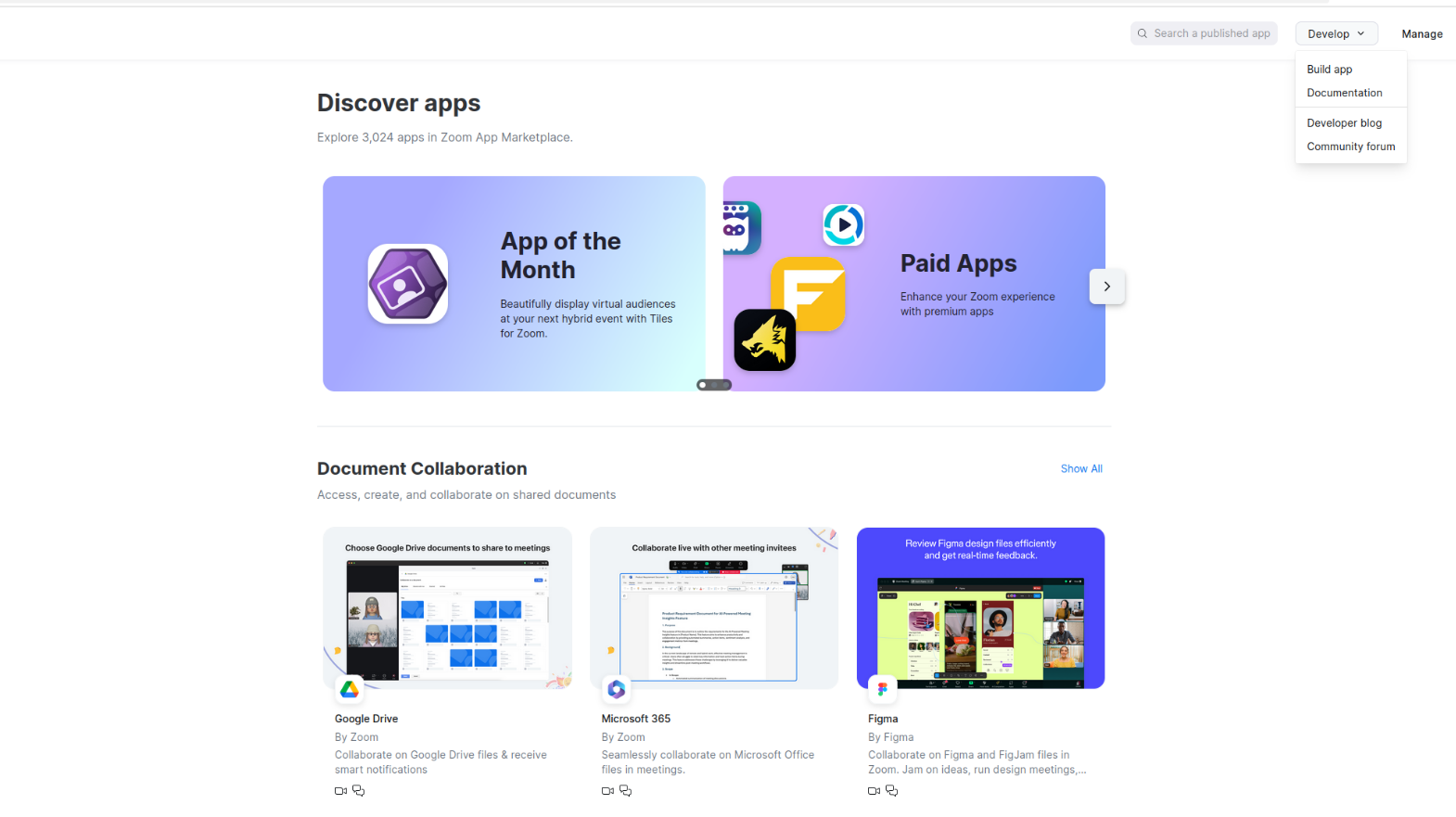
Open the Zoom Marketplace.
-
Click "Develop" → "Build App"
-
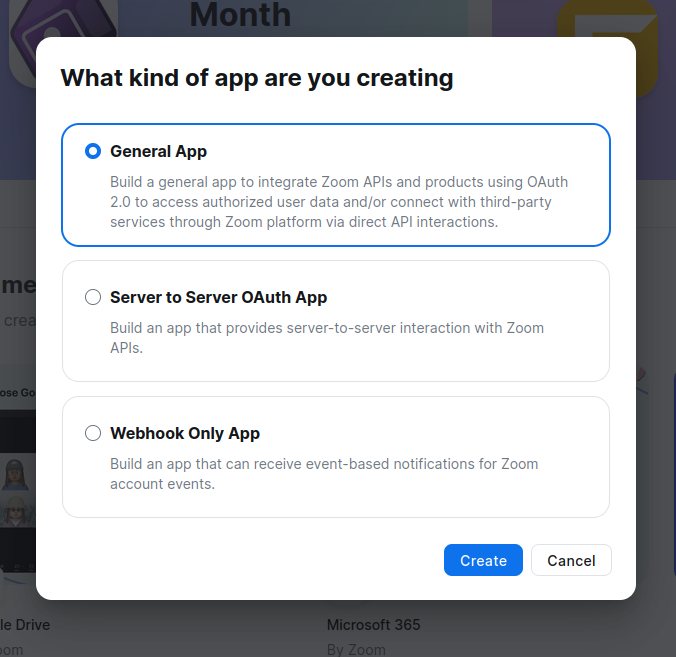
Choose "General App" app type (for user authorization with refresh tokens)
-
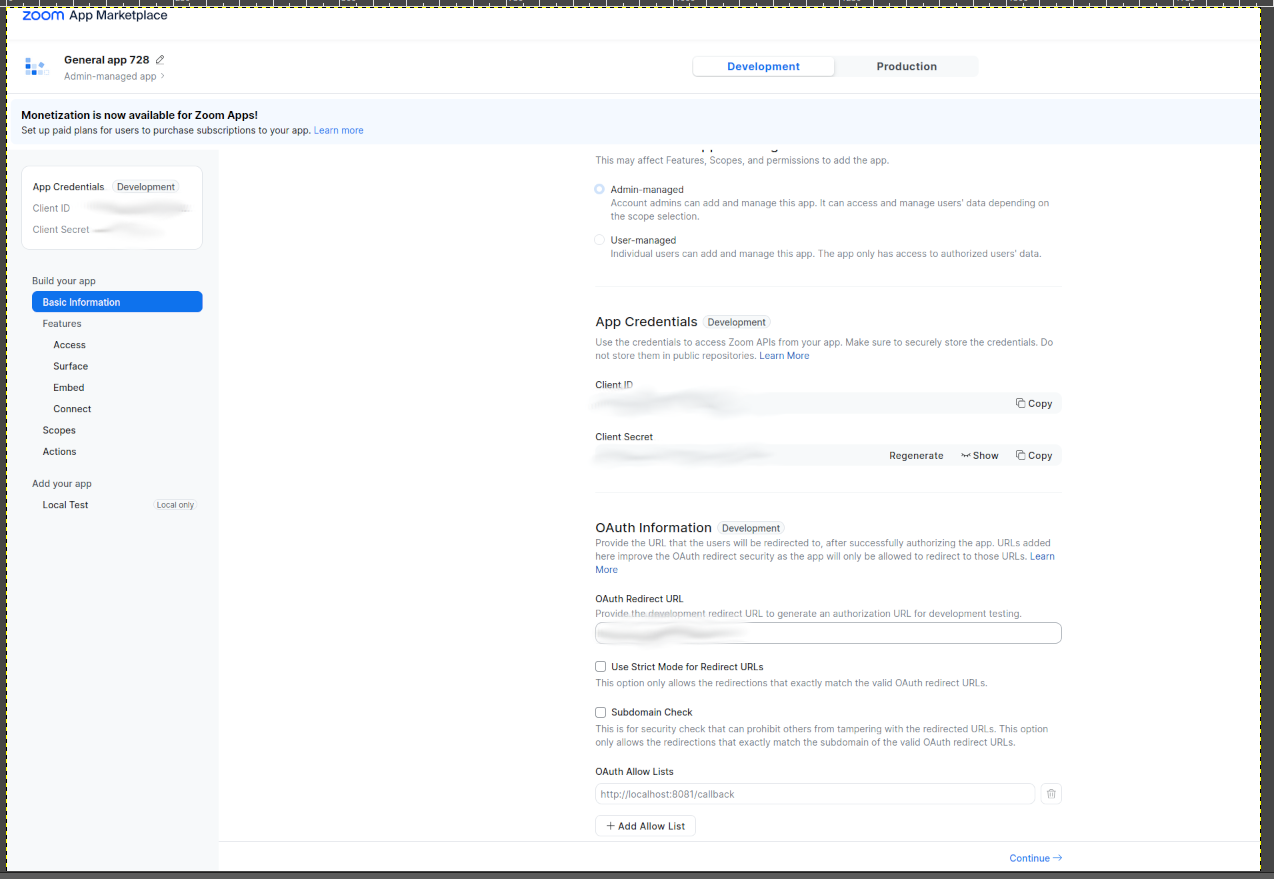
Fill in Basic Information, choose Admin-managed option.
Step 2: Configure OAuth settings
-
Note down your credentials:
- Client ID
- Client Secret
-
Set Redirect URI: Add your application's redirect URI
-
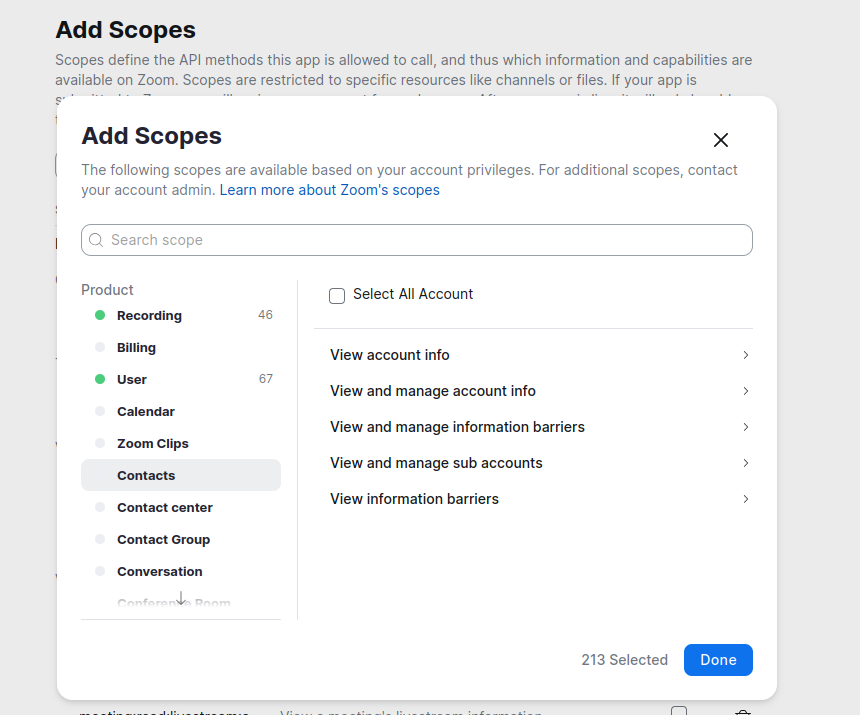
Add scopes: Make sure your Zoom app has the necessary scopes for the Meetings API:
- Add
meetings:read,meetings:writeanduser:readin the scope
- Add
Step 3: Activate the app
-
Complete all necessary information fields.
-
Once, the necessary fields are correctly filled, app will be activated.
Step 4: Get user authorization
-
Direct users to authorization URL (replace
YOUR_CLIENT_IDandYOUR_REDIRECT_URI):https://zoom.us/oauth/authorize?response_type=code&client_id=YOUR_CLIENT_ID&redirect_uri=YOUR_REDIRECT_URI&scope=meetings:read meetings:write user:read -
User authorizes the app and gets redirected to your callback URL with an authorization code
-
Exchange authorization code for tokens:
curl -X POST https://zoom.us/oauth/token \ -H "Authorization: Basic $(echo -n 'CLIENT_ID:CLIENT_SECRET' | base64)" \ -d "grant_type=authorization_code&code=AUTHORIZATION_CODE&redirect_uri=YOUR_REDIRECT_URI"This returns both
access_tokenandrefresh_token.Replace:
CLIENT_IDwith your app's Client IDCLIENT_SECRETwith your app's Client SecretAUTHORIZATION_CODEwith the code received from the callbackYOUR_REDIRECT_URIwith your configured redirect URI
Step 5: Verify your setup
curl -X GET "https://api.zoom.us/v2/users/me" \ -H "Authorization: Bearer YOUR_ACCESS_TOKEN"
This will give you the user ID needed for API calls.
Quickstart
To use the Zoom connector in your Ballerina application, update the .bal file as follows:
Step 1: Import the module
Import the zoom.meetings module.
import ballerinax/zoom.meetings;
Step 2: Instantiate a new connector
-
Create a
Config.tomlfile and, configure the obtained credentials in the above steps as follows:refreshToken = "<refresh Token>" refreshUrl = "<refresh URL>" userId = "<user_id>" clientId = "<client_id>" clientSecret = "<client_secret>" -
Create a
zoom.meeting:ConnectionConfigwith the obtained access token and initialize the connector with it.configurable string refreshToken = ?; ConnectionConfig config = { auth: { refreshToken, clientId, clientSecret, refreshUrl } }; final Client zoomClient = check new Client(config, serviceUrl);
Step 3: Invoke the connector operation
Now, utilize the available connector operations.
meetings:InlineResponse20028 response = check zoomClient->/users/[originalId]/meetings(); meetings:InlineResponse20028Meetings[]? meetings = response.meetings; if meetings is () { io:println("No upcoming meetings found."); return; } foreach var meeting in meetings { if meeting.id is int && meeting.topic is string { io:println("Meeting ID: ", meeting.id); io:println("Topic : ", meeting.topic); io:println("-------------------------------"); } }
Step 4: Run the Ballerina application
bal run
Examples
The Zoom Meetings connector provides practical examples illustrating usage in various scenarios. Explore these examples, covering the following use cases:
-
Create a Zoom meeting – Creates a new Zoom meeting using the API.
-
List scheduled meetings – Displays the list of meetings scheduled under a specified Zoom user account.
Clients
zoom.meetings: Client
The Zoom Meeting APIs allow developers to interface with Zoom Meetings and Webinars programmatically.
Constructor
Gets invoked to initialize the connector.
init (ConnectionConfig config, string serviceUrl)- config ConnectionConfig - The configurations to be used when initializing the
connector
- serviceUrl string "https://api.zoom.us/v2" - URL of the target service
get archive_files
function get archive_files(map<string|string[]> headers, *ListArchivedFilesQueries queries) returns InlineResponse200|errorList archived files
Parameters
- queries *ListArchivedFilesQueries - Queries to be sent with the request
Return Type
- InlineResponse200|error - HTTP Status Code:
200Archived files returned
get archive_files/statistics
function get archive_files/statistics(map<string|string[]> headers, *GetArchivedFileStatisticsQueries queries) returns InlineResponse2001|errorGet archived file statistics
Parameters
- queries *GetArchivedFileStatisticsQueries - Queries to be sent with the request
Return Type
- InlineResponse2001|error - HTTP Status Code:
200The statistics of Archived files returned
patch archive_files/[string fileId]
function patch archive_files/[string fileId](ArchiveFilesfileIdBody payload, map<string|string[]> headers) returns error?Update an archived file's auto-delete status
Parameters
- payload ArchiveFilesfileIdBody -
Return Type
- error? - HTTP Status Code:
204<br> auto-delete status updated
get past_meetings/[string meetingUUID]/archive_files
function get past_meetings/[string meetingUUID]/archive_files(map<string|string[]> headers) returns InlineResponse2002|errorGet a meeting's archived files
Return Type
- InlineResponse2002|error - HTTP Status Code:
200Meeting archived files returned
delete past_meetings/[string meetingUUID]/archive_files
function delete past_meetings/[string meetingUUID]/archive_files(map<string|string[]> headers) returns error?Delete a meeting's archived files
Return Type
- error? - HTTP Status Code:
204Meeting archived file deleted
get meetings/[string meetingId]/recordings
function get meetings/[string meetingId]/recordings(map<string|string[]> headers, *RecordingGetQueries queries) returns InlineResponse2003|errorGet meeting recordings
Parameters
- queries *RecordingGetQueries - Queries to be sent with the request
Return Type
- InlineResponse2003|error - HTTP Status Code:
200Recording object returned. Error Code:200You do not have the right permissions
delete meetings/[string meetingId]/recordings
function delete meetings/[string meetingId]/recordings(map<string|string[]> headers, *RecordingDeleteQueries queries) returns error?Delete meeting or webinar recordings
Parameters
- queries *RecordingDeleteQueries - Queries to be sent with the request
Return Type
- error? - HTTP Status Code:
200Recordings deleted. Error Code:200You do not have the right permission
get meetings/[string meetingId]/recordings/analytics_details
function get meetings/[string meetingId]/recordings/analytics_details(map<string|string[]> headers, *AnalyticsDetailsQueries queries) returns InlineResponse2004|errorGet a meeting or webinar recording's analytics details
Parameters
- queries *AnalyticsDetailsQueries - Queries to be sent with the request
Return Type
- InlineResponse2004|error - HTTP Status Code:
200Analytics Detail listed successfully
get meetings/[string meetingId]/recordings/analytics_summary
function get meetings/[string meetingId]/recordings/analytics_summary(map<string|string[]> headers, *AnalyticsSummaryQueries queries) returns InlineResponse2005|errorGet a meeting or webinar recording's analytics summary
Parameters
- queries *AnalyticsSummaryQueries - Queries to be sent with the request
Return Type
- InlineResponse2005|error - HTTP Status Code:
200Analytics Summary listed successfully
get meetings/[int meetingId]/recordings/registrants
function get meetings/[int meetingId]/recordings/registrants(map<string|string[]> headers, *MeetingRecordingRegistrantsQueries queries) returns MeetingCloudRecordingRegistration|errorList recording registrants
Parameters
- queries *MeetingRecordingRegistrantsQueries - Queries to be sent with the request
Return Type
- MeetingCloudRecordingRegistration|error - HTTP Status Code:
200Registrants returned
post meetings/[int meetingId]/recordings/registrants
function post meetings/[int meetingId]/recordings/registrants(RecordingsRegistrantsBody payload, map<string|string[]> headers) returns InlineResponse201|errorCreate a recording registrant
Parameters
- payload RecordingsRegistrantsBody -
Return Type
- InlineResponse201|error - HTTP Status Code:
201Registration submitted
get meetings/[string meetingId]/recordings/registrants/questions
function get meetings/[string meetingId]/recordings/registrants/questions(map<string|string[]> headers) returns RecordingRegistrantQuestions|errorGet registration questions
Return Type
- RecordingRegistrantQuestions|error - HTTP Status Code:
200Recording registrant question object returned
patch meetings/[string meetingId]/recordings/registrants/questions
function patch meetings/[string meetingId]/recordings/registrants/questions(RegistrantsQuestionsBody payload, map<string|string[]> headers) returns error?Update registration questions
Parameters
- payload RegistrantsQuestionsBody - Recording registrant questions
Return Type
- error? - HTTP Status Code:
200Recording registrant questions updated
put meetings/[int meetingId]/recordings/registrants/status
function put meetings/[int meetingId]/recordings/registrants/status(RegistrantsStatusBody payload, map<string|string[]> headers) returns error?Update a registrant's status
Parameters
- payload RegistrantsStatusBody -
Return Type
- error? - HTTP Status Code:
204Registrant status updated
get meetings/[string meetingId]/recordings/settings
function get meetings/[string meetingId]/recordings/settings(map<string|string[]> headers) returns RecordingSettings|errorGet meeting recording settings
Return Type
- RecordingSettings|error - HTTP Status Code:
200Meeting recording settings returned
patch meetings/[string meetingId]/recordings/settings
function patch meetings/[string meetingId]/recordings/settings(RecordingSettings1 payload, map<string|string[]> headers) returns error?Update meeting recording settings
Parameters
- payload RecordingSettings1 -
Return Type
- error? - HTTP Status Code:
204Meeting recording setting's updated
delete meetings/[string meetingId]/recordings/[string recordingId]
function delete meetings/[string meetingId]/recordings/[string recordingId](map<string|string[]> headers, *RecordingDeleteOneQueries queries) returns error?Delete a recording file for a meeting or webinar
Parameters
- queries *RecordingDeleteOneQueries - Queries to be sent with the request
Return Type
- error? - HTTP Status Code:
200Recording deleted. Error Code:200You do not have the right permissions
put meetings/[string meetingId]/recordings/[string recordingId]/status
function put meetings/[string meetingId]/recordings/[string recordingId]/status(RecordingIdStatusBody payload, map<string|string[]> headers) returns error?Recover a single recording
Parameters
- payload RecordingIdStatusBody -
Return Type
- error? - HTTP Status Code:
204Meeting recording recovered.
put meetings/[string meetingUUID]/recordings/status
function put meetings/[string meetingUUID]/recordings/status(RecordingIdStatusBody payload, map<string|string[]> headers) returns error?Recover meeting recordings
Parameters
- payload RecordingIdStatusBody -
Return Type
- error? - HTTP Status Code:
200Recordings recovered. Error Code:200You do not have the right permissions
get users/[string userId]/recordings
function get users/[string userId]/recordings(map<string|string[]> headers, *RecordingsListQueries queries) returns InlineResponse2006|errorList all recordings
Parameters
- queries *RecordingsListQueries - Queries to be sent with the request
Return Type
- InlineResponse2006|error - HTTP Status Code:
200List of recording objects returned
get devices
function get devices(map<string|string[]> headers, *ListDevicesQueries queries) returns InlineResponse2007|errorList devices
Parameters
- queries *ListDevicesQueries - Queries to be sent with the request
Return Type
- InlineResponse2007|error - HTTP Status Code:
200OK Device detail returned successfully
post devices
function post devices(DevicesBody payload, map<string|string[]> headers) returns error?Add a new device
Parameters
- payload DevicesBody -
Return Type
- error? - HTTP Status:
202Accepted Request processed successfully
get devices/groups
function get devices/groups(map<string|string[]> headers, *GetzdmgroupinfoQueries queries) returns InlineResponse2008|errorGet ZDM group info
Parameters
- queries *GetzdmgroupinfoQueries - Queries to be sent with the request
Return Type
- InlineResponse2008|error - HTTP Status Code:
200OK Version detail returned successfully
post devices/zpa/assignment
function post devices/zpa/assignment(ZpaAssignmentBody payload, map<string|string[]> headers) returns error?Assign a device to a user or commonarea
Parameters
- payload ZpaAssignmentBody -
Return Type
- error? - HTTP Status Code:
204No Content Request processed successfully
get devices/zpa/settings
function get devices/zpa/settings(map<string|string[]> headers, *GetZpaDeviceListProfileSettingOfaUserQueries queries) returns InlineResponse2009|errorGet Zoom Phone Appliance settings by user ID
Parameters
- queries *GetZpaDeviceListProfileSettingOfaUserQueries - Queries to be sent with the request
Return Type
- InlineResponse2009|error - HTTP Status Code:
200OK Version detail returned successfully
post devices/zpa/upgrade
function post devices/zpa/upgrade(ZpaUpgradeBody payload, map<string|string[]> headers) returns error?Upgrade ZPA firmware or app
Parameters
- payload ZpaUpgradeBody -
Return Type
- error? - The upgrade request has been accepted and is currently being processed
delete devices/zpa/vendors/[string vendor]/mac_addresses/[string macAddress]
function delete devices/zpa/vendors/[string vendor]/mac_addresses/[string macAddress](map<string|string[]> headers) returns error?Delete ZPA device by vendor and mac address
Return Type
- error? - HTTP Status Code:
204No Content Device deleted successfully
get devices/zpa/zdm_groups/[string zdmGroupId]/versions
function get devices/zpa/zdm_groups/[string zdmGroupId]/versions(map<string|string[]> headers) returns InlineResponse20010|errorGet ZPA version info
Return Type
- InlineResponse20010|error - HTTP Status Code:
200OK Version detail returned successfully
get devices/[string deviceId]
function get devices/[string deviceId](map<string|string[]> headers) returns InlineResponse20011|errorGet device detail
Return Type
- InlineResponse20011|error - HTTP Status Code:
200OK Device detail returned successfully
delete devices/[string deviceId]
Delete device
Return Type
- error? - HTTP Status Code:
204No Content Device deleted successfully
patch devices/[string deviceId]
function patch devices/[string deviceId](DevicesdeviceIdBody payload, map<string|string[]> headers) returns error?Change device
Parameters
- payload DevicesdeviceIdBody -
Return Type
- error? - HTTP Status Code:
204No Content Request processed successfully
patch devices/[string deviceId]/assign_group
function patch devices/[string deviceId]/assign_group(map<string|string[]> headers, *AssginGroupQueries queries) returns error?Assign a device to a group
Parameters
- queries *AssginGroupQueries - Queries to be sent with the request
Return Type
- error? - Request processed successfully
patch devices/[string deviceId]/assignment
function patch devices/[string deviceId]/assignment(DeviceIdAssignmentBody payload, map<string|string[]> headers) returns error?Change device association
Parameters
- payload DeviceIdAssignmentBody -
Return Type
- error? - HTTP Status Code:
204No Content Request processed successfully
get h323/devices
function get h323/devices(map<string|string[]> headers, *DeviceListQueries queries) returns H323SIPDeviceList|errorList H.323/SIP devices
Parameters
- queries *DeviceListQueries - Queries to be sent with the request
Return Type
- H323SIPDeviceList|error - HTTP Status Code:
200List of H.323/SIP devices returned. Error Code:200No permission
post h323/devices
function post h323/devices(TheH323SIPDeviceObject payload, map<string|string[]> headers) returns InlineResponse2011|errorCreate a H.323/SIP device
Parameters
- payload TheH323SIPDeviceObject - H.323/SIP device
Return Type
- InlineResponse2011|error - HTTP Status Code:
201H.323/SIP device created
delete h323/devices/[string deviceId]
Delete a H.323/SIP device
Return Type
- error? - You do not have the permission to delete this device
patch h323/devices/[string deviceId]
function patch h323/devices/[string deviceId](TheH323SIPDeviceObject1 payload, map<string|string[]> headers) returns error?Update a H.323/SIP device
Parameters
- payload TheH323SIPDeviceObject1 -
Return Type
- error? - HTTP Status Code:
204H.323/SIP device updated
delete live_meetings/[int meetingId]/chat/messages/[string messageId]
function delete live_meetings/[int meetingId]/chat/messages/[string messageId](map<string|string[]> headers, *DeleteMeetingChatMessageByIdQueries queries) returns error?Delete a live meeting message
Parameters
- queries *DeleteMeetingChatMessageByIdQueries - Queries to be sent with the request
Return Type
- error? - HTTP Status Code:
204Meeting chat message deleted
patch live_meetings/[int meetingId]/chat/messages/[string messageId]
function patch live_meetings/[int meetingId]/chat/messages/[string messageId](MessagesmessageIdBody payload, map<string|string[]> headers) returns error?Update a live meeting message
Parameters
- payload MessagesmessageIdBody -
Return Type
- error? - HTTP Status Code:
204<br> Meeting chat message updated
patch live_meetings/[string meetingId]/events
function patch live_meetings/[string meetingId]/events(MeetingIdEventsBody payload, map<string|string[]> headers) returns error?Use in-meeting controls
Parameters
- payload MeetingIdEventsBody -
Return Type
- error? - HTTP Status:
202Accepted Request processed successfully
patch live_meetings/[int meetingId]/rtms_app/status
function patch live_meetings/[int meetingId]/rtms_app/status(RtmsAppStatusBody payload, map<string|string[]> headers) returns error?Update participant Real-Time Media Streams (RTMS) app status
Parameters
- payload RtmsAppStatusBody - Meeting
Return Type
- error? - HTTP Status Code:
204Participant's RTMS app status updated
get meetings/meeting_summaries
function get meetings/meeting_summaries(map<string|string[]> headers, *ListmeetingsummariesQueries queries) returns InlineResponse20012|errorList an account's meeting summaries
Parameters
- queries *ListmeetingsummariesQueries - Queries to be sent with the request
Return Type
- InlineResponse20012|error - HTTP Status Code:
200Successfully listed meeting summaries of an account
get meetings/[int meetingId]
function get meetings/[int meetingId](map<string|string[]> headers, *MeetingQueries queries) returns InlineResponse20013|errorGet a meeting
Parameters
- queries *MeetingQueries - Queries to be sent with the request
Return Type
- InlineResponse20013|error - HTTP Status Code:
200Meeting object returned
delete meetings/[int meetingId]
function delete meetings/[int meetingId](map<string|string[]> headers, *MeetingDeleteQueries queries) returns error?Delete a meeting
Parameters
- queries *MeetingDeleteQueries - Queries to be sent with the request
Return Type
- error? - HTTP Status Code:
204Meeting deleted
patch meetings/[int meetingId]
function patch meetings/[int meetingId](MeetingsmeetingIdBody payload, map<string|string[]> headers, *MeetingUpdateQueries queries) returns error?Update a meeting
Parameters
- payload MeetingsmeetingIdBody - Meeting
- queries *MeetingUpdateQueries - Queries to be sent with the request
Return Type
- error? - HTTP Status Code:
204Meeting updated
post meetings/[string meetingId]/batch_polls
function post meetings/[string meetingId]/batch_polls(MeetingIdBatchPollsBody payload, map<string|string[]> headers) returns InlineResponse2012|errorPerform batch poll creation
Parameters
- payload MeetingIdBatchPollsBody - The batch meeting poll object
Return Type
- InlineResponse2012|error - HTTP Status Code:
201Meeting Poll Created
post meetings/[string meetingId]/batch_registrants
function post meetings/[string meetingId]/batch_registrants(MeetingIdBatchRegistrantsBody payload, map<string|string[]> headers) returns InlineResponse2013|errorPerform batch registration
Parameters
- payload MeetingIdBatchRegistrantsBody -
Return Type
- InlineResponse2013|error - HTTP Status Code:
200OK Registrants added
get meetings/[int meetingId]/invitation
function get meetings/[int meetingId]/invitation(map<string|string[]> headers) returns MeetingInvitation|errorGet meeting invitation
Return Type
- MeetingInvitation|error - HTTP Status Code:
200Meeting invitation returned
post meetings/[int meetingId]/invite_links
function post meetings/[int meetingId]/invite_links(InviteLinks payload, map<string|string[]> headers) returns InviteLinks1|errorCreate a meeting's invite links
Parameters
- payload InviteLinks -
Return Type
- InviteLinks1|error - HTTP Status Code:
201Meeting invitation links created
get meetings/[int meetingId]/jointoken/live_streaming
function get meetings/[int meetingId]/jointoken/live_streaming(map<string|string[]> headers) returns InlineResponse20014|errorGet a meeting's join token for live streaming
Return Type
- InlineResponse20014|error - HTTP Status Code:
200Meeting live streaming token returned
get meetings/[int meetingId]/jointoken/local_archiving
function get meetings/[int meetingId]/jointoken/local_archiving(map<string|string[]> headers) returns InlineResponse20015|errorGet a meeting's archive token for local archiving
Return Type
- InlineResponse20015|error - HTTP Status Code:
200Meeting local archiving token returned
get meetings/[int meetingId]/jointoken/local_recording
function get meetings/[int meetingId]/jointoken/local_recording(map<string|string[]> headers, *MeetingLocalRecordingJoinTokenQueries queries) returns InlineResponse20016|errorGet a meeting's join token for local recording
Parameters
- queries *MeetingLocalRecordingJoinTokenQueries - Queries to be sent with the request
Return Type
- InlineResponse20016|error - HTTP Status Code:
200Meeting local recording token returned
get meetings/[string meetingId]/livestream
function get meetings/[string meetingId]/livestream(map<string|string[]> headers) returns InlineResponse20017|errorGet livestream details
Return Type
- InlineResponse20017|error - HTTP Status Code:
200OK Live Stream details returned.
patch meetings/[int meetingId]/livestream
function patch meetings/[int meetingId]/livestream(MeetingIdLivestreamBody payload, map<string|string[]> headers) returns error?Update a livestream
Parameters
- payload MeetingIdLivestreamBody - Meeting
Return Type
- error? - HTTP Status Code:
204Meeting livestream updated
patch meetings/[int meetingId]/livestream/status
function patch meetings/[int meetingId]/livestream/status(LivestreamStatusBody payload, map<string|string[]> headers) returns error?Update livestream status
Parameters
- payload LivestreamStatusBody - Meeting
Return Type
- error? - HTTP Status Code:
204<br> Meeting livestream updated
get meetings/[string meetingId]/meeting_summary
function get meetings/[string meetingId]/meeting_summary(map<string|string[]> headers) returns InlineResponse20018|errorGet a meeting summary
Return Type
- InlineResponse20018|error - HTTP Status Code:
200Meeting summary object returned
post meetings/[int meetingId]/open_apps
function post meetings/[int meetingId]/open_apps(map<string|string[]> headers) returns InlineResponse2014|errorAdd a meeting app
Return Type
- InlineResponse2014|error - HTTP Status Code:
201App added
delete meetings/[int meetingId]/open_apps
Delete a meeting app
Return Type
- error? - HTTP Status Code:
201App deleted
get meetings/[int meetingId]/polls
function get meetings/[int meetingId]/polls(map<string|string[]> headers, *MeetingPollsQueries queries) returns PollList|errorList meeting polls
Parameters
- queries *MeetingPollsQueries - Queries to be sent with the request
post meetings/[int meetingId]/polls
function post meetings/[int meetingId]/polls(MeetingIdPollsBody payload, map<string|string[]> headers) returns InlineResponse2015|errorCreate a meeting poll
Parameters
- payload MeetingIdPollsBody - The meeting poll object
Return Type
- InlineResponse2015|error - HTTP Status Code:
201Meeting Poll Created
get meetings/[int meetingId]/polls/[string pollId]
function get meetings/[int meetingId]/polls/[string pollId](map<string|string[]> headers) returns InlineResponse20019|errorGet a meeting poll
Return Type
- InlineResponse20019|error - HTTP Status Code:
200Meeting Poll object returned
put meetings/[int meetingId]/polls/[string pollId]
function put meetings/[int meetingId]/polls/[string pollId](PollspollIdBody payload, map<string|string[]> headers) returns error?Update a meeting poll
Parameters
- payload PollspollIdBody - The meeting poll
Return Type
- error? - HTTP Status Code:
204Meeting Poll Updated
delete meetings/[int meetingId]/polls/[string pollId]
function delete meetings/[int meetingId]/polls/[string pollId](map<string|string[]> headers) returns error?Delete a meeting poll
Return Type
- error? - HTTP Status Code:
204Meeting Poll deleted
get meetings/[int meetingId]/registrants
function get meetings/[int meetingId]/registrants(map<string|string[]> headers, *MeetingRegistrantsQueries queries) returns RegistrationList|errorList meeting registrants
Parameters
- queries *MeetingRegistrantsQueries - Queries to be sent with the request
Return Type
- RegistrationList|error - HTTP Status Code:
200Successfully listed meeting registrants
post meetings/[int meetingId]/registrants
function post meetings/[int meetingId]/registrants(MeetingIdRegistrantsBody payload, map<string|string[]> headers, *MeetingRegistrantCreateQueries queries) returns InlineResponse2016|errorAdd a meeting registrant
Parameters
- payload MeetingIdRegistrantsBody -
- queries *MeetingRegistrantCreateQueries - Queries to be sent with the request
Return Type
- InlineResponse2016|error - HTTP Status Code:
201Meeting registration created
get meetings/[int meetingId]/registrants/questions
function get meetings/[int meetingId]/registrants/questions(map<string|string[]> headers) returns InlineResponse20020|errorList registration questions
Return Type
- InlineResponse20020|error - HTTP Status Code:
200Meeting Registrant Question object returned
patch meetings/[int meetingId]/registrants/questions
function patch meetings/[int meetingId]/registrants/questions(RegistrantsQuestionsBody1 payload, map<string|string[]> headers) returns error?Update registration questions
Parameters
- payload RegistrantsQuestionsBody1 - Meeting Registrant Questions
Return Type
- error? - HTTP Status Code:
204Meeting Registrant Questions Updated
put meetings/[int meetingId]/registrants/status
function put meetings/[int meetingId]/registrants/status(RegistrantsStatusBody1 payload, map<string|string[]> headers, *MeetingRegistrantStatusQueries queries) returns error?Update registrant's status
Parameters
- payload RegistrantsStatusBody1 -
- queries *MeetingRegistrantStatusQueries - Queries to be sent with the request
Return Type
- error? - HTTP Status Code:
204Registrant status updated
get meetings/[int meetingId]/registrants/[string registrantId]
function get meetings/[int meetingId]/registrants/[string registrantId](map<string|string[]> headers) returns MeetingRegistrant|errorGet a meeting registrant
Return Type
- MeetingRegistrant|error - Success
delete meetings/[int meetingId]/registrants/[string registrantId]
function delete meetings/[int meetingId]/registrants/[string registrantId](map<string|string[]> headers, *MeetingregistrantdeleteQueries queries) returns error?Delete a meeting registrant
Parameters
- queries *MeetingregistrantdeleteQueries - Queries to be sent with the request
Return Type
- error? - HTTP status code:
204OK
post meetings/[int meetingId]/sip_dialing
function post meetings/[int meetingId]/sip_dialing(MeetingIdSipDialingBody payload, map<string|string[]> headers) returns InlineResponse20021|errorGet a meeting SIP URI with passcode
Parameters
- payload MeetingIdSipDialingBody -
Return Type
- InlineResponse20021|error - HTTP Status Code:
200Meeting's encoded SIP URI returned
put meetings/[int meetingId]/status
function put meetings/[int meetingId]/status(MeetingIdStatusBody payload, map<string|string[]> headers) returns error?Update meeting status
Parameters
- payload MeetingIdStatusBody -
Return Type
- error? - HTTP Status Code:
204Meeting updated
get meetings/[int meetingId]/survey
function get meetings/[int meetingId]/survey(map<string|string[]> headers) returns MeetingSurveyObject|errorGet a meeting survey
Return Type
- MeetingSurveyObject|error - HTTP Status Code:
200Meeting survey object returned
delete meetings/[int meetingId]/survey
Delete a meeting survey
Return Type
- error? - HTTP Status Code:
204Meeting survey deleted
patch meetings/[int meetingId]/survey
function patch meetings/[int meetingId]/survey(MeetingSurveyObject1 payload, map<string|string[]> headers) returns error?Update a meeting survey
Parameters
- payload MeetingSurveyObject1 -
Return Type
- error? - HTTP Status Code:
204Meeting survey updated
get meetings/[int meetingId]/token
function get meetings/[int meetingId]/token(map<string|string[]> headers, *MeetingTokenQueries queries) returns InlineResponse20022|errorGet meeting's token
Parameters
- queries *MeetingTokenQueries - Queries to be sent with the request
Return Type
- InlineResponse20022|error - HTTP Status Code:
200Meeting token returned
get past_meetings/[string meetingId]
function get past_meetings/[string meetingId](map<string|string[]> headers) returns InlineResponse20023|errorGet past meeting details
Return Type
- InlineResponse20023|error - HTTP Status Code:
200Meeting information returned
get past_meetings/[int meetingId]/instances
function get past_meetings/[int meetingId]/instances(map<string|string[]> headers) returns MeetingInstances|errorList past meeting instances
Return Type
- MeetingInstances|error - HTTP Status Code:
200List of ended meeting instances returned
get past_meetings/[string meetingId]/participants
function get past_meetings/[string meetingId]/participants(map<string|string[]> headers, *PastMeetingParticipantsQueries queries) returns InlineResponse20024|errorGet past meeting participants
Parameters
- queries *PastMeetingParticipantsQueries - Queries to be sent with the request
Return Type
- InlineResponse20024|error - HTTP Status Code:
200Meeting participants' report returned
get past_meetings/[string meetingId]/polls
function get past_meetings/[string meetingId]/polls(map<string|string[]> headers) returns InlineResponse20025|errorList past meeting's poll results
Return Type
- InlineResponse20025|error - HTTP Status Code:
200OK Polls returned successfully
get past_meetings/[string meetingId]/qa
function get past_meetings/[string meetingId]/qa(map<string|string[]> headers) returns InlineResponse20026|errorList past meetings' Q&A
Return Type
- InlineResponse20026|error - HTTP Status Code:
200OK Q&A returned successfully
get users/[string userId]/meeting_templates
function get users/[string userId]/meeting_templates(map<string|string[]> headers) returns InlineResponse20027|errorList meeting templates
Return Type
- InlineResponse20027|error - HTTP Status Code:
200OK
post users/[string userId]/meeting_templates
function post users/[string userId]/meeting_templates(UserIdMeetingTemplatesBody payload, map<string|string[]> headers) returns InlineResponse2017|errorCreate a meeting template from an existing meeting
Parameters
- payload UserIdMeetingTemplatesBody -
Return Type
- InlineResponse2017|error - HTTP Status Code:
201Meeting template created
get users/[string userId]/meetings
function get users/[string userId]/meetings(map<string|string[]> headers, *MeetingsQueries queries) returns InlineResponse20028|errorList meetings
Parameters
- queries *MeetingsQueries - Queries to be sent with the request
Return Type
- InlineResponse20028|error - HTTP Status Code:
200List of meeting objects returned
post users/[string userId]/meetings
function post users/[string userId]/meetings(UserIdMeetingsBody payload, map<string|string[]> headers) returns InlineResponse2018|errorCreate a meeting
Parameters
- payload UserIdMeetingsBody - Meeting object
Return Type
- InlineResponse2018|error - HTTP Status Code:
201Meeting created
get users/[string userId]/upcoming_meetings
function get users/[string userId]/upcoming_meetings(map<string|string[]> headers) returns InlineResponse20029|errorList upcoming meetings
Return Type
- InlineResponse20029|error - HTTP Status Code:
200List of upcoming meeting objects returned
get users/[string userId]/pac
function get users/[string userId]/pac(map<string|string[]> headers) returns InlineResponse20030|errorList a user's PAC accounts
Return Type
- InlineResponse20030|error - HTTP Status Code:
200PAC account list returned
get report/activities
function get report/activities(map<string|string[]> headers, *ReportSignInSignOutActivitiesQueries queries) returns InlineResponse20031|errorGet sign In / sign out activity report
Parameters
- queries *ReportSignInSignOutActivitiesQueries - Queries to be sent with the request
Return Type
- InlineResponse20031|error - HTTP Status Code:
200Success
get report/billing
function get report/billing(map<string|string[]> headers) returns InlineResponse20032|errorGet billing reports
Return Type
- InlineResponse20032|error - HTTP Status Code:
200OK Billing report returned
get report/billing/invoices
function get report/billing/invoices(map<string|string[]> headers, *GetBillingInvoicesReportsQueries queries) returns InlineResponse20033|errorGet billing invoice reports
Parameters
- queries *GetBillingInvoicesReportsQueries - Queries to be sent with the request
Return Type
- InlineResponse20033|error - HTTP Status Code:
200OK Billing Invoice reports returned
get report/cloud_recording
function get report/cloud_recording(map<string|string[]> headers, *ReportCloudRecordingQueries queries) returns InlineResponse20034|errorGet cloud recording usage report
Parameters
- queries *ReportCloudRecordingQueries - Queries to be sent with the request
Return Type
- InlineResponse20034|error - HTTP Status Code:
200Cloud Recording Report Returned
get report/daily
function get report/daily(map<string|string[]> headers, *ReportDailyQueries queries) returns InlineResponse20035|errorGet daily usage report
Parameters
- queries *ReportDailyQueries - Queries to be sent with the request
Return Type
- InlineResponse20035|error - HTTP Status Code:
200Daily report retrieved. This is only available for paid accounts:{accountId}
get report/history_meetings
function get report/history_meetings(map<string|string[]> headers, *GethistorymeetingandwebinarlistQueries queries) returns InlineResponse20036|errorGet history meeting and webinar list
Parameters
- queries *GethistorymeetingandwebinarlistQueries - Queries to be sent with the request
Return Type
- InlineResponse20036|error - HTTP Status Code: 200 Success
get report/meeting_activities
function get report/meeting_activities(map<string|string[]> headers, *ReportMeetingactivitylogsQueries queries) returns InlineResponse20037|errorGet a meeting activities report
Parameters
- queries *ReportMeetingactivitylogsQueries - Queries to be sent with the request
Return Type
- InlineResponse20037|error - HTTP Status Code:
200Success. Only available for Paid or ZMP account {accountId}
get report/meetings/[MeetingId meetingId]
function get report/meetings/[MeetingId meetingId](map<string|string[]> headers) returns InlineResponse20038|errorGet meeting detail reports
Return Type
- InlineResponse20038|error - HTTP Status Code:
200Meeting details returned. This is only available for paid account
get report/meetings/[string meetingId]/participants
function get report/meetings/[string meetingId]/participants(map<string|string[]> headers, *ReportMeetingParticipantsQueries queries) returns InlineResponse20039|errorGet meeting participant reports
Parameters
- queries *ReportMeetingParticipantsQueries - Queries to be sent with the request
Return Type
- InlineResponse20039|error - HTTP Status Code:
200Meeting participants report returned. Only available for Paid or ZMP account: {accountId}
get report/meetings/[MeetingId1 meetingId]/polls
function get report/meetings/[MeetingId1 meetingId]/polls(map<string|string[]> headers) returns InlineResponse20040|errorGet meeting poll reports
Return Type
- InlineResponse20040|error - HTTP Status Code:
200* Meeting polls report returned. * This is only available for paid account: {accountId}
get report/meetings/[string meetingId]/qa
function get report/meetings/[string meetingId]/qa(map<string|string[]> headers) returns InlineResponse20041|errorGet meeting Q&A report
Return Type
- InlineResponse20041|error - HTTP Status Code:
200Meeting Q&A report returned. Only available for Paid or ZMP account: {accountId}
get report/meetings/[string meetingId]/survey
function get report/meetings/[string meetingId]/survey(map<string|string[]> headers) returns InlineResponse20042|errorGet meeting survey report
Return Type
- InlineResponse20042|error - HTTP Status Code:
200Meeting survey report returned. Only available for Paid or ZMP account: {accountId}
get report/operationlogs
function get report/operationlogs(map<string|string[]> headers, *ReportOperationLogsQueries queries) returns InlineResponse20043|errorGet operation logs report
Parameters
- queries *ReportOperationLogsQueries - Queries to be sent with the request
Return Type
- InlineResponse20043|error - HTTP Status Code:
200Operation Logs Report Returned
get report/telephone
function get report/telephone(map<string|string[]> headers, *ReportTelephoneQueries queries) returns InlineResponse20044|errorGet telephone reports
Parameters
- queries *ReportTelephoneQueries - Queries to be sent with the request
Return Type
- InlineResponse20044|error - HTTP Status Code:
200Telephone report returned. This is only available for paid account: {accountId}. The requested report cannot be generated for this account because this account has not subscribed to toll-free audio conference plan. Enable the Toll Report feature to perform this action. Contact the Zoom Support team for help
get report/upcoming_events
function get report/upcoming_events(map<string|string[]> headers, *ReportUpcomingEventsQueries queries) returns InlineResponse20045|errorGet upcoming events report
Parameters
- queries *ReportUpcomingEventsQueries - Queries to be sent with the request
Return Type
- InlineResponse20045|error - HTTP Status Code:
200Upcoming events report returned.
get report/users
function get report/users(map<string|string[]> headers, *ReportUsersQueries queries) returns InlineResponse20046|errorGet active or inactive host reports
Parameters
- queries *ReportUsersQueries - Queries to be sent with the request
Return Type
- InlineResponse20046|error - HTTP Status Code:
200Active or inactive hosts report returned. Only available for Paid or ZMP account: {accountId}
get report/users/[UserId userId]/meetings
function get report/users/[UserId userId]/meetings(map<string|string[]> headers, *ReportMeetingsQueries queries) returns InlineResponse20047|errorGet meeting reports
Parameters
- queries *ReportMeetingsQueries - Queries to be sent with the request
Return Type
- InlineResponse20047|error - HTTP Status Code:
200Active or inactive hosts report returned.
get report/webinars/[string webinarId]
function get report/webinars/[string webinarId](map<string|string[]> headers) returns InlineResponse20048|errorGet webinar detail reports
Return Type
- InlineResponse20048|error - HTTP Status Code:
200Webinar details returned. This is only available for paid account:{accountId}
get report/webinars/[string webinarId]/participants
function get report/webinars/[string webinarId]/participants(map<string|string[]> headers, *ReportWebinarParticipantsQueries queries) returns InlineResponse20049|errorGet webinar participant reports
Parameters
- queries *ReportWebinarParticipantsQueries - Queries to be sent with the request
Return Type
- InlineResponse20049|error - HTTP Status Code:
200* Meeting participants report returned. Only available for Paid or ZMP account: {accountId}
get report/webinars/[string webinarId]/polls
function get report/webinars/[string webinarId]/polls(map<string|string[]> headers) returns InlineResponse20050|errorGet webinar poll reports
Return Type
- InlineResponse20050|error - HTTP Status Code:
200Webinar polls report returned. Missing webinar subscription plan. Only available for Paid or ZMP account: {accountId}
get report/webinars/[string webinarId]/qa
function get report/webinars/[string webinarId]/qa(map<string|string[]> headers) returns InlineResponse20051|errorGet webinar Q&A report
Return Type
- InlineResponse20051|error - HTTP Status Code:
200Webinar Q&A report returned. Only available for Paid or ZMP account: {accountId}. A report can't be generated for this account because this account is not subscribed to a webinar plan
get report/webinars/[string webinarId]/survey
function get report/webinars/[string webinarId]/survey(map<string|string[]> headers) returns InlineResponse20052|errorGet webinar survey report
Return Type
- InlineResponse20052|error - HTTP Status Code:
200Webinar survey report returned. Missing webinar subscription plan. Only available for Paid or ZMP account: {accountId}
get sip_phones
function get sip_phones(map<string|string[]> headers, *ListSipPhonesQueries queries) returns InlineResponse20053|errorList SIP phones
Parameters
- queries *ListSipPhonesQueries - Queries to be sent with the request
Return Type
- InlineResponse20053|error - HTTP Status Code:
200SIP Phones listed successfully. Error Code:200Permission missing: Enable SIP Phone Integration by contacting a Zoom Admin first
Deprecated
post sip_phones
function post sip_phones(SipPhonesBody payload, map<string|string[]> headers) returns InlineResponse2019|errorEnable SIP phone
Parameters
- payload SipPhonesBody -
Return Type
- InlineResponse2019|error - HTTP Status Code:
201SIP Phone Created
Deprecated
get sip_phones/phones
function get sip_phones/phones(map<string|string[]> headers, *ListSIPPhonePhonesQueries queries) returns InlineResponse20054|errorList SIP phones
Parameters
- queries *ListSIPPhonePhonesQueries - Queries to be sent with the request
Return Type
- InlineResponse20054|error - HTTP Status Code:
200SIP phones listed successfully. Error Code:200Permission missing. Enable SIP phone integration by contacting a Zoom admin first
post sip_phones/phones
function post sip_phones/phones(SipPhonesPhonesBody payload, map<string|string[]> headers) returns InlineResponse20110|errorEnable SIP phone
Parameters
- payload SipPhonesPhonesBody -
Return Type
- InlineResponse20110|error - HTTP Status Code:
201SIP phone created
delete sip_phones/phones/[string phoneId]
Delete SIP phone
Return Type
- error? - HTTP Status Code:
204SIP phone deleted
patch sip_phones/phones/[string phoneId]
function patch sip_phones/phones/[string phoneId](PhonesphoneIdBody payload, map<string|string[]> headers) returns error?Update SIP phone
Parameters
- payload PhonesphoneIdBody -
Return Type
- error? - Status Code:
204SIP phone updated
delete sip_phones/[string phoneId]
Delete SIP phone
Return Type
- error? - HTTP Status Code:
204SIP phone deleted
Deprecated
patch sip_phones/[string phoneId]
function patch sip_phones/[string phoneId](SipPhonesphoneIdBody payload, map<string|string[]> headers) returns error?Update SIP phone
Parameters
- payload SipPhonesphoneIdBody -
Return Type
- error? - Status Code:
204SIP phone updated
Deprecated
get tsp
function get tsp(map<string|string[]> headers) returns InlineResponse20055|errorGet account's TSP information
Return Type
- InlineResponse20055|error - HTTP Status Code:
200TSP account detail returned successfully
patch tsp
Update account's TSP information
Parameters
- payload TspBody - TSP Account
Return Type
- error? - HTTP Status Code:
204No Content TSP Account updated
get users/[string userId]/tsp
function get users/[string userId]/tsp(map<string|string[]> headers) returns InlineResponse20056|errorList user's TSP accounts
Return Type
- InlineResponse20056|error - HTTP Status Code:
200OK TSP account list returned successfully
post users/[string userId]/tsp
function post users/[string userId]/tsp(TSPAccountsList payload, map<string|string[]> headers) returns InlineResponse20111|errorAdd a user's TSP account
Parameters
- payload TSPAccountsList -
Return Type
- InlineResponse20111|error - HTTP Status Code:
201TSP account added
patch users/[string userId]/tsp/settings
function patch users/[string userId]/tsp/settings(TSPGlobalDialInURLSetting payload, map<string|string[]> headers) returns error?Set global dial-in URL for a TSP user
Parameters
- payload TSPGlobalDialInURLSetting - The user's global dial-in URL
Return Type
- error? - Status Code:
204No Content URL set successfully
get users/[string userId]/tsp/["1"|"2" tspId]
function get users/[string userId]/tsp/["1"|"2" tspId](map<string|string[]> headers) returns TSPAccount|errorGet a user's TSP account
Return Type
- TSPAccount|error - HTTP Status Code:
200TSP account retrieved successfully
delete users/[string userId]/tsp/["1"|"2" tspId]
function delete users/[string userId]/tsp/["1"|"2" tspId](map<string|string[]> headers) returns error?Delete a user's TSP account
Return Type
- error? - Status Code:
204No Content TSP account deleted
patch users/[string userId]/tsp/["1"|"2" tspId]
function patch users/[string userId]/tsp/["1"|"2" tspId](TSPAccount1 payload, map<string|string[]> headers) returns error?Update a TSP account
Parameters
- payload TSPAccount1 - TSP account
Return Type
- error? - HTTP Status Code:
204No Content TSP account updated
get tracking_fields
function get tracking_fields(map<string|string[]> headers) returns InlineResponse20057|errorList tracking fields
Return Type
- InlineResponse20057|error - HTTP Status Code:
200List of Tracking Fields returned
post tracking_fields
function post tracking_fields(TrackingField payload, map<string|string[]> headers) returns InlineResponse20112|errorCreate a tracking field
Parameters
- payload TrackingField - Tracking Field
Return Type
- InlineResponse20112|error - HTTP Status Code:
201Tracking Field created
get tracking_fields/[string fieldId]
function get tracking_fields/[string fieldId](map<string|string[]> headers) returns TrackingField1|errorGet a tracking field
Return Type
- TrackingField1|error - HTTP Status Code:
200Tracking field object returned
delete tracking_fields/[string fieldId]
Delete a tracking field
Return Type
- error? - HTTP Status Code:
204Tracking Field deleted
patch tracking_fields/[string fieldId]
function patch tracking_fields/[string fieldId](TrackingField2 payload, map<string|string[]> headers) returns error?Update a tracking field
Parameters
- payload TrackingField2 -
Return Type
- error? - HTTP Status Code:
204Tracking field updated
delete live_webinars/[int webinarId]/chat/messages/[string messageId]
function delete live_webinars/[int webinarId]/chat/messages/[string messageId](map<string|string[]> headers, *DeleteWebinarChatMessageByIdQueries queries) returns error?Delete a live webinar message
Parameters
- queries *DeleteWebinarChatMessageByIdQueries - Queries to be sent with the request
Return Type
- error? - HTTP Status Code:
204Webinar chat message deleted
get past_webinars/[string webinarId]/absentees
function get past_webinars/[string webinarId]/absentees(map<string|string[]> headers, *WebinarAbsenteesQueries queries) returns RegistrationList1|errorGet webinar absentees
Parameters
- queries *WebinarAbsenteesQueries - Queries to be sent with the request
Return Type
- RegistrationList1|error - HTTP Status Code:
200Success. Error Code:200Webinar plan subscription is missing. Enable webinar for this user once the subscription is added:{userId}
get past_webinars/[int webinarId]/instances
function get past_webinars/[int webinarId]/instances(map<string|string[]> headers) returns WebinarInstances|errorList past webinar instances
Return Type
- WebinarInstances|error - HTTP Status Code:
200List of past webinar instances returned
get past_webinars/[string webinarId]/participants
function get past_webinars/[string webinarId]/participants(map<string|string[]> headers, *ListWebinarParticipantsQueries queries) returns InlineResponse20058|errorList webinar participants
Parameters
- queries *ListWebinarParticipantsQueries - Queries to be sent with the request
Return Type
- InlineResponse20058|error - HTTP Status Code:
200OK Participants list returned
get past_webinars/[string webinarId]/polls
function get past_webinars/[string webinarId]/polls(map<string|string[]> headers) returns InlineResponse20059|errorList past webinar poll results
Return Type
- InlineResponse20059|error - HTTP Status Code:
200OK Polls returned successfully
get past_webinars/[string webinarId]/qa
function get past_webinars/[string webinarId]/qa(map<string|string[]> headers) returns InlineResponse20060|errorList Q&As of a past webinar
Return Type
- InlineResponse20060|error - HTTP Status Code:
200OK Q&A returned successfully
get users/[string userId]/webinar_templates
function get users/[string userId]/webinar_templates(map<string|string[]> headers) returns InlineResponse20061|errorList webinar templates
Return Type
- InlineResponse20061|error - HTTP Status Code:
200OK List of existing templates returned
post users/[string userId]/webinar_templates
function post users/[string userId]/webinar_templates(UserIdWebinarTemplatesBody payload, map<string|string[]> headers) returns InlineResponse20113|errorCreate a webinar template
Parameters
- payload UserIdWebinarTemplatesBody -
Return Type
- InlineResponse20113|error - HTTP Status Code:
201Webinar template created
get users/[string userId]/webinars
function get users/[string userId]/webinars(map<string|string[]> headers, *WebinarsQueries queries) returns InlineResponse20062|errorList webinars
Parameters
- queries *WebinarsQueries - Queries to be sent with the request
Return Type
- InlineResponse20062|error - HTTP Status Code:
200List of webinar objects returned
post users/[string userId]/webinars
function post users/[string userId]/webinars(UserIdWebinarsBody payload, map<string|string[]> headers) returns InlineResponse20114|errorCreate a webinar
Parameters
- payload UserIdWebinarsBody -
Return Type
- InlineResponse20114|error - HTTP Status Code:
201Webinar created
get webinars/[string webinarId]
function get webinars/[string webinarId](map<string|string[]> headers, *WebinarQueries queries) returns InlineResponse20063|errorGet a webinar
Parameters
- queries *WebinarQueries - Queries to be sent with the request
Return Type
- InlineResponse20063|error - HTTP Status Code:
200Success
delete webinars/[int webinarId]
function delete webinars/[int webinarId](map<string|string[]> headers, *WebinarDeleteQueries queries) returns error?Delete a webinar
Parameters
- queries *WebinarDeleteQueries - Queries to be sent with the request
Return Type
- error? - HTTP Status Code:
204<br> Webinar deleted
patch webinars/[int webinarId]
function patch webinars/[int webinarId](WebinarswebinarIdBody payload, map<string|string[]> headers, *WebinarUpdateQueries queries) returns error?Update a webinar
Parameters
- payload WebinarswebinarIdBody - Webinar
- queries *WebinarUpdateQueries - Queries to be sent with the request
Return Type
- error? - HTTP Status Code:
204Webinar updated
post webinars/[string webinarId]/batch_registrants
function post webinars/[string webinarId]/batch_registrants(WebinarIdBatchRegistrantsBody payload, map<string|string[]> headers) returns InlineResponse20115|errorPerform batch registration
Parameters
- payload WebinarIdBatchRegistrantsBody -
Return Type
- InlineResponse20115|error - HTTP Status Code:
200OK Registrants added
get webinars/[int webinarId]/branding
function get webinars/[int webinarId]/branding(map<string|string[]> headers) returns InlineResponse20064|errorGet webinar's session branding
Return Type
- InlineResponse20064|error - HTTP Status Code:
200Webinar session branding returned
post webinars/[int webinarId]/branding/name_tags
function post webinars/[int webinarId]/branding/name_tags(BrandingNameTagsBody payload, map<string|string[]> headers) returns InlineResponse20116|errorCreate a webinar's branding name tag
Parameters
- payload BrandingNameTagsBody -
Return Type
- InlineResponse20116|error - HTTP Status Code:
201Name tag created
delete webinars/[int webinarId]/branding/name_tags
function delete webinars/[int webinarId]/branding/name_tags(map<string|string[]> headers, *DeleteWebinarBrandingNameTagQueries queries) returns error?Delete a webinar's branding name tag
Parameters
- queries *DeleteWebinarBrandingNameTagQueries - Queries to be sent with the request
Return Type
- error? - HTTP Status Code:
204* No content. * Name tag(s) deleted
patch webinars/[int webinarId]/branding/name_tags/[string nameTagId]
function patch webinars/[int webinarId]/branding/name_tags/[string nameTagId](NameTagsnameTagIdBody payload, map<string|string[]> headers) returns error?Update a webinar's branding name tag
Parameters
- payload NameTagsnameTagIdBody -
Return Type
- error? - HTTP Status Code:
204* No content. * Name tag updated
post webinars/[int webinarId]/branding/virtual_backgrounds
function post webinars/[int webinarId]/branding/virtual_backgrounds(BrandingVirtualBackgroundsBody payload, map<string|string[]> headers) returns InlineResponse20117|errorUpload a webinar's branding virtual background
Parameters
- payload BrandingVirtualBackgroundsBody -
Return Type
- InlineResponse20117|error - HTTP Status Code:
201Virtual background uploaded
delete webinars/[int webinarId]/branding/virtual_backgrounds
function delete webinars/[int webinarId]/branding/virtual_backgrounds(map<string|string[]> headers, *DeleteWebinarBrandingVBQueries queries) returns error?Delete a webinar's branding virtual backgrounds
Parameters
- queries *DeleteWebinarBrandingVBQueries - Queries to be sent with the request
Return Type
- error? - HTTP Status Code:
204* No content. * Virtual background file(s) deleted
patch webinars/[int webinarId]/branding/virtual_backgrounds
function patch webinars/[int webinarId]/branding/virtual_backgrounds(map<string|string[]> headers, *SetWebinarBrandingVBQueries queries) returns error?Set webinar's default branding virtual background
Parameters
- queries *SetWebinarBrandingVBQueries - Queries to be sent with the request
Return Type
- error? - HTTP Status Code:
204* No content. * Virtual background updated
post webinars/[int webinarId]/branding/wallpaper
function post webinars/[int webinarId]/branding/wallpaper(BrandingWallpaperBody payload, map<string|string[]> headers) returns InlineResponse20118|errorUpload a webinar's branding wallpaper
Parameters
- payload BrandingWallpaperBody -
Return Type
- InlineResponse20118|error - HTTP Status Code:
201Webinar wallpaper uploaded
delete webinars/[int webinarId]/branding/wallpaper
function delete webinars/[int webinarId]/branding/wallpaper(map<string|string[]> headers) returns error?Delete a webinar's branding wallpaper
Return Type
- error? - HTTP Status Code:
204* No content. * Webinar wallpaper deleted
post webinars/[int webinarId]/invite_links
function post webinars/[int webinarId]/invite_links(InviteLinks2 payload, map<string|string[]> headers) returns InviteLinks1|errorCreate webinar's invite links
Parameters
- payload InviteLinks2 - Webinar invite link object
Return Type
- InviteLinks1|error - HTTP Status Code:
201Webinar Invite Links Created
get webinars/[int webinarId]/jointoken/live_streaming
function get webinars/[int webinarId]/jointoken/live_streaming(map<string|string[]> headers) returns InlineResponse20065|errorGet a webinar's join token for live streaming
Return Type
- InlineResponse20065|error - HTTP Status Code:
200Webinar live streaming token returned
get webinars/[int webinarId]/jointoken/local_archiving
function get webinars/[int webinarId]/jointoken/local_archiving(map<string|string[]> headers) returns InlineResponse20066|errorGet a webinar's archive token for local archiving
Return Type
- InlineResponse20066|error - HTTP Status Code:
200Webinar local archiving token returned
get webinars/[int webinarId]/jointoken/local_recording
function get webinars/[int webinarId]/jointoken/local_recording(map<string|string[]> headers) returns InlineResponse20067|errorGet a webinar's join token for local recording
Return Type
- InlineResponse20067|error - HTTP Status Code:
200Webinar local recording token returned
get webinars/[string webinarId]/livestream
function get webinars/[string webinarId]/livestream(map<string|string[]> headers) returns InlineResponse20068|errorGet live stream details
Return Type
- InlineResponse20068|error - HTTP Status Code:
200OK Live stream details returned
patch webinars/[int webinarId]/livestream
function patch webinars/[int webinarId]/livestream(WebinarIdLivestreamBody payload, map<string|string[]> headers) returns error?Update a live stream
Parameters
- payload WebinarIdLivestreamBody - Webinar
Return Type
- error? - HTTP Status Code:
204Meeting live stream updated
patch webinars/[int webinarId]/livestream/status
function patch webinars/[int webinarId]/livestream/status(LivestreamStatusBody1 payload, map<string|string[]> headers) returns error?Update live stream status
Parameters
- payload LivestreamStatusBody1 - Webinar
Return Type
- error? - HTTP Status Code:
204Meeting live stream updated.
get webinars/[int webinarId]/panelists
function get webinars/[int webinarId]/panelists(map<string|string[]> headers) returns InlineResponse20069|errorList panelists
Return Type
- InlineResponse20069|error - HTTP Status Code:
200Webinar plan subscription missing. Enable webinar for this user once the subscription is added
post webinars/[int webinarId]/panelists
function post webinars/[int webinarId]/panelists(WebinarIdPanelistsBody payload, map<string|string[]> headers) returns InlineResponse20119|errorAdd panelists
Parameters
- payload WebinarIdPanelistsBody -
Return Type
- InlineResponse20119|error - HTTP Status Code:
201Panelist created
delete webinars/[int webinarId]/panelists
Remove all panelists
Return Type
- error? - HTTP Status Code:
204Panelists removed
delete webinars/[int webinarId]/panelists/[string panelistId]
function delete webinars/[int webinarId]/panelists/[string panelistId](map<string|string[]> headers) returns error?Remove a panelist
Return Type
- error? - HTTP Status Code:
204Panelist removed
get webinars/[int webinarId]/polls
function get webinars/[int webinarId]/polls(map<string|string[]> headers, *WebinarPollsQueries queries) returns PollList1|errorList a webinar's polls
Parameters
- queries *WebinarPollsQueries - Queries to be sent with the request
post webinars/[int webinarId]/polls
function post webinars/[int webinarId]/polls(WebinarIdPollsBody payload, map<string|string[]> headers) returns InlineResponse20120|errorCreate a webinar's poll
Parameters
- payload WebinarIdPollsBody - The Webinar poll object
Return Type
- InlineResponse20120|error - HTTP Status Code:
201Webinar Poll Created
get webinars/[int webinarId]/polls/[string pollId]
function get webinars/[int webinarId]/polls/[string pollId](map<string|string[]> headers) returns InlineResponse20070|errorGet a webinar poll
Return Type
- InlineResponse20070|error - HTTP Status Code:
200Webinar Poll object returned
put webinars/[int webinarId]/polls/[string pollId]
function put webinars/[int webinarId]/polls/[string pollId](PollspollIdBody1 payload, map<string|string[]> headers) returns error?Update a webinar poll
Parameters
- payload PollspollIdBody1 - The webinar poll
Return Type
- error? - HTTP Status Code:
204Webinar Poll Updated
delete webinars/[int webinarId]/polls/[string pollId]
function delete webinars/[int webinarId]/polls/[string pollId](map<string|string[]> headers) returns error?Delete a webinar poll
Return Type
- error? - HTTP Status Code:
204Webinar Poll deleted
get webinars/[int webinarId]/registrants
function get webinars/[int webinarId]/registrants(map<string|string[]> headers, *WebinarRegistrantsQueries queries) returns RegistrationList2|errorList webinar registrants
Parameters
- queries *WebinarRegistrantsQueries - Queries to be sent with the request
Return Type
- RegistrationList2|error - HTTP Status Code:
200Webinar plan subscription is missing. Enable webinar for this user once the subscription is added:{userId}
post webinars/[int webinarId]/registrants
function post webinars/[int webinarId]/registrants(WebinarIdRegistrantsBody payload, map<string|string[]> headers, *WebinarRegistrantCreateQueries queries) returns InlineResponse20121|errorAdd a webinar registrant
Parameters
- payload WebinarIdRegistrantsBody -
- queries *WebinarRegistrantCreateQueries - Queries to be sent with the request
Return Type
- InlineResponse20121|error - HTTP Status Code:
201Webinar registration created
get webinars/[int webinarId]/registrants/questions
function get webinars/[int webinarId]/registrants/questions(map<string|string[]> headers) returns InlineResponse20071|errorList registration questions
Return Type
- InlineResponse20071|error - HTTP Status Code:
200Webinar registrant question object returned
patch webinars/[int webinarId]/registrants/questions
function patch webinars/[int webinarId]/registrants/questions(RegistrantsQuestionsBody2 payload, map<string|string[]> headers) returns error?Update registration questions
Parameters
- payload RegistrantsQuestionsBody2 - Webinar registrant questions
Return Type
- error? - HTTP Status Code:
204Webinar registrant questions updated
put webinars/[int webinarId]/registrants/status
function put webinars/[int webinarId]/registrants/status(RegistrantsStatusBody2 payload, map<string|string[]> headers, *WebinarRegistrantStatusQueries queries) returns error?Update registrant's status
Parameters
- payload RegistrantsStatusBody2 -
- queries *WebinarRegistrantStatusQueries - Queries to be sent with the request
Return Type
- error? - HTTP Status Code:
204<br> Registrant status updated
get webinars/[int webinarId]/registrants/[string registrantId]
function get webinars/[int webinarId]/registrants/[string registrantId](map<string|string[]> headers, *WebinarRegistrantGetQueries queries) returns WebinarRegistrant|errorGet a webinar registrant
Parameters
- queries *WebinarRegistrantGetQueries - Queries to be sent with the request
Return Type
- WebinarRegistrant|error - Success
delete webinars/[int webinarId]/registrants/[string registrantId]
function delete webinars/[int webinarId]/registrants/[string registrantId](map<string|string[]> headers, *DeleteWebinarRegistrantQueries queries) returns error?Delete a webinar registrant
Parameters
- queries *DeleteWebinarRegistrantQueries - Queries to be sent with the request
Return Type
- error? - HTTP status code:
204OK
post webinars/[int webinarId]/sip_dialing
function post webinars/[int webinarId]/sip_dialing(WebinarIdSipDialingBody payload, map<string|string[]> headers) returns InlineResponse20122|errorGet a webinar SIP URI with passcode
Parameters
- payload WebinarIdSipDialingBody -
Return Type
- InlineResponse20122|error - HTTP Status Code:
201Webinar's encoded SIP URI returned
put webinars/[int webinarId]/status
function put webinars/[int webinarId]/status(WebinarIdStatusBody payload, map<string|string[]> headers) returns error?Update webinar status
Parameters
- payload WebinarIdStatusBody -
Return Type
- error? - Webinar plan subscription is missing. Enable webinar for this user once the subscription is added: {userId}
get webinars/[int webinarId]/survey
function get webinars/[int webinarId]/survey(map<string|string[]> headers) returns WebinarSurveyObject|errorGet a webinar survey
Return Type
- WebinarSurveyObject|error - HTTP Status Code:
200Webinar survey object returned
delete webinars/[int webinarId]/survey
Delete a webinar survey
Return Type
- error? - HTTP Status Code:
204Webinar survey deleted
patch webinars/[int webinarId]/survey
function patch webinars/[int webinarId]/survey(WebinarIdSurveyBody payload, map<string|string[]> headers) returns error?Update a webinar survey
Parameters
- payload WebinarIdSurveyBody -
Return Type
- error? - HTTP Status Code:
204Webinar survey updated
get webinars/[int webinarId]/token
function get webinars/[int webinarId]/token(map<string|string[]> headers, *WebinarTokenQueries queries) returns InlineResponse20072|errorGet webinar's token
Parameters
- queries *WebinarTokenQueries - Queries to be sent with the request
Return Type
- InlineResponse20072|error - HTTP Status Code:
200Webinar token returned
get webinars/[int webinarId]/tracking_sources
function get webinars/[int webinarId]/tracking_sources(map<string|string[]> headers) returns InlineResponse20073|errorGet webinar tracking sources
Return Type
- InlineResponse20073|error - HTTP Status Code:
200
Records
zoom.meetings: AnalyticsDetailsQueries
Represents the Queries record for the operation: analytics_details
Fields
- nextPageToken? string - Use the next page token to paginate through large result sets. A next page token is returned whenever the set of available results exceeds the current page size. This token's expiration period is 15 minutes
- 'from? string - The start date for the monthly range to query. The maximum range can be a month. If you do not provide this value, this defaults to the current date
- to? string - The end date for the monthly range to query. The maximum range can be a month
- 'type? "by_view"|"by_download" - The type of analytics details:
by_view— by_view.by_download— by_download
- pageSize int(default 30) - The number of records returned within a single API call
zoom.meetings: AnalyticsSummaryQueries
Represents the Queries record for the operation: analytics_summary
Fields
- 'from? string - The start date for the monthly range to query. The maximum range can be a month. If you do not provide this value, this defaults to the current date
- to? string - The end date for the monthly range to query. The maximum range can be a month
zoom.meetings: ApiKeysConfig
Provides API key configurations needed when communicating with a remote HTTP endpoint.
Fields
zoom.meetings: ArchiveFilesfileIdBody
Fields
- autoDelete boolean - Whether to auto-delete the archived file
zoom.meetings: AssginGroupQueries
Represents the Queries record for the operation: assginGroup
Fields
- groupId string - The group's ID
zoom.meetings: BrandingNameTagsBody
Name tag information
Fields
- setDefaultForAllPanelists boolean(default true) - Whether to set the name tag as the new default for all panelists or not. This includes panelists not currently assigned a default name tag
- accentColor string - The name tag's accent color
- backgroundColor string - The name tag's background color
- name string - The name tag's name. Note: This value cannot exceed more than 50 characters
- textColor string - The name tag's text color
- isDefault boolean(default false) - Whether set the name tag as the default name tag or not
zoom.meetings: BrandingVirtualBackgroundsBody
Fields
- setDefaultForAllPanelists boolean(default true) - Whether to set the virtual background file as the new default for all panelists. This includes panelists not currently assigned a default virtual background
- default boolean(default false) - Whether set the file as the default virtual background file
- file record { fileContent byte[], fileName string } - The vvirtual background's file path, in binary format
zoom.meetings: BrandingWallpaperBody
Fields
- file record { fileContent byte[], fileName string } - The wallpaper's file path, in binary format
zoom.meetings: CloudRecordingRegistrationList
Information about the cloud recording registrations
Fields
- pageNumber int(default 1) - Deprecated. We will no longer support this field in a future release. Instead, use the
next_page_tokenfor pagination
- nextPageToken? string - Use the next page token to paginate through large result sets. A next page token is returned whenever the set of available results exceeds the current page size. This token's expiration period is 15 minutes
- totalRecords? int - The total number of all the records available across pages
- pageCount? int - The number of pages returned for the request made
- pageSize int(default 30) - The number of records returned with a single API call
- registrants? record { id string, zip string, country string, customQuestions record { title string, value string }[], purchasingTimeFrame ""|"Within a month"|"1-3 months"|"4-6 months"|"More than 6 months"|"No timeframe" , address string, comments string, city string, org string, lastName string, noOfEmployees ""|"1-20"|"21-50"|"51-100"|"101-250"|"251-500"|"501-1,000"|"1,001-5,000"|"5,001-10,000"|"More than 10,000" , industry string, phone string, roleInPurchaseProcess ""|"Decision Maker"|"Evaluator/Recommender"|"Influencer"|"Not involved" , state string, firstName string, jobTitle string, email string, status "approved"|"denied"|"pending" }[] - Information about the cloud recording registrants
zoom.meetings: CloudRecordingRegistrationListRegistrantsItemsnull
Fields
- id? string -
- zip? string -
- country? string -
- purchasingTimeFrame? ""|"Within a month"|"1-3 months"|"4-6 months"|"More than 6 months"|"No timeframe" -
- address? string -
- comments? string -
- city? string -
- org? string -
- lastName? string -
- noOfEmployees? ""|"1-20"|"21-50"|"51-100"|"101-250"|"251-500"|"501-1,000"|"1,001-5,000"|"5,001-10,000"|"More than 10,000" -
- industry? string -
- phone? string -
- roleInPurchaseProcess? ""|"Decision Maker"|"Evaluator/Recommender"|"Influencer"|"Not involved" -
- state? string -
- firstName string -
- jobTitle? string -
- email string -
- status? "approved"|"denied"|"pending" -
zoom.meetings: CloudRecordingRegistrationListRegistrantsItemsnullCustomquestionsItemsObject
Fields
- title? string -
- value? string -
zoom.meetings: ConnectionConfig
Provides a set of configurations for controlling the behaviours when communicating with a remote HTTP endpoint.
Fields
- auth BearerTokenConfig|OAuth2RefreshTokenGrantConfig|ApiKeysConfig - Provides Auth configurations needed when communicating with a remote HTTP endpoint.
- httpVersion HttpVersion(default http:HTTP_2_0) - The HTTP version understood by the client
- http1Settings ClientHttp1Settings(default {}) - Configurations related to HTTP/1.x protocol
- http2Settings ClientHttp2Settings(default {}) - Configurations related to HTTP/2 protocol
- timeout decimal(default 30) - The maximum time to wait (in seconds) for a response before closing the connection
- forwarded string(default "disable") - The choice of setting
forwarded/x-forwardedheader
- followRedirects? FollowRedirects - Configurations associated with Redirection
- poolConfig? PoolConfiguration - Configurations associated with request pooling
- cache CacheConfig(default {}) - HTTP caching related configurations
- compression Compression(default http:COMPRESSION_AUTO) - Specifies the way of handling compression (
accept-encoding) header
- circuitBreaker? CircuitBreakerConfig - Configurations associated with the behaviour of the Circuit Breaker
- retryConfig? RetryConfig - Configurations associated with retrying
- responseLimits ResponseLimitConfigs(default {}) - Configurations associated with inbound response size limits
- secureSocket? ClientSecureSocket - SSL/TLS-related options
- proxy? ProxyConfig - Proxy server related options
- socketConfig ClientSocketConfig(default {}) - Provides settings related to client socket configuration
- validation boolean(default true) - Enables the inbound payload validation functionality which provided by the constraint package. Enabled by default
- laxDataBinding boolean(default true) - Enables relaxed data binding on the client side. When enabled,
nilvalues are treated as optional, and absent fields are handled asnilabletypes. Enabled by default.
zoom.meetings: DeleteMeetingChatMessageByIdQueries
Represents the Queries record for the operation: deleteMeetingChatMessageById
Fields
- fileIds? string - The live webinar chat file's universally unique identifier, in base64-encoded format. Separate multiple values with commas
zoom.meetings: DeleteWebinarBrandingNameTagQueries
Represents the Queries record for the operation: deleteWebinarBrandingNameTag
Fields
- nameTagIds? string - A comma-separated list of the name tag IDs to delete
zoom.meetings: DeleteWebinarBrandingVBQueries
Represents the Queries record for the operation: deleteWebinarBrandingVB
Fields
- ids? string - A comma-separated list of the virtual background file IDs to delete
zoom.meetings: DeleteWebinarChatMessageByIdQueries
Represents the Queries record for the operation: deleteWebinarChatMessageById
Fields
- fileIds? string - The live webinar chat file's universally unique identifier (UUID), in base64-encoded format. Separate multiple values with commas
zoom.meetings: DeleteWebinarRegistrantQueries
Represents the Queries record for the operation: deleteWebinarRegistrant
Fields
- occurrenceId? string - The webinar occurrence ID
zoom.meetings: DeviceIdAssignmentBody
Fields
- roomId? string - The Zoom Room ID of the device being associated to. The
room_idis required. It can be
- appType "ZR"|"ZRC"|"ZRP"|"ZRW" (default "ZR") - Specify one of these values for this field.
ZR- Zoom Room computer.ZRC- Zoom Room controller.ZRP- Scheduling display.ZRW- Companion whiteboard
zoom.meetings: DeviceListQueries
Represents the Queries record for the operation: deviceList
Fields
- pageNumber int(default 1) - Deprecated. We will no longer support this field in a future release. Instead, use the
next_page_tokenfor pagination
- nextPageToken? string - Use the next page token to paginate through large result sets. A next page token is returned whenever the set of available results exceeds the current page size. This token's expiration period is 15 minutes
- pageSize int(default 30) - The number of records returned within a single API call
zoom.meetings: DevicesAllOf1
Fields
- id? string - Device ID
zoom.meetings: DevicesBody
Fields
- roomId? string - The Zoom Room's ID. Only for Zoom Room devices
- zdmGroupId? string - The ZDM group ID
- deviceName string - The device's name
- userEmail? string - User email for assigning the Zoom Phone device. Only for Zoom Phone devices
- macAddress string - The device's mac address
- vendor string - The device's manufacturer
- extensionNumber? string - The extension number
- serialNumber string - The device's serial number
- model string - The device's model
- deviceType 0|1|5 - Device type.
0- Zoom Rooms computer.
1- Zoom Rooms controller.
5- Zoom Phone appliance
- tag? string - The name of the tag
zoom.meetings: DevicesdeviceIdBody
Fields
- roomId? string - id of the Zoom Room
- deviceName string - The name of the device
- deviceType? 0|1|3 - Device Type:
0- Zoom Rooms Computer.
1- Zoom Rooms Controller.
2- Zoom Rooms Scheduling Display
- tag? string - The name of the tag
zoom.meetings: GetArchivedFileStatisticsQueries
Represents the Queries record for the operation: getArchivedFileStatistics
Fields
- 'from? string - The query start date, in
yyyy-MM-dd'T'HH:mm:ssZformat. This value and thetoquery parameter value cannot exceed seven days
- to? string - The query end date, in
yyyy-MM-dd'T'HH:mm:ssZformat. This value and thefromquery parameter value cannot exceed seven days
zoom.meetings: GetBillingInvoicesReportsQueries
Represents the Queries record for the operation: getBillingInvoicesReports
Fields
- billingId string - The billing report's unique identifier. Retrieve this ID from the response of Get Billing Reports API request.
zoom.meetings: GethistorymeetingandwebinarlistQueries
Represents the Queries record for the operation: Gethistorymeetingandwebinarlist
Fields
- dateType? "start_time"|"end_time" - The type of date to query.
start_time- Query by meeting's start time.end_time- Query by meeting's end time.
start_time
- searchKey? string - The keywords of meeting topic or meeting ID
- nextPageToken? string - Use the next page token to paginate through large result sets. A next page token is returned whenever the set of available results exceeds the current page size. This token's expiration period is 15 minutes
- groupId? string - The group ID. To get a group ID, use the List groups API. Note: The API response will only contain users who are members of the queried group ID
- meetingType? "meeting"|"webinar"|"all" - The meeting type to query.
all- rerturn meetings and webinarsmeeting- only return meetingswebinar- only return webinars
- 'from string - The start date in
yyyy-mm-ddformat. The date range defined by thefromandtoparameters should only be one month, as the report includes only one month worth of data at once
- to string - The end date
yyyy-MM-ddformat
- reportType? "all"|"poll"|"survey"|"qa"|"resource"|"reaction" - Query meetings that have this type of report.
all- all meetingspoll- meetings with poll datasurvey- meetings with survey dataqa- meetings with Q&A dataresource- meetings with resource link datareaction- meetings with reaction data
- pageSize? int - The number of records to be returned within a single API call
zoom.meetings: GetzdmgroupinfoQueries
Represents the Queries record for the operation: Getzdmgroupinfo
Fields
- nextPageToken? string - Use the next page token to paginate through large result sets. A next page token is returned whenever the set of available results exceeds the current page size. This token's expiration period token is 15 minutes
- pageSize? int - The total number of records returned from a single API call. Default - 30. Max -100
zoom.meetings: GetZpaDeviceListProfileSettingOfaUserQueries
Represents the Queries record for the operation: GetZpaDeviceListProfileSettingOfaUser
Fields
- userId? string - The user's ID or email address. For user-level apps, pass
meas the value foruser_id
zoom.meetings: H323SIPDeviceList
List of H.323/SIP Devices
Fields
- Fields Included from *H323SIPDeviceListAllOf1
- Fields Included from *H323SIPDeviceListH323SIPDeviceListAllOf12
- devices H323SIPDeviceListDevices[]
- anydata...
zoom.meetings: H323SIPDeviceListAllOf1
Pagination Object
Fields
- pageNumber int(default 1) - Deprecated. We will no longer support this field in a future release. Instead, use the
next_page_tokenfor pagination
- nextPageToken? string - The next page token is used to paginate through large result sets. A next page token will be returned whenever the set of available results exceeds the current page size. The expiration period for this token is 15 minutes
- totalRecords? int - The total number of all the records available across pages
- pageCount? int - The number of pages returned for the request made
- pageSize int(default 30) - The number of records returned with a single API call
zoom.meetings: H323SIPDeviceListDevices
Fields
- Fields Included from *DevicesAllOf1
- id string
- anydata...
- Fields Included from *TheH323SIPDeviceObject3
zoom.meetings: H323SIPDeviceListH323SIPDeviceListAllOf12
Fields
- devices? H323SIPDeviceListDevices[] - List of H.323/SIP Device objects
zoom.meetings: InlineResponse200
Fields
- nextPageToken? string - Use the next page token to paginate through large result sets. A next page token is returned whenever the set of available results exceeds the current page size. This token's expiration period is 15 minutes.
Note: if you use
next_page_tokenas a parameter, your other request parameters should be changeless to make sure that the large result set is what you want. For example, if yourtoparameter is for a future time, Zoom resets this value to the current time and returns this value in the response body, along with thenext_page_tokenvalue. Use these sametoandnext_page_tokenvalues in requests for the remaining results set; otherwise you will get an invalid token error
- totalRecords? int - The total number of returned meeting records
- 'from? string - The queried start date
- meetings? InlineResponse200Meetings[] - Information about the meeting or webinar
- to? string - The queried end date
- pageSize? int - The number of records returned within a single API call
zoom.meetings: InlineResponse2001
Fields
- statisticByFileExtension? InlineResponse2001StatisticByFileExtension -
- totalRecords? int - The total number of returned meeting records
- 'from? string - The queried start date
- to? string - The queried end date
- statisticByFileStatus? InlineResponse2001StatisticByFileStatus -
zoom.meetings: InlineResponse20010
Information about the version list
Fields
- appVersions? string[] - List of app versions that can be upgraded
- firmwareVersions? InlineResponse20010FirmwareVersions[] - List of firmware that can be upgraded
zoom.meetings: InlineResponse20010FirmwareVersions
Details of firmware that the vendor can upgrade
Fields
- vendor? string - The device's manufacturer
- model? string - The device's model name
- version? string - The package version
- warnInfo? string - The prompt information for this version
zoom.meetings: InlineResponse20011
Information about the device
Fields
- roomId? string - The Zoom Room's ID
- connectedToZdm? boolean - Whether the device is connected to ZDM (Zoom Device Management)
- deviceStatus? -1|0|1 - Filter devices by status.
Device Status:
0- offline.
1- online.
-1- unlink
- enrolledInZdm? boolean - Whether the device is enrolled in ZDM (Zoom Device Management)
- userEmail? string - The phone device's owner
- deviceId? string - The device's unique identifier
- appVersion? string - App version of Zoom Rooms
- serialNumber? string - The device's serial number
- deviceType? 0|1|2|3|4|5|6 - Filter devices by device type.
Device Type:
-1- All Zoom Room device(0,1,2,3,4,6).
0- Zoom Rooms Computer.
1- Zoom Rooms Controller.
2- Zoom Rooms Scheduling Display.
3- Zoom Rooms Control System.
4- Zoom Rooms Whiteboard.
5- Zoom Phone Appliance.
6- Zoom Rooms Computer (with Controller)
- lastOnline? string - The time when the device was last online
- platformOs? string - The device's platform
- roomName? string - The Zoom Room's name
- deviceName? string - The name of the device
- macAddress? string - The device's MAC address
- vendor? string - The device's manufacturer
- sdkVersion? string - The SDK version
- model? string - The device's model
- tag? string - The tag's name
zoom.meetings: InlineResponse20012
Fields
- nextPageToken? string - The next page token paginates through a large set of results. A next page token returns whenever the set of available results exceeds the current page size. The expiration period for this token is 15 minutes
- 'from? string - The start date in
yyyy-MM-dd'T'HH:mm:ss'Z'UTC format used to retrieve the creation date range of the meeting summaries
- to? string - The end date in
yyyy-MM-dd'T'HH:mm:ss'Z'UTC format used to retrieve the creation date range of the meeting summaries
- pageSize int(default 30) - The number of records returned with a single API call
- summaries? InlineResponse20012Summaries[] - List of meeting summary objects
zoom.meetings: InlineResponse20012Summaries
The meeting summary object
Fields
- meetingHostId? string - The ID of the user who is set as the meeting host
- meetingTopic? string - Meeting topic
- summaryStartTime? string - The summary's start date and time
- summaryLastModifiedTime? string - The date and time at which the meeting summary was last modified
- meetingId? int - Meeting ID - the meeting's unique identifier in long format, represented as int64 data type in JSON, also known as the meeting number
- meetingHostEmail? string - The meeting host's email address
- meetingUuid? string - Unique meeting ID. Each meeting instance generates its own meeting UUID. After a meeting ends, a new UUID is generated for the next instance of the meeting. Retrieve a list of UUIDs from past meeting instances using the List past meeting instances API. Double encode your UUID when using it for API calls if the UUID begins with a
/or contains//in it
- summaryEndTime? string - The summary's end date and time
- summaryCreatedTime? string - The date and time at which the meeting summary was created
- meetingStartTime? string - The meeting's start date and time
- meetingEndTime? string - The meeting's end date and time
zoom.meetings: InlineResponse20013
Meeting object
Fields
- occurrences? InlineResponse20013Occurrences[] - Array of occurrence objects
- chatJoinUrl? string - The URL to join the chat
- assistantId? string - The ID of the user who scheduled this meeting on behalf of the host
- timezone? string - The timezone to format the meeting start time
- startUrl? string - The
start_urlof a meeting is a URL that a host or an alternative host can start the meeting. The expiration time for thestart_urlfield listed in the response of the Create a meeting API is two hours for all regular users. For users created using thecustCreateoption via the Create users API, the expiration time of thestart_urlfield is 90 days. For security reasons, to retrieve the updated value for thestart_urlfield programmatically after the expiry time, you must call the **Get a meeting API and refer to the value of thestart_urlfield in the response.
This URL should only be used by the host of the meeting and should not be shared with anyone other than the host of the meeting as anyone with this URL will be able to login to the Zoom Client as the host of the meeting
- createdAt? string - The creation time.
- 'type 1|2|3|4|8|10 (default 2) - The type of meeting.
1- An instant meeting.2- A scheduled meeting.3- A recurring meeting with no fixed time.4- A PMI Meeting.8- A recurring meeting with fixed time.10- A screen share only meeting
- uuid? string - Unique meeting ID. Each meeting instance generates its own meeting UUID - after a meeting ends, a new UUID is generated for the next instance of the meeting. Retrieve a list of UUIDs from past meeting instances using the List past meeting instances API. Double encode your UUID when using it for API calls if the UUID begins with a
/or contains//in it
- pmi? string - Personal meeting ID (PMI). Only used for scheduled meetings and recurring meetings with no fixed time
- duration? int - The meeting duration
- password? string - Meeting passcode
- id? int - Meeting ID: Unique identifier of the meeting in long format, represented as int64 data type in JSON, also known as the meeting number
- hostEmail? string - The meeting host's email address
- encryptedPassword? string - Encrypted passcode for third party endpoints (H323/SIP)
- settings? InlineResponse20013Settings - Meeting settings
- joinUrl? string - The URL for participants to join the meeting. This URL should only be shared with users invited to the meeting
- preSchedule boolean(default false) - Whether the prescheduled meeting was created via the GSuite app. This only supports the meeting
typevalue of2(scheduled meetings) and3(recurring meetings with no fixed time).true- A GSuite prescheduled meeting.false- A regular meeting
- agenda? string - The meeting description
- hostId? string - The ID of the user who is set as the meeting host
- recurrence? InlineResponse20013Recurrence - Recurrence object. Use this object only for a meeting with type
8, a recurring meeting with a fixed time.
- startTime? string - Meeting start time in GMT or UTC. Start time will not be returned if the meeting is an instant meeting.
- dynamicHostKey? string - The meeting dynamic host key
- trackingFields? InlineResponse20013TrackingFields[] - Tracking fields
- creationSource? "other"|"open_api"|"web_portal" - The platform used when creating the meeting.
other- Created through another platform.open_api- Created through Open API.web_portal- Created through the web portal
- h323Password? string - H.323/SIP room system passcode
- topic? string - Meeting topic
- status? "waiting"|"started" - Meeting status
zoom.meetings: InlineResponse20013Occurrences
Occurrence object. This object is only returned for recurring meetings
Fields
- duration? int - Duration
- startTime? string - Start time
- occurrenceId? string - Occurrence ID. The unique identifier for an occurrence of a recurring meeting. Recurring meetings can have a maximum of 50 occurrences
- status? "available"|"deleted" - Occurrence status.
available- Available occurrence.
deleted- Deleted occurrence
zoom.meetings: InlineResponse20013Recurrence
Recurrence object. Use this object only for a meeting with type 8, a recurring meeting with a fixed time.
Fields
- endDateTime? string - Select the final date when the meeting will recur before it is canceled. Should be in UTC time, such as 2017-11-25T12:00:00Z. (Cannot be used with
end_times.)
- endTimes int(default 1) - Select how many times the meeting should recur before it is canceled. If
end_timesis set to 0, it means there is no end time. The maximum number of recurrences is 60. Cannot be used withend_date_time
- monthlyWeek? -1|1|2|3|4 - Use this field only if you're scheduling a recurring meeting of type
3to state the week of the month when the meeting should recur. If you use this field, you must also use themonthly_week_dayfield to state the day of the week when the meeting should recur.
-1- Last week of the month.
1- First week of the month.
2- Second week of the month.
3- Third week of the month.
4- Fourth week of the month
- monthlyWeekDay? 1|2|3|4|5|6|7 - Use this field only if you're scheduling a recurring meeting of type
3to state a specific day in a week when the monthly meeting should recur. To use this field, you must also use themonthly_weekfield.1- Sunday.
2- Monday.
3- Tuesday.
4- Wednesday.
5- Thursday.
6- Friday.
7- Saturday
- repeatInterval? int - Define the interval when the meeting should recur. For instance, to schedule a meeting that recurs every two months, you must set this field's value as
2and thetypeparameter's value as3. For a daily meeting, the maximum interval you can set is99days. For a weekly meeting the maximum interval that you can set is of50weeks. For a monthly meeting, there is a maximum of10months.
- monthlyDay int(default 1) - Use this field only if you're scheduling a recurring meeting of type
3to state the day in a month when the meeting should recur. The value range is from 1 to 31. For example, for a meeting to recur on 23rd of each month, provide23as this field's value and1as therepeat_intervalfield's value. Instead, to have the meeting to recur every three months on 23rd of the month, change therepeat_intervalfield's value to3
- 'type 1|2|3 - Recurring meeting types.
1- Daily.
2- Weekly.
3- Monthly
- weeklyDays "1"|"2"|"3"|"4"|"5"|"6"|"7" (default "1") - This field is required if you're scheduling a recurring meeting of type
2to state which days of the week the meeting should repeat. The value for this field could be a number between1to7in string format. For instance, if the meeting should recur on Sunday, provide1as this field's value. Note To have the meeting occur on multiple days of a week, provide comma separated values for this field. For instance, if the meeting should recur on Sundays and Tuesdays provide1,3as this field's value.1- Sunday.
2- Monday.
3- Tuesday.
4- Wednesday.
5- Thursday.
6- Friday.
7- Saturday
zoom.meetings: InlineResponse20013Settings
Meeting settings
Fields
- breakoutRoom? InlineResponse20013SettingsBreakoutRoom -
- allowHostControlParticipantMuteState boolean(default false) - Whether to allow the host and co-hosts to fully control the mute state of participants
- summaryTemplateId? string - The summary template ID used to generate a meeting summary based on a predefined template. To get available summary templates, use the Get user summary templates API. To enable this feature for your account, please contact Zoom Support
- customKeys? MeetingsmeetingIdSettingsCustomKeys[] - Custom keys and values assigned to the meeting
- globalDialInNumbers? InlineResponse20013SettingsGlobalDialInNumbers[] - Global Dial-in Countries and Regions
- registrantsConfirmationEmail? boolean - Whether to send registrants an email confirmation.
true- Send a confirmation email.false- Do not send a confirmation email
- approvedOrDeniedCountriesOrRegions? InlineResponse20013SettingsApprovedOrDeniedCountriesOrRegions -
- continuousMeetingChat? InlineResponse20013SettingsContinuousMeetingChat -
- allowMultipleDevices? boolean - Allow attendees to join the meeting from multiple devices. This setting only works for meetings that require registration
- meetingAuthentication? boolean -
true- Only authenticated users can join meetings
- alternativeHosts? string - A semicolon-separated list of the meeting's alternative hosts' email addresses or IDs
- alternativeHostUpdatePolls? boolean - Whether the Allow alternative hosts to add or edit polls feature is enabled. This requires Zoom version 5.8.0 or higher
- deviceTesting boolean(default false) - Enable the device testing
- participantVideo? boolean - Start video when participants join the meeting
- calendarType? 1|2 - Indicates the type of calendar integration used to schedule the meeting.
Works with the
private_meetingfield to determine whether to share details of meetings or not
- inMeeting boolean(default false) - Host meeting in India
- muteUponEntry boolean(default false) - Mute participants upon entry
- globalDialInCountries? string[] - List of global dial-in countries
- questionAndAnswer? InlineResponse20013SettingsQuestionAndAnswer -
- joinBeforeHost boolean(default false) - Allow participants to join the meeting before the host starts the meeting. Only used for scheduled or recurring meetings
- hostSaveVideoOrder? boolean - Whether the Allow host to save video order feature is enabled
- watermark boolean(default false) - Add watermark when viewing a shared screen
- approvalType 0|1|2 (default 2) - Enable registration and set approval for the registration. Note that this feature requires the host to be of Licensed user type. Registration cannot be enabled for a basic user.
0- Automatically approve.
1- Manually approve.
2- No registration required
- closeRegistration boolean(default false) - Close registration after event date
- pushChangeToCalendar boolean(default false) - Whether to push meeting changes to the calendar.
To enable this feature, configure the Configure Calendar and Contacts Service in the user's profile page of the Zoom web portal and enable the Automatically sync Zoom calendar events information bi-directionally between Zoom and integrated calendars. setting in the Settings page of the Zoom web portal.
true- Push meeting changes to the calendar.false- Do not push meeting changes to the calendar
- internalMeeting boolean(default false) - Whether to set the meeting as an internal meeting
- authenticationException? MeetingsmeetingIdSettingsAuthenticationException[] - The participants added here will receive unique meeting invite links and bypass authentication
- jbhTime? 0|5|10|15 - If the value of
join_before_hostfield is set to true, this field can be used to indicate time limits when a participant may join a meeting before a host.0- Allow participant to join anytime.5- Allow participant to join 5 minutes before meeting start time.10- Allow participant to join 10 minutes before meeting start time.15- Allow participant to join 15 minutes before meeting start time
- audioConferenceInfo? string - Third party audio conference information
- authenticationDomains? string - If user has configured Sign Into Zoom with Specified Domains option, this will list the domains that are authenticated
- whoWillReceiveSummary? 1|2|3|4 - Defines who will receive a summary after this meeting. This field is applicable only when
auto_start_meeting_summaryis set totrue.1- Only meeting host.2- Only meeting host, co-hosts, and alternative hosts.3- Only meeting host and meeting invitees in our organization.4- All meeting invitees including those outside of our organization
- meetingInvitees? InlineResponse20013SettingsMeetingInvitees[] - A list of the meeting's invitees
- encryptionType? "enhanced_encryption"|"e2ee" - Choose between enhanced encryption and end-to-end encryption when starting or a meeting. When using end-to-end encryption, several features (e.g. cloud recording, phone/SIP/H.323 dial-in) will be automatically disabled.
enhanced_encryption- Enhanced encryption. Encryption is stored in the cloud if you enable this option.e2ee- End-to-end encryption. The encryption key is stored in your local device and can not be obtained by anyone else. Enabling this setting also disables the join before host, cloud recording, streaming, live transcription, breakout rooms, polling, 1:1 private chat, and meeting reactions features
- authenticationOption? string - Meeting authentication option ID
- signLanguageInterpretation? InlineResponse20013SettingsSignLanguageInterpretation -
- disableParticipantVideo boolean(default false) - Whether to disable the participant video during meeting. To enable this feature for your account, please contact Zoom Support
- focusMode? boolean - Whether the Focus Mode feature is enabled when the meeting starts
- registrationType 1|2|3 (default 1) - Registration type. Used for recurring meeting with fixed time only.
1Attendees register once and can attend any of the occurrences.
2Attendees need to register for each occurrence to attend.
3Attendees register once and can choose one or more occurrences to attend
- contactEmail? string - Contact email for registration
- waitingRoom boolean(default false) - Enable waiting room
- audio "both"|"telephony"|"voip"|"thirdParty" (default "both") - Determine how participants can join the audio portion of the meeting.
both- Both Telephony and VoIP.
telephony- Telephony only.
voip- VoIP only.
thirdParty- Third party audio conference
- authenticationName? string - Authentication name set in the authentication profile
- enforceLoginDomains? string - Only signed in users with specified domains can join meetings.
This field is deprecated and will not be supported in the future.
As an alternative, use the
meeting_authentication,authentication_option, andauthentication_domainsfields to understand the authentication configurations set for the meeting
- whoCanAskQuestions? 1|2|3|4|5 - Defines who can ask questions about this meeting's transcript. This field is applicable only when
auto_start_ai_companion_questionsis set totrue.1- All participants and invitees.2- All participants only from when they join.3- Only meeting host.4- Participants and invitees in our organization.5- Participants in our organization only from when they join
- contactName? string - Contact name for registration
- cnMeeting boolean(default false) - Host meeting in China
- registrantsEmailNotification? boolean - Whether to send registrants email notifications about their registration approval, cancellation, or rejection.
true- Send an email notification.false- Do not send an email notification.
trueto also use theregistrants_confirmation_emailparameter
- alternativeHostsEmailNotification boolean(default true) - Flag to determine whether to send email notifications to alternative hosts, default value is true
- usePmi boolean(default false) - Use a personal meeting ID (PMI). Only used for scheduled meetings and recurring meetings with no fixed time
- resources? MeetingsmeetingIdSettingsResources[] - The meeting's resources
- autoRecording "local"|"cloud"|"none" (default "none") - Automatic recording.
local- Record on local.
cloud- Record on cloud.
none- Disabled
- hostVideo? boolean - Start video when the host joins the meeting
- languageInterpretation? MeetingsmeetingIdSettingsLanguageInterpretation -
- enforceLogin? boolean - Only signed in users can join this meeting.
This field is deprecated and will not be supported in the future.
As an alternative, use the
meeting_authentication,authentication_option, andauthentication_domainsfields to understand the authentication configurations set for the meeting
- autoStartMeetingSummary boolean(default false) - Whether to automatically start a meeting summary
- autoStartAiCompanionQuestions boolean(default false) - Whether to automatically start AI Companion questions
- participantFocusedMeeting boolean(default false) - Whether to set the meeting as a participant focused meeting
- privateMeeting? boolean - Whether the meeting is set as private
- emailInAttendeeReport? boolean - Whether to include authenticated guest's email addresses in meetings' attendee reports
- emailNotification boolean(default true) - Whether to send email notifications to alternative hosts and users with scheduling privileges. This value defaults to
true
zoom.meetings: InlineResponse20013SettingsApprovedOrDeniedCountriesOrRegions
Approve or block users from specific regions/countries from joining this meeting.
Fields
- method? "approve"|"deny" - Specify whether to allow users from specific regions to join this meeting; or block users from specific regions from joining this meeting.
approve: Allow users from specific regions/countries to join this meeting. If this setting is selected, the approved regions/countries must be included in theapproved_list.deny: Block users from specific regions/countries from joining this meeting. If this setting is selected, the approved regions/countries must be included in thedenied_list
- enable? boolean -
true- Setting enabled to either allow users or block users from specific regions to join your meetings.false- Setting disabled
- approvedList? string[] - List of countries/regions from where participants can join this meeting.
- deniedList? string[] - List of countries or regions from where participants can not join this meeting.
zoom.meetings: InlineResponse20013SettingsBreakoutRoom
Setting to pre-assign breakout rooms
Fields
- rooms? MeetingsmeetingIdSettingsBreakoutRoomRooms[] - Create room or rooms
- enable? boolean - Set this field's value to
trueif you would like to enable the breakout room pre-assign option
zoom.meetings: InlineResponse20013SettingsContinuousMeetingChat
Information about the Enable continuous meeting chat feature
Fields
- autoAddMeetingParticipants? boolean - Whether to enable the Automatically add meeting participants setting
- enable? boolean - Whether to enable the Enable continuous meeting chat setting
- autoAddInvitedExternalUsers? boolean - Whether to enable the Automatically add invited external users setting
- whoIsAdded? "all_users"|"org_invitees_and_participants"|"org_invitees" - Who is added to the continuous meeting chat. Invitees are users added during scheduling. Participants are users who join the meeting.
all_users- For all users, including external invitees and meeting participants.org_invitees_and_participants- Only for meeting invitees and participants in your organization.org_invitees- Only for meeting invitees in your organization
- channelId? string - The channel's ID
zoom.meetings: InlineResponse20013SettingsGlobalDialInNumbers
Fields
- country? string - Country code, such as BR
- number? string - Phone number, such as +1 2332357613
- city? string - City of the number, if any. For example, Chicago
- countryName? string - Full name of country, such as Brazil
- 'type? "toll"|"tollfree" - Type of number.
zoom.meetings: InlineResponse20013SettingsMeetingInvitees
Fields
- internalUser boolean(default false) - Whether the meeting invitee is an internal user
- email? string - The invitee's email address
zoom.meetings: InlineResponse20013SettingsQuestionAndAnswer
Q&A for meeting
Fields
- questionVisibility? "answered"|"all" - Indicate whether you want attendees to be able to view only answered questions, or view all questions.
-
answered- Attendees can only view answered questions. -
all- Attendees can view all questions submitted in the Q&A
-
- allowAnonymousQuestions? boolean -
-
true- Allow participants to send questions without providing their name to the host, co-host, and panelists. -
false- Don't allow anonymous questions. Not supported for simulive meetings
-
- allowSubmitQuestions? boolean -
-
true- Allow participants to submit questions. -
false- Don't allow participants to submit questions
-
- attendeesCanComment? boolean -
-
true- Attendees can answer questions or leave a comment in the question thread. -
false- Attendees can't answer questions or leave a comment in the question thread
-
- attendeesCanUpvote? boolean -
-
true- Attendees can select the thumbs up button to bring popular questions to the top of the Q&A window. -
false- Attendees can't select the thumbs up button on questions
-
zoom.meetings: InlineResponse20013SettingsSignLanguageInterpretation
The meeting's sign language interpretation settings. Make sure to add the language in the web portal in order to use it in the API. See link for details.
Note: If this feature is not enabled on the host's account, this setting will not be applied to the meeting
Fields
- enable? boolean - Whether to enable sign language interpretation for the meeting
- interpreters? UsersuserIdwebinarsSettingsSignLanguageInterpretationInterpreters[] - Information about the meeting's sign language interpreters
zoom.meetings: InlineResponse20013TrackingFields
Fields
- visible? boolean - Indicates whether the tracking field is visible in the meeting scheduling options in the Zoom Web Portal or not.
true: Tracking field is visible.false: Tracking field is not visible to the users when they look at the meeting details in the Zoom Web Portal but the field was used while scheduling this meeting via API. An invisible tracking field can be used by users while scheduling meetings via API only.
- 'field? string - The tracking field's label
- value? string - The tracking field's value
zoom.meetings: InlineResponse20014
Information about the meeting's join token
Fields
- expireIn? 120 - The number of seconds the join token is valid for before it expires. This value always returns
120
- token? string - The join token
zoom.meetings: InlineResponse20015
Information about the meeting's local archive token
Fields
- expireIn? 120 - The number of seconds the archive token is valid for before it expires. This value always returns
120
- token? string - The archive token
zoom.meetings: InlineResponse20016
Information about the meeting's local recorder join token
Fields
- expireIn? 120 - The number of seconds the join token is valid for before it expires. This value always returns
120
- token? string - The join token
zoom.meetings: InlineResponse20017
Fields
- pageUrl? string - Live streaming page URL. This is the URL using which anyone can view the livestream of the meeting
- resolution? string - The number of pixels in each dimension that the video camera can display
- streamKey? string - Stream Key
- streamUrl? string - Stream URL
zoom.meetings: InlineResponse20018
Fields
- meetingHostId? string - The ID of the user who is set as the meeting host
- meetingTopic? string - The meeting topic
- summaryLastModifiedUserEmail? string - The user email of the user who last modified the meeting summary
- summaryStartTime? string - The summary's start date and time
- summaryLastModifiedTime? string - The date and time when the meeting summary was last modified
- meetingId? int - The meeting ID The meeting's unique identifier in long format, represented as int64 data type in JSON. Also known as the meeting number
- meetingUuid? string - The unique meeting ID.
Each meeting instance generates its own meeting UUID. After a meeting ends, a new UUID is generated for the next instance of the meeting.
Use the List past meeting instances API to retrieve a list of UUIDs from past meeting instances. Double encode your UUID when using it for API calls if the UUID begins with a
/or contains//in it
- editedSummary? InlineResponse20018EditedSummary -
- summaryEndTime? string - The summary's end date and time
- summaryCreatedTime? string - The date and time when the meeting summary was created
- meetingEndTime? string - The meeting's end date and time
- summaryLastModifiedUserId? string - The user ID of the user who last modified the meeting summary
- nextSteps? string[] - The next steps
- summaryOverview? string - The summary overview
- summaryDetails? InlineResponse20018SummaryDetails[] - The summary content details
- summaryContent? string - The complete meeting summary in Markdown format. This unified field is used for all summaries. For compatibility, the legacy fields
summary_overview,summary_details,next_steps, andedited_summaryare still returned, but are deprecated and will not be supported in the future
- summaryTitle? string - The summary title
- meetingHostEmail? string - The meeting host's email address
- meetingStartTime? string - The meeting's start date and time
zoom.meetings: InlineResponse20018EditedSummary
The edited summary content
Fields
- summaryOverview? string - The user edited summary overview
- summaryDetails? string - The user edited summary details
- nextSteps? string[] - The user edited next steps
Deprecated
zoom.meetings: InlineResponse20018SummaryDetails
The summary detail object
Fields
- summary? string - The summary content
- label? string - The summary label
zoom.meetings: InlineResponse20019
Fields
- Fields Included from *InlineResponse20019AllOf1
- id string
- status "notstart"|"started"|"ended"|"sharing"|"deactivated"
- anydata...
- Fields Included from *MeetingAndWebinarPollingObject7
- questions InlineResponse20019Questions[]
- anonymous boolean
- pollType 1|2|3
- title string
- anydata...
zoom.meetings: InlineResponse20019AllOf1
Fields
- id? string - The meeting poll ID
- status? "notstart"|"started"|"ended"|"sharing"|"deactivated" - The meeting poll's status.
notstart- Poll not startedstarted- Poll startedended- Poll endedsharing- Sharing poll resultsdeactivated- Poll deactivated
zoom.meetings: InlineResponse20019Questions
Fields
- answerRequired boolean(default false) - Whether participants must answer the question.
true- The participant must answer the question.false- The participant does not need to answer the question.
- When the poll's
typevalue is1(Poll), this value defaults totrue. - When the poll's
typevalue is the2(Advanced Poll) or3(Quiz) values, this value defaults tofalse
- answerMinCharacter? int - The allowed minimum number of characters. This field only applies to
short_answerandlong_answerpolls. You must provide at least a one-character minimum value
- ratingMinValue? int - The rating scale's minimum value. This value cannot be less than zero.
This field only applies to the
rating_scalepoll
- answers? string[] - The poll question's available answers. This field requires a minimum of two answers.
- For
singleandmultiplepolls, you can only provide a maximum of 10 answers. - For
matchingpolls, you can only provide a maximum of 16 answers. - For
rank_orderpolls, you can only provide a maximum of seven answers
- For
- 'type? "single"|"multiple"|"matching"|"rank_order"|"short_answer"|"long_answer"|"fill_in_the_blank"|"rating_scale" - The poll's question and answer type.
single- Single choice.multiple- Multiple choice.matching- Matching.rank_order- Rank order.short_answer- Short answer.long_answer- Long answer.fill_in_the_blank- Fill in the blank.rating_scale- Rating scale
- answerMaxCharacter? int - The allowed maximum number of characters. This field only applies to
short_answerandlong_answerpolls.- For
short_answerpolls, a maximum of 500 characters. - For
long_answerpolls, a maximum of 2,000 characters
- For
- ratingMaxValue? int - The rating scale's maximum value, up to a maximum value of 10.
This field only applies to the
rating_scalepoll
- rightAnswers? string[] - The poll question's correct answer(s). This field is required if the poll's
typevalue is3(Quiz). Forsingleandmatchingpolls, this field only accepts one answer
- showAsDropdown boolean(default false) - Whether to display the radio selection as a drop-down box.
true- Show as a drop-down box.false- Do not show as a drop-down box.
false
- ratingMinLabel? string - The low score label for the
rating_min_valuefield. This field only applies to therating_scalepoll
- caseSensitive boolean(default false) - Whether the correct answer is case sensitive. This field only applies to
fill_in_the_blankpolls:true— The answer is case-sensitive.false— The answer is not case-sensitive.
false
- name? string - The poll question, up to 1024 characters.
For
fill_in_the_blankpolls, this field is the poll's question. For each value that the user must fill in, ensure that there are the same number ofright_answersvalues
- ratingMaxLabel? string - The high score label for the
rating_max_valuefield. This field only applies to therating_scalepoll
- prompts? MeetingsmeetingIdbatchPollsPrompts[] - The information about the prompt questions. This field only applies to
matchingandrank_orderpolls. You must provide a minimum of two prompts, up to a maximum of 10 prompts
zoom.meetings: InlineResponse2001StatisticByFileExtension
Statistics about archive files, by file extension
Fields
- vttFileCount? int - The number of vtt files
- m4aFileCount? int - The number of m4a files
- mp4FileCount? int - The number of mp4 files
- jsonFileCount? int - The number of json files
- txtFileCount? int - The number of txt files
zoom.meetings: InlineResponse2001StatisticByFileStatus
Statistics about archive files, by file status
Fields
- processingFileCount? int - The number of processing files
- failedFileCount? int - The number of failed files
- completedFileCount? int - The number of completed files
zoom.meetings: InlineResponse2002
Fields
- physicalFiles? InlineResponse2002PhysicalFiles[] - Information about the physical files
- totalSize int - The total size of the archive file, in bytes
- meetingType "internal"|"external" - Whether the meeting or webinar is internal or external.
internal- An internal meeting or webinar.external- An external meeting or webinar.
id,host_id, andtopicPII (Personal Identifiable Information) values in this response are removed when this value isexternal
- recordingCount int - The number of archived files returned in the API call response
- isBreakoutRoom boolean - Whether the room is a breakout room
- 'type 1|2|3|4|5|6|7|8|9|100 - The type of archived meeting or webinar.
If the recording is of a meeting:
1- Instant meeting.2- Scheduled meeting.3- A recurring meeting with no fixed time.4- A meeting created via PMI (Personal Meeting ID).7- A Personal Audio Conference (PAC).8- Recurring meeting with a fixed time.
5- A webinar.6- A recurring webinar without a fixed time.9- A recurring webinar with a fixed time.
100- A breakout room
- uuid string - The universally unique identifier (UUID) of the recorded meeting or webinar instance. Each meeting or webinar instance generates a UUID
- hostId string - The host's user ID for the archived meeting or webinar
- duration int - The meeting or webinar's scheduled duration
- startTime string - The meeting or webinar's start time
- completeTime record {}|"" - The meeting or webinar's archive completion time
- groupId? string - Primary group IDs of participants who belong to your account. Each group ID is separated by a comma
- accountName string - The user's account name
- topic string - The meeting or webinar topic
- id int - The meeting or webinar ID, either
meetingIdorwebinarId
- parentMeetingId? string - The parent meeting's universally unique ID (UUID). Each meeting or webinar instance generates a UUID. If the
is_breakout_roomvalue istrue, the API returns this value
- durationInSecond int - The meeting or webinar's duration, in seconds
- archiveFiles InlineResponse2002ArchiveFiles[] - Information about the archive files
- status "completed"|"processing" - The archive's processing status.
completed- The archive's processing is complete.processing- The archive is processing
zoom.meetings: InlineResponse20020CustomQuestions
Fields
- answers? string[] - Answer choices for the question. Can not be used for
shortquestion type as this type of question requires registrants to type out the answer
- title? string - Title of the custom question
- 'type? "short"|"single" - Type of the question being asked
- required? boolean - Whether or not the custom question is required to be answered by participants or not
zoom.meetings: InlineResponse20020Questions
Fields
- required? boolean - Whether or not the displayed fields are required to be filled out by registrants
- fieldName? "last_name"|"address"|"city"|"country"|"zip"|"state"|"phone"|"industry"|"org"|"job_title"|"purchasing_time_frame"|"role_in_purchase_process"|"no_of_employees"|"comments" - Field name of the question
zoom.meetings: InlineResponse20021
Information about the meeting's encoded SIP URI
Fields
- participantIdentifierCode? string - This value identifies the meeting participant. It is automatically embedded in the SIP URI if the API caller has a CRC (Conference Room Connector) plan
- paidCrcPlanParticipant? boolean - Whether the API caller has a CRC (Conference Room Connector) plan
- sipDialing? string - The meeting's encoded SIP URI
- expireIn? int - The number of seconds the encoded SIP URI is valid before it expires
zoom.meetings: InlineResponse20022
Information about the meeting token
Fields
- token? string - The generated meeting token
zoom.meetings: InlineResponse20023
Fields
- userEmail? string - The user's email address
- participantsCount? int - The number of meeting participants
- totalMinutes? int - The total number of minutes attended by the meeting's host and participants
- userName? string - The user's display name
- endTime? string - The meeting's end date and time
- dept? string - The meeting host's department
- 'source? string - Whether the meeting was created directly through Zoom or via an API request:
- If the meeting was created via an OAuth app, this field returns the OAuth app's name.
- If the meeting was created via JWT or the Zoom Web Portal, this returns the
Zoomvalue
- 'type? 0|1|2|3|4|7|8 - The meeting type.
0- A prescheduled meeting.1- An instant meeting.2- A scheduled meeting.3- A recurring meeting with no fixed time.4- A personal meeting room.7- A PAC (personal audio conference) meeting.8- A recurring meeting with a fixed time
- uuid? string - The meeting's UUID. You must double encode this value if the meeting UUID begins with a
/character or contains the//character
- hostId? string - The host's ID
- duration? int - The meeting's duration, in minutes
- startTime? string - The meeting's start date and time
- topic? string - The meeting's topic
- id? int - The meeting ID
zoom.meetings: InlineResponse20024
Fields
- Fields Included from *InlineResponse20024AllOf1
- Fields Included from *InlineResponse20024InlineResponse20024AllOf12
- participants InlineResponse20024Participants[]
- anydata...
zoom.meetings: InlineResponse20024AllOf1
Pagination object
Fields
- nextPageToken? string - The next page token is used to paginate through large result sets. A next page token will be returned whenever the set of available results exceeds the current page size. The expiration period for this token is 15 minutes
- totalRecords? int - The number of all records available across pages
- pageCount? int - The number of pages returned for the request made
- pageSize int(default 30) - The number of records returned within a single API call
zoom.meetings: InlineResponse20024InlineResponse20024AllOf12
Fields
- participants? InlineResponse20024Participants[] - Array of meeting participant objects
zoom.meetings: InlineResponse20024Participants
Fields
- duration? int - Participant duration, in seconds, calculated by subtracting the
leave_timefrom thejoin_timefor theuser_id. If the participant leaves and rejoins the same meeting, they will be assigned a differentuser_idand Zoom displays their new duration in a separate object. Note that because of this, the duration may not reflect the total time the user was in the meeting
- userEmail? string - Email address of the user. If the participant is not part of the host's account, this returns an empty string value, with some exceptions. See Email address display rules for details
- leaveTime? string - Participant leave time
- userId? string - Participant ID. This is a unique ID assigned to the participant joining a meeting and is valid for that meeting only
- failover? boolean - Indicates if failover happened during the meeting
- registrantId? string - The participant's unique registrant ID. This field only returns if you pass the
registrant_idvalue for theinclude_fieldsquery parameter. This field does not return if thetypequery parameter is thelivevalue
- name? string - Participant display name
- id? string - Universally unique identifier of the Participant. It is the same as the User ID of the participant if the participant joins the meeting by logging into Zoom. If the participant joins the meeting without logging in, the value of this field will be blank
- internalUser boolean(default false) - Whether the meeting participant is an internal user
- joinTime? string - Participant join time
- status? "in_meeting"|"in_waiting_room" - The participant's status.
in_meeting- In a meeting.in_waiting_room- In a waiting room
zoom.meetings: InlineResponse20025
Fields
- startTime? string - The start time of the meeting
- questions? InlineResponse20025Questions[] -
- id? int - Meeting ID: Unique identifier of the meeting in long format(represented as int64 data type in JSON), also known as the meeting number
- uuid? string - Meeting UUID
zoom.meetings: InlineResponse20025QuestionDetails
Fields
- answer? string - Answer submitted by the user
- dateTime? string - Date and time at which the answer to the poll was submitted
- question? string - Question asked during the poll
- pollingId? string - Unique identifier of the poll
zoom.meetings: InlineResponse20025Questions
Fields
- questionDetails? InlineResponse20025QuestionDetails[] -
- name? string - Name of the user who submitted answers to the poll. If
anonymousoption is enabled for a poll, the participant's polling information will be kept anonymous and the value ofnamefield will beAnonymous Attendee
- email? string - Email address of the user who submitted answers to the poll. If the user is not part of the host's account, this returns an empty string value, with some exceptions. See Email address display rules for details
zoom.meetings: InlineResponse20026
Fields
- startTime? string - The meeting's start time
- questions? InlineResponse20026Questions[] -
- id? int - Meeting ID: Unique identifier of the meeting in long format, represented as int64 data type in JSON, also known as the meeting number
- uuid? string - Meeting UUID
zoom.meetings: InlineResponse20026QuestionDetails
Fields
- answer? string - An answer submitted for the question. The value is 'live answered' if this is a live answer
- question? string - A question asked during the Q&A
zoom.meetings: InlineResponse20026Questions
Fields
- questionDetails? InlineResponse20026QuestionDetails[] -
- name? string - The user's name. If
anonymousoption is enabled for the Q&A, the participant's information is be kept anonymous and the value ofnamefield isAnonymous Attendee
- email? string - The user's email address. If the user is not part of the host's account, this returns an empty string value, with some exceptions. See Email address display rules for details
zoom.meetings: InlineResponse20027
Fields
- templates? InlineResponse20027Templates[] -
- totalRecords? int - Total records found for this request
zoom.meetings: InlineResponse20027Templates
Fields
- name? string - The template name
- id? string - The template ID
- 'type? int - The template type:
1: Meeting template2: Admin meeting template
zoom.meetings: InlineResponse20028
Fields
- Fields Included from *InlineResponse20028AllOf1
- Fields Included from *InlineResponse20028InlineResponse20028AllOf12
- meetings InlineResponse20028Meetings[]
- anydata...
zoom.meetings: InlineResponse20028AllOf1
Pagination object
Fields
- pageNumber int(default 1) - The page number of the current results
- nextPageToken? string - Use the next page token to paginate through large result sets. A next page token will be returned whenever the set of available results exceeds the current page size. This token's expiration period is 15 minutes
- totalRecords? int - The total number of all the records available across pages
- pageCount? int - The number of pages returned for the request made
- pageSize int(default 30) - The number of records returned with a single API call
zoom.meetings: InlineResponse20028InlineResponse20028AllOf12
Fields
- meetings? InlineResponse20028Meetings[] - List of meeting objects
zoom.meetings: InlineResponse20029
Fields
- totalRecords? int - The total number of all records available across all pages
- meetings? InlineResponse20029Meetings[] - List of upcoming meeting objects
zoom.meetings: InlineResponse20029Meetings
Fields
- duration? int - Meeting duration
- startTime? string - The meeting's start time
- joinUrl? string - The URL that participants can use to join a meeting
- timezone? string - The timezone to format the meeting start time
- usePmi? boolean - Use a personal meeting ID (PMI). Only used for scheduled meetings and recurring meetings with no fixed time
- topic? string - The meeting topic
- createdAt? string - The meeting creation time
- id? int - The meeting ID - a unique identifier of the meeting in long format, represented as int64 data type in JSON. Also known as the meeting number
- 'type? 1|2|3|8 - Meeting types.
1- Instant meeting.2- Scheduled meeting.3- Recurring meeting with no fixed time.8- Recurring meeting with a fixed time
- passcode? string - The meeting passcode. This passcode may only contain characters
[a-z A-Z 0-9 @ - _ * !]
zoom.meetings: InlineResponse2002ArchiveFiles
Fields
- filePath? string - The file path to the on-premise account archive file.
Note: The API only returns this field for Zoom On-Premise accounts. It does not return the
download_urlfield
- participantLeaveTime string - The leave time for the generated recording file. If this value is returned when the individual value is true, then it is the recording file's participant leave time. When the individual value is false, it returns the leave time for the archiving gateway
- storageLocation? "US"|"AU"|"BR"|"CA"|"EU"|"IN"|"JP"|"SG"|"CH" - The region where the file is stored. This field returns only
Enable Distributed Compliance Archivingop feature is enabled
- individual boolean - Whether the archive file is an individual recording file.
true- An individual recording file.false- An entire meeting file
- encryptionFingerprint string - The archived file's encryption fingerprint, using the SHA256 hash algorithm
- numberOfMessages? int - The number of
TXTorJSONfile messages. This field returns only when thefile_extensionisJSONorTXT
- autoDelete? boolean - Whether to auto delete the archived file.
Prerequisites:
- The "Tag Archiving Files for Deletion" feature must be enabled in OP. Contact Zoom Support to open
- participantJoinTime string - The join time for the generated recording file. If this value is returned when the individual value is true, then it is the recording file's participant join time. When the individual value is false, it returns the join time for the archiving gateway
- fileSize int - The archived file's size, in bytes
- fileType "MP4"|"M4A"|"CHAT"|"CC"|"CHAT_MESSAGE"|"TRANSCRIPT"|"SUB_GROUP_MEMBER_LOG" - The archive file's type.
MP4- Video file.M4A- Audio-only file.CHAT- A TXT file containing in-meeting chat messages.CC- A file containing the closed captions of the recording, in VTT file format.CHAT_MESSAGE- A JSON file encoded in base64 format containing chat messages. The file also includes waiting room chats, deleted messages, meeting emojis and non-verbal feedback.TRANSCRIPT- A JSON file include audio transcript wording.SUB_GROUP_MEMBER_LOG- A JSON file containing records of members entering and leaving the subgroup
- recordingType "shared_screen_with_speaker_view"|"audio_only"|"chat_file"|"closed_caption"|"chat_message"|"audio_transcript" - The archive file's recording type.
shared_screen_with_speaker_viewaudio_onlychat_fileclosed_captionchat_messageaudio_transcript
- downloadUrl string - The URL to download the the archive file.
OAuth apps
If a user has authorized and installed your OAuth app that contains recording scopes, use the user's OAuth access token to download the file. For example:
https://{{base-domain}}/rec/archive/download/xxx--header 'Authorization: Bearer {{OAuth-access-token}}'Note: This field does not return for Zoom On-Premise accounts. Instead, this API will return thefile_pathfield
- fileExtension string - The archived file's extension
- id string - The archive file's unique ID
- participantEmail? string - The individual recording file's participant email address. This value is returned when the
individualvalue istrue. If the participant is not part of the host's account, this returns an empty string value, with some exceptions. See Email address display rules for details
- status "completed"|"processing"|"failed" - The archived file's processing status.
completed- The processing of the file is complete.processing- The file is processing.failed- The processing of the file failed
zoom.meetings: InlineResponse2002PhysicalFiles
Fields
- fileName? string - The physical file's name
- fileId? string - The physical file's unique ID
- downloadUrl? string - The URL to download the the archive file.
OAuth apps
If a user has authorized and installed your OAuth app that contains recording scopes, use the user's OAuth access token to download the file. For example:
https://{{base-domain}}/rec/archive/attached/download/xxx--header 'Authorization: Bearer {{OAuth-access-token}}'
- fileSize? int - The physical file's size, in bytes
zoom.meetings: InlineResponse2003
Fields
- Fields Included from *InlineResponse2003AllOf1
- recordingPlayPasscode string
- totalSize int
- autoDelete boolean
- recordingCount int
- type "1"|"2"|"3"|"4"|"5"|"6"|"7"|"8"|"9"|"99"
- uuid string
- hostId string
- duration int
- startTime string
- autoDeleteDate string
- accountId string
- topic string
- id int
- recordingFiles record { filePath string, playUrl string, meetingId string, fileSize decimal, recordingEnd string, fileType "MP4"|"M4A"|"CHAT"|"TRANSCRIPT"|"CSV"|"TB"|"CC"|"CHAT_MESSAGE"|"SUMMARY", recordingType "shared_screen_with_speaker_view(CC)"|"shared_screen_with_speaker_view"|"shared_screen_with_gallery_view"|"active_speaker"|"gallery_view"|"shared_screen"|"audio_only"|"audio_transcript"|"chat_file"|"poll"|"host_video"|"closed_caption"|"timeline"|"thumbnail"|"audio_interpretation"|"summary"|"summary_next_steps"|"summary_smart_chapters"|"sign_interpretation"|"production_studio", downloadUrl string, fileExtension "MP4"|"M4A"|"TXT"|"VTT"|"CSV"|"JSON"|"JPG", id string, deletedTime string, recordingStart string, status "completed", anydata... }[]
- anydata...
- Fields Included from *InlineResponse2003InlineResponse2003AllOf12
- Fields Included from *InlineResponse2003InlineResponse2003InlineResponse2003AllOf123
- recordingPlayPasscode? string - The cloud recording's passcode to be used in the URL. Directly splice this recording's passcode in
play_urlorshare_urlwith?pwd=to access and play. Example: 'https://zoom.us/rec/share/**************?pwd=yNYIS408EJygs7rE5vVsJwXIz4-VW7MH'
zoom.meetings: InlineResponse20030
Fields
- pacAccounts? InlineResponse20030PacAccounts[] - Information about the PAC accounts
zoom.meetings: InlineResponse20030DedicatedDialInNumber
Fields
- country? string - The dial-in country code
- number? string - The dial-in number
zoom.meetings: InlineResponse20030GlobalDialInNumbers
Fields
- country? string - The global dial-in country code
- number? string - The global dial-in number
zoom.meetings: InlineResponse20030PacAccounts
Fields
- conferenceId? int - The conference ID
- listenOnlyPassword? string - The listen-only password, up to six characters in length
- participantPassword? string - The participant password, up to six characters in length
- globalDialInNumbers? InlineResponse20030GlobalDialInNumbers[] - Information about the account's global dial-in numbers
- dedicatedDialInNumber? InlineResponse20030DedicatedDialInNumber[] - Information about the account's dedicated dial-in numbers
zoom.meetings: InlineResponse20031
Report object
Fields
- nextPageToken? string - The next page token is used to paginate through large result sets. A next page token will be returned whenever the set of available results exceeds the current page size. The expiration period for this token is 15 minutes
- activityLogs? InlineResponse20031ActivityLogs[] - Array of activity logs
- 'from? string - Start date from which you want the activity logs report to be generated
- to? string - End date until which you want the activity logs report to be generated
- pageSize? int - The number of records returned with a single API call
zoom.meetings: InlineResponse20031ActivityLogs
Fields
- clientType? string - The client interface type using which the activity was performed
- ipAddress? string - The IP address of the user's device
- time? string - Time during which the activity occurred
- 'type? "Sign in"|"Sign out" - The type of activity.
Sign in— Sign in activity by user.Sign out— Sign out activity by user
- version? string - Zoom client version of the user
- email? string - Email address of the user used for the activity
zoom.meetings: InlineResponse20032
Fields
- billingReports? InlineResponse20032BillingReports[] -
- currency? string - Currency of the billed amount
zoom.meetings: InlineResponse20032BillingReports
Fields
- endDate? string - End date of the billing period
- taxAmount? string - Total tax amount for this billing period
- totalAmount? string - Total billing amount for this billing period
- id? string - Unique Identifier of the report. Use this ID to retrieve billing invoice via the "Get Billing Invoices API".
You can also use this ID to export a CSV file of the billing report from this URL:
https://zoom.us/account/report/billing/export?id={id}
- 'type? 0|1 - Type of the billing report. The value should be either of the following:
0- Detailed Billing Reports1- Custom Billing Reports
- startDate? string - Start date of the billing period
zoom.meetings: InlineResponse20033
Fields
- invoices? InlineResponse20033Invoices[] -
- currency? string - Currency of the billed amount in the invoice
zoom.meetings: InlineResponse20033Invoices
Fields
- endDate? string - End date of the invoice period
- taxAmount? string - Tax amount in the invoice
- quantity? int - Number of licenses bought
- totalAmount? string - Total billed amount in the invoice
- invoiceChargeName? string - Name of the invoice
- invoiceNumber? string - Invoice number
- startDate? string - Start date of the invoice period
zoom.meetings: InlineResponse20034
Fields
- Fields Included from *InlineResponse20034AllOf1
- Fields Included from *InlineResponse20034InlineResponse20034AllOf12
- cloudRecordingStorage InlineResponse20034CloudRecordingStorage[]
- anydata...
zoom.meetings: InlineResponse20034AllOf1
Fields
- 'from? string - Start date for this report
- to? string - End date for this report
zoom.meetings: InlineResponse20034CloudRecordingStorage
Fields
- date? string - Date of the usage
- freeUsage? string - Free storage
- usage? string - Storage used on the date
- planUsage? string - Paid storage
zoom.meetings: InlineResponse20034InlineResponse20034AllOf12
Fields
- cloudRecordingStorage? InlineResponse20034CloudRecordingStorage[] - Array of cloud usage objects
zoom.meetings: InlineResponse20035
Fields
- month? int - Month for this report
- year? int - Year for this report
- dates? InlineResponse20035Dates[] - Array of date objects
zoom.meetings: InlineResponse20035Dates
Fields
- date? string - Date for this object
- meetingMinutes? int - Number of meeting minutes on this date
- meetings? int - Number of meetings on this date
- newUsers? int - Number of new users on this date
- participants? int - Number of participants on this date
zoom.meetings: InlineResponse20036
Fields
- nextPageToken? string - Use the next page token to paginate through large result sets. A next page token is returned whenever the set of available results exceeds the current page size. This token's expiration period is 15 minutes
- historyMeetings? InlineResponse20036HistoryMeetings[] - Array of history meetings
- pageSize? int - The number of records returned with a single API call
zoom.meetings: InlineResponse20036CustomFields
Fields
- value? string - The custom attribute's value
- 'key? string - The custom attribute's name
zoom.meetings: InlineResponse20036FeatureUsed
VFfeatures used in the meeting
Fields
- breakoutRoom? boolean - Whether breakout room was enabled in the meeting
- videoOn? boolean - Whether the video was on in the meeting
- meetingQuestions? boolean - Whether the meeting questions was enabled
- fileSharing? boolean - Whether anyone sent files in the meeting chat
- poll? boolean - Whether the meeting has poll data
- screenSharing? boolean - Whether the screen was shared in the meeting
- whiteboard? boolean - Whether a whiteboard was used in the meeting
- switchToMobile? boolean - Whether anyone switched the meeting to their mobile phone
- raiseHand? boolean - Whether anyone has raised hand in the meeting
- inMeetingChat? boolean - Whether anyone in the meeting has sent a message in the meeting chat
- closedCaption? boolean - Whether closed caption was enabled in the meeting
- waitingRoom? boolean - Whether to open the waiting room for the meeting
- virtualBackground? boolean - Whether anyone used a virtual background in the meeting
- telephoneUsage? boolean - Whether anyone has joined the meeting by telephone
- liveTranscription? boolean - Whether live transcription was turned on
- 'annotation? boolean - Whether annotation was used in the meeting
- smartRecording? boolean - Whether smart recording was enabled for the meeting
- reaction? boolean - Whether anyone sent an emoticon
- zoomApps? boolean - Whether the Zoom app was used in the meeting
- avatar? boolean - Whether anyone used an avatar in the meeting
- languageInterpretation? boolean - Whether language translation was used in the meeting
- recordToCloud? boolean - Whether to record the meeting to the cloud
- joinByRoom? boolean - Whether anyone has joined the meeting by Zoom Room
- remoteControl? boolean - Whether to use remote control in the meeting
- liveTranslation? boolean - Whether live translation was used in the meeting
- meetingSummary? boolean - Whether the meeting summary was enabled
- registration? boolean - Whether registration was enabled for the meeting
- immersiveScene? boolean - Whether immersive scene was enabled in then meeting
- recordToComputer? boolean - Whether to record the meeting to the local computer
zoom.meetings: InlineResponse20036HistoryMeetings
The history meeting detail
Fields
- maxConcurrentViews? int - The maximum number of online viewers at the same time during the webinar, excluding panelists
- createTime? string - The meeting's create date and time
- meetingId? int - The meeting ID: Unique identifier of the meeting in "long" format(represented as int64 data type in JSON), also known as the meeting number
- customFields? InlineResponse20036CustomFields[] - The custom attributes that the host is assigned
- meetingUuid? string - The meeting unique universal identifier (UUID). Double encode your UUID when using it for API calls if the UUID begins with a '/'or contains '//' in it
- endTime? string - The meeting's end date and time
- hostDisplayName? string - The host's display name
- 'source? string - Whether the meeting was created directly through Zoom or via an API request:
- If the meeting was created via an OAuth app, this field returns the OAuth app's name.
- If the meeting was created via JWT or the Zoom Web Portal, this returns the
Zoomvalue
- 'type? "Meeting"|"Webinar" - The meeting type, either Meeting or Webinar
- totalParticipantMinutes? int - The total duration of all participants, in minutes
- duration? int - The meeting's duration, in minutes
- startTime? string - The meeting's start date and time
- trackingFields? InlineResponse20036TrackingFields[] - The tracking fields and values assigned to the meeting
- featureUsed? InlineResponse20036FeatureUsed -
- topic? string - The meeting's topic
- department? string - The host's department
- hostEmail? string - The host's email address
- participants? int - The number of meeting participants
- group? string[] - The host's groups
- uniqueViewers? int - This value shows how many people viewed the webinar on their computer. It does not include panelists or attendees who only listened by phone. Viewers who joined the meeting multiple times or from multiple devices are counted only once
zoom.meetings: InlineResponse20036TrackingFields
Fields
- 'field? string - The label of the tracking field
- value? string - The value of the tracking field
zoom.meetings: InlineResponse20037
Report object
Fields
- nextPageToken? string - Use the next page token to paginate through large result sets. A next page token is returned whenever the set of available results exceeds the current page size. This token's expiration period is 15 minutes
- meetingActivityLogs? InlineResponse20037MeetingActivityLogs[] - Array of meeting activity logs
- pageSize decimal(default 30) - The number of records returned with a single API call
zoom.meetings: InlineResponse20037MeetingActivityLogs
Fields
- activityTime string - The operator's activity time
- activityCategory string - The operator's activity category. -1 - All Activities. 0 - Meeting created. 1 - Meeting started. 2 - User joined. 3 - User left. 4 - Remote control. 5 - In-meeting chat. 9 - Meeting ended
- operatorEmail string - The operator's email
- activityDetail string - The operator's activity detail
- meetingNumber string - The meeting number
- operator string - The operator's display name
zoom.meetings: InlineResponse20038
Fields
- userEmail? string - User email
- participantsCount? int - Number of meeting participants
- totalMinutes? int - Number of meeting minutes. This represents the total amount of meeting minutes attended by each participant including the host, for meetings hosted by the user. For instance if there were one host(named A) and one participant(named B) in a meeting, the value of total_minutes would be calculated as below: total_minutes = Total Meeting Attendance Minutes of A + Total Meeting Attendance Minutes of B
- userName? string - User display name
- endTime? string - Meeting end time
- customKeys? InlineResponse20038CustomKeys[] - Custom keys and values assigned to the meeting
- dept? string - Department of the host
- 'type? int - Meeting type
- uuid? string - Meeting UUID. Each meeting instance will generate its own UUID(i.e., after a meeting ends, a new UUID will be generated for the next instance of the meeting). Double encode your UUID when using it for API calls if the UUID begins with a '/' or contains '//' in it
- duration? int - Meeting duration
- startTime? string - Meeting start time
- trackingFields? InlineResponse20038TrackingFields[] - Tracking fields
- topic? string - Meeting topic
- id? int - Meeting ID: Unique identifier of the meeting in "long" format(represented as int64 data type in JSON), also known as the meeting number
zoom.meetings: InlineResponse20038CustomKeys
Fields
- value? string - Value of the custom key associated with the user
- 'key? string - Custom key associated with the user
zoom.meetings: InlineResponse20038TrackingFields
Fields
- 'field? string - Tracking fields type
- value? string - Tracking fields value
zoom.meetings: InlineResponse20039
Fields
- Fields Included from *InlineResponse20039AllOf1
- Fields Included from *InlineResponse20039InlineResponse20039AllOf12
- participants InlineResponse20039Participants[]
- anydata...
zoom.meetings: InlineResponse20039AllOf1
Pagination object
Fields
- nextPageToken? string - The next page token is used to paginate through large result sets. A next page token will be returned whenever the set of available results exceeds the current page size. The expiration period for this token is 15 minutes
- totalRecords? int - The number of all records available across pages
- pageCount? int - The number of pages returned for the request made
- pageSize int(default 30) - The number of records returned within a single API call
zoom.meetings: InlineResponse20039InlineResponse20039AllOf12
Fields
- participants? InlineResponse20039Participants[] - Array of meeting participant objects
zoom.meetings: InlineResponse20039Participants
Fields
- leaveTime? string - Participant leave time
- userEmail? string - Participant email. If the participant is not part of the host's account, this returns an empty string value, with some exceptions. See Email address display rules for details. This returns an empty string value if the account calling the API is a BAA account
- registrantId? string - Unique identifier of the registrant. This field is only returned if you entered "registrant_id" as the value of
include_fieldsquery parameter
- participantUserId? string - The participant's universally unique ID (UUID).
- If the participant joins the meeting by logging into Zoom, this value is the
idvalue in the Get a user API response. - If the participant joins the meeting without logging into Zoom, this returns an empty string value
- If the participant joins the meeting by logging into Zoom, this value is the
- joinTime? string - Participant join time
- duration? int - Participant duration, in seconds, calculated by subtracting the
leave_timefrom thejoin_timefor theuser_id. If the participant leaves and rejoins the same meeting, they are assigned a differentuser_idand Zoom displays their new duration in a separate object. Because of this, the duration may not reflect the total time the user was in the meeting
- customerKey? string - The participant's SDK identifier. This value can be alphanumeric, up to a maximum length of 35 characters
- boMtgId? string - The breakout room ID. Each breakout room is assigned a unique ID
- failover? boolean - Indicates if failover happened during the meeting
- userId? string - Participant ID. This is a unique ID assigned to the participant joining a meeting and is valid for that meeting only
- name? string - Participant display name. This returns an empty string value if the account calling the API is a BAA account
- id? string - The participant's universally unique ID (UUID).
- If the participant joins the meeting by logging into Zoom, this value is the
idvalue in the Get a user API response. - If the participant joins the meeting without logging into Zoom, this returns an empty string value.
participant_user_idvalue instead of this value. We will remove this response in a future release - If the participant joins the meeting by logging into Zoom, this value is the
- status? "in_meeting"|"in_waiting_room" - The participant's status.
in_meeting- In a meeting.in_waiting_room- In a waiting room
zoom.meetings: InlineResponse2003AllOf1
The recording meeting object
Fields
- recordingPlayPasscode? string - The cloud recording's passcode to be used in the URL. Directly splice this recording's passcode in
play_urlorshare_urlwith?pwd=to access and play. Example: 'https://zoom.us/rec/share/**************?pwd=yNYIS408EJygs7rE5vVsJwXIz4-VW7MH'
- totalSize? int - The recording's total file size. This includes the
recording_filesandparticipant_audio_filesfiles
- autoDelete? boolean - Auto-delete status of a meeting's cloud recording. Prerequisite: To get the auto-delete status, the host of the recording must have the recording setting Delete cloud recordings after a specified number of days enabled.
- recordingCount? int - The number of recording files returned in the response of this API call. This includes the
recording_filesandparticipant_audio_filesfiles
- 'type? "1"|"2"|"3"|"4"|"5"|"6"|"7"|"8"|"9"|"99" - The recording's associated type of meeting or webinar.
If the recording is of a meeting:
1- Instant meeting.2- Scheduled meeting.3- A recurring meeting with no fixed time.4- A meeting created via PMI (Personal Meeting ID).7- A Personal Audio Conference (PAC).8- Recurring meeting with a fixed time.
5- A webinar.6- A recurring webinar without a fixed time9- A recurring webinar with a fixed time.
99- A recording uploaded via the Recordings interface on the Zoom Web Portal
- uuid? string - The unique meeting identifier. Each instance of the meeting has its own UUID
- hostId? string - The ID of the user set as the host of the meeting
- duration? int - The duration of the meeting's recording
- startTime? string - The time when the meeting started
- autoDeleteDate? string - The date when the recording will be auto-deleted when
auto_deleteis true. Otherwise, no date will be returned
- accountId? string - The user account's unique identifier
- topic? string - The meeting topic
- id? int - The meeting ID, also known as the meeting number
- recordingFiles? record { filePath string, playUrl string, meetingId string, fileSize decimal, recordingEnd string, fileType "MP4"|"M4A"|"CHAT"|"TRANSCRIPT"|"CSV"|"TB"|"CC"|"CHAT_MESSAGE"|"SUMMARY" , recordingType "shared_screen_with_speaker_view(CC)"|"shared_screen_with_speaker_view"|"shared_screen_with_gallery_view"|"active_speaker"|"gallery_view"|"shared_screen"|"audio_only"|"audio_transcript"|"chat_file"|"poll"|"host_video"|"closed_caption"|"timeline"|"thumbnail"|"audio_interpretation"|"summary"|"summary_next_steps"|"summary_smart_chapters"|"sign_interpretation"|"production_studio" , downloadUrl string, fileExtension "MP4"|"M4A"|"TXT"|"VTT"|"CSV"|"JSON"|"JPG" , id string, deletedTime string, recordingStart string, status "completed" }[] -
zoom.meetings: InlineResponse2003InlineResponse2003AllOf12
Fields
- password? string - The cloud recording's password.
Include fields in the response. The password field requires the user role of the authorized account to enable the
View Recording Contentpermission
- recordingPlayPasscode? string - The cloud recording's passcode to be used in the URL. Directly splice this recording's passcode in
play_urlorshare_urlwith?pwd=to access and play. Example: 'https://zoom.us/rec/share/**************?pwd=yNYIS408EJygs7rE5vVsJwXIz4-VW7MH'
- downloadAccessToken? string - The JWT token to download the meeting's recording. This response only returns if the
download_access_tokenis included in theinclude_fieldsquery parameter
zoom.meetings: InlineResponse2003InlineResponse2003InlineResponse2003AllOf123
Returns a list of recording files for each participant. The API only returns this response when the Record a separate audio file of each participant setting is enabled
Fields
- participantAudioFiles? record { filePath string, playUrl string, fileName string, fileType string, downloadUrl string, id string, fileSize decimal, recordingEnd string, recordingStart string, status "completed" }[] - A list of recording files. The API only returns this response when the Record a separate audio file of each participant setting is enabled
zoom.meetings: InlineResponse2004
Fields
- nextPageToken? string - The next page token is used to paginate through large result sets. A next page token will be returned whenever the set of available results exceeds the current page size. The expiration period for this token is 15 minutes
- totalRecords? int - The total number of all the records available across pages
- 'from? string - The queried start date
- to? string - The queried end date
- pageSize? int - The number of records returned within a single API call
- analyticsDetails? InlineResponse2004AnalyticsDetails[] - Analytics Detail
zoom.meetings: InlineResponse20040
Fields
- startTime? string - The meeting's start time
- questions? InlineResponse20040Questions[] - Information about the meeting questions
- id? int - The meeting ID
- uuid? string - The meeting's universally unique identifier (UUID). Each meeting instance generates a meeting UUID
zoom.meetings: InlineResponse20040Questions
Fields
- questionDetails? InlineResponse20050QuestionDetails[] - Information about the user's questions and answers
- email? string - The participant's email address
zoom.meetings: InlineResponse20041
Fields
- startTime? string - Meeting start time
- questions? InlineResponse20041Questions[] - Array of meeting question objects
- id? int - The meeting ID in
longformat, represented as int64 data type in JSON. Also known as the meeting number
- uuid? string - The meeting UUID. Each meeting instance will generate its own UUID - for example, after a meeting ends, a new UUID will be generated for the next instance of the meeting. Double-encode your UUID when using it for API calls if the UUID begins with a '/' or contains '//'
zoom.meetings: InlineResponse20041AnswerDetails
Fields
- createTime? string - Content submit time
- userId? string - The user ID of the user who answered the question. This value returns blank for external users
- name? string - User display name, including the host or participant
- 'type "default"|"host_answered_publicly"|"host_answered_privately"|"participant_commented"|"host_answered" (default "default") - Type of answer
- email? string - Participant's email. If the participant is not part of the host's account, this returns an empty string value, with some exceptions. See Email address display rules for details
- content? string - The answer from host or the comment from participant
zoom.meetings: InlineResponse20041QuestionDetails
Fields
- answer? string - The given answer. If this is a live answer, the value is 'live answered'. Note: All answers will be returned together and separated by semicolons. For more detailed answer information, please see the "answer_details" field
- question? string - Asked question
- createTime? string - Question create time
- questionStatus? "default"|"open"|"dismissed"|"answered"|"deleted" - Question status.
If not supported, the value will be
default
- questionId? string - Question UUID
- answerDetails? InlineResponse20041AnswerDetails[] - Array of answers from the user
zoom.meetings: InlineResponse20041Questions
Fields
- questionDetails? InlineResponse20041QuestionDetails[] - Array of questions from user
- userId? string - The user ID of the user who asked the question. This value returns blank for external users
- email? string - Participant's email. If the participant is not part of the host's account, this returns an empty string value, with some exceptions. See Email address display rules for details
zoom.meetings: InlineResponse20042
Fields
- startTime? string - The meeting's start time
- surveyId? string - The survey's ID
- meetingId? int - The meeting ID
- meetingUuid? string - The meeting's universally unique identifier (UUID). Each meeting instance generates a meeting UUID
- surveyAnswers? InlineResponse20052SurveyAnswers[] - Information about the survey questions and answers
- surveyName? string - The name of survey
zoom.meetings: InlineResponse20043
Fields
- Fields Included from *InlineResponse20043AllOf1
- Fields Included from *InlineResponse20043InlineResponse20043AllOf12
- operationLogs InlineResponse20043OperationLogs[]
- anydata...
zoom.meetings: InlineResponse20043AllOf1
Pagination object
Fields
- nextPageToken? string - The next page token is used to paginate through large result sets. A next page token will be returned whenever the set of the available result list exceeds the page size. The expiration period is 15 minutes
- pageSize int(default 30) - The amount of records returns within a single API call.
zoom.meetings: InlineResponse20043InlineResponse20043AllOf12
Fields
- operationLogs? InlineResponse20043OperationLogs[] - Array of operation log objects
zoom.meetings: InlineResponse20043OperationLogs
Fields
- operationDetail? string - Operation detail
- action? string - Action
- categoryType? string - Category type
- time? string - The time at which the operation was performed
- operator? string - The user who performed the operation
zoom.meetings: InlineResponse20044
Fields
- Fields Included from *InlineResponse20044AllOf1
- Fields Included from *InlineResponse20044InlineResponse20044AllOf12
- telephonyUsage InlineResponse20044TelephonyUsage[]
- anydata...
zoom.meetings: InlineResponse20044AllOf1
Fields
- nextPageToken? string - The next page token is used to paginate through large result sets. A next page token will be returned whenever the set of available results exceeds the current page size. The expiration period for this token is 15 minutes
- totalRecords? int - The total number of all the records available across pages. This field does not return if the
query_date_typeparameter is themeeting_start_timeormeeting_end_timevalue
- 'from? string - Start date for this report
- to? string - End date for this report
- pageCount? int - The number of pages returned for the request made. This field does not return if the
query_date_typeparameter is themeeting_start_timeormeeting_end_timevalue
- pageSize? int - The number of records returned with a single API call
zoom.meetings: InlineResponse20044InlineResponse20044AllOf12
Fields
- telephonyUsage? InlineResponse20044TelephonyUsage[] - Array of telephony objects
zoom.meetings: InlineResponse20044TelephonyUsage
Fields
- meetingId? int - Meeting ID: Unique identifier of the meeting in "long" format(represented as int64 data type in JSON), also known as the meeting number
- endTime? string - Call leg end time
- meetingType? string - Meeting type
- dept? string - User department
- 'type? "toll-free"|"call-out"|"call-in"|"US toll-number"|"global toll-number"|"premium"|"premium call-in"|"Toll" - Call type
- uuid? string - Meeting UUID
- hostId? string - The user ID of the meeting host
- duration? int - Call leg duration
- startTime? string - Call leg start time
- total? decimal - Total cost (USD) for Call Out. Calculated as plan rate by duration
- rate? decimal - Calling rate for the telephone call
- callInNumber? string - Caller's call-in number
- signaledNumber? string - The number that is signaled to Zoom.
- countryName? string - Country name
- phoneNumber? string - Toll-free telephone number.
- hostName? string - User display name
- hostEmail? string - User email
zoom.meetings: InlineResponse20045AllOf1
Fields
- nextPageToken? string - The next page token is used to paginate through large result sets. A next page token returns when the set of available results exceeds the current page size. The expiration period for this token is 15 minutes
- upcomingEvents? InlineResponse20045UpcomingEvents[] - Information about the upcoming event
- 'from? string - The report's start date. This value must be within the past six months
- to? string - The report's end date. This value must be within the past six months and cannot exceed a month from the
fromvalue
- pageSize int(default 30) - The number of records returned in a single API call
zoom.meetings: InlineResponse20045UpcomingEvents
Fields
- startTime? string - The event's start time
- topic? string - The event's topic
- dept? string - The event host's department
- id? string - The event's unique ID
- hostId? string - The event host's ID
- hostName? string - The event host's name
zoom.meetings: InlineResponse20046
Fields
- Fields Included from *InlineResponse20046AllOf1
- Fields Included from *InlineResponse20046InlineResponse20046AllOf12
- totalParticipants int
- totalMeetings int
- totalMeetingMinutes int
- users InlineResponse20046Users[]
- anydata...
zoom.meetings: InlineResponse20046AllOf1
Fields
- pageNumber int(default 1) - The page number of the current results
- nextPageToken? string - The next page token is used to paginate through large result sets. A next page token will be returned whenever the set of available results exceeds the current page size. The expiration period for this token is 15 minutes
- totalRecords? int - The total number of all the records available across pages
- 'from? string - Start date for this report
- to? string - End date for this report
- pageCount? int - The number of pages returned for the request made
- pageSize int(default 30) - The number of records returned with a single API call
zoom.meetings: InlineResponse20046CustomAttributes
Fields
- name? string - Name of the custom attribute
- value? string - Value of the custom attribute
- 'key? string - Identifier for the custom attribute
zoom.meetings: InlineResponse20046InlineResponse20046AllOf12
Fields
- totalParticipants? int - Number of participants for this range
- totalMeetings? int - Number of meetings for this range
- totalMeetingMinutes? int - Number of meeting minutes for this range
- users? InlineResponse20046Users[] - Array of user objects
zoom.meetings: InlineResponse20046Users
user object
Fields
- meetingMinutes? int - Number of meeting minutes for user
- userName? string - User display name
- meetings? int - Number of meetings for user
- dept? string - User department
- id? string - User ID
- 'type? int - User type
- email? string - User email
- customAttributes? InlineResponse20046CustomAttributes[] - Custom attributes that have been assigned to the user
- participants? int - Number of participants in meetings for user
zoom.meetings: InlineResponse20047
Fields
- Fields Included from *InlineResponse20047AllOf1
- Fields Included from *InlineResponse20047InlineResponse20047AllOf12
- nextPageToken string
- from string
- meetings InlineResponse20047Meetings[]
- to string
- anydata...
- nextPageToken? string - The next page token is used to paginate through large result sets. A next page token will be returned whenever the set of available results exceeds the current page size. The expiration period for this token is 15 minutes
zoom.meetings: InlineResponse20047AllOf1
Pagination Object
Fields
- pageNumber int(default 1) - Deprecated. We will no longer support this field in a future release. Instead, use the
next_page_tokenfor pagination
- nextPageToken? string - The next page token is used to paginate through large result sets. A next page token will be returned whenever the set of available results exceeds the current page size. The expiration period for this token is 15 minutes
- totalRecords? int - The total number of all the records available across pages
- pageCount? int - The number of pages returned for the request made
- pageSize int(default 30) - The number of records returned with a single API call
zoom.meetings: InlineResponse20047CustomKeys
Fields
- value? string - The custom key's value
- 'key? string - The custom key name
zoom.meetings: InlineResponse20047InlineResponse20047AllOf12
Fields
- nextPageToken? string - The next page token is used to paginate through large result sets. A next page token will be returned whenever the set of available results exceeds the current page size. The expiration period for this token is 15 minutes
- 'from? string - The report's start date
- meetings? InlineResponse20047Meetings[] - Information about the meeting
- to? string - The report's end date
zoom.meetings: InlineResponse20047Meetings
Fields
- hasChat? boolean - Indicates whether or not the chat feature was used in the meeting
- userName? string - The user's display name
- customKeys? InlineResponse20047CustomKeys[] - Information about the meeting's assigned custom keys and values. This returns a maximum of 10 items
- 'source? string - Whether the meeting was created directly through Zoom or via an API request:
- If the meeting was created via an OAuth app, this field returns the OAuth app's name.
- If the meeting was created via JWT or the Zoom Web Portal, this returns the
Zoomvalue
- 'type? 1|2|3|4|5|6|7|8|9 - The type of meeting or webinar.
meeting:
1— Instant meeting.2— Scheduled meeting.3— A recurring meeting with no fixed time.4— A meeting created via PMI (Personal Meeting ID).7— A Personal Audio Conference (PAC).8- Recurring meeting with a fixed time.
5— A webinar.6— A recurring webinar without a fixed time9— A recurring webinar with a fixed time.
- hasRecording? boolean - Indicates whether or not the recording feature was used in the meeting
- uuid? string - The meeting's universally unique identifier (UUID). Each meeting instance generates a meeting UUID
- joinTime? string - The date and time at which the attendee joined the meeting
- duration? int - The meeting's duration
- sessionKey? string - The Video SDK custom session ID
- id? int - The meeting ID
- meetingEncryptionStatus? 1|2 - The meeting's encryption status.
1— E2E encryption.2— Enhanced encryption
- participantsCountMyAccount? int - The number of meeting participants from my account
- hostOrganization? string - Host Account Name of Hosting Organization
- userEmail? string - The user's email address
- leaveTime? string - The date and time at which the attendee left the meeting
- participantsCount? int - The number of meeting participants
- totalMinutes? int - The sum of meeting minutes from all meeting participants in the meeting
- endTime? string - The meeting's end date and time
- startTime? string - The meeting's start date and time
- scheduleTime? string - The meeting's scheduled date and time
- joinWaitingRoomTime? string - The date and time at which the attendee joined the waiting room
- topic? string - The meeting's topic
- hostName? string - Host's name
zoom.meetings: InlineResponse20048
Fields
- userEmail? string - User email
- participantsCount? int - Number of meeting participants
- totalMinutes? int - Number of Webinar minutes. This represents the total amount of Webinar minutes attended by each participant including the host, for a Webinar hosted by the user. For instance if there were one host(named A) and one participant(named B) in a Webinar, the value of total_minutes would be calculated as below: total_minutes = Total Webinar Attendance Minutes of A + Total Webinar Attendance Minutes of B
- userName? string - User display name
- endTime? string - Meeting end time
- customKeys? InlineResponse20038CustomKeys[] - Custom keys and values assigned to the meeting
- dept? string - Department of the host
- 'type? int - Meeting type
- uuid? string - Webinar UUID. Each webinar instance will generate its own UUID(i.e., after a meeting ends, a new UUID will be generated when the next instance of the webinar starts). double encode the UUID when using it for API calls if the UUID begins with a '/' or contains '//' in it
- duration? int - Meeting duration
- startTime? string - Meeting start time
- trackingFields? InlineResponse20038TrackingFields[] - Tracking fields
- topic? string - Meeting topic
- id? int - Meeting ID: Unique identifier of the meeting in "long" format(represented as int64 data type in JSON), also known as the meeting number
zoom.meetings: InlineResponse20049
Fields
- Fields Included from *InlineResponse20049AllOf1
- Fields Included from *InlineResponse20049InlineResponse20049AllOf12
- participants InlineResponse20049Participants[]
- anydata...
zoom.meetings: InlineResponse20049AllOf1
Pagination object
Fields
- nextPageToken? string - Use the next page token to paginate through large result sets. A next page token is returned whenever the set of available results exceeds the current page size. This token's expiration period is 15 minutes
- totalRecords? int - The number of all records available across pages
- pageCount? int - The number of pages returned for the request made
- pageSize int(default 30) - The number of records returned within a single API call
zoom.meetings: InlineResponse20049InlineResponse20049AllOf12
Fields
- participants? InlineResponse20049Participants[] - Information about the webinar participant
zoom.meetings: InlineResponse20049Participants
Fields
- leaveTime? string - The participant's leave time
- userEmail? string - The participant's email address. If the participant is not part of the host's account, this returns an empty string value, with some exceptions. See Email address display rules for details. This returns an empty string value if the account calling the API is a BAA account
- registrantId? string - The registrant's ID. This field only returns if you provide the
registrant_idvalue for theinclude_fieldsquery parameter
- participantUserId? string - The participant's universally unique ID (UUID).
- If the participant joins the meeting by logging into Zoom, this value is the
idvalue in the Get a user API response. - If the participant joins the meeting without logging into Zoom, this returns an empty string value
- If the participant joins the meeting by logging into Zoom, this value is the
- joinTime? string - The participant's join time
- duration? int - Participant duration, in seconds, calculated by subtracting the
leave_timefrom thejoin_timefor theuser_id. If the participant leaves and rejoins the same meeting, they will be assigned a differentuser_idand Zoom displays their new duration in a separate object. Note that because of this, the duration may not reflect the total time the user was in the meeting
- customerKey? string - The participant's SDK identifier. This value can be alphanumeric, up to a maximum length of 35 characters
- boMtgId? string - The breakout room ID. Each breakout room is assigned a unique ID
- failover? boolean - Whether failover occurred during the webinar
- userId? string - The participant's ID. This ID is assigned to the participant upon joining the webinar and is only valid for that webinar
- name? string - The participant's display name. This returns an empty string value if the account calling the API is a BAA account
- id? string - The participant's universally unique ID (UUID).
- If the participant joins the meeting by logging into Zoom, this value is the
idvalue in the Get a user API response. - If the participant joins the meeting without logging into Zoom, this returns an empty string value.
participant_user_idvalue instead of this value. We will remove this response in a future release - If the participant joins the meeting by logging into Zoom, this value is the
- status? "in_meeting"|"in_waiting_room" - The participant's status.
in_meeting- In a meeting.in_waiting_room- In a waiting room
zoom.meetings: InlineResponse2004AnalyticsDetails
Fields
- duration? int - When the query type is
by_view, this field indicates the viewing time, unit: seconds
- dateTime? string - Explicit time to watch or download the recording
- name? string - The user's name who watched or downloaded
- email? string - The user's email who downloaded this Meeting Recording
zoom.meetings: InlineResponse2005
Fields
- analyticsSummary? InlineResponse2005AnalyticsSummary[] - Analytics Summary
- 'from? string - The queried start date
- to? string - The queried end date
zoom.meetings: InlineResponse20050
Fields
- startTime? string - The webinar's start time
- questions? InlineResponse20050Questions[] - Information about the webinar questions
- id? int - The webinar ID
- uuid? string - The webinar's universally unique identifier (UUID). Each webinar instance generates a webinar UUID
zoom.meetings: InlineResponse20050QuestionDetails
Fields
- answer? string - The user's given answer
- dateTime? string - The date and time at which the user answered the poll question
- question? string - The poll question
- pollingId? string - The poll's ID
zoom.meetings: InlineResponse20050Questions
Fields
- questionDetails? InlineResponse20050QuestionDetails[] - Information about the user's questions and answers
- email? string - The participant's email address
zoom.meetings: InlineResponse20051
Fields
- startTime? string - Webinar start time
- questions? InlineResponse20051Questions[] - Array of webinar question objects
- id? int - Webinar ID in
longformat, represented as int64 data type in JSON. Also known as the webinar number
- uuid? string - Webinar UUID. Each webinar instance will generate its own UUID - after a webinar ends, a new UUID will be generated for the next instance of the webinar. Double-encode your UUID when using it for API calls if the UUID begins with a '/' or contains '//' in it
zoom.meetings: InlineResponse20051AnswerDetails
Fields
- createTime? string - Content submission time
- userId? string - The user ID of the user who answered the question. This value returns blank for external users
- name? string - User display name, including the host or participant.
- 'type "default"|"host_answered_publicly"|"host_answered_privately"|"participant_commented"|"host_answered" (default "default") - Type of answer
- email? string - Participant's email. If the participant is not part of the host's account, this returns an empty string value, with some exceptions. See Email address display rules for details
- content? string - The answer from the host or the comment from a participant
zoom.meetings: InlineResponse20051QuestionDetails
Fields
- answer? string - The given answer. If this is a live answer, the value is 'live answered'. Note: All answers will be returned together and separated by semicolons. For more detailed answer information, please see the "answer_details" field
- question? string - Asked question
- createTime? string - Question creation time
- questionStatus? "default"|"open"|"dismissed"|"answered"|"deleted" - Question status.
If not supported, the value will be
default
- questionId? string - Question UUID
- answerDetails? InlineResponse20051AnswerDetails[] - Array of answers from user
zoom.meetings: InlineResponse20051Questions
Fields
- questionDetails? InlineResponse20051QuestionDetails[] - Array of questions from the user
- userId? string - The user ID of the user who asked the question. This value returns blank for external users
- email? string - Participant's email. If the participant is not part of the host's account, this returns an empty string value, with some exceptions. See Email address display rules for details
zoom.meetings: InlineResponse20052
Fields
- startTime? string - The webinar's start time
- surveyId? string - The survey's ID
- webinarUuid? string - The webinar's universally unique identifier (UUID). Each webinar instance generates a webinar UUID
- webinarId? int - The webinar ID
- surveyAnswers? InlineResponse20052SurveyAnswers[] - Information about the survey questions and answers
- surveyName? string - The name of survey
zoom.meetings: InlineResponse20052AnswerDetails
Fields
- question? string - The survey question
- answer? string - The user's given answer
- dateTime? string - The date and time at which the user answered the survey question
- questionId? string - The question's ID
zoom.meetings: InlineResponse20052SurveyAnswers
Fields
- email? string - The participant's email address
- answerDetails? InlineResponse20052AnswerDetails[] - Information about the user's questions and answers
zoom.meetings: InlineResponse20053
Fields
- pageNumber? int - The page number of the current results
- nextPageToken? string -
- totalRecords? int - The total number of all the records available across pages
- phones? InlineResponse20053Phones[] - SIP phones object
- pageCount? int - The number of pages returned for the request made
- pageSize? int - The number of records returned within a single API call
zoom.meetings: InlineResponse20053Phones
Fields
- registerServer3? string - The IP address of the server that accepts REGISTER requests. Note that if you are using the UDP transport protocol, the default port is 5060. If you are using UDP with a different port number, that port number must be included with the IP address
- userEmail? string - The email address of the user to associate with the SIP Phone. Can add
.win,.mac,.android,.ipad,.iphone,.linux,.pc,.mobile,.padat the end of the email (for example,user@example.com.mac) to add accounts for different platforms for the same user
- transportProtocol3? "UDP"|"TCP"|"TLS"|"AUTO" - Protocols supported by the SIP provider.
The value must be eitherUDP,TCP,TLS,AUTO
- userName? string - The phone number associated with the user in the SIP account.
- registerServer2? string - The IP address of the server that accepts REGISTER requests. Note that if you are using the UDP transport protocol, the default port is 5060. If you are using UDP with a different port number, that port number must be included with the IP address
- transportProtocol2? "UDP"|"TCP"|"TLS"|"AUTO" - Protocols supported by the SIP provider.
The value must be eitherUDP,TCP,TLS,AUTO
- proxyServer? string - The IP address of the proxy server for SIP requests. Note that if you are using the UDP transport protocol, the default port is 5060. If you are using UDP with a different port number, that port number must be included with the IP address. If you are not using a proxy server, this value can be the same as the Register Server, or empty
- proxyServer2? string - The IP address of the proxy server for SIP requests. Note that if you are using the UDP transport protocol, the default port is 5060. If you are using UDP with a different port number, that port number must be included with the IP address. If you are not using a proxy server, this value can be the same as the Register Server, or empty
- proxyServer3? string - The IP address of the proxy server for SIP requests. Note that if you are using the UDP transport protocol, the default port is 5060. If you are using UDP with a different port number, that port number must be included with the IP address. If you are not using a proxy server, this value can be the same as the Register Server, or empty
- registrationExpireTime? int - The number of minutes after which the SIP registration of the Zoom client user will expire, and the client will auto register to the SIP server.
- password? string - The password generated for the user in the SIP account
- voiceMail? string - The number to dial for checking voicemail
- domain? string - The name or IP address of your provider's SIP domain
- registerServer? string - The IP address of the server that accepts REGISTER requests. Note that if you are using the UDP transport protocol, the default port is 5060. If you are using UDP with a different port number, that port number must be included with the IP address
- id? string - The SIP phone ID
- transportProtocol? "UDP"|"TCP"|"TLS"|"AUTO" - Protocols supported by the SIP provider.
The value must be eitherUDP,TCP,TLS,AUTO
zoom.meetings: InlineResponse20054
Fields
- nextPageToken? string -
- phones? InlineResponse20054Phones[] - SIP phones object
- pageSize int(default 30) - The number of records returned within a single API call
zoom.meetings: InlineResponse20054Phones
Fields
- server? SipPhonesphonesServer - Defined a set of basic components of SIP network architecture, including proxy_server, register_server and transport_protocol
- password? string - The password generated for the user in the SIP account
- userEmail? string - The email address of the user to associate with the SIP Phone. Can add
.pc,.mobile,.padat the end of the email (for example,user@example.com.pc) to add accounts for different platforms for the same user
- server3? SipPhonesphonesServer -
- voiceMail? string - The number to dial for checking voicemail
- server2? SipPhonesphonesServer -
- userName? string - The phone number associated with the user in the SIP account.
- domain? string - The name or IP address of your provider's SIP domain
- displayNumber? string - The displayed phone number associated with the user can be either in extension format or E.164 format. You can specify the displayed number when the dialable number differs from the SIP username
- phoneId? string - The SIP phone ID
- registrationExpireTime? int - The number of minutes after which the SIP registration of the Zoom client user will expire, and the client will auto register to the SIP server.
zoom.meetings: InlineResponse20055
Fields
- dialInNumberUnrestricted? boolean - Control restriction on account users adding a TSP number outside of account's dial in numbers
- modifyCredentialForbidden? boolean - Control restriction on account users being able to modify their TSP credentials
- dialInNumbers? InlineResponse20055DialInNumbers[] -
- masterAccountSettingExtended? boolean - For master account, extend its TSP setting to all sub accounts. For sub account, extend TSP setting from master account
- enable? boolean - Enable Telephony Service Provider for account users
- tspProvider? string - Telephony Service Provider
- tspBridge? "US_TSP_TB"|"EU_TSP_TB" - Telephony bridge zone
- tspEnabled? boolean - Enable TSP feature for account. This has to be enabled to use any other tsp settings/features
zoom.meetings: InlineResponse20055DialInNumbers
Fields
- number? string - Dial-in number, length is less than 16
- code? string - Country Code
- 'type? string - Dial-in number type
zoom.meetings: InlineResponse20056
Fields
- tspAccounts? TSPAccountsList1[] -
zoom.meetings: InlineResponse20056DialInNumbers
Fields
- number? string - Dial-in number. Length is less than 16
- code? string - Country code
- countryLabel? string - Country label, if passed, will display in place of code
- 'type? "toll"|"tollfree"|"media_link" - Dial-in number types.
toll- Toll number.
tollfree- Toll free number.media_link- Media link
zoom.meetings: InlineResponse20057AllOf1
Fields
- trackingFields? TrackingField3[] - Array of tracking fields
- totalRecords? int - The number of all records available across pages
zoom.meetings: InlineResponse20058
Fields
- nextPageToken? string - Use the next page token to paginate through large result sets. A next page token is returned whenever the set of available results exceeds the current page size. This token's expiration period is 15 minutes
- totalRecords? int - The total number of records available across all pages
- pageCount? int - The number of pages returned for this request
- pageSize int(default 30) - The total number of records returned from a single API call
- participants? InlineResponse20058Participants[] -
zoom.meetings: InlineResponse20058Participants
Fields
- duration? int - Participant duration, in seconds, calculated by subtracting the
leave_timefrom thejoin_timefor theuser_id. If the participant leaves and rejoins the same meeting, they will be assigned a differentuser_idand Zoom displays their new duration in a separate object. Note that because of this, the duration may not reflect the total time the user was in the meeting
- userEmail? string - Email address of the participant. If the participant is not part of the host's account, this returns an empty string value, with some exceptions. See Email address display rules for details
- leaveTime? string - The participant's leave time
- userId? string - The participant's ID. This ID is assigned to the participant upon joining the webinar and is only valid for that webinar
- failover? boolean - Whether failover occurred during the webinar
- registrantId? string - The participant's unique registrant ID. This field only returns if you pass the
registrant_idvalue for theinclude_fieldsquery parameter. This field does not return if thetypequery parameter is thelivevalue
- name? string - The participant's name
- id? string - The participant's unique identifier
- internalUser boolean(default false) - Whether the webinar participant is an internal user
- joinTime? string - The participant's join time
- status? "in_meeting"|"in_waiting_room" - The participant's status.
in_meeting- In a meeting.in_waiting_room- In a waiting room
zoom.meetings: InlineResponse20059
Fields
- startTime? string - The webinar's start time
- questions? InlineResponse20059Questions[] -
- id? int - Webinar ID in long format, represented as int64 data type in JSON, also known as the webinar number
- uuid? string - Webinar UUID
zoom.meetings: InlineResponse20059QuestionDetails
Fields
- answer? string - Answer submitted by the user
- dateTime? string - Date and time when the answer to the poll was submitted
- question? string - Question asked during the poll
- pollingId? string - Unique identifier of the poll
zoom.meetings: InlineResponse20059Questions
Fields
- questionDetails? InlineResponse20059QuestionDetails[] -
- name? string - Name of the user who submitted answers to the poll. If the
anonymousoption is enabled for a poll, the participant's polling information will be kept anonymous and the value ofnamefield will beAnonymous Attendee
- email? string - Email address of the user who submitted answers to the poll. If the participant is not part of the host's account, this returns an empty string value, with some exceptions. See Email address display rules for details
zoom.meetings: InlineResponse2005AnalyticsSummary
Fields
- date? string - Date of viewing or downloading the recording
- viewsTotalCount? int - The number of people who have watched this Meeting Recording
- downloadsTotalCount? int - The number of people who downloaded this Meeting Recording
zoom.meetings: InlineResponse2006
Fields
- Fields Included from *InlineResponse2006AllOf1
- Fields Included from *InlineResponse2006InlineResponse2006AllOf12
- Fields Included from *InlineResponse2006InlineResponse2006InlineResponse2006AllOf123
- meetings InlineResponse2006Meetings[]
- anydata...
zoom.meetings: InlineResponse20060
Fields
- startTime? string - The webinar's start time
- questions? InlineResponse20060Questions[] -
- id? int - Webinar ID in long format, represented as int64 data type in JSON, also known as the webinar number
- uuid? string - Webinar UUID
zoom.meetings: InlineResponse20060QuestionDetails
Fields
- answer? string - Answer submitted for the question. The value will be 'live answered' if this is a live answer
- question? string - Question asked during the Q&A
zoom.meetings: InlineResponse20060Questions
Fields
- questionDetails? InlineResponse20060QuestionDetails[] -
- name? string - Name of the user. If
anonymousoption is enabled for the Q&A, the participant's information will be kept anonymous and the value ofnamefield will beAnonymous Attendee
- email? string - Email address of the user. If the participant is not part of the host's account, this returns an empty string value, with some exceptions. See Email address display rules for details
zoom.meetings: InlineResponse20061
Fields
- templates? InlineResponse20061Templates[] - Information about the webinar templates
- totalRecords? int - The total number of records returned
zoom.meetings: InlineResponse20061Templates
Fields
- name? string - The webinar template's name
- id? string - The webinar template's ID
- 'type? int - The webinar template type.
1: Webinar template2: Admin webinar template
zoom.meetings: InlineResponse20062
List of webinars
Fields
- Fields Included from *InlineResponse20062AllOf1
- Fields Included from *InlineResponse20062InlineResponse20062AllOf12
- webinars InlineResponse20062Webinars[]
- anydata...
zoom.meetings: InlineResponse20062AllOf1
Pagination object
Fields
- pageNumber int(default 1) - Deprecated We will no longer support this field in a future release. Instead, use the
next_page_tokenfor pagination
- nextPageToken? string - Use the next page token to paginate through large result sets. A next page token is returned whenever the set of available results exceeds the current page size. This token's expiration period is 15 minutes
- totalRecords? int - The total number of all the records available across pages
- pageCount? int - The number of pages returned for the request made
- pageSize int(default 30) - The number of records returned with a single API call
zoom.meetings: InlineResponse20062InlineResponse20062AllOf12
Fields
- webinars? InlineResponse20062Webinars[] - List of webinar objects
zoom.meetings: InlineResponse20063
Webinar object
Fields
- occurrences? InlineResponse20063Occurrences[] - Array of occurrence objects
- h323Passcode? string - H.323/SIP room system passcode
- settings? InlineResponse20063Settings - Webinar settings
- joinUrl? string - URL to join the webinar. Only share this URL with the users who should be invited to the webinar
- timezone? string - Time zone to format
start_time
- startUrl? string - The
start_urlof a webinar is a URL using which a host or an alternative host can start the webinar. This URL should only be used by the host of the meeting and should not be shared with anyone other than the host of the webinar. The expiration time for thestart_urlfield listed in the response of the Create a webinar API is two hours for all regular users. For users created using thecustCreateoption via the Create users API, the expiration time of thestart_urlfield is 90 days. For security reasons, to retrieve the latest value for thestart_urlfield programmatically (after expiry), you must call the Get a webinar API and refer to the value of thestart_urlfield in the response.
- createdAt? string - Create time
- recordFileId? string - The previously recorded file's ID for
simulive
- 'type 5|6|9 (default 5) - Webinar types.
5- Webinar.
6- Recurring webinar with no fixed time.
9- Recurring webinar with a fixed time
- uuid? string - Unique webinar ID. Each webinar instance will generate its own webinar UUID. After a webinar ends, a new UUID is generated for the next instance of the webinar. Retrieve a list of UUIDs from past webinar instances using the List past webinar instances API. Double encode your UUID when using it for API calls if the UUID begins with a
/or contains//in it.
- agenda? string - Webinar agenda
- hostId? string - ID of the user set as host of webinar
- duration? int - Webinar duration
- recurrence? RecurrenceWebinar1 - Recurrence object. Use this object only for a webinar of type
9i.e., a recurring webinar with fixed time.
- startTime? string - Webinar start time in GMT/UTC
- password? string - Webinar passcode. Passcode may only contain the characters [a-z A-Z 0-9 @ - _ * !]. Maximum of 10 characters. If Webinar Passcode setting has been enabled and locked for the user, the passcode field will be autogenerated for the Webinar in the response even if it is not provided in the API request. Note: If the account owner or the admin has configured minimum passcode requirement settings, the passcode value provided here must meet those requirements. If the requirements are enabled, you can view those requirements by calling the Get account settings API
- trackingFields? MeetingsmeetingIdTrackingFields[] - Tracking fields
- isSimulive? boolean - Whether the webinar is
simulive
- creationSource? "other"|"open_api"|"web_portal" - The platform used when creating the meeting.
other- Created through another platform.open_api- Created through Open API.web_portal- Created through the web portal
- transitionToLive? boolean - Whether to transition a simulive webinar to live. The host must be present at the time of transition
- encryptedPasscode? string - Encrypted passcode for third party endpoints (H323/SIP)
- topic? string - Webinar topic
- id? int - Webinar ID in long format(represented as int64 data type in JSON), also known as the webinar number
- hostEmail? string - Email address of the meeting host
zoom.meetings: InlineResponse20063Occurrences
Occurrence object. This object is only returned for recurring webinars
Fields
- duration? int - Duration
- startTime? string - Start time
- occurrenceId? string - Occurrence ID: Unique Identifier that identifies an occurrence of a recurring webinar. Recurring webinars can have a maximum of 50 occurrences
- status? "available"|"deleted" - Occurrence status:
available- Available occurrence.
deleted- Deleted occurrence
zoom.meetings: InlineResponse20063Settings
Webinar settings
Fields
- postWebinarSurvey? boolean - Zoom will open a survey page in attendees' browsers after leaving the webinar
- authenticationOption? string - Webinar authentication option id
- emailLanguage? string - Set the email language. The only options are
en-US,de-DE,es-ES,fr-FR,jp-JP,pt-PT,ru-RU,zh-CN,zh-TW,ko-KO,it-IT,vi-VN
- allowHostControlParticipantMuteState boolean(default false) - Whether to allow the host and co-hosts to fully control the mute state of participants
- signLanguageInterpretation? WebinarswebinarIdSettingsSignLanguageInterpretation -
- send1080pVideoToAttendees boolean(default false) - Always send 1080p video to attendees
- hdVideo boolean(default false) - Default to HD video
- registrantsConfirmationEmail? boolean - Send confirmation email to registrants
- registrationType 1|2|3 (default 1) - Registration types. Only used for recurring webinars with a fixed time.
1- Attendees register once and can attend any of the webinar sessions.
2- Attendees need to register for each session in order to attend.
3- Attendees register once and can choose one or more sessions to attend
- contactEmail? string - Contact email for registration
- allowMultipleDevices? boolean - Allow attendees to join from multiple devices
- meetingAuthentication? boolean - Only authenticated users can join the webinar
- surveyUrl? string - Survey URL for post webinar survey
- alternativeHosts? string - Alternative host emails or IDs. Multiple values separated by comma
- alternativeHostUpdatePolls? boolean - Whether the Allow alternative hosts to add or edit polls feature is enabled. This requires Zoom version 5.8.0 or higher
- followUpAbsenteesEmailNotification? UsersuserIdwebinarsSettingsFollowUpAbsenteesEmailNotification -
- addAudioWatermark? boolean - Add audio watermark that identifies the participants
- audio "both"|"telephony"|"voip"|"thirdParty" (default "both") - Determine how participants can join the audio portion of the webinar
- authenticationName? string - Authentication name set in the authentication profile
- notifyRegistrants? boolean - Send notification email to registrants when the host updates a webinar
- practiceSession boolean(default false) - Enable practice session
- enforceLoginDomains? string - Only signed in users with specified domains can join meetings.
This field is deprecated and will not be supported in the future.
As an alternative, use the
meeting_authentication,authentication_option, andauthentication_domainsfields to understand the authentication configurations set for the Webinar
- globalDialInCountries? string[] - List of global dial-in countries
- registrantsRestrictNumber int(default 0) - Restrict number of registrants for a webinar. By default, it is set to
0. A0value means that the restriction option is disabled. Provide a number higher than 0 to restrict the webinar registrants by the that number
- questionAndAnswer? InlineResponse20063SettingsQuestionAndAnswer -
- contactName? string - Contact name for registration
- attendeesAndPanelistsReminderEmailNotification? WebinarswebinarIdSettingsAttendeesAndPanelistsReminderEmailNotification -
- registrantsEmailNotification? boolean - Send email notifications to registrants about approval, cancellation, denial of the registration. The value of this field must be set to true in order to use the
registrants_confirmation_emailfield
- approvalType 0|1|2 (default 2) -
0- Automatically approve.
1- Manually approve.
2- No registration required
- closeRegistration? boolean - Close registration after event date
- autoRecording "local"|"cloud"|"none" (default "none") - Automatic recording.
local- Record on local.
cloud- Record on cloud.
none- Disabled
- hostVideo? boolean - Start video when host joins webinar
- languageInterpretation? InlineResponse20063SettingsLanguageInterpretation -
- panelistsVideo? boolean - Start video when panelists join webinar
- addWatermark? boolean - Add watermark that identifies the viewing participant
- enforceLogin? boolean - Only signed in users can join this meeting.
This field is deprecated and will not be supported in the future.
As an alternative, use the
meeting_authentication,authentication_optionandauthentication_domainsfields to understand the authentication configurations set for the Webinar
- onDemand boolean(default false) - Make the webinar on-demand
- hdVideoForAttendees boolean(default false) - Whether HD video for attendees is enabled
- panelistsInvitationEmailNotification? boolean - Send invitation email to panelists. If
false, do not send invitation email to panelists
- panelistAuthentication? boolean - Require panelists to authenticate to join
- enableSessionBranding? boolean - Whether the Webinar Session Branding setting is enabled. This setting lets hosts visually customize a webinar by setting a session background. This also lets hosts use webinar session branding to set the Virtual Background for and apply name tags to hosts, alternative hosts, panelists, interpreters, and speakers
- audioConferenceInfo? string - Third party audio conference info
- authenticationDomains? string - If user has configured Sign Into Zoom with Specified Domains option, this will list the domains that are authenticated
- followUpAttendeesEmailNotification? WebinarswebinarIdSettingsFollowUpAttendeesEmailNotification -
- emailInAttendeeReport? boolean - Whether to include guest's email addresses in webinars' attendee reports
zoom.meetings: InlineResponse20063SettingsLanguageInterpretation
The webinar's language interpretation settings. Make sure to add the language in the web portal in order to use it in the API. See link for details.
Note: This feature is only available for certain Webinar add-on, Education, and Business and higher plans. If this feature is not enabled on the host's account, this setting will not be applied to the webinar. This is not supported for simulive webinars
Fields
- enable? boolean - Whether to enable language interpretation for the webinar
- interpreters? MeetingsmeetingIdSettingsLanguageInterpretationInterpreters[] - Information about the webinar's language interpreters
zoom.meetings: InlineResponse20063SettingsQuestionAndAnswer
Q&A for webinar
Fields
- allowAutoReply? boolean - If simulive webinar,
-
true- allow auto-reply to attendees. -
false- don't allow auto-reply to the attendees
-
- allowAnonymousQuestions? boolean -
-
true- Allow participants to send questions without providing their name to the host, co-host, and panelists. -
false- Do not allow anonymous questions
-
- answerQuestions? "only"|"all" - Indicate whether you want attendees to be able to view answered questions only or view all questions.
-
only- Attendees are able to view answered questions only. -
all- Attendees are able to view all questions submitted in the Q&A
-
- allowSubmitQuestions? boolean -
-
true- Allow participants to submit questions. -
false- Do not allow submit questions
-
- attendeesCanComment? boolean -
-
true- Attendees can answer questions or leave a comment in the question thread. -
false- Attendees can not answer questions or leave a comment in the question thread
-
- autoReplyText? string - If
allow_auto_reply= true, the text to be included in the automatic response.
- attendeesCanUpvote? boolean -
-
true- Attendees can click the thumbs up button to bring popular questions to the top of the Q&A window. -
false- Attendees can not click the thumbs up button on questions
-
zoom.meetings: InlineResponse20064
Information about the webinar's sessions branding
Fields
- virtualBackgrounds? InlineResponse20064VirtualBackgrounds[] - Information about the webinar's virtual background files
- wallpaper? InlineResponse20064Wallpaper - Information about the webinar's [wallpaper] file
- nameTags? InlineResponse20064NameTags[] - Information about the webinar's name tag
zoom.meetings: InlineResponse20064NameTags
Fields
- accentColor? string - The name tag's accent color
- backgroundColor? string - The name tag's background color
- name? string - The name tag's name
- id? string - The name tag's ID
- textColor? string - The name tag's text color
- isDefault? boolean - Whether the file is the default name tag or not
zoom.meetings: InlineResponse20064VirtualBackgrounds
Fields
- name? string - The virtual background's file name
- id? string - The virtual background's file ID
- isDefault? boolean - Whether the file is the default virtual background file
zoom.meetings: InlineResponse20064Wallpaper
Information about the webinar's [wallpaper] file
Fields
- id? string - The wallpaper's file ID
zoom.meetings: InlineResponse20065
Information about the webinar's join token
Fields
- expireIn? 120 - The number of seconds the join token is valid for before it expires. This value always returns
120
- token? string - The join token
zoom.meetings: InlineResponse20066
Information about the webinar's local archive token
Fields
- expireIn? 120 - The number of seconds the archive token is valid for before it expires. This value always returns
120
- token? string - The archive token
zoom.meetings: InlineResponse20067
Information about the webinar's local recorder join token
Fields
- expireIn? 120 - The number of seconds the join token is valid for before it expires. This value always returns
120
- token? string - The join token
zoom.meetings: InlineResponse20068
Fields
- pageUrl? string - Live streaming page URL. This is the URL using which anyone can view the live stream of the webinar
- resolution? string - The number of pixels in each dimension that the video camera can display
- streamKey? string - Stream key
- streamUrl? string - Stream URL
zoom.meetings: InlineResponse20069Panelists
Fields
- Fields Included from *PanelistsAllOf11
- id string
- anydata...
- Fields Included from *PanelistsPanelistsAllOf112
- Fields Included from *PanelistsPanelistsPanelistsAllOf1123
- joinUrl string
- anydata...
- Fields Included from *PanelistsPanelistsPanelistsPanelistsAllOf11234
zoom.meetings: InlineResponse2006AllOf1
DateTime Object
Fields
- 'from? string - The start date
- to? string - The end date
zoom.meetings: InlineResponse2006InlineResponse2006AllOf12
The pagination object
Fields
- nextPageToken? string - The next page token paginates through a large set of results. A next page token returns whenever the set of available results exceeds the current page size. The expiration period for this token is 15 minutes
- totalRecords? int - The number of all records available across pages
- pageCount? int - The number of pages returned for the request made
- pageSize int(default 30) - The number of records returned within a single API call
zoom.meetings: InlineResponse2006InlineResponse2006InlineResponse2006AllOf123
Fields
- meetings? InlineResponse2006Meetings[] - List of recordings
zoom.meetings: InlineResponse2007
Fields
- nextPageToken? string - The next page token is used to paginate through large result sets. A next page token will be returned whenever the set of available results exceeds the current page size. The expiration period for this token is 15 minutes
- devices? InlineResponse2007Devices[] -
- pageSize? int - The number of records returned within a single API call
zoom.meetings: InlineResponse20070
Fields
- Fields Included from *InlineResponse20070AllOf1
- id string
- status "notstart"|"started"|"ended"|"sharing"|"deactivated"
- anydata...
- Fields Included from *MeetingAndWebinarPollingObject4
- questions MeetingsmeetingIdpollsQuestions[]
- anonymous boolean
- pollType 1|2|3
- title string
- anydata...
zoom.meetings: InlineResponse20070AllOf1
Fields
- id? string - The webinar poll ID
- status? "notstart"|"started"|"ended"|"sharing"|"deactivated" - The status of the webinar poll:
notstart- Poll not startedstarted- Poll startedended- Poll endedsharing- Sharing poll resultsdeactivated- Poll deactivated
zoom.meetings: InlineResponse20071CustomQuestions
Fields
- answers? string[] - An array of answer choices. Can't be used for short answer type
- title? string - Custom question
- 'type? "short"|"single_radio"|"single_dropdown"|"multiple" - The question-answer type
- required? boolean - State whether or not the custom question is required to be answered by a registrant
zoom.meetings: InlineResponse20071Questions
Fields
- required? boolean - State whether the selected fields are required or optional
- fieldName? "last_name"|"address"|"city"|"country"|"zip"|"state"|"phone"|"industry"|"org"|"job_title"|"purchasing_time_frame"|"role_in_purchase_process"|"no_of_employees"|"comments" - Field name
zoom.meetings: InlineResponse20072
Information about the webinar token
Fields
- token? string - The generated webinar token
zoom.meetings: InlineResponse20073
Fields
- trackingSources? InlineResponse20073TrackingSources[] - Tracking Sources object
- totalRecords? int - The total number of registration records for this Webinar
zoom.meetings: InlineResponse20073TrackingSources
Fields
- visitorCount? int - Number of visitors who visited the registration page from this source
- registrationCount? int - Number of registrations made from this source
- id? string - Unique Identifier of the tracking source
- trackingUrl? string - Tracking URL. The URL that was shared for the registration
- sourceName? string - Name of the source (platform) where the registration URL was shared
zoom.meetings: InlineResponse2007Devices
The information about the device
Fields
- roomId? string - id of the Zoom Room
- connectedToZdm? boolean - Whether the device connected to ZDM (Zoom Device Management)
- deviceStatus? -1|0|1 - Filter devices by status.
Device Status:
0- offline.
1- online.
-1- unlink
- enrolledInZdm? boolean - Whether the device enrolled in ZDM (Zoom Device Management)
- userEmail? string - The owner of the phone device
- deviceId? string - Unique identifier of the device
- appVersion? string - App version of Zoom Rooms
- serialNumber? string - The device's serial number
- deviceType? 0|1|2|3|4|5|6 - Filter devices by device type.
Device Type:
-1- All Zoom Room device(0,1,2,3,4,6).
0- Zoom Rooms Computer.
1- Zoom Rooms Controller.
2- Zoom Rooms Scheduling Display.
3- Zoom Rooms Control System.
4- Zoom Rooms Whiteboard.
5- Zoom Phone Appliance.
6- Zoom Rooms Computer (with Controller)
- skdVersion? string - The version of the SDK
- lastOnline? string - The time when device was online last time
- platformOs? string - The device's platform
- roomName? string - Name of the Zoom Room
- deviceName? string - The name of the device
- macAddress? string - The mac address of the device
- vendor? string - The device's manufacturer
- model? string - The device's model
- tag? string - The name of the tag
zoom.meetings: InlineResponse2008
Fields
- nextPageToken? string - Use the next page token to paginate through a large set of results. A next page token is returned whenever the set of available results exceeds the current page size. This token's expiration period is 15 minutes
- groups? InlineResponse2008Groups[] - All ZDM group information under current account
- pageSize? int - The total number of records returned from a single API call
zoom.meetings: InlineResponse2008Groups
Fields
- zdmGroupId? string - The ZDM group's unique ID
- name? string - The ZDM group's name
- description? string - The ZDM group's describe
zoom.meetings: InlineResponse2009
Fields
- deviceInfos? InlineResponse2009DeviceInfos[] - The ZPA information
- timezone? string - The user's timezone
- language? string - The user's language
zoom.meetings: InlineResponse2009DeviceInfos
Fields
- deviceId? string - The device ID
- vendor? string - The device's manufacturer
- deviceType? string - The device type
- model? string - The device's model name
- status? "online"|"offline" - The device's status, either
onlineoroffline
- policy? InlineResponse2009Policy - The device policy
zoom.meetings: InlineResponse2009Policy
The device policy
Fields
- callControl? InlineResponse2009PolicyCallControl -
- hotDesking? InlineResponse2009PolicyHotDesking -
zoom.meetings: InlineResponse2009PolicyCallControl
Fields
- status? "unsupported"|"on"|"off" - This field lets the call control feature to the current device. Configure the desk phone devices to enable call control, which lets users perform desk phone's call control actions from the Zoom desktop client, including making and accepting calls.
unsupportedonoff
zoom.meetings: InlineResponse2009PolicyHotDesking
Fields
- status? "online"|"offline" - The device's status, either
onlineoroffline
zoom.meetings: InlineResponse200ArchiveFiles
Fields
- filePath? string - The file path to the on-premise account archive file.
Note: The API only returns this field for Zoom on-premise accounts. It does not return the
download_urlfield
- participantLeaveTime string - The leave time for the generated recording file. If this value is returned when the individual value is
true, it is the recording file's participant leave time. When the individual value isfalse, it returns the leave time for the archiving gateway
- storageLocation? "US"|"AU"|"BR"|"CA"|"EU"|"IN"|"JP"|"SG"|"CH" - The region where the file is stored. This field returns only
Enable Distributed Compliance Archivingop feature is enabled
- individual boolean - Whether the archive file is an individual recording file.
true- An individual recording file.false- An entire meeting file
- encryptionFingerprint string - The archived file's encryption fingerprint, using the SHA256 hash algorithm
- numberOfMessages? int - The number of
TXTorJSONfile messages. This field returns only when thefile_extensionisJSONorTXT
- autoDelete? boolean - Whether to auto delete the archived file. Prerequisites: Enable the "Tag Archiving Files for Deletion" feature in OP. Contact Zoom Support to open
- participantJoinTime string - The join time for the generated recording file. If this value is returned when the individual value is
true, it is the recording file's participant join time. When the individual value isfalse, it returns the join time for the archiving gateway
- fileSize int - The archived file's size, in bytes
- fileType "MP4"|"M4A"|"CHAT"|"CC"|"CHAT_MESSAGE"|"TRANSCRIPT"|"SUB_GROUP_MEMBER_LOG" - The archive file's type.
MP4- Video file.M4A- Audio-only file.CHAT- A TXT file containing in-meeting chat messages.CC- A file containing the closed captions of the recording, in VTT file format.CHAT_MESSAGE- A JSON file encoded in base64 format containing chat messages. The file also includes waiting room chats, deleted messages, meeting emojis and non-verbal feedback.TRANSCRIPT- A JSON file include audio transcript wording.SUB_GROUP_MEMBER_LOG- A json file containing records of members entering and leaving the subgroup
- recordingType "shared_screen_with_speaker_view"|"audio_only"|"chat_file"|"closed_caption"|"chat_message"|"audio_transcript" - The archive file's recording type.
shared_screen_with_speaker_viewaudio_onlychat_fileclosed_captionchat_messageaudio_transcript
- downloadUrl string - The URL to download the the archive file.
OAuth apps
If a user has authorized and installed your OAuth app that contains recording scopes, use the user's OAuth access token to download the file. For example,
https://{{base-domain}}/rec/archive/download/xxx--header 'Authorization: Bearer {{OAuth-access-token}}'Note: This field does not return for Zoom on-premise accounts. Instead, this API will return thefile_pathfield
- fileExtension string - The archived file's extension
- id string - The archive file's unique ID
- participantEmail? string - The individual recording file's participant email address. This value is returned when the
individualvalue istrue. If the participant is not part of the host's account, this returns an empty string value, with some exceptions. See Email address display rules for details
- status "completed"|"processing"|"failed" - The archived file's processing status.
completed- The processing of the file is complete.processing- The file is processing.failed- The processing of the file failed
zoom.meetings: InlineResponse200Meetings
Fields
- physicalFiles? InlineResponse200PhysicalFiles[] - Information about the physical files
- totalSize int - The total size of the archive file, in bytes
- meetingType "internal"|"external" - Whether the meeting or webinar is internal or external.
internal- An internal meeting or webinar.external- An external meeting or webinar.
id,host_id, andtopicPII (Personal Identifiable Information) values in this response are removed when this value isexternal
- recordingCount int - The number of archived files returned in the API call response
- isBreakoutRoom boolean - Whether the room is a breakout room
- 'type 1|2|3|4|5|6|7|8|9|100 - The type of archived meeting or webinar.
Meeting recordings use these archive types.
1- Instant meeting.2- Scheduled meeting.3- A recurring meeting with no fixed time.4- A meeting created via PMI (Personal Meeting ID).7- A Personal Audio Conference (PAC).8- Recurring meeting with a fixed time.
5- A webinar.6- A recurring webinar without a fixed time.9- A recurring webinar with a fixed time.
100- A breakout room
- uuid string - The recorded meeting or webinar instance's universally unique identifier (UUID). Each meeting or webinar instance generates a UUID
- hostId string - The ID of the user set as the host of the archived meeting or webinar
- duration int - The meeting or webinar's scheduled duration
- startTime string - The meeting or webinar's start time
- completeTime record {}|"" - The meeting or webinar's archive completion time
- groupId? string - Primary group IDs of participants who belong to your account. Each group ID is separated by a comma
- accountName string - The user's account name
- topic string - The meeting or webinar topic
- id int - The meeting or webinar ID, either
meetingIdorwebinarId
- parentMeetingId? string - The parent meeting's universally unique ID (UUID). Each meeting or webinar instance generates a UUID. If the
is_breakout_roomvalue istrue, the API returns this value
- durationInSecond int - The meeting or webinar's duration, in seconds
- archiveFiles InlineResponse200ArchiveFiles[] - Information about the archive files
- status "completed"|"processing" - The archive's processing status.
completed- The archive's processing is complete.processing- The archive is processing
zoom.meetings: InlineResponse200PhysicalFiles
Fields
- fileName? string - The physical file's name
- fileId? string - The physical file's unique ID
- downloadUrl? string - The URL to download the the archive file.
OAuth apps
If a user has authorized and installed your OAuth app that contains recording scopes, use the user's OAuth access token to download the file.
Example:
https://{{base-domain}}/rec/archive/attached/download/xxx--header 'Authorization: Bearer {{OAuth-access-token}}'
- fileSize? int - The physical file's size, in bytes
zoom.meetings: InlineResponse201
Fields
- registrantId? string - Registrant ID
- topic? string - Meeting Topic
- id? int - Meeting ID: Unique identifier of the meeting in "long" format(represented as int64 data type in JSON), also known as the meeting number
zoom.meetings: InlineResponse2011
Fields
- Fields Included from *InlineResponse2011AllOf1
- id string
- anydata...
- Fields Included from *TheH323SIPDeviceObject2
zoom.meetings: InlineResponse20110
Fields
- server? SipPhonesphonesServer - Defined a set of basic components of SIP network architecture, including proxy_server, register_server and transport_protocol
- password? string - The password generated for the user in the SIP account
- userEmail? string - The email address of the user to associate with the SIP Phone. Can add
.pc,.mobile,.padat the end of the email (for example,user@example.com.mac) to add accounts for different platforms for the same user
- server3? SipPhonesphonesServer -
- voiceMail? string - The number to dial for checking voicemail
- server2? SipPhonesphonesServer -
- userName? string - The phone number associated with the user in the SIP account
- domain? string - The name or IP address of your provider's SIP domain (example: CDC.WEB).
- displayNumber? string - The displayed phone number associated with the user can be either in extension format or E.164 format. You can specify the displayed number when the dialable number differs from the SIP username
- phoneId? string - The SIP phone ID
- registrationExpireTime int(default 60) - The number of minutes after which the SIP registration of the Zoom client user will expire, and the client will auto register to the SIP server
zoom.meetings: InlineResponse20111
Fields
- Fields Included from *InlineResponse20111AllOf1
- id string
- anydata...
- Fields Included from *TSPAccountsList2
- dialInNumbers UsersuserIdtspDialInNumbers[]
- conferenceCode string
- leaderPin string
- tspBridge "US_TSP_TB"|"EU_TSP_TB"
- anydata...
zoom.meetings: InlineResponse20111AllOf1
Fields
- id? string - The ID of the TSP account
zoom.meetings: InlineResponse20112
Fields
- Fields Included from *InlineResponse20112AllOf1
- id string
- anydata...
- Fields Included from *TrackingField4
zoom.meetings: InlineResponse20112AllOf1
Fields
- id? string - Tracking Field ID
zoom.meetings: InlineResponse20113AllOf1
Fields
- name? string - The webinar template's name
- id? string - The webinar template's ID
zoom.meetings: InlineResponse20114
Webinar object
Fields
- occurrences? InlineResponse20114Occurrences[] - Array of occurrence objects
- h323Passcode? string - H.323/SIP room system passcode
- timezone? string - Time zone to format
start_time
- startUrl? string - The
start_urlof a webinar is a URL using which a host or an alternative host can start the webinar. This URL should only be used by the host of the meeting and should not be shared with anyone other than the host of the webinar. The expiration time for thestart_urlfield listed in the response of the Create a webinar API is two hours for all regular users. For users created using thecustCreateoption via the Create users API, the expiration time of thestart_urlfield is 90 days. For security reasons, to retrieve the latest value for thestart_urlfield programmatically after expiry, call the Get a webinar API and refer to the value of thestart_urlfield in the response.
- createdAt? string - Create time
- recordFileId? string - The previously recorded file's ID for
simulive
- 'type 5|6|9 (default 5) - Webinar types.
5- Webinar.
6- Recurring webinar with no fixed time.
9- Recurring webinar with a fixed time
- registrantsConfirmationEmail? boolean - Specify whether or not registrants of this webinar should receive confirmation emails
- uuid? string - Unique identifier of a webinar. Each webinar instance will generate its own UUID. Ror example, after a webinar ends, a new UUID will be generated for the next instance of the Webinar). Once a Webinar ends, the value of the UUID for the same webinar will be different from when it was scheduled
- duration? int - Webinar duration
- password? string - The webinar passcode. By default, it can be up to 10 characters in length and may contain alphanumeric characters as well as special characters such as !, @, #, etc
- id? int - Webinar ID in long format, represented as int64 data type in JSON. Also known as the webinar number
- hostEmail? string - Email address of the meeting host
- settings? InlineResponse20114Settings - Webinar settings
- joinUrl? string - URL to join the webinar. Only share this URL with the users who should be invited to the Webinar
- agenda? string - Webinar agenda
- hostId? string - ID of the user set as host of the webinar
- recurrence? RecurrenceWebinar2 - Recurrence object. Use this object only for a webinar of type
9i.e., a recurring webinar with fixed time.
- startTime? string - Webinar start time in GMT/UTC
- trackingFields? InlineResponse20114TrackingFields[] - Tracking fields
- isSimulive? boolean - Whether the webinar is
simulive
- creationSource? "other"|"open_api"|"web_portal" - The platform through which the meeting was created.
other- Created through another platform.open_api- Created through Open API.web_portal- Created through the web portal
- transitionToLive? boolean - Whether to transition a simulive webinar to live. The host must be present at the time of transition
- encryptedPasscode? string - Encrypted passcode for third party endpoints (H323/SIP)
- topic? string - Webinar topic
- templateId? string - Unique identifier of the webinar template. Use this field only if you would like to schedule the webinar using an existing template. The value of this field can be retrieved from List webinar templates API.
You must provide the user ID of the host instead of the email address in the
userIdpath parameter in order to use a template for scheduling a Webinar
zoom.meetings: InlineResponse20114Occurrences
Occurrence object. This object is only returned for recurring webinars
Fields
- duration? int - Duration
- startTime? string - Start time
- occurrenceId? string - Occurrence ID: Unique Identifier that identifies an occurrence of a recurring webinar. Recurring webinars can have a maximum of 50 occurrences
- status? "available"|"deleted" - Occurrence status.
available- Available occurrence.
deleted- Deleted occurrence
zoom.meetings: InlineResponse20114Settings
Webinar settings
Fields
- postWebinarSurvey? boolean - Zoom will open a survey page in attendees' browsers after leaving the webinar
- authenticationOption? string - Webinar authentication option ID
- emailLanguage? string - Set the email language.
en-US,de-DE,es-ES,fr-FR,jp-JP,pt-PT,ru-RU,zh-CN,zh-TW,ko-KO,it-IT,vi-VN
- allowHostControlParticipantMuteState? boolean - Whether to allow host and co-hosts to fully control the mute state of participants. Not supported for simulive webinar. If not provided, the default value will be based on the user's setting
- signLanguageInterpretation? UsersuserIdwebinarsSettingsSignLanguageInterpretation -
- send1080pVideoToAttendees boolean(default false) - Always send 1080p video to attendees
- hdVideo boolean(default false) - Default to HD video
- registrantsConfirmationEmail? boolean - Send confirmation email to registrants
- registrationType 1|2|3 (default 1) - Registration types. Only used for recurring webinars with a fixed time.
1- Attendees register once and can attend any of the webinar sessions.
2- Attendees need to register for each session in order to attend.
3- Attendees register once and can choose one or more sessions to attend
- contactEmail? string - Contact email for registration
- allowMultipleDevices? boolean - Allow attendees to join from multiple devices
- meetingAuthentication? boolean - Only authenticated users can join Webinar
- surveyUrl? string - Survey url for post webinar survey
- alternativeHosts? string - Alternative host emails or IDs. Multiple values separated by comma
- alternativeHostUpdatePolls? boolean - Whether the Allow alternative hosts to add or edit polls feature is enabled. This requires Zoom version 5.8.0 or higher
- followUpAbsenteesEmailNotification? UsersuserIdwebinarsSettingsFollowUpAbsenteesEmailNotification -
- addAudioWatermark? boolean - Add audio watermark that identifies the participants. If not provided, the default value will be based on the user's setting
- audio "both"|"telephony"|"voip"|"thirdParty" (default "both") - Determine how participants can join the audio portion of the webinar
- authenticationName? string - Authentication name set in the authentication profile
- notifyRegistrants? boolean - Send notification email to registrants when the host updates a webinar
- practiceSession boolean(default false) - Enable practice session
- enforceLoginDomains? string - Only signed in users with specified domains can join meetings.
This field is deprecated and will not be supported in the future.
As an alternative, use the
meeting_authentication,authentication_optionandauthentication_domainsfields to understand the authentication configurations set for the webinar
- globalDialInCountries? string[] - List of global dial-in countries
- registrantsRestrictNumber int(default 0) - Restrict number of registrants for a webinar. By default, it is set to
0. A0value means that the restriction option is disabled. Provide a number higher than 0 to restrict the webinar registrants by the that number
- questionAndAnswer? InlineResponse20114SettingsQuestionAndAnswer -
- contactName? string - Contact name for registration
- attendeesAndPanelistsReminderEmailNotification? WebinarswebinarIdSettingsAttendeesAndPanelistsReminderEmailNotification -
- registrantsEmailNotification? boolean - Send email notifications to registrants about approval, cancellation, denial of the registration. The value of this field must be set to true in order to use the
registrants_confirmation_emailfield
- approvalType 0|1|2 (default 2) -
0- Automatically approve.
1- Manually approve.
2- No registration required
- closeRegistration? boolean - Close registration after event date
- autoRecording "local"|"cloud"|"none" (default "none") - Automatic recording.
local- Record on local.
cloud- Record on cloud.
none- Disabled
- hostVideo? boolean - Start video when host joins webinar
- languageInterpretation? UsersuserIdwebinarsSettingsLanguageInterpretation -
- panelistsVideo? boolean - Start video when panelists join webinar
- addWatermark? boolean - Add watermark that identifies the viewing participant. If not provided, the default value will be based on the user's setting
- enforceLogin? boolean - Only signed in users can join this meeting.
This field is deprecated and will not be supported in the future.
As an alternative, use the
meeting_authentication,authentication_optionandauthentication_domainsfields to understand the authentication configurations set for the webinar
- onDemand boolean(default false) - Make the webinar on-demand
- hdVideoForAttendees boolean(default false) - Whether HD video for attendees is enabled
- panelistsInvitationEmailNotification? boolean - Send invitation email to panelists. If
false, do not send invitation email to panelists
- panelistAuthentication? boolean - Require panelists to authenticate to join. If not provided, the default value will be based on the user's setting
- enableSessionBranding? boolean - Whether the Webinar Session Branding setting is enabled. This setting lets hosts visually customize a webinar by setting a session background. This also lets hosts use Webinar Session Branding to set the Virtual Background for and apply name tags to hosts, alternative hosts, panelists, interpreters, and speakers
- audioConferenceInfo? string - Third party audio conference info
- authenticationDomains? string - If user has configured Sign Into Zoom with Specified Domains option, this will list the domains that are authenticated
- followUpAttendeesEmailNotification? WebinarswebinarIdSettingsFollowUpAttendeesEmailNotification -
- emailInAttendeeReport? boolean - Whether to include guest's email addresses in attendee reports for webinars
zoom.meetings: InlineResponse20114SettingsQuestionAndAnswer
Q&A for webinar
Fields
- allowAutoReply? boolean - If simulive webinar,
-
true- allow auto-reply to attendees. -
false- don't allow auto-reply to the attendees
-
- allowAnonymousQuestions? boolean -
-
true- Allow participants to send questions without providing their name to the host, co-host, and panelists. -
false- Do not allow anonymous questions
-
- answerQuestions? "only"|"all" - Indicate whether you want attendees to be able to view only answered questions, or view all questions.
-
only- Attendees are able to view answered questions only. -
all- Attendees are able to view all questions submitted in the Q&A
-
- allowSubmitQuestions? boolean -
-
true- Allow participants to submit questions. -
false- Do not allow submit questions
-
- attendeesCanComment? boolean -
-
true- Attendees can answer questions or leave a comment in the question thread. -
false- Attendees can not answer questions or leave a comment in the question thread
-
- autoReplyText? string - If
allow_auto_reply= true, the text to be included in the automatic response.
- attendeesCanUpvote? boolean -
-
true- Attendees can click the thumbs up button to bring popular questions to the top of the Q&A window. -
false- Attendees can not click the thumbs up button on questions
-
zoom.meetings: InlineResponse20114TrackingFields
Fields
- 'field? string - Tracking fields type
- value? string - Tracking fields value
zoom.meetings: InlineResponse20115
Fields
- registrants? InlineResponse20115Registrants[] -
zoom.meetings: InlineResponse20115Registrants
Fields
- joinUrl? string - Unique URL using which registrant can join the webinar
- registrantId? string - The registrant's unique identifier
- email? string - The registrant's email address
zoom.meetings: InlineResponse20116
Fields
- accentColor? string - The name tag's accent color
- backgroundColor? string - The name tag's background_color color
- name? string - The name tag's name
- id? string - The name tag's ID
- textColor? string - The name tag's text color
- isDefault? boolean - Whether the name tag is the default name tag or not
zoom.meetings: InlineResponse20117
Fields
- size? int - The virtual background file's size, in bytes
- name? string - The virtual background file's name
- id? string - The virtual background file's ID
- isDefault? boolean - Whether the file is the default virtual background file
- 'type? "image" - The virtual background file's file type.
image- An image file
zoom.meetings: InlineResponse20118
Fields
- size? int - The wallpaper file's size, in bytes
- name? string - The wallpaper file's name
- id? string - The wallpaper file's ID
- 'type? "image" - The wallpaper file's file type.
image- An image file
zoom.meetings: InlineResponse20119
Fields
- updatedAt? string - The time when the panelist was added
- id? string - Webinar ID
zoom.meetings: InlineResponse2011AllOf1
Fields
- id? string - Device ID
zoom.meetings: InlineResponse2012
Fields
- polls? InlineResponse2012Polls[] -
zoom.meetings: InlineResponse20120
Fields
- Fields Included from *InlineResponse20120AllOf1
- id string
- status "notstart"|"started"|"ended"|"sharing"
- anydata...
- Fields Included from *MeetingAndWebinarPollingObject5
- questions WebinarswebinarIdpollsQuestions[]
- anonymous boolean
- pollType 1|2|3
- title string
- anydata...
zoom.meetings: InlineResponse20120AllOf1
Fields
- id? string - The webinar poll ID
- status? "notstart"|"started"|"ended"|"sharing" - The status of the webinar poll:
notstart- Poll not started
started- Poll started
ended- Poll ended
sharing- Sharing poll results
zoom.meetings: InlineResponse20121
Fields
- occurrences? InlineResponse20121Occurrences[] - Array of occurrence objects
- startTime? string - The webinar's start time
- joinUrl? string - The URL the registrant can use to join the webinar
- registrantId? string - The registrant's ID
- topic? string - The webinar's topic
- id? int - The webinar's ID
zoom.meetings: InlineResponse20121Occurrences
Occurrence object. This object is only returned for recurring webinars
Fields
- duration? int - Duration
- startTime? string - Start time
- occurrenceId? string - Occurrence ID: Unique identifier that identifies an occurrence of a recurring webinar. Recurring webinars can have a maximum of 50 occurrences
- status? string - Occurrence status
zoom.meetings: InlineResponse20122
Information about the webinar's encoded SIP URI
Fields
- participantIdentifierCode? string - This value identifies the webinar participant. It is automatically embedded in the SIP URI if the API caller has a CRC plan
- paidCrcPlanParticipant? boolean - Whether the API caller has a Conference Room Connector (CRC) plan
- sipDialing? string - The webinar's encoded SIP URI
- expireIn? int - The number of seconds the encoded SIP URI is valid before it expires
zoom.meetings: InlineResponse2012Polls
Fields
- questions? InlineResponse2012Questions[] - The information about the poll's questions
- anonymous? boolean - Whether to allow meeting participants to answer poll questions anonymously:
true— Anonymous polls enabled.false— Participants cannot answer poll questions anonymously
- pollType? 1|2|3 - The type of poll:
1— Poll.2— Advanced Poll. This feature must be enabled in your Zoom account.3— Quiz. This feature must be enabled in your Zoom account
- id? string - Meeting Poll ID
- title? string - The title for the poll
- status? "notstart"|"started"|"ended"|"sharing" - The status of the meeting poll:
notstart- Poll not started
started- Poll started
ended- Poll ended
sharing- Sharing poll results
zoom.meetings: InlineResponse2012Prompts
Fields
- promptQuestion? string - The question prompt's title
- promptRightAnswers? string[] - The question prompt's correct answers
zoom.meetings: InlineResponse2012Questions
Fields
- answerRequired? boolean - Whether participants must answer the question:
true— The participant must answer the question.false— The participant does not need to answer the question
- answerMinCharacter? int - The allowed minimum number of characters. This field only returns for
short_answerandlong_answerpolls
- ratingMinValue? int - The rating scale's minimum value. This field only returns for
rating_scalepolls
- answers? string[] - The poll question's available answers
- 'type? "single"|"multiple"|"matching"|"rank_order"|"short_answer"|"long_answer"|"fill_in_the_blank"|"rating_scale" - The poll's question and answer type:
single— Single choice.multiple— Multiple choice.matching— Matching.rank_order— Rank order.short_answer— Short answer.long_answer— Long answer.fill_in_the_blank— Fill in the blank.rating_scale— Rating scale
- answerMaxCharacter? int - The allowed maximum number of characters. This field only returns for
short_answerandlong_answerpolls
- ratingMaxValue? int - The rating scale's maximum value. This field only returns for
rating_scalepolls
- rightAnswers? string[] - The poll question's correct answer(s)
- showAsDropdown? boolean - Whether to display the radio selection as a drop-down box:
true— Show as a drop-down box.false— Do not show as a drop-down box
- ratingMinLabel? string - The low score label for the
rating_min_valuefield. This field only returns forrating_scalepolls
- caseSensitive boolean(default false) - Whether the correct answer is case sensitive. This field only returns for
fill_in_the_blankpolls:true— The answer is case-sensitive.false— The answer is not case-sensitive
- name? string - The poll question's title. For
fill_in_the_blankpolls, this field is the poll's question
- ratingMaxLabel? string - The high score label for the
rating_max_valuefield. This field only returns forrating_scalepolls
- prompts? InlineResponse2012Prompts[] - The information about the prompt questions. This object only returns for
matchingandrank_orderpolls
zoom.meetings: InlineResponse2013
Fields
- registrants? InlineResponse2013Registrants[] -
zoom.meetings: InlineResponse2013Registrants
Fields
- joinUrl? string - Unique URL using which registrant can join the meeting
- participantPinCode? int - The participant PIN code is used to authenticate audio participants before they join the meeting
- registrantId? string - Unique identifier of the registrant
- email? string - Email address of the registrant
zoom.meetings: InlineResponse2014
Fields
- startTime? string - For scheduled meetings only. Meeting start date-time in UTC/GMT, such as
2020-03-31T12:02:00Z
- id? int - The meeting ID: Unique identifier of the meeting in long format(represented as int64 data type in JSON), also known as the meeting number
- appId? string - The app's ID
zoom.meetings: InlineResponse2015
Fields
- Fields Included from *InlineResponse2015AllOf1
- id string
- status "notstart"|"started"|"ended"|"sharing"
- anydata...
- Fields Included from *MeetingAndWebinarPollingObject3
- questions MeetingsmeetingIdpollsQuestions[]
- anonymous boolean
- pollType 1|2|3
- title string
- anydata...
zoom.meetings: InlineResponse2015AllOf1
Fields
- id? string - The meeting poll ID
- status? "notstart"|"started"|"ended"|"sharing" - The status of the meeting poll:
notstart- Poll not started
started- Poll started
ended- Poll ended
sharing- Sharing poll results
zoom.meetings: InlineResponse2016
Fields
- occurrences? InlineResponse2016Occurrences[] - Array of occurrence objects
- startTime? string - The meeting's start time
- participantPinCode? int - The participant PIN code is used to authenticate audio participants before they join the meeting
- registrantId? string - The registrant's ID
- topic? string - The meeting's topic
- id? int - The meeting ID
zoom.meetings: InlineResponse2016Occurrences
Occurrence object. This object is only returned for Recurring Webinars
Fields
- duration? int - Duration
- startTime? string - Start time
- occurrenceId? string - Occurrence ID: Unique Identifier that identifies an occurrence of a recurring webinar. Recurring webinars can have a maximum of 50 occurrences
- status? string - Occurrence status
zoom.meetings: InlineResponse2017AllOf1
Fields
- name? string - The template name
- id? string - The template ID
zoom.meetings: InlineResponse2018
Meeting object
Fields
- occurrences? InlineResponse2018Occurrences[] - Array of occurrence objects
- registrationUrl? string - The URL that registrants can use to register for a meeting. This field is only returned for meetings that have enabled registration
- chatJoinUrl? string - The URL to join the chat
- assistantId? string - The ID of the user who scheduled this meeting on behalf of the host
- timezone? string - Timezone to format
start_time
- startUrl? string - URL to start the meeting. This URL should only be used by the host of the meeting and should not be shared with anyone other than the host of the meeting, since anyone with this URL will be able to log in to the Zoom Client as the host of the meeting
- createdAt? string - The date and time when this meeting was created
- 'type 1|2|3|8|10 (default 2) - The meeting type.
1- An instant meeting.2- A scheduled meeting.3- A recurring meeting with no fixed time.8- A recurring meeting with fixed time.10- A screen share only meeting
- pmi? string - Personal meeting ID (PMI). Only used for scheduled meetings and recurring meetings with no fixed time
- duration? int - The meeting duration
- password? string - The meeting passcode. By default, it can be up to 10 characters in length and may contain alphanumeric characters as well as special characters such as !, @, #, etc
- id? int - The meeting ID: Unique identifier of the meeting in long format(represented as int64 data type in JSON), also known as the meeting number
- hostEmail? string - The meeting host's email address
- encryptedPassword? string - Encrypted passcode for third party endpoints (H323/SIP)
- settings? InlineResponse2018Settings - Meeting settings
- joinUrl? string - URL for participants to join the meeting. This URL should only be shared with users that you would like to invite for the meeting
- preSchedule boolean(default false) - Whether the prescheduled meeting was created via the GSuite app. This only supports the meeting
typevalue of2(scheduled meetings) and3(recurring meetings with no fixed time).true- A GSuite prescheduled meeting.false- A regular meeting
- agenda? string - Agenda
- recurrence? InlineResponse2018Recurrence - Recurrence object. Use this object only for a meeting with type
8, a recurring meeting with fixed time.
- startTime? string - Meeting start date-time in UTC/GMT, such as
2020-03-31T12:02:00Z
- dynamicHostKey? string - The meeting dynamic host key
- trackingFields? InlineResponse2018TrackingFields[] - Tracking fields
- creationSource? "other"|"open_api"|"web_portal" - The platform through which the meeting was created.
other- Created through another platform.open_api- Created through Open API.web_portal- Created through the web portal
- h323Password? string - H.323/SIP room system passcode
- topic? string - Meeting topic
zoom.meetings: InlineResponse2018Occurrences
Occurrence object. This object is only returned for recurring webinars
Fields
- duration? int - Duration
- startTime? string - Start time
- occurrenceId? string - Occurrence ID. The unique identifier for an occurrence of a recurring webinar. Recurring webinars can have a maximum of 50 occurrences
- status? "available"|"deleted" - Occurrence status.
available- Available occurrence.
deleted- Deleted occurrence
zoom.meetings: InlineResponse2018Recurrence
Recurrence object. Use this object only for a meeting with type 8, a recurring meeting with fixed time.
Fields
- endDateTime? string - Select the final date when the meeting will recur before it is canceled. Should be in UTC time, such as 2017-11-25T12:00:00Z. Cannot be used with
end_times
- endTimes int(default 1) - Select how many times the meeting should recur before it is canceled. If
end_timesis set to 0, it means there is no end time. The maximum number of recurring is 60. Cannot be used withend_date_time
- monthlyWeek? -1|1|2|3|4 - Use this field only if you're scheduling a recurring meeting of type
3to state the week of the month when the meeting should recur. If you use this field, you must also use themonthly_week_dayfield to state the day of the week when the meeting should recur.
-1- Last week of the month.
1- First week of the month.
2- Second week of the month.
3- Third week of the month.
4- Fourth week of the month
- monthlyWeekDay? 1|2|3|4|5|6|7 - Use this field only if you're scheduling a recurring meeting of type
3to state a specific day in a week when the monthly meeting should recur. To use this field, you must also use themonthly_weekfield.1- Sunday.
2- Monday.
3- Tuesday.
4- Wednesday.
5- Thursday.
6- Friday.
7- Saturday
- repeatInterval? int - Define the interval for the meeting to recur. For instance, to schedule a meeting that recurs every two months, set this field's value to
2and the value of thetypeparameter as3. For a daily meeting, the maximum interval you can set is99days. For a weekly meeting the maximum interval that you can set is of50weeks. For a monthly meeting, there is a maximum of10months.
- monthlyDay int(default 1) - Use this field only if you're scheduling a recurring meeting of type
3to state the day in a month when the meeting should recur. The value range is from 1 to 31. For instance, if you would like the meeting to recur on 23rd of each month, provide23as this field's value and1as therepeat_intervalfield's value. Instead, to have the meeting recur every three months on 23rd of the month, change the value of therepeat_intervalfield to3
- 'type 1|2|3 - Recurrence meeting types.
1- Daily.
2- Weekly.
3- Monthly
- weeklyDays "1"|"2"|"3"|"4"|"5"|"6"|"7" (default "1") - This field is required if you're scheduling a recurring meeting of type
2to state the days of the week when the meeting should repeat. This field's value could be a number between1to7in string format. For instance, if the meeting should recur on Sunday, provide1as this field's value. Note: If you would like the meeting to occur on multiple days of a week, provide comma separated values for this field. For instance, if the meeting should recur on Sundays and Tuesdays, provide1,3as this field's value.1- Sunday.
2- Monday.
3- Tuesday.
4- Wednesday.
5- Thursday.
6- Friday.
7- Saturday
zoom.meetings: InlineResponse2018Settings
Meeting settings
Fields
- breakoutRoom? InlineResponse2018SettingsBreakoutRoom -
- allowHostControlParticipantMuteState? boolean - Whether to allow the host and co-hosts to fully control the mute state of participants. If not provided, the default value will be based on the user's setting
- summaryTemplateId? string - The summary template ID used to generate a meeting summary based on a predefined template. To get available summary templates, use the Get user summary templates API. If not provided, the default value will be based on the user's setting. To enable this feature for your account, please contact Zoom Support
- customKeys? MeetingsmeetingIdSettingsCustomKeys[] - Custom keys and values assigned to the meeting
- globalDialInNumbers? InlineResponse2018SettingsGlobalDialInNumbers[] - Global dial-in countries or regions
- registrantsConfirmationEmail? boolean - Whether to send registrants an email confirmation.
true- Send a confirmation email.false- Do not send a confirmation email
- approvedOrDeniedCountriesOrRegions? InlineResponse2018SettingsApprovedOrDeniedCountriesOrRegions -
- continuousMeetingChat? InlineResponse2018SettingsContinuousMeetingChat -
- allowMultipleDevices? boolean - Allow attendees to join the meeting from multiple devices. This setting only works for meetings that require registration
- meetingAuthentication? boolean -
true- Only authenticated users can join meetings
- alternativeHosts? string - A semicolon-separated list of the meeting's alternative hosts' email addresses or IDs
- alternativeHostUpdatePolls? boolean - Whether the Allow alternative hosts to add or edit polls feature is enabled. This requires Zoom version 5.8.0 or higher
- deviceTesting boolean(default false) - Enable the device testing
- participantVideo? boolean - Start video when participants join the meeting
- calendarType? 1|2 - The type of calendar integration used to schedule the meeting.
Works with the
private_meetingfield to determine whether to share details of meetings or not
- inMeeting boolean(default false) - Host meeting in India
- muteUponEntry boolean(default false) - Mute participants upon entry
- globalDialInCountries? string[] - List of global dial-in countries
- questionAndAnswer? InlineResponse2018SettingsQuestionAndAnswer -
- joinBeforeHost boolean(default false) - Allow participants to join the meeting before the host starts the meeting. Only used for scheduled or recurring meetings
- hostSaveVideoOrder? boolean - Whether the Allow host to save video order feature is enabled
- watermark? boolean - Whether to add a watermark when viewing a shared screen. If not provided, the default value will be based on the user's setting
- approvalType 0|1|2 (default 2) - Enable registration and set approval for the registration. Note that this feature requires the host to be of Licensed user type. Registration cannot be enabled for a basic user.
0- Automatically approve.
1- Manually approve.
2- No registration required
- closeRegistration boolean(default false) - Close registration after event date
- pushChangeToCalendar boolean(default false) - Whether to push meeting changes to the calendar.
To enable this feature, configure the Configure Calendar and Contacts Service in the user's profile page of the Zoom web portal and enable the Automatically sync Zoom calendar events information bi-directionally between Zoom and integrated calendars. setting in the Settings page of the Zoom web portal.
true- Push meeting changes to the calendar.false- Do not push meeting changes to the calendar
- internalMeeting boolean(default false) - Whether to set the meeting as an internal meeting
- authenticationException? InlineResponse2018SettingsAuthenticationException[] - The participants added here will receive unique meeting invite links and bypass authentication
- jbhTime? 0|5|10|15 - If the value of
join_before_hostfield is set totrue, use this field to indicate time limits when a participant may join a meeting before a host.0- Allow participant to join anytime.5- Allow participant to join 5 minutes before meeting start time.10- Allow participant to join 10 minutes before meeting start time.15- Allow the participant to join 15 minutes before the meeting's start time
- audioConferenceInfo? string - Third party audio conference info
- authenticationDomains? string - If user has configured Sign Into Zoom with Specified Domains option, this will list the domains that are authenticated
- whoWillReceiveSummary? 1|2|3|4 - Defines who will receive a summary after this meeting. This field is applicable only when
auto_start_meeting_summaryis set totrue.1- Only meeting host.2- Only meeting host, co-hosts, and alternative hosts.3- Only meeting host and meeting invitees in our organization.4- All meeting invitees including those outside of our organization. If not provided, the default value will be based on the user's setting
- meetingInvitees? UsersuserIdmeetingsSettingsMeetingInvitees[] - A list of the meeting's invitees
- encryptionType? "enhanced_encryption"|"e2ee" - Choose between enhanced encryption and end-to-end encryption when starting or a meeting. When using end-to-end encryption, several features (e.g. cloud recording, phone/SIP/H.323 dial-in) will be automatically disabled.
enhanced_encryption- Enhanced encryption. Encryption is stored in the cloud if you enable this option.e2ee- End-to-end encryption. The encryption key is stored in your local device and can not be obtained by anyone else. Enabling this setting also disables the join before host, cloud recording, streaming, live transcription, breakout rooms, polling, 1:1 private chat, and meeting reactions features
- authenticationOption? string - Meeting authentication option ID
- signLanguageInterpretation? UsersuserIdmeetingsSettingsSignLanguageInterpretation -
- disableParticipantVideo boolean(default false) - Whether to disable the participant video during meeting. To enable this feature for your account, please contact Zoom Support
- focusMode? boolean - Whether the Focus Mode feature is enabled when the meeting starts
- registrationType 1|2|3 (default 1) - Registration type. Used for recurring meeting with fixed time only.
1- Attendees register once and can attend any of the occurrences.
2- Attendees need to register for each occurrence to attend.
3- Attendees register once and can choose one or more occurrences to attend
- contactEmail? string - Contact email for registration
- waitingRoom boolean(default false) - Enable the waiting room
- audio "both"|"telephony"|"voip"|"thirdParty" (default "both") - Determine how participants can join the audio portion of the meeting.
both- Both Telephony and VoIP.
telephony- Telephony only.
voip- VoIP only.
thirdParty- Third party audio conference
- authenticationName? string - Authentication name set in the authentication profile
- enforceLoginDomains? string - Only signed in users with specified domains can join meetings.
This field is deprecated and will not be supported in the future.
As an alternative, use the
meeting_authentication,authentication_option, andauthentication_domainsfields to understand the authentication configurations set for the meeting
- whoCanAskQuestions? 1|2|3|4|5 - Defines who can ask questions about this meeting's transcript. This field is applicable only when
auto_start_ai_companion_questionsis set totrue.1- All participants and invitees.2- All participants only from when they join.3- Only meeting host.4- Participants and invitees in our organization.5- Participants in our organization only from when they join. If not provided, the default value will be based on the user's setting
- contactName? string - Contact name for registration
- cnMeeting boolean(default false) - Host meeting in China
- registrantsEmailNotification? boolean - Whether to send registrants email notifications about their registration approval, cancellation, or rejection.
true- Send an email notification.false- Do not send an email notification.
trueto also use theregistrants_confirmation_emailparameter
- alternativeHostsEmailNotification boolean(default true) - Flag to determine whether to send email notifications to alternative hosts, default value is true
- usePmi boolean(default false) - Use a personal meeting ID (PMI). Only used for scheduled meetings and recurring meetings with no fixed time
- resources? MeetingsmeetingIdSettingsResources[] - The meeting's resources
- autoRecording "local"|"cloud"|"none" (default "none") - Automatic recording.
local- Record on local.
cloud- Record on cloud.
none- Disabled
- hostVideo? boolean - Start video when the host joins the meeting
- languageInterpretation? UsersuserIdmeetingsSettingsLanguageInterpretation -
- enforceLogin? boolean - Only signed in users can join this meeting.
This field is deprecated and will not be supported in the future.
As an alternative, use the
meeting_authentication,authentication_option, andauthentication_domainsfields to understand the authentication configurations set for the meeting
- autoStartMeetingSummary? boolean - Whether to automatically start a meeting summary. If not provided, the default value will be based on the user's setting
- autoStartAiCompanionQuestions? boolean - Whether to automatically start AI Companion questions. If not provided, the default value will be based on the user's setting
- participantFocusedMeeting boolean(default false) - Whether to set the meeting as a participant focused meeting
- privateMeeting? boolean - Whether the meeting is set as private
- emailInAttendeeReport? boolean - Whether to include authenticated guest's email addresses in meetings' attendee reports
- emailNotification boolean(default true) - Whether to send email notifications to alternative hosts and users with scheduling privileges. This value defaults to
true
zoom.meetings: InlineResponse2018SettingsApprovedOrDeniedCountriesOrRegions
Approve or block users from specific regions or countries from joining this meeting.
Fields
- method? "approve"|"deny" - Specify whether to allow users from specific regions to join this meeting; or block users from specific regions from joining this meeting.
approve: Allow users from specific regions/countries to join this meeting. If this setting is selected, the approved regions/countries must be included in theapproved_list.deny: Block users from specific regions/countries from joining this meeting. If this setting is selected, the approved regions/countries must be included in thedenied_list
- enable? boolean -
true- Setting enabled to either allow users or block users from specific regions to join your meetings.false- Setting disabled
- approvedList? string[] - List of countries or regions from where participants can join this meeting.
- deniedList? string[] - List of countries or regions from where participants can not join this meeting.
zoom.meetings: InlineResponse2018SettingsAuthenticationException
Fields
- joinUrl? string - URL for participants to join the meeting
- name? string - The participant's name
- email? string - The participant's email address
zoom.meetings: InlineResponse2018SettingsBreakoutRoom
Setting to pre-assign breakout rooms
Fields
- rooms? MeetingsmeetingIdSettingsBreakoutRoomRooms[] - Create a room or rooms
- enable? boolean - Set this field's value to
trueto enable the breakout room pre-assign option
zoom.meetings: InlineResponse2018SettingsContinuousMeetingChat
Information about the Enable continuous meeting chat feature
Fields
- autoAddMeetingParticipants? boolean - Whether to enable the Automatically add meeting participants setting
- enable? boolean - Whether to enable the Enable continuous meeting chat setting. The default value is based on user settings. When the Enable continuous meeting chat setting is enabled, the default value is true. When the setting is disabled, the default value is false
- autoAddInvitedExternalUsers? boolean - Whether to enable the Automatically add invited external users setting
- whoIsAdded? "all_users"|"org_invitees_and_participants"|"org_invitees" - Who is added to the continuous meeting chat. Invitees are users added during scheduling. Participants are users who join the meeting.
all_users- For all users, including external invitees and meeting participants.org_invitees_and_participants- Only for meeting invitees and participants in your organization.org_invitees- Only for meeting invitees in your organization
- channelId? string - The channel's ID
zoom.meetings: InlineResponse2018SettingsGlobalDialInNumbers
Fields
- country? string - The country code, such as BR
- number? string - A phone number, such as +1 2332357613
- city? string - City of the number, such as Chicago
- countryName? string - Full name of country, such as Brazil
- 'type? "toll"|"tollfree" - Type of number
zoom.meetings: InlineResponse2018SettingsQuestionAndAnswer
Q&A for meeting
Fields
- questionVisibility? "answered"|"all" - Indicate whether you want attendees to be able to view answered questions only or view all questions.
-
answered- Attendees are able to view answered questions only. -
all- Attendees are able to view all questions submitted in the Q&A
-
- allowAnonymousQuestions? boolean -
-
true- Allow participants to send questions without providing their name to the host, co-host, and panelists.. -
false- Do not allow anonymous questions.(Not supported for simulive meeting.)
-
- allowSubmitQuestions? boolean -
-
true: Allow participants to submit questions. -
false: Do not allow submit questions
-
- attendeesCanComment? boolean -
-
true- Attendees can answer questions or leave a comment in the question thread. -
false- Attendees can not answer questions or leave a comment in the question thread
-
- attendeesCanUpvote? boolean -
-
true- Attendees can click the thumbs up button to bring popular questions to the top of the Q&A window. -
false- Attendees can not click the thumbs up button on questions
-
zoom.meetings: InlineResponse2018TrackingFields
Fields
- visible? boolean - Indicates whether the tracking field is visible in the meeting scheduling options in the Zoom Web Portal or not.
true: Tracking field is visible.false: Tracking field is not visible to the users in the meeting options in the Zoom Web Portal but the field was used while scheduling this meeting via API. An invisible tracking field can be used by users while scheduling meetings via API only.
- 'field? string - The tracking field's label
- value? string - The tracking field's value
zoom.meetings: InlineResponse2019
Fields
- registerServer3? string - The IP address of the server that accepts REGISTER requests. Note that if you are using the UDP transport protocol, the default port is 5060. If you are using UDP with a different port number, that port number must be included with the IP address
- userEmail? string - The email address of the user to associate with the SIP Phone. Can add
.win,.mac,.android,.ipad,.iphone,.linux,.pc,.mobile,.padat the end of the email (for example,user@example.com.mac) to add accounts for different platforms for the same user
- transportProtocol3? "UDP"|"TCP"|"TLS"|"AUTO" - Protocols supported by the SIP provider.
The value must be eitherUDP,TCP,TLS,AUTO
- userName? string - The phone number associated with the user in the SIP account
- registerServer2? string - The IP address of the server that accepts REGISTER requests. Note that if you are using the UDP transport protocol, the default port is 5060. If you are using UDP with a different port number, that port number must be included with the IP address
- transportProtocol2? "UDP"|"TCP"|"TLS"|"AUTO" - Protocols supported by the SIP provider.
The value must be eitherUDP,TCP,TLS,AUTO
- proxyServer? string - The IP address of the proxy server for SIP requests. Note that if you are using the UDP transport protocol, the default port is 5060. If you are using UDP with a different port number, that port number must be included with the IP address. If you are not using a proxy server, this value can be the same as the Register Server
- proxyServer2? string - The IP address of the proxy server for SIP requests. Note that if you are using the UDP transport protocol, the default port is 5060. If you are using UDP with a different port number, that port number must be included with the IP address. If you are not using a proxy server, this value can be the same as the Register Server, or empty
- proxyServer3? string - The IP address of the proxy server for SIP requests. Note that if you are using the UDP transport protocol, the default port is 5060. If you are using UDP with a different port number, that port number must be included with the IP address. If you are not using a proxy server, this value can be the same as the Register Server, or empty
- registrationExpireTime int(default 60) - The number of minutes after which the SIP registration of the Zoom client user will expire, and the client will auto register to the SIP server
- password? string - The password generated for the user in the SIP account
- voiceMail? string - The number to dial for checking voicemail
- domain? string - The name or IP address of your provider's SIP domain (example: CDC.WEB).
- registerServer? string - The IP address of the server that accepts REGISTER requests. Note that if you are using the UDP transport protocol, the default port is 5060. If you are using UDP with a different port number, that port number must be included with the IP address
- id? string - The SIP phone ID
- transportProtocol? "UDP"|"TCP"|"TLS"|"AUTO" - Protocols supported by the SIP provider.
The value must be eitherUDP,TCP,TLS,AUTO
zoom.meetings: InviteLinks
Invite links
Fields
- attendees? MeetingsmeetingIdinviteLinksAttendees[] - The attendees list
- ttl int(default 7200) - The invite link's expiration time, in seconds.
This value defaults to
7200
zoom.meetings: InviteLinks1
Invite links response
Fields
- attendees? InviteLinks1Attendees[] - The attendee list
zoom.meetings: InviteLinks1Attendees
Fields
- joinUrl? string - The URL to join the meeting
- name? string - The user's display name
zoom.meetings: InviteLinks2
Invite Links
Fields
- attendees? MeetingsmeetingIdinviteLinksAttendees[] - The attendees list
- ttl int(default 7200) - The invite link's expiration time, in seconds.
This value defaults to
7200
zoom.meetings: ListArchivedFilesQueries
Represents the Queries record for the operation: listArchivedFiles
Fields
- nextPageToken? string - Use the next page token to paginate through large result sets. A next page token is returned whenever the set of available results exceeds the current page size. This token's expiration period is 15 minutes
- groupId? string - Deprecated. Please use 'group_ids' for querying
- groupIds? string - The group IDs. To get a group ID, use the List groups API. (The maximum number of supported groups for filtering is 7.)
- 'from? string - The query start date, in
yyyy-MM-dd'T'HH:mm:ssZformat. This value and thetoquery parameter value cannot exceed seven days
- to? string - The query end date, in
yyyy-MM-dd'T'HH:mm:ssZformat. This value and thefromquery parameter value cannot exceed seven days
- queryDateType "meeting_start_time"|"archive_complete_time" (default "meeting_start_time") - The type of query date.
meeting_start_timearchive_complete_time
meeting_start_time
- pageSize int(default 30) - The number of records returned within a single API call
zoom.meetings: ListDevicesQueries
Represents the Queries record for the operation: listDevices
Fields
- deviceStatus -1|0|1 (default -1) - Filter devices by status.
Device Status:
0- offline.
1- online.
-1- unlink
- deviceModel? string - Filter devices by model
- nextPageToken? string - Use the next page token to paginate through large result sets. A next page token is returned whenever the set of available results exceeds the current page size. This token's expiration period is 15 minutes
- isEnrolledInZdm boolean(default true) - Filter devices by enrollment of ZDM (Zoom Device Management)
- deviceType -1|0|1|2|3|4|5|6 (default -1) - Filter devices by device type.
Device Type:
-1- All Zoom Room device(0,1,2,3,4,6).
0- Zoom Rooms Computer.
1- Zoom Rooms Controller.
2- Zoom Rooms Scheduling Display.
3- Zoom Rooms Control System.
4- Zoom Rooms Whiteboard.
5- Zoom Phone Appliance.
6- Zoom Rooms Computer (with Controller)
- deviceVendor? string - Filter devices by vendor
- searchText? string - Filter devices by name or serial number
- platformOs? "win"|"mac"|"ipad"|"iphone"|"android"|"linux" - Filter devices by platform operating system
- pageSize int(default 30) - The number of records returned within a single API call
zoom.meetings: ListmeetingsummariesQueries
Represents the Queries record for the operation: Listmeetingsummaries
Fields
- nextPageToken? string - The next page token paginates through a large set of results. A next page token returns whenever the set of available results exceeds the current page size. The expiration period for this token is 15 minutes
- 'from? string - The start date in
yyyy-MM-dd'T'HH:mm:ss'Z'UTC format used to retrieve the creation date range of the meeting summaries
- to? string - The end date in
yyyy-MM-dd'T'HH:mm:ss'Z'UTC format used to retrieve the creation date range of the meeting summaries
- pageSize int(default 30) - The number of records returned within a single API call
zoom.meetings: ListSIPPhonePhonesQueries
Represents the Queries record for the operation: ListSIPPhonePhones
Fields
- searchKey? string - A user's user name or email address. If this parameter is provided, only the SIP phone system integration enabled for that specific user will be returned. Otherwise, all SIP phones on an account will be returned
- nextPageToken? string - Use the next page token to paginate through large result sets. A next page token will be returned whenever the set of available results exceeds the current page size. This tokan's expiration period is 15 minutes
- pageSize int(default 30) - The number of records returned within a single API call
zoom.meetings: ListSipPhonesQueries
Represents the Queries record for the operation: listSipPhones
Fields
- pageNumber int(default 1) - Deprecated. We will no longer support this field in a future release. Instead, use the
next_page_tokenfor pagination
- searchKey? string - A user's user name or email address. If this parameter is provided, only the SIP phone system integration enabled for that specific user will be returned. Otherwise, all SIP phones on an account will be returned
- nextPageToken? string - The next page token is used to paginate through large result sets. A next page token will be returned whenever the set of available results exceeds the current page size. The expiration period for this token is 15 minutes
- pageSize? int - The number of records returned within a single API call
zoom.meetings: ListWebinarParticipantsQueries
Represents the Queries record for the operation: listWebinarParticipants
Fields
- nextPageToken? string - Use the next page token to paginate through large result sets. A next page token is returned whenever the set of available results exceeds the current page size. This token's expiration period is 15 minutes
- pageSize int(default 30) - The number of records returned within a single API call
zoom.meetings: LiveMeetingsmeetingIdeventsParams
The in-meeting parameters
Fields
- deviceIp? string - The user's device IP address or URI. Use this field if you pass the
participant.invite.room_system_calloutvalue for themethodfield
- sipHeaders? LiveMeetingsmeetingIdeventsParamsSipHeaders -
- waitingRoomTitle? string - The title displayed in the waiting room. Use this field if you pass the
waiting_room.updatevalue for themethodfield
- waitingRoomDescription? string - The description shown in the waiting room. Use this field if you pass the
waiting_room.updatevalue for themethodfield
- inviteOptions? LiveMeetingsmeetingIdeventsParamsInviteOptions -
- phoneNumber? string - The user's phone number. Use this field if you pass the
participant.invite.calloutvalue for themethodfield. As a best practice, ensure this includes a country code and area code. If you are dialing a phone number that includes an extension, type a hyphen '-' after the phone number and enter the extension. For example, 6032331333-156 dials the extension 156
- inviteeName? string - The user's name to display in the meeting. Use this field if you pass the
participant.invite.calloutvalue for themethodfield
- callType? string - The type of call out. Use a value of
h323orsip. Use this field if you pass theparticipant.invite.room_system_calloutvalue for themethodfield
- contacts? LiveMeetingsmeetingIdeventsParamsContacts[] - The user's email address or the user ID, up to a maximum of 10 contacts. The account must be a part of the meeting host's account
- h323Headers? LiveMeetingsmeetingIdeventsParamsH323Headers -
zoom.meetings: LiveMeetingsmeetingIdeventsParamsContacts
Fields
- id? string - The user's ID
- email? string - The user's email address. Use this value if you do not have the user's ID.
If you pass the
idvalue, the API ignores this query parameter
zoom.meetings: LiveMeetingsmeetingIdeventsParamsH323Headers
Enable customers to leverage services that require customization of the FROM header to identify the caller. Use this field if you pass the participant.invite.room_system_callout value for the method field and the h323 value for the call_type field
Fields
- fromDisplayName? string - Custom name that will be used within the h323 Header
- toDisplayName? string - Custom remote name that will be used within the meeting
zoom.meetings: LiveMeetingsmeetingIdeventsParamsInviteOptions
Information about the participant.invite.callout settings
Fields
- requirePressingOne boolean(default true) - Whether to require pressing 1 before being connected. Use this field if you pass the
participant.invite.calloutvalue for themethodfield
- requireGreeting boolean(default true) - Whether to require a greeting before being connected. Use this field if you pass the
participant.invite.calloutvalue for themethodfield
zoom.meetings: LiveMeetingsmeetingIdeventsParamsSipHeaders
Enable customers to leverage services that require customization of the FROM header to identify the caller. Use this field if you pass the participant.invite.room_system_callout value for the method field and the sip value for the call_type field
Fields
- fromUri? string - Custom URI that will be used within the SIP Header. The URI must start with 'sip:' or 'sips:' as a valid URI based on parameters defined by the platform
- additionalHeaders? LiveMeetingsmeetingIdeventsParamsSipHeadersAdditionalHeaders[] - Ability to add 1 to 10 custom headers, each of which has a maximum length of 256 bytes to comply with SIP standards. Custom headers would leverage header names starting with 'X-' per SIP guidelines
- fromDisplayName? string - Custom name that will be used within the SIP Header
- toDisplayName? string - Custom remote name that will be used within the meeting
zoom.meetings: LiveMeetingsmeetingIdeventsParamsSipHeadersAdditionalHeaders
Fields
- value? string - Additional custom SIP header's value
- 'key? string - Additional custom SIP header's key
zoom.meetings: LiveMeetingsmeetingIdrtmsAppstatusSettings
The participant's RTMS app settings
Fields
- participantUserId? string - The participant's user ID. This field is optional. If not provided, the user ID will be automatically obtained from the authentication token. This value matches the
idfield in the Get a user API response. Use this field if you pass thestartorstopvalue for theactionfield
- clientId string - The unique identifier of the authorized app, configured in the Account Settings under Allow apps to access meeting content. This app must have host approval to access in-meeting content. Use this field if you pass the
startorstopvalue for theactionfield
zoom.meetings: LivestreamStatusBody
The meeting's livestream status
Fields
- settings? MeetingsmeetingIdlivestreamstatusSettings - The meeting's livestreaming settings
- action? "start"|"stop"|"mode" - The meeting's livestream status.
start- Start a livestream.stop- Stop an ongoing livestream.mode- Control a livestream view at runtime
zoom.meetings: LivestreamStatusBody1
Webinar live stream status
Fields
- settings? WebinarswebinarIdlivestreamstatusSettings - Update the live stream session's settings. Only settings for a stopped live stream can be updated
- action? "start"|"stop" - Update the live stream's status.
-
start- Start a webinar live stream. -
stop- Stop an ongoing webinar live stream
-
zoom.meetings: MeetingAndWebinarPollingObject
The information about meeting and webinar polling
Fields
- questions? MeetingsmeetingIdpollspollIdQuestions[] - The information about the poll's questions
- anonymous boolean(default false) - Whether meeting participants answer poll questions anonymously.
This value defaults to
false
- pollType? 1|2|3 - The type of poll.
1- Poll.2- Advanced Poll. This feature must be enabled in your Zoom account.3- Quiz. This feature must be enabled in your Zoom account.
1
- title? string - The poll's title, up to 64 characters
zoom.meetings: MeetingAndWebinarPollingObject1
The information about meeting and webinar polling
Fields
- questions? WebinarswebinarIdpollsQuestions[] - The information about the poll's questions
- anonymous boolean(default false) - Whether meeting participants answer poll questions anonymously.
This value defaults to
false
- pollType? 1|2|3 - The type of poll.
1- Poll.2- Advanced Poll. This feature must be enabled in your Zoom account.3- Quiz. This feature must be enabled in your Zoom account.
1
- title? string - The poll's title, up to 64 characters
zoom.meetings: MeetingAndWebinarPollingObject2
The information about meeting and webinar polling
Fields
- questions? MeetingsmeetingIdpollsQuestions[] - The information about the poll's questions
- anonymous boolean(default false) - Whether meeting participants answer poll questions anonymously.
This value defaults to
false
- pollType? 1|2|3 - The type of poll:
1— Poll.2— Advanced Poll. This feature must be enabled in your Zoom account.3— Quiz. This feature must be enabled in your Zoom account.
1
- title? string - The poll's title, up to 64 characters
zoom.meetings: MeetingAndWebinarPollingObject3
The information about meeting and webinar polling
Fields
- questions? MeetingsmeetingIdpollsQuestions[] - The information about the poll's questions
- anonymous boolean(default false) - Whether meeting participants answer poll questions anonymously.
This value defaults to
false
- pollType? 1|2|3 - The type of poll:
1— Poll.2— Advanced Poll. This feature must be enabled in your Zoom account.3— Quiz. This feature must be enabled in your Zoom account.
1
- title? string - The poll's title, up to 64 characters
zoom.meetings: MeetingAndWebinarPollingObject4
The information about meeting and webinar polling
Fields
- questions? MeetingsmeetingIdpollsQuestions[] - The information about the poll's questions
- anonymous boolean(default false) - Whether meeting participants answer poll questions anonymously.
This value defaults to
false
- pollType? 1|2|3 - The type of poll:
1— Poll.2— Advanced Poll. This feature must be enabled in your Zoom account.3— Quiz. This feature must be enabled in your Zoom account.
1
- title? string - The poll's title, up to 64 characters
zoom.meetings: MeetingAndWebinarPollingObject5
The information about meeting and webinar polling
Fields
- questions? WebinarswebinarIdpollsQuestions[] - The information about the poll's questions
- anonymous boolean(default false) - Whether meeting participants answer poll questions anonymously.
This value defaults to
false
- pollType? 1|2|3 - The type of poll.
1- Poll.2- Advanced Poll. This feature must be enabled in your Zoom account.3- Quiz. This feature must be enabled in your Zoom account.
1
- title? string - The poll's title, up to 64 characters
zoom.meetings: MeetingAndWebinarPollingObject6
Information about meeting and webinar polling
Fields
- questions? PollsQuestions[] - Information about the poll's questions
- anonymous boolean(default false) - Whether meeting participants can answer poll questions anonymously.
This value defaults to
false
- pollType? 1|2|3 - The type of poll.
1- Poll.2- Advanced Poll. This feature must be enabled in your Zoom account.3- Quiz. This feature must be enabled in your Zoom account.
1
- title? string - The poll's title, up to 64 characters
zoom.meetings: MeetingAndWebinarPollingObject7
The information about meeting and webinar polling
Fields
- questions? InlineResponse20019Questions[] - Information about the poll's questions
- anonymous boolean(default false) - Whether meeting participants answer poll questions anonymously.
This value defaults to
false
- pollType? 1|2|3 - The poll's type.
1- Poll.2- Advanced poll. This feature must be enabled in your Zoom account.3- Quiz. This feature must be enabled in your Zoom account.
1
- title? string - The poll's title, up to 64 characters
zoom.meetings: MeetingAndWebinarPollingObject8
The information about meeting and webinar polling
Fields
- questions? MeetingsmeetingIdpollsQuestions[] - The information about the poll's questions
- anonymous boolean(default false) - Whether meeting participants answer poll questions anonymously.
This value defaults to
false
- pollType? 1|2|3 - The type of poll:
1— Poll.2— Advanced Poll. This feature must be enabled in your Zoom account.3— Quiz. This feature must be enabled in your Zoom account.
1
- title? string - The poll's title, up to 64 characters
zoom.meetings: MeetingDeleteQueries
Represents the Queries record for the operation: meetingDelete
Fields
- cancelMeetingReminder? boolean -
true: Notify registrants about the meeting cancellation via email.false: Do not send any email notification to meeting registrants. The default value of this field isfalse
- occurrenceId? string - The meeting or webinar occurrence ID
- scheduleForReminder? boolean -
true: Notify host and alternative host about the meeting cancellation via email.false: Do not send any email notification
zoom.meetings: MeetingIdBatchPollsBody
Fields
- polls? MeetingsmeetingIdbatchPollsPolls[] - The information about the meeting's polls
zoom.meetings: MeetingIdBatchRegistrantsBody
Fields
- registrants? MeetingsmeetingIdbatchRegistrantsRegistrants[] -
- registrantsConfirmationEmail? boolean - Send confirmation Email to Registrants
- autoApprove? boolean - If a meeting was scheduled with approval_type
1(manual approval), but you would like to automatically approve the registrants that are added via this API, you can set the value of this field totrue. You cannot use this field to change approval setting for a meeting that was originally scheduled with approval_type0(automatic approval)
zoom.meetings: MeetingIdEventsBody
Fields
- method? "recording.start"|"recording.stop"|"recording.pause"|"recording.resume"|"participant.invite"|"participant.invite.callout"|"participant.invite.room_system_callout"|"waiting_room.update" - The method that you would like to control.
recording.start- Start the recording.recording.stop- Stop the recording.recording.pause- Pause the recording.recording.resume- Resume a paused recording.participant.invite- Invite a participant to the meeting.participant.invite.callout- Invite a participant to the meeting through call out (phone).participant.invite.room_system_callout- Invite a participant to the meeting through call out (room system).waiting_room.update- Update the waiting room with a custom message
- params? LiveMeetingsmeetingIdeventsParams - The in-meeting parameters
zoom.meetings: MeetingIdLivestreamBody
Meeting live stream
Fields
- pageUrl string - The live stream page URL
- resolution? string - The number of pixels in each dimension that the video camera can display, required when a user enables 1080p. Use a value of
720por1080p
- streamKey string - Stream name and key
- streamUrl string - Streaming URL
zoom.meetings: MeetingIdRegistrantsBody
Information about the meeting registrant
Fields
- Fields Included from *MeetingsmeetingIdregistrantsAllOf1
- zip string
- country string
- customQuestions MeetingsmeetingIdrecordingsregistrantsCustomQuestions[]
- purchasingTimeFrame ""|"Within a month"|"1-3 months"|"4-6 months"|"More than 6 months"|"No timeframe"
- address string
- comments string
- city string
- org string
- lastName string
- noOfEmployees ""|"1-20"|"21-50"|"51-100"|"101-500"|"500-1,000"|"1,001-5,000"|"5,001-10,000"|"More than 10,000"
- industry string
- phone string
- roleInPurchaseProcess ""|"Decision Maker"|"Evaluator/Recommender"|"Influencer"|"Not involved"
- state string
- firstName string
- jobTitle string
- email string
- anydata...
- Fields Included from *MeetingsmeetingIdregistrantsmeetingsmeetingIdregistrantsAllOf12
- language "en-US"|"de-DE"|"es-ES"|"fr-FR"|"jp-JP"|"pt-PT"|"ru-RU"|"zh-CN"|"zh-TW"|"ko-KO"|"it-IT"|"vi-VN"|"pl-PL"|"Tr-TR"
- anydata...
- Fields Included from *MeetingsmeetingIdregistrantsmeetingsmeetingIdregistrantsmeetingsmeetingIdregistrantsAllOf123
- autoApprove boolean
- anydata...
zoom.meetings: MeetingIdSipDialingBody
Fields
- passcode? string - If customers desire that a passcode be embedded in the SIP URI dial string, they must supply the passcode. Zoom will not validate the passcode
zoom.meetings: MeetingIdStatusBody
Fields
- action? "end"|"recover" -
end- End a meeting.recover- Recover a deleted meeting
zoom.meetings: MeetingInstancesAllOf1
Fields
- meetings? MeetingInstancesMeetings[] - List of ended meeting instances
zoom.meetings: MeetingInvitation
Meeting invitation details
Fields
- invitation? string - Meeting invitation
- sipLinks? string[] - A list of SIP phone addresses
zoom.meetings: MeetingLocalRecordingJoinTokenQueries
Represents the Queries record for the operation: meetingLocalRecordingJoinToken
Fields
- bypassWaitingRoom? boolean - Whether to bypass the waiting room
zoom.meetings: MeetingPollsQueries
Represents the Queries record for the operation: meetingPolls
Fields
- anonymous? boolean - Whether to query for polls with the Anonymous option enabled:
true— Query for polls with the Anonymous option enabled.false— Do not query for polls with the Anonymous option enabled
zoom.meetings: MeetingQueries
Represents the Queries record for the operation: meeting
Fields
- showPreviousOccurrences? boolean - Set this field's value to
trueto view meeting details of all previous occurrences of a recurring meeting.
- occurrenceId? string - Meeting occurrence ID. Provide this field to view meeting details of a particular occurrence of the recurring meeting
zoom.meetings: MeetingRecordingRegistrantsQueries
Represents the Queries record for the operation: meetingRecordingRegistrants
Fields
- pageNumber int(default 1) - Deprecated. We will no longer support this field in a future release. Instead, use the
next_page_tokenfor pagination
- nextPageToken? string - Use the next page token to paginate through large result sets. A next page token is returned whenever the set of available results exceeds the current page size. This token's expiration period is 15 minutes
- status "pending"|"approved"|"denied" (default "approved") - Query by the registrant's status.
pending- The registration is pending.approved- The registrant is approved.denied- The registration is denied
- pageSize int(default 30) - The number of records returned within a single API call
zoom.meetings: MeetingRegistrant
Fields
- Fields Included from *MeetingRegistrantAllOf1
- id string
- anydata...
- Fields Included from *MeetingRegistrantMeetingRegistrantAllOf12
- zip string
- country string
- customQuestions RegistrantsRegistrantsAllOf12_custom_questions[]
- purchasingTimeFrame ""|"Within a month"|"1-3 months"|"4-6 months"|"More than 6 months"|"No timeframe"
- address string
- comments string
- city string
- org string
- lastName string
- noOfEmployees ""|"1-20"|"21-50"|"51-100"|"101-250"|"251-500"|"501-1,000"|"1,001-5,000"|"5,001-10,000"|"More than 10,000"
- industry string
- phone string
- roleInPurchaseProcess ""|"Decision Maker"|"Evaluator/Recommender"|"Influencer"|"Not involved"
- state string
- firstName string
- jobTitle string
- email string
- status "approved"|"denied"|"pending"
- anydata...
- Fields Included from *MeetingRegistrantMeetingRegistrantMeetingRegistrantAllOf123
- status? "approved"|"pending"|"denied" - The registrant's registration status.
approved- The registrant is approved to join the meeting.pending- The registrant's registration is pending.denied- The registrant was declined to join the meeting
zoom.meetings: MeetingRegistrantAllOf1
Fields
- id? string -
zoom.meetings: MeetingRegistrantCreateQueries
Represents the Queries record for the operation: meetingRegistrantCreate
Fields
- occurrenceIds? string - A comma-separated list of meeting occurrence IDs. You can get this value with the Get a meeting API
zoom.meetings: MeetingregistrantdeleteQueries
Represents the Queries record for the operation: meetingregistrantdelete
Fields
- occurrenceId? string - The meeting occurrence ID
zoom.meetings: MeetingRegistrantMeetingRegistrantAllOf12
Registrant
Fields
- zip? string - The registrant's ZIP or postal code
- country? string - The registrant's two-letter country code
- customQuestions? RegistrantsRegistrantsAllOf12_custom_questions[] - Information about custom questions
- purchasingTimeFrame? ""|"Within a month"|"1-3 months"|"4-6 months"|"More than 6 months"|"No timeframe" - The registrant's purchasing time frame.
Within a month1-3 months4-6 monthsMore than 6 monthsNo timeframe
- address? string - The registrant's address
- comments? string - The registrant's questions and comments
- city? string - The registrant's city
- org? string - The registrant's organization
- lastName? string - The registrant's last name
- noOfEmployees? ""|"1-20"|"21-50"|"51-100"|"101-250"|"251-500"|"501-1,000"|"1,001-5,000"|"5,001-10,000"|"More than 10,000" - The registrant's number of employees.
1-2021-5051-100101-250251-500501-1,0001,001-5,0005,001-10,000More than 10,000
- industry? string - The registrant's industry
- phone? string - The registrant's phone number
- roleInPurchaseProcess? ""|"Decision Maker"|"Evaluator/Recommender"|"Influencer"|"Not involved" - The registrant's role in the purchase process.
Decision MakerEvaluator/RecommenderInfluencerNot involved
- state? string - The registrant's state or province
- firstName string - The registrant's first name
- jobTitle? string - The registrant's job title
- email string - The registrant's email address. See Email address display rules for return value details
- status? "approved"|"denied"|"pending" - The registrant's status.
approved- Registrant is approved.denied- Registrant is denied.pending- Registrant is waiting for approval
zoom.meetings: MeetingRegistrantMeetingRegistrantMeetingRegistrantAllOf123
Fields
- joinUrl? string - The URL with which the approved registrant can join the meeting
- createTime? string - The registrant's registration date and time
- participantPinCode? int - The participant PIN code is used to authenticate audio participants before they join the meeting
- status? "approved"|"pending"|"denied" - The registrant's registration status.
approved- The registrant is approved to join the meeting.pending- The registrant's registration is pending.denied- The registrant was declined to join the meeting
zoom.meetings: MeetingRegistrantQuestions
Meeting Registrant Questions
Fields
- customQuestions? MeetingsmeetingIdregistrantsquestionsCustomQuestions[] - Array of Registrant Custom Questions
- questions? MeetingsmeetingIdregistrantsquestionsQuestions[] - Array of registrant questions
zoom.meetings: MeetingRegistrantQuestions1
Meeting registrant questions
Fields
- customQuestions? InlineResponse20020CustomQuestions[] - Array of custom questions for registrants
- questions? InlineResponse20020Questions[] - Array of registrant questions
zoom.meetings: MeetingRegistrantsQueries
Represents the Queries record for the operation: meetingRegistrants
Fields
- pageNumber int(default 1) - Deprecated. We will no longer support this field in a future release. Instead, use the
next_page_tokenfor pagination
- nextPageToken? string - Use the next page token to paginate through large result sets. A next page token is returned whenever the set of available results exceeds the current page size. This token's expiration period is 15 minutes
- occurrenceId? string - The meeting or webinar occurrence ID
- status "pending"|"approved"|"denied" (default "approved") - Query by the registrant's status.
pending- The registration is pending.approved- The registrant is approved.denied- The registration is denied
- pageSize int(default 30) - The number of records returned within a single API call
zoom.meetings: MeetingRegistrantStatusQueries
Represents the Queries record for the operation: meetingRegistrantStatus
Fields
- occurrenceId? string - The meeting or webinar occurrence ID
zoom.meetings: MeetingsAllOf1
Fields
- duration? int - Meeting duration
- startTime? string - Meeting start time
- joinUrl? string - URL using which participants can join a meeting
- timezone? string - Timezone to format the meeting start time.
- createdAt? string - Time of creation
- topic? string - Meeting topic
- id? int - Meeting ID - also known as the meeting number in long (int64) format
- 'type? 1|2|3|8 - Meeting types.
1- Instant meeting.
2- Scheduled meeting.
3- Recurring meeting with no fixed time.
8- Recurring meeting with fixed time
- agenda? string - Meeting description. The length of agenda gets truncated to 250 characters when you list all of a user's meetings. To view a meeting's complete agenda, or to retrieve details for a single meeting, use the Get a meeting API
- pmi? string - Personal meeting ID. This field is only returned if PMI was used to schedule the meeting
- uuid? string - Unique Meeting ID. Each meeting instance will generate its own Meeting UUID
- hostId? string - ID of the user who is set as the meeting's host
zoom.meetings: MeetingsAllOf11
The recording meeting object
Fields
- recordingPlayPasscode? string - The cloud recording's passcode to be used in the URL.
Include fields in the response. The password field requires the user role of the authorized account to enable the View Recording Content permission to be returned.
This recording's passcode can be directly spliced in
play_urlorshare_urlwith?pwd=to access and play. For example, 'https://zoom.us/rec/share/**************?pwd=yNYIS408EJygs7rE5vVsJwXIz4-VW7MH'. If you want to use this field, please contact Zoom support
- totalSize? int - The total file size of the recording. This includes the
recording_filesandparticipant_audio_filesfiles
- autoDelete? boolean - Auto-delete status of a meeting's cloud recording. Prerequisite: To get the auto-delete status, the host of the recording must have the recording setting Delete cloud recordings after a specified number of days enabled.
- recordingCount? int - Number of recording files returned in the response of this API call. This includes the
recording_filesandparticipant_audio_filesfiles
- 'type? "1"|"2"|"3"|"4"|"5"|"6"|"7"|"8"|"9"|"99" - The recording's associated type of meeting or webinar:
If the recording is of a meeting:
1- Instant meeting.2- Scheduled meeting.3- A recurring meeting with no fixed time.4- A meeting created viaPersonal Meeting ID (PMI).7- A Personal Audio Conference (PAC).8- Recurring meeting with a fixed time.
5- A webinar.6- A recurring webinar without a fixed time9- A recurring webinar with a fixed time.
99- A recording uploaded via the Recordings interface on the Zoom Web Portal
- uuid? string - Unique Meeting Identifier. Each instance of the meeting will have its own UUID
- hostId? string - ID of the user set as host of meeting
- duration? int - Meeting duration
- startTime? string - The time when the meeting started
- autoDeleteDate? string - The date when the recording will be auto-deleted when
auto_deleteistrue. Otherwise, no date will be returned
- accountId? string - Unique Identifier of the user account
- topic? string - Meeting topic
- id? int - Meeting ID - also known as the meeting number
- recordingFiles? record { filePath string, playUrl string, meetingId string, fileSize decimal, recordingEnd string, fileType "MP4"|"M4A"|"CHAT"|"TRANSCRIPT"|"CSV"|"TB"|"CC"|"CHAT_MESSAGE"|"SUMMARY" , recordingType "shared_screen_with_speaker_view(CC)"|"shared_screen_with_speaker_view"|"shared_screen_with_gallery_view"|"active_speaker"|"gallery_view"|"shared_screen"|"audio_only"|"audio_transcript"|"chat_file"|"poll"|"host_video"|"closed_caption"|"timeline"|"thumbnail"|"audio_interpretation"|"summary"|"summary_next_steps"|"summary_smart_chapters"|"sign_interpretation"|"production_studio" , downloadUrl string, fileExtension "MP4"|"M4A"|"TXT"|"VTT"|"CSV"|"JSON"|"JPG" , id string, deletedTime string, recordingStart string, status "completed" }[] -
zoom.meetings: MeetingsAllOf12
Fields
- startTime? string - Start time
- uuid? string - Meeting UUID. Unique meeting ID. Each meeting instance will generate its own Meeting UUID (i.e., after a meeting ends, a new UUID will be generated for the next instance of the meeting). Double encode your UUID when using it for API calls if the UUID begins with a '/'or contains '//' in it.
zoom.meetings: MeetingsmeetingIdbatchPollsPolls
Fields
- questions? MeetingsmeetingIdbatchPollsQuestions[] - The information about the poll's questions
- anonymous boolean(default false) - Whether to allow meeting participants to answer poll questions anonymously:
true— Anonymous polls enabled.false— Participants cannot answer poll questions anonymously.
false
- pollType 1|2|3 (default 1) - The type of poll:
1— Poll.2— Advanced Poll. This feature must be enabled in your Zoom account.3— Quiz. This feature must be enabled in your Zoom account.
1
- title? string - The poll's title, up to 64 characters
zoom.meetings: MeetingsmeetingIdbatchPollsPrompts
Fields
- promptQuestion? string - The question prompt's title
- promptRightAnswers? string[] - The question prompt's correct answers:
- For
matchingpolls, you must provide a minimum of two correct answers, up to a maximum of 10 correct answers. - For
rank_orderpolls, you can only provide one correct answer
- For
zoom.meetings: MeetingsmeetingIdbatchPollsQuestions
Fields
- answerRequired boolean(default false) - Whether participants must answer the question:
true— The participant must answer the question.false— The participant does not need to answer the question.
- When the poll's
typevalue is1(Poll), this value defaults totrue. - When the poll's
typevalue is the2(Advanced Poll) or3(Quiz) values, this value defaults tofalse
- answerMinCharacter? int - The allowed minimum number of characters. This field only applies to
short_answerandlong_answerpolls. You must provide at least a one character minimum value
- ratingMinValue? int - The rating scale's minimum value. This value cannot be less than zero.
This field only applies to the
rating_scalepoll
- answers? string[] - The poll question's available answers. This field requires a minimum of two answers.
- For
singleandmultiplepolls, you can only provide a maximum of 10 answers. - For
matchingpolls, you can only provide a maximum of 16 answers. - For
rank_orderpolls, you can only provide a maximum of seven answers
- For
- 'type? "single"|"multiple"|"matching"|"rank_order"|"short_answer"|"long_answer"|"fill_in_the_blank"|"rating_scale" - The poll's question and answer type:
single— Single choice.multiple— Multiple choice.matching— Matching.rank_order— Rank order.short_answer— Short answer.long_answer— Long answer.fill_in_the_blank— Fill in the blank.rating_scale— Rating scale
- answerMaxCharacter? int - The allowed maximum number of characters. This field only applies to
short_answerandlong_answerpolls:- For
short_answerpolls, a maximum of 500 characters. - For
long_answerpolls, a maximum of 2,000 characters
- For
- ratingMaxValue? int - The rating scale's maximum value, up to a maximum value of 10.
This field only applies to the
rating_scalepoll
- rightAnswers? string[] - The poll question's correct answer(s). This field is required if the poll's
typevalue is3(Quiz). Forsingleandmatchingpolls, this field only accepts one answer
- showAsDropdown boolean(default false) - Whether to display the radio selection as a drop-down box:
true— Show as a drop-down box.false— Do not show as a drop-down box.
false
- ratingMinLabel? string - The low score label for the
rating_min_valuefield. This field only applies to therating_scalepoll
- caseSensitive boolean(default false) - Whether the correct answer is case sensitive. This field only applies to
fill_in_the_blankpolls:true— The answer is case-sensitive.false— The answer is not case-sensitive.
false
- name? string - The poll question's title, up to 1024 characters.
For
fill_in_the_blankpolls, this field is the poll's question. For each value that the user must fill in, ensure that there are the same number ofright_answersvalues
- ratingMaxLabel? string - The high score label for the
rating_max_valuefield. This field only applies to therating_scalepoll
- prompts? MeetingsmeetingIdbatchPollsPrompts[] - The information about the prompt questions. This field only applies to
matchingandrank_orderpolls. You must provide a minimum of two prompts, up to a maximum of 10 prompts
zoom.meetings: MeetingsmeetingIdbatchRegistrantsRegistrants
Fields
- lastName? string - Last name of the registrant
- firstName string - First name of the registrant
- email string - Email address of the registrant
zoom.meetings: MeetingsmeetingIdBody
Meeting object
Fields
- settings? MeetingsmeetingIdSettings - Meeting settings
- preSchedule boolean(default false) - Whether to create a prescheduled meeting through the GSuite app. This only supports the meeting
typevalue of2- scheduled meetings- and3- recurring meetings with no fixed time.true- Create a prescheduled meeting.false- Create a regular meeting
- timezone? string - The timezone to assign to the
start_timevalue. Only use this field for scheduled or recurring meetings with a fixed time. For a list of supported timezones and their formats, see our timezone list
- scheduleFor? string - The email address or
userIdof the user to schedule a meeting for
- 'type 1|2|3|8|10 (default 2) - The type of meeting.
1- An instant meeting.2- A scheduled meeting.3- A recurring meeting with no fixed time.8- A recurring meeting with fixed time.10- A screen share only meeting
- agenda? string - Meeting description
- duration? int - Meeting duration in minutes. Used for scheduled meetings only
- recurrence? MeetingsmeetingIdRecurrence - Recurrence object. Use this object only for a meeting with type
8, a recurring meeting with fixed time.
- startTime? string - Meeting start time. When using a format like
yyyy-MM-dd'T'HH:mm:ss'Z', always use GMT time. When using a format likeyyyy-MM-dd'T'HH:mm:ss, use local time and specify the time zone. Only used for scheduled meetings and recurring meetings with a fixed time
- password? string - The passcode required to join the meeting. By default, a passcode can only have a maximum length of 10 characters and only contain alphanumeric characters and the
@,-,_, and*characters. Note:- If the account owner or administrator has configured minimum passcode requirement settings, the passcode must meet those requirements.
- If passcode requirements are enabled, use the Get user settings API or the Get account settings API to get the requirements.
- If the Require a passcode when scheduling new meetings account setting is enabled and locked, a passcode will be automatically generated if one is not provided
- trackingFields? MeetingsmeetingIdTrackingFields[] - Tracking fields
- topic? string - Meeting topic
- templateId? string - Unique identifier of the meeting template. Schedule the meeting from a meeting template. Retrieve this field's value by calling the List meeting templates API
zoom.meetings: MeetingsmeetingIdinviteLinksAttendees
Fields
- disableAudio boolean(default false) - Whether to disable participant audio when joining the meeting. If not provided or set to
false, the participant audio will follow the meeting's default settings
- name string - User display name
- disableVideo boolean(default false) - Whether to disable participant video when joining the meeting. If not provided or set to
false, the participant video will follow the meeting's default settings
zoom.meetings: MeetingsmeetingIdlivestreamstatusSettings
The meeting's livestreaming settings
Fields
- layout "follow_host"|"gallery_view"|"speaker_view" (default "follow_host") - The layout of the meeting's livestream. Use this field if you pass the
startormodevalue for theactionfield.follow_host- Follow host view.gallery_view- Gallery view.speaker_view- Speaker view
- activeSpeakerName? boolean - Whether to display the name of the active speaker during a meeting's livestream. Use this field if you pass the
startvalue for theactionfield
- displayName? string - The display name of the meeting's livestream. Use this field if you pass the
startvalue for theactionfield
- closeCaption "burnt-in"|"embedded"|"off" (default "burnt-in") - The livestream's closed caption type for this session. Use this field if you pass the
startormodevalue for theactionfield.burnt-in- Burnt in captions.embedded- Embedded captions.off- Turn off captions
zoom.meetings: MeetingsmeetingIdpollspollIdQuestions
Fields
- answerRequired boolean(default false) - Whether participants must answer the question.
true- The participant must answer the question.false- The participant does not need to answer the question.
- When the poll's
typevalue is1(Poll), this value defaults totrue. - When the poll's
typevalue is the2(Advanced Poll) or3(Quiz) values, this value defaults tofalse
- answerMinCharacter? int - The allowed minimum number of characters. This field only applies to
short_answerandlong_answerpolls. You must provide at least a one character minimum value
- ratingMinValue? int - The rating scale's minimum value. This value cannot be less than zero.
This field only applies to the
rating_scalepoll
- answers? string[] - The poll question's available answers. This field requires a minimum of two answers.
- For
singleandmultiplepolls, you can only provide a maximum of 10 answers. - For
matchingpolls, you can only provide a maximum of 16 answers. - For
rank_orderpolls, you can only provide a maximum of seven answers
- For
- 'type? "single"|"multiple"|"matching"|"rank_order"|"short_answer"|"long_answer"|"fill_in_the_blank"|"rating_scale" - The poll's question and answer type.
single- Single choice.multiple- Multiple choice.matching- Matching.rank_order- Rank order.short_answer- Short answer.long_answer- Long answer.fill_in_the_blank- Fill in the blank.rating_scale- Rating scale
- answerMaxCharacter? int - The allowed maximum number of characters. This field only applies to
short_answerandlong_answerpolls.- For
short_answerpolls, a maximum of 500 characters. - For
long_answerpolls, a maximum of 2,000 characters
- For
- ratingMaxValue? int - The rating scale's maximum value, up to a maximum value of 10.
This field only applies to the
rating_scalepoll
- rightAnswers? string[] - The poll question's correct answer(s). This field is required if the poll's
typevalue is3(Quiz). Forsingleandmatchingpolls, this field only accepts one answer
- showAsDropdown boolean(default false) - Whether to display the radio selection as a drop-down box.
true- Show as a drop-down box.false- Do not show as a drop-down box.
false
- ratingMinLabel? string - The low score label for the
rating_min_valuefield. This field only applies to therating_scalepoll
- caseSensitive boolean(default false) - Whether the correct answer is case sensitive. This field only applies to
fill_in_the_blankpolls:true- The answer is case-sensitive.false- The answer is not case-sensitive.
false
- name? string - The poll question, up to 1024 characters.
For
fill_in_the_blankpolls, this field is the poll's question. For each value that the user must fill in, ensure that there are the same number ofright_answersvalues
- ratingMaxLabel? string - The high score label for the
rating_max_valuefield. This field only applies to therating_scalepoll
- prompts? MeetingsmeetingIdbatchPollsPrompts[] - The information about the prompt questions. This field only applies to
matchingandrank_orderpolls. You must provide a minimum of two prompts, up to a maximum of 10 prompts
zoom.meetings: MeetingsmeetingIdpollsQuestions
Fields
- answerRequired boolean(default false) - Whether participants must answer the question:
true— The participant must answer the question.false— The participant does not need to answer the question.
- When the poll's
typevalue is1(Poll), this value defaults totrue. - When the poll's
typevalue is the2(Advanced Poll) or3(Quiz) values, this value defaults tofalse
- answerMinCharacter? int - The allowed minimum number of characters. This field only applies to
short_answerandlong_answerpolls. You must provide at least a one character minimum value
- ratingMinValue? int - The rating scale's minimum value. This value cannot be less than zero.
This field only applies to the
rating_scalepoll
- answers? string[] - The poll question's available answers. This field requires a minimum of two answers.
- For
singleandmultiplepolls, you can only provide a maximum of 10 answers. - For
matchingpolls, you can only provide a maximum of 16 answers. - For
rank_orderpolls, you can only provide a maximum of seven answers
- For
- 'type? "single"|"multiple"|"matching"|"rank_order"|"short_answer"|"long_answer"|"fill_in_the_blank"|"rating_scale" - The poll's question and answer type:
single— Single choice.multiple— Multiple choice.matching— Matching.rank_order— Rank order.short_answer— Short answer.long_answer— Long answer.fill_in_the_blank— Fill in the blank.rating_scale— Rating scale
- answerMaxCharacter? int - The allowed maximum number of characters. This field only applies to
short_answerandlong_answerpolls:- For
short_answerpolls, a maximum of 500 characters. - For
long_answerpolls, a maximum of 2,000 characters
- For
- ratingMaxValue? int - The rating scale's maximum value, up to a maximum value of 10.
This field only applies to the
rating_scalepoll
- rightAnswers? string[] - The poll question's correct answer(s). This field is required if the poll's
typevalue is3(Quiz). Forsingleandmatchingpolls, this field only accepts one answer
- showAsDropdown boolean(default false) - Whether to display the radio selection as a drop-down box:
true— Show as a drop-down box.false— Do not show as a drop-down box.
false
- ratingMinLabel? string - The low score label for the
rating_min_valuefield. This field only applies to therating_scalepoll
- caseSensitive boolean(default false) - Whether the correct answer is case sensitive. This field only applies to
fill_in_the_blankpolls:true— The answer is case-sensitive.false— The answer is not case-sensitive.
false
- name? string - The poll question, up to 1024 characters.
For
fill_in_the_blankpolls, this field is the poll's question. For each value that the user must fill in, ensure that there are the same number ofright_answersvalues
- ratingMaxLabel? string - The high score label for the
rating_max_valuefield. This field only applies to therating_scalepoll
- prompts? MeetingsmeetingIdbatchPollsPrompts[] - The information about the prompt questions. This field only applies to
matchingandrank_orderpolls. You must provide a minimum of two prompts, up to a maximum of 10 prompts
zoom.meetings: MeetingsmeetingIdrecordingsregistrantsAllOf1
Information about the registrant
Fields
- zip? string - The registrant's ZIP or postal code
- country? string - The registrant's two-letter country code
- customQuestions? MeetingsmeetingIdrecordingsregistrantsCustomQuestions[] - Information about custom questions
- purchasingTimeFrame? ""|"Within a month"|"1-3 months"|"4-6 months"|"More than 6 months"|"No timeframe" - The registrant's purchasing time frame.
Within a month1-3 months4-6 monthsMore than 6 monthsNo timeframe
- address? string - The registrant's address
- comments? string - The registrant's questions and comments
- city? string - The registrant's city
- org? string - The registrant's organization
- lastName? string - The registrant's last name
- noOfEmployees? ""|"1-20"|"21-50"|"51-100"|"101-250"|"251-500"|"501-1,000"|"1,001-5,000"|"5,001-10,000"|"More than 10,000" - The registrant's number of employees.
1-2021-5051-100101-250251-500501-1,0001,001-5,0005,001-10,000More than 10,000
- industry? string - The registrant's industry
- phone? string - The registrant's phone number
- roleInPurchaseProcess? ""|"Decision Maker"|"Evaluator/Recommender"|"Influencer"|"Not involved" - The registrant's role in the purchase process.
Decision MakerEvaluator/RecommenderInfluencerNot involved
- state? string - The registrant's state or province
- firstName string - The registrant's first name
- jobTitle? string - The registrant's job title
- email string - The registrant's email address. See Email address display rules for return value details
- status? "approved"|"denied"|"pending" - The registrant's status.
approved- Registrant is approved.denied- Registrant is denied.pending- Registrant is waiting for approval
zoom.meetings: MeetingsmeetingIdrecordingsregistrantsCustomQuestions
Information about custom questions
Fields
- title? string - The title of the custom question
- value? string - The custom question's response value. This has a limit of 128 characters
zoom.meetings: MeetingsmeetingIdrecordingsregistrantsquestionsCustomQuestions
Fields
- answers? string[] - Answer choices for the question. Cannot be used with short answer type
- title? string - The question's title
- 'type? "short"|"single"|"multiple" - The type of registration question and answers
- required? boolean - Whether registrants are required to answer custom questions or not
zoom.meetings: MeetingsmeetingIdrecordingsregistrantsquestionsQuestions
Fields
- required? boolean - Whether the field is required to be answered by the registrant or not
- fieldName? "last_name"|"address"|"city"|"country"|"zip"|"state"|"phone"|"industry"|"org"|"job_title"|"purchasing_time_frame"|"role_in_purchase_process"|"no_of_employees"|"comments" - Field name
zoom.meetings: MeetingsmeetingIdrecordingsregistrantsstatusRegistrants
Fields
- id? string -
zoom.meetings: MeetingsmeetingIdRecurrence
Recurrence object. Use this object only for a meeting with type 8, a recurring meeting with fixed time.
Fields
- endDateTime? string - Select the final date when the meeting recurs before it is canceled. Should be in UTC time, such as 2017-11-25T12:00:00Z. Cannot be used with
end_times
- endTimes int(default 1) - Select how many times the meeting should recur before it is canceled. If
end_timesis set to 0, it means there is no end time. The maximum number of recurrences is 60. Cannot be used withend_date_time
- monthlyWeek? -1|1|2|3|4 - Use this field only if you're scheduling a recurring meeting of type
3to state the week of the month when the meeting should recur. If you use this field, you must also use themonthly_week_dayfield to state the day of the week when the meeting should recur.
-1- Last week of the month.
1- First week of the month.
2- Second week of the month.
3- Third week of the month.
4- Fourth week of the month
- monthlyWeekDay? 1|2|3|4|5|6|7 - Use this field only if you're scheduling a recurring meeting of type
3to state a specific day in a week when a monthly meeting should recur. To use this field, you must also use themonthly_weekfield.1- Sunday.
2- Monday.
3- Tuesday.
4- Wednesday.
5- Thursday.
6- Friday.
7- Saturday
- repeatInterval? int - Define the interval when the meeting should recur. For instance, to schedule a meeting that recurs every two months, set this field's value as
2and thetypeparameter's value to3. For a daily meeting, the maximum interval is99days. For a weekly meeting, the maximum interval is50weeks. For a monthly meeting, the maximum value is10months.
- monthlyDay int(default 1) - Use this field only if you're scheduling a recurring meeting of type
3to state the day in a month when the meeting should recur. The value range is from 1 to 31. For instance, if the meeting should recur on 23rd of each month, provide23as this field's value and1as therepeat_intervalfield's value. If the meeting should recur every three months on 23rd of the month, change therepeat_intervalfield's value to3
- 'type 1|2|3 - Recurrence meeting types.
1- Daily.
2- Weekly.
3- Monthly
- weeklyDays "1"|"2"|"3"|"4"|"5"|"6"|"7" (default "1") - This field is required if you're scheduling a recurring meeting of type
2, to state which days of the week the meeting should repeat. Thiw field's value could be a number between1to7in string format. For instance, if the meeting should recur on Sunday, provide1as this field's value. Note If you would like the meeting to occur on multiple days of a week, you should provide comma separated values for this field. For instance, if the meeting should recur on Sundays and Tuesdays provide1,3as this field's value.1- Sunday.
2- Monday.
3- Tuesday.
4- Wednesday.
5- Thursday.
6- Friday.
7- Saturday
zoom.meetings: MeetingsmeetingIdregistrantsAllOf1
Information about the registrant
Fields
- zip? string - The registrant's ZIP or postal code
- country? string - The registrant's two-letter country code
- customQuestions? MeetingsmeetingIdrecordingsregistrantsCustomQuestions[] - Information about custom questions
- purchasingTimeFrame? ""|"Within a month"|"1-3 months"|"4-6 months"|"More than 6 months"|"No timeframe" - The registrant's purchasing time frame:
Within a month1-3 months4-6 monthsMore than 6 monthsNo timeframe
- address? string - The registrant's address
- comments? string - The registrant's questions and comments
- city? string - The registrant's city
- org? string - The registrant's organization
- lastName? string - The registrant's last name
- noOfEmployees? ""|"1-20"|"21-50"|"51-100"|"101-500"|"500-1,000"|"1,001-5,000"|"5,001-10,000"|"More than 10,000" - The registrant's number of employees:
1-2021-5051-100101-500500-1,0001,001-5,0005,001-10,000More than 10,000
- industry? string - The registrant's industry
- phone? string - The registrant's phone number
- roleInPurchaseProcess? ""|"Decision Maker"|"Evaluator/Recommender"|"Influencer"|"Not involved" - The registrant's role in the purchase process:
Decision MakerEvaluator/RecommenderInfluencerNot involved
- state? string - The registrant's state or province
- firstName string - The registrant's first name
- jobTitle? string - The registrant's job title
- email string - The registrant's email address
zoom.meetings: MeetingsmeetingIdregistrantsmeetingsmeetingIdregistrantsAllOf12
Fields
- language? "en-US"|"de-DE"|"es-ES"|"fr-FR"|"jp-JP"|"pt-PT"|"ru-RU"|"zh-CN"|"zh-TW"|"ko-KO"|"it-IT"|"vi-VN"|"pl-PL"|"Tr-TR" - The registrant's language preference for confirmation emails:
en-US— English (US)de-DE— German (Germany)es-ES— Spanish (Spain)fr-FR— French (France)jp-JP— Japanesept-PT— Portuguese (Portugal)ru-RU— Russianzh-CN— Chinese (PRC)zh-TW— Chinese (Taiwan)ko-KO— Koreanit-IT— Italian (Italy)vi-VN— Vietnamesepl-PL— PolishTr-TR— Turkish
zoom.meetings: MeetingsmeetingIdregistrantsmeetingsmeetingIdregistrantsmeetingsmeetingIdregistrantsAllOf123
Fields
- autoApprove? boolean - If a meeting was scheduled with the
approval_typefield value of1(manual approval) but you want to automatically approve meeting registrants, set the value of this field totrue. Note: You cannot use this field to change approval setting for a meeting originally scheduled with theapproval_typefield value of0(automatic approval)
zoom.meetings: MeetingsmeetingIdregistrantsquestionsCustomQuestions
Fields
- answers? string[] - Answer choices for the question. Can not be used for
shortquestion type as this type of question requires registrants to type out the answer
- title? string - Title of the custom question
- 'type? "short"|"single" - The type of question being asked
- required? boolean - Indicates whether or not the custom question is required to be answered by participants or not
zoom.meetings: MeetingsmeetingIdregistrantsquestionsQuestions
Fields
- required? boolean - Indicates whether or not the displayed fields are required to be filled out by registrants
- fieldName? "last_name"|"address"|"city"|"country"|"zip"|"state"|"phone"|"industry"|"org"|"job_title"|"purchasing_time_frame"|"role_in_purchase_process"|"no_of_employees"|"comments" - The question's field name
zoom.meetings: MeetingsmeetingIdregistrantsstatusRegistrants
Fields
- id? string -
- email? string -
zoom.meetings: MeetingsmeetingIdSettings
Meeting settings
Fields
- breakoutRoom? MeetingsmeetingIdSettingsBreakoutRoom -
- allowHostControlParticipantMuteState boolean(default false) - Whether to allow the host and co-hosts to fully control the mute state of participants
- summaryTemplateId? string - The summary template ID used to generate a meeting summary based on a predefined template. To get available summary templates, use the Get user summary templates API. To enable this feature for your account, please contact Zoom Support
- customKeys? MeetingsmeetingIdSettingsCustomKeys[] - Custom keys and values assigned to the meeting
- globalDialInNumbers? MeetingsmeetingIdSettingsGlobalDialInNumbers[] - Global dial-in countries or regions
- registrantsConfirmationEmail? boolean - Whether to send registrants an email confirmation.
true- Send a confirmation email.false- Do not send a confirmation email
- approvedOrDeniedCountriesOrRegions? MeetingsmeetingIdSettingsApprovedOrDeniedCountriesOrRegions -
- continuousMeetingChat? MeetingsmeetingIdSettingsContinuousMeetingChat -
- allowMultipleDevices? boolean - Allow attendees to join the meeting from multiple devices. This setting only works for meetings that require registration
- meetingAuthentication? boolean -
true- Only authenticated users can join meetings
- alternativeHosts? string - A semicolon-separated list of the meeting's alternative hosts' email addresses or IDs
- alternativeHostUpdatePolls? boolean - Whether the Allow alternative hosts to add or edit polls feature is enabled. This requires Zoom version 5.8.0 or higher
- deviceTesting boolean(default false) - Enable the device testing
- participantVideo? boolean - Start video when participants join the meeting
- calendarType? 1|2 - The type of calendar integration used to schedule the meeting.
Works with the
private_meetingfield to determine whether to share details of meetings
- inMeeting boolean(default false) - Host meeting in India
- muteUponEntry boolean(default false) - Mute participants upon entry
- globalDialInCountries? string[] - List of global dial-in countries
- questionAndAnswer? MeetingsmeetingIdSettingsQuestionAndAnswer -
- joinBeforeHost boolean(default false) - Allow participants to join the meeting before the host starts the meeting. Only used for scheduled or recurring meetings
- hostSaveVideoOrder? boolean - Whether the Allow host to save video order feature is enabled
- watermark boolean(default false) - Add a watermark when viewing a shared screen
- approvalType 0|1|2 (default 2) - Enable registration and set approval for the registration. Note that this feature requires the host to be of Licensed user type. Registration cannot be enabled for a basic user.
0- Automatically approve.
1- Manually approve.
2- No registration required
- closeRegistration boolean(default false) - Close registration after the event date
- internalMeeting boolean(default false) - Whether to set the meeting as an internal meeting
- authenticationException? MeetingsmeetingIdSettingsAuthenticationException[] - The participants added here will receive unique meeting invite links and bypass authentication
- jbhTime? 0|5|10|15 - If the value of
join_before_hostfield is set to true, use this field to indicate time limits for a participant to join a meeting before a host.0- Allow participant to join anytime.5- Allow participant to join 5 minutes before meeting start time.10- Allow participant to join 10 minutes before meeting start time.15- Allow participant to join 15 minutes before meeting start time
- audioConferenceInfo? string - Third party audio conference info
- authenticationDomains? string - If user has configured Sign Into Zoom with Specified Domains option, this will list the domains that are authenticated
- whoWillReceiveSummary? 1|2|3|4 - Defines who will receive a summary after this meeting. This field is applicable only when
auto_start_meeting_summaryis set totrue.1- Only meeting host.2- Only meeting host, co-hosts, and alternative hosts.3- Only meeting host and meeting invitees in our organization.4- All meeting invitees including those outside of our organization
- meetingInvitees? MeetingsmeetingIdSettingsMeetingInvitees[] - A list of the meeting's invitees
- encryptionType? "enhanced_encryption"|"e2ee" - Choose between enhanced encryption and end-to-end encryption when starting or a meeting. When using end-to-end encryption, several features such cloud recording and phone/SIP/H.323 dial-in, will be automatically disabled.
enhanced_encryption- Enhanced encryption. Encryption is stored in the cloud if you enable this option.e2ee- End-to-end encryption. The encryption key is stored in your local device and can not be obtained by anyone else. Enabling this setting also disables the features join before host, cloud recording, streaming, live transcription, breakout rooms, polling, 1:1 private chat, and meeting reactions
- authenticationOption? string - Meeting authentication option ID
- signLanguageInterpretation? MeetingsmeetingIdSettingsSignLanguageInterpretation -
- disableParticipantVideo boolean(default false) - Whether to disable the participant video during a meeting. To enable this feature for your account, contact Zoom Support
- focusMode? boolean - Whether the Focus Mode feature is enabled when the meeting starts
- registrationType 1|2|3 (default 1) - Registration type. Used for recurring meeting with fixed time only.
1- Attendees register once and can attend any of the occurrences.
2- Attendees need to register for each occurrence to attend.
3- Attendees register once and can choose one or more occurrences to attend
- contactEmail? string - Contact email for registration
- waitingRoom boolean(default false) - Enable waiting room
- audio "both"|"telephony"|"voip"|"thirdParty" (default "both") - Determine how participants can join the audio portion of the meeting.
both- Both Telephony and VoIP.
telephony- Telephony only.
voip- VoIP only.
thirdParty- Third party audio conference
- authenticationName? string - Authentication name set in the authentication profile
- enforceLoginDomains? string - Only signed in users with specified domains can join meetings.
This field is deprecated and will not be supported in the future.
As an alternative, use the
meeting_authentication,authentication_option. andauthentication_domainsfields to understand the authentication configurations set for the meeting
- whoCanAskQuestions? 1|2|3|4|5 - Defines who can ask questions about this meeting's transcript. This field is applicable only when
auto_start_ai_companion_questionsis set totrue.1- All participants and invitees.2- All participants only from when they join.3- Only meeting host.4- Participants and invitees in our organization.5- Participants in our organization only from when they join
- contactName? string - Contact name for registration
- cnMeeting boolean(default false) - Host the meeting in China
- registrantsEmailNotification? boolean - Whether to send registrants email notifications about their registration approval, cancellation, or rejection.
true- Send an email notification.false- Do not send an email notification.
trueto also use theregistrants_confirmation_emailparameter
- alternativeHostsEmailNotification boolean(default true) - Flag to determine whether to send email notifications to alternative hosts, default value is true
- usePmi boolean(default false) - Use a personal meeting ID (PMI). Only used for scheduled meetings and recurring meetings with no fixed time
- resources? MeetingsmeetingIdSettingsResources[] - The meeting's resources
- autoRecording "local"|"cloud"|"none" (default "none") - Automatic recording.
local- Record on local.
cloud- Record on cloud.
none- Disabled
- hostVideo? boolean - Start video when the host joins the meeting
- languageInterpretation? MeetingsmeetingIdSettingsLanguageInterpretation -
- enforceLogin? boolean - Only signed in users can join this meeting.
This field is deprecated and will not be supported in the future.
As an alternative, use the
meeting_authentication,authentication_option, andauthentication_domainsfields to understand the authentication configurations set for the meeting
- autoStartMeetingSummary boolean(default false) - Whether to automatically start meeting summary
- autoStartAiCompanionQuestions boolean(default false) - Whether to automatically start AI Companion questions
- participantFocusedMeeting boolean(default false) - Whether to set the meeting as a participant focused meeting
- privateMeeting? boolean - Whether the meeting is set as private
- emailInAttendeeReport? boolean - Whether to include authenticated guest's email addresses in meetings' attendee reports
- emailNotification boolean(default true) - Whether to send email notifications to alternative hosts and users with scheduling privileges. This value defaults to
true
zoom.meetings: MeetingsmeetingIdSettingsApprovedOrDeniedCountriesOrRegions
Approve or block users from specific regions or countries from joining this meeting.
Fields
- method? "approve"|"deny" - Specify whether to allow users from specific regions to join this meeting, or block users from specific regions from joining this meeting.
approve- Allow users from specific regions or countries to join this meeting. If this setting is selected, include the approved regions or countries in theapproved_list.deny- Block users from specific regions or countries from joining this meeting. If this setting is selected, include the approved regions orcountries in thedenied_list
- enable? boolean -
true- Setting enabled to either allow users or block users from specific regions to join your meetings.false- Setting disabled
- approvedList? string[] - List of countries or regions from where participants can join this meeting.
- deniedList? string[] - List of countries or regions from where participants can not join this meeting.
zoom.meetings: MeetingsmeetingIdSettingsAuthenticationException
Fields
- joinUrl? string - URL for participants to join the meeting
- name? string - The participant's name
- email? string - The participant's email address
zoom.meetings: MeetingsmeetingIdSettingsBreakoutRoom
Setting to pre-assign breakout rooms
Fields
- rooms? MeetingsmeetingIdSettingsBreakoutRoomRooms[] - Create room(s)
- enable? boolean - Set this field's value to
trueto enable the breakout room pre-assign option
zoom.meetings: MeetingsmeetingIdSettingsBreakoutRoomRooms
Fields
- name? string - The breakout room's name
- participants? string[] - Email addresses of the participants who are to be assigned to the breakout room
zoom.meetings: MeetingsmeetingIdSettingsContinuousMeetingChat
Information about the Enable continuous meeting chat feature
Fields
- autoAddMeetingParticipants? boolean - Whether to enable the Automatically add meeting participants setting
- enable? boolean - Whether to enable the Enable continuous meeting chat setting
- autoAddInvitedExternalUsers? boolean - Whether to enable the Automatically add invited external users setting
- whoIsAdded? "all_users"|"org_invitees_and_participants"|"org_invitees" - Who is added to the continuous meeting chat. Invitees are users added during scheduling. Participants are users who join the meeting.
all_users- For all users, including external invitees and meeting participants.org_invitees_and_participants- Only for meeting invitees and participants in your organization.org_invitees- Only for meeting invitees in your organization
zoom.meetings: MeetingsmeetingIdSettingsCustomKeys
Fields
- value? string - Value of the custom key associated with the user
- 'key? string - Custom key associated with the user
zoom.meetings: MeetingsmeetingIdSettingsGlobalDialInNumbers
Fields
- country? string - Country code, such as BR
- number? string - Phone number, such as +1 2332357613
- city? string - City of the number, if any, such as Chicago
- countryName? string - Full name of country, such as Brazil
- 'type? "toll"|"tollfree" - Type of number.
zoom.meetings: MeetingsmeetingIdSettingsLanguageInterpretation
The meeting's language interpretation settings. Make sure to add the language in the web portal in order to use it in the API. See link for details.
Note: This feature is only available for certain Meeting add-on, Education, and Business and higher plans. If this feature is not enabled on the host's account, this setting will not be applied to the meeting
Fields
- enable? boolean - Whether to enable language interpretation for the meeting
- interpreters? MeetingsmeetingIdSettingsLanguageInterpretationInterpreters[] - Information about the meeting's language interpreters
zoom.meetings: MeetingsmeetingIdSettingsLanguageInterpretationInterpreters
Fields
- languages? string - A comma-separated list of the interpreter's languages. The string must contain exactly two country IDs.
Only system-supported languages are allowed:
US(English),CN(Chinese),JP(Japanese),DE(German),FR(French),RU(Russian),PT(Portuguese),ES(Spanish), andKR(Korean). For example, to set an interpreter translating from English to Chinese, useUS,CN
- interpreterLanguages? string - A comma-separated list of the interpreter's languages. The string must contain exactly two languages.
To get this value, use the
language_interpretationobject'slanguagesandcustom_languagesvalues in the Get user settings API response. languages: System-supported languages includeEnglish,Chinese,Japanese,German,French,Russian,Portuguese,Spanish, andKorean. custom_languages: User-defined languages added by the user. For example, an interpreter translating between English and French should useEnglish,French
- email? string - The interpreter's email address
zoom.meetings: MeetingsmeetingIdSettingsMeetingInvitees
Fields
- email? string - The invitee's email address
zoom.meetings: MeetingsmeetingIdSettingsQuestionAndAnswer
Q&A for meeting
Fields
- questionVisibility? "answered"|"all" - Indicate whether you want attendees to be able to view answered questions only or view all questions.
-
answered- Attendees are able to view answered questions only. -
all- Attendees are able to view all questions submitted in the Q&A
-
- allowAnonymousQuestions? boolean -
-
true- Allow participants to send questions without providing their name to the host, co-host, and panelists.. -
false- Do not allow anonymous questions.(Not supported for simulive meeting.)
-
- allowSubmitQuestions? boolean -
-
true: Allow participants to submit questions. -
false: Do not allow submit questions
-
- attendeesCanComment? boolean -
-
true- Attendees can answer questions or leave a comment in the question thread. -
false- Attendees can not answer questions or leave a comment in the question thread
-
- attendeesCanUpvote? boolean -
-
true- Attendees can click the thumbs up button to bring popular questions to the top of the Q&A window. -
false- Attendees can not click the thumbs up button on questions
-
zoom.meetings: MeetingsmeetingIdSettingsResources
Fields
- permissionLevel "editor"|"commenter"|"viewer" (default "editor") - The permission levels for users to access the whiteboard.
editor- Users with link access can edit the board.commenter- Users with link access can comment on the board.viewer- Users with link access can view the board
- resourceType? "whiteboard" - The resource type
- resourceId? string - The resource ID
zoom.meetings: MeetingsmeetingIdSettingsSignLanguageInterpretation
The meeting's sign language interpretation settings. Make sure to add the language in the web portal in order to use it in the API. See link for details.
Note: If this feature is not enabled on the host's account, this setting will not be applied to the meeting
Fields
- enable? boolean - Whether to enable sign language interpretation for the meeting
- interpreters? MeetingsmeetingIdSettingsSignLanguageInterpretationInterpreters[] - Information about the meeting's sign language interpreters
zoom.meetings: MeetingsmeetingIdSettingsSignLanguageInterpretationInterpreters
Fields
- signLanguage? string - The interpreter's sign language.
To get this value, use the
sign_language_interpretationobject'slanguagesandcustom_languagesvalues in the Get user settings API response
- email? string - The interpreter's email address
zoom.meetings: MeetingsmeetingIdsurveyCustomSurvey
Information about the customized meeting survey
Fields
- feedback? string - The survey's feedback, up to 320 characters.
This value defaults to
Thank you so much for taking the time to complete the survey. Your feedback really makes a difference.
- numberedQuestions boolean(default false) - Whether to display the number in the question name.
This value defaults to
true
- questions? MeetingsmeetingIdsurveyCustomSurveyQuestions[] - Information about the meeting survey's questions
- anonymous boolean(default false) - Allow participants to anonymously answer survey questions.
This value defaults to
true
- title? string - The survey's title, up to 64 characters
- showQuestionType boolean(default false) - Whether to display the question type in the question name.
This value defaults to
false
zoom.meetings: MeetingsmeetingIdsurveyCustomSurveyPrompts
Fields
- promptQuestion? string - The question prompt's title
zoom.meetings: MeetingsmeetingIdsurveyCustomSurveyQuestions
Fields
- ratingMinLabel? string - The low score label used for the
rating_min_valuefield, up to 50 characters. This field only applies to therating_scalesurvey
- answerRequired boolean(default false) - Whether participants must answer the question.
true- The participant must answer the question.false- The participant does not need to answer the question.
false
- answerMinCharacter? int - The allowed minimum number of characters. This field only applies to
short_answerandlong_answerquestions. You must provide at least a one character minimum value
- ratingMinValue? int - The rating scale's minimum value. This value cannot be less than zero.
This field only applies to the
rating_scalesurvey
- name? string - The survey question, up to 420 characters
- answers? MeetingsmeetingIdsurveyCustomSurveyQuestionsAnswersItemsString[] - The survey question's available answers. This field requires a minimum of two answers.
- For
singleandmultiplequestions, you can only provide a maximum of 50 answers. - For
matchingpolls, you can only provide a maximum of 16 answers. - For
rank_orderpolls, you can only provide a maximum of seven answers
- For
- 'type? "single"|"multiple"|"matching"|"rank_order"|"short_answer"|"long_answer"|"fill_in_the_blank"|"rating_scale" - The survey's question and answer type.
single- Single choice.multiple- Multiple choice.matching- Matching.rank_order- Rank ordershort_answer- Short answerlong_answer- Long answer.fill_in_the_blank- Fill in the blankrating_scale- Rating scale
- ratingMaxLabel? string - The high score label used for the
rating_max_valuefield, up to 50 characters. This field only applies to therating_scalesurvey
- answerMaxCharacter? int - The allowed maximum number of characters. This field only applies to
short_answerandlong_answerquestions.- For
short_answerquestion, a maximum of 500 characters. - For
long_answerquestion, a maximum of 2,000 characters
- For
- ratingMaxValue? int - The rating scale's maximum value, up to a maximum value of 10.
This field only applies to the
rating_scalesurvey
- showAsDropdown boolean(default false) - Whether to display the radio selection as a drop-down box.
true- Show as a drop-down box.false- Do not show as a drop-down box.
false
- prompts? MeetingsmeetingIdsurveyCustomSurveyPrompts[] - Information about the prompt questions. This field only applies to
matchingandrank_orderquestions. You must provide a minimum of two prompts, up to a maximum of 10 prompts
zoom.meetings: MeetingsmeetingIdTrackingFields
Fields
- 'field? string - Tracking fields type
- value? string - Tracking fields value
zoom.meetings: MeetingsQueries
Represents the Queries record for the operation: meetings
Fields
- pageNumber? int - The page number of the current page in the returned records
- nextPageToken? string - Use the next page token to paginate through large result sets. A next page token is returned whenever the set of available results exceeds the current page size. This token's expiration period is 15 minutes
- timezone? string - The timezone to assign to the
fromandtovalue. For a list of supported timezones and their formats, see our timezone list
- 'from? string - The start date
- to? string - The end date
- 'type "scheduled"|"live"|"upcoming"|"upcoming_meetings"|"previous_meetings" (default "scheduled") - The type of meeting.
scheduled- All valid previous (unexpired) meetings, live meetings, and upcoming scheduled meetings.live- All the ongoing meetings.upcoming- All upcoming meetings, including live meetings.upcoming_meetings- All upcoming meetings, including live meetings.previous_meetings- All the previous meetings
- pageSize int(default 30) - The number of records returned within a single API call
zoom.meetings: MeetingSurveyObject
Information about the meeting survey
Fields
- showInTheBrowser boolean(default true) - Whether the Show in the browser when the meeting ends option is enabled.
true- Enabled.false- Disabled.
true
- customSurvey? MeetingsmeetingIdsurveyCustomSurvey -
- thirdPartySurvey? string - The link to the third party meeting survey
zoom.meetings: MeetingSurveyObject1
Information about the meeting survey
Fields
- showInTheBrowser boolean(default true) - Whether the Show in the browser when the meeting ends option is enabled.
true- Enabled.false- Disabled.
true
- customSurvey? MeetingsmeetingIdsurveyCustomSurvey -
- thirdPartySurvey? string - The link to the third party meeting survey
zoom.meetings: MeetingTokenQueries
Represents the Queries record for the operation: meetingToken
Fields
- 'type "closed_caption_token" (default "closed_caption_token") - The meeting token type.
closed_caption_token- The third-party closed caption API token.
closed_caption_token
zoom.meetings: MeetingUpdateQueries
Represents the Queries record for the operation: meetingUpdate
Fields
- occurrenceId? string - Meeting occurrence ID. Support change of agenda,
start_time, duration, or settings {host_video,participant_video,join_before_host,mute_upon_entry,waiting_room,watermark,auto_recording}
zoom.meetings: MessagesmessageIdBody
Fields
- messageContent string - The content of the chat message
zoom.meetings: NameTagsnameTagIdBody
Name tag information
Fields
- setDefaultForAllPanelists boolean(default true) - Whether to set the name tag as the new default for all panelists or not, including panelists not currently assigned a default name tag
- accentColor? string - The name tag's accent color
- backgroundColor? string - The name tag's background color
- name? string - The name tag's name. Note: This value cannot exceed more than 50 characters
- textColor? string - The name tag's text color
- isDefault boolean(default false) - Whether set the name tag as the default name tag or not
zoom.meetings: OAuth2RefreshTokenGrantConfig
OAuth2 Refresh Token Grant Configs
Fields
- Fields Included from *OAuth2RefreshTokenGrantConfig
- refreshUrl string(default "") - Refresh URL
zoom.meetings: PanelistList
List of panelists
Fields
- panelists? InlineResponse20069Panelists[] - List of panelist objects
- totalRecords? int - Total records
zoom.meetings: PanelistsAllOf1
Panelist base object
Fields
- name? string - The panelist's full name. Note: This value cannot exceed more than 12 Chinese characters
- email? string - Panelist's email. See the email address display rules for return value details
zoom.meetings: PanelistsAllOf11
Fields
- id? string - Panelist's ID
zoom.meetings: PanelistsPanelistsAllOf112
Panelist base object
Fields
- name? string - The panelist's full name. Note This value cannot exceed more than 12 Chinese characters
- email? string - Panelist's email. See Email address display rules for return value details
zoom.meetings: PanelistsPanelistsAllOf12
Fields
- nameTagName? string - The panelist's name to display in the name tag
- nameTagPronouns? string - The pronouns to display in the name tag
- nameTagDescription? string - The description for the name tag, such the person's title
- virtualBackgroundId? string - The virtual background ID to bind
- nameTagId? string - The name tag ID to bind
zoom.meetings: PanelistsPanelistsPanelistsAllOf1123
Fields
- joinUrl? string - Join URL
zoom.meetings: PanelistsPanelistsPanelistsPanelistsAllOf11234
Fields
- nameTagName? string - The panelist's name to display in the name tag
- nameTagPronouns? string - The pronouns to display in the name tag
- nameTagDescription? string - The description for the name tag, such as the person's title
- virtualBackgroundId? string - The virtual background's ID
- nameTagId? string - The name tag ID to bind
zoom.meetings: PastMeetingParticipantsQueries
Represents the Queries record for the operation: pastMeetingParticipants
Fields
- nextPageToken? string - Use the next page token to paginate through large result sets. A next page token is returned whenever the set of available results exceeds the current page size. This token's expiration period is 15 minutes
- pageSize int(default 30) - The number of records returned within a single API call
zoom.meetings: PhonesphoneIdBody
Fields
- server? SipPhonesphonesServer - Defined a set of basic components of SIP network architecture, including proxy_server, register_server and transport_protocol
- password? string - The password generated for the user in the SIP account
- server3? SipPhonesphonesServer -
- voiceMail? string - The number to dial for checking voicemail
- server2? SipPhonesphonesServer -
- userName? string - The phone number associated with the user in the SIP account
- domain? string - The name or IP address of your provider's SIP domain, such as example.com.
- displayNumber? string - The displayed phone number associated with the user can be either in extension format or E.164 format. You can specify the displayed number when the dialable number differs from the SIP username
- registrationExpireTime int(default 60) - The number of minutes after which the SIP registration of the Zoom client user will expire, and the client will auto register to the SIP server
zoom.meetings: PollList1AllOf1
Fields
- totalRecords? int - The number of all records available across pages
- polls? PollList1Polls[] - An array of polls
zoom.meetings: PollList1Polls
Fields
- Fields Included from *PollsAllOf11
- id string
- status "notstart"|"started"|"ended"|"sharing"|"deactivated"
- anydata...
- Fields Included from *MeetingAndWebinarPollingObject8
- questions MeetingsmeetingIdpollsQuestions[]
- anonymous boolean
- pollType 1|2|3
- title string
- anydata...
zoom.meetings: PollListAllOf1
Fields
- totalRecords? int - The number of all records available across pages
- polls? PollListPolls[] - An array of polls
zoom.meetings: PollListPolls
Fields
- Fields Included from *PollsAllOf1
- id string
- status "notstart"|"started"|"ended"|"sharing"|"deactivated"
- anydata...
- Fields Included from *MeetingAndWebinarPollingObject6
- questions PollsQuestions[]
- anonymous boolean
- pollType 1|2|3
- title string
- anydata...
zoom.meetings: PollsAllOf1
Fields
- id? string - The poll ID
- status? "notstart"|"started"|"ended"|"sharing"|"deactivated" - The meeting poll's status.
notstart- Poll not startedstarted- Poll startedended- Poll endedsharing- Sharing poll resultsdeactivated- Poll deactivated
zoom.meetings: PollsAllOf11
Fields
- id? string - The poll ID
- status? "notstart"|"started"|"ended"|"sharing"|"deactivated" - The status of the webinar poll:
notstart- Poll not startedstarted- Poll startedended- Poll endedsharing- Sharing poll resultsdeactivated- Poll deactivated
zoom.meetings: PollsQuestions
Fields
- answerRequired boolean(default false) - Whether participants must answer the question:
true— The participant must answer the question.false— The participant does not need to answer the question.
- When the poll's
typevalue is1(Poll), this value defaults totrue. - When the poll's
typevalue is the2(Advanced Poll) or3(Quiz) values, this value defaults tofalse
- answerMinCharacter? int - The allowed minimum number of characters. This field only applies to
short_answerandlong_answerpolls. You must provide at least a one character minimum value
- ratingMinValue? int - The rating scale's minimum value. This value cannot be less than zero.
This field only applies to the
rating_scalepoll
- answers? string[] - The poll question's available answers. This field requires a minimum of two answers.
- For
singleandmultiplepolls, you can only provide a maximum of 10 answers. - For
matchingpolls, you can only provide a maximum of 16 answers. - For
rank_orderpolls, you can only provide a maximum of seven answers
- For
- 'type? "single"|"multiple"|"matching"|"rank_order"|"short_answer"|"long_answer"|"fill_in_the_blank"|"rating_scale" - The poll's question and answer type:
single— Single choice.multiple— Multiple choice.matching— Matching.rank_order— Rank order.short_answer— Short answer.long_answer— Long answer.fill_in_the_blank— Fill in the blank.rating_scale— Rating scale
- answerMaxCharacter? int - The allowed maximum number of characters. This field only applies to
short_answerandlong_answerpolls:- For
short_answerpolls, a maximum of 500 characters. - For
long_answerpolls, a maximum of 2,000 characters
- For
- ratingMaxValue? int - The rating scale's maximum value, up to a maximum value of 10.
This field only applies to the
rating_scalepoll
- rightAnswers? string[] - The poll question's correct answer(s). This field is required if the poll's
typevalue is3(Quiz). Forsingleandmatchingpolls, this field only accepts one answer
- showAsDropdown boolean(default false) - Whether to display the radio selection as a drop-down box:
true— Show as a drop-down box.false— Do not show as a drop-down box.
false
- ratingMinLabel? string - The low score label for the
rating_min_valuefield. This field only applies to therating_scalepoll
- caseSensitive boolean(default false) - Whether the correct answer is case sensitive. This field only applies to
fill_in_the_blankpolls:true— The answer is case-sensitive.false— The answer is not case-sensitive.
false
- name? string - The poll question, up to 1024 characters.
For
fill_in_the_blankpolls, this field is the poll's question. For each value that the user must fill in, ensure that there are the same number ofright_answersvalues
- ratingMaxLabel? string - The high score label for the
rating_max_valuefield. This field only applies to therating_scalepoll
- prompts? MeetingsmeetingIdbatchPollsPrompts[] - Information about the prompt questions. This field only applies to
matchingandrank_orderpolls. You must provide a minimum of two prompts, up to a maximum of 10 prompts
zoom.meetings: RecordingDeleteOneQueries
Represents the Queries record for the operation: recordingDeleteOne
Fields
- action "trash"|"delete" (default "trash") - The recording delete actions.
trash- Move recording to trash.
delete- Delete recording permanently
zoom.meetings: RecordingDeleteQueries
Represents the Queries record for the operation: recordingDelete
Fields
- action "trash"|"delete" (default "trash") - The recording delete actions:
trash- Move recording to trash.
delete- Delete recording permanently
zoom.meetings: RecordingGetQueries
Represents the Queries record for the operation: recordingGet
Fields
- includeFields? string - Include fields in the response. Currently, only accepts
download_access_tokento get this token field and value for downloading the meeting's recordings. Thedownload_access_tokenrequires View the recording content enabled for the role authorizing the account. Use the formatinclude_fields=download_access_token
- ttl? int - The
download_access_tokenTime to Live (TTL) value. This parameter is only valid if theinclude_fieldsquery parameter contains the valuedownload_access_token
zoom.meetings: RecordingIdStatusBody
Fields
- action? "recover" -
zoom.meetings: RecordingRegistrantQuestions
Recording tegistrant questions
Fields
- customQuestions? MeetingsmeetingIdrecordingsregistrantsquestionsCustomQuestions[] - Array of registrant custom questions
- questions? MeetingsmeetingIdrecordingsregistrantsquestionsQuestions[] - Array of registrant questions
zoom.meetings: RecordingRegistrantQuestions1
Recording registrant questions
Fields
- customQuestions? MeetingsmeetingIdrecordingsregistrantsquestionsCustomQuestions[] - Array of registrant custom questions
- questions? MeetingsmeetingIdrecordingsregistrantsquestionsQuestions[] - Array of registrant questions
zoom.meetings: RecordingSettings
Fields
- authenticationOption? string - The options for authentication
- recordingAuthentication? boolean - Only allow authenticated users to view
- sendEmailToHost? boolean - Enable sending an email to the host when someone registers to view the recording. This applies for On-demand recordings only
- approvalType? 0|1|2 - The registration approval type.
0- Automatically approve the registration when a user registers.1- Manually approve or deny the registration of a user.2- No registration required to view the recording
- autoDelete? boolean - Auto-delete status of a meeting's cloud recording. Prerequisite: To get the auto-delete status, the host of the recording must have the recording setting "Delete cloud recordings after a specified number of days" enabled.
- onDemand? boolean - This field determines whether registration is required to view the recording
- autoDeleteDate? string - The date when the recording will be auto-deleted when
auto_deleteistrue. Otherwise, no date is returned
- password? string - This field enables passcode protection for the recording by setting a passcode. The passcode must have a minimum of eight characters with a mix of numbers, letters and special characters. Note: If the account owner or the admin has set minimum passcode strength requirements for recordings through Account Settings, the passcode value provided here must meet those requirements. If the requirements are enabled, you can view those requirements by calling either the Get user settings API or the Get account settings API
- authenticationDomains? string - The domains for authentication
- topic? string - The recording's name
- authenticationName? string - The name for authentication
- viewerDownload? boolean - Determine whether a viewer can download the recording file or not
zoom.meetings: RecordingSettings1
Fields
- authenticationOption? string - The authentication options
- password? string - This field enables passcode protection for the recording by setting a passcode. The passcode must have a minimum of eight characters with a mix of numbers, letters and special characters. Note: If the account owner or the admin has set minimum passcode strength requirements for recordings through Account Settings, the passcode value provided here must meet those requirements. If the requirements are enabled, you can view those requirements by calling either the Get user settings API or the Get account settings API
- recordingAuthentication? boolean - This field indicates that only authenticated users can view
- sendEmailToHost? boolean - This field sends an email to host when someone registers to view the recording. This setting applies for On-demand recordings only
- approvalType? 0|1|2 - The approval type for the registration.
0- Automatically approve the registration when a user registers.1- Manually approve or deny the registration of a user.2- No registration required to view the recording
- authenticationDomains? string - The authentication domains
- autoDelete? boolean - Update the auto-delete status of a meeting's cloud recording. Prerequisite: To update the auto-delete status, the host of the recording must have the recording setting "Delete cloud recordings after a specified number of days" enabled
- topic? string - The name of the recording
- viewerDownload? boolean - This field determines whether a viewer can download the recording file or not
- onDemand? boolean - This field determines whether the registration is required to view the recording
zoom.meetings: RecordingsListQueries
Represents the Queries record for the operation: recordingsList
Fields
- nextPageToken? string - The next page token paginates through a large set of results. A next page token returns whenever the set of available results exceeds the current page size. The expiration period for this token is 15 minutes
- mc string(default "false") - The query metadata of the recording if using an on-premise meeting connector for the meeting
- meetingId? int - The meeting ID
- trashType string(default "meeting_recordings") - The type of cloud recording to retrieve from the trash.
meeting_recordings: List all meeting recordings from the trash.recording_file: List all individual recording files from the trash.
- 'from? string - The start date in 'yyyy-mm-dd' UTC format for the date range where you would like to retrieve recordings. The maximum range can be a month. If no value is provided for this field, the default will be current date.
For example, if you make the API request on June 30, 2020, without providing the
fromandtoparameters, by default the value of 'from' field will be2020-06-30and the value of the 'to' field will be2020-07-01. Note: Thetrashfiles cannot be filtered by date range and thus, thefromandtofields should not be used for trash files
- to? string - The end date in 'yyyy-mm-dd' 'yyyy-mm-dd' UTC format.
- pageSize int(default 30) - The number of records returned within a single API call
- trash boolean(default false) - The query trash.
true- List recordings from trash.false- Do not list recordings from the trash.
false. If you set it totrue, you can use thetrash_typeproperty to indicate the type of Cloud recording that you need to retrieve.
zoom.meetings: RecurrenceWebinar
Recurrence object. Use this object only for a webinar of type 9, a recurring webinar with fixed time.
Fields
- endDateTime? string - Select a date when the webinar will recur before it is canceled. Should be in UTC time, such as 2017-11-25T12:00:00Z. Cannot be used with
end_times
- endTimes int(default 1) - Select how many times the webinar will recur before it is canceled. The maximum number of recurring is 60. Cannot be used with
end_date_time
- monthlyWeek? -1|1|2|3|4 - Use this field only if you're scheduling a recurring webinar of type
3to state the week of the month when the webinar should recur. If you use this field, you must also use themonthly_week_dayfield to state the day of the week when the webinar should recur.
-1- Last week of the month.
1- First week of the month.
2- Second week of the month.
3- Third week of the month.
4- Fourth week of the month
- monthlyWeekDay? 1|2|3|4|5|6|7 - Use this field only if you're scheduling a recurring webinar of type
3to state a specific day in a week when the monthly webinar should recur. To use this field, you must also use themonthly_weekfield.
1- Sunday.
2- Monday.
3- Tuesday.
4- Wednesday.
5- Thursday.
6- Friday.
7- Saturday
- repeatInterval? int - Define the interval when the webinar should recur. For instance, if you would like to schedule a Webinar that recurs every two months, you must set the value of this field as
2and the value of thetypeparameter as3. For a daily webinar, the maximum interval you can set is90days. For a weekly webinar, the maximum interval that you can set is12weeks. For a monthly webinar, the maximum interval that you can set is3months
- monthlyDay? int - Use this field only if you're scheduling a recurring webinar of type
3to state which day in a month the webinar should recur. The value range is from 1 to 31. For instance, if you would like the webinar to recur on 23rd of each month, provide23as the value of this field and1as the value of therepeat_intervalfield. Instead, if you would like the webinar to recur once every three months, on 23rd of the month, change the value of therepeat_intervalfield to3
- 'type 1|2|3 - Recurrence webinar types.
1- Daily.
2- Weekly.
3- Monthly
- weeklyDays? string - Use this field only if you're scheduling a recurring webinar of type
2to state which day(s) of the week the webinar should repeat. The value for this field could be a number between1to7in string format. For instance, if the webinar should recur on Sunday, provide1as the value of this field. Note: If you would like the webinar to occur on multiple days of a week, you should provide comma separated values for this field. For instance, if the webinar should recur on Sundays and Tuesdays, provide1,3as the value of this field.1- Sunday.
2- Monday.
3- Tuesday.
4- Wednesday.
5- Thursday.
6- Friday.
7- Saturday.
zoom.meetings: RecurrenceWebinar1
Recurrence object. Use this object only for a webinar of type 9 i.e., a recurring webinar with fixed time.
Fields
- endDateTime? string - Select a date when the webinar will recur before it is canceled. Should be in UTC time, such as 2017-11-25T12:00:00Z. (Cannot be used with
end_times.)
- endTimes int(default 1) - Select how many times the webinar will recur before it is canceled. The maximum number of recurring is 60. Cannot be used with
end_date_time
- monthlyWeek? -1|1|2|3|4 - Use this field only if you're scheduling a recurring webinar of type
3to state the week of the month when the webinar should recur. If you use this field, you must also use themonthly_week_dayfield to state the day of the week when the webinar should recur.
-1- Last week of the month.
1- First week of the month.
2- Second week of the month.
3- Third week of the month.
4- Fourth week of the month
- monthlyWeekDay? 1|2|3|4|5|6|7 - Use this field only if you're scheduling a recurring webinar of type
3to state a specific day in a week when the monthly webinar should recur. To use this field, you must also use themonthly_weekfield.
1- Sunday.
2- Monday.
3- Tuesday.
4- Wednesday.
5- Thursday.
6- Friday.
7- Saturday
- repeatInterval? int - Define the interval when the webinar should recur. For instance, to schedule a webinar that recurs every two months, you must set the value of this field as
2and the value of thetypeparameter as3. For a daily webinar, the maximum interval you can set is90days. For a weekly webinar, the maximum interval that you can set is12weeks. For a monthly webinar, the maximum interval that you can set is3months
- monthlyDay? int - Use this field only if you're scheduling a recurring webinar of type
3to state which day in a month, the webinar should recur. The value range is from 1 to 31. For instance, if you would like the webinar to recur on 23rd of each month, provide23as the value of this field and1as the value of therepeat_intervalfield. Instead, if you would like the webinar to recur once every three months, on 23rd of the month, change the value of therepeat_intervalfield to3
- 'type 1|2|3 - Recurrence webinar types.
1- Daily.
2- Weekly.
3- Monthly
- weeklyDays? string - Use this field only if you're scheduling a recurring webinar of type
2to state which day(s) of the week the webinar should repeat.
The value for this field could be a number between1to7in string format. For instance, if the Webinar should recur on Sunday, provide1as the value of this field. Note: If you would like the webinar to occur on multiple days of a week, you should provide comma separated values for this field. For instance, if the Webinar should recur on Sundays and Tuesdays provide1,3as the value of this field.1- Sunday.
2- Monday.
3- Tuesday.
4- Wednesday.
5- Thursday.
6- Friday.
7- Saturday.
zoom.meetings: RecurrenceWebinar2
Recurrence object. Use this object only for a webinar of type 9 i.e., a recurring webinar with fixed time.
Fields
- endDateTime? string - Select a date when the webinar will recur before it is canceled. Should be in UTC time, such as 2017-11-25T12:00:00Z. Can't be used with
end_times
- endTimes int(default 1) - Select how many times the webinar will recur before it is canceled. The maximum number of recurring is 60. Can't be used with
end_date_time
- monthlyWeek? -1|1|2|3|4 - Use this field only if you're scheduling a recurring webinar of type
3to state the week of the month when the webinar should recur. If you use this field, you must also use themonthly_week_dayfield to state the day of the week when the webinar should recur.
-1- Last week of the month.
1- First week of the month.
2- Second week of the month.
3- Third week of the month.
4- Fourth week of the month
- monthlyWeekDay? 1|2|3|4|5|6|7 - Use this field only if you're scheduling a recurring webinar of type
3to state a specific day in a week when the monthly webinar should recur. To use this field, you must also use themonthly_weekfield.
1- Sunday.
2- Monday.
3- Tuesday.
4- Wednesday.
5- Thursday.
6- Friday.
7- Saturday
- repeatInterval? int - Define the interval when the webinar should recur. For instance, if you would like to schedule a Webinar that recurs every two months, you must set the value of this field as
2and the value of thetypeparameter as3. For a daily webinar, the maximum interval you can set is90days. For a weekly webinar, the maximum interval that you can set is12weeks. For a monthly webinar, the maximum interval that you can set is3months
- monthlyDay? int - Use this field only if you're scheduling a recurring webinar of type
3to state which day in a month the webinar should recur. The value range is from 1 to 31. For instance, if you would like the webinar to recur on 23rd of each month, provide23as the value of this field and1as the value of therepeat_intervalfield. Instead, if you would like the webinar to recur once every three months, on 23rd of the month, change the value of therepeat_intervalfield to3
- 'type 1|2|3 - Recurrence webinar types.
1- Daily.
2- Weekly.
3- Monthly
- weeklyDays? string - Use this field only if you're scheduling a recurring webinar of type
2to state which day(s) of the week the webinar should repeat.
The value for this field could be a number between1to7in string format. For instance, if the Webinar should recur on Sunday, provide1as the value of this field. Note: If you would like the webinar to occur on multiple days of a week, you should provide comma separated values for this field. For instance, if the webinar should recur on Sundays and Tuesdays, provide1,3as the value of this field.1- Sunday.
2- Monday.
3- Tuesday.
4- Wednesday.
5- Thursday.
6- Friday.
7- Saturday.
zoom.meetings: RegistrantsAllOf1
Fields
- id? string - Registrant ID
zoom.meetings: RegistrantsAllOf11
Fields
- id? string - Registrant ID
zoom.meetings: RegistrantsAllOf12
Fields
- id? string - Registrant ID
zoom.meetings: RegistrantsRegistrantsAllOf112
Registrant
Fields
- zip? string - The registrant's ZIP or postal code
- country? string - The registrant's two-letter ISO country code
- customQuestions? RegistrantsRegistrantsAllOf12_custom_questions[] - Information about custom questions
- purchasingTimeFrame? ""|"Within a month"|"1-3 months"|"4-6 months"|"More than 6 months"|"No timeframe" - The registrant's purchasing time frame.
Within a month1-3 months4-6 monthsMore than 6 monthsNo timeframe
- address? string - The registrant's address
- comments? string - The registrant's questions and comments
- city? string - The registrant's city
- org? string - The registrant's organization
- lastName? string - The registrant's last name
- noOfEmployees? ""|"1-20"|"21-50"|"51-100"|"101-250"|"251-500"|"501-1,000"|"1,001-5,000"|"5,001-10,000"|"More than 10,000" - The registrant's number of employees.
1-2021-5051-100101-250251-500501-1,0001,001-5,0005,001-10,000More than 10,000
- industry? string - The registrant's industry
- phone? string - The registrant's phone number
- roleInPurchaseProcess? ""|"Decision Maker"|"Evaluator/Recommender"|"Influencer"|"Not involved" - The registrant's role in the purchase process.
Decision MakerEvaluator/RecommenderInfluencerNot involved
- state? string - The registrant's state or province
- firstName string - The registrant's first name
- jobTitle? string - The registrant's job title
- email string - The registrant's email address. See Email address display rules for return value details
- status? "approved"|"denied"|"pending" - The registrant's status.
approved- Registrant is approved.denied- Registrant is denied.pending- Registrant is waiting for approval
zoom.meetings: RegistrantsRegistrantsAllOf12
Registrant
Fields
- zip? string - The registrant's ZIP or postal code
- country? string - The registrant's two-letter country code
- customQuestions? RegistrantsRegistrantsAllOf12_custom_questions[] - Information about custom questions
- purchasingTimeFrame? ""|"Within a month"|"1-3 months"|"4-6 months"|"More than 6 months"|"No timeframe" - The registrant's purchasing time frame.
Within a month1-3 months4-6 monthsMore than 6 monthsNo timeframe
- address? string - The registrant's address
- comments? string - The registrant's questions and comments
- city? string - The registrant's city
- org? string - The registrant's organization
- lastName? string - The registrant's last name
- noOfEmployees? ""|"1-20"|"21-50"|"51-100"|"101-250"|"251-500"|"501-1,000"|"1,001-5,000"|"5,001-10,000"|"More than 10,000" - The registrant's number of employees.
1-2021-5051-100101-250251-500501-1,0001,001-5,0005,001-10,000More than 10,000
- industry? string - The registrant's industry
- phone? string - The registrant's phone number
- roleInPurchaseProcess? ""|"Decision Maker"|"Evaluator/Recommender"|"Influencer"|"Not involved" - The registrant's role in the purchase process.
Decision MakerEvaluator/RecommenderInfluencerNot involved
- state? string - The registrant's state or province
- firstName string - The registrant's first name
- jobTitle? string - The registrant's job title
- email string - The registrant's email address. See Email address display rules for return value details
- status? "approved"|"denied"|"pending" - The registrant's status.
approved- Registrant is approved.denied- Registrant is denied.pending- Registrant is waiting for approval
zoom.meetings: RegistrantsRegistrantsAllOf122
Registrant
Fields
- zip? string - The registrant's ZIP or postal code
- country? string - The registrant's two-letter ISO country code
- customQuestions? RegistrantsRegistrantsAllOf12_custom_questions[] - Information about custom questions
- purchasingTimeFrame? ""|"Within a month"|"1-3 months"|"4-6 months"|"More than 6 months"|"No timeframe" - The registrant's purchasing time frame.
Within a month.1-3 months.4-6 months.More than 6 months.No timeframe.
- address? string - The registrant's address
- comments? string - The registrant's questions and comments
- city? string - The registrant's city
- org? string - The registrant's organization
- lastName? string - The registrant's last name
- noOfEmployees? ""|"1-20"|"21-50"|"51-100"|"101-250"|"251-500"|"501-1,000"|"1,001-5,000"|"5,001-10,000"|"More than 10,000" - The registrant's number of employees.
1-2021-5051-100101-250251-500501-1,0001,001-5,0005,001-10,000More than 10,000
- industry? string - The registrant's industry
- phone? string - The registrant's phone number
- roleInPurchaseProcess? ""|"Decision Maker"|"Evaluator/Recommender"|"Influencer"|"Not involved" - The registrant's role in the purchase process.
Decision makerEvaluator/Recommender.Influencer.Not involved.
- state? string - The registrant's state or province
- firstName string - The registrant's first name
- jobTitle? string - The registrant's job title
- email string - The registrant's email address. See Email address display rules for return value details
- status? "approved"|"denied"|"pending" - The registrant's status.
approved- Registrant is approved.denied- Registrant is denied.pending- Registrant is waiting for approval
zoom.meetings: RegistrantsRegistrantsAllOf12_custom_questions
Information about custom questions.
Fields
- title? string - The title of the custom question.
- value? string - The custom question's response value. This has a limit of 128 characters.
zoom.meetings: RegistrantsRegistrantsRegistrantsAllOf1123
Fields
- joinUrl? string - The URL that an approved registrant can use to join the meeting or webinar
- createTime? string - The time when the registrant registered
- status? string - The status of the registrant's registration.
approved- User has been successfully approved for the webinar.
pending- The registration is still pending.
denied- User has been denied from joining the webinar
zoom.meetings: RegistrantsRegistrantsRegistrantsAllOf1223
Fields
- joinUrl? string - The URL that an approved registrant can use to join the meeting or webinar
- createTime? string - The time when the registrant registered
- status? string - The status of the registrant's registration.
approved- User has been successfully approved for the webinar.
pending- The registration is still pending.
denied- User has been denied from joining the webinar
zoom.meetings: RegistrantsRegistrantsRegistrantsAllOf123
Fields
- joinUrl? string - The URL that an approved registrant can use to join the meeting or webinar
- createTime? string - The time when the registrant registered
- participantPinCode? int - The participant PIN code is used to authenticate audio participants before they join the meeting
- status? string - The status of the registrant's registration.
approved- User has been successfully approved for the webinar.
pending- The registration is still pending.
denied- User has been denied from joining the webinar
zoom.meetings: RegistrantsStatusBody
Registrant status
Fields
- registrants? MeetingsmeetingIdrecordingsregistrantsstatusRegistrants[] - List of registrants
- action "approve"|"deny" -
zoom.meetings: RegistrantsStatusBody1
Fields
- registrants? MeetingsmeetingIdregistrantsstatusRegistrants[] - List of registrants
- action "approve"|"cancel"|"deny" - Registrant status.
approve- Approve registrant.
cancel- Cancel previously approved registrant's registration.
deny- Deny registrant
zoom.meetings: RegistrantsStatusBody2
Fields
- registrants? WebinarswebinarIdregistrantsstatusRegistrants[] - The registrant information
- action "approve"|"deny"|"cancel" - The registration action to perform.
approve- Approve the registrant.deny- Reject the registrant.cancel- Cancel the registrant's approval
zoom.meetings: RegistrationList
List of users
Fields
- Fields Included from *RegistrationListAllOf1
- Fields Included from *RegistrationListRegistrationListAllOf12
- registrants RegistrationListRegistrants[]
- anydata...
zoom.meetings: RegistrationList1
List of users
Fields
- Fields Included from *RegistrationList1AllOf1
- Fields Included from *RegistrationList1RegistrationList1AllOf12
- registrants RegistrationList1Registrants[]
- anydata...
zoom.meetings: RegistrationList1AllOf1
Pagination Object
Fields
- pageNumber int(default 1) - Deprecated. This field is deprecated. We will no longer support this field in a future release. Instead, use the
next_page_tokenfor pagination
- nextPageToken? string - Use the next page token to paginate through large result sets. A next page token is returned whenever the set of available results exceeds the current page size. This token's expiration period is 15 minutes
- totalRecords? int - The total number of all the records available across pages
- pageCount? int - The number of pages returned for the request made
- pageSize int(default 30) - The number of records returned with a single API call
zoom.meetings: RegistrationList1Registrants
Fields
- Fields Included from *RegistrantsAllOf11
- id string
- anydata...
- Fields Included from *RegistrantsRegistrantsAllOf112
- zip string
- country string
- customQuestions RegistrantsRegistrantsAllOf12_custom_questions[]
- purchasingTimeFrame ""|"Within a month"|"1-3 months"|"4-6 months"|"More than 6 months"|"No timeframe"
- address string
- comments string
- city string
- org string
- lastName string
- noOfEmployees ""|"1-20"|"21-50"|"51-100"|"101-250"|"251-500"|"501-1,000"|"1,001-5,000"|"5,001-10,000"|"More than 10,000"
- industry string
- phone string
- roleInPurchaseProcess ""|"Decision Maker"|"Evaluator/Recommender"|"Influencer"|"Not involved"
- state string
- firstName string
- jobTitle string
- email string
- status "approved"|"denied"|"pending"
- anydata...
- Fields Included from *RegistrantsRegistrantsRegistrantsAllOf1123
- status? "approved"|"denied"|"pending" - The registrant's status.
approved- Registrant is approved.denied- Registrant is denied.pending- Registrant is waiting for approval
zoom.meetings: RegistrationList1RegistrationList1AllOf12
Fields
- registrants? RegistrationList1Registrants[] - List of registrant objects
zoom.meetings: RegistrationList2
List of users
Fields
- Fields Included from *RegistrationList2AllOf1
- Fields Included from *RegistrationList2RegistrationList2AllOf12
- registrants RegistrationList2Registrants[]
- anydata...
zoom.meetings: RegistrationList2AllOf1
Pagination Object
Fields
- pageNumber int(default 1) - Deprecated This field will be deprecated. We will no longer support this field in a future release. Instead, use
next_page_tokenfor pagination
- nextPageToken? string - Use the next page token to paginate through large result sets. A next page token is returned whenever the set of available results exceeds the current page size. This token's expiration period is 15 minutes
- totalRecords? int - The total number of all the records available across pages
- pageCount? int - The number of pages returned for the request made
- pageSize int(default 30) - The number of records returned with a single API call
zoom.meetings: RegistrationList2Registrants
Fields
- Fields Included from *RegistrantsAllOf12
- id string
- anydata...
- Fields Included from *RegistrantsRegistrantsAllOf122
- zip string
- country string
- customQuestions RegistrantsRegistrantsAllOf12_custom_questions[]
- purchasingTimeFrame ""|"Within a month"|"1-3 months"|"4-6 months"|"More than 6 months"|"No timeframe"
- address string
- comments string
- city string
- org string
- lastName string
- noOfEmployees ""|"1-20"|"21-50"|"51-100"|"101-250"|"251-500"|"501-1,000"|"1,001-5,000"|"5,001-10,000"|"More than 10,000"
- industry string
- phone string
- roleInPurchaseProcess ""|"Decision Maker"|"Evaluator/Recommender"|"Influencer"|"Not involved"
- state string
- firstName string
- jobTitle string
- email string
- status "approved"|"denied"|"pending"
- anydata...
- Fields Included from *RegistrantsRegistrantsRegistrantsAllOf1223
- status? "approved"|"denied"|"pending" - The registrant's status.
approved- Registrant is approved.denied- Registrant is denied.pending- Registrant is waiting for approval
zoom.meetings: RegistrationList2RegistrationList2AllOf12
Fields
- registrants? RegistrationList2Registrants[] - List of registrant objects
zoom.meetings: RegistrationListAllOf1
Pagination Object
Fields
- pageNumber int(default 1) - Deprecated. We will no longer support this field in a future release. Instead, use the
next_page_tokenfor pagination
- nextPageToken? string - Use the next page token to paginate through large result sets. A next page token is returned whenever the set of available results exceeds the current page size. This token's expiration period is 15 minutes
- totalRecords? int - The total number of all the records available across pages
- pageCount? int - The number of pages returned for the request made
- pageSize int(default 30) - The number of records returned with a single API call
zoom.meetings: RegistrationListRegistrants
Fields
- Fields Included from *RegistrantsAllOf1
- id string
- anydata...
- Fields Included from *RegistrantsRegistrantsAllOf12
- zip string
- country string
- customQuestions RegistrantsRegistrantsAllOf12_custom_questions[]
- purchasingTimeFrame ""|"Within a month"|"1-3 months"|"4-6 months"|"More than 6 months"|"No timeframe"
- address string
- comments string
- city string
- org string
- lastName string
- noOfEmployees ""|"1-20"|"21-50"|"51-100"|"101-250"|"251-500"|"501-1,000"|"1,001-5,000"|"5,001-10,000"|"More than 10,000"
- industry string
- phone string
- roleInPurchaseProcess ""|"Decision Maker"|"Evaluator/Recommender"|"Influencer"|"Not involved"
- state string
- firstName string
- jobTitle string
- email string
- status "approved"|"denied"|"pending"
- anydata...
- Fields Included from *RegistrantsRegistrantsRegistrantsAllOf123
- status? "approved"|"denied"|"pending" - The registrant's status.
approved- Registrant is approved.denied- Registrant is denied.pending- Registrant is waiting for approval
zoom.meetings: RegistrationListRegistrationListAllOf12
Fields
- registrants? RegistrationListRegistrants[] - List of registrant objects
zoom.meetings: ReportCloudRecordingQueries
Represents the Queries record for the operation: reportCloudRecording
Fields
- groupId? string - The group ID. To get a group ID, use the List groups API. Note: The API response will only contain users who are members of the queried group ID
- 'from string - Start date in 'yyyy-mm-dd' format. The date range defined by the "from" and "to" parameters should only be one month as the report includes only one month worth of data at once
- to string - End date
zoom.meetings: ReportDailyQueries
Represents the Queries record for the operation: reportDaily
Fields
- month? int - Month for this report
- year? int - Year for this report
- groupId? string - The group ID. To get a group ID, use the List groups API. Note: The API response will only contain users who are members of the queried group ID
zoom.meetings: ReportMeetingactivitylogsQueries
Represents the Queries record for the operation: reportMeetingactivitylogs
Fields
- nextPageToken? string - Use the next page token to paginate through large result sets. A next page token is returned whenever the set of available results exceeds the current page size. This token's expiration period is 15 minutes
- searchKey? string - An operator's name or email
- activityType "All Activities"|"Meeting Created"|"Meeting Started"|"User Join"|"User Left"|"Remote Control"|"In-Meeting Chat"|"Meeting Ended" (default "All Activities") - Activity type. -1 - All activities. 0 - Meeting created. 1 - Meeting started. 2 - User joined. 3 - User left. 4 - Remote control. 5 - In-meeting chat. 9 - Meeting ended
- 'from string - The start date in 'yyyy-MM-dd'format. The date range defined by the
fromandtoparameters should only be one month, as the report includes only one month's worth of data at once
- to string - The end date 'yyyy-MM-dd' format
- meetingNumber? string - The meeting's number
- pageSize int(default 30) - The number of records to be returned within a single API call
zoom.meetings: ReportMeetingParticipantsQueries
Represents the Queries record for the operation: reportMeetingParticipants
Fields
- nextPageToken? string - Use the next page token to paginate through large result sets. A next page token is returned whenever the set of available results exceeds the current page size. This token's expiration period is 15 minutes
- includeFields? "registrant_id" - Provide
registrant_idas the value for this field if you would like to see the registrant ID attribute in the response of this API call. A registrant ID is a unique identifier of a meeting registrant
- pageSize int(default 30) - The number of records returned within a single API call
zoom.meetings: ReportMeetingsQueries
Represents the Queries record for the operation: reportMeetings
Fields
- nextPageToken? string - Use the next page token to paginate through large result sets. A next page token is returned whenever the set of available results exceeds the current page size. This token's expiration period is 15 minutes
- 'from string - Start date in 'yyyy-mm-dd' format. The date range defined by the "from" and "to" parameters should only be one month as the report includes only one month worth of data at once
- to string - End date
- 'type "past"|"pastOne"|"pastJoined" (default "past") - The meeting type to query for:
past— All past meetings.pastOne— A single past user meeting.pastJoined— All past meetings the account's users hosted or joined
- pageSize int(default 30) - The number of records returned within a single API call
zoom.meetings: ReportOperationLogsQueries
Represents the Queries record for the operation: reportOperationLogs
Fields
- nextPageToken? string - Use the next page token to paginate through large result sets. A next page token is returned whenever the set of available results exceeds the current page size. This token's expiration period is 15 minutes
- categoryType? "all"|"user"|"user_settings"|"account"|"billing"|"im"|"recording"|"phone_contacts"|"webinar"|"sub_account"|"role"|"zoom_rooms" - Optional
Filter your response by a category type to see reports for a specific category.
The value for this field can be one of the following:
all
user
user_settings
account
billing
im
recording
phone_contacts
webinar
sub_account
role
zoom_rooms
- 'from string - Start date in 'yyyy-mm-dd' format. The date range defined by the "from" and "to" parameters should only be one month as the report includes only one month worth of data at once
- to string - End date
- pageSize int(default 30) - The number of records returned within a single API call
zoom.meetings: ReportSignInSignOutActivitiesQueries
Represents the Queries record for the operation: reportSignInSignOutActivities
Fields
- nextPageToken? string - Next page token is used to paginate through large result sets
- 'from? string - Start date for which you would like to view the activity logs report. Using the
fromandtoparameters, specify a monthly date range for the report as the API only provides one month worth of data in one request. The specified date range should fall within the last six months
- to? string - End date up to which you would like to view the activity logs report
- pageSize? int - The number of records to be returned within a single API call
zoom.meetings: ReportTelephoneQueries
Represents the Queries record for the operation: reportTelephone
Fields
- pageNumber int(default 1) - The page number of the current page in the returned records. This field is not available if the
query_date_typeparameter is themeeting_start_timeormeeting_end_timevalue. This field is deprecated. Use thenext_page_tokenquery parameter for pagination
- nextPageToken? string - Use the next page token to paginate through large result sets. A next page token will be returned whenever the set of available results exceeds the current page size. This token's expiration period is 15 minutes
- 'from string - Start date in 'yyyy-mm-dd' format. The date range defined by the "from" and "to" parameters should only be one month as the report includes only one month worth of data at once
- to string - End date
- 'type "1"|"2"|"3" (default "1") - Audio types:
1- Toll-free Call-in & Call-out.
2- Toll3- SIP Connected Audio
- queryDateType "start_time"|"end_time"|"meeting_start_time"|"meeting_end_time" (default "start_time") - The type of date to query.
start_time— Query by call start time.end_time— Query by call end time.meeting_start_time— Query by meeting start time.meeting_end_time— Query by meeting end time.
start_time
- pageSize int(default 30) - The number of records returned within a single API call
zoom.meetings: ReportUpcomingEventsQueries
Represents the Queries record for the operation: reportUpcomingEvents
Fields
- nextPageToken? string - Use the next page token to paginate through large result sets. A next page token is returned whenever the set of available results exceeds the current page size. This token's expiration period is 15 minutes
- groupId? string - The group ID. To get a group ID, use the List groups API. Note: The API response will only contain meetings where the host is a member of the queried group ID
- 'from string - Start date in 'yyyy-mm-dd' format. The date range defined by the "from" and "to" parameters should only be one month as the report includes only one month worth of data at once
- to string - End date
- 'type "meeting"|"webinar"|"all" (default "all") - The type of event to query.
meeting— A meeting event.webinar— A webinar event.all— Both meeting and webinar events.
all
- pageSize int(default 30) - The number of records returned within a single API call
zoom.meetings: ReportUsersQueries
Represents the Queries record for the operation: reportUsers
Fields
- pageNumber int(default 1) - The page number of the current page in the returned records
- nextPageToken? string - The next page token is used to paginate through large result sets. A next page token will be returned whenever the set of available results exceeds the current page size. The expiration period for this token is 15 minutes
- groupId? string - The group ID. To get a group ID, use the List groups API. Note: The API response will only contain users who are members of the queried group ID
- 'from string - Start date in 'yyyy-mm-dd' format. The date range defined by the
fromandtoparameters should only be one month as the report includes only one month worth of data at once
- to string - End date
- 'type? "active"|"inactive" - Active or inactive hosts.
active- Active hosts.
inactive- Inactive hosts
- pageSize int(default 30) - The number of records returned within a single API call
zoom.meetings: ReportWebinarParticipantsQueries
Represents the Queries record for the operation: reportWebinarParticipants
Fields
- nextPageToken? string - Use the next page token to paginate through large result sets. A next page token is returned whenever the set of available results exceeds the current page size. This token's expiration period is 15 minutes
- includeFields? "registrant_id" - The additional query parameters to include.
registrant_id- Include the registrant's ID in the API response. The registrant ID is the webinar participant's unique ID
- pageSize int(default 30) - The number of records returned within a single API call
zoom.meetings: RtmsAppStatusBody
The participant's RTMS app status
Fields
- settings? LiveMeetingsmeetingIdrtmsAppstatusSettings - The participant's RTMS app settings
- action? "start"|"stop" - The participant's RTMS app status.
start- Start an RTMS.stop- Stop an ongoing RTMS
zoom.meetings: SetWebinarBrandingVBQueries
Represents the Queries record for the operation: setWebinarBrandingVB
Fields
- setDefaultForAllPanelists? boolean - Whether to set the virtual background file as the new default for all panelists. This includes panelists not currently assigned a default virtual background
- id? string - The virtual background file ID to update
zoom.meetings: SipPhonesBody
Fields
- registerServer3? string - The IP address of the server that accepts REGISTER requests. Note that if you are using the UDP transport protocol, the default port is 5060. If you are using UDP with a different port number, that port number must be included with the IP address
- userEmail string - The email address of the user to associate with the SIP Phone. Can add
.win,.mac,.android,.ipad,.iphone,.linux,.pc,.mobile,.padat the end of the email (for example,user@example.com.mac) to add accounts for different platforms for the same user
- transportProtocol3? "UDP"|"TCP"|"TLS"|"AUTO" - Protocols supported by the SIP provider.
The value must be eitherUDP,TCP,TLS,AUTO
- userName string - The phone number associated with the user in the SIP account
- registerServer2? string - The IP address of the server that accepts REGISTER requests. Note that if you are using the UDP transport protocol, the default port is 5060. If you are using UDP with a different port number, that port number must be included with the IP address
- transportProtocol2? "UDP"|"TCP"|"TLS"|"AUTO" - Protocols supported by the SIP provider.
The value must be eitherUDP,TCP,TLS,AUTO
- proxyServer string - The IP address of the proxy server for SIP requests. Note that if you are using the UDP transport protocol, the default port is 5060. If you are using UDP with a different port number, that port number must be included with the IP address. If you are not using a proxy server, this value can be the same as the Register Server
- proxyServer2? string - The IP address of the proxy server for SIP requests. Note that if you are using the UDP transport protocol, the default port is 5060. If you are using UDP with a different port number, that port number must be included with the IP address. If you are not using a proxy server, this value can be the same as the Register Server, or empty
- proxyServer3? string - The IP address of the proxy server for SIP requests. Note that if you are using the UDP transport protocol, the default port is 5060. If you are using UDP with a different port number, that port number must be included with the IP address. If you are not using a proxy server, this value can be the same as the Register Server, or empty
- registrationExpireTime int(default 60) - The number of minutes after which the SIP registration of the Zoom client user will expire, and the client will auto register to the SIP server
- password string - The password generated for the user in the SIP account
- voiceMail? string - The number to dial for checking voicemail
- domain string - The name or IP address of your provider's SIP domain (example: CDC.WEB).
- registerServer string - The IP address of the server that accepts REGISTER requests. Note that if you are using the UDP transport protocol, the default port is 5060. If you are using UDP with a different port number, that port number must be included with the IP address
- transportProtocol? "UDP"|"TCP"|"TLS"|"AUTO" - Protocols supported by the SIP provider.
The value must be eitherUDP,TCP,TLS,AUTO
zoom.meetings: SipPhonesphoneIdBody
Fields
- registerServer3 string - The IP address of the server that accepts REGISTER requests. Note that if you are using the UDP transport protocol, the default port is 5060. If you are using UDP with a different port number, that port number must be included with the IP address
- transportProtocol3? "UDP"|"TCP"|"TLS"|"AUTO" - Protocols supported by the SIP provider.
The value must be eitherUDP,TCP,TLS,AUTO
- userName string - The phone number associated with the user in the SIP account
- registerServer2 string - The IP address of the server that accepts REGISTER requests. Note that if you are using the UDP transport protocol, the default port is 5060. If you are using UDP with a different port number, that port number must be included with the IP address
- transportProtocol2? "UDP"|"TCP"|"TLS"|"AUTO" - Protocols supported by the SIP provider.
The value must be eitherUDP,TCP,TLS,AUTO
- proxyServer string - The IP address of the proxy server for SIP requests. Note that if you are using the UDP transport protocol, the default port is 5060. If you are using UDP with a different port number, that port number must be included with the IP address. If you are not using a proxy server, this value can be the same as the Register Server
- proxyServer2 string - The IP address of the proxy server for SIP requests. Note that if you are using the UDP transport protocol, the default port is 5060. If you are using UDP with a different port number, that port number must be included with the IP address. If you are not using a proxy server, this value can be the same as the Register Server
- proxyServer3 string - The IP address of the proxy server for SIP requests. Note that if you are using the UDP transport protocol, the default port is 5060. If you are using UDP with a different port number, that port number must be included with the IP address. If you are not using a proxy server, this value can be the same as the Register Server
- registrationExpireTime int(default 60) - The number of minutes after which the SIP registration of the Zoom client user will expire, and the client will auto register to the SIP server
- password string - The password generated for the user in the SIP account
- voiceMail string - The number to dial for checking voicemail
- domain string - The name or IP address of your provider's SIP domain (example: CDC.WEB).
- registerServer string - The IP address of the server that accepts REGISTER requests. Note that if you are using the UDP transport protocol, the default port is 5060. If you are using UDP with a different port number, that port number must be included with the IP address
- transportProtocol? "UDP"|"TCP"|"TLS"|"AUTO" - Protocols supported by the SIP provider.
The value must be eitherUDP,TCP,TLS,AUTO
zoom.meetings: SipPhonesPhonesBody
Fields
- server SipPhonesphonesServer - Defined a set of basic components of SIP network architecture, including proxy_server, register_server and transport_protocol
- password string - The password generated for the user in the SIP account
- userEmail string - The email address of the user to associate with the SIP Phone. Can add
.pc,.mobile,.padat the end of the email, such asuser@example.com.pc, to add accounts for different platforms for the same user
- server3? SipPhonesphonesServer -
- voiceMail? string - The number to dial for checking voicemail
- server2? SipPhonesphonesServer -
- userName string - The phone number associated with the user in the SIP account
- domain string - The name or IP address of your provider's SIP domain, such as example.com.
- displayNumber? string - The displayed phone number associated with the user can be either in extension format or E.164 format. You can specify the displayed number when the dialable number differs from the SIP username
- registrationExpireTime int(default 60) - The number of minutes after which the SIP registration of the Zoom client user expires, and the client will auto register to the SIP server
zoom.meetings: SipPhonesphonesServer
Defined a set of basic components of SIP network architecture, including proxy_server, register_server and transport_protocol
Fields
- proxyServer? string - The IP address of the proxy server for SIP requests. Note that if you are using the UDP transport protocol, the default port is 5060. If you are using UDP with a different port number, that port number must be included with the IP address. If you are not using a proxy server, this value can be the same as the Register Server
- registerServer? string - The IP address of the server that accepts REGISTER requests. Note that if you are using the UDP transport protocol, the default port is 5060. If you are using UDP with a different port number, that port number must be included with the IP address
- transportProtocol? "UDP"|"TCP"|"TLS"|"AUTO" - Protocols supported by the SIP provider.
The value must be eitherUDP,TCP,TLS,AUTO
zoom.meetings: TheH323SIPDeviceObject
The H.323/SIP device object
Fields
- protocol "H.323"|"SIP" - Device protocol:
H.323- H.323.
SIP- SIP
- encryption "auto"|"yes"|"no" - Device encryption:
auto- auto.
yes- yes.
no- no
- ip string - Device IP
- name string - Device name
zoom.meetings: TheH323SIPDeviceObject1
The H.323/SIP device object
Fields
- protocol "H.323"|"SIP" - Device protocol.
H.323- H.323.
SIP- SIP
- encryption "auto"|"yes"|"no" - Device encryption:
auto- auto.
yes- yes.
no- no
- ip string - Device IP
- name string - Device name
zoom.meetings: TheH323SIPDeviceObject2
The H.323/SIP device object
Fields
- protocol "H.323"|"SIP" - Device protocol:
H.323- H.323.
SIP- SIP
- encryption "auto"|"yes"|"no" - Device encryption:
auto- auto.
yes- yes.
no- no
- ip string - Device IP
- name string - Device name
zoom.meetings: TheH323SIPDeviceObject3
The H.323/SIP device object
Fields
- protocol "H.323"|"SIP" - Device protocol:
H.323- H.323.
SIP- SIP
- encryption "auto"|"yes"|"no" - Device encryption:
auto- auto.
yes- yes.
no- no
- ip string - Device IP
- name string - Device name
zoom.meetings: TheMeetingAndWebinarPollingObject
The information about meeting and webinar polling
Fields
- questions? MeetingsmeetingIdpollsQuestions[] - The information about the poll's questions
- anonymous boolean(default false) - Whether meeting participants answer poll questions anonymously.
This value defaults to
false
- pollType? 1|2|3 - The type of poll:
1— Poll.2— Advanced Poll. This feature must be enabled in your Zoom account.3— Quiz. This feature must be enabled in your Zoom account.
1
- title? string - The poll's title, up to 64 characters
zoom.meetings: TrackingField
Tracking Field
Fields
- recommendedValues? string[] - Array of recommended values
- visible? boolean - Tracking Field Visible
- 'field? string - Label/ Name for the tracking field
- required? boolean - Tracking Field Required
zoom.meetings: TrackingField1
Tracking field
Fields
- recommendedValues? string[] - Array of recommended values
- visible? boolean - Tracking field visible
- 'field? string - Label or name for the tracking field
- id? string - Tracking field ID
- required? boolean - Tracking field required
zoom.meetings: TrackingField2
Tracking field
Fields
- recommendedValues? string[] - Array of recommended values
- visible? boolean - Tracking field visible
- 'field? string - Label or name for the tracking field
- required? boolean - Tracking field required
zoom.meetings: TrackingField3
Tracking Field
Fields
- recommendedValues? string[] - Array of recommended values
- visible? boolean - Tracking field visible
- 'field? string - Label or name for the tracking field
- id? string - Tracking field's ID
- required? boolean - Tracking field required
zoom.meetings: TrackingField4
Tracking Field
Fields
- recommendedValues? string[] - Array of recommended values
- visible? boolean - Tracking Field Visible
- 'field? string - Label/ Name for the tracking field
- required? boolean - Tracking Field Required
zoom.meetings: TSPAccount
TSP account of the user
Fields
- dialInNumbers? TSPAccountDialInNumbers[] - List of dial in numbers
- conferenceCode string - Conference code: numeric value, length is less than 16
- leaderPin string - Leader PIN. A numeric value, with a length of less than 16
- id? string - The TSP account's ID
- tspBridge? "US_TSP_TB"|"EU_TSP_TB" - Telephony bridge
zoom.meetings: TSPAccount1
TSP account
Fields
- dialInNumbers? UsersuserIdtsptspIdDialInNumbers[] - List of dial in numbers
- conferenceCode string - Conference code: numeric value, length is less than 16
- leaderPin string - Leader PIN: numeric value, length is less than 16
- tspBridge? "US_TSP_TB"|"EU_TSP_TB" - Telephony bridge
zoom.meetings: TSPAccountDialInNumbers
Fields
- number? string - Dial-in number: length is less than 16
- code? string - Country code
- countryLabel? string - Country Label, if passed, will display in place of code
- 'type? "toll"|"tollfree"|"media_link" - Dial-in number types:
toll- Toll number.
tollfree-Toll free number.
media_link- Media link phone number. This is used for PSTN integration instead of a paid bridge number
zoom.meetings: TSPAccountsList
List of TSP accounts
Fields
- dialInNumbers? UsersuserIdtspDialInNumbers[] - List of dial in numbers
- conferenceCode string - Conference code. A numeric value, with a length less than 16
- leaderPin string - Leader PIN: numeric value, length is less than 16
- tspBridge? "US_TSP_TB"|"EU_TSP_TB" - Telephony bridge
zoom.meetings: TSPAccountsList1
List of TSP accounts
Fields
- dialInNumbers? InlineResponse20056DialInNumbers[] - List of dial in numbers
- conferenceCode string - Conference code: numeric value, length is less than 16
- leaderPin string - Leader PIN. Mumeric value, length is less than 16
- id? "1"|"2" - The TSP account's ID
- tspBridge? "US_TSP_TB"|"EU_TSP_TB" - Telephony bridge
zoom.meetings: TSPAccountsList2
List of TSP accounts
Fields
- dialInNumbers? UsersuserIdtspDialInNumbers[] - List of dial in numbers
- conferenceCode string - Conference code: numeric value, length is less than 16
- leaderPin string - Leader PIN: numeric value, length is less than 16
- tspBridge? "US_TSP_TB"|"EU_TSP_TB" - Telephony bridge
zoom.meetings: TspBody
Fields
- dialInNumberUnrestricted? boolean - Control restriction on account users adding a TSP number outside of account's dial in numbers
- modifyCredentialForbidden? boolean - Control restriction on account users being able to modify their TSP credentials
- masterAccountSettingExtended? boolean - For master account, extend its TSP setting to all sub accounts. For sub account, extend TSP setting from master account
- enable? boolean - Enable 3rd party audio conferencing for account users
- tspProvider? string - 3rd party audio conferencing provider
- tspBridge? "US_TSP_TB"|"EU_TSP_TB" - Telephony bridge
- tspEnabled? boolean - Enable TSP feature for account. This has to be enabled to use any other tsp settings/features
zoom.meetings: TSPGlobalDialInURLSetting
Fields
- audioUrl? string - The global dial-in URL for a TSP enabled account. The URL must be valid, with a maximum length of 512 characters
zoom.meetings: UserIdMeetingsBody
The base meeting object
Fields
- settings? UsersuserIdmeetingsSettings - Information about the meeting's settings
- preSchedule boolean(default false) - Whether to create a prescheduled meeting via the GSuite app. This only supports the meeting
typevalue of2(scheduled meetings) and3(recurring meetings with no fixed time).true- Create a prescheduled meeting.false- Create a regular meeting
- timezone? string - The timezone to assign to the
start_timevalue. This field is only used for scheduled or recurring meetings with a fixed time. For a list of supported timezones and their formats, see our timezone list
- defaultPassword boolean(default true) - Determines whether to automatically generate a passcode for the meeting when no passcode is provided and the user's Require a passcode when scheduling new meetings setting is enabled. Defaults to
true. When set tofalse, meetings will only have a passcode if one is explicitly provided
- scheduleFor? string - The email address or user ID of the user to schedule a meeting for
- 'type 1|2|3|8|10 (default 2) - The type of meeting.
1- An instant meeting.2- A scheduled meeting.3- A recurring meeting with no fixed time.8- A recurring meeting with fixed time.10- A screen share only meeting
- agenda? string - The meeting's agenda. This value has a maximum length of 2,000 characters
- duration? int - The meeting's scheduled duration, in minutes. This field is only used for scheduled meetings (
2)
- recurrence? UsersuserIdmeetingsRecurrence - Recurrence object. Use this object only for a meeting with type
8, a recurring meeting with a fixed time.
- startTime? string - The meeting's start time. This field is only used for scheduled or recurring meetings with a fixed time. This supports local time and GMT formats.
- To set a meeting's start time in GMT, use the
yyyy-MM-ddTHH:mm:ssZdate-time format. For example,2020-03-31T12:02:00Z. - To set a meeting's start time using a specific timezone, use the
yyyy-MM-ddTHH:mm:ssdate-time format and specify the timezone ID in thetimezonefield. If you do not specify a timezone, thetimezonevalue defaults to your Zoom account's timezone. You can also useUTCfor thetimezonevalue. Note: If nostart_timeis set for a scheduled meeting, thestart_timeis set at the current time and the meeting type changes to an instant meeting, which expires after 30 days
- To set a meeting's start time in GMT, use the
- password? string - The meeting passcode. By default, it can be up to 10 characters in length and may contain alphanumeric characters as well as special characters such as !, @, #, etc.
Note:
- If the account owner or administrator has configured Passcode Requirement, the passcode must meet those requirements. You can retrieve the requirements using the Get user settings API or the Get account settings API.
- If the Require a passcode when scheduling new meetings user setting is enabled and
default_passwordis not explicitly set tofalse, a passcode will be automatically generated when one is not provided. - If the Require a passcode when scheduling new meetings setting is enabled and locked for the user, a passcode will be automatically generated when one is not provided
- trackingFields? UsersuserIdmeetingsTrackingFields[] - Information about the meeting's tracking fields
- topic? string - The meeting's topic
- templateId? string - The account admin meeting template ID used to schedule a meeting using a meeting template. For a list of account admin-provided meeting templates, use the List meeting templates API.
- At this time, this field only accepts account admin meeting template IDs.
- To enable the account admin meeting templates feature, contact Zoom support
zoom.meetings: UserIdWebinarsBody
Webinar object
Fields
- settings? UsersuserIdwebinarsSettings - Create webinar settings
- timezone? string - The timezone to assign to the
start_timevalue. This field is only used for scheduled or recurring webinars with a fixed time. For a list of supported timezones and their formats, see our timezone list
- recordFileId? string - The previously recorded file's ID for
simulive
- scheduleFor? string - The email address or user ID of the user to schedule a webinar for
- 'type 5|6|9 (default 5) - Webinar types.
5- Webinar.
6- Recurring webinar with no fixed time.
9- Recurring webinar with a fixed time
- agenda? string - Webinar description
- duration? int - Webinar duration in minutes. Used for scheduled webinars only
- recurrence? RecurrenceWebinar - Recurrence object. Use this object only for a webinar of type
9, a recurring webinar with fixed time.
- startTime? string - Webinar start time. We support two formats for
start_time- local time and GMT. To set time as GMT the format should beyyyy-MM-ddTHH:mm:ssZ. To set time using a specific timezone, useyyyy-MM-ddTHH:mm:ssformat and specify the timezone ID in thetimezonefield OR leave it blank and the timezone set on your Zoom account will be used. You can also set the time as UTC as the timezone field. Thestart_timeshould only be used for scheduled and / or recurring webinars with fixed time
- password? string - The webinar passcode. By default, it can be up to 10 characters in length and may contain alphanumeric characters as well as special characters like !, @, #, and others..
Note:
- If the account owner or administrator has configured Passcode Requirement, the passcode must meet those requirements. You can retrieve the requirements using the Get user settings API or the Get account settings API.
- If the Passcode user setting is enabled and
default_passcodeis not explicitly set tofalse, a passcode will be automatically generated when one is not provided. - If the Passcode setting is enabled and locked for the user, a passcode will be automatically generated when one is not provided
- defaultPasscode boolean(default true) - Determines whether to automatically generate a passcode for the webinar when no passcode is provided and the user's Passcode setting is enabled. Defaults to
true. When set tofalse, webinars will only have a passcode if one is explicitly provided
- trackingFields? UsersuserIdwebinarsTrackingFields[] - Tracking fields
- isSimulive? boolean - Whether to set the webinar simulive
- transitionToLive? boolean - Whether to transition a simulive webinar to live. The host must be present at the time of transition
- topic? string - Webinar topic
- templateId? string - The webinar template ID to schedule a webinar using a webinar template or a admin webinar template. For a list of webinar templates, use the List webinar templates API
zoom.meetings: UsersuserIdmeetingsRecurrence
Recurrence object. Use this object only for a meeting with type 8, a recurring meeting with a fixed time.
Fields
- endDateTime? string - Select the final date when the meeting will recur before it is canceled. Should be in UTC time, such as 2017-11-25T12:00:00Z. Cannot be used with
end_times
- endTimes int(default 1) - Select how many times the meeting should recur before it is canceled. If
end_timesis set to 0, it means there is no end time. The maximum number of recurring is 60. Cannot be used withend_date_time
- monthlyWeek? -1|1|2|3|4 - Use this field only if you're scheduling a recurring meeting of type
3to state the week of the month when the meeting should recur. If you use this field, you must also use themonthly_week_dayfield to state the day of the week when the meeting should recur.
-1- Last week of the month.
1- First week of the month.
2- Second week of the month.
3- Third week of the month.
4- Fourth week of the month
- monthlyWeekDay? 1|2|3|4|5|6|7 - Use this field only if you're scheduling a recurring meeting of type
3to state a specific day in a week when the monthly meeting should recur. To use this field, you must also use themonthly_weekfield.1- Sunday.
2- Monday.
3- Tuesday.
4- Wednesday.
5- Thursday.
6- Friday.
7- Saturday
- repeatInterval? int - Define the interval when the meeting should recur. For instance, to schedule a meeting that recurs every two months, set this field's value as
2and the value of thetypeparameter as3. For a daily meeting, the maximum number of recurrences is99days. For a weekly meeting, the maximum is50weeks. For a monthly meeting, the maximum is10months.
- monthlyDay int(default 1) - Use this field only if you're scheduling a recurring meeting of type
3to state the day in a month when the meeting should recur. The value range is from1to31. For the meeting to recur on 23rd of each month, provide23as this field's value and1as therepeat_intervalfield's value. To have the meeting recur every three months on 23rd of the month, change therepeat_intervalfield value to3
- 'type 1|2|3 - Recurrence meeting types.
1- Daily.
2- Weekly.
3- Monthly
- weeklyDays "1"|"2"|"3"|"4"|"5"|"6"|"7" (default "1") - Required if you're scheduling a recurring meeting of type
2to state the days of the week when the meeting should repeat. This field's value could be a number between1to7in string format. For instance, if the meeting should recur on Sunday, provide1as this field's value. Note: To set the meeting to occur on multiple days of a week, provide comma separated values for this field. For instance, if the meeting should recur on Sundays and Tuesdays, provide1,3as this field's value.1- Sunday.
2- Monday.
3- Tuesday.
4- Wednesday.
5- Thursday.
6- Friday.
7- Saturday
zoom.meetings: UsersuserIdmeetingsSettings
Information about the meeting's settings
Fields
- breakoutRoom? UsersuserIdmeetingsSettingsBreakoutRoom -
- allowHostControlParticipantMuteState? boolean - Whether to allow the host and co-hosts to fully control the mute state of participants. If not provided, the default value will be based on the user's setting
- summaryTemplateId? string - The summary template ID used to generate a meeting summary based on a predefined template. To get available summary templates, use the Get user summary templates API. If not provided, the default value will be based on the user's setting. To enable this feature for your account, please contact Zoom Support
- additionalDataCenterRegions? string[] - Add additional meeting data center regions. Provide this value as an array of country codes for the countries available as data center regions in the Account Profile interface but have been opted out of in the user settings.
For example, the data center regions selected in your Account Profile are
Europe,Hong Kong SAR,Australia,India,Japan,China,United States, andCanada. However, in the My Profile settings, you did not selectIndiaandJapanfor meeting and webinar traffic routing. To includeIndiaandJapanas additional data centers, use the[IN, TY]value for this field
- registrantsConfirmationEmail? boolean - Whether to send registrants an email confirmation.
true- Send a confirmation email.false- Do not send a confirmation email
- approvedOrDeniedCountriesOrRegions? UsersuserIdmeetingsSettingsApprovedOrDeniedCountriesOrRegions -
- continuousMeetingChat? UsersuserIdmeetingsSettingsContinuousMeetingChat -
- allowMultipleDevices? boolean - Whether to allow attendees to join a meeting from multiple devices. This setting is only applied to meetings with registration enabled
- meetingAuthentication? boolean - If true, only authenticated users can join the meeting
- alternativeHosts? string - A semicolon-separated list of the meeting's alternative hosts' email addresses or IDs
- alternativeHostUpdatePolls? boolean - Whether the Allow alternative hosts to add or edit polls feature is enabled. This requires Zoom version 5.8.0 or higher
- deviceTesting boolean(default false) - Enable the device testing
- participantVideo? boolean - Whether to start meetings with the participant video on
- calendarType? 1|2 - The type of calendar integration used to schedule the meeting.
Works with the
private_meetingfield to determine whether to share details of meetings or not
- inMeeting boolean(default false) - Whether to host the meeting in India (IN). This value defaults to
false
- muteUponEntry boolean(default false) - Whether to mute participants upon entry
- globalDialInCountries? string[] - A list of available global dial-in countries
- questionAndAnswer? UsersuserIdmeetingsSettingsQuestionAndAnswer -
- joinBeforeHost boolean(default false) - Whether participants can join the meeting before its host. This field is only used for scheduled meetings (
2) or recurring meetings (3and8). This value defaults tofalse. If the Waiting Room feature is enabled, this setting is disabled
- hostSaveVideoOrder? boolean - Whether the Allow host to save video order feature is enabled
- watermark? boolean - Whether to add a watermark when viewing a shared screen. If not provided, the default value will be based on the user's setting
- approvalType 0|1|2 (default 2) - Enable meeting registration approval.
0- Automatically approve registration.1- Manually approve registration.2- No registration required.
2
- closeRegistration boolean(default false) - Whether to close registration after the event date. This value defaults to
false
- pushChangeToCalendar boolean(default false) - Whether to push meeting changes to the calendar.
To enable this feature, configure the Configure Calendar and Contacts Service in the user's profile page of the Zoom web portal and enable the Automatically sync Zoom calendar events information bi-directionally between Zoom and integrated calendars. setting in the Settings page of the Zoom web portal.
true- Push meeting changes to the calendar.false- Do not push meeting changes to the calendar
- internalMeeting boolean(default false) - Whether to set the meeting as an internal meeting
- authenticationException? UsersuserIdmeetingsSettingsAuthenticationException[] - A list of participants who can bypass meeting authentication. These participants will receive a unique meeting invite
- jbhTime? 0|5|10|15 - If the value of the
join_before_hostfield istrue, this field indicates the time limits when a participant can join a meeting before the meeting's host.0- Allow the participant to join the meeting at anytime.5- Allow the participant to join 5 minutes before the meeting's start time.10- Allow the participant to join 10 minutes before the meeting's start time.15- Allow the participant to join 15 minutes before the meeting's start time
- audioConferenceInfo? string - Third party audio conference information
- authenticationDomains? string - The meeting's authenticated domains. Only Zoom users whose email address contains an authenticated domain can join the meeting. Comma-separate multiple domains or use a wildcard for listing domains
- whoWillReceiveSummary? 1|2|3|4 - Defines who will receive a summary after this meeting. This field is applicable only when
auto_start_meeting_summaryis set totrue.-
1- Only meeting host. -
2- Only meeting host, co-hosts, and alternative hosts. -
3- Only meeting host and meeting invitees in our organization. -
4- All meeting invitees including those outside of our organization. If not provided, the default value will be based on the user's setting
-
- meetingInvitees? UsersuserIdmeetingsSettingsMeetingInvitees[] - A list of the meeting's invitees
- encryptionType? "enhanced_encryption"|"e2ee" - The type of end-to-end (E2EE) encryption to use for the meeting.
enhanced_encryption- Enhanced encryption. Encryption is stored in the cloud when you enable this option.e2ee- End-to-end encryption. The encryption key is stored on your local device and cannot be obtained by anyone else. When you use E2EE encryption, certain features, such as cloud recording or phone and SIP/H.323 dial-in, are disabled
- authenticationOption? string - If the
meeting_authenticationvalue istrue, the type of authentication required for users to join a meeting. To get this value, use theauthentication_optionsarray'sidvalue in the Get user settings API response
- signLanguageInterpretation? UsersuserIdmeetingsSettingsSignLanguageInterpretation -
- disableParticipantVideo boolean(default false) - Whether to disable the participant video during meeting. To enable this feature for your account, please contact Zoom Support
- focusMode? boolean - Whether to enable the Focus Mode feature when the meeting starts
- registrationType 1|2|3 (default 1) - The meeting's registration type.
1- Attendees register once and can attend any meeting occurrence.2- Attendees must register for each meeting occurrence.3- Attendees register once and can select one or more meeting occurrences to attend.
8). This value defaults to1
- contactEmail? string - The contact email address for meeting registration
- waitingRoom? boolean - Whether to enable the Waiting Room feature. If this value is
true, this disables thejoin_before_hostsetting
- audio "both"|"telephony"|"voip"|"thirdParty" (default "both") - How participants join the audio portion of the meeting.
both- Both telephony and VoIP.telephony- Telephony only.voip- VoIP only.thirdParty- Third party audio conference
- whoCanAskQuestions? 1|2|3|4|5 - Defines who can ask questions about this meeting's transcript. This field is applicable only when
auto_start_ai_companion_questionsis set totrue.-
1- All participants and invitees. -
2- All participants only from when they join. -
3- Only meeting host. -
4- Participants and invitees in our organization. -
5- Participants in our organization only from when they join. If not provided, the default value will be based on the user's setting
-
- contactName? string - The contact name for meeting registration
- cnMeeting boolean(default false) - Whether to host the meeting in China (CN). This value defaults to
false
- registrantsEmailNotification? boolean - Whether to send registrants email notifications about their registration approval, cancellation, or rejection.
true- Send an email notification.false- Do not send an email notification.
trueto also use theregistrants_confirmation_emailparameter
- alternativeHostsEmailNotification boolean(default true) - Whether to send email notifications to alternative hosts. This value defaults to
true
- usePmi boolean(default false) - Whether to use a Personal Meeting ID (PMI) instead of a generated meeting ID. This field is only used for scheduled meetings (
2), instant meetings (1), or recurring meetings with no fixed time (3). This value defaults tofalse
- resources? MeetingsmeetingIdSettingsResources[] - The meeting's resources
- autoRecording "local"|"cloud"|"none" (default "none") - The automatic recording settings.
local- Record the meeting locally.cloud- Record the meeting to the cloud.none- Auto-recording disabled.
none
- hostVideo? boolean - Whether to start meetings with the host video on
- languageInterpretation? UsersuserIdmeetingsSettingsLanguageInterpretation -
- autoStartMeetingSummary? boolean - Whether to automatically start a meeting summary. If not provided, the default value will be based on the user's setting
- autoStartAiCompanionQuestions? boolean - Whether to automatically start AI Companion questions. If not provided, the default value will be based on the user's setting
- participantFocusedMeeting boolean(default false) - Whether to set the meeting as a participant focused meeting
- privateMeeting? boolean - Whether to set the meeting as private
- emailInAttendeeReport? boolean - Whether to include authenticated guest's email addresses in meetings' attendee reports
- emailNotification boolean(default true) - Whether to send email notifications to alternative hosts and users with scheduling privileges. This value defaults to
true
zoom.meetings: UsersuserIdmeetingsSettingsApprovedOrDeniedCountriesOrRegions
The list of approved or blocked users from specific countries or regions who can join the meeting
Fields
- method? "approve"|"deny" - Whether to allow or block users from specific countries or regions.
approve- Allow users from specific countries or regions to join the meeting. If you select this setting, include the approved countries or regions in theapproved_listfield.deny- Block users from specific countries or regions from joining the meeting. If you select this setting, include the blocked countries or regions in thedenied_listfield
- enable? boolean - Whether to enable the Approve or block entry for users from specific countries/regions setting
- approvedList? string[] - The list of approved countries or regions
- deniedList? string[] - The list of blocked countries or regions
zoom.meetings: UsersuserIdmeetingsSettingsAuthenticationException
Fields
- name? string - The participant's name
- email? string - The participant's email address
zoom.meetings: UsersuserIdmeetingsSettingsBreakoutRoom
The pre-assigned breakout rooms settings
Fields
- rooms? UsersuserIdmeetingsSettingsBreakoutRoomRooms[] - Information about the breakout rooms
- enable? boolean - Whether to enable the Breakout Room pre-assign option
zoom.meetings: UsersuserIdmeetingsSettingsBreakoutRoomRooms
Fields
- name? string - The breakout room's name
- participants? string[] - The email addresses of the participants to assign to the breakout room
zoom.meetings: UsersuserIdmeetingsSettingsContinuousMeetingChat
Information about the Enable continuous meeting chat feature
Fields
- autoAddMeetingParticipants? boolean - Whether to enable the Automatically add meeting participants setting
- enable? boolean - Whether to enable the Enable continuous meeting chat setting. The default value is based on user settings. When the Enable continuous meeting chat setting is enabled, the default value is true. When the setting is disabled, the default value is false
- autoAddInvitedExternalUsers? boolean - Whether to enable the Automatically add invited external users setting
- whoIsAdded? "all_users"|"org_invitees_and_participants"|"org_invitees" - Who is added to the continuous meeting chat. Invitees are users added during scheduling. Participants are users who join the meeting.
all_users- For all users, including external invitees and meeting participants.org_invitees_and_participants- Only for meeting invitees and participants in your organization.org_invitees- Only for meeting invitees in your organization
zoom.meetings: UsersuserIdmeetingsSettingsLanguageInterpretation
The meeting's language interpretation settings. Make sure to add the language in the web portal in order to use it in the API. See link for details.
Note: This feature is only available for certain Meeting add-on, Education, and Business and higher plans. If this feature is not enabled on the host's account, this setting will not be applied to the meeting
Fields
- enable? boolean - Whether to enable language interpretation for the meeting. If not provided, the default value will be based on the user's setting
- interpreters? MeetingsmeetingIdSettingsLanguageInterpretationInterpreters[] - Information about the meeting's language interpreters
zoom.meetings: UsersuserIdmeetingsSettingsMeetingInvitees
Fields
- email? string - The invitee's email address
zoom.meetings: UsersuserIdmeetingsSettingsQuestionAndAnswer
Q&A for meeting
Fields
- questionVisibility? "answered"|"all" - Indicate whether you want to allow attendees to be able to view only answered questions or all questions.
-
answered- Attendees are able to view answered questions only. -
all- Attendees are able to view all questions submitted in the Q&A
-
- allowAnonymousQuestions? boolean -
-
true- Allow participants to send questions without providing their name to the host, co-host, and panelists. -
false- Do not allow anonymous questions. Not supported for simulive meeting
-
- allowSubmitQuestions? boolean -
-
true- Allow participants to submit questions. -
false- Don't allow participants to submit questions
-
- attendeesCanComment? boolean -
-
true- Attendees can answer questions or leave a comment in the question thread. -
false- Attendees can not answer questions or leave a comment in the question thread
-
- attendeesCanUpvote? boolean -
-
true- Attendees can select the thumbs up button to bring popular questions to the top of the Q&A window. -
false- Attendees can't select the thumbs up button on questions
-
zoom.meetings: UsersuserIdmeetingsSettingsSignLanguageInterpretation
The meeting's sign language interpretation settings. Make sure to add the language in the web portal in order to use it in the API. See link for details.
Note: If this feature is not enabled on the host's account, this setting will not be applied to the meeting
Fields
- enable? boolean - Whether to enable sign language interpretation for the meeting. If not provided, the default value will be based on the user's setting
- interpreters? MeetingsmeetingIdSettingsSignLanguageInterpretationInterpreters[] - Information about the meeting's sign language interpreters
zoom.meetings: UsersuserIdmeetingsTrackingFields
Fields
- 'field string - The tracking field's label
- value? string - The tracking field's value
zoom.meetings: UsersuserIdmeetingTemplatesAllOf1
Fields
- saveRecurrence boolean(default false) - If the field is set to
true, the recurrence meeting template will be saved as the scheduled meeting
- meetingId? int - The meeting ID - the meeting number in long (int64) format
- name? string - The template name
- overwrite boolean(default false) - Overwrite an existing meeting template if the template is created from same existing meeting
zoom.meetings: UsersuserIdtspDialInNumbers
Fields
- number? string - Dial-in number: length is less than 16
- code? string - Country code
- countryLabel? string - Country Label, if passed, will display in place of code
- 'type? "toll"|"tollfree"|"media_link" - Dial-in number types:
toll- Toll number.
tollfree-Toll free number.media_link- Media link
zoom.meetings: UsersuserIdtsptspIdDialInNumbers
Fields
- number? string - Dial-in number: length is less than 16
- code? string - Country code
- countryLabel? string - Country Label, if passed, will display in place of code
- 'type? "toll"|"tollfree"|"media_link" - Dial-in number types:
toll- Toll number.
tollfree-Toll free number.
media_link- Media Link Phone Number. It is used for PSTN integration instead of paid bridge number
zoom.meetings: UsersuserIdwebinarsSettings
Create webinar settings
Fields
- postWebinarSurvey? boolean - Zoom will open a survey page in attendees' browsers after leaving the webinar
- authenticationOption? string - Specify the authentication type for users to join a Webinar with
meeting_authenticationsetting set totrue. The value of this field can be retrieved from theidfield withinauthentication_optionsarray in the response of Get user settings API
- emailLanguage? string - Set the email language.
en-US,de-DE,es-ES,fr-FR,id-ID,jp-JP,nl-NL,pl-PL,pt-PT,ru-RU,tr-TR,zh-CN,zh-TW,ko-KO,it-IT,vi-VN
- allowHostControlParticipantMuteState? boolean - Whether to allow the host and co-hosts to fully control the mute state of participants. Not supported for simulive webinar. If not provided, the default value will be based on the user's setting
- signLanguageInterpretation? UsersuserIdwebinarsSettingsSignLanguageInterpretation -
- send1080pVideoToAttendees boolean(default false) - Whether to always send 1080p video to attendees. This value defaults to
false.(Not supported for simulive webinar.)
- hdVideo boolean(default false) - Default to HD video.(Not supported for simulive webinar.)
- registrationType 1|2|3 (default 1) - Registration types. Only used for recurring webinars with a fixed time.
1- Attendees register once and can attend any of the webinar sessions.
2- Attendees need to register for each session in order to attend.
3- Attendees register once and can choose one or more sessions to attend
- contactEmail? string - Contact email for registration
- allowMultipleDevices? boolean - Allow attendees to join from multiple devices
- meetingAuthentication? boolean - Only authenticated users can join meeting if the value of this field is set to
true
- surveyUrl? string - Survey URL for post webinar survey
- alternativeHosts? string - Alternative host emails or IDs. Multiple values separated by comma
- alternativeHostUpdatePolls? boolean - Whether the Allow alternative hosts to add or edit polls feature is enabled. This requires Zoom version 5.8.0 or higher
- followUpAbsenteesEmailNotification? UsersuserIdwebinarsSettingsFollowUpAbsenteesEmailNotification -
- addAudioWatermark? boolean - Add audio watermark that identifies the participants. Not supported for simulive webinar. If not provided, the default value will be based on the user's setting
- audio "both"|"telephony"|"voip"|"thirdParty" (default "both") - Determine how participants can join the audio portion of the meeting.(Not supported for simulive webinar.)
- practiceSession boolean(default false) - Enable practice session
- enforceLoginDomains? string - Only signed-in users with specified domains can join meetings.
This field is deprecated and will not be supported in future.
Instead of this field, use the
authentication_domainsfield for this webinar.
- globalDialInCountries? string[] - List of global dial-in countries
- registrantsRestrictNumber int(default 0) - Restrict number of registrants for a webinar. By default, it is set to
0. A0value means that the restriction option is disabled. Provide a number higher than 0 to restrict the webinar registrants by the that number
- questionAndAnswer? UsersuserIdwebinarsSettingsQuestionAndAnswer -
- contactName? string - Contact name for registration
- attendeesAndPanelistsReminderEmailNotification? UsersuserIdwebinarsSettingsAttendeesAndPanelistsReminderEmailNotification -
- registrantsEmailNotification? boolean - Send email notifications to registrants about approval, cancellation, denial of the registration. The value of this field must be set to true in order to use the
registrants_confirmation_emailfield
- approvalType 0|1|2 (default 2) - The default value is
2. To enable registration required, set the approval type to0or1. Values include:0- Automatically approve.
1- Manually approve.
2- No registration required
- closeRegistration? boolean - Close registration after event date
- autoRecording "local"|"cloud"|"none" (default "none") - Automatic recording. Not supported for simulive webinar.
local- Record on local.
cloud- Record on cloud.
none- Disabled
- hostVideo? boolean - Start video when host joins webinar.(Not supported for simulive webinar.)
- languageInterpretation? UsersuserIdwebinarsSettingsLanguageInterpretation -
- panelistsVideo? boolean - Start video when panelists join webinar. Not supported for simulive webinar
- addWatermark? boolean - Add watermark that identifies the viewing participant. Not supported for simulive webinar. If not provided, the default value will be based on the user's setting
- enforceLogin? boolean - Only signed-in users can join this meeting.
This field is deprecated and will not be supported in future.
Instead of this field, use the
meeting_authentication,authentication_option, orauthentication_domainsfields to establish the authentication mechanism for this Webinar.
- onDemand boolean(default false) - Make the webinar on-demand. Not supported for simulive webinar
- hdVideoForAttendees boolean(default false) - Whether HD video for attendees is enabled. This value defaults to
false.(Not supported for simulive webinar.)
- panelistsInvitationEmailNotification? boolean - Send invitation email to panelists. If
false, do not send invitation email to panelists
- panelistAuthentication? boolean - Require panelists to authenticate to join. If not provided, the default value will be based on the user's setting
- enableSessionBranding? boolean - Whether the Webinar Session Branding setting is enabled. This setting lets hosts visually customize a webinar by setting a session background. This also lets hosts set Virtual Background and apply name tags to hosts, alternative hosts, panelists, interpreters, and speakers
- audioConferenceInfo? string - Third party audio conference info
- authenticationDomains? string - Meeting authentication domains. This option allows you to specify the rule so that Zoom users whose email address contains a certain domain can join the webinar. You can either provide multiple comma-separated domains, use a wildcard for listing domains, or use both methods
- followUpAttendeesEmailNotification? UsersuserIdwebinarsSettingsFollowUpAttendeesEmailNotification -
- emailInAttendeeReport? boolean - Whether to include guest's email addresses in webinars' attendee reports
zoom.meetings: UsersuserIdwebinarsSettingsAttendeesAndPanelistsReminderEmailNotification
Send reminder email to attendees and panelists
Fields
- enable? boolean -
-
true: Send reminder email to attendees and panelists. -
false: Do not send reminder email to attendees and panelists
-
- 'type? 0|1|2|3|4|5|6|7 -
0- No plan.
1- Send 1 hour before webinar.
2- Send 1 day before webinar.
3- Send 1 hour and 1 day before webinar.
4- Send 1 week before webinar.
5- Send 1 hour and 1 week before webinar.
6- Send 1 day and 1 week before webinar.
7- Send 1 hour, 1 day and 1 week before webinar
zoom.meetings: UsersuserIdwebinarsSettingsFollowUpAbsenteesEmailNotification
Send follow-up email to absentees
Fields
- enable? boolean -
-
true- Send follow-up email to absentees. -
false- Do not send follow-up email to absentees
-
- 'type? 0|1|2|3|4|5|6|7 -
0- No plan.
1- Send 1 days after the scheduled end date.
2- Send 2 days after the scheduled end date.
3- Send 3 days after the scheduled end date.
4- Send 4 days after the scheduled end date.
5- Send 5 days after the scheduled end date.
6- Send 6 days after the scheduled end date.
7- Send 7 days after the scheduled end date
zoom.meetings: UsersuserIdwebinarsSettingsFollowUpAttendeesEmailNotification
Send follow-up email to attendees
Fields
- enable? boolean -
-
true: Send follow-up email to attendees. -
false: Do not send follow-up email to attendees
-
- 'type? 0|1|2|3|4|5|6|7 -
0- No plan.
1- Send 1 day after the scheduled end date.
2- Send 2 days after the scheduled end date.
3- Send 3 days after the scheduled end date.
4- Send 4 days after the scheduled end date.
5- Send 5 days after the scheduled end date.
6- Send 6 days after the scheduled end date.
7- Send 7 days after the scheduled end date
zoom.meetings: UsersuserIdwebinarsSettingsLanguageInterpretation
The webinar's language interpretation settings. Make sure to add the language in the web portal in order to use it in the API. See link for details.
Note: This feature is only available for certain Webinar add-on, Education, and Business and higher plans. If this feature is not enabled on the host's account, this setting will not be applied to the webinar. This is not supported for simulive webinars
Fields
- enable? boolean - Whether to enable language interpretation for the webinar. If not provided, the default value will be based on the user's setting
- interpreters? MeetingsmeetingIdSettingsLanguageInterpretationInterpreters[] - Information about the webinar's language interpreters
zoom.meetings: UsersuserIdwebinarsSettingsQuestionAndAnswer
Q&A for webinar
Fields
- allowAutoReply? boolean - If simulive webinar,
-
true- allow auto-reply to attendees. -
false- don't allow auto-reply to the attendees
-
- allowAnonymousQuestions? boolean -
-
true- Allow participants to send questions without providing their name to the host, co-host, and panelists.. -
false- Do not allow anonymous questions.(Not supported for simulive webinar.)
-
- answerQuestions? "only"|"all" - Indicate whether you want attendees to be able to view answered questions only or view all questions.
-
only- Attendees are able to view answered questions only. -
all- Attendees are able to view all questions submitted in the Q&A
-
- allowSubmitQuestions? boolean -
-
true- Allow participants to submit questions. -
false- Do not allow submit questions
-
- attendeesCanComment? boolean -
-
true- Attendees can answer questions or leave a comment in the question thread. -
false- Attendees can not answer questions or leave a comment in the question thread
-
- autoReplyText? string - If
allow_auto_reply= true, the text to be included in the automatic response.
- attendeesCanUpvote? boolean -
-
true- Attendees can click the thumbs up button to bring popular questions to the top of the Q&A window. -
false- Attendees can not click the thumbs up button on questions
-
zoom.meetings: UsersuserIdwebinarsSettingsSignLanguageInterpretation
The webinar's sign language interpretation settings. Make sure to add the language in the web portal in order to use it in the API. See link for details.
Note: If this feature is not enabled on the host's account, this setting will not be applied to the webinar
Fields
- enable? boolean - Whether to enable sign language interpretation for the webinar. If not provided, the default value will be based on the user's setting
- interpreters? UsersuserIdwebinarsSettingsSignLanguageInterpretationInterpreters[] - Information about the webinar's sign language interpreters
zoom.meetings: UsersuserIdwebinarsSettingsSignLanguageInterpretationInterpreters
Fields
- signLanguage? string - The interpreter's sign language.
To get this value, use the
sign_language_interpretationobject'slanguagesandcustom_languagesvalues in the Get user settings API response
- email? string - The interpreter's email address
zoom.meetings: UsersuserIdwebinarsTrackingFields
Fields
- 'field string - Tracking fields type
- value? string - Tracking fields value
zoom.meetings: UsersuserIdwebinarTemplatesAllOf1
Fields
- saveRecurrence boolean(default false) - If the field is set to true, the recurrence webinar template will be saved as the scheduled webinar
- webinarId? int - The webinar ID in long (int64) format
- name? string - The webinar template's name
- overwrite boolean(default false) - Overwrite an existing webinar template if the template is created from same existing webinar
zoom.meetings: WebinarAbsenteesQueries
Represents the Queries record for the operation: webinarAbsentees
Fields
- nextPageToken? string - Use the next page token to paginate through large result sets. A next page token is returned whenever the set of available results exceeds the current page size. This token's expiration period is 15 minutes
- occurrenceId? string - The meeting or webinar occurrence ID
- pageSize int(default 30) - The number of records returned within a single API call
zoom.meetings: WebinarDeleteQueries
Represents the Queries record for the operation: webinarDelete
Fields
- occurrenceId? string - The meeting or webinar occurrence ID
- cancelWebinarReminder? boolean -
true- Notify panelists and registrants about the webinar cancellation via email.false- Do not send any email notification to webinar registrants and panelists. The default value of this field isfalse
zoom.meetings: WebinarIdBatchRegistrantsBody
Fields
- registrants? WebinarswebinarIdbatchRegistrantsRegistrants[] -
- autoApprove? boolean - If a meeting was scheduled with approval_type
1(manual approval), but you want to automatically approve registrants added via this API, set the value of this field totrue. You cannot use this field to change approval setting for a meeting that was originally scheduled with approval_type0(automatic approval)
zoom.meetings: WebinarIdLivestreamBody
Webinar live stream
Fields
- pageUrl string - The webinar live stream page's URL
- resolution? string - The number of pixels in each dimension that the video camera can display, required when a user enables 1080p. Use a value of
720por1080p
- streamKey string - The webinar live stream name and key
- streamUrl string - The webinar live stream URL
zoom.meetings: WebinarIdPanelistsBody
Webinar panelist
Fields
- panelists? WebinarswebinarIdpanelistsPanelists[] - List of panelist objects
zoom.meetings: WebinarIdRegistrantsBody
Information about the webinar registrant
Fields
- Fields Included from *WebinarswebinarIdregistrantsAllOf1
- zip string
- country string
- customQuestions WebinarswebinarIdregistrantsCustomQuestions[]
- purchasingTimeFrame ""|"Within a month"|"1-3 months"|"4-6 months"|"More than 6 months"|"No timeframe"
- address string
- comments string
- city string
- org string
- lastName string
- noOfEmployees ""|"1-20"|"21-50"|"51-100"|"101-500"|"500-1,000"|"1,001-5,000"|"5,001-10,000"|"More than 10,000"
- industry string
- phone string
- roleInPurchaseProcess ""|"Decision Maker"|"Evaluator/Recommender"|"Influencer"|"Not involved"
- state string
- firstName string
- jobTitle string
- email string
- anydata...
- Fields Included from *WebinarswebinarIdregistrantswebinarswebinarIdregistrantsAllOf12
- language "en-US"|"de-DE"|"es-ES"|"fr-FR"|"jp-JP"|"pt-PT"|"ru-RU"|"zh-CN"|"zh-TW"|"ko-KO"|"it-IT"|"vi-VN"|"pl-PL"|"Tr-TR"
- sourceId string
- anydata...
zoom.meetings: WebinarIdSipDialingBody
Fields
- passcode? string - If customers want a passcode to be embedded in the SIP URI dial string, they must supply the passcode. Zoom will not validate the passcode
zoom.meetings: WebinarIdStatusBody
Fields
- action? "end" -
zoom.meetings: WebinarInstancesAllOf1
Fields
- webinars? WebinarInstancesWebinars[] - List of ended webinar instances
zoom.meetings: WebinarPollsQueries
Represents the Queries record for the operation: webinarPolls
Fields
- anonymous? boolean - Whether to query for polls with the Anonymous option enabled:
true— Query for polls with the Anonymous option enabled.false— Do not query for polls with the Anonymous option enabled
zoom.meetings: WebinarQueries
Represents the Queries record for the operation: webinar
Fields
- showPreviousOccurrences? boolean - Set the value of this field to
trueif you would like to view Webinar details of all previous occurrences of a recurring Webinar
- occurrenceId? string - Unique identifier for an occurrence of a recurring webinar. Recurring webinars can have a maximum of 50 occurrences. When you create a recurring Webinar using Create a webinar API, you can retrieve the Occurrence ID from the response of the API call
zoom.meetings: WebinarRegistrant
Fields
- Fields Included from *WebinarRegistrantAllOf1
- id string
- anydata...
- Fields Included from *WebinarRegistrantWebinarRegistrantAllOf12
- zip string
- country string
- customQuestions RegistrantsRegistrantsAllOf12_custom_questions[]
- purchasingTimeFrame ""|"Within a month"|"1-3 months"|"4-6 months"|"More than 6 months"|"No timeframe"
- address string
- comments string
- city string
- org string
- lastName string
- noOfEmployees ""|"1-20"|"21-50"|"51-100"|"101-250"|"251-500"|"501-1,000"|"1,001-5,000"|"5,001-10,000"|"More than 10,000"
- industry string
- phone string
- roleInPurchaseProcess ""|"Decision Maker"|"Evaluator/Recommender"|"Influencer"|"Not involved"
- state string
- firstName string
- jobTitle string
- email string
- status "approved"|"denied"|"pending"
- language "en-US"|"de-DE"|"es-ES"|"fr-FR"|"jp-JP"|"pt-PT"|"ru-RU"|"zh-CN"|"zh-TW"|"ko-KO"|"it-IT"|"vi-VN"|"pl-PL"|"Tr-TR"
- anydata...
- Fields Included from *WebinarRegistrantWebinarRegistrantWebinarRegistrantAllOf123
- status? "approved"|"denied"|"pending" - The registrant's status:
approved— Registrant is approved.denied— Registrant is denied.pending— Registrant is waiting for approval
zoom.meetings: WebinarRegistrantAllOf1
Fields
- id? string -
zoom.meetings: WebinarRegistrantCreateQueries
Represents the Queries record for the operation: webinarRegistrantCreate
Fields
- occurrenceIds? string - A comma-separated list of webinar occurrence IDs. Get this value with the Get a webinar API. Make sure the
registration_typeis 3 if updating multiple occurrences with this API
zoom.meetings: WebinarRegistrantGetQueries
Represents the Queries record for the operation: webinarRegistrantGet
Fields
- occurrenceId? string - The meeting or webinar occurrence ID
zoom.meetings: WebinarRegistrantQuestions
Webinar registrant questions
Fields
- customQuestions? WebinarswebinarIdregistrantsquestionsCustomQuestions[] - Array of custom questions for registrants
- questions? WebinarswebinarIdregistrantsquestionsQuestions[] - Array of registration fields whose values should be provided by registrants
zoom.meetings: WebinarRegistrantQuestions1
Webinar Registrant Questions
Fields
- customQuestions? InlineResponse20071CustomQuestions[] - Array of Registrant Custom Questions
- questions? InlineResponse20071Questions[] - Array of registration fields whose values should be provided by registrants during registration
zoom.meetings: WebinarRegistrantsQueries
Represents the Queries record for the operation: webinarRegistrants
Fields
- pageNumber int(default 1) - Deprecated This field will be deprecated. We will no longer support this field in a future release. Instead, use the
next_page_tokenfor pagination
- nextPageToken? string - Use the next page token to paginate through large result sets. A next page token is returned whenever the set of available results exceeds the current page size. This token's expiration period is 15 minutes
- occurrenceId? string - The meeting or webinar occurrence ID
- trackingSourceId? string - The tracking source ID for the registrants. Useful if you share the webinar registration page in multiple locations. See Creating source tracking links for webinar registration for details
- status "pending"|"approved"|"denied" (default "approved") - Query by the registrant's status.
pending- The registration is pending.approved- The registrant is approved.denied- The registration is denied
- pageSize int(default 30) - The number of records returned within a single API call
zoom.meetings: WebinarRegistrantStatusQueries
Represents the Queries record for the operation: webinarRegistrantStatus
Fields
- occurrenceId? string - The meeting or webinar occurrence ID
zoom.meetings: WebinarRegistrantWebinarRegistrantAllOf12
Webinar registrant
Fields
- zip? string - The registrant's ZIP or postal code
- country? string - The registrant's two-letter ISO country code
- customQuestions? RegistrantsRegistrantsAllOf12_custom_questions[] - Information about custom questions
- purchasingTimeFrame? ""|"Within a month"|"1-3 months"|"4-6 months"|"More than 6 months"|"No timeframe" - The registrant's purchasing time frame:
Within a month1-3 months4-6 monthsMore than 6 monthsNo timeframe
- address? string - The registrant's address
- comments? string - The registrant's questions and comments
- city? string - The registrant's city
- org? string - The registrant's organization
- lastName? string - The registrant's last name
- noOfEmployees? ""|"1-20"|"21-50"|"51-100"|"101-250"|"251-500"|"501-1,000"|"1,001-5,000"|"5,001-10,000"|"More than 10,000" - The registrant's number of employees:
1-2021-5051-100101-250251-500501-1,0001,001-5,0005,001-10,000More than 10,000
- industry? string - The registrant's industry
- phone? string - The registrant's phone number
- roleInPurchaseProcess? ""|"Decision Maker"|"Evaluator/Recommender"|"Influencer"|"Not involved" - The registrant's role in the purchase process:
Decision MakerEvaluator/RecommenderInfluencerNot involved
- state? string - The registrant's state or province
- firstName string - The registrant's first name
- jobTitle? string - The registrant's job title
- email string - The registrant's email address. See Email address display rules for return value details
- status? "approved"|"denied"|"pending" - The registrant's status:
approved— Registrant is approved.denied— Registrant is denied.pending— Registrant is waiting for approval
- language? "en-US"|"de-DE"|"es-ES"|"fr-FR"|"jp-JP"|"pt-PT"|"ru-RU"|"zh-CN"|"zh-TW"|"ko-KO"|"it-IT"|"vi-VN"|"pl-PL"|"Tr-TR" - The registrant's language preference for confirmation emails:
en-US— English (US)de-DE— German (Germany)es-ES— Spanish (Spain)fr-FR— French (France)jp-JP— Japanesept-PT— Portuguese (Portugal)ru-RU— Russianzh-CN— Chinese (PRC)zh-TW— Chinese (Taiwan)ko-KO— Koreanit-IT— Italian (Italy)vi-VN— Vietnamesepl-PL— PolishTr-TR— Turkish
zoom.meetings: WebinarRegistrantWebinarRegistrantWebinarRegistrantAllOf123
Fields
- joinUrl? string -
- createTime? string -
- status? string -
zoom.meetings: WebinarsAllOf1
Fields
- duration? int - The webinar's duration, in minutes
- startTime? string - The webinar's start time
- joinUrl? string - The URL to join the webinar
- isSimulive? boolean - Whether the webinar is
simulive
- createdAt? string - The webinar's creation time
- topic? string - The webinar's topic
- id? int - The webinar ID
- 'type 5|6|9 (default 5) - The webinar type.
5- A webinar.6- A recurring webinar without a fixed time.9- A recurring webinar with a fixed time
- agenda? string - Webinar description. The agenda length gets truncated to 250 characters when you list all webinars for a user. To view the complete agenda, retrieve details for a single webinar, use the Get a webinar API
- uuid? string - The webinar's universally unique identifier (UUID). Each webinar instance generates a webinar UUID
- hostId? string - The host's ID
zoom.meetings: WebinarsAllOf11
Fields
- startTime? string - Start time
- uuid? string - Webinar UUID
zoom.meetings: WebinarsQueries
Represents the Queries record for the operation: webinars
Fields
- pageNumber int(default 1) - Deprecated We will no longer support this field in a future release. Instead, use the
next_page_tokenfor pagination
- 'type "scheduled"|"upcoming" (default "scheduled") - The type of webinar.
scheduled- All valid previous (unexpired) webinars, live webinars, and upcoming scheduled webinars.upcoming- All upcoming webinars, including live webinars
- pageSize int(default 30) - The number of records returned within a single API call
zoom.meetings: WebinarSurveyObject
Information about the webinar survey
Fields
- showInTheBrowser boolean(default true) - Whether the Show in the browser when the webinar ends option is enabled.
true- Enabled.false- Disabled.
true
- customSurvey? WebinarSurveyObjectCustomSurvey -
- showInTheFollowUpEmail boolean(default false) - Whether the Show the link on the follow-up email option is enabled.
true- Enabled.false- Disabled.
false
- thirdPartySurvey? string - The link to the third party webinar survey
zoom.meetings: WebinarSurveyObject1
Information about the webinar survey
Fields
- showInTheBrowser boolean(default true) - Whether the Show in the browser when the webinar ends option is enabled.
true- Enabled.false- Disabled.
true
- customSurvey? WebinarswebinarIdsurveyCustomSurvey -
- showInTheFollowUpEmail boolean(default false) - Whether the Show the link on the follow-up email option is enabled.
true- Enabled.false- Disabled.
false
- thirdPartySurvey? string - The link to the third party webinar survey
zoom.meetings: WebinarSurveyObjectCustomSurvey
Information about the customized webinar survey
Fields
- feedback? string - The survey's feedback, up to 320 characters.
This value defaults to
Thank you so much for taking the time to complete the survey, your feedback really makes a difference.
- numberedQuestions boolean(default false) - Whether to display the number in the question name.
This value defaults to
true
- questions? WebinarSurveyObjectCustomSurveyQuestions[] - Information about the webinar survey's questions
- anonymous boolean(default false) - Allow participants to anonymously answer survey questions.
true- Anonymous survey enabled.false- Participants cannot answer survey questions anonymously.
true
- title? string - The survey's title, up to 64 characters
- showQuestionType boolean(default false) - Whether to display the question type in the question name.
This value defaults to
false
zoom.meetings: WebinarSurveyObjectCustomSurveyQuestions
Fields
- ratingMinLabel? string - The low score label used for the
rating_min_valuefield, up to 50 characters. This field only applies to therating_scalesurvey
- answerRequired boolean(default false) - Whether participants must answer the question.
true- The participant must answer the question.false- The participant does not need to answer the question.
false
- answerMinCharacter? int - The allowed minimum number of characters. This field only applies to
short_answerandlong_answerquestions. You must provide at least a one character minimum value
- ratingMinValue? int - The rating scale's minimum value. This value cannot be less than zero.
This field only applies to the
rating_scalesurvey
- name? string - The survey question, up to 420 characters
- answers? WebinarSurveyObjectCustomSurveyQuestionsAnswersItemsString[] - The survey question's available answers. This field requires a minimum of two answers.
- For
singleandmultiplequestions, you can only provide a maximum of 50 answers. - For
matchingpolls, you can only provide a maximum of 16 answers. - For
rank_orderpolls, you can only provide a maximum of seven answers
- For
- 'type? "single"|"multiple"|"matching"|"rank_order"|"short_answer"|"long_answer"|"fill_in_the_blank"|"rating_scale" - The survey's question and answer type.
single- Single choice.multiple- Multiple choice.matching- Matching.rank_order- Rank ordershort_answer- Short answerlong_answer- Long answer.fill_in_the_blank- Fill in the blankrating_scale- Rating scale
- ratingMaxLabel? string - The high score label used for the
rating_max_valuefield, up to 50 characters. This field only applies to therating_scalesurvey
- answerMaxCharacter? int - The allowed maximum number of characters. This field only applies to
short_answerandlong_answerquestions.- For
short_answerquestion, a maximum of 500 characters. - For
long_answerquestion, a maximum of 2,000 characters
- For
- ratingMaxValue? int - The rating scale's maximum value, up to a maximum value of 10.
This field only applies to the
rating_scalesurvey
- showAsDropdown boolean(default false) - Whether to display the radio selection as a drop-down box.
true- Show as a drop-down box.false- Do not show as a drop-down box.
false
- prompts? MeetingsmeetingIdsurveyCustomSurveyPrompts[] - Information about the prompt questions. This field only applies to
matchingandrank_orderquestions. You must provide a minimum of two prompts, up to a maximum of 10 prompts
zoom.meetings: WebinarswebinarIdbatchRegistrantsRegistrants
Fields
- lastName? string - The registrant's last name
- firstName string - The registrant's first name
- email string - The registrant's email address
zoom.meetings: WebinarswebinarIdBody
Webinar object
Fields
- settings? WebinarswebinarIdSettings - Webinar settings
- timezone? string - The timezone to assign to the
start_timevalue. This field is only used for scheduled or recurring webinars with a fixed time. For a list of supported timezones and their formats, see our timezone list
- recordFileId? string - The previously recorded file's ID for
simulive
- scheduleFor? string - The user's email address or
userIdto schedule a webinar for
- 'type 5|6|9 (default 5) - Webinar types.
5- webinar.
6- Recurring webinar with no fixed time.
9- Recurring webinar with a fixed time
- agenda? string - Webinar description
- duration? int - Webinar duration, in minutes. Used for scheduled webinar only
- recurrence? WebinarswebinarIdRecurrence - Recurrence object. Use this object only for a meeting with type
8, a recurring meeting with fixed time.
- startTime? string - Webinar start time, in the format
yyyy-MM-dd'T'HH:mm:ss'Z'. Should be in GMT time. In the formatyyyy-MM-dd'T'HH:mm:ss. This should be in local time and the timezone should be specified. Only used for scheduled webinars and recurring webinars with a fixed time
- password? string - Webinar passcode. Passcode may only contain the characters [a-z A-Z 0-9 @ - _ * !]. Maximum of 10 characters. If Webinar Passcode setting has been enabled and locked for the user, the passcode field will be autogenerated for the Webinar in the response even if it is not provided in the API request. Note: If the account owner or the admin has configured minimum passcode requirement settings, the passcode value provided here must meet those requirements. If the requirements are enabled, you can view those requirements by calling the Get account settings API
- trackingFields? MeetingsmeetingIdTrackingFields[] - Tracking fields
- isSimulive? boolean - Whether to set the webinar simulive
- transitionToLive? boolean - Whether to transition a simulive webinar to live. The host must be present at the time of transition
- topic? string - The webinar topic
zoom.meetings: WebinarswebinarIdlivestreamstatusSettings
Update the live stream session's settings. Only settings for a stopped live stream can be updated
Fields
- activeSpeakerName? boolean - Display the name of the active speaker during a live stream
- displayName? string - Display the live stream's name
zoom.meetings: WebinarswebinarIdpanelistsPanelists
Fields
- Fields Included from *PanelistsAllOf1
- Fields Included from *PanelistsPanelistsAllOf12
zoom.meetings: WebinarswebinarIdpollsQuestions
Fields
- answerRequired boolean(default false) - Whether participants must answer the question.
true- The participant must answer the question.false- The participant does not need to answer the question.
- When the poll's
typevalue is1(Poll), this value defaults totrue. - When the poll's
typevalue is the2(Advanced Poll) or3(Quiz) values, this value defaults tofalse
- answerMinCharacter? int - The allowed minimum number of characters. This field only applies to
short_answerandlong_answerpolls. You must provide at least a one character minimum value
- ratingMinValue? int - The rating scale's minimum value. This value cannot be less than zero.
This field only applies to the
rating_scalepoll
- answers? string[] - The poll question's available answers. This field requires a minimum of two answers.
- For
singleandmultiplepolls, you can only provide a maximum of 10 answers. - For
matchingpolls, you can only provide a maximum of 16 answers. - For
rank_orderpolls, you can only provide a maximum of seven answers
- For
- 'type? "single"|"multiple"|"matching"|"rank_order"|"short_answer"|"long_answer"|"fill_in_the_blank"|"rating_scale" - The poll's question and answer type.
single- Single choice.multiple- Multiple choice.matching- Matching.rank_order- Rank order.short_answer- Short answer.long_answer- Long answer.fill_in_the_blank- Fill in the blank.rating_scale- Rating scale
- answerMaxCharacter? int - The allowed maximum number of characters. This field only applies to
short_answerandlong_answerpolls:- For
short_answerpolls, a maximum of 500 characters. - For
long_answerpolls, a maximum of 2,000 characters
- For
- ratingMaxValue? int - The rating scale's maximum value, up to a maximum value of 10.
This field only applies to the
rating_scalepoll
- rightAnswers? string[] - The poll question's correct answer(s). This field is required if the poll's
typevalue is3(Quiz). Forsingleandmatchingpolls, this field only accepts one answer
- showAsDropdown boolean(default false) - Whether to display the radio selection as a drop-down box.
true- Show as a drop-down box.false- Do not show as a drop-down box.
false
- ratingMinLabel? string - The low score label for the
rating_min_valuefield. This field only applies to therating_scalepoll
- caseSensitive boolean(default false) - Whether the correct answer is case sensitive. This field only applies to
fill_in_the_blankpolls.true- The answer is case-sensitive.false- The answer is not case-sensitive.
false
- name? string - The poll question, up to 1024 characters.
For
fill_in_the_blankpolls, this field is the poll's question. For each value that the user must fill in, ensure that there are the same number ofright_answersvalues
- ratingMaxLabel? string - The high score label for the
rating_max_valuefield. This field only applies to therating_scalepoll
- prompts? MeetingsmeetingIdbatchPollsPrompts[] - The information about the prompt questions. This field only applies to
matchingandrank_orderpolls. You must provide a minimum of two prompts, up to a maximum of 10 prompts
zoom.meetings: WebinarswebinarIdRecurrence
Recurrence object. Use this object only for a meeting with type 8, a recurring meeting with fixed time.
Fields
- endDateTime? string - Select the final date when the meeting will recur before it is canceled. Should be in UTC time, such as 2017-11-25T12:00:00Z. Cannot be used with
end_times
- endTimes int(default 1) - Select how many times the webinar will recur before it is canceled. The maximum number of recurring is 60. Cannot be used with
end_date_time
- monthlyWeek? -1|1|2|3|4 - Use this field only if you're scheduling a recurring meeting of type
3to state the week of the month when the meeting should recur. If you use this field, you must also use themonthly_week_dayfield to state the day of the week when the meeting should recur.
-1- Last week of the month.
1- First week of the month.
2- Second week of the month.
3- Third week of the month.
4- Fourth week of the month
- monthlyWeekDay? 1|2|3|4|5|6|7 - Use this field only if you're scheduling a recurring meeting of type
3to state a specific day in a week when the monthly meeting should recur. To use this field, you must also use themonthly_weekfield.1- Sunday.
2- Monday.
3- Tuesday.
4- Wednesday.
5- Thursday.
6- Friday.
7- Saturday
- repeatInterval? int - Define the interval when the meeting should recur. If you would like to schedule a meeting that recurs every two months, set the value of this field as
2and the value of thetypeparameter as3. For a daily meeting, the maximum interval you can set is90days. For a weekly meeting the maximum interval that you can set is of12weeks. For a monthly meeting, there is a maximum of3months.
- monthlyDay int(default 1) - Use this field only if you're scheduling a recurring meeting of type
3to state which day in a month, the meeting should recur. The value range is from 1 to 31. If you would like the meeting to recur on 23rd of each month, provide23as the value of this field and1as the value of therepeat_intervalfield. If you would like the meeting to recur every three months, on 23rd of the month, change the value of therepeat_intervalfield to3
- 'type 1|2|3 - Recurrence meeting types.
1- Daily.
2- Weekly.
3- Monthly
- weeklyDays "1"|"2"|"3"|"4"|"5"|"6"|"7" (default "1") - This field is required if you're scheduling a recurring meeting of type
2to state which day(s) of the week the meeting should repeat. The value for this field could be a number between1to7in string format. For instance, if the meeting should recur on Sunday, provide1as the value of this field. Note: If you would like the meeting to occur on multiple days of a week, you should provide comma separated values for this field. For instance, if the meeting should recur on Sundays and Tuesdays provide1,3as the value of this field.1- Sunday.
2- Monday.
3- Tuesday.
4- Wednesday.
5- Thursday.
6- Friday.
7- Saturday
zoom.meetings: WebinarswebinarIdregistrantsAllOf1
Information about the registrant
Fields
- zip? string - The registrant's ZIP or postal code
- country? string - The registrant's two-letter country code
- customQuestions? WebinarswebinarIdregistrantsCustomQuestions[] - Information about custom questions
- purchasingTimeFrame? ""|"Within a month"|"1-3 months"|"4-6 months"|"More than 6 months"|"No timeframe" - The registrant's purchasing time frame:
Within a month1-3 months4-6 monthsMore than 6 monthsNo timeframe
- address? string - The registrant's address
- comments? string - The registrant's questions and comments
- city? string - The registrant's city
- org? string - The registrant's organization
- lastName? string - The registrant's last name
- noOfEmployees? ""|"1-20"|"21-50"|"51-100"|"101-500"|"500-1,000"|"1,001-5,000"|"5,001-10,000"|"More than 10,000" - The registrant's number of employees:
1-2021-5051-100101-500500-1,0001,001-5,0005,001-10,000More than 10,000
- industry? string - The registrant's industry
- phone? string - The registrant's phone number
- roleInPurchaseProcess? ""|"Decision Maker"|"Evaluator/Recommender"|"Influencer"|"Not involved" - The registrant's role in the purchase process:
Decision MakerEvaluator/RecommenderInfluencerNot involved
- state? string - The registrant's state or province
- firstName string - The registrant's first name
- jobTitle? string - The registrant's job title
- email string - The registrant's email address
zoom.meetings: WebinarswebinarIdregistrantsCustomQuestions
Information about custom questions
Fields
- title? string - The custom question's title
- value? string - The custom question's response value. This has a limit of 128 characters
zoom.meetings: WebinarswebinarIdregistrantsquestionsCustomQuestions
Fields
- answers? string[] - An array of answer choices. Can't be used for short answer type
- title? string - Custom question
- 'type? "short"|"single_radio"|"single_dropdown"|"multiple" - The question-answer type
- required? boolean - State whether or not a registrant is required to answer the custom question
zoom.meetings: WebinarswebinarIdregistrantsquestionsQuestions
Fields
- required? boolean - State whether the selected fields are required or optional
- fieldName? "last_name"|"address"|"city"|"country"|"zip"|"state"|"phone"|"industry"|"org"|"job_title"|"purchasing_time_frame"|"role_in_purchase_process"|"no_of_employees"|"comments" - Field name
zoom.meetings: WebinarswebinarIdregistrantsstatusRegistrants
Fields
- id? string - The registrant's ID
- email? string - The registrant's email address
zoom.meetings: WebinarswebinarIdregistrantswebinarswebinarIdregistrantsAllOf12
Fields
- language? "en-US"|"de-DE"|"es-ES"|"fr-FR"|"jp-JP"|"pt-PT"|"ru-RU"|"zh-CN"|"zh-TW"|"ko-KO"|"it-IT"|"vi-VN"|"pl-PL"|"Tr-TR" - The registrant's language preference for confirmation emails:
en-US- English (US)de-DE- German (Germany)es-ES- Spanish (Spain)fr-FR- French (France)jp-JP- Japanesept-PT- Portuguese (Portugal)ru-RU- Russianzh-CN- Chinese (PRC)zh-TW- Chinese (Taiwan)ko-KO- Koreanit-IT- Italian (Italy)vi-VN- Vietnamesepl-PL- PolishTr-TR- Turkish
- sourceId? string - The tracking source's unique identifier
zoom.meetings: WebinarswebinarIdSettings
Webinar settings
Fields
- postWebinarSurvey? boolean - Zoom will open a survey page in attendees' browsers after leaving the webinar
- authenticationOption? string - Webinar authentication option ID
- emailLanguage? string - Set the email language to one of the following.
en-US,de-DE,es-ES,fr-FR,jp-JP,pt-PT,ru-RU,zh-CN,zh-TW,ko-KO,it-IT,vi-VN
- allowHostControlParticipantMuteState boolean(default false) - Whether to allow host and co-hosts to fully control the mute state of participants
- signLanguageInterpretation? WebinarswebinarIdSettingsSignLanguageInterpretation -
- send1080pVideoToAttendees boolean(default false) - Always send 1080p video to attendees
- hdVideo boolean(default false) - Default to HD video
- registrantsConfirmationEmail? boolean - Send confirmation email to registrants
- registrationType 1|2|3 (default 1) - Registration types. Only used for recurring webinars with a fixed time.
1- Attendees register once and can attend any of the webinar sessions.
2- Attendees need to register for each session in order to attend.
3- Attendees register once and can choose one or more sessions to attend
- contactEmail? string - Contact email for registration
- allowMultipleDevices? boolean - Allow attendees to join from multiple devices
- meetingAuthentication? boolean - Only authenticated users can join the webinar
- surveyUrl? string - Survey url for post webinar survey
- alternativeHosts? string - Alternative host emails or IDs. Separate multiple values by commas
- alternativeHostUpdatePolls? boolean - Whether the Allow alternative hosts to add or edit polls feature is enabled. This requires Zoom version 5.8.0 or higher
- followUpAbsenteesEmailNotification? UsersuserIdwebinarsSettingsFollowUpAbsenteesEmailNotification -
- addAudioWatermark? boolean - Add audio watermark that identifies the participants
- audio "both"|"telephony"|"voip"|"thirdParty" (default "both") - Determine how participants can join the audio portion of the webinar
- authenticationName? string - Authentication name set in the authentication profile
- notifyRegistrants? boolean - Send notification email to registrants when the host updates a webinar
- practiceSession boolean(default false) - Enable practice session
- enforceLoginDomains? string - Only signed in users with specified domains can join meetings.
This field is deprecated and will not be supported in the future.
As an alternative, use the
meeting_authentication,authentication_option, andauthentication_domainsfields to understand the authentication configurations set for the webinar
- globalDialInCountries? string[] - List of global dial-in countries
- registrantsRestrictNumber int(default 0) - Restrict number of registrants for a webinar. By default, it is set to
0. A0value means that the restriction option is disabled. Provide a number higher than 0 to restrict the webinar registrants by the that number
- questionAndAnswer? WebinarswebinarIdSettingsQuestionAndAnswer -
- contactName? string - Contact name for registration
- attendeesAndPanelistsReminderEmailNotification? WebinarswebinarIdSettingsAttendeesAndPanelistsReminderEmailNotification -
- registrantsEmailNotification? boolean - Send email notifications to registrants about approval, cancellation, denial of the registration. The value of this field must be set to true in order to use the
registrants_confirmation_emailfield
- approvalType 0|1|2 (default 2) -
0- Automatically approve.
1- Manually approve.
2- No registration required
- closeRegistration? boolean - Close registration after event date
- autoRecording "local"|"cloud"|"none" (default "none") - Automatic recording.
local- Record on local.
cloud- Record on cloud.
none- Disabled
- hostVideo? boolean - Start video when host joins the webinar
- languageInterpretation? WebinarswebinarIdSettingsLanguageInterpretation -
- panelistsVideo? boolean - Start video when panelists join the webinar
- addWatermark? boolean - Add watermark that identifies the viewing participant
- enforceLogin? boolean - Only signed in users can join this meeting.
This field is deprecated and will not be supported in the future.
As an alternative, use the
meeting_authentication`, `authentication_option`, and `authentication_domains` fields to understand the [authentication configurations](https://support.zoom.us/hc/en-us/articles/360037117472-Authentication-Profiles-for-Meetings-and-Webinars) set for the webinar MISSING[]
- onDemand boolean(default false) - Make the webinar on-demand
- hdVideoForAttendees boolean(default false) - Whether HD video for attendees is enabled
- panelistsInvitationEmailNotification? boolean - Send invitation email to panelists. If
false, do not send invitation email to panelists
- panelistAuthentication? boolean - Require panelists to authenticate to join
- enableSessionBranding? boolean - Whether the Webinar Session Branding setting is enabled. This setting lets hosts visually customize a webinar by setting a session background. This also lets hosts use Webinar Session Branding to set the virtual background for and apply name tags to hosts, alternative hosts, panelists, interpreters, and speakers
- audioConferenceInfo? string - Third party audio conference info
- authenticationDomains? string - If user has configured Sign Into Zoom with Specified Domains option, this will list the domains that are authenticated
- followUpAttendeesEmailNotification? WebinarswebinarIdSettingsFollowUpAttendeesEmailNotification -
- emailInAttendeeReport? boolean - Whether to include guest's email addresses in webinars' attendee reports
zoom.meetings: WebinarswebinarIdSettingsAttendeesAndPanelistsReminderEmailNotification
Send reminder email to attendees and panelists
Fields
- enable? boolean -
-
true- Send reminder email to attendees and panelists. -
false- Do not send reminder email to attendees and panelists
-
- 'type? 0|1|2|3|4|5|6|7 -
0- No plan.
1- Send 1 hour before webinar.
2- Send 1 day before webinar.
3- Send 1 hour and 1 day before webinar.
4- Send 1 week before webinar.
5- Send 1 hour and 1 week before webinar.
6- Send 1 day and 1 week before webinar.
7- Send 1 hour, 1 day and 1 week before webinar
zoom.meetings: WebinarswebinarIdSettingsFollowUpAttendeesEmailNotification
Send follow-up email to attendees
Fields
- enable? boolean -
-
true- Send follow-up email to attendees. -
false- Do not send follow-up email to attendees
-
- 'type? 0|1|2|3|4|5|6|7 -
0- No plan.
1- Send 1 day after the scheduled end date.
2- Send 2 days after the scheduled end date.
3- Send 3 days after the scheduled end date.
4- Send 4 days after the scheduled end date.
5- Send 5 days after the scheduled end date.
6- Send 6 days after the scheduled end date.
7- Send 7 days after the scheduled end date
zoom.meetings: WebinarswebinarIdSettingsLanguageInterpretation
The webinar's language interpretation settings. Make sure to add the language in the web portal in order to use it in the API. See link for details.
Note: This feature is only available for certain Webinar add-on, Education, and Business and higher plans. If this feature is not enabled on the host's account, this setting will not be applied to the webinar. This is not supported for simulive webinars
Fields
- enable? boolean - Whether to enable language interpretation for the webinar
- interpreters? WebinarswebinarIdSettingsLanguageInterpretationInterpreters[] - Information about the webinar's language interpreters
zoom.meetings: WebinarswebinarIdSettingsLanguageInterpretationInterpreters
Fields
- languages? string - A comma-separated list of the interpreter's languages. The string must contain exactly two country IDs.
Only system-supported languages are allowed:
US(English),CN(Chinese),JP(Japanese),DE(German),FR(French),RU(Russian),PT(Portuguese),ES(Spanish), andKR(Korean). For example, to set an interpreter translating from English to Chinese, useUS,CN
- interpreterLanguages? string - A comma-separated list of the interpreter's languages. The string must contain exactly two languages.
To get this value, use the
language_interpretationobject'slanguagesandcustom_languagesvalues in the Get user settings API response. languages: System-supported languages includeEnglish,Chinese,Japanese,German,French,Russian,Portuguese,Spanish, andKorean. custom_languages: User-defined languages added by the user. For example, an interpreter translating between English and French should useEnglish,French
- email? string - The interpreter's email address
zoom.meetings: WebinarswebinarIdSettingsQuestionAndAnswer
Q&A for webinar
Fields
- allowAutoReply? boolean - If simulive webinar,
-
true- allow auto-reply to attendees. -
false- don't allow auto-reply to the attendees
-
- allowAnonymousQuestions? boolean -
-
true- Allow participants to send questions without providing their name to the host, co-host, and panelists.. -
false- Do not allow anonymous questions
-
- answerQuestions? "only"|"all" - Indicate whether you want attendees to be able to view answered questions only or view all questions.
-
only- Attendees are able to view answered questions only. -
all- Attendees are able to view all questions submitted in the Q&A
-
- allowSubmitQuestions? boolean -
-
true- Allow participants to submit questions. -
false- Do not allow submit questions
-
- attendeesCanComment? boolean -
-
true- Attendees can answer questions or leave a comment in the question thread. -
false- Attendees can't answer questions or leave a comment in the question thread
-
- autoReplyText? string - If
allow_auto_reply= true, the text to be included in the automatic response.
- attendeesCanUpvote? boolean -
-
true- Attendees can click the thumbs up button to bring popular questions to the top of the Q&A window. -
false- Attendees can't click the thumbs up button on questions
-
zoom.meetings: WebinarswebinarIdSettingsSignLanguageInterpretation
The webinar's sign language interpretation settings. Make sure to add the language in the web portal in order to use it in the API. See link for details.
Note: If this feature is not enabled on the host's account, this setting will not be applied to the webinar
Fields
- enable? boolean - Whether to enable sign language interpretation for the webinar
- interpreters? MeetingsmeetingIdSettingsSignLanguageInterpretationInterpreters[] - Information about the webinar's sign language interpreters
zoom.meetings: WebinarswebinarIdsurveyCustomSurvey
Information about the customized webinar survey
Fields
- feedback? string - The survey's feedback, up to 320 characters.
This value defaults to
Thank you so much for taking the time to complete the survey, your feedback really makes a difference.
- numberedQuestions boolean(default false) - Whether to display the number in the question name.
This value defaults to
true
- questions? WebinarswebinarIdsurveyCustomSurveyQuestions[] - Information about the webinar survey's questions
- anonymous boolean(default false) - Allow participants to anonymously answer survey questions.
true- Anonymous survey enabled.false- Participants cannot answer survey questions anonymously.
true
- title? string - The survey's title, up to 64 characters
- showQuestionType boolean(default false) - Whether to display the question type in the question name.
This value defaults to
false
zoom.meetings: WebinarswebinarIdsurveyCustomSurveyQuestions
Fields
- ratingMinLabel? string - The low score label used for the
rating_min_valuefield, up to 50 characters. This field only applies to therating_scalesurvey
- answerRequired boolean(default false) - Whether participants must answer the question.
true- The participant must answer the question.false- The participant does not need to answer the question.
false
- answerMinCharacter? int - The allowed minimum number of characters. This field only applies to
short_answerandlong_answerquestions. You must provide at least a one character minimum value
- ratingMinValue? int - The rating scale's minimum value. This value can't be less than zero.
This field only applies to the
rating_scalesurvey
- name? string - The survey question, up to 420 characters
- answers? WebinarswebinarIdsurveyCustomSurveyQuestionsAnswersItemsString[] - The survey question's available answers. This field requires a minimum of two answers.
- For
singleandmultiplequestions, you can only provide a maximum of 50 answers. - For
matchingpolls, you can only provide a maximum of 16 answers. - For
rank_orderpolls, you can only provide a maximum of seven answers
- For
- 'type? "single"|"multiple"|"matching"|"rank_order"|"short_answer"|"long_answer"|"fill_in_the_blank"|"rating_scale" - The survey's question and answer type.
single- Single choice.multiple- Multiple choice.matching- Matching.rank_order- Rank ordershort_answer- Short answerlong_answer- Long answer.fill_in_the_blank- Fill in the blankrating_scale- Rating scale
- ratingMaxLabel? string - The high score label used for the
rating_max_valuefield, up to 50 characters. This field only applies to therating_scalesurvey
- answerMaxCharacter? int - The allowed maximum number of characters. This field only applies to
short_answerandlong_answerquestions.- For
short_answerquestion, a maximum of 500 characters. - For
long_answerquestion, a maximum of 2,000 characters
- For
- ratingMaxValue? int - The rating scale's maximum value, up to a maximum value of 10.
This field only applies to the
rating_scalesurvey
- showAsDropdown boolean(default false) - Whether to display the radio selection as a drop-down box.
true- Show as a drop-down box.false- Do not show as a drop-down box.
false
- prompts? MeetingsmeetingIdsurveyCustomSurveyPrompts[] - Information about the prompt questions. This field only applies to
matchingandrank_orderquestions. You must provide a minimum of two prompts, up to a maximum of 10 prompts
zoom.meetings: WebinarTokenQueries
Represents the Queries record for the operation: webinarToken
Fields
- 'type "closed_caption_token" (default "closed_caption_token") - The webinar token type:
closed_caption_token— The third-party closed caption API token.
closed_caption_token
zoom.meetings: WebinarUpdateQueries
Represents the Queries record for the operation: webinarUpdate
Fields
- occurrenceId? string - Webinar occurrence ID. Support change of agenda, start time, duration, and settings
host_video,panelist_video,hd_video, watermark,auto_recording
zoom.meetings: ZpaAssignmentBody
Fields
- macAddress string - The device's mac address
- vendor string - The device's manufacturer
- extensionNumber? string - The extension number
zoom.meetings: ZpaUpgradeBody
Fields
- zdmGroupId string - The ZDM group ID
Union types
zoom.meetings: MeetingId1
MeetingId1
zoom.meetings: UserId
UserId
zoom.meetings: MeetingId
MeetingId
String types
zoom.meetings: UserIdOneOf1
UserIdOneOf1
zoom.meetings: MeetingsmeetingIdsurveyCustomSurveyQuestionsAnswersItemsString
MeetingsmeetingIdsurveyCustomSurveyQuestionsAnswersItemsString
zoom.meetings: WebinarswebinarIdsurveyCustomSurveyQuestionsAnswersItemsString
WebinarswebinarIdsurveyCustomSurveyQuestionsAnswersItemsString
zoom.meetings: WebinarSurveyObjectCustomSurveyQuestionsAnswersItemsString
WebinarSurveyObjectCustomSurveyQuestionsAnswersItemsString
zoom.meetings: MeetingId1MeetingId1OneOf12
MeetingId1MeetingId1OneOf12
zoom.meetings: UserIdUserIdOneOf12
UserIdUserIdOneOf12
zoom.meetings: MeetingIdMeetingIdOneOf12
MeetingIdMeetingIdOneOf12
Integer types
Simple name reference types
zoom.meetings: InlineResponse2006Meetings
InlineResponse2006Meetings
zoom.meetings: UserIdWebinarTemplatesBody
UserIdWebinarTemplatesBody
zoom.meetings: WebinarInstancesWebinars
WebinarInstancesWebinars
zoom.meetings: InlineResponse2017
InlineResponse2017
zoom.meetings: MeetingCloudRecordingRegistration
MeetingCloudRecordingRegistration
Information about the meeting cloud recording registrant
zoom.meetings: WebinarIdPollsBody
WebinarIdPollsBody
zoom.meetings: InlineResponse20069
InlineResponse20069
Webinar panelist
zoom.meetings: InlineResponse20071
InlineResponse20071
zoom.meetings: RecordingsRegistrantsBody
RecordingsRegistrantsBody
Registrant
zoom.meetings: PollspollIdBody1
PollspollIdBody1
zoom.meetings: PollList
PollList
Poll List
zoom.meetings: PollspollIdBody
PollspollIdBody
zoom.meetings: WebinarInstances
WebinarInstances
List of webinars
zoom.meetings: InlineResponse20062Webinars
InlineResponse20062Webinars
zoom.meetings: RegistrantsQuestionsBody2
RegistrantsQuestionsBody2
zoom.meetings: RegistrantsQuestionsBody1
RegistrantsQuestionsBody1
zoom.meetings: MeetingInstancesMeetings
MeetingInstancesMeetings
zoom.meetings: InlineResponse20028Meetings
InlineResponse20028Meetings
zoom.meetings: UserIdMeetingTemplatesBody
UserIdMeetingTemplatesBody
zoom.meetings: RegistrantsQuestionsBody
RegistrantsQuestionsBody
zoom.meetings: MeetingIdPollsBody
MeetingIdPollsBody
zoom.meetings: InlineResponse20020
InlineResponse20020
zoom.meetings: InlineResponse20045
InlineResponse20045
zoom.meetings: PollList1
PollList1
The poll List
zoom.meetings: InlineResponse20057
InlineResponse20057
Tracking field list
zoom.meetings: MeetingInstances
MeetingInstances
List of Meetings
zoom.meetings: WebinarIdSurveyBody
WebinarIdSurveyBody
zoom.meetings: InlineResponse20113
InlineResponse20113