Module quickbooks.trigger

ballerinax/quickbooks.trigger Ballerina library
Overview
The Ballerina listener for QuickBooks allows you to listen to entity change events in a QuickBooks Online company, grouped by the accounting object they relate to.
- Account (
AccountService):onAccountCreated,onAccountUpdated,onAccountDeleted,onAccountMerged - Bill (
BillService):onBillCreated,onBillUpdated,onBillDeleted - BillPayment (
BillPaymentService):onBillPaymentCreated,onBillPaymentUpdated,onBillPaymentDeleted,onBillPaymentVoided - Budget (
BudgetService):onBudgetCreated,onBudgetUpdated - ChangeOrder (
ChangeOrderService):onChangeOrderCreated,onChangeOrderUpdated,onChangeOrderDeleted - Class (
ClassService):onClassCreated,onClassUpdated,onClassDeleted,onClassMerged - CompanyCurrency (
CompanyCurrencyService):onCompanyCurrencyCreated,onCompanyCurrencyUpdated,onCompanyCurrencyDeleted - CreditMemo (
CreditMemoService):onCreditMemoCreated,onCreditMemoUpdated,onCreditMemoDeleted,onCreditMemoVoided,onCreditMemoEmailed - Currency (
CurrencyService):onCurrencyCreated,onCurrencyUpdated,onCurrencyDeleted - Customer (
CustomerService):onCustomerCreated,onCustomerUpdated,onCustomerDeleted,onCustomerMerged - Department (
DepartmentService):onDepartmentCreated,onDepartmentUpdated,onDepartmentMerged - Deposit (
DepositService):onDepositCreated,onDepositUpdated,onDepositDeleted - Employee (
EmployeeService):onEmployeeCreated,onEmployeeUpdated,onEmployeeDeleted,onEmployeeMerged - Estimate (
EstimateService):onEstimateCreated,onEstimateUpdated,onEstimateDeleted,onEstimateEmailed - Invoice (
InvoiceService):onInvoiceCreated,onInvoiceUpdated,onInvoiceDeleted,onInvoiceVoided,onInvoiceEmailed - Item (
ItemService):onItemCreated,onItemUpdated,onItemDeleted,onItemMerged - JournalCode (
JournalCodeService):onJournalCodeCreated,onJournalCodeUpdated - JournalEntry (
JournalEntryService):onJournalEntryCreated,onJournalEntryUpdated,onJournalEntryDeleted - Payment (
PaymentService):onPaymentCreated,onPaymentUpdated,onPaymentDeleted,onPaymentVoided,onPaymentEmailed - PaymentMethod (
PaymentMethodService):onPaymentMethodCreated,onPaymentMethodUpdated,onPaymentMethodMerged - Preferences (
PreferencesService):onPreferencesUpdated - Purchase (
PurchaseService):onPurchaseCreated,onPurchaseUpdated,onPurchaseDeleted,onPurchaseVoided - PurchaseOrder (
PurchaseOrderService):onPurchaseOrderCreated,onPurchaseOrderUpdated,onPurchaseOrderDeleted,onPurchaseOrderEmailed - RefundReceipt (
RefundReceiptService):onRefundReceiptCreated,onRefundReceiptUpdated,onRefundReceiptDeleted,onRefundReceiptVoided,onRefundReceiptEmailed - SalesReceipt (
SalesReceiptService):onSalesReceiptCreated,onSalesReceiptUpdated,onSalesReceiptDeleted,onSalesReceiptVoided,onSalesReceiptEmailed - TaxAgency (
TaxAgencyService):onTaxAgencyCreated,onTaxAgencyUpdated - Term (
TermService):onTermCreated,onTermUpdated - TimeActivity (
TimeActivityService):onTimeActivityCreated,onTimeActivityUpdated,onTimeActivityDeleted - Transfer (
TransferService):onTransferCreated,onTransferUpdated,onTransferDeleted,onTransferVoided - Vendor (
VendorService):onVendorCreated,onVendorUpdated,onVendorDeleted,onVendorMerged - VendorCredit (
VendorCreditService):onVendorCreditCreated,onVendorCreditUpdated,onVendorCreditDeleted
This module receives QuickBooks' CloudEvents-formatted webhook notifications directly, batched into a single delivery when multiple events occur close together - it does not call QuickBooks' own Accounting API on your behalf, and the notification itself carries only the changed entity's ID, not its full data (QuickBooks webhooks are notification-only by design; fetch the entity separately via the Accounting API if you need its contents).
Setup guide
Before using this connector in your Ballerina application, you need a QuickBooks developer account and app, a sandbox company to generate real events against, and a Ballerina service that QuickBooks can reach over the internet to deliver webhook payloads to. The two sections below cover both a quick local test setup and a production deployment.
Try it out locally
Use this flow to test your webhook handling logic on your own machine before deploying anywhere, using ngrok to expose your local listener to the internet.
Step 1: Create an Intuit Developer Account and App
-
Sign up for an Intuit Developer account if you don't already have one.
-
Create a new app from the developer dashboard, selecting the QuickBooks Online Accounting API.
-
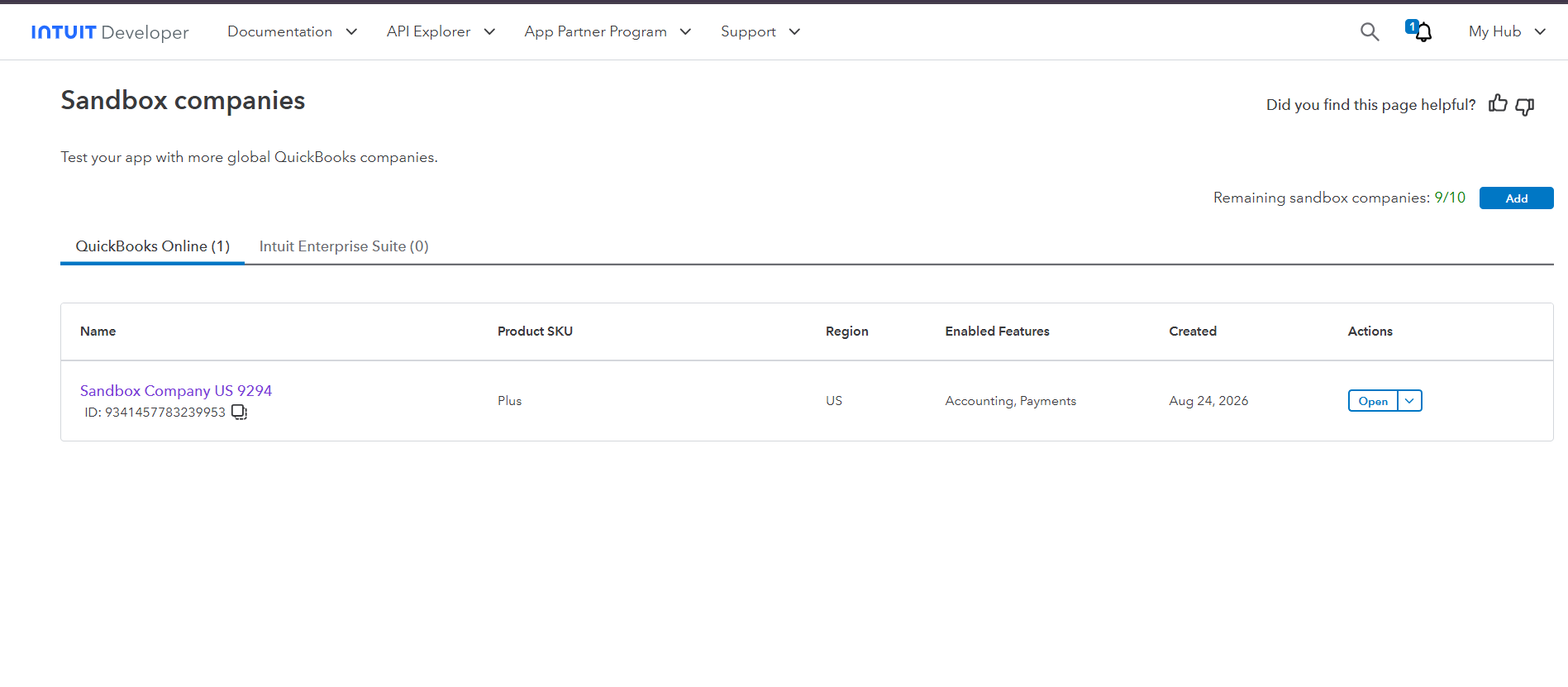
From the top-nav My Hub menu, select Sandboxes - this is account-level, not nested under the app. A sandbox company is created automatically here; this is where you'll trigger real test events (creating/updating/deleting invoices, customers, etc.).
Step 2: Set Up ngrok
The Ballerina listener runs locally and needs a publicly accessible URL so QuickBooks can deliver webhook events to it. ngrok creates a secure tunnel from a public URL to your local service.
Install ngrok and start a tunnel on port 8090 (the default port for the Ballerina listener):
ngrok http 8090
Copy the HTTPS forwarding URL from the ngrok terminal output. It looks like:
https://xxxx-xxx-xxx-xxx.ngrok-free.app
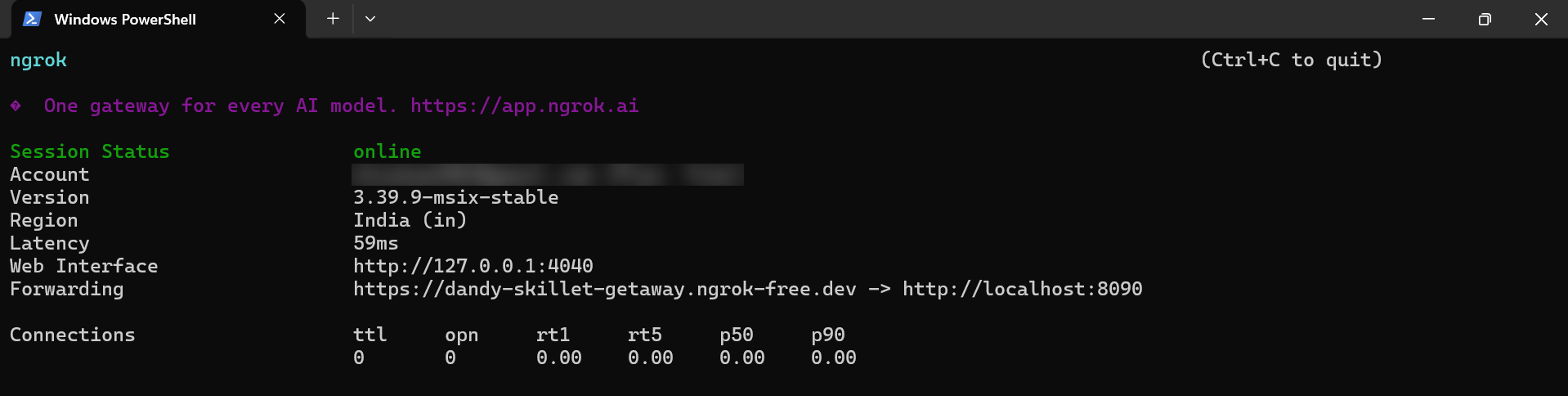
Save this value - you will need the ngrok URL when configuring the webhook endpoint below.
Step 3: Configure the Webhook Endpoint and Subscribe to Entities
-
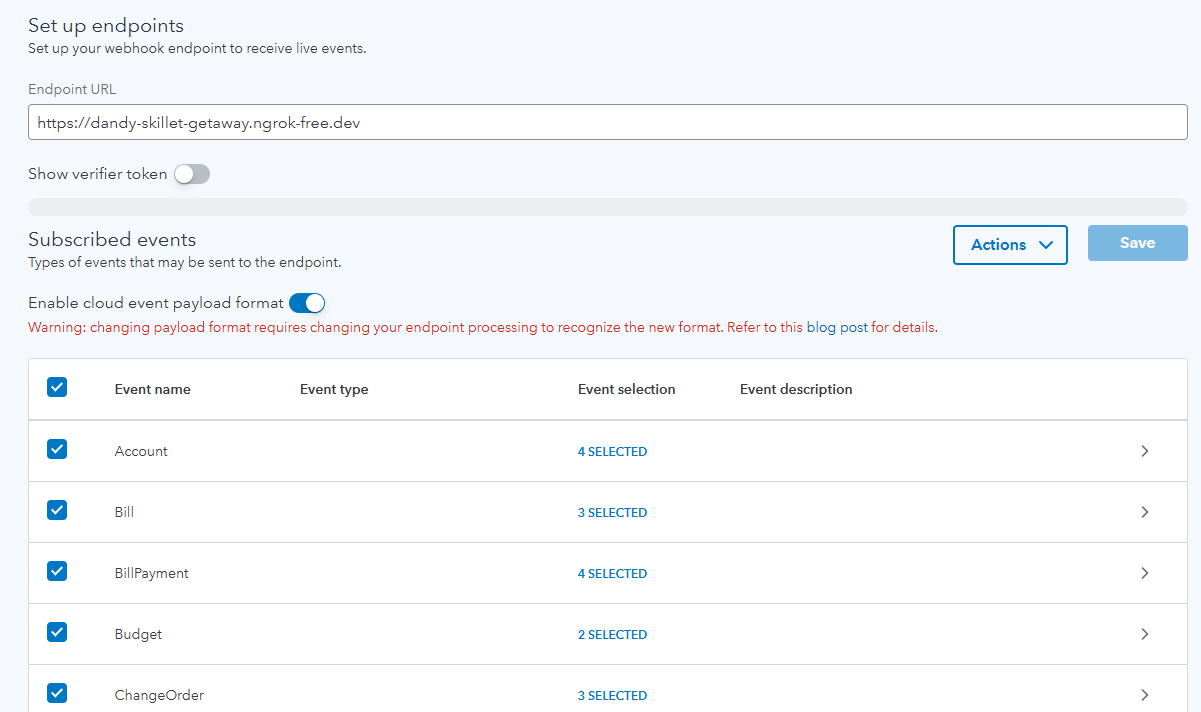
On your app's page in the developer dashboard, go to the Webhooks tab.
-
Set the Endpoint URL to your ngrok URL from Step 2.
-
Make sure the payload format is set to CloudEvents rather than the legacy format - QuickBooks is retiring the legacy envelope, and this connector only supports CloudEvents (see
docs/spec/sanitations.mdfor why). -
Select the entities you want to receive events for (Invoice, Customer, Bill, etc.) - each entity expands to show the specific operations available for it (created, updated, deleted, and so on depending on the entity).
-
Save the configuration.
Step 4: Retrieve the Webhook Verifier Token
QuickBooks signs webhook deliveries using a Webhook Verifier Token, which is a separate credential from your app's OAuth Client Secret - don't confuse the two, they aren't interchangeable.
-
On the same Webhooks tab, click Show verifier token (or equivalent) next to your configured endpoint.
-
Copy the verifier token.
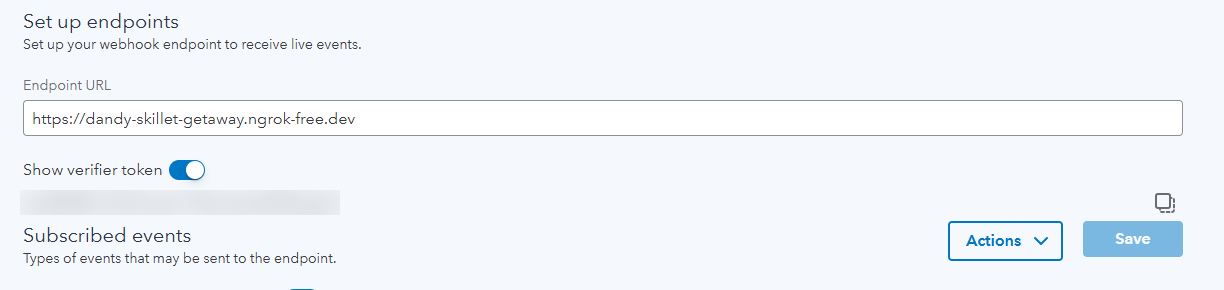
Save this value - you will need it in the Quickstart section when initialising the Ballerina listener. This is the value the listener calls
webhookSecret.
Production / business integration
The steps above use ngrok's temporary URL, which is fine for local testing but not for a real deployment. For production use:
-
Deploy your Ballerina service somewhere with a stable, internet-reachable HTTPS URL. Ballerina doesn't require any specific hosting platform - containers, a VM, a managed PaaS, or anything else that gives you a stable HTTPS endpoint all work equally well.
-
In the app's Webhooks tab (Step 3), set the Endpoint URL to your production URL instead of the ngrok URL.
-
Rather than hardcoding
webhookSecretas shown in the Quickstart, inject it viaConfig.toml(or your platform's equivalent configuration/secret mechanism), since it's aconfigurablevalue.
Compatibility
| Version | |
|---|---|
| Ballerina Language | Ballerina Swan Lake 2201.13.0 |
Quickstart
To use the QuickBooks listener in your Ballerina application, update the .bal file as follows.
Before running the quickstart, ensure you have:
- The Webhook Verifier Token from Step 4 of the Setup guide
- ngrok running ()
ngrok http 8090
Step 1: Import listener
To import the ballerinax/quickbooks.trigger module into the Ballerina project, add the following statement:
import ballerinax/quickbooks.trigger as quickbooks; import ballerina/io;
Step 2: Create a new listener instance
Add the following to your Config.toml file, replacing the placeholder with the value saved during
the Setup guide:
webhookSecret = "<YOUR_WEBHOOK_VERIFIER_TOKEN>"
Then initialise the listener in your .bal file:
configurable string webhookSecret = ?; listener quickbooks:Listener quickbooksWebhook = new ( {webhookSecret}, 8090 );
webhookSecret should always match the Webhook Verifier Token configured on the QuickBooks app -
this is what the listener uses to verify incoming payloads actually came from QuickBooks.
Step 3: Invoke listener triggers
Now let's use the triggers available within the listener.
A service attached to one of the listener's service types must implement all of that type's
remote functions. For example, InvoiceService exposes five, covering every invoice event:
service quickbooks:InvoiceService on quickbooksWebhook { remote function onInvoiceCreated(quickbooks:QuickBookEvent payload) returns error? { io:println(payload); } remote function onInvoiceUpdated(quickbooks:QuickBookEvent payload) returns error? { io:println(payload); } remote function onInvoiceDeleted(quickbooks:QuickBookEvent payload) returns error? { io:println(payload); } remote function onInvoiceVoided(quickbooks:QuickBookEvent payload) returns error? { io:println(payload); } remote function onInvoiceEmailed(quickbooks:QuickBookEvent payload) returns error? { io:println(payload); } }
Note: The event payload is a notification, not the full entity - it carries the changed
entity's ID (intuitentityid) and the company it belongs to (intuitaccountid), not its contents.
Use the QuickBooks Accounting API to fetch the entity's data if you need it.
To compile and run the Ballerina program, issue the following command:
bal run
To verify it is working, go to your QuickBooks sandbox company and create, update, or delete an Invoice. You should see the event printed in the Ballerina console output.

Examples
The quickbooks.trigger module provides practical examples illustrating usage in various scenarios.
Explore these examples,
covering common webhook event handling use cases.
Report issues
To report bugs, request new features, start new discussions, etc., go to the Ballerina Library repository
Useful links
- For more information go to the
quickbooks.triggerpackage. - See the migration notes for context on this package's move from the asyncapi-triggers monorepo and its rewrite for QuickBooks' CloudEvents webhook format.
- For example demonstrations of the usage, go to Ballerina By Examples.
- Chat live with us via our Discord server.
- Post all technical questions on Stack Overflow with the #ballerina tag.
Service types
quickbooks.trigger: CompanyCurrencyService
Attachable service type exposing the CompanyCurrencyService family of webhook events.
onCompanyCurrencyUpdated
function onCompanyCurrencyUpdated(QuickBookEvent payload) returns error?Triggered on Company currency updated.
Parameters
- payload QuickBookEvent - the QuickBookEvent webhook payload
Return Type
- error? - an error if handling the event fails
onCompanyCurrencyDeleted
function onCompanyCurrencyDeleted(QuickBookEvent payload) returns error?Triggered on Company currency deleted.
Parameters
- payload QuickBookEvent - the QuickBookEvent webhook payload
Return Type
- error? - an error if handling the event fails
onCompanyCurrencyCreated
function onCompanyCurrencyCreated(QuickBookEvent payload) returns error?Triggered on Company currency created.
Parameters
- payload QuickBookEvent - the QuickBookEvent webhook payload
Return Type
- error? - an error if handling the event fails
quickbooks.trigger: AccountService
Attachable service type exposing the AccountService family of webhook events.
onAccountMerged
function onAccountMerged(QuickBookEvent payload) returns error?Triggered on Account merged.
Parameters
- payload QuickBookEvent - the QuickBookEvent webhook payload
Return Type
- error? - an error if handling the event fails
onAccountUpdated
function onAccountUpdated(QuickBookEvent payload) returns error?Triggered on Account updated.
Parameters
- payload QuickBookEvent - the QuickBookEvent webhook payload
Return Type
- error? - an error if handling the event fails
onAccountCreated
function onAccountCreated(QuickBookEvent payload) returns error?Triggered on Account created.
Parameters
- payload QuickBookEvent - the QuickBookEvent webhook payload
Return Type
- error? - an error if handling the event fails
onAccountDeleted
function onAccountDeleted(QuickBookEvent payload) returns error?Triggered on Account deleted.
Parameters
- payload QuickBookEvent - the QuickBookEvent webhook payload
Return Type
- error? - an error if handling the event fails
quickbooks.trigger: EstimateService
Attachable service type exposing the EstimateService family of webhook events.
onEstimateCreated
function onEstimateCreated(QuickBookEvent payload) returns error?Triggered on Estimate created.
Parameters
- payload QuickBookEvent - the QuickBookEvent webhook payload
Return Type
- error? - an error if handling the event fails
onEstimateEmailed
function onEstimateEmailed(QuickBookEvent payload) returns error?Triggered on Estimate emailed.
Parameters
- payload QuickBookEvent - the QuickBookEvent webhook payload
Return Type
- error? - an error if handling the event fails
onEstimateDeleted
function onEstimateDeleted(QuickBookEvent payload) returns error?Triggered on Estimate deleted.
Parameters
- payload QuickBookEvent - the QuickBookEvent webhook payload
Return Type
- error? - an error if handling the event fails
onEstimateUpdated
function onEstimateUpdated(QuickBookEvent payload) returns error?Triggered on Estimate updated.
Parameters
- payload QuickBookEvent - the QuickBookEvent webhook payload
Return Type
- error? - an error if handling the event fails
quickbooks.trigger: InvoiceService
Attachable service type exposing the InvoiceService family of webhook events.
onInvoiceCreated
function onInvoiceCreated(QuickBookEvent payload) returns error?Triggered on Invoice created.
Parameters
- payload QuickBookEvent - the QuickBookEvent webhook payload
Return Type
- error? - an error if handling the event fails
onInvoiceUpdated
function onInvoiceUpdated(QuickBookEvent payload) returns error?Triggered on Invoice updated.
Parameters
- payload QuickBookEvent - the QuickBookEvent webhook payload
Return Type
- error? - an error if handling the event fails
onInvoiceDeleted
function onInvoiceDeleted(QuickBookEvent payload) returns error?Triggered on Invoice deleted.
Parameters
- payload QuickBookEvent - the QuickBookEvent webhook payload
Return Type
- error? - an error if handling the event fails
onInvoiceEmailed
function onInvoiceEmailed(QuickBookEvent payload) returns error?Triggered on Invoice emailed.
Parameters
- payload QuickBookEvent - the QuickBookEvent webhook payload
Return Type
- error? - an error if handling the event fails
onInvoiceVoided
function onInvoiceVoided(QuickBookEvent payload) returns error?Triggered on Invoice voided.
Parameters
- payload QuickBookEvent - the QuickBookEvent webhook payload
Return Type
- error? - an error if handling the event fails
quickbooks.trigger: CustomerService
Attachable service type exposing the CustomerService family of webhook events.
onCustomerDeleted
function onCustomerDeleted(QuickBookEvent payload) returns error?Triggered on Customer deleted.
Parameters
- payload QuickBookEvent - the QuickBookEvent webhook payload
Return Type
- error? - an error if handling the event fails
onCustomerCreated
function onCustomerCreated(QuickBookEvent payload) returns error?Triggered on Customer created.
Parameters
- payload QuickBookEvent - the QuickBookEvent webhook payload
Return Type
- error? - an error if handling the event fails
onCustomerUpdated
function onCustomerUpdated(QuickBookEvent payload) returns error?Triggered on Customer updated.
Parameters
- payload QuickBookEvent - the QuickBookEvent webhook payload
Return Type
- error? - an error if handling the event fails
onCustomerMerged
function onCustomerMerged(QuickBookEvent payload) returns error?Triggered on Customer merged.
Parameters
- payload QuickBookEvent - the QuickBookEvent webhook payload
Return Type
- error? - an error if handling the event fails
quickbooks.trigger: TaxAgencyService
Attachable service type exposing the TaxAgencyService family of webhook events.
onTaxAgencyUpdated
function onTaxAgencyUpdated(QuickBookEvent payload) returns error?Triggered on Tax agency updated.
Parameters
- payload QuickBookEvent - the QuickBookEvent webhook payload
Return Type
- error? - an error if handling the event fails
onTaxAgencyCreated
function onTaxAgencyCreated(QuickBookEvent payload) returns error?Triggered on Tax agency created.
Parameters
- payload QuickBookEvent - the QuickBookEvent webhook payload
Return Type
- error? - an error if handling the event fails
quickbooks.trigger: JournalEntryService
Attachable service type exposing the JournalEntryService family of webhook events.
onJournalEntryUpdated
function onJournalEntryUpdated(QuickBookEvent payload) returns error?Triggered on Journal entry updated.
Parameters
- payload QuickBookEvent - the QuickBookEvent webhook payload
Return Type
- error? - an error if handling the event fails
onJournalEntryDeleted
function onJournalEntryDeleted(QuickBookEvent payload) returns error?Triggered on Journal entry deleted.
Parameters
- payload QuickBookEvent - the QuickBookEvent webhook payload
Return Type
- error? - an error if handling the event fails
onJournalEntryCreated
function onJournalEntryCreated(QuickBookEvent payload) returns error?Triggered on Journal entry created.
Parameters
- payload QuickBookEvent - the QuickBookEvent webhook payload
Return Type
- error? - an error if handling the event fails
quickbooks.trigger: ItemService
Attachable service type exposing the ItemService family of webhook events.
onItemCreated
function onItemCreated(QuickBookEvent payload) returns error?Triggered on Item created.
Parameters
- payload QuickBookEvent - the QuickBookEvent webhook payload
Return Type
- error? - an error if handling the event fails
onItemDeleted
function onItemDeleted(QuickBookEvent payload) returns error?Triggered on Item deleted.
Parameters
- payload QuickBookEvent - the QuickBookEvent webhook payload
Return Type
- error? - an error if handling the event fails
onItemUpdated
function onItemUpdated(QuickBookEvent payload) returns error?Triggered on Item updated.
Parameters
- payload QuickBookEvent - the QuickBookEvent webhook payload
Return Type
- error? - an error if handling the event fails
onItemMerged
function onItemMerged(QuickBookEvent payload) returns error?Triggered on Item merged.
Parameters
- payload QuickBookEvent - the QuickBookEvent webhook payload
Return Type
- error? - an error if handling the event fails
quickbooks.trigger: DepartmentService
Attachable service type exposing the DepartmentService family of webhook events.
onDepartmentCreated
function onDepartmentCreated(QuickBookEvent payload) returns error?Triggered on Department created.
Parameters
- payload QuickBookEvent - the QuickBookEvent webhook payload
Return Type
- error? - an error if handling the event fails
onDepartmentMerged
function onDepartmentMerged(QuickBookEvent payload) returns error?Triggered on Department merged.
Parameters
- payload QuickBookEvent - the QuickBookEvent webhook payload
Return Type
- error? - an error if handling the event fails
onDepartmentUpdated
function onDepartmentUpdated(QuickBookEvent payload) returns error?Triggered on Department updated.
Parameters
- payload QuickBookEvent - the QuickBookEvent webhook payload
Return Type
- error? - an error if handling the event fails
quickbooks.trigger: RefundReceiptService
Attachable service type exposing the RefundReceiptService family of webhook events.
onRefundReceiptCreated
function onRefundReceiptCreated(QuickBookEvent payload) returns error?Triggered on Refund receipt created.
Parameters
- payload QuickBookEvent - the QuickBookEvent webhook payload
Return Type
- error? - an error if handling the event fails
onRefundReceiptDeleted
function onRefundReceiptDeleted(QuickBookEvent payload) returns error?Triggered on Refund receipt deleted.
Parameters
- payload QuickBookEvent - the QuickBookEvent webhook payload
Return Type
- error? - an error if handling the event fails
onRefundReceiptEmailed
function onRefundReceiptEmailed(QuickBookEvent payload) returns error?Triggered on Refund receipt emailed.
Parameters
- payload QuickBookEvent - the QuickBookEvent webhook payload
Return Type
- error? - an error if handling the event fails
onRefundReceiptVoided
function onRefundReceiptVoided(QuickBookEvent payload) returns error?Triggered on Refund receipt voided.
Parameters
- payload QuickBookEvent - the QuickBookEvent webhook payload
Return Type
- error? - an error if handling the event fails
onRefundReceiptUpdated
function onRefundReceiptUpdated(QuickBookEvent payload) returns error?Triggered on Refund receipt updated.
Parameters
- payload QuickBookEvent - the QuickBookEvent webhook payload
Return Type
- error? - an error if handling the event fails
quickbooks.trigger: CurrencyService
Attachable service type exposing the CurrencyService family of webhook events.
onCurrencyCreated
function onCurrencyCreated(QuickBookEvent payload) returns error?Triggered on Currency created.
Parameters
- payload QuickBookEvent - the QuickBookEvent webhook payload
Return Type
- error? - an error if handling the event fails
onCurrencyDeleted
function onCurrencyDeleted(QuickBookEvent payload) returns error?Triggered on Currency deleted.
Parameters
- payload QuickBookEvent - the QuickBookEvent webhook payload
Return Type
- error? - an error if handling the event fails
onCurrencyUpdated
function onCurrencyUpdated(QuickBookEvent payload) returns error?Triggered on Currency updated.
Parameters
- payload QuickBookEvent - the QuickBookEvent webhook payload
Return Type
- error? - an error if handling the event fails
quickbooks.trigger: BillPaymentService
Attachable service type exposing the BillPaymentService family of webhook events.
onBillPaymentCreated
function onBillPaymentCreated(QuickBookEvent payload) returns error?Triggered on Bill payment created.
Parameters
- payload QuickBookEvent - the QuickBookEvent webhook payload
Return Type
- error? - an error if handling the event fails
onBillPaymentDeleted
function onBillPaymentDeleted(QuickBookEvent payload) returns error?Triggered on Bill payment deleted.
Parameters
- payload QuickBookEvent - the QuickBookEvent webhook payload
Return Type
- error? - an error if handling the event fails
onBillPaymentVoided
function onBillPaymentVoided(QuickBookEvent payload) returns error?Triggered on Bill payment voided.
Parameters
- payload QuickBookEvent - the QuickBookEvent webhook payload
Return Type
- error? - an error if handling the event fails
onBillPaymentUpdated
function onBillPaymentUpdated(QuickBookEvent payload) returns error?Triggered on Bill payment updated.
Parameters
- payload QuickBookEvent - the QuickBookEvent webhook payload
Return Type
- error? - an error if handling the event fails
quickbooks.trigger: CreditMemoService
Attachable service type exposing the CreditMemoService family of webhook events.
onCreditMemoUpdated
function onCreditMemoUpdated(QuickBookEvent payload) returns error?Triggered on Credit memo updated.
Parameters
- payload QuickBookEvent - the QuickBookEvent webhook payload
Return Type
- error? - an error if handling the event fails
onCreditMemoVoided
function onCreditMemoVoided(QuickBookEvent payload) returns error?Triggered on Credit memo voided.
Parameters
- payload QuickBookEvent - the QuickBookEvent webhook payload
Return Type
- error? - an error if handling the event fails
onCreditMemoEmailed
function onCreditMemoEmailed(QuickBookEvent payload) returns error?Triggered on Credit memo emailed.
Parameters
- payload QuickBookEvent - the QuickBookEvent webhook payload
Return Type
- error? - an error if handling the event fails
onCreditMemoCreated
function onCreditMemoCreated(QuickBookEvent payload) returns error?Triggered on Credit memo created.
Parameters
- payload QuickBookEvent - the QuickBookEvent webhook payload
Return Type
- error? - an error if handling the event fails
onCreditMemoDeleted
function onCreditMemoDeleted(QuickBookEvent payload) returns error?Triggered on Credit memo deleted.
Parameters
- payload QuickBookEvent - the QuickBookEvent webhook payload
Return Type
- error? - an error if handling the event fails
quickbooks.trigger: BudgetService
Attachable service type exposing the BudgetService family of webhook events.
onBudgetUpdated
function onBudgetUpdated(QuickBookEvent payload) returns error?Triggered on Budget updated.
Parameters
- payload QuickBookEvent - the QuickBookEvent webhook payload
Return Type
- error? - an error if handling the event fails
onBudgetCreated
function onBudgetCreated(QuickBookEvent payload) returns error?Triggered on Budget created.
Parameters
- payload QuickBookEvent - the QuickBookEvent webhook payload
Return Type
- error? - an error if handling the event fails
quickbooks.trigger: PreferencesService
Attachable service type exposing the PreferencesService family of webhook events.
onPreferencesUpdated
function onPreferencesUpdated(QuickBookEvent payload) returns error?Triggered on Preferences updated.
Parameters
- payload QuickBookEvent - the QuickBookEvent webhook payload
Return Type
- error? - an error if handling the event fails
quickbooks.trigger: TimeActivityService
Attachable service type exposing the TimeActivityService family of webhook events.
onTimeActivityCreated
function onTimeActivityCreated(QuickBookEvent payload) returns error?Triggered on Time activity created.
Parameters
- payload QuickBookEvent - the QuickBookEvent webhook payload
Return Type
- error? - an error if handling the event fails
onTimeActivityUpdated
function onTimeActivityUpdated(QuickBookEvent payload) returns error?Triggered on Time activity updated.
Parameters
- payload QuickBookEvent - the QuickBookEvent webhook payload
Return Type
- error? - an error if handling the event fails
onTimeActivityDeleted
function onTimeActivityDeleted(QuickBookEvent payload) returns error?Triggered on Time activity deleted.
Parameters
- payload QuickBookEvent - the QuickBookEvent webhook payload
Return Type
- error? - an error if handling the event fails
quickbooks.trigger: DepositService
Attachable service type exposing the DepositService family of webhook events.
onDepositCreated
function onDepositCreated(QuickBookEvent payload) returns error?Triggered on Deposit created.
Parameters
- payload QuickBookEvent - the QuickBookEvent webhook payload
Return Type
- error? - an error if handling the event fails
onDepositUpdated
function onDepositUpdated(QuickBookEvent payload) returns error?Triggered on Deposit updated.
Parameters
- payload QuickBookEvent - the QuickBookEvent webhook payload
Return Type
- error? - an error if handling the event fails
onDepositDeleted
function onDepositDeleted(QuickBookEvent payload) returns error?Triggered on Deposit deleted.
Parameters
- payload QuickBookEvent - the QuickBookEvent webhook payload
Return Type
- error? - an error if handling the event fails
quickbooks.trigger: JournalCodeService
Attachable service type exposing the JournalCodeService family of webhook events.
onJournalCodeUpdated
function onJournalCodeUpdated(QuickBookEvent payload) returns error?Triggered on Journal code updated.
Parameters
- payload QuickBookEvent - the QuickBookEvent webhook payload
Return Type
- error? - an error if handling the event fails
onJournalCodeCreated
function onJournalCodeCreated(QuickBookEvent payload) returns error?Triggered on Journal code created.
Parameters
- payload QuickBookEvent - the QuickBookEvent webhook payload
Return Type
- error? - an error if handling the event fails
quickbooks.trigger: PurchaseService
Attachable service type exposing the PurchaseService family of webhook events.
onPurchaseVoided
function onPurchaseVoided(QuickBookEvent payload) returns error?Triggered on Purchase voided.
Parameters
- payload QuickBookEvent - the QuickBookEvent webhook payload
Return Type
- error? - an error if handling the event fails
onPurchaseUpdated
function onPurchaseUpdated(QuickBookEvent payload) returns error?Triggered on Purchase updated.
Parameters
- payload QuickBookEvent - the QuickBookEvent webhook payload
Return Type
- error? - an error if handling the event fails
onPurchaseDeleted
function onPurchaseDeleted(QuickBookEvent payload) returns error?Triggered on Purchase deleted.
Parameters
- payload QuickBookEvent - the QuickBookEvent webhook payload
Return Type
- error? - an error if handling the event fails
onPurchaseCreated
function onPurchaseCreated(QuickBookEvent payload) returns error?Triggered on Purchase created.
Parameters
- payload QuickBookEvent - the QuickBookEvent webhook payload
Return Type
- error? - an error if handling the event fails
quickbooks.trigger: VendorCreditService
Attachable service type exposing the VendorCreditService family of webhook events.
onVendorCreditCreated
function onVendorCreditCreated(QuickBookEvent payload) returns error?Triggered on Vendor credit created.
Parameters
- payload QuickBookEvent - the QuickBookEvent webhook payload
Return Type
- error? - an error if handling the event fails
onVendorCreditDeleted
function onVendorCreditDeleted(QuickBookEvent payload) returns error?Triggered on Vendor credit deleted.
Parameters
- payload QuickBookEvent - the QuickBookEvent webhook payload
Return Type
- error? - an error if handling the event fails
onVendorCreditUpdated
function onVendorCreditUpdated(QuickBookEvent payload) returns error?Triggered on Vendor credit updated.
Parameters
- payload QuickBookEvent - the QuickBookEvent webhook payload
Return Type
- error? - an error if handling the event fails
quickbooks.trigger: TermService
Attachable service type exposing the TermService family of webhook events.
onTermCreated
function onTermCreated(QuickBookEvent payload) returns error?Triggered on Term created.
Parameters
- payload QuickBookEvent - the QuickBookEvent webhook payload
Return Type
- error? - an error if handling the event fails
onTermUpdated
function onTermUpdated(QuickBookEvent payload) returns error?Triggered on Term updated.
Parameters
- payload QuickBookEvent - the QuickBookEvent webhook payload
Return Type
- error? - an error if handling the event fails
quickbooks.trigger: VendorService
Attachable service type exposing the VendorService family of webhook events.
onVendorUpdated
function onVendorUpdated(QuickBookEvent payload) returns error?Triggered on Vendor updated.
Parameters
- payload QuickBookEvent - the QuickBookEvent webhook payload
Return Type
- error? - an error if handling the event fails
onVendorDeleted
function onVendorDeleted(QuickBookEvent payload) returns error?Triggered on Vendor deleted.
Parameters
- payload QuickBookEvent - the QuickBookEvent webhook payload
Return Type
- error? - an error if handling the event fails
onVendorMerged
function onVendorMerged(QuickBookEvent payload) returns error?Triggered on Vendor merged.
Parameters
- payload QuickBookEvent - the QuickBookEvent webhook payload
Return Type
- error? - an error if handling the event fails
onVendorCreated
function onVendorCreated(QuickBookEvent payload) returns error?Triggered on Vendor created.
Parameters
- payload QuickBookEvent - the QuickBookEvent webhook payload
Return Type
- error? - an error if handling the event fails
quickbooks.trigger: PaymentService
Attachable service type exposing the PaymentService family of webhook events.
onPaymentUpdated
function onPaymentUpdated(QuickBookEvent payload) returns error?Triggered on Payment updated.
Parameters
- payload QuickBookEvent - the QuickBookEvent webhook payload
Return Type
- error? - an error if handling the event fails
onPaymentEmailed
function onPaymentEmailed(QuickBookEvent payload) returns error?Triggered on Payment emailed.
Parameters
- payload QuickBookEvent - the QuickBookEvent webhook payload
Return Type
- error? - an error if handling the event fails
onPaymentVoided
function onPaymentVoided(QuickBookEvent payload) returns error?Triggered on Payment voided.
Parameters
- payload QuickBookEvent - the QuickBookEvent webhook payload
Return Type
- error? - an error if handling the event fails
onPaymentCreated
function onPaymentCreated(QuickBookEvent payload) returns error?Triggered on Payment created.
Parameters
- payload QuickBookEvent - the QuickBookEvent webhook payload
Return Type
- error? - an error if handling the event fails
onPaymentDeleted
function onPaymentDeleted(QuickBookEvent payload) returns error?Triggered on Payment deleted.
Parameters
- payload QuickBookEvent - the QuickBookEvent webhook payload
Return Type
- error? - an error if handling the event fails
quickbooks.trigger: SalesReceiptService
Attachable service type exposing the SalesReceiptService family of webhook events.
onSalesReceiptCreated
function onSalesReceiptCreated(QuickBookEvent payload) returns error?Triggered on Sales receipt created.
Parameters
- payload QuickBookEvent - the QuickBookEvent webhook payload
Return Type
- error? - an error if handling the event fails
onSalesReceiptDeleted
function onSalesReceiptDeleted(QuickBookEvent payload) returns error?Triggered on Sales receipt deleted.
Parameters
- payload QuickBookEvent - the QuickBookEvent webhook payload
Return Type
- error? - an error if handling the event fails
onSalesReceiptVoided
function onSalesReceiptVoided(QuickBookEvent payload) returns error?Triggered on Sales receipt voided.
Parameters
- payload QuickBookEvent - the QuickBookEvent webhook payload
Return Type
- error? - an error if handling the event fails
onSalesReceiptUpdated
function onSalesReceiptUpdated(QuickBookEvent payload) returns error?Triggered on Sales receipt updated.
Parameters
- payload QuickBookEvent - the QuickBookEvent webhook payload
Return Type
- error? - an error if handling the event fails
onSalesReceiptEmailed
function onSalesReceiptEmailed(QuickBookEvent payload) returns error?Triggered on Sales receipt emailed.
Parameters
- payload QuickBookEvent - the QuickBookEvent webhook payload
Return Type
- error? - an error if handling the event fails
quickbooks.trigger: EmployeeService
Attachable service type exposing the EmployeeService family of webhook events.
onEmployeeUpdated
function onEmployeeUpdated(QuickBookEvent payload) returns error?Triggered on Employee updated.
Parameters
- payload QuickBookEvent - the QuickBookEvent webhook payload
Return Type
- error? - an error if handling the event fails
onEmployeeMerged
function onEmployeeMerged(QuickBookEvent payload) returns error?Triggered on Employee merged.
Parameters
- payload QuickBookEvent - the QuickBookEvent webhook payload
Return Type
- error? - an error if handling the event fails
onEmployeeCreated
function onEmployeeCreated(QuickBookEvent payload) returns error?Triggered on Employee created.
Parameters
- payload QuickBookEvent - the QuickBookEvent webhook payload
Return Type
- error? - an error if handling the event fails
onEmployeeDeleted
function onEmployeeDeleted(QuickBookEvent payload) returns error?Triggered on Employee deleted.
Parameters
- payload QuickBookEvent - the QuickBookEvent webhook payload
Return Type
- error? - an error if handling the event fails
quickbooks.trigger: ChangeOrderService
Attachable service type exposing the ChangeOrderService family of webhook events.
onChangeOrderCreated
function onChangeOrderCreated(QuickBookEvent payload) returns error?Triggered on Change order created.
Parameters
- payload QuickBookEvent - the QuickBookEvent webhook payload
Return Type
- error? - an error if handling the event fails
onChangeOrderUpdated
function onChangeOrderUpdated(QuickBookEvent payload) returns error?Triggered on Change order updated.
Parameters
- payload QuickBookEvent - the QuickBookEvent webhook payload
Return Type
- error? - an error if handling the event fails
onChangeOrderDeleted
function onChangeOrderDeleted(QuickBookEvent payload) returns error?Triggered on Change order deleted.
Parameters
- payload QuickBookEvent - the QuickBookEvent webhook payload
Return Type
- error? - an error if handling the event fails
quickbooks.trigger: TransferService
Attachable service type exposing the TransferService family of webhook events.
onTransferCreated
function onTransferCreated(QuickBookEvent payload) returns error?Triggered on Transfer created.
Parameters
- payload QuickBookEvent - the QuickBookEvent webhook payload
Return Type
- error? - an error if handling the event fails
onTransferDeleted
function onTransferDeleted(QuickBookEvent payload) returns error?Triggered on Transfer deleted.
Parameters
- payload QuickBookEvent - the QuickBookEvent webhook payload
Return Type
- error? - an error if handling the event fails
onTransferVoided
function onTransferVoided(QuickBookEvent payload) returns error?Triggered on Transfer voided.
Parameters
- payload QuickBookEvent - the QuickBookEvent webhook payload
Return Type
- error? - an error if handling the event fails
onTransferUpdated
function onTransferUpdated(QuickBookEvent payload) returns error?Triggered on Transfer updated.
Parameters
- payload QuickBookEvent - the QuickBookEvent webhook payload
Return Type
- error? - an error if handling the event fails
quickbooks.trigger: BillService
Attachable service type exposing the BillService family of webhook events.
onBillUpdated
function onBillUpdated(QuickBookEvent payload) returns error?Triggered on Bill updated.
Parameters
- payload QuickBookEvent - the QuickBookEvent webhook payload
Return Type
- error? - an error if handling the event fails
onBillDeleted
function onBillDeleted(QuickBookEvent payload) returns error?Triggered on Bill deleted.
Parameters
- payload QuickBookEvent - the QuickBookEvent webhook payload
Return Type
- error? - an error if handling the event fails
onBillCreated
function onBillCreated(QuickBookEvent payload) returns error?Triggered on Bill created.
Parameters
- payload QuickBookEvent - the QuickBookEvent webhook payload
Return Type
- error? - an error if handling the event fails
quickbooks.trigger: PurchaseOrderService
Attachable service type exposing the PurchaseOrderService family of webhook events.
onPurchaseOrderDeleted
function onPurchaseOrderDeleted(QuickBookEvent payload) returns error?Triggered on Purchase order deleted.
Parameters
- payload QuickBookEvent - the QuickBookEvent webhook payload
Return Type
- error? - an error if handling the event fails
onPurchaseOrderCreated
function onPurchaseOrderCreated(QuickBookEvent payload) returns error?Triggered on Purchase order created.
Parameters
- payload QuickBookEvent - the QuickBookEvent webhook payload
Return Type
- error? - an error if handling the event fails
onPurchaseOrderUpdated
function onPurchaseOrderUpdated(QuickBookEvent payload) returns error?Triggered on Purchase order updated.
Parameters
- payload QuickBookEvent - the QuickBookEvent webhook payload
Return Type
- error? - an error if handling the event fails
onPurchaseOrderEmailed
function onPurchaseOrderEmailed(QuickBookEvent payload) returns error?Triggered on Purchase order emailed.
Parameters
- payload QuickBookEvent - the QuickBookEvent webhook payload
Return Type
- error? - an error if handling the event fails
quickbooks.trigger: PaymentMethodService
Attachable service type exposing the PaymentMethodService family of webhook events.
onPaymentMethodUpdated
function onPaymentMethodUpdated(QuickBookEvent payload) returns error?Triggered on Payment method updated.
Parameters
- payload QuickBookEvent - the QuickBookEvent webhook payload
Return Type
- error? - an error if handling the event fails
onPaymentMethodCreated
function onPaymentMethodCreated(QuickBookEvent payload) returns error?Triggered on Payment method created.
Parameters
- payload QuickBookEvent - the QuickBookEvent webhook payload
Return Type
- error? - an error if handling the event fails
onPaymentMethodMerged
function onPaymentMethodMerged(QuickBookEvent payload) returns error?Triggered on Payment method merged.
Parameters
- payload QuickBookEvent - the QuickBookEvent webhook payload
Return Type
- error? - an error if handling the event fails
quickbooks.trigger: ClassService
Attachable service type exposing the ClassService family of webhook events.
onClassUpdated
function onClassUpdated(QuickBookEvent payload) returns error?Triggered on Class updated.
Parameters
- payload QuickBookEvent - the QuickBookEvent webhook payload
Return Type
- error? - an error if handling the event fails
onClassDeleted
function onClassDeleted(QuickBookEvent payload) returns error?Triggered on Class deleted.
Parameters
- payload QuickBookEvent - the QuickBookEvent webhook payload
Return Type
- error? - an error if handling the event fails
onClassCreated
function onClassCreated(QuickBookEvent payload) returns error?Triggered on Class created.
Parameters
- payload QuickBookEvent - the QuickBookEvent webhook payload
Return Type
- error? - an error if handling the event fails
onClassMerged
function onClassMerged(QuickBookEvent payload) returns error?Triggered on Class merged.
Parameters
- payload QuickBookEvent - the QuickBookEvent webhook payload
Return Type
- error? - an error if handling the event fails
Listeners
quickbooks.trigger: Listener
attach
function attach(GenericServiceType serviceRef, () attachPoint) returns error?detach
function detach(GenericServiceType serviceRef) returns error?Parameters
- serviceRef GenericServiceType -
'start
function 'start() returns error?gracefulStop
function gracefulStop() returns error?immediateStop
function immediateStop() returns error?Records
quickbooks.trigger: ListenerConfig
Configuration for the webhook listener, including the secret used to verify incoming requests.
Fields
- webhookSecret? string - The secret used to verify incoming webhook signatures.
quickbooks.trigger: QuickBookEvent
A single CloudEvents-formatted QuickBooks webhook notification.
Fields
- specversion string - The CloudEvents specification version (currently always "1.0").
- id string - A unique identifier for this event.
- 'source string - Identifies the QuickBooks company instance that raised the event.
- 'type string - The entity and operation this event represents, e.g. qbo.customer.created.v1.
- datacontenttype? string - The content type of the data field.
- time string - The timestamp the event occurred, in ISO 8601 format.
- intuitentityid string - The ID of the entity that changed.
- intuitaccountid string - The QuickBooks company (realm) ID this event belongs to.
- data? map<json> - Operation-specific event data. Confirmed shapes so far: empty on create, {"deletedId": "..."} on merge. Shape for update/delete/void/email is not yet confirmed against a real delivery.
Union types
quickbooks.trigger: GenericServiceType
GenericServiceType
The union of every service type that can be attached to this listener.
Simple name reference types
quickbooks.trigger: GenericDataType
GenericDataType
The union of every possible webhook payload type this listener can receive.
Import
import ballerinax/quickbooks.trigger;Other versions
0.1.0