Module mongodb

ballerinax/mongodb Ballerina library
Overview
MongoDB is a document-oriented, NoSQL database designed for high volume data storage. It offers a flexible schema, high availability, and horizontal scalability, making it ideal for modern application development.
The MongoDB connector offers APIs to connect to MongoDB servers and perform various operations including CRUD operations, indexing, and aggregation.
Key Features
- Support for MongoDB v3.6 and later versions
- Comprehensive CRUD operations for collections and documents
- Support for indexing and aggregation pipelines
- Connection management via connection string or parameters
- GraalVM compatible for native image builds
Setup guide
To use the MongoDB connector, you need to have a MongoDB server running and accessible. For that, you can either install MongoDB locally or use the MongoDB Atlas, the cloud offering of the MongoDB.
Setup a MongoDB server locally
-
Download and install the MongoDB server from the MongoDB download center.
-
Follow the installation instructions provided in the download center.
-
Follow the instructions for each operating system to start the MongoDB server.
Note: This guide uses the MongoDB community edition for the setup. Alternatively, the enterprise edition can also be used.
Setup a MongoDB server using MongoDB Atlas
-
Sign up for a free account in MongoDB Atlas.
-
Follow the instructions provided in the MongoDB Atlas documentation to create a new cluster.
-
Navigate to your MongoDB Atlas cluster.
-
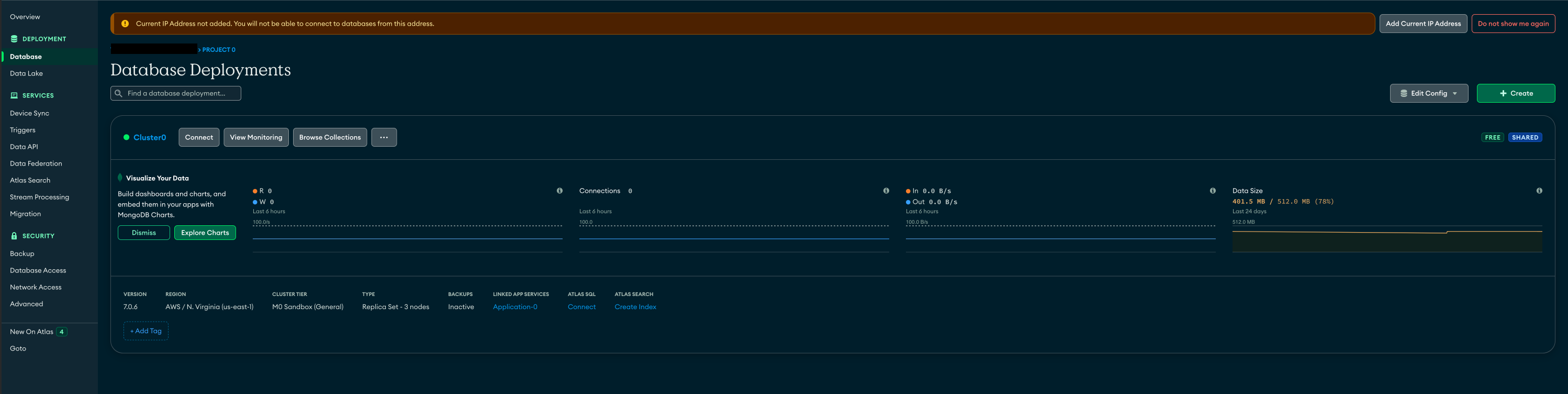
Select "Database" from the left navigation pane under the "Deployment" section and click "connect" button to open connection instructions.
-
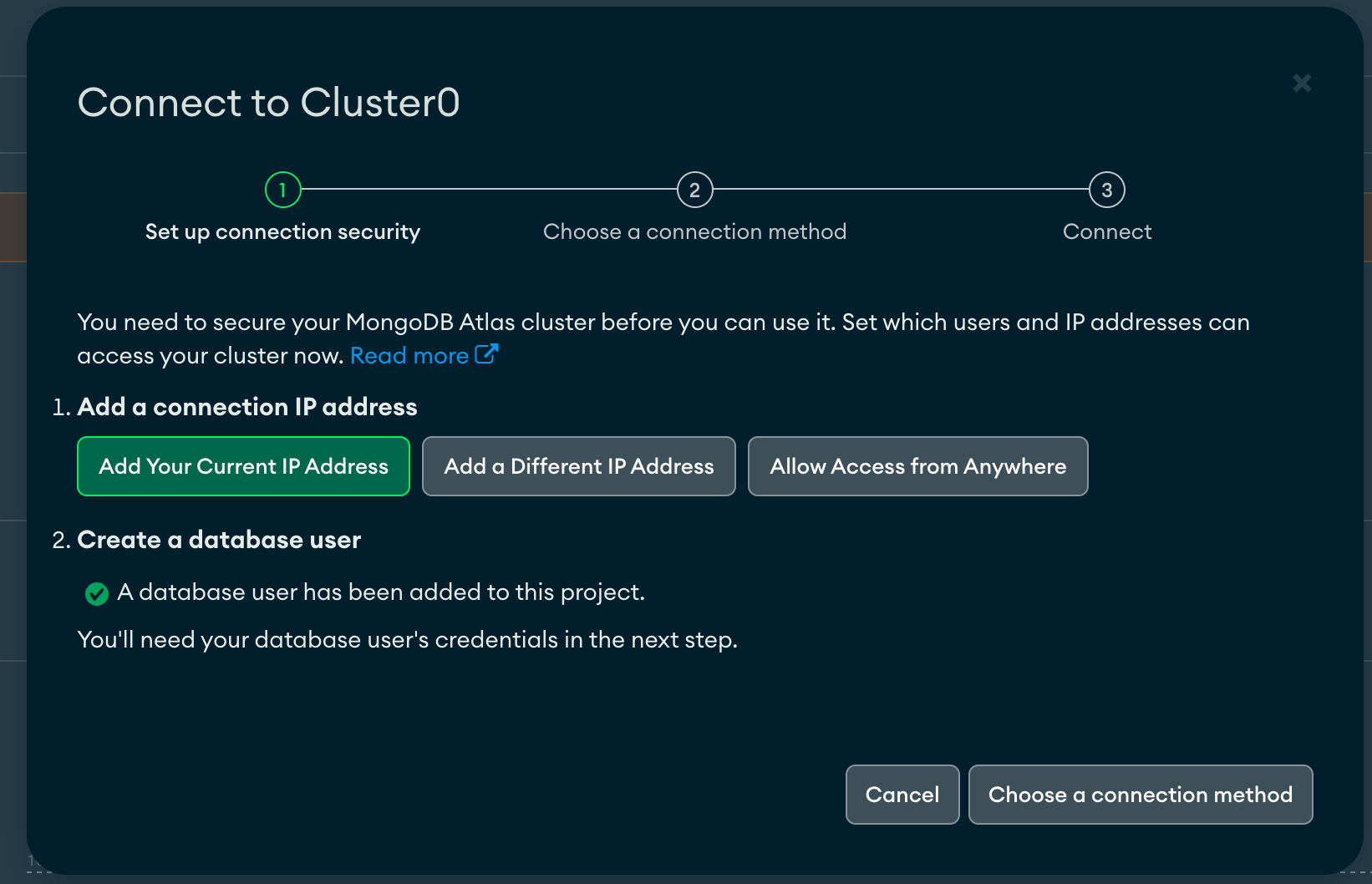
Add your IP address to the IP access list or select "Allow access from anywhere" to allow all IP addresses to access the cluster.
-
Click "Choose a connection method" and select "Drivers" under the "Connect your application". There you can find the connection string to connect to the MongoDB Atlas cluster.

Quickstart
Step 1: Import the module
Import the mongodb module into the Ballerina project.
import ballerinax/mongodb;
Step 2: Initialize the MongoDB client
Initialize the MongoDB client using the connection parameters
mongodb:Client mongoDb = check new ({ connection: { serverAddress: { host: "localhost", port: 27017 }, auth: <mongodb:ScramSha256AuthCredential>{ username: <username>, password: <password>, database: <admin-database> } } });
Initialize the MongoDB client using the connection string
mongodb:Client mongoDb = check new ({ connection: <connection string obtained from the MongoDB server> });
Step 3: Invoke the connector operation
Now, you can use the available connector operations to interact with MongoDB server.
Retrieve a Database
mongodb:Database moviesDb = check mongoDb->getDatabase("movies");
Retrieve a Collection
mongodb:Collection moviesCollection = check moviesDb->getCollection("movies");
Insert a Document
Movie movie = {title: "Inception", year: 2010}; check moviesCollection->insert(movie);
Step 4: Run the Ballerina application
Save the changes and run the Ballerina application using the following command.
bal run
Examples
The MongoDB connector provides practical examples illustrating usage in various scenarios. Explore these examples covering common MongoDB operations.
- Movie database - Implement a movie database using MongoDB.
- Order management system - Implement an order management system using MongoDB.
Clients
mongodb: Client
Represents a MongoDB client that can be used to interact with a MongoDB server.
Constructor
Initialises the Client object with the provided ConnectionConfig properties.
init (*ConnectionConfig config)- config *ConnectionConfig - The connection configurations for connecting to a MongoDB server
listDatabaseNames
Lists the database names in the MongoDB server.
Return Type
getDatabase
Retrieves a database from the MongoDB server.
Parameters
- databaseName string - Name of the database
Return Type
close
function close() returns Error?Closes the client.
Note: Use a single client instance for the lifetime of the application and close it when the application is done.
Return Type
- Error? - A
mongodb:Errorif the client is already closed or failed to close the client.()otherwise.
mongodb: Collection
Represents a MongoDB collection that can be used to perform operations on the collection.
insertOne
function insertOne(record { anydata... } document, InsertOneOptions options) returns Error?Inserts a single document into the collection.
Parameters
- document record { anydata... } - The document to insert
- options InsertOneOptions (default {}) - The options to apply to the operation
Return Type
- Error? - An error if the operation failed, otherwise nil
insertMany
function insertMany(record { anydata... }[] documents, InsertManyOptions options) returns Error?Inserts multiple documents into the collection.
Parameters
- documents record { anydata... }[] - The documents to insert
- options InsertManyOptions (default {}) - The options to apply to the operation
Return Type
- Error? - An error if the operation failed, otherwise nil
find
function find(map<json> filter, FindOptions findOptions, map<json>? projection, typedesc<record { anydata... }> targetType) returns stream<targetType, error?>|ErrorFinds documents from the collection.
Note: Close the resulted stream once the operation is completed.
Parameters
- filter map<json> (default {}) - The query filter to apply when retrieving documents
- findOptions FindOptions (default {}) - The additional options to apply to the find operation
- projection map<json>? (default ()) - The projection to apply to the find operation. If not provided, the projection will be generated based on the targetType
- targetType typedesc<record { anydata... }> (default <>) - The type of the returned documents
Return Type
- stream<targetType, error?>|Error - A stream of documents which match the provided filter, or an error if the operation failed
findOne
function findOne(map<json> filter, FindOptions findOptions, map<json>? projection, typedesc<record { anydata... }> targetType) returns targetType|Error?Finds a single document from the collection.
Parameters
- filter map<json> (default {}) - The query filter to apply when retrieving documents
- findOptions FindOptions (default {}) - The additional options to apply to the find operation
- projection map<json>? (default ()) - The projection to apply to the find operation. If not provided, the projection will be generated based on the targetType
- targetType typedesc<record { anydata... }> (default <>) - The type of the returned document
Return Type
- targetType|Error? - The document which matches the provided filter, or an error if the operation failed
countDocuments
function countDocuments(map<json> filter, CountOptions options) returns int|ErrorCounts the number of documents in the collection.
Parameters
- filter map<json> (default {}) - The query filter to apply when counting documents
- options CountOptions (default {}) - The additional options to apply to the count operation
Return Type
createIndex
function createIndex(map<json> keys, CreateIndexOptions options) returns Error?Creates an index on the collection.
Parameters
- keys map<json> - The keys to index
- options CreateIndexOptions (default {}) - The options to apply to the index
Return Type
- Error? - An error if the operation failed, otherwise nil
listIndexes
Lists the indexes of the collection.
Note: Close the resulted stream once the operation is completed.
dropIndex
Drops an index from the collection.
Parameters
- indexName string - The name of the index to drop
Return Type
- Error? - An error if the operation failed, otherwise nil
dropIndexes
function dropIndexes() returns Error?Drops all the indexes from the collection.
Return Type
- Error? - An error if the operation failed, otherwise nil
drop
function drop() returns Error?Drops the collection.
Return Type
- Error? - An error if the operation failed, otherwise nil
updateOne
function updateOne(map<json> filter, Update update, UpdateOptions options) returns UpdateResult|ErrorUpdates a single document in the collection.
Parameters
- filter map<json> - The query filter to apply when updating documents
- update Update - The update operations to apply to the documents
- options UpdateOptions (default {}) - The options to apply to the update operation
Return Type
- UpdateResult|Error - An error if the operation failed, otherwise nil
updateMany
function updateMany(map<json> filter, Update update, UpdateOptions options) returns UpdateResult|ErrorUpdates multiple documents in the collection.
Parameters
- filter map<json> - The query filter to apply when updating documents
- update Update - The update operations to apply to the documents
- options UpdateOptions (default {}) - The options to apply to the update operation
Return Type
- UpdateResult|Error - An error if the operation failed, otherwise nil
'distinct
function 'distinct(string fieldName, map<json> filter, typedesc<anydata> targetType) returns stream<targetType, error?>|ErrorRetrieves the distinct values for a specified field across a collection.
Note: Close the resulted stream once the operation is completed.
Parameters
- fieldName string - The field for which to return distinct values
- filter map<json> (default {}) - The query filter to apply when retrieving distinct values
- targetType typedesc<anydata> (default <>) - The type of the returned distinct values
Return Type
- stream<targetType, error?>|Error - A stream of distinct values, or an error if the operation failed
deleteOne
function deleteOne(map<json> filter) returns DeleteResult|ErrorDeletes a single document from the collection.
Parameters
- filter map<json> - The query filter to apply when deleting documents
Return Type
- DeleteResult|Error - An error if the operation failed, otherwise nil
deleteMany
function deleteMany(string|map<json> filter) returns DeleteResult|ErrorDeletes multiple documents from the collection.
Return Type
- DeleteResult|Error - An error if the operation failed, otherwise nil
aggregate
function aggregate(map<json>[] pipeline, typedesc<anydata> targetType) returns stream<targetType, error?>|ErrorAggregates documents according to the specified aggregation pipeline.
Note: Close the resulted stream once the operation is completed.
Parameters
- pipeline map<json>[] - The aggregation pipeline
- targetType typedesc<anydata> (default <>) - The type of the returned documents
Return Type
- stream<targetType, error?>|Error - A stream of documents which match the provided pipeline, or an error if the operation failed
name
function name() returns stringReturns the name of the collection.
Return Type
- string - The name of the collection
mongodb: Database
Represents a MongoDB database.
listCollectionNames
Lists all the collections in the database.
createCollection
Creates a collection in the database.
Parameters
- collectionName string - The name of the collection to be created
Return Type
- Error? - Nil on success or else an error
getCollection
function getCollection(string collectionName) returns Collection|ErrorGet a collection from the database.
Parameters
- collectionName string - The name of the collection to be retrieved
Return Type
- Collection|Error - The
mogodb:Collectionon success or else an error
drop
function drop() returns Error?Drops the database.
Return Type
- Error? - Nil on success or else and error
Constants
mongodb: AUTH_GSSAPI
The GSSAPI authentication mechanism.
mongodb: AUTH_MONGODB_X509
The X509 authentication mechanism.
mongodb: AUTH_PLAIN
The PLAIN authentication mechanism.
mongodb: AUTH_SCRAM_SHA_1
The SCRAM-SHA-1 authentication mechanism.
mongodb: AUTH_SCRAM_SHA_256
The SCRAM-SHA-256 authentication mechanism.
Enums
mongodb: ReadConcern
Read concern level.
Members
Records
mongodb: BasicAuthCredential
Represents the Basic Authentication configurations for MongoDB.
Fields
- authMechanismreadonly AUTH_PLAIN(default AUTH_PLAIN) - The authentication mechanism to use
- username string - The username for the database connection
- password string - The password for the database connection
- database string - The source database for authenticate the client. Usually the database name
mongodb: ConnectionConfig
Represents the Client configurations for MongoDB.
Fields
- connection ConnectionParameters|string - connection - Connection string or the connection parameters for the MongoDB connection
- options? ConnectionProperties - The additional connection options for the MongoDB connection
mongodb: ConnectionParameters
Represents the MongoDB connection parameters.
Fields
- serverAddress ServerAddress|ServerAddress[](default {}) - Server address (or the list of server addresses for replica sets) of the MongoDB server
- auth? BasicAuthCredential|ScramSha1AuthCredential|ScramSha256AuthCredential|X509Credential|GssApiCredential - The authentication configurations for the MongoDB connection
mongodb: ConnectionProperties
Represents the MongoDB connection pool properties.
Fields
- readConcern? ReadConcern - The read concern level to use
- writeConcern? string - The write concern level to use
- readPreference? string - The read preference for the replica set
- replicaSet? string - The replica set name if it is to connect to replicas
- sslEnabled boolean(default false) - Whether SSL connection is enabled
- invalidHostNameAllowed boolean(default false) - Whether invalid host names should be allowed
- secureSocket? SecureSocket - Configurations related to facilitating secure connection
- retryWrites? boolean - Whether to retry writing failures
- socketTimeout? int - The timeout for the socket
- connectionTimeout? int - The timeout for the connection
- maxPoolSize? int - The maximum connection pool size
- maxIdleTime? int - The maximum idle time for a pooled connection in milliseconds
- maxLifeTime? int - The maximum life time for a pooled connection in milliseconds
- minPoolSize? int - The minimum connection pool size
- localThreshold? int - The local threshold latency in milliseconds
- heartbeatFrequency? int - The heartbeat frequency in milliseconds. This is the frequency that the driver will attempt to determine the current state of each server in the cluster.
mongodb: CountOptions
Represents the options for the Collection.countDocuments() operation.
Fields
- 'limit? int - The maximum limit of the number of documents to count
- skip? int - The number of documents to skip
- maxTimeMS? int - The maximum time to count documents in milliseconds
- hint? string - The hint to use
mongodb: CreateIndexOptions
Represents the options for the Collection.createIndex() operation.
Fields
- background? boolean - Whether to create the index in the background
- unique? boolean - Whether to create a unique index
- name? string - Name of the index
- sparse? boolean - Should the index only reference documents with the specified field
- expireAfterSeconds? int - The time to live for documents in the collection in seconds
- version? int - The version of the index
- weights? map<json> - Sets the weighting object for use with a text index
- defaultLanguage? string - The default language for the index
- languageOverride? string - Sets the name of the field that contains the language string
- textVersion? int - Set the text index version number
- sphereVersion? int - Sets the 2D sphere index version number
- bits? int - Sets the number of precision of the stored geohash value of the location data in 2D indexes
- min? float - Sets the lower inclusive boundary for the longitude and latitude values for 2D indexes
- max? float - Sets the upper inclusive boundary for the longitude and latitude values for 2D indexes
- partialFilterExpression map<json>(default {}) - Sets the filter expression for the documents to be included in the index
mongodb: DatabaseErrorDetail
Holds the properties of a database error.
Fields
- mongoDBExceptionType string - Type of the returned MongoDB exception
mongodb: DeleteOptions
Represents the options for the Collection.deleteOne() operation.
Fields
- comment? string - The comment to send with the operation
- hint? map<json> - The hint to use
- hintString? string - The hint string to use
mongodb: DeleteResult
Represents the return type of the Delete operation.
Fields
- deletedCount int - The number of documents deleted by the delete operation
- acknowledged boolean - Whether the delete operation was acknowledged
mongodb: FindOptions
Represents the options for the Collection.find() operation.
Fields
- sort map<json>(default {}) - The sort options for the query
- 'limit? int - The maximum limit of the number of documents to retrive. -1 means no limit
- batchSize? int - The batch size of the query
- skip? int - The number of documents to skip
mongodb: GssApiCredential
Represents the GSSAPI authentication configurations for MongoDB.
Fields
- authMechanismreadonly AUTH_GSSAPI(default AUTH_GSSAPI) - The authentication mechanism to use
- username string - The username for the database connection
- serviceName? string - The service name for the database connection. Use this to override the default service name of
mongodb
mongodb: Index
Represents a MongoDB collection index.
Fields
- ns string - The name space of the index
- v int - The index version
- name string - The name of the index
- key map<json> - The key of the index
mongodb: InsertManyOptions
Represents the options for the Collection.insertMany() operation.
Fields
- comment? string - The comment to send with the operation
- bypassDocumentValidation boolean(default false) - Whether to bypass the document validation
- ordered boolean(default true) - Whether to insert documents in the order provided
mongodb: InsertOneOptions
Represents the options for the Collection.insertOne() operation.
Fields
- comment? string - The comment to send with the operation
- bypassDocumentValidation boolean(default false) - Whether to bypass the document validation
mongodb: ScramSha1AuthCredential
Represents the SCRAM-SHA-1 authentication configurations for MongoDB.
Fields
- authMechanismreadonly AUTH_SCRAM_SHA_1(default AUTH_SCRAM_SHA_1) - The authentication mechanism to use
- username string - The username for the database connection
- password string - The password for the database connection
- database string - The source database for authenticate the client. Usually the database name
mongodb: ScramSha256AuthCredential
Represents the SCRAM-SHA-256 authentication configurations for MongoDB.
Fields
- authMechanismreadonly AUTH_SCRAM_SHA_256(default AUTH_SCRAM_SHA_256) - The authentication mechanism to use
- username string - The username for the database connection
- password string - The password for the database connection
- database string - The source database for authenticate the client. Usually the database name
mongodb: SecureSocket
Represents the configurations related to facilitating secure connection.
Fields
- trustStore TrustStore - Configurations associated with the TrustStore
- keyStore KeyStore - Configurations associated with the KeyStore
- protocol string - The standard name of the requested protocol
mongodb: ServerAddress
Represents the MongoDB server address.
Fields
- host string(default "localhost") - The host address of the MongoDB server
- port int(default 27017) - The port of the MongoDB server
mongodb: Update
Represents an update operation for single entry.
Fields
- currentDate? map<json> - Sets the value of a field to the current date, either as a Date or a Timestamp
- inc? map<json> - Increments the value of the field by the specified amount
- min? map<json> - Only updates the field if the specified value is less than the existing field value
- max? map<json> - Only updates the field if the specified value is greater than the existing field value
- mul? map<json> - Multiplies the value of the field by the specified amount
- rename? map<json> - Renames a field
- set? map<json> - Sets the value of a field in a document
- setOnInsert? map<json> - Sets the value of a field if it is an insert operation
- unset? map<json> - Unsets the value of a field in a document
- map<json>... - Rest field
mongodb: UpdateOptions
Represents the options for the Collection.updateOne() operation.
Fields
- upsert boolean(default false) - Whether to upsert if the document does not exist
- bypassDocumentValidation boolean(default false) - Whether to bypass the document validation
- comment? string - The comment to send with the operation
- hint? map<json> - The hint to use
- hintString? string - The hint string to use
mongodb: UpdateResult
Repsents the return type of the Update operation.
Fields
- matchedCount int - The number of documents matched by the update operation
- modifiedCount int - The number of documents modified by the update operation
- upsertedId? string - The identifier of the inserted document if the upsert option is used
mongodb: X509Credential
Represents the X509 authentication configurations for MongoDB.
Fields
- authMechanismreadonly AUTH_MONGODB_X509(default AUTH_MONGODB_X509) - The authentication mechanism to use
- username? string - The username for authenticating the client certificate
Errors
mongodb: ApplicationError
Represents an error originating from application-level causes.
mongodb: DatabaseError
Represents an error caused by an issue related to database accessibility, erroneous queries, constraint violations, database resource clean-up, and other similar scenarios.
mongodb: Error
Represents a database or application level error returned from the MongoDB client remote functions.