Module microsoft.outlook.mail

ballerinax/microsoft.outlook.mail Ballerina library
Overview
Microsoft Outlook Mail is a widely used email service from Microsoft, available as part of the Microsoft 365 suite.
The ballerinax/microsoft.outlook.mail connector offers APIs to connect and interact with the Microsoft Outlook Mail API endpoints, specifically based on the Microsoft Graph REST API v1.0. It supports sending, receiving, and managing email messages, creating and organizing mail folders, managing file and item attachments, drafting and deleting messages, and reading or updating message properties such as subject, body, flags, and categories.
Setup guide
To use the Microsoft Outlook Mail connector, you need a Microsoft account and an application registered in Azure Active Directory (Azure AD) with the appropriate OAuth2 credentials.
Step 1: Sign in to Azure Portal
-
If you don't have a Microsoft Azure account, you can create one for free at https://azure.microsoft.com.
-
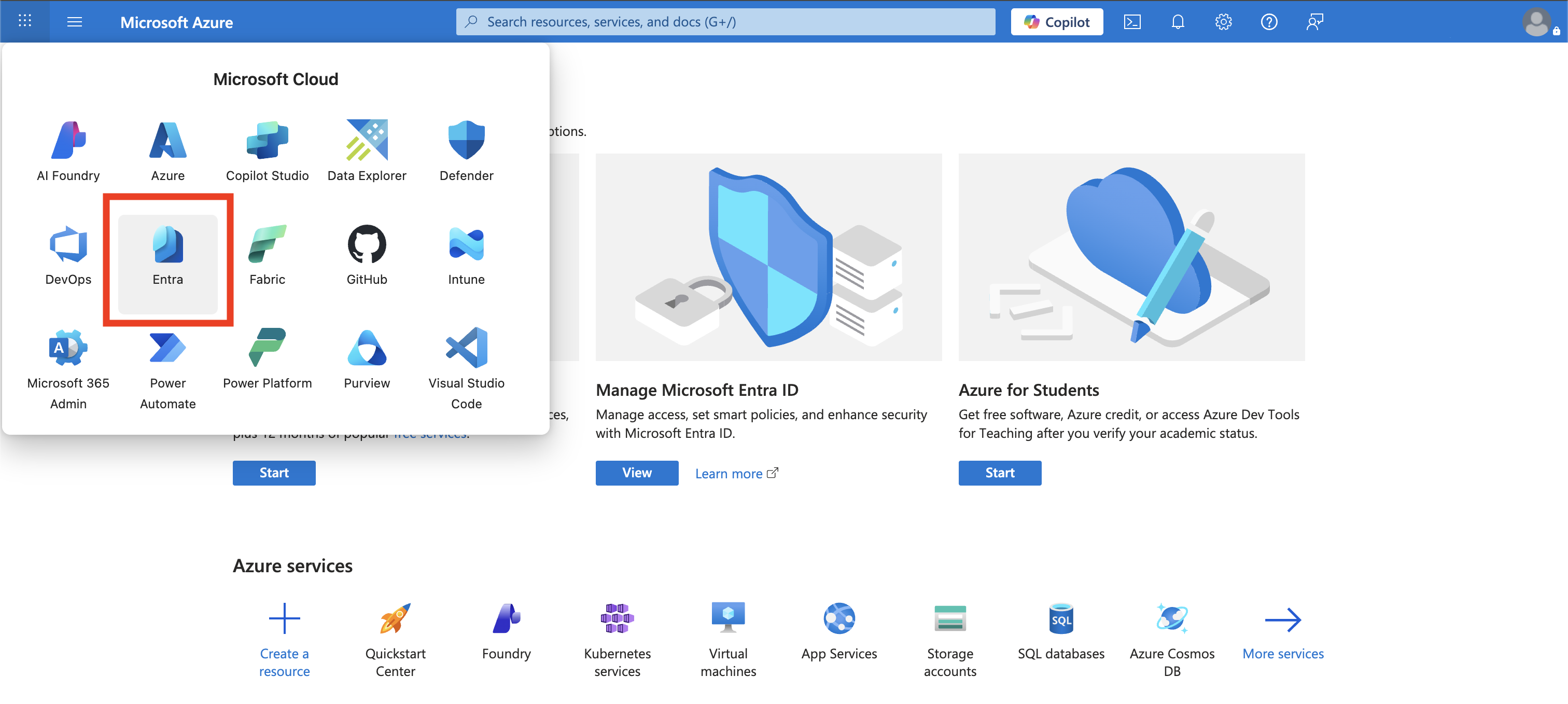
Go to the Azure Portal and sign in with your Microsoft account. From the home page, navigate to Entra.
Step 2: Register an application
-
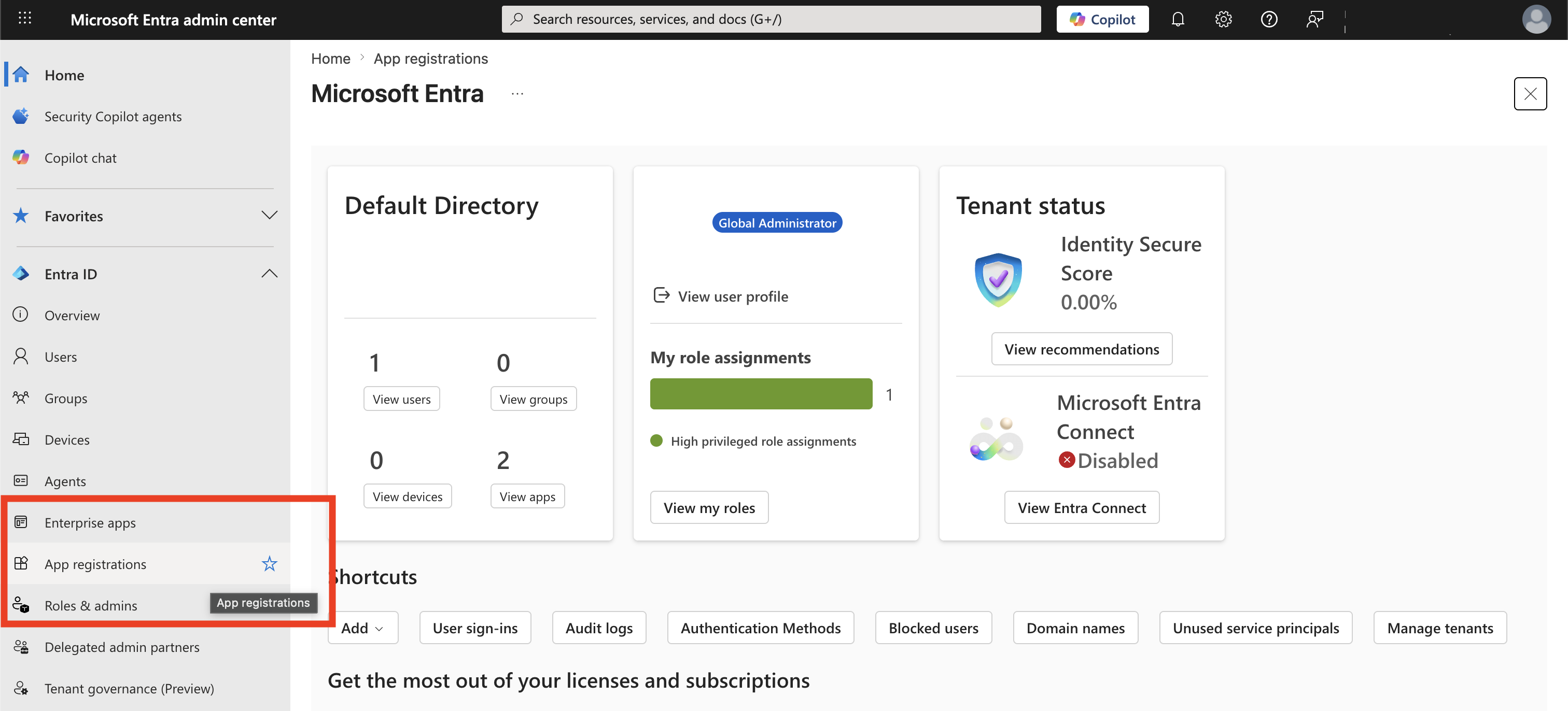
In the Microsoft Entra admin center, navigate to App registrations from the left sidebar.
-
Click New registration in the top menu.
-
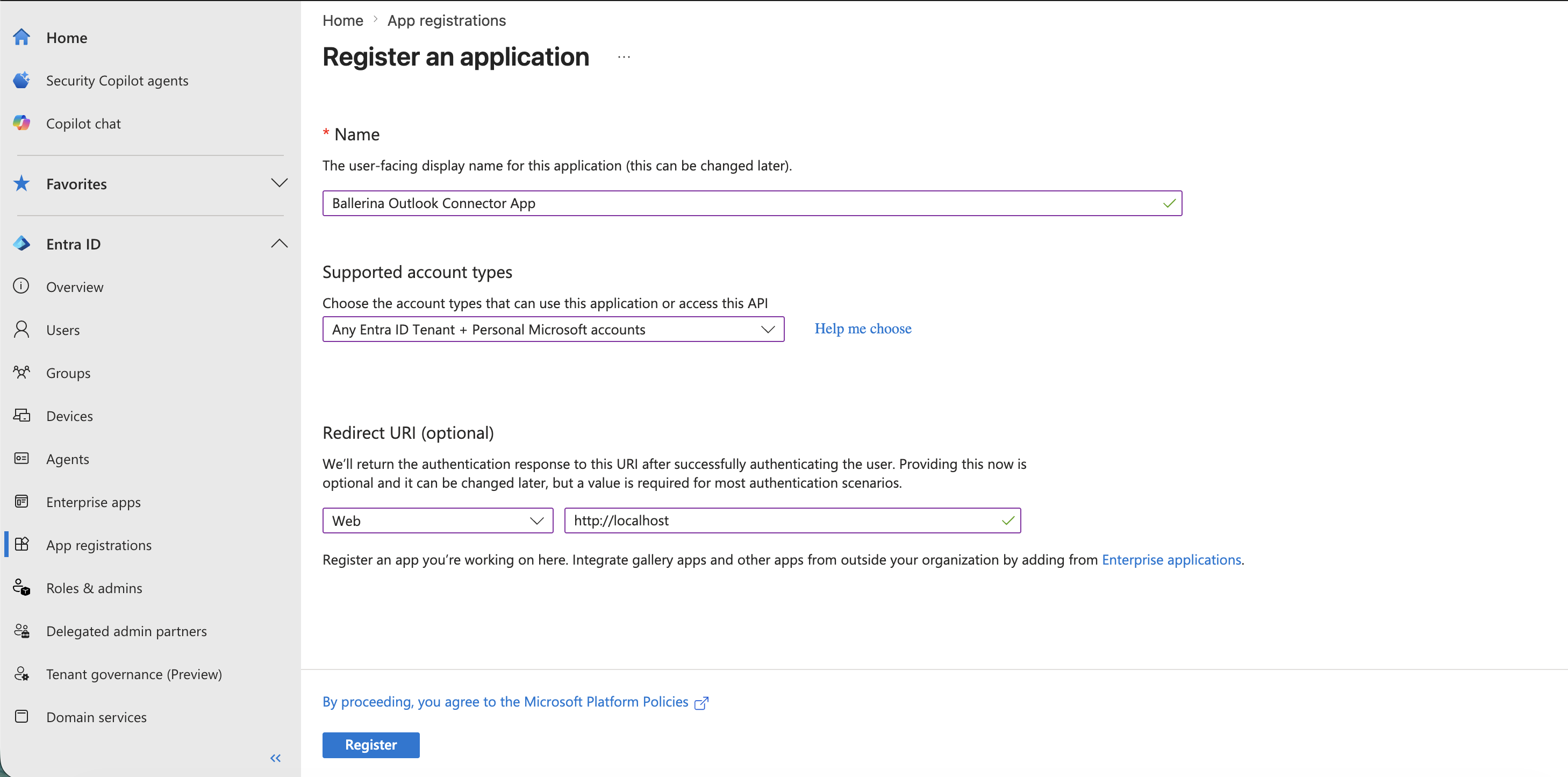
Fill in the application details.
- Name: Provide a name for your app (e.g.,
Ballerina Outlook Connector App) - Supported account types: Select Any Entra ID Tenant + Personal Microsoft Accounts.
- Redirect URI: Select Web and enter your redirect URI (e.g.,
http://localhostfor local testing).
- Name: Provide a name for your app (e.g.,
-
Click Register.
Step 3: Add API permissions
-
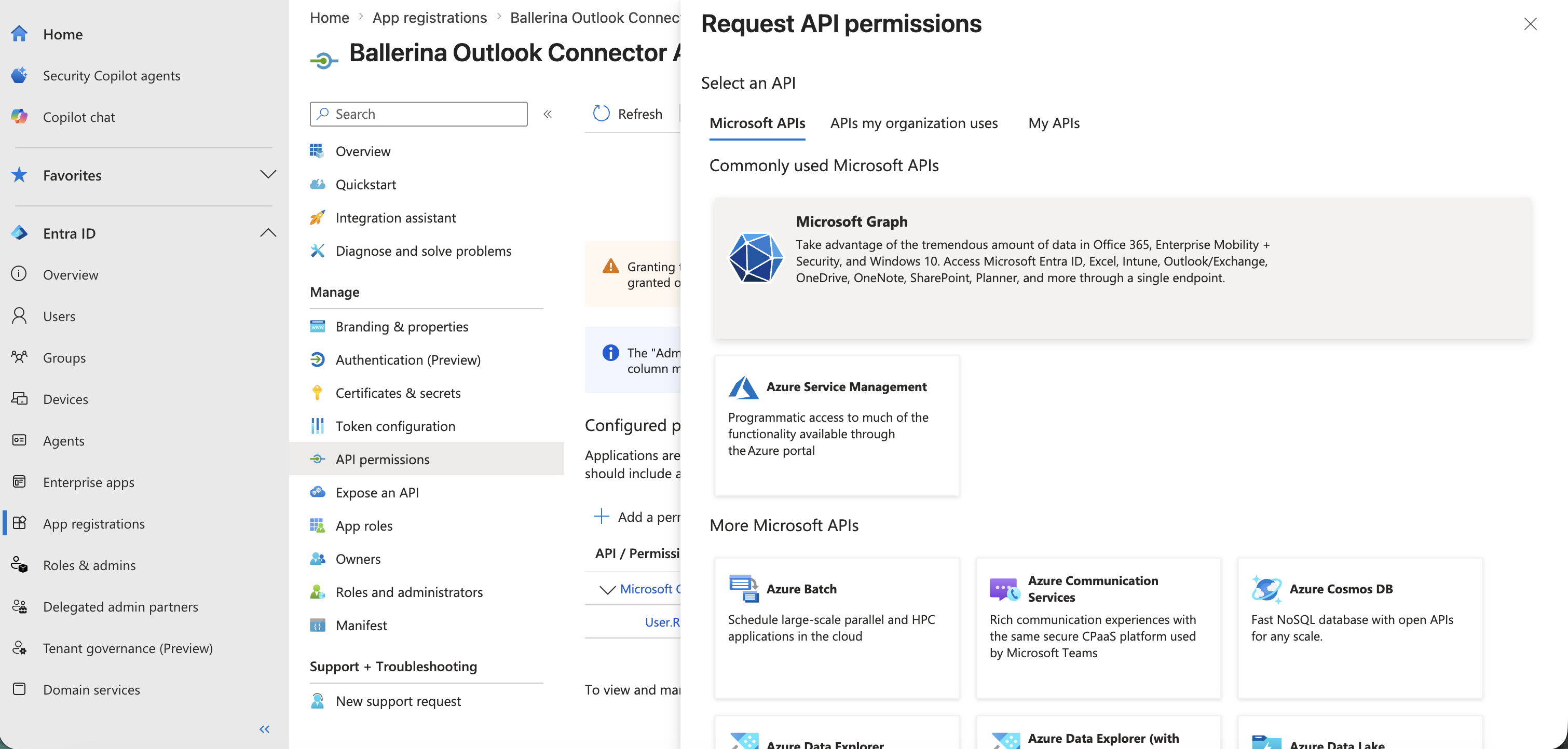
In your registered application, navigate to API permissions from the left sidebar.
-
Click Add a permission > Microsoft Graph > Delegated permissions.
-
Add the following permissions.
Mail.ReadMail.ReadWriteMail.SendMailboxSettings.ReadMailboxSettings.ReadWriteoffline_access
-
Click Add permissions.
-
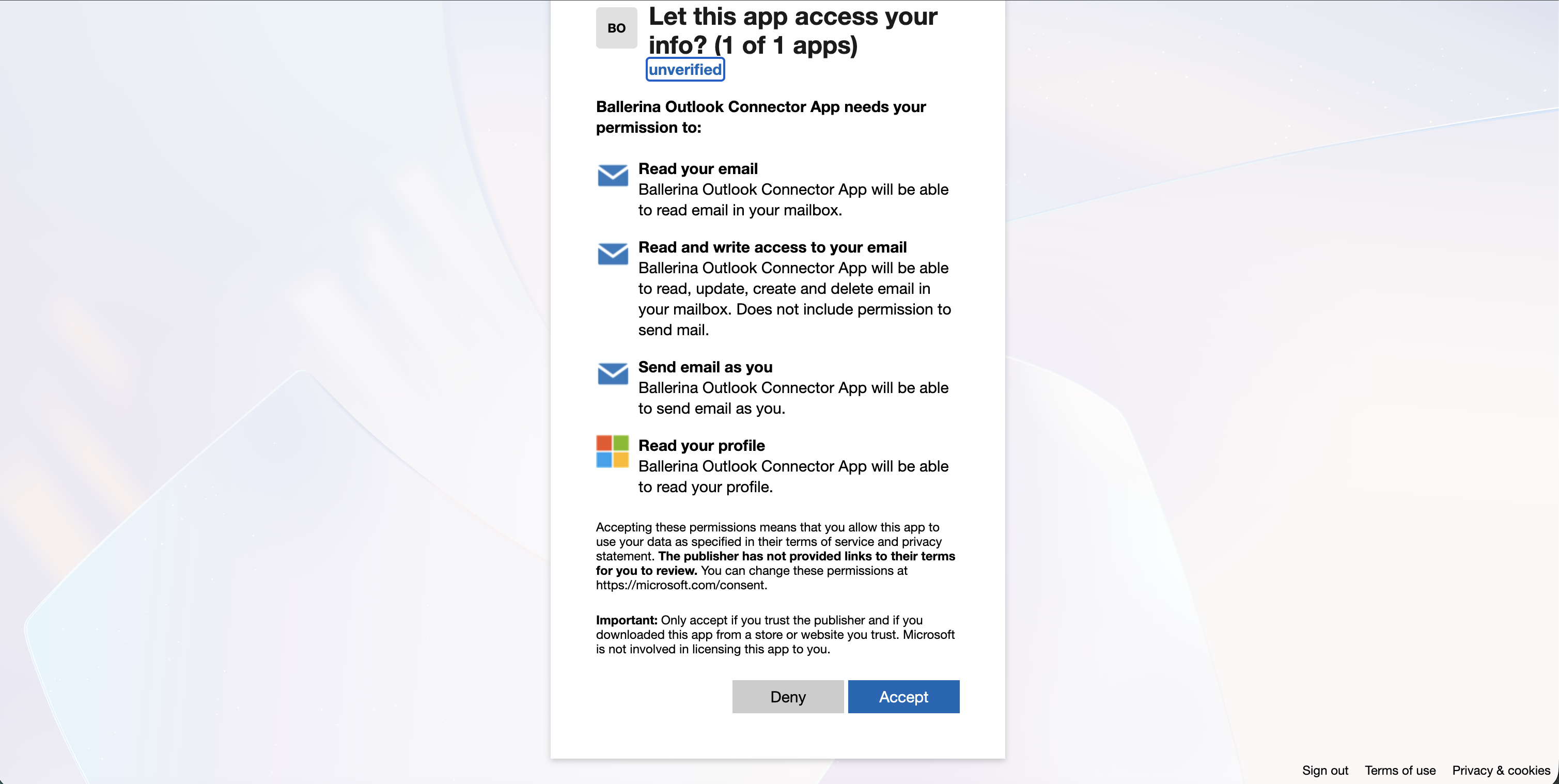
When prompted to grant consent, click Accept to allow the app access to the requested permissions.
Step 4: Get the client ID and client secret
-
Navigate to Overview in your registered application. Copy the Application (client) ID and save it as your
clientId. -
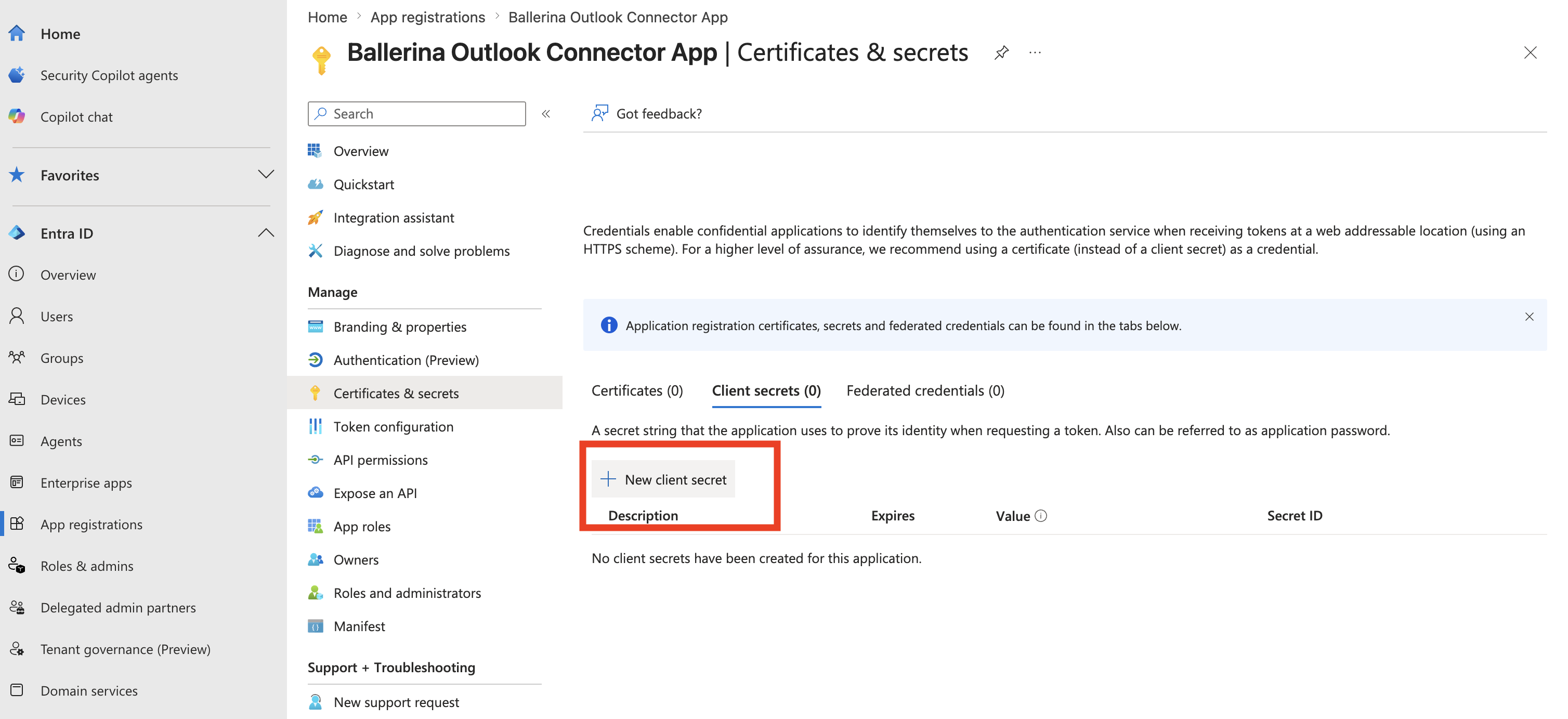
Navigate to Certificates & secrets > Client secrets > New client secret.
-
Provide a description, choose an expiry duration, and click Add.
-
Copy the generated Value of the secret and save it as your
clientSecret.
Note: Once you have the credentials, use the client credentials grant type when calling APIs that operate on behalf of a specific user (i.e.,
users/{userIdentifier}/...APIs such assendMailFromUser,listMessagesFromUser,getMailFolderFromUser, etc.), and the refresh token grant type (authorization code flow) for all/me/...APIs.APIs under
users/{userIdentifier}/...require Application permissions (e.g.,Mail.Send,Mail.Read,Mail.ReadWrite) in Azure AD with admin consent granted — delegated permissions are not sufficient. To use the client credentials grant type, configure your application withclientId,clientSecret,tokenUrl, andscope. Refer to this guide for more information.
Step 5: Set up the authentication flow
Before using the connector, obtain a refresh token using the following OAuth2 authorization code flow:
-
Construct an authorization URL using the format below. Replace
<CLIENT_ID>,<REDIRECT_URI>and<SCOPE>with your specific values:https://login.microsoftonline.com/common/oauth2/v2.0/authorize?client_id=<CLIENT_ID>&response_type=code&redirect_uri=<REDIRECT_URI>&scope=<SCOPE>&response_mode=queryExample values for
<SCOPE>:Mail.Read Mail.ReadWrite Mail.Send User.Read offline_access -
Open the URL in a browser and sign in with your Microsoft account. Grant the requested permissions.
-
After authorization, you will be redirected to your redirect URI with a
codeparameter in the URL. Copy this code. -
Exchange the authorization code for tokens by running the following
curlcommand. Replace the placeholder values with your specific values. ForSCOPEyou can use thisMail.Read Mail.ReadWrite Mail.Send User.Read offline_access.curl --location 'https://login.microsoftonline.com/common/oauth2/v2.0/token' \ --header 'Content-Type: application/x-www-form-urlencoded' \ --data-urlencode 'grant_type=authorization_code' \ --data-urlencode 'code=<CODE>' \ --data-urlencode 'redirect_uri=<REDIRECT_URI>' \ --data-urlencode 'client_id=<CLIENT_ID>' \ --data-urlencode 'client_secret=<CLIENT_SECRET>' \ --data-urlencode 'scope=<SCOPE>'The response will contain your access token and refresh token.
{ "token_type": "Bearer", "scope": "<SCOPE>", "refresh_token": "<REFRESH_TOKEN>", "access_token": "<ACCESS_TOKEN>", "expires_in": 3600 } -
Store the
refresh_tokensecurely for use in your application. -
Use
https://login.microsoftonline.com/common/oauth2/v2.0/tokenas theREFRESH_URL.
Quickstart
To use the microsoft.outlook.mail connector in your Ballerina application, update your .bal file as follows:
Step 1: Import the module
Import the microsoft.outlook.mail module.
import ballerinax/microsoft.outlook.mail;
Step 2: Instantiate a new connector
- Create a
Config.tomlfile and configure the credentials obtained above:
clientId = "<CLIENT_ID>" clientSecret = "<CLIENT_SECRET>" refreshToken = "<REFRESH_TOKEN>" refreshUrl = "<REFRESH_URL>"
- Instantiate a
mail:ConnectionConfigwith the obtained credentials and initialize the connector with it.
configurable string clientId = ?; configurable string clientSecret = ?; configurable string refreshToken = ?; configurable string refreshUrl = ?; final mail:Client outlookClient = check new ({ auth: { clientId, clientSecret, refreshToken, refreshUrl } });
Step 3: Invoke the connector operation
Now, utilize the available connector operations. A sample use case is shown below.
// List the most recent messages in the mailbox public function main() returns error? { mail:MicrosoftGraphMessageCollectionResponse response = check outlookClient->listMessages( dollarTop = 5, dollarSelect = ["id", "subject", "from", "receivedDateTime", "isRead"] ); mail:MicrosoftGraphMessage[] messages = response.value ?: []; foreach mail:MicrosoftGraphMessage message in messages { io:println("Subject: ", message?.subject, " | Read: ", message?.isRead); } }
Examples
The microsoft.outlook.mail connector provides practical examples illustrating usage in various scenarios. Explore these examples, covering the following use cases.
-
Automated email notifications: Automates weekly project status report distribution. Creates a dedicated mail folder, drafts an HTML-formatted report email with an attachment, sends the draft, and lists recent sent messages to confirm delivery.
-
Email inbox management: Implements a customer support inbox triage workflow. Lists unread messages, fetches message details, marks messages as read after review, creates an organized folder for processed tickets, and deletes spam or resolved messages.
Clients
microsoft.outlook.mail: Client
Reduced Microsoft Graph v1.0 OpenAPI spec covering Outlook mail operations: messages, mail folders, attachments, and related actions. This includes operations for the signed-in user (/me) using delegated permissions, and user-scoped operations (/users/{userIdentifier}) for application-permission scenarios.
Constructor
Gets invoked to initialize the connector.
init (ConnectionConfig config, string serviceUrl)- config ConnectionConfig - The configurations to be used when initializing the
connector
- serviceUrl string "https://graph.microsoft.com/v1.0" - URL of the target service
listMessages
function listMessages(map<string|string[]> headers, *ListMessagesQueries queries) returns MicrosoftGraphMessageCollectionResponse|errorList messages
Parameters
- queries *ListMessagesQueries - Queries to be sent with the request
Return Type
- MicrosoftGraphMessageCollectionResponse|error - Retrieved collection
createDraftMessage
function createDraftMessage(MicrosoftGraphMessage payload, map<string|string[]> headers) returns MicrosoftGraphMessage|errorCreate message (draft)
Parameters
- payload MicrosoftGraphMessage - New message draft
Return Type
- MicrosoftGraphMessage|error - Created message draft
getMessage
function getMessage(string messageId, map<string|string[]> headers, *GetMessageQueries queries) returns MicrosoftGraphMessage|errorGet message
Parameters
- messageId string - The unique identifier of message
- queries *GetMessageQueries - Queries to be sent with the request
Return Type
- MicrosoftGraphMessage|error - Retrieved message
deleteMessage
function deleteMessage(string messageId, DeleteMessageHeaders headers) returns error?Delete message
Parameters
- messageId string - The unique identifier of message
- headers DeleteMessageHeaders (default {}) - Headers to be sent with the request
Return Type
- error? - If successful, the message is deleted and no content is returned. Unless, the message may not exist or the caller may lack the required permission.
updateMessage
function updateMessage(string messageId, MicrosoftGraphMessage payload, map<string|string[]> headers) returns MicrosoftGraphMessage|errorUpdate message
Parameters
- messageId string - The unique identifier of message
- payload MicrosoftGraphMessage - New property values
Return Type
- MicrosoftGraphMessage|error - If successful, returns the updated message object. Unless, the message may not exist or the request body may be invalid.
sendDraftMessage
function sendDraftMessage(string messageId, SendDraftMessageHeaders headers) returns error?Send draft message
Parameters
- messageId string - The unique identifier of message
- headers SendDraftMessageHeaders (default {}) - Headers to be sent with the request
Return Type
- error? - If successful, the draft is sent and stored in Sent Items, and no content is returned. Unless, the draft may be missing required fields or the message may not exist.
copyMessage
function copyMessage(string messageId, MessageIdCopyBody payload, map<string|string[]> headers) returns MicrosoftGraphMessageResponse|errorCopy message
Parameters
- messageId string - The unique identifier of message
- payload MessageIdCopyBody - Action parameters
Return Type
- MicrosoftGraphMessageResponse|error - If successful, returns the copied message in the destination folder. Unless, the destination folder may not exist or the message may not be found.
forwardMessage
function forwardMessage(string messageId, MessageIdForwardBody payload, map<string|string[]> headers) returns error?Forward message
Parameters
- messageId string - The unique identifier of message
- payload MessageIdForwardBody - Action parameters
Return Type
- error? - If successful, the message is forwarded and no content is returned. Unless, the recipients may be invalid or the message may not exist.
listAttachments
function listAttachments(string messageId, map<string|string[]> headers, *ListAttachmentsQueries queries) returns MicrosoftGraphAttachmentCollectionResponse|errorList attachments
Parameters
- messageId string - The unique identifier of message
- queries *ListAttachmentsQueries - Queries to be sent with the request
Return Type
- MicrosoftGraphAttachmentCollectionResponse|error - Retrieved collection
addAttachment
function addAttachment(string messageId, MicrosoftGraphAttachment payload, map<string|string[]> headers) returns MicrosoftGraphAttachment|errorAdd file attachment
Parameters
- messageId string - The unique identifier of message
- payload MicrosoftGraphAttachment - New attachment
Return Type
- MicrosoftGraphAttachment|error - Created attachment
getAttachment
function getAttachment(string messageId, string attachmentId, map<string|string[]> headers, *GetAttachmentQueries queries) returns MicrosoftGraphAttachment|errorGet attachment
Parameters
- messageId string - The unique identifier of message
- attachmentId string - The unique identifier of attachment
- queries *GetAttachmentQueries - Queries to be sent with the request
Return Type
- MicrosoftGraphAttachment|error - Retrieved attachment
deleteAttachment
function deleteAttachment(string messageId, string attachmentId, DeleteAttachmentHeaders headers) returns error?Delete attachment
Parameters
- messageId string - The unique identifier of message
- attachmentId string - The unique identifier of attachment
- headers DeleteAttachmentHeaders (default {}) - Headers to be sent with the request
Return Type
- error? - If successful, the attachment is deleted and no content is returned. Unless, the attachment may not exist or the caller may lack the required permission.
createUploadSession
function createUploadSession(string messageId, AttachmentsCreateUploadSessionBody payload, map<string|string[]> headers) returns MicrosoftGraphUploadSessionResponse|errorCreate large file attachment upload session
Parameters
- messageId string - The unique identifier of message
- payload AttachmentsCreateUploadSessionBody - Action parameters
Return Type
- MicrosoftGraphUploadSessionResponse|error - Success - returns an upload session
sendMail
function sendMail(record { Message MicrosoftGraphMessage, SaveToSentItems boolean? } payload, map<string|string[]> headers) returns error?Send mail
Parameters
- payload record { Message MicrosoftGraphMessage, SaveToSentItems boolean? } - Action parameters
Return Type
- error? - If successful, the message is sent and stored in Sent Items, and no content is returned. Unless, the request body may be invalid or the recipients may be unresolvable.
sendMailFromUser
function sendMailFromUser(string userIdentifier, record { Message MicrosoftGraphMessage, SaveToSentItems boolean? } payload, map<string|string[]> headers) returns error?Send mail from user
Parameters
- userIdentifier string - The unique identifier or userPrincipalName of the user
- payload record { Message MicrosoftGraphMessage, SaveToSentItems boolean? } - Action parameters
Return Type
- error? - Accepted
listMessagesFromUser
function listMessagesFromUser(string userIdentifier, map<string|string[]> headers, *ListMessagesFromUserQueries queries) returns MicrosoftGraphMessageCollectionResponse|errorList messages from user
Parameters
- userIdentifier string - The unique identifier or userPrincipalName of the user
- queries *ListMessagesFromUserQueries - Queries to be sent with the request
Return Type
- MicrosoftGraphMessageCollectionResponse|error - Retrieved collection
createDraftMessageFromUser
function createDraftMessageFromUser(string userIdentifier, MicrosoftGraphMessage payload, map<string|string[]> headers) returns MicrosoftGraphMessage|errorCreate message (draft) from user
Parameters
- userIdentifier string - The unique identifier or userPrincipalName of the user
- payload MicrosoftGraphMessage - New message draft
Return Type
- MicrosoftGraphMessage|error - Created message draft
getMessageFromUser
function getMessageFromUser(string userIdentifier, string messageId, map<string|string[]> headers, *GetMessageFromUserQueries queries) returns MicrosoftGraphMessage|errorGet message from user
Parameters
- userIdentifier string - The unique identifier or userPrincipalName of the user
- messageId string - The unique identifier of message
- queries *GetMessageFromUserQueries - Queries to be sent with the request
Return Type
- MicrosoftGraphMessage|error - Retrieved message
deleteMessageFromUser
function deleteMessageFromUser(string userIdentifier, string messageId, DeleteMessageFromUserHeaders headers) returns error?Delete message from user
Parameters
- userIdentifier string - The unique identifier or userPrincipalName of the user
- messageId string - The unique identifier of message
- headers DeleteMessageFromUserHeaders (default {}) - Headers to be sent with the request
Return Type
- error? - If successful, the message is deleted from the specified user's mailbox and no content is returned. Unless, the message may not exist or access may be denied.
updateMessageFromUser
function updateMessageFromUser(string userIdentifier, string messageId, MicrosoftGraphMessage payload, map<string|string[]> headers) returns MicrosoftGraphMessage|errorUpdate message from user
Parameters
- userIdentifier string - The unique identifier or userPrincipalName of the user
- messageId string - The unique identifier of message
- payload MicrosoftGraphMessage - New property values
Return Type
- MicrosoftGraphMessage|error - If successful, returns the updated message object in the specified user's mailbox. Unless, the message may not exist or the request body may be invalid.
sendDraftMessageFromUser
function sendDraftMessageFromUser(string userIdentifier, string messageId, SendDraftMessageFromUserHeaders headers) returns error?Send draft message from user
Parameters
- userIdentifier string - The unique identifier or userPrincipalName of the user
- messageId string - The unique identifier of message
- headers SendDraftMessageFromUserHeaders (default {}) - Headers to be sent with the request
Return Type
- error? - Accepted
copyMessageFromUser
function copyMessageFromUser(string userIdentifier, string messageId, MessageIdCopyBody payload, map<string|string[]> headers) returns MicrosoftGraphMessageResponse|errorCopy message from user
Parameters
- userIdentifier string - The unique identifier or userPrincipalName of the user
- messageId string - The unique identifier of message
- payload MessageIdCopyBody - Action parameters
Return Type
- MicrosoftGraphMessageResponse|error - If successful, returns the copied message in the destination folder of the specified user's mailbox. Unless, the destination folder may not exist or the message may not be found.
forwardMessageFromUser
function forwardMessageFromUser(string userIdentifier, string messageId, MessageIdForwardBody payload, map<string|string[]> headers) returns error?Forward message from user
Parameters
- userIdentifier string - The unique identifier or userPrincipalName of the user
- messageId string - The unique identifier of message
- payload MessageIdForwardBody - Action parameters
Return Type
- error? - Accepted
listAttachmentsFromUser
function listAttachmentsFromUser(string userIdentifier, string messageId, map<string|string[]> headers, *ListAttachmentsFromUserQueries queries) returns MicrosoftGraphAttachmentCollectionResponse|errorList attachments from user
Parameters
- userIdentifier string - The unique identifier or userPrincipalName of the user
- messageId string - The unique identifier of message
- queries *ListAttachmentsFromUserQueries - Queries to be sent with the request
Return Type
- MicrosoftGraphAttachmentCollectionResponse|error - Retrieved collection
addAttachmentFromUser
function addAttachmentFromUser(string userIdentifier, string messageId, MicrosoftGraphAttachment payload, map<string|string[]> headers) returns MicrosoftGraphAttachment|errorAdd file attachment from user
Parameters
- userIdentifier string - The unique identifier or userPrincipalName of the user
- messageId string - The unique identifier of message
- payload MicrosoftGraphAttachment - New attachment
Return Type
- MicrosoftGraphAttachment|error - Created attachment
getAttachmentFromUser
function getAttachmentFromUser(string userIdentifier, string messageId, string attachmentId, map<string|string[]> headers, *GetAttachmentFromUserQueries queries) returns MicrosoftGraphAttachment|errorGet attachment from user
Parameters
- userIdentifier string - The unique identifier or userPrincipalName of the user
- messageId string - The unique identifier of message
- attachmentId string - The unique identifier of attachment
- queries *GetAttachmentFromUserQueries - Queries to be sent with the request
Return Type
- MicrosoftGraphAttachment|error - Retrieved attachment
deleteAttachmentFromUser
function deleteAttachmentFromUser(string userIdentifier, string messageId, string attachmentId, DeleteAttachmentFromUserHeaders headers) returns error?Delete attachment from user
Parameters
- userIdentifier string - The unique identifier or userPrincipalName of the user
- messageId string - The unique identifier of message
- attachmentId string - The unique identifier of attachment
- headers DeleteAttachmentFromUserHeaders (default {}) - Headers to be sent with the request
Return Type
- error? - If successful, the attachment is deleted from the specified user's message and no content is returned. Unless, the attachment may not exist or access may be denied.
createUploadSessionFromUser
function createUploadSessionFromUser(string userIdentifier, string messageId, AttachmentsCreateUploadSessionBody payload, map<string|string[]> headers) returns MicrosoftGraphUploadSessionResponse|errorCreate large file attachment upload session from user
Parameters
- userIdentifier string - The unique identifier or userPrincipalName of the user
- messageId string - The unique identifier of message
- payload AttachmentsCreateUploadSessionBody - Action parameters
Return Type
- MicrosoftGraphUploadSessionResponse|error - Success - returns an upload session
listMailFoldersFromUser
function listMailFoldersFromUser(string userIdentifier, map<string|string[]> headers, *ListMailFoldersFromUserQueries queries) returns MicrosoftGraphMailFolderCollectionResponse|errorList mailFolders from user
Parameters
- userIdentifier string - The unique identifier or userPrincipalName of the user
- queries *ListMailFoldersFromUserQueries - Queries to be sent with the request
Return Type
- MicrosoftGraphMailFolderCollectionResponse|error - Retrieved collection
createMailFolderFromUser
function createMailFolderFromUser(string userIdentifier, MicrosoftGraphMailFolder payload, map<string|string[]> headers) returns MicrosoftGraphMailFolder|errorCreate mailFolder from user
Parameters
- userIdentifier string - The unique identifier or userPrincipalName of the user
- payload MicrosoftGraphMailFolder - New mail folder (use '@odata.type': '#microsoft.graph.mailSearchFolder' to create a search folder)
Return Type
- MicrosoftGraphMailFolder|error - Created mail folder
getMailFolderFromUser
function getMailFolderFromUser(string userIdentifier, string mailFolderId, map<string|string[]> headers, *GetMailFolderFromUserQueries queries) returns MicrosoftGraphMailFolder|errorGet mailFolder from user
Parameters
- userIdentifier string - The unique identifier or userPrincipalName of the user
- mailFolderId string - The unique identifier of mailFolder
- queries *GetMailFolderFromUserQueries - Queries to be sent with the request
Return Type
- MicrosoftGraphMailFolder|error - Retrieved mail folder
deleteMailFolderFromUser
function deleteMailFolderFromUser(string userIdentifier, string mailFolderId, DeleteMailFolderFromUserHeaders headers) returns error?Delete mailFolder from user
Parameters
- userIdentifier string - The unique identifier or userPrincipalName of the user
- mailFolderId string - The unique identifier of mailFolder
- headers DeleteMailFolderFromUserHeaders (default {}) - Headers to be sent with the request
Return Type
- error? - If successful, the mail folder is deleted from the specified user's mailbox and no content is returned. Unless, the folder may not exist or access may be denied.
updateMailFolderFromUser
function updateMailFolderFromUser(string userIdentifier, string mailFolderId, MicrosoftGraphMailFolder payload, map<string|string[]> headers) returns MicrosoftGraphMailFolder|errorUpdate mailFolder from user
Parameters
- userIdentifier string - The unique identifier or userPrincipalName of the user
- mailFolderId string - The unique identifier of mailFolder
- payload MicrosoftGraphMailFolder - New property values
Return Type
- MicrosoftGraphMailFolder|error - If successful, returns the updated mail folder object in the specified user's mailbox. Unless, the folder may not exist or the request body may be invalid.
listChildFoldersFromUser
function listChildFoldersFromUser(string userIdentifier, string mailFolderId, map<string|string[]> headers, *ListChildFoldersFromUserQueries queries) returns MicrosoftGraphMailFolderCollectionResponse|errorList childFolders from user
Parameters
- userIdentifier string - The unique identifier or userPrincipalName of the user
- mailFolderId string - The unique identifier of mailFolder
- queries *ListChildFoldersFromUserQueries - Queries to be sent with the request
Return Type
- MicrosoftGraphMailFolderCollectionResponse|error - Retrieved collection
createChildFolderFromUser
function createChildFolderFromUser(string userIdentifier, string mailFolderId, MicrosoftGraphMailFolder payload, map<string|string[]> headers) returns MicrosoftGraphMailFolder|errorCreate child folder from user
Parameters
- userIdentifier string - The unique identifier or userPrincipalName of the user
- mailFolderId string - The unique identifier of mailFolder
- payload MicrosoftGraphMailFolder - New child mail folder
Return Type
- MicrosoftGraphMailFolder|error - Created child mail folder
getChildFolderFromUser
function getChildFolderFromUser(string userIdentifier, string mailFolderId, string mailFolderId1, map<string|string[]> headers, *GetChildFolderFromUserQueries queries) returns MicrosoftGraphMailFolder|errorGet child folder from user
Parameters
- userIdentifier string - The unique identifier or userPrincipalName of the user
- mailFolderId string - The unique identifier of mailFolder
- mailFolderId1 string - The unique identifier of child mailFolder
- queries *GetChildFolderFromUserQueries - Queries to be sent with the request
Return Type
- MicrosoftGraphMailFolder|error - Retrieved child mail folder
deleteChildFolderFromUser
function deleteChildFolderFromUser(string userIdentifier, string mailFolderId, string mailFolderId1, DeleteChildFolderFromUserHeaders headers) returns error?Delete child folder from user
Parameters
- userIdentifier string - The unique identifier or userPrincipalName of the user
- mailFolderId string - The unique identifier of mailFolder
- mailFolderId1 string - The unique identifier of child mailFolder
- headers DeleteChildFolderFromUserHeaders (default {}) - Headers to be sent with the request
Return Type
- error? - If successful, the child folder is deleted from the specified user's mailbox and no content is returned. Unless, the folder may not exist or access may be denied.
updateChildFolderFromUser
function updateChildFolderFromUser(string userIdentifier, string mailFolderId, string mailFolderId1, MicrosoftGraphMailFolder payload, map<string|string[]> headers) returns MicrosoftGraphMailFolder|errorUpdate child folder from user
Parameters
- userIdentifier string - The unique identifier or userPrincipalName of the user
- mailFolderId string - The unique identifier of mailFolder
- mailFolderId1 string - The unique identifier of child mailFolder
- payload MicrosoftGraphMailFolder - New property values
Return Type
- MicrosoftGraphMailFolder|error - If successful, returns the updated child folder object in the specified user's mailbox. Unless, the folder may not exist or the request body may be invalid.
listMailFolders
function listMailFolders(map<string|string[]> headers, *ListMailFoldersQueries queries) returns MicrosoftGraphMailFolderCollectionResponse|errorList mailFolders
Parameters
- queries *ListMailFoldersQueries - Queries to be sent with the request
Return Type
- MicrosoftGraphMailFolderCollectionResponse|error - Retrieved collection
createMailFolder
function createMailFolder(MicrosoftGraphMailFolder payload, map<string|string[]> headers) returns MicrosoftGraphMailFolder|errorCreate mailFolder
Parameters
- payload MicrosoftGraphMailFolder - New mail folder (use '@odata.type': '#microsoft.graph.mailSearchFolder' to create a search folder)
Return Type
- MicrosoftGraphMailFolder|error - Created mail folder
getMailFolder
function getMailFolder(string mailFolderId, map<string|string[]> headers, *GetMailFolderQueries queries) returns MicrosoftGraphMailFolder|errorGet mailFolder
Parameters
- mailFolderId string - The unique identifier of mailFolder
- queries *GetMailFolderQueries - Queries to be sent with the request
Return Type
- MicrosoftGraphMailFolder|error - Retrieved mail folder
deleteMailFolder
function deleteMailFolder(string mailFolderId, DeleteMailFolderHeaders headers) returns error?Delete mailFolder
Parameters
- mailFolderId string - The unique identifier of mailFolder
- headers DeleteMailFolderHeaders (default {}) - Headers to be sent with the request
Return Type
- error? - If successful, the mail folder is deleted and no content is returned. Unless, the folder may not exist or the caller may lack the required permission.
updateMailFolder
function updateMailFolder(string mailFolderId, MicrosoftGraphMailFolder payload, map<string|string[]> headers) returns MicrosoftGraphMailFolder|errorUpdate mailFolder
Parameters
- mailFolderId string - The unique identifier of mailFolder
- payload MicrosoftGraphMailFolder - New property values
Return Type
- MicrosoftGraphMailFolder|error - If successful, returns the updated mail folder object. Unless, the folder may not exist or the request body may be invalid.
listChildFolders
function listChildFolders(string mailFolderId, map<string|string[]> headers, *ListChildFoldersQueries queries) returns MicrosoftGraphMailFolderCollectionResponse|errorList childFolders
Parameters
- mailFolderId string - The unique identifier of mailFolder
- queries *ListChildFoldersQueries - Queries to be sent with the request
Return Type
- MicrosoftGraphMailFolderCollectionResponse|error - Retrieved collection
createChildFolder
function createChildFolder(string mailFolderId, MicrosoftGraphMailFolder payload, map<string|string[]> headers) returns MicrosoftGraphMailFolder|errorCreate child folder
Parameters
- mailFolderId string - The unique identifier of mailFolder
- payload MicrosoftGraphMailFolder - New child mail folder
Return Type
- MicrosoftGraphMailFolder|error - Created child mail folder
getChildFolder
function getChildFolder(string mailFolderId, string mailFolderId1, map<string|string[]> headers, *GetChildFolderQueries queries) returns MicrosoftGraphMailFolder|errorGet child folder
Parameters
- mailFolderId string - The unique identifier of mailFolder
- mailFolderId1 string - The unique identifier of child mailFolder
- queries *GetChildFolderQueries - Queries to be sent with the request
Return Type
- MicrosoftGraphMailFolder|error - Retrieved child mail folder
deleteChildFolder
function deleteChildFolder(string mailFolderId, string mailFolderId1, DeleteChildFolderHeaders headers) returns error?Delete child folder
Parameters
- mailFolderId string - The unique identifier of mailFolder
- mailFolderId1 string - The unique identifier of child mailFolder
- headers DeleteChildFolderHeaders (default {}) - Headers to be sent with the request
Return Type
- error? - If successful, the child folder is deleted and no content is returned. Unless, the folder may not exist or the caller may lack the required permission.
updateChildFolder
function updateChildFolder(string mailFolderId, string mailFolderId1, MicrosoftGraphMailFolder payload, map<string|string[]> headers) returns MicrosoftGraphMailFolder|errorUpdate child folder
Parameters
- mailFolderId string - The unique identifier of mailFolder
- mailFolderId1 string - The unique identifier of child mailFolder
- payload MicrosoftGraphMailFolder - New property values
Return Type
- MicrosoftGraphMailFolder|error - If successful, returns the updated child folder object. Unless, the folder may not exist or the request body may be invalid.
Records
microsoft.outlook.mail: AttachmentsCreateUploadSessionBody
Fields
- attachmentItem? MicrosoftGraphAttachmentItem -
microsoft.outlook.mail: BaseCollectionPaginationCountResponse
Fields
- atOdataNextLink? string? -
- atOdataCount? int? -
microsoft.outlook.mail: CompletedResponse
microsoft.outlook.mail: ConnectionConfig
Provides a set of configurations for controlling the behaviours when communicating with a remote HTTP endpoint.
Fields
- auth OAuth2ClientCredentialsGrantConfig|BearerTokenConfig|OAuth2RefreshTokenGrantConfig - Configurations related to client authentication
- httpVersion HttpVersion(default http:HTTP_2_0) - The HTTP version understood by the client
- http1Settings ClientHttp1Settings(default {}) - Configurations related to HTTP/1.x protocol
- http2Settings ClientHttp2Settings(default {}) - Configurations related to HTTP/2 protocol
- timeout decimal(default 30) - The maximum time to wait (in seconds) for a response before closing the connection
- forwarded string(default "disable") - The choice of setting
forwarded/x-forwardedheader
- followRedirects? FollowRedirects - Configurations associated with Redirection
- poolConfig? PoolConfiguration - Configurations associated with request pooling
- cache CacheConfig(default {}) - HTTP caching related configurations
- compression Compression(default http:COMPRESSION_AUTO) - Specifies the way of handling compression (
accept-encoding) header
- circuitBreaker? CircuitBreakerConfig - Configurations associated with the behaviour of the Circuit Breaker
- retryConfig? RetryConfig - Configurations associated with retrying
- responseLimits ResponseLimitConfigs(default {}) - Configurations associated with inbound response size limits
- secureSocket? ClientSecureSocket - SSL/TLS-related options
- proxy? ProxyConfig - Proxy server related options
- socketConfig ClientSocketConfig(default {}) - Provides settings related to client socket configuration
- validation boolean(default true) - Enables the inbound payload validation functionality which provided by the constraint package. Enabled by default
- laxDataBinding boolean(default true) - Enables relaxed data binding on the client side. When enabled,
nilvalues are treated as optional, and absent fields are handled asnilabletypes. Enabled by default.
microsoft.outlook.mail: DeleteAttachmentFromUserHeaders
Represents the Headers record for the operation: deleteAttachmentFromUser
Fields
- ifMatch? string - ETag
microsoft.outlook.mail: DeleteAttachmentHeaders
Represents the Headers record for the operation: deleteAttachment
Fields
- ifMatch? string - ETag
microsoft.outlook.mail: DeleteChildFolderFromUserHeaders
Represents the Headers record for the operation: deleteChildFolderFromUser
Fields
- ifMatch? string - ETag
microsoft.outlook.mail: DeleteChildFolderHeaders
Represents the Headers record for the operation: deleteChildFolder
Fields
- ifMatch? string - ETag
microsoft.outlook.mail: DeleteMailFolderFromUserHeaders
Represents the Headers record for the operation: deleteMailFolderFromUser
Fields
- ifMatch? string - ETag
microsoft.outlook.mail: DeleteMailFolderHeaders
Represents the Headers record for the operation: deleteMailFolder
Fields
- ifMatch? string - ETag
microsoft.outlook.mail: DeleteMessageFromUserHeaders
Represents the Headers record for the operation: deleteMessageFromUser
Fields
- ifMatch? string - ETag
microsoft.outlook.mail: DeleteMessageHeaders
Represents the Headers record for the operation: deleteMessage
Fields
- ifMatch? string - ETag
microsoft.outlook.mail: GetAttachmentFromUserQueries
Represents the Queries record for the operation: getAttachmentFromUser
Fields
- dollarExpand? string[] - Expand related entities
- dollarSelect? string[] - Select properties to be returned
microsoft.outlook.mail: GetAttachmentQueries
Represents the Queries record for the operation: getAttachment
Fields
- dollarExpand? string[] - Expand related entities
- dollarSelect? string[] - Select properties to be returned
microsoft.outlook.mail: GetChildFolderFromUserQueries
Represents the Queries record for the operation: getChildFolderFromUser
Fields
- dollarExpand? string[] - Expand related entities
- includeHiddenFolders? boolean - Include Hidden Folders
- dollarSelect? string[] - Select properties to be returned
microsoft.outlook.mail: GetChildFolderQueries
Represents the Queries record for the operation: getChildFolder
Fields
- dollarExpand? string[] - Expand related entities
- includeHiddenFolders? boolean - Include Hidden Folders
- dollarSelect? string[] - Select properties to be returned
microsoft.outlook.mail: GetMailFolderFromUserQueries
Represents the Queries record for the operation: getMailFolderFromUser
Fields
- dollarExpand? string[] - Expand related entities
- dollarSelect? string[] - Select properties to be returned
microsoft.outlook.mail: GetMailFolderQueries
Represents the Queries record for the operation: getMailFolder
Fields
- dollarExpand? string[] - Expand related entities
- dollarSelect? string[] - Select properties to be returned
microsoft.outlook.mail: GetMessageFromUserQueries
Represents the Queries record for the operation: getMessageFromUser
Fields
- dollarExpand? string[] - Expand related entities
- dollarSelect? string[] - Select properties to be returned
microsoft.outlook.mail: GetMessageQueries
Represents the Queries record for the operation: getMessage
Fields
- dollarExpand? string[] - Expand related entities
- dollarSelect? string[] - Select properties to be returned
microsoft.outlook.mail: ListAttachmentsFromUserQueries
Represents the Queries record for the operation: listAttachmentsFromUser
Fields
- dollarSkip? int - Skip the first n items
- dollarTop? int - Show only the first n items
- dollarFilter? string - Filter items by property values
- dollarSearch? string - Search items by search phrases
- dollarOrderby? string[] - Order items by property values
- dollarExpand? string[] - Expand related entities
- dollarCount? boolean - Include count of items
- dollarSelect? string[] - Select properties to be returned
microsoft.outlook.mail: ListAttachmentsQueries
Represents the Queries record for the operation: listAttachments
Fields
- dollarSkip? int - Skip the first n items
- dollarTop? int - Show only the first n items
- dollarFilter? string - Filter items by property values
- dollarSearch? string - Search items by search phrases
- dollarOrderby? string[] - Order items by property values
- dollarExpand? string[] - Expand related entities
- dollarCount? boolean - Include count of items
- dollarSelect? string[] - Select properties to be returned
microsoft.outlook.mail: ListChildFoldersFromUserQueries
Represents the Queries record for the operation: listChildFoldersFromUser
Fields
- dollarSkip? int - Skip the first n items
- dollarTop? int - Show only the first n items
- dollarFilter? string - Filter items by property values
- dollarSearch? string - Search items by search phrases
- dollarOrderby? string[] - Order items by property values
- dollarExpand? string[] - Expand related entities
- includeHiddenFolders? boolean - Include Hidden Folders
- dollarCount? boolean - Include count of items
- dollarSelect? string[] - Select properties to be returned
microsoft.outlook.mail: ListChildFoldersQueries
Represents the Queries record for the operation: listChildFolders
Fields
- dollarSkip? int - Skip the first n items
- dollarTop? int - Show only the first n items
- dollarFilter? string - Filter items by property values
- dollarSearch? string - Search items by search phrases
- dollarOrderby? string[] - Order items by property values
- dollarExpand? string[] - Expand related entities
- includeHiddenFolders? boolean - Include Hidden Folders
- dollarCount? boolean - Include count of items
- dollarSelect? string[] - Select properties to be returned
microsoft.outlook.mail: ListMailFoldersFromUserQueries
Represents the Queries record for the operation: listMailFoldersFromUser
Fields
- dollarSkip? int - Skip the first n items
- dollarTop? int - Show only the first n items
- dollarFilter? string - Filter items by property values
- dollarSearch? string - Search items by search phrases
- dollarOrderby? string[] - Order items by property values
- dollarExpand? string[] - Expand related entities
- includeHiddenFolders? boolean - Include Hidden Folders
- dollarCount? boolean - Include count of items
- dollarSelect? string[] - Select properties to be returned
microsoft.outlook.mail: ListMailFoldersQueries
Represents the Queries record for the operation: listMailFolders
Fields
- dollarSkip? int - Skip the first n items
- dollarTop? int - Show only the first n items
- dollarFilter? string - Filter items by property values
- dollarSearch? string - Search items by search phrases
- dollarOrderby? string[] - Order items by property values
- dollarExpand? string[] - Expand related entities
- includeHiddenFolders? boolean - Include Hidden Folders
- dollarCount? boolean - Include count of items
- dollarSelect? string[] - Select properties to be returned
microsoft.outlook.mail: ListMessagesFromUserQueries
Represents the Queries record for the operation: listMessagesFromUser
Fields
- dollarSkip? int - Skip the first n items
- includeHiddenMessages? boolean - Include Hidden Messages
- dollarTop? int - Show only the first n items
- dollarFilter? string - Filter items by property values
- dollarSearch? string - Search items by search phrases
- dollarOrderby? string[] - Order items by property values
- dollarExpand? string[] - Expand related entities
- dollarCount? boolean - Include count of items
- dollarSelect? string[] - Select properties to be returned
microsoft.outlook.mail: ListMessagesQueries
Represents the Queries record for the operation: listMessages
Fields
- dollarSkip? int - Skip the first n items
- includeHiddenMessages? boolean - Include Hidden Messages
- dollarTop? int - Show only the first n items
- dollarFilter? string - Filter items by property values
- dollarSearch? string - Search items by search phrases
- dollarOrderby? string[] - Order items by property values
- dollarExpand? string[] - Expand related entities
- dollarCount? boolean - Include count of items
- dollarSelect? string[] - Select properties to be returned
microsoft.outlook.mail: MessageIdCopyBody
Fields
- destinationId? string - The destination folder ID or well-known folder name
microsoft.outlook.mail: MessageIdForwardBody
Fields
- comment? string? - A comment to include when forwarding the message. Can be an empty string
- message? MicrosoftGraphMessage|record {} - A writeable message object to add content or modify recipients when forwarding the message
- toRecipients? MicrosoftGraphRecipient[] - The list of recipients of the forwarded message
microsoft.outlook.mail: MicrosoftGraphAttachment
Fields
- Fields Included from *MicrosoftGraphEntity
- lastModifiedDateTime? string? - The Timestamp type represents date and time information using ISO 8601 format and is always in UTC time. For example, midnight UTC on Jan 1, 2014 is 2014-01-01T00:00:00Z
- size? decimal - The length of the attachment in bytes
- atOdataType? string -
- name? string? - The attachment's file name
- isInline? boolean - true if the attachment is an inline attachment; otherwise, false
- contentType? string? - The MIME type
- contentBytes? string? - The base64-encoded contents of the file attachment. Required only for file attachments
microsoft.outlook.mail: MicrosoftGraphAttachmentCollectionResponse
Fields
- Fields Included from *BaseCollectionPaginationCountResponse
- value? MicrosoftGraphAttachment[] -
microsoft.outlook.mail: MicrosoftGraphAttachmentItem
Fields
- size? decimal? - The length of the attachment in bytes. Required
- attachmentType? MicrosoftGraphAttachmentType|record {} - The type of attachment. The possible values are: file, item, reference. Required
- atOdataType? string -
- contentId? string? - The CID or Content-Id of the attachment for referencing for the in-line attachments using the <img src='cid:contentId'> tag in HTML messages. Optional
- name? string? - The display name of the attachment. This can be a descriptive string and doesn't have to be the actual file name. Required
- isInline? boolean? - true if the attachment is an inline attachment; otherwise, false. Optional
- contentType? string? - The nature of the data in the attachment. Optional
microsoft.outlook.mail: MicrosoftGraphDateTimeTimeZone
Fields
- dateTime? string - A single point of time in a combined date and time representation ({date}T{time}; for example, 2017-08-29T04:00:00.0000000)
- atOdataType? string -
- timeZone? string? - Represents a time zone, for example, 'Pacific Standard Time'. See below for more possible values
microsoft.outlook.mail: MicrosoftGraphEmailAddress
Fields
- address? string? - The email address of the person or entity
- atOdataType? string -
- name? string? - The display name of the person or entity
microsoft.outlook.mail: MicrosoftGraphEntity
Fields
- atOdataType? string -
- id? string - The unique identifier for an entity. Read-only
microsoft.outlook.mail: MicrosoftGraphExtension
Fields
- Fields Included from *MicrosoftGraphEntity
- atOdataType? string -
microsoft.outlook.mail: MicrosoftGraphFollowupFlag
Fields
- startDateTime? MicrosoftGraphDateTimeTimeZone|record {} - The date and time that the follow-up is to begin
- dueDateTime? MicrosoftGraphDateTimeTimeZone|record {} - The date and time that the follow-up is to be finished. Note: To set the due date, you must also specify the startDateTime; otherwise, you get a 400 Bad Request response
- flagStatus? MicrosoftGraphFollowupFlagStatus|record {} - The status for follow-up for an item. Possible values are notFlagged, complete, and flagged
- atOdataType? string -
- completedDateTime? MicrosoftGraphDateTimeTimeZone|record {} - The date and time that the follow-up was finished
microsoft.outlook.mail: MicrosoftGraphInternetMessageHeader
Fields
- atOdataType? string -
- name? string? - Represents the key in a key-value pair
- value? string? - The value in a key-value pair
microsoft.outlook.mail: MicrosoftGraphItemBody
Fields
- atOdataType? string -
- contentType? MicrosoftGraphBodyType|record {} - The type of the content. Possible values are text and html
- content? string? - The content of the item
microsoft.outlook.mail: MicrosoftGraphMailFolder
Fields
- Fields Included from *MicrosoftGraphEntity
- childFolderCount? decimal? - The number of immediate child mailFolders in the current mailFolder
- parentFolderId? string? - The unique identifier for the mailFolder's parent mailFolder
- displayName? string? - The mailFolder's display name
- atOdataType? string -
- childFolders? MicrosoftGraphMailFolder[] - The collection of child folders in the mailFolder
- messages? MicrosoftGraphMessage[] - The collection of messages in the mailFolder
- unreadItemCount? decimal? - The number of items in the mailFolder marked as unread
- isHidden? boolean? - Indicates whether the mailFolder is hidden. This property can be set only when creating the folder
- totalItemCount? decimal? - The number of items in the mailFolder
microsoft.outlook.mail: MicrosoftGraphMailFolderCollectionResponse
Fields
- Fields Included from *BaseCollectionPaginationCountResponse
- value? MicrosoftGraphMailFolder[] -
microsoft.outlook.mail: MicrosoftGraphMessage
Fields
- Fields Included from *MicrosoftGraphOutlookItem
- flag? MicrosoftGraphFollowupFlag|record {} - Indicates the status, start date, due date, or completion date for the message
- attachments? MicrosoftGraphAttachment[] - The fileAttachment and itemAttachment attachments for the message
- parentFolderId? string? - The unique identifier for the message's parent mailFolder
- importance? MicrosoftGraphImportance|record {} - The importance of the message. The possible values are: low, normal, and high
- subject? string? - The subject of the message
- webLink? string? - The URL to open the message in Outlook on the web
- atOdataType string(default "#microsoft.graph.message") -
- isDraft? boolean? - Indicates whether the message is a draft. A message is a draft if it hasn't been sent yet
- isRead? boolean? - Indicates whether the message has been read
- bodyPreview? string? - The first 255 characters of the message body. It is in text format
- body? MicrosoftGraphItemBody|record {} - The body of the message. It can be in HTML or text format. Find out about safe HTML in a message body
- inferenceClassification? MicrosoftGraphInferenceClassificationType|record {} - The classification of the message for the user, based on inferred relevance or importance, or on an explicit override
- internetMessageId? string? - The message ID in the format specified by RFC2822
- toRecipients? MicrosoftGraphRecipient[] - The To: recipients for the message
- isReadReceiptRequested? boolean? - Indicates whether a read receipt is requested for the message
- 'from? MicrosoftGraphRecipient|record {} - The owner of the mailbox from which the message is sent. In most cases, this value is the same as the sender property, except for sharing or delegation scenarios
- uniqueBody? MicrosoftGraphItemBody|record {} - The part of the body of the message that is unique to the current message. uniqueBody is not returned by default but can be retrieved with $select=uniqueBody
- hasAttachments? boolean? - Indicates whether the message has attachments. This property doesn't include inline attachments, so if a message contains only inline attachments, this property is false
- sentDateTime? string? - The date and time the message was sent. The date and time information uses ISO 8601 format and is always in UTC time
- conversationIndex? string? - Indicates the position of the message within the conversation
- conversationId? string? - The ID of the conversation the email belongs to
- internetMessageHeaders? MicrosoftGraphInternetMessageHeader[] - A collection of message headers defined by RFC5322. The set includes message headers indicating the network path taken by a message from the sender to the recipient
- receivedDateTime? string? - The date and time the message was received. The date and time information uses ISO 8601 format and is always in UTC time
- extensions? MicrosoftGraphExtension[] - The collection of open extensions defined for the message. Nullable
- sender? MicrosoftGraphRecipient|record {} - The account that is used to generate the message. In most cases, this value is the same as the from property
- bccRecipients? MicrosoftGraphRecipient[] - The Bcc: recipients for the message
- ccRecipients? MicrosoftGraphRecipient[] - The Cc: recipients for the message
- isDeliveryReceiptRequested? boolean? - Indicates whether a read receipt is requested for the message
- replyTo? MicrosoftGraphRecipient[] - The email addresses to use when replying
microsoft.outlook.mail: MicrosoftGraphMessageCollectionResponse
Fields
- Fields Included from *BaseCollectionPaginationCountResponse
- value? MicrosoftGraphMessage[] -
microsoft.outlook.mail: MicrosoftGraphOutlookItem
Fields
- Fields Included from *MicrosoftGraphEntity
- changeKey? string? - Identifies the version of the item. Every time the item is changed, changeKey changes as well. This allows Exchange to apply changes to the correct version of the object. Read-only
- lastModifiedDateTime? string? - The Timestamp type represents date and time information using ISO 8601 format and is always in UTC time. For example, midnight UTC on Jan 1, 2014 is 2014-01-01T00:00:00Z
- atOdataType? string -
- createdDateTime? string? - The Timestamp type represents date and time information using ISO 8601 format and is always in UTC time. For example, midnight UTC on Jan 1, 2014 is 2014-01-01T00:00:00Z
- categories? string[] - The categories associated with the item
microsoft.outlook.mail: MicrosoftGraphRecipient
Fields
- emailAddress? MicrosoftGraphEmailAddress|record {} - The recipient's email address
- atOdataType? string -
microsoft.outlook.mail: MicrosoftGraphUploadSession
Fields
- expirationDateTime? string? - The date and time in UTC that the upload session expires. The complete file must be uploaded before this expiration time is reached. Each fragment uploaded during the session extends the expiration time
- uploadUrl? string? - The URL endpoint that accepts PUT requests for byte ranges of the file
- atOdataType? string -
- nextExpectedRanges? string[] - A collection of byte ranges that the server is missing for the file. These ranges are zero indexed and of the format 'start-end' (e.g., '0-26' to indicate the first 27 bytes of the file). When uploading files as Outlook attachments, instead of a collection of ranges, this property always indicates a single value '{start}', the location in the file where the next upload should begin
microsoft.outlook.mail: OAuth2ClientCredentialsGrantConfig
OAuth2 Client Credentials Grant Configs
Fields
- Fields Included from *OAuth2ClientCredentialsGrantConfig
- tokenUrl string(default "https://login.microsoftonline.com/common/oauth2/v2.0/token") - Token URL
microsoft.outlook.mail: OAuth2RefreshTokenGrantConfig
OAuth2 Refresh Token Grant Configs
Fields
- Fields Included from *OAuth2RefreshTokenGrantConfig
- refreshUrl string(default "https://login.microsoftonline.com/common/oauth2/v2.0/token") - Refresh URL
microsoft.outlook.mail: SendDraftMessageFromUserHeaders
Represents the Headers record for the operation: sendDraftMessageFromUser
Fields
- contentLength int(default 0) - Must be 0 as this operation sends an empty body
microsoft.outlook.mail: SendDraftMessageHeaders
Represents the Headers record for the operation: sendDraftMessage
Fields
- contentLength int(default 0) - Must be 0 as this operation sends an empty body
microsoft.outlook.mail: UploadSessionCompletedResponse
Union types
microsoft.outlook.mail: MicrosoftGraphMessageResponse
MicrosoftGraphMessageResponse
microsoft.outlook.mail: MicrosoftGraphFollowupFlagStatus
MicrosoftGraphFollowupFlagStatus
microsoft.outlook.mail: MicrosoftGraphInferenceClassificationType
MicrosoftGraphInferenceClassificationType
microsoft.outlook.mail: MicrosoftGraphBodyType
MicrosoftGraphBodyType
microsoft.outlook.mail: MicrosoftGraphAttachmentType
MicrosoftGraphAttachmentType
microsoft.outlook.mail: MicrosoftGraphUploadSessionResponse
MicrosoftGraphUploadSessionResponse
microsoft.outlook.mail: MicrosoftGraphImportance
MicrosoftGraphImportance