Module identityserver.trigger

ballerinax/identityserver.trigger Ballerina library
Overview
The WSO2 Identity Server Trigger module allows you to listen to the webhook events of WSO2 Identity Server and Asgardeo: logins, registrations, tokens, sessions, credentials, users, consents, roles and organizations.
This module receives the webhook deliveries directly - it does not call the Identity Server or Asgardeo APIs on your behalf.
Key features
- Receives 32 events across 10 service types, from logins and user changes to role and organization changes
- One trigger for both products: verifies the
sha256=<hex>signature in Identity Server'sx-wso2-event-signatureor Asgardeo'sx-hub-signature, with the webhook secret - Answers Asgardeo's WebSub subscription check (
GETwithhub.challenge) itself, so activating the webhook needs no code - Typed payload records following the Security Event Token (RFC 8417) format of the deliveries
- Acknowledges each delivery before running your handler, so a slow or failing handler doesn't cause retries
- Services can be attached on their own path, so several triggers and HTTP services can share one port
- Trigger services are listed by
bal build --export-endpoints(Ballerina 2201.13.6 or later)
Setup guide
Before using this trigger in your Ballerina application, you need a WSO2 Identity Server (7.2 or later) or an Asgardeo organization where you can manage webhooks, and a Ballerina service that the server can reach over the network to deliver events to. The two sections below cover both a quick local test setup and a production deployment.
Try it out locally
Use this flow to test your event handling logic on your own machine before deploying anywhere. For
Asgardeo, or an Identity Server that runs elsewhere, use ngrok to expose your
local listener to the internet. An Identity Server running on the same machine can call
http://localhost:8090 directly.
-
Write your service (see Quickstart below) with a secret of your choice as
webhookSecret, and run it withbal run. Note the port it's listening on (8090by default). -
If the server can't reach your machine directly, expose the port with ngrok:
ngrok http 8090Copy the
ForwardingURL ngrok prints out - this is your temporary public endpoint.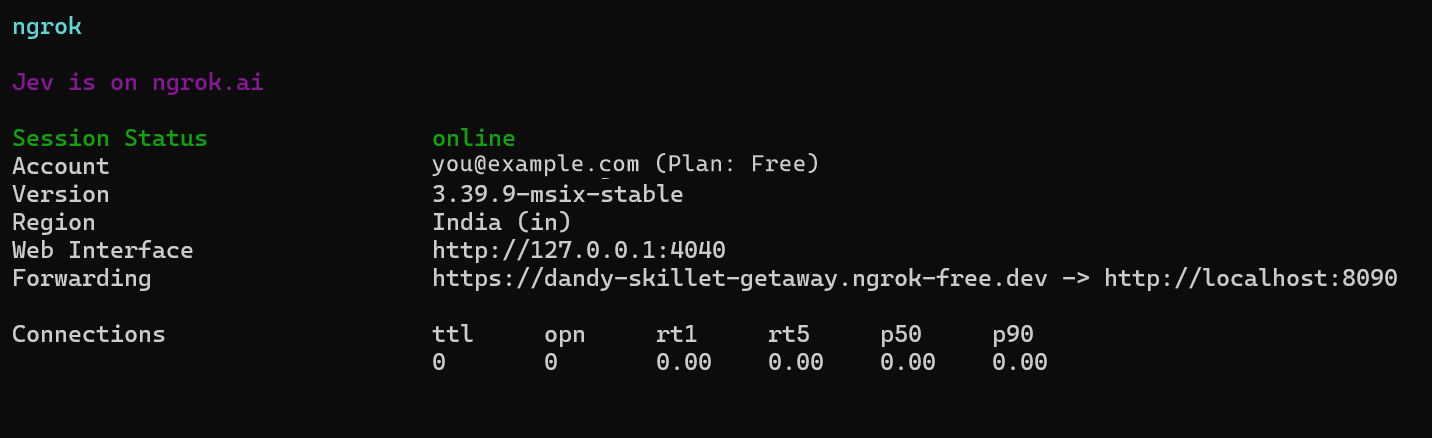
-
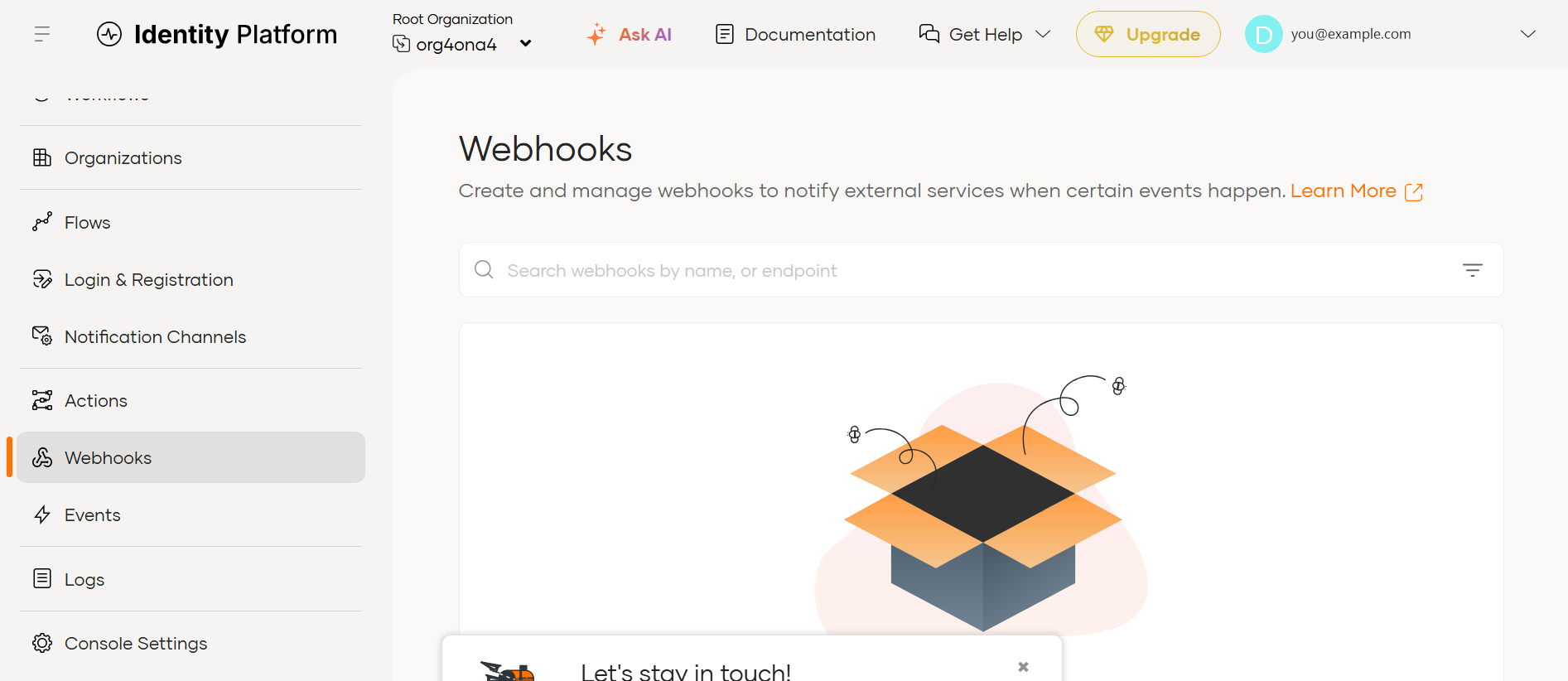
In the Identity Server or Asgardeo Console, go to Webhooks and click Add Webhook. (The screenshots are from Asgardeo; the Identity Server Console has the same pages.)
-
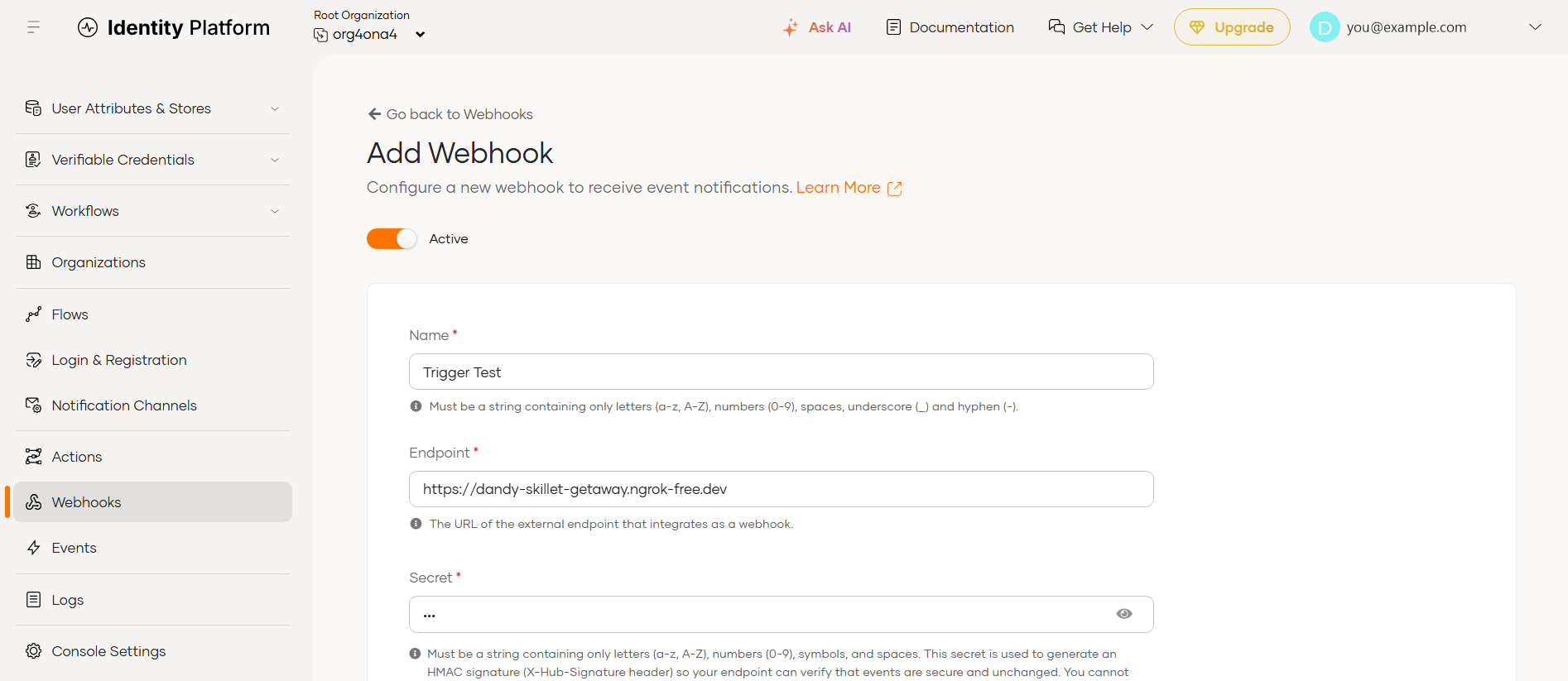
Fill in the webhook:
- Name: any descriptive name.
- Endpoint: the URL from step 1 or 2.
- Secret: the same value as
webhookSecretin your service. The server signs every delivery with it, and the listener rejects requests that don't carry a matching signature. - Leave Active on, or turn it on later from the webhook list.
-
Under Select Events, tick the events your service handles, for example Logins for
LoginServiceor User account management forUserService, and click Create.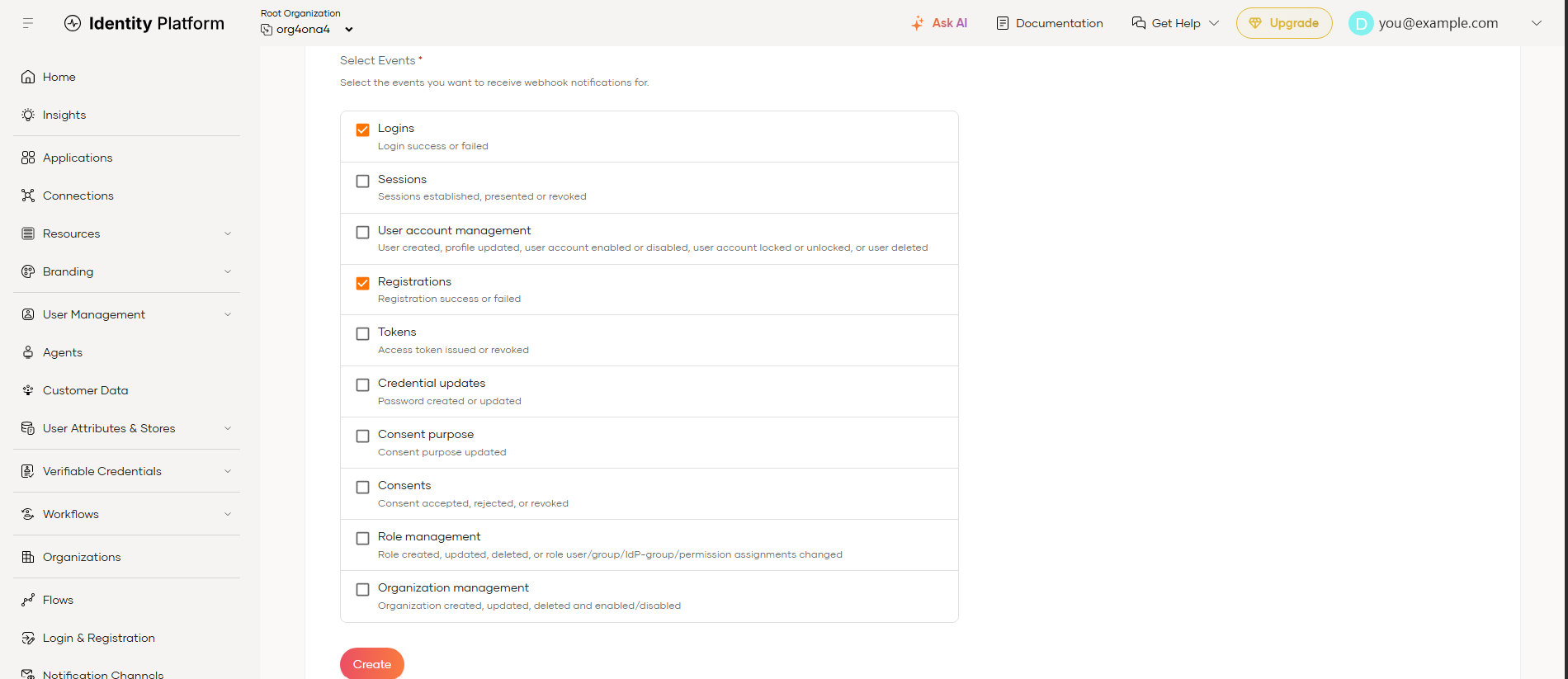
-
The webhook is listed as Active. When it's activated, Asgardeo sends a
GETverification request for each subscribed event type; the listener answers it, so your service must be running at that point. If it wasn't, turn the webhook off and on again to resend the requests.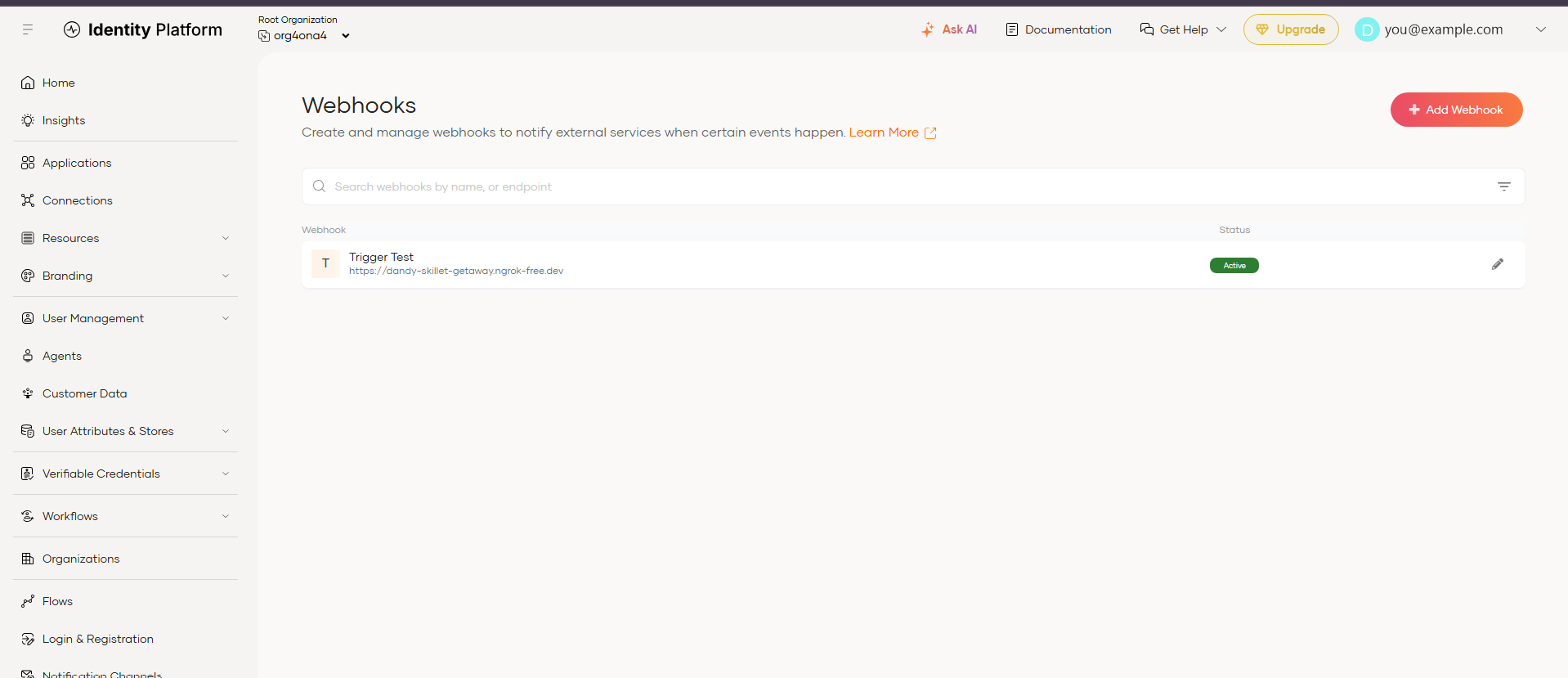
-
Trigger an event, for example by signing in to an application in the organization. Each request shows up in the ngrok console with
200 OK, and your handler runs for each event.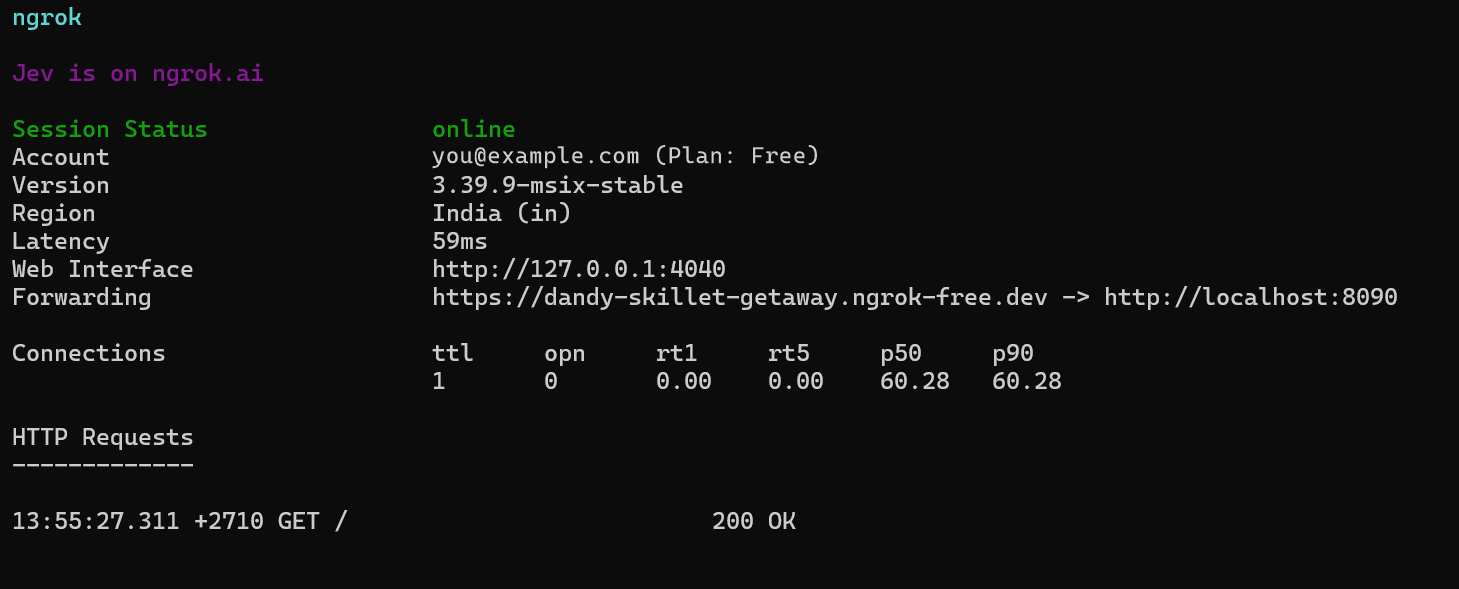
See Set up webhooks and Webhook events and payloads for the server side.
Production / business integration
For production use, deploy your Ballerina service somewhere the server can reach over HTTPS. Ballerina doesn't require any specific hosting platform - containers, a VM, a managed PaaS, or anything else that gives you a stable HTTPS endpoint all work equally well.
Rather than hardcoding webhookSecret as shown in the Quickstart, inject it via Config.toml (or
your platform's equivalent configuration/secret mechanism), since it's a configurable value:
[<your_org>.<your_module_name>.userInput] webhookSecret = "<your webhook secret>"
Then set your production URL as the webhook's Endpoint in the Console.
Compatibility
| Version | |
|---|---|
| Ballerina Language | Ballerina Swan Lake 2201.13.0 |
| WSO2 Identity Server | 7.2.0 or later |
Identity Server 7.2 delivers 17 of the events and 7.3 delivers 20; role, consent and organization events need newer versions. Asgardeo delivers all of them.
Quickstart
To use the WSO2 Identity Server Trigger in your Ballerina application, update the .bal file as
follows:
Step 1: Import the WSO2 Identity Server Trigger Ballerina library
import ballerinax/identityserver.trigger as wso2is;
Step 2: Initialize the WSO2 Identity Server Listener
Initialize the trigger by providing the listener config and a port number/http:Listener object.
configurable wso2is:ListenerConfig userInput = { webhookSecret: "xxxxxx" }; listener wso2is:Listener isListener = new (userInput, 8090);
webhookSecret should always be set to the secret configured on the webhook in the Console - this
is what the trigger uses to verify incoming events actually came from your server. Without it, the
listener rejects every request with 401 Unauthorized.
If you don't provide a port it will use the default port, which is 8090.
listener wso2is:Listener isListener = new (userInput);
Step 3: Use the correct service type to implement the service
Use the correct service type for the event category you subscribed to. For example, for Logins
use the LoginService service type. Every remote function declared on a service type must be
implemented - Ballerina requires a complete implementation, not just the ones you care about.
service wso2is:LoginService on isListener { remote function onLoginSuccess(wso2is:LoginSuccessEvent payload) returns error? { return; } remote function onLoginFailed(wso2is:LoginFailedEvent payload) returns error? { return; } }
Step 4: Provide remote functions corresponding to the events you're interested in
Remote functions must be implemented inside a service, on the matching service type for the event
category - for example, wso2is:UserService for user events. The service below replaces the
LoginService from Step 3: a listener takes only one service of each type on the same path.
import ballerina/log; service wso2is:LoginService on isListener { remote function onLoginSuccess(wso2is:LoginSuccessEvent payload) returns error? { wso2is:LoginSuccessPayload login = payload.events.loginSuccess; log:printInfo("Login succeeded", userId = login.user?.id, ip = login?.initiatorIpAddress); } remote function onLoginFailed(wso2is:LoginFailedEvent payload) returns error? { wso2is:LoginFailedPayload login = payload.events.loginFailed; log:printWarn("Login failed", userId = login.user?.id, reason = login.reason?.description); } }
Step 5: Run the service
Use the bal run command to compile and run the Ballerina program.
Step 6: Register a webhook so the server can reach your service
See Setup guide above for the full walkthrough of exposing your service and registering the webhook, for both local testing and production use.
Examples
The identityserver.trigger module provides practical examples illustrating usage in various
scenarios. Explore these examples,
covering common event handling use cases.
Report issues
To report bugs, request new features, start new discussions, etc., go to the Ballerina Library repository.
Useful links
- For more information go to the
identityserver.triggerpackage. - If you're moving from the older
trigger.asgardeopackage, see the migration notes. - For example demonstrations of the usage, go to Ballerina By Examples.
- Chat live with us via our Discord server.
- Post all technical questions on Stack Overflow with the #ballerina tag.
Service types
identityserver.trigger: LoginService
Attachable service type exposing the LoginService family of webhook events.
onLoginSuccess
function onLoginSuccess(LoginSuccessEvent payload) returns error?Triggered on Login success.
Parameters
- payload LoginSuccessEvent - the LoginSuccessEvent webhook payload
Return Type
- error? - an error if handling the event fails
onLoginFailed
function onLoginFailed(LoginFailedEvent payload) returns error?Triggered on Login failed.
Parameters
- payload LoginFailedEvent - the LoginFailedEvent webhook payload
Return Type
- error? - an error if handling the event fails
identityserver.trigger: RegistrationService
Attachable service type exposing the RegistrationService family of webhook events.
onRegistrationSuccess
function onRegistrationSuccess(RegistrationSuccessEvent payload) returns error?Triggered on Registration success.
Parameters
- payload RegistrationSuccessEvent - the RegistrationSuccessEvent webhook payload
Return Type
- error? - an error if handling the event fails
onRegistrationFailed
function onRegistrationFailed(RegistrationFailedEvent payload) returns error?Triggered on Registration failed.
Parameters
- payload RegistrationFailedEvent - the RegistrationFailedEvent webhook payload
Return Type
- error? - an error if handling the event fails
identityserver.trigger: TokenService
Attachable service type exposing the TokenService family of webhook events.
onAccessTokenIssued
function onAccessTokenIssued(AccessTokenIssuedEvent payload) returns error?Triggered on Access token issued.
Parameters
- payload AccessTokenIssuedEvent - the AccessTokenIssuedEvent webhook payload
Return Type
- error? - an error if handling the event fails
onAccessTokenRevoked
function onAccessTokenRevoked(AccessTokenRevokedEvent payload) returns error?Triggered on Access token revoked.
Parameters
- payload AccessTokenRevokedEvent - the AccessTokenRevokedEvent webhook payload
Return Type
- error? - an error if handling the event fails
identityserver.trigger: SessionService
Attachable service type exposing the SessionService family of webhook events.
onSessionEstablished
function onSessionEstablished(SessionEstablishedEvent payload) returns error?Triggered on Session established.
Parameters
- payload SessionEstablishedEvent - the SessionEstablishedEvent webhook payload
Return Type
- error? - an error if handling the event fails
onSessionPresented
function onSessionPresented(SessionPresentedEvent payload) returns error?Triggered on Session presented.
Parameters
- payload SessionPresentedEvent - the SessionPresentedEvent webhook payload
Return Type
- error? - an error if handling the event fails
onSessionRevoked
function onSessionRevoked(SessionRevokedEvent payload) returns error?Triggered on Session revoked.
Parameters
- payload SessionRevokedEvent - the SessionRevokedEvent webhook payload
Return Type
- error? - an error if handling the event fails
identityserver.trigger: CredentialService
Attachable service type exposing the CredentialService family of webhook events.
onCredentialUpdated
function onCredentialUpdated(CredentialUpdatedEvent payload) returns error?Triggered on Credential updated.
Parameters
- payload CredentialUpdatedEvent - the CredentialUpdatedEvent webhook payload
Return Type
- error? - an error if handling the event fails
identityserver.trigger: UserService
Attachable service type exposing the UserService family of webhook events.
onUserCreated
function onUserCreated(UserCreatedEvent payload) returns error?Triggered on User created.
Parameters
- payload UserCreatedEvent - the UserCreatedEvent webhook payload
Return Type
- error? - an error if handling the event fails
onUserProfileUpdated
function onUserProfileUpdated(UserProfileUpdatedEvent payload) returns error?Triggered on User profile updated.
Parameters
- payload UserProfileUpdatedEvent - the UserProfileUpdatedEvent webhook payload
Return Type
- error? - an error if handling the event fails
onUserDisabled
function onUserDisabled(UserDisabledEvent payload) returns error?Triggered on User disabled.
Parameters
- payload UserDisabledEvent - the UserDisabledEvent webhook payload
Return Type
- error? - an error if handling the event fails
onUserEnabled
function onUserEnabled(UserEnabledEvent payload) returns error?Triggered on User enabled.
Parameters
- payload UserEnabledEvent - the UserEnabledEvent webhook payload
Return Type
- error? - an error if handling the event fails
onUserAccountLocked
function onUserAccountLocked(UserAccountLockedEvent payload) returns error?Triggered on User account locked.
Parameters
- payload UserAccountLockedEvent - the UserAccountLockedEvent webhook payload
Return Type
- error? - an error if handling the event fails
onUserAccountUnlocked
function onUserAccountUnlocked(UserAccountUnlockedEvent payload) returns error?Triggered on User account unlocked.
Parameters
- payload UserAccountUnlockedEvent - the UserAccountUnlockedEvent webhook payload
Return Type
- error? - an error if handling the event fails
onUserDeleted
function onUserDeleted(UserDeletedEvent payload) returns error?Triggered on User deleted.
Parameters
- payload UserDeletedEvent - the UserDeletedEvent webhook payload
Return Type
- error? - an error if handling the event fails
identityserver.trigger: ConsentService
Attachable service type exposing the ConsentService family of webhook events.
onConsentAdded
function onConsentAdded(ConsentAddedEvent payload) returns error?Triggered on Consent added.
Parameters
- payload ConsentAddedEvent - the ConsentAddedEvent webhook payload
Return Type
- error? - an error if handling the event fails
onConsentRevoked
function onConsentRevoked(ConsentRevokedEvent payload) returns error?Triggered on Consent revoked.
Parameters
- payload ConsentRevokedEvent - the ConsentRevokedEvent webhook payload
Return Type
- error? - an error if handling the event fails
identityserver.trigger: ConsentPurposeService
Attachable service type exposing the ConsentPurposeService family of webhook events.
onPurposeVersionAdded
function onPurposeVersionAdded(PurposeVersionAddedEvent payload) returns error?Triggered on Purpose version added.
Parameters
- payload PurposeVersionAddedEvent - the PurposeVersionAddedEvent webhook payload
Return Type
- error? - an error if handling the event fails
identityserver.trigger: RoleService
Attachable service type exposing the RoleService family of webhook events.
onRoleCreated
function onRoleCreated(RoleCreatedEvent payload) returns error?Triggered on Role created.
Parameters
- payload RoleCreatedEvent - the RoleCreatedEvent webhook payload
Return Type
- error? - an error if handling the event fails
onRoleMetaUpdated
function onRoleMetaUpdated(RoleMetaUpdatedEvent payload) returns error?Triggered on Role meta updated.
Parameters
- payload RoleMetaUpdatedEvent - the RoleMetaUpdatedEvent webhook payload
Return Type
- error? - an error if handling the event fails
onRoleDeleted
function onRoleDeleted(RoleDeletedEvent payload) returns error?Triggered on Role deleted.
Parameters
- payload RoleDeletedEvent - the RoleDeletedEvent webhook payload
Return Type
- error? - an error if handling the event fails
onRoleUsersUpdated
function onRoleUsersUpdated(RoleUsersUpdatedEvent payload) returns error?Triggered on Role users updated.
Parameters
- payload RoleUsersUpdatedEvent - the RoleUsersUpdatedEvent webhook payload
Return Type
- error? - an error if handling the event fails
onRoleGroupsUpdated
function onRoleGroupsUpdated(RoleGroupsUpdatedEvent payload) returns error?Triggered on Role groups updated.
Parameters
- payload RoleGroupsUpdatedEvent - the RoleGroupsUpdatedEvent webhook payload
Return Type
- error? - an error if handling the event fails
onRoleIdpGroupsUpdated
function onRoleIdpGroupsUpdated(RoleIdpGroupsUpdatedEvent payload) returns error?Triggered on Role idp groups updated.
Parameters
- payload RoleIdpGroupsUpdatedEvent - the RoleIdpGroupsUpdatedEvent webhook payload
Return Type
- error? - an error if handling the event fails
onRolePermissionsUpdated
function onRolePermissionsUpdated(RolePermissionsUpdatedEvent payload) returns error?Triggered on Role permissions updated.
Parameters
- payload RolePermissionsUpdatedEvent - the RolePermissionsUpdatedEvent webhook payload
Return Type
- error? - an error if handling the event fails
identityserver.trigger: OrganizationService
Attachable service type exposing the OrganizationService family of webhook events.
onOrganizationCreated
function onOrganizationCreated(OrganizationCreatedEvent payload) returns error?Triggered on Organization created.
Parameters
- payload OrganizationCreatedEvent - the OrganizationCreatedEvent webhook payload
Return Type
- error? - an error if handling the event fails
onOrganizationUpdated
function onOrganizationUpdated(OrganizationUpdatedEvent payload) returns error?Triggered on Organization updated.
Parameters
- payload OrganizationUpdatedEvent - the OrganizationUpdatedEvent webhook payload
Return Type
- error? - an error if handling the event fails
onOrganizationEnabled
function onOrganizationEnabled(OrganizationEnabledEvent payload) returns error?Triggered on Organization enabled.
Parameters
- payload OrganizationEnabledEvent - the OrganizationEnabledEvent webhook payload
Return Type
- error? - an error if handling the event fails
onOrganizationDisabled
function onOrganizationDisabled(OrganizationDisabledEvent payload) returns error?Triggered on Organization disabled.
Parameters
- payload OrganizationDisabledEvent - the OrganizationDisabledEvent webhook payload
Return Type
- error? - an error if handling the event fails
onOrganizationDeleted
function onOrganizationDeleted(OrganizationDeletedEvent payload) returns error?Triggered on Organization deleted.
Parameters
- payload OrganizationDeletedEvent - the OrganizationDeletedEvent webhook payload
Return Type
- error? - an error if handling the event fails
Listeners
identityserver.trigger: Listener
attach
function attach(GenericServiceType serviceRef, string[]|string? attachPoint) returns error?detach
function detach(GenericServiceType serviceRef) returns error?Parameters
- serviceRef GenericServiceType -
'start
function 'start() returns error?gracefulStop
function gracefulStop() returns error?immediateStop
function immediateStop() returns error?Records
identityserver.trigger: 'version
Details of the newly added version.
Fields
- 'version? string - The version number of the new version.
- setAsLatest? boolean - Whether this version becomes the active version for new consents.
- elements? PurposeVersionElementsItem[] - Array of attributes (elements) included in this version, each with a name and mandatory flag.
identityserver.trigger: AccessToken
Details about the issued token.
Fields
- tokenType? string - e.g.
Opaqueorjwt.
- iat? string - Token issued at timestamp.
- grantType? string - OAuth2 grant type used for token issuance (e.g.,
authorization_code)
identityserver.trigger: AccessTokenIssuedEvent
Access token issued event. The payload is a Security Event Token (RFC 8417) claim set.
Fields
- iss string - Identifies the WSO2 Identity Server instance that issued the event.
- jti string - A unique identifier for the event.
- iat int - Timestamp showing when WSO2 Identity Server issues the event. Epoch milliseconds.
- rci string - A unique identifier that correlates the event with the original request that triggered it.
- events EventDataAccessTokenIssued - The event, keyed by its event type URI.
identityserver.trigger: AccessTokenIssuedPayload
Fields
- initiatorType? InitiatorType - Indicates the persona who initiates the identity flow.
- action? Action - Indicates the related identity flow.
- initiatorIpAddress? InitiatorIpAddress - Indicates the IP address of the initiator that triggered the event.
- user? User - Information of the user interacting in the related event.
- tenant? Tenant - Root organization (tenant).
- organization? Organization - The organization under which the event is processed.
- userStore? UserStore - User store managing the user's data.
- application? AccessTokenIssuedPayloadApplication - Information about the application that requested the token.
- accessToken? AccessToken - Details about the issued token.
identityserver.trigger: AccessTokenIssuedPayloadApplication
Information about the application that requested the token.
Fields
- name? string - Name of the application.
- consumerKey? string - Consumer key of the application.
identityserver.trigger: AccessTokenRevokedEvent
Access token revoked event. The payload is a Security Event Token (RFC 8417) claim set.
Fields
- iss string - Identifies the WSO2 Identity Server instance that issued the event.
- jti string - A unique identifier for the event.
- iat int - Timestamp showing when WSO2 Identity Server issues the event. Epoch milliseconds.
- rci string - A unique identifier that correlates the event with the original request that triggered it.
- events EventDataAccessTokenRevoked - The event, keyed by its event type URI.
identityserver.trigger: AccessTokenRevokedPayload
Fields
- initiatorType? InitiatorType - Indicates the persona who initiates the identity flow.
- action? Action - Indicates the related identity flow.
- initiatorIpAddress? InitiatorIpAddress - Indicates the IP address of the initiator that triggered the event.
- user? User - Information of the user interacting in the related event.
- tenant? Tenant - Root organization (tenant).
- organization? Organization - The organization under which the event is processed.
- userStore? UserStore - User store managing the user's data.
- applications? ApplicationsItem[] - Applications associated with the revoked token.
identityserver.trigger: Application
Information about an application.
Fields
- id? string - Unique identifier of the application.
- name? string - Name of the application.
identityserver.trigger: ApplicationsItem
Fields
- id? string - Unique identifier of the application.
- name? string - Name of the application.
- consumerKey? string - Consumer key of the application.
identityserver.trigger: Claim
Fields
- uri string - Local claim uri name. E.g., http://wso2.org/claims/username
- value Value - Claim value. Either a single value or an array of values for multi-valued claims.
identityserver.trigger: Consent
Contains details about the consent.
Fields
- id? string - Unique identifier for the consent record.
- subjectId? string - Username of the user to whom the consent applies.
- state? string - Current state of the consent.
- serviceId? string - The service or application for which the consent is granted.
- purpose? Purpose - Details of the consent purpose.
identityserver.trigger: ConsentAddedEvent
Consent added event. The payload is a Security Event Token (RFC 8417) claim set.
Fields
- iss string - Identifies the WSO2 Identity Server instance that issued the event.
- jti string - A unique identifier for the event.
- iat int - Timestamp showing when WSO2 Identity Server issues the event. Epoch milliseconds.
- rci string - A unique identifier that correlates the event with the original request that triggered it.
- events EventDataConsentAdded - The event, keyed by its event type URI.
identityserver.trigger: ConsentAddedPayload
Fields
- initiatorType? InitiatorType - Indicates the persona who initiates the identity flow.
- initiatorIpAddress? InitiatorIpAddress - Indicates the IP address of the initiator that triggered the event.
- user? User - Information of the user interacting in the related event.
- tenant? Tenant - Root organization (tenant).
- organization? Organization - The organization under which the event is processed.
- userStore? UserStore - User store managing the user's data.
- action? Action - Indicates the related identity flow.
- consent? Consent - Contains details about the consent.
identityserver.trigger: ConsentRevokedEvent
Consent revoked event. The payload is a Security Event Token (RFC 8417) claim set.
Fields
- iss string - Identifies the WSO2 Identity Server instance that issued the event.
- jti string - A unique identifier for the event.
- iat int - Timestamp showing when WSO2 Identity Server issues the event. Epoch milliseconds.
- rci string - A unique identifier that correlates the event with the original request that triggered it.
- events EventDataConsentRevoked - The event, keyed by its event type URI.
identityserver.trigger: ConsentRevokedPayload
Fields
- initiatorType? InitiatorType - Indicates the persona who initiates the identity flow.
- initiatorIpAddress? InitiatorIpAddress - Indicates the IP address of the initiator that triggered the event.
- user? User - Information of the user interacting in the related event.
- tenant? Tenant - Root organization (tenant).
- organization? Organization - The organization under which the event is processed.
- userStore? UserStore - User store managing the user's data.
- action? Action - Indicates the related identity flow.
- consent? Consent - Contains details about the consent.
identityserver.trigger: Context
Details about the failure point in the related identity flow.
Fields
- failedStep? FailedStep - Details about the failure step in the authentication flow.
identityserver.trigger: CreatedTargetOrganization
The organization that was created.
Fields
- id? string - Unique identifier of the organization.
- name? string - Name of the organization.
- orgHandle? string - Unique, human-readable handle of the organization.
- depth? int - The depth of the organization in the hierarchy.
- ref? string - Organization management API reference URL for the organization.
- attributes? OrganizationAttributeChanges - Attributes added, removed or updated by the operation.
identityserver.trigger: CredentialUpdatedEvent
Credential updated event. The payload is a Security Event Token (RFC 8417) claim set.
Fields
- iss string - Identifies the WSO2 Identity Server instance that issued the event.
- jti string - A unique identifier for the event.
- iat int - Timestamp showing when WSO2 Identity Server issues the event. Epoch milliseconds.
- rci string - A unique identifier that correlates the event with the original request that triggered it.
- events EventDataCredentialUpdated - The event, keyed by its event type URI.
identityserver.trigger: CredentialUpdatedPayload
Fields
- initiatorType? InitiatorType - Indicates the persona who initiates the identity flow.
- initiatorIpAddress? InitiatorIpAddress - Indicates the IP address of the initiator that triggered the event.
- user? User - Information of the user interacting in the related event.
- tenant? Tenant - Root organization (tenant).
- organization? Organization - The organization under which the event is processed.
- userStore? UserStore - User store managing the user's data.
- credentialType? string - Indicates which credential the user updates (e.g.,
PASSWORD).
- action? Action - Indicates the related identity flow.
identityserver.trigger: ElementsItem
Fields
- name? string -
identityserver.trigger: EventDataAccessTokenIssued
Access token issued
Fields
- accessTokenIssued AccessTokenIssuedPayload - The access token issued event data.
identityserver.trigger: EventDataAccessTokenRevoked
Access token revoked
Fields
- accessTokenRevoked AccessTokenRevokedPayload - The access token revoked event data.
identityserver.trigger: EventDataConsentAdded
Consent added
Fields
- consentAdded ConsentAddedPayload - The consent added event data.
identityserver.trigger: EventDataConsentRevoked
Consent revoked
Fields
- consentRevoked ConsentRevokedPayload - The consent revoked event data.
identityserver.trigger: EventDataCredentialUpdated
Credential updated
Fields
- credentialUpdated CredentialUpdatedPayload - The credential updated event data.
identityserver.trigger: EventDataLoginFailed
Login failed
Fields
- loginFailed LoginFailedPayload - The login failed event data.
identityserver.trigger: EventDataLoginSuccess
Login success
Fields
- loginSuccess LoginSuccessPayload - The login success event data.
identityserver.trigger: EventDataOrganizationCreated
Organization created
Fields
- organizationCreated OrganizationCreatedPayload - The organization created event data.
identityserver.trigger: EventDataOrganizationDeleted
Organization deleted
Fields
- organizationDeleted OrganizationDeletedPayload - The organization deleted event data.
identityserver.trigger: EventDataOrganizationDisabled
Organization disabled
Fields
- organizationDisabled OrganizationDisabledPayload - The organization disabled event data.
identityserver.trigger: EventDataOrganizationEnabled
Organization enabled
Fields
- organizationEnabled OrganizationEnabledPayload - The organization enabled event data.
identityserver.trigger: EventDataOrganizationUpdated
Organization updated
Fields
- organizationUpdated OrganizationUpdatedPayload - The organization updated event data.
identityserver.trigger: EventDataPurposeVersionAdded
Purpose version added
Fields
- purposeVersionAdded PurposeVersionAddedPayload - The purpose version added event data.
identityserver.trigger: EventDataRegistrationFailed
Registration failed
Fields
- registrationFailed RegistrationFailedPayload - The registration failed event data.
identityserver.trigger: EventDataRegistrationSuccess
Registration success
Fields
- registrationSuccess RegistrationSuccessPayload - The registration success event data.
identityserver.trigger: EventDataRoleCreated
Role created
Fields
- roleCreated RoleCreatedPayload - The role created event data.
identityserver.trigger: EventDataRoleDeleted
Role deleted
Fields
- roleDeleted RoleDeletedPayload - The role deleted event data.
identityserver.trigger: EventDataRoleGroupsUpdated
Role groups updated
Fields
- roleGroupsUpdated RoleGroupsUpdatedPayload - The role groups updated event data.
identityserver.trigger: EventDataRoleIdpGroupsUpdated
Role IdP groups updated
Fields
- roleIdpGroupsUpdated RoleIdpGroupsUpdatedPayload - The role IdP groups updated event data.
identityserver.trigger: EventDataRoleMetaUpdated
Role metadata updated
Fields
- roleMetaUpdated RoleMetaUpdatedPayload - The role metadata updated event data.
identityserver.trigger: EventDataRolePermissionsUpdated
Role permissions updated
Fields
- rolePermissionsUpdated RolePermissionsUpdatedPayload - The role permissions updated event data.
identityserver.trigger: EventDataRoleUsersUpdated
Role users updated
Fields
- roleUsersUpdated RoleUsersUpdatedPayload - The role users updated event data.
identityserver.trigger: EventDataSessionEstablished
Session established
Fields
- sessionEstablished SessionEstablishedPayload - The session established event data.
identityserver.trigger: EventDataSessionPresented
Session presented
Fields
- sessionPresented SessionPresentedPayload - The session presented event data.
identityserver.trigger: EventDataSessionRevoked
Session revoked
Fields
- sessionRevoked SessionRevokedPayload - The session revoked event data.
identityserver.trigger: EventDataUserAccountLocked
User account locked
Fields
- userAccountLocked UserAccountLockedPayload - The user account locked event data.
identityserver.trigger: EventDataUserAccountUnlocked
User account unlocked
Fields
- userAccountUnlocked UserAccountUnlockedPayload - The user account unlocked event data.
identityserver.trigger: EventDataUserCreated
User created
Fields
- userCreated UserCreatedPayload - The user created event data.
identityserver.trigger: EventDataUserDeleted
User deleted
Fields
- userDeleted UserDeletedPayload - The user deleted event data.
identityserver.trigger: EventDataUserDisabled
User disabled
Fields
- userDisabled UserDisabledPayload - The user disabled event data.
identityserver.trigger: EventDataUserEnabled
User enabled
Fields
- userEnabled UserEnabledPayload - The user enabled event data.
identityserver.trigger: EventDataUserProfileUpdated
User profile updated
Fields
- userProfileUpdated UserProfileUpdatedPayload - The user profile updated event data.
identityserver.trigger: FailedStep
Details about the failure step in the authentication flow.
Fields
- step? int - Step number where the failure occurred
- idp? string - Identity Provider (IdP) involved in the failure
- authenticator? string - Authenticator used.
identityserver.trigger: ListenerConfig
Configuration for the webhook listener, including the secret used to verify incoming requests.
Fields
- webhookSecret? string - The secret used to verify incoming webhook signatures.
identityserver.trigger: LoginFailedEvent
Login failed event. The payload is a Security Event Token (RFC 8417) claim set.
Fields
- iss string - Identifies the WSO2 Identity Server instance that issued the event.
- jti string - A unique identifier for the event.
- iat int - Timestamp showing when WSO2 Identity Server issues the event. Epoch milliseconds.
- rci string - A unique identifier that correlates the event with the original request that triggered it.
- events EventDataLoginFailed - The event, keyed by its event type URI.
identityserver.trigger: LoginFailedPayload
Fields
- initiatorType? string - Indicates the persona who initiates the identity flow. E.g.,
USER
- action? string - Indicates the related identity flow. E.g.,
LOGIN
- initiatorIpAddress? InitiatorIpAddress - Indicates the IP address of the initiator that triggered the event.
- user? User - Information of the user interacting in the related event.
- tenant? Tenant - Root organization (tenant).
- organization? Organization - The organization under which the event is processed.
- userStore? UserStore - User store managing the user's data.
- application? anydata - Information about the application that initiated the login.
- reason? Reason - Context information for the failure.
identityserver.trigger: LoginSuccessEvent
Login success event. The payload is a Security Event Token (RFC 8417) claim set.
Fields
- iss string - Identifies the WSO2 Identity Server instance that issued the event.
- jti string - A unique identifier for the event.
- iat int - Timestamp showing when WSO2 Identity Server issues the event. Epoch milliseconds.
- rci string - A unique identifier that correlates the event with the original request that triggered it.
- events EventDataLoginSuccess - The event, keyed by its event type URI.
identityserver.trigger: LoginSuccessPayload
Fields
- initiatorType? string - Indicates the persona who initiates the identity flow. E.g.,
USER
- action? string - Indicates the related identity flow. E.g.,
LOGIN
- initiatorIpAddress? InitiatorIpAddress - Indicates the IP address of the initiator that triggered the event.
- user? User - Information of the user interacting in the related event.
- tenant? Tenant - Root organization (tenant).
- organization? Organization - The organization under which the event is processed.
- userStore? UserStore - User store managing the user's data.
- application? anydata - Information about the application that initiated the login.
- authenticationMethods? string[] - An array of authentication methods used for the successful login (for example
BasicAuthenticator).
identityserver.trigger: Organization
The organization under which the event is processed.
Fields
- id? string - Unique identifier of the organization.
- name? string - Name of the organization.
- orgHandle? string - Unique, human-readable handle of the organization.
- depth? int - The depth of the organization in the hierarchy.
identityserver.trigger: OrganizationAttribute
A custom attribute of an organization.
Fields
- name string - Name of the attribute.
- value? string - Value of the attribute. Absent for a removed attribute.
identityserver.trigger: OrganizationAttributeChanges
Attributes added, removed or updated by the operation.
Fields
- added? OrganizationAttribute[] - Attributes added by the operation.
- removed? OrganizationAttribute[] - Attributes removed by the operation.
- updated? OrganizationAttribute[] - Attributes updated by the operation.
identityserver.trigger: OrganizationCreatedEvent
Organization created event. The payload is a Security Event Token (RFC 8417) claim set.
Fields
- iss string - Identifies the WSO2 Identity Server instance that issued the event.
- jti string - A unique identifier for the event.
- iat int - Timestamp showing when WSO2 Identity Server issues the event. Epoch milliseconds.
- rci string - A unique identifier that correlates the event with the original request that triggered it.
- events EventDataOrganizationCreated - The event, keyed by its event type URI.
identityserver.trigger: OrganizationCreatedPayload
Fields
- initiatorType? InitiatorType - Indicates the persona who initiates the identity flow.
- initiatorIpAddress? InitiatorIpAddress - Indicates the IP address of the initiator that triggered the event.
- tenant? Tenant - Root organization (tenant).
- organization? Organization - The organization under which the event is processed.
- action? Action - Indicates the related identity flow.
- targetOrganization? CreatedTargetOrganization - The organization that was created.
identityserver.trigger: OrganizationDeletedEvent
Organization deleted event. The payload is a Security Event Token (RFC 8417) claim set.
Fields
- iss string - Identifies the WSO2 Identity Server instance that issued the event.
- jti string - A unique identifier for the event.
- iat int - Timestamp showing when WSO2 Identity Server issues the event. Epoch milliseconds.
- rci string - A unique identifier that correlates the event with the original request that triggered it.
- events EventDataOrganizationDeleted - The event, keyed by its event type URI.
identityserver.trigger: OrganizationDeletedPayload
Fields
- initiatorType? InitiatorType - Indicates the persona who initiates the identity flow.
- initiatorIpAddress? InitiatorIpAddress - Indicates the IP address of the initiator that triggered the event.
- tenant? Tenant - Root organization (tenant).
- organization? Organization - The organization under which the event is processed.
- action? Action - Indicates the related identity flow.
- targetOrganization? TargetOrganization - The organization the operation acted on.
identityserver.trigger: OrganizationDisabledEvent
Organization disabled event. The payload is a Security Event Token (RFC 8417) claim set.
Fields
- iss string - Identifies the WSO2 Identity Server instance that issued the event.
- jti string - A unique identifier for the event.
- iat int - Timestamp showing when WSO2 Identity Server issues the event. Epoch milliseconds.
- rci string - A unique identifier that correlates the event with the original request that triggered it.
- events EventDataOrganizationDisabled - The event, keyed by its event type URI.
identityserver.trigger: OrganizationDisabledPayload
Fields
- initiatorType? InitiatorType - Indicates the persona who initiates the identity flow.
- initiatorIpAddress? InitiatorIpAddress - Indicates the IP address of the initiator that triggered the event.
- tenant? Tenant - Root organization (tenant).
- organization? Organization - The organization under which the event is processed.
- action? Action - Indicates the related identity flow.
- targetOrganization? TargetOrganization - The organization the operation acted on.
identityserver.trigger: OrganizationEnabledEvent
Organization enabled event. The payload is a Security Event Token (RFC 8417) claim set.
Fields
- iss string - Identifies the WSO2 Identity Server instance that issued the event.
- jti string - A unique identifier for the event.
- iat int - Timestamp showing when WSO2 Identity Server issues the event. Epoch milliseconds.
- rci string - A unique identifier that correlates the event with the original request that triggered it.
- events EventDataOrganizationEnabled - The event, keyed by its event type URI.
identityserver.trigger: OrganizationEnabledPayload
Fields
- initiatorType? InitiatorType - Indicates the persona who initiates the identity flow.
- initiatorIpAddress? InitiatorIpAddress - Indicates the IP address of the initiator that triggered the event.
- tenant? Tenant - Root organization (tenant).
- organization? Organization - The organization under which the event is processed.
- action? Action - Indicates the related identity flow.
- targetOrganization? TargetOrganization - The organization the operation acted on.
identityserver.trigger: OrganizationUpdatedEvent
Organization updated event. The payload is a Security Event Token (RFC 8417) claim set.
Fields
- iss string - Identifies the WSO2 Identity Server instance that issued the event.
- jti string - A unique identifier for the event.
- iat int - Timestamp showing when WSO2 Identity Server issues the event. Epoch milliseconds.
- rci string - A unique identifier that correlates the event with the original request that triggered it.
- events EventDataOrganizationUpdated - The event, keyed by its event type URI.
identityserver.trigger: OrganizationUpdatedPayload
Fields
- initiatorType? InitiatorType - Indicates the persona who initiates the identity flow.
- initiatorIpAddress? InitiatorIpAddress - Indicates the IP address of the initiator that triggered the event.
- tenant? Tenant - Root organization (tenant).
- organization? Organization - The organization under which the event is processed.
- action? Action - Indicates the related identity flow.
- targetOrganization? UpdatedTargetOrganization - The organization that was updated.
identityserver.trigger: OrganizationUpdatedValues
The values the update set. Only the changed values are present.
Fields
- name? string - The new name of the organization.
- description? string - The new description of the organization.
- attributes? OrganizationAttributeChanges - Attributes added, removed or updated by the operation.
identityserver.trigger: ProfileUpdatedUser
Contains information about the user whose profile updated.
Fields
- id? string - Unique identifier of the user.
- organization? anydata - The organization the user belongs to (the user's resident organization).
- addedClaims? Claim[] - Claims added to the user's profile during the update.
- updatedClaims? Claim[] - Claims whose values changed during the update.
- removedClaims? RemovedClaimsItem[] - Claims removed from the user's profile during the update.
- ref? string - SCIM 2.0 resource URL for the user.
identityserver.trigger: Purpose
Details of the consent purpose.
Fields
- id? string - Unique identifier of the consent purpose.
- name? string - Human-readable name of the consent purpose.
- 'version? string - The UUID of the specific purpose version the user consented to.
- elements? ElementsItem[] - Array of PII categories covered by the consent, each with a name.
identityserver.trigger: PurposeVersion
Contains details about the updated consent purpose.
Fields
- id? string - Unique identifier for the consent purpose.
- name? string - Human-readable name of the consent purpose.
- 'version? 'version - Details of the newly added version.
identityserver.trigger: PurposeVersionAddedEvent
Purpose version added event. The payload is a Security Event Token (RFC 8417) claim set.
Fields
- iss string - Identifies the WSO2 Identity Server instance that issued the event.
- jti string - A unique identifier for the event.
- iat int - Timestamp showing when WSO2 Identity Server issues the event. Epoch milliseconds.
- rci string - A unique identifier that correlates the event with the original request that triggered it.
- events EventDataPurposeVersionAdded - The event, keyed by its event type URI.
identityserver.trigger: PurposeVersionAddedPayload
Fields
- initiatorType? InitiatorType - Indicates the persona who initiates the identity flow.
- initiatorIpAddress? InitiatorIpAddress - Indicates the IP address of the initiator that triggered the event.
- tenant? Tenant - Root organization (tenant).
- organization? Organization - The organization under which the event is processed.
- action? Action - Indicates the related identity flow.
- purpose? PurposeVersion - Contains details about the updated consent purpose.
identityserver.trigger: PurposeVersionElementsItem
Fields
- name? string -
- mandatory? boolean -
identityserver.trigger: Reason
Context information for the failure.
Fields
- description? string - Human-readable explanation of the failure.
- context? Context - Details about the failure point in the related identity flow.
identityserver.trigger: RegistrationFailedEvent
Registration failed event. The payload is a Security Event Token (RFC 8417) claim set.
Fields
- iss string - Identifies the WSO2 Identity Server instance that issued the event.
- jti string - A unique identifier for the event.
- iat int - Timestamp showing when WSO2 Identity Server issues the event. Epoch milliseconds.
- rci string - A unique identifier that correlates the event with the original request that triggered it.
- events EventDataRegistrationFailed - The event, keyed by its event type URI.
identityserver.trigger: RegistrationFailedPayload
Fields
- initiatorType? InitiatorType - Indicates the persona who initiates the identity flow.
- initiatorIpAddress? InitiatorIpAddress - Indicates the IP address of the initiator that triggered the event.
- user? User - Information of the user interacting in the related event.
- tenant? Tenant - Root organization (tenant).
- organization? Organization - The organization under which the event is processed.
- action? Action - Indicates the related identity flow.
- reason? Reason - Context information for the failure.
identityserver.trigger: RegistrationSuccessEvent
Registration success event. The payload is a Security Event Token (RFC 8417) claim set.
Fields
- iss string - Identifies the WSO2 Identity Server instance that issued the event.
- jti string - A unique identifier for the event.
- iat int - Timestamp showing when WSO2 Identity Server issues the event. Epoch milliseconds.
- rci string - A unique identifier that correlates the event with the original request that triggered it.
- events EventDataRegistrationSuccess - The event, keyed by its event type URI.
identityserver.trigger: RegistrationSuccessPayload
Fields
- initiatorType? InitiatorType - Indicates the persona who initiates the identity flow.
- initiatorIpAddress? InitiatorIpAddress - Indicates the IP address of the initiator that triggered the event.
- user? User - Information of the user interacting in the related event.
- tenant? Tenant - Root organization (tenant).
- organization? Organization - The organization under which the event is processed.
- userStore? UserStore - User store managing the user's data.
- action? Action - Indicates the related identity flow.
identityserver.trigger: RemovedClaimsItem
Fields
- uri? string - Local claim uri name. E.g., http://wso2.org/claims/username
identityserver.trigger: Role
Contains details about the created role.
Fields
- id? string - Unique identifier of the role.
- name? string - Display name of the role.
- audience? RoleAudience - The audience the role is scoped to.
- ref? string - SCIM v2 reference URL for the role.
- users? RoleUser[] - Users assigned to the role at creation. Present only when the role is created with users.
- groups? RoleGroup[] - Local groups assigned to the role at creation. Present only when the role is created with groups.
- permissions? string[] - Permission names granted to the role at creation. Present only when the role is created with permissions.
identityserver.trigger: RoleAudience
The audience the role is scoped to.
Fields
- 'type? string - The audience type. Either
organizationorapplication.
- value? string - Identifier of the audience. The organization id for an organization-scoped role, or the application id for an application-scoped role.
- display? string - Display name of the audience. The organization name for an organization-scoped role, or the application name for an application-scoped role.
identityserver.trigger: RoleCreatedEvent
Role created event. The payload is a Security Event Token (RFC 8417) claim set.
Fields
- iss string - Identifies the WSO2 Identity Server instance that issued the event.
- jti string - A unique identifier for the event.
- iat int - Timestamp showing when WSO2 Identity Server issues the event. Epoch milliseconds.
- rci string - A unique identifier that correlates the event with the original request that triggered it.
- events EventDataRoleCreated - The event, keyed by its event type URI.
identityserver.trigger: RoleCreatedPayload
Fields
- initiatorType? InitiatorType - Indicates the persona who initiates the identity flow.
- initiatorIpAddress? InitiatorIpAddress - Indicates the IP address of the initiator that triggered the event.
- tenant? Tenant - Root organization (tenant).
- organization? Organization - The organization under which the event is processed.
- action? Action - Indicates the related identity flow.
- role? Role - Contains details about the created role.
identityserver.trigger: RoleDeletedEvent
Role deleted event. The payload is a Security Event Token (RFC 8417) claim set.
Fields
- iss string - Identifies the WSO2 Identity Server instance that issued the event.
- jti string - A unique identifier for the event.
- iat int - Timestamp showing when WSO2 Identity Server issues the event. Epoch milliseconds.
- rci string - A unique identifier that correlates the event with the original request that triggered it.
- events EventDataRoleDeleted - The event, keyed by its event type URI.
identityserver.trigger: RoleDeletedPayload
Fields
- initiatorType? InitiatorType - Indicates the persona who initiates the identity flow.
- initiatorIpAddress? InitiatorIpAddress - Indicates the IP address of the initiator that triggered the event.
- tenant? Tenant - Root organization (tenant).
- organization? Organization - The organization under which the event is processed.
- action? Action - Indicates the related identity flow.
- role? RoleDeletedPayloadRole - Contains details about the deleted role.
identityserver.trigger: RoleDeletedPayloadRole
Contains details about the deleted role.
Fields
- id? string - Unique identifier of the role.
- name? string - Display name of the role.
- audience? RoleAudience - The audience the role is scoped to.
identityserver.trigger: RoleGroup
A local group assigned to or unassigned from the role.
Fields
- id? string - Unique identifier of the group.
- groupName? string - Name of the group.
- userStoreDomain? string - The user store domain the group belongs to.
identityserver.trigger: RoleGroupsUpdatedEvent
Role groups updated event. The payload is a Security Event Token (RFC 8417) claim set.
Fields
- iss string - Identifies the WSO2 Identity Server instance that issued the event.
- jti string - A unique identifier for the event.
- iat int - Timestamp showing when WSO2 Identity Server issues the event. Epoch milliseconds.
- rci string - A unique identifier that correlates the event with the original request that triggered it.
- events EventDataRoleGroupsUpdated - The event, keyed by its event type URI.
identityserver.trigger: RoleGroupsUpdatedPayload
Fields
- initiatorType? InitiatorType - Indicates the persona who initiates the identity flow.
- initiatorIpAddress? InitiatorIpAddress - Indicates the IP address of the initiator that triggered the event.
- tenant? Tenant - Root organization (tenant).
- organization? Organization - The organization under which the event is processed.
- action? Action - Indicates the related identity flow.
- role? RoleGroupsUpdatedPayloadRole - Contains details about the role whose group assignments got updated.
identityserver.trigger: RoleGroupsUpdatedPayloadRole
Contains details about the role whose group assignments got updated.
Fields
- id? string - Unique identifier of the role.
- name? string - Display name of the role.
- audience? RoleAudience - The audience the role is scoped to.
- ref? string - SCIM v2 reference URL for the role.
- addedGroups? RoleGroup[] - Local groups assigned to the role in this update.
- removedGroups? RoleGroup[] - Local groups unassigned from the role in this update.
identityserver.trigger: RoleIdpGroup
A federated identity provider (IdP) group assigned to or unassigned from the role.
Fields
- groupId? string - Unique identifier of the IdP group.
- groupName? string - Name of the IdP group.
- idpId? string - Unique identifier of the identity provider.
- idpName? string - Name of the identity provider.
identityserver.trigger: RoleIdpGroupsUpdatedEvent
Role IdP groups updated event. The payload is a Security Event Token (RFC 8417) claim set.
Fields
- iss string - Identifies the WSO2 Identity Server instance that issued the event.
- jti string - A unique identifier for the event.
- iat int - Timestamp showing when WSO2 Identity Server issues the event. Epoch milliseconds.
- rci string - A unique identifier that correlates the event with the original request that triggered it.
- events EventDataRoleIdpGroupsUpdated - The event, keyed by its event type URI.
identityserver.trigger: RoleIdpGroupsUpdatedPayload
Fields
- initiatorType? InitiatorType - Indicates the persona who initiates the identity flow.
- initiatorIpAddress? InitiatorIpAddress - Indicates the IP address of the initiator that triggered the event.
- tenant? Tenant - Root organization (tenant).
- organization? Organization - The organization under which the event is processed.
- action? Action - Indicates the related identity flow.
- role? RoleIdpGroupsUpdatedPayloadRole - Contains details about the role whose IdP group assignments got updated.
identityserver.trigger: RoleIdpGroupsUpdatedPayloadRole
Contains details about the role whose IdP group assignments got updated.
Fields
- id? string - Unique identifier of the role.
- name? string - Display name of the role.
- audience? RoleAudience - The audience the role is scoped to.
- ref? string - SCIM v2 reference URL for the role.
- addedIdpGroups? RoleIdpGroup[] - Federated IdP groups assigned to the role in this update.
- removedIdpGroups? RoleIdpGroup[] - Federated IdP groups unassigned from the role in this update.
identityserver.trigger: RoleMetaUpdatedEvent
Role metadata updated event. The payload is a Security Event Token (RFC 8417) claim set.
Fields
- iss string - Identifies the WSO2 Identity Server instance that issued the event.
- jti string - A unique identifier for the event.
- iat int - Timestamp showing when WSO2 Identity Server issues the event. Epoch milliseconds.
- rci string - A unique identifier that correlates the event with the original request that triggered it.
- events EventDataRoleMetaUpdated - The event, keyed by its event type URI.
identityserver.trigger: RoleMetaUpdatedPayload
Fields
- initiatorType? InitiatorType - Indicates the persona who initiates the identity flow.
- initiatorIpAddress? InitiatorIpAddress - Indicates the IP address of the initiator that triggered the event.
- tenant? Tenant - Root organization (tenant).
- organization? Organization - The organization under which the event is processed.
- action? Action - Indicates the related identity flow.
- role? RoleMetaUpdatedPayloadRole - Contains details about the updated role.
identityserver.trigger: RoleMetaUpdatedPayloadRole
Contains details about the updated role.
Fields
- id? string - Unique identifier of the role.
- name? string - Display name of the role.
- audience? RoleAudience - The audience the role is scoped to.
- ref? string - SCIM v2 reference URL for the role.
identityserver.trigger: RolePermissionsUpdatedEvent
Role permissions updated event. The payload is a Security Event Token (RFC 8417) claim set.
Fields
- iss string - Identifies the WSO2 Identity Server instance that issued the event.
- jti string - A unique identifier for the event.
- iat int - Timestamp showing when WSO2 Identity Server issues the event. Epoch milliseconds.
- rci string - A unique identifier that correlates the event with the original request that triggered it.
- events EventDataRolePermissionsUpdated - The event, keyed by its event type URI.
identityserver.trigger: RolePermissionsUpdatedPayload
Fields
- initiatorType? InitiatorType - Indicates the persona who initiates the identity flow.
- initiatorIpAddress? InitiatorIpAddress - Indicates the IP address of the initiator that triggered the event.
- tenant? Tenant - Root organization (tenant).
- organization? Organization - The organization under which the event is processed.
- action? Action - Indicates the related identity flow.
- role? RolePermissionsUpdatedPayloadRole - Contains details about the role whose permissions got updated.
identityserver.trigger: RolePermissionsUpdatedPayloadRole
Contains details about the role whose permissions got updated.
Fields
- id? string - Unique identifier of the role.
- name? string - Display name of the role.
- audience? RoleAudience - The audience the role is scoped to.
- ref? string - SCIM v2 reference URL for the role.
- addedPermissions? string[] - Permission names granted to the role in this update.
- removedPermissions? string[] - Permission names revoked from the role in this update.
identityserver.trigger: RoleUser
A user assigned to or unassigned from the role.
Fields
- id? string - Unique identifier of the user.
- userStoreDomain? string - The user store domain the user belongs to.
- claims? Claim[] - Claim values of the user.
identityserver.trigger: RoleUsersUpdatedEvent
Role users updated event. The payload is a Security Event Token (RFC 8417) claim set.
Fields
- iss string - Identifies the WSO2 Identity Server instance that issued the event.
- jti string - A unique identifier for the event.
- iat int - Timestamp showing when WSO2 Identity Server issues the event. Epoch milliseconds.
- rci string - A unique identifier that correlates the event with the original request that triggered it.
- events EventDataRoleUsersUpdated - The event, keyed by its event type URI.
identityserver.trigger: RoleUsersUpdatedPayload
Fields
- initiatorType? InitiatorType - Indicates the persona who initiates the identity flow.
- initiatorIpAddress? InitiatorIpAddress - Indicates the IP address of the initiator that triggered the event.
- tenant? Tenant - Root organization (tenant).
- organization? Organization - The organization under which the event is processed.
- action? Action - Indicates the related identity flow.
- role? RoleUsersUpdatedPayloadRole - Contains details about the role whose user assignments got updated.
identityserver.trigger: RoleUsersUpdatedPayloadRole
Contains details about the role whose user assignments got updated.
Fields
- id? string - Unique identifier of the role.
- name? string - Display name of the role.
- audience? RoleAudience - The audience the role is scoped to.
- ref? string - SCIM v2 reference URL for the role.
- addedUsers? RoleUser[] - Users assigned to the role in this update.
- removedUsers? RoleUser[] - Users unassigned from the role in this update.
identityserver.trigger: Session
Information about the session.
Fields
- id? string - Unique identifier for the session
- loginTime? int - Timestamp when the session originally started.
- applications? Application[] - Array of applications associated with this session.
identityserver.trigger: SessionEstablishedEvent
Session established event. The payload is a Security Event Token (RFC 8417) claim set.
Fields
- iss string - Identifies the WSO2 Identity Server instance that issued the event.
- jti string - A unique identifier for the event.
- iat int - Timestamp showing when WSO2 Identity Server issues the event. Epoch milliseconds.
- rci string - A unique identifier that correlates the event with the original request that triggered it.
- events EventDataSessionEstablished - The event, keyed by its event type URI.
identityserver.trigger: SessionEstablishedPayload
Fields
- initiatorType? InitiatorType - Indicates the persona who initiates the identity flow.
- action? Action - Indicates the related identity flow.
- initiatorIpAddress? InitiatorIpAddress - Indicates the IP address of the initiator that triggered the event.
- user? User - Information of the user interacting in the related event.
- tenant? Tenant - Root organization (tenant).
- organization? Organization - The organization under which the event is processed.
- userStore? UserStore - User store managing the user's data.
- application? anydata - Information about the application through which the session gets established.
- session? Session - Information about the session.
identityserver.trigger: SessionPresentedEvent
Session presented event. The payload is a Security Event Token (RFC 8417) claim set.
Fields
- iss string - Identifies the WSO2 Identity Server instance that issued the event.
- jti string - A unique identifier for the event.
- iat int - Timestamp showing when WSO2 Identity Server issues the event. Epoch milliseconds.
- rci string - A unique identifier that correlates the event with the original request that triggered it.
- events EventDataSessionPresented - The event, keyed by its event type URI.
identityserver.trigger: SessionPresentedPayload
Fields
- initiatorType? InitiatorType - Indicates the persona who initiates the identity flow.
- action? Action - Indicates the related identity flow.
- initiatorIpAddress? InitiatorIpAddress - Indicates the IP address of the initiator that triggered the event.
- user? User - Information of the user interacting in the related event.
- tenant? Tenant - Root organization (tenant).
- organization? Organization - The organization under which the event is processed.
- userStore? UserStore - User store managing the user's data.
- application? anydata - Information about the application that requested the session presentation.
- session? Session - Information about the session.
identityserver.trigger: SessionRevokedEvent
Session revoked event. The payload is a Security Event Token (RFC 8417) claim set.
Fields
- iss string - Identifies the WSO2 Identity Server instance that issued the event.
- jti string - A unique identifier for the event.
- iat int - Timestamp showing when WSO2 Identity Server issues the event. Epoch milliseconds.
- rci string - A unique identifier that correlates the event with the original request that triggered it.
- events EventDataSessionRevoked - The event, keyed by its event type URI.
identityserver.trigger: SessionRevokedPayload
Fields
- initiatorType? InitiatorType - Indicates the persona who initiates the identity flow.
- action? Action - Indicates the related identity flow.
- initiatorIpAddress? InitiatorIpAddress - Indicates the IP address of the initiator that triggered the event.
- user? User - Information of the user interacting in the related event.
- tenant? Tenant - Root organization (tenant).
- organization? Organization - The organization under which the event is processed.
- userStore? UserStore - User store managing the user's data.
- sessions? Session[] - Array of revoked sessions.
identityserver.trigger: TargetOrganization
The organization the operation acted on.
Fields
- id? string - Unique identifier of the organization.
- name? string - Name of the organization.
- orgHandle? string - Unique, human-readable handle of the organization.
- depth? int - The depth of the organization in the hierarchy.
- ref? string - Organization management API reference URL for the organization. Absent once it is deleted.
identityserver.trigger: Tenant
Root organization (tenant).
Fields
- id? string - The unique numeric identifier of the tenant.
- name? string - The domain name of the tenant.
identityserver.trigger: UpdatedTargetOrganization
The organization that was updated.
Fields
- id? string - Unique identifier of the organization.
- name? string - Name of the organization.
- orgHandle? string - Unique, human-readable handle of the organization.
- depth? int - The depth of the organization in the hierarchy.
- ref? string - Organization management API reference URL for the organization.
- updatedValues? OrganizationUpdatedValues - The values the update set. Only the changed values are present.
identityserver.trigger: User
Information of the user interacting in the related event.
Fields
- id? string - Unique identifier of the user.
- claims? Claim[] - Claim values of the user.
- organization? anydata - The organization the user belongs to (the user's resident organization).
- ref? string - SCIM 2.0 resource URL for the user.
identityserver.trigger: UserAccountLockedEvent
User account locked event. The payload is a Security Event Token (RFC 8417) claim set.
Fields
- iss string - Identifies the WSO2 Identity Server instance that issued the event.
- jti string - A unique identifier for the event.
- iat int - Timestamp showing when WSO2 Identity Server issues the event. Epoch milliseconds.
- rci string - A unique identifier that correlates the event with the original request that triggered it.
- events EventDataUserAccountLocked - The event, keyed by its event type URI.
identityserver.trigger: UserAccountLockedPayload
Fields
- initiatorType? InitiatorType - Indicates the persona who initiates the identity flow.
- action? Action - Indicates the related identity flow.
- initiatorIpAddress? InitiatorIpAddress - Indicates the IP address of the initiator that triggered the event.
- user? User - Information of the user interacting in the related event.
- tenant? Tenant - Root organization (tenant).
- organization? Organization - The organization under which the event is processed.
- userStore? UserStore - User store managing the user's data.
identityserver.trigger: UserAccountUnlockedEvent
User account unlocked event. The payload is a Security Event Token (RFC 8417) claim set.
Fields
- iss string - Identifies the WSO2 Identity Server instance that issued the event.
- jti string - A unique identifier for the event.
- iat int - Timestamp showing when WSO2 Identity Server issues the event. Epoch milliseconds.
- rci string - A unique identifier that correlates the event with the original request that triggered it.
- events EventDataUserAccountUnlocked - The event, keyed by its event type URI.
identityserver.trigger: UserAccountUnlockedPayload
Fields
- initiatorType? InitiatorType - Indicates the persona who initiates the identity flow.
- action? Action - Indicates the related identity flow.
- initiatorIpAddress? InitiatorIpAddress - Indicates the IP address of the initiator that triggered the event.
- user? User - Information of the user interacting in the related event.
- tenant? Tenant - Root organization (tenant).
- organization? Organization - The organization under which the event is processed.
- userStore? UserStore - User store managing the user's data.
identityserver.trigger: UserCreatedEvent
User created event. The payload is a Security Event Token (RFC 8417) claim set.
Fields
- iss string - Identifies the WSO2 Identity Server instance that issued the event.
- jti string - A unique identifier for the event.
- iat int - Timestamp showing when WSO2 Identity Server issues the event. Epoch milliseconds.
- rci string - A unique identifier that correlates the event with the original request that triggered it.
- events EventDataUserCreated - The event, keyed by its event type URI.
identityserver.trigger: UserCreatedPayload
Fields
- initiatorType? InitiatorType - Indicates the persona who initiates the identity flow.
- initiatorIpAddress? InitiatorIpAddress - Indicates the IP address of the initiator that triggered the event.
- user? User - Information of the user interacting in the related event.
- tenant? Tenant - Root organization (tenant).
- organization? Organization - The organization under which the event is processed.
- userStore? UserStore - User store managing the user's data.
- action? Action - Indicates the related identity flow.
identityserver.trigger: UserDeletedEvent
User deleted event. The payload is a Security Event Token (RFC 8417) claim set.
Fields
- iss string - Identifies the WSO2 Identity Server instance that issued the event.
- jti string - A unique identifier for the event.
- iat int - Timestamp showing when WSO2 Identity Server issues the event. Epoch milliseconds.
- rci string - A unique identifier that correlates the event with the original request that triggered it.
- events EventDataUserDeleted - The event, keyed by its event type URI.
identityserver.trigger: UserDeletedPayload
Fields
- initiatorType? InitiatorType - Indicates the persona who initiates the identity flow.
- initiatorIpAddress? InitiatorIpAddress - Indicates the IP address of the initiator that triggered the event.
- user? User - Information of the user interacting in the related event.
- tenant? Tenant - Root organization (tenant).
- organization? Organization - The organization under which the event is processed.
- userStore? UserStore - User store managing the user's data.
- action? Action - Indicates the related identity flow.
identityserver.trigger: UserDisabledEvent
User disabled event. The payload is a Security Event Token (RFC 8417) claim set.
Fields
- iss string - Identifies the WSO2 Identity Server instance that issued the event.
- jti string - A unique identifier for the event.
- iat int - Timestamp showing when WSO2 Identity Server issues the event. Epoch milliseconds.
- rci string - A unique identifier that correlates the event with the original request that triggered it.
- events EventDataUserDisabled - The event, keyed by its event type URI.
identityserver.trigger: UserDisabledPayload
Fields
- initiatorType? InitiatorType - Indicates the persona who initiates the identity flow.
- initiatorIpAddress? InitiatorIpAddress - Indicates the IP address of the initiator that triggered the event.
- user? User - Information of the user interacting in the related event.
- tenant? Tenant - Root organization (tenant).
- organization? Organization - The organization under which the event is processed.
- userStore? UserStore - User store managing the user's data.
- action? Action - Indicates the related identity flow.
identityserver.trigger: UserEnabledEvent
User enabled event. The payload is a Security Event Token (RFC 8417) claim set.
Fields
- iss string - Identifies the WSO2 Identity Server instance that issued the event.
- jti string - A unique identifier for the event.
- iat int - Timestamp showing when WSO2 Identity Server issues the event. Epoch milliseconds.
- rci string - A unique identifier that correlates the event with the original request that triggered it.
- events EventDataUserEnabled - The event, keyed by its event type URI.
identityserver.trigger: UserEnabledPayload
Fields
- initiatorType? InitiatorType - Indicates the persona who initiates the identity flow.
- initiatorIpAddress? InitiatorIpAddress - Indicates the IP address of the initiator that triggered the event.
- user? User - Information of the user interacting in the related event.
- tenant? Tenant - Root organization (tenant).
- organization? Organization - The organization under which the event is processed.
- userStore? UserStore - User store managing the user's data.
- action? Action - Indicates the related identity flow.
identityserver.trigger: UserProfileUpdatedEvent
User profile updated event. The payload is a Security Event Token (RFC 8417) claim set.
Fields
- iss string - Identifies the WSO2 Identity Server instance that issued the event.
- jti string - A unique identifier for the event.
- iat int - Timestamp showing when WSO2 Identity Server issues the event. Epoch milliseconds.
- rci string - A unique identifier that correlates the event with the original request that triggered it.
- events EventDataUserProfileUpdated - The event, keyed by its event type URI.
identityserver.trigger: UserProfileUpdatedPayload
Fields
- initiatorType? InitiatorType - Indicates the persona who initiates the identity flow.
- initiatorIpAddress? InitiatorIpAddress - Indicates the IP address of the initiator that triggered the event.
- user? ProfileUpdatedUser - Contains information about the user whose profile updated.
- tenant? Tenant - Root organization (tenant).
- organization? Organization - The organization under which the event is processed.
- userStore? UserStore - User store managing the user's data.
- action? Action - Indicates the related identity flow.
identityserver.trigger: UserStore
User store managing the user's data.
Fields
- id? string - The unique identifier for the user store.
- name? string - User store name used to identify the user store in configuration settings, user interfaces, and administrative tasks.
Union types
identityserver.trigger: GenericServiceType
GenericServiceType
The union of every service type that can be attached to this listener.
String types
identityserver.trigger: InitiatorType
InitiatorType
Indicates the persona who initiates the identity flow.
identityserver.trigger: Action
Action
Indicates the related identity flow.
identityserver.trigger: InitiatorIpAddress
InitiatorIpAddress
Indicates the IP address of the initiator that triggered the event.
Import
import ballerinax/identityserver.trigger;Other versions
1.0.0