Module googleapis.gcalendar

ballerinax/googleapis.gcalendar Ballerina library
Overview
The Google Calendar connector provides the capability to manage events and calendar operations. It also provides the capability to support service account authorization that can provide delegated domain-wide access to the GSuite domain and support admins to do operations on behalf of the domain users. This module supports Google Calendar API V3.
Key Features
- Manage events and calendar operations
- Service account authorization support
- Delegated domain-wide access to GSuite domains
- Support for admins to perform operations on behalf of domain users
Setup guide
To utilize the Calendar connector, you must have access to the Calendar REST API through a Google Cloud Platform (GCP) account and a project under it. If you do not have a GCP account, you can sign up for one here.
Step 1: Create a Google Cloud Platform project
In order to use the Google Calendar connector, you need to first create the Calendar credentials for the connector to interact with Calendar.
-
Open the Google Cloud Platform console.
-
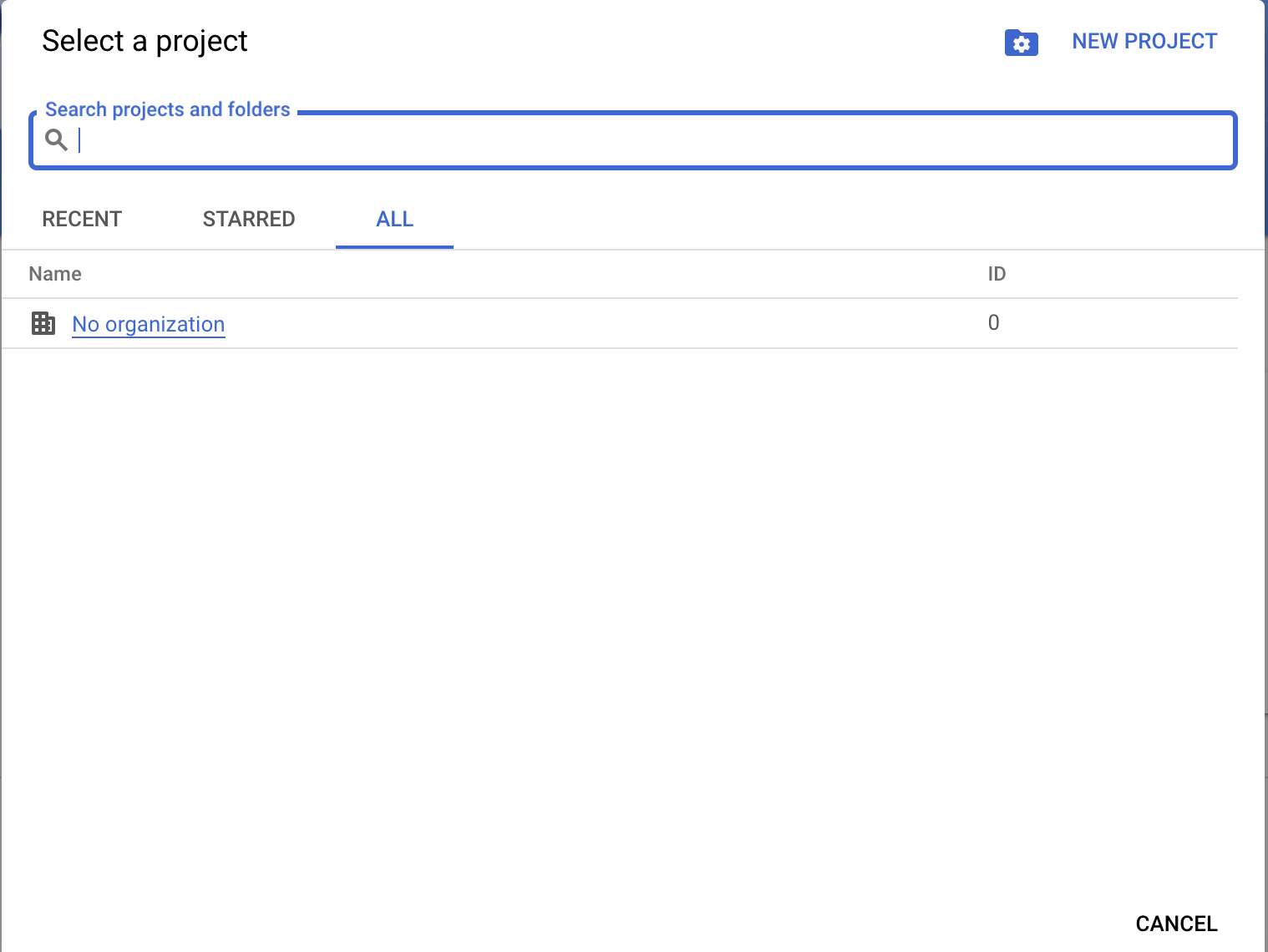
Click on the project drop-down menu and either select an existing project or create a new one for which you want to add an API key.
Step 2: Enable Calendar API
-
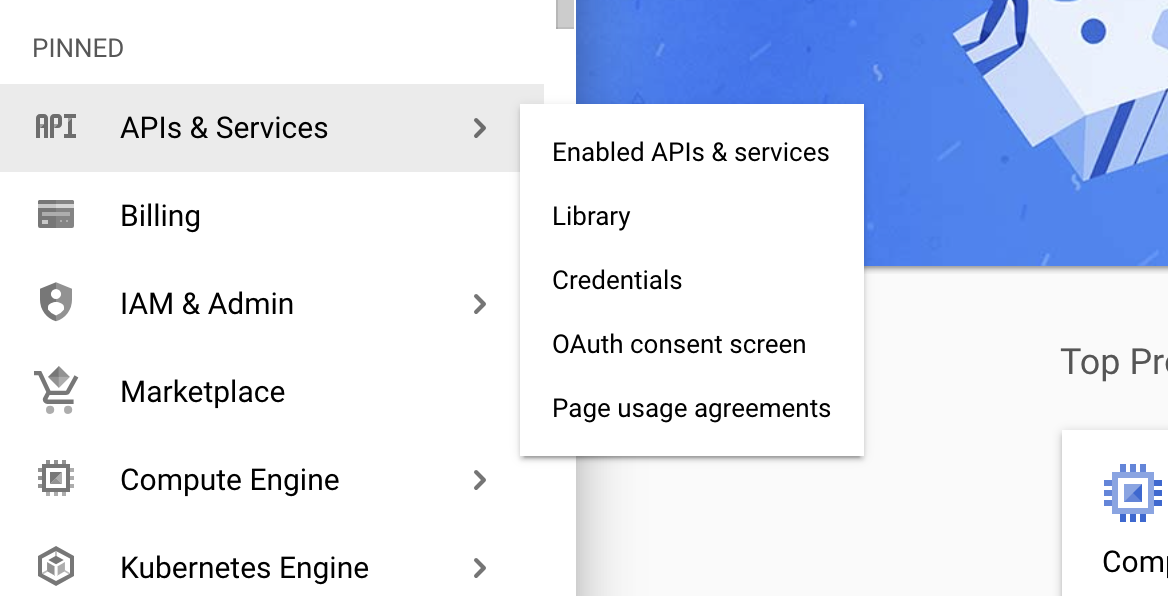
Navigate to the Library and enable the Calendar API.
Step 3: Configure OAuth consent
-
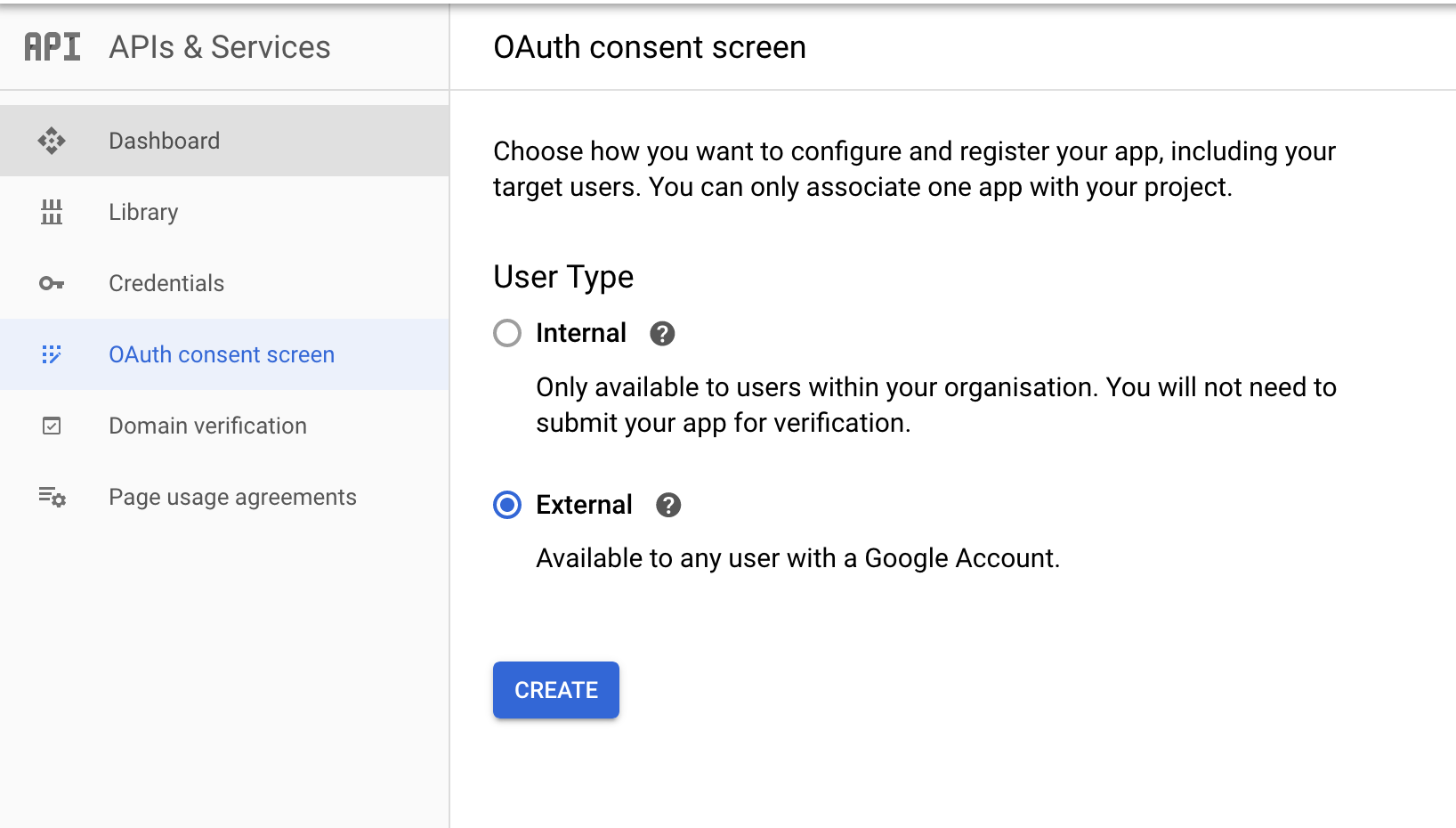
Click on the OAuth consent screen tab in the Google Cloud Platform console.
-
Provide a name for the consent application and save your changes.
Step 4: Create OAuth client
-
Navigate to the Credentials tab in your Google Cloud Platform console.
-
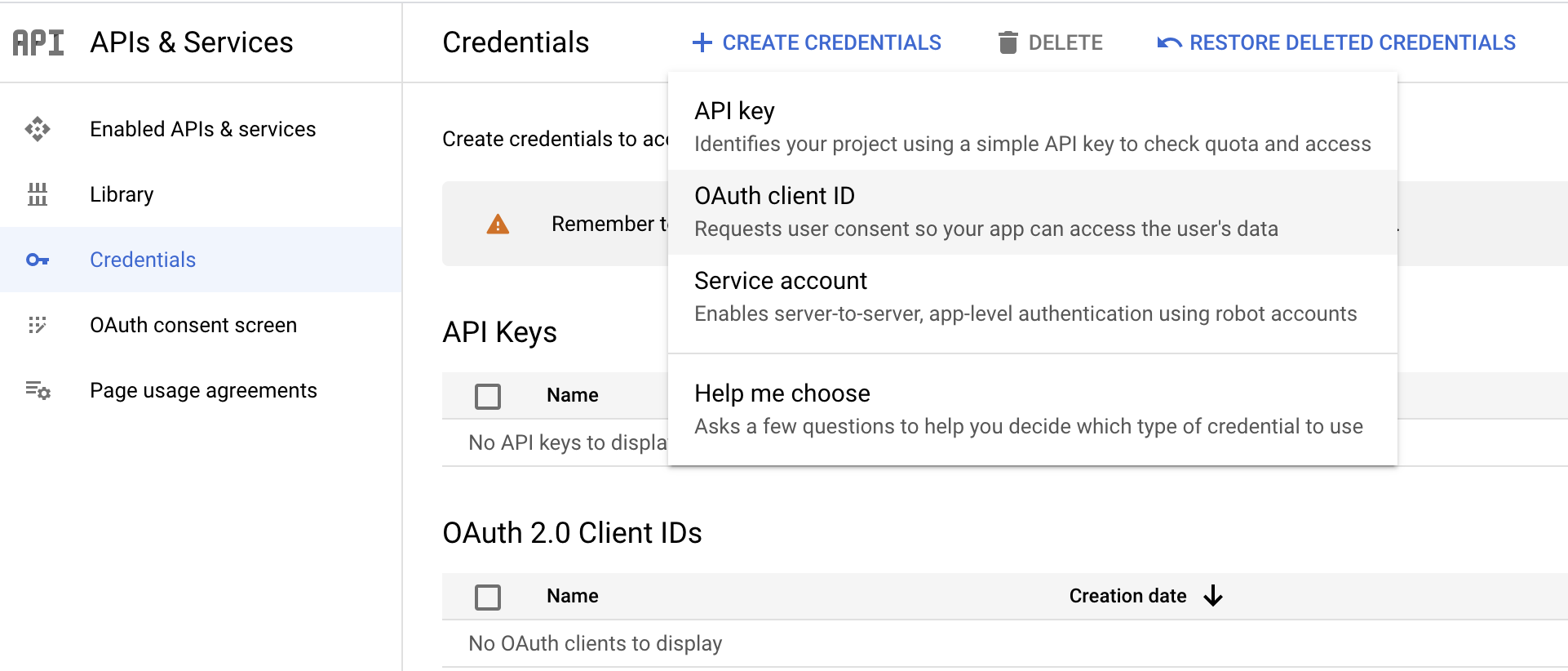
Click Create credentials and from the dropdown menu, select OAuth client ID.
-
You will be directed to the OAuth consent screen, in which you need to fill in the necessary information below.
Field Value Application type Web Application Name CalendarConnector Authorized redirect URIs https://developers.google.com/oauthplayground -
After filling in these details, click Create.
-
Make sure to save the provided Client ID and Client secret.
Step 5: Get the access and refresh tokens
Note: It is recommended to use the OAuth 2.0 playground to obtain the tokens.
-
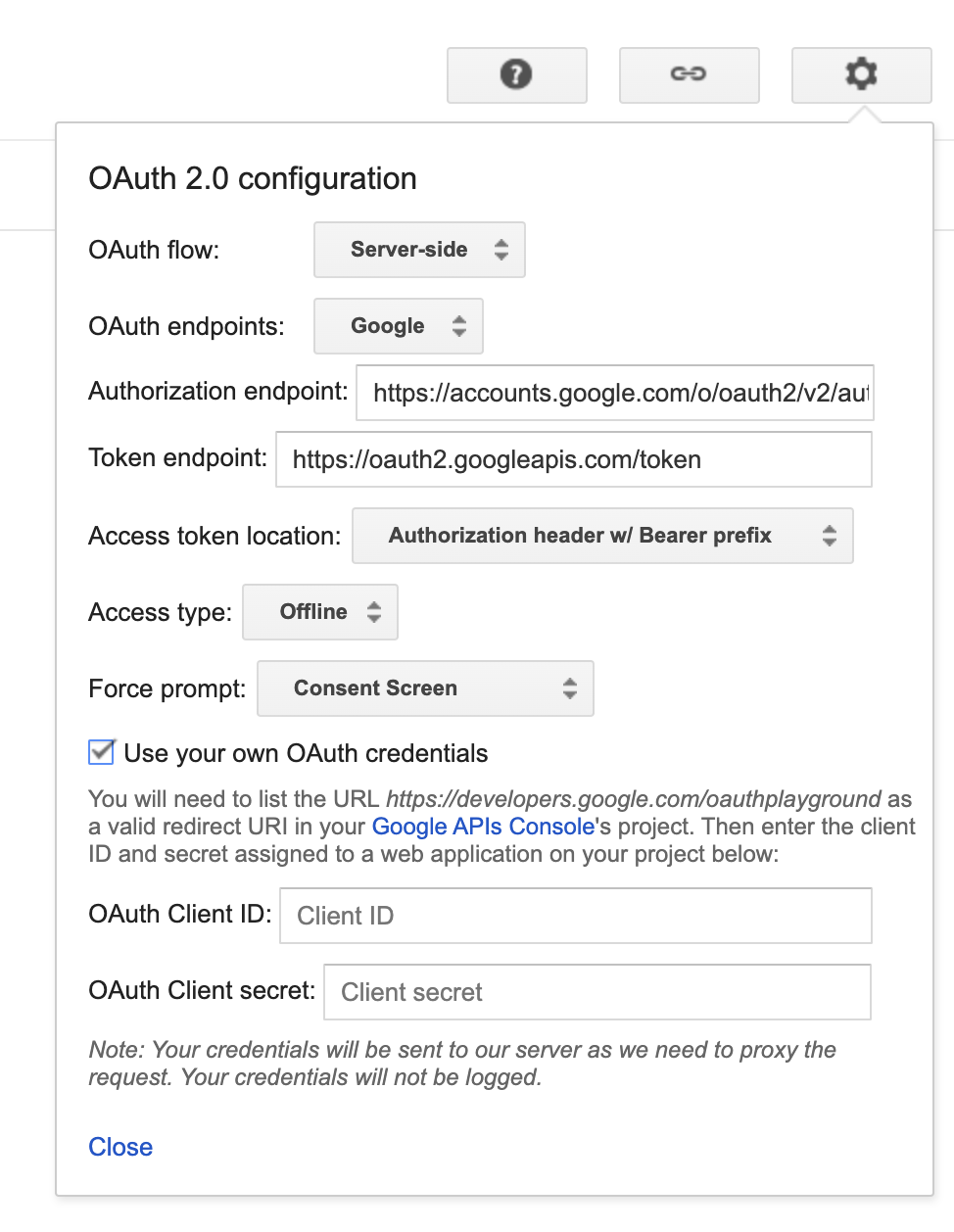
Configure the OAuth playground with the OAuth client ID and client secret.
-
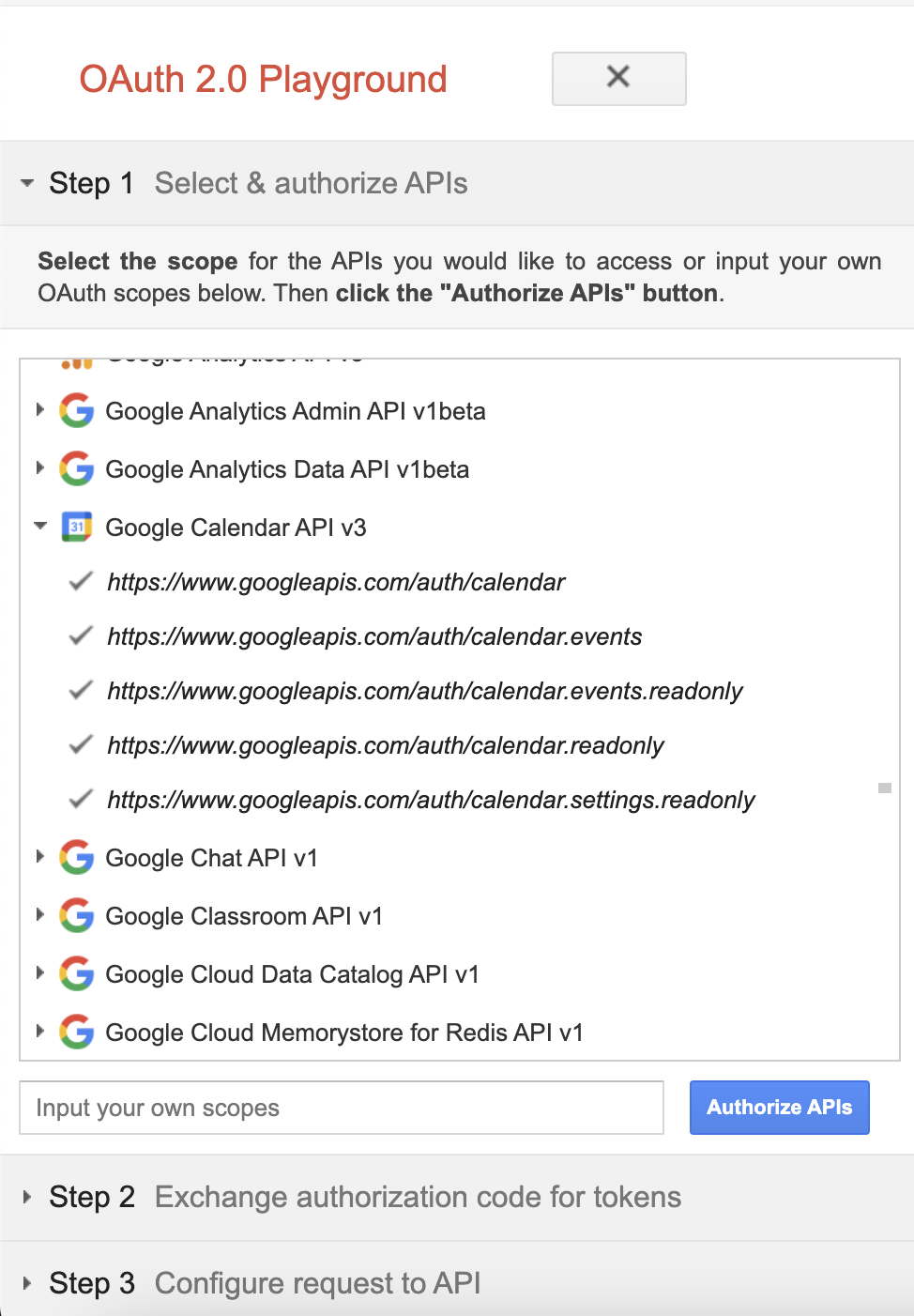
Authorize the Calendar APIs.
-
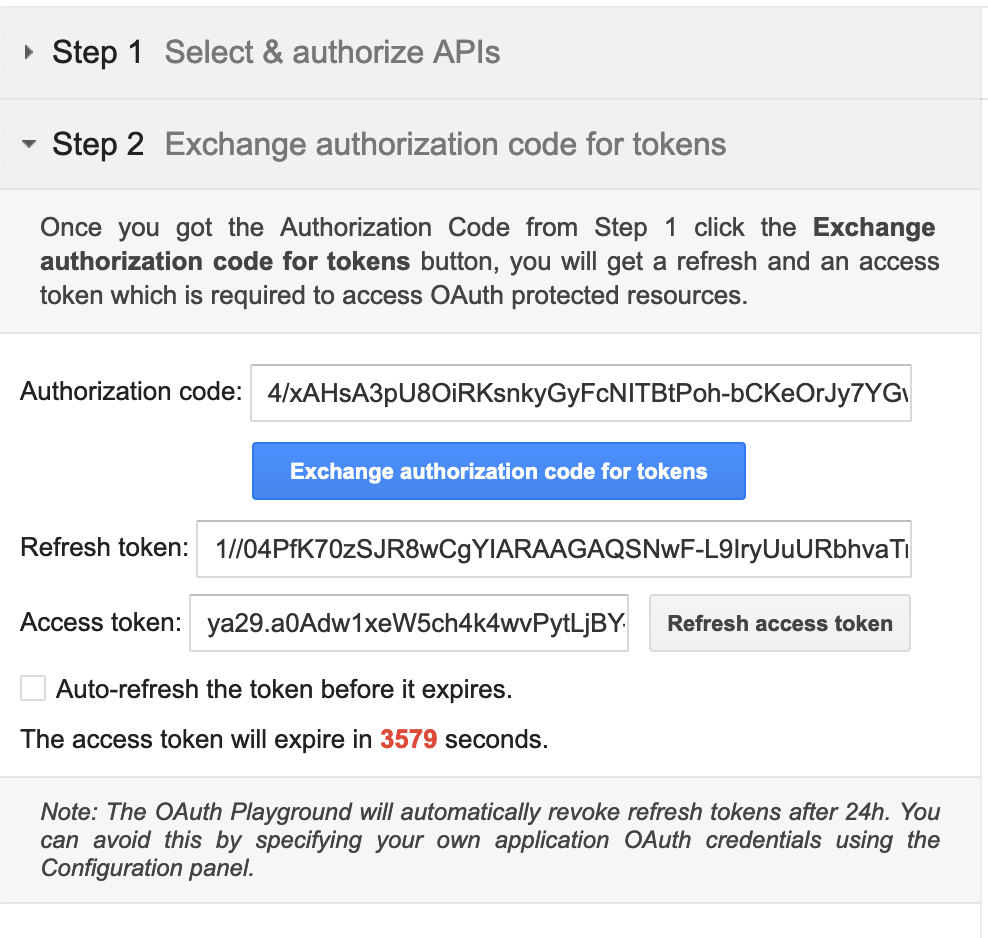
Exchange the authorization code for tokens.
Quickstart
To use the Google Calendar connector in your Ballerina project, modify the .bal file as follows:
Step 1: Import the module
Import the ballerinax/googleapis.gcalendar module.
import ballerinax/googleapis.gcalendar;
Step 2: Instantiate a new connector
Create a gcalendar:ConnectionConfig with the obtained OAuth2.0 tokens and initialize the connector with it.
configurable string clientId = ?; configurable string clientSecret = ?; configurable string refreshToken = ?; configurable string refreshUrl = ?; gcalendar:Client calendar = check new ({ auth: { clientId, clientSecret, refreshToken, refreshUrl } });
Step 3: Invoke the connector operation
You can now utilize the operations available within the connector.
public function main() returns error? { gcalendar:Client calendar = ...// // create a calendar gcalendar:Calendar calendar = check calendar->/calendars.post({ summary: "Work Schedule" }); // quick add new event string eventTitle = "Sample Event"; gcalendar:Event event = check calendar->/calendars/[calendarId]/events/quickAdd.post(eventTitle); }
Step 4: Run the Ballerina application
Use the following command to compile and run the Ballerina program.
bal run
Examples
The Google Calendar connector provides practical examples illustrating usage in various scenarios. Explore these examples, covering use cases like creating calendar, scheduling meeting events, and adding reminders.
- Project management with Calendar API This example shows how to use Google Calendar APIs to efficiently manage work schedule of a person. It interacts with the API for various tasks related to scheduling and organizing work-related events and meetings.
- Work schedule management with Calendar API This example shows how to use Google Calendar APIs to managing personal project schedule and collaborating with team members.
For comprehensive information about the connector's functionality, configuration, and usage in Ballerina programs, refer to the Google Calendar connector's reference guide in Ballerina Central.
Clients
googleapis.gcalendar: Client
Manipulates events and other calendar data.
Constructor
Gets invoked to initialize the connector.
init (ConnectionConfig config, string serviceUrl)- config ConnectionConfig - The configurations to be used when initializing the
connector
- serviceUrl string "https://www.googleapis.com/calendar/v3" - URL of the target service
post calendars
function post calendars(Calendar payload, "json"? alt, string? fields, string? 'key, string? oauth_token, boolean? prettyPrint, string? quotaUser) returns Calendar|ErrorCreates a secondary calendar.
Parameters
- payload Calendar - Data required to create the calendar
- alt "json"? (default ()) - Data format for the response
- fields string? (default ()) - Selector specifying which fields to include in a partial response
- 'key string? (default ()) - API key. Your API key identifies your project and provides you with API access, quota, and reports. Required unless you provide an OAuth 2.0 token
- oauth_token string? (default ()) - OAuth 2.0 token for the current user
- prettyPrint boolean? (default ()) - Returns response with indentations and line breaks
- quotaUser string? (default ()) - An opaque string that represents a user for quota purposes. Must not exceed 40 characters
get calendars/[string calendarId]
function get calendars/[string calendarId]("json"? alt, string? fields, string? 'key, string? oauth_token, boolean? prettyPrint, string? quotaUser) returns Calendar|ErrorReturns metadata for a calendar.
Parameters
- alt "json"? (default ()) - Data format for the response
- fields string? (default ()) - Selector specifying which fields to include in a partial response
- 'key string? (default ()) - API key. Your API key identifies your project and provides you with API access, quota, and reports. Required unless you provide an OAuth 2.0 token
- oauth_token string? (default ()) - OAuth 2.0 token for the current user
- prettyPrint boolean? (default ()) - Returns response with indentations and line breaks
- quotaUser string? (default ()) - An opaque string that represents a user for quota purposes. Must not exceed 40 characters
put calendars/[string calendarId]
function put calendars/[string calendarId](Calendar payload, "json"? alt, string? fields, string? 'key, string? oauth_token, boolean? prettyPrint, string? quotaUser) returns Calendar|ErrorUpdates metadata for a calendar.
Parameters
- payload Calendar - Data required to update the calendar
- alt "json"? (default ()) - Data format for the response
- fields string? (default ()) - Selector specifying which fields to include in a partial response
- 'key string? (default ()) - API key. Your API key identifies your project and provides you with API access, quota, and reports. Required unless you provide an OAuth 2.0 token
- oauth_token string? (default ()) - OAuth 2.0 token for the current user
- prettyPrint boolean? (default ()) - Returns response with indentations and line breaks
- quotaUser string? (default ()) - An opaque string that represents a user for quota purposes. Must not exceed 40 characters
delete calendars/[string calendarId]
function delete calendars/[string calendarId]("json"? alt, string? fields, string? 'key, string? oauth_token, boolean? prettyPrint, string? quotaUser) returns Error?Deletes a secondary calendar. Use calendars/[string calendarId]/clear() for clearing all events on primary calendars.
Parameters
- alt "json"? (default ()) - Data format for the response
- fields string? (default ()) - Selector specifying which fields to include in a partial response
- 'key string? (default ()) - API key. Your API key identifies your project and provides you with API access, quota, and reports. Required unless you provide an OAuth 2.0 token
- oauth_token string? (default ()) - OAuth 2.0 token for the current user
- prettyPrint boolean? (default ()) - Returns response with indentations and line breaks
- quotaUser string? (default ()) - An opaque string that represents a user for quota purposes. Must not exceed 40 characters
Return Type
- Error? - If successful
(), otherwise agcalendar:Error
patch calendars/[string calendarId]
function patch calendars/[string calendarId](Calendar payload, "json"? alt, string? fields, string? 'key, string? oauth_token, boolean? prettyPrint, string? quotaUser) returns Calendar|ErrorUpdates metadata for a calendar. This method supports patch semantics.
Parameters
- payload Calendar - Data required to update the calendar
- alt "json"? (default ()) - Data format for the response
- fields string? (default ()) - Selector specifying which fields to include in a partial response
- 'key string? (default ()) - API key. Your API key identifies your project and provides you with API access, quota, and reports. Required unless you provide an OAuth 2.0 token
- oauth_token string? (default ()) - OAuth 2.0 token for the current user
- prettyPrint boolean? (default ()) - Returns response with indentations and line breaks
- quotaUser string? (default ()) - An opaque string that represents a user for quota purposes. Must not exceed 40 characters
get calendars/[string calendarId]/acl
function get calendars/[string calendarId]/acl("json"? alt, string? fields, string? 'key, string? oauth_token, boolean? prettyPrint, string? quotaUser, int? maxResults, string? pageToken, boolean? showDeleted, string? syncToken) returns Acl|ErrorReturns the rules in the access control list for the calendar.
Parameters
- alt "json"? (default ()) - Data format for the response
- fields string? (default ()) - Selector specifying which fields to include in a partial response
- 'key string? (default ()) - API key. Your API key identifies your project and provides you with API access, quota, and reports. Required unless you provide an OAuth 2.0 token
- oauth_token string? (default ()) - OAuth 2.0 token for the current user
- prettyPrint boolean? (default ()) - Returns response with indentations and line breaks
- quotaUser string? (default ()) - An opaque string that represents a user for quota purposes. Must not exceed 40 characters
- maxResults int? (default ()) - Maximum number of entries returned on one result page. By default the value is 100 entries. The page size can never be larger than 250 entries. Optional
- pageToken string? (default ()) - Token specifying which result page to return. Optional
- showDeleted boolean? (default ()) - Whether to include deleted ACLs in the result. Deleted ACLs are represented by role equal to "none". Deleted ACLs will always be included if syncToken is provided. Optional. The default is False
- syncToken string? (default ()) - Token obtained from the nextSyncToken field returned on the last page of results from the previous list request. It makes the result of this list request contain only entries that have changed since then. All entries deleted since the previous list request will always be in the result set and it is not allowed to set showDeleted to False If the syncToken expires, the server will respond with a 410 GONE response code and the client should clear its storage and perform a full synchronization without any syncToken Learn more about incremental synchronization Optional. The default is to return all entries
post calendars/[string calendarId]/acl
function post calendars/[string calendarId]/acl(AclRule payload, "json"? alt, string? fields, string? 'key, string? oauth_token, boolean? prettyPrint, string? quotaUser, boolean? sendNotifications) returns AclRule|ErrorCreates an access control rule.
Parameters
- payload AclRule - Data required to create access permissions for the calendar
- alt "json"? (default ()) - Data format for the response
- fields string? (default ()) - Selector specifying which fields to include in a partial response
- 'key string? (default ()) - API key. Your API key identifies your project and provides you with API access, quota, and reports. Required unless you provide an OAuth 2.0 token
- oauth_token string? (default ()) - OAuth 2.0 token for the current user
- prettyPrint boolean? (default ()) - Returns response with indentations and line breaks
- quotaUser string? (default ()) - An opaque string that represents a user for quota purposes. Must not exceed 40 characters
- sendNotifications boolean? (default ()) - Whether to send notifications about the calendar sharing change. Optional. The default is True
get calendars/[string calendarId]/acl/[string ruleId]
function get calendars/[string calendarId]/acl/[string ruleId]("json"? alt, string? fields, string? 'key, string? oauth_token, boolean? prettyPrint, string? quotaUser) returns AclRule|ErrorReturns an access control rule.
Parameters
- alt "json"? (default ()) - Data format for the response
- fields string? (default ()) - Selector specifying which fields to include in a partial response
- 'key string? (default ()) - API key. Your API key identifies your project and provides you with API access, quota, and reports. Required unless you provide an OAuth 2.0 token
- oauth_token string? (default ()) - OAuth 2.0 token for the current user
- prettyPrint boolean? (default ()) - Returns response with indentations and line breaks
- quotaUser string? (default ()) - An opaque string that represents a user for quota purposes. Must not exceed 40 characters
put calendars/[string calendarId]/acl/[string ruleId]
function put calendars/[string calendarId]/acl/[string ruleId](AclRule payload, "json"? alt, string? fields, string? 'key, string? oauth_token, boolean? prettyPrint, string? quotaUser, boolean? sendNotifications) returns AclRule|ErrorUpdates an access control rule.
Parameters
- payload AclRule - Data required to update access permissions for the calendar
- alt "json"? (default ()) - Data format for the response
- fields string? (default ()) - Selector specifying which fields to include in a partial response
- 'key string? (default ()) - API key. Your API key identifies your project and provides you with API access, quota, and reports. Required unless you provide an OAuth 2.0 token
- oauth_token string? (default ()) - OAuth 2.0 token for the current user
- prettyPrint boolean? (default ()) - Returns response with indentations and line breaks
- quotaUser string? (default ()) - An opaque string that represents a user for quota purposes. Must not exceed 40 characters
- sendNotifications boolean? (default ()) - Whether to send notifications about the calendar sharing change. Note that there are no notifications on access removal. Optional. The default is True
delete calendars/[string calendarId]/acl/[string ruleId]
function delete calendars/[string calendarId]/acl/[string ruleId]("json"? alt, string? fields, string? 'key, string? oauth_token, boolean? prettyPrint, string? quotaUser) returns Error?Deletes an access control rule.
Parameters
- alt "json"? (default ()) - Data format for the response
- fields string? (default ()) - Selector specifying which fields to include in a partial response
- 'key string? (default ()) - API key. Your API key identifies your project and provides you with API access, quota, and reports. Required unless you provide an OAuth 2.0 token
- oauth_token string? (default ()) - OAuth 2.0 token for the current user
- prettyPrint boolean? (default ()) - Returns response with indentations and line breaks
- quotaUser string? (default ()) - An opaque string that represents a user for quota purposes. Must not exceed 40 characters
Return Type
- Error? - If successful
(), otherwise agcalendar:Error
patch calendars/[string calendarId]/acl/[string ruleId]
function patch calendars/[string calendarId]/acl/[string ruleId](AclRule payload, "json"? alt, string? fields, string? 'key, string? oauth_token, boolean? prettyPrint, string? quotaUser, boolean? sendNotifications) returns AclRule|ErrorUpdates an access control rule. This method supports patch semantics.
Parameters
- payload AclRule - Data required to update access permissions for the calendar
- alt "json"? (default ()) - Data format for the response
- fields string? (default ()) - Selector specifying which fields to include in a partial response
- 'key string? (default ()) - API key. Your API key identifies your project and provides you with API access, quota, and reports. Required unless you provide an OAuth 2.0 token
- oauth_token string? (default ()) - OAuth 2.0 token for the current user
- prettyPrint boolean? (default ()) - Returns response with indentations and line breaks
- quotaUser string? (default ()) - An opaque string that represents a user for quota purposes. Must not exceed 40 characters
- sendNotifications boolean? (default ()) - Whether to send notifications about the calendar sharing change. Note that there are no notifications on access removal. Optional. The default is True
post calendars/[string calendarId]/clear
function post calendars/[string calendarId]/clear("json"? alt, string? fields, string? 'key, string? oauth_token, boolean? prettyPrint, string? quotaUser) returns Error?Clears a primary calendar. This operation deletes all events associated with the primary calendar of an account.
Parameters
- alt "json"? (default ()) - Data format for the response
- fields string? (default ()) - Selector specifying which fields to include in a partial response
- 'key string? (default ()) - API key. Your API key identifies your project and provides you with API access, quota, and reports. Required unless you provide an OAuth 2.0 token
- oauth_token string? (default ()) - OAuth 2.0 token for the current user
- prettyPrint boolean? (default ()) - Returns response with indentations and line breaks
- quotaUser string? (default ()) - An opaque string that represents a user for quota purposes. Must not exceed 40 characters
Return Type
- Error? - If successful
(), otherwise agcalendar:Error
get calendars/[string calendarId]/events
function get calendars/[string calendarId]/events("json"? alt, string? fields, string? 'key, string? oauth_token, boolean? prettyPrint, string? quotaUser, string[]? eventTypes, string? iCalUID, int? maxAttendees, int? maxResults, "startTime"|"updated"? orderBy, string? pageToken, string[]? privateExtendedProperty, string? q, string[]? sharedExtendedProperty, boolean? showDeleted, boolean? showHiddenInvitations, boolean? singleEvents, string? syncToken, string? timeMax, string? timeMin, string? timeZone, string? updatedMin) returns Events|ErrorReturns events on the specified calendar.
Parameters
- alt "json"? (default ()) - Data format for the response
- fields string? (default ()) - Selector specifying which fields to include in a partial response
- 'key string? (default ()) - API key. Your API key identifies your project and provides you with API access, quota, and reports. Required unless you provide an OAuth 2.0 token
- oauth_token string? (default ()) - OAuth 2.0 token for the current user
- prettyPrint boolean? (default ()) - Returns response with indentations and line breaks
- quotaUser string? (default ()) - An opaque string that represents a user for quota purposes. Must not exceed 40 characters
- eventTypes string[]? (default ()) - Event types to return. Optional. Possible values are:
- "default"
- "focusTime"
- "outOfOffice"
- "workingLocation"This parameter can be repeated multiple times to return events of different types. Currently, these are the only allowed values for this field:
- ["default", "focusTime", "outOfOffice"]
- ["default", "focusTime", "outOfOffice", "workingLocation"]
- ["workingLocation"] The default is ["default", "focusTime", "outOfOffice"] Additional combinations of these four event types will be made available in later releases
- iCalUID string? (default ()) - Specifies an event ID in the iCalendar format to be provided in the response. Optional. Use this if you want to search for an event by its iCalendar ID
- maxAttendees int? (default ()) - The maximum number of attendees to include in the response. If there are more than the specified number of attendees, only the participant is returned. Optional
- maxResults int? (default ()) - Maximum number of events returned on one result page. The number of events in the resulting page may be less than this value, or none at all, even if there are more events matching the query. Incomplete pages can be detected by a non-empty nextPageToken field in the response. By default the value is 250 events. The page size can never be larger than 2500 events. Optional
- orderBy "startTime"|"updated"? (default ()) - The order of the events returned in the result. Optional. The default is an unspecified, stable order
- pageToken string? (default ()) - Token specifying which result page to return. Optional
- privateExtendedProperty string[]? (default ()) - Extended properties constraint specified as propertyName=value. Matches only private properties. This parameter might be repeated multiple times to return events that match all given constraints
- q string? (default ()) - Free text search terms to find events that match these terms in the following fields: summary, description, location, attendee's displayName, attendee's email. Optional
- sharedExtendedProperty string[]? (default ()) - Extended properties constraint specified as propertyName=value. Matches only shared properties. This parameter might be repeated multiple times to return events that match all given constraints
- showDeleted boolean? (default ()) - Whether to include deleted events (with status equals "cancelled") in the result. Cancelled instances of recurring events (but not the underlying recurring event) will still be included if showDeleted and singleEvents are both False. If showDeleted and singleEvents are both True, only single instances of deleted events (but not the underlying recurring events) are returned. Optional. The default is False
- showHiddenInvitations boolean? (default ()) - Whether to include hidden invitations in the result. Optional. The default is False
- singleEvents boolean? (default ()) - Whether to expand recurring events into instances and only return single one-off events and instances of recurring events, but not the underlying recurring events themselves. Optional. The default is False
- syncToken string? (default ()) - Token obtained from the nextSyncToken field returned on the last page of results from the previous list request. It makes the result of this list request contain only entries that have changed since then. All events deleted since the previous list request will always be in the result set and it is not allowed to set showDeleted to False
There are several query parameters that cannot be specified together with nextSyncToken to ensure consistency of the client state
These are:
- iCalUID
- orderBy
- privateExtendedProperty
- q
- sharedExtendedProperty
- timeMin
- timeMax
- updatedMin All other query parameters should be the same as for the initial synchronization to avoid undefined behavior. If the syncToken expires, the server will respond with a 410 GONE response code and the client should clear its storage and perform a full synchronization without any syncToken Learn more about incremental synchronization Optional. The default is to return all entries
- timeMax string? (default ()) - Upper bound (exclusive) for an event's start time to filter by. Optional. The default is not to filter by start time. Must be an RFC3339 timestamp with mandatory time zone offset, for example, 2011-06-03T10:00:00-07:00, 2011-06-03T10:00:00Z. Milliseconds may be provided but are ignored. If timeMin is set, timeMax must be greater than timeMin
- timeMin string? (default ()) - Lower bound (exclusive) for an event's end time to filter by. Optional. The default is not to filter by end time. Must be an RFC3339 timestamp with mandatory time zone offset, for example, 2011-06-03T10:00:00-07:00, 2011-06-03T10:00:00Z. Milliseconds may be provided but are ignored. If timeMax is set, timeMin must be smaller than timeMax
- timeZone string? (default ()) - Time zone used in the response. Optional. The default is the time zone of the calendar
- updatedMin string? (default ()) - Lower bound for an event's last modification time (as a RFC3339 timestamp) to filter by. When specified, entries deleted since this time will always be included regardless of showDeleted. Optional. The default is not to filter by last modification time
post calendars/[string calendarId]/events
function post calendars/[string calendarId]/events(Event payload, "json"? alt, string? fields, string? 'key, string? oauth_token, boolean? prettyPrint, string? quotaUser, int? conferenceDataVersion, int? maxAttendees, "all"|"externalOnly"|"none"? sendUpdates, boolean? supportsAttachments) returns Event|ErrorCreates an event.
Parameters
- payload Event - Data required to create an event
- alt "json"? (default ()) - Data format for the response
- fields string? (default ()) - Selector specifying which fields to include in a partial response
- 'key string? (default ()) - API key. Your API key identifies your project and provides you with API access, quota, and reports. Required unless you provide an OAuth 2.0 token
- oauth_token string? (default ()) - OAuth 2.0 token for the current user
- prettyPrint boolean? (default ()) - Returns response with indentations and line breaks
- quotaUser string? (default ()) - An opaque string that represents a user for quota purposes. Must not exceed 40 characters
- conferenceDataVersion int? (default ()) - Version number of conference data supported by the API client. Version 0 assumes no conference data support and ignores conference data in the event's body. Version 1 enables support for copying of ConferenceData as well as for creating new conferences using the createRequest field of conferenceData. The default is 0
- maxAttendees int? (default ()) - The maximum number of attendees to include in the response. If there are more than the specified number of attendees, only the participant is returned. Optional
- sendUpdates "all"|"externalOnly"|"none"? (default ()) - Whether to send notifications about the creation of the new event. Note that some emails might still be sent. The default is false
- supportsAttachments boolean? (default ()) - Whether API client performing operation supports event attachments. Optional. The default is False
post calendars/[string calendarId]/events/'import
function post calendars/[string calendarId]/events/'import(Event payload, "json"? alt, string? fields, string? 'key, string? oauth_token, boolean? prettyPrint, string? quotaUser, int? conferenceDataVersion, boolean? supportsAttachments) returns Event|ErrorImports an event. This operation is used to add a private copy of an existing event to a calendar.
Parameters
- payload Event - Data required to import an event
- alt "json"? (default ()) - Data format for the response
- fields string? (default ()) - Selector specifying which fields to include in a partial response
- 'key string? (default ()) - API key. Your API key identifies your project and provides you with API access, quota, and reports. Required unless you provide an OAuth 2.0 token
- oauth_token string? (default ()) - OAuth 2.0 token for the current user
- prettyPrint boolean? (default ()) - Returns response with indentations and line breaks
- quotaUser string? (default ()) - An opaque string that represents a user for quota purposes. Must not exceed 40 characters
- conferenceDataVersion int? (default ()) - Version number of conference data supported by the API client. Version 0 assumes no conference data support and ignores conference data in the event's body. Version 1 enables support for copying of ConferenceData as well as for creating new conferences using the createRequest field of conferenceData. The default is 0
- supportsAttachments boolean? (default ()) - Whether API client performing operation supports event attachments. Optional. The default is False
post calendars/[string calendarId]/events/quickAdd
function post calendars/[string calendarId]/events/quickAdd(string text, "json"? alt, string? fields, string? 'key, string? oauth_token, boolean? prettyPrint, string? quotaUser, "all"|"externalOnly"|"none"? sendUpdates) returns Event|ErrorCreates an event based on a simple text string.
Parameters
- text string - The text describing the event to be created
- alt "json"? (default ()) - Data format for the response
- fields string? (default ()) - Selector specifying which fields to include in a partial response
- 'key string? (default ()) - API key. Your API key identifies your project and provides you with API access, quota, and reports. Required unless you provide an OAuth 2.0 token
- oauth_token string? (default ()) - OAuth 2.0 token for the current user
- prettyPrint boolean? (default ()) - Returns response with indentations and line breaks
- quotaUser string? (default ()) - An opaque string that represents a user for quota purposes. Must not exceed 40 characters
- sendUpdates "all"|"externalOnly"|"none"? (default ()) - Guests who should receive notifications about the creation of the new event
get calendars/[string calendarId]/events/[string eventId]
function get calendars/[string calendarId]/events/[string eventId]("json"? alt, string? fields, string? 'key, string? oauth_token, boolean? prettyPrint, string? quotaUser, int? maxAttendees, string? timeZone) returns Event|ErrorReturns an event based on its Google Calendar ID. To retrieve an event using its iCalendar ID, call the events.list method using the iCalUID parameter.
Parameters
- alt "json"? (default ()) - Data format for the response
- fields string? (default ()) - Selector specifying which fields to include in a partial response
- 'key string? (default ()) - API key. Your API key identifies your project and provides you with API access, quota, and reports. Required unless you provide an OAuth 2.0 token
- oauth_token string? (default ()) - OAuth 2.0 token for the current user
- prettyPrint boolean? (default ()) - Returns response with indentations and line breaks
- quotaUser string? (default ()) - An opaque string that represents a user for quota purposes. Must not exceed 40 characters
- maxAttendees int? (default ()) - The maximum number of attendees to include in the response. If there are more than the specified number of attendees, only the participant is returned. Optional
- timeZone string? (default ()) - Time zone used in the response. Optional. The default is the time zone of the calendar
put calendars/[string calendarId]/events/[string eventId]
function put calendars/[string calendarId]/events/[string eventId](Event payload, "json"? alt, string? fields, string? 'key, string? oauth_token, boolean? prettyPrint, string? quotaUser, int? conferenceDataVersion, int? maxAttendees, "all"|"externalOnly"|"none"? sendUpdates, boolean? supportsAttachments) returns Event|ErrorUpdates an event.
Parameters
- payload Event - Data required to update the event
- alt "json"? (default ()) - Data format for the response
- fields string? (default ()) - Selector specifying which fields to include in a partial response
- 'key string? (default ()) - API key. Your API key identifies your project and provides you with API access, quota, and reports. Required unless you provide an OAuth 2.0 token
- oauth_token string? (default ()) - OAuth 2.0 token for the current user
- prettyPrint boolean? (default ()) - Returns response with indentations and line breaks
- quotaUser string? (default ()) - An opaque string that represents a user for quota purposes. Must not exceed 40 characters
- conferenceDataVersion int? (default ()) - Version number of conference data supported by the API client. Version 0 assumes no conference data support and ignores conference data in the event's body. Version 1 enables support for copying of ConferenceData as well as for creating new conferences using the createRequest field of conferenceData. The default is 0
- maxAttendees int? (default ()) - The maximum number of attendees to include in the response. If there are more than the specified number of attendees, only the participant is returned. Optional
- sendUpdates "all"|"externalOnly"|"none"? (default ()) - Guests who should receive notifications about the event update (for example, title changes, etc.)
- supportsAttachments boolean? (default ()) - Whether API client performing operation supports event attachments. Optional. The default is False
delete calendars/[string calendarId]/events/[string eventId]
function delete calendars/[string calendarId]/events/[string eventId]("json"? alt, string? fields, string? 'key, string? oauth_token, boolean? prettyPrint, string? quotaUser, "all"|"externalOnly"|"none"? sendUpdates) returns Error?Deletes an event.
Parameters
- alt "json"? (default ()) - Data format for the response
- fields string? (default ()) - Selector specifying which fields to include in a partial response
- 'key string? (default ()) - API key. Your API key identifies your project and provides you with API access, quota, and reports. Required unless you provide an OAuth 2.0 token
- oauth_token string? (default ()) - OAuth 2.0 token for the current user
- prettyPrint boolean? (default ()) - Returns response with indentations and line breaks
- quotaUser string? (default ()) - An opaque string that represents a user for quota purposes. Must not exceed 40 characters
- sendUpdates "all"|"externalOnly"|"none"? (default ()) - Guests who should receive notifications about the deletion of the event
Return Type
- Error? - if successful
(), otherwise agcalendar:Error
patch calendars/[string calendarId]/events/[string eventId]
function patch calendars/[string calendarId]/events/[string eventId](Event payload, "json"? alt, string? fields, string? 'key, string? oauth_token, boolean? prettyPrint, string? quotaUser, int? conferenceDataVersion, int? maxAttendees, "all"|"externalOnly"|"none"? sendUpdates, boolean? supportsAttachments) returns Event|ErrorUpdates an event. This method supports patch semantics.
Parameters
- payload Event - Data required to update the event
- alt "json"? (default ()) - Data format for the response
- fields string? (default ()) - Selector specifying which fields to include in a partial response
- 'key string? (default ()) - API key. Your API key identifies your project and provides you with API access, quota, and reports. Required unless you provide an OAuth 2.0 token
- oauth_token string? (default ()) - OAuth 2.0 token for the current user
- prettyPrint boolean? (default ()) - Returns response with indentations and line breaks
- quotaUser string? (default ()) - An opaque string that represents a user for quota purposes. Must not exceed 40 characters
- conferenceDataVersion int? (default ()) - Version number of conference data supported by the API client. Version 0 assumes no conference data support and ignores conference data in the event's body. Version 1 enables support for copying of ConferenceData as well as for creating new conferences using the createRequest field of conferenceData. The default is 0
- maxAttendees int? (default ()) - The maximum number of attendees to include in the response. If there are more than the specified number of attendees, only the participant is returned. Optional
- sendUpdates "all"|"externalOnly"|"none"? (default ()) - Guests who should receive notifications about the event update (for example, title changes, etc.)
- supportsAttachments boolean? (default ()) - Whether API client performing operation supports event attachments. Optional. The default is False
get calendars/[string calendarId]/events/[string eventId]/instances
function get calendars/[string calendarId]/events/[string eventId]/instances("json"? alt, string? fields, string? 'key, string? oauth_token, boolean? prettyPrint, string? quotaUser, int? maxAttendees, int? maxResults, string? originalStart, string? pageToken, boolean? showDeleted, string? timeMax, string? timeMin, string? timeZone) returns Events|ErrorReturns instances of the specified recurring event.
Parameters
- alt "json"? (default ()) - Data format for the response
- fields string? (default ()) - Selector specifying which fields to include in a partial response
- 'key string? (default ()) - API key. Your API key identifies your project and provides you with API access, quota, and reports. Required unless you provide an OAuth 2.0 token
- oauth_token string? (default ()) - OAuth 2.0 token for the current user
- prettyPrint boolean? (default ()) - Returns response with indentations and line breaks
- quotaUser string? (default ()) - An opaque string that represents a user for quota purposes. Must not exceed 40 characters
- maxAttendees int? (default ()) - The maximum number of attendees to include in the response. If there are more than the specified number of attendees, only the participant is returned. Optional
- maxResults int? (default ()) - Maximum number of events returned on one result page. By default the value is 250 events. The page size can never be larger than 2500 events. Optional
- originalStart string? (default ()) - The original start time of the instance in the result. Optional
- pageToken string? (default ()) - Token specifying which result page to return. Optional
- showDeleted boolean? (default ()) - Whether to include deleted events (with status equals "cancelled") in the result. Cancelled instances of recurring events will still be included if singleEvents is False. Optional. The default is False
- timeMax string? (default ()) - Upper bound (exclusive) for an event's start time to filter by. Optional. The default is not to filter by start time. Must be an RFC3339 timestamp with mandatory time zone offset
- timeMin string? (default ()) - Lower bound (inclusive) for an event's end time to filter by. Optional. The default is not to filter by end time. Must be an RFC3339 timestamp with mandatory time zone offset
- timeZone string? (default ()) - Time zone used in the response. Optional. The default is the time zone of the calendar
post calendars/[string calendarId]/events/[string eventId]/move
function post calendars/[string calendarId]/events/[string eventId]/move(string destination, "json"? alt, string? fields, string? 'key, string? oauth_token, boolean? prettyPrint, string? quotaUser, "all"|"externalOnly"|"none"? sendUpdates) returns Event|ErrorMoves an event to another calendar, i.e. changes an event's organizer.
Parameters
- destination string - Calendar identifier of the target calendar where the event is to be moved to
- alt "json"? (default ()) - Data format for the response
- fields string? (default ()) - Selector specifying which fields to include in a partial response
- 'key string? (default ()) - API key. Your API key identifies your project and provides you with API access, quota, and reports. Required unless you provide an OAuth 2.0 token
- oauth_token string? (default ()) - OAuth 2.0 token for the current user
- prettyPrint boolean? (default ()) - Returns response with indentations and line breaks
- quotaUser string? (default ()) - An opaque string that represents a user for quota purposes. Must not exceed 40 characters
- sendUpdates "all"|"externalOnly"|"none"? (default ()) - Guests who should receive notifications about the change of the event's organizer
get colors
function get colors("json"? alt, string? fields, string? 'key, string? oauth_token, boolean? prettyPrint, string? quotaUser) returns Colors|ErrorReturns the color definitions for calendars and events.
Parameters
- alt "json"? (default ()) - Data format for the response
- fields string? (default ()) - Selector specifying which fields to include in a partial response
- 'key string? (default ()) - API key. Your API key identifies your project and provides you with API access, quota, and reports. Required unless you provide an OAuth 2.0 token
- oauth_token string? (default ()) - OAuth 2.0 token for the current user
- prettyPrint boolean? (default ()) - Returns response with indentations and line breaks
- quotaUser string? (default ()) - An opaque string that represents a user for quota purposes. Must not exceed 40 characters
post freeBusy
function post freeBusy(FreeBusyRequest payload, "json"? alt, string? fields, string? 'key, string? oauth_token, boolean? prettyPrint, string? quotaUser) returns FreeBusyResponse|ErrorReturns free/busy information for a set of calendars.
Parameters
- payload FreeBusyRequest - Data required to return free/busy information
- alt "json"? (default ()) - Data format for the response
- fields string? (default ()) - Selector specifying which fields to include in a partial response
- 'key string? (default ()) - API key. Your API key identifies your project and provides you with API access, quota, and reports. Required unless you provide an OAuth 2.0 token
- oauth_token string? (default ()) - OAuth 2.0 token for the current user
- prettyPrint boolean? (default ()) - Returns response with indentations and line breaks
- quotaUser string? (default ()) - An opaque string that represents a user for quota purposes. Must not exceed 40 characters
Return Type
- FreeBusyResponse|Error - A
gcalendar:FreeBusyResponseif successful, otherwise agcalendar:Error
get users/me/calendarList
function get users/me/calendarList("json"? alt, string? fields, string? 'key, string? oauth_token, boolean? prettyPrint, string? quotaUser, int? maxResults, "freeBusyReader"|"owner"|"reader"|"writer"? minAccessRole, string? pageToken, boolean? showDeleted, boolean? showHidden, string? syncToken) returns CalendarList|ErrorReturns the calendars on the user's calendar list.
Parameters
- alt "json"? (default ()) - Data format for the response
- fields string? (default ()) - Selector specifying which fields to include in a partial response
- 'key string? (default ()) - API key. Your API key identifies your project and provides you with API access, quota, and reports. Required unless you provide an OAuth 2.0 token
- oauth_token string? (default ()) - OAuth 2.0 token for the current user
- prettyPrint boolean? (default ()) - Returns response with indentations and line breaks
- quotaUser string? (default ()) - An opaque string that represents a user for quota purposes. Must not exceed 40 characters
- maxResults int? (default ()) - Maximum number of entries returned on one result page. By default the value is 100 entries. The page size can never be larger than 250 entries. Optional
- minAccessRole "freeBusyReader"|"owner"|"reader"|"writer"? (default ()) - The minimum access role for the user in the returned entries. Optional. The default is no restriction
- pageToken string? (default ()) - Token specifying which result page to return. Optional
- showDeleted boolean? (default ()) - Whether to include deleted calendar list entries in the result. Optional. The default is False
- showHidden boolean? (default ()) - Whether to show hidden entries. Optional. The default is False
- syncToken string? (default ()) - Token obtained from the nextSyncToken field returned on the last page of results from the previous list request. It makes the result of this list request contain only entries that have changed since then. If only read-only fields such as calendar properties or ACLs have changed, the entry won't be returned. All entries deleted and hidden since the previous list request will always be in the result set and it is not allowed to set showDeleted neither showHidden to False To ensure client state consistency minAccessRole query parameter cannot be specified together with nextSyncToken If the syncToken expires, the server will respond with a 410 GONE response code and the client should clear its storage and perform a full synchronization without any syncToken Learn more about incremental synchronization Optional. The default is to return all entries
Return Type
- CalendarList|Error - A
gcalendar:CalendarListif successful, otherwise agcalendar:Error
post users/me/calendarList
function post users/me/calendarList(CalendarListEntry payload, "json"? alt, string? fields, string? 'key, string? oauth_token, boolean? prettyPrint, string? quotaUser, boolean? colorRgbFormat) returns CalendarListEntry|ErrorInserts an existing calendar into the user's calendar list.
Parameters
- payload CalendarListEntry - Data required to identify the calendar
- alt "json"? (default ()) - Data format for the response
- fields string? (default ()) - Selector specifying which fields to include in a partial response
- 'key string? (default ()) - API key. Your API key identifies your project and provides you with API access, quota, and reports. Required unless you provide an OAuth 2.0 token
- oauth_token string? (default ()) - OAuth 2.0 token for the current user
- prettyPrint boolean? (default ()) - Returns response with indentations and line breaks
- quotaUser string? (default ()) - An opaque string that represents a user for quota purposes. Must not exceed 40 characters
- colorRgbFormat boolean? (default ()) - Whether to use the foregroundColor and backgroundColor fields to write the calendar colors (RGB). If this feature is used, the index-based colorId field will be set to the best matching option automatically. Optional. The default is False
Return Type
- CalendarListEntry|Error - A
gcalendar:CalendarListEntryif successful, otherwise agcalendar:Error
get users/me/calendarList/[string calendarId]
function get users/me/calendarList/[string calendarId]("json"? alt, string? fields, string? 'key, string? oauth_token, boolean? prettyPrint, string? quotaUser) returns CalendarListEntry|ErrorReturns a calendar from the user's calendar list.
Parameters
- alt "json"? (default ()) - Data format for the response
- fields string? (default ()) - Selector specifying which fields to include in a partial response
- 'key string? (default ()) - API key. Your API key identifies your project and provides you with API access, quota, and reports. Required unless you provide an OAuth 2.0 token
- oauth_token string? (default ()) - OAuth 2.0 token for the current user
- prettyPrint boolean? (default ()) - Returns response with indentations and line breaks
- quotaUser string? (default ()) - An opaque string that represents a user for quota purposes. Must not exceed 40 characters
Return Type
- CalendarListEntry|Error - A
gcalendar:CalendarListEntryif successful, otherwise agcalendar:Error
put users/me/calendarList/[string calendarId]
function put users/me/calendarList/[string calendarId](CalendarListEntry payload, "json"? alt, string? fields, string? 'key, string? oauth_token, boolean? prettyPrint, string? quotaUser, boolean? colorRgbFormat) returns CalendarListEntry|ErrorUpdates an existing calendar on the user's calendar list.
Parameters
- payload CalendarListEntry - Data required to update an existing calendar entry on the user's calendar list
- alt "json"? (default ()) - Data format for the response
- fields string? (default ()) - Selector specifying which fields to include in a partial response
- 'key string? (default ()) - API key. Your API key identifies your project and provides you with API access, quota, and reports. Required unless you provide an OAuth 2.0 token
- oauth_token string? (default ()) - OAuth 2.0 token for the current user
- prettyPrint boolean? (default ()) - Returns response with indentations and line breaks
- quotaUser string? (default ()) - An opaque string that represents a user for quota purposes. Must not exceed 40 characters
- colorRgbFormat boolean? (default ()) - Whether to use the foregroundColor and backgroundColor fields to write the calendar colors (RGB). If this feature is used, the index-based colorId field will be set to the best matching option automatically. Optional. The default is False
Return Type
- CalendarListEntry|Error - A
gcalendar:CalendarListEntryif successful, otherwise agcalendar:Error
delete users/me/calendarList/[string calendarId]
function delete users/me/calendarList/[string calendarId]("json"? alt, string? fields, string? 'key, string? oauth_token, boolean? prettyPrint, string? quotaUser) returns Error?Removes a calendar from the user's calendar list.
Parameters
- alt "json"? (default ()) - Data format for the response
- fields string? (default ()) - Selector specifying which fields to include in a partial response
- 'key string? (default ()) - API key. Your API key identifies your project and provides you with API access, quota, and reports. Required unless you provide an OAuth 2.0 token
- oauth_token string? (default ()) - OAuth 2.0 token for the current user
- prettyPrint boolean? (default ()) - Returns response with indentations and line breaks
- quotaUser string? (default ()) - An opaque string that represents a user for quota purposes. Must not exceed 40 characters
Return Type
- Error? - If successful
(), otherwise agcalendar:Error
patch users/me/calendarList/[string calendarId]
function patch users/me/calendarList/[string calendarId](CalendarListEntry payload, "json"? alt, string? fields, string? 'key, string? oauth_token, boolean? prettyPrint, string? quotaUser, boolean? colorRgbFormat) returns CalendarListEntry|ErrorUpdates an existing calendar on the user's calendar list. This method supports patch semantics.
Parameters
- payload CalendarListEntry - Data required to update an existing calendar entry on the user's calendar list
- alt "json"? (default ()) - Data format for the response
- fields string? (default ()) - Selector specifying which fields to include in a partial response
- 'key string? (default ()) - API key. Your API key identifies your project and provides you with API access, quota, and reports. Required unless you provide an OAuth 2.0 token
- oauth_token string? (default ()) - OAuth 2.0 token for the current user
- prettyPrint boolean? (default ()) - Returns response with indentations and line breaks
- quotaUser string? (default ()) - An opaque string that represents a user for quota purposes. Must not exceed 40 characters
- colorRgbFormat boolean? (default ()) - Whether to use the foregroundColor and backgroundColor fields to write the calendar colors (RGB). If this feature is used, the index-based colorId field will be set to the best matching option automatically. Optional. The default is False
Return Type
- CalendarListEntry|Error - A
gcalendar:CalendarListEntryif successful, otherwise agcalendar:Error
Records
googleapis.gcalendar: Acl
Manages access control and permissions for calendars and events.
Fields
- etag? string - ETag of the collection.
- items? AclRule[] - List of rules on the access control list.
- kind? string - Type of the collection ("calendar#acl").
- nextPageToken? string - Token used to access the next page of this result. Omitted if no further results are available, in which case nextSyncToken is provided.
- nextSyncToken? string - Token used at a later point in time to retrieve only the entries that have changed since this result was returned. Omitted if further results are available, in which case nextPageToken is provided.
googleapis.gcalendar: AclRule
Defines access control rules for a calendar
Fields
- etag? string - ETag of the resource.
- id? string - Identifier of the Access Control List (ACL) rule. See Sharing calendars.
- kind? string - Type of the resource ("calendar#aclRule").
- role? string - The role assigned to the scope. Possible values are:
- "none" - Provides no access.
- "freeBusyReader" - Provides read access to free/busy information.
- "reader" - Provides read access to the calendar. Private events will appear to users with reader access, but event details will be hidden.
- "writer" - Provides read and write access to the calendar. Private events will appear to users with writer access, and event details will be visible.
- "owner" - Provides ownership of the calendar. This role has all of the permissions of the writer role with the additional ability to see and manipulate ACLs.
- scope? AclRuleScope - The extent to which calendar access is granted by this ACL rule.
googleapis.gcalendar: AclRuleScope
The extent to which calendar access is granted by this ACL rule.
Fields
- 'type? string - The type of the scope. Possible values are:
- "default" - The public scope. This is the default value.
- "user" - Limits the scope to a single user.
- "group" - Limits the scope to a group.
- "domain" - Limits the scope to a domain. Note: The permissions granted to the "default", or public, scope apply to any user, authenticated or not.
- value? string - The email address of a user or group, or the name of a domain, depending on the scope type. Omitted for type "default".
googleapis.gcalendar: Calendar
Defines and manages individual calendars.
Fields
- conferenceProperties? ConferenceProperties - Represents properties related to conferencing options for the calendar
- description? string - Description of the calendar. Optional.
- etag? string - ETag of the resource.
- id? string - Identifier of the calendar. To retrieve IDs call the calendarList.list() method.
- kind? string - Type of the resource ("calendar#calendar").
- location? string - Geographic location of the calendar as free-form text. Optional.
- summary? string - Title of the calendar.
- timeZone? string - The time zone of the calendar. (Formatted as an IANA Time Zone Database name, e.g. "Europe/Zurich".) Optional.
googleapis.gcalendar: CalendarList
Represents list of calendars associated with the user's account.
Fields
- etag? string - ETag of the collection.
- items? CalendarListEntry[] - Calendars that are present on the user's calendar list.
- kind? string - Type of the collection ("calendar#calendarList").
- nextPageToken? string - Token used to access the next page of this result. Omitted if no further results are available, in which case nextSyncToken is provided.
- nextSyncToken? string - Token used at a later point in time to retrieve only the entries that have changed since this result was returned. Omitted if further results are available, in which case nextPageToken is provided.
googleapis.gcalendar: CalendarListEntry
Represent calendar properties which allow users to manage and interact with their calendars effectively.
Fields
- accessRole? string - The effective access role that the authenticated user has on the calendar. Read-only. Possible values are:
- "freeBusyReader" - Provides read access to free/busy information.
- "reader" - Provides read access to the calendar. Private events will appear to users with reader access, but event details will be hidden.
- "writer" - Provides read and write access to the calendar. Private events will appear to users with writer access, and event details will be visible.
- "owner" - Provides ownership of the calendar. This role has all of the permissions of the writer role with the additional ability to see and manipulate ACLs.
- backgroundColor? string - The main color of the calendar in the hexadecimal format "#0088aa". This property supersedes the index-based colorId property. To set or change this property, you need to specify colorRgbFormat=true in the parameters of the insert, update and patch methods. Optional.
- colorId? string - The color of the calendar. This is an ID referring to an entry in the calendar section of the colors definition (see the colors endpoint). This property is superseded by the backgroundColor and foregroundColor properties and can be ignored when using these properties. Optional.
- conferenceProperties? ConferenceProperties - Properties related to conferences associated with the calendar
- defaultReminders? EventReminder[] - The default reminders that the authenticated user has for this calendar.
- deleted? boolean - Whether this calendar list entry has been deleted from the calendar list. Read-only. Optional. The default is False.
- description? string - Description of the calendar. Optional. Read-only.
- etag? string - ETag of the resource.
- foregroundColor? string - The foreground color of the calendar in the hexadecimal format "#ffffff". This property supersedes the index-based colorId property. To set or change this property, you need to specify colorRgbFormat=true in the parameters of the insert, update and patch methods. Optional.
- id? string - Identifier of the calendar.
- kind? string - Type of the resource ("calendar#calendarListEntry").
- location? string - Geographic location of the calendar as free-form text. Optional. Read-only.
- notificationSettings? CalendarListEntryNotificationSettings - The notifications that the authenticated user is receiving for this calendar.
- primary? boolean - Whether the calendar is the primary calendar of the authenticated user. Read-only. Optional. The default is False.
- selected? boolean - Whether the calendar content shows up in the calendar UI. Optional. The default is False.
- summary? string - Title of the calendar. Read-only.
- summaryOverride? string - The summary that the authenticated user has set for this calendar. Optional.
- timeZone? string - The time zone of the calendar. Optional. Read-only.
googleapis.gcalendar: CalendarListEntryNotificationSettings
The notifications that the authenticated user is receiving for this calendar.
Fields
- notifications? CalendarNotification[] - The list of notifications set for this calendar.
googleapis.gcalendar: CalendarNotification
Manages notification preferences of the calendars.
Fields
- method? string - The method used to deliver the notification. The possible value is:
- "email" - Notifications are sent via email.
Required when adding a notification.
- "email" - Notifications are sent via email.
- 'type? string - The type of notification. Possible values are:
- "eventCreation" - Notification sent when a new event is put on the calendar.
- "eventChange" - Notification sent when an event is changed.
- "eventCancellation" - Notification sent when an event is cancelled.
- "eventResponse" - Notification sent when an attendee responds to the event invitation.
- "agenda" - An agenda with the events of the day (sent out in the morning).
Required when adding a notification.
googleapis.gcalendar: ClientHttp1Settings
Provides settings related to HTTP/1.x protocol.
Fields
- keepAlive KeepAlive(default http:KEEPALIVE_AUTO) - Specifies whether to reuse a connection for multiple requests
- chunking Chunking(default http:CHUNKING_AUTO) - The chunking behaviour of the request
- proxy? ProxyConfig - Proxy server related options
googleapis.gcalendar: ColorDefinition
Defines and manages color combinations associated with calendar events
Fields
- background? string - The background color associated with this color definition.
- foreground? string - The foreground color that can be used to write on top of a background with 'background' color.
googleapis.gcalendar: Colors
Represents a global palette of calendar and event colors used in Google Calendar.
Fields
- calendar? record { ColorDefinition... } - A global palette of calendar colors, mapping from the color ID to its definition. A calendarListEntry resource refers to one of these color IDs in its colorId field. Read-only.
- event? record { ColorDefinition... } - A global palette of event colors, mapping from the color ID to its definition. An event resource may refer to one of these color IDs in its colorId field. Read-only.
- kind? string - Type of the resource ("calendar#colors").
- updated? string - Last modification time of the color palette (as a RFC3339 timestamp). Read-only.
googleapis.gcalendar: ConferenceData
Represents information about conferences associated with calendar events.
Fields
- conferenceId? string - The ID of the conference.
Can be used by developers to keep track of conferences, should not be displayed to users.
The ID value is formed differently for each conference solution type:
- eventHangout: ID is not set. (This conference type is deprecated.)
- eventNamedHangout: ID is the name of the Hangout. (This conference type is deprecated.)
- hangoutsMeet: ID is the 10-letter meeting code, for example aaa-bbbb-ccc.
- addOn: ID is defined by the third-party provider. Optional.
- conferenceSolution? ConferenceSolution - Information about the conference solution, including its name and user-visible icon. Optional.
- createRequest? CreateConferenceRequest - Specifies a request to create a conference. Optional.
- entryPoints? EntryPoint[] - Information about individual conference entry points, such as URLs or phone numbers. All of them must belong to the same conference. Either conferenceSolution and at least one entryPoint, or createRequest is required.
- notes? string - Additional notes (such as instructions from the domain administrator, legal notices) to display to the user. Can contain HTML. The maximum length is 2048 characters. Optional.
- parameters? ConferenceParameters - Includes parameters related to the conference
- signature? string - The signature of the conference data. Generated on server side. Unset for a conference with a failed create request. Optional for a conference with a pending create request.
googleapis.gcalendar: ConferenceParameters
Represents parameters related to conference settings for events.
Fields
- addOnParameters? ConferenceParametersAddOnParameters - Specify additional parameters for third-party conferencing solutions
googleapis.gcalendar: ConferenceParametersAddOnParameters
This type is used for adding parameters that control the behavior of a conference.
Fields
- parameters? record { string... } - Additional parameters controlling the behavior of the conference add-on.
googleapis.gcalendar: ConferenceProperties
Specify the types of conference solutions supported for a calendar.
Fields
- allowedConferenceSolutionTypes? string[] - The types of conference solutions that are supported for this calendar.
The possible values are:
- "eventHangout"
- "eventNamedHangout"
- "hangoutsMeet" Optional.
googleapis.gcalendar: ConferenceRequestStatus
Provides information about the current status of a conference create request.
Fields
- statusCode? string - The current status of the conference create request. Read-only.
The possible values are:
- "pending": the conference create request is still being processed.
- "success": the conference create request succeeded, the entry points are populated.
- "failure": the conference create request failed, there are no entry points.
googleapis.gcalendar: ConferenceSolution
Represents conference solutions that users can utilize when scheduling or participating in events and meetings
Fields
- iconUri? string - The user-visible icon for this solution.
- 'key? ConferenceSolutionKey - Key to uniquely identify and interact with specific conference solutions
- name? string - The user-visible name of this solution. Not localized.
googleapis.gcalendar: ConferenceSolutionKey
Represents the key information for a conference solution.
Fields
- 'type? string - The conference solution type.
If a client encounters an unfamiliar or empty type, it should still be able to display the entry points. However, it should disallow modifications.
The possible values are:
- "eventHangout" for Hangouts for consumers (deprecated; existing events may show this conference solution type but new conferences cannot be created)
- "eventNamedHangout" for classic Hangouts for Google Workspace users (deprecated; existing events may show this conference solution type but new conferences cannot be created)
- "hangoutsMeet" for Google Meet (http://meet.google.com)
- "addOn" for 3P conference providers
googleapis.gcalendar: ConnectionConfig
Provides a set of configurations for controlling the behaviours when communicating with a remote HTTP endpoint.
Fields
- auth BearerTokenConfig|OAuth2RefreshTokenGrantConfig - Configurations related to client authentication
- httpVersion HttpVersion(default http:HTTP_2_0) - The HTTP version understood by the client
- http1Settings? ClientHttp1Settings - Configurations related to HTTP/1.x protocol
- http2Settings? ClientHttp2Settings - Configurations related to HTTP/2 protocol
- timeout decimal(default 60) - The maximum time to wait (in seconds) for a response before closing the connection
- forwarded string(default "disable") - The choice of setting
forwarded/x-forwardedheader
- poolConfig? PoolConfiguration - Configurations associated with request pooling
- cache? CacheConfig - HTTP caching related configurations
- compression Compression(default http:COMPRESSION_AUTO) - Specifies the way of handling compression (
accept-encoding) header
- circuitBreaker? CircuitBreakerConfig - Configurations associated with the behaviour of the Circuit Breaker
- retryConfig? RetryConfig - Configurations associated with retrying
- responseLimits? ResponseLimitConfigs - Configurations associated with inbound response size limits
- secureSocket? ClientSecureSocket - SSL/TLS-related options
- proxy? ProxyConfig - Proxy server related options
- validation boolean(default true) - Enables the inbound payload validation functionality which provided by the constraint package. Enabled by default
googleapis.gcalendar: CreateConferenceRequest
Represents the request to create a conference within a calendar event.
Fields
- conferenceSolutionKey? ConferenceSolutionKey - Specifies the key identifying the conference solution for this request.
- requestId? string - The client-generated unique ID for this request. Clients should regenerate this ID for every new request. If an ID provided is the same as for the previous request, the request is ignored.
- status? ConferenceRequestStatus - Represents the current status of the conference create request
googleapis.gcalendar: EntryPoint
Represents information for different methods of joining a conference or event.
Fields
- accessCode? string - The access code to access the conference. The maximum length is 128 characters. When creating new conference data, populate only the subset of {meetingCode, accessCode, passcode, password, pin} fields that match the terminology that the conference provider uses. Only the populated fields should be displayed. Optional.
- entryPointFeatures? string[] - Features of the entry point, such as being toll or toll-free. One entry point can have multiple features. However, toll and toll-free cannot be both set on the same entry point.
- entryPointType? string - The type of the conference entry point.
Possible values are:
- "video" - joining a conference over HTTP. A conference can have zero or one video entry point.
- "phone" - joining a conference by dialing a phone number. A conference can have zero or more phone entry points.
- "sip" - joining a conference over SIP. A conference can have zero or one sip entry point.
- "more" - further conference joining instructions, for example additional phone numbers. A conference can have zero or one more entry point. A conference with only a more entry point is not a valid conference.
- label? string - The label for the URI. Visible to end users. Not localized. The maximum length is 512 characters.
Examples:
- for video: meet.google.com/aaa-bbbb-ccc
- for phone: +1 123 268 2601
- for sip: 12345678@altostrat.com
- for more: should not be filled
Optional.
- meetingCode? string - The meeting code to access the conference. The maximum length is 128 characters. When creating new conference data, populate only the subset of {meetingCode, accessCode, passcode, password, pin} fields that match the terminology that the conference provider uses. Only the populated fields should be displayed. Optional.
- passcode? string - The passcode to access the conference. The maximum length is 128 characters. When creating new conference data, populate only the subset of {meetingCode, accessCode, passcode, password, pin} fields that match the terminology that the conference provider uses. Only the populated fields should be displayed.
- password? string - The password to access the conference. The maximum length is 128 characters. When creating new conference data, populate only the subset of {meetingCode, accessCode, passcode, password, pin} fields that match the terminology that the conference provider uses. Only the populated fields should be displayed. Optional.
- pin? string - The PIN to access the conference. The maximum length is 128 characters. When creating new conference data, populate only the subset of {meetingCode, accessCode, passcode, password, pin} fields that match the terminology that the conference provider uses. Only the populated fields should be displayed. Optional.
- regionCode? string - The CLDR/ISO 3166 region code for the country associated with this phone access. Example: "SE" for Sweden. Calendar backend will populate this field only for EntryPointType.PHONE.
- uri? string - The URI of the entry point. The maximum length is 1300 characters.
Format:
- for video, http: or https: schema is required.
- for phone, tel: schema is required. The URI should include the entire dial sequence (e.g., tel:+12345678900,,,123456789;1234).
- for sip, sip: schema is required, e.g., sip:12345678@myprovider.com.
- for more, http: or https: schema is required.
googleapis.gcalendar: ErrorDetails
Represents the error type for Google Calendar APIs.
Fields
- domain? string - Domain, or broad category, of the error.
- reason? string - Specific reason for the error. Some of the possible values are:
- "groupTooBig" - The group of users requested is too large for a single query.
- "tooManyCalendarsRequested" - The number of calendars requested is too large for a single query.
- "notFound" - The requested resource was not found.
- "internalError" - The API service has encountered an internal error. Additional error types may be added in the future, so clients should gracefully handle additional error statuses not included in this list.
googleapis.gcalendar: Event
Represents an event in Google Calendar
Fields
- anyoneCanAddSelf? boolean - Whether anyone can invite themselves to the event (deprecated). Optional. The default is False.
- attachments? EventAttachment[] - File attachments for the event. In order to modify attachments the supportsAttachments request parameter should be set to true. There can be at most 25 attachments per event,
- attendees? EventAttendee[] - The attendees of the event. See the Events with attendees guide for more information on scheduling events with other calendar users. Service accounts need to use domain-wide delegation of authority to populate the attendee list.
- attendeesOmitted? boolean - Whether attendees may have been omitted from the event's representation. When retrieving an event, this may be due to a restriction specified by the maxAttendee query parameter. When updating an event, this can be used to only update the participant's response. Optional. The default is False.
- colorId? string - The color of the event. This is an ID referring to an entry in the event section of the colors definition (see the colors endpoint). Optional.
- conferenceData? ConferenceData - Provides information about virtual conferences associated with the event
- created? string - Creation time of the event (as a RFC3339 timestamp). Read-only.
- creator? EventCreator - The creator of the event. Read-only.
- description? string - Description of the event. Can contain HTML. Optional.
- end? EventDateTime - Defines the end time of the event
- endTimeUnspecified? boolean - Whether the end time is actually unspecified. An end time is still provided for compatibility reasons, even if this attribute is set to True. The default is False.
- etag? string - ETag of the resource.
- eventType? string - Specific type of the event. This cannot be modified after the event is created. Possible values are:
- "default" - A regular event or not further specified.
- "outOfOffice" - An out-of-office event.
- "focusTime" - A focus-time event.
- "workingLocation" - A working location event. Currently, only "default " and "workingLocation" events can be created using the API. Extended support for other event types will be made available in later releases.
- extendedProperties? EventExtendedProperties - Extended properties of the event.
- guestsCanInviteOthers? boolean - Whether attendees other than the organizer can invite others to the event. Optional. The default is True.
- guestsCanModify? boolean - Whether attendees other than the organizer can modify the event. Optional. The default is False.
- guestsCanSeeOtherGuests? boolean - Whether attendees other than the organizer can see who the event's attendees are. Optional. The default is True.
- hangoutLink? string - An absolute link to the Google Hangout associated with this event. Read-only.
- htmlLink? string - An absolute link to this event in the Google Calendar Web UI. Read-only.
- iCalUID? string - Event unique identifier as defined in RFC5545. It is used to uniquely identify events accross calendaring systems and must be supplied when importing events via the import method. Note that the iCalUID and the id are not identical and only one of them should be supplied at event creation time. One difference in their semantics is that in recurring events, all occurrences of one event have different ids while they all share the same iCalUIDs. To retrieve an event using its iCalUID, call the events.list method using the iCalUID parameter. To retrieve an event using its id, call the events.get method.
- id? string - Opaque identifier of the event. When creating new single or recurring events, you can specify their IDs. Provided IDs must follow these rules:
- characters allowed in the ID are those used in base32hex encoding, i.e. lowercase letters a-v and digits 0-9, see section 3.1.2 in RFC2938
- the length of the ID must be between 5 and 1024 characters
- the ID must be unique per calendar Due to the globally distributed nature of the system, we cannot guarantee that ID collisions will be detected at event creation time. To minimize the risk of collisions we recommend using an established UUID algorithm such as one described in RFC4122. If you do not specify an ID, it will be automatically generated by the server. Note that the icalUID and the id are not identical and only one of them should be supplied at event creation time. One difference in their semantics is that in recurring events, all occurrences of one event have different ids while they all share the same icalUIDs.
- kind? string - Type of the resource ("calendar#event").
- location? string - Geographic location of the event as free-form text. Optional.
- locked? boolean - Whether this is a locked event copy where no changes can be made to the main event fields "summary", "description", "location", "start", "end" or "recurrence". The default is False. Read-Only.
- organizer? EventOrganizer - The organizer of the event. If the organizer is also an attendee, this is indicated with a separate entry in attendees with the organizer field set to True. To change the organizer, use the move operation. Read-only, except when importing an event.
- originalStartTime? EventDateTime - Indicates the date and time of the original occurrence of the event
- privateCopy? boolean - If set to True, Event propagation is disabled. Note that it is not the same thing as Private event properties. Optional. Immutable. The default is False.
- recurrence? string[] - List of RRULE, EXRULE, RDATE and EXDATE lines for a recurring event, as specified in RFC5545. Note that DTSTART and DTEND lines are not allowed in this field; event start and end times are specified in the start and end fields. This field is omitted for single events or instances of recurring events.
- recurringEventId? string - For an instance of a recurring event, this is the id of the recurring event to which this instance belongs. Immutable.
- reminders? EventReminders - Information about the event's reminders for the authenticated user.
- sequence? Signed32 - Sequence number as per iCalendar.
- 'source? EventSource - Source from which the event was created. For example, a web page, an email message or any document identifiable by an URL with HTTP or HTTPS scheme. Can only be seen or modified by the creator of the event.
- 'start? EventDateTime - Defines the start date and time of the event
- status? string - Status of the event. Optional. Possible values are:
- "confirmed" - The event is confirmed. This is the default status.
- "tentative" - The event is tentatively confirmed.
- "cancelled" - The event is cancelled (deleted). The list method returns cancelled events only on incremental sync (when syncToken or updatedMin are specified) or if the showDeleted flag is set to true. The get method always returns them. A cancelled status represents two different states depending on the event type:
- Cancelled exceptions of an uncancelled recurring event indicate that this instance should no longer be presented to the user. Clients should store these events for the lifetime of the parent recurring event. Cancelled exceptions are only guaranteed to have values for the id, recurringEventId and originalStartTime fields populated. The other fields might be empty.
- All other cancelled events represent deleted events. Clients should remove their locally synced copies. Such cancelled events will eventually disappear, so do not rely on them being available indefinitely. Deleted events are only guaranteed to have the id field populated. On the organizer's calendar, cancelled events continue to expose event details (summary, location, etc.) so that they can be restored (undeleted). Similarly, the events to which the user was invited and that they manually removed continue to provide details. However, incremental sync requests with showDeleted set to false will not return these details. If an event changes its organizer (for example via the move operation) and the original organizer is not on the attendee list, it will leave behind a cancelled event where only the id field is guaranteed to be populated.
- summary? string - Title of the event.
- transparency? string - Whether the event blocks time on the calendar. Optional. Possible values are:
- "opaque" - Default value. The event does block time on the calendar. This is equivalent to setting Show me as to Busy in the Calendar UI.
- "transparent" - The event does not block time on the calendar. This is equivalent to setting Show me as to Available in the Calendar UI.
- updated? string - Last modification time of the event (as a RFC3339 timestamp). Read-only.
- visibility? string - Visibility of the event. Optional. Possible values are:
- "default" - Uses the default visibility for events on the calendar. This is the default value.
- "public" - The event is public and event details are visible to all readers of the calendar.
- "private" - The event is private and only event attendees may view event details.
- "confidential" - The event is private. This value is provided for compatibility reasons.
- workingLocationProperties? EventWorkingLocationProperties - Contains information about the working location properties for the event
googleapis.gcalendar: EventAttachment
Contains information about an attachment associated with an event.
Fields
- fileId? string - ID of the attached file. Read-only. For Google Drive files, this is the ID of the corresponding Files resource entry in the Drive API.
- fileUrl? string - URL link to the attachment. For adding Google Drive file attachments use the same format as in alternateLink property of the Files resource in the Drive API. Required when adding an attachment.
- iconLink? string - URL link to the attachment's icon. This field can only be modified for custom third-party attachments.
- mimeType? string - Internet media type (MIME type) of the attachment.
- title? string - Attachment title.
googleapis.gcalendar: EventAttendee
Manages and describes attendees and their responses to calendar events.
Fields
- additionalGuests? Signed32 - Number of additional guests. Optional. The default is 0.
- comment? string - The attendee's response comment. Optional.
- displayName? string - The attendee's name, if available. Optional.
- email? string - The attendee's email address, if available. This field must be present when adding an attendee. It must be a valid email address as per RFC5322. Required when adding an attendee.
- id? string - The attendee's Profile ID, if available.
- optional? boolean - Whether this is an optional attendee. Optional. The default is False.
- organizer? boolean - Whether the attendee is the organizer of the event. Read-only. The default is False.
- 'resource? boolean - Whether the attendee is a resource. Can only be set when the attendee is added to the event for the first time. Subsequent modifications are ignored. Optional. The default is False.
- responseStatus? string - The attendee's response status. Possible values are:
- "needsAction" - The attendee has not responded to the invitation (recommended for new events).
- "declined" - The attendee has declined the invitation.
- "tentative" - The attendee has tentatively accepted the invitation.
- "accepted" - The attendee has accepted the invitation. Warning: If you add an event using the values declined, tentative, or accepted, attendees with the "Add invitations to my calendar" setting set to "When I respond to invitation in email" won't see an event on their calendar unless they choose to change their invitation response in the event invitation email.
- self? boolean - Whether this entry represents the calendar on which this copy of the event appears. Read-only. The default is False.
googleapis.gcalendar: EventCreator
The creator of the event. Read-only.
Fields
- displayName? string - The creator's name, if available.
- email? string - The creator's email address, if available.
- id? string - The creator's Profile ID, if available.
- self? boolean - Whether the creator corresponds to the calendar on which this copy of the event appears. Read-only. The default is False.
googleapis.gcalendar: EventDateTime
Defines the date, time, and time zone information for events.
Fields
- date? string - The date, in the format "yyyy-mm-dd", if this is an all-day event.
- dateTime? string - The time, as a combined date-time value (formatted according to RFC3339). A time zone offset is required unless a time zone is explicitly specified in timeZone.
- timeZone? string - The time zone in which the time is specified. (Formatted as an IANA Time Zone Database name, e.g. "Europe/Zurich".) For recurring events this field is required and specifies the time zone in which the recurrence is expanded. For single events this field is optional and indicates a custom time zone for the event start/end.
googleapis.gcalendar: EventExtendedProperties
Extended properties of the event.
Fields
- 'private? record { string... } - Properties that are private to the copy of the event that appears on this calendar.
googleapis.gcalendar: EventOrganizer
The organizer of the event. If the organizer is also an attendee, this is indicated with a separate entry in attendees with the organizer field set to True. To change the organizer, use the move operation. Read-only, except when importing an event.
Fields
- displayName? string - The organizer's name, if available.
- email? string - The organizer's email address, if available. It must be a valid email address as per RFC5322.
- id? string - The organizer's Profile ID, if available.
- self? boolean - Whether the organizer corresponds to the calendar on which this copy of the event appears. Read-only. The default is False.
googleapis.gcalendar: EventReminder
Allows users to define how and when to be reminded of upcoming events.
Fields
- method? string - The method used by this reminder. Possible values are:
- "email" - Reminders are sent via email.
- "popup" - Reminders are sent via a UI popup.
Required when adding a reminder.
- minutes? Signed32 - Number of minutes before the start of the event when the reminder should trigger. Valid values are between 0 and 40320 (4 weeks in minutes). Required when adding a reminder.
googleapis.gcalendar: EventReminders
Information about the event's reminders for the authenticated user.
Fields
- overrides? EventReminder[] - If the event doesn't use the default reminders, this lists the reminders specific to the event, or, if not set, indicates that no reminders are set for this event. The maximum number of override reminders is 5.
- useDefault? boolean - Whether the default reminders of the calendar apply to the event.
googleapis.gcalendar: Events
Reprsents event properties which allow users to access and manage calendar event.
Fields
- accessRole? string - The user's access role for this calendar. Read-only. Possible values are:
- "none" - The user has no access.
- "freeBusyReader" - The user has read access to free/busy information.
- "reader" - The user has read access to the calendar. Private events will appear to users with reader access, but event details will be hidden.
- "writer" - The user has read and write access to the calendar. Private events will appear to users with writer access, and event details will be visible.
- "owner" - The user has ownership of the calendar. This role has all of the permissions of the writer role with the additional ability to see and manipulate ACLs.
- defaultReminders? EventReminder[] - The default reminders on the calendar for the authenticated user. These reminders apply to all events on this calendar that do not explicitly override them (i.e. do not have reminders.useDefault set to True).
- description? string - Description of the calendar. Read-only.
- etag? string - ETag of the collection.
- items? Event[] - List of events on the calendar.
- kind? string - Type of the collection ("calendar#events").
- nextPageToken? string - Token used to access the next page of this result. Omitted if no further results are available, in which case nextSyncToken is provided.
- nextSyncToken? string - Token used at a later point in time to retrieve only the entries that have changed since this result was returned. Omitted if further results are available, in which case nextPageToken is provided.
- summary? string - Title of the calendar. Read-only.
- timeZone? string - The time zone of the calendar. Read-only.
- updated? string - Last modification time of the calendar (as a RFC3339 timestamp). Read-only.
googleapis.gcalendar: EventSource
Source from which the event was created. For example, a web page, an email message or any document identifiable by an URL with HTTP or HTTPS scheme. Can only be seen or modified by the creator of the event.
Fields
- title? string - Title of the source; for example a title of a web page or an email subject.
- url? string - URL of the source pointing to a resource. The URL scheme must be HTTP or HTTPS.
googleapis.gcalendar: EventWorkingLocationProperties
Conveys information about the working location of a user during an event.
Fields
- customLocation? EventWorkingLocationPropertiesCustomLocation - If present, specifies that the user is working from a custom location.
- homeOffice? anydata - If present, specifies that the user is working at home.
- officeLocation? EventWorkingLocationPropertiesOfficeLocation - If present, specifies that the user is working from an office.
- 'type? string - Type of the working location. Possible values are:
- "homeOffice" - The user is working at home.
- "officeLocation" - The user is working from an office.
- "customLocation" - The user is working from a custom location. Any details are specified in a sub-field of the specified name, but this field may be missing if empty. Any other fields are ignored. Required when adding working location properties.
googleapis.gcalendar: EventWorkingLocationPropertiesCustomLocation
If present, specifies that the user is working from a custom location.
Fields
- label? string - An optional extra label for additional information.
googleapis.gcalendar: EventWorkingLocationPropertiesOfficeLocation
If present, specifies that the user is working from an office.
Fields
- buildingId? string - An optional building identifier. This should reference a building ID in the organization's Resources database.
- deskId? string - An optional desk identifier.
- floorId? string - An optional floor identifier.
- floorSectionId? string - An optional floor section identifier.
- label? string - The office name that's displayed in Calendar Web and Mobile clients. We recommend you reference a building name in the organization's Resources database.
googleapis.gcalendar: FreeBusyCalendar
Represents free/busy information for an individual calendar.
Fields
- busy? TimePeriod[] - List of time ranges during which this calendar should be regarded as busy.
- errors? ErrorDetails[] - Optional error(s) (if computation for the calendar failed).
googleapis.gcalendar: FreeBusyGroup
Provides information about free/busy schedules for a group of calendars.
Fields
- calendars? string[] - List of calendars' identifiers within a group.
- errors? ErrorDetails[] - Optional error(s) (if computation for the group failed).
googleapis.gcalendar: FreeBusyRequest
Contains parameters for a request to retrieve free/busy information for a set of calendars and groups.
Fields
- calendarExpansionMax? Signed32 - Maximal number of calendars for which FreeBusy information is to be provided. Optional. Maximum value is 50.
- groupExpansionMax? Signed32 - Maximal number of calendar identifiers to be provided for a single group. Optional. An error is returned for a group with more members than this value. Maximum value is 100.
- items? FreeBusyRequestItem[] - List of calendars and/or groups to query.
- timeMax? string - The end of the interval for the query formatted as per RFC3339.
- timeMin? string - The start of the interval for the query formatted as per RFC3339.
- timeZone? string - Time zone used in the response. Optional. The default is UTC.
googleapis.gcalendar: FreeBusyRequestItem
Identifies the target calendar or group for which free/busy information is requested.
Fields
- id? string - The identifier of a calendar or a group.
googleapis.gcalendar: FreeBusyResponse
Response data with free/busy information.
Fields
- calendars? record { FreeBusyCalendar... } - List of free/busy information for calendars.
- groups? record { FreeBusyGroup... } - Expansion of groups.
- kind? string - Type of the resource ("calendar#freeBusy").
- timeMax? string - The end of the interval.
- timeMin? string - The start of the interval.
googleapis.gcalendar: OAuth2RefreshTokenGrantConfig
OAuth2 Refresh Token Grant Configs
Fields
- Fields Included from *OAuth2RefreshTokenGrantConfig
- refreshUrl string(default "https://accounts.google.com/o/oauth2/token") - Refresh URL
googleapis.gcalendar: ProxyConfig
Proxy server configurations to be used with the HTTP client endpoint.
Fields
- host string(default "") - Host name of the proxy server
- port int(default 0) - Proxy server port
- userName string(default "") - Proxy server username
- password string(default "") - Proxy server password
googleapis.gcalendar: Setting
Defines and manages user-specific settings related to their calendar configurations.
Fields
- etag? string - ETag of the resource.
- id? string - The id of the user setting.
- kind? string - Type of the resource ("calendar#setting").
- value? string - Value of the user setting. The format of the value depends on the ID of the setting. It must always be a UTF-8 string of length up to 1024 characters.
googleapis.gcalendar: Settings
Represents list of user settings associated with the user's account.
Fields
- etag? string - Etag of the collection.
- items? Setting[] - List of user settings.
- kind? string - Type of the collection ("calendar#settings").
- nextPageToken? string - Token used to access the next page of this result. Omitted if no further results are available, in which case nextSyncToken is provided.
- nextSyncToken? string - Token used at a later point in time to retrieve only the entries that have changed since this result was returned. Omitted if further results are available, in which case nextPageToken is provided.
googleapis.gcalendar: TimePeriod
Defines and represents time intervals or periods.
Fields
- end? string - The (exclusive) end of the time period.
- 'start? string - The (inclusive) start of the time period.
Errors
googleapis.gcalendar: Error
Represents any error related to the gcalendar module.