Module asana

ballerinax/asana Ballerina library
Overview
Asana is a popular project management and team collaboration tool that enables teams to organize, track, and manage their work and projects. It offers features such as task assignments, project milestones, team dashboards, and more, facilitating efficient workflow management.
This Ballerina connector is designed to interface with Asana's REST API, enabling programmatic access to Asana's services. It allows developers to automate tasks, manage projects, tasks, teams, and more, directly from Ballerina applications.
Setup guide
To use the Asana Connector in Ballerina, you must have an Asana account and a Personal Access Token (PAT) or OAuth2 credentials for authentication.
If you already have an Asana account, you can integrate the connector with your existing account. If not, you can create a new Asana account by visiting Asana's Sign Up page and following the registration process. Once you have an Asana account, you can proceed to create a PAT or set up OAuth2.
Step 1: Access Asana developer console
-
Log in to your Asana account.
-
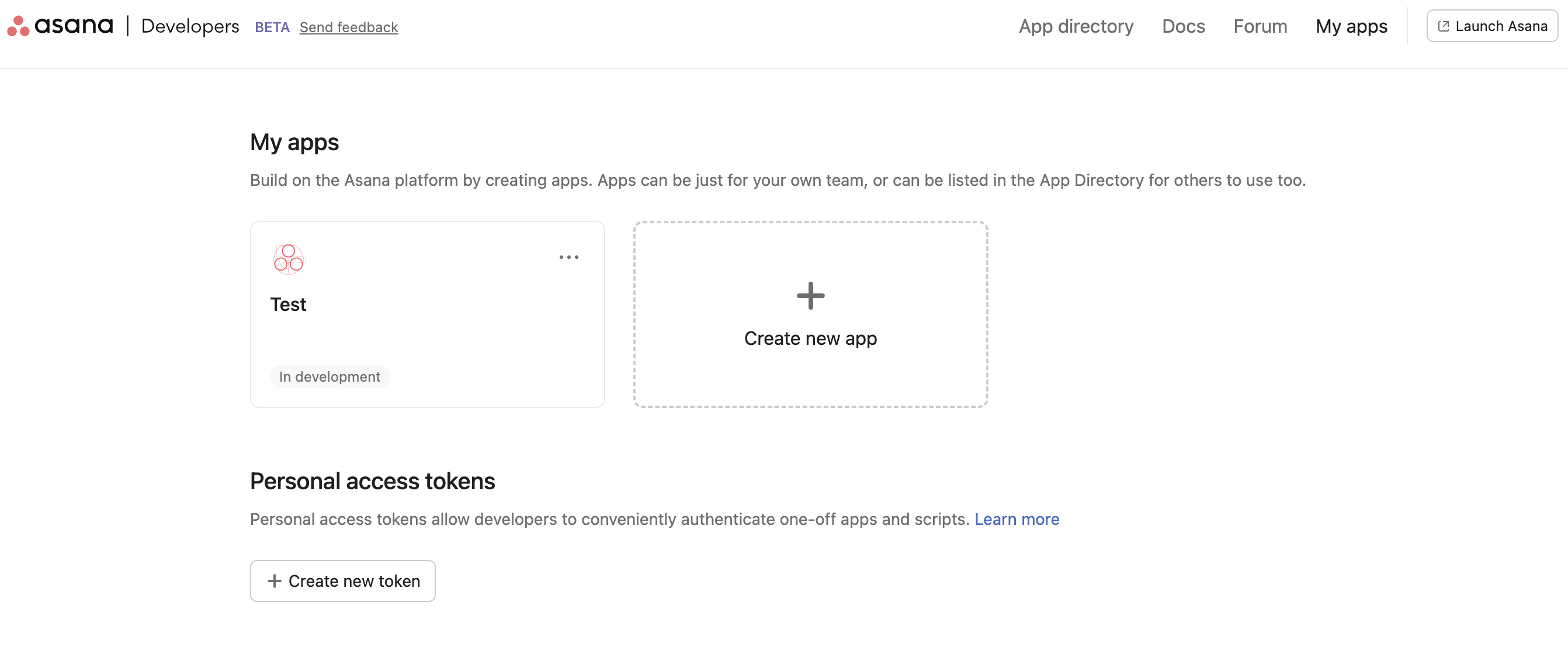
After logging in, navigate to the Asana developer console.
-
Click on the + Create new token button.
Step 2: Create a new access token
-
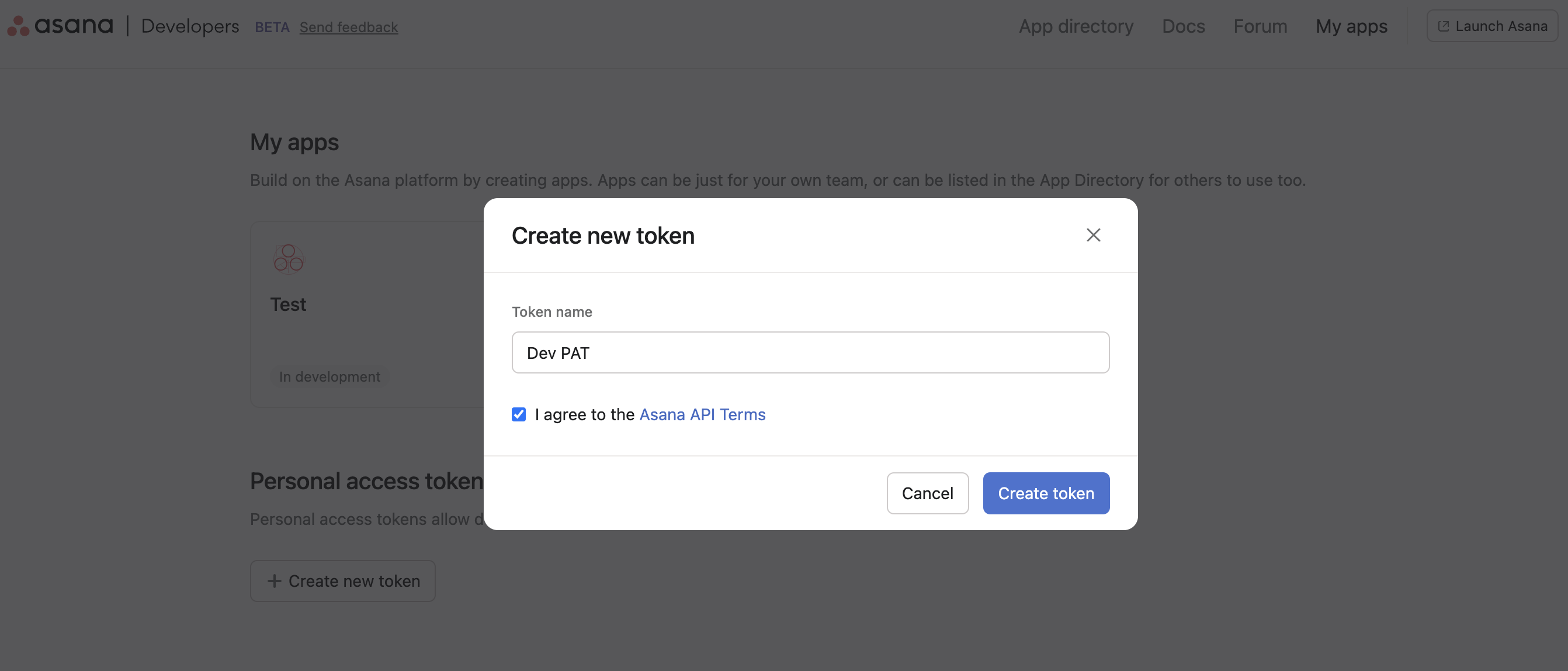
Provide a name for the token and accept Asana's API terms checkbox after reading them.
-
Click on the Create token button.
-
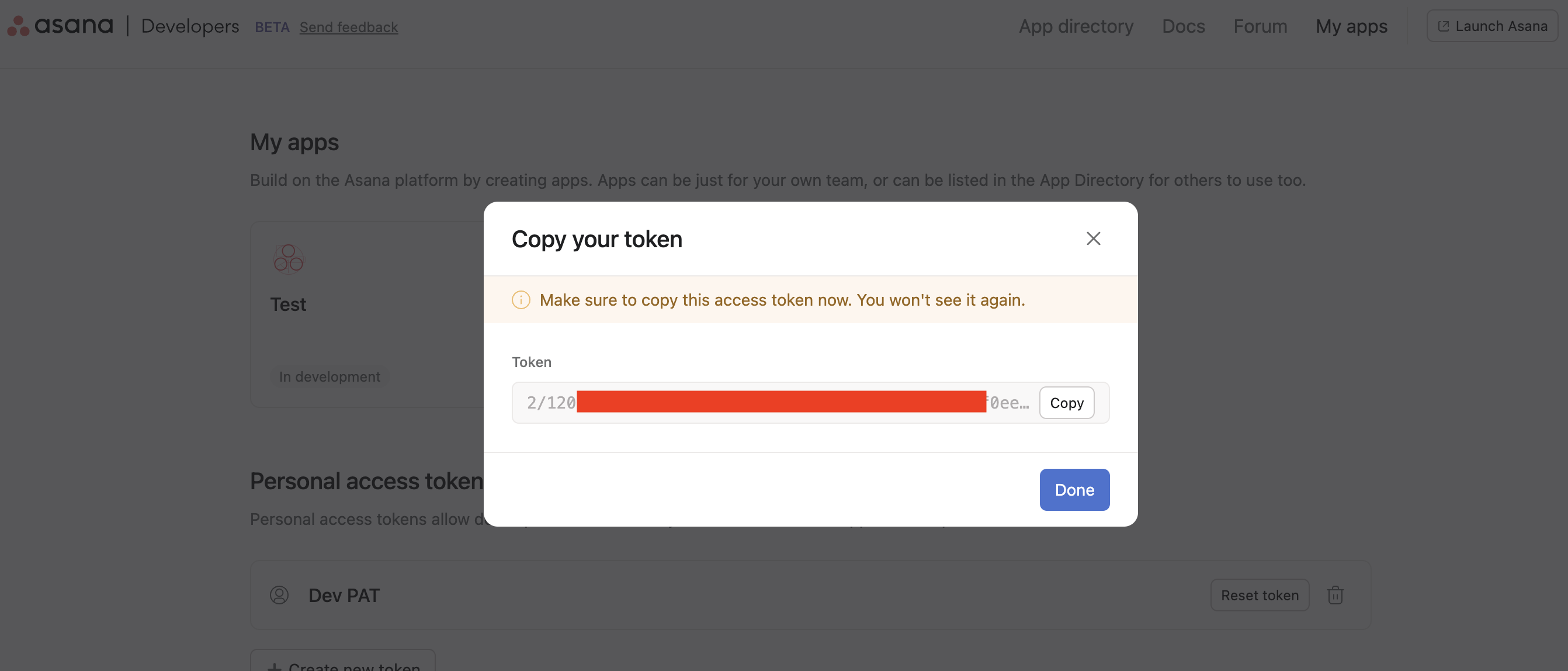
Copy the generated token and keep it secure. You will need this token to authenticate the Asana connector.
Quickstart
To use the Asana connector in your Ballerina application, modify the .bal file as follows:
Step 1: Import the connector
Import the ballerinax/asana package into your Ballerina project.
import ballerinax/asana;
Step 2: Instantiate a new connector
Create an asana:ConnectionConfig with the obtained PAT (or OAuth2) credentials and initialize the connector with it.
asana:ConnectionConfig asanaConfig = { auth: { token: authToken } }; asana:Client asana = check new (asanaConfig);
Step 3: Invoke the connector operation
Now, utilize the available connector operations.
Get all projects for the authenticated user
ProjectCompacts projects = check asana->/projects();
Create a new task in a project
asana:TasksBody taskReq = { data: { name: "Email Marketing Campaign", notes: "Create a new email marketing campaign for the upcoming product launch.", workspace: "<workspaceId>", projects: ["<projectId>"] } }; TaskCreatedResponse taskCreated = check asana->/tasks.post(taskReq);
Examples
The Asana connector offers practical examples illustrating its use in various scenarios.
Explore these examples, covering the following use cases:
- Employee onboarding process automation - Automate the onboarding process of new employees using Asana projects and tasks.
- Team workload balancer - Evaluate and balance the workload of a given team using Asana tasks and assignments.
Clients
asana: Client
This is the interface for interacting with the Asana Platform. Our API reference is generated from our [OpenAPI spec] (https://raw.githubusercontent.com/Asana/openapi/master/defs/asana_oas.yaml).
Constructor
Gets invoked to initialize the connector.
init (ConnectionConfig config, string serviceUrl)- config ConnectionConfig - The configurations to be used when initializing the
connector
- serviceUrl string "https://app.asana.com/api/1.0" - URL of the target service
get attachments/[string attachmentGid]
function get attachments/[string attachmentGid](map<string|string[]> headers, *GetAttachmentQueries queries) returns AttachmentOkResponse|errorGet an attachment
Parameters
- queries *GetAttachmentQueries - Queries to be sent with the request
Return Type
- AttachmentOkResponse|error - Successfully retrieved the record for a single attachment
delete attachments/[string attachmentGid]
function delete attachments/[string attachmentGid](map<string|string[]> headers, *DeleteAttachmentQueries queries) returns EmptyOkResponse|errorDelete an attachment
Parameters
- queries *DeleteAttachmentQueries - Queries to be sent with the request
Return Type
- EmptyOkResponse|error - Successfully deleted the specified attachment
get attachments
function get attachments(map<string|string[]> headers, *GetAttachmentsForObjectQueries queries) returns AttachmentCompacts|errorGet attachments from an object
Parameters
- queries *GetAttachmentsForObjectQueries - Queries to be sent with the request
Return Type
- AttachmentCompacts|error - Successfully retrieved the specified object's attachments
post attachments
function post attachments(AttachmentRequest payload, map<string|string[]> headers, *CreateAttachmentForObjectQueries queries) returns AttachmentOkResponse|errorUpload an attachment
Parameters
- payload AttachmentRequest - The file you want to upload
- queries *CreateAttachmentForObjectQueries - Queries to be sent with the request
Return Type
- AttachmentOkResponse|error - Successfully uploaded the attachment to the parent object
get workspaces/[string workspaceGid]/audit_log_events
function get workspaces/[string workspaceGid]/audit_log_events(map<string|string[]> headers, *GetAuditLogEventsQueries queries) returns AuditLogEventResponse|errorGet audit log events
Parameters
- queries *GetAuditLogEventsQueries - Queries to be sent with the request
Return Type
- AuditLogEventResponse|error - AuditLogEvents were successfully retrieved
post batch
function post batch(BatchBody payload, map<string|string[]> headers, *CreateBatchRequestQueries queries) returns BatchesResponse|errorSubmit parallel requests
Parameters
- payload BatchBody - The requests to batch together via the Batch API
- queries *CreateBatchRequestQueries - Queries to be sent with the request
Return Type
- BatchesResponse|error - Successfully completed the requested batch API operations
get projects/[string projectGid]/custom_field_settings
function get projects/[string projectGid]/custom_field_settings(map<string|string[]> headers, *GetCustomFieldSettingsForProjectQueries queries) returns CustomFieldSettingsResponse|errorGet a project's custom fields
Parameters
- queries *GetCustomFieldSettingsForProjectQueries - Queries to be sent with the request
Return Type
- CustomFieldSettingsResponse|error - Successfully retrieved custom field settings objects for a project
get portfolios/[string portfolioGid]/custom_field_settings
function get portfolios/[string portfolioGid]/custom_field_settings(map<string|string[]> headers, *GetCustomFieldSettingsForPortfolioQueries queries) returns CustomFieldSettingsResponse|errorGet a portfolio's custom fields
Parameters
- queries *GetCustomFieldSettingsForPortfolioQueries - Queries to be sent with the request
Return Type
- CustomFieldSettingsResponse|error - Successfully retrieved custom field settings objects for a portfolio
post custom_fields
function post custom_fields(CustomFieldsBody payload, map<string|string[]> headers, *CreateCustomFieldQueries queries) returns CustomFieldCreatedResponse|errorCreate a custom field
Parameters
- payload CustomFieldsBody - The custom field object to create
- queries *CreateCustomFieldQueries - Queries to be sent with the request
Return Type
- CustomFieldCreatedResponse|error - Custom field successfully created
get custom_fields/[string customFieldGid]
function get custom_fields/[string customFieldGid](map<string|string[]> headers, *GetCustomFieldQueries queries) returns CustomFieldCreatedResponse|errorGet a custom field
Parameters
- queries *GetCustomFieldQueries - Queries to be sent with the request
Return Type
- CustomFieldCreatedResponse|error - Successfully retrieved the complete definition of a custom field’s metadata
put custom_fields/[string customFieldGid]
function put custom_fields/[string customFieldGid](CustomFieldscustomFieldGidBody payload, map<string|string[]> headers, *UpdateCustomFieldQueries queries) returns CustomFieldCreatedResponse|errorUpdate a custom field
Parameters
- payload CustomFieldscustomFieldGidBody - The custom field object with all updated properties
- queries *UpdateCustomFieldQueries - Queries to be sent with the request
Return Type
- CustomFieldCreatedResponse|error - The custom field was successfully updated
delete custom_fields/[string customFieldGid]
function delete custom_fields/[string customFieldGid](map<string|string[]> headers, *DeleteCustomFieldQueries queries) returns EmptyOkResponse|errorDelete a custom field
Parameters
- queries *DeleteCustomFieldQueries - Queries to be sent with the request
Return Type
- EmptyOkResponse|error - The custom field was successfully deleted
get workspaces/[string workspaceGid]/custom_fields
function get workspaces/[string workspaceGid]/custom_fields(map<string|string[]> headers, *GetCustomFieldsForWorkspaceQueries queries) returns CustomFieldsResponse|errorGet a workspace's custom fields
Parameters
- queries *GetCustomFieldsForWorkspaceQueries - Queries to be sent with the request
Return Type
- CustomFieldsResponse|error - Successfully retrieved all custom fields for the given workspace
post custom_fields/[string customFieldGid]/enum_options
function post custom_fields/[string customFieldGid]/enum_options(CustomFieldGidEnumOptionsBody payload, map<string|string[]> headers, *CreateEnumOptionForCustomFieldQueries queries) returns EnumOptions|errorCreate an enum option
Parameters
- payload CustomFieldGidEnumOptionsBody - The enum option object to create
- queries *CreateEnumOptionForCustomFieldQueries - Queries to be sent with the request
Return Type
- EnumOptions|error - Custom field enum option successfully created
post custom_fields/[string customFieldGid]/enum_options/insert
function post custom_fields/[string customFieldGid]/enum_options/insert(EnumOptionsInsertBody payload, map<string|string[]> headers, *InsertEnumOptionForCustomFieldQueries queries) returns EnumOptions|errorReorder a custom field's enum
Parameters
- payload EnumOptionsInsertBody - The enum option object to create
- queries *InsertEnumOptionForCustomFieldQueries - Queries to be sent with the request
Return Type
- EnumOptions|error - Custom field enum option successfully reordered
put enum_options/[string enumOptionGid]
function put enum_options/[string enumOptionGid](EnumOptionsenumOptionGidBody payload, map<string|string[]> headers, *UpdateEnumOptionQueries queries) returns EnumOptions|errorUpdate an enum option
Parameters
- payload EnumOptionsenumOptionGidBody - The enum option object to update
- queries *UpdateEnumOptionQueries - Queries to be sent with the request
Return Type
- EnumOptions|error - Successfully updated the specified custom field enum
get events
function get events(map<string|string[]> headers, *GetEventsQueries queries) returns EventsResponse|errorGet events on a resource
Parameters
- queries *GetEventsQueries - Queries to be sent with the request
Return Type
- EventsResponse|error - Successfully retrieved events
get goal_relationships/[string goalRelationshipGid]
function get goal_relationships/[string goalRelationshipGid](map<string|string[]> headers, *GetGoalRelationshipQueries queries) returns GoalRelationshipOkResponse|errorGet a goal relationship
Parameters
- queries *GetGoalRelationshipQueries - Queries to be sent with the request
Return Type
- GoalRelationshipOkResponse|error - Successfully retrieved the record for the goal relationship
put goal_relationships/[string goalRelationshipGid]
function put goal_relationships/[string goalRelationshipGid](GoalRelationshipsgoalRelationshipGidBody payload, map<string|string[]> headers, *UpdateGoalRelationshipQueries queries) returns GoalRelationshipOkResponse|errorUpdate a goal relationship
Parameters
- payload GoalRelationshipsgoalRelationshipGidBody - The updated fields for the goal relationship
- queries *UpdateGoalRelationshipQueries - Queries to be sent with the request
Return Type
- GoalRelationshipOkResponse|error - Successfully updated the goal relationship
get goal_relationships
function get goal_relationships(map<string|string[]> headers, *GetGoalRelationshipsQueries queries) returns GoalRelationshipCompacts|errorGet goal relationships
Parameters
- queries *GetGoalRelationshipsQueries - Queries to be sent with the request
Return Type
- GoalRelationshipCompacts|error - Successfully retrieved the requested goal relationships
post goals/[string goalGid]/addSupportingRelationship
function post goals/[string goalGid]/addSupportingRelationship(GoalGidAddSupportingRelationshipBody payload, map<string|string[]> headers, *AddSupportingRelationshipQueries queries) returns GoalRelationshipOkResponse|errorAdd a supporting goal relationship
Parameters
- payload GoalGidAddSupportingRelationshipBody - The supporting resource to be added to the goal
- queries *AddSupportingRelationshipQueries - Queries to be sent with the request
Return Type
- GoalRelationshipOkResponse|error - Successfully created the goal relationship
post goals/[string goalGid]/removeSupportingRelationship
function post goals/[string goalGid]/removeSupportingRelationship(GoalGidRemoveSupportingRelationshipBody payload, map<string|string[]> headers, *RemoveSupportingRelationshipQueries queries) returns EmptyOkResponse|errorRemoves a supporting goal relationship
Parameters
- payload GoalGidRemoveSupportingRelationshipBody - The supporting resource to be removed from the goal
- queries *RemoveSupportingRelationshipQueries - Queries to be sent with the request
Return Type
- EmptyOkResponse|error - Successfully removed the goal relationship
get goals/[string goalGid]
function get goals/[string goalGid](map<string|string[]> headers, *GetGoalQueries queries) returns GoalOkResponse|errorGet a goal
Parameters
- queries *GetGoalQueries - Queries to be sent with the request
Return Type
- GoalOkResponse|error - Successfully retrieved the record for a single goal
put goals/[string goalGid]
function put goals/[string goalGid](GoalsgoalGidBody payload, map<string|string[]> headers, *UpdateGoalQueries queries) returns GoalOkResponse|errorUpdate a goal
Parameters
- payload GoalsgoalGidBody - The updated fields for the goal
- queries *UpdateGoalQueries - Queries to be sent with the request
Return Type
- GoalOkResponse|error - Successfully updated the goal
delete goals/[string goalGid]
function delete goals/[string goalGid](map<string|string[]> headers, *DeleteGoalQueries queries) returns EmptyOkResponse|errorDelete a goal
Parameters
- queries *DeleteGoalQueries - Queries to be sent with the request
Return Type
- EmptyOkResponse|error - Successfully deleted the specified goal
get goals
function get goals(map<string|string[]> headers, *GetGoalsQueries queries) returns GoalCompactsResponse|errorGet goals
Parameters
- queries *GetGoalsQueries - Queries to be sent with the request
Return Type
- GoalCompactsResponse|error - Successfully retrieved the requested goals
post goals
function post goals(GoalsBody payload, map<string|string[]> headers, *CreateGoalQueries queries) returns GoalOkResponse|errorCreate a goal
Parameters
- payload GoalsBody - The goal to create
- queries *CreateGoalQueries - Queries to be sent with the request
Return Type
- GoalOkResponse|error - Successfully created a new goal
post goals/[string goalGid]/setMetric
function post goals/[string goalGid]/setMetric(GoalGidSetMetricBody payload, map<string|string[]> headers, *CreateGoalMetricQueries queries) returns GoalOkResponse|errorCreate a goal metric
Parameters
- payload GoalGidSetMetricBody - The goal metric to create
- queries *CreateGoalMetricQueries - Queries to be sent with the request
Return Type
- GoalOkResponse|error - Successfully created a new goal metric
post goals/[string goalGid]/setMetricCurrentValue
function post goals/[string goalGid]/setMetricCurrentValue(GoalGidSetMetricCurrentValueBody payload, map<string|string[]> headers, *UpdateGoalMetricQueries queries) returns GoalOkResponse|errorUpdate a goal metric
Parameters
- payload GoalGidSetMetricCurrentValueBody - The updated fields for the goal metric
- queries *UpdateGoalMetricQueries - Queries to be sent with the request
Return Type
- GoalOkResponse|error - Successfully updated the goal metric
post goals/[string goalGid]/addFollowers
function post goals/[string goalGid]/addFollowers(GoalGidAddFollowersBody payload, map<string|string[]> headers, *AddFollowersQueries queries) returns GoalOkResponse|errorAdd a collaborator to a goal
Parameters
- payload GoalGidAddFollowersBody - The followers to be added as collaborators
- queries *AddFollowersQueries - Queries to be sent with the request
Return Type
- GoalOkResponse|error - Successfully added users as collaborators
post goals/[string goalGid]/removeFollowers
function post goals/[string goalGid]/removeFollowers(GoalGidRemoveFollowersBody payload, map<string|string[]> headers, *RemoveFollowersQueries queries) returns GoalOkResponse|errorRemove a collaborator from a goal
Parameters
- payload GoalGidRemoveFollowersBody - The followers to be removed as collaborators
- queries *RemoveFollowersQueries - Queries to be sent with the request
Return Type
- GoalOkResponse|error - Successfully removed users as collaborators
get goals/[string goalGid]/parentGoals
function get goals/[string goalGid]/parentGoals(map<string|string[]> headers, *GetParentGoalsForGoalQueries queries) returns GoalCompacts|errorGet parent goals from a goal
Parameters
- queries *GetParentGoalsForGoalQueries - Queries to be sent with the request
Return Type
- GoalCompacts|error - Successfully retrieved the specified goal's parent goals
get jobs/[string jobGid]
function get jobs/[string jobGid](map<string|string[]> headers, *GetJobQueries queries) returns JobOkResponse|errorGet a job by id
Parameters
- queries *GetJobQueries - Queries to be sent with the request
Return Type
- JobOkResponse|error - Successfully retrieved Job
get memberships
function get memberships(map<string|string[]> headers, *GetMembershipsQueries queries) returns MembershipCompacts|errorGet multiple memberships
Parameters
- queries *GetMembershipsQueries - Queries to be sent with the request
Return Type
- MembershipCompacts|error - Successfully retrieved the requested membership
post memberships
function post memberships(MembershipsBody payload, map<string|string[]> headers, *CreateMembershipQueries queries) returns MembershipCreatedResponse|errorCreate a membership
Parameters
- payload MembershipsBody - The updated fields for the membership
- queries *CreateMembershipQueries - Queries to be sent with the request
Return Type
- MembershipCreatedResponse|error - Successfully created the requested membership
get memberships/[string membershipGid]
function get memberships/[string membershipGid](map<string|string[]> headers, *GetMembershipQueries queries) returns ProjectMembershipCompactOkResponse|errorGet a membership
Parameters
- queries *GetMembershipQueries - Queries to be sent with the request
Return Type
- ProjectMembershipCompactOkResponse|error - Successfully retrieved the record for a single membership
put memberships/[string membershipGid]
function put memberships/[string membershipGid](MembershipsmembershipGidBody payload, map<string|string[]> headers, *UpdateMembershipQueries queries) returns MembershipCreatedResponse|errorUpdate a membership
Parameters
- payload MembershipsmembershipGidBody - The membership to update
- queries *UpdateMembershipQueries - Queries to be sent with the request
Return Type
- MembershipCreatedResponse|error - Successfully updated the requested membership
delete memberships/[string membershipGid]
function delete memberships/[string membershipGid](map<string|string[]> headers, *DeleteMembershipQueries queries) returns EmptyOkResponse|errorDelete a membership
Parameters
- queries *DeleteMembershipQueries - Queries to be sent with the request
Return Type
- EmptyOkResponse|error - Successfully deleted the requested membership
post organization_exports
function post organization_exports(OrganizationExportsBody payload, map<string|string[]> headers, *CreateOrganizationExportQueries queries) returns OrganizationExportCreatedResponse|errorCreate an organization export request
Parameters
- payload OrganizationExportsBody - The organization to export
- queries *CreateOrganizationExportQueries - Queries to be sent with the request
Return Type
- OrganizationExportCreatedResponse|error - Successfully created organization export request
get organization_exports/[string organizationExportGid]
function get organization_exports/[string organizationExportGid](map<string|string[]> headers, *GetOrganizationExportQueries queries) returns OrganizationExportCreatedResponse|errorGet details on an org export request
Parameters
- queries *GetOrganizationExportQueries - Queries to be sent with the request
Return Type
- OrganizationExportCreatedResponse|error - Successfully retrieved organization export object
get portfolio_memberships
function get portfolio_memberships(map<string|string[]> headers, *GetPortfolioMembershipsQueries queries) returns PortfolioMembershipCompacts|errorGet multiple portfolio memberships
Parameters
- queries *GetPortfolioMembershipsQueries - Queries to be sent with the request
Return Type
- PortfolioMembershipCompacts|error - Successfully retrieved portfolio memberships
get portfolio_memberships/[string portfolioMembershipGid]
function get portfolio_memberships/[string portfolioMembershipGid](map<string|string[]> headers, *GetPortfolioMembershipQueries queries) returns PortfolioMembershipOkResponse|errorGet a portfolio membership
Parameters
- queries *GetPortfolioMembershipQueries - Queries to be sent with the request
Return Type
- PortfolioMembershipOkResponse|error - Successfully retrieved the requested portfolio membership
get portfolios/[string portfolioGid]/portfolio_memberships
function get portfolios/[string portfolioGid]/portfolio_memberships(map<string|string[]> headers, *GetPortfolioMembershipsForPortfolioQueries queries) returns PortfolioMembershipCompacts|errorGet memberships from a portfolio
Parameters
- queries *GetPortfolioMembershipsForPortfolioQueries - Queries to be sent with the request
Return Type
- PortfolioMembershipCompacts|error - Successfully retrieved the requested portfolio's memberships
get portfolios
function get portfolios(map<string|string[]> headers, *GetPortfoliosQueries queries) returns PortfolioCompacts|errorGet multiple portfolios
Parameters
- queries *GetPortfoliosQueries - Queries to be sent with the request
Return Type
- PortfolioCompacts|error - Successfully retrieved portfolios
post portfolios
function post portfolios(PortfoliosBody payload, map<string|string[]> headers, *CreatePortfolioQueries queries) returns PortfolioCreatedResponse|errorCreate a portfolio
Parameters
- payload PortfoliosBody - The portfolio to create
- queries *CreatePortfolioQueries - Queries to be sent with the request
Return Type
- PortfolioCreatedResponse|error - Successfully created portfolio
get portfolios/[string portfolioGid]
function get portfolios/[string portfolioGid](map<string|string[]> headers, *GetPortfolioQueries queries) returns PortfolioCreatedResponse|errorGet a portfolio
Parameters
- queries *GetPortfolioQueries - Queries to be sent with the request
Return Type
- PortfolioCreatedResponse|error - Successfully retrieved the requested portfolio
put portfolios/[string portfolioGid]
function put portfolios/[string portfolioGid](PortfoliosportfolioGidBody payload, map<string|string[]> headers, *UpdatePortfolioQueries queries) returns PortfolioCreatedResponse|errorUpdate a portfolio
Parameters
- payload PortfoliosportfolioGidBody - The updated fields for the portfolio
- queries *UpdatePortfolioQueries - Queries to be sent with the request
Return Type
- PortfolioCreatedResponse|error - Successfully updated the portfolio
delete portfolios/[string portfolioGid]
function delete portfolios/[string portfolioGid](map<string|string[]> headers, *DeletePortfolioQueries queries) returns EmptyOkResponse|errorDelete a portfolio
Parameters
- queries *DeletePortfolioQueries - Queries to be sent with the request
Return Type
- EmptyOkResponse|error - Successfully deleted the specified portfolio
get portfolios/[string portfolioGid]/items
function get portfolios/[string portfolioGid]/items(map<string|string[]> headers, *GetItemsForPortfolioQueries queries) returns ProjectCompacts|errorGet portfolio items
Parameters
- queries *GetItemsForPortfolioQueries - Queries to be sent with the request
Return Type
- ProjectCompacts|error - Successfully retrieved the requested portfolio's items
post portfolios/[string portfolioGid]/addItem
function post portfolios/[string portfolioGid]/addItem(PortfolioGidAddItemBody payload, map<string|string[]> headers, *AddItemForPortfolioQueries queries) returns EmptyOkResponse|errorAdd a portfolio item
Parameters
- payload PortfolioGidAddItemBody - Information about the item being inserted
- queries *AddItemForPortfolioQueries - Queries to be sent with the request
Return Type
- EmptyOkResponse|error - Successfully added the item to the portfolio
post portfolios/[string portfolioGid]/removeItem
function post portfolios/[string portfolioGid]/removeItem(PortfolioGidRemoveItemBody payload, map<string|string[]> headers, *RemoveItemForPortfolioQueries queries) returns EmptyOkResponse|errorRemove a portfolio item
Parameters
- payload PortfolioGidRemoveItemBody - Information about the item being removed
- queries *RemoveItemForPortfolioQueries - Queries to be sent with the request
Return Type
- EmptyOkResponse|error - Successfully removed the item from the portfolio
post portfolios/[string portfolioGid]/addCustomFieldSetting
function post portfolios/[string portfolioGid]/addCustomFieldSetting(PortfolioGidAddCustomFieldSettingBody payload, map<string|string[]> headers, *AddCustomFieldSettingForPortfolioQueries queries) returns CustomFieldSettingOkResponse|errorAdd a custom field to a portfolio
Parameters
- payload PortfolioGidAddCustomFieldSettingBody - Information about the custom field setting
- queries *AddCustomFieldSettingForPortfolioQueries - Queries to be sent with the request
Return Type
- CustomFieldSettingOkResponse|error - Successfully added the custom field to the portfolio
post portfolios/[string portfolioGid]/removeCustomFieldSetting
function post portfolios/[string portfolioGid]/removeCustomFieldSetting(PortfolioGidRemoveCustomFieldSettingBody payload, map<string|string[]> headers, *RemoveCustomFieldSettingForPortfolioQueries queries) returns EmptyOkResponse|errorRemove a custom field from a portfolio
Parameters
- payload PortfolioGidRemoveCustomFieldSettingBody - Information about the custom field setting being removed
- queries *RemoveCustomFieldSettingForPortfolioQueries - Queries to be sent with the request
Return Type
- EmptyOkResponse|error - Successfully removed the custom field from the portfolio
post portfolios/[string portfolioGid]/addMembers
function post portfolios/[string portfolioGid]/addMembers(PortfolioGidAddMembersBody payload, map<string|string[]> headers, *AddMembersForPortfolioQueries queries) returns PortfolioCreatedResponse|errorAdd users to a portfolio
Parameters
- payload PortfolioGidAddMembersBody - Information about the members being added
- queries *AddMembersForPortfolioQueries - Queries to be sent with the request
Return Type
- PortfolioCreatedResponse|error - Successfully added members to the portfolio
post portfolios/[string portfolioGid]/removeMembers
function post portfolios/[string portfolioGid]/removeMembers(PortfolioGidRemoveMembersBody payload, map<string|string[]> headers, *RemoveMembersForPortfolioQueries queries) returns PortfolioCreatedResponse|errorRemove users from a portfolio
Parameters
- payload PortfolioGidRemoveMembersBody - Information about the members being removed
- queries *RemoveMembersForPortfolioQueries - Queries to be sent with the request
Return Type
- PortfolioCreatedResponse|error - Successfully removed the members from the portfolio
get project_briefs/[string projectBriefGid]
function get project_briefs/[string projectBriefGid](map<string|string[]> headers, *GetProjectBriefQueries queries) returns ProjectBriefOkResponse|errorGet a project brief
Parameters
- queries *GetProjectBriefQueries - Queries to be sent with the request
Return Type
- ProjectBriefOkResponse|error - Successfully retrieved the record for a project brief
put project_briefs/[string projectBriefGid]
function put project_briefs/[string projectBriefGid](ProjectBriefsprojectBriefGidBody payload, map<string|string[]> headers, *UpdateProjectBriefQueries queries) returns ProjectBriefOkResponse|errorUpdate a project brief
Parameters
- payload ProjectBriefsprojectBriefGidBody - The updated fields for the project brief
- queries *UpdateProjectBriefQueries - Queries to be sent with the request
Return Type
- ProjectBriefOkResponse|error - Successfully updated the project brief
delete project_briefs/[string projectBriefGid]
function delete project_briefs/[string projectBriefGid](map<string|string[]> headers, *DeleteProjectBriefQueries queries) returns EmptyOkResponse|errorDelete a project brief
Parameters
- queries *DeleteProjectBriefQueries - Queries to be sent with the request
Return Type
- EmptyOkResponse|error - Successfully deleted the specified project brief
post projects/[string projectGid]/project_briefs
function post projects/[string projectGid]/project_briefs(ProjectGidProjectBriefsBody payload, map<string|string[]> headers, *CreateProjectBriefQueries queries) returns ProjectBriefOkResponse|errorCreate a project brief
Parameters
- payload ProjectGidProjectBriefsBody - The project brief to create
- queries *CreateProjectBriefQueries - Queries to be sent with the request
Return Type
- ProjectBriefOkResponse|error - Successfully created a new project brief
get project_memberships/[string projectMembershipGid]
function get project_memberships/[string projectMembershipGid](map<string|string[]> headers, *GetProjectMembershipQueries queries) returns ProjectMembershipNormalOkResponse|errorGet a project membership
Parameters
- queries *GetProjectMembershipQueries - Queries to be sent with the request
Return Type
- ProjectMembershipNormalOkResponse|error - Successfully retrieved the requested project membership
get projects/[string projectGid]/project_memberships
function get projects/[string projectGid]/project_memberships(map<string|string[]> headers, *GetProjectMembershipsForProjectQueries queries) returns ProjectMembershipCompacts|errorGet memberships from a project
Parameters
- queries *GetProjectMembershipsForProjectQueries - Queries to be sent with the request
Return Type
- ProjectMembershipCompacts|error - Successfully retrieved the requested project's memberships
get project_statuses/[string projectStatusGid]
function get project_statuses/[string projectStatusGid](map<string|string[]> headers, *GetProjectStatusQueries queries) returns ProjectStatusOkResponse|errorGet a project status
Parameters
- queries *GetProjectStatusQueries - Queries to be sent with the request
Return Type
- ProjectStatusOkResponse|error - Successfully retrieved the specified project's status updates
delete project_statuses/[string projectStatusGid]
function delete project_statuses/[string projectStatusGid](map<string|string[]> headers, *DeleteProjectStatusQueries queries) returns EmptyOkResponse|errorDelete a project status
Parameters
- queries *DeleteProjectStatusQueries - Queries to be sent with the request
Return Type
- EmptyOkResponse|error - Successfully deleted the specified project status
get projects/[string projectGid]/project_statuses
function get projects/[string projectGid]/project_statuses(map<string|string[]> headers, *GetProjectStatusesForProjectQueries queries) returns ProjectStatusCompacts|errorGet statuses from a project
Parameters
- queries *GetProjectStatusesForProjectQueries - Queries to be sent with the request
Return Type
- ProjectStatusCompacts|error - Successfully retrieved the specified project's status updates
post projects/[string projectGid]/project_statuses
function post projects/[string projectGid]/project_statuses(ProjectGidProjectStatusesBody payload, map<string|string[]> headers, *CreateProjectStatusForProjectQueries queries) returns ProjectStatusOkResponse|errorCreate a project status
Parameters
- payload ProjectGidProjectStatusesBody - The project status to create
- queries *CreateProjectStatusForProjectQueries - Queries to be sent with the request
Return Type
- ProjectStatusOkResponse|error - Successfully created a new story
get project_templates/[string projectTemplateGid]
function get project_templates/[string projectTemplateGid](map<string|string[]> headers, *GetProjectTemplateQueries queries) returns ProjectTemplateOkResponse|errorGet a project template
Parameters
- queries *GetProjectTemplateQueries - Queries to be sent with the request
Return Type
- ProjectTemplateOkResponse|error - Successfully retrieved the requested project template
delete project_templates/[string projectTemplateGid]
function delete project_templates/[string projectTemplateGid](map<string|string[]> headers, *DeleteProjectTemplateQueries queries) returns EmptyOkResponse|errorDelete a project template
Parameters
- queries *DeleteProjectTemplateQueries - Queries to be sent with the request
Return Type
- EmptyOkResponse|error - Successfully deleted the specified project template
get project_templates
function get project_templates(map<string|string[]> headers, *GetProjectTemplatesQueries queries) returns ProjectTemplateCompacts|errorGet multiple project templates
Parameters
- queries *GetProjectTemplatesQueries - Queries to be sent with the request
Return Type
- ProjectTemplateCompacts|error - Successfully retrieved the requested team's or workspace's project templates
get teams/[string teamGid]/project_templates
function get teams/[string teamGid]/project_templates(map<string|string[]> headers, *GetProjectTemplatesForTeamQueries queries) returns ProjectTemplateCompacts|errorGet a team's project templates
Parameters
- queries *GetProjectTemplatesForTeamQueries - Queries to be sent with the request
Return Type
- ProjectTemplateCompacts|error - Successfully retrieved the requested team's project templates
post project_templates/[string projectTemplateGid]/instantiateProject
function post project_templates/[string projectTemplateGid]/instantiateProject(ProjectTemplateGidInstantiateProjectBody payload, map<string|string[]> headers, *InstantiateProjectQueries queries) returns JobOkResponse|errorInstantiate a project from a project template
Parameters
- payload ProjectTemplateGidInstantiateProjectBody - Describes the inputs used for instantiating a project, such as the resulting project's name, which team it should be created in, and values for date variables
- queries *InstantiateProjectQueries - Queries to be sent with the request
Return Type
- JobOkResponse|error - Successfully created the job to handle project instantiation
get projects
function get projects(map<string|string[]> headers, *GetProjectsQueries queries) returns ProjectCompacts|errorGet multiple projects
Parameters
- queries *GetProjectsQueries - Queries to be sent with the request
Return Type
- ProjectCompacts|error - Successfully retrieved projects
post projects
function post projects(ProjectsBody payload, map<string|string[]> headers, *CreateProjectQueries queries) returns ProjectCreatedResponse|errorCreate a project
Parameters
- payload ProjectsBody - The project to create
- queries *CreateProjectQueries - Queries to be sent with the request
Return Type
- ProjectCreatedResponse|error - Successfully retrieved projects
get projects/[string projectGid]
function get projects/[string projectGid](map<string|string[]> headers, *GetProjectQueries queries) returns ProjectCreatedResponse|errorGet a project
Parameters
- queries *GetProjectQueries - Queries to be sent with the request
Return Type
- ProjectCreatedResponse|error - Successfully retrieved the requested project
put projects/[string projectGid]
function put projects/[string projectGid](ProjectsprojectGidBody payload, map<string|string[]> headers, *UpdateProjectQueries queries) returns ProjectCreatedResponse|errorUpdate a project
Parameters
- payload ProjectsprojectGidBody - The updated fields for the project
- queries *UpdateProjectQueries - Queries to be sent with the request
Return Type
- ProjectCreatedResponse|error - Successfully updated the project
delete projects/[string projectGid]
function delete projects/[string projectGid](map<string|string[]> headers, *DeleteProjectQueries queries) returns EmptyOkResponse|errorDelete a project
Parameters
- queries *DeleteProjectQueries - Queries to be sent with the request
Return Type
- EmptyOkResponse|error - Successfully deleted the specified project
post projects/[string projectGid]/duplicate
function post projects/[string projectGid]/duplicate(ProjectGidDuplicateBody payload, map<string|string[]> headers, *DuplicateProjectQueries queries) returns JobOkResponse|errorDuplicate a project
Parameters
- payload ProjectGidDuplicateBody - Describes the duplicate's name and the elements that will be duplicated
- queries *DuplicateProjectQueries - Queries to be sent with the request
Return Type
- JobOkResponse|error - Successfully created the job to handle duplication
get tasks/[string taskGid]/projects
function get tasks/[string taskGid]/projects(map<string|string[]> headers, *GetProjectsForTaskQueries queries) returns ProjectCompacts|errorGet projects a task is in
Parameters
- queries *GetProjectsForTaskQueries - Queries to be sent with the request
Return Type
- ProjectCompacts|error - Successfully retrieved the projects for the given task
get teams/[string teamGid]/projects
function get teams/[string teamGid]/projects(map<string|string[]> headers, *GetProjectsForTeamQueries queries) returns ProjectCompacts|errorGet a team's projects
Parameters
- queries *GetProjectsForTeamQueries - Queries to be sent with the request
Return Type
- ProjectCompacts|error - Successfully retrieved the requested team's projects
post teams/[string teamGid]/projects
function post teams/[string teamGid]/projects(TeamGidProjectsBody payload, map<string|string[]> headers, *CreateProjectForTeamQueries queries) returns ProjectCreatedResponse|errorCreate a project in a team
Parameters
- payload TeamGidProjectsBody - The new project to create
- queries *CreateProjectForTeamQueries - Queries to be sent with the request
Return Type
- ProjectCreatedResponse|error - Successfully created the specified project
get workspaces/[string workspaceGid]/projects
function get workspaces/[string workspaceGid]/projects(map<string|string[]> headers, *GetProjectsForWorkspaceQueries queries) returns ProjectCompacts|errorGet all projects in a workspace
Parameters
- queries *GetProjectsForWorkspaceQueries - Queries to be sent with the request
Return Type
- ProjectCompacts|error - Successfully retrieved the requested workspace's projects
post workspaces/[string workspaceGid]/projects
function post workspaces/[string workspaceGid]/projects(WorkspaceGidProjectsBody payload, map<string|string[]> headers, *CreateProjectForWorkspaceQueries queries) returns ProjectCreatedResponse|errorCreate a project in a workspace
Parameters
- payload WorkspaceGidProjectsBody - The new project to create
- queries *CreateProjectForWorkspaceQueries - Queries to be sent with the request
Return Type
- ProjectCreatedResponse|error - Successfully created a new project in the specified workspace
post projects/[string projectGid]/addCustomFieldSetting
function post projects/[string projectGid]/addCustomFieldSetting(ProjectGidAddCustomFieldSettingBody payload, map<string|string[]> headers, *AddCustomFieldSettingForProjectQueries queries) returns CustomFieldSettingOkResponse|errorAdd a custom field to a project
Parameters
- payload ProjectGidAddCustomFieldSettingBody - Information about the custom field setting
- queries *AddCustomFieldSettingForProjectQueries - Queries to be sent with the request
Return Type
- CustomFieldSettingOkResponse|error - Successfully added the custom field to the project
post projects/[string projectGid]/removeCustomFieldSetting
function post projects/[string projectGid]/removeCustomFieldSetting(ProjectGidRemoveCustomFieldSettingBody payload, map<string|string[]> headers, *RemoveCustomFieldSettingForProjectQueries queries) returns EmptyOkResponse|errorRemove a custom field from a project
Parameters
- payload ProjectGidRemoveCustomFieldSettingBody - Information about the custom field setting being removed
- queries *RemoveCustomFieldSettingForProjectQueries - Queries to be sent with the request
Return Type
- EmptyOkResponse|error - Successfully removed the custom field from the project
get projects/[string projectGid]/task_counts
function get projects/[string projectGid]/task_counts(map<string|string[]> headers, *GetTaskCountsForProjectQueries queries) returns TaskCountOkResponse|errorGet task count of a project
Parameters
- queries *GetTaskCountsForProjectQueries - Queries to be sent with the request
Return Type
- TaskCountOkResponse|error - Successfully retrieved the requested project's task counts
post projects/[string projectGid]/addMembers
function post projects/[string projectGid]/addMembers(ProjectGidAddMembersBody payload, map<string|string[]> headers, *AddMembersForProjectQueries queries) returns ProjectCreatedResponse|errorAdd users to a project
Parameters
- payload ProjectGidAddMembersBody - Information about the members being added
- queries *AddMembersForProjectQueries - Queries to be sent with the request
Return Type
- ProjectCreatedResponse|error - Successfully added members to the project
post projects/[string projectGid]/removeMembers
function post projects/[string projectGid]/removeMembers(ProjectGidRemoveMembersBody payload, map<string|string[]> headers, *RemoveMembersForProjectQueries queries) returns ProjectCreatedResponse|errorRemove users from a project
Parameters
- payload ProjectGidRemoveMembersBody - Information about the members being removed
- queries *RemoveMembersForProjectQueries - Queries to be sent with the request
Return Type
- ProjectCreatedResponse|error - Successfully removed the members from the project
post projects/[string projectGid]/addFollowers
function post projects/[string projectGid]/addFollowers(ProjectGidAddFollowersBody payload, map<string|string[]> headers, *AddFollowersForProjectQueries queries) returns ProjectCreatedResponse|errorAdd followers to a project
Parameters
- payload ProjectGidAddFollowersBody - Information about the followers being added
- queries *AddFollowersForProjectQueries - Queries to be sent with the request
Return Type
- ProjectCreatedResponse|error - Successfully added followers to the project
post projects/[string projectGid]/removeFollowers
function post projects/[string projectGid]/removeFollowers(ProjectGidRemoveFollowersBody payload, map<string|string[]> headers, *RemoveFollowersForProjectQueries queries) returns ProjectCreatedResponse|errorRemove followers from a project
Parameters
- payload ProjectGidRemoveFollowersBody - Information about the followers being removed
- queries *RemoveFollowersForProjectQueries - Queries to be sent with the request
Return Type
- ProjectCreatedResponse|error - Successfully removed followers from the project
post projects/[string projectGid]/saveAsTemplate
function post projects/[string projectGid]/saveAsTemplate(ProjectGidSaveAsTemplateBody payload, map<string|string[]> headers, *ProjectSaveAsTemplateQueries queries) returns JobOkResponse|errorCreate a project template from a project
Parameters
- payload ProjectGidSaveAsTemplateBody - Describes the inputs used for creating a project template, such as the resulting project template's name, which team it should be created in
- queries *ProjectSaveAsTemplateQueries - Queries to be sent with the request
Return Type
- JobOkResponse|error - Successfully created the job to handle project template creation
post rule_triggers/[string ruleTriggerGid]/run
function post rule_triggers/[string ruleTriggerGid]/run(RuleTriggerGidRunBody payload, map<string|string[]> headers) returns RuleTriggerOkResponse|errorTrigger a rule
Parameters
- payload RuleTriggerGidRunBody - A dictionary of variables accessible from within the rule
Return Type
- RuleTriggerOkResponse|error - Successfully triggered a rule
get sections/[string sectionGid]
function get sections/[string sectionGid](map<string|string[]> headers, *GetSectionQueries queries) returns SectionOkResponse|errorGet a section
Parameters
- queries *GetSectionQueries - Queries to be sent with the request
Return Type
- SectionOkResponse|error - Successfully retrieved section
put sections/[string sectionGid]
function put sections/[string sectionGid](SectionssectionGidBody payload, map<string|string[]> headers, *UpdateSectionQueries queries) returns SectionOkResponse|errorUpdate a section
Parameters
- payload SectionssectionGidBody - The section to create
- queries *UpdateSectionQueries - Queries to be sent with the request
Return Type
- SectionOkResponse|error - Successfully updated the specified section
delete sections/[string sectionGid]
function delete sections/[string sectionGid](map<string|string[]> headers, *DeleteSectionQueries queries) returns EmptyOkResponse|errorDelete a section
Parameters
- queries *DeleteSectionQueries - Queries to be sent with the request
Return Type
- EmptyOkResponse|error - Successfully deleted the specified section
get projects/[string projectGid]/sections
function get projects/[string projectGid]/sections(map<string|string[]> headers, *GetSectionsForProjectQueries queries) returns SectionCompacts|errorGet sections in a project
Parameters
- queries *GetSectionsForProjectQueries - Queries to be sent with the request
Return Type
- SectionCompacts|error - Successfully retrieved sections in project
post projects/[string projectGid]/sections
function post projects/[string projectGid]/sections(ProjectGidSectionsBody payload, map<string|string[]> headers, *CreateSectionForProjectQueries queries) returns SectionOkResponse|errorCreate a section in a project
Parameters
- payload ProjectGidSectionsBody - The section to create
- queries *CreateSectionForProjectQueries - Queries to be sent with the request
Return Type
- SectionOkResponse|error - Successfully created the specified section
post sections/[string sectionGid]/addTask
function post sections/[string sectionGid]/addTask(SectionGidAddTaskBody payload, map<string|string[]> headers, *AddTaskForSectionQueries queries) returns EmptyOkResponse|errorAdd task to section
Parameters
- payload SectionGidAddTaskBody - The task and optionally the insert location
- queries *AddTaskForSectionQueries - Queries to be sent with the request
Return Type
- EmptyOkResponse|error - Successfully added the task
post projects/[string projectGid]/sections/insert
function post projects/[string projectGid]/sections/insert(SectionsInsertBody payload, map<string|string[]> headers, *InsertSectionForProjectQueries queries) returns EmptyOkResponse|errorMove or Insert sections
Parameters
- payload SectionsInsertBody - The section's move action
- queries *InsertSectionForProjectQueries - Queries to be sent with the request
Return Type
- EmptyOkResponse|error - Successfully moved the specified section
get status_updates/[string statusUpdateGid]
function get status_updates/[string statusUpdateGid](map<string|string[]> headers, *GetStatusQueries queries) returns StatusUpdateOkResponse|errorGet a status update
Parameters
- queries *GetStatusQueries - Queries to be sent with the request
Return Type
- StatusUpdateOkResponse|error - Successfully retrieved the specified object's status updates
delete status_updates/[string statusUpdateGid]
function delete status_updates/[string statusUpdateGid](map<string|string[]> headers, *DeleteStatusQueries queries) returns EmptyOkResponse|errorDelete a status update
Parameters
- queries *DeleteStatusQueries - Queries to be sent with the request
Return Type
- EmptyOkResponse|error - Successfully deleted the specified status
get status_updates
function get status_updates(map<string|string[]> headers, *GetStatusesForObjectQueries queries) returns StatusUpdateCompacts|errorGet status updates from an object
Parameters
- queries *GetStatusesForObjectQueries - Queries to be sent with the request
Return Type
- StatusUpdateCompacts|error - Successfully retrieved the specified object's status updates
post status_updates
function post status_updates(StatusUpdatesBody payload, map<string|string[]> headers, *CreateStatusForObjectQueries queries) returns StatusUpdateOkResponse|errorCreate a status update
Parameters
- payload StatusUpdatesBody - The status update to create
- queries *CreateStatusForObjectQueries - Queries to be sent with the request
Return Type
- StatusUpdateOkResponse|error - Successfully created a new status update
get stories/[string storyGid]
function get stories/[string storyGid](map<string|string[]> headers, *GetStoryQueries queries) returns StoryOkResponse|errorGet a story
Parameters
- queries *GetStoryQueries - Queries to be sent with the request
Return Type
- StoryOkResponse|error - Successfully retrieved the specified story
put stories/[string storyGid]
function put stories/[string storyGid](StoriesstoryGidBody payload, map<string|string[]> headers, *UpdateStoryQueries queries) returns StoryOkResponse|errorUpdate a story
Parameters
- payload StoriesstoryGidBody - The comment story to update
- queries *UpdateStoryQueries - Queries to be sent with the request
Return Type
- StoryOkResponse|error - Successfully retrieved the specified story
delete stories/[string storyGid]
function delete stories/[string storyGid](map<string|string[]> headers, *DeleteStoryQueries queries) returns EmptyOkResponse|errorDelete a story
Parameters
- queries *DeleteStoryQueries - Queries to be sent with the request
Return Type
- EmptyOkResponse|error - Successfully deleted the specified story
get tasks/[string taskGid]/stories
function get tasks/[string taskGid]/stories(map<string|string[]> headers, *GetStoriesForTaskQueries queries) returns StoryCompacts|errorGet stories from a task
Parameters
- queries *GetStoriesForTaskQueries - Queries to be sent with the request
Return Type
- StoryCompacts|error - Successfully retrieved the specified task's stories
post tasks/[string taskGid]/stories
function post tasks/[string taskGid]/stories(TaskGidStoriesBody payload, map<string|string[]> headers, *CreateStoryForTaskQueries queries) returns StoryOkResponse|errorCreate a story on a task
Parameters
- payload TaskGidStoriesBody - The story to create
- queries *CreateStoryForTaskQueries - Queries to be sent with the request
Return Type
- StoryOkResponse|error - Successfully created a new story
get tags
function get tags(map<string|string[]> headers, *GetTagsQueries queries) returns TagCompacts|errorGet multiple tags
Parameters
- queries *GetTagsQueries - Queries to be sent with the request
Return Type
- TagCompacts|error - Successfully retrieved the specified set of tags
post tags
function post tags(TagsBody payload, map<string|string[]> headers, *CreateTagQueries queries) returns TagCreatedResponse|errorCreate a tag
Parameters
- payload TagsBody - The tag to create
- queries *CreateTagQueries - Queries to be sent with the request
Return Type
- TagCreatedResponse|error - Successfully created the newly specified tag
get tags/[string tagGid]
function get tags/[string tagGid](map<string|string[]> headers, *GetTagQueries queries) returns TagCreatedResponse|errorGet a tag
Parameters
- queries *GetTagQueries - Queries to be sent with the request
Return Type
- TagCreatedResponse|error - Successfully retrieved the specified tag
put tags/[string tagGid]
function put tags/[string tagGid](map<string|string[]> headers, *UpdateTagQueries queries) returns TagCreatedResponse|errorUpdate a tag
Parameters
- queries *UpdateTagQueries - Queries to be sent with the request
Return Type
- TagCreatedResponse|error - Successfully updated the specified tag
delete tags/[string tagGid]
function delete tags/[string tagGid](map<string|string[]> headers, *DeleteTagQueries queries) returns EmptyOkResponse|errorDelete a tag
Parameters
- queries *DeleteTagQueries - Queries to be sent with the request
Return Type
- EmptyOkResponse|error - Successfully deleted the specified tag
get tasks/[string taskGid]/tags
function get tasks/[string taskGid]/tags(map<string|string[]> headers, *GetTagsForTaskQueries queries) returns TagCompacts|errorGet a task's tags
Parameters
- queries *GetTagsForTaskQueries - Queries to be sent with the request
Return Type
- TagCompacts|error - Successfully retrieved the tags for the given task
get workspaces/[string workspaceGid]/tags
function get workspaces/[string workspaceGid]/tags(map<string|string[]> headers, *GetTagsForWorkspaceQueries queries) returns TagCompacts|errorGet tags in a workspace
Parameters
- queries *GetTagsForWorkspaceQueries - Queries to be sent with the request
Return Type
- TagCompacts|error - Successfully retrieved the specified set of tags
post workspaces/[string workspaceGid]/tags
function post workspaces/[string workspaceGid]/tags(WorkspaceGidTagsBody payload, map<string|string[]> headers, *CreateTagForWorkspaceQueries queries) returns TagCreatedResponse|errorCreate a tag in a workspace
Parameters
- payload WorkspaceGidTagsBody - The tag to create
- queries *CreateTagForWorkspaceQueries - Queries to be sent with the request
Return Type
- TagCreatedResponse|error - Successfully created the newly specified tag
get task_templates
function get task_templates(map<string|string[]> headers, *GetTaskTemplatesQueries queries) returns TaskTemplateCompacts|errorGet multiple task templates
Parameters
- queries *GetTaskTemplatesQueries - Queries to be sent with the request
Return Type
- TaskTemplateCompacts|error - Successfully retrieved requested task templates
get task_templates/[string taskTemplateGid]
function get task_templates/[string taskTemplateGid](map<string|string[]> headers, *GetTaskTemplateQueries queries) returns TaskTemplateOkResponse|errorGet a task template
Parameters
- queries *GetTaskTemplateQueries - Queries to be sent with the request
Return Type
- TaskTemplateOkResponse|error - Successfully retrieved requested task template
delete task_templates/[string taskTemplateGid]
function delete task_templates/[string taskTemplateGid](map<string|string[]> headers, *DeleteTaskTemplateQueries queries) returns EmptyOkResponse|errorDelete a task template
Parameters
- queries *DeleteTaskTemplateQueries - Queries to be sent with the request
Return Type
- EmptyOkResponse|error - Successfully deleted the specified task template
post task_templates/[string taskTemplateGid]/instantiateTask
function post task_templates/[string taskTemplateGid]/instantiateTask(TaskTemplateGidInstantiateTaskBody payload, map<string|string[]> headers, *InstantiateTaskQueries queries) returns JobOkResponse|errorInstantiate a task from a task template
Parameters
- payload TaskTemplateGidInstantiateTaskBody - Describes the inputs used for instantiating a task - the task's name
- queries *InstantiateTaskQueries - Queries to be sent with the request
Return Type
- JobOkResponse|error - Successfully created the job to handle task instantiation
get tasks
function get tasks(map<string|string[]> headers, *GetTasksQueries queries) returns TaskCompactsResponse|errorGet multiple tasks
Parameters
- queries *GetTasksQueries - Queries to be sent with the request
Return Type
- TaskCompactsResponse|error - Successfully retrieved requested tasks
post tasks
function post tasks(TasksBody payload, map<string|string[]> headers, *CreateTaskQueries queries) returns TaskCreatedResponse|errorCreate a task
Parameters
- payload TasksBody - The task to create
- queries *CreateTaskQueries - Queries to be sent with the request
Return Type
- TaskCreatedResponse|error - Successfully created a new task
get tasks/[string taskGid]
function get tasks/[string taskGid](map<string|string[]> headers, *GetTaskQueries queries) returns TaskCreatedResponse|errorGet a task
Parameters
- queries *GetTaskQueries - Queries to be sent with the request
Return Type
- TaskCreatedResponse|error - Successfully retrieved the specified task
put tasks/[string taskGid]
function put tasks/[string taskGid](TaskstaskGidBody payload, map<string|string[]> headers, *UpdateTaskQueries queries) returns TaskCreatedResponse|errorUpdate a task
Parameters
- payload TaskstaskGidBody - The task to update
- queries *UpdateTaskQueries - Queries to be sent with the request
Return Type
- TaskCreatedResponse|error - Successfully updated the specified task
delete tasks/[string taskGid]
function delete tasks/[string taskGid](map<string|string[]> headers, *DeleteTaskQueries queries) returns EmptyOkResponse|errorDelete a task
Parameters
- queries *DeleteTaskQueries - Queries to be sent with the request
Return Type
- EmptyOkResponse|error - Successfully deleted the specified task
post tasks/[string taskGid]/duplicate
function post tasks/[string taskGid]/duplicate(TaskGidDuplicateBody payload, map<string|string[]> headers, *DuplicateTaskQueries queries) returns JobOkResponse|errorDuplicate a task
Parameters
- payload TaskGidDuplicateBody - Describes the duplicate's name and the fields that will be duplicated
- queries *DuplicateTaskQueries - Queries to be sent with the request
Return Type
- JobOkResponse|error - Successfully created the job to handle duplication
get projects/[string projectGid]/tasks
function get projects/[string projectGid]/tasks(map<string|string[]> headers, *GetTasksForProjectQueries queries) returns TaskCompactsResponse|errorGet tasks from a project
Parameters
- queries *GetTasksForProjectQueries - Queries to be sent with the request
Return Type
- TaskCompactsResponse|error - Successfully retrieved the requested project's tasks
get sections/[string sectionGid]/tasks
function get sections/[string sectionGid]/tasks(map<string|string[]> headers, *GetTasksForSectionQueries queries) returns TaskCompactsResponse|errorGet tasks from a section
Parameters
- queries *GetTasksForSectionQueries - Queries to be sent with the request
Return Type
- TaskCompactsResponse|error - Successfully retrieved the section's tasks
get tags/[string tagGid]/tasks
function get tags/[string tagGid]/tasks(map<string|string[]> headers, *GetTasksForTagQueries queries) returns TaskCompactsResponse|errorGet tasks from a tag
Parameters
- queries *GetTasksForTagQueries - Queries to be sent with the request
Return Type
- TaskCompactsResponse|error - Successfully retrieved the tasks associated with the specified tag
get user_task_lists/[string userTaskListGid]/tasks
function get user_task_lists/[string userTaskListGid]/tasks(map<string|string[]> headers, *GetTasksForUserTaskListQueries queries) returns TaskCompactsResponse|errorGet tasks from a user task list
Parameters
- queries *GetTasksForUserTaskListQueries - Queries to be sent with the request
Return Type
- TaskCompactsResponse|error - Successfully retrieved the user task list's tasks
get tasks/[string taskGid]/subtasks
function get tasks/[string taskGid]/subtasks(map<string|string[]> headers, *GetSubtasksForTaskQueries queries) returns TaskCompactsResponse|errorGet subtasks from a task
Parameters
- queries *GetSubtasksForTaskQueries - Queries to be sent with the request
Return Type
- TaskCompactsResponse|error - Successfully retrieved the specified task's subtasks
post tasks/[string taskGid]/subtasks
function post tasks/[string taskGid]/subtasks(TaskGidSubtasksBody payload, map<string|string[]> headers, *CreateSubtaskForTaskQueries queries) returns TaskCreatedResponse|errorCreate a subtask
Parameters
- payload TaskGidSubtasksBody - The new subtask to create
- queries *CreateSubtaskForTaskQueries - Queries to be sent with the request
Return Type
- TaskCreatedResponse|error - Successfully created the specified subtask
post tasks/[string taskGid]/setParent
function post tasks/[string taskGid]/setParent(TaskGidSetParentBody payload, map<string|string[]> headers, *SetParentForTaskQueries queries) returns TaskCreatedResponse|errorSet the parent of a task
Parameters
- payload TaskGidSetParentBody - The new parent of the subtask
- queries *SetParentForTaskQueries - Queries to be sent with the request
Return Type
- TaskCreatedResponse|error - Successfully changed the parent of the specified subtask
get tasks/[string taskGid]/dependencies
function get tasks/[string taskGid]/dependencies(map<string|string[]> headers, *GetDependenciesForTaskQueries queries) returns TaskCompactsResponse|errorGet dependencies from a task
Parameters
- queries *GetDependenciesForTaskQueries - Queries to be sent with the request
Return Type
- TaskCompactsResponse|error - Successfully retrieved the specified task's dependencies
post tasks/[string taskGid]/addDependencies
function post tasks/[string taskGid]/addDependencies(TaskGidAddDependenciesBody payload, map<string|string[]> headers, *AddDependenciesForTaskQueries queries) returns EmptyOkResponse|errorSet dependencies for a task
Parameters
- payload TaskGidAddDependenciesBody - The list of tasks to set as dependencies
- queries *AddDependenciesForTaskQueries - Queries to be sent with the request
Return Type
- EmptyOkResponse|error - Successfully set the specified dependencies on the task
post tasks/[string taskGid]/removeDependencies
function post tasks/[string taskGid]/removeDependencies(TaskGidRemoveDependenciesBody payload, map<string|string[]> headers, *RemoveDependenciesForTaskQueries queries) returns EmptyOkResponse|errorUnlink dependencies from a task
Parameters
- payload TaskGidRemoveDependenciesBody - The list of tasks to unlink as dependencies
- queries *RemoveDependenciesForTaskQueries - Queries to be sent with the request
Return Type
- EmptyOkResponse|error - Successfully unlinked the dependencies from the specified task
get tasks/[string taskGid]/dependents
function get tasks/[string taskGid]/dependents(map<string|string[]> headers, *GetDependentsForTaskQueries queries) returns TaskCompactsResponse|errorGet dependents from a task
Parameters
- queries *GetDependentsForTaskQueries - Queries to be sent with the request
Return Type
- TaskCompactsResponse|error - Successfully retrieved the specified dependents of the task
post tasks/[string taskGid]/addDependents
function post tasks/[string taskGid]/addDependents(TaskGidAddDependentsBody payload, map<string|string[]> headers, *AddDependentsForTaskQueries queries) returns EmptyOkResponse|errorSet dependents for a task
Parameters
- payload TaskGidAddDependentsBody - The list of tasks to add as dependents
- queries *AddDependentsForTaskQueries - Queries to be sent with the request
Return Type
- EmptyOkResponse|error - Successfully set the specified dependents on the given task
post tasks/[string taskGid]/removeDependents
function post tasks/[string taskGid]/removeDependents(TaskGidRemoveDependentsBody payload, map<string|string[]> headers, *RemoveDependentsForTaskQueries queries) returns EmptyOkResponse|errorUnlink dependents from a task
Parameters
- payload TaskGidRemoveDependentsBody - The list of tasks to remove as dependents
- queries *RemoveDependentsForTaskQueries - Queries to be sent with the request
Return Type
- EmptyOkResponse|error - Successfully unlinked the specified tasks as dependents
post tasks/[string taskGid]/addProject
function post tasks/[string taskGid]/addProject(TaskGidAddProjectBody payload, map<string|string[]> headers, *AddProjectForTaskQueries queries) returns EmptyOkResponse|errorAdd a project to a task
Parameters
- payload TaskGidAddProjectBody - The project to add the task to
- queries *AddProjectForTaskQueries - Queries to be sent with the request
Return Type
- EmptyOkResponse|error - Successfully added the specified project to the task
post tasks/[string taskGid]/removeProject
function post tasks/[string taskGid]/removeProject(TaskGidRemoveProjectBody payload, map<string|string[]> headers, *RemoveProjectForTaskQueries queries) returns EmptyOkResponse|errorRemove a project from a task
Parameters
- payload TaskGidRemoveProjectBody - The project to remove the task from
- queries *RemoveProjectForTaskQueries - Queries to be sent with the request
Return Type
- EmptyOkResponse|error - Successfully removed the specified project from the task
post tasks/[string taskGid]/addTag
function post tasks/[string taskGid]/addTag(TaskGidAddTagBody payload, map<string|string[]> headers, *AddTagForTaskQueries queries) returns EmptyOkResponse|errorAdd a tag to a task
Parameters
- payload TaskGidAddTagBody - The tag to add to the task
- queries *AddTagForTaskQueries - Queries to be sent with the request
Return Type
- EmptyOkResponse|error - Successfully added the specified tag to the task
post tasks/[string taskGid]/removeTag
function post tasks/[string taskGid]/removeTag(TaskGidRemoveTagBody payload, map<string|string[]> headers, *RemoveTagForTaskQueries queries) returns EmptyOkResponse|errorRemove a tag from a task
Parameters
- payload TaskGidRemoveTagBody - The tag to remove from the task
- queries *RemoveTagForTaskQueries - Queries to be sent with the request
Return Type
- EmptyOkResponse|error - Successfully removed the specified tag from the task
post tasks/[string taskGid]/addFollowers
function post tasks/[string taskGid]/addFollowers(TaskGidAddFollowersBody payload, map<string|string[]> headers, *AddFollowersForTaskQueries queries) returns TaskCreatedResponse|errorAdd followers to a task
Parameters
- payload TaskGidAddFollowersBody - The followers to add to the task
- queries *AddFollowersForTaskQueries - Queries to be sent with the request
Return Type
- TaskCreatedResponse|error - Successfully added the specified followers to the task
post tasks/[string taskGid]/removeFollowers
function post tasks/[string taskGid]/removeFollowers(TaskGidRemoveFollowersBody payload, map<string|string[]> headers, *RemoveFollowerForTaskQueries queries) returns TaskCreatedResponse|errorRemove followers from a task
Parameters
- payload TaskGidRemoveFollowersBody - The followers to remove from the task
- queries *RemoveFollowerForTaskQueries - Queries to be sent with the request
Return Type
- TaskCreatedResponse|error - Successfully removed the specified followers from the task
get workspaces/[string workspaceGid]/tasks/custom_id/[string customId]
function get workspaces/[string workspaceGid]/tasks/custom_id/[string customId](map<string|string[]> headers) returns TaskCreatedResponse|errorGet a task for a given custom ID
Return Type
- TaskCreatedResponse|error - Successfully retrieved task for given custom ID
get workspaces/[string workspaceGid]/tasks/search
function get workspaces/[string workspaceGid]/tasks/search(map<string|string[]> headers, *SearchTasksForWorkspaceQueries queries) returns TaskCompacts|errorSearch tasks in a workspace
Parameters
- queries *SearchTasksForWorkspaceQueries - Queries to be sent with the request
Return Type
- TaskCompacts|error - Successfully retrieved the section's tasks
get team_memberships/[string teamMembershipGid]
function get team_memberships/[string teamMembershipGid](map<string|string[]> headers, *GetTeamMembershipQueries queries) returns TeamMembershipOkResponse|errorGet a team membership
Parameters
- queries *GetTeamMembershipQueries - Queries to be sent with the request
Return Type
- TeamMembershipOkResponse|error - Successfully retrieved the requested team membership
get team_memberships
function get team_memberships(map<string|string[]> headers, *GetTeamMembershipsQueries queries) returns TeamMembershipCompactsResponse|errorGet team memberships
Parameters
- queries *GetTeamMembershipsQueries - Queries to be sent with the request
Return Type
- TeamMembershipCompactsResponse|error - Successfully retrieved the requested team memberships
get teams/[string teamGid]/team_memberships
function get teams/[string teamGid]/team_memberships(map<string|string[]> headers, *GetTeamMembershipsForTeamQueries queries) returns TeamMembershipCompactsResponse|errorGet memberships from a team
Parameters
- queries *GetTeamMembershipsForTeamQueries - Queries to be sent with the request
Return Type
- TeamMembershipCompactsResponse|error - Successfully retrieved the requested team's memberships
get users/[string userGid]/team_memberships
function get users/[string userGid]/team_memberships(map<string|string[]> headers, *GetTeamMembershipsForUserQueries queries) returns TeamMembershipCompactsResponse|errorGet memberships from a user
Parameters
- queries *GetTeamMembershipsForUserQueries - Queries to be sent with the request
Return Type
- TeamMembershipCompactsResponse|error - Successfully retrieved the requested users's memberships
post teams
function post teams(TeamsBody payload, map<string|string[]> headers, *CreateTeamQueries queries) returns TeamCreatedResponse|errorCreate a team
Parameters
- payload TeamsBody - The team to create
- queries *CreateTeamQueries - Queries to be sent with the request
Return Type
- TeamCreatedResponse|error - Successfully created a new team
get teams/[string teamGid]
function get teams/[string teamGid](map<string|string[]> headers, *GetTeamQueries queries) returns TeamCreatedResponse|errorGet a team
Parameters
- queries *GetTeamQueries - Queries to be sent with the request
Return Type
- TeamCreatedResponse|error - Successfully retrieved the record for a single team
put teams/[string teamGid]
function put teams/[string teamGid](TeamsteamGidBody payload, map<string|string[]> headers, *UpdateTeamQueries queries) returns TeamCreatedResponse|errorUpdate a team
Parameters
- payload TeamsteamGidBody - The team to update
- queries *UpdateTeamQueries - Queries to be sent with the request
Return Type
- TeamCreatedResponse|error - Successfully updated the team
get workspaces/[string workspaceGid]/teams
function get workspaces/[string workspaceGid]/teams(map<string|string[]> headers, *GetTeamsForWorkspaceQueries queries) returns TeamCompactsResponse|errorGet teams in a workspace
Parameters
- queries *GetTeamsForWorkspaceQueries - Queries to be sent with the request
Return Type
- TeamCompactsResponse|error - Returns the team records for all teams in the organization or workspace accessible to the authenticated user
get users/[string userGid]/teams
function get users/[string userGid]/teams(map<string|string[]> headers, *GetTeamsForUserQueries queries) returns TeamCompactsResponse|errorGet teams for a user
Parameters
- queries *GetTeamsForUserQueries - Queries to be sent with the request
Return Type
- TeamCompactsResponse|error - Returns the team records for all teams in the organization or workspace to which the given user is assigned
post teams/[string teamGid]/addUser
function post teams/[string teamGid]/addUser(TeamGidAddUserBody payload, map<string|string[]> headers, *AddUserForTeamQueries queries) returns TeamMembershipOkResponse|errorAdd a user to a team
Parameters
- payload TeamGidAddUserBody - The user to add to the team
- queries *AddUserForTeamQueries - Queries to be sent with the request
Return Type
- TeamMembershipOkResponse|error - Successfully added user to the team
post teams/[string teamGid]/removeUser
function post teams/[string teamGid]/removeUser(TeamGidRemoveUserBody payload, map<string|string[]> headers, *RemoveUserForTeamQueries queries) returns EmptyOkResponse|errorRemove a user from a team
Parameters
- payload TeamGidRemoveUserBody - The user to remove from the team
- queries *RemoveUserForTeamQueries - Queries to be sent with the request
Return Type
- EmptyOkResponse|error - Returns an empty data record
get time_periods/[string timePeriodGid]
function get time_periods/[string timePeriodGid](map<string|string[]> headers, *GetTimePeriodQueries queries) returns TimePeriodOkResponse|errorGet a time period
Parameters
- queries *GetTimePeriodQueries - Queries to be sent with the request
Return Type
- TimePeriodOkResponse|error - Successfully retrieved the record for a single time period
get time_periods
function get time_periods(map<string|string[]> headers, *GetTimePeriodsQueries queries) returns TimePeriodCompactsResponse|errorGet time periods
Parameters
- queries *GetTimePeriodsQueries - Queries to be sent with the request
Return Type
- TimePeriodCompactsResponse|error - Successfully retrieved the requested time periods
get tasks/[string taskGid]/time_tracking_entries
function get tasks/[string taskGid]/time_tracking_entries(map<string|string[]> headers, *GetTimeTrackingEntriesForTaskQueries queries) returns TimeTrackingEntryCompactsResponse|errorGet time tracking entries for a task
Parameters
- queries *GetTimeTrackingEntriesForTaskQueries - Queries to be sent with the request
Return Type
- TimeTrackingEntryCompactsResponse|error - Successfully retrieved the requested time tracking entries
post tasks/[string taskGid]/time_tracking_entries
function post tasks/[string taskGid]/time_tracking_entries(TaskGidTimeTrackingEntriesBody payload, map<string|string[]> headers, *CreateTimeTrackingEntryQueries queries) returns TimeTrackingEntryBases|errorCreate a time tracking entry
Parameters
- payload TaskGidTimeTrackingEntriesBody - Information about the time tracking entry
- queries *CreateTimeTrackingEntryQueries - Queries to be sent with the request
Return Type
- TimeTrackingEntryBases|error - Successfully created a time tracking entry for the task
get time_tracking_entries/[string timeTrackingEntryGid]
function get time_tracking_entries/[string timeTrackingEntryGid](map<string|string[]> headers, *GetTimeTrackingEntryQueries queries) returns TimeTrackingEntryBases|errorGet a time tracking entry
Parameters
- queries *GetTimeTrackingEntryQueries - Queries to be sent with the request
Return Type
- TimeTrackingEntryBases|error - Successfully retrieved the requested time tracking entry
put time_tracking_entries/[string timeTrackingEntryGid]
function put time_tracking_entries/[string timeTrackingEntryGid](TimeTrackingEntriestimeTrackingEntryGidBody payload, map<string|string[]> headers, *UpdateTimeTrackingEntryQueries queries) returns TimeTrackingEntryBases|errorUpdate a time tracking entry
Parameters
- payload TimeTrackingEntriestimeTrackingEntryGidBody - The updated fields for the time tracking entry
- queries *UpdateTimeTrackingEntryQueries - Queries to be sent with the request
Return Type
- TimeTrackingEntryBases|error - Successfully updated the time tracking entry
delete time_tracking_entries/[string timeTrackingEntryGid]
function delete time_tracking_entries/[string timeTrackingEntryGid](map<string|string[]> headers, *DeleteTimeTrackingEntryQueries queries) returns EmptyOkResponse|errorDelete a time tracking entry
Parameters
- queries *DeleteTimeTrackingEntryQueries - Queries to be sent with the request
Return Type
- EmptyOkResponse|error - Successfully deleted the specified time tracking entry
get workspaces/[string workspaceGid]/typeahead
function get workspaces/[string workspaceGid]/typeahead(map<string|string[]> headers, *TypeaheadForWorkspaceQueries queries) returns AsanaNamedResources|errorGet objects via typeahead
Parameters
- queries *TypeaheadForWorkspaceQueries - Queries to be sent with the request
Return Type
- AsanaNamedResources|error - Successfully retrieved objects via a typeahead search algorithm
get user_task_lists/[string userTaskListGid]
function get user_task_lists/[string userTaskListGid](map<string|string[]> headers, *GetUserTaskListQueries queries) returns UserTaskListOkResponse|errorGet a user task list
Parameters
- queries *GetUserTaskListQueries - Queries to be sent with the request
Return Type
- UserTaskListOkResponse|error - Successfully retrieved the user task list
get users/[string userGid]/user_task_list
function get users/[string userGid]/user_task_list(map<string|string[]> headers, *GetUserTaskListForUserQueries queries) returns UserTaskListOkResponse|errorGet a user's task list
Parameters
- queries *GetUserTaskListForUserQueries - Queries to be sent with the request
Return Type
- UserTaskListOkResponse|error - Successfully retrieved the user's task list
get users
function get users(map<string|string[]> headers, *GetUsersQueries queries) returns UserCompactsResponse|errorGet multiple users
Parameters
- queries *GetUsersQueries - Queries to be sent with the request
Return Type
- UserCompactsResponse|error - Successfully retrieved the requested user records
get users/[string userGid]
function get users/[string userGid](map<string|string[]> headers, *GetUserQueries queries) returns UserOkResponse|errorGet a user
Parameters
- queries *GetUserQueries - Queries to be sent with the request
Return Type
- UserOkResponse|error - Returns the user specified
get users/[string userGid]/favorites
function get users/[string userGid]/favorites(map<string|string[]> headers, *GetFavoritesForUserQueries queries) returns AsanaNamedResourceResponse|errorGet a user's favorites
Parameters
- queries *GetFavoritesForUserQueries - Queries to be sent with the request
Return Type
- AsanaNamedResourceResponse|error - Returns the specified user's favorites
get teams/[string teamGid]/users
function get teams/[string teamGid]/users(map<string|string[]> headers, *GetUsersForTeamQueries queries) returns UserCompacts|errorGet users in a team
Parameters
- queries *GetUsersForTeamQueries - Queries to be sent with the request
Return Type
- UserCompacts|error - Returns the user records for all the members of the team, including guests and limited access users
get workspaces/[string workspaceGid]/users
function get workspaces/[string workspaceGid]/users(map<string|string[]> headers, *GetUsersForWorkspaceQueries queries) returns UserCompacts|errorGet users in a workspace or organization
Parameters
- queries *GetUsersForWorkspaceQueries - Queries to be sent with the request
Return Type
- UserCompacts|error - Return the users in the specified workspace or org
get webhooks
function get webhooks(map<string|string[]> headers, *GetWebhooksQueries queries) returns WebhookOkResponse|errorGet multiple webhooks
Parameters
- queries *GetWebhooksQueries - Queries to be sent with the request
Return Type
- WebhookOkResponse|error - Successfully retrieved the requested webhooks
post webhooks
function post webhooks(WebhooksBody payload, map<string|string[]> headers, *CreateWebhookQueries queries) returns EnumOptions0|errorEstablish a webhook
Parameters
- payload WebhooksBody - The webhook workspace and target
- queries *CreateWebhookQueries - Queries to be sent with the request
Return Type
- EnumOptions0|error - Successfully created the requested webhook
get webhooks/[string webhookGid]
function get webhooks/[string webhookGid](map<string|string[]> headers, *GetWebhookQueries queries) returns EnumOptions0|errorGet a webhook
Parameters
- queries *GetWebhookQueries - Queries to be sent with the request
Return Type
- EnumOptions0|error - Successfully retrieved the requested webhook
put webhooks/[string webhookGid]
function put webhooks/[string webhookGid](WebhookswebhookGidBody payload, map<string|string[]> headers, *UpdateWebhookQueries queries) returns EnumOptions0|errorUpdate a webhook
Parameters
- payload WebhookswebhookGidBody - The updated filters for the webhook
- queries *UpdateWebhookQueries - Queries to be sent with the request
Return Type
- EnumOptions0|error - Successfully updated the webhook
delete webhooks/[string webhookGid]
function delete webhooks/[string webhookGid](map<string|string[]> headers, *DeleteWebhookQueries queries) returns EmptyOkResponse|errorDelete a webhook
Parameters
- queries *DeleteWebhookQueries - Queries to be sent with the request
Return Type
- EmptyOkResponse|error - Successfully retrieved the requested webhook
get workspace_memberships/[string workspaceMembershipGid]
function get workspace_memberships/[string workspaceMembershipGid](map<string|string[]> headers, *GetWorkspaceMembershipQueries queries) returns WorkspaceMembershipOkResponse|errorGet a workspace membership
Parameters
- queries *GetWorkspaceMembershipQueries - Queries to be sent with the request
Return Type
- WorkspaceMembershipOkResponse|error - Successfully retrieved the requested workspace membership
get users/[string userGid]/workspace_memberships
function get users/[string userGid]/workspace_memberships(map<string|string[]> headers, *GetWorkspaceMembershipsForUserQueries queries) returns WorkspaceMembershipCompactResponse|errorGet workspace memberships for a user
Parameters
- queries *GetWorkspaceMembershipsForUserQueries - Queries to be sent with the request
Return Type
- WorkspaceMembershipCompactResponse|error - Successfully retrieved the requested user's workspace memberships
get workspaces/[string workspaceGid]/workspace_memberships
function get workspaces/[string workspaceGid]/workspace_memberships(map<string|string[]> headers, *GetWorkspaceMembershipsForWorkspaceQueries queries) returns WorkspaceMembershipCompactResponse|errorGet the workspace memberships for a workspace
Parameters
- queries *GetWorkspaceMembershipsForWorkspaceQueries - Queries to be sent with the request
Return Type
- WorkspaceMembershipCompactResponse|error - Successfully retrieved the requested workspace's memberships
get workspaces
function get workspaces(map<string|string[]> headers, *GetWorkspacesQueries queries) returns WorkspaceCompactResponse|errorGet multiple workspaces
Parameters
- queries *GetWorkspacesQueries - Queries to be sent with the request
Return Type
- WorkspaceCompactResponse|error - Return all workspaces visible to the authorized user
get workspaces/[string workspaceGid]
function get workspaces/[string workspaceGid](map<string|string[]> headers, *GetWorkspaceQueries queries) returns WorkspaceOkResponse|errorGet a workspace
Parameters
- queries *GetWorkspaceQueries - Queries to be sent with the request
Return Type
- WorkspaceOkResponse|error - Return the full workspace record
put workspaces/[string workspaceGid]
function put workspaces/[string workspaceGid](WorkspacesworkspaceGidBody payload, map<string|string[]> headers, *UpdateWorkspaceQueries queries) returns WorkspaceOkResponse|errorUpdate a workspace
Parameters
- payload WorkspacesworkspaceGidBody - The workspace object with all updated properties
- queries *UpdateWorkspaceQueries - Queries to be sent with the request
Return Type
- WorkspaceOkResponse|error - Update for the workspace was successful
post workspaces/[string workspaceGid]/addUser
function post workspaces/[string workspaceGid]/addUser(WorkspaceGidAddUserBody payload, map<string|string[]> headers, *AddUserForWorkspaceQueries queries) returns UserBaseOkResponse|errorAdd a user to a workspace or organization
Parameters
- payload WorkspaceGidAddUserBody - The user to add to the workspace
- queries *AddUserForWorkspaceQueries - Queries to be sent with the request
Return Type
- UserBaseOkResponse|error - The user was added successfully to the workspace or organization
post workspaces/[string workspaceGid]/removeUser
function post workspaces/[string workspaceGid]/removeUser(WorkspaceGidRemoveUserBody payload, map<string|string[]> headers, *RemoveUserForWorkspaceQueries queries) returns EmptyOkResponse|errorRemove a user from a workspace or organization
Parameters
- payload WorkspaceGidRemoveUserBody - The user to remove from the workspace
- queries *RemoveUserForWorkspaceQueries - Queries to be sent with the request
Return Type
- EmptyOkResponse|error - The user was removed successfully to the workspace or organization
Records
asana: AddCustomFieldSettingForPortfolioQueries
Represents the Queries record for the operation: addCustomFieldSettingForPortfolio
Fields
- optPretty? boolean - Provides “pretty” output. Provides the response in a “pretty” format. In the case of JSON this means doing proper line breaking and indentation to make it readable. This will take extra time and increase the response size so it is advisable only to use this during debugging
asana: AddCustomFieldSettingForProjectQueries
Represents the Queries record for the operation: addCustomFieldSettingForProject
Fields
- optFields? ("custom_field"|"custom_field.asana_created_field"|"custom_field.created_by"|"custom_field.created_by.name"|"custom_field.currency_code"|"custom_field.custom_label"|"custom_field.custom_label_position"|"custom_field.date_value"|"custom_field.date_value.date"|"custom_field.date_value.date_time"|"custom_field.description"|"custom_field.display_value"|"custom_field.enabled"|"custom_field.enum_options"|"custom_field.enum_options.color"|"custom_field.enum_options.enabled"|"custom_field.enum_options.name"|"custom_field.enum_value"|"custom_field.enum_value.color"|"custom_field.enum_value.enabled"|"custom_field.enum_value.name"|"custom_field.format"|"custom_field.has_notifications_enabled"|"custom_field.id_prefix"|"custom_field.is_formula_field"|"custom_field.is_global_to_workspace"|"custom_field.is_value_read_only"|"custom_field.multi_enum_values"|"custom_field.multi_enum_values.color"|"custom_field.multi_enum_values.enabled"|"custom_field.multi_enum_values.name"|"custom_field.name"|"custom_field.number_value"|"custom_field.people_value"|"custom_field.people_value.name"|"custom_field.precision"|"custom_field.representation_type"|"custom_field.resource_subtype"|"custom_field.text_value"|"custom_field.type"|"is_important"|"parent"|"parent.name"|"project"|"project.name")[] - This endpoint returns a compact resource, which excludes some properties by default. To include those optional properties, set this query parameter to a comma-separated list of the properties you wish to include
- optPretty? boolean - Provides “pretty” output. Provides the response in a “pretty” format. In the case of JSON this means doing proper line breaking and indentation to make it readable. This will take extra time and increase the response size so it is advisable only to use this during debugging
asana: AddCustomFieldSettingRequest
Fields
- customField string - The custom field to associate with this container
- isImportant? boolean - Whether this field should be considered important to this container (for instance, to display in the list view of items in the container)
- insertBefore? string - A gid of a Custom Field Setting on this container, before which the new Custom Field Setting will be added.
insert_beforeandinsert_afterparameters cannot both be specified
- insertAfter? string - A gid of a Custom Field Setting on this container, after which the new Custom Field Setting will be added.
insert_beforeandinsert_afterparameters cannot both be specified
asana: AddDependenciesForTaskQueries
Represents the Queries record for the operation: addDependenciesForTask
Fields
- optPretty? boolean - Provides “pretty” output. Provides the response in a “pretty” format. In the case of JSON this means doing proper line breaking and indentation to make it readable. This will take extra time and increase the response size so it is advisable only to use this during debugging
asana: AddDependentsForTaskQueries
Represents the Queries record for the operation: addDependentsForTask
Fields
- optPretty? boolean - Provides “pretty” output. Provides the response in a “pretty” format. In the case of JSON this means doing proper line breaking and indentation to make it readable. This will take extra time and increase the response size so it is advisable only to use this during debugging
asana: AddFollowersForProjectQueries
Represents the Queries record for the operation: addFollowersForProject
Fields
- optFields? ("archived"|"color"|"completed"|"completed_at"|"completed_by"|"completed_by.name"|"created_at"|"created_from_template"|"created_from_template.name"|"current_status"|"current_status.author"|"current_status.author.name"|"current_status.color"|"current_status.created_at"|"current_status.created_by"|"current_status.created_by.name"|"current_status.html_text"|"current_status.modified_at"|"current_status.text"|"current_status.title"|"current_status_update"|"current_status_update.resource_subtype"|"current_status_update.title"|"custom_field_settings"|"custom_field_settings.custom_field"|"custom_field_settings.custom_field.asana_created_field"|"custom_field_settings.custom_field.created_by"|"custom_field_settings.custom_field.created_by.name"|"custom_field_settings.custom_field.currency_code"|"custom_field_settings.custom_field.custom_label"|"custom_field_settings.custom_field.custom_label_position"|"custom_field_settings.custom_field.date_value"|"custom_field_settings.custom_field.date_value.date"|"custom_field_settings.custom_field.date_value.date_time"|"custom_field_settings.custom_field.description"|"custom_field_settings.custom_field.display_value"|"custom_field_settings.custom_field.enabled"|"custom_field_settings.custom_field.enum_options"|"custom_field_settings.custom_field.enum_options.color"|"custom_field_settings.custom_field.enum_options.enabled"|"custom_field_settings.custom_field.enum_options.name"|"custom_field_settings.custom_field.enum_value"|"custom_field_settings.custom_field.enum_value.color"|"custom_field_settings.custom_field.enum_value.enabled"|"custom_field_settings.custom_field.enum_value.name"|"custom_field_settings.custom_field.format"|"custom_field_settings.custom_field.has_notifications_enabled"|"custom_field_settings.custom_field.id_prefix"|"custom_field_settings.custom_field.is_formula_field"|"custom_field_settings.custom_field.is_global_to_workspace"|"custom_field_settings.custom_field.is_value_read_only"|"custom_field_settings.custom_field.multi_enum_values"|"custom_field_settings.custom_field.multi_enum_values.color"|"custom_field_settings.custom_field.multi_enum_values.enabled"|"custom_field_settings.custom_field.multi_enum_values.name"|"custom_field_settings.custom_field.name"|"custom_field_settings.custom_field.number_value"|"custom_field_settings.custom_field.people_value"|"custom_field_settings.custom_field.people_value.name"|"custom_field_settings.custom_field.precision"|"custom_field_settings.custom_field.representation_type"|"custom_field_settings.custom_field.resource_subtype"|"custom_field_settings.custom_field.text_value"|"custom_field_settings.custom_field.type"|"custom_field_settings.is_important"|"custom_field_settings.parent"|"custom_field_settings.parent.name"|"custom_field_settings.project"|"custom_field_settings.project.name"|"custom_fields"|"custom_fields.date_value"|"custom_fields.date_value.date"|"custom_fields.date_value.date_time"|"custom_fields.display_value"|"custom_fields.enabled"|"custom_fields.enum_options"|"custom_fields.enum_options.color"|"custom_fields.enum_options.enabled"|"custom_fields.enum_options.name"|"custom_fields.enum_value"|"custom_fields.enum_value.color"|"custom_fields.enum_value.enabled"|"custom_fields.enum_value.name"|"custom_fields.id_prefix"|"custom_fields.is_formula_field"|"custom_fields.multi_enum_values"|"custom_fields.multi_enum_values.color"|"custom_fields.multi_enum_values.enabled"|"custom_fields.multi_enum_values.name"|"custom_fields.name"|"custom_fields.number_value"|"custom_fields.representation_type"|"custom_fields.resource_subtype"|"custom_fields.text_value"|"custom_fields.type"|"default_access_level"|"default_view"|"due_date"|"due_on"|"followers"|"followers.name"|"html_notes"|"icon"|"members"|"members.name"|"minimum_access_level_for_customization"|"minimum_access_level_for_sharing"|"modified_at"|"name"|"notes"|"owner"|"permalink_url"|"privacy_setting"|"project_brief"|"public"|"start_on"|"team"|"team.name"|"workspace"|"workspace.name")[] - This endpoint returns a compact resource, which excludes some properties by default. To include those optional properties, set this query parameter to a comma-separated list of the properties you wish to include
- optPretty? boolean - Provides “pretty” output. Provides the response in a “pretty” format. In the case of JSON this means doing proper line breaking and indentation to make it readable. This will take extra time and increase the response size so it is advisable only to use this during debugging
asana: AddFollowersForTaskQueries
Represents the Queries record for the operation: addFollowersForTask
Fields
- optFields? ("actual_time_minutes"|"approval_status"|"assignee"|"assignee.name"|"assignee_section"|"assignee_section.name"|"assignee_status"|"completed"|"completed_at"|"completed_by"|"completed_by.name"|"created_at"|"created_by"|"custom_fields"|"custom_fields.asana_created_field"|"custom_fields.created_by"|"custom_fields.created_by.name"|"custom_fields.currency_code"|"custom_fields.custom_label"|"custom_fields.custom_label_position"|"custom_fields.date_value"|"custom_fields.date_value.date"|"custom_fields.date_value.date_time"|"custom_fields.description"|"custom_fields.display_value"|"custom_fields.enabled"|"custom_fields.enum_options"|"custom_fields.enum_options.color"|"custom_fields.enum_options.enabled"|"custom_fields.enum_options.name"|"custom_fields.enum_value"|"custom_fields.enum_value.color"|"custom_fields.enum_value.enabled"|"custom_fields.enum_value.name"|"custom_fields.format"|"custom_fields.has_notifications_enabled"|"custom_fields.id_prefix"|"custom_fields.is_formula_field"|"custom_fields.is_global_to_workspace"|"custom_fields.is_value_read_only"|"custom_fields.multi_enum_values"|"custom_fields.multi_enum_values.color"|"custom_fields.multi_enum_values.enabled"|"custom_fields.multi_enum_values.name"|"custom_fields.name"|"custom_fields.number_value"|"custom_fields.people_value"|"custom_fields.people_value.name"|"custom_fields.precision"|"custom_fields.representation_type"|"custom_fields.resource_subtype"|"custom_fields.text_value"|"custom_fields.type"|"dependencies"|"dependents"|"due_at"|"due_on"|"external"|"external.data"|"followers"|"followers.name"|"hearted"|"hearts"|"hearts.user"|"hearts.user.name"|"html_notes"|"is_rendered_as_separator"|"liked"|"likes"|"likes.user"|"likes.user.name"|"memberships"|"memberships.project"|"memberships.project.name"|"memberships.section"|"memberships.section.name"|"modified_at"|"name"|"notes"|"num_hearts"|"num_likes"|"num_subtasks"|"parent"|"parent.created_by"|"parent.name"|"parent.resource_subtype"|"permalink_url"|"projects"|"projects.name"|"resource_subtype"|"start_at"|"start_on"|"tags"|"tags.name"|"workspace"|"workspace.name")[] - This endpoint returns a compact resource, which excludes some properties by default. To include those optional properties, set this query parameter to a comma-separated list of the properties you wish to include
- optPretty? boolean - Provides “pretty” output. Provides the response in a “pretty” format. In the case of JSON this means doing proper line breaking and indentation to make it readable. This will take extra time and increase the response size so it is advisable only to use this during debugging
asana: AddFollowersQueries
Represents the Queries record for the operation: addFollowers
Fields
- optFields? ("current_status_update"|"current_status_update.resource_subtype"|"current_status_update.title"|"due_on"|"followers"|"followers.name"|"html_notes"|"is_workspace_level"|"liked"|"likes"|"likes.user"|"likes.user.name"|"metric"|"metric.can_manage"|"metric.currency_code"|"metric.current_display_value"|"metric.current_number_value"|"metric.initial_number_value"|"metric.precision"|"metric.progress_source"|"metric.resource_subtype"|"metric.target_number_value"|"metric.unit"|"name"|"notes"|"num_likes"|"owner"|"owner.name"|"start_on"|"status"|"team"|"team.name"|"time_period"|"time_period.display_name"|"time_period.end_on"|"time_period.period"|"time_period.start_on"|"workspace"|"workspace.name")[] - This endpoint returns a compact resource, which excludes some properties by default. To include those optional properties, set this query parameter to a comma-separated list of the properties you wish to include
- optPretty? boolean - Provides “pretty” output. Provides the response in a “pretty” format. In the case of JSON this means doing proper line breaking and indentation to make it readable. This will take extra time and increase the response size so it is advisable only to use this during debugging
asana: AddFollowersRequest
Fields
- followers string - An array of strings identifying users. These can either be the string "me", an email, or the gid of a user
asana: AddItemForPortfolioQueries
Represents the Queries record for the operation: addItemForPortfolio
Fields
- optPretty? boolean - Provides “pretty” output. Provides the response in a “pretty” format. In the case of JSON this means doing proper line breaking and indentation to make it readable. This will take extra time and increase the response size so it is advisable only to use this during debugging
asana: AddMembersForPortfolioQueries
Represents the Queries record for the operation: addMembersForPortfolio
Fields
- optFields? ("color"|"created_at"|"created_by"|"created_by.name"|"current_status_update"|"current_status_update.resource_subtype"|"current_status_update.title"|"custom_field_settings"|"custom_field_settings.custom_field"|"custom_field_settings.custom_field.asana_created_field"|"custom_field_settings.custom_field.created_by"|"custom_field_settings.custom_field.created_by.name"|"custom_field_settings.custom_field.currency_code"|"custom_field_settings.custom_field.custom_label"|"custom_field_settings.custom_field.custom_label_position"|"custom_field_settings.custom_field.date_value"|"custom_field_settings.custom_field.date_value.date"|"custom_field_settings.custom_field.date_value.date_time"|"custom_field_settings.custom_field.description"|"custom_field_settings.custom_field.display_value"|"custom_field_settings.custom_field.enabled"|"custom_field_settings.custom_field.enum_options"|"custom_field_settings.custom_field.enum_options.color"|"custom_field_settings.custom_field.enum_options.enabled"|"custom_field_settings.custom_field.enum_options.name"|"custom_field_settings.custom_field.enum_value"|"custom_field_settings.custom_field.enum_value.color"|"custom_field_settings.custom_field.enum_value.enabled"|"custom_field_settings.custom_field.enum_value.name"|"custom_field_settings.custom_field.format"|"custom_field_settings.custom_field.has_notifications_enabled"|"custom_field_settings.custom_field.id_prefix"|"custom_field_settings.custom_field.is_formula_field"|"custom_field_settings.custom_field.is_global_to_workspace"|"custom_field_settings.custom_field.is_value_read_only"|"custom_field_settings.custom_field.multi_enum_values"|"custom_field_settings.custom_field.multi_enum_values.color"|"custom_field_settings.custom_field.multi_enum_values.enabled"|"custom_field_settings.custom_field.multi_enum_values.name"|"custom_field_settings.custom_field.name"|"custom_field_settings.custom_field.number_value"|"custom_field_settings.custom_field.people_value"|"custom_field_settings.custom_field.people_value.name"|"custom_field_settings.custom_field.precision"|"custom_field_settings.custom_field.representation_type"|"custom_field_settings.custom_field.resource_subtype"|"custom_field_settings.custom_field.text_value"|"custom_field_settings.custom_field.type"|"custom_field_settings.is_important"|"custom_field_settings.parent"|"custom_field_settings.parent.name"|"custom_field_settings.project"|"custom_field_settings.project.name"|"custom_fields"|"custom_fields.date_value"|"custom_fields.date_value.date"|"custom_fields.date_value.date_time"|"custom_fields.display_value"|"custom_fields.enabled"|"custom_fields.enum_options"|"custom_fields.enum_options.color"|"custom_fields.enum_options.enabled"|"custom_fields.enum_options.name"|"custom_fields.enum_value"|"custom_fields.enum_value.color"|"custom_fields.enum_value.enabled"|"custom_fields.enum_value.name"|"custom_fields.id_prefix"|"custom_fields.is_formula_field"|"custom_fields.multi_enum_values"|"custom_fields.multi_enum_values.color"|"custom_fields.multi_enum_values.enabled"|"custom_fields.multi_enum_values.name"|"custom_fields.name"|"custom_fields.number_value"|"custom_fields.representation_type"|"custom_fields.resource_subtype"|"custom_fields.text_value"|"custom_fields.type"|"due_on"|"members"|"members.name"|"name"|"owner"|"owner.name"|"permalink_url"|"project_templates"|"project_templates.name"|"public"|"start_on"|"workspace"|"workspace.name")[] - This endpoint returns a compact resource, which excludes some properties by default. To include those optional properties, set this query parameter to a comma-separated list of the properties you wish to include
- optPretty? boolean - Provides “pretty” output. Provides the response in a “pretty” format. In the case of JSON this means doing proper line breaking and indentation to make it readable. This will take extra time and increase the response size so it is advisable only to use this during debugging
asana: AddMembersForProjectQueries
Represents the Queries record for the operation: addMembersForProject
Fields
- optFields? ("archived"|"color"|"completed"|"completed_at"|"completed_by"|"completed_by.name"|"created_at"|"created_from_template"|"created_from_template.name"|"current_status"|"current_status.author"|"current_status.author.name"|"current_status.color"|"current_status.created_at"|"current_status.created_by"|"current_status.created_by.name"|"current_status.html_text"|"current_status.modified_at"|"current_status.text"|"current_status.title"|"current_status_update"|"current_status_update.resource_subtype"|"current_status_update.title"|"custom_field_settings"|"custom_field_settings.custom_field"|"custom_field_settings.custom_field.asana_created_field"|"custom_field_settings.custom_field.created_by"|"custom_field_settings.custom_field.created_by.name"|"custom_field_settings.custom_field.currency_code"|"custom_field_settings.custom_field.custom_label"|"custom_field_settings.custom_field.custom_label_position"|"custom_field_settings.custom_field.date_value"|"custom_field_settings.custom_field.date_value.date"|"custom_field_settings.custom_field.date_value.date_time"|"custom_field_settings.custom_field.description"|"custom_field_settings.custom_field.display_value"|"custom_field_settings.custom_field.enabled"|"custom_field_settings.custom_field.enum_options"|"custom_field_settings.custom_field.enum_options.color"|"custom_field_settings.custom_field.enum_options.enabled"|"custom_field_settings.custom_field.enum_options.name"|"custom_field_settings.custom_field.enum_value"|"custom_field_settings.custom_field.enum_value.color"|"custom_field_settings.custom_field.enum_value.enabled"|"custom_field_settings.custom_field.enum_value.name"|"custom_field_settings.custom_field.format"|"custom_field_settings.custom_field.has_notifications_enabled"|"custom_field_settings.custom_field.id_prefix"|"custom_field_settings.custom_field.is_formula_field"|"custom_field_settings.custom_field.is_global_to_workspace"|"custom_field_settings.custom_field.is_value_read_only"|"custom_field_settings.custom_field.multi_enum_values"|"custom_field_settings.custom_field.multi_enum_values.color"|"custom_field_settings.custom_field.multi_enum_values.enabled"|"custom_field_settings.custom_field.multi_enum_values.name"|"custom_field_settings.custom_field.name"|"custom_field_settings.custom_field.number_value"|"custom_field_settings.custom_field.people_value"|"custom_field_settings.custom_field.people_value.name"|"custom_field_settings.custom_field.precision"|"custom_field_settings.custom_field.representation_type"|"custom_field_settings.custom_field.resource_subtype"|"custom_field_settings.custom_field.text_value"|"custom_field_settings.custom_field.type"|"custom_field_settings.is_important"|"custom_field_settings.parent"|"custom_field_settings.parent.name"|"custom_field_settings.project"|"custom_field_settings.project.name"|"custom_fields"|"custom_fields.date_value"|"custom_fields.date_value.date"|"custom_fields.date_value.date_time"|"custom_fields.display_value"|"custom_fields.enabled"|"custom_fields.enum_options"|"custom_fields.enum_options.color"|"custom_fields.enum_options.enabled"|"custom_fields.enum_options.name"|"custom_fields.enum_value"|"custom_fields.enum_value.color"|"custom_fields.enum_value.enabled"|"custom_fields.enum_value.name"|"custom_fields.id_prefix"|"custom_fields.is_formula_field"|"custom_fields.multi_enum_values"|"custom_fields.multi_enum_values.color"|"custom_fields.multi_enum_values.enabled"|"custom_fields.multi_enum_values.name"|"custom_fields.name"|"custom_fields.number_value"|"custom_fields.representation_type"|"custom_fields.resource_subtype"|"custom_fields.text_value"|"custom_fields.type"|"default_access_level"|"default_view"|"due_date"|"due_on"|"followers"|"followers.name"|"html_notes"|"icon"|"members"|"members.name"|"minimum_access_level_for_customization"|"minimum_access_level_for_sharing"|"modified_at"|"name"|"notes"|"owner"|"permalink_url"|"privacy_setting"|"project_brief"|"public"|"start_on"|"team"|"team.name"|"workspace"|"workspace.name")[] - This endpoint returns a compact resource, which excludes some properties by default. To include those optional properties, set this query parameter to a comma-separated list of the properties you wish to include
- optPretty? boolean - Provides “pretty” output. Provides the response in a “pretty” format. In the case of JSON this means doing proper line breaking and indentation to make it readable. This will take extra time and increase the response size so it is advisable only to use this during debugging
asana: AddMembersRequest
Fields
- members string - An array of strings identifying users. These can either be the string "me", an email, or the gid of a user
asana: AddProjectForTaskQueries
Represents the Queries record for the operation: addProjectForTask
Fields
- optPretty? boolean - Provides “pretty” output. Provides the response in a “pretty” format. In the case of JSON this means doing proper line breaking and indentation to make it readable. This will take extra time and increase the response size so it is advisable only to use this during debugging
asana: AddSupportingRelationshipQueries
Represents the Queries record for the operation: addSupportingRelationship
Fields
- optFields? ("contribution_weight"|"resource_subtype"|"supported_goal"|"supported_goal.name"|"supported_goal.owner"|"supported_goal.owner.name"|"supporting_resource"|"supporting_resource.name")[] - This endpoint returns a compact resource, which excludes some properties by default. To include those optional properties, set this query parameter to a comma-separated list of the properties you wish to include
- optPretty? boolean - Provides “pretty” output. Provides the response in a “pretty” format. In the case of JSON this means doing proper line breaking and indentation to make it readable. This will take extra time and increase the response size so it is advisable only to use this during debugging
asana: AddTagForTaskQueries
Represents the Queries record for the operation: addTagForTask
Fields
- optPretty? boolean - Provides “pretty” output. Provides the response in a “pretty” format. In the case of JSON this means doing proper line breaking and indentation to make it readable. This will take extra time and increase the response size so it is advisable only to use this during debugging
asana: AddTaskForSectionQueries
Represents the Queries record for the operation: addTaskForSection
Fields
- optPretty? boolean - Provides “pretty” output. Provides the response in a “pretty” format. In the case of JSON this means doing proper line breaking and indentation to make it readable. This will take extra time and increase the response size so it is advisable only to use this during debugging
asana: AddUserForTeamQueries
Represents the Queries record for the operation: addUserForTeam
Fields
- optFields? ("is_admin"|"is_guest"|"is_limited_access"|"team"|"team.name"|"user"|"user.name")[] - This endpoint returns a compact resource, which excludes some properties by default. To include those optional properties, set this query parameter to a comma-separated list of the properties you wish to include
- optPretty? boolean - Provides “pretty” output. Provides the response in a “pretty” format. In the case of JSON this means doing proper line breaking and indentation to make it readable. This will take extra time and increase the response size so it is advisable only to use this during debugging
asana: AddUserForWorkspaceQueries
Represents the Queries record for the operation: addUserForWorkspace
Fields
- optFields? ("email"|"name"|"photo"|"photo.image_1024x1024"|"photo.image_128x128"|"photo.image_21x21"|"photo.image_27x27"|"photo.image_36x36"|"photo.image_60x60")[] - This endpoint returns a compact resource, which excludes some properties by default. To include those optional properties, set this query parameter to a comma-separated list of the properties you wish to include
- optPretty? boolean - Provides “pretty” output. Provides the response in a “pretty” format. In the case of JSON this means doing proper line breaking and indentation to make it readable. This will take extra time and increase the response size so it is advisable only to use this during debugging
asana: AsanaNamedResource
Fields
- Fields Included from *AsanaResource
- Fields Included from *AsanaNamedResourceAllOf2
- name string
- anydata...
asana: AsanaNamedResourceAllOf2
Fields
- name? string - The name of the object
asana: AsanaNamedResourceResponse
Fields
- nextPage? NextPage? -
- data? AsanaNamedResource[] -
asana: AsanaNamedResources
A generic list of objects, such as those returned by the typeahead search endpoint
Fields
- data? AsanaNamedResource[] -
asana: AsanaResource
A generic Asana Resource, containing a globally unique identifier
Fields
- gid? string - Globally unique identifier of the resource, as a string
- resourceType? string - The base type of this resource
asana: AttachmentCompact
Fields
- Fields Included from *AsanaResource
- Fields Included from *AttachmentCompactAllOf2
asana: AttachmentCompactAllOf2
An attachment object represents any file attached to a task in Asana, whether it’s an uploaded file or one associated via a third-party service such as Dropbox or Google Drive
Fields
- name? string - The name of the file
- resourceSubtype? string - The service hosting the attachment. Valid values are
asana,dropbox,gdrive,onedrive,box,vimeo, andexternal
asana: AttachmentCompacts
Fields
- nextPage? NextPage? -
- data? AttachmentCompact[] -
asana: AttachmentOkResponse
Fields
- data? AttachmentResponse -
asana: AttachmentRequest
Fields
- connectToApp? boolean - Optional. Only relevant for external attachments with a parent task. A boolean indicating whether the current app should be connected with the attachment for the purposes of showing an app components widget. Requires the app to have been added to a project the parent task is in
- parent string - Required identifier of the parent task, project, or project_brief, as a string
- file? record { fileContent byte[], fileName string } - Required for
asanaattachments
- name? string - The name of the external resource being attached. Required for attachments of type
external
- resourceSubtype? "asana"|"dropbox"|"gdrive"|"onedrive"|"box"|"vimeo"|"external" - The type of the attachment. Must be one of the given values. If not specified, a file attachment of type
asanawill be assumed. Note that if the value ofresource_subtypeisexternal, aparent,name, andurlmust also be provided
- url? string - The URL of the external resource being attached. Required for attachments of type
external
asana: AttachmentResponse
Fields
- Fields Included from *AttachmentResponseAllOf2
- permanentUrl string|()
- parent record { resource_subtype "approval"|()|"default_task"|"milestone"|"section", gid string, resourceType string, name string, resourceSubtype "default_task"|"milestone"|"section"|"approval", createdBy TaskCompactCreatedBy, anydata... }
- size int
- connectedToApp boolean
- downloadUrl string|()
- host string
- createdAt string
- viewUrl string|()
- anydata...
asana: AttachmentResponseAllOf2
Fields
- permanentUrl? string? -
- parent? record { resource_subtype "default_task"|"milestone"|"section"|"approval"? } -
- size? int - The size of the attachment in bytes. Only present when the
resource_subtypeisasana
- connectedToApp? boolean - Whether the attachment is connected to the app making the request for the purposes of showing an app components widget. Only present when the
resource_subtypeisexternalorgdrive
- downloadUrl? string? - The URL containing the content of the attachment. Note: May be null if the attachment is hosted by Box and will be null if the attachment is a Video Message hosted by Vimeo. If present, this URL may only be valid for two minutes from the time of retrieval. You should avoid persisting this URL somewhere and just refresh it on demand to ensure you do not keep stale URLs
- host? string - The service hosting the attachment. Valid values are
asana,dropbox,gdrive,box, andvimeo
- createdAt? string - The time at which this resource was created
- viewUrl? string? - The URL where the attachment can be viewed, which may be friendlier to users in a browser than just directing them to a raw file. May be null if no view URL exists for the service
asana: AuditLogEvent
An object representing a single event within an Asana domain.
Every audit log event is comprised of an event_type, actor, resource, and context. Some events will include additional metadata about the event under details. See our currently supported list of events for more details
Fields
- actor? AuditLogEventActor - The entity that triggered the event. Will typically be a user
- gid? string - Globally unique identifier of the
AuditLogEvent, as a string
- eventType? string - The type of the event
- 'resource? AuditLogEventResource - The primary object that was affected by this event
- context? AuditLogEventContext - The context from which this event originated
- createdAt? string - The time the event was created
- details? AuditLogEventDetails - Event specific details. The schema will vary depending on the
event_type
- eventCategory? string - The category that this
event_typebelongs to
asana: AuditLogEventActor
The entity that triggered the event. Will typically be a user
Fields
- gid? string - Globally unique identifier of the actor, if it is a user
- actorType? "user"|"asana"|"asana_support"|"anonymous"|"external_administrator" - The type of actor.
Can be one of
user,asana,asana_support,anonymous, orexternal_administrator
- name? string - The name of the actor, if it is a user
- email? string - The email of the actor, if it is a user
asana: AuditLogEventContext
The context from which this event originated
Fields
- oauthAppName? string - The name of the OAuth App that initiated the event.
Only present if the
api_authentication_methodisoauth
- contextType? "web"|"desktop"|"mobile"|"asana_support"|"asana"|"email"|"api" - The type of context.
Can be one of
web,desktop,mobile,asana_support,asana,email, orapi
- clientIpAddress? string - The IP address of the client that initiated the event, if applicable
- userAgent? string - The user agent of the client that initiated the event, if applicable
- apiAuthenticationMethod? "cookie"|"oauth"|"personal_access_token"|"service_account" - The authentication method used in the context of an API request.
Only present if the
context_typeisapi. Can be one ofcookie,oauth,personal_access_token, orservice_account
asana: AuditLogEventDetails
Event specific details. The schema will vary depending on the event_type
asana: AuditLogEventResource
The primary object that was affected by this event
Fields
- gid? string - Globally unique identifier of the resource
- resourceType? string - The type of resource
- name? string? - The name of the resource
- resourceSubtype? string - The subtype of resource. Most resources will not have a subtype
- email? string - The email of the resource, if applicable
asana: AuditLogEventResponse
Fields
- nextPage? NextPage? -
- data? AuditLogEvent[] -
asana: BatchBody
Fields
- data? BatchRequest - A request object for use in a batch request
asana: BatchesResponse
Fields
- data? BatchResponse[] -
asana: BatchRequest
A request object for use in a batch request
Fields
- actions? BatchRequestAction[] -
asana: BatchRequestAction
An action object for use in a batch request
Fields
- method "get"|"post"|"put"|"delete"|"patch"|"head" - The HTTP method you wish to emulate for the action
- data? record {} - For
GETrequests, this should be a map of query parameters you would have normally passed in the URL. Options and pagination are not accepted here; put them inoptionsinstead. ForPOST,PATCH, andPUTmethods, this should be the content you would have normally put in the data field of the body
- options? BatchRequestActionOptions - Pagination (
limitandoffset) and output options (fieldsorexpand) for the action. “Pretty” JSON output is not an available option on individual actions; if you want pretty output, specify that option on the parent request
- relativePath string - The path of the desired endpoint relative to the API’s base URL. Query parameters are not accepted here; put them in
datainstead
asana: BatchRequestActionOptions
Pagination (limit and offset) and output options (fields or expand) for the action. “Pretty” JSON output is not an available option on individual actions; if you want pretty output, specify that option on the parent request
Fields
- offset? int - Pagination offset for the request
- 'limit? int - Pagination limit for the request
- fields? string[] - The fields to retrieve in the request
asana: BatchResponse
A response object returned from a batch request
Fields
- headers? record {} - A map of HTTP headers specific to this result. This is primarily used for returning a
Locationheader to accompany a201 Createdresult. The parent HTTP response will contain all common headers
- statusCode? int - The HTTP status code that the invoked endpoint returned
- body? record {} - The JSON body that the invoked endpoint returned
asana: ConnectionConfig
Provides a set of configurations for controlling the behaviours when communicating with a remote HTTP endpoint.
Fields
- auth BearerTokenConfig|OAuth2RefreshTokenGrantConfig - Configurations related to client authentication
- httpVersion HttpVersion(default http:HTTP_2_0) - The HTTP version understood by the client
- http1Settings ClientHttp1Settings(default {}) - Configurations related to HTTP/1.x protocol
- http2Settings ClientHttp2Settings(default {}) - Configurations related to HTTP/2 protocol
- timeout decimal(default 30) - The maximum time to wait (in seconds) for a response before closing the connection
- forwarded string(default "disable") - The choice of setting
forwarded/x-forwardedheader
- followRedirects? FollowRedirects - Configurations associated with Redirection
- poolConfig? PoolConfiguration - Configurations associated with request pooling
- cache CacheConfig(default {}) - HTTP caching related configurations
- compression Compression(default http:COMPRESSION_AUTO) - Specifies the way of handling compression (
accept-encoding) header
- circuitBreaker? CircuitBreakerConfig - Configurations associated with the behaviour of the Circuit Breaker
- retryConfig? RetryConfig - Configurations associated with retrying
- responseLimits ResponseLimitConfigs(default {}) - Configurations associated with inbound response size limits
- secureSocket? ClientSecureSocket - SSL/TLS-related options
- proxy? ProxyConfig - Proxy server related options
- socketConfig ClientSocketConfig(default {}) - Provides settings related to client socket configuration
- validation boolean(default true) - Enables the inbound payload validation functionality which provided by the constraint package. Enabled by default
- laxDataBinding boolean(default true) - Enables relaxed data binding on the client side. When enabled,
nilvalues are treated as optional, and absent fields are handled asnilabletypes. Enabled by default.
asana: CreateAttachmentForObjectQueries
Represents the Queries record for the operation: createAttachmentForObject
Fields
- optFields? ("connected_to_app"|"created_at"|"download_url"|"host"|"name"|"parent"|"parent.created_by"|"parent.name"|"parent.resource_subtype"|"permanent_url"|"resource_subtype"|"size"|"view_url")[] - This endpoint returns a compact resource, which excludes some properties by default. To include those optional properties, set this query parameter to a comma-separated list of the properties you wish to include
- optPretty? boolean - Provides “pretty” output. Provides the response in a “pretty” format. In the case of JSON this means doing proper line breaking and indentation to make it readable. This will take extra time and increase the response size so it is advisable only to use this during debugging
asana: CreateBatchRequestQueries
Represents the Queries record for the operation: createBatchRequest
Fields
- optFields? ("body"|"headers"|"status_code")[] - This endpoint returns a compact resource, which excludes some properties by default. To include those optional properties, set this query parameter to a comma-separated list of the properties you wish to include
- optPretty? boolean - Provides “pretty” output. Provides the response in a “pretty” format. In the case of JSON this means doing proper line breaking and indentation to make it readable. This will take extra time and increase the response size so it is advisable only to use this during debugging
asana: CreateCustomFieldQueries
Represents the Queries record for the operation: createCustomField
Fields
- optFields? ("asana_created_field"|"created_by"|"created_by.name"|"currency_code"|"custom_label"|"custom_label_position"|"date_value"|"date_value.date"|"date_value.date_time"|"description"|"display_value"|"enabled"|"enum_options"|"enum_options.color"|"enum_options.enabled"|"enum_options.name"|"enum_value"|"enum_value.color"|"enum_value.enabled"|"enum_value.name"|"format"|"has_notifications_enabled"|"id_prefix"|"is_formula_field"|"is_global_to_workspace"|"is_value_read_only"|"multi_enum_values"|"multi_enum_values.color"|"multi_enum_values.enabled"|"multi_enum_values.name"|"name"|"number_value"|"people_value"|"people_value.name"|"precision"|"representation_type"|"resource_subtype"|"text_value"|"type")[] - This endpoint returns a compact resource, which excludes some properties by default. To include those optional properties, set this query parameter to a comma-separated list of the properties you wish to include
- optPretty? boolean - Provides “pretty” output. Provides the response in a “pretty” format. In the case of JSON this means doing proper line breaking and indentation to make it readable. This will take extra time and increase the response size so it is advisable only to use this during debugging
asana: CreateEnumOptionForCustomFieldQueries
Represents the Queries record for the operation: createEnumOptionForCustomField
Fields
- optFields? ("color"|"enabled"|"name")[] - This endpoint returns a compact resource, which excludes some properties by default. To include those optional properties, set this query parameter to a comma-separated list of the properties you wish to include
- optPretty? boolean - Provides “pretty” output. Provides the response in a “pretty” format. In the case of JSON this means doing proper line breaking and indentation to make it readable. This will take extra time and increase the response size so it is advisable only to use this during debugging
asana: CreateGoalMetricQueries
Represents the Queries record for the operation: createGoalMetric
Fields
- optFields? ("current_status_update"|"current_status_update.resource_subtype"|"current_status_update.title"|"due_on"|"followers"|"followers.name"|"html_notes"|"is_workspace_level"|"liked"|"likes"|"likes.user"|"likes.user.name"|"metric"|"metric.can_manage"|"metric.currency_code"|"metric.current_display_value"|"metric.current_number_value"|"metric.initial_number_value"|"metric.precision"|"metric.progress_source"|"metric.resource_subtype"|"metric.target_number_value"|"metric.unit"|"name"|"notes"|"num_likes"|"owner"|"owner.name"|"start_on"|"status"|"team"|"team.name"|"time_period"|"time_period.display_name"|"time_period.end_on"|"time_period.period"|"time_period.start_on"|"workspace"|"workspace.name")[] - This endpoint returns a compact resource, which excludes some properties by default. To include those optional properties, set this query parameter to a comma-separated list of the properties you wish to include
- optPretty? boolean - Provides “pretty” output. Provides the response in a “pretty” format. In the case of JSON this means doing proper line breaking and indentation to make it readable. This will take extra time and increase the response size so it is advisable only to use this during debugging
asana: CreateGoalQueries
Represents the Queries record for the operation: createGoal
Fields
- optFields? ("current_status_update"|"current_status_update.resource_subtype"|"current_status_update.title"|"due_on"|"followers"|"followers.name"|"html_notes"|"is_workspace_level"|"liked"|"likes"|"likes.user"|"likes.user.name"|"metric"|"metric.can_manage"|"metric.currency_code"|"metric.current_display_value"|"metric.current_number_value"|"metric.initial_number_value"|"metric.precision"|"metric.progress_source"|"metric.resource_subtype"|"metric.target_number_value"|"metric.unit"|"name"|"notes"|"num_likes"|"owner"|"owner.name"|"start_on"|"status"|"team"|"team.name"|"time_period"|"time_period.display_name"|"time_period.end_on"|"time_period.period"|"time_period.start_on"|"workspace"|"workspace.name")[] - This endpoint returns a compact resource, which excludes some properties by default. To include those optional properties, set this query parameter to a comma-separated list of the properties you wish to include
- optPretty? boolean - Provides “pretty” output. Provides the response in a “pretty” format. In the case of JSON this means doing proper line breaking and indentation to make it readable. This will take extra time and increase the response size so it is advisable only to use this during debugging
asana: CreateMembershipQueries
Represents the Queries record for the operation: createMembership
Fields
- optPretty? boolean - Provides “pretty” output. Provides the response in a “pretty” format. In the case of JSON this means doing proper line breaking and indentation to make it readable. This will take extra time and increase the response size so it is advisable only to use this during debugging
asana: CreateMembershipRequest
Fields
- Fields Included from *MembershipRequest
- isActive boolean
- anydata...
- Fields Included from *CreateMembershipRequestAllOf2
asana: CreateMembershipRequestAllOf2
Fields
- parent? string - The gid of the
goalorprojectto add the member to
- role? string - The role given to the member. Optional argument, will default to
commenterfor goals and the default project role for projects. Can beeditororcommenterfor goals. Can beadmin,editororcommenterfor projects
- member? string - The gid of the user or team
asana: CreateOrganizationExportQueries
Represents the Queries record for the operation: createOrganizationExport
Fields
- optFields? ("created_at"|"download_url"|"organization"|"organization.name"|"state")[] - This endpoint returns a compact resource, which excludes some properties by default. To include those optional properties, set this query parameter to a comma-separated list of the properties you wish to include
- optPretty? boolean - Provides “pretty” output. Provides the response in a “pretty” format. In the case of JSON this means doing proper line breaking and indentation to make it readable. This will take extra time and increase the response size so it is advisable only to use this during debugging
asana: CreatePortfolioQueries
Represents the Queries record for the operation: createPortfolio
Fields
- optFields? ("color"|"created_at"|"created_by"|"created_by.name"|"current_status_update"|"current_status_update.resource_subtype"|"current_status_update.title"|"custom_field_settings"|"custom_field_settings.custom_field"|"custom_field_settings.custom_field.asana_created_field"|"custom_field_settings.custom_field.created_by"|"custom_field_settings.custom_field.created_by.name"|"custom_field_settings.custom_field.currency_code"|"custom_field_settings.custom_field.custom_label"|"custom_field_settings.custom_field.custom_label_position"|"custom_field_settings.custom_field.date_value"|"custom_field_settings.custom_field.date_value.date"|"custom_field_settings.custom_field.date_value.date_time"|"custom_field_settings.custom_field.description"|"custom_field_settings.custom_field.display_value"|"custom_field_settings.custom_field.enabled"|"custom_field_settings.custom_field.enum_options"|"custom_field_settings.custom_field.enum_options.color"|"custom_field_settings.custom_field.enum_options.enabled"|"custom_field_settings.custom_field.enum_options.name"|"custom_field_settings.custom_field.enum_value"|"custom_field_settings.custom_field.enum_value.color"|"custom_field_settings.custom_field.enum_value.enabled"|"custom_field_settings.custom_field.enum_value.name"|"custom_field_settings.custom_field.format"|"custom_field_settings.custom_field.has_notifications_enabled"|"custom_field_settings.custom_field.id_prefix"|"custom_field_settings.custom_field.is_formula_field"|"custom_field_settings.custom_field.is_global_to_workspace"|"custom_field_settings.custom_field.is_value_read_only"|"custom_field_settings.custom_field.multi_enum_values"|"custom_field_settings.custom_field.multi_enum_values.color"|"custom_field_settings.custom_field.multi_enum_values.enabled"|"custom_field_settings.custom_field.multi_enum_values.name"|"custom_field_settings.custom_field.name"|"custom_field_settings.custom_field.number_value"|"custom_field_settings.custom_field.people_value"|"custom_field_settings.custom_field.people_value.name"|"custom_field_settings.custom_field.precision"|"custom_field_settings.custom_field.representation_type"|"custom_field_settings.custom_field.resource_subtype"|"custom_field_settings.custom_field.text_value"|"custom_field_settings.custom_field.type"|"custom_field_settings.is_important"|"custom_field_settings.parent"|"custom_field_settings.parent.name"|"custom_field_settings.project"|"custom_field_settings.project.name"|"custom_fields"|"custom_fields.date_value"|"custom_fields.date_value.date"|"custom_fields.date_value.date_time"|"custom_fields.display_value"|"custom_fields.enabled"|"custom_fields.enum_options"|"custom_fields.enum_options.color"|"custom_fields.enum_options.enabled"|"custom_fields.enum_options.name"|"custom_fields.enum_value"|"custom_fields.enum_value.color"|"custom_fields.enum_value.enabled"|"custom_fields.enum_value.name"|"custom_fields.id_prefix"|"custom_fields.is_formula_field"|"custom_fields.multi_enum_values"|"custom_fields.multi_enum_values.color"|"custom_fields.multi_enum_values.enabled"|"custom_fields.multi_enum_values.name"|"custom_fields.name"|"custom_fields.number_value"|"custom_fields.representation_type"|"custom_fields.resource_subtype"|"custom_fields.text_value"|"custom_fields.type"|"due_on"|"members"|"members.name"|"name"|"owner"|"owner.name"|"permalink_url"|"project_templates"|"project_templates.name"|"public"|"start_on"|"workspace"|"workspace.name")[] - This endpoint returns a compact resource, which excludes some properties by default. To include those optional properties, set this query parameter to a comma-separated list of the properties you wish to include
- optPretty? boolean - Provides “pretty” output. Provides the response in a “pretty” format. In the case of JSON this means doing proper line breaking and indentation to make it readable. This will take extra time and increase the response size so it is advisable only to use this during debugging
asana: CreateProjectBriefQueries
Represents the Queries record for the operation: createProjectBrief
Fields
- optFields? ("html_text"|"permalink_url"|"project"|"project.name"|"text"|"title")[] - This endpoint returns a compact resource, which excludes some properties by default. To include those optional properties, set this query parameter to a comma-separated list of the properties you wish to include
- optPretty? boolean - Provides “pretty” output. Provides the response in a “pretty” format. In the case of JSON this means doing proper line breaking and indentation to make it readable. This will take extra time and increase the response size so it is advisable only to use this during debugging
asana: CreateProjectForTeamQueries
Represents the Queries record for the operation: createProjectForTeam
Fields
- optFields? ("archived"|"color"|"completed"|"completed_at"|"completed_by"|"completed_by.name"|"created_at"|"created_from_template"|"created_from_template.name"|"current_status"|"current_status.author"|"current_status.author.name"|"current_status.color"|"current_status.created_at"|"current_status.created_by"|"current_status.created_by.name"|"current_status.html_text"|"current_status.modified_at"|"current_status.text"|"current_status.title"|"current_status_update"|"current_status_update.resource_subtype"|"current_status_update.title"|"custom_field_settings"|"custom_field_settings.custom_field"|"custom_field_settings.custom_field.asana_created_field"|"custom_field_settings.custom_field.created_by"|"custom_field_settings.custom_field.created_by.name"|"custom_field_settings.custom_field.currency_code"|"custom_field_settings.custom_field.custom_label"|"custom_field_settings.custom_field.custom_label_position"|"custom_field_settings.custom_field.date_value"|"custom_field_settings.custom_field.date_value.date"|"custom_field_settings.custom_field.date_value.date_time"|"custom_field_settings.custom_field.description"|"custom_field_settings.custom_field.display_value"|"custom_field_settings.custom_field.enabled"|"custom_field_settings.custom_field.enum_options"|"custom_field_settings.custom_field.enum_options.color"|"custom_field_settings.custom_field.enum_options.enabled"|"custom_field_settings.custom_field.enum_options.name"|"custom_field_settings.custom_field.enum_value"|"custom_field_settings.custom_field.enum_value.color"|"custom_field_settings.custom_field.enum_value.enabled"|"custom_field_settings.custom_field.enum_value.name"|"custom_field_settings.custom_field.format"|"custom_field_settings.custom_field.has_notifications_enabled"|"custom_field_settings.custom_field.id_prefix"|"custom_field_settings.custom_field.is_formula_field"|"custom_field_settings.custom_field.is_global_to_workspace"|"custom_field_settings.custom_field.is_value_read_only"|"custom_field_settings.custom_field.multi_enum_values"|"custom_field_settings.custom_field.multi_enum_values.color"|"custom_field_settings.custom_field.multi_enum_values.enabled"|"custom_field_settings.custom_field.multi_enum_values.name"|"custom_field_settings.custom_field.name"|"custom_field_settings.custom_field.number_value"|"custom_field_settings.custom_field.people_value"|"custom_field_settings.custom_field.people_value.name"|"custom_field_settings.custom_field.precision"|"custom_field_settings.custom_field.representation_type"|"custom_field_settings.custom_field.resource_subtype"|"custom_field_settings.custom_field.text_value"|"custom_field_settings.custom_field.type"|"custom_field_settings.is_important"|"custom_field_settings.parent"|"custom_field_settings.parent.name"|"custom_field_settings.project"|"custom_field_settings.project.name"|"custom_fields"|"custom_fields.date_value"|"custom_fields.date_value.date"|"custom_fields.date_value.date_time"|"custom_fields.display_value"|"custom_fields.enabled"|"custom_fields.enum_options"|"custom_fields.enum_options.color"|"custom_fields.enum_options.enabled"|"custom_fields.enum_options.name"|"custom_fields.enum_value"|"custom_fields.enum_value.color"|"custom_fields.enum_value.enabled"|"custom_fields.enum_value.name"|"custom_fields.id_prefix"|"custom_fields.is_formula_field"|"custom_fields.multi_enum_values"|"custom_fields.multi_enum_values.color"|"custom_fields.multi_enum_values.enabled"|"custom_fields.multi_enum_values.name"|"custom_fields.name"|"custom_fields.number_value"|"custom_fields.representation_type"|"custom_fields.resource_subtype"|"custom_fields.text_value"|"custom_fields.type"|"default_access_level"|"default_view"|"due_date"|"due_on"|"followers"|"followers.name"|"html_notes"|"icon"|"members"|"members.name"|"minimum_access_level_for_customization"|"minimum_access_level_for_sharing"|"modified_at"|"name"|"notes"|"owner"|"permalink_url"|"privacy_setting"|"project_brief"|"public"|"start_on"|"team"|"team.name"|"workspace"|"workspace.name")[] - This endpoint returns a compact resource, which excludes some properties by default. To include those optional properties, set this query parameter to a comma-separated list of the properties you wish to include
- optPretty? boolean - Provides “pretty” output. Provides the response in a “pretty” format. In the case of JSON this means doing proper line breaking and indentation to make it readable. This will take extra time and increase the response size so it is advisable only to use this during debugging
asana: CreateProjectForWorkspaceQueries
Represents the Queries record for the operation: createProjectForWorkspace
Fields
- optFields? ("archived"|"color"|"completed"|"completed_at"|"completed_by"|"completed_by.name"|"created_at"|"created_from_template"|"created_from_template.name"|"current_status"|"current_status.author"|"current_status.author.name"|"current_status.color"|"current_status.created_at"|"current_status.created_by"|"current_status.created_by.name"|"current_status.html_text"|"current_status.modified_at"|"current_status.text"|"current_status.title"|"current_status_update"|"current_status_update.resource_subtype"|"current_status_update.title"|"custom_field_settings"|"custom_field_settings.custom_field"|"custom_field_settings.custom_field.asana_created_field"|"custom_field_settings.custom_field.created_by"|"custom_field_settings.custom_field.created_by.name"|"custom_field_settings.custom_field.currency_code"|"custom_field_settings.custom_field.custom_label"|"custom_field_settings.custom_field.custom_label_position"|"custom_field_settings.custom_field.date_value"|"custom_field_settings.custom_field.date_value.date"|"custom_field_settings.custom_field.date_value.date_time"|"custom_field_settings.custom_field.description"|"custom_field_settings.custom_field.display_value"|"custom_field_settings.custom_field.enabled"|"custom_field_settings.custom_field.enum_options"|"custom_field_settings.custom_field.enum_options.color"|"custom_field_settings.custom_field.enum_options.enabled"|"custom_field_settings.custom_field.enum_options.name"|"custom_field_settings.custom_field.enum_value"|"custom_field_settings.custom_field.enum_value.color"|"custom_field_settings.custom_field.enum_value.enabled"|"custom_field_settings.custom_field.enum_value.name"|"custom_field_settings.custom_field.format"|"custom_field_settings.custom_field.has_notifications_enabled"|"custom_field_settings.custom_field.id_prefix"|"custom_field_settings.custom_field.is_formula_field"|"custom_field_settings.custom_field.is_global_to_workspace"|"custom_field_settings.custom_field.is_value_read_only"|"custom_field_settings.custom_field.multi_enum_values"|"custom_field_settings.custom_field.multi_enum_values.color"|"custom_field_settings.custom_field.multi_enum_values.enabled"|"custom_field_settings.custom_field.multi_enum_values.name"|"custom_field_settings.custom_field.name"|"custom_field_settings.custom_field.number_value"|"custom_field_settings.custom_field.people_value"|"custom_field_settings.custom_field.people_value.name"|"custom_field_settings.custom_field.precision"|"custom_field_settings.custom_field.representation_type"|"custom_field_settings.custom_field.resource_subtype"|"custom_field_settings.custom_field.text_value"|"custom_field_settings.custom_field.type"|"custom_field_settings.is_important"|"custom_field_settings.parent"|"custom_field_settings.parent.name"|"custom_field_settings.project"|"custom_field_settings.project.name"|"custom_fields"|"custom_fields.date_value"|"custom_fields.date_value.date"|"custom_fields.date_value.date_time"|"custom_fields.display_value"|"custom_fields.enabled"|"custom_fields.enum_options"|"custom_fields.enum_options.color"|"custom_fields.enum_options.enabled"|"custom_fields.enum_options.name"|"custom_fields.enum_value"|"custom_fields.enum_value.color"|"custom_fields.enum_value.enabled"|"custom_fields.enum_value.name"|"custom_fields.id_prefix"|"custom_fields.is_formula_field"|"custom_fields.multi_enum_values"|"custom_fields.multi_enum_values.color"|"custom_fields.multi_enum_values.enabled"|"custom_fields.multi_enum_values.name"|"custom_fields.name"|"custom_fields.number_value"|"custom_fields.representation_type"|"custom_fields.resource_subtype"|"custom_fields.text_value"|"custom_fields.type"|"default_access_level"|"default_view"|"due_date"|"due_on"|"followers"|"followers.name"|"html_notes"|"icon"|"members"|"members.name"|"minimum_access_level_for_customization"|"minimum_access_level_for_sharing"|"modified_at"|"name"|"notes"|"owner"|"permalink_url"|"privacy_setting"|"project_brief"|"public"|"start_on"|"team"|"team.name"|"workspace"|"workspace.name")[] - This endpoint returns a compact resource, which excludes some properties by default. To include those optional properties, set this query parameter to a comma-separated list of the properties you wish to include
- optPretty? boolean - Provides “pretty” output. Provides the response in a “pretty” format. In the case of JSON this means doing proper line breaking and indentation to make it readable. This will take extra time and increase the response size so it is advisable only to use this during debugging
asana: CreateProjectQueries
Represents the Queries record for the operation: createProject
Fields
- optFields? ("archived"|"color"|"completed"|"completed_at"|"completed_by"|"completed_by.name"|"created_at"|"created_from_template"|"created_from_template.name"|"current_status"|"current_status.author"|"current_status.author.name"|"current_status.color"|"current_status.created_at"|"current_status.created_by"|"current_status.created_by.name"|"current_status.html_text"|"current_status.modified_at"|"current_status.text"|"current_status.title"|"current_status_update"|"current_status_update.resource_subtype"|"current_status_update.title"|"custom_field_settings"|"custom_field_settings.custom_field"|"custom_field_settings.custom_field.asana_created_field"|"custom_field_settings.custom_field.created_by"|"custom_field_settings.custom_field.created_by.name"|"custom_field_settings.custom_field.currency_code"|"custom_field_settings.custom_field.custom_label"|"custom_field_settings.custom_field.custom_label_position"|"custom_field_settings.custom_field.date_value"|"custom_field_settings.custom_field.date_value.date"|"custom_field_settings.custom_field.date_value.date_time"|"custom_field_settings.custom_field.description"|"custom_field_settings.custom_field.display_value"|"custom_field_settings.custom_field.enabled"|"custom_field_settings.custom_field.enum_options"|"custom_field_settings.custom_field.enum_options.color"|"custom_field_settings.custom_field.enum_options.enabled"|"custom_field_settings.custom_field.enum_options.name"|"custom_field_settings.custom_field.enum_value"|"custom_field_settings.custom_field.enum_value.color"|"custom_field_settings.custom_field.enum_value.enabled"|"custom_field_settings.custom_field.enum_value.name"|"custom_field_settings.custom_field.format"|"custom_field_settings.custom_field.has_notifications_enabled"|"custom_field_settings.custom_field.id_prefix"|"custom_field_settings.custom_field.is_formula_field"|"custom_field_settings.custom_field.is_global_to_workspace"|"custom_field_settings.custom_field.is_value_read_only"|"custom_field_settings.custom_field.multi_enum_values"|"custom_field_settings.custom_field.multi_enum_values.color"|"custom_field_settings.custom_field.multi_enum_values.enabled"|"custom_field_settings.custom_field.multi_enum_values.name"|"custom_field_settings.custom_field.name"|"custom_field_settings.custom_field.number_value"|"custom_field_settings.custom_field.people_value"|"custom_field_settings.custom_field.people_value.name"|"custom_field_settings.custom_field.precision"|"custom_field_settings.custom_field.representation_type"|"custom_field_settings.custom_field.resource_subtype"|"custom_field_settings.custom_field.text_value"|"custom_field_settings.custom_field.type"|"custom_field_settings.is_important"|"custom_field_settings.parent"|"custom_field_settings.parent.name"|"custom_field_settings.project"|"custom_field_settings.project.name"|"custom_fields"|"custom_fields.date_value"|"custom_fields.date_value.date"|"custom_fields.date_value.date_time"|"custom_fields.display_value"|"custom_fields.enabled"|"custom_fields.enum_options"|"custom_fields.enum_options.color"|"custom_fields.enum_options.enabled"|"custom_fields.enum_options.name"|"custom_fields.enum_value"|"custom_fields.enum_value.color"|"custom_fields.enum_value.enabled"|"custom_fields.enum_value.name"|"custom_fields.id_prefix"|"custom_fields.is_formula_field"|"custom_fields.multi_enum_values"|"custom_fields.multi_enum_values.color"|"custom_fields.multi_enum_values.enabled"|"custom_fields.multi_enum_values.name"|"custom_fields.name"|"custom_fields.number_value"|"custom_fields.representation_type"|"custom_fields.resource_subtype"|"custom_fields.text_value"|"custom_fields.type"|"default_access_level"|"default_view"|"due_date"|"due_on"|"followers"|"followers.name"|"html_notes"|"icon"|"members"|"members.name"|"minimum_access_level_for_customization"|"minimum_access_level_for_sharing"|"modified_at"|"name"|"notes"|"owner"|"permalink_url"|"privacy_setting"|"project_brief"|"public"|"start_on"|"team"|"team.name"|"workspace"|"workspace.name")[] - This endpoint returns a compact resource, which excludes some properties by default. To include those optional properties, set this query parameter to a comma-separated list of the properties you wish to include
- optPretty? boolean - Provides “pretty” output. Provides the response in a “pretty” format. In the case of JSON this means doing proper line breaking and indentation to make it readable. This will take extra time and increase the response size so it is advisable only to use this during debugging
asana: CreateProjectStatusForProjectQueries
Represents the Queries record for the operation: createProjectStatusForProject
Fields
- optFields? ("author"|"author.name"|"color"|"created_at"|"created_by"|"created_by.name"|"html_text"|"modified_at"|"text"|"title")[] - This endpoint returns a compact resource, which excludes some properties by default. To include those optional properties, set this query parameter to a comma-separated list of the properties you wish to include
- optPretty? boolean - Provides “pretty” output. Provides the response in a “pretty” format. In the case of JSON this means doing proper line breaking and indentation to make it readable. This will take extra time and increase the response size so it is advisable only to use this during debugging
asana: CreateSectionForProjectQueries
Represents the Queries record for the operation: createSectionForProject
Fields
- optFields? ("created_at"|"name"|"project"|"project.name"|"projects"|"projects.name")[] - This endpoint returns a compact resource, which excludes some properties by default. To include those optional properties, set this query parameter to a comma-separated list of the properties you wish to include
- optPretty? boolean - Provides “pretty” output. Provides the response in a “pretty” format. In the case of JSON this means doing proper line breaking and indentation to make it readable. This will take extra time and increase the response size so it is advisable only to use this during debugging
asana: CreateStatusForObjectQueries
Represents the Queries record for the operation: createStatusForObject
Fields
- optFields? ("author"|"author.name"|"created_at"|"created_by"|"created_by.name"|"hearted"|"hearts"|"hearts.user"|"hearts.user.name"|"html_text"|"liked"|"likes"|"likes.user"|"likes.user.name"|"modified_at"|"num_hearts"|"num_likes"|"parent"|"parent.name"|"resource_subtype"|"status_type"|"text"|"title")[] - This endpoint returns a compact resource, which excludes some properties by default. To include those optional properties, set this query parameter to a comma-separated list of the properties you wish to include
- offset? string - Offset token. An offset to the next page returned by the API. A pagination request will return an offset token, which can be used as an input parameter to the next request. If an offset is not passed in, the API will return the first page of results. 'Note: You can only pass in an offset that was returned to you via a previously paginated request.'
- optPretty? boolean - Provides “pretty” output. Provides the response in a “pretty” format. In the case of JSON this means doing proper line breaking and indentation to make it readable. This will take extra time and increase the response size so it is advisable only to use this during debugging
- 'limit? int - Results per page. The number of objects to return per page. The value must be between 1 and 100
asana: CreateStoryForTaskQueries
Represents the Queries record for the operation: createStoryForTask
Fields
- optFields? ("assignee"|"assignee.name"|"created_at"|"created_by"|"created_by.name"|"custom_field"|"custom_field.date_value"|"custom_field.date_value.date"|"custom_field.date_value.date_time"|"custom_field.display_value"|"custom_field.enabled"|"custom_field.enum_options"|"custom_field.enum_options.color"|"custom_field.enum_options.enabled"|"custom_field.enum_options.name"|"custom_field.enum_value"|"custom_field.enum_value.color"|"custom_field.enum_value.enabled"|"custom_field.enum_value.name"|"custom_field.id_prefix"|"custom_field.is_formula_field"|"custom_field.multi_enum_values"|"custom_field.multi_enum_values.color"|"custom_field.multi_enum_values.enabled"|"custom_field.multi_enum_values.name"|"custom_field.name"|"custom_field.number_value"|"custom_field.representation_type"|"custom_field.resource_subtype"|"custom_field.text_value"|"custom_field.type"|"dependency"|"dependency.created_by"|"dependency.name"|"dependency.resource_subtype"|"duplicate_of"|"duplicate_of.created_by"|"duplicate_of.name"|"duplicate_of.resource_subtype"|"duplicated_from"|"duplicated_from.created_by"|"duplicated_from.name"|"duplicated_from.resource_subtype"|"follower"|"follower.name"|"hearted"|"hearts"|"hearts.user"|"hearts.user.name"|"html_text"|"is_editable"|"is_edited"|"is_pinned"|"liked"|"likes"|"likes.user"|"likes.user.name"|"new_approval_status"|"new_date_value"|"new_dates"|"new_dates.due_at"|"new_dates.due_on"|"new_dates.start_on"|"new_enum_value"|"new_enum_value.color"|"new_enum_value.enabled"|"new_enum_value.name"|"new_multi_enum_values"|"new_multi_enum_values.color"|"new_multi_enum_values.enabled"|"new_multi_enum_values.name"|"new_name"|"new_number_value"|"new_people_value"|"new_people_value.name"|"new_resource_subtype"|"new_section"|"new_section.name"|"new_text_value"|"num_hearts"|"num_likes"|"old_approval_status"|"old_date_value"|"old_dates"|"old_dates.due_at"|"old_dates.due_on"|"old_dates.start_on"|"old_enum_value"|"old_enum_value.color"|"old_enum_value.enabled"|"old_enum_value.name"|"old_multi_enum_values"|"old_multi_enum_values.color"|"old_multi_enum_values.enabled"|"old_multi_enum_values.name"|"old_name"|"old_number_value"|"old_people_value"|"old_people_value.name"|"old_resource_subtype"|"old_section"|"old_section.name"|"old_text_value"|"previews"|"previews.fallback"|"previews.footer"|"previews.header"|"previews.header_link"|"previews.html_text"|"previews.text"|"previews.title"|"previews.title_link"|"project"|"project.name"|"resource_subtype"|"source"|"sticker_name"|"story"|"story.created_at"|"story.created_by"|"story.created_by.name"|"story.resource_subtype"|"story.text"|"tag"|"tag.name"|"target"|"target.created_by"|"target.name"|"target.resource_subtype"|"task"|"task.created_by"|"task.name"|"task.resource_subtype"|"text"|"type")[] - This endpoint returns a compact resource, which excludes some properties by default. To include those optional properties, set this query parameter to a comma-separated list of the properties you wish to include
- optPretty? boolean - Provides “pretty” output. Provides the response in a “pretty” format. In the case of JSON this means doing proper line breaking and indentation to make it readable. This will take extra time and increase the response size so it is advisable only to use this during debugging
asana: CreateSubtaskForTaskQueries
Represents the Queries record for the operation: createSubtaskForTask
Fields
- optFields? ("actual_time_minutes"|"approval_status"|"assignee"|"assignee.name"|"assignee_section"|"assignee_section.name"|"assignee_status"|"completed"|"completed_at"|"completed_by"|"completed_by.name"|"created_at"|"created_by"|"custom_fields"|"custom_fields.asana_created_field"|"custom_fields.created_by"|"custom_fields.created_by.name"|"custom_fields.currency_code"|"custom_fields.custom_label"|"custom_fields.custom_label_position"|"custom_fields.date_value"|"custom_fields.date_value.date"|"custom_fields.date_value.date_time"|"custom_fields.description"|"custom_fields.display_value"|"custom_fields.enabled"|"custom_fields.enum_options"|"custom_fields.enum_options.color"|"custom_fields.enum_options.enabled"|"custom_fields.enum_options.name"|"custom_fields.enum_value"|"custom_fields.enum_value.color"|"custom_fields.enum_value.enabled"|"custom_fields.enum_value.name"|"custom_fields.format"|"custom_fields.has_notifications_enabled"|"custom_fields.id_prefix"|"custom_fields.is_formula_field"|"custom_fields.is_global_to_workspace"|"custom_fields.is_value_read_only"|"custom_fields.multi_enum_values"|"custom_fields.multi_enum_values.color"|"custom_fields.multi_enum_values.enabled"|"custom_fields.multi_enum_values.name"|"custom_fields.name"|"custom_fields.number_value"|"custom_fields.people_value"|"custom_fields.people_value.name"|"custom_fields.precision"|"custom_fields.representation_type"|"custom_fields.resource_subtype"|"custom_fields.text_value"|"custom_fields.type"|"dependencies"|"dependents"|"due_at"|"due_on"|"external"|"external.data"|"followers"|"followers.name"|"hearted"|"hearts"|"hearts.user"|"hearts.user.name"|"html_notes"|"is_rendered_as_separator"|"liked"|"likes"|"likes.user"|"likes.user.name"|"memberships"|"memberships.project"|"memberships.project.name"|"memberships.section"|"memberships.section.name"|"modified_at"|"name"|"notes"|"num_hearts"|"num_likes"|"num_subtasks"|"parent"|"parent.created_by"|"parent.name"|"parent.resource_subtype"|"permalink_url"|"projects"|"projects.name"|"resource_subtype"|"start_at"|"start_on"|"tags"|"tags.name"|"workspace"|"workspace.name")[] - This endpoint returns a compact resource, which excludes some properties by default. To include those optional properties, set this query parameter to a comma-separated list of the properties you wish to include
- optPretty? boolean - Provides “pretty” output. Provides the response in a “pretty” format. In the case of JSON this means doing proper line breaking and indentation to make it readable. This will take extra time and increase the response size so it is advisable only to use this during debugging
asana: CreateTagForWorkspaceQueries
Represents the Queries record for the operation: createTagForWorkspace
Fields
- optFields? ("color"|"created_at"|"followers"|"followers.name"|"name"|"notes"|"permalink_url"|"workspace"|"workspace.name")[] - This endpoint returns a compact resource, which excludes some properties by default. To include those optional properties, set this query parameter to a comma-separated list of the properties you wish to include
- optPretty? boolean - Provides “pretty” output. Provides the response in a “pretty” format. In the case of JSON this means doing proper line breaking and indentation to make it readable. This will take extra time and increase the response size so it is advisable only to use this during debugging
asana: CreateTagQueries
Represents the Queries record for the operation: createTag
Fields
- optFields? ("color"|"created_at"|"followers"|"followers.name"|"name"|"notes"|"permalink_url"|"workspace"|"workspace.name")[] - This endpoint returns a compact resource, which excludes some properties by default. To include those optional properties, set this query parameter to a comma-separated list of the properties you wish to include
- optPretty? boolean - Provides “pretty” output. Provides the response in a “pretty” format. In the case of JSON this means doing proper line breaking and indentation to make it readable. This will take extra time and increase the response size so it is advisable only to use this during debugging
asana: CreateTaskQueries
Represents the Queries record for the operation: createTask
Fields
- optFields? ("actual_time_minutes"|"approval_status"|"assignee"|"assignee.name"|"assignee_section"|"assignee_section.name"|"assignee_status"|"completed"|"completed_at"|"completed_by"|"completed_by.name"|"created_at"|"created_by"|"custom_fields"|"custom_fields.asana_created_field"|"custom_fields.created_by"|"custom_fields.created_by.name"|"custom_fields.currency_code"|"custom_fields.custom_label"|"custom_fields.custom_label_position"|"custom_fields.date_value"|"custom_fields.date_value.date"|"custom_fields.date_value.date_time"|"custom_fields.description"|"custom_fields.display_value"|"custom_fields.enabled"|"custom_fields.enum_options"|"custom_fields.enum_options.color"|"custom_fields.enum_options.enabled"|"custom_fields.enum_options.name"|"custom_fields.enum_value"|"custom_fields.enum_value.color"|"custom_fields.enum_value.enabled"|"custom_fields.enum_value.name"|"custom_fields.format"|"custom_fields.has_notifications_enabled"|"custom_fields.id_prefix"|"custom_fields.is_formula_field"|"custom_fields.is_global_to_workspace"|"custom_fields.is_value_read_only"|"custom_fields.multi_enum_values"|"custom_fields.multi_enum_values.color"|"custom_fields.multi_enum_values.enabled"|"custom_fields.multi_enum_values.name"|"custom_fields.name"|"custom_fields.number_value"|"custom_fields.people_value"|"custom_fields.people_value.name"|"custom_fields.precision"|"custom_fields.representation_type"|"custom_fields.resource_subtype"|"custom_fields.text_value"|"custom_fields.type"|"dependencies"|"dependents"|"due_at"|"due_on"|"external"|"external.data"|"followers"|"followers.name"|"hearted"|"hearts"|"hearts.user"|"hearts.user.name"|"html_notes"|"is_rendered_as_separator"|"liked"|"likes"|"likes.user"|"likes.user.name"|"memberships"|"memberships.project"|"memberships.project.name"|"memberships.section"|"memberships.section.name"|"modified_at"|"name"|"notes"|"num_hearts"|"num_likes"|"num_subtasks"|"parent"|"parent.created_by"|"parent.name"|"parent.resource_subtype"|"permalink_url"|"projects"|"projects.name"|"resource_subtype"|"start_at"|"start_on"|"tags"|"tags.name"|"workspace"|"workspace.name")[] - This endpoint returns a compact resource, which excludes some properties by default. To include those optional properties, set this query parameter to a comma-separated list of the properties you wish to include
- optPretty? boolean - Provides “pretty” output. Provides the response in a “pretty” format. In the case of JSON this means doing proper line breaking and indentation to make it readable. This will take extra time and increase the response size so it is advisable only to use this during debugging
asana: CreateTeamQueries
Represents the Queries record for the operation: createTeam
Fields
- optFields? ("description"|"edit_team_name_or_description_access_level"|"edit_team_visibility_or_trash_team_access_level"|"guest_invite_management_access_level"|"html_description"|"join_request_management_access_level"|"member_invite_management_access_level"|"name"|"organization"|"organization.name"|"permalink_url"|"team_member_removal_access_level"|"visibility")[] - This endpoint returns a compact resource, which excludes some properties by default. To include those optional properties, set this query parameter to a comma-separated list of the properties you wish to include
- optPretty? boolean - Provides “pretty” output. Provides the response in a “pretty” format. In the case of JSON this means doing proper line breaking and indentation to make it readable. This will take extra time and increase the response size so it is advisable only to use this during debugging
asana: CreateTimeTrackingEntryQueries
Represents the Queries record for the operation: createTimeTrackingEntry
Fields
- optFields? ("created_at"|"created_by"|"created_by.name"|"duration_minutes"|"entered_on"|"task"|"task.created_by"|"task.name"|"task.resource_subtype")[] - This endpoint returns a compact resource, which excludes some properties by default. To include those optional properties, set this query parameter to a comma-separated list of the properties you wish to include
- optPretty? boolean - Provides “pretty” output. Provides the response in a “pretty” format. In the case of JSON this means doing proper line breaking and indentation to make it readable. This will take extra time and increase the response size so it is advisable only to use this during debugging
asana: CreateTimeTrackingEntryRequest
Fields
- enteredOn? string - Optional. The day that this entry is logged on. Defaults to today if not specified
- durationMinutes? int - Time in minutes tracked by the entry. Must be greater than 0
asana: CreateWebhookQueries
Represents the Queries record for the operation: createWebhook
Fields
- optFields? ("active"|"created_at"|"filters"|"filters.action"|"filters.fields"|"filters.resource_subtype"|"last_failure_at"|"last_failure_content"|"last_success_at"|"resource"|"resource.name"|"target")[] - This endpoint returns a compact resource, which excludes some properties by default. To include those optional properties, set this query parameter to a comma-separated list of the properties you wish to include
- optPretty? boolean - Provides “pretty” output. Provides the response in a “pretty” format. In the case of JSON this means doing proper line breaking and indentation to make it readable. This will take extra time and increase the response size so it is advisable only to use this during debugging
asana: CustomFieldBase
Fields
- Fields Included from *CustomFieldCompact
- gid string
- resourceType string
- displayValue string|()
- numberValue decimal|()
- dateValue CustomFieldCompactDateValue|()
- enumOptions EnumOption[]
- multiEnumValues EnumOption[]
- enumValue record { gid string, resourceType string, color string, name string, enabled boolean, anydata... }
- type "text"|"enum"|"multi_enum"|"number"|"date"|"people"
- resourceSubtype "text"|"enum"|"multi_enum"|"number"|"date"|"people"
- enabled boolean
- textValue string|()
- representationType "text"|"enum"|"multi_enum"|"number"|"date"|"people"|"formula"|"custom_id"
- name string
- isFormulaField boolean
- idPrefix string|()
- anydata...
- hasNotificationsEnabled? boolean - Conditional. This flag describes whether a follower of a task with this field should receive inbox notifications from changes to this field
- isGlobalToWorkspace? boolean - This flag describes whether this custom field is available to every container in the workspace. Before project-specific custom fields, this field was always true
- enumOptions? EnumOption[] - Conditional. Only relevant for custom fields of type
enum. This array specifies the possible values which anenumcustom field can adopt. To modify the enum options, refer to working with enum options
- customLabelPosition? "prefix"|"suffix"? - Only relevant for custom fields with
customformat. This depicts where to place the custom label. This will be null if theformatis notcustom
- precision? int - Only relevant for custom fields of type ‘Number’. This field dictates the number of places after the decimal to round to, i.e. 0 is integer values, 1 rounds to the nearest tenth, and so on. Must be between 0 and 6, inclusive. For percentage format, this may be unintuitive, as a value of 0.25 has a precision of 0, while a value of 0.251 has a precision of 1. This is due to 0.25 being displayed as 25%. The identifier format will always have a precision of 0
- format? "currency"|"identifier"|"percentage"|"custom"|"duration"|"none" - The format of this custom field
- customLabel? string? - This is the string that appears next to the custom field value. This will be null if the
formatis notcustom
- asanaCreatedField? "a_v_requirements"|"account_name"|"actionable"|"align_shipping_link"|"align_status"|"allotted_time"|"appointment"|"approval_stage"|"approved"|"article_series"|"board_committee"|"browser"|"campaign_audience"|"campaign_project_status"|"campaign_regions"|"channel_primary"|"client_topic_type"|"complete_by"|"contact"|"contact_email_address"|"content_channels"|"content_channels_needed"|"content_stage"|"content_type"|"contract"|"contract_status"|"cost"|"creation_stage"|"creative_channel"|"creative_needed"|"creative_needs"|"data_sensitivity"|"deal_size"|"delivery_appt"|"delivery_appt_date"|"department"|"department_responsible"|"design_request_needed"|"design_request_type"|"discussion_category"|"do_this_task"|"editorial_content_status"|"editorial_content_tag"|"editorial_content_type"|"effort"|"effort_level"|"est_completion_date"|"estimated_time"|"estimated_value"|"expected_cost"|"external_steps_needed"|"favorite_idea"|"feedback_type"|"financial"|"funding_amount"|"grant_application_process"|"hiring_candidate_status"|"idea_status"|"ids_link"|"ids_patient_link"|"implementation_stage"|"insurance"|"interview_area"|"interview_question_score"|"itero_scan_link"|"job_s_applied_to"|"lab"|"launch_status"|"lead_status"|"localization_language"|"localization_market_team"|"localization_status"|"meeting_minutes"|"meeting_needed"|"minutes"|"mrr"|"must_localize"|"name_of_foundation"|"need_to_follow_up"|"next_appointment"|"next_steps_sales"|"num_people"|"number_of_user_reports"|"office_location"|"onboarding_activity"|"owner"|"participants_needed"|"patient_date_of_birth"|"patient_email"|"patient_phone"|"patient_status"|"phone_number"|"planning_category"|"point_of_contact"|"position"|"post_format"|"prescription"|"priority"|"priority_level"|"product"|"product_stage"|"progress"|"project_size"|"project_status"|"proposed_budget"|"publish_status"|"reason_for_scan"|"referral"|"request_type"|"research_status"|"responsible_department"|"responsible_team"|"risk_assessment_status"|"room_name"|"sales_counterpart"|"sentiment"|"shipping_link"|"social_channels"|"stage"|"status"|"status_design"|"status_of_initiative"|"system_setup"|"task_progress"|"team"|"team_marketing"|"team_responsible"|"time_it_takes_to_complete_tasks"|"timeframe"|"treatment_type"|"type_work_requests_it"|"use_agency"|"user_name"|"vendor_category"|"vendor_type"|"word_count"? - Conditional. A unique identifier to associate this field with the template source of truth
- currencyCode? string? - ISO 4217 currency code to format this custom field. This will be null if the
formatis notcurrency
asana: CustomFieldCompact
Fields
- Fields Included from *AsanaResource
- Fields Included from *CustomFieldCompactAllOf2
- displayValue string|()
- numberValue decimal|()
- dateValue CustomFieldCompactDateValue|()
- enumOptions EnumOption[]
- multiEnumValues EnumOption[]
- enumValue record { gid string, resourceType string, color string, name string, enabled boolean, anydata... }
- type "text"|"enum"|"multi_enum"|"number"|"date"|"people"
- resourceSubtype "text"|"enum"|"multi_enum"|"number"|"date"|"people"
- enabled boolean
- textValue string|()
- representationType "text"|"enum"|"multi_enum"|"number"|"date"|"people"|"formula"|"custom_id"
- name string
- isFormulaField boolean
- idPrefix string|()
- anydata...
asana: CustomFieldCompactAllOf2
Custom Fields store the metadata that is used in order to add user-specified information to tasks in Asana. Be sure to reference the custom fields developer documentation for more information about how custom fields relate to various resources in Asana.
Users in Asana can lock custom fields, which will make them read-only when accessed by other users. Attempting to edit a locked custom field will return HTTP error code 403 Forbidden
Fields
- displayValue? string? - A string representation for the value of the custom field. Integrations that don't require the underlying type should use this field to read values. Using this field will future-proof an app against new custom field types
- numberValue? decimal? - Conditional. This number is the value of a
numbercustom field
- dateValue? CustomFieldCompactDateValue? -
- enumOptions? EnumOption[] - Conditional. Only relevant for custom fields of type
enum. This array specifies the possible values which anenumcustom field can adopt. To modify the enum options, refer to working with enum options
- multiEnumValues? EnumOption[] - Conditional. Only relevant for custom fields of type
multi_enum. This object is the chosen values of amulti_enumcustom field
- enumValue? record {} -
- 'type? "text"|"enum"|"multi_enum"|"number"|"date"|"people" - Deprecated: new integrations should prefer the resource_subtype field. The type of the custom field. Must be one of the given values
- resourceSubtype? "text"|"enum"|"multi_enum"|"number"|"date"|"people" - The type of the custom field. Must be one of the given values
- enabled? boolean - Conditional. Determines if the custom field is enabled or not
- textValue? string? - Conditional. This string is the value of a
textcustom field
- representationType? "text"|"enum"|"multi_enum"|"number"|"date"|"people"|"formula"|"custom_id" - This field tells the type of the custom field
- name? string - The name of the custom field
- isFormulaField? boolean - Conditional. This flag describes whether a custom field is a formula custom field
- idPrefix? string? - This field is the unique custom ID string for the custom field
asana: CustomFieldCompactDateValue
Conditional. Only relevant for custom fields of type date. This object reflects the chosen date (and optionally, time) value of a date custom field. If no date is selected, the value of date_value will be null
Fields
- date? string - A string representing the date in YYYY-MM-DD format
- dateTime? string - A string representing the date in ISO 8601 format. If no time value is selected, the value of
date-timewill benull
asana: CustomFieldCreatedResponse
Fields
- data? CustomFieldResponse -
asana: CustomFieldGidEnumOptionsBody
Fields
- data? EnumOptionRequest -
asana: CustomFieldRequest
Fields
- Fields Included from *CustomFieldBase
- hasNotificationsEnabled boolean
- isGlobalToWorkspace boolean
- enumOptions EnumOption[]
- customLabelPosition "suffix"|()|"prefix"
- precision int
- format "currency"|"identifier"|"percentage"|"custom"|"duration"|"none"
- customLabel string|()
- description string
- asanaCreatedField "word_count"|()|"a_v_requirements"|"account_name"|"actionable"|"align_shipping_link"|"align_status"|"allotted_time"|"appointment"|"approval_stage"|"approved"|"article_series"|"board_committee"|"browser"|"campaign_audience"|"campaign_project_status"|"campaign_regions"|"channel_primary"|"client_topic_type"|"complete_by"|"contact"|"contact_email_address"|"content_channels"|"content_channels_needed"|"content_stage"|"content_type"|"contract"|"contract_status"|"cost"|"creation_stage"|"creative_channel"|"creative_needed"|"creative_needs"|"data_sensitivity"|"deal_size"|"delivery_appt"|"delivery_appt_date"|"department"|"department_responsible"|"design_request_needed"|"design_request_type"|"discussion_category"|"do_this_task"|"editorial_content_status"|"editorial_content_tag"|"editorial_content_type"|"effort"|"effort_level"|"est_completion_date"|"estimated_time"|"estimated_value"|"expected_cost"|"external_steps_needed"|"favorite_idea"|"feedback_type"|"financial"|"funding_amount"|"grant_application_process"|"hiring_candidate_status"|"idea_status"|"ids_link"|"ids_patient_link"|"implementation_stage"|"insurance"|"interview_area"|"interview_question_score"|"itero_scan_link"|"job_s_applied_to"|"lab"|"launch_status"|"lead_status"|"localization_language"|"localization_market_team"|"localization_status"|"meeting_minutes"|"meeting_needed"|"minutes"|"mrr"|"must_localize"|"name_of_foundation"|"need_to_follow_up"|"next_appointment"|"next_steps_sales"|"num_people"|"number_of_user_reports"|"office_location"|"onboarding_activity"|"owner"|"participants_needed"|"patient_date_of_birth"|"patient_email"|"patient_phone"|"patient_status"|"phone_number"|"planning_category"|"point_of_contact"|"position"|"post_format"|"prescription"|"priority"|"priority_level"|"product"|"product_stage"|"progress"|"project_size"|"project_status"|"proposed_budget"|"publish_status"|"reason_for_scan"|"referral"|"request_type"|"research_status"|"responsible_department"|"responsible_team"|"risk_assessment_status"|"room_name"|"sales_counterpart"|"sentiment"|"shipping_link"|"social_channels"|"stage"|"status"|"status_design"|"status_of_initiative"|"system_setup"|"task_progress"|"team"|"team_marketing"|"team_responsible"|"time_it_takes_to_complete_tasks"|"timeframe"|"treatment_type"|"type_work_requests_it"|"use_agency"|"user_name"|"vendor_category"|"vendor_type"
- currencyCode string|()
- gid string
- resourceType string
- displayValue string|()
- numberValue decimal|()
- dateValue CustomFieldCompactDateValue|()
- multiEnumValues EnumOption[]
- enumValue record { gid string, resourceType string, color string, name string, enabled boolean, anydata... }
- type "text"|"enum"|"multi_enum"|"number"|"date"|"people"
- resourceSubtype "text"|"enum"|"multi_enum"|"number"|"date"|"people"
- enabled boolean
- textValue string|()
- representationType "text"|"enum"|"multi_enum"|"number"|"date"|"people"|"formula"|"custom_id"
- name string
- isFormulaField boolean
- idPrefix string|()
- anydata...
- Fields Included from *CustomFieldRequestAllOf2
asana: CustomFieldRequestAllOf2
Fields
- workspace string - Create-Only The workspace to create a custom field in
- ownedByApp? boolean - Allow-listed. Instructs the API that this Custom Field is app-owned. This parameter is allow-listed to specific apps at this point in time. For apps that are not allow-listed, providing this parameter will result in a
403 Forbidden
- peopleValue? string[] - Conditional. Only relevant for custom fields of type
people. This array of user GIDs reflects the users to be written to apeoplecustom field. Note that write operations will replace existing users (if any) in the custom field with the users specified in this array
asana: CustomFieldResponse
Fields
- Fields Included from *CustomFieldBase
- hasNotificationsEnabled boolean
- isGlobalToWorkspace boolean
- enumOptions EnumOption[]
- customLabelPosition "suffix"|()|"prefix"
- precision int
- format "currency"|"identifier"|"percentage"|"custom"|"duration"|"none"
- customLabel string|()
- description string
- asanaCreatedField "word_count"|()|"a_v_requirements"|"account_name"|"actionable"|"align_shipping_link"|"align_status"|"allotted_time"|"appointment"|"approval_stage"|"approved"|"article_series"|"board_committee"|"browser"|"campaign_audience"|"campaign_project_status"|"campaign_regions"|"channel_primary"|"client_topic_type"|"complete_by"|"contact"|"contact_email_address"|"content_channels"|"content_channels_needed"|"content_stage"|"content_type"|"contract"|"contract_status"|"cost"|"creation_stage"|"creative_channel"|"creative_needed"|"creative_needs"|"data_sensitivity"|"deal_size"|"delivery_appt"|"delivery_appt_date"|"department"|"department_responsible"|"design_request_needed"|"design_request_type"|"discussion_category"|"do_this_task"|"editorial_content_status"|"editorial_content_tag"|"editorial_content_type"|"effort"|"effort_level"|"est_completion_date"|"estimated_time"|"estimated_value"|"expected_cost"|"external_steps_needed"|"favorite_idea"|"feedback_type"|"financial"|"funding_amount"|"grant_application_process"|"hiring_candidate_status"|"idea_status"|"ids_link"|"ids_patient_link"|"implementation_stage"|"insurance"|"interview_area"|"interview_question_score"|"itero_scan_link"|"job_s_applied_to"|"lab"|"launch_status"|"lead_status"|"localization_language"|"localization_market_team"|"localization_status"|"meeting_minutes"|"meeting_needed"|"minutes"|"mrr"|"must_localize"|"name_of_foundation"|"need_to_follow_up"|"next_appointment"|"next_steps_sales"|"num_people"|"number_of_user_reports"|"office_location"|"onboarding_activity"|"owner"|"participants_needed"|"patient_date_of_birth"|"patient_email"|"patient_phone"|"patient_status"|"phone_number"|"planning_category"|"point_of_contact"|"position"|"post_format"|"prescription"|"priority"|"priority_level"|"product"|"product_stage"|"progress"|"project_size"|"project_status"|"proposed_budget"|"publish_status"|"reason_for_scan"|"referral"|"request_type"|"research_status"|"responsible_department"|"responsible_team"|"risk_assessment_status"|"room_name"|"sales_counterpart"|"sentiment"|"shipping_link"|"social_channels"|"stage"|"status"|"status_design"|"status_of_initiative"|"system_setup"|"task_progress"|"team"|"team_marketing"|"team_responsible"|"time_it_takes_to_complete_tasks"|"timeframe"|"treatment_type"|"type_work_requests_it"|"use_agency"|"user_name"|"vendor_category"|"vendor_type"
- currencyCode string|()
- gid string
- resourceType string
- displayValue string|()
- numberValue decimal|()
- dateValue CustomFieldCompactDateValue|()
- multiEnumValues EnumOption[]
- enumValue record { gid string, resourceType string, color string, name string, enabled boolean, anydata... }
- type "text"|"enum"|"multi_enum"|"number"|"date"|"people"
- resourceSubtype "text"|"enum"|"multi_enum"|"number"|"date"|"people"
- enabled boolean
- textValue string|()
- representationType "text"|"enum"|"multi_enum"|"number"|"date"|"people"|"formula"|"custom_id"
- name string
- isFormulaField boolean
- idPrefix string|()
- anydata...
- representationType? "text"|"enum"|"multi_enum"|"number"|"date"|"people"|"formula"|"custom_id" - This field tells the type of the custom field
- isValueReadOnly? boolean - Conditional. This flag describes whether a custom field is read only
- peopleValue? UserCompact[] - Conditional. Only relevant for custom fields of type
people. This array of compact user objects reflects the values of apeoplecustom field
- isFormulaField? boolean - Conditional. This flag describes whether a custom field is a formula custom field
- idPrefix? string? - This field is the unique custom ID string for the custom field
- createdBy? UserCompact -
asana: CustomFieldsBody
Fields
- data? CustomFieldRequest -
asana: CustomFieldscustomFieldGidBody
Fields
- data? CustomFieldRequest -
asana: CustomFieldSettingCompact
Fields
- Fields Included from *AsanaResource
- Fields Included from *CustomFieldSettingCompactAllOf2
- anydata...
asana: CustomFieldSettingCompactAllOf2
Custom Fields Settings objects represent the many-to-many join of the Custom Field and Project as well as stores information that is relevant to that particular pairing
asana: CustomFieldSettingOkResponse
Fields
- data? CustomFieldSettingResponse -
asana: CustomFieldSettingResponse
Fields
- Fields Included from *CustomFieldSettingResponseAllOf2
- isImportant boolean
- parent record { gid string, resourceType string, name string, anydata... }
- customField record { representationType "text"|"enum"|"multi_enum"|"number"|"date"|"people"|"formula"|"custom_id", isValueReadOnly boolean, peopleValue UserCompact[], isFormulaField boolean, idPrefix string|(), createdBy UserCompact, hasNotificationsEnabled boolean, isGlobalToWorkspace boolean, enumOptions EnumOption[], customLabelPosition "suffix"|()|"prefix", precision int, format "currency"|"identifier"|"percentage"|"custom"|"duration"|"none", customLabel string|(), description string, asanaCreatedField "word_count"|()|"a_v_requirements"|"account_name"|"actionable"|"align_shipping_link"|"align_status"|"allotted_time"|"appointment"|"approval_stage"|"approved"|"article_series"|"board_committee"|"browser"|"campaign_audience"|"campaign_project_status"|"campaign_regions"|"channel_primary"|"client_topic_type"|"complete_by"|"contact"|"contact_email_address"|"content_channels"|"content_channels_needed"|"content_stage"|"content_type"|"contract"|"contract_status"|"cost"|"creation_stage"|"creative_channel"|"creative_needed"|"creative_needs"|"data_sensitivity"|"deal_size"|"delivery_appt"|"delivery_appt_date"|"department"|"department_responsible"|"design_request_needed"|"design_request_type"|"discussion_category"|"do_this_task"|"editorial_content_status"|"editorial_content_tag"|"editorial_content_type"|"effort"|"effort_level"|"est_completion_date"|"estimated_time"|"estimated_value"|"expected_cost"|"external_steps_needed"|"favorite_idea"|"feedback_type"|"financial"|"funding_amount"|"grant_application_process"|"hiring_candidate_status"|"idea_status"|"ids_link"|"ids_patient_link"|"implementation_stage"|"insurance"|"interview_area"|"interview_question_score"|"itero_scan_link"|"job_s_applied_to"|"lab"|"launch_status"|"lead_status"|"localization_language"|"localization_market_team"|"localization_status"|"meeting_minutes"|"meeting_needed"|"minutes"|"mrr"|"must_localize"|"name_of_foundation"|"need_to_follow_up"|"next_appointment"|"next_steps_sales"|"num_people"|"number_of_user_reports"|"office_location"|"onboarding_activity"|"owner"|"participants_needed"|"patient_date_of_birth"|"patient_email"|"patient_phone"|"patient_status"|"phone_number"|"planning_category"|"point_of_contact"|"position"|"post_format"|"prescription"|"priority"|"priority_level"|"product"|"product_stage"|"progress"|"project_size"|"project_status"|"proposed_budget"|"publish_status"|"reason_for_scan"|"referral"|"request_type"|"research_status"|"responsible_department"|"responsible_team"|"risk_assessment_status"|"room_name"|"sales_counterpart"|"sentiment"|"shipping_link"|"social_channels"|"stage"|"status"|"status_design"|"status_of_initiative"|"system_setup"|"task_progress"|"team"|"team_marketing"|"team_responsible"|"time_it_takes_to_complete_tasks"|"timeframe"|"treatment_type"|"type_work_requests_it"|"use_agency"|"user_name"|"vendor_category"|"vendor_type", currencyCode string|(), gid string, resourceType string, displayValue string|(), numberValue decimal|(), dateValue CustomFieldCompactDateValue|(), multiEnumValues EnumOption[], enumValue record { gid string, resourceType string, color string, name string, enabled boolean, anydata... }, type "text"|"enum"|"multi_enum"|"number"|"date"|"people", resourceSubtype "text"|"enum"|"multi_enum"|"number"|"date"|"people", enabled boolean, textValue string|(), name string, anydata... }
- project record { gid string, resourceType string, name string, anydata... }
- anydata...
asana: CustomFieldSettingResponseAllOf2
Fields
- isImportant? boolean -
is_importantis used in the Asana web application to determine if this custom field is displayed in the list/grid view of a project or portfolio
- parent? record {} -
- customField? record {} -
- project? record {} -
asana: CustomFieldSettingsResponse
Fields
- nextPage? NextPage? -
- data? CustomFieldSettingResponse[] -
asana: CustomFieldsResponse
Fields
- nextPage? NextPage? -
- data? CustomFieldResponse[] -
asana: DateVariableCompact
Fields
- gid? string - Globally unique identifier of the date field in the project template. A value of
1refers to the project start date, while2refers to the project due date
- name? string - The name of the date variable
- description? string - The description of what the date variable is used for when instantiating a project
asana: DateVariableRequest
Fields
- gid? string - Globally unique identifier of the date field in the project template. A value of
1refers to the project start date, while2refers to the project due date
- value? string? - The date with which the date variable should be replaced when instantiating a project. This takes a date with
YYYY-MM-DDformat
asana: DeleteAttachmentQueries
Represents the Queries record for the operation: deleteAttachment
Fields
- optPretty? boolean - Provides “pretty” output. Provides the response in a “pretty” format. In the case of JSON this means doing proper line breaking and indentation to make it readable. This will take extra time and increase the response size so it is advisable only to use this during debugging
asana: DeleteCustomFieldQueries
Represents the Queries record for the operation: deleteCustomField
Fields
- optPretty? boolean - Provides “pretty” output. Provides the response in a “pretty” format. In the case of JSON this means doing proper line breaking and indentation to make it readable. This will take extra time and increase the response size so it is advisable only to use this during debugging
asana: DeleteGoalQueries
Represents the Queries record for the operation: deleteGoal
Fields
- optPretty? boolean - Provides “pretty” output. Provides the response in a “pretty” format. In the case of JSON this means doing proper line breaking and indentation to make it readable. This will take extra time and increase the response size so it is advisable only to use this during debugging
asana: DeleteMembershipQueries
Represents the Queries record for the operation: deleteMembership
Fields
- optPretty? boolean - Provides “pretty” output. Provides the response in a “pretty” format. In the case of JSON this means doing proper line breaking and indentation to make it readable. This will take extra time and increase the response size so it is advisable only to use this during debugging
asana: DeletePortfolioQueries
Represents the Queries record for the operation: deletePortfolio
Fields
- optPretty? boolean - Provides “pretty” output. Provides the response in a “pretty” format. In the case of JSON this means doing proper line breaking and indentation to make it readable. This will take extra time and increase the response size so it is advisable only to use this during debugging
asana: DeleteProjectBriefQueries
Represents the Queries record for the operation: deleteProjectBrief
Fields
- optPretty? boolean - Provides “pretty” output. Provides the response in a “pretty” format. In the case of JSON this means doing proper line breaking and indentation to make it readable. This will take extra time and increase the response size so it is advisable only to use this during debugging
asana: DeleteProjectQueries
Represents the Queries record for the operation: deleteProject
Fields
- optPretty? boolean - Provides “pretty” output. Provides the response in a “pretty” format. In the case of JSON this means doing proper line breaking and indentation to make it readable. This will take extra time and increase the response size so it is advisable only to use this during debugging
asana: DeleteProjectStatusQueries
Represents the Queries record for the operation: deleteProjectStatus
Fields
- optPretty? boolean - Provides “pretty” output. Provides the response in a “pretty” format. In the case of JSON this means doing proper line breaking and indentation to make it readable. This will take extra time and increase the response size so it is advisable only to use this during debugging
asana: DeleteProjectTemplateQueries
Represents the Queries record for the operation: deleteProjectTemplate
Fields
- optPretty? boolean - Provides “pretty” output. Provides the response in a “pretty” format. In the case of JSON this means doing proper line breaking and indentation to make it readable. This will take extra time and increase the response size so it is advisable only to use this during debugging
asana: DeleteSectionQueries
Represents the Queries record for the operation: deleteSection
Fields
- optPretty? boolean - Provides “pretty” output. Provides the response in a “pretty” format. In the case of JSON this means doing proper line breaking and indentation to make it readable. This will take extra time and increase the response size so it is advisable only to use this during debugging
asana: DeleteStatusQueries
Represents the Queries record for the operation: deleteStatus
Fields
- optPretty? boolean - Provides “pretty” output. Provides the response in a “pretty” format. In the case of JSON this means doing proper line breaking and indentation to make it readable. This will take extra time and increase the response size so it is advisable only to use this during debugging
asana: DeleteStoryQueries
Represents the Queries record for the operation: deleteStory
Fields
- optPretty? boolean - Provides “pretty” output. Provides the response in a “pretty” format. In the case of JSON this means doing proper line breaking and indentation to make it readable. This will take extra time and increase the response size so it is advisable only to use this during debugging
asana: DeleteTagQueries
Represents the Queries record for the operation: deleteTag
Fields
- optPretty? boolean - Provides “pretty” output. Provides the response in a “pretty” format. In the case of JSON this means doing proper line breaking and indentation to make it readable. This will take extra time and increase the response size so it is advisable only to use this during debugging
asana: DeleteTaskQueries
Represents the Queries record for the operation: deleteTask
Fields
- optPretty? boolean - Provides “pretty” output. Provides the response in a “pretty” format. In the case of JSON this means doing proper line breaking and indentation to make it readable. This will take extra time and increase the response size so it is advisable only to use this during debugging
asana: DeleteTaskTemplateQueries
Represents the Queries record for the operation: deleteTaskTemplate
Fields
- optPretty? boolean - Provides “pretty” output. Provides the response in a “pretty” format. In the case of JSON this means doing proper line breaking and indentation to make it readable. This will take extra time and increase the response size so it is advisable only to use this during debugging
asana: DeleteTimeTrackingEntryQueries
Represents the Queries record for the operation: deleteTimeTrackingEntry
Fields
- optPretty? boolean - Provides “pretty” output. Provides the response in a “pretty” format. In the case of JSON this means doing proper line breaking and indentation to make it readable. This will take extra time and increase the response size so it is advisable only to use this during debugging
asana: DeleteWebhookQueries
Represents the Queries record for the operation: deleteWebhook
Fields
- optPretty? boolean - Provides “pretty” output. Provides the response in a “pretty” format. In the case of JSON this means doing proper line breaking and indentation to make it readable. This will take extra time and increase the response size so it is advisable only to use this during debugging
asana: DuplicateProjectQueries
Represents the Queries record for the operation: duplicateProject
Fields
- optFields? ("new_project"|"new_project.name"|"new_project_template"|"new_project_template.name"|"new_task"|"new_task.created_by"|"new_task.name"|"new_task.resource_subtype"|"new_task_template"|"new_task_template.name"|"resource_subtype"|"status")[] - This endpoint returns a compact resource, which excludes some properties by default. To include those optional properties, set this query parameter to a comma-separated list of the properties you wish to include
- optPretty? boolean - Provides “pretty” output. Provides the response in a “pretty” format. In the case of JSON this means doing proper line breaking and indentation to make it readable. This will take extra time and increase the response size so it is advisable only to use this during debugging
asana: DuplicateTaskQueries
Represents the Queries record for the operation: duplicateTask
Fields
- optFields? ("new_project"|"new_project.name"|"new_project_template"|"new_project_template.name"|"new_task"|"new_task.created_by"|"new_task.name"|"new_task.resource_subtype"|"new_task_template"|"new_task_template.name"|"resource_subtype"|"status")[] - This endpoint returns a compact resource, which excludes some properties by default. To include those optional properties, set this query parameter to a comma-separated list of the properties you wish to include
- optPretty? boolean - Provides “pretty” output. Provides the response in a “pretty” format. In the case of JSON this means doing proper line breaking and indentation to make it readable. This will take extra time and increase the response size so it is advisable only to use this during debugging
asana: EmptyOkResponse
Fields
- data? EmptyResponse - An empty object. Some endpoints do not return an object on success. The success is conveyed through a 2-- status code and returning an empty object
asana: EmptyResponse
An empty object. Some endpoints do not return an object on success. The success is conveyed through a 2-- status code and returning an empty object
asana: EnumOption
Fields
- Fields Included from *AsanaResource
- Fields Included from *EnumOptionAllOf2
asana: EnumOptionAllOf2
Enum options are the possible values which an enum custom field can adopt. An enum custom field must contain at least 1 enum option but no more than 500.
You can add enum options to a custom field by using the POST /custom_fields/custom_field_gid/enum_options endpoint.
It is not possible to remove or delete an enum option. Instead, enum options can be disabled by updating the enabled field to false with the PUT /enum_options/enum_option_gid endpoint. Other attributes can be updated similarly.
On creation of an enum option, enabled is always set to true, meaning the enum option is a selectable value for the custom field. Setting enabled=false is equivalent to “trashing” the enum option in the Asana web app within the “Edit Fields” dialog. The enum option will no longer be selectable but, if the enum option value was previously set within a task, the task will retain the value.
Enum options are an ordered list and by default new enum options are inserted at the end. Ordering in relation to existing enum options can be specified on creation by using insert_before or insert_after to reference an existing enum option. Only one of insert_before and insert_after can be provided when creating a new enum option.
An enum options list can be reordered with the POST /custom_fields/custom_field_gid/enum_options/insert endpoint
Fields
- color? string - The color of the enum option. Defaults to ‘none’
- name? string - The name of the enum option
- enabled? boolean - Whether or not the enum option is a selectable value for the custom field
asana: EnumOptionInsertRequest
Fields
- afterEnumOption? string - An existing enum option within this custom field after which the new enum option should be inserted. Cannot be provided together with before_enum_option
- enumOption string - The gid of the enum option to relocate
- beforeEnumOption? string - An existing enum option within this custom field before which the new enum option should be inserted. Cannot be provided together with after_enum_option
asana: EnumOptionRequest
Fields
- Fields Included from *EnumOptionRequestAllOf2
asana: EnumOptionRequestAllOf2
Fields
- insertBefore? string - An existing enum option within this custom field before which the new enum option should be inserted. Cannot be provided together with after_enum_option
- insertAfter? string - An existing enum option within this custom field after which the new enum option should be inserted. Cannot be provided together with before_enum_option
asana: EnumOptions
Fields
- data? EnumOption -
asana: EnumOptions0
Fields
- data? WebhookResponse -
asana: EnumOptionsenumOptionGidBody
Fields
- data? EnumOptionBase -
asana: EnumOptionsInsertBody
Fields
- data? EnumOptionInsertRequest -
asana: EventResponse
An event is an object representing a change to a resource that was observed by an event subscription or delivered asynchronously to the target location of an active webhook.
The event may be triggered by a different user than the
subscriber. For example, if user A subscribes to a task and user B
modified it, the event’s user will be user B. Note: Some events
are generated by the system, and will have null as the user. API
consumers should make sure to handle this case.
The resource that triggered the event may be different from the one
that the events were requested for or the webhook is subscribed to. For
example, a subscription to a project will contain events for tasks
contained within the project.
Note: pay close attention to the relationship between the fields
Event.action and Event.change.action.
Event.action represents the action taken on the resource
itself, and Event.change.action represents how the information
within the resource's fields have been modified.
For instance, consider these scenarios:
-
When at task is added to a project,
Event.actionwill beadded,Event.parentwill be an object with theidandtypeof the project, and there will be nochangefield. -
When an assignee is set on the task,
Event.parentwill benull,Event.actionwill bechanged,Event.change.actionwill bechanged, andnew_valuewill be an object with the user'sidandtype. -
When a collaborator is added to the task,
Event.parentwill benull,Event.actionwill bechanged,Event.change.actionwill beadded, andadded_valuewill be an object with the user'sidandtype
Fields
- parent? AsanaNamedResource - For added/removed events, the parent object that resource was added to or removed from. The parent will be
nullfor other event types
- 'resource? AsanaNamedResource - The resource which has triggered the event by being modified in some way
- change? EventResponseChange - Information about the type of change that has occurred. This field is only present when the value of the property
action, describing the action taken on the resource, ischanged
- action? string - The type of action taken on the resource that triggered the event. This can be one of
changed,added,removed,deleted, orundeleteddepending on the nature of the event
- createdAt? string - The timestamp when the event occurred
- 'type? string - Deprecated: Refer to the resource_type of the resource. The type of the resource that generated the event
- user? UserCompact - The user who triggered the event
asana: EventResponseChange
Information about the type of change that has occurred. This field is only present when the value of the property action, describing the action taken on the resource, is changed
Fields
- addedValue? anydata - Conditional. This property is only present when the value of the event's
change.actionisaddedand theadded_valueis an Asana resource. This will be only thegidandresource_typeof the resource when the events come from webhooks; this will be the compact representation (and can have fields expanded with opt_fields) when using the get events endpoint
- removedValue? anydata - Conditional. This property is only present when the value of the event's
change.actionisremovedand theremoved_valueis an Asana resource. This will be only thegidandresource_typeof the resource when the events come from webhooks; this will be the compact representation (and can have fields expanded with opt_fields) when using the get events endpoint
- 'field? string - The name of the field that has changed in the resource
- action? string - The type of action taken on the field which has been changed. This can be one of
changed,added, orremoveddepending on the nature of the change
- newValue? anydata - Conditional. This property is only present when the value of the event's
change.actionischangedand thenew_valueis an Asana resource. This will be only thegidandresource_typeof the resource when the events come from webhooks; this will be the compact representation (and can have fields expanded with opt_fields) when using the get events endpoint
asana: EventsResponse
The full record for all events that have occurred since the sync token was created
Fields
- data? EventResponse[] -
- hasMore? boolean - Indicates whether there are more events to pull
- sync? string - A sync token to be used with the next call to the /events endpoint
asana: FiltersAllOf2
asana: FiltersAllOf21
asana: FiltersAllOf22
asana: GetAttachmentQueries
Represents the Queries record for the operation: getAttachment
Fields
- optFields? ("connected_to_app"|"created_at"|"download_url"|"host"|"name"|"parent"|"parent.created_by"|"parent.name"|"parent.resource_subtype"|"permanent_url"|"resource_subtype"|"size"|"view_url")[] - This endpoint returns a compact resource, which excludes some properties by default. To include those optional properties, set this query parameter to a comma-separated list of the properties you wish to include
- optPretty? boolean - Provides “pretty” output. Provides the response in a “pretty” format. In the case of JSON this means doing proper line breaking and indentation to make it readable. This will take extra time and increase the response size so it is advisable only to use this during debugging
asana: GetAttachmentsForObjectQueries
Represents the Queries record for the operation: getAttachmentsForObject
Fields
- parent string - Globally unique identifier for object to fetch statuses from. Must be a GID for a
project,project_brief, ortask
- optFields? ("connected_to_app"|"created_at"|"download_url"|"host"|"name"|"offset"|"parent"|"parent.created_by"|"parent.name"|"parent.resource_subtype"|"path"|"permanent_url"|"resource_subtype"|"size"|"uri"|"view_url")[] - This endpoint returns a compact resource, which excludes some properties by default. To include those optional properties, set this query parameter to a comma-separated list of the properties you wish to include
- offset? string - Offset token. An offset to the next page returned by the API. A pagination request will return an offset token, which can be used as an input parameter to the next request. If an offset is not passed in, the API will return the first page of results. 'Note: You can only pass in an offset that was returned to you via a previously paginated request.'
- optPretty? boolean - Provides “pretty” output. Provides the response in a “pretty” format. In the case of JSON this means doing proper line breaking and indentation to make it readable. This will take extra time and increase the response size so it is advisable only to use this during debugging
- 'limit? int - Results per page. The number of objects to return per page. The value must be between 1 and 100
asana: GetAuditLogEventsQueries
Represents the Queries record for the operation: getAuditLogEvents
Fields
- endAt? string - Filter to events created before this time (exclusive)
- eventType? string - Filter to events of this type. Refer to the supported audit log events for a full list of values
- actorType? "user"|"asana"|"asana_support"|"anonymous"|"external_administrator" - Filter to events with an actor of this type.
This only needs to be included if querying for actor types without an ID. If
actor_gidis included, this should be excluded
- offset? string - Offset token. An offset to the next page returned by the API. A pagination request will return an offset token, which can be used as an input parameter to the next request. If an offset is not passed in, the API will return the first page of results. 'Note: You can only pass in an offset that was returned to you via a previously paginated request.'
- 'limit? int - Results per page. The number of objects to return per page. The value must be between 1 and 100
- actorGid? string - Filter to events triggered by the actor with this ID
- resourceGid? string - Filter to events with this resource ID
- startAt? string - Filter to events created after this time (inclusive)
asana: GetCustomFieldQueries
Represents the Queries record for the operation: getCustomField
Fields
- optFields? ("asana_created_field"|"created_by"|"created_by.name"|"currency_code"|"custom_label"|"custom_label_position"|"date_value"|"date_value.date"|"date_value.date_time"|"description"|"display_value"|"enabled"|"enum_options"|"enum_options.color"|"enum_options.enabled"|"enum_options.name"|"enum_value"|"enum_value.color"|"enum_value.enabled"|"enum_value.name"|"format"|"has_notifications_enabled"|"id_prefix"|"is_formula_field"|"is_global_to_workspace"|"is_value_read_only"|"multi_enum_values"|"multi_enum_values.color"|"multi_enum_values.enabled"|"multi_enum_values.name"|"name"|"number_value"|"people_value"|"people_value.name"|"precision"|"representation_type"|"resource_subtype"|"text_value"|"type")[] - This endpoint returns a compact resource, which excludes some properties by default. To include those optional properties, set this query parameter to a comma-separated list of the properties you wish to include
- optPretty? boolean - Provides “pretty” output. Provides the response in a “pretty” format. In the case of JSON this means doing proper line breaking and indentation to make it readable. This will take extra time and increase the response size so it is advisable only to use this during debugging
asana: GetCustomFieldSettingsForPortfolioQueries
Represents the Queries record for the operation: getCustomFieldSettingsForPortfolio
Fields
- optFields? ("custom_field"|"custom_field.asana_created_field"|"custom_field.created_by"|"custom_field.created_by.name"|"custom_field.currency_code"|"custom_field.custom_label"|"custom_field.custom_label_position"|"custom_field.date_value"|"custom_field.date_value.date"|"custom_field.date_value.date_time"|"custom_field.description"|"custom_field.display_value"|"custom_field.enabled"|"custom_field.enum_options"|"custom_field.enum_options.color"|"custom_field.enum_options.enabled"|"custom_field.enum_options.name"|"custom_field.enum_value"|"custom_field.enum_value.color"|"custom_field.enum_value.enabled"|"custom_field.enum_value.name"|"custom_field.format"|"custom_field.has_notifications_enabled"|"custom_field.id_prefix"|"custom_field.is_formula_field"|"custom_field.is_global_to_workspace"|"custom_field.is_value_read_only"|"custom_field.multi_enum_values"|"custom_field.multi_enum_values.color"|"custom_field.multi_enum_values.enabled"|"custom_field.multi_enum_values.name"|"custom_field.name"|"custom_field.number_value"|"custom_field.people_value"|"custom_field.people_value.name"|"custom_field.precision"|"custom_field.representation_type"|"custom_field.resource_subtype"|"custom_field.text_value"|"custom_field.type"|"is_important"|"offset"|"parent"|"parent.name"|"path"|"project"|"project.name"|"uri")[] - This endpoint returns a compact resource, which excludes some properties by default. To include those optional properties, set this query parameter to a comma-separated list of the properties you wish to include
- offset? string - Offset token. An offset to the next page returned by the API. A pagination request will return an offset token, which can be used as an input parameter to the next request. If an offset is not passed in, the API will return the first page of results. 'Note: You can only pass in an offset that was returned to you via a previously paginated request.'
- optPretty? boolean - Provides “pretty” output. Provides the response in a “pretty” format. In the case of JSON this means doing proper line breaking and indentation to make it readable. This will take extra time and increase the response size so it is advisable only to use this during debugging
- 'limit? int - Results per page. The number of objects to return per page. The value must be between 1 and 100
asana: GetCustomFieldSettingsForProjectQueries
Represents the Queries record for the operation: getCustomFieldSettingsForProject
Fields
- optFields? ("custom_field"|"custom_field.asana_created_field"|"custom_field.created_by"|"custom_field.created_by.name"|"custom_field.currency_code"|"custom_field.custom_label"|"custom_field.custom_label_position"|"custom_field.date_value"|"custom_field.date_value.date"|"custom_field.date_value.date_time"|"custom_field.description"|"custom_field.display_value"|"custom_field.enabled"|"custom_field.enum_options"|"custom_field.enum_options.color"|"custom_field.enum_options.enabled"|"custom_field.enum_options.name"|"custom_field.enum_value"|"custom_field.enum_value.color"|"custom_field.enum_value.enabled"|"custom_field.enum_value.name"|"custom_field.format"|"custom_field.has_notifications_enabled"|"custom_field.id_prefix"|"custom_field.is_formula_field"|"custom_field.is_global_to_workspace"|"custom_field.is_value_read_only"|"custom_field.multi_enum_values"|"custom_field.multi_enum_values.color"|"custom_field.multi_enum_values.enabled"|"custom_field.multi_enum_values.name"|"custom_field.name"|"custom_field.number_value"|"custom_field.people_value"|"custom_field.people_value.name"|"custom_field.precision"|"custom_field.representation_type"|"custom_field.resource_subtype"|"custom_field.text_value"|"custom_field.type"|"is_important"|"offset"|"parent"|"parent.name"|"path"|"project"|"project.name"|"uri")[] - This endpoint returns a compact resource, which excludes some properties by default. To include those optional properties, set this query parameter to a comma-separated list of the properties you wish to include
- offset? string - Offset token. An offset to the next page returned by the API. A pagination request will return an offset token, which can be used as an input parameter to the next request. If an offset is not passed in, the API will return the first page of results. 'Note: You can only pass in an offset that was returned to you via a previously paginated request.'
- optPretty? boolean - Provides “pretty” output. Provides the response in a “pretty” format. In the case of JSON this means doing proper line breaking and indentation to make it readable. This will take extra time and increase the response size so it is advisable only to use this during debugging
- 'limit? int - Results per page. The number of objects to return per page. The value must be between 1 and 100
asana: GetCustomFieldsForWorkspaceQueries
Represents the Queries record for the operation: getCustomFieldsForWorkspace
Fields
- optFields? ("asana_created_field"|"created_by"|"created_by.name"|"currency_code"|"custom_label"|"custom_label_position"|"date_value"|"date_value.date"|"date_value.date_time"|"description"|"display_value"|"enabled"|"enum_options"|"enum_options.color"|"enum_options.enabled"|"enum_options.name"|"enum_value"|"enum_value.color"|"enum_value.enabled"|"enum_value.name"|"format"|"has_notifications_enabled"|"id_prefix"|"is_formula_field"|"is_global_to_workspace"|"is_value_read_only"|"multi_enum_values"|"multi_enum_values.color"|"multi_enum_values.enabled"|"multi_enum_values.name"|"name"|"number_value"|"offset"|"path"|"people_value"|"people_value.name"|"precision"|"representation_type"|"resource_subtype"|"text_value"|"type"|"uri")[] - This endpoint returns a compact resource, which excludes some properties by default. To include those optional properties, set this query parameter to a comma-separated list of the properties you wish to include
- offset? string - Offset token. An offset to the next page returned by the API. A pagination request will return an offset token, which can be used as an input parameter to the next request. If an offset is not passed in, the API will return the first page of results. 'Note: You can only pass in an offset that was returned to you via a previously paginated request.'
- optPretty? boolean - Provides “pretty” output. Provides the response in a “pretty” format. In the case of JSON this means doing proper line breaking and indentation to make it readable. This will take extra time and increase the response size so it is advisable only to use this during debugging
- 'limit? int - Results per page. The number of objects to return per page. The value must be between 1 and 100
asana: GetDependenciesForTaskQueries
Represents the Queries record for the operation: getDependenciesForTask
Fields
- optFields? ("actual_time_minutes"|"approval_status"|"assignee"|"assignee.name"|"assignee_section"|"assignee_section.name"|"assignee_status"|"completed"|"completed_at"|"completed_by"|"completed_by.name"|"created_at"|"created_by"|"custom_fields"|"custom_fields.asana_created_field"|"custom_fields.created_by"|"custom_fields.created_by.name"|"custom_fields.currency_code"|"custom_fields.custom_label"|"custom_fields.custom_label_position"|"custom_fields.date_value"|"custom_fields.date_value.date"|"custom_fields.date_value.date_time"|"custom_fields.description"|"custom_fields.display_value"|"custom_fields.enabled"|"custom_fields.enum_options"|"custom_fields.enum_options.color"|"custom_fields.enum_options.enabled"|"custom_fields.enum_options.name"|"custom_fields.enum_value"|"custom_fields.enum_value.color"|"custom_fields.enum_value.enabled"|"custom_fields.enum_value.name"|"custom_fields.format"|"custom_fields.has_notifications_enabled"|"custom_fields.id_prefix"|"custom_fields.is_formula_field"|"custom_fields.is_global_to_workspace"|"custom_fields.is_value_read_only"|"custom_fields.multi_enum_values"|"custom_fields.multi_enum_values.color"|"custom_fields.multi_enum_values.enabled"|"custom_fields.multi_enum_values.name"|"custom_fields.name"|"custom_fields.number_value"|"custom_fields.people_value"|"custom_fields.people_value.name"|"custom_fields.precision"|"custom_fields.representation_type"|"custom_fields.resource_subtype"|"custom_fields.text_value"|"custom_fields.type"|"dependencies"|"dependents"|"due_at"|"due_on"|"external"|"external.data"|"followers"|"followers.name"|"hearted"|"hearts"|"hearts.user"|"hearts.user.name"|"html_notes"|"is_rendered_as_separator"|"liked"|"likes"|"likes.user"|"likes.user.name"|"memberships"|"memberships.project"|"memberships.project.name"|"memberships.section"|"memberships.section.name"|"modified_at"|"name"|"notes"|"num_hearts"|"num_likes"|"num_subtasks"|"offset"|"parent"|"parent.created_by"|"parent.name"|"parent.resource_subtype"|"path"|"permalink_url"|"projects"|"projects.name"|"resource_subtype"|"start_at"|"start_on"|"tags"|"tags.name"|"uri"|"workspace"|"workspace.name")[] - This endpoint returns a compact resource, which excludes some properties by default. To include those optional properties, set this query parameter to a comma-separated list of the properties you wish to include
- offset? string - Offset token. An offset to the next page returned by the API. A pagination request will return an offset token, which can be used as an input parameter to the next request. If an offset is not passed in, the API will return the first page of results. 'Note: You can only pass in an offset that was returned to you via a previously paginated request.'
- optPretty? boolean - Provides “pretty” output. Provides the response in a “pretty” format. In the case of JSON this means doing proper line breaking and indentation to make it readable. This will take extra time and increase the response size so it is advisable only to use this during debugging
- 'limit? int - Results per page. The number of objects to return per page. The value must be between 1 and 100
asana: GetDependentsForTaskQueries
Represents the Queries record for the operation: getDependentsForTask
Fields
- optFields? ("actual_time_minutes"|"approval_status"|"assignee"|"assignee.name"|"assignee_section"|"assignee_section.name"|"assignee_status"|"completed"|"completed_at"|"completed_by"|"completed_by.name"|"created_at"|"created_by"|"custom_fields"|"custom_fields.asana_created_field"|"custom_fields.created_by"|"custom_fields.created_by.name"|"custom_fields.currency_code"|"custom_fields.custom_label"|"custom_fields.custom_label_position"|"custom_fields.date_value"|"custom_fields.date_value.date"|"custom_fields.date_value.date_time"|"custom_fields.description"|"custom_fields.display_value"|"custom_fields.enabled"|"custom_fields.enum_options"|"custom_fields.enum_options.color"|"custom_fields.enum_options.enabled"|"custom_fields.enum_options.name"|"custom_fields.enum_value"|"custom_fields.enum_value.color"|"custom_fields.enum_value.enabled"|"custom_fields.enum_value.name"|"custom_fields.format"|"custom_fields.has_notifications_enabled"|"custom_fields.id_prefix"|"custom_fields.is_formula_field"|"custom_fields.is_global_to_workspace"|"custom_fields.is_value_read_only"|"custom_fields.multi_enum_values"|"custom_fields.multi_enum_values.color"|"custom_fields.multi_enum_values.enabled"|"custom_fields.multi_enum_values.name"|"custom_fields.name"|"custom_fields.number_value"|"custom_fields.people_value"|"custom_fields.people_value.name"|"custom_fields.precision"|"custom_fields.representation_type"|"custom_fields.resource_subtype"|"custom_fields.text_value"|"custom_fields.type"|"dependencies"|"dependents"|"due_at"|"due_on"|"external"|"external.data"|"followers"|"followers.name"|"hearted"|"hearts"|"hearts.user"|"hearts.user.name"|"html_notes"|"is_rendered_as_separator"|"liked"|"likes"|"likes.user"|"likes.user.name"|"memberships"|"memberships.project"|"memberships.project.name"|"memberships.section"|"memberships.section.name"|"modified_at"|"name"|"notes"|"num_hearts"|"num_likes"|"num_subtasks"|"offset"|"parent"|"parent.created_by"|"parent.name"|"parent.resource_subtype"|"path"|"permalink_url"|"projects"|"projects.name"|"resource_subtype"|"start_at"|"start_on"|"tags"|"tags.name"|"uri"|"workspace"|"workspace.name")[] - This endpoint returns a compact resource, which excludes some properties by default. To include those optional properties, set this query parameter to a comma-separated list of the properties you wish to include
- offset? string - Offset token. An offset to the next page returned by the API. A pagination request will return an offset token, which can be used as an input parameter to the next request. If an offset is not passed in, the API will return the first page of results. 'Note: You can only pass in an offset that was returned to you via a previously paginated request.'
- optPretty? boolean - Provides “pretty” output. Provides the response in a “pretty” format. In the case of JSON this means doing proper line breaking and indentation to make it readable. This will take extra time and increase the response size so it is advisable only to use this during debugging
- 'limit? int - Results per page. The number of objects to return per page. The value must be between 1 and 100
asana: GetEventsQueries
Represents the Queries record for the operation: getEvents
Fields
- optFields? ("action"|"change"|"change.action"|"change.added_value"|"change.field"|"change.new_value"|"change.removed_value"|"created_at"|"parent"|"parent.name"|"resource"|"resource.name"|"type"|"user"|"user.name")[] - This endpoint returns a compact resource, which excludes some properties by default. To include those optional properties, set this query parameter to a comma-separated list of the properties you wish to include
- 'resource string - A resource ID to subscribe to. The resource can be a task, project, or goal
- optPretty? boolean - Provides “pretty” output. Provides the response in a “pretty” format. In the case of JSON this means doing proper line breaking and indentation to make it readable. This will take extra time and increase the response size so it is advisable only to use this during debugging
- sync? string - A sync token received from the last request, or none on first sync. Events will be returned from the point in time that the sync token was generated.
Note: On your first request, omit the sync token. The response will be the same as for an expired sync token, and will include a new valid sync token.If the sync token is too old (which may happen from time to time) the API will return a
412 Precondition Failederror, and include a fresh sync token in the response.
asana: GetFavoritesForUserQueries
Represents the Queries record for the operation: getFavoritesForUser
Fields
- workspace string - The workspace in which to get favorites
- optFields? ("name"|"offset"|"path"|"uri")[] - This endpoint returns a compact resource, which excludes some properties by default. To include those optional properties, set this query parameter to a comma-separated list of the properties you wish to include
- offset? string - Offset token. An offset to the next page returned by the API. A pagination request will return an offset token, which can be used as an input parameter to the next request. If an offset is not passed in, the API will return the first page of results. 'Note: You can only pass in an offset that was returned to you via a previously paginated request.'
- optPretty? boolean - Provides “pretty” output. Provides the response in a “pretty” format. In the case of JSON this means doing proper line breaking and indentation to make it readable. This will take extra time and increase the response size so it is advisable only to use this during debugging
- 'limit? int - Results per page. The number of objects to return per page. The value must be between 1 and 100
- resourceType "portfolio"|"project"|"tag"|"task"|"user"|"project_template" (default "project") - The resource type of favorites to be returned
asana: GetGoalQueries
Represents the Queries record for the operation: getGoal
Fields
- optFields? ("current_status_update"|"current_status_update.resource_subtype"|"current_status_update.title"|"due_on"|"followers"|"followers.name"|"html_notes"|"is_workspace_level"|"liked"|"likes"|"likes.user"|"likes.user.name"|"metric"|"metric.can_manage"|"metric.currency_code"|"metric.current_display_value"|"metric.current_number_value"|"metric.initial_number_value"|"metric.precision"|"metric.progress_source"|"metric.resource_subtype"|"metric.target_number_value"|"metric.unit"|"name"|"notes"|"num_likes"|"owner"|"owner.name"|"start_on"|"status"|"team"|"team.name"|"time_period"|"time_period.display_name"|"time_period.end_on"|"time_period.period"|"time_period.start_on"|"workspace"|"workspace.name")[] - This endpoint returns a compact resource, which excludes some properties by default. To include those optional properties, set this query parameter to a comma-separated list of the properties you wish to include
- optPretty? boolean - Provides “pretty” output. Provides the response in a “pretty” format. In the case of JSON this means doing proper line breaking and indentation to make it readable. This will take extra time and increase the response size so it is advisable only to use this during debugging
asana: GetGoalRelationshipQueries
Represents the Queries record for the operation: getGoalRelationship
Fields
- optFields? ("contribution_weight"|"resource_subtype"|"supported_goal"|"supported_goal.name"|"supported_goal.owner"|"supported_goal.owner.name"|"supporting_resource"|"supporting_resource.name")[] - This endpoint returns a compact resource, which excludes some properties by default. To include those optional properties, set this query parameter to a comma-separated list of the properties you wish to include
- optPretty? boolean - Provides “pretty” output. Provides the response in a “pretty” format. In the case of JSON this means doing proper line breaking and indentation to make it readable. This will take extra time and increase the response size so it is advisable only to use this during debugging
asana: GetGoalRelationshipsQueries
Represents the Queries record for the operation: getGoalRelationships
Fields
- optFields? ("contribution_weight"|"offset"|"path"|"resource_subtype"|"supported_goal"|"supported_goal.name"|"supported_goal.owner"|"supported_goal.owner.name"|"supporting_resource"|"supporting_resource.name"|"uri")[] - This endpoint returns a compact resource, which excludes some properties by default. To include those optional properties, set this query parameter to a comma-separated list of the properties you wish to include
- offset? string - Offset token. An offset to the next page returned by the API. A pagination request will return an offset token, which can be used as an input parameter to the next request. If an offset is not passed in, the API will return the first page of results. 'Note: You can only pass in an offset that was returned to you via a previously paginated request.'
- optPretty? boolean - Provides “pretty” output. Provides the response in a “pretty” format. In the case of JSON this means doing proper line breaking and indentation to make it readable. This will take extra time and increase the response size so it is advisable only to use this during debugging
- 'limit? int - Results per page. The number of objects to return per page. The value must be between 1 and 100
- supportedGoal string - Globally unique identifier for the supported goal in the goal relationship
- resourceSubtype? string - If provided, filter to goal relationships with a given resource_subtype
asana: GetGoalsQueries
Represents the Queries record for the operation: getGoals
Fields
- workspace? string - Globally unique identifier for the workspace
- task? string - Globally unique identifier for supporting task
- optFields? ("current_status_update"|"current_status_update.resource_subtype"|"current_status_update.title"|"due_on"|"followers"|"followers.name"|"html_notes"|"is_workspace_level"|"liked"|"likes"|"likes.user"|"likes.user.name"|"metric"|"metric.can_manage"|"metric.currency_code"|"metric.current_display_value"|"metric.current_number_value"|"metric.initial_number_value"|"metric.precision"|"metric.progress_source"|"metric.resource_subtype"|"metric.target_number_value"|"metric.unit"|"name"|"notes"|"num_likes"|"offset"|"owner"|"owner.name"|"path"|"start_on"|"status"|"team"|"team.name"|"time_period"|"time_period.display_name"|"time_period.end_on"|"time_period.period"|"time_period.start_on"|"uri"|"workspace"|"workspace.name")[] - This endpoint returns a compact resource, which excludes some properties by default. To include those optional properties, set this query parameter to a comma-separated list of the properties you wish to include
- offset? string - Offset token. An offset to the next page returned by the API. A pagination request will return an offset token, which can be used as an input parameter to the next request. If an offset is not passed in, the API will return the first page of results. 'Note: You can only pass in an offset that was returned to you via a previously paginated request.'
- portfolio? string - Globally unique identifier for supporting portfolio
- optPretty? boolean - Provides “pretty” output. Provides the response in a “pretty” format. In the case of JSON this means doing proper line breaking and indentation to make it readable. This will take extra time and increase the response size so it is advisable only to use this during debugging
- 'limit? int - Results per page. The number of objects to return per page. The value must be between 1 and 100
- project? string - Globally unique identifier for supporting project
- team? string - Globally unique identifier for the team
- timePeriods? string[] - Globally unique identifiers for the time periods
- isWorkspaceLevel? boolean - Filter to goals with is_workspace_level set to query value. Must be used with the workspace parameter
asana: GetItemsForPortfolioQueries
Represents the Queries record for the operation: getItemsForPortfolio
Fields
- optFields? ("archived"|"color"|"completed"|"completed_at"|"completed_by"|"completed_by.name"|"created_at"|"created_from_template"|"created_from_template.name"|"current_status"|"current_status.author"|"current_status.author.name"|"current_status.color"|"current_status.created_at"|"current_status.created_by"|"current_status.created_by.name"|"current_status.html_text"|"current_status.modified_at"|"current_status.text"|"current_status.title"|"current_status_update"|"current_status_update.resource_subtype"|"current_status_update.title"|"custom_field_settings"|"custom_field_settings.custom_field"|"custom_field_settings.custom_field.asana_created_field"|"custom_field_settings.custom_field.created_by"|"custom_field_settings.custom_field.created_by.name"|"custom_field_settings.custom_field.currency_code"|"custom_field_settings.custom_field.custom_label"|"custom_field_settings.custom_field.custom_label_position"|"custom_field_settings.custom_field.date_value"|"custom_field_settings.custom_field.date_value.date"|"custom_field_settings.custom_field.date_value.date_time"|"custom_field_settings.custom_field.description"|"custom_field_settings.custom_field.display_value"|"custom_field_settings.custom_field.enabled"|"custom_field_settings.custom_field.enum_options"|"custom_field_settings.custom_field.enum_options.color"|"custom_field_settings.custom_field.enum_options.enabled"|"custom_field_settings.custom_field.enum_options.name"|"custom_field_settings.custom_field.enum_value"|"custom_field_settings.custom_field.enum_value.color"|"custom_field_settings.custom_field.enum_value.enabled"|"custom_field_settings.custom_field.enum_value.name"|"custom_field_settings.custom_field.format"|"custom_field_settings.custom_field.has_notifications_enabled"|"custom_field_settings.custom_field.id_prefix"|"custom_field_settings.custom_field.is_formula_field"|"custom_field_settings.custom_field.is_global_to_workspace"|"custom_field_settings.custom_field.is_value_read_only"|"custom_field_settings.custom_field.multi_enum_values"|"custom_field_settings.custom_field.multi_enum_values.color"|"custom_field_settings.custom_field.multi_enum_values.enabled"|"custom_field_settings.custom_field.multi_enum_values.name"|"custom_field_settings.custom_field.name"|"custom_field_settings.custom_field.number_value"|"custom_field_settings.custom_field.people_value"|"custom_field_settings.custom_field.people_value.name"|"custom_field_settings.custom_field.precision"|"custom_field_settings.custom_field.representation_type"|"custom_field_settings.custom_field.resource_subtype"|"custom_field_settings.custom_field.text_value"|"custom_field_settings.custom_field.type"|"custom_field_settings.is_important"|"custom_field_settings.parent"|"custom_field_settings.parent.name"|"custom_field_settings.project"|"custom_field_settings.project.name"|"custom_fields"|"custom_fields.date_value"|"custom_fields.date_value.date"|"custom_fields.date_value.date_time"|"custom_fields.display_value"|"custom_fields.enabled"|"custom_fields.enum_options"|"custom_fields.enum_options.color"|"custom_fields.enum_options.enabled"|"custom_fields.enum_options.name"|"custom_fields.enum_value"|"custom_fields.enum_value.color"|"custom_fields.enum_value.enabled"|"custom_fields.enum_value.name"|"custom_fields.id_prefix"|"custom_fields.is_formula_field"|"custom_fields.multi_enum_values"|"custom_fields.multi_enum_values.color"|"custom_fields.multi_enum_values.enabled"|"custom_fields.multi_enum_values.name"|"custom_fields.name"|"custom_fields.number_value"|"custom_fields.representation_type"|"custom_fields.resource_subtype"|"custom_fields.text_value"|"custom_fields.type"|"default_access_level"|"default_view"|"due_date"|"due_on"|"followers"|"followers.name"|"html_notes"|"icon"|"members"|"members.name"|"minimum_access_level_for_customization"|"minimum_access_level_for_sharing"|"modified_at"|"name"|"notes"|"offset"|"owner"|"path"|"permalink_url"|"privacy_setting"|"project_brief"|"public"|"start_on"|"team"|"team.name"|"uri"|"workspace"|"workspace.name")[] - This endpoint returns a compact resource, which excludes some properties by default. To include those optional properties, set this query parameter to a comma-separated list of the properties you wish to include
- offset? string - Offset token. An offset to the next page returned by the API. A pagination request will return an offset token, which can be used as an input parameter to the next request. If an offset is not passed in, the API will return the first page of results. 'Note: You can only pass in an offset that was returned to you via a previously paginated request.'
- optPretty? boolean - Provides “pretty” output. Provides the response in a “pretty” format. In the case of JSON this means doing proper line breaking and indentation to make it readable. This will take extra time and increase the response size so it is advisable only to use this during debugging
- 'limit? int - Results per page. The number of objects to return per page. The value must be between 1 and 100
asana: GetJobQueries
Represents the Queries record for the operation: getJob
Fields
- optFields? ("new_project"|"new_project.name"|"new_project_template"|"new_project_template.name"|"new_task"|"new_task.created_by"|"new_task.name"|"new_task.resource_subtype"|"new_task_template"|"new_task_template.name"|"resource_subtype"|"status")[] - This endpoint returns a compact resource, which excludes some properties by default. To include those optional properties, set this query parameter to a comma-separated list of the properties you wish to include
- optPretty? boolean - Provides “pretty” output. Provides the response in a “pretty” format. In the case of JSON this means doing proper line breaking and indentation to make it readable. This will take extra time and increase the response size so it is advisable only to use this during debugging
asana: GetMembershipQueries
Represents the Queries record for the operation: getMembership
Fields
- optFields? ("access_level"|"member"|"member.name"|"parent"|"parent.name"|"resource_subtype")[] - This endpoint returns a compact resource, which excludes some properties by default. To include those optional properties, set this query parameter to a comma-separated list of the properties you wish to include
- optPretty? boolean - Provides “pretty” output. Provides the response in a “pretty” format. In the case of JSON this means doing proper line breaking and indentation to make it readable. This will take extra time and increase the response size so it is advisable only to use this during debugging
asana: GetMembershipsQueries
Represents the Queries record for the operation: getMemberships
Fields
- parent? string - Globally unique identifier for
goalorproject
- optFields? ("offset"|"path"|"uri")[] - This endpoint returns a compact resource, which excludes some properties by default. To include those optional properties, set this query parameter to a comma-separated list of the properties you wish to include
- offset? string - Offset token. An offset to the next page returned by the API. A pagination request will return an offset token, which can be used as an input parameter to the next request. If an offset is not passed in, the API will return the first page of results. 'Note: You can only pass in an offset that was returned to you via a previously paginated request.'
- optPretty? boolean - Provides “pretty” output. Provides the response in a “pretty” format. In the case of JSON this means doing proper line breaking and indentation to make it readable. This will take extra time and increase the response size so it is advisable only to use this during debugging
- member? string - Globally unique identifier for
teamoruser
- 'limit? int - Results per page. The number of objects to return per page. The value must be between 1 and 100
asana: GetOrganizationExportQueries
Represents the Queries record for the operation: getOrganizationExport
Fields
- optFields? ("created_at"|"download_url"|"organization"|"organization.name"|"state")[] - This endpoint returns a compact resource, which excludes some properties by default. To include those optional properties, set this query parameter to a comma-separated list of the properties you wish to include
- optPretty? boolean - Provides “pretty” output. Provides the response in a “pretty” format. In the case of JSON this means doing proper line breaking and indentation to make it readable. This will take extra time and increase the response size so it is advisable only to use this during debugging
asana: GetParentGoalsForGoalQueries
Represents the Queries record for the operation: getParentGoalsForGoal
Fields
- optFields? ("current_status_update"|"current_status_update.resource_subtype"|"current_status_update.title"|"due_on"|"followers"|"followers.name"|"html_notes"|"is_workspace_level"|"liked"|"likes"|"likes.user"|"likes.user.name"|"metric"|"metric.can_manage"|"metric.currency_code"|"metric.current_display_value"|"metric.current_number_value"|"metric.initial_number_value"|"metric.precision"|"metric.progress_source"|"metric.resource_subtype"|"metric.target_number_value"|"metric.unit"|"name"|"notes"|"num_likes"|"owner"|"owner.name"|"start_on"|"status"|"team"|"team.name"|"time_period"|"time_period.display_name"|"time_period.end_on"|"time_period.period"|"time_period.start_on"|"workspace"|"workspace.name")[] - This endpoint returns a compact resource, which excludes some properties by default. To include those optional properties, set this query parameter to a comma-separated list of the properties you wish to include
- optPretty? boolean - Provides “pretty” output. Provides the response in a “pretty” format. In the case of JSON this means doing proper line breaking and indentation to make it readable. This will take extra time and increase the response size so it is advisable only to use this during debugging
asana: GetPortfolioMembershipQueries
Represents the Queries record for the operation: getPortfolioMembership
Fields
- optFields? ("portfolio"|"portfolio.name"|"user"|"user.name")[] - This endpoint returns a compact resource, which excludes some properties by default. To include those optional properties, set this query parameter to a comma-separated list of the properties you wish to include
- optPretty? boolean - Provides “pretty” output. Provides the response in a “pretty” format. In the case of JSON this means doing proper line breaking and indentation to make it readable. This will take extra time and increase the response size so it is advisable only to use this during debugging
asana: GetPortfolioMembershipsForPortfolioQueries
Represents the Queries record for the operation: getPortfolioMembershipsForPortfolio
Fields
- optFields? ("offset"|"path"|"portfolio"|"portfolio.name"|"uri"|"user"|"user.name")[] - This endpoint returns a compact resource, which excludes some properties by default. To include those optional properties, set this query parameter to a comma-separated list of the properties you wish to include
- offset? string - Offset token. An offset to the next page returned by the API. A pagination request will return an offset token, which can be used as an input parameter to the next request. If an offset is not passed in, the API will return the first page of results. 'Note: You can only pass in an offset that was returned to you via a previously paginated request.'
- optPretty? boolean - Provides “pretty” output. Provides the response in a “pretty” format. In the case of JSON this means doing proper line breaking and indentation to make it readable. This will take extra time and increase the response size so it is advisable only to use this during debugging
- 'limit? int - Results per page. The number of objects to return per page. The value must be between 1 and 100
- user? string - A string identifying a user. This can either be the string "me", an email, or the gid of a user
asana: GetPortfolioMembershipsQueries
Represents the Queries record for the operation: getPortfolioMemberships
Fields
- workspace? string - The workspace to filter results on
- optFields? ("offset"|"path"|"portfolio"|"portfolio.name"|"uri"|"user"|"user.name")[] - This endpoint returns a compact resource, which excludes some properties by default. To include those optional properties, set this query parameter to a comma-separated list of the properties you wish to include
- offset? string - Offset token. An offset to the next page returned by the API. A pagination request will return an offset token, which can be used as an input parameter to the next request. If an offset is not passed in, the API will return the first page of results. 'Note: You can only pass in an offset that was returned to you via a previously paginated request.'
- portfolio? string - The portfolio to filter results on
- optPretty? boolean - Provides “pretty” output. Provides the response in a “pretty” format. In the case of JSON this means doing proper line breaking and indentation to make it readable. This will take extra time and increase the response size so it is advisable only to use this during debugging
- 'limit? int - Results per page. The number of objects to return per page. The value must be between 1 and 100
- user? string - A string identifying a user. This can either be the string "me", an email, or the gid of a user
asana: GetPortfolioQueries
Represents the Queries record for the operation: getPortfolio
Fields
- optFields? ("color"|"created_at"|"created_by"|"created_by.name"|"current_status_update"|"current_status_update.resource_subtype"|"current_status_update.title"|"custom_field_settings"|"custom_field_settings.custom_field"|"custom_field_settings.custom_field.asana_created_field"|"custom_field_settings.custom_field.created_by"|"custom_field_settings.custom_field.created_by.name"|"custom_field_settings.custom_field.currency_code"|"custom_field_settings.custom_field.custom_label"|"custom_field_settings.custom_field.custom_label_position"|"custom_field_settings.custom_field.date_value"|"custom_field_settings.custom_field.date_value.date"|"custom_field_settings.custom_field.date_value.date_time"|"custom_field_settings.custom_field.description"|"custom_field_settings.custom_field.display_value"|"custom_field_settings.custom_field.enabled"|"custom_field_settings.custom_field.enum_options"|"custom_field_settings.custom_field.enum_options.color"|"custom_field_settings.custom_field.enum_options.enabled"|"custom_field_settings.custom_field.enum_options.name"|"custom_field_settings.custom_field.enum_value"|"custom_field_settings.custom_field.enum_value.color"|"custom_field_settings.custom_field.enum_value.enabled"|"custom_field_settings.custom_field.enum_value.name"|"custom_field_settings.custom_field.format"|"custom_field_settings.custom_field.has_notifications_enabled"|"custom_field_settings.custom_field.id_prefix"|"custom_field_settings.custom_field.is_formula_field"|"custom_field_settings.custom_field.is_global_to_workspace"|"custom_field_settings.custom_field.is_value_read_only"|"custom_field_settings.custom_field.multi_enum_values"|"custom_field_settings.custom_field.multi_enum_values.color"|"custom_field_settings.custom_field.multi_enum_values.enabled"|"custom_field_settings.custom_field.multi_enum_values.name"|"custom_field_settings.custom_field.name"|"custom_field_settings.custom_field.number_value"|"custom_field_settings.custom_field.people_value"|"custom_field_settings.custom_field.people_value.name"|"custom_field_settings.custom_field.precision"|"custom_field_settings.custom_field.representation_type"|"custom_field_settings.custom_field.resource_subtype"|"custom_field_settings.custom_field.text_value"|"custom_field_settings.custom_field.type"|"custom_field_settings.is_important"|"custom_field_settings.parent"|"custom_field_settings.parent.name"|"custom_field_settings.project"|"custom_field_settings.project.name"|"custom_fields"|"custom_fields.date_value"|"custom_fields.date_value.date"|"custom_fields.date_value.date_time"|"custom_fields.display_value"|"custom_fields.enabled"|"custom_fields.enum_options"|"custom_fields.enum_options.color"|"custom_fields.enum_options.enabled"|"custom_fields.enum_options.name"|"custom_fields.enum_value"|"custom_fields.enum_value.color"|"custom_fields.enum_value.enabled"|"custom_fields.enum_value.name"|"custom_fields.id_prefix"|"custom_fields.is_formula_field"|"custom_fields.multi_enum_values"|"custom_fields.multi_enum_values.color"|"custom_fields.multi_enum_values.enabled"|"custom_fields.multi_enum_values.name"|"custom_fields.name"|"custom_fields.number_value"|"custom_fields.representation_type"|"custom_fields.resource_subtype"|"custom_fields.text_value"|"custom_fields.type"|"due_on"|"members"|"members.name"|"name"|"owner"|"owner.name"|"permalink_url"|"project_templates"|"project_templates.name"|"public"|"start_on"|"workspace"|"workspace.name")[] - This endpoint returns a compact resource, which excludes some properties by default. To include those optional properties, set this query parameter to a comma-separated list of the properties you wish to include
- optPretty? boolean - Provides “pretty” output. Provides the response in a “pretty” format. In the case of JSON this means doing proper line breaking and indentation to make it readable. This will take extra time and increase the response size so it is advisable only to use this during debugging
asana: GetPortfoliosQueries
Represents the Queries record for the operation: getPortfolios
Fields
- owner? string - The user who owns the portfolio. Currently, API users can only get a list of portfolios that they themselves own, unless the request is made from a Service Account. In the case of a Service Account, if this parameter is specified, then all portfolios owned by this parameter are returned. Otherwise, all portfolios across the workspace are returned
- workspace string - The workspace or organization to filter portfolios on
- optFields? ("color"|"created_at"|"created_by"|"created_by.name"|"current_status_update"|"current_status_update.resource_subtype"|"current_status_update.title"|"custom_field_settings"|"custom_field_settings.custom_field"|"custom_field_settings.custom_field.asana_created_field"|"custom_field_settings.custom_field.created_by"|"custom_field_settings.custom_field.created_by.name"|"custom_field_settings.custom_field.currency_code"|"custom_field_settings.custom_field.custom_label"|"custom_field_settings.custom_field.custom_label_position"|"custom_field_settings.custom_field.date_value"|"custom_field_settings.custom_field.date_value.date"|"custom_field_settings.custom_field.date_value.date_time"|"custom_field_settings.custom_field.description"|"custom_field_settings.custom_field.display_value"|"custom_field_settings.custom_field.enabled"|"custom_field_settings.custom_field.enum_options"|"custom_field_settings.custom_field.enum_options.color"|"custom_field_settings.custom_field.enum_options.enabled"|"custom_field_settings.custom_field.enum_options.name"|"custom_field_settings.custom_field.enum_value"|"custom_field_settings.custom_field.enum_value.color"|"custom_field_settings.custom_field.enum_value.enabled"|"custom_field_settings.custom_field.enum_value.name"|"custom_field_settings.custom_field.format"|"custom_field_settings.custom_field.has_notifications_enabled"|"custom_field_settings.custom_field.id_prefix"|"custom_field_settings.custom_field.is_formula_field"|"custom_field_settings.custom_field.is_global_to_workspace"|"custom_field_settings.custom_field.is_value_read_only"|"custom_field_settings.custom_field.multi_enum_values"|"custom_field_settings.custom_field.multi_enum_values.color"|"custom_field_settings.custom_field.multi_enum_values.enabled"|"custom_field_settings.custom_field.multi_enum_values.name"|"custom_field_settings.custom_field.name"|"custom_field_settings.custom_field.number_value"|"custom_field_settings.custom_field.people_value"|"custom_field_settings.custom_field.people_value.name"|"custom_field_settings.custom_field.precision"|"custom_field_settings.custom_field.representation_type"|"custom_field_settings.custom_field.resource_subtype"|"custom_field_settings.custom_field.text_value"|"custom_field_settings.custom_field.type"|"custom_field_settings.is_important"|"custom_field_settings.parent"|"custom_field_settings.parent.name"|"custom_field_settings.project"|"custom_field_settings.project.name"|"custom_fields"|"custom_fields.date_value"|"custom_fields.date_value.date"|"custom_fields.date_value.date_time"|"custom_fields.display_value"|"custom_fields.enabled"|"custom_fields.enum_options"|"custom_fields.enum_options.color"|"custom_fields.enum_options.enabled"|"custom_fields.enum_options.name"|"custom_fields.enum_value"|"custom_fields.enum_value.color"|"custom_fields.enum_value.enabled"|"custom_fields.enum_value.name"|"custom_fields.id_prefix"|"custom_fields.is_formula_field"|"custom_fields.multi_enum_values"|"custom_fields.multi_enum_values.color"|"custom_fields.multi_enum_values.enabled"|"custom_fields.multi_enum_values.name"|"custom_fields.name"|"custom_fields.number_value"|"custom_fields.representation_type"|"custom_fields.resource_subtype"|"custom_fields.text_value"|"custom_fields.type"|"due_on"|"members"|"members.name"|"name"|"offset"|"owner"|"owner.name"|"path"|"permalink_url"|"project_templates"|"project_templates.name"|"public"|"start_on"|"uri"|"workspace"|"workspace.name")[] - This endpoint returns a compact resource, which excludes some properties by default. To include those optional properties, set this query parameter to a comma-separated list of the properties you wish to include
- offset? string - Offset token. An offset to the next page returned by the API. A pagination request will return an offset token, which can be used as an input parameter to the next request. If an offset is not passed in, the API will return the first page of results. 'Note: You can only pass in an offset that was returned to you via a previously paginated request.'
- optPretty? boolean - Provides “pretty” output. Provides the response in a “pretty” format. In the case of JSON this means doing proper line breaking and indentation to make it readable. This will take extra time and increase the response size so it is advisable only to use this during debugging
- 'limit? int - Results per page. The number of objects to return per page. The value must be between 1 and 100
asana: GetProjectBriefQueries
Represents the Queries record for the operation: getProjectBrief
Fields
- optFields? ("html_text"|"permalink_url"|"project"|"project.name"|"text"|"title")[] - This endpoint returns a compact resource, which excludes some properties by default. To include those optional properties, set this query parameter to a comma-separated list of the properties you wish to include
- optPretty? boolean - Provides “pretty” output. Provides the response in a “pretty” format. In the case of JSON this means doing proper line breaking and indentation to make it readable. This will take extra time and increase the response size so it is advisable only to use this during debugging
asana: GetProjectMembershipQueries
Represents the Queries record for the operation: getProjectMembership
Fields
- optFields? ("access_level"|"member"|"member.name"|"parent"|"parent.name"|"project"|"project.name"|"user"|"user.name"|"write_access")[] - This endpoint returns a compact resource, which excludes some properties by default. To include those optional properties, set this query parameter to a comma-separated list of the properties you wish to include
- optPretty? boolean - Provides “pretty” output. Provides the response in a “pretty” format. In the case of JSON this means doing proper line breaking and indentation to make it readable. This will take extra time and increase the response size so it is advisable only to use this during debugging
asana: GetProjectMembershipsForProjectQueries
Represents the Queries record for the operation: getProjectMembershipsForProject
Fields
- optFields? ("access_level"|"member"|"member.name"|"offset"|"parent"|"parent.name"|"path"|"uri")[] - This endpoint returns a compact resource, which excludes some properties by default. To include those optional properties, set this query parameter to a comma-separated list of the properties you wish to include
- offset? string - Offset token. An offset to the next page returned by the API. A pagination request will return an offset token, which can be used as an input parameter to the next request. If an offset is not passed in, the API will return the first page of results. 'Note: You can only pass in an offset that was returned to you via a previously paginated request.'
- optPretty? boolean - Provides “pretty” output. Provides the response in a “pretty” format. In the case of JSON this means doing proper line breaking and indentation to make it readable. This will take extra time and increase the response size so it is advisable only to use this during debugging
- 'limit? int - Results per page. The number of objects to return per page. The value must be between 1 and 100
- user? string - A string identifying a user. This can either be the string "me", an email, or the gid of a user
asana: GetProjectQueries
Represents the Queries record for the operation: getProject
Fields
- optFields? ("archived"|"color"|"completed"|"completed_at"|"completed_by"|"completed_by.name"|"created_at"|"created_from_template"|"created_from_template.name"|"current_status"|"current_status.author"|"current_status.author.name"|"current_status.color"|"current_status.created_at"|"current_status.created_by"|"current_status.created_by.name"|"current_status.html_text"|"current_status.modified_at"|"current_status.text"|"current_status.title"|"current_status_update"|"current_status_update.resource_subtype"|"current_status_update.title"|"custom_field_settings"|"custom_field_settings.custom_field"|"custom_field_settings.custom_field.asana_created_field"|"custom_field_settings.custom_field.created_by"|"custom_field_settings.custom_field.created_by.name"|"custom_field_settings.custom_field.currency_code"|"custom_field_settings.custom_field.custom_label"|"custom_field_settings.custom_field.custom_label_position"|"custom_field_settings.custom_field.date_value"|"custom_field_settings.custom_field.date_value.date"|"custom_field_settings.custom_field.date_value.date_time"|"custom_field_settings.custom_field.description"|"custom_field_settings.custom_field.display_value"|"custom_field_settings.custom_field.enabled"|"custom_field_settings.custom_field.enum_options"|"custom_field_settings.custom_field.enum_options.color"|"custom_field_settings.custom_field.enum_options.enabled"|"custom_field_settings.custom_field.enum_options.name"|"custom_field_settings.custom_field.enum_value"|"custom_field_settings.custom_field.enum_value.color"|"custom_field_settings.custom_field.enum_value.enabled"|"custom_field_settings.custom_field.enum_value.name"|"custom_field_settings.custom_field.format"|"custom_field_settings.custom_field.has_notifications_enabled"|"custom_field_settings.custom_field.id_prefix"|"custom_field_settings.custom_field.is_formula_field"|"custom_field_settings.custom_field.is_global_to_workspace"|"custom_field_settings.custom_field.is_value_read_only"|"custom_field_settings.custom_field.multi_enum_values"|"custom_field_settings.custom_field.multi_enum_values.color"|"custom_field_settings.custom_field.multi_enum_values.enabled"|"custom_field_settings.custom_field.multi_enum_values.name"|"custom_field_settings.custom_field.name"|"custom_field_settings.custom_field.number_value"|"custom_field_settings.custom_field.people_value"|"custom_field_settings.custom_field.people_value.name"|"custom_field_settings.custom_field.precision"|"custom_field_settings.custom_field.representation_type"|"custom_field_settings.custom_field.resource_subtype"|"custom_field_settings.custom_field.text_value"|"custom_field_settings.custom_field.type"|"custom_field_settings.is_important"|"custom_field_settings.parent"|"custom_field_settings.parent.name"|"custom_field_settings.project"|"custom_field_settings.project.name"|"custom_fields"|"custom_fields.date_value"|"custom_fields.date_value.date"|"custom_fields.date_value.date_time"|"custom_fields.display_value"|"custom_fields.enabled"|"custom_fields.enum_options"|"custom_fields.enum_options.color"|"custom_fields.enum_options.enabled"|"custom_fields.enum_options.name"|"custom_fields.enum_value"|"custom_fields.enum_value.color"|"custom_fields.enum_value.enabled"|"custom_fields.enum_value.name"|"custom_fields.id_prefix"|"custom_fields.is_formula_field"|"custom_fields.multi_enum_values"|"custom_fields.multi_enum_values.color"|"custom_fields.multi_enum_values.enabled"|"custom_fields.multi_enum_values.name"|"custom_fields.name"|"custom_fields.number_value"|"custom_fields.representation_type"|"custom_fields.resource_subtype"|"custom_fields.text_value"|"custom_fields.type"|"default_access_level"|"default_view"|"due_date"|"due_on"|"followers"|"followers.name"|"html_notes"|"icon"|"members"|"members.name"|"minimum_access_level_for_customization"|"minimum_access_level_for_sharing"|"modified_at"|"name"|"notes"|"owner"|"permalink_url"|"privacy_setting"|"project_brief"|"public"|"start_on"|"team"|"team.name"|"workspace"|"workspace.name")[] - This endpoint returns a compact resource, which excludes some properties by default. To include those optional properties, set this query parameter to a comma-separated list of the properties you wish to include
- optPretty? boolean - Provides “pretty” output. Provides the response in a “pretty” format. In the case of JSON this means doing proper line breaking and indentation to make it readable. This will take extra time and increase the response size so it is advisable only to use this during debugging
asana: GetProjectsForTaskQueries
Represents the Queries record for the operation: getProjectsForTask
Fields
- optFields? ("archived"|"color"|"completed"|"completed_at"|"completed_by"|"completed_by.name"|"created_at"|"created_from_template"|"created_from_template.name"|"current_status"|"current_status.author"|"current_status.author.name"|"current_status.color"|"current_status.created_at"|"current_status.created_by"|"current_status.created_by.name"|"current_status.html_text"|"current_status.modified_at"|"current_status.text"|"current_status.title"|"current_status_update"|"current_status_update.resource_subtype"|"current_status_update.title"|"custom_field_settings"|"custom_field_settings.custom_field"|"custom_field_settings.custom_field.asana_created_field"|"custom_field_settings.custom_field.created_by"|"custom_field_settings.custom_field.created_by.name"|"custom_field_settings.custom_field.currency_code"|"custom_field_settings.custom_field.custom_label"|"custom_field_settings.custom_field.custom_label_position"|"custom_field_settings.custom_field.date_value"|"custom_field_settings.custom_field.date_value.date"|"custom_field_settings.custom_field.date_value.date_time"|"custom_field_settings.custom_field.description"|"custom_field_settings.custom_field.display_value"|"custom_field_settings.custom_field.enabled"|"custom_field_settings.custom_field.enum_options"|"custom_field_settings.custom_field.enum_options.color"|"custom_field_settings.custom_field.enum_options.enabled"|"custom_field_settings.custom_field.enum_options.name"|"custom_field_settings.custom_field.enum_value"|"custom_field_settings.custom_field.enum_value.color"|"custom_field_settings.custom_field.enum_value.enabled"|"custom_field_settings.custom_field.enum_value.name"|"custom_field_settings.custom_field.format"|"custom_field_settings.custom_field.has_notifications_enabled"|"custom_field_settings.custom_field.id_prefix"|"custom_field_settings.custom_field.is_formula_field"|"custom_field_settings.custom_field.is_global_to_workspace"|"custom_field_settings.custom_field.is_value_read_only"|"custom_field_settings.custom_field.multi_enum_values"|"custom_field_settings.custom_field.multi_enum_values.color"|"custom_field_settings.custom_field.multi_enum_values.enabled"|"custom_field_settings.custom_field.multi_enum_values.name"|"custom_field_settings.custom_field.name"|"custom_field_settings.custom_field.number_value"|"custom_field_settings.custom_field.people_value"|"custom_field_settings.custom_field.people_value.name"|"custom_field_settings.custom_field.precision"|"custom_field_settings.custom_field.representation_type"|"custom_field_settings.custom_field.resource_subtype"|"custom_field_settings.custom_field.text_value"|"custom_field_settings.custom_field.type"|"custom_field_settings.is_important"|"custom_field_settings.parent"|"custom_field_settings.parent.name"|"custom_field_settings.project"|"custom_field_settings.project.name"|"custom_fields"|"custom_fields.date_value"|"custom_fields.date_value.date"|"custom_fields.date_value.date_time"|"custom_fields.display_value"|"custom_fields.enabled"|"custom_fields.enum_options"|"custom_fields.enum_options.color"|"custom_fields.enum_options.enabled"|"custom_fields.enum_options.name"|"custom_fields.enum_value"|"custom_fields.enum_value.color"|"custom_fields.enum_value.enabled"|"custom_fields.enum_value.name"|"custom_fields.id_prefix"|"custom_fields.is_formula_field"|"custom_fields.multi_enum_values"|"custom_fields.multi_enum_values.color"|"custom_fields.multi_enum_values.enabled"|"custom_fields.multi_enum_values.name"|"custom_fields.name"|"custom_fields.number_value"|"custom_fields.representation_type"|"custom_fields.resource_subtype"|"custom_fields.text_value"|"custom_fields.type"|"default_access_level"|"default_view"|"due_date"|"due_on"|"followers"|"followers.name"|"html_notes"|"icon"|"members"|"members.name"|"minimum_access_level_for_customization"|"minimum_access_level_for_sharing"|"modified_at"|"name"|"notes"|"offset"|"owner"|"path"|"permalink_url"|"privacy_setting"|"project_brief"|"public"|"start_on"|"team"|"team.name"|"uri"|"workspace"|"workspace.name")[] - This endpoint returns a compact resource, which excludes some properties by default. To include those optional properties, set this query parameter to a comma-separated list of the properties you wish to include
- offset? string - Offset token. An offset to the next page returned by the API. A pagination request will return an offset token, which can be used as an input parameter to the next request. If an offset is not passed in, the API will return the first page of results. 'Note: You can only pass in an offset that was returned to you via a previously paginated request.'
- optPretty? boolean - Provides “pretty” output. Provides the response in a “pretty” format. In the case of JSON this means doing proper line breaking and indentation to make it readable. This will take extra time and increase the response size so it is advisable only to use this during debugging
- 'limit? int - Results per page. The number of objects to return per page. The value must be between 1 and 100
asana: GetProjectsForTeamQueries
Represents the Queries record for the operation: getProjectsForTeam
Fields
- archived? boolean - Only return projects whose
archivedfield takes on the value of this parameter
- optFields? ("archived"|"color"|"completed"|"completed_at"|"completed_by"|"completed_by.name"|"created_at"|"created_from_template"|"created_from_template.name"|"current_status"|"current_status.author"|"current_status.author.name"|"current_status.color"|"current_status.created_at"|"current_status.created_by"|"current_status.created_by.name"|"current_status.html_text"|"current_status.modified_at"|"current_status.text"|"current_status.title"|"current_status_update"|"current_status_update.resource_subtype"|"current_status_update.title"|"custom_field_settings"|"custom_field_settings.custom_field"|"custom_field_settings.custom_field.asana_created_field"|"custom_field_settings.custom_field.created_by"|"custom_field_settings.custom_field.created_by.name"|"custom_field_settings.custom_field.currency_code"|"custom_field_settings.custom_field.custom_label"|"custom_field_settings.custom_field.custom_label_position"|"custom_field_settings.custom_field.date_value"|"custom_field_settings.custom_field.date_value.date"|"custom_field_settings.custom_field.date_value.date_time"|"custom_field_settings.custom_field.description"|"custom_field_settings.custom_field.display_value"|"custom_field_settings.custom_field.enabled"|"custom_field_settings.custom_field.enum_options"|"custom_field_settings.custom_field.enum_options.color"|"custom_field_settings.custom_field.enum_options.enabled"|"custom_field_settings.custom_field.enum_options.name"|"custom_field_settings.custom_field.enum_value"|"custom_field_settings.custom_field.enum_value.color"|"custom_field_settings.custom_field.enum_value.enabled"|"custom_field_settings.custom_field.enum_value.name"|"custom_field_settings.custom_field.format"|"custom_field_settings.custom_field.has_notifications_enabled"|"custom_field_settings.custom_field.id_prefix"|"custom_field_settings.custom_field.is_formula_field"|"custom_field_settings.custom_field.is_global_to_workspace"|"custom_field_settings.custom_field.is_value_read_only"|"custom_field_settings.custom_field.multi_enum_values"|"custom_field_settings.custom_field.multi_enum_values.color"|"custom_field_settings.custom_field.multi_enum_values.enabled"|"custom_field_settings.custom_field.multi_enum_values.name"|"custom_field_settings.custom_field.name"|"custom_field_settings.custom_field.number_value"|"custom_field_settings.custom_field.people_value"|"custom_field_settings.custom_field.people_value.name"|"custom_field_settings.custom_field.precision"|"custom_field_settings.custom_field.representation_type"|"custom_field_settings.custom_field.resource_subtype"|"custom_field_settings.custom_field.text_value"|"custom_field_settings.custom_field.type"|"custom_field_settings.is_important"|"custom_field_settings.parent"|"custom_field_settings.parent.name"|"custom_field_settings.project"|"custom_field_settings.project.name"|"custom_fields"|"custom_fields.date_value"|"custom_fields.date_value.date"|"custom_fields.date_value.date_time"|"custom_fields.display_value"|"custom_fields.enabled"|"custom_fields.enum_options"|"custom_fields.enum_options.color"|"custom_fields.enum_options.enabled"|"custom_fields.enum_options.name"|"custom_fields.enum_value"|"custom_fields.enum_value.color"|"custom_fields.enum_value.enabled"|"custom_fields.enum_value.name"|"custom_fields.id_prefix"|"custom_fields.is_formula_field"|"custom_fields.multi_enum_values"|"custom_fields.multi_enum_values.color"|"custom_fields.multi_enum_values.enabled"|"custom_fields.multi_enum_values.name"|"custom_fields.name"|"custom_fields.number_value"|"custom_fields.representation_type"|"custom_fields.resource_subtype"|"custom_fields.text_value"|"custom_fields.type"|"default_access_level"|"default_view"|"due_date"|"due_on"|"followers"|"followers.name"|"html_notes"|"icon"|"members"|"members.name"|"minimum_access_level_for_customization"|"minimum_access_level_for_sharing"|"modified_at"|"name"|"notes"|"offset"|"owner"|"path"|"permalink_url"|"privacy_setting"|"project_brief"|"public"|"start_on"|"team"|"team.name"|"uri"|"workspace"|"workspace.name")[] - This endpoint returns a compact resource, which excludes some properties by default. To include those optional properties, set this query parameter to a comma-separated list of the properties you wish to include
- offset? string - Offset token. An offset to the next page returned by the API. A pagination request will return an offset token, which can be used as an input parameter to the next request. If an offset is not passed in, the API will return the first page of results. 'Note: You can only pass in an offset that was returned to you via a previously paginated request.'
- optPretty? boolean - Provides “pretty” output. Provides the response in a “pretty” format. In the case of JSON this means doing proper line breaking and indentation to make it readable. This will take extra time and increase the response size so it is advisable only to use this during debugging
- 'limit? int - Results per page. The number of objects to return per page. The value must be between 1 and 100
asana: GetProjectsForWorkspaceQueries
Represents the Queries record for the operation: getProjectsForWorkspace
Fields
- archived? boolean - Only return projects whose
archivedfield takes on the value of this parameter
- optFields? ("archived"|"color"|"completed"|"completed_at"|"completed_by"|"completed_by.name"|"created_at"|"created_from_template"|"created_from_template.name"|"current_status"|"current_status.author"|"current_status.author.name"|"current_status.color"|"current_status.created_at"|"current_status.created_by"|"current_status.created_by.name"|"current_status.html_text"|"current_status.modified_at"|"current_status.text"|"current_status.title"|"current_status_update"|"current_status_update.resource_subtype"|"current_status_update.title"|"custom_field_settings"|"custom_field_settings.custom_field"|"custom_field_settings.custom_field.asana_created_field"|"custom_field_settings.custom_field.created_by"|"custom_field_settings.custom_field.created_by.name"|"custom_field_settings.custom_field.currency_code"|"custom_field_settings.custom_field.custom_label"|"custom_field_settings.custom_field.custom_label_position"|"custom_field_settings.custom_field.date_value"|"custom_field_settings.custom_field.date_value.date"|"custom_field_settings.custom_field.date_value.date_time"|"custom_field_settings.custom_field.description"|"custom_field_settings.custom_field.display_value"|"custom_field_settings.custom_field.enabled"|"custom_field_settings.custom_field.enum_options"|"custom_field_settings.custom_field.enum_options.color"|"custom_field_settings.custom_field.enum_options.enabled"|"custom_field_settings.custom_field.enum_options.name"|"custom_field_settings.custom_field.enum_value"|"custom_field_settings.custom_field.enum_value.color"|"custom_field_settings.custom_field.enum_value.enabled"|"custom_field_settings.custom_field.enum_value.name"|"custom_field_settings.custom_field.format"|"custom_field_settings.custom_field.has_notifications_enabled"|"custom_field_settings.custom_field.id_prefix"|"custom_field_settings.custom_field.is_formula_field"|"custom_field_settings.custom_field.is_global_to_workspace"|"custom_field_settings.custom_field.is_value_read_only"|"custom_field_settings.custom_field.multi_enum_values"|"custom_field_settings.custom_field.multi_enum_values.color"|"custom_field_settings.custom_field.multi_enum_values.enabled"|"custom_field_settings.custom_field.multi_enum_values.name"|"custom_field_settings.custom_field.name"|"custom_field_settings.custom_field.number_value"|"custom_field_settings.custom_field.people_value"|"custom_field_settings.custom_field.people_value.name"|"custom_field_settings.custom_field.precision"|"custom_field_settings.custom_field.representation_type"|"custom_field_settings.custom_field.resource_subtype"|"custom_field_settings.custom_field.text_value"|"custom_field_settings.custom_field.type"|"custom_field_settings.is_important"|"custom_field_settings.parent"|"custom_field_settings.parent.name"|"custom_field_settings.project"|"custom_field_settings.project.name"|"custom_fields"|"custom_fields.date_value"|"custom_fields.date_value.date"|"custom_fields.date_value.date_time"|"custom_fields.display_value"|"custom_fields.enabled"|"custom_fields.enum_options"|"custom_fields.enum_options.color"|"custom_fields.enum_options.enabled"|"custom_fields.enum_options.name"|"custom_fields.enum_value"|"custom_fields.enum_value.color"|"custom_fields.enum_value.enabled"|"custom_fields.enum_value.name"|"custom_fields.id_prefix"|"custom_fields.is_formula_field"|"custom_fields.multi_enum_values"|"custom_fields.multi_enum_values.color"|"custom_fields.multi_enum_values.enabled"|"custom_fields.multi_enum_values.name"|"custom_fields.name"|"custom_fields.number_value"|"custom_fields.representation_type"|"custom_fields.resource_subtype"|"custom_fields.text_value"|"custom_fields.type"|"default_access_level"|"default_view"|"due_date"|"due_on"|"followers"|"followers.name"|"html_notes"|"icon"|"members"|"members.name"|"minimum_access_level_for_customization"|"minimum_access_level_for_sharing"|"modified_at"|"name"|"notes"|"offset"|"owner"|"path"|"permalink_url"|"privacy_setting"|"project_brief"|"public"|"start_on"|"team"|"team.name"|"uri"|"workspace"|"workspace.name")[] - This endpoint returns a compact resource, which excludes some properties by default. To include those optional properties, set this query parameter to a comma-separated list of the properties you wish to include
- offset? string - Offset token. An offset to the next page returned by the API. A pagination request will return an offset token, which can be used as an input parameter to the next request. If an offset is not passed in, the API will return the first page of results. 'Note: You can only pass in an offset that was returned to you via a previously paginated request.'
- optPretty? boolean - Provides “pretty” output. Provides the response in a “pretty” format. In the case of JSON this means doing proper line breaking and indentation to make it readable. This will take extra time and increase the response size so it is advisable only to use this during debugging
- 'limit? int - Results per page. The number of objects to return per page. The value must be between 1 and 100
asana: GetProjectsQueries
Represents the Queries record for the operation: getProjects
Fields
- archived? boolean - Only return projects whose
archivedfield takes on the value of this parameter
- workspace? string - The workspace or organization to filter projects on
- optFields? ("archived"|"color"|"completed"|"completed_at"|"completed_by"|"completed_by.name"|"created_at"|"created_from_template"|"created_from_template.name"|"current_status"|"current_status.author"|"current_status.author.name"|"current_status.color"|"current_status.created_at"|"current_status.created_by"|"current_status.created_by.name"|"current_status.html_text"|"current_status.modified_at"|"current_status.text"|"current_status.title"|"current_status_update"|"current_status_update.resource_subtype"|"current_status_update.title"|"custom_field_settings"|"custom_field_settings.custom_field"|"custom_field_settings.custom_field.asana_created_field"|"custom_field_settings.custom_field.created_by"|"custom_field_settings.custom_field.created_by.name"|"custom_field_settings.custom_field.currency_code"|"custom_field_settings.custom_field.custom_label"|"custom_field_settings.custom_field.custom_label_position"|"custom_field_settings.custom_field.date_value"|"custom_field_settings.custom_field.date_value.date"|"custom_field_settings.custom_field.date_value.date_time"|"custom_field_settings.custom_field.description"|"custom_field_settings.custom_field.display_value"|"custom_field_settings.custom_field.enabled"|"custom_field_settings.custom_field.enum_options"|"custom_field_settings.custom_field.enum_options.color"|"custom_field_settings.custom_field.enum_options.enabled"|"custom_field_settings.custom_field.enum_options.name"|"custom_field_settings.custom_field.enum_value"|"custom_field_settings.custom_field.enum_value.color"|"custom_field_settings.custom_field.enum_value.enabled"|"custom_field_settings.custom_field.enum_value.name"|"custom_field_settings.custom_field.format"|"custom_field_settings.custom_field.has_notifications_enabled"|"custom_field_settings.custom_field.id_prefix"|"custom_field_settings.custom_field.is_formula_field"|"custom_field_settings.custom_field.is_global_to_workspace"|"custom_field_settings.custom_field.is_value_read_only"|"custom_field_settings.custom_field.multi_enum_values"|"custom_field_settings.custom_field.multi_enum_values.color"|"custom_field_settings.custom_field.multi_enum_values.enabled"|"custom_field_settings.custom_field.multi_enum_values.name"|"custom_field_settings.custom_field.name"|"custom_field_settings.custom_field.number_value"|"custom_field_settings.custom_field.people_value"|"custom_field_settings.custom_field.people_value.name"|"custom_field_settings.custom_field.precision"|"custom_field_settings.custom_field.representation_type"|"custom_field_settings.custom_field.resource_subtype"|"custom_field_settings.custom_field.text_value"|"custom_field_settings.custom_field.type"|"custom_field_settings.is_important"|"custom_field_settings.parent"|"custom_field_settings.parent.name"|"custom_field_settings.project"|"custom_field_settings.project.name"|"custom_fields"|"custom_fields.date_value"|"custom_fields.date_value.date"|"custom_fields.date_value.date_time"|"custom_fields.display_value"|"custom_fields.enabled"|"custom_fields.enum_options"|"custom_fields.enum_options.color"|"custom_fields.enum_options.enabled"|"custom_fields.enum_options.name"|"custom_fields.enum_value"|"custom_fields.enum_value.color"|"custom_fields.enum_value.enabled"|"custom_fields.enum_value.name"|"custom_fields.id_prefix"|"custom_fields.is_formula_field"|"custom_fields.multi_enum_values"|"custom_fields.multi_enum_values.color"|"custom_fields.multi_enum_values.enabled"|"custom_fields.multi_enum_values.name"|"custom_fields.name"|"custom_fields.number_value"|"custom_fields.representation_type"|"custom_fields.resource_subtype"|"custom_fields.text_value"|"custom_fields.type"|"default_access_level"|"default_view"|"due_date"|"due_on"|"followers"|"followers.name"|"html_notes"|"icon"|"members"|"members.name"|"minimum_access_level_for_customization"|"minimum_access_level_for_sharing"|"modified_at"|"name"|"notes"|"offset"|"owner"|"path"|"permalink_url"|"privacy_setting"|"project_brief"|"public"|"start_on"|"team"|"team.name"|"uri"|"workspace"|"workspace.name")[] - This endpoint returns a compact resource, which excludes some properties by default. To include those optional properties, set this query parameter to a comma-separated list of the properties you wish to include
- offset? string - Offset token. An offset to the next page returned by the API. A pagination request will return an offset token, which can be used as an input parameter to the next request. If an offset is not passed in, the API will return the first page of results. 'Note: You can only pass in an offset that was returned to you via a previously paginated request.'
- optPretty? boolean - Provides “pretty” output. Provides the response in a “pretty” format. In the case of JSON this means doing proper line breaking and indentation to make it readable. This will take extra time and increase the response size so it is advisable only to use this during debugging
- 'limit? int - Results per page. The number of objects to return per page. The value must be between 1 and 100
- team? string - The team to filter projects on
asana: GetProjectStatusesForProjectQueries
Represents the Queries record for the operation: getProjectStatusesForProject
Fields
- optFields? ("author"|"author.name"|"color"|"created_at"|"created_by"|"created_by.name"|"html_text"|"modified_at"|"offset"|"path"|"text"|"title"|"uri")[] - This endpoint returns a compact resource, which excludes some properties by default. To include those optional properties, set this query parameter to a comma-separated list of the properties you wish to include
- offset? string - Offset token. An offset to the next page returned by the API. A pagination request will return an offset token, which can be used as an input parameter to the next request. If an offset is not passed in, the API will return the first page of results. 'Note: You can only pass in an offset that was returned to you via a previously paginated request.'
- optPretty? boolean - Provides “pretty” output. Provides the response in a “pretty” format. In the case of JSON this means doing proper line breaking and indentation to make it readable. This will take extra time and increase the response size so it is advisable only to use this during debugging
- 'limit? int - Results per page. The number of objects to return per page. The value must be between 1 and 100
asana: GetProjectStatusQueries
Represents the Queries record for the operation: getProjectStatus
Fields
- optFields? ("author"|"author.name"|"color"|"created_at"|"created_by"|"created_by.name"|"html_text"|"modified_at"|"text"|"title")[] - This endpoint returns a compact resource, which excludes some properties by default. To include those optional properties, set this query parameter to a comma-separated list of the properties you wish to include
- optPretty? boolean - Provides “pretty” output. Provides the response in a “pretty” format. In the case of JSON this means doing proper line breaking and indentation to make it readable. This will take extra time and increase the response size so it is advisable only to use this during debugging
asana: GetProjectTemplateQueries
Represents the Queries record for the operation: getProjectTemplate
Fields
- optFields? ("color"|"description"|"html_description"|"name"|"owner"|"public"|"requested_dates"|"requested_dates.description"|"requested_dates.name"|"requested_roles"|"requested_roles.name"|"team"|"team.name")[] - This endpoint returns a compact resource, which excludes some properties by default. To include those optional properties, set this query parameter to a comma-separated list of the properties you wish to include
- optPretty? boolean - Provides “pretty” output. Provides the response in a “pretty” format. In the case of JSON this means doing proper line breaking and indentation to make it readable. This will take extra time and increase the response size so it is advisable only to use this during debugging
asana: GetProjectTemplatesForTeamQueries
Represents the Queries record for the operation: getProjectTemplatesForTeam
Fields
- optFields? ("color"|"description"|"html_description"|"name"|"offset"|"owner"|"path"|"public"|"requested_dates"|"requested_dates.description"|"requested_dates.name"|"requested_roles"|"requested_roles.name"|"team"|"team.name"|"uri")[] - This endpoint returns a compact resource, which excludes some properties by default. To include those optional properties, set this query parameter to a comma-separated list of the properties you wish to include
- offset? string - Offset token. An offset to the next page returned by the API. A pagination request will return an offset token, which can be used as an input parameter to the next request. If an offset is not passed in, the API will return the first page of results. 'Note: You can only pass in an offset that was returned to you via a previously paginated request.'
- optPretty? boolean - Provides “pretty” output. Provides the response in a “pretty” format. In the case of JSON this means doing proper line breaking and indentation to make it readable. This will take extra time and increase the response size so it is advisable only to use this during debugging
- 'limit? int - Results per page. The number of objects to return per page. The value must be between 1 and 100
asana: GetProjectTemplatesQueries
Represents the Queries record for the operation: getProjectTemplates
Fields
- workspace? string - The workspace to filter results on
- optFields? ("color"|"description"|"html_description"|"name"|"offset"|"owner"|"path"|"public"|"requested_dates"|"requested_dates.description"|"requested_dates.name"|"requested_roles"|"requested_roles.name"|"team"|"team.name"|"uri")[] - This endpoint returns a compact resource, which excludes some properties by default. To include those optional properties, set this query parameter to a comma-separated list of the properties you wish to include
- offset? string - Offset token. An offset to the next page returned by the API. A pagination request will return an offset token, which can be used as an input parameter to the next request. If an offset is not passed in, the API will return the first page of results. 'Note: You can only pass in an offset that was returned to you via a previously paginated request.'
- optPretty? boolean - Provides “pretty” output. Provides the response in a “pretty” format. In the case of JSON this means doing proper line breaking and indentation to make it readable. This will take extra time and increase the response size so it is advisable only to use this during debugging
- 'limit? int - Results per page. The number of objects to return per page. The value must be between 1 and 100
- team? string - The team to filter projects on
asana: GetSectionQueries
Represents the Queries record for the operation: getSection
Fields
- optFields? ("created_at"|"name"|"project"|"project.name"|"projects"|"projects.name")[] - This endpoint returns a compact resource, which excludes some properties by default. To include those optional properties, set this query parameter to a comma-separated list of the properties you wish to include
- optPretty? boolean - Provides “pretty” output. Provides the response in a “pretty” format. In the case of JSON this means doing proper line breaking and indentation to make it readable. This will take extra time and increase the response size so it is advisable only to use this during debugging
asana: GetSectionsForProjectQueries
Represents the Queries record for the operation: getSectionsForProject
Fields
- optFields? ("created_at"|"name"|"offset"|"path"|"project"|"project.name"|"projects"|"projects.name"|"uri")[] - This endpoint returns a compact resource, which excludes some properties by default. To include those optional properties, set this query parameter to a comma-separated list of the properties you wish to include
- offset? string - Offset token. An offset to the next page returned by the API. A pagination request will return an offset token, which can be used as an input parameter to the next request. If an offset is not passed in, the API will return the first page of results. 'Note: You can only pass in an offset that was returned to you via a previously paginated request.'
- optPretty? boolean - Provides “pretty” output. Provides the response in a “pretty” format. In the case of JSON this means doing proper line breaking and indentation to make it readable. This will take extra time and increase the response size so it is advisable only to use this during debugging
- 'limit? int - Results per page. The number of objects to return per page. The value must be between 1 and 100
asana: GetStatusesForObjectQueries
Represents the Queries record for the operation: getStatusesForObject
Fields
- parent string - Globally unique identifier for object to fetch statuses from. Must be a GID for a project, portfolio, or goal
- createdSince? string - Only return statuses that have been created since the given time
- optFields? ("author"|"author.name"|"created_at"|"created_by"|"created_by.name"|"hearted"|"hearts"|"hearts.user"|"hearts.user.name"|"html_text"|"liked"|"likes"|"likes.user"|"likes.user.name"|"modified_at"|"num_hearts"|"num_likes"|"offset"|"parent"|"parent.name"|"path"|"resource_subtype"|"status_type"|"text"|"title"|"uri")[] - This endpoint returns a compact resource, which excludes some properties by default. To include those optional properties, set this query parameter to a comma-separated list of the properties you wish to include
- offset? string - Offset token. An offset to the next page returned by the API. A pagination request will return an offset token, which can be used as an input parameter to the next request. If an offset is not passed in, the API will return the first page of results. 'Note: You can only pass in an offset that was returned to you via a previously paginated request.'
- optPretty? boolean - Provides “pretty” output. Provides the response in a “pretty” format. In the case of JSON this means doing proper line breaking and indentation to make it readable. This will take extra time and increase the response size so it is advisable only to use this during debugging
- 'limit? int - Results per page. The number of objects to return per page. The value must be between 1 and 100
asana: GetStatusQueries
Represents the Queries record for the operation: getStatus
Fields
- optFields? ("author"|"author.name"|"created_at"|"created_by"|"created_by.name"|"hearted"|"hearts"|"hearts.user"|"hearts.user.name"|"html_text"|"liked"|"likes"|"likes.user"|"likes.user.name"|"modified_at"|"num_hearts"|"num_likes"|"parent"|"parent.name"|"resource_subtype"|"status_type"|"text"|"title")[] - This endpoint returns a compact resource, which excludes some properties by default. To include those optional properties, set this query parameter to a comma-separated list of the properties you wish to include
- optPretty? boolean - Provides “pretty” output. Provides the response in a “pretty” format. In the case of JSON this means doing proper line breaking and indentation to make it readable. This will take extra time and increase the response size so it is advisable only to use this during debugging
asana: GetStoriesForTaskQueries
Represents the Queries record for the operation: getStoriesForTask
Fields
- optFields? ("assignee"|"assignee.name"|"created_at"|"created_by"|"created_by.name"|"custom_field"|"custom_field.date_value"|"custom_field.date_value.date"|"custom_field.date_value.date_time"|"custom_field.display_value"|"custom_field.enabled"|"custom_field.enum_options"|"custom_field.enum_options.color"|"custom_field.enum_options.enabled"|"custom_field.enum_options.name"|"custom_field.enum_value"|"custom_field.enum_value.color"|"custom_field.enum_value.enabled"|"custom_field.enum_value.name"|"custom_field.id_prefix"|"custom_field.is_formula_field"|"custom_field.multi_enum_values"|"custom_field.multi_enum_values.color"|"custom_field.multi_enum_values.enabled"|"custom_field.multi_enum_values.name"|"custom_field.name"|"custom_field.number_value"|"custom_field.representation_type"|"custom_field.resource_subtype"|"custom_field.text_value"|"custom_field.type"|"dependency"|"dependency.created_by"|"dependency.name"|"dependency.resource_subtype"|"duplicate_of"|"duplicate_of.created_by"|"duplicate_of.name"|"duplicate_of.resource_subtype"|"duplicated_from"|"duplicated_from.created_by"|"duplicated_from.name"|"duplicated_from.resource_subtype"|"follower"|"follower.name"|"hearted"|"hearts"|"hearts.user"|"hearts.user.name"|"html_text"|"is_editable"|"is_edited"|"is_pinned"|"liked"|"likes"|"likes.user"|"likes.user.name"|"new_approval_status"|"new_date_value"|"new_dates"|"new_dates.due_at"|"new_dates.due_on"|"new_dates.start_on"|"new_enum_value"|"new_enum_value.color"|"new_enum_value.enabled"|"new_enum_value.name"|"new_multi_enum_values"|"new_multi_enum_values.color"|"new_multi_enum_values.enabled"|"new_multi_enum_values.name"|"new_name"|"new_number_value"|"new_people_value"|"new_people_value.name"|"new_resource_subtype"|"new_section"|"new_section.name"|"new_text_value"|"num_hearts"|"num_likes"|"offset"|"old_approval_status"|"old_date_value"|"old_dates"|"old_dates.due_at"|"old_dates.due_on"|"old_dates.start_on"|"old_enum_value"|"old_enum_value.color"|"old_enum_value.enabled"|"old_enum_value.name"|"old_multi_enum_values"|"old_multi_enum_values.color"|"old_multi_enum_values.enabled"|"old_multi_enum_values.name"|"old_name"|"old_number_value"|"old_people_value"|"old_people_value.name"|"old_resource_subtype"|"old_section"|"old_section.name"|"old_text_value"|"path"|"previews"|"previews.fallback"|"previews.footer"|"previews.header"|"previews.header_link"|"previews.html_text"|"previews.text"|"previews.title"|"previews.title_link"|"project"|"project.name"|"resource_subtype"|"source"|"sticker_name"|"story"|"story.created_at"|"story.created_by"|"story.created_by.name"|"story.resource_subtype"|"story.text"|"tag"|"tag.name"|"target"|"target.created_by"|"target.name"|"target.resource_subtype"|"task"|"task.created_by"|"task.name"|"task.resource_subtype"|"text"|"type"|"uri")[] - This endpoint returns a compact resource, which excludes some properties by default. To include those optional properties, set this query parameter to a comma-separated list of the properties you wish to include
- offset? string - Offset token. An offset to the next page returned by the API. A pagination request will return an offset token, which can be used as an input parameter to the next request. If an offset is not passed in, the API will return the first page of results. 'Note: You can only pass in an offset that was returned to you via a previously paginated request.'
- optPretty? boolean - Provides “pretty” output. Provides the response in a “pretty” format. In the case of JSON this means doing proper line breaking and indentation to make it readable. This will take extra time and increase the response size so it is advisable only to use this during debugging
- 'limit? int - Results per page. The number of objects to return per page. The value must be between 1 and 100
asana: GetStoryQueries
Represents the Queries record for the operation: getStory
Fields
- optFields? ("assignee"|"assignee.name"|"created_at"|"created_by"|"created_by.name"|"custom_field"|"custom_field.date_value"|"custom_field.date_value.date"|"custom_field.date_value.date_time"|"custom_field.display_value"|"custom_field.enabled"|"custom_field.enum_options"|"custom_field.enum_options.color"|"custom_field.enum_options.enabled"|"custom_field.enum_options.name"|"custom_field.enum_value"|"custom_field.enum_value.color"|"custom_field.enum_value.enabled"|"custom_field.enum_value.name"|"custom_field.id_prefix"|"custom_field.is_formula_field"|"custom_field.multi_enum_values"|"custom_field.multi_enum_values.color"|"custom_field.multi_enum_values.enabled"|"custom_field.multi_enum_values.name"|"custom_field.name"|"custom_field.number_value"|"custom_field.representation_type"|"custom_field.resource_subtype"|"custom_field.text_value"|"custom_field.type"|"dependency"|"dependency.created_by"|"dependency.name"|"dependency.resource_subtype"|"duplicate_of"|"duplicate_of.created_by"|"duplicate_of.name"|"duplicate_of.resource_subtype"|"duplicated_from"|"duplicated_from.created_by"|"duplicated_from.name"|"duplicated_from.resource_subtype"|"follower"|"follower.name"|"hearted"|"hearts"|"hearts.user"|"hearts.user.name"|"html_text"|"is_editable"|"is_edited"|"is_pinned"|"liked"|"likes"|"likes.user"|"likes.user.name"|"new_approval_status"|"new_date_value"|"new_dates"|"new_dates.due_at"|"new_dates.due_on"|"new_dates.start_on"|"new_enum_value"|"new_enum_value.color"|"new_enum_value.enabled"|"new_enum_value.name"|"new_multi_enum_values"|"new_multi_enum_values.color"|"new_multi_enum_values.enabled"|"new_multi_enum_values.name"|"new_name"|"new_number_value"|"new_people_value"|"new_people_value.name"|"new_resource_subtype"|"new_section"|"new_section.name"|"new_text_value"|"num_hearts"|"num_likes"|"old_approval_status"|"old_date_value"|"old_dates"|"old_dates.due_at"|"old_dates.due_on"|"old_dates.start_on"|"old_enum_value"|"old_enum_value.color"|"old_enum_value.enabled"|"old_enum_value.name"|"old_multi_enum_values"|"old_multi_enum_values.color"|"old_multi_enum_values.enabled"|"old_multi_enum_values.name"|"old_name"|"old_number_value"|"old_people_value"|"old_people_value.name"|"old_resource_subtype"|"old_section"|"old_section.name"|"old_text_value"|"previews"|"previews.fallback"|"previews.footer"|"previews.header"|"previews.header_link"|"previews.html_text"|"previews.text"|"previews.title"|"previews.title_link"|"project"|"project.name"|"resource_subtype"|"source"|"sticker_name"|"story"|"story.created_at"|"story.created_by"|"story.created_by.name"|"story.resource_subtype"|"story.text"|"tag"|"tag.name"|"target"|"target.created_by"|"target.name"|"target.resource_subtype"|"task"|"task.created_by"|"task.name"|"task.resource_subtype"|"text"|"type")[] - This endpoint returns a compact resource, which excludes some properties by default. To include those optional properties, set this query parameter to a comma-separated list of the properties you wish to include
- optPretty? boolean - Provides “pretty” output. Provides the response in a “pretty” format. In the case of JSON this means doing proper line breaking and indentation to make it readable. This will take extra time and increase the response size so it is advisable only to use this during debugging
asana: GetSubtasksForTaskQueries
Represents the Queries record for the operation: getSubtasksForTask
Fields
- optFields? ("actual_time_minutes"|"approval_status"|"assignee"|"assignee.name"|"assignee_section"|"assignee_section.name"|"assignee_status"|"completed"|"completed_at"|"completed_by"|"completed_by.name"|"created_at"|"created_by"|"custom_fields"|"custom_fields.asana_created_field"|"custom_fields.created_by"|"custom_fields.created_by.name"|"custom_fields.currency_code"|"custom_fields.custom_label"|"custom_fields.custom_label_position"|"custom_fields.date_value"|"custom_fields.date_value.date"|"custom_fields.date_value.date_time"|"custom_fields.description"|"custom_fields.display_value"|"custom_fields.enabled"|"custom_fields.enum_options"|"custom_fields.enum_options.color"|"custom_fields.enum_options.enabled"|"custom_fields.enum_options.name"|"custom_fields.enum_value"|"custom_fields.enum_value.color"|"custom_fields.enum_value.enabled"|"custom_fields.enum_value.name"|"custom_fields.format"|"custom_fields.has_notifications_enabled"|"custom_fields.id_prefix"|"custom_fields.is_formula_field"|"custom_fields.is_global_to_workspace"|"custom_fields.is_value_read_only"|"custom_fields.multi_enum_values"|"custom_fields.multi_enum_values.color"|"custom_fields.multi_enum_values.enabled"|"custom_fields.multi_enum_values.name"|"custom_fields.name"|"custom_fields.number_value"|"custom_fields.people_value"|"custom_fields.people_value.name"|"custom_fields.precision"|"custom_fields.representation_type"|"custom_fields.resource_subtype"|"custom_fields.text_value"|"custom_fields.type"|"dependencies"|"dependents"|"due_at"|"due_on"|"external"|"external.data"|"followers"|"followers.name"|"hearted"|"hearts"|"hearts.user"|"hearts.user.name"|"html_notes"|"is_rendered_as_separator"|"liked"|"likes"|"likes.user"|"likes.user.name"|"memberships"|"memberships.project"|"memberships.project.name"|"memberships.section"|"memberships.section.name"|"modified_at"|"name"|"notes"|"num_hearts"|"num_likes"|"num_subtasks"|"offset"|"parent"|"parent.created_by"|"parent.name"|"parent.resource_subtype"|"path"|"permalink_url"|"projects"|"projects.name"|"resource_subtype"|"start_at"|"start_on"|"tags"|"tags.name"|"uri"|"workspace"|"workspace.name")[] - This endpoint returns a compact resource, which excludes some properties by default. To include those optional properties, set this query parameter to a comma-separated list of the properties you wish to include
- offset? string - Offset token. An offset to the next page returned by the API. A pagination request will return an offset token, which can be used as an input parameter to the next request. If an offset is not passed in, the API will return the first page of results. 'Note: You can only pass in an offset that was returned to you via a previously paginated request.'
- optPretty? boolean - Provides “pretty” output. Provides the response in a “pretty” format. In the case of JSON this means doing proper line breaking and indentation to make it readable. This will take extra time and increase the response size so it is advisable only to use this during debugging
- 'limit? int - Results per page. The number of objects to return per page. The value must be between 1 and 100
asana: GetTagQueries
Represents the Queries record for the operation: getTag
Fields
- optFields? ("color"|"created_at"|"followers"|"followers.name"|"name"|"notes"|"permalink_url"|"workspace"|"workspace.name")[] - This endpoint returns a compact resource, which excludes some properties by default. To include those optional properties, set this query parameter to a comma-separated list of the properties you wish to include
- optPretty? boolean - Provides “pretty” output. Provides the response in a “pretty” format. In the case of JSON this means doing proper line breaking and indentation to make it readable. This will take extra time and increase the response size so it is advisable only to use this during debugging
asana: GetTagsForTaskQueries
Represents the Queries record for the operation: getTagsForTask
Fields
- optFields? ("color"|"created_at"|"followers"|"followers.name"|"name"|"notes"|"offset"|"path"|"permalink_url"|"uri"|"workspace"|"workspace.name")[] - This endpoint returns a compact resource, which excludes some properties by default. To include those optional properties, set this query parameter to a comma-separated list of the properties you wish to include
- offset? string - Offset token. An offset to the next page returned by the API. A pagination request will return an offset token, which can be used as an input parameter to the next request. If an offset is not passed in, the API will return the first page of results. 'Note: You can only pass in an offset that was returned to you via a previously paginated request.'
- optPretty? boolean - Provides “pretty” output. Provides the response in a “pretty” format. In the case of JSON this means doing proper line breaking and indentation to make it readable. This will take extra time and increase the response size so it is advisable only to use this during debugging
- 'limit? int - Results per page. The number of objects to return per page. The value must be between 1 and 100
asana: GetTagsForWorkspaceQueries
Represents the Queries record for the operation: getTagsForWorkspace
Fields
- optFields? ("color"|"created_at"|"followers"|"followers.name"|"name"|"notes"|"offset"|"path"|"permalink_url"|"uri"|"workspace"|"workspace.name")[] - This endpoint returns a compact resource, which excludes some properties by default. To include those optional properties, set this query parameter to a comma-separated list of the properties you wish to include
- offset? string - Offset token. An offset to the next page returned by the API. A pagination request will return an offset token, which can be used as an input parameter to the next request. If an offset is not passed in, the API will return the first page of results. 'Note: You can only pass in an offset that was returned to you via a previously paginated request.'
- optPretty? boolean - Provides “pretty” output. Provides the response in a “pretty” format. In the case of JSON this means doing proper line breaking and indentation to make it readable. This will take extra time and increase the response size so it is advisable only to use this during debugging
- 'limit? int - Results per page. The number of objects to return per page. The value must be between 1 and 100
asana: GetTagsQueries
Represents the Queries record for the operation: getTags
Fields
- workspace? string - The workspace to filter tags on
- optFields? ("color"|"created_at"|"followers"|"followers.name"|"name"|"notes"|"offset"|"path"|"permalink_url"|"uri"|"workspace"|"workspace.name")[] - This endpoint returns a compact resource, which excludes some properties by default. To include those optional properties, set this query parameter to a comma-separated list of the properties you wish to include
- offset? string - Offset token. An offset to the next page returned by the API. A pagination request will return an offset token, which can be used as an input parameter to the next request. If an offset is not passed in, the API will return the first page of results. 'Note: You can only pass in an offset that was returned to you via a previously paginated request.'
- optPretty? boolean - Provides “pretty” output. Provides the response in a “pretty” format. In the case of JSON this means doing proper line breaking and indentation to make it readable. This will take extra time and increase the response size so it is advisable only to use this during debugging
- 'limit? int - Results per page. The number of objects to return per page. The value must be between 1 and 100
asana: GetTaskCountsForProjectQueries
Represents the Queries record for the operation: getTaskCountsForProject
Fields
- optFields? ("num_completed_milestones"|"num_completed_tasks"|"num_incomplete_milestones"|"num_incomplete_tasks"|"num_milestones"|"num_tasks")[] - This endpoint returns a compact resource, which excludes some properties by default. To include those optional properties, set this query parameter to a comma-separated list of the properties you wish to include
- optPretty? boolean - Provides “pretty” output. Provides the response in a “pretty” format. In the case of JSON this means doing proper line breaking and indentation to make it readable. This will take extra time and increase the response size so it is advisable only to use this during debugging
asana: GetTaskQueries
Represents the Queries record for the operation: getTask
Fields
- optFields? ("actual_time_minutes"|"approval_status"|"assignee"|"assignee.name"|"assignee_section"|"assignee_section.name"|"assignee_status"|"completed"|"completed_at"|"completed_by"|"completed_by.name"|"created_at"|"created_by"|"custom_fields"|"custom_fields.asana_created_field"|"custom_fields.created_by"|"custom_fields.created_by.name"|"custom_fields.currency_code"|"custom_fields.custom_label"|"custom_fields.custom_label_position"|"custom_fields.date_value"|"custom_fields.date_value.date"|"custom_fields.date_value.date_time"|"custom_fields.description"|"custom_fields.display_value"|"custom_fields.enabled"|"custom_fields.enum_options"|"custom_fields.enum_options.color"|"custom_fields.enum_options.enabled"|"custom_fields.enum_options.name"|"custom_fields.enum_value"|"custom_fields.enum_value.color"|"custom_fields.enum_value.enabled"|"custom_fields.enum_value.name"|"custom_fields.format"|"custom_fields.has_notifications_enabled"|"custom_fields.id_prefix"|"custom_fields.is_formula_field"|"custom_fields.is_global_to_workspace"|"custom_fields.is_value_read_only"|"custom_fields.multi_enum_values"|"custom_fields.multi_enum_values.color"|"custom_fields.multi_enum_values.enabled"|"custom_fields.multi_enum_values.name"|"custom_fields.name"|"custom_fields.number_value"|"custom_fields.people_value"|"custom_fields.people_value.name"|"custom_fields.precision"|"custom_fields.representation_type"|"custom_fields.resource_subtype"|"custom_fields.text_value"|"custom_fields.type"|"dependencies"|"dependents"|"due_at"|"due_on"|"external"|"external.data"|"followers"|"followers.name"|"hearted"|"hearts"|"hearts.user"|"hearts.user.name"|"html_notes"|"is_rendered_as_separator"|"liked"|"likes"|"likes.user"|"likes.user.name"|"memberships"|"memberships.project"|"memberships.project.name"|"memberships.section"|"memberships.section.name"|"modified_at"|"name"|"notes"|"num_hearts"|"num_likes"|"num_subtasks"|"parent"|"parent.created_by"|"parent.name"|"parent.resource_subtype"|"permalink_url"|"projects"|"projects.name"|"resource_subtype"|"start_at"|"start_on"|"tags"|"tags.name"|"workspace"|"workspace.name")[] - This endpoint returns a compact resource, which excludes some properties by default. To include those optional properties, set this query parameter to a comma-separated list of the properties you wish to include
- optPretty? boolean - Provides “pretty” output. Provides the response in a “pretty” format. In the case of JSON this means doing proper line breaking and indentation to make it readable. This will take extra time and increase the response size so it is advisable only to use this during debugging
asana: GetTasksForProjectQueries
Represents the Queries record for the operation: getTasksForProject
Fields
- completedSince? string - Only return tasks that are either incomplete or that have been completed since this time. Accepts a date-time string or the keyword now
- optFields? ("actual_time_minutes"|"approval_status"|"assignee"|"assignee.name"|"assignee_section"|"assignee_section.name"|"assignee_status"|"completed"|"completed_at"|"completed_by"|"completed_by.name"|"created_at"|"created_by"|"custom_fields"|"custom_fields.asana_created_field"|"custom_fields.created_by"|"custom_fields.created_by.name"|"custom_fields.currency_code"|"custom_fields.custom_label"|"custom_fields.custom_label_position"|"custom_fields.date_value"|"custom_fields.date_value.date"|"custom_fields.date_value.date_time"|"custom_fields.description"|"custom_fields.display_value"|"custom_fields.enabled"|"custom_fields.enum_options"|"custom_fields.enum_options.color"|"custom_fields.enum_options.enabled"|"custom_fields.enum_options.name"|"custom_fields.enum_value"|"custom_fields.enum_value.color"|"custom_fields.enum_value.enabled"|"custom_fields.enum_value.name"|"custom_fields.format"|"custom_fields.has_notifications_enabled"|"custom_fields.id_prefix"|"custom_fields.is_formula_field"|"custom_fields.is_global_to_workspace"|"custom_fields.is_value_read_only"|"custom_fields.multi_enum_values"|"custom_fields.multi_enum_values.color"|"custom_fields.multi_enum_values.enabled"|"custom_fields.multi_enum_values.name"|"custom_fields.name"|"custom_fields.number_value"|"custom_fields.people_value"|"custom_fields.people_value.name"|"custom_fields.precision"|"custom_fields.representation_type"|"custom_fields.resource_subtype"|"custom_fields.text_value"|"custom_fields.type"|"dependencies"|"dependents"|"due_at"|"due_on"|"external"|"external.data"|"followers"|"followers.name"|"hearted"|"hearts"|"hearts.user"|"hearts.user.name"|"html_notes"|"is_rendered_as_separator"|"liked"|"likes"|"likes.user"|"likes.user.name"|"memberships"|"memberships.project"|"memberships.project.name"|"memberships.section"|"memberships.section.name"|"modified_at"|"name"|"notes"|"num_hearts"|"num_likes"|"num_subtasks"|"offset"|"parent"|"parent.created_by"|"parent.name"|"parent.resource_subtype"|"path"|"permalink_url"|"projects"|"projects.name"|"resource_subtype"|"start_at"|"start_on"|"tags"|"tags.name"|"uri"|"workspace"|"workspace.name")[] - This endpoint returns a compact resource, which excludes some properties by default. To include those optional properties, set this query parameter to a comma-separated list of the properties you wish to include
- offset? string - Offset token. An offset to the next page returned by the API. A pagination request will return an offset token, which can be used as an input parameter to the next request. If an offset is not passed in, the API will return the first page of results. 'Note: You can only pass in an offset that was returned to you via a previously paginated request.'
- optPretty? boolean - Provides “pretty” output. Provides the response in a “pretty” format. In the case of JSON this means doing proper line breaking and indentation to make it readable. This will take extra time and increase the response size so it is advisable only to use this during debugging
- 'limit? int - Results per page. The number of objects to return per page. The value must be between 1 and 100
asana: GetTasksForSectionQueries
Represents the Queries record for the operation: getTasksForSection
Fields
- completedSince? string - Only return tasks that are either incomplete or that have been completed since this time. Accepts a date-time string or the keyword now
- optFields? ("actual_time_minutes"|"approval_status"|"assignee"|"assignee.name"|"assignee_section"|"assignee_section.name"|"assignee_status"|"completed"|"completed_at"|"completed_by"|"completed_by.name"|"created_at"|"created_by"|"custom_fields"|"custom_fields.asana_created_field"|"custom_fields.created_by"|"custom_fields.created_by.name"|"custom_fields.currency_code"|"custom_fields.custom_label"|"custom_fields.custom_label_position"|"custom_fields.date_value"|"custom_fields.date_value.date"|"custom_fields.date_value.date_time"|"custom_fields.description"|"custom_fields.display_value"|"custom_fields.enabled"|"custom_fields.enum_options"|"custom_fields.enum_options.color"|"custom_fields.enum_options.enabled"|"custom_fields.enum_options.name"|"custom_fields.enum_value"|"custom_fields.enum_value.color"|"custom_fields.enum_value.enabled"|"custom_fields.enum_value.name"|"custom_fields.format"|"custom_fields.has_notifications_enabled"|"custom_fields.id_prefix"|"custom_fields.is_formula_field"|"custom_fields.is_global_to_workspace"|"custom_fields.is_value_read_only"|"custom_fields.multi_enum_values"|"custom_fields.multi_enum_values.color"|"custom_fields.multi_enum_values.enabled"|"custom_fields.multi_enum_values.name"|"custom_fields.name"|"custom_fields.number_value"|"custom_fields.people_value"|"custom_fields.people_value.name"|"custom_fields.precision"|"custom_fields.representation_type"|"custom_fields.resource_subtype"|"custom_fields.text_value"|"custom_fields.type"|"dependencies"|"dependents"|"due_at"|"due_on"|"external"|"external.data"|"followers"|"followers.name"|"hearted"|"hearts"|"hearts.user"|"hearts.user.name"|"html_notes"|"is_rendered_as_separator"|"liked"|"likes"|"likes.user"|"likes.user.name"|"memberships"|"memberships.project"|"memberships.project.name"|"memberships.section"|"memberships.section.name"|"modified_at"|"name"|"notes"|"num_hearts"|"num_likes"|"num_subtasks"|"offset"|"parent"|"parent.created_by"|"parent.name"|"parent.resource_subtype"|"path"|"permalink_url"|"projects"|"projects.name"|"resource_subtype"|"start_at"|"start_on"|"tags"|"tags.name"|"uri"|"workspace"|"workspace.name")[] - This endpoint returns a compact resource, which excludes some properties by default. To include those optional properties, set this query parameter to a comma-separated list of the properties you wish to include
- offset? string - Offset token. An offset to the next page returned by the API. A pagination request will return an offset token, which can be used as an input parameter to the next request. If an offset is not passed in, the API will return the first page of results. 'Note: You can only pass in an offset that was returned to you via a previously paginated request.'
- optPretty? boolean - Provides “pretty” output. Provides the response in a “pretty” format. In the case of JSON this means doing proper line breaking and indentation to make it readable. This will take extra time and increase the response size so it is advisable only to use this during debugging
- 'limit? int - Results per page. The number of objects to return per page. The value must be between 1 and 100
asana: GetTasksForTagQueries
Represents the Queries record for the operation: getTasksForTag
Fields
- optFields? ("actual_time_minutes"|"approval_status"|"assignee"|"assignee.name"|"assignee_section"|"assignee_section.name"|"assignee_status"|"completed"|"completed_at"|"completed_by"|"completed_by.name"|"created_at"|"created_by"|"custom_fields"|"custom_fields.asana_created_field"|"custom_fields.created_by"|"custom_fields.created_by.name"|"custom_fields.currency_code"|"custom_fields.custom_label"|"custom_fields.custom_label_position"|"custom_fields.date_value"|"custom_fields.date_value.date"|"custom_fields.date_value.date_time"|"custom_fields.description"|"custom_fields.display_value"|"custom_fields.enabled"|"custom_fields.enum_options"|"custom_fields.enum_options.color"|"custom_fields.enum_options.enabled"|"custom_fields.enum_options.name"|"custom_fields.enum_value"|"custom_fields.enum_value.color"|"custom_fields.enum_value.enabled"|"custom_fields.enum_value.name"|"custom_fields.format"|"custom_fields.has_notifications_enabled"|"custom_fields.id_prefix"|"custom_fields.is_formula_field"|"custom_fields.is_global_to_workspace"|"custom_fields.is_value_read_only"|"custom_fields.multi_enum_values"|"custom_fields.multi_enum_values.color"|"custom_fields.multi_enum_values.enabled"|"custom_fields.multi_enum_values.name"|"custom_fields.name"|"custom_fields.number_value"|"custom_fields.people_value"|"custom_fields.people_value.name"|"custom_fields.precision"|"custom_fields.representation_type"|"custom_fields.resource_subtype"|"custom_fields.text_value"|"custom_fields.type"|"dependencies"|"dependents"|"due_at"|"due_on"|"external"|"external.data"|"followers"|"followers.name"|"hearted"|"hearts"|"hearts.user"|"hearts.user.name"|"html_notes"|"is_rendered_as_separator"|"liked"|"likes"|"likes.user"|"likes.user.name"|"memberships"|"memberships.project"|"memberships.project.name"|"memberships.section"|"memberships.section.name"|"modified_at"|"name"|"notes"|"num_hearts"|"num_likes"|"num_subtasks"|"offset"|"parent"|"parent.created_by"|"parent.name"|"parent.resource_subtype"|"path"|"permalink_url"|"projects"|"projects.name"|"resource_subtype"|"start_at"|"start_on"|"tags"|"tags.name"|"uri"|"workspace"|"workspace.name")[] - This endpoint returns a compact resource, which excludes some properties by default. To include those optional properties, set this query parameter to a comma-separated list of the properties you wish to include
- offset? string - Offset token. An offset to the next page returned by the API. A pagination request will return an offset token, which can be used as an input parameter to the next request. If an offset is not passed in, the API will return the first page of results. 'Note: You can only pass in an offset that was returned to you via a previously paginated request.'
- optPretty? boolean - Provides “pretty” output. Provides the response in a “pretty” format. In the case of JSON this means doing proper line breaking and indentation to make it readable. This will take extra time and increase the response size so it is advisable only to use this during debugging
- 'limit? int - Results per page. The number of objects to return per page. The value must be between 1 and 100
asana: GetTasksForUserTaskListQueries
Represents the Queries record for the operation: getTasksForUserTaskList
Fields
- completedSince? string - Only return tasks that are either incomplete or that have been completed since this time. Accepts a date-time string or the keyword now
- optFields? ("actual_time_minutes"|"approval_status"|"assignee"|"assignee.name"|"assignee_section"|"assignee_section.name"|"assignee_status"|"completed"|"completed_at"|"completed_by"|"completed_by.name"|"created_at"|"created_by"|"custom_fields"|"custom_fields.asana_created_field"|"custom_fields.created_by"|"custom_fields.created_by.name"|"custom_fields.currency_code"|"custom_fields.custom_label"|"custom_fields.custom_label_position"|"custom_fields.date_value"|"custom_fields.date_value.date"|"custom_fields.date_value.date_time"|"custom_fields.description"|"custom_fields.display_value"|"custom_fields.enabled"|"custom_fields.enum_options"|"custom_fields.enum_options.color"|"custom_fields.enum_options.enabled"|"custom_fields.enum_options.name"|"custom_fields.enum_value"|"custom_fields.enum_value.color"|"custom_fields.enum_value.enabled"|"custom_fields.enum_value.name"|"custom_fields.format"|"custom_fields.has_notifications_enabled"|"custom_fields.id_prefix"|"custom_fields.is_formula_field"|"custom_fields.is_global_to_workspace"|"custom_fields.is_value_read_only"|"custom_fields.multi_enum_values"|"custom_fields.multi_enum_values.color"|"custom_fields.multi_enum_values.enabled"|"custom_fields.multi_enum_values.name"|"custom_fields.name"|"custom_fields.number_value"|"custom_fields.people_value"|"custom_fields.people_value.name"|"custom_fields.precision"|"custom_fields.representation_type"|"custom_fields.resource_subtype"|"custom_fields.text_value"|"custom_fields.type"|"dependencies"|"dependents"|"due_at"|"due_on"|"external"|"external.data"|"followers"|"followers.name"|"hearted"|"hearts"|"hearts.user"|"hearts.user.name"|"html_notes"|"is_rendered_as_separator"|"liked"|"likes"|"likes.user"|"likes.user.name"|"memberships"|"memberships.project"|"memberships.project.name"|"memberships.section"|"memberships.section.name"|"modified_at"|"name"|"notes"|"num_hearts"|"num_likes"|"num_subtasks"|"offset"|"parent"|"parent.created_by"|"parent.name"|"parent.resource_subtype"|"path"|"permalink_url"|"projects"|"projects.name"|"resource_subtype"|"start_at"|"start_on"|"tags"|"tags.name"|"uri"|"workspace"|"workspace.name")[] - This endpoint returns a compact resource, which excludes some properties by default. To include those optional properties, set this query parameter to a comma-separated list of the properties you wish to include
- offset? string - Offset token. An offset to the next page returned by the API. A pagination request will return an offset token, which can be used as an input parameter to the next request. If an offset is not passed in, the API will return the first page of results. 'Note: You can only pass in an offset that was returned to you via a previously paginated request.'
- optPretty? boolean - Provides “pretty” output. Provides the response in a “pretty” format. In the case of JSON this means doing proper line breaking and indentation to make it readable. This will take extra time and increase the response size so it is advisable only to use this during debugging
- 'limit? int - Results per page. The number of objects to return per page. The value must be between 1 and 100
asana: GetTasksQueries
Represents the Queries record for the operation: getTasks
Fields
- completedSince? string - Only return tasks that are either incomplete or that have been completed since this time
- workspace? string - The workspace to filter tasks on.
Note: If you specify
workspace, you must also specify theassigneeto filter on.
- optFields? ("actual_time_minutes"|"approval_status"|"assignee"|"assignee.name"|"assignee_section"|"assignee_section.name"|"assignee_status"|"completed"|"completed_at"|"completed_by"|"completed_by.name"|"created_at"|"created_by"|"custom_fields"|"custom_fields.asana_created_field"|"custom_fields.created_by"|"custom_fields.created_by.name"|"custom_fields.currency_code"|"custom_fields.custom_label"|"custom_fields.custom_label_position"|"custom_fields.date_value"|"custom_fields.date_value.date"|"custom_fields.date_value.date_time"|"custom_fields.description"|"custom_fields.display_value"|"custom_fields.enabled"|"custom_fields.enum_options"|"custom_fields.enum_options.color"|"custom_fields.enum_options.enabled"|"custom_fields.enum_options.name"|"custom_fields.enum_value"|"custom_fields.enum_value.color"|"custom_fields.enum_value.enabled"|"custom_fields.enum_value.name"|"custom_fields.format"|"custom_fields.has_notifications_enabled"|"custom_fields.id_prefix"|"custom_fields.is_formula_field"|"custom_fields.is_global_to_workspace"|"custom_fields.is_value_read_only"|"custom_fields.multi_enum_values"|"custom_fields.multi_enum_values.color"|"custom_fields.multi_enum_values.enabled"|"custom_fields.multi_enum_values.name"|"custom_fields.name"|"custom_fields.number_value"|"custom_fields.people_value"|"custom_fields.people_value.name"|"custom_fields.precision"|"custom_fields.representation_type"|"custom_fields.resource_subtype"|"custom_fields.text_value"|"custom_fields.type"|"dependencies"|"dependents"|"due_at"|"due_on"|"external"|"external.data"|"followers"|"followers.name"|"hearted"|"hearts"|"hearts.user"|"hearts.user.name"|"html_notes"|"is_rendered_as_separator"|"liked"|"likes"|"likes.user"|"likes.user.name"|"memberships"|"memberships.project"|"memberships.project.name"|"memberships.section"|"memberships.section.name"|"modified_at"|"name"|"notes"|"num_hearts"|"num_likes"|"num_subtasks"|"offset"|"parent"|"parent.created_by"|"parent.name"|"parent.resource_subtype"|"path"|"permalink_url"|"projects"|"projects.name"|"resource_subtype"|"start_at"|"start_on"|"tags"|"tags.name"|"uri"|"workspace"|"workspace.name")[] - This endpoint returns a compact resource, which excludes some properties by default. To include those optional properties, set this query parameter to a comma-separated list of the properties you wish to include
- offset? string - Offset token. An offset to the next page returned by the API. A pagination request will return an offset token, which can be used as an input parameter to the next request. If an offset is not passed in, the API will return the first page of results. 'Note: You can only pass in an offset that was returned to you via a previously paginated request.'
- optPretty? boolean - Provides “pretty” output. Provides the response in a “pretty” format. In the case of JSON this means doing proper line breaking and indentation to make it readable. This will take extra time and increase the response size so it is advisable only to use this during debugging
- 'limit? int - Results per page. The number of objects to return per page. The value must be between 1 and 100
- project? string - The project to filter tasks on
- modifiedSince? string - Only return tasks that have been modified since the given time. Note: A task is considered “modified” if any of its properties change, or associations between it and other objects are modified (e.g. a task being added to a project). A task is not considered modified just because another object it is associated with (e.g. a subtask) is modified. Actions that count as modifying the task include assigning, renaming, completing, and adding stories.
- section? string - The section to filter tasks on
- assignee? string - The assignee to filter tasks on. If searching for unassigned tasks, assignee.any = null can be specified.
Note: If you specify
assignee, you must also specify theworkspaceto filter on.
asana: GetTaskTemplateQueries
Represents the Queries record for the operation: getTaskTemplate
Fields
- optFields? ("created_at"|"created_by"|"name"|"project"|"template")[] - This endpoint returns a compact resource, which excludes some properties by default. To include those optional properties, set this query parameter to a comma-separated list of the properties you wish to include
- optPretty? boolean - Provides “pretty” output. Provides the response in a “pretty” format. In the case of JSON this means doing proper line breaking and indentation to make it readable. This will take extra time and increase the response size so it is advisable only to use this during debugging
asana: GetTaskTemplatesQueries
Represents the Queries record for the operation: getTaskTemplates
Fields
- optFields? ("created_at"|"created_by"|"name"|"project"|"template")[] - This endpoint returns a compact resource, which excludes some properties by default. To include those optional properties, set this query parameter to a comma-separated list of the properties you wish to include
- offset? string - Offset token. An offset to the next page returned by the API. A pagination request will return an offset token, which can be used as an input parameter to the next request. If an offset is not passed in, the API will return the first page of results. 'Note: You can only pass in an offset that was returned to you via a previously paginated request.'
- optPretty? boolean - Provides “pretty” output. Provides the response in a “pretty” format. In the case of JSON this means doing proper line breaking and indentation to make it readable. This will take extra time and increase the response size so it is advisable only to use this during debugging
- 'limit? int - Results per page. The number of objects to return per page. The value must be between 1 and 100
- project? string - The project to filter task templates on
asana: GetTeamMembershipQueries
Represents the Queries record for the operation: getTeamMembership
Fields
- optFields? ("is_admin"|"is_guest"|"is_limited_access"|"team"|"team.name"|"user"|"user.name")[] - This endpoint returns a compact resource, which excludes some properties by default. To include those optional properties, set this query parameter to a comma-separated list of the properties you wish to include
- optPretty? boolean - Provides “pretty” output. Provides the response in a “pretty” format. In the case of JSON this means doing proper line breaking and indentation to make it readable. This will take extra time and increase the response size so it is advisable only to use this during debugging
asana: GetTeamMembershipsForTeamQueries
Represents the Queries record for the operation: getTeamMembershipsForTeam
Fields
- optFields? ("is_admin"|"is_guest"|"is_limited_access"|"offset"|"path"|"team"|"team.name"|"uri"|"user"|"user.name")[] - This endpoint returns a compact resource, which excludes some properties by default. To include those optional properties, set this query parameter to a comma-separated list of the properties you wish to include
- offset? string - Offset token. An offset to the next page returned by the API. A pagination request will return an offset token, which can be used as an input parameter to the next request. If an offset is not passed in, the API will return the first page of results. 'Note: You can only pass in an offset that was returned to you via a previously paginated request.'
- optPretty? boolean - Provides “pretty” output. Provides the response in a “pretty” format. In the case of JSON this means doing proper line breaking and indentation to make it readable. This will take extra time and increase the response size so it is advisable only to use this during debugging
- 'limit? int - Results per page. The number of objects to return per page. The value must be between 1 and 100
asana: GetTeamMembershipsForUserQueries
Represents the Queries record for the operation: getTeamMembershipsForUser
Fields
- workspace string - Globally unique identifier for the workspace
- optFields? ("is_admin"|"is_guest"|"is_limited_access"|"offset"|"path"|"team"|"team.name"|"uri"|"user"|"user.name")[] - This endpoint returns a compact resource, which excludes some properties by default. To include those optional properties, set this query parameter to a comma-separated list of the properties you wish to include
- offset? string - Offset token. An offset to the next page returned by the API. A pagination request will return an offset token, which can be used as an input parameter to the next request. If an offset is not passed in, the API will return the first page of results. 'Note: You can only pass in an offset that was returned to you via a previously paginated request.'
- optPretty? boolean - Provides “pretty” output. Provides the response in a “pretty” format. In the case of JSON this means doing proper line breaking and indentation to make it readable. This will take extra time and increase the response size so it is advisable only to use this during debugging
- 'limit? int - Results per page. The number of objects to return per page. The value must be between 1 and 100
asana: GetTeamMembershipsQueries
Represents the Queries record for the operation: getTeamMemberships
Fields
- workspace? string - Globally unique identifier for the workspace. This parameter must be used with the user parameter
- optFields? ("is_admin"|"is_guest"|"is_limited_access"|"offset"|"path"|"team"|"team.name"|"uri"|"user"|"user.name")[] - This endpoint returns a compact resource, which excludes some properties by default. To include those optional properties, set this query parameter to a comma-separated list of the properties you wish to include
- offset? string - Offset token. An offset to the next page returned by the API. A pagination request will return an offset token, which can be used as an input parameter to the next request. If an offset is not passed in, the API will return the first page of results. 'Note: You can only pass in an offset that was returned to you via a previously paginated request.'
- optPretty? boolean - Provides “pretty” output. Provides the response in a “pretty” format. In the case of JSON this means doing proper line breaking and indentation to make it readable. This will take extra time and increase the response size so it is advisable only to use this during debugging
- 'limit? int - Results per page. The number of objects to return per page. The value must be between 1 and 100
- team? string - Globally unique identifier for the team
- user? string - A string identifying a user. This can either be the string "me", an email, or the gid of a user. This parameter must be used with the workspace parameter
asana: GetTeamQueries
Represents the Queries record for the operation: getTeam
Fields
- optFields? ("description"|"edit_team_name_or_description_access_level"|"edit_team_visibility_or_trash_team_access_level"|"guest_invite_management_access_level"|"html_description"|"join_request_management_access_level"|"member_invite_management_access_level"|"name"|"organization"|"organization.name"|"permalink_url"|"team_member_removal_access_level"|"visibility")[] - This endpoint returns a compact resource, which excludes some properties by default. To include those optional properties, set this query parameter to a comma-separated list of the properties you wish to include
- optPretty? boolean - Provides “pretty” output. Provides the response in a “pretty” format. In the case of JSON this means doing proper line breaking and indentation to make it readable. This will take extra time and increase the response size so it is advisable only to use this during debugging
asana: GetTeamsForUserQueries
Represents the Queries record for the operation: getTeamsForUser
Fields
- optFields? ("description"|"edit_team_name_or_description_access_level"|"edit_team_visibility_or_trash_team_access_level"|"guest_invite_management_access_level"|"html_description"|"join_request_management_access_level"|"member_invite_management_access_level"|"name"|"offset"|"organization"|"organization.name"|"path"|"permalink_url"|"team_member_removal_access_level"|"uri"|"visibility")[] - This endpoint returns a compact resource, which excludes some properties by default. To include those optional properties, set this query parameter to a comma-separated list of the properties you wish to include
- offset? string - Offset token. An offset to the next page returned by the API. A pagination request will return an offset token, which can be used as an input parameter to the next request. If an offset is not passed in, the API will return the first page of results. 'Note: You can only pass in an offset that was returned to you via a previously paginated request.'
- optPretty? boolean - Provides “pretty” output. Provides the response in a “pretty” format. In the case of JSON this means doing proper line breaking and indentation to make it readable. This will take extra time and increase the response size so it is advisable only to use this during debugging
- organization string - The workspace or organization to filter teams on
- 'limit? int - Results per page. The number of objects to return per page. The value must be between 1 and 100
asana: GetTeamsForWorkspaceQueries
Represents the Queries record for the operation: getTeamsForWorkspace
Fields
- optFields? ("description"|"edit_team_name_or_description_access_level"|"edit_team_visibility_or_trash_team_access_level"|"guest_invite_management_access_level"|"html_description"|"join_request_management_access_level"|"member_invite_management_access_level"|"name"|"offset"|"organization"|"organization.name"|"path"|"permalink_url"|"team_member_removal_access_level"|"uri"|"visibility")[] - This endpoint returns a compact resource, which excludes some properties by default. To include those optional properties, set this query parameter to a comma-separated list of the properties you wish to include
- offset? string - Offset token. An offset to the next page returned by the API. A pagination request will return an offset token, which can be used as an input parameter to the next request. If an offset is not passed in, the API will return the first page of results. 'Note: You can only pass in an offset that was returned to you via a previously paginated request.'
- optPretty? boolean - Provides “pretty” output. Provides the response in a “pretty” format. In the case of JSON this means doing proper line breaking and indentation to make it readable. This will take extra time and increase the response size so it is advisable only to use this during debugging
- 'limit? int - Results per page. The number of objects to return per page. The value must be between 1 and 100
asana: GetTimePeriodQueries
Represents the Queries record for the operation: getTimePeriod
Fields
- optFields? ("display_name"|"end_on"|"parent"|"parent.display_name"|"parent.end_on"|"parent.period"|"parent.start_on"|"period"|"start_on")[] - This endpoint returns a compact resource, which excludes some properties by default. To include those optional properties, set this query parameter to a comma-separated list of the properties you wish to include
- optPretty? boolean - Provides “pretty” output. Provides the response in a “pretty” format. In the case of JSON this means doing proper line breaking and indentation to make it readable. This will take extra time and increase the response size so it is advisable only to use this during debugging
asana: GetTimePeriodsQueries
Represents the Queries record for the operation: getTimePeriods
Fields
- startOn? string - ISO 8601 date string
- workspace string - Globally unique identifier for the workspace
- optFields? ("display_name"|"end_on"|"offset"|"parent"|"parent.display_name"|"parent.end_on"|"parent.period"|"parent.start_on"|"path"|"period"|"start_on"|"uri")[] - This endpoint returns a compact resource, which excludes some properties by default. To include those optional properties, set this query parameter to a comma-separated list of the properties you wish to include
- offset? string - Offset token. An offset to the next page returned by the API. A pagination request will return an offset token, which can be used as an input parameter to the next request. If an offset is not passed in, the API will return the first page of results. 'Note: You can only pass in an offset that was returned to you via a previously paginated request.'
- endOn? string - ISO 8601 date string
- optPretty? boolean - Provides “pretty” output. Provides the response in a “pretty” format. In the case of JSON this means doing proper line breaking and indentation to make it readable. This will take extra time and increase the response size so it is advisable only to use this during debugging
- 'limit? int - Results per page. The number of objects to return per page. The value must be between 1 and 100
asana: GetTimeTrackingEntriesForTaskQueries
Represents the Queries record for the operation: getTimeTrackingEntriesForTask
Fields
- optFields? ("created_by"|"created_by.name"|"duration_minutes"|"entered_on"|"offset"|"path"|"uri")[] - This endpoint returns a compact resource, which excludes some properties by default. To include those optional properties, set this query parameter to a comma-separated list of the properties you wish to include
- offset? string - Offset token. An offset to the next page returned by the API. A pagination request will return an offset token, which can be used as an input parameter to the next request. If an offset is not passed in, the API will return the first page of results. 'Note: You can only pass in an offset that was returned to you via a previously paginated request.'
- optPretty? boolean - Provides “pretty” output. Provides the response in a “pretty” format. In the case of JSON this means doing proper line breaking and indentation to make it readable. This will take extra time and increase the response size so it is advisable only to use this during debugging
- 'limit? int - Results per page. The number of objects to return per page. The value must be between 1 and 100
asana: GetTimeTrackingEntryQueries
Represents the Queries record for the operation: getTimeTrackingEntry
Fields
- optFields? ("created_at"|"created_by"|"created_by.name"|"duration_minutes"|"entered_on"|"task"|"task.created_by"|"task.name"|"task.resource_subtype")[] - This endpoint returns a compact resource, which excludes some properties by default. To include those optional properties, set this query parameter to a comma-separated list of the properties you wish to include
- optPretty? boolean - Provides “pretty” output. Provides the response in a “pretty” format. In the case of JSON this means doing proper line breaking and indentation to make it readable. This will take extra time and increase the response size so it is advisable only to use this during debugging
asana: GetUserQueries
Represents the Queries record for the operation: getUser
Fields
- optFields? ("email"|"name"|"photo"|"photo.image_1024x1024"|"photo.image_128x128"|"photo.image_21x21"|"photo.image_27x27"|"photo.image_36x36"|"photo.image_60x60"|"workspaces"|"workspaces.name")[] - This endpoint returns a compact resource, which excludes some properties by default. To include those optional properties, set this query parameter to a comma-separated list of the properties you wish to include
- optPretty? boolean - Provides “pretty” output. Provides the response in a “pretty” format. In the case of JSON this means doing proper line breaking and indentation to make it readable. This will take extra time and increase the response size so it is advisable only to use this during debugging
asana: GetUsersForTeamQueries
Represents the Queries record for the operation: getUsersForTeam
Fields
- optFields? ("email"|"name"|"photo"|"photo.image_1024x1024"|"photo.image_128x128"|"photo.image_21x21"|"photo.image_27x27"|"photo.image_36x36"|"photo.image_60x60"|"workspaces"|"workspaces.name")[] - This endpoint returns a compact resource, which excludes some properties by default. To include those optional properties, set this query parameter to a comma-separated list of the properties you wish to include
- offset? string - Offset token. An offset to the next page returned by the API. A pagination request will return an offset token, which can be used as an input parameter to the next request. If an offset is not passed in, the API will return the first page of results. 'Note: You can only pass in an offset that was returned to you via a previously paginated request.'
- optPretty? boolean - Provides “pretty” output. Provides the response in a “pretty” format. In the case of JSON this means doing proper line breaking and indentation to make it readable. This will take extra time and increase the response size so it is advisable only to use this during debugging
asana: GetUsersForWorkspaceQueries
Represents the Queries record for the operation: getUsersForWorkspace
Fields
- optFields? ("email"|"name"|"photo"|"photo.image_1024x1024"|"photo.image_128x128"|"photo.image_21x21"|"photo.image_27x27"|"photo.image_36x36"|"photo.image_60x60"|"workspaces"|"workspaces.name")[] - This endpoint returns a compact resource, which excludes some properties by default. To include those optional properties, set this query parameter to a comma-separated list of the properties you wish to include
- offset? string - Offset token. An offset to the next page returned by the API. A pagination request will return an offset token, which can be used as an input parameter to the next request. If an offset is not passed in, the API will return the first page of results. 'Note: You can only pass in an offset that was returned to you via a previously paginated request.'
- optPretty? boolean - Provides “pretty” output. Provides the response in a “pretty” format. In the case of JSON this means doing proper line breaking and indentation to make it readable. This will take extra time and increase the response size so it is advisable only to use this during debugging
asana: GetUsersQueries
Represents the Queries record for the operation: getUsers
Fields
- workspace? string - The workspace or organization ID to filter users on
- optFields? ("email"|"name"|"offset"|"path"|"photo"|"photo.image_1024x1024"|"photo.image_128x128"|"photo.image_21x21"|"photo.image_27x27"|"photo.image_36x36"|"photo.image_60x60"|"uri"|"workspaces"|"workspaces.name")[] - This endpoint returns a compact resource, which excludes some properties by default. To include those optional properties, set this query parameter to a comma-separated list of the properties you wish to include
- offset? string - Offset token. An offset to the next page returned by the API. A pagination request will return an offset token, which can be used as an input parameter to the next request. If an offset is not passed in, the API will return the first page of results. 'Note: You can only pass in an offset that was returned to you via a previously paginated request.'
- optPretty? boolean - Provides “pretty” output. Provides the response in a “pretty” format. In the case of JSON this means doing proper line breaking and indentation to make it readable. This will take extra time and increase the response size so it is advisable only to use this during debugging
- 'limit? int - Results per page. The number of objects to return per page. The value must be between 1 and 100
- team? string - The team ID to filter users on
asana: GetUserTaskListForUserQueries
Represents the Queries record for the operation: getUserTaskListForUser
Fields
- workspace string - The workspace in which to get the user task list
- optFields? ("name"|"owner"|"workspace")[] - This endpoint returns a compact resource, which excludes some properties by default. To include those optional properties, set this query parameter to a comma-separated list of the properties you wish to include
- optPretty? boolean - Provides “pretty” output. Provides the response in a “pretty” format. In the case of JSON this means doing proper line breaking and indentation to make it readable. This will take extra time and increase the response size so it is advisable only to use this during debugging
asana: GetUserTaskListQueries
Represents the Queries record for the operation: getUserTaskList
Fields
- optFields? ("name"|"owner"|"workspace")[] - This endpoint returns a compact resource, which excludes some properties by default. To include those optional properties, set this query parameter to a comma-separated list of the properties you wish to include
- optPretty? boolean - Provides “pretty” output. Provides the response in a “pretty” format. In the case of JSON this means doing proper line breaking and indentation to make it readable. This will take extra time and increase the response size so it is advisable only to use this during debugging
asana: GetWebhookQueries
Represents the Queries record for the operation: getWebhook
Fields
- optFields? ("active"|"created_at"|"filters"|"filters.action"|"filters.fields"|"filters.resource_subtype"|"last_failure_at"|"last_failure_content"|"last_success_at"|"resource"|"resource.name"|"target")[] - This endpoint returns a compact resource, which excludes some properties by default. To include those optional properties, set this query parameter to a comma-separated list of the properties you wish to include
- optPretty? boolean - Provides “pretty” output. Provides the response in a “pretty” format. In the case of JSON this means doing proper line breaking and indentation to make it readable. This will take extra time and increase the response size so it is advisable only to use this during debugging
asana: GetWebhooksQueries
Represents the Queries record for the operation: getWebhooks
Fields
- workspace string - The workspace to query for webhooks in
- optFields? ("active"|"created_at"|"filters"|"filters.action"|"filters.fields"|"filters.resource_subtype"|"last_failure_at"|"last_failure_content"|"last_success_at"|"offset"|"path"|"resource"|"resource.name"|"target"|"uri")[] - This endpoint returns a compact resource, which excludes some properties by default. To include those optional properties, set this query parameter to a comma-separated list of the properties you wish to include
- offset? string - Offset token. An offset to the next page returned by the API. A pagination request will return an offset token, which can be used as an input parameter to the next request. If an offset is not passed in, the API will return the first page of results. 'Note: You can only pass in an offset that was returned to you via a previously paginated request.'
- 'resource? string - Only return webhooks for the given resource
- optPretty? boolean - Provides “pretty” output. Provides the response in a “pretty” format. In the case of JSON this means doing proper line breaking and indentation to make it readable. This will take extra time and increase the response size so it is advisable only to use this during debugging
- 'limit? int - Results per page. The number of objects to return per page. The value must be between 1 and 100
asana: GetWorkspaceMembershipQueries
Represents the Queries record for the operation: getWorkspaceMembership
Fields
- optFields? ("created_at"|"is_active"|"is_admin"|"is_guest"|"user"|"user.name"|"user_task_list"|"user_task_list.name"|"user_task_list.owner"|"user_task_list.workspace"|"vacation_dates"|"vacation_dates.end_on"|"vacation_dates.start_on"|"workspace"|"workspace.name")[] - This endpoint returns a compact resource, which excludes some properties by default. To include those optional properties, set this query parameter to a comma-separated list of the properties you wish to include
- optPretty? boolean - Provides “pretty” output. Provides the response in a “pretty” format. In the case of JSON this means doing proper line breaking and indentation to make it readable. This will take extra time and increase the response size so it is advisable only to use this during debugging
asana: GetWorkspaceMembershipsForUserQueries
Represents the Queries record for the operation: getWorkspaceMembershipsForUser
Fields
- optFields? ("created_at"|"is_active"|"is_admin"|"is_guest"|"offset"|"path"|"uri"|"user"|"user.name"|"user_task_list"|"user_task_list.name"|"user_task_list.owner"|"user_task_list.workspace"|"vacation_dates"|"vacation_dates.end_on"|"vacation_dates.start_on"|"workspace"|"workspace.name")[] - This endpoint returns a compact resource, which excludes some properties by default. To include those optional properties, set this query parameter to a comma-separated list of the properties you wish to include
- offset? string - Offset token. An offset to the next page returned by the API. A pagination request will return an offset token, which can be used as an input parameter to the next request. If an offset is not passed in, the API will return the first page of results. 'Note: You can only pass in an offset that was returned to you via a previously paginated request.'
- optPretty? boolean - Provides “pretty” output. Provides the response in a “pretty” format. In the case of JSON this means doing proper line breaking and indentation to make it readable. This will take extra time and increase the response size so it is advisable only to use this during debugging
- 'limit? int - Results per page. The number of objects to return per page. The value must be between 1 and 100
asana: GetWorkspaceMembershipsForWorkspaceQueries
Represents the Queries record for the operation: getWorkspaceMembershipsForWorkspace
Fields
- optFields? ("created_at"|"is_active"|"is_admin"|"is_guest"|"offset"|"path"|"uri"|"user"|"user.name"|"user_task_list"|"user_task_list.name"|"user_task_list.owner"|"user_task_list.workspace"|"vacation_dates"|"vacation_dates.end_on"|"vacation_dates.start_on"|"workspace"|"workspace.name")[] - This endpoint returns a compact resource, which excludes some properties by default. To include those optional properties, set this query parameter to a comma-separated list of the properties you wish to include
- offset? string - Offset token. An offset to the next page returned by the API. A pagination request will return an offset token, which can be used as an input parameter to the next request. If an offset is not passed in, the API will return the first page of results. 'Note: You can only pass in an offset that was returned to you via a previously paginated request.'
- optPretty? boolean - Provides “pretty” output. Provides the response in a “pretty” format. In the case of JSON this means doing proper line breaking and indentation to make it readable. This will take extra time and increase the response size so it is advisable only to use this during debugging
- 'limit? int - Results per page. The number of objects to return per page. The value must be between 1 and 100
- user? string - A string identifying a user. This can either be the string "me", an email, or the gid of a user
asana: GetWorkspaceQueries
Represents the Queries record for the operation: getWorkspace
Fields
- optFields? ("email_domains"|"is_organization"|"name")[] - This endpoint returns a compact resource, which excludes some properties by default. To include those optional properties, set this query parameter to a comma-separated list of the properties you wish to include
- optPretty? boolean - Provides “pretty” output. Provides the response in a “pretty” format. In the case of JSON this means doing proper line breaking and indentation to make it readable. This will take extra time and increase the response size so it is advisable only to use this during debugging
asana: GetWorkspacesQueries
Represents the Queries record for the operation: getWorkspaces
Fields
- optFields? ("email_domains"|"is_organization"|"name"|"offset"|"path"|"uri")[] - This endpoint returns a compact resource, which excludes some properties by default. To include those optional properties, set this query parameter to a comma-separated list of the properties you wish to include
- offset? string - Offset token. An offset to the next page returned by the API. A pagination request will return an offset token, which can be used as an input parameter to the next request. If an offset is not passed in, the API will return the first page of results. 'Note: You can only pass in an offset that was returned to you via a previously paginated request.'
- optPretty? boolean - Provides “pretty” output. Provides the response in a “pretty” format. In the case of JSON this means doing proper line breaking and indentation to make it readable. This will take extra time and increase the response size so it is advisable only to use this during debugging
- 'limit? int - Results per page. The number of objects to return per page. The value must be between 1 and 100
asana: GoalAddSupportingRelationshipRequest
Fields
- insertBefore? string - An id of a subgoal of this parent goal. The new subgoal will be added before the one specified here.
insert_beforeandinsert_afterparameters cannot both be specified. Currently only supported when adding a subgoal
- supportingResource string - The gid of the supporting resource to add to the parent goal. Must be the gid of a goal, project, task, or portfolio
- contributionWeight? decimal - The weight that the supporting resource's progress will contribute to the supported goal's progress. This can only be 0 or 1
- insertAfter? string - An id of a subgoal of this parent goal. The new subgoal will be added after the one specified here.
insert_beforeandinsert_afterparameters cannot both be specified. Currently only supported when adding a subgoal
asana: GoalBase
Fields
- Fields Included from *AsanaResource
- Fields Included from *GoalBaseAllOf2
asana: GoalBaseAllOf2
Fields
- startOn? string? - The day on which work for this goal begins, or null if the goal has no start date. This takes a date with
YYYY-MM-DDformat, and cannot be set unless there is an accompanying due date
- notes? string - Free-form textual information associated with the goal (i.e. its description)
- htmlNotes? string - The notes of the goal with formatting as HTML
- name? string - The name of the goal
- dueOn? string? - The localized day on which this goal is due. This takes a date with format
YYYY-MM-DD
- isWorkspaceLevel? boolean - Conditional. This property is only present when the
workspaceprovided is an organization. Whether the goal belongs to theworkspace(and is listed as part of the workspace’s goals) or not. If it isn’t a workspace-level goal, it is a team-level goal, and is associated with the goal’s team
- liked? boolean - True if the goal is liked by the authorized user, false if not
asana: GoalCompact
Fields
- Fields Included from *AsanaResource
- Fields Included from *GoalCompactAllOf2
asana: GoalCompactAllOf2
Fields
- owner? record {} -
- name? string - The name of the goal
asana: GoalCompacts
Fields
- data? GoalCompact[] -
asana: GoalCompactsResponse
Fields
- nextPage? NextPage? -
- data? GoalCompact[] -
asana: GoalGidAddFollowersBody
Fields
- data? TaskAddFollowersRequest -
asana: GoalGidAddSupportingRelationshipBody
Fields
asana: GoalGidRemoveFollowersBody
Fields
- data? TaskAddFollowersRequest -
asana: GoalGidRemoveSupportingRelationshipBody
Fields
asana: GoalGidSetMetricBody
Fields
- data? GoalMetricRequest -
asana: GoalGidSetMetricCurrentValueBody
Fields
- data? GoalMetricCurrentValueRequest -
asana: GoalMembershipBase
Fields
- Fields Included from *AsanaResource
- accessLevel? "commenter"|"editor" - Describes if member is commenter or editor in goal. This is preferred over role
- parent? record {} -
- role? "commenter"|"editor" - Deprecated: Describes if the member is a commenter or editor in goal.
- goal? record {} -
- resourceType? string - The base type of this resource
- member? MemberCompact -
- resourceSubtype? string - The type of membership
asana: GoalMembershipCompact
Fields
- Fields Included from *GoalMembershipBase
- accessLevel "commenter"|"editor"
- parent record { gid string, resourceType string, owner record { gid string, resourceType string, name string, anydata... }, name string, anydata... }
- role "commenter"|"editor"
- goal record { gid string, resourceType string, owner record { gid string, resourceType string, name string, anydata... }, name string, anydata... }
- resourceType string
- member MemberCompact
- resourceSubtype string
- gid string
- anydata...
- Fields Included from *GoalMembershipCompactAllOf2
asana: GoalMembershipCompactAllOf2
Fields
- isEditor? boolean - Deprecated: new integrations should prefer the
rolefield. Describes if the member is editor in goal
- isCommenter? boolean - Deprecated: new integrations should prefer the
rolefield. Describes if the member is comment only in goal
asana: GoalMembershipResponse
Fields
- Fields Included from *GoalMembershipBase
- accessLevel "commenter"|"editor"
- parent record { gid string, resourceType string, owner record { gid string, resourceType string, name string, anydata... }, name string, anydata... }
- role "commenter"|"editor"
- goal record { gid string, resourceType string, owner record { gid string, resourceType string, name string, anydata... }, name string, anydata... }
- resourceType string
- member MemberCompact
- resourceSubtype string
- gid string
- anydata...
- Fields Included from *GoalMembershipResponseAllOf2
asana: GoalMembershipResponseAllOf2
Fields
- workspace? record {} -
- user? record {} -
asana: GoalMetricBase
Fields
- Fields Included from *AsanaResource
- Fields Included from *GoalMetricBaseAllOf2
- targetNumberValue decimal
- unit "none"|"currency"|"percentage"
- initialNumberValue decimal
- precision int
- currentNumberValue decimal
- currentDisplayValue string
- resourceSubtype "number"
- currencyCode string|()
- progressSource "manual"|"subgoal_progress"|"project_task_completion"|"project_milestone_completion"|"task_completion"|"external"
- anydata...
asana: GoalMetricBaseAllOf2
Fields
- targetNumberValue? decimal - This number is the end value of a goal metric of type number. This number cannot equal
initial_number_value
- unit? "none"|"currency"|"percentage" - A supported unit of measure for the goal metric, or none
- initialNumberValue? decimal - This number is the start value of a goal metric of type number
- precision? int - Conditional. Only relevant for goal metrics of type ‘Number’. This field dictates the number of places after the decimal to round to, i.e. 0 is integer values, 1 rounds to the nearest tenth, and so on. Must be between 0 and 6, inclusive. For percentage format, this may be unintuitive, as a value of 0.25 has a precision of 0, while a value of 0.251 has a precision of 1. This is due to 0.25 being displayed as 25%
- currentNumberValue? decimal - This number is the current value of a goal metric of type number
- currentDisplayValue? string - This string is the current value of a goal metric of type string
- resourceSubtype? "number" - The subtype of this resource. Different subtypes retain many of the same fields and behavior, but may render differently in Asana or represent resources with different semantic meaning
- currencyCode? string? - ISO 4217 currency code to format this custom field. This will be null if the
unitis notcurrency
- progressSource? "manual"|"subgoal_progress"|"project_task_completion"|"project_milestone_completion"|"task_completion"|"external" - This field defines how the progress value of a goal metric is being calculated. A goal's progress can be provided manually by the user, calculated automatically from contributing subgoals, projects, or tasks, or managed by an integration with an external data source, such as Salesforce
asana: GoalMetricCurrentValueRequest
Fields
- Fields Included from *AsanaResource
- Fields Included from *GoalMetricCurrentValueRequestAllOf2
- currentNumberValue decimal
- anydata...
asana: GoalMetricCurrentValueRequestAllOf2
Fields
- currentNumberValue? decimal - Conditional. This number is the current value of a goal metric of type number
asana: GoalOkResponse
Fields
- data? GoalResponse -
asana: GoalRelationshipBase
Fields
- Fields Included from *GoalRelationshipCompact
- Fields Included from *GoalRelationshipBaseAllOf2
asana: GoalRelationshipBaseAllOf2
Fields
- supportedGoal? record {} -
asana: GoalRelationshipCompact
Fields
- Fields Included from *AsanaResource
- Fields Included from *GoalRelationshipCompactAllOf2
asana: GoalRelationshipCompactAllOf2
A goal relationship is an object representing the relationship between a goal and another goal, a project, a task, or a portfolio
Fields
- supportingResource? record {} -
- contributionWeight? decimal - The weight that the supporting resource's progress contributes to the supported goal's progress. This can only be 0 or 1
- resourceSubtype? "subgoal"|"supporting_work" - The subtype of this resource. Different subtypes retain many of the same fields and behavior, but may render differently in Asana or represent resources with different semantic meaning
asana: GoalRelationshipCompacts
Fields
- nextPage? NextPage? -
- data? GoalRelationshipCompact[] -
asana: GoalRelationshipOkResponse
Fields
- data? GoalRelationshipResponse -
asana: GoalRelationshipRequest
Fields
- Fields Included from *GoalRelationshipBase
- gid string
- resourceType string
- supportingResource record { gid string, resourceType string, name string, anydata... }
- contributionWeight decimal
- resourceSubtype "subgoal"|"supporting_work"
- supportedGoal record { gid string, resourceType string, owner record { gid string, resourceType string, name string, anydata... }, name string, anydata... }
- anydata...
- Fields Included from *GoalRelationshipRequestAllOf2
- anydata...
asana: GoalRelationshipRequestAllOf2
asana: GoalRelationshipResponse
Fields
- Fields Included from *GoalRelationshipBase
- gid string
- resourceType string
- supportingResource record { gid string, resourceType string, name string, anydata... }
- contributionWeight decimal
- resourceSubtype "subgoal"|"supporting_work"
- supportedGoal record { gid string, resourceType string, owner record { gid string, resourceType string, name string, anydata... }, name string, anydata... }
- anydata...
- Fields Included from *GoalRelationshipResponseAllOf2
- anydata...
asana: GoalRelationshipResponseAllOf2
asana: GoalRelationshipsgoalRelationshipGidBody
Fields
- data? GoalRelationshipRequest -
asana: GoalRemoveSupportingRelationshipRequest
Fields
- supportingResource string - The gid of the supporting resource to remove from the parent goal. Must be the gid of a goal, project, task, or portfolio
asana: GoalRequest
Fields
- Fields Included from *GoalRequestBase
- Fields Included from *GoalRequestAllOf2
- followers string[]
- anydata...
asana: GoalRequestAllOf2
Fields
- followers? string[] -
asana: GoalRequestBase
Fields
- Fields Included from *GoalBase
- Fields Included from *GoalRequestBaseAllOf2
asana: GoalRequestBaseAllOf2
Fields
- owner? string? - The
gidof a user
- workspace? string - The
gidof a workspace
- team? string? - Conditional. This property is only present when the
workspaceprovided is an organization
- timePeriod? string? - The
gidof a time period
asana: GoalResponse
Fields
- Fields Included from *GoalBase
- Fields Included from *GoalResponseAllOf2
- owner record { gid string, resourceType string, name string, anydata... }
- workspace record { gid string, resourceType string, name string, anydata... }
- followers UserCompact[]
- metric record { can_manage boolean, gid string, resourceType string, targetNumberValue decimal, unit "none"|"currency"|"percentage", initialNumberValue decimal, precision int, currentNumberValue decimal, currentDisplayValue string, resourceSubtype "number", currencyCode string|(), progressSource "manual"|"subgoal_progress"|"project_task_completion"|"project_milestone_completion"|"task_completion"|"external", anydata... }
- currentStatusUpdate StatusUpdateCompact|()
- numLikes int
- team record { gid string, resourceType string, name string, anydata... }
- timePeriod record { gid string, resourceType string, startOn string, period "FY"|"H1"|"H2"|"Q1"|"Q2"|"Q3"|"Q4", endOn string, displayName string, anydata... }
- likes Like[]
- status string|()
- anydata...
asana: GoalResponseAllOf2
Fields
- owner? record {} -
- workspace? record {} -
- followers? UserCompact[] - Array of users who are members of this goal
- metric? record { can_manage boolean } -
- currentStatusUpdate? StatusUpdateCompact? - The latest
status_updateposted to this goal
- numLikes? int - The number of users who have liked this goal
- team? record {} -
- timePeriod? record {} -
- likes? Like[] - Array of likes for users who have liked this goal
- status? string? - The current status of this goal. When the goal is open, its status can be
green,yellow, andredto reflect "On Track", "At Risk", and "Off Track", respectively. When the goal is closed, the value can bemissed,achieved,partial, ordropped. Note you can only write to this property ifmetricis set
asana: GoalsBody
Fields
- data? GoalRequest -
asana: GoalsgoalGidBody
Fields
- data? GoalUpdateRequest -
asana: GoalUpdateRequest
Fields
- Fields Included from *GoalRequestBase
- Fields Included from *GoalUpdateRequestAllOf2
- status string|()
- anydata...
asana: GoalUpdateRequestAllOf2
Fields
- status? string? - The current status of this goal. When the goal is open, its status can be
green,yellow, andredto reflect "On Track", "At Risk", and "Off Track", respectively. When the goal is closed, the value can bemissed,achieved,partial, ordropped. Note you can only write to this property ifmetricis set
asana: InsertEnumOptionForCustomFieldQueries
Represents the Queries record for the operation: insertEnumOptionForCustomField
Fields
- optFields? ("color"|"enabled"|"name")[] - This endpoint returns a compact resource, which excludes some properties by default. To include those optional properties, set this query parameter to a comma-separated list of the properties you wish to include
- optPretty? boolean - Provides “pretty” output. Provides the response in a “pretty” format. In the case of JSON this means doing proper line breaking and indentation to make it readable. This will take extra time and increase the response size so it is advisable only to use this during debugging
asana: InsertSectionForProjectQueries
Represents the Queries record for the operation: insertSectionForProject
Fields
- optPretty? boolean - Provides “pretty” output. Provides the response in a “pretty” format. In the case of JSON this means doing proper line breaking and indentation to make it readable. This will take extra time and increase the response size so it is advisable only to use this during debugging
asana: InstantiateProjectQueries
Represents the Queries record for the operation: instantiateProject
Fields
- optFields? ("new_project"|"new_project.name"|"new_project_template"|"new_project_template.name"|"new_task"|"new_task.created_by"|"new_task.name"|"new_task.resource_subtype"|"new_task_template"|"new_task_template.name"|"resource_subtype"|"status")[] - This endpoint returns a compact resource, which excludes some properties by default. To include those optional properties, set this query parameter to a comma-separated list of the properties you wish to include
- optPretty? boolean - Provides “pretty” output. Provides the response in a “pretty” format. In the case of JSON this means doing proper line breaking and indentation to make it readable. This will take extra time and increase the response size so it is advisable only to use this during debugging
asana: InstantiateTaskQueries
Represents the Queries record for the operation: instantiateTask
Fields
- optFields? ("new_project"|"new_project.name"|"new_project_template"|"new_project_template.name"|"new_task"|"new_task.created_by"|"new_task.name"|"new_task.resource_subtype"|"new_task_template"|"new_task_template.name"|"resource_subtype"|"status")[] - This endpoint returns a compact resource, which excludes some properties by default. To include those optional properties, set this query parameter to a comma-separated list of the properties you wish to include
- optPretty? boolean - Provides “pretty” output. Provides the response in a “pretty” format. In the case of JSON this means doing proper line breaking and indentation to make it readable. This will take extra time and increase the response size so it is advisable only to use this during debugging
asana: JobCompact
Fields
- Fields Included from *AsanaResource
- Fields Included from *JobCompactAllOf2
- newProjectTemplate ProjectTemplateCompact
- newProject ProjectCompact
- newTask record { gid string, resourceType string, name string, resourceSubtype "default_task"|"milestone"|"section"|"approval", createdBy TaskCompactCreatedBy, anydata... }
- resourceSubtype string
- status "not_started"|"in_progress"|"succeeded"|"failed"
- anydata...
asana: JobCompactAllOf2
A job is an object representing a process that handles asynchronous work
Fields
- newProjectTemplate? ProjectTemplateCompact -
- newProject? ProjectCompact -
- newTask? record {} -
- resourceSubtype? string - The subtype of this resource. Different subtypes retain many of the same fields and behavior, but may render differently in Asana or represent resources with different semantic meaning
- status? "not_started"|"in_progress"|"succeeded"|"failed" - The current status of this job. The value is one of:
not_started,in_progress,succeeded, orfailed
asana: JobOkResponse
Fields
- data? JobResponse -
asana: Like
An object to represent a user's like
Fields
- gid? string - Globally unique identifier of the object, as a string
- user? UserCompact -
asana: MemberCompact
Fields
- Fields Included from *AsanaResource
- name? string - The name of the member
- resourceType? string - The type of the member (team or user)
asana: MembershipCompacts
Fields
- nextPage? NextPage? -
- data? MembershipCompact[] -
asana: MembershipCreatedResponse
Fields
- data? MembershipResponse -
asana: MembershipRequest
Fields
- isActive? boolean - Optional. Denotes if a member is active. Applies to all memberships
asana: MembershipsBody
Fields
- data? CreateMembershipRequest -
asana: MembershipsmembershipGidBody
Fields
- data? MembershipRequest -
asana: ModifyDependenciesRequest
Fields
- dependencies? string[] - An array of task gids that a task depends on
asana: ModifyDependentsRequest
A set of dependent tasks
Fields
- dependents? string[] - An array of task gids that are dependents of the given task
asana: NextPage
Conditional. This property is only present when a limit query parameter is provided in the request. When making a paginated request, the API will return a number of results as specified by the limit parameter. If more results exist, then the response will contain a next_page attribute, which will include an offset, a relative path attribute, and a full uri attribute. If there are no more pages available, next_page will be null and no offset will be provided. Note that an offset token will expire after some time, as data may have changed
Fields
- path? string - A relative path containing the query parameters to fetch for next_page
- offset? string - Pagination offset for the request
- uri? string - A full uri containing the query parameters to fetch for next_page
asana: OAuth2RefreshTokenGrantConfig
OAuth2 Refresh Token Grant Configs
Fields
- Fields Included from *OAuth2RefreshTokenGrantConfig
- refreshUrl string(default "https://app.asana.com/-/oauth_token") - Refresh URL
asana: OrganizationExportCompact
Fields
- Fields Included from *AsanaResource
- Fields Included from *OrganizationExportCompactAllOf2
- organization WorkspaceCompact
- downloadUrl string|()
- createdAt string
- state "pending"|"started"|"finished"|"error"
- anydata...
asana: OrganizationExportCompactAllOf2
An organization_export object represents a request to export the complete data of an Organization in JSON format
Fields
- organization? WorkspaceCompact -
- downloadUrl? string? - Download this URL to retreive the full export of the organization in JSON format. It will be compressed in a gzip (.gz) container. Note: May be null if the export is still in progress or failed. If present, this URL may only be valid for 1 hour from the time of retrieval. You should avoid persisting this URL somewhere and rather refresh on demand to ensure you do not keep stale URLs.
- createdAt? string - The time at which this resource was created
- state? "pending"|"started"|"finished"|"error" - The current state of the export
asana: OrganizationExportCreatedResponse
Fields
- data? OrganizationExportResponse -
asana: OrganizationExportRequest
An organization_export request starts a job to export the complete data of the given Organization
Fields
- organization? string - Globally unique identifier for the workspace or organization
asana: OrganizationExportsBody
Fields
- data? OrganizationExportRequest - An organization_export request starts a job to export the complete data of the given Organization
asana: PortfolioAddItemRequest
Fields
- insertBefore? string - An id of an item in this portfolio. The new item will be added before the one specified here.
insert_beforeandinsert_afterparameters cannot both be specified
- item string - The item to add to the portfolio
- insertAfter? string - An id of an item in this portfolio. The new item will be added after the one specified here.
insert_beforeandinsert_afterparameters cannot both be specified
asana: PortfolioBase
Fields
- Fields Included from *PortfolioCompact
- Fields Included from *PortfolioBaseAllOf2
- color "dark-pink"|"dark-green"|"dark-blue"|"dark-red"|"dark-teal"|"dark-brown"|"dark-orange"|"dark-purple"|"dark-warm-gray"|"light-pink"|"light-green"|"light-blue"|"light-red"|"light-teal"|"light-brown"|"light-orange"|"light-purple"|"light-warm-gray"
- anydata...
asana: PortfolioBaseAllOf2
Fields
- color? "dark-pink"|"dark-green"|"dark-blue"|"dark-red"|"dark-teal"|"dark-brown"|"dark-orange"|"dark-purple"|"dark-warm-gray"|"light-pink"|"light-green"|"light-blue"|"light-red"|"light-teal"|"light-brown"|"light-orange"|"light-purple"|"light-warm-gray" - Color of the portfolio
asana: PortfolioCompact
Fields
- Fields Included from *AsanaResource
- Fields Included from *PortfolioCompactAllOf2
- name string
- anydata...
asana: PortfolioCompactAllOf2
A portfolio gives a high-level overview of the status of multiple initiatives in Asana. Portfolios provide a dashboard overview of the state of multiple projects, including a progress report and the most recent project status update. Portfolios have some restrictions on size. Each portfolio has a max of 500 items and, like projects, a max of 20 custom fields
Fields
- name? string - The name of the portfolio
asana: PortfolioCompacts
Fields
- nextPage? NextPage? -
- data? PortfolioCompact[] -
asana: PortfolioCreatedResponse
Fields
- data? PortfolioResponse -
asana: PortfolioGidAddCustomFieldSettingBody
Fields
- data? AddCustomFieldSettingRequest -
asana: PortfolioGidAddItemBody
Fields
- data? PortfolioAddItemRequest -
asana: PortfolioGidAddMembersBody
Fields
- data? AddMembersRequest -
asana: PortfolioGidRemoveCustomFieldSettingBody
Fields
- data? RemoveCustomFieldSettingRequest -
asana: PortfolioGidRemoveItemBody
Fields
- data? PortfolioRemoveItemRequest -
asana: PortfolioGidRemoveMembersBody
Fields
- data? RemoveMembersRequest -
asana: PortfolioMembershipCompact
Fields
- Fields Included from *AsanaResource
- Fields Included from *PortfolioMembershipCompactAllOf2
- portfolio PortfolioCompact
- user UserCompact
- anydata...
asana: PortfolioMembershipCompactAllOf2
This object determines if a user is a member of a portfolio
Fields
- portfolio? PortfolioCompact -
- user? UserCompact -
asana: PortfolioMembershipCompacts
Fields
- nextPage? NextPage? -
- data? PortfolioMembershipCompact[] -
asana: PortfolioMembershipOkResponse
Fields
- data? PortfolioMembershipResponse -
asana: PortfolioRemoveItemRequest
Fields
- item string - The item to remove from the portfolio
asana: PortfolioRequest
Fields
- Fields Included from *PortfolioBase
- gid string
- resourceType string
- name string
- color "dark-pink"|"dark-green"|"dark-blue"|"dark-red"|"dark-teal"|"dark-brown"|"dark-orange"|"dark-purple"|"dark-warm-gray"|"light-pink"|"light-green"|"light-blue"|"light-red"|"light-teal"|"light-brown"|"light-orange"|"light-purple"|"light-warm-gray"
- anydata...
- Fields Included from *PortfolioRequestAllOf2
asana: PortfolioRequestAllOf2
Fields
- workspace? string - Gid of an object
- 'public? boolean - True if the portfolio is public to its workspace members
- members? string[] - An array of strings identifying users. These can either be the string "me", an email, or the gid of a user
asana: PortfolioResponse
Fields
- Fields Included from *PortfolioBase
- gid string
- resourceType string
- name string
- color "dark-pink"|"dark-green"|"dark-blue"|"dark-red"|"dark-teal"|"dark-brown"|"dark-orange"|"dark-purple"|"dark-warm-gray"|"light-pink"|"light-green"|"light-blue"|"light-red"|"light-teal"|"light-brown"|"light-orange"|"light-purple"|"light-warm-gray"
- anydata...
- Fields Included from *PortfolioResponseAllOf2
- owner UserCompact
- startOn string|()
- customFieldSettings CustomFieldSettingResponse[]
- workspace record { gid string, resourceType string, name string, anydata... }
- customFields CustomFieldCompact[]
- createdAt string
- createdBy UserCompact
- dueOn string|()
- projectTemplates ProjectTemplateCompact[]
- public boolean
- currentStatusUpdate StatusUpdateCompact|()
- members UserCompact[]
- permalinkUrl string
- anydata...
asana: PortfolioResponseAllOf2
Fields
- owner? UserCompact -
- startOn? string? - The day on which work for this portfolio begins, or null if the portfolio has no start date. This takes a date with
YYYY-MM-DDformat. Note:due_onmust be present in the request when setting or unsetting thestart_onparameter. Additionally,start_onanddue_oncannot be the same date.
- customFieldSettings? CustomFieldSettingResponse[] - Array of custom field settings applied to the portfolio
- workspace? record {} -
- customFields? CustomFieldCompact[] - Array of Custom Fields
- createdAt? string - The time at which this resource was created
- createdBy? UserCompact -
- dueOn? string? - The localized day on which this portfolio is due. This takes a date with format YYYY-MM-DD
- projectTemplates? ProjectTemplateCompact[] - Array of project templates that are in the portfolio
- 'public? boolean - True if the portfolio is public to its workspace members
- currentStatusUpdate? StatusUpdateCompact? - The latest
status_updateposted to this portfolio
- members? UserCompact[] -
- permalinkUrl? string - A url that points directly to the object within Asana
asana: PortfoliosBody
Fields
- data? PortfolioRequest -
asana: PortfoliosportfolioGidBody
Fields
- data? PortfolioRequest -
asana: Preview
A collection of rich text that will be displayed as a preview to another app.
This is read-only except for a small group of whitelisted apps
Fields
- htmlText? string - HTML formatted text for the body of the preview
- header? string - Text to display in the header
- titleLink? string - Where to title will link to
- text? string - Text for the body of the preview
- title? string - Text to display as the title
- fallback? string - Some fallback text to display if unable to display the full preview
- headerLink? string - Where the header will link to
asana: ProjectBase
Fields
- Fields Included from *ProjectCompact
- Fields Included from *ProjectBaseAllOf2
- startOn string|()
- customFieldSettings CustomFieldSettingResponse[]
- notes string
- color "none"|()|"dark-pink"|"dark-green"|"dark-blue"|"dark-red"|"dark-teal"|"dark-brown"|"dark-orange"|"dark-purple"|"dark-warm-gray"|"light-pink"|"light-green"|"light-blue"|"light-red"|"light-teal"|"light-brown"|"light-orange"|"light-purple"|"light-warm-gray"
- defaultAccessLevel "admin"|"editor"|"commenter"|"viewer"
- dueDate string|()
- createdAt string
- dueOn string|()
- privacySetting "public_to_workspace"|"private_to_team"|"private"
- minimumAccessLevelForSharing "admin"|"editor"
- archived boolean
- public boolean
- htmlNotes string
- currentStatusUpdate record { gid string, resourceType string, title string, resourceSubtype "project_status_update"|"portfolio_status_update"|"goal_status_update", anydata... }
- members UserCompact[]
- minimumAccessLevelForCustomization "admin"|"editor"
- currentStatus record { gid string, resourceType string, title string, color "green"|"yellow"|"red"|"blue"|"complete", htmlText string, text string, author UserCompact, createdAt string, modifiedAt string, createdBy UserCompact, anydata... }
- modifiedAt string
- defaultView "list"|"board"|"calendar"|"timeline"
- anydata...
asana: ProjectBaseAllOf2
Fields
- startOn? string? - The day on which work for this project begins, or null if the project has no start date. This takes a date with
YYYY-MM-DDformat. Note:due_onordue_atmust be present in the request when setting or unsetting thestart_onparameter. Additionally,start_onanddue_oncannot be the same date.
- customFieldSettings? CustomFieldSettingResponse[] - Array of Custom Field Settings (in compact form)
- notes? string - Free-form textual information associated with the project (ie., its description)
- color? "dark-pink"|"dark-green"|"dark-blue"|"dark-red"|"dark-teal"|"dark-brown"|"dark-orange"|"dark-purple"|"dark-warm-gray"|"light-pink"|"light-green"|"light-blue"|"light-red"|"light-teal"|"light-brown"|"light-orange"|"light-purple"|"light-warm-gray"|"none"? - Color of the project
- defaultAccessLevel? "admin"|"editor"|"commenter"|"viewer" - The default access for users or teams who join or are added as members to the project
- dueDate? string? - Deprecated: new integrations should prefer the
due_onfield.
- createdAt? string - The time at which this resource was created
- dueOn? string? - The day on which this project is due. This takes a date with format YYYY-MM-DD
- privacySetting? "public_to_workspace"|"private_to_team"|"private" - The privacy setting of the project. Note: Administrators in your organization may restrict the values of
privacy_setting.
- minimumAccessLevelForSharing? "admin"|"editor" - The minimum access level needed for project members to share the project and manage project memberships
- archived? boolean - True if the project is archived, false if not. Archived projects do not show in the UI by default and may be treated differently for queries
- 'public? boolean - Deprecated: new integrations use
privacy_settinginstead
- currentStatusUpdate? record {} -
- members? UserCompact[] - Array of users who are members of this project
- minimumAccessLevelForCustomization? "admin"|"editor" - The minimum access level needed for project members to modify this project's workflow and appearance
- currentStatus? record {} -
- modifiedAt? string - The time at which this project was last modified. Note: This does not currently reflect any changes in associations such as tasks or comments that may have been added or removed from the project.
- defaultView? "list"|"board"|"calendar"|"timeline" - The default view (list, board, calendar, or timeline) of a project
asana: ProjectBriefBase
Fields
- Fields Included from *ProjectBriefCompact
- Fields Included from *ProjectBriefBaseAllOf2
asana: ProjectBriefBaseAllOf2
Fields
- htmlText? string - HTML formatted text for the project brief
- title? string - The title of the project brief
asana: ProjectBriefCompact
Fields
- Fields Included from *AsanaResource
- Fields Included from *ProjectBriefCompactAllOf2
- anydata...
asana: ProjectBriefCompactAllOf2
A Project Brief allows you to explain the what and why of the project to your team
asana: ProjectBriefOkResponse
Fields
- data? ProjectBriefResponse -
asana: ProjectBriefRequest
Fields
- Fields Included from *ProjectBriefBase
- Fields Included from *ProjectBriefRequestAllOf2
- text string
- anydata...
asana: ProjectBriefRequestAllOf2
Fields
- text? string - The plain text of the project brief. When writing to a project brief, you can specify either
html_text(preferred) ortext, but not both
asana: ProjectBriefResponse
Fields
- Fields Included from *ProjectBriefBase
- Fields Included from *ProjectBriefResponseAllOf2
asana: ProjectBriefResponseAllOf2
Fields
- project? record {} -
- permalinkUrl? string - A url that points directly to the object within Asana
asana: ProjectBriefsprojectBriefGidBody
Fields
- data? ProjectBriefRequest -
asana: ProjectCompact
Fields
- Fields Included from *AsanaResource
- Fields Included from *ProjectCompactAllOf2
- name string
- anydata...
asana: ProjectCompactAllOf2
A project represents a prioritized list of tasks in Asana or a board with columns of tasks represented as cards. It exists in a single workspace or organization and is accessible to a subset of users in that workspace or organization, depending on its permissions
Fields
- name? string - Name of the project. This is generally a short sentence fragment that fits on a line in the UI for maximum readability. However, it can be longer
asana: ProjectCompacts
Fields
- nextPage? NextPage? -
- data? ProjectCompact[] -
asana: ProjectCreatedResponse
Fields
- data? ProjectResponse -
asana: ProjectDuplicateRequest
Fields
- include? string - A comma-separated list of elements that will be duplicated to the new project. Tasks are always included.
Fields
- allocations
- forms
- members
- notes
- task_assignee
- task_attachments
- task_dates
- task_dependencies
- task_followers
- task_notes
- task_projects
- task_subtasks
- task_tags
- scheduleDates? ProjectDuplicateRequestScheduleDates -
- name string - The name of the new project
- team? string - Sets the team of the new project. If team is not defined, the new project will be in the same team as the the original project
asana: ProjectDuplicateRequestScheduleDates
A dictionary of options to auto-shift dates. task_dates must be included to use this option. Requires either start_on or due_on, but not both
Fields
- startOn? string - Sets the first start date in the duplicated project to the given date. The rest of the start dates will be offset by the same amount as the start dates in the original project
- shouldSkipWeekends boolean - Determines if the auto-shifted dates should skip weekends
- dueOn? string - Sets the last due date in the duplicated project to the given date. The rest of the due dates will be offset by the same amount as the due dates in the original project
asana: ProjectGidAddCustomFieldSettingBody
Fields
- data? AddCustomFieldSettingRequest -
asana: ProjectGidAddFollowersBody
Fields
- data? AddFollowersRequest -
asana: ProjectGidAddMembersBody
Fields
- data? AddMembersRequest -
asana: ProjectGidDuplicateBody
Fields
- data? ProjectDuplicateRequest -
asana: ProjectGidProjectBriefsBody
Fields
- data? ProjectBriefRequest -
asana: ProjectGidProjectStatusesBody
Fields
- data? ProjectStatusRequest -
asana: ProjectGidRemoveCustomFieldSettingBody
Fields
- data? RemoveCustomFieldSettingRequest -
asana: ProjectGidRemoveFollowersBody
Fields
- data? RemoveFollowersRequest -
asana: ProjectGidRemoveMembersBody
Fields
- data? RemoveMembersRequest -
asana: ProjectGidSaveAsTemplateBody
Fields
- data? ProjectSaveAsTemplateRequest -
asana: ProjectGidSectionsBody
Fields
- data? SectionRequest -
asana: ProjectMembershipCompact
Fields
- Fields Included from *AsanaResource
- Fields Included from *ProjectMembershipCompactAllOf2
- accessLevel "admin"|"editor"|"commenter"|"viewer"
- parent ProjectCompact
- member MemberCompact
- anydata...
asana: ProjectMembershipCompactAllOf2
This object describes a team or a user's membership to a project including their level of access (Admin, Editor, Commenter, or Viewer)
Fields
- accessLevel? "admin"|"editor"|"commenter"|"viewer" - Whether the member has admin, editor, commenter, or viewer access to the project
- parent? ProjectCompact -
- member? MemberCompact -
asana: ProjectMembershipCompactOkResponse
Fields
- data? ProjectMembershipCompactResponse -
asana: ProjectMembershipCompactResponse
Fields
- Fields Included from *ProjectMembershipCompact
- gid string
- resourceType string
- accessLevel "admin"|"editor"|"commenter"|"viewer"
- parent ProjectCompact
- member MemberCompact
- anydata...
- resourceType? string - The base type of this resource
- resourceSubtype? string - Type of the membership
asana: ProjectMembershipCompacts
Fields
- nextPage? NextPage? -
- data? ProjectMembershipCompact[] -
asana: ProjectMembershipNormalOkResponse
Fields
- data? ProjectMembershipNormalResponse -
asana: ProjectMembershipNormalResponse
Fields
- resourceType? string - The base type of this resource
- project? ProjectCompact -
- user? UserCompact -
- writeAccess? "full_write"|"comment_only" - Whether the member has full access or comment-only access to the project
asana: ProjectRequest
Fields
- Fields Included from *ProjectBase
- gid string
- resourceType string
- name string
- startOn string|()
- customFieldSettings CustomFieldSettingResponse[]
- notes string
- color "none"|()|"dark-pink"|"dark-green"|"dark-blue"|"dark-red"|"dark-teal"|"dark-brown"|"dark-orange"|"dark-purple"|"dark-warm-gray"|"light-pink"|"light-green"|"light-blue"|"light-red"|"light-teal"|"light-brown"|"light-orange"|"light-purple"|"light-warm-gray"
- defaultAccessLevel "admin"|"editor"|"commenter"|"viewer"
- dueDate string|()
- createdAt string
- dueOn string|()
- privacySetting "public_to_workspace"|"private_to_team"|"private"
- minimumAccessLevelForSharing "admin"|"editor"
- archived boolean
- public boolean
- htmlNotes string
- currentStatusUpdate record { gid string, resourceType string, title string, resourceSubtype "project_status_update"|"portfolio_status_update"|"goal_status_update", anydata... }
- members UserCompact[]
- minimumAccessLevelForCustomization "admin"|"editor"
- currentStatus record { gid string, resourceType string, title string, color "green"|"yellow"|"red"|"blue"|"complete", htmlText string, text string, author UserCompact, createdAt string, modifiedAt string, createdBy UserCompact, anydata... }
- modifiedAt string
- defaultView "list"|"board"|"calendar"|"timeline"
- anydata...
- Fields Included from *ProjectRequestAllOf2
asana: ProjectRequestAllOf2
Fields
- owner? string? - The current owner of the project, may be null
- workspace? string - The
gidof a workspace
- followers? string - Create-only. Comma separated string of users. Followers are a subset of members who have opted in to receive "tasks added" notifications for a project
- customFields? record { string... } - An object where each key is the GID of a custom field and its corresponding value is either an enum GID, string, number, or object (depending on the custom field type). See the custom fields guide for details on creating and updating custom field values
- team? string - The team that this project is shared with
asana: ProjectResponse
Fields
- Fields Included from *ProjectBase
- gid string
- resourceType string
- name string
- startOn string|()
- customFieldSettings CustomFieldSettingResponse[]
- notes string
- color "none"|()|"dark-pink"|"dark-green"|"dark-blue"|"dark-red"|"dark-teal"|"dark-brown"|"dark-orange"|"dark-purple"|"dark-warm-gray"|"light-pink"|"light-green"|"light-blue"|"light-red"|"light-teal"|"light-brown"|"light-orange"|"light-purple"|"light-warm-gray"
- defaultAccessLevel "admin"|"editor"|"commenter"|"viewer"
- dueDate string|()
- createdAt string
- dueOn string|()
- privacySetting "public_to_workspace"|"private_to_team"|"private"
- minimumAccessLevelForSharing "admin"|"editor"
- archived boolean
- public boolean
- htmlNotes string
- currentStatusUpdate record { gid string, resourceType string, title string, resourceSubtype "project_status_update"|"portfolio_status_update"|"goal_status_update", anydata... }
- members UserCompact[]
- minimumAccessLevelForCustomization "admin"|"editor"
- currentStatus record { gid string, resourceType string, title string, color "green"|"yellow"|"red"|"blue"|"complete", htmlText string, text string, author UserCompact, createdAt string, modifiedAt string, createdBy UserCompact, anydata... }
- modifiedAt string
- defaultView "list"|"board"|"calendar"|"timeline"
- anydata...
- Fields Included from *ProjectResponseAllOf2
- owner record { gid string, resourceType string, name string, anydata... }
- completedAt string|()
- workspace record { gid string, resourceType string, name string, anydata... }
- followers UserCompact[]
- customFields CustomFieldCompact[]
- createdFromTemplate record { gid string, resourceType string, name string, anydata... }
- icon "coins"|()|"list"|"board"|"timeline"|"calendar"|"rocket"|"people"|"graph"|"star"|"bug"|"light_bulb"|"globe"|"gear"|"notebook"|"computer"|"check"|"target"|"html"|"megaphone"|"chat_bubbles"|"briefcase"|"page_layout"|"mountain_flag"|"puzzle"|"presentation"|"line_and_symbols"|"speed_dial"|"ribbon"|"shoe"|"shopping_basket"|"map"|"ticket"
- projectBrief record { gid string, resourceType string, anydata... }
- completed boolean
- team record { gid string, resourceType string, name string, anydata... }
- permalinkUrl string
- completedBy UserCompact|()
- anydata...
asana: ProjectResponseAllOf2
Fields
- owner? record {} - The current owner of the project, may be null
- completedAt? string? - The time at which this project was completed, or null if the project is not completed
- workspace? record {} -
- followers? UserCompact[] - Array of users following this project. Followers are a subset of members who have opted in to receive "tasks added" notifications for a project
- customFields? CustomFieldCompact[] - Array of Custom Fields
- createdFromTemplate? record {} -
- icon? "list"|"board"|"timeline"|"calendar"|"rocket"|"people"|"graph"|"star"|"bug"|"light_bulb"|"globe"|"gear"|"notebook"|"computer"|"check"|"target"|"html"|"megaphone"|"chat_bubbles"|"briefcase"|"page_layout"|"mountain_flag"|"puzzle"|"presentation"|"line_and_symbols"|"speed_dial"|"ribbon"|"shoe"|"shopping_basket"|"map"|"ticket"|"coins"? - The icon for a project
- projectBrief? record {} -
- completed? boolean - True if the project is currently marked complete, false if not
- team? record {} -
- permalinkUrl? string - A url that points directly to the object within Asana
- completedBy? UserCompact? - The user that marked this project complete, or null if the project is not completed
asana: ProjectSaveAsTemplateQueries
Represents the Queries record for the operation: projectSaveAsTemplate
Fields
- optFields? ("new_project"|"new_project.name"|"new_project_template"|"new_project_template.name"|"new_task"|"new_task.created_by"|"new_task.name"|"new_task.resource_subtype"|"new_task_template"|"new_task_template.name"|"resource_subtype"|"status")[] - This endpoint returns a compact resource, which excludes some properties by default. To include those optional properties, set this query parameter to a comma-separated list of the properties you wish to include
- optPretty? boolean - Provides “pretty” output. Provides the response in a “pretty” format. In the case of JSON this means doing proper line breaking and indentation to make it readable. This will take extra time and increase the response size so it is advisable only to use this during debugging
asana: ProjectSaveAsTemplateRequest
Fields
- workspace? string - Sets the workspace of the new project template. Only specify workspace if the project exists in a workspace
- 'public boolean - Sets the project template to public to its team
- name string - The name of the new project template
- team? string - Sets the team of the new project template. If the project exists in an organization, specify team and not workspace
asana: ProjectsBody
Fields
- data? ProjectRequest -
asana: ProjectSectionInsertRequest
Fields
- afterSection? string - Insert the given section immediately after the section specified by this parameter
- beforeSection? string - Insert the given section immediately before the section specified by this parameter
- section string - The section to reorder
asana: ProjectsprojectGidBody
Fields
- data? ProjectUpdateRequest -
asana: ProjectStatusBase
Fields
- Fields Included from *ProjectStatusCompact
- Fields Included from *ProjectStatusBaseAllOf2
asana: ProjectStatusBaseAllOf2
Fields
- color? "green"|"yellow"|"red"|"blue"|"complete" - The color associated with the status update
- text? string - The text content of the status update
asana: ProjectStatusCompact
Fields
- Fields Included from *AsanaResource
- Fields Included from *ProjectStatusCompactAllOf2
- title string
- anydata...
asana: ProjectStatusCompactAllOf2
Deprecated: new integrations should prefer the status_update resource.
A project status is an update on the progress of a particular project, and is sent out to all project followers when created. These updates include both text describing the update and a color code intended to represent the overall state of the project: "green" for projects that are on track, "yellow" for projects at risk, and "red" for projects that are behind
Fields
- title? string - The title of the project status update
asana: ProjectStatusCompacts
Fields
- nextPage? NextPage? -
- data? ProjectStatusCompact[] -
asana: ProjectStatusOkResponse
Fields
- data? ProjectStatusResponse -
asana: ProjectStatusResponse
Fields
- Fields Included from *ProjectStatusBase
- Fields Included from *ProjectStatusResponseAllOf2
- author UserCompact
- createdAt string
- modifiedAt string
- createdBy UserCompact
- anydata...
asana: ProjectStatusResponseAllOf2
Fields
- createdAt? string - The time at which this resource was created
- modifiedAt? string - The time at which this project status was last modified. Note: This does not currently reflect any changes in associations such as comments that may have been added or removed from the project status.
- createdBy? UserCompact -
asana: ProjectTemplateBase
Fields
- Fields Included from *ProjectTemplateCompact
- Fields Included from *ProjectTemplateBaseAllOf2
- owner record { gid string, resourceType string, name string, anydata... }
- public boolean
- color "light-warm-gray"|()|"dark-pink"|"dark-green"|"dark-blue"|"dark-red"|"dark-teal"|"dark-brown"|"dark-orange"|"dark-purple"|"dark-warm-gray"|"light-pink"|"light-green"|"light-blue"|"light-red"|"light-teal"|"light-brown"|"light-orange"|"light-purple"
- description string
- team TeamCompact
- requestedDates DateVariableCompact[]
- htmlDescription string
- requestedRoles TemplateRole[]
- anydata...
asana: ProjectTemplateBaseAllOf2
Fields
- owner? record {} - The current owner of the project template, may be null
- 'public? boolean - True if the project template is public to its team
- color? "dark-pink"|"dark-green"|"dark-blue"|"dark-red"|"dark-teal"|"dark-brown"|"dark-orange"|"dark-purple"|"dark-warm-gray"|"light-pink"|"light-green"|"light-blue"|"light-red"|"light-teal"|"light-brown"|"light-orange"|"light-purple"|"light-warm-gray"? - Color of the project template
- description? string - Free-form textual information associated with the project template
- team? TeamCompact -
- requestedDates? DateVariableCompact[] - Array of date variables in this project template. Calendar dates must be provided for these variables when instantiating a project
- htmlDescription? string - The description of the project template with formatting as HTML
- requestedRoles? TemplateRole[] - Array of template roles in this project template. User Ids can be provided for these variables when instantiating a project to assign template tasks to the user
asana: ProjectTemplateCompact
Fields
- Fields Included from *AsanaResource
- Fields Included from *ProjectTemplateCompactAllOf2
- name string
- anydata...
asana: ProjectTemplateCompactAllOf2
A project template is an object that allows new projects to be created with a predefined setup, which may include tasks, sections, Rules, etc. It simplifies the process of running a workflow that involves a similar set of work every time
Fields
- name? string - Name of the project template
asana: ProjectTemplateCompacts
Fields
- nextPage? NextPage? -
- data? ProjectTemplateCompact[] -
asana: ProjectTemplateGidInstantiateProjectBody
Fields
asana: ProjectTemplateInstantiateProjectRequest
Fields
- isStrict? boolean - Optional. If set to
true, the endpoint returns an "Unprocessable Entity" error if you fail to provide a calendar date value for any date variable. If set tofalse, a default date is used for each unfulfilled date variable (e.g., the current date is used as the Start Date of a project)
- 'public? boolean - Sets the project to public to its team
- name string - The name of the new project
- team? string - Optional. Sets the team of the new project. If the project template exists in an organization, you may specify a value for
team. If no value is provided then it defaults to the same team as the project template
- requestedDates? DateVariableRequest[] - Array of mappings of date variables to calendar dates
- requestedRoles? RequestedRoleRequest[] - Array of mappings of template roles to user ids
asana: ProjectTemplateOkResponse
Fields
- data? ProjectTemplateResponse -
asana: ProjectUpdateRequest
Fields
- Fields Included from *ProjectBase
- gid string
- resourceType string
- name string
- startOn string|()
- customFieldSettings CustomFieldSettingResponse[]
- notes string
- color "none"|()|"dark-pink"|"dark-green"|"dark-blue"|"dark-red"|"dark-teal"|"dark-brown"|"dark-orange"|"dark-purple"|"dark-warm-gray"|"light-pink"|"light-green"|"light-blue"|"light-red"|"light-teal"|"light-brown"|"light-orange"|"light-purple"|"light-warm-gray"
- defaultAccessLevel "admin"|"editor"|"commenter"|"viewer"
- dueDate string|()
- createdAt string
- dueOn string|()
- privacySetting "public_to_workspace"|"private_to_team"|"private"
- minimumAccessLevelForSharing "admin"|"editor"
- archived boolean
- public boolean
- htmlNotes string
- currentStatusUpdate record { gid string, resourceType string, title string, resourceSubtype "project_status_update"|"portfolio_status_update"|"goal_status_update", anydata... }
- members UserCompact[]
- minimumAccessLevelForCustomization "admin"|"editor"
- currentStatus record { gid string, resourceType string, title string, color "green"|"yellow"|"red"|"blue"|"complete", htmlText string, text string, author UserCompact, createdAt string, modifiedAt string, createdBy UserCompact, anydata... }
- modifiedAt string
- defaultView "list"|"board"|"calendar"|"timeline"
- anydata...
- Fields Included from *ProjectUpdateRequestAllOf2
asana: ProjectUpdateRequestAllOf2
Fields
- owner? string? - The current owner of the project, may be null
- followers? string - Create-only. Comma separated string of users. Followers are a subset of members who have opted in to receive "tasks added" notifications for a project
- customFields? record { string... } - An object where each key is the GID of a custom field and its corresponding value is either an enum GID, string, number, or object (depending on the custom field type). See the custom fields guide for details on creating and updating custom field values
- team? string - The team that this project is shared with
asana: RemoveCustomFieldSettingForPortfolioQueries
Represents the Queries record for the operation: removeCustomFieldSettingForPortfolio
Fields
- optPretty? boolean - Provides “pretty” output. Provides the response in a “pretty” format. In the case of JSON this means doing proper line breaking and indentation to make it readable. This will take extra time and increase the response size so it is advisable only to use this during debugging
asana: RemoveCustomFieldSettingForProjectQueries
Represents the Queries record for the operation: removeCustomFieldSettingForProject
Fields
- optPretty? boolean - Provides “pretty” output. Provides the response in a “pretty” format. In the case of JSON this means doing proper line breaking and indentation to make it readable. This will take extra time and increase the response size so it is advisable only to use this during debugging
asana: RemoveCustomFieldSettingRequest
Fields
- customField string - The custom field to remove from this portfolio
asana: RemoveDependenciesForTaskQueries
Represents the Queries record for the operation: removeDependenciesForTask
Fields
- optPretty? boolean - Provides “pretty” output. Provides the response in a “pretty” format. In the case of JSON this means doing proper line breaking and indentation to make it readable. This will take extra time and increase the response size so it is advisable only to use this during debugging
asana: RemoveDependentsForTaskQueries
Represents the Queries record for the operation: removeDependentsForTask
Fields
- optPretty? boolean - Provides “pretty” output. Provides the response in a “pretty” format. In the case of JSON this means doing proper line breaking and indentation to make it readable. This will take extra time and increase the response size so it is advisable only to use this during debugging
asana: RemoveFollowerForTaskQueries
Represents the Queries record for the operation: removeFollowerForTask
Fields
- optFields? ("actual_time_minutes"|"approval_status"|"assignee"|"assignee.name"|"assignee_section"|"assignee_section.name"|"assignee_status"|"completed"|"completed_at"|"completed_by"|"completed_by.name"|"created_at"|"created_by"|"custom_fields"|"custom_fields.asana_created_field"|"custom_fields.created_by"|"custom_fields.created_by.name"|"custom_fields.currency_code"|"custom_fields.custom_label"|"custom_fields.custom_label_position"|"custom_fields.date_value"|"custom_fields.date_value.date"|"custom_fields.date_value.date_time"|"custom_fields.description"|"custom_fields.display_value"|"custom_fields.enabled"|"custom_fields.enum_options"|"custom_fields.enum_options.color"|"custom_fields.enum_options.enabled"|"custom_fields.enum_options.name"|"custom_fields.enum_value"|"custom_fields.enum_value.color"|"custom_fields.enum_value.enabled"|"custom_fields.enum_value.name"|"custom_fields.format"|"custom_fields.has_notifications_enabled"|"custom_fields.id_prefix"|"custom_fields.is_formula_field"|"custom_fields.is_global_to_workspace"|"custom_fields.is_value_read_only"|"custom_fields.multi_enum_values"|"custom_fields.multi_enum_values.color"|"custom_fields.multi_enum_values.enabled"|"custom_fields.multi_enum_values.name"|"custom_fields.name"|"custom_fields.number_value"|"custom_fields.people_value"|"custom_fields.people_value.name"|"custom_fields.precision"|"custom_fields.representation_type"|"custom_fields.resource_subtype"|"custom_fields.text_value"|"custom_fields.type"|"dependencies"|"dependents"|"due_at"|"due_on"|"external"|"external.data"|"followers"|"followers.name"|"hearted"|"hearts"|"hearts.user"|"hearts.user.name"|"html_notes"|"is_rendered_as_separator"|"liked"|"likes"|"likes.user"|"likes.user.name"|"memberships"|"memberships.project"|"memberships.project.name"|"memberships.section"|"memberships.section.name"|"modified_at"|"name"|"notes"|"num_hearts"|"num_likes"|"num_subtasks"|"parent"|"parent.created_by"|"parent.name"|"parent.resource_subtype"|"permalink_url"|"projects"|"projects.name"|"resource_subtype"|"start_at"|"start_on"|"tags"|"tags.name"|"workspace"|"workspace.name")[] - This endpoint returns a compact resource, which excludes some properties by default. To include those optional properties, set this query parameter to a comma-separated list of the properties you wish to include
- optPretty? boolean - Provides “pretty” output. Provides the response in a “pretty” format. In the case of JSON this means doing proper line breaking and indentation to make it readable. This will take extra time and increase the response size so it is advisable only to use this during debugging
asana: RemoveFollowersForProjectQueries
Represents the Queries record for the operation: removeFollowersForProject
Fields
- optFields? ("archived"|"color"|"completed"|"completed_at"|"completed_by"|"completed_by.name"|"created_at"|"created_from_template"|"created_from_template.name"|"current_status"|"current_status.author"|"current_status.author.name"|"current_status.color"|"current_status.created_at"|"current_status.created_by"|"current_status.created_by.name"|"current_status.html_text"|"current_status.modified_at"|"current_status.text"|"current_status.title"|"current_status_update"|"current_status_update.resource_subtype"|"current_status_update.title"|"custom_field_settings"|"custom_field_settings.custom_field"|"custom_field_settings.custom_field.asana_created_field"|"custom_field_settings.custom_field.created_by"|"custom_field_settings.custom_field.created_by.name"|"custom_field_settings.custom_field.currency_code"|"custom_field_settings.custom_field.custom_label"|"custom_field_settings.custom_field.custom_label_position"|"custom_field_settings.custom_field.date_value"|"custom_field_settings.custom_field.date_value.date"|"custom_field_settings.custom_field.date_value.date_time"|"custom_field_settings.custom_field.description"|"custom_field_settings.custom_field.display_value"|"custom_field_settings.custom_field.enabled"|"custom_field_settings.custom_field.enum_options"|"custom_field_settings.custom_field.enum_options.color"|"custom_field_settings.custom_field.enum_options.enabled"|"custom_field_settings.custom_field.enum_options.name"|"custom_field_settings.custom_field.enum_value"|"custom_field_settings.custom_field.enum_value.color"|"custom_field_settings.custom_field.enum_value.enabled"|"custom_field_settings.custom_field.enum_value.name"|"custom_field_settings.custom_field.format"|"custom_field_settings.custom_field.has_notifications_enabled"|"custom_field_settings.custom_field.id_prefix"|"custom_field_settings.custom_field.is_formula_field"|"custom_field_settings.custom_field.is_global_to_workspace"|"custom_field_settings.custom_field.is_value_read_only"|"custom_field_settings.custom_field.multi_enum_values"|"custom_field_settings.custom_field.multi_enum_values.color"|"custom_field_settings.custom_field.multi_enum_values.enabled"|"custom_field_settings.custom_field.multi_enum_values.name"|"custom_field_settings.custom_field.name"|"custom_field_settings.custom_field.number_value"|"custom_field_settings.custom_field.people_value"|"custom_field_settings.custom_field.people_value.name"|"custom_field_settings.custom_field.precision"|"custom_field_settings.custom_field.representation_type"|"custom_field_settings.custom_field.resource_subtype"|"custom_field_settings.custom_field.text_value"|"custom_field_settings.custom_field.type"|"custom_field_settings.is_important"|"custom_field_settings.parent"|"custom_field_settings.parent.name"|"custom_field_settings.project"|"custom_field_settings.project.name"|"custom_fields"|"custom_fields.date_value"|"custom_fields.date_value.date"|"custom_fields.date_value.date_time"|"custom_fields.display_value"|"custom_fields.enabled"|"custom_fields.enum_options"|"custom_fields.enum_options.color"|"custom_fields.enum_options.enabled"|"custom_fields.enum_options.name"|"custom_fields.enum_value"|"custom_fields.enum_value.color"|"custom_fields.enum_value.enabled"|"custom_fields.enum_value.name"|"custom_fields.id_prefix"|"custom_fields.is_formula_field"|"custom_fields.multi_enum_values"|"custom_fields.multi_enum_values.color"|"custom_fields.multi_enum_values.enabled"|"custom_fields.multi_enum_values.name"|"custom_fields.name"|"custom_fields.number_value"|"custom_fields.representation_type"|"custom_fields.resource_subtype"|"custom_fields.text_value"|"custom_fields.type"|"default_access_level"|"default_view"|"due_date"|"due_on"|"followers"|"followers.name"|"html_notes"|"icon"|"members"|"members.name"|"minimum_access_level_for_customization"|"minimum_access_level_for_sharing"|"modified_at"|"name"|"notes"|"owner"|"permalink_url"|"privacy_setting"|"project_brief"|"public"|"start_on"|"team"|"team.name"|"workspace"|"workspace.name")[] - This endpoint returns a compact resource, which excludes some properties by default. To include those optional properties, set this query parameter to a comma-separated list of the properties you wish to include
- optPretty? boolean - Provides “pretty” output. Provides the response in a “pretty” format. In the case of JSON this means doing proper line breaking and indentation to make it readable. This will take extra time and increase the response size so it is advisable only to use this during debugging
asana: RemoveFollowersQueries
Represents the Queries record for the operation: removeFollowers
Fields
- optFields? ("current_status_update"|"current_status_update.resource_subtype"|"current_status_update.title"|"due_on"|"followers"|"followers.name"|"html_notes"|"is_workspace_level"|"liked"|"likes"|"likes.user"|"likes.user.name"|"metric"|"metric.can_manage"|"metric.currency_code"|"metric.current_display_value"|"metric.current_number_value"|"metric.initial_number_value"|"metric.precision"|"metric.progress_source"|"metric.resource_subtype"|"metric.target_number_value"|"metric.unit"|"name"|"notes"|"num_likes"|"owner"|"owner.name"|"start_on"|"status"|"team"|"team.name"|"time_period"|"time_period.display_name"|"time_period.end_on"|"time_period.period"|"time_period.start_on"|"workspace"|"workspace.name")[] - This endpoint returns a compact resource, which excludes some properties by default. To include those optional properties, set this query parameter to a comma-separated list of the properties you wish to include
- optPretty? boolean - Provides “pretty” output. Provides the response in a “pretty” format. In the case of JSON this means doing proper line breaking and indentation to make it readable. This will take extra time and increase the response size so it is advisable only to use this during debugging
asana: RemoveFollowersRequest
Fields
- followers string - An array of strings identifying users. These can either be the string "me", an email, or the gid of a user
asana: RemoveItemForPortfolioQueries
Represents the Queries record for the operation: removeItemForPortfolio
Fields
- optPretty? boolean - Provides “pretty” output. Provides the response in a “pretty” format. In the case of JSON this means doing proper line breaking and indentation to make it readable. This will take extra time and increase the response size so it is advisable only to use this during debugging
asana: RemoveMembersForPortfolioQueries
Represents the Queries record for the operation: removeMembersForPortfolio
Fields
- optFields? ("color"|"created_at"|"created_by"|"created_by.name"|"current_status_update"|"current_status_update.resource_subtype"|"current_status_update.title"|"custom_field_settings"|"custom_field_settings.custom_field"|"custom_field_settings.custom_field.asana_created_field"|"custom_field_settings.custom_field.created_by"|"custom_field_settings.custom_field.created_by.name"|"custom_field_settings.custom_field.currency_code"|"custom_field_settings.custom_field.custom_label"|"custom_field_settings.custom_field.custom_label_position"|"custom_field_settings.custom_field.date_value"|"custom_field_settings.custom_field.date_value.date"|"custom_field_settings.custom_field.date_value.date_time"|"custom_field_settings.custom_field.description"|"custom_field_settings.custom_field.display_value"|"custom_field_settings.custom_field.enabled"|"custom_field_settings.custom_field.enum_options"|"custom_field_settings.custom_field.enum_options.color"|"custom_field_settings.custom_field.enum_options.enabled"|"custom_field_settings.custom_field.enum_options.name"|"custom_field_settings.custom_field.enum_value"|"custom_field_settings.custom_field.enum_value.color"|"custom_field_settings.custom_field.enum_value.enabled"|"custom_field_settings.custom_field.enum_value.name"|"custom_field_settings.custom_field.format"|"custom_field_settings.custom_field.has_notifications_enabled"|"custom_field_settings.custom_field.id_prefix"|"custom_field_settings.custom_field.is_formula_field"|"custom_field_settings.custom_field.is_global_to_workspace"|"custom_field_settings.custom_field.is_value_read_only"|"custom_field_settings.custom_field.multi_enum_values"|"custom_field_settings.custom_field.multi_enum_values.color"|"custom_field_settings.custom_field.multi_enum_values.enabled"|"custom_field_settings.custom_field.multi_enum_values.name"|"custom_field_settings.custom_field.name"|"custom_field_settings.custom_field.number_value"|"custom_field_settings.custom_field.people_value"|"custom_field_settings.custom_field.people_value.name"|"custom_field_settings.custom_field.precision"|"custom_field_settings.custom_field.representation_type"|"custom_field_settings.custom_field.resource_subtype"|"custom_field_settings.custom_field.text_value"|"custom_field_settings.custom_field.type"|"custom_field_settings.is_important"|"custom_field_settings.parent"|"custom_field_settings.parent.name"|"custom_field_settings.project"|"custom_field_settings.project.name"|"custom_fields"|"custom_fields.date_value"|"custom_fields.date_value.date"|"custom_fields.date_value.date_time"|"custom_fields.display_value"|"custom_fields.enabled"|"custom_fields.enum_options"|"custom_fields.enum_options.color"|"custom_fields.enum_options.enabled"|"custom_fields.enum_options.name"|"custom_fields.enum_value"|"custom_fields.enum_value.color"|"custom_fields.enum_value.enabled"|"custom_fields.enum_value.name"|"custom_fields.id_prefix"|"custom_fields.is_formula_field"|"custom_fields.multi_enum_values"|"custom_fields.multi_enum_values.color"|"custom_fields.multi_enum_values.enabled"|"custom_fields.multi_enum_values.name"|"custom_fields.name"|"custom_fields.number_value"|"custom_fields.representation_type"|"custom_fields.resource_subtype"|"custom_fields.text_value"|"custom_fields.type"|"due_on"|"members"|"members.name"|"name"|"owner"|"owner.name"|"permalink_url"|"project_templates"|"project_templates.name"|"public"|"start_on"|"workspace"|"workspace.name")[] - This endpoint returns a compact resource, which excludes some properties by default. To include those optional properties, set this query parameter to a comma-separated list of the properties you wish to include
- optPretty? boolean - Provides “pretty” output. Provides the response in a “pretty” format. In the case of JSON this means doing proper line breaking and indentation to make it readable. This will take extra time and increase the response size so it is advisable only to use this during debugging
asana: RemoveMembersForProjectQueries
Represents the Queries record for the operation: removeMembersForProject
Fields
- optFields? ("archived"|"color"|"completed"|"completed_at"|"completed_by"|"completed_by.name"|"created_at"|"created_from_template"|"created_from_template.name"|"current_status"|"current_status.author"|"current_status.author.name"|"current_status.color"|"current_status.created_at"|"current_status.created_by"|"current_status.created_by.name"|"current_status.html_text"|"current_status.modified_at"|"current_status.text"|"current_status.title"|"current_status_update"|"current_status_update.resource_subtype"|"current_status_update.title"|"custom_field_settings"|"custom_field_settings.custom_field"|"custom_field_settings.custom_field.asana_created_field"|"custom_field_settings.custom_field.created_by"|"custom_field_settings.custom_field.created_by.name"|"custom_field_settings.custom_field.currency_code"|"custom_field_settings.custom_field.custom_label"|"custom_field_settings.custom_field.custom_label_position"|"custom_field_settings.custom_field.date_value"|"custom_field_settings.custom_field.date_value.date"|"custom_field_settings.custom_field.date_value.date_time"|"custom_field_settings.custom_field.description"|"custom_field_settings.custom_field.display_value"|"custom_field_settings.custom_field.enabled"|"custom_field_settings.custom_field.enum_options"|"custom_field_settings.custom_field.enum_options.color"|"custom_field_settings.custom_field.enum_options.enabled"|"custom_field_settings.custom_field.enum_options.name"|"custom_field_settings.custom_field.enum_value"|"custom_field_settings.custom_field.enum_value.color"|"custom_field_settings.custom_field.enum_value.enabled"|"custom_field_settings.custom_field.enum_value.name"|"custom_field_settings.custom_field.format"|"custom_field_settings.custom_field.has_notifications_enabled"|"custom_field_settings.custom_field.id_prefix"|"custom_field_settings.custom_field.is_formula_field"|"custom_field_settings.custom_field.is_global_to_workspace"|"custom_field_settings.custom_field.is_value_read_only"|"custom_field_settings.custom_field.multi_enum_values"|"custom_field_settings.custom_field.multi_enum_values.color"|"custom_field_settings.custom_field.multi_enum_values.enabled"|"custom_field_settings.custom_field.multi_enum_values.name"|"custom_field_settings.custom_field.name"|"custom_field_settings.custom_field.number_value"|"custom_field_settings.custom_field.people_value"|"custom_field_settings.custom_field.people_value.name"|"custom_field_settings.custom_field.precision"|"custom_field_settings.custom_field.representation_type"|"custom_field_settings.custom_field.resource_subtype"|"custom_field_settings.custom_field.text_value"|"custom_field_settings.custom_field.type"|"custom_field_settings.is_important"|"custom_field_settings.parent"|"custom_field_settings.parent.name"|"custom_field_settings.project"|"custom_field_settings.project.name"|"custom_fields"|"custom_fields.date_value"|"custom_fields.date_value.date"|"custom_fields.date_value.date_time"|"custom_fields.display_value"|"custom_fields.enabled"|"custom_fields.enum_options"|"custom_fields.enum_options.color"|"custom_fields.enum_options.enabled"|"custom_fields.enum_options.name"|"custom_fields.enum_value"|"custom_fields.enum_value.color"|"custom_fields.enum_value.enabled"|"custom_fields.enum_value.name"|"custom_fields.id_prefix"|"custom_fields.is_formula_field"|"custom_fields.multi_enum_values"|"custom_fields.multi_enum_values.color"|"custom_fields.multi_enum_values.enabled"|"custom_fields.multi_enum_values.name"|"custom_fields.name"|"custom_fields.number_value"|"custom_fields.representation_type"|"custom_fields.resource_subtype"|"custom_fields.text_value"|"custom_fields.type"|"default_access_level"|"default_view"|"due_date"|"due_on"|"followers"|"followers.name"|"html_notes"|"icon"|"members"|"members.name"|"minimum_access_level_for_customization"|"minimum_access_level_for_sharing"|"modified_at"|"name"|"notes"|"owner"|"permalink_url"|"privacy_setting"|"project_brief"|"public"|"start_on"|"team"|"team.name"|"workspace"|"workspace.name")[] - This endpoint returns a compact resource, which excludes some properties by default. To include those optional properties, set this query parameter to a comma-separated list of the properties you wish to include
- optPretty? boolean - Provides “pretty” output. Provides the response in a “pretty” format. In the case of JSON this means doing proper line breaking and indentation to make it readable. This will take extra time and increase the response size so it is advisable only to use this during debugging
asana: RemoveMembersRequest
Fields
- members string - An array of strings identifying users. These can either be the string "me", an email, or the gid of a user
asana: RemoveProjectForTaskQueries
Represents the Queries record for the operation: removeProjectForTask
Fields
- optPretty? boolean - Provides “pretty” output. Provides the response in a “pretty” format. In the case of JSON this means doing proper line breaking and indentation to make it readable. This will take extra time and increase the response size so it is advisable only to use this during debugging
asana: RemoveSupportingRelationshipQueries
Represents the Queries record for the operation: removeSupportingRelationship
Fields
- optPretty? boolean - Provides “pretty” output. Provides the response in a “pretty” format. In the case of JSON this means doing proper line breaking and indentation to make it readable. This will take extra time and increase the response size so it is advisable only to use this during debugging
asana: RemoveTagForTaskQueries
Represents the Queries record for the operation: removeTagForTask
Fields
- optPretty? boolean - Provides “pretty” output. Provides the response in a “pretty” format. In the case of JSON this means doing proper line breaking and indentation to make it readable. This will take extra time and increase the response size so it is advisable only to use this during debugging
asana: RemoveUserForTeamQueries
Represents the Queries record for the operation: removeUserForTeam
Fields
- optPretty? boolean - Provides “pretty” output. Provides the response in a “pretty” format. In the case of JSON this means doing proper line breaking and indentation to make it readable. This will take extra time and increase the response size so it is advisable only to use this during debugging
asana: RemoveUserForWorkspaceQueries
Represents the Queries record for the operation: removeUserForWorkspace
Fields
- optPretty? boolean - Provides “pretty” output. Provides the response in a “pretty” format. In the case of JSON this means doing proper line breaking and indentation to make it readable. This will take extra time and increase the response size so it is advisable only to use this during debugging
asana: RequestedRoleRequest
Fields
- gid? string - Globally unique identifier of the template role in the project template
- value? string - The user id that should be assigned to the template role
asana: RuleTriggerGidRunBody
Fields
- data? RuleTriggerRequest -
asana: RuleTriggerOkResponse
Fields
- data? RuleTriggerResponse -
asana: RuleTriggerRequest
Fields
- 'resource string - The ID of the resource. For the duration of the beta, this resource is always a task, and this task must exist in the project in which the rule is created
- actionData record {} - The dynamic keys and values of the request. These fields are intended to be used in the action for the rule associated with this trigger
asana: RuleTriggerResponse
Fields
- message? string - Message providing more detail about the result
asana: SearchTasksForWorkspaceQueries
Represents the Queries record for the operation: searchTasksForWorkspace
Fields
- projectsAny? string - Comma-separated list of project IDs
- optFields? ("actual_time_minutes"|"approval_status"|"assignee"|"assignee.name"|"assignee_section"|"assignee_section.name"|"assignee_status"|"completed"|"completed_at"|"completed_by"|"completed_by.name"|"created_at"|"created_by"|"custom_fields"|"custom_fields.asana_created_field"|"custom_fields.created_by"|"custom_fields.created_by.name"|"custom_fields.currency_code"|"custom_fields.custom_label"|"custom_fields.custom_label_position"|"custom_fields.date_value"|"custom_fields.date_value.date"|"custom_fields.date_value.date_time"|"custom_fields.description"|"custom_fields.display_value"|"custom_fields.enabled"|"custom_fields.enum_options"|"custom_fields.enum_options.color"|"custom_fields.enum_options.enabled"|"custom_fields.enum_options.name"|"custom_fields.enum_value"|"custom_fields.enum_value.color"|"custom_fields.enum_value.enabled"|"custom_fields.enum_value.name"|"custom_fields.format"|"custom_fields.has_notifications_enabled"|"custom_fields.id_prefix"|"custom_fields.is_formula_field"|"custom_fields.is_global_to_workspace"|"custom_fields.is_value_read_only"|"custom_fields.multi_enum_values"|"custom_fields.multi_enum_values.color"|"custom_fields.multi_enum_values.enabled"|"custom_fields.multi_enum_values.name"|"custom_fields.name"|"custom_fields.number_value"|"custom_fields.people_value"|"custom_fields.people_value.name"|"custom_fields.precision"|"custom_fields.representation_type"|"custom_fields.resource_subtype"|"custom_fields.text_value"|"custom_fields.type"|"dependencies"|"dependents"|"due_at"|"due_on"|"external"|"external.data"|"followers"|"followers.name"|"hearted"|"hearts"|"hearts.user"|"hearts.user.name"|"html_notes"|"is_rendered_as_separator"|"liked"|"likes"|"likes.user"|"likes.user.name"|"memberships"|"memberships.project"|"memberships.project.name"|"memberships.section"|"memberships.section.name"|"modified_at"|"name"|"notes"|"num_hearts"|"num_likes"|"num_subtasks"|"parent"|"parent.created_by"|"parent.name"|"parent.resource_subtype"|"permalink_url"|"projects"|"projects.name"|"resource_subtype"|"start_at"|"start_on"|"tags"|"tags.name"|"workspace"|"workspace.name")[] - This endpoint returns a compact resource, which excludes some properties by default. To include those optional properties, set this query parameter to a comma-separated list of the properties you wish to include
- assignedByAny? string - Comma-separated list of user identifiers
- hasAttachment? boolean - Filter to tasks with attachments
- createdByAny? string - Comma-separated list of user identifiers
- commentedOnByNot? string - Comma-separated list of user identifiers
- completedAtBefore? string - ISO 8601 datetime string
- sectionsAny? string - Comma-separated list of section or column IDs
- assigneeNot? string - Comma-separated list of user identifiers
- createdAtBefore? string - ISO 8601 datetime string
- text? string - Performs full-text search on both task name and description
- startOnAfter? string - ISO 8601 date string
- startOn? string? - ISO 8601 date string or
null
- projectsNot? string - Comma-separated list of project IDs
- dueOnAfter? string - ISO 8601 date string
- dueAtBefore? string - ISO 8601 datetime string
- startOnBefore? string - ISO 8601 date string
- followersNot? string - Comma-separated list of user identifiers
- completed? boolean - Filter to completed tasks
- isSubtask? boolean - Filter to subtasks
- createdOnAfter? string - ISO 8601 date string
- completedAtAfter? string - ISO 8601 datetime string
- teamsAny? string - Comma-separated list of team IDs
- createdOn? string? - ISO 8601 date string or
null
- modifiedOnBefore? string - ISO 8601 date string
- isBlocking? boolean - Filter to incomplete tasks with dependents
- assignedByNot? string - Comma-separated list of user identifiers
- dueAtAfter? string - ISO 8601 datetime string
- dueOnBefore? string - ISO 8601 date string
- createdOnBefore? string - ISO 8601 date string
- completedOn? string? - ISO 8601 date string or
null
- sortBy "due_date"|"created_at"|"completed_at"|"likes"|"modified_at" (default "modified_at") - One of
due_date,created_at,completed_at,likes, ormodified_at, defaults tomodified_at
- dueOn? string? - ISO 8601 date string or
null
- sectionsNot? string - Comma-separated list of section or column IDs
- completedOnAfter? string - ISO 8601 date string
- sortAscending boolean(default false) - Default
false
- optPretty? boolean - Provides “pretty” output. Provides the response in a “pretty” format. In the case of JSON this means doing proper line breaking and indentation to make it readable. This will take extra time and increase the response size so it is advisable only to use this during debugging
- projectsAll? string - Comma-separated list of project IDs
- completedOnBefore? string - ISO 8601 date string
- modifiedAtAfter? string - ISO 8601 datetime string
- sectionsAll? string - Comma-separated list of section or column IDs
- likedByNot? string - Comma-separated list of user identifiers
- modifiedOn? string? - ISO 8601 date string or
null
- createdAtAfter? string - ISO 8601 datetime string
- portfoliosAny? string - Comma-separated list of portfolio IDs
- resourceSubtype "default_task"|"milestone" (default "milestone") - Filters results by the task's resource_subtype
- assigneeAny? string - Comma-separated list of user identifiers
- createdByNot? string - Comma-separated list of user identifiers
- modifiedAtBefore? string - ISO 8601 datetime string
- isBlocked? boolean - Filter to tasks with incomplete dependencies
- modifiedOnAfter? string - ISO 8601 date string
asana: SectionCompact
Fields
- Fields Included from *AsanaResource
- Fields Included from *SectionCompactAllOf2
- name string
- anydata...
asana: SectionCompactAllOf2
A section is a subdivision of a project that groups tasks together. It can either be a header above a list of tasks in a list view or a column in a board view of a project
Fields
- name? string - The name of the section (i.e. the text displayed as the section header)
asana: SectionCompacts
Fields
- nextPage? NextPage? -
- data? SectionCompact[] -
asana: SectionGidAddTaskBody
Fields
- data? SectionTaskInsertRequest -
asana: SectionOkResponse
Fields
- data? SectionResponse -
asana: SectionRequest
Fields
- insertBefore? string - An existing section within this project before which the added section should be inserted. Cannot be provided together with insert_after
- name string - The text to be displayed as the section name. This cannot be an empty string
- insertAfter? string - An existing section within this project after which the added section should be inserted. Cannot be provided together with insert_before
asana: SectionResponse
Fields
- Fields Included from *SectionResponseAllOf2
- projects ProjectCompact[]
- createdAt string
- project ProjectCompact
- anydata...
asana: SectionResponseAllOf2
Fields
- projects? ProjectCompact[] - Deprecated - please use project instead
- createdAt? string - The time at which this resource was created
- project? ProjectCompact -
asana: SectionsInsertBody
Fields
- data? ProjectSectionInsertRequest -
asana: SectionssectionGidBody
Fields
- data? SectionRequest -
asana: SectionTaskInsertRequest
Fields
- insertBefore? string - An existing task within this section before which the added task should be inserted. Cannot be provided together with insert_after
- task string - The task to add to this section
- insertAfter? string - An existing task within this section after which the added task should be inserted. Cannot be provided together with insert_before
asana: SetParentForTaskQueries
Represents the Queries record for the operation: setParentForTask
Fields
- optFields? ("actual_time_minutes"|"approval_status"|"assignee"|"assignee.name"|"assignee_section"|"assignee_section.name"|"assignee_status"|"completed"|"completed_at"|"completed_by"|"completed_by.name"|"created_at"|"created_by"|"custom_fields"|"custom_fields.asana_created_field"|"custom_fields.created_by"|"custom_fields.created_by.name"|"custom_fields.currency_code"|"custom_fields.custom_label"|"custom_fields.custom_label_position"|"custom_fields.date_value"|"custom_fields.date_value.date"|"custom_fields.date_value.date_time"|"custom_fields.description"|"custom_fields.display_value"|"custom_fields.enabled"|"custom_fields.enum_options"|"custom_fields.enum_options.color"|"custom_fields.enum_options.enabled"|"custom_fields.enum_options.name"|"custom_fields.enum_value"|"custom_fields.enum_value.color"|"custom_fields.enum_value.enabled"|"custom_fields.enum_value.name"|"custom_fields.format"|"custom_fields.has_notifications_enabled"|"custom_fields.id_prefix"|"custom_fields.is_formula_field"|"custom_fields.is_global_to_workspace"|"custom_fields.is_value_read_only"|"custom_fields.multi_enum_values"|"custom_fields.multi_enum_values.color"|"custom_fields.multi_enum_values.enabled"|"custom_fields.multi_enum_values.name"|"custom_fields.name"|"custom_fields.number_value"|"custom_fields.people_value"|"custom_fields.people_value.name"|"custom_fields.precision"|"custom_fields.representation_type"|"custom_fields.resource_subtype"|"custom_fields.text_value"|"custom_fields.type"|"dependencies"|"dependents"|"due_at"|"due_on"|"external"|"external.data"|"followers"|"followers.name"|"hearted"|"hearts"|"hearts.user"|"hearts.user.name"|"html_notes"|"is_rendered_as_separator"|"liked"|"likes"|"likes.user"|"likes.user.name"|"memberships"|"memberships.project"|"memberships.project.name"|"memberships.section"|"memberships.section.name"|"modified_at"|"name"|"notes"|"num_hearts"|"num_likes"|"num_subtasks"|"parent"|"parent.created_by"|"parent.name"|"parent.resource_subtype"|"permalink_url"|"projects"|"projects.name"|"resource_subtype"|"start_at"|"start_on"|"tags"|"tags.name"|"workspace"|"workspace.name")[] - This endpoint returns a compact resource, which excludes some properties by default. To include those optional properties, set this query parameter to a comma-separated list of the properties you wish to include
- optPretty? boolean - Provides “pretty” output. Provides the response in a “pretty” format. In the case of JSON this means doing proper line breaking and indentation to make it readable. This will take extra time and increase the response size so it is advisable only to use this during debugging
asana: StatusUpdateBase
Fields
- Fields Included from *StatusUpdateCompact
- Fields Included from *StatusUpdateBaseAllOf2
asana: StatusUpdateBaseAllOf2
Fields
- statusType "on_track"|"at_risk"|"off_track"|"on_hold"|"complete"|"achieved"|"partial"|"missed"|"dropped" - The type associated with the status update. This represents the current state of the object this object is on
- text string - The text content of the status update
asana: StatusUpdateCompact
Fields
- Fields Included from *AsanaResource
- Fields Included from *StatusUpdateCompactAllOf2
- title string
- resourceSubtype "project_status_update"|"portfolio_status_update"|"goal_status_update"
- anydata...
asana: StatusUpdateCompactAllOf2
A status update is an update on the progress of a particular project, portfolio, or goal, and is sent out to all of its parent's followers when created. These updates include both text describing the update and a status_type intended to represent the overall state of the project
Fields
- title? string - The title of the status update
- resourceSubtype? "project_status_update"|"portfolio_status_update"|"goal_status_update" - The subtype of this resource. Different subtypes retain many of the same fields and behavior, but may render differently in Asana or represent resources with different semantic meaning.
The
resource_subtypes forstatusobjects represent the type of their parent
asana: StatusUpdateCompacts
Fields
- nextPage? NextPage? -
- data? StatusUpdateCompact[] -
asana: StatusUpdateOkResponse
Fields
- data? StatusUpdateResponse -
asana: StatusUpdateRequest
Fields
- Fields Included from *StatusUpdateBase
- Fields Included from *StatusUpdateRequestAllOf2
- parent string
- anydata...
asana: StatusUpdateRequestAllOf2
Fields
- parent string -
asana: StatusUpdateResponse
Fields
- Fields Included from *StatusUpdateBase
- Fields Included from *StatusUpdateResponseAllOf2
asana: StatusUpdateResponseAllOf2
Fields
- parent? record {} -
- hearts? Like[] - Deprecated - please use likes instead Array of likes for users who have hearted this status
- createdAt? string - The time at which this resource was created
- hearted? boolean - Deprecated - please use liked instead True if the status is hearted by the authorized user, false if not
- numLikes? int - The number of users who have liked this status
- modifiedAt? string - The time at which this project status was last modified. Note: This does not currently reflect any changes in associations such as comments that may have been added or removed from the status.
- numHearts? int - Deprecated - please use likes instead The number of users who have hearted this status
- createdBy? UserCompact -
- liked? boolean - True if the status is liked by the authorized user, false if not
- likes? Like[] - Array of likes for users who have liked this status
asana: StatusUpdatesBody
Fields
- data? StatusUpdateRequest -
asana: StoriesstoryGidBody
Fields
- data? StoryRequest -
asana: StoryBase
Fields
- Fields Included from *AsanaResource
- Fields Included from *StoryBaseAllOf2
- stickerName "green_checkmark"|"people_dancing"|"dancing_unicorn"|"heart"|"party_popper"|"people_waving_flags"|"splashing_narwhal"|"trophy"|"yeti_riding_unicorn"|"celebrating_people"|"determined_climbers"|"phoenix_spreading_love"
- htmlText string
- createdAt string
- text string
- resourceSubtype string
- isPinned boolean
- anydata...
asana: StoryBaseAllOf2
A story represents an activity associated with an object in the Asana system
Fields
- stickerName? "green_checkmark"|"people_dancing"|"dancing_unicorn"|"heart"|"party_popper"|"people_waving_flags"|"splashing_narwhal"|"trophy"|"yeti_riding_unicorn"|"celebrating_people"|"determined_climbers"|"phoenix_spreading_love" - The name of the sticker in this story.
nullif there is no sticker
- createdAt? string - The time at which this resource was created
- text? string - The plain text of the comment to add. Cannot be used with html_text
- resourceSubtype? string - The subtype of this resource. Different subtypes retain many of the same fields and behavior, but may render differently in Asana or represent resources with different semantic meaning
- isPinned? boolean - Conditional. Whether the story should be pinned on the resource
asana: StoryCompact
Fields
- Fields Included from *AsanaResource
- Fields Included from *StoryCompactAllOf2
- createdAt string
- text string
- createdBy UserCompact
- resourceSubtype string
- anydata...
asana: StoryCompactAllOf2
A story represents an activity associated with an object in the Asana system
Fields
- createdAt? string - The time at which this resource was created
- text? string - Create-only. Human-readable text for the story or comment.
This will not include the name of the creator.
Note: This is not guaranteed to be stable for a given type of story. For example, text for a reassignment may not always say “assigned to …” as the text for a story can both be edited and change based on the language settings of the user making the request.
Use the
resource_subtypeproperty to discover the action that created the story
- createdBy? UserCompact -
- resourceSubtype? string - The subtype of this resource. Different subtypes retain many of the same fields and behavior, but may render differently in Asana or represent resources with different semantic meaning
asana: StoryCompacts
Fields
- nextPage? NextPage? -
- data? StoryCompact[] -
asana: StoryOkResponse
Fields
- data? StoryResponse -
asana: StoryResponse
Fields
- Fields Included from *StoryBase
- gid string
- resourceType string
- stickerName "green_checkmark"|"people_dancing"|"dancing_unicorn"|"heart"|"party_popper"|"people_waving_flags"|"splashing_narwhal"|"trophy"|"yeti_riding_unicorn"|"celebrating_people"|"determined_climbers"|"phoenix_spreading_love"
- htmlText string
- createdAt string
- text string
- resourceSubtype string
- isPinned boolean
- anydata...
- Fields Included from *StoryResponseAllOf2
- oldDateValue StoryResponseDates
- oldEnumValue EnumOption
- oldMultiEnumValues EnumOption[]
- oldDates StoryResponseDates
- newResourceSubtype string
- project ProjectCompact
- hearted boolean
- newSection SectionCompact
- source "web"|"email"|"mobile"|"api"|"unknown"
- type "comment"|"system"
- liked boolean
- newPeopleValue UserCompact[]
- oldSection SectionCompact
- oldTextValue string
- newNumberValue int
- oldResourceSubtype string
- duplicatedFrom TaskCompact
- hearts Like[]
- oldNumberValue int|()
- numLikes int
- tag TagCompact
- numHearts int
- newMultiEnumValues EnumOption[]
- likes Like[]
- newName string|()
- customField CustomFieldCompact
- follower UserCompact
- dependency TaskCompact
- oldApprovalStatus string
- newDates StoryResponseDates
- isEditable boolean
- isEdited boolean
- newDateValue StoryResponseDates
- newApprovalStatus string
- duplicateOf TaskCompact
- createdBy UserCompact
- target record { gid string, resourceType string, name string, resourceSubtype "default_task"|"milestone"|"section"|"approval", createdBy TaskCompactCreatedBy, anydata... }
- task TaskCompact
- oldPeopleValue UserCompact[]
- oldName string
- previews Preview[]
- newEnumValue EnumOption
- assignee UserCompact
- newTextValue string
- story StoryCompact
- anydata...
asana: StoryResponseAllOf2
Fields
- oldDateValue? StoryResponseDates - Conditional. The old value of a date custom field story
- oldEnumValue? EnumOption -
- oldMultiEnumValues? EnumOption[] - Conditional. The old value of a multi-enum custom field story
- oldDates? StoryResponseDates -
- newResourceSubtype? string - Conditional
- project? ProjectCompact -
- hearted? boolean - Deprecated - please use likes instead Conditional. True if the story is hearted by the authorized user, false if not
- newSection? SectionCompact -
- 'source? "web"|"email"|"mobile"|"api"|"unknown" - The component of the Asana product the user used to trigger the story
- 'type? "comment"|"system" -
- liked? boolean - Conditional. True if the story is liked by the authorized user, false if not
- newPeopleValue? UserCompact[] - Conditional. The new value of a people custom field story
- oldSection? SectionCompact -
- oldTextValue? string - Conditional
- newNumberValue? int - Conditional
- oldResourceSubtype? string - Conditional
- duplicatedFrom? TaskCompact -
- hearts? Like[] - Deprecated - please use likes instead Conditional. Array of likes for users who have hearted this story
- oldNumberValue? int? - Conditional
- numLikes? int - Conditional. The number of users who have liked this story
- tag? TagCompact -
- numHearts? int - Deprecated - please use likes instead Conditional. The number of users who have hearted this story
- newMultiEnumValues? EnumOption[] - Conditional. The new value of a multi-enum custom field story
- likes? Like[] - Conditional. Array of likes for users who have liked this story
- newName? string? - Conditional
- customField? CustomFieldCompact -
- follower? UserCompact -
- dependency? TaskCompact -
- oldApprovalStatus? string - Conditional. The old value of approval status
- newDates? StoryResponseDates -
- isEditable? boolean - Conditional. Whether the text of the story can be edited after creation
- isEdited? boolean - Conditional. Whether the text of the story has been edited after creation
- newDateValue? StoryResponseDates - Conditional The new value of a date custom field story
- newApprovalStatus? string - Conditional. The new value of approval status
- duplicateOf? TaskCompact -
- createdBy? UserCompact -
- target? record {} -
- task? TaskCompact -
- oldPeopleValue? UserCompact[] - Conditional. The old value of a people custom field story
- oldName? string - Conditional'
- previews? Preview[] - Conditional. A collection of previews to be displayed in the story. Note: This property only exists for comment stories.
- newEnumValue? EnumOption -
- assignee? UserCompact -
- newTextValue? string - Conditional
- story? StoryCompact -
asana: StoryResponseDates
Conditional
Fields
- startOn? string? - The day on which work for this goal begins, or null if the goal has no start date. This takes a date with
YYYY-MM-DDformat, and cannot be set unless there is an accompanying due date
- dueAt? string? - The UTC date and time on which this task is due, or null if the task has no due time. This takes an ISO 8601 date string in UTC and should not be used together with
due_on
- dueOn? string - The localized day on which this goal is due. This takes a date with format
YYYY-MM-DD
asana: TagBase
Fields
- Fields Included from *TagCompact
- Fields Included from *TagBaseAllOf2
- notes string
- color "light-warm-gray"|()|"dark-pink"|"dark-green"|"dark-blue"|"dark-red"|"dark-teal"|"dark-brown"|"dark-orange"|"dark-purple"|"dark-warm-gray"|"light-pink"|"light-green"|"light-blue"|"light-red"|"light-teal"|"light-brown"|"light-orange"|"light-purple"
- anydata...
asana: TagBaseAllOf2
Fields
- notes? string - Free-form textual information associated with the tag (i.e. its description)
- color? "dark-pink"|"dark-green"|"dark-blue"|"dark-red"|"dark-teal"|"dark-brown"|"dark-orange"|"dark-purple"|"dark-warm-gray"|"light-pink"|"light-green"|"light-blue"|"light-red"|"light-teal"|"light-brown"|"light-orange"|"light-purple"|"light-warm-gray"? - Color of the tag
asana: TagCompact
Fields
- Fields Included from *AsanaResource
- Fields Included from *TagCompactAllOf2
- name string
- anydata...
asana: TagCompactAllOf2
A tag is a label that can be attached to any task in Asana. It exists in a single workspace or organization
Fields
- name? string - Name of the tag. This is generally a short sentence fragment that fits on a line in the UI for maximum readability. However, it can be longer
asana: TagCompacts
Fields
- nextPage? NextPage? -
- data? TagCompact[] -
asana: TagCreatedResponse
Fields
- data? TagResponse -
asana: TagCreateTagForWorkspaceRequest
Fields
- Fields Included from *TagBase
- gid string
- resourceType string
- name string
- notes string
- color "light-warm-gray"|()|"dark-pink"|"dark-green"|"dark-blue"|"dark-red"|"dark-teal"|"dark-brown"|"dark-orange"|"dark-purple"|"dark-warm-gray"|"light-pink"|"light-green"|"light-blue"|"light-red"|"light-teal"|"light-brown"|"light-orange"|"light-purple"
- anydata...
- Fields Included from *TagCreateTagForWorkspaceRequestAllOf2
- followers string[]
- anydata...
asana: TagCreateTagForWorkspaceRequestAllOf2
Fields
- followers? string[] - An array of strings identifying users. These can either be the string "me", an email, or the gid of a user
asana: TagRequest
Fields
- Fields Included from *TagBase
- gid string
- resourceType string
- name string
- notes string
- color "light-warm-gray"|()|"dark-pink"|"dark-green"|"dark-blue"|"dark-red"|"dark-teal"|"dark-brown"|"dark-orange"|"dark-purple"|"dark-warm-gray"|"light-pink"|"light-green"|"light-blue"|"light-red"|"light-teal"|"light-brown"|"light-orange"|"light-purple"
- anydata...
- Fields Included from *TagRequestAllOf2
asana: TagRequestAllOf2
Fields
- workspace? string - Gid of an object
- followers? string[] - An array of strings identifying users. These can either be the string "me", an email, or the gid of a user
asana: TagResponse
Fields
- Fields Included from *TagBase
- gid string
- resourceType string
- name string
- notes string
- color "light-warm-gray"|()|"dark-pink"|"dark-green"|"dark-blue"|"dark-red"|"dark-teal"|"dark-brown"|"dark-orange"|"dark-purple"|"dark-warm-gray"|"light-pink"|"light-green"|"light-blue"|"light-red"|"light-teal"|"light-brown"|"light-orange"|"light-purple"
- anydata...
- Fields Included from *TagResponseAllOf2
- workspace WorkspaceCompact
- followers UserCompact[]
- createdAt string
- permalinkUrl string
- anydata...
asana: TagResponseAllOf2
Fields
- workspace? WorkspaceCompact -
- followers? UserCompact[] - Array of users following this tag
- createdAt? string - The time at which this resource was created
- permalinkUrl? string - A url that points directly to the object within Asana
asana: TagsBody
Fields
- data? TagRequest -
asana: TaskAddFollowersRequest
Fields
- followers string[] - An array of strings identifying users. These can either be the string "me", an email, or the gid of a user
asana: TaskAddProjectRequest
Fields
- insertBefore? string? - A task in the project to insert the task before, or
nullto insert at the end of the list
- project string - The project to add the task to
- section? string? - A section in the project to insert the task into. The task will be inserted at the bottom of the section
- insertAfter? string? - A task in the project to insert the task after, or
nullto insert at the beginning of the list
asana: TaskAddTagRequest
Fields
- tag string - The tag's gid to add to the task
asana: TaskBase
Fields
- Fields Included from *TaskCompact
- gid string
- resourceType string
- name string
- resourceSubtype "default_task"|"milestone"|"section"|"approval"
- createdBy TaskCompactCreatedBy
- anydata...
- notes? string - Free-form textual information associated with the task (i.e. its description)
- assigneeStatus? "today"|"upcoming"|"later"|"new"|"inbox" - Deprecated Scheduling status of this task for the user it is assigned to. This field can only be set if the assignee is non-null. Setting this field to "inbox" or "upcoming" inserts it at the top of the section, while the other options will insert at the bottom
- createdAt? string - The time at which this resource was created
- hearted? boolean - Deprecated - please use liked instead True if the task is hearted by the authorized user, false if not
- startAt? string? - Date and time on which work begins for the task, or null if the task has no start time. This takes an ISO 8601 date string in UTC and should not be used together with
start_on. Note:due_atmust be present in the request when setting or unsetting thestart_atparameter.
- dueOn? string? - The localized date on which this task is due, or null if the task has no due date. This takes a date with
YYYY-MM-DDformat and should not be used together withdue_at
- liked? boolean - True if the task is liked by the authorized user, false if not
- memberships? record { project ProjectCompact, section SectionCompact }[] - Create-only. Array of projects this task is associated with and the section it is in. At task creation time, this array can be used to add the task to specific sections. After task creation, these associations can be modified using the
addProjectandremoveProjectendpoints. Note that over time, more types of memberships may be added to this property
- hearts? Like[] - Deprecated - please use likes instead Array of likes for users who have hearted this task
- dueAt? string? - The UTC date and time on which this task is due, or null if the task has no due time. This takes an ISO 8601 date string in UTC and should not be used together with
due_on
- isRenderedAsSeparator? boolean - Opt In. In some contexts tasks can be rendered as a visual separator; for instance, subtasks can appear similar to sections without being true
sectionobjects. If ataskobject is rendered this way in any context it will have the propertyis_rendered_as_separatorset totrue
- numLikes? int - The number of users who have liked this task
- modifiedAt? string - The time at which this task was last modified.
The following conditions will change
modified_at:- story is created on a task
- story is trashed on a task
- attachment is trashed on a task
- task is assigned or unassigned
- custom field value is changed
- the task itself is trashed
- Or if any of the following fields are updated:
- completed
- name
- due_date
- description
- attachments
- items
- schedule_status
modified_at:- moving to a new container (project, portfolio, etc)
- comments being added to the task (but the stories they generate
will affect
modified_at)
- numHearts? int - Deprecated - please use likes instead The number of users who have hearted this task
- completedBy? UserCompact -
- likes? Like[] - Array of likes for users who have liked this task
- startOn? string? - The day on which work begins for the task , or null if the task has no start date. This takes a date with
YYYY-MM-DDformat and should not be used together withstart_at. Note:due_onordue_atmust be present in the request when setting or unsetting thestart_onparameter.
- approvalStatus? "pending"|"approved"|"rejected"|"changes_requested" - Conditional Reflects the approval status of this task. This field is kept in sync with
completed, meaningpendingtranslates to false whileapproved,rejected, andchanges_requestedtranslate to true. If you set completed to true, this field will be set toapproved
- completed? boolean - True if the task is currently marked complete, false if not
- dependencies? AsanaResource[] - Opt In. Array of resources referencing tasks that this task depends on. The objects contain only the gid of the dependency
- completedAt? string? - The time at which this task was completed, or null if the task is incomplete
- 'external? record { gid string, data string } - OAuth Required. Conditional. This field is returned only if external values are set or included by using [Opt In] (/docs/inputoutput-options).
The external field allows you to store app-specific metadata on tasks, including a gid that can be used to retrieve tasks and a data blob that can store app-specific character strings. Note that you will need to authenticate with Oauth to access or modify this data. Once an external gid is set, you can use the notation
external:custom_gidto reference your object anywhere in the API where you may use the original object gid. See the page on Custom External Data for more details
- actualTimeMinutes? decimal? - This value represents the sum of all the Time Tracking entries in the Actual Time field on a given Task. It is represented as a nullable long value
- name? string - Name of the task. This is generally a short sentence fragment that fits on a line in the UI for maximum readability. However, it can be longer
- dependents? AsanaResource[] - Opt In. Array of resources referencing tasks that depend on this task. The objects contain only the ID of the dependent
asana: TaskCompact
Fields
- Fields Included from *AsanaResource
- Fields Included from *TaskCompactAllOf2
- name string
- resourceSubtype "default_task"|"milestone"|"section"|"approval"
- createdBy TaskCompactCreatedBy
- anydata...
asana: TaskCompactAllOf2
The task is the basic object around which many operations in Asana are centered
Fields
- name? string - The name of the task
- resourceSubtype? "default_task"|"milestone"|"section"|"approval" - The subtype of this resource. Different subtypes retain many of the same fields and behavior, but may render differently in Asana or represent resources with different semantic meaning.
The resource_subtype
milestonerepresent a single moment in time. This means tasks with this subtype cannot have a start_date
- createdBy? TaskCompactCreatedBy -
asana: TaskCompactCreatedBy
Opt In. A user object represents an account in Asana that can be given access to various workspaces, projects, and tasks
Fields
- gid? string - Globally unique identifier of the resource
- resourceType? string - The type of resource
asana: TaskCompacts
Fields
- data? TaskCompact[] -
asana: TaskCompactsResponse
Fields
- nextPage? NextPage? -
- data? TaskCompact[] -
asana: TaskCountOkResponse
Fields
- data? TaskCountResponse - A response object returned from the task count endpoint
asana: TaskCountResponse
A response object returned from the task count endpoint
Fields
- numTasks? int - The number of tasks in a project
- numIncompleteTasks? int - The number of incomplete tasks in a project
- numIncompleteMilestones? int - The number of incomplete milestones in a project
- numMilestones? int - The number of milestones in a project
- numCompletedTasks? int - The number of completed tasks in a project
- numCompletedMilestones? int - The number of completed milestones in a project
asana: TaskCreatedResponse
Fields
- data? TaskResponse -
asana: TaskDuplicateRequest
Fields
- include? string - A comma-separated list of fields that will be duplicated to the new task.
Fields
- assignee
- attachments
- dates
- dependencies
- followers
- notes
- parent
- projects
- subtasks
- tags
- name? string - The name of the new task
asana: TaskGidAddDependenciesBody
Fields
- data? ModifyDependenciesRequest -
asana: TaskGidAddDependentsBody
Fields
- data? ModifyDependentsRequest - A set of dependent tasks
asana: TaskGidAddFollowersBody
Fields
- data? TaskAddFollowersRequest -
asana: TaskGidAddProjectBody
Fields
- data? TaskAddProjectRequest -
asana: TaskGidAddTagBody
Fields
- data? TaskAddTagRequest -
asana: TaskGidDuplicateBody
Fields
- data? TaskDuplicateRequest -
asana: TaskGidRemoveDependenciesBody
Fields
- data? ModifyDependenciesRequest -
asana: TaskGidRemoveDependentsBody
Fields
- data? ModifyDependentsRequest - A set of dependent tasks
asana: TaskGidRemoveFollowersBody
Fields
- data? TaskRemoveFollowersRequest -
asana: TaskGidRemoveProjectBody
Fields
- data? TaskRemoveProjectRequest -
asana: TaskGidRemoveTagBody
Fields
- data? TaskRemoveTagRequest -
asana: TaskGidSetParentBody
Fields
- data? TaskSetParentRequest -
asana: TaskGidStoriesBody
Fields
- data? StoryRequest -
asana: TaskGidSubtasksBody
Fields
- data? TaskRequest -
asana: TaskGidTimeTrackingEntriesBody
Fields
- data? CreateTimeTrackingEntryRequest -
asana: TaskRemoveFollowersRequest
Fields
- followers string[] - An array of strings identifying users. These can either be the string "me", an email, or the gid of a user
asana: TaskRemoveProjectRequest
Fields
- project string - The project to remove the task from
asana: TaskRemoveTagRequest
Fields
- tag string - The tag's gid to remove from the task
asana: TaskRequest
Fields
- Fields Included from *TaskBase
- notes string
- assigneeStatus "today"|"upcoming"|"later"|"new"|"inbox"
- createdAt string
- hearted boolean
- startAt string|()
- dueOn string|()
- liked boolean
- memberships record { project ProjectCompact, section SectionCompact, anydata... }[]
- htmlNotes string
- numSubtasks int
- hearts Like[]
- dueAt string|()
- isRenderedAsSeparator boolean
- numLikes int
- modifiedAt string
- numHearts int
- completedBy UserCompact
- likes Like[]
- startOn string|()
- approvalStatus "pending"|"approved"|"rejected"|"changes_requested"
- completed boolean
- dependencies AsanaResource[]
- completedAt string|()
- external record { gid string, data string, anydata... }
- actualTimeMinutes decimal|()
- name string
- dependents AsanaResource[]
- gid string
- resourceType string
- resourceSubtype "default_task"|"milestone"|"section"|"approval"
- createdBy TaskCompactCreatedBy
- anydata...
- Fields Included from *TaskRequestAllOf2
asana: TaskRequestAllOf2
Fields
- parent? string? - Gid of a task
- workspace? string - Gid of a workspace
- followers? string[] - Create-Only An array of strings identifying users. These can either be the string "me", an email, or the gid of a user. In order to change followers on an existing task use
addFollowersandremoveFollowers
- projects? string[] - Create-Only Array of project gids. In order to change projects on an existing task use
addProjectandremoveProject
- customFields? record { string... } - An object where each key is the GID of a custom field and its corresponding value is either an enum GID, string, number, object, or array (depending on the custom field type). See the custom fields guide for details on creating and updating custom field values
- assignee? string? - Gid of a user
- assigneeSection? string? - The assignee section is a subdivision of a project that groups tasks together in the assignee's "My Tasks" list. It can either be a header above a list of tasks in a list view or a column in a board view of "My Tasks."
The
assignee_sectionproperty will be returned in the response only if the request was sent by the user who is the assignee of the task. Note that you can only write toassignee_sectionwith the gid of an existing section visible in the user's "My Tasks" list
asana: TaskResponse
Fields
- Fields Included from *TaskBase
- notes string
- assigneeStatus "today"|"upcoming"|"later"|"new"|"inbox"
- createdAt string
- hearted boolean
- startAt string|()
- dueOn string|()
- liked boolean
- memberships record { project ProjectCompact, section SectionCompact, anydata... }[]
- htmlNotes string
- numSubtasks int
- hearts Like[]
- dueAt string|()
- isRenderedAsSeparator boolean
- numLikes int
- modifiedAt string
- numHearts int
- completedBy UserCompact
- likes Like[]
- startOn string|()
- approvalStatus "pending"|"approved"|"rejected"|"changes_requested"
- completed boolean
- dependencies AsanaResource[]
- completedAt string|()
- external record { gid string, data string, anydata... }
- actualTimeMinutes decimal|()
- name string
- dependents AsanaResource[]
- gid string
- resourceType string
- resourceSubtype "default_task"|"milestone"|"section"|"approval"
- createdBy TaskCompactCreatedBy
- anydata...
- Fields Included from *TaskResponseAllOf2
- parent record { gid string, resourceType string, name string, resourceSubtype "default_task"|"milestone"|"section"|"approval", createdBy TaskCompactCreatedBy, anydata... }
- workspace record { gid string, resourceType string, name string, anydata... }
- followers UserCompact[]
- projects ProjectCompact[]
- customFields CustomFieldResponse[]
- assignee UserCompact
- permalinkUrl string
- assigneeSection record { gid string, resourceType string, name string, anydata... }
- tags TagCompact[]
- anydata...
asana: TaskResponseAllOf2
Fields
- parent? record {} -
- workspace? record {} -
- followers? UserCompact[] - Array of users following this task
- projects? ProjectCompact[] - Create-only. Array of projects this task is associated with. At task creation time, this array can be used to add the task to many projects at once. After task creation, these associations can be modified using the addProject and removeProject endpoints
- customFields? CustomFieldResponse[] - Array of custom field values applied to the task. These represent the custom field values recorded on this project for a particular custom field. For example, these custom field values will contain an
enum_valueproperty for custom fields of typeenum, atext_valueproperty for custom fields of typetext, and so on. Please note that thegidreturned on each custom field value is identical to thegidof the custom field, which allows referencing the custom field metadata through the/custom_fields/custom_field-gidendpoint
- assignee? UserCompact -
- permalinkUrl? string - A url that points directly to the object within Asana
- assigneeSection? record {} -
asana: TasksBody
Fields
- data? TaskRequest -
asana: TaskSetParentRequest
Fields
- parent string - The new parent of the task, or
nullfor no parent
- insertBefore? string - A subtask of the parent to insert the task before, or
nullto insert at the end of the list
- insertAfter? string - A subtask of the parent to insert the task after, or
nullto insert at the beginning of the list
asana: TaskstaskGidBody
Fields
- data? TaskRequest -
asana: TaskTemplateCompact
Fields
- Fields Included from *AsanaResource
- Fields Included from *TaskTemplateCompactAllOf2
- name string
- anydata...
asana: TaskTemplateCompactAllOf2
A task template is an object that allows new tasks to be created with a predefined setup
Fields
- name? string - Name of the task template
asana: TaskTemplateCompacts
Fields
- data? TaskTemplateCompact[] -
asana: TaskTemplateGidInstantiateTaskBody
Fields
asana: TaskTemplateInstantiateTaskRequest
Fields
- name? string - The name of the new task. If not provided, the name of the task template will be used
asana: TaskTemplateOkResponse
Fields
- data? TaskTemplateResponse -
asana: TaskTemplateRecipe
Fields
- Fields Included from *TaskTemplateRecipeAllOf2
- dueTime string|()
- relativeStartOn int|()
- followers UserCompact[]
- attachments AttachmentCompact[]
- subtasks TaskTemplateRecipeCompact[]
- customFields CustomFieldCompact[]
- description string
- dependents TaskTemplateRecipeCompact[]
- htmlDescription string
- memberships ProjectCompact[]
- relativeDueOn int|()
- dependencies TaskTemplateRecipeCompact[]
- anydata...
asana: TaskTemplateRecipeAllOf2
Fields
- dueTime? string? - The time of day that the task will be due
- relativeStartOn? int? - The number of days after the task has been instantiated on which that the task will start
- followers? UserCompact[] - Array of users that will be added as followers to the task created from this template
- attachments? AttachmentCompact[] - Array of attachments that will be added to the task created from this template
- subtasks? TaskTemplateRecipeCompact[] - Array of subtasks that will be added to the task created from this template
- customFields? CustomFieldCompact[] - Array of custom fields that will be added to the task created from this template
- description? string - Description of the task that will be created from this template
- dependents? TaskTemplateRecipeCompact[] - Array of task templates that will depend on the task created from this template
- htmlDescription? string - HTML description of the task that will be created from this template
- memberships? ProjectCompact[] - Array of projects that the task created from this template will be added to
- relativeDueOn? int? - The number of days after the task has been instantiated on which that the task will be due
- dependencies? TaskTemplateRecipeCompact[] - Array of task templates that the task created from this template will depend on
asana: TaskTemplateRecipeCompactAllOf1
Fields
- taskResourceSubtype? "default_task"|"milestone_task"|"approval_task" - The subtype of the task that will be created from this template
- name? string - Name of the task that will be created from this template
asana: TaskTemplateResponse
Fields
- template? TaskTemplateRecipe - The configuration for the task that will be created from this template
- name? string - Name of the task template
- project? ProjectCompact? - The project that this task template belongs to
- createdAt? string - The time at which this task template was created
- createdBy? UserCompact - The user who created this task template
asana: TeamAddUserRequest
A user identification object for specification with the addUser/removeUser endpoints
Fields
- user? string - A string identifying a user. This can either be the string "me", an email, or the gid of a user
asana: TeamCompact
Fields
- Fields Included from *AsanaResource
- Fields Included from *TeamCompactAllOf2
- name string
- anydata...
asana: TeamCompactAllOf2
A team is used to group related projects and people together within an organization. Each project in an organization is associated with a team
Fields
- name? string - The name of the team
asana: TeamCompactsResponse
Fields
- nextPage? NextPage? -
- data? TeamCompact[] -
asana: TeamCreatedResponse
Fields
- data? TeamResponse -
asana: TeamGidAddUserBody
Fields
- data? TeamAddUserRequest - A user identification object for specification with the addUser/removeUser endpoints
asana: TeamGidProjectsBody
Fields
- data? ProjectRequest -
asana: TeamGidRemoveUserBody
Fields
- data? TeamRemoveUserRequest - A user identification object for specification with the addUser/removeUser endpoints
asana: TeamMembershipCompact
Fields
- Fields Included from *AsanaResource
- Fields Included from *TeamMembershipCompactAllOf2
- isAdmin boolean
- isGuest boolean
- team TeamCompact
- isLimitedAccess boolean
- user UserCompact
- anydata...
asana: TeamMembershipCompactAllOf2
This object represents a user's connection to a team
Fields
- isAdmin? boolean - Describes if the user is a team admin
- isGuest? boolean - Describes if the user is a guest in the team
- team? TeamCompact -
- isLimitedAccess? boolean - Describes if the user has limited access to the team
- user? UserCompact -
asana: TeamMembershipCompactsResponse
Fields
- nextPage? NextPage? -
- data? TeamMembershipCompact[] -
asana: TeamMembershipOkResponse
Fields
- data? TeamMembershipResponse -
asana: TeamRemoveUserRequest
A user identification object for specification with the addUser/removeUser endpoints
Fields
- user? string - A string identifying a user. This can either be the string "me", an email, or the gid of a user
asana: TeamRequest
Fields
- Fields Included from *TeamRequestAllOf2
- editTeamVisibilityOrTrashTeamAccessLevel "all_team_members"|"only_team_admins"
- joinRequestManagementAccessLevel "all_team_members"|"only_team_admins"
- visibility "secret"|"request_to_join"|"public"
- teamMemberRemovalAccessLevel "all_team_members"|"only_team_admins"
- memberInviteManagementAccessLevel "all_team_members"|"only_team_admins"
- organization string
- editTeamNameOrDescriptionAccessLevel "all_team_members"|"only_team_admins"
- description string
- guestInviteManagementAccessLevel "all_team_members"|"only_team_admins"
- htmlDescription string
- anydata...
asana: TeamRequestAllOf2
Fields
- editTeamVisibilityOrTrashTeamAccessLevel? "all_team_members"|"only_team_admins" - Controls who can edit team visibility and trash teams
- joinRequestManagementAccessLevel? "all_team_members"|"only_team_admins" - Controls who can accept or deny join team requests for a Membership by Request team
- visibility? "secret"|"request_to_join"|"public" - The visibility of the team to users in the same organization
- teamMemberRemovalAccessLevel? "all_team_members"|"only_team_admins" - Controls who can remove team members
- memberInviteManagementAccessLevel? "all_team_members"|"only_team_admins" - Controls who can accept or deny member invites for a given team
- organization? string - The organization/workspace the team belongs to. This must be the same organization you are in and cannot be changed once set
- editTeamNameOrDescriptionAccessLevel? "all_team_members"|"only_team_admins" - Controls who can edit team name and description
- description? string - The description of the team
- guestInviteManagementAccessLevel? "all_team_members"|"only_team_admins" - Controls who can accept or deny guest invites for a given team
- htmlDescription? string - The description of the team with formatting as HTML
asana: TeamResponse
Fields
- Fields Included from *TeamResponseAllOf2
- editTeamVisibilityOrTrashTeamAccessLevel "all_team_members"|"only_team_admins"
- joinRequestManagementAccessLevel "all_team_members"|"only_team_admins"
- visibility "secret"|"request_to_join"|"public"
- teamMemberRemovalAccessLevel "all_team_members"|"only_team_admins"
- memberInviteManagementAccessLevel "all_team_members"|"only_team_admins"
- organization record { gid string, resourceType string, name string, anydata... }
- editTeamNameOrDescriptionAccessLevel "all_team_members"|"only_team_admins"
- description string
- guestInviteManagementAccessLevel "all_team_members"|"only_team_admins"
- permalinkUrl string
- htmlDescription string
- anydata...
asana: TeamResponseAllOf2
Fields
- editTeamVisibilityOrTrashTeamAccessLevel? "all_team_members"|"only_team_admins" - Controls who can edit team visibility and trash teams
- joinRequestManagementAccessLevel? "all_team_members"|"only_team_admins" - Controls who can accept or deny join team requests for a Membership by Request team
- visibility? "secret"|"request_to_join"|"public" - The visibility of the team to users in the same organization
- teamMemberRemovalAccessLevel? "all_team_members"|"only_team_admins" - Controls who can remove team members
- memberInviteManagementAccessLevel? "all_team_members"|"only_team_admins" - Controls who can accept or deny member invites for a given team
- organization? record {} -
- editTeamNameOrDescriptionAccessLevel? "all_team_members"|"only_team_admins" - Controls who can edit team name and description
- guestInviteManagementAccessLevel? "all_team_members"|"only_team_admins" - Controls who can accept or deny guest invites for a given team
- permalinkUrl? string - A url that points directly to the object within Asana
asana: TeamsBody
Fields
- data? TeamRequest -
asana: TeamsteamGidBody
Fields
- data? TeamRequest -
asana: TemplateRole
Fields
- Fields Included from *AsanaResource
- Fields Included from *TemplateRoleAllOf2
- name string
- anydata...
asana: TemplateRoleAllOf2
Fields
- name? string - Name of the template role
asana: TimePeriodBase
Fields
- Fields Included from *TimePeriodCompact
- Fields Included from *TimePeriodBaseAllOf2
- parent TimePeriodCompact
- anydata...
asana: TimePeriodBaseAllOf2
Fields
- parent? TimePeriodCompact -
asana: TimePeriodCompact
Fields
- Fields Included from *AsanaResource
- Fields Included from *TimePeriodCompactAllOf2
asana: TimePeriodCompactAllOf2
Fields
- startOn? string - The localized start date of the time period in
YYYY-MM-DDformat
- period? "FY"|"H1"|"H2"|"Q1"|"Q2"|"Q3"|"Q4" - The cadence and index of the time period. The value is one of:
FY,H1,H2,Q1,Q2,Q3, orQ4
- endOn? string - The localized end date of the time period in
YYYY-MM-DDformat
- displayName? string - A string representing the cadence code and the fiscal year
asana: TimePeriodCompactsResponse
Fields
- nextPage? NextPage? -
- data? TimePeriodCompact[] -
asana: TimePeriodOkResponse
Fields
- data? TimePeriodResponse -
asana: TimeTrackingEntriestimeTrackingEntryGidBody
Fields
- data? UpdateTimeTrackingEntryRequest -
asana: TimeTrackingEntryBase
Fields
- Fields Included from *TimeTrackingEntryCompact
- gid string
- resourceType string
- enteredOn string
- durationMinutes int
- createdBy UserCompact
- anydata...
- Fields Included from *TimeTrackingEntryBaseAllOf2
- task TaskCompact
- createdAt string
- anydata...
asana: TimeTrackingEntryBaseAllOf2
Fields
- task? TaskCompact -
- createdAt? string - The time at which this resource was created
asana: TimeTrackingEntryBases
Fields
- data? TimeTrackingEntryBase -
asana: TimeTrackingEntryCompact
Fields
- Fields Included from *AsanaResource
- Fields Included from *TimeTrackingEntryCompactAllOf2
- enteredOn string
- durationMinutes int
- createdBy UserCompact
- anydata...
asana: TimeTrackingEntryCompactAllOf2
Fields
- enteredOn? string - The day that this entry is logged on
- durationMinutes? int - Time in minutes tracked by the entry
- createdBy? UserCompact -
asana: TimeTrackingEntryCompactsResponse
Fields
- nextPage? NextPage? -
- data? TimeTrackingEntryCompact[] -
asana: TypeaheadForWorkspaceQueries
Represents the Queries record for the operation: typeaheadForWorkspace
Fields
- optFields? ("name")[] - This endpoint returns a compact resource, which excludes some properties by default. To include those optional properties, set this query parameter to a comma-separated list of the properties you wish to include
- query? string - The string that will be used to search for relevant objects. If an empty string is passed in, the API will return results
- optPretty? boolean - Provides “pretty” output. Provides the response in a “pretty” format. In the case of JSON this means doing proper line breaking and indentation to make it readable. This will take extra time and increase the response size so it is advisable only to use this during debugging
- resourceType "custom_field"|"goal"|"project"|"project_template"|"portfolio"|"tag"|"task"|"team"|"user" (default "user") - The type of values the typeahead should return. You can choose from one of the following:
custom_field,goal,project,project_template,portfolio,tag,task,team, anduser. Note that unlike in the names of endpoints, the types listed here are in singular form (e.g.task). Using multiple types is not yet supported
- count? int - The number of results to return. The default is 20 if this parameter is omitted, with a minimum of 1 and a maximum of 100. If there are fewer results found than requested, all will be returned
- 'type "custom_field"|"portfolio"|"project"|"tag"|"task"|"user" (default "user") - Deprecated: new integrations should prefer the resource_type field.
asana: UpdateCustomFieldQueries
Represents the Queries record for the operation: updateCustomField
Fields
- optFields? ("asana_created_field"|"created_by"|"created_by.name"|"currency_code"|"custom_label"|"custom_label_position"|"date_value"|"date_value.date"|"date_value.date_time"|"description"|"display_value"|"enabled"|"enum_options"|"enum_options.color"|"enum_options.enabled"|"enum_options.name"|"enum_value"|"enum_value.color"|"enum_value.enabled"|"enum_value.name"|"format"|"has_notifications_enabled"|"id_prefix"|"is_formula_field"|"is_global_to_workspace"|"is_value_read_only"|"multi_enum_values"|"multi_enum_values.color"|"multi_enum_values.enabled"|"multi_enum_values.name"|"name"|"number_value"|"people_value"|"people_value.name"|"precision"|"representation_type"|"resource_subtype"|"text_value"|"type")[] - This endpoint returns a compact resource, which excludes some properties by default. To include those optional properties, set this query parameter to a comma-separated list of the properties you wish to include
- optPretty? boolean - Provides “pretty” output. Provides the response in a “pretty” format. In the case of JSON this means doing proper line breaking and indentation to make it readable. This will take extra time and increase the response size so it is advisable only to use this during debugging
asana: UpdateEnumOptionQueries
Represents the Queries record for the operation: updateEnumOption
Fields
- optFields? ("color"|"enabled"|"name")[] - This endpoint returns a compact resource, which excludes some properties by default. To include those optional properties, set this query parameter to a comma-separated list of the properties you wish to include
- optPretty? boolean - Provides “pretty” output. Provides the response in a “pretty” format. In the case of JSON this means doing proper line breaking and indentation to make it readable. This will take extra time and increase the response size so it is advisable only to use this during debugging
asana: UpdateGoalMetricQueries
Represents the Queries record for the operation: updateGoalMetric
Fields
- optFields? ("current_status_update"|"current_status_update.resource_subtype"|"current_status_update.title"|"due_on"|"followers"|"followers.name"|"html_notes"|"is_workspace_level"|"liked"|"likes"|"likes.user"|"likes.user.name"|"metric"|"metric.can_manage"|"metric.currency_code"|"metric.current_display_value"|"metric.current_number_value"|"metric.initial_number_value"|"metric.precision"|"metric.progress_source"|"metric.resource_subtype"|"metric.target_number_value"|"metric.unit"|"name"|"notes"|"num_likes"|"owner"|"owner.name"|"start_on"|"status"|"team"|"team.name"|"time_period"|"time_period.display_name"|"time_period.end_on"|"time_period.period"|"time_period.start_on"|"workspace"|"workspace.name")[] - This endpoint returns a compact resource, which excludes some properties by default. To include those optional properties, set this query parameter to a comma-separated list of the properties you wish to include
- optPretty? boolean - Provides “pretty” output. Provides the response in a “pretty” format. In the case of JSON this means doing proper line breaking and indentation to make it readable. This will take extra time and increase the response size so it is advisable only to use this during debugging
asana: UpdateGoalQueries
Represents the Queries record for the operation: updateGoal
Fields
- optFields? ("current_status_update"|"current_status_update.resource_subtype"|"current_status_update.title"|"due_on"|"followers"|"followers.name"|"html_notes"|"is_workspace_level"|"liked"|"likes"|"likes.user"|"likes.user.name"|"metric"|"metric.can_manage"|"metric.currency_code"|"metric.current_display_value"|"metric.current_number_value"|"metric.initial_number_value"|"metric.precision"|"metric.progress_source"|"metric.resource_subtype"|"metric.target_number_value"|"metric.unit"|"name"|"notes"|"num_likes"|"owner"|"owner.name"|"start_on"|"status"|"team"|"team.name"|"time_period"|"time_period.display_name"|"time_period.end_on"|"time_period.period"|"time_period.start_on"|"workspace"|"workspace.name")[] - This endpoint returns a compact resource, which excludes some properties by default. To include those optional properties, set this query parameter to a comma-separated list of the properties you wish to include
- optPretty? boolean - Provides “pretty” output. Provides the response in a “pretty” format. In the case of JSON this means doing proper line breaking and indentation to make it readable. This will take extra time and increase the response size so it is advisable only to use this during debugging
asana: UpdateGoalRelationshipQueries
Represents the Queries record for the operation: updateGoalRelationship
Fields
- optFields? ("contribution_weight"|"resource_subtype"|"supported_goal"|"supported_goal.name"|"supported_goal.owner"|"supported_goal.owner.name"|"supporting_resource"|"supporting_resource.name")[] - This endpoint returns a compact resource, which excludes some properties by default. To include those optional properties, set this query parameter to a comma-separated list of the properties you wish to include
- optPretty? boolean - Provides “pretty” output. Provides the response in a “pretty” format. In the case of JSON this means doing proper line breaking and indentation to make it readable. This will take extra time and increase the response size so it is advisable only to use this during debugging
asana: UpdateMembershipQueries
Represents the Queries record for the operation: updateMembership
Fields
- optPretty? boolean - Provides “pretty” output. Provides the response in a “pretty” format. In the case of JSON this means doing proper line breaking and indentation to make it readable. This will take extra time and increase the response size so it is advisable only to use this during debugging
asana: UpdatePortfolioQueries
Represents the Queries record for the operation: updatePortfolio
Fields
- optFields? ("color"|"created_at"|"created_by"|"created_by.name"|"current_status_update"|"current_status_update.resource_subtype"|"current_status_update.title"|"custom_field_settings"|"custom_field_settings.custom_field"|"custom_field_settings.custom_field.asana_created_field"|"custom_field_settings.custom_field.created_by"|"custom_field_settings.custom_field.created_by.name"|"custom_field_settings.custom_field.currency_code"|"custom_field_settings.custom_field.custom_label"|"custom_field_settings.custom_field.custom_label_position"|"custom_field_settings.custom_field.date_value"|"custom_field_settings.custom_field.date_value.date"|"custom_field_settings.custom_field.date_value.date_time"|"custom_field_settings.custom_field.description"|"custom_field_settings.custom_field.display_value"|"custom_field_settings.custom_field.enabled"|"custom_field_settings.custom_field.enum_options"|"custom_field_settings.custom_field.enum_options.color"|"custom_field_settings.custom_field.enum_options.enabled"|"custom_field_settings.custom_field.enum_options.name"|"custom_field_settings.custom_field.enum_value"|"custom_field_settings.custom_field.enum_value.color"|"custom_field_settings.custom_field.enum_value.enabled"|"custom_field_settings.custom_field.enum_value.name"|"custom_field_settings.custom_field.format"|"custom_field_settings.custom_field.has_notifications_enabled"|"custom_field_settings.custom_field.id_prefix"|"custom_field_settings.custom_field.is_formula_field"|"custom_field_settings.custom_field.is_global_to_workspace"|"custom_field_settings.custom_field.is_value_read_only"|"custom_field_settings.custom_field.multi_enum_values"|"custom_field_settings.custom_field.multi_enum_values.color"|"custom_field_settings.custom_field.multi_enum_values.enabled"|"custom_field_settings.custom_field.multi_enum_values.name"|"custom_field_settings.custom_field.name"|"custom_field_settings.custom_field.number_value"|"custom_field_settings.custom_field.people_value"|"custom_field_settings.custom_field.people_value.name"|"custom_field_settings.custom_field.precision"|"custom_field_settings.custom_field.representation_type"|"custom_field_settings.custom_field.resource_subtype"|"custom_field_settings.custom_field.text_value"|"custom_field_settings.custom_field.type"|"custom_field_settings.is_important"|"custom_field_settings.parent"|"custom_field_settings.parent.name"|"custom_field_settings.project"|"custom_field_settings.project.name"|"custom_fields"|"custom_fields.date_value"|"custom_fields.date_value.date"|"custom_fields.date_value.date_time"|"custom_fields.display_value"|"custom_fields.enabled"|"custom_fields.enum_options"|"custom_fields.enum_options.color"|"custom_fields.enum_options.enabled"|"custom_fields.enum_options.name"|"custom_fields.enum_value"|"custom_fields.enum_value.color"|"custom_fields.enum_value.enabled"|"custom_fields.enum_value.name"|"custom_fields.id_prefix"|"custom_fields.is_formula_field"|"custom_fields.multi_enum_values"|"custom_fields.multi_enum_values.color"|"custom_fields.multi_enum_values.enabled"|"custom_fields.multi_enum_values.name"|"custom_fields.name"|"custom_fields.number_value"|"custom_fields.representation_type"|"custom_fields.resource_subtype"|"custom_fields.text_value"|"custom_fields.type"|"due_on"|"members"|"members.name"|"name"|"owner"|"owner.name"|"permalink_url"|"project_templates"|"project_templates.name"|"public"|"start_on"|"workspace"|"workspace.name")[] - This endpoint returns a compact resource, which excludes some properties by default. To include those optional properties, set this query parameter to a comma-separated list of the properties you wish to include
- optPretty? boolean - Provides “pretty” output. Provides the response in a “pretty” format. In the case of JSON this means doing proper line breaking and indentation to make it readable. This will take extra time and increase the response size so it is advisable only to use this during debugging
asana: UpdateProjectBriefQueries
Represents the Queries record for the operation: updateProjectBrief
Fields
- optFields? ("html_text"|"permalink_url"|"project"|"project.name"|"text"|"title")[] - This endpoint returns a compact resource, which excludes some properties by default. To include those optional properties, set this query parameter to a comma-separated list of the properties you wish to include
- optPretty? boolean - Provides “pretty” output. Provides the response in a “pretty” format. In the case of JSON this means doing proper line breaking and indentation to make it readable. This will take extra time and increase the response size so it is advisable only to use this during debugging
asana: UpdateProjectQueries
Represents the Queries record for the operation: updateProject
Fields
- optFields? ("archived"|"color"|"completed"|"completed_at"|"completed_by"|"completed_by.name"|"created_at"|"created_from_template"|"created_from_template.name"|"current_status"|"current_status.author"|"current_status.author.name"|"current_status.color"|"current_status.created_at"|"current_status.created_by"|"current_status.created_by.name"|"current_status.html_text"|"current_status.modified_at"|"current_status.text"|"current_status.title"|"current_status_update"|"current_status_update.resource_subtype"|"current_status_update.title"|"custom_field_settings"|"custom_field_settings.custom_field"|"custom_field_settings.custom_field.asana_created_field"|"custom_field_settings.custom_field.created_by"|"custom_field_settings.custom_field.created_by.name"|"custom_field_settings.custom_field.currency_code"|"custom_field_settings.custom_field.custom_label"|"custom_field_settings.custom_field.custom_label_position"|"custom_field_settings.custom_field.date_value"|"custom_field_settings.custom_field.date_value.date"|"custom_field_settings.custom_field.date_value.date_time"|"custom_field_settings.custom_field.description"|"custom_field_settings.custom_field.display_value"|"custom_field_settings.custom_field.enabled"|"custom_field_settings.custom_field.enum_options"|"custom_field_settings.custom_field.enum_options.color"|"custom_field_settings.custom_field.enum_options.enabled"|"custom_field_settings.custom_field.enum_options.name"|"custom_field_settings.custom_field.enum_value"|"custom_field_settings.custom_field.enum_value.color"|"custom_field_settings.custom_field.enum_value.enabled"|"custom_field_settings.custom_field.enum_value.name"|"custom_field_settings.custom_field.format"|"custom_field_settings.custom_field.has_notifications_enabled"|"custom_field_settings.custom_field.id_prefix"|"custom_field_settings.custom_field.is_formula_field"|"custom_field_settings.custom_field.is_global_to_workspace"|"custom_field_settings.custom_field.is_value_read_only"|"custom_field_settings.custom_field.multi_enum_values"|"custom_field_settings.custom_field.multi_enum_values.color"|"custom_field_settings.custom_field.multi_enum_values.enabled"|"custom_field_settings.custom_field.multi_enum_values.name"|"custom_field_settings.custom_field.name"|"custom_field_settings.custom_field.number_value"|"custom_field_settings.custom_field.people_value"|"custom_field_settings.custom_field.people_value.name"|"custom_field_settings.custom_field.precision"|"custom_field_settings.custom_field.representation_type"|"custom_field_settings.custom_field.resource_subtype"|"custom_field_settings.custom_field.text_value"|"custom_field_settings.custom_field.type"|"custom_field_settings.is_important"|"custom_field_settings.parent"|"custom_field_settings.parent.name"|"custom_field_settings.project"|"custom_field_settings.project.name"|"custom_fields"|"custom_fields.date_value"|"custom_fields.date_value.date"|"custom_fields.date_value.date_time"|"custom_fields.display_value"|"custom_fields.enabled"|"custom_fields.enum_options"|"custom_fields.enum_options.color"|"custom_fields.enum_options.enabled"|"custom_fields.enum_options.name"|"custom_fields.enum_value"|"custom_fields.enum_value.color"|"custom_fields.enum_value.enabled"|"custom_fields.enum_value.name"|"custom_fields.id_prefix"|"custom_fields.is_formula_field"|"custom_fields.multi_enum_values"|"custom_fields.multi_enum_values.color"|"custom_fields.multi_enum_values.enabled"|"custom_fields.multi_enum_values.name"|"custom_fields.name"|"custom_fields.number_value"|"custom_fields.representation_type"|"custom_fields.resource_subtype"|"custom_fields.text_value"|"custom_fields.type"|"default_access_level"|"default_view"|"due_date"|"due_on"|"followers"|"followers.name"|"html_notes"|"icon"|"members"|"members.name"|"minimum_access_level_for_customization"|"minimum_access_level_for_sharing"|"modified_at"|"name"|"notes"|"owner"|"permalink_url"|"privacy_setting"|"project_brief"|"public"|"start_on"|"team"|"team.name"|"workspace"|"workspace.name")[] - This endpoint returns a compact resource, which excludes some properties by default. To include those optional properties, set this query parameter to a comma-separated list of the properties you wish to include
- optPretty? boolean - Provides “pretty” output. Provides the response in a “pretty” format. In the case of JSON this means doing proper line breaking and indentation to make it readable. This will take extra time and increase the response size so it is advisable only to use this during debugging
asana: UpdateSectionQueries
Represents the Queries record for the operation: updateSection
Fields
- optFields? ("created_at"|"name"|"project"|"project.name"|"projects"|"projects.name")[] - This endpoint returns a compact resource, which excludes some properties by default. To include those optional properties, set this query parameter to a comma-separated list of the properties you wish to include
- optPretty? boolean - Provides “pretty” output. Provides the response in a “pretty” format. In the case of JSON this means doing proper line breaking and indentation to make it readable. This will take extra time and increase the response size so it is advisable only to use this during debugging
asana: UpdateStoryQueries
Represents the Queries record for the operation: updateStory
Fields
- optFields? ("assignee"|"assignee.name"|"created_at"|"created_by"|"created_by.name"|"custom_field"|"custom_field.date_value"|"custom_field.date_value.date"|"custom_field.date_value.date_time"|"custom_field.display_value"|"custom_field.enabled"|"custom_field.enum_options"|"custom_field.enum_options.color"|"custom_field.enum_options.enabled"|"custom_field.enum_options.name"|"custom_field.enum_value"|"custom_field.enum_value.color"|"custom_field.enum_value.enabled"|"custom_field.enum_value.name"|"custom_field.id_prefix"|"custom_field.is_formula_field"|"custom_field.multi_enum_values"|"custom_field.multi_enum_values.color"|"custom_field.multi_enum_values.enabled"|"custom_field.multi_enum_values.name"|"custom_field.name"|"custom_field.number_value"|"custom_field.representation_type"|"custom_field.resource_subtype"|"custom_field.text_value"|"custom_field.type"|"dependency"|"dependency.created_by"|"dependency.name"|"dependency.resource_subtype"|"duplicate_of"|"duplicate_of.created_by"|"duplicate_of.name"|"duplicate_of.resource_subtype"|"duplicated_from"|"duplicated_from.created_by"|"duplicated_from.name"|"duplicated_from.resource_subtype"|"follower"|"follower.name"|"hearted"|"hearts"|"hearts.user"|"hearts.user.name"|"html_text"|"is_editable"|"is_edited"|"is_pinned"|"liked"|"likes"|"likes.user"|"likes.user.name"|"new_approval_status"|"new_date_value"|"new_dates"|"new_dates.due_at"|"new_dates.due_on"|"new_dates.start_on"|"new_enum_value"|"new_enum_value.color"|"new_enum_value.enabled"|"new_enum_value.name"|"new_multi_enum_values"|"new_multi_enum_values.color"|"new_multi_enum_values.enabled"|"new_multi_enum_values.name"|"new_name"|"new_number_value"|"new_people_value"|"new_people_value.name"|"new_resource_subtype"|"new_section"|"new_section.name"|"new_text_value"|"num_hearts"|"num_likes"|"old_approval_status"|"old_date_value"|"old_dates"|"old_dates.due_at"|"old_dates.due_on"|"old_dates.start_on"|"old_enum_value"|"old_enum_value.color"|"old_enum_value.enabled"|"old_enum_value.name"|"old_multi_enum_values"|"old_multi_enum_values.color"|"old_multi_enum_values.enabled"|"old_multi_enum_values.name"|"old_name"|"old_number_value"|"old_people_value"|"old_people_value.name"|"old_resource_subtype"|"old_section"|"old_section.name"|"old_text_value"|"previews"|"previews.fallback"|"previews.footer"|"previews.header"|"previews.header_link"|"previews.html_text"|"previews.text"|"previews.title"|"previews.title_link"|"project"|"project.name"|"resource_subtype"|"source"|"sticker_name"|"story"|"story.created_at"|"story.created_by"|"story.created_by.name"|"story.resource_subtype"|"story.text"|"tag"|"tag.name"|"target"|"target.created_by"|"target.name"|"target.resource_subtype"|"task"|"task.created_by"|"task.name"|"task.resource_subtype"|"text"|"type")[] - This endpoint returns a compact resource, which excludes some properties by default. To include those optional properties, set this query parameter to a comma-separated list of the properties you wish to include
- optPretty? boolean - Provides “pretty” output. Provides the response in a “pretty” format. In the case of JSON this means doing proper line breaking and indentation to make it readable. This will take extra time and increase the response size so it is advisable only to use this during debugging
asana: UpdateTagQueries
Represents the Queries record for the operation: updateTag
Fields
- optFields? ("color"|"created_at"|"followers"|"followers.name"|"name"|"notes"|"permalink_url"|"workspace"|"workspace.name")[] - This endpoint returns a compact resource, which excludes some properties by default. To include those optional properties, set this query parameter to a comma-separated list of the properties you wish to include
- optPretty? boolean - Provides “pretty” output. Provides the response in a “pretty” format. In the case of JSON this means doing proper line breaking and indentation to make it readable. This will take extra time and increase the response size so it is advisable only to use this during debugging
asana: UpdateTaskQueries
Represents the Queries record for the operation: updateTask
Fields
- optFields? ("actual_time_minutes"|"approval_status"|"assignee"|"assignee.name"|"assignee_section"|"assignee_section.name"|"assignee_status"|"completed"|"completed_at"|"completed_by"|"completed_by.name"|"created_at"|"created_by"|"custom_fields"|"custom_fields.asana_created_field"|"custom_fields.created_by"|"custom_fields.created_by.name"|"custom_fields.currency_code"|"custom_fields.custom_label"|"custom_fields.custom_label_position"|"custom_fields.date_value"|"custom_fields.date_value.date"|"custom_fields.date_value.date_time"|"custom_fields.description"|"custom_fields.display_value"|"custom_fields.enabled"|"custom_fields.enum_options"|"custom_fields.enum_options.color"|"custom_fields.enum_options.enabled"|"custom_fields.enum_options.name"|"custom_fields.enum_value"|"custom_fields.enum_value.color"|"custom_fields.enum_value.enabled"|"custom_fields.enum_value.name"|"custom_fields.format"|"custom_fields.has_notifications_enabled"|"custom_fields.id_prefix"|"custom_fields.is_formula_field"|"custom_fields.is_global_to_workspace"|"custom_fields.is_value_read_only"|"custom_fields.multi_enum_values"|"custom_fields.multi_enum_values.color"|"custom_fields.multi_enum_values.enabled"|"custom_fields.multi_enum_values.name"|"custom_fields.name"|"custom_fields.number_value"|"custom_fields.people_value"|"custom_fields.people_value.name"|"custom_fields.precision"|"custom_fields.representation_type"|"custom_fields.resource_subtype"|"custom_fields.text_value"|"custom_fields.type"|"dependencies"|"dependents"|"due_at"|"due_on"|"external"|"external.data"|"followers"|"followers.name"|"hearted"|"hearts"|"hearts.user"|"hearts.user.name"|"html_notes"|"is_rendered_as_separator"|"liked"|"likes"|"likes.user"|"likes.user.name"|"memberships"|"memberships.project"|"memberships.project.name"|"memberships.section"|"memberships.section.name"|"modified_at"|"name"|"notes"|"num_hearts"|"num_likes"|"num_subtasks"|"parent"|"parent.created_by"|"parent.name"|"parent.resource_subtype"|"permalink_url"|"projects"|"projects.name"|"resource_subtype"|"start_at"|"start_on"|"tags"|"tags.name"|"workspace"|"workspace.name")[] - This endpoint returns a compact resource, which excludes some properties by default. To include those optional properties, set this query parameter to a comma-separated list of the properties you wish to include
- optPretty? boolean - Provides “pretty” output. Provides the response in a “pretty” format. In the case of JSON this means doing proper line breaking and indentation to make it readable. This will take extra time and increase the response size so it is advisable only to use this during debugging
asana: UpdateTeamQueries
Represents the Queries record for the operation: updateTeam
Fields
- optFields? ("description"|"edit_team_name_or_description_access_level"|"edit_team_visibility_or_trash_team_access_level"|"guest_invite_management_access_level"|"html_description"|"join_request_management_access_level"|"member_invite_management_access_level"|"name"|"organization"|"organization.name"|"permalink_url"|"team_member_removal_access_level"|"visibility")[] - This endpoint returns a compact resource, which excludes some properties by default. To include those optional properties, set this query parameter to a comma-separated list of the properties you wish to include
- optPretty? boolean - Provides “pretty” output. Provides the response in a “pretty” format. In the case of JSON this means doing proper line breaking and indentation to make it readable. This will take extra time and increase the response size so it is advisable only to use this during debugging
asana: UpdateTimeTrackingEntryQueries
Represents the Queries record for the operation: updateTimeTrackingEntry
Fields
- optFields? ("created_at"|"created_by"|"created_by.name"|"duration_minutes"|"entered_on"|"task"|"task.created_by"|"task.name"|"task.resource_subtype")[] - This endpoint returns a compact resource, which excludes some properties by default. To include those optional properties, set this query parameter to a comma-separated list of the properties you wish to include
- optPretty? boolean - Provides “pretty” output. Provides the response in a “pretty” format. In the case of JSON this means doing proper line breaking and indentation to make it readable. This will take extra time and increase the response size so it is advisable only to use this during debugging
asana: UpdateTimeTrackingEntryRequest
Fields
- enteredOn? string - Optional. The day that this entry is logged on. Defaults to today if no day specified
- durationMinutes? int - Optional. Time in minutes tracked by the entry
asana: UpdateWebhookQueries
Represents the Queries record for the operation: updateWebhook
Fields
- optFields? ("active"|"created_at"|"filters"|"filters.action"|"filters.fields"|"filters.resource_subtype"|"last_failure_at"|"last_failure_content"|"last_success_at"|"resource"|"resource.name"|"target")[] - This endpoint returns a compact resource, which excludes some properties by default. To include those optional properties, set this query parameter to a comma-separated list of the properties you wish to include
- optPretty? boolean - Provides “pretty” output. Provides the response in a “pretty” format. In the case of JSON this means doing proper line breaking and indentation to make it readable. This will take extra time and increase the response size so it is advisable only to use this during debugging
asana: UpdateWorkspaceQueries
Represents the Queries record for the operation: updateWorkspace
Fields
- optFields? ("email_domains"|"is_organization"|"name")[] - This endpoint returns a compact resource, which excludes some properties by default. To include those optional properties, set this query parameter to a comma-separated list of the properties you wish to include
- optPretty? boolean - Provides “pretty” output. Provides the response in a “pretty” format. In the case of JSON this means doing proper line breaking and indentation to make it readable. This will take extra time and increase the response size so it is advisable only to use this during debugging
asana: UserBaseOkResponse
Fields
- data? UserBaseResponse -
asana: UserBaseResponse
Fields
- Fields Included from *UserBaseResponseAllOf2
- photo UserBaseResponsePhoto|()
- email string
- anydata...
asana: UserBaseResponseAllOf2
Fields
- photo? UserBaseResponsePhoto? - A map of the user’s profile photo in various sizes, or null if no photo is set. Sizes provided are 21, 27, 36, 60, 128, and 1024. All images are in PNG format, except for 1024 (which is in JPEG format)
- email? string - The user's email address
asana: UserBaseResponsePhoto
A map of the user’s profile photo in various sizes, or null if no photo is set. Sizes provided are 21, 27, 36, 60, 128, and 1024. All images are in PNG format, except for 1024 (which is in JPEG format)
Fields
- image21x21? string -
- image36x36? string -
- image27x27? string -
- image128x128? string -
- image1024x1024? string -
- image60x60? string -
asana: UserCompact
Fields
- Fields Included from *AsanaResource
- Fields Included from *UserCompactAllOf2
- name string
- anydata...
asana: UserCompactAllOf2
A user object represents an account in Asana that can be given access to various workspaces, projects, and tasks
Fields
- name? string - Read-only except when same user as requester. The user’s name
asana: UserCompacts
Fields
- data? UserCompact[] -
asana: UserCompactsResponse
Fields
- nextPage? NextPage? -
- data? UserCompact[] -
asana: UserOkResponse
Fields
- data? UserResponse -
asana: UserResponse
Fields
- Fields Included from *UserBaseResponse
- gid string
- resourceType string
- name string
- photo UserBaseResponsePhoto|()
- email string
- anydata...
- Fields Included from *UserResponseAllOf2
- workspaces WorkspaceCompact[]
- anydata...
asana: UserResponseAllOf2
Fields
- workspaces? WorkspaceCompact[] - Workspaces and organizations this user may access. Note: The API will only return workspaces and organizations that also contain the authenticated user
asana: UserTaskListCompact
Fields
- Fields Included from *AsanaResource
- Fields Included from *UserTaskListCompactAllOf2
- owner UserCompact
- workspace WorkspaceCompact
- name string
- anydata...
asana: UserTaskListCompactAllOf2
A user task list represents the tasks assigned to a particular user. It provides API access to a user’s My Tasks view in Asana
Fields
- owner? UserCompact - The owner of the user task list, i.e. the person whose My Tasks is represented by this resource
- workspace? WorkspaceCompact - The workspace in which the user task list is located
- name? string - The name of the user task list
asana: UserTaskListOkResponse
Fields
- data? UserTaskListResponse -
asana: WebhookCompact
Fields
- Fields Included from *AsanaResource
- Fields Included from *WebhookCompactAllOf2
- resource AsanaNamedResource
- active boolean
- target string
- anydata...
asana: WebhookCompactAllOf2
Webhook objects represent the state of an active subscription for a server to be updated with information from Asana. This schema represents the subscription itself, not the objects that are sent to the server. For information on those please refer to the event schema
Fields
- 'resource? AsanaNamedResource -
- active? boolean - If true, the webhook will send events - if false it is considered inactive and will not generate events
- target? string - The URL to receive the HTTP POST
asana: WebhookFilter
A WebhookFilter can be passed on creation of a webhook in order to filter the types of actions that trigger delivery of an event
Fields
- resourceType? string - The type of the resource which created the event when modified; for example, to filter to changes on regular tasks this field should be set to
task
- fields? string[] - Conditional. A whitelist of fields for events which will pass the filter when the resource is changed. These can be any combination of the fields on the resources themselves. This field is only valid for
actionof typechanged
- resourceSubtype? string - The resource subtype of the resource that the filter applies to. This should be set to the same value as is returned on the
resource_subtypefield on the resources themselves
asana: WebhookOkResponse
Fields
- nextPage? NextPage? -
- data? WebhookResponse[] -
asana: WebhookRequest
Fields
- 'resource string - A resource ID to subscribe to. Many Asana resources are valid to create webhooks on, but higher-level resources require filters
- filters? WebhookRequestFilters[] - An array of WebhookFilter objects to specify a whitelist of filters to apply to events from this webhook. If a webhook event passes any of the filters the event will be delivered; otherwise no event will be sent to the receiving server
- target string - The URL to receive the HTTP POST. The full URL will be used to deliver events from this webhook (including parameters) which allows encoding of application-specific state when the webhook is created
asana: WebhookRequestFilters
A set of filters to specify a whitelist for what types of events will be delivered
Fields
- Fields Included from *WebhookFilter
- Fields Included from *FiltersAllOf2
- anydata...
asana: WebhookResponse
Fields
- Fields Included from *WebhookCompact
- gid string
- resourceType string
- resource AsanaNamedResource
- active boolean
- target string
- anydata...
- Fields Included from *WebhookResponseAllOf2
- lastSuccessAt string
- lastFailureContent string
- createdAt string
- filters WebhookResponseFilters[]
- lastFailureAt string
- anydata...
asana: WebhookResponseAllOf2
Fields
- lastSuccessAt? string - The timestamp when the webhook last successfully sent an event to the target
- lastFailureContent? string - The contents of the last error response sent to the webhook when attempting to deliver events to the target
- createdAt? string - The time at which this resource was created
- filters? WebhookResponseFilters[] - Whitelist of filters to apply to events from this webhook. If a webhook event passes any of the filters the event will be delivered; otherwise no event will be sent to the receiving server
- lastFailureAt? string - The timestamp when the webhook last received an error when sending an event to the target
asana: WebhookResponseFilters
A set of filters to specify a whitelist for what types of events will be delivered
Fields
- Fields Included from *WebhookFilter
- Fields Included from *FiltersAllOf21
- anydata...
asana: WebhooksBody
Fields
- data? WebhookRequest -
asana: WebhookswebhookGidBody
Fields
- data? WebhookUpdateRequest -
asana: WebhookUpdateRequest
Fields
- filters? WebhookUpdateRequestFilters[] - An array of WebhookFilter objects to specify a whitelist of filters to apply to events from this webhook. If a webhook event passes any of the filters the event will be delivered; otherwise no event will be sent to the receiving server
asana: WebhookUpdateRequestFilters
A set of filters to specify a whitelist for what types of events will be delivered
Fields
- Fields Included from *WebhookFilter
- Fields Included from *FiltersAllOf22
- anydata...
asana: WorkspaceAddUserRequest
A user identification object for specification with the addUser/removeUser endpoints
Fields
- user? string - A string identifying a user. This can either be the string "me", an email, or the gid of a user
asana: WorkspaceCompact
Fields
- Fields Included from *AsanaResource
- Fields Included from *WorkspaceCompactAllOf2
- name string
- anydata...
asana: WorkspaceCompactAllOf2
A workspace is the highest-level organizational unit in Asana. All projects and tasks have an associated workspace
Fields
- name? string - The name of the workspace
asana: WorkspaceCompactResponse
Fields
- nextPage? NextPage? -
- data? WorkspaceCompact[] -
asana: WorkspaceGidAddUserBody
Fields
- data? WorkspaceAddUserRequest - A user identification object for specification with the addUser/removeUser endpoints
asana: WorkspaceGidProjectsBody
Fields
- data? ProjectRequest -
asana: WorkspaceGidRemoveUserBody
Fields
- data? WorkspaceRemoveUserRequest - A user identification object for specification with the addUser/removeUser endpoints
asana: WorkspaceGidTagsBody
Fields
- data? TagCreateTagForWorkspaceRequest -
asana: WorkspaceMembershipCompact
Fields
- Fields Included from *AsanaResource
- Fields Included from *WorkspaceMembershipCompactAllOf2
- workspace WorkspaceCompact
- user UserCompact
- anydata...
asana: WorkspaceMembershipCompactAllOf2
This object determines if a user is a member of a workspace
Fields
- workspace? WorkspaceCompact -
- user? UserCompact -
asana: WorkspaceMembershipCompactResponse
Fields
- nextPage? NextPage? -
- data? WorkspaceMembershipCompact[] -
asana: WorkspaceMembershipOkResponse
Fields
- data? WorkspaceMembershipResponse -
asana: WorkspaceMembershipResponse
Fields
- Fields Included from *WorkspaceMembershipResponseAllOf2
- isAdmin boolean
- isActive boolean
- isGuest boolean
- userTaskList UserTaskListResponse
- createdAt string
- vacationDates WorkspaceMembershipResponseVacationDates|()
- anydata...
asana: WorkspaceMembershipResponseAllOf2
Fields
- isAdmin? boolean - Reflects if this user is an admin of the workspace
- isActive? boolean - Reflects if this user still a member of the workspace
- isGuest? boolean - Reflects if this user is a guest of the workspace
- userTaskList? UserTaskListResponse -
- createdAt? string - The time at which this resource was created
- vacationDates? WorkspaceMembershipResponseVacationDates? -
asana: WorkspaceMembershipResponseVacationDates
Contains keys start_on and end_on for the vacation dates for the user in this workspace. If start_on is null, the entire vacation_dates object will be null. If end_on is before today, the entire vacation_dates object will be null
Fields
- startOn? string - The day on which the user's vacation in this workspace starts. This is a date with
YYYY-MM-DDformat
- endOn? string? - The day on which the user's vacation in this workspace ends, or null if there is no end date. This is a date with
YYYY-MM-DDformat
asana: WorkspaceOkResponse
Fields
- data? WorkspaceResponse -
asana: WorkspaceRemoveUserRequest
A user identification object for specification with the addUser/removeUser endpoints
Fields
- user? string - A string identifying a user. This can either be the string "me", an email, or the gid of a user
asana: WorkspaceResponse
Fields
- Fields Included from *WorkspaceResponseAllOf2
asana: WorkspaceResponseAllOf2
Fields
- isOrganization? boolean - Whether the workspace is an organization
- emailDomains? string[] - The email domains that are associated with this workspace
asana: WorkspacesworkspaceGidBody
Fields
- data? WorkspaceRequest -
Union types
asana: MembershipResponse
MembershipResponse
asana: MembershipCompact
MembershipCompact
Simple name reference types
asana: ProjectStatusRequest
ProjectStatusRequest
asana: OrganizationExportBase
OrganizationExportBase
asana: WorkspaceBase
WorkspaceBase
asana: UserTaskListBase
UserTaskListBase
asana: GoalMetricRequest
GoalMetricRequest
asana: TimePeriodResponse
TimePeriodResponse
asana: AttachmentBase
AttachmentBase
asana: JobResponse
JobResponse
asana: JobBase
JobBase
asana: StoryRequest
StoryRequest
asana: UserTaskListResponse
UserTaskListResponse
asana: TeamMembershipResponse
TeamMembershipResponse
asana: WorkspaceMembershipBase
WorkspaceMembershipBase
asana: PortfolioMembershipResponse
PortfolioMembershipResponse
asana: ProjectMembershipBase
ProjectMembershipBase
asana: CustomFieldSettingBase
CustomFieldSettingBase
asana: TaskTemplateBase
TaskTemplateBase
asana: TeamMembershipBase
TeamMembershipBase
asana: ProjectTemplateResponse
ProjectTemplateResponse
asana: TaskTemplateRecipeCompact
TaskTemplateRecipeCompact
asana: SectionBase
SectionBase
asana: TeamBase
TeamBase
asana: UserBase
UserBase
asana: OrganizationExportResponse
OrganizationExportResponse
asana: WorkspaceRequest
WorkspaceRequest
asana: EnumOptionBase
EnumOptionBase
asana: PortfolioMembershipBase
PortfolioMembershipBase