Module zoom.scheduler

ballerinax/zoom.scheduler Ballerina library
Overview
Zoom is a video communications platform for meetings, webinars and team chat. Zoom Scheduler is its booking tool: hosts publish schedules with their availability, and invitees book open time slots that become Zoom meetings.
The Zoom Scheduler connector lets Ballerina applications manage schedules, availability, bookings and scheduled events, create single-use and customised scheduling links, and read routing-form responses and booking analytics. It supports version 2 of the Zoom Scheduler API.
Key features
- Publish and manage booking schedules, including buffers, custom questions and weekly availability rules
- Maintain users' working-hour availability and date-specific overrides
- Find open time slots and book them on behalf of invitees
- Track, update and cancel scheduled events and their attendees
- Issue single-use and customised scheduling links, and report on routing forms and booking analytics
Setup guide
To use the Zoom Scheduler connector, you must have access to the Zoom API through Zoom Marketplace and a project under it. If you do not have a Zoom account, you can sign up for one here.
Step 1: Create a new app
-
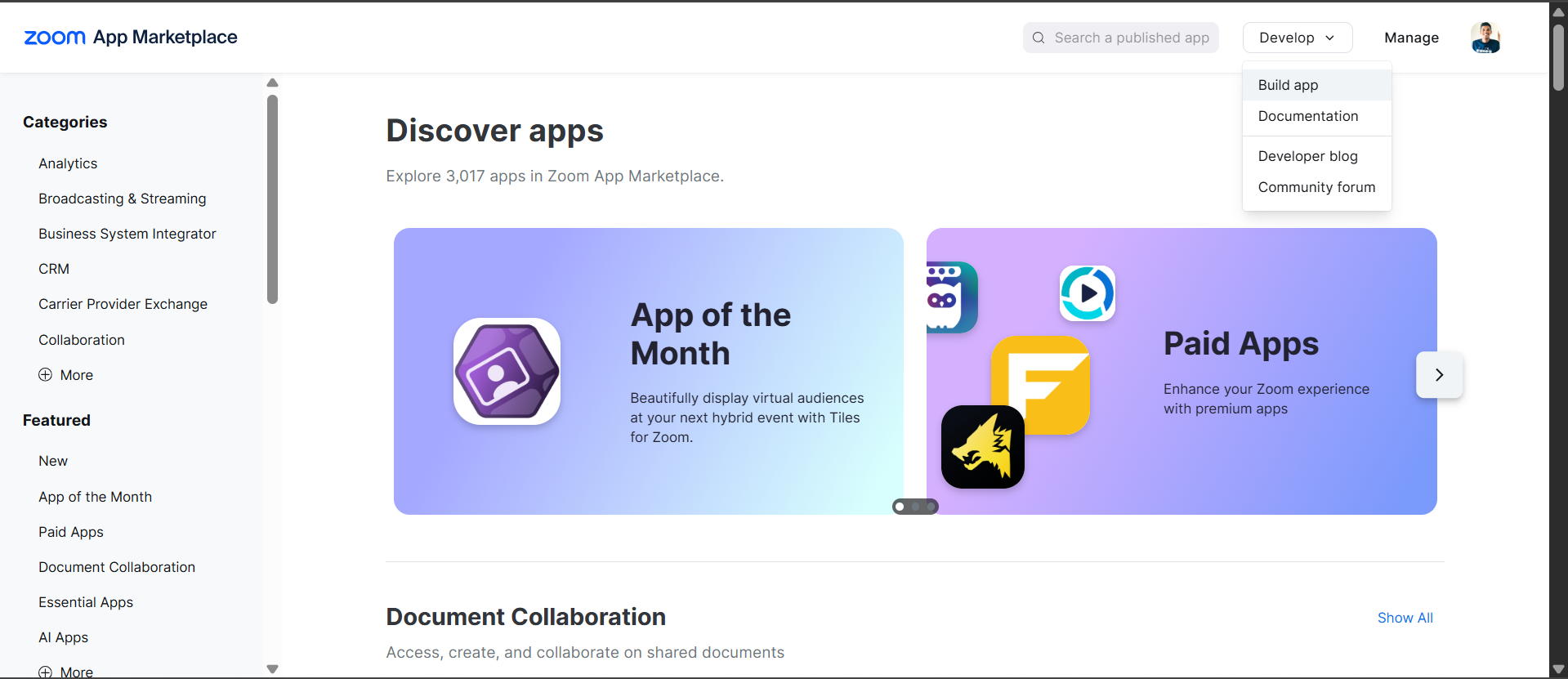
Open the Zoom Marketplace.
-
Click "Develop" → "Build App"
-
Choose "General App" app type (for user authorization with refresh tokens)

-
Fill in basic information
Step 2: Configure OAuth settings
-
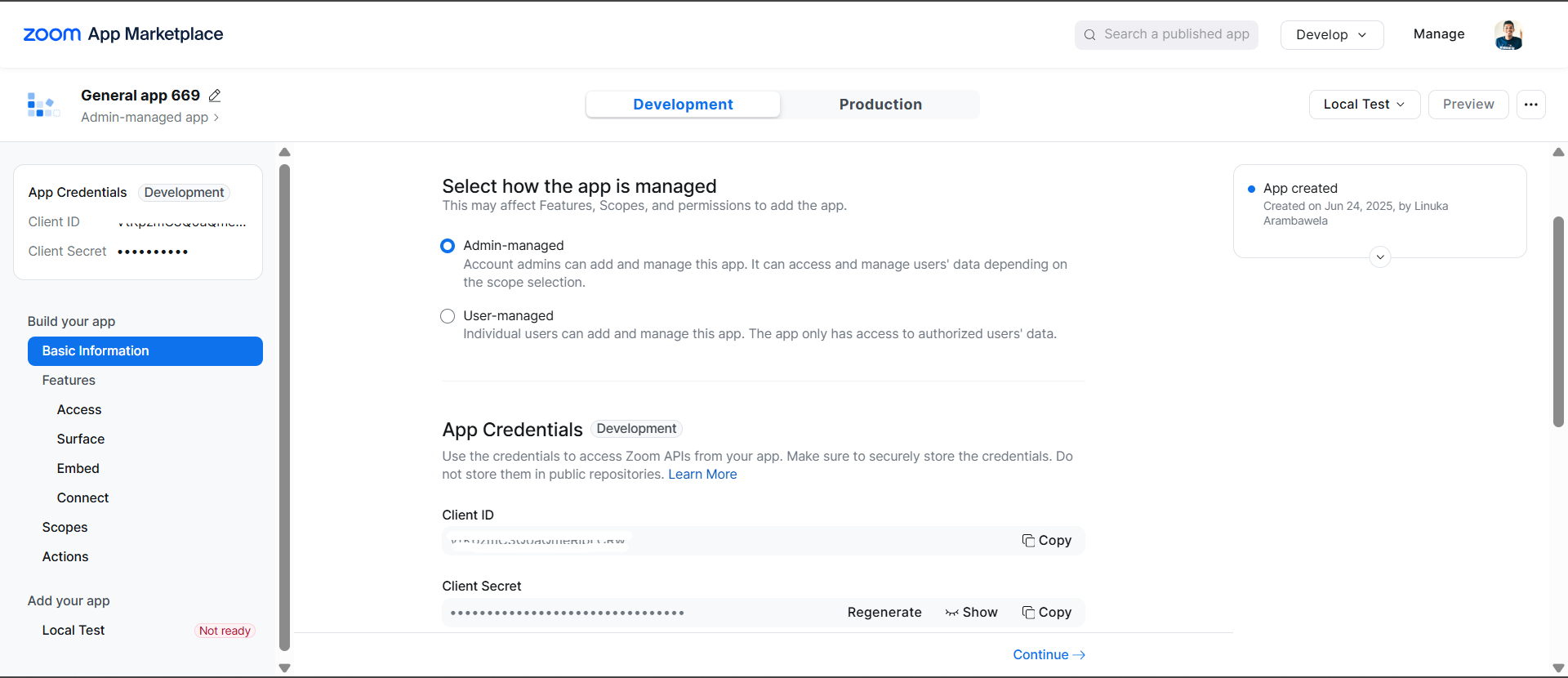
Note down your credentials:
- Client ID
- Client Secret
-
Set redirect URI: Add your application's redirect URI (e.g.,
http://localhost:8080/callback)
-
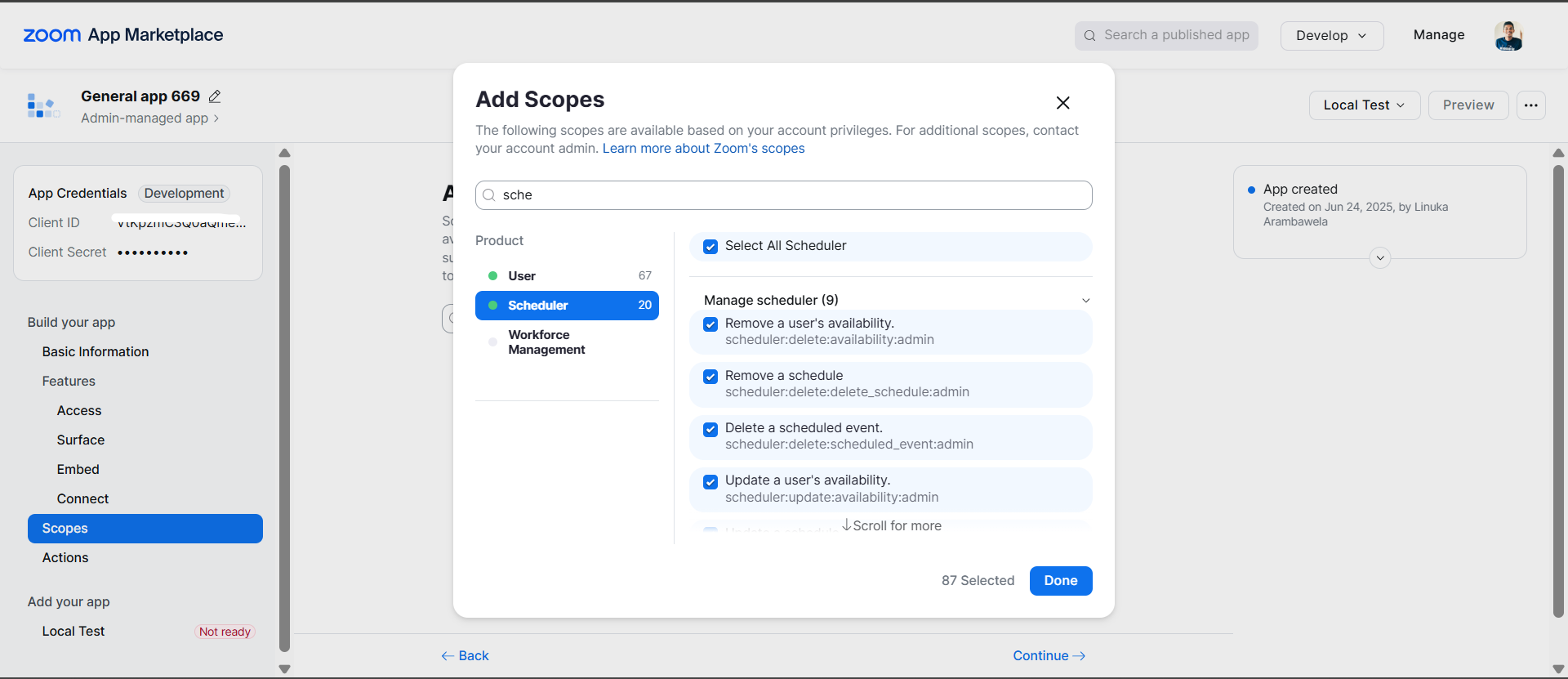
Add scopes: Make sure your Zoom app has the necessary scopes for the Scheduler API:
- Add
scheduler:read,scheduler:writeanduser:readin the scope
- Add
Step 3: Activate the app
-
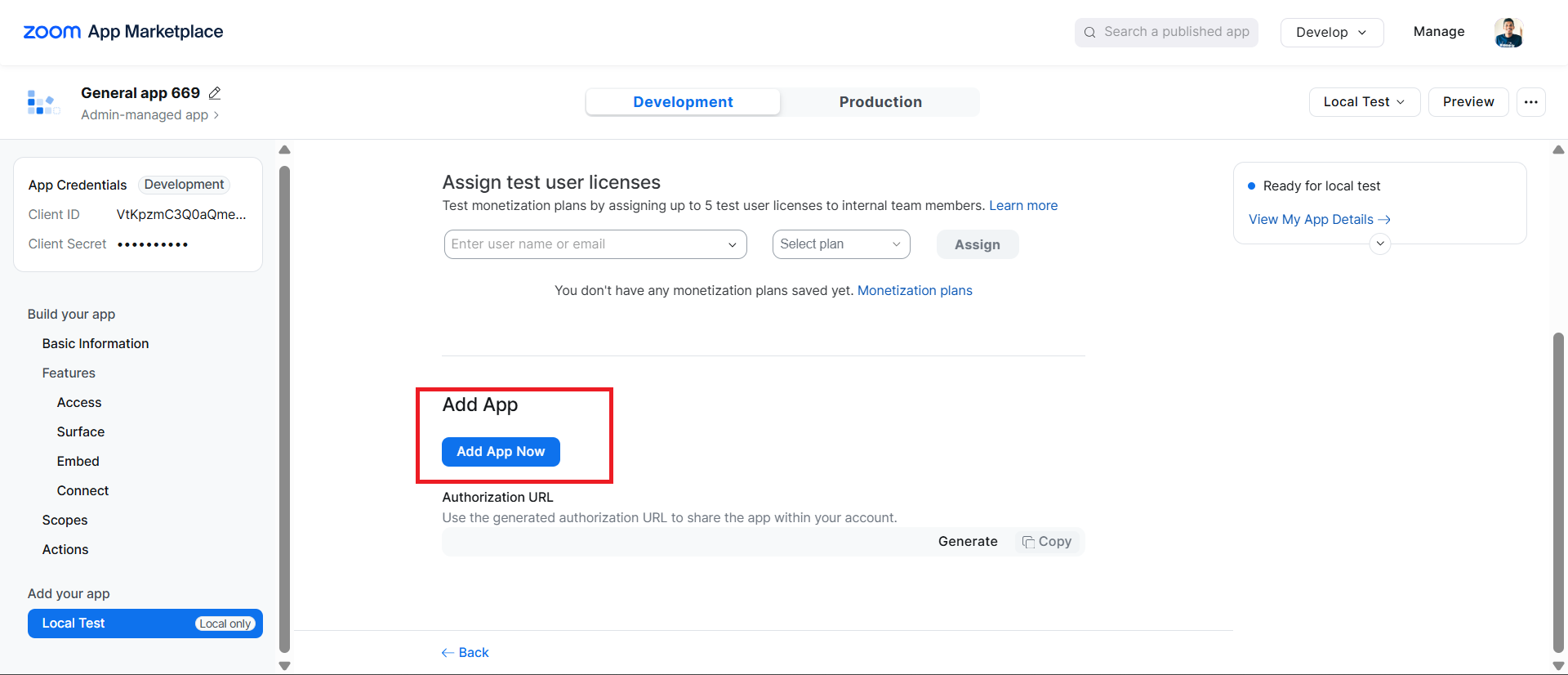
Complete all required information
-
Activate the app
Step 4: Get user authorization
- Direct users to authorization URL (replace
YOUR_CLIENT_IDandYOUR_REDIRECT_URI):
https://zoom.us/oauth/authorize?response_type=code&client_id=YOUR_CLIENT_ID&redirect_uri=YOUR_REDIRECT_URI&scope=scheduler:read scheduler:write user:read
-
User authorizes the app and gets redirected to your callback URL with an authorization code
-
Exchange authorization code for tokens:
curl -X POST https://zoom.us/oauth/token \ -H "Authorization: Basic $(echo -n 'CLIENT_ID:CLIENT_SECRET' | base64)" \ -d "grant_type=authorization_code&code=AUTHORIZATION_CODE&redirect_uri=YOUR_REDIRECT_URI"
This returns both access_token and refresh_token.
Replace:
CLIENT_IDwith your app's Client IDCLIENT_SECRETwith your app's Client SecretAUTHORIZATION_CODEwith the code received from the callbackYOUR_REDIRECT_URIwith your configured redirect URI
Step 5: Verify your setup
curl -X GET "https://api.zoom.us/v2/users/me" \ -H "Authorization: Bearer YOUR_ACCESS_TOKEN"
This will give you the user ID needed for API calls.
Quickstart
To use the Zoom Scheduler connector in your Ballerina application, update the .bal file as follows:
Step 1: Import the module
Import the zoom.scheduler module.
import ballerinax/zoom.scheduler as zoom;
Step 2: Instantiate a new connector
- Create a
Config.tomlfile and configure the credentials obtained in the steps above:
clientId = "<Client ID>" clientSecret = "<Client Secret>" refreshToken = "<Refresh Token>" refreshUrl = "https://zoom.us/oauth/token" userId = "<Zoom User ID>"
- Create a
zoom:ConnectionConfigwith the OAuth 2.0 refresh-token credentials and initialize the connector with it.
configurable string clientId = ?; configurable string clientSecret = ?; configurable string refreshToken = ?; configurable string refreshUrl = ?; configurable string userId = ?; final zoom:Client zoomClient = check new ({ auth: { clientId, clientSecret, refreshToken, refreshUrl } });
Step 3: Invoke the connector operation
Now, utilize the available connector operations.
List the user's schedules
public function main() returns error? { zoom:ScheduleList _ = check zoomClient->listSchedules(userId = userId, pageSize = 10); }
Step 4: Run the Ballerina application
bal run
Examples
The Zoom Scheduler connector provides practical examples illustrating usage in various scenarios. Explore these examples, covering the following use cases:
-
Schedule slot booking - Create a booking page, find the first open slot in a time window, book it for an invitee and issue a single-use scheduling link.
-
Availability hours review - Review a user's availabilities across all pages, create missing working hours and compare booking analytics with the previous period.
Clients
zoom.scheduler: Client
The Scheduler APIs let you programmatically interact with Zoom Scheduler features. They allow you to schedule, manage, and retrieve details about meetings, webinars, and other events on the Zoom platform. With powerful tools for integration, these APIs streamline event management and automate workflows in external applications.
Constructor
Gets invoked to initialize the connector.
init (ConnectionConfig config, string serviceUrl)- config ConnectionConfig - The configurations to be used when initializing the
connector
- serviceUrl string "https://api.zoom.us/v2/scheduler" - URL of the target service
getRoutingFormResponse
function getRoutingFormResponse(string formId, string responseId, map<string|string[]> headers) returns RoutingFormResponse|errorGet routing form response
Parameters
- formId string - The identifier of the routing form
- responseId string - The identifier of the response to a particular routing form
Return Type
- RoutingFormResponse|error - If succeeded, this method returns the routing response details in the response body. The response body will include basic routing form information, the questions in the form and the corresponding awnsers, and the final results after submitting the response, which could be one of the following: a URL, a text or a booking link.
listRoutingResponses
function listRoutingResponses(map<string|string[]> headers) returns RoutingResponseList|errorList account routing responses
Return Type
- RoutingResponseList|error - If succeeded, this method returns a list of routing responses across all routing forms under the account
getAnalyticsReport
function getAnalyticsReport(map<string|string[]> headers, *GetAnalyticsReportQueries queries) returns AnalyticsReport|errorReport analytics
Parameters
- queries *GetAnalyticsReportQueries - Queries to be sent with the request
Return Type
- AnalyticsReport|error - If successful, this method returns the scheduler analytics or the user ID or account ID provided
listAvailabilities
function listAvailabilities(map<string|string[]> headers, *ListAvailabilitiesQueries queries) returns AvailabilityList|errorList availability
Parameters
- queries *ListAvailabilitiesQueries - Queries to be sent with the request
Return Type
- AvailabilityList|error - Successful availability of the schedule query result of given user
createAvailability
function createAvailability(CreateAvailabilityRequest payload, map<string|string[]> headers) returns CreatedAvailability|errorCreate availability
Parameters
- payload CreateAvailabilityRequest - In the request body, it supplies an availability resource properties
Return Type
- CreatedAvailability|error - If successful, this method returns a availability resource in the response body
getAvailability
function getAvailability(string availabilityId, map<string|string[]> headers) returns Availability|errorGet availability
Parameters
- availabilityId string - The UUID of the availability schedule
Return Type
- Availability|error - If successful, this method returns an availability resource in the response body
deleteAvailability
Delete availability
Parameters
- availabilityId string - The UUID of the availability schedule
Return Type
- error? - If successful, this method returns an empty response body
updateAvailability
function updateAvailability(string availabilityId, UpdateAvailabilityRequest payload, map<string|string[]> headers) returns error?Update availability
Parameters
- availabilityId string - The UUID of the availability schedule
- payload UpdateAvailabilityRequest - In the request body, supply availability resource properties
Return Type
- error? - If successful, this method returns an empty response body
createBooking
function createBooking(CreateBookingRequest payload, map<string|string[]> headers, *CreateBookingQueries queries) returns Booking|errorCreate a booking for a schedule slot
Parameters
- payload CreateBookingRequest - The booking details including the schedule to book, time slot, booker information, and optional configuration
- queries *CreateBookingQueries - Queries to be sent with the request
Return Type
listScheduledEvents
function listScheduledEvents(map<string|string[]> headers, *ListScheduledEventsQueries queries) returns ScheduledEventList|errorList scheduled events
Parameters
- queries *ListScheduledEventsQueries - Queries to be sent with the request
Return Type
- ScheduledEventList|error - If successful, this method returns a response body with the following structure:
getScheduledEvent
function getScheduledEvent(string eventId, map<string|string[]> headers, *GetScheduledEventQueries queries) returns ScheduledEvent|errorGet scheduled event
Parameters
- eventId string - The opaque identifier of the scheduled event
- queries *GetScheduledEventQueries - Queries to be sent with the request
Return Type
- ScheduledEvent|error - If successful, this method returns the scheduled event resource in the response body
deleteScheduledEvent
function deleteScheduledEvent(string eventId, map<string|string[]> headers, *DeleteScheduledEventQueries queries) returns error?Delete scheduled event
Parameters
- eventId string - The opaque identifier of the scheduled event
- queries *DeleteScheduledEventQueries - Queries to be sent with the request
Return Type
- error? - If successful, this method returns an empty response body
updateScheduledEvent
function updateScheduledEvent(string eventId, UpdateScheduledEventRequest payload, map<string|string[]> headers, *UpdateScheduledEventQueries queries) returns error?Update scheduled event
Parameters
- eventId string - The opaque identifier of the scheduled event
- payload UpdateScheduledEventRequest - In the request body, it supplies the relevant portions of event resource
- queries *UpdateScheduledEventQueries - Queries to be sent with the request
Return Type
- error? - If successful, this method returns an event resource in the response body
getScheduledEventAttendee
function getScheduledEventAttendee(string eventId, string attendeeId, map<string|string[]> headers) returns ScheduledEventAttendee|errorGet scheduled event attendee
Parameters
- eventId string - The ID of scheduled event
- attendeeId string - The ID of attendee to get scheduled event attendee information
Return Type
- ScheduledEventAttendee|error - If successful, this method returns the scheduled event attendee resource in the response body
listSchedules
function listSchedules(map<string|string[]> headers, *ListSchedulesQueries queries) returns ScheduleList|errorList schedules
Parameters
- queries *ListSchedulesQueries - Queries to be sent with the request
Return Type
- ScheduleList|error - If successful, this method returns a response body with this structure
createSchedule
function createSchedule(CreateScheduleRequest payload, map<string|string[]> headers, *CreateScheduleQueries queries) returns CreatedSchedule|errorCreate schedule
Parameters
- payload CreateScheduleRequest - In the request body, it supplies the schedule resource properties
- queries *CreateScheduleQueries - Queries to be sent with the request
Return Type
- CreatedSchedule|error - If successful, this method returns an schedule resource in the response body
getSchedule
function getSchedule(string scheduleId, map<string|string[]> headers, *GetScheduleQueries queries) returns Schedule|errorGet schedule
Parameters
- scheduleId string - The schedule's unique identifier
- queries *GetScheduleQueries - Queries to be sent with the request
Return Type
deleteSchedule
function deleteSchedule(string scheduleId, map<string|string[]> headers, *DeleteScheduleQueries queries) returns error?Delete schedule
Parameters
- scheduleId string - The unique identifier of the schedule
- queries *DeleteScheduleQueries - Queries to be sent with the request
Return Type
- error? - If successful, this method returns an empty response body
updateSchedule
function updateSchedule(string scheduleId, UpdateScheduleRequest payload, map<string|string[]> headers, *UpdateScheduleQueries queries) returns error?Update schedule
Parameters
- scheduleId string - The schedule's unique identifier
- payload UpdateScheduleRequest - In the request body, it supplies the relevant portions of a schedule resource, according to the rules of patch semantics
- queries *UpdateScheduleQueries - Queries to be sent with the request
Return Type
- error? - If successful, this method returns an empty response body
listAvailableTimes
function listAvailableTimes(string scheduleId, map<string|string[]> headers, *ListAvailableTimesQueries queries) returns AvailableTimes|errorList schedule available times
Parameters
- scheduleId string - The unique identifier of the schedule or scheduling page this query belongs to
- queries *ListAvailableTimesQueries - Queries to be sent with the request
Return Type
- AvailableTimes|error - Successfully returned the available time slots
createSingleUseLink
function createSingleUseLink(CreateSingleUseLinkRequest payload, map<string|string[]> headers, *CreateSingleUseLinkQueries queries) returns SingleUseLink|errorCreate single-use scheduling link
Parameters
- payload CreateSingleUseLinkRequest - Schedule ID for which a single-use scheduling link is created
- queries *CreateSingleUseLinkQueries - Queries to be sent with the request
Return Type
- SingleUseLink|error - If successful, this method returns a scheduling link URL in the response body
createShare
Create share
Parameters
- payload CreateShareRequest - Schedule customisations to share with a specific attendee without a new schedule
listTeams
List teams
Parameters
- queries *ListTeamsQueries - Queries to be sent with the request
getUser
Get Scheduler user
Parameters
- userId string - The identifier of the user whose Scheduler details are returned
Return Type
- SchedulerUser|error - If successful, this method returns user information in the response body
Records
zoom.scheduler: AnalyticsLastNDays
The stats of the last N days
Fields
- allHostAvailable? int - The number of "all host available" type schedules
- scheduledEventsRescheduled? int - The number of rescheduled scheduled events
- scheduledEventsCompleted? int - The number of completed scheduled events
- schedulesCanceled? int - The number of cancelled schedules
- oneOffMeeting? int - The number of "one-off" type schedules
- meetingPoll? int - The number of "meeting poll" type schedules
- oneToMany? int - The number of "one to many" type schedules
- anyHostAvailable? int - The number of "any host available" type schedules
- scheduledEventsCanceled? int - The number of cancelled scheduled events
- oneToOne? int - The number of "one to one" type schedules
- scheduledEventsCreated? int - The number of created scheduled events
- schedulesCreated? int - The number of created schedules
zoom.scheduler: AnalyticsPreviousPeriod
the stats of the previous period with a length of also N. Last N day is counting from today and backtrace N days. Previous period is counting from N days ago and back tracking another N days
Fields
- allHostAvailable? int - The number of "all host available" type schedules
- scheduledEventsRescheduled? int - The number of rescheduled scheduled events
- scheduledEventsCompleted? int - The number of completed scheduled events
- schedulesCanceled? int - The number of cancelled schedules
- oneOffMeeting? int - The number of "one-off" type schedules
- meetingPoll? int - The number of "meeting poll" type schedules
- oneToMany? int - The number of "one to many" type schedules
- anyHostAvailable? int - The number of "any host available" type schedules
- scheduledEventsCanceled? int - The number of cancelled scheduled events
- oneToOne? int - The number of "one to one" type schedules
- scheduledEventsCreated? int - The number of created scheduled events
- schedulesCreated? int - The number of created schedules
zoom.scheduler: AnalyticsReport
Fields
- popularSchedules? record {}[] - The most popular schedules in the given time range
- usersWithLeastEvents? record {}[] - The users with the least scheduled events
- lastNDays? AnalyticsLastNDays - Analytics totals for the requested last N days
- popularTimeOfDay? record {}[] - The distribution of number of events scheduled in a day
- previousPeriod? AnalyticsPreviousPeriod - Analytics totals for the equivalent previous period, for comparison
- eventDistributionByDuration? record {}[] - The event distribution by duration
- popularTimeOfWeek? record {}[] - The distribution of number of events scheduled in a week
- usersWithMostEvents? record {}[] - The users with the most scheduled events
zoom.scheduler: AttendeeCustomValue
Fields
- values? string[] - The answers to the question
- name? string - The name of the question
- position? int - The position of the question
zoom.scheduler: Availability
The availability schedule set by the user
Fields
- owner? string - The owner's ID
- default? boolean - The default availability schedule in use
- name? string - The name of this availability schedule
- availabilityId? string - The unique ID of availability
- segmentsRecurrence? AvailabilityWeeklyRecurrence - Weekly recurring availability segments, keyed by day of the week
- timeZone? string - The timezone for which this availability schedule originates
zoom.scheduler: AvailabilityDateOverride
The date interval to override
Fields
- 'start string - This field indicates the start date to override
- end string - This field indicates the end date to override
zoom.scheduler: AvailabilityDateOverrideUpdate
The date interval that needs to overridden
Fields
- 'start string - The start date to override
- end string - The end date to override
zoom.scheduler: AvailabilityList
The availability of the schedule query result of given user
Fields
- nextPageToken? string - The token for a later to retrieve only the entries that have changed since this result was returned. It's omitted if further results are available, in which case
nextPageTokenis provided
- items? AvailabilitySummary[] - array[User Availability Schedule]
zoom.scheduler: AvailabilitySummary
Fields
- owner? string - The owner's ID
- default? boolean - Whether this is the user's default availability
- name? string - The name of the availability
- availabilityId? string - The unique identifier of the availability
- segmentsRecurrence? AvailabilitySummaryRecurrence - Weekly recurring availability segments, keyed by day of the week
- timeZone? string - The time zone of the availability, as an IANA time zone name
zoom.scheduler: AvailabilitySummaryRecurrence
Fields
- thu? TimeSegment[] - Available time segments on Thursday
- tue? TimeSegment[] - Available time segments on Tuesday
- wed? TimeSegment[] - Available time segments on Wednesday
- sat? TimeSegment[] - Available time segments on Saturday
- fri? TimeSegment[] - Available time segments on Friday
- sun? TimeSegment[] - Available time segments on Sunday
- mon? TimeSegment[] - Available time segments on Monday
zoom.scheduler: AvailabilityWeeklyRecurrence
The rules of this availability schedule
Fields
- thu? TimeSegment[] - Available time segments on Thursday
- tue? TimeSegment[] - Available time segments on Tuesday
- wed? TimeSegment[] - Available time segments on Wednesday
- sat? TimeSegment[] - Available time segments on Saturday
- fri? TimeSegment[] - Available time segments on Friday
- sun? TimeSegment[] - Available time segments on Sunday
- mon? TimeSegment[] - Available time segments on Monday
zoom.scheduler: AvailableDay
Fields
- date? string - The date in
YYYY-MM-DDformat
- spots? AvailableSpot[] - List of individual time slots within this day. Each spot represents one bookable unit of
durationminutes. Only spots with statusavailablecan be booked
- status? "available"|"unavailable" - Day-level availability summary.
availablemeans at least one spot on this day is bookable.unavailablemeans all spots on this day are taken or blocked — skip this day entirely when presenting options
zoom.scheduler: AvailableSpot
Fields
- startTime? string - The start time of this slot in ISO 8601 format with the host's timezone offset (for example,
-07:00forAmerica/Los_Angeles). The meeting would run fromstart_timetostart_timeplusdurationminutes
- availableNumber? int - The number of remaining bookable seats for this slot. Typically
1for one-on-one schedules. Can be greater than1for group events
- status? "available"|"unavailable" - Slot-level availability.
availablemeans this specific time slot is open and bookable.unavailablemeans this slot is already taken, blocked, or outside working hours
zoom.scheduler: AvailableTimes
Fields
- duration int - The duration of each bookable time slot in minutes. For example,
30means each slot is a 30-minute meeting. The end time of a slot equalsstart_timeplusduration
- days AvailableDay[] - List of days within the queried time range. Each day contains its overall availability status and individual time spots. This is the primary data to use when presenting available slots to the user
- scheduleId string - The unique identifier of the schedule. Matches the
schedule_idin the request path
zoom.scheduler: Booker
The information of the person making the booking, also known as the invitee
Fields
- timeFormat? "12h"|"24h" - The booker's preferred time display format
- lastName string - The booker's last name
- phoneNumber? string - The booker's phone number for SMS reminders. Must be a valid phone number (for example,
+1 888-888-8888)
- firstName string - The booker's first name
- email string - The booker's email address
zoom.scheduler: Booking
Fields
- summary? string - The name or title of the schedule that was booked
- attendees? BookingAttendee[] - The list of attendees, bookers, or invitees for this booking
- 'type? "one"|"multiple" - The schedule type.
onefor individual ormultiplefor multi-host
- tracking? BookingTrackingParam[] - The tracking fields returned from the request body
- capacity? decimal - The maximum number of invitees per slot for this schedule
- duration? decimal - The duration of the booking in minutes
- endDateTime? string - The end date and time in ISO 8601 format
- eventId? string - The unique identifier of the created scheduled event
- location? string - The meeting location or physical address for offline meetings. Empty for virtual meetings
- locationKind? string - The type of meeting location or method for this booking
- startDateTime? string - The start date and time in ISO 8601 format
- locationAdditionalInfo? string - Additional information about the meeting location
- scheduleId? string - The unique identifier of the schedule or scheduling page this booking belongs to
- status? "confirmed"|"cancelled" - The status of the booking
- assignedTo? string[] - The list of host display names assigned to this booking. For individual schedules, this contains the single host. For round-robin or multi-host schedules, it contains the assigned hosts
zoom.scheduler: BookingAttendee
Fields
- timeFormat? "12h"|"24h" - The attendee's preferred time display format
- responseStatus? "accepted"|"declined"|"tentative"|"needs_action" - The attendee's RSVP response status
- created? string - The timestamp when the attendee record was created
- lastName? string - The attendee's last name
- id? string - The unique identifier of the attendee
- displayName? string - The attendee's full display name, computed from the first name and last name
- timeZone? string - The attendee's time zone
- firstName? string - The attendee's first name
- booker? boolean - Whether this attendee is the person who made the booking
- email? string - The attendee's email address
zoom.scheduler: BookingLocationConfiguration
The location or meeting method configuration for this specific booking. This overrides or specifies the meeting location details
Fields
- additonalInfo? string - Additional information about the meeting location
- kind? string - The type of meeting location or method
- location? string - The physical location or address for offline meetings. Leave empty for virtual meetings
- phoneNumber? string - The phone number for Zoom Phone meetings. Leave empty for non-phone meetings
zoom.scheduler: BookingQuestionAnswer
A specific question and answer pair
Fields
- question? string - A question for the booker. The string is case-sensitive and must exactly match the question
- answer? string - The booker's response to the question
- position? string - The position of the question in relation to others
zoom.scheduler: BookingTracking
Optional tracking parameters for analytics or attribution purposes, such as UTM parameters or custom tracking data
Fields
- utm_campaign? string - The UTM campaign parameter used to track a campaign.
- utm_source? string - The UTM source parameter that identifies where the traffic originates.
- utm_medium? string - The UTM medium parameter that identifies the type of input. For example, Cost Per Click (CPC), social media, affiliate, or QR code.
- utm_content? string - The UTM content tracking parameter.
- utm_term? string - The UTM term parameter used to track keywords.
- salesforce_person? string - The 15 or 18-digit Salesforce ID.
- string... - Rest field
zoom.scheduler: BookingTrackingParam
Fields
- trackingValue? string - Corresponds one-to-one with the field values under the
trackingfield in the request body
- trackingKey? string - Corresponds one-to-one with the field names under the
trackingfield in the request body
zoom.scheduler: ConnectionConfig
Provides a set of configurations for controlling the behaviours when communicating with a remote HTTP endpoint.
Fields
- auth BearerTokenConfig|OAuth2RefreshTokenGrantConfig - Configurations related to client authentication
- httpVersion HttpVersion(default http:HTTP_2_0) - The HTTP version understood by the client
- http1Settings ClientHttp1Settings(default {}) - Configurations related to HTTP/1.x protocol
- http2Settings ClientHttp2Settings(default {}) - Configurations related to HTTP/2 protocol
- timeout decimal(default 30) - The maximum time to wait (in seconds) for a response before closing the connection
- forwarded string(default "disable") - The choice of setting
forwarded/x-forwardedheader
- followRedirects? FollowRedirects - Configurations associated with Redirection
- poolConfig? PoolConfiguration - Configurations associated with request pooling
- cache CacheConfig(default {}) - HTTP caching related configurations
- compression Compression(default http:COMPRESSION_AUTO) - Specifies the way of handling compression (
accept-encoding) header
- circuitBreaker? CircuitBreakerConfig - Configurations associated with the behaviour of the Circuit Breaker
- retryConfig? RetryConfig - Configurations associated with retrying
- responseLimits ResponseLimitConfigs(default {}) - Configurations associated with inbound response size limits
- secureSocket? ClientSecureSocket - SSL/TLS-related options
- proxy? ProxyConfig - Proxy server related options
- socketConfig ClientSocketConfig(default {}) - Provides settings related to client socket configuration
- validation boolean(default true) - Enables the inbound payload validation functionality which provided by the constraint package. Enabled by default
- laxDataBinding boolean(default true) - Enables relaxed data binding on the client side. When enabled,
nilvalues are treated as optional, and absent fields are handled asnilabletypes. Enabled by default.
zoom.scheduler: CreateAvailabilityRequest
The availability schedule set by the user
Fields
- owner? string - the owner's ID
- default? boolean - The default availability schedule in use
- name string - The name of this availability schedule
- availabilityId? string - The unique ID of availability
- segmentsRecurrence? AvailabilityWeeklyRecurrence - Weekly recurring availability segments, keyed by day of the week
- timeZone string - The timezone for which this availability schedule originates
- segments? AvailabilityDateOverride[] - The date on which the rule needs to be applied outside of the availability rule
zoom.scheduler: CreateBookingQueries
Represents the Queries record for the operation: createBooking
Fields
- user? string - The user slug identifier to filter available time slots for a specific host or team member. Format:
t/followed by the user identifier, for examplet/x0ghart. Required if the schedule object contains auserfield — pass the exact value from that field. Omit if the schedule has nouserfield
zoom.scheduler: CreateBookingRequest
Fields
- duration int - The duration of the booking in minutes
- questionsAndAnswers? BookingQuestionAnswer[] - The booker's questions and answers
- locationConfiguration? BookingLocationConfiguration - Location configuration for the booked meeting
- startDateTime string - The start date and time of the booking in ISO 8601 format. For example,
YYYY-MM-DDTHH:mm:ss.sssZ
- timeZone? string - The time zone identifier of the user or location, represented in the IANA Time Zone Database format (for example,
America/Los_Angeles)
- scheduleId string - The unique identifier of the schedule or scheduling page on which to create the booking
- booker Booker - The information of the person making the booking, also known as the invitee
- tracking? BookingTracking - Optional tracking parameters for analytics or attribution purposes, such as UTM parameters or custom tracking data
zoom.scheduler: CreatedAvailability
The availability schedule set by the user
Fields
- owner? string - An URI reference to a user
- default? boolean - The default availability schedule in use
- name? string - The name of this availability schedule
- availabilityId? string - The unique ID of the availability
- segmentsRecurrence? AvailabilityWeeklyRecurrence - Weekly recurring availability segments, keyed by day of the week
- timeZone? string - The timezone for which this availability schedule originates
- segments? record {}[] - The date on which the rule needs to be applied outside of the availability rule
zoom.scheduler: CreatedSchedule
Fields
- endDate? string - The schedule's end date
- color? string - The hexadecimal color value of the event type's scheduling page
- description? string - The schedule's description
- secret? boolean - This field indicates if the event type is hidden on the owner's main scheduling page
- availabilityRules? CreatedScheduleAvailabilityRule[] - The availability of the time rule
- capacity? decimal - This field indicates the maximum invitees per event
- segments? DateSegment[] - The available time segments of the event
- duration? decimal - This field indicates the duration of the meeting in minutes, range: [1, 1440]
- cushion? decimal - This field indicates the minimum time before a schedule starts when the attendees can book
- buffer? ScheduleBuffer - This field indicates the extra time before or after the booked schedule
- segmentsRecurrence? WeeklyRecurrence - Weekly recurring availability segments, keyed by day of the week
- slug? string - The event portion of the event's URL that identifies a specific web page
- intervalType? "unlimited"|"fixed" - The schedule time range. Unlimited means forever and fixed means using
startDateandendDate
- startDate? string - The schedule's start date
- addOnType? "zoomMeeting"|"zoomPhone"|"offline" - The method of the type of
addOn, such as Zoom meeting, Zoom phone, or offline
- schedulingUrl? string - The URL of the user’s scheduling site where invitees book this event type
- startTimeIncrement? decimal - This field sets the frequency of available time slots for invitees
- summary? string - The event's summary
- creator? ScheduleCreator - The creator of the schedule. The field is read-only
- scheduleType? "one"|"multiple" - This field indicates if the schedule type is "one" (belongs to an individual user) or "multiple"
- customFields? ScheduleCustomField[] - This field contains the custom question
- active? boolean - This field indicates if the schedule is active
- bookingLimit? decimal - This field sets the maximum events allowed per day
- timeZone? string - the timezone of this availability rule.
- organizer? ScheduleOrganizer - The organizer of the schedule. This field is read-only
- location? string - The information for a custom location
- scheduleId? string - The unique identifier of schedule
- updated? string - The moment the schedule type was updated
- availabilityOverride? boolean - This field indicates the use of the availability rule
- status? "confirmed"|"cancelled" - The status of schedule: confirmed or cancelled
zoom.scheduler: CreatedScheduleAvailabilityRule
Fields
- useCustom? boolean - This field indicates the use of custom availability instead of the rule
- availabilityId? string - The ID of this availability rule.
- segmentsRecurrence? WeeklyRecurrence - Weekly recurring availability segments, keyed by day of the week
- timeZone? string - The timezone of this availability rule.
- email? string - The owner of this availability rule.
- segments? DateSegment[] - The available time segments of the event
zoom.scheduler: CreateScheduleAvailabilityRule
Fields
- useCustom? boolean - This field indicates the use of custom availability instead of the rule
- availabilityId? string - The ID of this availability rule.
- segmentsRecurrence? WeeklyRecurrence - Weekly recurring availability segments, keyed by day of the week
- timeZone? string - the timezone of this availability rule.
- email? string - The owner of this availability rule.
- segments? DateSegment[] - The available time segments of the event
zoom.scheduler: CreateScheduleCustomField
Fields
- answerChoices? CreateScheduleCustomFieldAnswerchoicesItemsString[] - The invitee's option(s) for
single_selectormulti_selecttype of responses
- customFieldId? string - The ID of this question
- format "text"|"string"|"phone_number"|"choices_one"|"choices_many"|"select" - The type of response that the invitee provides to the custom question. It can be one or multiple lines of text, a phone number, or single- or multiple-select.[
string text phone_number single_select multi_select]
- name string - The custom question the host created for the event type
- includeOther boolean - This field is true if the custom question allows invitees to record a written response in addition to single-select or multiple-select type of responses. This field is false if the custom question does not allow invitees to record a written response
- position decimal - The position of this question
- enabled boolean - This field is true if the question the host creates is ON and visible on the event booking page. This field is false if it's OFF and invisible on the event booking page
- required boolean - This field is true if a response to the question created by the host is required for invitees to book the event type. This field is false if a response to the question created by the host is not required for invitees to book the event type
zoom.scheduler: CreateScheduleQueries
Represents the Queries record for the operation: createSchedule
Fields
- userId? string - This field indicates that the admin handles certain users. This setting is only for admin
zoom.scheduler: CreateScheduleRequest
Fields
- addOnType? "zoomMeeting"|"zoomPhone"|"offline" - The method of the type of
addOn, such as Zoom meeting, Zoom phone, or offline
- endDate? string - The schedule's end date
- startTimeIncrement? decimal - This field sets the frequency of available time slots for invitees
- summary? string - The event's summary
- scheduleType? "one"|"multiple" - This field indicates if the schedule type is "one" (belongs to an individual user) or "multiple"
- color? string - The hexadecimal color value of the event type's scheduling page
- customFields? CreateScheduleCustomField[] - This field contains the custom question
- description? string - The schedule's description
- active? boolean - This field indicates if the schedule is active
- bookingLimit? decimal - This field sets the maximum events allowed per day
- secret? boolean - This field indicates if the event type is hidden on the owner's main scheduling page
- timeZone? string - The timezone of this availability rule.
- availabilityRules CreateScheduleAvailabilityRule[] - The availability of the time rule
- capacity decimal - This field indicates the maximum invitees per event
- segments? DateSegment[] - The available time segments of the event
- duration? decimal - This field indicates the duration of the meeting in minutes, range: [1, 1440]
- cushion? decimal - This field indicates the minimum time before a schedule starts when the attendees can book
- location? string - The information for a custom location
- buffer? ScheduleBuffer - This field indicates the extra time before or after the booked schedule
- segmentsRecurrence? WeeklyRecurrence - Weekly recurring availability segments, keyed by day of the week
- intervalType? "unlimited"|"fixed" - The schedule time range. Unlimited means forever and fixed means using
startDateandendDate
- slug? string - The event portion of the event's URL that identifies a specific web page
- availabilityOverride boolean - This field indicates the use of the availability rule
- startDate? string - The schedule's start date
zoom.scheduler: CreateShareRequest
Fields
- endDate? string - The schedule's end date
- duration? decimal - This field indicates the duration of the meeting in minutes, range: [1, 1440]
- segmentsRecurrence? WeeklyRecurrence - Weekly recurring availability segments, keyed by day of the week
- timeZone? string - The timezone of this availability rule.
- scheduleId string - The unique identifier of a schedule
- intervalType? "unlimited"|"fixed" - The schedule time range. Unlimited means forever and fixed means using
startDateandendDate
- startDate? string - The schedule's start date
- segments? DateSegment[] - The available time segments of the event
zoom.scheduler: CreateSingleUseLinkQueries
Represents the Queries record for the operation: createSingleUseLink
Fields
- teamId? string - This field identifies the specific team. If this parameter exists, the link will be created for the team to which the user belongs
zoom.scheduler: CreateSingleUseLinkRequest
Fields
- scheduleId string - The unique identifier of a schedule
zoom.scheduler: DateSegment
Fields
- 'start? string - The start date and time of the segment
- end? string - The end date and time of the segment
zoom.scheduler: DeleteScheduledEventQueries
Represents the Queries record for the operation: deleteScheduledEvent
Fields
- userId? string - This field indicates whether the admin handles certain users. It's only for admin
zoom.scheduler: DeleteScheduleQueries
Represents the Queries record for the operation: deleteSchedule
Fields
- userId? string - This field indicates that the admin handles certain users. This setting is only for admin
zoom.scheduler: GetAnalyticsReportQueries
Represents the Queries record for the operation: getAnalyticsReport
Fields
- userId? string - The specific user's web user ID. Default is "me". Use "all" to query for analytics with respect to all members under that account.
- 'from? string - The lower bound (exclusive) for an event's end time from which to filter. Optional. The default is not to filter by end time. It must be an RFC3339 timestamp with mandatory time zone offset, for example, 2011-06-03T10:00:00-07:00, 2011-06-03T10:00:00Z. Milliseconds can be provided but are ignored. If
timeMaxis set,timeMinmust be smaller thantimeMax
- to? string - The upper bound (exclusive) for an event's start time to filter by. Optional. The default is not to filter by start time. It must be an RFC3339 timestamp with mandatory time zone offset. For example, 2011-06-03T10:00:00-07:00, 2011-06-03T10:00:00Z. Milliseconds may be provided but are ignored. If
timeMinis set,timeMaxmust be greater thantimeMin
- timeZone? string - The time zone in the response. The default is the time zone of the calendar. Optional.
zoom.scheduler: GetScheduledEventQueries
Represents the Queries record for the operation: getScheduledEvent
Fields
- userId? string - This field indicates whether the admin handles certain users. It's only for admin
- teamId? string - The ID of the team to which the user belongs
zoom.scheduler: GetScheduleQueries
Represents the Queries record for the operation: getSchedule
Fields
- userId? string - This field indicates that admins handle certain users. This setting is only for admin
zoom.scheduler: ListAvailabilitiesQueries
Represents the Queries record for the operation: listAvailabilities
Fields
- nextPageToken? string - The token that specifies which result page to return
- userId? string - The return of the specific user's availability
- pageSize? int - The maximum number of availability returned on one result page
zoom.scheduler: ListAvailableTimesQueries
Represents the Queries record for the operation: listAvailableTimes
Fields
- 'from string - The minimum time boundary (start time) for querying available slots. Must be in ISO 8601 / RFC 3339 format in UTC
- to string - The maximum time boundary (end time) for querying available slots. Must be in ISO 8601 / RFC 3339 format in UTC. Must be strictly after
from
- timeZone? string - The timezone identifier of the user or location, represented in the IANA Time Zone Database format (e.g., "America/Los_Angeles")
- user? string - The user slug identifier to filter available time slots for a specific host or team member. Format:
t/followed by the user identifier, for examplet/x0ghart. Required if the schedule object contains auserfield — pass the exact value from that field. Omit if the schedule has nouserfield
zoom.scheduler: ListScheduledEventsQueries
Represents the Queries record for the operation: listScheduledEvents
Fields
- showDeleted? boolean - Whether to include deleted events (with status equals
cancelled) in the result
- updatedFrom? string - The lower bound (exclusive) for an event's update time from which to filter
- accountLevel? boolean - An optional field. The default is false. False means only list scheduled events of specify user, or it means list scheduled events of all users below current account
- teamId? string - The team ID of which the user belongs
- timeZone? string - The time zone in the response
- createdTo? string - The upper bound (exclusive) for an event's create time from which to filter.
- search? string - This field returns search results from meeting ID or summary
- eventType? "pending" - Whether to return the pending events
- nextPageToken? string - The token that specifies which result page to return
- userId? string - The return of the specific user's scheduled event. It's only for admin
- orderBy? string - This field indicates the start time or the time when the event has been updated
- 'from? string - The lower bound (exclusive) for an event's end time from which to filter.
- to? string - The upper bound (exclusive) for an event's start time from which to filter
- updatedTo? string - The upper bound (exclusive) for an event's update time from which to filter.
- createdFrom? string - The lower bound (exclusive) for an event's create time from which to filter.
- pageSize? int - The maximum number of events returned on one result page
zoom.scheduler: ListSchedulesQueries
Represents the Queries record for the operation: listSchedules
Fields
- showDeleted? boolean - Whether to include the deleted schedule (with status equals "cancelled") in the result
- updatedFrom? string - The lower bound (exclusive) for an event's update time from which to filter
- accountLevel? boolean - An optional field. The default is false. False means only list schedules of specify user, or it means list schedules of all users below current account
- teamId? string - The team ID to which the user belongs
- timeZone? string - The time zone in the response
- createdTo? string - The upper bound (exclusive) for an event's create time from which to filter.
- search? string - This field returns search results from meeting ID or summary
- nextPageToken? string - The token that specifies which result page to return
- userId? string - The return of the specific user's schedules. Ths setting is only for admin
- 'from? string - The lower bound (exclusive) for a schedule's end time from which to filter
- to? string - The upper bound (exclusive) for a schedule's start time from which to filter
- updatedTo? string - The upper bound (exclusive) for an event's update time from which to filter.
- createdFrom? string - The lower bound (exclusive) for an event's create time from which to filter.
- pageSize? int - The maximum number of schedule results returned on a result page
zoom.scheduler: ListTeamsQueries
Represents the Queries record for the operation: listTeams
Fields
- userId? string - This field specifies teams that include a specific user
zoom.scheduler: OAuth2RefreshTokenGrantConfig
OAuth2 Refresh Token Grant Configs
Fields
- Fields Included from *OAuth2RefreshTokenGrantConfig
- refreshUrl string(default "") - Refresh URL
zoom.scheduler: RoutingFormResponse
Fields
- createdTime? string - The time that the response was submitted
- resultType? "event"|"text"|"url" - The type of result returned after submitting the response
- booked? boolean - Indicating whether a final booking was made after submitting the response
- bookingLink? string - The booking link that the returned as the result of submitting the form. It could be empty because result type could be URL or text
- creatorEmail? string - The creator of the response
- formId? string - The form ID
- resultValue? string - The value of result returned after submitting this response. Itcould be a booking schedule or a URL or a text.
- questionsAndAnswers? RoutingQuestionAnswer[] - The questions and answers in the response
zoom.scheduler: RoutingQuestionAnswer
Fields
- answers? string[] - This field could be text, email address, single choice or multiple choices, depending on questions types. All values are stored as string
- questionContent? string - The question content asked in the form
- questionId? string - The question ID
zoom.scheduler: RoutingResponse
Fields
- createdTime? string - The time that the response was submitted
- resultType? "event"|"text"|"url" - The type of result returned after submitting the response
- booked? boolean - Indicating whether a final booking was made after submitting the response
- bookingLink? string - The booking link that the returned as the result of submitting the form. It could be empty because result type could be URL or text
- creatorEmail? string - The creator of the response
- responseId? string - The response ID
- formId? string - The routing form ID that this response belongs to
- resultValue? string - The value of result returned after submitting this response. It could be a booking schedule or a URL or a text
- questionsAndAnswers? RoutingQuestionAnswer[] - The questions and answers in the response
- formName? string - The name of routing form
zoom.scheduler: RoutingResponseList
Fields
- nextPageToken? string - The token to retrieve the next page of results. If empty, no more results are available
- responses? RoutingResponse[] - The list of routing responses across all routing forms under the account
zoom.scheduler: Schedule
Fields
- endDate? string - The schedule's end date
- color? string - The hexadecimal color value of the event type's scheduling page
- description? string - The schedule's description
- secret? boolean - This field indicates if the event type is hidden on the owner's main scheduling page
- availabilityRules? ScheduleAvailabilityRule[] - The availability of the time rule
- capacity? decimal - This field indicates the maximum invitees per event
- segments? DateSegment[] - The available time segments of the event
- duration? decimal - This field indicates the duration of the meeting in minutes, range: [1, 1440]
- cushion? decimal - This field indicates the minimum time before a schedule starts when the attendees can book
- buffer? ScheduleBuffer - This field indicates the extra time before or after the booked schedule
- segmentsRecurrence? WeeklyRecurrence - Weekly recurring availability segments, keyed by day of the week
- slug? string - The event portion of the event's URL that identifies a specific web page
- intervalType? "unlimited"|"fixed" - The schedule time range. Unlimited means forever and fixed means using
startDateandendDate
- startDate? string - The schedule's start date
- addOnType? "zoomMeeting"|"zoomPhone"|"offline" - The method of the type of
addOn, such as Zoom meeting, Zoom phone, or offline
- schedulingUrl? string - The URL of the user's scheduling site where invitees book this event type
- startTimeIncrement? decimal - This field sets the frequency of available time slots for invitees
- summary? string - The event's summary
- creator? ScheduleCreator - The creator of the schedule. The field is read-only
- scheduleType? "one"|"multiple" - This field indicates if the schedule type is one (belongs to an individual user) or multiple
- customFields? ScheduleCustomField[] - This field contains the custom question
- active? boolean - This field indicates if the schedule is active
- bookingLimit? decimal - This field sets the maximum events allowed per day
- timeZone? string - the timezone of this availability rule.
- organizer? ScheduleOrganizer - The organizer of the schedule. This field is read-only
- location? string - The information for a custom location
- scheduleId? string - The unique identifier of a schedule
- updated? string - The moment the schedule type was updated
- availabilityOverride? boolean - This field indicates the use of the availability rule
- status? "confirmed"|"cancelled" - The status of schedule: confirmed or cancelled
zoom.scheduler: ScheduleAvailabilityRule
Fields
- useCustom? boolean - This field indicates the use of custom availability instead of the rule
- availabilityId? string - The ID of this availability rule.
- segmentsRecurrence? ScheduleAvailabilityRuleRecurrence - Weekly recurring availability segments, keyed by day of the week
- timeZone? string - The timezone of this availability rule.
- email? string - The owner of this availability rule.
- segments? DateSegment[] - The available time segments of the event
zoom.scheduler: ScheduleAvailabilityRuleRecurrence
The week of available time rule
Fields
- thu? TimeSegment[] - Available time segments on Thursday
- tue? TimeSegment[] - Available time segments on Tuesday
- wed? TimeSegment[] - Available time segments on Wednesday
- sat? TimeSegment[] - Available time segments on Saturday
- fri? TimeSegment[] - Available time segments on Friday
- sun? TimeSegment[] - Available time segments on Sunday
- mon? TimeSegment[] - Available time segments on Monday
zoom.scheduler: ScheduleBuffer
This field indicates the extra time before or after the booked schedule
Fields
- before? decimal - This field adds the time after the booked schedule
- after? decimal - This field adds the time before the booked schedule
zoom.scheduler: ScheduleCreator
The creator of the schedule. The field is read-only
Fields
- self? boolean - This field indicates if you created the schedule. The field is read-only
- displayName? string - This field indicates the creator of the display name
- email? string - This field indicates the creator's email address
zoom.scheduler: ScheduleCustomField
Fields
- answerChoices? ScheduleCustomFieldAnswerchoicesItemsString[] - The invitee's option(s) for single_select or multi_select type of responses
- customFieldId? string - The ID of this question
- format "text"|"string"|"phone_number"|"choices_one"|"choices_many"|"select" - The type of response that the invitee provides to the custom question. It can be one or multiple lines of text, a phone number, or single- or multiple-select.[
string text phone_number single_select multi_select]
- name string - The custom question the host created for the event type
- includeOther boolean - This field is true if the custom question allows invitees to record a written response in addition to single-select or multiple-select type of responses. This field is false if the custom question does not allow invitees to record a written response
- position decimal - The position of this question
- enabled boolean - This field is true if the question the host creates is ON and visible on the event booking page. This field is false if it's OFF and invisible on the event booking page
- required boolean - This field is true if a response to the question created by the host is required for invitees to book the event type. This field is false if a response to the question created by the host is not required for invitees to book the event type
zoom.scheduler: ScheduledEvent
Fields
- summary? string - The event's summary
- attendees? ScheduledEventAttendeeInfo[] - The attendees of the event
- meetingNotes? string - The meeting notes of the event
- description? string - The event's description
- endDateTime? string - The scheduled event's end date time
- eventId? string - The unique identifier of event
- eventType? "default"|"pending" - This field indicates whether the type is default(scheduled) or a pending event
- trackingParams? ScheduledEventTrackingParam[] - The information to track the source of invitee. Only use this setting you add UTM parameters in schedule links
- guests? string[] - The guest's collection
- location? string - The information for a custom location
- startDateTime? string - The scheduled event's start date time
- scheduleId? string - The unique identifier of schedule
- updated? string - The moment the event was updated
- status? "confirmed"|"cancelled" - The status of event: confirmed or cancelled
zoom.scheduler: ScheduledEventAttendee
Fields
- customValues? ScheduledEventAttendeeCustomValue[] - The answer of the booking page questions
- eventId? string - The unique identifier of event
- created? string - This field indicates when the attendee created this event
- attendeeId? string - The ID of attendee
- lastName? string - The attendee's last name
- displayName? string - The attendee's name
- timeZone? string - The attendee's time zone
- noShow? boolean - Whether an attendee did not attend an event
- scheduleId? string - The unique identifier of schedule
- firstName? string - The attendee's first name
- email? string - The attendee's email
zoom.scheduler: ScheduledEventAttendeeCustomValue
Fields
- values? ScheduledEventAttendeeCustomValueValuesItemsString[] - The answers of question
- name? string - The name of question
- position? int - The position of question
zoom.scheduler: ScheduledEventAttendeeInfo
Fields
- customValues? AttendeeCustomValue[] - The answers to the booking page questions
- created? string - This field indicates when the attendee attended this event
- attendeeId? string - The ID of attendee
- lastName? string - The attendee's last name
- displayName? string - The attendee's name
- timeZone? string - The attendee's time zone
- noShow? boolean - Whether or not to show the event
- booker? boolean - Whether the attendee is the booker
- firstName? string - The attendee's first name
- email? string - The attendee's email
zoom.scheduler: ScheduledEventAttendeeUpdate
Fields
- attendeeId? string - The ID of attendee
- noShow? boolean - This field inidcates the attendee if shown in the scheduled event
- email? string - The attendee's email
zoom.scheduler: ScheduledEventList
Fields
- nextPageToken? string - The token to access the next page of this result
- items? ScheduledEventSummary[] - The event collection
zoom.scheduler: ScheduledEventSummary
Fields
- summary? string - The event's summary
- attendees? ScheduledEventSummaryAttendee[] - The attendees of the event
- meetingNotes? string - The meeting notes of the event
- description? string - The event's description
- endDateTime? string - The scheduled event end date time
- eventId? string - The unique identifier of event
- eventType? "default"|"pending" - This field indicates the type is default(scheduled) or pending event
- trackingParams? ScheduledEventSummaryTrackingParam[] - The information to track the source of invitee. This occurs when you add UTM parameters in schedule links
- guests? string[] - The guest's collection
- location? string - The information for a custom location
- startDateTime? string - The scheduled event start date time
- scheduleId? string - The unique identifier of schedule
- updated? string - The moment the event was updated
- status? "confirmed"|"cancelled" - The status of event: confirmed or cancelled
zoom.scheduler: ScheduledEventSummaryAttendee
The attendee collection
Fields
- created? string - This field indicates when the attendee attended this event
- attendeeId? string - The ID of attendee
- lastName? string - The attendee's last name
- displayName? string - The attendee's name
- timeZone? string - The attendee's time zone
- noShow? boolean - Whether to show events or not
- booker? boolean - Whether the attendee is the booker
- firstName? string - The attendee's first name
- email? string - The attendee's email
- customValues? AttendeeCustomValue[] - The answers to the booking page questions
zoom.scheduler: ScheduledEventSummaryTrackingParam
Fields
- label? string - The scheduler tags that correspond to UTM parameters one by one
- value? string - The value of UTM parameters set in schedule links by host
- 'key? string - The UTM parameters in the schedule links
zoom.scheduler: ScheduledEventTrackingParam
Fields
- label? string - The scheduler tags that correspond to UTM parameters one by one
- value? string - The value of UTM parameters set in schedule links by host
- 'key? string - The UTM parameters in schedule links
zoom.scheduler: ScheduleList
Fields
- nextPageToken? string - The token that accesses the next page of this result
- items? ScheduleSummary[] - List of schedules
zoom.scheduler: ScheduleOrganizer
The organizer of the schedule. This field is read-only
Fields
- self? boolean - This field indicates if this user is the organizer. This field is read-only
- displayName? string - The organizer's display name
- email? string - The organizer's email address
zoom.scheduler: SchedulerUser
The user's information
Fields
- schedulingUrl? string - The URL of the user’s scheduling site where invitees book this event type
- logo? string - This field enables users to upload their company's logo on Zoom
- displayName? string - The user's name
- timeZone? string - The time zone to use when presenting time to the user
- slug? string - The portion of URL for the user's scheduling page where invitees book sessions that renders in a human-readable format
- picture? string - This field enables users to upload their personal avatars on Zoom
zoom.scheduler: ScheduleSummary
Fields
- endDate? string - The schedule's end date
- color? string - The hexadecimal color value of the event type's scheduling page
- description? string - The schedule's description
- secret? boolean - This field indicates if the event type is hidden on the owner's main scheduling page
- availabilityRules? ScheduleSummaryAvailabilityRule[] - The availability of the time rule
- capacity? decimal - This field indicates the maximum invitees per event
- segments? DateSegment[] - The available time segments of the event
- duration? decimal - This field indicates the duration of the meeting in minutes, range: [1, 1440]
- cushion? decimal - This field indicates the minimum time before a schedule starts when the attendees can book
- buffer? ScheduleBuffer - This field indicates the extra time before or after the booked schedule
- segmentsRecurrence? ScheduleWeeklyRecurrence - Weekly recurring availability segments, keyed by day of the week
- slug? string - The event portion of the event's URL that identifies a specific web page
- intervalType? "unlimited"|"fixed" - The schedule time range. Unlimited means forever and fixed means using
startDateandendDate
- startDate? string - The schedule's start date
- addOnType? "zoomMeeting"|"zoomPhone"|"offline" - The method of the type of
addOn, such as Zoom meeting, Zoom phone, or offline
- schedulingUrl? string - The URL of the user's scheduling site where invitees book this event type
- startTimeIncrement? decimal - This field sets the frequency of available time slots for invitees
- summary? string - The event's summary
- creator? ScheduleSummaryCreator - The creator of the schedule. This field is read-only
- scheduleType? "one"|"multiple" - This field indicates if the schedule type is "one" (belongs to an individual user) or "multiple"
- customFields? ScheduleCustomField[] - This field contains the custom question
- created? string - The moment the schedule type was created
- active? boolean - This field indicates if the schedule is active
- bookingLimit? decimal - This field sets the maximum events allowed per day
- timeZone? string - the timezone of this availability rule.
- organizer? ScheduleOrganizer - The organizer of the schedule. This field is read-only
- location? string - The information for a custom location
- scheduleId? string - The unique identifier of the schedule
- updated? string - The moment the schedule type was updated
- availabilityOverride? boolean - This field indicates the use of the availability rule
- status? "confirmed"|"cancelled" - The status of schedule: confirmed or cancelled
zoom.scheduler: ScheduleSummaryAvailabilityRule
Fields
- useCustom? boolean - This field indicates the use of custom availability instead of the rule
- availabilityId? string - The ID of this availability rule.
- segmentsRecurrence? ScheduleWeeklyRecurrence - Weekly recurring availability segments, keyed by day of the week
- timeZone? string - The timezone of this availability rule.
- email? string - The owner of this availability rule.
- segments? DateSegment[] - The available time segments of the event
zoom.scheduler: ScheduleSummaryCreator
The creator of the schedule. This field is read-only
Fields
- self? boolean - This field indicates if you created the schedule. The field is read-only
- displayName? string - This field indicates the creator of the display name
- email? string - This field indicates the creator's email address
zoom.scheduler: ScheduleWeeklyRecurrence
The week of the available time rule
Fields
- thu? TimeSegment[] - Available time segments on Thursday
- tue? TimeSegment[] - Available time segments on Tuesday
- wed? TimeSegment[] - Available time segments on Wednesday
- sat? TimeSegment[] - Available time segments on Saturday
- fri? TimeSegment[] - Available time segments on Friday
- sun? TimeSegment[] - Available time segments on Sunday
- mon? TimeSegment[] - Available time segments on Monday
zoom.scheduler: Share
Fields
- schedulingUrl string - The scheduling link URL
zoom.scheduler: SingleUseLink
Fields
- schedulingUrl string - The scheduling link URL
zoom.scheduler: Team
Fields
- ownerId? string - The owner user ID of the team
- timezone? string - The timezone of the team
- name? string - The name of the team
- teamId? string - The team ID
- memberCount? int - The team members count between 0 and 10000
- slug? string - The slug of the team
zoom.scheduler: TeamList
Fields
- teams? Team[] - A collection of all existing team items
zoom.scheduler: TimeSegment
Fields
- 'start? string - The start time of this day
- end? string - The end time of this day
zoom.scheduler: UpdateAvailabilityRequest
The availability schedule set by the user
Fields
- default? boolean - The default availability schedule in use
- name string - The name of this availability schedule
- segmentsRecurrence? AvailabilityWeeklyRecurrence - Weekly recurring availability segments, keyed by day of the week
- timeZone string - The timezone for which this availability schedule originates
- segments? AvailabilityDateOverrideUpdate[] - The date on which the rule needs to be applied outside of the availability rule
zoom.scheduler: UpdateScheduleAvailabilityRule
Fields
- useCustom? boolean - This field indicates whether to use the custom availability instead of the rule
- availabilityId? string - The ID of this availability rule.
- segmentsRecurrence? UpdateScheduleRuleRecurrence - Weekly recurring availability segments, keyed by day of the week
- timeZone? string - The timezone of this availability rule.
- email? string - The owner of this availability rule.
- segments? UpdateScheduleDateSegment[] - The available time segments of the event
zoom.scheduler: UpdateScheduleBuffer
The extra time before or after booked schedule
Fields
- before? decimal - This field adds time after the booked schedule
- after? decimal - This field adds time before the booked schedule
zoom.scheduler: UpdateScheduleCustomField
Fields
- answerChoices? UpdateScheduleCustomFieldAnswerchoicesItemsString[] - The invitee's option(s) for single_select or multi_select type of responses
- format "text"|"string"|"phone_number"|"choices_one"|"choices_many"|"select" - The type of response that the invitee provides to the custom question. It can be one or multiple lines of text, a phone number, or single- or multiple-select.[
string text phone_number single_select multi_select]
- customFieldId? string - The ID of this question
- name string - The custom question that the host created for the event type
- includeOther boolean - If the custom question lets invitees record a written response, in addition to single-select or multiple-select type of responses, then it's true. Otherwise, it's false
- position decimal - The position of this question
- enabled boolean - If the question created by the host is turned ON and visible on the event booking page, then it's true. If it's turned OFF and invisible on the event booking page, then it's false
- required boolean - If a response to the question, created by the host, is required for invitees to book the event type, then it's true. If it's not required, it's false
zoom.scheduler: UpdateScheduleDateSegment
Fields
- 'start? string - The start date-time of the segment
- end? string - The end date-time of the segment
zoom.scheduler: UpdateScheduledEventQueries
Represents the Queries record for the operation: updateScheduledEvent
Fields
- userId? string - This field indicates whether the admin handles certain users. It's only for admin
zoom.scheduler: UpdateScheduledEventRequest
The portions of the event resource
Fields
- attendees? ScheduledEventAttendeeUpdate[] - The attendees of the scheduled event
- meetingNotes? string - The meeting notes of the event
- status? "confirmed"|"cancelled" - The status of event: confirmed or cancelled
zoom.scheduler: UpdateScheduleQueries
Represents the Queries record for the operation: updateSchedule
Fields
- userId? string - This field indicates that the admin handles certain users. This setting is only for admin
zoom.scheduler: UpdateScheduleRequest
Fields
- addOnType? "zoomMeeting"|"zoomPhone"|"offline" - The method of
addOn, such as Zoom meeting, Zoom phone, and offline
- endDate? string - The schedule's end date
- startTimeIncrement? decimal - This field sets the frequency of available time slots for invitees
- summary? string - The event's summary
- color? string - The hexadecimal color value of the event type's scheduling page
- customFields? UpdateScheduleCustomField[] - The custom question
- description? string - The schedule's description
- active? boolean - This field indicates if the schedule is active
- bookingLimit? decimal - This field sets the maximum events allowed per day
- secret? boolean - This field indicates if the event type is hidden on the owner's main scheduling page
- timeZone? string - the timezone of this availability rule.
- availabilityRules? UpdateScheduleAvailabilityRule[] - The availability time rule
- capacity? decimal - The maximum invitees per event
- segments? DateSegment[] - The available time segments of the event
- duration? decimal - The duration of meeting in minutes, range: [1, 1440]
- cushion? decimal - The minimum time before a schedule starts that attendees can book
- location? string - The information for a custom location
- buffer? UpdateScheduleBuffer - The extra time before or after booked schedule
- segmentsRecurrence? ScheduleWeeklyRecurrence - Weekly recurring availability segments, keyed by day of the week
- slug? string - The event portion of the event's URL that identifies a specific web page
- intervalType? "unlimited"|"fixed" - The schedule time range. Unlimited means forever and fixed means using
startDateandendDate
- availabilityOverride? boolean - This field indicates the use of the availability rule
- startDate? string - The schedule's start date
- status? "confirmed"|"cancelled" - The status of schedule, confirmed or cancelled
zoom.scheduler: UpdateScheduleRuleRecurrence
The week of available time rule
Fields
- thu? TimeSegment[] - Available time segments on Thursday
- tue? TimeSegment[] - Available time segments on Tuesday
- wed? TimeSegment[] - Available time segments on Wednesday
- sat? TimeSegment[] - Available time segments on Saturday
- fri? TimeSegment[] - Available time segments on Friday
- sun? TimeSegment[] - Available time segments on Sunday
- mon? TimeSegment[] - Available time segments on Monday
zoom.scheduler: WeeklyRecurrence
The week of the available time rule
Fields
- thu? TimeSegment[] - Available time segments on Thursday
- tue? TimeSegment[] - Available time segments on Tuesday
- wed? TimeSegment[] - Available time segments on Wednesday
- sat? TimeSegment[] - Available time segments on Saturday
- fri? TimeSegment[] - Available time segments on Friday
- sun? TimeSegment[] - Available time segments on Sunday
- mon? TimeSegment[] - Available time segments on Monday
String types
zoom.scheduler: ScheduleCustomFieldAnswerchoicesItemsString
ScheduleCustomFieldAnswerchoicesItemsString
zoom.scheduler: CreateScheduleCustomFieldAnswerchoicesItemsString
CreateScheduleCustomFieldAnswerchoicesItemsString
zoom.scheduler: ScheduledEventAttendeeCustomValueValuesItemsString
ScheduledEventAttendeeCustomValueValuesItemsString
zoom.scheduler: UpdateScheduleCustomFieldAnswerchoicesItemsString
UpdateScheduleCustomFieldAnswerchoicesItemsString