Module trigger.hubspot

ballerinax/trigger.hubspot Ballerina library
Overview
The Ballerina listener for Hubspot allows you to listen to the following events in a HubSpot account, grouped by the CRM object they relate to.
- Company (
CompanyService):onCompanyCreation,onCompanyDeletion,onCompanyPropertychange,onCompanyAssociationchange,onCompanyMerge,onCompanyRestore - Contact (
ContactService):onContactCreation,onContactDeletion,onContactPropertychange,onContactAssociationchange,onContactMerge,onContactRestore,onContactPrivacydeletion - Conversation (
ConversationService):onConversationCreation,onConversationDeletion,onConversationPropertychange,onConversationPrivacydeletion,onConversationNewmessage - Deal (
DealService):onDealCreation,onDealDeletion,onDealPropertychange,onDealAssociationchange,onDealMerge,onDealRestore - Ticket (
TicketService):onTicketCreation,onTicketDeletion,onTicketPropertychange,onTicketAssociationchange,onTicketMerge,onTicketRestore - Product (
ProductService):onProductCreation,onProductDeletion,onProductPropertychange,onProductMerge,onProductRestore - Line item (
LineItemService):onLineItemCreation,onLineItemDeletion,onLineItemPropertychange,onLineItemAssociationchange,onLineItemMerge,onLineItemRestore
Prerequisites
Before using this connector in your Ballerina application, complete the following steps.
Step 1: Create a HubSpot Developer Account
Sign up for a HubSpot developer account if you don't already have one.
Step 2: Install the HubSpot CLI
Install the HubSpot CLI (v7.6.0 or later) using npm:
npm install -g @hubspot/cli@latest
Authenticate the CLI with your developer account:
hs account auth
This opens a browser window. Log in and follow the prompts to link the CLI to your developer account.
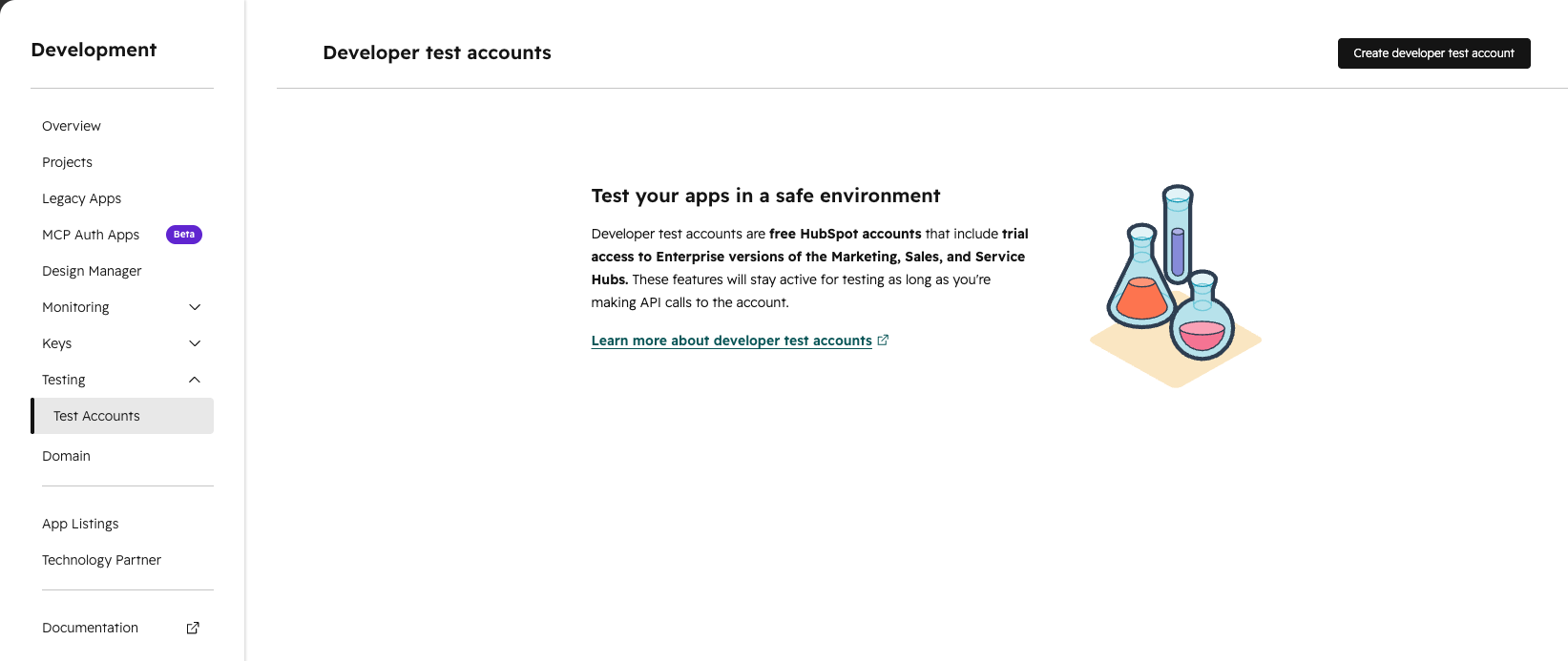
Step 3: Create a Developer Test Account
A developer test account is an isolated HubSpot CRM account used for testing. It is separate from your developer account.
- In your developer account portal, navigate to Testing → Developer test accounts.
- Click Create developer test account and follow the prompts.
Step 4: Set Up ngrok
The Ballerina listener runs locally and needs a publicly accessible URL so HubSpot can deliver webhook events to it. ngrok creates a secure tunnel from a public URL to your local service.
Install ngrok and start a tunnel on port 8090 (the default port for the Ballerina listener):
ngrok http 8090
Copy the HTTPS forwarding URL from the ngrok terminal output. It looks like:
https://xxxx-xxx-xxx-xxx.ngrok-free.app
Save this value — you will need the ngrok URL when configuring the webhook in Step 6 and in the Quickstart section.
Step 5: Create a HubSpot Developer Platform App
-
Create a new project using the HubSpot CLI:
hs project createWhen prompted:
- Base contents → select
App - Distribution → select
private - Auth → select
oauth - Features → select
Webhooks(press spacebar to select, enter to confirm) - Name → enter a name for your project (e.g.
hubspot-webhook-app)
- Base contents → select
-
Replace the contents of
src/app/app-hsmeta.jsonwith the following, adjusting theuid,name, andrequiredScopesas needed:{ "uid": "hubspot_webhook_app", "type": "app", "config": { "name": "hubspot-webhook-app", "distribution": "private", "auth": { "type": "oauth", "redirectUrls": ["http://localhost:3000/oauth-callback"], "requiredScopes": [ "oauth", "crm.objects.contacts.read", "crm.objects.companies.read", "crm.objects.deals.read", "tickets", "e-commerce", "conversations.read" ], "optionalScopes": [], "conditionallyRequiredScopes": [] }, "permittedUrls": { "fetch": ["https://api.hubapi.com"], "iframe": [], "img": [] }, "support": { "supportEmail": "support@example.com", "documentationUrl": "https://example.com/docs", "supportUrl": "https://example.com/support", "supportPhone": "+18005555555" } } }The
requiredScopesabove is the full set covering every object this listener supports. Cherry-pick only the scopes for the objects you intend to subscribe to — each object's events require its corresponding scope:Object Required scope(s) Contact crm.objects.contacts.readCompany crm.objects.companies.readDeal crm.objects.deals.readTicket ticketsProduct / Line item e-commerceConversation conversations.read
Step 6: Configure Webhook Subscriptions
Replace the contents of src/app/webhooks/webhook-hsmeta.json with the following. Replace <YOUR_NGROK_URL> with the ngrok URL you copied in Step 4.
{ "uid": "hubspot_webhook_subscriptions", "type": "webhooks", "config": { "settings": { "targetUrl": "<YOUR_NGROK_URL>", "maxConcurrentRequests": 10 }, "subscriptions": { "legacyCrmObjects": [ { "subscriptionType": "company.creation", "active": true }, { "subscriptionType": "company.deletion", "active": true }, { "subscriptionType": "company.propertyChange", "propertyName": "name", "active": true }, { "subscriptionType": "company.associationChange", "active": true }, { "subscriptionType": "company.merge", "active": true }, { "subscriptionType": "company.restore", "active": true }, { "subscriptionType": "contact.creation", "active": true }, { "subscriptionType": "contact.deletion", "active": true }, { "subscriptionType": "contact.propertyChange", "propertyName": "email", "active": true }, { "subscriptionType": "contact.associationChange", "active": true }, { "subscriptionType": "contact.merge", "active": true }, { "subscriptionType": "contact.restore", "active": true }, { "subscriptionType": "deal.creation", "active": true }, { "subscriptionType": "deal.deletion", "active": true }, { "subscriptionType": "deal.propertyChange", "propertyName": "dealname", "active": true }, { "subscriptionType": "deal.associationChange", "active": true }, { "subscriptionType": "deal.merge", "active": true }, { "subscriptionType": "deal.restore", "active": true }, { "subscriptionType": "ticket.creation", "active": true }, { "subscriptionType": "ticket.deletion", "active": true }, { "subscriptionType": "ticket.propertyChange", "propertyName": "subject", "active": true }, { "subscriptionType": "ticket.associationChange", "active": true }, { "subscriptionType": "ticket.merge", "active": true }, { "subscriptionType": "ticket.restore", "active": true }, { "subscriptionType": "product.creation", "active": true }, { "subscriptionType": "product.deletion", "active": true }, { "subscriptionType": "product.propertyChange", "propertyName": "name", "active": true }, { "subscriptionType": "product.merge", "active": true }, { "subscriptionType": "product.restore", "active": true }, { "subscriptionType": "line_item.creation", "active": true }, { "subscriptionType": "line_item.deletion", "active": true }, { "subscriptionType": "line_item.propertyChange", "propertyName": "quantity", "active": true }, { "subscriptionType": "line_item.associationChange", "active": true }, { "subscriptionType": "line_item.merge", "active": true }, { "subscriptionType": "line_item.restore", "active": true } ], "hubEvents": [ { "subscriptionType": "contact.privacyDeletion", "active": true }, { "subscriptionType": "conversation.creation", "active": true }, { "subscriptionType": "conversation.deletion", "active": true }, { "subscriptionType": "conversation.propertyChange", "propertyName": "status", "active": true }, { "subscriptionType": "conversation.privacyDeletion", "active": true }, { "subscriptionType": "conversation.newMessage", "active": true } ] } } }
Note: Subscribe only to the events your application needs — each entry above is optional.
propertyChangesubscriptions require apropertyName, and you can add one entry per property you want to monitor.contact.privacyDeletionand theconversation.*events are declared underhubEventsrather thanlegacyCrmObjects.
Upload the project to HubSpot:
hs project upload
Wait for both the build and deploy to succeed:
✔ Built hubspot-webhook-app #1 ✔ Deployed hubspot-webhook-app #1
Step 7: Retrieve the Client Secret
-
Open the project in the HubSpot portal:
hs project open -
Under Project Components, click the UID of your app.
-
Click the Auth tab.
-
Under Client credentials, copy the Client Secret.
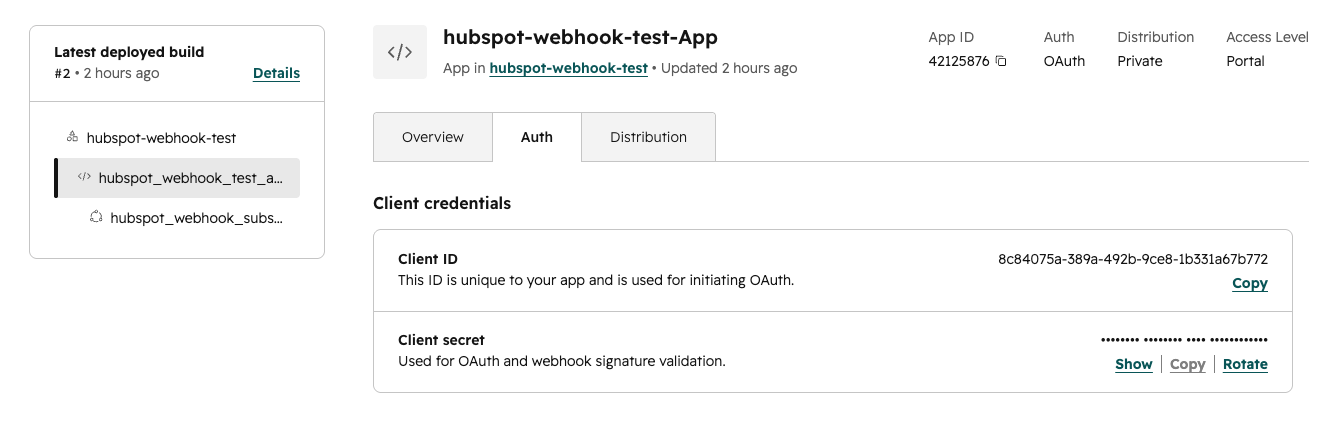
Save this value — you will need the Client Secret in the Quickstart section when initialising the Ballerina listener.
Step 8: Install the App in Your Test Account
The app must be installed in a HubSpot account for that account's events to trigger webhooks.
-
Start the OAuth quickstart server in a new terminal. This handles the OAuth token exchange when the browser redirects to
localhost:3000:git clone https://github.com/HubSpot/oauth-quickstart-nodejs.git cd oauth-quickstart-nodejs npm installCreate a
.envfile in the project directory:CLIENT_ID=<YOUR_CLIENT_ID> CLIENT_SECRET=<YOUR_CLIENT_SECRET> SCOPES=oauth,crm.objects.contacts.read,crm.objects.contacts.write,crm.objects.companies.read,crm.objects.deals.read,tickets,e-commerce,conversations.readKeep this
SCOPESlist in sync with therequiredScopesyou chose in Step 5.Start the server:
npm start -
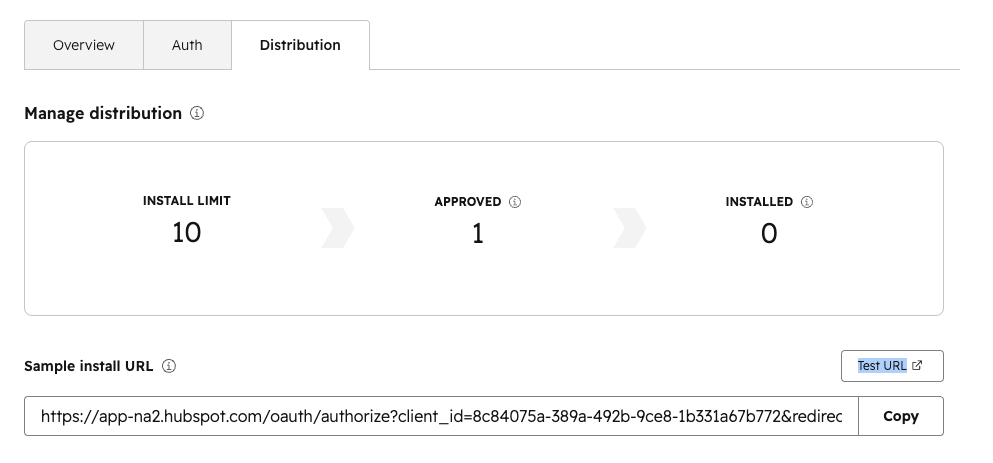
On your app's details page in the developer portal, go to the Distribution tab.
-
Click on Test URL, under Sample install URL.
-
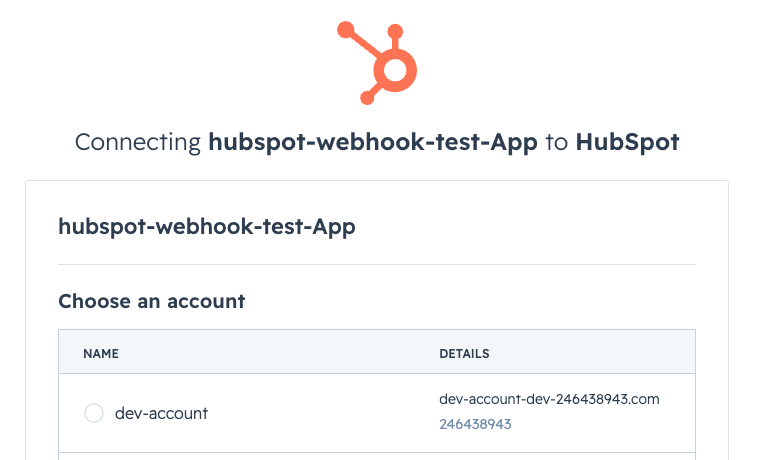
When prompted, select your developer test account as the account to install into.
-
After authorizing, the browser redirects to
http://localhost:3000. The page displays an access token and a sample contact name, confirming the installation was successful.
Compatibility
| Version | |
|---|---|
| Ballerina Language | Ballerina Swan Lake 2201.12.0 |
Quickstart
To use the HubSpot listener in your Ballerina application, update the .bal file as follows.
Before running the quickstart, ensure you have:
- The Client Secret from Step 7 of the Prerequisites
- Your ngrok URL from Step 4 of the Prerequisites
- ngrok running ()
ngrok http 8090 - The OAuth quickstart server running (in the
npm startoauth-quickstart-nodejsdirectory)
Step 1: Import listener
To import the ballerinax/trigger.hubspot module into the Ballerina project, add the following statement:
import ballerinax/trigger.hubspot; import ballerina/io;
Step 2: Create a new listener instance
Add the following to your Config.toml file, replacing the placeholders with the values saved during the Prerequisites:
clientSecret = "<YOUR_CLIENT_SECRET>" callbackUrl = "<YOUR_NGROK_URL>"
Then initialise the listener in your .bal file:
configurable string clientSecret = ?; configurable string callbackUrl = ?; listener hubspot:Listener hubspotWebhook = new ( {clientSecret: clientSecret, callbackURL: callbackUrl}, listenOn = 8090 );
Step 3: Invoke listener triggers
Now let's use the triggers available within the listener.
For example, you can configure the Ballerina listener to listen to company creation and deletion events as follows:
Listen to HubSpot Company Creation and Deletion
A service attached to one of the listener's service types must implement all of that type's remote functions. For example, CompanyService exposes six:
service hubspot:CompanyService on hubspotWebhook { remote function onCompanyCreation(hubspot:WebhookEvent event) returns error? { io:println(event); } remote function onCompanyDeletion(hubspot:WebhookEvent event) returns error? { io:println(event); } remote function onCompanyPropertychange(hubspot:WebhookEvent event) returns error? { io:println(event); } remote function onCompanyAssociationchange(hubspot:WebhookEvent event) returns error? { io:println(event); } remote function onCompanyMerge(hubspot:WebhookEvent event) returns error? { io:println(event); } remote function onCompanyRestore(hubspot:WebhookEvent event) returns error? { io:println(event); } }
Note: The event payload does not contain metadata related to the event. You need to use the specific HubSpot client to obtain it.
To compile and run the Ballerina program, issue the following command:
bal run
To verify it is working, go to your HubSpot test account and create or delete a Contact, Company, or Deal. You should see the event printed in the Ballerina console output.
Report issues
To report bugs, request new features, start new discussions, etc., go to the Ballerina Library repository
Useful links
- For more information go to the
trigger.hubspotpackage. - For example demonstrations of the usage, go to Ballerina By Examples.
- Chat live with us via our Discord server.
- Post all technical questions on Stack Overflow with the #ballerina tag.
Service types
trigger.hubspot: CompanyService
Triggers when a new event related to HubSpot Company is received. Available actions: onCompanyCreation, onCompanyDeletion, onCompanyPropertychange, onCompanyAssociationchange, onCompanyMerge, onCompanyRestore
onCompanyCreation
function onCompanyCreation(WebhookEvent event) returns error?Parameters
- event WebhookEvent -
onCompanyDeletion
function onCompanyDeletion(WebhookEvent event) returns error?Parameters
- event WebhookEvent -
onCompanyPropertychange
function onCompanyPropertychange(WebhookEvent event) returns error?Parameters
- event WebhookEvent -
onCompanyAssociationchange
function onCompanyAssociationchange(WebhookEvent event) returns error?Parameters
- event WebhookEvent -
onCompanyMerge
function onCompanyMerge(WebhookEvent event) returns error?Parameters
- event WebhookEvent -
onCompanyRestore
function onCompanyRestore(WebhookEvent event) returns error?Parameters
- event WebhookEvent -
trigger.hubspot: ContactService
Triggers when a new event related to HubSpot Contact is received. Available actions: onContactCreation, onContactDeletion, onContactPropertychange, onContactAssociationchange, onContactMerge, onContactRestore, onContactPrivacydeletion
onContactCreation
function onContactCreation(WebhookEvent event) returns error?Parameters
- event WebhookEvent -
onContactDeletion
function onContactDeletion(WebhookEvent event) returns error?Parameters
- event WebhookEvent -
onContactPropertychange
function onContactPropertychange(WebhookEvent event) returns error?Parameters
- event WebhookEvent -
onContactAssociationchange
function onContactAssociationchange(WebhookEvent event) returns error?Parameters
- event WebhookEvent -
onContactMerge
function onContactMerge(WebhookEvent event) returns error?Parameters
- event WebhookEvent -
onContactRestore
function onContactRestore(WebhookEvent event) returns error?Parameters
- event WebhookEvent -
onContactPrivacydeletion
function onContactPrivacydeletion(WebhookEvent event) returns error?Parameters
- event WebhookEvent -
trigger.hubspot: ConversationService
Triggers when a new event related to HubSpot Conversation is received. Available actions: onConversationCreation, onConversationDeletion, onConversationPropertychange, onConversationPrivacydeletion, onConversationNewmessage
onConversationCreation
function onConversationCreation(WebhookEvent event) returns error?Parameters
- event WebhookEvent -
onConversationDeletion
function onConversationDeletion(WebhookEvent event) returns error?Parameters
- event WebhookEvent -
onConversationPropertychange
function onConversationPropertychange(WebhookEvent event) returns error?Parameters
- event WebhookEvent -
onConversationPrivacydeletion
function onConversationPrivacydeletion(WebhookEvent event) returns error?Parameters
- event WebhookEvent -
onConversationNewmessage
function onConversationNewmessage(WebhookEvent event) returns error?Parameters
- event WebhookEvent -
trigger.hubspot: DealService
Triggers when a new event related to HubSpot Deal is received. Available actions: onDealCreation, onDealDeletion, onDealPropertychange, onDealAssociationchange, onDealMerge, onDealRestore
onDealCreation
function onDealCreation(WebhookEvent event) returns error?Parameters
- event WebhookEvent -
onDealDeletion
function onDealDeletion(WebhookEvent event) returns error?Parameters
- event WebhookEvent -
onDealPropertychange
function onDealPropertychange(WebhookEvent event) returns error?Parameters
- event WebhookEvent -
onDealAssociationchange
function onDealAssociationchange(WebhookEvent event) returns error?Parameters
- event WebhookEvent -
onDealMerge
function onDealMerge(WebhookEvent event) returns error?Parameters
- event WebhookEvent -
onDealRestore
function onDealRestore(WebhookEvent event) returns error?Parameters
- event WebhookEvent -
trigger.hubspot: TicketService
Triggers when a new event related to HubSpot Ticket is received. Available actions: onTicketCreation, onTicketDeletion, onTicketPropertychange, onTicketAssociationchange, onTicketMerge, onTicketRestore
onTicketCreation
function onTicketCreation(WebhookEvent event) returns error?Parameters
- event WebhookEvent -
onTicketDeletion
function onTicketDeletion(WebhookEvent event) returns error?Parameters
- event WebhookEvent -
onTicketPropertychange
function onTicketPropertychange(WebhookEvent event) returns error?Parameters
- event WebhookEvent -
onTicketAssociationchange
function onTicketAssociationchange(WebhookEvent event) returns error?Parameters
- event WebhookEvent -
onTicketMerge
function onTicketMerge(WebhookEvent event) returns error?Parameters
- event WebhookEvent -
onTicketRestore
function onTicketRestore(WebhookEvent event) returns error?Parameters
- event WebhookEvent -
trigger.hubspot: ProductService
Triggers when a new event related to HubSpot Product is received. Available actions: onProductCreation, onProductDeletion, onProductPropertychange, onProductMerge, onProductRestore
onProductCreation
function onProductCreation(WebhookEvent event) returns error?Parameters
- event WebhookEvent -
onProductDeletion
function onProductDeletion(WebhookEvent event) returns error?Parameters
- event WebhookEvent -
onProductPropertychange
function onProductPropertychange(WebhookEvent event) returns error?Parameters
- event WebhookEvent -
onProductMerge
function onProductMerge(WebhookEvent event) returns error?Parameters
- event WebhookEvent -
onProductRestore
function onProductRestore(WebhookEvent event) returns error?Parameters
- event WebhookEvent -
trigger.hubspot: LineItemService
Triggers when a new event related to HubSpot Line Item is received. Available actions: onLineItemCreation, onLineItemDeletion, onLineItemPropertychange, onLineItemAssociationchange, onLineItemMerge, onLineItemRestore
onLineItemCreation
function onLineItemCreation(WebhookEvent event) returns error?Parameters
- event WebhookEvent -
onLineItemDeletion
function onLineItemDeletion(WebhookEvent event) returns error?Parameters
- event WebhookEvent -
onLineItemPropertychange
function onLineItemPropertychange(WebhookEvent event) returns error?Parameters
- event WebhookEvent -
onLineItemAssociationchange
function onLineItemAssociationchange(WebhookEvent event) returns error?Parameters
- event WebhookEvent -
onLineItemMerge
function onLineItemMerge(WebhookEvent event) returns error?Parameters
- event WebhookEvent -
onLineItemRestore
function onLineItemRestore(WebhookEvent event) returns error?Parameters
- event WebhookEvent -
Listeners
trigger.hubspot: Listener
The HubSpot webhook listener that receives events and dispatches them to the attached services.
attach
function attach(GenericServiceType serviceRef, () attachPoint) returns error?detach
function detach(GenericServiceType serviceRef) returns error?Parameters
- serviceRef GenericServiceType -
'start
function 'start() returns error?gracefulStop
function gracefulStop() returns error?immediateStop
function immediateStop() returns error?Records
trigger.hubspot: ListenerConfig
Configurations required to initialize the HubSpot listener.
Fields
- clientSecret string - The Client Secret of HubSpot App
- callbackURL string - The Callback URL
trigger.hubspot: WebhookEvent
HubSpot webhook event notification payload.
Fields
- attemptNumber? decimal - Starting at 0, which number attempt this is to notify your service of this event. If your service times-out or throws an error as describe in the Retries section below, HubSpot will attempt to send the notification again.
- eventId decimal - The ID of the event that triggered this notification. This value is not guaranteed to be unique.
- changeSource? string - The source of the change. This can be any of the change sources that appear in contact property histories.
- occurredAt? decimal - When this event occurred as a millisecond timestamp.
- subscriptionType? string - Type of the event
- propertyName? string - The name of the property changed. Present for propertyChange events.
- portalId? decimal - The customer's (HubSpot account ID)[https://knowledge.hubspot.com/account/manage-multiple-hubspot-accounts?_ga=2.56562472.2054080341.1656611011-2068059512.1656469161#check-your-current-account] where the event occurred.
- appId? decimal - The ID of the HubSpot application
- propertyValue? string - The new value set for the property that triggered the notification. Present for propertyChange events.
- changeFlag? string - Flag of the change.
- subscriptionId? decimal - The ID of the subscription that triggered a notification about the event.
- objectId? decimal - The ID of the object that was created, changed, or deleted. For contacts this is the contact ID; for companies, the company ID; for deals, the deal ID; and for conversations the thread ID
- associationType? string - The type of the association (e.g. CONTACT_TO_COMPANY, DEAL_TO_LINE_ITEM). Present for associationChange events.
- fromObjectId? decimal - The ID of the record that the association change was made from. Present for associationChange events.
- toObjectId? decimal - The ID of the secondary record in the association event. Present for associationChange events.
- associationRemoved? boolean - Whether the association was removed (true) or added (false). Present for associationChange events.
- isPrimaryAssociation? boolean - Whether the secondary record is the primary association. Present for associationChange events.
- primaryObjectId? decimal - The ID of the merge winner, which is the record that remains after the merge. Present for merge events.
- mergedObjectIds? decimal[] - An array of IDs that represent the records merged into the winner. Present for merge events.
- newObjectId? decimal - The ID of the record created as a result of the merge. Present for merge events.
- numberOfPropertiesMoved? decimal - How many properties were transferred during the merge. Present for merge events.
- messageId? decimal - The ID of the new message. Present for conversation.newMessage events.
- messageType? string - The type of the new message, either MESSAGE or COMMENT. Present for conversation.newMessage events.
Union types
trigger.hubspot: GenericServiceType
GenericServiceType
Generic Service Type
Simple name reference types
trigger.hubspot: GenericDataType
GenericDataType
The generic data type that holds a HubSpot webhook event payload.