Module sap.successfactors.ecapprenticemanagement

ballerinax/sap.successfactors.ecapprenticemanagement Ballerina library
Overview
SAP SuccessFactors Employee Central is a comprehensive human capital management solution that helps organizations manage their workforce effectively. It provides a unified platform for HR processes including employee data management, organizational structures, and employment lifecycle management.
WSO2 SAP Successfactors Apprentice Management provides a way to interact with the SAP SuccessFactors Employee Central APIs. The service allows to manage apprenticeship programs, track apprentice progress, and maintain apprentice-related information.
Key Features
- Manage apprentice program registrations and tracking
- Configure apprentice event types and program definitions
- Query apprentice progress and training records
Setup guide
This connector supports two authentication methods: Basic Authentication and OAuth 2.0 SAML Bearer.
Method 1: Basic Authentication
If you already have a username and password for this integration to work, you can use those directly. If you'd rather create a new account with narrowed scope for this integration, follow these steps:
- Sign in to your SAP SuccessFactors instance as an administrator.
- Navigate to Admin Center > Add New Employee and create a new user account for this integration.
- Navigate to Admin Center > Manage Permission Roles, create a role scoped to only the permissions this integration needs, and grant it to the new user.
- Navigate to Admin Center > Reset User Password and set a password for the new user account.
In either case, you will also need the API server hostname for your SuccessFactors region, for example,
api12.successfactors.eu. The complete list of API server hostnames by region is available in the
SAP SuccessFactors API documentation.
Method 2: OAuth 2.0 SAML Bearer
Step 1: Generate a key pair and certificate
-
Generate an RSA key pair and a matching X.509 certificate. If you don't already have one, generate a self-signed pair with OpenSSL:
openssl req -x509 -newkey rsa:2048 -keyout private_key.pem -out certificate.pem -days 365 -nodes -subj "/CN=YourAppName"private_key.pemis secret - it never leaves your machine or gets uploaded anywhere. Onlycertificate.pemis registered with SAP.
Step 2: Register an OAuth2 client application
-
Sign in to your SAP SuccessFactors instance as an administrator.
-
Search for Manage OAuth2 Client Applications in Admin Center's action search, or navigate to it directly under Admin Center > Company Settings.

-
Choose Register Client Application and provide the following information:
Field Description Application Name A name to identify this integration Description An optional description X.509 Certificate The contents of certificate.pemas a single continuous base64 string, with the-----BEGIN CERTIFICATE-----/-----END CERTIFICATE-----lines and line breaks removed. Produce this withawk '/BEGIN CERTIFICATE/{flag=1;next}/END CERTIFICATE/{flag=0}flag' certificate.pem | tr -d '\n'and paste the single line of output it prints. -
Choose Register to save the application.
Step 3: Note your credentials
After registering, open the application (choose View from the application list) to find the Company ID and the API Key SAP assigned to it.
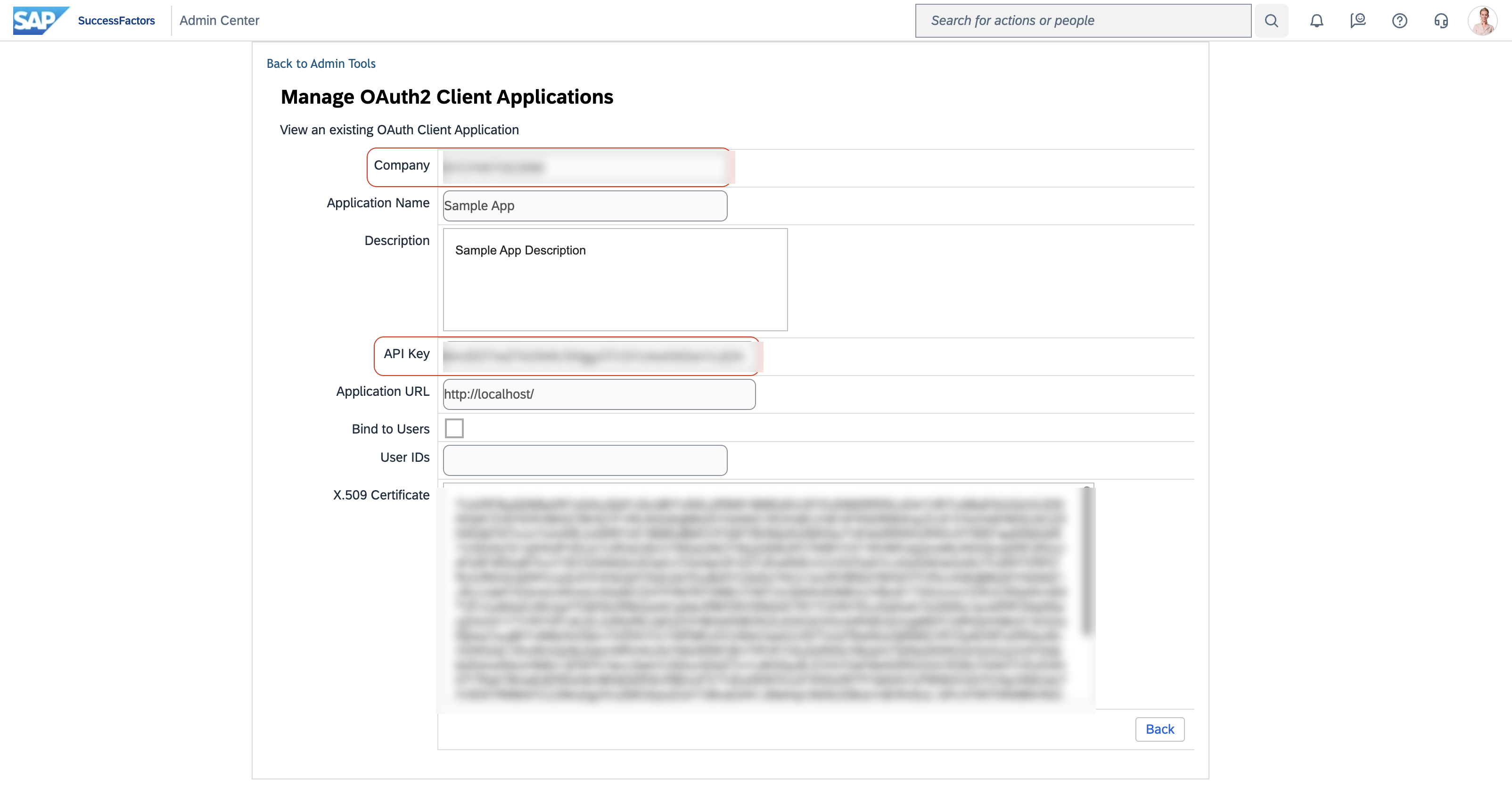
You now have everything sap:SamlBearerAuthConfig needs:
- apiKey - the API Key from the application you just registered
- companyId - the Company ID shown on the same screen
- username - the SAP user to authenticate as
- privateKey - the path to your
private_key.pemfile - certificate - the path to your
certificate.pemfile, or its content - tokenUrl - your Admin Center's OAuth2 token endpoint, typically
https://<admin-center-host>/oauth/token
Quickstart
To use the sap.successfactors.ecapprenticemanagement connector in your Ballerina application, modify the .bal file as follows:
Step 1: Import the module
Import the sap.successfactors.ecapprenticemanagement module.
import ballerinax/sap.successfactors.ecapprenticemanagement as ecappr;
Step 2: Instantiate a new connector
Use the hostname and credentials to initiate a client.
configurable string hostname = ?; configurable string username = ?; configurable string password = ?; ecappr:Client ecapprClient = check new ( { auth: { username, password } }, hostname );
Step 3: Invoke the connector operation
Now, utilize the available connector operations.
ecappr:ApprenticeWrapper apprentice = check ecapprClient->getApprentice();
Step 4: Run the Ballerina application
bal run
Examples
The SAP SuccessFactors Employee Central Ballerina connectors provide practical examples illustrating usage in various scenarios. Explore these examples, covering use cases like syncing employee data and sending notifications.
-
Google Sheets to SuccessFactors - Read employee records from a Google Sheets roster and create Personal Information records in SuccessFactors.
-
SuccessFactors to Slack - Poll SuccessFactors for newly onboarded employees and send welcome notifications to a Slack channel.
Clients
sap.successfactors.ecapprenticemanagement: Client
API to access apprentice management related data.
You can find your company's API server in List of API Servers in SAP SuccessFactors.
Constructor
Gets invoked to initialize the connector.
init (ConnectionConfig config, string hostname, int port)- config ConnectionConfig - The configurations to be used when initializing the
connector
- hostname string -
- port int 443 -
listApprenticeEventTypes
function listApprenticeEventTypes(map<string|string[]> headers, *ListApprenticeEventTypesQueries queries) returns Wrapper|errorGet entities from ApprenticeEventType
Parameters
- queries *ListApprenticeEventTypesQueries - Queries to be sent with the request
createApprenticeEventType
function createApprenticeEventType(ApprenticeEvent payload, map<string|string[]> headers) returns CreatedApprenticeEventType|errorAdd new entity to ApprenticeEventType
Parameters
- payload ApprenticeEvent - New entity
Return Type
- CreatedApprenticeEventType|error - Created entity
getApprenticeEventType
function getApprenticeEventType(string externalCode, map<string|string[]> headers, *GetApprenticeEventTypeQueries queries) returns ApprenticeEventType|errorGet entity from ApprenticeEventType by key
Parameters
- externalCode string - key: externalCode
- queries *GetApprenticeEventTypeQueries - Queries to be sent with the request
Return Type
- ApprenticeEventType|error - Retrieved entity
updateApprenticeEventType
function updateApprenticeEventType(string externalCode, ModifiedApprenticeEventType payload, map<string|string[]> headers) returns error?Update entity in ApprenticeEventType
Parameters
- externalCode string - key: externalCode
- payload ModifiedApprenticeEventType - New property values
Return Type
- error? - Success
deleteApprenticeEventType
function deleteApprenticeEventType(string externalCode, DeleteApprenticeEventTypeHeaders headers) returns error?Delete entity from ApprenticeEventType
Parameters
- externalCode string - key: externalCode
- headers DeleteApprenticeEventTypeHeaders (default {}) - Headers to be sent with the request
Return Type
- error? - Success
listDepartmentApprenticeDetails
function listDepartmentApprenticeDetails(map<string|string[]> headers, *ListDepartmentApprenticeDetailsQueries queries) returns Wrapper_1|errorGet entities from DepartmentApprenticeDetail
Parameters
- queries *ListDepartmentApprenticeDetailsQueries - Queries to be sent with the request
createDepartmentApprenticeDetail
function createDepartmentApprenticeDetail(DepartmentApprenticeDetail payload, map<string|string[]> headers) returns CreatedDepartmentApprenticeDetail|errorAdd new entity to DepartmentApprenticeDetail
Parameters
- payload DepartmentApprenticeDetail - New entity
Return Type
- CreatedDepartmentApprenticeDetail|error - Created entity
getDepartmentApprenticeDetail
function getDepartmentApprenticeDetail(string Department_effectiveStartDate, string Department_externalCode, int externalCode, map<string|string[]> headers, *GetDepartmentApprenticeDetailQueries queries) returns DepartmentApprenticeDetail_1|errorGet entity from DepartmentApprenticeDetail by key
Parameters
- Department_effectiveStartDate string - key: Department_effectiveStartDate
- Department_externalCode string - key: Department_externalCode
- externalCode int - key: externalCode
- queries *GetDepartmentApprenticeDetailQueries - Queries to be sent with the request
Return Type
- DepartmentApprenticeDetail_1|error - Retrieved entity
updateDepartmentApprenticeDetail
function updateDepartmentApprenticeDetail(string Department_effectiveStartDate, string Department_externalCode, int externalCode, ModifiedDepartmentApprenticeDetail payload, map<string|string[]> headers) returns error?Update entity in DepartmentApprenticeDetail
Parameters
- Department_effectiveStartDate string - key: Department_effectiveStartDate
- Department_externalCode string - key: Department_externalCode
- externalCode int - key: externalCode
- payload ModifiedDepartmentApprenticeDetail - New property values
Return Type
- error? - Success
deleteDepartmentApprenticeDetail
function deleteDepartmentApprenticeDetail(string Department_effectiveStartDate, string Department_externalCode, int externalCode, DeleteDepartmentApprenticeDetailHeaders headers) returns error?Delete entity from DepartmentApprenticeDetail
Parameters
- Department_effectiveStartDate string - key: Department_effectiveStartDate
- Department_externalCode string - key: Department_externalCode
- externalCode int - key: externalCode
- headers DeleteDepartmentApprenticeDetailHeaders (default {}) - Headers to be sent with the request
Return Type
- error? - Success
listApprenticeSchools
function listApprenticeSchools(map<string|string[]> headers, *ListApprenticeSchoolsQueries queries) returns Wrapper_2|errorGet entities from ApprenticeSchool
Parameters
- queries *ListApprenticeSchoolsQueries - Queries to be sent with the request
createApprenticeSchool
function createApprenticeSchool(ApprenticeSchool payload, map<string|string[]> headers) returns CreatedApprenticeSchool|errorAdd new entity to ApprenticeSchool
Parameters
- payload ApprenticeSchool - New entity
Return Type
- CreatedApprenticeSchool|error - Created entity
getApprenticeSchool
function getApprenticeSchool(string externalCode, map<string|string[]> headers, *GetApprenticeSchoolQueries queries) returns ApprenticeSchool_1|errorGet entity from ApprenticeSchool by key
Parameters
- externalCode string - key: externalCode
- queries *GetApprenticeSchoolQueries - Queries to be sent with the request
Return Type
- ApprenticeSchool_1|error - Retrieved entity
updateApprenticeSchool
function updateApprenticeSchool(string externalCode, ModifiedApprenticeSchool payload, map<string|string[]> headers) returns error?Update entity in ApprenticeSchool
Parameters
- externalCode string - key: externalCode
- payload ModifiedApprenticeSchool - New property values
Return Type
- error? - Success
deleteApprenticeSchool
function deleteApprenticeSchool(string externalCode, DeleteApprenticeSchoolHeaders headers) returns error?Delete entity from ApprenticeSchool
Parameters
- externalCode string - key: externalCode
- headers DeleteApprenticeSchoolHeaders (default {}) - Headers to be sent with the request
Return Type
- error? - Success
listApprenticeGroups
function listApprenticeGroups(map<string|string[]> headers, *ListApprenticeGroupsQueries queries) returns Wrapper_3|errorGet entities from ApprenticeGroup
Parameters
- queries *ListApprenticeGroupsQueries - Queries to be sent with the request
createApprenticeGroup
function createApprenticeGroup(ApprenticeGroup payload, map<string|string[]> headers) returns CreatedApprenticeGroup|errorAdd new entity to ApprenticeGroup
Parameters
- payload ApprenticeGroup - New entity
Return Type
- CreatedApprenticeGroup|error - Created entity
getApprenticeGroup
function getApprenticeGroup(string externalCode, map<string|string[]> headers, *GetApprenticeGroupQueries queries) returns ApprenticeGroup_1|errorGet entity from ApprenticeGroup by key
Parameters
- externalCode string - key: externalCode
- queries *GetApprenticeGroupQueries - Queries to be sent with the request
Return Type
- ApprenticeGroup_1|error - Retrieved entity
updateApprenticeGroup
function updateApprenticeGroup(string externalCode, ModifiedApprenticeGroup payload, map<string|string[]> headers) returns error?Update entity in ApprenticeGroup
Parameters
- externalCode string - key: externalCode
- payload ModifiedApprenticeGroup - New property values
Return Type
- error? - Success
deleteApprenticeGroup
function deleteApprenticeGroup(string externalCode, DeleteApprenticeGroupHeaders headers) returns error?Delete entity from ApprenticeGroup
Parameters
- externalCode string - key: externalCode
- headers DeleteApprenticeGroupHeaders (default {}) - Headers to be sent with the request
Return Type
- error? - Success
listApprenticeSchoolEvents
function listApprenticeSchoolEvents(map<string|string[]> headers, *ListApprenticeSchoolEventsQueries queries) returns Wrapper_4|errorGet entities from ApprenticeSchoolEvent
Parameters
- queries *ListApprenticeSchoolEventsQueries - Queries to be sent with the request
createApprenticeSchoolEvent
function createApprenticeSchoolEvent(ApprenticeSchoolEvent payload, map<string|string[]> headers) returns CreatedApprenticeSchoolEvent|errorAdd new entity to ApprenticeSchoolEvent
Parameters
- payload ApprenticeSchoolEvent - New entity
Return Type
- CreatedApprenticeSchoolEvent|error - Created entity
getApprenticeSchoolEvent
function getApprenticeSchoolEvent(string externalCode, map<string|string[]> headers, *GetApprenticeSchoolEventQueries queries) returns ApprenticeSchoolEvent_1|errorGet entity from ApprenticeSchoolEvent by key
Parameters
- externalCode string - key: externalCode
- queries *GetApprenticeSchoolEventQueries - Queries to be sent with the request
Return Type
- ApprenticeSchoolEvent_1|error - Retrieved entity
updateApprenticeSchoolEvent
function updateApprenticeSchoolEvent(string externalCode, ModifiedApprenticeSchoolEvent payload, map<string|string[]> headers) returns error?Update entity in ApprenticeSchoolEvent
Parameters
- externalCode string - key: externalCode
- payload ModifiedApprenticeSchoolEvent - New property values
Return Type
- error? - Success
deleteApprenticeSchoolEvent
function deleteApprenticeSchoolEvent(string externalCode, DeleteApprenticeSchoolEventHeaders headers) returns error?Delete entity from ApprenticeSchoolEvent
Parameters
- externalCode string - key: externalCode
- headers DeleteApprenticeSchoolEventHeaders (default {}) - Headers to be sent with the request
Return Type
- error? - Success
listApprenticePracticalTrainingEvents
function listApprenticePracticalTrainingEvents(map<string|string[]> headers, *ListApprenticePracticalTrainingEventsQueries queries) returns json|errorGet entities from ApprenticePracticalTrainingEvent
Parameters
- queries *ListApprenticePracticalTrainingEventsQueries - Queries to be sent with the request
Return Type
- json|error - Retrieved entities
getApprenticePracticalTrainingEvent
function getApprenticePracticalTrainingEvent(string externalCode, map<string|string[]> headers, *GetApprenticePracticalTrainingEventQueries queries) returns json|errorGet entity from ApprenticePracticalTrainingEvent by key
Parameters
- externalCode string - key: externalCode
- queries *GetApprenticePracticalTrainingEventQueries - Queries to be sent with the request
Return Type
- json|error - Retrieved entity
deleteApprenticePracticalTrainingEvent
function deleteApprenticePracticalTrainingEvent(string externalCode, DeleteApprenticePracticalTrainingEventHeaders headers) returns error?Delete entity from ApprenticePracticalTrainingEvent
Parameters
- externalCode string - key: externalCode
- headers DeleteApprenticePracticalTrainingEventHeaders (default {}) - Headers to be sent with the request
Return Type
- error? - Success
listApprenticeInternalTrainingEvents
function listApprenticeInternalTrainingEvents(map<string|string[]> headers, *ListApprenticeInternalTrainingEventsQueries queries) returns json|errorGet entities from ApprenticeInternalTrainingEvent
Parameters
- queries *ListApprenticeInternalTrainingEventsQueries - Queries to be sent with the request
Return Type
- json|error - Retrieved entities
getApprenticeInternalTrainingEvent
function getApprenticeInternalTrainingEvent(string externalCode, map<string|string[]> headers, *GetApprenticeInternalTrainingEventQueries queries) returns json|errorGet entity from ApprenticeInternalTrainingEvent by key
Parameters
- externalCode string - key: externalCode
- queries *GetApprenticeInternalTrainingEventQueries - Queries to be sent with the request
Return Type
- json|error - Retrieved entity
deleteApprenticeInternalTrainingEvent
function deleteApprenticeInternalTrainingEvent(string externalCode, DeleteApprenticeInternalTrainingEventHeaders headers) returns error?Delete entity from ApprenticeInternalTrainingEvent
Parameters
- externalCode string - key: externalCode
- headers DeleteApprenticeInternalTrainingEventHeaders (default {}) - Headers to be sent with the request
Return Type
- error? - Success
listApprentices
function listApprentices(map<string|string[]> headers, *ListApprenticesQueries queries) returns Wrapper_7|errorGet entities from Apprentice
Parameters
- queries *ListApprenticesQueries - Queries to be sent with the request
createApprentice
function createApprentice(Apprentice payload, map<string|string[]> headers) returns CreatedApprentice|errorAdd new entity to Apprentice
Parameters
- payload Apprentice - New entity
Return Type
- CreatedApprentice|error - Created entity
getApprentice
function getApprentice(string user, map<string|string[]> headers, *GetApprenticeQueries queries) returns Apprentice_1|errorGet entity from Apprentice by key
Parameters
- user string - key: user
- queries *GetApprenticeQueries - Queries to be sent with the request
Return Type
- Apprentice_1|error - Retrieved entity
updateApprentice
function updateApprentice(string user, ModifiedApprentice payload, map<string|string[]> headers) returns error?Update entity in Apprentice
Return Type
- error? - Success
deleteApprentice
function deleteApprentice(string user, DeleteApprenticeHeaders headers) returns error?Delete entity from Apprentice
Parameters
- user string - key: user
- headers DeleteApprenticeHeaders (default {}) - Headers to be sent with the request
Return Type
- error? - Success
Records
sap.successfactors.ecapprenticemanagement: Apprentice
Fields
- user? string -
sap.successfactors.ecapprenticemanagement: Apprentice_1
Fields
- d? Apprentice -
sap.successfactors.ecapprenticemanagement: ApprenticeEvent
Fields
- externalCode? string -
sap.successfactors.ecapprenticemanagement: ApprenticeEventType
Fields
- d? ApprenticeEvent -
sap.successfactors.ecapprenticemanagement: ApprenticeGroup
Fields
- externalCode? string -
sap.successfactors.ecapprenticemanagement: ApprenticeGroup_1
Fields
- d? ApprenticeGroup -
sap.successfactors.ecapprenticemanagement: ApprenticeSchool
Fields
- externalCode? string -
sap.successfactors.ecapprenticemanagement: ApprenticeSchool_1
Fields
- d? ApprenticeSchool -
sap.successfactors.ecapprenticemanagement: ApprenticeSchoolEvent
Fields
- externalCode? string -
- assignedApprentices? RelatedCollectionSFOData_Apprentice -
sap.successfactors.ecapprenticemanagement: ApprenticeSchoolEvent_1
Fields
sap.successfactors.ecapprenticemanagement: CollectionofApprentice
Fields
- results? Apprentice[] -
sap.successfactors.ecapprenticemanagement: CollectionofApprenticeEventType
Fields
- results? ApprenticeEvent[] -
sap.successfactors.ecapprenticemanagement: CollectionofApprenticeGroup
Fields
- results? ApprenticeGroup[] -
sap.successfactors.ecapprenticemanagement: CollectionofApprenticeSchool
Fields
- results? ApprenticeSchool[] -
sap.successfactors.ecapprenticemanagement: CollectionofApprenticeSchoolEvent
Fields
- results? ApprenticeSchoolEvent[] -
sap.successfactors.ecapprenticemanagement: CollectionofDepartmentApprenticeDetail
Fields
- results? DepartmentApprenticeDetail[] -
sap.successfactors.ecapprenticemanagement: ConnectionConfig
Provides a set of configurations for controlling the behaviours when communicating with a remote HTTP endpoint.
Fields
- auth CredentialsConfig|SamlBearerAuthConfig - Configurations related to client authentication
- httpVersion HttpVersion(default http:HTTP_2_0) - The HTTP version understood by the client
- http1Settings ClientHttp1Settings(default {}) - Configurations related to HTTP/1.x protocol
- http2Settings ClientHttp2Settings(default {}) - Configurations related to HTTP/2 protocol
- timeout decimal(default 30) - The maximum time to wait (in seconds) for a response before closing the connection
- forwarded string(default "disable") - The choice of setting
forwarded/x-forwardedheader
- followRedirects? FollowRedirects - Configurations associated with Redirection
- poolConfig? PoolConfiguration - Configurations associated with request pooling
- cache CacheConfig(default {}) - HTTP caching related configurations
- compression Compression(default http:COMPRESSION_AUTO) - Specifies the way of handling compression (
accept-encoding) header
- circuitBreaker? CircuitBreakerConfig - Configurations associated with the behaviour of the Circuit Breaker
- retryConfig? RetryConfig - Configurations associated with retrying
- responseLimits ResponseLimitConfigs(default {}) - Configurations associated with inbound response size limits
- secureSocket? ClientSecureSocket - SSL/TLS-related options
- proxy? ProxyConfig - Proxy server related options
- socketConfig ClientSocketConfig(default {}) - Provides settings related to client socket configuration
- validation boolean(default true) - Enables the inbound payload validation functionality which provided by the constraint package. Enabled by default
- laxDataBinding boolean(default true) - Enables relaxed data binding on the client side. When enabled,
nilvalues are treated as optional, and absent fields are handled asnilabletypes. Enabled by default.
sap.successfactors.ecapprenticemanagement: CreatedApprentice
Fields
- d? Apprentice -
sap.successfactors.ecapprenticemanagement: CreatedApprenticeEventType
Fields
- d? ApprenticeEvent -
sap.successfactors.ecapprenticemanagement: CreatedApprenticeGroup
Fields
- d? ApprenticeGroup -
sap.successfactors.ecapprenticemanagement: CreatedApprenticeSchool
Fields
- d? ApprenticeSchool -
sap.successfactors.ecapprenticemanagement: CreatedApprenticeSchoolEvent
Fields
sap.successfactors.ecapprenticemanagement: CreatedDepartmentApprenticeDetail
Fields
sap.successfactors.ecapprenticemanagement: DeleteApprenticeEventTypeHeaders
Represents the Headers record for the operation: deleteApprenticeEventType
Fields
- If\-Match? string - ETag
sap.successfactors.ecapprenticemanagement: DeleteApprenticeGroupHeaders
Represents the Headers record for the operation: deleteApprenticeGroup
Fields
- If\-Match? string - ETag
sap.successfactors.ecapprenticemanagement: DeleteApprenticeHeaders
Represents the Headers record for the operation: deleteApprentice
Fields
- If\-Match? string - ETag
sap.successfactors.ecapprenticemanagement: DeleteApprenticeInternalTrainingEventHeaders
Represents the Headers record for the operation: deleteApprenticeInternalTrainingEvent
Fields
- If\-Match? string - ETag
sap.successfactors.ecapprenticemanagement: DeleteApprenticePracticalTrainingEventHeaders
Represents the Headers record for the operation: deleteApprenticePracticalTrainingEvent
Fields
- If\-Match? string - ETag
sap.successfactors.ecapprenticemanagement: DeleteApprenticeSchoolEventHeaders
Represents the Headers record for the operation: deleteApprenticeSchoolEvent
Fields
- If\-Match? string - ETag
sap.successfactors.ecapprenticemanagement: DeleteApprenticeSchoolHeaders
Represents the Headers record for the operation: deleteApprenticeSchool
Fields
- If\-Match? string - ETag
sap.successfactors.ecapprenticemanagement: DeleteDepartmentApprenticeDetailHeaders
Represents the Headers record for the operation: deleteDepartmentApprenticeDetail
Fields
- If\-Match? string - ETag
sap.successfactors.ecapprenticemanagement: DepartmentApprenticeDetail
Fields
- Department_effectiveStartDate? string -
- Department_externalCode? string -
- externalCode? string -
sap.successfactors.ecapprenticemanagement: DepartmentApprenticeDetail_1
Fields
sap.successfactors.ecapprenticemanagement: GetApprenticeEventTypeQueries
Represents the Queries record for the operation: getApprenticeEventType
Fields
- \$select? ("apprenticeEventTypeCategory"|"createdBy"|"createdDateTime"|"eventTypeDescription_de_DE"|"eventTypeDescription_defaultValue"|"eventTypeDescription_en_DEBUG"|"eventTypeDescription_en_GB"|"eventTypeDescription_en_US"|"eventTypeDescription_es_ES"|"eventTypeDescription_fr_FR"|"eventTypeDescription_ja_JP"|"eventTypeDescription_ko_KR"|"eventTypeDescription_localized"|"eventTypeDescription_nl_NL"|"eventTypeDescription_pt_BR"|"eventTypeDescription_pt_PT"|"eventTypeDescription_ru_RU"|"eventTypeDescription_zh_CN"|"eventTypeDescription_zh_TW"|"externalCode"|"lastModifiedBy"|"lastModifiedDateTime"|"mdfSystemRecordStatus")[] - Select properties to be returned, see OData Select
sap.successfactors.ecapprenticemanagement: GetApprenticeGroupQueries
Represents the Queries record for the operation: getApprenticeGroup
Fields
- \$select? ("createdBy"|"createdDateTime"|"externalCode"|"groupDescription"|"groupName"|"lastModifiedBy"|"lastModifiedDateTime"|"mdfSystemRecordStatus")[] - Select properties to be returned, see OData Select
sap.successfactors.ecapprenticemanagement: GetApprenticeInternalTrainingEventQueries
Represents the Queries record for the operation: getApprenticeInternalTrainingEvent
Fields
- \$expand? ("*"|"assignedApprentices"|"eventTypeNav")[] - Expand related entities, see OData Expand
- \$select? ("createdBy"|"createdDate"|"createdDateTime"|"endDateAndTime"|"eventName"|"eventType"|"externalCode"|"isAllDayEvent"|"lastModifiedBy"|"lastModifiedDate"|"lastModifiedDateTime"|"lastModifiedDateWithTZ"|"learningItem"|"location"|"mdfSystemEffectiveEndDate"|"mdfSystemEffectiveStartDate"|"mdfSystemEntityId"|"mdfSystemObjectType"|"mdfSystemRecordId"|"mdfSystemRecordStatus"|"mdfSystemStatus"|"mdfSystemTransactionSequence"|"mdfSystemVersionId"|"note"|"shareStatus"|"startDateAndTime")[] - Select properties to be returned, see OData Select
sap.successfactors.ecapprenticemanagement: GetApprenticePracticalTrainingEventQueries
Represents the Queries record for the operation: getApprenticePracticalTrainingEvent
Fields
- \$expand? ("*"|"assignedApprentices"|"eventTypeNav")[] - Expand related entities, see OData Expand
- \$select? ("createdBy"|"createdDate"|"createdDateTime"|"department"|"endDateAndTime"|"eventName"|"eventType"|"externalCode"|"isAllDayEvent"|"lastModifiedBy"|"lastModifiedDate"|"lastModifiedDateTime"|"lastModifiedDateWithTZ"|"mdfSystemEffectiveEndDate"|"mdfSystemEffectiveStartDate"|"mdfSystemEntityId"|"mdfSystemObjectType"|"mdfSystemRecordId"|"mdfSystemRecordStatus"|"mdfSystemStatus"|"mdfSystemTransactionSequence"|"mdfSystemVersionId"|"note"|"shareStatus"|"startDateAndTime")[] - Select properties to be returned, see OData Select
sap.successfactors.ecapprenticemanagement: GetApprenticeQueries
Represents the Queries record for the operation: getApprentice
Fields
- \$expand? ("*"|"assignedGroupNav"|"assignedSchoolNav")[] - Expand related entities, see OData Expand
- \$select? ("activeStatus"|"assignedAddSupervisor"|"assignedGroup"|"assignedSchool"|"createdBy"|"createdDateTime"|"endDate"|"endDateDataForReference"|"lastModifiedBy"|"lastModifiedDateTime"|"mdfSystemRecordStatus"|"name"|"note"|"startDate"|"startDateForReference"|"user"|"year")[] - Select properties to be returned, see OData Select
sap.successfactors.ecapprenticemanagement: GetApprenticeSchoolEventQueries
Represents the Queries record for the operation: getApprenticeSchoolEvent
Fields
- \$expand? ("*"|"assignedApprentices"|"eventTypeNav"|"schoolNav")[] - Expand related entities, see OData Expand
- \$select? ("createdBy"|"createdDate"|"createdDateTime"|"endDateAndTime"|"eventName"|"eventType"|"externalCode"|"isAllDayEvent"|"lastModifiedBy"|"lastModifiedDate"|"lastModifiedDateTime"|"lastModifiedDateWithTZ"|"mdfSystemEffectiveEndDate"|"mdfSystemEffectiveStartDate"|"mdfSystemEntityId"|"mdfSystemObjectType"|"mdfSystemRecordId"|"mdfSystemRecordStatus"|"mdfSystemStatus"|"mdfSystemTransactionSequence"|"mdfSystemVersionId"|"note"|"school"|"shareStatus"|"startDateAndTime")[] - Select properties to be returned, see OData Select
sap.successfactors.ecapprenticemanagement: GetApprenticeSchoolQueries
Represents the Queries record for the operation: getApprenticeSchool
Fields
- \$select? ("createdBy"|"createdDateTime"|"externalCode"|"lastModifiedBy"|"lastModifiedDateTime"|"mdfSystemRecordStatus"|"schoolContactPerson"|"schoolDescription"|"schoolLocation")[] - Select properties to be returned, see OData Select
sap.successfactors.ecapprenticemanagement: GetDepartmentApprenticeDetailQueries
Represents the Queries record for the operation: getDepartmentApprenticeDetail
Fields
- \$select? ("Department_effectiveStartDate"|"Department_externalCode"|"apprenticeDepartmentLocation"|"createdBy"|"createdDateTime"|"decentralTrainerUserId"|"externalCode"|"lastModifiedBy"|"lastModifiedDateTime"|"maxNumberOfApprentices"|"mdfSystemRecordStatus"|"noteField")[] - Select properties to be returned, see OData Select
sap.successfactors.ecapprenticemanagement: ListApprenticeEventTypesQueries
Represents the Queries record for the operation: listApprenticeEventTypes
Fields
- \$skip? int - Skip the first n items, see OData Paging - Skip
- \$top int(default 5) - Show only the first n items, see OData Paging - Top
- \$filter? string - Filter items by property values, see OData Filtering
- \$search? string - Search items by search phrases, see OData Searching
- \$orderby? ("apprenticeEventTypeCategory"|"apprenticeEventTypeCategory desc"|"createdBy"|"createdBy desc"|"createdDateTime"|"createdDateTime desc"|"eventTypeDescription_de_DE"|"eventTypeDescription_de_DE desc"|"eventTypeDescription_defaultValue"|"eventTypeDescription_defaultValue desc"|"eventTypeDescription_en_DEBUG"|"eventTypeDescription_en_DEBUG desc"|"eventTypeDescription_en_GB"|"eventTypeDescription_en_GB desc"|"eventTypeDescription_en_US"|"eventTypeDescription_en_US desc"|"eventTypeDescription_es_ES"|"eventTypeDescription_es_ES desc"|"eventTypeDescription_fr_FR"|"eventTypeDescription_fr_FR desc"|"eventTypeDescription_ja_JP"|"eventTypeDescription_ja_JP desc"|"eventTypeDescription_ko_KR"|"eventTypeDescription_ko_KR desc"|"eventTypeDescription_localized"|"eventTypeDescription_localized desc"|"eventTypeDescription_nl_NL"|"eventTypeDescription_nl_NL desc"|"eventTypeDescription_pt_BR"|"eventTypeDescription_pt_BR desc"|"eventTypeDescription_pt_PT"|"eventTypeDescription_pt_PT desc"|"eventTypeDescription_ru_RU"|"eventTypeDescription_ru_RU desc"|"eventTypeDescription_zh_CN"|"eventTypeDescription_zh_CN desc"|"eventTypeDescription_zh_TW"|"eventTypeDescription_zh_TW desc"|"externalCode"|"externalCode desc"|"lastModifiedBy"|"lastModifiedBy desc"|"lastModifiedDateTime"|"lastModifiedDateTime desc"|"mdfSystemRecordStatus"|"mdfSystemRecordStatus desc")[] - Order items by property values, see OData Sorting
- \$count? boolean - Include count of items, see OData Count
- \$select? ("apprenticeEventTypeCategory"|"createdBy"|"createdDateTime"|"eventTypeDescription_de_DE"|"eventTypeDescription_defaultValue"|"eventTypeDescription_en_DEBUG"|"eventTypeDescription_en_GB"|"eventTypeDescription_en_US"|"eventTypeDescription_es_ES"|"eventTypeDescription_fr_FR"|"eventTypeDescription_ja_JP"|"eventTypeDescription_ko_KR"|"eventTypeDescription_localized"|"eventTypeDescription_nl_NL"|"eventTypeDescription_pt_BR"|"eventTypeDescription_pt_PT"|"eventTypeDescription_ru_RU"|"eventTypeDescription_zh_CN"|"eventTypeDescription_zh_TW"|"externalCode"|"lastModifiedBy"|"lastModifiedDateTime"|"mdfSystemRecordStatus")[] - Select properties to be returned, see OData Select
sap.successfactors.ecapprenticemanagement: ListApprenticeGroupsQueries
Represents the Queries record for the operation: listApprenticeGroups
Fields
- \$skip? int - Skip the first n items, see OData Paging - Skip
- \$top int(default 5) - Show only the first n items, see OData Paging - Top
- \$filter? string - Filter items by property values, see OData Filtering
- \$search? string - Search items by search phrases, see OData Searching
- \$orderby? ("createdBy"|"createdBy desc"|"createdDateTime"|"createdDateTime desc"|"externalCode"|"externalCode desc"|"groupDescription"|"groupDescription desc"|"groupName"|"groupName desc"|"lastModifiedBy"|"lastModifiedBy desc"|"lastModifiedDateTime"|"lastModifiedDateTime desc"|"mdfSystemRecordStatus"|"mdfSystemRecordStatus desc")[] - Order items by property values, see OData Sorting
- \$count? boolean - Include count of items, see OData Count
- \$select? ("createdBy"|"createdDateTime"|"externalCode"|"groupDescription"|"groupName"|"lastModifiedBy"|"lastModifiedDateTime"|"mdfSystemRecordStatus")[] - Select properties to be returned, see OData Select
sap.successfactors.ecapprenticemanagement: ListApprenticeInternalTrainingEventsQueries
Represents the Queries record for the operation: listApprenticeInternalTrainingEvents
Fields
- \$skip? int - Skip the first n items, see OData Paging - Skip
- \$top int(default 5) - Show only the first n items, see OData Paging - Top
- \$filter? string - Filter items by property values, see OData Filtering
- \$search? string - Search items by search phrases, see OData Searching
- \$orderby? ("createdBy"|"createdBy desc"|"createdDate"|"createdDate desc"|"createdDateTime"|"createdDateTime desc"|"endDateAndTime"|"endDateAndTime desc"|"eventName"|"eventName desc"|"eventType"|"eventType desc"|"externalCode"|"externalCode desc"|"isAllDayEvent"|"isAllDayEvent desc"|"lastModifiedBy"|"lastModifiedBy desc"|"lastModifiedDate"|"lastModifiedDate desc"|"lastModifiedDateTime"|"lastModifiedDateTime desc"|"lastModifiedDateWithTZ"|"lastModifiedDateWithTZ desc"|"learningItem"|"learningItem desc"|"location"|"location desc"|"mdfSystemEffectiveEndDate"|"mdfSystemEffectiveEndDate desc"|"mdfSystemEffectiveStartDate"|"mdfSystemEffectiveStartDate desc"|"mdfSystemEntityId"|"mdfSystemEntityId desc"|"mdfSystemObjectType"|"mdfSystemObjectType desc"|"mdfSystemRecordId"|"mdfSystemRecordId desc"|"mdfSystemRecordStatus"|"mdfSystemRecordStatus desc"|"mdfSystemStatus"|"mdfSystemStatus desc"|"mdfSystemTransactionSequence"|"mdfSystemTransactionSequence desc"|"mdfSystemVersionId"|"mdfSystemVersionId desc"|"note"|"note desc"|"shareStatus"|"shareStatus desc"|"startDateAndTime"|"startDateAndTime desc")[] - Order items by property values, see OData Sorting
- \$expand? ("*"|"assignedApprentices"|"eventTypeNav")[] - Expand related entities, see OData Expand
- \$count? boolean - Include count of items, see OData Count
- \$select? ("createdBy"|"createdDate"|"createdDateTime"|"endDateAndTime"|"eventName"|"eventType"|"externalCode"|"isAllDayEvent"|"lastModifiedBy"|"lastModifiedDate"|"lastModifiedDateTime"|"lastModifiedDateWithTZ"|"learningItem"|"location"|"mdfSystemEffectiveEndDate"|"mdfSystemEffectiveStartDate"|"mdfSystemEntityId"|"mdfSystemObjectType"|"mdfSystemRecordId"|"mdfSystemRecordStatus"|"mdfSystemStatus"|"mdfSystemTransactionSequence"|"mdfSystemVersionId"|"note"|"shareStatus"|"startDateAndTime")[] - Select properties to be returned, see OData Select
sap.successfactors.ecapprenticemanagement: ListApprenticePracticalTrainingEventsQueries
Represents the Queries record for the operation: listApprenticePracticalTrainingEvents
Fields
- \$skip? int - Skip the first n items, see OData Paging - Skip
- \$top int(default 5) - Show only the first n items, see OData Paging - Top
- \$filter? string - Filter items by property values, see OData Filtering
- \$search? string - Search items by search phrases, see OData Searching
- \$orderby? ("createdBy"|"createdBy desc"|"createdDate"|"createdDate desc"|"createdDateTime"|"createdDateTime desc"|"department"|"department desc"|"endDateAndTime"|"endDateAndTime desc"|"eventName"|"eventName desc"|"eventType"|"eventType desc"|"externalCode"|"externalCode desc"|"isAllDayEvent"|"isAllDayEvent desc"|"lastModifiedBy"|"lastModifiedBy desc"|"lastModifiedDate"|"lastModifiedDate desc"|"lastModifiedDateTime"|"lastModifiedDateTime desc"|"lastModifiedDateWithTZ"|"lastModifiedDateWithTZ desc"|"mdfSystemEffectiveEndDate"|"mdfSystemEffectiveEndDate desc"|"mdfSystemEffectiveStartDate"|"mdfSystemEffectiveStartDate desc"|"mdfSystemEntityId"|"mdfSystemEntityId desc"|"mdfSystemObjectType"|"mdfSystemObjectType desc"|"mdfSystemRecordId"|"mdfSystemRecordId desc"|"mdfSystemRecordStatus"|"mdfSystemRecordStatus desc"|"mdfSystemStatus"|"mdfSystemStatus desc"|"mdfSystemTransactionSequence"|"mdfSystemTransactionSequence desc"|"mdfSystemVersionId"|"mdfSystemVersionId desc"|"note"|"note desc"|"shareStatus"|"shareStatus desc"|"startDateAndTime"|"startDateAndTime desc")[] - Order items by property values, see OData Sorting
- \$expand? ("*"|"assignedApprentices"|"eventTypeNav")[] - Expand related entities, see OData Expand
- \$count? boolean - Include count of items, see OData Count
- \$select? ("createdBy"|"createdDate"|"createdDateTime"|"department"|"endDateAndTime"|"eventName"|"eventType"|"externalCode"|"isAllDayEvent"|"lastModifiedBy"|"lastModifiedDate"|"lastModifiedDateTime"|"lastModifiedDateWithTZ"|"mdfSystemEffectiveEndDate"|"mdfSystemEffectiveStartDate"|"mdfSystemEntityId"|"mdfSystemObjectType"|"mdfSystemRecordId"|"mdfSystemRecordStatus"|"mdfSystemStatus"|"mdfSystemTransactionSequence"|"mdfSystemVersionId"|"note"|"shareStatus"|"startDateAndTime")[] - Select properties to be returned, see OData Select
sap.successfactors.ecapprenticemanagement: ListApprenticeSchoolEventsQueries
Represents the Queries record for the operation: listApprenticeSchoolEvents
Fields
- \$skip? int - Skip the first n items, see OData Paging - Skip
- \$top int(default 5) - Show only the first n items, see OData Paging - Top
- \$filter? string - Filter items by property values, see OData Filtering
- \$search? string - Search items by search phrases, see OData Searching
- \$orderby? ("createdBy"|"createdBy desc"|"createdDate"|"createdDate desc"|"createdDateTime"|"createdDateTime desc"|"endDateAndTime"|"endDateAndTime desc"|"eventName"|"eventName desc"|"eventType"|"eventType desc"|"externalCode"|"externalCode desc"|"isAllDayEvent"|"isAllDayEvent desc"|"lastModifiedBy"|"lastModifiedBy desc"|"lastModifiedDate"|"lastModifiedDate desc"|"lastModifiedDateTime"|"lastModifiedDateTime desc"|"lastModifiedDateWithTZ"|"lastModifiedDateWithTZ desc"|"mdfSystemEffectiveEndDate"|"mdfSystemEffectiveEndDate desc"|"mdfSystemEffectiveStartDate"|"mdfSystemEffectiveStartDate desc"|"mdfSystemEntityId"|"mdfSystemEntityId desc"|"mdfSystemObjectType"|"mdfSystemObjectType desc"|"mdfSystemRecordId"|"mdfSystemRecordId desc"|"mdfSystemRecordStatus"|"mdfSystemRecordStatus desc"|"mdfSystemStatus"|"mdfSystemStatus desc"|"mdfSystemTransactionSequence"|"mdfSystemTransactionSequence desc"|"mdfSystemVersionId"|"mdfSystemVersionId desc"|"note"|"note desc"|"school"|"school desc"|"shareStatus"|"shareStatus desc"|"startDateAndTime"|"startDateAndTime desc")[] - Order items by property values, see OData Sorting
- \$expand? ("*"|"assignedApprentices"|"eventTypeNav"|"schoolNav")[] - Expand related entities, see OData Expand
- \$count? boolean - Include count of items, see OData Count
- \$select? ("createdBy"|"createdDate"|"createdDateTime"|"endDateAndTime"|"eventName"|"eventType"|"externalCode"|"isAllDayEvent"|"lastModifiedBy"|"lastModifiedDate"|"lastModifiedDateTime"|"lastModifiedDateWithTZ"|"mdfSystemEffectiveEndDate"|"mdfSystemEffectiveStartDate"|"mdfSystemEntityId"|"mdfSystemObjectType"|"mdfSystemRecordId"|"mdfSystemRecordStatus"|"mdfSystemStatus"|"mdfSystemTransactionSequence"|"mdfSystemVersionId"|"note"|"school"|"shareStatus"|"startDateAndTime")[] - Select properties to be returned, see OData Select
sap.successfactors.ecapprenticemanagement: ListApprenticeSchoolsQueries
Represents the Queries record for the operation: listApprenticeSchools
Fields
- \$skip? int - Skip the first n items, see OData Paging - Skip
- \$top int(default 5) - Show only the first n items, see OData Paging - Top
- \$filter? string - Filter items by property values, see OData Filtering
- \$search? string - Search items by search phrases, see OData Searching
- \$orderby? ("createdBy"|"createdBy desc"|"createdDateTime"|"createdDateTime desc"|"externalCode"|"externalCode desc"|"lastModifiedBy"|"lastModifiedBy desc"|"lastModifiedDateTime"|"lastModifiedDateTime desc"|"mdfSystemRecordStatus"|"mdfSystemRecordStatus desc"|"schoolContactPerson"|"schoolContactPerson desc"|"schoolDescription"|"schoolDescription desc"|"schoolLocation"|"schoolLocation desc")[] - Order items by property values, see OData Sorting
- \$count? boolean - Include count of items, see OData Count
- \$select? ("createdBy"|"createdDateTime"|"externalCode"|"lastModifiedBy"|"lastModifiedDateTime"|"mdfSystemRecordStatus"|"schoolContactPerson"|"schoolDescription"|"schoolLocation")[] - Select properties to be returned, see OData Select
sap.successfactors.ecapprenticemanagement: ListApprenticesQueries
Represents the Queries record for the operation: listApprentices
Fields
- \$skip? int - Skip the first n items, see OData Paging - Skip
- \$top int(default 5) - Show only the first n items, see OData Paging - Top
- \$filter? string - Filter items by property values, see OData Filtering
- \$search? string - Search items by search phrases, see OData Searching
- \$orderby? ("activeStatus"|"activeStatus desc"|"assignedAddSupervisor"|"assignedAddSupervisor desc"|"assignedGroup"|"assignedGroup desc"|"assignedSchool"|"assignedSchool desc"|"createdBy"|"createdBy desc"|"createdDateTime"|"createdDateTime desc"|"endDate"|"endDate desc"|"endDateDataForReference"|"endDateDataForReference desc"|"lastModifiedBy"|"lastModifiedBy desc"|"lastModifiedDateTime"|"lastModifiedDateTime desc"|"mdfSystemRecordStatus"|"mdfSystemRecordStatus desc"|"name"|"name desc"|"note"|"note desc"|"startDate"|"startDate desc"|"startDateForReference"|"startDateForReference desc"|"user"|"user desc"|"year"|"year desc")[] - Order items by property values, see OData Sorting
- \$expand? ("*"|"assignedGroupNav"|"assignedSchoolNav")[] - Expand related entities, see OData Expand
- \$count? boolean - Include count of items, see OData Count
- \$select? ("activeStatus"|"assignedAddSupervisor"|"assignedGroup"|"assignedSchool"|"createdBy"|"createdDateTime"|"endDate"|"endDateDataForReference"|"lastModifiedBy"|"lastModifiedDateTime"|"mdfSystemRecordStatus"|"name"|"note"|"startDate"|"startDateForReference"|"user"|"year")[] - Select properties to be returned, see OData Select
sap.successfactors.ecapprenticemanagement: ListDepartmentApprenticeDetailsQueries
Represents the Queries record for the operation: listDepartmentApprenticeDetails
Fields
- \$skip? int - Skip the first n items, see OData Paging - Skip
- \$top int(default 5) - Show only the first n items, see OData Paging - Top
- \$filter? string - Filter items by property values, see OData Filtering
- \$search? string - Search items by search phrases, see OData Searching
- \$orderby? ("Department_effectiveStartDate"|"Department_effectiveStartDate desc"|"Department_externalCode"|"Department_externalCode desc"|"apprenticeDepartmentLocation"|"apprenticeDepartmentLocation desc"|"createdBy"|"createdBy desc"|"createdDateTime"|"createdDateTime desc"|"decentralTrainerUserId"|"decentralTrainerUserId desc"|"externalCode"|"externalCode desc"|"lastModifiedBy"|"lastModifiedBy desc"|"lastModifiedDateTime"|"lastModifiedDateTime desc"|"maxNumberOfApprentices"|"maxNumberOfApprentices desc"|"mdfSystemRecordStatus"|"mdfSystemRecordStatus desc"|"noteField"|"noteField desc")[] - Order items by property values, see OData Sorting
- \$count? boolean - Include count of items, see OData Count
- \$select? ("Department_effectiveStartDate"|"Department_externalCode"|"apprenticeDepartmentLocation"|"createdBy"|"createdDateTime"|"decentralTrainerUserId"|"externalCode"|"lastModifiedBy"|"lastModifiedDateTime"|"maxNumberOfApprentices"|"mdfSystemRecordStatus"|"noteField")[] - Select properties to be returned, see OData Select
sap.successfactors.ecapprenticemanagement: ModifiedApprentice
Fields
- d? Apprentice -
sap.successfactors.ecapprenticemanagement: ModifiedApprenticeEventType
Fields
- d? ApprenticeEvent -
sap.successfactors.ecapprenticemanagement: ModifiedApprenticeGroup
Fields
- d? ApprenticeGroup -
sap.successfactors.ecapprenticemanagement: ModifiedApprenticeSchool
Fields
- d? ApprenticeSchool -
sap.successfactors.ecapprenticemanagement: ModifiedApprenticeSchoolEvent
Fields
sap.successfactors.ecapprenticemanagement: ModifiedDepartmentApprenticeDetail
Fields
sap.successfactors.ecapprenticemanagement: RelatedCollectionSFOData_Apprentice
Fields
- results? Apprentice[] -