Module sap.s4hana.api_sd_sa_soldtopartydetn

ballerinax/sap.s4hana.api_sd_sa_soldtopartydetn Ballerina library
Overview
S/4HANA is a robust enterprise resource planning (ERP) solution, designed for large-scale enterprises by SAP SE.
The SAP S/4HANA Sales connector provides APIs that enable seamless integration with the Sold-to Party Assignment of Sales Scheduling Agreement - Read (A2X) v1.0.0. The service allows users to read sold-to party assignment of sales scheduling agreement master data.
Key Features
- Read sold-to party assignment of sales scheduling agreements
- Seamless integration with the Sold-to Party Assignment API v1.0.0
- Support for basic and OAuth 2.0 authentication
- Operations for querying scheduling agreement data
Setup guide
-
Sign in to your S/4HANA dashboard.
-
Under the
Communication Managementsection, click on theDisplay Communications Scenariotitle.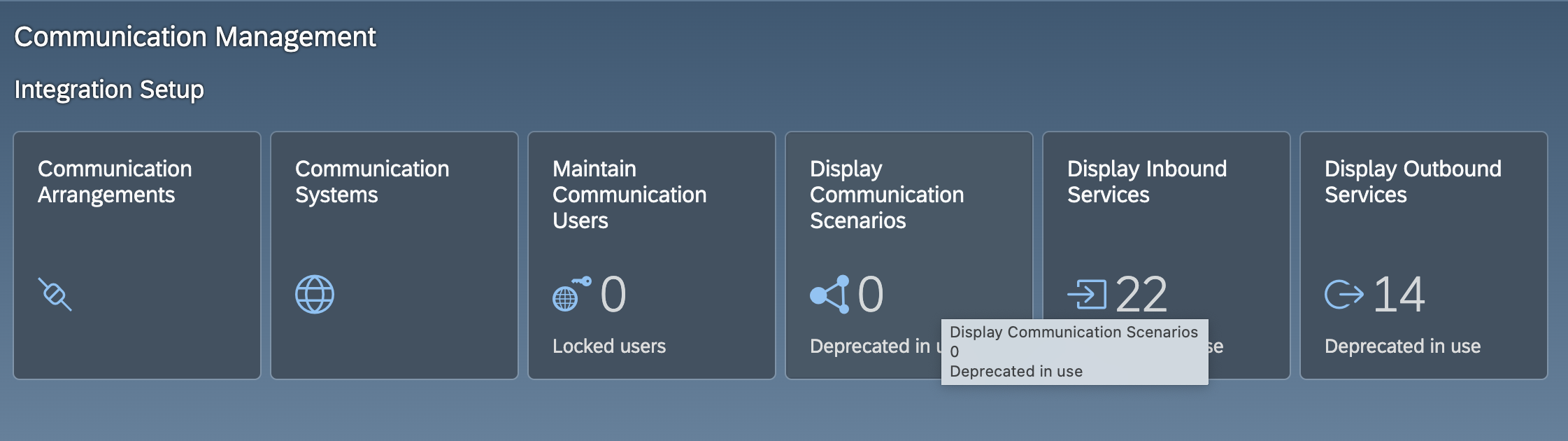
-
In the search bar, type
Sold-to Party Assignment of Sales Scheduling Agreement Integrationand select the corresponding scenario from the results.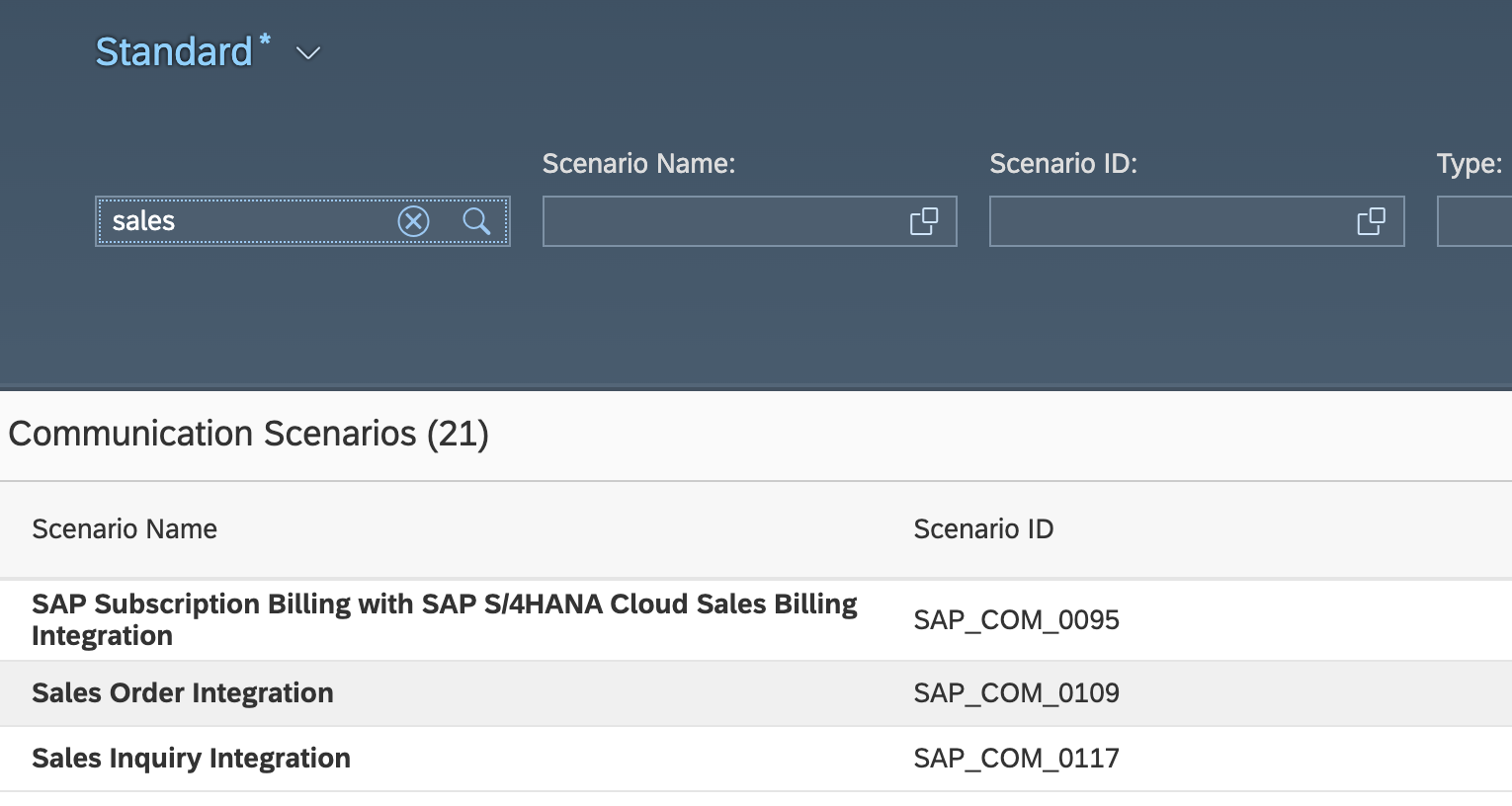
-
In the top right corner of the screen, click on
Create Communication Arrangement.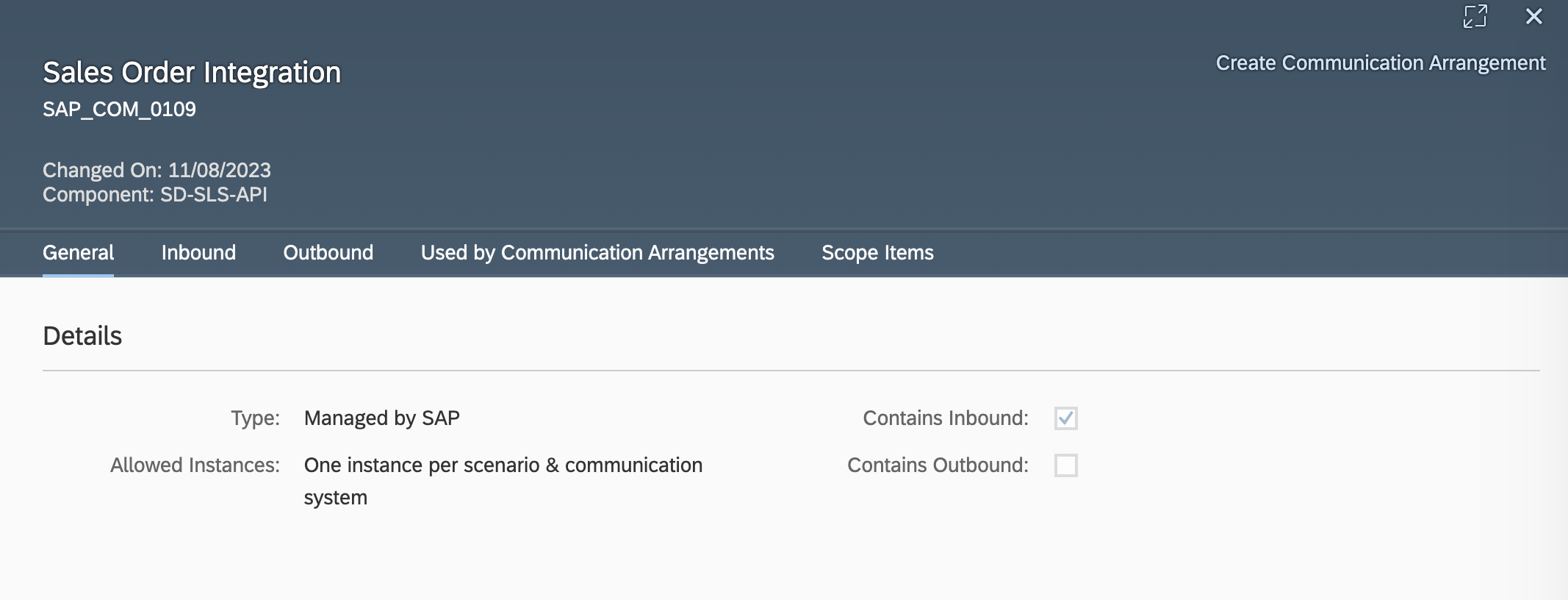
-
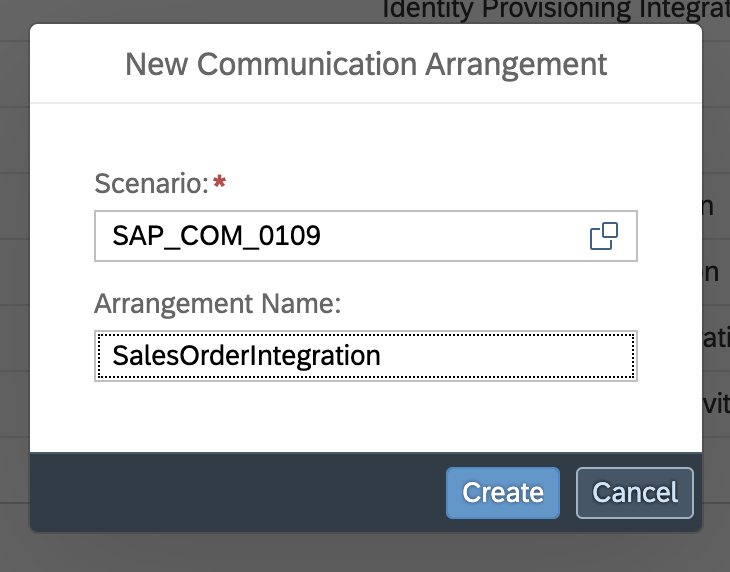
Enter a unique name for the arrangement.
-
Choose an existing
Communication Systemfrom the dropdown menu and save your arrangement.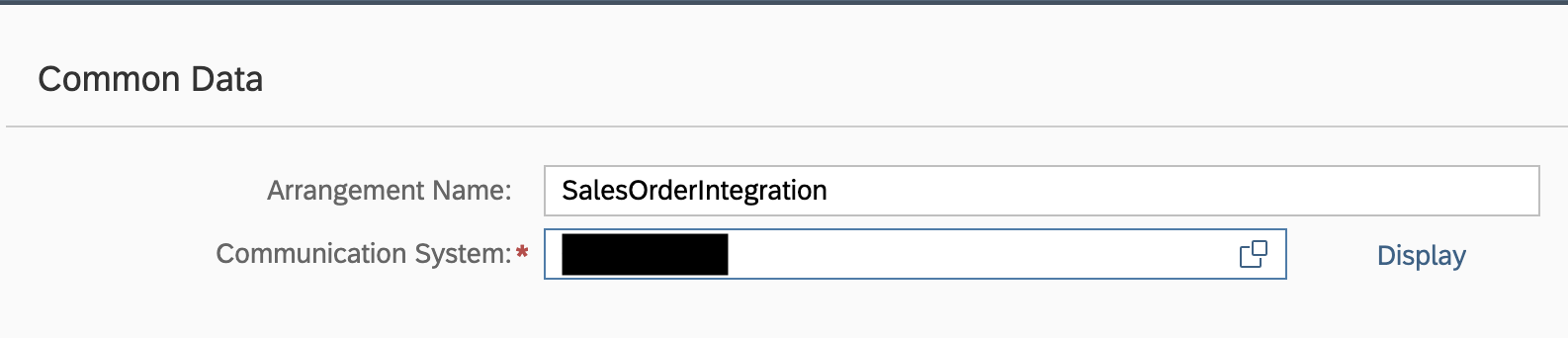
-
The hostname (
<unique id>-api.s4hana.cloud.sap) will be displayed in the top right corner of the screen.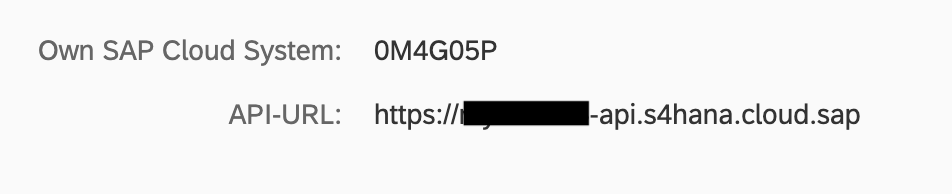
Quickstart
To use the sap.s4hana.api_sd_sa_soldtopartydetn connector in your Ballerina application, modify the .bal file as follows:
Step 1: Import the module
Import the sap.s4hana.api_sd_sa_soldtopartydetn module.
import ballerinax/sap.s4hana.api_sd_sa_soldtopartydetn as soldToParty;
Step 2: Instantiate a new connector
Use the hostname and credentials to initiate a client
configurable string hostname = ?; configurable string username = ?; configurable string password = ?; soldToParty:Client soldToPartyClient = check new ( { auth: { username, password } }, hostname );
Step 3: Invoke the connector operation
Now, utilize the available connector operations.
soldToParty:CollectionOfA_DelivSchedSoldToPartyDetnWrapper listDeliverySched = check soldToPartyClient->listA_DelivSchedSoldToPartyDetns();
Step 4: Run the Ballerina application
bal run
Examples
The S/4 HANA Sales and Distribution Ballerina connectors provide practical examples illustrating usage in various scenarios. Explore these examples, covering use cases like accessing S/4HANA Sales Order (A2X) API.
-
Salesforce to S/4HANA Integration - Demonstrates leveraging the
sap.s4hana.api_sales_order_srv:Clientin Ballerina for S/4HANA API interactions. It specifically showcases how to respond to a Salesforce Opportunity Close Event by automatically generating a Sales Order in the S/4HANA SD module. -
Shopify to S/4HANA Integration - Details the integration process between Shopify, a leading e-commerce platform, and SAP S/4HANA, a comprehensive ERP system. The objective is to automate SAP sales order creation for new orders placed on Shopify, enhancing efficiency and accuracy in order management.
Clients
sap.s4hana.api_sd_sa_soldtopartydetn: Client
This service contains one entity only. Once the sold-to party assignment has been retrieved, it is sent in the response. If there are any issues when retrieving the sold-to party assignment, the system displays error messages in the response.
Constructor
Gets invoked to initialize the connector.
init (ConnectionConfig config, string hostname, int port)- config ConnectionConfig - The configurations to be used when initializing the
connector
- hostname string -
- port int 443 -
getA_DelivSchedSoldToPartyDetn
function getA_DelivSchedSoldToPartyDetn(string Supplier, string PartnerDescription, string UnloadingPointName, map<string|string[]> headers, *GetA_DelivSchedSoldToPartyDetnQueries queries) returns A_DelivSchedSoldToPartyDetnWrapper|errorReads a specific sold-to party assignment.
Parameters
- Supplier string - Supplier Number at Customer Location
- PartnerDescription string - Cust.-Specif. Descr. of Business Partner (Plant, Stor. Loc.)
- UnloadingPointName string - Unloading Point
- queries *GetA_DelivSchedSoldToPartyDetnQueries - Queries to be sent with the request
Return Type
- A_DelivSchedSoldToPartyDetnWrapper|error - Retrieved entity
listA_DelivSchedSoldToPartyDetns
function listA_DelivSchedSoldToPartyDetns(map<string|string[]> headers, *ListA_DelivSchedSoldToPartyDetnsQueries queries) returns CollectionOfA_DelivSchedSoldToPartyDetnWrapper|errorReads all sold-to party assignments.
Parameters
- queries *ListA_DelivSchedSoldToPartyDetnsQueries - Queries to be sent with the request
Return Type
- CollectionOfA_DelivSchedSoldToPartyDetnWrapper|error - Retrieved entities
performBatchOperation
function performBatchOperation(Request request, map<string|string[]> headers) returns Response|errorSend a group of requests
Parameters
- request Request - Batch request
Records
sap.s4hana.api_sd_sa_soldtopartydetn: A_DelivSchedSoldToPartyDetn
Fields
- Supplier? string - Supplier Number at Customer Location
- PartnerDescription? string - Cust.-Specif. Descr. of Business Partner (Plant, Stor. Loc.)
- UnloadingPointName? string -
- SoldToParty? string? -
sap.s4hana.api_sd_sa_soldtopartydetn: A_DelivSchedSoldToPartyDetnWrapper
Fields
sap.s4hana.api_sd_sa_soldtopartydetn: ClientHttp1Settings
Provides settings related to HTTP/1.x protocol.
Fields
- keepAlive KeepAlive(default http:KEEPALIVE_AUTO) - Specifies whether to reuse a connection for multiple requests
- chunking Chunking(default http:CHUNKING_AUTO) - The chunking behaviour of the request
- proxy? ProxyConfig - Proxy server related options
sap.s4hana.api_sd_sa_soldtopartydetn: CollectionOfA_DelivSchedSoldToPartyDetn
Fields
- __count? count -
- results? A_DelivSchedSoldToPartyDetn[] -
sap.s4hana.api_sd_sa_soldtopartydetn: CollectionOfA_DelivSchedSoldToPartyDetnWrapper
Fields
sap.s4hana.api_sd_sa_soldtopartydetn: ConnectionConfig
Provides a set of configurations for controlling the behaviours when communicating with a remote HTTP endpoint.
Fields
- auth CredentialsConfig - Configurations related to client authentication
- httpVersion HttpVersion(default http:HTTP_2_0) - The HTTP version understood by the client
- http1Settings? ClientHttp1Settings - Configurations related to HTTP/1.x protocol
- http2Settings? ClientHttp2Settings - Configurations related to HTTP/2 protocol
- timeout decimal(default 60) - The maximum time to wait (in seconds) for a response before closing the connection
- forwarded string(default "disable") - The choice of setting
forwarded/x-forwardedheader
- poolConfig? PoolConfiguration - Configurations associated with request pooling
- cache? CacheConfig - HTTP caching related configurations
- compression Compression(default http:COMPRESSION_AUTO) - Specifies the way of handling compression (
accept-encoding) header
- circuitBreaker? CircuitBreakerConfig - Configurations associated with the behaviour of the Circuit Breaker
- retryConfig? RetryConfig - Configurations associated with retrying
- responseLimits? ResponseLimitConfigs - Configurations associated with inbound response size limits
- secureSocket? ClientSecureSocket - SSL/TLS-related options
- proxy? ProxyConfig - Proxy server related options
- validation boolean(default true) - Enables the inbound payload validation functionality which provided by the constraint package. Enabled by default
sap.s4hana.api_sd_sa_soldtopartydetn: GetA_DelivSchedSoldToPartyDetnQueries
Represents the Queries record for the operation: getA_DelivSchedSoldToPartyDetn
Fields
- \$select? A_DelivSchedSoldToPartyDetnSelectOptions - Select properties to be returned, see Select
sap.s4hana.api_sd_sa_soldtopartydetn: ListA_DelivSchedSoldToPartyDetnsQueries
Represents the Queries record for the operation: listA_DelivSchedSoldToPartyDetns
Fields
- \$skip? int - Skip the first n items, see Paging - Skip
- \$top? int - Show only the first n items, see Paging - Top
- \$orderby? A_DelivSchedSoldToPartyDetnOrderByOptions - Order items by property values, see Sorting
- \$inlinecount? "allpages"|"none" - Include count of items, see Inlinecount
- \$select? A_DelivSchedSoldToPartyDetnSelectOptions - Select properties to be returned, see Select
sap.s4hana.api_sd_sa_soldtopartydetn: ProxyConfig
Proxy server configurations to be used with the HTTP client endpoint.
Fields
- host string(default "") - Host name of the proxy server
- port int(default 0) - Proxy server port
- userName string(default "") - Proxy server username
- password string(default "") - Proxy server password
Array types
sap.s4hana.api_sd_sa_soldtopartydetn: A_DelivSchedSoldToPartyDetnSelectOptions
A_DelivSchedSoldToPartyDetnSelectOptions
sap.s4hana.api_sd_sa_soldtopartydetn: A_DelivSchedSoldToPartyDetnOrderByOptions
A_DelivSchedSoldToPartyDetnOrderByOptions
String types
sap.s4hana.api_sd_sa_soldtopartydetn: count
count
The number of entities in the collection. Available when using the $inlinecount query option.