Module sap.s4hana.api_inspectionmethod_srv

ballerinax/sap.s4hana.api_inspectionmethod_srv Ballerina library
Overview
SAP S/4HANA is a robust enterprise resource planning (ERP) solution, designed for large-scale enterprises by SAP SE. It covers core business processes such as finance, procurement, sales, and materials management, including quality management.
WSO2 SAP S/4HANA Inspection Method provides a way to interact with the Inspection Method - Read API. The service allows to read inspection methods, the master data records that describe the procedure for performing the quality inspection of a characteristic, with their settings, administrative data and texts.
Key Features
- Read inspection methods with their settings and administrative data
- Read the language-dependent texts of inspection methods
- Filter, sort and page results with OData query options
Setup guide
This connector uses Basic Authentication with an SAP S/4HANA Cloud communication user. Each S/4HANA API is
exposed through a communication scenario, so the user must be assigned to a communication arrangement for the
Inspection Master Data Integration (SAP_COM_0110) scenario before the connector can call it.
All the apps used below are in the Communication Management group of the SAP Fiori launchpad.
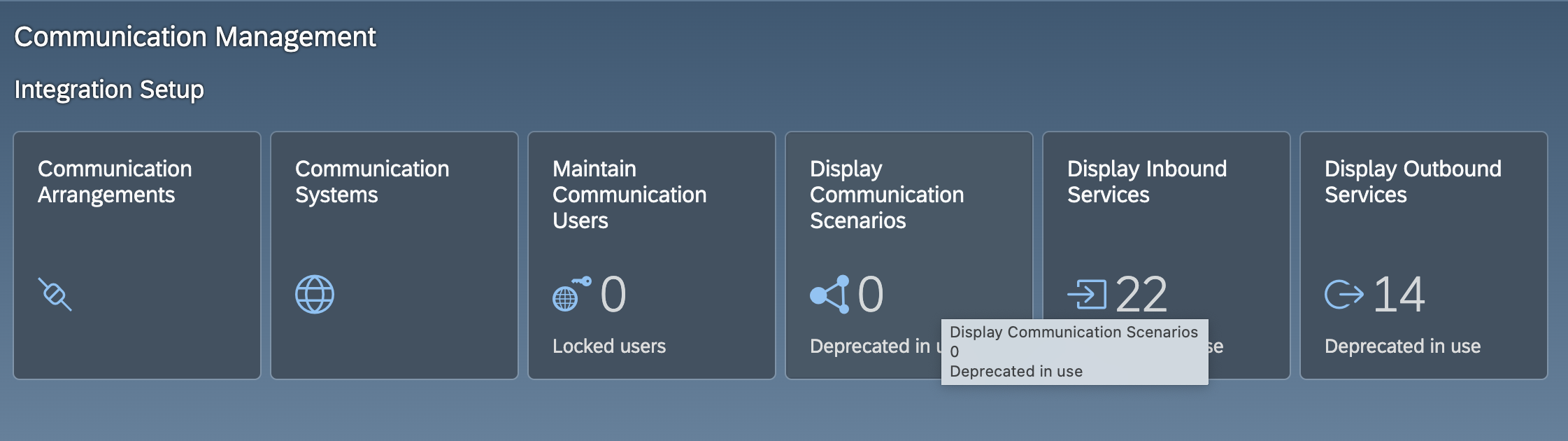
Step 1: Create a communication user
- Sign in to your SAP S/4HANA Cloud system as an administrator.
- Open the Maintain Communication Users app and choose New.
- Enter a user name and a description, set a password, and choose Create.
Note the user name and password. These are the credentials the connector uses.
Step 2: Create a communication system
-
Open the Communication Systems app and choose New.
-
Enter a system ID and a system name, and choose Create.
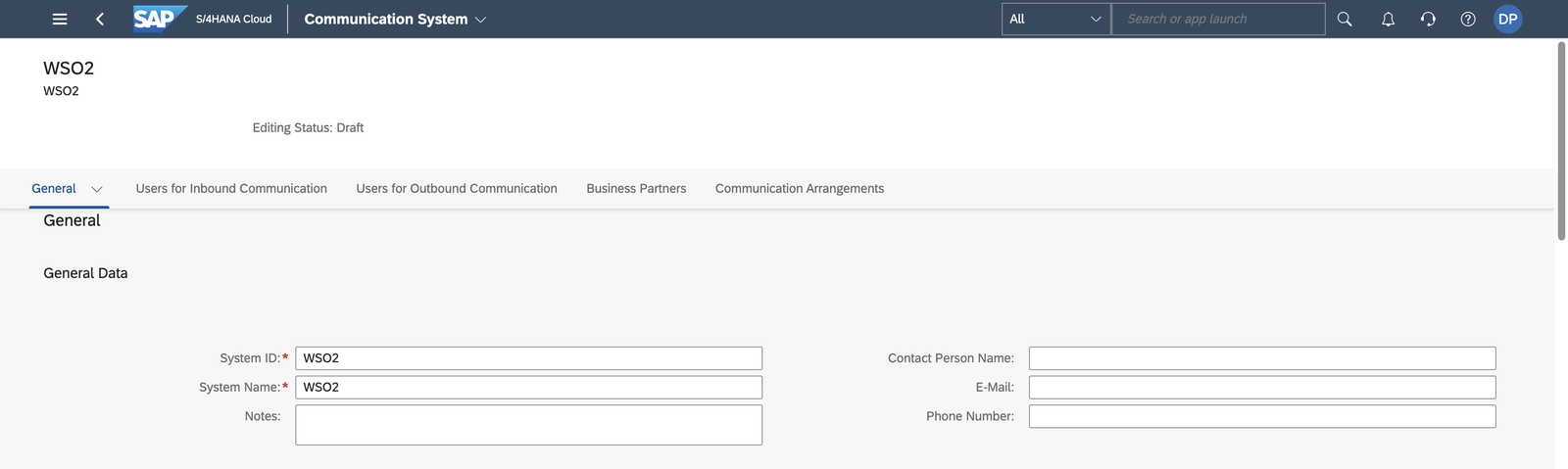
-
Under General > Technical Data, enter a host name and a Logical System (an uppercase ID of up to 10 characters, for example,
INTEGRATOR). Some scenarios refuse to activate when the logical system is empty. -
Under Users for Inbound Communication, add the communication user from Step 1 with the User Name and Password authentication method.
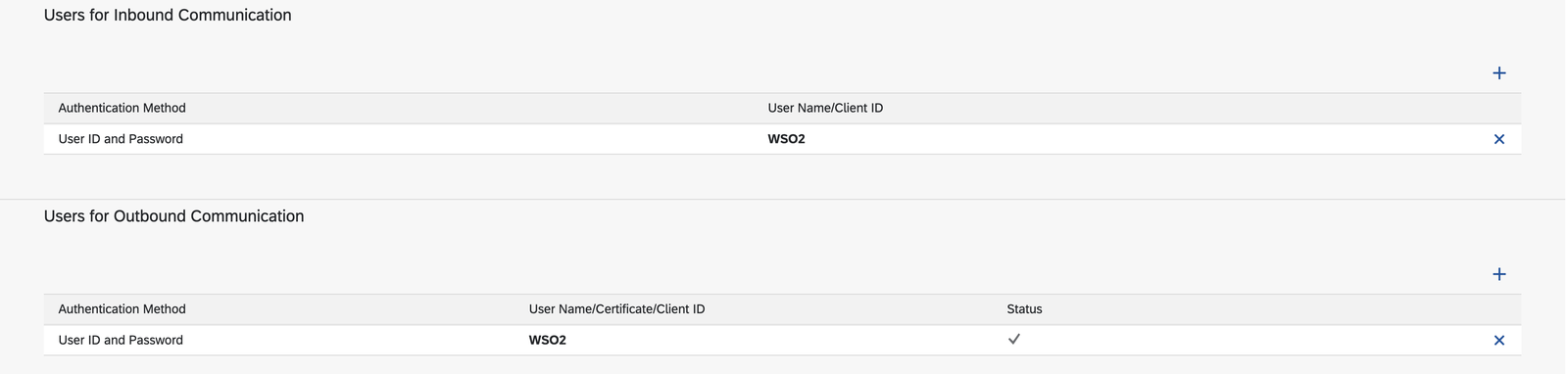
-
Choose Save.
Step 3: Create a communication arrangement
-
Open the Communication Arrangements app and choose New.
-
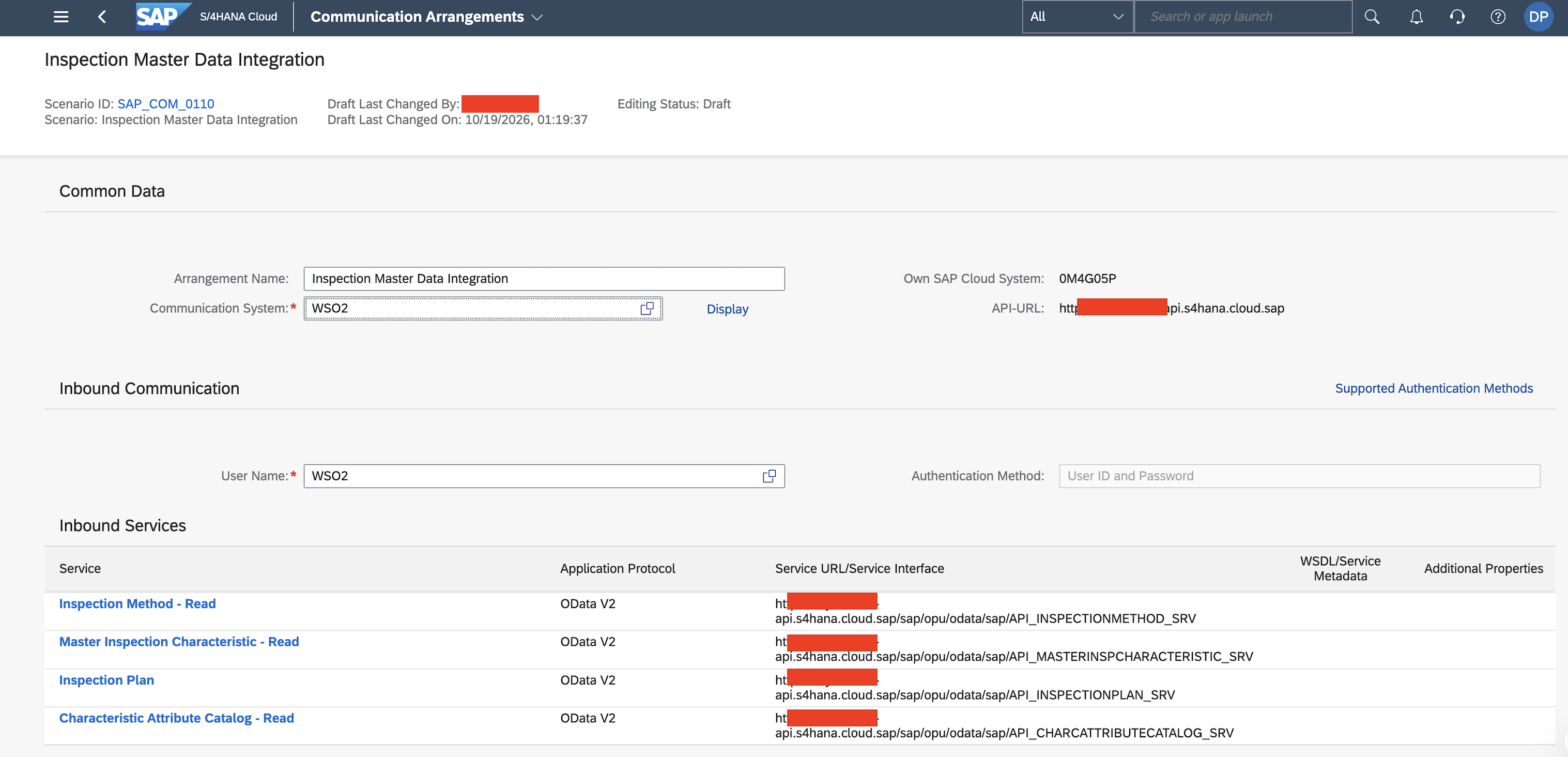
In the Scenario value help, search for Inspection Master Data Integration and select
SAP_COM_0110. This is the scenario that exposesAPI_INSPECTIONMETHOD_SRV, the service this connector calls.
-
Enter a unique name for the arrangement and choose Create.
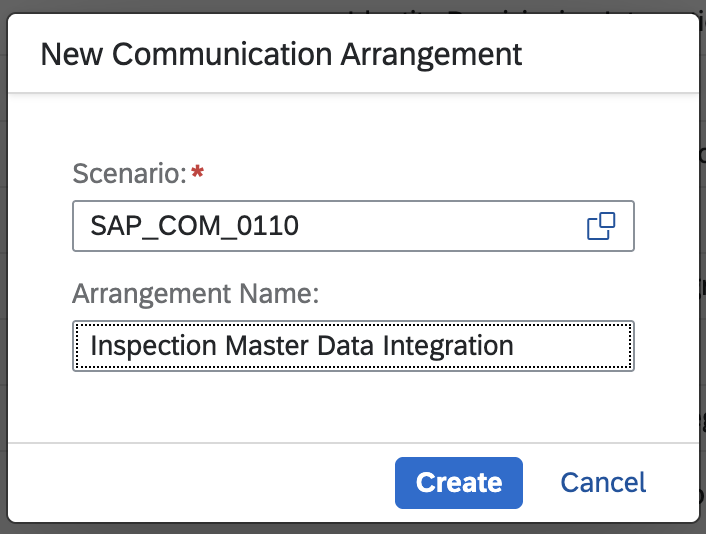
-
Select the communication system from Step 2. The communication user from Step 1 is filled in as the inbound user. If the scenario lists outbound services that the integration does not need, clear their Active check boxes so that no outbound user is required.
-
Choose Save.
Step 4: Note the hostname
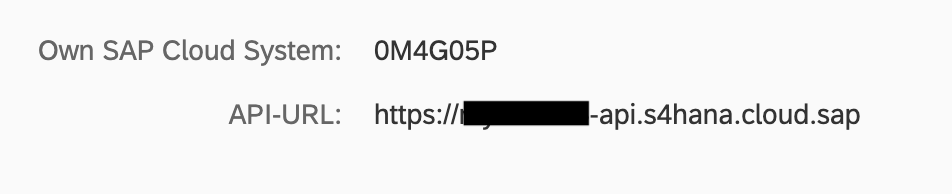
Open the saved arrangement. The API-URL next to Own SAP Cloud System shows the hostname
(<unique id>-api.s4hana.cloud.sap).
You now have everything the connector needs:
- hostname - the API hostname, for example,
my123456-api.s4hana.cloud.sap - username - the communication user name
- password - the communication user password
Quickstart
To use the sap.s4hana.api_inspectionmethod_srv connector in your Ballerina application, modify the .bal file as follows:
Step 1: Import the module
Import the sap.s4hana.api_inspectionmethod_srv module.
import ballerinax/sap.s4hana.api_inspectionmethod_srv as inspectionmethod;
Step 2: Instantiate a new connector
Use the hostname and credentials to initiate a client.
configurable string hostname = ?; configurable string username = ?; configurable string password = ?; inspectionmethod:Client inspectionmethodClient = check new ( { auth: { username, password } }, hostname );
Step 3: Invoke the connector operation
Now, utilize the available connector operations.
inspectionmethod:CollectionOfA_InspectionMethodWrapper listOfInspectionMethods = check inspectionmethodClient->listA_InspectionMethods();
Step 4: Run the Ballerina application
bal run
Clients
sap.s4hana.api_inspectionmethod_srv: Client
An inspection method is a master data record that describes the procedure for performing the quality inspection of a characteristic. This service enables you to retrieve inspection methods with their settings and administrative data.
Constructor
Gets invoked to initialize the connector.
init (ConnectionConfig config, string hostname, int port)- config ConnectionConfig - The configurations to be used when initializing the
connector
- hostname string -
- port int 443 -
getA_InspectionMethod
function getA_InspectionMethod(string InspectionMethod, string InspectionMethodVersion, string InspectionMethodPlant, map<string|string[]> headers, *GetA_InspectionMethodQueries queries) returns A_InspectionMethodWrapper|errorReads a specific inspection method.
Parameters
- InspectionMethod string - Inspection Method
- InspectionMethodVersion string - Version Number of Inspection Method
- InspectionMethodPlant string - Plant for Inspection Method
- queries *GetA_InspectionMethodQueries - Queries to be sent with the request
Return Type
- A_InspectionMethodWrapper|error - Retrieved entity
getA_InspectionMethodText
function getA_InspectionMethodText(string InspectionMethodPlant, string InspectionMethod, string InspectionMethodVersion, string Language, map<string|string[]> headers, *GetA_InspectionMethodTextQueries queries) returns A_InspectionMethodTextWrapper|errorReads the text of an inspection method in a specific language.
Parameters
- InspectionMethodPlant string - Plant for Inspection Method
- InspectionMethod string - Inspection Method
- InspectionMethodVersion string - Version Number for the Inspection Method Text (QM)
- Language string - Language Key
- queries *GetA_InspectionMethodTextQueries - Queries to be sent with the request
Return Type
- A_InspectionMethodTextWrapper|error - Retrieved entity
getInspectionMethodOfA_InspectionMethodText
function getInspectionMethodOfA_InspectionMethodText(string InspectionMethodPlant, string InspectionMethod, string InspectionMethodVersion, string Language, map<string|string[]> headers, *GetInspectionMethodOfA_InspectionMethodTextQueries queries) returns A_InspectionMethodWrapper|errorReads inspection method texts with associations to inspection methods.
Parameters
- InspectionMethodPlant string - Plant for Inspection Method
- InspectionMethod string - Inspection Method
- InspectionMethodVersion string - Version Number for the Inspection Method Text (QM)
- Language string - Language Key
- queries *GetInspectionMethodOfA_InspectionMethodTextQueries - Queries to be sent with the request
Return Type
- A_InspectionMethodWrapper|error - Retrieved entity
listA_InspectionMethodTexts
function listA_InspectionMethodTexts(map<string|string[]> headers, *ListA_InspectionMethodTextsQueries queries) returns CollectionOfA_InspectionMethodTextWrapper|errorReads all inspection method texts.
Parameters
- queries *ListA_InspectionMethodTextsQueries - Queries to be sent with the request
Return Type
- CollectionOfA_InspectionMethodTextWrapper|error - Retrieved entities
listA_InspectionMethods
function listA_InspectionMethods(map<string|string[]> headers, *ListA_InspectionMethodsQueries queries) returns CollectionOfA_InspectionMethodWrapper|errorReads a set of inspection methods.
Parameters
- queries *ListA_InspectionMethodsQueries - Queries to be sent with the request
Return Type
- CollectionOfA_InspectionMethodWrapper|error - Retrieved entities
listTextsOfA_InspectionMethod
function listTextsOfA_InspectionMethod(string InspectionMethod, string InspectionMethodVersion, string InspectionMethodPlant, map<string|string[]> headers, *ListTextsOfA_InspectionMethodQueries queries) returns CollectionOfA_InspectionMethodTextWrapper|errorReads inspection methods with text associations.
Parameters
- InspectionMethod string - Inspection Method
- InspectionMethodVersion string - Version Number of Inspection Method
- InspectionMethodPlant string - Plant for Inspection Method
- queries *ListTextsOfA_InspectionMethodQueries - Queries to be sent with the request
Return Type
- CollectionOfA_InspectionMethodTextWrapper|error - Retrieved entities
performBatchOperation
function performBatchOperation(Request request, map<string|string[]> headers) returns Response|errorSend a group of requests
Parameters
- request Request - Batch request
Records
sap.s4hana.api_inspectionmethod_srv: A_InspectionMethod
Fields
- InspectionMethod? string -
- InspectionMethodVersion? string - Version Number of Inspection Method
- InspectionMethodPlant? string - Plant for Inspection Method
- InspectionMethodValidFromDate? string? - Valid-From Date
- InspectionMethodSearchField? string? -
- InspectionMethodStatus? string? - Status of Master Record
- InspMethInformationField1? string? - Text Line for Additional Information
- InspMethInformationField2? string? - Text Line for Additional Information
- InspMethInformationField3? string? - Text Line for Additional Information
- QltyMstrDataAuthorizationGroup? string? - Authorization Group QM Master Data
- InspectorQualification? string? - Inspector Qualification
- CreatedByUser? string? - Name of User Who Created the Data Record
- CreationDate? string? - System Date on Which Data Record Was Created
- LastChangedByUser? string? - Name of User Who Last Changed Data Record
- LastChangeDate? string? - System Date on Which Data Record Was Changed
- LinkedSAPObjectKey? string? -
- to_Text? A_InspectionMethod_to_Text -
sap.s4hana.api_inspectionmethod_srv: A_InspectionMethod_to_Text
Fields
- results? A_InspectionMethodText[] -
sap.s4hana.api_inspectionmethod_srv: A_InspectionMethodText
Fields
- InspectionMethodPlant? string - Plant for Inspection Method
- InspectionMethod? string -
- InspectionMethodVersion? string - Version Number for the Inspection Method Text (QM)
- Language? string -
- InspectionMethodText? string? - Text for Inspection Method
- InspMethodHasLongText? boolean? -
- to_InspectionMethod? A_InspectionMethod -
sap.s4hana.api_inspectionmethod_srv: A_InspectionMethodTextWrapper
Fields
sap.s4hana.api_inspectionmethod_srv: A_InspectionMethodWrapper
Fields
- d? A_InspectionMethod -
sap.s4hana.api_inspectionmethod_srv: CollectionOfA_InspectionMethod
Fields
- __count? count -
- results? A_InspectionMethod[] -
sap.s4hana.api_inspectionmethod_srv: CollectionOfA_InspectionMethodText
Fields
- __count? count -
- results? A_InspectionMethodText[] -
sap.s4hana.api_inspectionmethod_srv: CollectionOfA_InspectionMethodTextWrapper
Fields
sap.s4hana.api_inspectionmethod_srv: CollectionOfA_InspectionMethodWrapper
Fields
sap.s4hana.api_inspectionmethod_srv: ConnectionConfig
Provides a set of configurations for controlling the behaviours when communicating with a remote HTTP endpoint.
Fields
- auth BearerTokenConfig|OAuth2RefreshTokenGrantConfig|CredentialsConfig - Configurations related to client authentication
- httpVersion HttpVersion(default http:HTTP_2_0) - The HTTP version understood by the client
- http1Settings ClientHttp1Settings(default {}) - Configurations related to HTTP/1.x protocol
- http2Settings ClientHttp2Settings(default {}) - Configurations related to HTTP/2 protocol
- timeout decimal(default 60) - The maximum time to wait (in seconds) for a response before closing the connection
- forwarded string(default "disable") - The choice of setting
forwarded/x-forwardedheader
- followRedirects? FollowRedirects - Configurations associated with Redirection
- poolConfig? PoolConfiguration - Configurations associated with request pooling
- cache CacheConfig(default {}) - HTTP caching related configurations
- compression Compression(default http:COMPRESSION_AUTO) - Specifies the way of handling compression (
accept-encoding) header
- circuitBreaker? CircuitBreakerConfig - Configurations associated with the behaviour of the Circuit Breaker
- retryConfig? RetryConfig - Configurations associated with retrying
- responseLimits ResponseLimitConfigs(default {}) - Configurations associated with inbound response size limits
- secureSocket? ClientSecureSocket - SSL/TLS-related options
- proxy? ProxyConfig - Proxy server related options
- socketConfig ClientSocketConfig(default {}) - Provides settings related to client socket configuration
- validation boolean(default true) - Enables the inbound payload validation functionality which provided by the constraint package. Enabled by default
- laxDataBinding boolean(default true) - Enables relaxed data binding on the client side. When enabled,
nilvalues are treated as optional, and absent fields are handled asnilabletypes. Enabled by default.
sap.s4hana.api_inspectionmethod_srv: GetA_InspectionMethodQueries
Represents the Queries record for the operation: getA_InspectionMethod
Fields
- \$expand? A_InspectionMethodExpandOptions - Expand related entities, see Expand
- \$select? A_InspectionMethodSelectOptions - Select properties to be returned, see Select
sap.s4hana.api_inspectionmethod_srv: GetA_InspectionMethodTextQueries
Represents the Queries record for the operation: getA_InspectionMethodText
Fields
- \$expand? A_InspectionMethodTextExpandOptions - Expand related entities, see Expand
- \$select? A_InspectionMethodTextSelectOptions - Select properties to be returned, see Select
sap.s4hana.api_inspectionmethod_srv: GetInspectionMethodOfA_InspectionMethodTextQueries
Represents the Queries record for the operation: getInspectionMethodOfA_InspectionMethodText
Fields
- \$expand? InspectionMethodOfA_InspectionMethodTextExpandOptions - Expand related entities, see Expand
- \$select? InspectionMethodOfA_InspectionMethodTextSelectOptions - Select properties to be returned, see Select
sap.s4hana.api_inspectionmethod_srv: ListA_InspectionMethodsQueries
Represents the Queries record for the operation: listA_InspectionMethods
Fields
- \$skip? int - Skip the first n items, see Paging - Skip
- \$top? int - Show only the first n items, see Paging - Top
- \$orderby? A_InspectionMethodOrderByOptions - Order items by property values, see Sorting
- \$expand? A_InspectionMethodExpandOptions - Expand related entities, see Expand
- \$inlinecount? "allpages"|"none" - Include count of items, see Inlinecount
- \$select? A_InspectionMethodSelectOptions - Select properties to be returned, see Select
sap.s4hana.api_inspectionmethod_srv: ListA_InspectionMethodTextsQueries
Represents the Queries record for the operation: listA_InspectionMethodTexts
Fields
- \$skip? int - Skip the first n items, see Paging - Skip
- \$top? int - Show only the first n items, see Paging - Top
- \$orderby? A_InspectionMethodTextOrderByOptions - Order items by property values, see Sorting
- \$expand? A_InspectionMethodTextExpandOptions - Expand related entities, see Expand
- \$inlinecount? "allpages"|"none" - Include count of items, see Inlinecount
- \$select? A_InspectionMethodTextSelectOptions - Select properties to be returned, see Select
sap.s4hana.api_inspectionmethod_srv: ListTextsOfA_InspectionMethodQueries
Represents the Queries record for the operation: listTextsOfA_InspectionMethod
Fields
- \$skip? int - Skip the first n items, see Paging - Skip
- \$top? int - Show only the first n items, see Paging - Top
- \$orderby? A_InspectionMethodTextOrderByOptions - Order items by property values, see Sorting
- \$expand? A_InspectionMethodTextExpandOptions - Expand related entities, see Expand
- \$inlinecount? "allpages"|"none" - Include count of items, see Inlinecount
- \$select? A_InspectionMethodTextSelectOptions - Select properties to be returned, see Select
sap.s4hana.api_inspectionmethod_srv: OAuth2RefreshTokenGrantConfig
OAuth2 Refresh Token Grant Configs
Fields
- Fields Included from *OAuth2RefreshTokenGrantConfig
- refreshUrl string(default "https://{host}:{port}") - Refresh URL
Array types
sap.s4hana.api_inspectionmethod_srv: A_InspectionMethodTextOrderByOptions
A_InspectionMethodTextOrderByOptions
sap.s4hana.api_inspectionmethod_srv: A_InspectionMethodTextSelectOptions
A_InspectionMethodTextSelectOptions
sap.s4hana.api_inspectionmethod_srv: A_InspectionMethodExpandOptions
A_InspectionMethodExpandOptions
sap.s4hana.api_inspectionmethod_srv: InspectionMethodOfA_InspectionMethodTextSelectOptions
InspectionMethodOfA_InspectionMethodTextSelectOptions
sap.s4hana.api_inspectionmethod_srv: A_InspectionMethodSelectOptions
A_InspectionMethodSelectOptions
sap.s4hana.api_inspectionmethod_srv: A_InspectionMethodOrderByOptions
A_InspectionMethodOrderByOptions
sap.s4hana.api_inspectionmethod_srv: InspectionMethodOfA_InspectionMethodTextExpandOptions
InspectionMethodOfA_InspectionMethodTextExpandOptions
sap.s4hana.api_inspectionmethod_srv: A_InspectionMethodTextExpandOptions
A_InspectionMethodTextExpandOptions
String types
sap.s4hana.api_inspectionmethod_srv: count
count
The number of entities in the collection. Available when using the $inlinecount query option.
Import
import ballerinax/sap.s4hana.api_inspectionmethod_srv;Other versions
1.0.0