Module sap.s4hana.api_credit_memo_request_srv

ballerinax/sap.s4hana.api_credit_memo_request_srv Ballerina library
Overview
S/4HANA is a robust enterprise resource planning (ERP) solution, designed for large-scale enterprises by SAP SE.
The SAP S/4HANA Sales connector provides APIs that enable seamless integration with the Credit Memo Request (A2X) API v1.0.0. The service allows to create, read, update, and delete credit memo requests, including their items, partners, pricing elements, and texts.
Key Features
- Create, read, update, and delete credit memo requests in SAP S/4HANA
- Seamless integration with the Credit Memo Request (A2X) API v1.0.0
- Support for basic and OAuth 2.0 authentication
- Manage items, partners, pricing elements, and texts, and release or reject approval requests
Setup guide
-
Sign in to your S/4HANA dashboard.
-
Under the
Communication Managementsection, click on theDisplay Communications Scenariotitle.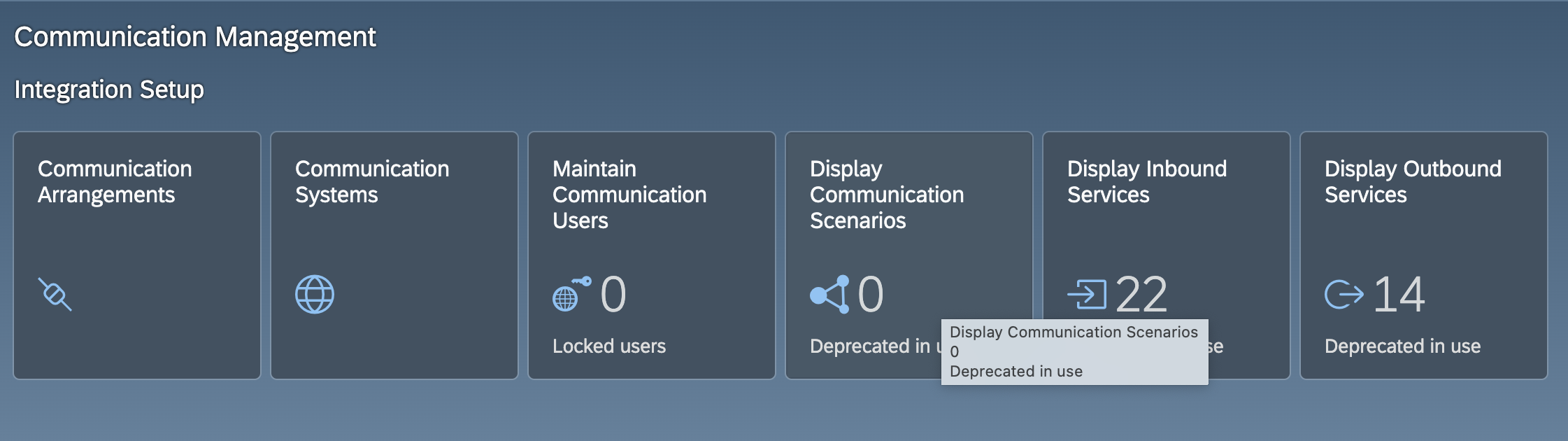
-
In the search bar, type
Credit Memo Request Integrationand select the corresponding scenario from the results.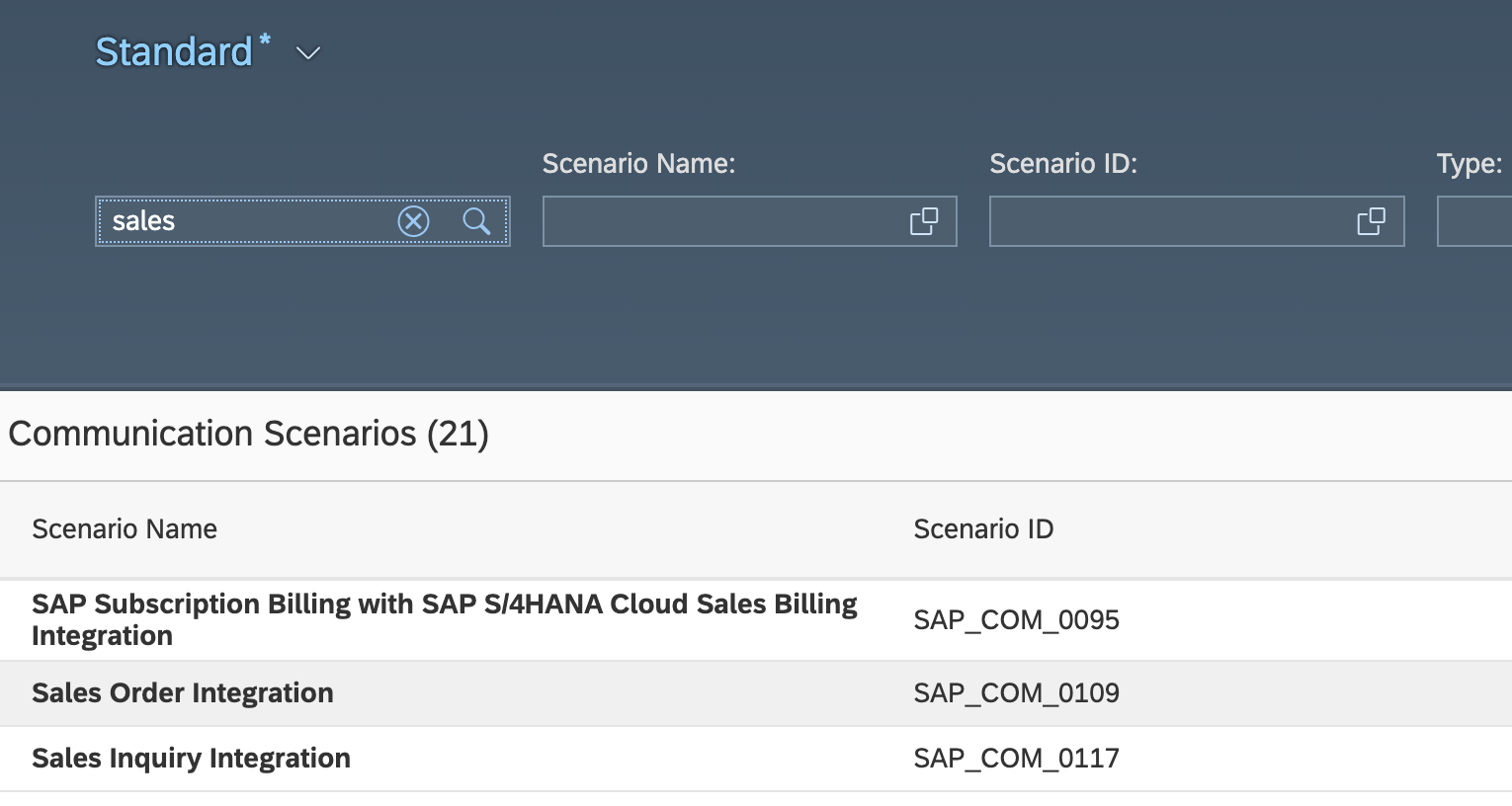
-
In the top right corner of the screen, click on
Create Communication Arrangement.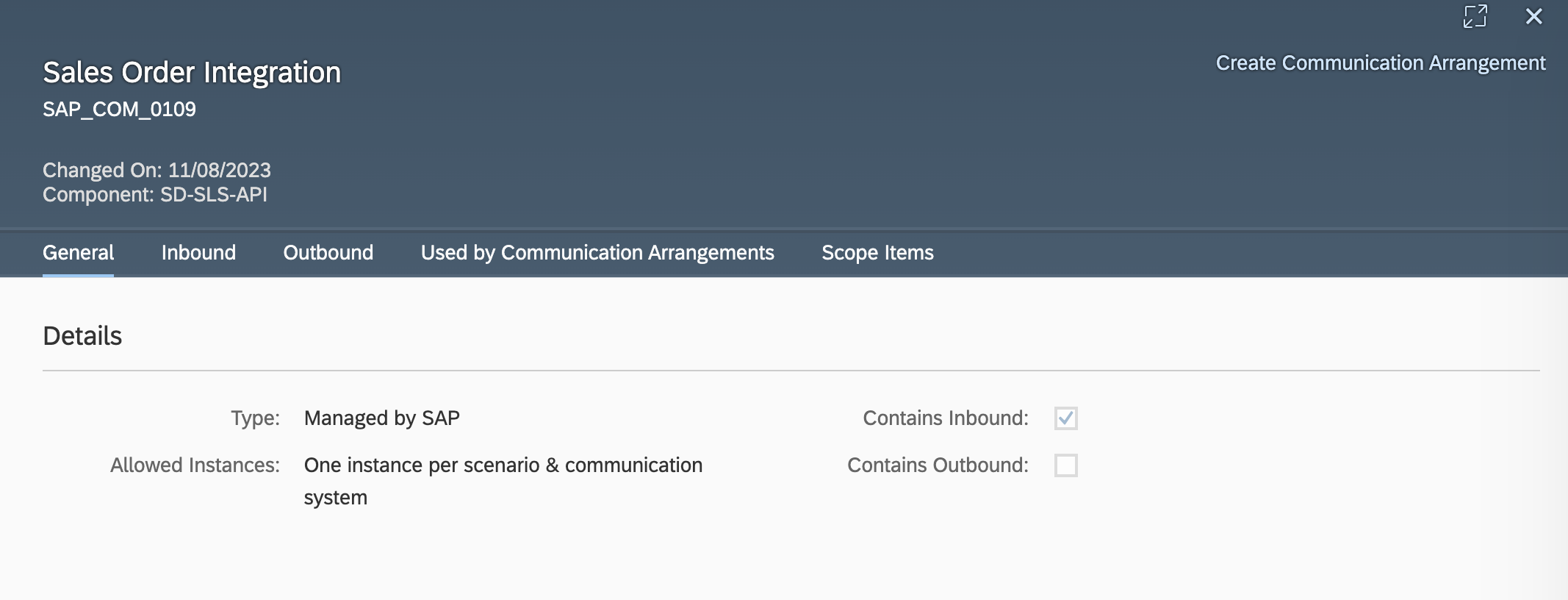
-
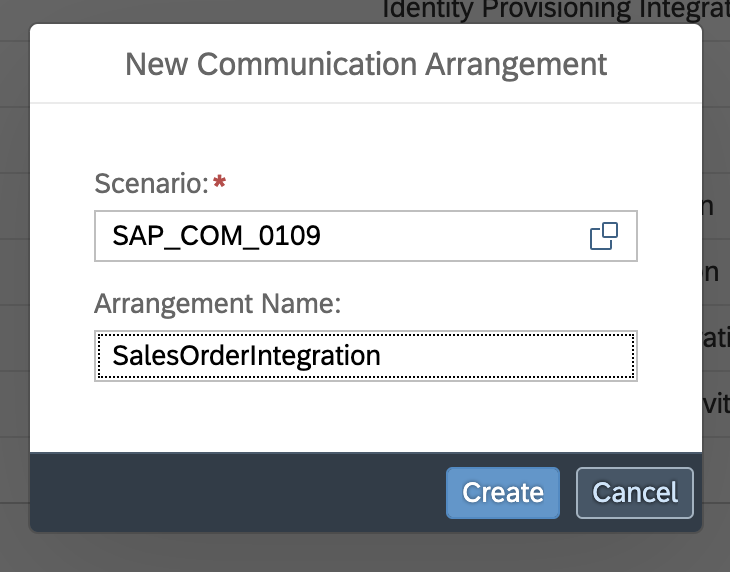
Enter a unique name for the arrangement.
-
Choose an existing
Communication Systemfrom the dropdown menu and save your arrangement.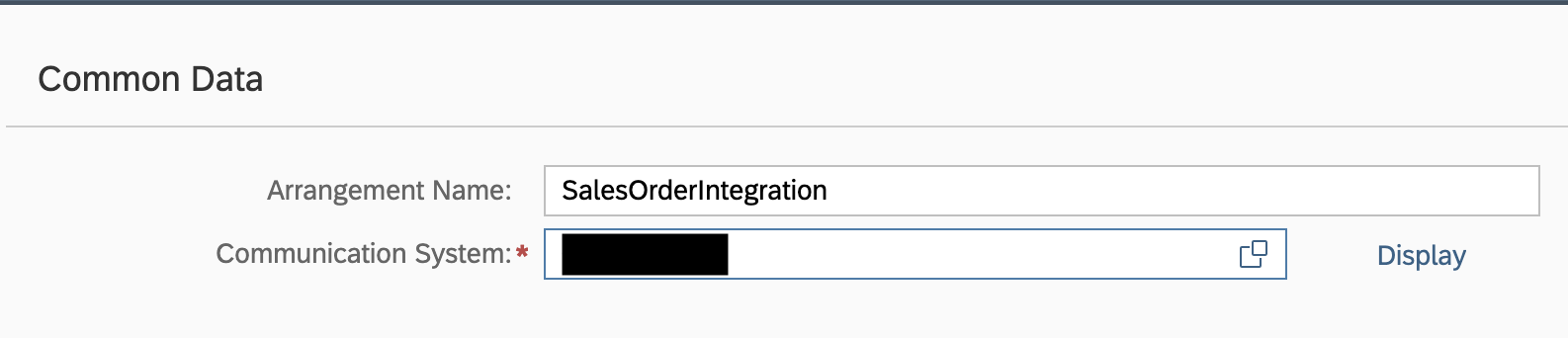
-
The hostname (
<unique id>-api.s4hana.cloud.sap) will be displayed in the top right corner of the screen.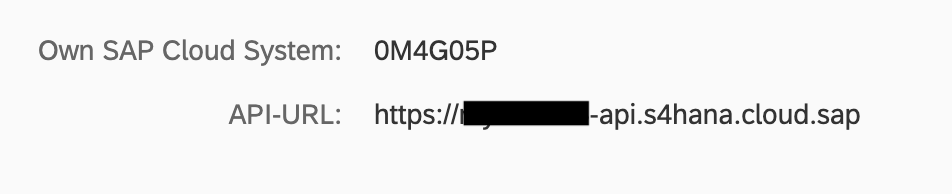
Quickstart
To use the sap.s4hana.api_credit_memo_request_srv connector in your Ballerina application, modify the .bal file as follows:
Step 1: Import the module
Import the sap.s4hana.api_credit_memo_request_srv module.
import ballerinax/sap.s4hana.api_credit_memo_request_srv as creditmemo;
Step 2: Instantiate a new connector
Use the hostname and credentials to initiate a client
configurable string hostname = ?; configurable string username = ?; configurable string password = ?; creditmemo:Client creditMemoClient = check new ( { auth: { username, password } }, hostname );
Step 3: Invoke the connector operation
Now, utilize the available connector operations.
creditmemo:CollectionOfA_CreditMemoRequestWrapper listACreditMemoRequests = check creditMemoClient->listA_CreditMemoRequests();
Step 4: Run the Ballerina application
bal run
Examples
The S/4 HANA Sales and Distribution Ballerina connectors provide practical examples illustrating usage in various scenarios. Explore these examples, covering use cases like accessing S/4HANA Sales Order (A2X) API.
-
Salesforce to S/4HANA Integration - Demonstrates leveraging the
sap.s4hana.api_sales_order_srv:Clientin Ballerina for S/4HANA API interactions. It specifically showcases how to respond to a Salesforce Opportunity Close Event by automatically generating a Sales Order in the S/4HANA SD module. -
Shopify to S/4HANA Integration - Details the integration process between Shopify, a leading e-commerce platform, and SAP S/4HANA, a comprehensive ERP system. The objective is to automate SAP sales order creation for new orders placed on Shopify, enhancing efficiency and accuracy in order management.
Clients
sap.s4hana.api_credit_memo_request_srv: Client
In every API call, you can make use of the following operations:
- You can read entire credit memo requests or only parts of the data, using the provided filters.
- You can create credit memo requests with or without reference to a preceding document. Note that you must use “deep insert” requests (a header plus the following entities: header partner, header pricing element, item, item partner, and item pricing element). You cannot create a credit memo request without including any related entities.
- For existing credit memo requests, you can create new items. Note that you must use “deep insert” requests (with the following entities: item partner and item pricing element). You cannot create an item without including any related entities.
- For existing credit memo requests or credit memo request items, you can add additional business partners at header and item levels.
- For existing credit memo requests, you can update the following entities (that is, you can change the content of their properties): the header, header partner, header pricing element, item, item partner, and item pricing element.
- For existing credit memo requests, you can delete the header, header partner, header pricing element, item, item partner, and item pricing element.
- You can accept or deny approval requests for credit memo requests that cannot be processed without the consent of an approver.
Constructor
Gets invoked to initialize the connector.
init (ConnectionConfig config, string hostname, int port)- config ConnectionConfig - The configurations to be used when initializing the
connector
- hostname string - Hostname of the S/4HANA system, without the scheme
- port int 443 - Port the service is reachable on
createA_CreditMemoReqItemPartner
function createA_CreditMemoReqItemPartner(CreateA_CreditMemoReqItemPartner payload, map<string|string[]> headers) returns A_CreditMemoReqItemPartnerWrapper|errorCreates additional item partner for a specific credit memo request item with a specific partner function.
Parameters
- payload CreateA_CreditMemoReqItemPartner - New entity
Return Type
- A_CreditMemoReqItemPartnerWrapper|error - Created entity
createA_CreditMemoReqPartner
function createA_CreditMemoReqPartner(CreateA_CreditMemoReqPartner payload, map<string|string[]> headers) returns A_CreditMemoReqPartnerWrapper|errorCreates additional header partner for a specific credit memo request with a specific partner function.
Parameters
- payload CreateA_CreditMemoReqPartner - New entity
Return Type
- A_CreditMemoReqPartnerWrapper|error - Created entity
createA_CreditMemoRequest
function createA_CreditMemoRequest(CreateA_CreditMemoRequest payload, map<string|string[]> headers) returns A_CreditMemoRequestWrapper|errorCreates a credit memo request.
Parameters
- payload CreateA_CreditMemoRequest - New entity
Return Type
- A_CreditMemoRequestWrapper|error - Created entity
createA_CreditMemoRequestItem
function createA_CreditMemoRequestItem(CreateA_CreditMemoRequestItem payload, map<string|string[]> headers) returns A_CreditMemoRequestItemWrapper|errorCreates a credit memo request item.
Parameters
- payload CreateA_CreditMemoRequestItem - New entity
Return Type
- A_CreditMemoRequestItemWrapper|error - Created entity
createItemOfA_CreditMemoRequest
function createItemOfA_CreditMemoRequest(string CreditMemoRequest, CreateA_CreditMemoRequestItem payload, map<string|string[]> headers) returns A_CreditMemoRequestItemWrapper|errorCreates a credit memo request item for a specific credit memo request.
Parameters
- CreditMemoRequest string - Credit Memo Request
- payload CreateA_CreditMemoRequestItem - New entity
Return Type
- A_CreditMemoRequestItemWrapper|error - Created entity
createPartnerOfA_CreditMemoRequest
function createPartnerOfA_CreditMemoRequest(string CreditMemoRequest, CreateA_CreditMemoReqPartner payload, map<string|string[]> headers) returns A_CreditMemoReqPartnerWrapper|errorCreates a header partner for a credit memo request.
Parameters
- CreditMemoRequest string - Credit Memo Request
- payload CreateA_CreditMemoReqPartner - New entity
Return Type
- A_CreditMemoReqPartnerWrapper|error - Created entity
createPartnerOfA_CreditMemoRequestItem
function createPartnerOfA_CreditMemoRequestItem(string CreditMemoRequest, string CreditMemoRequestItem, CreateA_CreditMemoReqItemPartner payload, map<string|string[]> headers) returns A_CreditMemoReqItemPartnerWrapper|errorCreates an item partner for a credit memo request item.
Parameters
- CreditMemoRequest string - Credit Memo Request
- CreditMemoRequestItem string - Credit Memo Request Item
- payload CreateA_CreditMemoReqItemPartner - New entity
Return Type
- A_CreditMemoReqItemPartnerWrapper|error - Created entity
deleteA_CreditMemoReqItemPartner
function deleteA_CreditMemoReqItemPartner(string CreditMemoRequest, string CreditMemoRequestItem, string PartnerFunction, map<string|string[]> headers) returns Response|errorDeletes the item partners of a specific item and with a specific partner function in a specific credit memo request.
Parameters
- CreditMemoRequest string - Sales and Distribution Document Number
- CreditMemoRequestItem string - Item number of the SD document
- PartnerFunction string - Partner Function
deleteA_CreditMemoReqItemPrcgElmnt
function deleteA_CreditMemoReqItemPrcgElmnt(string CreditMemoRequest, string CreditMemoRequestItem, string PricingProcedureStep, string PricingProcedureCounter, map<string|string[]> headers) returns Response|errorDeletes an item pricing element.
Parameters
- CreditMemoRequest string - Sales Document
- CreditMemoRequestItem string - Condition item number
- PricingProcedureStep string - Step Number
- PricingProcedureCounter string - Condition Counter
deleteA_CreditMemoReqItemText
function deleteA_CreditMemoReqItemText(string CreditMemoRequest, string CreditMemoRequestItem, string Language, string LongTextID, map<string|string[]> headers) returns Response|errorDeletes a specific item text.
Parameters
- CreditMemoRequest string - Credit Memo Request
- CreditMemoRequestItem string - Credit Memo Request Item
- Language string - Language Key
- LongTextID string - Text ID
deleteA_CreditMemoReqPartner
function deleteA_CreditMemoReqPartner(string CreditMemoRequest, string PartnerFunction, map<string|string[]> headers) returns Response|errorDeletes the header partners of a specific credit memo request with a specific partner function.
Parameters
- CreditMemoRequest string - Sales and Distribution Document Number
- PartnerFunction string - Partner Function
deleteA_CreditMemoReqPrcgElmnt
function deleteA_CreditMemoReqPrcgElmnt(string CreditMemoRequest, string PricingProcedureStep, string PricingProcedureCounter, map<string|string[]> headers) returns Response|errorDeletes a header pricing element for a specific credit memo request.
Parameters
- CreditMemoRequest string - Sales Document
- PricingProcedureStep string - Step Number
- PricingProcedureCounter string - Condition Counter
deleteA_CreditMemoReqText
function deleteA_CreditMemoReqText(string CreditMemoRequest, string Language, string LongTextID, map<string|string[]> headers) returns Response|errorDeletes a specific header text for a specific sales order.
Parameters
- CreditMemoRequest string - Credit Memo Request
- Language string - Language Key
- LongTextID string - Text ID
deleteA_CreditMemoRequest
function deleteA_CreditMemoRequest(string CreditMemoRequest, map<string|string[]> headers) returns Response|errorDeletes a specific credit memo request.
Parameters
- CreditMemoRequest string - Credit Memo Request
deleteA_CreditMemoRequestItem
function deleteA_CreditMemoRequestItem(string CreditMemoRequest, string CreditMemoRequestItem, map<string|string[]> headers) returns Response|errorDeletes a specific credit memo request item.
Parameters
- CreditMemoRequest string - Credit Memo Request
- CreditMemoRequestItem string - Credit Memo Request Item
getA_CrdMmReqItemSubsqntProcFlow
function getA_CrdMmReqItemSubsqntProcFlow(string CreditMemoRequest, string CreditMemoRequestItem, string DocRelationshipUUID, map<string|string[]> headers, *GetA_CrdMmReqItemSubsqntProcFlowQueries queries) returns A_CrdMmReqItemSubsqntProcFlowWrapper|errorReads a subsequent document of a credit memo request.
Parameters
- CreditMemoRequest string - Preceding sales and distribution document
- CreditMemoRequestItem string - Preceding Item of an SD Document
- DocRelationshipUUID string - SD Unique Document Relationship Identification
- queries *GetA_CrdMmReqItemSubsqntProcFlowQueries - Queries to be sent with the request
Return Type
- A_CrdMmReqItemSubsqntProcFlowWrapper|error - Retrieved entity
getA_CreditMemoReqItemPartner
function getA_CreditMemoReqItemPartner(string CreditMemoRequest, string CreditMemoRequestItem, string PartnerFunction, map<string|string[]> headers, *GetA_CreditMemoReqItemPartnerQueries queries) returns A_CreditMemoReqItemPartnerWrapper|errorReads the item partners of a specific credit memo request item.
Parameters
- CreditMemoRequest string - Sales and Distribution Document Number
- CreditMemoRequestItem string - Item number of the SD document
- PartnerFunction string - Partner Function
- queries *GetA_CreditMemoReqItemPartnerQueries - Queries to be sent with the request
Return Type
- A_CreditMemoReqItemPartnerWrapper|error - Retrieved entity
getA_CreditMemoReqItemPrcgElmnt
function getA_CreditMemoReqItemPrcgElmnt(string CreditMemoRequest, string CreditMemoRequestItem, string PricingProcedureStep, string PricingProcedureCounter, map<string|string[]> headers, *GetA_CreditMemoReqItemPrcgElmntQueries queries) returns A_CreditMemoReqItemPrcgElmntWrapper|errorReads the pricing element of a specific credit memo request item.
Parameters
- CreditMemoRequest string - Sales Document
- CreditMemoRequestItem string - Condition item number
- PricingProcedureStep string - Step Number
- PricingProcedureCounter string - Condition Counter
- queries *GetA_CreditMemoReqItemPrcgElmntQueries - Queries to be sent with the request
Return Type
- A_CreditMemoReqItemPrcgElmntWrapper|error - Retrieved entity
getA_CreditMemoReqItemText
function getA_CreditMemoReqItemText(string CreditMemoRequest, string CreditMemoRequestItem, string Language, string LongTextID, map<string|string[]> headers, *GetA_CreditMemoReqItemTextQueries queries) returns A_CreditMemoReqItemTextWrapper|errorReads a specific item text.
Parameters
- CreditMemoRequest string - Credit Memo Request
- CreditMemoRequestItem string - Credit Memo Request Item
- Language string - Language Key
- LongTextID string - Text ID
- queries *GetA_CreditMemoReqItemTextQueries - Queries to be sent with the request
Return Type
- A_CreditMemoReqItemTextWrapper|error - Retrieved entity
getA_CreditMemoReqPartner
function getA_CreditMemoReqPartner(string CreditMemoRequest, string PartnerFunction, map<string|string[]> headers, *GetA_CreditMemoReqPartnerQueries queries) returns A_CreditMemoReqPartnerWrapper|errorReads the header partners of a specific credit memo request.
Parameters
- CreditMemoRequest string - Sales and Distribution Document Number
- PartnerFunction string - Partner Function
- queries *GetA_CreditMemoReqPartnerQueries - Queries to be sent with the request
Return Type
- A_CreditMemoReqPartnerWrapper|error - Retrieved entity
getA_CreditMemoReqPrcgElmnt
function getA_CreditMemoReqPrcgElmnt(string CreditMemoRequest, string PricingProcedureStep, string PricingProcedureCounter, map<string|string[]> headers, *GetA_CreditMemoReqPrcgElmntQueries queries) returns A_CreditMemoReqPrcgElmntWrapper|errorReads the header pricing element of a specific credit memo request.
Parameters
- CreditMemoRequest string - Sales Document
- PricingProcedureStep string - Step Number
- PricingProcedureCounter string - Condition Counter
- queries *GetA_CreditMemoReqPrcgElmntQueries - Queries to be sent with the request
Return Type
- A_CreditMemoReqPrcgElmntWrapper|error - Retrieved entity
getA_CreditMemoReqSubsqntProcFlow
function getA_CreditMemoReqSubsqntProcFlow(string CreditMemoRequest, string SubsequentDocument, map<string|string[]> headers, *GetA_CreditMemoReqSubsqntProcFlowQueries queries) returns A_CreditMemoReqSubsqntProcFlowWrapper|errorReads a subsequent document of a credit memo request.
Parameters
- CreditMemoRequest string - Preceding sales and distribution document
- SubsequentDocument string - Subsequent Sales and Distribution Document
- queries *GetA_CreditMemoReqSubsqntProcFlowQueries - Queries to be sent with the request
Return Type
- A_CreditMemoReqSubsqntProcFlowWrapper|error - Retrieved entity
getA_CreditMemoReqText
function getA_CreditMemoReqText(string CreditMemoRequest, string Language, string LongTextID, map<string|string[]> headers, *GetA_CreditMemoReqTextQueries queries) returns A_CreditMemoReqTextWrapper|errorReads a specific header text for a specific credit memo request.
Parameters
- CreditMemoRequest string - Credit Memo Request
- Language string - Language Key
- LongTextID string - Text ID
- queries *GetA_CreditMemoReqTextQueries - Queries to be sent with the request
Return Type
- A_CreditMemoReqTextWrapper|error - Retrieved entity
getA_CreditMemoRequest
function getA_CreditMemoRequest(string CreditMemoRequest, map<string|string[]> headers, *GetA_CreditMemoRequestQueries queries) returns A_CreditMemoRequestWrapper|errorReads the header of a specific credit memo request.
Parameters
- CreditMemoRequest string - Credit Memo Request
- queries *GetA_CreditMemoRequestQueries - Queries to be sent with the request
Return Type
- A_CreditMemoRequestWrapper|error - Retrieved entity
getA_CreditMemoRequestItem
function getA_CreditMemoRequestItem(string CreditMemoRequest, string CreditMemoRequestItem, map<string|string[]> headers, *GetA_CreditMemoRequestItemQueries queries) returns A_CreditMemoRequestItemWrapper|errorReads all items of a specific credit memo request.
Parameters
- CreditMemoRequest string - Credit Memo Request
- CreditMemoRequestItem string - Credit Memo Request Item
- queries *GetA_CreditMemoRequestItemQueries - Queries to be sent with the request
Return Type
- A_CreditMemoRequestItemWrapper|error - Retrieved entity
getCreditMemoRequestItemOfA_CrdMmReqItemSubsqntProcFlow
function getCreditMemoRequestItemOfA_CrdMmReqItemSubsqntProcFlow(string CreditMemoRequest, string CreditMemoRequestItem, string DocRelationshipUUID, map<string|string[]> headers, *GetCreditMemoRequestItemOfA_CrdMmReqItemSubsqntProcFlowQueries queries) returns A_CreditMemoRequestItemWrapper|errorReads the credit memo request item data for a subsequent item of a credit memo request.
Parameters
- CreditMemoRequest string - Preceding sales and distribution document
- CreditMemoRequestItem string - Preceding Item of an SD Document
- DocRelationshipUUID string - SD Unique Document Relationship Identification
- queries *GetCreditMemoRequestItemOfA_CrdMmReqItemSubsqntProcFlowQueries - Queries to be sent with the request
Return Type
- A_CreditMemoRequestItemWrapper|error - Retrieved entity
getCreditMemoRequestItemOfA_CreditMemoReqItemPartner
function getCreditMemoRequestItemOfA_CreditMemoReqItemPartner(string CreditMemoRequest, string CreditMemoRequestItem, string PartnerFunction, map<string|string[]> headers, *GetCreditMemoRequestItemOfA_CreditMemoReqItemPartnerQueries queries) returns A_CreditMemoRequestItemWrapper|errorReads the credit memo request item for a specific partner function of a credit memo request item.
Parameters
- CreditMemoRequest string - Sales and Distribution Document Number
- CreditMemoRequestItem string - Item number of the SD document
- PartnerFunction string - Partner Function
- queries *GetCreditMemoRequestItemOfA_CreditMemoReqItemPartnerQueries - Queries to be sent with the request
Return Type
- A_CreditMemoRequestItemWrapper|error - Retrieved entity
getCreditMemoRequestItemOfA_CreditMemoReqItemPrcgElmnt
function getCreditMemoRequestItemOfA_CreditMemoReqItemPrcgElmnt(string CreditMemoRequest, string CreditMemoRequestItem, string PricingProcedureStep, string PricingProcedureCounter, map<string|string[]> headers, *GetCreditMemoRequestItemOfA_CreditMemoReqItemPrcgElmntQueries queries) returns A_CreditMemoRequestItemWrapper|errorReads the credit memo request item for a specific pricing element.
Parameters
- CreditMemoRequest string - Sales Document
- CreditMemoRequestItem string - Condition item number
- PricingProcedureStep string - Step Number
- PricingProcedureCounter string - Condition Counter
- queries *GetCreditMemoRequestItemOfA_CreditMemoReqItemPrcgElmntQueries - Queries to be sent with the request
Return Type
- A_CreditMemoRequestItemWrapper|error - Retrieved entity
getCreditMemoRequestItemOfA_CreditMemoReqItemText
function getCreditMemoRequestItemOfA_CreditMemoReqItemText(string CreditMemoRequest, string CreditMemoRequestItem, string Language, string LongTextID, map<string|string[]> headers, *GetCreditMemoRequestItemOfA_CreditMemoReqItemTextQueries queries) returns A_CreditMemoRequestItemWrapper|errorReads the credit memo request item for a specific item text.
Parameters
- CreditMemoRequest string - Credit Memo Request
- CreditMemoRequestItem string - Credit Memo Request Item
- Language string - Language Key
- LongTextID string - Text ID
- queries *GetCreditMemoRequestItemOfA_CreditMemoReqItemTextQueries - Queries to be sent with the request
Return Type
- A_CreditMemoRequestItemWrapper|error - Retrieved entity
getCreditMemoRequestOfA_CrdMmReqItemSubsqntProcFlow
function getCreditMemoRequestOfA_CrdMmReqItemSubsqntProcFlow(string CreditMemoRequest, string CreditMemoRequestItem, string DocRelationshipUUID, map<string|string[]> headers, *GetCreditMemoRequestOfA_CrdMmReqItemSubsqntProcFlowQueries queries) returns A_CreditMemoRequestWrapper|errorReads the credit memo request header data for a subsequent item of a credit memo request.
Parameters
- CreditMemoRequest string - Preceding sales and distribution document
- CreditMemoRequestItem string - Preceding Item of an SD Document
- DocRelationshipUUID string - SD Unique Document Relationship Identification
- queries *GetCreditMemoRequestOfA_CrdMmReqItemSubsqntProcFlowQueries - Queries to be sent with the request
Return Type
- A_CreditMemoRequestWrapper|error - Retrieved entity
getCreditMemoRequestOfA_CreditMemoReqItemPartner
function getCreditMemoRequestOfA_CreditMemoReqItemPartner(string CreditMemoRequest, string CreditMemoRequestItem, string PartnerFunction, map<string|string[]> headers, *GetCreditMemoRequestOfA_CreditMemoReqItemPartnerQueries queries) returns A_CreditMemoRequestWrapper|errorReads the credit memo request header for a specific partner function of a credit memo request item.
Parameters
- CreditMemoRequest string - Sales and Distribution Document Number
- CreditMemoRequestItem string - Item number of the SD document
- PartnerFunction string - Partner Function
- queries *GetCreditMemoRequestOfA_CreditMemoReqItemPartnerQueries - Queries to be sent with the request
Return Type
- A_CreditMemoRequestWrapper|error - Retrieved entity
getCreditMemoRequestOfA_CreditMemoReqItemPrcgElmnt
function getCreditMemoRequestOfA_CreditMemoReqItemPrcgElmnt(string CreditMemoRequest, string CreditMemoRequestItem, string PricingProcedureStep, string PricingProcedureCounter, map<string|string[]> headers, *GetCreditMemoRequestOfA_CreditMemoReqItemPrcgElmntQueries queries) returns A_CreditMemoRequestWrapper|errorReads the credit memo request header for a specific pricing element.
Parameters
- CreditMemoRequest string - Sales Document
- CreditMemoRequestItem string - Condition item number
- PricingProcedureStep string - Step Number
- PricingProcedureCounter string - Condition Counter
- queries *GetCreditMemoRequestOfA_CreditMemoReqItemPrcgElmntQueries - Queries to be sent with the request
Return Type
- A_CreditMemoRequestWrapper|error - Retrieved entity
getCreditMemoRequestOfA_CreditMemoReqItemText
function getCreditMemoRequestOfA_CreditMemoReqItemText(string CreditMemoRequest, string CreditMemoRequestItem, string Language, string LongTextID, map<string|string[]> headers, *GetCreditMemoRequestOfA_CreditMemoReqItemTextQueries queries) returns A_CreditMemoRequestWrapper|errorReads the credit memo request header for a specific text of a credit memo request item.
Parameters
- CreditMemoRequest string - Credit Memo Request
- CreditMemoRequestItem string - Credit Memo Request Item
- Language string - Language Key
- LongTextID string - Text ID
- queries *GetCreditMemoRequestOfA_CreditMemoReqItemTextQueries - Queries to be sent with the request
Return Type
- A_CreditMemoRequestWrapper|error - Retrieved entity
getCreditMemoRequestOfA_CreditMemoReqPartner
function getCreditMemoRequestOfA_CreditMemoReqPartner(string CreditMemoRequest, string PartnerFunction, map<string|string[]> headers, *GetCreditMemoRequestOfA_CreditMemoReqPartnerQueries queries) returns A_CreditMemoRequestWrapper|errorReads the credit memo request header for a specific header partner.
Parameters
- CreditMemoRequest string - Sales and Distribution Document Number
- PartnerFunction string - Partner Function
- queries *GetCreditMemoRequestOfA_CreditMemoReqPartnerQueries - Queries to be sent with the request
Return Type
- A_CreditMemoRequestWrapper|error - Retrieved entity
getCreditMemoRequestOfA_CreditMemoReqPrcgElmnt
function getCreditMemoRequestOfA_CreditMemoReqPrcgElmnt(string CreditMemoRequest, string PricingProcedureStep, string PricingProcedureCounter, map<string|string[]> headers, *GetCreditMemoRequestOfA_CreditMemoReqPrcgElmntQueries queries) returns A_CreditMemoRequestWrapper|errorReads the credit memo request header for a specific pricing element.
Parameters
- CreditMemoRequest string - Sales Document
- PricingProcedureStep string - Step Number
- PricingProcedureCounter string - Condition Counter
- queries *GetCreditMemoRequestOfA_CreditMemoReqPrcgElmntQueries - Queries to be sent with the request
Return Type
- A_CreditMemoRequestWrapper|error - Retrieved entity
getCreditMemoRequestOfA_CreditMemoReqSubsqntProcFlow
function getCreditMemoRequestOfA_CreditMemoReqSubsqntProcFlow(string CreditMemoRequest, string SubsequentDocument, map<string|string[]> headers, *GetCreditMemoRequestOfA_CreditMemoReqSubsqntProcFlowQueries queries) returns A_CreditMemoRequestWrapper|errorReads the credit memo request header data for a subsequent document of a credit memo request.
Parameters
- CreditMemoRequest string - Preceding sales and distribution document
- SubsequentDocument string - Subsequent Sales and Distribution Document
- queries *GetCreditMemoRequestOfA_CreditMemoReqSubsqntProcFlowQueries - Queries to be sent with the request
Return Type
- A_CreditMemoRequestWrapper|error - Retrieved entity
getCreditMemoRequestOfA_CreditMemoReqText
function getCreditMemoRequestOfA_CreditMemoReqText(string CreditMemoRequest, string Language, string LongTextID, map<string|string[]> headers, *GetCreditMemoRequestOfA_CreditMemoReqTextQueries queries) returns A_CreditMemoRequestWrapper|errorReads the credit memo request header for a specific header text.
Parameters
- CreditMemoRequest string - Credit Memo Request
- Language string - Language Key
- LongTextID string - Text ID
- queries *GetCreditMemoRequestOfA_CreditMemoReqTextQueries - Queries to be sent with the request
Return Type
- A_CreditMemoRequestWrapper|error - Retrieved entity
getCreditMemoRequestOfA_CreditMemoRequestItem
function getCreditMemoRequestOfA_CreditMemoRequestItem(string CreditMemoRequest, string CreditMemoRequestItem, map<string|string[]> headers, *GetCreditMemoRequestOfA_CreditMemoRequestItemQueries queries) returns A_CreditMemoRequestWrapper|errorReads the credit memo request header for a specific item.
Parameters
- CreditMemoRequest string - Credit Memo Request
- CreditMemoRequestItem string - Credit Memo Request Item
- queries *GetCreditMemoRequestOfA_CreditMemoRequestItemQueries - Queries to be sent with the request
Return Type
- A_CreditMemoRequestWrapper|error - Retrieved entity
listA_CrdMmReqItemSubsqntProcFlows
function listA_CrdMmReqItemSubsqntProcFlows(map<string|string[]> headers, *ListA_CrdMmReqItemSubsqntProcFlowsQueries queries) returns CollectionOfA_CrdMmReqItemSubsqntProcFlowWrapper|errorReads the subsequent documents of all credit memo requests.
Parameters
- queries *ListA_CrdMmReqItemSubsqntProcFlowsQueries - Queries to be sent with the request
Return Type
- CollectionOfA_CrdMmReqItemSubsqntProcFlowWrapper|error - Retrieved entities
listA_CreditMemoReqItemPartners
function listA_CreditMemoReqItemPartners(map<string|string[]> headers, *ListA_CreditMemoReqItemPartnersQueries queries) returns CollectionOfA_CreditMemoReqItemPartnerWrapper|errorReads the item partners for all credit memo requests.
Parameters
- queries *ListA_CreditMemoReqItemPartnersQueries - Queries to be sent with the request
Return Type
- CollectionOfA_CreditMemoReqItemPartnerWrapper|error - Retrieved entities
listA_CreditMemoReqItemPrcgElmnts
function listA_CreditMemoReqItemPrcgElmnts(map<string|string[]> headers, *ListA_CreditMemoReqItemPrcgElmntsQueries queries) returns CollectionOfA_CreditMemoReqItemPrcgElmntWrapper|errorReads the item pricing elements of all credit memo requests.
Parameters
- queries *ListA_CreditMemoReqItemPrcgElmntsQueries - Queries to be sent with the request
Return Type
- CollectionOfA_CreditMemoReqItemPrcgElmntWrapper|error - Retrieved entities
listA_CreditMemoReqItemTexts
function listA_CreditMemoReqItemTexts(map<string|string[]> headers, *ListA_CreditMemoReqItemTextsQueries queries) returns CollectionOfA_CreditMemoReqItemTextWrapper|errorReads item texts of all credit memo requests.
Parameters
- queries *ListA_CreditMemoReqItemTextsQueries - Queries to be sent with the request
Return Type
- CollectionOfA_CreditMemoReqItemTextWrapper|error - Retrieved entities
listA_CreditMemoReqPartners
function listA_CreditMemoReqPartners(map<string|string[]> headers, *ListA_CreditMemoReqPartnersQueries queries) returns CollectionOfA_CreditMemoReqPartnerWrapper|errorReads the header partners of all credit memo requests.
Parameters
- queries *ListA_CreditMemoReqPartnersQueries - Queries to be sent with the request
Return Type
- CollectionOfA_CreditMemoReqPartnerWrapper|error - Retrieved entities
listA_CreditMemoReqPrcgElmnts
function listA_CreditMemoReqPrcgElmnts(map<string|string[]> headers, *ListA_CreditMemoReqPrcgElmntsQueries queries) returns CollectionOfA_CreditMemoReqPrcgElmntWrapper|errorReads the header pricing elements of all credit memo requests.
Parameters
- queries *ListA_CreditMemoReqPrcgElmntsQueries - Queries to be sent with the request
Return Type
- CollectionOfA_CreditMemoReqPrcgElmntWrapper|error - Retrieved entities
listA_CreditMemoReqSubsqntProcFlows
function listA_CreditMemoReqSubsqntProcFlows(map<string|string[]> headers, *ListA_CreditMemoReqSubsqntProcFlowsQueries queries) returns CollectionOfA_CreditMemoReqSubsqntProcFlowWrapper|errorReads the subsequent documents of all credit memo requests.
Parameters
- queries *ListA_CreditMemoReqSubsqntProcFlowsQueries - Queries to be sent with the request
Return Type
- CollectionOfA_CreditMemoReqSubsqntProcFlowWrapper|error - Retrieved entities
listA_CreditMemoReqTexts
function listA_CreditMemoReqTexts(map<string|string[]> headers, *ListA_CreditMemoReqTextsQueries queries) returns CollectionOfA_CreditMemoReqTextWrapper|errorReads the header texts of all credit memo requests.
Parameters
- queries *ListA_CreditMemoReqTextsQueries - Queries to be sent with the request
Return Type
- CollectionOfA_CreditMemoReqTextWrapper|error - Retrieved entities
listA_CreditMemoRequestItems
function listA_CreditMemoRequestItems(map<string|string[]> headers, *ListA_CreditMemoRequestItemsQueries queries) returns CollectionOfA_CreditMemoRequestItemWrapper|errorReads all credit memo request items.
Parameters
- queries *ListA_CreditMemoRequestItemsQueries - Queries to be sent with the request
Return Type
- CollectionOfA_CreditMemoRequestItemWrapper|error - Retrieved entities
listA_CreditMemoRequests
function listA_CreditMemoRequests(map<string|string[]> headers, *ListA_CreditMemoRequestsQueries queries) returns CollectionOfA_CreditMemoRequestWrapper|errorReads all credit memo request headers.
Parameters
- queries *ListA_CreditMemoRequestsQueries - Queries to be sent with the request
Return Type
- CollectionOfA_CreditMemoRequestWrapper|error - Retrieved entities
listItemSubsqntProcFlowsOfA_CreditMemoRequestItem
function listItemSubsqntProcFlowsOfA_CreditMemoRequestItem(string CreditMemoRequest, string CreditMemoRequestItem, map<string|string[]> headers, *ListItemSubsqntProcFlowsOfA_CreditMemoRequestItemQueries queries) returns CollectionOfA_CrdMmReqItemSubsqntProcFlowWrapper|errorReads the subsequent items of specified credit memo request items.
Parameters
- CreditMemoRequest string - Credit Memo Request
- CreditMemoRequestItem string - Credit Memo Request Item
- queries *ListItemSubsqntProcFlowsOfA_CreditMemoRequestItemQueries - Queries to be sent with the request
Return Type
- CollectionOfA_CrdMmReqItemSubsqntProcFlowWrapper|error - Retrieved entities
listItemsOfA_CreditMemoRequest
function listItemsOfA_CreditMemoRequest(string CreditMemoRequest, map<string|string[]> headers, *ListItemsOfA_CreditMemoRequestQueries queries) returns CollectionOfA_CreditMemoRequestItemWrapper|errorReads all items of a specific credit memo request.
Parameters
- CreditMemoRequest string - Credit Memo Request
- queries *ListItemsOfA_CreditMemoRequestQueries - Queries to be sent with the request
Return Type
- CollectionOfA_CreditMemoRequestItemWrapper|error - Retrieved entities
listPartnersOfA_CreditMemoRequest
function listPartnersOfA_CreditMemoRequest(string CreditMemoRequest, map<string|string[]> headers, *ListPartnersOfA_CreditMemoRequestQueries queries) returns CollectionOfA_CreditMemoReqPartnerWrapper|errorReads the header partners of a specific credit memo request.
Parameters
- CreditMemoRequest string - Credit Memo Request
- queries *ListPartnersOfA_CreditMemoRequestQueries - Queries to be sent with the request
Return Type
- CollectionOfA_CreditMemoReqPartnerWrapper|error - Retrieved entities
listPartnersOfA_CreditMemoRequestItem
function listPartnersOfA_CreditMemoRequestItem(string CreditMemoRequest, string CreditMemoRequestItem, map<string|string[]> headers, *ListPartnersOfA_CreditMemoRequestItemQueries queries) returns CollectionOfA_CreditMemoReqItemPartnerWrapper|errorReads the item partners of a specific credit memo request item.
Parameters
- CreditMemoRequest string - Credit Memo Request
- CreditMemoRequestItem string - Credit Memo Request Item
- queries *ListPartnersOfA_CreditMemoRequestItemQueries - Queries to be sent with the request
Return Type
- CollectionOfA_CreditMemoReqItemPartnerWrapper|error - Retrieved entities
listPricingElementsOfA_CreditMemoRequest
function listPricingElementsOfA_CreditMemoRequest(string CreditMemoRequest, map<string|string[]> headers, *ListPricingElementsOfA_CreditMemoRequestQueries queries) returns CollectionOfA_CreditMemoReqPrcgElmntWrapper|errorReads the header pricing element of a specific credit memo request.
Parameters
- CreditMemoRequest string - Credit Memo Request
- queries *ListPricingElementsOfA_CreditMemoRequestQueries - Queries to be sent with the request
Return Type
- CollectionOfA_CreditMemoReqPrcgElmntWrapper|error - Retrieved entities
listPricingElementsOfA_CreditMemoRequestItem
function listPricingElementsOfA_CreditMemoRequestItem(string CreditMemoRequest, string CreditMemoRequestItem, map<string|string[]> headers, *ListPricingElementsOfA_CreditMemoRequestItemQueries queries) returns CollectionOfA_CreditMemoReqItemPrcgElmntWrapper|errorReads the pricing element of a specific credit memo request item.
Parameters
- CreditMemoRequest string - Credit Memo Request
- CreditMemoRequestItem string - Credit Memo Request Item
- queries *ListPricingElementsOfA_CreditMemoRequestItemQueries - Queries to be sent with the request
Return Type
- CollectionOfA_CreditMemoReqItemPrcgElmntWrapper|error - Retrieved entities
listSubsequentProcFlowDocsOfA_CreditMemoRequest
function listSubsequentProcFlowDocsOfA_CreditMemoRequest(string CreditMemoRequest, map<string|string[]> headers, *ListSubsequentProcFlowDocsOfA_CreditMemoRequestQueries queries) returns CollectionOfA_CreditMemoReqSubsqntProcFlowWrapper|errorReads the subsequent documents of specified credit memo requests.
Parameters
- CreditMemoRequest string - Credit Memo Request
- queries *ListSubsequentProcFlowDocsOfA_CreditMemoRequestQueries - Queries to be sent with the request
Return Type
- CollectionOfA_CreditMemoReqSubsqntProcFlowWrapper|error - Retrieved entities
listTextsOfA_CreditMemoRequest
function listTextsOfA_CreditMemoRequest(string CreditMemoRequest, map<string|string[]> headers, *ListTextsOfA_CreditMemoRequestQueries queries) returns CollectionOfA_CreditMemoReqTextWrapper|errorReads the header texts of a specific credit memo request.
Parameters
- CreditMemoRequest string - Credit Memo Request
- queries *ListTextsOfA_CreditMemoRequestQueries - Queries to be sent with the request
Return Type
- CollectionOfA_CreditMemoReqTextWrapper|error - Retrieved entities
listTextsOfA_CreditMemoRequestItem
function listTextsOfA_CreditMemoRequestItem(string CreditMemoRequest, string CreditMemoRequestItem, map<string|string[]> headers, *ListTextsOfA_CreditMemoRequestItemQueries queries) returns CollectionOfA_CreditMemoReqItemTextWrapper|errorReads the text of a specific credit memo request item.
Parameters
- CreditMemoRequest string - Credit Memo Request
- CreditMemoRequestItem string - Credit Memo Request Item
- queries *ListTextsOfA_CreditMemoRequestItemQueries - Queries to be sent with the request
Return Type
- CollectionOfA_CreditMemoReqItemTextWrapper|error - Retrieved entities
patchA_CreditMemoReqItemPartner
function patchA_CreditMemoReqItemPartner(string CreditMemoRequest, string CreditMemoRequestItem, string PartnerFunction, UpdateA_CreditMemoReqItemPartnerWrapper payload, map<string|string[]> headers) returns Response|errorUpdates the item partners of a specific item and with a specific partner function in a specific credit memo request.
Parameters
- CreditMemoRequest string - Sales and Distribution Document Number
- CreditMemoRequestItem string - Item number of the SD document
- PartnerFunction string - Partner Function
- payload UpdateA_CreditMemoReqItemPartnerWrapper - New property values
patchA_CreditMemoReqItemPrcgElmnt
function patchA_CreditMemoReqItemPrcgElmnt(string CreditMemoRequest, string CreditMemoRequestItem, string PricingProcedureStep, string PricingProcedureCounter, UpdateA_CreditMemoReqItemPrcgElmntWrapper payload, map<string|string[]> headers) returns Response|errorUpdates an item pricing element.
Parameters
- CreditMemoRequest string - Sales Document
- CreditMemoRequestItem string - Condition item number
- PricingProcedureStep string - Step Number
- PricingProcedureCounter string - Condition Counter
- payload UpdateA_CreditMemoReqItemPrcgElmntWrapper - New property values
patchA_CreditMemoReqItemText
function patchA_CreditMemoReqItemText(string CreditMemoRequest, string CreditMemoRequestItem, string Language, string LongTextID, UpdateA_CreditMemoReqItemTextWrapper payload, map<string|string[]> headers) returns Response|errorUpdates a specific item text.
Parameters
- CreditMemoRequest string - Credit Memo Request
- CreditMemoRequestItem string - Credit Memo Request Item
- Language string - Language Key
- LongTextID string - Text ID
- payload UpdateA_CreditMemoReqItemTextWrapper - New property values
patchA_CreditMemoReqPartner
function patchA_CreditMemoReqPartner(string CreditMemoRequest, string PartnerFunction, UpdateA_CreditMemoReqPartnerWrapper payload, map<string|string[]> headers) returns Response|errorUpdates the header partners of a specific credit memo request with a specific partner function.
Parameters
- CreditMemoRequest string - Sales and Distribution Document Number
- PartnerFunction string - Partner Function
- payload UpdateA_CreditMemoReqPartnerWrapper - New property values
patchA_CreditMemoReqPrcgElmnt
function patchA_CreditMemoReqPrcgElmnt(string CreditMemoRequest, string PricingProcedureStep, string PricingProcedureCounter, UpdateA_CreditMemoReqPrcgElmntWrapper payload, map<string|string[]> headers) returns Response|errorUpdates a header pricing element for a specific credit memo request.
Parameters
- CreditMemoRequest string - Sales Document
- PricingProcedureStep string - Step Number
- PricingProcedureCounter string - Condition Counter
- payload UpdateA_CreditMemoReqPrcgElmntWrapper - New property values
patchA_CreditMemoReqText
function patchA_CreditMemoReqText(string CreditMemoRequest, string Language, string LongTextID, UpdateA_CreditMemoReqTextWrapper payload, map<string|string[]> headers) returns Response|errorUpdates a specific header text for a specific credit memo request.
Parameters
- CreditMemoRequest string - Credit Memo Request
- Language string - Language Key
- LongTextID string - Text ID
- payload UpdateA_CreditMemoReqTextWrapper - New property values
patchA_CreditMemoRequest
function patchA_CreditMemoRequest(string CreditMemoRequest, UpdateA_CreditMemoRequestWrapper payload, map<string|string[]> headers) returns Response|errorUpdates a specific credit memo request.
Parameters
- CreditMemoRequest string - Credit Memo Request
- payload UpdateA_CreditMemoRequestWrapper - New property values
patchA_CreditMemoRequestItem
function patchA_CreditMemoRequestItem(string CreditMemoRequest, string CreditMemoRequestItem, UpdateA_CreditMemoRequestItemWrapper payload, map<string|string[]> headers) returns Response|errorUpdates a specific credit memo request item.
Parameters
- CreditMemoRequest string - Credit Memo Request
- CreditMemoRequestItem string - Credit Memo Request Item
- payload UpdateA_CreditMemoRequestItemWrapper - New property values
performBatchOperation
function performBatchOperation(Request request, map<string|string[]> headers) returns Response|errorSend a group of requests
Parameters
- request Request - Batch request
rejectApprovalRequest
function rejectApprovalRequest(map<string|string[]> headers, *RejectApprovalRequestQueries queries) returns FunctionResult_2|errorInvoke action rejectApprovalRequest
Parameters
- queries *RejectApprovalRequestQueries - Queries to be sent with the request
Return Type
- FunctionResult_2|error - Success
releaseApprovalRequest
function releaseApprovalRequest(map<string|string[]> headers, *ReleaseApprovalRequestQueries queries) returns FunctionResult_1|errorInvoke action releaseApprovalRequest
Parameters
- queries *ReleaseApprovalRequestQueries - Queries to be sent with the request
Return Type
- FunctionResult_1|error - Success
Records
sap.s4hana.api_credit_memo_request_srv: A_CrdMmReqItemSubsqntProcFlow
Fields
- CreditMemoRequest? string - Preceding sales and distribution document
- CreditMemoRequestItem? string - Preceding Item of an SD Document
- DocRelationshipUUID? string - SD Unique Document Relationship Identification
- SubsequentDocument? string? - Subsequent Sales and Distribution Document
- SubsequentDocumentItem? string? - Subsequent Item of an SD Document
- SubsequentDocumentCategory? string? - Document Category of Subsequent Document
- ProcessFlowLevel? string? - Level of the document flow record
- AccountingTransferStatus? string? - Status for Transfer to Accounting
- SDProcessStatus? string? - Overall Processing Status (Item)
- RelatedProcFlowDocStsFieldName? string? -
- SubsqntDocItmPrecdgDocument? string? - Preceding sales and distribution document
- SubsqntDocItmPrecdgDocItem? string? - Preceding Item of an SD Document
- SubsqntDocItmPrecdgDocCategory? string? - SD Document Category of Reference SD Document
- CreationDate? string? - Record Creation Date
- CreationTime? string? - Entry time
- LastChangeDate? string? - Last Changed On
- to_CreditMemoRequest? A_CreditMemoRequest -
- to_CreditMemoRequestItem? A_CreditMemoRequestItem -
sap.s4hana.api_credit_memo_request_srv: A_CrdMmReqItemSubsqntProcFlowWrapper
Fields
sap.s4hana.api_credit_memo_request_srv: A_CreditMemoReqItemPartner
Fields
- CreditMemoRequest? string - Sales and Distribution Document Number
- CreditMemoRequestItem? string - Item number of the SD document
- PartnerFunction? string -
- PartnerFunctionInternalCode? string? -
- Customer? string? - Customer Number
- Supplier? string? - Account Number of Supplier
- Personnel? string? -
- ContactPerson? string? - Number of Contact Person
- ReferenceBusinessPartner? string? - Business Partner Number
- to_CreditMemoRequest? A_CreditMemoRequest -
- to_CreditMemoRequestItem? A_CreditMemoRequestItem -
sap.s4hana.api_credit_memo_request_srv: A_CreditMemoReqItemPartnerWrapper
Fields
sap.s4hana.api_credit_memo_request_srv: A_CreditMemoReqItemPrcgElmnt
Fields
- CreditMemoRequest? string -
- CreditMemoRequestItem? string - Condition item number
- PricingProcedureStep? string -
- PricingProcedureCounter? string - Condition Counter
- ConditionApplication? string? -
- ConditionType? string? -
- PricingDateTime? string? - Timestamp for Pricing
- PriceConditionDeterminationDte? string? -
- ConditionCalculationType? string? - Calculation Type for Condition
- ConditionBaseValue? string? -
- ConditionRateValue? string? - Condition Amount or Percentage
- ConditionCurrency? string? - Currency Key
- ConditionQuantity? string? - Condition Pricing Unit
- ConditionQuantityUnit? string? - Condition Unit in the Document
- ConditionQuantitySAPUnit? string? - SAP Unit Code for Condition Quantity
- ConditionQuantityISOUnit? string? - ISO Unit Code for Condition Quantity
- ConditionToBaseQtyNmrtr? string? - Numerator for Converting to Base UoM
- ConditionToBaseQtyDnmntr? string? - Denominator for Converting to Base UoM
- ConditionCategory? string? - Condition Category (Examples: Tax, Freight, Price, Cost)
- ConditionIsForStatistics? boolean? - Condition is used for statistics
- PricingScaleType? string? -
- IsRelevantForAccrual? boolean? - Condition is Relevant for Accrual (e.g. Freight)
- CndnIsRelevantForInvoiceList? string? - Condition for Invoice List
- ConditionOrigin? string? - Origin of the Condition
- IsGroupCondition? string? -
- IsGroupCondition_2? boolean? - Condition Is a Group Condition
- AccessNumberOfAccessSequence? string? - Access sequence - Access number
- ConditionRecord? string? - Number of Condition Record
- ConditionSequentialNumber? string? - Sequential Number of the Condition
- TaxCode? string? - Tax on Sales/Purchases Code
- WithholdingTaxCode? string? - Withholding Tax Code
- CndnRoundingOffDiffAmount? string? - Rounding-Off Difference of a Condition
- ConditionAmount? string? -
- TransactionCurrency? string? - SD Document Currency
- ConditionControl? string? -
- ConditionInactiveReason? string? - Condition is Inactive
- ConditionClass? string? -
- PrcgProcedureCounterForHeader? string? - Condition Counter (Header)
- StructureCondition? string? -
- PricingScaleBasis? string? - Scale Basis Indicator
- ConditionScaleBasisValue? string? - Scale Base Value
- ConditionScaleBasisUnit? string? - Condition Scale Unit of Measure
- ConditionScaleBasisCurrency? string? -
- ConditionAlternativeCurrency? string? - Condition Currency (for Cumulation Fields)
- ConditionAmountInLocalCrcy? string? -
- CndnIsRelevantForIntcoBilling? boolean? - Condition for Intercompany Billing
- ConditionIsManuallyChanged? boolean? - Condition Changed Manually
- CumulatedConditionBasisValue? string? -
- ConditionIsForConfiguration? boolean? - Condition Used for Variant Configuration
- VariantCondition? string? - Variant Condition Key
- to_CreditMemoRequest? A_CreditMemoRequest -
- to_CreditMemoRequestItem? A_CreditMemoRequestItem -
sap.s4hana.api_credit_memo_request_srv: A_CreditMemoReqItemPrcgElmntWrapper
Fields
sap.s4hana.api_credit_memo_request_srv: A_CreditMemoReqItemText
Fields
- CreditMemoRequest? string -
- CreditMemoRequestItem? string - Credit Memo Request Item
- Language? string -
- LongTextID? string -
- LongText? string? -
- to_CreditMemoRequest? A_CreditMemoRequest -
- to_CreditMemoRequestItem? A_CreditMemoRequestItem -
sap.s4hana.api_credit_memo_request_srv: A_CreditMemoReqItemTextWrapper
Fields
sap.s4hana.api_credit_memo_request_srv: A_CreditMemoReqPartner
Fields
- CreditMemoRequest? string - Sales and Distribution Document Number
- PartnerFunction? string -
- PartnerFunctionInternalCode? string? -
- Customer? string? - Customer Number
- Supplier? string? - Account Number of Supplier
- Personnel? string? -
- ContactPerson? string? - Number of Contact Person
- ReferenceBusinessPartner? string? - Business Partner Number
- to_CreditMemoRequest? A_CreditMemoRequest -
sap.s4hana.api_credit_memo_request_srv: A_CreditMemoReqPartnerWrapper
Fields
sap.s4hana.api_credit_memo_request_srv: A_CreditMemoReqPrcgElmnt
Fields
- CreditMemoRequest? string -
- PricingProcedureStep? string -
- PricingProcedureCounter? string - Condition Counter
- ConditionApplication? string? -
- ConditionType? string? -
- PricingDateTime? string? - Timestamp for Pricing
- PriceConditionDeterminationDte? string? -
- ConditionCalculationType? string? - Calculation Type for Condition
- ConditionBaseValue? string? -
- ConditionRateValue? string? - Condition Amount or Percentage
- ConditionCurrency? string? - Currency Key
- ConditionQuantity? string? - Condition Pricing Unit
- ConditionQuantityUnit? string? - Condition Unit in the Document
- ConditionToBaseQtyNmrtr? string? - Numerator for Converting to Base UoM
- ConditionToBaseQtyDnmntr? string? - Denominator for Converting to Base UoM
- ConditionCategory? string? - Condition Category (Examples: Tax, Freight, Price, Cost)
- ConditionIsForStatistics? boolean? - Condition is used for statistics
- PricingScaleType? string? -
- IsRelevantForAccrual? boolean? - Condition is Relevant for Accrual (e.g. Freight)
- CndnIsRelevantForInvoiceList? string? - Condition for Invoice List
- ConditionOrigin? string? - Origin of the Condition
- IsGroupCondition? string? -
- IsGroupCondition_2? boolean? - Condition Is a Group Condition
- AccessNumberOfAccessSequence? string? - Access sequence - Access number
- ConditionRecord? string? - Number of Condition Record
- ConditionSequentialNumber? string? - Sequential Number of the Condition
- TaxCode? string? - Tax on Sales/Purchases Code
- WithholdingTaxCode? string? - Withholding Tax Code
- CndnRoundingOffDiffAmount? string? - Rounding-Off Difference of a Condition
- ConditionAmount? string? -
- TransactionCurrency? string? - SD Document Currency
- ConditionControl? string? -
- ConditionInactiveReason? string? - Condition is Inactive
- ConditionClass? string? -
- PrcgProcedureCounterForHeader? string? - Condition Counter (Header)
- StructureCondition? string? -
- PricingScaleBasis? string? - Scale Basis Indicator
- ConditionScaleBasisValue? string? - Scale Base Value
- ConditionScaleBasisUnit? string? - Condition Scale Unit of Measure
- ConditionScaleBasisCurrency? string? -
- ConditionAlternativeCurrency? string? - Condition Currency (for Cumulation Fields)
- ConditionAmountInLocalCrcy? string? -
- CndnIsRelevantForIntcoBilling? boolean? - Condition for Intercompany Billing
- ConditionIsManuallyChanged? boolean? - Condition Changed Manually
- CumulatedConditionBasisValue? string? -
- ConditionIsForConfiguration? boolean? - Condition Used for Variant Configuration
- VariantCondition? string? - Variant Condition Key
- to_CreditMemoRequest? A_CreditMemoRequest -
sap.s4hana.api_credit_memo_request_srv: A_CreditMemoReqPrcgElmntWrapper
Fields
sap.s4hana.api_credit_memo_request_srv: A_CreditMemoReqSubsqntProcFlow
Fields
- CreditMemoRequest? string - Preceding sales and distribution document
- SubsequentDocument? string - Subsequent Sales and Distribution Document
- SubsequentDocumentCategory? string? - Document Category of Subsequent Document
- ProcessFlowLevel? string? - Level of the document flow record
- OverallBillingStatus? string? - SD Billing Status
- OverallSDProcessStatus? string? - Overall Processing Status (Header/All Items)
- RelatedProcFlowDocStsFieldName? string? -
- CreationDate? string? - Record Creation Date
- CreationTime? string? - Entry time
- LastChangeDate? string? - Last Changed On
- to_CreditMemoRequest? A_CreditMemoRequest -
sap.s4hana.api_credit_memo_request_srv: A_CreditMemoReqSubsqntProcFlowWrapper
Fields
sap.s4hana.api_credit_memo_request_srv: A_CreditMemoReqText
Fields
- CreditMemoRequest? string -
- Language? string -
- LongTextID? string -
- LongText? string? -
- to_CreditMemoRequest? A_CreditMemoRequest -
sap.s4hana.api_credit_memo_request_srv: A_CreditMemoReqTextWrapper
Fields
- d? A_CreditMemoReqText -
sap.s4hana.api_credit_memo_request_srv: A_CreditMemoRequest
Fields
- CreditMemoRequest? string -
- CreditMemoRequestType? string? -
- SalesOrganization? string? -
- DistributionChannel? string? -
- OrganizationDivision? string? -
- SalesGroup? string? -
- SalesOffice? string? -
- SalesDistrict? string? -
- SoldToParty? string? -
- CreationDate? string? - Record Creation Date
- CreatedByUser? string? - Name of Person Responsible for Creating the Object
- LastChangeDate? string? - Last Changed On
- LastChangeDateTime? string? - UTC Time Stamp in Long Form (YYYYMMDDhhmmssmmmuuun)
- PurchaseOrderByCustomer? string? -
- PurchaseOrderByShipToParty? string? - Ship-to Party's Customer Reference
- CustomerPurchaseOrderType? string? - Customer Purchase Order Type
- CustPurOrdTypeByShipToParty? string? - Ship-to Party Purchase Order Type
- CustomerPurchaseOrderDate? string? -
- CorrespncExternalReference? string? -
- CorrespncExtRefByShipToParty? string? -
- CreditMemoRequestDate? string? - Document Date (Date Received/Sent)
- TotalNetAmount? string? - Net Value of the Sales Document in Document Currency
- TransactionCurrency? string? - SD Document Currency
- SDDocumentReason? string? - Order Reason (Reason for the Business Transaction)
- PricingDate? string? - Date for Pricing and Exchange Rate
- CustomerTaxClassification1? string? - Alternative Tax Classification
- CustomerTaxClassification2? string? - Tax Classification 2 for Customer
- CustomerTaxClassification3? string? - Tax Classification 3 for Customer
- CustomerTaxClassification4? string? - Tax Classification 4 for Customer
- CustomerTaxClassification5? string? - Tax Classification 5 for Customer
- CustomerTaxClassification6? string? - Tax Classification 6 for Customer
- CustomerTaxClassification7? string? - Tax Classification 7 for Customer
- CustomerTaxClassification8? string? - Tax Classification 8 for Customer
- CustomerTaxClassification9? string? - Tax Classification 9 for Customer
- CustomerAccountAssignmentGroup? string? - Customer Account Assignment Group
- HeaderBillingBlockReason? string? - Billing Block in SD Document
- IncotermsClassification? string? - Incoterms (Part 1)
- IncotermsTransferLocation? string? -
- IncotermsLocation1? string? -
- IncotermsLocation2? string? -
- IncotermsVersion? string? -
- CustomerPaymentTerms? string? - Key for Terms of Payment
- PaymentMethod? string? -
- BillingDocumentDate? string? -
- ServicesRenderedDate? string? - Date on which services are rendered
- ReferenceSDDocument? string? - Document Number of Reference Document
- ReferenceSDDocumentCategory? string? - Category of Reference Document
- CreditMemoReqApprovalReason? string? - Approval Request Reason ID
- SalesDocApprovalStatus? string? - Document Approval Status
- OverallSDProcessStatus? string? - Overall Processing Status (Header/All Items)
- TotalCreditCheckStatus? string? - Overall Status of Credit Checks
- OverallSDDocumentRejectionSts? string? - Rejection Status (All Items)
- OverallOrdReltdBillgStatus? string? - Order-Related Billing Status (All Items)
- AccountingDocExternalReference? string? - Reference Document Number
- AssignmentReference? string? - Assignment Number
- to_Item? A_CreditMemoRequest_to_Item -
- to_Partner? A_CreditMemoRequest_to_Partner -
- to_PricingElement? A_CreditMemoRequest_to_PricingElement -
- to_SubsequentProcFlowDoc? A_CreditMemoRequest_to_SubsequentProcFlowDoc -
- to_Text? A_CreditMemoRequest_to_Text -
sap.s4hana.api_credit_memo_request_srv: A_CreditMemoRequest_to_Item
Fields
- results? A_CreditMemoRequestItem[] -
sap.s4hana.api_credit_memo_request_srv: A_CreditMemoRequest_to_Partner
Fields
- results? A_CreditMemoReqPartner[] -
sap.s4hana.api_credit_memo_request_srv: A_CreditMemoRequest_to_PricingElement
Fields
- results? A_CreditMemoReqPrcgElmnt[] -
sap.s4hana.api_credit_memo_request_srv: A_CreditMemoRequest_to_SubsequentProcFlowDoc
Fields
- results? A_CreditMemoReqSubsqntProcFlow[] -
sap.s4hana.api_credit_memo_request_srv: A_CreditMemoRequest_to_Text
Fields
- results? A_CreditMemoReqText[] -
sap.s4hana.api_credit_memo_request_srv: A_CreditMemoRequestItem
Fields
- CreditMemoRequest? string -
- CreditMemoRequestItem? string - Credit Memo Request Item
- HigherLevelItem? string? - Higher-Level Item in Bill of Material Structures
- CreditMemoRequestItemCategory? string? - Sales Document Item Category
- CreditMemoRequestItemText? string? - Short Text for Sales Order Item
- PurchaseOrderByCustomer? string? -
- CustomerPurchaseOrderType? string? - Customer Purchase Order Type
- CustPurOrdTypeByShipToParty? string? - Ship-to Party Purchase Order Type
- PurchaseOrderByShipToParty? string? - Ship-to Party's Customer Reference
- CorrespncExternalReference? string? -
- CorrespncExtRefByShipToParty? string? -
- UnderlyingPurchaseOrderItem? string? - Item Number of the Underlying Purchase Order
- UndrlgPurOrdItmByShipToParty? string? - Underlying Purchase Order Item (Ship-to Party)
- Material? string? - Material Number
- MaterialByCustomer? string? - Material Number Used by Customer
- PricingDate? string? - Date for Pricing and Exchange Rate
- RequestedQuantity? string? -
- RequestedQuantityUnit? string? - Unit of the Requested Quantity
- RequestedQuantitySAPUnit? string? - SAP Unit Code for Requested Quantity
- RequestedQuantityISOUnit? string? - ISO Unit Code for Requested Quantity
- ItemGrossWeight? string? - Gross Weight of the Item
- ItemNetWeight? string? - Net Weight of the Item
- ItemWeightUnit? string? -
- ItemWeightSAPUnit? string? - SAP Unit Code for Item Weight
- ItemWeightISOUnit? string? - ISO Unit Code for Item Weight
- ItemVolume? string? - Volume of the item
- ItemVolumeUnit? string? -
- ItemVolumeSAPUnit? string? - SAP Unit Code for Item Volume
- ItemVolumeISOUnit? string? - ISO Unit Code for Item Volume
- TransactionCurrency? string? - SD Document Currency
- NetAmount? string? - Net Value of the Document Item in Document Currency
- Subtotal1Amount? string? - Subtotal 1 from Pricing Procedure for Price Element
- Subtotal2Amount? string? - Subtotal 2 from Pricing Procedure for Price Element
- Subtotal3Amount? string? - Subtotal 3 from Pricing Procedure for Price Element
- Subtotal4Amount? string? - Subtotal 4 from Pricing Procedure for Price Element
- Subtotal5Amount? string? - Subtotal 5 from Pricing Procedure for Price Element
- Subtotal6Amount? string? - Subtotal 6 from Pricing Procedure for Price Element
- MaterialGroup? string? -
- MaterialPricingGroup? string? -
- ProductTaxClassification1? string? - Tax Classification for Material
- ProductTaxClassification2? string? - Tax Classification for Material
- ProductTaxClassification3? string? - Tax Classification for Material
- ProductTaxClassification4? string? - Tax Classification for Material
- ProductTaxClassification5? string? - Tax Classification for Material
- ProductTaxClassification6? string? - Tax Classification for Material
- ProductTaxClassification7? string? - Tax Classification for Material
- ProductTaxClassification8? string? - Tax Classification for Material
- ProductTaxClassification9? string? - Tax Classification for Material
- MatlAccountAssignmentGroup? string? - Account Assignment Group for Material
- Batch? string? - Batch Number
- Plant? string? - Plant (Own or External)
- IncotermsClassification? string? - Incoterms (Part 1)
- IncotermsTransferLocation? string? -
- IncotermsLocation1? string? -
- IncotermsLocation2? string? -
- CustomerPaymentTerms? string? - Key for Terms of Payment
- ItemBillingBlockReason? string? - Billing Block for Item
- SalesDocumentRjcnReason? string? - Reason for Rejection of Sales Documents
- WBSElement? string? - Work Breakdown Structure Element (WBS Element)
- ProfitCenter? string? -
- ReferenceSDDocument? string? - Document Number of Reference Document
- ReferenceSDDocumentItem? string? - Item Number of the Reference Item
- SDProcessStatus? string? - Overall Processing Status (Item)
- OrderRelatedBillingStatus? string? - Order-Related Billing Status (Item)
- ServicesRenderedDate? string? - Date on which services are rendered
- to_CreditMemoRequest? A_CreditMemoRequest -
- to_ItemSubsqntProcFlow? A_CreditMemoRequestItem_to_ItemSubsqntProcFlow -
- to_Partner? A_CreditMemoRequestItem_to_Partner -
- to_PricingElement? A_CreditMemoRequestItem_to_PricingElement -
- to_Text? A_CreditMemoRequestItem_to_Text -
sap.s4hana.api_credit_memo_request_srv: A_CreditMemoRequestItem_to_ItemSubsqntProcFlow
Fields
- results? A_CrdMmReqItemSubsqntProcFlow[] -
sap.s4hana.api_credit_memo_request_srv: A_CreditMemoRequestItem_to_Partner
Fields
- results? A_CreditMemoReqItemPartner[] -
sap.s4hana.api_credit_memo_request_srv: A_CreditMemoRequestItem_to_PricingElement
Fields
- results? A_CreditMemoReqItemPrcgElmnt[] -
sap.s4hana.api_credit_memo_request_srv: A_CreditMemoRequestItem_to_Text
Fields
- results? A_CreditMemoReqItemText[] -
sap.s4hana.api_credit_memo_request_srv: A_CreditMemoRequestItemWrapper
Fields
sap.s4hana.api_credit_memo_request_srv: A_CreditMemoRequestWrapper
Fields
- d? A_CreditMemoRequest -
sap.s4hana.api_credit_memo_request_srv: CollectionOfA_CrdMmReqItemSubsqntProcFlow
Fields
- __count? count -
- results? A_CrdMmReqItemSubsqntProcFlow[] -
sap.s4hana.api_credit_memo_request_srv: CollectionOfA_CrdMmReqItemSubsqntProcFlowWrapper
Fields
sap.s4hana.api_credit_memo_request_srv: CollectionOfA_CreditMemoReqItemPartner
Fields
- __count? count -
- results? A_CreditMemoReqItemPartner[] -
sap.s4hana.api_credit_memo_request_srv: CollectionOfA_CreditMemoReqItemPartnerWrapper
Fields
sap.s4hana.api_credit_memo_request_srv: CollectionOfA_CreditMemoReqItemPrcgElmnt
Fields
- __count? count -
- results? A_CreditMemoReqItemPrcgElmnt[] -
sap.s4hana.api_credit_memo_request_srv: CollectionOfA_CreditMemoReqItemPrcgElmntWrapper
Fields
sap.s4hana.api_credit_memo_request_srv: CollectionOfA_CreditMemoReqItemText
Fields
- __count? count -
- results? A_CreditMemoReqItemText[] -
sap.s4hana.api_credit_memo_request_srv: CollectionOfA_CreditMemoReqItemTextWrapper
Fields
sap.s4hana.api_credit_memo_request_srv: CollectionOfA_CreditMemoReqPartner
Fields
- __count? count -
- results? A_CreditMemoReqPartner[] -
sap.s4hana.api_credit_memo_request_srv: CollectionOfA_CreditMemoReqPartnerWrapper
Fields
sap.s4hana.api_credit_memo_request_srv: CollectionOfA_CreditMemoReqPrcgElmnt
Fields
- __count? count -
- results? A_CreditMemoReqPrcgElmnt[] -
sap.s4hana.api_credit_memo_request_srv: CollectionOfA_CreditMemoReqPrcgElmntWrapper
Fields
sap.s4hana.api_credit_memo_request_srv: CollectionOfA_CreditMemoReqSubsqntProcFlow
Fields
- __count? count -
- results? A_CreditMemoReqSubsqntProcFlow[] -
sap.s4hana.api_credit_memo_request_srv: CollectionOfA_CreditMemoReqSubsqntProcFlowWrapper
Fields
sap.s4hana.api_credit_memo_request_srv: CollectionOfA_CreditMemoReqText
Fields
- __count? count -
- results? A_CreditMemoReqText[] -
sap.s4hana.api_credit_memo_request_srv: CollectionOfA_CreditMemoReqTextWrapper
Fields
sap.s4hana.api_credit_memo_request_srv: CollectionOfA_CreditMemoRequest
Fields
- __count? count -
- results? A_CreditMemoRequest[] -
sap.s4hana.api_credit_memo_request_srv: CollectionOfA_CreditMemoRequestItem
Fields
- __count? count -
- results? A_CreditMemoRequestItem[] -
sap.s4hana.api_credit_memo_request_srv: CollectionOfA_CreditMemoRequestItemWrapper
Fields
sap.s4hana.api_credit_memo_request_srv: CollectionOfA_CreditMemoRequestWrapper
Fields
sap.s4hana.api_credit_memo_request_srv: ConnectionConfig
Provides a set of configurations for controlling the behaviours when communicating with a remote HTTP endpoint.
Fields
- auth BearerTokenConfig|OAuth2RefreshTokenGrantConfig|CredentialsConfig - Configurations related to client authentication
- httpVersion HttpVersion(default http:HTTP_2_0) - The HTTP version understood by the client
- http1Settings ClientHttp1Settings(default {}) - Configurations related to HTTP/1.x protocol
- http2Settings ClientHttp2Settings(default {}) - Configurations related to HTTP/2 protocol
- timeout decimal(default 60) - The maximum time to wait (in seconds) for a response before closing the connection
- forwarded string(default "disable") - The choice of setting
forwarded/x-forwardedheader
- followRedirects? FollowRedirects - Configurations associated with Redirection
- poolConfig? PoolConfiguration - Configurations associated with request pooling
- cache CacheConfig(default {}) - HTTP caching related configurations
- compression Compression(default http:COMPRESSION_AUTO) - Specifies the way of handling compression (
accept-encoding) header
- circuitBreaker? CircuitBreakerConfig - Configurations associated with the behaviour of the Circuit Breaker
- retryConfig? RetryConfig - Configurations associated with retrying
- responseLimits ResponseLimitConfigs(default {}) - Configurations associated with inbound response size limits
- secureSocket? ClientSecureSocket - SSL/TLS-related options
- proxy? ProxyConfig - Proxy server related options
- socketConfig ClientSocketConfig(default {}) - Provides settings related to client socket configuration
- validation boolean(default true) - Enables the inbound payload validation functionality which provided by the constraint package. Enabled by default
- laxDataBinding boolean(default true) - Enables relaxed data binding on the client side. When enabled,
nilvalues are treated as optional, and absent fields are handled asnilabletypes. Enabled by default.
sap.s4hana.api_credit_memo_request_srv: CreateA_CrdMmReqItemSubsqntProcFlow
Fields
- CreditMemoRequest string - Preceding sales and distribution document
- CreditMemoRequestItem string - Preceding Item of an SD Document
- DocRelationshipUUID string - SD Unique Document Relationship Identification
- SubsequentDocument? string? - Subsequent Sales and Distribution Document
- SubsequentDocumentItem? string? - Subsequent Item of an SD Document
- SubsequentDocumentCategory? string? - Document Category of Subsequent Document
- ProcessFlowLevel? string? - Level of the document flow record
- AccountingTransferStatus? string? - Status for Transfer to Accounting
- SDProcessStatus? string? - Overall Processing Status (Item)
- RelatedProcFlowDocStsFieldName? string? -
- SubsqntDocItmPrecdgDocument? string? - Preceding sales and distribution document
- SubsqntDocItmPrecdgDocItem? string? - Preceding Item of an SD Document
- SubsqntDocItmPrecdgDocCategory? string? - SD Document Category of Reference SD Document
- CreationDate? string? - Record Creation Date
- CreationTime? string? - Entry time
- LastChangeDate? string? - Last Changed On
- to_CreditMemoRequest? CreateA_CreditMemoRequest -
- to_CreditMemoRequestItem? CreateA_CreditMemoRequestItem -
sap.s4hana.api_credit_memo_request_srv: CreateA_CreditMemoReqItemPartner
Fields
- PartnerFunction string -
- Customer? string? - Customer Number
- Supplier? string? - Account Number of Supplier
- Personnel? string? -
- ContactPerson? string? - Number of Contact Person
- to_CreditMemoRequest? CreateA_CreditMemoRequest -
- to_CreditMemoRequestItem? CreateA_CreditMemoRequestItem -
sap.s4hana.api_credit_memo_request_srv: CreateA_CreditMemoReqItemPrcgElmnt
Fields
- PricingProcedureStep string -
- PricingProcedureCounter string - Condition Counter
- ConditionType? string? -
- ConditionRateValue? string? - Condition Amount or Percentage
- ConditionCurrency? string? - Currency Key
- ConditionQuantity? string? - Condition Pricing Unit
- ConditionQuantityUnit? string? - Condition Unit in the Document
- ConditionQuantitySAPUnit? string? - SAP Unit Code for Condition Quantity
- ConditionQuantityISOUnit? string? - ISO Unit Code for Condition Quantity
- TransactionCurrency? string? - SD Document Currency
- to_CreditMemoRequest? CreateA_CreditMemoRequest -
- to_CreditMemoRequestItem? CreateA_CreditMemoRequestItem -
sap.s4hana.api_credit_memo_request_srv: CreateA_CreditMemoReqItemText
Fields
- Language string -
- LongTextID string -
- LongText? string? -
- to_CreditMemoRequest? CreateA_CreditMemoRequest -
- to_CreditMemoRequestItem? CreateA_CreditMemoRequestItem -
sap.s4hana.api_credit_memo_request_srv: CreateA_CreditMemoReqPartner
Fields
- PartnerFunction string -
- Customer? string? - Customer Number
- Supplier? string? - Account Number of Supplier
- Personnel? string? -
- ContactPerson? string? - Number of Contact Person
- to_CreditMemoRequest? CreateA_CreditMemoRequest -
sap.s4hana.api_credit_memo_request_srv: CreateA_CreditMemoReqPrcgElmnt
Fields
- PricingProcedureStep string -
- PricingProcedureCounter string - Condition Counter
- ConditionType? string? -
- ConditionRateValue? string? - Condition Amount or Percentage
- ConditionCurrency? string? - Currency Key
- ConditionQuantity? string? - Condition Pricing Unit
- ConditionQuantityUnit? string? - Condition Unit in the Document
- TransactionCurrency? string? - SD Document Currency
- to_CreditMemoRequest? CreateA_CreditMemoRequest -
sap.s4hana.api_credit_memo_request_srv: CreateA_CreditMemoReqSubsqntProcFlow
Fields
- CreditMemoRequest string - Preceding sales and distribution document
- SubsequentDocument string - Subsequent Sales and Distribution Document
- SubsequentDocumentCategory? string? - Document Category of Subsequent Document
- ProcessFlowLevel? string? - Level of the document flow record
- OverallBillingStatus? string? - SD Billing Status
- OverallSDProcessStatus? string? - Overall Processing Status (Header/All Items)
- RelatedProcFlowDocStsFieldName? string? -
- CreationDate? string? - Record Creation Date
- CreationTime? string? - Entry time
- LastChangeDate? string? - Last Changed On
- to_CreditMemoRequest? CreateA_CreditMemoRequest -
sap.s4hana.api_credit_memo_request_srv: CreateA_CreditMemoReqText
Fields
- Language string -
- LongTextID string -
- LongText? string? -
- to_CreditMemoRequest? CreateA_CreditMemoRequest -
sap.s4hana.api_credit_memo_request_srv: CreateA_CreditMemoRequest
Fields
- CreditMemoRequest string -
- CreditMemoRequestType? string? -
- SalesOrganization? string? -
- DistributionChannel? string? -
- OrganizationDivision? string? -
- SalesGroup? string? -
- SalesOffice? string? -
- SalesDistrict? string? -
- SoldToParty? string? -
- PurchaseOrderByCustomer? string? -
- PurchaseOrderByShipToParty? string? - Ship-to Party's Customer Reference
- CustomerPurchaseOrderType? string? - Customer Purchase Order Type
- CustPurOrdTypeByShipToParty? string? - Ship-to Party Purchase Order Type
- CustomerPurchaseOrderDate? string? -
- CorrespncExternalReference? string? -
- CorrespncExtRefByShipToParty? string? -
- CreditMemoRequestDate? string? - Document Date (Date Received/Sent)
- TransactionCurrency? string? - SD Document Currency
- SDDocumentReason? string? - Order Reason (Reason for the Business Transaction)
- PricingDate? string? - Date for Pricing and Exchange Rate
- CustomerTaxClassification1? string? - Alternative Tax Classification
- CustomerTaxClassification2? string? - Tax Classification 2 for Customer
- CustomerTaxClassification3? string? - Tax Classification 3 for Customer
- CustomerTaxClassification4? string? - Tax Classification 4 for Customer
- CustomerTaxClassification5? string? - Tax Classification 5 for Customer
- CustomerTaxClassification6? string? - Tax Classification 6 for Customer
- CustomerTaxClassification7? string? - Tax Classification 7 for Customer
- CustomerTaxClassification8? string? - Tax Classification 8 for Customer
- CustomerTaxClassification9? string? - Tax Classification 9 for Customer
- CustomerAccountAssignmentGroup? string? - Customer Account Assignment Group
- HeaderBillingBlockReason? string? - Billing Block in SD Document
- IncotermsClassification? string? - Incoterms (Part 1)
- IncotermsTransferLocation? string? -
- IncotermsLocation1? string? -
- IncotermsLocation2? string? -
- IncotermsVersion? string? -
- CustomerPaymentTerms? string? - Key for Terms of Payment
- PaymentMethod? string? -
- BillingDocumentDate? string? -
- ServicesRenderedDate? string? - Date on which services are rendered
- ReferenceSDDocument? string? - Document Number of Reference Document
- AccountingDocExternalReference? string? - Reference Document Number
- AssignmentReference? string? - Assignment Number
- to_Item? CreateA_CreditMemoRequest_to_Item -
- to_Partner? CreateA_CreditMemoRequest_to_Partner -
- to_PricingElement? CreateA_CreditMemoRequest_to_PricingElement -
- to_SubsequentProcFlowDoc? CreateA_CreditMemoRequest_to_SubsequentProcFlowDoc -
- to_Text? CreateA_CreditMemoRequest_to_Text -
sap.s4hana.api_credit_memo_request_srv: CreateA_CreditMemoRequest_to_Item
Fields
- results? CreateA_CreditMemoRequestItem[] -
sap.s4hana.api_credit_memo_request_srv: CreateA_CreditMemoRequest_to_Partner
Fields
- results? CreateA_CreditMemoReqPartner[] -
sap.s4hana.api_credit_memo_request_srv: CreateA_CreditMemoRequest_to_PricingElement
Fields
- results? CreateA_CreditMemoReqPrcgElmnt[] -
sap.s4hana.api_credit_memo_request_srv: CreateA_CreditMemoRequest_to_SubsequentProcFlowDoc
Fields
- results? CreateA_CreditMemoReqSubsqntProcFlow[] -
sap.s4hana.api_credit_memo_request_srv: CreateA_CreditMemoRequest_to_Text
Fields
- results? CreateA_CreditMemoReqText[] -
sap.s4hana.api_credit_memo_request_srv: CreateA_CreditMemoRequestItem
Fields
- CreditMemoRequestItem string - Credit Memo Request Item
- HigherLevelItem? string? - Higher-Level Item in Bill of Material Structures
- CreditMemoRequestItemCategory? string? - Sales Document Item Category
- CreditMemoRequestItemText? string? - Short Text for Sales Order Item
- PurchaseOrderByCustomer? string? -
- CustomerPurchaseOrderType? string? - Customer Purchase Order Type
- CustPurOrdTypeByShipToParty? string? - Ship-to Party Purchase Order Type
- PurchaseOrderByShipToParty? string? - Ship-to Party's Customer Reference
- CorrespncExternalReference? string? -
- CorrespncExtRefByShipToParty? string? -
- UnderlyingPurchaseOrderItem? string? - Item Number of the Underlying Purchase Order
- UndrlgPurOrdItmByShipToParty? string? - Underlying Purchase Order Item (Ship-to Party)
- Material? string? - Material Number
- MaterialByCustomer? string? - Material Number Used by Customer
- PricingDate? string? - Date for Pricing and Exchange Rate
- RequestedQuantity? string? -
- RequestedQuantityUnit? string? - Unit of the Requested Quantity
- RequestedQuantitySAPUnit? string? - SAP Unit Code for Requested Quantity
- RequestedQuantityISOUnit? string? - ISO Unit Code for Requested Quantity
- ItemWeightSAPUnit? string? - SAP Unit Code for Item Weight
- ItemWeightISOUnit? string? - ISO Unit Code for Item Weight
- ItemVolumeSAPUnit? string? - SAP Unit Code for Item Volume
- ItemVolumeISOUnit? string? - ISO Unit Code for Item Volume
- MaterialGroup? string? -
- MaterialPricingGroup? string? -
- ProductTaxClassification1? string? - Tax Classification for Material
- ProductTaxClassification2? string? - Tax Classification for Material
- ProductTaxClassification3? string? - Tax Classification for Material
- ProductTaxClassification4? string? - Tax Classification for Material
- ProductTaxClassification5? string? - Tax Classification for Material
- ProductTaxClassification6? string? - Tax Classification for Material
- ProductTaxClassification7? string? - Tax Classification for Material
- ProductTaxClassification8? string? - Tax Classification for Material
- ProductTaxClassification9? string? - Tax Classification for Material
- MatlAccountAssignmentGroup? string? - Account Assignment Group for Material
- Plant? string? - Plant (Own or External)
- IncotermsClassification? string? - Incoterms (Part 1)
- IncotermsTransferLocation? string? -
- IncotermsLocation1? string? -
- IncotermsLocation2? string? -
- CustomerPaymentTerms? string? - Key for Terms of Payment
- ItemBillingBlockReason? string? - Billing Block for Item
- SalesDocumentRjcnReason? string? - Reason for Rejection of Sales Documents
- WBSElement? string? - Work Breakdown Structure Element (WBS Element)
- ProfitCenter? string? -
- ReferenceSDDocument? string? - Document Number of Reference Document
- ReferenceSDDocumentItem? string? - Item Number of the Reference Item
- ServicesRenderedDate? string? - Date on which services are rendered
- to_CreditMemoRequest? CreateA_CreditMemoRequest -
- to_ItemSubsqntProcFlow? CreateA_CreditMemoRequestItem_to_ItemSubsqntProcFlow -
- to_Partner? CreateA_CreditMemoRequestItem_to_Partner -
- to_PricingElement? CreateA_CreditMemoRequestItem_to_PricingElement -
- to_Text? CreateA_CreditMemoRequestItem_to_Text -
sap.s4hana.api_credit_memo_request_srv: CreateA_CreditMemoRequestItem_to_ItemSubsqntProcFlow
Fields
- results? CreateA_CrdMmReqItemSubsqntProcFlow[] -
sap.s4hana.api_credit_memo_request_srv: CreateA_CreditMemoRequestItem_to_Partner
Fields
- results? CreateA_CreditMemoReqItemPartner[] -
sap.s4hana.api_credit_memo_request_srv: CreateA_CreditMemoRequestItem_to_PricingElement
Fields
- results? CreateA_CreditMemoReqItemPrcgElmnt[] -
sap.s4hana.api_credit_memo_request_srv: CreateA_CreditMemoRequestItem_to_Text
Fields
- results? CreateA_CreditMemoReqItemText[] -
sap.s4hana.api_credit_memo_request_srv: FunctionResult
Fields
- Boolean? boolean -
sap.s4hana.api_credit_memo_request_srv: FunctionResult_1
Fields
- d? FunctionResult_1_d -
sap.s4hana.api_credit_memo_request_srv: FunctionResult_1_d
Fields
- releaseApprovalRequest? FunctionResult -
sap.s4hana.api_credit_memo_request_srv: FunctionResult_2
Fields
- d? FunctionResult_2_d -
sap.s4hana.api_credit_memo_request_srv: FunctionResult_2_d
Fields
- rejectApprovalRequest? FunctionResult -
sap.s4hana.api_credit_memo_request_srv: GetA_CrdMmReqItemSubsqntProcFlowQueries
Represents the Queries record for the operation: getA_CrdMmReqItemSubsqntProcFlow
Fields
- \$expand? A_CrdMmReqItemSubsqntProcFlowExpandOptions - Expand related entities, see Expand
- \$select? A_CrdMmReqItemSubsqntProcFlowSelectOptions - Select properties to be returned, see Select
sap.s4hana.api_credit_memo_request_srv: GetA_CreditMemoReqItemPartnerQueries
Represents the Queries record for the operation: getA_CreditMemoReqItemPartner
Fields
- \$expand? A_CreditMemoReqItemPartnerExpandOptions - Expand related entities, see Expand
- \$select? A_CreditMemoReqItemPartnerSelectOptions - Select properties to be returned, see Select
sap.s4hana.api_credit_memo_request_srv: GetA_CreditMemoReqItemPrcgElmntQueries
Represents the Queries record for the operation: getA_CreditMemoReqItemPrcgElmnt
Fields
- \$expand? A_CreditMemoReqItemPrcgElmntExpandOptions - Expand related entities, see Expand
- \$select? A_CreditMemoReqItemPrcgElmntSelectOptions - Select properties to be returned, see Select
sap.s4hana.api_credit_memo_request_srv: GetA_CreditMemoReqItemTextQueries
Represents the Queries record for the operation: getA_CreditMemoReqItemText
Fields
- \$expand? A_CreditMemoReqItemTextExpandOptions - Expand related entities, see Expand
- \$select? A_CreditMemoReqItemTextSelectOptions - Select properties to be returned, see Select
sap.s4hana.api_credit_memo_request_srv: GetA_CreditMemoReqPartnerQueries
Represents the Queries record for the operation: getA_CreditMemoReqPartner
Fields
- \$expand? A_CreditMemoReqPartnerExpandOptions - Expand related entities, see Expand
- \$select? A_CreditMemoReqPartnerSelectOptions - Select properties to be returned, see Select
sap.s4hana.api_credit_memo_request_srv: GetA_CreditMemoReqPrcgElmntQueries
Represents the Queries record for the operation: getA_CreditMemoReqPrcgElmnt
Fields
- \$expand? A_CreditMemoReqPrcgElmntExpandOptions - Expand related entities, see Expand
- \$select? A_CreditMemoReqPrcgElmntSelectOptions - Select properties to be returned, see Select
sap.s4hana.api_credit_memo_request_srv: GetA_CreditMemoReqSubsqntProcFlowQueries
Represents the Queries record for the operation: getA_CreditMemoReqSubsqntProcFlow
Fields
- \$expand? A_CreditMemoReqSubsqntProcFlowExpandOptions - Expand related entities, see Expand
- \$select? A_CreditMemoReqSubsqntProcFlowSelectOptions - Select properties to be returned, see Select
sap.s4hana.api_credit_memo_request_srv: GetA_CreditMemoReqTextQueries
Represents the Queries record for the operation: getA_CreditMemoReqText
Fields
- \$expand? A_CreditMemoReqTextExpandOptions - Expand related entities, see Expand
- \$select? A_CreditMemoReqTextSelectOptions - Select properties to be returned, see Select
sap.s4hana.api_credit_memo_request_srv: GetA_CreditMemoRequestItemQueries
Represents the Queries record for the operation: getA_CreditMemoRequestItem
Fields
- \$expand? A_CreditMemoRequestItemExpandOptions - Expand related entities, see Expand
- \$select? A_CreditMemoRequestItemSelectOptions - Select properties to be returned, see Select
sap.s4hana.api_credit_memo_request_srv: GetA_CreditMemoRequestQueries
Represents the Queries record for the operation: getA_CreditMemoRequest
Fields
- \$expand? A_CreditMemoRequestExpandOptions - Expand related entities, see Expand
- \$select? A_CreditMemoRequestSelectOptions - Select properties to be returned, see Select
sap.s4hana.api_credit_memo_request_srv: GetCreditMemoRequestItemOfA_CrdMmReqItemSubsqntProcFlowQueries
Represents the Queries record for the operation: getCreditMemoRequestItemOfA_CrdMmReqItemSubsqntProcFlow
Fields
- \$expand? CreditMemoRequestItemOfA_CrdMmReqItemSubsqntProcFlowExpandOptions - Expand related entities, see Expand
- \$select? CreditMemoRequestItemOfA_CrdMmReqItemSubsqntProcFlowSelectOptions - Select properties to be returned, see Select
sap.s4hana.api_credit_memo_request_srv: GetCreditMemoRequestItemOfA_CreditMemoReqItemPartnerQueries
Represents the Queries record for the operation: getCreditMemoRequestItemOfA_CreditMemoReqItemPartner
Fields
- \$expand? CreditMemoRequestItemOfA_CreditMemoReqItemPartnerExpandOptions - Expand related entities, see Expand
- \$select? CreditMemoRequestItemOfA_CreditMemoReqItemPartnerSelectOptions - Select properties to be returned, see Select
sap.s4hana.api_credit_memo_request_srv: GetCreditMemoRequestItemOfA_CreditMemoReqItemPrcgElmntQueries
Represents the Queries record for the operation: getCreditMemoRequestItemOfA_CreditMemoReqItemPrcgElmnt
Fields
- \$expand? CreditMemoRequestItemOfA_CreditMemoReqItemPrcgElmntExpandOptions - Expand related entities, see Expand
- \$select? CreditMemoRequestItemOfA_CreditMemoReqItemPrcgElmntSelectOptions - Select properties to be returned, see Select
sap.s4hana.api_credit_memo_request_srv: GetCreditMemoRequestItemOfA_CreditMemoReqItemTextQueries
Represents the Queries record for the operation: getCreditMemoRequestItemOfA_CreditMemoReqItemText
Fields
- \$expand? CreditMemoRequestItemOfA_CreditMemoReqItemTextExpandOptions - Expand related entities, see Expand
- \$select? CreditMemoRequestItemOfA_CreditMemoReqItemTextSelectOptions - Select properties to be returned, see Select
sap.s4hana.api_credit_memo_request_srv: GetCreditMemoRequestOfA_CrdMmReqItemSubsqntProcFlowQueries
Represents the Queries record for the operation: getCreditMemoRequestOfA_CrdMmReqItemSubsqntProcFlow
Fields
- \$expand? CreditMemoRequestOfA_CrdMmReqItemSubsqntProcFlowExpandOptions - Expand related entities, see Expand
- \$select? CreditMemoRequestOfA_CrdMmReqItemSubsqntProcFlowSelectOptions - Select properties to be returned, see Select
sap.s4hana.api_credit_memo_request_srv: GetCreditMemoRequestOfA_CreditMemoReqItemPartnerQueries
Represents the Queries record for the operation: getCreditMemoRequestOfA_CreditMemoReqItemPartner
Fields
- \$expand? CreditMemoRequestOfA_CreditMemoReqItemPartnerExpandOptions - Expand related entities, see Expand
- \$select? CreditMemoRequestOfA_CreditMemoReqItemPartnerSelectOptions - Select properties to be returned, see Select
sap.s4hana.api_credit_memo_request_srv: GetCreditMemoRequestOfA_CreditMemoReqItemPrcgElmntQueries
Represents the Queries record for the operation: getCreditMemoRequestOfA_CreditMemoReqItemPrcgElmnt
Fields
- \$expand? CreditMemoRequestOfA_CreditMemoReqItemPrcgElmntExpandOptions - Expand related entities, see Expand
- \$select? CreditMemoRequestOfA_CreditMemoReqItemPrcgElmntSelectOptions - Select properties to be returned, see Select
sap.s4hana.api_credit_memo_request_srv: GetCreditMemoRequestOfA_CreditMemoReqItemTextQueries
Represents the Queries record for the operation: getCreditMemoRequestOfA_CreditMemoReqItemText
Fields
- \$expand? CreditMemoRequestOfA_CreditMemoReqItemTextExpandOptions - Expand related entities, see Expand
- \$select? CreditMemoRequestOfA_CreditMemoReqItemTextSelectOptions - Select properties to be returned, see Select
sap.s4hana.api_credit_memo_request_srv: GetCreditMemoRequestOfA_CreditMemoReqPartnerQueries
Represents the Queries record for the operation: getCreditMemoRequestOfA_CreditMemoReqPartner
Fields
- \$expand? CreditMemoRequestOfA_CreditMemoReqPartnerExpandOptions - Expand related entities, see Expand
- \$select? CreditMemoRequestOfA_CreditMemoReqPartnerSelectOptions - Select properties to be returned, see Select
sap.s4hana.api_credit_memo_request_srv: GetCreditMemoRequestOfA_CreditMemoReqPrcgElmntQueries
Represents the Queries record for the operation: getCreditMemoRequestOfA_CreditMemoReqPrcgElmnt
Fields
- \$expand? CreditMemoRequestOfA_CreditMemoReqPrcgElmntExpandOptions - Expand related entities, see Expand
- \$select? CreditMemoRequestOfA_CreditMemoReqPrcgElmntSelectOptions - Select properties to be returned, see Select
sap.s4hana.api_credit_memo_request_srv: GetCreditMemoRequestOfA_CreditMemoReqSubsqntProcFlowQueries
Represents the Queries record for the operation: getCreditMemoRequestOfA_CreditMemoReqSubsqntProcFlow
Fields
- \$expand? CreditMemoRequestOfA_CreditMemoReqSubsqntProcFlowExpandOptions - Expand related entities, see Expand
- \$select? CreditMemoRequestOfA_CreditMemoReqSubsqntProcFlowSelectOptions - Select properties to be returned, see Select
sap.s4hana.api_credit_memo_request_srv: GetCreditMemoRequestOfA_CreditMemoReqTextQueries
Represents the Queries record for the operation: getCreditMemoRequestOfA_CreditMemoReqText
Fields
- \$expand? CreditMemoRequestOfA_CreditMemoReqTextExpandOptions - Expand related entities, see Expand
- \$select? CreditMemoRequestOfA_CreditMemoReqTextSelectOptions - Select properties to be returned, see Select
sap.s4hana.api_credit_memo_request_srv: GetCreditMemoRequestOfA_CreditMemoRequestItemQueries
Represents the Queries record for the operation: getCreditMemoRequestOfA_CreditMemoRequestItem
Fields
- \$expand? CreditMemoRequestOfA_CreditMemoRequestItemExpandOptions - Expand related entities, see Expand
- \$select? CreditMemoRequestOfA_CreditMemoRequestItemSelectOptions - Select properties to be returned, see Select
sap.s4hana.api_credit_memo_request_srv: ListA_CrdMmReqItemSubsqntProcFlowsQueries
Represents the Queries record for the operation: listA_CrdMmReqItemSubsqntProcFlows
Fields
- \$skip? int - Skip the first n items, see Paging - Skip
- \$top? int - Show only the first n items, see Paging - Top
- \$orderby? A_CrdMmReqItemSubsqntProcFlowOrderByOptions - Order items by property values, see Sorting
- \$expand? A_CrdMmReqItemSubsqntProcFlowExpandOptions - Expand related entities, see Expand
- \$inlinecount? "allpages"|"none" - Include count of items, see Inlinecount
- \$select? A_CrdMmReqItemSubsqntProcFlowSelectOptions - Select properties to be returned, see Select
sap.s4hana.api_credit_memo_request_srv: ListA_CreditMemoReqItemPartnersQueries
Represents the Queries record for the operation: listA_CreditMemoReqItemPartners
Fields
- \$skip? int - Skip the first n items, see Paging - Skip
- \$top? int - Show only the first n items, see Paging - Top
- \$orderby? A_CreditMemoReqItemPartnerOrderByOptions - Order items by property values, see Sorting
- \$expand? A_CreditMemoReqItemPartnerExpandOptions - Expand related entities, see Expand
- \$inlinecount? "allpages"|"none" - Include count of items, see Inlinecount
- \$select? A_CreditMemoReqItemPartnerSelectOptions - Select properties to be returned, see Select
sap.s4hana.api_credit_memo_request_srv: ListA_CreditMemoReqItemPrcgElmntsQueries
Represents the Queries record for the operation: listA_CreditMemoReqItemPrcgElmnts
Fields
- \$skip? int - Skip the first n items, see Paging - Skip
- \$top? int - Show only the first n items, see Paging - Top
- \$orderby? A_CreditMemoReqItemPrcgElmntOrderByOptions - Order items by property values, see Sorting
- \$expand? A_CreditMemoReqItemPrcgElmntExpandOptions - Expand related entities, see Expand
- \$inlinecount? "allpages"|"none" - Include count of items, see Inlinecount
- \$select? A_CreditMemoReqItemPrcgElmntSelectOptions - Select properties to be returned, see Select
sap.s4hana.api_credit_memo_request_srv: ListA_CreditMemoReqItemTextsQueries
Represents the Queries record for the operation: listA_CreditMemoReqItemTexts
Fields
- \$skip? int - Skip the first n items, see Paging - Skip
- \$top? int - Show only the first n items, see Paging - Top
- \$orderby? A_CreditMemoReqItemTextOrderByOptions - Order items by property values, see Sorting
- \$expand? A_CreditMemoReqItemTextExpandOptions - Expand related entities, see Expand
- \$inlinecount? "allpages"|"none" - Include count of items, see Inlinecount
- \$select? A_CreditMemoReqItemTextSelectOptions - Select properties to be returned, see Select
sap.s4hana.api_credit_memo_request_srv: ListA_CreditMemoReqPartnersQueries
Represents the Queries record for the operation: listA_CreditMemoReqPartners
Fields
- \$skip? int - Skip the first n items, see Paging - Skip
- \$top? int - Show only the first n items, see Paging - Top
- \$orderby? A_CreditMemoReqPartnerOrderByOptions - Order items by property values, see Sorting
- \$expand? A_CreditMemoReqPartnerExpandOptions - Expand related entities, see Expand
- \$inlinecount? "allpages"|"none" - Include count of items, see Inlinecount
- \$select? A_CreditMemoReqPartnerSelectOptions - Select properties to be returned, see Select
sap.s4hana.api_credit_memo_request_srv: ListA_CreditMemoReqPrcgElmntsQueries
Represents the Queries record for the operation: listA_CreditMemoReqPrcgElmnts
Fields
- \$skip? int - Skip the first n items, see Paging - Skip
- \$top? int - Show only the first n items, see Paging - Top
- \$orderby? A_CreditMemoReqPrcgElmntOrderByOptions - Order items by property values, see Sorting
- \$expand? A_CreditMemoReqPrcgElmntExpandOptions - Expand related entities, see Expand
- \$inlinecount? "allpages"|"none" - Include count of items, see Inlinecount
- \$select? A_CreditMemoReqPrcgElmntSelectOptions - Select properties to be returned, see Select
sap.s4hana.api_credit_memo_request_srv: ListA_CreditMemoReqSubsqntProcFlowsQueries
Represents the Queries record for the operation: listA_CreditMemoReqSubsqntProcFlows
Fields
- \$skip? int - Skip the first n items, see Paging - Skip
- \$top? int - Show only the first n items, see Paging - Top
- \$orderby? A_CreditMemoReqSubsqntProcFlowOrderByOptions - Order items by property values, see Sorting
- \$expand? A_CreditMemoReqSubsqntProcFlowExpandOptions - Expand related entities, see Expand
- \$inlinecount? "allpages"|"none" - Include count of items, see Inlinecount
- \$select? A_CreditMemoReqSubsqntProcFlowSelectOptions - Select properties to be returned, see Select
sap.s4hana.api_credit_memo_request_srv: ListA_CreditMemoReqTextsQueries
Represents the Queries record for the operation: listA_CreditMemoReqTexts
Fields
- \$skip? int - Skip the first n items, see Paging - Skip
- \$top? int - Show only the first n items, see Paging - Top
- \$orderby? A_CreditMemoReqTextOrderByOptions - Order items by property values, see Sorting
- \$expand? A_CreditMemoReqTextExpandOptions - Expand related entities, see Expand
- \$inlinecount? "allpages"|"none" - Include count of items, see Inlinecount
- \$select? A_CreditMemoReqTextSelectOptions - Select properties to be returned, see Select
sap.s4hana.api_credit_memo_request_srv: ListA_CreditMemoRequestItemsQueries
Represents the Queries record for the operation: listA_CreditMemoRequestItems
Fields
- \$skip? int - Skip the first n items, see Paging - Skip
- \$top? int - Show only the first n items, see Paging - Top
- \$orderby? A_CreditMemoRequestItemOrderByOptions - Order items by property values, see Sorting
- \$expand? A_CreditMemoRequestItemExpandOptions - Expand related entities, see Expand
- \$inlinecount? "allpages"|"none" - Include count of items, see Inlinecount
- \$select? A_CreditMemoRequestItemSelectOptions - Select properties to be returned, see Select
sap.s4hana.api_credit_memo_request_srv: ListA_CreditMemoRequestsQueries
Represents the Queries record for the operation: listA_CreditMemoRequests
Fields
- \$skip? int - Skip the first n items, see Paging - Skip
- \$top? int - Show only the first n items, see Paging - Top
- \$orderby? A_CreditMemoRequestOrderByOptions - Order items by property values, see Sorting
- \$expand? A_CreditMemoRequestExpandOptions - Expand related entities, see Expand
- \$inlinecount? "allpages"|"none" - Include count of items, see Inlinecount
- \$select? A_CreditMemoRequestSelectOptions - Select properties to be returned, see Select
sap.s4hana.api_credit_memo_request_srv: ListItemsOfA_CreditMemoRequestQueries
Represents the Queries record for the operation: listItemsOfA_CreditMemoRequest
Fields
- \$skip? int - Skip the first n items, see Paging - Skip
- \$top? int - Show only the first n items, see Paging - Top
- \$orderby? A_CreditMemoRequestItemOrderByOptions - Order items by property values, see Sorting
- \$expand? A_CreditMemoRequestItemExpandOptions - Expand related entities, see Expand
- \$inlinecount? "allpages"|"none" - Include count of items, see Inlinecount
- \$select? A_CreditMemoRequestItemSelectOptions - Select properties to be returned, see Select
sap.s4hana.api_credit_memo_request_srv: ListItemSubsqntProcFlowsOfA_CreditMemoRequestItemQueries
Represents the Queries record for the operation: listItemSubsqntProcFlowsOfA_CreditMemoRequestItem
Fields
- \$skip? int - Skip the first n items, see Paging - Skip
- \$top? int - Show only the first n items, see Paging - Top
- \$orderby? ItemSubsqntProcFlowOfA_CreditMemoRequestItemOrderByOptions - Order items by property values, see Sorting
- \$expand? ItemSubsqntProcFlowOfA_CreditMemoRequestItemExpandOptions - Expand related entities, see Expand
- \$inlinecount? "allpages"|"none" - Include count of items, see Inlinecount
- \$select? ItemSubsqntProcFlowOfA_CreditMemoRequestItemSelectOptions - Select properties to be returned, see Select
sap.s4hana.api_credit_memo_request_srv: ListPartnersOfA_CreditMemoRequestItemQueries
Represents the Queries record for the operation: listPartnersOfA_CreditMemoRequestItem
Fields
- \$skip? int - Skip the first n items, see Paging - Skip
- \$top? int - Show only the first n items, see Paging - Top
- \$orderby? PartnerOfA_CreditMemoRequestItemOrderByOptions - Order items by property values, see Sorting
- \$expand? PartnerOfA_CreditMemoRequestItemExpandOptions - Expand related entities, see Expand
- \$inlinecount? "allpages"|"none" - Include count of items, see Inlinecount
- \$select? PartnerOfA_CreditMemoRequestItemSelectOptions - Select properties to be returned, see Select
sap.s4hana.api_credit_memo_request_srv: ListPartnersOfA_CreditMemoRequestQueries
Represents the Queries record for the operation: listPartnersOfA_CreditMemoRequest
Fields
- \$skip? int - Skip the first n items, see Paging - Skip
- \$top? int - Show only the first n items, see Paging - Top
- \$orderby? PartnerOfA_CreditMemoRequestOrderByOptions - Order items by property values, see Sorting
- \$expand? PartnerOfA_CreditMemoRequestExpandOptions - Expand related entities, see Expand
- \$inlinecount? "allpages"|"none" - Include count of items, see Inlinecount
- \$select? PartnerOfA_CreditMemoRequestSelectOptions - Select properties to be returned, see Select
sap.s4hana.api_credit_memo_request_srv: ListPricingElementsOfA_CreditMemoRequestItemQueries
Represents the Queries record for the operation: listPricingElementsOfA_CreditMemoRequestItem
Fields
- \$skip? int - Skip the first n items, see Paging - Skip
- \$top? int - Show only the first n items, see Paging - Top
- \$orderby? PricingElementOfA_CreditMemoRequestItemOrderByOptions - Order items by property values, see Sorting
- \$expand? PricingElementOfA_CreditMemoRequestItemExpandOptions - Expand related entities, see Expand
- \$inlinecount? "allpages"|"none" - Include count of items, see Inlinecount
- \$select? PricingElementOfA_CreditMemoRequestItemSelectOptions - Select properties to be returned, see Select
sap.s4hana.api_credit_memo_request_srv: ListPricingElementsOfA_CreditMemoRequestQueries
Represents the Queries record for the operation: listPricingElementsOfA_CreditMemoRequest
Fields
- \$skip? int - Skip the first n items, see Paging - Skip
- \$top? int - Show only the first n items, see Paging - Top
- \$orderby? PricingElementOfA_CreditMemoRequestOrderByOptions - Order items by property values, see Sorting
- \$expand? PricingElementOfA_CreditMemoRequestExpandOptions - Expand related entities, see Expand
- \$inlinecount? "allpages"|"none" - Include count of items, see Inlinecount
- \$select? PricingElementOfA_CreditMemoRequestSelectOptions - Select properties to be returned, see Select
sap.s4hana.api_credit_memo_request_srv: ListSubsequentProcFlowDocsOfA_CreditMemoRequestQueries
Represents the Queries record for the operation: listSubsequentProcFlowDocsOfA_CreditMemoRequest
Fields
- \$skip? int - Skip the first n items, see Paging - Skip
- \$top? int - Show only the first n items, see Paging - Top
- \$orderby? SubsequentProcFlowDocOfA_CreditMemoRequestOrderByOptions - Order items by property values, see Sorting
- \$expand? SubsequentProcFlowDocOfA_CreditMemoRequestExpandOptions - Expand related entities, see Expand
- \$inlinecount? "allpages"|"none" - Include count of items, see Inlinecount
- \$select? SubsequentProcFlowDocOfA_CreditMemoRequestSelectOptions - Select properties to be returned, see Select
sap.s4hana.api_credit_memo_request_srv: ListTextsOfA_CreditMemoRequestItemQueries
Represents the Queries record for the operation: listTextsOfA_CreditMemoRequestItem
Fields
- \$skip? int - Skip the first n items, see Paging - Skip
- \$top? int - Show only the first n items, see Paging - Top
- \$orderby? TextOfA_CreditMemoRequestItemOrderByOptions - Order items by property values, see Sorting
- \$expand? TextOfA_CreditMemoRequestItemExpandOptions - Expand related entities, see Expand
- \$inlinecount? "allpages"|"none" - Include count of items, see Inlinecount
- \$select? TextOfA_CreditMemoRequestItemSelectOptions - Select properties to be returned, see Select
sap.s4hana.api_credit_memo_request_srv: ListTextsOfA_CreditMemoRequestQueries
Represents the Queries record for the operation: listTextsOfA_CreditMemoRequest
Fields
- \$skip? int - Skip the first n items, see Paging - Skip
- \$top? int - Show only the first n items, see Paging - Top
- \$orderby? TextOfA_CreditMemoRequestOrderByOptions - Order items by property values, see Sorting
- \$expand? TextOfA_CreditMemoRequestExpandOptions - Expand related entities, see Expand
- \$inlinecount? "allpages"|"none" - Include count of items, see Inlinecount
- \$select? TextOfA_CreditMemoRequestSelectOptions - Select properties to be returned, see Select
sap.s4hana.api_credit_memo_request_srv: OAuth2RefreshTokenGrantConfig
OAuth2 Refresh Token Grant Configs
Fields
- Fields Included from *OAuth2RefreshTokenGrantConfig
- refreshUrl string(default "https://{host}:{port}") - Refresh URL
sap.s4hana.api_credit_memo_request_srv: RejectApprovalRequestQueries
Represents the Queries record for the operation: rejectApprovalRequest
Fields
- CreditMemoRequest string - Value needs to be enclosed in single quotes
sap.s4hana.api_credit_memo_request_srv: ReleaseApprovalRequestQueries
Represents the Queries record for the operation: releaseApprovalRequest
Fields
- CreditMemoRequest string - Value needs to be enclosed in single quotes
sap.s4hana.api_credit_memo_request_srv: UpdateA_CreditMemoReqItemPartner
Fields
- Customer? string? - Customer Number
- Supplier? string? - Account Number of Supplier
- Personnel? string? -
- ContactPerson? string? - Number of Contact Person
sap.s4hana.api_credit_memo_request_srv: UpdateA_CreditMemoReqItemPartnerWrapper
Fields
sap.s4hana.api_credit_memo_request_srv: UpdateA_CreditMemoReqItemPrcgElmnt
Fields
- ConditionType? string? -
- ConditionRateValue? string? - Condition Amount or Percentage
- ConditionCurrency? string? - Currency Key
- ConditionQuantity? string? - Condition Pricing Unit
- ConditionQuantityUnit? string? - Condition Unit in the Document
- ConditionQuantitySAPUnit? string? - SAP Unit Code for Condition Quantity
- ConditionQuantityISOUnit? string? - ISO Unit Code for Condition Quantity
- TransactionCurrency? string? - SD Document Currency
sap.s4hana.api_credit_memo_request_srv: UpdateA_CreditMemoReqItemPrcgElmntWrapper
Fields
sap.s4hana.api_credit_memo_request_srv: UpdateA_CreditMemoReqItemText
Fields
- LongText? string? -
sap.s4hana.api_credit_memo_request_srv: UpdateA_CreditMemoReqItemTextWrapper
Fields
sap.s4hana.api_credit_memo_request_srv: UpdateA_CreditMemoReqPartner
Fields
- Customer? string? - Customer Number
- Supplier? string? - Account Number of Supplier
- Personnel? string? -
- ContactPerson? string? - Number of Contact Person
sap.s4hana.api_credit_memo_request_srv: UpdateA_CreditMemoReqPartnerWrapper
Fields
sap.s4hana.api_credit_memo_request_srv: UpdateA_CreditMemoReqPrcgElmnt
Fields
- ConditionType? string? -
- ConditionRateValue? string? - Condition Amount or Percentage
- ConditionCurrency? string? - Currency Key
- ConditionQuantity? string? - Condition Pricing Unit
- ConditionQuantityUnit? string? - Condition Unit in the Document
- TransactionCurrency? string? - SD Document Currency
sap.s4hana.api_credit_memo_request_srv: UpdateA_CreditMemoReqPrcgElmntWrapper
Fields
sap.s4hana.api_credit_memo_request_srv: UpdateA_CreditMemoReqText
Fields
- LongText? string? -
sap.s4hana.api_credit_memo_request_srv: UpdateA_CreditMemoReqTextWrapper
Fields
sap.s4hana.api_credit_memo_request_srv: UpdateA_CreditMemoRequest
Fields
- CreditMemoRequestType? string? -
- SalesOrganization? string? -
- DistributionChannel? string? -
- OrganizationDivision? string? -
- SalesGroup? string? -
- SalesOffice? string? -
- SalesDistrict? string? -
- SoldToParty? string? -
- PurchaseOrderByCustomer? string? -
- PurchaseOrderByShipToParty? string? - Ship-to Party's Customer Reference
- CustomerPurchaseOrderType? string? - Customer Purchase Order Type
- CustPurOrdTypeByShipToParty? string? - Ship-to Party Purchase Order Type
- CustomerPurchaseOrderDate? string? -
- CorrespncExternalReference? string? -
- CorrespncExtRefByShipToParty? string? -
- CreditMemoRequestDate? string? - Document Date (Date Received/Sent)
- TransactionCurrency? string? - SD Document Currency
- SDDocumentReason? string? - Order Reason (Reason for the Business Transaction)
- PricingDate? string? - Date for Pricing and Exchange Rate
- CustomerTaxClassification1? string? - Alternative Tax Classification
- CustomerTaxClassification2? string? - Tax Classification 2 for Customer
- CustomerTaxClassification3? string? - Tax Classification 3 for Customer
- CustomerTaxClassification4? string? - Tax Classification 4 for Customer
- CustomerTaxClassification5? string? - Tax Classification 5 for Customer
- CustomerTaxClassification6? string? - Tax Classification 6 for Customer
- CustomerTaxClassification7? string? - Tax Classification 7 for Customer
- CustomerTaxClassification8? string? - Tax Classification 8 for Customer
- CustomerTaxClassification9? string? - Tax Classification 9 for Customer
- CustomerAccountAssignmentGroup? string? - Customer Account Assignment Group
- HeaderBillingBlockReason? string? - Billing Block in SD Document
- IncotermsClassification? string? - Incoterms (Part 1)
- IncotermsTransferLocation? string? -
- IncotermsLocation1? string? -
- IncotermsLocation2? string? -
- IncotermsVersion? string? -
- CustomerPaymentTerms? string? - Key for Terms of Payment
- PaymentMethod? string? -
- BillingDocumentDate? string? -
- ServicesRenderedDate? string? - Date on which services are rendered
- ReferenceSDDocument? string? - Document Number of Reference Document
- AccountingDocExternalReference? string? - Reference Document Number
- AssignmentReference? string? - Assignment Number
sap.s4hana.api_credit_memo_request_srv: UpdateA_CreditMemoRequestItem
Fields
- HigherLevelItem? string? - Higher-Level Item in Bill of Material Structures
- CreditMemoRequestItemCategory? string? - Sales Document Item Category
- CreditMemoRequestItemText? string? - Short Text for Sales Order Item
- PurchaseOrderByCustomer? string? -
- CustomerPurchaseOrderType? string? - Customer Purchase Order Type
- CustPurOrdTypeByShipToParty? string? - Ship-to Party Purchase Order Type
- PurchaseOrderByShipToParty? string? - Ship-to Party's Customer Reference
- CorrespncExternalReference? string? -
- CorrespncExtRefByShipToParty? string? -
- UnderlyingPurchaseOrderItem? string? - Item Number of the Underlying Purchase Order
- UndrlgPurOrdItmByShipToParty? string? - Underlying Purchase Order Item (Ship-to Party)
- Material? string? - Material Number
- MaterialByCustomer? string? - Material Number Used by Customer
- PricingDate? string? - Date for Pricing and Exchange Rate
- RequestedQuantity? string? -
- RequestedQuantityUnit? string? - Unit of the Requested Quantity
- RequestedQuantitySAPUnit? string? - SAP Unit Code for Requested Quantity
- RequestedQuantityISOUnit? string? - ISO Unit Code for Requested Quantity
- ItemWeightSAPUnit? string? - SAP Unit Code for Item Weight
- ItemWeightISOUnit? string? - ISO Unit Code for Item Weight
- ItemVolumeSAPUnit? string? - SAP Unit Code for Item Volume
- ItemVolumeISOUnit? string? - ISO Unit Code for Item Volume
- MaterialGroup? string? -
- MaterialPricingGroup? string? -
- ProductTaxClassification1? string? - Tax Classification for Material
- ProductTaxClassification2? string? - Tax Classification for Material
- ProductTaxClassification3? string? - Tax Classification for Material
- ProductTaxClassification4? string? - Tax Classification for Material
- ProductTaxClassification5? string? - Tax Classification for Material
- ProductTaxClassification6? string? - Tax Classification for Material
- ProductTaxClassification7? string? - Tax Classification for Material
- ProductTaxClassification8? string? - Tax Classification for Material
- ProductTaxClassification9? string? - Tax Classification for Material
- MatlAccountAssignmentGroup? string? - Account Assignment Group for Material
- Plant? string? - Plant (Own or External)
- IncotermsClassification? string? - Incoterms (Part 1)
- IncotermsTransferLocation? string? -
- IncotermsLocation1? string? -
- IncotermsLocation2? string? -
- CustomerPaymentTerms? string? - Key for Terms of Payment
- ItemBillingBlockReason? string? - Billing Block for Item
- SalesDocumentRjcnReason? string? - Reason for Rejection of Sales Documents
- WBSElement? string? - Work Breakdown Structure Element (WBS Element)
- ProfitCenter? string? -
- ReferenceSDDocument? string? - Document Number of Reference Document
- ReferenceSDDocumentItem? string? - Item Number of the Reference Item
- ServicesRenderedDate? string? - Date on which services are rendered
sap.s4hana.api_credit_memo_request_srv: UpdateA_CreditMemoRequestItemWrapper
Fields
sap.s4hana.api_credit_memo_request_srv: UpdateA_CreditMemoRequestWrapper
Fields
Array types
sap.s4hana.api_credit_memo_request_srv: PricingElementOfA_CreditMemoRequestExpandOptions
PricingElementOfA_CreditMemoRequestExpandOptions
sap.s4hana.api_credit_memo_request_srv: CreditMemoRequestOfA_CreditMemoReqSubsqntProcFlowSelectOptions
CreditMemoRequestOfA_CreditMemoReqSubsqntProcFlowSelectOptions
sap.s4hana.api_credit_memo_request_srv: TextOfA_CreditMemoRequestItemSelectOptions
TextOfA_CreditMemoRequestItemSelectOptions
sap.s4hana.api_credit_memo_request_srv: CreditMemoRequestItemOfA_CreditMemoReqItemPartnerSelectOptions
CreditMemoRequestItemOfA_CreditMemoReqItemPartnerSelectOptions
sap.s4hana.api_credit_memo_request_srv: A_CreditMemoReqTextSelectOptions
A_CreditMemoReqTextSelectOptions
sap.s4hana.api_credit_memo_request_srv: A_CreditMemoReqItemPartnerSelectOptions
A_CreditMemoReqItemPartnerSelectOptions
sap.s4hana.api_credit_memo_request_srv: A_CreditMemoReqItemPartnerExpandOptions
A_CreditMemoReqItemPartnerExpandOptions
sap.s4hana.api_credit_memo_request_srv: A_CreditMemoReqItemPrcgElmntExpandOptions
A_CreditMemoReqItemPrcgElmntExpandOptions
sap.s4hana.api_credit_memo_request_srv: A_CreditMemoReqTextExpandOptions
A_CreditMemoReqTextExpandOptions
sap.s4hana.api_credit_memo_request_srv: CreditMemoRequestItemOfA_CreditMemoReqItemTextSelectOptions
CreditMemoRequestItemOfA_CreditMemoReqItemTextSelectOptions
sap.s4hana.api_credit_memo_request_srv: TextOfA_CreditMemoRequestOrderByOptions
TextOfA_CreditMemoRequestOrderByOptions
sap.s4hana.api_credit_memo_request_srv: TextOfA_CreditMemoRequestItemExpandOptions
TextOfA_CreditMemoRequestItemExpandOptions
sap.s4hana.api_credit_memo_request_srv: CreditMemoRequestItemOfA_CreditMemoReqItemPartnerExpandOptions
CreditMemoRequestItemOfA_CreditMemoReqItemPartnerExpandOptions
sap.s4hana.api_credit_memo_request_srv: CreditMemoRequestOfA_CreditMemoReqItemTextSelectOptions
CreditMemoRequestOfA_CreditMemoReqItemTextSelectOptions
sap.s4hana.api_credit_memo_request_srv: A_CreditMemoReqPrcgElmntOrderByOptions
A_CreditMemoReqPrcgElmntOrderByOptions
sap.s4hana.api_credit_memo_request_srv: A_CrdMmReqItemSubsqntProcFlowOrderByOptions
A_CrdMmReqItemSubsqntProcFlowOrderByOptions
sap.s4hana.api_credit_memo_request_srv: A_CreditMemoRequestExpandOptions
A_CreditMemoRequestExpandOptions
sap.s4hana.api_credit_memo_request_srv: A_CreditMemoReqPartnerSelectOptions
A_CreditMemoReqPartnerSelectOptions
sap.s4hana.api_credit_memo_request_srv: A_CreditMemoReqPrcgElmntSelectOptions
A_CreditMemoReqPrcgElmntSelectOptions
sap.s4hana.api_credit_memo_request_srv: SubsequentProcFlowDocOfA_CreditMemoRequestExpandOptions
SubsequentProcFlowDocOfA_CreditMemoRequestExpandOptions
sap.s4hana.api_credit_memo_request_srv: A_CreditMemoRequestOrderByOptions
A_CreditMemoRequestOrderByOptions
sap.s4hana.api_credit_memo_request_srv: PartnerOfA_CreditMemoRequestItemOrderByOptions
PartnerOfA_CreditMemoRequestItemOrderByOptions
sap.s4hana.api_credit_memo_request_srv: CreditMemoRequestItemOfA_CreditMemoReqItemTextExpandOptions
CreditMemoRequestItemOfA_CreditMemoReqItemTextExpandOptions
sap.s4hana.api_credit_memo_request_srv: A_CreditMemoReqSubsqntProcFlowOrderByOptions
A_CreditMemoReqSubsqntProcFlowOrderByOptions
sap.s4hana.api_credit_memo_request_srv: CreditMemoRequestOfA_CreditMemoReqItemPartnerExpandOptions
CreditMemoRequestOfA_CreditMemoReqItemPartnerExpandOptions
sap.s4hana.api_credit_memo_request_srv: CreditMemoRequestOfA_CrdMmReqItemSubsqntProcFlowSelectOptions
CreditMemoRequestOfA_CrdMmReqItemSubsqntProcFlowSelectOptions
sap.s4hana.api_credit_memo_request_srv: CreditMemoRequestOfA_CreditMemoReqPartnerSelectOptions
CreditMemoRequestOfA_CreditMemoReqPartnerSelectOptions
sap.s4hana.api_credit_memo_request_srv: A_CreditMemoReqItemTextExpandOptions
A_CreditMemoReqItemTextExpandOptions
sap.s4hana.api_credit_memo_request_srv: A_CreditMemoReqPartnerOrderByOptions
A_CreditMemoReqPartnerOrderByOptions
sap.s4hana.api_credit_memo_request_srv: TextOfA_CreditMemoRequestSelectOptions
TextOfA_CreditMemoRequestSelectOptions
sap.s4hana.api_credit_memo_request_srv: A_CreditMemoRequestItemSelectOptions
A_CreditMemoRequestItemSelectOptions
sap.s4hana.api_credit_memo_request_srv: PartnerOfA_CreditMemoRequestSelectOptions
PartnerOfA_CreditMemoRequestSelectOptions
sap.s4hana.api_credit_memo_request_srv: CreditMemoRequestOfA_CreditMemoReqSubsqntProcFlowExpandOptions
CreditMemoRequestOfA_CreditMemoReqSubsqntProcFlowExpandOptions
sap.s4hana.api_credit_memo_request_srv: PartnerOfA_CreditMemoRequestOrderByOptions
PartnerOfA_CreditMemoRequestOrderByOptions
sap.s4hana.api_credit_memo_request_srv: ItemSubsqntProcFlowOfA_CreditMemoRequestItemSelectOptions
ItemSubsqntProcFlowOfA_CreditMemoRequestItemSelectOptions
sap.s4hana.api_credit_memo_request_srv: CreditMemoRequestItemOfA_CrdMmReqItemSubsqntProcFlowExpandOptions
CreditMemoRequestItemOfA_CrdMmReqItemSubsqntProcFlowExpandOptions
sap.s4hana.api_credit_memo_request_srv: A_CrdMmReqItemSubsqntProcFlowExpandOptions
A_CrdMmReqItemSubsqntProcFlowExpandOptions
sap.s4hana.api_credit_memo_request_srv: A_CreditMemoReqSubsqntProcFlowSelectOptions
A_CreditMemoReqSubsqntProcFlowSelectOptions
sap.s4hana.api_credit_memo_request_srv: PricingElementOfA_CreditMemoRequestItemExpandOptions
PricingElementOfA_CreditMemoRequestItemExpandOptions
sap.s4hana.api_credit_memo_request_srv: CreditMemoRequestOfA_CreditMemoReqPartnerExpandOptions
CreditMemoRequestOfA_CreditMemoReqPartnerExpandOptions
sap.s4hana.api_credit_memo_request_srv: CreditMemoRequestOfA_CreditMemoReqPrcgElmntExpandOptions
CreditMemoRequestOfA_CreditMemoReqPrcgElmntExpandOptions
sap.s4hana.api_credit_memo_request_srv: CreditMemoRequestOfA_CreditMemoReqTextSelectOptions
CreditMemoRequestOfA_CreditMemoReqTextSelectOptions
sap.s4hana.api_credit_memo_request_srv: CreditMemoRequestItemOfA_CreditMemoReqItemPrcgElmntSelectOptions
CreditMemoRequestItemOfA_CreditMemoReqItemPrcgElmntSelectOptions
sap.s4hana.api_credit_memo_request_srv: PricingElementOfA_CreditMemoRequestOrderByOptions
PricingElementOfA_CreditMemoRequestOrderByOptions
sap.s4hana.api_credit_memo_request_srv: CreditMemoRequestOfA_CreditMemoReqItemPartnerSelectOptions
CreditMemoRequestOfA_CreditMemoReqItemPartnerSelectOptions
sap.s4hana.api_credit_memo_request_srv: A_CreditMemoReqPartnerExpandOptions
A_CreditMemoReqPartnerExpandOptions
sap.s4hana.api_credit_memo_request_srv: CreditMemoRequestOfA_CreditMemoRequestItemSelectOptions
CreditMemoRequestOfA_CreditMemoRequestItemSelectOptions
sap.s4hana.api_credit_memo_request_srv: SubsequentProcFlowDocOfA_CreditMemoRequestSelectOptions
SubsequentProcFlowDocOfA_CreditMemoRequestSelectOptions
sap.s4hana.api_credit_memo_request_srv: SubsequentProcFlowDocOfA_CreditMemoRequestOrderByOptions
SubsequentProcFlowDocOfA_CreditMemoRequestOrderByOptions
sap.s4hana.api_credit_memo_request_srv: CreditMemoRequestOfA_CreditMemoReqItemTextExpandOptions
CreditMemoRequestOfA_CreditMemoReqItemTextExpandOptions
sap.s4hana.api_credit_memo_request_srv: CreditMemoRequestOfA_CreditMemoReqItemPrcgElmntExpandOptions
CreditMemoRequestOfA_CreditMemoReqItemPrcgElmntExpandOptions
sap.s4hana.api_credit_memo_request_srv: A_CreditMemoReqItemTextOrderByOptions
A_CreditMemoReqItemTextOrderByOptions
sap.s4hana.api_credit_memo_request_srv: PartnerOfA_CreditMemoRequestItemSelectOptions
PartnerOfA_CreditMemoRequestItemSelectOptions
sap.s4hana.api_credit_memo_request_srv: PricingElementOfA_CreditMemoRequestItemSelectOptions
PricingElementOfA_CreditMemoRequestItemSelectOptions
sap.s4hana.api_credit_memo_request_srv: CreditMemoRequestOfA_CreditMemoReqItemPrcgElmntSelectOptions
CreditMemoRequestOfA_CreditMemoReqItemPrcgElmntSelectOptions
sap.s4hana.api_credit_memo_request_srv: A_CreditMemoReqItemPrcgElmntSelectOptions
A_CreditMemoReqItemPrcgElmntSelectOptions
sap.s4hana.api_credit_memo_request_srv: A_CreditMemoRequestItemOrderByOptions
A_CreditMemoRequestItemOrderByOptions
sap.s4hana.api_credit_memo_request_srv: PricingElementOfA_CreditMemoRequestItemOrderByOptions
PricingElementOfA_CreditMemoRequestItemOrderByOptions
sap.s4hana.api_credit_memo_request_srv: PartnerOfA_CreditMemoRequestItemExpandOptions
PartnerOfA_CreditMemoRequestItemExpandOptions
sap.s4hana.api_credit_memo_request_srv: A_CreditMemoReqPrcgElmntExpandOptions
A_CreditMemoReqPrcgElmntExpandOptions
sap.s4hana.api_credit_memo_request_srv: A_CreditMemoReqTextOrderByOptions
A_CreditMemoReqTextOrderByOptions
sap.s4hana.api_credit_memo_request_srv: A_CreditMemoRequestItemExpandOptions
A_CreditMemoRequestItemExpandOptions
sap.s4hana.api_credit_memo_request_srv: A_CreditMemoReqItemTextSelectOptions
A_CreditMemoReqItemTextSelectOptions
sap.s4hana.api_credit_memo_request_srv: CreditMemoRequestOfA_CrdMmReqItemSubsqntProcFlowExpandOptions
CreditMemoRequestOfA_CrdMmReqItemSubsqntProcFlowExpandOptions
sap.s4hana.api_credit_memo_request_srv: CreditMemoRequestOfA_CreditMemoReqTextExpandOptions
CreditMemoRequestOfA_CreditMemoReqTextExpandOptions
sap.s4hana.api_credit_memo_request_srv: PricingElementOfA_CreditMemoRequestSelectOptions
PricingElementOfA_CreditMemoRequestSelectOptions
sap.s4hana.api_credit_memo_request_srv: TextOfA_CreditMemoRequestItemOrderByOptions
TextOfA_CreditMemoRequestItemOrderByOptions
sap.s4hana.api_credit_memo_request_srv: CreditMemoRequestOfA_CreditMemoRequestItemExpandOptions
CreditMemoRequestOfA_CreditMemoRequestItemExpandOptions
sap.s4hana.api_credit_memo_request_srv: A_CreditMemoReqItemPrcgElmntOrderByOptions
A_CreditMemoReqItemPrcgElmntOrderByOptions
sap.s4hana.api_credit_memo_request_srv: TextOfA_CreditMemoRequestExpandOptions
TextOfA_CreditMemoRequestExpandOptions
sap.s4hana.api_credit_memo_request_srv: CreditMemoRequestItemOfA_CreditMemoReqItemPrcgElmntExpandOptions
CreditMemoRequestItemOfA_CreditMemoReqItemPrcgElmntExpandOptions
sap.s4hana.api_credit_memo_request_srv: CreditMemoRequestItemOfA_CrdMmReqItemSubsqntProcFlowSelectOptions
CreditMemoRequestItemOfA_CrdMmReqItemSubsqntProcFlowSelectOptions
sap.s4hana.api_credit_memo_request_srv: A_CreditMemoRequestSelectOptions
A_CreditMemoRequestSelectOptions
sap.s4hana.api_credit_memo_request_srv: A_CreditMemoReqItemPartnerOrderByOptions
A_CreditMemoReqItemPartnerOrderByOptions
sap.s4hana.api_credit_memo_request_srv: A_CrdMmReqItemSubsqntProcFlowSelectOptions
A_CrdMmReqItemSubsqntProcFlowSelectOptions
sap.s4hana.api_credit_memo_request_srv: A_CreditMemoReqSubsqntProcFlowExpandOptions
A_CreditMemoReqSubsqntProcFlowExpandOptions
sap.s4hana.api_credit_memo_request_srv: ItemSubsqntProcFlowOfA_CreditMemoRequestItemExpandOptions
ItemSubsqntProcFlowOfA_CreditMemoRequestItemExpandOptions
sap.s4hana.api_credit_memo_request_srv: CreditMemoRequestOfA_CreditMemoReqPrcgElmntSelectOptions
CreditMemoRequestOfA_CreditMemoReqPrcgElmntSelectOptions
sap.s4hana.api_credit_memo_request_srv: ItemSubsqntProcFlowOfA_CreditMemoRequestItemOrderByOptions
ItemSubsqntProcFlowOfA_CreditMemoRequestItemOrderByOptions
sap.s4hana.api_credit_memo_request_srv: PartnerOfA_CreditMemoRequestExpandOptions
PartnerOfA_CreditMemoRequestExpandOptions
String types
sap.s4hana.api_credit_memo_request_srv: count
count
The number of entities in the collection. Available when using the $inlinecount query option.
Import
import ballerinax/sap.s4hana.api_credit_memo_request_srv;Other versions
1.0.0