Module sap.s4hana.api_charcattributecatalog_srv

ballerinax/sap.s4hana.api_charcattributecatalog_srv Ballerina library
Overview
SAP S/4HANA is a robust enterprise resource planning (ERP) solution, designed for large-scale enterprises by SAP SE. It covers core business processes such as finance, procurement, sales, and materials management, including quality management.
WSO2 SAP S/4HANA Characteristic Attribute Catalog provides a way to interact with the Characteristic Attribute Catalog - Read API. The service allows to read the plant-specific selected sets of a characteristic attribute catalog, with their codes and texts, that are used to record inspection results for qualitative characteristics, for example, the codes 01 (Smooth) and 02 (Rough) for the characteristic Surface.
Key Features
- Read the selected sets of a characteristic attribute catalog for a plant
- Read the codes in a selected set with their valuation and defect class
- Read the language-dependent texts of selected sets and codes
Setup guide
This connector uses Basic Authentication with an SAP S/4HANA Cloud communication user. Each S/4HANA API is
exposed through a communication scenario, so the user must be assigned to a communication arrangement for the
Inspection Master Data Integration (SAP_COM_0110) scenario before the connector can call it.
All the apps used below are in the Communication Management group of the SAP Fiori launchpad.
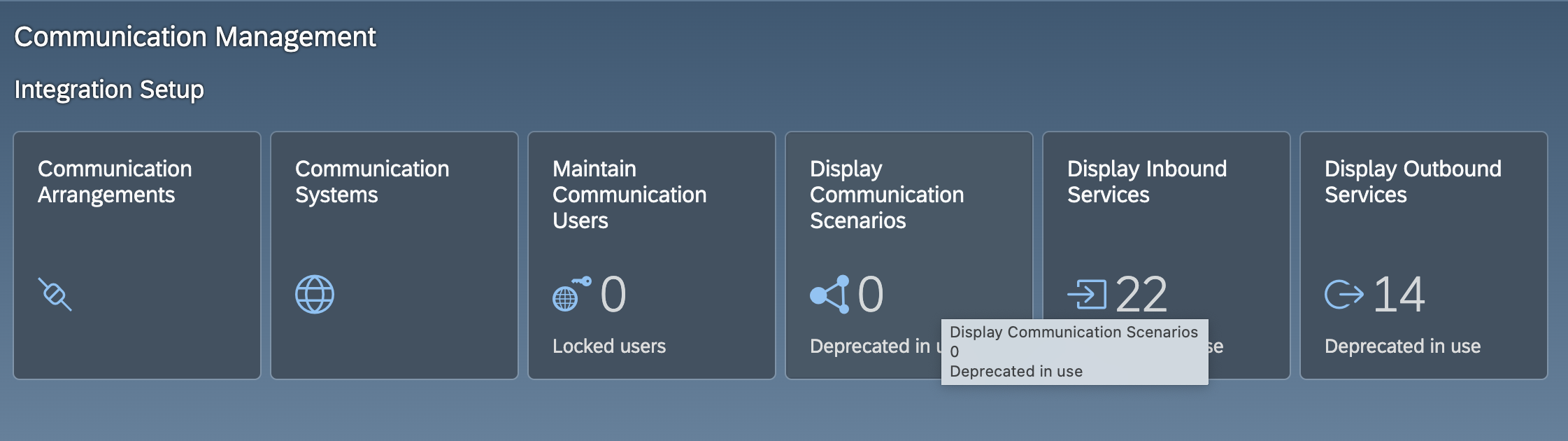
Step 1: Create a communication user
- Sign in to your SAP S/4HANA Cloud system as an administrator.
- Open the Maintain Communication Users app and choose New.
- Enter a user name and a description, set a password, and choose Create.
Note the user name and password. These are the credentials the connector uses.
Step 2: Create a communication system
-
Open the Communication Systems app and choose New.
-
Enter a system ID and a system name, and choose Create.
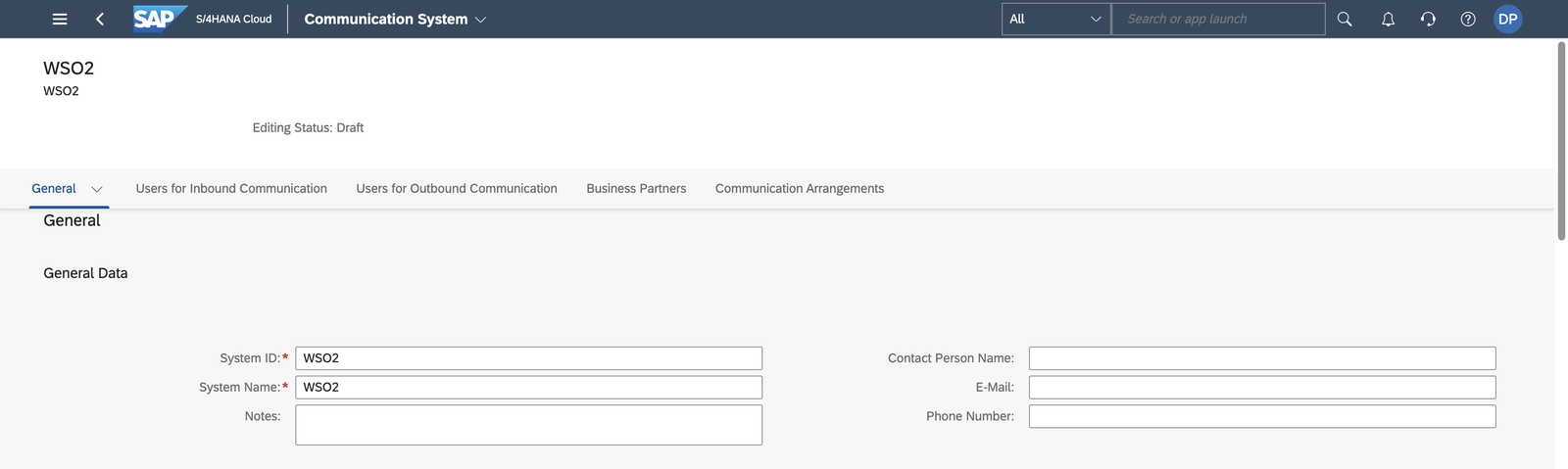
-
Under General > Technical Data, enter a host name and a Logical System (an uppercase ID of up to 10 characters, for example,
INTEGRATOR). Some scenarios refuse to activate when the logical system is empty. -
Under Users for Inbound Communication, add the communication user from Step 1 with the User Name and Password authentication method.
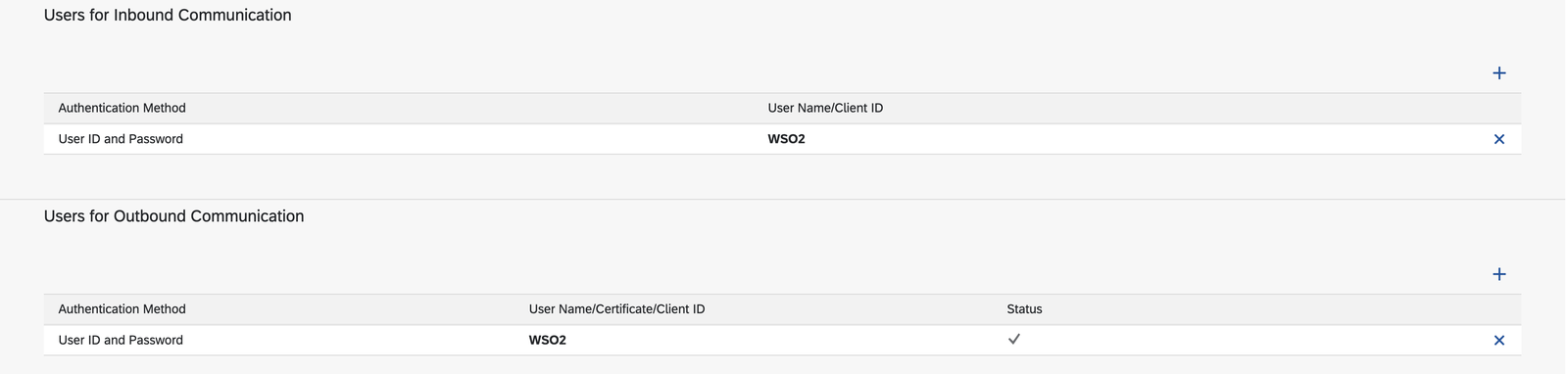
-
Choose Save.
Step 3: Create a communication arrangement
-
Open the Communication Arrangements app and choose New.
-
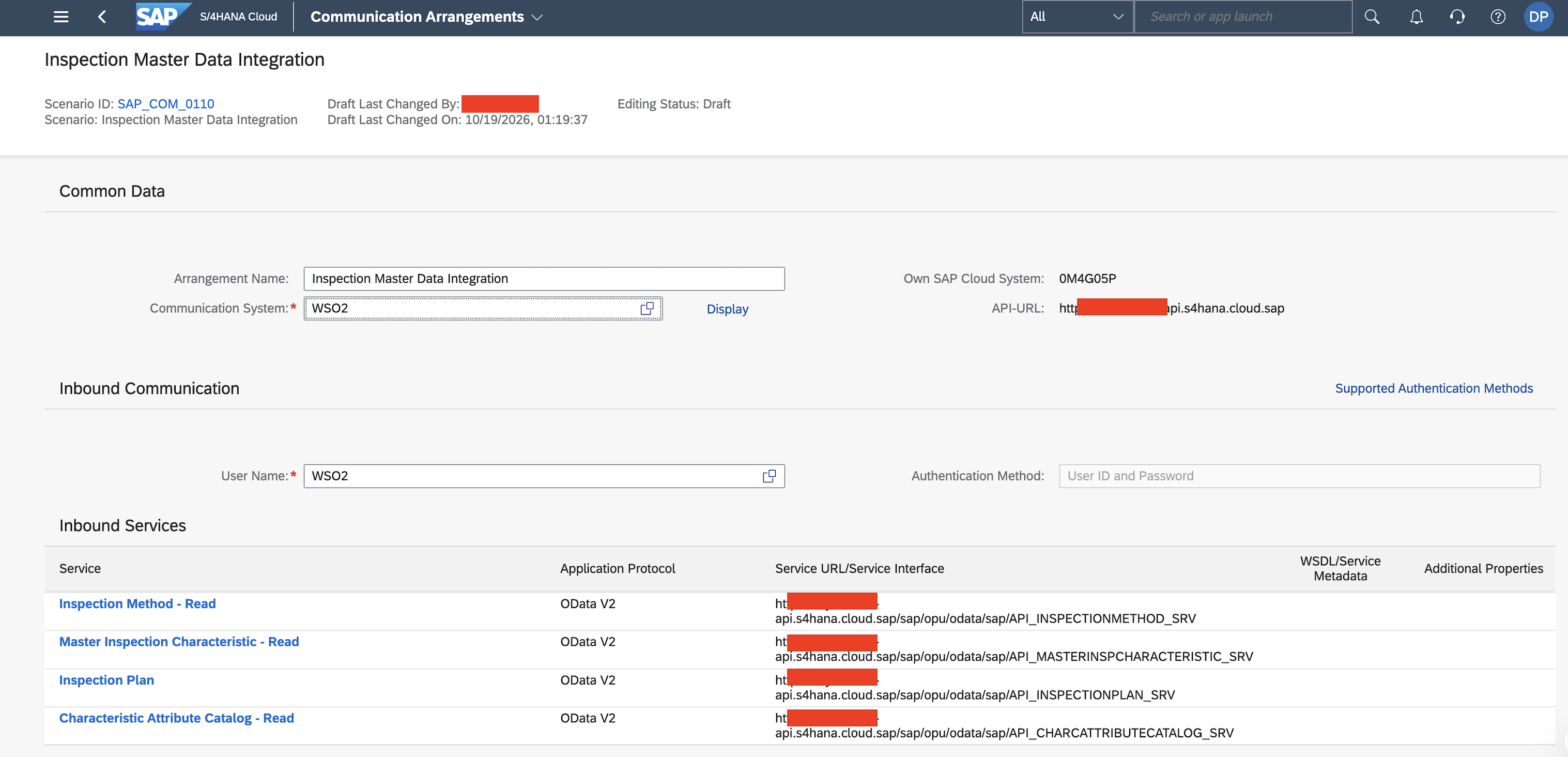
In the Scenario value help, search for Inspection Master Data Integration and select
SAP_COM_0110. This is the scenario that exposesAPI_CHARCATTRIBUTECATALOG_SRV, the service this connector calls.
-
Enter a unique name for the arrangement and choose Create.
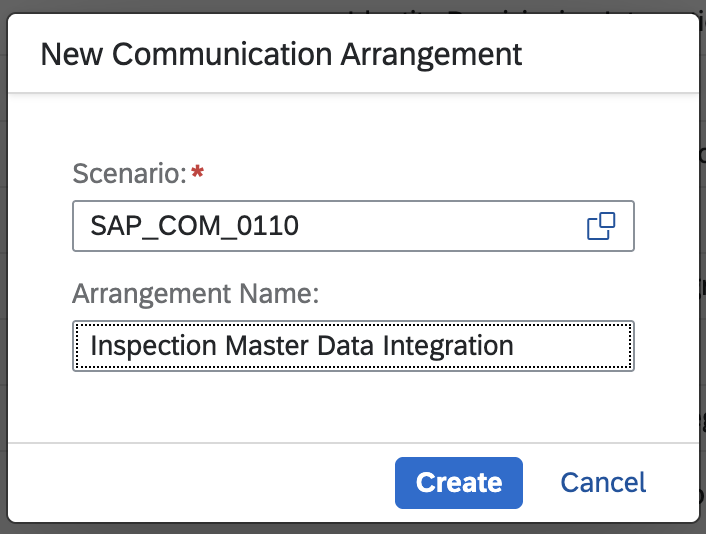
-
Select the communication system from Step 2. The communication user from Step 1 is filled in as the inbound user. If the scenario lists outbound services that the integration does not need, clear their Active check boxes so that no outbound user is required.
-
Choose Save.
Step 4: Note the hostname
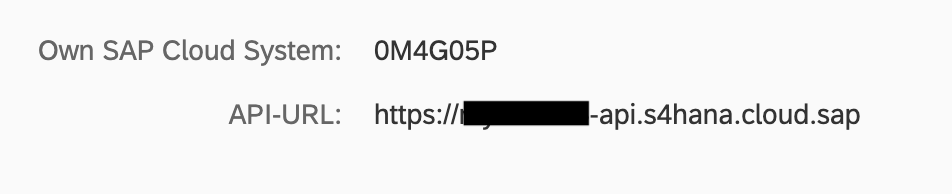
Open the saved arrangement. The API-URL next to Own SAP Cloud System shows the hostname
(<unique id>-api.s4hana.cloud.sap).
You now have everything the connector needs:
- hostname - the API hostname, for example,
my123456-api.s4hana.cloud.sap - username - the communication user name
- password - the communication user password
Quickstart
To use the sap.s4hana.api_charcattributecatalog_srv connector in your Ballerina application, modify the .bal file as follows:
Step 1: Import the module
Import the sap.s4hana.api_charcattributecatalog_srv module.
import ballerinax/sap.s4hana.api_charcattributecatalog_srv as charattributecat;
Step 2: Instantiate a new connector
Use the hostname and credentials to initiate a client.
configurable string hostname = ?; configurable string username = ?; configurable string password = ?; charattributecat:Client charattributecatClient = check new ( { auth: { username, password } }, hostname );
Step 3: Invoke the connector operation
Now, utilize the available connector operations.
charattributecat:CollectionOfA_CharcAttribSeldCodeSetWrapper listOfSelectedCodes = check charattributecatClient->listA_CharcAttribSeldCodeSets();
Step 4: Run the Ballerina application
bal run
Clients
sap.s4hana.api_charcattributecatalog_srv: Client
The catalog data that is read with this service consists of plant-specific selected sets with their codes that are used to record inspection results for qualitative characteristics, for example, the codes 01 (Smooth) and 02 (Rough) for the characteristic Surface.
Constructor
Gets invoked to initialize the connector.
init (ConnectionConfig config, string hostname, int port)- config ConnectionConfig - The configurations to be used when initializing the
connector
- hostname string -
- port int 443 -
getA_CharcAttribSeldCodeSet
function getA_CharcAttribSeldCodeSet(string SelectedCodeSetPlant, string SelectedCodeSet, map<string|string[]> headers, *GetA_CharcAttribSeldCodeSetQueries queries) returns A_CharcAttribSeldCodeSetWrapper|errorReads a specific selected set of catalog type Characteristic Attributes.
Parameters
- SelectedCodeSetPlant string - Plant
- SelectedCodeSet string - Selected Set
- queries *GetA_CharcAttribSeldCodeSetQueries - Queries to be sent with the request
Return Type
- A_CharcAttribSeldCodeSetWrapper|error - Retrieved entity
getA_CharcAttribSeldSetCode
function getA_CharcAttribSeldSetCode(string SelectedCodeSetPlant, string SelectedCodeSet, string CharacteristicAttributeCodeGrp, string CharacteristicAttributeCode, map<string|string[]> headers, *GetA_CharcAttribSeldSetCodeQueries queries) returns A_CharcAttribSeldSetCodeWrapper|errorReads a specific selected set code of catalog type Characteristic Attributes.
Parameters
- SelectedCodeSetPlant string - Plant
- SelectedCodeSet string - Selected Set
- CharacteristicAttributeCodeGrp string - Code Group
- CharacteristicAttributeCode string - Code
- queries *GetA_CharcAttribSeldSetCodeQueries - Queries to be sent with the request
Return Type
- A_CharcAttribSeldSetCodeWrapper|error - Retrieved entity
getA_CharcAttribSeldSetCodeT
function getA_CharcAttribSeldSetCodeT(string SelectedCodeSetPlant, string SelectedCodeSet, string CharacteristicAttributeCodeGrp, string CharacteristicAttributeCode, string Language, map<string|string[]> headers, *GetA_CharcAttribSeldSetCodeTQueries queries) returns A_CharcAttribSeldSetCodeTWrapper|errorReads a specific selected set code text of catalog type Characteristic Attributes in a specific language.
Parameters
- SelectedCodeSetPlant string - Plant
- SelectedCodeSet string - Selected Set
- CharacteristicAttributeCodeGrp string - Code Group
- CharacteristicAttributeCode string - Code
- Language string - Language Key
- queries *GetA_CharcAttribSeldSetCodeTQueries - Queries to be sent with the request
Return Type
- A_CharcAttribSeldSetCodeTWrapper|error - Retrieved entity
getA_CharcAttribSeldSetT
function getA_CharcAttribSeldSetT(string SelectedCodeSetPlant, string SelectedCodeSet, string Language, map<string|string[]> headers, *GetA_CharcAttribSeldSetTQueries queries) returns A_CharcAttribSeldSetTWrapper|errorReads a specific selected set text of catalog type Characteristic Attributes in a specific language.
Parameters
- SelectedCodeSetPlant string - Plant
- SelectedCodeSet string - Selected Set
- Language string - Language Key
- queries *GetA_CharcAttribSeldSetTQueries - Queries to be sent with the request
Return Type
- A_CharcAttribSeldSetTWrapper|error - Retrieved entity
listA_CharcAttribSeldCodeSets
function listA_CharcAttribSeldCodeSets(map<string|string[]> headers, *ListA_CharcAttribSeldCodeSetsQueries queries) returns CollectionOfA_CharcAttribSeldCodeSetWrapper|errorReads all selected sets of catalog type Characteristic Attributes.
Parameters
- queries *ListA_CharcAttribSeldCodeSetsQueries - Queries to be sent with the request
Return Type
- CollectionOfA_CharcAttribSeldCodeSetWrapper|error - Retrieved entities
listA_CharcAttribSeldSetCodeTs
function listA_CharcAttribSeldSetCodeTs(map<string|string[]> headers, *ListA_CharcAttribSeldSetCodeTsQueries queries) returns CollectionOfA_CharcAttribSeldSetCodeTWrapper|errorReads all selected set code texts of catalog type Characteristic Attributes.
Parameters
- queries *ListA_CharcAttribSeldSetCodeTsQueries - Queries to be sent with the request
Return Type
- CollectionOfA_CharcAttribSeldSetCodeTWrapper|error - Retrieved entities
listA_CharcAttribSeldSetCodes
function listA_CharcAttribSeldSetCodes(map<string|string[]> headers, *ListA_CharcAttribSeldSetCodesQueries queries) returns CollectionOfA_CharcAttribSeldSetCodeWrapper|errorReads all selected set codes and code groups of catalog type Characteristic Attributes.
Parameters
- queries *ListA_CharcAttribSeldSetCodesQueries - Queries to be sent with the request
Return Type
- CollectionOfA_CharcAttribSeldSetCodeWrapper|error - Retrieved entities
listA_CharcAttribSeldSetTs
function listA_CharcAttribSeldSetTs(map<string|string[]> headers, *ListA_CharcAttribSeldSetTsQueries queries) returns CollectionOfA_CharcAttribSeldSetTWrapper|errorReads all selected set texts of catalog type Characteristic Attributes.
Parameters
- queries *ListA_CharcAttribSeldSetTsQueries - Queries to be sent with the request
Return Type
- CollectionOfA_CharcAttribSeldSetTWrapper|error - Retrieved entities
performBatchOperation
function performBatchOperation(Request request, map<string|string[]> headers) returns Response|errorSend a group of requests
Parameters
- request Request - Batch request
Records
sap.s4hana.api_charcattributecatalog_srv: A_CharcAttribSeldCodeSet
Fields
- SelectedCodeSetPlant? string -
- SelectedCodeSet? string -
- InspectionSelectedSetStatus? string? - Status of Master Record
- CharcAttribSeldSetCreatedBy? string? - Name of User Who Created the Data Record
- CharcAttribSeldSetCrtedOn? string? - System Date on Which Data Record Was Created
- CharcAttribSeldSetLastChgdBy? string? - Name of User Who Last Changed Data Record
- CharcAttribSeldSetLastChgdOn? string? - System Date on Which Data Record Was Changed
sap.s4hana.api_charcattributecatalog_srv: A_CharcAttribSeldCodeSetWrapper
Fields
sap.s4hana.api_charcattributecatalog_srv: A_CharcAttribSeldSetCode
Fields
- SelectedCodeSetPlant? string -
- SelectedCodeSet? string -
- CharacteristicAttributeCodeGrp? string -
- CharacteristicAttributeCode? string -
- CharcAttributeValuation? string? -
- DefectClass? string? -
- CharcAttribSeldSetCodeCrtedBy? string? - Name of User Who Created the Data Record
- CharcAttribSeldSetCodeCrtedOn? string? - System Date on Which Data Record Was Created
- CharcAttribSeldSetCodeChgdBy? string? - Name of User Who Last Changed Data Record
- CharcAttribSeldSetCodeChgdOn? string? - System Date on Which Data Record Was Changed
sap.s4hana.api_charcattributecatalog_srv: A_CharcAttribSeldSetCodeT
Fields
- SelectedCodeSetPlant? string -
- SelectedCodeSet? string -
- CharacteristicAttributeCodeGrp? string -
- CharacteristicAttributeCode? string -
- Language? string -
- CharacteristicAttributeCodeTxt? string? - Text for Code
sap.s4hana.api_charcattributecatalog_srv: A_CharcAttribSeldSetCodeTWrapper
Fields
sap.s4hana.api_charcattributecatalog_srv: A_CharcAttribSeldSetCodeWrapper
Fields
sap.s4hana.api_charcattributecatalog_srv: A_CharcAttribSeldSetT
Fields
- SelectedCodeSetPlant? string -
- SelectedCodeSet? string -
- Language? string -
- SelectedCodeSetText? string? -
sap.s4hana.api_charcattributecatalog_srv: A_CharcAttribSeldSetTWrapper
Fields
sap.s4hana.api_charcattributecatalog_srv: CollectionOfA_CharcAttribSeldCodeSet
Fields
- __count? count -
- results? A_CharcAttribSeldCodeSet[] -
sap.s4hana.api_charcattributecatalog_srv: CollectionOfA_CharcAttribSeldCodeSetWrapper
Fields
sap.s4hana.api_charcattributecatalog_srv: CollectionOfA_CharcAttribSeldSetCode
Fields
- __count? count -
- results? A_CharcAttribSeldSetCode[] -
sap.s4hana.api_charcattributecatalog_srv: CollectionOfA_CharcAttribSeldSetCodeT
Fields
- __count? count -
- results? A_CharcAttribSeldSetCodeT[] -
sap.s4hana.api_charcattributecatalog_srv: CollectionOfA_CharcAttribSeldSetCodeTWrapper
Fields
sap.s4hana.api_charcattributecatalog_srv: CollectionOfA_CharcAttribSeldSetCodeWrapper
Fields
sap.s4hana.api_charcattributecatalog_srv: CollectionOfA_CharcAttribSeldSetT
Fields
- __count? count -
- results? A_CharcAttribSeldSetT[] -
sap.s4hana.api_charcattributecatalog_srv: CollectionOfA_CharcAttribSeldSetTWrapper
Fields
sap.s4hana.api_charcattributecatalog_srv: ConnectionConfig
Provides a set of configurations for controlling the behaviours when communicating with a remote HTTP endpoint.
Fields
- auth BearerTokenConfig|OAuth2RefreshTokenGrantConfig|CredentialsConfig - Configurations related to client authentication
- httpVersion HttpVersion(default http:HTTP_2_0) - The HTTP version understood by the client
- http1Settings ClientHttp1Settings(default {}) - Configurations related to HTTP/1.x protocol
- http2Settings ClientHttp2Settings(default {}) - Configurations related to HTTP/2 protocol
- timeout decimal(default 60) - The maximum time to wait (in seconds) for a response before closing the connection
- forwarded string(default "disable") - The choice of setting
forwarded/x-forwardedheader
- followRedirects? FollowRedirects - Configurations associated with Redirection
- poolConfig? PoolConfiguration - Configurations associated with request pooling
- cache CacheConfig(default {}) - HTTP caching related configurations
- compression Compression(default http:COMPRESSION_AUTO) - Specifies the way of handling compression (
accept-encoding) header
- circuitBreaker? CircuitBreakerConfig - Configurations associated with the behaviour of the Circuit Breaker
- retryConfig? RetryConfig - Configurations associated with retrying
- responseLimits ResponseLimitConfigs(default {}) - Configurations associated with inbound response size limits
- secureSocket? ClientSecureSocket - SSL/TLS-related options
- proxy? ProxyConfig - Proxy server related options
- socketConfig ClientSocketConfig(default {}) - Provides settings related to client socket configuration
- validation boolean(default true) - Enables the inbound payload validation functionality which provided by the constraint package. Enabled by default
- laxDataBinding boolean(default true) - Enables relaxed data binding on the client side. When enabled,
nilvalues are treated as optional, and absent fields are handled asnilabletypes. Enabled by default.
sap.s4hana.api_charcattributecatalog_srv: GetA_CharcAttribSeldCodeSetQueries
Represents the Queries record for the operation: getA_CharcAttribSeldCodeSet
Fields
- \$select? A_CharcAttribSeldCodeSetSelectOptions - Select properties to be returned, see Select
sap.s4hana.api_charcattributecatalog_srv: GetA_CharcAttribSeldSetCodeQueries
Represents the Queries record for the operation: getA_CharcAttribSeldSetCode
Fields
- \$select? A_CharcAttribSeldSetCodeSelectOptions - Select properties to be returned, see Select
sap.s4hana.api_charcattributecatalog_srv: GetA_CharcAttribSeldSetCodeTQueries
Represents the Queries record for the operation: getA_CharcAttribSeldSetCodeT
Fields
- \$select? A_CharcAttribSeldSetCodeTSelectOptions - Select properties to be returned, see Select
sap.s4hana.api_charcattributecatalog_srv: GetA_CharcAttribSeldSetTQueries
Represents the Queries record for the operation: getA_CharcAttribSeldSetT
Fields
- \$select? A_CharcAttribSeldSetTSelectOptions - Select properties to be returned, see Select
sap.s4hana.api_charcattributecatalog_srv: ListA_CharcAttribSeldCodeSetsQueries
Represents the Queries record for the operation: listA_CharcAttribSeldCodeSets
Fields
- \$skip? int - Skip the first n items, see Paging - Skip
- \$top? int - Show only the first n items, see Paging - Top
- \$orderby? A_CharcAttribSeldCodeSetOrderByOptions - Order items by property values, see Sorting
- \$inlinecount? "allpages"|"none" - Include count of items, see Inlinecount
- \$select? A_CharcAttribSeldCodeSetSelectOptions - Select properties to be returned, see Select
sap.s4hana.api_charcattributecatalog_srv: ListA_CharcAttribSeldSetCodesQueries
Represents the Queries record for the operation: listA_CharcAttribSeldSetCodes
Fields
- \$skip? int - Skip the first n items, see Paging - Skip
- \$top? int - Show only the first n items, see Paging - Top
- \$orderby? A_CharcAttribSeldSetCodeOrderByOptions - Order items by property values, see Sorting
- \$inlinecount? "allpages"|"none" - Include count of items, see Inlinecount
- \$select? A_CharcAttribSeldSetCodeSelectOptions - Select properties to be returned, see Select
sap.s4hana.api_charcattributecatalog_srv: ListA_CharcAttribSeldSetCodeTsQueries
Represents the Queries record for the operation: listA_CharcAttribSeldSetCodeTs
Fields
- \$skip? int - Skip the first n items, see Paging - Skip
- \$top? int - Show only the first n items, see Paging - Top
- \$orderby? A_CharcAttribSeldSetCodeTOrderByOptions - Order items by property values, see Sorting
- \$inlinecount? "allpages"|"none" - Include count of items, see Inlinecount
- \$select? A_CharcAttribSeldSetCodeTSelectOptions - Select properties to be returned, see Select
sap.s4hana.api_charcattributecatalog_srv: ListA_CharcAttribSeldSetTsQueries
Represents the Queries record for the operation: listA_CharcAttribSeldSetTs
Fields
- \$skip? int - Skip the first n items, see Paging - Skip
- \$top? int - Show only the first n items, see Paging - Top
- \$orderby? A_CharcAttribSeldSetTOrderByOptions - Order items by property values, see Sorting
- \$inlinecount? "allpages"|"none" - Include count of items, see Inlinecount
- \$select? A_CharcAttribSeldSetTSelectOptions - Select properties to be returned, see Select
sap.s4hana.api_charcattributecatalog_srv: OAuth2RefreshTokenGrantConfig
OAuth2 Refresh Token Grant Configs
Fields
- Fields Included from *OAuth2RefreshTokenGrantConfig
- refreshUrl string(default "https://{host}:{port}") - Refresh URL
Array types
sap.s4hana.api_charcattributecatalog_srv: A_CharcAttribSeldCodeSetOrderByOptions
A_CharcAttribSeldCodeSetOrderByOptions
sap.s4hana.api_charcattributecatalog_srv: A_CharcAttribSeldSetCodeTSelectOptions
A_CharcAttribSeldSetCodeTSelectOptions
sap.s4hana.api_charcattributecatalog_srv: A_CharcAttribSeldSetTSelectOptions
A_CharcAttribSeldSetTSelectOptions
sap.s4hana.api_charcattributecatalog_srv: A_CharcAttribSeldSetCodeSelectOptions
A_CharcAttribSeldSetCodeSelectOptions
sap.s4hana.api_charcattributecatalog_srv: A_CharcAttribSeldSetTOrderByOptions
A_CharcAttribSeldSetTOrderByOptions
sap.s4hana.api_charcattributecatalog_srv: A_CharcAttribSeldSetCodeTOrderByOptions
A_CharcAttribSeldSetCodeTOrderByOptions
sap.s4hana.api_charcattributecatalog_srv: A_CharcAttribSeldSetCodeOrderByOptions
A_CharcAttribSeldSetCodeOrderByOptions
sap.s4hana.api_charcattributecatalog_srv: A_CharcAttribSeldCodeSetSelectOptions
A_CharcAttribSeldCodeSetSelectOptions
String types
sap.s4hana.api_charcattributecatalog_srv: count
count
The number of entities in the collection. Available when using the $inlinecount query option.
Import
import ballerinax/sap.s4hana.api_charcattributecatalog_srv;Other versions
1.0.0