Module rudderstack

ballerinax/rudderstack Ballerina library
Overview
RudderStack is a customer data platform that collects customer events from websites, apps and servers, routes them to warehouses and business tools, and builds unified customer profiles from them.
The RudderStack connector offers APIs to connect and interact with three RudderStack APIs:
- The Event Stream (HTTP) API, to send
identify,track,page,screen,group,aliasand batched events. - The Activation API (Beta), to read and delete the profiles that RudderStack Profiles materialises in a Redis destination.
- The Profiles API, to start a Profiles project run and check its status.
The APIs are served from different hosts and use different credentials. A single rudderstack:Client handles all three: it sends the Event Stream operations to your data plane with the source write key, and the Activation and Profiles operations to the hosts of your workspace's region with a Service Access Token.
| Operations | Credential | Host |
|---|---|---|
identify, track, page, screen, group, alias, batch | Source write key (auth.writeKey) | Your data plane URL (serviceUrl) |
getProfile, getProfiles, deleteProfile, deleteProfiles | Service Access Token (auth.serviceAccessToken) | profiles.rudderstack.com (US) or profiles-eu.rudderstack.com (EU) |
startProfilesRun, getProfilesRunStatus | Service Access Token (auth.serviceAccessToken) | api.rudderstack.com (US) or api.eu.rudderstack.com (EU) |
Set only the credentials of the APIs you call. For example, a client that only sends events needs only the write key and the data plane URL, and a client that only reads profiles needs only the Service Access Token.
Key features
- Send
identify,track,page,screen,groupandaliasevents, one at a time or several in onebatchcall. - Use one client for all three APIs. It sends each operation to the right host with the right credential.
- Keep a user's events in order with the
AnonymousIdheader, which the client fills in from each event'sanonymousId. - Read one profile (
getProfile) or up to 100 (getProfiles), and delete them (deleteProfile,deleteProfiles). - Start a Profiles project run (
startProfilesRun) and poll it until it finishes (getProfilesRunStatus). - Switch the Activation and Profiles APIs between the US and EU regions with the
regionsetting.
Setup guide
To use the RudderStack connector, you must have access to a RudderStack workspace. The Event Stream API is available on every plan, including the free plan. The Activation and Profiles APIs need RudderStack Profiles, and the Activation API also needs a Redis destination that the Profiles project syncs to.
Step 1: Sign in to RudderStack
- Navigate to app.rudderstack.com and sign in, or create an account.
Step 2: Get the source write key and the data plane URL (Event Stream API)
-
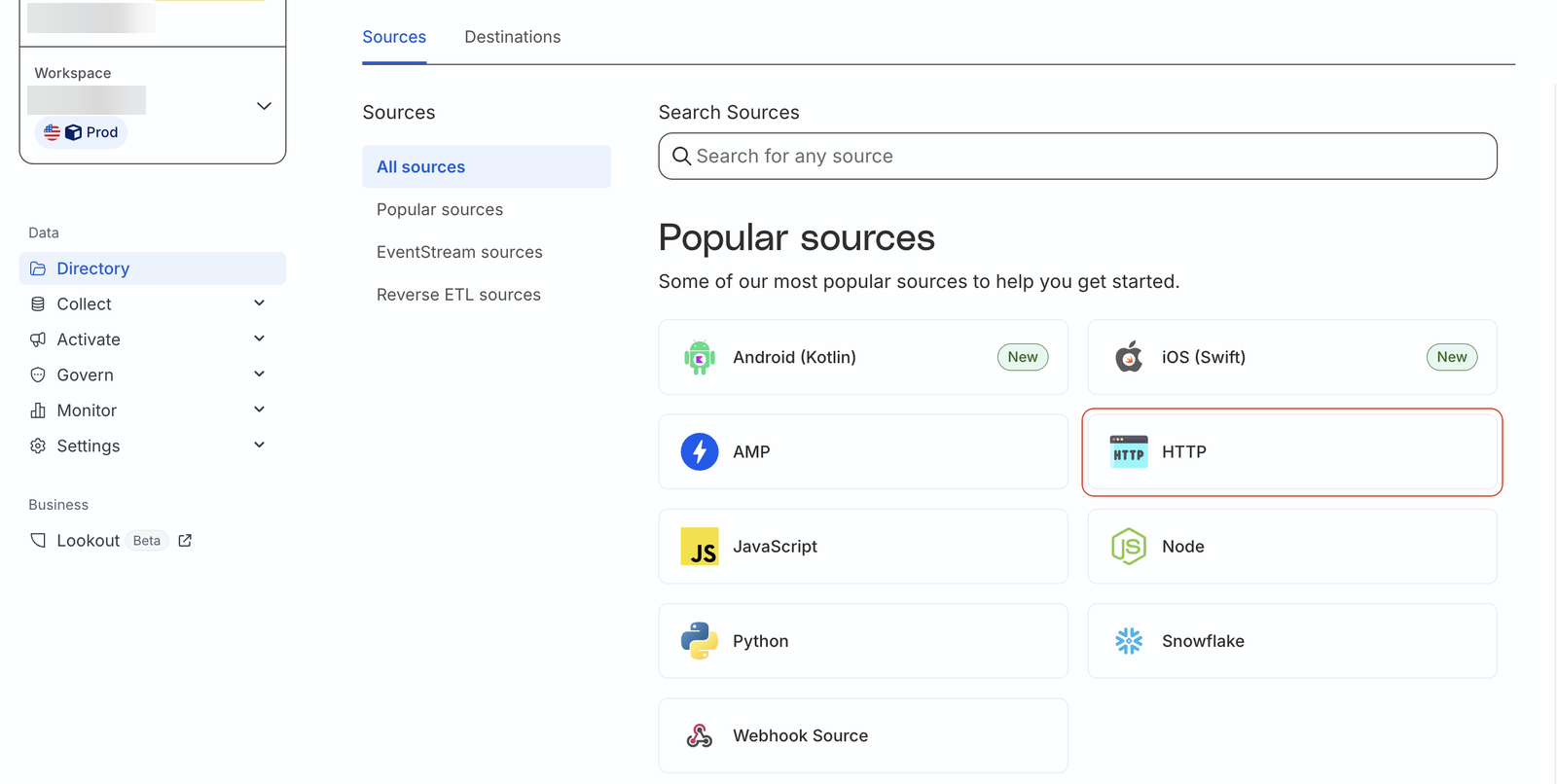
In the left sidebar, go to Directory > Sources and select HTTP.
-
Give the source a name and complete the setup.
-
On the source page, click Write key to copy the source write key.

-
Copy your Data plane URL, which is shown at the top of the Connections page (for example,
https://<your-workspace>.dataplane.rudderstack.com).
Step 3: Generate an access token (Activation and Profiles APIs)
The Activation and Profiles APIs authenticate with a Bearer token. For development and testing, you can use a Personal Access Token. For production, use a workspace-level Service Access Token.
For development and testing: Personal Access Token
-
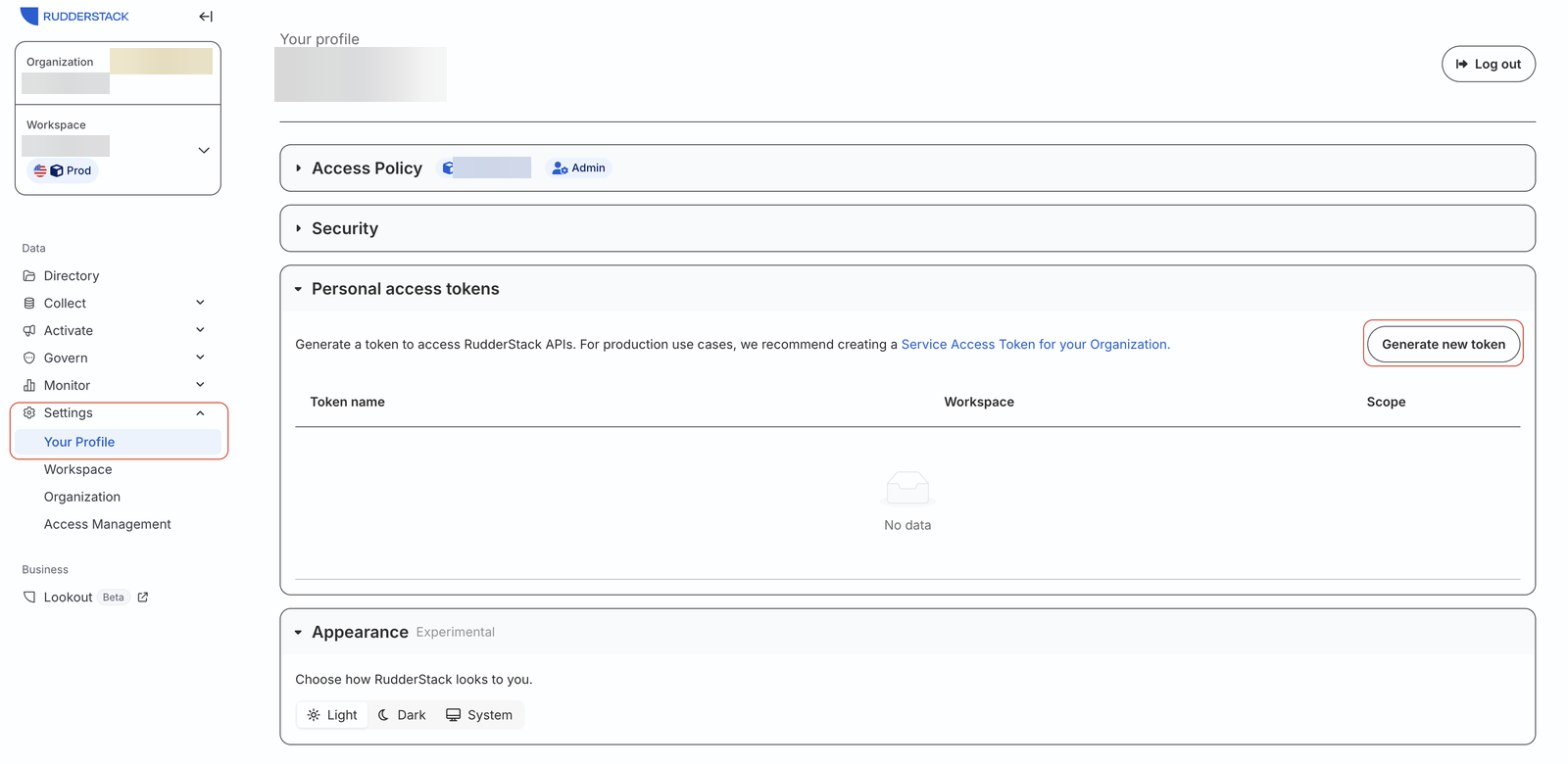
In the left sidebar, go to Settings > Your Profile. Under Personal access tokens, click Generate new token.
-
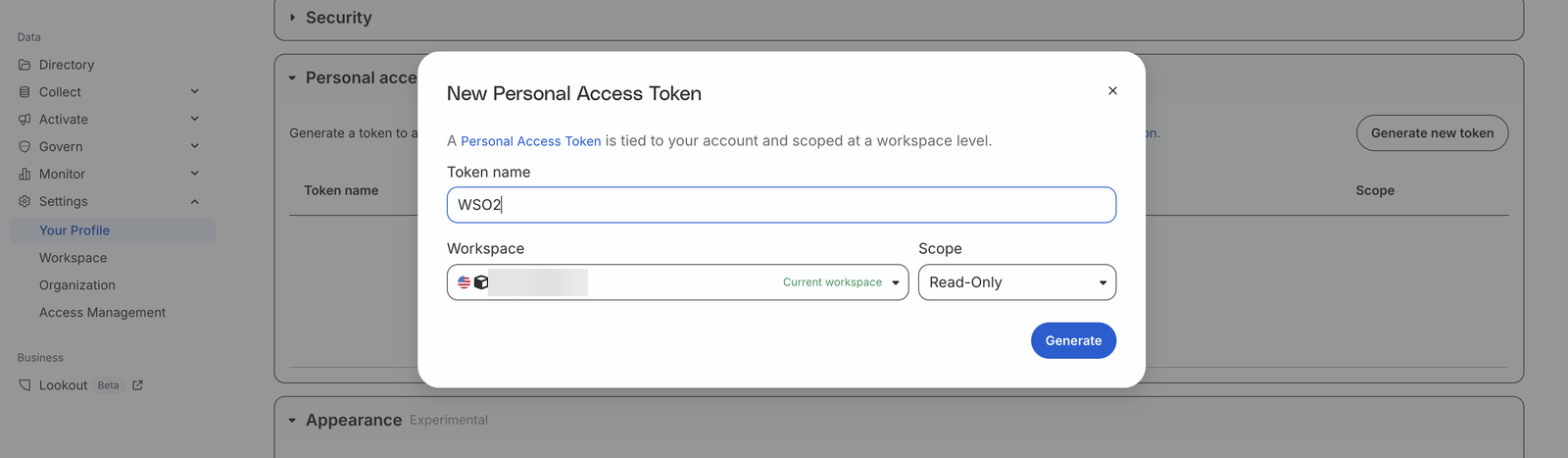
Enter a token name, select the workspace and the scope, and click Generate.
-
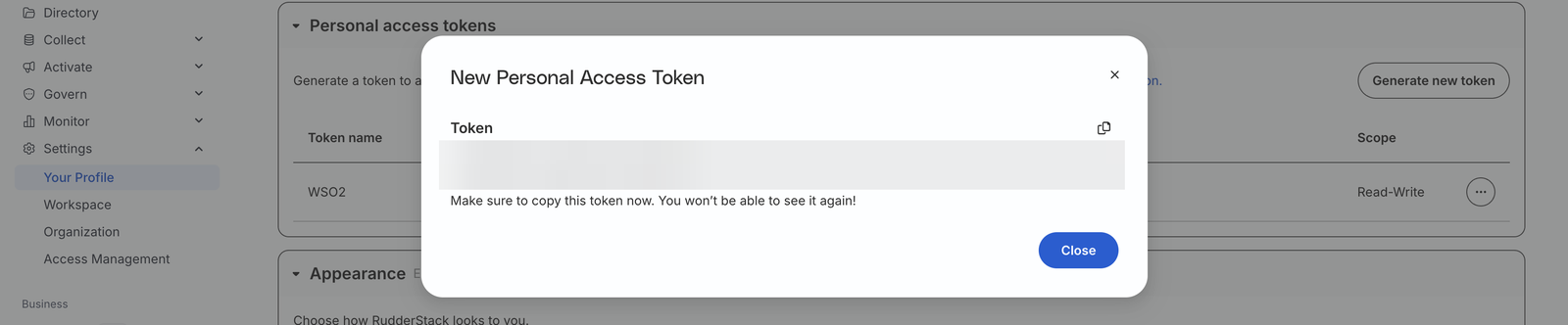
Copy the token. It is shown only once.
For production: Service Access Token
Also see RudderStack's guide on Service Access Tokens. Only workspace Admins can generate them.
- In the left sidebar, go to Settings > Access Management > Service Access Tokens, and select the Workspace tab.
- Click Generate new token, enter a name, select the workspace, and click Next.
- Under Workspace SAT access policy, grant the permissions for the APIs you use:
- Activation API: Destination Data Access on the Redis destination that the Profiles project syncs to.
- Profiles API: Edit on the Profiles resource.
- Click Generate and copy the token. It is shown only once, and its access policy can't be changed later.
Step 4: Note your workspace region
The Activation and Profiles APIs have separate US and EU hosts. If your workspace is in the EU region, set region to rudderstack:EU in the connection config. The default is rudderstack:US.
Quickstart
To use the rudderstack connector in your Ballerina application, update the .bal file as follows:
Step 1: Import the module
import ballerinax/rudderstack;
Step 2: Instantiate a new connector
-
Create a
Config.tomlfile and configure the obtained credentials. Set only the ones for the APIs you use:writeKey = "<your-source-write-key>" dataPlaneUrl = "https://<your-workspace>.dataplane.rudderstack.com" serviceAccessToken = "<your-service-access-token>" -
Create a
rudderstack:Clientinstance.serviceUrlis the data plane URL, and it's required when you setwriteKey:configurable string? writeKey = (); configurable string? dataPlaneUrl = (); configurable string? serviceAccessToken = (); final rudderstack:Client rudderstackClient = check new ({ auth: {writeKey, serviceAccessToken} }, serviceUrl = dataPlaneUrl);Note: For a workspace in the EU region, also set the region so that the Activation and Profiles operations use the EU hosts:
final rudderstack:Client rudderstackClient = check new ({
    auth: {writeKey, serviceAccessToken},
    region: rudderstack:EU
}, serviceUrl = dataPlaneUrl);
Step 3: Invoke the connector operation
Now, utilize the available connector operations.
Track an event
public function main() returns error? { string response = check rudderstackClient->track({ userId: "u123", event: "Order Completed", properties: {"orderId": "o-1001", "revenue": 49.99, "currency": "USD"} }); io:println(response); // ok }
Get a profile
public function main() returns error? { rudderstack:Profile profile = check rudderstackClient->getProfile({ entity: "user", destinationId: "<your-redis-destination-id>", id: {'type: "user_id", value: "u123"} }); io:println(profile.data); }
Step 4: Run the Ballerina application
bal run
Examples
The RudderStack connector provides practical examples illustrating usage in various scenarios. Explore these examples, covering the following use cases:
- Customer journey tracking: Identify a customer, record the product page they view, then send their add-to-cart and order events together in one batch.
- B2B signup attribution: Record an anonymous visitor's landing page view with its campaign, link the visitor to the new user ID at signup, record the user's traits, and associate the user with their company.
- Profile refresh and activation: Start a Profiles run, poll it until it finishes, then fetch the refreshed profiles of a few customers through the Activation API.
Clients
rudderstack: Client
Write customer events to RudderStack through the Event Stream (HTTP) API, read and delete the profiles that RudderStack Profiles builds through the Activation API, and trigger and monitor Profiles runs through the Profiles API.
The three APIs are served from different hosts with different credentials. The client sends each
operation to the right host with the right credential: the Event Stream operations to the data plane
(serviceUrl) with the source write key, and the Activation and Profiles operations to the hosts of
the configured region with the Service Access Token.
Constructor
Gets invoked to initialize the connector.
init (ConnectionConfig config, string? serviceUrl)- config ConnectionConfig - The configurations to be used when initializing the
connector
- serviceUrl string? () - Data plane URL of the RudderStack workspace (or of a self-hosted
rudder-server), for examplehttps://<workspace>.dataplane.rudderstack.com. Required withauth.writeKey
identify
function identify(IdentifyEvent payload, EventHeaders headers) returns string|errorIdentify a user and record their traits
Parameters
- payload IdentifyEvent - The event to send
- headers EventHeaders (default {}) - The
AnonymousIdordering header and theSentAtheader
track
function track(TrackEvent payload, EventHeaders headers) returns string|errorRecord an action a user performed
Parameters
- payload TrackEvent - The event to send
- headers EventHeaders (default {}) - The
AnonymousIdordering header and theSentAtheader
page
function page(PageEvent payload, EventHeaders headers) returns string|errorRecord a web page view
Parameters
- payload PageEvent - The event to send
- headers EventHeaders (default {}) - The
AnonymousIdordering header and theSentAtheader
screen
function screen(ScreenEvent payload, EventHeaders headers) returns string|errorRecord a mobile app screen view
Parameters
- payload ScreenEvent - The event to send
- headers EventHeaders (default {}) - The
AnonymousIdordering header and theSentAtheader
group
function group(GroupEvent payload, EventHeaders headers) returns string|errorAssociate a user with a group (company, organisation, account)
Parameters
- payload GroupEvent - The event to send
- headers EventHeaders (default {}) - The
AnonymousIdordering header and theSentAtheader
alias
function alias(AliasEvent payload, EventHeaders headers) returns string|errorMerge two user identities
Parameters
- payload AliasEvent - The event to send
- headers EventHeaders (default {}) - The
AnonymousIdordering header and theSentAtheader
batch
function batch(BatchRequest payload, EventHeaders headers) returns string|errorSend several events in one request
Parameters
- payload BatchRequest - The events to send. Each event sets
type
- headers EventHeaders (default {}) - The
AnonymousIdordering header and theSentAtheader
getProfile
function getProfile(SingleProfileRequest payload, map<string|string[]> headers) returns Profile|errorGet a profile
Parameters
- payload SingleProfileRequest - The entity, the Redis destination and the identity of the profile
getProfiles
function getProfiles(BatchProfilesRequest payload, map<string|string[]> headers) returns BatchProfilesResponse|errorGet several profiles (1 to 100)
Parameters
- payload BatchProfilesRequest - The entity, the Redis destination and the identities of the profiles
Return Type
- BatchProfilesResponse|error - The profiles, in the order of
ids. Thedataof an identity with no profile is empty
deleteProfile
function deleteProfile(SingleProfileRequest payload, map<string|string[]> headers) returns DeleteProfilesResult|errorDelete a profile from the Redis destination. The next Profiles run recreates it
Parameters
- payload SingleProfileRequest - The entity, the Redis destination and the identity of the profile
Return Type
- DeleteProfilesResult|error - The number of keys deleted and the number of keys that existed for the profile. An error with
status
404if the profile wasn't found
deleteProfiles
function deleteProfiles(BatchProfilesRequest payload, map<string|string[]> headers) returns DeleteProfilesResult|errorDelete several profiles (1 to 100) from the Redis destination. The next Profiles run recreates them
Parameters
- payload BatchProfilesRequest - The entity, the Redis destination and the identities of the profiles
Return Type
- DeleteProfilesResult|error - The number of keys deleted and the number of keys that existed for the profiles. An error with
status
404if none of the profiles were found
startProfilesRun
function startProfilesRun(string profilesId, StartProfilesRunRequest payload, map<string|string[]> headers) returns StartProfilesRunResponse|errorRun a Profiles project
Parameters
- profilesId string - ID of the Profiles project
- payload StartProfilesRunRequest (default {}) - Options for the run
Return Type
- StartProfilesRunResponse|error - The ID of the started run
getProfilesRunStatus
function getProfilesRunStatus(string profilesId, string runId, map<string|string[]> headers) returns ProfilesRunStatus|errorGet the status of a Profiles run
Parameters
- profilesId string - ID of the Profiles project
- runId string - Run ID returned by
startProfilesRun
Return Type
- ProfilesRunStatus|error - The status of the run, with its tasks and, for a failed run, the error
Enums
rudderstack: Region
Region of the RudderStack workspace. Selects the Activation and Profiles API hosts.
Members
profiles.rudderstack.com, api.rudderstack.com)profiles-eu.rudderstack.com, api.eu.rudderstack.com)Records
rudderstack: AliasEvent
Merges two identities of a user
Fields
- Fields Included from *CommonEventFields
- Fields Included from *AliasEventFields
rudderstack: AliasEventFields
Fields specific to AliasEvent
Fields
- previousId string - The user's previous ID
- traits? Traits - User or group traits. Free-form; common keys are listed
rudderstack: AliasHeaders
Represents the Headers record for the operation: alias
Fields
- anonymousId? string - Ordering key. The data plane processes requests that share this value in order. Without it, ordering across requests isn't guaranteed
- sentAt? string - Time the request was sent (ISO 8601)
rudderstack: AppInfo
App that sent the event
Fields
- name? string - Name of the app
- version? string - Version of the app
- build? string - Build number of the app
- namespace? string - Namespace (bundle ID) of the app
rudderstack: AuthConfig
Credentials for the RudderStack APIs. Set the credential of each API you call.
Fields
- writeKey string?(default ()) - Source write key, used by the Event Stream operations (
identify,track,page,screen,group,aliasandbatch). Sent as the HTTP Basic auth username
- serviceAccessToken string?(default ()) - Workspace Service Access Token (or, for development, a Personal Access Token), used by the Activation
(
getProfile,getProfiles,deleteProfile,deleteProfiles) and Profiles (startProfilesRun,getProfilesRunStatus) operations. Sent as a Bearer token
rudderstack: BatchedEvent
One event in a batch. Set type, plus the field that event type requires: event for track, name for page and screen, groupId for group, and previousId for alias
Fields
- Fields Included from *CommonEventFields
- Fields Included from *BatchedEventFields
rudderstack: BatchedEventFields
Fields specific to BatchedEvent
Fields
- previousId? string - The user's previous ID. Required for
alias
- traits? Traits - User or group traits. Free-form; common keys are listed
- groupId? string - ID of the group. Required for
group
- name? string - Name of the page or screen. Required for
pageandscreen
- 'type EventType - Type of an event in a batch
- event? string - Name of the action. Required for
track
- properties? Properties - Free-form event or page properties
rudderstack: BatchHeaders
Represents the Headers record for the operation: batch
Fields
- anonymousId? string - Ordering key. The data plane processes requests that share this value in order. Without it, ordering across requests isn't guaranteed
- sentAt? string - Time the request was sent (ISO 8601)
rudderstack: BatchProfilesRequest
Request for several profiles (1 to 100)
Fields
- Fields Included from *ProfilesRequestBase
- Fields Included from *BatchProfilesRequestFields
- ids ProfileIdentifier[]
- anydata...
rudderstack: BatchProfilesRequestFields
Fields specific to a batch profiles request
Fields
- ids ProfileIdentifier[] - Identities of the profiles (1 to 100)
rudderstack: BatchProfilesResponse
Profiles returned for a batch request
Fields
- profiles Profile[] - Profiles in the order of the requested
ids. An identity with no profile has emptydata
rudderstack: BatchRequest
Events to send in one request (up to 4 MB per request and 32 KB per event)
Fields
- batch BatchedEvent[] - Events to send
rudderstack: CampaignInfo
Campaign details (UTM parameters)
Fields
- name? string - Campaign name (
utm_campaign)
- 'source? string - Campaign source (
utm_source)
- medium? string - Campaign medium (
utm_medium)
- term? string - Campaign term (
utm_term)
- content? string - Campaign content (
utm_content)
rudderstack: CommonEventFields
Fields shared by every event. Set userId or anonymousId to identify the user
Fields
- anonymousId? string - Pseudo-ID for a user who isn't known yet
- context? Context - Information about the message's environment. All fields are optional; other keys are passed through to destinations
- channel? string - Where the event came from, e.g.
server,web,mobile
- messageId? string - Unique message ID, used for deduplication
- sentAt? string - Client time when the event was sent
- userId? string - The user's ID in your system
- integrations? Integrations - Turns destinations on or off for this event, e.g.
{"All": true, "Mixpanel": false}
- originalTimestamp? string - Client time when the event occurred
- timestamp? string - When the event happened (ISO 8601). Omit for live events; set for historical imports
rudderstack: ConnectionConfig
Provides a set of configurations for controlling the behaviours when communicating with a remote HTTP endpoint.
Fields
- auth AuthConfig - Credentials for the RudderStack APIs
- region Region(default US) - Region of the RudderStack workspace. Selects the Activation and Profiles API hosts
- activationServiceUrl? string - Overrides the Activation API URL selected by
region
- profilesServiceUrl? string - Overrides the Profiles API URL selected by
region
- httpVersion HttpVersion(default http:HTTP_2_0) - The HTTP version understood by the client
- http1Settings ClientHttp1Settings(default {}) - Configurations related to HTTP/1.x protocol
- http2Settings ClientHttp2Settings(default {}) - Configurations related to HTTP/2 protocol
- timeout decimal(default 30) - The maximum time to wait (in seconds) for a response before closing the connection
- forwarded string(default "disable") - The choice of setting
forwarded/x-forwardedheader
- followRedirects? FollowRedirects - Configurations associated with Redirection
- poolConfig? PoolConfiguration - Configurations associated with request pooling
- cache CacheConfig(default {}) - HTTP caching related configurations
- compression Compression(default http:COMPRESSION_AUTO) - Specifies the way of handling compression (
accept-encoding) header
- circuitBreaker? CircuitBreakerConfig - Configurations associated with the behaviour of the Circuit Breaker
- retryConfig? RetryConfig - Configurations associated with retrying
- responseLimits ResponseLimitConfigs(default {}) - Configurations associated with inbound response size limits
- secureSocket? ClientSecureSocket - SSL/TLS-related options
- proxy? ProxyConfig - Proxy server related options
- socketConfig ClientSocketConfig(default {}) - Provides settings related to client socket configuration
- validation boolean(default true) - Enables the inbound payload validation functionality which provided by the constraint package. Enabled by default
- laxDataBinding boolean(default true) - Enables relaxed data binding on the client side. When enabled,
nilvalues are treated as optional, and absent fields are handled asnilabletypes. Enabled by default.
rudderstack: Context
Information about the message's environment. All fields are optional; other keys are passed through to destinations
Fields
- traits? Traits - User or group traits. Free-form; common keys are listed
- ip? string - IP address of the user
- locale? string - Locale of the user, e.g.
en-US
- timezone? string - Time zone of the user, e.g.
Asia/Colombo
- userAgent? string - User agent of the client
- library? LibraryInfo - Library that sent the event
- app? AppInfo - App that sent the event
- campaign? CampaignInfo - Campaign details (UTM parameters)
- device? record {} - Device details
- os? record {} - Operating system details
- page? record {} - Page details
- screen? record {} - Screen details
- externalId? ExternalId[] - External identifiers used by some destinations
rudderstack: DeleteProfilesResult
Result of a profile deletion
Fields
- actualKeys? int - Keys that existed for the requested IDs
- deletedKeys? int - Keys actually removed
rudderstack: EventHeaders
Headers of an Event Stream request.
Fields
- anonymousId? string - Ordering key. The data plane processes requests that share this value in order. For a single event,
defaults to the event's
anonymousId
- sentAt? string - Time the request was sent (ISO 8601)
rudderstack: ExternalId
An external identifier
Fields
- id? string - Value of the external identifier
- 'type? string - Type of the external identifier
rudderstack: GroupEvent
Associates a user with a group, such as a company or an account
Fields
- Fields Included from *CommonEventFields
- Fields Included from *GroupEventFields
rudderstack: GroupEventFields
Fields specific to GroupEvent
Fields
- traits? Traits - User or group traits. Free-form; common keys are listed
- groupId string - ID of the group in your system
rudderstack: GroupHeaders
Represents the Headers record for the operation: group
Fields
- anonymousId? string - Ordering key. The data plane processes requests that share this value in order. Without it, ordering across requests isn't guaranteed
- sentAt? string - Time the request was sent (ISO 8601)
rudderstack: IdentifyEvent
Identifies a user and records their traits
Fields
- Fields Included from *CommonEventFields
- Fields Included from *IdentifyEventFields
- traits Traits
- anydata...
rudderstack: IdentifyEventFields
Fields specific to IdentifyEvent
Fields
- traits? Traits - User or group traits. Free-form; common keys are listed
rudderstack: IdentifyHeaders
Represents the Headers record for the operation: identify
Fields
- anonymousId? string - Ordering key. The data plane processes requests that share this value in order. Without it, ordering across requests isn't guaranteed
- sentAt? string - Time the request was sent (ISO 8601)
rudderstack: Integrations
Turns destinations on or off for this event, e.g. {"All": true, "Mixpanel": false}
rudderstack: LibraryInfo
Library that sent the event
Fields
- name? string - Name of the library
- version? string - Version of the library
rudderstack: PageEvent
Records a web page view
Fields
- Fields Included from *CommonEventFields
- Fields Included from *PageEventFields
- name string
- properties Properties
- anydata...
rudderstack: PageEventFields
Fields specific to PageEvent
Fields
- name string - Name of the page
- properties? Properties - Free-form event or page properties
rudderstack: PageHeaders
Represents the Headers record for the operation: page
Fields
- anonymousId? string - Ordering key. The data plane processes requests that share this value in order. Without it, ordering across requests isn't guaranteed
- sentAt? string - Time the request was sent (ISO 8601)
rudderstack: Profile
A profile materialised in the Redis destination
Fields
- data record {} - Traits materialised into Redis. Empty when the identity has no profile
- id ProfileIdentifier - Identity of a profile: an ID type defined in the Profiles project and its value
- entity string - Profiles entity, e.g.
user
rudderstack: ProfileIdentifier
Identity of a profile: an ID type defined in the Profiles project and its value
Fields
- 'type string - ID type from the Profiles project, e.g.
user_id,email
- value string - Value of the identifier, e.g. a user ID or an email address
rudderstack: ProfilesRequestBase
Fields shared by single and batch profile requests
Fields
- destinationId string - ID of the Redis destination the Profiles project writes to
- entity string - Profiles entity, commonly
user
rudderstack: ProfilesRunStatus
Status of a Profiles run
Fields
- jobId? string - ID of the job
- startedAt? string - Time the run started
- jobRunId? string - ID of the run
- 'error? anydata - Error details. Present only when the run failed
- tasks? ProfilesRunTask[] - Tasks in the run
- status? "running"|"finished" -
runningorfinished. A failed run also reportsfinishedand setserror
- finishedAt? string - Time the run finished
rudderstack: ProfilesRunTask
A task in a Profiles run
Fields
- taskRunId? string - ID of this run of the task
- startedAt? string - Time the task started
- taskId? string - ID of the task
- finishedAt? string - Time the task finished
rudderstack: Properties
Free-form event or page properties
rudderstack: ScreenEvent
Records a mobile app screen view
Fields
- Fields Included from *CommonEventFields
- Fields Included from *ScreenEventFields
- name string
- properties Properties
- anydata...
rudderstack: ScreenEventFields
Fields specific to ScreenEvent
Fields
- name string - Name of the screen
- properties? Properties - Free-form event or page properties
rudderstack: ScreenHeaders
Represents the Headers record for the operation: screen
Fields
- anonymousId? string - Ordering key. The data plane processes requests that share this value in order. Without it, ordering across requests isn't guaranteed
- sentAt? string - Time the request was sent (ISO 8601)
rudderstack: SingleProfileRequest
Request for a single profile
Fields
- Fields Included from *ProfilesRequestBase
- Fields Included from *SingleProfileRequestFields
- id ProfileIdentifier
- anydata...
rudderstack: SingleProfileRequestFields
Fields specific to a single-profile request
Fields
- id ProfileIdentifier - Identity of a profile: an ID type defined in the Profiles project and its value
rudderstack: StartProfilesRunRequest
Options for a Profiles run
Fields
- parameters? string[] - Arguments for the run, each flag and its value as one string. Allowed:
--model_refs,--begin_time,--end_time,--rebase_incremental
rudderstack: StartProfilesRunResponse
Result of starting a Profiles run
Fields
- runId? string - ID of the started run. Use it with
getProfilesRunStatus
rudderstack: TrackEvent
Records an action a user performed
Fields
- Fields Included from *CommonEventFields
- Fields Included from *TrackEventFields
- traits Traits
- event string
- properties Properties
- anydata...
rudderstack: TrackEventFields
Fields specific to TrackEvent
Fields
- traits? Traits - User or group traits. Free-form; common keys are listed
- event string - Name of the action, e.g.
Order Completed
- properties? Properties - Free-form event or page properties
rudderstack: TrackHeaders
Represents the Headers record for the operation: track
Fields
- anonymousId? string - Ordering key. The data plane processes requests that share this value in order. Without it, ordering across requests isn't guaranteed
- sentAt? string - Time the request was sent (ISO 8601)
rudderstack: Traits
User or group traits. Free-form; common keys are listed
Fields
- email? string - Email address
- name? string - Full name
- firstName? string - First name
- lastName? string - Last name
- phone? string - Phone number
- address? record {} - Postal address
- createdAt? string - Time the user or group was created
Union types
rudderstack: ProfilesRequest
ProfilesRequest
Request for one profile (SingleProfileRequest, with id) or several (BatchProfilesRequest, with ids)
rudderstack: EventType
EventType
Type of an event in a batch
rudderstack: ProfileResponse
ProfileResponse
A Profile for a single-profile request, or BatchProfilesResponse for a batch request