Module openai.responses

ballerinax/openai.responses Ballerina library
Overview
OpenAI, an AI research organization focused on creating friendly AI for humanity, offers the OpenAI API to access its powerful AI models for tasks like natural language processing and image generation.
The ballerinax/openai.responses package offers functionality to connect and interact with the Responses API of the OpenAI REST API. The Responses API is OpenAI's most advanced interface for generating model responses — an evolution of Chat Completions that brings added simplicity and powerful agentic primitives such as built-in tools for web search and file search.
The package currently exposes the create model response operation (POST /responses), which covers text and image inputs, text and JSON outputs, function calling, and the built-in tools.
Setup guide
To use the OpenAI Connector, you must have access to the OpenAI API through an OpenAI Platform account and a project under it. If you do not have a OpenAI Platform account, you can sign up for one here.
Create an OpenAI API Key
-
Open the OpenAI Platform Dashboard.
-
Navigate to Dashboard -> API keys.
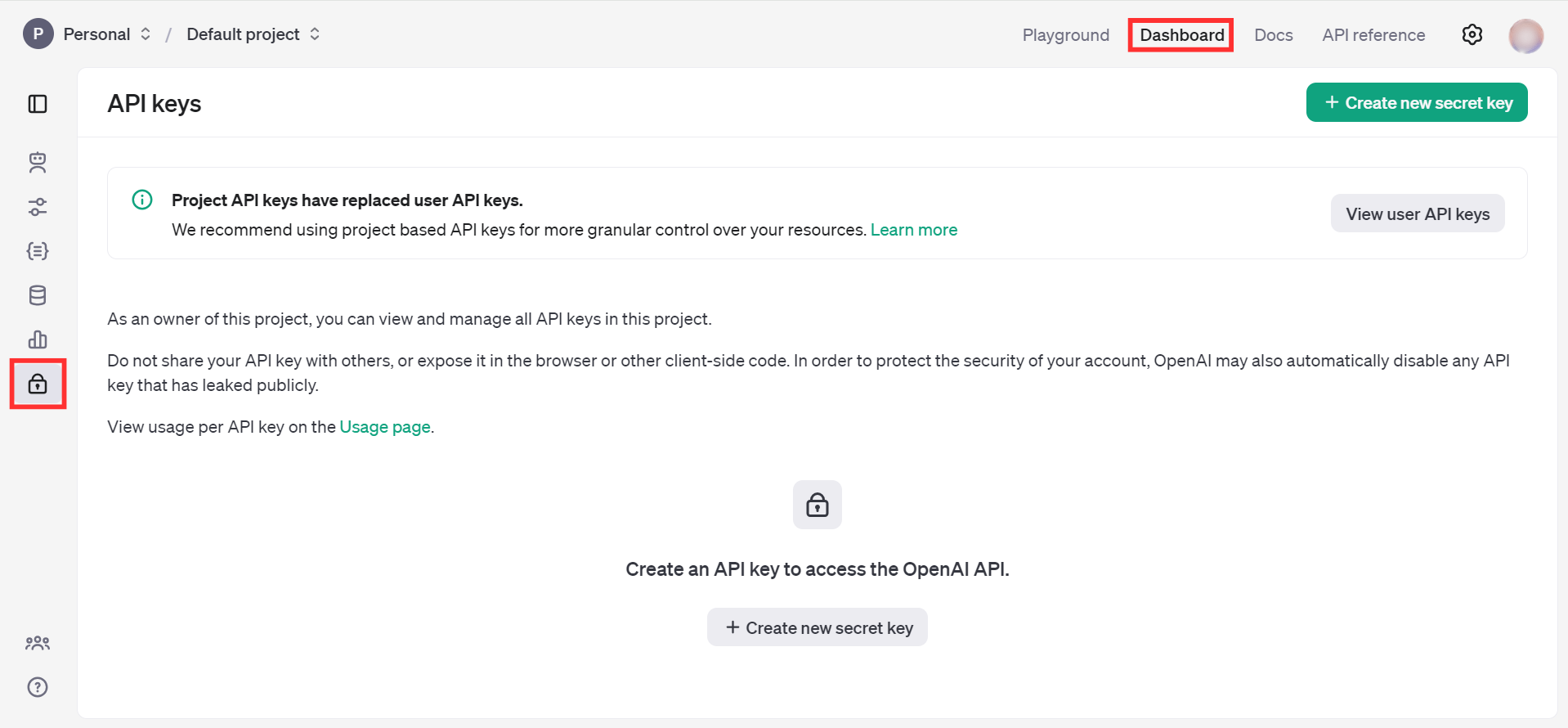
-
Click on the "Create new secret key" button.
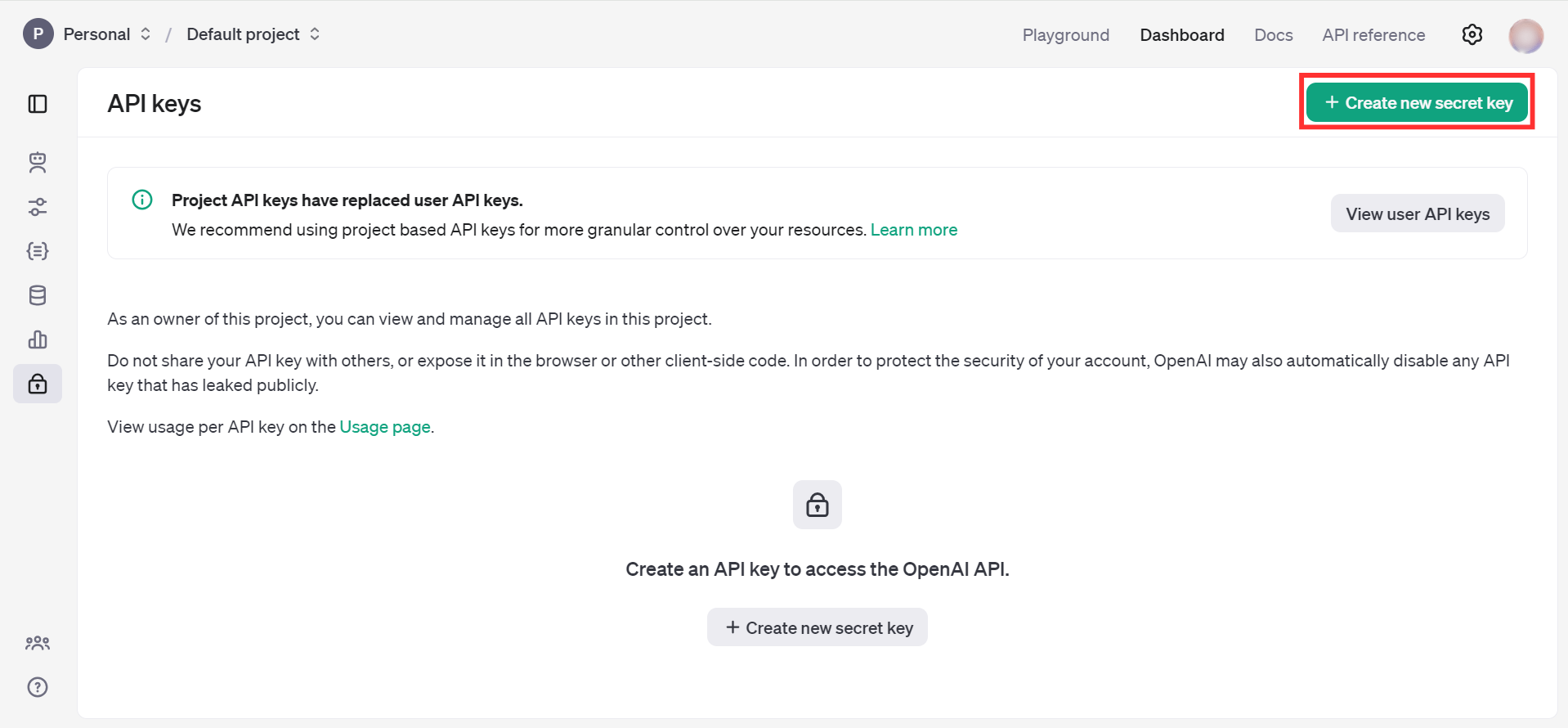
-
Fill the details and click on Create secret key.
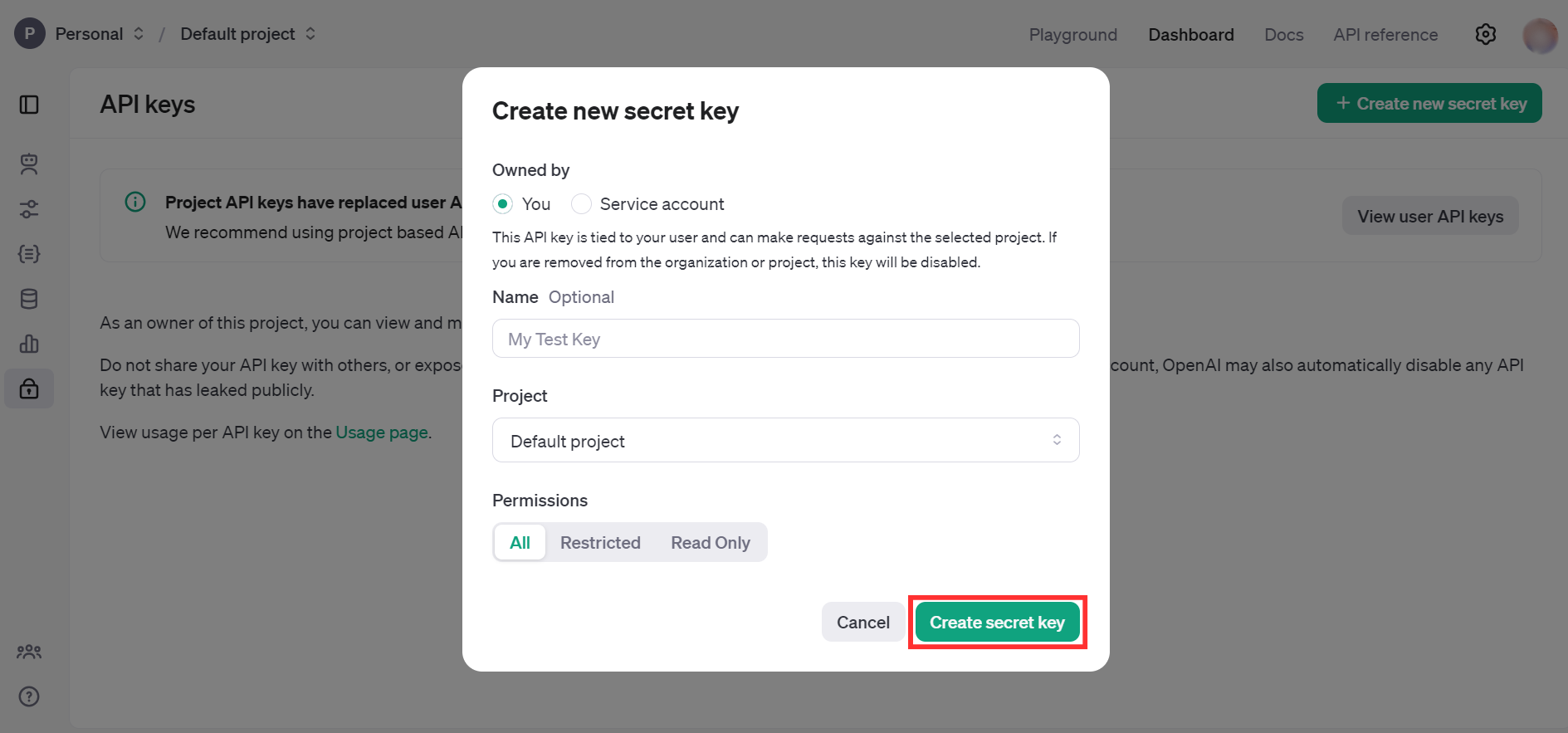
-
Store the API key securely to use in your application.
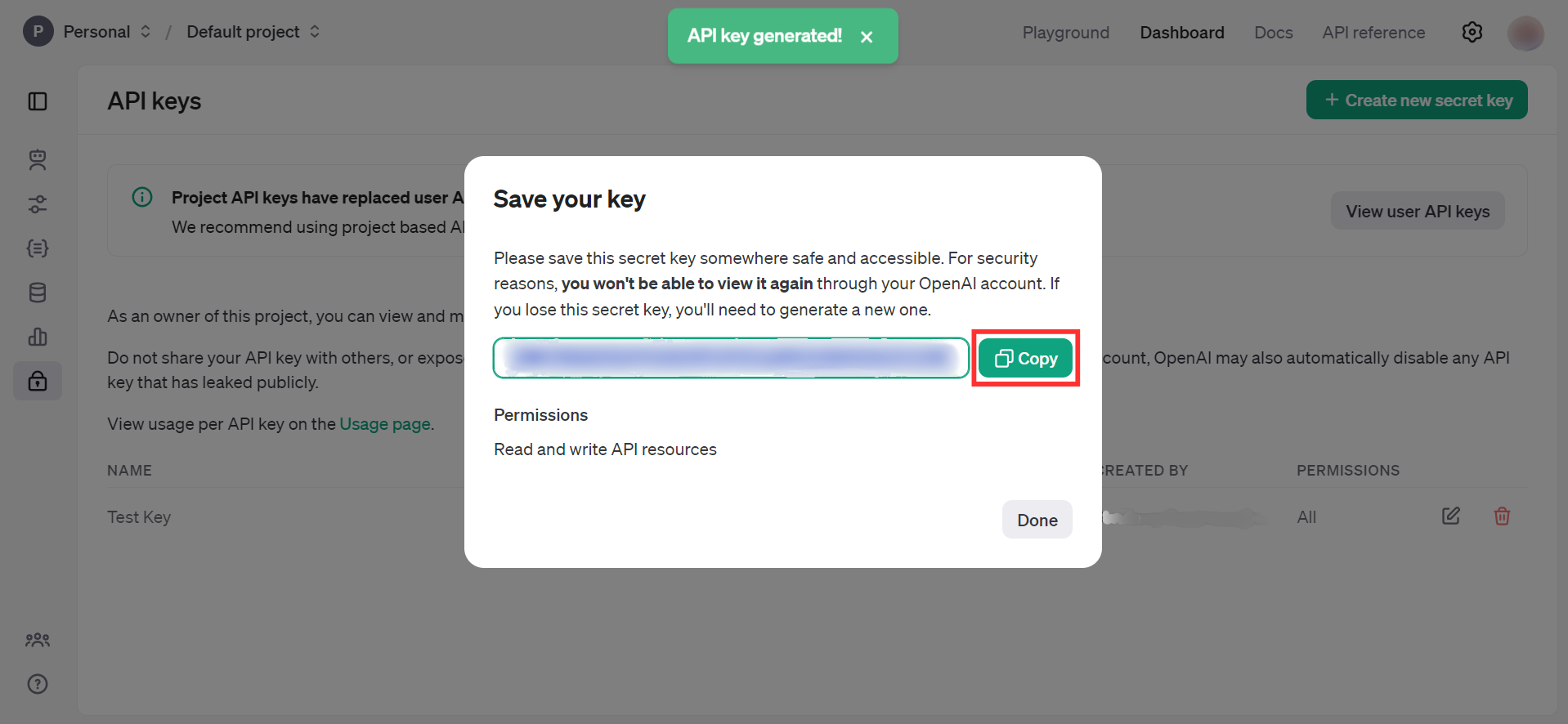
Quickstart
To use the OpenAI Responses connector in your Ballerina application, update the .bal file as follows:
Step 1: Import the module
Import the ballerinax/openai.responses module.
import ballerinax/openai.responses;
Step 2: Create a new connector instance
Create a responses:Client with the obtained API Key and initialize the connector.
configurable string token = ?; final responses:Client openAIResponses = check new ({ auth: { token } });
Step 3: Invoke the connector operation
Now, you can utilize the available connector operation.
Create a model response
public function main() returns error? { responses:CreateResponse request = { model: "gpt-4o-mini", input: "What is Ballerina programming language?" }; responses:Response response = check openAIResponses->/responses.post(request); }
Step 4: Run the Ballerina application
bal run
Examples
The OpenAI Responses connector provides practical examples illustrating usage in various scenarios. Explore these examples, covering the following use cases:
- CLI assistant - Execute the user's task description by generating and running the appropriate command in the command line interface of their selected operating system.
- Image to markdown document converter - Generate detailed markdown documentation based on the image content.
Clients
openai.responses: Client
The OpenAI REST API. Please see https://platform.openai.com/docs/api-reference for more details.
Constructor
Gets invoked to initialize the connector.
init (ConnectionConfig config, string serviceUrl)- config ConnectionConfig - The configurations to be used when initializing the
connector
- serviceUrl string "https://api.openai.com/v1" - URL of the target service
post responses
function post responses(CreateResponse payload, map<string|string[]> headers) returns Response|errorCreates a model response. Provide text or image inputs to generate text or JSON outputs. Have the model call your own custom code or use built-in tools like web search or file search to use your own data as input for the model's response.
Parameters
- payload CreateResponse -
Records
openai.responses: ApplyPatchCreateFileOperation
Instruction describing how to create a file via the apply_patch tool.
Fields
- 'type "create_file" (default "create_file") - Create a new file with the provided diff.
- path string - Path of the file to create.
- diff string - Diff to apply.
openai.responses: ApplyPatchCreateFileOperationParam
Instruction for creating a new file via the apply_patch tool.
Fields
- 'type "create_file" (default "create_file") - The operation type. Always
create_file.
- path string - Path of the file to create relative to the workspace root.
- diff string - Unified diff content to apply when creating the file.
openai.responses: ApplyPatchDeleteFileOperation
Instruction describing how to delete a file via the apply_patch tool.
Fields
- 'type "delete_file" (default "delete_file") - Delete the specified file.
- path string - Path of the file to delete.
openai.responses: ApplyPatchDeleteFileOperationParam
Instruction for deleting an existing file via the apply_patch tool.
Fields
- 'type "delete_file" (default "delete_file") - The operation type. Always
delete_file.
- path string - Path of the file to delete relative to the workspace root.
openai.responses: ApplyPatchToolCall
A tool call that applies file diffs by creating, deleting, or updating files.
Fields
- 'type "apply_patch_call" (default "apply_patch_call") - The type of the item. Always
apply_patch_call.
- id string - The unique ID of the apply patch tool call. Populated when this item is returned via API.
- call_id string - The unique ID of the apply patch tool call generated by the model.
- status ApplyPatchCallStatus -
- operation ApplyPatchCreateFileOperation|ApplyPatchDeleteFileOperation|ApplyPatchUpdateFileOperation - One of the create_file, delete_file, or update_file operations applied via apply_patch.
- created_by? string - The ID of the entity that created this tool call.
openai.responses: ApplyPatchToolCallItemParam
A tool call representing a request to create, delete, or update files using diff patches.
Fields
- 'type "apply_patch_call" (default "apply_patch_call") - The type of the item. Always
apply_patch_call.
- id? string? - The unique ID of the apply patch tool call. Populated when this item is returned via API.
- call_id string - The unique ID of the apply patch tool call generated by the model.
- status ApplyPatchCallStatusParam - Status values reported for apply_patch tool calls.
- operation ApplyPatchOperationParam - One of the create_file, delete_file, or update_file operations supplied to the apply_patch tool.
openai.responses: ApplyPatchToolCallOutput
The output emitted by an apply patch tool call.
Fields
- 'type "apply_patch_call_output" (default "apply_patch_call_output") - The type of the item. Always
apply_patch_call_output.
- id string - The unique ID of the apply patch tool call output. Populated when this item is returned via API.
- call_id string - The unique ID of the apply patch tool call generated by the model.
- status ApplyPatchCallOutputStatus -
- output? string? - Optional textual output returned by the apply patch tool.
- created_by? string - The ID of the entity that created this tool call output.
openai.responses: ApplyPatchToolCallOutputItemParam
The streamed output emitted by an apply patch tool call.
Fields
- 'type "apply_patch_call_output" (default "apply_patch_call_output") - The type of the item. Always
apply_patch_call_output.
- id? string? - The unique ID of the apply patch tool call output. Populated when this item is returned via API.
- call_id string - The unique ID of the apply patch tool call generated by the model.
- status ApplyPatchCallOutputStatusParam - Outcome values reported for apply_patch tool call outputs.
- output? string? - Optional human-readable log text from the apply patch tool (e.g., patch results or errors).
openai.responses: ApplyPatchToolParam
Allows the assistant to create, delete, or update files using unified diffs.
Fields
- 'type "apply_patch" (default "apply_patch") - The type of the tool. Always
apply_patch.
openai.responses: ApplyPatchUpdateFileOperation
Instruction describing how to update a file via the apply_patch tool.
Fields
- 'type "update_file" (default "update_file") - Update an existing file with the provided diff.
- path string - Path of the file to update.
- diff string - Diff to apply.
openai.responses: ApplyPatchUpdateFileOperationParam
Instruction for updating an existing file via the apply_patch tool.
Fields
- 'type "update_file" (default "update_file") - The operation type. Always
update_file.
- path string - Path of the file to update relative to the workspace root.
- diff string - Unified diff content to apply to the existing file.
openai.responses: ApproximateLocation
Fields
- 'type "approximate" (default "approximate") - The type of location approximation. Always
approximate.
- country? string? - The two-letter ISO country code of the user, e.g.
US.
- region? string? - Free text input for the region of the user, e.g.
California.
- city? string? - Free text input for the city of the user, e.g.
San Francisco.
- timezone? string? - The IANA timezone of the user, e.g.
America/Los_Angeles.
openai.responses: AutoCodeInterpreterToolParam
Configuration for a code interpreter container. Optionally specify the IDs of the files to run the code on.
Fields
- 'type "auto" (default "auto") - Always
auto.
- file_ids? string[] - An optional list of uploaded files to make available to your code.
- memory_limit? ContainerMemoryLimit - The memory limit for the code interpreter container.
- network_policy? ContainerNetworkPolicyDisabledParam|ContainerNetworkPolicyAllowlistParam - Network access policy for the container.
openai.responses: ClickParam
A click action.
Fields
- 'type "click" (default "click") - Specifies the event type. For a click action, this property is always
click.
- x int - The x-coordinate where the click occurred.
- y int - The y-coordinate where the click occurred.
- keys? string[]? - The keys being held while clicking.
openai.responses: CodeInterpreterOutputImage
The image output from the code interpreter.
Fields
- 'type "image" (default "image") - The type of the output. Always
image.
- url string - The URL of the image output from the code interpreter.
openai.responses: CodeInterpreterOutputLogs
The logs output from the code interpreter.
Fields
- 'type "logs" (default "logs") - The type of the output. Always
logs.
- logs string - The logs output from the code interpreter.
openai.responses: CodeInterpreterTool
A tool that runs Python code to help generate a response to a prompt.
Fields
- 'type "code_interpreter" - The type of the code interpreter tool. Always
code_interpreter.
- container string|AutoCodeInterpreterToolParam - The code interpreter container. Can be a container ID or an object that
specifies uploaded file IDs to make available to your code, along with an
optional
memory_limitsetting.
openai.responses: CodeInterpreterToolCall
A tool call to run code.
Fields
- 'type "code_interpreter_call" (default "code_interpreter_call") - The type of the code interpreter tool call. Always
code_interpreter_call.
- id string - The unique ID of the code interpreter tool call.
- status "in_progress"|"completed"|"incomplete"|"interpreting"|"failed" - The status of the code interpreter tool call. Valid values are
in_progress,completed,incomplete,interpreting, andfailed.
- container_id string - The ID of the container used to run the code.
- code string? - The code to run, or null if not available.
- outputs (CodeInterpreterOutputLogs|CodeInterpreterOutputImage)[]? - The outputs generated by the code interpreter, such as logs or images. Can be null if no outputs are available.
openai.responses: CompactionBody
A compaction item generated by the v1/responses/compact API.
Fields
- 'type "compaction" (default "compaction") - The type of the item. Always
compaction.
- id string - The unique ID of the compaction item.
- encrypted_content string - The encrypted content that was produced by compaction.
- created_by? string - The identifier of the actor that created the item.
openai.responses: CompactionSummaryItemParam
A compaction item generated by the v1/responses/compact API.
Fields
- id? string? - The ID of the compaction item.
- 'type "compaction" (default "compaction") - The type of the item. Always
compaction.
- encrypted_content string - The encrypted content of the compaction summary.
openai.responses: ComparisonFilter
A filter used to compare a specified attribute key to a given value using a defined comparison operation.
Fields
- 'type "eq"|"ne"|"gt"|"gte"|"lt"|"lte"|"in"|"nin" (default "eq") - Specifies the comparison operator:
eq,ne,gt,gte,lt,lte,in,nin.eq: equalsne: not equalgt: greater thangte: greater than or equallt: less thanlte: less than or equalin: innin: not in
- 'key string - The key to compare against the value.
openai.responses: CompoundFilter
Combine multiple filters using and or or.
Fields
- 'type "and"|"or" - Type of operation:
andoror.
- filters (ComparisonFilter|CompoundFilter)[] - Array of filters to combine. Items can be
ComparisonFilterorCompoundFilter.
openai.responses: ComputerCallOutputItemParam
The output of a computer tool call.
Fields
- id? string? - The ID of the computer tool call output.
- call_id string - The ID of the computer tool call that produced the output.
- 'type "computer_call_output" (default "computer_call_output") - The type of the computer tool call output. Always
computer_call_output.
- output ComputerScreenshotImage - A computer screenshot image used with the computer use tool.
- acknowledged_safety_checks? ComputerCallSafetyCheckParam[]? - The safety checks reported by the API that have been acknowledged by the developer.
- status? FunctionCallItemStatus - The status of the message input. One of
in_progress,completed, orincomplete. Populated when input items are returned via API.
openai.responses: ComputerCallSafetyCheckParam
A pending safety check for the computer call.
Fields
- id string - The ID of the pending safety check.
- code? string? - The type of the pending safety check.
- message? string? - Details about the pending safety check.
openai.responses: ComputerScreenshotImage
A computer screenshot image used with the computer use tool.
Fields
- 'type "computer_screenshot" (default "computer_screenshot") - Specifies the event type. For a computer screenshot, this property is
always set to
computer_screenshot.
- image_url? string - The URL of the screenshot image.
- file_id? string - The identifier of an uploaded file that contains the screenshot.
openai.responses: ComputerTool
A tool that controls a virtual computer. Learn more about the computer tool.
Fields
- 'type "computer" (default "computer") - The type of the computer tool. Always
computer.
openai.responses: ComputerToolCall
A tool call to a computer use tool. See the computer use guide for more information.
Fields
- 'type "computer_call" (default "computer_call") - The type of the computer call. Always
computer_call.
- id string - The unique ID of the computer call.
- call_id string - An identifier used when responding to the tool call with output.
- action? ComputerAction -
- actions? ComputerActionList - Flattened batched actions for
computer_use. Each action includes antypediscriminator and action-specific fields.
- pending_safety_checks ComputerCallSafetyCheckParam[] - The pending safety checks for the computer call.
- status "in_progress"|"completed"|"incomplete" - The status of the item. One of
in_progress,completed, orincomplete. Populated when items are returned via API.
openai.responses: ComputerToolCallOutput
The output of a computer tool call.
Fields
- 'type "computer_call_output" (default "computer_call_output") - The type of the computer tool call output. Always
computer_call_output.
- id? string - The ID of the computer tool call output.
- call_id string - The ID of the computer tool call that produced the output.
- acknowledged_safety_checks? ComputerCallSafetyCheckParam[] - The safety checks reported by the API that have been acknowledged by the developer.
- output ComputerScreenshotImage - A computer screenshot image used with the computer use tool.
- status? "in_progress"|"completed"|"incomplete"|"failed" - The status of the message input. One of
in_progress,completed, orincomplete. Populated when input items are returned via API.
openai.responses: ComputerToolCallOutputResource
Fields
- Fields Included from *ComputerToolCallOutput
- type "computer_call_output"
- id string
- call_id string
- acknowledged_safety_checks ComputerCallSafetyCheckParam[]
- output ComputerScreenshotImage
- status "in_progress"|"completed"|"incomplete"|"failed"
- anydata...
- id string - The unique ID of the computer call tool output.
- status? ComputerCallOutputStatus -
- created_by? string - The identifier of the actor that created the item.
openai.responses: ComputerUsePreviewTool
A tool that controls a virtual computer. Learn more about the computer tool.
Fields
- 'type "computer_use_preview" (default "computer_use_preview") - The type of the computer use tool. Always
computer_use_preview.
- environment ComputerEnvironment -
- display_width int - The width of the computer display.
- display_height int - The height of the computer display.
openai.responses: ConnectionConfig
Provides a set of configurations for controlling the behaviours when communicating with a remote HTTP endpoint.
Fields
- auth BearerTokenConfig - Configurations related to client authentication
- httpVersion HttpVersion(default http:HTTP_2_0) - The HTTP version understood by the client
- http1Settings ClientHttp1Settings(default {}) - Configurations related to HTTP/1.x protocol
- http2Settings ClientHttp2Settings(default {}) - Configurations related to HTTP/2 protocol
- timeout decimal(default 30) - The maximum time to wait (in seconds) for a response before closing the connection
- forwarded string(default "disable") - The choice of setting
forwarded/x-forwardedheader
- followRedirects? FollowRedirects - Configurations associated with Redirection
- poolConfig? PoolConfiguration - Configurations associated with request pooling
- cache CacheConfig(default {}) - HTTP caching related configurations
- compression Compression(default http:COMPRESSION_AUTO) - Specifies the way of handling compression (
accept-encoding) header
- circuitBreaker? CircuitBreakerConfig - Configurations associated with the behaviour of the Circuit Breaker
- retryConfig? RetryConfig - Configurations associated with retrying
- responseLimits ResponseLimitConfigs(default {}) - Configurations associated with inbound response size limits
- secureSocket? ClientSecureSocket - SSL/TLS-related options
- proxy? ProxyConfig - Proxy server related options
- socketConfig ClientSocketConfig(default {}) - Provides settings related to client socket configuration
- validation boolean(default true) - Enables the inbound payload validation functionality which provided by the constraint package. Enabled by default
- laxDataBinding boolean(default true) - Enables relaxed data binding on the client side. When enabled,
nilvalues are treated as optional, and absent fields are handled asnilabletypes. Enabled by default.
openai.responses: ContainerAutoParam
Fields
- 'type "container_auto" (default "container_auto") - Automatically creates a container for this request
- file_ids? string[] - An optional list of uploaded files to make available to your code.
- memory_limit? ContainerMemoryLimit - The memory limit for the container.
- network_policy? ContainerNetworkPolicyDisabledParam|ContainerNetworkPolicyAllowlistParam - Network access policy for the container.
- skills? (SkillReferenceParam|InlineSkillParam)[] - An optional list of skills referenced by id or inline data.
openai.responses: ContainerFileCitationBody
A citation for a container file used to generate a model response.
Fields
- 'type "container_file_citation" (default "container_file_citation") - The type of the container file citation. Always
container_file_citation.
- container_id string - The ID of the container file.
- file_id string - The ID of the file.
- start_index int - The index of the first character of the container file citation in the message.
- end_index int - The index of the last character of the container file citation in the message.
- filename string - The filename of the container file cited.
openai.responses: ContainerNetworkPolicyAllowlistParam
Fields
- 'type "allowlist" (default "allowlist") - Allow outbound network access only to specified domains. Always
allowlist.
- allowed_domains string[] - A list of allowed domains when type is
allowlist.
- domain_secrets? ContainerNetworkPolicyDomainSecretParam[] - Optional domain-scoped secrets for allowlisted domains.
openai.responses: ContainerNetworkPolicyDisabledParam
Fields
- 'type "disabled" (default "disabled") - Disable outbound network access. Always
disabled.
openai.responses: ContainerNetworkPolicyDomainSecretParam
Fields
- domain string - The domain associated with the secret.
- name string - The name of the secret to inject for the domain.
- value string - The secret value to inject for the domain.
openai.responses: ContainerReferenceParam
Fields
- 'type "container_reference" (default "container_reference") - References a container created with the /v1/containers endpoint
- container_id string - The ID of the referenced container.
openai.responses: ContainerReferenceResource
Represents a container created with /v1/containers.
Fields
- 'type "container_reference" (default "container_reference") - The environment type. Always
container_reference.
- container_id string -
openai.responses: ContextManagementParam
Fields
- 'type string - The context management entry type. Currently only 'compaction' is supported.
- compact_threshold? int? - Token threshold at which compaction should be triggered for this entry.
openai.responses: Conversation2
The conversation that this response belonged to. Input items and output items from this response were automatically added to this conversation.
Fields
- id string - The unique ID of the conversation that this response was associated with.
openai.responses: ConversationParam2
The conversation that this response belongs to.
Fields
- id string - The unique ID of the conversation.
openai.responses: CoordParam
An x/y coordinate pair, e.g. { x: 100, y: 200 }.
Fields
- x int - The x-coordinate.
- y int - The y-coordinate.
openai.responses: CreateModelResponseProperties
Fields
- Fields Included from *ModelResponseProperties
- top_logprobs? int? - An integer between 0 and 20 specifying the maximum number of most likely tokens to return at each token position, each with an associated log probability. In some cases, the number of returned tokens may be fewer than requested.
openai.responses: CreateResponse
Fields
- Fields Included from *CreateModelResponseProperties
- Fields Included from *ResponseProperties
- previous_response_id string|()
- model ModelIdsResponses
- reasoning Reasoning
- background boolean|()
- max_tool_calls int|()
- text ResponseTextParam
- tools ToolsArray
- tool_choice ToolChoiceParam
- prompt Prompt|()
- truncation "disabled"|()|"auto"
- anydata...
- input? InputParam - Text, image, or file inputs to the model, used to generate a response. Learn more:
- include? IncludeEnum[]? - Specify additional output data to include in the model response. Currently supported values are:
web_search_call.action.sources: Include the sources of the web search tool call.code_interpreter_call.outputs: Includes the outputs of python code execution in code interpreter tool call items.computer_call_output.output.image_url: Include image urls from the computer call output.file_search_call.results: Include the search results of the file search tool call.message.input_image.image_url: Include image urls from the input message.message.output_text.logprobs: Include logprobs with assistant messages.reasoning.encrypted_content: Includes an encrypted version of reasoning tokens in reasoning item outputs. This enables reasoning items to be used in multi-turn conversations when using the Responses API statelessly (like when thestoreparameter is set tofalse, or when an organization is enrolled in the zero data retention program).
- parallel_tool_calls? boolean? - Whether to allow the model to run tool calls in parallel.
- store? boolean? - Whether to store the generated model response for later retrieval via API.
- instructions? string? - A system (or developer) message inserted into the model's context.
When using along with
previous_response_id, the instructions from a previous response will not be carried over to the next response. This makes it simple to swap out system (or developer) messages in new responses.
- 'stream? boolean? - If set to true, the model response data will be streamed to the client as it is generated using server-sent events. See the Streaming section below for more information.
- stream_options? ResponseStreamOptions? - Options for streaming responses. Only set this when you set
stream: true.
- conversation? ConversationParam -
- context_management? ContextManagementParam[]? - Context management configuration for this request.
- max_output_tokens? int? - An upper bound for the number of tokens that can be generated for a response, including visible output tokens and reasoning tokens.
openai.responses: CustomGrammarFormatParam
A grammar defined by the user.
Fields
- 'type "grammar" (default "grammar") - Grammar format. Always
grammar.
- syntax GrammarSyntax1 -
- definition string - The grammar definition.
openai.responses: CustomTextFormatParam
Unconstrained free-form text.
Fields
- 'type "text" (default "text") - Unconstrained text format. Always
text.
openai.responses: CustomToolCall
A call to a custom tool created by the model.
Fields
- 'type "custom_tool_call" - The type of the custom tool call. Always
custom_tool_call.
- id? string - The unique ID of the custom tool call in the OpenAI platform.
- call_id string - An identifier used to map this custom tool call to a tool call output.
- namespace? string - The namespace of the custom tool being called.
- name string - The name of the custom tool being called.
- input string - The input for the custom tool call generated by the model.
openai.responses: CustomToolCallOutput
The output of a custom tool call from your code, being sent back to the model.
Fields
- 'type "custom_tool_call_output" - The type of the custom tool call output. Always
custom_tool_call_output.
- id? string - The unique ID of the custom tool call output in the OpenAI platform.
- call_id string - The call ID, used to map this custom tool call output to a custom tool call.
- output string|FunctionAndCustomToolCallOutput[] - The output from the custom tool call generated by your code. Can be a string or an list of output content.
openai.responses: CustomToolCallOutputResource
Fields
- Fields Included from *CustomToolCallOutput
- type "custom_tool_call_output"
- id string
- call_id string
- output string|FunctionAndCustomToolCallOutput[]
- anydata...
- id string - The unique ID of the custom tool call output item.
- status FunctionCallOutputStatusEnum -
- created_by? string - The identifier of the actor that created the item.
openai.responses: CustomToolParam
A custom tool that processes input using a specified format. Learn more about custom tools
Fields
- 'type "custom" (default "custom") - The type of the custom tool. Always
custom.
- name string - The name of the custom tool, used to identify it in tool calls.
- description? string - Optional description of the custom tool, used to provide more context.
- format? CustomTextFormatParam|CustomGrammarFormatParam - The input format for the custom tool. Default is unconstrained text.
- defer_loading? boolean - Whether this tool should be deferred and discovered via tool search.
openai.responses: DoubleClickAction
A double click action.
Fields
- 'type "double_click" (default "double_click") - Specifies the event type. For a double click action, this property is always set to
double_click.
- x int - The x-coordinate where the double click occurred.
- y int - The y-coordinate where the double click occurred.
- keys string[]? - The keys being held while double-clicking.
openai.responses: DragParam
A drag action.
Fields
- 'type "drag" (default "drag") - Specifies the event type. For a drag action, this property is always set to
drag.
- path CoordParam[] - An array of coordinates representing the path of the drag action. Coordinates will appear as an array of objects, eg
[
  { x: 100, y: 200 },
  { x: 200, y: 300 }
]
- keys? string[]? - The keys being held while dragging the mouse.
openai.responses: EasyInputMessage
A message input to the model with a role indicating instruction following
hierarchy. Instructions given with the developer or system role take
precedence over instructions given with the user role. Messages with the
assistant role are presumed to have been generated by the model in previous
interactions.
Fields
- role "user"|"assistant"|"system"|"developer" - The role of the message input. One of
user,assistant,system, ordeveloper.
- content string|InputMessageContentList - Text, image, or audio input to the model, used to generate a response. Can also contain previous assistant responses.
- phase? MessagePhase -
- 'type? "message" - The type of the message input. Always
message.
openai.responses: EmptyModelParam
openai.responses: FileCitationBody
A citation to a file.
Fields
- 'type "file_citation" (default "file_citation") - The type of the file citation. Always
file_citation.
- file_id string - The ID of the file.
- index int - The index of the file in the list of files.
- filename string - The filename of the file cited.
openai.responses: FilePath
A path to a file.
Fields
- 'type "file_path" - The type of the file path. Always
file_path.
- file_id string - The ID of the file.
- index int - The index of the file in the list of files.
openai.responses: FileSearchTool
A tool that searches for relevant content from uploaded files. Learn more about the file search tool.
Fields
- 'type "file_search" (default "file_search") - The type of the file search tool. Always
file_search.
- vector_store_ids string[] - The IDs of the vector stores to search.
- max_num_results? int - The maximum number of results to return. This number should be between 1 and 50 inclusive.
- ranking_options? RankingOptions -
- filters? Filters - A filter to apply.
openai.responses: FileSearchToolCall
The results of a file search tool call. See the file search guide for more information.
Fields
- id string - The unique ID of the file search tool call.
- 'type "file_search_call" - The type of the file search tool call. Always
file_search_call.
- status "in_progress"|"searching"|"completed"|"incomplete"|"failed" - The status of the file search tool call. One of
in_progress,searching,incompleteorfailed,
- queries string[] - The queries used to search for files.
- results? FileSearchToolCallResults[]? - The results of the file search tool call.
openai.responses: FileSearchToolCallResults
Fields
- file_id? string - The unique ID of the file.
- text? string - The text that was retrieved from the file.
- filename? string - The name of the file.
- attributes? VectorStoreFileAttributes? - Set of 16 key-value pairs that can be attached to an object. This can be useful for storing additional information about the object in a structured format, and querying for objects via API or the dashboard. Keys are strings with a maximum length of 64 characters. Values are strings with a maximum length of 512 characters, booleans, or numbers.
- score? float - The relevance score of the file - a value between 0 and 1.
openai.responses: FunctionCallOutputItemParam
The output of a function tool call.
Fields
- id? string? - The unique ID of the function tool call output. Populated when this item is returned via API.
- call_id string - The unique ID of the function tool call generated by the model.
- 'type "function_call_output" (default "function_call_output") - The type of the function tool call output. Always
function_call_output.
- output string|(InputTextContentParam|InputImageContentParamAutoParam|InputFileContentParam)[] - Text, image, or file output of the function tool call.
- status? FunctionCallItemStatus - The status of the item. One of
in_progress,completed, orincomplete. Populated when items are returned via API.
openai.responses: FunctionShellAction
Execute a shell command.
Fields
- commands string[] -
- timeout_ms int? - Optional timeout in milliseconds for the commands.
- max_output_length int? - Optional maximum number of characters to return from each command.
openai.responses: FunctionShellActionParam
Commands and limits describing how to run the shell tool call.
Fields
- commands string[] - Ordered shell commands for the execution environment to run.
- timeout_ms? int? - Maximum wall-clock time in milliseconds to allow the shell commands to run.
- max_output_length? int? - Maximum number of UTF-8 characters to capture from combined stdout and stderr output.
openai.responses: FunctionShellCall
A tool call that executes one or more shell commands in a managed environment.
Fields
- 'type "shell_call" (default "shell_call") - The type of the item. Always
shell_call.
- id string - The unique ID of the shell tool call. Populated when this item is returned via API.
- call_id string - The unique ID of the shell tool call generated by the model.
- action FunctionShellAction - Execute a shell command.
- status FunctionShellCallStatus -
- environment LocalEnvironmentResource|ContainerReferenceResource? -
- created_by? string - The ID of the entity that created this tool call.
openai.responses: FunctionShellCallItemParam
A tool representing a request to execute one or more shell commands.
Fields
- id? string? - The unique ID of the shell tool call. Populated when this item is returned via API.
- call_id string - The unique ID of the shell tool call generated by the model.
- 'type "shell_call" (default "shell_call") - The type of the item. Always
shell_call.
- action FunctionShellActionParam - Commands and limits describing how to run the shell tool call.
- status? FunctionShellCallItemStatus - The status of the shell call. One of
in_progress,completed, orincomplete.
- environment? LocalEnvironmentParam|ContainerReferenceParam? - The environment to execute the shell commands in.
openai.responses: FunctionShellCallOutput
The output of a shell tool call that was emitted.
Fields
- 'type "shell_call_output" (default "shell_call_output") - The type of the shell call output. Always
shell_call_output.
- id string - The unique ID of the shell call output. Populated when this item is returned via API.
- call_id string - The unique ID of the shell tool call generated by the model.
- status FunctionShellCallOutputStatusEnum -
- output FunctionShellCallOutputContent[] - An array of shell call output contents
- max_output_length int? - The maximum length of the shell command output. This is generated by the model and should be passed back with the raw output.
- created_by? string - The identifier of the actor that created the item.
openai.responses: FunctionShellCallOutputContent
The content of a shell tool call output that was emitted.
Fields
- stdout string - The standard output that was captured.
- stderr string - The standard error output that was captured.
- outcome FunctionShellCallOutputTimeoutOutcome|FunctionShellCallOutputExitOutcome - Represents either an exit outcome (with an exit code) or a timeout outcome for a shell call output chunk.
- created_by? string - The identifier of the actor that created the item.
openai.responses: FunctionShellCallOutputContentParam
Captured stdout and stderr for a portion of a shell tool call output.
Fields
- stdout string - Captured stdout output for the shell call.
- stderr string - Captured stderr output for the shell call.
- outcome FunctionShellCallOutputOutcomeParam - The exit or timeout outcome associated with this shell call.
openai.responses: FunctionShellCallOutputExitOutcome
Indicates that the shell commands finished and returned an exit code.
Fields
- 'type "exit" (default "exit") - The outcome type. Always
exit.
- exit_code int - Exit code from the shell process.
openai.responses: FunctionShellCallOutputExitOutcomeParam
Indicates that the shell commands finished and returned an exit code.
Fields
- 'type "exit" (default "exit") - The outcome type. Always
exit.
- exit_code int - The exit code returned by the shell process.
openai.responses: FunctionShellCallOutputItemParam
The streamed output items emitted by a shell tool call.
Fields
- id? string? - The unique ID of the shell tool call output. Populated when this item is returned via API.
- call_id string - The unique ID of the shell tool call generated by the model.
- 'type "shell_call_output" (default "shell_call_output") - The type of the item. Always
shell_call_output.
- output FunctionShellCallOutputContentParam[] - Captured chunks of stdout and stderr output, along with their associated outcomes.
- status? FunctionShellCallItemStatus - The status of the shell call output.
- max_output_length? int? - The maximum number of UTF-8 characters captured for this shell call's combined output.
openai.responses: FunctionShellCallOutputTimeoutOutcome
Indicates that the shell call exceeded its configured time limit.
Fields
- 'type "timeout" (default "timeout") - The outcome type. Always
timeout.
openai.responses: FunctionShellCallOutputTimeoutOutcomeParam
Indicates that the shell call exceeded its configured time limit.
Fields
- 'type "timeout" (default "timeout") - The outcome type. Always
timeout.
openai.responses: FunctionShellToolParam
A tool that allows the model to execute shell commands.
Fields
- 'type "shell" (default "shell") - The type of the shell tool. Always
shell.
- environment? ContainerAutoParam|LocalEnvironmentParam|ContainerReferenceParam? -
openai.responses: FunctionTool
Defines a function in your own code the model can choose to call. Learn more about function calling.
Fields
- 'type "function" (default "function") - The type of the function tool. Always
function.
- name string - The name of the function to call.
- description? string? - A description of the function. Used by the model to determine whether or not to call the function.
- parameters record {}? - A JSON schema object describing the parameters of the function.
- strict boolean? - Whether to enforce strict parameter validation. Default
true.
- defer_loading? boolean - Whether this function is deferred and loaded via tool search.
openai.responses: FunctionToolCall
A tool call to run a function. See the function calling guide for more information.
Fields
- id? string - The unique ID of the function tool call.
- 'type "function_call" - The type of the function tool call. Always
function_call.
- call_id string - The unique ID of the function tool call generated by the model.
- namespace? string - The namespace of the function to run.
- name string - The name of the function to run.
- arguments string - A JSON string of the arguments to pass to the function.
- status? "in_progress"|"completed"|"incomplete" - The status of the item. One of
in_progress,completed, orincomplete. Populated when items are returned via API.
openai.responses: FunctionToolCallOutput
The output of a function tool call.
Fields
- id? string - The unique ID of the function tool call output. Populated when this item is returned via API.
- 'type "function_call_output" - The type of the function tool call output. Always
function_call_output.
- call_id string - The unique ID of the function tool call generated by the model.
- output string|FunctionAndCustomToolCallOutput[] - The output from the function call generated by your code. Can be a string or an list of output content.
- status? "in_progress"|"completed"|"incomplete" - The status of the item. One of
in_progress,completed, orincomplete. Populated when items are returned via API.
openai.responses: FunctionToolCallOutputResource
Fields
- Fields Included from *FunctionToolCallOutput
- id string
- type "function_call_output"
- call_id string
- output string|FunctionAndCustomToolCallOutput[]
- status "in_progress"|"completed"|"incomplete"
- anydata...
- id string - The unique ID of the function call tool output.
- status FunctionCallOutputStatusEnum -
- created_by? string - The identifier of the actor that created the item.
openai.responses: FunctionToolParam
Fields
- name string -
- description? string? -
- parameters? EmptyModelParam -
- strict? boolean? -
- 'type "function" (default "function") -
- defer_loading? boolean - Whether this function should be deferred and discovered via tool search.
openai.responses: HybridSearchOptions
Fields
- embedding_weight decimal - The weight of the embedding in the reciprocal ranking fusion.
- text_weight decimal - The weight of the text in the reciprocal ranking fusion.
openai.responses: ImageGenTool
A tool that generates images using the GPT image models.
Fields
- 'type "image_generation" - The type of the image generation tool. Always
image_generation.
- model? string|"gpt-image-1"|"gpt-image-1-mini"|"gpt-image-1.5" -
- quality "low"|"medium"|"high"|"auto" (default "auto") - The quality of the generated image. One of
low,medium,high, orauto. Default:auto.
- size string|"1024x1024"|"1024x1536"|"1536x1024"|"auto" (default "auto") - The size of the generated images. For
gpt-image-2andgpt-image-2-2026-04-21, arbitrary resolutions are supported asWIDTHxHEIGHTstrings, for example1536x864. Width and height must both be divisible by 16 and the requested aspect ratio must be between 1:3 and 3:1. Resolutions above2560x1440are experimental, and the maximum supported resolution is3840x2160. The requested size must also satisfy the model's current pixel and edge limits. The standard sizes1024x1024,1536x1024, and1024x1536are supported by the GPT image models;autois supported for models that allow automatic sizing. Fordall-e-2, use one of256x256,512x512, or1024x1024. Fordall-e-3, use one of1024x1024,1792x1024, or1024x1792.
- output_format "png"|"webp"|"jpeg" (default "png") - The output format of the generated image. One of
png,webp, orjpeg. Default:png.
- output_compression int(default 100) - Compression level for the output image. Default: 100.
- moderation "auto"|"low" (default "auto") - Moderation level for the generated image. Default:
auto.
- background "transparent"|"opaque"|"auto" (default "auto") - Background type for the generated image. One of
transparent,opaque, orauto. Default:auto.
- input_fidelity? InputFidelity -
- input_image_mask? ImageGenToolInputImageMask - Optional mask for inpainting. Contains
image_url(string, optional) andfile_id(string, optional).
- partial_images int(default 0) - Number of partial images to generate in streaming mode, from 0 (default value) to 3.
- action? ImageGenActionEnum -
openai.responses: ImageGenToolCall
An image generation request made by the model.
Fields
- 'type "image_generation_call" - The type of the image generation call. Always
image_generation_call.
- id string - The unique ID of the image generation call.
- status "in_progress"|"completed"|"generating"|"failed" - The status of the image generation call.
- result string? - The generated image encoded in base64.
openai.responses: ImageGenToolInputImageMask
Optional mask for inpainting. Contains image_url
(string, optional) and file_id (string, optional).
Fields
- image_url? string - Base64-encoded mask image.
- file_id? string - File ID for the mask image.
openai.responses: InlineSkillParam
Fields
- 'type "inline" (default "inline") - Defines an inline skill for this request.
- name string - The name of the skill.
- description string - The description of the skill.
- 'source InlineSkillSourceParam - Inline skill payload
openai.responses: InlineSkillSourceParam
Inline skill payload
Fields
- 'type "base64" (default "base64") - The type of the inline skill source. Must be
base64.
- media_type "application/zip" (default "application/zip") - The media type of the inline skill payload. Must be
application/zip.
- data string - Base64-encoded skill zip bundle.
openai.responses: InputFileContent
A file input to the model.
Fields
- 'type "input_file" (default "input_file") - The type of the input item. Always
input_file.
- file_id? string? - The ID of the file to be sent to the model.
- filename? string - The name of the file to be sent to the model.
- file_data? string - The content of the file to be sent to the model.
- file_url? string - The URL of the file to be sent to the model.
- detail? FileInputDetail -
openai.responses: InputFileContentParam
A file input to the model.
Fields
- 'type "input_file" (default "input_file") - The type of the input item. Always
input_file.
- file_id? string? - The ID of the file to be sent to the model.
- filename? string? - The name of the file to be sent to the model.
- file_data? string? - The base64-encoded data of the file to be sent to the model.
- file_url? string? - The URL of the file to be sent to the model.
- detail? FileDetailEnum -
openai.responses: InputImageContent
An image input to the model. Learn about image inputs.
Fields
- 'type "input_image" (default "input_image") - The type of the input item. Always
input_image.
- image_url? string? - The URL of the image to be sent to the model. A fully qualified URL or base64 encoded image in a data URL.
- file_id? string? - The ID of the file to be sent to the model.
- detail? ImageDetail -
openai.responses: InputImageContentParamAutoParam
An image input to the model. Learn about image inputs
Fields
- 'type "input_image" (default "input_image") - The type of the input item. Always
input_image.
- image_url? string? - The URL of the image to be sent to the model. A fully qualified URL or base64 encoded image in a data URL.
- file_id? string? - The ID of the file to be sent to the model.
- detail? DetailEnum - The detail level of the image to be sent to the model. One of
high,low,auto, ororiginal. Defaults toauto.
openai.responses: InputMessage
A message input to the model with a role indicating instruction following
hierarchy. Instructions given with the developer or system role take
precedence over instructions given with the user role.
Fields
- 'type? "message" - The type of the message input. Always set to
message.
- role "user"|"system"|"developer" - The role of the message input. One of
user,system, ordeveloper.
- status? "in_progress"|"completed"|"incomplete" - The status of item. One of
in_progress,completed, orincomplete. Populated when items are returned via API.
- content InputMessageContentList - A list of one or many input items to the model, containing different content types.
openai.responses: InputTextContent
A text input to the model.
Fields
- 'type "input_text" (default "input_text") - The type of the input item. Always
input_text.
- text string - The text input to the model.
openai.responses: InputTextContentParam
A text input to the model.
Fields
- 'type "input_text" (default "input_text") - The type of the input item. Always
input_text.
- text string - The text input to the model.
openai.responses: ItemReferenceParam
An internal identifier for an item to reference.
Fields
- 'type "item_reference"?(default "item_reference") - The type of item to reference. Always
item_reference.
- id string - The ID of the item to reference.
openai.responses: KeyPressAction
A collection of keypresses the model would like to perform.
Fields
- 'type "keypress" (default "keypress") - Specifies the event type. For a keypress action, this property is always set to
keypress.
- keys string[] - The combination of keys the model is requesting to be pressed. This is an array of strings, each representing a key.
openai.responses: LocalEnvironmentParam
Fields
- 'type "local" (default "local") - Use a local computer environment.
- skills? LocalSkillParam[] - An optional list of skills.
openai.responses: LocalEnvironmentResource
Represents the use of a local environment to perform shell actions.
Fields
- 'type "local" (default "local") - The environment type. Always
local.
openai.responses: LocalShellExecAction
Execute a shell command on the server.
Fields
- 'type "exec" (default "exec") - The type of the local shell action. Always
exec.
- command string[] - The command to run.
- timeout_ms? int? - Optional timeout in milliseconds for the command.
- working_directory? string? - Optional working directory to run the command in.
- env record { string... } - Environment variables to set for the command.
- user? string? - Optional user to run the command as.
openai.responses: LocalShellToolCall
A tool call to run a command on the local shell.
Fields
- 'type "local_shell_call" - The type of the local shell call. Always
local_shell_call.
- id string - The unique ID of the local shell call.
- call_id string - The unique ID of the local shell tool call generated by the model.
- action LocalShellExecAction - Execute a shell command on the server.
- status "in_progress"|"completed"|"incomplete" - The status of the local shell call.
openai.responses: LocalShellToolCallOutput
The output of a local shell tool call.
Fields
- 'type "local_shell_call_output" - The type of the local shell tool call output. Always
local_shell_call_output.
- id string - The unique ID of the local shell tool call generated by the model.
- output string - A JSON string of the output of the local shell tool call.
- status? "in_progress"|"completed"|"incomplete"? - The status of the item. One of
in_progress,completed, orincomplete.
openai.responses: LocalShellToolParam
A tool that allows the model to execute shell commands in a local environment.
Fields
- 'type "local_shell" (default "local_shell") - The type of the local shell tool. Always
local_shell.
openai.responses: LocalSkillParam
Fields
- name string - The name of the skill.
- description string - The description of the skill.
- path string - The path to the directory containing the skill.
openai.responses: LogProb
The log probability of a token.
Fields
- token string -
- logprob decimal -
- bytes int[] -
- top_logprobs TopLogProb[] -
openai.responses: MCPApprovalRequest
A request for human approval of a tool invocation.
Fields
- 'type "mcp_approval_request" - The type of the item. Always
mcp_approval_request.
- id string - The unique ID of the approval request.
- server_label string - The label of the MCP server making the request.
- name string - The name of the tool to run.
- arguments string - A JSON string of arguments for the tool.
openai.responses: MCPApprovalResponse
A response to an MCP approval request.
Fields
- 'type "mcp_approval_response" - The type of the item. Always
mcp_approval_response.
- id? string? - The unique ID of the approval response
- approval_request_id string - The ID of the approval request being answered.
- approve boolean - Whether the request was approved.
- reason? string? - Optional reason for the decision.
openai.responses: MCPApprovalResponseResource
A response to an MCP approval request.
Fields
- 'type "mcp_approval_response" - The type of the item. Always
mcp_approval_response.
- id string - The unique ID of the approval response
- approval_request_id string - The ID of the approval request being answered.
- approve boolean - Whether the request was approved.
- reason? string? - Optional reason for the decision.
openai.responses: MCPListTools
A list of tools available on an MCP server.
Fields
- 'type "mcp_list_tools" - The type of the item. Always
mcp_list_tools.
- id string - The unique ID of the list.
- server_label string - The label of the MCP server.
- tools MCPListToolsTool[] - The tools available on the server.
- 'error? string? - Error message if the server could not list tools.
openai.responses: MCPListToolsTool
A tool available on an MCP server.
Fields
- name string - The name of the tool.
- description? string? - The description of the tool.
- input_schema record {} - The JSON schema describing the tool's input.
- annotations? record {}? - Additional annotations about the tool.
openai.responses: MCPTool
Give the model access to additional tools via remote Model Context Protocol (MCP) servers. Learn more about MCP.
Fields
- 'type "mcp" - The type of the MCP tool. Always
mcp.
- server_label string - A label for this MCP server, used to identify it in tool calls.
- server_url? string - The URL for the MCP server. One of
server_urlorconnector_idmust be provided.
- connector_id? "connector_dropbox"|"connector_gmail"|"connector_googlecalendar"|"connector_googledrive"|"connector_microsoftteams"|"connector_outlookcalendar"|"connector_outlookemail"|"connector_sharepoint" - Identifier for service connectors, like those available in ChatGPT. One of
server_urlorconnector_idmust be provided. Learn more about service connectors here. Currently supportedconnector_idvalues are:- Dropbox:
connector_dropbox - Gmail:
connector_gmail - Google Calendar:
connector_googlecalendar - Google Drive:
connector_googledrive - Microsoft Teams:
connector_microsoftteams - Outlook Calendar:
connector_outlookcalendar - Outlook Email:
connector_outlookemail - SharePoint:
connector_sharepoint
- Dropbox:
- server_description? string - Optional description of the MCP server, used to provide more context.
- headers? record { string... }? - Optional HTTP headers to send to the MCP server. Use for authentication or other purposes.
- allowed_tools? string[]|MCPToolFilter? - List of allowed tool names or a filter object.
- require_approval record {| always MCPToolFilter, 'never MCPToolFilter |}|"always"|"never"?(default "always") - Specify which of the MCP server's tools require approval.
- defer_loading? boolean - Whether this MCP tool is deferred and discovered via tool search.
openai.responses: MCPToolCall
An invocation of a tool on an MCP server.
Fields
- 'type "mcp_call" - The type of the item. Always
mcp_call.
- id string - The unique ID of the tool call.
- server_label string - The label of the MCP server running the tool.
- name string - The name of the tool that was run.
- arguments string - A JSON string of the arguments passed to the tool.
- output? string? - The output from the tool call.
- 'error? string? - The error from the tool call, if any.
- status? MCPToolCallStatus -
- approval_request_id? string? - Unique identifier for the MCP tool call approval request.
Include this value in a subsequent
mcp_approval_responseinput to approve or reject the corresponding tool call.
openai.responses: MCPToolFilter
A filter object to specify which tools are allowed.
Fields
- tool_names? string[] - List of allowed tool names.
- read_only? boolean - Indicates whether or not a tool modifies data or is read-only. If an
MCP server is annotated with
readOnlyHint, it will match this filter.
openai.responses: Metadata
Set of 16 key-value pairs that can be attached to an object. This can be useful for storing additional information about the object in a structured format, and querying for objects via API or the dashboard.
Keys are strings with a maximum length of 64 characters. Values are strings with a maximum length of 512 characters.
Fields
- string... - Rest field
openai.responses: ModelResponseProperties
Fields
- metadata? Metadata? - Set of 16 key-value pairs that can be attached to an object. This can be useful for storing additional information about the object in a structured format, and querying for objects via API or the dashboard. Keys are strings with a maximum length of 64 characters. Values are strings with a maximum length of 512 characters.
- top_logprobs? int? - An integer between 0 and 20 specifying the maximum number of most likely tokens to return at each token position, each with an associated log probability. In some cases, the number of returned tokens may be fewer than requested.
- temperature? decimal? - What sampling temperature to use, between 0 and 2. Higher values like 0.8 will make the output more random, while lower values like 0.2 will make it more focused and deterministic.
We generally recommend altering this or
top_pbut not both.
- top_p? decimal? - An alternative to sampling with temperature, called nucleus sampling,
where the model considers the results of the tokens with top_p probability
mass. So 0.1 means only the tokens comprising the top 10% probability mass
are considered.
We generally recommend altering this or
temperaturebut not both.
- user? string - This field is being replaced by
safety_identifierandprompt_cache_key. Useprompt_cache_keyinstead to maintain caching optimizations. A stable identifier for your end-users. Used to boost cache hit rates by better bucketing similar requests and to help OpenAI detect and prevent abuse. Learn more.
- safety_identifier? string - A stable identifier used to help detect users of your application that may be violating OpenAI's usage policies. The IDs should be a string that uniquely identifies each user, with a maximum length of 64 characters. We recommend hashing their username or email address, in order to avoid sending us any identifying information. Learn more.
- prompt_cache_key? string - Used by OpenAI to cache responses for similar requests to optimize your cache hit rates. Replaces the
userfield. Learn more.
- service_tier? ServiceTier? - Specifies the processing type used for serving the request.
- If set to 'auto', then the request will be processed with the service tier configured in the Project settings. Unless otherwise configured, the Project will use 'default'.
- If set to 'default', then the request will be processed with the standard pricing and performance for the selected model.
- If set to 'flex' or 'priority', then the request will be processed with the corresponding service tier.
- When not set, the default behavior is 'auto'.
service_tierparameter is set, the response body will include theservice_tiervalue based on the processing mode actually used to serve the request. This response value may be different from the value set in the parameter.
- prompt_cache_retention? "in_memory"|"24h"? - The retention policy for the prompt cache. Set to
24hto enable extended prompt caching, which keeps cached prefixes active for longer, up to a maximum of 24 hours. Learn more.
openai.responses: MoveParam
A mouse move action.
Fields
- 'type "move" (default "move") - Specifies the event type. For a move action, this property is always set to
move.
- x int - The x-coordinate to move to.
- y int - The y-coordinate to move to.
- keys? string[]? - The keys being held while moving the mouse.
openai.responses: NamespaceToolParam
Groups function/custom tools under a shared namespace.
Fields
- 'type "namespace" (default "namespace") - The type of the tool. Always
namespace.
- name string - The namespace name used in tool calls (for example,
crm).
- description string - A description of the namespace shown to the model.
- tools (FunctionToolParam|CustomToolParam)[] - The function/custom tools available inside this namespace.
openai.responses: OutputMessage
An output message from the model.
Fields
- id string - The unique ID of the output message.
- 'type "message" - The type of the output message. Always
message.
- role "assistant" - The role of the output message. Always
assistant.
- content OutputMessageContent[] - The content of the output message.
- phase? MessagePhase -
- status "in_progress"|"completed"|"incomplete" - The status of the message input. One of
in_progress,completed, orincomplete. Populated when input items are returned via API.
openai.responses: OutputTextContent
A text output from the model.
Fields
- 'type "output_text" (default "output_text") - The type of the output text. Always
output_text.
- text string - The text output from the model.
- annotations Annotation[] - The annotations of the text output.
- logprobs? LogProb[] -
openai.responses: Prompt
Reference to a prompt template and its variables. Learn more.
Fields
- id string - The unique identifier of the prompt template to use.
- version? string? - Optional version of the prompt template.
- variables? ResponsePromptVariables? - Optional map of values to substitute in for variables in your prompt. The substitution values can either be strings, or other Response input types like images or files.
openai.responses: RankingOptions
Fields
- ranker? RankerVersionType -
- score_threshold? decimal - The score threshold for the file search, a number between 0 and 1. Numbers closer to 1 will attempt to return only the most relevant results, but may return fewer results.
- hybrid_search? HybridSearchOptions -
openai.responses: Reasoning
gpt-5 and o-series models only
Configuration options for reasoning models.
Fields
- effort? ReasoningEffort? - Constrains effort on reasoning for
reasoning models.
Currently supported values are
none,minimal,low,medium,high, andxhigh. Reducing reasoning effort can result in faster responses and fewer tokens used on reasoning in a response.gpt-5.1defaults tonone, which does not perform reasoning. The supported reasoning values forgpt-5.1arenone,low,medium, andhigh. Tool calls are supported for all reasoning values in gpt-5.1.- All models before
gpt-5.1default tomediumreasoning effort, and do not supportnone. - The
gpt-5-promodel defaults to (and only supports)highreasoning effort. xhighis supported for all models aftergpt-5.1-codex-max.
- summary? "auto"|"concise"|"detailed"? - A summary of the reasoning performed by the model. This can be
useful for debugging and understanding the model's reasoning process.
One of
auto,concise, ordetailed.conciseis supported forcomputer-use-previewmodels and all reasoning models aftergpt-5.
- generate_summary? "auto"|"concise"|"detailed"? - Deprecated: use
summaryinstead. A summary of the reasoning performed by the model. This can be useful for debugging and understanding the model's reasoning process. One ofauto,concise, ordetailed.
openai.responses: ReasoningItem
A description of the chain of thought used by a reasoning model while generating
a response. Be sure to include these items in your input to the Responses API
for subsequent turns of a conversation if you are manually
managing context.
Fields
- 'type "reasoning" - The type of the object. Always
reasoning.
- id string - The unique identifier of the reasoning content.
- encrypted_content? string? - The encrypted content of the reasoning item - populated when a response is
generated with
reasoning.encrypted_contentin theincludeparameter.
- summary SummaryTextContent[] - Reasoning summary content.
- content? ReasoningTextContent[] - Reasoning text content.
- status? "in_progress"|"completed"|"incomplete" - The status of the item. One of
in_progress,completed, orincomplete. Populated when items are returned via API.
openai.responses: ReasoningTextContent
Reasoning text from the model.
Fields
- 'type "reasoning_text" (default "reasoning_text") - The type of the reasoning text. Always
reasoning_text.
- text string - The reasoning text from the model.
openai.responses: RefusalContent
A refusal from the model.
Fields
- 'type "refusal" (default "refusal") - The type of the refusal. Always
refusal.
- refusal string - The refusal explanation from the model.
openai.responses: Response
Fields
- Fields Included from *ModelResponseProperties
- Fields Included from *ResponseProperties
- previous_response_id string|()
- model ModelIdsResponses
- reasoning Reasoning
- background boolean|()
- max_tool_calls int|()
- text ResponseTextParam
- tools ToolsArray
- tool_choice ToolChoiceParam
- prompt Prompt|()
- truncation "disabled"|()|"auto"
- anydata...
- id string - Unique identifier for this Response.
- 'object "response" - The object type of this resource - always set to
response.
- status? "completed"|"failed"|"in_progress"|"cancelled"|"queued"|"incomplete" - The status of the response generation. One of
completed,failed,in_progress,cancelled,queued, orincomplete.
- created_at decimal - Unix timestamp (in seconds) of when this Response was created.
- completed_at? decimal? - Unix timestamp (in seconds) of when this Response was completed.
Only present when the status is
completed.
- 'error ResponseError? - An error object returned when the model fails to generate a Response.
- incomplete_details ResponseIncompleteDetails? - Details about why the response is incomplete.
- output OutputItem[] - An array of content items generated by the model.
- The length and order of items in the
outputarray is dependent on the model's response. - Rather than accessing the first item in the
outputarray and assuming it's anassistantmessage with the content generated by the model, you might consider using theoutput_textproperty where supported in SDKs.
- The length and order of items in the
- instructions string|InputItem[]? - A system (or developer) message inserted into the model's context.
When using along with
previous_response_id, the instructions from a previous response will not be carried over to the next response. This makes it simple to swap out system (or developer) messages in new responses.
- output_text? string? - SDK-only convenience property that contains the aggregated text output
from all
output_textitems in theoutputarray, if any are present. Supported in the Python and JavaScript SDKs.
- usage? ResponseUsage - Represents token usage details including input tokens, output tokens, a breakdown of output tokens, and the total tokens used.
- parallel_tool_calls boolean(default true) - Whether to allow the model to run tool calls in parallel.
- conversation? Conversation2 -
- max_output_tokens? int? - An upper bound for the number of tokens that can be generated for a response, including visible output tokens and reasoning tokens.
- metadata Metadata? - Set of 16 key-value pairs that can be attached to an object. This can be useful for storing additional information about the object in a structured format, and querying for objects via API or the dashboard. Keys are strings with a maximum length of 64 characters. Values are strings with a maximum length of 512 characters.
- model ModelIdsResponses -
- temperature decimal?(default 1) - What sampling temperature to use, between 0 and 2. Higher values like 0.8 will make the output more random, while lower values like 0.2 will make it more focused and deterministic.
We generally recommend altering this or
top_pbut not both.
- tool_choice ToolChoiceParam - How the model should select which tool (or tools) to use when generating
a response. See the
toolsparameter to see how to specify which tools the model can call.
- tools ToolsArray - An array of tools the model may call while generating a response. You
can specify which tool to use by setting the
tool_choiceparameter. We support the following categories of tools:- Built-in tools: Tools that are provided by OpenAI that extend the model's capabilities, like web search or file search. Learn more about built-in tools.
- MCP Tools: Integrations with third-party systems via custom MCP servers or predefined connectors such as Google Drive and SharePoint. Learn more about MCP Tools.
- Function calls (custom tools): Functions that are defined by you, enabling the model to call your own code with strongly typed arguments and outputs. Learn more about function calling. You can also use custom tools to call your own code.
- top_p decimal?(default 1) - An alternative to sampling with temperature, called nucleus sampling,
where the model considers the results of the tokens with top_p probability
mass. So 0.1 means only the tokens comprising the top 10% probability mass
are considered.
We generally recommend altering this or
temperaturebut not both.
openai.responses: ResponseError
An error object returned when the model fails to generate a Response.
Fields
- code ResponseErrorCode - The error code for the response.
- message string - A human-readable description of the error.
openai.responses: ResponseFormatJsonObject
JSON object response format. An older method of generating JSON responses.
Using json_schema is recommended for models that support it. Note that the
model will not generate JSON without a system or user message instructing it
to do so.
Fields
- 'type "json_object" - The type of response format being defined. Always
json_object.
openai.responses: ResponseFormatJsonSchemaSchema
The schema for the response format, described as a JSON Schema object. Learn how to build JSON schemas here.
openai.responses: ResponseFormatText
Default response format. Used to generate text responses.
Fields
- 'type "text" - The type of response format being defined. Always
text.
openai.responses: ResponseIncompleteDetails
Details about why the response is incomplete.
Fields
- reason? "max_output_tokens"|"content_filter" - The reason why the response is incomplete.
openai.responses: ResponsePromptVariables
Optional map of values to substitute in for variables in your prompt. The substitution values can either be strings, or other Response input types like images or files.
openai.responses: ResponseProperties
Fields
- previous_response_id? string? - The unique ID of the previous response to the model. Use this to
create multi-turn conversations. Learn more about
conversation state. Cannot be used in conjunction with
conversation.
- model? ModelIdsResponses -
- reasoning? Reasoning -
- background? boolean? - Whether to run the model response in the background. Learn more.
- max_tool_calls? int? - The maximum number of total calls to built-in tools that can be processed in a response. This maximum number applies across all built-in tool calls, not per individual tool. Any further attempts to call a tool by the model will be ignored.
- text? ResponseTextParam - Configuration options for a text response from the model. Can be plain text or structured JSON data. Learn more:
- tools? ToolsArray - An array of tools the model may call while generating a response. You
can specify which tool to use by setting the
tool_choiceparameter. We support the following categories of tools:- Built-in tools: Tools that are provided by OpenAI that extend the model's capabilities, like web search or file search. Learn more about built-in tools.
- MCP Tools: Integrations with third-party systems via custom MCP servers or predefined connectors such as Google Drive and SharePoint. Learn more about MCP Tools.
- Function calls (custom tools): Functions that are defined by you, enabling the model to call your own code with strongly typed arguments and outputs. Learn more about function calling. You can also use custom tools to call your own code.
- tool_choice? ToolChoiceParam - How the model should select which tool (or tools) to use when generating
a response. See the
toolsparameter to see how to specify which tools the model can call.
- prompt? Prompt? - Reference to a prompt template and its variables. Learn more.
- truncation? "auto"|"disabled"? - The truncation strategy to use for the model response.
auto: If the input to this Response exceeds the model's context window size, the model will truncate the response to fit the context window by dropping items from the beginning of the conversation.disabled(default): If the input size will exceed the context window size for a model, the request will fail with a 400 error.
openai.responses: ResponseStreamOptions
Options for streaming responses. Only set this when you set stream: true.
Fields
- include_obfuscation? boolean - When true, stream obfuscation will be enabled. Stream obfuscation adds
random characters to an
obfuscationfield on streaming delta events to normalize payload sizes as a mitigation to certain side-channel attacks. These obfuscation fields are included by default, but add a small amount of overhead to the data stream. You can setinclude_obfuscationto false to optimize for bandwidth if you trust the network links between your application and the OpenAI API.
openai.responses: ResponseTextParam
Configuration options for a text response from the model. Can be plain text or structured JSON data. Learn more:
Fields
- format? TextResponseFormatConfiguration - An object specifying the format that the model must output.
Configuring
{ "type": "json_schema" }enables Structured Outputs, which ensures the model will match your supplied JSON schema. Learn more in the Structured Outputs guide. The default format is{ "type": "text" }with no additional options. Not recommended for gpt-4o and newer models: Setting to{ "type": "json_object" }enables the older JSON mode, which ensures the message the model generates is valid JSON. Usingjson_schemais preferred for models that support it.
- verbosity? Verbosity? - Constrains the verbosity of the model's response. Lower values will result in
more concise responses, while higher values will result in more verbose responses.
Currently supported values are
low,medium, andhigh.
openai.responses: ResponseUsage
Represents token usage details including input tokens, output tokens, a breakdown of output tokens, and the total tokens used.
Fields
- input_tokens int - The number of input tokens.
- input_tokens_details ResponseUsageInputTokensDetails - A detailed breakdown of the input tokens.
- output_tokens int - The number of output tokens.
- output_tokens_details ResponseUsageOutputTokensDetails - A detailed breakdown of the output tokens.
- total_tokens int - The total number of tokens used.
openai.responses: ResponseUsageInputTokensDetails
A detailed breakdown of the input tokens.
Fields
- cached_tokens int - The number of tokens that were retrieved from the cache. More on prompt caching.
openai.responses: ResponseUsageOutputTokensDetails
A detailed breakdown of the output tokens.
Fields
- reasoning_tokens int - The number of reasoning tokens.
openai.responses: ScreenshotParam
A screenshot action.
Fields
- 'type "screenshot" (default "screenshot") - Specifies the event type. For a screenshot action, this property is always set to
screenshot.
openai.responses: ScrollParam
A scroll action.
Fields
- 'type "scroll" (default "scroll") - Specifies the event type. For a scroll action, this property is always set to
scroll.
- x int - The x-coordinate where the scroll occurred.
- y int - The y-coordinate where the scroll occurred.
- scroll_x int - The horizontal scroll distance.
- scroll_y int - The vertical scroll distance.
- keys? string[]? - The keys being held while scrolling.
openai.responses: SkillReferenceParam
Fields
- 'type "skill_reference" (default "skill_reference") - References a skill created with the /v1/skills endpoint.
- skill_id string - The ID of the referenced skill.
- version? string - Optional skill version. Use a positive integer or 'latest'. Omit for default.
openai.responses: SpecificApplyPatchParam
Forces the model to call the apply_patch tool when executing a tool call.
Fields
- 'type "apply_patch" (default "apply_patch") - The tool to call. Always
apply_patch.
openai.responses: SpecificFunctionShellParam
Forces the model to call the shell tool when a tool call is required.
Fields
- 'type "shell" (default "shell") - The tool to call. Always
shell.
openai.responses: SummaryTextContent
A summary text from the model.
Fields
- 'type "summary_text" (default "summary_text") - The type of the object. Always
summary_text.
- text string - A summary of the reasoning output from the model so far.
openai.responses: TextResponseFormatJsonSchema
JSON Schema response format. Used to generate structured JSON responses. Learn more about Structured Outputs.
Fields
- 'type "json_schema" - The type of response format being defined. Always
json_schema.
- description? string - A description of what the response format is for, used by the model to determine how to respond in the format.
- name string - The name of the response format. Must be a-z, A-Z, 0-9, or contain underscores and dashes, with a maximum length of 64.
- schema ResponseFormatJsonSchemaSchema - The schema for the response format, described as a JSON Schema object. Learn how to build JSON schemas here.
- strict? boolean? - Whether to enable strict schema adherence when generating the output.
If set to true, the model will always follow the exact schema defined
in the
schemafield. Only a subset of JSON Schema is supported whenstrictistrue. To learn more, read the Structured Outputs guide.
openai.responses: ToolChoiceAllowed
Constrains the tools available to the model to a pre-defined set.
Fields
- 'type "allowed_tools" - Allowed tool configuration type. Always
allowed_tools.
- mode "auto"|"required" - Constrains the tools available to the model to a pre-defined set.
autoallows the model to pick from among the allowed tools and generate a message.requiredrequires the model to call one or more of the allowed tools.
- tools record {}[] - A list of tool definitions that the model should be allowed to call.
For the Responses API, the list of tool definitions might look like:
[
  { "type": "function", "name": "get_weather" },
  { "type": "mcp", "server_label": "deepwiki" },
  { "type": "image_generation" }
]
openai.responses: ToolChoiceCustom
Use this option to force the model to call a specific custom tool.
Fields
- 'type "custom" - For custom tool calling, the type is always
custom.
- name string - The name of the custom tool to call.
openai.responses: ToolChoiceFunction
Use this option to force the model to call a specific function.
Fields
- 'type "function" - For function calling, the type is always
function.
- name string - The name of the function to call.
openai.responses: ToolChoiceMCP
Use this option to force the model to call a specific tool on a remote MCP server.
Fields
- 'type "mcp" - For MCP tools, the type is always
mcp.
- server_label string - The label of the MCP server to use.
- name? string? - The name of the tool to call on the server.
openai.responses: ToolChoiceTypes
Indicates that the model should use a built-in tool to generate a response. Learn more about built-in tools.
Fields
- 'type "file_search"|"web_search_preview"|"computer"|"computer_use_preview"|"computer_use"|"web_search_preview_2025_03_11"|"image_generation"|"code_interpreter" - The type of hosted tool the model should to use. Learn more about
built-in tools.
Allowed values are:
file_searchweb_search_previewcomputercomputer_use_previewcomputer_usecode_interpreterimage_generation
openai.responses: ToolSearchCall
Fields
- 'type "tool_search_call" (default "tool_search_call") - The type of the item. Always
tool_search_call.
- id string - The unique ID of the tool search call item.
- call_id string? - The unique ID of the tool search call generated by the model.
- execution ToolSearchExecutionType -
- arguments anydata - Arguments used for the tool search call.
- status FunctionCallStatus -
- created_by? string - The identifier of the actor that created the item.
openai.responses: ToolSearchCallItemParam
Fields
- id? string? - The unique ID of this tool search call.
- call_id? string? - The unique ID of the tool search call generated by the model.
- 'type "tool_search_call" (default "tool_search_call") - The item type. Always
tool_search_call.
- execution? ToolSearchExecutionType -
- arguments EmptyModelParam -
- status? FunctionCallItemStatus - The status of the tool search call.
openai.responses: ToolSearchOutput
Fields
- 'type "tool_search_output" (default "tool_search_output") - The type of the item. Always
tool_search_output.
- id string - The unique ID of the tool search output item.
- call_id string? - The unique ID of the tool search call generated by the model.
- execution ToolSearchExecutionType -
- tools Tool[] - The loaded tool definitions returned by tool search.
- status FunctionCallOutputStatusEnum -
- created_by? string - The identifier of the actor that created the item.
openai.responses: ToolSearchOutputItemParam
Fields
- id? string? - The unique ID of this tool search output.
- call_id? string? - The unique ID of the tool search call generated by the model.
- 'type "tool_search_output" (default "tool_search_output") - The item type. Always
tool_search_output.
- execution? ToolSearchExecutionType -
- tools Tool[] - The loaded tool definitions returned by the tool search output.
- status? FunctionCallItemStatus - The status of the tool search output.
openai.responses: ToolSearchToolParam
Hosted or BYOT tool search configuration for deferred tools.
Fields
- 'type "tool_search" (default "tool_search") - The type of the tool. Always
tool_search.
- execution? ToolSearchExecutionType -
- description? string? - Description shown to the model for a client-executed tool search tool.
- parameters? EmptyModelParam - Parameter schema for a client-executed tool search tool.
openai.responses: TopLogProb
The top log probability of a token.
Fields
- token string -
- logprob decimal -
- bytes int[] -
openai.responses: TypeParam
An action to type in text.
Fields
- 'type "type" (default "type") - Specifies the event type. For a type action, this property is always set to
type.
- text string - The text to type.
openai.responses: UrlCitationBody
A citation for a web resource used to generate a model response.
Fields
- 'type "url_citation" (default "url_citation") - The type of the URL citation. Always
url_citation.
- url string - The URL of the web resource.
- start_index int - The index of the first character of the URL citation in the message.
- end_index int - The index of the last character of the URL citation in the message.
- title string - The title of the web resource.
openai.responses: VectorStoreFileAttributes
Set of 16 key-value pairs that can be attached to an object. This can be useful for storing additional information about the object in a structured format, and querying for objects via API or the dashboard. Keys are strings with a maximum length of 64 characters. Values are strings with a maximum length of 512 characters, booleans, or numbers.
openai.responses: WaitParam
A wait action.
Fields
- 'type "wait" (default "wait") - Specifies the event type. For a wait action, this property is always set to
wait.
openai.responses: WebSearchActionFind
Action type "find_in_page": Searches for a pattern within a loaded page.
Fields
- 'type "find_in_page" - The action type.
- url string - The URL of the page searched for the pattern.
- pattern string - The pattern or text to search for within the page.
openai.responses: WebSearchActionOpenPage
Action type "open_page" - Opens a specific URL from search results.
Fields
- 'type "open_page" - The action type.
- url? string? - The URL opened by the model.
openai.responses: WebSearchActionSearch
Action type "search" - Performs a web search query.
Fields
- 'type "search" - The action type.
- query string - [DEPRECATED] The search query.
- queries? string[] - The search queries.
- sources? WebSearchSource[] - The sources used in the search.
openai.responses: WebSearchApproximateLocation
The approximate location of the user.
Fields
- 'type "approximate" (default "approximate") - The type of location approximation. Always
approximate.
- country? string? - The two-letter ISO country code of the user, e.g.
US.
- region? string? - Free text input for the region of the user, e.g.
California.
- city? string? - Free text input for the city of the user, e.g.
San Francisco.
- timezone? string? - The IANA timezone of the user, e.g.
America/Los_Angeles.
openai.responses: WebSearchPreviewTool
This tool searches the web for relevant results to use in a response. Learn more about the web search tool.
Fields
- 'type "web_search_preview"|"web_search_preview_2025_03_11" (default "web_search_preview") - The type of the web search tool. One of
web_search_previeworweb_search_preview_2025_03_11.
- user_location? ApproximateLocation - The user's location.
- search_context_size? SearchContextSize -
- search_content_types? SearchContentType[] -
openai.responses: WebSearchSource
A source used in the search.
Fields
- 'type "url" - The type of source. Always
url.
- url string - The URL of the source.
openai.responses: WebSearchTool
Search the Internet for sources related to the prompt. Learn more about the web search tool.
Fields
- 'type "web_search"|"web_search_2025_08_26" (default "web_search") - The type of the web search tool. One of
web_searchorweb_search_2025_08_26.
- filters? WebSearchToolFilters? - Filters for the search.
- user_location? WebSearchApproximateLocation? - The approximate location of the user.
- search_context_size "low"|"medium"|"high" (default "medium") - High level guidance for the amount of context window space to use for the search. One of
low,medium, orhigh.mediumis the default.
openai.responses: WebSearchToolCall
The results of a web search tool call. See the web search guide for more information.
Fields
- id string - The unique ID of the web search tool call.
- 'type "web_search_call" - The type of the web search tool call. Always
web_search_call.
- status "in_progress"|"searching"|"completed"|"failed" - The status of the web search tool call.
- action WebSearchActionSearch|WebSearchActionOpenPage|WebSearchActionFind - An object describing the specific action taken in this web search call. Includes details on how the model used the web (search, open_page, find_in_page).
openai.responses: WebSearchToolFilters
Filters for the search.
Fields
- allowed_domains string[]?(default []) - Allowed domains for the search. If not provided, all domains are allowed.
Subdomains of the provided domains are allowed as well.
Example:
["pubmed.ncbi.nlm.nih.gov"]
Union types
openai.responses: ComputerEnvironment
ComputerEnvironment
openai.responses: FunctionCallStatus
FunctionCallStatus
openai.responses: DetailEnum
DetailEnum
openai.responses: InputContent
InputContent
openai.responses: ClickButtonType
ClickButtonType
openai.responses: ApplyPatchCallStatusParam
ApplyPatchCallStatusParam
Status values reported for apply_patch tool calls.
openai.responses: FunctionCallOutputStatusEnum
FunctionCallOutputStatusEnum
openai.responses: ContainerMemoryLimit
ContainerMemoryLimit
openai.responses: ApplyPatchCallStatus
ApplyPatchCallStatus
openai.responses: GrammarSyntax1
GrammarSyntax1
openai.responses: ToolSearchExecutionType
ToolSearchExecutionType
openai.responses: IncludeEnum
IncludeEnum
Specify additional output data to include in the model response. Currently supported values are:
web_search_call.results: Include the search results of the web search tool call.web_search_call.action.sources: Include the sources of the web search tool call.code_interpreter_call.outputs: Includes the outputs of python code execution in code interpreter tool call items.computer_call_output.output.image_url: Include image urls from the computer call output.file_search_call.results: Include the search results of the file search tool call.message.input_image.image_url: Include image urls from the input message.message.output_text.logprobs: Include logprobs with assistant messages.reasoning.encrypted_content: Includes an encrypted version of reasoning tokens in reasoning item outputs. This enables reasoning items to be used in multi-turn conversations when using the Responses API statelessly (like when thestoreparameter is set tofalse, or when an organization is enrolled in the zero data retention program).
openai.responses: ComputerCallOutputStatus
ComputerCallOutputStatus
openai.responses: FileInputDetail
FileInputDetail
openai.responses: ApplyPatchCallOutputStatusParam
ApplyPatchCallOutputStatusParam
Outcome values reported for apply_patch tool call outputs.
openai.responses: ServiceTier
ServiceTier
Specifies the processing type used for serving the request.
- If set to 'auto', then the request will be processed with the service tier configured in the Project settings. Unless otherwise configured, the Project will use 'default'.
- If set to 'default', then the request will be processed with the standard pricing and performance for the selected model.
- If set to 'flex' or 'priority', then the request will be processed with the corresponding service tier.
- When not set, the default behavior is 'auto'.
When the service_tier parameter is set, the response body will include the service_tier value based on the processing mode actually used to serve the request. This response value may be different from the value set in the parameter.
openai.responses: Verbosity
Verbosity
Constrains the verbosity of the model's response. Lower values will result in
more concise responses, while higher values will result in more verbose responses.
Currently supported values are low, medium, and high.
openai.responses: ApplyPatchCallOutputStatus
ApplyPatchCallOutputStatus
openai.responses: ImageGenActionEnum
ImageGenActionEnum
openai.responses: OutputMessageContent
OutputMessageContent
openai.responses: ToolChoiceOptions
ToolChoiceOptions
Controls which (if any) tool is called by the model.
none means the model will not call any tool and instead generates a message.
auto means the model can pick between generating a message or calling one or
more tools.
required means the model must call one or more tools.
openai.responses: ConversationParam
ConversationParam
The conversation that this response belongs to. Items from this conversation are prepended to input_items for this response request.
Input items and output items from this response are automatically added to this conversation after this response completes.
openai.responses: FunctionCallItemStatus
FunctionCallItemStatus
openai.responses: FunctionShellCallItemStatus
FunctionShellCallItemStatus
Status values reported for shell tool calls.
openai.responses: TextResponseFormatConfiguration
TextResponseFormatConfiguration
An object specifying the format that the model must output.
Configuring { "type": "json_schema" } enables Structured Outputs,
which ensures the model will match your supplied JSON schema. Learn more in the
Structured Outputs guide.
The default format is { "type": "text" } with no additional options.
Not recommended for gpt-4o and newer models:
Setting to { "type": "json_object" } enables the older JSON mode, which
ensures the message the model generates is valid JSON. Using json_schema
is preferred for models that support it.
openai.responses: InputItem
InputItem
openai.responses: ApplyPatchOperationParam
ApplyPatchOperationParam
One of the create_file, delete_file, or update_file operations supplied to the apply_patch tool.
openai.responses: OutputItem
OutputItem
openai.responses: ToolChoiceParam
ToolChoiceParam
How the model should select which tool (or tools) to use when generating
a response. See the tools parameter to see how to specify which tools
the model can call.
openai.responses: Item
Item
Content item used to generate a response.
openai.responses: FunctionShellCallOutputStatusEnum
FunctionShellCallOutputStatusEnum
openai.responses: FunctionShellCallStatus
FunctionShellCallStatus
openai.responses: FileDetailEnum
FileDetailEnum
openai.responses: ComputerAction
ComputerAction
openai.responses: ModelIdsResponses
ModelIdsResponses
openai.responses: FunctionShellCallOutputOutcomeParam
FunctionShellCallOutputOutcomeParam
The exit or timeout outcome associated with this shell call.
openai.responses: Annotation
Annotation
An annotation that applies to a span of output text.
openai.responses: ReasoningEffort
ReasoningEffort
Constrains effort on reasoning for
reasoning models.
Currently supported values are none, minimal, low, medium, high, and xhigh. Reducing
reasoning effort can result in faster responses and fewer tokens used
on reasoning in a response.
gpt-5.1defaults tonone, which does not perform reasoning. The supported reasoning values forgpt-5.1arenone,low,medium, andhigh. Tool calls are supported for all reasoning values in gpt-5.1.- All models before
gpt-5.1default tomediumreasoning effort, and do not supportnone. - The
gpt-5-promodel defaults to (and only supports)highreasoning effort. xhighis supported for all models aftergpt-5.1-codex-max.
openai.responses: RankerVersionType
RankerVersionType
openai.responses: Filters
Filters
openai.responses: MessagePhase
MessagePhase
Labels an assistant message as intermediate commentary (commentary) or the final answer (final_answer).
For models like gpt-5.3-codex and beyond, when sending follow-up requests, preserve and resend
phase on all assistant messages — dropping it can degrade performance. Not used for user messages.
openai.responses: Tool
Tool
A tool that can be used to generate a response.
openai.responses: InputParam
InputParam
Text, image, or file inputs to the model, used to generate a response.
Learn more:
openai.responses: MCPToolCallStatus
MCPToolCallStatus
openai.responses: InputFidelity
InputFidelity
Control how much effort the model will exert to match the style and features, especially facial features, of input images. This parameter is only supported for gpt-image-1 and gpt-image-1.5 and later models, unsupported for gpt-image-1-mini. Supports high and low. Defaults to low.
openai.responses: ModelIdsShared
ModelIdsShared
openai.responses: ImageDetail
ImageDetail
openai.responses: ResponseErrorCode
ResponseErrorCode
The error code for the response.
openai.responses: SearchContextSize
SearchContextSize
openai.responses: FunctionAndCustomToolCallOutput
FunctionAndCustomToolCallOutput
openai.responses: SearchContentType
SearchContentType
Array types
openai.responses: ToolsArray
ToolsArray
An array of tools the model may call while generating a response. You
can specify which tool to use by setting the tool_choice parameter.
We support the following categories of tools:
- Built-in tools: Tools that are provided by OpenAI that extend the model's capabilities, like web search or file search. Learn more about built-in tools.
- MCP Tools: Integrations with third-party systems via custom MCP servers or predefined connectors such as Google Drive and SharePoint. Learn more about MCP Tools.
- Function calls (custom tools): Functions that are defined by you, enabling the model to call your own code with strongly typed arguments and outputs. Learn more about function calling. You can also use custom tools to call your own code.
openai.responses: ComputerActionList
ComputerActionList
Flattened batched actions for computer_use. Each action includes an
type discriminator and action-specific fields.
openai.responses: InputMessageContentList
InputMessageContentList
A list of one or many input items to the model, containing different content types.
Import
import ballerinax/openai.responses;Other versions
1.0.0