Module openai.chat

ballerinax/openai.chat Ballerina library
Overview
OpenAI offers powerful AI models for tasks like natural language processing, audio transcription, and image generation.
The OpenAI Chat connector offers APIs to connect and interact with the chat completion related endpoints of the OpenAI REST API, enabling seamless interaction with advanced GPT models for diverse conversational and text generation tasks.
Key Features
- Integration with advanced GPT models including GPT-4o, GPT-4, and GPT-3.5
- Support for structured chat completions and interactive dialogues
- Efficient handling of conversational history and message roles
- Secure communication with API key-based authentication
- Simplified management of complex model parameters and response streams
Setup guide
To use the OpenAI Connector, you must have access to the OpenAI API through an OpenAI Platform account and a project under it. If you do not have a OpenAI Platform account, you can sign up for one here.
Create a OpenAI API Key
-
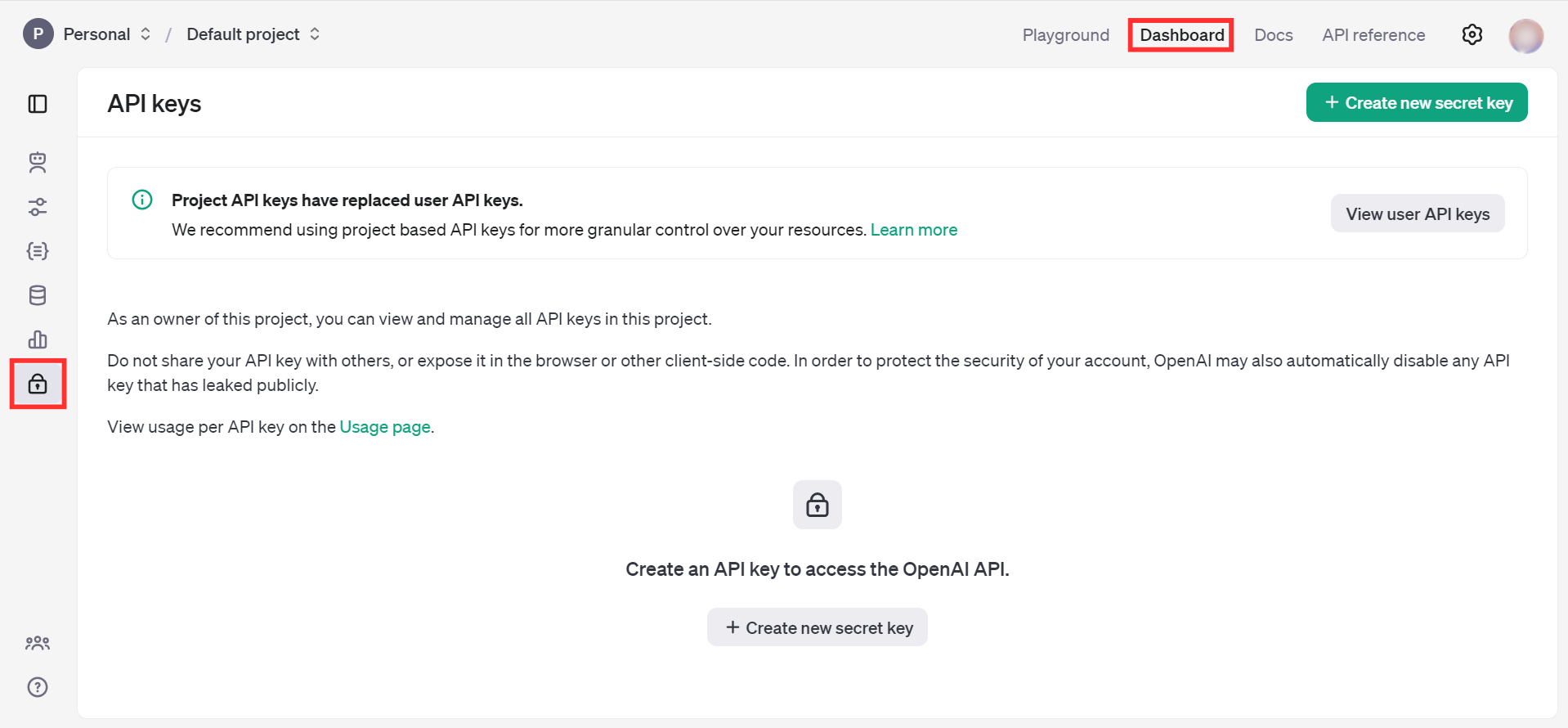
Open the OpenAI Platform Dashboard.
-
Navigate to Dashboard -> API keys.
-
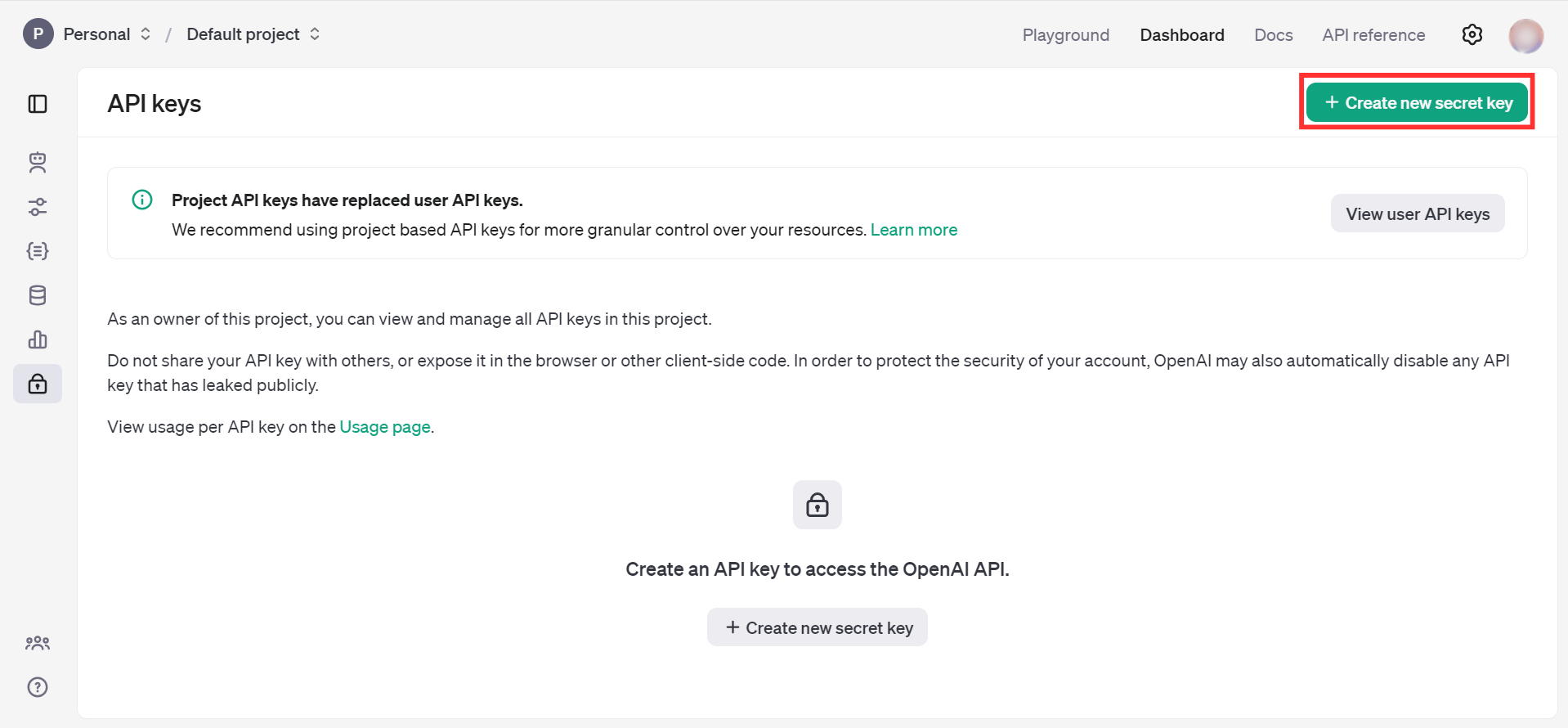
Click on the "Create new secret key" button.
-
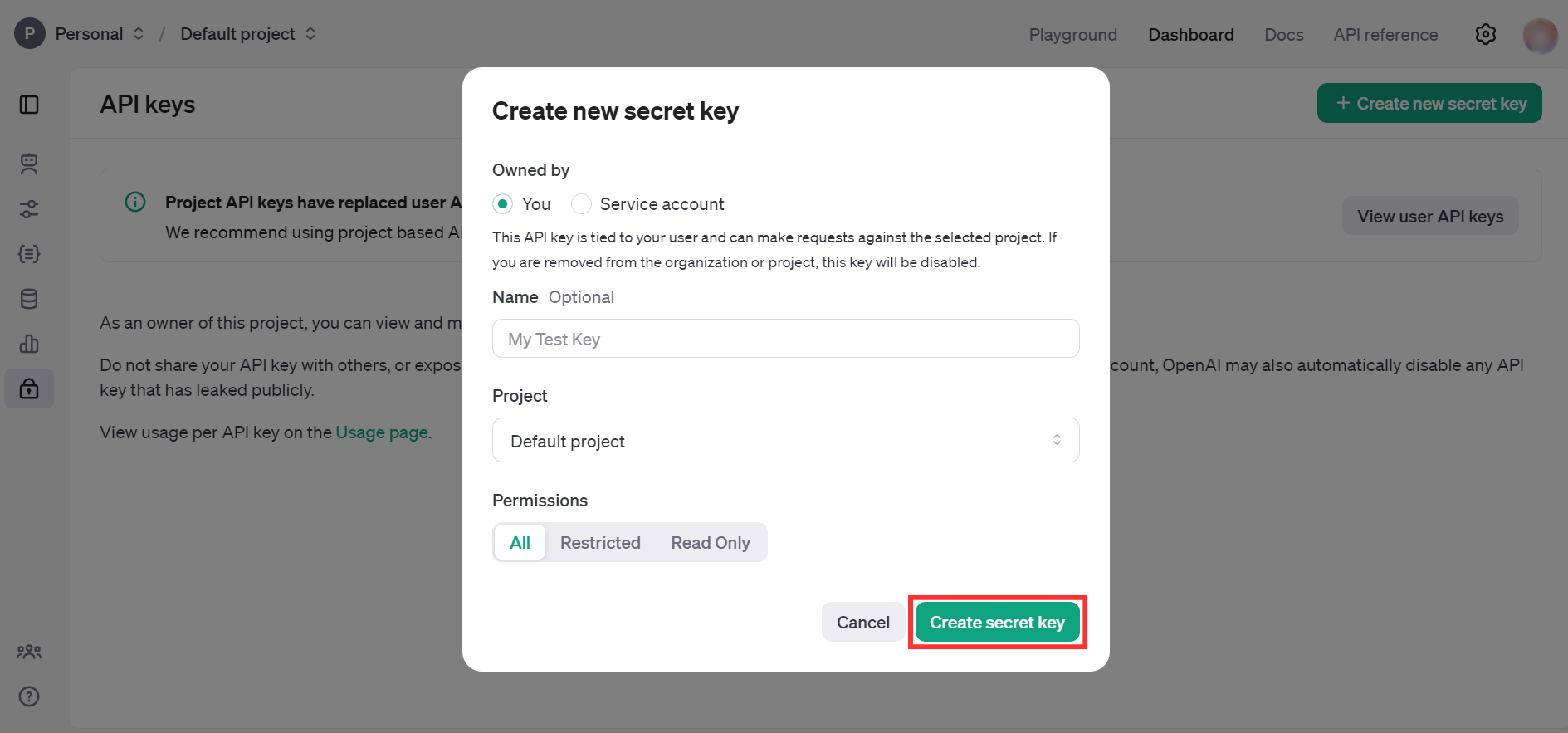
Fill the details and click on Create secret key.
-
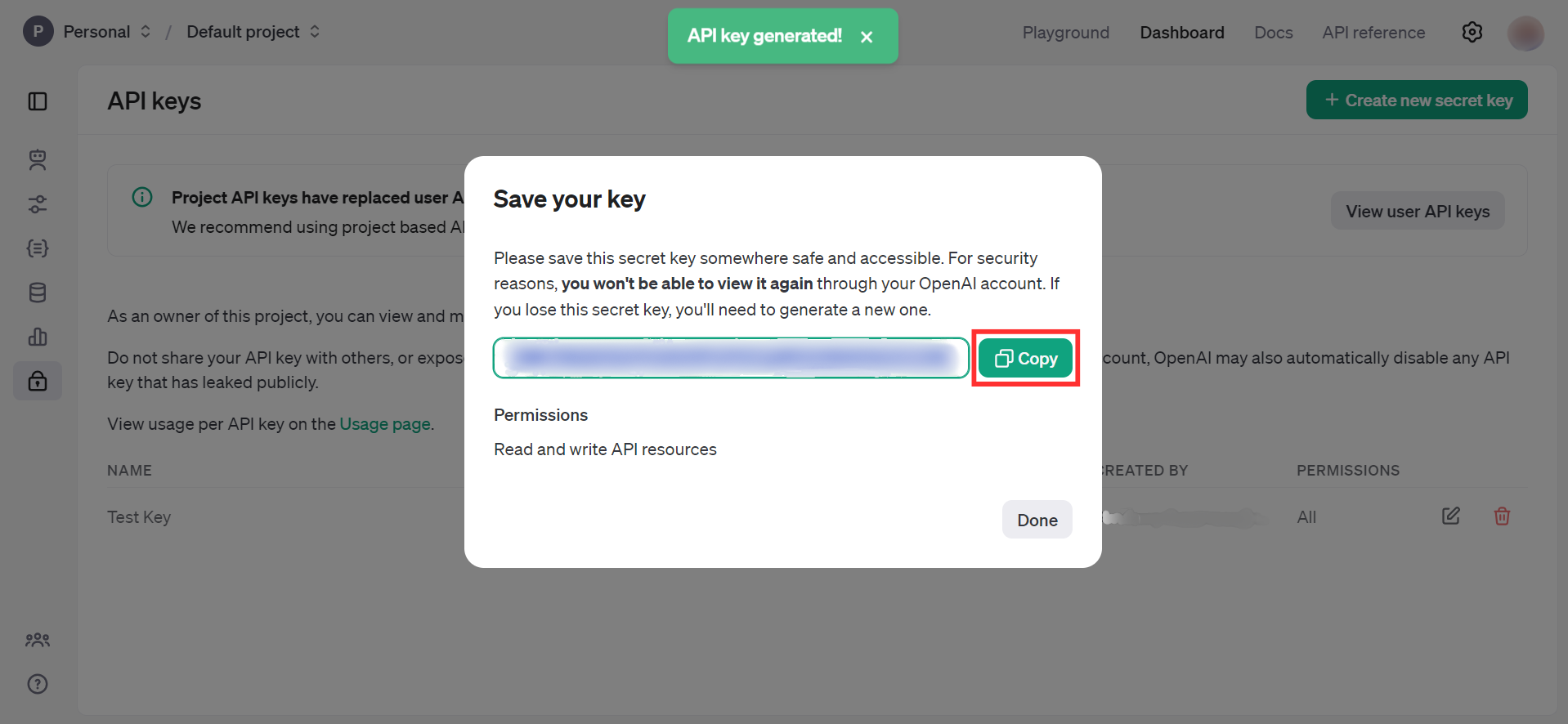
Store the API key securely to use in your application.
Quickstart
To use the OpenAI Chat connector in your Ballerina application, update the .bal file as follows:
Step 1: Import the module
Import the ballerinax/openai.chat module.
import ballerinax/openai.chat;
Step 2: Create a new connector instance
Create a chat:Client with the obtained API Key and initialize the connector.
configurable string token = ?; final chat:Client openAIChat = check new ({ auth: { token } });
Step 3: Invoke the connector operation
Now, you can utilize the available connector operation.
Create a chat completion
public function main() returns error? { chat:CreateChatCompletionRequest request = { model: "gpt-4o-mini", messages: [ { "role": "user", "content": "What is Ballerina programming language?" } ] }; chat:CreateChatCompletionResponse response = check openAIChat->/chat/completions.post(request); }
Create a chat completion with a GPT-5 or other reasoning model
GPT-5 and the o-series models do not accept the deprecated max_tokens field. Use max_completion_tokens instead, which bounds the reasoning tokens and the visible completion tokens together. These models additionally accept reasoning_effort and verbosity, and they take instructions through a developer message rather than a system message.
public function main() returns error? { chat:CreateChatCompletionRequest request = { model: "gpt-5-mini", messages: [ { "role": "developer", "content": "You are a helpful assistant." }, { "role": "user", "content": "What is Ballerina programming language?" } ], max_completion_tokens: 2048, reasoning_effort: "low", verbosity: "low" }; chat:CreateChatCompletionResponse response = check openAIChat->/chat/completions.post(request); }
Note: Reasoning tokens are billed as completion tokens and are reported separately in
response.usage.completion_tokens_details.reasoning_tokens. Settingmax_completion_tokenstoo low can exhaust the budget on reasoning alone, returning an empty message withfinish_reasonset to"length".
Step 4: Run the Ballerina application
bal run
Examples
The OpenAI Chat connector provides practical examples illustrating usage in various scenarios. Explore these examples, covering the following use cases:
- CLI assistant - Execute the user's task description by generating and running the appropriate command in the command line interface of their selected operating system.
- Image to markdown document converter - Generate detailed markdown documentation based on the image content.
Clients
openai.chat: Client
The OpenAI REST API. Please see https://platform.openai.com/docs/api-reference for more details.
Constructor
Gets invoked to initialize the connector.
init (ConnectionConfig config, string serviceUrl)- config ConnectionConfig - The configurations to be used when initializing the
connector
- serviceUrl string "https://api.openai.com/v1" - URL of the target service
post chat/completions
function post chat/completions(CreateChatCompletionRequest payload, map<string|string[]> headers) returns CreateChatCompletionResponse|errorStarting a new project? We recommend trying Responses to take advantage of the latest OpenAI platform features. Compare Chat Completions with Responses.
Creates a model response for the given chat conversation. Learn more in the text generation, vision, and audio guides.
Parameter support can differ depending on the model used to generate the response, particularly for newer reasoning models. Parameters that are only supported for reasoning models are noted below. For the current state of unsupported parameters in reasoning models, refer to the reasoning guide.
Returns a chat completion object, or a streamed sequence of chat completion chunk objects if the request is streamed.
Parameters
- payload CreateChatCompletionRequest -
Return Type
Records
openai.chat: ChatCompletionAllowedTools
Constrains the tools available to the model to a pre-defined set.
Fields
- mode "auto"|"required" - Constrains the tools available to the model to a pre-defined set.
autoallows the model to pick from among the allowed tools and generate a message.requiredrequires the model to call one or more of the allowed tools.
- tools record {}[] - A list of tool definitions that the model should be allowed to call.
For the Chat Completions API, the list of tool definitions might look like:
[
  { "type": "function", "function": { "name": "get_weather" } },
  { "type": "function", "function": { "name": "get_time" } }
]
openai.chat: ChatCompletionAllowedToolsChoice
Constrains the tools available to the model to a pre-defined set.
Fields
- 'type "allowed_tools" - Allowed tool configuration type. Always
allowed_tools.
- allowed_tools ChatCompletionAllowedTools - Constrains the tools available to the model to a pre-defined set.
openai.chat: ChatCompletionFunctionCallOption
Specifying a particular function via {"name": "my_function"} forces the model to call that function.
Fields
- name string - The name of the function to call.
openai.chat: ChatCompletionFunctions
Fields
- description? string - A description of what the function does, used by the model to choose when and how to call the function.
- name string - The name of the function to be called. Must be a-z, A-Z, 0-9, or contain underscores and dashes, with a maximum length of 64.
- parameters? FunctionParameters - The parameters the functions accepts, described as a JSON Schema object. See the guide for examples, and the JSON Schema reference for documentation about the format.
Omitting
parametersdefines a function with an empty parameter list.
openai.chat: ChatCompletionMessageCustomToolCall
A call to a custom tool created by the model.
Fields
- id string - The ID of the tool call.
- 'type "custom" - The type of the tool. Always
custom.
- custom ChatCompletionMessageCustomToolCallCustom - The custom tool that the model called.
openai.chat: ChatCompletionMessageCustomToolCallCustom
The custom tool that the model called.
Fields
- name string - The name of the custom tool to call.
- input string - The input for the custom tool call generated by the model.
openai.chat: ChatCompletionMessageToolCall
A call to a function tool created by the model.
Fields
- id string - The ID of the tool call.
- 'type "function" - The type of the tool. Currently, only
functionis supported.
- 'function ChatCompletionMessageToolCallFunction - The function that the model called.
openai.chat: ChatCompletionMessageToolCallFunction
The function that the model called.
Fields
- name string - The name of the function to call.
- arguments string - The arguments to call the function with, as generated by the model in JSON format. Note that the model does not always generate valid JSON, and may hallucinate parameters not defined by your function schema. Validate the arguments in your code before calling your function.
openai.chat: ChatCompletionNamedToolChoice
Specifies a tool the model should use. Use to force the model to call a specific function.
Fields
- 'type "function" - For function calling, the type is always
function.
- 'function ChatCompletionNamedToolChoiceFunction -
openai.chat: ChatCompletionNamedToolChoiceCustom
Specifies a tool the model should use. Use to force the model to call a specific custom tool.
Fields
- 'type "custom" - For custom tool calling, the type is always
custom.
openai.chat: ChatCompletionNamedToolChoiceCustomCustom
Fields
- name string - The name of the custom tool to call.
openai.chat: ChatCompletionNamedToolChoiceFunction
Fields
- name string - The name of the function to call.
openai.chat: ChatCompletionRequestAssistantMessage
Messages sent by the model in response to user messages.
Fields
- content? string|ChatCompletionRequestAssistantMessageContentPart[]? - The contents of the assistant message. Required unless
tool_callsorfunction_callis specified.
- refusal? string? - The refusal message by the assistant.
- role "assistant" - The role of the messages author, in this case
assistant.
- name? string - An optional name for the participant. Provides the model information to differentiate between participants of the same role.
- audio? ChatCompletionRequestAssistantMessageAudio? - Data about a previous audio response from the model. Learn more.
- tool_calls? ChatCompletionMessageToolCalls - The tool calls generated by the model, such as function calls.
- function_call? ChatCompletionResponseMessageFunctionCall - Deprecated and replaced by
tool_calls. The name and arguments of a function that should be called, as generated by the model.
openai.chat: ChatCompletionRequestAssistantMessageAudio
Data about a previous audio response from the model. Learn more.
Fields
- id string - Unique identifier for a previous audio response from the model.
openai.chat: ChatCompletionRequestDeveloperMessage
Developer-provided instructions that the model should follow, regardless of
messages sent by the user. With o1 models and newer, developer messages
replace the previous system messages.
Fields
- content string|ChatCompletionRequestMessageContentPartText[] - The contents of the developer message.
- role "developer" - The role of the messages author, in this case
developer.
- name? string - An optional name for the participant. Provides the model information to differentiate between participants of the same role.
openai.chat: ChatCompletionRequestFunctionMessage
Fields
- role "function" - The role of the messages author, in this case
function.
- content string? - The contents of the function message.
- name string - The name of the function to call.
openai.chat: ChatCompletionRequestMessageContentPartAudio
Learn about audio inputs.
Fields
- 'type "input_audio" - The type of the content part. Always
input_audio.
- input_audio ChatCompletionRequestMessageContentPartAudioInputAudio -
openai.chat: ChatCompletionRequestMessageContentPartAudioInputAudio
Fields
- data string - Base64 encoded audio data.
- format "wav"|"mp3" - The format of the encoded audio data. Currently supports "wav" and "mp3".
openai.chat: ChatCompletionRequestMessageContentPartFile
Learn about file inputs for text generation.
Fields
- 'type "file" - The type of the content part. Always
file.
openai.chat: ChatCompletionRequestMessageContentPartFileFile
Fields
- filename? string - The name of the file, used when passing the file to the model as a string.
- file_data? string - The base64 encoded file data, used when passing the file to the model as a string.
- file_id? string - The ID of an uploaded file to use as input.
openai.chat: ChatCompletionRequestMessageContentPartImage
Learn about image inputs.
Fields
- 'type "image_url" - The type of the content part.
openai.chat: ChatCompletionRequestMessageContentPartImageImageUrl
Fields
- url string - Either a URL of the image or the base64 encoded image data.
- detail "auto"|"low"|"high" (default "auto") - Specifies the detail level of the image. Learn more in the Vision guide.
openai.chat: ChatCompletionRequestMessageContentPartRefusal
Fields
- 'type "refusal" - The type of the content part.
- refusal string - The refusal message generated by the model.
openai.chat: ChatCompletionRequestMessageContentPartText
Learn about text inputs.
Fields
- 'type "text" - The type of the content part.
- text string - The text content.
openai.chat: ChatCompletionRequestSystemMessage
Developer-provided instructions that the model should follow, regardless of
messages sent by the user. With o1 models and newer, use developer messages
for this purpose instead.
Fields
- content string|ChatCompletionRequestSystemMessageContentPart[] - The contents of the system message.
- role "system" - The role of the messages author, in this case
system.
- name? string - An optional name for the participant. Provides the model information to differentiate between participants of the same role.
openai.chat: ChatCompletionRequestToolMessage
Fields
- role "tool" - The role of the messages author, in this case
tool.
- content string|ChatCompletionRequestToolMessageContentPart[] - The contents of the tool message.
- tool_call_id string - Tool call that this message is responding to.
openai.chat: ChatCompletionRequestUserMessage
Messages sent by an end user, containing prompts or additional context information.
Fields
- content string|ChatCompletionRequestUserMessageContentPart[] - The contents of the user message.
- role "user" - The role of the messages author, in this case
user.
- name? string - An optional name for the participant. Provides the model information to differentiate between participants of the same role.
openai.chat: ChatCompletionResponseMessage
A chat completion message generated by the model.
Fields
- content? string? - The contents of the message.
- refusal? string? - The refusal message generated by the model.
- tool_calls? ChatCompletionMessageToolCalls - The tool calls generated by the model, such as function calls.
- annotations? record { 'type "url_citation" , url_citation record { end_index int, start_index int, url string, title string } }[] - Annotations for the message, when applicable, as when using the web search tool.
- role "assistant" - The role of the author of this message.
- function_call? ChatCompletionResponseMessageFunctionCall - Deprecated and replaced by
tool_calls. The name and arguments of a function that should be called, as generated by the model.
- audio? ChatCompletionResponseMessageAudio? - If the audio output modality is requested, this object contains data about the audio response from the model. Learn more.
openai.chat: ChatCompletionResponseMessageAudio
If the audio output modality is requested, this object contains data about the audio response from the model. Learn more.
Fields
- id string - Unique identifier for this audio response.
- expires_at int - The Unix timestamp (in seconds) for when this audio response will no longer be accessible on the server for use in multi-turn conversations.
- data string - Base64 encoded audio bytes generated by the model, in the format specified in the request.
- transcript string - Transcript of the audio generated by the model.
openai.chat: ChatCompletionResponseMessageFunctionCall
Deprecated and replaced by tool_calls. The name and arguments of a function that should be called, as generated by the model.
Fields
- arguments string - The arguments to call the function with, as generated by the model in JSON format. Note that the model does not always generate valid JSON, and may hallucinate parameters not defined by your function schema. Validate the arguments in your code before calling your function.
- name string - The name of the function to call.
Deprecated
openai.chat: ChatCompletionStreamOptions
Options for streaming response. Only set this when you set stream: true.
Fields
- include_usage? boolean - If set, an additional chunk will be streamed before the
data: [DONE]message. Theusagefield on this chunk shows the token usage statistics for the entire request, and thechoicesfield will always be an empty array. All other chunks will also include ausagefield, but with a null value. NOTE: If the stream is interrupted, you may not receive the final usage chunk which contains the total token usage for the request.
- include_obfuscation? boolean - When true, stream obfuscation will be enabled. Stream obfuscation adds
random characters to an
obfuscationfield on streaming delta events to normalize payload sizes as a mitigation to certain side-channel attacks. These obfuscation fields are included by default, but add a small amount of overhead to the data stream. You can setinclude_obfuscationto false to optimize for bandwidth if you trust the network links between your application and the OpenAI API.
openai.chat: ChatCompletionTokenLogprob
Fields
- token string - The token.
- logprob decimal - The log probability of this token, if it is within the top 20 most likely tokens. Otherwise, the value
-9999.0is used to signify that the token is very unlikely.
- bytes int[]? - A list of integers representing the UTF-8 bytes representation of the token. Useful in instances where characters are represented by multiple tokens and their byte representations must be combined to generate the correct text representation. Can be
nullif there is no bytes representation for the token.
openai.chat: ChatCompletionTool
A function tool that can be used to generate a response.
Fields
- 'type "function" - The type of the tool. Currently, only
functionis supported.
- 'function FunctionObject -
openai.chat: CompletionUsage
Usage statistics for the completion request.
Fields
- completion_tokens int(default 0) - Number of tokens in the generated completion.
- prompt_tokens int(default 0) - Number of tokens in the prompt.
- total_tokens int(default 0) - Total number of tokens used in the request (prompt + completion).
- completion_tokens_details? CompletionUsageCompletionTokensDetails - Breakdown of tokens used in a completion.
- prompt_tokens_details? CompletionUsagePromptTokensDetails - Breakdown of tokens used in the prompt.
openai.chat: CompletionUsageCompletionTokensDetails
Breakdown of tokens used in a completion.
Fields
- accepted_prediction_tokens int(default 0) - When using Predicted Outputs, the number of tokens in the prediction that appeared in the completion.
- audio_tokens int(default 0) - Audio input tokens generated by the model.
- reasoning_tokens int(default 0) - Tokens generated by the model for reasoning.
- rejected_prediction_tokens int(default 0) - When using Predicted Outputs, the number of tokens in the prediction that did not appear in the completion. However, like reasoning tokens, these tokens are still counted in the total completion tokens for purposes of billing, output, and context window limits.
openai.chat: CompletionUsagePromptTokensDetails
Breakdown of tokens used in the prompt.
Fields
- audio_tokens int(default 0) - Audio input tokens present in the prompt.
- cached_tokens int(default 0) - Cached tokens present in the prompt.
openai.chat: ConnectionConfig
Provides a set of configurations for controlling the behaviours when communicating with a remote HTTP endpoint.
Fields
- auth BearerTokenConfig - Configurations related to client authentication
- httpVersion HttpVersion(default http:HTTP_2_0) - The HTTP version understood by the client
- http1Settings ClientHttp1Settings(default {}) - Configurations related to HTTP/1.x protocol
- http2Settings ClientHttp2Settings(default {}) - Configurations related to HTTP/2 protocol
- timeout decimal(default 60) - The maximum time to wait (in seconds) for a response before closing the connection
- forwarded string(default "disable") - The choice of setting
forwarded/x-forwardedheader
- followRedirects? FollowRedirects - Configurations associated with Redirection
- poolConfig? PoolConfiguration - Configurations associated with request pooling
- cache CacheConfig(default {}) - HTTP caching related configurations
- compression Compression(default http:COMPRESSION_AUTO) - Specifies the way of handling compression (
accept-encoding) header
- circuitBreaker? CircuitBreakerConfig - Configurations associated with the behaviour of the Circuit Breaker
- retryConfig? RetryConfig - Configurations associated with retrying
- responseLimits ResponseLimitConfigs(default {}) - Configurations associated with inbound response size limits
- secureSocket? ClientSecureSocket - SSL/TLS-related options
- proxy? ProxyConfig - Proxy server related options
- socketConfig ClientSocketConfig(default {}) - Provides settings related to client socket configuration
- validation boolean(default true) - Enables the inbound payload validation functionality which provided by the constraint package. Enabled by default
- laxDataBinding boolean(default true) - Enables relaxed data binding on the client side. When enabled,
nilvalues are treated as optional, and absent fields are handled asnilabletypes. Enabled by default.
openai.chat: CreateChatCompletionRequest
Fields
- Fields Included from *CreateModelResponseProperties
- messages ChatCompletionRequestMessage[] -
- model ModelIdsShared -
- modalities? ResponseModalities? -
- verbosity? Verbosity -
- reasoning_effort? ReasoningEffort -
- max_completion_tokens? int? -
- frequency_penalty? decimal? -
- presence_penalty? decimal? -
- web_search_options? record { user_location record { 'type "approximate" , approximate WebSearchLocation }?, search_context_size WebSearchContextSize } -
- top_logprobs? int -
- response_format? ResponseFormatText|ResponseFormatJsonSchema|ResponseFormatJsonObject -
- audio? record { voice VoiceIdsOrCustomVoice, format "wav"|"aac"|"mp3"|"flac"|"opus"|"pcm16" }? -
- store? boolean? -
- 'stream? boolean? -
- stop? StopConfiguration -
- logit_bias? record { int... }? -
- logprobs? boolean? -
- max_tokens? int? -
- n? int? -
- prediction? PredictionContent -
- seed? int? -
- stream_options? ChatCompletionStreamOptions? -
- tools? (ChatCompletionTool|CustomToolChatCompletions)[] -
- tool_choice? ChatCompletionToolChoiceOption -
- parallel_tool_calls? ParallelToolCalls -
- function_call? "none"|"auto"|ChatCompletionFunctionCallOption -
- functions? ChatCompletionFunctions[] -
openai.chat: CreateChatCompletionResponse
Represents a chat completion response returned by model, based on the provided input.
Fields
- id string - A unique identifier for the chat completion.
- choices record { finish_reason "stop"|"length"|"tool_calls"|"content_filter"|"function_call" , index int, message ChatCompletionResponseMessage, logprobs record { content ChatCompletionTokenLogprob[]?, refusal ChatCompletionTokenLogprob[]? } }[] - A list of chat completion choices. Can be more than one if
nis greater than 1.
- created int - The Unix timestamp (in seconds) of when the chat completion was created.
- model string - The model used for the chat completion.
- service_tier? ServiceTier - Specifies the processing type used for serving the request.
- If set to 'auto', then the request will be processed with the service tier configured in the Project settings. Unless otherwise configured, the Project will use 'default'.
- If set to 'default', then the request will be processed with the standard pricing and performance for the selected model.
- If set to 'flex' or 'priority', then the request will be processed with the corresponding service tier.
- When not set, the default behavior is 'auto'.
service_tierparameter is set, the response body will include theservice_tiervalue based on the processing mode actually used to serve the request. This response value may be different from the value set in the parameter.
- system_fingerprint? string - This fingerprint represents the backend configuration that the model runs with.
Can be used in conjunction with the
seedrequest parameter to understand when backend changes have been made that might impact determinism.
- 'object "chat.completion" - The object type, which is always
chat.completion.
- usage? CompletionUsage - Usage statistics for the completion request.
openai.chat: CreateModelResponseProperties
Fields
- Fields Included from *ModelResponseProperties
- top_logprobs? int -
openai.chat: CustomToolChatCompletions
A custom tool that processes input using a specified format.
Fields
- 'type "custom" - The type of the custom tool. Always
custom.
- custom CustomToolProperties - Properties of the custom tool.
openai.chat: CustomToolProperties
Properties of the custom tool.
Fields
- name string - The name of the custom tool, used to identify it in tool calls.
- description? string - Optional description of the custom tool, used to provide more context.
- format? record { 'type "text" }|record { 'type "grammar" , grammar record { definition string, syntax "lark"|"regex" } } - The input format for the custom tool. Default is unconstrained text.
openai.chat: FunctionObject
Fields
- description? string - A description of what the function does, used by the model to choose when and how to call the function.
- name string - The name of the function to be called. Must be a-z, A-Z, 0-9, or contain underscores and dashes, with a maximum length of 64.
- parameters? FunctionParameters - The parameters the functions accepts, described as a JSON Schema object. See the guide for examples, and the JSON Schema reference for documentation about the format.
Omitting
parametersdefines a function with an empty parameter list.
- strict? boolean? - Whether to enable strict schema adherence when generating the function call. If set to true, the model will follow the exact schema defined in the
parametersfield. Only a subset of JSON Schema is supported whenstrictistrue. Learn more about Structured Outputs in the function calling guide.
openai.chat: FunctionParameters
The parameters the functions accepts, described as a JSON Schema object. See the guide for examples, and the JSON Schema reference for documentation about the format.
Omitting parameters defines a function with an empty parameter list.
openai.chat: JSONSchema
Structured Outputs configuration options, including a JSON Schema.
Fields
- description? string - A description of what the response format is for, used by the model to determine how to respond in the format.
- name string - The name of the response format. Must be a-z, A-Z, 0-9, or contain underscores and dashes, with a maximum length of 64.
- schema? ResponseFormatJsonSchemaSchema - The schema for the response format, described as a JSON Schema object. Learn how to build JSON schemas here.
- strict? boolean? - Whether to enable strict schema adherence when generating the output.
If set to true, the model will always follow the exact schema defined
in the
schemafield. Only a subset of JSON Schema is supported whenstrictistrue. To learn more, read the Structured Outputs guide.
openai.chat: Metadata
Set of 16 key-value pairs that can be attached to an object. This can be useful for storing additional information about the object in a structured format, and querying for objects via API or the dashboard.
Keys are strings with a maximum length of 64 characters. Values are strings with a maximum length of 512 characters.
Fields
- string... - Rest field
openai.chat: ModelResponseProperties
Fields
- metadata? Metadata? - Set of 16 key-value pairs that can be attached to an object. This can be useful for storing additional information about the object in a structured format, and querying for objects via API or the dashboard. Keys are strings with a maximum length of 64 characters. Values are strings with a maximum length of 512 characters.
- top_logprobs? int - An integer between 0 and 20 specifying the maximum number of most likely tokens to return at each token position, each with an associated log probability. In some cases, the number of returned tokens may be fewer than requested.
- temperature? decimal - What sampling temperature to use, between 0 and 2. Higher values like 0.8 will make the output more random, while lower values like 0.2 will make it more focused and deterministic.
We generally recommend altering this or
top_pbut not both.
- top_p? decimal - An alternative to sampling with temperature, called nucleus sampling,
where the model considers the results of the tokens with top_p probability
mass. So 0.1 means only the tokens comprising the top 10% probability mass
are considered.
We generally recommend altering this or
temperaturebut not both.
- user? string - This field is being replaced by
safety_identifierandprompt_cache_key. Useprompt_cache_keyinstead to maintain caching optimizations. A stable identifier for your end-users. Used to boost cache hit rates by better bucketing similar requests and to help OpenAI detect and prevent abuse. Learn more.
- safety_identifier? string - A stable identifier used to help detect users of your application that may be violating OpenAI's usage policies. The IDs should be a string that uniquely identifies each user, with a maximum length of 64 characters. We recommend hashing their username or email address, in order to avoid sending us any identifying information. Learn more.
- prompt_cache_key? string - Used by OpenAI to cache responses for similar requests to optimize your cache hit rates. Replaces the
userfield. Learn more.
- service_tier? ServiceTier - Specifies the processing type used for serving the request.
- If set to 'auto', then the request will be processed with the service tier configured in the Project settings. Unless otherwise configured, the Project will use 'default'.
- If set to 'default', then the request will be processed with the standard pricing and performance for the selected model.
- If set to 'flex' or 'priority', then the request will be processed with the corresponding service tier.
- When not set, the default behavior is 'auto'.
service_tierparameter is set, the response body will include theservice_tiervalue based on the processing mode actually used to serve the request. This response value may be different from the value set in the parameter.
- prompt_cache_retention? "in_memory"|"24h"? - The retention policy for the prompt cache. Set to
24hto enable extended prompt caching, which keeps cached prefixes active for longer, up to a maximum of 24 hours. Learn more.
openai.chat: PredictionContent
Static predicted output content, such as the content of a text file that is being regenerated.
Fields
- 'type "content" - The type of the predicted content you want to provide. This type is
currently always
content.
- content string|ChatCompletionRequestMessageContentPartText[] - The content that should be matched when generating a model response. If generated tokens would match this content, the entire model response can be returned much more quickly.
openai.chat: ResponseFormatJsonObject
JSON object response format. An older method of generating JSON responses.
Using json_schema is recommended for models that support it. Note that the
model will not generate JSON without a system or user message instructing it
to do so.
Fields
- 'type "json_object" - The type of response format being defined. Always
json_object.
openai.chat: ResponseFormatJsonSchema
JSON Schema response format. Used to generate structured JSON responses. Learn more about Structured Outputs.
Fields
- 'type "json_schema" - The type of response format being defined. Always
json_schema.
- json_schema JSONSchema - Structured Outputs configuration options, including a JSON Schema.
openai.chat: ResponseFormatJsonSchemaSchema
The schema for the response format, described as a JSON Schema object. Learn how to build JSON schemas here.
openai.chat: ResponseFormatText
Default response format. Used to generate text responses.
Fields
- 'type "text" - The type of response format being defined. Always
text.
openai.chat: WebSearchLocation
Approximate location parameters for the search.
Fields
- country? string - The two-letter
ISO country code of the user,
e.g.
US.
- region? string - Free text input for the region of the user, e.g.
California.
- city? string - Free text input for the city of the user, e.g.
San Francisco.
- timezone? string - The IANA timezone
of the user, e.g.
America/Los_Angeles.
Union types
openai.chat: WebSearchContextSize
WebSearchContextSize
High level guidance for the amount of context window space to use for the
search. One of low, medium, or high. medium is the default.
openai.chat: ChatCompletionRequestMessage
ChatCompletionRequestMessage
openai.chat: Verbosity
Verbosity
Constrains the verbosity of the model's response. Lower values will result in
more concise responses, while higher values will result in more verbose responses.
Currently supported values are low, medium, and high.
openai.chat: ChatCompletionRequestUserMessageContentPart
ChatCompletionRequestUserMessageContentPart
openai.chat: ChatCompletionToolChoiceOption
ChatCompletionToolChoiceOption
Controls which (if any) tool is called by the model.
none means the model will not call any tool and instead generates a message.
auto means the model can pick between generating a message or calling one or more tools.
required means the model must call one or more tools.
Specifying a particular tool via {"type": "function", "function": {"name": "my_function"}} forces the model to call that tool.
none is the default when no tools are present. auto is the default if tools are present.
openai.chat: ModelIdsShared
ModelIdsShared
openai.chat: VoiceIdsShared
VoiceIdsShared
openai.chat: StopConfiguration
StopConfiguration
Not supported with latest reasoning models o3 and o4-mini.
Up to 4 sequences where the API will stop generating further tokens. The returned text will not contain the stop sequence.
openai.chat: ServiceTier
ServiceTier
Specifies the processing type used for serving the request.
- If set to 'auto', then the request will be processed with the service tier configured in the Project settings. Unless otherwise configured, the Project will use 'default'.
- If set to 'default', then the request will be processed with the standard pricing and performance for the selected model.
- If set to 'flex' or 'priority', then the request will be processed with the corresponding service tier.
- When not set, the default behavior is 'auto'.
When the service_tier parameter is set, the response body will include the service_tier value based on the processing mode actually used to serve the request. This response value may be different from the value set in the parameter.
openai.chat: ChatCompletionRequestAssistantMessageContentPart
ChatCompletionRequestAssistantMessageContentPart
openai.chat: VoiceIdsOrCustomVoice
VoiceIdsOrCustomVoice
A built-in voice name or a custom voice reference.
openai.chat: ReasoningEffort
ReasoningEffort
Constrains effort on reasoning for
reasoning models.
Currently supported values are none, minimal, low, medium, high, and xhigh. Reducing
reasoning effort can result in faster responses and fewer tokens used
on reasoning in a response.
gpt-5.1defaults tonone, which does not perform reasoning. The supported reasoning values forgpt-5.1arenone,low,medium, andhigh. Tool calls are supported for all reasoning values in gpt-5.1.- All models before
gpt-5.1default tomediumreasoning effort, and do not supportnone. - The
gpt-5-promodel defaults to (and only supports)highreasoning effort. xhighis supported for all models aftergpt-5.1-codex-max.
Array types
openai.chat: ResponseModalities
ResponseModalities
Output types that you would like the model to generate. Most models are capable of generating text, which is the default:
["text"]
The gpt-4o-audio-preview model can also be used to
generate audio. To request that this model generate
both text and audio responses, you can use:
["text", "audio"]
openai.chat: ChatCompletionMessageToolCalls
ChatCompletionMessageToolCalls
The tool calls generated by the model, such as function calls.
Simple name reference types
openai.chat: ChatCompletionRequestSystemMessageContentPart
ChatCompletionRequestSystemMessageContentPart
openai.chat: ChatCompletionRequestToolMessageContentPart
ChatCompletionRequestToolMessageContentPart
Boolean types
openai.chat: ParallelToolCalls
ParallelToolCalls
Whether to enable parallel function calling during tool use.