Module openai.audio

ballerinax/openai.audio Ballerina library
Overview
OpenAI offers powerful AI models for tasks like natural language processing, audio transcription, and image generation.
The OpenAI Audio connector offers APIs to connect and interact with the audio-related endpoints of the OpenAI REST API, providing access to various models developed by OpenAI for audio-related tasks such as transcription and translation.
Key Features
- High-quality audio transcription and translation via the Whisper model
- Support for multiple audio file formats (mp3, mp4, mpeg, mpga, m4a, wav, webm)
- Efficient speech-to-text conversion in various languages
- Simplified integration with OpenAI audio processing endpoints
- Robust security with API key-based authentication
Setup guide
To use the OpenAI Connector, you must have access to the OpenAI API through a OpenAI Platform account and a project under it. If you do not have a OpenAI Platform account, you can sign up for one here.
Create a OpenAI API Key
-
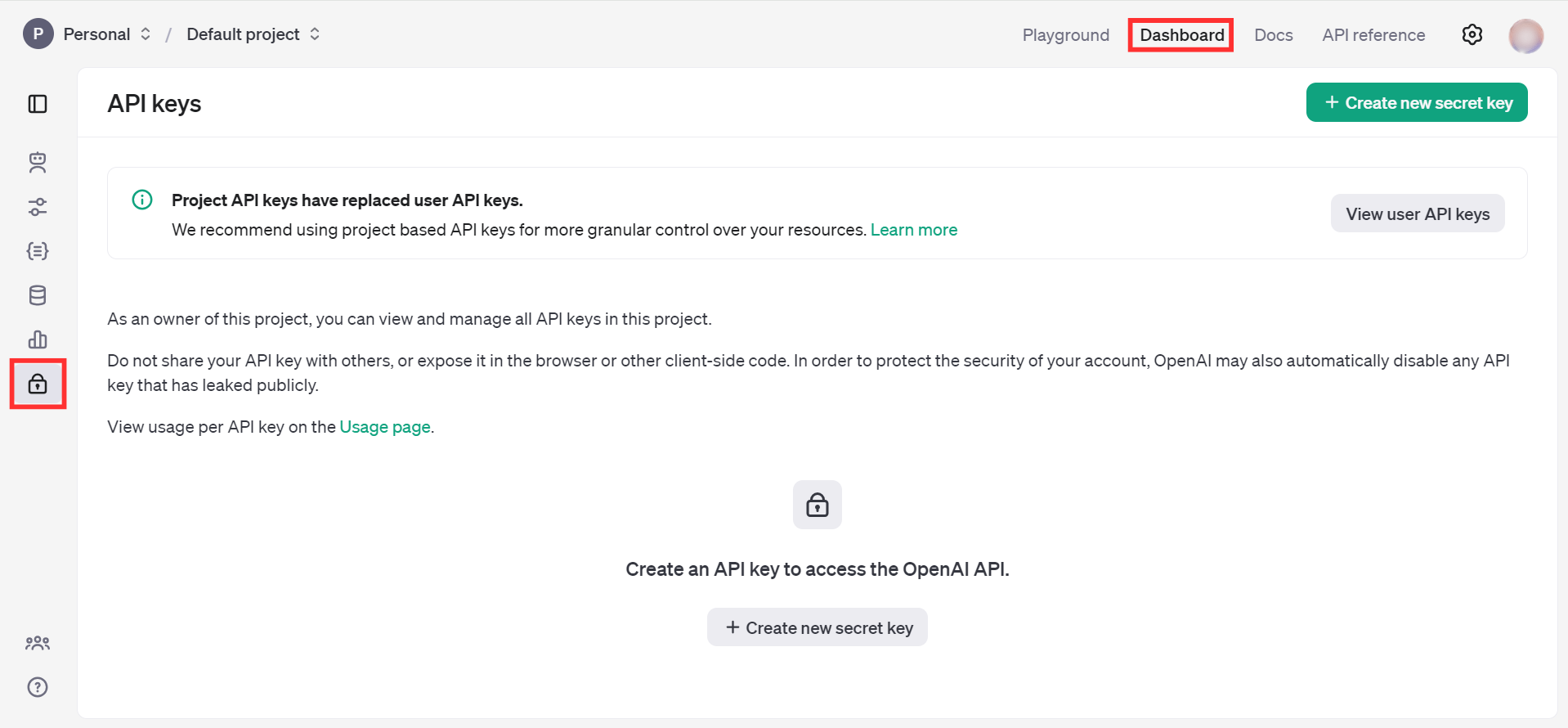
Open the OpenAI Platform Dashboard.
-
Navigate to Dashboard -> API keys
-
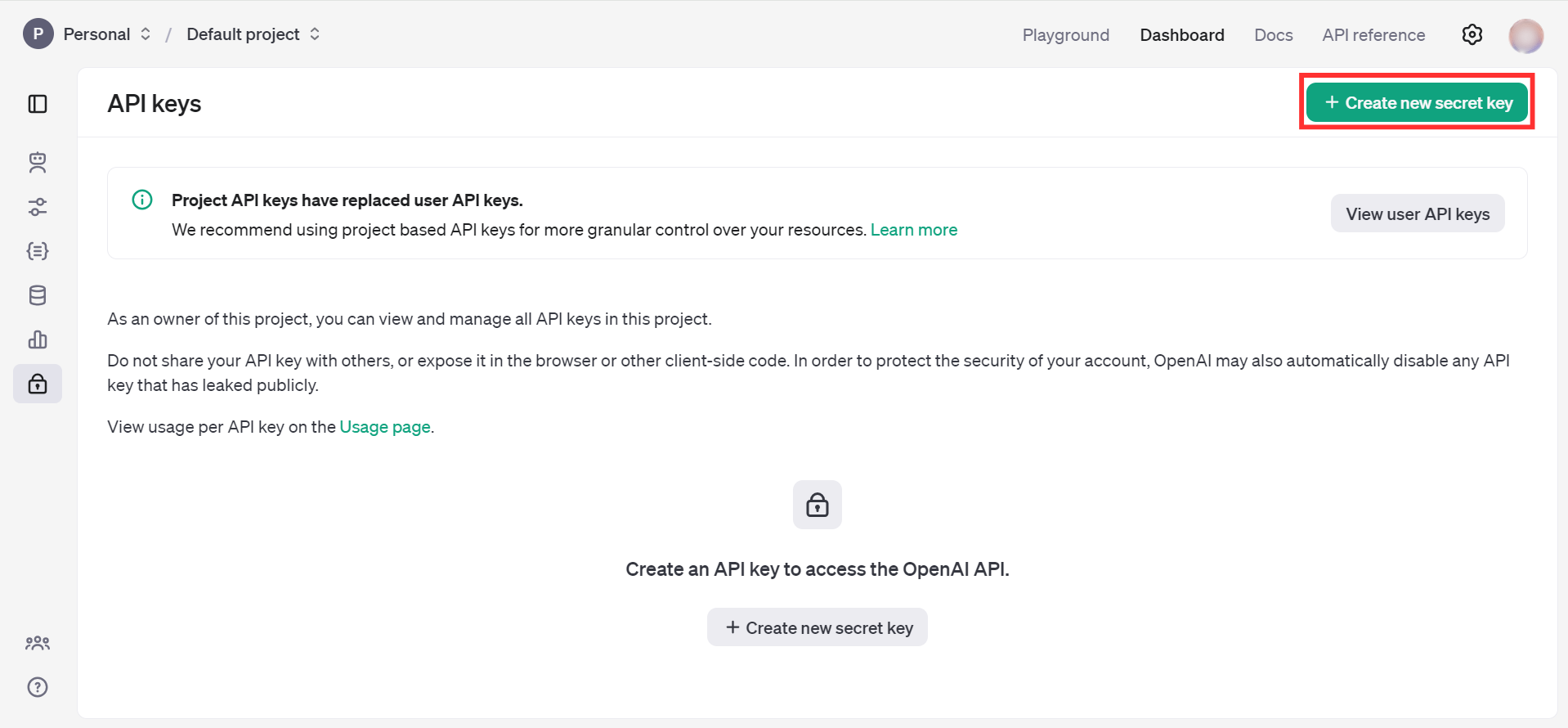
Click on the "Create new secret key" button
-
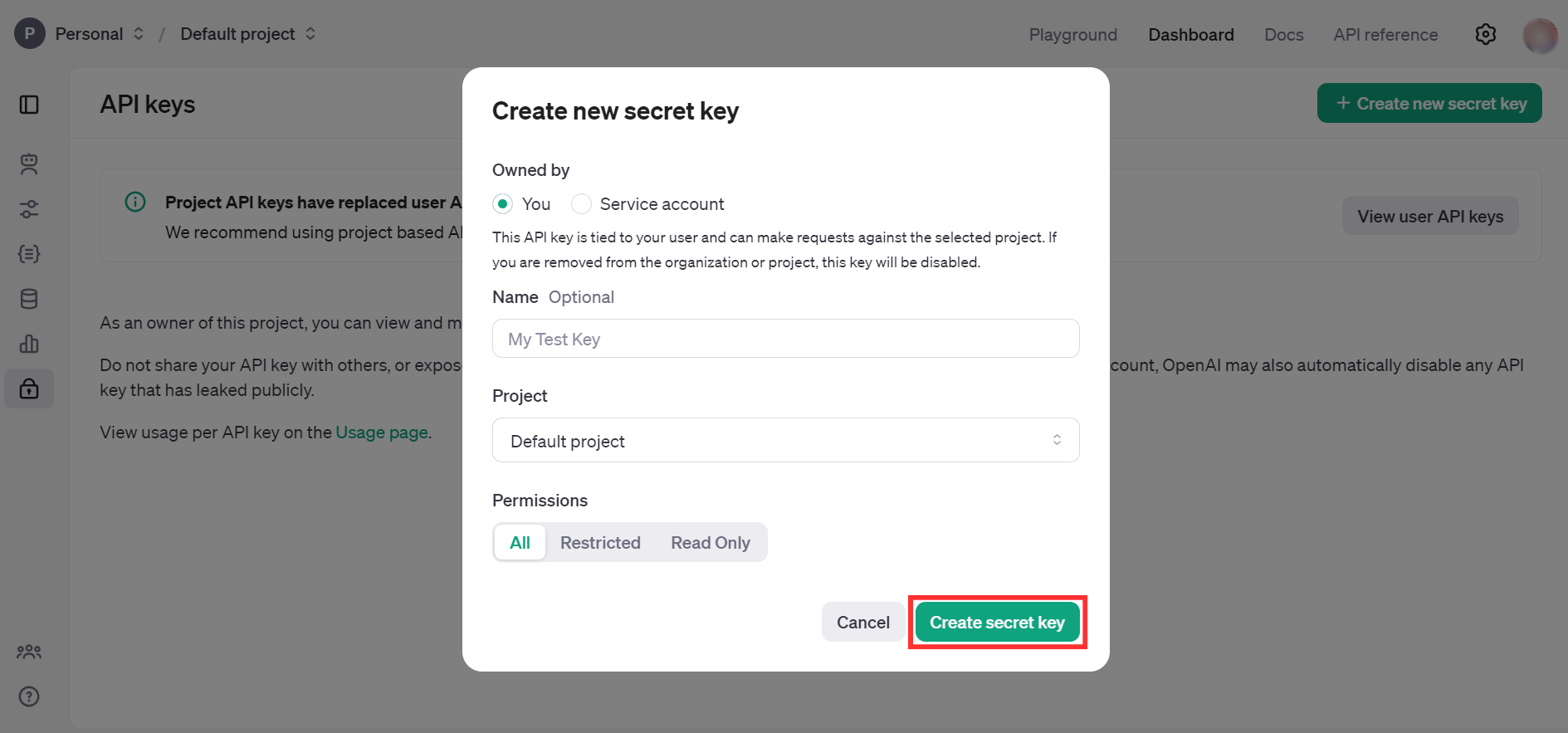
Fill the details and click on Create secret key
-
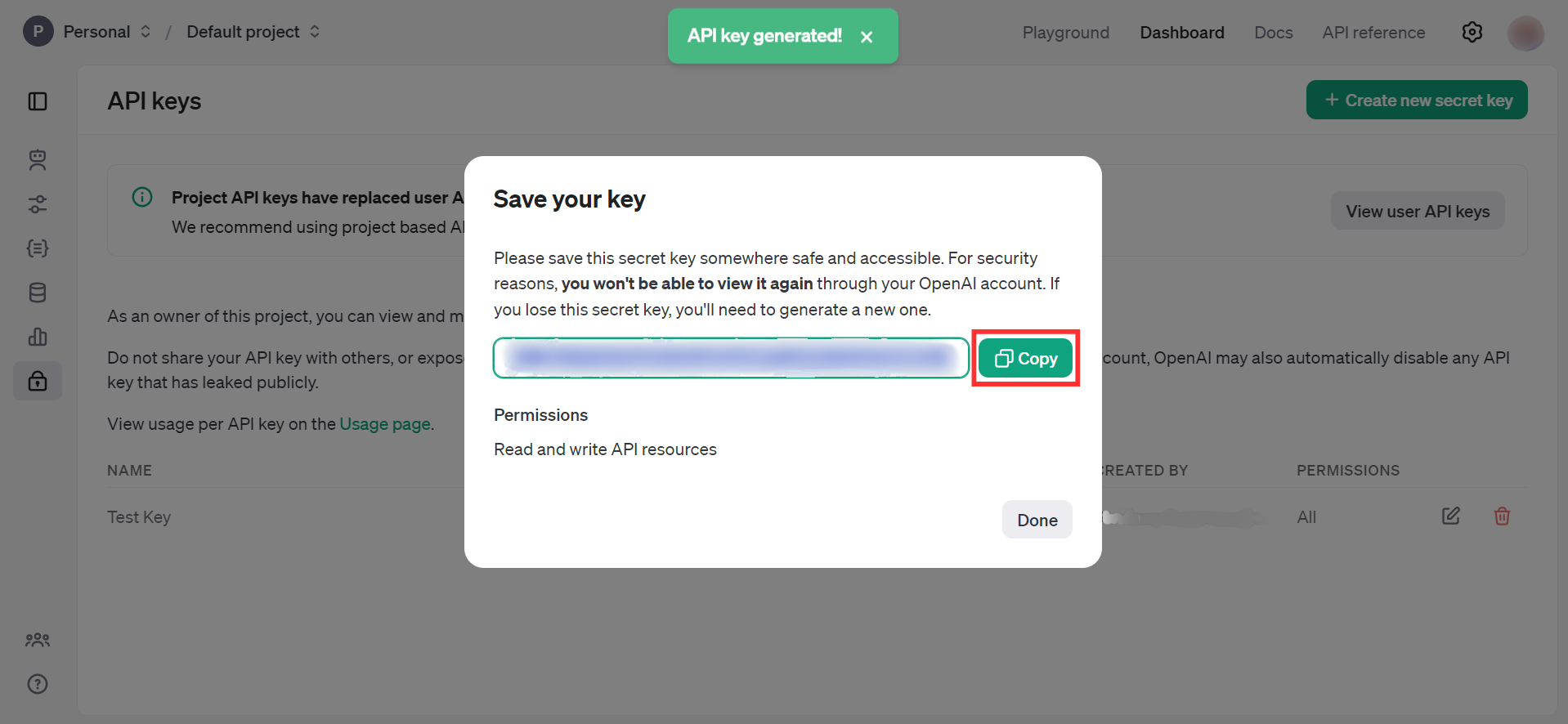
Store the API key securely to use in your application
Quickstart
To use the OpenAI Audio connector in your Ballerina application, update the .bal file as follows:
Step 1: Import the module
Import the openai.audio module.
import ballerinax/openai.audio;
Step 2: Instantiate a new connector
Create a audio:ConnectionConfig with the obtained API Key and initialize the connector.
configurable string token = ?; final images:Client openAIAudio = check new ({ auth: { token } });
Step 3: Invoke the connector operation
Now, utilize the available connector operations.
Transcribe audio into input language
public function main(string fileName) returns error? { byte[] fileContent = check io:fileReadBytes(fileName); audio:CreateTranscriptionRequest request = { model: "whisper-1", file: {fileContent, fileName} }; audio:CreateTranscriptionResponse response = check OpenAIAudio->/audio/transcriptions.post(request); }
Step 4: Run the Ballerina application
bal run
Examples
The OpenAI Audio connector provides practical examples illustrating usage in various scenarios. Explore these examples, covering the following use cases:
- International news translator - Converts a text news given in any language to english
- Meeting transcriber and translator - Converts an audio given in a different language into text in input language and english
Clients
openai.audio: Client
The OpenAI REST API. Please see https://platform.openai.com/docs/api-reference for more details.
Constructor
Gets invoked to initialize the connector.
init (ConnectionConfig config, string serviceUrl)- config ConnectionConfig - The configurations to be used when initializing the
connector
- serviceUrl string "https://api.openai.com/v1" - URL of the target service
post chat/completions
function post chat/completions(CreateChatCompletionRequest payload, map<string|string[]> headers) returns CreateChatCompletionResponse|errorCreates a model response for the given chat conversation.
Parameters
- payload CreateChatCompletionRequest -
Return Type
post completions
function post completions(CreateCompletionRequest payload, map<string|string[]> headers) returns CreateCompletionResponse|errorCreates a completion for the provided prompt and parameters.
Parameters
- payload CreateCompletionRequest -
Return Type
post images/generations
function post images/generations(CreateImageRequest payload, map<string|string[]> headers) returns ImagesResponse|errorCreates an image given a prompt.
Parameters
- payload CreateImageRequest -
Return Type
- ImagesResponse|error - OK
post images/edits
function post images/edits(CreateImageEditRequest payload, map<string|string[]> headers) returns ImagesResponse|errorCreates an edited or extended image given an original image and a prompt.
Parameters
- payload CreateImageEditRequest -
Return Type
- ImagesResponse|error - OK
post images/variations
function post images/variations(CreateImageVariationRequest payload, map<string|string[]> headers) returns ImagesResponse|errorCreates a variation of a given image.
Parameters
- payload CreateImageVariationRequest -
Return Type
- ImagesResponse|error - OK
post embeddings
function post embeddings(CreateEmbeddingRequest payload, map<string|string[]> headers) returns CreateEmbeddingResponse|errorCreates an embedding vector representing the input text.
Parameters
- payload CreateEmbeddingRequest -
Return Type
post audio/speech
function post audio/speech(CreateSpeechRequest payload, map<string|string[]> headers) returns byte[]|errorGenerates audio from the input text.
Parameters
- payload CreateSpeechRequest -
Return Type
- byte[]|error - OK
post audio/transcriptions
function post audio/transcriptions(CreateTranscriptionRequest payload, map<string|string[]> headers) returns CreateTranscriptionResponse|errorTranscribes audio into the input language.
Parameters
- payload CreateTranscriptionRequest -
Return Type
post audio/translations
function post audio/translations(CreateTranslationRequest payload, map<string|string[]> headers) returns CreateTranslationResponse|errorTranslates audio into English.
Parameters
- payload CreateTranslationRequest -
Return Type
get files
function get files(map<string|string[]> headers, *ListFilesQueries queries) returns ListFilesResponse|errorReturns a list of files that belong to the user's organization.
Parameters
- queries *ListFilesQueries - Queries to be sent with the request
Return Type
- ListFilesResponse|error - OK
post files
function post files(CreateFileRequest payload, map<string|string[]> headers) returns OpenAIFile|errorUpload a file that can be used across various endpoints. Individual files can be up to 512 MB, and the size of all files uploaded by one organization can be up to 100 GB.
The Assistants API supports files up to 2 million tokens and of specific file types. See the Assistants Tools guide for details.
The Fine-tuning API only supports .jsonl files. The input also has certain required formats for fine-tuning chat or completions models.
The Batch API only supports .jsonl files up to 100 MB in size. The input also has a specific required format.
Please contact us if you need to increase these storage limits.
Parameters
- payload CreateFileRequest -
Return Type
- OpenAIFile|error - OK
get files/[string fileId]
function get files/[string fileId](map<string|string[]> headers) returns OpenAIFile|errorReturns information about a specific file.
Return Type
- OpenAIFile|error - OK
delete files/[string fileId]
function delete files/[string fileId](map<string|string[]> headers) returns DeleteFileResponse|errorDelete a file.
Return Type
- DeleteFileResponse|error - OK
get files/[string fileId]/content
Returns the contents of the specified file.
post uploads
function post uploads(CreateUploadRequest payload, map<string|string[]> headers) returns Upload|errorCreates an intermediate Upload object that you can add Parts to. Currently, an Upload can accept at most 8 GB in total and expires after an hour after you create it.
Once you complete the Upload, we will create a File object that contains all the parts you uploaded. This File is usable in the rest of our platform as a regular File object.
For certain purposes, the correct mime_type must be specified. Please refer to documentation for the supported MIME types for your use case:
For guidance on the proper filename extensions for each purpose, please follow the documentation on creating a File.
Parameters
- payload CreateUploadRequest -
post uploads/[string uploadId]/parts
function post uploads/[string uploadId]/parts(AddUploadPartRequest payload, map<string|string[]> headers) returns UploadPart|errorAdds a Part to an Upload object. A Part represents a chunk of bytes from the file you are trying to upload.
Each Part can be at most 64 MB, and you can add Parts until you hit the Upload maximum of 8 GB.
It is possible to add multiple Parts in parallel. You can decide the intended order of the Parts when you complete the Upload.
Parameters
- payload AddUploadPartRequest -
Return Type
- UploadPart|error - OK
post uploads/[string uploadId]/complete
function post uploads/[string uploadId]/complete(CompleteUploadRequest payload, map<string|string[]> headers) returns Upload|errorCompletes the Upload.
Within the returned Upload object, there is a nested File object that is ready to use in the rest of the platform.
You can specify the order of the Parts by passing in an ordered list of the Part IDs.
The number of bytes uploaded upon completion must match the number of bytes initially specified when creating the Upload object. No Parts may be added after an Upload is completed.
Parameters
- payload CompleteUploadRequest -
post uploads/[string uploadId]/cancel
Cancels the Upload. No Parts may be added after an Upload is cancelled.
get fine_tuning/jobs
function get fine_tuning/jobs(map<string|string[]> headers, *ListPaginatedFineTuningJobsQueries queries) returns ListPaginatedFineTuningJobsResponse|errorList your organization's fine-tuning jobs
Parameters
- queries *ListPaginatedFineTuningJobsQueries - Queries to be sent with the request
Return Type
post fine_tuning/jobs
function post fine_tuning/jobs(CreateFineTuningJobRequest payload, map<string|string[]> headers) returns FineTuningJob|errorCreates a fine-tuning job which begins the process of creating a new model from a given dataset.
Response includes details of the enqueued job including job status and the name of the fine-tuned models once complete.
Parameters
- payload CreateFineTuningJobRequest -
Return Type
- FineTuningJob|error - OK
get fine_tuning/jobs/[string fineTuningJobId]
function get fine_tuning/jobs/[string fineTuningJobId](map<string|string[]> headers) returns FineTuningJob|errorGet info about a fine-tuning job.
Return Type
- FineTuningJob|error - OK
get fine_tuning/jobs/[string fineTuningJobId]/events
function get fine_tuning/jobs/[string fineTuningJobId]/events(map<string|string[]> headers, *ListFineTuningEventsQueries queries) returns ListFineTuningJobEventsResponse|errorGet status updates for a fine-tuning job.
Parameters
- queries *ListFineTuningEventsQueries - Queries to be sent with the request
Return Type
post fine_tuning/jobs/[string fineTuningJobId]/cancel
function post fine_tuning/jobs/[string fineTuningJobId]/cancel(map<string|string[]> headers) returns FineTuningJob|errorImmediately cancel a fine-tune job.
Return Type
- FineTuningJob|error - OK
get fine_tuning/jobs/[string fineTuningJobId]/checkpoints
function get fine_tuning/jobs/[string fineTuningJobId]/checkpoints(map<string|string[]> headers, *ListFineTuningJobCheckpointsQueries queries) returns ListFineTuningJobCheckpointsResponse|errorList checkpoints for a fine-tuning job.
Parameters
- queries *ListFineTuningJobCheckpointsQueries - Queries to be sent with the request
Return Type
get models
function get models(map<string|string[]> headers) returns ListModelsResponse|errorLists the currently available models, and provides basic information about each one such as the owner and availability.
Return Type
- ListModelsResponse|error - OK
get models/[string model]
Retrieves a model instance, providing basic information about the model such as the owner and permissioning.
delete models/[string model]
function delete models/[string model](map<string|string[]> headers) returns DeleteModelResponse|errorDelete a fine-tuned model. You must have the Owner role in your organization to delete a model.
Return Type
- DeleteModelResponse|error - OK
post moderations
function post moderations(CreateModerationRequest payload, map<string|string[]> headers) returns CreateModerationResponse|errorClassifies if text is potentially harmful.
Parameters
- payload CreateModerationRequest -
Return Type
get assistants
function get assistants(map<string|string[]> headers, *ListAssistantsQueries queries) returns ListAssistantsResponse|errorReturns a list of assistants.
Parameters
- queries *ListAssistantsQueries - Queries to be sent with the request
Return Type
post assistants
function post assistants(CreateAssistantRequest payload, map<string|string[]> headers) returns AssistantObject|errorCreate an assistant with a model and instructions.
Parameters
- payload CreateAssistantRequest -
Return Type
- AssistantObject|error - OK
get assistants/[string assistantId]
function get assistants/[string assistantId](map<string|string[]> headers) returns AssistantObject|errorRetrieves an assistant.
Return Type
- AssistantObject|error - OK
post assistants/[string assistantId]
function post assistants/[string assistantId](ModifyAssistantRequest payload, map<string|string[]> headers) returns AssistantObject|errorModifies an assistant.
Parameters
- payload ModifyAssistantRequest -
Return Type
- AssistantObject|error - OK
delete assistants/[string assistantId]
function delete assistants/[string assistantId](map<string|string[]> headers) returns DeleteAssistantResponse|errorDelete an assistant.
Return Type
post threads
function post threads(CreateThreadRequest payload, map<string|string[]> headers) returns ThreadObject|errorCreate a thread.
Parameters
- payload CreateThreadRequest -
Return Type
- ThreadObject|error - OK
get threads/[string threadId]
function get threads/[string threadId](map<string|string[]> headers) returns ThreadObject|errorRetrieves a thread.
Return Type
- ThreadObject|error - OK
post threads/[string threadId]
function post threads/[string threadId](ModifyThreadRequest payload, map<string|string[]> headers) returns ThreadObject|errorModifies a thread.
Parameters
- payload ModifyThreadRequest -
Return Type
- ThreadObject|error - OK
delete threads/[string threadId]
function delete threads/[string threadId](map<string|string[]> headers) returns DeleteThreadResponse|errorDelete a thread.
Return Type
get threads/[string threadId]/messages
function get threads/[string threadId]/messages(map<string|string[]> headers, *ListMessagesQueries queries) returns ListMessagesResponse|errorReturns a list of messages for a given thread.
Parameters
- queries *ListMessagesQueries - Queries to be sent with the request
Return Type
post threads/[string threadId]/messages
function post threads/[string threadId]/messages(CreateMessageRequest payload, map<string|string[]> headers) returns MessageObject|errorCreate a message.
Parameters
- payload CreateMessageRequest -
Return Type
- MessageObject|error - OK
get threads/[string threadId]/messages/[string messageId]
function get threads/[string threadId]/messages/[string messageId](map<string|string[]> headers) returns MessageObject|errorRetrieve a message.
Return Type
- MessageObject|error - OK
post threads/[string threadId]/messages/[string messageId]
function post threads/[string threadId]/messages/[string messageId](ModifyMessageRequest payload, map<string|string[]> headers) returns MessageObject|errorModifies a message.
Parameters
- payload ModifyMessageRequest -
Return Type
- MessageObject|error - OK
delete threads/[string threadId]/messages/[string messageId]
function delete threads/[string threadId]/messages/[string messageId](map<string|string[]> headers) returns DeleteMessageResponse|errorDeletes a message.
Return Type
post threads/runs
function post threads/runs(CreateThreadAndRunRequest payload, map<string|string[]> headers) returns RunObject|errorCreate a thread and run it in one request.
Parameters
- payload CreateThreadAndRunRequest -
get threads/[string threadId]/runs
function get threads/[string threadId]/runs(map<string|string[]> headers, *ListRunsQueries queries) returns ListRunsResponse|errorReturns a list of runs belonging to a thread.
Parameters
- queries *ListRunsQueries - Queries to be sent with the request
Return Type
- ListRunsResponse|error - OK
post threads/[string threadId]/runs
function post threads/[string threadId]/runs(CreateRunRequest payload, map<string|string[]> headers) returns RunObject|errorCreate a run.
Parameters
- payload CreateRunRequest -
get threads/[string threadId]/runs/[string runId]
function get threads/[string threadId]/runs/[string runId](map<string|string[]> headers) returns RunObject|errorRetrieves a run.
post threads/[string threadId]/runs/[string runId]
function post threads/[string threadId]/runs/[string runId](ModifyRunRequest payload, map<string|string[]> headers) returns RunObject|errorModifies a run.
Parameters
- payload ModifyRunRequest -
post threads/[string threadId]/runs/[string runId]/submit_tool_outputs
function post threads/[string threadId]/runs/[string runId]/submit_tool_outputs(SubmitToolOutputsRunRequest payload, map<string|string[]> headers) returns RunObject|errorWhen a run has the status: "requires_action" and required_action.type is submit_tool_outputs, this endpoint can be used to submit the outputs from the tool calls once they're all completed. All outputs must be submitted in a single request.
Parameters
- payload SubmitToolOutputsRunRequest -
post threads/[string threadId]/runs/[string runId]/cancel
function post threads/[string threadId]/runs/[string runId]/cancel(map<string|string[]> headers) returns RunObject|errorCancels a run that is in_progress.
get threads/[string threadId]/runs/[string runId]/steps
function get threads/[string threadId]/runs/[string runId]/steps(map<string|string[]> headers, *ListRunStepsQueries queries) returns ListRunStepsResponse|errorReturns a list of run steps belonging to a run.
Parameters
- queries *ListRunStepsQueries - Queries to be sent with the request
Return Type
get threads/[string threadId]/runs/[string runId]/steps/[string stepId]
function get threads/[string threadId]/runs/[string runId]/steps/[string stepId](map<string|string[]> headers) returns RunStepObject|errorRetrieves a run step.
Return Type
- RunStepObject|error - OK
get vector_stores
function get vector_stores(map<string|string[]> headers, *ListVectorStoresQueries queries) returns ListVectorStoresResponse|errorReturns a list of vector stores.
Parameters
- queries *ListVectorStoresQueries - Queries to be sent with the request
Return Type
post vector_stores
function post vector_stores(CreateVectorStoreRequest payload, map<string|string[]> headers) returns VectorStoreObject|errorCreate a vector store.
Parameters
- payload CreateVectorStoreRequest -
Return Type
- VectorStoreObject|error - OK
get vector_stores/[string vectorStoreId]
function get vector_stores/[string vectorStoreId](map<string|string[]> headers) returns VectorStoreObject|errorRetrieves a vector store.
Return Type
- VectorStoreObject|error - OK
post vector_stores/[string vectorStoreId]
function post vector_stores/[string vectorStoreId](UpdateVectorStoreRequest payload, map<string|string[]> headers) returns VectorStoreObject|errorModifies a vector store.
Parameters
- payload UpdateVectorStoreRequest -
Return Type
- VectorStoreObject|error - OK
delete vector_stores/[string vectorStoreId]
function delete vector_stores/[string vectorStoreId](map<string|string[]> headers) returns DeleteVectorStoreResponse|errorDelete a vector store.
Return Type
get vector_stores/[string vectorStoreId]/files
function get vector_stores/[string vectorStoreId]/files(map<string|string[]> headers, *ListVectorStoreFilesQueries queries) returns ListVectorStoreFilesResponse|errorReturns a list of vector store files.
Parameters
- queries *ListVectorStoreFilesQueries - Queries to be sent with the request
Return Type
post vector_stores/[string vectorStoreId]/files
function post vector_stores/[string vectorStoreId]/files(CreateVectorStoreFileRequest payload, map<string|string[]> headers) returns VectorStoreFileObject|errorCreate a vector store file by attaching a File to a vector store.
Parameters
- payload CreateVectorStoreFileRequest -
Return Type
get vector_stores/[string vectorStoreId]/files/[string fileId]
function get vector_stores/[string vectorStoreId]/files/[string fileId](map<string|string[]> headers) returns VectorStoreFileObject|errorRetrieves a vector store file.
Return Type
delete vector_stores/[string vectorStoreId]/files/[string fileId]
function delete vector_stores/[string vectorStoreId]/files/[string fileId](map<string|string[]> headers) returns DeleteVectorStoreFileResponse|errorDelete a vector store file. This will remove the file from the vector store but the file itself will not be deleted. To delete the file, use the delete file endpoint.
Return Type
post vector_stores/[string vectorStoreId]/file_batches
function post vector_stores/[string vectorStoreId]/file_batches(CreateVectorStoreFileBatchRequest payload, map<string|string[]> headers) returns VectorStoreFileBatchObject|errorCreate a vector store file batch.
Parameters
- payload CreateVectorStoreFileBatchRequest -
Return Type
get vector_stores/[string vectorStoreId]/file_batches/[string batchId]
function get vector_stores/[string vectorStoreId]/file_batches/[string batchId](map<string|string[]> headers) returns VectorStoreFileBatchObject|errorRetrieves a vector store file batch.
Return Type
post vector_stores/[string vectorStoreId]/file_batches/[string batchId]/cancel
function post vector_stores/[string vectorStoreId]/file_batches/[string batchId]/cancel(map<string|string[]> headers) returns VectorStoreFileBatchObject|errorCancel a vector store file batch. This attempts to cancel the processing of files in this batch as soon as possible.
Return Type
get vector_stores/[string vectorStoreId]/file_batches/[string batchId]/files
function get vector_stores/[string vectorStoreId]/file_batches/[string batchId]/files(map<string|string[]> headers, *ListFilesInVectorStoreBatchQueries queries) returns ListVectorStoreFilesResponse|errorReturns a list of vector store files in a batch.
Parameters
- queries *ListFilesInVectorStoreBatchQueries - Queries to be sent with the request
Return Type
get batches
function get batches(map<string|string[]> headers, *ListBatchesQueries queries) returns ListBatchesResponse|errorList your organization's batches.
Parameters
- queries *ListBatchesQueries - Queries to be sent with the request
Return Type
- ListBatchesResponse|error - Batch listed successfully
post batches
Creates and executes a batch from an uploaded file of requests
Parameters
- payload BatchesBody -
get batches/[string batchId]
Retrieves a batch.
post batches/[string batchId]/cancel
Cancels an in-progress batch. The batch will be in status cancelling for up to 10 minutes, before changing to cancelled, where it will have partial results (if any) available in the output file.
Records
openai.audio: AddUploadPartRequest
Fields
- data record { fileContent byte[], fileName string } - The chunk of bytes for this Part
openai.audio: AssistantObject
Represents an assistant that can call the model and use tools
Fields
- instructions string? - The system instructions that the assistant uses. The maximum length is 256,000 characters
- toolResources? AssistantObjectToolResources? -
- metadata record {}? - Set of 16 key-value pairs that can be attached to an object. This can be useful for storing additional information about the object in a structured format. Keys can be a maximum of 64 characters long and values can be a maxium of 512 characters long
- createdAt int - The Unix timestamp (in seconds) for when the assistant was created
- description string? - The description of the assistant. The maximum length is 512 characters
- tools AssistantObjectTools[](default []) - A list of tool enabled on the assistant. There can be a maximum of 128 tools per assistant. Tools can be of types
code_interpreter,file_search, orfunction
- topP decimal?(default 1) - An alternative to sampling with temperature, called nucleus sampling, where the model considers the results of the tokens with top_p probability mass. So 0.1 means only the tokens comprising the top 10% probability mass are considered. We generally recommend altering this or temperature but not both
- responseFormat? AssistantsApiResponseFormatOption -
- name string? - The name of the assistant. The maximum length is 256 characters
- temperature decimal?(default 1) - What sampling temperature to use, between 0 and 2. Higher values like 0.8 will make the output more random, while lower values like 0.2 will make it more focused and deterministic
- model string - ID of the model to use. You can use the List models API to see all of your available models, or see our Model overview for descriptions of them
- id string - The identifier, which can be referenced in API endpoints
- 'object "assistant" - The object type, which is always
assistant
openai.audio: AssistantObjectToolResources
A set of resources that are used by the assistant's tools. The resources are specific to the type of tool. For example, the code_interpreter tool requires a list of file IDs, while the file_search tool requires a list of vector store IDs
Fields
- codeInterpreter? AssistantObjectToolResourcesCodeInterpreter -
- fileSearch? AssistantObjectToolResourcesFileSearch -
openai.audio: AssistantObjectToolResourcesCodeInterpreter
Fields
openai.audio: AssistantObjectToolResourcesFileSearch
Fields
- vectorStoreIds? string[] - The ID of the vector store attached to this assistant. There can be a maximum of 1 vector store attached to the assistant
openai.audio: AssistantsApiResponseFormat
An object describing the expected output of the model. If json_object only function type tools are allowed to be passed to the Run. If text the model can return text or any value needed
Fields
- 'type "text"|"json_object" (default "text") - Must be one of
textorjson_object
openai.audio: AssistantsNamedToolChoice
Specifies a tool the model should use. Use to force the model to call a specific tool
Fields
- 'function? AssistantsNamedToolChoiceFunction -
- 'type "function"|"code_interpreter"|"file_search" - The type of the tool. If type is
function, the function name must be set
openai.audio: AssistantsNamedToolChoiceFunction
Fields
- name string - The name of the function to call
openai.audio: AssistantToolsCode
Fields
- 'type "code_interpreter" - The type of tool being defined:
code_interpreter
openai.audio: AssistantToolsFileSearch
Fields
- fileSearch? AssistantToolsFileSearchFileSearch -
- 'type "file_search" - The type of tool being defined:
file_search
openai.audio: AssistantToolsFileSearchFileSearch
Overrides for the file search tool
Fields
- maxNumResults? int - The maximum number of results the file search tool should output. The default is 20 for gpt-4* models and 5 for gpt-3.5-turbo. This number should be between 1 and 50 inclusive.
Note that the file search tool may output fewer than
max_num_resultsresults. See the file search tool documentation for more information
openai.audio: AssistantToolsFileSearchTypeOnly
Fields
- 'type "file_search" - The type of tool being defined:
file_search
openai.audio: AssistantToolsFunction
Fields
- 'function FunctionObject -
- 'type "function" - The type of tool being defined:
function
openai.audio: AutoChunkingStrategyRequestParam
The default strategy. This strategy currently uses a max_chunk_size_tokens of 800 and chunk_overlap_tokens of 400
Fields
- 'type "auto" - Always
auto
openai.audio: Batch
Fields
- cancelledAt? int - The Unix timestamp (in seconds) for when the batch was cancelled
- metadata? record {}? - Set of 16 key-value pairs that can be attached to an object. This can be useful for storing additional information about the object in a structured format. Keys can be a maximum of 64 characters long and values can be a maxium of 512 characters long
- requestCounts? BatchRequestCounts -
- inputFileId string - The ID of the input file for the batch
- outputFileId? string - The ID of the file containing the outputs of successfully executed requests
- errorFileId? string - The ID of the file containing the outputs of requests with errors
- createdAt int - The Unix timestamp (in seconds) for when the batch was created
- inProgressAt? int - The Unix timestamp (in seconds) for when the batch started processing
- expiredAt? int - The Unix timestamp (in seconds) for when the batch expired
- finalizingAt? int - The Unix timestamp (in seconds) for when the batch started finalizing
- completedAt? int - The Unix timestamp (in seconds) for when the batch was completed
- endpoint string - The OpenAI API endpoint used by the batch
- expiresAt? int - The Unix timestamp (in seconds) for when the batch will expire
- cancellingAt? int - The Unix timestamp (in seconds) for when the batch started cancelling
- completionWindow string - The time frame within which the batch should be processed
- id string -
- failedAt? int - The Unix timestamp (in seconds) for when the batch failed
- errors? BatchErrors -
- 'object "batch" - The object type, which is always
batch
- status "validating"|"failed"|"in_progress"|"finalizing"|"completed"|"expired"|"cancelling"|"cancelled" - The current status of the batch
openai.audio: BatchErrors
Fields
- data? BatchErrorsData[] -
- 'object? string - The object type, which is always
list
openai.audio: BatchErrorsData
Fields
- code? string - An error code identifying the error type
- param? string? - The name of the parameter that caused the error, if applicable
- line? int? - The line number of the input file where the error occurred, if applicable
- message? string - A human-readable message providing more details about the error
openai.audio: BatchesBody
Fields
- endpoint "/v1/chat/completions"|"/v1/embeddings"|"/v1/completions" - The endpoint to be used for all requests in the batch. Currently
/v1/chat/completions,/v1/embeddings, and/v1/completionsare supported. Note that/v1/embeddingsbatches are also restricted to a maximum of 50,000 embedding inputs across all requests in the batch
- metadata? record { string... }? - Optional custom metadata for the batch
- inputFileId string - The ID of an uploaded file that contains requests for the new batch.
See upload file for how to upload a file.
Your input file must be formatted as a JSONL file, and must be uploaded with the purpose
batch. The file can contain up to 50,000 requests, and can be up to 100 MB in size
- completionWindow "24h" - The time frame within which the batch should be processed. Currently only
24his supported
openai.audio: BatchRequestCounts
The request counts for different statuses within the batch
Fields
- total int - Total number of requests in the batch
- completed int - Number of requests that have been completed successfully
- failed int - Number of requests that have failed
openai.audio: ChatCompletionFunctionCallOption
Specifying a particular function via {"name": "my_function"} forces the model to call that function
Fields
- name string - The name of the function to call
openai.audio: ChatCompletionFunctions
Fields
- name string - The name of the function to be called. Must be a-z, A-Z, 0-9, or contain underscores and dashes, with a maximum length of 64
- description? string - A description of what the function does, used by the model to choose when and how to call the function
- parameters? FunctionParameters -
openai.audio: ChatCompletionMessageToolCall
Fields
- 'function ChatCompletionMessageToolCallFunction -
- id string - The ID of the tool call
- 'type "function" - The type of the tool. Currently, only
functionis supported
openai.audio: ChatCompletionMessageToolCallFunction
The function that the model called
Fields
- name string - The name of the function to call
- arguments string - The arguments to call the function with, as generated by the model in JSON format. Note that the model does not always generate valid JSON, and may hallucinate parameters not defined by your function schema. Validate the arguments in your code before calling your function
openai.audio: ChatCompletionNamedToolChoice
Specifies a tool the model should use. Use to force the model to call a specific function
Fields
- 'function ChatCompletionNamedToolChoiceFunction -
- 'type "function" - The type of the tool. Currently, only
functionis supported
openai.audio: ChatCompletionNamedToolChoiceFunction
Fields
- name string - The name of the function to call
openai.audio: ChatCompletionRequestAssistantMessage
Fields
- role "assistant" - The role of the messages author, in this case
assistant
- functionCall? ChatCompletionRequestAssistantMessageFunctionCall? -
- name? string - An optional name for the participant. Provides the model information to differentiate between participants of the same role
- toolCalls? ChatCompletionMessageToolCalls -
- content? string? - The contents of the assistant message. Required unless
tool_callsorfunction_callis specified
openai.audio: ChatCompletionRequestAssistantMessageFunctionCall
Deprecated and replaced by tool_calls. The name and arguments of a function that should be called, as generated by the model
Fields
- name string - The name of the function to call
- arguments string - The arguments to call the function with, as generated by the model in JSON format. Note that the model does not always generate valid JSON, and may hallucinate parameters not defined by your function schema. Validate the arguments in your code before calling your function
Deprecated
openai.audio: ChatCompletionRequestFunctionMessage
Fields
- role "function" - The role of the messages author, in this case
function
- name string - The name of the function to call
- content string? - The contents of the function message
openai.audio: ChatCompletionRequestMessageContentPartImage
Fields
- 'type "image_url" - The type of the content part
openai.audio: ChatCompletionRequestMessageContentPartImageImageUrl
Fields
- detail "auto"|"low"|"high" (default "auto") - Specifies the detail level of the image. Learn more in the Vision guide
- url string - Either a URL of the image or the base64 encoded image data
openai.audio: ChatCompletionRequestMessageContentPartText
Fields
- text string - The text content
- 'type "text" - The type of the content part
openai.audio: ChatCompletionRequestSystemMessage
Fields
- role "system" - The role of the messages author, in this case
system
- name? string - An optional name for the participant. Provides the model information to differentiate between participants of the same role
- content string - The contents of the system message
openai.audio: ChatCompletionRequestToolMessage
Fields
- role "tool" - The role of the messages author, in this case
tool
- toolCallId string - Tool call that this message is responding to
- content string - The contents of the tool message
openai.audio: ChatCompletionRequestUserMessage
Fields
- role "user" - The role of the messages author, in this case
user
- name? string - An optional name for the participant. Provides the model information to differentiate between participants of the same role
- content string|ChatCompletionRequestMessageContentPart[] - The contents of the user message
openai.audio: ChatCompletionResponseMessage
A chat completion message generated by the model
Fields
- role "assistant" - The role of the author of this message
- functionCall? ChatCompletionResponseMessageFunctionCall -
- toolCalls? ChatCompletionMessageToolCalls -
- content string? - The contents of the message
openai.audio: ChatCompletionResponseMessageFunctionCall
Deprecated and replaced by tool_calls. The name and arguments of a function that should be called, as generated by the model
Fields
- name string - The name of the function to call
- arguments string - The arguments to call the function with, as generated by the model in JSON format. Note that the model does not always generate valid JSON, and may hallucinate parameters not defined by your function schema. Validate the arguments in your code before calling your function
Deprecated
openai.audio: ChatCompletionStreamOptions
Options for streaming response. Only set this when you set stream: true
Fields
- includeUsage? boolean - If set, an additional chunk will be streamed before the
data: [DONE]message. Theusagefield on this chunk shows the token usage statistics for the entire request, and thechoicesfield will always be an empty array. All other chunks will also include ausagefield, but with a null value
openai.audio: ChatCompletionTokenLogprob
Fields
- topLogprobs ChatCompletionTokenLogprobTopLogprobs[] - List of the most likely tokens and their log probability, at this token position. In rare cases, there may be fewer than the number of requested
top_logprobsreturned
- logprob decimal - The log probability of this token, if it is within the top 20 most likely tokens. Otherwise, the value
-9999.0is used to signify that the token is very unlikely
- bytes int[]? - A list of integers representing the UTF-8 bytes representation of the token. Useful in instances where characters are represented by multiple tokens and their byte representations must be combined to generate the correct text representation. Can be
nullif there is no bytes representation for the token
- token string - The token
openai.audio: ChatCompletionTokenLogprobTopLogprobs
Fields
- logprob decimal - The log probability of this token, if it is within the top 20 most likely tokens. Otherwise, the value
-9999.0is used to signify that the token is very unlikely
- bytes int[]? - A list of integers representing the UTF-8 bytes representation of the token. Useful in instances where characters are represented by multiple tokens and their byte representations must be combined to generate the correct text representation. Can be
nullif there is no bytes representation for the token
- token string - The token
openai.audio: ChatCompletionTool
Fields
- 'function FunctionObject -
- 'type "function" - The type of the tool. Currently, only
functionis supported
openai.audio: CompleteUploadRequest
Fields
- partIds string[] - The ordered list of Part IDs
- md5? string - The optional md5 checksum for the file contents to verify if the bytes uploaded matches what you expect
openai.audio: CompletionUsage
Usage statistics for the completion request
Fields
- completionTokens int - Number of tokens in the generated completion
- promptTokens int - Number of tokens in the prompt
- totalTokens int - Total number of tokens used in the request (prompt + completion)
openai.audio: ConnectionConfig
Provides a set of configurations for controlling the behaviours when communicating with a remote HTTP endpoint.
Fields
- auth BearerTokenConfig - Configurations related to client authentication
- httpVersion HttpVersion(default http:HTTP_2_0) - The HTTP version understood by the client
- http1Settings ClientHttp1Settings(default {}) - Configurations related to HTTP/1.x protocol
- http2Settings ClientHttp2Settings(default {}) - Configurations related to HTTP/2 protocol
- timeout decimal(default 30) - The maximum time to wait (in seconds) for a response before closing the connection
- forwarded string(default "disable") - The choice of setting
forwarded/x-forwardedheader
- followRedirects? FollowRedirects - Configurations associated with Redirection
- poolConfig? PoolConfiguration - Configurations associated with request pooling
- cache CacheConfig(default {}) - HTTP caching related configurations
- compression Compression(default http:COMPRESSION_AUTO) - Specifies the way of handling compression (
accept-encoding) header
- circuitBreaker? CircuitBreakerConfig - Configurations associated with the behaviour of the Circuit Breaker
- retryConfig? RetryConfig - Configurations associated with retrying
- responseLimits ResponseLimitConfigs(default {}) - Configurations associated with inbound response size limits
- secureSocket? ClientSecureSocket - SSL/TLS-related options
- proxy? ProxyConfig - Proxy server related options
- socketConfig ClientSocketConfig(default {}) - Provides settings related to client socket configuration
- validation boolean(default true) - Enables the inbound payload validation functionality which provided by the constraint package. Enabled by default
- laxDataBinding boolean(default true) - Enables relaxed data binding on the client side. When enabled,
nilvalues are treated as optional, and absent fields are handled asnilabletypes. Enabled by default.
openai.audio: CreateAssistantRequest
Fields
- topP decimal?(default 1) - An alternative to sampling with temperature, called nucleus sampling, where the model considers the results of the tokens with top_p probability mass. So 0.1 means only the tokens comprising the top 10% probability mass are considered. We generally recommend altering this or temperature but not both
- instructions? string? - The system instructions that the assistant uses. The maximum length is 256,000 characters
- toolResources? CreateAssistantRequestToolResources? -
- metadata? record {}? - Set of 16 key-value pairs that can be attached to an object. This can be useful for storing additional information about the object in a structured format. Keys can be a maximum of 64 characters long and values can be a maxium of 512 characters long
- responseFormat? AssistantsApiResponseFormatOption -
- name? string? - The name of the assistant. The maximum length is 256 characters
- temperature decimal?(default 1) - What sampling temperature to use, between 0 and 2. Higher values like 0.8 will make the output more random, while lower values like 0.2 will make it more focused and deterministic
- description? string? - The description of the assistant. The maximum length is 512 characters
- model string|"gpt-4o"|"gpt-4o-2024-05-13"|"gpt-4o-mini"|"gpt-4o-mini-2024-07-18"|"gpt-4-turbo"|"gpt-4-turbo-2024-04-09"|"gpt-4-0125-preview"|"gpt-4-turbo-preview"|"gpt-4-1106-preview"|"gpt-4-vision-preview"|"gpt-4"|"gpt-4-0314"|"gpt-4-0613"|"gpt-4-32k"|"gpt-4-32k-0314"|"gpt-4-32k-0613"|"gpt-3.5-turbo"|"gpt-3.5-turbo-16k"|"gpt-3.5-turbo-0613"|"gpt-3.5-turbo-1106"|"gpt-3.5-turbo-0125"|"gpt-3.5-turbo-16k-0613" - ID of the model to use. You can use the List models API to see all of your available models, or see our Model overview for descriptions of them
- tools CreateAssistantRequestTools[](default []) - A list of tool enabled on the assistant. There can be a maximum of 128 tools per assistant. Tools can be of types
code_interpreter,file_search, orfunction
openai.audio: CreateAssistantRequestToolResources
A set of resources that are used by the assistant's tools. The resources are specific to the type of tool. For example, the code_interpreter tool requires a list of file IDs, while the file_search tool requires a list of vector store IDs
Fields
- codeInterpreter? CreateAssistantRequestToolResourcesCodeInterpreter -
- fileSearch? CreateAssistantRequestToolResourcesFileSearch -
openai.audio: CreateAssistantRequestToolResourcesCodeInterpreter
Fields
openai.audio: CreateChatCompletionRequest
Fields
- topLogprobs? int? - An integer between 0 and 20 specifying the number of most likely tokens to return at each token position, each with an associated log probability.
logprobsmust be set totrueif this parameter is used
- logitBias? record { int... }? - Modify the likelihood of specified tokens appearing in the completion. Accepts a JSON object that maps tokens (specified by their token ID in the tokenizer) to an associated bias value from -100 to 100. Mathematically, the bias is added to the logits generated by the model prior to sampling. The exact effect will vary per model, but values between -1 and 1 should decrease or increase likelihood of selection; values like -100 or 100 should result in a ban or exclusive selection of the relevant token
- seed? int? - This feature is in Beta.
If specified, our system will make a best effort to sample deterministically, such that repeated requests with the same
seedand parameters should return the same result. Determinism is not guaranteed, and you should refer to thesystem_fingerprintresponse parameter to monitor changes in the backend
- functions? ChatCompletionFunctions[] - Deprecated in favor of
tools. A list of functions the model may generate JSON inputs for
- maxTokens? int? - The maximum number of tokens that can be generated in the chat completion. The total length of input tokens and generated tokens is limited by the model's context length. Example Python code for counting tokens
- functionCall? "none"|"auto"|ChatCompletionFunctionCallOption - Deprecated in favor of
tool_choice. Controls which (if any) function is called by the model.nonemeans the model will not call a function and instead generates a message.automeans the model can pick between generating a message or calling a function. Specifying a particular function via{"name": "my_function"}forces the model to call that function.noneis the default when no functions are present.autois the default if functions are present
- presencePenalty decimal?(default 0) - Number between -2.0 and 2.0. Positive values penalize new tokens based on whether they appear in the text so far, increasing the model's likelihood to talk about new topics. See more information about frequency and presence penalties.
- tools? ChatCompletionTool[] - A list of tools the model may call. Currently, only functions are supported as a tool. Use this to provide a list of functions the model may generate JSON inputs for. A max of 128 functions are supported
- n int?(default 1) - How many chat completion choices to generate for each input message. Note that you will be charged based on the number of generated tokens across all of the choices. Keep
nas1to minimize costs
- logprobs boolean?(default false) - Whether to return log probabilities of the output tokens or not. If true, returns the log probabilities of each output token returned in the
contentofmessage
- topP decimal?(default 1) - An alternative to sampling with temperature, called nucleus sampling, where the model considers the results of the tokens with top_p probability mass. So 0.1 means only the tokens comprising the top 10% probability mass are considered.
We generally recommend altering this or
temperaturebut not both
- frequencyPenalty decimal?(default 0) - Number between -2.0 and 2.0. Positive values penalize new tokens based on their existing frequency in the text so far, decreasing the model's likelihood to repeat the same line verbatim. See more information about frequency and presence penalties.
- responseFormat? CreateChatCompletionRequestResponseFormat -
- parallelToolCalls? ParallelToolCalls -
- 'stream boolean?(default false) - If set, partial message deltas will be sent, like in ChatGPT. Tokens will be sent as data-only server-sent events as they become available, with the stream terminated by a
data: [DONE]message. Example Python code
- temperature decimal?(default 1) - What sampling temperature to use, between 0 and 2. Higher values like 0.8 will make the output more random, while lower values like 0.2 will make it more focused and deterministic.
We generally recommend altering this or
top_pbut not both
- messages ChatCompletionRequestMessage[] - A list of messages comprising the conversation so far. Example Python code
- toolChoice? ChatCompletionToolChoiceOption -
- model string|"gpt-4o"|"gpt-4o-2024-05-13"|"gpt-4o-mini"|"gpt-4o-mini-2024-07-18"|"gpt-4-turbo"|"gpt-4-turbo-2024-04-09"|"gpt-4-0125-preview"|"gpt-4-turbo-preview"|"gpt-4-1106-preview"|"gpt-4-vision-preview"|"gpt-4"|"gpt-4-0314"|"gpt-4-0613"|"gpt-4-32k"|"gpt-4-32k-0314"|"gpt-4-32k-0613"|"gpt-3.5-turbo"|"gpt-3.5-turbo-16k"|"gpt-3.5-turbo-0301"|"gpt-3.5-turbo-0613"|"gpt-3.5-turbo-1106"|"gpt-3.5-turbo-0125"|"gpt-3.5-turbo-16k-0613" - ID of the model to use. See the model endpoint compatibility table for details on which models work with the Chat API
- serviceTier? "auto"|"default"? - Specifies the latency tier to use for processing the request. This parameter is relevant for customers subscribed to the scale tier service:
- If set to 'auto', the system will utilize scale tier credits until they are exhausted.
- If set to 'default', the request will be processed using the default service tier with a lower uptime SLA and no latency guarentee.
- When not set, the default behavior is 'auto'.
service_tierutilized
- streamOptions? ChatCompletionStreamOptions? -
- user? string - A unique identifier representing your end-user, which can help OpenAI to monitor and detect abuse. Learn more
openai.audio: CreateChatCompletionRequestResponseFormat
An object specifying the format that the model must output. Compatible with GPT-4 Turbo and all GPT-3.5 Turbo models newer than gpt-3.5-turbo-1106.
Setting to { "type": "json_object" } enables JSON mode, which guarantees the message the model generates is valid JSON.
Important: when using JSON mode, you must also instruct the model to produce JSON yourself via a system or user message. Without this, the model may generate an unending stream of whitespace until the generation reaches the token limit, resulting in a long-running and seemingly "stuck" request. Also note that the message content may be partially cut off if finish_reason="length", which indicates the generation exceeded max_tokens or the conversation exceeded the max context length
Fields
- 'type "text"|"json_object" (default "text") - Must be one of
textorjson_object
openai.audio: CreateChatCompletionResponse
Represents a chat completion response returned by model, based on the provided input
Fields
- created int - The Unix timestamp (in seconds) of when the chat completion was created
- usage? CompletionUsage -
- model string - The model used for the chat completion
- serviceTier? "scale"|"default"? - The service tier used for processing the request. This field is only included if the
service_tierparameter is specified in the request
- id string - A unique identifier for the chat completion
- choices CreateChatCompletionResponseChoices[] - A list of chat completion choices. Can be more than one if
nis greater than 1
- systemFingerprint? string - This fingerprint represents the backend configuration that the model runs with.
Can be used in conjunction with the
seedrequest parameter to understand when backend changes have been made that might impact determinism
- 'object "chat.completion" - The object type, which is always
chat.completion
openai.audio: CreateChatCompletionResponseChoices
Fields
- finishReason "stop"|"length"|"tool_calls"|"content_filter"|"function_call" - The reason the model stopped generating tokens. This will be
stopif the model hit a natural stop point or a provided stop sequence,lengthif the maximum number of tokens specified in the request was reached,content_filterif content was omitted due to a flag from our content filters,tool_callsif the model called a tool, orfunction_call(deprecated) if the model called a function
- index int - The index of the choice in the list of choices
- message ChatCompletionResponseMessage -
- logprobs CreateChatCompletionResponseLogprobs? -
openai.audio: CreateChatCompletionResponseLogprobs
Log probability information for the choice
Fields
- content ChatCompletionTokenLogprob[]? - A list of message content tokens with log probability information
openai.audio: CreateCompletionRequest
Fields
- logitBias? record { int... }? - Modify the likelihood of specified tokens appearing in the completion.
Accepts a JSON object that maps tokens (specified by their token ID in the GPT tokenizer) to an associated bias value from -100 to 100. You can use this tokenizer tool to convert text to token IDs. Mathematically, the bias is added to the logits generated by the model prior to sampling. The exact effect will vary per model, but values between -1 and 1 should decrease or increase likelihood of selection; values like -100 or 100 should result in a ban or exclusive selection of the relevant token.
As an example, you can pass
{"50256": -100}to prevent the <|endoftext|> token from being generated
- seed? int? - If specified, our system will make a best effort to sample deterministically, such that repeated requests with the same
seedand parameters should return the same result. Determinism is not guaranteed, and you should refer to thesystem_fingerprintresponse parameter to monitor changes in the backend
- maxTokens int?(default 16) - The maximum number of tokens that can be generated in the completion.
The token count of your prompt plus
max_tokenscannot exceed the model's context length. Example Python code for counting tokens
- presencePenalty decimal?(default 0) - Number between -2.0 and 2.0. Positive values penalize new tokens based on whether they appear in the text so far, increasing the model's likelihood to talk about new topics. See more information about frequency and presence penalties.
- echo boolean?(default false) - Echo back the prompt in addition to the completion
- suffix? string? - The suffix that comes after a completion of inserted text.
This parameter is only supported for
gpt-3.5-turbo-instruct
- n int?(default 1) - How many completions to generate for each prompt.
Note: Because this parameter generates many completions, it can quickly consume your token quota. Use carefully and ensure that you have reasonable settings for
max_tokensandstop
- logprobs? int? - Include the log probabilities on the
logprobsmost likely output tokens, as well the chosen tokens. For example, iflogprobsis 5, the API will return a list of the 5 most likely tokens. The API will always return thelogprobof the sampled token, so there may be up tologprobs+1elements in the response. The maximum value forlogprobsis 5
- topP decimal?(default 1) - An alternative to sampling with temperature, called nucleus sampling, where the model considers the results of the tokens with top_p probability mass. So 0.1 means only the tokens comprising the top 10% probability mass are considered.
We generally recommend altering this or
temperaturebut not both
- frequencyPenalty decimal?(default 0) - Number between -2.0 and 2.0. Positive values penalize new tokens based on their existing frequency in the text so far, decreasing the model's likelihood to repeat the same line verbatim. See more information about frequency and presence penalties.
- bestOf int?(default 1) - Generates
best_ofcompletions server-side and returns the "best" (the one with the highest log probability per token). Results cannot be streamed. When used withn,best_ofcontrols the number of candidate completions andnspecifies how many to return –best_ofmust be greater thann. Note: Because this parameter generates many completions, it can quickly consume your token quota. Use carefully and ensure that you have reasonable settings formax_tokensandstop
- 'stream boolean?(default false) - Whether to stream back partial progress. If set, tokens will be sent as data-only server-sent events as they become available, with the stream terminated by a
data: [DONE]message. Example Python code
- temperature decimal?(default 1) - What sampling temperature to use, between 0 and 2. Higher values like 0.8 will make the output more random, while lower values like 0.2 will make it more focused and deterministic.
We generally recommend altering this or
top_pbut not both
- model string|"gpt-3.5-turbo-instruct"|"davinci-002"|"babbage-002" - ID of the model to use. You can use the List models API to see all of your available models, or see our Model overview for descriptions of them
- streamOptions? ChatCompletionStreamOptions? -
- prompt string|string[]|int[]|PromptItemsArray[]?(default "<|endoftext|>") - The prompt(s) to generate completions for, encoded as a string, array of strings, array of tokens, or array of token arrays. Note that <|endoftext|> is the document separator that the model sees during training, so if a prompt is not specified the model will generate as if from the beginning of a new document
- user? string - A unique identifier representing your end-user, which can help OpenAI to monitor and detect abuse. Learn more
openai.audio: CreateCompletionResponse
Represents a completion response from the API. Note: both the streamed and non-streamed response objects share the same shape (unlike the chat endpoint)
Fields
- created int - The Unix timestamp (in seconds) of when the completion was created
- usage? CompletionUsage -
- model string - The model used for completion
- id string - A unique identifier for the completion
- choices CreateCompletionResponseChoices[] - The list of completion choices the model generated for the input prompt
- systemFingerprint? string - This fingerprint represents the backend configuration that the model runs with.
Can be used in conjunction with the
seedrequest parameter to understand when backend changes have been made that might impact determinism
- 'object "text_completion" - The object type, which is always "text_completion"
openai.audio: CreateCompletionResponseChoices
Fields
- finishReason "stop"|"length"|"content_filter" - The reason the model stopped generating tokens. This will be
stopif the model hit a natural stop point or a provided stop sequence,lengthif the maximum number of tokens specified in the request was reached, orcontent_filterif content was omitted due to a flag from our content filters
- index int -
- text string -
- logprobs CreateCompletionResponseLogprobs? -
openai.audio: CreateCompletionResponseLogprobs
Fields
- topLogprobs? record {||}[] -
- tokenLogprobs? decimal[] -
- tokens? string[] -
- textOffset? int[] -
openai.audio: CreateEmbeddingRequest
Fields
- input string|string[]|int[]|InputItemsArray[] - Input text to embed, encoded as a string or array of tokens. To embed multiple inputs in a single request, pass an array of strings or array of token arrays. The input must not exceed the max input tokens for the model (8192 tokens for
text-embedding-ada-002), cannot be an empty string, and any array must be 2048 dimensions or less. Example Python code for counting tokens
- encodingFormat "float"|"base64" (default "float") - The format to return the embeddings in. Can be either
floatorbase64
- model string|"text-embedding-ada-002"|"text-embedding-3-small"|"text-embedding-3-large" - ID of the model to use. You can use the List models API to see all of your available models, or see our Model overview for descriptions of them
- user? string - A unique identifier representing your end-user, which can help OpenAI to monitor and detect abuse. Learn more
- dimensions? int - The number of dimensions the resulting output embeddings should have. Only supported in
text-embedding-3and later models
openai.audio: CreateEmbeddingResponse
Fields
- data Embedding[] - The list of embeddings generated by the model
- usage CreateEmbeddingResponseUsage -
- model string - The name of the model used to generate the embedding
- 'object "list" - The object type, which is always "list"
openai.audio: CreateEmbeddingResponseUsage
The usage information for the request
Fields
- promptTokens int - The number of tokens used by the prompt
- totalTokens int - The total number of tokens used by the request
openai.audio: CreateFileRequest
Fields
- file record { fileContent byte[], fileName string } - The File object (not file name) to be uploaded
- purpose "assistants"|"batch"|"fine-tune"|"vision" - The intended purpose of the uploaded file. Use "assistants" for Assistants and Message files, "vision" for Assistants image file inputs, "batch" for Batch API, and "fine-tune" for Fine-tuning
openai.audio: CreateFineTuningJobRequest
Fields
- trainingFile string - The ID of an uploaded file that contains training data.
See upload file for how to upload a file.
Your dataset must be formatted as a JSONL file. Additionally, you must upload your file with the purpose
fine-tune. The contents of the file should differ depending on if the model uses the chat or completions format. See the fine-tuning guide for more details
- seed? int? - The seed controls the reproducibility of the job. Passing in the same seed and job parameters should produce the same results, but may differ in rare cases. If a seed is not specified, one will be generated for you
- validationFile? string? - The ID of an uploaded file that contains validation data.
If you provide this file, the data is used to generate validation
metrics periodically during fine-tuning. These metrics can be viewed in
the fine-tuning results file.
The same data should not be present in both train and validation files.
Your dataset must be formatted as a JSONL file. You must upload your file with the purpose
fine-tune. See the fine-tuning guide for more details
- hyperparameters? CreateFineTuningJobRequestHyperparameters -
- model string|"babbage-002"|"davinci-002"|"gpt-3.5-turbo" - The name of the model to fine-tune. You can select one of the supported models
- suffix? string? - A string of up to 18 characters that will be added to your fine-tuned model name.
For example, a
suffixof "custom-model-name" would produce a model name likeft:gpt-3.5-turbo:openai:custom-model-name:7p4lURel
- integrations? CreateFineTuningJobRequestIntegrations[]? - A list of integrations to enable for your fine-tuning job
openai.audio: CreateFineTuningJobRequestHyperparameters
The hyperparameters used for the fine-tuning job
Fields
- batchSize "auto"|int(default "auto") - Number of examples in each batch. A larger batch size means that model parameters are updated less frequently, but with lower variance
- nEpochs "auto"|int(default "auto") - The number of epochs to train the model for. An epoch refers to one full cycle through the training dataset
- learningRateMultiplier "auto"|decimal(default "auto") - Scaling factor for the learning rate. A smaller learning rate may be useful to avoid overfitting
openai.audio: CreateFineTuningJobRequestIntegrations
Fields
- wandb CreateFineTuningJobRequestWandb -
- 'type "wandb" - The type of integration to enable. Currently, only "wandb" (Weights and Biases) is supported
openai.audio: CreateFineTuningJobRequestWandb
The settings for your integration with Weights and Biases. This payload specifies the project that metrics will be sent to. Optionally, you can set an explicit display name for your run, add tags to your run, and set a default entity (team, username, etc) to be associated with your run
Fields
- name? string? - A display name to set for the run. If not set, we will use the Job ID as the name
- project string - The name of the project that the new run will be created under
- entity? string? - The entity to use for the run. This allows you to set the team or username of the WandB user that you would like associated with the run. If not set, the default entity for the registered WandB API key is used
openai.audio: CreateImageEditRequest
Fields
- image record { fileContent byte[], fileName string } - The image to edit. Must be a valid PNG file, less than 4MB, and square. If mask is not provided, image must have transparency, which will be used as the mask
- responseFormat "url"|"b64_json"?(default "url") - The format in which the generated images are returned. Must be one of
urlorb64_json. URLs are only valid for 60 minutes after the image has been generated
- size "256x256"|"512x512"|"1024x1024"?(default "1024x1024") - The size of the generated images. Must be one of
256x256,512x512, or1024x1024
- model string|"dall-e-2"?(default "dall-e-2") - The model to use for image generation. Only
dall-e-2is supported at this time
- prompt string - A text description of the desired image(s). The maximum length is 1000 characters
- user? string - A unique identifier representing your end-user, which can help OpenAI to monitor and detect abuse. Learn more
- n int?(default 1) - The number of images to generate. Must be between 1 and 10
- mask? record { fileContent byte[], fileName string } - An additional image whose fully transparent areas (e.g. where alpha is zero) indicate where
imageshould be edited. Must be a valid PNG file, less than 4MB, and have the same dimensions asimage
openai.audio: CreateImageRequest
Fields
- responseFormat "url"|"b64_json"?(default "url") - The format in which the generated images are returned. Must be one of
urlorb64_json. URLs are only valid for 60 minutes after the image has been generated
- size "256x256"|"512x512"|"1024x1024"|"1792x1024"|"1024x1792"?(default "1024x1024") - The size of the generated images. Must be one of
256x256,512x512, or1024x1024fordall-e-2. Must be one of1024x1024,1792x1024, or1024x1792fordall-e-3models
- model string|"dall-e-2"|"dall-e-3"?(default "dall-e-2") - The model to use for image generation
- style "vivid"|"natural"?(default "vivid") - The style of the generated images. Must be one of
vividornatural. Vivid causes the model to lean towards generating hyper-real and dramatic images. Natural causes the model to produce more natural, less hyper-real looking images. This param is only supported fordall-e-3
- prompt string - A text description of the desired image(s). The maximum length is 1000 characters for
dall-e-2and 4000 characters fordall-e-3
- user? string - A unique identifier representing your end-user, which can help OpenAI to monitor and detect abuse. Learn more
- n int?(default 1) - The number of images to generate. Must be between 1 and 10. For
dall-e-3, onlyn=1is supported
- quality "standard"|"hd" (default "standard") - The quality of the image that will be generated.
hdcreates images with finer details and greater consistency across the image. This param is only supported fordall-e-3
openai.audio: CreateImageVariationRequest
Fields
- image record { fileContent byte[], fileName string } - The image to use as the basis for the variation(s). Must be a valid PNG file, less than 4MB, and square
- responseFormat "url"|"b64_json"?(default "url") - The format in which the generated images are returned. Must be one of
urlorb64_json. URLs are only valid for 60 minutes after the image has been generated
- size "256x256"|"512x512"|"1024x1024"?(default "1024x1024") - The size of the generated images. Must be one of
256x256,512x512, or1024x1024
- model string|"dall-e-2"?(default "dall-e-2") - The model to use for image generation. Only
dall-e-2is supported at this time
- user? string - A unique identifier representing your end-user, which can help OpenAI to monitor and detect abuse. Learn more
- n int?(default 1) - The number of images to generate. Must be between 1 and 10. For
dall-e-3, onlyn=1is supported
openai.audio: CreateMessageRequest
Fields
- metadata? record {}? - Set of 16 key-value pairs that can be attached to an object. This can be useful for storing additional information about the object in a structured format. Keys can be a maximum of 64 characters long and values can be a maxium of 512 characters long
- role "user"|"assistant" - The role of the entity that is creating the message. Allowed values include:
user: Indicates the message is sent by an actual user and should be used in most cases to represent user-generated messages.assistant: Indicates the message is generated by the assistant. Use this value to insert messages from the assistant into the conversation
- attachments? CreateMessageRequestAttachments[]? - A list of files attached to the message, and the tools they should be added to
openai.audio: CreateMessageRequestAttachments
Fields
- fileId? string - The ID of the file to attach to the message
- tools? CreateMessageRequestTools[] - The tools to add this file to
openai.audio: CreateModerationRequest
Fields
- model string|"text-moderation-latest"|"text-moderation-stable" (default "text-moderation-latest") - Two content moderations models are available:
text-moderation-stableandtext-moderation-latest. The default istext-moderation-latestwhich will be automatically upgraded over time. This ensures you are always using our most accurate model. If you usetext-moderation-stable, we will provide advanced notice before updating the model. Accuracy oftext-moderation-stablemay be slightly lower than fortext-moderation-latest
openai.audio: CreateModerationResponse
Represents if a given text input is potentially harmful
Fields
- model string - The model used to generate the moderation results
- id string - The unique identifier for the moderation request
- results CreateModerationResponseResults[] - A list of moderation objects
openai.audio: CreateModerationResponseCategories
A list of the categories, and whether they are flagged or not
Fields
- selfHarmIntent boolean - Content where the speaker expresses that they are engaging or intend to engage in acts of self-harm, such as suicide, cutting, and eating disorders
- hateThreatening boolean - Hateful content that also includes violence or serious harm towards the targeted group based on race, gender, ethnicity, religion, nationality, sexual orientation, disability status, or caste
- selfHarmInstructions boolean - Content that encourages performing acts of self-harm, such as suicide, cutting, and eating disorders, or that gives instructions or advice on how to commit such acts
- sexualMinors boolean - Sexual content that includes an individual who is under 18 years old
- harassmentThreatening boolean - Harassment content that also includes violence or serious harm towards any target
- hate boolean - Content that expresses, incites, or promotes hate based on race, gender, ethnicity, religion, nationality, sexual orientation, disability status, or caste. Hateful content aimed at non-protected groups (e.g., chess players) is harassment
- selfHarm boolean - Content that promotes, encourages, or depicts acts of self-harm, such as suicide, cutting, and eating disorders
- harassment boolean - Content that expresses, incites, or promotes harassing language towards any target
- sexual boolean - Content meant to arouse sexual excitement, such as the description of sexual activity, or that promotes sexual services (excluding sex education and wellness)
- violenceGraphic boolean - Content that depicts death, violence, or physical injury in graphic detail
- violence boolean - Content that depicts death, violence, or physical injury
openai.audio: CreateModerationResponseCategoryScores
A list of the categories along with their scores as predicted by model
Fields
- selfHarmIntent decimal - The score for the category 'self-harm/intent'
- hateThreatening decimal - The score for the category 'hate/threatening'
- selfHarmInstructions decimal - The score for the category 'self-harm/instructions'
- sexualMinors decimal - The score for the category 'sexual/minors'
- harassmentThreatening decimal - The score for the category 'harassment/threatening'
- hate decimal - The score for the category 'hate'
- selfHarm decimal - The score for the category 'self-harm'
- harassment decimal - The score for the category 'harassment'
- sexual decimal - The score for the category 'sexual'
- violenceGraphic decimal - The score for the category 'violence/graphic'
- violence decimal - The score for the category 'violence'
openai.audio: CreateModerationResponseResults
Fields
- categoryScores CreateModerationResponseCategoryScores -
- flagged boolean - Whether any of the below categories are flagged
- categories CreateModerationResponseCategories -
openai.audio: CreateRunRequest
Fields
- instructions? string? - Overrides the instructions of the assistant. This is useful for modifying the behavior on a per-run basis
- additionalInstructions? string? - Appends additional instructions at the end of the instructions for the run. This is useful for modifying the behavior on a per-run basis without overriding other instructions
- metadata? record {}? - Set of 16 key-value pairs that can be attached to an object. This can be useful for storing additional information about the object in a structured format. Keys can be a maximum of 64 characters long and values can be a maxium of 512 characters long
- additionalMessages? CreateMessageRequest[]? - Adds additional messages to the thread before creating the run
- tools? CreateRunRequestTools[]? - Override the tools the assistant can use for this run. This is useful for modifying the behavior on a per-run basis
- truncationStrategy? TruncationObject -
- topP decimal?(default 1) - An alternative to sampling with temperature, called nucleus sampling, where the model considers the results of the tokens with top_p probability mass. So 0.1 means only the tokens comprising the top 10% probability mass are considered. We generally recommend altering this or temperature but not both
- maxCompletionTokens? int? - The maximum number of completion tokens that may be used over the course of the run. The run will make a best effort to use only the number of completion tokens specified, across multiple turns of the run. If the run exceeds the number of completion tokens specified, the run will end with status
incomplete. Seeincomplete_detailsfor more info
- responseFormat? AssistantsApiResponseFormatOption -
- parallelToolCalls? ParallelToolCalls -
- 'stream? boolean? - If
true, returns a stream of events that happen during the Run as server-sent events, terminating when the Run enters a terminal state with adata: [DONE]message
- temperature decimal?(default 1) - What sampling temperature to use, between 0 and 2. Higher values like 0.8 will make the output more random, while lower values like 0.2 will make it more focused and deterministic
- toolChoice? AssistantsApiToolChoiceOption -
- model? string|"gpt-4o"|"gpt-4o-2024-05-13"|"gpt-4o-mini"|"gpt-4o-mini-2024-07-18"|"gpt-4-turbo"|"gpt-4-turbo-2024-04-09"|"gpt-4-0125-preview"|"gpt-4-turbo-preview"|"gpt-4-1106-preview"|"gpt-4-vision-preview"|"gpt-4"|"gpt-4-0314"|"gpt-4-0613"|"gpt-4-32k"|"gpt-4-32k-0314"|"gpt-4-32k-0613"|"gpt-3.5-turbo"|"gpt-3.5-turbo-16k"|"gpt-3.5-turbo-0613"|"gpt-3.5-turbo-1106"|"gpt-3.5-turbo-0125"|"gpt-3.5-turbo-16k-0613"? - The ID of the Model to be used to execute this run. If a value is provided here, it will override the model associated with the assistant. If not, the model associated with the assistant will be used
- maxPromptTokens? int? - The maximum number of prompt tokens that may be used over the course of the run. The run will make a best effort to use only the number of prompt tokens specified, across multiple turns of the run. If the run exceeds the number of prompt tokens specified, the run will end with status
incomplete. Seeincomplete_detailsfor more info
openai.audio: CreateSpeechRequest
Fields
- voice "alloy"|"echo"|"fable"|"onyx"|"nova"|"shimmer" - The voice to use when generating the audio. Supported voices are
alloy,echo,fable,onyx,nova, andshimmer. Previews of the voices are available in the Text to speech guide
- input string - The text to generate audio for. The maximum length is 4096 characters
- responseFormat "mp3"|"opus"|"aac"|"flac"|"wav"|"pcm" (default "mp3") - The format to audio in. Supported formats are
mp3,opus,aac,flac,wav, andpcm
- model string|"tts-1"|"tts-1-hd" - One of the available TTS models:
tts-1ortts-1-hd
- speed decimal(default 1.0) - The speed of the generated audio. Select a value from
0.25to4.0.1.0is the default
openai.audio: CreateThreadAndRunRequest
Fields
- instructions? string? - Override the default system message of the assistant. This is useful for modifying the behavior on a per-run basis
- toolResources? CreateThreadAndRunRequestToolResources? -
- metadata? record {}? - Set of 16 key-value pairs that can be attached to an object. This can be useful for storing additional information about the object in a structured format. Keys can be a maximum of 64 characters long and values can be a maxium of 512 characters long
- thread? CreateThreadRequest -
- tools? CreateThreadAndRunRequestTools[]? - Override the tools the assistant can use for this run. This is useful for modifying the behavior on a per-run basis
- truncationStrategy? TruncationObject -
- topP decimal?(default 1) - An alternative to sampling with temperature, called nucleus sampling, where the model considers the results of the tokens with top_p probability mass. So 0.1 means only the tokens comprising the top 10% probability mass are considered. We generally recommend altering this or temperature but not both
- maxCompletionTokens? int? - The maximum number of completion tokens that may be used over the course of the run. The run will make a best effort to use only the number of completion tokens specified, across multiple turns of the run. If the run exceeds the number of completion tokens specified, the run will end with status
incomplete. Seeincomplete_detailsfor more info
- responseFormat? AssistantsApiResponseFormatOption -
- parallelToolCalls? ParallelToolCalls -
- 'stream? boolean? - If
true, returns a stream of events that happen during the Run as server-sent events, terminating when the Run enters a terminal state with adata: [DONE]message
- temperature decimal?(default 1) - What sampling temperature to use, between 0 and 2. Higher values like 0.8 will make the output more random, while lower values like 0.2 will make it more focused and deterministic
- toolChoice? AssistantsApiToolChoiceOption -
- model? string|"gpt-4o"|"gpt-4o-2024-05-13"|"gpt-4o-mini"|"gpt-4o-mini-2024-07-18"|"gpt-4-turbo"|"gpt-4-turbo-2024-04-09"|"gpt-4-0125-preview"|"gpt-4-turbo-preview"|"gpt-4-1106-preview"|"gpt-4-vision-preview"|"gpt-4"|"gpt-4-0314"|"gpt-4-0613"|"gpt-4-32k"|"gpt-4-32k-0314"|"gpt-4-32k-0613"|"gpt-3.5-turbo"|"gpt-3.5-turbo-16k"|"gpt-3.5-turbo-0613"|"gpt-3.5-turbo-1106"|"gpt-3.5-turbo-0125"|"gpt-3.5-turbo-16k-0613"? - The ID of the Model to be used to execute this run. If a value is provided here, it will override the model associated with the assistant. If not, the model associated with the assistant will be used
- maxPromptTokens? int? - The maximum number of prompt tokens that may be used over the course of the run. The run will make a best effort to use only the number of prompt tokens specified, across multiple turns of the run. If the run exceeds the number of prompt tokens specified, the run will end with status
incomplete. Seeincomplete_detailsfor more info
openai.audio: CreateThreadAndRunRequestToolResources
A set of resources that are used by the assistant's tools. The resources are specific to the type of tool. For example, the code_interpreter tool requires a list of file IDs, while the file_search tool requires a list of vector store IDs
Fields
- codeInterpreter? CreateThreadAndRunRequestToolResourcesCodeInterpreter -
- fileSearch? CreateThreadAndRunRequestToolResourcesFileSearch -
openai.audio: CreateThreadAndRunRequestToolResourcesCodeInterpreter
Fields
openai.audio: CreateThreadAndRunRequestToolResourcesFileSearch
Fields
- vectorStoreIds? string[] - The ID of the vector store attached to this assistant. There can be a maximum of 1 vector store attached to the assistant
openai.audio: CreateThreadRequest
Fields
- toolResources? CreateThreadRequestToolResources? -
- metadata? record {}? - Set of 16 key-value pairs that can be attached to an object. This can be useful for storing additional information about the object in a structured format. Keys can be a maximum of 64 characters long and values can be a maxium of 512 characters long
- messages? CreateMessageRequest[] - A list of messages to start the thread with
openai.audio: CreateThreadRequestToolResources
A set of resources that are made available to the assistant's tools in this thread. The resources are specific to the type of tool. For example, the code_interpreter tool requires a list of file IDs, while the file_search tool requires a list of vector store IDs
Fields
- codeInterpreter? CreateThreadRequestToolResourcesCodeInterpreter -
- fileSearch? CreateThreadRequestToolResourcesFileSearch -
openai.audio: CreateThreadRequestToolResourcesCodeInterpreter
Fields
openai.audio: CreateTranscriptionRequest
Fields
- timestampGranularities ("word"|"segment")[](default ["segment"]) - The timestamp granularities to populate for this transcription.
response_formatmust be setverbose_jsonto use timestamp granularities. Either or both of these options are supported:word, orsegment. Note: There is no additional latency for segment timestamps, but generating word timestamps incurs additional latency
- file record { fileContent byte[], fileName string } - The audio file object (not file name) to transcribe, in one of these formats: flac, mp3, mp4, mpeg, mpga, m4a, ogg, wav, or webm
- responseFormat "json"|"text"|"srt"|"verbose_json"|"vtt" (default "json") - The format of the transcript output, in one of these options:
json,text,srt,verbose_json, orvtt
- temperature decimal(default 0) - The sampling temperature, between 0 and 1. Higher values like 0.8 will make the output more random, while lower values like 0.2 will make it more focused and deterministic. If set to 0, the model will use log probability to automatically increase the temperature until certain thresholds are hit
- model string|"whisper-1" - ID of the model to use. Only
whisper-1(which is powered by our open source Whisper V2 model) is currently available
openai.audio: CreateTranscriptionResponseJson
Represents a transcription response returned by model, based on the provided input
Fields
- text string - The transcribed text
openai.audio: CreateTranscriptionResponseVerboseJson
Represents a verbose json transcription response returned by model, based on the provided input
Fields
- duration string - The duration of the input audio
- words? TranscriptionWord[] - Extracted words and their corresponding timestamps
- language string - The language of the input audio
- text string - The transcribed text
- segments? TranscriptionSegment[] - Segments of the transcribed text and their corresponding details
openai.audio: CreateTranslationRequest
Fields
- file record { fileContent byte[], fileName string } - The audio file object (not file name) translate, in one of these formats: flac, mp3, mp4, mpeg, mpga, m4a, ogg, wav, or webm
- responseFormat string(default "json") - The format of the transcript output, in one of these options:
json,text,srt,verbose_json, orvtt
- temperature decimal(default 0) - The sampling temperature, between 0 and 1. Higher values like 0.8 will make the output more random, while lower values like 0.2 will make it more focused and deterministic. If set to 0, the model will use log probability to automatically increase the temperature until certain thresholds are hit
- model string|"whisper-1" - ID of the model to use. Only
whisper-1(which is powered by our open source Whisper V2 model) is currently available
openai.audio: CreateTranslationResponseJson
Fields
- text string -
openai.audio: CreateTranslationResponseVerboseJson
Fields
- duration string - The duration of the input audio
- language string - The language of the output translation (always
english)
- text string - The translated text
- segments? TranscriptionSegment[] - Segments of the translated text and their corresponding details
openai.audio: CreateUploadRequest
Fields
- filename string - The name of the file to upload
- purpose "assistants"|"batch"|"fine-tune"|"vision" - The intended purpose of the uploaded file. See the documentation on File purposes
- mimeType string - The MIME type of the file. This must fall within the supported MIME types for your file purpose. See the supported MIME types for assistants and vision
- bytes int - The number of bytes in the file you are uploading
openai.audio: CreateVectorStoreFileBatchRequest
Fields
- chunkingStrategy? ChunkingStrategyRequestParam -
openai.audio: CreateVectorStoreFileRequest
Fields
- chunkingStrategy? ChunkingStrategyRequestParam -
openai.audio: CreateVectorStoreRequest
Fields
- chunkingStrategy? AutoChunkingStrategyRequestParam|StaticChunkingStrategyRequestParam - The chunking strategy used to chunk the file(s). If not set, will use the
autostrategy. Only applicable iffile_idsis non-empty
- metadata? record {}? - Set of 16 key-value pairs that can be attached to an object. This can be useful for storing additional information about the object in a structured format. Keys can be a maximum of 64 characters long and values can be a maxium of 512 characters long
- expiresAfter? VectorStoreExpirationAfter -
- name? string - The name of the vector store
openai.audio: DeleteAssistantResponse
Fields
- deleted boolean -
- id string -
- 'object "assistant.deleted" -
openai.audio: DeleteFileResponse
Fields
- deleted boolean -
- id string -
- 'object "file" -
openai.audio: DeleteMessageResponse
Fields
- deleted boolean -
- id string -
- 'object "thread.message.deleted" -
openai.audio: DeleteModelResponse
Fields
- deleted boolean -
- id string -
- 'object string -
openai.audio: DeleteThreadResponse
Fields
- deleted boolean -
- id string -
- 'object "thread.deleted" -
openai.audio: DeleteVectorStoreFileResponse
Fields
- deleted boolean -
- id string -
- 'object "vector_store.file.deleted" -
openai.audio: DeleteVectorStoreResponse
Fields
- deleted boolean -
- id string -
- 'object "vector_store.deleted" -
openai.audio: Embedding
Represents an embedding vector returned by embedding endpoint
Fields
- index int - The index of the embedding in the list of embeddings
- embedding decimal[] - The embedding vector, which is a list of floats. The length of vector depends on the model as listed in the embedding guide
- 'object "embedding" - The object type, which is always "embedding"
openai.audio: FineTuningIntegration
Fields
- wandb FineTuningIntegrationWandb -
- 'type "wandb" - The type of the integration being enabled for the fine-tuning job
openai.audio: FineTuningIntegrationWandb
The settings for your integration with Weights and Biases. This payload specifies the project that metrics will be sent to. Optionally, you can set an explicit display name for your run, add tags to your run, and set a default entity (team, username, etc) to be associated with your run
Fields
- name? string? - A display name to set for the run. If not set, we will use the Job ID as the name
- project string - The name of the project that the new run will be created under
- entity? string? - The entity to use for the run. This allows you to set the team or username of the WandB user that you would like associated with the run. If not set, the default entity for the registered WandB API key is used
openai.audio: FineTuningJob
The fine_tuning.job object represents a fine-tuning job that has been created through the API
Fields
- finishedAt int? - The Unix timestamp (in seconds) for when the fine-tuning job was finished. The value will be null if the fine-tuning job is still running
- seed int - The seed used for the fine-tuning job
- fineTunedModel string? - The name of the fine-tuned model that is being created. The value will be null if the fine-tuning job is still running
- createdAt int - The Unix timestamp (in seconds) for when the fine-tuning job was created
- 'error FineTuningJobError? -
- estimatedFinish? int? - The Unix timestamp (in seconds) for when the fine-tuning job is estimated to finish. The value will be null if the fine-tuning job is not running
- organizationId string - The organization that owns the fine-tuning job
- hyperparameters FineTuningJobHyperparameters -
- model string - The base model that is being fine-tuned
- id string - The object identifier, which can be referenced in the API endpoints
- trainedTokens int? - The total number of billable tokens processed by this fine-tuning job. The value will be null if the fine-tuning job is still running
- integrations? FineTuningJobIntegrations[]? - A list of integrations to enable for this fine-tuning job
- 'object "fine_tuning.job" - The object type, which is always "fine_tuning.job"
- status "validating_files"|"queued"|"running"|"succeeded"|"failed"|"cancelled" - The current status of the fine-tuning job, which can be either
validating_files,queued,running,succeeded,failed, orcancelled
openai.audio: FineTuningJobCheckpoint
The fine_tuning.job.checkpoint object represents a model checkpoint for a fine-tuning job that is ready to use
Fields
- stepNumber int - The step number that the checkpoint was created at
- createdAt int - The Unix timestamp (in seconds) for when the checkpoint was created
- fineTuningJobId string - The name of the fine-tuning job that this checkpoint was created from
- id string - The checkpoint identifier, which can be referenced in the API endpoints
- metrics FineTuningJobCheckpointMetrics -
- fineTunedModelCheckpoint string - The name of the fine-tuned checkpoint model that is created
- 'object "fine_tuning.job.checkpoint" - The object type, which is always "fine_tuning.job.checkpoint"
openai.audio: FineTuningJobCheckpointMetrics
Metrics at the step number during the fine-tuning job
Fields
- fullValidMeanTokenAccuracy? decimal -
- validLoss? decimal -
- fullValidLoss? decimal -
- trainMeanTokenAccuracy? decimal -
- validMeanTokenAccuracy? decimal -
- trainLoss? decimal -
- step? decimal -
openai.audio: FineTuningJobError
For fine-tuning jobs that have failed, this will contain more information on the cause of the failure
Fields
- code string - A machine-readable error code
- param string? - The parameter that was invalid, usually
training_fileorvalidation_file. This field will be null if the failure was not parameter-specific
- message string - A human-readable error message
openai.audio: FineTuningJobEvent
Fine-tuning job event object
Fields
- level "info"|"warn"|"error" -
- createdAt int -
- id string -
- message string -
- 'object "fine_tuning.job.event" -
openai.audio: FineTuningJobHyperparameters
The hyperparameters used for the fine-tuning job. See the fine-tuning guide for more details
Fields
- nEpochs "auto"|int(default "auto") - The number of epochs to train the model for. An epoch refers to one full cycle through the training dataset. "auto" decides the optimal number of epochs based on the size of the dataset. If setting the number manually, we support any number between 1 and 50 epochs
openai.audio: FunctionObject
Fields
- name string - The name of the function to be called. Must be a-z, A-Z, 0-9, or contain underscores and dashes, with a maximum length of 64
- description? string - A description of what the function does, used by the model to choose when and how to call the function
- parameters? FunctionParameters -
openai.audio: FunctionParameters
The parameters the functions accepts, described as a JSON Schema object. See the guide for examples, and the JSON Schema reference for documentation about the format.
Omitting parameters defines a function with an empty parameter list
openai.audio: Image
Represents the url or the content of an image generated by the OpenAI API
Fields
- revisedPrompt? string - The prompt that was used to generate the image, if there was any revision to the prompt
- b64Json? string - The base64-encoded JSON of the generated image, if
response_formatisb64_json
- url? string - The URL of the generated image, if
response_formatisurl(default)
openai.audio: ImagesResponse
Fields
- created int -
- data Image[] -
openai.audio: ListAssistantsQueries
Represents the Queries record for the operation: listAssistants
Fields
- before? string - A cursor for use in pagination.
beforeis an object ID that defines your place in the list. For instance, if you make a list request and receive 100 objects, ending with obj_foo, your subsequent call can include before=obj_foo in order to fetch the previous page of the list
- 'limit int(default 20) - A limit on the number of objects to be returned. Limit can range between 1 and 100, and the default is 20
- after? string - A cursor for use in pagination.
afteris an object ID that defines your place in the list. For instance, if you make a list request and receive 100 objects, ending with obj_foo, your subsequent call can include after=obj_foo in order to fetch the next page of the list
- 'order "asc"|"desc" (default "desc") - Sort order by the
created_attimestamp of the objects.ascfor ascending order anddescfor descending order
openai.audio: ListAssistantsResponse
Fields
- firstId string -
- data AssistantObject[] -
- lastId string -
- hasMore boolean -
- 'object string -
openai.audio: ListBatchesQueries
Represents the Queries record for the operation: listBatches
Fields
- 'limit int(default 20) - A limit on the number of objects to be returned. Limit can range between 1 and 100, and the default is 20
- after? string - A cursor for use in pagination.
afteris an object ID that defines your place in the list. For instance, if you make a list request and receive 100 objects, ending with obj_foo, your subsequent call can include after=obj_foo in order to fetch the next page of the list
openai.audio: ListBatchesResponse
Fields
- firstId? string -
- data Batch[] -
- lastId? string -
- hasMore boolean -
- 'object "list" -
openai.audio: ListFilesInVectorStoreBatchQueries
Represents the Queries record for the operation: listFilesInVectorStoreBatch
Fields
- filter? "in_progress"|"completed"|"failed"|"cancelled" - Filter by file status. One of
in_progress,completed,failed,cancelled
- before? string - A cursor for use in pagination.
beforeis an object ID that defines your place in the list. For instance, if you make a list request and receive 100 objects, ending with obj_foo, your subsequent call can include before=obj_foo in order to fetch the previous page of the list
- 'limit int(default 20) - A limit on the number of objects to be returned. Limit can range between 1 and 100, and the default is 20
- after? string - A cursor for use in pagination.
afteris an object ID that defines your place in the list. For instance, if you make a list request and receive 100 objects, ending with obj_foo, your subsequent call can include after=obj_foo in order to fetch the next page of the list
- 'order "asc"|"desc" (default "desc") - Sort order by the
created_attimestamp of the objects.ascfor ascending order anddescfor descending order
openai.audio: ListFilesQueries
Represents the Queries record for the operation: listFiles
Fields
- purpose? string - Only return files with the given purpose
openai.audio: ListFilesResponse
Fields
- data OpenAIFile[] -
- 'object "list" -
openai.audio: ListFineTuningEventsQueries
Represents the Queries record for the operation: listFineTuningEvents
Fields
- 'limit int(default 20) - Number of events to retrieve
- after? string - Identifier for the last event from the previous pagination request
openai.audio: ListFineTuningJobCheckpointsQueries
Represents the Queries record for the operation: listFineTuningJobCheckpoints
Fields
- 'limit int(default 10) - Number of checkpoints to retrieve
- after? string - Identifier for the last checkpoint ID from the previous pagination request
openai.audio: ListFineTuningJobCheckpointsResponse
Fields
- firstId? string? -
- data FineTuningJobCheckpoint[] -
- lastId? string? -
- hasMore boolean -
- 'object "list" -
openai.audio: ListFineTuningJobEventsResponse
Fields
- data FineTuningJobEvent[] -
- 'object "list" -
openai.audio: ListMessagesQueries
Represents the Queries record for the operation: listMessages
Fields
- runId? string - Filter messages by the run ID that generated them
- before? string - A cursor for use in pagination.
beforeis an object ID that defines your place in the list. For instance, if you make a list request and receive 100 objects, ending with obj_foo, your subsequent call can include before=obj_foo in order to fetch the previous page of the list
- 'limit int(default 20) - A limit on the number of objects to be returned. Limit can range between 1 and 100, and the default is 20
- after? string - A cursor for use in pagination.
afteris an object ID that defines your place in the list. For instance, if you make a list request and receive 100 objects, ending with obj_foo, your subsequent call can include after=obj_foo in order to fetch the next page of the list
- 'order "asc"|"desc" (default "desc") - Sort order by the
created_attimestamp of the objects.ascfor ascending order anddescfor descending order
openai.audio: ListMessagesResponse
Fields
- 'object string -
- data MessageObject[] -
- first_id string -
- last_id string -
- has_more boolean -
openai.audio: ListModelsResponse
Fields
- data Model[] -
- 'object "list" -
openai.audio: ListPaginatedFineTuningJobsQueries
Represents the Queries record for the operation: listPaginatedFineTuningJobs
Fields
- 'limit int(default 20) - Number of fine-tuning jobs to retrieve
- after? string - Identifier for the last job from the previous pagination request
openai.audio: ListPaginatedFineTuningJobsResponse
Fields
- data FineTuningJob[] -
- hasMore boolean -
- 'object "list" -
openai.audio: ListRunsQueries
Represents the Queries record for the operation: listRuns
Fields
- before? string - A cursor for use in pagination.
beforeis an object ID that defines your place in the list. For instance, if you make a list request and receive 100 objects, ending with obj_foo, your subsequent call can include before=obj_foo in order to fetch the previous page of the list
- 'limit int(default 20) - A limit on the number of objects to be returned. Limit can range between 1 and 100, and the default is 20
- after? string - A cursor for use in pagination.
afteris an object ID that defines your place in the list. For instance, if you make a list request and receive 100 objects, ending with obj_foo, your subsequent call can include after=obj_foo in order to fetch the next page of the list
- 'order "asc"|"desc" (default "desc") - Sort order by the
created_attimestamp of the objects.ascfor ascending order anddescfor descending order
openai.audio: ListRunsResponse
Fields
- firstId string -
- data RunObject[] -
- lastId string -
- hasMore boolean -
- 'object string -
openai.audio: ListRunStepsQueries
Represents the Queries record for the operation: listRunSteps
Fields
- before? string - A cursor for use in pagination.
beforeis an object ID that defines your place in the list. For instance, if you make a list request and receive 100 objects, ending with obj_foo, your subsequent call can include before=obj_foo in order to fetch the previous page of the list
- 'limit int(default 20) - A limit on the number of objects to be returned. Limit can range between 1 and 100, and the default is 20
- after? string - A cursor for use in pagination.
afteris an object ID that defines your place in the list. For instance, if you make a list request and receive 100 objects, ending with obj_foo, your subsequent call can include after=obj_foo in order to fetch the next page of the list
- 'order "asc"|"desc" (default "desc") - Sort order by the
created_attimestamp of the objects.ascfor ascending order anddescfor descending order
openai.audio: ListRunStepsResponse
Fields
- 'object string -
- data RunStepObject[] -
- first_id string -
- last_id string -
- has_more boolean -
openai.audio: ListVectorStoreFilesQueries
Represents the Queries record for the operation: listVectorStoreFiles
Fields
- filter? "in_progress"|"completed"|"failed"|"cancelled" - Filter by file status. One of
in_progress,completed,failed,cancelled
- before? string - A cursor for use in pagination.
beforeis an object ID that defines your place in the list. For instance, if you make a list request and receive 100 objects, ending with obj_foo, your subsequent call can include before=obj_foo in order to fetch the previous page of the list
- 'limit int(default 20) - A limit on the number of objects to be returned. Limit can range between 1 and 100, and the default is 20
- after? string - A cursor for use in pagination.
afteris an object ID that defines your place in the list. For instance, if you make a list request and receive 100 objects, ending with obj_foo, your subsequent call can include after=obj_foo in order to fetch the next page of the list
- 'order "asc"|"desc" (default "desc") - Sort order by the
created_attimestamp of the objects.ascfor ascending order anddescfor descending order
openai.audio: ListVectorStoreFilesResponse
Fields
- 'object string -
- data VectorStoreFileObject[] -
- first_id string -
- last_id string -
- has_more boolean -
openai.audio: ListVectorStoresQueries
Represents the Queries record for the operation: listVectorStores
Fields
- before? string - A cursor for use in pagination.
beforeis an object ID that defines your place in the list. For instance, if you make a list request and receive 100 objects, ending with obj_foo, your subsequent call can include before=obj_foo in order to fetch the previous page of the list
- 'limit int(default 20) - A limit on the number of objects to be returned. Limit can range between 1 and 100, and the default is 20
- after? string - A cursor for use in pagination.
afteris an object ID that defines your place in the list. For instance, if you make a list request and receive 100 objects, ending with obj_foo, your subsequent call can include after=obj_foo in order to fetch the next page of the list
- 'order "asc"|"desc" (default "desc") - Sort order by the
created_attimestamp of the objects.ascfor ascending order anddescfor descending order
openai.audio: ListVectorStoresResponse
Fields
- 'object string -
- data VectorStoreObject[] -
- first_id string -
- last_id string -
- has_more boolean -
openai.audio: MessageContentImageFileObject
References an image File in the content of a message
Fields
- imageFile MessageContentImageFileObjectImageFile -
- 'type "image_file" - Always
image_file
openai.audio: MessageContentImageFileObjectImageFile
Fields
- detail "auto"|"low"|"high" (default "auto") - Specifies the detail level of the image if specified by the user.
lowuses fewer tokens, you can opt in to high resolution usinghigh
openai.audio: MessageContentImageUrlObject
References an image URL in the content of a message
Fields
- imageUrl MessageContentImageUrlObjectImageUrl -
- 'type "image_url" - The type of the content part
openai.audio: MessageContentImageUrlObjectImageUrl
Fields
- detail "auto"|"low"|"high" (default "auto") - Specifies the detail level of the image.
lowuses fewer tokens, you can opt in to high resolution usinghigh. Default value isauto
- url string - The external URL of the image, must be a supported image types: jpeg, jpg, png, gif, webp
openai.audio: MessageContentTextAnnotationsFileCitationObject
A citation within the message that points to a specific quote from a specific File associated with the assistant or the message. Generated when the assistant uses the "file_search" tool to search files
Fields
- startIndex int -
- fileCitation MessageContentTextAnnotationsFileCitationObjectFileCitation -
- endIndex int -
- text string - The text in the message content that needs to be replaced
- 'type "file_citation" - Always
file_citation
openai.audio: MessageContentTextAnnotationsFileCitationObjectFileCitation
Fields
- fileId string - The ID of the specific File the citation is from
openai.audio: MessageContentTextAnnotationsFilePathObject
A URL for the file that's generated when the assistant used the code_interpreter tool to generate a file
Fields
- startIndex int -
- endIndex int -
- text string - The text in the message content that needs to be replaced
- 'type "file_path" - Always
file_path
openai.audio: MessageContentTextAnnotationsFilePathObjectFilePath
Fields
- fileId string - The ID of the file that was generated
openai.audio: MessageContentTextObject
The text content that is part of a message
Fields
- text MessageContentTextObjectText -
- 'type "text" - Always
text
openai.audio: MessageContentTextObjectText
Fields
- annotations MessageContentTextObjectTextAnnotations[] -
- value string - The data that makes up the text
openai.audio: MessageObject
Represents a message within a thread
Fields
- metadata record {}? - Set of 16 key-value pairs that can be attached to an object. This can be useful for storing additional information about the object in a structured format. Keys can be a maximum of 64 characters long and values can be a maxium of 512 characters long
- role "user"|"assistant" - The entity that produced the message. One of
userorassistant
- attachments MessageObjectAttachments[]? - A list of files attached to the message, and the tools they were added to
- createdAt int - The Unix timestamp (in seconds) for when the message was created
- content MessageObjectContent[] - The content of the message in array of text and/or images
- completedAt int? - The Unix timestamp (in seconds) for when the message was completed
- id string - The identifier, which can be referenced in API endpoints
- incompleteAt int? - The Unix timestamp (in seconds) for when the message was marked as incomplete
- incompleteDetails MessageObjectIncompleteDetails? -
- 'object "thread.message" - The object type, which is always
thread.message
- status "in_progress"|"incomplete"|"completed" - The status of the message, which can be either
in_progress,incomplete, orcompleted
openai.audio: MessageObjectAttachments
Fields
- fileId? string - The ID of the file to attach to the message
- tools? MessageObjectTools[] - The tools to add this file to
openai.audio: MessageObjectIncompleteDetails
On an incomplete message, details about why the message is incomplete
Fields
- reason "content_filter"|"max_tokens"|"run_cancelled"|"run_expired"|"run_failed" - The reason the message is incomplete
openai.audio: MessageRequestContentTextObject
The text content that is part of a message
Fields
- text string - Text content to be sent to the model
- 'type "text" - Always
text
openai.audio: Model
Describes an OpenAI model offering that can be used with the API
Fields
- id string - The model identifier, which can be referenced in the API endpoints.
- created int - The Unix timestamp (in seconds) when the model was created.
- 'object "model" - The object type, which is always "model".
- owned_by string - The organization that owns the model.
openai.audio: ModifyAssistantRequest
Fields
- topP decimal?(default 1) - An alternative to sampling with temperature, called nucleus sampling, where the model considers the results of the tokens with top_p probability mass. So 0.1 means only the tokens comprising the top 10% probability mass are considered. We generally recommend altering this or temperature but not both
- instructions? string? - The system instructions that the assistant uses. The maximum length is 256,000 characters
- toolResources? ModifyAssistantRequestToolResources? -
- metadata? record {}? - Set of 16 key-value pairs that can be attached to an object. This can be useful for storing additional information about the object in a structured format. Keys can be a maximum of 64 characters long and values can be a maxium of 512 characters long
- responseFormat? AssistantsApiResponseFormatOption -
- name? string? - The name of the assistant. The maximum length is 256 characters
- temperature decimal?(default 1) - What sampling temperature to use, between 0 and 2. Higher values like 0.8 will make the output more random, while lower values like 0.2 will make it more focused and deterministic
- description? string? - The description of the assistant. The maximum length is 512 characters
- model? string - ID of the model to use. You can use the List models API to see all of your available models, or see our Model overview for descriptions of them
- tools ModifyAssistantRequestTools[](default []) - A list of tool enabled on the assistant. There can be a maximum of 128 tools per assistant. Tools can be of types
code_interpreter,file_search, orfunction
openai.audio: ModifyAssistantRequestToolResources
A set of resources that are used by the assistant's tools. The resources are specific to the type of tool. For example, the code_interpreter tool requires a list of file IDs, while the file_search tool requires a list of vector store IDs
Fields
- codeInterpreter? ModifyAssistantRequestToolResourcesCodeInterpreter -
- fileSearch? ModifyAssistantRequestToolResourcesFileSearch -
openai.audio: ModifyAssistantRequestToolResourcesCodeInterpreter
Fields
openai.audio: ModifyAssistantRequestToolResourcesFileSearch
Fields
- vectorStoreIds? string[] - Overrides the vector store attached to this assistant. There can be a maximum of 1 vector store attached to the assistant
openai.audio: ModifyMessageRequest
Fields
- metadata? record {}? - Set of 16 key-value pairs that can be attached to an object. This can be useful for storing additional information about the object in a structured format. Keys can be a maximum of 64 characters long and values can be a maxium of 512 characters long
openai.audio: ModifyRunRequest
Fields
- metadata? record {}? - Set of 16 key-value pairs that can be attached to an object. This can be useful for storing additional information about the object in a structured format. Keys can be a maximum of 64 characters long and values can be a maxium of 512 characters long
openai.audio: ModifyThreadRequest
Fields
- toolResources? ModifyThreadRequestToolResources? -
- metadata? record {}? - Set of 16 key-value pairs that can be attached to an object. This can be useful for storing additional information about the object in a structured format. Keys can be a maximum of 64 characters long and values can be a maxium of 512 characters long
openai.audio: ModifyThreadRequestToolResources
A set of resources that are made available to the assistant's tools in this thread. The resources are specific to the type of tool. For example, the code_interpreter tool requires a list of file IDs, while the file_search tool requires a list of vector store IDs
Fields
- codeInterpreter? ModifyThreadRequestToolResourcesCodeInterpreter -
- fileSearch? ModifyThreadRequestToolResourcesFileSearch -
openai.audio: ModifyThreadRequestToolResourcesCodeInterpreter
Fields
openai.audio: ModifyThreadRequestToolResourcesFileSearch
Fields
- vectorStoreIds? string[] - The vector store attached to this thread. There can be a maximum of 1 vector store attached to the thread
openai.audio: OpenAIFile
The File object represents a document that has been uploaded to OpenAI
Fields
- id string - The file identifier, which can be referenced in the API endpoints.
- bytes int - The size of the file, in bytes.
- created_at int - The Unix timestamp (in seconds) for when the file was created.
- filename string - The name of the file.
- 'object "file" - The object type, which is always
file.
- purpose "assistants"|"assistants_output"|"batch"|"batch_output"|"fine-tune"|"fine-tune-results"|"vision" - The intended purpose of the file. Supported values are
assistants,assistants_output,batch,batch_output,fine-tune,fine-tune-resultsandvision.
- status "uploaded"|"processed"|"error" - Deprecated. The current status of the file, which can be either
uploaded,processed, orerror.
- status_details? string - Deprecated. For details on why a fine-tuning training file failed validation, see the
errorfield onfine_tuning.job.
openai.audio: OtherChunkingStrategyResponseParam
This is returned when the chunking strategy is unknown. Typically, this is because the file was indexed before the chunking_strategy concept was introduced in the API
Fields
- 'type "other" - Always
other
openai.audio: RunCompletionUsage
Usage statistics related to the run. This value will be null if the run is not in a terminal state (i.e. in_progress, queued, etc.)
Fields
- completionTokens int - Number of completion tokens used over the course of the run
- promptTokens int - Number of prompt tokens used over the course of the run
- totalTokens int - Total number of tokens used (prompt + completion)
openai.audio: RunObject
Represents an execution run on a thread
Fields
- cancelledAt int? - The Unix timestamp (in seconds) for when the run was cancelled
- metadata record {}? - Set of 16 key-value pairs that can be attached to an object. This can be useful for storing additional information about the object in a structured format. Keys can be a maximum of 64 characters long and values can be a maxium of 512 characters long
- requiredAction RunObjectRequiredAction? -
- usage RunCompletionUsage? -
- createdAt int - The Unix timestamp (in seconds) for when the run was created
- tools RunObjectTools[](default []) - The list of tools that the assistant used for this run
- topP? decimal? - The nucleus sampling value used for this run. If not set, defaults to 1
- maxCompletionTokens int? - The maximum number of completion tokens specified to have been used over the course of the run
- expiresAt int? - The Unix timestamp (in seconds) for when the run will expire
- responseFormat AssistantsApiResponseFormatOption -
- temperature? decimal? - The sampling temperature used for this run. If not set, defaults to 1
- toolChoice AssistantsApiToolChoiceOption -
- id string - The identifier, which can be referenced in API endpoints
- lastError RunObjectLastError? -
- incompleteDetails RunObjectIncompleteDetails? -
- truncationStrategy TruncationObject -
- completedAt int? - The Unix timestamp (in seconds) for when the run was completed
- parallelToolCalls ParallelToolCalls -
- startedAt int? - The Unix timestamp (in seconds) for when the run was started
- failedAt int? - The Unix timestamp (in seconds) for when the run failed
- maxPromptTokens int? - The maximum number of prompt tokens specified to have been used over the course of the run
- 'object "thread.run" - The object type, which is always
thread.run
- status "queued"|"in_progress"|"requires_action"|"cancelling"|"cancelled"|"failed"|"completed"|"incomplete"|"expired" - The status of the run, which can be either
queued,in_progress,requires_action,cancelling,cancelled,failed,completed,incomplete, orexpired
openai.audio: RunObjectIncompleteDetails
Details on why the run is incomplete. Will be null if the run is not incomplete
Fields
- reason? "max_completion_tokens"|"max_prompt_tokens" - The reason why the run is incomplete. This will point to which specific token limit was reached over the course of the run
openai.audio: RunObjectLastError
The last error associated with this run. Will be null if there are no errors
Fields
- code "server_error"|"rate_limit_exceeded"|"invalid_prompt" - One of
server_error,rate_limit_exceeded, orinvalid_prompt
- message string - A human-readable description of the error
openai.audio: RunObjectRequiredAction
Details on the action required to continue the run. Will be null if no action is required
Fields
- submitToolOutputs RunObjectRequiredActionSubmitToolOutputs -
- 'type "submit_tool_outputs" - For now, this is always
submit_tool_outputs
openai.audio: RunObjectRequiredActionSubmitToolOutputs
Details on the tool outputs needed for this run to continue
Fields
- toolCalls RunToolCallObject[] - A list of the relevant tool calls
openai.audio: RunStepCompletionUsage
Usage statistics related to the run step. This value will be null while the run step's status is in_progress
Fields
- completionTokens int - Number of completion tokens used over the course of the run step
- promptTokens int - Number of prompt tokens used over the course of the run step
- totalTokens int - Total number of tokens used (prompt + completion)
openai.audio: RunStepDetailsMessageCreationObject
Details of the message creation by the run step
Fields
- messageCreation RunStepDetailsMessageCreationObjectMessageCreation -
- 'type "message_creation" - Always
message_creation
openai.audio: RunStepDetailsMessageCreationObjectMessageCreation
Fields
- messageId string - The ID of the message that was created by this run step
openai.audio: RunStepDetailsToolCallsCodeObject
Details of the Code Interpreter tool call the run step was involved in
Fields
- codeInterpreter RunStepDetailsToolCallsCodeObjectCodeInterpreter -
- id string - The ID of the tool call
- 'type "code_interpreter" - The type of tool call. This is always going to be
code_interpreterfor this type of tool call
openai.audio: RunStepDetailsToolCallsCodeObjectCodeInterpreter
The Code Interpreter tool call definition
Fields
- outputs RunStepDetailsToolCallsCodeObjectCodeInterpreterOutputs[] - The outputs from the Code Interpreter tool call. Code Interpreter can output one or more items, including text (
logs) or images (image). Each of these are represented by a different object type
- input string - The input to the Code Interpreter tool call
openai.audio: RunStepDetailsToolCallsCodeOutputImageObject
Fields
- 'type "image" - Always
image
openai.audio: RunStepDetailsToolCallsCodeOutputImageObjectImage
Fields
openai.audio: RunStepDetailsToolCallsCodeOutputLogsObject
Text output from the Code Interpreter tool call as part of a run step
Fields
- 'type "logs" - Always
logs
- logs string - The text output from the Code Interpreter tool call
openai.audio: RunStepDetailsToolCallsFileSearchObject
Fields
- fileSearch record {} - For now, this is always going to be an empty object
- id string - The ID of the tool call object
- 'type "file_search" - The type of tool call. This is always going to be
file_searchfor this type of tool call
openai.audio: RunStepDetailsToolCallsFunctionObject
Fields
- 'function RunStepDetailsToolCallsFunctionObjectFunction -
- id string - The ID of the tool call object
- 'type "function" - The type of tool call. This is always going to be
functionfor this type of tool call
openai.audio: RunStepDetailsToolCallsFunctionObjectFunction
The definition of the function that was called
Fields
- name string - The name of the function
- arguments string - The arguments passed to the function
openai.audio: RunStepDetailsToolCallsObject
Details of the tool call
Fields
- toolCalls RunStepDetailsToolCallsObjectToolCalls[] - An array of tool calls the run step was involved in. These can be associated with one of three types of tools:
code_interpreter,file_search, orfunction
- 'type "tool_calls" - Always
tool_calls
openai.audio: RunStepObject
Represents a step in execution of a run
Fields
- cancelledAt int? - The Unix timestamp (in seconds) for when the run step was cancelled
- metadata record {}? - Set of 16 key-value pairs that can be attached to an object. This can be useful for storing additional information about the object in a structured format. Keys can be a maximum of 64 characters long and values can be a maxium of 512 characters long
- usage RunStepCompletionUsage? -
- createdAt int - The Unix timestamp (in seconds) for when the run step was created
- expiredAt int? - The Unix timestamp (in seconds) for when the run step expired. A step is considered expired if the parent run is expired
- 'type "message_creation"|"tool_calls" - The type of run step, which can be either
message_creationortool_calls
- stepDetails RunStepDetailsMessageCreationObject|RunStepDetailsToolCallsObject - The details of the run step
- completedAt int? - The Unix timestamp (in seconds) for when the run step completed
- id string - The identifier of the run step, which can be referenced in API endpoints
- lastError RunStepObjectLastError? -
- failedAt int? - The Unix timestamp (in seconds) for when the run step failed
- 'object "thread.run.step" - The object type, which is always
thread.run.step
- status "in_progress"|"cancelled"|"failed"|"completed"|"expired" - The status of the run step, which can be either
in_progress,cancelled,failed,completed, orexpired
openai.audio: RunStepObjectLastError
The last error associated with this run step. Will be null if there are no errors
Fields
- code "server_error"|"rate_limit_exceeded" - One of
server_errororrate_limit_exceeded
- message string - A human-readable description of the error
openai.audio: RunToolCallObject
Tool call objects
Fields
- 'function RunToolCallObjectFunction -
- id string - The ID of the tool call. This ID must be referenced when you submit the tool outputs in using the Submit tool outputs to run endpoint
- 'type "function" - The type of tool call the output is required for. For now, this is always
function
openai.audio: RunToolCallObjectFunction
The function definition
Fields
- name string - The name of the function
- arguments string - The arguments that the model expects you to pass to the function
openai.audio: StaticChunkingStrategy
Fields
- maxChunkSizeTokens int - The maximum number of tokens in each chunk. The default value is
800. The minimum value is100and the maximum value is4096
- chunkOverlapTokens int - The number of tokens that overlap between chunks. The default value is
400. Note that the overlap must not exceed half ofmax_chunk_size_tokens
openai.audio: StaticChunkingStrategyRequestParam
Fields
- static StaticChunkingStrategy -
- 'type "static" - Always
static
openai.audio: StaticChunkingStrategyResponseParam
Fields
- static StaticChunkingStrategy -
- 'type "static" - Always
static
openai.audio: SubmitToolOutputsRunRequest
Fields
- 'stream? boolean? - If
true, returns a stream of events that happen during the Run as server-sent events, terminating when the Run enters a terminal state with adata: [DONE]message
- toolOutputs SubmitToolOutputsRunRequestToolOutputs[] - A list of tools for which the outputs are being submitted
openai.audio: SubmitToolOutputsRunRequestToolOutputs
Fields
- output? string - The output of the tool call to be submitted to continue the run
- toolCallId? string - The ID of the tool call in the
required_actionobject within the run object the output is being submitted for
openai.audio: ThreadObject
Represents a thread that contains messages
Fields
- toolResources ThreadObjectToolResources? -
- metadata record {}? - Set of 16 key-value pairs that can be attached to an object. This can be useful for storing additional information about the object in a structured format. Keys can be a maximum of 64 characters long and values can be a maxium of 512 characters long
- createdAt int - The Unix timestamp (in seconds) for when the thread was created
- id string - The identifier, which can be referenced in API endpoints
- 'object "thread" - The object type, which is always
thread
openai.audio: ThreadObjectToolResources
A set of resources that are made available to the assistant's tools in this thread. The resources are specific to the type of tool. For example, the code_interpreter tool requires a list of file IDs, while the file_search tool requires a list of vector store IDs
Fields
- codeInterpreter? ThreadObjectToolResourcesCodeInterpreter -
- fileSearch? ThreadObjectToolResourcesFileSearch -
openai.audio: ThreadObjectToolResourcesCodeInterpreter
Fields
openai.audio: ThreadObjectToolResourcesFileSearch
Fields
- vectorStoreIds? string[] - The vector store attached to this thread. There can be a maximum of 1 vector store attached to the thread
openai.audio: TranscriptionSegment
Fields
- 'start float - Start time of the segment in seconds
- temperature float - Temperature parameter used for generating the segment
- avgLogprob float - Average logprob of the segment. If the value is lower than -1, consider the logprobs failed
- noSpeechProb float - Probability of no speech in the segment. If the value is higher than 1.0 and the
avg_logprobis below -1, consider this segment silent
- end float - End time of the segment in seconds
- tokens int[] - Array of token IDs for the text content
- id int - Unique identifier of the segment
- text string - Text content of the segment
- seek int - Seek offset of the segment
- compressionRatio float - Compression ratio of the segment. If the value is greater than 2.4, consider the compression failed
openai.audio: TranscriptionWord
Fields
- 'start float - Start time of the word in seconds
- end float - End time of the word in seconds
- word string - The text content of the word
openai.audio: TruncationObject
Controls for how a thread will be truncated prior to the run. Use this to control the intial context window of the run
Fields
- lastMessages? int? - The number of most recent messages from the thread when constructing the context for the run
- 'type "auto"|"last_messages" - The truncation strategy to use for the thread. The default is
auto. If set tolast_messages, the thread will be truncated to the n most recent messages in the thread. When set toauto, messages in the middle of the thread will be dropped to fit the context length of the model,max_prompt_tokens
openai.audio: UpdateVectorStoreRequest
Fields
- metadata? record {}? - Set of 16 key-value pairs that can be attached to an object. This can be useful for storing additional information about the object in a structured format. Keys can be a maximum of 64 characters long and values can be a maxium of 512 characters long
- expiresAfter? VectorStoreExpirationAfter -
- name? string? - The name of the vector store
openai.audio: Upload
The Upload object can accept byte chunks in the form of Parts
Fields
- filename string - The name of the file to be uploaded
- expiresAt int - The Unix timestamp (in seconds) for when the Upload was created
- file? OpenAIFile -
- purpose string - The intended purpose of the file. Please refer here for acceptable values
- bytes int - The intended number of bytes to be uploaded
- createdAt int - The Unix timestamp (in seconds) for when the Upload was created
- id string - The Upload unique identifier, which can be referenced in API endpoints
- status "pending"|"completed"|"cancelled"|"expired" - The status of the Upload
- 'object? "upload" - The object type, which is always "upload"
openai.audio: UploadPart
The upload Part represents a chunk of bytes we can add to an Upload object
Fields
- uploadId string - The ID of the Upload object that this Part was added to
- createdAt int - The Unix timestamp (in seconds) for when the Part was created
- id string - The upload Part unique identifier, which can be referenced in API endpoints
- 'object "upload.part" - The object type, which is always
upload.part
openai.audio: VectorStoreExpirationAfter
The expiration policy for a vector store
Fields
- anchor "last_active_at" - Anchor timestamp after which the expiration policy applies. Supported anchors:
last_active_at
- days int - The number of days after the anchor time that the vector store will expire
openai.audio: VectorStoreFileBatchObject
A batch of files attached to a vector store
Fields
- fileCounts VectorStoreFileBatchObjectFileCounts -
- createdAt int - The Unix timestamp (in seconds) for when the vector store files batch was created
- id string - The identifier, which can be referenced in API endpoints
- 'object "vector_store.files_batch" - The object type, which is always
vector_store.file_batch
- vectorStoreId string - The ID of the vector store that the File is attached to
- status "in_progress"|"completed"|"cancelled"|"failed" - The status of the vector store files batch, which can be either
in_progress,completed,cancelledorfailed
openai.audio: VectorStoreFileBatchObjectFileCounts
Fields
- inProgress int - The number of files that are currently being processed
- total int - The total number of files
- cancelled int - The number of files that where cancelled
- completed int - The number of files that have been processed
- failed int - The number of files that have failed to process
openai.audio: VectorStoreFileObject
A list of files attached to a vector store
Fields
- chunkingStrategy? StaticChunkingStrategyResponseParam|OtherChunkingStrategyResponseParam - The strategy used to chunk the file
- usageBytes int - The total vector store usage in bytes. Note that this may be different from the original file size
- createdAt int - The Unix timestamp (in seconds) for when the vector store file was created
- id string - The identifier, which can be referenced in API endpoints
- lastError VectorStoreFileObjectLastError? -
- 'object "vector_store.file" - The object type, which is always
vector_store.file
- vectorStoreId string - The ID of the vector store that the File is attached to
- status "in_progress"|"completed"|"cancelled"|"failed" - The status of the vector store file, which can be either
in_progress,completed,cancelled, orfailed. The statuscompletedindicates that the vector store file is ready for use
openai.audio: VectorStoreFileObjectLastError
The last error associated with this vector store file. Will be null if there are no errors
Fields
- code "internal_error"|"file_not_found"|"parsing_error"|"unhandled_mime_type" - One of
server_errororrate_limit_exceeded
- message string - A human-readable description of the error
openai.audio: VectorStoreObject
A vector store is a collection of processed files can be used by the file_search tool
Fields
- fileCounts VectorStoreObjectFileCounts -
- metadata record {}? - Set of 16 key-value pairs that can be attached to an object. This can be useful for storing additional information about the object in a structured format. Keys can be a maximum of 64 characters long and values can be a maxium of 512 characters long
- expiresAt? int? - The Unix timestamp (in seconds) for when the vector store will expire
- expiresAfter? VectorStoreExpirationAfter -
- lastActiveAt int? - The Unix timestamp (in seconds) for when the vector store was last active
- usageBytes int - The total number of bytes used by the files in the vector store
- name string - The name of the vector store
- createdAt int - The Unix timestamp (in seconds) for when the vector store was created
- id string - The identifier, which can be referenced in API endpoints
- 'object "vector_store" - The object type, which is always
vector_store
- status "expired"|"in_progress"|"completed" - The status of the vector store, which can be either
expired,in_progress, orcompleted. A status ofcompletedindicates that the vector store is ready for use
openai.audio: VectorStoreObjectFileCounts
Fields
- inProgress int - The number of files that are currently being processed
- total int - The total number of files
- cancelled int - The number of files that were cancelled
- completed int - The number of files that have been successfully processed
- failed int - The number of files that have failed to process
Union types
openai.audio: AssistantsApiToolChoiceOptionOneOf1
AssistantsApiToolChoiceOptionOneOf1
none means the model will not call any tools and instead generates a message. auto means the model can pick between generating a message or calling one or more tools. required means the model must call one or more tools before responding to the user
openai.audio: AssistantsApiResponseFormatOption
AssistantsApiResponseFormatOption
Specifies the format that the model must output. Compatible with GPT-4o, GPT-4 Turbo, and all GPT-3.5 Turbo models since gpt-3.5-turbo-1106.
Setting to { "type": "json_object" } enables JSON mode, which guarantees the message the model generates is valid JSON.
Important: when using JSON mode, you must also instruct the model to produce JSON yourself via a system or user message. Without this, the model may generate an unending stream of whitespace until the generation reaches the token limit, resulting in a long-running and seemingly "stuck" request. Also note that the message content may be partially cut off if finish_reason="length", which indicates the generation exceeded max_tokens or the conversation exceeded the max context length
openai.audio: ChatCompletionToolChoiceOption
ChatCompletionToolChoiceOption
Controls which (if any) tool is called by the model.
none means the model will not call any tool and instead generates a message.
auto means the model can pick between generating a message or calling one or more tools.
required means the model must call one or more tools.
Specifying a particular tool via {"type": "function", "function": {"name": "my_function"}} forces the model to call that tool.
none is the default when no tools are present. auto is the default if tools are present
openai.audio: CreateMessageRequestTools
CreateMessageRequestTools
openai.audio: RunStepDetailsToolCallsObjectToolCalls
RunStepDetailsToolCallsObjectToolCalls
openai.audio: CreateThreadAndRunRequestTools
CreateThreadAndRunRequestTools
openai.audio: RunStepDetailsToolCallsCodeObjectCodeInterpreterOutputs
RunStepDetailsToolCallsCodeObjectCodeInterpreterOutputs
openai.audio: ChatCompletionToolChoiceOptionOneOf1
ChatCompletionToolChoiceOptionOneOf1
none means the model will not call any tool and instead generates a message. auto means the model can pick between generating a message or calling one or more tools. required means the model must call one or more tools
openai.audio: AssistantsApiToolChoiceOption
AssistantsApiToolChoiceOption
Controls which (if any) tool is called by the model.
none means the model will not call any tools and instead generates a message.
auto is the default value and means the model can pick between generating a message or calling one or more tools.
required means the model must call one or more tools before responding to the user.
Specifying a particular tool like {"type": "file_search"} or {"type": "function", "function": {"name": "my_function"}} forces the model to call that tool
openai.audio: ModifyAssistantRequestTools
ModifyAssistantRequestTools
openai.audio: ChatCompletionRequestMessageContentPart
ChatCompletionRequestMessageContentPart
openai.audio: CreateTranslationResponse
CreateTranslationResponse
openai.audio: CreateTranscriptionResponse
CreateTranscriptionResponse
openai.audio: AssistantsApiResponseFormatOptionOneOf1
AssistantsApiResponseFormatOptionOneOf1
auto is the default value
openai.audio: ChatCompletionRequestMessage
ChatCompletionRequestMessage
openai.audio: CreateAssistantRequestTools
CreateAssistantRequestTools
openai.audio: CreateRunRequestTools
CreateRunRequestTools
openai.audio: ChunkingStrategyRequestParam
ChunkingStrategyRequestParam
The chunking strategy used to chunk the file(s). If not set, will use the auto strategy
openai.audio: AssistantObjectTools
AssistantObjectTools
openai.audio: MessageContentTextObjectTextAnnotations
MessageContentTextObjectTextAnnotations
openai.audio: RunObjectTools
RunObjectTools
openai.audio: MessageObjectContent
MessageObjectContent
openai.audio: MessageObjectTools
MessageObjectTools
Array types
openai.audio: InputItemsArray
InputItemsArray
openai.audio: ChatCompletionMessageToolCalls
ChatCompletionMessageToolCalls
The tool calls generated by the model, such as function calls
openai.audio: PromptItemsArray
PromptItemsArray
Anydata types
openai.audio: CreateThreadRequestToolResourcesFileSearch
CreateThreadRequestToolResourcesFileSearch
openai.audio: CreateAssistantRequestToolResourcesFileSearch
CreateAssistantRequestToolResourcesFileSearch
Simple name reference types
openai.audio: FineTuningJobIntegrations
FineTuningJobIntegrations
Boolean types
openai.audio: ParallelToolCalls
ParallelToolCalls
Whether to enable parallel function calling during tool use