Module mistral

ballerinax/mistral Ballerina library
Overview
Mistral AI is a research lab focused on developing high-performance, open-weights large language models (LLMs). It provides developers and businesses with powerful APIs and tools to build innovative applications using both free and commercial models.
The Mistral connector offers APIs to connect and interact with the endpoints of the Mistral AI API, enabling seamless integration with Mistral's language models.
Key Features
- Support for chat completions and text generation
- Integration with high-performance Mistral LLMs
- Secure communication with API key authentication
- Flexible model parameters and prompt management
Setup guide
To use the Mistral AI Connector, you must have access to the Mistral AI API through a Mistral AI account and an active API key. If you do not have a Mistral AI account, you can sign up for one here
Create a Mistral AI API key
-
Visit the Mistral AI platform, head to the Mistral AI console dashboard, and sign up to get started.
-
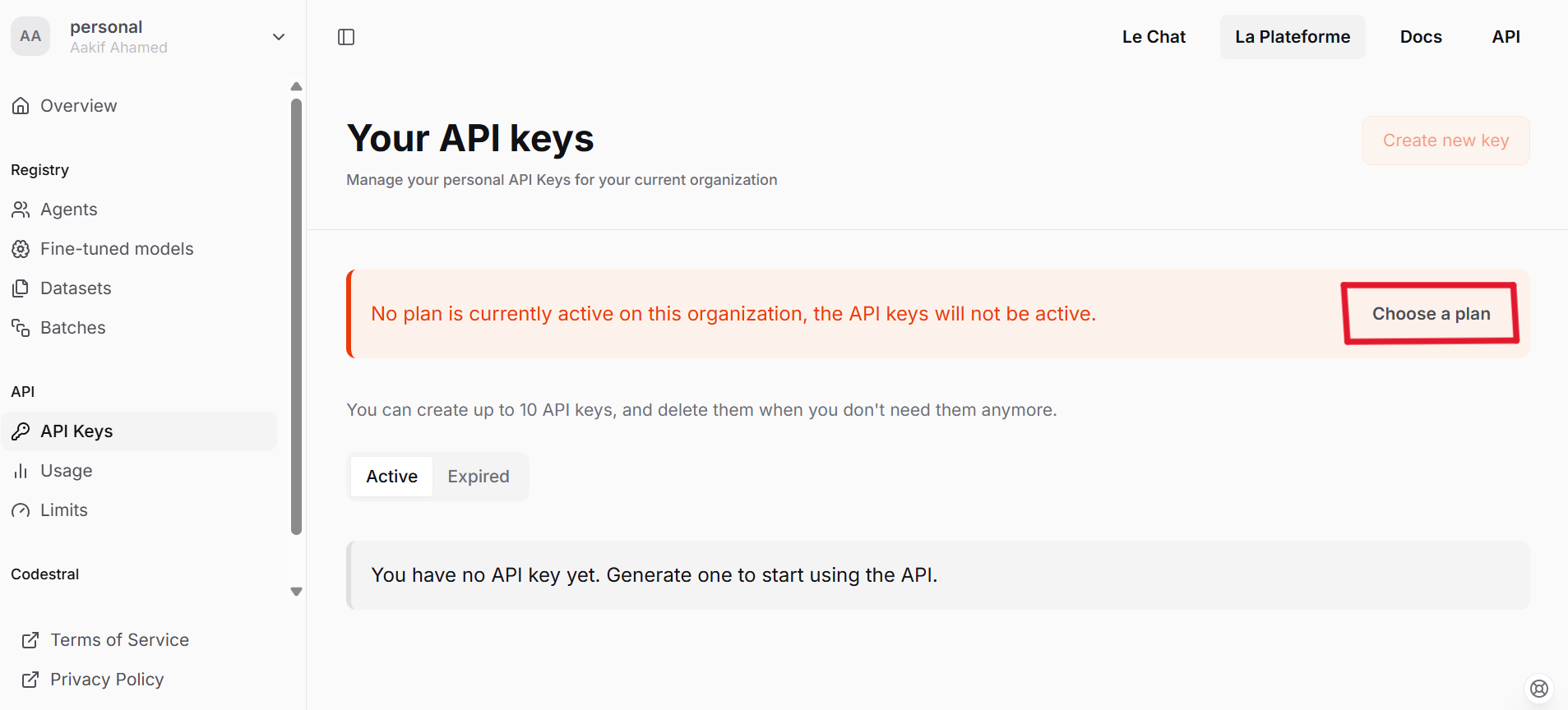
Navigate to the API Keys panel.
-
Choose a plan based on your requirements.
-
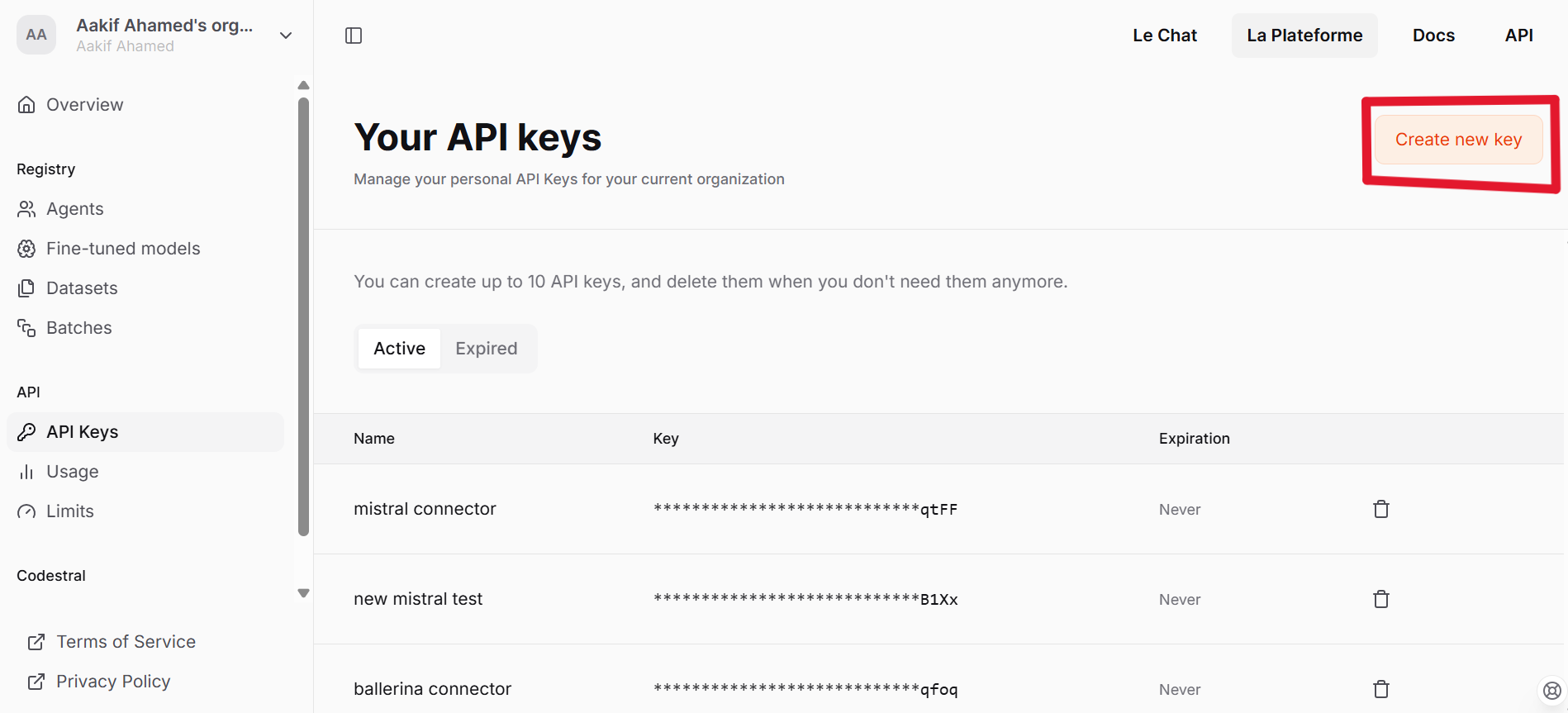
Proceed to create a new API key.
-
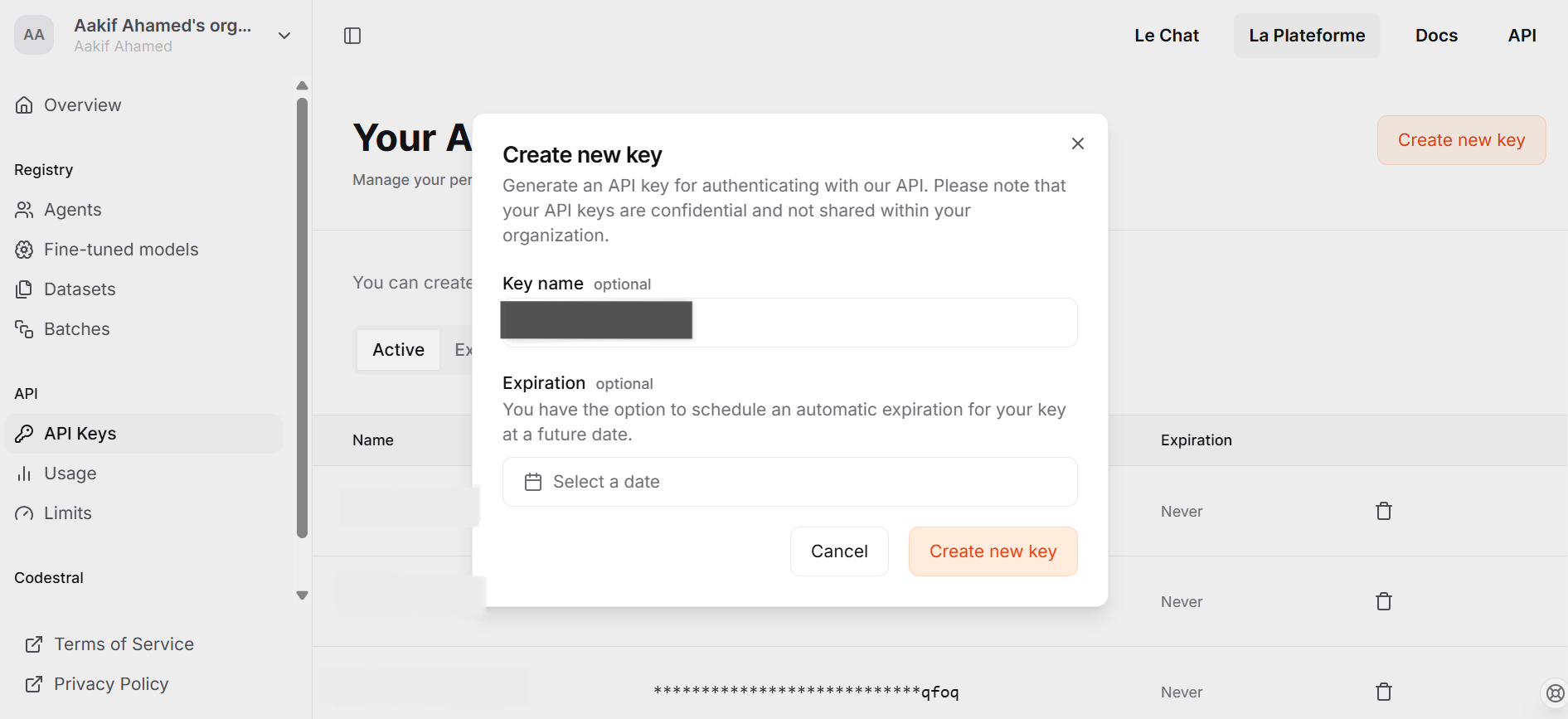
Enter the necessary details as prompted and click on Create new key.
-
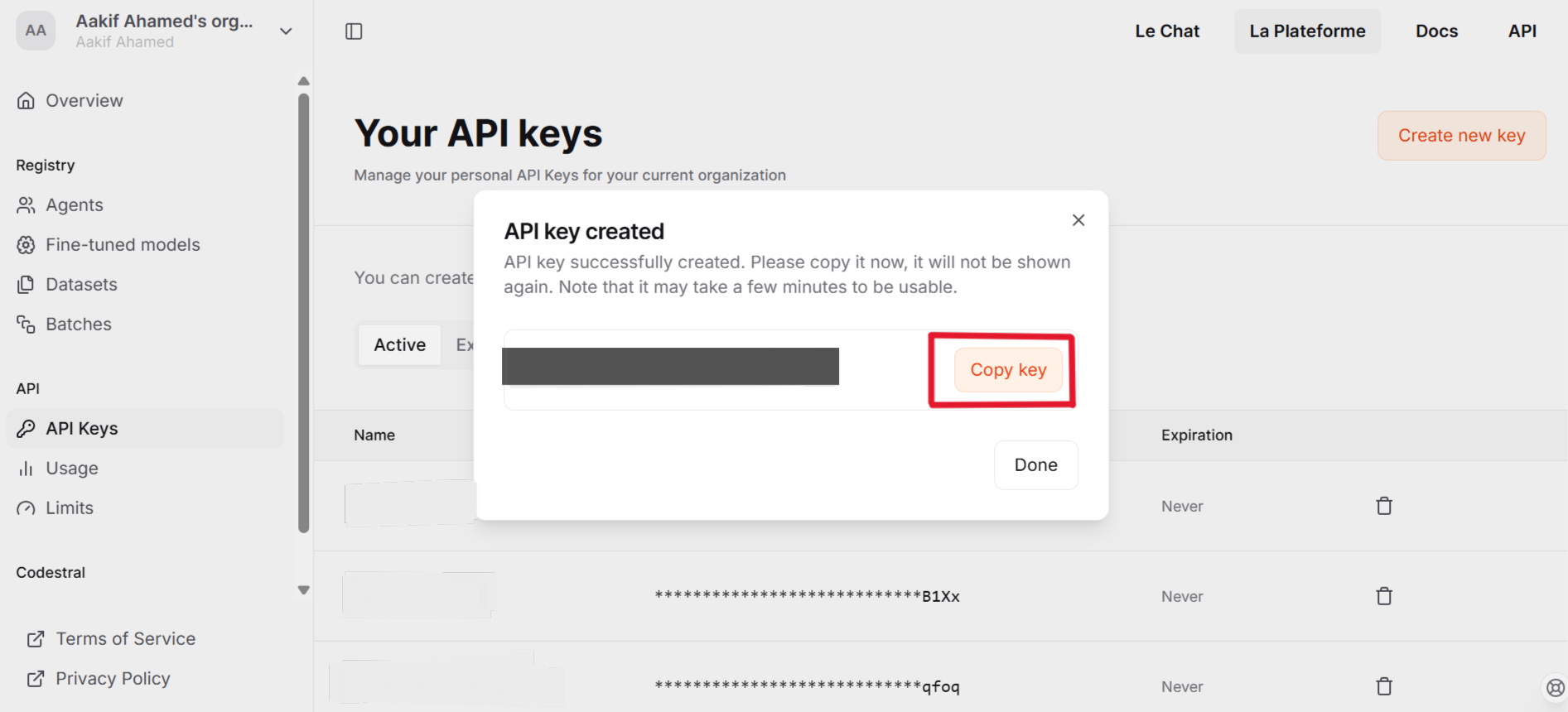
Copy the API key and store it securely
Quickstart
To use the Mistaral connector in your Ballerina application, update the .bal as follow:
Step 1: Import the module
Import the ballerinax/mistral module
import ballerinax/mistral;
Step 2: Create a new connector instance
Create a mistral:Client with the obtained API Key and initialize the connector.
configurable string token = ?; mistral:Client mistralClient = check new ( config = {auth: {token: token}} );
Step 3: Invoke the connector operation
Now, you can utilize available connector operations.
Generate a response for given message
mistral:ChatCompletionRequest request = { model: "mistral-small-latest", messages: [ { role: "user", content: "What is the capital of France?" } ] }; mistral:ChatCompletionResponse response = check mistralClient->/chat/completions.post(request);
Step 4: Run the Ballerina application
Execute the command below to run the Ballerina application:
bal run
Clients
mistral: Client
Our Chat Completion and Embeddings APIs specification. Create your account on La Plateforme to get access and read the docs to learn how to use it.
Constructor
Gets invoked to initialize the connector.
init (ConnectionConfig config, string serviceUrl)- config ConnectionConfig - The configurations to be used when initializing the
connector
- serviceUrl string "https://api.mistral.ai/v1" - URL of the target service
get models
List Models
get models/[string modelId]
function get models/[string modelId](map<string|string[]> headers) returns ResponseRetrieveModelV1ModelsModelIdGet|errorRetrieve Model
Return Type
- ResponseRetrieveModelV1ModelsModelIdGet|error - Successful Response
delete models/[string modelId]
function delete models/[string modelId](map<string|string[]> headers) returns DeleteModelOut|errorDelete Model
Return Type
- DeleteModelOut|error - Successful Response
get files
function get files(map<string|string[]> headers, *FilesApiRoutesListFilesQueries queries) returns ListFilesOut|errorList Files
Parameters
- queries *FilesApiRoutesListFilesQueries - Queries to be sent with the request
Return Type
- ListFilesOut|error - OK
post files
function post files(MultiPartBodyParams payload, map<string|string[]> headers) returns UploadFileOut|errorUpload File
Parameters
- payload MultiPartBodyParams -
Return Type
- UploadFileOut|error - OK
get files/[string fileId]
function get files/[string fileId](map<string|string[]> headers) returns RetrieveFileOut|errorRetrieve File
Return Type
- RetrieveFileOut|error - OK
delete files/[string fileId]
function delete files/[string fileId](map<string|string[]> headers) returns DeleteFileOut|errorDelete File
Return Type
- DeleteFileOut|error - OK
get files/[string fileId]/content
Download File
Return Type
- byte[]|error - OK
get files/[string fileId]/url
function get files/[string fileId]/url(map<string|string[]> headers, *FilesApiRoutesGetSignedUrlQueries queries) returns FileSignedURL|errorGet Signed Url
Parameters
- queries *FilesApiRoutesGetSignedUrlQueries - Queries to be sent with the request
Return Type
- FileSignedURL|error - OK
get fine_tuning/jobs
function get fine_tuning/jobs(map<string|string[]> headers, *JobsApiRoutesFineTuningGetFineTuningJobsQueries queries) returns JobsOut|errorGet Fine Tuning Jobs
Parameters
- queries *JobsApiRoutesFineTuningGetFineTuningJobsQueries - Queries to be sent with the request
post fine_tuning/jobs
function post fine_tuning/jobs(JobIn payload, map<string|string[]> headers, *JobsApiRoutesFineTuningCreateFineTuningJobQueries queries) returns Response|errorCreate Fine Tuning Job
Parameters
- payload JobIn -
- queries *JobsApiRoutesFineTuningCreateFineTuningJobQueries - Queries to be sent with the request
get fine_tuning/jobs/[string jobId]
function get fine_tuning/jobs/[string jobId](map<string|string[]> headers) returns DetailedJobOut|errorGet Fine Tuning Job
Return Type
- DetailedJobOut|error - OK
post fine_tuning/jobs/[string jobId]/cancel
function post fine_tuning/jobs/[string jobId]/cancel(map<string|string[]> headers) returns DetailedJobOut|errorCancel Fine Tuning Job
Return Type
- DetailedJobOut|error - OK
post fine_tuning/jobs/[string jobId]/'start
function post fine_tuning/jobs/[string jobId]/'start(map<string|string[]> headers) returns DetailedJobOut|errorStart Fine Tuning Job
Return Type
- DetailedJobOut|error - OK
patch fine_tuning/models/[string modelId]
function patch fine_tuning/models/[string modelId](UpdateFTModelIn payload, map<string|string[]> headers) returns FTModelOut|errorUpdate Fine Tuned Model
Parameters
- payload UpdateFTModelIn -
Return Type
- FTModelOut|error - OK
post fine_tuning/models/[string modelId]/archive
function post fine_tuning/models/[string modelId]/archive(map<string|string[]> headers) returns ArchiveFTModelOut|errorArchive Fine Tuned Model
Return Type
- ArchiveFTModelOut|error - OK
delete fine_tuning/models/[string modelId]/archive
function delete fine_tuning/models/[string modelId]/archive(map<string|string[]> headers) returns UnarchiveFTModelOut|errorUnarchive Fine Tuned Model
Return Type
- UnarchiveFTModelOut|error - OK
get batch/jobs
function get batch/jobs(map<string|string[]> headers, *JobsApiRoutesBatchGetBatchJobsQueries queries) returns BatchJobsOut|errorGet Batch Jobs
Parameters
- queries *JobsApiRoutesBatchGetBatchJobsQueries - Queries to be sent with the request
Return Type
- BatchJobsOut|error - OK
post batch/jobs
function post batch/jobs(BatchJobIn payload, map<string|string[]> headers) returns BatchJobOut|errorCreate Batch Job
Parameters
- payload BatchJobIn -
Return Type
- BatchJobOut|error - OK
get batch/jobs/[string jobId]
function get batch/jobs/[string jobId](map<string|string[]> headers) returns BatchJobOut|errorGet Batch Job
Return Type
- BatchJobOut|error - OK
post batch/jobs/[string jobId]/cancel
function post batch/jobs/[string jobId]/cancel(map<string|string[]> headers) returns BatchJobOut|errorCancel Batch Job
Return Type
- BatchJobOut|error - OK
post chat/completions
function post chat/completions(ChatCompletionRequest payload, map<string|string[]> headers) returns ChatCompletionResponse|errorChat Completion
Parameters
- payload ChatCompletionRequest -
Return Type
- ChatCompletionResponse|error - Successful Response
post fim/completions
function post fim/completions(FIMCompletionRequest payload, map<string|string[]> headers) returns FIMCompletionResponse|errorFim Completion
Parameters
- payload FIMCompletionRequest -
Return Type
- FIMCompletionResponse|error - Successful Response
post ocr
function post ocr(OCRRequest payload, map<string|string[]> headers) returns OCRResponse|errorOCR
Parameters
- payload OCRRequest -
Return Type
- OCRResponse|error - Successful Response
post moderations
function post moderations(ClassificationRequest payload, map<string|string[]> headers) returns ClassificationResponse|errorModerations
Parameters
- payload ClassificationRequest -
Return Type
- ClassificationResponse|error - Successful Response
post chat/moderations
function post chat/moderations(ChatModerationRequest payload, map<string|string[]> headers) returns ClassificationResponse|errorModerations Chat
Parameters
- payload ChatModerationRequest -
Return Type
- ClassificationResponse|error - Successful Response
post embeddings
function post embeddings(EmbeddingRequest payload, map<string|string[]> headers) returns EmbeddingResponse|errorEmbeddings
Parameters
- payload EmbeddingRequest -
Return Type
- EmbeddingResponse|error - Successful Response
post agents/completions
function post agents/completions(AgentsCompletionRequest payload, map<string|string[]> headers) returns ChatCompletionResponse|errorAgents Completion
Parameters
- payload AgentsCompletionRequest -
Return Type
- ChatCompletionResponse|error - Successful Response
Records
mistral: AgentsCompletionRequest
Fields
- randomSeed? int? - The seed to use for random sampling. If set, different calls will generate deterministic results
- agentId string - The ID of the agent to use for this completion
- maxTokens? int? - The maximum number of tokens to generate in the completion. The token count of your prompt plus
max_tokenscannot exceed the model's context length
- presencePenalty decimal(default 0) - presence_penalty determines how much the model penalizes the repetition of words or phrases. A higher presence penalty encourages the model to use a wider variety of words and phrases, making the output more diverse and creative
- tools? Tool[]? -
- n? int? - Number of completions to return for each request, input tokens are only billed once
- responseFormat? ResponseFormat -
- frequencyPenalty decimal(default 0) - frequency_penalty penalizes the repetition of words based on their frequency in the generated text. A higher frequency penalty discourages the model from repeating words that have already appeared frequently in the output, promoting diversity and reducing repetition
- 'stream boolean(default false) - Whether to stream back partial progress. If set, tokens will be sent as data-only server-side events as they become available, with the stream terminated by a data: [DONE] message. Otherwise, the server will hold the request open until the timeout or until completion, with the response containing the full result as JSON
- prediction? Prediction -
- messages AgentsCompletionRequestMessages[] - The prompt(s) to generate completions for, encoded as a list of dict with role and content
- toolChoice ToolChoice|ToolChoiceEnum(default "auto") -
mistral: ArchiveFTModelOut
Fields
- archived boolean(default true) -
- id string -
- 'object "model" (default "model") -
mistral: AssistantMessage
Fields
- role "assistant" (default "assistant") -
- prefix boolean(default false) - Set this to
truewhen adding an assistant message as prefix to condition the model response. The role of the prefix message is to force the model to start its answer by the content of the message
- toolCalls? ToolCall[]? -
- content? string|ContentChunk[]? -
mistral: BaseModelCard
Fields
- capabilities ModelCapabilities -
- aliases string[](default []) -
- maxContextLength int(default 32768) -
- created? int -
- name? string? -
- defaultModelTemperature? decimal? -
- description? string? -
- ownedBy string(default "mistralai") -
- id string -
- deprecation? string? -
- 'type "base" (default "base") -
- 'object string(default "model") -
mistral: BatchError
Fields
- count int(default 1) -
- message string -
mistral: BatchJobIn
Fields
- inputFiles string[] -
- endpoint ApiEndpoint -
- metadata? record { string... }? -
- timeoutHours int(default 24) -
- model string -
mistral: BatchJobOut
Fields
- succeededRequests int -
- metadata? record {}? -
- failedRequests int -
- createdAt int -
- outputFile? string? -
- errorFile? string? -
- inputFiles string[] -
- completedAt? int? -
- endpoint string -
- completedRequests int -
- totalRequests int -
- startedAt? int? -
- model string -
- id string -
- errors BatchError[] -
- 'object "batch" (default "batch") -
- status BatchJobStatus -
mistral: BatchJobsOut
Fields
- total int -
- data BatchJobOut[](default []) -
- 'object "list" (default "list") -
mistral: ChatCompletionChoice
Fields
- finishReason "stop"|"length"|"model_length"|"error"|"tool_calls" -
- index int -
- message AssistantMessage -
mistral: ChatCompletionRequest
Fields
- randomSeed? int? - The seed to use for random sampling. If set, different calls will generate deterministic results
- safePrompt boolean(default false) - Whether to inject a safety prompt before all conversations
- maxTokens? int? - The maximum number of tokens to generate in the completion. The token count of your prompt plus
max_tokenscannot exceed the model's context length
- presencePenalty decimal(default 0) - presence_penalty determines how much the model penalizes the repetition of words or phrases. A higher presence penalty encourages the model to use a wider variety of words and phrases, making the output more diverse and creative
- tools? Tool[]? -
- n? int? - Number of completions to return for each request, input tokens are only billed once
- topP decimal(default 1) - Nucleus sampling, where the model considers the results of the tokens with
top_pprobability mass. So 0.1 means only the tokens comprising the top 10% probability mass are considered. We generally recommend altering this ortemperaturebut not both
- responseFormat? ResponseFormat -
- frequencyPenalty decimal(default 0) - frequency_penalty penalizes the repetition of words based on their frequency in the generated text. A higher frequency penalty discourages the model from repeating words that have already appeared frequently in the output, promoting diversity and reducing repetition
- 'stream boolean(default false) - Whether to stream back partial progress. If set, tokens will be sent as data-only server-side events as they become available, with the stream terminated by a data: [DONE] message. Otherwise, the server will hold the request open until the timeout or until completion, with the response containing the full result as JSON
- temperature? decimal? - What sampling temperature to use, we recommend between 0.0 and 0.7. Higher values like 0.7 will make the output more random, while lower values like 0.2 will make it more focused and deterministic. We generally recommend altering this or
top_pbut not both. The default value varies depending on the model you are targeting. Call the/modelsendpoint to retrieve the appropriate value
- prediction? Prediction -
- messages AgentsCompletionRequestMessages[] - The prompt(s) to generate completions for, encoded as a list of dict with role and content
- toolChoice ToolChoice|ToolChoiceEnum(default "auto") -
- model string - ID of the model to use. You can use the List Available Models API to see all of your available models, or see our Model overview for model descriptions
mistral: ChatCompletionResponse
Fields
- Fields Included from *ChatCompletionResponseBase
- Fields Included from *ChatCompletionResponse1
- choices ChatCompletionChoice[]
- anydata...
mistral: ChatCompletionResponse1
Fields
- choices? ChatCompletionChoice[] -
mistral: ChatCompletionResponseBase
Fields
- Fields Included from *ResponseBase
- Fields Included from *ChatCompletionResponseBase1
- created int
- anydata...
mistral: ChatCompletionResponseBase1
Fields
- created? int -
mistral: ChatModerationRequest
Fields
- truncateForContextLength boolean(default false) -
- input (SystemMessage|UserMessage|AssistantMessage|ToolMessage)[]|(SystemMessage|UserMessage|AssistantMessage|ToolMessage)[][] - Chat to classify
- model string -
mistral: CheckpointOut
Fields
- stepNumber int - The step number that the checkpoint was created at
- createdAt int - The UNIX timestamp (in seconds) for when the checkpoint was created
- metrics MetricOut - Metrics at the step number during the fine-tuning job. Use these metrics to assess if the training is going smoothly (loss should decrease, token accuracy should increase)
mistral: ClassificationObject
Fields
- categoryScores? record {||} - Classifier result
- categories? record { boolean... } - Classifier result thresholded
mistral: ClassificationRequest
Fields
- model string - ID of the model to use
mistral: ClassificationResponse
Fields
- model? string -
- id? string -
- results? ClassificationObject[] -
mistral: ConnectionConfig
Provides a set of configurations for controlling the behaviours when communicating with a remote HTTP endpoint.
Fields
- auth BearerTokenConfig - Configurations related to client authentication
- httpVersion HttpVersion(default http:HTTP_2_0) - The HTTP version understood by the client
- http1Settings ClientHttp1Settings(default {}) - Configurations related to HTTP/1.x protocol
- http2Settings ClientHttp2Settings(default {}) - Configurations related to HTTP/2 protocol
- timeout decimal(default 30) - The maximum time to wait (in seconds) for a response before closing the connection
- forwarded string(default "disable") - The choice of setting
forwarded/x-forwardedheader
- followRedirects? FollowRedirects - Configurations associated with Redirection
- poolConfig? PoolConfiguration - Configurations associated with request pooling
- cache CacheConfig(default {}) - HTTP caching related configurations
- compression Compression(default http:COMPRESSION_AUTO) - Specifies the way of handling compression (
accept-encoding) header
- circuitBreaker? CircuitBreakerConfig - Configurations associated with the behaviour of the Circuit Breaker
- retryConfig? RetryConfig - Configurations associated with retrying
- responseLimits ResponseLimitConfigs(default {}) - Configurations associated with inbound response size limits
- secureSocket? ClientSecureSocket - SSL/TLS-related options
- proxy? ProxyConfig - Proxy server related options
- socketConfig ClientSocketConfig(default {}) - Provides settings related to client socket configuration
- validation boolean(default true) - Enables the inbound payload validation functionality which provided by the constraint package. Enabled by default
- laxDataBinding boolean(default true) - Enables relaxed data binding on the client side. When enabled,
nilvalues are treated as optional, and absent fields are handled asnilabletypes. Enabled by default.
mistral: DeleteFileOut
Fields
- deleted boolean - The deletion status
- id string - The ID of the deleted file
- 'object string - The object type that was deleted
mistral: DeleteModelOut
Fields
- deleted boolean(default true) - The deletion status
- id string - The ID of the deleted model
- 'object string(default "model") - The object type that was deleted
mistral: DetailedJobOut
Fields
- jobType string -
- metadata? JobMetadataOut -
- fineTunedModel? string? -
- createdAt int -
- checkpoints CheckpointOut[](default []) -
- suffix? string? -
- autoStart boolean -
- trainingFiles string[] -
- repositories DetailedJobOutRepositories[](default []) -
- hyperparameters TrainingParameters -
- model FineTuneableModel - The name of the model to fine-tune
- id string -
- trainedTokens? int? -
- modifiedAt int -
- integrations? DetailedJobOutIntegrations[]? -
- events EventOut[](default []) - Event items are created every time the status of a fine-tuning job changes. The timestamped list of all events is accessible here
- status "QUEUED"|"STARTED"|"VALIDATING"|"VALIDATED"|"RUNNING"|"FAILED_VALIDATION"|"FAILED"|"SUCCESS"|"CANCELLED"|"CANCELLATION_REQUESTED" -
- validationFiles string[]?(default []) -
- 'object "job" (default "job") -
mistral: DocumentURLChunk
Fields
- documentName? string? - The filename of the document
- 'type string(default "document_url") -
- documentUrl string -
mistral: EmbeddingRequest
Fields
- model string(default "mistral-embed") - ID of the model to use
mistral: EmbeddingResponse
Fields
- Fields Included from *ResponseBase
- data EmbeddingResponseData[] -
- id string -
- model string -
- 'object string -
- usage UsageInfo -
mistral: EmbeddingResponseData
Fields
- index? int -
- embedding? decimal[] -
- 'object? string -
mistral: EventOut
Fields
- data? record {}? -
- name string - The name of the event
- createdAt int - The UNIX timestamp (in seconds) of the event
mistral: FilesApiRoutesGetSignedUrlQueries
Represents the Queries record for the operation: files_api_routes_get_signed_url
Fields
- expiry int(default 24) - Number of hours before the url becomes invalid. Defaults to 24h
mistral: FilesApiRoutesListFilesQueries
Represents the Queries record for the operation: files_api_routes_list_files
Fields
- search? string? -
- purpose? FilePurpose -
- page int(default 0) -
- 'source? Source[]? -
- sampleType? SampleType[]? -
- pageSize int(default 100) -
mistral: FileSchema
Fields
- filename string - The name of the uploaded file
- purpose FilePurpose -
- bytes int - The size of the file, in bytes
- createdAt int - The UNIX timestamp (in seconds) of the event
- id string - The unique identifier of the file
- 'source Source -
- sampleType SampleType -
- numLines? int? -
- 'object string - The object type, which is always "file"
mistral: FileSignedURL
Fields
- url string -
mistral: FIMCompletionRequest
Fields
- topP decimal(default 1) - Nucleus sampling, where the model considers the results of the tokens with
top_pprobability mass. So 0.1 means only the tokens comprising the top 10% probability mass are considered. We generally recommend altering this ortemperaturebut not both
- randomSeed? int? - The seed to use for random sampling. If set, different calls will generate deterministic results
- maxTokens? int? - The maximum number of tokens to generate in the completion. The token count of your prompt plus
max_tokenscannot exceed the model's context length
- 'stream boolean(default false) - Whether to stream back partial progress. If set, tokens will be sent as data-only server-side events as they become available, with the stream terminated by a data: [DONE] message. Otherwise, the server will hold the request open until the timeout or until completion, with the response containing the full result as JSON
- temperature? decimal? - What sampling temperature to use, we recommend between 0.0 and 0.7. Higher values like 0.7 will make the output more random, while lower values like 0.2 will make it more focused and deterministic. We generally recommend altering this or
top_pbut not both. The default value varies depending on the model you are targeting. Call the/modelsendpoint to retrieve the appropriate value
- model string(default "codestral-2405") - ID of the model to use. Only compatible for now with:
codestral-2405codestral-latest
- suffix string?(default "") - Optional text/code that adds more context for the model. When given a
promptand asuffixthe model will fill what is between them. Whensuffixis not provided, the model will simply execute completion starting withprompt
- prompt string - The text/code to complete
- minTokens? int? - The minimum number of tokens to generate in the completion
mistral: FIMCompletionResponse
Fields
- Fields Included from *ChatCompletionResponse
- model? string -
mistral: FTModelCapabilitiesOut
Fields
- completionChat boolean(default true) -
- functionCalling boolean(default false) -
- fineTuning boolean(default false) -
- completionFim boolean(default false) -
mistral: FTModelCard
Extra fields for fine-tuned models
Fields
- capabilities ModelCapabilities -
- aliases string[](default []) -
- created? int -
- description? string? -
- ownedBy string(default "mistralai") -
- deprecation? string? -
- 'type "fine-tuned" (default "fine-tuned") -
- archived boolean(default false) -
- maxContextLength int(default 32768) -
- root string -
- name? string? -
- defaultModelTemperature? decimal? -
- id string -
- job string -
- 'object string(default "model") -
mistral: FTModelOut
Fields
- archived boolean -
- capabilities FTModelCapabilitiesOut -
- aliases string[](default []) -
- maxContextLength int(default 32768) -
- created int -
- root string -
- name? string? -
- description? string? -
- ownedBy string -
- id string -
- job string -
- 'object "model" (default "model") -
mistral: Function
Fields
- name string -
- description string(default "") -
- strict boolean(default false) -
- parameters record {} -
mistral: FunctionCall
Fields
- name string -
- arguments record {}|string -
mistral: FunctionName
this restriction of Function is used to select a specific function to call
Fields
- name string -
mistral: GithubRepositoryIn
Fields
- owner string -
- ref? string? -
- name string -
- weight decimal(default 1) -
- 'type "github" (default "github") -
- token string -
mistral: GithubRepositoryOut
Fields
- owner string -
- ref? string? -
- name string -
- weight decimal(default 1) -
- 'type "github" (default "github") -
- commitId string -
mistral: ImageURL
Fields
- detail? string? -
- url string -
mistral: ImageURLChunk
{"type":"image_url","image_url":{"url":"data:image/png;base64,iVBORw0
Fields
- 'type "image_url" (default "image_url") -
mistral: JobIn
Fields
- trainingFiles TrainingFile[](default []) -
- repositories JobInRepositories[](default []) -
- hyperparameters TrainingParametersIn - The fine-tuning hyperparameter settings used in a fine-tune job
- model FineTuneableModel - The name of the model to fine-tune
- suffix? string? - A string that will be added to your fine-tuning model name. For example, a suffix of "my-great-model" would produce a model name like
ft:open-mistral-7b:my-great-model:xxx...
- integrations? JobInIntegrations[]? - A list of integrations to enable for your fine-tuning job
- validationFiles? string[]? - A list containing the IDs of uploaded files that contain validation data. If you provide these files, the data is used to generate validation metrics periodically during fine-tuning. These metrics can be viewed in
checkpointswhen getting the status of a running fine-tuning job. The same data should not be present in both train and validation files
- autoStart? boolean - This field will be required in a future release
mistral: JobMetadataOut
Fields
- dataTokens? int? -
- trainTokensPerStep? int? -
- cost? decimal? -
- costCurrency? string? -
- estimatedStartTime? int? -
- expectedDurationSeconds? int? -
- trainTokens? int? -
mistral: JobOut
Fields
- jobType string - The type of job (
FTfor fine-tuning)
- metadata? JobMetadataOut -
- fineTunedModel? string? - The name of the fine-tuned model that is being created. The value will be
nullif the fine-tuning job is still running
- createdAt int - The UNIX timestamp (in seconds) for when the fine-tuning job was created
- suffix? string? - Optional text/code that adds more context for the model. When given a
promptand asuffixthe model will fill what is between them. Whensuffixis not provided, the model will simply execute completion starting withprompt
- autoStart boolean -
- trainingFiles string[] - A list containing the IDs of uploaded files that contain training data
- repositories DetailedJobOutRepositories[](default []) -
- hyperparameters TrainingParameters -
- model FineTuneableModel - The name of the model to fine-tune
- id string - The ID of the job
- trainedTokens? int? - Total number of tokens trained
- modifiedAt int - The UNIX timestamp (in seconds) for when the fine-tuning job was last modified
- integrations? DetailedJobOutIntegrations[]? - A list of integrations enabled for your fine-tuning job
- status "QUEUED"|"STARTED"|"VALIDATING"|"VALIDATED"|"RUNNING"|"FAILED_VALIDATION"|"FAILED"|"SUCCESS"|"CANCELLED"|"CANCELLATION_REQUESTED" - The current status of the fine-tuning job
- validationFiles string[]?(default []) - A list containing the IDs of uploaded files that contain validation data
- 'object "job" (default "job") - The object type of the fine-tuning job
mistral: JobsApiRoutesBatchGetBatchJobsQueries
Represents the Queries record for the operation: jobs_api_routes_batch_get_batch_jobs
Fields
- metadata? record {}? -
- createdAfter? string? -
- model? string? -
- page int(default 0) -
- createdByMe boolean(default false) -
- pageSize int(default 100) -
- status? BatchJobStatus -
mistral: JobsApiRoutesFineTuningCreateFineTuningJobQueries
Represents the Queries record for the operation: jobs_api_routes_fine_tuning_create_fine_tuning_job
Fields
- dryRun? boolean? -
- If
truethe job is not spawned, instead the query returns a handful of useful metadata for the user to perform sanity checks (seeLegacyJobMetadataOutresponse). - Otherwise, the job is started and the query returns the job ID along with some of the
input parameters (see
JobOutresponse)
- If
mistral: JobsApiRoutesFineTuningGetFineTuningJobsQueries
Represents the Queries record for the operation: jobs_api_routes_fine_tuning_get_fine_tuning_jobs
Fields
- wandbProject? string? - The Weights and Biases project to filter on. When set, the other results are not displayed
- wandbName? string? - The Weight and Biases run name to filter on. When set, the other results are not displayed
- createdAfter? string? - The date/time to filter on. When set, the results for previous creation times are not displayed
- model? string? - The model name used for fine-tuning to filter on. When set, the other results are not displayed
- page int(default 0) - The page number of the results to be returned
- suffix? string? - The model suffix to filter on. When set, the other results are not displayed
- createdByMe boolean(default false) - When set, only return results for jobs created by the API caller. Other results are not displayed
- pageSize int(default 100) - The number of items to return per page
- status? "QUEUED"|"STARTED"|"VALIDATING"|"VALIDATED"|"RUNNING"|"FAILED_VALIDATION"|"FAILED"|"SUCCESS"|"CANCELLED"|"CANCELLATION_REQUESTED"? - The current job state to filter on. When set, the other results are not displayed
mistral: JobsOut
Fields
- total int -
- data JobOut[](default []) -
- 'object "list" (default "list") -
mistral: JsonSchema
Fields
- schema record {} -
- name string -
- description? string? -
- strict boolean(default false) -
mistral: LegacyJobMetadataOut
Fields
- dataTokens? int? - The total number of tokens in the training dataset
- trainTokensPerStep? int? - The number of tokens consumed by one training step
- cost? decimal? - The cost of the fine-tuning job
- costCurrency? string? - The currency used for the fine-tuning job cost
- estimatedStartTime? int? -
- expectedDurationSeconds? int? - The approximated time (in seconds) for the fine-tuning process to complete
- deprecated boolean(default true) -
- details string -
- trainTokens? int? - The total number of tokens used during the fine-tuning process
- epochs? decimal? - The number of complete passes through the entire training dataset
- trainingSteps? int? - The number of training steps to perform. A training step refers to a single update of the model weights during the fine-tuning process. This update is typically calculated using a batch of samples from the training dataset
- 'object "job.metadata" (default "job.metadata") -
mistral: ListFilesOut
Fields
- total int -
- data FileSchema[] -
- 'object string -
mistral: MetricOut
Metrics at the step number during the fine-tuning job. Use these metrics to assess if the training is going smoothly (loss should decrease, token accuracy should increase)
Fields
- validLoss? decimal? -
- validMeanTokenAccuracy? decimal? -
- trainLoss? decimal? -
mistral: ModelCapabilities
Fields
- completionChat boolean(default true) -
- functionCalling boolean(default true) -
- vision boolean(default false) -
- fineTuning boolean(default false) -
- completionFim boolean(default false) -
mistral: ModelList
Fields
- data? ModelListData[] -
- 'object string(default "list") -
mistral: MultiPartBodyParams
Fields
- file record { fileContent byte[], fileName string } - The File object (not file name) to be uploaded.
To upload a file and specify a custom file name you should format your request as such:
Otherwise, you can just keep the original file name:file=@path/to/your/file.jsonl;filename=custom_name.jsonlfile=@path/to/your/file.jsonl
- purpose? FilePurpose -
mistral: OCRImageObject
Fields
- bottomRightX int? - X coordinate of bottom-right corner of the extracted image
- bottomRightY int? - Y coordinate of bottom-right corner of the extracted image
- imageBase64? string? - Base64 string of the extracted image
- topLeftY int? - Y coordinate of top-left corner of the extracted image
- id string - Image ID for extracted image in a page
- topLeftX int? - X coordinate of top-left corner of the extracted image
mistral: OCRPageDimensions
Fields
- width int - Width of the image in pixels
- dpi int - Dots per inch of the page-image
- height int - Height of the image in pixels
mistral: OCRPageObject
Fields
- images OCRImageObject[] - List of all extracted images in the page
- markdown string - The markdown string response of the page
- index int - The page index in a pdf document starting from 0
- dimensions OCRPageDimensions -
mistral: OCRRequest
Fields
- pages? int[]? - Specific pages user wants to process in various formats: single number, range, or list of both. Starts from 0
- imageMinSize? int? - Minimum height and width of image to extract
- document DocumentURLChunk|ImageURLChunk - Document to run OCR on
- includeImageBase64? boolean? - Include image URLs in response
- imageLimit? int? - Max images to extract
- model string? -
- id? string -
mistral: OCRResponse
Fields
- pages OCRPageObject[] - List of OCR info for pages
- model string - The model used to generate the OCR
- usageInfo OCRUsageInfo -
mistral: OCRUsageInfo
Fields
- pagesProcessed int - Number of pages processed
- docSizeBytes? int? - Document size in bytes
mistral: Prediction
Fields
- 'type string(default "content") -
- content string(default "") -
mistral: ReferenceChunk
Fields
- referenceIds int[] -
- 'type "reference" (default "reference") -
mistral: ResponseBase
Fields
- usage? UsageInfo -
- model? string -
- id? string -
- 'object? string -
mistral: ResponseFormat
Fields
- jsonSchema? JsonSchema -
- 'type? ResponseFormats - An object specifying the format that the model must output. Setting to
{ "type": "json_object" }enables JSON mode, which guarantees the message the model generates is in JSON. When using JSON mode you MUST also instruct the model to produce JSON yourself with a system or a user message
mistral: RetrieveFileOut
Fields
- filename string - The name of the uploaded file
- deleted boolean -
- purpose FilePurpose -
- bytes int - The size of the file, in bytes
- createdAt int - The UNIX timestamp (in seconds) of the event
- id string - The unique identifier of the file
- 'source Source -
- sampleType SampleType -
- numLines? int? -
- 'object string - The object type, which is always "file"
mistral: SystemMessage
Fields
- role "system" (default "system") -
mistral: TextChunk
Fields
- text string -
- 'type "text" (default "text") -
mistral: Tool
Fields
- 'function Function -
- 'type? ToolTypes -
mistral: ToolCall
Fields
- 'function FunctionCall -
- index int(default 0) -
- id string(default "null") -
- 'type? ToolTypes -
mistral: ToolChoice
ToolChoice is either a ToolChoiceEnum or a ToolChoice
Fields
- 'function FunctionName - this restriction of
Functionis used to select a specific function to call
- 'type? ToolTypes -
mistral: ToolMessage
Fields
- role "tool" (default "tool") -
- toolCallId? string? -
- name? string? -
- content string|ContentChunk[]? -
mistral: TrainingFile
Fields
- fileId string -
- weight decimal(default 1) -
mistral: TrainingParameters
Fields
- fimRatio decimal?(default 0.9) -
- weightDecay decimal?(default 0.1) -
- trainingSteps? int? -
- learningRate decimal(default 0.00010) -
- epochs? decimal? -
- seqLen? int? -
- warmupFraction decimal?(default 0.05) -
mistral: TrainingParametersIn
The fine-tuning hyperparameter settings used in a fine-tune job
Fields
- fimRatio decimal?(default 0.9) -
- weightDecay decimal?(default 0.1) - (Advanced Usage) Weight decay adds a term to the loss function that is proportional to the sum of the squared weights. This term reduces the magnitude of the weights and prevents them from growing too large
- trainingSteps? int? - The number of training steps to perform. A training step refers to a single update of the model weights during the fine-tuning process. This update is typically calculated using a batch of samples from the training dataset
- learningRate decimal(default 0.00010) - A parameter describing how much to adjust the pre-trained model's weights in response to the estimated error each time the weights are updated during the fine-tuning process
- epochs? decimal? -
- seqLen? int? -
- warmupFraction decimal?(default 0.05) - (Advanced Usage) A parameter that specifies the percentage of the total training steps at which the learning rate warm-up phase ends. During this phase, the learning rate gradually increases from a small value to the initial learning rate, helping to stabilize the training process and improve convergence. Similar to
pct_startin mistral-finetune
mistral: UnarchiveFTModelOut
Fields
- archived boolean(default false) -
- id string -
- 'object "model" (default "model") -
mistral: UpdateFTModelIn
Fields
- name? string? -
- description? string? -
mistral: UploadFileOut
Fields
- filename string - The name of the uploaded file
- purpose FilePurpose -
- bytes int - The size of the file, in bytes
- createdAt int - The UNIX timestamp (in seconds) of the event
- id string - The unique identifier of the file
- 'source Source -
- sampleType SampleType -
- numLines? int? -
- 'object string - The object type, which is always "file"
mistral: UsageInfo
Fields
- completionTokens int -
- promptTokens int -
- totalTokens int -
mistral: UserMessage
Fields
- role "user" (default "user") -
- content string|ContentChunk[]? -
mistral: WandbIntegration
Fields
- apiKey string - The WandB API key to use for authentication
- name? string? - A display name to set for the run. If not set, will use the job ID as the name
- project string - The name of the project that the new run will be created under
- 'type "wandb" (default "wandb") -
- runName? string? -
mistral: WandbIntegrationOut
Fields
- name? string? - A display name to set for the run. If not set, will use the job ID as the name
- project string - The name of the project that the new run will be created under
- 'type "wandb" (default "wandb") -
- runName? string? -
Union types
mistral: ModelListData
ModelListData
mistral: ResponseFormats
ResponseFormats
An object specifying the format that the model must output. Setting to { "type": "json_object" } enables JSON mode, which guarantees the message the model generates is in JSON. When using JSON mode you MUST also instruct the model to produce JSON yourself with a system or a user message
mistral: ContentChunk
ContentChunk
mistral: ApiEndpoint
ApiEndpoint
mistral: BatchJobStatus
BatchJobStatus
mistral: SampleType
SampleType
mistral: FilePurpose
FilePurpose
mistral: ResponseRetrieveModelV1ModelsModelIdGet
ResponseRetrieveModelV1ModelsModelIdGet
mistral: FineTuneableModel
FineTuneableModel
The name of the model to fine-tune
mistral: AgentsCompletionRequestMessages
AgentsCompletionRequestMessages
mistral: Source
Source
mistral: ToolChoiceEnum
ToolChoiceEnum
mistral: Response
Response
Simple name reference types
mistral: JobInRepositories
JobInRepositories
mistral: DetailedJobOutIntegrations
DetailedJobOutIntegrations
mistral: JobInIntegrations
JobInIntegrations
mistral: DetailedJobOutRepositories
DetailedJobOutRepositories