Module microsoft.excel

ballerinax/microsoft.excel Ballerina library
Overview
Microsoft Excel is a spreadsheet application in the Microsoft 365 suite, used to organise, format, and calculate data. The Microsoft Excel connector provides programmatic access to workbooks stored in OneDrive and SharePoint through the Microsoft Graph REST API.
This connector supports the Microsoft Graph v1.0 API and covers the workbook surface: worksheets, ranges, tables, table rows and columns, charts, PivotTables, named items, comments, and workbook sessions. All operations act on behalf of the signed-in user.
Key features
- Create, read, update, and delete worksheets, tables, table rows, and table columns
- Read and write cell ranges by address, and apply formatting, sorting, merging, and clearing
- Create and manage charts, including chart series, axes, titles, legends, and chart image export
- Manage PivotTables, named items, and workbook comments with threaded replies
- Run a batch of calls inside a persistent or non-persistent workbook session for consistency and performance
Setup guide
To use the Microsoft Excel connector, you need access to a Microsoft 365 business account and an application registered in Microsoft Entra ID. Workbooks stored on the OneDrive consumer platform are not supported by the Excel REST API — only files stored on the business platform.
Note: The screenshots in this guide are for illustration only. The Microsoft Entra admin center changes over time, so treat them as a visual reference rather than an exact match — follow the described actions and choose the values (application name, redirect URI, permissions, and so on) that fit your own scenario.
Step 1: Register an application in Microsoft Entra ID
-
Sign in to the Microsoft Entra admin center.
-
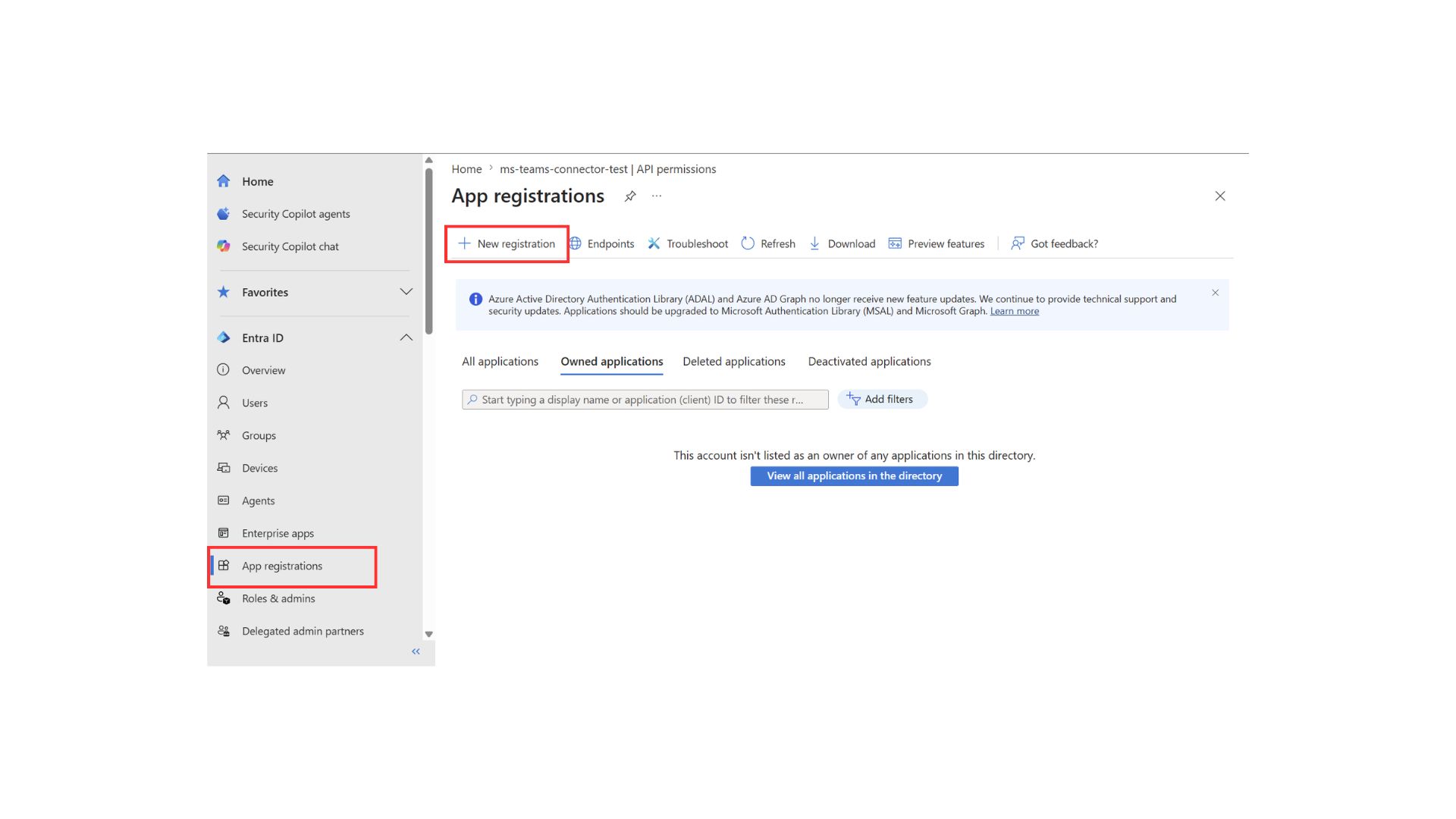
Navigate to Entra ID > App registrations and click New registration.
-
Enter a name of your choice and select the account types appropriate for your organization. Add a Redirect URI under the Web platform — this is where the sign-in flow returns the authorization code (a Microsoft-hosted page such as
https://jwt.msis a convenient choice for Step 4). The Web platform is required because the connector redeems the code using a client secret; the public "Mobile and desktop applications" platform does not accept one. Click Register.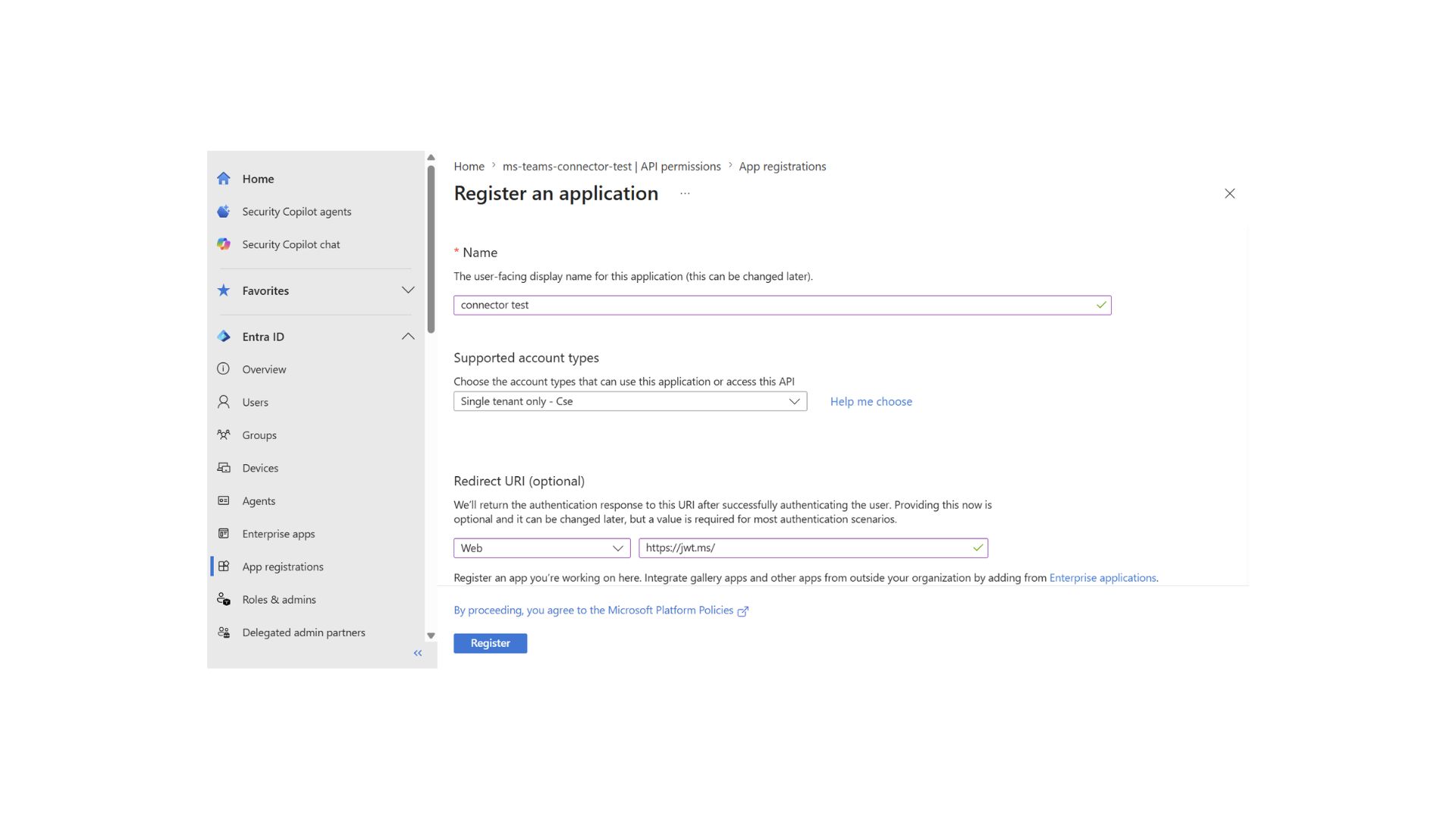
-
On the app's Overview page, note the Application (client) ID and the Directory (tenant) ID — you need the client ID for
Config.toml, and the tenant ID to build the token endpoint in Step 4.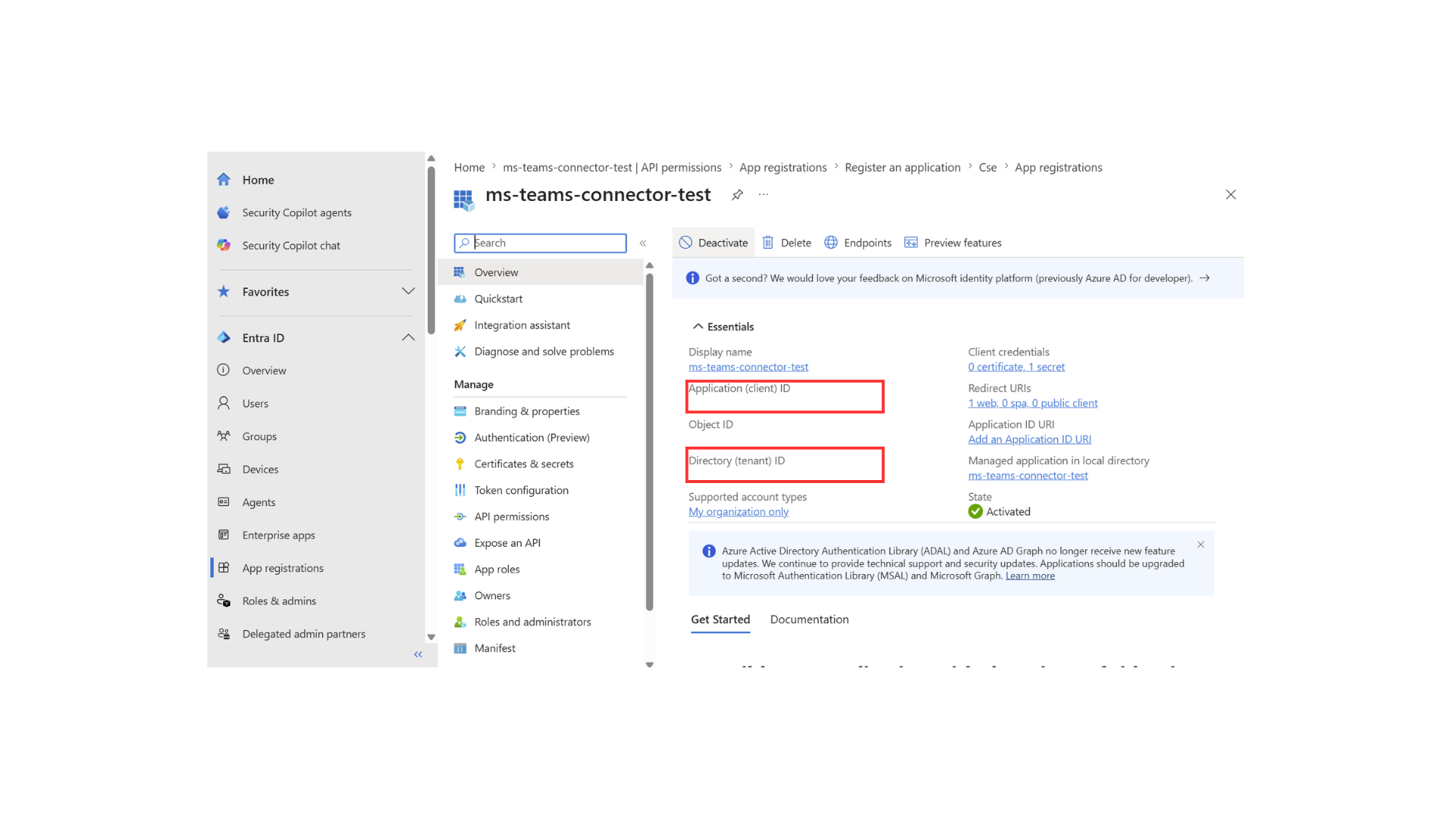
Step 2: Add Microsoft Graph permissions
The Excel API is delegated-only — it supports no application (app-only) permissions, so every call acts on behalf of a signed-in user.
-
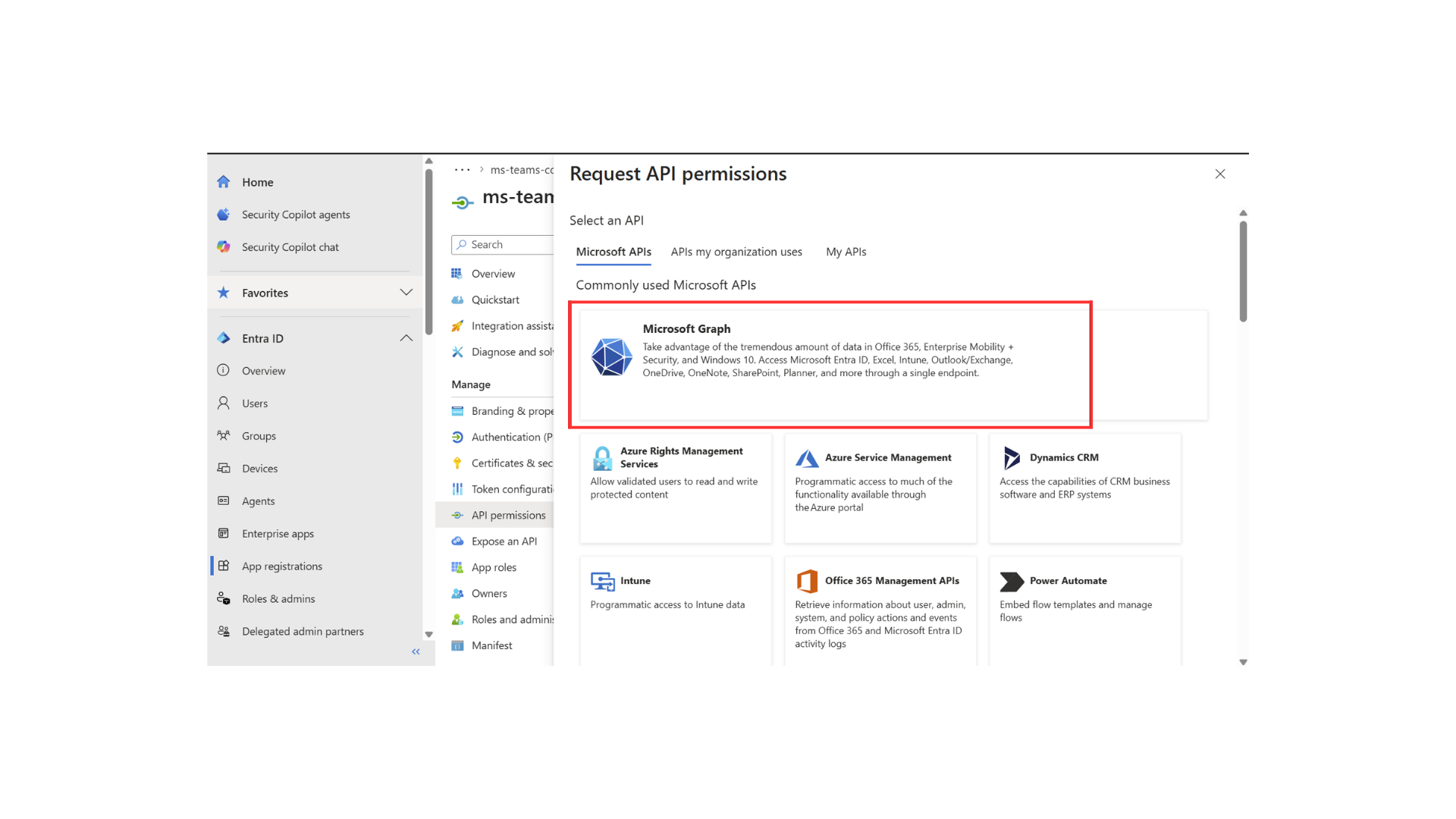
In the registered application, go to API permissions > Add a permission > Microsoft Graph.
-
Choose Delegated permissions and add the scopes your integration needs:
Permission Purpose Files.ReadRead the signed-in user's files — sufficient for read-only integrations Files.ReadWriteRead and write the signed-in user's files offline_accessReturn a refresh token alongside the access token Files.ReadWriteis the least-privileged permission Microsoft documents for the Excel API, and there is no higher-privileged alternative — request only what your integration needs. Click Add permissions.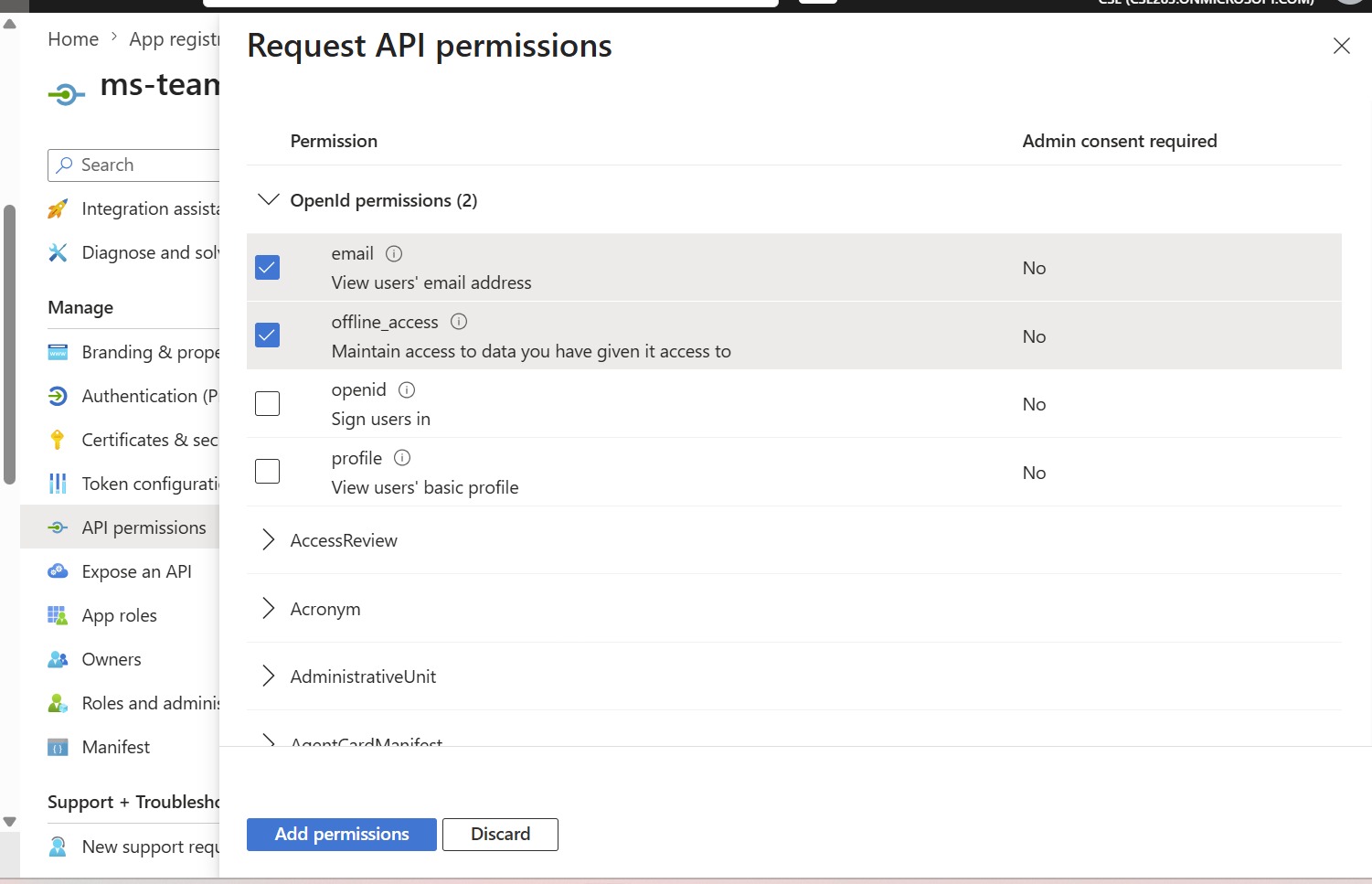
-
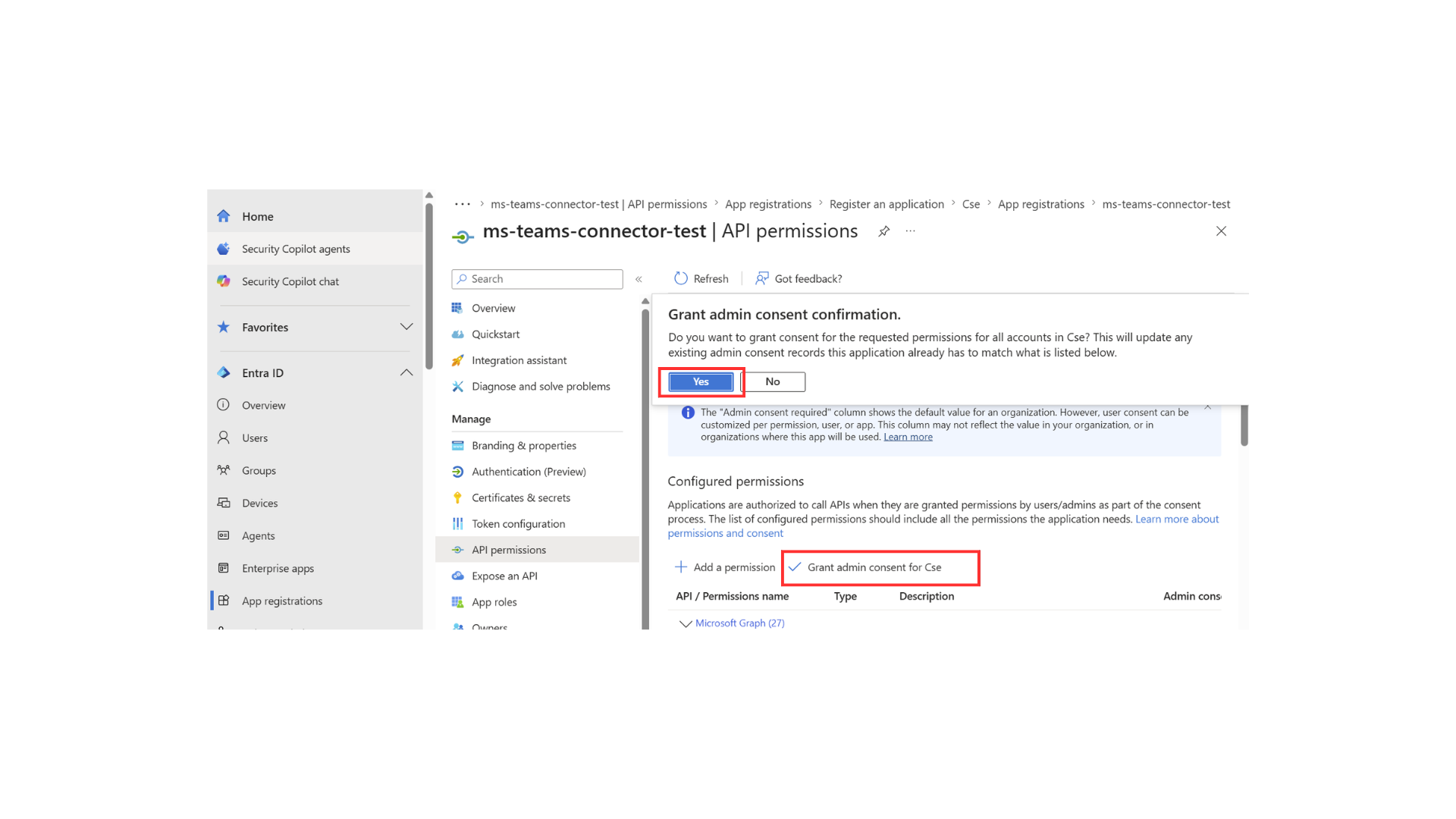
Back on the API permissions page, click Grant admin consent for <your tenant> and confirm Yes. Each permission should then show Granted for <your tenant> in the Status column.
Step 3: Create a client secret
-
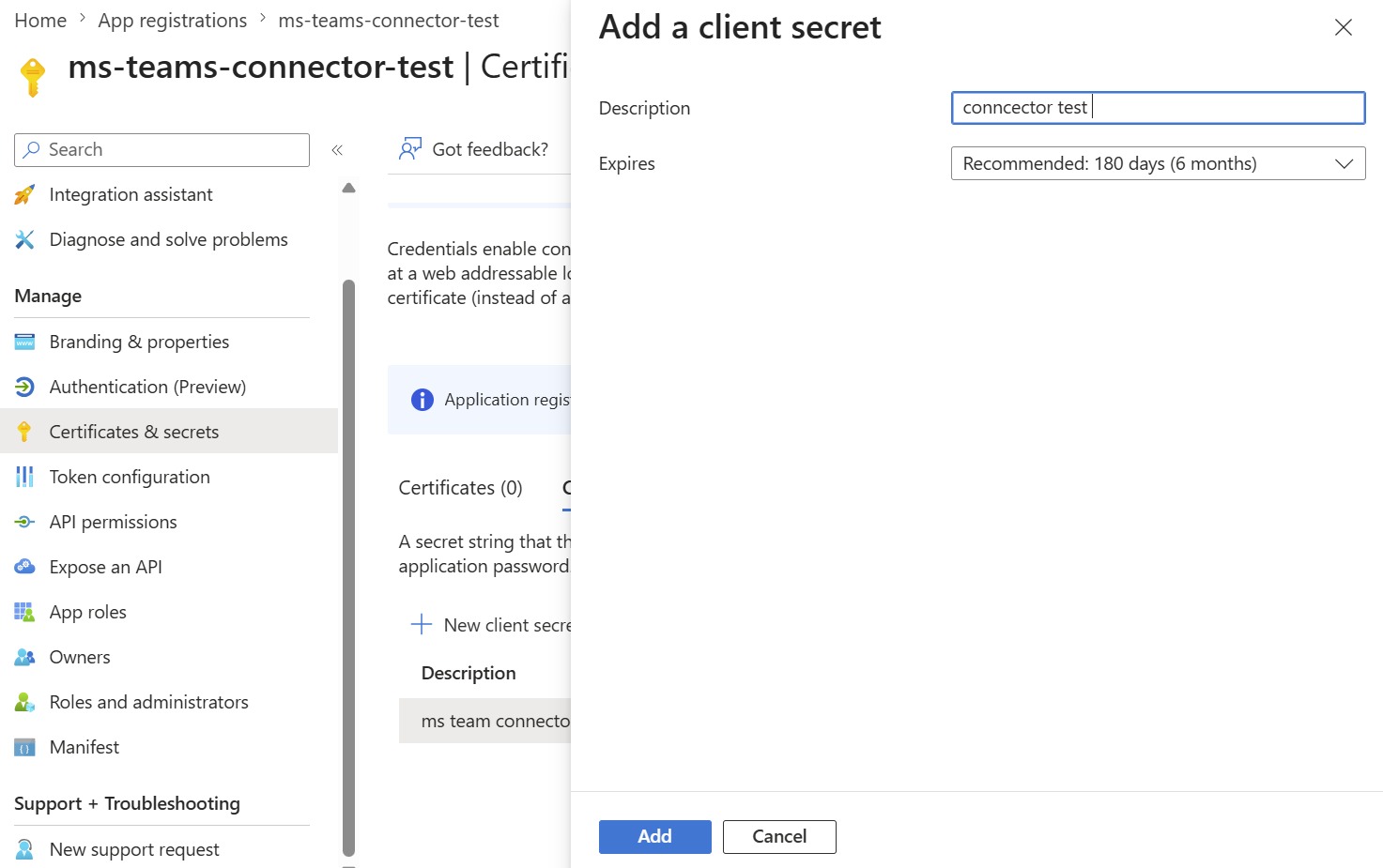
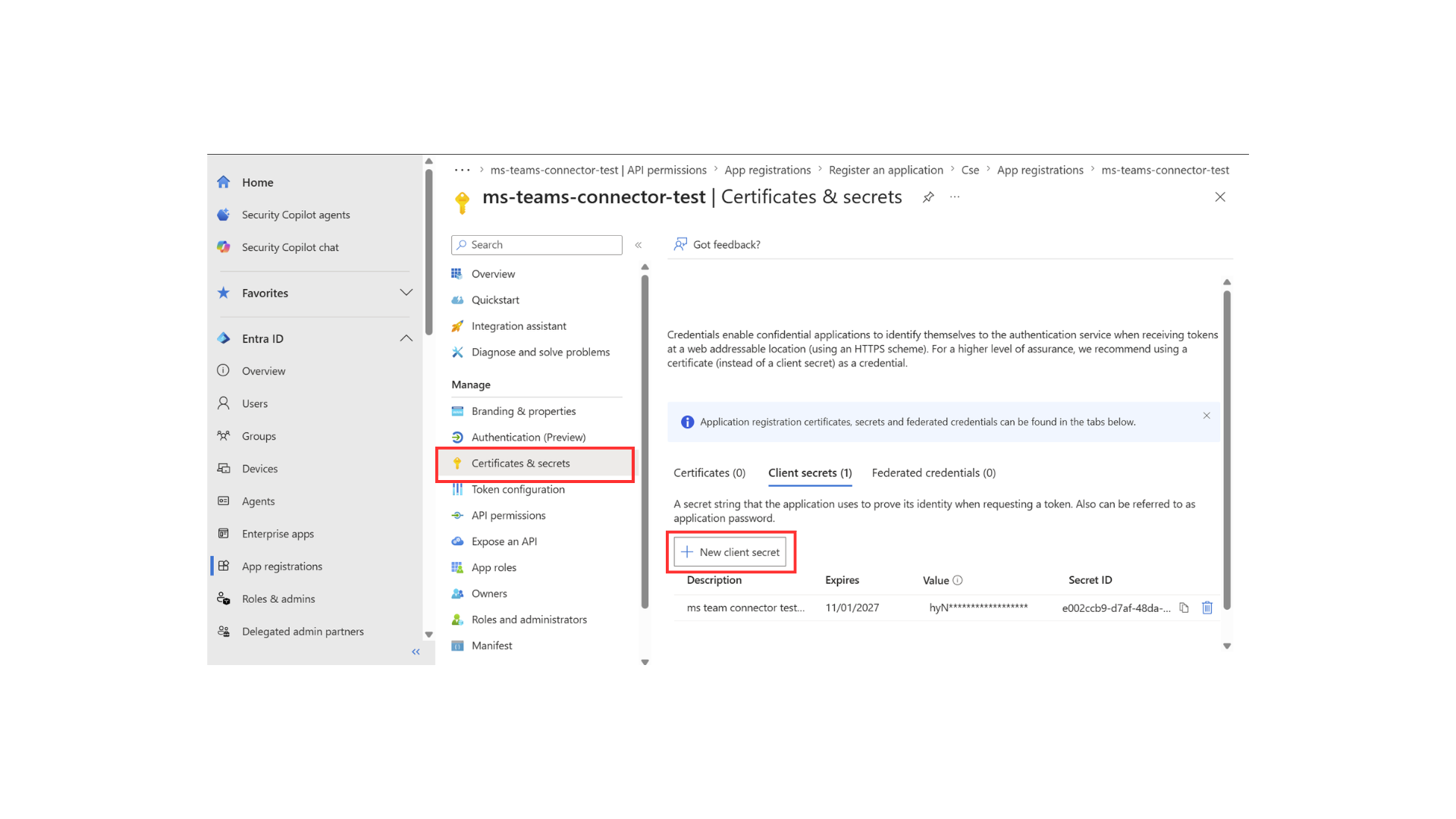
Go to Certificates & secrets > New client secret, add a description and an expiry, and click Add.
-
Copy the secret Value immediately — it is shown only once. (The Secret ID next to it is just a label, not a credential.)
Step 4: Obtain a refresh token
Replace <TENANT_ID>, <CLIENT_ID>, and <CLIENT_SECRET> below with the values from Steps 1 and 3. Use your directory (tenant) ID for a single-tenant application, or common for a multi-tenant one.
1. Get an authorization code. This is an interactive sign-in and consent step, so it cannot be curled — paste this URL into a browser instead:
https://login.microsoftonline.com/<TENANT_ID>/oauth2/v2.0/authorize?client_id=<CLIENT_ID>&response_type=code&redirect_uri=https%3A%2F%2Fjwt.ms&response_mode=query&scope=https%3A%2F%2Fgraph.microsoft.com%2FFiles.ReadWrite%20offline_access&state=12345
Sign in and accept the consent prompt. You land on https://jwt.ms/?code=<AUTH_CODE>&state=12345 — copy the code value from that URL. It is single-use and short-lived, so use it within a few minutes.
2. Exchange the code for a refresh token.
macOS / Linux:
curl -X POST "https://login.microsoftonline.com/<TENANT_ID>/oauth2/v2.0/token" \ --data-urlencode "client_id=<CLIENT_ID>" \ --data-urlencode "client_secret=<CLIENT_SECRET>" \ --data-urlencode "scope=https://graph.microsoft.com/Files.ReadWrite offline_access" \ --data-urlencode "code=<AUTH_CODE>" \ --data-urlencode "redirect_uri=https://jwt.ms" \ --data-urlencode "grant_type=authorization_code"
Windows (PowerShell — call curl.exe explicitly; plain curl is aliased to Invoke-WebRequest and takes different flags):
curl.exe -X POST "https://login.microsoftonline.com/<TENANT_ID>/oauth2/v2.0/token" ` --data-urlencode "client_id=<CLIENT_ID>" ` --data-urlencode "client_secret=<CLIENT_SECRET>" ` --data-urlencode "scope=https://graph.microsoft.com/Files.ReadWrite offline_access" ` --data-urlencode "code=<AUTH_CODE>" ` --data-urlencode "redirect_uri=https://jwt.ms" ` --data-urlencode "grant_type=authorization_code"
The JSON response includes a refresh_token field — that is the refreshToken value for Config.toml. The refreshUrl is the same token endpoint you just called: https://login.microsoftonline.com/<TENANT_ID>/oauth2/v2.0/token.
The
access_tokenin the same response is short-lived (about an hour) and is not used directly; the connector uses the refresh token to mint new access tokens automatically.
Quickstart
To use the Microsoft Excel connector in your Ballerina application, update the .bal file as follows:
Step 1: Import the connector
Import the ballerinax/microsoft.excel module into the Ballerina project.
import ballerinax/microsoft.excel;
Step 2: Create a new connector instance
Create an excel:ConnectionConfig with the OAuth2 tokens obtained and initialize the connector with it.
configurable string clientId = ?; configurable string clientSecret = ?; configurable string refreshToken = ?; configurable string refreshUrl = ?; configurable string driveId = ?; configurable string driveItemId = ?; final excel:Client excel = check new ({ auth: {clientId, clientSecret, refreshToken, refreshUrl} });
Provide the values in a Config.toml file in the project root. Use your tenant id in refreshUrl for a single-tenant application, or common for a multi-tenant one.
clientId = "<CLIENT_ID>" clientSecret = "<CLIENT_SECRET>" refreshToken = "<REFRESH_TOKEN>" refreshUrl = "https://login.microsoftonline.com/common/oauth2/v2.0/token" driveId = "<DRIVE_ID>" driveItemId = "<DRIVE_ITEM_ID>"
Step 3: Invoke the connector operation
Now, utilize the available connector operations. The following example lists the worksheets in a workbook, identified by the drive that holds it and the workbook file itself.
public function main() returns error? { excel:WorksheetCollectionResponse _ = check excel->listWorksheets(driveId, driveItemId); }
Step 4: Run the Ballerina application
bal run
Examples
The Microsoft Excel connector provides practical examples illustrating usage in various scenarios. Explore these examples, covering the following use cases:
- workbook_session_summary — List the worksheets in a workbook and report each one's used range, inside a single workbook session.
- expense_table_ingestion — Add a worksheet, define a table over its header range, and append expense rows to it.
- revenue_chart_export — Create a chart from a range of revenue figures, position it, and export it as a base64-encoded image.
- inventory_table_audit — List the tables on a worksheet with their columns and header/total row ranges.
Clients
microsoft.excel: Client
Microsoft Excel API. Subset of the Microsoft Graph v1.0 OpenAPI specification covering workbook, worksheet, range, table, chart and pivot-table operations on files stored in OneDrive and SharePoint.
Constructor
Gets invoked to initialize the connector.
init (ConnectionConfig config, string serviceUrl)- config ConnectionConfig - The configurations to be used when initializing the
connector
- serviceUrl string "https://graph.microsoft.com/v1.0" - URL of the target service
getWorkbook
function getWorkbook(string driveId, string driveItemId, GetWorkbookHeaders headers, *GetWorkbookQueries queries) returns Workbook|errorGet workbook from drives
Parameters
- driveId string - The unique identifier of drive
- driveItemId string - The unique identifier of driveItem
- headers GetWorkbookHeaders (default {}) - Headers to be sent with the request
- queries *GetWorkbookQueries - Queries to be sent with the request
updateWorkbook
function updateWorkbook(string driveId, string driveItemId, Workbook payload, UpdateWorkbookHeaders headers) returns Workbook|errorUpdate workbook
Parameters
- driveId string - The unique identifier of drive
- driveItemId string - The unique identifier of driveItem
- payload Workbook - The workbook properties to update
- headers UpdateWorkbookHeaders (default {}) - Headers to be sent with the request
getApplication
function getApplication(string driveId, string driveItemId, GetApplicationHeaders headers, *GetApplicationQueries queries) returns Application|errorGet application from drives
Parameters
- driveId string - The unique identifier of drive
- driveItemId string - The unique identifier of driveItem
- headers GetApplicationHeaders (default {}) - Headers to be sent with the request
- queries *GetApplicationQueries - Queries to be sent with the request
Return Type
- Application|error - The retrieved Excel application
updateApplication
function updateApplication(string driveId, string driveItemId, Application payload, UpdateApplicationHeaders headers) returns Application|errorUpdate Excel application
Parameters
- driveId string - The unique identifier of drive
- driveItemId string - The unique identifier of driveItem
- payload Application - The Excel application properties to update
- headers UpdateApplicationHeaders (default {}) - Headers to be sent with the request
Return Type
- Application|error - The updated Excel application
calculateApplication
function calculateApplication(string driveId, string driveItemId, CalculateApplicationRequest payload, CalculateApplicationHeaders headers) returns error?Invoke action calculate
Parameters
- driveId string - The unique identifier of drive
- driveItemId string - The unique identifier of driveItem
- payload CalculateApplicationRequest - Action parameters
- headers CalculateApplicationHeaders (default {}) - Headers to be sent with the request
Return Type
- error? - Success
listComments
function listComments(string driveId, string driveItemId, ListCommentsHeaders headers, *ListCommentsQueries queries) returns CommentCollectionResponse|errorGet comments from drives
Parameters
- driveId string - The unique identifier of drive
- driveItemId string - The unique identifier of driveItem
- headers ListCommentsHeaders (default {}) - Headers to be sent with the request
- queries *ListCommentsQueries - Queries to be sent with the request
Return Type
- CommentCollectionResponse|error - Retrieved collection
createComment
function createComment(string driveId, string driveItemId, Comment payload, CreateCommentHeaders headers) returns Comment|errorCreate workbook comment
Parameters
- driveId string - The unique identifier of drive
- driveItemId string - The unique identifier of driveItem
- payload Comment - The workbook comment to create
- headers CreateCommentHeaders (default {}) - Headers to be sent with the request
getComment
function getComment(string driveId, string driveItemId, string workbookCommentId, GetCommentHeaders headers, *GetCommentQueries queries) returns Comment|errorGet comments from drives
Parameters
- driveId string - The unique identifier of drive
- driveItemId string - The unique identifier of driveItem
- workbookCommentId string - The unique identifier of workbookComment
- headers GetCommentHeaders (default {}) - Headers to be sent with the request
- queries *GetCommentQueries - Queries to be sent with the request
deleteComment
function deleteComment(string driveId, string driveItemId, string workbookCommentId, DeleteCommentHeaders headers) returns error?Delete workbook comment
Parameters
- driveId string - The unique identifier of drive
- driveItemId string - The unique identifier of driveItem
- workbookCommentId string - The unique identifier of workbookComment
- headers DeleteCommentHeaders (default {}) - Headers to be sent with the request
Return Type
- error? - Success
updateComment
function updateComment(string driveId, string driveItemId, string workbookCommentId, Comment payload, UpdateCommentHeaders headers) returns Comment|errorUpdate workbook comment
Parameters
- driveId string - The unique identifier of drive
- driveItemId string - The unique identifier of driveItem
- workbookCommentId string - The unique identifier of workbookComment
- payload Comment - The workbook comment properties to update
- headers UpdateCommentHeaders (default {}) - Headers to be sent with the request
listReplies
function listReplies(string driveId, string driveItemId, string workbookCommentId, ListRepliesHeaders headers, *ListRepliesQueries queries) returns CommentReplyCollectionResponse|errorGet replies from drives
Parameters
- driveId string - The unique identifier of drive
- driveItemId string - The unique identifier of driveItem
- workbookCommentId string - The unique identifier of workbookComment
- headers ListRepliesHeaders (default {}) - Headers to be sent with the request
- queries *ListRepliesQueries - Queries to be sent with the request
Return Type
- CommentReplyCollectionResponse|error - Retrieved collection
createReply
function createReply(string driveId, string driveItemId, string workbookCommentId, CommentReply payload, CreateReplyHeaders headers) returns CommentReply|errorCreate comment reply
Parameters
- driveId string - The unique identifier of drive
- driveItemId string - The unique identifier of driveItem
- workbookCommentId string - The unique identifier of workbookComment
- payload CommentReply - The comment reply to create
- headers CreateReplyHeaders (default {}) - Headers to be sent with the request
Return Type
- CommentReply|error - The created comment reply
getReply
function getReply(string driveId, string driveItemId, string workbookCommentId, string workbookCommentReplyId, GetReplyHeaders headers, *GetReplyQueries queries) returns CommentReply|errorGet replies from drives
Parameters
- driveId string - The unique identifier of drive
- driveItemId string - The unique identifier of driveItem
- workbookCommentId string - The unique identifier of workbookComment
- workbookCommentReplyId string - The unique identifier of workbookCommentReply
- headers GetReplyHeaders (default {}) - Headers to be sent with the request
- queries *GetReplyQueries - Queries to be sent with the request
Return Type
- CommentReply|error - The retrieved comment reply
deleteReply
function deleteReply(string driveId, string driveItemId, string workbookCommentId, string workbookCommentReplyId, DeleteReplyHeaders headers) returns error?Delete comment reply
Parameters
- driveId string - The unique identifier of drive
- driveItemId string - The unique identifier of driveItem
- workbookCommentId string - The unique identifier of workbookComment
- workbookCommentReplyId string - The unique identifier of workbookCommentReply
- headers DeleteReplyHeaders (default {}) - Headers to be sent with the request
Return Type
- error? - Success
updateReply
function updateReply(string driveId, string driveItemId, string workbookCommentId, string workbookCommentReplyId, CommentReply payload, UpdateReplyHeaders headers) returns CommentReply|errorUpdate comment reply
Parameters
- driveId string - The unique identifier of drive
- driveItemId string - The unique identifier of driveItem
- workbookCommentId string - The unique identifier of workbookComment
- workbookCommentReplyId string - The unique identifier of workbookCommentReply
- payload CommentReply - The comment reply properties to update
- headers UpdateReplyHeaders (default {}) - Headers to be sent with the request
Return Type
- CommentReply|error - The updated comment reply
countReplies
function countReplies(string driveId, string driveItemId, string workbookCommentId, CountRepliesHeaders headers, *CountRepliesQueries queries) returns string|errorGet the number of the resource
Parameters
- driveId string - The unique identifier of drive
- driveItemId string - The unique identifier of driveItem
- workbookCommentId string - The unique identifier of workbookComment
- headers CountRepliesHeaders (default {}) - Headers to be sent with the request
- queries *CountRepliesQueries - Queries to be sent with the request
countComments
function countComments(string driveId, string driveItemId, CountCommentsHeaders headers, *CountCommentsQueries queries) returns string|errorGet the number of the resource
Parameters
- driveId string - The unique identifier of drive
- driveItemId string - The unique identifier of driveItem
- headers CountCommentsHeaders (default {}) - Headers to be sent with the request
- queries *CountCommentsQueries - Queries to be sent with the request
closeSession
function closeSession(string driveId, string driveItemId, CloseSessionHeaders headers) returns error?Invoke action closeSession
Parameters
- driveId string - The unique identifier of drive
- driveItemId string - The unique identifier of driveItem
- headers CloseSessionHeaders (default {}) - Headers to be sent with the request
Return Type
- error? - Success
createSession
function createSession(string driveId, string driveItemId, CreateSessionRequest payload, map<string|string[]> headers) returns SessionInfoResponse|errorInvoke action createSession
Parameters
- driveId string - The unique identifier of drive
- driveItemId string - The unique identifier of driveItem
- payload CreateSessionRequest - Action parameters
Return Type
- SessionInfoResponse|error - The created workbook session
refreshSession
function refreshSession(string driveId, string driveItemId, RefreshSessionHeaders headers) returns error?Invoke action refreshSession
Parameters
- driveId string - The unique identifier of drive
- driveItemId string - The unique identifier of driveItem
- headers RefreshSessionHeaders (default {}) - Headers to be sent with the request
Return Type
- error? - Success
getSessionInfo
function getSessionInfo(string driveId, string driveItemId, string 'key, GetSessionInfoHeaders headers) returns SessionInfoResponse|errorInvoke function sessionInfoResource
Parameters
- driveId string - The unique identifier of drive
- driveItemId string - The unique identifier of driveItem
- 'key string - Usage: key='{key}'
- headers GetSessionInfoHeaders (default {}) - Headers to be sent with the request
Return Type
- SessionInfoResponse|error - The workbook session information
getTableRowOperationResult
function getTableRowOperationResult(string driveId, string driveItemId, string 'key, GetTableRowOperationResultHeaders headers) returns TableRowOperationResponse|errorInvoke function tableRowOperationResult
Parameters
- driveId string - The unique identifier of drive
- driveItemId string - The unique identifier of driveItem
- 'key string - Usage: key='{key}'
- headers GetTableRowOperationResultHeaders (default {}) - Headers to be sent with the request
Return Type
- TableRowOperationResponse|error - The result of the table row operation
listNamedItems
function listNamedItems(string driveId, string driveItemId, ListNamedItemsHeaders headers, *ListNamedItemsQueries queries) returns NamedItemCollectionResponse|errorGet names from drives
Parameters
- driveId string - The unique identifier of drive
- driveItemId string - The unique identifier of driveItem
- headers ListNamedItemsHeaders (default {}) - Headers to be sent with the request
- queries *ListNamedItemsQueries - Queries to be sent with the request
Return Type
- NamedItemCollectionResponse|error - Retrieved collection
createNamedItem
function createNamedItem(string driveId, string driveItemId, NamedItem payload, CreateNamedItemHeaders headers) returns NamedItem|errorCreate named item
Parameters
- driveId string - The unique identifier of drive
- driveItemId string - The unique identifier of driveItem
- payload NamedItem - The named item to create
- headers CreateNamedItemHeaders (default {}) - Headers to be sent with the request
getNamedItem
function getNamedItem(string driveId, string driveItemId, string workbookNamedItemId, GetNamedItemHeaders headers, *GetNamedItemQueries queries) returns NamedItem|errorGet names from drives
Parameters
- driveId string - The unique identifier of drive
- driveItemId string - The unique identifier of driveItem
- workbookNamedItemId string - The unique identifier of workbookNamedItem
- headers GetNamedItemHeaders (default {}) - Headers to be sent with the request
- queries *GetNamedItemQueries - Queries to be sent with the request
deleteNamedItem
function deleteNamedItem(string driveId, string driveItemId, string workbookNamedItemId, DeleteNamedItemHeaders headers) returns error?Delete named item
Parameters
- driveId string - The unique identifier of drive
- driveItemId string - The unique identifier of driveItem
- workbookNamedItemId string - The unique identifier of workbookNamedItem
- headers DeleteNamedItemHeaders (default {}) - Headers to be sent with the request
Return Type
- error? - Success
updateNamedItem
function updateNamedItem(string driveId, string driveItemId, string workbookNamedItemId, NamedItem payload, UpdateNamedItemHeaders headers) returns NamedItem|errorUpdate named item
Parameters
- driveId string - The unique identifier of drive
- driveItemId string - The unique identifier of driveItem
- workbookNamedItemId string - The unique identifier of workbookNamedItem
- payload NamedItem - The named item properties to update
- headers UpdateNamedItemHeaders (default {}) - Headers to be sent with the request
getNamedItemRange
function getNamedItemRange(string driveId, string driveItemId, string workbookNamedItemId, GetNamedItemRangeHeaders headers) returns RangeResponse|errorInvoke function range
Parameters
- driveId string - The unique identifier of drive
- driveItemId string - The unique identifier of driveItem
- workbookNamedItemId string - The unique identifier of workbookNamedItem
- headers GetNamedItemRangeHeaders (default {}) - Headers to be sent with the request
Return Type
- RangeResponse|error - The retrieved named item range
getNamedItemWorksheet
function getNamedItemWorksheet(string driveId, string driveItemId, string workbookNamedItemId, GetNamedItemWorksheetHeaders headers, *GetNamedItemWorksheetQueries queries) returns Worksheet|errorGet worksheet from drives
Parameters
- driveId string - The unique identifier of drive
- driveItemId string - The unique identifier of driveItem
- workbookNamedItemId string - The unique identifier of workbookNamedItem
- headers GetNamedItemWorksheetHeaders (default {}) - Headers to be sent with the request
- queries *GetNamedItemWorksheetQueries - Queries to be sent with the request
countNamedItems
function countNamedItems(string driveId, string driveItemId, CountNamedItemsHeaders headers, *CountNamedItemsQueries queries) returns string|errorGet the number of the resource
Parameters
- driveId string - The unique identifier of drive
- driveItemId string - The unique identifier of driveItem
- headers CountNamedItemsHeaders (default {}) - Headers to be sent with the request
- queries *CountNamedItemsQueries - Queries to be sent with the request
addNamedItem
function addNamedItem(string driveId, string driveItemId, AddNamedItemRequest payload, AddNamedItemHeaders headers) returns NamedItemResponse|errorInvoke action add
Parameters
- driveId string - The unique identifier of drive
- driveItemId string - The unique identifier of driveItem
- payload AddNamedItemRequest - Action parameters
- headers AddNamedItemHeaders (default {}) - Headers to be sent with the request
Return Type
- NamedItemResponse|error - The created named item
addNamedItemFormulaLocal
function addNamedItemFormulaLocal(string driveId, string driveItemId, AddNamedItemFormulaLocalRequest payload, AddNamedItemFormulaLocalHeaders headers) returns NamedItemResponse|errorInvoke action addFormulaLocal
Parameters
- driveId string - The unique identifier of drive
- driveItemId string - The unique identifier of driveItem
- payload AddNamedItemFormulaLocalRequest - Action parameters
- headers AddNamedItemFormulaLocalHeaders (default {}) - Headers to be sent with the request
Return Type
- NamedItemResponse|error - The created named item
listOperations
function listOperations(string driveId, string driveItemId, ListOperationsHeaders headers, *ListOperationsQueries queries) returns OperationCollectionResponse|errorGet operations from drives
Parameters
- driveId string - The unique identifier of drive
- driveItemId string - The unique identifier of driveItem
- headers ListOperationsHeaders (default {}) - Headers to be sent with the request
- queries *ListOperationsQueries - Queries to be sent with the request
Return Type
- OperationCollectionResponse|error - Retrieved collection
createOperation
function createOperation(string driveId, string driveItemId, Operation payload, CreateOperationHeaders headers) returns Operation|errorCreate workbook operation
Parameters
- driveId string - The unique identifier of drive
- driveItemId string - The unique identifier of driveItem
- payload Operation - The workbook operation to create
- headers CreateOperationHeaders (default {}) - Headers to be sent with the request
getOperation
function getOperation(string driveId, string driveItemId, string workbookOperationId, GetOperationHeaders headers, *GetOperationQueries queries) returns Operation|errorGet operations from drives
Parameters
- driveId string - The unique identifier of drive
- driveItemId string - The unique identifier of driveItem
- workbookOperationId string - The unique identifier of workbookOperation
- headers GetOperationHeaders (default {}) - Headers to be sent with the request
- queries *GetOperationQueries - Queries to be sent with the request
deleteOperation
function deleteOperation(string driveId, string driveItemId, string workbookOperationId, DeleteOperationHeaders headers) returns error?Delete workbook operation
Parameters
- driveId string - The unique identifier of drive
- driveItemId string - The unique identifier of driveItem
- workbookOperationId string - The unique identifier of workbookOperation
- headers DeleteOperationHeaders (default {}) - Headers to be sent with the request
Return Type
- error? - Success
updateOperation
function updateOperation(string driveId, string driveItemId, string workbookOperationId, Operation payload, UpdateOperationHeaders headers) returns Operation|errorUpdate workbook operation
Parameters
- driveId string - The unique identifier of drive
- driveItemId string - The unique identifier of driveItem
- workbookOperationId string - The unique identifier of workbookOperation
- payload Operation - The workbook operation properties to update
- headers UpdateOperationHeaders (default {}) - Headers to be sent with the request
countOperations
function countOperations(string driveId, string driveItemId, CountOperationsHeaders headers, *CountOperationsQueries queries) returns string|errorGet the number of the resource
Parameters
- driveId string - The unique identifier of drive
- driveItemId string - The unique identifier of driveItem
- headers CountOperationsHeaders (default {}) - Headers to be sent with the request
- queries *CountOperationsQueries - Queries to be sent with the request
listTables
function listTables(string driveId, string driveItemId, ListTablesHeaders headers, *ListTablesQueries queries) returns TableCollectionResponse|errorGet tables from drives
Parameters
- driveId string - The unique identifier of drive
- driveItemId string - The unique identifier of driveItem
- headers ListTablesHeaders (default {}) - Headers to be sent with the request
- queries *ListTablesQueries - Queries to be sent with the request
Return Type
- TableCollectionResponse|error - Retrieved collection
createTable
function createTable(string driveId, string driveItemId, Table payload, CreateTableHeaders headers) returns Table|errorCreate table
Parameters
- driveId string - The unique identifier of drive
- driveItemId string - The unique identifier of driveItem
- payload Table - The table to create
- headers CreateTableHeaders (default {}) - Headers to be sent with the request
listWorksheets
function listWorksheets(string driveId, string driveItemId, ListWorksheetsHeaders headers, *ListWorksheetsQueries queries) returns WorksheetCollectionResponse|errorGet worksheets from drives
Parameters
- driveId string - The unique identifier of drive
- driveItemId string - The unique identifier of driveItem
- headers ListWorksheetsHeaders (default {}) - Headers to be sent with the request
- queries *ListWorksheetsQueries - Queries to be sent with the request
Return Type
- WorksheetCollectionResponse|error - Retrieved collection
createWorksheet
function createWorksheet(string driveId, string driveItemId, Worksheet payload, CreateWorksheetHeaders headers) returns Worksheet|errorCreate worksheet
Parameters
- driveId string - The unique identifier of drive
- driveItemId string - The unique identifier of driveItem
- payload Worksheet - The worksheet to create
- headers CreateWorksheetHeaders (default {}) - Headers to be sent with the request
getWorksheet
function getWorksheet(string driveId, string driveItemId, string workbookWorksheetId, GetWorksheetHeaders headers, *GetWorksheetQueries queries) returns Worksheet|errorGet worksheets from drives
Parameters
- driveId string - The unique identifier of drive
- driveItemId string - The unique identifier of driveItem
- workbookWorksheetId string - The unique identifier of workbookWorksheet
- headers GetWorksheetHeaders (default {}) - Headers to be sent with the request
- queries *GetWorksheetQueries - Queries to be sent with the request
deleteWorksheet
function deleteWorksheet(string driveId, string driveItemId, string workbookWorksheetId, DeleteWorksheetHeaders headers) returns error?Delete worksheet
Parameters
- driveId string - The unique identifier of drive
- driveItemId string - The unique identifier of driveItem
- workbookWorksheetId string - The unique identifier of workbookWorksheet
- headers DeleteWorksheetHeaders (default {}) - Headers to be sent with the request
Return Type
- error? - Success
updateWorksheet
function updateWorksheet(string driveId, string driveItemId, string workbookWorksheetId, Worksheet payload, UpdateWorksheetHeaders headers) returns Worksheet|errorUpdate worksheet
Parameters
- driveId string - The unique identifier of drive
- driveItemId string - The unique identifier of driveItem
- workbookWorksheetId string - The unique identifier of workbookWorksheet
- payload Worksheet - The worksheet properties to update
- headers UpdateWorksheetHeaders (default {}) - Headers to be sent with the request
listCharts
function listCharts(string driveId, string driveItemId, string workbookWorksheetId, ListChartsHeaders headers, *ListChartsQueries queries) returns ChartCollectionResponse|errorGet charts from drives
Parameters
- driveId string - The unique identifier of drive
- driveItemId string - The unique identifier of driveItem
- workbookWorksheetId string - The unique identifier of workbookWorksheet
- headers ListChartsHeaders (default {}) - Headers to be sent with the request
- queries *ListChartsQueries - Queries to be sent with the request
Return Type
- ChartCollectionResponse|error - Retrieved collection
createChart
function createChart(string driveId, string driveItemId, string workbookWorksheetId, Chart payload, CreateChartHeaders headers) returns Chart|errorCreate chart
Parameters
- driveId string - The unique identifier of drive
- driveItemId string - The unique identifier of driveItem
- workbookWorksheetId string - The unique identifier of workbookWorksheet
- payload Chart - The chart to create
- headers CreateChartHeaders (default {}) - Headers to be sent with the request
getChart
function getChart(string driveId, string driveItemId, string workbookWorksheetId, string workbookChartId, GetChartHeaders headers, *GetChartQueries queries) returns Chart|errorGet charts from drives
Parameters
- driveId string - The unique identifier of drive
- driveItemId string - The unique identifier of driveItem
- workbookWorksheetId string - The unique identifier of workbookWorksheet
- workbookChartId string - The unique identifier of workbookChart
- headers GetChartHeaders (default {}) - Headers to be sent with the request
- queries *GetChartQueries - Queries to be sent with the request
deleteChart
function deleteChart(string driveId, string driveItemId, string workbookWorksheetId, string workbookChartId, DeleteChartHeaders headers) returns error?Delete chart
Parameters
- driveId string - The unique identifier of drive
- driveItemId string - The unique identifier of driveItem
- workbookWorksheetId string - The unique identifier of workbookWorksheet
- workbookChartId string - The unique identifier of workbookChart
- headers DeleteChartHeaders (default {}) - Headers to be sent with the request
Return Type
- error? - Success
updateChart
function updateChart(string driveId, string driveItemId, string workbookWorksheetId, string workbookChartId, Chart payload, UpdateChartHeaders headers) returns Chart|errorUpdate chart
Parameters
- driveId string - The unique identifier of drive
- driveItemId string - The unique identifier of driveItem
- workbookWorksheetId string - The unique identifier of workbookWorksheet
- workbookChartId string - The unique identifier of workbookChart
- payload Chart - The chart properties to update
- headers UpdateChartHeaders (default {}) - Headers to be sent with the request
getChartAxes
function getChartAxes(string driveId, string driveItemId, string workbookWorksheetId, string workbookChartId, GetChartAxesHeaders headers, *GetChartAxesQueries queries) returns ChartAxes|errorGet axes from drives
Parameters
- driveId string - The unique identifier of drive
- driveItemId string - The unique identifier of driveItem
- workbookWorksheetId string - The unique identifier of workbookWorksheet
- workbookChartId string - The unique identifier of workbookChart
- headers GetChartAxesHeaders (default {}) - Headers to be sent with the request
- queries *GetChartAxesQueries - Queries to be sent with the request
updateChartAxes
function updateChartAxes(string driveId, string driveItemId, string workbookWorksheetId, string workbookChartId, ChartAxes payload, UpdateChartAxesHeaders headers) returns ChartAxes|errorUpdate chart axes
Parameters
- driveId string - The unique identifier of drive
- driveItemId string - The unique identifier of driveItem
- workbookWorksheetId string - The unique identifier of workbookWorksheet
- workbookChartId string - The unique identifier of workbookChart
- payload ChartAxes - The chart axes properties to update
- headers UpdateChartAxesHeaders (default {}) - Headers to be sent with the request
getCategoryAxis
function getCategoryAxis(string driveId, string driveItemId, string workbookWorksheetId, string workbookChartId, GetCategoryAxisHeaders headers, *GetCategoryAxisQueries queries) returns ChartAxis|errorGet categoryAxis from drives
Parameters
- driveId string - The unique identifier of drive
- driveItemId string - The unique identifier of driveItem
- workbookWorksheetId string - The unique identifier of workbookWorksheet
- workbookChartId string - The unique identifier of workbookChart
- headers GetCategoryAxisHeaders (default {}) - Headers to be sent with the request
- queries *GetCategoryAxisQueries - Queries to be sent with the request
updateCategoryAxis
function updateCategoryAxis(string driveId, string driveItemId, string workbookWorksheetId, string workbookChartId, ChartAxis payload, UpdateCategoryAxisHeaders headers) returns ChartAxis|errorUpdate category axis
Parameters
- driveId string - The unique identifier of drive
- driveItemId string - The unique identifier of driveItem
- workbookWorksheetId string - The unique identifier of workbookWorksheet
- workbookChartId string - The unique identifier of workbookChart
- payload ChartAxis - The category axis properties to update
- headers UpdateCategoryAxisHeaders (default {}) - Headers to be sent with the request
getSeriesAxis
function getSeriesAxis(string driveId, string driveItemId, string workbookWorksheetId, string workbookChartId, GetSeriesAxisHeaders headers, *GetSeriesAxisQueries queries) returns ChartAxis|errorGet seriesAxis from drives
Parameters
- driveId string - The unique identifier of drive
- driveItemId string - The unique identifier of driveItem
- workbookWorksheetId string - The unique identifier of workbookWorksheet
- workbookChartId string - The unique identifier of workbookChart
- headers GetSeriesAxisHeaders (default {}) - Headers to be sent with the request
- queries *GetSeriesAxisQueries - Queries to be sent with the request
updateSeriesAxis
function updateSeriesAxis(string driveId, string driveItemId, string workbookWorksheetId, string workbookChartId, ChartAxis payload, UpdateSeriesAxisHeaders headers) returns ChartAxis|errorUpdate series axis
Parameters
- driveId string - The unique identifier of drive
- driveItemId string - The unique identifier of driveItem
- workbookWorksheetId string - The unique identifier of workbookWorksheet
- workbookChartId string - The unique identifier of workbookChart
- payload ChartAxis - The series axis properties to update
- headers UpdateSeriesAxisHeaders (default {}) - Headers to be sent with the request
getValueAxis
function getValueAxis(string driveId, string driveItemId, string workbookWorksheetId, string workbookChartId, GetValueAxisHeaders headers, *GetValueAxisQueries queries) returns ChartAxis|errorGet valueAxis from drives
Parameters
- driveId string - The unique identifier of drive
- driveItemId string - The unique identifier of driveItem
- workbookWorksheetId string - The unique identifier of workbookWorksheet
- workbookChartId string - The unique identifier of workbookChart
- headers GetValueAxisHeaders (default {}) - Headers to be sent with the request
- queries *GetValueAxisQueries - Queries to be sent with the request
updateValueAxis
function updateValueAxis(string driveId, string driveItemId, string workbookWorksheetId, string workbookChartId, ChartAxis payload, UpdateValueAxisHeaders headers) returns ChartAxis|errorUpdate value axis
Parameters
- driveId string - The unique identifier of drive
- driveItemId string - The unique identifier of driveItem
- workbookWorksheetId string - The unique identifier of workbookWorksheet
- workbookChartId string - The unique identifier of workbookChart
- payload ChartAxis - The value axis properties to update
- headers UpdateValueAxisHeaders (default {}) - Headers to be sent with the request
getDataLabels
function getDataLabels(string driveId, string driveItemId, string workbookWorksheetId, string workbookChartId, GetDataLabelsHeaders headers, *GetDataLabelsQueries queries) returns ChartDataLabels|errorGet dataLabels from drives
Parameters
- driveId string - The unique identifier of drive
- driveItemId string - The unique identifier of driveItem
- workbookWorksheetId string - The unique identifier of workbookWorksheet
- workbookChartId string - The unique identifier of workbookChart
- headers GetDataLabelsHeaders (default {}) - Headers to be sent with the request
- queries *GetDataLabelsQueries - Queries to be sent with the request
Return Type
- ChartDataLabels|error - The retrieved chart data labels
updateDataLabels
function updateDataLabels(string driveId, string driveItemId, string workbookWorksheetId, string workbookChartId, ChartDataLabels payload, UpdateDataLabelsHeaders headers) returns ChartDataLabels|errorUpdate chart data labels
Parameters
- driveId string - The unique identifier of drive
- driveItemId string - The unique identifier of driveItem
- workbookWorksheetId string - The unique identifier of workbookWorksheet
- workbookChartId string - The unique identifier of workbookChart
- payload ChartDataLabels - The chart data labels properties to update
- headers UpdateDataLabelsHeaders (default {}) - Headers to be sent with the request
Return Type
- ChartDataLabels|error - The updated chart data labels
getChartFormat
function getChartFormat(string driveId, string driveItemId, string workbookWorksheetId, string workbookChartId, GetChartFormatHeaders headers, *GetChartFormatQueries queries) returns ChartAreaFormat|errorGet format from drives
Parameters
- driveId string - The unique identifier of drive
- driveItemId string - The unique identifier of driveItem
- workbookWorksheetId string - The unique identifier of workbookWorksheet
- workbookChartId string - The unique identifier of workbookChart
- headers GetChartFormatHeaders (default {}) - Headers to be sent with the request
- queries *GetChartFormatQueries - Queries to be sent with the request
Return Type
- ChartAreaFormat|error - The retrieved chart format
updateChartFormat
function updateChartFormat(string driveId, string driveItemId, string workbookWorksheetId, string workbookChartId, ChartAreaFormat payload, UpdateChartFormatHeaders headers) returns ChartAreaFormat|errorUpdate chart format
Parameters
- driveId string - The unique identifier of drive
- driveItemId string - The unique identifier of driveItem
- workbookWorksheetId string - The unique identifier of workbookWorksheet
- workbookChartId string - The unique identifier of workbookChart
- payload ChartAreaFormat - The chart format properties to update
- headers UpdateChartFormatHeaders (default {}) - Headers to be sent with the request
Return Type
- ChartAreaFormat|error - The updated chart format
getLegend
function getLegend(string driveId, string driveItemId, string workbookWorksheetId, string workbookChartId, GetLegendHeaders headers, *GetLegendQueries queries) returns ChartLegend|errorGet legend from drives
Parameters
- driveId string - The unique identifier of drive
- driveItemId string - The unique identifier of driveItem
- workbookWorksheetId string - The unique identifier of workbookWorksheet
- workbookChartId string - The unique identifier of workbookChart
- headers GetLegendHeaders (default {}) - Headers to be sent with the request
- queries *GetLegendQueries - Queries to be sent with the request
Return Type
- ChartLegend|error - The retrieved chart legend
updateLegend
function updateLegend(string driveId, string driveItemId, string workbookWorksheetId, string workbookChartId, ChartLegend payload, UpdateLegendHeaders headers) returns ChartLegend|errorUpdate chart legend
Parameters
- driveId string - The unique identifier of drive
- driveItemId string - The unique identifier of driveItem
- workbookWorksheetId string - The unique identifier of workbookWorksheet
- workbookChartId string - The unique identifier of workbookChart
- payload ChartLegend - The chart legend properties to update
- headers UpdateLegendHeaders (default {}) - Headers to be sent with the request
Return Type
- ChartLegend|error - The updated chart legend
getChartImage
function getChartImage(string driveId, string driveItemId, string workbookWorksheetId, string workbookChartId, GetChartImageHeaders headers) returns ChartImageResponse|errorInvoke function image
Parameters
- driveId string - The unique identifier of drive
- driveItemId string - The unique identifier of driveItem
- workbookWorksheetId string - The unique identifier of workbookWorksheet
- workbookChartId string - The unique identifier of workbookChart
- headers GetChartImageHeaders (default {}) - Headers to be sent with the request
Return Type
- ChartImageResponse|error - The chart image as a base64-encoded string
getChartImageFitted
function getChartImageFitted(string driveId, string driveItemId, string workbookWorksheetId, string workbookChartId, decimal width, decimal height, string fittingMode, GetChartImageFittedHeaders headers) returns ChartImageResponse|errorInvoke function image
Parameters
- driveId string - The unique identifier of drive
- driveItemId string - The unique identifier of driveItem
- workbookWorksheetId string - The unique identifier of workbookWorksheet
- workbookChartId string - The unique identifier of workbookChart
- width decimal - Usage: width={width}
- height decimal - Usage: height={height}
- fittingMode string - Usage: fittingMode='{fittingMode}'
- headers GetChartImageFittedHeaders (default {}) - Headers to be sent with the request
Return Type
- ChartImageResponse|error - The chart image as a base64-encoded string, scaled to the given width and height using the specified fitting mode
getChartImageBySize
function getChartImageBySize(string driveId, string driveItemId, string workbookWorksheetId, string workbookChartId, decimal width, decimal height, GetChartImageBySizeHeaders headers) returns ChartImageResponse|errorInvoke function image
Parameters
- driveId string - The unique identifier of drive
- driveItemId string - The unique identifier of driveItem
- workbookWorksheetId string - The unique identifier of workbookWorksheet
- workbookChartId string - The unique identifier of workbookChart
- width decimal - Usage: width={width}
- height decimal - Usage: height={height}
- headers GetChartImageBySizeHeaders (default {}) - Headers to be sent with the request
Return Type
- ChartImageResponse|error - The chart image as a base64-encoded string, scaled to the given width and height
getChartImageByWidth
function getChartImageByWidth(string driveId, string driveItemId, string workbookWorksheetId, string workbookChartId, decimal width, GetChartImageByWidthHeaders headers) returns ChartImageResponse|errorInvoke function image
Parameters
- driveId string - The unique identifier of drive
- driveItemId string - The unique identifier of driveItem
- workbookWorksheetId string - The unique identifier of workbookWorksheet
- workbookChartId string - The unique identifier of workbookChart
- width decimal - Usage: width={width}
- headers GetChartImageByWidthHeaders (default {}) - Headers to be sent with the request
Return Type
- ChartImageResponse|error - The chart image as a base64-encoded string, scaled to the given width
setChartData
function setChartData(string driveId, string driveItemId, string workbookWorksheetId, string workbookChartId, SetChartDataRequest payload, SetChartDataHeaders headers) returns error?Invoke action setData
Parameters
- driveId string - The unique identifier of drive
- driveItemId string - The unique identifier of driveItem
- workbookWorksheetId string - The unique identifier of workbookWorksheet
- workbookChartId string - The unique identifier of workbookChart
- payload SetChartDataRequest - Action parameters
- headers SetChartDataHeaders (default {}) - Headers to be sent with the request
Return Type
- error? - Success
setChartPosition
function setChartPosition(string driveId, string driveItemId, string workbookWorksheetId, string workbookChartId, SetChartPositionRequest payload, SetChartPositionHeaders headers) returns error?Invoke action setPosition
Parameters
- driveId string - The unique identifier of drive
- driveItemId string - The unique identifier of driveItem
- workbookWorksheetId string - The unique identifier of workbookWorksheet
- workbookChartId string - The unique identifier of workbookChart
- payload SetChartPositionRequest - Action parameters
- headers SetChartPositionHeaders (default {}) - Headers to be sent with the request
Return Type
- error? - Success
listChartSeries
function listChartSeries(string driveId, string driveItemId, string workbookWorksheetId, string workbookChartId, ListChartSeriesHeaders headers, *ListChartSeriesQueries queries) returns ChartSeriesCollectionResponse|errorGet series from drives
Parameters
- driveId string - The unique identifier of drive
- driveItemId string - The unique identifier of driveItem
- workbookWorksheetId string - The unique identifier of workbookWorksheet
- workbookChartId string - The unique identifier of workbookChart
- headers ListChartSeriesHeaders (default {}) - Headers to be sent with the request
- queries *ListChartSeriesQueries - Queries to be sent with the request
Return Type
- ChartSeriesCollectionResponse|error - Retrieved collection
createChartSeries
function createChartSeries(string driveId, string driveItemId, string workbookWorksheetId, string workbookChartId, ChartSeries payload, CreateChartSeriesHeaders headers) returns ChartSeries|errorCreate chart series
Parameters
- driveId string - The unique identifier of drive
- driveItemId string - The unique identifier of driveItem
- workbookWorksheetId string - The unique identifier of workbookWorksheet
- workbookChartId string - The unique identifier of workbookChart
- payload ChartSeries - The chart series to create
- headers CreateChartSeriesHeaders (default {}) - Headers to be sent with the request
Return Type
- ChartSeries|error - The created chart series
getChartSeries
function getChartSeries(string driveId, string driveItemId, string workbookWorksheetId, string workbookChartId, string workbookChartSeriesId, GetChartSeriesHeaders headers, *GetChartSeriesQueries queries) returns ChartSeries|errorGet series from drives
Parameters
- driveId string - The unique identifier of drive
- driveItemId string - The unique identifier of driveItem
- workbookWorksheetId string - The unique identifier of workbookWorksheet
- workbookChartId string - The unique identifier of workbookChart
- workbookChartSeriesId string - The unique identifier of workbookChartSeries
- headers GetChartSeriesHeaders (default {}) - Headers to be sent with the request
- queries *GetChartSeriesQueries - Queries to be sent with the request
Return Type
- ChartSeries|error - The retrieved chart series
deleteChartSeries
function deleteChartSeries(string driveId, string driveItemId, string workbookWorksheetId, string workbookChartId, string workbookChartSeriesId, DeleteChartSeriesHeaders headers) returns error?Delete chart series
Parameters
- driveId string - The unique identifier of drive
- driveItemId string - The unique identifier of driveItem
- workbookWorksheetId string - The unique identifier of workbookWorksheet
- workbookChartId string - The unique identifier of workbookChart
- workbookChartSeriesId string - The unique identifier of workbookChartSeries
- headers DeleteChartSeriesHeaders (default {}) - Headers to be sent with the request
Return Type
- error? - Success
updateChartSeries
function updateChartSeries(string driveId, string driveItemId, string workbookWorksheetId, string workbookChartId, string workbookChartSeriesId, ChartSeries payload, UpdateChartSeriesHeaders headers) returns ChartSeries|errorUpdate chart series
Parameters
- driveId string - The unique identifier of drive
- driveItemId string - The unique identifier of driveItem
- workbookWorksheetId string - The unique identifier of workbookWorksheet
- workbookChartId string - The unique identifier of workbookChart
- workbookChartSeriesId string - The unique identifier of workbookChartSeries
- payload ChartSeries - The chart series properties to update
- headers UpdateChartSeriesHeaders (default {}) - Headers to be sent with the request
Return Type
- ChartSeries|error - The updated chart series
countChartSeries
function countChartSeries(string driveId, string driveItemId, string workbookWorksheetId, string workbookChartId, CountChartSeriesHeaders headers) returns CountResult|errorInvoke function count
Parameters
- driveId string - The unique identifier of drive
- driveItemId string - The unique identifier of driveItem
- workbookWorksheetId string - The unique identifier of workbookWorksheet
- workbookChartId string - The unique identifier of workbookChart
- headers CountChartSeriesHeaders (default {}) - Headers to be sent with the request
Return Type
- CountResult|error - The number of chart series
getChartTitle
function getChartTitle(string driveId, string driveItemId, string workbookWorksheetId, string workbookChartId, GetChartTitleHeaders headers, *GetChartTitleQueries queries) returns ChartTitle|errorGet title from drives
Parameters
- driveId string - The unique identifier of drive
- driveItemId string - The unique identifier of driveItem
- workbookWorksheetId string - The unique identifier of workbookWorksheet
- workbookChartId string - The unique identifier of workbookChart
- headers GetChartTitleHeaders (default {}) - Headers to be sent with the request
- queries *GetChartTitleQueries - Queries to be sent with the request
Return Type
- ChartTitle|error - The retrieved chart title
updateChartTitle
function updateChartTitle(string driveId, string driveItemId, string workbookWorksheetId, string workbookChartId, ChartTitle payload, UpdateChartTitleHeaders headers) returns ChartTitle|errorUpdate chart title
Parameters
- driveId string - The unique identifier of drive
- driveItemId string - The unique identifier of driveItem
- workbookWorksheetId string - The unique identifier of workbookWorksheet
- workbookChartId string - The unique identifier of workbookChart
- payload ChartTitle - The chart title properties to update
- headers UpdateChartTitleHeaders (default {}) - Headers to be sent with the request
Return Type
- ChartTitle|error - The updated chart title
getChartWorksheet
function getChartWorksheet(string driveId, string driveItemId, string workbookWorksheetId, string workbookChartId, GetChartWorksheetHeaders headers, *GetChartWorksheetQueries queries) returns Worksheet|errorGet worksheet from drives
Parameters
- driveId string - The unique identifier of drive
- driveItemId string - The unique identifier of driveItem
- workbookWorksheetId string - The unique identifier of workbookWorksheet
- workbookChartId string - The unique identifier of workbookChart
- headers GetChartWorksheetHeaders (default {}) - Headers to be sent with the request
- queries *GetChartWorksheetQueries - Queries to be sent with the request
addChart
function addChart(string driveId, string driveItemId, string workbookWorksheetId, AddChartRequest payload, AddChartHeaders headers) returns AddChartResponse|errorInvoke action add
Parameters
- driveId string - The unique identifier of drive
- driveItemId string - The unique identifier of driveItem
- workbookWorksheetId string - The unique identifier of workbookWorksheet
- payload AddChartRequest - Action parameters
- headers AddChartHeaders (default {}) - Headers to be sent with the request
Return Type
- AddChartResponse|error - The created chart
countCharts
function countCharts(string driveId, string driveItemId, string workbookWorksheetId, CountChartsHeaders headers) returns CountResult|errorInvoke function count
Parameters
- driveId string - The unique identifier of drive
- driveItemId string - The unique identifier of driveItem
- workbookWorksheetId string - The unique identifier of workbookWorksheet
- headers CountChartsHeaders (default {}) - Headers to be sent with the request
Return Type
- CountResult|error - The number of charts
getCell
function getCell(string driveId, string driveItemId, string workbookWorksheetId, decimal row, decimal column, GetCellHeaders headers) returns RangeResponse|errorInvoke function cell
Parameters
- driveId string - The unique identifier of drive
- driveItemId string - The unique identifier of driveItem
- workbookWorksheetId string - The unique identifier of workbookWorksheet
- row decimal - Usage: row={row}
- column decimal - Usage: column={column}
- headers GetCellHeaders (default {}) - Headers to be sent with the request
Return Type
- RangeResponse|error - The retrieved cell
getRange
function getRange(string driveId, string driveItemId, string workbookWorksheetId, GetRangeHeaders headers) returns RangeResponse|errorInvoke function range
Parameters
- driveId string - The unique identifier of drive
- driveItemId string - The unique identifier of driveItem
- workbookWorksheetId string - The unique identifier of workbookWorksheet
- headers GetRangeHeaders (default {}) - Headers to be sent with the request
Return Type
- RangeResponse|error - The retrieved range
getRangeFormat
function getRangeFormat(string driveId, string driveItemId, string workbookWorksheetId, GetRangeFormatHeaders headers, *GetRangeFormatQueries queries) returns RangeFormat|errorGet format from drives
Parameters
- driveId string - The unique identifier of drive
- driveItemId string - The unique identifier of driveItem
- workbookWorksheetId string - The unique identifier of workbookWorksheet
- headers GetRangeFormatHeaders (default {}) - Headers to be sent with the request
- queries *GetRangeFormatQueries - Queries to be sent with the request
Return Type
- RangeFormat|error - The retrieved range format
updateRangeFormat
function updateRangeFormat(string driveId, string driveItemId, string workbookWorksheetId, RangeFormat payload, UpdateRangeFormatHeaders headers) returns RangeFormat|errorUpdate range format
Parameters
- driveId string - The unique identifier of drive
- driveItemId string - The unique identifier of driveItem
- workbookWorksheetId string - The unique identifier of workbookWorksheet
- payload RangeFormat - The range format properties to update
- headers UpdateRangeFormatHeaders (default {}) - Headers to be sent with the request
Return Type
- RangeFormat|error - The updated range format
clearRange
function clearRange(string driveId, string driveItemId, string workbookWorksheetId, ClearRangeRequest payload, ClearRangeHeaders headers) returns error?Invoke action clear
Parameters
- driveId string - The unique identifier of drive
- driveItemId string - The unique identifier of driveItem
- workbookWorksheetId string - The unique identifier of workbookWorksheet
- payload ClearRangeRequest - Action parameters
- headers ClearRangeHeaders (default {}) - Headers to be sent with the request
Return Type
- error? - Success
deleteRange
function deleteRange(string driveId, string driveItemId, string workbookWorksheetId, DeleteRangeRequest payload, DeleteRangeHeaders headers) returns error?Invoke action delete
Parameters
- driveId string - The unique identifier of drive
- driveItemId string - The unique identifier of driveItem
- workbookWorksheetId string - The unique identifier of workbookWorksheet
- payload DeleteRangeRequest - Action parameters
- headers DeleteRangeHeaders (default {}) - Headers to be sent with the request
Return Type
- error? - Success
insertRange
function insertRange(string driveId, string driveItemId, string workbookWorksheetId, DeleteRangeRequest payload, InsertRangeHeaders headers) returns RangeResponse|errorInvoke action insert
Parameters
- driveId string - The unique identifier of drive
- driveItemId string - The unique identifier of driveItem
- workbookWorksheetId string - The unique identifier of workbookWorksheet
- payload DeleteRangeRequest - Action parameters
- headers InsertRangeHeaders (default {}) - Headers to be sent with the request
Return Type
- RangeResponse|error - The inserted range
mergeRange
function mergeRange(string driveId, string driveItemId, string workbookWorksheetId, MergeRangeRequest payload, MergeRangeHeaders headers) returns error?Invoke action merge
Parameters
- driveId string - The unique identifier of drive
- driveItemId string - The unique identifier of driveItem
- workbookWorksheetId string - The unique identifier of workbookWorksheet
- payload MergeRangeRequest - Action parameters
- headers MergeRangeHeaders (default {}) - Headers to be sent with the request
Return Type
- error? - Success
unmergeRange
function unmergeRange(string driveId, string driveItemId, string workbookWorksheetId, UnmergeRangeHeaders headers) returns error?Invoke action unmerge
Parameters
- driveId string - The unique identifier of drive
- driveItemId string - The unique identifier of driveItem
- workbookWorksheetId string - The unique identifier of workbookWorksheet
- headers UnmergeRangeHeaders (default {}) - Headers to be sent with the request
Return Type
- error? - Success
getRangeSort
function getRangeSort(string driveId, string driveItemId, string workbookWorksheetId, GetRangeSortHeaders headers, *GetRangeSortQueries queries) returns RangeSort|errorGet sort from drives
Parameters
- driveId string - The unique identifier of drive
- driveItemId string - The unique identifier of driveItem
- workbookWorksheetId string - The unique identifier of workbookWorksheet
- headers GetRangeSortHeaders (default {}) - Headers to be sent with the request
- queries *GetRangeSortQueries - Queries to be sent with the request
updateRangeSort
function updateRangeSort(string driveId, string driveItemId, string workbookWorksheetId, RangeSort payload, UpdateRangeSortHeaders headers) returns RangeSort|errorUpdate range sort
Parameters
- driveId string - The unique identifier of drive
- driveItemId string - The unique identifier of driveItem
- workbookWorksheetId string - The unique identifier of workbookWorksheet
- payload RangeSort - The range sort properties to update
- headers UpdateRangeSortHeaders (default {}) - Headers to be sent with the request
getRangeByAddress
function getRangeByAddress(string driveId, string driveItemId, string workbookWorksheetId, string? address, GetRangeByAddressHeaders headers) returns RangeResponse|errorInvoke function range
Parameters
- driveId string - The unique identifier of drive
- driveItemId string - The unique identifier of driveItem
- workbookWorksheetId string - The unique identifier of workbookWorksheet
- address string? - Usage: address='{address}'
- headers GetRangeByAddressHeaders (default {}) - Headers to be sent with the request
Return Type
- RangeResponse|error - The retrieved range at the given address
getRangeByAddressFormat
function getRangeByAddressFormat(string driveId, string driveItemId, string workbookWorksheetId, string? address, GetRangeByAddressFormatHeaders headers, *GetRangeByAddressFormatQueries queries) returns RangeFormat|errorGet format from drives
Parameters
- driveId string - The unique identifier of drive
- driveItemId string - The unique identifier of driveItem
- workbookWorksheetId string - The unique identifier of workbookWorksheet
- address string? - Usage: address='{address}'
- headers GetRangeByAddressFormatHeaders (default {}) - Headers to be sent with the request
- queries *GetRangeByAddressFormatQueries - Queries to be sent with the request
Return Type
- RangeFormat|error - The retrieved addressed range format
updateRangeByAddressFormat
function updateRangeByAddressFormat(string driveId, string driveItemId, string workbookWorksheetId, string? address, RangeFormat payload, UpdateRangeByAddressFormatHeaders headers) returns RangeFormat|errorUpdate addressed range format
Parameters
- driveId string - The unique identifier of drive
- driveItemId string - The unique identifier of driveItem
- workbookWorksheetId string - The unique identifier of workbookWorksheet
- address string? - Usage: address='{address}'
- payload RangeFormat - The addressed range format properties to update
- headers UpdateRangeByAddressFormatHeaders (default {}) - Headers to be sent with the request
Return Type
- RangeFormat|error - The updated format of the range at the given address
clearRangeByAddress
function clearRangeByAddress(string driveId, string driveItemId, string workbookWorksheetId, string? address, ClearRangeRequest payload, ClearRangeByAddressHeaders headers) returns error?Invoke action clear
Parameters
- driveId string - The unique identifier of drive
- driveItemId string - The unique identifier of driveItem
- workbookWorksheetId string - The unique identifier of workbookWorksheet
- address string? - Usage: address='{address}'
- payload ClearRangeRequest - Action parameters
- headers ClearRangeByAddressHeaders (default {}) - Headers to be sent with the request
Return Type
- error? - Success
deleteRangeByAddress
function deleteRangeByAddress(string driveId, string driveItemId, string workbookWorksheetId, string? address, DeleteRangeRequest payload, DeleteRangeByAddressHeaders headers) returns error?Invoke action delete
Parameters
- driveId string - The unique identifier of drive
- driveItemId string - The unique identifier of driveItem
- workbookWorksheetId string - The unique identifier of workbookWorksheet
- address string? - Usage: address='{address}'
- payload DeleteRangeRequest - Action parameters
- headers DeleteRangeByAddressHeaders (default {}) - Headers to be sent with the request
Return Type
- error? - Success
insertRangeByAddress
function insertRangeByAddress(string driveId, string driveItemId, string workbookWorksheetId, string? address, DeleteRangeRequest payload, InsertRangeByAddressHeaders headers) returns RangeResponse|errorInvoke action insert
Parameters
- driveId string - The unique identifier of drive
- driveItemId string - The unique identifier of driveItem
- workbookWorksheetId string - The unique identifier of workbookWorksheet
- address string? - Usage: address='{address}'
- payload DeleteRangeRequest - Action parameters
- headers InsertRangeByAddressHeaders (default {}) - Headers to be sent with the request
Return Type
- RangeResponse|error - The inserted range at the given address
mergeRangeByAddress
function mergeRangeByAddress(string driveId, string driveItemId, string workbookWorksheetId, string? address, MergeRangeRequest payload, MergeRangeByAddressHeaders headers) returns error?Invoke action merge
Parameters
- driveId string - The unique identifier of drive
- driveItemId string - The unique identifier of driveItem
- workbookWorksheetId string - The unique identifier of workbookWorksheet
- address string? - Usage: address='{address}'
- payload MergeRangeRequest - Action parameters
- headers MergeRangeByAddressHeaders (default {}) - Headers to be sent with the request
Return Type
- error? - Success
unmergeRangeByAddress
function unmergeRangeByAddress(string driveId, string driveItemId, string workbookWorksheetId, string? address, UnmergeRangeByAddressHeaders headers) returns error?Invoke action unmerge
Parameters
- driveId string - The unique identifier of drive
- driveItemId string - The unique identifier of driveItem
- workbookWorksheetId string - The unique identifier of workbookWorksheet
- address string? - Usage: address='{address}'
- headers UnmergeRangeByAddressHeaders (default {}) - Headers to be sent with the request
Return Type
- error? - Success
getRangeByAddressSort
function getRangeByAddressSort(string driveId, string driveItemId, string workbookWorksheetId, string? address, GetRangeByAddressSortHeaders headers, *GetRangeByAddressSortQueries queries) returns RangeSort|errorGet sort from drives
Parameters
- driveId string - The unique identifier of drive
- driveItemId string - The unique identifier of driveItem
- workbookWorksheetId string - The unique identifier of workbookWorksheet
- address string? - Usage: address='{address}'
- headers GetRangeByAddressSortHeaders (default {}) - Headers to be sent with the request
- queries *GetRangeByAddressSortQueries - Queries to be sent with the request
updateRangeByAddressSort
function updateRangeByAddressSort(string driveId, string driveItemId, string workbookWorksheetId, string? address, RangeSort payload, UpdateRangeByAddressSortHeaders headers) returns RangeSort|errorUpdate addressed range sort
Parameters
- driveId string - The unique identifier of drive
- driveItemId string - The unique identifier of driveItem
- workbookWorksheetId string - The unique identifier of workbookWorksheet
- address string? - Usage: address='{address}'
- payload RangeSort - The addressed range sort properties to update
- headers UpdateRangeByAddressSortHeaders (default {}) - Headers to be sent with the request
getUsedRange
function getUsedRange(string driveId, string driveItemId, string workbookWorksheetId, GetUsedRangeHeaders headers) returns RangeResponse|errorInvoke function usedRange
Parameters
- driveId string - The unique identifier of drive
- driveItemId string - The unique identifier of driveItem
- workbookWorksheetId string - The unique identifier of workbookWorksheet
- headers GetUsedRangeHeaders (default {}) - Headers to be sent with the request
Return Type
- RangeResponse|error - The retrieved used range
getUsedRangeFormat
function getUsedRangeFormat(string driveId, string driveItemId, string workbookWorksheetId, GetUsedRangeFormatHeaders headers, *GetUsedRangeFormatQueries queries) returns RangeFormat|errorGet format from drives
Parameters
- driveId string - The unique identifier of drive
- driveItemId string - The unique identifier of driveItem
- workbookWorksheetId string - The unique identifier of workbookWorksheet
- headers GetUsedRangeFormatHeaders (default {}) - Headers to be sent with the request
- queries *GetUsedRangeFormatQueries - Queries to be sent with the request
Return Type
- RangeFormat|error - The retrieved used range format
updateUsedRangeFormat
function updateUsedRangeFormat(string driveId, string driveItemId, string workbookWorksheetId, RangeFormat payload, UpdateUsedRangeFormatHeaders headers) returns RangeFormat|errorUpdate used range format
Parameters
- driveId string - The unique identifier of drive
- driveItemId string - The unique identifier of driveItem
- workbookWorksheetId string - The unique identifier of workbookWorksheet
- payload RangeFormat - The used range format properties to update
- headers UpdateUsedRangeFormatHeaders (default {}) - Headers to be sent with the request
Return Type
- RangeFormat|error - The updated used range format
clearUsedRange
function clearUsedRange(string driveId, string driveItemId, string workbookWorksheetId, ClearRangeRequest payload, ClearUsedRangeHeaders headers) returns error?Invoke action clear
Parameters
- driveId string - The unique identifier of drive
- driveItemId string - The unique identifier of driveItem
- workbookWorksheetId string - The unique identifier of workbookWorksheet
- payload ClearRangeRequest - Action parameters
- headers ClearUsedRangeHeaders (default {}) - Headers to be sent with the request
Return Type
- error? - Success
deleteUsedRange
function deleteUsedRange(string driveId, string driveItemId, string workbookWorksheetId, DeleteRangeRequest payload, DeleteUsedRangeHeaders headers) returns error?Invoke action delete
Parameters
- driveId string - The unique identifier of drive
- driveItemId string - The unique identifier of driveItem
- workbookWorksheetId string - The unique identifier of workbookWorksheet
- payload DeleteRangeRequest - Action parameters
- headers DeleteUsedRangeHeaders (default {}) - Headers to be sent with the request
Return Type
- error? - Success
insertUsedRange
function insertUsedRange(string driveId, string driveItemId, string workbookWorksheetId, DeleteRangeRequest payload, InsertUsedRangeHeaders headers) returns RangeResponse|errorInvoke action insert
Parameters
- driveId string - The unique identifier of drive
- driveItemId string - The unique identifier of driveItem
- workbookWorksheetId string - The unique identifier of workbookWorksheet
- payload DeleteRangeRequest - Action parameters
- headers InsertUsedRangeHeaders (default {}) - Headers to be sent with the request
Return Type
- RangeResponse|error - The inserted range
mergeUsedRange
function mergeUsedRange(string driveId, string driveItemId, string workbookWorksheetId, MergeRangeRequest payload, MergeUsedRangeHeaders headers) returns error?Invoke action merge
Parameters
- driveId string - The unique identifier of drive
- driveItemId string - The unique identifier of driveItem
- workbookWorksheetId string - The unique identifier of workbookWorksheet
- payload MergeRangeRequest - Action parameters
- headers MergeUsedRangeHeaders (default {}) - Headers to be sent with the request
Return Type
- error? - Success
unmergeUsedRange
function unmergeUsedRange(string driveId, string driveItemId, string workbookWorksheetId, UnmergeUsedRangeHeaders headers) returns error?Invoke action unmerge
Parameters
- driveId string - The unique identifier of drive
- driveItemId string - The unique identifier of driveItem
- workbookWorksheetId string - The unique identifier of workbookWorksheet
- headers UnmergeUsedRangeHeaders (default {}) - Headers to be sent with the request
Return Type
- error? - Success
getUsedRangeSort
function getUsedRangeSort(string driveId, string driveItemId, string workbookWorksheetId, GetUsedRangeSortHeaders headers, *GetUsedRangeSortQueries queries) returns RangeSort|errorGet sort from drives
Parameters
- driveId string - The unique identifier of drive
- driveItemId string - The unique identifier of driveItem
- workbookWorksheetId string - The unique identifier of workbookWorksheet
- headers GetUsedRangeSortHeaders (default {}) - Headers to be sent with the request
- queries *GetUsedRangeSortQueries - Queries to be sent with the request
updateUsedRangeSort
function updateUsedRangeSort(string driveId, string driveItemId, string workbookWorksheetId, RangeSort payload, UpdateUsedRangeSortHeaders headers) returns RangeSort|errorUpdate used range sort
Parameters
- driveId string - The unique identifier of drive
- driveItemId string - The unique identifier of driveItem
- workbookWorksheetId string - The unique identifier of workbookWorksheet
- payload RangeSort - The used range sort properties to update
- headers UpdateUsedRangeSortHeaders (default {}) - Headers to be sent with the request
getUsedRangeValuesOnly
function getUsedRangeValuesOnly(string driveId, string driveItemId, string workbookWorksheetId, boolean valuesOnly, GetUsedRangeValuesOnlyHeaders headers) returns RangeResponse|errorInvoke function usedRange
Parameters
- driveId string - The unique identifier of drive
- driveItemId string - The unique identifier of driveItem
- workbookWorksheetId string - The unique identifier of workbookWorksheet
- valuesOnly boolean - Usage: valuesOnly={valuesOnly}
- headers GetUsedRangeValuesOnlyHeaders (default {}) - Headers to be sent with the request
Return Type
- RangeResponse|error - The retrieved used range, restricted to cells that contain values
listWorksheetNamedItems
function listWorksheetNamedItems(string driveId, string driveItemId, string workbookWorksheetId, ListWorksheetNamedItemsHeaders headers, *ListWorksheetNamedItemsQueries queries) returns NamedItemCollectionResponse|errorGet names from drives
Parameters
- driveId string - The unique identifier of drive
- driveItemId string - The unique identifier of driveItem
- workbookWorksheetId string - The unique identifier of workbookWorksheet
- headers ListWorksheetNamedItemsHeaders (default {}) - Headers to be sent with the request
- queries *ListWorksheetNamedItemsQueries - Queries to be sent with the request
Return Type
- NamedItemCollectionResponse|error - Retrieved collection
createWorksheetNamedItem
function createWorksheetNamedItem(string driveId, string driveItemId, string workbookWorksheetId, NamedItem payload, CreateWorksheetNamedItemHeaders headers) returns NamedItem|errorCreate worksheet named item
Parameters
- driveId string - The unique identifier of drive
- driveItemId string - The unique identifier of driveItem
- workbookWorksheetId string - The unique identifier of workbookWorksheet
- payload NamedItem - The worksheet named item to create
- headers CreateWorksheetNamedItemHeaders (default {}) - Headers to be sent with the request
getWorksheetNamedItem
function getWorksheetNamedItem(string driveId, string driveItemId, string workbookWorksheetId, string workbookNamedItemId, GetWorksheetNamedItemHeaders headers, *GetWorksheetNamedItemQueries queries) returns NamedItem|errorGet names from drives
Parameters
- driveId string - The unique identifier of drive
- driveItemId string - The unique identifier of driveItem
- workbookWorksheetId string - The unique identifier of workbookWorksheet
- workbookNamedItemId string - The unique identifier of workbookNamedItem
- headers GetWorksheetNamedItemHeaders (default {}) - Headers to be sent with the request
- queries *GetWorksheetNamedItemQueries - Queries to be sent with the request
deleteWorksheetNamedItem
function deleteWorksheetNamedItem(string driveId, string driveItemId, string workbookWorksheetId, string workbookNamedItemId, DeleteWorksheetNamedItemHeaders headers) returns error?Delete worksheet named item
Parameters
- driveId string - The unique identifier of drive
- driveItemId string - The unique identifier of driveItem
- workbookWorksheetId string - The unique identifier of workbookWorksheet
- workbookNamedItemId string - The unique identifier of workbookNamedItem
- headers DeleteWorksheetNamedItemHeaders (default {}) - Headers to be sent with the request
Return Type
- error? - Success
updateWorksheetNamedItem
function updateWorksheetNamedItem(string driveId, string driveItemId, string workbookWorksheetId, string workbookNamedItemId, NamedItem payload, UpdateWorksheetNamedItemHeaders headers) returns NamedItem|errorUpdate worksheet named item
Parameters
- driveId string - The unique identifier of drive
- driveItemId string - The unique identifier of driveItem
- workbookWorksheetId string - The unique identifier of workbookWorksheet
- workbookNamedItemId string - The unique identifier of workbookNamedItem
- payload NamedItem - The worksheet named item properties to update
- headers UpdateWorksheetNamedItemHeaders (default {}) - Headers to be sent with the request
getWorksheetNamedItemRange
function getWorksheetNamedItemRange(string driveId, string driveItemId, string workbookWorksheetId, string workbookNamedItemId, GetWorksheetNamedItemRangeHeaders headers) returns RangeResponse|errorInvoke function range
Parameters
- driveId string - The unique identifier of drive
- driveItemId string - The unique identifier of driveItem
- workbookWorksheetId string - The unique identifier of workbookWorksheet
- workbookNamedItemId string - The unique identifier of workbookNamedItem
- headers GetWorksheetNamedItemRangeHeaders (default {}) - Headers to be sent with the request
Return Type
- RangeResponse|error - The retrieved worksheet named item range
getWorksheetNamedItemWorksheet
function getWorksheetNamedItemWorksheet(string driveId, string driveItemId, string workbookWorksheetId, string workbookNamedItemId, GetWorksheetNamedItemWorksheetHeaders headers, *GetWorksheetNamedItemWorksheetQueries queries) returns Worksheet|errorGet worksheet from drives
Parameters
- driveId string - The unique identifier of drive
- driveItemId string - The unique identifier of driveItem
- workbookWorksheetId string - The unique identifier of workbookWorksheet
- workbookNamedItemId string - The unique identifier of workbookNamedItem
- headers GetWorksheetNamedItemWorksheetHeaders (default {}) - Headers to be sent with the request
- queries *GetWorksheetNamedItemWorksheetQueries - Queries to be sent with the request
countWorksheetNamedItems
function countWorksheetNamedItems(string driveId, string driveItemId, string workbookWorksheetId, CountWorksheetNamedItemsHeaders headers, *CountWorksheetNamedItemsQueries queries) returns string|errorGet the number of the resource
Parameters
- driveId string - The unique identifier of drive
- driveItemId string - The unique identifier of driveItem
- workbookWorksheetId string - The unique identifier of workbookWorksheet
- headers CountWorksheetNamedItemsHeaders (default {}) - Headers to be sent with the request
- queries *CountWorksheetNamedItemsQueries - Queries to be sent with the request
addWorksheetNamedItem
function addWorksheetNamedItem(string driveId, string driveItemId, string workbookWorksheetId, AddNamedItemRequest payload, AddWorksheetNamedItemHeaders headers) returns NamedItemResponse|errorInvoke action add
Parameters
- driveId string - The unique identifier of drive
- driveItemId string - The unique identifier of driveItem
- workbookWorksheetId string - The unique identifier of workbookWorksheet
- payload AddNamedItemRequest - Action parameters
- headers AddWorksheetNamedItemHeaders (default {}) - Headers to be sent with the request
Return Type
- NamedItemResponse|error - The created worksheet named item
addWorksheetNamedItemFormulaLocal
function addWorksheetNamedItemFormulaLocal(string driveId, string driveItemId, string workbookWorksheetId, AddNamedItemFormulaLocalRequest payload, AddWorksheetNamedItemFormulaLocalHeaders headers) returns NamedItemResponse|errorInvoke action addFormulaLocal
Parameters
- driveId string - The unique identifier of drive
- driveItemId string - The unique identifier of driveItem
- workbookWorksheetId string - The unique identifier of workbookWorksheet
- payload AddNamedItemFormulaLocalRequest - Action parameters
- headers AddWorksheetNamedItemFormulaLocalHeaders (default {}) - Headers to be sent with the request
Return Type
- NamedItemResponse|error - The created worksheet named item
listPivotTables
function listPivotTables(string driveId, string driveItemId, string workbookWorksheetId, ListPivotTablesHeaders headers, *ListPivotTablesQueries queries) returns PivotTableCollectionResponse|errorGet pivotTables from drives
Parameters
- driveId string - The unique identifier of drive
- driveItemId string - The unique identifier of driveItem
- workbookWorksheetId string - The unique identifier of workbookWorksheet
- headers ListPivotTablesHeaders (default {}) - Headers to be sent with the request
- queries *ListPivotTablesQueries - Queries to be sent with the request
Return Type
- PivotTableCollectionResponse|error - Retrieved collection
createPivotTable
function createPivotTable(string driveId, string driveItemId, string workbookWorksheetId, PivotTable payload, CreatePivotTableHeaders headers) returns PivotTable|errorCreate PivotTable
Parameters
- driveId string - The unique identifier of drive
- driveItemId string - The unique identifier of driveItem
- workbookWorksheetId string - The unique identifier of workbookWorksheet
- payload PivotTable - The PivotTable to create
- headers CreatePivotTableHeaders (default {}) - Headers to be sent with the request
Return Type
- PivotTable|error - The created PivotTable
getPivotTable
function getPivotTable(string driveId, string driveItemId, string workbookWorksheetId, string workbookPivotTableId, GetPivotTableHeaders headers, *GetPivotTableQueries queries) returns PivotTable|errorGet pivotTables from drives
Parameters
- driveId string - The unique identifier of drive
- driveItemId string - The unique identifier of driveItem
- workbookWorksheetId string - The unique identifier of workbookWorksheet
- workbookPivotTableId string - The unique identifier of workbookPivotTable
- headers GetPivotTableHeaders (default {}) - Headers to be sent with the request
- queries *GetPivotTableQueries - Queries to be sent with the request
Return Type
- PivotTable|error - The retrieved PivotTable
deletePivotTable
function deletePivotTable(string driveId, string driveItemId, string workbookWorksheetId, string workbookPivotTableId, DeletePivotTableHeaders headers) returns error?Delete PivotTable
Parameters
- driveId string - The unique identifier of drive
- driveItemId string - The unique identifier of driveItem
- workbookWorksheetId string - The unique identifier of workbookWorksheet
- workbookPivotTableId string - The unique identifier of workbookPivotTable
- headers DeletePivotTableHeaders (default {}) - Headers to be sent with the request
Return Type
- error? - Success
updatePivotTable
function updatePivotTable(string driveId, string driveItemId, string workbookWorksheetId, string workbookPivotTableId, PivotTable payload, UpdatePivotTableHeaders headers) returns PivotTable|errorUpdate PivotTable
Parameters
- driveId string - The unique identifier of drive
- driveItemId string - The unique identifier of driveItem
- workbookWorksheetId string - The unique identifier of workbookWorksheet
- workbookPivotTableId string - The unique identifier of workbookPivotTable
- payload PivotTable - The PivotTable properties to update
- headers UpdatePivotTableHeaders (default {}) - Headers to be sent with the request
Return Type
- PivotTable|error - The updated PivotTable
refreshPivotTable
function refreshPivotTable(string driveId, string driveItemId, string workbookWorksheetId, string workbookPivotTableId, RefreshPivotTableHeaders headers) returns error?Invoke action refresh
Parameters
- driveId string - The unique identifier of drive
- driveItemId string - The unique identifier of driveItem
- workbookWorksheetId string - The unique identifier of workbookWorksheet
- workbookPivotTableId string - The unique identifier of workbookPivotTable
- headers RefreshPivotTableHeaders (default {}) - Headers to be sent with the request
Return Type
- error? - Success
getPivotTableWorksheet
function getPivotTableWorksheet(string driveId, string driveItemId, string workbookWorksheetId, string workbookPivotTableId, GetPivotTableWorksheetHeaders headers, *GetPivotTableWorksheetQueries queries) returns Worksheet|errorGet worksheet from drives
Parameters
- driveId string - The unique identifier of drive
- driveItemId string - The unique identifier of driveItem
- workbookWorksheetId string - The unique identifier of workbookWorksheet
- workbookPivotTableId string - The unique identifier of workbookPivotTable
- headers GetPivotTableWorksheetHeaders (default {}) - Headers to be sent with the request
- queries *GetPivotTableWorksheetQueries - Queries to be sent with the request
countPivotTables
function countPivotTables(string driveId, string driveItemId, string workbookWorksheetId, CountPivotTablesHeaders headers, *CountPivotTablesQueries queries) returns string|errorGet the number of the resource
Parameters
- driveId string - The unique identifier of drive
- driveItemId string - The unique identifier of driveItem
- workbookWorksheetId string - The unique identifier of workbookWorksheet
- headers CountPivotTablesHeaders (default {}) - Headers to be sent with the request
- queries *CountPivotTablesQueries - Queries to be sent with the request
refreshAllPivotTables
function refreshAllPivotTables(string driveId, string driveItemId, string workbookWorksheetId, RefreshAllPivotTablesHeaders headers) returns error?Invoke action refreshAll
Parameters
- driveId string - The unique identifier of drive
- driveItemId string - The unique identifier of driveItem
- workbookWorksheetId string - The unique identifier of workbookWorksheet
- headers RefreshAllPivotTablesHeaders (default {}) - Headers to be sent with the request
Return Type
- error? - Success
getProtection
function getProtection(string driveId, string driveItemId, string workbookWorksheetId, GetProtectionHeaders headers, *GetProtectionQueries queries) returns WorksheetProtection|errorGet protection from drives
Parameters
- driveId string - The unique identifier of drive
- driveItemId string - The unique identifier of driveItem
- workbookWorksheetId string - The unique identifier of workbookWorksheet
- headers GetProtectionHeaders (default {}) - Headers to be sent with the request
- queries *GetProtectionQueries - Queries to be sent with the request
Return Type
- WorksheetProtection|error - The retrieved worksheet protection
updateProtection
function updateProtection(string driveId, string driveItemId, string workbookWorksheetId, WorksheetProtection payload, UpdateProtectionHeaders headers) returns WorksheetProtection|errorUpdate worksheet protection
Parameters
- driveId string - The unique identifier of drive
- driveItemId string - The unique identifier of driveItem
- workbookWorksheetId string - The unique identifier of workbookWorksheet
- payload WorksheetProtection - The worksheet protection properties to update
- headers UpdateProtectionHeaders (default {}) - Headers to be sent with the request
Return Type
- WorksheetProtection|error - The updated worksheet protection
protectWorksheet
function protectWorksheet(string driveId, string driveItemId, string workbookWorksheetId, ProtectWorksheetRequest payload, ProtectWorksheetHeaders headers) returns error?Invoke action protect
Parameters
- driveId string - The unique identifier of drive
- driveItemId string - The unique identifier of driveItem
- workbookWorksheetId string - The unique identifier of workbookWorksheet
- payload ProtectWorksheetRequest - Action parameters
- headers ProtectWorksheetHeaders (default {}) - Headers to be sent with the request
Return Type
- error? - Success
unprotectWorksheet
function unprotectWorksheet(string driveId, string driveItemId, string workbookWorksheetId, UnprotectWorksheetHeaders headers) returns error?Invoke action unprotect
Parameters
- driveId string - The unique identifier of drive
- driveItemId string - The unique identifier of driveItem
- workbookWorksheetId string - The unique identifier of workbookWorksheet
- headers UnprotectWorksheetHeaders (default {}) - Headers to be sent with the request
Return Type
- error? - Success
listWorksheetTables
function listWorksheetTables(string driveId, string driveItemId, string workbookWorksheetId, ListWorksheetTablesHeaders headers, *ListWorksheetTablesQueries queries) returns TableCollectionResponse|errorGet tables from drives
Parameters
- driveId string - The unique identifier of drive
- driveItemId string - The unique identifier of driveItem
- workbookWorksheetId string - The unique identifier of workbookWorksheet
- headers ListWorksheetTablesHeaders (default {}) - Headers to be sent with the request
- queries *ListWorksheetTablesQueries - Queries to be sent with the request
Return Type
- TableCollectionResponse|error - Retrieved collection
createWorksheetTable
function createWorksheetTable(string driveId, string driveItemId, string workbookWorksheetId, Table payload, CreateWorksheetTableHeaders headers) returns Table|errorCreate worksheet table
Parameters
- driveId string - The unique identifier of drive
- driveItemId string - The unique identifier of driveItem
- workbookWorksheetId string - The unique identifier of workbookWorksheet
- payload Table - The worksheet table to create
- headers CreateWorksheetTableHeaders (default {}) - Headers to be sent with the request
getWorksheetTable
function getWorksheetTable(string driveId, string driveItemId, string workbookWorksheetId, string workbookTableId, GetWorksheetTableHeaders headers, *GetWorksheetTableQueries queries) returns Table|errorGet tables from drives
Parameters
- driveId string - The unique identifier of drive
- driveItemId string - The unique identifier of driveItem
- workbookWorksheetId string - The unique identifier of workbookWorksheet
- workbookTableId string - The unique identifier of workbookTable
- headers GetWorksheetTableHeaders (default {}) - Headers to be sent with the request
- queries *GetWorksheetTableQueries - Queries to be sent with the request
deleteWorksheetTable
function deleteWorksheetTable(string driveId, string driveItemId, string workbookWorksheetId, string workbookTableId, DeleteWorksheetTableHeaders headers) returns error?Delete worksheet table
Parameters
- driveId string - The unique identifier of drive
- driveItemId string - The unique identifier of driveItem
- workbookWorksheetId string - The unique identifier of workbookWorksheet
- workbookTableId string - The unique identifier of workbookTable
- headers DeleteWorksheetTableHeaders (default {}) - Headers to be sent with the request
Return Type
- error? - Success
updateWorksheetTable
function updateWorksheetTable(string driveId, string driveItemId, string workbookWorksheetId, string workbookTableId, Table payload, UpdateWorksheetTableHeaders headers) returns Table|errorUpdate worksheet table
Parameters
- driveId string - The unique identifier of drive
- driveItemId string - The unique identifier of driveItem
- workbookWorksheetId string - The unique identifier of workbookWorksheet
- workbookTableId string - The unique identifier of workbookTable
- payload Table - The worksheet table properties to update
- headers UpdateWorksheetTableHeaders (default {}) - Headers to be sent with the request
listColumns
function listColumns(string driveId, string driveItemId, string workbookWorksheetId, string workbookTableId, ListColumnsHeaders headers, *ListColumnsQueries queries) returns TableColumnCollectionResponse|errorGet columns from drives
Parameters
- driveId string - The unique identifier of drive
- driveItemId string - The unique identifier of driveItem
- workbookWorksheetId string - The unique identifier of workbookWorksheet
- workbookTableId string - The unique identifier of workbookTable
- headers ListColumnsHeaders (default {}) - Headers to be sent with the request
- queries *ListColumnsQueries - Queries to be sent with the request
Return Type
- TableColumnCollectionResponse|error - Retrieved collection
createColumn
function createColumn(string driveId, string driveItemId, string workbookWorksheetId, string workbookTableId, TableColumn payload, CreateColumnHeaders headers) returns TableColumn|errorCreate table column
Parameters
- driveId string - The unique identifier of drive
- driveItemId string - The unique identifier of driveItem
- workbookWorksheetId string - The unique identifier of workbookWorksheet
- workbookTableId string - The unique identifier of workbookTable
- payload TableColumn - The table column to create
- headers CreateColumnHeaders (default {}) - Headers to be sent with the request
Return Type
- TableColumn|error - The created table column
getColumn
function getColumn(string driveId, string driveItemId, string workbookWorksheetId, string workbookTableId, string workbookTableColumnId, GetColumnHeaders headers, *GetColumnQueries queries) returns TableColumn|errorGet columns from drives
Parameters
- driveId string - The unique identifier of drive
- driveItemId string - The unique identifier of driveItem
- workbookWorksheetId string - The unique identifier of workbookWorksheet
- workbookTableId string - The unique identifier of workbookTable
- workbookTableColumnId string - The unique identifier of workbookTableColumn
- headers GetColumnHeaders (default {}) - Headers to be sent with the request
- queries *GetColumnQueries - Queries to be sent with the request
Return Type
- TableColumn|error - The retrieved table column
deleteColumn
function deleteColumn(string driveId, string driveItemId, string workbookWorksheetId, string workbookTableId, string workbookTableColumnId, DeleteColumnHeaders headers) returns error?Delete table column
Parameters
- driveId string - The unique identifier of drive
- driveItemId string - The unique identifier of driveItem
- workbookWorksheetId string - The unique identifier of workbookWorksheet
- workbookTableId string - The unique identifier of workbookTable
- workbookTableColumnId string - The unique identifier of workbookTableColumn
- headers DeleteColumnHeaders (default {}) - Headers to be sent with the request
Return Type
- error? - Success
updateColumn
function updateColumn(string driveId, string driveItemId, string workbookWorksheetId, string workbookTableId, string workbookTableColumnId, TableColumn payload, UpdateColumnHeaders headers) returns TableColumn|errorUpdate table column
Parameters
- driveId string - The unique identifier of drive
- driveItemId string - The unique identifier of driveItem
- workbookWorksheetId string - The unique identifier of workbookWorksheet
- workbookTableId string - The unique identifier of workbookTable
- workbookTableColumnId string - The unique identifier of workbookTableColumn
- payload TableColumn - The table column properties to update
- headers UpdateColumnHeaders (default {}) - Headers to be sent with the request
Return Type
- TableColumn|error - The updated table column
getColumnFilter
function getColumnFilter(string driveId, string driveItemId, string workbookWorksheetId, string workbookTableId, string workbookTableColumnId, GetColumnFilterHeaders headers, *GetColumnFilterQueries queries) returns Filter|errorGet filter from drives
Parameters
- driveId string - The unique identifier of drive
- driveItemId string - The unique identifier of driveItem
- workbookWorksheetId string - The unique identifier of workbookWorksheet
- workbookTableId string - The unique identifier of workbookTable
- workbookTableColumnId string - The unique identifier of workbookTableColumn
- headers GetColumnFilterHeaders (default {}) - Headers to be sent with the request
- queries *GetColumnFilterQueries - Queries to be sent with the request
updateColumnFilter
function updateColumnFilter(string driveId, string driveItemId, string workbookWorksheetId, string workbookTableId, string workbookTableColumnId, Filter payload, UpdateColumnFilterHeaders headers) returns Filter|errorUpdate table column filter
Parameters
- driveId string - The unique identifier of drive
- driveItemId string - The unique identifier of driveItem
- workbookWorksheetId string - The unique identifier of workbookWorksheet
- workbookTableId string - The unique identifier of workbookTable
- workbookTableColumnId string - The unique identifier of workbookTableColumn
- payload Filter - The table column filter properties to update
- headers UpdateColumnFilterHeaders (default {}) - Headers to be sent with the request
applyColumnFilter
function applyColumnFilter(string driveId, string driveItemId, string workbookWorksheetId, string workbookTableId, string workbookTableColumnId, ApplyFilterRequest payload, ApplyColumnFilterHeaders headers) returns error?Invoke action apply
Parameters
- driveId string - The unique identifier of drive
- driveItemId string - The unique identifier of driveItem
- workbookWorksheetId string - The unique identifier of workbookWorksheet
- workbookTableId string - The unique identifier of workbookTable
- workbookTableColumnId string - The unique identifier of workbookTableColumn
- payload ApplyFilterRequest - Action parameters
- headers ApplyColumnFilterHeaders (default {}) - Headers to be sent with the request
Return Type
- error? - Success
applyBottomItemsFilter
function applyBottomItemsFilter(string driveId, string driveItemId, string workbookWorksheetId, string workbookTableId, string workbookTableColumnId, ApplyBottomItemsFilterRequest payload, ApplyBottomItemsFilterHeaders headers) returns error?Invoke action applyBottomItemsFilter
Parameters
- driveId string - The unique identifier of drive
- driveItemId string - The unique identifier of driveItem
- workbookWorksheetId string - The unique identifier of workbookWorksheet
- workbookTableId string - The unique identifier of workbookTable
- workbookTableColumnId string - The unique identifier of workbookTableColumn
- payload ApplyBottomItemsFilterRequest - Action parameters
- headers ApplyBottomItemsFilterHeaders (default {}) - Headers to be sent with the request
Return Type
- error? - Success
applyBottomPctFilter
function applyBottomPctFilter(string driveId, string driveItemId, string workbookWorksheetId, string workbookTableId, string workbookTableColumnId, ApplyBottomPctFilterRequest payload, ApplyBottomPctFilterHeaders headers) returns error?Invoke action applyBottomPercentFilter
Parameters
- driveId string - The unique identifier of drive
- driveItemId string - The unique identifier of driveItem
- workbookWorksheetId string - The unique identifier of workbookWorksheet
- workbookTableId string - The unique identifier of workbookTable
- workbookTableColumnId string - The unique identifier of workbookTableColumn
- payload ApplyBottomPctFilterRequest - Action parameters
- headers ApplyBottomPctFilterHeaders (default {}) - Headers to be sent with the request
Return Type
- error? - Success
applyCellColorFilter
function applyCellColorFilter(string driveId, string driveItemId, string workbookWorksheetId, string workbookTableId, string workbookTableColumnId, ApplyCellColorFilterRequest payload, ApplyCellColorFilterHeaders headers) returns error?Invoke action applyCellColorFilter
Parameters
- driveId string - The unique identifier of drive
- driveItemId string - The unique identifier of driveItem
- workbookWorksheetId string - The unique identifier of workbookWorksheet
- workbookTableId string - The unique identifier of workbookTable
- workbookTableColumnId string - The unique identifier of workbookTableColumn
- payload ApplyCellColorFilterRequest - Action parameters
- headers ApplyCellColorFilterHeaders (default {}) - Headers to be sent with the request
Return Type
- error? - Success
applyCustomFilter
function applyCustomFilter(string driveId, string driveItemId, string workbookWorksheetId, string workbookTableId, string workbookTableColumnId, ApplyCustomFilterRequest payload, ApplyCustomFilterHeaders headers) returns error?Invoke action applyCustomFilter
Parameters
- driveId string - The unique identifier of drive
- driveItemId string - The unique identifier of driveItem
- workbookWorksheetId string - The unique identifier of workbookWorksheet
- workbookTableId string - The unique identifier of workbookTable
- workbookTableColumnId string - The unique identifier of workbookTableColumn
- payload ApplyCustomFilterRequest - Action parameters
- headers ApplyCustomFilterHeaders (default {}) - Headers to be sent with the request
Return Type
- error? - Success
applyDynamicFilter
function applyDynamicFilter(string driveId, string driveItemId, string workbookWorksheetId, string workbookTableId, string workbookTableColumnId, ApplyDynamicFilterRequest payload, ApplyDynamicFilterHeaders headers) returns error?Invoke action applyDynamicFilter
Parameters
- driveId string - The unique identifier of drive
- driveItemId string - The unique identifier of driveItem
- workbookWorksheetId string - The unique identifier of workbookWorksheet
- workbookTableId string - The unique identifier of workbookTable
- workbookTableColumnId string - The unique identifier of workbookTableColumn
- payload ApplyDynamicFilterRequest - Action parameters
- headers ApplyDynamicFilterHeaders (default {}) - Headers to be sent with the request
Return Type
- error? - Success
applyFontColorFilter
function applyFontColorFilter(string driveId, string driveItemId, string workbookWorksheetId, string workbookTableId, string workbookTableColumnId, ApplyCellColorFilterRequest payload, ApplyFontColorFilterHeaders headers) returns error?Invoke action applyFontColorFilter
Parameters
- driveId string - The unique identifier of drive
- driveItemId string - The unique identifier of driveItem
- workbookWorksheetId string - The unique identifier of workbookWorksheet
- workbookTableId string - The unique identifier of workbookTable
- workbookTableColumnId string - The unique identifier of workbookTableColumn
- payload ApplyCellColorFilterRequest - Action parameters
- headers ApplyFontColorFilterHeaders (default {}) - Headers to be sent with the request
Return Type
- error? - Success
applyIconFilter
function applyIconFilter(string driveId, string driveItemId, string workbookWorksheetId, string workbookTableId, string workbookTableColumnId, ApplyIconFilterRequest payload, ApplyIconFilterHeaders headers) returns error?Invoke action applyIconFilter
Parameters
- driveId string - The unique identifier of drive
- driveItemId string - The unique identifier of driveItem
- workbookWorksheetId string - The unique identifier of workbookWorksheet
- workbookTableId string - The unique identifier of workbookTable
- workbookTableColumnId string - The unique identifier of workbookTableColumn
- payload ApplyIconFilterRequest - Action parameters
- headers ApplyIconFilterHeaders (default {}) - Headers to be sent with the request
Return Type
- error? - Success
applyTopItemsFilter
function applyTopItemsFilter(string driveId, string driveItemId, string workbookWorksheetId, string workbookTableId, string workbookTableColumnId, ApplyBottomItemsFilterRequest payload, ApplyTopItemsFilterHeaders headers) returns error?Invoke action applyTopItemsFilter
Parameters
- driveId string - The unique identifier of drive
- driveItemId string - The unique identifier of driveItem
- workbookWorksheetId string - The unique identifier of workbookWorksheet
- workbookTableId string - The unique identifier of workbookTable
- workbookTableColumnId string - The unique identifier of workbookTableColumn
- payload ApplyBottomItemsFilterRequest - Action parameters
- headers ApplyTopItemsFilterHeaders (default {}) - Headers to be sent with the request
Return Type
- error? - Success
applyTopPctFilter
function applyTopPctFilter(string driveId, string driveItemId, string workbookWorksheetId, string workbookTableId, string workbookTableColumnId, ApplyBottomPctFilterRequest payload, ApplyTopPctFilterHeaders headers) returns error?Invoke action applyTopPercentFilter
Parameters
- driveId string - The unique identifier of drive
- driveItemId string - The unique identifier of driveItem
- workbookWorksheetId string - The unique identifier of workbookWorksheet
- workbookTableId string - The unique identifier of workbookTable
- workbookTableColumnId string - The unique identifier of workbookTableColumn
- payload ApplyBottomPctFilterRequest - Action parameters
- headers ApplyTopPctFilterHeaders (default {}) - Headers to be sent with the request
Return Type
- error? - Success
applyValuesFilter
function applyValuesFilter(string driveId, string driveItemId, string workbookWorksheetId, string workbookTableId, string workbookTableColumnId, ApplyValuesFilterRequest payload, ApplyValuesFilterHeaders headers) returns error?Invoke action applyValuesFilter
Parameters
- driveId string - The unique identifier of drive
- driveItemId string - The unique identifier of driveItem
- workbookWorksheetId string - The unique identifier of workbookWorksheet
- workbookTableId string - The unique identifier of workbookTable
- workbookTableColumnId string - The unique identifier of workbookTableColumn
- payload ApplyValuesFilterRequest - Action parameters
- headers ApplyValuesFilterHeaders (default {}) - Headers to be sent with the request
Return Type
- error? - Success
clearColumnFilter
function clearColumnFilter(string driveId, string driveItemId, string workbookWorksheetId, string workbookTableId, string workbookTableColumnId, ClearColumnFilterHeaders headers) returns error?Invoke action clear
Parameters
- driveId string - The unique identifier of drive
- driveItemId string - The unique identifier of driveItem
- workbookWorksheetId string - The unique identifier of workbookWorksheet
- workbookTableId string - The unique identifier of workbookTable
- workbookTableColumnId string - The unique identifier of workbookTableColumn
- headers ClearColumnFilterHeaders (default {}) - Headers to be sent with the request
Return Type
- error? - Success
getColumnDataBodyRange
function getColumnDataBodyRange(string driveId, string driveItemId, string workbookWorksheetId, string workbookTableId, string workbookTableColumnId, GetColumnDataBodyRangeHeaders headers) returns RangeResponse|errorInvoke function dataBodyRange
Parameters
- driveId string - The unique identifier of drive
- driveItemId string - The unique identifier of driveItem
- workbookWorksheetId string - The unique identifier of workbookWorksheet
- workbookTableId string - The unique identifier of workbookTable
- workbookTableColumnId string - The unique identifier of workbookTableColumn
- headers GetColumnDataBodyRangeHeaders (default {}) - Headers to be sent with the request
Return Type
- RangeResponse|error - The retrieved column data body range
getColumnHeaderRowRange
function getColumnHeaderRowRange(string driveId, string driveItemId, string workbookWorksheetId, string workbookTableId, string workbookTableColumnId, GetColumnHeaderRowRangeHeaders headers) returns RangeResponse|errorInvoke function headerRowRange
Parameters
- driveId string - The unique identifier of drive
- driveItemId string - The unique identifier of driveItem
- workbookWorksheetId string - The unique identifier of workbookWorksheet
- workbookTableId string - The unique identifier of workbookTable
- workbookTableColumnId string - The unique identifier of workbookTableColumn
- headers GetColumnHeaderRowRangeHeaders (default {}) - Headers to be sent with the request
Return Type
- RangeResponse|error - The retrieved column header row range
getColumnRange
function getColumnRange(string driveId, string driveItemId, string workbookWorksheetId, string workbookTableId, string workbookTableColumnId, GetColumnRangeHeaders headers) returns RangeResponse|errorInvoke function range
Parameters
- driveId string - The unique identifier of drive
- driveItemId string - The unique identifier of driveItem
- workbookWorksheetId string - The unique identifier of workbookWorksheet
- workbookTableId string - The unique identifier of workbookTable
- workbookTableColumnId string - The unique identifier of workbookTableColumn
- headers GetColumnRangeHeaders (default {}) - Headers to be sent with the request
Return Type
- RangeResponse|error - The retrieved column range
getColumnTotalRowRange
function getColumnTotalRowRange(string driveId, string driveItemId, string workbookWorksheetId, string workbookTableId, string workbookTableColumnId, GetColumnTotalRowRangeHeaders headers) returns RangeResponse|errorInvoke function totalRowRange
Parameters
- driveId string - The unique identifier of drive
- driveItemId string - The unique identifier of driveItem
- workbookWorksheetId string - The unique identifier of workbookWorksheet
- workbookTableId string - The unique identifier of workbookTable
- workbookTableColumnId string - The unique identifier of workbookTableColumn
- headers GetColumnTotalRowRangeHeaders (default {}) - Headers to be sent with the request
Return Type
- RangeResponse|error - The retrieved column total row range
addColumn
function addColumn(string driveId, string driveItemId, string workbookWorksheetId, string workbookTableId, AddColumnRequest payload, AddColumnHeaders headers) returns AddColumnResponse|errorInvoke action add
Parameters
- driveId string - The unique identifier of drive
- driveItemId string - The unique identifier of driveItem
- workbookWorksheetId string - The unique identifier of workbookWorksheet
- workbookTableId string - The unique identifier of workbookTable
- payload AddColumnRequest - Action parameters
- headers AddColumnHeaders (default {}) - Headers to be sent with the request
Return Type
- AddColumnResponse|error - The created table column
countColumns
function countColumns(string driveId, string driveItemId, string workbookWorksheetId, string workbookTableId, CountColumnsHeaders headers) returns CountResult|errorInvoke function count
Parameters
- driveId string - The unique identifier of drive
- driveItemId string - The unique identifier of driveItem
- workbookWorksheetId string - The unique identifier of workbookWorksheet
- workbookTableId string - The unique identifier of workbookTable
- headers CountColumnsHeaders (default {}) - Headers to be sent with the request
Return Type
- CountResult|error - The number of table columns
clearTableFilters
function clearTableFilters(string driveId, string driveItemId, string workbookWorksheetId, string workbookTableId, ClearTableFiltersHeaders headers) returns error?Invoke action clearFilters
Parameters
- driveId string - The unique identifier of drive
- driveItemId string - The unique identifier of driveItem
- workbookWorksheetId string - The unique identifier of workbookWorksheet
- workbookTableId string - The unique identifier of workbookTable
- headers ClearTableFiltersHeaders (default {}) - Headers to be sent with the request
Return Type
- error? - Success
convertTableToRange
function convertTableToRange(string driveId, string driveItemId, string workbookWorksheetId, string workbookTableId, ConvertTableToRangeHeaders headers) returns RangeResponse|errorInvoke action convertToRange
Parameters
- driveId string - The unique identifier of drive
- driveItemId string - The unique identifier of driveItem
- workbookWorksheetId string - The unique identifier of workbookWorksheet
- workbookTableId string - The unique identifier of workbookTable
- headers ConvertTableToRangeHeaders (default {}) - Headers to be sent with the request
Return Type
- RangeResponse|error - The range the table was converted into
getTableDataBodyRange
function getTableDataBodyRange(string driveId, string driveItemId, string workbookWorksheetId, string workbookTableId, GetTableDataBodyRangeHeaders headers) returns RangeResponse|errorInvoke function dataBodyRange
Parameters
- driveId string - The unique identifier of drive
- driveItemId string - The unique identifier of driveItem
- workbookWorksheetId string - The unique identifier of workbookWorksheet
- workbookTableId string - The unique identifier of workbookTable
- headers GetTableDataBodyRangeHeaders (default {}) - Headers to be sent with the request
Return Type
- RangeResponse|error - The retrieved table data body range
getTableHeaderRowRange
function getTableHeaderRowRange(string driveId, string driveItemId, string workbookWorksheetId, string workbookTableId, GetTableHeaderRowRangeHeaders headers) returns RangeResponse|errorInvoke function headerRowRange
Parameters
- driveId string - The unique identifier of drive
- driveItemId string - The unique identifier of driveItem
- workbookWorksheetId string - The unique identifier of workbookWorksheet
- workbookTableId string - The unique identifier of workbookTable
- headers GetTableHeaderRowRangeHeaders (default {}) - Headers to be sent with the request
Return Type
- RangeResponse|error - The retrieved table header row range
getTableRange
function getTableRange(string driveId, string driveItemId, string workbookWorksheetId, string workbookTableId, GetTableRangeHeaders headers) returns RangeResponse|errorInvoke function range
Parameters
- driveId string - The unique identifier of drive
- driveItemId string - The unique identifier of driveItem
- workbookWorksheetId string - The unique identifier of workbookWorksheet
- workbookTableId string - The unique identifier of workbookTable
- headers GetTableRangeHeaders (default {}) - Headers to be sent with the request
Return Type
- RangeResponse|error - The retrieved table range
reapplyTableFilters
function reapplyTableFilters(string driveId, string driveItemId, string workbookWorksheetId, string workbookTableId, ReapplyTableFiltersHeaders headers) returns error?Invoke action reapplyFilters
Parameters
- driveId string - The unique identifier of drive
- driveItemId string - The unique identifier of driveItem
- workbookWorksheetId string - The unique identifier of workbookWorksheet
- workbookTableId string - The unique identifier of workbookTable
- headers ReapplyTableFiltersHeaders (default {}) - Headers to be sent with the request
Return Type
- error? - Success
getTableTotalRowRange
function getTableTotalRowRange(string driveId, string driveItemId, string workbookWorksheetId, string workbookTableId, GetTableTotalRowRangeHeaders headers) returns RangeResponse|errorInvoke function totalRowRange
Parameters
- driveId string - The unique identifier of drive
- driveItemId string - The unique identifier of driveItem
- workbookWorksheetId string - The unique identifier of workbookWorksheet
- workbookTableId string - The unique identifier of workbookTable
- headers GetTableTotalRowRangeHeaders (default {}) - Headers to be sent with the request
Return Type
- RangeResponse|error - The retrieved table total row range
listRows
function listRows(string driveId, string driveItemId, string workbookWorksheetId, string workbookTableId, ListRowsHeaders headers, *ListRowsQueries queries) returns TableRowCollectionResponse|errorGet rows from drives
Parameters
- driveId string - The unique identifier of drive
- driveItemId string - The unique identifier of driveItem
- workbookWorksheetId string - The unique identifier of workbookWorksheet
- workbookTableId string - The unique identifier of workbookTable
- headers ListRowsHeaders (default {}) - Headers to be sent with the request
- queries *ListRowsQueries - Queries to be sent with the request
Return Type
- TableRowCollectionResponse|error - Retrieved collection
createRow
function createRow(string driveId, string driveItemId, string workbookWorksheetId, string workbookTableId, TableRow payload, CreateRowHeaders headers) returns TableRow|errorCreate table row
Parameters
- driveId string - The unique identifier of drive
- driveItemId string - The unique identifier of driveItem
- workbookWorksheetId string - The unique identifier of workbookWorksheet
- workbookTableId string - The unique identifier of workbookTable
- payload TableRow - The table row to create
- headers CreateRowHeaders (default {}) - Headers to be sent with the request
getRow
function getRow(string driveId, string driveItemId, string workbookWorksheetId, string workbookTableId, string workbookTableRowId, GetRowHeaders headers, *GetRowQueries queries) returns TableRow|errorGet rows from drives
Parameters
- driveId string - The unique identifier of drive
- driveItemId string - The unique identifier of driveItem
- workbookWorksheetId string - The unique identifier of workbookWorksheet
- workbookTableId string - The unique identifier of workbookTable
- workbookTableRowId string - The unique identifier of workbookTableRow
- headers GetRowHeaders (default {}) - Headers to be sent with the request
- queries *GetRowQueries - Queries to be sent with the request
deleteRow
function deleteRow(string driveId, string driveItemId, string workbookWorksheetId, string workbookTableId, string workbookTableRowId, DeleteRowHeaders headers) returns error?Delete table row
Parameters
- driveId string - The unique identifier of drive
- driveItemId string - The unique identifier of driveItem
- workbookWorksheetId string - The unique identifier of workbookWorksheet
- workbookTableId string - The unique identifier of workbookTable
- workbookTableRowId string - The unique identifier of workbookTableRow
- headers DeleteRowHeaders (default {}) - Headers to be sent with the request
Return Type
- error? - Success
updateRow
function updateRow(string driveId, string driveItemId, string workbookWorksheetId, string workbookTableId, string workbookTableRowId, TableRow payload, UpdateRowHeaders headers) returns TableRow|errorUpdate table row
Parameters
- driveId string - The unique identifier of drive
- driveItemId string - The unique identifier of driveItem
- workbookWorksheetId string - The unique identifier of workbookWorksheet
- workbookTableId string - The unique identifier of workbookTable
- workbookTableRowId string - The unique identifier of workbookTableRow
- payload TableRow - The table row properties to update
- headers UpdateRowHeaders (default {}) - Headers to be sent with the request
getTableRowRange
function getTableRowRange(string driveId, string driveItemId, string workbookWorksheetId, string workbookTableId, string workbookTableRowId, GetTableRowRangeHeaders headers) returns RangeResponse|errorInvoke function range
Parameters
- driveId string - The unique identifier of drive
- driveItemId string - The unique identifier of driveItem
- workbookWorksheetId string - The unique identifier of workbookWorksheet
- workbookTableId string - The unique identifier of workbookTable
- workbookTableRowId string - The unique identifier of workbookTableRow
- headers GetTableRowRangeHeaders (default {}) - Headers to be sent with the request
Return Type
- RangeResponse|error - The retrieved table row range
addRow
function addRow(string driveId, string driveItemId, string workbookWorksheetId, string workbookTableId, AddRowRequest payload, AddRowHeaders headers) returns TableRowOperationResponse|errorInvoke action add
Parameters
- driveId string - The unique identifier of drive
- driveItemId string - The unique identifier of driveItem
- workbookWorksheetId string - The unique identifier of workbookWorksheet
- workbookTableId string - The unique identifier of workbookTable
- payload AddRowRequest - Action parameters
- headers AddRowHeaders (default {}) - Headers to be sent with the request
Return Type
- TableRowOperationResponse|error - The created table row
countRows
function countRows(string driveId, string driveItemId, string workbookWorksheetId, string workbookTableId, CountRowsHeaders headers) returns CountResult|errorInvoke function count
Parameters
- driveId string - The unique identifier of drive
- driveItemId string - The unique identifier of driveItem
- workbookWorksheetId string - The unique identifier of workbookWorksheet
- workbookTableId string - The unique identifier of workbookTable
- headers CountRowsHeaders (default {}) - Headers to be sent with the request
Return Type
- CountResult|error - The number of table rows
getTableSort
function getTableSort(string driveId, string driveItemId, string workbookWorksheetId, string workbookTableId, GetTableSortHeaders headers, *GetTableSortQueries queries) returns TableSort|errorGet sort from drives
Parameters
- driveId string - The unique identifier of drive
- driveItemId string - The unique identifier of driveItem
- workbookWorksheetId string - The unique identifier of workbookWorksheet
- workbookTableId string - The unique identifier of workbookTable
- headers GetTableSortHeaders (default {}) - Headers to be sent with the request
- queries *GetTableSortQueries - Queries to be sent with the request
updateTableSort
function updateTableSort(string driveId, string driveItemId, string workbookWorksheetId, string workbookTableId, TableSort payload, UpdateTableSortHeaders headers) returns TableSort|errorUpdate table sort
Parameters
- driveId string - The unique identifier of drive
- driveItemId string - The unique identifier of driveItem
- workbookWorksheetId string - The unique identifier of workbookWorksheet
- workbookTableId string - The unique identifier of workbookTable
- payload TableSort - The table sort properties to update
- headers UpdateTableSortHeaders (default {}) - Headers to be sent with the request
applyTableSort
function applyTableSort(string driveId, string driveItemId, string workbookWorksheetId, string workbookTableId, ApplyTableSortRequest payload, ApplyTableSortHeaders headers) returns error?Invoke action apply
Parameters
- driveId string - The unique identifier of drive
- driveItemId string - The unique identifier of driveItem
- workbookWorksheetId string - The unique identifier of workbookWorksheet
- workbookTableId string - The unique identifier of workbookTable
- payload ApplyTableSortRequest - Action parameters
- headers ApplyTableSortHeaders (default {}) - Headers to be sent with the request
Return Type
- error? - Success
clearTableSort
function clearTableSort(string driveId, string driveItemId, string workbookWorksheetId, string workbookTableId, ClearTableSortHeaders headers) returns error?Invoke action clear
Parameters
- driveId string - The unique identifier of drive
- driveItemId string - The unique identifier of driveItem
- workbookWorksheetId string - The unique identifier of workbookWorksheet
- workbookTableId string - The unique identifier of workbookTable
- headers ClearTableSortHeaders (default {}) - Headers to be sent with the request
Return Type
- error? - Success
reapplyTableSort
function reapplyTableSort(string driveId, string driveItemId, string workbookWorksheetId, string workbookTableId, ReapplyTableSortHeaders headers) returns error?Invoke action reapply
Parameters
- driveId string - The unique identifier of drive
- driveItemId string - The unique identifier of driveItem
- workbookWorksheetId string - The unique identifier of workbookWorksheet
- workbookTableId string - The unique identifier of workbookTable
- headers ReapplyTableSortHeaders (default {}) - Headers to be sent with the request
Return Type
- error? - Success
getTableWorksheet
function getTableWorksheet(string driveId, string driveItemId, string workbookWorksheetId, string workbookTableId, GetTableWorksheetHeaders headers, *GetTableWorksheetQueries queries) returns Worksheet|errorGet worksheet from drives
Parameters
- driveId string - The unique identifier of drive
- driveItemId string - The unique identifier of driveItem
- workbookWorksheetId string - The unique identifier of workbookWorksheet
- workbookTableId string - The unique identifier of workbookTable
- headers GetTableWorksheetHeaders (default {}) - Headers to be sent with the request
- queries *GetTableWorksheetQueries - Queries to be sent with the request
addWorksheetTable
function addWorksheetTable(string driveId, string driveItemId, string workbookWorksheetId, AddTableRequest payload, AddWorksheetTableHeaders headers) returns AddTableResponse|errorInvoke action add
Parameters
- driveId string - The unique identifier of drive
- driveItemId string - The unique identifier of driveItem
- workbookWorksheetId string - The unique identifier of workbookWorksheet
- payload AddTableRequest - Action parameters
- headers AddWorksheetTableHeaders (default {}) - Headers to be sent with the request
Return Type
- AddTableResponse|error - The created worksheet table
countWorksheetTables
function countWorksheetTables(string driveId, string driveItemId, string workbookWorksheetId, CountWorksheetTablesHeaders headers) returns CountResult|errorInvoke function count
Parameters
- driveId string - The unique identifier of drive
- driveItemId string - The unique identifier of driveItem
- workbookWorksheetId string - The unique identifier of workbookWorksheet
- headers CountWorksheetTablesHeaders (default {}) - Headers to be sent with the request
Return Type
- CountResult|error - The number of worksheet tables
countWorksheets
function countWorksheets(string driveId, string driveItemId, CountWorksheetsHeaders headers, *CountWorksheetsQueries queries) returns string|errorGet the number of the resource
Parameters
- driveId string - The unique identifier of drive
- driveItemId string - The unique identifier of driveItem
- headers CountWorksheetsHeaders (default {}) - Headers to be sent with the request
- queries *CountWorksheetsQueries - Queries to be sent with the request
addWorksheet
function addWorksheet(string driveId, string driveItemId, AddWorksheetRequest payload, AddWorksheetHeaders headers) returns AddWorksheetResponse|errorInvoke action add
Parameters
- driveId string - The unique identifier of drive
- driveItemId string - The unique identifier of driveItem
- payload AddWorksheetRequest - Action parameters
- headers AddWorksheetHeaders (default {}) - Headers to be sent with the request
Return Type
- AddWorksheetResponse|error - The created worksheet
Records
microsoft.excel: AddChartHeaders
Represents the Headers record for the operation: addChart
Fields
- workbookSessionId? string - Workbook session ID returned by createSession. Pass it to run the request inside a persistent or non-persistent Excel session
microsoft.excel: AddChartRequest
Fields
- seriesBy? string -
- 'type? string -
- sourceData? anydata -
microsoft.excel: AddChartResponseEmpty
microsoft.excel: AddColumnHeaders
Represents the Headers record for the operation: addColumn
Fields
- workbookSessionId? string - Workbook session ID returned by createSession. Pass it to run the request inside a persistent or non-persistent Excel session
microsoft.excel: AddColumnRequest
Fields
- values? anydata -
- name? string? -
- index? decimal? -
microsoft.excel: AddColumnResponseEmpty
microsoft.excel: AddNamedItemFormulaLocalHeaders
Represents the Headers record for the operation: addNamedItemFormulaLocal
Fields
- workbookSessionId? string - Workbook session ID returned by createSession. Pass it to run the request inside a persistent or non-persistent Excel session
microsoft.excel: AddNamedItemFormulaLocalRequest
Fields
- name? string? -
- formula? string? -
- comment? string? -
microsoft.excel: AddNamedItemHeaders
Represents the Headers record for the operation: addNamedItem
Fields
- workbookSessionId? string - Workbook session ID returned by createSession. Pass it to run the request inside a persistent or non-persistent Excel session
microsoft.excel: AddNamedItemRequest
Fields
- reference? anydata -
- name? string? -
- comment? string? -
microsoft.excel: AddRowHeaders
Represents the Headers record for the operation: addRow
Fields
- workbookSessionId? string - Workbook session ID returned by createSession. Pass it to run the request inside a persistent or non-persistent Excel session
microsoft.excel: AddRowRequest
Fields
- values? anydata -
- index? decimal? -
microsoft.excel: AddTableRequest
Fields
- address? string? -
- hasHeaders boolean(default false) -
microsoft.excel: AddTableResponseEmpty
microsoft.excel: AddWorksheetHeaders
Represents the Headers record for the operation: addWorksheet
Fields
- workbookSessionId? string - Workbook session ID returned by createSession. Pass it to run the request inside a persistent or non-persistent Excel session
microsoft.excel: AddWorksheetNamedItemFormulaLocalHeaders
Represents the Headers record for the operation: addWorksheetNamedItemFormulaLocal
Fields
- workbookSessionId? string - Workbook session ID returned by createSession. Pass it to run the request inside a persistent or non-persistent Excel session
microsoft.excel: AddWorksheetNamedItemHeaders
Represents the Headers record for the operation: addWorksheetNamedItem
Fields
- workbookSessionId? string - Workbook session ID returned by createSession. Pass it to run the request inside a persistent or non-persistent Excel session
microsoft.excel: AddWorksheetRequest
Fields
- name? string? -
microsoft.excel: AddWorksheetResponseEmpty
microsoft.excel: AddWorksheetTableHeaders
Represents the Headers record for the operation: addWorksheetTable
Fields
- workbookSessionId? string - Workbook session ID returned by createSession. Pass it to run the request inside a persistent or non-persistent Excel session
microsoft.excel: Application
Fields
- Fields Included from *Entity
- atOdataType? string -
- calculationMode? string - Returns the calculation mode used in the workbook. The possible values are: Automatic, AutomaticExceptTables, Manual
microsoft.excel: ApplyBottomItemsFilterHeaders
Represents the Headers record for the operation: applyBottomItemsFilter
Fields
- workbookSessionId? string - Workbook session ID returned by createSession. Pass it to run the request inside a persistent or non-persistent Excel session
microsoft.excel: ApplyBottomItemsFilterRequest
Fields
- count? decimal -
microsoft.excel: ApplyBottomPctFilterHeaders
Represents the Headers record for the operation: applyBottomPctFilter
Fields
- workbookSessionId? string - Workbook session ID returned by createSession. Pass it to run the request inside a persistent or non-persistent Excel session
microsoft.excel: ApplyBottomPctFilterRequest
Fields
- percent? decimal -
microsoft.excel: ApplyCellColorFilterHeaders
Represents the Headers record for the operation: applyCellColorFilter
Fields
- workbookSessionId? string - Workbook session ID returned by createSession. Pass it to run the request inside a persistent or non-persistent Excel session
microsoft.excel: ApplyCellColorFilterRequest
Fields
- color? string? -
microsoft.excel: ApplyColumnFilterHeaders
Represents the Headers record for the operation: applyColumnFilter
Fields
- workbookSessionId? string - Workbook session ID returned by createSession. Pass it to run the request inside a persistent or non-persistent Excel session
microsoft.excel: ApplyCustomFilterHeaders
Represents the Headers record for the operation: applyCustomFilter
Fields
- workbookSessionId? string - Workbook session ID returned by createSession. Pass it to run the request inside a persistent or non-persistent Excel session
microsoft.excel: ApplyCustomFilterRequest
Fields
- criteria1? string? -
- criteria2? string? -
- oper? string -
microsoft.excel: ApplyDynamicFilterHeaders
Represents the Headers record for the operation: applyDynamicFilter
Fields
- workbookSessionId? string - Workbook session ID returned by createSession. Pass it to run the request inside a persistent or non-persistent Excel session
microsoft.excel: ApplyDynamicFilterRequest
Fields
- criteria? string -
microsoft.excel: ApplyFilterRequest
Fields
- criteria? FilterCriteria|record {} -
microsoft.excel: ApplyFontColorFilterHeaders
Represents the Headers record for the operation: applyFontColorFilter
Fields
- workbookSessionId? string - Workbook session ID returned by createSession. Pass it to run the request inside a persistent or non-persistent Excel session
microsoft.excel: ApplyIconFilterHeaders
Represents the Headers record for the operation: applyIconFilter
Fields
- workbookSessionId? string - Workbook session ID returned by createSession. Pass it to run the request inside a persistent or non-persistent Excel session
microsoft.excel: ApplyIconFilterRequest
Fields
- icon? Icon|record {} -
microsoft.excel: ApplyTableSortHeaders
Represents the Headers record for the operation: applyTableSort
Fields
- workbookSessionId? string - Workbook session ID returned by createSession. Pass it to run the request inside a persistent or non-persistent Excel session
microsoft.excel: ApplyTableSortRequest
Fields
- matchCase boolean(default false) -
- method? string -
- fields? SortField[] -
microsoft.excel: ApplyTopItemsFilterHeaders
Represents the Headers record for the operation: applyTopItemsFilter
Fields
- workbookSessionId? string - Workbook session ID returned by createSession. Pass it to run the request inside a persistent or non-persistent Excel session
microsoft.excel: ApplyTopPctFilterHeaders
Represents the Headers record for the operation: applyTopPctFilter
Fields
- workbookSessionId? string - Workbook session ID returned by createSession. Pass it to run the request inside a persistent or non-persistent Excel session
microsoft.excel: ApplyValuesFilterHeaders
Represents the Headers record for the operation: applyValuesFilter
Fields
- workbookSessionId? string - Workbook session ID returned by createSession. Pass it to run the request inside a persistent or non-persistent Excel session
microsoft.excel: ApplyValuesFilterRequest
Fields
- values? anydata -
microsoft.excel: BaseCollectionPaginationCountResponse
Fields
- atOdataNextLink? string? -
- atOdataCount? int? -
microsoft.excel: CalculateApplicationHeaders
Represents the Headers record for the operation: calculateApplication
Fields
- workbookSessionId? string - Workbook session ID returned by createSession. Pass it to run the request inside a persistent or non-persistent Excel session
microsoft.excel: CalculateApplicationRequest
Fields
- calculationType? string -
microsoft.excel: Chart
Fields
- Fields Included from *Entity
- legend? ChartLegend|record {} - Represents the legend for the chart. Read-only
- atOdataType? string -
- axes? ChartAxes|record {} - Represents chart axes. Read-only
- format? ChartAreaFormat|record {} - Encapsulates the format properties for the chart area. Read-only
- title? ChartTitle|record {} - Represents the title of the specified chart, including the text, visibility, position and formatting of the title. Read-only
- dataLabels? ChartDataLabels|record {} - Represents the data labels on the chart. Read-only
- top? decimal|string|ReferenceNumeric? - Represents the distance, in points, from the top edge of the object to the top of row 1 (on a worksheet) or the top of the chart area (on a chart)
- left? decimal|string|ReferenceNumeric? - The distance, in points, from the left side of the chart to the worksheet origin
- series? ChartSeries[] - Represents either a single series or collection of series in the chart. Read-only
- name? string? - Represents the name of a chart object
- width? decimal|string|ReferenceNumeric? - Represents the width, in points, of the chart object
- worksheet? Worksheet|record {} - The worksheet containing the current chart. Read-only
- height? decimal|string|ReferenceNumeric? - Represents the height, in points, of the chart object
microsoft.excel: ChartAreaFormat
Fields
- Fields Included from *Entity
- atOdataType? string -
- fill? ChartFill|record {} - Represents the fill format of an object, which includes background formatting information. Read-only
- font? ChartFont|record {} - Represents the font attributes (font name, font size, color, etc.) for the current object. Read-only
microsoft.excel: ChartAxes
Fields
- Fields Included from *Entity
- categoryAxis? ChartAxis|record {} - Represents the category axis in a chart. Read-only
- valueAxis? ChartAxis|record {} - Represents the value axis in an axis. Read-only
- atOdataType? string -
- seriesAxis? ChartAxis|record {} - Represents the series axis of a 3-dimensional chart. Read-only
microsoft.excel: ChartAxis
Fields
- Fields Included from *Entity
- minorGridlines? ChartGridlines|record {} - Returns a Gridlines object that represents the minor gridlines for the specified axis. Read-only
- atOdataType? string -
- majorGridlines? ChartGridlines|record {} - Returns a gridlines object that represents the major gridlines for the specified axis. Read-only
- format? ChartAxisFormat|record {} - Represents the formatting of a chart object, which includes line and font formatting. Read-only
- maximum? anydata - Represents the maximum value on the value axis. Can be set to a numeric value or an empty string (for automatic axis values). The returned value is always a number
- title? ChartAxisTitle|record {} - Represents the axis title. Read-only
- minimum? anydata - Represents the minimum value on the value axis. Can be set to a numeric value or an empty string (for automatic axis values). The returned value is always a number
- minorUnit? anydata - Represents the interval between two minor tick marks. 'Can be set to a numeric value or an empty string (for automatic axis values). The returned value is always a number
- majorUnit? anydata - Represents the interval between two major tick marks. Can be set to a numeric value or an empty string. The returned value is always a number
microsoft.excel: ChartAxisFormat
Fields
- Fields Included from *Entity
- line? ChartLineFormat|record {} - Represents chart line formatting. Read-only
- atOdataType? string -
- font? ChartFont|record {} - Represents the font attributes (font name, font size, color, etc.) for a chart axis element. Read-only
microsoft.excel: ChartAxisTitle
Fields
- Fields Included from *Entity
- visible? boolean - A Boolean that specifies the visibility of an axis title
- atOdataType? string -
- format? ChartAxisTitleFormat|record {} - Represents the formatting of chart axis title. Read-only
- text? string? - Represents the axis title
microsoft.excel: ChartAxisTitleFormat
Fields
- Fields Included from *Entity
- atOdataType? string -
- font? ChartFont|record {} - Represents the font attributes, such as font name, font size, color, etc. of chart axis title object. Read-only
microsoft.excel: ChartCollectionResponse
Fields
- Fields Included from *BaseCollectionPaginationCountResponse
- value? Chart[] -
microsoft.excel: ChartDataLabelFormat
Fields
- Fields Included from *Entity
- atOdataType? string -
- fill? ChartFill|record {} - Represents the fill format of the current chart data label. Read-only
- font? ChartFont|record {} - Represents the font attributes (font name, font size, color, etc.) for a chart data label. Read-only
microsoft.excel: ChartDataLabels
Fields
- Fields Included from *Entity
- showValue? boolean? - Boolean value that represents whether the data label value is visible
- showBubbleSize? boolean? - Boolean value that represents whether the data label bubble size is visible
- showLegendKey? boolean? - Boolean value that represents whether the data label legend key is visible
- showPercentage? boolean? - Boolean value that represents whether the data label percentage is visible
- atOdataType? string -
- showSeriesName? boolean? - Boolean value that represents whether the data label series name is visible
- format? ChartDataLabelFormat|record {} - Represents the format of chart data labels, which includes fill and font formatting. Read-only
- showCategoryName? boolean? - Boolean value that represents whether the data label category name is visible
- position? string? - DataLabelPosition value that represents the position of the data label. The possible values are: None, Center, InsideEnd, InsideBase, OutsideEnd, Left, Right, Top, Bottom, BestFit, Callout
- separator? string? - String that represents the separator used for the data labels on a chart
microsoft.excel: ChartFill
Fields
- Fields Included from *Entity
- atOdataType? string -
microsoft.excel: ChartFont
Fields
- Fields Included from *Entity
- color? string? - The HTML color code representation of the text color. For example #FF0000 represents Red
- size? decimal|string|ReferenceNumeric? - The size of the font. For example, 11
- underline? string? - The type of underlining applied to the font. The possible values are: None, Single
- atOdataType? string -
- name? string? - The font name. For example 'Calibri'
- bold? boolean? - Indicates whether the fond is bold
- italic? boolean? - Indicates whether the fond is italic
microsoft.excel: ChartGridlines
Fields
- Fields Included from *Entity
- visible? boolean - Indicates whether the axis gridlines are visible
- atOdataType? string -
- format? ChartGridlinesFormat|record {} - Represents the formatting of chart gridlines. Read-only
microsoft.excel: ChartGridlinesFormat
Fields
- Fields Included from *Entity
- line? ChartLineFormat|record {} - Represents chart line formatting. Read-only
- atOdataType? string -
microsoft.excel: ChartImageResponse
Fields
- value? string? -
microsoft.excel: ChartLegend
Fields
- Fields Included from *Entity
- visible? boolean - Indicates whether the chart legend is visible
- overlay? boolean? - Indicates whether the chart legend should overlap with the main body of the chart
- atOdataType? string -
- format? ChartLegendFormat|record {} - Represents the formatting of a chart legend, which includes fill and font formatting. Read-only
- position? string? - Represents the position of the legend on the chart. The possible values are: Top, Bottom, Left, Right, Corner, Custom
microsoft.excel: ChartLegendFormat
Fields
- Fields Included from *Entity
- atOdataType? string -
- fill? ChartFill|record {} - Represents the fill format of an object, which includes background formating information. Read-only
- font? ChartFont|record {} - Represents the font attributes such as font name, font size, color, etc. of a chart legend. Read-only
microsoft.excel: ChartLineFormat
Fields
- Fields Included from *Entity
- color? string? - The HTML color code that represents the color of lines in the chart
- atOdataType? string -
microsoft.excel: ChartPoint
Fields
- Fields Included from *Entity
- atOdataType? string -
- format? ChartPointFormat|record {} - The format properties of the chart point. Read-only
- value? anydata - The value of a chart point. Read-only
microsoft.excel: ChartPointFormat
Fields
- Fields Included from *Entity
- atOdataType? string -
- fill? ChartFill|record {} - Represents the fill format of a chart, which includes background formatting information. Read-only
microsoft.excel: ChartSeries
Fields
- Fields Included from *Entity
- atOdataType? string -
- name? string? - The name of a series in a chart
- format? ChartSeriesFormat|record {} - The formatting of a chart series, which includes fill and line formatting. Read-only
- points? ChartPoint[] - A collection of all points in the series. Read-only
microsoft.excel: ChartSeriesCollectionResponse
Fields
- Fields Included from *BaseCollectionPaginationCountResponse
- value? ChartSeries[] -
microsoft.excel: ChartSeriesFormat
Fields
- Fields Included from *Entity
- line? ChartLineFormat|record {} - Represents line formatting. Read-only
- atOdataType? string -
- fill? ChartFill|record {} - Represents the fill format of a chart series, which includes background formatting information. Read-only
microsoft.excel: ChartTitle
Fields
- Fields Included from *Entity
- visible? boolean - Indicates whether the chart title is visible
- overlay? boolean? - Indicates whether the chart title will overlay the chart or not
- atOdataType? string -
- format? ChartTitleFormat|record {} - The formatting of a chart title, which includes fill and font formatting. Read-only
- text? string? - The title text of the chart
microsoft.excel: ChartTitleFormat
Fields
- Fields Included from *Entity
- atOdataType? string -
- fill? ChartFill|record {} - Represents the fill format of an object, which includes background formatting information. Read-only
- font? ChartFont|record {} - Represents the font attributes (font name, font size, color, etc.) for the current object. Read-only
microsoft.excel: ClearColumnFilterHeaders
Represents the Headers record for the operation: clearColumnFilter
Fields
- workbookSessionId? string - Workbook session ID returned by createSession. Pass it to run the request inside a persistent or non-persistent Excel session
microsoft.excel: ClearRangeByAddressHeaders
Represents the Headers record for the operation: clearRangeByAddress
Fields
- workbookSessionId? string - Workbook session ID returned by createSession. Pass it to run the request inside a persistent or non-persistent Excel session
microsoft.excel: ClearRangeHeaders
Represents the Headers record for the operation: clearRange
Fields
- workbookSessionId? string - Workbook session ID returned by createSession. Pass it to run the request inside a persistent or non-persistent Excel session
microsoft.excel: ClearRangeRequest
Fields
- applyTo? string -
microsoft.excel: ClearTableFiltersHeaders
Represents the Headers record for the operation: clearTableFilters
Fields
- workbookSessionId? string - Workbook session ID returned by createSession. Pass it to run the request inside a persistent or non-persistent Excel session
microsoft.excel: ClearTableSortHeaders
Represents the Headers record for the operation: clearTableSort
Fields
- workbookSessionId? string - Workbook session ID returned by createSession. Pass it to run the request inside a persistent or non-persistent Excel session
microsoft.excel: ClearUsedRangeHeaders
Represents the Headers record for the operation: clearUsedRange
Fields
- workbookSessionId? string - Workbook session ID returned by createSession. Pass it to run the request inside a persistent or non-persistent Excel session
microsoft.excel: CloseSessionHeaders
Represents the Headers record for the operation: closeSession
Fields
- workbookSessionId? string - Workbook session ID returned by createSession. Pass it to run the request inside a persistent or non-persistent Excel session
microsoft.excel: Comment
Fields
- Fields Included from *Entity
- replies? CommentReply[] - The list of replies to the comment. Read-only. Nullable
- atOdataType? string -
- contentType? string - The content type of the comment
- content? string? - The content of the comment
microsoft.excel: CommentCollectionResponse
Fields
- Fields Included from *BaseCollectionPaginationCountResponse
- value? Comment[] -
microsoft.excel: CommentReply
Fields
- Fields Included from *Entity
- atOdataType? string -
- contentType? string - The content type for the reply
- content? string? - The content of the reply
microsoft.excel: CommentReplyCollectionResponse
Fields
- Fields Included from *BaseCollectionPaginationCountResponse
- value? CommentReply[] -
microsoft.excel: ConnectionConfig
Provides a set of configurations for controlling the behaviours when communicating with a remote HTTP endpoint.
Fields
- auth BearerTokenConfig|OAuth2RefreshTokenGrantConfig - Configurations related to client authentication
- httpVersion HttpVersion(default http:HTTP_2_0) - The HTTP version understood by the client
- http1Settings ClientHttp1Settings(default {}) - Configurations related to HTTP/1.x protocol
- http2Settings ClientHttp2Settings(default {}) - Configurations related to HTTP/2 protocol
- timeout decimal(default 30) - The maximum time to wait (in seconds) for a response before closing the connection
- forwarded string(default "disable") - The choice of setting
forwarded/x-forwardedheader
- followRedirects? FollowRedirects - Configurations associated with Redirection
- poolConfig? PoolConfiguration - Configurations associated with request pooling
- cache CacheConfig(default {}) - HTTP caching related configurations
- compression Compression(default http:COMPRESSION_AUTO) - Specifies the way of handling compression (
accept-encoding) header
- circuitBreaker? CircuitBreakerConfig - Configurations associated with the behaviour of the Circuit Breaker
- retryConfig? RetryConfig - Configurations associated with retrying
- responseLimits ResponseLimitConfigs(default {}) - Configurations associated with inbound response size limits
- secureSocket? ClientSecureSocket - SSL/TLS-related options
- proxy? ProxyConfig - Proxy server related options
- socketConfig ClientSocketConfig(default {}) - Provides settings related to client socket configuration
- validation boolean(default true) - Enables the inbound payload validation functionality which provided by the constraint package. Enabled by default
- laxDataBinding boolean(default true) - Enables relaxed data binding on the client side. When enabled,
nilvalues are treated as optional, and absent fields are handled asnilabletypes. Enabled by default.
microsoft.excel: ConvertTableToRangeHeaders
Represents the Headers record for the operation: convertTableToRange
Fields
- workbookSessionId? string - Workbook session ID returned by createSession. Pass it to run the request inside a persistent or non-persistent Excel session
microsoft.excel: CountChartSeriesHeaders
Represents the Headers record for the operation: countChartSeries
Fields
- workbookSessionId? string - Workbook session ID returned by createSession. Pass it to run the request inside a persistent or non-persistent Excel session
microsoft.excel: CountChartsHeaders
Represents the Headers record for the operation: countCharts
Fields
- workbookSessionId? string - Workbook session ID returned by createSession. Pass it to run the request inside a persistent or non-persistent Excel session
microsoft.excel: CountColumnsHeaders
Represents the Headers record for the operation: countColumns
Fields
- workbookSessionId? string - Workbook session ID returned by createSession. Pass it to run the request inside a persistent or non-persistent Excel session
microsoft.excel: CountCommentsHeaders
Represents the Headers record for the operation: countComments
Fields
- workbookSessionId? string - Workbook session ID returned by createSession. Pass it to run the request inside a persistent or non-persistent Excel session
microsoft.excel: CountCommentsQueries
Represents the Queries record for the operation: countComments
Fields
- dollarFilter? string - Filter items by property values
- dollarSearch? string - Search items by search phrases
microsoft.excel: CountNamedItemsHeaders
Represents the Headers record for the operation: countNamedItems
Fields
- workbookSessionId? string - Workbook session ID returned by createSession. Pass it to run the request inside a persistent or non-persistent Excel session
microsoft.excel: CountNamedItemsQueries
Represents the Queries record for the operation: countNamedItems
Fields
- dollarFilter? string - Filter items by property values
- dollarSearch? string - Search items by search phrases
microsoft.excel: CountOperationsHeaders
Represents the Headers record for the operation: countOperations
Fields
- workbookSessionId? string - Workbook session ID returned by createSession. Pass it to run the request inside a persistent or non-persistent Excel session
microsoft.excel: CountOperationsQueries
Represents the Queries record for the operation: countOperations
Fields
- dollarFilter? string - Filter items by property values
- dollarSearch? string - Search items by search phrases
microsoft.excel: CountPivotTablesHeaders
Represents the Headers record for the operation: countPivotTables
Fields
- workbookSessionId? string - Workbook session ID returned by createSession. Pass it to run the request inside a persistent or non-persistent Excel session
microsoft.excel: CountPivotTablesQueries
Represents the Queries record for the operation: countPivotTables
Fields
- dollarFilter? string - Filter items by property values
- dollarSearch? string - Search items by search phrases
microsoft.excel: CountRepliesHeaders
Represents the Headers record for the operation: countReplies
Fields
- workbookSessionId? string - Workbook session ID returned by createSession. Pass it to run the request inside a persistent or non-persistent Excel session
microsoft.excel: CountRepliesQueries
Represents the Queries record for the operation: countReplies
Fields
- dollarFilter? string - Filter items by property values
- dollarSearch? string - Search items by search phrases
microsoft.excel: CountResult
Fields
- value? decimal -
microsoft.excel: CountRowsHeaders
Represents the Headers record for the operation: countRows
Fields
- workbookSessionId? string - Workbook session ID returned by createSession. Pass it to run the request inside a persistent or non-persistent Excel session
microsoft.excel: CountWorksheetNamedItemsHeaders
Represents the Headers record for the operation: countWorksheetNamedItems
Fields
- workbookSessionId? string - Workbook session ID returned by createSession. Pass it to run the request inside a persistent or non-persistent Excel session
microsoft.excel: CountWorksheetNamedItemsQueries
Represents the Queries record for the operation: countWorksheetNamedItems
Fields
- dollarFilter? string - Filter items by property values
- dollarSearch? string - Search items by search phrases
microsoft.excel: CountWorksheetsHeaders
Represents the Headers record for the operation: countWorksheets
Fields
- workbookSessionId? string - Workbook session ID returned by createSession. Pass it to run the request inside a persistent or non-persistent Excel session
microsoft.excel: CountWorksheetsQueries
Represents the Queries record for the operation: countWorksheets
Fields
- dollarFilter? string - Filter items by property values
- dollarSearch? string - Search items by search phrases
microsoft.excel: CountWorksheetTablesHeaders
Represents the Headers record for the operation: countWorksheetTables
Fields
- workbookSessionId? string - Workbook session ID returned by createSession. Pass it to run the request inside a persistent or non-persistent Excel session
microsoft.excel: CreateChartHeaders
Represents the Headers record for the operation: createChart
Fields
- workbookSessionId? string - Workbook session ID returned by createSession. Pass it to run the request inside a persistent or non-persistent Excel session
microsoft.excel: CreateChartSeriesHeaders
Represents the Headers record for the operation: createChartSeries
Fields
- workbookSessionId? string - Workbook session ID returned by createSession. Pass it to run the request inside a persistent or non-persistent Excel session
microsoft.excel: CreateColumnHeaders
Represents the Headers record for the operation: createColumn
Fields
- workbookSessionId? string - Workbook session ID returned by createSession. Pass it to run the request inside a persistent or non-persistent Excel session
microsoft.excel: CreateCommentHeaders
Represents the Headers record for the operation: createComment
Fields
- workbookSessionId? string - Workbook session ID returned by createSession. Pass it to run the request inside a persistent or non-persistent Excel session
microsoft.excel: CreateNamedItemHeaders
Represents the Headers record for the operation: createNamedItem
Fields
- workbookSessionId? string - Workbook session ID returned by createSession. Pass it to run the request inside a persistent or non-persistent Excel session
microsoft.excel: CreateOperationHeaders
Represents the Headers record for the operation: createOperation
Fields
- workbookSessionId? string - Workbook session ID returned by createSession. Pass it to run the request inside a persistent or non-persistent Excel session
microsoft.excel: CreatePivotTableHeaders
Represents the Headers record for the operation: createPivotTable
Fields
- workbookSessionId? string - Workbook session ID returned by createSession. Pass it to run the request inside a persistent or non-persistent Excel session
microsoft.excel: CreateReplyHeaders
Represents the Headers record for the operation: createReply
Fields
- workbookSessionId? string - Workbook session ID returned by createSession. Pass it to run the request inside a persistent or non-persistent Excel session
microsoft.excel: CreateRowHeaders
Represents the Headers record for the operation: createRow
Fields
- workbookSessionId? string - Workbook session ID returned by createSession. Pass it to run the request inside a persistent or non-persistent Excel session
microsoft.excel: CreateSessionRequest
Fields
- persistChanges boolean(default false) -
microsoft.excel: CreateTableHeaders
Represents the Headers record for the operation: createTable
Fields
- workbookSessionId? string - Workbook session ID returned by createSession. Pass it to run the request inside a persistent or non-persistent Excel session
microsoft.excel: CreateWorksheetHeaders
Represents the Headers record for the operation: createWorksheet
Fields
- workbookSessionId? string - Workbook session ID returned by createSession. Pass it to run the request inside a persistent or non-persistent Excel session
microsoft.excel: CreateWorksheetNamedItemHeaders
Represents the Headers record for the operation: createWorksheetNamedItem
Fields
- workbookSessionId? string - Workbook session ID returned by createSession. Pass it to run the request inside a persistent or non-persistent Excel session
microsoft.excel: CreateWorksheetTableHeaders
Represents the Headers record for the operation: createWorksheetTable
Fields
- workbookSessionId? string - Workbook session ID returned by createSession. Pass it to run the request inside a persistent or non-persistent Excel session
microsoft.excel: DeleteChartHeaders
Represents the Headers record for the operation: deleteChart
Fields
- ifMatch? string - ETag
- workbookSessionId? string - Workbook session ID returned by createSession. Pass it to run the request inside a persistent or non-persistent Excel session
microsoft.excel: DeleteChartSeriesHeaders
Represents the Headers record for the operation: deleteChartSeries
Fields
- ifMatch? string - ETag
- workbookSessionId? string - Workbook session ID returned by createSession. Pass it to run the request inside a persistent or non-persistent Excel session
microsoft.excel: DeleteColumnHeaders
Represents the Headers record for the operation: deleteColumn
Fields
- ifMatch? string - ETag
- workbookSessionId? string - Workbook session ID returned by createSession. Pass it to run the request inside a persistent or non-persistent Excel session
microsoft.excel: DeleteCommentHeaders
Represents the Headers record for the operation: deleteComment
Fields
- ifMatch? string - ETag
- workbookSessionId? string - Workbook session ID returned by createSession. Pass it to run the request inside a persistent or non-persistent Excel session
microsoft.excel: DeleteNamedItemHeaders
Represents the Headers record for the operation: deleteNamedItem
Fields
- ifMatch? string - ETag
- workbookSessionId? string - Workbook session ID returned by createSession. Pass it to run the request inside a persistent or non-persistent Excel session
microsoft.excel: DeleteOperationHeaders
Represents the Headers record for the operation: deleteOperation
Fields
- ifMatch? string - ETag
- workbookSessionId? string - Workbook session ID returned by createSession. Pass it to run the request inside a persistent or non-persistent Excel session
microsoft.excel: DeletePivotTableHeaders
Represents the Headers record for the operation: deletePivotTable
Fields
- ifMatch? string - ETag
- workbookSessionId? string - Workbook session ID returned by createSession. Pass it to run the request inside a persistent or non-persistent Excel session
microsoft.excel: DeleteRangeByAddressHeaders
Represents the Headers record for the operation: deleteRangeByAddress
Fields
- workbookSessionId? string - Workbook session ID returned by createSession. Pass it to run the request inside a persistent or non-persistent Excel session
microsoft.excel: DeleteRangeHeaders
Represents the Headers record for the operation: deleteRange
Fields
- workbookSessionId? string - Workbook session ID returned by createSession. Pass it to run the request inside a persistent or non-persistent Excel session
microsoft.excel: DeleteRangeRequest
Fields
- shift? string -
microsoft.excel: DeleteReplyHeaders
Represents the Headers record for the operation: deleteReply
Fields
- ifMatch? string - ETag
- workbookSessionId? string - Workbook session ID returned by createSession. Pass it to run the request inside a persistent or non-persistent Excel session
microsoft.excel: DeleteRowHeaders
Represents the Headers record for the operation: deleteRow
Fields
- ifMatch? string - ETag
- workbookSessionId? string - Workbook session ID returned by createSession. Pass it to run the request inside a persistent or non-persistent Excel session
microsoft.excel: DeleteUsedRangeHeaders
Represents the Headers record for the operation: deleteUsedRange
Fields
- workbookSessionId? string - Workbook session ID returned by createSession. Pass it to run the request inside a persistent or non-persistent Excel session
microsoft.excel: DeleteWorksheetHeaders
Represents the Headers record for the operation: deleteWorksheet
Fields
- ifMatch? string - ETag
- workbookSessionId? string - Workbook session ID returned by createSession. Pass it to run the request inside a persistent or non-persistent Excel session
microsoft.excel: DeleteWorksheetNamedItemHeaders
Represents the Headers record for the operation: deleteWorksheetNamedItem
Fields
- ifMatch? string - ETag
- workbookSessionId? string - Workbook session ID returned by createSession. Pass it to run the request inside a persistent or non-persistent Excel session
microsoft.excel: DeleteWorksheetTableHeaders
Represents the Headers record for the operation: deleteWorksheetTable
Fields
- ifMatch? string - ETag
- workbookSessionId? string - Workbook session ID returned by createSession. Pass it to run the request inside a persistent or non-persistent Excel session
microsoft.excel: Entity
Fields
- atOdataType? string -
- id? string - The unique identifier for an entity. Read-only
microsoft.excel: Filter
Fields
- Fields Included from *Entity
- criteria? FilterCriteria|record {} - The currently applied filter on the given column. Read-only
- atOdataType? string -
microsoft.excel: FilterCriteria
Fields
- color? string? - The color applied to the cell
- filterOn? string - Indicates whether a filter is applied to a column
- atOdataType? string -
- values? anydata - The values that appear in the cell
- icon? Icon|record {} - An icon applied to a cell via conditional formatting
- criterion2? string? - A custom criterion
- dynamicCriteria? string - A dynamic formula specified in a custom filter
- operator? string - An operator in a cell; for example, =, >, <, <=, or <>
- criterion1? string? - A custom criterion
microsoft.excel: FormatProtection
Fields
- Fields Included from *Entity
- atOdataType? string -
- locked? boolean? - Indicates whether Excel locks the cells in the object. A null value indicates that the entire range doesn't have uniform lock setting
- formulaHidden? boolean? - Indicates whether Excel hides the formula for the cells in the range. A null value indicates that the entire range doesn't have uniform formula hidden setting
microsoft.excel: Functions
Fields
- Fields Included from *Entity
- atOdataType? string -
microsoft.excel: GetApplicationHeaders
Represents the Headers record for the operation: getApplication
Fields
- workbookSessionId? string - Workbook session ID returned by createSession. Pass it to run the request inside a persistent or non-persistent Excel session
microsoft.excel: GetApplicationQueries
Represents the Queries record for the operation: getApplication
Fields
- dollarExpand? string[] - Expand related entities
- dollarSelect? string[] - Select properties to be returned
microsoft.excel: GetCategoryAxisHeaders
Represents the Headers record for the operation: getCategoryAxis
Fields
- workbookSessionId? string - Workbook session ID returned by createSession. Pass it to run the request inside a persistent or non-persistent Excel session
microsoft.excel: GetCategoryAxisQueries
Represents the Queries record for the operation: getCategoryAxis
Fields
- dollarExpand? string[] - Expand related entities
- dollarSelect? string[] - Select properties to be returned
microsoft.excel: GetCellHeaders
Represents the Headers record for the operation: getCell
Fields
- workbookSessionId? string - Workbook session ID returned by createSession. Pass it to run the request inside a persistent or non-persistent Excel session
microsoft.excel: GetChartAxesHeaders
Represents the Headers record for the operation: getChartAxes
Fields
- workbookSessionId? string - Workbook session ID returned by createSession. Pass it to run the request inside a persistent or non-persistent Excel session
microsoft.excel: GetChartAxesQueries
Represents the Queries record for the operation: getChartAxes
Fields
- dollarExpand? string[] - Expand related entities
- dollarSelect? string[] - Select properties to be returned
microsoft.excel: GetChartFormatHeaders
Represents the Headers record for the operation: getChartFormat
Fields
- workbookSessionId? string - Workbook session ID returned by createSession. Pass it to run the request inside a persistent or non-persistent Excel session
microsoft.excel: GetChartFormatQueries
Represents the Queries record for the operation: getChartFormat
Fields
- dollarExpand? string[] - Expand related entities
- dollarSelect? string[] - Select properties to be returned
microsoft.excel: GetChartHeaders
Represents the Headers record for the operation: getChart
Fields
- workbookSessionId? string - Workbook session ID returned by createSession. Pass it to run the request inside a persistent or non-persistent Excel session
microsoft.excel: GetChartImageBySizeHeaders
Represents the Headers record for the operation: getChartImageBySize
Fields
- workbookSessionId? string - Workbook session ID returned by createSession. Pass it to run the request inside a persistent or non-persistent Excel session
microsoft.excel: GetChartImageByWidthHeaders
Represents the Headers record for the operation: getChartImageByWidth
Fields
- workbookSessionId? string - Workbook session ID returned by createSession. Pass it to run the request inside a persistent or non-persistent Excel session
microsoft.excel: GetChartImageFittedHeaders
Represents the Headers record for the operation: getChartImageFitted
Fields
- workbookSessionId? string - Workbook session ID returned by createSession. Pass it to run the request inside a persistent or non-persistent Excel session
microsoft.excel: GetChartImageHeaders
Represents the Headers record for the operation: getChartImage
Fields
- workbookSessionId? string - Workbook session ID returned by createSession. Pass it to run the request inside a persistent or non-persistent Excel session
microsoft.excel: GetChartQueries
Represents the Queries record for the operation: getChart
Fields
- dollarExpand? string[] - Expand related entities
- dollarSelect? string[] - Select properties to be returned
microsoft.excel: GetChartSeriesHeaders
Represents the Headers record for the operation: getChartSeries
Fields
- workbookSessionId? string - Workbook session ID returned by createSession. Pass it to run the request inside a persistent or non-persistent Excel session
microsoft.excel: GetChartSeriesQueries
Represents the Queries record for the operation: getChartSeries
Fields
- dollarExpand? string[] - Expand related entities
- dollarSelect? string[] - Select properties to be returned
microsoft.excel: GetChartTitleHeaders
Represents the Headers record for the operation: getChartTitle
Fields
- workbookSessionId? string - Workbook session ID returned by createSession. Pass it to run the request inside a persistent or non-persistent Excel session
microsoft.excel: GetChartTitleQueries
Represents the Queries record for the operation: getChartTitle
Fields
- dollarExpand? string[] - Expand related entities
- dollarSelect? string[] - Select properties to be returned
microsoft.excel: GetChartWorksheetHeaders
Represents the Headers record for the operation: getChartWorksheet
Fields
- workbookSessionId? string - Workbook session ID returned by createSession. Pass it to run the request inside a persistent or non-persistent Excel session
microsoft.excel: GetChartWorksheetQueries
Represents the Queries record for the operation: getChartWorksheet
Fields
- dollarExpand? string[] - Expand related entities
- dollarSelect? string[] - Select properties to be returned
microsoft.excel: GetColumnDataBodyRangeHeaders
Represents the Headers record for the operation: getColumnDataBodyRange
Fields
- workbookSessionId? string - Workbook session ID returned by createSession. Pass it to run the request inside a persistent or non-persistent Excel session
microsoft.excel: GetColumnFilterHeaders
Represents the Headers record for the operation: getColumnFilter
Fields
- workbookSessionId? string - Workbook session ID returned by createSession. Pass it to run the request inside a persistent or non-persistent Excel session
microsoft.excel: GetColumnFilterQueries
Represents the Queries record for the operation: getColumnFilter
Fields
- dollarExpand? string[] - Expand related entities
- dollarSelect? string[] - Select properties to be returned
microsoft.excel: GetColumnHeaderRowRangeHeaders
Represents the Headers record for the operation: getColumnHeaderRowRange
Fields
- workbookSessionId? string - Workbook session ID returned by createSession. Pass it to run the request inside a persistent or non-persistent Excel session
microsoft.excel: GetColumnHeaders
Represents the Headers record for the operation: getColumn
Fields
- workbookSessionId? string - Workbook session ID returned by createSession. Pass it to run the request inside a persistent or non-persistent Excel session
microsoft.excel: GetColumnQueries
Represents the Queries record for the operation: getColumn
Fields
- dollarExpand? string[] - Expand related entities
- dollarSelect? string[] - Select properties to be returned
microsoft.excel: GetColumnRangeHeaders
Represents the Headers record for the operation: getColumnRange
Fields
- workbookSessionId? string - Workbook session ID returned by createSession. Pass it to run the request inside a persistent or non-persistent Excel session
microsoft.excel: GetColumnTotalRowRangeHeaders
Represents the Headers record for the operation: getColumnTotalRowRange
Fields
- workbookSessionId? string - Workbook session ID returned by createSession. Pass it to run the request inside a persistent or non-persistent Excel session
microsoft.excel: GetCommentHeaders
Represents the Headers record for the operation: getComment
Fields
- workbookSessionId? string - Workbook session ID returned by createSession. Pass it to run the request inside a persistent or non-persistent Excel session
microsoft.excel: GetCommentQueries
Represents the Queries record for the operation: getComment
Fields
- dollarExpand? string[] - Expand related entities
- dollarSelect? string[] - Select properties to be returned
microsoft.excel: GetDataLabelsHeaders
Represents the Headers record for the operation: getDataLabels
Fields
- workbookSessionId? string - Workbook session ID returned by createSession. Pass it to run the request inside a persistent or non-persistent Excel session
microsoft.excel: GetDataLabelsQueries
Represents the Queries record for the operation: getDataLabels
Fields
- dollarExpand? string[] - Expand related entities
- dollarSelect? string[] - Select properties to be returned
microsoft.excel: GetLegendHeaders
Represents the Headers record for the operation: getLegend
Fields
- workbookSessionId? string - Workbook session ID returned by createSession. Pass it to run the request inside a persistent or non-persistent Excel session
microsoft.excel: GetLegendQueries
Represents the Queries record for the operation: getLegend
Fields
- dollarExpand? string[] - Expand related entities
- dollarSelect? string[] - Select properties to be returned
microsoft.excel: GetNamedItemHeaders
Represents the Headers record for the operation: getNamedItem
Fields
- workbookSessionId? string - Workbook session ID returned by createSession. Pass it to run the request inside a persistent or non-persistent Excel session
microsoft.excel: GetNamedItemQueries
Represents the Queries record for the operation: getNamedItem
Fields
- dollarExpand? string[] - Expand related entities
- dollarSelect? string[] - Select properties to be returned
microsoft.excel: GetNamedItemRangeHeaders
Represents the Headers record for the operation: getNamedItemRange
Fields
- workbookSessionId? string - Workbook session ID returned by createSession. Pass it to run the request inside a persistent or non-persistent Excel session
microsoft.excel: GetNamedItemWorksheetHeaders
Represents the Headers record for the operation: getNamedItemWorksheet
Fields
- workbookSessionId? string - Workbook session ID returned by createSession. Pass it to run the request inside a persistent or non-persistent Excel session
microsoft.excel: GetNamedItemWorksheetQueries
Represents the Queries record for the operation: getNamedItemWorksheet
Fields
- dollarExpand? string[] - Expand related entities
- dollarSelect? string[] - Select properties to be returned
microsoft.excel: GetOperationHeaders
Represents the Headers record for the operation: getOperation
Fields
- workbookSessionId? string - Workbook session ID returned by createSession. Pass it to run the request inside a persistent or non-persistent Excel session
microsoft.excel: GetOperationQueries
Represents the Queries record for the operation: getOperation
Fields
- dollarExpand? string[] - Expand related entities
- dollarSelect? string[] - Select properties to be returned
microsoft.excel: GetPivotTableHeaders
Represents the Headers record for the operation: getPivotTable
Fields
- workbookSessionId? string - Workbook session ID returned by createSession. Pass it to run the request inside a persistent or non-persistent Excel session
microsoft.excel: GetPivotTableQueries
Represents the Queries record for the operation: getPivotTable
Fields
- dollarExpand? string[] - Expand related entities
- dollarSelect? string[] - Select properties to be returned
microsoft.excel: GetPivotTableWorksheetHeaders
Represents the Headers record for the operation: getPivotTableWorksheet
Fields
- workbookSessionId? string - Workbook session ID returned by createSession. Pass it to run the request inside a persistent or non-persistent Excel session
microsoft.excel: GetPivotTableWorksheetQueries
Represents the Queries record for the operation: getPivotTableWorksheet
Fields
- dollarExpand? string[] - Expand related entities
- dollarSelect? string[] - Select properties to be returned
microsoft.excel: GetProtectionHeaders
Represents the Headers record for the operation: getProtection
Fields
- workbookSessionId? string - Workbook session ID returned by createSession. Pass it to run the request inside a persistent or non-persistent Excel session
microsoft.excel: GetProtectionQueries
Represents the Queries record for the operation: getProtection
Fields
- dollarExpand? string[] - Expand related entities
- dollarSelect? string[] - Select properties to be returned
microsoft.excel: GetRangeByAddressFormatHeaders
Represents the Headers record for the operation: getRangeByAddressFormat
Fields
- workbookSessionId? string - Workbook session ID returned by createSession. Pass it to run the request inside a persistent or non-persistent Excel session
microsoft.excel: GetRangeByAddressFormatQueries
Represents the Queries record for the operation: getRangeByAddressFormat
Fields
- dollarExpand? string[] - Expand related entities
- dollarSelect? string[] - Select properties to be returned
microsoft.excel: GetRangeByAddressHeaders
Represents the Headers record for the operation: getRangeByAddress
Fields
- workbookSessionId? string - Workbook session ID returned by createSession. Pass it to run the request inside a persistent or non-persistent Excel session
microsoft.excel: GetRangeByAddressSortHeaders
Represents the Headers record for the operation: getRangeByAddressSort
Fields
- workbookSessionId? string - Workbook session ID returned by createSession. Pass it to run the request inside a persistent or non-persistent Excel session
microsoft.excel: GetRangeByAddressSortQueries
Represents the Queries record for the operation: getRangeByAddressSort
Fields
- dollarExpand? string[] - Expand related entities
- dollarSelect? string[] - Select properties to be returned
microsoft.excel: GetRangeFormatHeaders
Represents the Headers record for the operation: getRangeFormat
Fields
- workbookSessionId? string - Workbook session ID returned by createSession. Pass it to run the request inside a persistent or non-persistent Excel session
microsoft.excel: GetRangeFormatQueries
Represents the Queries record for the operation: getRangeFormat
Fields
- dollarExpand? string[] - Expand related entities
- dollarSelect? string[] - Select properties to be returned
microsoft.excel: GetRangeHeaders
Represents the Headers record for the operation: getRange
Fields
- workbookSessionId? string - Workbook session ID returned by createSession. Pass it to run the request inside a persistent or non-persistent Excel session
microsoft.excel: GetRangeSortHeaders
Represents the Headers record for the operation: getRangeSort
Fields
- workbookSessionId? string - Workbook session ID returned by createSession. Pass it to run the request inside a persistent or non-persistent Excel session
microsoft.excel: GetRangeSortQueries
Represents the Queries record for the operation: getRangeSort
Fields
- dollarExpand? string[] - Expand related entities
- dollarSelect? string[] - Select properties to be returned
microsoft.excel: GetReplyHeaders
Represents the Headers record for the operation: getReply
Fields
- workbookSessionId? string - Workbook session ID returned by createSession. Pass it to run the request inside a persistent or non-persistent Excel session
microsoft.excel: GetReplyQueries
Represents the Queries record for the operation: getReply
Fields
- dollarExpand? string[] - Expand related entities
- dollarSelect? string[] - Select properties to be returned
microsoft.excel: GetRowHeaders
Represents the Headers record for the operation: getRow
Fields
- workbookSessionId? string - Workbook session ID returned by createSession. Pass it to run the request inside a persistent or non-persistent Excel session
microsoft.excel: GetRowQueries
Represents the Queries record for the operation: getRow
Fields
- dollarExpand? string[] - Expand related entities
- dollarSelect? string[] - Select properties to be returned
microsoft.excel: GetSeriesAxisHeaders
Represents the Headers record for the operation: getSeriesAxis
Fields
- workbookSessionId? string - Workbook session ID returned by createSession. Pass it to run the request inside a persistent or non-persistent Excel session
microsoft.excel: GetSeriesAxisQueries
Represents the Queries record for the operation: getSeriesAxis
Fields
- dollarExpand? string[] - Expand related entities
- dollarSelect? string[] - Select properties to be returned
microsoft.excel: GetSessionInfoHeaders
Represents the Headers record for the operation: getSessionInfo
Fields
- workbookSessionId? string - Workbook session ID returned by createSession. Pass it to run the request inside a persistent or non-persistent Excel session
microsoft.excel: GetTableDataBodyRangeHeaders
Represents the Headers record for the operation: getTableDataBodyRange
Fields
- workbookSessionId? string - Workbook session ID returned by createSession. Pass it to run the request inside a persistent or non-persistent Excel session
microsoft.excel: GetTableHeaderRowRangeHeaders
Represents the Headers record for the operation: getTableHeaderRowRange
Fields
- workbookSessionId? string - Workbook session ID returned by createSession. Pass it to run the request inside a persistent or non-persistent Excel session
microsoft.excel: GetTableRangeHeaders
Represents the Headers record for the operation: getTableRange
Fields
- workbookSessionId? string - Workbook session ID returned by createSession. Pass it to run the request inside a persistent or non-persistent Excel session
microsoft.excel: GetTableRowOperationResultHeaders
Represents the Headers record for the operation: getTableRowOperationResult
Fields
- workbookSessionId? string - Workbook session ID returned by createSession. Pass it to run the request inside a persistent or non-persistent Excel session
microsoft.excel: GetTableRowRangeHeaders
Represents the Headers record for the operation: getTableRowRange
Fields
- workbookSessionId? string - Workbook session ID returned by createSession. Pass it to run the request inside a persistent or non-persistent Excel session
microsoft.excel: GetTableSortHeaders
Represents the Headers record for the operation: getTableSort
Fields
- workbookSessionId? string - Workbook session ID returned by createSession. Pass it to run the request inside a persistent or non-persistent Excel session
microsoft.excel: GetTableSortQueries
Represents the Queries record for the operation: getTableSort
Fields
- dollarExpand? string[] - Expand related entities
- dollarSelect? string[] - Select properties to be returned
microsoft.excel: GetTableTotalRowRangeHeaders
Represents the Headers record for the operation: getTableTotalRowRange
Fields
- workbookSessionId? string - Workbook session ID returned by createSession. Pass it to run the request inside a persistent or non-persistent Excel session
microsoft.excel: GetTableWorksheetHeaders
Represents the Headers record for the operation: getTableWorksheet
Fields
- workbookSessionId? string - Workbook session ID returned by createSession. Pass it to run the request inside a persistent or non-persistent Excel session
microsoft.excel: GetTableWorksheetQueries
Represents the Queries record for the operation: getTableWorksheet
Fields
- dollarExpand? string[] - Expand related entities
- dollarSelect? string[] - Select properties to be returned
microsoft.excel: GetUsedRangeFormatHeaders
Represents the Headers record for the operation: getUsedRangeFormat
Fields
- workbookSessionId? string - Workbook session ID returned by createSession. Pass it to run the request inside a persistent or non-persistent Excel session
microsoft.excel: GetUsedRangeFormatQueries
Represents the Queries record for the operation: getUsedRangeFormat
Fields
- dollarExpand? string[] - Expand related entities
- dollarSelect? string[] - Select properties to be returned
microsoft.excel: GetUsedRangeHeaders
Represents the Headers record for the operation: getUsedRange
Fields
- workbookSessionId? string - Workbook session ID returned by createSession. Pass it to run the request inside a persistent or non-persistent Excel session
microsoft.excel: GetUsedRangeSortHeaders
Represents the Headers record for the operation: getUsedRangeSort
Fields
- workbookSessionId? string - Workbook session ID returned by createSession. Pass it to run the request inside a persistent or non-persistent Excel session
microsoft.excel: GetUsedRangeSortQueries
Represents the Queries record for the operation: getUsedRangeSort
Fields
- dollarExpand? string[] - Expand related entities
- dollarSelect? string[] - Select properties to be returned
microsoft.excel: GetUsedRangeValuesOnlyHeaders
Represents the Headers record for the operation: getUsedRangeValuesOnly
Fields
- workbookSessionId? string - Workbook session ID returned by createSession. Pass it to run the request inside a persistent or non-persistent Excel session
microsoft.excel: GetValueAxisHeaders
Represents the Headers record for the operation: getValueAxis
Fields
- workbookSessionId? string - Workbook session ID returned by createSession. Pass it to run the request inside a persistent or non-persistent Excel session
microsoft.excel: GetValueAxisQueries
Represents the Queries record for the operation: getValueAxis
Fields
- dollarExpand? string[] - Expand related entities
- dollarSelect? string[] - Select properties to be returned
microsoft.excel: GetWorkbookHeaders
Represents the Headers record for the operation: getWorkbook
Fields
- workbookSessionId? string - Workbook session ID returned by createSession. Pass it to run the request inside a persistent or non-persistent Excel session
microsoft.excel: GetWorkbookQueries
Represents the Queries record for the operation: getWorkbook
Fields
- dollarExpand? string[] - Expand related entities
- dollarSelect? string[] - Select properties to be returned
microsoft.excel: GetWorksheetHeaders
Represents the Headers record for the operation: getWorksheet
Fields
- workbookSessionId? string - Workbook session ID returned by createSession. Pass it to run the request inside a persistent or non-persistent Excel session
microsoft.excel: GetWorksheetNamedItemHeaders
Represents the Headers record for the operation: getWorksheetNamedItem
Fields
- workbookSessionId? string - Workbook session ID returned by createSession. Pass it to run the request inside a persistent or non-persistent Excel session
microsoft.excel: GetWorksheetNamedItemQueries
Represents the Queries record for the operation: getWorksheetNamedItem
Fields
- dollarExpand? string[] - Expand related entities
- dollarSelect? string[] - Select properties to be returned
microsoft.excel: GetWorksheetNamedItemRangeHeaders
Represents the Headers record for the operation: getWorksheetNamedItemRange
Fields
- workbookSessionId? string - Workbook session ID returned by createSession. Pass it to run the request inside a persistent or non-persistent Excel session
microsoft.excel: GetWorksheetNamedItemWorksheetHeaders
Represents the Headers record for the operation: getWorksheetNamedItemWorksheet
Fields
- workbookSessionId? string - Workbook session ID returned by createSession. Pass it to run the request inside a persistent or non-persistent Excel session
microsoft.excel: GetWorksheetNamedItemWorksheetQueries
Represents the Queries record for the operation: getWorksheetNamedItemWorksheet
Fields
- dollarExpand? string[] - Expand related entities
- dollarSelect? string[] - Select properties to be returned
microsoft.excel: GetWorksheetQueries
Represents the Queries record for the operation: getWorksheet
Fields
- dollarExpand? string[] - Expand related entities
- dollarSelect? string[] - Select properties to be returned
microsoft.excel: GetWorksheetTableHeaders
Represents the Headers record for the operation: getWorksheetTable
Fields
- workbookSessionId? string - Workbook session ID returned by createSession. Pass it to run the request inside a persistent or non-persistent Excel session
microsoft.excel: GetWorksheetTableQueries
Represents the Queries record for the operation: getWorksheetTable
Fields
- dollarExpand? string[] - Expand related entities
- dollarSelect? string[] - Select properties to be returned
microsoft.excel: Icon
Fields
- set? string - The set that the icon is part of. The possible values are: Invalid, ThreeArrows, ThreeArrowsGray, ThreeFlags, ThreeTrafficLights1, ThreeTrafficLights2, ThreeSigns, ThreeSymbols, ThreeSymbols2, FourArrows, FourArrowsGray, FourRedToBlack, FourRating, FourTrafficLights, FiveArrows, FiveArrowsGray, FiveRating, FiveQuarters, ThreeStars, ThreeTriangles, FiveBoxes
- atOdataType? string -
- index? decimal - The index of the icon in the given set
microsoft.excel: InsertRangeByAddressHeaders
Represents the Headers record for the operation: insertRangeByAddress
Fields
- workbookSessionId? string - Workbook session ID returned by createSession. Pass it to run the request inside a persistent or non-persistent Excel session
microsoft.excel: InsertRangeHeaders
Represents the Headers record for the operation: insertRange
Fields
- workbookSessionId? string - Workbook session ID returned by createSession. Pass it to run the request inside a persistent or non-persistent Excel session
microsoft.excel: InsertUsedRangeHeaders
Represents the Headers record for the operation: insertUsedRange
Fields
- workbookSessionId? string - Workbook session ID returned by createSession. Pass it to run the request inside a persistent or non-persistent Excel session
microsoft.excel: ListChartSeriesHeaders
Represents the Headers record for the operation: listChartSeries
Fields
- workbookSessionId? string - Workbook session ID returned by createSession. Pass it to run the request inside a persistent or non-persistent Excel session
microsoft.excel: ListChartSeriesQueries
Represents the Queries record for the operation: listChartSeries
Fields
- dollarSkip? int - Skip the first n items
- dollarTop? int - Show only the first n items
- dollarFilter? string - Filter items by property values
- dollarSearch? string - Search items by search phrases
- dollarOrderby? string[] - Order items by property values
- dollarExpand? string[] - Expand related entities
- dollarCount? boolean - Include count of items
- dollarSelect? string[] - Select properties to be returned
microsoft.excel: ListChartsHeaders
Represents the Headers record for the operation: listCharts
Fields
- workbookSessionId? string - Workbook session ID returned by createSession. Pass it to run the request inside a persistent or non-persistent Excel session
microsoft.excel: ListChartsQueries
Represents the Queries record for the operation: listCharts
Fields
- dollarSkip? int - Skip the first n items
- dollarTop? int - Show only the first n items
- dollarFilter? string - Filter items by property values
- dollarSearch? string - Search items by search phrases
- dollarOrderby? string[] - Order items by property values
- dollarExpand? string[] - Expand related entities
- dollarCount? boolean - Include count of items
- dollarSelect? string[] - Select properties to be returned
microsoft.excel: ListColumnsHeaders
Represents the Headers record for the operation: listColumns
Fields
- workbookSessionId? string - Workbook session ID returned by createSession. Pass it to run the request inside a persistent or non-persistent Excel session
microsoft.excel: ListColumnsQueries
Represents the Queries record for the operation: listColumns
Fields
- dollarSkip? int - Skip the first n items
- dollarTop? int - Show only the first n items
- dollarFilter? string - Filter items by property values
- dollarSearch? string - Search items by search phrases
- dollarOrderby? string[] - Order items by property values
- dollarExpand? string[] - Expand related entities
- dollarCount? boolean - Include count of items
- dollarSelect? string[] - Select properties to be returned
microsoft.excel: ListCommentsHeaders
Represents the Headers record for the operation: listComments
Fields
- workbookSessionId? string - Workbook session ID returned by createSession. Pass it to run the request inside a persistent or non-persistent Excel session
microsoft.excel: ListCommentsQueries
Represents the Queries record for the operation: listComments
Fields
- dollarSkip? int - Skip the first n items
- dollarTop? int - Show only the first n items
- dollarFilter? string - Filter items by property values
- dollarSearch? string - Search items by search phrases
- dollarOrderby? string[] - Order items by property values
- dollarExpand? string[] - Expand related entities
- dollarCount? boolean - Include count of items
- dollarSelect? string[] - Select properties to be returned
microsoft.excel: ListNamedItemsHeaders
Represents the Headers record for the operation: listNamedItems
Fields
- workbookSessionId? string - Workbook session ID returned by createSession. Pass it to run the request inside a persistent or non-persistent Excel session
microsoft.excel: ListNamedItemsQueries
Represents the Queries record for the operation: listNamedItems
Fields
- dollarSkip? int - Skip the first n items
- dollarTop? int - Show only the first n items
- dollarFilter? string - Filter items by property values
- dollarSearch? string - Search items by search phrases
- dollarOrderby? string[] - Order items by property values
- dollarExpand? string[] - Expand related entities
- dollarCount? boolean - Include count of items
- dollarSelect? string[] - Select properties to be returned
microsoft.excel: ListOperationsHeaders
Represents the Headers record for the operation: listOperations
Fields
- workbookSessionId? string - Workbook session ID returned by createSession. Pass it to run the request inside a persistent or non-persistent Excel session
microsoft.excel: ListOperationsQueries
Represents the Queries record for the operation: listOperations
Fields
- dollarSkip? int - Skip the first n items
- dollarTop? int - Show only the first n items
- dollarFilter? string - Filter items by property values
- dollarSearch? string - Search items by search phrases
- dollarOrderby? string[] - Order items by property values
- dollarExpand? string[] - Expand related entities
- dollarCount? boolean - Include count of items
- dollarSelect? string[] - Select properties to be returned
microsoft.excel: ListPivotTablesHeaders
Represents the Headers record for the operation: listPivotTables
Fields
- workbookSessionId? string - Workbook session ID returned by createSession. Pass it to run the request inside a persistent or non-persistent Excel session
microsoft.excel: ListPivotTablesQueries
Represents the Queries record for the operation: listPivotTables
Fields
- dollarSkip? int - Skip the first n items
- dollarTop? int - Show only the first n items
- dollarFilter? string - Filter items by property values
- dollarSearch? string - Search items by search phrases
- dollarOrderby? string[] - Order items by property values
- dollarExpand? string[] - Expand related entities
- dollarCount? boolean - Include count of items
- dollarSelect? string[] - Select properties to be returned
microsoft.excel: ListRepliesHeaders
Represents the Headers record for the operation: listReplies
Fields
- workbookSessionId? string - Workbook session ID returned by createSession. Pass it to run the request inside a persistent or non-persistent Excel session
microsoft.excel: ListRepliesQueries
Represents the Queries record for the operation: listReplies
Fields
- dollarSkip? int - Skip the first n items
- dollarTop? int - Show only the first n items
- dollarFilter? string - Filter items by property values
- dollarSearch? string - Search items by search phrases
- dollarOrderby? string[] - Order items by property values
- dollarExpand? string[] - Expand related entities
- dollarCount? boolean - Include count of items
- dollarSelect? string[] - Select properties to be returned
microsoft.excel: ListRowsHeaders
Represents the Headers record for the operation: listRows
Fields
- workbookSessionId? string - Workbook session ID returned by createSession. Pass it to run the request inside a persistent or non-persistent Excel session
microsoft.excel: ListRowsQueries
Represents the Queries record for the operation: listRows
Fields
- dollarSkip? int - Skip the first n items
- dollarTop? int - Show only the first n items
- dollarFilter? string - Filter items by property values
- dollarSearch? string - Search items by search phrases
- dollarOrderby? string[] - Order items by property values
- dollarExpand? string[] - Expand related entities
- dollarCount? boolean - Include count of items
- dollarSelect? string[] - Select properties to be returned
microsoft.excel: ListTablesHeaders
Represents the Headers record for the operation: listTables
Fields
- workbookSessionId? string - Workbook session ID returned by createSession. Pass it to run the request inside a persistent or non-persistent Excel session
microsoft.excel: ListTablesQueries
Represents the Queries record for the operation: listTables
Fields
- dollarSkip? int - Skip the first n items
- dollarTop? int - Show only the first n items
- dollarFilter? string - Filter items by property values
- dollarSearch? string - Search items by search phrases
- dollarOrderby? string[] - Order items by property values
- dollarExpand? string[] - Expand related entities
- dollarCount? boolean - Include count of items
- dollarSelect? string[] - Select properties to be returned
microsoft.excel: ListWorksheetNamedItemsHeaders
Represents the Headers record for the operation: listWorksheetNamedItems
Fields
- workbookSessionId? string - Workbook session ID returned by createSession. Pass it to run the request inside a persistent or non-persistent Excel session
microsoft.excel: ListWorksheetNamedItemsQueries
Represents the Queries record for the operation: listWorksheetNamedItems
Fields
- dollarSkip? int - Skip the first n items
- dollarTop? int - Show only the first n items
- dollarFilter? string - Filter items by property values
- dollarSearch? string - Search items by search phrases
- dollarOrderby? string[] - Order items by property values
- dollarExpand? string[] - Expand related entities
- dollarCount? boolean - Include count of items
- dollarSelect? string[] - Select properties to be returned
microsoft.excel: ListWorksheetsHeaders
Represents the Headers record for the operation: listWorksheets
Fields
- workbookSessionId? string - Workbook session ID returned by createSession. Pass it to run the request inside a persistent or non-persistent Excel session
microsoft.excel: ListWorksheetsQueries
Represents the Queries record for the operation: listWorksheets
Fields
- dollarSkip? int - Skip the first n items
- dollarTop? int - Show only the first n items
- dollarFilter? string - Filter items by property values
- dollarSearch? string - Search items by search phrases
- dollarOrderby? string[] - Order items by property values
- dollarExpand? string[] - Expand related entities
- dollarCount? boolean - Include count of items
- dollarSelect? string[] - Select properties to be returned
microsoft.excel: ListWorksheetTablesHeaders
Represents the Headers record for the operation: listWorksheetTables
Fields
- workbookSessionId? string - Workbook session ID returned by createSession. Pass it to run the request inside a persistent or non-persistent Excel session
microsoft.excel: ListWorksheetTablesQueries
Represents the Queries record for the operation: listWorksheetTables
Fields
- dollarSkip? int - Skip the first n items
- dollarTop? int - Show only the first n items
- dollarFilter? string - Filter items by property values
- dollarSearch? string - Search items by search phrases
- dollarOrderby? string[] - Order items by property values
- dollarExpand? string[] - Expand related entities
- dollarCount? boolean - Include count of items
- dollarSelect? string[] - Select properties to be returned
microsoft.excel: MergeRangeByAddressHeaders
Represents the Headers record for the operation: mergeRangeByAddress
Fields
- workbookSessionId? string - Workbook session ID returned by createSession. Pass it to run the request inside a persistent or non-persistent Excel session
microsoft.excel: MergeRangeHeaders
Represents the Headers record for the operation: mergeRange
Fields
- workbookSessionId? string - Workbook session ID returned by createSession. Pass it to run the request inside a persistent or non-persistent Excel session
microsoft.excel: MergeRangeRequest
Fields
- across boolean(default false) -
microsoft.excel: MergeUsedRangeHeaders
Represents the Headers record for the operation: mergeUsedRange
Fields
- workbookSessionId? string - Workbook session ID returned by createSession. Pass it to run the request inside a persistent or non-persistent Excel session
microsoft.excel: NamedItem
Fields
- Fields Included from *Entity
- visible? boolean - Indicates whether the object is visible
- atOdataType? string -
- scope? string - Indicates whether the name is scoped to the workbook or to a specific worksheet. Read-only
- name? string? - The name of the object. Read-only
- comment? string? - The comment associated with this name
- worksheet? Worksheet|record {} - Returns the worksheet to which the named item is scoped. Available only if the item is scoped to the worksheet. Read-only
- 'type? string? - The type of reference is associated with the name. The possible values are: String, Integer, Double, Boolean, Range. Read-only
- value? anydata - The formula that the name is defined to refer to. For example, =Sheet14!$B$2:$H$12 and =4.75. Read-only
microsoft.excel: NamedItemCollectionResponse
Fields
- Fields Included from *BaseCollectionPaginationCountResponse
- value? NamedItem[] -
microsoft.excel: NamedItemResponseEmpty
microsoft.excel: OAuth2RefreshTokenGrantConfig
OAuth2 Refresh Token Grant Configs
Fields
- Fields Included from *OAuth2RefreshTokenGrantConfig
- refreshUrl string(default "https://login.microsoftonline.com/common/oauth2/v2.0/token") - Refresh URL
microsoft.excel: Operation
Fields
- Fields Included from *Entity
- atOdataType? string -
- 'error? OperationError|record {} - The error returned by the operation
- resourceLocation? string? - The resource URI for the result
- status? OperationStatus -
microsoft.excel: OperationCollectionResponse
Fields
- Fields Included from *BaseCollectionPaginationCountResponse
- value? Operation[] -
microsoft.excel: OperationError
Fields
- code? string? - The error code
- atOdataType? string -
- innerError? OperationError|record {} -
- message? string? - The error message
microsoft.excel: PivotTable
Fields
- Fields Included from *Entity
- atOdataType? string -
- name? string? - The name of the pivot table
- worksheet? Worksheet|record {} - The worksheet that contains the current pivot table. Read-only
microsoft.excel: PivotTableCollectionResponse
Fields
- Fields Included from *BaseCollectionPaginationCountResponse
- value? PivotTable[] -
microsoft.excel: ProtectWorksheetHeaders
Represents the Headers record for the operation: protectWorksheet
Fields
- workbookSessionId? string - Workbook session ID returned by createSession. Pass it to run the request inside a persistent or non-persistent Excel session
microsoft.excel: ProtectWorksheetRequest
Fields
- options? WorksheetProtectionOptions|record {} -
microsoft.excel: Range
Fields
- Fields Included from *Entity
- columnHidden? boolean? - Indicates whether all columns of the current range are hidden
- address? string? - Represents the range reference in A1-style. Address value contains the Sheet reference (for example, Sheet1!A1:B4). Read-only
- formulasLocal? anydata - Represents the formula in A1-style notation, in the user's language and number-formatting locale. For example, the English '=SUM(A1, 1.5)' formula would become '=SUMME(A1; 1,5)' in German
- addressLocal? string? - Represents range reference for the specified range in the language of the user. Read-only
- atOdataType? string -
- formulas? anydata - Represents the formula in A1-style notation
- values? anydata - Represents the raw values of the specified range. The data returned can be of type string, number, or a Boolean. Cell that contains an error returns the error string
- format? RangeFormat|record {} - Returns a format object, encapsulating the range's font, fill, borders, alignment, and other properties. Read-only
- columnCount? decimal - Represents the total number of columns in the range. Read-only
- sort? RangeSort|record {} - The worksheet containing the current range. Read-only
- formulasR1C1? anydata - Represents the formula in R1C1-style notation
- rowHidden? boolean? - Indicates whether all rows of the current range are hidden
- cellCount? decimal - Number of cells in the range. Read-only
- numberFormat? anydata - Represents Excel's number format code for the given cell
- columnIndex? decimal - Represents the column number of the first cell in the range. Zero-indexed. Read-only
- rowIndex? decimal - Returns the row number of the first cell in the range. Zero-indexed. Read-only
- valueTypes? anydata - Represents the type of data of each cell. The possible values are: Unknown, Empty, String, Integer, Double, Boolean, Error. Read-only
- worksheet? Worksheet|record {} - The worksheet containing the current range. Read-only
- rowCount? decimal - Returns the total number of rows in the range. Read-only
- text? anydata - Text values of the specified range. The Text value doesn't depend on the cell width. The # sign substitution that happens in Excel UI doesn't affect the text value returned by the API. Read-only
microsoft.excel: RangeBorder
Fields
- Fields Included from *Entity
- sideIndex? string? - Indicates the specific side of the border. The possible values are: EdgeTop, EdgeBottom, EdgeLeft, EdgeRight, InsideVertical, InsideHorizontal, DiagonalDown, DiagonalUp. Read-only
- color? string? - The HTML color code that represents the color of the border line. Can either be of the form #RRGGBB, for example 'FFA500', or a named HTML color, for example 'orange'
- atOdataType? string -
- weight? string? - The weight of the border around a range. The possible values are: Hairline, Thin, Medium, Thick
- style? string? - Indicates the line style for the border. The possible values are: None, Continuous, Dash, DashDot, DashDotDot, Dot, Double, SlantDashDot
microsoft.excel: RangeFill
Fields
- Fields Included from *Entity
- color? string? - HTML color code representing the color of the border line. Can either be of the form #RRGGBB, for example 'FFA500', or be a named HTML color, for example 'orange'
- atOdataType? string -
microsoft.excel: RangeFont
Fields
- Fields Included from *Entity
- color? string? - The HTML color code representation of the text color. For example, #FF0000 represents the color red
- size? decimal|string|ReferenceNumeric? - The font size
- underline? string? - The type of underlining applied to the font. The possible values are: None, Single, Double, SingleAccountant, DoubleAccountant
- atOdataType? string -
- name? string? - The font name. For example, 'Calibri'
- bold? boolean? - Inidicates whether the font is bold
- italic? boolean? - Inidicates whether the font is italic
microsoft.excel: RangeFormat
Fields
- Fields Included from *Entity
- horizontalAlignment? string? - The horizontal alignment for the specified object. The possible values are: General, Left, Center, Right, Fill, Justify, CenterAcrossSelection, Distributed
- borders? RangeBorder[] - Collection of border objects that apply to the overall range selected Read-only
- atOdataType? string -
- columnWidth? decimal|string|ReferenceNumeric? - The width of all columns within the range. If the column widths aren't uniform, null will be returned
- protection? FormatProtection|record {} - Returns the format protection object for a range. Read-only
- fill? RangeFill|record {} - Returns the fill object defined on the overall range. Read-only
- wrapText? boolean? - Indicates whether Excel wraps the text in the object. A null value indicates that the entire range doesn't have a uniform wrap setting
- verticalAlignment? string? - The vertical alignment for the specified object. The possible values are: Top, Center, Bottom, Justify, Distributed
- rowHeight? decimal|string|ReferenceNumeric? - The height of all rows in the range. If the row heights aren't uniform null will be returned
- font? RangeFont|record {} - Returns the font object defined on the overall range selected Read-only
microsoft.excel: RangeResponseEmpty
microsoft.excel: RangeSort
Fields
- Fields Included from *Entity
- atOdataType? string -
microsoft.excel: ReapplyTableFiltersHeaders
Represents the Headers record for the operation: reapplyTableFilters
Fields
- workbookSessionId? string - Workbook session ID returned by createSession. Pass it to run the request inside a persistent or non-persistent Excel session
microsoft.excel: ReapplyTableSortHeaders
Represents the Headers record for the operation: reapplyTableSort
Fields
- workbookSessionId? string - Workbook session ID returned by createSession. Pass it to run the request inside a persistent or non-persistent Excel session
microsoft.excel: RefreshAllPivotTablesHeaders
Represents the Headers record for the operation: refreshAllPivotTables
Fields
- workbookSessionId? string - Workbook session ID returned by createSession. Pass it to run the request inside a persistent or non-persistent Excel session
microsoft.excel: RefreshPivotTableHeaders
Represents the Headers record for the operation: refreshPivotTable
Fields
- workbookSessionId? string - Workbook session ID returned by createSession. Pass it to run the request inside a persistent or non-persistent Excel session
microsoft.excel: RefreshSessionHeaders
Represents the Headers record for the operation: refreshSession
Fields
- workbookSessionId? string - Workbook session ID returned by createSession. Pass it to run the request inside a persistent or non-persistent Excel session
microsoft.excel: SessionInfo
Fields
- persistChanges? boolean? - true for persistent session. false for non-persistent session (view mode)
- atOdataType? string -
- id? string? - ID of the workbook session
microsoft.excel: SessionInfoResponseEmpty
microsoft.excel: SetChartDataHeaders
Represents the Headers record for the operation: setChartData
Fields
- workbookSessionId? string - Workbook session ID returned by createSession. Pass it to run the request inside a persistent or non-persistent Excel session
microsoft.excel: SetChartDataRequest
Fields
- seriesBy? string -
- sourceData? anydata -
microsoft.excel: SetChartPositionHeaders
Represents the Headers record for the operation: setChartPosition
Fields
- workbookSessionId? string - Workbook session ID returned by createSession. Pass it to run the request inside a persistent or non-persistent Excel session
microsoft.excel: SetChartPositionRequest
Fields
- endCell? anydata -
- startCell? anydata -
microsoft.excel: SortField
Fields
- sortOn? string - Represents the type of sorting of this condition. The possible values are: Value, CellColor, FontColor, Icon
- color? string? - Represents the color that is the target of the condition if the sorting is on font or cell color
- atOdataType? string -
- icon? Icon|record {} - Represents the icon that is the target of the condition if the sorting is on the cell's icon
- 'ascending? boolean - Represents whether the sorting is done in an ascending fashion
- dataOption? string - Represents additional sorting options for this field. The possible values are: Normal, TextAsNumber
- 'key? decimal - Represents the column (or row, depending on the sort orientation) that the condition is on. Represented as an offset from the first column (or row)
microsoft.excel: Table
Fields
- Fields Included from *Entity
- highlightFirstColumn? boolean - Indicates whether the first column contains special formatting
- showHeaders? boolean - Indicates whether the header row is visible or not. This value can be set to show or remove the header row
- columns? TableColumn[] - The list of all the columns in the table. Read-only
- atOdataType? string -
- showBandedRows? boolean - Indicates whether the rows show banded formatting in which odd rows are highlighted differently from even ones to make reading the table easier
- sort? TableSort|record {} - The sorting for the table. Read-only
- rows? TableRow[] - The list of all the rows in the table. Read-only
- highlightLastColumn? boolean - Indicates whether the last column contains special formatting
- showBandedColumns? boolean - Indicates whether the columns show banded formatting in which odd columns are highlighted differently from even ones to make reading the table easier
- showTotals? boolean - Indicates whether the total row is visible or not. This value can be set to show or remove the total row
- name? string? - The name of the table
- showFilterButton? boolean - Indicates whether the filter buttons are visible at the top of each column header. Setting this is only allowed if the table contains a header row
- legacyId? string? - A legacy identifier used in older Excel clients. The value of the identifier remains the same even when the table is renamed. This property should be interpreted as an opaque string value and shouldn't be parsed to any other type. Read-only
- style? string? - A constant value that represents the Table style. The possible values are: TableStyleLight1 through TableStyleLight21, TableStyleMedium1 through TableStyleMedium28, TableStyleStyleDark1 through TableStyleStyleDark11. A custom user-defined style present in the workbook can also be specified
- worksheet? Worksheet|record {} - The worksheet containing the current table. Read-only
microsoft.excel: TableCollectionResponse
Fields
- Fields Included from *BaseCollectionPaginationCountResponse
- value? Table[] -
microsoft.excel: TableColumn
Fields
- Fields Included from *Entity
- filter? Filter|record {} - The filter applied to the column. Read-only
- atOdataType? string -
- values? anydata - TRepresents the raw values of the specified range. The data returned could be of type string, number, or a Boolean. Cell that contain an error will return the error string
- name? string? - The name of the table column
- index? decimal - The index of the column within the columns collection of the table. Zero-indexed. Read-only
microsoft.excel: TableColumnCollectionResponse
Fields
- Fields Included from *BaseCollectionPaginationCountResponse
- value? TableColumn[] -
microsoft.excel: TableRow
Fields
- Fields Included from *Entity
- atOdataType? string -
- values? anydata - The raw values of the specified range. The data returned could be of type string, number, or a Boolean. Any cell that contain an error will return the error string
- index? decimal - The index of the row within the rows collection of the table. Zero-based. Read-only
microsoft.excel: TableRowCollectionResponse
Fields
- Fields Included from *BaseCollectionPaginationCountResponse
- value? TableRow[] -
microsoft.excel: TableRowOperationResponseEmpty
microsoft.excel: TableSort
Fields
- Fields Included from *Entity
- matchCase? boolean - Indicates whether the casing impacted the last sort of the table. Read-only
- method? string - The Chinese character ordering method last used to sort the table. The possible values are: PinYin, StrokeCount. Read-only
- atOdataType? string -
- fields? SortField[] - The list of the current conditions last used to sort the table. Read-only
microsoft.excel: UnmergeRangeByAddressHeaders
Represents the Headers record for the operation: unmergeRangeByAddress
Fields
- workbookSessionId? string - Workbook session ID returned by createSession. Pass it to run the request inside a persistent or non-persistent Excel session
microsoft.excel: UnmergeRangeHeaders
Represents the Headers record for the operation: unmergeRange
Fields
- workbookSessionId? string - Workbook session ID returned by createSession. Pass it to run the request inside a persistent or non-persistent Excel session
microsoft.excel: UnmergeUsedRangeHeaders
Represents the Headers record for the operation: unmergeUsedRange
Fields
- workbookSessionId? string - Workbook session ID returned by createSession. Pass it to run the request inside a persistent or non-persistent Excel session
microsoft.excel: UnprotectWorksheetHeaders
Represents the Headers record for the operation: unprotectWorksheet
Fields
- workbookSessionId? string - Workbook session ID returned by createSession. Pass it to run the request inside a persistent or non-persistent Excel session
microsoft.excel: UpdateApplicationHeaders
Represents the Headers record for the operation: updateApplication
Fields
- workbookSessionId? string - Workbook session ID returned by createSession. Pass it to run the request inside a persistent or non-persistent Excel session
microsoft.excel: UpdateCategoryAxisHeaders
Represents the Headers record for the operation: updateCategoryAxis
Fields
- workbookSessionId? string - Workbook session ID returned by createSession. Pass it to run the request inside a persistent or non-persistent Excel session
microsoft.excel: UpdateChartAxesHeaders
Represents the Headers record for the operation: updateChartAxes
Fields
- workbookSessionId? string - Workbook session ID returned by createSession. Pass it to run the request inside a persistent or non-persistent Excel session
microsoft.excel: UpdateChartFormatHeaders
Represents the Headers record for the operation: updateChartFormat
Fields
- workbookSessionId? string - Workbook session ID returned by createSession. Pass it to run the request inside a persistent or non-persistent Excel session
microsoft.excel: UpdateChartHeaders
Represents the Headers record for the operation: updateChart
Fields
- workbookSessionId? string - Workbook session ID returned by createSession. Pass it to run the request inside a persistent or non-persistent Excel session
microsoft.excel: UpdateChartSeriesHeaders
Represents the Headers record for the operation: updateChartSeries
Fields
- workbookSessionId? string - Workbook session ID returned by createSession. Pass it to run the request inside a persistent or non-persistent Excel session
microsoft.excel: UpdateChartTitleHeaders
Represents the Headers record for the operation: updateChartTitle
Fields
- workbookSessionId? string - Workbook session ID returned by createSession. Pass it to run the request inside a persistent or non-persistent Excel session
microsoft.excel: UpdateColumnFilterHeaders
Represents the Headers record for the operation: updateColumnFilter
Fields
- workbookSessionId? string - Workbook session ID returned by createSession. Pass it to run the request inside a persistent or non-persistent Excel session
microsoft.excel: UpdateColumnHeaders
Represents the Headers record for the operation: updateColumn
Fields
- workbookSessionId? string - Workbook session ID returned by createSession. Pass it to run the request inside a persistent or non-persistent Excel session
microsoft.excel: UpdateCommentHeaders
Represents the Headers record for the operation: updateComment
Fields
- workbookSessionId? string - Workbook session ID returned by createSession. Pass it to run the request inside a persistent or non-persistent Excel session
microsoft.excel: UpdateDataLabelsHeaders
Represents the Headers record for the operation: updateDataLabels
Fields
- workbookSessionId? string - Workbook session ID returned by createSession. Pass it to run the request inside a persistent or non-persistent Excel session
microsoft.excel: UpdateLegendHeaders
Represents the Headers record for the operation: updateLegend
Fields
- workbookSessionId? string - Workbook session ID returned by createSession. Pass it to run the request inside a persistent or non-persistent Excel session
microsoft.excel: UpdateNamedItemHeaders
Represents the Headers record for the operation: updateNamedItem
Fields
- workbookSessionId? string - Workbook session ID returned by createSession. Pass it to run the request inside a persistent or non-persistent Excel session
microsoft.excel: UpdateOperationHeaders
Represents the Headers record for the operation: updateOperation
Fields
- workbookSessionId? string - Workbook session ID returned by createSession. Pass it to run the request inside a persistent or non-persistent Excel session
microsoft.excel: UpdatePivotTableHeaders
Represents the Headers record for the operation: updatePivotTable
Fields
- workbookSessionId? string - Workbook session ID returned by createSession. Pass it to run the request inside a persistent or non-persistent Excel session
microsoft.excel: UpdateProtectionHeaders
Represents the Headers record for the operation: updateProtection
Fields
- workbookSessionId? string - Workbook session ID returned by createSession. Pass it to run the request inside a persistent or non-persistent Excel session
microsoft.excel: UpdateRangeByAddressFormatHeaders
Represents the Headers record for the operation: updateRangeByAddressFormat
Fields
- workbookSessionId? string - Workbook session ID returned by createSession. Pass it to run the request inside a persistent or non-persistent Excel session
microsoft.excel: UpdateRangeByAddressSortHeaders
Represents the Headers record for the operation: updateRangeByAddressSort
Fields
- workbookSessionId? string - Workbook session ID returned by createSession. Pass it to run the request inside a persistent or non-persistent Excel session
microsoft.excel: UpdateRangeFormatHeaders
Represents the Headers record for the operation: updateRangeFormat
Fields
- workbookSessionId? string - Workbook session ID returned by createSession. Pass it to run the request inside a persistent or non-persistent Excel session
microsoft.excel: UpdateRangeSortHeaders
Represents the Headers record for the operation: updateRangeSort
Fields
- workbookSessionId? string - Workbook session ID returned by createSession. Pass it to run the request inside a persistent or non-persistent Excel session
microsoft.excel: UpdateReplyHeaders
Represents the Headers record for the operation: updateReply
Fields
- workbookSessionId? string - Workbook session ID returned by createSession. Pass it to run the request inside a persistent or non-persistent Excel session
microsoft.excel: UpdateRowHeaders
Represents the Headers record for the operation: updateRow
Fields
- workbookSessionId? string - Workbook session ID returned by createSession. Pass it to run the request inside a persistent or non-persistent Excel session
microsoft.excel: UpdateSeriesAxisHeaders
Represents the Headers record for the operation: updateSeriesAxis
Fields
- workbookSessionId? string - Workbook session ID returned by createSession. Pass it to run the request inside a persistent or non-persistent Excel session
microsoft.excel: UpdateTableSortHeaders
Represents the Headers record for the operation: updateTableSort
Fields
- workbookSessionId? string - Workbook session ID returned by createSession. Pass it to run the request inside a persistent or non-persistent Excel session
microsoft.excel: UpdateUsedRangeFormatHeaders
Represents the Headers record for the operation: updateUsedRangeFormat
Fields
- workbookSessionId? string - Workbook session ID returned by createSession. Pass it to run the request inside a persistent or non-persistent Excel session
microsoft.excel: UpdateUsedRangeSortHeaders
Represents the Headers record for the operation: updateUsedRangeSort
Fields
- workbookSessionId? string - Workbook session ID returned by createSession. Pass it to run the request inside a persistent or non-persistent Excel session
microsoft.excel: UpdateValueAxisHeaders
Represents the Headers record for the operation: updateValueAxis
Fields
- workbookSessionId? string - Workbook session ID returned by createSession. Pass it to run the request inside a persistent or non-persistent Excel session
microsoft.excel: UpdateWorkbookHeaders
Represents the Headers record for the operation: updateWorkbook
Fields
- workbookSessionId? string - Workbook session ID returned by createSession. Pass it to run the request inside a persistent or non-persistent Excel session
microsoft.excel: UpdateWorksheetHeaders
Represents the Headers record for the operation: updateWorksheet
Fields
- workbookSessionId? string - Workbook session ID returned by createSession. Pass it to run the request inside a persistent or non-persistent Excel session
microsoft.excel: UpdateWorksheetNamedItemHeaders
Represents the Headers record for the operation: updateWorksheetNamedItem
Fields
- workbookSessionId? string - Workbook session ID returned by createSession. Pass it to run the request inside a persistent or non-persistent Excel session
microsoft.excel: UpdateWorksheetTableHeaders
Represents the Headers record for the operation: updateWorksheetTable
Fields
- workbookSessionId? string - Workbook session ID returned by createSession. Pass it to run the request inside a persistent or non-persistent Excel session
microsoft.excel: Workbook
Fields
- Fields Included from *Entity
- tables? Table[] - Represents a collection of tables associated with the workbook. Read-only
- comments? Comment[] - Represents a collection of comments in a workbook
- names? NamedItem[] - Represents a collection of workbooks scoped named items (named ranges and constants). Read-only
- operations? Operation[] - The status of workbook operations. Getting an operation collection is not supported, but you can get the status of a long-running operation if the Location header is returned in the response. Read-only
- worksheets? Worksheet[] - Represents a collection of worksheets associated with the workbook. Read-only
- application? Application|record {} -
- functions? Functions|record {} -
- atOdataType? string -
microsoft.excel: Worksheet
Fields
- Fields Included from *Entity
- charts? Chart[] - The list of charts that are part of the worksheet. Read-only
- tables? Table[] - The list of tables that are part of the worksheet. Read-only
- names? NamedItem[] - The list of names that are associated with the worksheet. Read-only
- visibility? string - The visibility of the worksheet. The possible values are: Visible, Hidden, VeryHidden
- atOdataType? string -
- name? string? - The display name of the worksheet
- protection? WorksheetProtection|record {} - The sheet protection object for a worksheet. Read-only
- position? decimal - The zero-based position of the worksheet within the workbook
- pivotTables? PivotTable[] - The list of piot tables that are part of the worksheet
microsoft.excel: WorksheetCollectionResponse
Fields
- Fields Included from *BaseCollectionPaginationCountResponse
- value? Worksheet[] -
microsoft.excel: WorksheetProtection
Fields
- Fields Included from *Entity
- protected? boolean - Indicates whether the worksheet is protected. Read-only
- atOdataType? string -
- options? WorksheetProtectionOptions|record {} - Worksheet protection options. Read-only
microsoft.excel: WorksheetProtectionOptions
Fields
- allowPivotTables? boolean - Indicates whether the worksheet protection option to allow the use of the pivot table feature is enabled
- allowDeleteColumns? boolean - Indicates whether the worksheet protection option to allow deleting columns is enabled
- allowDeleteRows? boolean - Indicates whether the worksheet protection option to allow deleting rows is enabled
- allowFormatCells? boolean - Indicates whether the worksheet protection option to allow formatting cells is enabled
- allowInsertRows? boolean - Indicates whether the worksheet protection option to allow inserting rows is enabled
- atOdataType? string -
- allowAutoFilter? boolean - Indicates whether the worksheet protection option to allow the use of the autofilter feature is enabled
- allowFormatRows? boolean - Indicates whether the worksheet protection option to allow formatting rows is enabled
- allowInsertHyperlinks? boolean - Indicates whether the worksheet protection option to allow inserting hyperlinks is enabled
- allowInsertColumns? boolean - Indicates whether the worksheet protection option to allow inserting columns is enabled
- allowFormatColumns? boolean - Indicates whether the worksheet protection option to allow formatting columns is enabled
- allowSort? boolean - Indicates whether the worksheet protection option to allow the use of the sort feature is enabled
Union types
microsoft.excel: OperationStatus
OperationStatus
microsoft.excel: TableRowOperationResponse
TableRowOperationResponse
microsoft.excel: RangeResponse
RangeResponse
microsoft.excel: ReferenceNumeric
ReferenceNumeric
microsoft.excel: AddWorksheetResponse
AddWorksheetResponse
microsoft.excel: SessionInfoResponse
SessionInfoResponse
microsoft.excel: NamedItemResponse
NamedItemResponse
microsoft.excel: AddTableResponse
AddTableResponse
microsoft.excel: AddChartResponse
AddChartResponse
microsoft.excel: AddColumnResponse
AddColumnResponse