Module hubspot.crm.obj.deals

ballerinax/hubspot.crm.obj.deals Ballerina library
Overview
HubSpot is an AI-powered customer relationship management (CRM) platform.
The HubSpot CRM Deals connector provides APIs to connect and interact with the HubSpot Deals API endpoints, specifically based on the HubSpot REST API.
Key Features
- Create, read, update, and delete deal records in HubSpot CRM
- List and search deals with filtering support
- Track deals through sales pipeline stages
- Manage deal associations and properties
Setup guide
To use the HubSpot CRM Deals connector, you must have access to the HubSpot API through a HubSpot developer account and a HubSpot App under it. Therefore you need to register for a developer account at HubSpot if you don't have one already.
Step 1: Create/Login to a HubSpot Developer Account
If you have an account already, go to the HubSpot developer portal
If you don't have a HubSpot Developer Account you can sign up to a free account here.
Step 2 (Optional): Create a Developer Test Account under your account
Within app developer accounts, you can create developer test accounts to test apps and integrations without affecting any real HubSpot data.
Note: These accounts are only for development and testing purposes. In production you should not use Developer Test Accounts.
-
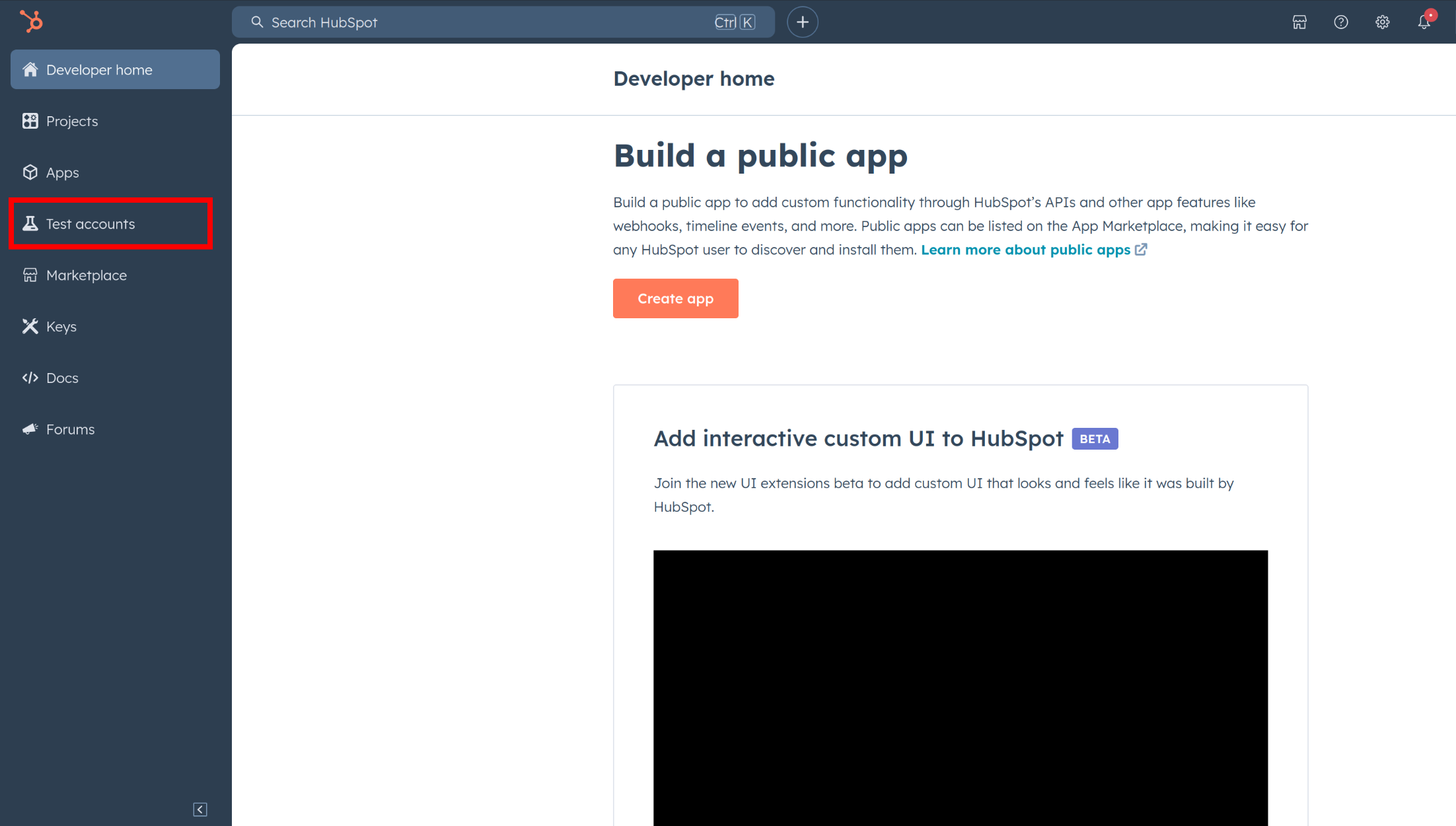
Go to Test Account section from the left sidebar.
-
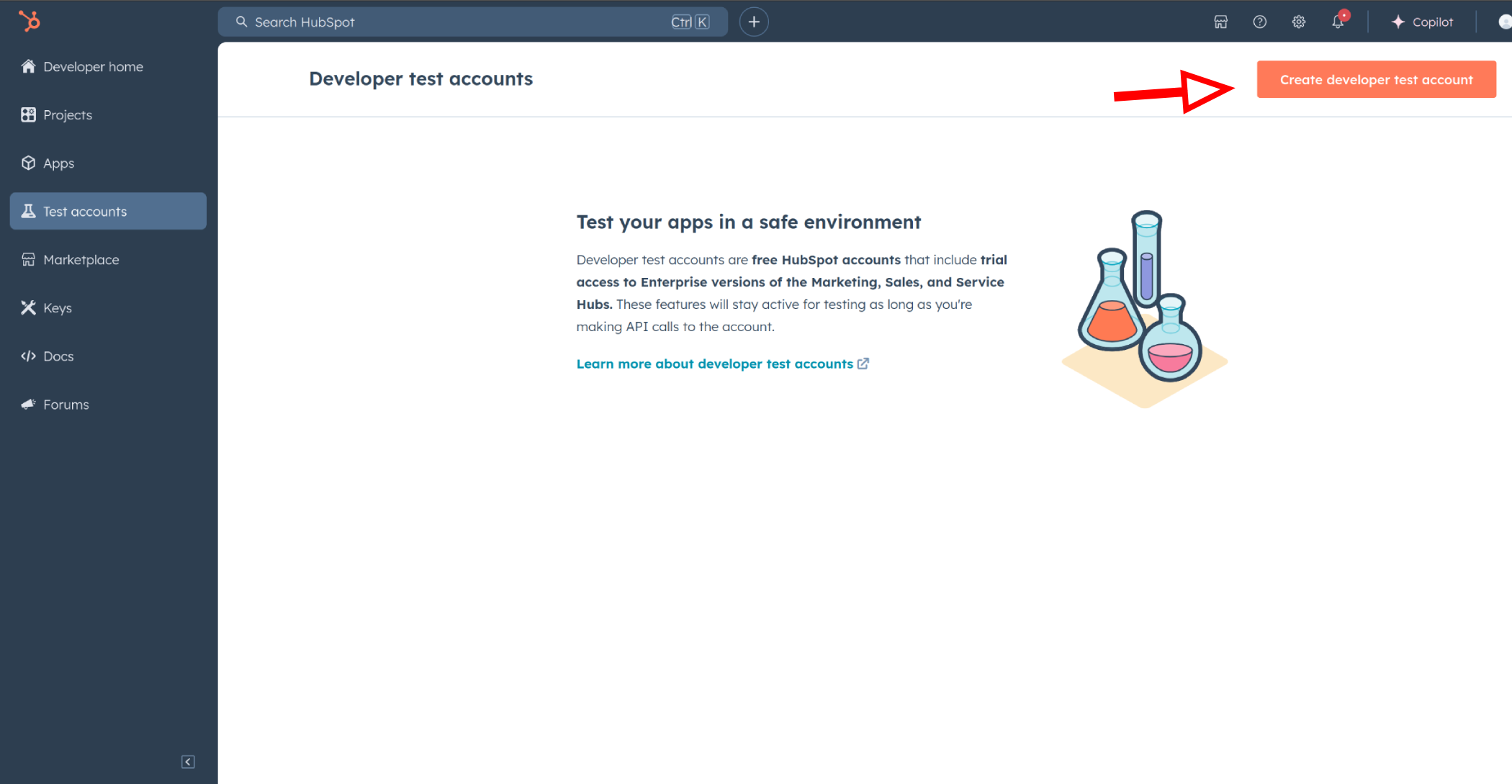
Click Create developer test account.
-
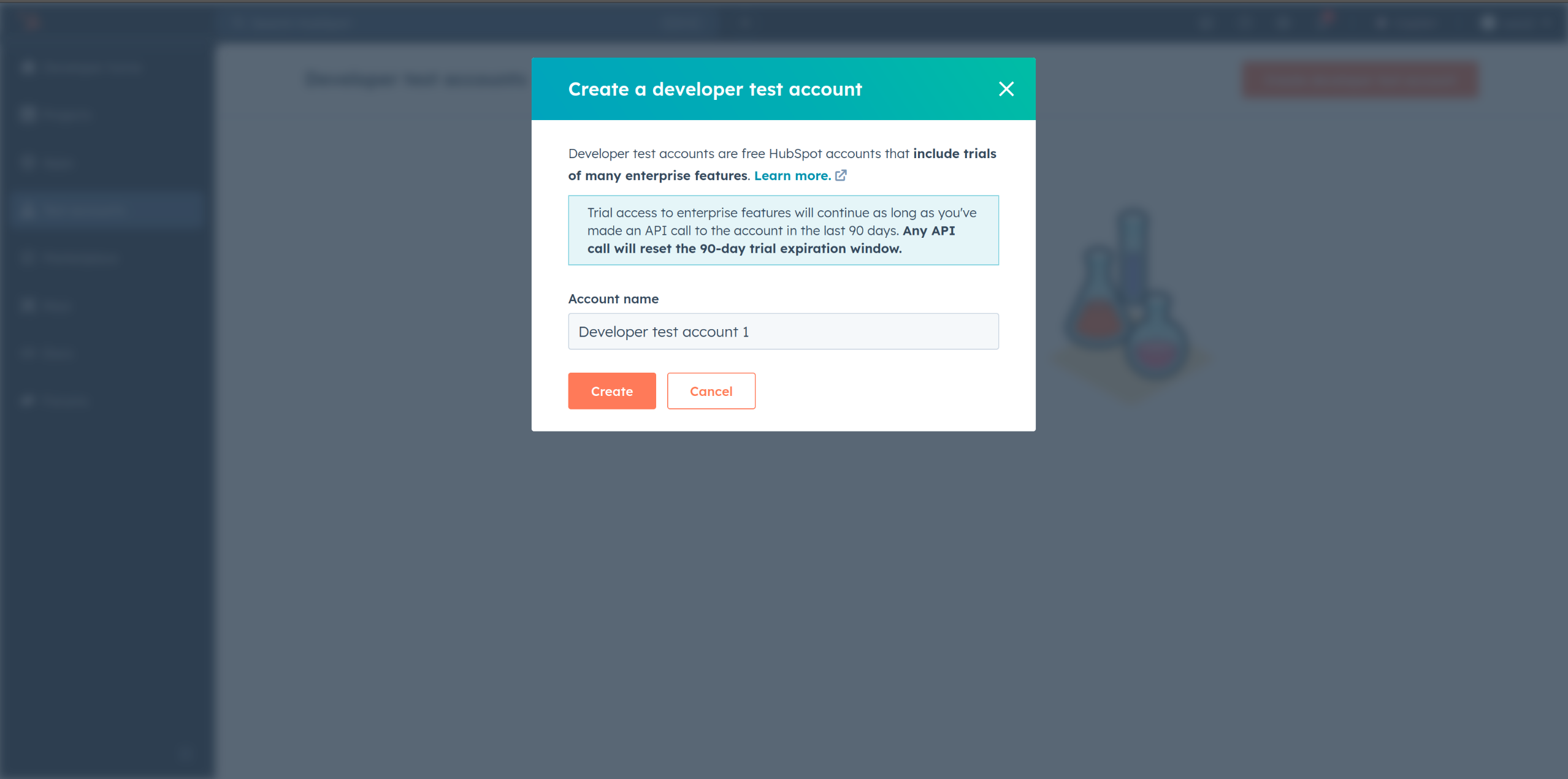
In the dialogue box, give a name to your test account and click create.
Step 3: Create a HubSpot App under your account.
-
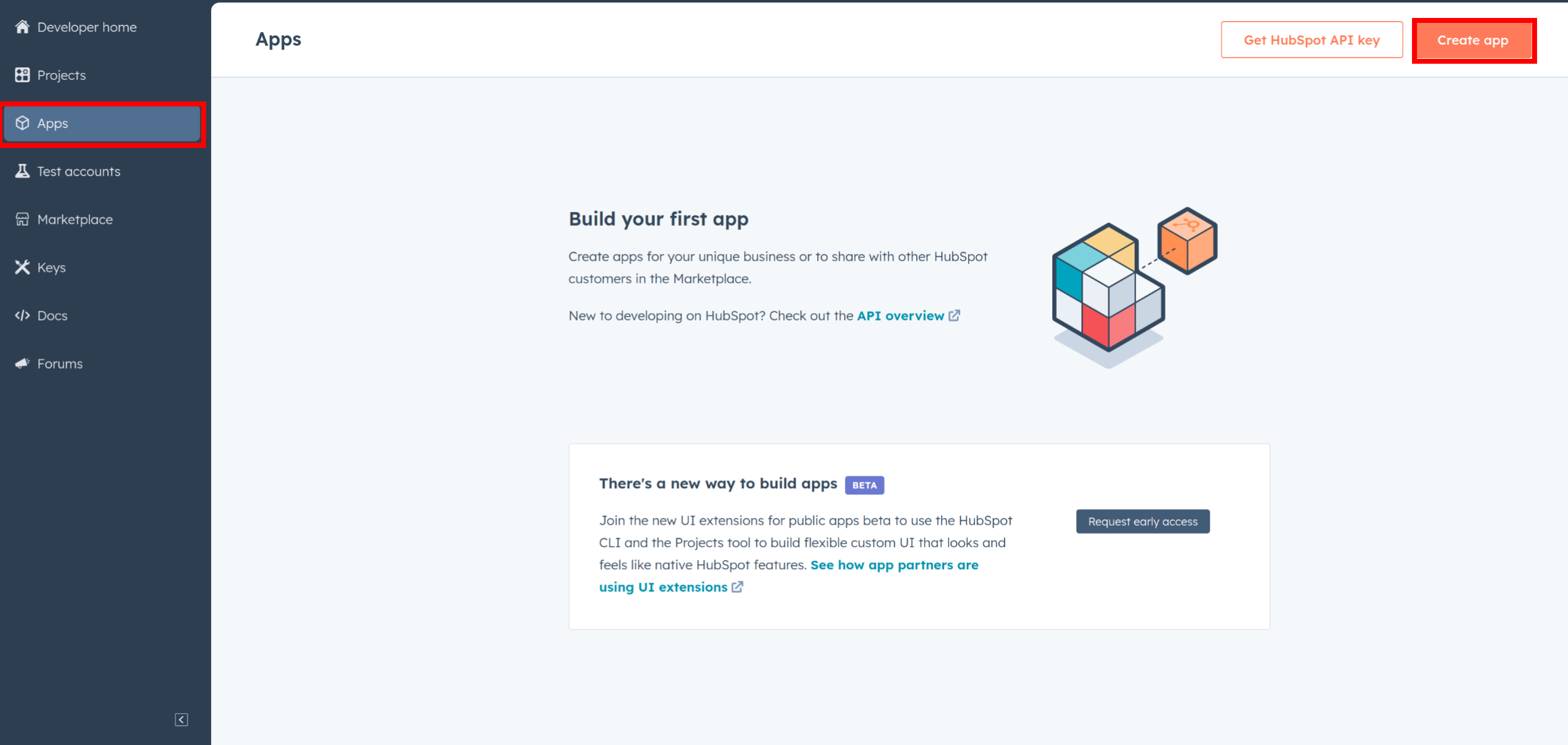
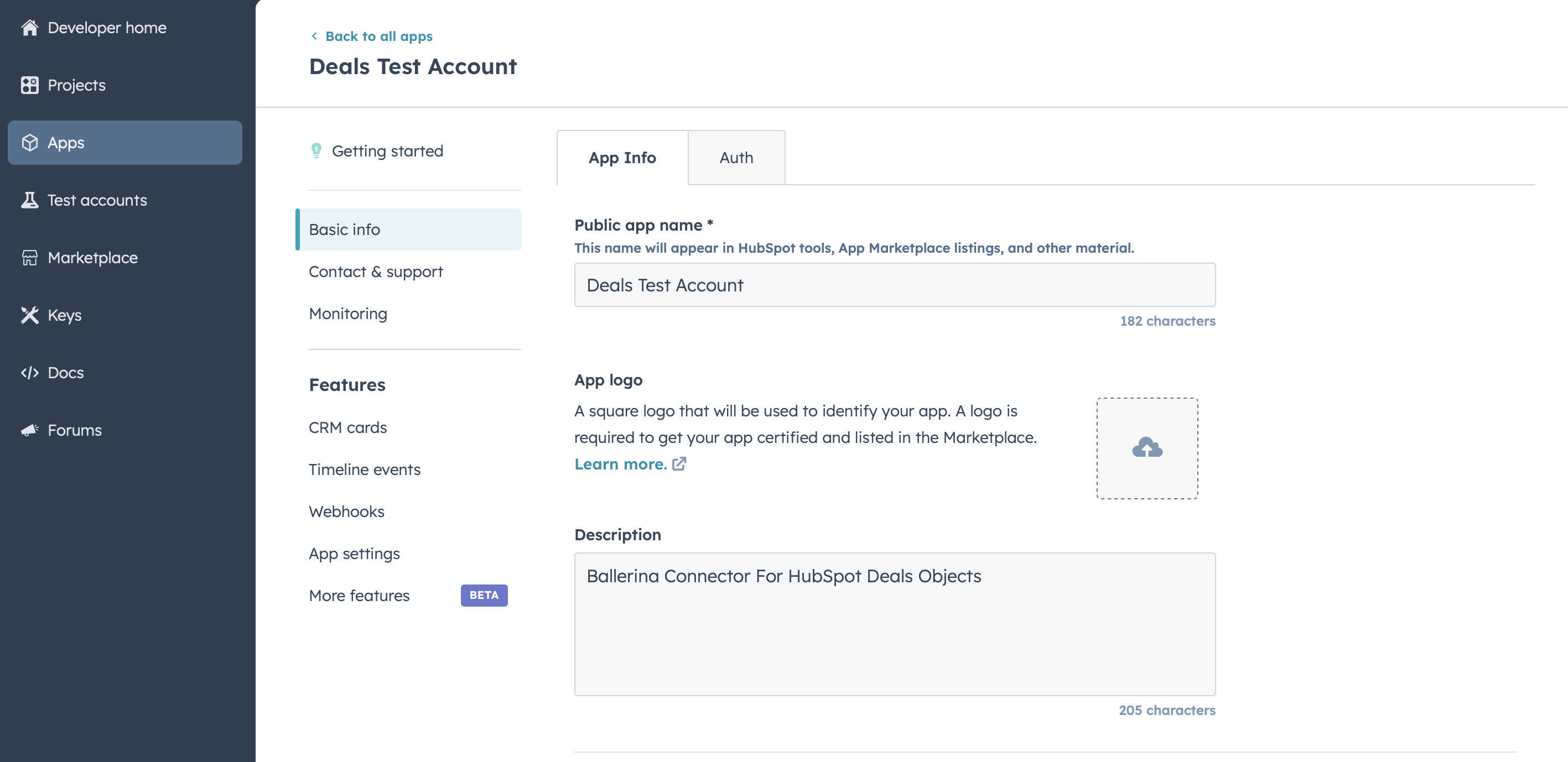
In your developer account, navigate to the "Apps" section. Click on "Create App"
-
Provide the necessary details, including the app name and description.
Step 4: Configure the Authentication Flow.
-
Move to the Auth Tab.
-
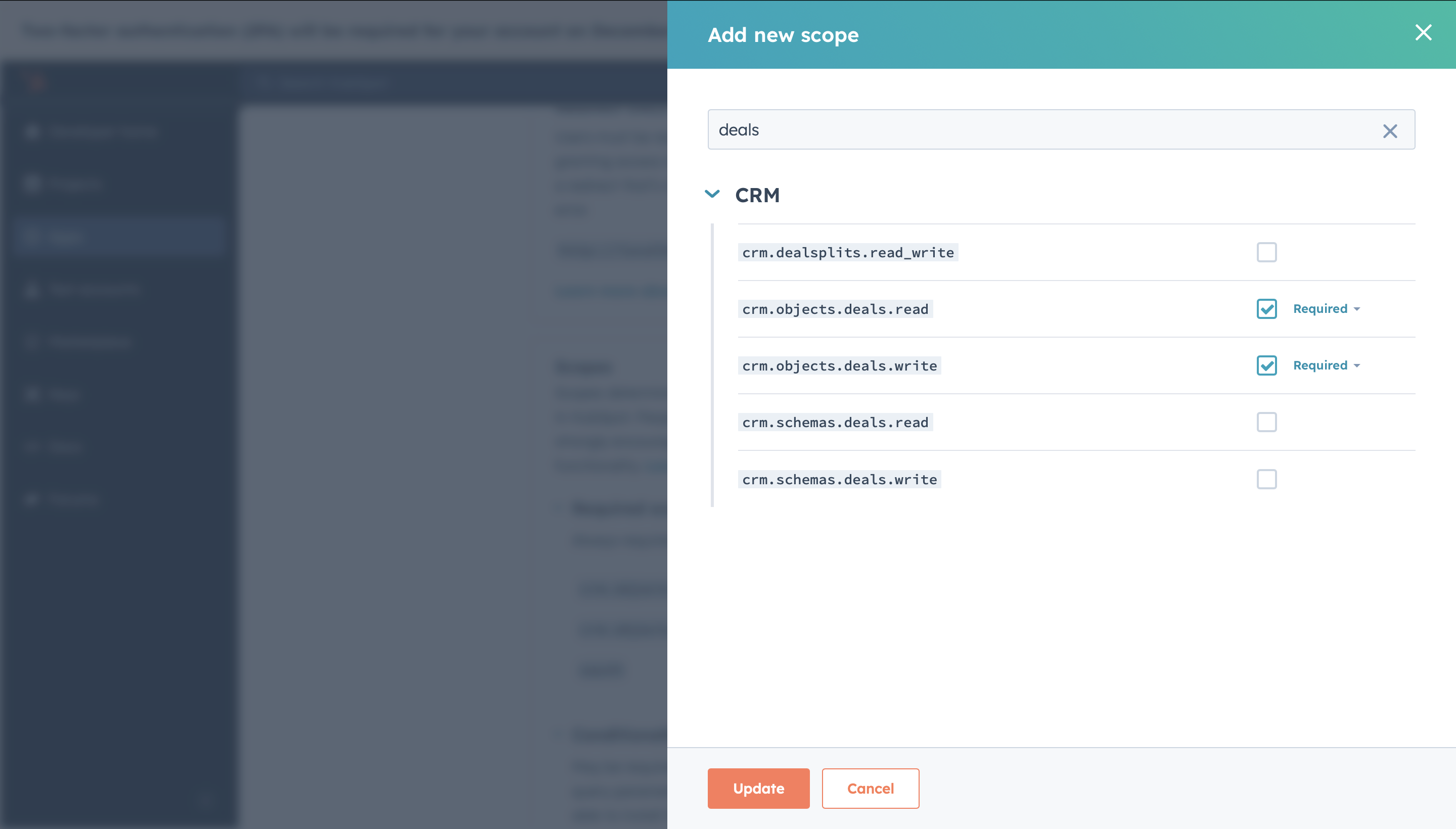
In the Scopes section, add the following scopes for your app using the "Add new scope" button.
crm.objects.deals.readcrm.objects.deals.write
-
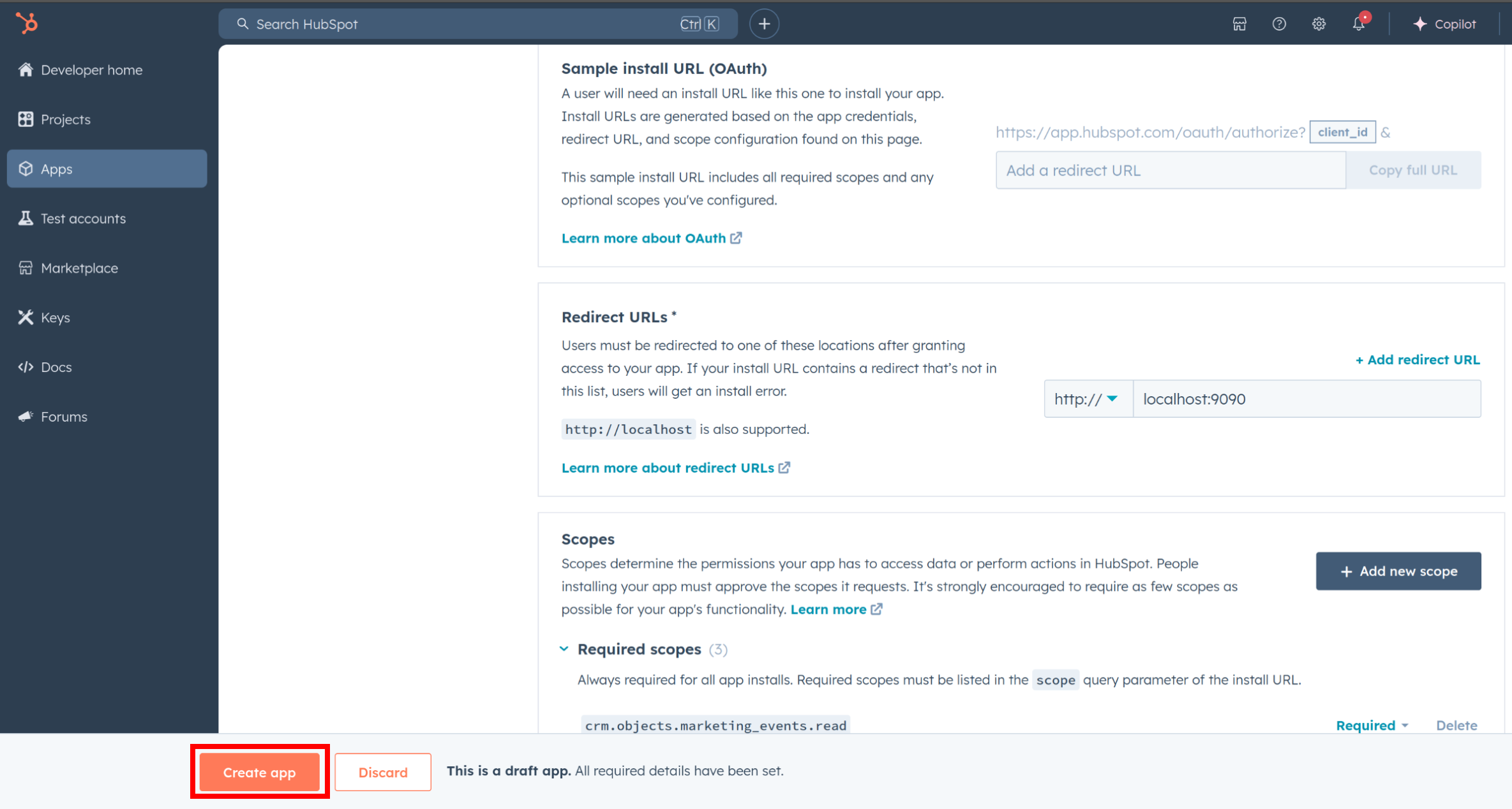
Add your Redirect URI in the relevant section. You can also use localhost addresses for local development purposes. Click Create App.
Step 5: Get your Client ID and Client Secret
-
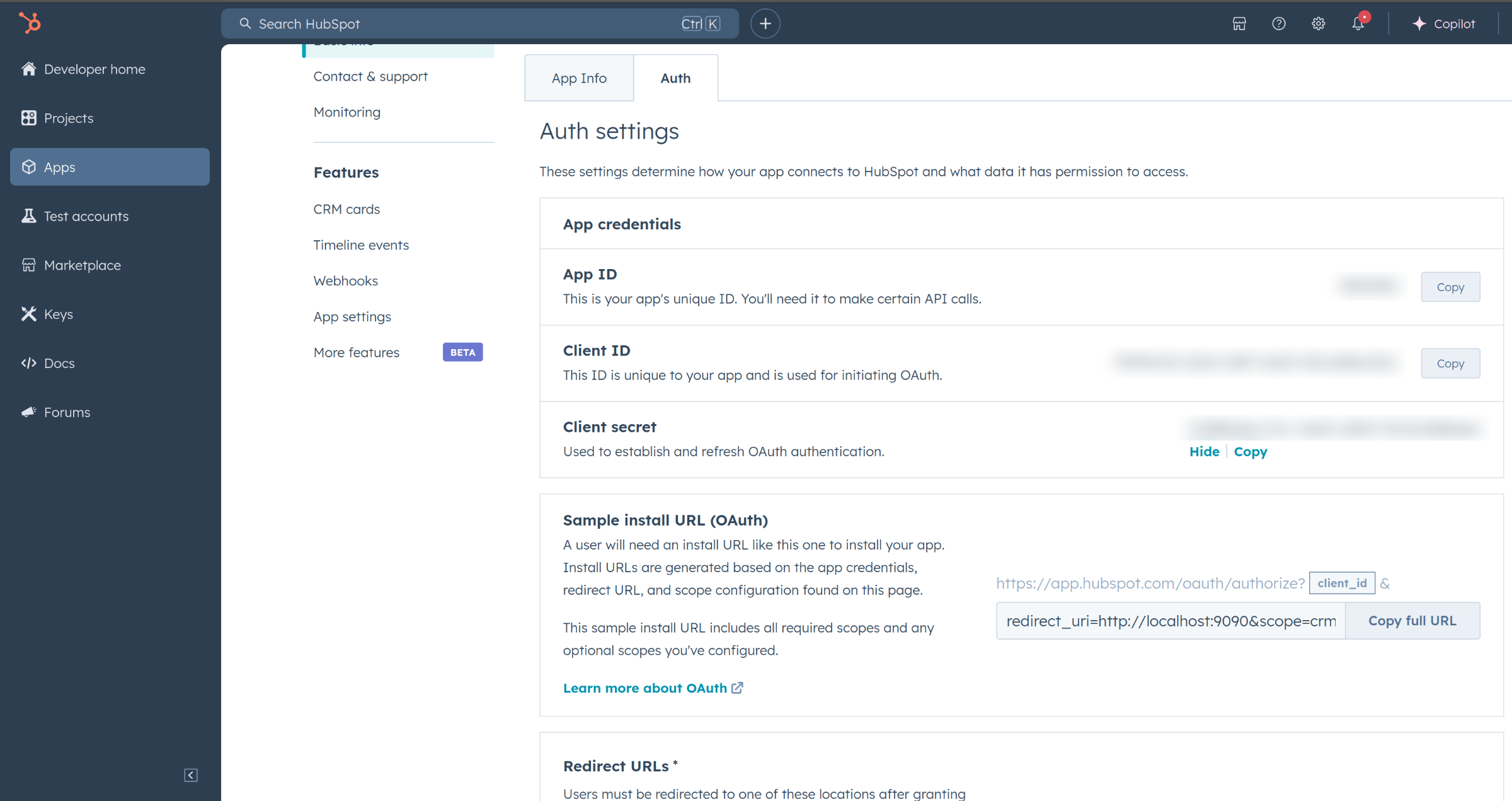
Navigate to the Auth section of your app. Make sure to save the provided Client ID and Client Secret.
Step 6: Setup Authentication Flow
Before proceeding with the Quickstart, ensure you have obtained the Access Token using the following steps:
-
Create an authorization URL using the following format:
https://app.hubspot.com/oauth/authorize?client_id=<YOUR_CLIENT_ID>&scope=<YOUR_SCOPES>&redirect_uri=<YOUR_REDIRECT_URI>Replace the
<YOUR_CLIENT_ID>,<YOUR_REDIRECT_URI>and<YOUR_SCOPES>with your specific value. -
Paste it in the browser and select your developer test account to install the app when prompted.
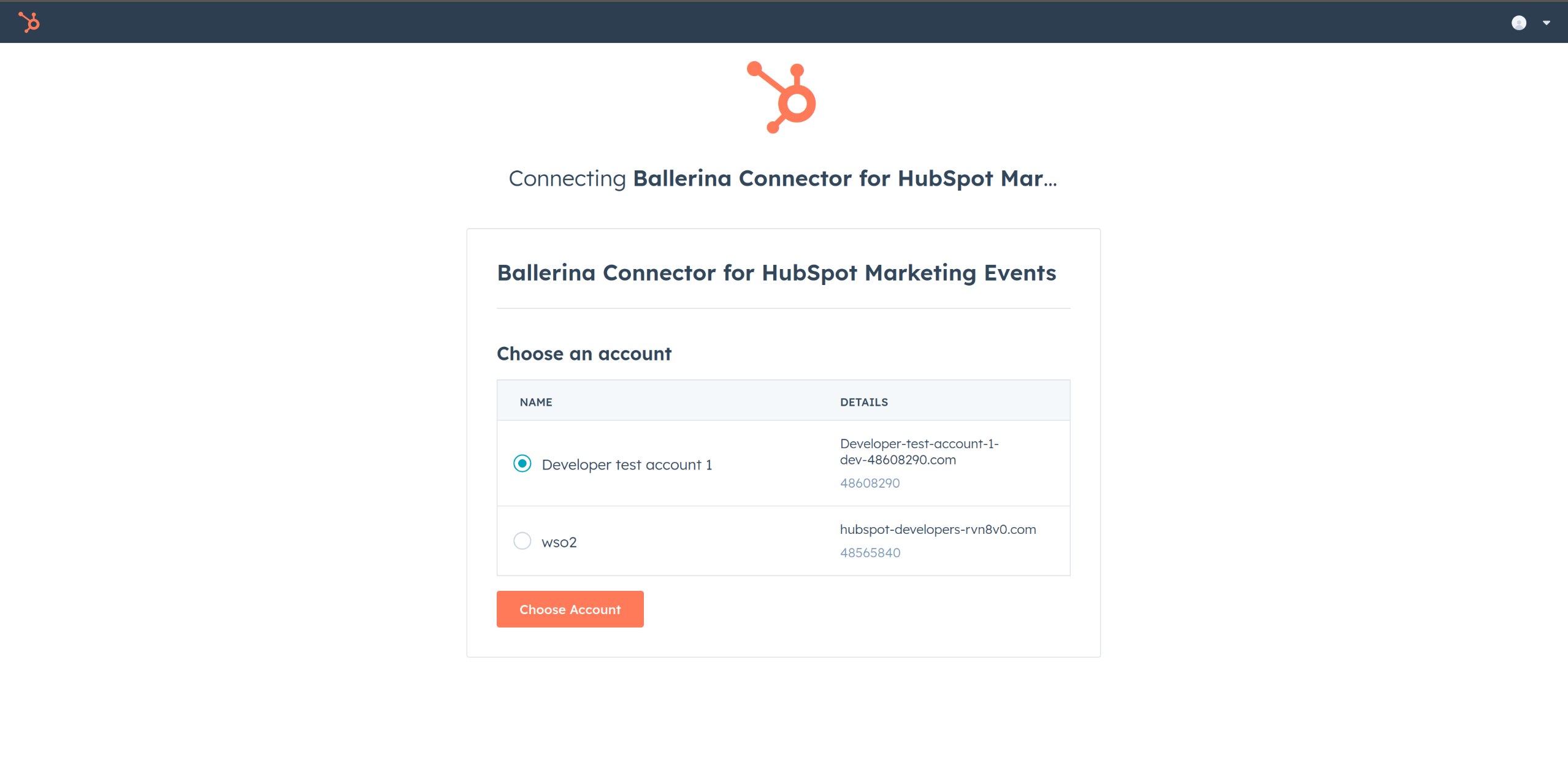
-
After the installation, the authorization code will be displayed in the browser URL. Copy the code.
-
Run the following curl command. Replace the
<YOUR_CLIENT_ID>,<YOUR_REDIRECT_URI> and<YOUR_CLIENT_SECRET>with your specific value. Use the code you received in the above step 3 as the<CODE>.-
Linux/macOS
curl --request POST \ --url https://api.hubapi.com/oauth/v1/token \ --header 'content-type: application/x-www-form-urlencoded' \ --data 'grant_type=authorization_code&code=<CODE>&redirect_uri=<YOUR_REDIRECT_URI>&client_id=<YOUR_CLIENT_ID>&client_secret=<YOUR_CLIENT_SECRET>' -
Windows
curl --request POST ^ --url https://api.hubapi.com/oauth/v1/token ^ --header 'content-type: application/x-www-form-urlencoded' ^ --data 'grant_type=authorization_code&code=<CODE>&redirect_uri=<YOUR_REDIRECT_URI>&client_id=<YOUR_CLIENT_ID>&client_secret=<YOUR_CLIENT_SECRET>'
This command will return the access token necessary for API calls.
{ "token_type": "bearer", "refresh_token": "<Refresh Token>", "access_token": "<Access Token>", "expires_in": 1800 } -
-
Store the
refresh_tokensecurely for use in your application
Quickstart
To use the HubSpot Deals connector in your Ballerina application, update the .bal file as follows:
Step 1: Import the module
Import the ballerinax/hubspot.crm.obj.deals module.
import ballerinax/hubspot.crm.obj.deals;
Step 2: Instantiate a new connector
-
Create a
deals:ConnectionConfigwith the obtained access token and initialize the connector with it.configurable string clientId = ?; configurable string clientSecret = ?; configurable string refreshToken = ?; deals:OAuth2RefreshTokenGrantConfig auth = { clientId, clientSecret, refreshToken, credentialBearer: oauth2:POST_BODY_BEARER }; final deals:Client hubSpotDeals = check new ({ auth }); -
Create a
config.tomlfile and, configure the obtained credentials in the above steps as follows:clientId = "" clientSecret = " " refreshToken = " "
Step 3: Use Connector Operations
Utilize the connector's operations to create, update and delete deals etc.
Create a Deal
   deals:SimplePublicObjectInputForCreate payload = {
        properties: {
            "pipeline": "default",
            "dealname": "Test Deal",
            "amount": "100000"
        }
    };

    SimplePublicObject out = check hubSpotDeals->/.post(payload = payload);
List Deals
deals:CollectionResponseSimplePublicObjectWithAssociationsForwardPaging deals = check hubSpotDeals->/;
Examples
The ballerinax/hubspot.crm.obj.deals connector provides practical examples illustrating usage in various scenarios.
- Create Manage Deals - see how the Hubspot API can be used to create deal and manage it through the sales pipeline.
- Count Deals in stages - see how the Hubspot API can be used to count the number of deals in each stages of sales pipeline.
Clients
hubspot.crm.obj.deals: Client
Constructor
Gets invoked to initialize the connector.
init (ConnectionConfig config, string serviceUrl)- config ConnectionConfig - The configurations to be used when initializing the
connector
- serviceUrl string "https://api.hubapi.com/crm/v3/objects/deals" - URL of the target service
post batch/read
function post batch/read(BatchReadInputSimplePublicObjectId payload, map<string|string[]> headers, *PostCrmV3ObjectsDealsBatchReadReadQueries queries) returns BatchResponseSimplePublicObject|BatchResponseSimplePublicObjectWithErrors|errorRead a batch of deals by internal ID, or unique property values
Parameters
- payload BatchReadInputSimplePublicObjectId -
- queries *PostCrmV3ObjectsDealsBatchReadReadQueries - Queries to be sent with the request
Return Type
- BatchResponseSimplePublicObject|BatchResponseSimplePublicObjectWithErrors|error - successful operation
get [string dealId]
function get [string dealId](map<string|string[]> headers, *GetCrmV3ObjectsDealsDealIdGetByIdQueries queries) returns SimplePublicObjectWithAssociations|errorRead
Parameters
- queries *GetCrmV3ObjectsDealsDealIdGetByIdQueries - Queries to be sent with the request
Return Type
- SimplePublicObjectWithAssociations|error - successful operation
delete [string dealId]
Archive
Return Type
- error? - No content
patch [string dealId]
function patch [string dealId](SimplePublicObjectInput payload, map<string|string[]> headers, *PatchCrmV3ObjectsDealsDealIdUpdateQueries queries) returns SimplePublicObject|errorUpdate
Parameters
- payload SimplePublicObjectInput -
- queries *PatchCrmV3ObjectsDealsDealIdUpdateQueries - Queries to be sent with the request
Return Type
- SimplePublicObject|error - successful operation
post merge
function post merge(PublicMergeInput payload, map<string|string[]> headers) returns SimplePublicObject|errorMerge two deals
Parameters
- payload PublicMergeInput -
Return Type
- SimplePublicObject|error - successful operation
post batch/archive
function post batch/archive(BatchInputSimplePublicObjectId payload, map<string|string[]> headers) returns error?Archive a batch of deals by ID
Parameters
- payload BatchInputSimplePublicObjectId -
Return Type
- error? - No content
post batch/create
function post batch/create(BatchInputSimplePublicObjectInputForCreate payload, map<string|string[]> headers) returns BatchResponseSimplePublicObject|BatchResponseSimplePublicObjectWithErrors|errorCreate a batch of deals
Parameters
Return Type
- BatchResponseSimplePublicObject|BatchResponseSimplePublicObjectWithErrors|error - successful operation
post batch/update
function post batch/update(BatchInputSimplePublicObjectBatchInput payload, map<string|string[]> headers) returns BatchResponseSimplePublicObject|BatchResponseSimplePublicObjectWithErrors|errorUpdate a batch of deals by internal ID, or unique property values
Parameters
- payload BatchInputSimplePublicObjectBatchInput -
Return Type
- BatchResponseSimplePublicObject|BatchResponseSimplePublicObjectWithErrors|error - successful operation
get .
function get .(map<string|string[]> headers, *GetCrmV3ObjectsDealsGetPageQueries queries) returns CollectionResponseSimplePublicObjectWithAssociationsForwardPaging|errorList
Parameters
- queries *GetCrmV3ObjectsDealsGetPageQueries - Queries to be sent with the request
Return Type
- CollectionResponseSimplePublicObjectWithAssociationsForwardPaging|error - successful operation
post .
function post .(SimplePublicObjectInputForCreate payload, map<string|string[]> headers) returns SimplePublicObject|errorCreate
Parameters
- payload SimplePublicObjectInputForCreate -
Return Type
- SimplePublicObject|error - successful operation
post batch/upsert
function post batch/upsert(BatchInputSimplePublicObjectBatchInputUpsert payload, map<string|string[]> headers) returns BatchResponseSimplePublicUpsertObject|BatchResponseSimplePublicUpsertObjectWithErrors|errorCreate or update a batch of deals by unique property values
Parameters
Return Type
- BatchResponseSimplePublicUpsertObject|BatchResponseSimplePublicUpsertObjectWithErrors|error - successful operation
post search
function post search(PublicObjectSearchRequest payload, map<string|string[]> headers) returns CollectionResponseWithTotalSimplePublicObjectForwardPaging|errorParameters
- payload PublicObjectSearchRequest -
Return Type
- CollectionResponseWithTotalSimplePublicObjectForwardPaging|error - successful operation
Records
hubspot.crm.obj.deals: ApiKeysConfig
Provides API key configurations needed when communicating with a remote HTTP endpoint.
Fields
- privateAppLegacy string -
- privateApp string -
hubspot.crm.obj.deals: AssociatedId
Fields
- id string -
- 'type string -
hubspot.crm.obj.deals: AssociationSpec
Fields
- associationCategory? "HUBSPOT_DEFINED"|"USER_DEFINED"|"INTEGRATOR_DEFINED" -
- associationTypeId? Signed32 -
hubspot.crm.obj.deals: BatchInputSimplePublicObjectBatchInput
Fields
- inputs SimplePublicObjectBatchInput[] -
hubspot.crm.obj.deals: BatchInputSimplePublicObjectBatchInputUpsert
Fields
- inputs SimplePublicObjectBatchInputUpsert[] -
hubspot.crm.obj.deals: BatchInputSimplePublicObjectId
Fields
- inputs SimplePublicObjectId[] -
hubspot.crm.obj.deals: BatchInputSimplePublicObjectInputForCreate
Fields
- inputs SimplePublicObjectInputForCreate[] -
hubspot.crm.obj.deals: BatchReadInputSimplePublicObjectId
Fields
- propertiesWithHistory string[] -
- idProperty? string -
- inputs SimplePublicObjectId[] -
- properties string[] -
hubspot.crm.obj.deals: BatchResponseSimplePublicObject
Fields
- completedAt string -
- requestedAt? string -
- startedAt string -
- links? record { string... } -
- results SimplePublicObject[] -
- status "PENDING"|"PROCESSING"|"CANCELED"|"COMPLETE" -
hubspot.crm.obj.deals: BatchResponseSimplePublicObjectWithErrors
Fields
- completedAt string -
- numErrors? Signed32 -
- requestedAt? string -
- startedAt string -
- links? record { string... } -
- results SimplePublicObject[] -
- errors? StandardError[] -
- status "PENDING"|"PROCESSING"|"CANCELED"|"COMPLETE" -
hubspot.crm.obj.deals: BatchResponseSimplePublicUpsertObject
Fields
- completedAt string -
- requestedAt? string -
- startedAt string -
- links? record { string... } -
- results SimplePublicUpsertObject[] -
- status "PENDING"|"PROCESSING"|"CANCELED"|"COMPLETE" -
hubspot.crm.obj.deals: BatchResponseSimplePublicUpsertObjectWithErrors
Fields
- completedAt string -
- numErrors? Signed32 -
- requestedAt? string -
- startedAt string -
- links? record { string... } -
- results SimplePublicUpsertObject[] -
- errors? StandardError[] -
- status "PENDING"|"PROCESSING"|"CANCELED"|"COMPLETE" -
hubspot.crm.obj.deals: CollectionResponseAssociatedId
Fields
- paging? Paging -
- results AssociatedId[] -
hubspot.crm.obj.deals: CollectionResponseSimplePublicObjectWithAssociationsForwardPaging
Fields
- paging? ForwardPaging -
- results SimplePublicObjectWithAssociations[] -
hubspot.crm.obj.deals: CollectionResponseWithTotalSimplePublicObjectForwardPaging
Fields
- total Signed32 -
- paging? ForwardPaging -
- results SimplePublicObject[] -
hubspot.crm.obj.deals: ConnectionConfig
Provides a set of configurations for controlling the behaviours when communicating with a remote HTTP endpoint.
Fields
- auth BearerTokenConfig|OAuth2RefreshTokenGrantConfig|ApiKeysConfig - Provides Auth configurations needed when communicating with a remote HTTP endpoint.
- httpVersion HttpVersion(default http:HTTP_2_0) - The HTTP version understood by the client
- http1Settings ClientHttp1Settings(default {}) - Configurations related to HTTP/1.x protocol
- http2Settings ClientHttp2Settings(default {}) - Configurations related to HTTP/2 protocol
- timeout decimal(default 30) - The maximum time to wait (in seconds) for a response before closing the connection
- forwarded string(default "disable") - The choice of setting
forwarded/x-forwardedheader
- followRedirects? FollowRedirects - Configurations associated with Redirection
- poolConfig? PoolConfiguration - Configurations associated with request pooling
- cache CacheConfig(default {}) - HTTP caching related configurations
- compression Compression(default http:COMPRESSION_AUTO) - Specifies the way of handling compression (
accept-encoding) header
- circuitBreaker? CircuitBreakerConfig - Configurations associated with the behaviour of the Circuit Breaker
- retryConfig? RetryConfig - Configurations associated with retrying
- responseLimits ResponseLimitConfigs(default {}) - Configurations associated with inbound response size limits
- secureSocket? ClientSecureSocket - SSL/TLS-related options
- proxy? ProxyConfig - Proxy server related options
- socketConfig ClientSocketConfig(default {}) - Provides settings related to client socket configuration
- validation boolean(default true) - Enables the inbound payload validation functionality which provided by the constraint package. Enabled by default
- laxDataBinding boolean(default true) - Enables relaxed data binding on the client side. When enabled,
nilvalues are treated as optional, and absent fields are handled asnilabletypes. Enabled by default.
hubspot.crm.obj.deals: ErrorDetail
Fields
- subCategory? string - A specific category that contains more specific detail about the error
- code? string - The status code associated with the error detail
- 'in? string - The name of the field or parameter in which the error was found
- context? record { string[]... } - Context about the error condition
- message string - A human readable message describing the error along with remediation steps where appropriate
hubspot.crm.obj.deals: Filter
Fields
- highValue? string -
- propertyName string -
- values? string[] -
- value? string -
- operator "EQ"|"NEQ"|"LT"|"LTE"|"GT"|"GTE"|"BETWEEN"|"IN"|"NOT_IN"|"HAS_PROPERTY"|"NOT_HAS_PROPERTY"|"CONTAINS_TOKEN"|"NOT_CONTAINS_TOKEN" - null
hubspot.crm.obj.deals: FilterGroup
Fields
- filters Filter[] -
hubspot.crm.obj.deals: ForwardPaging
Fields
- next? NextPage -
hubspot.crm.obj.deals: GetCrmV3ObjectsDealsDealIdGetByIdQueries
Represents the Queries record for the operation: get-/crm/v3/objects/deals/{dealId}_getById
Fields
- associations? string[] - A comma separated list of object types to retrieve associated IDs for. If any of the specified associations do not exist, they will be ignored
- archived boolean(default false) - Whether to return only results that have been archived
- propertiesWithHistory? string[] - A comma separated list of the properties to be returned along with their history of previous values. If any of the specified properties are not present on the requested object(s), they will be ignored
- idProperty? string - The name of a property whose values are unique for this object
- properties? string[] - A comma separated list of the properties to be returned in the response. If any of the specified properties are not present on the requested object(s), they will be ignored
hubspot.crm.obj.deals: GetCrmV3ObjectsDealsGetPageQueries
Represents the Queries record for the operation: get-/crm/v3/objects/deals_getPage
Fields
- associations? string[] - A comma separated list of object types to retrieve associated IDs for. If any of the specified associations do not exist, they will be ignored
- archived boolean(default false) - Whether to return only results that have been archived
- propertiesWithHistory? string[] - A comma separated list of the properties to be returned along with their history of previous values. If any of the specified properties are not present on the requested object(s), they will be ignored. Usage of this parameter will reduce the maximum number of objects that can be read by a single request
- 'limit Signed32(default 10) - The maximum number of results to display per page
- after? string - The paging cursor token of the last successfully read resource will be returned as the
paging.next.afterJSON property of a paged response containing more results
- properties? string[] - A comma separated list of the properties to be returned in the response. If any of the specified properties are not present on the requested object(s), they will be ignored
hubspot.crm.obj.deals: NextPage
Fields
- link? string -
- after string -
hubspot.crm.obj.deals: OAuth2RefreshTokenGrantConfig
OAuth2 Refresh Token Grant Configs
Fields
- Fields Included from *OAuth2RefreshTokenGrantConfig
- refreshUrl string(default "https://api.hubapi.com/oauth/v1/token") - Refresh URL
hubspot.crm.obj.deals: Paging
Fields
- next? NextPage -
- prev? PreviousPage -
hubspot.crm.obj.deals: PatchCrmV3ObjectsDealsDealIdUpdateQueries
Represents the Queries record for the operation: patch-/crm/v3/objects/deals/{dealId}_update
Fields
- idProperty? string - The name of a property whose values are unique for this object
hubspot.crm.obj.deals: PostCrmV3ObjectsDealsBatchReadReadQueries
Represents the Queries record for the operation: post-/crm/v3/objects/deals/batch/read_read
Fields
- archived boolean(default false) - Whether to return only results that have been archived
hubspot.crm.obj.deals: PreviousPage
Fields
- before string -
- link? string -
hubspot.crm.obj.deals: PublicAssociationsForObject
Fields
- types? AssociationSpec[] -
- to? PublicObjectId -
hubspot.crm.obj.deals: PublicMergeInput
Fields
- objectIdToMerge string -
- primaryObjectId string -
hubspot.crm.obj.deals: PublicObjectId
Fields
- id? string -
hubspot.crm.obj.deals: PublicObjectSearchRequest
Fields
- query? string -
- 'limit? Signed32 -
- after? string -
- sorts? string[] -
- properties? string[] -
- filterGroups? FilterGroup[] -
hubspot.crm.obj.deals: SimplePublicObject
Fields
- createdAt string -
- archived? boolean -
- archivedAt? string -
- propertiesWithHistory? record { ValueWithTimestamp[]... } -
- id string -
- properties record { string?... } -
- updatedAt string -
hubspot.crm.obj.deals: SimplePublicObjectBatchInput
Fields
- idProperty? string -
- objectWriteTraceId? string -
- id string -
- properties record { string... } -
hubspot.crm.obj.deals: SimplePublicObjectBatchInputUpsert
Fields
- idProperty? string -
- objectWriteTraceId? string -
- id string -
- properties record { string... } -
hubspot.crm.obj.deals: SimplePublicObjectId
Fields
- id string -
hubspot.crm.obj.deals: SimplePublicObjectInput
Fields
- objectWriteTraceId? string -
- properties record { string... } -
hubspot.crm.obj.deals: SimplePublicObjectInputForCreate
Fields
- associations? PublicAssociationsForObject[] -
- objectWriteTraceId? string -
- properties record { string... } -
hubspot.crm.obj.deals: SimplePublicObjectWithAssociations
Fields
- associations? record { CollectionResponseAssociatedId... } -
- createdAt string -
- archived? boolean -
- archivedAt? string -
- propertiesWithHistory? record { ValueWithTimestamp[]... } -
- id string -
- properties record { string?... } -
- updatedAt string -
hubspot.crm.obj.deals: SimplePublicUpsertObject
Fields
- createdAt string -
- archived? boolean -
- archivedAt? string -
- 'new boolean -
- propertiesWithHistory? record { ValueWithTimestamp[]... } -
- id string -
- properties record { string... } -
- updatedAt string -
hubspot.crm.obj.deals: StandardError
Fields
- subCategory? record {} -
- context record { string[]... } -
- links record { string... } -
- id? string -
- category string -
- message string -
- errors ErrorDetail[] -
- status string -
hubspot.crm.obj.deals: ValueWithTimestamp
Fields
- sourceId? string -
- sourceType string -
- sourceLabel? string -
- updatedByUserId? Signed32 -
- value string -
- timestamp string -