Module hubspot.crm.commerce.taxes

ballerinax/hubspot.crm.commerce.taxes Ballerina library
Overview
HubSpot is an AI-powered customer relationship management (CRM) platform.
The HubSpot connector offers APIs to connect and interact with the Taxes endpoints, specifically based on the HubSpot REST API
Key Features
- Create, read, update, and delete tax records in HubSpot CRM
- Batch operations for bulk tax management
- Search taxes with filtering support
- Manage tax associations with other CRM objects
Setup guide
You need a HubSpot developer account with an app to use HubSpot connectors.
Step 1: Create HubSpot Developer Project
-
Login to HubSpot developer account.
-
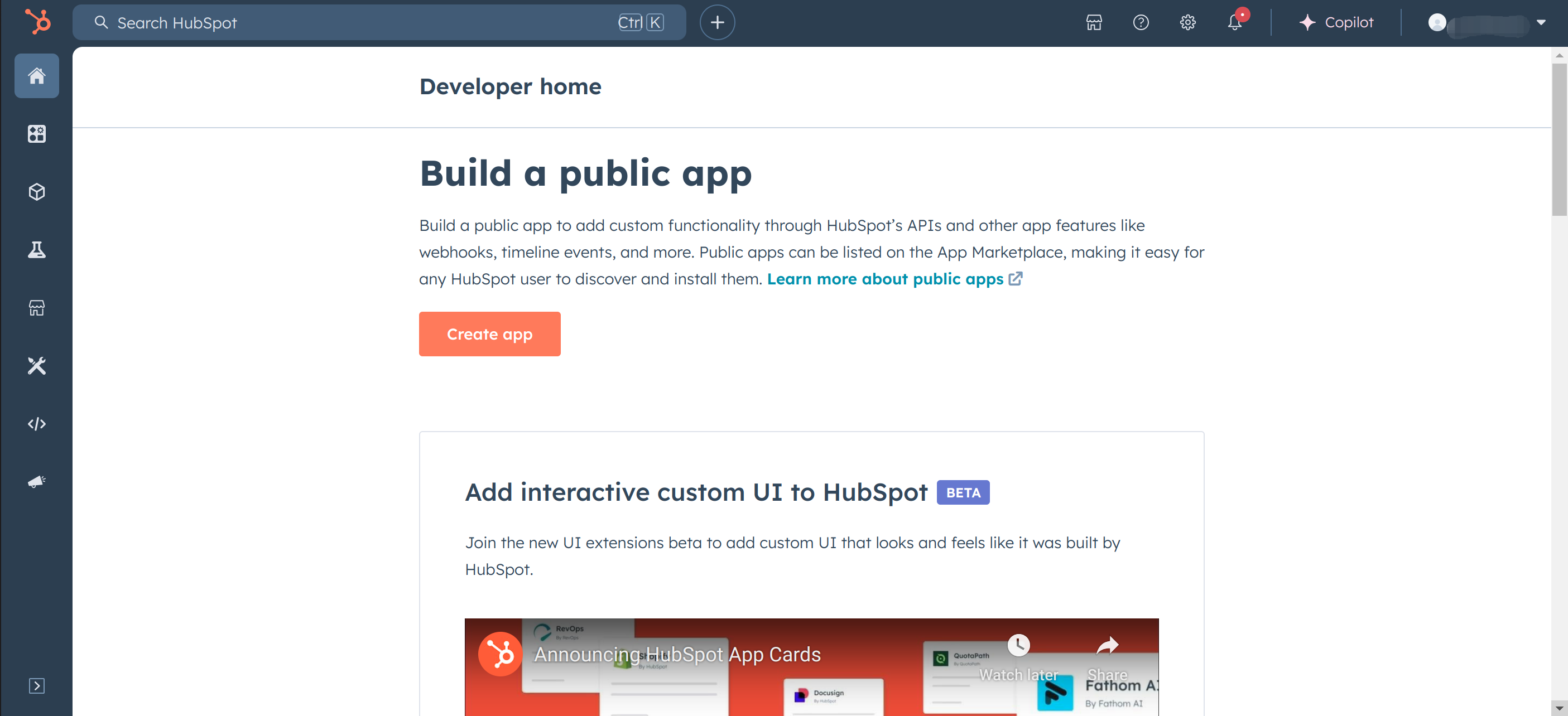
Create a public app by clicking on Create app.
-
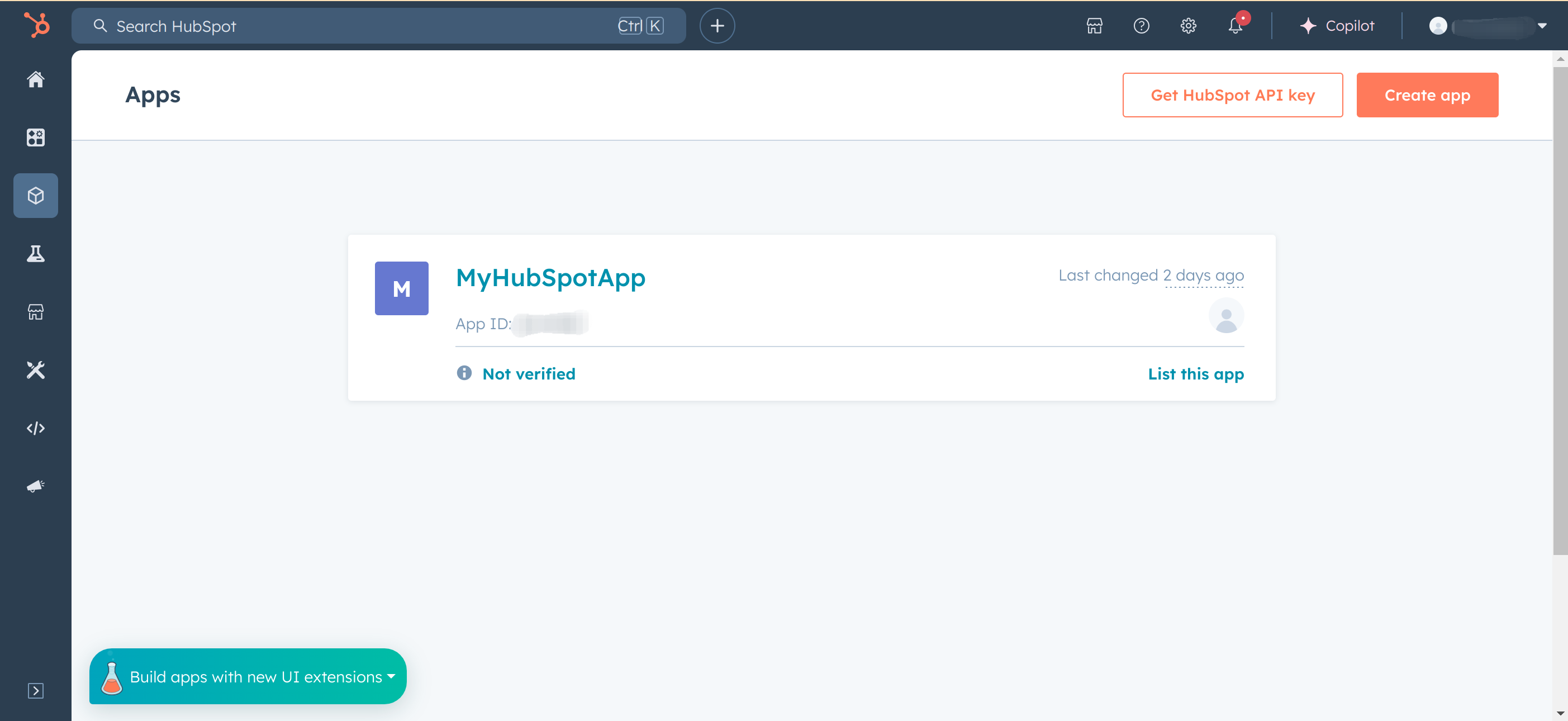
Click on "Create app".
-
Under "App Info"
- Enter "Public app name".
- Update "App logo" (optional).
- Update "Description" (optional).
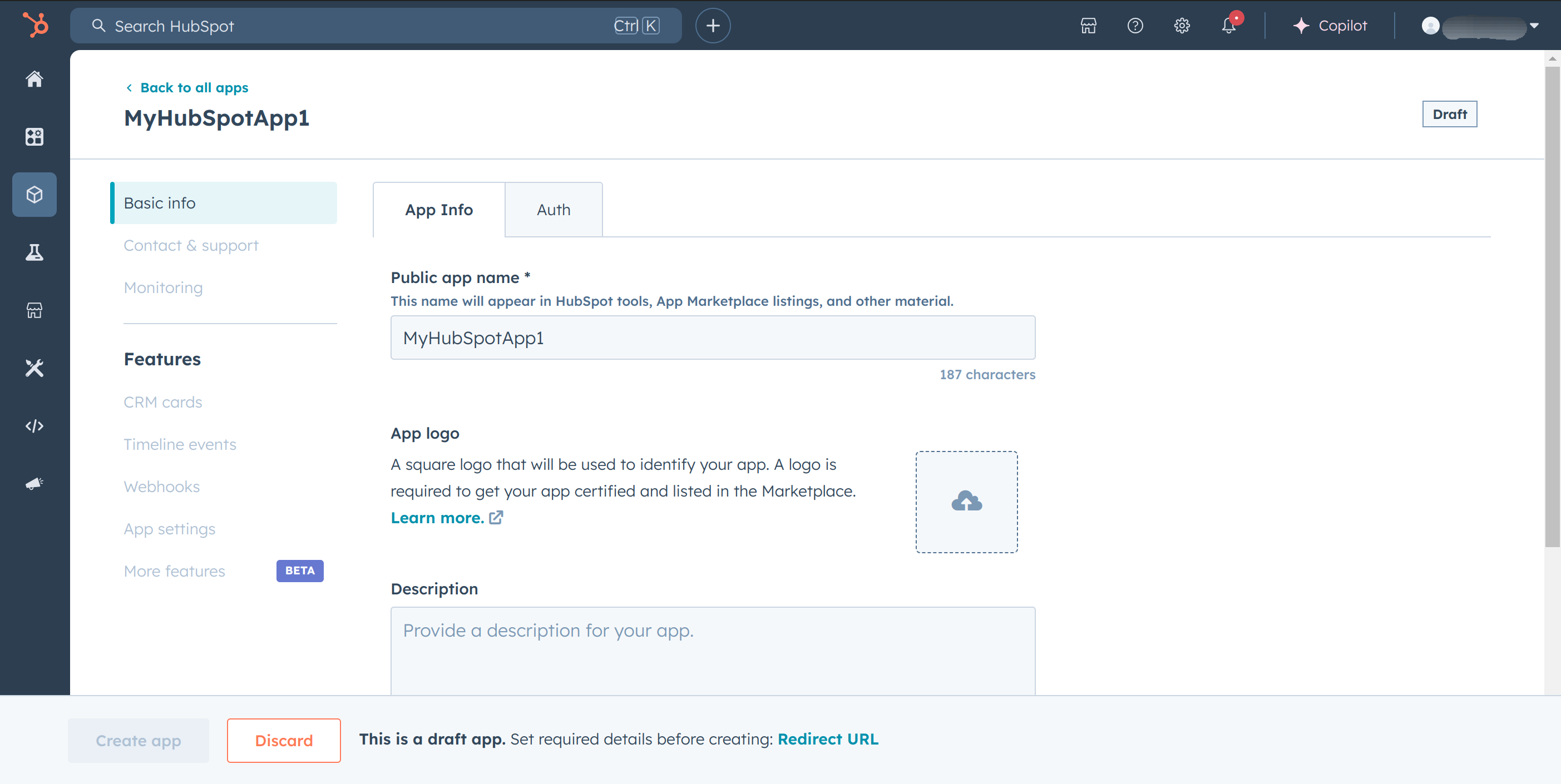
Then move to the "Auth" tab.
-
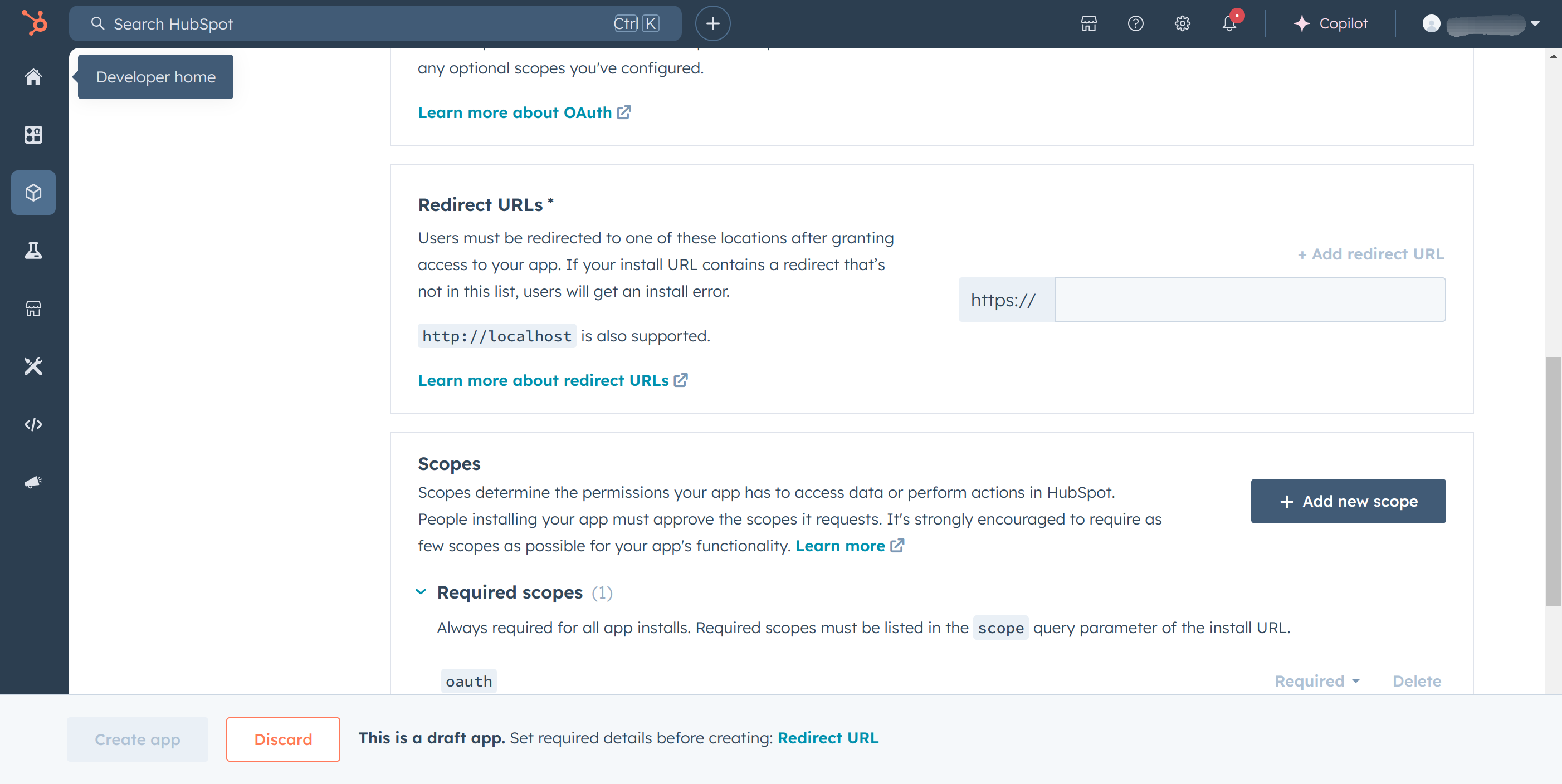
Setup the "Redirect URLs" with respective links.
-
Finally click on "Create app".
Step 2: Get Client ID and Client secret
Navigate to the "Auth" tab.
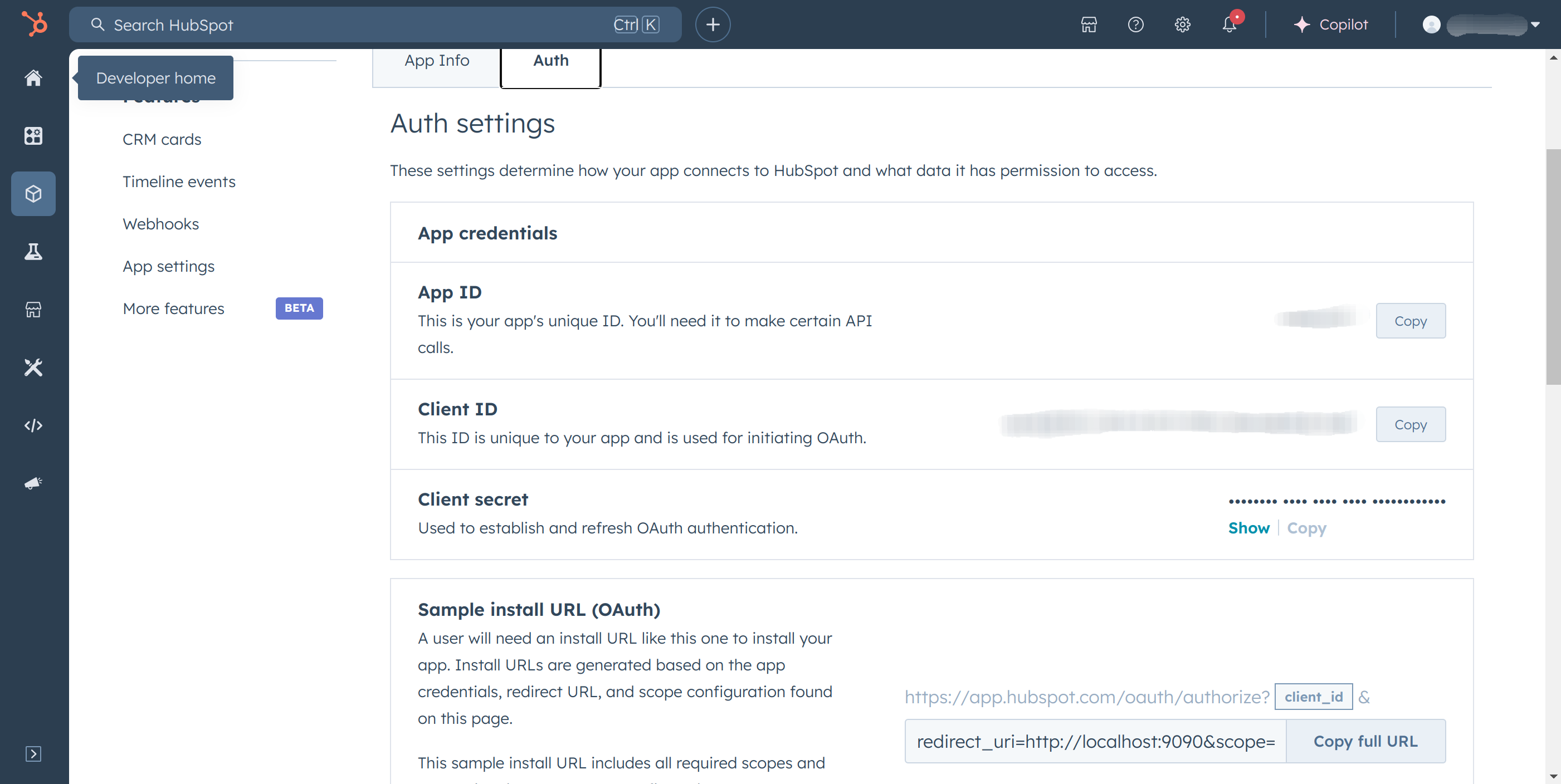
Step 3: Get access token and refresh token
-
Set scopes under "Auth" tab for your app based on the API requirements.
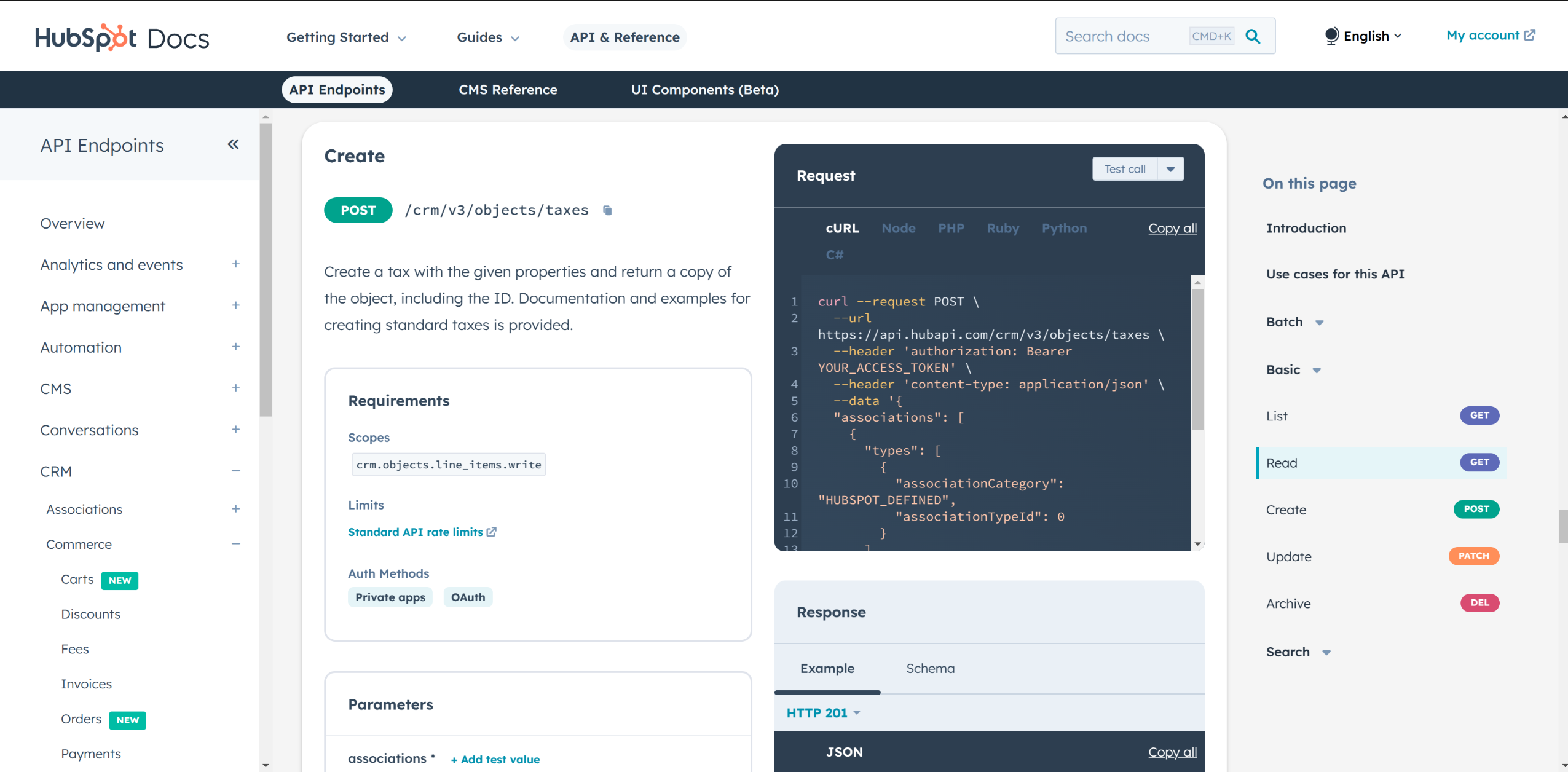
Enable scopes required for HubSpot CRM Taxes API based on your use case.
crm.objects.line_items.readcrm.objects.line_items.writeoauth
-
In the "Auth" tab under "Sample install URL (OAuth)" section "Copy full URL".
Note: The above copied URL is in the following format.
https://app.hubspot.com/oauth/authorize?client_id=<client_id>&redirect_uri=<redirect_url>&scope=<scopes> -
Choose the preferred account.
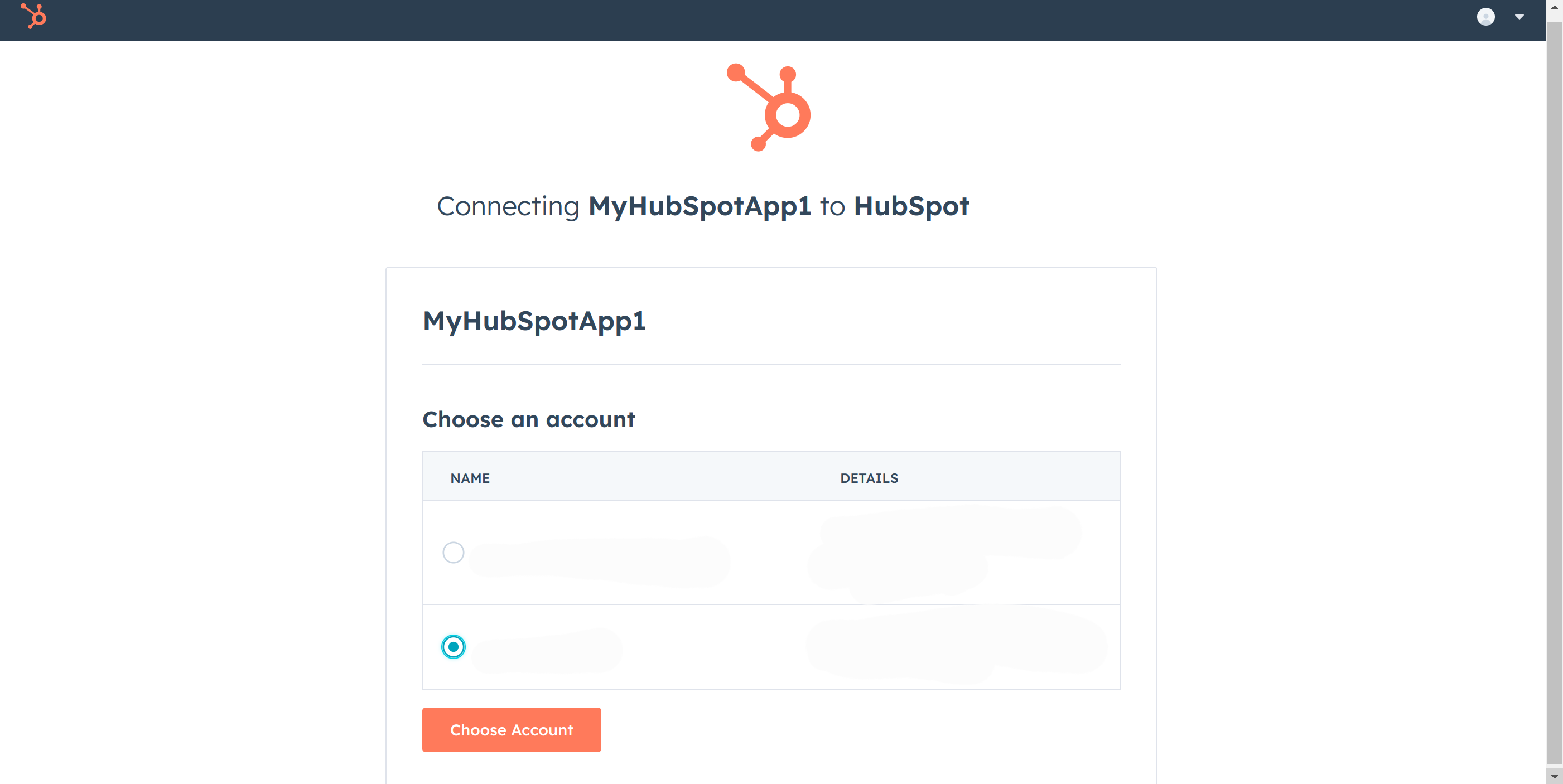
Choose account and authorize the client.
-
"This site can’t be reached" message will appear. Look in the URL and find the authorization code.
-
Send a http request to the HubSpot.
-
Linux/macOS
curl --request POST \ --url https://api.hubapi.com/oauth/v1/token \ --header 'content-type: application/x-www-form-urlencoded' \ --data 'grant_type=authorization_code&code=<CODE>&redirect_uri=<YOUR_REDIRECT_URI>&client_id=<YOUR_CLIENT_ID>&client_secret=<YOUR_CLIENT_SECRET>' -
Windows
curl --request POST ^ --url https://api.hubapi.com/oauth/v1/token ^ --header 'content-type: application/x-www-form-urlencoded' ^ --data 'grant_type=authorization_code&code=<CODE>&redirect_uri=<YOUR_REDIRECT_URI>&client_id=<YOUR_CLIENT_ID>&client_secret=<YOUR_CLIENT_SECRET>'
-
-
Above command returns the
access tokenandrefresh token. -
Use these tokens to authorize the client.
Quickstart
To use the HubSpot CRM Commerce Taxes connector in your Ballerina application, update the .bal file as follows:
Step 1: Import the module
Import the hubspot.crm.commerce.taxes module and oauth2 module.
import ballerina/oauth2; import ballerinax/hubspot.crm.commerce.taxes;
Step 2: Instantiate a new connector
-
Create a
Config.tomlfile and, configure the obtained credentials obtained in the above steps as follows:clientId = <Client Id> clientSecret = <Client Secret> refreshToken = <Refresh Token> -
Instantiate a
OAuth2RefreshTokenGrantConfigwith the obtained credentials and initialize the connector with it.configurable string clientId = ?; configurable string clientSecret = ?; configurable string refreshToken = ?; taxes:ConnectionConfig config = { auth : { clientId, clientSecret, refreshToken, credentialBearer: oauth2:POST_BODY_BEARER } }; final taxes:Client hubSpotClient = check new (config);
Step 3: Invoke the connector operation
Now, utilize the available connector operations. A sample use case is shown below.
Create a New Tax
taxes:SimplePublicObjectInputForCreate payload = { associations: [], objectWriteTraceId: "1234", properties: { "hs_label": "A percentage-based tax of 6%", "hs_type": "PERCENT", "hs_value": "6" } taxes:SimplePublicObject response = check hubspotClientTax->/.post(payload); };
Examples
The HubSpot CRM Commerce Taxes connector provides practical examples illustrating usage in various scenarios. Explore these examples, covering the following use cases:
- Manage Taxes - see how the Ballerina
hubspot.crm.commerce.taxesconnector can be used to create a tax and manage it through the sales pipeline. - Search Taxes - see how the Ballerina
hubspot.crm.commerce.taxesconnector can be used to search for taxes using properties and create a batch of taxes
Clients
hubspot.crm.commerce.taxes: Client
Constructor
Gets invoked to initialize the connector.
init (ConnectionConfig config, string serviceUrl)- config ConnectionConfig - The configurations to be used when initializing the
connector
- serviceUrl string "https://api.hubapi.com/crm/v3/objects/taxes" - URL of the target service
post batch/read
function post batch/read(BatchReadInputSimplePublicObjectId payload, map<string|string[]> headers, *PostCrmV3ObjectsTaxesBatchReadReadQueries queries) returns BatchResponseSimplePublicObject|BatchResponseSimplePublicObjectWithErrors|errorRead a batch of taxes by ID
Parameters
- payload BatchReadInputSimplePublicObjectId -
- queries *PostCrmV3ObjectsTaxesBatchReadReadQueries - Queries to be sent with the request
Return Type
- BatchResponseSimplePublicObject|BatchResponseSimplePublicObjectWithErrors|error - successful operation
get [string taxId]
function get [string taxId](map<string|string[]> headers, *GetCrmV3ObjectsTaxesTaxIdGetByIdQueries queries) returns SimplePublicObjectWithAssociations|errorRetrieve a tax by ID
Parameters
- queries *GetCrmV3ObjectsTaxesTaxIdGetByIdQueries - Queries to be sent with the request
Return Type
- SimplePublicObjectWithAssociations|error - successful operation
delete [string taxId]
Archive a tax by ID
Return Type
- error? - No content
patch [string taxId]
function patch [string taxId](SimplePublicObjectInput payload, map<string|string[]> headers, *PatchCrmV3ObjectsTaxesTaxIdUpdateQueries queries) returns SimplePublicObject|errorPartially update a tax
Parameters
- payload SimplePublicObjectInput -
- queries *PatchCrmV3ObjectsTaxesTaxIdUpdateQueries - Queries to be sent with the request
Return Type
- SimplePublicObject|error - successful operation
post batch/archive
function post batch/archive(BatchInputSimplePublicObjectId payload, map<string|string[]> headers) returns error?Archive a batch of taxes by ID
Parameters
- payload BatchInputSimplePublicObjectId -
Return Type
- error? - No content
post batch/create
function post batch/create(BatchInputSimplePublicObjectInputForCreate payload, map<string|string[]> headers) returns BatchResponseSimplePublicObject|BatchResponseSimplePublicObjectWithErrors|errorCreate a batch of taxes
Parameters
Return Type
- BatchResponseSimplePublicObject|BatchResponseSimplePublicObjectWithErrors|error - successful operation
post batch/update
function post batch/update(BatchInputSimplePublicObjectBatchInput payload, map<string|string[]> headers) returns BatchResponseSimplePublicObject|BatchResponseSimplePublicObjectWithErrors|errorUpdate a batch of taxes
Parameters
- payload BatchInputSimplePublicObjectBatchInput -
Return Type
- BatchResponseSimplePublicObject|BatchResponseSimplePublicObjectWithErrors|error - successful operation
get .
function get .(map<string|string[]> headers, *GetCrmV3ObjectsTaxesGetPageQueries queries) returns CollectionResponseSimplePublicObjectWithAssociationsForwardPaging|errorRetrieve a page of taxes
Parameters
- queries *GetCrmV3ObjectsTaxesGetPageQueries - Queries to be sent with the request
Return Type
- CollectionResponseSimplePublicObjectWithAssociationsForwardPaging|error - successful operation
post .
function post .(SimplePublicObjectInputForCreate payload, map<string|string[]> headers) returns SimplePublicObject|errorCreate a new tax
Parameters
- payload SimplePublicObjectInputForCreate -
Return Type
- SimplePublicObject|error - successful operation
post batch/upsert
function post batch/upsert(BatchInputSimplePublicObjectBatchInputUpsert payload, map<string|string[]> headers) returns BatchResponseSimplePublicUpsertObject|BatchResponseSimplePublicUpsertObjectWithErrors|errorUpsert a batch of taxes
Parameters
Return Type
- BatchResponseSimplePublicUpsertObject|BatchResponseSimplePublicUpsertObjectWithErrors|error - successful operation
post search
function post search(PublicObjectSearchRequest payload, map<string|string[]> headers) returns CollectionResponseWithTotalSimplePublicObjectForwardPaging|errorSearch for taxes
Parameters
- payload PublicObjectSearchRequest -
Return Type
- CollectionResponseWithTotalSimplePublicObjectForwardPaging|error - successful operation
Records
hubspot.crm.commerce.taxes: ApiKeysConfig
Provides API key configurations needed when communicating with a remote HTTP endpoint.
Fields
- privateAppLegacy string -
- privateApp string -
hubspot.crm.commerce.taxes: AssociatedId
Represents an associated object with its ID and association type.
Fields
- id string - The unique identifier of the associated object.
- 'type string - The type defining the association relationship.
hubspot.crm.commerce.taxes: AssociationSpec
Defines the category and type of an association between objects.
Fields
- associationCategory "HUBSPOT_DEFINED"|"USER_DEFINED"|"INTEGRATOR_DEFINED" - Source category of the association: HUBSPOT_DEFINED, USER_DEFINED, or INTEGRATOR_DEFINED.
- associationTypeId Signed32 - Numeric identifier specifying the association type.
hubspot.crm.commerce.taxes: BatchInputSimplePublicObjectBatchInput
A batch input wrapper containing an array of objects to update in bulk.
Fields
- inputs SimplePublicObjectBatchInput[] - An array of batch input objects to be updated.
hubspot.crm.commerce.taxes: BatchInputSimplePublicObjectBatchInputUpsert
Input schema for a batch upsert operation containing objects to create or update.
Fields
- inputs SimplePublicObjectBatchInputUpsert[] - Array of tax records to upsert in batch.
hubspot.crm.commerce.taxes: BatchInputSimplePublicObjectId
Input schema for a batch operation containing a list of object IDs.
Fields
- inputs SimplePublicObjectId[] - Array of object IDs to process in the batch operation.
hubspot.crm.commerce.taxes: BatchInputSimplePublicObjectInputForCreate
A batch input wrapper containing an array of objects to create in bulk.
Fields
- inputs SimplePublicObjectInputForCreate[] - An array of objects to be created in bulk.
hubspot.crm.commerce.taxes: BatchReadInputSimplePublicObjectId
Input schema for batch reading tax objects by ID.
Fields
- propertiesWithHistory string[] - List of properties to return along with their historical values.
- idProperty? string - The property name used to identify objects in the batch.
- inputs SimplePublicObjectId[] - Array of object IDs to retrieve in the batch read operation.
- properties string[] - List of property names to include in the response.
hubspot.crm.commerce.taxes: BatchResponseSimplePublicObject
Batch operation response containing results and processing status.
Fields
- completedAt string - Timestamp when the batch operation completed.
- requestedAt? string - Timestamp when the batch operation was requested.
- startedAt string - Timestamp when the batch operation started processing.
- links? record { string... } - Map of supplemental links related to the batch response.
- results SimplePublicObject[] - Array of tax objects returned by the batch operation.
- status "PENDING"|"PROCESSING"|"CANCELED"|"COMPLETE" - Current status of the batch operation.
hubspot.crm.commerce.taxes: BatchResponseSimplePublicObjectWithErrors
Batch operation response containing results, errors, and processing status for tax objects.
Fields
- completedAt string - Timestamp when the batch operation completed.
- numErrors? Signed32 - Total number of errors encountered during the batch operation.
- requestedAt? string - Timestamp when the batch operation was requested.
- startedAt string - Timestamp when the batch operation began processing.
- links? record { string... } - Map of relevant links associated with the batch response.
- results SimplePublicObject[] - List of successfully processed tax objects from the batch.
- errors? StandardError[] - List of errors encountered for individual objects in the batch.
- status "PENDING"|"PROCESSING"|"CANCELED"|"COMPLETE" - Current processing status of the batch operation.
hubspot.crm.commerce.taxes: BatchResponseSimplePublicUpsertObject
Response object containing the results and status of a batch upsert operation.
Fields
- completedAt string - Datetime when the batch operation completed.
- requestedAt? string - Datetime when the batch operation was requested.
- startedAt string - Datetime when the batch operation started processing.
- links? record { string... } - Map of related resource links associated with the batch response.
- results SimplePublicUpsertObject[] - Array of upserted objects returned by the batch operation.
- status "PENDING"|"PROCESSING"|"CANCELED"|"COMPLETE" - Current status of the batch operation: PENDING, PROCESSING, CANCELED, or COMPLETE.
hubspot.crm.commerce.taxes: BatchResponseSimplePublicUpsertObjectWithErrors
Batch upsert response including results, errors, and status details.
Fields
- completedAt string - Timestamp when the batch operation completed.
- numErrors? Signed32 - Total number of errors encountered during the batch operation.
- requestedAt? string - Timestamp when the batch operation was requested.
- startedAt string - Timestamp when the batch operation began processing.
- links? record { string... } - Map of relevant links associated with the batch response.
- results SimplePublicUpsertObject[] - Array of successfully upserted tax objects.
- errors? StandardError[] - Array of errors encountered during the batch upsert.
- status "PENDING"|"PROCESSING"|"CANCELED"|"COMPLETE" - Current status of the batch upsert operation.
hubspot.crm.commerce.taxes: CollectionResponseAssociatedId
Paginated collection of associated object IDs.
Fields
- paging? Paging - Pagination object containing cursors for navigating to the next or previous page.
- results AssociatedId[] - Array of associated IDs returned in the response.
hubspot.crm.commerce.taxes: CollectionResponseSimplePublicObjectWithAssociationsForwardPaging
Paginated collection of tax objects including their associated records.
Fields
- paging? ForwardPaging - Pagination object for forward-direction cursor navigation.
- results SimplePublicObjectWithAssociations[] - Array of tax objects returned in the current page.
hubspot.crm.commerce.taxes: CollectionResponseWithTotalSimplePublicObjectForwardPaging
Paginated collection of tax records with a total count and forward paging cursor.
Fields
- total Signed32 - Total number of tax records matching the request.
- paging? ForwardPaging - Pagination object for forward-direction cursor navigation.
- results SimplePublicObject[] - Array of tax records returned in the current page.
hubspot.crm.commerce.taxes: ConnectionConfig
Provides a set of configurations for controlling the behaviours when communicating with a remote HTTP endpoint.
Fields
- auth BearerTokenConfig|OAuth2RefreshTokenGrantConfig|ApiKeysConfig - Provides Auth configurations needed when communicating with a remote HTTP endpoint.
- httpVersion HttpVersion(default http:HTTP_2_0) - The HTTP version understood by the client
- http1Settings ClientHttp1Settings(default {}) - Configurations related to HTTP/1.x protocol
- http2Settings ClientHttp2Settings(default {}) - Configurations related to HTTP/2 protocol
- timeout decimal(default 30) - The maximum time to wait (in seconds) for a response before closing the connection
- forwarded string(default "disable") - The choice of setting
forwarded/x-forwardedheader
- followRedirects? FollowRedirects - Configurations associated with Redirection
- poolConfig? PoolConfiguration - Configurations associated with request pooling
- cache CacheConfig(default {}) - HTTP caching related configurations
- compression Compression(default http:COMPRESSION_AUTO) - Specifies the way of handling compression (
accept-encoding) header
- circuitBreaker? CircuitBreakerConfig - Configurations associated with the behaviour of the Circuit Breaker
- retryConfig? RetryConfig - Configurations associated with retrying
- responseLimits ResponseLimitConfigs(default {}) - Configurations associated with inbound response size limits
- secureSocket? ClientSecureSocket - SSL/TLS-related options
- proxy? ProxyConfig - Proxy server related options
- socketConfig ClientSocketConfig(default {}) - Provides settings related to client socket configuration
- validation boolean(default true) - Enables the inbound payload validation functionality which provided by the constraint package. Enabled by default
- laxDataBinding boolean(default true) - Enables relaxed data binding on the client side. When enabled,
nilvalues are treated as optional, and absent fields are handled asnilabletypes. Enabled by default.
hubspot.crm.commerce.taxes: ErrorDetail
Detailed information about a specific error condition.
Fields
- subCategory? string - A specific category that contains more specific detail about the error
- code? string - The status code associated with the error detail
- 'in? string - The name of the field or parameter in which the error was found
- context? record { string[]... } - Context about the error condition
- message string - A human readable message describing the error along with remediation steps where appropriate
hubspot.crm.commerce.taxes: Filter
Defines a filter condition using a property, operator, and comparison value.
Fields
- highValue? string - Upper bound value for BETWEEN range filter operations.
- propertyName string - The name of the property to filter by.
- values? string[] - A list of values to match against the filter property.
- value? string - A single value to match against the filter property.
- operator "EQ"|"NEQ"|"LT"|"LTE"|"GT"|"GTE"|"BETWEEN"|"IN"|"NOT_IN"|"HAS_PROPERTY"|"NOT_HAS_PROPERTY"|"CONTAINS_TOKEN"|"NOT_CONTAINS_TOKEN" - The comparison operator used to evaluate the filter condition against the property value.
hubspot.crm.commerce.taxes: FilterGroup
A group of filters combined to narrow search results.
Fields
- filters Filter[] - Array of filter conditions applied within this group.
hubspot.crm.commerce.taxes: ForwardPaging
Pagination object for forward-direction cursor navigation.
Fields
- next? NextPage - Pagination details for retrieving the next page of results.
hubspot.crm.commerce.taxes: GetCrmV3ObjectsTaxesGetPageQueries
Represents the Queries record for the operation: get-/crm/v3/objects/taxes_getPage
Fields
- associations? string[] - A comma separated list of object types to retrieve associated IDs for. If any of the specified associations do not exist, they will be ignored
- archived boolean(default false) - Whether to return only results that have been archived
- propertiesWithHistory? string[] - A comma separated list of the properties to be returned along with their history of previous values. If any of the specified properties are not present on the requested object(s), they will be ignored. Usage of this parameter will reduce the maximum number of objects that can be read by a single request
- 'limit Signed32(default 10) - The maximum number of results to display per page
- after? string - The paging cursor token of the last successfully read resource will be returned as the
paging.next.afterJSON property of a paged response containing more results
- properties? string[] - A comma separated list of the properties to be returned in the response. If any of the specified properties are not present on the requested object(s), they will be ignored
hubspot.crm.commerce.taxes: GetCrmV3ObjectsTaxesTaxIdGetByIdQueries
Represents the Queries record for the operation: get-/crm/v3/objects/taxes/{taxId}_getById
Fields
- associations? string[] - A comma separated list of object types to retrieve associated IDs for. If any of the specified associations do not exist, they will be ignored
- archived boolean(default false) - Whether to return only results that have been archived
- propertiesWithHistory? string[] - A comma separated list of the properties to be returned along with their history of previous values. If any of the specified properties are not present on the requested object(s), they will be ignored
- idProperty? string - The name of a property whose values are unique for this object type
- properties? string[] - A comma separated list of the properties to be returned in the response. If any of the specified properties are not present on the requested object(s), they will be ignored
hubspot.crm.commerce.taxes: NextPage
Pagination details for retrieving the next page of results.
Fields
- link? string - The full URL link to the next page of results.
- after string - Cursor token representing the start of the next page.
hubspot.crm.commerce.taxes: OAuth2RefreshTokenGrantConfig
OAuth2 Refresh Token Grant Configs
Fields
- Fields Included from *OAuth2RefreshTokenGrantConfig
- refreshUrl string(default "https://api.hubapi.com/oauth/v1/token") - Refresh URL
hubspot.crm.commerce.taxes: Paging
Pagination object containing cursors for navigating to the next or previous page.
Fields
- next? NextPage - Pagination details for retrieving the next page of results.
- prev? PreviousPage - Pagination cursor details for navigating to the previous page of results.
hubspot.crm.commerce.taxes: PatchCrmV3ObjectsTaxesTaxIdUpdateQueries
Represents the Queries record for the operation: patch-/crm/v3/objects/taxes/{taxId}_update
Fields
- idProperty? string - The name of a property whose values are unique for this object type
hubspot.crm.commerce.taxes: PostCrmV3ObjectsTaxesBatchReadReadQueries
Represents the Queries record for the operation: post-/crm/v3/objects/taxes/batch/read_read
Fields
- archived boolean(default false) - Whether to return only results that have been archived
hubspot.crm.commerce.taxes: PreviousPage
Pagination cursor details for navigating to the previous page of results.
Fields
- before string - The cursor token representing the start of the previous page.
- link? string - A direct URL link to the previous page of results.
hubspot.crm.commerce.taxes: PublicAssociationsForObject
Defines an association target object and its association types.
Fields
- types AssociationSpec[] - List of association type specifications for the target object.
- to PublicObjectId - Represents a public object identifier containing a unique ID string.
hubspot.crm.commerce.taxes: PublicObjectId
Represents a public object identifier containing a unique ID string.
Fields
- id string - Unique identifier of the public object.
hubspot.crm.commerce.taxes: PublicObjectSearchRequest
Request payload for searching tax records with filters, sorting, and pagination.
Fields
- query? string - Full-text search query string to filter tax records.
- 'limit? Signed32 - Maximum number of results to return per page.
- after? string - Pagination cursor token for the next page of results.
- sorts? string[] - List of sort criteria to order the search results.
- properties? string[] - List of property names to include in the response.
- filterGroups? FilterGroup[] - Groups of filters used to narrow search results.
hubspot.crm.commerce.taxes: SimplePublicObject
Represents a tax record with its properties, timestamps, and archival status.
Fields
- createdAt string - Timestamp when the tax record was created.
- archived? boolean - Indicates whether the tax record is archived.
- archivedAt? string - Timestamp when the tax record was archived.
- propertiesWithHistory? record { ValueWithTimestamp[]... } - Map of property names to their historical values with timestamps.
- id string - Unique identifier of the tax record.
- properties record { string?... } - Key-value map of the tax record's property names and their current values.
- updatedAt string - Timestamp when the tax record was last updated.
hubspot.crm.commerce.taxes: SimplePublicObjectBatchInput
Represents a single tax object in a batch update request, identified by ID and containing property values to update.
Fields
- idProperty? string - The unique property name used to identify the object.
- objectWriteTraceId? string - Trace ID for tracking the object write operation.
- id string - The unique identifier of the object to update.
- properties record { string... } - Key-value pairs of properties to set on the object.
hubspot.crm.commerce.taxes: SimplePublicObjectBatchInputUpsert
Input payload for upserting a single tax object in a batch operation.
Fields
- idProperty? string - The property name used as the unique identifier for upsert.
- objectWriteTraceId? string - Trace identifier for tracking the object write operation.
- id string - Unique identifier of the tax object to upsert.
- properties record { string... } - Key-value map of tax object properties to create or update.
hubspot.crm.commerce.taxes: SimplePublicObjectId
An object containing a unique identifier for a public record.
Fields
- id string - The unique identifier of the object.
hubspot.crm.commerce.taxes: SimplePublicObjectInput
Input payload for creating or updating a tax object with its properties.
Fields
- objectWriteTraceId? string - Trace identifier for auditing the write operation.
- properties record { string... } - Key-value map of tax property names and their string values.
hubspot.crm.commerce.taxes: SimplePublicObjectInputForCreate
Input payload for creating a new tax object with properties and associations.
Fields
- associations PublicAssociationsForObject[] - List of associations linking this tax to other CRM objects.
- objectWriteTraceId? string - Trace ID for tracking the object write operation.
- properties record { string... } - Key-value pairs of property values for the new tax object.
hubspot.crm.commerce.taxes: SimplePublicObjectWithAssociations
A tax object including its properties, metadata, and associated records.
Fields
- associations? record { CollectionResponseAssociatedId... } - Map of associated object types to their related record collections.
- createdAt string - Timestamp when the tax record was created.
- archived? boolean - Indicates whether the tax record is archived.
- archivedAt? string - Timestamp when the tax record was archived.
- propertiesWithHistory? record { ValueWithTimestamp[]... } - Map of property names to their historical values with timestamps.
- id string - Unique identifier of the tax record.
- properties record { string?... } - Key-value map of the tax record's current property values.
- updatedAt string - Timestamp when the tax record was last updated.
hubspot.crm.commerce.taxes: SimplePublicUpsertObject
Represents a tax object returned after an upsert operation, indicating whether it was newly created or updated.
Fields
- createdAt string - The datetime when the object was originally created.
- archived? boolean - Indicates whether the object has been archived.
- archivedAt? string - The datetime when the object was archived.
- 'new boolean - Indicates whether the object was newly created by the upsert.
- propertiesWithHistory? record { ValueWithTimestamp[]... } - A map of property values including their historical change timestamps.
- id string - The unique identifier of the upserted object.
- properties record { string... } - A map of property names to their current string values.
- updatedAt string - The datetime when the object was last updated.
hubspot.crm.commerce.taxes: StandardError
Standard error response structure returned by the Taxes API.
Fields
- subCategory? record {} - Optional sub-category providing additional error classification.
- context record { string[]... } - Key-value map of contextual data related to the error.
- links record { string... } - Map of relevant links associated with the error.
- id? string - Unique identifier for the error instance.
- category string - High-level category classifying the error type.
- message string - Human-readable message describing the error.
- errors ErrorDetail[] - List of detailed error entries associated with the failure.
- status string - HTTP status code or status label for the error response.
hubspot.crm.commerce.taxes: ValueWithTimestamp
A property value paired with its source metadata and recorded timestamp.
Fields
- sourceId? string - Identifier of the source that provided the value.
- sourceType string - The type of source that set or modified the value.
- sourceLabel? string - Human-readable label describing the value's source.
- updatedByUserId? Signed32 - ID of the user who last updated the value.
- value string - The property value recorded at the associated timestamp.
- timestamp string - Datetime when the value was recorded or last updated.