Module googleapis.sheets

ballerinax/googleapis.sheets Ballerina library
Overview
The Google Sheets, developed by Google LLC, allows users to programmatically interact with Google Sheets, facilitating tasks such as data manipulation, analysis, and automation.
The Google Sheets connector offers APIs to connect and interact with Sheets API endpoints, specifically based on Google Sheets API v4.
Key Features
- Programmatically interact with Google Sheets
- Support for data manipulation and analysis
- Automate tasks related to spreadsheets
- Compatible with Google Sheets API v4
Setup guide
To use the Google Sheets connector, you must have access to the Google Sheets API through a Google Cloud Platform (GCP) account and a project under it. If you do not have a GCP account, you can sign up for one here.
Step 1: Create a Google Cloud Platform project
-
Open the Google Cloud Platform Console.
-
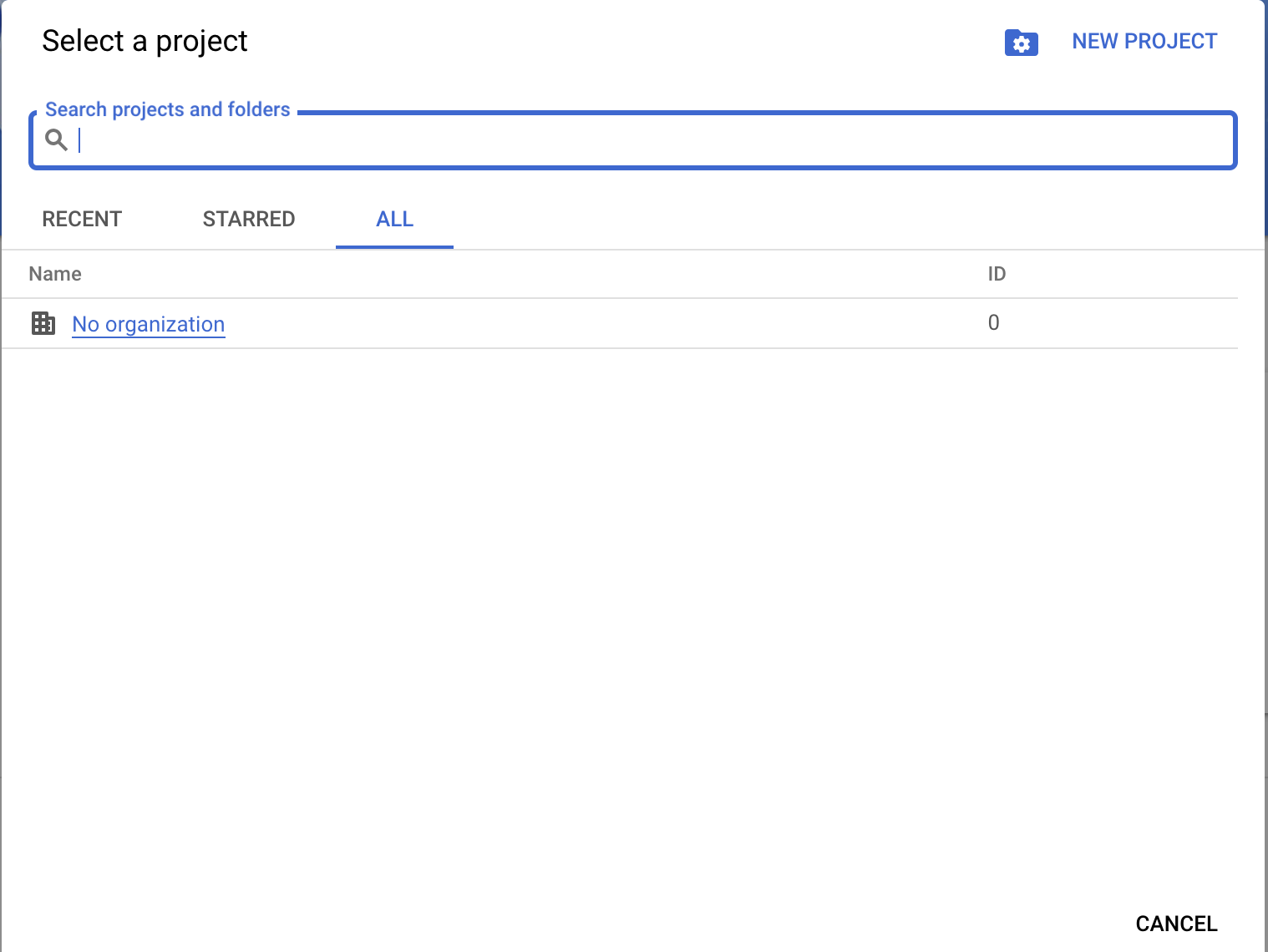
Click on Select a project in the drop-down menu and either select an existing project or create a new one.
Step 2: Enabling Google Sheets API
-
Select the created project.
-
Navigate to APIs & Services > Library.
-
Search and select
Google Sheets API. Then click ENABLE.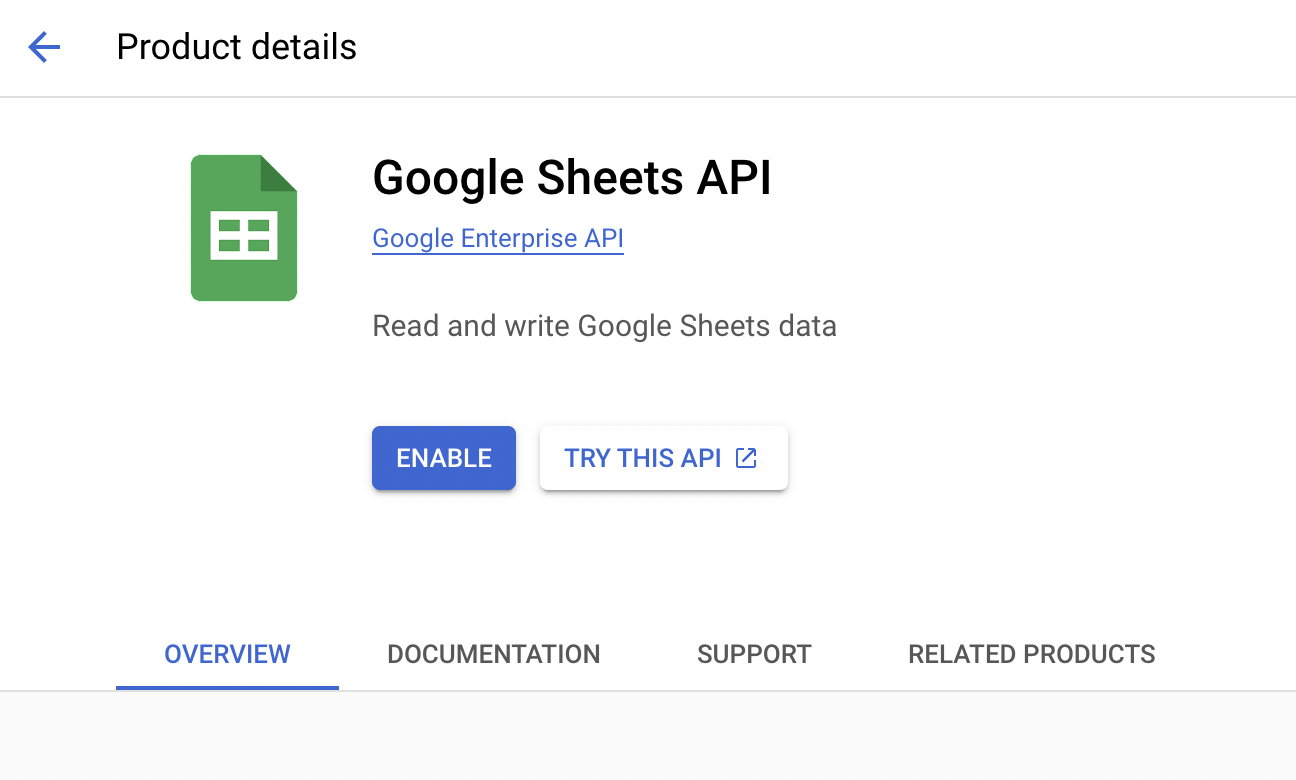
Note: If you intend to use the
deleteSpreadsheetoperation, you must also enable the Google Drive API in the same project. Search forGoogle Drive APIin the library and click ENABLE.
Step 3: Creating an OAuth consent app
-
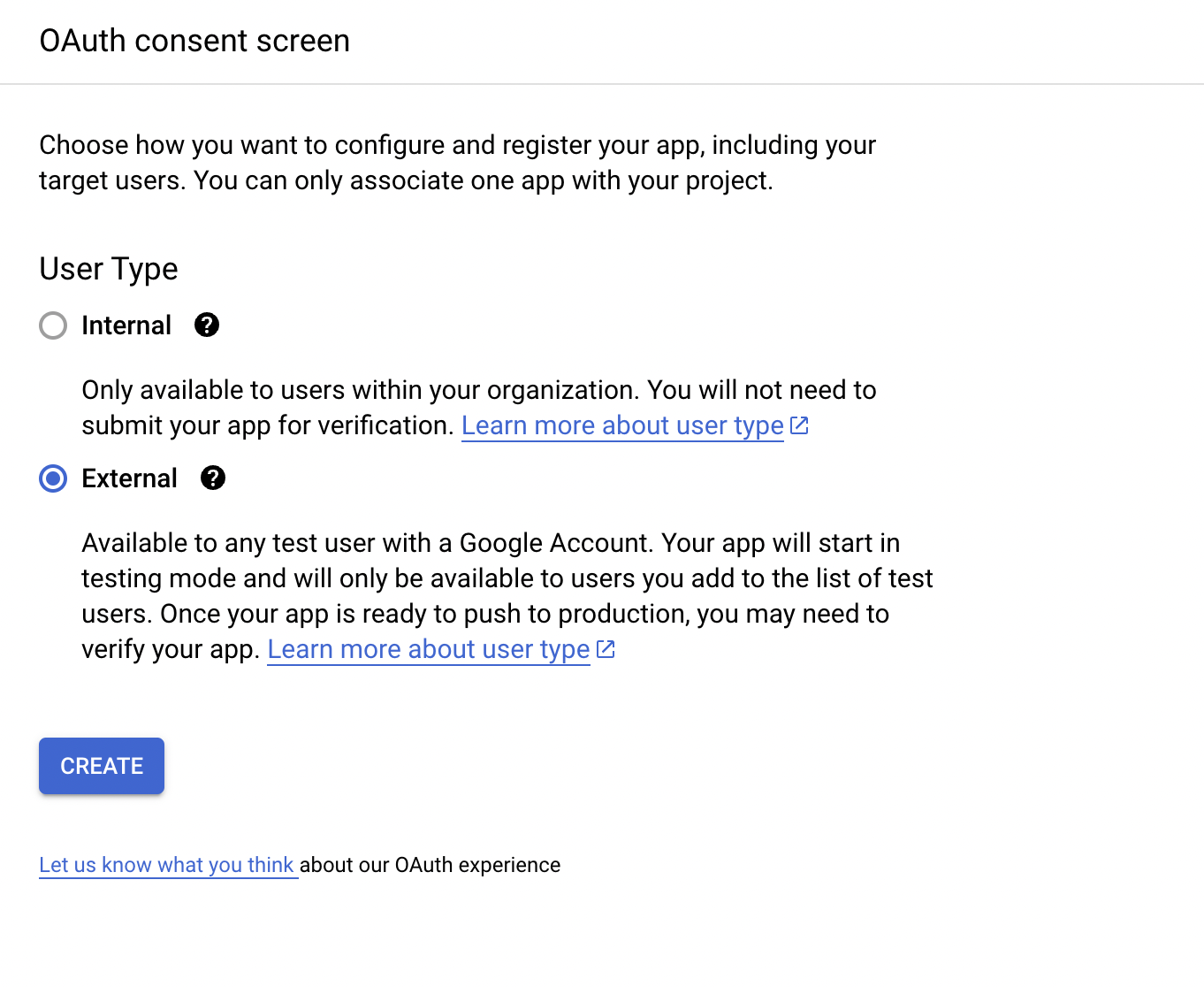
Click on the OAuth Consent Screen in the sidebar.
-
Select
Externaland click CREATE. -
Fill in the app information and add the necessary scopes for Google Sheets API.
Step 4: Generating client ID & client secret
-
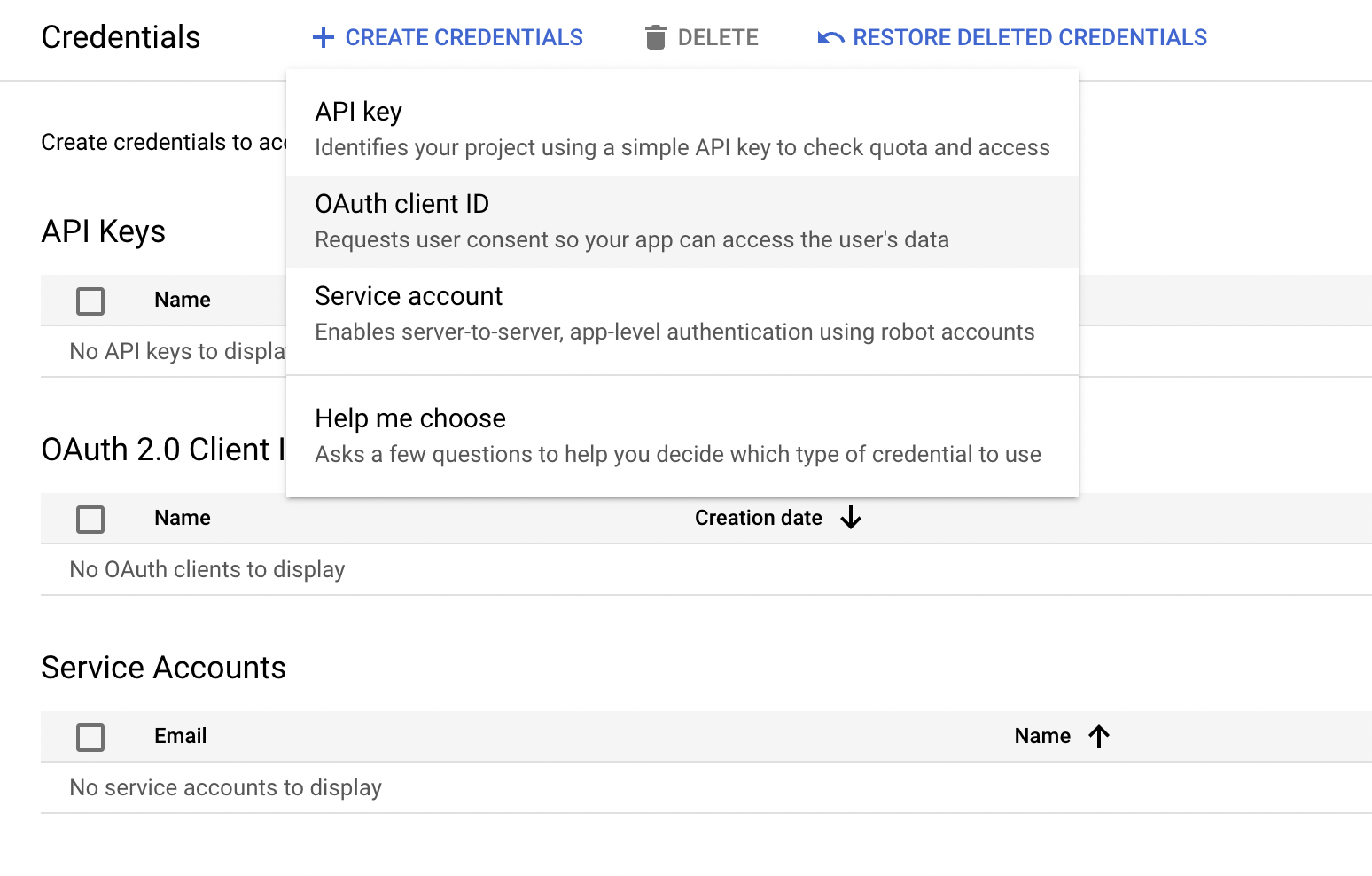
In the left sidebar, click on Credentials.
-
Click on + CREATE CREDENTIALS and choose OAuth Client ID.
-
You will be directed to the OAuth consent screen, in which you need to fill in the necessary information below.
Field Value Application type Web Application Name Sheets Client Authorized Redirect URIs https://developers.google.com/oauthplayground 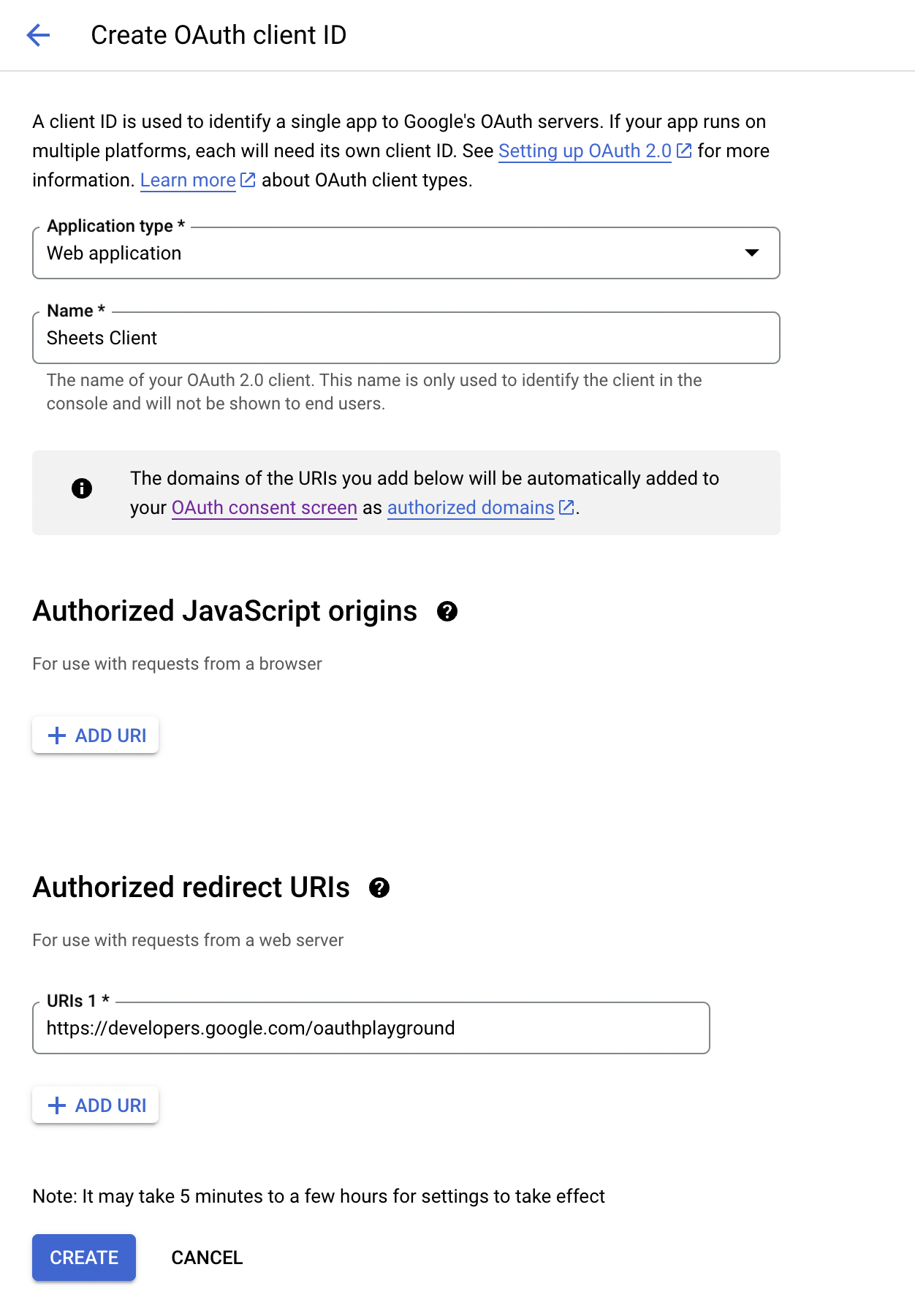
Step 5: Obtain the access and refresh tokens
Follow these steps to generate the access and refresh tokens.
Note: It is recommended to use the OAuth 2.0 playground to acquire the tokens.
-
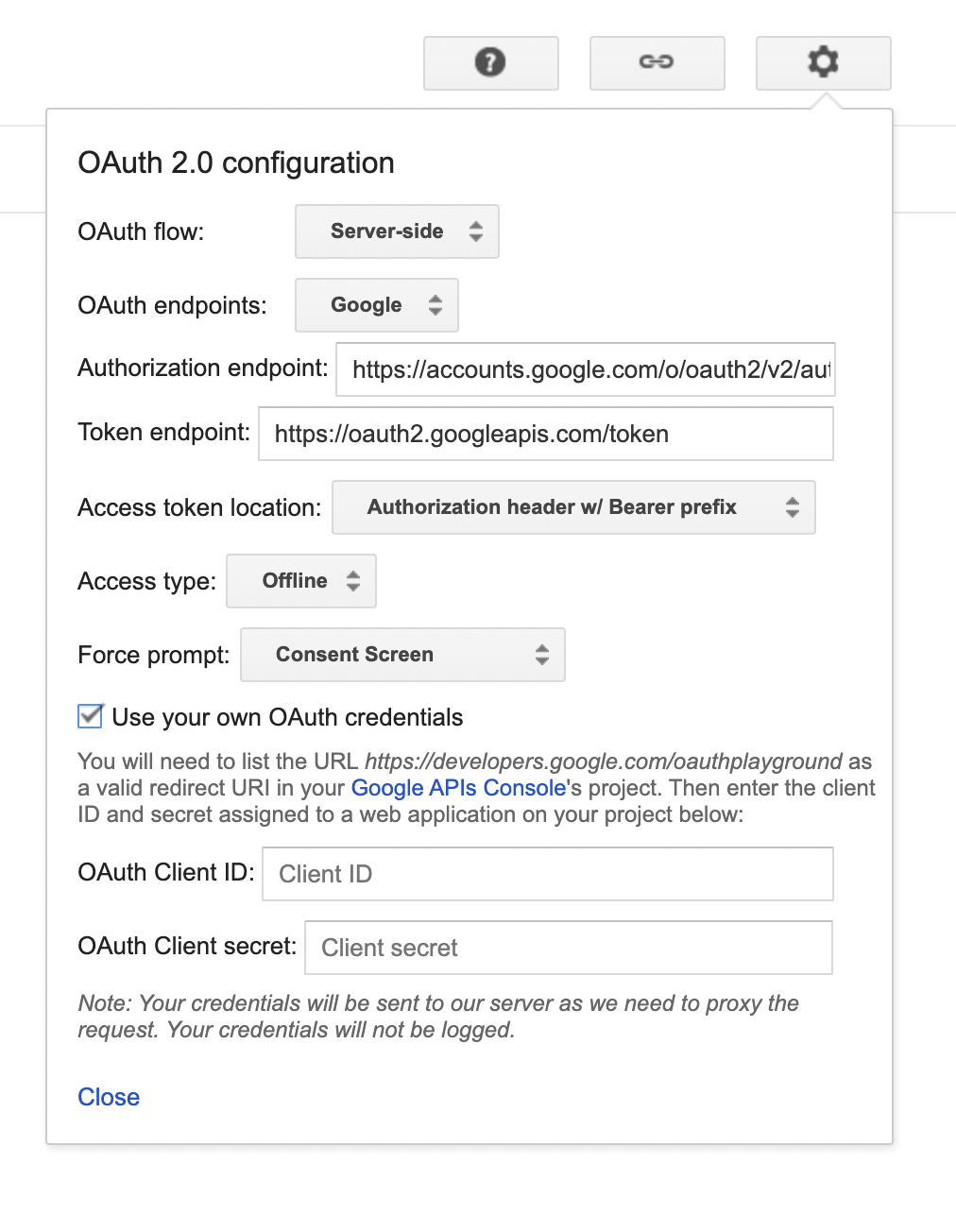
Configure the OAuth playground with the OAuth client ID and client secret.
-
Authorize the Google Sheets APIs. If you intend to use the
deleteSpreadsheetoperation, also add thehttps://www.googleapis.com/auth/drive.filescope.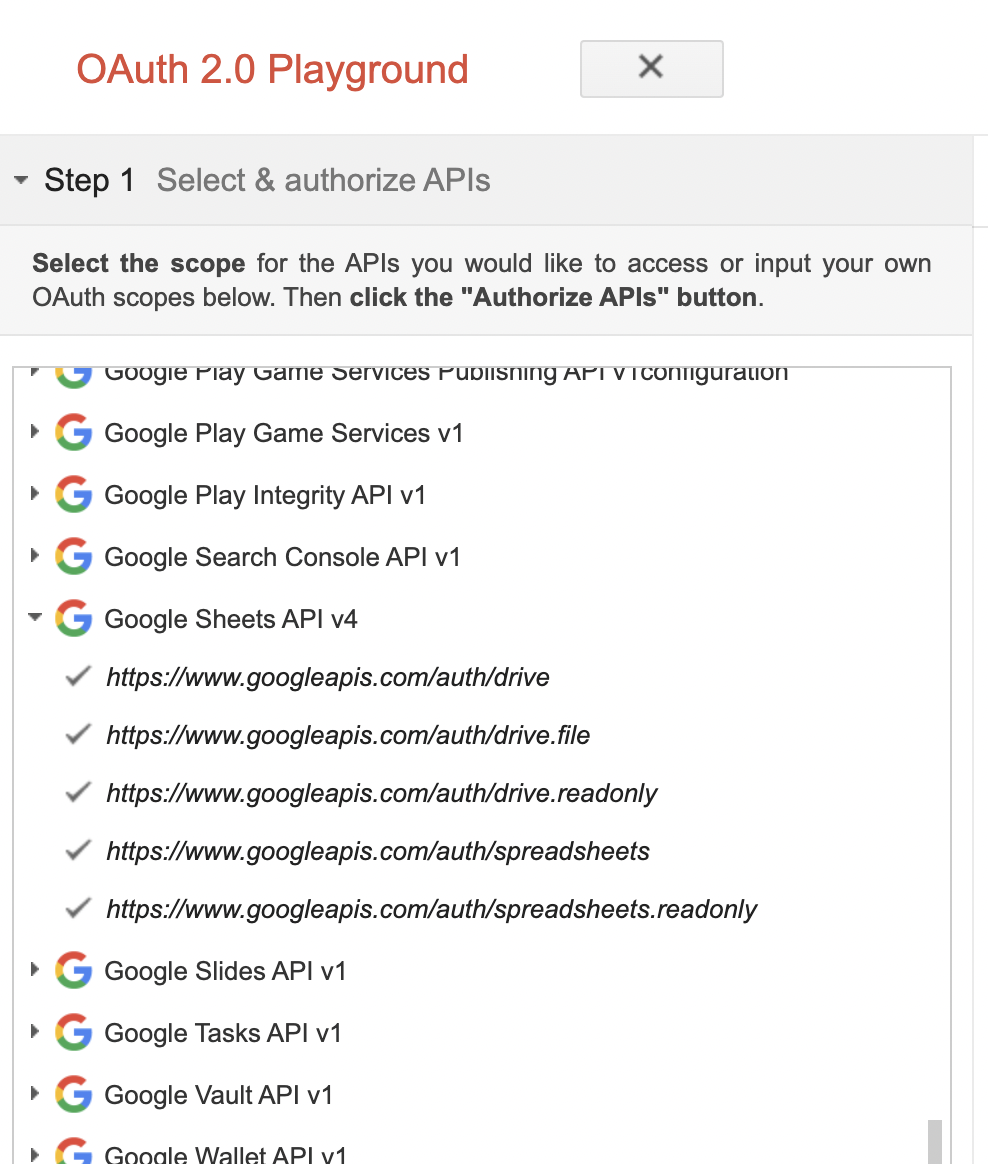
-
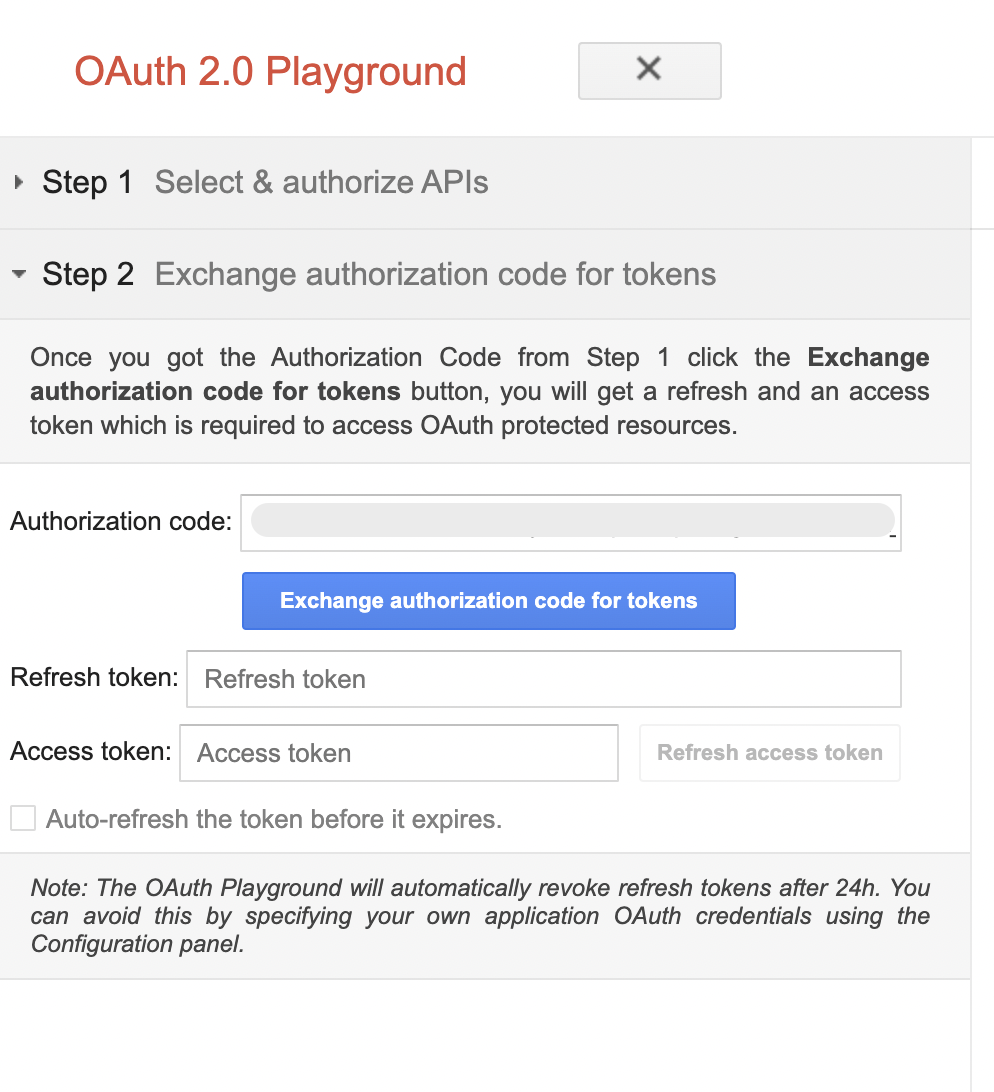
Exchange the authorization code for tokens.
Quickstart
To use the Google Sheets connector in your Ballerina project, modify the .bal file as follows:
Step 1: Import connector
Import the ballerinax/googleapis.sheets module.
import ballerinax/googleapis.sheets;
Step 2: Create a new connector instance
Create a sheets:ConnectionConfig with the obtained OAuth2.0 tokens and initialize the connector with it.
configurable string clientId = ?; configurable string clientSecret = ?; configurable string refreshToken = ?; configurable string refreshUrl = ?; sheets:Client spreadsheetClient = check new ({ auth: { clientId, clientSecret, refreshToken, refreshUrl } });
Step 3: Invoke connector operation
Now, utilize the available connector operations.
Create a spreadsheet with a given name
public function main() returns error? { // create a spreadsheet sheets:Spreadsheet response = check spreadsheetClient->createSpreadsheet("NewSpreadsheet"); // Add a new worksheet with given name to the Spreadsheet string spreadsheetId = response.spreadsheetId; sheets:Sheet sheet = check spreadsheetClient->addSheet(spreadsheetId, "NewWorksheet"); }
Step 4: Run the Ballerina application
bal run
Examples
The Google Sheets connector provides practical examples illustrating usage in various scenarios. Explore these examples, covering use cases like creating, reading, and appending rows.
-
Cell operations - Operations associated with a cell, such as clearing, setting, and deleting cell values.
-
Grid filtering - Demonstrate filtering sheet values using a grid range.
-
Sheet modifying - Basic operations associated with sheets such as creating, reading, and appending rows.
Report issues
To report bugs, request new features, start new discussions, view project boards, etc., go to the Ballerina library parent repository.
Useful links
- Chat live with us via our Discord server.
- Post all technical questions on Stack Overflow with the #ballerina tag.
Clients
googleapis.sheets: Client
Ballerina Google Sheets connector provides the capability to access Google Sheets API. The connector let you perform spreadsheet management operations, worksheet management operations and the capability to handle Google Sheets data level operations.
Constructor
Gets invoked to initialize the connector.
init (ConnectionConfig config, string serviceUrl, string driveServiceUrl)- config ConnectionConfig - Configuration for the connector
- serviceUrl string BASE_URL - URL of the Google Sheets API
- driveServiceUrl string DRIVE_BASE_URL - URL of the Google Drive API
createSpreadsheet
function createSpreadsheet(string name) returns Spreadsheet|errorCreates a new spreadsheet.
Parameters
- name string - Name of the spreadsheet
Return Type
- Spreadsheet|error -
sheets:Spreadsheetrecord on success, or else an error
deleteSpreadsheet
Deletes a spreadsheet by the given ID.
Note: This operation uses the Google Drive API and requires the Google Drive API to be enabled in
your Google Cloud project. The OAuth token must include the
https://www.googleapis.com/auth/drive.file scope (or broader Drive scope).
Parameters
- spreadsheetId string - ID of the spreadsheet to delete
Return Type
- error? - Nil on success, or else an error
openSpreadsheetById
function openSpreadsheetById(string spreadsheetId) returns Spreadsheet|errorOpens a spreadsheet by the given ID.
Parameters
- spreadsheetId string - ID of the spreadsheet
Return Type
- Spreadsheet|error -
sheets:Spreadsheetrecord on success, or else an error
openSpreadsheetByUrl
function openSpreadsheetByUrl(string url) returns Spreadsheet|errorOpens a spreadsheet by the given Url.
Parameters
- url string - Url of the spreadsheet
Return Type
- Spreadsheet|error -
sheets:Spreadsheetrecord on success, or else an error
renameSpreadsheet
Renames the spreadsheet with the given name.
Return Type
- error? - Nil on success, or else an error
getSheets
Get worksheets of the spreadsheet.
Parameters
- spreadsheetId string - ID of the spreadsheet
getSheetByName
Get a worksheet of the spreadsheet.
Parameters
- spreadsheetId string - ID of the spreadsheet
- sheetName string - Name of the worksheet to retrieve
addSheet
Add a new worksheet.
removeSheet
Delete specified worksheet by worksheet ID.
Parameters
- spreadsheetId string - ID of the spreadsheet
- sheetId int - The ID of the worksheet to delete
Return Type
- error? - Nil on success, or else an error
removeSheetByName
Delete specified worksheet by worksheet name.
Parameters
- spreadsheetId string - ID of the spreadsheet
- sheetName string - The name of the worksheet to delete
Return Type
- error? - Nil on success, or else an error
renameSheet
Renames the worksheet of a given spreadsheet with the given name.
Parameters
- spreadsheetId string - ID of the spreadsheet
- sheetName string - The existing name of the worksheet
- name string - New name for the worksheet
Return Type
- error? - Nil on success, or else an error
setRange
function setRange(string spreadsheetId, string sheetName, Range range, string? valueInputOption) returns error?Sets the values of the given range of cells of the worksheet.
Parameters
- spreadsheetId string - ID of the Spreadsheet
- sheetName string - The name of the Worksheet
- range Range - The Range record to be set
- valueInputOption string? (default ()) - Determines how input data should be interpreted.
It's either
RAWorUSER_ENTERED. Default isRAW(Optional). For more information, see ValueInputOption
Return Type
- error? - Nil on success, or else an error
getRange
function getRange(string spreadsheetId, string sheetName, string a1Notation, string? valueRenderOption) returns Range|errorGets the given range of the worksheet.
Parameters
- spreadsheetId string - ID of the spreadsheet
- sheetName string - The name of the worksheet
- a1Notation string - The required range in A1 notation
- valueRenderOption string? (default ()) - Determines how values should be rendered in the output.
It's either
FORMATTED_VALUE,UNFORMATTED_VALUEorFORMULA. Default isFORMATTED_VALUE(Optional). For more information, see ValueRenderOption
clearRange
Clears the range of contents, formats, and data validation rules.
Parameters
- spreadsheetId string - ID of the spreadsheet
- sheetName string - The name of the worksheet
- a1Notation string - The required range in A1 notation
Return Type
- error? - Nil on success, or else an error
addColumnsBefore
function addColumnsBefore(string spreadsheetId, int sheetId, int index, int numberOfColumns) returns error?Inserts the given number of columns before the given column position by worksheet ID.
Parameters
- spreadsheetId string - ID of the spreadsheet
- sheetId int - ID of the worksheet
- index int - The position of the column before which the new columns should be added
- numberOfColumns int - Number of columns to be added
Return Type
- error? - Nil on success, or else an error
addColumnsBeforeBySheetName
function addColumnsBeforeBySheetName(string spreadsheetId, string sheetName, int index, int numberOfColumns) returns error?Inserts the given number of columns before the given column position by worksheet name.
Parameters
- spreadsheetId string - ID of the Spreadsheet
- sheetName string - The name of the Worksheet
- index int - The position of the column before which the new columns should be added
- numberOfColumns int - Number of columns to be added
Return Type
- error? - Nil on success, or else an error
addColumnsAfter
function addColumnsAfter(string spreadsheetId, int sheetId, int index, int numberOfColumns) returns error?Inserts the given number of columns after the given column position by worksheet ID.
Parameters
- spreadsheetId string - ID of the spreadsheet
- sheetId int - ID of the worksheet
- index int - The position of the column after which the new columns should be added
- numberOfColumns int - Number of columns to be added
Return Type
- error? - Nil on success, or else an error
addColumnsAfterBySheetName
function addColumnsAfterBySheetName(string spreadsheetId, string sheetName, int index, int numberOfColumns) returns error?Inserts the given number of columns after the given column position by worksheet name.
Parameters
- spreadsheetId string - ID of the spreadsheet
- sheetName string - The name of the worksheet
- index int - The position of the column after which the new columns should be added
- numberOfColumns int - Number of columns to be added
Return Type
- error? - Nil on success, or else an error
createOrUpdateColumn
function createOrUpdateColumn(string spreadsheetId, string sheetName, string column, (int|string|decimal)[] values, string? valueInputOption) returns error?Create or Update a Column.
Parameters
- spreadsheetId string - ID of the spreadsheet
- sheetName string - The name of the worksheet
- column string - Position of column (string notation) to set the data
- valueInputOption string? (default ()) - Determines how input data should be interpreted.
It's either
RAWorUSER_ENTERED. Default isRAW(Optional). For more information, see ValueInputOption
Return Type
- error? - Nil on success, or else an error
getColumn
function getColumn(string spreadsheetId, string sheetName, string column, string? valueRenderOption) returns Column|errorGets the values in the given column of the worksheet.
Parameters
- spreadsheetId string - ID of the spreadsheet
- sheetName string - The name of the worksheet
- column string - Position of Column (string notation) to retrieve the data
- valueRenderOption string? (default ()) - Determines how values should be rendered in the output.
It's either
FORMATTED_VALUE,UNFORMATTED_VALUEorFORMULA. Default isFORMATTED_VALUE(Optional). For more information, see ValueRenderOption
deleteColumns
function deleteColumns(string spreadsheetId, int sheetId, int column, int numberOfColumns) returns error?Deletes the given number of columns starting at the given column position by worksheet ID.
Parameters
- spreadsheetId string - ID of the spreadsheet
- sheetId int - ID of the worksheet
- column int - Starting position of the columns
- numberOfColumns int - Number of columns from the starting position
Return Type
- error? - Nil on success, or else an error
deleteColumnsBySheetName
function deleteColumnsBySheetName(string spreadsheetId, string sheetName, int column, int numberOfColumns) returns error?Deletes the given number of columns starting at the given column position by worksheet name.
Parameters
- spreadsheetId string - ID of the spreadsheet
- sheetName string - The name of the worksheet
- column int - Starting position of the columns
- numberOfColumns int - Number of columns from the starting position
Return Type
- error? - Nil on success, or else an error
addRowsBefore
function addRowsBefore(string spreadsheetId, int sheetId, int index, int numberOfRows) returns error?Inserts the given number of rows before the given row position by worksheet ID.
Parameters
- spreadsheetId string - ID of the spreadsheet
- sheetId int - ID of the worksheet
- index int - The position of the row before which the new rows should be added
- numberOfRows int - The number of rows to be added
Return Type
- error? - Nil on success, or else an error
addRowsBeforeBySheetName
function addRowsBeforeBySheetName(string spreadsheetId, string sheetName, int index, int numberOfRows) returns error?Inserts the given number of rows before the given row position by worksheet name.
Parameters
- spreadsheetId string - ID of the spreadsheet
- sheetName string - The name of the worksheet
- index int - The position of the row before which the new rows should be added
- numberOfRows int - The number of rows to be added
Return Type
- error? - Nil on success, or else an error
addRowsAfter
function addRowsAfter(string spreadsheetId, int sheetId, int index, int numberOfRows) returns error?Inserts a number of rows after the given row position by worksheet ID.
Parameters
- spreadsheetId string - ID of the spreadsheet
- sheetId int - ID of the worksheet
- index int - The row after which the new rows should be added.
- numberOfRows int - The number of rows to be added
Return Type
- error? - Nil on success, or else an error
addRowsAfterBySheetName
function addRowsAfterBySheetName(string spreadsheetId, string sheetName, int index, int numberOfRows) returns error?Inserts a number of rows after the given row position by worksheet name.
Parameters
- spreadsheetId string - ID of the spreadsheet
- sheetName string - The name of the worksheet
- index int - The row after which the new rows should be added.
- numberOfRows int - The number of rows to be added
Return Type
- error? - Nil on success, or else an error
createOrUpdateRow
function createOrUpdateRow(string spreadsheetId, string sheetName, int row, (int|string|decimal)[] values, string? valueInputOption) returns error?Create or update a row.
Parameters
- spreadsheetId string - ID of the spreadsheet
- sheetName string - The name of the worksheet
- row int - Position of row (integer notation) to set the data
- valueInputOption string? (default ()) - Determines how input data should be interpreted.
It's either
RAWorUSER_ENTERED. Default isRAW(Optional). For more information, see ValueInputOption
Return Type
- error? - Nil on success, or else an error
getRow
function getRow(string spreadsheetId, string sheetName, int row, string? valueRenderOption) returns Row|errorGets the values in the given row of the worksheet.
Parameters
- spreadsheetId string - ID of the spreadsheet
- sheetName string - The name of the worksheet
- row int - Row number to retrieve the data
- valueRenderOption string? (default ()) - Determines how values should be rendered in the output.
It's either
FORMATTED_VALUE,UNFORMATTED_VALUEorFORMULA. Default isFORMATTED_VALUE(Optional). For more information, see ValueRenderOption
deleteRows
Deletes the given number of rows starting at the given row position by worksheet ID.
Parameters
- spreadsheetId string - ID of the spreadsheet
- sheetId int - ID of the worksheet
- row int - Starting position of the rows
- numberOfRows int - Number of rows from the starting position
Return Type
- error? - Nil on success, or else an error
deleteRowsBySheetName
function deleteRowsBySheetName(string spreadsheetId, string sheetName, int row, int numberOfRows) returns error?Deletes the given number of rows starting at the given row position by worksheet name.
Parameters
- spreadsheetId string - ID of the spreadsheet
- sheetName string - The name of the worksheet
- row int - Starting position of the rows
- numberOfRows int - Number of rows from the starting position
Return Type
- error? - Nil on success, or else an error
setCell
function setCell(string spreadsheetId, string sheetName, string a1Notation, int|string|decimal value, string? valueInputOption) returns error?Sets the value of the given cell of the worksheet.
Parameters
- spreadsheetId string - ID of the spreadsheet
- sheetName string - The name of the worksheet
- a1Notation string - The required cell in A1 notation
- valueInputOption string? (default ()) - Determines how input data should be interpreted.
It's either
RAWorUSER_ENTERED. Default isRAW(Optional). For more information, see ValueInputOption
Return Type
- error? - Nil on success, or else an error
getCell
function getCell(string spreadsheetId, string sheetName, string a1Notation, string? valueRenderOption) returns Cell|errorGets the value of the given cell of the sheet.
Parameters
- spreadsheetId string - ID of the spreadsheet
- sheetName string - The name of the worksheet
- a1Notation string - The required cell in A1 notation
- valueRenderOption string? (default ()) - Determines how values should be rendered in the output.
It's either
FORMATTED_VALUE,UNFORMATTED_VALUEorFORMULA. Default isFORMATTED_VALUE(Optional). For more information, see ValueRenderOption
clearCell
Clears the given cell of contents, formats, and data validation rules.
Parameters
- spreadsheetId string - ID of the spreadsheet
- sheetName string - The name of the worksheet
- a1Notation string - The required cell in A1 notation
Return Type
- error? - Nil on success, or else an error
appendValue
function appendValue(string spreadsheetId, (int|string|decimal|boolean|float)[] values, A1Range a1Range, string? valueInputOption) returns error|ValueRangeAdds the given values to a row at the bottom of the worksheet. The input range is used to search for existing data and find a "table" within that range. Values will be appended to the next row of the table, starting with the first column of the table.
Parameters
- spreadsheetId string - ID of the spreadsheet
- a1Range A1Range - The required range in A1 notation
- valueInputOption string? (default ()) - Determines how input data should be interpreted.
It's either
RAWorUSER_ENTERED. Default isRAW(Optional). For more information, see ValueInputOption
Return Type
- error|ValueRange - ValueRange on success, or else an error
appendValues
function appendValues(string spreadsheetId, (int|string|decimal|boolean|float)[][] values, A1Range a1Range, string? valueInputOption) returns error|ValuesRangeAdds the given values to number of rows at the bottom of the worksheet. The input range is used to search for existing data and find a "table" within that range. Values will be appended to the next rows of the table, starting with the first column of the table.
Parameters
- spreadsheetId string - ID of the spreadsheet
- a1Range A1Range - The required range in A1 notation
- valueInputOption string? (default ()) - Determines how input data should be interpreted.
It's either
RAWorUSER_ENTERED. Default isRAW(Optional). For more information, see ValueInputOption
Return Type
- error|ValuesRange - ValueRange on success, or else an error
copyTo
Copies the sheet to a given spreadsheet by worksheet ID.
Parameters
- spreadsheetId string - ID of the spreadsheet
- sheetId int - ID of the worksheet
- destinationId string - ID of the spreadsheet to copy the sheet to
Return Type
- error? - Nil on success, or else an error
copyToBySheetName
function copyToBySheetName(string spreadsheetId, string sheetName, string destinationId) returns error?Copies the sheet to a given spreadsheet by worksheet name.
Parameters
- spreadsheetId string - ID of the spreadsheet
- sheetName string - The name of the worksheet
- destinationId string - ID of the spreadsheet to copy the sheet to
Return Type
- error? - Nil on success, or else an error
clearAll
Clears the worksheet content and formatting rules by worksheet ID.
Return Type
- error? - Nil on success, or else an error
clearAllBySheetName
Clears the worksheet content and formatting rules by worksheet name.
Return Type
- error? - Nil on success, or else an error
setRowMetaData
function setRowMetaData(string spreadsheetId, int sheetId, int rowIndex, Visibility visibility, string key, string value) returns error?Add developer metadata to the given row.
Parameters
- spreadsheetId string - ID of the spreadsheet
- sheetId int - The ID of the worksheet
- rowIndex int - ID of the target row
- visibility Visibility - Visibility parameter for the developer metadata. It's either
UNSPECIFIED,DOCUMENTorPROJECT.
- key string - Metadata key asigned to the row
- value string - Value assigned with the key. This should be unique.
Return Type
- error? - Nil on success, or else an error
getRowByDataFilter
function getRowByDataFilter(string spreadsheetId, int sheetId, Filter filter) returns error|ValueRange[]Fetch rows matching to the given criteria in the filter. Supports A1Range, GridRange and DeveloperMetadataLookup filters.
Parameters
- spreadsheetId string - ID of the spreadsheet
- sheetId int - The ID of the worksheet
- filter Filter - A record defining the filter used for the data filtering
Return Type
- error|ValueRange[] - ValueRange[] on success, or else an error
updateRowByDataFilter
function updateRowByDataFilter(string spreadsheetId, int sheetId, Filter filter, (int|string|decimal|boolean|float)[] values, string valueInputOption) returns error?Update rows matching the user provided data filter. Supports a1Range, gridRange and Developer metadata lookup filters.
Parameters
- spreadsheetId string - ID of the spreadsheet
- sheetId int - The ID of the worksheet
- filter Filter - A record defining the filter used for the data filtering
- valueInputOption string - Determines how input data should be interpreted.
It's either
RAWorUSER_ENTERED. Default isRAW(Optional). For more information, see ValueInputOption
Return Type
- error? - Nil on success, or else an error
deleteRowByDataFilter
Delete rows matching the user provided data filter Supports a1Range, gridRange and Developer metadata lookup filters
Parameters
- spreadsheetId string - ID of the spreadsheet
- sheetId int - The ID of the worksheet
- filter Filter - A record defining the filter used for the data filtering
Return Type
- error? - Nil on success, or else an error
Constants
googleapis.sheets: REFRESH_URL
Enums
googleapis.sheets: Dimension
Dimension
Members
googleapis.sheets: LocationMatchingStrategy
The location matching strategy for filters
Members
googleapis.sheets: LocationType
The location type for filters
Members
googleapis.sheets: ValueInputOption
Members
googleapis.sheets: ValueRenderOption
Members
googleapis.sheets: Visibility
The metadata visibility
Members
Records
googleapis.sheets: A1Range
A1 Notation of a ValueRange
Fields
- sheetName string - Sheet name in A1 notation
- startIndex? string - Starting cell of the range
- endIndex? string - Ending cell of the range
googleapis.sheets: Cell
Single cell in a sheet.
Fields
- a1Notation string - The column letter followed by the row number. For example for a single cell "A1" refers to the intersection of column "A" with row "1"
googleapis.sheets: ClientHttp1Settings
Provides settings related to HTTP/1.x protocol.
Fields
- keepAlive KeepAlive(default http:KEEPALIVE_AUTO) - Specifies whether to reuse a connection for multiple requests
- chunking Chunking(default http:CHUNKING_AUTO) - The chunking behaviour of the request
- proxy ProxyConfig?(default ()) - Proxy server related options
googleapis.sheets: Column
Single column in a sheet.
Fields
- columnPosition string - The column letter
googleapis.sheets: ConnectionConfig
Provides a set of configurations for controlling the behaviours when communicating with a remote HTTP endpoint.
Fields
- auth BearerTokenConfig|OAuth2RefreshTokenGrantConfig - Configurations related to client authentication
- httpVersion HttpVersion(default http:HTTP_2_0) - The HTTP version understood by the client
- http1Settings ClientHttp1Settings(default {}) - Configurations related to HTTP/1.x protocol
- http2Settings ClientHttp2Settings(default {}) - Configurations related to HTTP/2 protocol
- timeout decimal(default 60) - The maximum time to wait (in seconds) for a response before closing the connection
- forwarded string(default "disable") - The choice of setting
forwarded/x-forwardedheader
- poolConfig PoolConfiguration?(default ()) - Configurations associated with request pooling
- cache CacheConfig(default {}) - HTTP caching related configurations
- compression Compression(default http:COMPRESSION_AUTO) - Specifies the way of handling compression (
accept-encoding) header
- circuitBreaker CircuitBreakerConfig?(default ()) - Configurations associated with the behaviour of the Circuit Breaker
- retryConfig RetryConfig?(default ()) - Configurations associated with retrying
- responseLimits ResponseLimitConfigs(default {}) - Configurations associated with inbound response size limits
- secureSocket ClientSecureSocket(default {}) - SSL/TLS-related options
- proxy ProxyConfig?(default ()) - Proxy server related options
- validation boolean(default true) - Enables the inbound payload validation functionality which provided by the constraint package. Enabled by default
googleapis.sheets: DeveloperMetadataLookupFilter
The DeveloperMetadataLookup filter
Fields
- locationType LocationType - Specified type which the metadata ara associated. For more information, see LocationType
- locationMatchingStrategy? LocationMatchingStrategy - An enumeration of strategies for matching developer metadata locations. For more information, see locationMatchingStrategy.
- metadataId? int - The spreadsheet-scoped unique ID that identifies the metadata.
- metadataKey? string - Key used to identify metadata.
- metadataValue string - Data associated with the metadata's key.
- visibility? Visibility - Visibility scope of the associated metadata For more information, see Visibility.
- metadataLocation? MetadataLocation - Location of association for metadata
googleapis.sheets: DimensionRange
The Dimension Range
Fields
- sheetId int - The ID of the worksheet
- dimension Dimension - The dimension of the span
- startIndex int - The start (inclusive) of the span, or not set if unbounded
- endIndex int - The end (exclusive) of the span, or not set if unbounded.
googleapis.sheets: GridProperties
Grid properties.
Fields
- rowCount int(default 0) - The number of rows in the grid
- columnCount int(default 0) - The number of columns in the grid
- frozenRowCount int(default 0) - The number of rows that are frozen in the grid
- frozenColumnCount int(default 0) - The number of columns that are frozen in the grid
- hideGridlines boolean(default false) - True if the grid is not showing gridlines in the UI
googleapis.sheets: GridRangeFilter
The GridRange filters
Fields
- sheetId int - The ID of the worksheet
- startRowIndex? int - The start row (inclusive) of the range, or not set if unbounded.
- endRowIndex? int - The end row (exclusive) of the range, or not set if unbounded.
- startColumnIndex? int - The start column (inclusive) of the range, or not set if unbounded.
- endColumnIndex? int - The end column (exclusive) of the range, or not set if unbounded.
googleapis.sheets: MetadataLocation
The Metadata Location
Fields
- locationType LocationType - Specified type which the metadata ara associated. For more information, see LocationType
- spreadsheet boolean - Whether metadata is associated with an entire spreadsheet.
- sheetId int - The ID of the worksheet
- dimensionRange DimensionRange - Dimension when the metadata is associated with them
googleapis.sheets: OAuth2RefreshTokenGrantConfig
OAuth2 Refresh Token Grant Configs
Fields
- Fields Included from *OAuth2RefreshTokenGrantConfig
- refreshUrl string(default "https://accounts.google.com/o/oauth2/token") - Refresh URL
googleapis.sheets: ProxyConfig
Proxy server configurations to be used with the HTTP client endpoint.
Fields
- host string(default "") - Host name of the proxy server
- port int(default 0) - Proxy server port
- userName string(default "") - Proxy server username
- password string(default "") - Proxy server password
googleapis.sheets: Range
Single cell or a group of adjacent cells in a sheet.
Fields
- a1Notation string - The column letter followed by the row number. For example for a single cell "A1" refers to the intersection of column "A" with row "1", and for a range of cells "A1:D5" refers to the top left cell and the bottom right cell of a range
googleapis.sheets: Row
Single row in a sheet.
Fields
- rowPosition int - The row number
googleapis.sheets: Sheet
Worksheet information.
Fields
- properties SheetProperties(default {}) - Properties of a worksheet
googleapis.sheets: SheetProperties
Worksheet properties.
Fields
- sheetId int(default 0) - The ID of the worksheet
- title string(default "") - The name of the worksheet
- index int(default 0) - The index of the worksheet within the spreadsheet
- sheetType string(default "") - The type of worksheet
- gridProperties GridProperties(default {}) - Additional properties of the worksheet if this worksheet is a grid
- rightToLeft boolean(default false) - True if the worksheet is an RTL worksheet instead of an LTR worksheet
googleapis.sheets: Spreadsheet
Spreadsheet information.
Fields
- spreadsheetId string(default "") - Id of the spreadsheet
- properties SpreadsheetProperties(default {}) - Properties of a spreadsheet
- sheets Sheet[](default []) - The sheets that are part of a spreadsheet
- spreadsheetUrl string(default "") - The Url of the spreadsheet
googleapis.sheets: SpreadsheetProperties
Spreadsheet properties.
Fields
- title string(default "") - The title of the spreadsheet
- locale string(default "") - The locale of the spreadsheet
- autoRecalc string(default "") - The amount of time to wait before volatile functions are recalculated
- timeZone string(default "") - The time zone of the spreadsheet
googleapis.sheets: ValueRange
Values related to a single row.
Fields
- rowPosition int - The row number
- a1Range A1Range - A1Notation of the range
googleapis.sheets: ValuesRange
Values related to a multiple rows.
Fields
- rowStartPosition int - The row number
- a1Range A1Range - A1Notation of the range
Errors
googleapis.sheets: Error
Defines the generic error type for the googleapis.sheets module.
googleapis.sheets: InvalidRangeError
Error that occurs when an invalid cell range is provided. This could be due to malformed A1 notation or a range that falls outside the bounds of the sheet.
googleapis.sheets: SpreadsheetError
Error that occurs when a spreadsheet or sheet operation fails. This could be due to the resource not being found, insufficient permissions, or an API-level rejection.
Union types
googleapis.sheets: Filter
Filter
Type of filter used to match data.