Module github.trigger

ballerinax/github.trigger Ballerina library
Overview
The GitHub Trigger module allows you to listen to the following events occurring in GitHub:
Ping,Fork,Push,Create,WatchRelease,Issue,Label,MilestonePull Request,Pull Request Review,Pull Request Review Comment
This module receives GitHub's webhook events directly - it does not call GitHub's own REST/GraphQL API on your behalf.
Key features
- Receives 265 GitHub webhook events across 75 service types, from pushes and pull requests to workflow runs
- Verifies every delivery with the webhook secret (HMAC-SHA256,
X-Hub-Signature-256) - Typed payload records for each event, with camelCase fields mapped to GitHub's JSON keys
- Acknowledges each delivery before running your handler, so a slow or failing handler doesn't cause retries
- Services can be attached on their own path, so several triggers and HTTP services can share one port
- Trigger services are listed by
bal build --export-endpoints(Ballerina 2201.13.6 or later)
Setup guide
Before using this trigger in your Ballerina application, you need a GitHub account with access to the repository/organization you want to receive events from, and a Ballerina service that GitHub can reach over the internet to deliver webhook payloads to. The two sections below cover both a quick local test setup and a production deployment.
Try it out locally
Use this flow to test your webhook handling logic on your own machine before deploying anywhere, using ngrok to expose your local listener to the internet.
-
Write your service (see Quickstart below) and run it locally with
bal run. Note the port it's listening on (8090by default). -
Expose that port with ngrok:
ngrok http 8090Copy the
ForwardingURL ngrok prints out - this is your temporary public webhook URL.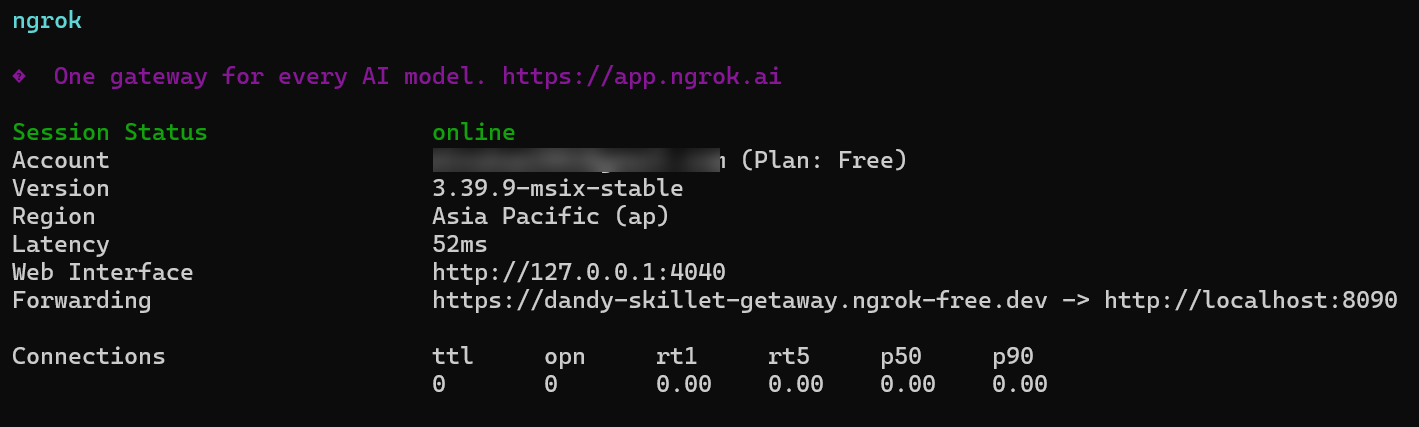
-
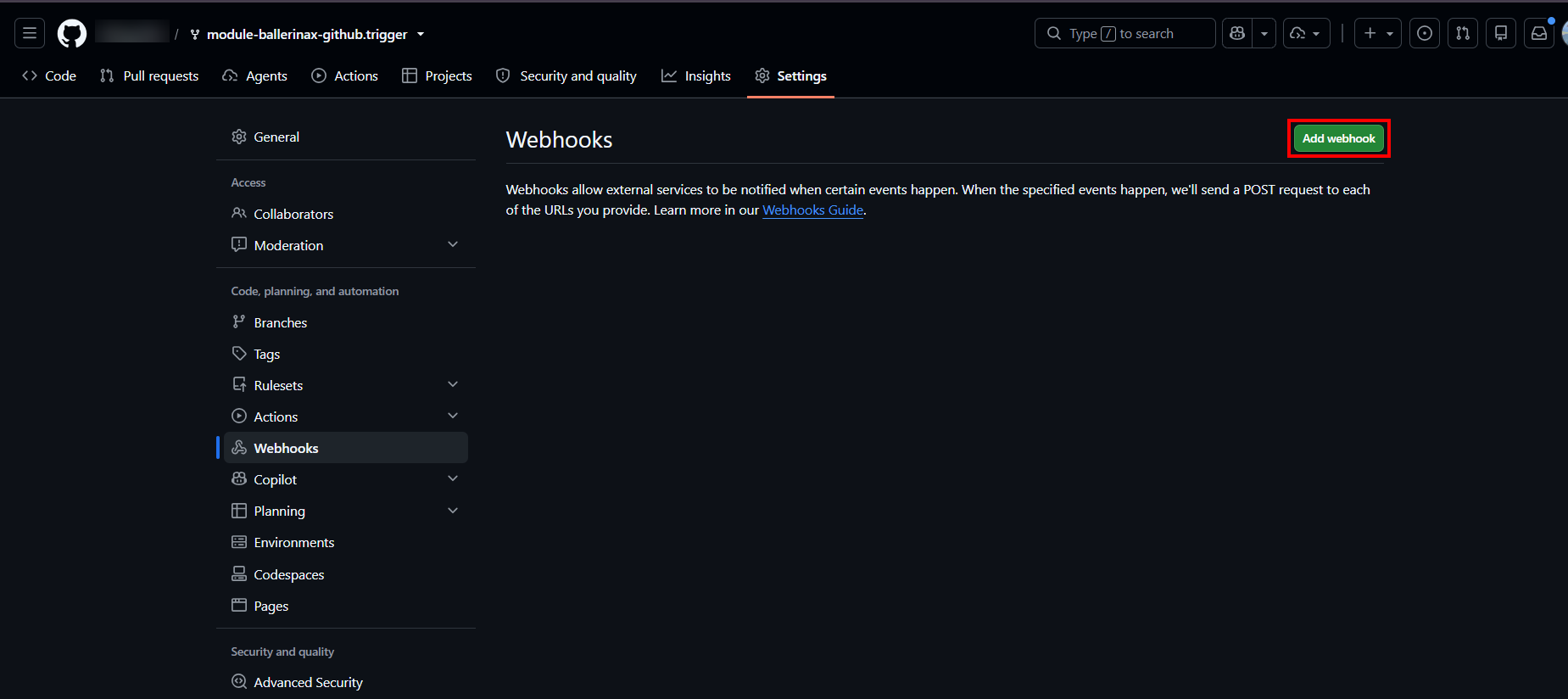
On the GitHub repository (or organization) you want events from, go to Settings > Webhooks and click Add webhook.
-
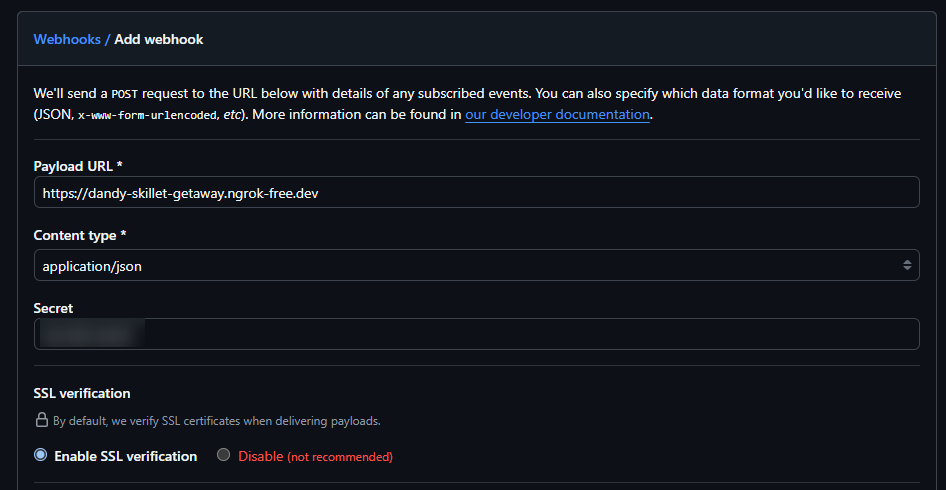
Fill in the webhook form:
- Payload URL: the ngrok forwarding URL from step 2.
- Content type:
application/json. - Secret: any string - this must exactly match the
webhookSecretconfigured in your service (see Quickstart), since it's used to verify that incoming payloads really came from GitHub.
-
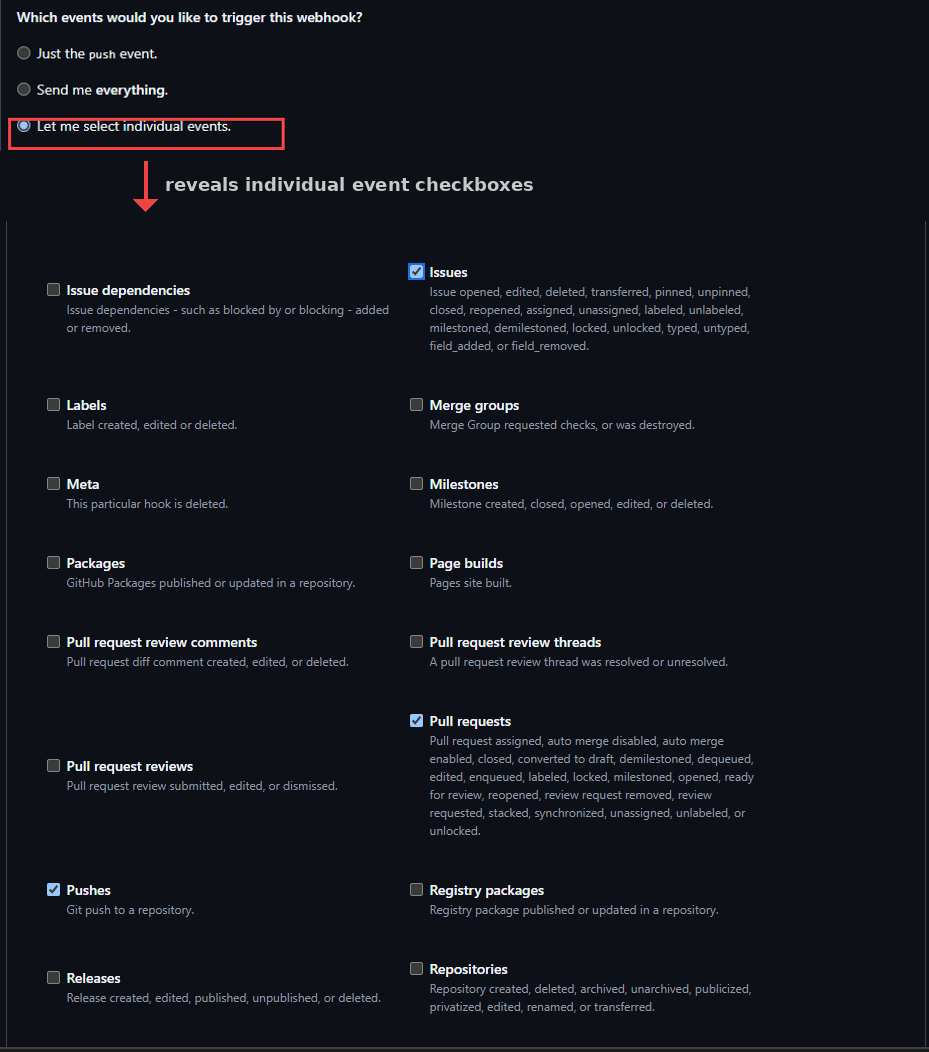
Under Which events would you like to trigger this webhook?, select Let me select individual events and check the events your service handles.
-
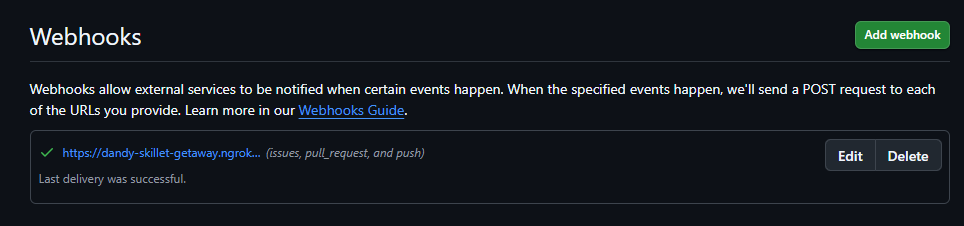
Click Add webhook. This registers the webhook, but (unlike creating one for the first time in most other flows) does not itself redeliver a test ping - use Recent Deliveries > Redeliver on the webhook's page to trigger one, or just push a real commit. A successful delivery shows a green checkmark back on the Webhooks settings page.
Production / business integration
For production use, deploy your Ballerina service somewhere with a stable, internet-reachable HTTPS URL. Ballerina doesn't require any specific hosting platform - containers, a VM, a managed PaaS, or anything else that gives you a stable HTTPS endpoint all work equally well.
Rather than hardcoding webhookSecret as shown in the Quickstart, inject it via Config.toml (or
your platform's equivalent configuration/secret mechanism), since it's a configurable value:
[<your_org>.<your_module_name>.userInput] webhookSecret = "<your production secret>"
Then follow the same webhook registration steps as above, using your production URL as the Payload URL and this real secret instead of a placeholder.
Compatibility
| Version | |
|---|---|
| Ballerina Language | Ballerina Swan Lake 2201.13.0 |
Why 2201.13.0, not the usual 2201.12.x? This connector's generator tool needs a
balCLI fix that isn't in any 2201.12.x release - see the root README for the full writeup.
Quickstart
To use the GitHub Trigger in your Ballerina application, update the .bal file as follows:
Step 1: Import the GitHub Trigger Ballerina library
import ballerinax/github.trigger as github;
Step 2: Initialize the GitHub Webhook Listener
Initialize the trigger by providing the listener config and a port number/http:Listener object.
configurable github:ListenerConfig userInput = { webhookSecret: "xxxxxx" }; listener github:Listener webhookListener = new (userInput, 8090);
webhookSecret should always be set to the same secret configured on the webhook's GitHub page -
this is what the trigger uses to verify incoming payloads actually came from GitHub. Without it, the listener rejects every request with 401 Unauthorized.
If you don't provide a port it will use the default port, which is 8090 - webhookSecret should
still always be set.
listener github:Listener webhookListener = new (userInput);
Step 3: Use the correct service type to implement the service
Use the correct service type for the corresponding channel when implementing the service. For
example, if you need to listen to Label events, use the LabelService service type as follows.
Every remote function declared on a service type must be implemented - Ballerina requires a
complete implementation, not just the ones you care about.
service github:LabelService on webhookListener { remote function onLabelCreated(github:LabelPayload payload) returns error? { return; } remote function onLabelEdited(github:LabelPayload payload) returns error? { return; } remote function onLabelDeleted(github:LabelPayload payload) returns error? { return; } }
Step 4: Provide remote functions corresponding to the events you're interested in
Remote functions must be implemented inside a service, on the matching service type for the
channel you're listening to - for example, github:PushService for push events.
import ballerina/log; service github:PushService on webhookListener { remote function onPush(github:PushPayload payload) returns error? { log:printInfo("Received push event", eventPayload = payload); } }
Step 5: Run the service
Use the bal run command to compile and run the Ballerina program.
Step 6: Register a webhook so GitHub can reach your service
See Setup guide above for the full walkthrough (with screenshots) of exposing your service and registering the webhook, for both local testing and production use.
Examples
The github.trigger module provides practical examples illustrating usage in various scenarios.
Explore these examples,
covering common webhook event handling use cases.
Report issues
To report bugs, request new features, start new discussions, etc., go to the Ballerina Library repository.
Useful links
- For more information go to the
github.triggerpackage. - If you're upgrading from an older version, see the migration notes for renamed functions and other breaking changes.
- For example demonstrations of the usage, go to Ballerina By Examples.
- Chat live with us via our Discord server.
- Post all technical questions on Stack Overflow with the #ballerina tag.
Service types
github.trigger: PingService
Attachable service type exposing the PingService family of webhook events.
onPing
function onPing(PingPayload payload) returns error?Triggered on Ping.
Parameters
- payload PingPayload - the PingPayload webhook payload
Return Type
- error? - an error if handling the event fails
github.trigger: PushService
Attachable service type exposing the PushService family of webhook events.
onPush
function onPush(PushPayload payload) returns error?Triggered on Push.
Parameters
- payload PushPayload - the PushPayload webhook payload
Return Type
- error? - an error if handling the event fails
github.trigger: PullRequestService
Attachable service type exposing the PullRequestService family of webhook events.
onPullRequestAssigned
function onPullRequestAssigned(PullRequestPayload payload) returns error?Triggered on Pull request assigned.
Parameters
- payload PullRequestPayload - the PullRequestPayload webhook payload
Return Type
- error? - an error if handling the event fails
onPullRequestAutoMergeDisabled
function onPullRequestAutoMergeDisabled(PullRequestPayload payload) returns error?Triggered on Pull request auto merge disabled.
Parameters
- payload PullRequestPayload - the PullRequestPayload webhook payload
Return Type
- error? - an error if handling the event fails
onPullRequestAutoMergeEnabled
function onPullRequestAutoMergeEnabled(PullRequestPayload payload) returns error?Triggered on Pull request auto merge enabled.
Parameters
- payload PullRequestPayload - the PullRequestPayload webhook payload
Return Type
- error? - an error if handling the event fails
onPullRequestClosed
function onPullRequestClosed(PullRequestPayload payload) returns error?Triggered on Pull request closed.
Parameters
- payload PullRequestPayload - the PullRequestPayload webhook payload
Return Type
- error? - an error if handling the event fails
onPullRequestConvertedToDraft
function onPullRequestConvertedToDraft(PullRequestPayload payload) returns error?Triggered on Pull request converted to draft.
Parameters
- payload PullRequestPayload - the PullRequestPayload webhook payload
Return Type
- error? - an error if handling the event fails
onPullRequestDemilestoned
function onPullRequestDemilestoned(PullRequestPayload payload) returns error?Triggered on Pull request demilestoned.
Parameters
- payload PullRequestPayload - the PullRequestPayload webhook payload
Return Type
- error? - an error if handling the event fails
onPullRequestDequeued
function onPullRequestDequeued(PullRequestPayload payload) returns error?Triggered on Pull request dequeued.
Parameters
- payload PullRequestPayload - the PullRequestPayload webhook payload
Return Type
- error? - an error if handling the event fails
onPullRequestEdited
function onPullRequestEdited(PullRequestPayload payload) returns error?Triggered on Pull request edited.
Parameters
- payload PullRequestPayload - the PullRequestPayload webhook payload
Return Type
- error? - an error if handling the event fails
onPullRequestEnqueued
function onPullRequestEnqueued(PullRequestPayload payload) returns error?Triggered on Pull request enqueued.
Parameters
- payload PullRequestPayload - the PullRequestPayload webhook payload
Return Type
- error? - an error if handling the event fails
onPullRequestLabeled
function onPullRequestLabeled(PullRequestPayload payload) returns error?Triggered on Pull request labeled.
Parameters
- payload PullRequestPayload - the PullRequestPayload webhook payload
Return Type
- error? - an error if handling the event fails
onPullRequestLocked
function onPullRequestLocked(PullRequestPayload payload) returns error?Triggered on Pull request locked.
Parameters
- payload PullRequestPayload - the PullRequestPayload webhook payload
Return Type
- error? - an error if handling the event fails
onPullRequestMilestoned
function onPullRequestMilestoned(PullRequestPayload payload) returns error?Triggered on Pull request milestoned.
Parameters
- payload PullRequestPayload - the PullRequestPayload webhook payload
Return Type
- error? - an error if handling the event fails
onPullRequestOpened
function onPullRequestOpened(PullRequestPayload payload) returns error?Triggered on Pull request opened.
Parameters
- payload PullRequestPayload - the PullRequestPayload webhook payload
Return Type
- error? - an error if handling the event fails
onPullRequestReadyForReview
function onPullRequestReadyForReview(PullRequestPayload payload) returns error?Triggered on Pull request ready for review.
Parameters
- payload PullRequestPayload - the PullRequestPayload webhook payload
Return Type
- error? - an error if handling the event fails
onPullRequestReopened
function onPullRequestReopened(PullRequestPayload payload) returns error?Triggered on Pull request reopened.
Parameters
- payload PullRequestPayload - the PullRequestPayload webhook payload
Return Type
- error? - an error if handling the event fails
onPullRequestReviewRequestRemoved
function onPullRequestReviewRequestRemoved(PullRequestPayload payload) returns error?Triggered on Pull request review request removed.
Parameters
- payload PullRequestPayload - the PullRequestPayload webhook payload
Return Type
- error? - an error if handling the event fails
onPullRequestReviewRequested
function onPullRequestReviewRequested(PullRequestPayload payload) returns error?Triggered on Pull request review requested.
Parameters
- payload PullRequestPayload - the PullRequestPayload webhook payload
Return Type
- error? - an error if handling the event fails
onPullRequestSynchronize
function onPullRequestSynchronize(PullRequestPayload payload) returns error?Triggered on Pull request synchronize.
Parameters
- payload PullRequestPayload - the PullRequestPayload webhook payload
Return Type
- error? - an error if handling the event fails
onPullRequestUnassigned
function onPullRequestUnassigned(PullRequestPayload payload) returns error?Triggered on Pull request unassigned.
Parameters
- payload PullRequestPayload - the PullRequestPayload webhook payload
Return Type
- error? - an error if handling the event fails
onPullRequestUnlabeled
function onPullRequestUnlabeled(PullRequestPayload payload) returns error?Triggered on Pull request unlabeled.
Parameters
- payload PullRequestPayload - the PullRequestPayload webhook payload
Return Type
- error? - an error if handling the event fails
onPullRequestUnlocked
function onPullRequestUnlocked(PullRequestPayload payload) returns error?Triggered on Pull request unlocked.
Parameters
- payload PullRequestPayload - the PullRequestPayload webhook payload
Return Type
- error? - an error if handling the event fails
github.trigger: IssuesService
Attachable service type exposing the IssuesService family of webhook events.
onIssuesAssigned
function onIssuesAssigned(IssuesPayload payload) returns error?Triggered on Issues assigned.
Parameters
- payload IssuesPayload - the IssuesPayload webhook payload
Return Type
- error? - an error if handling the event fails
onIssuesClosed
function onIssuesClosed(IssuesPayload payload) returns error?Triggered on Issues closed.
Parameters
- payload IssuesPayload - the IssuesPayload webhook payload
Return Type
- error? - an error if handling the event fails
onIssuesDeleted
function onIssuesDeleted(IssuesPayload payload) returns error?Triggered on Issues deleted.
Parameters
- payload IssuesPayload - the IssuesPayload webhook payload
Return Type
- error? - an error if handling the event fails
onIssuesDemilestoned
function onIssuesDemilestoned(IssuesPayload payload) returns error?Triggered on Issues demilestoned.
Parameters
- payload IssuesPayload - the IssuesPayload webhook payload
Return Type
- error? - an error if handling the event fails
onIssuesEdited
function onIssuesEdited(IssuesPayload payload) returns error?Triggered on Issues edited.
Parameters
- payload IssuesPayload - the IssuesPayload webhook payload
Return Type
- error? - an error if handling the event fails
onIssuesLabeled
function onIssuesLabeled(IssuesPayload payload) returns error?Triggered on Issues labeled.
Parameters
- payload IssuesPayload - the IssuesPayload webhook payload
Return Type
- error? - an error if handling the event fails
onIssuesLocked
function onIssuesLocked(IssuesPayload payload) returns error?Triggered on Issues locked.
Parameters
- payload IssuesPayload - the IssuesPayload webhook payload
Return Type
- error? - an error if handling the event fails
onIssuesMilestoned
function onIssuesMilestoned(IssuesPayload payload) returns error?Triggered on Issues milestoned.
Parameters
- payload IssuesPayload - the IssuesPayload webhook payload
Return Type
- error? - an error if handling the event fails
onIssuesOpened
function onIssuesOpened(IssuesPayload payload) returns error?Triggered on Issues opened.
Parameters
- payload IssuesPayload - the IssuesPayload webhook payload
Return Type
- error? - an error if handling the event fails
onIssuesPinned
function onIssuesPinned(IssuesPayload payload) returns error?Triggered on Issues pinned.
Parameters
- payload IssuesPayload - the IssuesPayload webhook payload
Return Type
- error? - an error if handling the event fails
onIssuesReopened
function onIssuesReopened(IssuesPayload payload) returns error?Triggered on Issues reopened.
Parameters
- payload IssuesPayload - the IssuesPayload webhook payload
Return Type
- error? - an error if handling the event fails
onIssuesTransferred
function onIssuesTransferred(IssuesPayload payload) returns error?Triggered on Issues transferred.
Parameters
- payload IssuesPayload - the IssuesPayload webhook payload
Return Type
- error? - an error if handling the event fails
onIssuesTyped
function onIssuesTyped(IssuesPayload payload) returns error?Triggered on Issues typed.
Parameters
- payload IssuesPayload - the IssuesPayload webhook payload
Return Type
- error? - an error if handling the event fails
onIssuesUnassigned
function onIssuesUnassigned(IssuesPayload payload) returns error?Triggered on Issues unassigned.
Parameters
- payload IssuesPayload - the IssuesPayload webhook payload
Return Type
- error? - an error if handling the event fails
onIssuesUnlabeled
function onIssuesUnlabeled(IssuesPayload payload) returns error?Triggered on Issues unlabeled.
Parameters
- payload IssuesPayload - the IssuesPayload webhook payload
Return Type
- error? - an error if handling the event fails
onIssuesUnlocked
function onIssuesUnlocked(IssuesPayload payload) returns error?Triggered on Issues unlocked.
Parameters
- payload IssuesPayload - the IssuesPayload webhook payload
Return Type
- error? - an error if handling the event fails
onIssuesUnpinned
function onIssuesUnpinned(IssuesPayload payload) returns error?Triggered on Issues unpinned.
Parameters
- payload IssuesPayload - the IssuesPayload webhook payload
Return Type
- error? - an error if handling the event fails
onIssuesUntyped
function onIssuesUntyped(IssuesPayload payload) returns error?Triggered on Issues untyped.
Parameters
- payload IssuesPayload - the IssuesPayload webhook payload
Return Type
- error? - an error if handling the event fails
github.trigger: ReleaseService
Attachable service type exposing the ReleaseService family of webhook events.
onReleaseCreated
function onReleaseCreated(ReleasePayload payload) returns error?Triggered on Release created.
Parameters
- payload ReleasePayload - the ReleasePayload webhook payload
Return Type
- error? - an error if handling the event fails
onReleaseDeleted
function onReleaseDeleted(ReleasePayload payload) returns error?Triggered on Release deleted.
Parameters
- payload ReleasePayload - the ReleasePayload webhook payload
Return Type
- error? - an error if handling the event fails
onReleaseEdited
function onReleaseEdited(ReleasePayload payload) returns error?Triggered on Release edited.
Parameters
- payload ReleasePayload - the ReleasePayload webhook payload
Return Type
- error? - an error if handling the event fails
onReleasePrereleased
function onReleasePrereleased(ReleasePayload payload) returns error?Triggered on Release prereleased.
Parameters
- payload ReleasePayload - the ReleasePayload webhook payload
Return Type
- error? - an error if handling the event fails
onReleasePublished
function onReleasePublished(ReleasePayload payload) returns error?Triggered on Release published.
Parameters
- payload ReleasePayload - the ReleasePayload webhook payload
Return Type
- error? - an error if handling the event fails
onReleaseReleased
function onReleaseReleased(ReleasePayload payload) returns error?Triggered on Release released.
Parameters
- payload ReleasePayload - the ReleasePayload webhook payload
Return Type
- error? - an error if handling the event fails
onReleaseUnpublished
function onReleaseUnpublished(ReleasePayload payload) returns error?Triggered on Release unpublished.
Parameters
- payload ReleasePayload - the ReleasePayload webhook payload
Return Type
- error? - an error if handling the event fails
github.trigger: IssueCommentService
Attachable service type exposing the IssueCommentService family of webhook events.
onIssueCommentCreated
function onIssueCommentCreated(IssueCommentPayload payload) returns error?Triggered on Issue comment created.
Parameters
- payload IssueCommentPayload - the IssueCommentPayload webhook payload
Return Type
- error? - an error if handling the event fails
onIssueCommentDeleted
function onIssueCommentDeleted(IssueCommentPayload payload) returns error?Triggered on Issue comment deleted.
Parameters
- payload IssueCommentPayload - the IssueCommentPayload webhook payload
Return Type
- error? - an error if handling the event fails
onIssueCommentEdited
function onIssueCommentEdited(IssueCommentPayload payload) returns error?Triggered on Issue comment edited.
Parameters
- payload IssueCommentPayload - the IssueCommentPayload webhook payload
Return Type
- error? - an error if handling the event fails
onIssueCommentPinned
function onIssueCommentPinned(IssueCommentPayload payload) returns error?Triggered on Issue comment pinned.
Parameters
- payload IssueCommentPayload - the IssueCommentPayload webhook payload
Return Type
- error? - an error if handling the event fails
onIssueCommentUnpinned
function onIssueCommentUnpinned(IssueCommentPayload payload) returns error?Triggered on Issue comment unpinned.
Parameters
- payload IssueCommentPayload - the IssueCommentPayload webhook payload
Return Type
- error? - an error if handling the event fails
github.trigger: PullRequestReviewService
Attachable service type exposing the PullRequestReviewService family of webhook events.
onPullRequestReviewDismissed
function onPullRequestReviewDismissed(PullRequestReviewPayload payload) returns error?Triggered on Pull request review dismissed.
Parameters
- payload PullRequestReviewPayload - the PullRequestReviewPayload webhook payload
Return Type
- error? - an error if handling the event fails
onPullRequestReviewEdited
function onPullRequestReviewEdited(PullRequestReviewPayload payload) returns error?Triggered on Pull request review edited.
Parameters
- payload PullRequestReviewPayload - the PullRequestReviewPayload webhook payload
Return Type
- error? - an error if handling the event fails
onPullRequestReviewSubmitted
function onPullRequestReviewSubmitted(PullRequestReviewPayload payload) returns error?Triggered on Pull request review submitted.
Parameters
- payload PullRequestReviewPayload - the PullRequestReviewPayload webhook payload
Return Type
- error? - an error if handling the event fails
github.trigger: PullRequestReviewCommentService
Attachable service type exposing the PullRequestReviewCommentService family of webhook events.
onPullRequestReviewCommentCreated
function onPullRequestReviewCommentCreated(PullRequestReviewCommentPayload payload) returns error?Triggered on Pull request review comment created.
Parameters
- payload PullRequestReviewCommentPayload - the PullRequestReviewCommentPayload webhook payload
Return Type
- error? - an error if handling the event fails
onPullRequestReviewCommentDeleted
function onPullRequestReviewCommentDeleted(PullRequestReviewCommentPayload payload) returns error?Triggered on Pull request review comment deleted.
Parameters
- payload PullRequestReviewCommentPayload - the PullRequestReviewCommentPayload webhook payload
Return Type
- error? - an error if handling the event fails
onPullRequestReviewCommentEdited
function onPullRequestReviewCommentEdited(PullRequestReviewCommentPayload payload) returns error?Triggered on Pull request review comment edited.
Parameters
- payload PullRequestReviewCommentPayload - the PullRequestReviewCommentPayload webhook payload
Return Type
- error? - an error if handling the event fails
github.trigger: CreateService
Attachable service type exposing the CreateService family of webhook events.
onCreate
function onCreate(CreatePayload payload) returns error?Triggered on Create.
Parameters
- payload CreatePayload - the CreatePayload webhook payload
Return Type
- error? - an error if handling the event fails
github.trigger: DeleteService
Attachable service type exposing the DeleteService family of webhook events.
onDelete
function onDelete(DeletePayload payload) returns error?Triggered on Delete.
Parameters
- payload DeletePayload - the DeletePayload webhook payload
Return Type
- error? - an error if handling the event fails
github.trigger: ForkService
Attachable service type exposing the ForkService family of webhook events.
onFork
function onFork(ForkPayload payload) returns error?Triggered on Fork.
Parameters
- payload ForkPayload - the ForkPayload webhook payload
Return Type
- error? - an error if handling the event fails
github.trigger: StarService
Attachable service type exposing the StarService family of webhook events.
onStarCreated
function onStarCreated(StarPayload payload) returns error?Triggered on Star created.
Parameters
- payload StarPayload - the StarPayload webhook payload
Return Type
- error? - an error if handling the event fails
onStarDeleted
function onStarDeleted(StarPayload payload) returns error?Triggered on Star deleted.
Parameters
- payload StarPayload - the StarPayload webhook payload
Return Type
- error? - an error if handling the event fails
github.trigger: WatchService
Attachable service type exposing the WatchService family of webhook events.
onWatchStarted
function onWatchStarted(WatchPayload payload) returns error?Triggered on Watch started.
Parameters
- payload WatchPayload - the WatchPayload webhook payload
Return Type
- error? - an error if handling the event fails
github.trigger: CheckRunService
Attachable service type exposing the CheckRunService family of webhook events.
onCheckRunCompleted
function onCheckRunCompleted(CheckRunPayload payload) returns error?Triggered on Check run completed.
Parameters
- payload CheckRunPayload - the CheckRunPayload webhook payload
Return Type
- error? - an error if handling the event fails
onCheckRunCreated
function onCheckRunCreated(CheckRunPayload payload) returns error?Triggered on Check run created.
Parameters
- payload CheckRunPayload - the CheckRunPayload webhook payload
Return Type
- error? - an error if handling the event fails
onCheckRunRequestedAction
function onCheckRunRequestedAction(CheckRunPayload payload) returns error?Triggered on Check run requested action.
Parameters
- payload CheckRunPayload - the CheckRunPayload webhook payload
Return Type
- error? - an error if handling the event fails
onCheckRunRerequested
function onCheckRunRerequested(CheckRunPayload payload) returns error?Triggered on Check run rerequested.
Parameters
- payload CheckRunPayload - the CheckRunPayload webhook payload
Return Type
- error? - an error if handling the event fails
github.trigger: CheckSuiteService
Attachable service type exposing the CheckSuiteService family of webhook events.
onCheckSuiteCompleted
function onCheckSuiteCompleted(CheckSuitePayload payload) returns error?Triggered on Check suite completed.
Parameters
- payload CheckSuitePayload - the CheckSuitePayload webhook payload
Return Type
- error? - an error if handling the event fails
onCheckSuiteRequested
function onCheckSuiteRequested(CheckSuitePayload payload) returns error?Triggered on Check suite requested.
Parameters
- payload CheckSuitePayload - the CheckSuitePayload webhook payload
Return Type
- error? - an error if handling the event fails
onCheckSuiteRerequested
function onCheckSuiteRerequested(CheckSuitePayload payload) returns error?Triggered on Check suite rerequested.
Parameters
- payload CheckSuitePayload - the CheckSuitePayload webhook payload
Return Type
- error? - an error if handling the event fails
github.trigger: DeploymentService
Attachable service type exposing the DeploymentService family of webhook events.
onDeploymentCreated
function onDeploymentCreated(DeploymentPayload payload) returns error?Triggered on Deployment created.
Parameters
- payload DeploymentPayload - the DeploymentPayload webhook payload
Return Type
- error? - an error if handling the event fails
github.trigger: DeploymentStatusService
Attachable service type exposing the DeploymentStatusService family of webhook events.
onDeploymentStatusCreated
function onDeploymentStatusCreated(DeploymentStatusPayload payload) returns error?Triggered on Deployment status created.
Parameters
- payload DeploymentStatusPayload - the DeploymentStatusPayload webhook payload
Return Type
- error? - an error if handling the event fails
github.trigger: WorkflowRunService
Attachable service type exposing the WorkflowRunService family of webhook events.
onWorkflowRunCompleted
function onWorkflowRunCompleted(WorkflowRunPayload payload) returns error?Triggered on Workflow run completed.
Parameters
- payload WorkflowRunPayload - the WorkflowRunPayload webhook payload
Return Type
- error? - an error if handling the event fails
onWorkflowRunInProgress
function onWorkflowRunInProgress(WorkflowRunPayload payload) returns error?Triggered on Workflow run in progress.
Parameters
- payload WorkflowRunPayload - the WorkflowRunPayload webhook payload
Return Type
- error? - an error if handling the event fails
onWorkflowRunRequested
function onWorkflowRunRequested(WorkflowRunPayload payload) returns error?Triggered on Workflow run requested.
Parameters
- payload WorkflowRunPayload - the WorkflowRunPayload webhook payload
Return Type
- error? - an error if handling the event fails
github.trigger: WorkflowJobService
Attachable service type exposing the WorkflowJobService family of webhook events.
onWorkflowJobCompleted
function onWorkflowJobCompleted(WorkflowJobPayload payload) returns error?Triggered on Workflow job completed.
Parameters
- payload WorkflowJobPayload - the WorkflowJobPayload webhook payload
Return Type
- error? - an error if handling the event fails
onWorkflowJobInProgress
function onWorkflowJobInProgress(WorkflowJobPayload payload) returns error?Triggered on Workflow job in progress.
Parameters
- payload WorkflowJobPayload - the WorkflowJobPayload webhook payload
Return Type
- error? - an error if handling the event fails
onWorkflowJobQueued
function onWorkflowJobQueued(WorkflowJobPayload payload) returns error?Triggered on Workflow job queued.
Parameters
- payload WorkflowJobPayload - the WorkflowJobPayload webhook payload
Return Type
- error? - an error if handling the event fails
onWorkflowJobWaiting
function onWorkflowJobWaiting(WorkflowJobPayload payload) returns error?Triggered on Workflow job waiting.
Parameters
- payload WorkflowJobPayload - the WorkflowJobPayload webhook payload
Return Type
- error? - an error if handling the event fails
github.trigger: RepositoryService
Attachable service type exposing the RepositoryService family of webhook events.
onRepositoryArchived
function onRepositoryArchived(RepositoryPayload payload) returns error?Triggered on Repository archived.
Parameters
- payload RepositoryPayload - the RepositoryPayload webhook payload
Return Type
- error? - an error if handling the event fails
onRepositoryCreated
function onRepositoryCreated(RepositoryPayload payload) returns error?Triggered on Repository created.
Parameters
- payload RepositoryPayload - the RepositoryPayload webhook payload
Return Type
- error? - an error if handling the event fails
onRepositoryDeleted
function onRepositoryDeleted(RepositoryPayload payload) returns error?Triggered on Repository deleted.
Parameters
- payload RepositoryPayload - the RepositoryPayload webhook payload
Return Type
- error? - an error if handling the event fails
onRepositoryEdited
function onRepositoryEdited(RepositoryPayload payload) returns error?Triggered on Repository edited.
Parameters
- payload RepositoryPayload - the RepositoryPayload webhook payload
Return Type
- error? - an error if handling the event fails
onRepositoryPrivatized
function onRepositoryPrivatized(RepositoryPayload payload) returns error?Triggered on Repository privatized.
Parameters
- payload RepositoryPayload - the RepositoryPayload webhook payload
Return Type
- error? - an error if handling the event fails
onRepositoryPublicized
function onRepositoryPublicized(RepositoryPayload payload) returns error?Triggered on Repository publicized.
Parameters
- payload RepositoryPayload - the RepositoryPayload webhook payload
Return Type
- error? - an error if handling the event fails
onRepositoryRenamed
function onRepositoryRenamed(RepositoryPayload payload) returns error?Triggered on Repository renamed.
Parameters
- payload RepositoryPayload - the RepositoryPayload webhook payload
Return Type
- error? - an error if handling the event fails
onRepositoryTransferred
function onRepositoryTransferred(RepositoryPayload payload) returns error?Triggered on Repository transferred.
Parameters
- payload RepositoryPayload - the RepositoryPayload webhook payload
Return Type
- error? - an error if handling the event fails
onRepositoryUnarchived
function onRepositoryUnarchived(RepositoryPayload payload) returns error?Triggered on Repository unarchived.
Parameters
- payload RepositoryPayload - the RepositoryPayload webhook payload
Return Type
- error? - an error if handling the event fails
github.trigger: MemberService
Attachable service type exposing the MemberService family of webhook events.
onMemberAdded
function onMemberAdded(MemberPayload payload) returns error?Triggered on Member added.
Parameters
- payload MemberPayload - the MemberPayload webhook payload
Return Type
- error? - an error if handling the event fails
onMemberEdited
function onMemberEdited(MemberPayload payload) returns error?Triggered on Member edited.
Parameters
- payload MemberPayload - the MemberPayload webhook payload
Return Type
- error? - an error if handling the event fails
onMemberRemoved
function onMemberRemoved(MemberPayload payload) returns error?Triggered on Member removed.
Parameters
- payload MemberPayload - the MemberPayload webhook payload
Return Type
- error? - an error if handling the event fails
github.trigger: DiscussionService
Attachable service type exposing the DiscussionService family of webhook events.
onDiscussionAnswered
function onDiscussionAnswered(DiscussionPayload payload) returns error?Triggered on Discussion answered.
Parameters
- payload DiscussionPayload - the DiscussionPayload webhook payload
Return Type
- error? - an error if handling the event fails
onDiscussionCategoryChanged
function onDiscussionCategoryChanged(DiscussionPayload payload) returns error?Triggered on Discussion category changed.
Parameters
- payload DiscussionPayload - the DiscussionPayload webhook payload
Return Type
- error? - an error if handling the event fails
onDiscussionClosed
function onDiscussionClosed(DiscussionPayload payload) returns error?Triggered on Discussion closed.
Parameters
- payload DiscussionPayload - the DiscussionPayload webhook payload
Return Type
- error? - an error if handling the event fails
onDiscussionCreated
function onDiscussionCreated(DiscussionPayload payload) returns error?Triggered on Discussion created.
Parameters
- payload DiscussionPayload - the DiscussionPayload webhook payload
Return Type
- error? - an error if handling the event fails
onDiscussionDeleted
function onDiscussionDeleted(DiscussionPayload payload) returns error?Triggered on Discussion deleted.
Parameters
- payload DiscussionPayload - the DiscussionPayload webhook payload
Return Type
- error? - an error if handling the event fails
onDiscussionEdited
function onDiscussionEdited(DiscussionPayload payload) returns error?Triggered on Discussion edited.
Parameters
- payload DiscussionPayload - the DiscussionPayload webhook payload
Return Type
- error? - an error if handling the event fails
onDiscussionLabeled
function onDiscussionLabeled(DiscussionPayload payload) returns error?Triggered on Discussion labeled.
Parameters
- payload DiscussionPayload - the DiscussionPayload webhook payload
Return Type
- error? - an error if handling the event fails
onDiscussionLocked
function onDiscussionLocked(DiscussionPayload payload) returns error?Triggered on Discussion locked.
Parameters
- payload DiscussionPayload - the DiscussionPayload webhook payload
Return Type
- error? - an error if handling the event fails
onDiscussionPinned
function onDiscussionPinned(DiscussionPayload payload) returns error?Triggered on Discussion pinned.
Parameters
- payload DiscussionPayload - the DiscussionPayload webhook payload
Return Type
- error? - an error if handling the event fails
onDiscussionReopened
function onDiscussionReopened(DiscussionPayload payload) returns error?Triggered on Discussion reopened.
Parameters
- payload DiscussionPayload - the DiscussionPayload webhook payload
Return Type
- error? - an error if handling the event fails
onDiscussionTransferred
function onDiscussionTransferred(DiscussionPayload payload) returns error?Triggered on Discussion transferred.
Parameters
- payload DiscussionPayload - the DiscussionPayload webhook payload
Return Type
- error? - an error if handling the event fails
onDiscussionUnanswered
function onDiscussionUnanswered(DiscussionPayload payload) returns error?Triggered on Discussion unanswered.
Parameters
- payload DiscussionPayload - the DiscussionPayload webhook payload
Return Type
- error? - an error if handling the event fails
onDiscussionUnlabeled
function onDiscussionUnlabeled(DiscussionPayload payload) returns error?Triggered on Discussion unlabeled.
Parameters
- payload DiscussionPayload - the DiscussionPayload webhook payload
Return Type
- error? - an error if handling the event fails
onDiscussionUnlocked
function onDiscussionUnlocked(DiscussionPayload payload) returns error?Triggered on Discussion unlocked.
Parameters
- payload DiscussionPayload - the DiscussionPayload webhook payload
Return Type
- error? - an error if handling the event fails
onDiscussionUnpinned
function onDiscussionUnpinned(DiscussionPayload payload) returns error?Triggered on Discussion unpinned.
Parameters
- payload DiscussionPayload - the DiscussionPayload webhook payload
Return Type
- error? - an error if handling the event fails
github.trigger: DiscussionCommentService
Attachable service type exposing the DiscussionCommentService family of webhook events.
onDiscussionCommentCreated
function onDiscussionCommentCreated(DiscussionCommentPayload payload) returns error?Triggered on Discussion comment created.
Parameters
- payload DiscussionCommentPayload - the DiscussionCommentPayload webhook payload
Return Type
- error? - an error if handling the event fails
onDiscussionCommentDeleted
function onDiscussionCommentDeleted(DiscussionCommentPayload payload) returns error?Triggered on Discussion comment deleted.
Parameters
- payload DiscussionCommentPayload - the DiscussionCommentPayload webhook payload
Return Type
- error? - an error if handling the event fails
onDiscussionCommentEdited
function onDiscussionCommentEdited(DiscussionCommentPayload payload) returns error?Triggered on Discussion comment edited.
Parameters
- payload DiscussionCommentPayload - the DiscussionCommentPayload webhook payload
Return Type
- error? - an error if handling the event fails
github.trigger: LabelService
Attachable service type exposing the LabelService family of webhook events.
onLabelCreated
function onLabelCreated(LabelPayload payload) returns error?Triggered on Label created.
Parameters
- payload LabelPayload - the LabelPayload webhook payload
Return Type
- error? - an error if handling the event fails
onLabelDeleted
function onLabelDeleted(LabelPayload payload) returns error?Triggered on Label deleted.
Parameters
- payload LabelPayload - the LabelPayload webhook payload
Return Type
- error? - an error if handling the event fails
onLabelEdited
function onLabelEdited(LabelPayload payload) returns error?Triggered on Label edited.
Parameters
- payload LabelPayload - the LabelPayload webhook payload
Return Type
- error? - an error if handling the event fails
github.trigger: MilestoneService
Attachable service type exposing the MilestoneService family of webhook events.
onMilestoneClosed
function onMilestoneClosed(MilestonePayload payload) returns error?Triggered on Milestone closed.
Parameters
- payload MilestonePayload - the MilestonePayload webhook payload
Return Type
- error? - an error if handling the event fails
onMilestoneCreated
function onMilestoneCreated(MilestonePayload payload) returns error?Triggered on Milestone created.
Parameters
- payload MilestonePayload - the MilestonePayload webhook payload
Return Type
- error? - an error if handling the event fails
onMilestoneDeleted
function onMilestoneDeleted(MilestonePayload payload) returns error?Triggered on Milestone deleted.
Parameters
- payload MilestonePayload - the MilestonePayload webhook payload
Return Type
- error? - an error if handling the event fails
onMilestoneEdited
function onMilestoneEdited(MilestonePayload payload) returns error?Triggered on Milestone edited.
Parameters
- payload MilestonePayload - the MilestonePayload webhook payload
Return Type
- error? - an error if handling the event fails
onMilestoneOpened
function onMilestoneOpened(MilestonePayload payload) returns error?Triggered on Milestone opened.
Parameters
- payload MilestonePayload - the MilestonePayload webhook payload
Return Type
- error? - an error if handling the event fails
github.trigger: StatusService
Attachable service type exposing the StatusService family of webhook events.
onStatus
function onStatus(StatusPayload payload) returns error?Triggered on Status.
Parameters
- payload StatusPayload - the StatusPayload webhook payload
Return Type
- error? - an error if handling the event fails
github.trigger: WorkflowDispatchService
Attachable service type exposing the WorkflowDispatchService family of webhook events.
onWorkflowDispatch
function onWorkflowDispatch(WorkflowDispatchPayload payload) returns error?Triggered on Workflow dispatch.
Parameters
- payload WorkflowDispatchPayload - the WorkflowDispatchPayload webhook payload
Return Type
- error? - an error if handling the event fails
github.trigger: PullRequestReviewThreadService
Attachable service type exposing the PullRequestReviewThreadService family of webhook events.
onPullRequestReviewThreadResolved
function onPullRequestReviewThreadResolved(PullRequestReviewThreadPayload payload) returns error?Triggered on Pull request review thread resolved.
Parameters
- payload PullRequestReviewThreadPayload - the PullRequestReviewThreadPayload webhook payload
Return Type
- error? - an error if handling the event fails
onPullRequestReviewThreadUnresolved
function onPullRequestReviewThreadUnresolved(PullRequestReviewThreadPayload payload) returns error?Triggered on Pull request review thread unresolved.
Parameters
- payload PullRequestReviewThreadPayload - the PullRequestReviewThreadPayload webhook payload
Return Type
- error? - an error if handling the event fails
github.trigger: TeamService
Attachable service type exposing the TeamService family of webhook events.
onTeamAddedToRepository
function onTeamAddedToRepository(TeamPayload payload) returns error?Triggered on Team added to repository.
Parameters
- payload TeamPayload - the TeamPayload webhook payload
Return Type
- error? - an error if handling the event fails
onTeamCreated
function onTeamCreated(TeamPayload payload) returns error?Triggered on Team created.
Parameters
- payload TeamPayload - the TeamPayload webhook payload
Return Type
- error? - an error if handling the event fails
onTeamDeleted
function onTeamDeleted(TeamPayload payload) returns error?Triggered on Team deleted.
Parameters
- payload TeamPayload - the TeamPayload webhook payload
Return Type
- error? - an error if handling the event fails
onTeamEdited
function onTeamEdited(TeamPayload payload) returns error?Triggered on Team edited.
Parameters
- payload TeamPayload - the TeamPayload webhook payload
Return Type
- error? - an error if handling the event fails
onTeamRemovedFromRepository
function onTeamRemovedFromRepository(TeamPayload payload) returns error?Triggered on Team removed from repository.
Parameters
- payload TeamPayload - the TeamPayload webhook payload
Return Type
- error? - an error if handling the event fails
github.trigger: OrganizationService
Attachable service type exposing the OrganizationService family of webhook events.
onOrganizationDeleted
function onOrganizationDeleted(OrganizationPayload payload) returns error?Triggered on Organization deleted.
Parameters
- payload OrganizationPayload - the OrganizationPayload webhook payload
Return Type
- error? - an error if handling the event fails
onOrganizationMemberAdded
function onOrganizationMemberAdded(OrganizationPayload payload) returns error?Triggered on Organization member added.
Parameters
- payload OrganizationPayload - the OrganizationPayload webhook payload
Return Type
- error? - an error if handling the event fails
onOrganizationMemberInvited
function onOrganizationMemberInvited(OrganizationPayload payload) returns error?Triggered on Organization member invited.
Parameters
- payload OrganizationPayload - the OrganizationPayload webhook payload
Return Type
- error? - an error if handling the event fails
onOrganizationMemberRemoved
function onOrganizationMemberRemoved(OrganizationPayload payload) returns error?Triggered on Organization member removed.
Parameters
- payload OrganizationPayload - the OrganizationPayload webhook payload
Return Type
- error? - an error if handling the event fails
onOrganizationRenamed
function onOrganizationRenamed(OrganizationPayload payload) returns error?Triggered on Organization renamed.
Parameters
- payload OrganizationPayload - the OrganizationPayload webhook payload
Return Type
- error? - an error if handling the event fails
github.trigger: DeploymentProtectionRuleService
Attachable service type exposing the DeploymentProtectionRuleService family of webhook events.
onDeploymentProtectionRule
function onDeploymentProtectionRule(DeploymentProtectionRulePayload payload) returns error?Triggered on Deployment protection rule.
Parameters
- payload DeploymentProtectionRulePayload - the DeploymentProtectionRulePayload webhook payload
Return Type
- error? - an error if handling the event fails
github.trigger: DeploymentReviewService
Attachable service type exposing the DeploymentReviewService family of webhook events.
onDeploymentReviewApproved
function onDeploymentReviewApproved(DeploymentReviewPayload payload) returns error?Triggered on Deployment review approved.
Parameters
- payload DeploymentReviewPayload - the DeploymentReviewPayload webhook payload
Return Type
- error? - an error if handling the event fails
onDeploymentReviewRejected
function onDeploymentReviewRejected(DeploymentReviewPayload payload) returns error?Triggered on Deployment review rejected.
Parameters
- payload DeploymentReviewPayload - the DeploymentReviewPayload webhook payload
Return Type
- error? - an error if handling the event fails
onDeploymentReviewRequested
function onDeploymentReviewRequested(DeploymentReviewPayload payload) returns error?Triggered on Deployment review requested.
Parameters
- payload DeploymentReviewPayload - the DeploymentReviewPayload webhook payload
Return Type
- error? - an error if handling the event fails
github.trigger: InstallationTargetService
Attachable service type exposing the InstallationTargetService family of webhook events.
onInstallationTargetRenamed
function onInstallationTargetRenamed(InstallationTargetPayload payload) returns error?Triggered on Installation target renamed.
Parameters
- payload InstallationTargetPayload - the InstallationTargetPayload webhook payload
Return Type
- error? - an error if handling the event fails
github.trigger: IssueDependenciesService
Attachable service type exposing the IssueDependenciesService family of webhook events.
onIssueDependenciesBlockedByAdded
function onIssueDependenciesBlockedByAdded(IssueDependenciesPayload payload) returns error?Triggered on Issue dependencies blocked by added.
Parameters
- payload IssueDependenciesPayload - the IssueDependenciesPayload webhook payload
Return Type
- error? - an error if handling the event fails
onIssueDependenciesBlockedByRemoved
function onIssueDependenciesBlockedByRemoved(IssueDependenciesPayload payload) returns error?Triggered on Issue dependencies blocked by removed.
Parameters
- payload IssueDependenciesPayload - the IssueDependenciesPayload webhook payload
Return Type
- error? - an error if handling the event fails
onIssueDependenciesBlockingAdded
function onIssueDependenciesBlockingAdded(IssueDependenciesPayload payload) returns error?Triggered on Issue dependencies blocking added.
Parameters
- payload IssueDependenciesPayload - the IssueDependenciesPayload webhook payload
Return Type
- error? - an error if handling the event fails
onIssueDependenciesBlockingRemoved
function onIssueDependenciesBlockingRemoved(IssueDependenciesPayload payload) returns error?Triggered on Issue dependencies blocking removed.
Parameters
- payload IssueDependenciesPayload - the IssueDependenciesPayload webhook payload
Return Type
- error? - an error if handling the event fails
github.trigger: MarketplacePurchaseService
Attachable service type exposing the MarketplacePurchaseService family of webhook events.
onMarketplacePurchaseCancelled
function onMarketplacePurchaseCancelled(MarketplacePurchasePayload payload) returns error?Triggered on Marketplace purchase cancelled.
Parameters
- payload MarketplacePurchasePayload - the MarketplacePurchasePayload webhook payload
Return Type
- error? - an error if handling the event fails
onMarketplacePurchaseChanged
function onMarketplacePurchaseChanged(MarketplacePurchasePayload payload) returns error?Triggered on Marketplace purchase changed.
Parameters
- payload MarketplacePurchasePayload - the MarketplacePurchasePayload webhook payload
Return Type
- error? - an error if handling the event fails
onMarketplacePurchasePendingChange
function onMarketplacePurchasePendingChange(MarketplacePurchasePayload payload) returns error?Triggered on Marketplace purchase pending change.
Parameters
- payload MarketplacePurchasePayload - the MarketplacePurchasePayload webhook payload
Return Type
- error? - an error if handling the event fails
onMarketplacePurchasePendingChangeCancelled
function onMarketplacePurchasePendingChangeCancelled(MarketplacePurchasePayload payload) returns error?Triggered on Marketplace purchase pending change cancelled.
Parameters
- payload MarketplacePurchasePayload - the MarketplacePurchasePayload webhook payload
Return Type
- error? - an error if handling the event fails
onMarketplacePurchasePurchased
function onMarketplacePurchasePurchased(MarketplacePurchasePayload payload) returns error?Triggered on Marketplace purchase purchased.
Parameters
- payload MarketplacePurchasePayload - the MarketplacePurchasePayload webhook payload
Return Type
- error? - an error if handling the event fails
github.trigger: PersonalAccessTokenRequestService
Attachable service type exposing the PersonalAccessTokenRequestService family of webhook events.
onPersonalAccessTokenRequestApproved
function onPersonalAccessTokenRequestApproved(PersonalAccessTokenRequestPayload payload) returns error?Triggered on Personal access token request approved.
Parameters
- payload PersonalAccessTokenRequestPayload - the PersonalAccessTokenRequestPayload webhook payload
Return Type
- error? - an error if handling the event fails
onPersonalAccessTokenRequestCancelled
function onPersonalAccessTokenRequestCancelled(PersonalAccessTokenRequestPayload payload) returns error?Triggered on Personal access token request cancelled.
Parameters
- payload PersonalAccessTokenRequestPayload - the PersonalAccessTokenRequestPayload webhook payload
Return Type
- error? - an error if handling the event fails
onPersonalAccessTokenRequestCreated
function onPersonalAccessTokenRequestCreated(PersonalAccessTokenRequestPayload payload) returns error?Triggered on Personal access token request created.
Parameters
- payload PersonalAccessTokenRequestPayload - the PersonalAccessTokenRequestPayload webhook payload
Return Type
- error? - an error if handling the event fails
onPersonalAccessTokenRequestDenied
function onPersonalAccessTokenRequestDenied(PersonalAccessTokenRequestPayload payload) returns error?Triggered on Personal access token request denied.
Parameters
- payload PersonalAccessTokenRequestPayload - the PersonalAccessTokenRequestPayload webhook payload
Return Type
- error? - an error if handling the event fails
github.trigger: ProjectService
Attachable service type exposing the ProjectService family of webhook events.
onProjectClosed
function onProjectClosed(ProjectPayload payload) returns error?Triggered on Project closed.
Parameters
- payload ProjectPayload - the ProjectPayload webhook payload
Return Type
- error? - an error if handling the event fails
onProjectCreated
function onProjectCreated(ProjectPayload payload) returns error?Triggered on Project created.
Parameters
- payload ProjectPayload - the ProjectPayload webhook payload
Return Type
- error? - an error if handling the event fails
onProjectDeleted
function onProjectDeleted(ProjectPayload payload) returns error?Triggered on Project deleted.
Parameters
- payload ProjectPayload - the ProjectPayload webhook payload
Return Type
- error? - an error if handling the event fails
onProjectEdited
function onProjectEdited(ProjectPayload payload) returns error?Triggered on Project edited.
Parameters
- payload ProjectPayload - the ProjectPayload webhook payload
Return Type
- error? - an error if handling the event fails
onProjectReopened
function onProjectReopened(ProjectPayload payload) returns error?Triggered on Project reopened.
Parameters
- payload ProjectPayload - the ProjectPayload webhook payload
Return Type
- error? - an error if handling the event fails
github.trigger: ProjectCardService
Attachable service type exposing the ProjectCardService family of webhook events.
onProjectCardConverted
function onProjectCardConverted(ProjectCardPayload payload) returns error?Triggered on Project card converted.
Parameters
- payload ProjectCardPayload - the ProjectCardPayload webhook payload
Return Type
- error? - an error if handling the event fails
onProjectCardCreated
function onProjectCardCreated(ProjectCardPayload payload) returns error?Triggered on Project card created.
Parameters
- payload ProjectCardPayload - the ProjectCardPayload webhook payload
Return Type
- error? - an error if handling the event fails
onProjectCardDeleted
function onProjectCardDeleted(ProjectCardPayload payload) returns error?Triggered on Project card deleted.
Parameters
- payload ProjectCardPayload - the ProjectCardPayload webhook payload
Return Type
- error? - an error if handling the event fails
onProjectCardEdited
function onProjectCardEdited(ProjectCardPayload payload) returns error?Triggered on Project card edited.
Parameters
- payload ProjectCardPayload - the ProjectCardPayload webhook payload
Return Type
- error? - an error if handling the event fails
onProjectCardMoved
function onProjectCardMoved(ProjectCardPayload payload) returns error?Triggered on Project card moved.
Parameters
- payload ProjectCardPayload - the ProjectCardPayload webhook payload
Return Type
- error? - an error if handling the event fails
github.trigger: ProjectColumnService
Attachable service type exposing the ProjectColumnService family of webhook events.
onProjectColumnCreated
function onProjectColumnCreated(ProjectColumnPayload payload) returns error?Triggered on Project column created.
Parameters
- payload ProjectColumnPayload - the ProjectColumnPayload webhook payload
Return Type
- error? - an error if handling the event fails
onProjectColumnDeleted
function onProjectColumnDeleted(ProjectColumnPayload payload) returns error?Triggered on Project column deleted.
Parameters
- payload ProjectColumnPayload - the ProjectColumnPayload webhook payload
Return Type
- error? - an error if handling the event fails
onProjectColumnEdited
function onProjectColumnEdited(ProjectColumnPayload payload) returns error?Triggered on Project column edited.
Parameters
- payload ProjectColumnPayload - the ProjectColumnPayload webhook payload
Return Type
- error? - an error if handling the event fails
onProjectColumnMoved
function onProjectColumnMoved(ProjectColumnPayload payload) returns error?Triggered on Project column moved.
Parameters
- payload ProjectColumnPayload - the ProjectColumnPayload webhook payload
Return Type
- error? - an error if handling the event fails
github.trigger: RepositoryImportService
Attachable service type exposing the RepositoryImportService family of webhook events.
onRepositoryImport
function onRepositoryImport(RepositoryImportPayload payload) returns error?Triggered on Repository import.
Parameters
- payload RepositoryImportPayload - the RepositoryImportPayload webhook payload
Return Type
- error? - an error if handling the event fails
github.trigger: SubIssuesService
Attachable service type exposing the SubIssuesService family of webhook events.
onSubIssuesParentIssueAdded
function onSubIssuesParentIssueAdded(SubIssuesPayload payload) returns error?Triggered on Sub issues parent issue added.
Parameters
- payload SubIssuesPayload - the SubIssuesPayload webhook payload
Return Type
- error? - an error if handling the event fails
onSubIssuesParentIssueRemoved
function onSubIssuesParentIssueRemoved(SubIssuesPayload payload) returns error?Triggered on Sub issues parent issue removed.
Parameters
- payload SubIssuesPayload - the SubIssuesPayload webhook payload
Return Type
- error? - an error if handling the event fails
onSubIssuesSubIssueAdded
function onSubIssuesSubIssueAdded(SubIssuesPayload payload) returns error?Triggered on Sub issues sub issue added.
Parameters
- payload SubIssuesPayload - the SubIssuesPayload webhook payload
Return Type
- error? - an error if handling the event fails
onSubIssuesSubIssueRemoved
function onSubIssuesSubIssueRemoved(SubIssuesPayload payload) returns error?Triggered on Sub issues sub issue removed.
Parameters
- payload SubIssuesPayload - the SubIssuesPayload webhook payload
Return Type
- error? - an error if handling the event fails
github.trigger: PageBuildService
Attachable service type exposing the PageBuildService family of webhook events.
onPageBuild
function onPageBuild(PageBuildPayload payload) returns error?Triggered on Page build.
Parameters
- payload PageBuildPayload - the PageBuildPayload webhook payload
Return Type
- error? - an error if handling the event fails
github.trigger: TeamAddService
Attachable service type exposing the TeamAddService family of webhook events.
onTeamAdd
function onTeamAdd(TeamAddPayload payload) returns error?Triggered on Team add.
Parameters
- payload TeamAddPayload - the TeamAddPayload webhook payload
Return Type
- error? - an error if handling the event fails
github.trigger: SponsorshipService
Attachable service type exposing the SponsorshipService family of webhook events.
onSponsorshipCancelled
function onSponsorshipCancelled(SponsorshipPayload payload) returns error?Triggered on Sponsorship cancelled.
Parameters
- payload SponsorshipPayload - the SponsorshipPayload webhook payload
Return Type
- error? - an error if handling the event fails
onSponsorshipCreated
function onSponsorshipCreated(SponsorshipPayload payload) returns error?Triggered on Sponsorship created.
Parameters
- payload SponsorshipPayload - the SponsorshipPayload webhook payload
Return Type
- error? - an error if handling the event fails
onSponsorshipEdited
function onSponsorshipEdited(SponsorshipPayload payload) returns error?Triggered on Sponsorship edited.
Parameters
- payload SponsorshipPayload - the SponsorshipPayload webhook payload
Return Type
- error? - an error if handling the event fails
onSponsorshipPendingCancellation
function onSponsorshipPendingCancellation(SponsorshipPayload payload) returns error?Triggered on Sponsorship pending cancellation.
Parameters
- payload SponsorshipPayload - the SponsorshipPayload webhook payload
Return Type
- error? - an error if handling the event fails
onSponsorshipPendingTierChange
function onSponsorshipPendingTierChange(SponsorshipPayload payload) returns error?Triggered on Sponsorship pending tier change.
Parameters
- payload SponsorshipPayload - the SponsorshipPayload webhook payload
Return Type
- error? - an error if handling the event fails
onSponsorshipTierChanged
function onSponsorshipTierChanged(SponsorshipPayload payload) returns error?Triggered on Sponsorship tier changed.
Parameters
- payload SponsorshipPayload - the SponsorshipPayload webhook payload
Return Type
- error? - an error if handling the event fails
github.trigger: SecurityAndAnalysisService
Attachable service type exposing the SecurityAndAnalysisService family of webhook events.
onSecurityAndAnalysis
function onSecurityAndAnalysis(SecurityAndAnalysisPayload payload) returns error?Triggered on Security and analysis.
Parameters
- payload SecurityAndAnalysisPayload - the SecurityAndAnalysisPayload webhook payload
Return Type
- error? - an error if handling the event fails
github.trigger: BranchProtectionConfigurationService
Attachable service type exposing the BranchProtectionConfigurationService family of webhook events.
onBranchProtectionConfigurationDisabled
function onBranchProtectionConfigurationDisabled(BranchProtectionConfigurationPayload payload) returns error?Triggered on Branch protection configuration disabled.
Parameters
- payload BranchProtectionConfigurationPayload - the BranchProtectionConfigurationPayload webhook payload
Return Type
- error? - an error if handling the event fails
onBranchProtectionConfigurationEnabled
function onBranchProtectionConfigurationEnabled(BranchProtectionConfigurationPayload payload) returns error?Triggered on Branch protection configuration enabled.
Parameters
- payload BranchProtectionConfigurationPayload - the BranchProtectionConfigurationPayload webhook payload
Return Type
- error? - an error if handling the event fails
github.trigger: CustomPropertyService
Attachable service type exposing the CustomPropertyService family of webhook events.
onCustomPropertyCreated
function onCustomPropertyCreated(CustomPropertyPayload payload) returns error?Triggered on Custom property created.
Parameters
- payload CustomPropertyPayload - the CustomPropertyPayload webhook payload
Return Type
- error? - an error if handling the event fails
onCustomPropertyDeleted
function onCustomPropertyDeleted(CustomPropertyPayload payload) returns error?Triggered on Custom property deleted.
Parameters
- payload CustomPropertyPayload - the CustomPropertyPayload webhook payload
Return Type
- error? - an error if handling the event fails
onCustomPropertyPromoteToEnterprise
function onCustomPropertyPromoteToEnterprise(CustomPropertyPayload payload) returns error?Triggered on Custom property promote to enterprise.
Parameters
- payload CustomPropertyPayload - the CustomPropertyPayload webhook payload
Return Type
- error? - an error if handling the event fails
onCustomPropertyUpdated
function onCustomPropertyUpdated(CustomPropertyPayload payload) returns error?Triggered on Custom property updated.
Parameters
- payload CustomPropertyPayload - the CustomPropertyPayload webhook payload
Return Type
- error? - an error if handling the event fails
github.trigger: CustomPropertyValuesService
Attachable service type exposing the CustomPropertyValuesService family of webhook events.
onCustomPropertyValuesUpdated
function onCustomPropertyValuesUpdated(CustomPropertyValuesPayload payload) returns error?Triggered on Custom property values updated.
Parameters
- payload CustomPropertyValuesPayload - the CustomPropertyValuesPayload webhook payload
Return Type
- error? - an error if handling the event fails
github.trigger: ProjectsV2itemService
Attachable service type exposing the ProjectsV2itemService family of webhook events.
onProjectsV2ItemArchived
function onProjectsV2ItemArchived('ProjectsV2ItemPayload payload) returns error?Triggered on Projects v2 item archived.
Parameters
- payload 'ProjectsV2ItemPayload - the 'ProjectsV2ItemPayload webhook payload
Return Type
- error? - an error if handling the event fails
onProjectsV2ItemConverted
function onProjectsV2ItemConverted('ProjectsV2ItemPayload payload) returns error?Triggered on Projects v2 item converted.
Parameters
- payload 'ProjectsV2ItemPayload - the 'ProjectsV2ItemPayload webhook payload
Return Type
- error? - an error if handling the event fails
onProjectsV2ItemCreated
function onProjectsV2ItemCreated('ProjectsV2ItemPayload payload) returns error?Triggered on Projects v2 item created.
Parameters
- payload 'ProjectsV2ItemPayload - the 'ProjectsV2ItemPayload webhook payload
Return Type
- error? - an error if handling the event fails
onProjectsV2ItemDeleted
function onProjectsV2ItemDeleted('ProjectsV2ItemPayload payload) returns error?Triggered on Projects v2 item deleted.
Parameters
- payload 'ProjectsV2ItemPayload - the 'ProjectsV2ItemPayload webhook payload
Return Type
- error? - an error if handling the event fails
onProjectsV2ItemEdited
function onProjectsV2ItemEdited('ProjectsV2ItemPayload payload) returns error?Triggered on Projects v2 item edited.
Parameters
- payload 'ProjectsV2ItemPayload - the 'ProjectsV2ItemPayload webhook payload
Return Type
- error? - an error if handling the event fails
onProjectsV2ItemReordered
function onProjectsV2ItemReordered('ProjectsV2ItemPayload payload) returns error?Triggered on Projects v2 item reordered.
Parameters
- payload 'ProjectsV2ItemPayload - the 'ProjectsV2ItemPayload webhook payload
Return Type
- error? - an error if handling the event fails
onProjectsV2ItemRestored
function onProjectsV2ItemRestored('ProjectsV2ItemPayload payload) returns error?Triggered on Projects v2 item restored.
Parameters
- payload 'ProjectsV2ItemPayload - the 'ProjectsV2ItemPayload webhook payload
Return Type
- error? - an error if handling the event fails
github.trigger: ProjectsV2statusUpdateService
Attachable service type exposing the ProjectsV2statusUpdateService family of webhook events.
onProjectsV2StatusUpdateCreated
function onProjectsV2StatusUpdateCreated('ProjectsV2StatusUpdatePayload payload) returns error?Triggered on Projects v2 status update created.
Parameters
- payload 'ProjectsV2StatusUpdatePayload - the 'ProjectsV2StatusUpdatePayload webhook payload
Return Type
- error? - an error if handling the event fails
onProjectsV2StatusUpdateDeleted
function onProjectsV2StatusUpdateDeleted('ProjectsV2StatusUpdatePayload payload) returns error?Triggered on Projects v2 status update deleted.
Parameters
- payload 'ProjectsV2StatusUpdatePayload - the 'ProjectsV2StatusUpdatePayload webhook payload
Return Type
- error? - an error if handling the event fails
onProjectsV2StatusUpdateEdited
function onProjectsV2StatusUpdateEdited('ProjectsV2StatusUpdatePayload payload) returns error?Triggered on Projects v2 status update edited.
Parameters
- payload 'ProjectsV2StatusUpdatePayload - the 'ProjectsV2StatusUpdatePayload webhook payload
Return Type
- error? - an error if handling the event fails
github.trigger: RegistryPackageService
Attachable service type exposing the RegistryPackageService family of webhook events.
onRegistryPackagePublished
function onRegistryPackagePublished(RegistryPackagePayload payload) returns error?Triggered on Registry package published.
Parameters
- payload RegistryPackagePayload - the RegistryPackagePayload webhook payload
Return Type
- error? - an error if handling the event fails
onRegistryPackageUpdated
function onRegistryPackageUpdated(RegistryPackagePayload payload) returns error?Triggered on Registry package updated.
Parameters
- payload RegistryPackagePayload - the RegistryPackagePayload webhook payload
Return Type
- error? - an error if handling the event fails
github.trigger: RepositoryRulesetService
Attachable service type exposing the RepositoryRulesetService family of webhook events.
onRepositoryRulesetCreated
function onRepositoryRulesetCreated(RepositoryRulesetPayload payload) returns error?Triggered on Repository ruleset created.
Parameters
- payload RepositoryRulesetPayload - the RepositoryRulesetPayload webhook payload
Return Type
- error? - an error if handling the event fails
onRepositoryRulesetDeleted
function onRepositoryRulesetDeleted(RepositoryRulesetPayload payload) returns error?Triggered on Repository ruleset deleted.
Parameters
- payload RepositoryRulesetPayload - the RepositoryRulesetPayload webhook payload
Return Type
- error? - an error if handling the event fails
onRepositoryRulesetEdited
function onRepositoryRulesetEdited(RepositoryRulesetPayload payload) returns error?Triggered on Repository ruleset edited.
Parameters
- payload RepositoryRulesetPayload - the RepositoryRulesetPayload webhook payload
Return Type
- error? - an error if handling the event fails
github.trigger: RepositoryVulnerabilityAlertService
Attachable service type exposing the RepositoryVulnerabilityAlertService family of webhook events.
onRepositoryVulnerabilityAlertCreate
function onRepositoryVulnerabilityAlertCreate(RepositoryVulnerabilityAlertPayload payload) returns error?Triggered on Repository vulnerability alert create.
Parameters
- payload RepositoryVulnerabilityAlertPayload - the RepositoryVulnerabilityAlertPayload webhook payload
Return Type
- error? - an error if handling the event fails
onRepositoryVulnerabilityAlertDismiss
function onRepositoryVulnerabilityAlertDismiss(RepositoryVulnerabilityAlertPayload payload) returns error?Triggered on Repository vulnerability alert dismiss.
Parameters
- payload RepositoryVulnerabilityAlertPayload - the RepositoryVulnerabilityAlertPayload webhook payload
Return Type
- error? - an error if handling the event fails
onRepositoryVulnerabilityAlertReopen
function onRepositoryVulnerabilityAlertReopen(RepositoryVulnerabilityAlertPayload payload) returns error?Triggered on Repository vulnerability alert reopen.
Parameters
- payload RepositoryVulnerabilityAlertPayload - the RepositoryVulnerabilityAlertPayload webhook payload
Return Type
- error? - an error if handling the event fails
onRepositoryVulnerabilityAlertResolve
function onRepositoryVulnerabilityAlertResolve(RepositoryVulnerabilityAlertPayload payload) returns error?Triggered on Repository vulnerability alert resolve.
Parameters
- payload RepositoryVulnerabilityAlertPayload - the RepositoryVulnerabilityAlertPayload webhook payload
Return Type
- error? - an error if handling the event fails
github.trigger: SecretScanningAlertLocationService
Attachable service type exposing the SecretScanningAlertLocationService family of webhook events.
onSecretScanningAlertLocation
function onSecretScanningAlertLocation(SecretScanningAlertLocationPayload payload) returns error?Triggered on Secret scanning alert location.
Parameters
- payload SecretScanningAlertLocationPayload - the SecretScanningAlertLocationPayload webhook payload
Return Type
- error? - an error if handling the event fails
github.trigger: SecretScanningScanService
Attachable service type exposing the SecretScanningScanService family of webhook events.
onSecretScanningScan
function onSecretScanningScan(SecretScanningScanPayload payload) returns error?Triggered on Secret scanning scan.
Parameters
- payload SecretScanningScanPayload - the SecretScanningScanPayload webhook payload
Return Type
- error? - an error if handling the event fails
github.trigger: BranchProtectionRuleService
Attachable service type exposing the BranchProtectionRuleService family of webhook events.
onBranchProtectionRuleCreated
function onBranchProtectionRuleCreated(BranchProtectionRulePayload payload) returns error?Triggered on Branch protection rule created.
Parameters
- payload BranchProtectionRulePayload - the BranchProtectionRulePayload webhook payload
Return Type
- error? - an error if handling the event fails
onBranchProtectionRuleDeleted
function onBranchProtectionRuleDeleted(BranchProtectionRulePayload payload) returns error?Triggered on Branch protection rule deleted.
Parameters
- payload BranchProtectionRulePayload - the BranchProtectionRulePayload webhook payload
Return Type
- error? - an error if handling the event fails
onBranchProtectionRuleEdited
function onBranchProtectionRuleEdited(BranchProtectionRulePayload payload) returns error?Triggered on Branch protection rule edited.
Parameters
- payload BranchProtectionRulePayload - the BranchProtectionRulePayload webhook payload
Return Type
- error? - an error if handling the event fails
github.trigger: CodeScanningAlertService
Attachable service type exposing the CodeScanningAlertService family of webhook events.
onCodeScanningAlertAppearedInBranch
function onCodeScanningAlertAppearedInBranch(CodeScanningAlertPayload payload) returns error?Triggered on Code scanning alert appeared in branch.
Parameters
- payload CodeScanningAlertPayload - the CodeScanningAlertPayload webhook payload
Return Type
- error? - an error if handling the event fails
onCodeScanningAlertClosedByUser
function onCodeScanningAlertClosedByUser(CodeScanningAlertPayload payload) returns error?Triggered on Code scanning alert closed by user.
Parameters
- payload CodeScanningAlertPayload - the CodeScanningAlertPayload webhook payload
Return Type
- error? - an error if handling the event fails
onCodeScanningAlertCreated
function onCodeScanningAlertCreated(CodeScanningAlertPayload payload) returns error?Triggered on Code scanning alert created.
Parameters
- payload CodeScanningAlertPayload - the CodeScanningAlertPayload webhook payload
Return Type
- error? - an error if handling the event fails
onCodeScanningAlertFixed
function onCodeScanningAlertFixed(CodeScanningAlertPayload payload) returns error?Triggered on Code scanning alert fixed.
Parameters
- payload CodeScanningAlertPayload - the CodeScanningAlertPayload webhook payload
Return Type
- error? - an error if handling the event fails
onCodeScanningAlertReopened
function onCodeScanningAlertReopened(CodeScanningAlertPayload payload) returns error?Triggered on Code scanning alert reopened.
Parameters
- payload CodeScanningAlertPayload - the CodeScanningAlertPayload webhook payload
Return Type
- error? - an error if handling the event fails
onCodeScanningAlertReopenedByUser
function onCodeScanningAlertReopenedByUser(CodeScanningAlertPayload payload) returns error?Triggered on Code scanning alert reopened by user.
Parameters
- payload CodeScanningAlertPayload - the CodeScanningAlertPayload webhook payload
Return Type
- error? - an error if handling the event fails
onCodeScanningAlertUpdatedAssignment
function onCodeScanningAlertUpdatedAssignment(CodeScanningAlertPayload payload) returns error?Triggered on Code scanning alert updated assignment.
Parameters
- payload CodeScanningAlertPayload - the CodeScanningAlertPayload webhook payload
Return Type
- error? - an error if handling the event fails
github.trigger: DeployKeyService
Attachable service type exposing the DeployKeyService family of webhook events.
onDeployKeyCreated
function onDeployKeyCreated(DeployKeyPayload payload) returns error?Triggered on Deploy key created.
Parameters
- payload DeployKeyPayload - the DeployKeyPayload webhook payload
Return Type
- error? - an error if handling the event fails
onDeployKeyDeleted
function onDeployKeyDeleted(DeployKeyPayload payload) returns error?Triggered on Deploy key deleted.
Parameters
- payload DeployKeyPayload - the DeployKeyPayload webhook payload
Return Type
- error? - an error if handling the event fails
github.trigger: GithubAppAuthorizationService
Attachable service type exposing the GithubAppAuthorizationService family of webhook events.
onGithubAppAuthorizationRevoked
function onGithubAppAuthorizationRevoked(GithubAppAuthorizationPayload payload) returns error?Triggered on Github app authorization revoked.
Parameters
- payload GithubAppAuthorizationPayload - the GithubAppAuthorizationPayload webhook payload
Return Type
- error? - an error if handling the event fails
github.trigger: MetaService
Attachable service type exposing the MetaService family of webhook events.
onMetaDeleted
function onMetaDeleted(MetaPayload payload) returns error?Triggered on Meta deleted.
Parameters
- payload MetaPayload - the MetaPayload webhook payload
Return Type
- error? - an error if handling the event fails
github.trigger: OrgBlockService
Attachable service type exposing the OrgBlockService family of webhook events.
onOrgBlockBlocked
function onOrgBlockBlocked(OrgBlockPayload payload) returns error?Triggered on Org block blocked.
Parameters
- payload OrgBlockPayload - the OrgBlockPayload webhook payload
Return Type
- error? - an error if handling the event fails
onOrgBlockUnblocked
function onOrgBlockUnblocked(OrgBlockPayload payload) returns error?Triggered on Org block unblocked.
Parameters
- payload OrgBlockPayload - the OrgBlockPayload webhook payload
Return Type
- error? - an error if handling the event fails
github.trigger: PackageService
Attachable service type exposing the PackageService family of webhook events.
onPackagePublished
function onPackagePublished(PackagePayload payload) returns error?Triggered on Package published.
Parameters
- payload PackagePayload - the PackagePayload webhook payload
Return Type
- error? - an error if handling the event fails
onPackageUpdated
function onPackageUpdated(PackagePayload payload) returns error?Triggered on Package updated.
Parameters
- payload PackagePayload - the PackagePayload webhook payload
Return Type
- error? - an error if handling the event fails
github.trigger: ProjectsV2Service
Attachable service type exposing the ProjectsV2Service family of webhook events.
onProjectsV2Closed
function onProjectsV2Closed('ProjectsV2Payload payload) returns error?Triggered on Projects v2 closed.
Parameters
- payload 'ProjectsV2Payload - the 'ProjectsV2Payload webhook payload
Return Type
- error? - an error if handling the event fails
onProjectsV2Created
function onProjectsV2Created('ProjectsV2Payload payload) returns error?Triggered on Projects v2 created.
Parameters
- payload 'ProjectsV2Payload - the 'ProjectsV2Payload webhook payload
Return Type
- error? - an error if handling the event fails
onProjectsV2Deleted
function onProjectsV2Deleted('ProjectsV2Payload payload) returns error?Triggered on Projects v2 deleted.
Parameters
- payload 'ProjectsV2Payload - the 'ProjectsV2Payload webhook payload
Return Type
- error? - an error if handling the event fails
onProjectsV2Edited
function onProjectsV2Edited('ProjectsV2Payload payload) returns error?Triggered on Projects v2 edited.
Parameters
- payload 'ProjectsV2Payload - the 'ProjectsV2Payload webhook payload
Return Type
- error? - an error if handling the event fails
onProjectsV2Reopened
function onProjectsV2Reopened('ProjectsV2Payload payload) returns error?Triggered on Projects v2 reopened.
Parameters
- payload 'ProjectsV2Payload - the 'ProjectsV2Payload webhook payload
Return Type
- error? - an error if handling the event fails
github.trigger: RepositoryAdvisoryService
Attachable service type exposing the RepositoryAdvisoryService family of webhook events.
onRepositoryAdvisoryPublished
function onRepositoryAdvisoryPublished(RepositoryAdvisoryPayload payload) returns error?Triggered on Repository advisory published.
Parameters
- payload RepositoryAdvisoryPayload - the RepositoryAdvisoryPayload webhook payload
Return Type
- error? - an error if handling the event fails
onRepositoryAdvisoryReported
function onRepositoryAdvisoryReported(RepositoryAdvisoryPayload payload) returns error?Triggered on Repository advisory reported.
Parameters
- payload RepositoryAdvisoryPayload - the RepositoryAdvisoryPayload webhook payload
Return Type
- error? - an error if handling the event fails
github.trigger: SecurityAdvisoryService
Attachable service type exposing the SecurityAdvisoryService family of webhook events.
onSecurityAdvisoryPublished
function onSecurityAdvisoryPublished(SecurityAdvisoryPayload payload) returns error?Triggered on Security advisory published.
Parameters
- payload SecurityAdvisoryPayload - the SecurityAdvisoryPayload webhook payload
Return Type
- error? - an error if handling the event fails
onSecurityAdvisoryUpdated
function onSecurityAdvisoryUpdated(SecurityAdvisoryPayload payload) returns error?Triggered on Security advisory updated.
Parameters
- payload SecurityAdvisoryPayload - the SecurityAdvisoryPayload webhook payload
Return Type
- error? - an error if handling the event fails
onSecurityAdvisoryWithdrawn
function onSecurityAdvisoryWithdrawn(SecurityAdvisoryPayload payload) returns error?Triggered on Security advisory withdrawn.
Parameters
- payload SecurityAdvisoryPayload - the SecurityAdvisoryPayload webhook payload
Return Type
- error? - an error if handling the event fails
github.trigger: CommitCommentService
Attachable service type exposing the CommitCommentService family of webhook events.
onCommitCommentCreated
function onCommitCommentCreated(CommitCommentPayload payload) returns error?Triggered on Commit comment created.
Parameters
- payload CommitCommentPayload - the CommitCommentPayload webhook payload
Return Type
- error? - an error if handling the event fails
github.trigger: DependabotAlertService
Attachable service type exposing the DependabotAlertService family of webhook events.
onDependabotAlertAssigneesChanged
function onDependabotAlertAssigneesChanged(DependabotAlertPayload payload) returns error?Triggered on Dependabot alert assignees changed.
Parameters
- payload DependabotAlertPayload - the DependabotAlertPayload webhook payload
Return Type
- error? - an error if handling the event fails
onDependabotAlertAutoDismissed
function onDependabotAlertAutoDismissed(DependabotAlertPayload payload) returns error?Triggered on Dependabot alert auto dismissed.
Parameters
- payload DependabotAlertPayload - the DependabotAlertPayload webhook payload
Return Type
- error? - an error if handling the event fails
onDependabotAlertAutoReopened
function onDependabotAlertAutoReopened(DependabotAlertPayload payload) returns error?Triggered on Dependabot alert auto reopened.
Parameters
- payload DependabotAlertPayload - the DependabotAlertPayload webhook payload
Return Type
- error? - an error if handling the event fails
onDependabotAlertCreated
function onDependabotAlertCreated(DependabotAlertPayload payload) returns error?Triggered on Dependabot alert created.
Parameters
- payload DependabotAlertPayload - the DependabotAlertPayload webhook payload
Return Type
- error? - an error if handling the event fails
onDependabotAlertDismissed
function onDependabotAlertDismissed(DependabotAlertPayload payload) returns error?Triggered on Dependabot alert dismissed.
Parameters
- payload DependabotAlertPayload - the DependabotAlertPayload webhook payload
Return Type
- error? - an error if handling the event fails
onDependabotAlertFixed
function onDependabotAlertFixed(DependabotAlertPayload payload) returns error?Triggered on Dependabot alert fixed.
Parameters
- payload DependabotAlertPayload - the DependabotAlertPayload webhook payload
Return Type
- error? - an error if handling the event fails
onDependabotAlertReintroduced
function onDependabotAlertReintroduced(DependabotAlertPayload payload) returns error?Triggered on Dependabot alert reintroduced.
Parameters
- payload DependabotAlertPayload - the DependabotAlertPayload webhook payload
Return Type
- error? - an error if handling the event fails
onDependabotAlertReopened
function onDependabotAlertReopened(DependabotAlertPayload payload) returns error?Triggered on Dependabot alert reopened.
Parameters
- payload DependabotAlertPayload - the DependabotAlertPayload webhook payload
Return Type
- error? - an error if handling the event fails
github.trigger: GollumService
Attachable service type exposing the GollumService family of webhook events.
onGollum
function onGollum(GollumPayload payload) returns error?Triggered on Gollum.
Parameters
- payload GollumPayload - the GollumPayload webhook payload
Return Type
- error? - an error if handling the event fails
github.trigger: InstallationService
Attachable service type exposing the InstallationService family of webhook events.
onInstallationCreated
function onInstallationCreated(InstallationPayload payload) returns error?Triggered on Installation created.
Parameters
- payload InstallationPayload - the InstallationPayload webhook payload
Return Type
- error? - an error if handling the event fails
onInstallationDeleted
function onInstallationDeleted(InstallationPayload payload) returns error?Triggered on Installation deleted.
Parameters
- payload InstallationPayload - the InstallationPayload webhook payload
Return Type
- error? - an error if handling the event fails
onInstallationNewPermissionsAccepted
function onInstallationNewPermissionsAccepted(InstallationPayload payload) returns error?Triggered on Installation new permissions accepted.
Parameters
- payload InstallationPayload - the InstallationPayload webhook payload
Return Type
- error? - an error if handling the event fails
onInstallationSuspend
function onInstallationSuspend(InstallationPayload payload) returns error?Triggered on Installation suspend.
Parameters
- payload InstallationPayload - the InstallationPayload webhook payload
Return Type
- error? - an error if handling the event fails
onInstallationUnsuspend
function onInstallationUnsuspend(InstallationPayload payload) returns error?Triggered on Installation unsuspend.
Parameters
- payload InstallationPayload - the InstallationPayload webhook payload
Return Type
- error? - an error if handling the event fails
github.trigger: InstallationRepositoriesService
Attachable service type exposing the InstallationRepositoriesService family of webhook events.
onInstallationRepositoriesAdded
function onInstallationRepositoriesAdded(InstallationRepositoriesPayload payload) returns error?Triggered on Installation repositories added.
Parameters
- payload InstallationRepositoriesPayload - the InstallationRepositoriesPayload webhook payload
Return Type
- error? - an error if handling the event fails
onInstallationRepositoriesRemoved
function onInstallationRepositoriesRemoved(InstallationRepositoriesPayload payload) returns error?Triggered on Installation repositories removed.
Parameters
- payload InstallationRepositoriesPayload - the InstallationRepositoriesPayload webhook payload
Return Type
- error? - an error if handling the event fails
github.trigger: MembershipService
Attachable service type exposing the MembershipService family of webhook events.
onMembershipAdded
function onMembershipAdded(MembershipPayload payload) returns error?Triggered on Membership added.
Parameters
- payload MembershipPayload - the MembershipPayload webhook payload
Return Type
- error? - an error if handling the event fails
onMembershipRemoved
function onMembershipRemoved(MembershipPayload payload) returns error?Triggered on Membership removed.
Parameters
- payload MembershipPayload - the MembershipPayload webhook payload
Return Type
- error? - an error if handling the event fails
github.trigger: MergeGroupService
Attachable service type exposing the MergeGroupService family of webhook events.
onMergeGroupChecksRequested
function onMergeGroupChecksRequested(MergeGroupPayload payload) returns error?Triggered on Merge group checks requested.
Parameters
- payload MergeGroupPayload - the MergeGroupPayload webhook payload
Return Type
- error? - an error if handling the event fails
onMergeGroupDestroyed
function onMergeGroupDestroyed(MergeGroupPayload payload) returns error?Triggered on Merge group destroyed.
Parameters
- payload MergeGroupPayload - the MergeGroupPayload webhook payload
Return Type
- error? - an error if handling the event fails
github.trigger: PublicService
Attachable service type exposing the PublicService family of webhook events.
onPublic
function onPublic(PublicPayload payload) returns error?Triggered on Public.
Parameters
- payload PublicPayload - the PublicPayload webhook payload
Return Type
- error? - an error if handling the event fails
github.trigger: RepositoryDispatchService
Attachable service type exposing the RepositoryDispatchService family of webhook events.
onRepositoryDispatch
function onRepositoryDispatch(RepositoryDispatchPayload payload) returns error?Triggered on Repository dispatch.
Parameters
- payload RepositoryDispatchPayload - the RepositoryDispatchPayload webhook payload
Return Type
- error? - an error if handling the event fails
github.trigger: SecretScanningAlertService
Attachable service type exposing the SecretScanningAlertService family of webhook events.
onSecretScanningAlertAssigned
function onSecretScanningAlertAssigned(SecretScanningAlertPayload payload) returns error?Triggered on Secret scanning alert assigned.
Parameters
- payload SecretScanningAlertPayload - the SecretScanningAlertPayload webhook payload
Return Type
- error? - an error if handling the event fails
onSecretScanningAlertCreated
function onSecretScanningAlertCreated(SecretScanningAlertPayload payload) returns error?Triggered on Secret scanning alert created.
Parameters
- payload SecretScanningAlertPayload - the SecretScanningAlertPayload webhook payload
Return Type
- error? - an error if handling the event fails
onSecretScanningAlertPubliclyLeaked
function onSecretScanningAlertPubliclyLeaked(SecretScanningAlertPayload payload) returns error?Triggered on Secret scanning alert publicly leaked.
Parameters
- payload SecretScanningAlertPayload - the SecretScanningAlertPayload webhook payload
Return Type
- error? - an error if handling the event fails
onSecretScanningAlertReopened
function onSecretScanningAlertReopened(SecretScanningAlertPayload payload) returns error?Triggered on Secret scanning alert reopened.
Parameters
- payload SecretScanningAlertPayload - the SecretScanningAlertPayload webhook payload
Return Type
- error? - an error if handling the event fails
onSecretScanningAlertResolved
function onSecretScanningAlertResolved(SecretScanningAlertPayload payload) returns error?Triggered on Secret scanning alert resolved.
Parameters
- payload SecretScanningAlertPayload - the SecretScanningAlertPayload webhook payload
Return Type
- error? - an error if handling the event fails
onSecretScanningAlertUnassigned
function onSecretScanningAlertUnassigned(SecretScanningAlertPayload payload) returns error?Triggered on Secret scanning alert unassigned.
Parameters
- payload SecretScanningAlertPayload - the SecretScanningAlertPayload webhook payload
Return Type
- error? - an error if handling the event fails
onSecretScanningAlertValidated
function onSecretScanningAlertValidated(SecretScanningAlertPayload payload) returns error?Triggered on Secret scanning alert validated.
Parameters
- payload SecretScanningAlertPayload - the SecretScanningAlertPayload webhook payload
Return Type
- error? - an error if handling the event fails
Listeners
github.trigger: Listener
attach
function attach(GenericServiceType serviceRef, string[]|string? attachPoint) returns error?detach
function detach(GenericServiceType serviceRef) returns error?Parameters
- serviceRef GenericServiceType -
'start
function 'start() returns error?gracefulStop
function gracefulStop() returns error?immediateStop
function immediateStop() returns error?Records
github.trigger: 'commit
The commit the status is associated with
Fields
- sha? string - The commit SHA.
- 'commit? StatusPayloadCommit - The raw git commit data (distinct from the GitHub account in the sibling author/committer fields)
- url? string - The API URL of the resource.
- htmlUrl? string - The URL of the resource on GitHub.com.
- committer? User - A GitHub user
github.trigger: 'from
The previous value, before this change.
Fields
- user? User - A GitHub user
- organization? Organization - A GitHub organization
github.trigger: 'key
The deploy key resource
Fields
- id int - The unique identifier of the resource.
- 'key string - The public key
- url? string - The API URL of the resource.
- title? string - The user-supplied label for the deploy key.
- verified? boolean - Whether GitHub has verified the deploy key.
- createdAt? string - The date and time the resource was created, in ISO 8601 format.
- readOnly? boolean - Whether the deploy key has read-only (not read-write) access.
- addedBy? string? - The username of the user who added the deploy key, if known.
- lastUsed? string? - The date and time the deploy key was last used, in ISO 8601 format.
github.trigger: 'ParametersBranch0
Parameters for the update rule.
Fields
- updateAllowsFetchAndMerge? boolean - Branch can pull changes from its upstream repository
github.trigger: 'ParametersBranch1
Parameters for the merge_queue rule.
Fields
- checkResponseTimeoutMinutes? int - Maximum time (minutes) for a required status check to report a conclusion. After this much time has elapsed, checks that have not reported a conclusion will be assumed to have failed.
- groupingStrategy? string - When set to ALLGREEN, the merge commit created by merge queue for each PR in the group must pass all required checks to merge. When set to HEADGREEN, only the commit at the head of the merge group must pass its required checks to merge.
- maxEntriesToBuild? int - Limit the number of queued pull requests requesting checks and workflow runs at the same time.
- maxEntriesToMerge? int - The maximum number of PRs that will be merged together in a group.
- mergeMethod? string - Method to use when merging changes from queued pull requests.
- minEntriesToMerge? int - The minimum number of PRs that will be merged together in a group.
- minEntriesToMergeWaitMinutes? int - The time merge queue should wait after the first PR is added to the queue for the minimum group size to be met, before merging a smaller group.
github.trigger: 'ParametersBranch10
Parameters for the workflows rule.
Fields
- doNotEnforceOnCreate? boolean - Allow repositories and branches to be created if a check would otherwise prohibit it.
- workflows? RuleWorkflowFileReference[] - Workflows that must pass for this rule to pass.
github.trigger: 'ParametersBranch11
Parameters for the code_scanning rule.
Fields
- codeScanningTools? RuleCodeScanningTool[] - Tools that must provide code scanning results for this rule to pass.
github.trigger: 'ParametersBranch2
Parameters for the required_deployments rule.
Fields
- requiredDeploymentEnvironments? string[] - Environments that must be successfully deployed to before branches can be merged.
github.trigger: 'ParametersBranch3
Parameters for the pull_request rule.
Fields
- allowedMergeMethods? string[] - Array of allowed merge methods. At least one option must be enabled.
- dismissStaleReviewsOnPush? boolean - New, reviewable commits pushed will dismiss previous pull request review approvals.
- dismissalRestriction? RuleDismissalRestriction - Specify people, teams, or apps allowed to dismiss pull request reviews.
- requireCodeOwnerReview? boolean - Require an approving review in pull requests that modify files that have a designated code owner.
- requireLastPushApproval? boolean - Whether the most recent reviewable push must be approved by someone other than the person who pushed it.
- requiredApprovingReviewCount? int - The number of approving reviews that are required before a pull request can be merged.
- requiredReviewThreadResolution? boolean - All conversations on code must be resolved before a pull request can be merged.
- requiredReviewers? RuleRequiredReviewerConfiguration[] - A collection of reviewers and associated file patterns. Each reviewer has a list of file patterns which determine the files that reviewer is required to review.
github.trigger: 'ParametersBranch4
Parameters for the required_status_checks rule.
Fields
- doNotEnforceOnCreate? boolean - Allow repositories and branches to be created if a check would otherwise prohibit it.
- requiredStatusChecks? RuleStatusCheckConfiguration[] - Status checks that are required.
- strictRequiredStatusChecksPolicy? boolean - Whether pull requests targeting a matching branch must be tested with the latest code. Has no effect unless at least one status check is enabled.
github.trigger: 'ParametersBranch5
Shared by the 5 pattern-matching ruleset rules (commit_message_pattern, commit_author_email_pattern, committer_email_pattern, branch_name_pattern, tag_name_pattern) - identical parameters shape for all five per GitHub's own schema.
Fields
- name? string - How this rule appears when configuring it.
- negate? boolean - If true, the rule will fail if the pattern matches.
- operator? string - The operator to use for matching.
- pattern? string - The pattern to match with.
github.trigger: 'ParametersBranch6
Parameters for the file_path_restriction rule.
Fields
- restrictedFilePaths? string[] - File paths that are restricted from being pushed to the commit graph.
github.trigger: 'ParametersBranch7
Parameters for the max_file_path_length rule.
Fields
- maxFilePathLength? int - The maximum amount of characters allowed in file paths.
github.trigger: 'ParametersBranch8
Parameters for the file_extension_restriction rule.
Fields
- restrictedFileExtensions? string[] - File extensions that are restricted from being pushed to the commit graph.
github.trigger: 'ParametersBranch9
Parameters for the max_file_size rule.
Fields
- maxFileSize? int - The maximum file size allowed in megabytes.
github.trigger: 'projectsV2
A Projects v2 project
Fields
- id int - The unique identifier of the project.
- nodeId string - The node ID of the project.
- owner User - A GitHub user
- creator? User - A GitHub user
- title string - The project title.
- description? string? - A short description of the project.
- 'public? boolean - Whether the project is visible to anyone with access to the owner.
- closedAt? string? - The time when the project was closed.
- createdAt? string - The time when the project was created.
- updatedAt? string - The time when the project was last updated.
- deletedAt? string? - The time when the project was deleted.
- deletedBy? User? - A GitHub user
- number? int - The project number.
- shortDescription? string? - A concise summary of the project.
- status? string? - The project's status; undocumented field, exact semantics unconfirmed.
github.trigger: 'projectsV2Item
An item belonging to a Projects v2 project
Fields
- id int - The unique identifier of the project item.
- nodeId string - The node ID of the project item.
- projectNodeId string - The node ID of the project that contains this item.
- contentNodeId string - The node ID of the content represented by this item.
- contentType string - The type of content tracked in the project item.
- createdAt? string - The time when the item was created.
- updatedAt? string - The time when the item was last updated.
- archivedAt? string? - The time when the item was archived.
- creator? User - A GitHub user
github.trigger: 'ProjectsV2ItemPayload
Payload for projects_v2_item events
Fields
- action string - The action that was performed. Can be one of: edited, created, archived, deleted, restored, reordered, converted.
- projectsV2Item 'projectsV2Item - An item belonging to a Projects v2 project
- changes? 'ProjectsV2ItemPayloadChanges - The changes made to the item (for edited events)
- sender? User - A GitHub user
- organization? Organization - A GitHub organization
- installation? Installation - A GitHub App installation
github.trigger: 'ProjectsV2ItemPayloadChanges
The changes made to the item (for edited events)
Fields
- fieldValue? FieldValue - Which project field's value changed on this item.
github.trigger: 'ProjectsV2Payload
Payload for projects_v2 events (organization-level Projects)
Fields
- action string - The action that was performed. Can be one of: created, edited, closed, reopened, deleted.
- projectsV2 'projectsV2 - A Projects v2 project
- sender? User - A GitHub user
- organization? Organization - A GitHub organization
- installation? Installation - A GitHub App installation
github.trigger: 'projectsV2StatusUpdate
A status update belonging to a Projects v2 project
Fields
- id int - The unique identifier of the status update.
- nodeId string - The node ID of the status update.
- projectNodeId string - The node ID of the project that this status update belongs to.
- status? string? - The current status.
- body? string? - Body of the status update.
- createdAt? string - The time when the status update was created.
- updatedAt? string - The time when the status update was last updated.
- startDate? string? - The start date of the period covered by the update.
- targetDate? string? - The target date associated with the update.
- creator? User - A GitHub user
github.trigger: 'ProjectsV2StatusUpdatePayload
Payload for projects_v2_status_update events
Fields
- action string - The action that was performed. Can be one of: created, edited, deleted.
- projectsV2StatusUpdate 'projectsV2StatusUpdate - A status update belonging to a Projects v2 project
- sender? User - A GitHub user
- organization? Organization - A GitHub organization
- installation? Installation - A GitHub App installation
github.trigger: 'RepositoryRulesetPayloadParametersBranch0
Parameters for the update rule.
Fields
- updateAllowsFetchAndMerge? boolean - Branch can pull changes from its upstream repository
github.trigger: 'RepositoryRulesetPayloadParametersBranch02
Parameters for the update rule.
Fields
- updateAllowsFetchAndMerge? boolean - Branch can pull changes from its upstream repository
github.trigger: 'RepositoryRulesetPayloadParametersBranch1
Parameters for the merge_queue rule.
Fields
- checkResponseTimeoutMinutes? int - Maximum time (minutes) for a required status check to report a conclusion. After this much time has elapsed, checks that have not reported a conclusion will be assumed to have failed.
- groupingStrategy? string - When set to ALLGREEN, the merge commit created by merge queue for each PR in the group must pass all required checks to merge. When set to HEADGREEN, only the commit at the head of the merge group must pass its required checks to merge.
- maxEntriesToBuild? int - Limit the number of queued pull requests requesting checks and workflow runs at the same time.
- maxEntriesToMerge? int - The maximum number of PRs that will be merged together in a group.
- mergeMethod? string - Method to use when merging changes from queued pull requests.
- minEntriesToMerge? int - The minimum number of PRs that will be merged together in a group.
- minEntriesToMergeWaitMinutes? int - The time merge queue should wait after the first PR is added to the queue for the minimum group size to be met, before merging a smaller group.
github.trigger: 'RepositoryRulesetPayloadParametersBranch10
Parameters for the workflows rule.
Fields
- doNotEnforceOnCreate? boolean - Allow repositories and branches to be created if a check would otherwise prohibit it.
- workflows? RuleWorkflowFileReference[] - Workflows that must pass for this rule to pass.
github.trigger: 'RepositoryRulesetPayloadParametersBranch102
Parameters for the workflows rule.
Fields
- doNotEnforceOnCreate? boolean - Allow repositories and branches to be created if a check would otherwise prohibit it.
- workflows? RuleWorkflowFileReference[] - Workflows that must pass for this rule to pass.
github.trigger: 'RepositoryRulesetPayloadParametersBranch11
Parameters for the code_scanning rule.
Fields
- codeScanningTools? RuleCodeScanningTool[] - Tools that must provide code scanning results for this rule to pass.
github.trigger: 'RepositoryRulesetPayloadParametersBranch112
Parameters for the code_scanning rule.
Fields
- codeScanningTools? RuleCodeScanningTool[] - Tools that must provide code scanning results for this rule to pass.
github.trigger: 'RepositoryRulesetPayloadParametersBranch12
Parameters for the merge_queue rule.
Fields
- checkResponseTimeoutMinutes? int - Maximum time (minutes) for a required status check to report a conclusion. After this much time has elapsed, checks that have not reported a conclusion will be assumed to have failed.
- groupingStrategy? string - When set to ALLGREEN, the merge commit created by merge queue for each PR in the group must pass all required checks to merge. When set to HEADGREEN, only the commit at the head of the merge group must pass its required checks to merge.
- maxEntriesToBuild? int - Limit the number of queued pull requests requesting checks and workflow runs at the same time.
- maxEntriesToMerge? int - The maximum number of PRs that will be merged together in a group.
- mergeMethod? string - Method to use when merging changes from queued pull requests.
- minEntriesToMerge? int - The minimum number of PRs that will be merged together in a group.
- minEntriesToMergeWaitMinutes? int - The time merge queue should wait after the first PR is added to the queue for the minimum group size to be met, before merging a smaller group.
github.trigger: 'RepositoryRulesetPayloadParametersBranch2
Parameters for the required_deployments rule.
Fields
- requiredDeploymentEnvironments? string[] - Environments that must be successfully deployed to before branches can be merged.
github.trigger: 'RepositoryRulesetPayloadParametersBranch22
Parameters for the required_deployments rule.
Fields
- requiredDeploymentEnvironments? string[] - Environments that must be successfully deployed to before branches can be merged.
github.trigger: 'RepositoryRulesetPayloadParametersBranch3
Parameters for the pull_request rule.
Fields
- allowedMergeMethods? string[] - Array of allowed merge methods. At least one option must be enabled.
- dismissStaleReviewsOnPush? boolean - New, reviewable commits pushed will dismiss previous pull request review approvals.
- dismissalRestriction? RuleDismissalRestriction - Specify people, teams, or apps allowed to dismiss pull request reviews.
- requireCodeOwnerReview? boolean - Require an approving review in pull requests that modify files that have a designated code owner.
- requireLastPushApproval? boolean - Whether the most recent reviewable push must be approved by someone other than the person who pushed it.
- requiredApprovingReviewCount? int - The number of approving reviews that are required before a pull request can be merged.
- requiredReviewThreadResolution? boolean - All conversations on code must be resolved before a pull request can be merged.
- requiredReviewers? RuleRequiredReviewerConfiguration[] - A collection of reviewers and associated file patterns. Each reviewer has a list of file patterns which determine the files that reviewer is required to review.
github.trigger: 'RepositoryRulesetPayloadParametersBranch32
Parameters for the pull_request rule.
Fields
- allowedMergeMethods? string[] - Array of allowed merge methods. At least one option must be enabled.
- dismissStaleReviewsOnPush? boolean - New, reviewable commits pushed will dismiss previous pull request review approvals.
- dismissalRestriction? RuleDismissalRestriction - Specify people, teams, or apps allowed to dismiss pull request reviews.
- requireCodeOwnerReview? boolean - Require an approving review in pull requests that modify files that have a designated code owner.
- requireLastPushApproval? boolean - Whether the most recent reviewable push must be approved by someone other than the person who pushed it.
- requiredApprovingReviewCount? int - The number of approving reviews that are required before a pull request can be merged.
- requiredReviewThreadResolution? boolean - All conversations on code must be resolved before a pull request can be merged.
- requiredReviewers? RuleRequiredReviewerConfiguration[] - A collection of reviewers and associated file patterns. Each reviewer has a list of file patterns which determine the files that reviewer is required to review.
github.trigger: 'RepositoryRulesetPayloadParametersBranch4
Parameters for the required_status_checks rule.
Fields
- doNotEnforceOnCreate? boolean - Allow repositories and branches to be created if a check would otherwise prohibit it.
- requiredStatusChecks? RuleStatusCheckConfiguration[] - Status checks that are required.
- strictRequiredStatusChecksPolicy? boolean - Whether pull requests targeting a matching branch must be tested with the latest code. Has no effect unless at least one status check is enabled.
github.trigger: 'RepositoryRulesetPayloadParametersBranch42
Parameters for the required_status_checks rule.
Fields
- doNotEnforceOnCreate? boolean - Allow repositories and branches to be created if a check would otherwise prohibit it.
- requiredStatusChecks? RuleStatusCheckConfiguration[] - Status checks that are required.
- strictRequiredStatusChecksPolicy? boolean - Whether pull requests targeting a matching branch must be tested with the latest code. Has no effect unless at least one status check is enabled.
github.trigger: 'RepositoryRulesetPayloadParametersBranch5
Shared by the 5 pattern-matching ruleset rules (commit_message_pattern, commit_author_email_pattern, committer_email_pattern, branch_name_pattern, tag_name_pattern) - identical parameters shape for all five per GitHub's own schema.
Fields
- name? string - How this rule appears when configuring it.
- negate? boolean - If true, the rule will fail if the pattern matches.
- operator? string - The operator to use for matching.
- pattern? string - The pattern to match with.
github.trigger: 'RepositoryRulesetPayloadParametersBranch52
Shared by the 5 pattern-matching ruleset rules (commit_message_pattern, commit_author_email_pattern, committer_email_pattern, branch_name_pattern, tag_name_pattern) - identical parameters shape for all five per GitHub's own schema.
Fields
- name? string - How this rule appears when configuring it.
- negate? boolean - If true, the rule will fail if the pattern matches.
- operator? string - The operator to use for matching.
- pattern? string - The pattern to match with.
github.trigger: 'RepositoryRulesetPayloadParametersBranch6
Parameters for the file_path_restriction rule.
Fields
- restrictedFilePaths? string[] - File paths that are restricted from being pushed to the commit graph.
github.trigger: 'RepositoryRulesetPayloadParametersBranch62
Parameters for the file_path_restriction rule.
Fields
- restrictedFilePaths? string[] - File paths that are restricted from being pushed to the commit graph.
github.trigger: 'RepositoryRulesetPayloadParametersBranch7
Parameters for the max_file_path_length rule.
Fields
- maxFilePathLength? int - The maximum amount of characters allowed in file paths.
github.trigger: 'RepositoryRulesetPayloadParametersBranch72
Parameters for the max_file_path_length rule.
Fields
- maxFilePathLength? int - The maximum amount of characters allowed in file paths.
github.trigger: 'RepositoryRulesetPayloadParametersBranch8
Parameters for the file_extension_restriction rule.
Fields
- restrictedFileExtensions? string[] - File extensions that are restricted from being pushed to the commit graph.
github.trigger: 'RepositoryRulesetPayloadParametersBranch82
Parameters for the file_extension_restriction rule.
Fields
- restrictedFileExtensions? string[] - File extensions that are restricted from being pushed to the commit graph.
github.trigger: 'RepositoryRulesetPayloadParametersBranch9
Parameters for the max_file_size rule.
Fields
- maxFileSize? int - The maximum file size allowed in megabytes.
github.trigger: 'RepositoryRulesetPayloadParametersBranch92
Parameters for the max_file_size rule.
Fields
- maxFileSize? int - The maximum file size allowed in megabytes.
github.trigger: 'ReviewerBranch1
Team reviewer
Fields
- id? int - Unique identifier of the team.
- nodeId? string - The node ID of the team.
- name? string - Name of the team.
- slug? string - The URL-friendly slug of the team's name.
- description? string? - Description of the team.
- privacy? string - The level of privacy this team should have.
- permission? string - Permission that the team will have for its repositories.
- htmlUrl? string - URL for the team.
github.trigger: Account
The GitHub account (user or organization) that made the Marketplace purchase.
Fields
- 'type string - The type of account, either User or Organization.
- id int - The unique identifier of the resource.
- nodeId? string - The GraphQL node ID.
- login string - The username or organization login of the account.
- organizationBillingEmail? string? - The organization's billing email address, if applicable.
github.trigger: AddedItem
Fields
- refName? RepositoryRulesetPayloadRefName - Parameters for a repository ruleset ref name condition.
github.trigger: AdminEnforced
The rule's previous admin-enforced setting, before this edit.
Fields
- 'from? boolean - The previous value, before this change.
github.trigger: AdvancedSecurity
Change to GitHub Advanced Security enablement
Fields
- 'from? string - The previous value, before this change.
- to? string - The new value, after this change.
github.trigger: Alert
A Dependabot alert
Fields
- number int - The security alert number.
- state string - The state of the Dependabot alert.
- dependency? Dependency - Details for the vulnerable dependency.
- securityAdvisory? SecurityAdvisory - Details for the GitHub Security Advisory linked to the alert.
- securityVulnerability? SecurityVulnerability - A vulnerable version range affecting a package, and the version it was patched in
- url? string - The REST API URL of the alert resource.
- htmlUrl? string - The GitHub URL of the alert resource.
- createdAt? string - The time that the alert was created in ISO 8601 format:
YYYY-MM-DDTHH:MM:SSZ.
- updatedAt? string - The time that the alert was last updated in ISO 8601 format:
YYYY-MM-DDTHH:MM:SSZ.
- dismissedAt? string? - The time that the alert was dismissed in ISO 8601 format:
YYYY-MM-DDTHH:MM:SSZ.
- dismissedBy? User? - A GitHub user
- dismissedReason? string? - The reason that the alert was dismissed.
- dismissedComment? string? - An optional comment associated with the alert's dismissal.
- fixedAt? string? - The time that the alert was no longer detected and was considered fixed in ISO 8601 format:
YYYY-MM-DDTHH:MM:SSZ.
- autoDismissedAt? string? - The time that the alert was auto-dismissed in ISO 8601 format:
YYYY-MM-DDTHH:MM:SSZ.
- assignees? User[] - The users assigned to this alert.
github.trigger: AllowDeletionsEnforcementLevel
The rule's previous allow-deletions enforcement level, before this edit.
Fields
- 'from? string - The previous value, before this change.
github.trigger: AllowForcePushesEnforcementLevel
The rule's previous allow-force-pushes enforcement level, before this edit.
Fields
- 'from? string - The previous value, before this change.
github.trigger: Answer
Present on answered action - the comment marked as answer. Richer than the Comment schema used for discussion_comment (has parent_id, child_comment_count, repository_url, discussion_id in addition to Comment's fields), so this is its own shape rather than a $ref to Comment.
Fields
- id? int - The unique identifier of the resource.
- nodeId? string - The GraphQL node ID.
- htmlUrl? string - The URL of the resource on GitHub.com.
- parentId? int? - The ID of the parent comment, if this is a reply; otherwise null.
- childCommentCount? int - The number of replies to this comment.
- repositoryUrl? string - The API URL of the repository this comment belongs to.
- discussionId? int - The ID of the discussion this comment belongs to.
- user? User - A GitHub user
- body? string - The text of the comment.
- createdAt? string - The date and time the resource was created, in ISO 8601 format.
- updatedAt? string - The date and time the resource was last updated, in ISO 8601 format.
github.trigger: App
A GitHub App
Fields
- id int - Unique identifier of the GitHub app.
- nodeId string - The GraphQL node ID.
- owner? User - A GitHub user
- name string - The name of the GitHub app.
- description? string? - The description of the GitHub App.
- externalUrl? string - The URL of the GitHub App's external website.
- htmlUrl? string - The URL of the resource on GitHub.com.
- createdAt? string - The date and time the resource was created, in ISO 8601 format.
- updatedAt? string - The date and time the resource was last updated, in ISO 8601 format.
- permissions? map<json> - The set of permissions for the GitHub app.
- events? string[] - The list of events for the GitHub app. Note that the
installation_target,security_advisory, andmetaevents are not included because they are global events and not specific to an installation.
github.trigger: AssetsItem
A file attached to a release
Fields
- url string - The API URL of the resource.
- browserDownloadUrl string - The direct download URL for the asset file.
- id int - The unique identifier of the resource.
- nodeId string - The GraphQL node ID.
- name string - The file name of the asset.
- label? string? - The user-facing display label for the asset, if set.
- state string - State of the release asset.
- contentType string - The MIME type of the asset file.
- size int - The size of the asset file, in bytes.
- digest? string? - The checksum digest of the asset file, when available.
- downloadCount int - The number of times the asset has been downloaded.
- createdAt string - The date and time the resource was created, in ISO 8601 format.
- updatedAt string - The date and time the resource was last updated, in ISO 8601 format.
- uploader? User - A GitHub user
github.trigger: Author
Identifying information for the git-user.
Fields
- name? string - Name of the git user.
- email? string - Git email address of the user.
- date? string - Timestamp of the commit.
github.trigger: AuthorizedActorNames
The rule's previous list of authorized actor names, before this edit.
Fields
- 'from? string[] - The previous value, before this change.
github.trigger: AuthorizedActorsOnly
The rule's previous authorized-actors-only setting, before this edit.
Fields
- 'from? boolean - The previous value, before this change.
github.trigger: AuthorizedDismissalActorsOnly
The rule's previous authorized-dismissal-actors-only setting, before this edit.
Fields
- 'from? boolean - The previous value, before this change.
github.trigger: AutoMerge
Details of an auto-merge request, if one is enabled on this pull request
Fields
- enabledBy? User - A GitHub user
- mergeMethod? string - The merge method to use.
- commitTitle? string - Title for the merge commit message.
- commitMessage? string - Commit message for the merge commit.
github.trigger: Base
The base (target) branch, SHA, and repository of a minimal pull request reference.
Fields
- ref? string - The name of the branch.
- sha? string - The SHA of the commit at the base of this branch.
- repo? PullRequestMinimalRepo - A minimal repository reference (id, URL, name) used within a pull request's base ref.
github.trigger: Body
The pull request's previous body text, before this edit.
Fields
- 'from? string - The previous value, before this change.
github.trigger: BranchesItem
A branch whose HEAD commit matches this status; at most 10 are included.
Fields
- name? string - The name of the branch.
- 'commit? StatusPayloadCommit2 - The commit at the tip of a branch (SHA and URL only).
- protected? boolean - Whether the branch has protection rules enabled.
github.trigger: BranchProtectionConfigurationPayload
Payload for branch_protection_configuration events
Fields
- action string - disabled — all branch protections were disabled. enabled — all were enabled.
- sender? User - A GitHub user
- repository? Repository - A repository on GitHub
- organization? Organization - A GitHub organization
- installation? Installation - A GitHub App installation
- enterprise? Enterprise - A GitHub Enterprise account
github.trigger: BranchProtectionRulePayload
Payload for branch_protection_rule events
Fields
- action string - The action that was performed. Can be one of: created, edited, deleted.
- rule Rule - The branch protection rule. Includes name and all branch protection settings applied to matching branches. Binary settings are boolean; multi-level configs are off, non_admins, or everyone; actor and build lists are arrays of strings.
- changes? BranchProtectionRulePayloadChanges - For edited events, the changes to the rule - one entry per changed setting, each wrapped in "from"
- sender? User - A GitHub user
- repository? Repository - A repository on GitHub
- organization? Organization - A GitHub organization
- installation? Installation - A GitHub App installation
- enterprise? Enterprise - A GitHub Enterprise account
github.trigger: BranchProtectionRulePayloadChanges
For edited events, the changes to the rule - one entry per changed setting, each wrapped in "from"
Fields
- pullRequestReviewsEnforcementLevel? PullRequestReviewsEnforcementLevel - The rule's previous pull request review enforcement level, before this edit.
- requiredApprovingReviewCount? RequiredApprovingReviewCount - The rule's previous required approving review count, before this edit.
- dismissStaleReviewsOnPush? DismissStaleReviewsOnPush - The rule's previous dismiss-stale-reviews-on-push setting, before this edit.
- requireCodeOwnerReview? RequireCodeOwnerReview - The rule's previous require-code-owner-review setting, before this edit.
- ignoreApprovalsFromContributors? IgnoreApprovalsFromContributors - The rule's previous ignore-approvals-from-contributors setting, before this edit.
- requireLastPushApproval? RequireLastPushApproval - The rule's previous require-last-push-approval setting, before this edit.
- requiredStatusChecks? RequiredStatusChecks - The rule's previous list of required status checks, before this edit.
- requiredStatusChecksEnforcementLevel? RequiredStatusChecksEnforcementLevel - The rule's previous required status checks enforcement level, before this edit.
- strictRequiredStatusChecksPolicy? StrictRequiredStatusChecksPolicy - The rule's previous strict required status checks policy setting, before this edit.
- signatureRequirementEnforcementLevel? SignatureRequirementEnforcementLevel - The rule's previous signature requirement enforcement level, before this edit.
- linearHistoryRequirementEnforcementLevel? LinearHistoryRequirementEnforcementLevel - The rule's previous linear history requirement enforcement level, before this edit.
- adminEnforced? AdminEnforced - The rule's previous admin-enforced setting, before this edit.
- allowForcePushesEnforcementLevel? AllowForcePushesEnforcementLevel - The rule's previous allow-force-pushes enforcement level, before this edit.
- allowDeletionsEnforcementLevel? AllowDeletionsEnforcementLevel - The rule's previous allow-deletions enforcement level, before this edit.
- mergeQueueEnforcementLevel? MergeQueueEnforcementLevel - The rule's previous merge queue enforcement level, before this edit.
- requiredDeploymentsEnforcementLevel? RequiredDeploymentsEnforcementLevel - The rule's previous required deployments enforcement level, before this edit.
- requiredConversationResolutionLevel? RequiredConversationResolutionLevel - The rule's previous required conversation resolution enforcement level, before this edit.
github.trigger: Build
The GitHub Pages build object
Fields
- url string - The API URL of the resource.
- status string - Current build status
- 'error PageBuildPayloadError - Error information if the build failed
- pusher User - A GitHub user
- 'commit string - The SHA of the commit that triggered the build
- duration int - Duration of the build in milliseconds
- createdAt string - The date and time the resource was created, in ISO 8601 format.
- updatedAt string - The date and time the resource was last updated, in ISO 8601 format.
github.trigger: BypassActorsItem
An actor permitted to bypass this ruleset's rules.
Fields
- actorId? int? - The ID of the actor that can bypass this ruleset.
- actorType? string - The type of actor that can bypass this ruleset, e.g. Team or OrganizationAdmin.
- bypassMode? string - When the actor can bypass this ruleset, e.g. always or pull_request.
github.trigger: Category
A discussion category
Fields
- id int - The unique identifier of the resource.
- nodeId string - The GraphQL node ID.
- repositoryId int - The ID of the repository this discussion category belongs to.
- emoji? string - The emoji associated with the discussion category.
- name string - The name of the discussion category.
- description? string - The description of the discussion category.
- createdAt? string - The date and time the resource was created, in ISO 8601 format.
- updatedAt? string - The date and time the resource was last updated, in ISO 8601 format.
- slug string - The URL-friendly identifier of the resource.
- isAnswerable? boolean - Whether discussions in this category can be marked as answered.
github.trigger: Changes
For edited events, the changes to the pull request
Fields
- title? Title - The pull request's previous title, before this edit.
- body? Body - The pull request's previous body text, before this edit.
- base? PullRequestPayloadBase - The pull request's previous base branch, before this edit.
github.trigger: CheckRun
A check performed on the code of a given code change
Fields
- id int - The id of the check.
- name string - The name of the check run.
- nodeId? string - The GraphQL node ID.
- headSha? string - The SHA of the commit that is being checked.
- externalId? string? - A reference for the check run on the integrator's system.
- url? string - The API URL of the resource.
- htmlUrl? string - The URL of the resource on GitHub.com.
- detailsUrl? string? - The URL of the integrator's site with the full details of the check.
- status? string - The phase of the lifecycle that the check is currently in. Statuses of waiting, requested, and pending are reserved for GitHub Actions check runs.
- conclusion? string? - The result of the completed check run. This value will be
nulluntil the check run has completed.
- startedAt? string? - The time that the check run began.
- completedAt? string? - The time the check completed.
- output? Output - The check run's title, summary, and detailed output text.
- checkSuite? CheckRunCheckSuite - The check suite this check run belongs to.
- app? App - A GitHub App
- pullRequests? PullRequestMinimal[] - Pull requests that are open with a
head_shaorhead_branchthat matches the check. The returned pull requests do not necessarily indicate pull requests that triggered the check.
github.trigger: CheckRunCheckSuite
The check suite this check run belongs to.
Fields
- id? int - The unique identifier of the resource.
github.trigger: CheckRunPayload
Payload for check_run events
Fields
- action string - The action that was performed. Can be one of: created, completed, requested_action, rerequested.
- checkRun CheckRun - A check performed on the code of a given code change
- requestedAction? RequestedAction - Present for requested_action events
- sender? User - A GitHub user
- repository? Repository - A repository on GitHub
- organization? Organization - A GitHub organization
- installation? Installation - A GitHub App installation
- enterprise? Enterprise - A GitHub Enterprise account
github.trigger: CheckSuite
A check suite
Fields
- id int - The unique identifier of the resource.
- nodeId? string - The GraphQL node ID.
- headBranch? string? - The head branch name the changes are on.
- headSha? string - The SHA of the head commit that is being checked.
- status? string - The summary status for all check runs that are part of the check suite. Can be
queued,requested,in_progress, orcompleted.
- conclusion? string? - The summary conclusion for all check runs that are part of the check suite. This value will be
nulluntil the check suite hascompleted.
- url? string - URL that points to the check suite API resource.
- before? string? - The SHA of the most recent commit on the branch before the push that triggered this check suite.
- after? string? - The SHA of the most recent commit on the branch after this check suite's push.
- pullRequests? PullRequestMinimal[] - An array of pull requests that match this check suite. A pull request matches a check suite if they have the same
head_shaandhead_branch. When the check suite'shead_branchis in a forked repository it will benulland thepull_requestsarray will be empty.
- app? App - A GitHub App
- createdAt? string - The date and time the resource was created, in ISO 8601 format.
- updatedAt? string - The date and time the resource was last updated, in ISO 8601 format.
github.trigger: CheckSuitePayload
Payload for check_suite events
Fields
- action string - The action that was performed. Can be one of: completed, requested, rerequested.
- checkSuite CheckSuite - A check suite
- sender? User - A GitHub user
- repository? Repository - A repository on GitHub
- organization? Organization - A GitHub organization
- installation? Installation - A GitHub App installation
- enterprise? Enterprise - A GitHub Enterprise account
github.trigger: CodeScanningAlertPayload
Payload for code_scanning_alert events
Fields
- action string - The action that was performed. Can be one of: appeared_in_branch, closed_by_user, created, fixed, reopened, reopened_by_user, updated_assignment.
- alert CodeScanningAlertPayloadAlert - The code scanning alert involved in the event
- commitOid string - The commit SHA of the alert. Empty when action is reopened_by_user or closed_by_user.
- ref string - The git ref of the alert. Empty when action is reopened_by_user or closed_by_user.
- sender? User - A GitHub user
- repository? Repository - A repository on GitHub
- organization? Organization - A GitHub organization
- installation? Installation - A GitHub App installation
- enterprise? Enterprise - A GitHub Enterprise account
github.trigger: CodeScanningAlertPayloadAlert
The code scanning alert involved in the event
Fields
- number int - The security alert number.
- createdAt? string - The time that the alert was created in ISO 8601 format:
YYYY-MM-DDTHH:MM:SSZ.
- updatedAt? string? - The time that the alert was last updated in ISO 8601 format:
YYYY-MM-DDTHH:MM:SSZ.
- url? string - The REST API URL of the alert resource.
- htmlUrl? string - The GitHub URL of the alert resource.
- state string - State of a code scanning alert.
- fixedAt? string? - The time that the alert was no longer detected and was considered fixed in ISO 8601 format:
YYYY-MM-DDTHH:MM:SSZ.
- dismissedBy? User? - A GitHub user
- dismissedAt? string? - The time that the alert was dismissed in ISO 8601 format:
YYYY-MM-DDTHH:MM:SSZ.
- dismissedReason? string? - The reason for dismissing or closing the alert.
- dismissedComment? string? - The dismissal comment associated with the dismissal of the alert.
- rule? CodeScanningAlertPayloadRule - The rule that triggered the code scanning alert.
- tool? Tool - The tool that generated the code scanning alert.
- mostRecentInstance? MostRecentInstance - The most recent instance of the code scanning alert.
github.trigger: CodeScanningAlertPayloadRule
The rule that triggered the code scanning alert.
Fields
- id? string - The unique identifier of the resource.
- severity? string - The severity of the alert, e.g. note, warning, or error.
- securitySeverityLevel? string? - The security severity level of the alert, e.g. low, medium, high, or critical.
- description? string - A short description of the rule.
- name? string - The name of the rule.
- fullDescription? string - The full description of the rule.
- help? string? - Help text describing how to fix the issue.
github.trigger: Color
The label's previous color, before this edit.
Fields
- 'from? string - The previous value, before this change.
github.trigger: ColumnId
The ID of the column the card was previously in, before this move.
Fields
- 'from? int - The previous value, before this change.
github.trigger: Comment
The discussion comment
Fields
- id? int - The unique identifier of the resource.
- nodeId? string - The GraphQL node ID.
- htmlUrl? string - The URL of the resource on GitHub.com.
- body? string - The text of the discussion comment.
- user? User - A GitHub user
- createdAt? string - The date and time the resource was created, in ISO 8601 format.
- updatedAt? string - The date and time the resource was last updated, in ISO 8601 format.
github.trigger: Commit
A Git commit
Fields
- id string - The commit SHA
- treeId? string - The SHA of the Git tree associated with this commit.
- 'distinct? boolean - Whether this commit is distinct from any that have been pushed before
- message string - The commit message.
- timestamp? string - The ISO 8601 timestamp of the commit.
- url? string - URL that points to the commit API resource.
- committer? CommitAuthor - Git author/committer metadata
- added? string[] - Files added in this commit
- removed? string[] - Files removed in this commit
- modified? string[] - Files modified in this commit
github.trigger: CommitAuthor
Git author/committer metadata
Fields
- name? string - The git author's name.
- email? string - The git author's email address.
- username? string - The git author's GitHub username, if their email matched a GitHub account.
github.trigger: CommitCommentPayload
Payload for commit_comment events
Fields
- action string - The action that was performed. Can be one of: created.
- comment CommitCommentPayloadComment - The commit comment resource
- sender? User - A GitHub user
- repository? Repository - A repository on GitHub
- organization? Organization - A GitHub organization
- installation? Installation - A GitHub App installation
- enterprise? Enterprise - A GitHub Enterprise account
github.trigger: CommitCommentPayloadComment
The commit comment resource
Fields
- id int - The unique identifier of the resource.
- nodeId? string - The GraphQL node ID.
- url? string - The API URL of the resource.
- htmlUrl? string - The URL of the resource on GitHub.com.
- body string - The contents of the comment.
- path? string? - The relative path of the file being commented on
- position? int? - The line index in the diff
- line? int? - The line of the blob the comment refers to
- commitId? string - The SHA of the commit the comment was made on.
- user? User - A GitHub user
- createdAt? string - The date and time the resource was created, in ISO 8601 format.
- updatedAt? string - The date and time the resource was last updated, in ISO 8601 format.
github.trigger: Committer
Identifying information for the git-user.
Fields
- name? string - Name of the git user.
- email? string - Git email address of the user.
- date? string - Timestamp of the commit.
github.trigger: CommonPayload
Shared sender/repository/organization/installation/enterprise fields; not referenced elsewhere in this module.
Fields
- sender? User - A GitHub user
- repository? Repository - A repository on GitHub
- organization? Organization - A GitHub organization
- installation? Installation - A GitHub App installation
- enterprise? Enterprise - A GitHub Enterprise account
github.trigger: Condition
The current state of the updated condition.
Fields
- refName? RepositoryRulesetPayloadRefName3 - Parameters for a repository ruleset ref name condition.
github.trigger: Conditions
Which refs this ruleset applies to
Fields
- refName? RefName - Parameters for a repository ruleset ref name condition.
github.trigger: ConditionType
The condition's previous type, before this edit.
Fields
- 'from? string - The previous value, before this change.
github.trigger: Config
Configuration object of the webhook.
Fields
- contentType? string - The media type used to serialize the payloads. The default is
form.
- insecureSsl? string - Determines whether the SSL certificate of the host for
urlwill be verified when delivering payloads. Supported values include0(verification is performed) and1(verification is not performed). The default is0.
- url? string - The URL to which the payloads will be delivered.
github.trigger: Configuration
The rule's previous configuration, before this edit.
Fields
- 'from? string - The previous value, before this change.
github.trigger: ContainerMetadata
Metadata for a container (Docker) package version
Fields
- tag? Tag - The digest and name of a container image tag.
- labels? map<json>? - Untyped even in GitHub's own webhook schema - genuinely open, not incomplete.
- manifest? map<json>? - Untyped even in GitHub's own webhook schema - genuinely open, not incomplete.
github.trigger: CreatePayload
Payload for create events (branch or tag created)
Fields
- ref string - The git ref resource (branch or tag name)
- refType string - The type of Git ref object created
- masterBranch string - The name of the repository's default branch (usually main)
- description? string? - The repository's current description
- pusherType string - The pusher type; either user or a deploy key
- sender User - A GitHub user
- repository Repository - A repository on GitHub
- organization? Organization - A GitHub organization
- installation? Installation - A GitHub App installation
- enterprise? Enterprise - A GitHub Enterprise account
github.trigger: CreditsItem
A user credited for reporting or fixing the advisory.
Fields
- user? User - A GitHub user
- 'type? string - The type of credit given to the user, e.g. reporter.
github.trigger: CustomPropertyPayload
Payload for custom_property events
Fields
- action string - The action that was performed. Can be one of: updated, deleted, promote_to_enterprise, created.
- definition Definition - Custom property defined on an organization
- sender? User - A GitHub user
- organization? Organization - A GitHub organization
- installation? Installation - A GitHub App installation
- enterprise? Enterprise - A GitHub Enterprise account
github.trigger: CustomPropertyValuesPayload
Payload for custom_property_values events
Fields
- action string - The action that was performed. Always updated.
- newPropertyValues NewPropertyValuesItem[] - The new custom property values for the repository
- oldPropertyValues OldPropertyValuesItem[] - The old custom property values for the repository
- sender? User - A GitHub user
- repository? Repository - A repository on GitHub
- organization? Organization - A GitHub organization
- installation? Installation - A GitHub App installation
- enterprise? Enterprise - A GitHub Enterprise account
github.trigger: Cvss
The CVSS score and vector for the advisory.
Fields
- vectorString? string? - The CVSS vector string describing the vulnerability's characteristics.
- score? decimal? - The CVSS score of the vulnerability.
github.trigger: CwesItem
A CWE (Common Weakness Enumeration) classification for the advisory.
Fields
- cweId? string - The CWE identifier, e.g. CWE-79.
- name? string - The name of the CWE weakness.
github.trigger: DefaultBranch
The repository's previous default branch, before this edit.
Fields
- 'from? string - The previous value, before this change.
github.trigger: Definition
Custom property defined on an organization
Fields
- propertyName string - The name of the property.
- valueType string - The type of the value for the property.
- required? string? - Whether the property is required.
- defaultValue? anydata? - Default value (string or array of strings)
- description? string? - Short description of the property.
- allowedValues? string[]? - An ordered list of the allowed values of the property. The property can have up to 200 allowed values.
github.trigger: DeletedItem
Fields
- refName? RepositoryRulesetPayloadRefName2 - Parameters for a repository ruleset ref name condition.
github.trigger: DeletePayload
Payload for delete events (branch or tag deleted)
Fields
- ref string - The git ref resource (branch or tag name)
- refType string - The type of Git ref object deleted
- pusherType string - The pusher type; either user or a deploy key
- sender User - A GitHub user
- repository Repository - A repository on GitHub
- organization? Organization - A GitHub organization
- installation? Installation - A GitHub App installation
- enterprise? Enterprise - A GitHub Enterprise account
github.trigger: DependabotAlertPayload
Payload for dependabot_alert events
Fields
- action string - The action that was performed. Can be one of: created, dismissed, reopened, reintroduced, fixed, auto_dismissed, auto_reopened, assignees_changed.
- alert Alert - A Dependabot alert
- sender? User - A GitHub user
- repository? Repository - A repository on GitHub
- organization? Organization - A GitHub organization
- installation? Installation - A GitHub App installation
- enterprise? Enterprise - A GitHub Enterprise account
github.trigger: DependabotAlerts
Change to Dependabot alerts enablement
Fields
- 'from? string - The previous value, before this change.
- to? string - The new value, after this change.
github.trigger: DependabotSecurityUpdates
Change to Dependabot security updates enablement
Fields
- 'from? string - The previous value, before this change.
- to? string - The new value, after this change.
github.trigger: Dependency
Details for the vulnerable dependency.
Fields
- package? Package - The ecosystem and name identifying a Dependabot-tracked package
- manifestPath? string - The full path to the dependency manifest file, relative to the root of the repository.
- scope? string? - The execution scope of the vulnerable dependency.
github.trigger: DeployKeyPayload
Payload for deploy_key events
Fields
- action string - The action that was performed. Can be one of: created, deleted.
- 'key 'key - The deploy key resource
- sender? User - A GitHub user
- repository? Repository - A repository on GitHub
- organization? Organization - A GitHub organization
- installation? Installation - A GitHub App installation
- enterprise? Enterprise - A GitHub Enterprise account
github.trigger: Deployment
A deployment request for a specific ref
Fields
- id int - Unique identifier of the deployment.
- nodeId? string - The GraphQL node ID.
- sha string - The SHA of the commit that was deployed.
- ref string - The ref to deploy. This can be a branch, tag, or sha.
- task string - Parameter to specify a task to execute.
- payload? map<json> - JSON payload with extra information about the deployment
- originalEnvironment? string - The environment name originally requested, before normalization to
environment.
- environment string - Name of the target deployment environment.
- description? string? - A short description of the deployment.
- creator? User - A GitHub user
- createdAt? string - The date and time the resource was created, in ISO 8601 format.
- updatedAt? string - The date and time the resource was last updated, in ISO 8601 format.
- statusesUrl? string - The API URL listing the deployment's statuses.
- repositoryUrl? string - The API URL of the repository the deployment belongs to.
- transientEnvironment? boolean - Specifies if the given environment will no longer exist at some point in the future. Default: false.
- productionEnvironment? boolean - Specifies if the given environment is one that end-users directly interact with. Default: false.
- performedViaGithubApp? App? - A GitHub App
github.trigger: DeploymentPayload
Payload for deployment events
Fields
- action string - The action that was performed. Always created.
- deployment Deployment - A deployment request for a specific ref
- workflow Workflow? - The workflow that triggered the deployment (if applicable)
- workflowRun WorkflowRun? - The workflow run that triggered the deployment (if applicable)
- sender User - A GitHub user
- repository Repository - A repository on GitHub
- organization? Organization - A GitHub organization
- installation? Installation - A GitHub App installation
- enterprise? Enterprise - A GitHub Enterprise account
github.trigger: DeploymentProtectionRulePayload
Payload for deployment_protection_rule events (app webhooks only)
Fields
- environment? string - The name of the environment that has the deployment protection rule
- event? string - The event that triggered the deployment protection rule
- sha? string - The commit SHA that triggered the workflow
- ref? string - The branch or tag ref that triggered the workflow
- deploymentCallbackUrl? string - The URL to call to approve or reject the deployment
- deployment? Deployment - A request for a specific ref to be deployed
- pullRequests? PullRequestsItem[] - The pull requests associated with the deployment
- sender? User - A GitHub user
- installation? Installation - A GitHub App installation
- repository? Repository - A repository on GitHub
- organization? Organization - A GitHub organization
github.trigger: DeploymentReviewPayload
Payload for deployment_review events
Fields
- action string - The action that was performed. Can be one of: requested, approved, rejected.
- environment string - The name of the environment that was approved or rejected
- comment? string? - The reviewer's comment (for approved/rejected)
- since string? - ISO 8601 date of when the review was requested
- reviewers? ReviewersItem[] - The reviewers who were requested or who reviewed
- workflowRun DeploymentReviewPayloadWorkflowRun - The workflow run associated with the deployment
- sender? User - A GitHub user
- repository? Repository - A repository on GitHub
- organization? Organization - A GitHub organization
- installation? Installation - A GitHub App installation
- enterprise? Enterprise - A GitHub Enterprise account
github.trigger: DeploymentReviewPayloadWorkflowRun
The workflow run associated with the deployment
Fields
- id int - The ID of the workflow run.
- name string? - The name of the workflow run.
- headSha? string - The SHA of the head commit that points to the version of the workflow being run.
- headBranch? string? - The branch that triggered the workflow run.
- runNumber? int - The auto incrementing run number for the workflow run.
- status? string - The status of the workflow run.
- conclusion? string? - The result of the completed workflow run.
- htmlUrl? string - The URL to view the workflow run on GitHub.
- pullRequests? PullRequestMinimal[] - Pull requests that are open with a
head_shaorhead_branchthat matches the workflow run. The returned pull requests do not necessarily indicate pull requests that triggered the run.
github.trigger: DeploymentStatus
A deployment status
Fields
- id int - The unique identifier of the resource.
- nodeId? string - The GraphQL node ID.
- state string - The new state. Can be
pending,success,failure, orerror.
- creator? User - A GitHub user
- description? string? - The optional human-readable description added to the status.
- environment? string - The environment of the deployment that the status is for.
- environmentUrl? string? - The URL for accessing your environment.
- logUrl? string? - The URL to associate with this status.
- targetUrl? string? - The optional link added to the status.
- deploymentUrl? string - The API URL of the deployment this status belongs to.
- repositoryUrl? string - The API URL of the repository the deployment belongs to.
- createdAt? string - The date and time the resource was created, in ISO 8601 format.
- updatedAt? string - The date and time the resource was last updated, in ISO 8601 format.
- performedViaGithubApp? App? - A GitHub App
github.trigger: DeploymentStatusPayload
Payload for deployment_status events
Fields
- action string - The action that was performed. Always created.
- deployment Deployment - A deployment request for a specific ref
- deploymentStatus DeploymentStatus - A deployment status
- checkRun? CheckRun? - A check performed on the code of a given code change
- workflow? Workflow? - A GitHub Actions workflow
- workflowRun? WorkflowRun? - A GitHub Actions workflow run
- sender User - A GitHub user
- repository Repository - A repository on GitHub
- organization? Organization - A GitHub organization
- installation? Installation - A GitHub App installation
- enterprise? Enterprise - A GitHub Enterprise account
github.trigger: Description
The repository's previous description, before this edit.
Fields
- 'from? string? - The previous value, before this change.
github.trigger: Details
Location details; shape varies by type
Fields
- path? string - The file path in the repository.
- startLine? int - Line number at which the secret starts in the file.
- endLine? int - Line number at which the secret ends in the file.
- startColumn? int - The column at which the secret starts within the start line when the file is interpreted as 8BIT ASCII.
- endColumn? int - The column at which the secret ends within the end line when the file is interpreted as 8BIT ASCII.
- blobSha? string - SHA-1 hash ID of the associated blob.
- blobUrl? string - The API URL to get the associated blob resource.
- commitSha? string - SHA-1 hash ID of the associated commit.
- commitUrl? string - The API URL to get the associated commit resource.
github.trigger: Discussion
A GitHub Discussion in a repository
Fields
- id int - The unique identifier of the resource.
- nodeId? string - The GraphQL node ID.
- number int - The discussion's number within the repository.
- title string - The discussion post's title.
- body? string? - The discussion post's body text.
- state string - The current state of the discussion.
convertingmeans that the discussion is being converted from an issue.transferringmeans that the discussion is being transferred from another repository.
- category? Category - A discussion category
- user? User - A GitHub user
- htmlUrl? string - The URL of the resource on GitHub.com.
- comments? int - The number of comments on the discussion.
- labels? Label[] - Color-coded labels categorizing the discussion.
- locked? boolean - Whether the discussion is locked.
- activeLockReason? string? - The reason the discussion was locked, if applicable.
- answerHtmlUrl? string? - The URL of the comment marked as the answer, if any.
- answerChosenAt? string? - The date and time an answer was chosen, in ISO 8601 format.
- answerChosenBy? User? - A GitHub user
- createdAt? string - The date and time the resource was created, in ISO 8601 format.
- updatedAt? string - The date and time the resource was last updated, in ISO 8601 format.
github.trigger: DiscussionCommentPayload
Payload for discussion_comment events
Fields
- action string - The action that was performed. Can be one of: created, edited, deleted.
- comment Comment - The discussion comment
- discussion Discussion - A GitHub Discussion in a repository
- changes? DiscussionCommentPayloadChanges - For edited events, the changes to the comment
- sender? User - A GitHub user
- repository? Repository - A repository on GitHub
- organization? Organization - A GitHub organization
- installation? Installation - A GitHub App installation
- enterprise? Enterprise - A GitHub Enterprise account
github.trigger: DiscussionCommentPayloadBody
The comment's previous body text, before this edit.
Fields
- 'from? string - The previous value, before this change.
github.trigger: DiscussionCommentPayloadChanges
For edited events, the changes to the comment
Fields
- body? DiscussionCommentPayloadBody - The comment's previous body text, before this edit.
github.trigger: DiscussionPayload
Payload for discussion events
Fields
- action string - The action that was performed. Can be one of: created, edited, deleted, pinned, unpinned, locked, unlocked, transferred, category_changed, answered, unanswered, labeled, unlabeled, closed, reopened.
- discussion Discussion - A GitHub Discussion in a repository
- answer? Answer? - Present on answered action - the comment marked as answer. Richer than the Comment schema used for discussion_comment (has parent_id, child_comment_count, repository_url, discussion_id in addition to Comment's fields), so this is its own shape rather than a $ref to Comment.
- label? Label - A label on an issue or pull request
- changes? DiscussionPayloadChanges - For edited/category_changed events, the changes made
- sender? User - A GitHub user
- repository? Repository - A repository on GitHub
- organization? Organization - A GitHub organization
- installation? Installation - A GitHub App installation
- enterprise? Enterprise - A GitHub Enterprise account
github.trigger: DiscussionPayloadBody
The discussion's previous body text, before this edit.
Fields
- 'from? string - The previous value, before this change.
github.trigger: DiscussionPayloadCategory
Present on category_changed
Fields
- 'from? Category - A discussion category
github.trigger: DiscussionPayloadChanges
For edited/category_changed events, the changes made
Fields
- title? DiscussionPayloadTitle - The discussion's previous title, before this edit.
- body? DiscussionPayloadBody - The discussion's previous body text, before this edit.
- category? DiscussionPayloadCategory - Present on category_changed
github.trigger: DiscussionPayloadTitle
The discussion's previous title, before this edit.
Fields
- 'from? string - The previous value, before this change.
github.trigger: DismissStaleReviewsOnPush
The rule's previous dismiss-stale-reviews-on-push setting, before this edit.
Fields
- 'from? boolean - The previous value, before this change.
github.trigger: DueOn
The milestone's previous due date, before this edit.
Fields
- 'from? string? - The previous value, before this change.
github.trigger: Enforcement
The ruleset's previous enforcement status, before this edit.
Fields
- 'from? string - The previous value, before this change.
github.trigger: Enterprise
A GitHub Enterprise account
Fields
- id? int - Unique identifier of the enterprise.
- slug? string - The slug url identifier for the enterprise.
- name? string - The name of the enterprise.
- nodeId? string - The GraphQL node ID.
- avatarUrl? string - The URL of the user's or organization's avatar image.
- description? string? - A short description of the enterprise.
- websiteUrl? string? - The enterprise's website URL.
- htmlUrl? string - The URL of the resource on GitHub.com.
- createdAt? string - The date and time the resource was created, in ISO 8601 format.
- updatedAt? string - The date and time the resource was last updated, in ISO 8601 format.
github.trigger: Exclude
The condition's previous list of excluded ref patterns, before this edit.
Fields
- 'from? string[] - The previous value, before this change.
github.trigger: FieldValue
Which project field's value changed on this item.
Fields
- fieldNodeId? string - The node ID of the field whose value changed.
- fieldType? string - The type of the field whose value changed.
github.trigger: FirstPatchedVersion
Details pertaining to the package version that patches this vulnerability.
Fields
- identifier? string - The package version that patches this vulnerability.
github.trigger: ForkPayload
Payload for fork events
Fields
- forkee Repository - The created (forked) repository
- sender User - A GitHub user
- repository Repository - A repository on GitHub
- organization? Organization - A GitHub organization
- installation? Installation - A GitHub App installation
- enterprise? Enterprise - A GitHub Enterprise account
github.trigger: GithubAppAuthorizationPayload
Payload for github_app_authorization events (app webhooks only)
Fields
- action string - Always revoked — a user revoked their GitHub App authorization
- sender? User - A GitHub user
- installation? Installation - A GitHub App installation
github.trigger: GollumPayload
Payload for gollum (wiki) events
Fields
- pages PagesItem[] - The pages that were updated
- sender User - A GitHub user
- repository Repository - A repository on GitHub
- organization? Organization - A GitHub organization
- installation? Installation - A GitHub App installation
- enterprise? Enterprise - A GitHub Enterprise account
github.trigger: Head
The head (source) branch, SHA, and repository of a minimal pull request reference.
Fields
- ref? string - The name of the branch.
- sha? string - The SHA of the commit at the head of this branch.
- repo? Repo - A minimal repository reference (id, URL, name) used within a pull request's head ref.
github.trigger: Homepage
The repository's previous homepage URL, before this edit.
Fields
- 'from? string? - The previous value, before this change.
github.trigger: Hook
The webhook that is being pinged
Fields
- 'type? string - The kind of target the webhook is attached to. Can be one of: Repository, Organization, App.
- id? int - Unique identifier of the webhook.
- name? string - The name of a valid service, use 'web' for a webhook.
- active? boolean - Determines whether the hook is actually triggered on pushes.
- events? string[] - Determines what events the hook is triggered for. Default: ['push'].
- config? Config - Configuration object of the webhook.
- updatedAt? string - The date and time the resource was last updated, in ISO 8601 format.
- createdAt? string - The date and time the resource was created, in ISO 8601 format.
- url? string - The API URL of the resource.
github.trigger: IdentifiersItem
A CVE or GHSA identifier for the advisory.
Fields
- 'type? string - The type of identifier, e.g. CVE or GHSA.
- value? string - The identifier value.
github.trigger: IgnoreApprovalsFromContributors
The rule's previous ignore-approvals-from-contributors setting, before this edit.
Fields
- 'from? boolean - The previous value, before this change.
github.trigger: Include
The condition's previous list of included ref patterns, before this edit.
Fields
- 'from? string[] - The previous value, before this change.
github.trigger: Installation
A GitHub App installation
Fields
- id? int - The ID of the installation.
- nodeId? string - The GraphQL node ID.
github.trigger: InstallationPayload
Payload for installation events
Fields
- action string - The action that was performed. Can be one of: created, deleted, suspend, unsuspend, new_permissions_accepted.
- installation Installation - A GitHub App installation
- repositories? RepositoriesItem[] - An array of repositories the installation can access
- requester? User? - A GitHub user
- sender? User - A GitHub user
- organization? Organization - A GitHub organization
- enterprise? Enterprise - A GitHub Enterprise account
github.trigger: InstallationRepositoriesPayload
Payload for installation_repositories events
Fields
- action string - The action that was performed. Can be one of: added, removed.
- repositoriesAdded RepositoriesAddedItem[] - Repositories added to the installation
- repositoriesRemoved RepositoriesRemovedItem[] - Repositories removed from the installation
- repositorySelection string - Whether all repositories or a selection are accessible
- requester User? - A GitHub user
- installation? Installation - A GitHub App installation
- sender? User - A GitHub user
- organization? Organization - A GitHub organization
- enterprise? Enterprise - A GitHub Enterprise account
github.trigger: InstallationTargetPayload
Payload for installation_target events (GitHub App installation account renamed)
Fields
- action string - The action that was performed. Always: renamed.
- account InstallationTargetPayloadAccount - The account (user or organization) where the app is installed
- targetType string - The type of account the app is installed on: user or organization.
- changes InstallationTargetPayloadChanges - The changes made to the account
- installation? Installation - A GitHub App installation
github.trigger: InstallationTargetPayloadAccount
The account (user or organization) where the app is installed
Fields
- id int - The unique identifier of the resource.
- nodeId? string - The GraphQL node ID.
- login string - The username or organization login of the account.
- 'type string - The account type. Can be one of: Bot, User, Organization.
- avatarUrl? string - The URL of the user's or organization's avatar image.
- htmlUrl? string - The URL of the resource on GitHub.com.
- siteAdmin? boolean - Whether the user is a GitHub site administrator.
github.trigger: InstallationTargetPayloadChanges
The changes made to the account
Fields
- login? InstallationTargetPayloadLogin - The account's previous login, before this rename.
- slug? Slug - The account's previous slug, before this rename.
github.trigger: InstallationTargetPayloadLogin
The account's previous login, before this rename.
Fields
- 'from? string - The previous value, before this change.
github.trigger: Invitation
Present when action is member_invited
Fields
- id int - The unique identifier of the resource.
- login? string? - The username of the invited user, if known.
- email? string? - The email address of the invited user, if known.
- role string - The role assigned to the invited user, e.g. admin, direct_member, or billing_manager.
- createdAt string - The date and time the resource was created, in ISO 8601 format.
- failedAt? string? - The date and time the invitation failed, in ISO 8601 format, if applicable.
- failedReason? string? - The reason the invitation failed, if applicable.
- inviter User - A GitHub user
- teamCount int - The number of teams the invitation grants membership to.
- nodeId string - The GraphQL node ID.
- invitationTeamsUrl string - The API URL listing the teams included in this invitation.
- invitationSource? string? - The source through which the invitation was created, e.g. member or scim.
github.trigger: Issue
An issue on GitHub
Fields
- id int - The unique identifier of the resource.
- nodeId? string - The GraphQL node ID.
- url? string - URL for the issue.
- htmlUrl? string - The URL of the resource on GitHub.com.
- number int - Number uniquely identifying the issue within its repository.
- title string - Title of the issue.
- body? string? - Contents of the issue.
- state string - State of the issue; either
openorclosed.
- locked? boolean - Whether the issue's conversation has been locked.
- user? User - A GitHub user
- labels? Label[] - Labels attached to the issue.
- assignee? User? - A GitHub user
- assignees? User[] - The users assigned to the issue.
- milestone? Milestone - A milestone on an issue or pull request
- comments? int - The number of comments on the issue.
- createdAt? string - The date and time the resource was created, in ISO 8601 format.
- updatedAt? string - The date and time the resource was last updated, in ISO 8601 format.
- closedAt? string? - The date and time the issue was closed, if closed.
- activeLockReason? string? - The reason the issue's conversation was locked, if locked.
github.trigger: IssueComment
A comment on an issue or pull request
Fields
- id int - Unique identifier of the issue comment.
- nodeId? string - The GraphQL node ID.
- url? string - URL for the issue comment.
- htmlUrl? string - The URL of the resource on GitHub.com.
- body string - Contents of the issue comment.
- user? User - A GitHub user
- createdAt? string - The date and time the resource was created, in ISO 8601 format.
- updatedAt? string - The date and time the resource was last updated, in ISO 8601 format.
github.trigger: IssueCommentPayload
Payload for issue_comment events
Fields
- action string - The action that was performed. Can be one of: created, edited, deleted, pinned, unpinned.
- issue Issue - An issue on GitHub
- comment IssueComment - A comment on an issue or pull request
- changes? IssueCommentPayloadChanges - For edited events, the changes to the comment
- sender User - A GitHub user
- repository Repository - A repository on GitHub
- organization? Organization - A GitHub organization
- installation? Installation - A GitHub App installation
- enterprise? Enterprise - A GitHub Enterprise account
github.trigger: IssueCommentPayloadBody
The comment's previous body text, before this edit.
Fields
- 'from? string - The previous value, before this change.
github.trigger: IssueCommentPayloadChanges
For edited events, the changes to the comment
Fields
- body IssueCommentPayloadBody - The comment's previous body text, before this edit.
github.trigger: IssueDependenciesPayload
Payload for issue_dependencies events
Fields
- action string - The action that was performed. Can be one of: blocking_removed, blocked_by_removed, blocking_added, blocked_by_added.
- blockedIssueId? int - The ID of the blocked issue.
- blockedIssue? Issue - An issue on GitHub
- blockingIssueId? int - The ID of the blocking issue.
- blockingIssue? Issue - An issue on GitHub
- blockingIssueRepo? Repository - A repository on GitHub
- sender? User - A GitHub user
- repository? Repository - A repository on GitHub
- organization? Organization - A GitHub organization
- installation? Installation - A GitHub App installation
- enterprise? Enterprise - A GitHub Enterprise account
github.trigger: IssuesPayload
Payload for issues events
Fields
- action string - The action that was performed
- issue Issue - An issue on GitHub
- assignee? User? - A GitHub user
- label? Label - A label on an issue or pull request
- changes? IssuesPayloadChanges - For edited events, the changes to the issue
- milestone? Milestone - A milestone on an issue or pull request
- sender User - A GitHub user
- repository Repository - A repository on GitHub
- organization? Organization - A GitHub organization
- installation? Installation - A GitHub App installation
- enterprise? Enterprise - A GitHub Enterprise account
github.trigger: IssuesPayloadBody
The issue's previous body text, before this edit.
Fields
- 'from? string - The previous value, before this change.
github.trigger: IssuesPayloadChanges
For edited events, the changes to the issue
Fields
- title? IssuesPayloadTitle - The issue's previous title, before this edit.
- body? IssuesPayloadBody - The issue's previous body text, before this edit.
github.trigger: IssuesPayloadTitle
The issue's previous title, before this edit.
Fields
- 'from? string - The previous value, before this change.
github.trigger: Label
A label on an issue or pull request
Fields
- id int - Unique identifier for the label.
- nodeId? string - The GraphQL node ID.
- url? string - URL for the label.
- name string - The name of the label.
- color string - 6-character hex color code
- 'default? boolean - Whether this label comes by default in a new repository.
- description? string? - Optional description of the label, such as its purpose.
github.trigger: LabelPayload
Payload for label events
Fields
- action string - The action that was performed. Can be one of: created, edited, deleted.
- label Label - A label on an issue or pull request
- changes? LabelPayloadChanges - For edited events, the changes to the label
- sender User - A GitHub user
- repository Repository - A repository on GitHub
- organization? Organization - A GitHub organization
- installation? Installation - A GitHub App installation
- enterprise? Enterprise - A GitHub Enterprise account
github.trigger: LabelPayloadChanges
For edited events, the changes to the label
Fields
- color? Color - The label's previous color, before this edit.
- name? LabelPayloadName - The label's previous name, before this edit.
- description? LabelPayloadDescription - The label's previous description, before this edit.
github.trigger: LabelPayloadDescription
The label's previous description, before this edit.
Fields
- 'from? string - The previous value, before this change.
github.trigger: LabelPayloadName
The label's previous name, before this edit.
Fields
- 'from? string - The previous value, before this change.
github.trigger: License
A repository's software license.
Fields
- 'key? string - The SPDX license key identifier, e.g. mit.
- name? string - The full name of the license.
- spdxId? string - The SPDX identifier of the license.
- url? string? - The API URL of the resource.
github.trigger: LinearHistoryRequirementEnforcementLevel
The rule's previous linear history requirement enforcement level, before this edit.
Fields
- 'from? string - The previous value, before this change.
github.trigger: ListenerConfig
Configuration for the webhook listener, including the secret used to verify incoming requests.
Fields
- webhookSecret? string - The secret used to verify incoming webhook signatures.
github.trigger: Location
Where in the code this alert instance was found - unrelated to, and a different shape from, secret_scanning's own "location" field elsewhere in this spec (that one identifies a commit/path, this one a line/column range).
Fields
- path? string - The file path where the flagged code is located.
- startLine? int - The line number where the flagged code range begins.
- endLine? int - The line number where the flagged code range ends.
- startColumn? int - The column number where the flagged code range begins.
- endColumn? int - The column number where the flagged code range ends.
github.trigger: Login
The organization's previous login (name), before this rename.
Fields
- 'from? string - The previous value, before this change.
github.trigger: MakeLatest
Whether this release was explicitly edited to be the latest
Fields
- to? boolean - Whether the release became the latest release (best-effort; not documented by GitHub).
github.trigger: MarketplacePurchase
The GitHub Marketplace purchase
Fields
- account Account - The GitHub account (user or organization) that made the Marketplace purchase.
- billingCycle string - The billing cycle of the plan, e.g. monthly or yearly.
- unitCount int - The number of units purchased on the plan.
- onFreeTrial? boolean - Whether the account is currently on a free trial.
- freeTrialEndsOn? string? - The date the free trial ends, in ISO 8601 format.
- nextBillingDate? string? - The date of the next billing charge, in ISO 8601 format.
- plan Plan - The Marketplace plan associated with the purchase.
github.trigger: MarketplacePurchasePayload
Payload for marketplace_purchase events
Fields
- action string - The action that was performed. Can be one of: purchased, cancelled, pending_change, pending_change_cancelled, changed.
- marketplacePurchase MarketplacePurchase - The GitHub Marketplace purchase
- previousMarketplacePurchase? MarketplacePurchase? - The previous purchase state (for changed/pending_change events)
- effectiveDate string - ISO 8601 date when the change takes effect
- sender User - A GitHub user
- installation? Installation - A GitHub App installation
github.trigger: MemberPayload
Payload for member events (repository collaborator activity)
Fields
- action string - The action that was performed. Can be one of: edited, added, removed.
- member User? - A GitHub user
- changes? MemberPayloadChanges - For edited events, the changes to the member's permissions
- sender User - A GitHub user
- repository Repository - A repository on GitHub
- organization? Organization - A GitHub organization
- installation? Installation - A GitHub App installation
- enterprise? Enterprise - A GitHub Enterprise account
github.trigger: MemberPayloadChanges
For edited events, the changes to the member's permissions
Fields
- oldPermission? OldPermission - The collaborator's previous permission level, before this edit.
- permission? Permission - The collaborator's permission level change.
github.trigger: Membership
The membership between the user and the organization. Not present when the action is member_invited.
Fields
- url? string - The API URL of the resource.
- state? string - The state of the member in the organization. The
pendingstate indicates the user has not yet accepted an invitation.
- role? string - The user's membership type in the organization.
- organizationUrl? string - The API URL of the organization.
- user? User - A GitHub user
github.trigger: MembershipPayload
Payload for membership events (team member added/removed)
Fields
- action string - The action that was performed. Can be one of: added, removed.
- member User? - A GitHub user
- scope string - The scope of the membership (currently always "team")
- team Team - A GitHub organization team
- sender? User - A GitHub user
- organization? Organization - A GitHub organization
- installation? Installation - A GitHub App installation
- enterprise? Enterprise - A GitHub Enterprise account
github.trigger: MergeGroup
A group of pull requests grouped together by the merge queue
Fields
- headSha string - The SHA of the merge group's head commit
- headRef string - The full ref of the merge group targeting branch
- baseSha string - The SHA of the merge group's base branch
- baseRef string - The full ref of the branch being merged into
- headCommit? Commit - A Git commit
github.trigger: MergeGroupPayload
Payload for merge_group events
Fields
- action string - The action that was performed. Can be one of: checks_requested, destroyed.
- mergeGroup MergeGroup - A group of pull requests grouped together by the merge queue
- reason? string? - For destroyed action, the reason the merge group was destroyed
- sender? User - A GitHub user
- repository? Repository - A repository on GitHub
- organization? Organization - A GitHub organization
- installation? Installation - A GitHub App installation
- enterprise? Enterprise - A GitHub Enterprise account
github.trigger: MergeQueueEnforcementLevel
The rule's previous merge queue enforcement level, before this edit.
Fields
- 'from? string - The previous value, before this change.
github.trigger: MetaPayload
Payload for meta events (webhook lifecycle)
Fields
- action string - Always deleted — the webhook that triggered this event was deleted
- hookId int - The id of the modified webhook
- hook MetaPayloadHook - The deleted webhook. Fields vary by webhook type (repository, organization, business, app, or GitHub Marketplace).
- sender? User - A GitHub user
- repository? Repository - A repository on GitHub
- organization? Organization - A GitHub organization
- installation? Installation - A GitHub App installation
- enterprise? Enterprise - A GitHub Enterprise account
github.trigger: MetaPayloadConfig
The webhook's delivery configuration (URL, content type, SSL verification).
Fields
- contentType? string - The media type used to serialize the payloads, e.g.
jsonorform.
- insecureSsl? string - Whether SSL certificate verification is skipped when delivering payloads.
- url? string - The URL to which the payloads will be delivered.
- secret? string - Omitted from payloads for security
github.trigger: MetaPayloadHook
The deleted webhook. Fields vary by webhook type (repository, organization, business, app, or GitHub Marketplace).
Fields
- 'type string - The type of resource the webhook is attached to, e.g. Repository, Organization, App, Business.
- id int - Unique identifier of the webhook.
- name string - The name of a valid service, use 'web' for a webhook.
- active boolean - Determines whether the hook is actually triggered on pushes.
- events? string[] - Determines what events the hook is triggered for. Default: ['push'].
- config? MetaPayloadConfig - The webhook's delivery configuration (URL, content type, SSL verification).
- updatedAt? string - The date and time the resource was last updated, in ISO 8601 format.
- createdAt? string - The date and time the resource was created, in ISO 8601 format.
github.trigger: Milestone
A milestone on an issue or pull request
Fields
- id? int - The unique identifier of the resource.
- nodeId? string - The GraphQL node ID.
- number? int - The number of the milestone.
- title? string - The title of the milestone.
- description? string? - A description of the milestone.
- state? string - The state of the milestone.
- openIssues? int - The number of open issues associated with the milestone.
- closedIssues? int - The number of closed issues associated with the milestone.
- createdAt? string - The date and time the resource was created, in ISO 8601 format.
- updatedAt? string - The date and time the resource was last updated, in ISO 8601 format.
- dueOn? string? - The date the milestone is due, in ISO 8601 format.
- closedAt? string? - The date and time the milestone was closed, in ISO 8601 format.
- creator? User - A GitHub user
github.trigger: MilestonePayload
Payload for milestone events
Fields
- action string - The action that was performed. Can be one of: created, edited, opened, deleted, closed.
- milestone Milestone - A milestone on an issue or pull request
- changes? MilestonePayloadChanges - For edited events, the changes to the milestone
- sender User - A GitHub user
- repository Repository - A repository on GitHub
- organization? Organization - A GitHub organization
- installation? Installation - A GitHub App installation
- enterprise? Enterprise - A GitHub Enterprise account
github.trigger: MilestonePayloadChanges
For edited events, the changes to the milestone
Fields
- description? MilestonePayloadDescription - The milestone's previous description, before this edit.
- dueOn? DueOn - The milestone's previous due date, before this edit.
- title? MilestonePayloadTitle - The milestone's previous title, before this edit.
github.trigger: MilestonePayloadDescription
The milestone's previous description, before this edit.
Fields
- 'from? string - The previous value, before this change.
github.trigger: MilestonePayloadTitle
The milestone's previous title, before this edit.
Fields
- 'from? string - The previous value, before this change.
github.trigger: MostRecentInstance
The most recent instance of the code scanning alert.
Fields
- ref? string - The full Git reference, formatted as
refs/heads/<branch name>.
- analysisKey? string - Identifies the configuration under which the analysis was executed, e.g. workflow and job name.
- environment? string - Identifies the variable values of the environment the analysis was performed in, e.g. the language analyzed.
- state? string - The state of the alert instance. Can be one of: open, dismissed, fixed.
- commitSha? string - The SHA of the commit this alert instance was found in.
- location? Location - Where in the code this alert instance was found - unrelated to, and a different shape from, secret_scanning's own "location" field elsewhere in this spec (that one identifies a commit/path, this one a line/column range).
github.trigger: Name
The release's previous name, before this edit.
Fields
- 'from? string - The previous value, before this change.
github.trigger: NewPropertyValuesItem
The new value of a custom property on the repository.
Fields
- propertyName string - The name of the custom property.
- value? anydata? - String or array of strings
github.trigger: Note
The card's previous note text, before this edit.
Fields
- 'from? string? - The previous value, before this change.
github.trigger: NotificationSetting
The team's previous notification setting, before this edit.
Fields
- 'from? string - The previous value, before this change.
github.trigger: NpmMetadata
Metadata for an npm package version.
Fields
- name? string - The name of the npm package.
- 'version? string - The version of the npm package.
- npmUser? string - The npm username of the publisher.
- bugs? map<json>? - The bug tracker information from package.json.
- dependencies? map<json> - The package's runtime dependencies, as recorded in package.json.
- devDependencies? map<json> - The development dependencies declared in the package's package.json.
- peerDependencies? map<json> - The peer dependencies declared in the package's package.json.
- optionalDependencies? map<json> - The optional dependencies declared in the package's package.json.
- description? string - The description declared in the package's package.json.
- dist? map<json>? - The npm registry distribution metadata for this version (e.g. tarball URL, checksum).
- gitHead? string - The Git commit SHA the package was published from, if recorded.
- homepage? string - The homepage URL declared in the package's package.json.
- license? string - The license identifier declared in the package's package.json.
- main? string - The path to the package's main entry file, as declared in package.json.
- repository? map<json>? - The source repository declared in the package's package.json.
- scripts? map<json> - The npm scripts declared in the package's package.json.
- id? string - The unique identifier of the resource.
- nodeVersion? string - The Node.js version used to publish this package version.
- npmVersion? string - The npm client version used to publish this package version.
- hasShrinkwrap? boolean - Whether the package version includes an npm-shrinkwrap.json file.
- maintainers? map<json>[] - The list of maintainers declared for this package on the npm registry.
- contributors? map<json>[] - The list of contributors declared in the package's package.json.
- engines? map<json> - The Node.js/npm version constraints declared in the package's package.json.
- keywords? string[] - The keywords declared in the package's package.json.
- files? string[] - The file patterns to include when publishing, as declared in package.json.
- bin? map<json> - The executable scripts declared in the package's package.json.
- man? map<json> - The man page files declared in the package's package.json.
- directories? map<json>? - The directory layout hints declared in the package's package.json.
- os? string[] - The operating systems this package version supports, as declared in package.json.
- cpu? string[] - The CPU architectures this package version supports, as declared in package.json.
- readme? string - The contents of the package's README file.
- installationCommand? string - The command used to install this package version.
- releaseId? int - The identifier of the GitHub release associated with this package version.
- commitOid? string - The Git commit SHA associated with this package version.
- publishedViaActions? boolean - Whether this package version was published via a GitHub Actions workflow.
- deletedById? int - The identifier of the user who deleted this package version, if applicable.
github.trigger: NugetMetadataItem
A single metadata entry for a NuGet package version.
Fields
- id? string - Real payloads may send this as either an integer or a string
- name? string - The name of this metadata attribute, as defined in the package's .nuspec file.
- value? string - Real payloads may send this as a boolean, string, integer, or an object with url/branch/commit/type fields - kept as string here since AsyncAPI schemas have no first-class "any of these primitive types" construct; the object variant's fields are lost by this simplification.
github.trigger: OldPermission
The collaborator's previous permission level, before this edit.
Fields
- 'from? string - The previous value, before this change.
github.trigger: OldPropertyValuesItem
The previous value of a custom property on the repository.
Fields
- propertyName string - The name of the custom property.
- value? anydata? - String or array of strings
github.trigger: Organization
A GitHub organization
Fields
- login? string - The organization's login name.
- id? int - The unique identifier of the resource.
- nodeId? string - The GraphQL node ID.
- url? string - The API URL of the resource.
- htmlUrl? string - The URL of the resource on GitHub.com.
- reposUrl? string - The API URL listing the organization's repositories.
- avatarUrl? string - The URL of the user's or organization's avatar image.
- description? string? - A short description of the organization.
github.trigger: OrganizationPayload
Payload for organization events
Fields
- action string - The action that was performed. Can be one of: member_added, member_removed, member_invited, renamed, deleted.
- membership? Membership? - The membership between the user and the organization. Not present when the action is member_invited.
- invitation? Invitation? - Present when action is member_invited
- changes? OrganizationPayloadChanges? - For renamed events, the old and new organization name
- sender? User - A GitHub user
- organization? Organization - A GitHub organization
- installation? Installation - A GitHub App installation
- enterprise? Enterprise - A GitHub Enterprise account
github.trigger: OrganizationPayloadChanges
For renamed events, the old and new organization name
Fields
- login? Login - The organization's previous login (name), before this rename.
github.trigger: OrgBlockPayload
Payload for org_block events
Fields
- action string - The action that was performed. Can be one of: blocked, unblocked.
- blockedUser User? - A GitHub user
- sender? User - A GitHub user
- organization? Organization - A GitHub organization
- installation? Installation - A GitHub App installation
- enterprise? Enterprise - A GitHub Enterprise account
github.trigger: Output
The check run's title, summary, and detailed output text.
Fields
- title? string? - The title of the check run output, or null if not set.
- summary? string? - The summary of the check run output, or null if not set.
- text? string? - The detailed text of the check run output, or null if not set.
- annotationsCount? int - The number of annotations included in the output.
- annotationsUrl? string - The API URL listing the annotations for this check run.
github.trigger: Owner
Present for a transferred event
Fields
- 'from? 'from - The previous value, before this change.
github.trigger: Package
The ecosystem and name identifying a Dependabot-tracked package
Fields
- ecosystem? string - The package's language or package management ecosystem.
- name? string - The unique package name within its ecosystem.
github.trigger: PackageFilesItem
A single downloadable file within a published package version
Fields
- downloadUrl? string - The URL to download this package file.
- id? int - The unique identifier of the resource.
- name? string - The file name of this package file.
- 'sha256? string - The SHA-256 checksum of this package file.
- 'sha1? string - The SHA-1 checksum of this package file.
- 'md5? string - The MD5 checksum of this package file.
- contentType? string - The MIME type of this package file.
- state? string - The upload state of this package file (e.g. uploaded).
- size? int - The size of this package file, in bytes.
- createdAt? string - The date and time the resource was created, in ISO 8601 format.
- updatedAt? string - The date and time the resource was last updated, in ISO 8601 format.
github.trigger: PackagePayload
Payload for package events (GitHub Packages)
Fields
- action string - The action that was performed. Can be one of: published, updated.
- package PackagePayloadPackage - Information about the package
- sender? User - A GitHub user
- repository? Repository - A repository on GitHub
- organization? Organization - A GitHub organization
- installation? Installation - A GitHub App installation
- enterprise? Enterprise - A GitHub Enterprise account
github.trigger: PackagePayloadPackage
Information about the package
Fields
- id int - Unique identifier of the package.
- name string - The name of the package.
- namespace? string - The namespace of the package, e.g. npm scope or repository owner.
- description? string? - A short description of the package.
- ecosystem? string - The package ecosystem (e.g. npm, docker, maven, nuget, rubygems).
- packageType? string - The package registry type, e.g. maven, container, docker, npm, nuget, or rubygems.
- htmlUrl? string - The URL of the resource on GitHub.com.
- createdAt? string - The date and time the resource was created, in ISO 8601 format.
- updatedAt? string - The date and time the resource was last updated, in ISO 8601 format.
- owner? User - A GitHub user
- packageVersion? PackageVersion? - The published version of a package, including registry-specific metadata.
- registry? Registry? - The package registry a package version was published to.
github.trigger: PackagePayloadRelease
A reduced Release shape as delivered on a package version, not the full Release resource (missing node_id, assets_url, upload_url, body, assets) - must not $ref Release.
Fields
- url? string - The API URL of the resource.
- htmlUrl? string - The URL of the resource on GitHub.com.
- id? int - The unique identifier of the resource.
- tagName? string - The name of the tag.
- targetCommitish? string - Specifies the commitish value that determines where the Git tag is created from.
- name? string? - The name of the release.
- draft? boolean - Whether the release is a draft or published.
- prerelease? boolean - Whether the release is identified as a prerelease or a full release.
- createdAt? string - The date and time the resource was created, in ISO 8601 format.
- publishedAt? string? - The date and time the release was published, in ISO 8601 format.
github.trigger: PackageVersion
The published version of a package, including registry-specific metadata.
Fields
- id? int - The unique identifier of the resource.
- 'version? string - The version string of this package version.
- summary? string? - A short summary of this package version.
- name? string - The name of the package this version belongs to.
- description? string? - The description of this package version.
- body? string? - The release notes body for this package version, in Markdown.
- bodyHtml? string? - The release notes body for this package version, rendered as HTML.
- release? PackagePayloadRelease? - A reduced Release shape as delivered on a package version, not the full Release resource (missing node_id, assets_url, upload_url, body, assets) - must not $ref Release.
- manifest? string? - The raw package manifest file content for this version.
- htmlUrl? string - The URL of the resource on GitHub.com.
- tagName? string? - The name of the Git tag associated with this package version.
- targetCommitish? string - The branch or commit the associated Git tag targets.
- targetOid? string - The resolved Git commit SHA that the associated tag targets.
- draft? boolean - Whether this package version is a draft.
- prerelease? boolean - Whether this package version is a prerelease.
- createdAt? string - The date and time the resource was created, in ISO 8601 format.
- updatedAt? string - The date and time the resource was last updated, in ISO 8601 format.
- metadata? map<json>[] - Genuinely arbitrary per GitHub's own webhook schema - each entry declares no fixed shape (additionalProperties: true, no properties), confirmed via github/rest-api-description's webhook-package-published schema.
- containerMetadata? ContainerMetadata? - Metadata for a container (Docker) package version
- npmMetadata? NpmMetadata? - Metadata for an npm package version.
- nugetMetadata? NugetMetadataItem[]? - NuGet-specific metadata for this package version.
- rubygemsMetadata? RubygemsMetadataItem[]? - RubyGems-specific metadata for this package version.
- packageFiles? PackageFilesItem[] - The downloadable files included in this package version.
- packageUrl? string? - The URL to view this package version.
- sourceUrl? string? - The URL of the source repository for this package version.
- installationCommand? string? - The command used to install this package version.
github.trigger: PageBuildPayload
Payload for page_build events. No action field.
Fields
- id int - The unique identifier of the page build
- build Build - The GitHub Pages build object
- sender? User - A GitHub user
- repository? Repository - A repository on GitHub
- organization? Organization - A GitHub organization
- installation? Installation - A GitHub App installation
- enterprise? Enterprise - A GitHub Enterprise account
github.trigger: PageBuildPayloadError
Error information if the build failed
Fields
- message string? - The error message describing why the Pages build failed.
github.trigger: PagesItem
A wiki page that was created or updated.
Fields
- pageName string - The name of the page
- title string - The current page title
- summary? string? - A summary of the changes
- action string - The action performed on the page, either created or edited.
- sha string - The latest commit SHA of the page
- htmlUrl string - The URL of the resource on GitHub.com.
github.trigger: Parent
A reduced "team-simple" shape, not a full Team - no nested parent (a team's parent is never itself nested further, avoiding unbounded recursion).
Fields
- id int - Unique identifier of the team.
- nodeId string - The GraphQL node ID.
- url? string - URL for the team.
- membersUrl? string - The API URL listing the members of this team.
- name string - Name of the team.
- description? string? - Description of the team.
- permission? string - Permission that the team will have for its repositories.
- privacy? string - The level of privacy this team should have.
- notificationSetting? string - The notification setting the team has set.
- htmlUrl? string - The URL of the resource on GitHub.com.
- repositoriesUrl? string - The API URL listing the repositories associated with this resource.
- slug string - The URL-friendly identifier of the resource.
- 'type string - The ownership type of the team.
- organizationId? int - Unique identifier of the organization to which this team belongs.
- enterpriseId? int - Unique identifier of the enterprise to which this team belongs.
github.trigger: Pattern
The rule's previous pattern, before this edit.
Fields
- 'from? string - The previous value, before this change.
github.trigger: Permission
The collaborator's permission level change.
Fields
- 'from? string - The collaborator's permission level before this change.
- to? string - The collaborator's permission level after this change.
github.trigger: PermissionsAdded
Permissions added by the request - each of organization/repository/other is a map of permission name to access level (e.g. "contents": "read"), NOT a reference to the Organization/Repository entity schemas despite the field names.
Fields
- organization? map<json>? - Organization-level permissions requested, mapped from permission name to access level.
- repository? map<json>? - Repository-level permissions requested, mapped from permission name to access level.
- other? map<json>? - Other account-level permissions requested, mapped from permission name to access level.
github.trigger: PermissionsResult
The resulting full set of permissions if approved - same permission-name-to- access-level map shape as permissions_added, not an entity reference.
Fields
- organization? map<json>? - The resulting organization-level permissions if the request is approved, mapped from permission name to access level.
- repository? map<json>? - The resulting repository-level permissions if the request is approved, mapped from permission name to access level.
- other? map<json>? - The resulting other account-level permissions if the request is approved, mapped from permission name to access level.
github.trigger: PermissionsUpgraded
Permissions upgraded from existing token - same permission-name-to-access-level map shape as permissions_added, not an entity reference.
Fields
- organization? map<json>? - Organization-level permissions being upgraded, mapped from permission name to access level.
- repository? map<json>? - Repository-level permissions being upgraded, mapped from permission name to access level.
- other? map<json>? - Other account-level permissions being upgraded, mapped from permission name to access level.
github.trigger: PersonalAccessTokenRequest
A fine-grained personal access token request
Fields
- id int - Unique identifier of the request for access via fine-grained personal access token. Used as the
pat_request_idparameter in the list and review API calls.
- owner User - A GitHub user
- permissionsAdded? PermissionsAdded - Permissions added by the request - each of organization/repository/other is a map of permission name to access level (e.g. "contents": "read"), NOT a reference to the Organization/Repository entity schemas despite the field names.
- permissionsUpgraded? PermissionsUpgraded - Permissions upgraded from existing token - same permission-name-to-access-level map shape as permissions_added, not an entity reference.
- permissionsResult? PermissionsResult - The resulting full set of permissions if approved - same permission-name-to- access-level map shape as permissions_added, not an entity reference.
- repositorySelection? string - Type of repository selection requested.
- repositoriesUrl? string? - The API URL listing the repositories associated with this resource.
- repositories? Repository[]? - An array of repository objects the token is requesting access to. This field is only populated when
repository_selectionissubset.
- tokenExpired? boolean - Whether the associated fine-grained personal access token has expired.
- tokenExpiresAt? string? - Date and time when the associated fine-grained personal access token expires.
- tokenLastUsedAt? string? - Date and time when the associated fine-grained personal access token was last used for authentication.
- createdAt? string - Date and time when the request for access was created.
github.trigger: PersonalAccessTokenRequestPayload
Payload for personal_access_token_request events
Fields
- action string - The action that was performed. Can be one of: created, approved, denied, cancelled.
- personalAccessTokenRequest PersonalAccessTokenRequest - A fine-grained personal access token request
- sender? User - A GitHub user
- organization? Organization - A GitHub organization
- installation? Installation - A GitHub App installation
- enterprise? Enterprise - A GitHub Enterprise account
github.trigger: PingPayload
Payload for the ping event
Fields
- zen? string - Random string of GitHub zen
- hookId? int - The ID of the webhook that triggered the ping
- hook? Hook - The webhook that is being pinged
- sender? User - A GitHub user
- repository? Repository - A repository on GitHub
- organization? Organization - A GitHub organization
github.trigger: Plan
The Marketplace plan associated with the purchase.
Fields
- id int - The unique identifier of the resource.
- name string - The name of the Marketplace plan.
- description string - The description of the Marketplace plan.
- monthlyPriceInCents int - The monthly price of the plan, in cents.
- yearlyPriceInCents int - The yearly price of the plan, in cents.
- priceModel string - The pricing model of the plan, e.g. FLAT_RATE or PER_UNIT.
- hasFreeTrial? boolean - Whether the plan offers a free trial.
- unitName? string? - The name of the unit used to calculate pricing, e.g. seat.
- bullets? string[] - The list of feature bullet points describing the plan.
github.trigger: Privacy
The team's previous privacy level, before this edit.
Fields
- 'from? string - The previous value, before this change.
github.trigger: PrivacyLevel
The sponsorship's previous privacy level, before this change.
Fields
- 'from? string - The previous value, before this change.
github.trigger: Project
A classic project board
Fields
- id int - The unique identifier of the resource.
- nodeId string - The GraphQL node ID.
- url? string - The API URL of the resource.
- htmlUrl? string - The URL of the resource on GitHub.com.
- columnsUrl? string - The API URL listing the project's columns.
- name string - Name of the project.
- body? string? - Body of the project.
- number int - The project's number, unique within its owner.
- state string - State of the project; either 'open' or 'closed'.
- creator? User - A GitHub user
- createdAt? string - The date and time the resource was created, in ISO 8601 format.
- updatedAt? string - The date and time the resource was last updated, in ISO 8601 format.
github.trigger: ProjectCard
A card on a classic project board
Fields
- id int - The project card's ID.
- nodeId string - The GraphQL node ID.
- url? string - The API URL of the resource.
- columnId int - The ID of the project column the card belongs to.
- columnUrl? string - The API URL of the project column the card belongs to.
- projectUrl? string - The API URL of the classic project the card belongs to.
- note? string? - The card's note text; null when the card links to an issue or pull request.
- contentUrl? string? - Link to the issue or PR if the card is content-based
- afterId? int? - The ID of the card this card was moved after
- creator? User - A GitHub user
- createdAt? string - The date and time the resource was created, in ISO 8601 format.
- updatedAt? string - The date and time the resource was last updated, in ISO 8601 format.
github.trigger: ProjectCardPayload
Payload for project_card events (classic project cards). Note: classic Projects are deprecated; use projects_v2_item instead.
Fields
- action string - The action that was performed. Can be one of: created, edited, moved, converted, deleted.
- projectCard ProjectCard - A card on a classic project board
- changes? ProjectCardPayloadChanges? - For edited/moved events, the changes made
- sender? User - A GitHub user
- repository? Repository - A repository on GitHub
- organization? Organization - A GitHub organization
- installation? Installation - A GitHub App installation
- enterprise? Enterprise - A GitHub Enterprise account
github.trigger: ProjectCardPayloadChanges
For edited/moved events, the changes made
Fields
- note? Note - The card's previous note text, before this edit.
- columnId? ColumnId - The ID of the column the card was previously in, before this move.
github.trigger: ProjectColumn
A column in a classic project board
Fields
- id int - The unique identifier of the project column.
- nodeId string - The GraphQL node ID.
- url? string - The API URL of the resource.
- projectUrl? string - The API URL of the project this column belongs to.
- cardsUrl? string - The API URL listing the cards in this column.
- name string - Name of the project column.
- afterId? int? - The ID of the column this column was moved after
- createdAt? string - The date and time the resource was created, in ISO 8601 format.
- updatedAt? string - The date and time the resource was last updated, in ISO 8601 format.
github.trigger: ProjectColumnPayload
Payload for project_column events (classic project columns). Note: classic Projects are deprecated; use projects_v2 instead.
Fields
- action string - The action that was performed. Can be one of: created, edited, moved, deleted.
- projectColumn ProjectColumn - A column in a classic project board
- changes? ProjectColumnPayloadChanges? - For edited events, the changes made to the column
- sender? User - A GitHub user
- repository? Repository - A repository on GitHub
- organization? Organization - A GitHub organization
- installation? Installation - A GitHub App installation
- enterprise? Enterprise - A GitHub Enterprise account
github.trigger: ProjectColumnPayloadChanges
For edited events, the changes made to the column
Fields
- name? ProjectColumnPayloadName - The column's previous name, before this edit.
github.trigger: ProjectColumnPayloadName
The column's previous name, before this edit.
Fields
- 'from? string - The previous value, before this change.
github.trigger: ProjectPayload
Payload for project events (classic project boards). Note: classic Projects are deprecated; use projects_v2 instead.
Fields
- action string - The action that was performed. Can be one of: deleted, created, closed, reopened, edited.
- project Project - A classic project board
- changes? ProjectPayloadChanges? - For edited events, the changes made to the project
- sender? User - A GitHub user
- repository? Repository - A repository on GitHub
- organization? Organization - A GitHub organization
- installation? Installation - A GitHub App installation
- enterprise? Enterprise - A GitHub Enterprise account
github.trigger: ProjectPayloadBody
The project's previous body text, before this edit.
Fields
- 'from? string? - The previous value, before this change.
github.trigger: ProjectPayloadChanges
For edited events, the changes made to the project
Fields
- name? ProjectPayloadName - The project's previous name, before this edit.
- body? ProjectPayloadBody - The project's previous body text, before this edit.
github.trigger: ProjectPayloadName
The project's previous name, before this edit.
Fields
- 'from? string - The previous value, before this change.
github.trigger: PublicPayload
Payload for public events. Fired when a repository visibility changes from private to public. No action field.
Fields
- sender User - A GitHub user
- repository Repository - A repository on GitHub
- organization? Organization - A GitHub organization
- installation? Installation - A GitHub App installation
- enterprise? Enterprise - A GitHub Enterprise account
github.trigger: PullRequest
A pull request
Fields
- id int - The unique identifier of the resource.
- nodeId? string - The GraphQL node ID.
- url? string - The API URL of the resource.
- htmlUrl? string - The URL of the resource on GitHub.com.
- diffUrl? string - The URL to the pull request's diff in unified diff format.
- patchUrl? string - The URL to the pull request's patch file.
- number int - Number uniquely identifying the pull request within its repository.
- state string - State of this Pull Request. Either
openorclosed.
- locked? boolean - Whether the pull request's conversation is locked.
- title string - The title of the pull request.
- body? string? - The pull request's description text.
- user? User - A GitHub user
- labels? Label[] - The labels attached to the pull request.
- assignee? User? - A GitHub user
- assignees? User[] - The users assigned to the pull request.
- milestone? Milestone - A milestone on an issue or pull request
- head? PullRequestRef - A pull request head or base ref
- base? PullRequestRef - A pull request head or base ref
- draft? boolean - Indicates whether or not the pull request is a draft.
- merged? boolean? - Whether the pull request has been merged.
- mergeable? boolean? - Whether the pull request can be merged into its base branch.
- rebaseable? boolean? - Whether the pull request can be rebased against its base branch.
- mergeableState? string - The mergeability state of the pull request, e.g. clean or dirty.
- mergeCommitSha? string? - The SHA of the merge commit, or the last commit if not yet merged.
- comments? int - The number of issue comments on the pull request.
- reviewComments? int - The number of review comments on the pull request.
- commits? int - The number of commits in the pull request.
- additions? int - The number of lines added across the pull request's commits.
- deletions? int - The number of lines deleted across the pull request's commits.
- changedFiles? int - The number of files changed in the pull request.
- createdAt? string - The date and time the resource was created, in ISO 8601 format.
- updatedAt? string - The date and time the resource was last updated, in ISO 8601 format.
- closedAt? string? - The date and time the pull request was closed, in ISO 8601 format.
- mergedAt? string? - The date and time the pull request was merged, in ISO 8601 format.
- mergedBy? User? - A GitHub user
- autoMerge? AutoMerge? - Details of an auto-merge request, if one is enabled on this pull request
github.trigger: PullRequestMinimal
A minimal cross-reference to a pull request, as delivered in workflow_run/check_suite/ check_run/deployment_review's pull_requests[] - NOT the full pull request resource (no title, state, user, etc.), so this must not $ref PullRequest or PullRequestRef.
Fields
- id int - The pull request's unique identifier.
- number int - The pull request number.
- url string - The API URL of the resource.
- head Head - The head (source) branch, SHA, and repository of a minimal pull request reference.
- base Base - The base (target) branch, SHA, and repository of a minimal pull request reference.
github.trigger: PullRequestMinimalRepo
A minimal repository reference (id, URL, name) used within a pull request's base ref.
Fields
- id? int - The unique identifier of the resource.
- url? string - The API URL of the resource.
- name? string - The name of the repository.
github.trigger: PullRequestPayload
Payload for pull_request events
Fields
- action string - The action that was performed
- number int - The pull request number
- pullRequest PullRequest - A pull request
- assignee? User - A GitHub user
- changes? Changes - For edited events, the changes to the pull request
- requestedReviewer? User - A GitHub user
- label? Label - A label on an issue or pull request
- milestone? Milestone - A milestone on an issue or pull request
- sender User - A GitHub user
- repository Repository - A repository on GitHub
- organization? Organization - A GitHub organization
- installation? Installation - A GitHub App installation
- enterprise? Enterprise - A GitHub Enterprise account
github.trigger: PullRequestPayloadBase
The pull request's previous base branch, before this edit.
Fields
- ref? Ref - The pull request's previous base branch ref, before this edit.
- sha? Sha - The pull request's previous base branch SHA, before this edit.
github.trigger: PullRequestRef
A pull request head or base ref
Fields
- label? string - The ref's label in owner:branch form, e.g. octocat:main.
- ref? string - The name of the branch or tag.
- sha? string - The SHA of the commit at the tip of the ref.
- user? User - A GitHub user
- repo? Repository - A repository on GitHub
github.trigger: PullRequestReview
A pull request review
Fields
- id int - Unique identifier of the review.
- nodeId? string - The GraphQL node ID.
- user? User - A GitHub user
- body? string? - The text of the review.
- state string - The review state, e.g. approved, changes_requested, commented, dismissed.
- htmlUrl? string - The URL of the resource on GitHub.com.
- pullRequestUrl? string - The API URL of the reviewed pull request.
- submittedAt? string - The date and time the review was submitted, in ISO 8601 format.
- commitId? string - A commit SHA for the review. If the commit object was garbage collected or forcibly deleted, then it no longer
exists in Git and this value will be
null.
github.trigger: PullRequestReviewComment
A comment on a pull request diff
Fields
- id int - The ID of the pull request review comment.
- nodeId? string - The node ID of the pull request review comment.
- pullRequestReviewId? int? - The ID of the pull request review to which the comment belongs.
- url? string - URL for the pull request review comment.
- htmlUrl? string - HTML URL for the pull request review comment.
- body string - The text of the comment.
- diffHunk? string - The diff of the line that the comment refers to.
- path? string - The relative path of the file to which the comment applies.
- position? int? - The line index in the diff to which the comment applies. This field is closing down; use
lineinstead.
- originalPosition? int - The index of the original line in the diff to which the comment applies. This field is closing down; use
original_lineinstead.
- commitId? string - The SHA of the commit to which the comment applies.
- originalCommitId? string - The SHA of the original commit to which the comment applies.
- user? User - A GitHub user
- createdAt? string - The date and time the resource was created, in ISO 8601 format.
- updatedAt? string - The date and time the resource was last updated, in ISO 8601 format.
- side? string - The side of the diff to which the comment applies. The side of the last line of the range for a multi-line comment.
- startSide? string? - The side of the first line of the range for a multi-line comment.
github.trigger: PullRequestReviewCommentPayload
Payload for pull_request_review_comment events
Fields
- action string - The action that was performed. Can be one of: created, deleted, edited.
- comment PullRequestReviewComment - A comment on a pull request diff
- pullRequest PullRequest - A pull request
- changes? PullRequestReviewCommentPayloadChanges - For edited events, the changes to the comment
- sender User - A GitHub user
- repository Repository - A repository on GitHub
- organization? Organization - A GitHub organization
- installation? Installation - A GitHub App installation
- enterprise? Enterprise - A GitHub Enterprise account
github.trigger: PullRequestReviewCommentPayloadBody
The comment's previous body text, before this edit.
Fields
- 'from? string - The previous value, before this change.
github.trigger: PullRequestReviewCommentPayloadChanges
For edited events, the changes to the comment
Fields
- body? PullRequestReviewCommentPayloadBody - The comment's previous body text, before this edit.
github.trigger: PullRequestReviewPayload
Payload for pull_request_review events
Fields
- action string - The action that was performed. Can be one of: submitted, edited, dismissed.
- review PullRequestReview - A pull request review
- pullRequest PullRequest - A pull request
- changes? PullRequestReviewPayloadChanges - For edited events, the changes to the review
- sender User - A GitHub user
- repository Repository - A repository on GitHub
- organization? Organization - A GitHub organization
- installation? Installation - A GitHub App installation
- enterprise? Enterprise - A GitHub Enterprise account
github.trigger: PullRequestReviewPayloadBody
The review's previous body text, before this edit.
Fields
- 'from? string - The previous value, before this change.
github.trigger: PullRequestReviewPayloadChanges
For edited events, the changes to the review
Fields
- body? PullRequestReviewPayloadBody - The review's previous body text, before this edit.
github.trigger: PullRequestReviewsEnforcementLevel
The rule's previous pull request review enforcement level, before this edit.
Fields
- 'from? string - The previous value, before this change.
github.trigger: PullRequestReviewThreadPayload
Payload for pull_request_review_thread events
Fields
- action string - The action that was performed. Can be one of: resolved, unresolved.
- pullRequest PullRequest - A pull request
- thread PullRequestReviewThreadPayloadThread - The review thread that was resolved or unresolved
- updatedAt? string? - The date and time the resource was last updated, in ISO 8601 format.
- sender? User - A GitHub user
- repository? Repository - A repository on GitHub
- organization? Organization - A GitHub organization
- installation? Installation - A GitHub App installation
- enterprise? Enterprise - A GitHub Enterprise account
github.trigger: PullRequestReviewThreadPayloadThread
The review thread that was resolved or unresolved
Fields
- nodeId? string - The GraphQL node ID.
- comments? PullRequestReviewComment[] - The review comments in this conversation thread.
github.trigger: PullRequestsItem
A pull request associated with the deployment (number, URL, head and base refs).
Fields
- number? int - The pull request number.
- url? string - The API URL of the resource.
- head? PullRequestRef - A pull request head or base ref
- base? PullRequestRef - A pull request head or base ref
github.trigger: PushPayload
Payload for the push event
Fields
- ref string - The full git ref that was pushed (e.g. refs/heads/main or refs/tags/v3.14.1)
- before string - The SHA of the most recent commit on ref before the push
- after string - The SHA of the most recent commit on ref after the push
- baseRef? string? - The base ref for the push (if applicable)
- created boolean - Whether this push created the ref
- deleted boolean - Whether this push deleted the ref
- forced boolean - Whether this push was a force push of the ref
- compare string - URL showing the changes in this ref update
- commits Commit[] - Array of commit objects (maximum 2048)
- headCommit? Commit? - A Git commit
- pusher CommitAuthor - Metaproperties for the Git author/committer
- sender User - A GitHub user
- repository Repository - A repository on GitHub
- organization? Organization - A GitHub organization
- installation? Installation - A GitHub App installation
- enterprise? Enterprise - A GitHub Enterprise account
github.trigger: Ref
The pull request's previous base branch ref, before this edit.
Fields
- 'from? string - The previous value, before this change.
github.trigger: ReferencesItem
A URL providing more information about the security advisory.
Fields
- url? string - A URL with more information about the security advisory.
github.trigger: RefName
Parameters for a repository ruleset ref name condition.
Fields
- include? string[] - Array of ref names or patterns to include. One of these patterns must match for the condition to pass. Also
accepts
~DEFAULT_BRANCHto include the default branch or~ALLto include all branches.
- exclude? string[] - Array of ref names or patterns to exclude. The condition will not pass if any of these patterns match.
github.trigger: Registry
The package registry a package version was published to.
Fields
- aboutUrl? string - The URL with more information about this registry.
- name? string - The name of the registry.
- 'type? string - The type of the registry.
- url? string - The API URL of the resource.
- vendor? string - The vendor that operates this registry.
github.trigger: RegistryPackage
The registry package object
Fields
- id int - Unique identifier of the package.
- name string - The name of the package.
- namespace? string - The namespace of the package, e.g. npm scope or repository owner.
- description? string? - A short description of the package.
- ecosystem? string - The package ecosystem (e.g. npm, docker, maven, nuget, rubygems).
- packageType string - The package registry type, e.g. maven, container, docker, npm, nuget, or rubygems.
- htmlUrl? string - The URL of the resource on GitHub.com.
- createdAt? string - The date and time the resource was created, in ISO 8601 format.
- updatedAt? string - The date and time the resource was last updated, in ISO 8601 format.
- owner? User - A GitHub user
- packageVersion? RegistryPackagePayloadPackageVersion? - A specific published version of a package.
- registry? RegistryPackagePayloadRegistry? - The package registry a package version was published to.
github.trigger: RegistryPackagePayload
Payload for registry_package events (legacy GitHub Packages event)
Fields
- action string - The action that was performed. Can be one of: published, updated.
- registryPackage RegistryPackage - The registry package object
- sender? User - A GitHub user
- repository? Repository - A repository on GitHub
- organization? Organization - A GitHub organization
- installation? Installation - A GitHub App installation
- enterprise? Enterprise - A GitHub Enterprise account
github.trigger: RegistryPackagePayloadPackageFilesItem
A single downloadable file within a package version.
Fields
- downloadUrl? string - The URL to download this package file.
- id? int - The unique identifier of the resource.
- name? string - The file name of the package file.
- 'sha256? string - The SHA-256 checksum of the package file.
- contentType? string - The MIME content type of the package file.
- size? int - The size of the package file, in bytes.
- createdAt? string - The date and time the resource was created, in ISO 8601 format.
- updatedAt? string - The date and time the resource was last updated, in ISO 8601 format.
github.trigger: RegistryPackagePayloadPackageVersion
A specific published version of a package.
Fields
- id? int - The unique identifier of the resource.
- 'version? string - The version string of the package.
- summary? string - A short summary describing the package version.
- htmlUrl? string - The URL of the resource on GitHub.com.
- targetCommitish? string - The branch or commit associated with this package version.
- targetOid? string - The SHA of the commit associated with this package version.
- draft? boolean - Whether this package version is a draft.
- prerelease? boolean - Whether this package version is a prerelease.
- createdAt? string - The date and time the resource was created, in ISO 8601 format.
- updatedAt? string - The date and time the resource was last updated, in ISO 8601 format.
- packageFiles? RegistryPackagePayloadPackageFilesItem[] - The list of downloadable files for this package version.
- installationCommand? string? - The command used to install this package version.
github.trigger: RegistryPackagePayloadRegistry
The package registry a package version was published to.
Fields
- aboutUrl? string - The URL with more information about the registry.
- name? string - The name of the package registry.
- 'type? string - The type of the package registry, e.g. npm or docker.
- url? string - The API URL of the resource.
- vendor? string - The vendor of the package registry.
github.trigger: Release
A GitHub release
Fields
- id int - The unique identifier of the resource.
- nodeId? string - The GraphQL node ID.
- url? string - The API URL of the resource.
- htmlUrl? string - The URL of the resource on GitHub.com.
- assetsUrl? string - The API URL listing the release's assets.
- uploadUrl? string - The URI template for uploading assets to this release.
- tagName string - The name of the tag.
- name string? - The name of the release.
- body? string? - Text describing the contents of the tag.
- draft? boolean - Whether the release is a draft or published.
- prerelease? boolean - Whether the release is identified as a prerelease or a full release.
- targetCommitish? string - Specifies the commitish value that determines where the Git tag is created from.
- assets? AssetsItem[] - The release's downloadable file attachments.
- createdAt? string - The date and time the resource was created, in ISO 8601 format.
- publishedAt? string? - The date and time the release was published, in ISO 8601 format.
github.trigger: ReleasePayload
Payload for release events
Fields
- action string - The action that was performed
- release Release - A GitHub release
- changes? ReleasePayloadChanges - For edited events, the changes to the release
- sender User - A GitHub user
- repository Repository - A repository on GitHub
- organization? Organization - A GitHub organization
- installation? Installation - A GitHub App installation
- enterprise? Enterprise - A GitHub Enterprise account
github.trigger: ReleasePayloadBody
The release's previous body text, before this edit.
Fields
- 'from? string - The previous value, before this change.
github.trigger: ReleasePayloadChanges
For edited events, the changes to the release
Fields
- body? ReleasePayloadBody - The release's previous body text, before this edit.
- name? Name - The release's previous name, before this edit.
- tagName? TagName - The release's previous tag name, before this edit.
- makeLatest? MakeLatest - Whether this release was explicitly edited to be the latest
github.trigger: Repo
A minimal repository reference (id, URL, name) used within a pull request's head ref.
Fields
- id? int - The unique identifier of the resource.
- url? string - The API URL of the resource.
- name? string - The name of the repository.
github.trigger: RepositoriesAddedItem
A repository added to a GitHub App installation.
Fields
- id? int - The unique identifier of the resource.
- nodeId? string - The GraphQL node ID.
- name? string - The name of the repository.
- fullName? string - The full name of the repository, in owner/repo format.
- 'private? boolean - Whether the repository is private.
github.trigger: RepositoriesItem
A minimal repository reference included in installation events.
Fields
- id? int - The unique identifier of the resource.
- nodeId? string - The GraphQL node ID.
- name? string - The name of the repository.
- fullName? string - The full name of the repository, in the form
owner/repo.
- 'private? boolean - Whether the repository is private.
github.trigger: RepositoriesRemovedItem
A repository removed from a GitHub App installation.
Fields
- id? int - The unique identifier of the resource.
- nodeId? string - The GraphQL node ID.
- name? string - The name of the repository.
- fullName? string - The full name of the repository, in owner/repo format.
- 'private? boolean - Whether the repository is private.
github.trigger: Repository
A repository on GitHub
Fields
- id int - Unique identifier of the repository.
- nodeId? string - The GraphQL identifier of the repository.
- name string - The repository name
- fullName string - The full repository name including owner (e.g. octocat/Hello-World)
- owner User - A GitHub user
- 'private boolean - Whether the repository is private
- htmlUrl? string - The URL to view the repository on GitHub.com.
- description? string? - The repository description.
- 'fork? boolean - Whether the repository is a fork.
- url? string - The URL to get more information about the repository from the GitHub API.
- homepage? string? - The repository's homepage URL, if set.
- language? string? - The repository's primary programming language.
- forksCount? int - The number of forks of the repository.
- stargazersCount? int - The number of users who have starred the repository.
- watchersCount? int - The number of users watching the repository.
- size? int - The size of the repository, in kilobytes. Size is calculated hourly. When a repository is initially created, the size is 0.
- defaultBranch? string - The default branch of the repository.
- openIssuesCount? int - The number of open issues and pull requests in the repository.
- topics? string[] - The list of topics associated with the repository.
- hasIssues? boolean - Whether issues are enabled.
- hasProjects? boolean - Whether projects are enabled.
- hasWiki? boolean - Whether the wiki is enabled.
- hasPages? boolean - Whether GitHub Pages is enabled for the repository.
- hasDownloads? boolean - Whether downloads are enabled.
- archived? boolean - Whether the repository is archived.
- disabled? boolean - Returns whether or not this repository is disabled.
- visibility? string - The repository visibility: public, private, or internal.
- pushedAt? PushedAt? - When the repository was last pushed to. Sent as an ISO 8601 string on most events, but as a Unix timestamp (integer) on push events.
- createdAt? CreatedAt - When the repository was created. Sent as an ISO 8601 string on most events, but as a Unix timestamp (integer) on push events.
- updatedAt? string - The date and time the resource was last updated, in ISO 8601 format.
- license? License? - A repository's software license.
github.trigger: RepositoryAdvisory
A repository security advisory
Fields
- ghsaId string - The GitHub Security Advisory identifier
- cveId string? - The Common Vulnerabilities and Exposures (CVE) ID.
- url? string - The API URL for the advisory.
- htmlUrl? string - The URL for the advisory.
- summary string - A short summary of the advisory.
- description? string? - A detailed description of what the advisory entails.
- severity string - The severity of the advisory.
- publisher? User? - A GitHub user
- identifiers? IdentifiersItem[] - The CVE and/or GHSA identifiers for the advisory.
- state string - The state of the advisory.
- createdAt? string - The date and time of when the advisory was created, in ISO 8601 format.
- updatedAt? string - The date and time of when the advisory was last updated, in ISO 8601 format.
- publishedAt? string? - The date and time of when the advisory was published, in ISO 8601 format.
- withdrawnAt? string? - The date and time of when the advisory was withdrawn, in ISO 8601 format.
- submission? Submission? - The accept/reject decision on a repository security advisory publish request
- vulnerabilities? VulnerabilitiesItem[] - The products affected by the vulnerability detailed in the advisory.
- cvss? Cvss? - The CVSS score and vector for the advisory.
- cwes? CwesItem[]? - The CWE classifications for the advisory.
- credits? CreditsItem[]? - The users credited for reporting or fixing the advisory.
github.trigger: RepositoryAdvisoryPayload
Payload for repository_advisory events
Fields
- action string - The action that was performed. Can be one of: reported, published.
- repositoryAdvisory RepositoryAdvisory - A repository security advisory
- sender? User - A GitHub user
- repository? Repository - A repository on GitHub
- organization? Organization - A GitHub organization
- installation? Installation - A GitHub App installation
- enterprise? Enterprise - A GitHub Enterprise account
github.trigger: RepositoryAdvisoryPayloadPackage
The package affected by the vulnerability.
Fields
- ecosystem? string - The package ecosystem the affected package belongs to, e.g. npm.
- name? string - The name of the affected package.
github.trigger: RepositoryDispatchPayload
Payload for repository_dispatch events. The action field matches the event_type provided in the POST /repos/{owner}/{repo}/dispatches request.
Fields
- action string - The event_type specified in the dispatch request body
- branch string - The branch from which the dispatch was triggered
- clientPayload map<json>? - The client_payload from the dispatch request body
- installation? Installation - A GitHub App installation
- sender? User - A GitHub user
- repository? Repository - A repository on GitHub
- organization? Organization - A GitHub organization
- enterprise? Enterprise - A GitHub Enterprise account
github.trigger: RepositoryImportPayload
Payload for repository_import events. Fired when a repository import finishes on GitHub.com. No action field.
Fields
- status string - The final status of the import
- sender? User - A GitHub user
- repository? Repository - A repository on GitHub
- organization? Organization - A GitHub organization
- installation? Installation - A GitHub App installation
github.trigger: RepositoryPayload
Payload for repository events
Fields
- action string - The action that was performed. Can be one of: created, deleted, archived, unarchived, edited, renamed, transferred, publicized, privatized.
- changes? RepositoryPayloadChanges - For edited/renamed/transferred events, the changes that occurred
- repository? Repository - A repository on GitHub
- sender? User - A GitHub user
- organization? Organization - A GitHub organization
- installation? Installation - A GitHub App installation
- enterprise? Enterprise - A GitHub Enterprise account
github.trigger: RepositoryPayloadChanges
For edited/renamed/transferred events, the changes that occurred
Fields
- description? Description - The repository's previous description, before this edit.
- homepage? Homepage - The repository's previous homepage URL, before this edit.
- topics? Topics - The repository's previous topics, before this edit.
- defaultBranch? DefaultBranch - The repository's previous default branch, before this edit.
- repository? RepositoryPayloadRepository - Present for a renamed event
- owner? Owner - Present for a transferred event
github.trigger: RepositoryPayloadName
The repository's previous name, before this rename.
Fields
- 'from? string - The previous value, before this change.
github.trigger: RepositoryPayloadRepository
Present for a renamed event
Fields
- name? RepositoryPayloadName - The repository's previous name, before this rename.
github.trigger: RepositoryRuleset
A set of rules to apply when specified conditions are met
Fields
- id int - The ID of the ruleset.
- name string - The name of the ruleset.
- target? string? - The target of the ruleset.
- sourceType? string? - The type of the source of the ruleset.
- 'source? string - The name of the source.
- enforcement string - The enforcement level of the ruleset.
evaluateallows admins to test rules before enforcing them and view insights on the Rule Insights page (Enterprise only).
- conditions? Conditions? - Which refs this ruleset applies to
- rules? RulesItem[] - Each entry's real shape depends on its "type" - 20 real rule types confirmed against github/rest-api-description's authoritative OpenAPI spec (the actual source powering docs.github.com and every GitHub SDK), not guessed from field names or a third-party summary.
- bypassActors? BypassActorsItem[] - The actors that can bypass the rules in this ruleset.
- createdAt? string - The date and time the resource was created, in ISO 8601 format.
- updatedAt? string - The date and time the resource was last updated, in ISO 8601 format.
github.trigger: RepositoryRulesetPayload
Payload for repository_ruleset events
Fields
- action string - The action that was performed. Can be one of: created, edited, deleted.
- repositoryRuleset RepositoryRuleset - A set of rules to apply when specified conditions are met
- changes? RepositoryRulesetPayloadChanges? - For edited events, the changes made to the ruleset. conditions/rules are each a genuine added/deleted/updated diff (entries added or removed wholesale, or an existing entry's own fields changed), not a flat "field changed from X" map like most other changes payloads - bypass_actors is never part of this diff at all.
- sender? User - A GitHub user
- repository? Repository - A repository on GitHub
- organization? Organization - A GitHub organization
- installation? Installation - A GitHub App installation
- enterprise? Enterprise - A GitHub Enterprise account
github.trigger: RepositoryRulesetPayloadAddedItem
A rule added to the ruleset by this edit.
Fields
- 'type? string - The type of rule that was added.
- parameters? Parameters - The parameters of the rule that was added.
github.trigger: RepositoryRulesetPayloadChanges
For edited events, the changes made to the ruleset. conditions/rules are each a genuine added/deleted/updated diff (entries added or removed wholesale, or an existing entry's own fields changed), not a flat "field changed from X" map like most other changes payloads - bypass_actors is never part of this diff at all.
Fields
- name? RepositoryRulesetPayloadName - The ruleset's previous name, before this edit.
- enforcement? Enforcement - The ruleset's previous enforcement status, before this edit.
- conditions? RepositoryRulesetPayloadConditions - The ref-targeting conditions added, deleted, or updated on the ruleset.
- rules? Rules - The rules added, deleted, or updated on the ruleset.
github.trigger: RepositoryRulesetPayloadChanges2
The fields of the condition that changed.
Fields
- conditionType? ConditionType - The condition's previous type, before this edit.
- target? Target - The condition's previous target, before this edit.
- include? Include - The condition's previous list of included ref patterns, before this edit.
- exclude? Exclude - The condition's previous list of excluded ref patterns, before this edit.
github.trigger: RepositoryRulesetPayloadChanges3
The fields of the rule that changed.
Fields
- configuration? Configuration - The rule's previous configuration, before this edit.
- ruleType? RuleType - The rule's previous type, before this edit.
- pattern? Pattern - The rule's previous pattern, before this edit.
github.trigger: RepositoryRulesetPayloadConditions
The ref-targeting conditions added, deleted, or updated on the ruleset.
Fields
- added? AddedItem[] - Conditions newly added to the ruleset.
- deleted? DeletedItem[] - Conditions removed from the ruleset.
- updated? UpdatedItem[] - Conditions whose own fields changed on the ruleset.
github.trigger: RepositoryRulesetPayloadDeletedItem
A rule removed from the ruleset by this edit.
Fields
- 'type? string - The type of rule that was removed.
- parameters? RepositoryRulesetPayloadParameters - The parameters of the rule that was removed.
github.trigger: RepositoryRulesetPayloadName
The ruleset's previous name, before this edit.
Fields
- 'from? string - The previous value, before this change.
github.trigger: RepositoryRulesetPayloadRefName
Parameters for a repository ruleset ref name condition.
Fields
- include? string[] - Array of ref names or patterns to include. One of these patterns must match for the condition to pass. Also
accepts
~DEFAULT_BRANCHto include the default branch or~ALLto include all branches.
- exclude? string[] - Array of ref names or patterns to exclude. The condition will not pass if any of these patterns match.
github.trigger: RepositoryRulesetPayloadRefName2
Parameters for a repository ruleset ref name condition.
Fields
- include? string[] - Array of ref names or patterns to include. One of these patterns must match for the condition to pass. Also
accepts
~DEFAULT_BRANCHto include the default branch or~ALLto include all branches.
- exclude? string[] - Array of ref names or patterns to exclude. The condition will not pass if any of these patterns match.
github.trigger: RepositoryRulesetPayloadRefName3
Parameters for a repository ruleset ref name condition.
Fields
- include? string[] - Array of ref names or patterns to include. One of these patterns must match for the condition to pass. Also
accepts
~DEFAULT_BRANCHto include the default branch or~ALLto include all branches.
- exclude? string[] - Array of ref names or patterns to exclude. The condition will not pass if any of these patterns match.
github.trigger: RepositoryRulesetPayloadRule
The current state of the updated rule.
Fields
- 'type? string - The type of the updated rule.
- parameters? RepositoryRulesetPayloadParameters2 - The parameters of the updated rule.
github.trigger: RepositoryRulesetPayloadUpdatedItem
A ruleset rule whose fields changed in this edit, with its current state and the diff.
Fields
- rule? RepositoryRulesetPayloadRule - The current state of the updated rule.
- changes? RepositoryRulesetPayloadChanges3 - The fields of the rule that changed.
github.trigger: RepositoryVulnerabilityAlertPayload
Payload for repository_vulnerability_alert events (closing down — use dependabot_alert)
Fields
- action string - The action that was performed. Can be one of: create, dismiss, reopen, resolve.
- alert RepositoryVulnerabilityAlertPayloadAlert - The security alert of the vulnerable dependency
- sender? User - A GitHub user
- repository? Repository - A repository on GitHub
- organization? Organization - A GitHub organization
- installation? Installation - A GitHub App installation
github.trigger: RepositoryVulnerabilityAlertPayloadAlert
The security alert of the vulnerable dependency
Fields
- id int - The unique identifier of the resource.
- affectedPackageName string - The name of the package affected by the vulnerability.
- affectedRange string - The range of package versions affected by the vulnerability.
- fixedIn? string? - The package version that resolves the vulnerability.
- severity string - The severity of the vulnerability.
- ghsaId? string - The GitHub Security Advisory identifier for the vulnerability.
- externalIdentifier? string - The vulnerability's identifier in an external database, e.g. a CVE ID.
- externalReference? string? - A URL to the vulnerability's external reference source.
- createdAt? string - The date and time the resource was created, in ISO 8601 format.
- autoDismissedAt? string? - The date and time the alert was automatically dismissed, in ISO 8601 format.
- dismissReason? string? - The reason the alert was dismissed.
- dismissedAt? string? - The date and time the alert was dismissed, in ISO 8601 format.
- dismissedBy? User? - A GitHub user
- number? int - The alert number, unique within the repository.
github.trigger: RequestedAction
Present for requested_action events
Fields
- identifier? string - The integrator reference of the action requested by the user.
github.trigger: RequireCodeOwnerReview
The rule's previous require-code-owner-review setting, before this edit.
Fields
- 'from? boolean - The previous value, before this change.
github.trigger: RequiredApprovingReviewCount
The rule's previous required approving review count, before this edit.
Fields
- 'from? int - The previous value, before this change.
github.trigger: RequiredConversationResolutionLevel
The rule's previous required conversation resolution enforcement level, before this edit.
Fields
- 'from? string - The previous value, before this change.
github.trigger: RequiredDeploymentsEnforcementLevel
The rule's previous required deployments enforcement level, before this edit.
Fields
- 'from? string - The previous value, before this change.
github.trigger: RequiredStatusChecks
The rule's previous list of required status checks, before this edit.
Fields
- 'from? string[] - The previous value, before this change.
github.trigger: RequiredStatusChecksEnforcementLevel
The rule's previous required status checks enforcement level, before this edit.
Fields
- 'from? string - The previous value, before this change.
github.trigger: RequireLastPushApproval
The rule's previous require-last-push-approval setting, before this edit.
Fields
- 'from? boolean - The previous value, before this change.
github.trigger: ReviewersItem
A user or team requested as, or acting as, a deployment reviewer.
Fields
- 'type? string - The type of the reviewer, either User or Team.
- reviewer? Reviewer - A User or Team object depending on type
github.trigger: RubygemsMetadataItem
Metadata for a RubyGems package version.
Fields
- name? string - The name of this RubyGems package.
- description? string - The description of this RubyGems package.
- readme? string - The contents of this RubyGems package's README file.
- homepage? string - The homepage URL of this RubyGems package.
- versionInfo? VersionInfo - Version information for a RubyGems package.
- platform? string - The target platform of this RubyGems package (e.g. ruby, java).
- metadata? map<json> - Additional key-value metadata declared in the package's gemspec.
- repo? string - The source repository URL of this RubyGems package.
- dependencies? map<json>[] - The runtime dependencies declared in the package's gemspec.
- commitOid? string - The Git commit SHA associated with this package version.
github.trigger: Rule
The branch protection rule. Includes name and all branch protection settings applied to matching branches. Binary settings are boolean; multi-level configs are off, non_admins, or everyone; actor and build lists are arrays of strings.
Fields
- id? int - The branch protection rule's database ID.
- repositoryId? int - The ID of the repository the rule applies to.
- name? string - The name of the branch, or branch name pattern, the rule applies to.
- createdAt? string - The time the branch protection rule was created, in ISO 8601 format.
- updatedAt? string - The time the branch protection rule was last updated, in ISO 8601 format.
- pullRequestReviewsEnforcementLevel? string - Enforcement level for requiring an approving pull request review before merging.
- requiredApprovingReviewCount? int - The number of approving reviews required on a pull request before merging.
- dismissStaleReviewsOnPush? boolean - Whether approving reviews are automatically dismissed when someone pushes a new commit.
- requireCodeOwnerReview? boolean - Whether pull requests are blocked from merging until code owners review them.
- ignoreApprovalsFromContributors? boolean - Whether approvals from contributors who have also pushed to the branch are ignored when counting required approvals.
- requireLastPushApproval? boolean - Whether the most recent push to the pull request must be approved by someone other than whoever pushed it.
- requiredStatusChecks? string[] - The list of status checks that must pass before merging into the branch.
- requiredStatusChecksEnforcementLevel? string - Enforcement level for required status checks.
- strictRequiredStatusChecksPolicy? boolean - Whether branches must be up to date with the base branch before merging.
- signatureRequirementEnforcementLevel? string - Enforcement level for requiring signed commits.
- linearHistoryRequirementEnforcementLevel? string - Enforcement level for requiring a linear commit history.
- adminEnforced? boolean - Whether the branch protection rule's restrictions are also enforced for repository administrators.
- allowForcePushesEnforcementLevel? string - Enforcement level for permitting force pushes to matching branches.
- allowDeletionsEnforcementLevel? string - Enforcement level for permitting deletion of matching branches.
- mergeQueueEnforcementLevel? string - Enforcement level for requiring merges to go through a merge queue.
- requiredDeploymentsEnforcementLevel? string - Enforcement level for requiring successful deployments to specific environments before merging.
- requiredConversationResolutionLevel? string - Enforcement level for requiring all pull request conversations to be resolved before merging.
github.trigger: RuleActor
An actor allowed to dismiss pull request reviews
Fields
- id int - The ID of the actor that can bypass the rule.
- 'type string - The type of actor that can bypass the rule.
github.trigger: RuleCodeScanningTool
A tool that must provide code scanning results for this rule to pass.
Fields
- alertsThreshold string - The severity level at which code scanning results that raise alerts block a reference update.
- securityAlertsThreshold string - The severity level at which code scanning results that raise security alerts block a reference update.
- tool string - The name of a code scanning tool.
github.trigger: RuleDismissalRestriction
Specify people, teams, or apps allowed to dismiss pull request reviews.
Fields
- allowedActors? RuleActor[] - Specify people, teams, or apps allowed to dismiss pull request reviews.
- enabled boolean - Whether to restrict review dismissal to specific actors.
github.trigger: RulePatternParameters
Shared by the 5 pattern-matching ruleset rules (commit_message_pattern, commit_author_email_pattern, committer_email_pattern, branch_name_pattern, tag_name_pattern) - identical parameters shape for all five per GitHub's own schema.
Fields
- name? string - How this rule appears when configuring it.
- negate? boolean - If true, the rule will fail if the pattern matches.
- operator string - The operator to use for matching.
- pattern string - The pattern to match with.
github.trigger: RuleRequiredReviewerConfiguration
A reviewing team, and file patterns describing which files they must approve changes to.
Fields
- filePatterns string[] - The file patterns the required reviewer must approve changes to.
- minimumApprovals int - The number of approvals required from the reviewing team.
- reviewer RuleReviewer - A required reviewing team
github.trigger: RuleReviewer
A required reviewing team
Fields
- id int - The ID of the team required to review matching pull requests.
- 'type string - The type of actor required to review - always
Team.
github.trigger: Rules
The rules added, deleted, or updated on the ruleset.
Fields
- added? RepositoryRulesetPayloadAddedItem[] - Rules newly added to the ruleset.
- deleted? RepositoryRulesetPayloadDeletedItem[] - Rules removed from the ruleset.
- updated? RepositoryRulesetPayloadUpdatedItem[] - Rules whose own fields changed on the ruleset.
github.trigger: RulesItemBranchNamePattern
Restrict branch names matching a pattern.
Fields
- 'type string - The rule type - always
branch_name_pattern.
- parameters? RulePatternParameters - Shared by the 5 pattern-matching ruleset rules (commit_message_pattern, commit_author_email_pattern, committer_email_pattern, branch_name_pattern, tag_name_pattern) - identical parameters shape for all five per GitHub's own schema.
github.trigger: RulesItemCodeScanning
Choose which code scanning tools must provide results before the reference is updated.
Fields
- 'type string - The rule type - always
code_scanning.
- parameters? RulesItemCodeScanningParameters - Parameters for the
code_scanningrule.
github.trigger: RulesItemCodeScanningParameters
Parameters for the code_scanning rule.
Fields
- codeScanningTools RuleCodeScanningTool[] - Tools that must provide code scanning results for this rule to pass.
github.trigger: RulesItemCommitAuthorEmailPattern
Restrict commit author emails matching a pattern.
Fields
- 'type string - The rule type - always
commit_author_email_pattern.
- parameters? RulePatternParameters - Shared by the 5 pattern-matching ruleset rules (commit_message_pattern, commit_author_email_pattern, committer_email_pattern, branch_name_pattern, tag_name_pattern) - identical parameters shape for all five per GitHub's own schema.
github.trigger: RulesItemCommitMessagePattern
Restrict commit messages matching a pattern.
Fields
- 'type string - The rule type - always
commit_message_pattern.
- parameters? RulePatternParameters - Shared by the 5 pattern-matching ruleset rules (commit_message_pattern, commit_author_email_pattern, committer_email_pattern, branch_name_pattern, tag_name_pattern) - identical parameters shape for all five per GitHub's own schema.
github.trigger: RulesItemCommitterEmailPattern
Restrict committer emails matching a pattern.
Fields
- 'type string - The rule type - always
committer_email_pattern.
- parameters? RulePatternParameters - Shared by the 5 pattern-matching ruleset rules (commit_message_pattern, commit_author_email_pattern, committer_email_pattern, branch_name_pattern, tag_name_pattern) - identical parameters shape for all five per GitHub's own schema.
github.trigger: RulesItemCreation
Only allow users with bypass permission to create matching refs.
Fields
- 'type string - The rule type - always
creation.
github.trigger: RulesItemDeletion
Only allow users with bypass permissions to delete matching refs.
Fields
- 'type string - The rule type - always
deletion.
github.trigger: RulesItemFileExtensionRestriction
Restrict files with specified file extensions.
Fields
- 'type string - The rule type - always
file_extension_restriction.
- parameters? RulesItemFileExtensionRestrictionParameters - Parameters for the
file_extension_restrictionrule.
github.trigger: RulesItemFileExtensionRestrictionParameters
Parameters for the file_extension_restriction rule.
Fields
- restrictedFileExtensions string[] - File extensions that are restricted from being pushed to the commit graph.
github.trigger: RulesItemFilePathRestriction
Restrict file and folder paths from being pushed.
Fields
- 'type string - The rule type - always
file_path_restriction.
- parameters? RulesItemFilePathRestrictionParameters - Parameters for the
file_path_restrictionrule.
github.trigger: RulesItemFilePathRestrictionParameters
Parameters for the file_path_restriction rule.
Fields
- restrictedFilePaths string[] - File paths that are restricted from being pushed to the commit graph.
github.trigger: RulesItemMaxFilePathLength
Restrict file paths exceeding a character limit.
Fields
- 'type string - The rule type - always
max_file_path_length.
- parameters? RulesItemMaxFilePathLengthParameters - Parameters for the
max_file_path_lengthrule.
github.trigger: RulesItemMaxFilePathLengthParameters
Parameters for the max_file_path_length rule.
Fields
- maxFilePathLength int - The maximum amount of characters allowed in file paths.
github.trigger: RulesItemMaxFileSize
Restrict individual files exceeding a size limit (MB).
Fields
- 'type string - The rule type - always
max_file_size.
- parameters? RulesItemMaxFileSizeParameters - Parameters for the
max_file_sizerule.
github.trigger: RulesItemMaxFileSizeParameters
Parameters for the max_file_size rule.
Fields
- maxFileSize int - The maximum file size allowed in megabytes.
github.trigger: RulesItemMergeQueue
Merges must be performed via a merge queue.
Fields
- 'type string - The rule type - always
merge_queue.
- parameters? RulesItemMergeQueueParameters - Parameters for the
merge_queuerule.
github.trigger: RulesItemMergeQueueParameters
Parameters for the merge_queue rule.
Fields
- checkResponseTimeoutMinutes int - Maximum time (minutes) for a required status check to report a conclusion. After this much time has elapsed, checks that have not reported a conclusion will be assumed to have failed.
- groupingStrategy string - When set to ALLGREEN, the merge commit created by merge queue for each PR in the group must pass all required checks to merge. When set to HEADGREEN, only the commit at the head of the merge group must pass its required checks to merge.
- maxEntriesToBuild int - Limit the number of queued pull requests requesting checks and workflow runs at the same time.
- maxEntriesToMerge int - The maximum number of PRs that will be merged together in a group.
- mergeMethod string - Method to use when merging changes from queued pull requests.
- minEntriesToMerge int - The minimum number of PRs that will be merged together in a group.
- minEntriesToMergeWaitMinutes int - The time merge queue should wait after the first PR is added to the queue for the minimum group size to be met, before merging a smaller group.
github.trigger: RulesItemNonFastForward
Prevent users with push access from force pushing to refs.
Fields
- 'type string - The rule type - always
non_fast_forward.
github.trigger: RulesItemPullRequest
Require commits be submitted via a pull request before they can be merged.
Fields
- 'type string - The rule type - always
pull_request.
- parameters? RulesItemPullRequestParameters - Parameters for the
pull_requestrule.
github.trigger: RulesItemPullRequestParameters
Parameters for the pull_request rule.
Fields
- allowedMergeMethods? string[] - Array of allowed merge methods. At least one option must be enabled.
- dismissStaleReviewsOnPush boolean - New, reviewable commits pushed will dismiss previous pull request review approvals.
- dismissalRestriction? RuleDismissalRestriction - Specify people, teams, or apps allowed to dismiss pull request reviews.
- requireCodeOwnerReview boolean - Require an approving review in pull requests that modify files that have a designated code owner.
- requireLastPushApproval boolean - Whether the most recent reviewable push must be approved by someone other than the person who pushed it.
- requiredApprovingReviewCount int - The number of approving reviews that are required before a pull request can be merged.
- requiredReviewThreadResolution boolean - All conversations on code must be resolved before a pull request can be merged.
- requiredReviewers? RuleRequiredReviewerConfiguration[] - A collection of reviewers and associated file patterns. Each reviewer has a list of file patterns which determine the files that reviewer is required to review.
github.trigger: RulesItemRequiredDeployments
Choose which environments must be successfully deployed to before refs can be pushed.
Fields
- 'type string - The rule type - always
required_deployments.
- parameters? RulesItemRequiredDeploymentsParameters - Parameters for the
required_deploymentsrule.
github.trigger: RulesItemRequiredDeploymentsParameters
Parameters for the required_deployments rule.
Fields
- requiredDeploymentEnvironments string[] - Environments that must be successfully deployed to before branches can be merged.
github.trigger: RulesItemRequiredLinearHistory
Prevent merge commits from being pushed to matching refs.
Fields
- 'type string - The rule type - always
required_linear_history.
github.trigger: RulesItemRequiredSignatures
Commits pushed to matching refs must have verified signatures.
Fields
- 'type string - The rule type - always
required_signatures.
github.trigger: RulesItemRequiredStatusChecks
Choose which status checks must pass before the ref is updated.
Fields
- 'type string - The rule type - always
required_status_checks.
- parameters? RulesItemRequiredStatusChecksParameters - Parameters for the
required_status_checksrule.
github.trigger: RulesItemRequiredStatusChecksParameters
Parameters for the required_status_checks rule.
Fields
- doNotEnforceOnCreate? boolean - Allow repositories and branches to be created if a check would otherwise prohibit it.
- requiredStatusChecks RuleStatusCheckConfiguration[] - Status checks that are required.
- strictRequiredStatusChecksPolicy boolean - Whether pull requests targeting a matching branch must be tested with the latest code. Has no effect unless at least one status check is enabled.
github.trigger: RulesItemTagNamePattern
Restrict tag names matching a pattern.
Fields
- 'type string - The rule type - always
tag_name_pattern.
- parameters? RulePatternParameters - Shared by the 5 pattern-matching ruleset rules (commit_message_pattern, commit_author_email_pattern, committer_email_pattern, branch_name_pattern, tag_name_pattern) - identical parameters shape for all five per GitHub's own schema.
github.trigger: RulesItemUpdate
Only allow users with bypass permission to update matching refs.
Fields
- 'type string - The rule type - always
update.
- parameters? RulesItemUpdateParameters - Parameters for the
updaterule.
github.trigger: RulesItemUpdateParameters
Parameters for the update rule.
Fields
- updateAllowsFetchAndMerge boolean - Branch can pull changes from its upstream repository
github.trigger: RulesItemWorkflows
Require specified workflows to pass before changes can be merged.
Fields
- 'type string - The rule type - always
workflows.
- parameters? RulesItemWorkflowsParameters - Parameters for the
workflowsrule.
github.trigger: RulesItemWorkflowsParameters
Parameters for the workflows rule.
Fields
- doNotEnforceOnCreate? boolean - Allow repositories and branches to be created if a check would otherwise prohibit it.
- workflows RuleWorkflowFileReference[] - Workflows that must pass for this rule to pass.
github.trigger: RuleStatusCheckConfiguration
Required status check
Fields
- context string - The status check context name that must pass for this rule to pass.
- integrationId? int - The ID of the GitHub App that must provide this status check.
github.trigger: RuleType
The rule's previous type, before this edit.
Fields
- 'from? string - The previous value, before this change.
github.trigger: RuleWorkflowFileReference
A workflow that must run for this rule to pass
Fields
- path string - The path to the workflow file.
- ref? string - The ref (branch or tag) of the workflow file to use.
- repositoryId int - The ID of the repository where the workflow is defined.
- sha? string - The commit SHA of the workflow file to use.
github.trigger: SecretScanning
Change to secret scanning enablement
Fields
- 'from? string - The previous value, before this change.
- to? string - The new value, after this change.
github.trigger: SecretScanningAlertLocationPayload
Payload for secret_scanning_alert_location events
Fields
- alert SecretScanningAlertLocationPayloadAlert - The existing secret scanning alert the location was added to
- location SecretScanningAlertLocationPayloadLocation - The location where the secret was found
- sender? User - A GitHub user
- repository? Repository - A repository on GitHub
- organization? Organization - A GitHub organization
- installation? Installation - A GitHub App installation
- enterprise? Enterprise - A GitHub Enterprise account
github.trigger: SecretScanningAlertLocationPayloadAlert
The existing secret scanning alert the location was added to
Fields
- number int - The security alert number.
- secretType string - The type of secret that secret scanning detected.
github.trigger: SecretScanningAlertLocationPayloadLocation
The location where the secret was found
Fields
- 'type string - The location type. Because secrets may be found in different types of resources (ie. code, comments, issues, pull requests, discussions), this field identifies the type of resource where the secret was found.
- details? Details - Location details; shape varies by type
github.trigger: SecretScanningAlertPayload
Payload for secret_scanning_alert events
Fields
- action string - The action that was performed. Can be one of: assigned, reopened, unassigned, created, publicly_leaked, validated, resolved.
- alert SecretScanningAlertPayloadAlert - The secret scanning alert
- assignee? User? - Present on assigned/unassigned actions
- sender? User - A GitHub user
- repository? Repository - A repository on GitHub
- organization? Organization - A GitHub organization
- installation? Installation - A GitHub App installation
- enterprise? Enterprise - A GitHub Enterprise account
github.trigger: SecretScanningAlertPayloadAlert
The secret scanning alert
Fields
- number int - The security alert number.
- createdAt? string - The time that the alert was created in ISO 8601 format:
YYYY-MM-DDTHH:MM:SSZ.
- updatedAt? string? - The time that the alert was last updated in ISO 8601 format:
YYYY-MM-DDTHH:MM:SSZ.
- url? string - The REST API URL of the alert resource.
- htmlUrl? string - The GitHub URL of the alert resource.
- locationsUrl? string - The REST API URL of the code locations for this alert.
- state string - The state of the secret scanning alert. Can be open or resolved.
- resolution? string? - The reason for resolving the alert.
- resolvedAt? string? - The time that the alert was resolved in ISO 8601 format:
YYYY-MM-DDTHH:MM:SSZ.
- resolvedBy? User? - A GitHub user
- resolutionComment? string? - An optional comment to resolve an alert.
- secretType? string - The type of secret that was detected
- secretTypeDisplayName? string - User-friendly name for the detected secret, matching the
secret_type.
- validity? string - The token status as of the latest validity check.
- publiclyLeaked? boolean - Whether the detected secret was publicly leaked.
- multiRepo? boolean - Whether the detected secret was found in multiple repositories under the same organization or enterprise.
- pushProtectionBypassed? boolean? - Whether push protection was bypassed for the detected secret.
- pushProtectionBypassedBy? User? - A GitHub user
- pushProtectionBypassedAt? string? - The time that push protection was bypassed in ISO 8601 format:
YYYY-MM-DDTHH:MM:SSZ.
github.trigger: SecretScanningNonProviderPatterns
Change to non-provider pattern scanning enablement
Fields
- 'from? string - The previous value, before this change.
- to? string - The new value, after this change.
github.trigger: SecretScanningPushProtection
Change to secret scanning push protection enablement
Fields
- 'from? string - The previous value, before this change.
- to? string - The new value, after this change.
github.trigger: SecretScanningScanPayload
Payload for secret_scanning_scan events. No action field.
Fields
- 'type string - What type of scan was completed
- 'source string - What type of content was scanned
- startedAt string - ISO 8601 timestamp when the scan started
- completedAt string - ISO 8601 timestamp when the scan completed
- secretTypes? string[]? - Patterns updated. Empty for normal backfill or custom pattern scans.
- customPatternName? string? - If triggered by a custom pattern update, the name of that pattern
- customPatternScope? string? - If triggered by a custom pattern update, the scope of that pattern
- sender? User - A GitHub user
- repository? Repository - A repository on GitHub
- organization? Organization - A GitHub organization
- installation? Installation - A GitHub App installation
- enterprise? Enterprise - A GitHub Enterprise account
github.trigger: SecurityAdvisory
Details for the GitHub Security Advisory linked to the alert.
Fields
- ghsaId? string - The GitHub Security Advisory ID.
- cveId? string? - The CVE ID associated with the advisory, if any.
- summary? string - A short summary of the security advisory.
- description? string - A detailed description of the security advisory.
- severity? string - The severity of the advisory, e.g. low, medium, high, or critical.
- vulnerabilities? SecurityVulnerability[] - The list of package versions affected by this advisory.
github.trigger: SecurityAdvisoryPayload
Payload for security_advisory events (GitHub-reviewed global advisories)
Fields
- action string - The action that was performed. Can be one of: withdrawn, published, updated.
- securityAdvisory SecurityAdvisoryPayloadSecurityAdvisory - The details of the global security advisory, including summary, description, severity, and affected packages.
- installation? Installation - A GitHub App installation
github.trigger: SecurityAdvisoryPayloadCvss
The CVSS score and vector string of the security advisory.
Fields
- vectorString? string? - The CVSS vector string, or null if not scored.
- score? decimal - The CVSS score of the vulnerability.
github.trigger: SecurityAdvisoryPayloadCwesItem
A CWE weakness classification associated with the advisory.
Fields
- cweId? string - The Common Weakness Enumeration (CWE) identifier.
- name? string - The name of the CWE weakness.
github.trigger: SecurityAdvisoryPayloadFirstPatchedVersion
The first package version containing a fix for the vulnerability.
Fields
- identifier? string - The package version that resolves the vulnerability.
github.trigger: SecurityAdvisoryPayloadIdentifiersItem
An identifier (CVE or GHSA) for the security advisory.
Fields
- value? string - The identifier value.
- 'type? string - The type of identifier. Can be one of: CVE, GHSA.
github.trigger: SecurityAdvisoryPayloadPackage
The vulnerable package affected by the advisory.
Fields
- ecosystem? string - The package's language or package management ecosystem.
- name? string - The unique package name within its ecosystem.
github.trigger: SecurityAdvisoryPayloadSecurityAdvisory
The details of the global security advisory, including summary, description, severity, and affected packages.
Fields
- schemaVersion? string - The schema version of the security advisory payload, when present.
- ghsaId string - The GitHub Security Advisory ID.
- cveId? string? - The Common Vulnerabilities and Exposures (CVE) ID.
- url? string - The API URL for the advisory.
- htmlUrl? string - The URL for the advisory.
- summary string - A short summary of the advisory.
- description? string - A detailed description of what the advisory entails.
- severity string - The severity of the advisory.
- identifiers? SecurityAdvisoryPayloadIdentifiersItem[] - The advisory's CVE and GHSA identifiers.
- references? ReferencesItem[] - URLs with more information about the security advisory.
- publishedAt? string - The date and time of when the advisory was published, in ISO 8601 format.
- updatedAt? string - The date and time of when the advisory was last updated, in ISO 8601 format.
- withdrawnAt? string? - The date and time of when the advisory was withdrawn, in ISO 8601 format.
- vulnerabilities? SecurityAdvisoryPayloadVulnerabilitiesItem[] - The products and respective version ranges affected by the advisory.
- cvss? SecurityAdvisoryPayloadCvss - The CVSS score and vector string of the security advisory.
- cwes? SecurityAdvisoryPayloadCwesItem[] - The CWE weaknesses associated with the advisory.
github.trigger: SecurityAdvisoryPayloadVulnerabilitiesItem
A package and version range affected by the advisory.
Fields
- package? SecurityAdvisoryPayloadPackage - The vulnerable package affected by the advisory.
- severity? string - The severity of the vulnerability, e.g.
low,moderate,high,critical.
- vulnerableVersionRange? string - The range of the package versions affected by the vulnerability.
- firstPatchedVersion? SecurityAdvisoryPayloadFirstPatchedVersion? - The first package version containing a fix for the vulnerability.
github.trigger: SecurityAndAnalysisPayload
Payload for security_and_analysis events. Fired when code security and analysis features are enabled or disabled for a repository. No action field.
Fields
- changes SecurityAndAnalysisPayloadChanges - The security and analysis settings that changed
- sender? User - A GitHub user
- repository? Repository - A repository on GitHub
- organization? Organization - A GitHub organization
- installation? Installation - A GitHub App installation
- enterprise? Enterprise - A GitHub Enterprise account
github.trigger: SecurityAndAnalysisPayloadChanges
The security and analysis settings that changed
Fields
- advancedSecurity? AdvancedSecurity - Change to GitHub Advanced Security enablement
- dependabotAlerts? DependabotAlerts - Change to Dependabot alerts enablement
- dependabotSecurityUpdates? DependabotSecurityUpdates - Change to Dependabot security updates enablement
- secretScanning? SecretScanning - Change to secret scanning enablement
- secretScanningPushProtection? SecretScanningPushProtection - Change to secret scanning push protection enablement
- secretScanningNonProviderPatterns? SecretScanningNonProviderPatterns - Change to non-provider pattern scanning enablement
github.trigger: SecurityVulnerability
A vulnerable version range affecting a package, and the version it was patched in
Fields
- package? Package - The ecosystem and name identifying a Dependabot-tracked package
- severity? string - The severity of the vulnerability.
- vulnerableVersionRange? string - Conditions that identify vulnerable versions of this vulnerability's package.
- firstPatchedVersion? FirstPatchedVersion? - Details pertaining to the package version that patches this vulnerability.
github.trigger: Sha
The pull request's previous base branch SHA, before this edit.
Fields
- 'from? string - The previous value, before this change.
github.trigger: SignatureRequirementEnforcementLevel
The rule's previous signature requirement enforcement level, before this edit.
Fields
- 'from? string - The previous value, before this change.
github.trigger: Slug
The account's previous slug, before this rename.
Fields
- 'from? string - The previous value, before this change.
github.trigger: Sponsorship
The sponsorship object
Fields
- nodeId string - The GraphQL node ID.
- createdAt string - The date and time the resource was created, in ISO 8601 format.
- privacyLevel string - Whether the sponsorship is publicly visible (public or private).
- tier Tier - A GitHub Sponsors tier
- sponsor User - A GitHub user
- sponsorable User - A GitHub user
github.trigger: SponsorshipPayload
Payload for sponsorship events
Fields
- action string - The action that was performed. Can be one of: created, cancelled, edited, tier_changed, pending_cancellation, pending_tier_change.
- sponsorship Sponsorship - The sponsorship object
- changes? SponsorshipPayloadChanges? - For edited, tier_changed, and pending_tier_change events
- effectiveDate? string? - For pending_cancellation and pending_tier_change, the date the change takes effect (ISO 8601 date).
- sender? User - A GitHub user
- organization? Organization - A GitHub organization
- installation? Installation - A GitHub App installation
github.trigger: SponsorshipPayloadChanges
For edited, tier_changed, and pending_tier_change events
Fields
- tier? SponsorshipPayloadTier - The sponsorship's previous tier, before this change.
- privacyLevel? PrivacyLevel - The sponsorship's previous privacy level, before this change.
github.trigger: SponsorshipPayloadTier
The sponsorship's previous tier, before this change.
Fields
- 'from? Tier - A GitHub Sponsors tier
github.trigger: StarPayload
Payload for star events
Fields
- action string - The action that was performed. Can be one of: created, deleted.
- starredAt string? - The time the star was created (ISO 8601). Null for the deleted action.
- sender? User - A GitHub user
- repository? Repository - A repository on GitHub
- organization? Organization - A GitHub organization
- installation? Installation - A GitHub App installation
- enterprise? Enterprise - A GitHub Enterprise account
github.trigger: StatusPayload
Payload for status events. No action field — the state property carries the status (pending, success, failure, error).
Fields
- id int - The unique identifier of the status
- sha string - The commit SHA
- name string - The repository name
- state string - The new state of the commit status
- context string - The status context identifier
- description? string? - The optional human-readable description
- targetUrl? string? - The optional link added to the status
- avatarUrl? string? - The URL of the user's or organization's avatar image.
- 'commit 'commit - The commit the status is associated with
- branches BranchesItem[] - Array of branches containing the status SHA (max 10)
- createdAt string - The date and time the resource was created, in ISO 8601 format.
- updatedAt string - The date and time the resource was last updated, in ISO 8601 format.
- sender User - A GitHub user
- repository Repository - A repository on GitHub
- organization? Organization - A GitHub organization
- installation? Installation - A GitHub App installation
- enterprise? Enterprise - A GitHub Enterprise account
github.trigger: StatusPayloadCommit
The raw git commit data (distinct from the GitHub account in the sibling author/committer fields)
Fields
- committer? Committer - Identifying information for the git-user.
- message? string - Message describing the purpose of the commit.
- tree? Tree - A pointer to the Git tree object for a commit.
- url? string - The API URL of the resource.
- commentCount? int - The number of comments on the commit.
- verification? Verification - GPG/SSH commit signature verification details.
github.trigger: StatusPayloadCommit2
The commit at the tip of a branch (SHA and URL only).
Fields
- sha? string - The SHA of the commit.
- url? string - The API URL of the resource.
github.trigger: StepsItem
A single step within a GitHub Actions job.
Fields
- name? string - The name of the step.
- status? string - The phase of the lifecycle that the step is currently in.
- conclusion? string? - The result of the completed step, or null if not yet completed.
- number? int - The step's position within the job.
- startedAt? string? - The time the step began, or null if not yet started.
- completedAt? string? - The time the step completed, or null if not yet completed.
github.trigger: StrictRequiredStatusChecksPolicy
The rule's previous strict required status checks policy setting, before this edit.
Fields
- 'from? boolean - The previous value, before this change.
github.trigger: SubIssuesPayload
Payload for sub_issues events
Fields
- action string - The action that was performed. Can be one of: sub_issue_added, sub_issue_removed, parent_issue_added, parent_issue_removed.
- parentIssueId int - The ID of the parent issue.
- parentIssue Issue - The parent issue.
- parentIssueRepo Repository - The repository of the parent issue.
- subIssueId int - The ID of the sub-issue.
- subIssue Issue - The sub-issue.
- sender? User - A GitHub user
- repository? Repository - A repository on GitHub
- organization? Organization - A GitHub organization
- installation? Installation - A GitHub App installation
- enterprise? Enterprise - A GitHub Enterprise account
github.trigger: Submission
The accept/reject decision on a repository security advisory publish request
Fields
- accepted? boolean - Whether a private vulnerability report was accepted by the repository's administrators.
github.trigger: Tag
The digest and name of a container image tag.
Fields
- digest? string - The digest of the container image tag.
- name? string - The name of the container image tag.
github.trigger: TagName
The release's previous tag name, before this edit.
Fields
- 'from? string - The previous value, before this change.
github.trigger: Target
The condition's previous target, before this edit.
Fields
- 'from? string - The previous value, before this change.
github.trigger: Team
A GitHub organization team
Fields
- id int - Unique identifier of the team.
- nodeId? string - The GraphQL node ID.
- name string - Name of the team.
- slug string - The URL-friendly identifier of the resource.
- description? string? - Description of the team.
- privacy? string - The level of privacy this team has (e.g. closed, secret).
- notificationSetting? string - Whether team members will receive notifications when their team is @mentioned.
- permission? string - Permission that the team will have for its repositories.
- url? string - URL for the team.
- htmlUrl? string - The URL of the resource on GitHub.com.
- membersUrl? string - The API URL listing the members of this team.
- repositoriesUrl? string - The API URL listing the repositories associated with this resource.
- parent? Parent? - A reduced "team-simple" shape, not a full Team - no nested parent (a team's parent is never itself nested further, avoiding unbounded recursion).
github.trigger: TeamAddPayload
Payload for team_add events. Fired when a repository is added to a team. No action field.
Fields
- team TeamAddPayloadTeam - The team that was granted access to the repository
- sender? User - A GitHub user
- repository? Repository - A repository on GitHub
- organization? Organization - A GitHub organization
- installation? Installation - A GitHub App installation
- enterprise? Enterprise - A GitHub Enterprise account
github.trigger: TeamAddPayloadParent
The parent team, if this is a child team
Fields
- id? int - Unique identifier of the team.
- nodeId? string - The GraphQL node ID.
- name? string - Name of the team.
- slug? string - The URL-friendly identifier of the resource.
- description? string? - Description of the team.
- privacy? string - The level of privacy this team should have.
- permission? string - Permission that the team will have for its repositories.
- membersUrl? string - The API URL listing the members of this team.
- repositoriesUrl? string - The API URL listing the repositories associated with this resource.
- htmlUrl? string - The URL of the resource on GitHub.com.
github.trigger: TeamAddPayloadTeam
The team that was granted access to the repository
Fields
- id int - Unique identifier of the team.
- nodeId string - The GraphQL node ID.
- url? string - URL for the team.
- htmlUrl? string - The URL of the resource on GitHub.com.
- name string - Name of the team.
- slug string - The URL-friendly identifier of the resource.
- description? string? - Description of the team.
- privacy? string - The level of privacy this team should have.
- notificationSetting? string - The notification setting the team has set.
- permission? string - Permission that the team will have for its repositories.
- membersUrl? string - The API URL listing the members of this team.
- repositoriesUrl? string - The API URL listing the repositories associated with this resource.
- parent? TeamAddPayloadParent? - The parent team, if this is a child team
github.trigger: TeamPayload
Payload for team events
Fields
- action string - The action that was performed. Can be one of: created, deleted, edited, added_to_repository, removed_from_repository.
- team Team - A GitHub organization team
- changes? TeamPayloadChanges - For edited events, the changes to the team
- repository? Repository - Present for added_to_repository and removed_from_repository actions
- sender? User - A GitHub user
- organization? Organization - A GitHub organization
- installation? Installation - A GitHub App installation
- enterprise? Enterprise - A GitHub Enterprise account
github.trigger: TeamPayloadChanges
For edited events, the changes to the team
Fields
- description? TeamPayloadDescription - The team's previous description, before this edit.
- name? TeamPayloadName - The team's previous name, before this edit.
- privacy? Privacy - The team's previous privacy level, before this edit.
- notificationSetting? NotificationSetting - The team's previous notification setting, before this edit.
- repository? Repository - For added_to_repository/removed_from_repository events
github.trigger: TeamPayloadDescription
The team's previous description, before this edit.
Fields
- 'from? string - The previous value, before this change.
github.trigger: TeamPayloadName
The team's previous name, before this edit.
Fields
- 'from? string - The previous value, before this change.
github.trigger: Tier
A GitHub Sponsors tier
Fields
- nodeId string - The GraphQL node ID.
- createdAt? string - The date and time the resource was created, in ISO 8601 format.
- description? string - A description of the sponsorship tier.
- monthlyPriceInCents int - The monthly price of the tier, in cents.
- monthlyPriceInDollars int - The monthly price of the tier, in dollars.
- name string - The name of the sponsorship tier.
- isOneTime? boolean - Whether this is a one-time, non-recurring sponsorship tier.
- isCustomAmount? boolean - Whether the sponsor can choose a custom amount for this tier.
github.trigger: Title
The pull request's previous title, before this edit.
Fields
- 'from? string - The previous value, before this change.
github.trigger: Tool
The tool that generated the code scanning alert.
Fields
- name? string - The name of the tool.
- guid? string? - The GUID of the tool.
- 'version? string? - The version of the tool.
github.trigger: Topics
The repository's previous topics, before this edit.
Fields
- 'from? string[] - The previous value, before this change.
github.trigger: Tree
A pointer to the Git tree object for a commit.
Fields
- sha? string - The SHA of the Git tree object.
- url? string - The API URL of the resource.
github.trigger: UpdatedItem
A ruleset condition whose fields changed in this edit, with its current state and the diff.
Fields
- condition? Condition - The current state of the updated condition.
- changes? RepositoryRulesetPayloadChanges2 - The fields of the condition that changed.
github.trigger: User
A GitHub user
Fields
- login string - The user's GitHub username
- id int - The user's unique numeric identifier
- nodeId? string - The GraphQL node ID.
- avatarUrl? string - The URL of the user's or organization's avatar image.
- gravatarId? string? - The user's Gravatar ID (legacy field, typically empty).
- url? string - The API URL of the resource.
- htmlUrl? string - The URL of the resource on GitHub.com.
- 'type? string - The account type: User, Organization, or Bot.
- siteAdmin? boolean - Whether the user is a GitHub site administrator.
github.trigger: Verification
GPG/SSH commit signature verification details.
Fields
- verified? boolean - Whether the commit signature was successfully verified.
- reason? string - The reason for the verification state, e.g.
valid,unsigned,bad_signature.
- signature? string? - The signature that was extracted from the commit, or null if unsigned.
- payload? string? - The value that was signed, or null if unsigned.
github.trigger: VersionInfo
Version information for a RubyGems package.
Fields
- 'version? string - The version string of this RubyGems package.
github.trigger: VulnerabilitiesItem
One package version range affected by the advisory.
Fields
- package? RepositoryAdvisoryPayloadPackage - The package affected by the vulnerability.
- vulnerableVersionRange? string? - The range of versions affected by the vulnerability.
- patchedVersions? string? - The versions that contain a patch for the vulnerability.
- vulnerableFunctions? string[] - The functions affected by the vulnerability.
github.trigger: WatchPayload
Payload for watch events (someone started watching the repository)
Fields
- action string - The action that was performed. Always started.
- sender User - A GitHub user
- repository Repository - A repository on GitHub
- organization? Organization - A GitHub organization
- installation? Installation - A GitHub App installation
- enterprise? Enterprise - A GitHub Enterprise account
github.trigger: WebhookHeaders
HTTP headers sent with every GitHub webhook delivery.
Fields
- xGitHubEvent string - The name of the event that triggered the delivery
- xGitHubDelivery string - A globally unique identifier (GUID) for this delivery
- xGitHubHookID int - The unique identifier of the webhook
- xGitHubHookInstallationTargetID? int - The unique identifier of the resource where the webhook was created
- xGitHubHookInstallationTargetType? string - The type of resource where the webhook was created
- xHubSignature? string - HMAC hex digest of the request body using SHA-1. Sent only when a webhook secret is configured. Use X-Hub-Signature-256 instead.
- xHubSignature256? string - HMAC hex digest of the request body using SHA-256. Sent only when a webhook secret is configured. Preferred over X-Hub-Signature.
- userAgent? string - Always has the prefix GitHub-Hookshot/
github.trigger: Workflow
A GitHub Actions workflow
Fields
- id? int - The unique identifier of the resource.
- nodeId? string - The GraphQL node ID.
- name? string - The name of the workflow.
- path? string - The path of the workflow file relative to the repository root.
- state? string - The state of the workflow, e.g. active or disabled_manually.
- createdAt? string - The date and time the resource was created, in ISO 8601 format.
- updatedAt? string - The date and time the resource was last updated, in ISO 8601 format.
- url? string - The API URL of the resource.
- htmlUrl? string - The URL of the resource on GitHub.com.
- badgeUrl? string - The URL of the workflow's status badge image.
github.trigger: WorkflowDispatchPayload
Payload for workflow_dispatch events (manually triggered workflows)
Fields
- inputs? map<json>? - The inputs provided when manually triggering the workflow
- ref string - The branch or tag ref from which the workflow was triggered
- workflow string - The path to the workflow file (e.g. .github/workflows/main.yml)
- sender? User - A GitHub user
- repository? Repository - A repository on GitHub
- organization? Organization - A GitHub organization
- installation? Installation - A GitHub App installation
- enterprise? Enterprise - A GitHub Enterprise account
github.trigger: WorkflowJob
A job in a GitHub Actions workflow run
Fields
- id int - The id of the job.
- runId? int - The id of the associated workflow run.
- runUrl? string - The API URL of the associated workflow run.
- runAttempt? int - Attempt number of the associated workflow run, 1 for first attempt and higher if the workflow was re-run.
- nodeId? string - The GraphQL node ID.
- headSha? string - The SHA of the commit that is being run.
- url? string - The API URL of the resource.
- htmlUrl? string - The URL of the resource on GitHub.com.
- status string - The phase of the lifecycle that the job is currently in.
- conclusion? string? - The outcome of the job.
- createdAt? string - The time that the job created, in ISO 8601 format.
- startedAt? string - The time that the job started, in ISO 8601 format.
- completedAt? string? - The time that the job finished, in ISO 8601 format.
- name string - The name of the job.
- steps? StepsItem[] - Steps in this job.
- checkRunUrl? string - The API URL of the associated check run.
- labels? string[] - Labels for the workflow job. Specified by the "runs_on" attribute in the action's workflow file.
- runnerId? int? - The ID of the runner to which this job has been assigned. (If a runner hasn't yet been assigned, this will be null.)
- runnerName? string? - The name of the runner to which this job has been assigned. (If a runner hasn't yet been assigned, this will be null.)
- runnerGroupId? int? - The ID of the runner group to which this job has been assigned. (If a runner hasn't yet been assigned, this will be null.)
- runnerGroupName? string? - The name of the runner group to which this job has been assigned. (If a runner hasn't yet been assigned, this will be null.)
- workflowName? string? - The name of the workflow.
- headBranch? string? - The name of the current branch.
github.trigger: WorkflowJobPayload
Payload for workflow_job events
Fields
- action string - The action that was performed. Can be one of: queued, waiting, completed, in_progress.
- workflowJob WorkflowJob - A job in a GitHub Actions workflow run
- deployment? Deployment - The deployment associated with the workflow job (if applicable)
- sender? User - A GitHub user
- repository? Repository - A repository on GitHub
- organization? Organization - A GitHub organization
- installation? Installation - A GitHub App installation
- enterprise? Enterprise - A GitHub Enterprise account
github.trigger: WorkflowRun
A GitHub Actions workflow run
Fields
- id int - The ID of the workflow run.
- name string - The name of the workflow run.
- nodeId? string - The GraphQL node ID.
- checkSuiteId? int - The ID of the associated check suite.
- checkSuiteNodeId? string - The node ID of the associated check suite.
- headBranch? string? - The name of the branch the workflow run is on.
- headSha? string - The SHA of the head commit that points to the version of the workflow being run.
- runNumber? int - The auto incrementing run number for the workflow run.
- event? string - The event that triggered the workflow run, e.g. push, pull_request.
- status string - The status of the workflow run, e.g. queued, in_progress, completed.
- conclusion? string? - The result of the completed workflow run, e.g. success, failure, cancelled.
- workflowId? int - The ID of the parent workflow.
- url? string - The URL to the workflow run.
- htmlUrl? string - The URL of the resource on GitHub.com.
- pullRequests? PullRequestMinimal[] - Pull requests that are open with a
head_shaorhead_branchthat matches the workflow run. The returned pull requests do not necessarily indicate pull requests that triggered the run.
- createdAt? string - The date and time the resource was created, in ISO 8601 format.
- updatedAt? string - The date and time the resource was last updated, in ISO 8601 format.
- runAttempt? int - Attempt number of the run, 1 for first attempt and higher if the workflow was re-run.
- runStartedAt? string - The start time of the latest run. Resets on re-run.
- actor? User - A GitHub user
- triggeringActor? User - A GitHub user
- jobsUrl? string - The URL to the jobs for the workflow run.
- logsUrl? string - The URL to download the logs for the workflow run.
- checkSuiteUrl? string - The URL to the associated check suite.
- artifactsUrl? string - The URL to the artifacts for the workflow run.
- cancelUrl? string - The URL to cancel the workflow run.
- rerunUrl? string - The URL to rerun the workflow run.
- workflowUrl? string - The URL to the workflow.
- headCommit? Commit - A Git commit
- repository? Repository - A repository on GitHub
github.trigger: WorkflowRunPayload
Payload for workflow_run events
Fields
- action string - The action that was performed. Can be one of: in_progress, completed, requested.
- workflowRun WorkflowRun - A GitHub Actions workflow run
- workflow Workflow? - The workflow that is being run
- sender? User - A GitHub user
- repository? Repository - A repository on GitHub
- organization? Organization - A GitHub organization
- installation? Installation - A GitHub App installation
- enterprise? Enterprise - A GitHub Enterprise account
Union types
github.trigger: RulesItem
RulesItem
github.trigger: Parameters
Parameters
github.trigger: RepositoryRulesetPayloadParameters
RepositoryRulesetPayloadParameters
github.trigger: RepositoryRulesetPayloadParameters2
RepositoryRulesetPayloadParameters2
github.trigger: Reviewer
Reviewer
github.trigger: GenericServiceType
GenericServiceType
The union of every service type that can be attached to this listener.
Import
import ballerinax/github.trigger;Other versions
0.9.0