Module ardoq

ballerinax/ardoq Ballerina library
Overview
Ardoq is a data-driven enterprise architecture platform that helps organizations model, analyze, and visualize their business and IT landscapes as connected data.
The ballerinax/ardoq connector offers APIs to connect and interact with the Ardoq Public API, enabling operations on components, references, workspaces, reports, attachments, and transactional batch requests.
Setup guide
To use the Ardoq connector, you must have access to an Ardoq organization and an API token.
Step 1: Sign in to Ardoq
- Navigate to app.ardoq.com (or your organization's custom subdomain) and sign in.
Step 2: Generate an API token
Also see Ardoq's own guide on generating an API token.
-
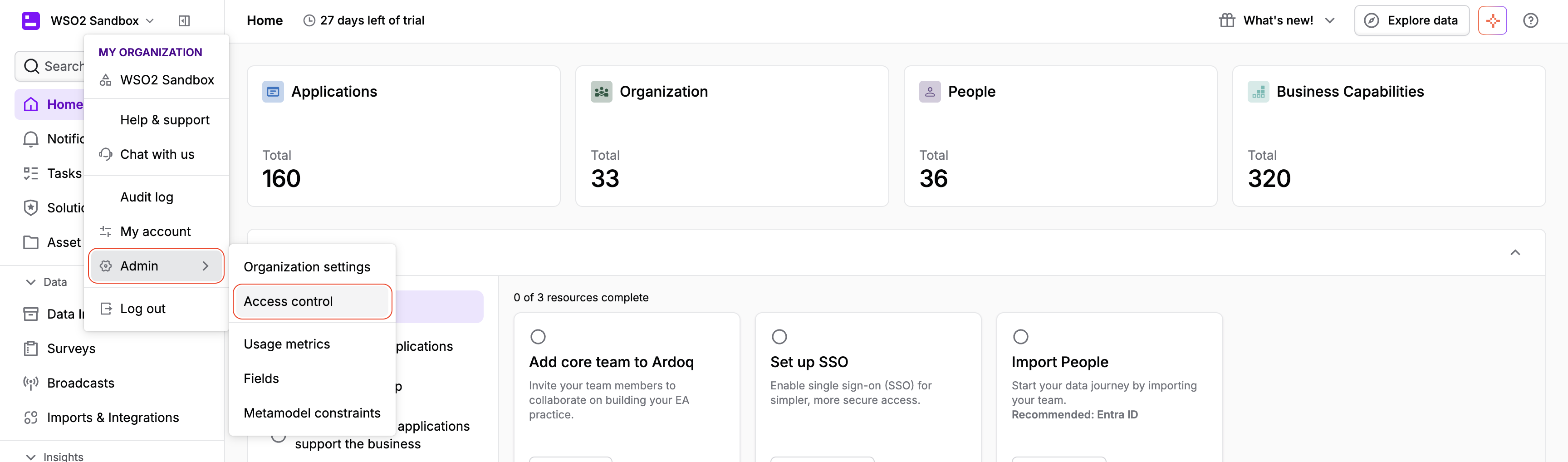
Click your organization name in the top-left corner and select Admin > Access control.
-
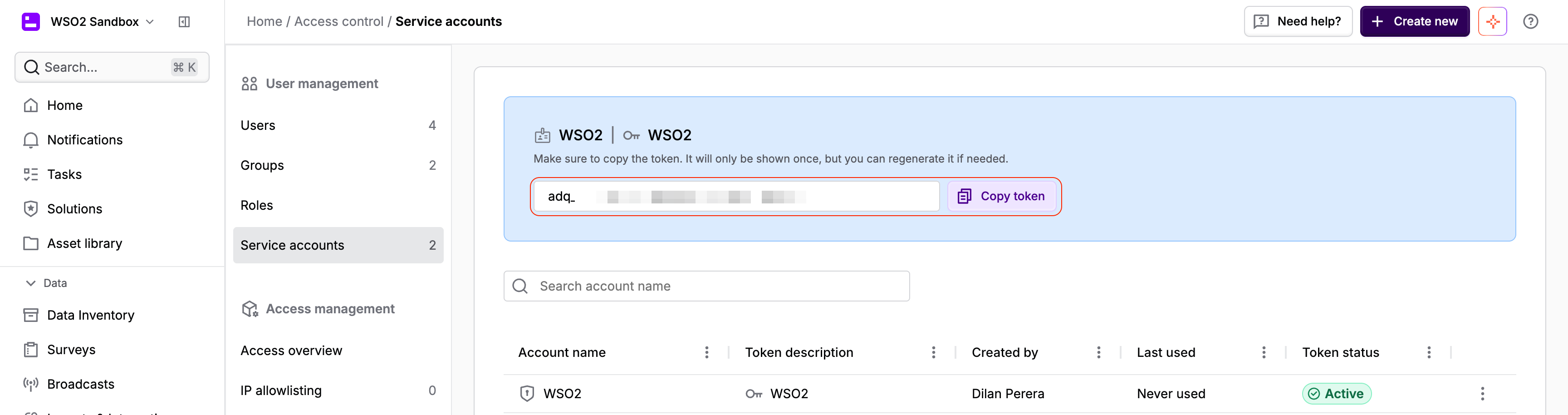
Select Service accounts and click + Create new.

-
Give the service account a name and a token description, then confirm. Copy the generated token — it is only shown once, though you can regenerate it later if needed.
-
If you're not using a custom domain, also note your organization label, shown under Admin > Organization settings — you'll need it in the next section.
Quickstart
To use the ardoq connector in your Ballerina application, update the .bal file as follows:
Step 1: Import the module
import ballerinax/ardoq;
Step 2: Instantiate a new connector
-
Create a
Config.tomlfile and configure the obtained token. If you use a dedicated Ardoq instance (e.g.https://your-org.ardoq.com) instead of the defaultapp.ardoq.com, also setserviceUrl:token = "<your-ardoq-api-token>" serviceUrl = "https://instance.ardoq.com/api/v2" -
Create an
ardoq:Clientinstance:configurable string token = ?; configurable string serviceUrl = ?; final ardoq:Client ardoqClient = check new ({auth: {token: token}}, serviceUrl = serviceUrl);Note: If you're not using a custom domain, also pass your organization label (shown under Admin > Organization settings) via the
orgLabelparameter:final ardoq:Client ardoqClient = check new ({auth: {token: token}}, serviceUrl = serviceUrl, orgLabel = "");
Step 3: Invoke the connector operation
Now, utilize the available connector operations.
List all workspaces
public function main() returns error? { ardoq:PaginatedWorkspaceResponse workspaces = check ardoqClient->listWorkspaces(); foreach ardoq:Workspace workspace in workspaces.values { io:println(workspace.name); } }
Step 4: Run the Ballerina application
bal run
Examples
The Ardoq connector provides practical examples illustrating usage in various scenarios. Explore these examples, covering the following use cases:
- Application dependency mapping — Find a workspace by name, discover its model types, create two application components, and link them with a dependency reference.
- Report results export — Find a report by name, fetch its definition to show the configured columns, then run the report and print the results in tabular format.
Clients
ardoq: Client
Resources for writing custom integrations.
Requests to the shared app.ardoq.com host must carry an X-org header
identifying the organization, since that host (unlike a dedicated domain)
is not scoped to a single organization. This client wraps the generated
GeneratedClient to attach that header automatically when orgLabel is set.
Constructor
Gets invoked to initialize the connector.
init (ConnectionConfig config, string serviceUrl, string? orgLabel)- config ConnectionConfig - The configurations to be used when initializing the
connector
- serviceUrl string "https://app.ardoq.com/api/v2" - URL of the target service
- orgLabel string? () - The organization label. Required for the shared
app.ardoq.comhost. Ignored on dedicated domains
getMe
Get current user and organization info
listReferences
function listReferences(map<string|string[]> headers, *ListReferencesQueries queries) returns PaginatedReferenceResponse|errorList References
Parameters
- queries *ListReferencesQueries - Queries to be sent with the request
Return Type
- PaginatedReferenceResponse|error - A paginated list of references matching the given filters
createReference
function createReference(CreateReferenceRequest payload, map<string|string[]> headers) returns Reference|errorCreate a Reference
Parameters
- payload CreateReferenceRequest - The payload to be sent with the request
listAttachments
function listAttachments(map<string|string[]> headers, *ListAttachmentsQueries queries) returns PaginatedAttachmentResponse|errorList attachments
Parameters
- queries *ListAttachmentsQueries - Queries to be sent with the request
Return Type
- PaginatedAttachmentResponse|error - A paginated list of attachments matching the given filters
getComponent
Get a component
Parameters
- id string - An Ardoq identifier (OID)
deleteComponent
Delete a component
Parameters
- id string - An Ardoq identifier (OID)
Return Type
- error? - The component was deleted successfully
updateComponent
function updateComponent(string id, UpdateComponentRequest payload, map<string|string[]> headers, *UpdateComponentQueries queries) returns Component|errorUpdate a component
Parameters
- id string - An Ardoq identifier (OID)
- payload UpdateComponentRequest - The payload to be sent with the request
- queries *UpdateComponentQueries - Queries to be sent with the request
listWorkspaces
function listWorkspaces(map<string|string[]> headers, *ListWorkspacesQueries queries) returns PaginatedWorkspaceResponse|errorList Workspaces
Parameters
- queries *ListWorkspacesQueries - Queries to be sent with the request
Return Type
- PaginatedWorkspaceResponse|error - A paginated list of workspaces matching the given filters
executeBatch
function executeBatch(BatchRequest payload, map<string|string[]> headers) returns BatchResponse|errorExecute a batch request
Parameters
- payload BatchRequest - The payload to be sent with the request
Return Type
- BatchResponse|error - The results of the create, update, upsert, and delete operations executed in the batch request
getReference
Get a reference
Parameters
- id string - An Ardoq identifier (OID)
deleteReference
Delete a reference
Parameters
- id string - An Ardoq identifier (OID)
Return Type
- error? - The reference was deleted successfully
updateReference
function updateReference(string id, UpdateReferenceRequest payload, map<string|string[]> headers, *UpdateReferenceQueries queries) returns Reference|errorUpdate a Reference
Parameters
- id string - An Ardoq identifier (OID)
- payload UpdateReferenceRequest - The payload to be sent with the request
- queries *UpdateReferenceQueries - Queries to be sent with the request
getReport
Report definition
Parameters
- id string - An Ardoq identifier (OID)
Return Type
- ReportOverview|error - The requested report definition
getAttachment
Get an attachment
Parameters
- id string - An Ardoq identifier (OID)
Return Type
- Attachment|error - The requested attachment
expandBatch
function expandBatch(BatchRequest payload, map<string|string[]> headers) returns BatchRequest|errorExpand Batch
Parameters
- payload BatchRequest - The payload to be sent with the request
Return Type
- BatchRequest|error - The fully expanded batch request, with aliases resolved to their underlying identifiers
runReportObjects
function runReportObjects(string id, map<string|string[]> headers, *RunReportObjectsQueries queries) returns PaginatedReportObjectResponse|errorRun Report (Objects)
Parameters
- id string - An Ardoq identifier (OID)
- queries *RunReportObjectsQueries - Queries to be sent with the request
Return Type
- PaginatedReportObjectResponse|error - A paginated list of report result rows, keyed by column label or key
getWorkspace
Get a workspace
Parameters
- id string - An Ardoq identifier (OID)
listReports
function listReports(map<string|string[]> headers, *ListReportsQueries queries) returns PaginatedReportResponse|errorList Report definitions
Parameters
- queries *ListReportsQueries - Queries to be sent with the request
Return Type
- PaginatedReportResponse|error - A paginated list of report definitions matching the given filters
getWorkspaceContext
function getWorkspaceContext(string id, map<string|string[]> headers) returns WorkspaceContext|errorWorkspace Context
Parameters
- id string - An Ardoq identifier (OID)
Return Type
- WorkspaceContext|error - The component and reference types defined by the workspace's model
runReportTabular
function runReportTabular(string id, map<string|string[]> headers) returns PaginatedReportTabularResponse|errorRun Report (Tabular)
Parameters
- id string - An Ardoq identifier (OID)
Return Type
- PaginatedReportTabularResponse|error - A paginated list of report result rows in tabular (array) format
listComponents
function listComponents(map<string|string[]> headers, *ListComponentsQueries queries) returns PaginatedComponentResponse|errorList Components
Parameters
- queries *ListComponentsQueries - Queries to be sent with the request
Return Type
- PaginatedComponentResponse|error - A paginated list of components matching the given filters
createComponent
function createComponent(CreateComponentRequest payload, map<string|string[]> headers) returns Component|errorCreate a component
Parameters
- payload CreateComponentRequest - The payload to be sent with the request
Records
ardoq: Aliases
An alias is a user provided string that resolves to an existing component/reference in Ardoq. An alias may be used in place of an Ardoq Id.
Fields
- components? record { ComponentAlias... } -
- references? record { ReferenceAlias... } -
ardoq: Attachment
An Attachment Returned by Ardoq
Fields
- filename anydata - The name of the attachment
- folder string? - Attachments can be placed in folders. If you want to create an attachment inside a folder, you can specify the folder name in this parameter. For more information on folders, please refer to the
Attachment Folder APIdocumentation
- 'resource AttachmentResource - The type ("org" or "workspace") and id (organization
idor workspaceid)
- meta Metadata1 -
- id string - The unique Ardoq identifier (oid) of the attachment
- version decimal - Attachment versions are used to resolve contention between different users editing the same entity simultaneously. This value should not be modified
ardoq: AttachmentResource
The type ("org" or "workspace") and id (organization id or workspace id)
Fields
- resourceType "org"|"workspace" - For global attachments, the resource type is
org. For attachments scoped to workspaces, the resource type isworkspace
- resourceId string - Depending on the
resource-type, this is either theidof the organization or theidof the workspace
ardoq: BatchRequest
A Batch request
Fields
- components? ComponentOperations - Create, update, upsert, and delete operations on components in a batch request
- aliases? Aliases - An alias is a user provided string that resolves to an existing component/reference in Ardoq. An alias may be used in place of an Ardoq Id.
- references? ReferenceOperations - Create, update, upsert, and delete operations on references in a batch request
- options? BatchRequestOptions - Batch request options
ardoq: BatchRequestOptions
Batch request options
Fields
- respondWithEntities? boolean - By default the full JSON results of create and update operations are not included in the response
ardoq: BatchResponse
A Batch response
Fields
- components? ComponentResults - Results of the component operations executed in a batch request
- references? ReferenceResults - Results of the reference operations executed in a batch request
ardoq: Column
Information out a single column in a report
Fields
- label string - The column name as displayed in the Ardoq UI
- 'key string - The api name of the custom field or built-in property (or custom gremlin result)
ardoq: ColumnInfo
Information about a column
Fields
- label string - The column name as displayed in the Ardoq UI.
- 'key string - The immutable key for the column. This value will never change
ardoq: Component
A Component Returned by Ardoq
Fields
- image? string? - Image is a style attribute used by the front-end to display the component image in views like the block diagram. By default this will use the image defined by the component-type, but can be overriden by setting it explicitly per-component
- parent? string? - The Ardoq identifier (oid) of the parent component
- shape? string? - Shape is a style attribute used by the front-end to display the component shape in views like the block diagram. By default this will use the shape defined by the component-type, but can be overriden by setting it explicitly per-component. A list of valid values for this attribute should be found by inspecting the style drop-down in the front-end
- color? string? - Color is a style attribute used by the front-end to display the component color in views like the block diagram. By default this will use the color defined by the component-type, but can be overriden by setting it explicitly per-component
- customFields record {} - A custom field is a key/value pair that is not intrinsic to the ardoq model
- icon? string? - Icon is a style attribute used by the front-end to display the component icon in views like the block diagram. By default this will use the icon defined by the component-type, but can be overriden by setting it explicitly per-component. A list of valid values for this attribute should be found by inspecting the style drop-down in the front-end
- rootWorkspace string - The Ardoq identifier (oid) of the workspace that the component belongs to
- meta Metadata1 -
- description? anydata? -
- 'type? string - The name of the component type
- name anydata - The name of the component
- typeId anydata - Component types are drawn from the type-hierarchy defined by the workspace's metamodel
- id string - The unique Ardoq identifier (oid) of the component
- version int - The current version of the component. Versions are used to resolve contention between different users editing the same entity simultaneously
- componentKey? string - The component key can be used to uniquely refer to a component in a more human-readable way, and is searchable in the application
ardoq: ComponentAlias
An alias that resolves to an existing component in Ardoq
Fields
- customFields? record { string... } - A custom field can uniquely identify an entity in a workspace
- name? anydata - The name of the component
- rootWorkspace? string - The Ardoq identifier (oid) of the workspace that the component belongs to
- componentKey? string - The component key can be used to uniquely refer to a component in a more human-readable way, and is searchable in the application
ardoq: ComponentCreateOperation
A component create operation within a batch request
Fields
- batchId? string - A unique user provided identifier
- body ComponentDocument - Similar to the body of a
POSTrequest to/api/v2/components. The only difference is that the value of aparentfield may be the batch identifier of a component being created in the same request, or an alias identifier
ardoq: ComponentDocument
Similar to the body of a POST request to /api/v2/components. The only difference is that the value of a parent field may be the batch identifier of a component being created in the same request, or an alias identifier
Fields
- image? string? - Image is a style attribute used by the front-end to display the component image in views like the block diagram. By default this will use the image defined by the component-type, but can be overriden by setting it explicitly per-component
- parent? string? - Identify the parent component. A component that exists may be identified by either its Ardoq Id (oid) or by an alias. If the parent component is created or upserted in the same batch request, then you must use the
batchIdvalue associated with the parent component
- shape? string? - Shape is a style attribute used by the front-end to display the component shape in views like the block diagram. By default this will use the shape defined by the component-type, but can be overriden by setting it explicitly per-component. A list of valid values for this attribute should be found by inspecting the style drop-down in the front-end
- color? string? - Color is a style attribute used by the front-end to display the component color in views like the block diagram. By default this will use the color defined by the component-type, but can be overriden by setting it explicitly per-component
- customFields? record {} - A custom field is a key/value pair that is not intrinsic to the ardoq model
- name anydata - The name of the component
- icon? string? - Icon is a style attribute used by the front-end to display the component icon in views like the block diagram. By default this will use the icon defined by the component-type, but can be overriden by setting it explicitly per-component. A list of valid values for this attribute should be found by inspecting the style drop-down in the front-end
- rootWorkspace string - The Ardoq identifier (oid) of the workspace that the component belongs to
- description? anydata? -
- typeId anydata - Component types are drawn from the type-hierarchy defined by the workspace's metamodel
ardoq: ComponentMatch
Criteria for matching an existing component in a batch upsert or delete operation
Fields
- customFields? record { string... } - A custom field can uniquely identify an entity in a workspace
- name? anydata - The name of the component
- rootWorkspace? string - The Ardoq identifier (oid) of the workspace that the component belongs to
- typeId? anydata - Component types are drawn from the type-hierarchy defined by the workspace's metamodel
- componentKey? string - The component key can be used to uniquely refer to a component in a more human-readable way, and is searchable in the application
ardoq: ComponentOperations
Create, update, upsert, and delete operations on components in a batch request
Fields
- upsert? ComponentOperationsUpsert[] -
- create? ComponentCreateOperation[] -
- update? ComponentOperationsUpdate[] -
- delete? ComponentOperationsDelete[] -
ardoq: ComponentOperationsDelete
A component delete operation within a batch request
Fields
- 'match? ComponentMatch - Criteria for matching an existing component in a batch upsert or delete operation
- id? string - The value of the components unique identifier. This value may be an Ardoq identifier (oid) or an alias identifier
ardoq: ComponentOperationsUpdate
A component update operation within a batch request
Fields
- id string - The value of the components unique identifier. This value may be an Ardoq identifier (oid) or an alias identifier
- body PartialComponentDocument - Similar to the body of a
PATCHrequest to/api/v2/components/{id}. The only difference is that the value of aparentfield may be the batch identifier of a component being created in the same request, or an alias identifier
- ifVersionMatch int|"latest" - The expected version of the entity. If you wish to use the latest version of the stored entity, then you can use the string
'latest'
ardoq: ComponentOperationsUpsert
A component upsert operation within a batch request
Fields
- uniqueBy string[] - A list of fields that uniquely identify the entity.
- body ComponentDocument - Similar to the body of a
POSTrequest to/api/v2/components. The only difference is that the value of aparentfield may be the batch identifier of a component being created in the same request, or an alias identifier
- batchId? string - A unique user provided identifier
ardoq: ComponentResults
Results of the component operations executed in a batch request
Fields
- deleted? DeletedResult[] -
- created? CreatedComponentResult[] -
- updated? UpdatedComponentResult[] -
ardoq: ComponentType
Information about the component type
Fields
- image string? - The default display image for the type
- parent? Parent - The parent of the type based on the models hierarchy
- color string? - The display color of the type
- shape string? - The default display shape for the type
- customFields string[] - A list of custom fields supported by the component type
- name string - The human readable name of the type
- icon string? - The default display icon for the type
- typeId anydata - The internal type identifier
ardoq: ConnectionConfig
Provides a set of configurations for controlling the behaviours when communicating with a remote HTTP endpoint.
Fields
- auth BearerTokenConfig - Configurations related to client authentication
- httpVersion HttpVersion(default http:HTTP_2_0) - The HTTP version understood by the client
- http1Settings ClientHttp1Settings(default {}) - Configurations related to HTTP/1.x protocol
- http2Settings ClientHttp2Settings(default {}) - Configurations related to HTTP/2 protocol
- timeout decimal(default 30) - The maximum time to wait (in seconds) for a response before closing the connection
- forwarded string(default "disable") - The choice of setting
forwarded/x-forwardedheader
- followRedirects? FollowRedirects - Configurations associated with Redirection
- poolConfig? PoolConfiguration - Configurations associated with request pooling
- cache CacheConfig(default {}) - HTTP caching related configurations
- compression Compression(default http:COMPRESSION_AUTO) - Specifies the way of handling compression (
accept-encoding) header
- circuitBreaker? CircuitBreakerConfig - Configurations associated with the behaviour of the Circuit Breaker
- retryConfig? RetryConfig - Configurations associated with retrying
- responseLimits ResponseLimitConfigs(default {}) - Configurations associated with inbound response size limits
- secureSocket? ClientSecureSocket - SSL/TLS-related options
- proxy? ProxyConfig - Proxy server related options
- socketConfig ClientSocketConfig(default {}) - Provides settings related to client socket configuration
- validation boolean(default true) - Enables the inbound payload validation functionality which provided by the constraint package. Enabled by default
- laxDataBinding boolean(default true) - Enables relaxed data binding on the client side. When enabled,
nilvalues are treated as optional, and absent fields are handled asnilabletypes. Enabled by default.
ardoq: CreateComponentRequest
Request body for creating a component
Fields
- image? string? - Image is a style attribute used by the front-end to display the component image in views like the block diagram. By default this will use the image defined by the component-type, but can be overriden by setting it explicitly per-component
- parent? string? - The Ardoq identifier (oid) of the parent component
- shape? string? - Shape is a style attribute used by the front-end to display the component shape in views like the block diagram. By default this will use the shape defined by the component-type, but can be overriden by setting it explicitly per-component. A list of valid values for this attribute should be found by inspecting the style drop-down in the front-end
- color? string? - Color is a style attribute used by the front-end to display the component color in views like the block diagram. By default this will use the color defined by the component-type, but can be overriden by setting it explicitly per-component
- customFields? record {} - A custom field is a key/value pair that is not intrinsic to the ardoq model
- name anydata - The name of the component
- icon? string? - Icon is a style attribute used by the front-end to display the component icon in views like the block diagram. By default this will use the icon defined by the component-type, but can be overriden by setting it explicitly per-component. A list of valid values for this attribute should be found by inspecting the style drop-down in the front-end
- rootWorkspace string - The Ardoq identifier (oid) of the workspace that the component belongs to
- description? anydata? -
- typeId anydata - Component types are drawn from the type-hierarchy defined by the workspace's metamodel
ardoq: CreatedComponentResult
Result of a component create operation in a batch request
Fields
- id string - The Ardoq identifier (oid) of the entity
- body? Component - A Component Returned by Ardoq
- batchId? string - A unique user provided identifier
ardoq: CreatedReferenceResult
Result of a reference create operation in a batch request
Fields
- id string - The Ardoq identifier (oid) of the entity
- body? Reference - A Reference Returned by Ardoq
- batchId? string - A unique user provided identifier
ardoq: CreateReferenceRequest
Request body for creating a reference between two components
Fields
- displayText? string - Display label for your reference in views such as the block diagram
- customFields? record {} - A custom field is a key/value pair that is not intrinsic to the ardoq model
- description? anydata? -
- 'source string - ID of the reference's source component
- 'type int - Required type ID for the reference. This ID must be a valid type defined by the model that is used by the
rootWorkspace
- target string - ID of the reference's target component
ardoq: DeletedResult
Result of a delete operation in a batch request
Fields
- id string - The Ardoq identifier (oid) of the entity
ardoq: Field
Field information
Fields
- apiKey string - The key used to identify the field when using the API
- defaultValue anydata - The default value for the field
- options? string[] - The set of allowed values. This field is only present on list like types
- description string? - An optional description of the field
- readOnly boolean - True if the field can not be updated directly by the user
- label string - The human readable label for the field. This is the value that you will see when working the Ardoq UI
- 'type string - The type of the field
- calculated boolean - Calculated fields are read only and should not be included in create and update requests
ardoq: Links
Links related to the paginated results
Fields
- next? Next - A link to the next page in a paginated result
ardoq: ListAttachmentsQueries
Represents the Queries record for the operation: listAttachments
Fields
- filename? string - The filename of the attachment
- folder? string - The
idof the folder that the attachment is in
ardoq: ListComponentsQueries
Represents the Queries record for the operation: listComponents
Fields
- parent? string - The parent identifier of the component
- name? string - The name of the entity
- rootWorkspace? string - The ardoq identifier of the workspace that the component belongs to
- typeId? string - The type identifier of the component
- componentKey? string - Referred to as the 'Ardoq ID' in the App
ardoq: ListReferencesQueries
Represents the Queries record for the operation: listReferences
Fields
- displayText? string - Display label for your reference
- targetWorkspace? string - The ardoq identifier of the workspace that the target belongs to
- rootWorkspace? string - The ardoq identifier of the workspace that the reference/source belongs to
- 'source? string - The ardoq identifier of the source
- 'type? string - The type identifier of the reference
- target? string - The ardoq identifier of the target
ardoq: ListReportsQueries
Represents the Queries record for the operation: listReports
Fields
- name? string - The name of the report
ardoq: ListWorkspacesQueries
Represents the Queries record for the operation: listWorkspaces
Fields
- componentModel? string - The ardoq identifier of the model that the workspace has
- name? string - The name of the entity
ardoq: Metadata
Metadata related to the paginated response
Fields
- columns ColumnInfo[] - Information about a column
- name string? - Name of report and stored query
ardoq: Metadata1
Metadata about the entity
Fields
- createdByEmail string - The current email address of the user that created the entity
- lastUpdated string - A Coordinated Universal Time (UTC) timestamp generated when the entity was last updated
- createdByName string - The current name of the user that created the entity
- createdBy string - The internal Ardoq identifier of the user that created the entity
- created string - A Coordinated Universal Time (UTC) timestamp generated when the entity was created
- lastModifiedBy string - The internal Ardoq identifier of the user that last modified the entity
- lastModifiedByEmail string - The current email address of the user that last modified the entity
- lastModifiedByName string - The current name of the user that last modified the entity
ardoq: Next
A link to the next page in a paginated result
Fields
- href string - A URI that can be used to retrieve the next set of paginated results
ardoq: Org
The organization of the user making the request
Fields
- name string - The name of the organization (org) associated with the request
- label string - The label of the organization (org) associated with the request
ardoq: PaginatedAttachmentResponse
The Paginated Response
Fields
- links Links -
- values Attachment[] -
- meta? record {} - Metadata related to the paginated response
ardoq: PaginatedComponentResponse
The Paginated Response
Fields
- links Links -
- values Component[] -
- meta? record {} - Metadata related to the paginated response
ardoq: PaginatedReferenceResponse
The Paginated Response
Fields
- links Links -
- values Reference[] -
- meta? record {} - Metadata related to the paginated response
ardoq: PaginatedReportObjectResponse
The Paginated Response
Fields
- links Links -
- values record {}[] -
- meta? Metadata -
ardoq: PaginatedReportResponse
The Paginated Response
Fields
- links Links -
- values ReportOverview[] -
- meta? record {} - Metadata related to the paginated response
ardoq: PaginatedReportTabularResponse
The Paginated Response
Fields
- links Links -
- values anydata[][] -
- meta? Metadata -
ardoq: PaginatedWorkspaceResponse
The Paginated Response
Fields
- links Links -
- values Workspace[] -
- meta? record {} - Metadata related to the paginated response
ardoq: Parent
The parent of the type based on the models hierarchy
Fields
- name string - The human readable name of the type
- typeId anydata - The internal type identifier
ardoq: PartialComponentDocument
Similar to the body of a PATCH request to /api/v2/components/{id}. The only difference is that the value of a parent field may be the batch identifier of a component being created in the same request, or an alias identifier
Fields
- image? string? - Image is a style attribute used by the front-end to display the component image in views like the block diagram. By default this will use the image defined by the component-type, but can be overriden by setting it explicitly per-component
- parent? string? - Identify the parent component. A component that exists may be identified by either its Ardoq Id (oid) or by an alias. If the parent component is created or upserted in the same batch request, then you must use the
batchIdvalue associated with the parent component
- color? string? - Color is a style attribute used by the front-end to display the component color in views like the block diagram. By default this will use the color defined by the component-type, but can be overriden by setting it explicitly per-component
- shape? string? - Shape is a style attribute used by the front-end to display the component shape in views like the block diagram. By default this will use the shape defined by the component-type, but can be overriden by setting it explicitly per-component. A list of valid values for this attribute should be found by inspecting the style drop-down in the front-end
- customFields? record {} - A custom field is a key/value pair that is not intrinsic to the ardoq model
- name? anydata - The name of the component
- icon? string? - Icon is a style attribute used by the front-end to display the component icon in views like the block diagram. By default this will use the icon defined by the component-type, but can be overriden by setting it explicitly per-component. A list of valid values for this attribute should be found by inspecting the style drop-down in the front-end
- description? anydata? -
ardoq: PartialReferenceDocument
Similar to the body of a PATCH request to /api/v2/references. The only difference is that the values both source and target fields may be the batch identifiers of components being created in the same request, or 'Unique By' objects
Fields
- displayText? string - Display label for your reference in views such as the block diagram
- customFields? record {} - A custom field is a key/value pair that is not intrinsic to the ardoq model
- description? anydata? -
- 'source? string - Identify the source component. A component that exists may be identified by an Ardoq Id (oid) or an alias identifier. If the source component is created or upserted in the same batch request, then you must use the
batchIdvalue associated with that component
- target? string - Identify the target component. A component that exists may be identified by an Ardoq Id (oid) or an alias identifier. If the target component is created or upserted in the same batch request, then you must use the
batchIdvalue associated with that component
ardoq: Reference
A Reference Returned by Ardoq
Fields
- displayText? anydata? - Optional display label for your reference in views such as the block diagram
- customFields record {} - A custom field is a key/value pair that is not intrinsic to the ardoq model
- targetWorkspace? string - This is a read-only field maintained by the backend to simplify workspace lookups. It is derived from the
targetattribute. A reference'stargetWorkspacecannot be changed by modifying this attribute
- rootWorkspace? string - This is a read-only field maintained by the backend to simplify workspace lookups. It is derived from the
sourceattribute. A reference'srootWorkspacecannot be changed by modifying this attribute
- meta Metadata1 -
- description? anydata? -
- 'source string - ID of the reference's source component
- id string - The unique Ardoq identifier (oid) of the reference
- 'type int - Required type ID for the reference. This ID must be a valid type defined by the model that is used by the
rootWorkspace
- version int - Reference versions are used to resolve contention between different users editing the same entity simultaneously. This value should not be modified
- target string - ID of the reference's target component
ardoq: ReferenceAlias
An alias that resolves to an existing reference in Ardoq
Fields
- customFields? record { string... } - A custom field can uniquely identify an entity in a workspace
- rootWorkspace? string - This is a read-only field maintained by the backend to simplify workspace lookups. It is derived from the
sourceattribute. A reference'srootWorkspacecannot be changed by modifying this attribute
- 'source? string - Identify the source component. A component that exists may be identified by an Ardoq Id (oid) or an alias identifier. If the source component is created or upserted in the same batch request, then you must use the
batchIdvalue associated with that component
- 'type? int - Required type ID for the reference. This ID must be a valid type defined by the model that is used by the
rootWorkspace
- target? string - Identify the target component. A component that exists may be identified by an Ardoq Id (oid) or an alias identifier. If the target component is created or upserted in the same batch request, then you must use the
batchIdvalue associated with that component
ardoq: ReferenceCreateOperation
A reference create operation within a batch request
Fields
- body ReferenceDocument - Similar to the body of a
POSTrequest to/api/v2/references. The only difference is that the values bothsourceandtargetfields may be the batch identifiers of components being created in the same request, or 'Unique By' objects
- batchId? string - A unique user provided identifier
ardoq: ReferenceDocument
Similar to the body of a POST request to /api/v2/references. The only difference is that the values both source and target fields may be the batch identifiers of components being created in the same request, or 'Unique By' objects
Fields
- displayText? string - Display label for your reference in views such as the block diagram
- customFields? record {} - A custom field is a key/value pair that is not intrinsic to the ardoq model
- description? anydata? -
- 'source string - Identify the source component. A component that exists may be identified by an Ardoq Id (oid) or an alias identifier. If the source component is created or upserted in the same batch request, then you must use the
batchIdvalue associated with that component
- 'type int - Required type ID for the reference. This ID must be a valid type defined by the model that is used by the
rootWorkspace
- target string - Identify the target component. A component that exists may be identified by an Ardoq Id (oid) or an alias identifier. If the target component is created or upserted in the same batch request, then you must use the
batchIdvalue associated with that component
ardoq: ReferenceMatch
Criteria for matching an existing reference in a batch upsert or delete operation
Fields
- customFields? record { string... } - A custom field can uniquely identify an entity in a workspace
- targetWorkspace? string - This is a read-only field maintained by the backend to simplify workspace lookups. It is derived from the
targetattribute. A reference'stargetWorkspacecannot be changed by modifying this attribute
- rootWorkspace? string - This is a read-only field maintained by the backend to simplify workspace lookups. It is derived from the
sourceattribute. A reference'srootWorkspacecannot be changed by modifying this attribute
- 'source? string - Identify the source component. A component that exists may be identified by an Ardoq Id (oid) or an alias identifier. If the source component is created or upserted in the same batch request, then you must use the
batchIdvalue associated with that component
- 'type? int - Required type ID for the reference. This ID must be a valid type defined by the model that is used by the
rootWorkspace
- target? string - Identify the target component. A component that exists may be identified by an Ardoq Id (oid) or an alias identifier. If the target component is created or upserted in the same batch request, then you must use the
batchIdvalue associated with that component
ardoq: ReferenceOperations
Create, update, upsert, and delete operations on references in a batch request
Fields
- upsert? ReferenceOperationsUpsert[] -
- create? ReferenceCreateOperation[] -
- update? ReferenceOperationsUpdate[] -
- delete? ReferenceOperationsDelete[] -
ardoq: ReferenceOperationsDelete
A reference delete operation within a batch request
Fields
- 'match? ReferenceMatch - Criteria for matching an existing reference in a batch upsert or delete operation
- id? string - The value of the components unique identifier. This value may be an Ardoq identifier (oid) or an alias identifier
ardoq: ReferenceOperationsUpdate
A reference update operation within a batch request
Fields
- id string - The value of the components unique identifier. This value may be an Ardoq identifier (oid) or an alias identifier
- body PartialReferenceDocument - Similar to the body of a
PATCHrequest to/api/v2/references. The only difference is that the values bothsourceandtargetfields may be the batch identifiers of components being created in the same request, or 'Unique By' objects
- ifVersionMatch int|"latest" - The expected version of the entity. If you wish to use the latest version of the stored entity, then you can use the string
'latest'
ardoq: ReferenceOperationsUpsert
A reference upsert operation within a batch request
Fields
- uniqueBy string[] - A list of fields that uniquely identify the entity.
- body ReferenceDocument - Similar to the body of a
POSTrequest to/api/v2/references. The only difference is that the values bothsourceandtargetfields may be the batch identifiers of components being created in the same request, or 'Unique By' objects
- batchId? string - A unique user provided identifier
ardoq: ReferenceResults
Results of the reference operations executed in a batch request
Fields
- deleted? DeletedResult[] -
- created? CreatedReferenceResult[] -
- updated? UpdatedReferenceResult[] -
ardoq: ReferenceType
Information about the reference type
Fields
- customFields string[] - A list of custom fields supported by the reference type
- name string - The human readable name of the type
- 'type int - The internal type identifier
ardoq: ReportOverview
A Report Overview Returned by Ardoq
Fields
- datasource "graphSearch"|"advancedSearch"|"advancedSearchPostgres" - The type of data source backing the report
- columns Column[] - Information about the columns in a report
- name string? - Name of report and stored query
- description? string? - An optional description of the report
- meta Metadata1 -
- id string - The unique Ardoq identifier (oid) of the report
- version int - The current version of the report. Versions are used to resolve contention between different users editing the same entity simultaneously
ardoq: RunReportObjectsQueries
Represents the Queries record for the operation: runReportObjects
Fields
- keyFormat? "label"|"key" - This parameter is used to manage the format of the objects keys. The api will default to 'label'
ardoq: Tag
Tag information
Fields
- name string - The name of the tag
ardoq: UpdateComponentQueries
Represents the Queries record for the operation: updateComponent
Fields
- ifVersionMatch string - This parameter is used to manage concurrency control. The value MUST be either a positive integer, or the enum
latest. | Value | Meaning | |--------|---------| |<nobr><integer></nobr>| The update MUST fail if the_versionfield of the stored entity is not identical to the provided value. |\n|latest| The update should use the current (latest) version of the stored entity. | For more information about versioning and concurrency control please see the API guide on Versioning
ardoq: UpdateComponentRequest
Request body for updating an existing component
Fields
- image? string? - Image is a style attribute used by the front-end to display the component image in views like the block diagram. By default this will use the image defined by the component-type, but can be overriden by setting it explicitly per-component
- parent? string? - The Ardoq identifier (oid) of the parent component
- color? string? - Color is a style attribute used by the front-end to display the component color in views like the block diagram. By default this will use the color defined by the component-type, but can be overriden by setting it explicitly per-component
- shape? string? - Shape is a style attribute used by the front-end to display the component shape in views like the block diagram. By default this will use the shape defined by the component-type, but can be overriden by setting it explicitly per-component. A list of valid values for this attribute should be found by inspecting the style drop-down in the front-end
- customFields? record {} - A custom field is a key/value pair that is not intrinsic to the ardoq model
- name? anydata - The name of the component
- icon? string? - Icon is a style attribute used by the front-end to display the component icon in views like the block diagram. By default this will use the icon defined by the component-type, but can be overriden by setting it explicitly per-component. A list of valid values for this attribute should be found by inspecting the style drop-down in the front-end
- description? anydata? -
ardoq: UpdatedComponentResult
Result of a component update operation in a batch request
Fields
- id string - The Ardoq identifier (oid) of the entity
- body? Component - A Component Returned by Ardoq
ardoq: UpdatedReferenceResult
Result of a reference update operation in a batch request
Fields
- id string - The Ardoq identifier (oid) of the entity
- body? Reference - A Reference Returned by Ardoq
ardoq: UpdateReferenceQueries
Represents the Queries record for the operation: updateReference
Fields
- ifVersionMatch string - This parameter is used to manage concurrency control. The value MUST be either a positive integer, or the enum
latest. | Value | Meaning | |--------|---------| |<nobr><integer></nobr>| The update MUST fail if the_versionfield of the stored entity is not identical to the provided value. |\n|latest| The update should use the current (latest) version of the stored entity. | For more information about versioning and concurrency control please see the API guide on Versioning
ardoq: UpdateReferenceRequest
Request body for updating an existing reference
Fields
- displayText? string - Display label for your reference in views such as the block diagram
- customFields? record {} - A custom field is a key/value pair that is not intrinsic to the ardoq model
- description? anydata? -
- 'source? string - ID of the reference's source component
- target? string - ID of the reference's target component
ardoq: User
The user making the request
Fields
- email string - The email of the user associated with the request
ardoq: UserInfo
A small amount of data that identifies the user making the request
Fields
- org? Org - The organization of the user making the request
- user? User - The user making the request
ardoq: Workspace
A Workspace Returned by Ardoq
Fields
- startView? string? - The default view that will be shown when opening the workspace
- name anydata - The name of your workspace. Required
- meta Metadata1 -
- description? anydata? -
- id string - Unique component
id. Required and read-only
- version int - Versions are used to resolve contention between different users editing the same entity simultaneously
- views? string[]? - The views that are configured as default tabs at the top of the workspace
- workspaceKey? string - A unique human-readible workspace identifier
ardoq: WorkspaceContext
An overview of the types and fields for the model
Fields
- customFields Field[] - Information about the custom fields supported by components and references in this workspace
- componentTypes ComponentType[] - Information about the component types
- rootWorkspace string - The Ardoq identifier (OID) of the workspace that the model overview describes
- referenceTypes ReferenceType[] - Information about the reference types
Import
import ballerinax/ardoq;Other versions
1.0.0