Module aayu.mftg.as2.trigger

ballerinax/aayu.mftg.as2.trigger Ballerina library
Overview
The Aayu MFT Gateway AS2 Trigger module allows you to listen to the AS2 webhook events of Aayu MFT Gateway:
MESSAGE.RECEIVED.SUCCESS: an AS2 message was received from a trading partnerMESSAGE.SEND.SUCCESS: an AS2 message was sent to a trading partnerMESSAGE.SEND.FAILED: sending an AS2 message failedMESSAGE.SEND.INCOMPLETE: an AS2 message was sent but its delivery was not confirmed
This module receives MFT Gateway's webhook deliveries directly - it does not call the MFT Gateway API on your behalf. It covers the AS2 events only; SFTP webhooks use different payloads.
Key features
- Receives the four MFT Gateway AS2 events: message received, sent, send failed and send incomplete
- Verifies every delivery with the webhook public key from MFT Gateway (RSA with SHA-256,
mftg-wh-signature) - Typed payload records matching MFT Gateway's documented AS2 payloads
- Acknowledges each delivery before running your handler, so a slow or failing handler doesn't cause retries
- Services can be attached on their own path, so several triggers and HTTP services can share one port
- Trigger services are listed by
bal build --export-endpoints(Ballerina 2201.13.6 or later)
Setup guide
Before using this trigger in your Ballerina application, you need an MFT Gateway account with at least one AS2 station and trading partner, and a Ballerina service that MFT Gateway can reach over the internet to deliver webhook events to. The two sections below cover both a quick local test setup and a production deployment.
Try it out locally
Use this flow to test your event handling logic on your own machine before deploying anywhere, using ngrok to expose your local listener to the internet.
-
Expose port
8090with ngrok:ngrok http 8090Copy the
ForwardingURL ngrok prints out - this is your temporary public webhook URL.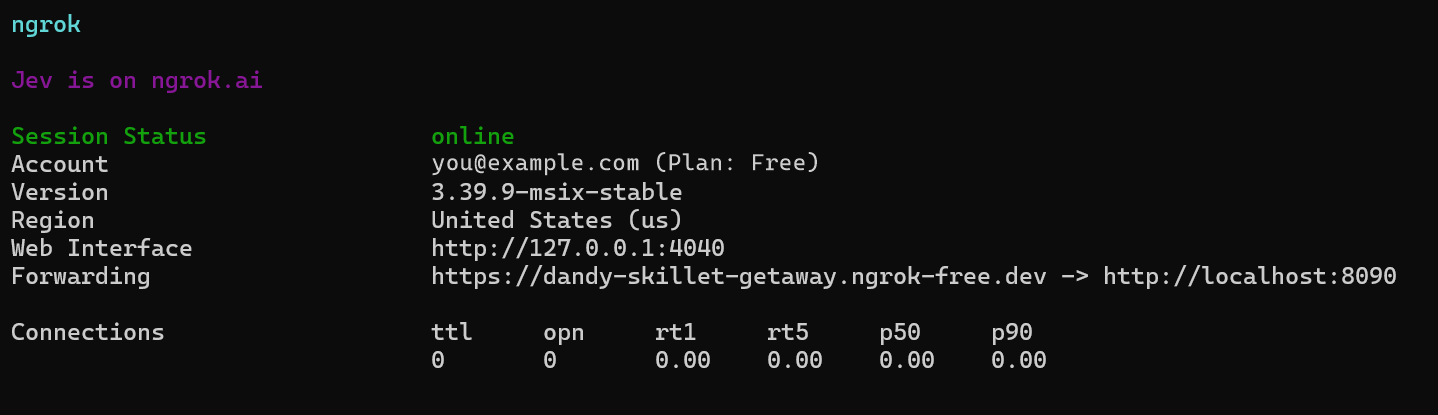
-
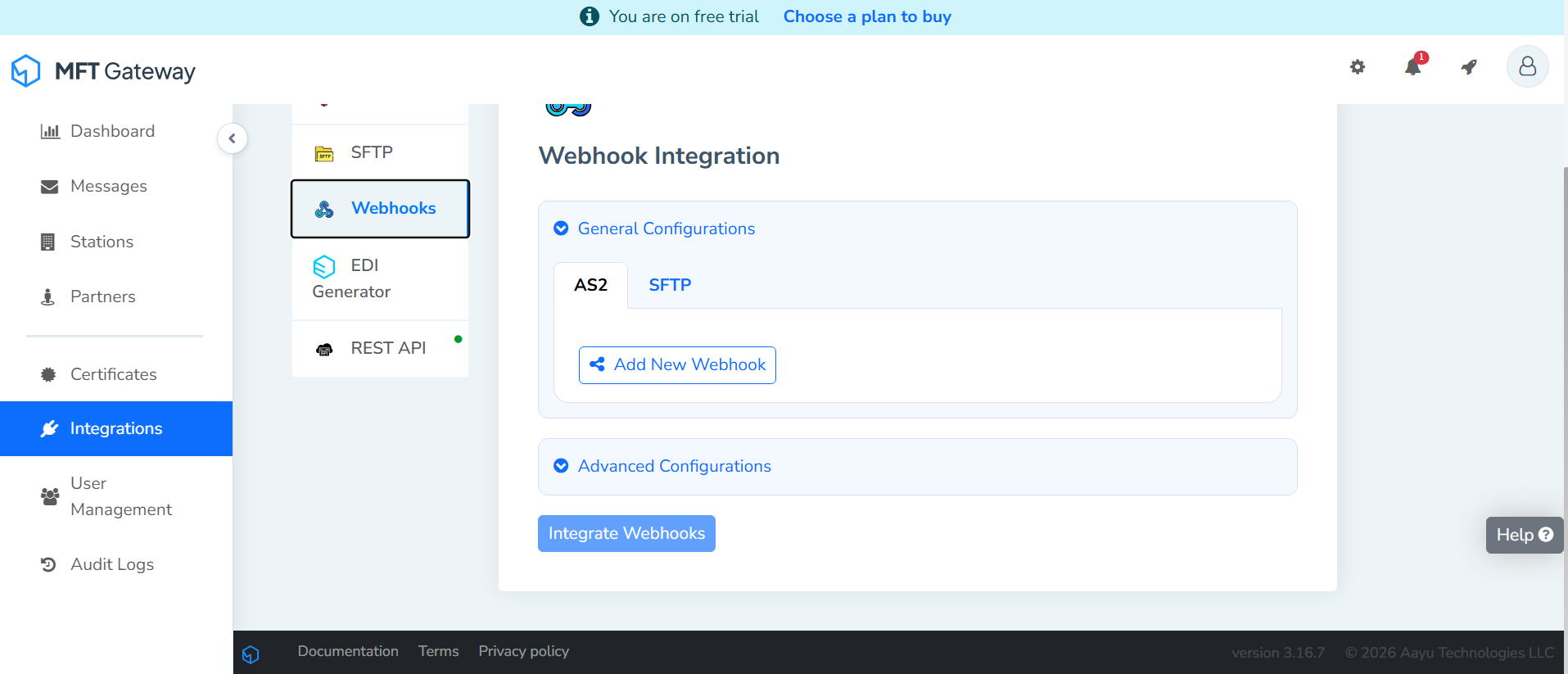
In MFT Gateway, open Integrations > Webhooks from the left navigation menu and select the AS2 tab under General Configurations.
-
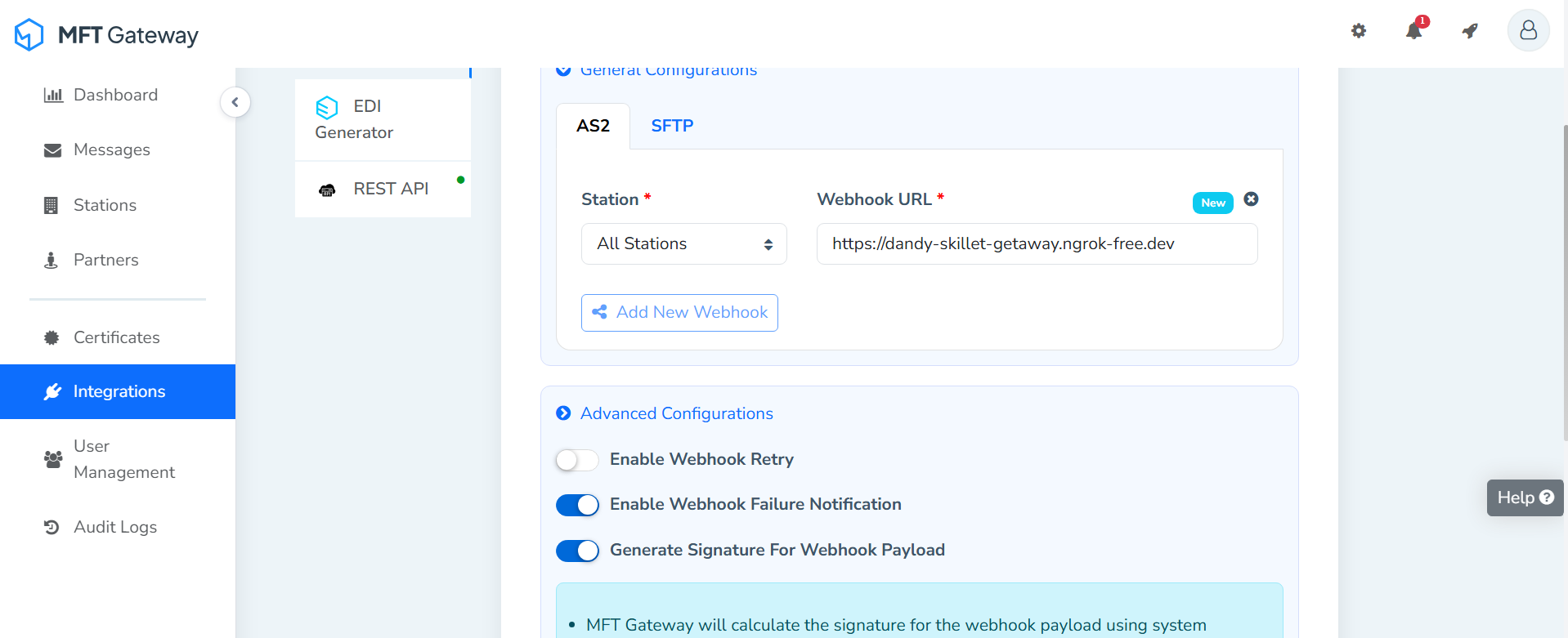
Click Add New Webhook and fill it in:
- Station: the station you want events for, or All Stations.
- Webhook URL: the ngrok forwarding URL from step 1.
- Under Advanced Configurations, turn on Generate Signature For Webhook Payload. The listener rejects unsigned requests, so this is required.
-
Click Integrate Webhooks to save. A Webhook Public Key button then appears under the signature note; click it to download
webhook-pubkey.pem. MFT Gateway signs each payload with a key pair dedicated to your account and sends the signature in themftg-wh-signatureheader; the listener checks it with this public key.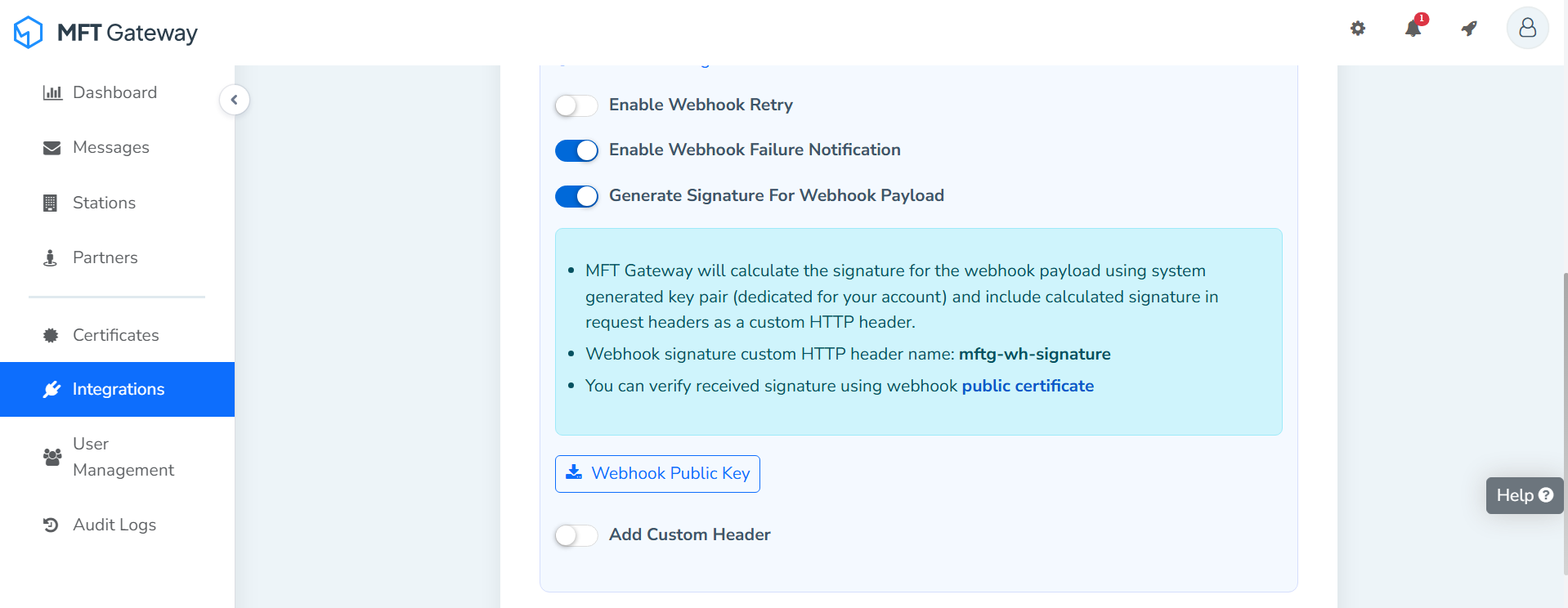
-
Put the whole public key, including the
-----BEGIN PUBLIC KEY-----and-----END PUBLIC KEY-----lines, in aConfig.tomlnext to your service (see Quickstart below), and run it withbal run:[<your_org>.<your_module_name>.userInput] webhookSecret = """-----BEGIN PUBLIC KEY----- MIICIjANBgkqhkiG9w0BAQEFAAOCAg8AMIICCgKCAgEA... -----END PUBLIC KEY-----""" -
Send an AS2 message from Messages > Compose to one of your partners, or have a partner send one to your station. Each delivery shows up in the ngrok console with
200 OK, and your handler runs. To try it without a real trading partner, add a partner whose AS2 identifier, URL and certificate are your own station's (shown under View Partner Configuration on the station), and send to it: you get both a sent and a received event.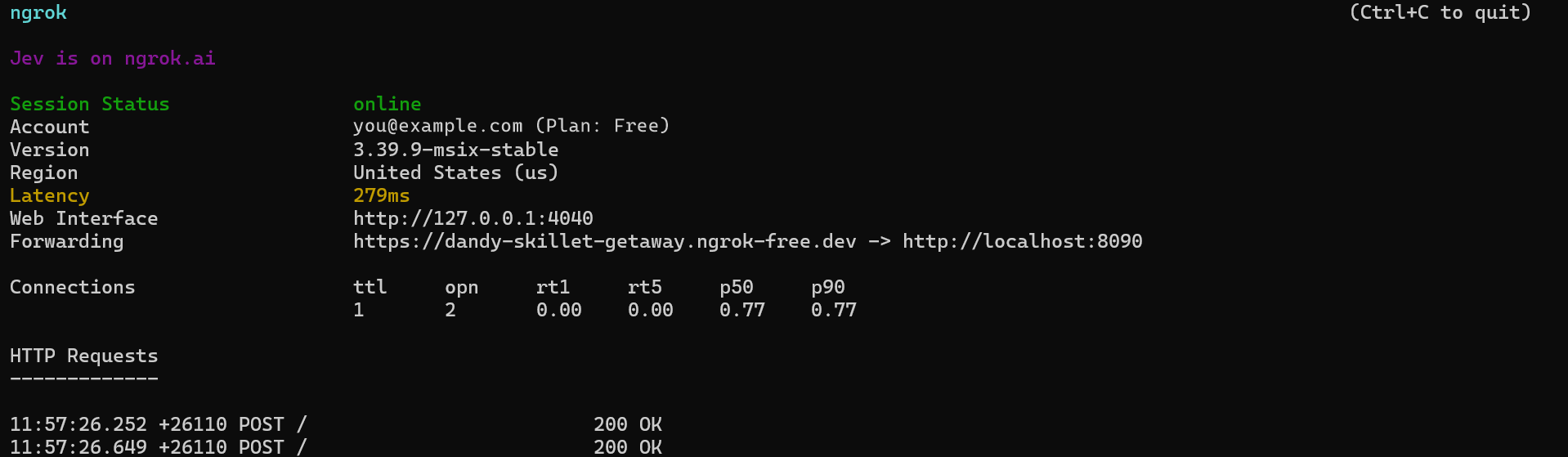
Production / business integration
For production use, deploy your Ballerina service somewhere with a stable, internet-reachable HTTPS URL. Ballerina doesn't require any specific hosting platform - containers, a VM, a managed PaaS, or anything else that gives you a stable HTTPS endpoint all work equally well.
Keep the public key in Config.toml (or your platform's equivalent configuration/secret
mechanism) as shown above, then set your production URL as the webhook URL in MFT Gateway.
If you turn on Enable Webhook Retry, MFT Gateway sends a failed delivery again and marks it with
the mftg-wh-retry header. The listener responds before it runs your handler, so slow handlers
don't cause retries, but a retry can still arrive after a network problem. Use messageId together
with eventType to skip events you have already handled.
Compatibility
| Version | |
|---|---|
| Ballerina Language | Ballerina Swan Lake 2201.13.0 |
Quickstart
To use the Aayu MFT Gateway AS2 Trigger in your Ballerina application, update the .bal file as
follows:
Step 1: Import the Aayu MFT Gateway AS2 Trigger Ballerina library
import ballerinax/aayu.mftg.as2.trigger as aayu;
Step 2: Initialize the Aayu MFT Gateway Listener
Initialize the trigger by providing the listener config and a port number/http:Listener object.
configurable aayu:ListenerConfig userInput = ?; listener aayu:Listener aayuListener = new (userInput, 8090);
webhookSecret in userInput is the public key downloaded from MFT Gateway, set in Config.toml
as shown in the Setup guide - this is what the trigger uses to verify incoming
events actually came from MFT Gateway.
If you don't provide a port it will use the default port, which is 8090.
listener aayu:Listener aayuListener = new (userInput);
Step 3: Use the correct service type to implement the service
Each event has its own service type with a single remote function:
| Event | Service type | Remote function |
|---|---|---|
MESSAGE.RECEIVED.SUCCESS | ReceivedMessageService | onMessageReceivedSuccess |
MESSAGE.SEND.SUCCESS | SentMessageService | onMessageSendSuccess |
MESSAGE.SEND.FAILED | FailedMessageService | onMessageSendFailed |
MESSAGE.SEND.INCOMPLETE | IncompleteMessageService | onMessageSendIncomplete |
Step 4: Provide remote functions corresponding to the events you're interested in
Attach one service per event you want, all on the same listener - for example,
aayu:ReceivedMessageService for received messages.
import ballerina/log; service aayu:ReceivedMessageService on aayuListener { remote function onMessageReceivedSuccess(aayu:MessageReceivedEvent payload) returns error? { log:printInfo("AS2 message received", partner = payload.partnerName, subject = payload.messageSubject, attachments = payload.attachments); } }
Step 5: Run the service
Use the bal run command to compile and run the Ballerina program.
Step 6: Register a webhook so MFT Gateway can reach your service
See Setup guide above for the full walkthrough (with screenshots) of exposing your service and registering the webhook, for both local testing and production use.
Examples
The aayu.mftg.as2.trigger module provides practical examples illustrating usage in various
scenarios. Explore these examples,
covering common AS2 event handling use cases.
Report issues
To report bugs, request new features, start new discussions, etc., go to the Ballerina Library repository.
Useful links
- For more information go to the
aayu.mftg.as2.triggerpackage. - If you're moving from the older
trigger.aayu.mftg.as2package, see the migration notes. - For example demonstrations of the usage, go to Ballerina By Examples.
- Chat live with us via our Discord server.
- Post all technical questions on Stack Overflow with the #ballerina tag.
Service types
aayu.mftg.as2.trigger: ReceivedMessageService
Attachable service type exposing the ReceivedMessageService family of webhook events.
onMessageReceivedSuccess
function onMessageReceivedSuccess(MessageReceivedEvent payload) returns error?Triggered on Message received success.
Parameters
- payload MessageReceivedEvent - the MessageReceivedEvent webhook payload
Return Type
- error? - an error if handling the event fails
aayu.mftg.as2.trigger: SentMessageService
Attachable service type exposing the SentMessageService family of webhook events.
onMessageSendSuccess
function onMessageSendSuccess(MessageSentEvent payload) returns error?Triggered on Message send success.
Parameters
- payload MessageSentEvent - the MessageSentEvent webhook payload
Return Type
- error? - an error if handling the event fails
aayu.mftg.as2.trigger: FailedMessageService
Attachable service type exposing the FailedMessageService family of webhook events.
onMessageSendFailed
function onMessageSendFailed(MessageFailedEvent payload) returns error?Triggered on Message send failed.
Parameters
- payload MessageFailedEvent - the MessageFailedEvent webhook payload
Return Type
- error? - an error if handling the event fails
aayu.mftg.as2.trigger: IncompleteMessageService
Attachable service type exposing the IncompleteMessageService family of webhook events.
onMessageSendIncomplete
function onMessageSendIncomplete(MessageIncompleteEvent payload) returns error?Triggered on Message send incomplete.
Parameters
- payload MessageIncompleteEvent - the MessageIncompleteEvent webhook payload
Return Type
- error? - an error if handling the event fails
Listeners
aayu.mftg.as2.trigger: Listener
attach
function attach(GenericServiceType serviceRef, string[]|string? attachPoint) returns error?detach
function detach(GenericServiceType serviceRef) returns error?Parameters
- serviceRef GenericServiceType -
'start
function 'start() returns error?gracefulStop
function gracefulStop() returns error?immediateStop
function immediateStop() returns error?Records
aayu.mftg.as2.trigger: ListenerConfig
Configuration for the webhook listener, including the secret used to verify incoming requests.
Fields
- webhookSecret? string - The secret used to verify incoming webhook signatures.
aayu.mftg.as2.trigger: MessageFailedEvent
Fields
- 'service string - Service the event came from (as2 or sftp).
- to? string - Email address of the receiving party.
- messageId int - Numeric identifier of the message.
- messageIdentifier? string - AS2 message identifier of the message.
- messageSubject? string - Subject of the message.
- timestamp? int - Epoch milliseconds at which the event was created.
- partnerIdentifier? string - Identifier of the Partner.
- partnerName? string - Name of the Partner.
- stationIdentifier? string - Identifier of the Station.
- stationName? string - Name of the Station.
- attachments? string[] - Paths of the message attachments.
- bucketName? string - Name of the bucket the message files are stored in.
- tenantName? string - Name of the tenant.
- tenantId? int - ID of the tenant.
- tenantEmail? string - Email associated with the tenant.
- eventType string - Event type.
- failureReason string - Reason the send failed.
- failures int - Number of failed attempts.
- lastAttemptTime int - Epoch milliseconds of the last failed attempt.
- sentAt? int - Epoch milliseconds at which the send was first attempted.
- json... - Rest field
aayu.mftg.as2.trigger: MessageIncompleteEvent
Fields
- 'service string - Service the event came from (as2 or sftp).
- to? string - Email address of the receiving party.
- messageId int - Numeric identifier of the message.
- messageIdentifier? string - AS2 message identifier of the message.
- messageSubject? string - Subject of the message.
- timestamp? int - Epoch milliseconds at which the event was created.
- partnerIdentifier? string - Identifier of the Partner.
- partnerName? string - Name of the Partner.
- stationIdentifier? string - Identifier of the Station.
- stationName? string - Name of the Station.
- attachments? string[] - Paths of the message attachments.
- bucketName? string - Name of the bucket the message files are stored in.
- tenantName? string - Name of the tenant.
- tenantId? int - ID of the tenant.
- tenantEmail? string - Email associated with the tenant.
- eventType string - Event type.
- sentAt int - Epoch milliseconds at which the outgoing message was recorded.
- json... - Rest field
aayu.mftg.as2.trigger: MessageReceivedEvent
Fields
- 'service string - Service the event came from (as2 or sftp).
- to string - Email address of the receiving party.
- messageId int - Numeric identifier of the message.
- messageIdentifier string - AS2 message identifier of the message.
- messageSubject string - Subject of the message.
- timestamp int - Epoch milliseconds at which the event was created.
- partnerIdentifier string - Identifier of the Partner.
- partnerName string - Name of the Partner.
- stationIdentifier string - Identifier of the Station.
- stationName string - Name of the Station.
- attachments? string[] - Paths of the message attachments.
- bucketName string - Name of the bucket the message files are stored in.
- tenantName string - Name of the tenant.
- tenantId int - ID of the tenant.
- tenantEmail string - Email associated with the tenant.
- eventType string - Event type.
- receivedAt int - Epoch milliseconds at which the message was received.
- json... - Rest field
aayu.mftg.as2.trigger: MessageSentEvent
Fields
- 'service string - Service the event came from (as2 or sftp).
- to? string - Email address of the receiving party.
- messageId int - Numeric identifier of the message.
- messageIdentifier? string - AS2 message identifier of the message.
- messageSubject? string - Subject of the message.
- timestamp? int - Epoch milliseconds at which the event was created.
- partnerIdentifier? string - Identifier of the Partner.
- partnerName? string - Name of the Partner.
- stationIdentifier? string - Identifier of the Station.
- stationName? string - Name of the Station.
- attachments? string[] - Paths of the message attachments.
- bucketName? string - Name of the bucket the message files are stored in.
- tenantName? string - Name of the tenant.
- tenantId? int - ID of the tenant.
- tenantEmail? string - Email associated with the tenant.
- eventType string - Event type.
- sentAt int - Epoch milliseconds at which the message was sent.
- failureReason? string? - Always null for a sent message.
- json... - Rest field
Union types
aayu.mftg.as2.trigger: GenericServiceType
GenericServiceType
The union of every service type that can be attached to this listener.
Import
import ballerinax/aayu.mftg.as2.trigger;Other versions
0.9.0