Module tool_scan

ballerina/tool_scan Ballerina Tool
Overview
Static Code Analysis (SCA) uses tools to examine code without executing it. It is used for identifying potential issues like bugs, vulnerabilities, and code smells early, improving software quality, maintainability, and security. Ballerina supports SCA using the Ballerina scan tool.
The scan tool compiles and performs static code analysis, prints results to the console, and reports results. It analyzes the source code defined in each module when compiling a package, analyzes each package in dependency order when compiling a workspace, or analyzes the given source file when compiling a single Ballerina file.
Note: Analyzing individual Ballerina files of a package is not allowed.
Each issue reported by the tool is backed by a rule. Every rule has a severity (BLOCKER, HIGH, MEDIUM, LOW, or INFO) that indicates how important it is to act on it, and where applicable, is mapped to its relevant CWE and OWASP Top 10 coverage. See Severity levels and Rules below for details.
Command
Synopsis:
bal scan [OPTIONS] [<workspace>|<package>|<source-file>]
Options:
All options are optional. Rule filters and platforms can also be configured in a Scan.toml file. See Configuration.
| Option | Description |
|---|---|
--target-dir=<path> | Target directory path for saving analysis reports (only for Ballerina projects). Default is the project's target directory. |
--scan-report | Generate an HTML report containing the analysis results (only for Ballerina projects). Disabled by default. |
--format=<json|sarif> | Specify the format of the report. Default is json. |
--list-rules | List the rules available to the project, along with their kind and severity. Only works inside a Ballerina project. Lists the core rules and the rules contributed by the project's dependencies (library tools and static code analyzer plugins) only. |
--include-rules=<rule1, ...> | Run analysis for a specific set of rules. By default, all available rules are included. |
--exclude-rules=<rule1, ...> | Exclude analysis for a specific set of rules. By default, no rules are excluded. |
--platforms=<platformName1, ...> | Define platform(s) to report results to. More than one platform can be defined. By default, results are not reported to any platform. |
Examples
# Run analysis against all Ballerina documents in the current package, print results to the # console, and save results in JSON file format in the target directory. bal scan # Run analysis against a standalone Ballerina file and print results to the console. The # file path of the Ballerina file can be relative or absolute. bal scan main.bal # Run analysis and save analysis results in a specified directory. bal scan --target-dir="results" # Run analysis and generate an HTML report in the target directory. bal scan --scan-report # Run analysis and generate a report in JSON format (default). bal scan --format=json # Run analysis and generate a report in SARIF format. bal scan --format=sarif # View the rules available to the current package. bal scan --list-rules # Run analysis for a specific rule. bal scan --include-rules="ballerina:101" # Run analysis for a specific set of rules. bal scan --include-rules="ballerina:101, ballerina/io:101" # Exclude analysis for a specific rule. bal scan --exclude-rules="ballerina/io:101" # Exclude analysis for a specific set of rules. bal scan --exclude-rules="ballerina:101, ballerina/io:101" # Run analysis and report to sonarqube. bal scan --platforms=sonarqube # Run analysis and report to multiple platforms. bal scan --platforms="sonarqube, semgrep, codeql"
Example output
Running bal scan --list-rules inside a Ballerina project prints a table of the rules available to it with their kind and severity:
RuleID       | Rule Kind     | Severity | Rule Description
-------------|---------------|----------|-------------------------------------------------
ballerina:1  | CODE_SMELL    | LOW      | Avoid checkpanic
ballerina:2  | CODE_SMELL    | LOW      | Unused function parameter
...
ballerina:13 | VULNERABILITY | HIGH     | Hard-coded secrets are security-sensitive
ballerina:14 | VULNERABILITY | MEDIUM   | Non configurable secrets are security-sensitive
...
Running bal scan reports each finding as a JSON issue with its location and full rule metadata, including the rule's severity:
[ { "location": { "filePath": "main.bal", "startLine": 22, "endLine": 22, "startColumn": 16, "endColumn": 43, "startOffset": 875, "length": 27, "snippet": "checkpanic parseCount(\"12\")" }, "rule": { "id": "ballerina:1", "numericId": 1, "name": "Avoid checkpanic", "description": "Using `checkpanic` lets an unhandled error panic and crash the program instead of being handled.", "details": "The `checkpanic` expression causes the program to panic and terminate abruptly when the checked expression evaluates to an error, instead of allowing the error to be handled. Prefer `check` with explicit error handling so callers can recover instead of crashing.", "helpUri": "https://ballerina.io/learn/scan-rules/#ballerina-1", "severity": "LOW", "tags": [ "error-handling" ], "standards": { "cwe": [ 248, 636 ], "owasp": [ { "year": 2025, "categories": [ 10 ] } ] }, "ruleKind": "CODE_SMELL" }, "source": "BUILT_IN", "fileName": "main.bal", "filePath": "/home/user/bal-scan-demo/main.bal" } ]
Scan report
To generate a detailed HTML report of the analysis results, use the --scan-report option:
bal scan --scan-report
This produces an HTML report and the scan results in JSON format inside the target/report directory (or the directory given via --target-dir). The report is only generated for Ballerina projects, not for standalone Ballerina files. When scanning a single package, it is also not generated if results are reported to a platform, whether via --platforms or a platform declared in Scan.toml. Workspace scans still generate the report even when results are also reported to a platform.
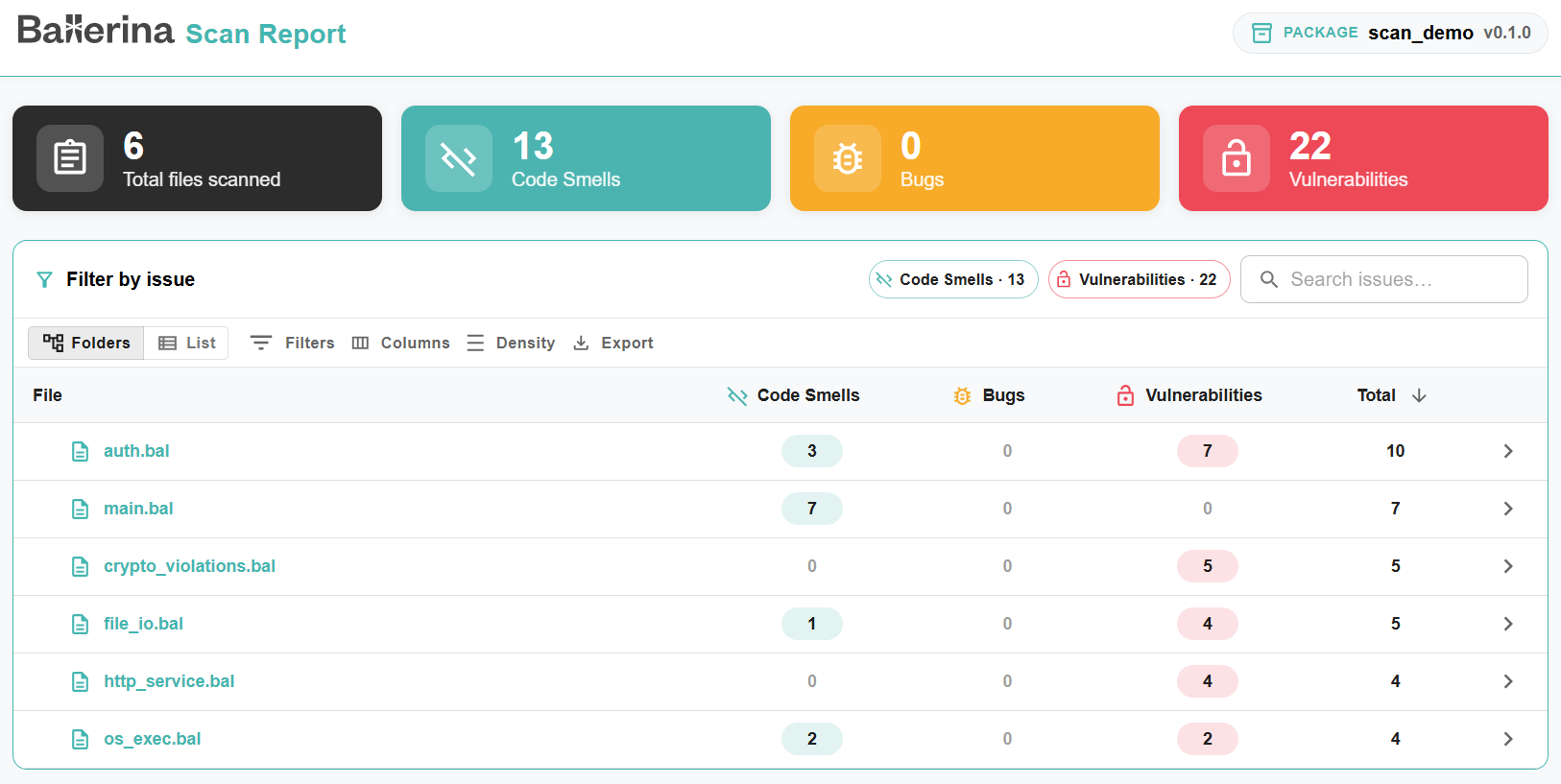
The HTML report includes a summary of the total number of files scanned and the number of code smells, bugs, and vulnerabilities found in each file. You can filter, search, and export the list of files.
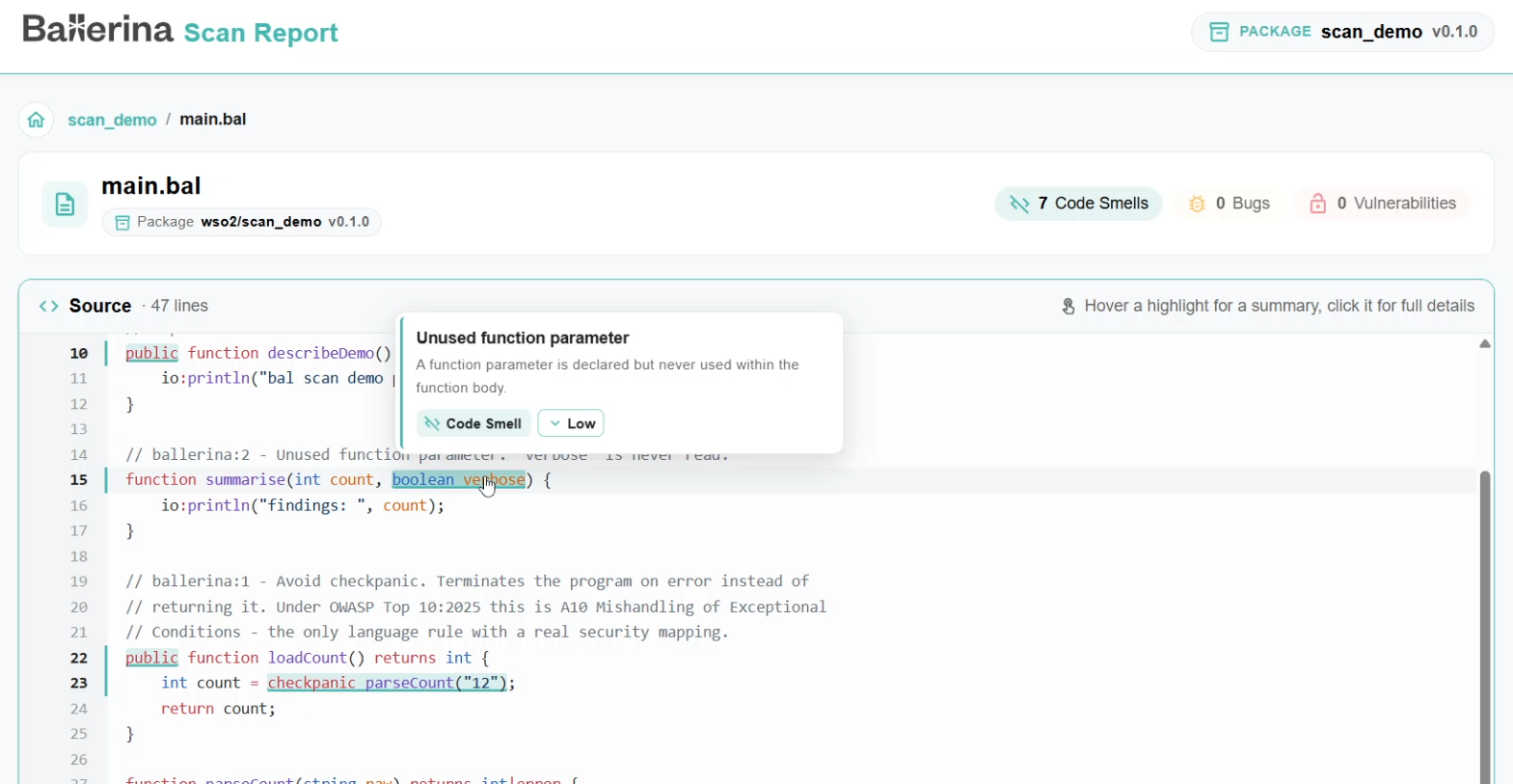
To investigate further, click on a file name to open the file view. This view shows the source of the file and highlights the exact lines where problems were detected. Hover over a highlight to see a summary of the issue, or click it to see the full details.
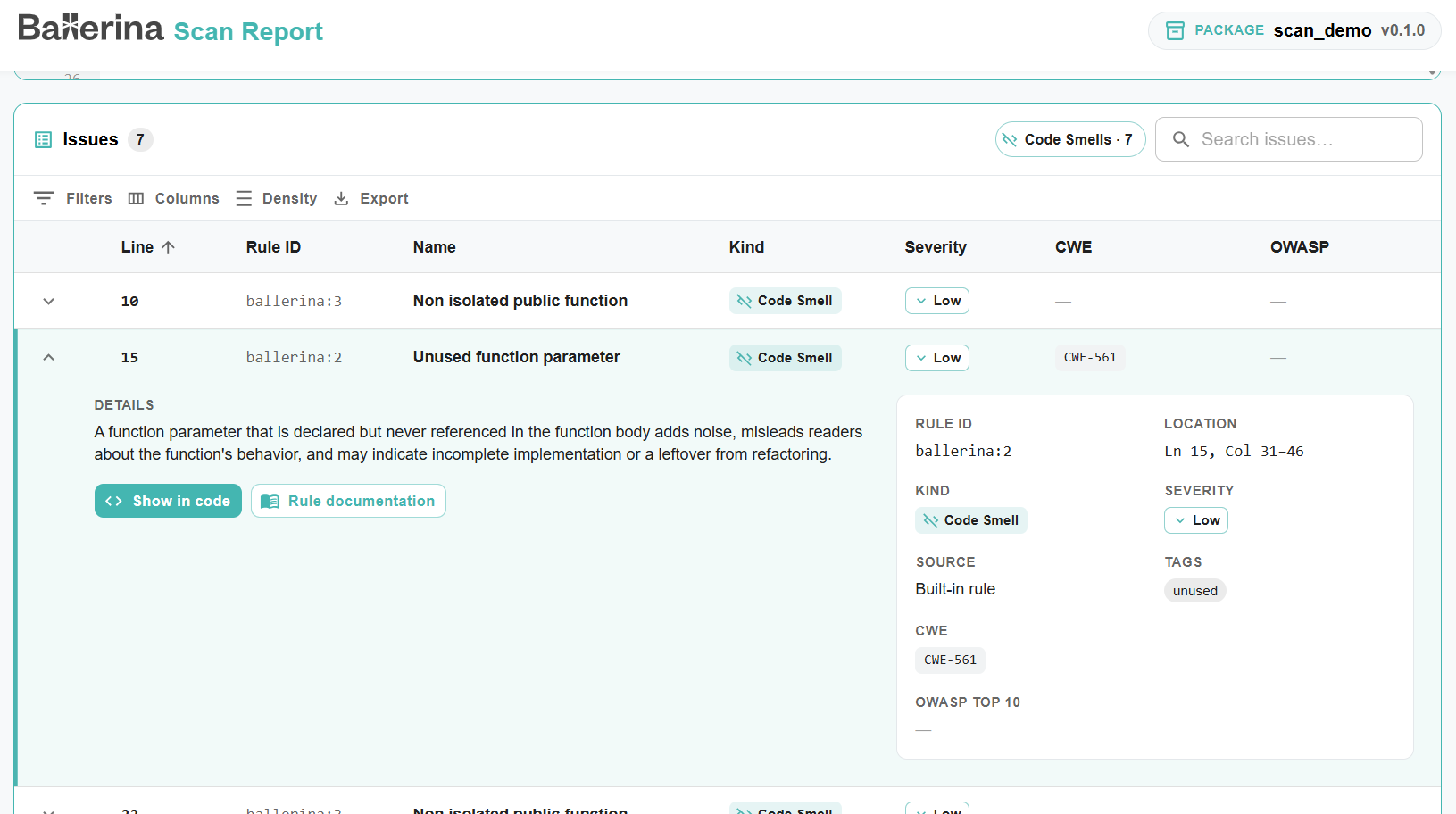
The issues found in the file are listed in a table with the line, rule ID, name, kind, severity, CWE, and OWASP Top 10 category of each issue. Expand an issue to see its description and the full rule details, such as its location, source, and tags. From there, you can jump to the issue in the source using Show in code, or open the rule's documentation using Rule documentation.
Configuration
Rule filters, platform plugins, and static code analyzer plugins can also be configured in a Scan.toml file (only for Ballerina projects). The tool picks up a Scan.toml in the package root, or the file (local path or URL) specified in Ballerina.toml:
[scan] configPath = "path/to/Scan.toml"
A sample Scan.toml:
# Rules to include or exclude in the analysis (same as --include-rules and --exclude-rules) [rule] include = ["ballerina:1", "ballerina/io:101"] # exclude = ["ballerina:1"] # Platform plugins to report results to (enables reporting; required for --platforms) [[platform]] name = "sonarqube" path = "path/to/sonar_platform_plugin.jar"
Rules specified in Scan.toml are combined with those passed via --include-rules and --exclude-rules. Including and excluding rules at the same time is not allowed.
Each [[platform]] entry requires both a name and a path. The path must point to the platform plugin JAR, either as a local file path (resolved relative to the current working directory) or as a URL to download it from. A platform declared in Scan.toml is reported to automatically, and --platforms can only reference platforms declared there. When results are reported to a platform, they are not printed to the console or saved to the target directory.
See Scan file configurations for all available options.
Rules
The full list of rules, with detailed explanations and noncompliant/compliant code examples, is documented at ballerina.io/learn/scan-rules.
Severity levels
The severity of a rule indicates how urgently a reported issue should be addressed, and how it can affect development and deployment if left unresolved:
| Severity | Meaning | Impact |
|---|---|---|
BLOCKER | A critical issue that is very likely to cause application failure or a security breach. | Should block merging or deployment until fixed. |
HIGH | A serious issue likely to cause incorrect behavior or expose the application to exploitation. | Should be fixed before deployment. |
MEDIUM | An issue that affects reliability, maintainability, or security to a moderate degree. | Should be scheduled and fixed soon, does not need to block deployment on its own. |
LOW | A minor issue such as a code smell that affects readability or maintainability. | Safe to defer, but worth cleaning up over time. |
INFO | An informational finding with no material severity. | Does not require action; useful for awareness. |
Core rules
The language-level rules below are defined within this tool.
| Rule ID | Name | Kind | Severity | Description |
|---|---|---|---|---|
ballerina:1 | Avoid checkpanic | Code Smell | Low | Using checkpanic lets an unhandled error panic and crash the program instead of being handled. |
ballerina:2 | Unused function parameter | Code Smell | Low | A function parameter is declared but never used within the function body. |
ballerina:3 | Non isolated public function | Code Smell | Low | A public function is not marked isolated, so it cannot be safely called from concurrently executing code. |
ballerina:4 | Non isolated public method | Code Smell | Low | A public method is not marked isolated, so it cannot be safely called from concurrently executing code. |
ballerina:5 | Non isolated public class | Code Smell | Low | A public class is not marked isolated, so its instances cannot be safely shared across concurrently executing code. |
ballerina:6 | Non isolated public object | Code Smell | Low | A public object is not marked isolated, so its instances cannot be safely shared across concurrently executing code. |
ballerina:7 | This operation always evaluates to true | Code Smell | Low | An operation always evaluates to true regardless of its operands' runtime values. |
ballerina:8 | This operation always evaluates to false | Code Smell | Low | An operation always evaluates to false regardless of its operands' runtime values. |
ballerina:9 | This operation always evaluates to the same value | Code Smell | Low | An operation always reduces to one of its own operands, making the operation itself redundant. |
ballerina:10 | This variable is assigned to itself | Code Smell | Low | A variable is assigned to itself, which has no effect and usually signals a mistake. |
ballerina:11 | Unused class private fields | Code Smell | Low | A private class field is declared but never used. |
ballerina:12 | Invalid range expression | Code Smell | Low | A range expression's bounds never produce any elements, making it dead code. |
ballerina:13 | Hard-coded secrets are security-sensitive | Vulnerability | High | A secret such as a password, API key, or token is embedded as a literal value in source code. |
ballerina:14 | Non configurable secrets are security-sensitive | Vulnerability | Medium | A secret is assigned a fixed value instead of being exposed as a configurable one. |
Library tools
Rules for other Ballerina libraries (ballerina/file, ballerina/http, ballerina/io, ballerina/log, ballerina/os, etc.) are specified separately by each library's own compiler plugin and are reported alongside the core rules when that library is used in the project being scanned. Refer to ballerina.io/learn/scan-rules for the full list of rules contributed by each library tool.